
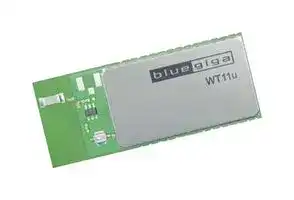


WT11U-A-AI56
Bluetooth 2.1 + EDR, Class 1, Module, 3V to 3.6V Supply, 350m Range, 3Mbps, -84dBm Sensitivity
- Manufacturer: SILICON LABS
- Product type: Bluetooth Modules & Adaptors
- Bluetooth Version:Bluetooth 2.1 + EDR; Supply Voltage Min:3V; Supply Voltage Max:3.6V; Signal Range Max:350m; Data Rate:3Mbps; Bluetooth Class:Class 1; Receive Sensitivity:-84dBm; Opera
- SVHC: To Be Advised
- Interfaces: UART, USB
- Product Range: -
- Certifications: CE, FCC, IC, MIC
- Bluetooth Class: Class 1
- Bluetooth Version: Bluetooth 2.1 + EDR
- Supply Voltage Range: 3 V to 3.6 V
- Receiver Sensitivity Rx: -84 dBm
- Operating Temperature Range: -40 °C to 85 °C
| Delivery and price | |
|---|---|
| Units per pack | 1 |
| Price | 22.6 € |
| Current stock | 10+ |
| Lead time | 30 days |

## **WT11u**

DATA SHEET

Tuesday, 06 June 2017 Version 1.1

## **VERSION HISTORY**

|**Version**|**Comment**|
|---|---|
|0.8|Initial versions|
|0.81|Ordering information updated|
|0.9|Reformatted tables, many WT11i->WT11u updates|
|0.9.1|Rest of tables reformatted|
|0.9.2|Updated dimension drawings|
|0.9.3|Certification information, RF parameters|
|0.9.4|Added sensitivity and current consumption measurements|
|0.9.5|Changed Transmit power variation over supply voltage range to 0.5 and<br>typical transmit power to 16.5dBm|
|0.9.6|Small edits to specifications|
|0.9.7|OPN descriptions updated|
|1.0|Full production|
|1.1|Package Marking updated|


Silicon Labs

## **TABLE OF CONTENTS**

|1|Ordering Information......................................................................................................................................6|Ordering Information......................................................................................................................................6|
|---|---|---|
|2|Pinout and Terminal Description ...................................................................................................................7||
|3|Electrical Characteristics ............................................................................................................................ 10||
||3.1|Absolute Maximum Ratings ................................................................................................................ 10|
||3.2|Recommended Operating Conditions ................................................................................................. 10|
||3.3|Input / Output Terminal Characteristics .............................................................................................. 11|
||3.3.1<br>Input/Output Terminal Characteristics (Digital) ............................................................................ 11||
||3.3.2<br>Input/Output Terminal Characteristics (USB) .............................................................................. 12||
||3.4|PIO Current Sink and Source Capability ............................................................................................. 13|
||3.5|Transmitter Performance For BDR ..................................................................................................... 13|
||3.6|Receiver Performance ........................................................................................................................ 14|
||3.7|Current Consumption .......................................................................................................................... 14|
||3.8|WT11u-A Antenna Specification ......................................................................................................... 15|
|4|Physical Dimensions .................................................................................................................................. 18||
||4.1|Package Drawings .............................................................................................................................. 20|
|5|Layout Guidelines ....................................................................................................................................... 22||
|6|UART Interface ........................................................................................................................................... 25||
||6.1|UART Bypass ...................................................................................................................................... 27|
||6.2|UART Configuration While Reset is Active ......................................................................................... 27|
||6.3|UART Bypass Mode ............................................................................................................................ 27|
|7|USB Interface ............................................................................................................................................. 28||
||7.1|USB Data Connections ....................................................................................................................... 28|
||7.2|USB Pull-Up resistor ........................................................................................................................... 28|
||7.3|USB Power Supply .............................................................................................................................. 28|
||7.4|Self-Powered Mode ............................................................................................................................. 28|
||7.5|Bus-Powered Mode ............................................................................................................................. 29|
||7.6|USB Suspend Current ......................................................................................................................... 30|
||7.7|USB Detach and Wake-Up Signaling.................................................................................................. 30|
||7.8|USB Driver .......................................................................................................................................... 31|
||7.9|USB v2.0 Compliance and Compatibility ............................................................................................ 31|
|8|Serial Peripheral Interface (SPI) ................................................................................................................. 32||
|9|PCM Codec Interface ................................................................................................................................. 33||
||9.1|PCM Interface Master/Slave ............................................................................................................... 33|
||9.2|Long Frame Sync ................................................................................................................................ 34|
||9.3|Short Frame Sync ............................................................................................................................... 34|
||9.4|Multi-slot Operation ............................................................................................................................. 35|
||9.5|GCI Interface ....................................................................................................................................... 35|


Silicon Labs

|9.6|Slots and Sample Formats .................................................................................................................. 36|
|---|---|
|9.7|Additional Features ............................................................................................................................. 37|
|9.8|PCM_CLK and PCM_SYNC Generation ............................................................................................ 37|
|9.9|PCM Configuration .............................................................................................................................. 38|
|10|I/O Parallel Ports ..................................................................................................................................... 41|
|10.1|PIO Defaults ................................................................................................................................. 41|
|11|Reset ....................................................................................................................................................... 42|
|11.1|Pin States on Reset ..................................................................................................................... 43|
|12|Package Marking .................................................................................................................................... 44|
|13|Certifications ........................................................................................................................................... 46|
|13.1|Bluetooth ...................................................................................................................................... 46|
|13.2|FCC .............................................................................................................................................. 46|
|13.3|ISEDC .......................................................................................................................................... 47|
|13.3.1<br>ISEDC (Français) ......................................................................................................................... 47||
|13.4|CE ................................................................................................................................................ 49|
|13.5|MIC Japan .................................................................................................................................... 49|
|13.6|Qualified Antenna Types for WT11u-E ........................................................................................ 50|
|13.7|Moisture Sensitivity Level (MSL).................................................................................................. 50|


Silicon Labs

## **WT11u** _**Bluetooth®**_ **Module**

## **DESCRIPTION**

WT11u is a fully integrated _Bluetooth_ 2.1 + EDR, class 1 module combining antenna, _Bluetooth_ radio and an on-board iWRAP Bluetooth stack.  Silicon Labs WT11u provides an ideal solution for developers that want to quickly integrate long range and high performance _Bluetooth_ wireless technology to their design without investing several months into _Bluetooth_ radio and stack development. WT11u provides a 100dB link budget ensuring long rage and robust _Bluetooth_ connectivity. WT11u uses Silicon Labs’ iWRAP _Bluetooth_ stack, which is an embedded _Bluetooth_ stack implementing 13 different _Bluetooth_ profiles and Apple iAP connectivity. By using WT11u combined with iWRAP _Bluetooth_ stack and Silicon Labs’ excellent technical support designers ensure quick time to market, low development costs and risk.

## **KEY FEATURES:**

## **Radio features:**

- Bluetooth v.2.1 + EDR

- Bluetooth class 1 radio

- Transmit power: +17 dBm

- Receiver sensitivity: -84 dBm (DH5)

- Range: 350 meters line-of-sight

- Integrated chip antenna or U.FL connector

## **Hardware features:**

- UART and USB host interfaces

- 802.11 co-existence interface

- 6 software programmable IO pins

- Operating voltage: 2.7V to 3.6V

## **APPLICATIONS** :

- Industrial and M2M

- Point-of-Sale devices

- Computer Accessories

- Temperature range: -40C to +85C

- Dimensions: 35.75 x 14.50 x 2.6 mm

## **Qualifications:**

- _Bluetooth_

- CE

- FCC

- IC

- Japan

## **PHYSICAL OUTLOOK**

Silicon Labs

## **1 Ordering Information**

|**Firmware**|**U.FL Connector**|**Internal chip antenna**|
|---|---|---|
|iWRAP 5.6 firmware|WT11u-E-AI56|WT11u-A-AI56|
|iWRAP 5.5 firmware|WT11u-E-AI55|WT11u-A-AI55|
|iWRAP 5.0.2 firmware|WT11u-E-AI5|WT11u-A-AI5|
|HCI firmware, BT2.1 + EDR|WT11u-E-HCI21|WT11u-A-HCI21|


**Table 1: Ordering information**

Silicon Labs

Page 6 of 51

**2 Pinout and Terminal Description**

**==> picture [301 x 226] intentionally omitted <==**

**----- Start of picture text -----**<br>
WT11i<br>1 GND GND 28<br>2 VDD_PA AIO 27<br>3 PIO2 UART_TX 26<br>4 PIO3 PIO5 25<br>5 UART_RTS# SPI_MOSI 24<br>6 UART_RX SPI_MISO 23<br>7 PCM_OUT SPI_CLK 22<br>8 USB+ SPI_CS# 21<br>9 USB- PIO4 20<br>10 UART_CTS# PIO7 19<br>11 PCM_IN PIO6 18<br>12 PCM_CLK RESET 17<br>13 PCM_SYNC VDD 16<br>14 GND GND 15<br>**----- End of picture text -----**<br>


**Figure 1: WT11u connection diagram**

|**Pad name**|**Pad**<br>**number**|**Pad type**|**Description**|
|---|---|---|---|
|RESET|17|Input|Reset input, active high, internal 220kohm pull-down. Keep<br>high for >5ms for reset|
|GND|1, 14, 15, 28|GND|Ground connection, connect all to a ground plane with<br>minimal trace lengths|
|VDD_PA|2|Supply voltage|Supply voltage for RF power amplifier|
|VDD|16|Supply voltage|Chipset supply voltage|


**Table 2: Supply and RF Terminal Descriptions**

Silicon Labs

Page 7 of 51

|**PIO signal**|**Pad number**|**Description**|
|---|---|---|
|PIO[2]|3|Bi-directional digital in/out with programmable strength and pull-up/pull-<br>down|
|PIO[3]|4|Bi-directional digital in/out with programmable strength and pull-up/pull-<br>down|
|PIO[4]|20|Bi-directional digital in/out with programmable strength and pull-up/pull-<br>down|
|PIO[5]|25|Bi-directional digital in/out with programmable strength and pull-up/pull-<br>down|
|PIO[6]|18|Bi-directional digital in/out with programmable strength and pull-up/pull-<br>down|
|PIO[7]|19|Bi-directional digital in/out with programmable strength and pull-up/pull-<br>down|
|AIO[1]|27|Bi-directional analog in/out|


**Table 3: GPIO Terminal Descriptions**

|**PCM signal**|**Pad number**|**Pad type**|**Description**|
|---|---|---|---|
|PCM_OUT|7|Output, weak internal pull-down|Synchronous data output|
|PCM_IN|11|Input, weak internal pull-down|Synchronous data input|
|PCM_SYNC|13|Bi-directional, weak internal pull-down|Synchronous data sync|
|PCM_CLK|12|Bi-directional, weak internal pull-down|Synchronous data clock|


**Table 4: PCM Terminal Descriptions**

Silicon Labs

Page 8 of 51

|**UART signal**|**Pad number**|**Pad type**|**Description**|
|---|---|---|---|
|UART_TX|26|Output,<br>weak internal<br>pull-up|UART data output, active<br>high|
|UART_RTS#|5|Output,<br>weak internal<br>pull-up|UART request to send,<br>active low|
|UART_RX|6|Input, weak internal pull-<br>down|UART data input, active<br>high|
|UART_CTS#|10|Input, weak internal pull-<br>down|UART clear to send,<br>active low|


**Table 5: UART Terminal Descriptions**

|**USB signal**|**Pad number**|**Pad type**|**Description**|
|---|---|---|---|
|USB+|8|Bidirectional|USB data line with internal 1.5kohm pull-up|
|USB-|9|Bidirectional|USB data line|


**Table 6: USB Terminal Descriptions**

|**SPI signal**|**Pad**<br>**number**|**Pad type**|**Description**|
|---|---|---|---|
|SPI_MOSI|24|Input, weak internal pull-down|SPI data input|
|SPI_CS#|21|Input, weak internal pull-up|Chip select, active low|
|SPI_CLK|22|Input, weak internal pull-down|SPI clock|
|SPI_MISO|23|Output, weak internal pull-down|SPI data output|


**Table 7: Terminal Descriptions**

Silicon Labs

Page 9 of 51

## **3 Electrical Characteristics**

## 3.1 Absolute Maximum Ratings

|**Specification**|**Min**|**Max**|**Unit**|
|---|---|---|---|
|Storage temperature|-40|85|°C|
|VDD_PA, VDD|-0.4|3.6|V|
|Other terminal voltages|VSS-0.4|VDD+0.4|V|


**Table 8: Absolute Maximum Ratings**

## 3.2 Recommended Operating Conditions

|**Specification**|**Min**|**Max**|**Unit**|
|---|---|---|---|
|Operating temperature|-40|85|°C|
|VDD_PA*, VDD|3.0|3.6|V|


- *) VDD_PA has an effect on the RF output power.

## **Table 9: Recommended Operating Conditions**

Silicon Labs

Page 10 of 51

## 3.3 Input / Output Terminal Characteristics

## 3.3.1 Input/Output Terminal Characteristics (Digital)

|**Digital Terminals**||**Min**|**Typ**|**Max**|**Unit**|
|---|---|---|---|---|---|
|**Input Voltage Levels**||||||
|VILinput logic level low|2.7 V ≤ VDD ≤ 3.0 V|-0.4|-|0.8|V|
||1.7 V ≤ VDD ≤ 1.9 V|-0.4|-|0.4|V|
|VIHinput logic level high||0.7 VDD|-|VDD + 0.4|V|
|**Output Voltage Levels**||||||
|VOLoutput logic level low<br>(IO= 4.0 mA) 2.7V ≤ VDD ≤ 3.0 V||-|-|0.2|V|
|VOL output logic level low<br>(IO= 4.0 mA) 1.7V ≤ VDD ≤ 1.9||-|-|0.4|V|
|VOL output logic level high<br>(IO= 4.0 mA) 2.7V ≤ VDD ≤ 3.0||VDD - 0.2|-||V|
|VOL output logic level high<br>(IO= 4.0 mA) 1.7V ≤ VDD ≤ 1.9||VDD - 0.4|-||V|
|**Input and Tristate Current with**||||||
|Strong pull-up||-100|-40|-10|µA|
|Strong pull-down||10|40|100|µA|
|Weak pull-up||-5.0|-1.0|-0.2|µA|
|Weak pull-down||0.2|1.0|5.0|µA|
|I/O pad leakage current||-1|0|1|µA|
|CIinput capacitance||1.0|-|5.0|pF|


Silicon Labs

Page 11 of 51

## 3.3.2 Input/Output Terminal Characteristics (USB)

|**USB Terminals**|**Min**|**Typ**|**Max**|**Unit**|
|---|---|---|---|---|
|VDD_USB for correct USB operation|3.1||3.6|V|
|**Input Threshold**|||||
|VILinput logic level log|-|-|0.3VDD_USB|V|
|VIHinput logic level high|0.7VDD_USB|-|-|V|


Silicon Labs

Page 12 of 51

## 3.4 PIO Current Sink and Source Capability

**Figure 2: WT11u PIO Current Drive Capability**

## 3.5 Transmitter Performance For BDR

|**RF characteristic**|**Min**|**Typ**|**Max**|**Bluetooth specification**|**Unit**|
|---|---|---|---|---|---|
|Max transmit power||16.5||<20|dBm|
|Transmit power variation over temperature<br>range|-2||2||dB|
|Transmit power variation over supply<br>voltage range|-0.5||0.5||dB|
|Transmit power variation over frequency<br>range|-0.5||0.5||dB|
|Transmit power control range|-15||15||dB|
|20dB bandwidth for modulated carrier||950||<1000|kHz|
|Avg drift|-10||3|±40|kHz|
|ΔF1avg||166||140 to 175|kHz|


**Table 10: Transmitter performance for BDR (room temperature, VDD=3.3V)**

Silicon Labs

Page 13 of 51

## 3.6 Receiver Performance

Antenna gain not taken into account

|**Characteristic, VDD=3.3V, room temperature**|**Packet type**|**Typ**|**Bluetooth**<br>**specification**|**Unit**|
|---|---|---|---|---|
|Sensitivity for 0.1% BER|DH1|-86|-70|dBm|
||DH5|-83.5||dBm|
||2-DH1|-88||dBm|
||2-DH5|-86.5||dBm|
||3-DH1|-81.5||dBm|
||3-DH5|-79.5||dBm|
|Sensitivity variation over temperature range||+/- 2||dB|


## 3.7 Current Consumption

|**Operating mode**|**Peak**|**Average**|**Unit**|
|---|---|---|---|
|Stand-by, page mode 0 2000 1||1.7|mA|
|TX 3-DH5, max duty cycle|111|88|mA|
|TX 2-DH5, max duty cycle|110|88|mA|
|TX DH5, max duty cycle|176|138|mA|
|RX|43|36|mA|
|Deep sleep, page mode 0 2000 1||51|µA|
|Inquiry|117|58|mA|


**Table 11: WT11u Current Consumption**

Silicon Labs

Page 14 of 51

## 3.8 WT11u-A Antenna Specification

WT11u-A uses a monopole type on a chip antenna with maximum gain of 0.5 dBi. The radiation pattern and the total radiated efficiency are dependent on the layout and any metal around the antenna has an effect on the radiation characteristics. Typically the efficiency is 30 … 50%.

**==> picture [29 x 6] intentionally omitted <==**

**----- Start of picture text -----**<br>
WT11i-A<br>**----- End of picture text -----**<br>


**Figure 3: Antenna radiation pattern in a USB dongle layout**

**Figure 4: Antenna radiation pattern in a USB dongle layout**

Silicon Labs

Page 15 of 51

**Figure 5: Antenna radiation pattern in a USB dongle layout**

**==> picture [5 x 15] intentionally omitted <==**

**----- Start of picture text -----**<br>
WT11i<br>**----- End of picture text -----**<br>


**Figure 6: Antenna radiation pattern in the WT11 evaluation kit**

**Figure 7: Antenna radiation pattern in the WT11 evaluation kit**

Silicon Labs

Page 16 of 51

**Figure 8: Antenna radiation pattern in the WT11 evaluation kit**

Silicon Labs

Page 17 of 51

## **4 Physical Dimensions**

**Figure 9: Physical dimensions (top view)**

**Figure 10: Dimensions of WT11u-A**

Silicon Labs

Page 18 of 51

**Figure 11: Dimensions of WT11u-E**

Silicon Labs

Page 19 of 51

## 4.1 Package Drawings

## **Figure 12: WT11u taping**

Silicon Labs

Page 20 of 51

**Figure 13: WT11u orientation in the reel**

Silicon Labs

Page 21 of 51

## **5 Layout Guidelines**

WT11u is pin compatible with WT11i and WT11, despite slightly different external dimensions compared to WT11. For a new design it recommended to follow the land pattern shown in the figure below.

**Figure 14: Recommended PCB land pattern for WT11u**

Do not place any copper under the antenna. The minimum recommended keep out area is shown in the Figure 15. Any dielectric material in close proximity to the antenna will effect on the impedance matching of the antenna by lowering the resonance frequency. Figure 16 shows how different FR4 thickness under the antenna effect on the resonance frequency. Recommended PCB thickness for the PCB is 1.6 mm – 2.8 mm. Avoid placing plastic cover closer than 3 mm from the antenna as this will also tune the resonance frequency downwards.

Silicon Labs

Page 22 of 51

**==> picture [398 x 493] intentionally omitted <==**

**----- Start of picture text -----**<br>
Edge of the PCB<br>Do not place<br>copper or any<br>metal within<br>the area<br>marked with<br>cross lines<br>Peeeeeeeeeage AL,<br>Y<br>GND area with<br>P| stitching vias 20mm<br>Z_}<br>Figure 15: Recommended metal keep put area for WT11u<br>Effect of PCB thickness to the antenna impedance matching<br>0<br>eeeeeeee<br>-5<br>-10 eeeeet<br>-15 INSIST 1 mm<br>2 mm<br>NeeNONeee<br>-20<br>3 mm<br>NIXLK<br>-25<br>NG BT Band<br>-30<br>-35<br>ee ee ee ee<br>ee |<br>-40 ee<br>2300 2350 2400 2450 2500 2550 2600<br>Freq (MHz)<br>S11 (dB)<br>**----- End of picture text -----**<br>


**Figure 16: Effect of FR4 under the antenna to the resonant frequency**

Use good layout practices to avoid excessive noise coupling to supply voltage traces or sensitive analog signal traces, such as analog audio signals. If using overlapping ground planes use stitching vias separated by max 3 mm to avoid emission from the edges of the PCB. Connect all the GND pins directly to a solid GND plane and make sure that there is a low impedance path for the return current following the signal and supply traces all the way from start to the end.

Silicon Labs

Page 23 of 51

A good practice is to dedicate one of the inner layers to a solid GND plane and one of the inner layers to supply voltage planes and traces and route all the signals on top and bottom layers of the PCB. This arrangement will make sure that any return current follows the forward current as close as possible and any loops are minimized.

**==> picture [396 x 74] intentionally omitted <==**

**----- Start of picture text -----**<br>
Signals<br>GND<br>Power<br>Signals<br>**----- End of picture text -----**<br>


**Figure 17:** Typical 4-layer PCB construction

**==> picture [443 x 129] intentionally omitted <==**

**----- Start of picture text -----**<br>
Overlapping GND layers without  Overlapping GND layers with<br>GND stitching vias GND stitching vias shielding the<br>RF energy<br>**----- End of picture text -----**<br>


**Figure 18:** Use of stitching vias to avoid emissions from the edges of the PCB

Silicon Labs

Page 24 of 51

## **6 UART Interface**

This is a standard UART interface for communicating with other serial devices.WT11u UART interface provides a simple mechanism for communicating with other serial devices using the RS232 protocol.

Four signals are used to implement the UART function. When WT11u is connected to another digital device, UART_RX and UART_TX transfer data between the two devices. The remaining two signals, UART_CTS and UART_RTS, can be used to implement RS232 hardware flow control where both are active low indicators. All UART connections are implemented using CMOS technology and have signalling levels of 0V and VDD.

UART configuration parameters, such as data rate and packet format, are set using WT11u software.

## _Note:_

_In order to communicate with the UART at its maximum data rate using a standard PC, an accelerated serial port adapter card is required for the PC._

|**Parameter**|**Possible values**|**Possible values**|
|---|---|---|
|Data rate|Minimum|1200bps (2% error)|
|||9600bps (1% error)|
||Maximum|3Mbps (1% error)|
|Flow control|RTS/CTS or None||
|Parity|None, Odd or Even||
|Number of stop bits|1 or 2||
|Bits per channel|8||


**Table 12: Possible UART Settings**

The UART interface is capable of resetting WT11u upon reception of a break signal. A break is identified by a continuous logic low (0V) on the UART_RX terminal, as shown in Figure 19. If tBRK is longer than the value (in microseconds), defined by PSKEY_HOST_IO_UART_RESET_TIMEOUT, (0x1a4), a reset will occur. Values below 1000 are treated as zero and values above 255000 are truncated to 255000. This feature allows a host to initialise the system to a known state. Also, WT11u can emit a break character that may be used to wake the host.

**Figure 19: Break Signal**

Table 13 shows a list of commonly used data rates and their associated values for PSKEY_UART_BAUD_RATE (0x204). There is no requirement to use these standard values. Any data rate within the supported range can be set in the PS Key according to the formula in Equation 1

Silicon Labs

Page 25 of 51

## **Equation 1: Data Rate**

|**Data rate [bits/s]**|**Persistent store value**<br>**(Hex)**|**Error [bits/s]**|**Error [%]**|
|---|---|---|---|
|1200|0x0005|5|1.73|
|2400|0x000A|10|1.73|
|4800|0x0014|20|1.73|
|9600|0x0027|39|-0.82|
|19200|0x004F|79|0.45|
|38400|0x009D|157|-0.18|
|57600|0x00EC|236|0.03|
|76800|0x013B|315|0.14|
|115200|0x01D8|472|0.03|
|230400|0x03B0|944|0.03|
|460800|0x075F|1887|-0.02|
|921600|0x0EBF|3775|0|
|1382400|0x161E|5662|-0.01|
|1843200|0x1D7E|7550|0|
|2764800|0x2C3D|11325|0|


**Table 13: Standard Data Rates**

Silicon Labs

Page 26 of 51

## 6.1 UART Bypass

**Figure 20: UART Bypass Architecture**

## 6.2 UART Configuration While Reset is Active

The UART interface for WT11u while the chip is being held in reset is tristate. This will allow the user to daisy chain devices onto the physical UART bus. The constraint on this method is that any devices connected to this bus must tristate when WT11u reset is de-asserted and the firmware begins to run.

## 6.3 UART Bypass Mode

Alternatively, for devices that do not tristate the UART bus, the UART bypass mode on the chipset can be used. The default state of the chipset after reset is de-asserted; this is for the host UART bus to be connected to the chipset UART, thereby allowing communication to the chipset via the UART. All UART bypass mode connections are implemented using CMOS technology and have signalling levels of 0V and VDD.

In order to apply the UART bypass mode, a BCCMD command will be issued the chipset. Upon this issue, it will switch the bypass to PIO[7:4] as Figure 20 indicates. Once the bypass mode has been invoked, WT11u will enter the Deep Sleep state indefinitely.

In order to re-establish communication with WT11u, the chip must be reset so that the default configuration takes effect.

It is important for the host to ensure a clean Bluetooth disconnection of any active links before the bypass mode is invoked. Therefore, it is not possible to have active Bluetooth links while operating the bypass mode.

The current consumption for a device in UART bypass mode is equal to the values quoted for a device in standby mode.

Silicon Labs

Page 27 of 51

## **7 USB Interface**

This is a full speed (12Mbits/s) USB interface for communicating with other compatible digital devices. WT11u acts as a USB peripheral, responding to requests from a master host controller such as a PC.

The USB interface is capable of driving a USB cable directly. No external USB transceiver is required. The device operates as a USB peripheral, responding to requests from a master host controller such as a PC. Both the OHCI and the UHCI standards are supported. The set of USB endpoints implemented can behave as specified in the USB section of the Bluetooth v2.1 + EDR specification or alternatively can appear as a set of endpoints appropriate to USB audio devices such as speakers.

As USB is a master/slave oriented system (in common with other USB peripherals), WT11u only supports USB Slave operation.

## 7.1 USB Data Connections

The USB data lines emerge as pins USB_DP and USB_DN. These terminals are connected to the internal USB I/O buffers of the chipset, therefore, have a low output impedance. To match the connection to the characteristic impedance of the USB cable, resistors must be placed in series with USB_DP/USB_DN and the cable.

## 7.2 USB Pull-Up resistor

WT11u features an internal USB pull-up resistor. This pulls the USB_DP pin weakly high when WT11u is ready to enumerate. It signals to the PC that it is a full speed (12Mbits/s) USB device.

The USB internal pull-up is implemented as a current source, and is compliant with section 7.1.5 of the USB specification v1.2. The internal pull-up pulls USB_DP high to at least 2.8V when loaded with a 15kΩ 5% pulldown resistor (in the hub/host) when VDD_PADS = 3.1V. This presents a Thevenin resistance to the host of at least 900Ω. Alternatively, an external 1.5kΩ pull-up resistor can be placed between a PIO line and D+ on the USB cable. The firmware must be alerted to which mode is used by setting PSKEY_USB_PIO_PULLUP appropriately. The default setting uses the internal pull-up resistor.

## 7.3 USB Power Supply

The USB specification dictates that the minimum output high voltage for USB data lines is 2.8V. To safely meet the USB specification, the voltage on the VDD supply terminal must be an absolute minimum of 3.1V. Silicon Labs recommends 3.3V for optimal USB signal quality.

## 7.4 Self-Powered Mode

In self-powered mode, the circuit is powered from its own power supply and not from the VBUS (5V) line of the USB cable. It draws only a small leakage current (below 0.5mA) from VBUS on the USB cable. This is the easier mode for which to design, as the design is not limited by the power that can be drawn from the USB hub or root port. However, it requires that VBUS be connected to WT11u via a resistor network (Rvb1 and Rvb2), so WT11u can detect when VBUS is powered up. The chipset will not pull USB_DP high when VBUS is off.

Self-powered USB designs (powered from a battery or PSU) must ensure that a PIO line is allocated for USB pullup purposes. A 1.5kΩ 5% pull-up resistor between USB_DP and the selected PIO line should be fitted to the design. Failure to fit this resistor may result in the design failing to be USB compliant in self-powered mode. The internal pull-up in the chipset is only suitable for bus-powered USB devices, e.g., dongles.

Silicon Labs

Page 28 of 51

**Figure 21: USB Connections for Self-Powered Mode**

The terminal marked USB_ON can be any free PIO pin. The PIO pin selected must be registered by setting PSKEY_USB_PIO_VBUS to the corresponding pin number.

|**Identifier**|**Value**|**Function**|
|---|---|---|
|Rs|0-10Ω as needed by the design **|Impedance matching to USB<br>cable|
|Rvb1|22kΩ 5%|VBUS ON sense divider|
|Rvb2|47kΩ 5%|VBUS ON sense divider|


**Figure 22: USB Interface Component Values**

**) WT11u has internal 22 ohm series resistors at the USB lines.

## 7.5 Bus-Powered Mode

In bus-powered mode, the application circuit draws its current from the 5V VBUS supply on the USB cable. WT11u negotiates with the PC during the USB enumeration stage about how much current it is allowed to consume. On power-up the device must not draw more than 100 mA but after being configured it can draw up to 500 mA.

For WT11u, the USB power descriptor should be altered to reflect the amount of power required. This is accomplished by setting PSKEY_USB_MAX_POWER (0x2c6). This is higher than for a Class 2 application due to the extra current drawn by the Transmit RF PA. By default for WT11u the setting is 300 mA.

When selecting a regulator, be aware that VBUS may go as low as 4.4V. The inrush current (when charging reservoir and supply decoupling capacitors) is limited by the USB specification. See the USB Specification. Some applications may require soft start circuitry to limit inrush current if more than 10uF is present between VBUS and GND. The 5V VBUS line emerging from a PC is often electrically noisy. As well as regulation down to 3.3V and 1.8V, applications should include careful filtering of the 5V line to attenuate noise that is above the voltage regulator bandwidth. Excessive noise on WT11u supply pins will result in reduced receiver sensitivity and a distorted RF transmit signal.

Silicon Labs

Page 29 of 51

**Figure 23: USB Connections for Bus-Powered Mode**

## 7.6 USB Suspend Current

All USB devices must permit the USB controller to place them in a USB suspend mode. While in USB Suspend, bus-powered devices must not draw more than 2.5mA from USB VBUS (self-powered devices may draw more than 2.5mA from their own supply). This current draw requirement prevents operation of the radio by buspowered devices during USB Suspend.

When computing suspend current, the current from VBUS through the bus pull-up and pull-down resistors must be included. The pull-up resistor at the device is 1.5kΩ. (nominal). The pull-down resistor at the hub is 14.25kΩ. to 24.80kΩ. The pull-up voltage is nominally 3.3V, which means that holding one of the signal lines high takes approximately 200uA, leaving only 2.3mA available from a 2.5mA budget. Ensure that external LEDs and/or amplifiers can be turned off by the chipset. The entire circuit must be able to enter the suspend mode.

## 7.7 USB Detach and Wake-Up Signaling

WT11u can provide out-of-band signaling to a host controller by using the control lines called USB_DETACH and USB_WAKE_UP. These are outside the USB specification (no wires exist for them inside the USB cable), but can be useful when embedding WT11u into a circuit where no external USB is visible to the user. Both control lines are shared with PIO pins and can be assigned to any PIO pin by setting PSKEY_USB_PIO_DETACH and PSKEY_USB_PIO_WAKEUP to the selected PIO number.

USB_DETACH is an input which, when asserted high, causes WT11u to put USB_DN and USB_DP in high impedance state and turns off the pull-up resistor on DP. This detaches the device from the bus and is logically equivalent to unplugging the device. When USB_DETACH is taken low, WT11u will connect back to USB and await enumeration by the USB host.

USB_WAKE_UP is an active high output (used only when USB_DETACH is active) to wake up the host and allow USB communication to recommence. It replaces the function of the software USB WAKE_UP message (which runs over the USB cable) and cannot be sent while chipset is effectively disconnected from the bus.

Silicon Labs

Page 30 of 51

**Figure 24: USB_Detach and USB_Wake_Up Signals**

## 7.8 USB Driver

A USB Bluetooth device driver is required to provide a software interface between the chipset and the Bluetooth software running on the host computer.

## 7.9 USB v2.0 Compliance and Compatibility

Although WT11u meets the USB specification, Silicon Labs cannot guarantee that an application circuit designed around the module is USB compliant. The choice of application circuit, component choice and PCB layout all affect USB signal quality and electrical characteristics. The information in this document is intended as a guide and should be read in association with the USB specification, with particular attention being given to Chapter 7. Independent USB qualification must be sought before an application is deemed USB compliant and can bear the USB logo. Such qualification can be obtained from a USB plugfest or from an independent USB test house.

Terminals USB_DP and USB_DN adhere to the USB Specification v2.0 (Chapter 7) electrical requirements.

The chipset is compatible with USB v2.0 host controllers; under these circumstances the two ends agree the mutually acceptable rate of 12Mbits/s according to the USB v2.0 specification.

Silicon Labs

Page 31 of 51

## **8 Serial Peripheral Interface (SPI)**

The SPI port can be used for system debugging. It can also be used for programming the Flash memory and setting the PSKEY configurations. WT11u uses 16-bit data and 16-bit address serial peripheral interface, where transactions may occur when the internal processor is running or is stopped. SPI interface is connected using the MOSI, MISO, CSB and CLK pins.

SPI interface cannot be used for application purposes.

Silicon Labs

Page 32 of 51

## **9 PCM Codec Interface**

PCM is a standard method used to digitize audio (particularly voice) for transmission over digital communication channels. Through its PCM interface, WT11u has hardware support for continual transmission and reception of PCM data, thus reducing processor overhead for wireless headset applications. WT11u offers a bidirectional digital audio interface that routes directly into the baseband layer of the on-chip firmware. It does not pass through the HCI protocol layer.

Hardware on WT11u allows the data to be sent to and received from a SCO connection. Up to three SCO connections can be supported by the PCM interface at any one time.

WT11u can operate as the PCM interface master generating an output clock of 128, 256 or 512kHz. When configured as PCM interface slave, it can operate with an input clock up to 2048kHz. WT11u is compatible with a variety of clock formats, including Long Frame Sync, Short Frame Sync and GCI timing environments.

It supports 13-bit or 16-bit linear, 8-bit µ-law or A-law companded sample formats at 8ksamples/s and can receive and transmit on any selection of three of the first four slots following PCM_SYNC. The PCM configuration options are enabled by setting PSKEY_PCM_CONFIG32.

WT11u interfaces directly to PCM audio devices.

_NOTE: Analog audio lines are very sensitive to RF disturbance. Use good layout practices to ensure noise less audio. Make sure that the return path for the audio signals follows the forward current all the way as close as possible and use fully differential signals when possible. Do not compromise audio routing._

## 9.1 PCM Interface Master/Slave

When configured as the master of the PCM interface, WT11u generates PCM_CLK and PCM_SYNC.

**Figure 25: PCM Interface Master**

When configured as the Slave of the PCM interface, WT11u accepts PCM_CLK rates up to 2048kHz.

Silicon Labs

Page 33 of 51

**Figure 26: PCM Interface Slave**

## 9.2 Long Frame Sync

Long Frame Sync is the name given to a clocking format that controls the transfer of PCM data words or samples. In Long Frame Sync, the rising edge of PCM_SYNC indicates the start of the PCM word. When WT11u is configured as PCM master, generating PCM_SYNC and PCM_CLK, then PCM_SYNC is 8-bits long. When WT11u is configured as PCM Slave, PCM_SYNC may be from two consecutive falling edges of PCM_CLK to half the PCM_SYNC rate, i.e., 62.5s long.

**Figure 27: Long Frame Sync (Shown with 8-bit Companded Sample)**

WT11u samples PCM_IN on the falling edge of PCM_CLK and transmits PCM_OUT on the rising edge. PCM_OUT may be configured to be high impedance on the falling edge of PCM_CLK in the LSB position or on the rising edge.

## 9.3 Short Frame Sync

In Short Frame Sync, the falling edge of PCM_SYNC indicates the start of the PCM word. PCM_SYNC is always one clock cycle long.

Silicon Labs

Page 34 of 51

**Figure 28: Short Frame Sync (Shown with 16-bit Sample)**

As with Long Frame Sync, WT11u samples PCM_IN on the falling edge of PCM_CLK and transmits PCM_OUT on the rising edge. PCM_OUT may be configured to be high impedance on the falling edge of PCM_CLK in the LSB position or on the rising edge.

## 9.4 Multi-slot Operation

More than one SCO connection over the PCM interface is supported using multiple slots. Up to three SCO connections can be carried over any of the first four slots.

**Figure 29: Multi-slot Operation with Two Slots and 8-bit Companded Samples**

## 9.5 GCI Interface

WT11u is compatible with the GCI, a standard synchronous 2B+D ISDN timing interface. The two 64kbits/s B channels can be accessed when this mode is configured.

Silicon Labs

Page 35 of 51

**Figure 30: GCI Interface**

The start of frame is indicated by the rising edge of PCM_SYNC and runs at 8kHz. With WT11u in Slave mode, the frequency of PCM_CLK can be up to 4.096MHz.

## 9.6 Slots and Sample Formats

WT11u can receive and transmit on any selection of the first four slots following each sync pulse. Slot durations can be either 8 or 16 clock cycles. Durations of 8 clock cycles may only be used with 8-bit sample formats. Durations of 16 clocks may be used with 8-bit, 13-bit or 16-bit sample formats.

WT11u supports 13-bit linear, 16-bit linear and 8-bit -law or A-law sample formats. The sample rate is 8ksamples/s. The bit order may be little or big endian. When 16-bit slots are used, the 3 or 8 unused bits in each slot may be filled with sign extension, padded with zeros or a programmable 3-bit audio attenuation compatible with some Motorola codecs.

Silicon Labs

Page 36 of 51

**Figure 31: 16-bit Slot Length and Sample Formats**

## 9.7 Additional Features

WT11u has a mute facility that forces PCM_OUT to be 0. In master mode, PCM_SYNC may also be forced to 0 while keeping PCM_CLK running which some codecs use to control power down.

## 9.8 PCM_CLK and PCM_SYNC Generation

WT11u has two methods of generating PCM_CLK and PCM_SYNC in master mode. The first is generating these signals by DDS from the chipset internal 4MHz clock. Using this mode limits PCM_CLK to 128, 256 or 512kHz and PCM_SYNC to 8kHz. The second is generating PCM_CLK and PCM_SYNC by DDS from an internal 48MHz clock (which allows a greater range of frequencies to be generated with low jitter but consumes more power). This second method is selected by setting bit 48M_PCM_CLK_GEN_EN in PSKEY_PCM_CONFIG32. When in this mode and with long frame sync, the length of PCM_SYNC can be either 8 or 16 cycles of PCM_CLK, determined by LONG_LENGTH_SYNC_EN in PSKEY_PCM_CONFIG32.

The Equation XXX describes PCM_CLK frequency when being generated using the internal 48MHz clock:

Silicon Labs

Page 37 of 51

## **Equation 2: PCM_CLK Frequency When Being Generated Using the Internal 48MHz Clock**

The frequency of PCM_SYNC relative to PCM_CLK can be set using Equation XXX:

## **Equation 3: PCM_SYNC Frequency Relative to PCM_CLK**

CNT_RATE, CNT_LIMIT and SYNC_LIMIT are set using PSKEY_PCM_LOW_JITTER_CONFIG. As an example, to generate PCM_CLK at 512kHz with PCM_SYNC at 8kHz, set PSKEY_PCM_LOW_JITTER_CONFIG to 0x08080177.

## 9.9 PCM Configuration

The PCM configuration is set using two PS Keys, PSKEY_PCM_CONFIG32 detailed in **Error! Reference source not found.** and PSKEY_PCM_LOW_JITTER_CONFIG in **Error! Reference source not found.** . The default for PSKEY_PCM_CONFIG32 is 0x00800000, i.e., first slot following sync is active, 13-bit linear voice format, long frame sync and interface master generating 256kHz PCM_CLK from 4MHz internal clock with no tri-state of PCM_OUT.

Silicon Labs

Page 38 of 51

|**Name**|**Bit**<br>**position**|**Description**|
|---|---|---|
|-|0|Set to 0|
|SLAVE MODE EN|1|0 selects Master mode with internal generation of PCM_CLK and<br>PCM_SYNC. 1 selects Slave mode requiring externally generated<br>PCM_CLK and PCM_SYNC. This should be set to 1 if<br>48M_PCM_CLK_GEN_EN (bit 11) is set.|
|SHORT SYNC EN|2|0 selects long frame sync (rising edge indicates start of frame),|
|-|3|Set to 0|
|SIGN EXTENDED<br>EN|4|0 selects long frame sync (rising edge indicates start of frame), 1 selects<br>short frame sync (falling edge indicates start of frame).|
|LSB FIRST EN|5|0 transmits and receives voice samples MSB first, 1 uses LSB|
|TX TRISTATE EN|6|0 transmits and receives voice samples MSB first, 1 uses LSB|
|TX TRISTATE<br>RISING EDGE EN|7|0 tristates PCM_OUT immediately after the falling edge of PCM_CLK in<br>the last bit of an active slot, assuming the next slot is also not active. 1<br>tristates PCM_OUT after the rising edge of PCM_CLK.|
|SYNC SUPPRESS<br>EN|8|0 enables PCM_SYNC output when master, 1 suppresses PCM_SYNC<br>whilst keeping PCM_CLK running. Some CODECS utilize this to enter a<br>low power state|
|GCI MODE EN|9|1 enables GCI mode.|
|MUTE EN|10|1 forces PCM_OUT to 0.|
|48M PCM CLK GEN<br>EN|11|0 sets PCM_CLK and PCM_SYNC generation via DDS from internal 4<br>MHz clock. 1 sets PCM_CLK and PCM_SYNC generation via DDS from<br>internal 48 MHz clock.|
|LONG LENGTH<br>SYNC EN|12|0 sets PCM_SYNC length to 8 PCM_CLK cycles and 1 sets length to 16<br>PCM_CLK cycles. Only applies for long frame sync and with<br>48M_PCM_CLK_GEN_EN set to 1.|
|-|[20:16]|Set to 0b00000.|
|MASTER CLK<br>RATE|[22:21]|Selects 128 (0b01), 256 (0b00), 512 (0b10) kHz PCM_CLK frequency<br>when master and 48M_PCM_CLK_GEN_EN (bit 11) is low.|
|ACTIVE SLOT|[26:23]|Default is 0001. Ignored by firmaware|
|SAMPLE FORMAT|[28:27]|Selects between 13 (0b00), 16 (0b01), 8 (0b10) bit sample with 16 cycle<br>slot duration 8 (0b11) bit sample 8 cycle slot duration.|


**Table 14: PSKEY_PCM_CONFIG32 description**

Silicon Labs

Page 39 of 51

|**Name**|**Bit position**|**Description**|
|---|---|---|
|CNT LIMIT|[12:0]|Sets PCM_CLK counter limit|
|CNT RATE|[23:16]|Sets PCM_CLK count rate|
|SYNC LIMIT|[31:24]|Sets PCM_SYNC division relative to PCM_CLK|


**Table 15: PSKEY_PCM_LOW_JITTER_CONFIG Description**

Silicon Labs

Page 40 of 51

## **10 I/O Parallel Ports**

Six lines of programmable bidirectional input/outputs (I/O) are provided. All the PIO lines are power from VDD.

PIO lines can be configured through software to have either weak or strong pull-ups or pull-downs. All PIO lines are configured as inputs with weak pull-downs at reset. Any of the PIO lines can be configured as interrupt request lines or as wake-up lines from sleep modes.

WT11u has a general purpose analogue interface pin AIO[1]. This is used to access internal circuitry and control signals. It may be configured to provide additional functionality.

Auxiliary functions available via AIO[1] include an 8-bit ADC and an 8-bit DAC. Typically the ADC is used for battery voltage measurement. Signals selectable at this pin include the band gap reference voltage and a variety of clock signals: 48, 24, 16, 8MHz and the XTAL clock frequency. When used with analogue signals, the voltage range is constrained by the analogue supply voltage internally to the module (1.8V). When configured to drive out digital level signals (e.g., clocks), the output voltage level is determined by VDD.

## 10.1 PIO Defaults

Silicon Labs cannot guarantee that these terminal functions remain the same. Refer to the software release note for the implementation of these PIO lines, as they are firmware build-specific.

Silicon Labs

Page 41 of 51

## **11 Reset**

WT11u may be reset from several sources: RESET pin, power on reset, a UART break character or via software configured watchdog timer. The RESET pin is an active high reset and is internally filtered using the internal low frequency clock oscillator. A reset will be performed between 1.5 and 4.0ms following RESETB being active. It is recommended that RESET be applied for a period greater than 5ms.

The power on reset occurs when the VDD_CORE supply internally to the module falls below typically 1.5V and is released when VDD_CORE rises above typically 1.6V. At reset the digital I/O pins are set to inputs for bidirectional pins and outputs are tri-state.

WT11u has an internal power on reset circuit which holds the module in reset until all the supply voltages have stabilized. The reset pin must be either floating or connected to high impedance during power on in order for the power on reset circuit to work properly. If the reset pin is not connected to high impedance during power on, then one must ensure that the reset is kept active until all the supply voltages have stabilized to prevent the flash memory getting corrupted.

Silicon Labs

Page 42 of 51

## 11.1 Pin States on Reset

|**Pad name**|**State**|
|---|---|
|PIO[7:2]|Input, weak pull-down|
|PCM_OUT|3-state, weak pull-down|
|PCM_IN|Input, weak pull-down|
|PCM_SYNC|Input, weak pull-down|
|PCM_CLK|Input, weak pull-down|
|UART_TX|3-state, weak pull-up|
|UART_RX|Input, weak pull-down|
|UART_RTS|3-state, weak pull-up|
|UART_CTS|Input, weak pull-down|
|USB+|Input, weak pull-down|
|USB-|Input, weak pull-down|
|SPI_CSB|Input, weak pull-down|
|SPI_CLK|Input, weak pull-down|
|SPI_MOSI|Input, weak pull-down|
|SPI_MISO|3-state, weak pull-down|
|AIO[1]|Output, driving low|


**Table 16: Pin States on Reset**

Silicon Labs

Page 43 of 51

## **12 Package Marking**

**Figure 32: WT11u-A package marking**

|**Line 1 Marking:**||WT11u-A|
|---|---|---|
|**Line 2 Marking:**|Module Name|Model:<br>WT11u-A|
|**Line 3 Marking:**||FCC ID:<br>QOQWT11U|
|**Line 4 Marking:**||IC ID:<br>5123A-WT11U|
|**Line 5 Marking:**||Japan ID:<br>209 – J00232|
|**Line 6 Marking:**|YYWWRMTT|YY<br>Last digit of Year (e.g.: 1**6**for 201**6**)<br>WW<br>Work Week (01-53)<br>R<br>Major Revision (fixed character 1-9,  A-Z, assigned by<br>Silicon Labs)<br>M<br>Contract Manufacturer Site assigned by Silicon Labs<br>TT<br>Unique Batch ID assigned by CM (2 characters A-Z)|
|**Line 7 Marking:**|website|www.silabs.com|


Silicon Labs

Page 44 of 51

## **Figure 33: WT11u-E package marking**

|**Line 1 Marking:**||WT11u-A|
|---|---|---|
|**Line 2 Marking:**|Module Name|Model:<br>WT11u-A|
|**Line 3 Marking:**||FCC ID:<br>QOQWT11U|
|**Line 4 Marking:**||IC ID :<br>5123A-WT11U|
|**Line 5 Marking:**||Japan ID:<br>209 – J00232|
|**Line 6 Marking:**|YYWWRMTT|YY<br>Last digit of Year (e.g.: 16 for 2016)<br>WW<br>Work Week (01-53)<br>R<br>Major Revision (fixed character 1-9,  A-Z, assigned by<br>Silicon Labs)<br>M<br>Contract Manufacturer Site assigned by Silicon Labs<br>TT<br>Unique Batch ID assigned by CM (2 characters A-Z)|
|**Line 7 Marking:**|website|www.silabs.com|


Silicon Labs

Page 45 of 51

## **13 Certifications**

## 13.1 Bluetooth

The WT11u is Bluetooth qualified and the declaration ID is B016141 (QDID 22298)

## 13.2  FCC

This device complies with Part 15 of the FCC Rules. Operation is subject to the following two conditions:

1. This device may not cause harmful interference, and

2. This device must accept any interference received, including interference that may cause undesirable operation.

Any changes or modifications not expressly approved by Silicon Labs could void the user’s authority to operate the equipment.

## **FCC RF Radiation Exposure Statement:**

This equipment complies with FCC radiation exposure limits set forth for an uncontrolled environment. End users must follow the specific operating instructions for satisfying RF exposure compliance. This transmitter meets both portable and mobile limits as demonstrated in the RF Exposure Analysis. This transmitter must not be co-located or operating in conjunction with any other antenna or transmitter except in accordance with FCC multi-transmitter product procedures. As long as the condition above is met, further transmitter testing will not be required. However, the OEM integrator is still responsible for testing their end-product for any additional compliance requirements required with this module installed (for example, digital device emissions, PC peripheral requirements, etc.).

## **OEM Responsibilities to comply with FCC Regulations**

The WT11u Module has been certified for integration into products only by OEM integrators under the following condition:

- The antenna(s) must be installed such that a minimum separation distance of 42 mm is maintained between the radiator (antenna) and all persons at all times.

- The transmitter module must not be co-located or operating in conjunction with any other antenna or transmitter except in accordance with FCC multi-transmitter product procedures.

As long as the conditions above are met, further transmitter testing will not be required. However, the OEM integrator is still responsible for testing their end-product for any additional compliance requirements required with this module installed (for example, digital device emissions, PC peripheral requirements, etc.).

**Note:** In the event that this condition cannot be met (for certain configurations or co-location with another transmitter), then the FCC authorization is no longer considered valid and the FCC ID cannot be used on the final product. In these circumstances, the OEM integrator will be responsible for re-evaluating the end product (including the transmitter) and obtaining a separate FCC authorization.

## **End Product Labeling**

The WT11u Module is labeled with its own FCC ID. If the FCC ID is not visible when the module is installed inside another device, then the outside of the device into which the module is installed must also display a label referring to the enclosed module. In that case, the final end product must be labeled in a visible area with the following:

## **"Contains Transmitter Module FCC ID: QOQWT11u"**

or

## **"Contains FCC ID: QOQWT11u"**

The OEM integrator must not provide information to the end user regarding how to install or remove this RF module or change RF related parameters in the user manual of the end product.

Silicon Labs

Page 46 of 51

## 13.3 ISEDC

This radio transmitter (IC: 5123A-WT11U) has been approved by Industry Canada to operate with the embedded chip antenna. Other antenna types are strictly prohibited for use with this device.

This device complies with Industry Canada’s license-exempt RSS standards. Operation is subject to the following two conditions:

   1. This device may not cause interference; and

2. This device must accept any interference, including interference that may cause undesired operation

of the device.

## **RF Exposure Statement**

Exception from routine SAR evaluation limits are given in RSS-102 Issue 5. WT11u meets the given requirements when the minimum separation distance to human body 40 mm. RF exposure or SAR evaluation is not required when the separation distance is 40 mm or more. If the separation distance is less than 40 mm the OEM integrator is responsible for evaluating the SAR.

OEM Responsibilities to comply with IC Regulations The WT11u Module has been certified for integration into products only by OEM integrators under the following conditions:

- The antenna(s) must be installed such that a minimum separation distance of 40 mm is maintained between the radiator (antenna) and all persons at all times.

- The transmitter module must not be co-located or operating in conjunction with any other antenna or transmitter.

As long as the two conditions above are met, further transmitter testing will not be required. However, the OEM integrator is still responsible for testing their end-product for any additional compliance requirements required with this module installed (for example, digital device emissions, PC peripheral requirements, etc.).

**Note** : In the event that these conditions cannot be met (for certain configurations or co-location with another transmitter), then the IC authorization is no longer considered valid and the IC ID cannot be used on the final product. In these circumstances, the OEM integrator will be responsible for re-evaluating the end product (including the transmitter) and obtaining a separate IC authorization.

## **End Product Labeling**

The WT11u module is labeled with its own IC ID. If the IC ID is not visible when the module is installed inside another device, then the outside of the device into which the module is installed must also display a label referring to the enclosed module. In that case, the final end product must be labeled in a visible area with the following:

## **"Contains Transmitter Module IC: 5123A-WT11u"**

or

## **"Contains IC: 5123A-WT11u"**

The OEM integrator has to be aware not to provide information to the end user regarding how to install or remove this RF module or change RF related parameters in the user manual of the end product.

## 13.3.1 ISEDC (Français)

Cet émetteur radio (IC : 5123A-WT11u) a reçu l'approbation d'Industrie Canada pour une exploitation avec l'antenne puce incorporée. Il est strictement interdit d'utiliser d'autres types d'antenne avec cet appareil.

Le présent appareil est conforme aux CNR d’Industrie Canada applicables aux appareils radio exempts de licence. L’exploitation est autorisée aux deux conditions suivantes:

1. L’appareil ne doit pas produire de brouillage; et

Silicon Labs

Page 47 of 51

2. L’appareil doit accepter tout brouillage radioélectrique subi, même si le brouillage est susceptible de provoquer un fonctionnement non désiré de l’appareil.

## **Déclaration relative à l'exposition aux radiofréquences (RF)**

Les limites applicables à l’exemption de l’évaluation courante du DAS sont énoncées dans le CNR 102, 5e édition. Le module Bluetooth WT11u répond aux exigences données quand la distance de séparation minimum par rapport au corps humain est de 40 mm. L'évaluation de l'exposition aux RF ou du DAS n'est pas requise quand la distance de séparation est de 40 mm ou plus. Si la distance de séparation est inférieure à 40 mm, il incombe à l'intégrateur FEO d'évaluer le DAS.

## **Responsabilités du FEO ayant trait à la conformité avec les règlements IC**

Le Module Bluetooth WT11u a été certifié pour une intégration dans des produits uniquement par les intégrateurs FEO dans les conditions suivantes:

• La ou les antennes doivent être installées de telle façon qu'une distance de séparation minimum de 40 mm soit maintenue entre le radiateur (antenne) et toute personne à tout moment.

• Le module émetteur ne doit pas être installé au même endroit ou fonctionner conjointement avec toute autre antenne ou émetteur.

Dès lors que les deux conditions ci-dessus sont respectées, aucun test supplémentaire de l’émetteur n’est obligatoire. Cependant, il incombe toujours à l'intégrateur FEO de tester la conformité de son produit final visà-vis de toute exigence supplémentaire requise avec ce module installé (par exemple, émissions de dispositifs numériques, exigences relatives aux matériels périphériques PC, etc).

**Note:** S'il s'avère que ces conditions ne peuvent être respectées (pour certaines configurations ou la colocation avec un autre émetteur), alors l'autorisation IC n'est plus considérée comme valide et l'identifiant IC ne peut plus être employé sur le produit final. Dans ces circonstances, l'intégrateur FEO aura la responsabilité de réévaluer le produit final (y compris l'émetteur) et d'obtenir une autorisation IC distincte.

## **Étiquetage du produit final**

L'étiquette du Module WT11u porte son propre identifiant IC. Si l'identifiant IC n'est pas visible quand le module est installé à l'intérieur d'un autre appareil, alors l'extérieur de l'appareil dans lequel le module est installé doit aussi porter une étiquette faisant référence au module qu'il contient. Dans ce cas, une étiquette comportant les informations suivantes doit être apposée sur une partie visible du produit final.

## **"Contient le module émetteur IC: 5123A-WT11U"**

ou

## **"Contient IC : 5123A-WT11U"**

L'intégrateur FEO doit être conscient de ne pas fournir d'informations à l'utilisateur final permettant d'installer ou de retirer ce module RF ou de changer les paramètres liés aux RF dans le mode d'emploi du produit final.

Silicon Labs

Page 48 of 51

## 13.4 CE

The Declaration of Compliance and the test documentation can be consulted in www.silabs.com.

Please note that every application using the WT11U will need to perform the radio EMC tests on the end product according to EN 301 489-17.

RF exposure requirements must be verified in an end product assembly.

Test documentation and software for the EN 300 328 radiated spurious emissions testing can be requested from the Silicon Labs support.

## 13.5 MIC Japan

The WT11u module in certified for Japan. Certification number: 209-J00232 Since September 1, 2014 it is allowed (and highly recommended) that a manufacturer who integrates a radio module in their host equipment can place the certification mark and certification number (the same marking/number as depicted on the label of the radio module) on the outside of the host equipment. The certification mark and certification number must be placed close to the text in the Japanese language which is provided below. This change in the Radio Law has been made in order to enable users of the combination of host and radio module to verify if they are actually using a radio device which is approved for use in Japan.

## `当該機器には電波法に基づく、技術基準適合証明等を受けた特定無線設備を装着している。`

Translation: “This equipment contains specified radio equipment that has been certified to the Technical Regulation Conformity Certification under the Radio Law.”

Silicon Labs

Page 49 of 51

## 13.6 Qualified Antenna Types for WT11u-E

This device has been designed to operate with a standard 2.14 dBi dipole antenna. Any antenna of a different type or with a gain higher than 2.14 dBi is strictly prohibited for use with this device. Using an antenna of a different type or gain more than 2.14 dBi will require additional testing for FCC, CE and IC. The required antenna impedance is 50 Ω.

|**Antenna type**|**Maximum gain**|
|---|---|
|Dipole|2.14 dBi|


**Table 17:** Qualified Antenna Types for WT11u-E

To reduce potential radio interference to other users, the antenna type and its gain should be so chosen that the equivalent isotropically radiated power (EIRP) is not more than that permitted for successful communication.

Any standard 2.14 dBi dipole antenna can be used without an additional application to FCC.

## 13.7 Moisture Sensitivity Level (MSL)

Moisture sensitivity level (MSL) of this product is 3. For the handling instructions please refer to JEDEC J-STD020 and JEDEC J-STD-033.

If baking is required, devices may be baked for 12 hours at 125°C +/-5°C for high temperature device containers.

Silicon Labs

Page 50 of 51

**==> picture [533 x 177] intentionally omitted <==**

**----- Start of picture text -----**<br>
Simplicity Studio<br>One-click access to MCU and<br>wireless tools, documentation,<br>software, source code libraries &<br>more. Available for Windows,<br>Mac and Linux!<br>IoT Portfolio SW/HW Quality Support and Community<br>www.silabs.com/IoT | www.silabs.com/simplicity ® | www.silabs.com/quality @] community.silabs.com &<br>**----- End of picture text -----**<br>


## **Disclaimer**

Silicon Laboratories intends to provide customers with the latest, accurate, and in-depth documentation of all peripherals and modules available for system and software implementers using or intending to use the Silicon Laboratories products. Characterization data, available modules and peripherals, memory sizes and memory addresses refer to each specific device, and "Typical" parameters provided can and do vary in different applications. Application examples described herein are for illustrative purposes only. Silicon Laboratories reserves the right to make changes without further notice and limitation to product information, specifications, and descriptions herein, and does not give warranties as to the accuracy or completeness of the included information. Silicon Laboratories shall have no liability for the consequences of use of the information supplied herein. This document does not imply or express copyright licenses granted hereunder to design or fabricate any integrated circuits. The products are not designed or authorized to be used within any Life Support System without the specific written consent of Silicon Laboratories. A "Life Support System" is any product or system intended to support or sustain life and/or health, which, if it fails, can be reasonably expected to result in significant personal injury or death. Silicon Laboratories products are not designed or authorized for military applications. Silicon Laboratories products shall under no circumstances be used in weapons of mass destruction including (but not limited to) nuclear, biological or chemical weapons, or missiles capable of delivering such weapons.

## **Trademark Information**

Silicon Laboratories Inc.® , Silicon Laboratories®, Silicon Labs®, SiLabs® and the Silicon Labs logo®, Bluegiga®, Bluegiga Logo®, Clockbuilder®, CMEMS®, DSPLL®, EFM®, EFM32®, EFR, Ember®, Energy Micro, Energy Micro logo and combinations thereof, "the world’s most energy friendly microcontrollers", Ember®, EZLink®, EZRadio®, EZRadioPRO®, Gecko®, ISOmodem®, Precision32®, ProSLIC®, Simplicity Studio®, SiPHY®, Telegesis, the Telegesis Logo®, USBXpress® and others are trademarks or registered trademarks of Silicon Laboratories Inc. ARM, CORTEX, Cortex-M3 and THUMB are trademarks or registered trademarks of ARM Holdings. Keil is a registered trademark of ARM Limited. All other products or brand names mentioned herein are trademarks of their respective holders.

**Silicon Laboratories Inc. 400 West Cesar Chavez Austin, TX 78701 USA**

**http://www.silabs.com**
Updated at March 23, 2026
Silicon Labs is a recognized industry leader in secure, intelligent wireless technology and precision timing solutions. Renowned for driving innovation in the Internet of Things (IoT) and industrial automation, the company develops electronic components that deliver the performance, energy savings, and design simplicity required to build a seamlessly connected world. Our extensive portfolio of Silicon Labs components prominently features their robust wireless connectivity and timing products. This includes a comprehensive selection of Bluetooth modules and adaptors engineered for reliable, low-power communication in smart devices. Complementing these wireless offerings is a broad array of precision timing devices, particularly standard and advanced MEMS oscillators, which are critical for ensuring exact synchronization and stable frequency control in demanding circuit designs. To support a wider spectrum of networking and communication requirements, the lineup also encompasses versatile WLAN modules and USB adaptors. Additionally, engineers will find highly integrated sub-2.4GHz ISM band RF transceivers, available as both standalone integrated circuits and complete RF modules, providing exceptional range and signal resilience for complex wireless deployments.
About Novapart
Novapart is a B2B electronic component broker specialising in stock shortages and cost reduction. We source hard-to-find parts and identify compliant alternatives across a catalogue of 410,000+ components from 500+ manufacturers.
Learn more →Stock Shortage Specialist
When a component is unavailable, discontinued or has an unacceptable lead time, we tap into our network of vetted European and Asian distributors to source what you need — without compromising on quality or traceability.
Request a quote →Compliant Alternatives
We identify pin-to-pin, electrically equivalent substitutes that meet the same certifications (RoHS, AEC-Q100, REACH) as your original specification — validated against datasheets, not just part numbers. Often at a lower cost.
BOM Analysis service →