
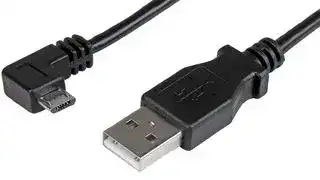


USBAUB50CMRA
USB Cable, 0.5 m Micro-USB Charge-and-Sync Cable M/M, Right-Angle Micro-USB, 24 AWG
- Manufacturer: STARTECH
- Product type: USB / Lightning Cables
- SVHC: To Be Advised
- USB Standard: USB 2.0
- Jacket Colour: Black
- Product Range: -
- Electronic Marking: -
- Cable Length - Metric: 500mm
- Connector to Connector: Type A Plug to Micro Type B Plug
- Cable Length - Imperial: 19.7"
| Delivery and price | |
|---|---|
| Units per pack | 5 |
| Price | 5.78 € |
| Current stock | 10+ |
| Lead time | 30 days |

**USER GUIDE TB-9112**

## **Common Point Ground Monitor Installation, Operation and Maintenance**

Made in the United States of America

Use the Common Point Ground Monitor to fulfill the ANSI/ESD S6.1 section 6.3.1 requirement. “The hot, neutral and equipment grounding conductor shall be verified to be in the proper wiring orientation in accordance with the National Electric Code (NFPA 70®).”

The Common Point Ground Monitor is available as the following item numbers:

|**Item**|**Description**|
|---|---|
|770048|Common Point Ground Monitor, with North<br>America Power Cord|
|770049|Common Point Ground Monitor, with UK<br>Power Cord|


## **Packaging**

- 1 Common Point Ground Monitor

- 6 Socket Head Screws, 10-32 x 1/4"

_Figure 1. SCS Common Point Ground Monitor_

- 6 Split Washers, #10

- 2 Pan-Head Screws, #6 x 3/8"

## **Description**

The SCS Common Point Ground Monitor confirms the integrity of the resistance path from the common ground point to electrical ground. It is designed in accordance with ESD TR 12-01 to “monitoring equipment ground connections.”

- 1 Dual Lock Fastener Set, 2" Length 1 Hex Key, 5/32"

- 1 Power Cord, 6' Length

- 1 Certificate of Calibration

When the Common Point Ground Monitor is plugged into an electrical receptacle, its green LEDs illuminate when both the power outlet's wiring is correct and the path-to-equipment ground via the equipment grounding conductor is intact. The monitor provides 12 verified ground points when in a PASS condition. The monitor's red LEDs illuminate and audible buzzer sounds when either the outlet’s wiring is incorrect or the path-to-equipment ground is defective. Mounting tabs make it suitable to install in workbench or equipment settings.

The outlet ground line is tested by measuring voltage between it and the neutral line. It is normal to have a few volts of AC induced on the neutral line. If the Common Point Ground Monitor measures only a few volts, the ground line to neutral impedance is low and the ground line would make a suitable ESD ground point. If the monitor measures more than just a few volts between ground and neutral, this indicates either that they are not referenced to each other or that the outlet and associated wiring should be checked for loose connections. In this case, the Common Point Ground Monitor will sound a warning alarm and display a red FAIL indication and should not be used for an ESD grounding point until corrected.

**SCS** - 926 JR Industrial Drive, Sanford, NC 27332 East: (919) 718-0000 | West: (909) 627-9634 • Website: StaticControl.com

© 2021 DESCO INDUSTRIES INC Employee Owned

**TB-9112** Page 1 of 3 June 2021

## **Features and Components**

## **Installation**

1. Remove the Common Point Ground Monitor and its power cord from their carton.

2. Determine the mounting location of the Common Point Ground Monitor. Its LEDs should be visible to the operator. Secure the Common Point Ground Monitor to a surface using its mounting tabs and the included pan head screws or dual lock fasteners.

**==> picture [238 x 237] intentionally omitted <==**

**----- Start of picture text -----**<br>
A A<br>B<br>i StaticControl.com 8<br>@<br>ee i( ©<br>@<br>C<br>1<br>ee foe<br>A<br>**----- End of picture text -----**<br>


_Figure 2. Common Point Ground Monitor features and components_

3. Connect the power cord to the power inlet located on the right-side of the Common Point Ground Monitor. Connect the opposite end to an appropriate AC outlet.

4. The status LEDs will illuminate green if the AC outlet is wired correctly and its path-to-equipment ground via the equipment grounding conductor is intact. The status LEDs will illuminate red, and the audible buzzer will sound otherwise.

_Figure 3. Installing the Common Point Ground Monitor at the end of a row of workbenches_

**A. Status LEDs:** Illuminates green when the AC outlet is properly wired and its path to equipment ground via the equipment ground conductor is intact. Illuminates red and audible alarm sounds when the AC outlet is not properly wired and its path to equipment ground via the equipment ground conductor is broken.

**B. Ground Hub:** Brass machined hex block with six banana jacks and six screws for #8 ring terminals. Provides grounding point for wrist straps, ground cords, and tools.

**C. Power Inlet:** Connect the included power cord here.

**SCS** - 926 JR Industrial Drive, Sanford, NC 27332 East: (919) 718-0000 | West: (909) 627-9634 • Website: StaticControl.com

© 2021 DESCO INDUSTRIES INC Employee Owned

**TB-9112** Page 2 of 3

## **Operation**

Use the banana jacks on the ground hub to connect banana plugs to ground. Use the 6 included socket head screws and split washers to secure ground wires with ring terminals.

## **Specifications**

|Input Voltage and<br>Frequency|Power Input:<br>100-240 VAC, 50/60 Hz<br>Power Cord Length:<br>6 ft. (1.8 m)|
|---|---|
|Operating Temperature|50 to 95° F (10 to 35° C)|
|Environmental|Indoor use only at altitudes|
|Requirements|less than 6500 ft. (2 km)|
|Dimensions|Maximum relative humidity<br>of 80% up to 85° F (30° C)<br>decreasing linearly to 50% @<br>85° F (30° C)<br>4.38" L x 2.47" W x 1.00" H|
|Weight|(111 mm x 63 mm x 25 mm)<br>0.35 lbs. (0.16 kg)|
|||
|Equipment Ground|10 kilohms (nominal)|
|Conductor Resistance||
|Limit<br>Country of Origin|United States of America|


_Figure 4. Using the Common Point Ground Monitor_

## **Calibration**

Frequency of recalibration should be based on the critical nature of those ESD sensitive items handled and the risk of failure for the ESD protective equipment and materials. In general, SCS recommends that calibration be performed annually.

**Limited Warranty, Warranty Exclusions, Limit of Liability and RMA Request Instructions** See the SCS Warranty - StaticControl.com/Limited-Warranty.aspx

NOTE: The following procedure should only be done by someone familiar with voltage hazards. This procedure will work for 220 VAC as long as the neutral and ground are referenced. 220 VAC produced with out-of-phase 110VAC-Ground-110VAC will produce a FAIL result.

1. Disconnect the power cord from the electrical outlet and connect it to a 3-prong to 2-prong adapter to isolate its ground pin.

2. Connect the 3-prong to 2-prong adapter to an appropriate AC outlet to power the Common Point Ground Monitor.

3. Connect a 5 kilohm resistor (5% tolerance) between the supply ground and power cord's ground pin. The status LEDs should illuminate green until the resistor is removed. This test validates the PASS point for the neutral-to-ground resistance.

4. Connect a 12.5 kilohm resistor (5% tolerance) between the supply ground and power cord's ground pin. The status LEDs should illuminate red and audible buzzer should sound. This test validates the FAIL point for the neutral-to-ground resistance.

**SCS** - 926 JR Industrial Drive, Sanford, NC 27332 East: (919) 718-0000 | West: (909) 627-9634 • Website: StaticControl.com

© 2021 DESCO INDUSTRIES INC Employee Owned

**TB-9112** Page 3 of 3
Updated at June 3, 2026
StarTech.com is a globally recognized manufacturer of performance connectivity accessories, dedicated to delivering reliable solutions engineered specifically for IT professionals. Built to meet rigorous technical standards, their products ensure seamless integration and dependable operation in demanding enterprise and commercial environments. The core of their offering focuses on high-quality cable, wire, and cable assemblies designed to facilitate optimal data transfer and power delivery. Within this category, StarTech.com provides an extensive selection of premium USB and Lightning cables, delivering robust connectivity for a diverse array of professional applications, mobile devices, and hardware configurations. By prioritizing durability and technical performance, StarTech.com continues to be a trusted source for the essential components required to build, maintain, and upgrade complex IT infrastructures and electronic systems.
About Novapart
Novapart is a B2B electronic component broker specialising in stock shortages and cost reduction. We source hard-to-find parts and identify compliant alternatives across a catalogue of 410,000+ components from 500+ manufacturers.
Learn more →Stock Shortage Specialist
When a component is unavailable, discontinued or has an unacceptable lead time, we tap into our network of vetted European and Asian distributors to source what you need — without compromising on quality or traceability.
Request a quote →Compliant Alternatives
We identify pin-to-pin, electrically equivalent substitutes that meet the same certifications (RoHS, AEC-Q100, REACH) as your original specification — validated against datasheets, not just part numbers. Often at a lower cost.
BOM Analysis service →