
Image not available
Illustrative purposes only

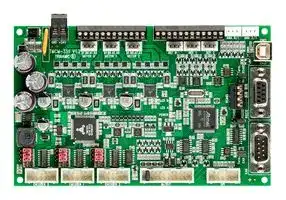
TMCM-351-E-CANOPEN
Stepper Motor Driver, 2-Phase, 3-Axis, 2.8A, 24V DC Output, USB, SPI, RS232, RS485, CAN
⚠️ Reference pricing provided. In case of supply shortages, we will connect you with our trusted procurement partners to ensure your project's continuity.
- Manufacturer: TRINAMIC / ANALOG DEVICES
- Product type: Stepper Motor Drives
- Supply Voltage Min:7V; Supply Voltage Max:28.5V; No. of Phases:Two Phase; Power Rating:-; Output Voltage Max:24V; Output Current:2.8A; Product Range:-; SVHC:No SVHC (27-Jun-2018)
- SVHC: No SVHC (04-Feb-2026)
- No. of Phases: Two Phase
- Product Range: TMCM StepRocker
- Output Current Max: 2.8A
- Supply Voltage Max: 28.5VDC
- Supply Voltage Min: 7VDC
- Control / Drive Type: 3-Axis Controller / Driver Module
| Delivery and price | |
|---|---|
| Units per pack | 1 |
| Price | 461.5 € |
| Current stock | 10+ |
| Lead time | 30 days |
Datasheet

**`MODULES FOR STEPPER MOTORS MODULES`** ## **Hardware Version V1.20** ## **HARDWARE MANUAL** + + ## **TMCM-351** **`3-Axis Stepper Controller / Driver 2.8 A / 24 V`** **`SPI, RS232, RS485, CAN, and USB Encoder Interface`** + + TRINAMIC Motion Control GmbH & Co. KG Hamburg, Germany ## **www.trinamic.com** TMCM-351 Hardware Manual (Rev. 1.07 / 2012-DEC-17) 2 ## **Table of Contents** |1|Features ........................................................................................................................................................................... 3|Features ........................................................................................................................................................................... 3| |---|---|---| |2|Order Codes ................................................................................................................................................................... 4|| |3|Mechanical and Electrical Interfacing ..................................................................................................................... 5|| ||3.1|Dimensions ............................................................................................................................................................ 5| ||3.2|Connectors ............................................................................................................................................................. 6| ||3.2.1|Power Connector ........................................................................................................................................... 8| ||3.2.2|Motor Connector ............................................................................................................................................ 8| ||3.2.3|Reference Connector ..................................................................................................................................... 9| ||3.2.4|Analog Input Connector ............................................................................................................................ 11| ||3.2.5|USB Connector .............................................................................................................................................. 11| ||3.2.6|RS232 Connector .......................................................................................................................................... 11| ||3.2.7|CAN Connector ............................................................................................................................................. 11| ||3.2.8|RS485 Connector .......................................................................................................................................... 12| ||3.2.9|SPI Connector ............................................................................................................................................... 12| ||3.2.10 I/O Connector ............................................................................................................................................... 13|| ||3.2.11 Encoder_0/1/2 Connector ........................................................................................................................... 15|| ||3.3|Jumpers ................................................................................................................................................................. 16| ||3.3.1|J1: RS485 Bus Termination ........................................................................................................................ 16| ||3.3.2|J2: RS232 / RS485 Interface Selection .................................................................................................... 16| ||3.3.3|J3: CAN Bus Termination ........................................................................................................................... 17| ||3.3.4|J4 – J12: Encoder Input Termination...................................................................................................... 17| ||3.3.5|Enable All Driver Stages Permanently ................................................................................................... 17| |4|Operational Ratings ................................................................................................................................................... 18|| |5|Functional Description .............................................................................................................................................. 20|| ||5.1|System Architecture .......................................................................................................................................... 20| ||5.1.1|Microcontroller ............................................................................................................................................. 20| ||5.1.2|EEPROM ........................................................................................................................................................... 20| ||5.1.3|Motion Controller ........................................................................................................................................ 21| ||5.1.4|Stepper Motor Drivers ................................................................................................................................ 21| ||5.2|stallGuard™ - Sensorless Motor Stall Detection ...................................................................................... 21| ||5.2.1|stallGuard Adjusting Tool ......................................................................................................................... 22| ||5.2.2|stallGuard Profiler ........................................................................................................................................ 22| ||5.3|Microstep Resolution ........................................................................................................................................ 23| |6|TMCM-351 Operational Description ........................................................................................................................ 24|| ||6.1|Calculation: Velocity and Acceleration vs. Microstep and Fullstep Frequency ................................ 24| |7|TMCL™ ........................................................................................................................................................................... 26|| |8|CANopen ....................................................................................................................................................................... 26|| |9|Life Support Policy ..................................................................................................................................................... 27|| |10 Revision History .......................................................................................................................................................... 28||| ||10.1|Document Revision ........................................................................................................................................... 28| ||10.2|Hardware Revision ............................................................................................................................................ 28| |11 References..................................................................................................................................................................... 28||| www.trinamic.com TMCM-351 Hardware Manual (Rev. 1.07 / 2012-DEC-17) 3 ## **1 Features** The TMCM-351 is a powerful three axes bipolar stepper motor controller/driver board with optional encoder interface for all three axes and a large number of general purpose digital and analogue input/outputs. Several different serial communication interfaces are available. ## **MAIN CHARACTERISTICS** ## **Electrical data** - Supply voltage: +24V DC nominal (28.5V DC max.) - Motor current: up to 2.8A RMS per axis (programmable) ## **Stepper motor data** - two phase bipolar stepper motors with up to 2.8A RMS coil current - optional incremental encoder interface (a/b/n), accepts differential or single ended input signals ## **Interfaces** - 2 reference switch inputs per motor axis (6 altogether, internal pull-up resistors, +24V compatible) - - 8 general purpose inputs (+24V compatible) - 8 general purpose outputs incl. two power outputs (all open-collector) - - - - 1 shutdown input (enable/disable driver stage in hardware) - 4 dedicated analogue inputs (programmable 3.3V/10V input range) - SPI™[1] connector with three chip select signals for I/O extension - RS232, RS485, CAN and USB serial communication interfaces ## **Features** - High-efficient operation, low power-dissipation (TMC249 stepper driver with external MOSFETs) - - Dynamic current control - Integrated Protection - On the fly alteration of motor parameters (e.g. position, velocity, acceleration) - Motion profile calculation in real-time (TMC429 motion controller) - Each axis individually and independently programmable - Supports up to 64 microsteps per fullstep - Integrated stallGuard™ for motor stall detection (e.g. elimination of end switches) - Closed-loop operation with TMCL possible (when using the optional incremental encoder interface) ## **Software** - TMCL™ remote (direct mode) or stand-alone operation (memory for 2048 TMCL commands) - Fully supported by TMCL-IDE (PC based integrated development environment) - - Optional CANopen firmware 1 SPI™ is a trademark of Motorola www.trinamic.com TMCM-351 Hardware Manual (Rev. 1.07 / 2012-DEC-17) 4 ## **2 Order Codes** The TMCM-351 is available with encoder interface and with standard TMCL firmware or CANopen firmware. |**Order code**|**Description**|**Dimensions**| |---|---|---| |TMCM-351-E|TMCM-351 with encoder interface and TMCL<br>firmware|<br>160 x 100 x 29 mm3| |TMCM-351-E-CANopen|TMCM-351<br>with<br>encoder<br>interface<br>and<br>CANopen firmware|<br>160 x 100 x 29 mm3| |**Related motors:**||| |QSH5718|57mm/NEMA23, 1.8˚ step angle|57.2 x 57.2 x 41/55/ 78.5<br>mm| |QSH6018|60mm/NEMA24, 1.8˚ step angle|60.5 x 60.5 x 45/56/ 65/86<br>mm| ## **Table 2.1 Order codes** www.trinamic.com TMCM-351 Hardware Manual (Rev. 1.07 / 2012-DEC-17) 5 ## **3 Mechanical and Electrical Interfacing** ## **3.1 Dimensions** The TMCM-351 three axes controller driver board has a board size of 160mm x 100mm (standard euro board format). There are four mounting holes altogether for M3 screws placed at a distance of 4mm from each corner of the board (Figure 4.1). The high measures 29mm. **==> picture [437 x 292] intentionally omitted <==** **----- Start of picture text -----**<br> 160<br>4 Ø 3.2 4<br>4 4<br>100<br>TMCM-351<br>4 4<br>4 Ø 3.2 4<br>**----- End of picture text -----**<br> **Figure 3.1 Dimensions of TMCM-351** www.trinamic.com TMCM-351 Hardware Manual (Rev. 1.07 / 2012-DEC-17) 6 ## **3.2 Connectors** The TMCM-351 has connectors for three motors, related reference switches, three encoders, analog and digital inputs and outputs and several serial interfaces (RS232, RS485, CAN and USB). On the next page you will find a table with all connector types and their mating ones. **==> picture [495 x 369] intentionally omitted <==** **----- Start of picture text -----**<br> The TMCM-351 TMCL Firmware Manual (see www.trinamic.com ) includes a section about putting the TMCM-<br>Pe 351 into operation.<br>Analog input 0/1 Analog input 2/3<br>connector connector<br>EL<br>Power Motor Reference<br>connector connector connector<br>po Le<br>(_} 0000000000<br>—— USB<br>connector<br>sc e<br>oie —<br>J1 : RS 485 bus terminati on<br>RS232<br>Cneen S056.9 ea RS485 e connector<br>connector<br>LO<br>J2 : RS 232 / RS 485 selecti on<br>[HOY2OO H| 3)<br>J 4 - J12: Encoder input termination<br>CAN<br>J3 : CAN bus terminati on connector<br>tL Pee @<br>Gz]<br>Encoder_0 Encoder_1 Encoder_2 I/O SPI<br>connector connector connector connector connector<br>-ILIL. _<br>**----- End of picture text -----**<br> **Figure 3.2 Connectors of TMCM-351** www.trinamic.com TMCM-351 Hardware Manual (Rev. 1.07 / 2012-DEC-17) 7 ## **CONNECTOR TYPES AND MATING CONNECTORS** |**Domain**|**Connector type **|**Mating connector type **| |---|---|---| |Power|RIA type 320,2pol., grid dimension 5|RIA type 349,2poles, grid dimension 5| ||RIA type 183,12pol., grid dimension 3.5|RIA type 169,12pol.., grid dimension 3.5| |Motor|MOLEX type 6410, 2.54 mm KK header,<br>vertical friction lock|MOLEX type 2045, 2.54 mm crimp housing,<br>receptacle,4pol.| |||| ||RIA type 183,12pol., grid dimension 3.5|RIA type 169,12pol.., grid dimension 3.5| |Reference|MOLEX type 6410, 2.54 mm KK header, 4<br>pol.,vertical friction lock|MOLEX type 2045, 2.54 mm crimp housing,<br>receptacle,4pol.| |||| ||MOLEX type 6410, 2.54 mm KK header,<br>vertical friction lock|MOLEX type 2045, 2.54 mm crimp housing,<br>receptacle,4pol.| |Analog input||| |||| |USB|USB,type B,4pol.,vertical,female|USB,type B,4pol.,male| |RS232|DSUB,vertical,9pol.,female|DSUB,9pol.,male| |CAN|DSUB,vertical,9pol.,male|DSUB,9pol.,female| ||low profile box header without locking<br>bar, type 8289, 10 pol., DIN 41651, 2.54<br>(AVX 00 8380 010 000 01 0)|low profile IDC socket connector, 10pol.,<br>DIN41651, 2.54<br>(AVX 00 8290 010 001 01 1)| |SPI||| |||| ||low profile box header without locking<br>bar, type 8380, 20 pol., DIN 41651, 2.54<br>(AVX 00 8380 020 000 01 0)|low profile IDC socket connector, 20pol.,<br>DIN41651, 2.54<br>(AVX 00 8290 020 001 01 1)| |I/O||| |||| ||low profile box header without locking<br>bar, type 8289, 10 pol., DIN 41651, 2.54<br>(AVX 00 8380 010 000 01 0)|low profile IDC socket connector, 10pol.,<br>DIN41651, 2.54<br>(AVX 00 8290 010 001 01 1)| |Encoder||| |||| **Table 3.1 Connectors and mating connectors of the TMCM-351** www.trinamic.com TMCM-351 Hardware Manual (Rev. 1.07 / 2012-DEC-17) 8 ## **3.2.1 Power Connector** A 2-pin detachable screw connector is used for power supply. |1<br>2|**Pin**<br>~~a~~<br>~~ee~~|**Label**<br>~~es~~|**Description**| |---|---|---|---| ||1<br>~~a~~<br>~~ee~~<br>~~es~~|GND<br>~~es~~<br>~~SC~~|Moduleground (power supplyand signalground)<br>~~SC~~| ||2<br>~~ee~~<br>~~es~~|VDD<br>~~es~~<br>~~SC~~|Power supplyinput,nom. +24V DC (+7… +28.5V DC)<br>~~SC~~| **Table 3.2 Power connector** ## **3.2.2 Motor Connector** For the three motors there are two connector options: either one detachable screw connector (for prototyping, smaller series) or three separate crimp connectors (for higher volume series). |1<br>12|**Pin**<br>~~a~~<br>~~a~~|**Label**<br>~~|~~<br>~~ee~~|**Description**<br>~~|~~| |---|---|---|---| ||1<br>~~a~~<br>~~a~~<br>~~ns~~|Motor_0_B-<br>~~| ~~<br>~~ee~~|Motor 0, coil B<br> ~~|~~| ||2<br>~~a~~<br>~~ns~~|Motor_0_B+<br>~~ee~~|Motor 0,coil B| ||3<br>~~ns~~<br>~~all~~|Motor_0_A-<br>~~ll~~|Motor 0,coil A<br>~~ll~~<br>~~—~~<br>~~—e~~| ||4<br>~~ll~~|Motor_0_A+<br>~~ll~~|Motor 0,coil A<br>~~ll~~<br>~~—~~<br>~~—e~~| ||5<br>~~ll~~|Motor_1_B-<br>~~ll~~|Motor 1,coil B<br>~~ll~~<br>~~—~~<br>~~—e~~| ||6<br>~~ll~~<br>~~ns~~|Motor_1_B+<br>~~ll~~<br>|Motor 1,coil B<br>~~ll~~<br>~~—~~<br>~~—e~~<br>| ||7<br>~~ns~~|Motor_1_A-<br>|Motor 1,coil A<br>| ||8<br>~~nsSO~~|Motor_1_A+<br>~~SO~~|Motor 1,coil A<br>~~SO~~| ||9<br>~~a~~<br>~~ns~~|Motor_2_B-<br>|Motor 2,coil B<br>| ||10<br>~~ns~~|Motor_2_B+<br>|Motor 2,coil B<br>| ||11<br>~~nsSO~~|Motor_2_A-<br>~~SO~~|Motor 2,coil A<br>~~SO~~| ||12<br>~~[LT~~|Motor_2_A+<br>~~[LT~~|Motor 2,coil A<br>~~[LT~~| **Table 3.3 Motor connector (detachable screw connector)** |1<br>4<br>~~ms~~|**Pin**<br>~~a~~<br>~~ns~~|**Label**<br>~~ee~~|**Description**<br>~~|~~<br>~~—~«zY~~| |---|---|---|---| ||1<br>~~a ~~<br>~~|~~<br>~~ns~~|Motor_0/1/2_B-<br> ~~ee~~<br>~~|.~~|Motor 0/1/2, coil B<br>~~|~~<br>~~|.~~<br>~~—~«zY~~| ||2<br>~~|~~<br>~~ns~~|Motor_0/1/2_B+<br>~~|.~~|Motor 0/1/2,coil B<br>~~|.~~<br>~~—~«zY~~| ||3<br>~~ns~~<br>~~ms~~|Motor_0/1/2_A-<br>~~ms~~|Motor 0/1/2,coil A<br>~~—~«zY~~<br>~~ms~~| ||4<br>~~T_T~~|Motor_0/1/2_A+<br>~~T_T~~|Motor 0/1/2,coil A<br>~~T_T~~| **Table 3.4 Motor connector (crimp connector)** www.trinamic.com TMCM-351 Hardware Manual (Rev. 1.07 / 2012-DEC-17) 9 ## **3.2.3 Reference Connector** For the reference switch inputs (two reference switch inputs are supported for each motor) there are two connector options: either one detachable screw connector (for prototyping, smaller series) or three separate crimp connectors (for higher volume series). |1<br>12<br>or|**Pin**|**Label**|**Description**| |---|---|---|---| ||1|REF_0_R|Motor 0, right reference / stopswitch input| ||2|REF_0_L|Motor 0,left reference / stopswitch input| ||3|GND|System / moduleground| ||4|+5V|+5V supplyoutput for active switches| ||5|REF_1_R|Motor 1,right reference / stopswitch input| ||6|REF_1_L|Motor 1,left reference / stopswitch input| ||7|GND|System / moduleground| ||8|+5V|+5V supplyoutput for active switches| ||9|REF_2_R|Motor 1,right reference / stopswitch input| ||10|REF_2_L|Motor 1,left reference / stopswitch input| ||11|GND|System / moduleground| ||12|+5V|+5V supplyoutput for active switches| **Table 3.5 Reference connector (detachable screw connector)** |1<br>4<br>joa6<br>————<br>—|**Pin**|**Label**|**Description**| |---|---|---|---| ||1<br>~~a~~|REF_0/1/2_R<br>~~Rs~~|Motor 0/1/2, right reference / stopswitch input| ||2<br>~~a~~|REF_0/1/2_L<br>~~Rs~~|Motor 0/1/2,left reference / stopswitch input| ||3<br>~~a ~~<br>~~a~~|GND<br> ~~Rs~~|System / moduleground| ||4|+5V|+5V supplyoutput for active switches| **Table 3.6 Reference connector (crimp connector)** **==> picture [77 x 18] intentionally omitted <==** **----- Start of picture text -----**<br> To motion controller TMC428<br>To motion controller TMC428<br>**----- End of picture text -----**<br> **Figure 3.3 Internal Reference connector circuit (for one motor axis)** www.trinamic.com TMCM-351 Hardware Manual (Rev. 1.07 / 2012-DEC-17) 10 ## **3.2.3.1 Left and Right Limit Switches** The TMCM-351 can be configured so that a motor has a left and a right limit switch (Figure 3.4). The motor stops when the traveler has reached one of the limit switches. **==> picture [229 x 90] intentionally omitted <==** **----- Start of picture text -----**<br> REF_L_x REF_R_x<br>motor<br>left stop right stop<br>switch switch<br>traveler<br>**----- End of picture text -----**<br> **Figure 3.4 Left and right limit switches** ## **3.2.3.2 Triple Switch Configuration** It is possible to program a tolerance range around the reference switch position. This is useful for a triple switch configuration, as outlined in Figure 3.5. In that configuration two switches are used as automatic stop switches, and one additional switch is used as the reference switch between the left stop switch and the right stop switch. The left stop switch and the reference switch are wired together. The center switch (travel switch) allows for a monitoring of the axis in order to detect a step loss. **==> picture [253 x 93] intentionally omitted <==** **----- Start of picture text -----**<br> REF_L_x REF_R_x<br>motor<br>left stop reference right stop<br>switch switch switch<br>traveler<br>**----- End of picture text -----**<br> **Figure 3.5 Limit switch and reference switch** ## **3.2.3.3 One Limit Switch for Circular Systems** If a circular system is used (Figure 3.6), only one reference switch is necessary, because there are no endpoints in such a system. **==> picture [114 x 81] intentionally omitted <==** **----- Start of picture text -----**<br> motor<br>REF _L_x<br>ref switch eccentric<br>**----- End of picture text -----**<br> **Figure 3.6 One reference switch** www.trinamic.com TMCM-351 Hardware Manual (Rev. 1.07 / 2012-DEC-17) 11 ## **3.2.4 Analog Input Connector** The board has four dedicated analog inputs with programmable input range (0… +3.3V _or_ 0… +10V). There are two connectors with two analog inputs connected to each connector |1<br>4|**Pin**|**Label**|**Description**| |---|---|---|---| ||1|Analog_0/2|Analoginput 0/2| ||2|GND|System / moduleground| ||3|Analog_1/3|Analoginput 1/3| ||4|GND|System / moduleground| **Table 3.7 Analog input connector** ## **3.2.5 USB Connector** The board includes an USB interface for serial communication. A standard USB type B connector is used for this purpose. USB is one out of four different interfaces available for communication with the board. |1<br>2<br>4<br>3<br>~~——~~|**Pin**<br>~~a~~|**Label**<br>~~a~~|**Description**<br>~~|~~| |---|---|---|---| ||1<br>~~a~~|+5V<br>~~a ~~|Board is self-powered – just use to detect availability<br>of attached host system(e.g. PC)<br> ~~|~~| ||2|USB-|Differential USB bus| ||3|USB+|Differential USB bus| ||4|GND|System / moduleground| **Table 3.8 USB connector** ## **3.2.6 RS232 Connector** The board includes an RS232 interface for serial communication. A standard DSUB 9-pin female connector is used for this purpose. RS232 is one out of four different interfaces available for communication with the board. |5<br>1<br>9<br>6<br>**Pin**<br>**Label**<br>**Description**<br>2<br>RS232_TxD<br>RS232 transmit serial data<br>3<br>RS232_RxD<br>RS232 receive serial data<br>5<br>GND<br>System / boardground<br>1,4,6,7,8,9<br>n.c.<br>Pins not used / not connected<br>~~——————~~|| |---|---| |**Table 3.9 RS232 connector**<br>Please verify the setting of J2 (selection of RS232 or RS485 interface in section 3.3.2) for a proper operation<br>of the RS232 connection.<br>~~OO~~|| ## **3.2.7 CAN Connector** |**3.2.7 CAN Connector**|| |---|---| |The board includes a CAN interface for serial communication. A standard DSUB 9-pin male connector is used|The board includes a CAN interface for serial communication. A standard DSUB 9-pin male connector is used| |for this purpose. CAN is one out of four different interfaces available for communication with the board.<br>1<br>5<br>6<br>9<br>**Pin**<br>**Label**<br>**Description**<br>2<br>CAN_L<br>CAN differential bus<br>7<br>CAN_H<br>CAN differential bus<br>3,6<br>GND<br>System / boardground<br>n.c.<br>Pins not used / not connected<br>~~Ln~~~~**|**~~<br>~~|~~<br>~~_—————~~|| |**Table 3.10 CAN connector**<br>Please verify the setting of J3 (CAN bus termination in section 3.3.3) for a proper operation of the CAN<br>connection.<br>~~OO~~|| www.trinamic.com TMCM-351 Hardware Manual (Rev. 1.07 / 2012-DEC-17) 12 ## **3.2.8 RS485 Connector** The board includes an RS485 interface for serial communication. A 4-pin detachable screw connector is used for this purpose. RS485 is one out of four different interfaces available for communication with the board. **Pin Label Description** 4 1 RS485+ RS485 differential bus (connected to pin 3) 2 RS485RS485 differential bus (connected to pin 4) 1 3 RS485+ RS485 differential bus (connected to pin 1) ~~SS~~ 4 ~~eT~~ RS285RS485 differential bus (connected to pin 2) **Table 3.11 RS485 connector** Please verify the settings of J1 (RS485 bus termination in section 3.3.1) and J2 (selection of RS232 or RS485 interface in section 3.3.2) for a proper operation of the RS485 connection. ## **3.2.9 SPI Connector** For extension of the available inputs and outputs an SPI interface is available. A standard 2.54mm pitch two row header is used as connector for the external SPI interface. **Pin Label Pin Label** 9 1 1 SPI_MOSI 2 GND 3 SPI_MISO 4 GND 5 SPI_CLK 6 GND 10 2 7 SPI_SEL0 8 SPI_SEL2 ~~===~~ 9 SPI_SEL1 10 +5V_output **Table 3.12 SPI connector** www.trinamic.com TMCM-351 Hardware Manual (Rev. 1.07 / 2012-DEC-17) 13 ## **3.2.10 I/O Connector** The I/O connector offers 8 digital and analog inputs and 8 digital outputs. All inputs are +24V compatible. All outputs offer open collector driver stages. OUT_0/1/2/3/4/5 can sink up-to 100mA, OUT_6/7 are more powerful and can drive up to 2A. A standard 2.54mm pitch two row header is used for this connector (refer to Figure 3.8 please). |1<br>2<br>20<br>19|**Pin**|**Label**|**Pin**|**Label**| |---|---|---|---|---| ||1|OUT_0|2|OUT_1| ||3|OUT_2|4|OUT_3| ||5|OUT_4|6|OUT_5| ||7|OUT_6|8|OUT_7| ||9|+5V_output|10|GND| ||11|IN_0|12|IN_1| ||13|IN_2|14|IN_3| ||15|IN_4|16|IN_5| ||17|IN_6|18|IN_7| ||19|/Shutdown*|20|VDD| **Table 3.13 I/O connector** * The /Shutdown input pin has to be connected to the supply voltage in order to enable the driver stages for all three stepper motor axes. A jumper between pin 19 and pin 20 can be used to permanently enable drivers (please refer to section 3.3.5 for detailed information). **==> picture [359 x 250] intentionally omitted <==** **----- Start of picture text -----**<br> +24V<br>a GPI<br>+24V +24V +24V<br>galvanic isolation<br>freewheeling<br>diode<br>integrated<br>on-board<br>opto-coupler<br>GPO GPO GPO<br>**----- End of picture text -----**<br> **Figure 3.7 Examples for possible wirings for GPI and GPO** www.trinamic.com TMCM-351 Hardware Manual (Rev. 1.07 / 2012-DEC-17) 14 **==> picture [479 x 644] intentionally omitted <==** **----- Start of picture text -----**<br> +24V<br>+24V<br>OUT_0 OUT_1<br>1kOO 1kOO<br>GND GND GND GND<br>+24V<br>OUT_2 OUT_3<br>1kOO 1kOO<br>GND GND GND GND<br>+24V<br>OUT_4 OUT_5<br>1kOO 1kOO<br>GND GND GND GND<br>OUT_6 OUT_7<br>220R 220R<br>GND GND<br>GND +5V_FILTER GND<br>1 2<br>3 4<br>5 6<br>7 8<br>9 10 GND<br>11 12<br>13 14<br>+5V +5V +5V +5V +5V +5V +5V +5V<br>15 16<br>17 18<br>19 20<br>HEADER<br>GND GND GND GND GND GND GND GND<br>10k 10k<br>IN_0 IN_1<br>10k 10k<br>IN_2 IN_3<br>10k 10k<br>IN_4 IN_5<br>10k 10k<br>IN_6 +24V IN_7<br>GND GND GND GND GND GND GND GND GND GND GND GND GND GND GND GND<br>/SHUTDOWN<br>+5V<br>>=1 >=1 >=1 /ENABLE<br>GND GND GND<br>/DRIVER ENABLE<br>100pF 100pF<br>100pF 100pF<br>100pF 100pF<br>100pF 100pF<br>100pF 100pF 100pF 100pF 100pF 100pF 100pF 100pF<br>10k 10k 10k 10k 10k 10k 10k 10k<br>100pF 10kO<br>**----- End of picture text -----**<br> **Figure 3.8 Internal I/O connector circuit** www.trinamic.com TMCM-351 Hardware Manual (Rev. 1.07 / 2012-DEC-17) 15 ## **3.2.11 Encoder_0/1/2 Connector** Three connectors (one encoder interface connector per axis) are available. A standard 2.54mm pitch two row header is used for connecting an encoder. Differential and single ended incremental encoders with/without zero/index channel are supported. ## **PLEASE CONNECT AS FOLLOWS:** ## Single ended encoder GND to pin 1 and/or 2 +5V to pin 7 and/or 8 A to pin 5 N to pin 3 B to pin 9 ## Differential encoder GND to pin 1 and/or 2 +5V to pin 7 and/or 8 A+ to pin 5, A- to pin 6 N+ to pin 3, N- to pin 4 B+ to pin 9, B- to pin 10 |1<br>2<br>9<br>10|**Pin**|**Label**|**Pin**|**Label**| |---|---|---|---|---| ||1|GND|2|GND| ||3|Encoder_0/1/2_N+|4|Encoder_0/1/2_N-| ||5|Encoder_0/1/2_A+|6|Encoder_0/1/2_A-| ||7|+5V_output|8|+5V_output| ||9|Encoder_0/1/2_B+|10|Encoder_0/1/2_B-| **Table 3.14 Encoder connector** **==> picture [457 x 103] intentionally omitted <==** **----- Start of picture text -----**<br> B+ B-<br>N+A+ A-N- Ro rata<br>s<br>Li="]| 7lS*<br>Encoder A<br>1 iB.<br>Encoder B<br>es a e s ee e s ee e e ees2y —><br>ee ee eeeee ay it Encoder N<br>**----- End of picture text -----**<br> **Figure 3.9 Internal encoder connector circuit (for one encoder connector)** www.trinamic.com TMCM-351 Hardware Manual (Rev. 1.07 / 2012-DEC-17) 16 ## **3.3 Jumpers** Most settings of the board are done through the software. Nevertheless, a few jumpers are available for configuration. **==> picture [418 x 188] intentionally omitted <==** **----- Start of picture text -----**<br> RS485 bus<br>\ a A Os ee ae ae A/a A’ Va =e - = termination<br>7 Th == " —_, = = Pha a ee = : =<br>het 3 la } ‘af aus Perr : ‘<br>er Wacko» - jo waeack: B 4e.eTo gy’ oi ee . :<br>Se<br>ee ae ca Y lad fa ou a 3 P ‘ wee. RS232/RS485<br>- F es Ga Non Power Ig ia ES : = interface<br>selection<br>+7 . r 3 Gs Go Jl) 5 BE E> 35 =<br>+ = ; : j = : a “ A uiii_ble wet - : - | ; “et CAN bus<br>termination<br>—— a = : ~<br>a Caco Y eer I \ :<br>Encoder input termination Enable all driver stages<br>**----- End of picture text -----**<br> **Figure 3.10 Configuration with jumpers** ## **3.3.1 J1: RS485 Bus Termination** The board includes a 120 Ohm resistor for proper bus termination of the RS485 interface. When this jumper is closed, the resistor will be placed between the two differential bus lines RS485+ and RS485-. ## **3.3.2 J2: RS232 / RS485 Interface Selection** This 3-pin single row header is used for selecting one of two desired serial interfaces: RS232 or RS485 using a jumper: RS 232 interface RS 485 interface selection selection **Figure 3.11 RS232/RS485 interface selection** www.trinamic.com TMCM-351 Hardware Manual (Rev. 1.07 / 2012-DEC-17) 17 ## **3.3.3 J3: CAN Bus Termination** The board includes a 120 Ohm resistor for proper bus termination of the CAN interface. When this jumper is closed, the resistor will be placed between the two differential bus lines CAN_H and CAN_L. ## **3.3.4 J4 – J12: Encoder Input Termination** For enhanced reliability differential encoder signals should be terminated properly. The board offers termination resistors (120 Ohm) for all three encoder interface signals (a/b/n) for all three encoders. By setting jumpers, these resistors will be placed between the differential encoder signals. Do not set these jumpers in case encoders with single ended signals are used. **==> picture [193 x 56] intentionally omitted <==** **----- Start of picture text -----**<br> Place jumpers for<br>proper temrination<br>—<br>**----- End of picture text -----**<br> ## **Figure 3.12 Encoder input termination** ## **3.3.5 Enable All Driver Stages Permanently** The /Shutdown input pin has to be connected to the supply voltage in order to enable the driver stages for all three stepper motor axes. A jumper between pin 19 and pin 20 can be used to permanently enable drivers. **==> picture [134 x 69] intentionally omitted <==** **----- Start of picture text -----**<br> 19 1<br>20 2<br>**----- End of picture text -----**<br> **Figure 3.13 Enable all driver stages permanently** www.trinamic.com TMCM-351 Hardware Manual (Rev. 1.07 / 2012-DEC-17) 18 ## **4 Operational Ratings** The operational ratings shown below should be used as design values. In no case should the maximum values been exceeded during operation. |**Symbol**|**Parameter**|**Min**|**Typ**|**Max**|**Unit**| |---|---|---|---|---|---| |VDD|Power supplyvoltage for operation|7|24|28.5|V| |ICOILpeak|Motor coil current for sine wave**peak**<br>(chopper regulated,adjustable via software)|0||4|A| |_|||||| |ICOIL_RMS|Continuous motor current (**RMS**)|0||2.8|A| |ISUPPLY|Power supplycurrent||<< ICOIL|1.4 * ICOIL|A| |I+5VOUTPUT|Current available from on-board +5V output<br>(e.g. via Encoder connector 0/1/2, Reference<br>connector etc.) for external devices, e.g.<br>encoder<br>supply,<br>reference<br>switches<br>etc.<br>Summarized for all +5V connections together.|<br> <br> <br>||300|mA| |_|||||| |TENV|Environment temperature at rated current (no<br>forced coolingrequired)|<br>-20||+40 *)|°C| ||||||| ||Environment temperature at 80% of rated<br>current<br>or<br>50%<br>duty<br>cycle<br>(no forced coolingrequired)|<br> <br>-20||+60 **)|°C| ## **Table 4.1 General operational ratings of the module** *) Please note: rated current of 2.8A RMS and 4A peak is reached with setting SAP 6, <motor>, 228 (see TMCM-351 TMCL firmware manual [TMCL]). Same value for CANopen firmware (see CANopen manual [CANopen]) **) Please note: tested with setting SAP 6, <motor>, 180 (see TMCM-351 TMCL firmware manual). Same value for CANopen firmware (see CANopen manual) |**Symbol**|**Parameter**|**Min**|**Typ**|**Max**|**Unit**| |---|---|---|---|---|---| |VREF_0/1/2_L/R|Input voltage for reference switch inputs<br>REF_0/1/2_L and REF_0/1/2_R|0||28.5|V| ||||||| |VREF_0/1/2_L/R_L|Low level voltage for reference switch inputs<br>REF_0/1/2_L / REF_0/1/2_R|0||0.8|V| ||||||| |VREF_0/1/2_L/R_H|High level voltage for reference switch inputs<br>REF_0/1/2_L / REF_0/1/2_R|2.0||28.5|V| ||||||| ## **Table 4.2 Operational ratings of the reference switch inputs** www.trinamic.com TMCM-351 Hardware Manual (Rev. 1.07 / 2012-DEC-17) 19 |**Symbol**|**Parameter**|**Min**|**Typ**|**Max**|**Unit**| |---|---|---|---|---|---| |VOUT_0..7|Voltage at open collector / open drain output|0||VDD|V| |IOUT_0/1/2/3/4/5|Output sink current for OUT_0/1/2/3/4/5|||100|mA| |IOUT_6/7|Output sink current for OUT_6 and OUT_7|||1|A| |VIN_ 0/1/2/3/4/5/6/7|Input voltage for general purpose digital<br>inputs IN_0/1/2/3/4/5/6/7|0||28.5|V| ||||||| |VIN_0/1/2/3/4/5/6/7_L|Low level voltage for general purpose digital<br>inputs IN_1/2/3/4/5/6/7|0||1.6|V| ||||||| |VIN_0/1/2/3/4/5/6/7_H|High level voltage for general purpose digital<br>inputs IN_1/2/3/4/5/6/7|4||28.5|V| ||||||| |VAnalog_0!1/2/3|Full scale input voltage range for analog<br>voltage inputs<br>(programmable voltage divider switched**off**)|0||3.3|V| ||||||| |VAnalog_0!1/2/3|Full scale input voltage range for analog<br>voltage inputs<br>(programmable voltage divider switched**on**)|0||10|V| ||||||| **Table 4.3 Operational ratings of the general purpose digital I/Os and dedicated analog inputs** |**Symbol**|**Parameter**|**Min**|**Typ**|**Max**|**Unit**| |---|---|---|---|---|---| |NRS485|Number of nodes connected to single RS485<br>network|||256*)|| ||||||| **Table 4.4 Operational ratings of the RS485 interface** |**Symbol**|**Parameter**|**Min**|**Typ**|**Max**|**Unit**| |---|---|---|---|---|---| |NCAN|Number of nodes connected to single CAN<br>network||110*)||| ||||||| **Table 4.5 Operational ratings of the CAN interface** *) Number of nodes per CAN or RS485 network highly depends on communication speed and cable length. Higher speeds and longer cables will reduce max. feasible number of nodes in one network. www.trinamic.com TMCM-351 Hardware Manual (Rev. 1.07 / 2012-DEC-17) 20 ## **5 Functional Description** In figure 5.1 the main parts of the TMCM-351 are shown. The module mainly consists of the µC (connected to the EEPROM TMCL memory), the motion controller (which controls up to three axes), three stepper drivers, three external MOSFETs, the interfaces (RS232, RS485, USB, and CAN), I/Os, and the encoder interface based on the TMC423. **==> picture [448 x 304] intentionally omitted <==** **----- Start of picture text -----**<br> TMCM-351<br>Encoder<br>Interface<br>TMC423 ABN<br>Step<br>MOSFET<br>High Power Driver E<br>Driver<br>Stage<br>Motor<br>CAN Step<br>MOSFET<br>RS232 ControllerMotion High Power Driver Driver E<br>Stage<br>Motor<br>RS485 µC<br>Step<br>USB MOSFET<br>High Power Driver E<br>add. 20 Driver<br>I/Os Stage<br>Motor<br>+5V<br>TMCL™<br>Memory<br>3x2 Stop<br>7… 28.5V DC Switches<br>**----- End of picture text -----**<br> **Figure 5.1 Main parts of the TMCM-351** ## **5.1 System Architecture** The TMCM-351 integrates a microcontroller with the TMCL (TRINAMIC Motion Control Language) operating system. The motion control real-time tasks are realized by the TMC428. ## **5.1.1 Microcontroller** On this module, the Atmel AT91SAM7X256 is used to run the TMCL operating system and to control the TMC428. The CPU has 256KB flash memory and a 64KB RAM. The microcontroller runs the TMCL operating system which makes it possible to execute TMCL commands which are sent to the module from the host via the RS232, RS485, USB, or CAN interface. The microcontroller interprets the TMCL commands and controls the TMC428 which executes the motion commands. In addition it is connected with the encoder interface and processes the inputs. The flash ROM of the microcontroller holds the TMCL operating system. The TMCL operating system can be updated via the RS232 interface or via the CAN interface. Use the TMCL-IDE to do this. ## **5.1.2 EEPROM** To store TMCL programs for stand-alone operation the TMCM-351 module is equipped with a 16kByte EEPROM attached to the microcontroller. The EEPROM can store TMCL programs consisting of up to 2048 TMCL commands. The EEPROM is also used to store configuration data. www.trinamic.com TMCM-351 Hardware Manual (Rev. 1.07 / 2012-DEC-17) 21 ## **5.1.3 Motion Controller** The TMC428 is a high-performance stepper motor control IC and can control up to three 2-phase-steppermotors. Motion parameters like speed or acceleration are sent to the TMC428 via SPI by the microcontroller. Calculation of ramps and speed profiles are done internally by hardware based on the target motion parameters. ## **5.1.4 Stepper Motor Drivers** On the TMCM-351 modules the TMCM249 chips are used. These chips have the stallGuard feature. As the power dissipation of TMC249 chips is very low no heat sink or cooling fan is needed. The temperature of the chips does not get high. The coils will be switched off automatically when the temperature or the current exceeds the limits and automatically switched on again when the values are within the limits again. The TMCM-351 module is equipped with a circuit that extends the microstep resolution of the TMC249 chips to true 64 times microstepping. The maximum peak coil current of each stepper motor driver chip is 1500mA. ## **5.2 stallGuard™ - Sensorless Motor Stall Detection** The TMCM-351 module offers the stallGuard feature. The stallGuard feature makes possible to detect if the mechanical load on a stepper motor is too high or if the traveler has been obstructed. The load value can be read using a TMCL command or the module can be programmed so that the motor will be stopped automatically when it has been obstructed or the load has been too high. stallGuard can also be used for finding the reference position without the need for a reference switch: Activate stallGuard and then let the traveler run against a mechanical obstacle that is placed at the end of the way. When the motor has stopped it is definitely at the end of its way, and this point can be used as the reference position. For using stallGuard in an actual application, some manual tests should be done first, because the stallGuard level depends upon the motor velocities and on the occurrence of resonances. _Mixed decay should be switched off while stallGuard is in use in order to get usable results._ |Value|Description| |---|---| |0|stallGuard function is deactivated(default)| |1… 7|Motor stops when stallGuard value is reached andposition is not set zero.| ## **Table 5.1 stallGuard parameter SAP 205** To activate the stallGuard feature use the TMCL command SAP 205 and set the stallGuard threshold value according to Table 5.1. The actual load value is given by GAP 206. The TMCL-IDE has some tools which let you try out and adjust the stallGuard function in an easy way. They can be found at _stallGuard_ in the _Setup_ menu and are described in the following chapters. Please refer to the TMCM-351 TMCL Firmware Manual for further information about working with TMCL-IDE. www.trinamic.com TMCM-351 Hardware Manual (Rev. 1.07 / 2012-DEC-17) 22 ## **5.2.1 stallGuard Adjusting Tool** The stallGuard adjusting tool helps to find the necessary motor parameters when stallGuard is to be used. This function can only be used when a module is connected that features stallGuard. This is checked when the stallGuard adjusting tool is selected in the _Setup_ menu. After this has been successfully checked the stallGuard adjusting tool is displayed. First, select the axis that is to be used in the _Motor_ area. Now you can enter a velocity and an acceleration value in the _Drive_ area and then click _Rotate Left_ or _Rotate Right_ . Clicking one of these buttons will send the necessary commands to the module so that the motor starts running. The red bar in the _stallGuard_ area on the right side of the windows displays the actual load value. Use the slider to set the stallGuard threshold value. If the load value reaches this value the motor stops. Clicking the _Stop_ button also stops the motor. **Figure 5.2 stallGuard adjusting tool** All commands necessary to set the values entered in this dialogue are displayed in the _Commands_ area at the bottom of the window. There, they can be selected, copied and pasted into the TMCL editor. ## **5.2.2 stallGuard Profiler** The stallGuard profiler is a utility that helps you find the best parameters for using stall detection. It scans through given velocities and shows which velocities are the best ones. Similar to the stallGuard adjusting tool it can only be used together with a module that supports stallGuard. This is checked right after the stallGuard profiler has been selected in the _Setup_ menu. After this has been successfully checked the stallGuard profiler window will be shown. First, select the axis that is to be used. Then, enter the _Start velocity_ and the _End velocity_ . The start velocity is used at the beginning of the profile recording. The recording ends when the end velocity has been reached. Start velocity and end velocity must not be equal. After you have entered these parameters, click the _Start_ button to start the stallGuard profile recording. Depending on the range between start and end velocity this can take several minutes, as the load value for every velocity value is measured ten times. The _Actual velocity_ value shows the velocity that is currently being tested and so tells you the progress of the profile recording. You can also abort a profile recording by clicking the _Abort_ button. The result can also be exported to Excel or to a text file by using the _Export_ button. **Figure 5.3: The stallGuard profiler** www.trinamic.com TMCM-351 Hardware Manual (Rev. 1.07 / 2012-DEC-17) 23 ## **5.2.2.1 The Result of the stallGuard Profiler** The result is shown as a graphic in the stallGuard profiler window. After the profile recording has finished you can scroll through the profile graphic using the scroll bar below it. The scale on the vertical axis shows the load value: A higher value means a higher load. The scale on the horizontal axis is the velocity scale. The color of each line shows the standard deviation of the ten load values that have been measured for the velocity at that point. This is an indicator for the vibration of the motor at the given velocity. ## **THERE ARE THREE COLORS USED:** Green: The standard deviation is very low or zero. This means that there is effectively no vibration at this velocity. Yellow: This color means that there might be some low vibration at this velocity. Red: The red color means that there is high vibration at that velocity. ## **5.2.2.2 Interpreting the Result** In order to make effective use of the stallGuard feature you should choose a velocity where the load value is as low as possible and where the color is green. The very best velocity values are those where the load value is zero (areas that do not show any green, yellow or red line). Velocities shown in yellow can also be used, but with care as they might cause problems (maybe the motor stops even if it is not stalled). Velocities shown in red should not be chosen. Because of vibration the load value is often unpredictable and so not usable to produce good results when using stall detection. As it is very seldom that exactly the same result is produced when recording a profile with the same parameters a second time, always two or more profiles should be recorded and compared against each other. ## **5.3 Microstep Resolution** The TMCM-351 supports a true 64 microstep resolution. To meet your needs, the microstep resolution can be set using the TMCL software. The default setting is 64 microsteps, which is the highest resolution. Use command SAP 140 to set a specific microstep resolution. You can find the appropriate value in Table 5.2. |**Value**|**Microsteps **| |---|---| |0|_Do not use!_For fullstepmode set command_SAP 211_(fullstepthreshold) to meetyour needs.| |1|2| |2|4| |3|8| |4|16| |5|32| |6|64| **Table 5.2 Microstep resolution setting** Please refer to the TMCM-351 TMCL Firmware Manual (www.trinamic.com) for more information. www.trinamic.com TMCM-351 Hardware Manual (Rev. 1.07 / 2012-DEC-17) 24 ## **6 TMCM-351 Operational Description** ## **6.1 Calculation: Velocity and Acceleration vs. Microstep and** ## **Fullstep Frequency** The values of the parameters sent to the TMC428 do not have typical motor values like rotations per second as velocity. But these values can be calculated from the TMC428-parameters as shown in this document. ## **PARAMETERS FOR THE TMC428** |**Signal**|**Description**|**Range **| |---|---|---| |fCLK|clock-frequency|0… 16 MHz| |velocity|-|0… 2047| |a_max|Maximum acceleration|0… 2047| ||Divider for the velocity. The higher the value is, the less<br>is the maximum velocity<br>default value = 0|0… 13| |pulse_div||| |||| ||Divider for the acceleration. The higher the value is, the<br>less is the maximum acceleration<br>default value = 0|0… 13| |ramp_div||| |||| ||Microstep-resolution (microsteps per fullstep = 2usrs)|0… 7 (a value of 7 is<br>internally mapped to<br>6 bythe TMC428)| |Usrs||| |||| ## **Table 6.1 TMC428 velocity parameters** The _microstep-frequency_ of the stepper motor is calculated with **==> picture [274 x 26] intentionally omitted <==** To calculate the _fullstep-frequency_ from the microstep-frequency, the microstep-frequency must be divided by the number of microsteps per fullstep. **==> picture [261 x 24] intentionally omitted <==** The change in the pulse rate per time unit (pulse frequency change per second – the _acceleration a)_ is given by **==> picture [106 x 26] intentionally omitted <==** This results in acceleration in fullsteps of: **==> picture [285 x 23] intentionally omitted <==** www.trinamic.com TMCM-351 Hardware Manual (Rev. 1.07 / 2012-DEC-17) 25 ## **EXAMPLE:** |Signal|value| |---|---| |f_CLK|16 MHz| |velocity|1000| |a_max|1000| |pulse_div|1| |ramp_div|1| |usrs|6| 16MHz1000 msf 122070.31Hz 21 204832 122070.31 fsf [Hz] 26 1907.34Hz **==> picture [147 x 83] intentionally omitted <==** Calculation of the number of rotations: A stepper motor has e.g. 72 fullsteps per rotation. fsf 1907.34 RPS 26.49 fullstepsperrotation 72 fsf 60 1907.34 60 RPM 1589.46 fullstepsperrotation 72 www.trinamic.com TMCM-351 Hardware Manual (Rev. 1.07 / 2012-DEC-17) 26 ## **7 TMCL™** TMCL, the TRINAMIC Motion Control Language, is described in separate documents, which refer to the specific product (e.g. TMCM-351 TMCL Firmware Manual). The manuals are provided on www.trinamic.com. Please refer to these sources for updated data sheets and application notes. ## **8 CANopen** The TMCM-351 module can also be used with the CANopen protocol. For this purpose, a special CANopen firmware has to be installed. To do that, download the latest version of the TMCM-351 CANopen firmware from the TRINAMIC website and install it using the firmware update function of the TMCL-IDE (Setup/Install OS). The TMCM-351 module is then ready to be used with CANopen. Please see the specific CANopen manual provided on the TRINAMIC website. www.trinamic.com TMCM-351 Hardware Manual (Rev. 1.07 / 2012-DEC-17) 27 ## **9 Life Support Policy** TRINAMIC Motion Control GmbH & Co. KG does not authorize or warrant any of its products for use in life support systems, without the specific written consent of TRINAMIC Motion Control GmbH & Co. KG. Life support systems are equipment intended to support or sustain life, and whose failure to perform, when properly used in accordance with instructions provided, can be reasonably expected to result in personal injury or death. - © TRINAMIC Motion Control GmbH & Co. KG 2012 Information given in this data sheet is believed to be accurate and reliable. However neither responsibility is assumed for the consequences of its use nor for any infringement of patents or other rights of third parties, which may result from its use. Specifications are subject to change without notice. All trademarks used are property of their respective owners. www.trinamic.com TMCM-351 Hardware Manual (Rev. 1.07 / 2012-DEC-17) 28 ## **10 Revision History** ## **10.1 Document Revision** |Version|Date|Author|Description| |---|---|---|---| |1.00|2008-OCT-22|GE|Initial version| |1.01|2009-MAY-25|OE|Encoder inputpinningcorrected| ||2010-MAY-05|SD|Functional and operational description added. More information<br>about I/Os appended| |1.02|||| ||||| |1.03|2010-SEP-25|SD|Order codes renewed minor changes.| ||2011-APR-12|SD|Table of connector and mating connector types added. New<br>frontpage| |1.04|||| ||||| |1.05|2011-NOV-04|GE|Operation ratings added| |1.06|2011-NOV-14|GE|REF switch and encoder input circuits added| ||2012-DEC-17|SD|Changes related to the design of the document. Changes related<br>to the wording.| |1.07|||| ||||| ## **Table 10.1 Document revision** ## **10.2 Hardware Revision** |Version|Date|Description| |---|---|---| |1.00|2008-AUG-25|Firstprototypes| |1.10|2008-DEC-22|Series version| |1.20|2009-DEC-14|New encoder interface IC| **Table 10.2 Hardware revision** ## **11 References** [TMCL] TMCM-351 TMCL Firmware Manual (see www.trinamic.com) [CANopen] TMCM-351 / TMCM-34x CANopen Manual (see www.trinamic.com) [TMCL-IDE] TMCL-IDE User Manual (see www.trinamic.com) [QSH5718] QSH5718 Manual (see www.trinamic.com) [QSH6018] QSH6018 Manual (see www.trinamic.com) www.trinamic.com
Updated at April 29, 2026
About Novapart
Novapart is a B2B electronic component broker specialising in stock shortages and cost reduction. We source hard-to-find parts and identify compliant alternatives across a catalogue of 410,000+ components from 500+ manufacturers.
Learn more →Stock Shortage Specialist
When a component is unavailable, discontinued or has an unacceptable lead time, we tap into our network of vetted European and Asian distributors to source what you need — without compromising on quality or traceability.
Request a quote →Compliant Alternatives
We identify pin-to-pin, electrically equivalent substitutes that meet the same certifications (RoHS, AEC-Q100, REACH) as your original specification — validated against datasheets, not just part numbers. Often at a lower cost.
BOM Analysis service →