
Image not available
Illustrative purposes only

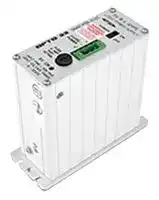
SNAP-PS5-24DC
AC-DC CONVERTER, DIN RAIL, 1 O/P, 20.4W, 4A, 5.1V
⚠️ Reference pricing provided. In case of supply shortages, we will connect you with our trusted procurement partners to ensure your project's continuity.
- Manufacturer: OPTO 22
- Product type:
- Power Supply Applications:ITE; No. of Outputs:1 Output; Output Power Max:20.4W; Output Voltage - Output 1:5.1VDC; Output Current - Output 1:4A; Outpu 83F5698
| Delivery and price | |
|---|---|
| Units per pack | 5 |
| Price | 363.4 € |
| Current stock | 10+ |
| Lead time | 30 days |
Datasheet

## **SNAP Power Su lies pp**

## **Features**

Built-in fuse, ON/OFF power switch, and LED indicator Convenient panel mounting; optional DIN-rail mounting

Easy connections

Wide input voltage range

Factory Mutual approved (except SNAP-PS5U and SNAP-PS24U)

**SNAP Power Supplies**

## **Description**

SNAP power supplies provide the best source of AC or DC power for your Opto 22 SNAP PAC hardware. Packaged in a compact and sturdy housing, SNAP power supplies include a built-in fuse, an LED status indicator, and an ON/OFF power switch for ease of use.

The **SNAP-PS24** and **SNAP-PS24U** power supplies are designed for either of two purposes:

- to provide primary power for a SNAP PAC S-series controller

- to provide 24 volts of DC loop power for SNAP analog modules mounted on a SNAP PAC rack

The **SNAP-PS5** , **SNAP-PS5-24DC** , and **SNAP-PS5U** power supplies are designed to provide 5 VDC power for a SNAP PAC rack with an I/O processor (SNAP PAC brain or R-series controller) and I/O modules mounted on the rack. The combination of a rack, processor, and modules is called an _I/O unit_ .

Opto 22 recommends using one SNAP power supply for each I/O unit and for each controller. Choose the power supply based on the load required for the I/O unit. See the power requirements tables starting on page 11 for help in determining the power supplies you need. Additional information on using power supplies can be found in the Opto 22 technical note _Using Power Supplies with Opto 22 Systems_ (form #1271, available on our website, www.opto22.com).

All SNAP power supplies except the SNAP-PS5-24DC require AC input power. The SNAP-PS5U and SNAP-PS24U accommodate a wide range of AC input voltages, from 100 to 250 VAC.

The SNAP-PS5-24DC DC-to-DC power supply requires a 24 VDC input and is ideal for systems using DC backup power.

Each SNAP power supply can be mounted in one of two ways: next to the controller or SNAP I/O unit it powers, using the standard panel-mounting base, or directly on a DIN rail using the optional DIN-rail adapter.

AC or DC input power connections, as required by the model, are made to a removable terminal strip on top of the power supply. DC output power is then ready to be hooked up to the controller or rack using the attached wiring harness.

SNAP power supplies work with Wired+Wireless[™] PACs and I/O units as well as standard wired PACs and I/O.

**Notes for legacy hardware:** SNAP power supplies are also compatible with Ethernet-based SNAP Ultimate, SNAP Ethernet, and SNAP Simple I/O, and with serial-based SNAP I/O units such as those with a B3000, SNAP-HA, or SNAP-B3000-MODBUS brain.

## **Part Numbers**

|**Part**|**Description**|
|---|---|
|SNAP-PS5|SNAP Power Supply<br>120 VAC input; 5 VDC, 4 A output|
|SNAP-PS5-24DC|SNAP Power Supply<br>24 VDC input; 5 VDC, 4 A output|
|SNAP-PS5U|SNAP Power Supply<br>100–250 VAC input; 5 VDC, 5 A output|
|SNAP-PS24|SNAP Power Supply<br>120 VAC input; 24 VDC, 3/4 A output|
|SNAP-PS24U|SNAP Power Supply, 100–250 VAC input;<br>24 VDC, 1-1/4 A output|
|SNAP-PSDIN|DIN-Rail Adapter for SNAP-PS5, SNAP-<br>PS24, or SNAP-PS5-24DC|
|SNAP-PSUDIN|DIN-Rail Adapter for SNAP-PS5U or<br>SNAP-PS24U|


Opto 22 • 43044 Business Park Drive • Temecula, CA 92590-3614 • www.opto22.com SALES 800-321-6786 • 951-695-3000 • FAX 951-695-3095 • sales@opto22.com • SUPPORT 800-835-6786 • 951-695-3080 • FAX 951-695-3017 • support@opto22.com © 2006–2014 Opto 22. All rights reserved. Dimensions and specifications are subject to change. Brand or product names used herein are trademarks or registered trademarks of their respective companies or organizations.

**1**

**SNAP Power Supplies**

## **Specifications**

||**SNAP-PS5**|**SNAP-PS5-24DC**|**SNAP-PS5U**|
|---|---|---|---|
|Input Voltage|95–130 VAC, 47–63 Hz|18–32 VDC|100–250 VAC, 47–63 Hz|
|Output Voltage|5.1 ±0.1 VDC|5.1 ±0.1 VDC|5.1 ±0.1 VDC|
|Output Current|4.0 A|4.0 A|5.0 A|
|Maximum Input Current Draw|0.4 Amps at 120 VAC|1.3 Amps at 24 VDC|0.5 Amps at 120 VAC|
|Dimensions|See the  drawings starting on<br>page 7.|See the  drawings starting on<br>page 7.|See the  drawings on<br>page 9.|
|Weight|15 oz. (425.25 g)|15 oz. (425.25 g)|1.9 lbs (863.63 g)|
|Operating Temperature|-20 to 70 °C|-20 to 70 °C|-20 to 70 °C|
|Storage Temperature|-30 to 85 °C|-30 to 85 °C|-30 to 85 °C|
|Torque, connector screws|4.5 in-lb (0.51 N-m)|4.5 in-lb (0.51 N-m)|4.5 in-lb (0.51 N-m)|
|Fuse|Opto 22 PN: SNAP-FUSE1AB<br>Vendor PN: GDC-1A (Bussman)|Opto 22 PN: SNAP-FUSE2AB<br>Vendor PN: GDB-2A (Bussman)|Internal fuse|
|Agency Approvals|FM, CE, RoHS, DFARS|FM, CE, RoHS, DFARS|CE, RoHS, DFARS|
|Warranty|30 months|30 months|30 months|


||**SNAP-PS24**|**SNAP-PS24U**|
|---|---|---|
|Input Voltage|95–130 VAC, 47–63 Hz|100–250 VAC, 47–63 Hz|
|Output Voltage|24 ± 0.6 VDC|24 ± 0.1 VDC|
|Output Current|0.75 A|1.25 A|
|Maximum Input Current Draw|0.4 Amps @ 120 VAC|0.5 Amps @ 120 VAC|
|Dimensions|See drawings starting onpage 7.|See drawings onpage 9.|
|Weight|2.1 lbs (952.54 g)|1.9 lbs (863.63 g)|
|Operating Temperature|-20 to 70 °C|-20 to 70 °C|
|Storage Temperature|-30 to 85 °C|-30 to 85 °C|
|Torque, connector screws|4.5 in-lb (0.51 N-m)|4.5 in-lb (0.51 N-m)|
|Fuse|Opto 22 PN: SNAP-FUSE1AB Vendor<br>PN: GDC-1A (Bussman)|Internal fuse|
|Agency Approvals|FM, CE, RoHS, DFARS|CE, RoHS, DFARS|
|Warranty|30 months|30 months|


## **I/O Unit Power Requirements**

The tables starting on page 11 will help you determine the power supply needs for your system. Copy the power requirements worksheet and complete one for each distributed I/O unit.

In addition, keep the following power recommendations in mind. For more help with power supplies, see Opto 22 form #1271, _Using Power Supplies with Opto 22 Systems_ .

## **Use a single power supply per rack**

In general, we recommend you use an independent, isolated, regulated power supply locally with each rack. Local isolated supplies offer these advantages:

- Short supply conductors, which minimize losses

- Power redundancy, so the failure of a single supply causes only a single rack failure, not a total system failure

- Fewer voltage drops and ground loops (Voltage drops and subsequent ground loops may occur when power is distributed over a large system.)

Opto 22 • 43044 Business Park Drive • Temecula, CA 92590-3614 • www.opto22.com SALES 800-321-6786 • 951-695-3000 • FAX 951-695-3095 • sales@opto22.com • SUPPORT 800-835-6786 • 951-695-3080 • FAX 951-695-3017 • support@opto22.com © 2006–2014 Opto 22. All rights reserved. Dimensions and specifications are subject to change. Brand or product names used herein are trademarks or registered trademarks of their respective companies or organizations.

**2**

## **SNAP Power Supplies**

## **Always use a separate field supply**

Use a separate power supply for the field side of the I/O. Using the rack supply for field actuation and monitoring defeats the isolation the I/O module offers and therefore increases the chance of a ground loop within the control system. Additionally, a sudden change of current on the field side can cause undesirable voltage fluctuations that may interfere with the controller or I/O unit’s operation.

## **Power wiring guidelines**

- Use one power supply per I/O unit.

- Use one power supply per controller.

- Use 14 AWG wire.

- SNAP power supplies have short wires to minimize voltage drop. Do not extend the length of the wires.

- If you power multiple I/O units or controllers from one power supply, use a star wiring topology. Do not daisychain power wiring from one device to the next.

## **Installation**

## **Panel Mounting (standard)**

Mount the SNAP power supply in a location where the attached red and black power wires will reach the “+” and “-” power terminals on the SNAP mounting rack or controller. Do not extend the wires.

## **DIN-Rail Mounting (optional)**

**1.** For DIN-rail mounting, remove the four screws that fasten the panel mounting base plate to the power supply. **Keep screws in a safe place.**

**2.** Remove panel mounting base plate.

**3.** In place of the panel mounting base plate, use the four screws removed in step 1 to fasten the DIN-rail adapter (purchased separately) to the power supply.

**4.** Mount the SNAP power supply on the DIN rail (next to the power connector on the I/O unit).

Opto 22 • 43044 Business Park Drive • Temecula, CA 92590-3614 • www.opto22.com SALES 800-321-6786 • 951-695-3000 • FAX 951-695-3095 • sales@opto22.com • SUPPORT 800-835-6786 • 951-695-3080 • FAX 951-695-3017 • support@opto22.com © 2006–2014 Opto 22. All rights reserved. Dimensions and specifications are subject to change. Brand or product names used herein are trademarks or registered trademarks of their respective companies or organizations.

**3**

**SNAP Power Supplies**

## **Wiring—Primary Power Supply**

## **Wiring to a Standalone Controller**

**1.** For a controller, check the controller’s specifications in its data sheet or user’s guide to make sure you have the correct power supply for the controller’s requirements.

**2.** Follow directions in the controller’s user’s guide to wire the power supply to the controller. The power supply’s red (or white-and-red) wire is the positive wire; the black (or white-and-black) wire is the negative wire.

## **Wiring to a SNAP I/O Unit**

**1.** Using the power terminals on the SNAP mounting rack, attach the red wire to the “+” terminal and the black wire to the “-” terminal.

**2. For the SNAP-PS5 (not illustrated):** Using the removable input power connector on top of the power supply, apply 120 volts AC power between the two terminals marked “AC.” The ground terminal should be connected to ground.

**3. For the SNAP-PS5-24DC (not illustrated):** Using the removable input power connector on top of the power supply, apply 24 volts DC power between the two terminals marked “±DC.” The ground terminal should be connected to ground.

**4. For the SNAP-PS5U (illustrated below):** Using the removable input power connector on top of the power supply, apply 100–250 volts AC power between the two terminals marked “AC.” The ground terminal should be connected to ground.

**==> picture [20 x 66] intentionally omitted <==**

**----- Start of picture text -----**<br>
DATA SHEET Form 1120-150202<br>**----- End of picture text -----**<br>


Opto 22 • 43044 Business Park Drive • Temecula, CA 92590-3614 • www.opto22.com SALES 800-321-6786 • 951-695-3000 • FAX 951-695-3095 • sales@opto22.com • SUPPORT 800-835-6786 • 951-695-3080 • FAX 951-695-3017 • support@opto22.com © 2006–2014 Opto 22. All rights reserved. Dimensions and specifications are subject to change. Brand or product names used herein are trademarks or registered trademarks of their respective companies or organizations.

**4**

**SNAP Power Supplies**

**PAGE 5**

## **Wiring—Loop Power Supply**

**5.** Mount the SNAP-PS24 or SNAP-PS24U power supply in a location where the attached output power wires will reach the field connector for SNAP analog modules or the terminal strip on SNAP mounting racks that have the additional field wiring terminal strips.

**6.** The white-and-red wire is the positive wire (24 VDC). The white-and-black wire is the negative wire (24 VDC return). For specific loop power wiring information, see Opto 22 form #0784 for SNAP racks that have the

additional field wiring terminal strip (see Figure 1 example below), or refer to forms #1065 and #1066 if wiring directly to the field connectors on SNAP analog modules (see Figure 2). See the next page for similar SNAP-PS24U wiring diagrams.

**7.** Using the removable input power connector on top of the power supply, apply 120 volts of AC power between the two terminals marked “AC.” The ground terminal should be connected to ground.

## **Figure 1. SNAP-PS24 Used as a Loop Supply with the SNAP PAC System**

This diagram shows the SNAP-PS24 used as the loop supply and a SNAP-PS5 used as the primary power supply.

## **Figure 2. SNAP-PS24 Used as a Loop Supply with Legacy Hardware**

The SNAP-PS24 is used as the loop supply; a SNAP-PS5 is used as the primary power supply.

Opto 22 • 43044 Business Park Drive • Temecula, CA 92590-3614 • www.opto22.com SALES 800-321-6786 • 951-695-3000 • FAX 951-695-3095 • sales@opto22.com • SUPPORT 800-835-6786 • 951-695-3080 • FAX 951-695-3017 • support@opto22.com © 2006–2014 Opto 22. All rights reserved. Dimensions and specifications are subject to change. Brand or product names used herein are trademarks or registered trademarks of their respective companies or organizations.

**SNAP Power Supplies**

## **Wiring—Loop Supply (continued)**

## **Figure 1. SNAP-PS24U Used as a Loop Supply with the SNAP PAC System**

This diagram shows the SNAP-PS24U used as the loop supply and a SNAP-PS5U used as the primary power supply.

## **Figure 2. SNAP-PS24U Used as a Loop Supply with Legacy Hardware**

The SNAP-PS24U is used as the loop supply; a SNAP-PS5U is used as the primary power supply.

© 2006–2014 Opto 22. All rights reserved. Dimensions and specifications are subject to change. Brand or product names used herein are trademarks or registered trademarks of their respective companies or organizations.

Opto 22 • 43044 Business Park Drive • Temecula, CA 92590-3614 • www.opto22.com SALES 800-321-6786 • 951-695-3000 • FAX 951-695-3095 • sales@opto22.com • SUPPORT 800-835-6786 • 951-695-3080 • FAX 951-695-3017 • support@opto22.com

**6**

## **SNAP Power Supplies**

## **Dimensions—SNAP-PS5, SNAP-PS24, and SNAP-PS5-24DC**

## **Panel Mount**

The length of the red and black leads is 8.00 inches +/- .50 inches.

Opto 22 • 43044 Business Park Drive • Temecula, CA 92590-3614 • www.opto22.com

SALES 800-321-6786 • 951-695-3000 • FAX 951-695-3095 • sales@opto22.com • SUPPORT 800-835-6786 • 951-695-3080 • FAX 951-695-3017 • support@opto22.com © 2006–2014 Opto 22. All rights reserved. Dimensions and specifications are subject to change. Brand or product names used herein are trademarks or registered trademarks of their respective companies or organizations.

**7**

**SNAP Power Supplies**

## **Dimensions—SNAP-PS5, SNAP-PS24, and SNAP-PS5-24DC**

## **With DIN-Rail Adapter**

Opto 22 • 43044 Business Park Drive • Temecula, CA 92590-3614 • www.opto22.com SALES 800-321-6786 • 951-695-3000 • FAX 951-695-3095 • sales@opto22.com • SUPPORT 800-835-6786 • 951-695-3080 • FAX 951-695-3017 • support@opto22.com © 2006–2014 Opto 22. All rights reserved. Dimensions and specifications are subject to change. Brand or product names used herein are trademarks or registered trademarks of their respective companies or organizations.

**8**

## **SNAP Power Supplies**

## **Dimensions—SNAP-PS5U and SNAP-PS24U**

## **Panel Mount**

SNAP-PS5U is shown; SNAP-PS24U has the same dimensions.

The length of the red and black leads is 9.00 inches +/- .50 inches.

Opto 22 • 43044 Business Park Drive • Temecula, CA 92590-3614 • www.opto22.com SALES 800-321-6786 • 951-695-3000 • FAX 951-695-3095 • sales@opto22.com • SUPPORT 800-835-6786 • 951-695-3080 • FAX 951-695-3017 • support@opto22.com

**9**

© 2006–2014 Opto 22. All rights reserved. Dimensions and specifications are subject to change. Brand or product names used herein are trademarks or registered trademarks of their respective companies or organizations.

**SNAP Power Supplies**

## **Dimensions—SNAP-PSDIN**

##

## **Dimensions—SNAP-PSUDIN**

Opto 22 • 43044 Business Park Drive • Temecula, CA 92590-3614 • www.opto22.com SALES 800-321-6786 • 951-695-3000 • FAX 951-695-3095 • sales@opto22.com • SUPPORT 800-835-6786 • 951-695-3080 • FAX 951-695-3017 • support@opto22.com © 2006–2014 Opto 22. All rights reserved. Dimensions and specifications are subject to change. Brand or product names used herein are trademarks or registered trademarks of their respective companies or organizations.

**10**

**SNAP Power Supplies**

## **Power Requirements Tables**

Opto 22 recommends using one power supply per I/O unit and one power supply per controller. See “I/O Unit Power Requirements” on page 2 for additional information.

To determine power requirements for products not listed in these tables, see the data sheets for the individual products.

Controller Power Requirements **Standalone Controller or adapter card Power Req (VDC) Power Req. (Amps)** SNAP PAC S-series controllers (wired) 8–32 VDC* 10 VA** Wired+Wireless S-series PACs 8–32 VDC 11.3 VA SNAP-LCSX or -LCSX-PLUS controller 5 VDC 0.500 SNAP-LCM4 controller 5 VDC 1.000 M4-SENET-100 adapter card 5 VDC 1.000 M4SARC adapter card 5 VDC 0.200 M4DUALARC adapter card 5 VDC 0.150 M4SARCF adapter card 5 VDC 0.250 M4SARCFR adapter card 5 VDC 0.350 ~~=a~~ * SNAP-PAC-S1 controllers with serial numbers below 500,000 use 8–24 VDC. ** Uses 1 A if powered at 10V. To determine amps required, divide 10 by the number of volts applied. Example: 10 / 24 V = 0.417 A (24 VDC input requires 0.417 A) I/O Processor (Brain or On-the-Rack Controller) Power Requirements **Processor (Brain or Rack-mounted Controller) Power Req. (Amps)*** SNAP PAC R-series controllers (all wired models) 1.200 SNAP PAC R-series controllers (Wired+Wireless) 1.500 SNAP PAC EB and SB brains (all wired models) 0.750 SNAP PAC EB brains (Wired+Wireless) 1.000 SNAP Ultimate controller/brains (all models) 1.000 SNAP Ethernet brains 0.800 SNAP Simple I/O brains 0.500 B3000 (serial SNAP brain) 0.500 SNAP-D64RS SNAP-B3000-Modbus 1.000 SNAP ARCNET brains SNAP-B4 1.000 SNAP-B6 1.500 if terminated ~~=~~ *Current from 5-volt supply Opto 22 • 43044 Business Park Drive • Temecula, CA 92590-3614 • www.opto22.com SALES 800-321-6786 • 951-695-3000 • FAX 951-695-3095 • sales@opto22.com • SUPPORT 800-835-6786 • 951-695-3080 • FAX 951-695-3017 • support@opto22.com © 2006–2014 Opto 22. All rights reserved. Dimensions and specifications are subject to change. Brand or product names used herein are trademarks or registered trademarks of their respective companies or organizations.

**11**

**SNAP Power Supplies Power Requirements Tables (continued) I/O Unit (Processor, Rack, I/O Modules) Power Requirements Worksheet X Power Total Power Item Quantity Req. (Amps) Required (Amps)[1]** SNAP processor (Enter Amps from Processor Power 1 Requirements table) SNAP-IDC5-SW digital input module SNAP-IDC5-SW-NC digital input module SNAP-AITM-8 analog input module[4] 0.200 Isolated analog input and output modules (part numbers ending in -i or iSRC) except SNAP-AITM-4i All other 4-channel digital input and output modules ( _not_ 0.050 high-density digital modules) SNAP-AICTD, AICTD-4[3] analog input modules High-density digital input and output modules[4] SNAP-AIMA-32, SNAP-AIMA-iH[4] , SNAP-AIV-32, SNAP0.150 AITM-4i analog input modules[4] All analog output modules except SNAP-AOA-iSRC and SNAP-AOD-29-HFi SNAP-AOD-29-HFi 0.300 SNAP mechanical power relay output modules[4] 0.160 SNAP-AIARMS analog input module SNAP-AIVRMS analog input module SNAP-AICTD-8[4] analog input module SNAP-AIMA, AIMA-4[3] , and AIMA-8[4] analog input modules 0.170 SNAP-AITM and AITM-2 analog input modules SNAP-AIMV-4[3] and AIMV2-4[3] analog input modules SNAP-AIV, AIV-4[3] , and AIV-8[4] analog input modules SNAP-AIRTD analog input module SNAP-AIR40K-4[3] analog input module 0.190 SNAP-AIR400K-8[4] analog input module SNAP-AIRATE analog input module SNAP-AIRATE-HFi analog input module 0.210 SNAP-AIPM power monitoring module[3] 0.100 SNAP-AIPM-3, SNAP-AIPM-3V power monitoring modules[4] SNAP-AILC and AILC-2 load cell modules[3] 0.120 SNAP-SCM-ST2 and SNAP-SCM-SSI serial modules[4] 0.200 ~~—ir~~ SNAP-SCM-232, SNAP-SCM-485-422, SNAP-SCMPROFI[3] 0.250 SNAP-SCM-MCH16 _not_ powering a breakout board[2] SNAP-SCM-MCH16 powering a breakout board[2] 0.700 **Total** 1 Current from 5-volt supply 2 Can be used with SNAP PAC R-series controllers and SNAP PAC brains, SNAP Simple, and SNAP Ultimate 3 Can be used with SNAP PAC R-series controllers and SNAP PAC brains, SNAP Simple, SNAP Ethernet, and SNAP Ultimate 4 Can be used with SNAP PAC systems only **PAGE** Opto 22 • 43044 Business Park Drive • Temecula, CA 92590-3614 • www.opto22.com **12** SALES 800-321-6786 • 951-695-3000 • FAX 951-695-3095 • sales@opto22.com • SUPPORT 800-835-6786 • 951-695-3080 • FAX 951-695-3017 • support@opto22.com ~~=:~~ © 2006–2014 Opto 22. All rights reserved. Dimensions and specifications are subject to change. Brand or product names used herein are trademarks or registered trademarks of their respective companies or organizations.

**More About Opto 22**

## **Products**

Opto 22 develops and manufactures reliable, flexible, easy-to-use hardware and software products for industrial automation, energy management, remote monitoring, and data acquisition applications.

## _**groov**_

_groov_ puts your system on your mobile device. With zero programming, you can build mobile operator interfaces to monitor and control systems from Allen-Bradley, Siemens, Schneider Electric, Modicon, and many more. Web-based _groov_ puts mobile-ready gadgets at your fingertips. Tag them from your existing tag database, and they automatically scale for use on any device with a modern web browser. See groov.com for more information and your free trial.

## **SNAP PAC System**

Designed to simplify the typically complex process of selecting and applying an automation system, the SNAP PAC System consists of four integrated components:

- SNAP PAC controllers

- PAC Project[™] Software Suite

- SNAP PAC brains

- SNAP I/O[™]

## **SNAP PAC Controllers**

Programmable automation controllers (PACs) are multifunctional, modular controllers based on open standards.

Opto 22 has been manufacturing PACs for over two decades. The standalone SNAP PAC S-series, the rack-mounted SNAP PAC R- series, and the software-based SoftPAC™ all handle a wide range of digital, analog, and serial functions for data collection, remote monitoring, process control, and discrete and hybrid manufacturing.

SNAP PACs are based on open Ethernet and Internet Protocol (IP) standards, so you can build or extend a system easily, without the expense and limitations of proprietary networks and protocols. Wired+Wireless™ models are also available.

## **PAC Project Software Suite**

Opto 22’s PAC Project Software Suite provides full-featured, costeffective control programming, HMI (human machine interface) development and runtime, OPC server, and database connectivity software for your SNAP PAC System.

Control programming includes both easy-to-learn flowcharts and optional scripting. Commands are in plain English; variables and I/ O point names are fully descriptive.

PAC Project Basic offers control and HMI tools and is free for download on our website, www.opto22.com. PAC Project

Professional, available for separate purchase, adds one SoftPAC, OptoOPCServer, OptoDataLink, options for controller redundancy or segmented networking, and support for legacy Opto 22 serial _mistic_[™] I/O units.

## **SNAP PAC Brains**

While SNAP PAC controllers provide central control and data distribution, SNAP PAC brains provide distributed intelligence for I/O processing and communications. Brains offer analog, digital, and serial functions, including thermocouple linearization; PID loop control; and optional high-speed digital counting (up to 20 kHz), quadrature counting, TPO, and pulse generation and measurement.

## **SNAP I/O**

I/O provides the local connection to sensors and equipment. Opto 22 SNAP I/O offers 1 to 32 points of reliable I/O per module, depending on the type of module and your needs. Analog, digital, and serial modules are all mixed on the same mounting rack and controlled by the same processor (SNAP PAC brain or rack-mounted controller).

## **Quality**

Founded in 1974, Opto 22 has established a worldwide reputation for high-quality products. All are made in the U.S.A. at our manufacturing facility in Temecula, California. Because we test each product twice before it leaves our factory, rather than only testing a sample of each batch, we can guarantee most solid-state relays and optically isolated I/O modules for life.

## **Free Product Support**

Opto 22’s California-based Product Support Group offers free, comprehensive technical support for Opto 22 products. Our staff of support engineers represents decades of training and experience. Support is available in English and Spanish by phone or email, Monday–Friday, 7 a.m. to 5 p.m. PST.

Additional support is always available on our website: how-to videos, OptoKnowledgeBase, self-training guide, troubleshooting and user’s guides, and OptoForums.

In addition, hands-on training is available for free at our Temecula, California headquarters, and you can register online.

## **Purchasing Opto 22 Products**

Opto 22 products are sold directly and through a worldwide network of distributors, partners, and system integrators. For more information, contact Opto 22 headquarters at 800-3216786 or 951-695-3000, or visit our website at www.opto22.com.

## **www.opto22.com**

www.opto22.com • Opto 22 • 43044 Business Park Drive • Temecula, CA 92590-3614 • Form 1335-131203 SALES 800-321-6786 • 951-695-3000 • FAX 951-695-3095 • sales@opto22.com • SUPPORT 800-835-6786 • 951-695-3080 • FAX 951-695-3017 • support@opto22.com © 2014 Opto 22. All rights reserved. Dimensions and specifications are subject to change. Brand or product names used herein are trademarks or registered trademarks of their respective companies or organizations.
Updated at June 4, 2026
About Novapart
Novapart is a B2B electronic component broker specialising in stock shortages and cost reduction. We source hard-to-find parts and identify compliant alternatives across a catalogue of 410,000+ components from 500+ manufacturers.
Learn more →Stock Shortage Specialist
When a component is unavailable, discontinued or has an unacceptable lead time, we tap into our network of vetted European and Asian distributors to source what you need — without compromising on quality or traceability.
Request a quote →Compliant Alternatives
We identify pin-to-pin, electrically equivalent substitutes that meet the same certifications (RoHS, AEC-Q100, REACH) as your original specification — validated against datasheets, not just part numbers. Often at a lower cost.
BOM Analysis service →