
Image not available
Illustrative purposes only

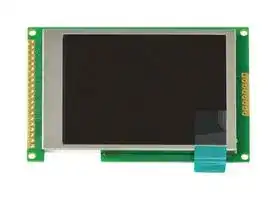
LMT024FNHFWA-NAN
TFT LCD, 2.4 ", 320 x 240 Pixels, Landscape, Black on White, 5V
⚠️ Reference pricing provided. In case of supply shortages, we will connect you with our trusted procurement partners to ensure your project's continuity.
- Manufacturer: INTELLIGENT DISPLAY SOLUTIONS
- Product type: TFT LCD Displays
- SVHC: No SVHC (25-Jun-2025)
- VGA Size: -
- Resolution: 320 x 240 Pixels
- Module Size: 71.5mm x 49.1mm x 7.7mm
- Touchscreen: -
- Display Size: 2.4"
- Logic Voltage: 5V
- Product Range: -
- Display Pinout: 28 Way Connector
- Interface Type: MCU, SPI
- Display Appearance: Black on White
- Display Brightness: 300cd/m²
- Display Orientation: Landscape
- Operating Temperature Max: 80°C
- Operating Temperature Min: -30°C
| Delivery and price | |
|---|---|
| Units per pack | 250 |
| Price | 10.88 € |
| Current stock | 10+ |
| Lead time | 30 days |
Datasheet

## **LMT024FNHFWA-NAN** LCD Module User Manual **==> picture [326 x 87] intentionally omitted <==** **----- Start of picture text -----**<br> Prepared by: Checked by: Approved by:<br>SunQi<br>Date: 2022-07-12 Date: Date:<br>**----- End of picture text -----**<br> |**Rev.**|**Descriptions**|**Release Date**| |---|---|---| |0.1|Preliminary release|2022-04-07| |0.2|Minor Updata|2022-06-09| |0.3|Minor Updata|2022-07-05| |0.4|Minor Updata|2022-07-12| |||| Intelligent Display Solutions, Unit 2, Berkshire Business Centre, Berkshire Drive, Thatcham, Berkshire, RG19 4EW Telephone : +44 (0)1635 294600 Fax : +44 (0)1635 869200 Email: info@i-lcd.com www.i-lcd.com A division of Intelligent Group Solutions Ltd Page: 1 of 18 LMT024FNHFWA-NAN LCD Module User Manual ## **Table of Content** |**1.**|**Basic Specifications............................................................................................................................. 3**| |---|---| |1.1|Block Diagram................................................................................................................................................................................3| |1.2|Terminal Functions........................................................................................................................................................................4| |**2.**|**Absolute Maximum Ratings................................................................................................................5**| |**3.**|**Electrical Characteristics.....................................................................................................................5**| |3.1|DC Characteristics.........................................................................................................................................................................5| |3.2|AC Characteristics.........................................................................................................................................................................5| |3.3|Backlight Control Timing..............................................................................................................................................................6| |**4.**|**Functions................................................................................................................................................. 8**| |4.1|Display Commands.......................................................................................................................................................................8| |4.2|Power off the LCD Module.........................................................................................................................................................12| |4.3|Refreshing The LCD Module.....................................................................................................................................................12| |**5.**|**Optical Characteristics.......................................................................................................................13**| |**6.**|**LCD Module Design and Handling Precautions..........................................................................15**| |**7.**|**Appendix A <Inspection items and criteria for appearance defect>..................................... 17**| |**8.**|**Outline Drawing................................................................................................................................... 18**| Intelligent Display Solutions, Unit 2, Berkshire Business Centre, Berkshire Drive, Thatcham, Berkshire, RG19 4EW Telephone : +44 (0)1635 294600 Fax : +44 (0)1635 869200 Email: info@i-lcd.com www.i-lcd.com A division of Intelligent Group Solutions Ltd Page: 2 of 18 LMT024FNHFWA-NAN LCD Module User Manual ## **1. Basic Specifications** Screen Size(Diagonal) : 2.4” Color Depth: 262K color Number of dots : 320 x 240(RGB) Active Area : 48.96 x 36.72 mm Dot Pitch : 0.153 x 0.153 mm Display Technology : a-Si TFT active matrix Display Mode : Transmissive With Normally White Interface: 80-8bit parallel I/F/ SPI4-line 8bit serial I/F Ⅱ Pixel Configuration : RGB Vertical Stripe Viewing Direction : All viewing angle Backlight Type: LEDs Outline Dimension : 71.5 x 49.1 x 7.70MAX mm Operating Temperature : -20 ~ +70°C (No Condensation) Storage Temperature : -30 ~ +80°C (No Condensation) Note: 1. For saturated color display content (eg. pure-red, pure-green, pure-blue or pure-colors-combinations). 2. For “color scales” display content. 3. Color tone may slightly change by temperature and driving condition. ## **1.1 Block Diagram** **==> picture [430 x 274] intentionally omitted <==** **----- Start of picture text -----**<br> BLEN Backlight Circuit<br>320x 240(RGB) pixels<br>TFT Panel<br>FMARK,/RD,/WR,D/C,/CS,/RES<br>SI,SCL<br>TFT Driver<br>IM0~IM3<br>ST7789VI or equivalent<br>D0~D7<br>VDD,VSS<br>**----- End of picture text -----**<br> Intelligent Display Solutions, Unit 2, Berkshire Business Centre, Berkshire Drive, Thatcham, Berkshire, RG19 4EW Telephone : +44 (0)1635 294600 Fax : +44 (0)1635 869200 Email: info@i-lcd.com www.i-lcd.com A division of Intelligent Group Solutions Ltd Page: 3 of 18 LMT024FNHFWA-NAN LCD Module User Manual ## **1.2 Terminal Functions** |**Pin**<br>**No.**|**PIN**<br>**Name**|**I/O**|**Descriptions**|**Descriptions**| |---|---|---|---|---| ||||**80-8bitparallel I/F**|**4-line 8bit serial I/F** Ⅱ| |1|VSS|Power|Negative power supply ,0V|No connect or fix this pin at<br>VSS level.| |2|VSS|Power||| |3|BLEN|Input|Backlight control.Program dimming<br>levels by driving pin with digital pulses.|No connect| |4|VDD|Power|<br>Positive power supply|No connect or fix this pin at<br>VDD level.| |5|VDD|Power||| |6|/RD|Input|Read enable input, active LOW|No connect or fix this pin at<br>VSS level.| |7|/WR|Input|Write enable input, active LOW|No connect| |8|D/C|Input|Register Select Signal:<br>D/C = H, Transferring the Display Data<br>D/C=L, Transferring the Control Data|| |9|/CS|Input|Chip Select Signal:<br>/CS=L, enable access to the LCD<br>module<br>/CS=H, disable access to the LCD<br>module|| |10|D0|I/O|Data Bus|No connect or fix this pin at<br>VSS level.| |:|:|I/O||| |17|D7|I/O||| |18|/RES|Input|Reset Signal:<br>/RES = L, Initialization is executed<br>/RES=H, Normal running|No connect| |19|FMARK|Output|Displaying timing frame signal|No connect| |20|NC|-|No connect|No connect| |21|NC(VSS)|Power|No connect or fix this pin at VSS level.|Negative power supply ,0V| |22|NC(VDD)|Power|No connect or fix this pin at VDD level.|Positive power supply| |23|NC(SI)|Input|No connect or fix this pin at VSS level.|Serial in signal.| |24|NC(SCL)|Input||Serial Clock| |25|NC(D/C)|Input||Register Select Signal:<br>D/C = H, Transferring the<br>Display Data<br>D/C = L, Transferring the<br>Control Data| |26|NC(/RES)|Input|No connect|Reset Signal:<br>/RES = L, Initialization is<br>executed<br>/RES= H,Normal running| |27|NC(/CS)|Input||Chip Select Signal:<br>/CS=L, enable access to the<br>LCD module<br>/CS=H, disable access to the<br>LCD module| |28|NC(BLEN)|Input||Backlight control.Program<br>dimming levels by driving pin<br>with digital pulses.| Note: SPI and parallel port configuration method |**Mode**|**Install**|**No install**<br>R2,R4,R6,R8<br>C9,C10,C12,C13,C14<br>C15,C18,C20,C21<br>RP1,RP2<br>R2,R3,R5,R7,R12| |---|---|---| |**80-8bit**<br>**parallel I/F**<br>**(default)**|RP1,RP2,RP3(100Ω, 0603*4)<br>R1,R3,R5,R7 (0Ω,0603)|| |**4-line 8bit**<br>**serial I/F** Ⅱ|RP3(100Ω, 0603*4)<br>R1,R4,R6,R8(0Ω,0603)<br>C9,C10,C12,C13,C14(0Ω,0603)<br>C15,C18,C20,C21(0Ω,0603)|| Intelligent Display Solutions, Unit 2, Berkshire Business Centre, Berkshire Drive, Thatcham, Berkshire, RG19 4EW Telephone : +44 (0)1635 294600 Fax : +44 (0)1635 869200 Email: info@i-lcd.com www.i-lcd.com A division of Intelligent Group Solutions Ltd Page: 4 of 18 LMT024FNHFWA-NAN LCD Module User Manual ## **2. Absolute Maximum Ratings** |**Items**|**Symbol**|**Min.**|**Max.**|**Unit**|**Condition**| |---|---|---|---|---|---| |Supply Voltage|VDD|-0.3|+5.3|V|VSS=0V| |Input Voltage|/RES, /WR,/RD<br>D0~D7,D/C,/CS|-0.3|3.4|V|VSS = 0V| |OperatingTemperature|TOP|-20|+70|C|-| |Storage Temperature|TST|-30|+80|C|-| Cautions: Any Stresses exceeding the Absolute Maximum Ratings may cause substantial damage to the device. Functional operation of this device at other conditions beyond those listed in the specification is not implied and prolonged exposure to extreme conditions may affect device reliability. ## **3. Electrical Characteristics** **3.1 DC Characteristics** |**Items**|**Symbol**|**MIN.**|**TYP.**|**MAX.**|**Unit**|**Application Pin**| |---|---|---|---|---|---|---| |Supply Voltage|VDD|4.7|5.0|5.3|V|VDD| |Input High Voltage|VIH|2.4|-|3.4|V|/RES, /CS, D/C,<br>D0~D7,/WR,/RD| |Input Low Voltage|VIL|-|-|1.0|V|| |Output High Voltage|VOH|2.7|-|-|V|D0~D7,FMARK| |Output Low Voltage|VOL|-|-|0.7|V|| |Operating Current|IDD|-|86.4|90|mA|Backlight are<br>ON| ||IDD|-|6.36|6.5|mA|Backlight are<br>OFF| ## **3.2 AC Characteristics** ## 3.2.1 8080 Mode System Bus Timing Intelligent Display Solutions, Unit 2, Berkshire Business Centre, Berkshire Drive, Thatcham, Berkshire, RG19 4EW Telephone : +44 (0)1635 294600 Fax : +44 (0)1635 869200 Email: info@i-lcd.com www.i-lcd.com A division of Intelligent Group Solutions Ltd Page: 5 of 18 LMT024FNHFWA-NAN LCD Module User Manual 3.2.2 Reset Timing VDD=3.3V,VSS=0V, TOP=25C |**Item**|**Symbol**|**MIN.**|**TYP.**|**MAX.**|**Unit**| |---|---|---|---|---|---| |Reset LOW pulse width|TRW|10|-|-|us| |Reset time|TRT|-|-|120|ms| ## **3.3 Backlight Control Timing** VDD=3.3V,VSS=0V, TOP=25C Intelligent Display Solutions, Unit 2, Berkshire Business Centre, Berkshire Drive, Thatcham, Berkshire, RG19 4EW Telephone : +44 (0)1635 294600 Fax : +44 (0)1635 869200 Email: info@i-lcd.com www.i-lcd.com A division of Intelligent Group Solutions Ltd Page: 6 of 18 LMT024FNHFWA-NAN LCD Module User Manual |**Signal**|**Symbol**|**Parameter**|**Spec.**|**Spec.**|**Spec.**|**Unit**|**Description**| |---|---|---|---|---|---|---|---| ||||Min|**TYP.**|**MAX.**||| |BLEN|THI|Time Delay between Steps|0.5|-|-|us|H:1.2V<br>L:0.5V| ||TLO|CTRL LOW Time for Diming|0.5|-|500|us|| ||TSD|CTRL LOW ,shutdown Pulse<br>Width|-|1.6|-|ms|| Note:for basic ON/OFF function,please beware of minimum pulse width. ## **Register BLEN timing** Intelligent Display Solutions, Unit 2, Berkshire Business Centre, Berkshire Drive, Thatcham, Berkshire, RG19 4EW Telephone : +44 (0)1635 294600 Fax : +44 (0)1635 869200 Email: info@i-lcd.com www.i-lcd.com A division of Intelligent Group Solutions Ltd Page: 7 of 18 LMT024FNHFWA-NAN LCD Module User Manual ## **4. Functions** ## **4.1 Display Commands** eonPe popesfeletstfe fete[= Intelligent Display Solutions, Unit 2, Berkshire Business Centre, Berkshire Drive, Thatcham, Berkshire, RG19 4EW Telephone : +44 (0)1635 294600 Fax : +44 (0)1635 869200 Email: info@i-lcd.com www.i-lcd.com A division of Intelligent Group Solutions Ltd Page: 8 of 18 LMT024FNHFWA-NAN LCD Module User Manual Intelligent Display Solutions, Unit 2, Berkshire Business Centre, Berkshire Drive, Thatcham, Berkshire, RG19 4EW Telephone : +44 (0)1635 294600 Fax : +44 (0)1635 869200 Email: info@i-lcd.com www.i-lcd.com A division of Intelligent Group Solutions Ltd Page: 9 of 18 LCD Module User Manual LMT024FNHFWA-NAN Page: 10 of 18 Intelligent Display Solutions, Unit 2, Berkshire Business Centre, Berkshire Drive, Thatcham, Berkshire, RG19 4EW Telephone : +44 (0)1635 294600 Fax : +44 (0)1635 869200 Email: info@i-lcd.com www.i-lcd.com A division of Intelligent Group Solutions Ltd LMT024FNHFWA-NAN LCD Module User Manual Page: 11 of 18 Intelligent Display Solutions, Unit 2, Berkshire Business Centre, Berkshire Drive, Thatcham, Berkshire, RG19 4EW Telephone : +44 (0)1635 294600 Fax : +44 (0)1635 869200 Email: info@i-lcd.com www.i-lcd.com A division of Intelligent Group Solutions Ltd LMT024FNHFWA-NAN LCD Module User Manual Note: Please refer to Sitronix ST7789VI data sheet for more details. ## **4.2 Power off the LCD Module** It recommends that enter Sleep Mode before power off the LCD module. ## **4.3 Refreshing The LCD Module** It recommends that the operating modes and display contents be refreshed periodically to prevent the effect of unexpected noise. Page: 12 of 18 Intelligent Display Solutions, Unit 2, Berkshire Business Centre, Berkshire Drive, Thatcham, Berkshire, RG19 4EW Telephone : +44 (0)1635 294600 Fax : +44 (0)1635 869200 Email: info@i-lcd.com www.i-lcd.com A division of Intelligent Group Solutions Ltd LMT024FNHFWA-NAN LCD Module User Manual ## **5. Optical Characteristics** |**Item**|**Item**|**Symbol**|**Condition**|**Min**|**Typ**|**Max**|**Unit**|**Remark**| |---|---|---|---|---|---|---|---|---| |**View Angles**||θT|CR≧10|70|80|-|Degree|Note2,3| |||θB||70|80|-||| |||θL||70|80|-||| |||θR||70|80|-||| |**Contrast Ratio**||CR|θ= 0°|600|800|-||Note 3| |**Response Time**||TON|25℃|-|20|30|ms|Note 4| |||TOFF||||||| |**Chromaticity**|**White**|x|Backlight is<br>on|-|-|-||Note 1,5| |||y||-|-|-||| ||**Red**|x||-|-|-||Note 1,5| |||y||-|-|-||| ||**Green**|x||-|-|-||Note 1,5| |||y||-|-|-||| ||**Blue**|x||-|-|-||Note 1,5| |||y||-|-|-||| |**Uniformity**||U||-|80%|-|%|Note 6| |**NTSC**||||65%|70%|-|%|Note 5| |**Luminance**||L||250|300|-|cd/㎡|Note 7| Test Conditions: 1.ILEDA= 80mA, and the ambient temperature is 25℃. 2. The test systems refer to Note 1 and Note 2. Page: 13 of 18 Intelligent Display Solutions, Unit 2, Berkshire Business Centre, Berkshire Drive, Thatcham, Berkshire, RG19 4EW Telephone : +44 (0)1635 294600 Fax : +44 (0)1635 869200 Email: info@i-lcd.com www.i-lcd.com A division of Intelligent Group Solutions Ltd LMT024FNHFWA-NAN LCD Module User Manual Note 1: : reference Figure1 The optical characteristics should be measured in dark room. After 5 Minutes operation, the optical properties are measured at the center point of the LCD screen. All input terminals LCD panel must be ground when measuring the center area of the panel. Measuring condition: - Measuring surroundings: Dark room - Measuring temperature: Ta=25℃. - Adjust operating voltage to get optimum contrast at the center of the display. Figure 1 Measured value at the center point of LCD panel after more than 5 minutes while backlight turning on. Note 2: reference Figure2 The luminance uniformity is calculated by using following formula. - △Bp = Bp (Min.) / Bp (Max.)×100 (%) Bp (Max.) = Maximum brightness in 9 measured spots Bp (Min.) = Minimum brightness in 9 measured spots. Note 3: reference Figure3 The definition of contrast ratio: Luminance When LCD is at “White” state ContrastRatio(CR)= Luminance When LCD is at “Black” state Figure 2 (Contrast Ratio is measured in optimum common electrode voltage) “White state “: The state is that the LCD should drive by Vwhite.“Black state”: The state is that the LCD should drive by Vblack.Vwhite: TBD V Vblack: TBD V. Note 4: Definition of Response time **==> picture [30 x 9] intentionally omitted <==** **----- Start of picture text -----**<br> Figure 3<br>**----- End of picture text -----**<br> The response time is defined as the LCD optical switching time interval between “White” state and “Black” state. Rise time (TON) is the time between photo detector output intensity changed from 90% to 10%. And fall time (TOFF) is the time between photo detector output intensity changed from 10% to 90%. Note 5: Definition of color chromaticity (CIE1931) Color coordinates measured at center point of LCD. Note 6: Definition of Luminance Uniformity Figure4 Active area is divided into 9 measuring areas (Refer Fig. Figure 4 2). Every measuring point is placed at the center of each measuring area. Luminance Uniformity (U) = Lmin/ Lmax L-------Active area diameter,W----- Active area width Lmax: The measured Maximum luminance of all measurement position. Lmin: The measured Minimum luminance of all measurement position. Note 7: Definition of Luminance: Measure the luminance of white state at center point. Intelligent Display Solutions, Unit 2, Berkshire Business Centre, Berkshire Drive, Thatcham, Berkshire, RG19 4EW Telephone : +44 (0)1635 294600 Fax : +44 (0)1635 869200 Email: info@i-lcd.com www.i-lcd.com A division of Intelligent Group Solutions Ltd Page: 14 of 18 LMT024FNHFWA-NAN LCD Module User Manual ## **6. LCD Module Design and Handling Precautions** - Please ensure V0, VCOM is adjustable, to enable LCD module get the best contrast ratio under different temperatures, view angles and positions. - Normally display quality should be judged under the best contrast ratio within viewable area. Unexpected display pattern may com out under abnormal contrast ratio. - Never operate the LCD module exceed the absolute maximum ratings. - Never apply signal to the LCD module without power supply. - Keep signal line as short as possible to reduce external noise interference. - IC chip (e.g. TAB or COG) is sensitive to light. Strong light might cause malfunction. Light sealing structure casing is recommended. - Make sure there is enough space (with cushion) between case and LCD panel, to prevent external force passed on to the panel; otherwise that may cause damage to the LCD and degrade its display result. - Avoid showing a display pattern on screen for a long time (continuous ON segment). - LCD module reliability may be reduced by temperature shock. - When storing and operating LCD module, avoids exposure to direct sunlight, high humidity, high or low temperature. They may damage or degrade the LCD module. - Never leave LCD module in extreme condition (max./min storage/operate temperature) for more than 48hr. - Recommend LCD module storage conditions is 0 C~40 C <80%RH. - LCD module should be stored in the room without acid, alkali and harmful gas. - Avoid dropping & violent shocking during transportation, and no excessive pressure press, moisture and sunlight. - LCD module can be easily damaged by static electricity. Please maintain an optimum anti-static working environment to protect the LCD module.(eg. ground the soldering irons properly) - Be sure to ground the body when handling LCD module. - Only hold LCD module by its sides. Never hold LCD module by applying force on the heat seal or TAB. - When soldering, control the temperature and duration avoid damaging the backlight guide or diffuser which might degrade the display result such as uneven display. - Never let LCD module contact with corrosive liquids, which might cause damage to the backlight guide or the electric circuit of LCD module. - Only clean LCD with a soft dry cloth, Isopropyl Alcohol or Ethyl Alcohol. Other solvents (e.g. water) may damage the LCD. - Never add force to components of LCD module. It may cause invisible damage or degrade the module's reliability. - When mounting LCD module, please make sure it is free from twisting, Page: 15 of 18 Intelligent Display Solutions, Unit 2, Berkshire Business Centre, Berkshire Drive, Thatcham, Berkshire, RG19 4EW Telephone : +44 (0)1635 294600 Fax : +44 (0)1635 869200 Email: info@i-lcd.com www.i-lcd.com A division of Intelligent Group Solutions Ltd LMT024FNHFWA-NAN LCD Module User Manual warping and bending. - Do not add excessive force on surface of LCD, which may cause the display color change abnormally. - LCD panel is made with glass. Any mechanical shock (e.g. dropping from high place) will damage the LCD module. - Protective film is attached on LCD screen. Be careful when peeling off this protective film, since static electricity may be generated. - Polarizer on LCD gets scratched easily. If possible, do not remove LCD protective film until the last step of installation. - When peeling off protective film from LCD, static charge may cause abnormal display pattern. The symptom is normal, and it will turn back to normal in a short while. - LCD panel has sharp edges, please handle with care. - Never attempt to disassemble or rework LCD module. - If display panel is damaged and liquid crystal substance leaks out, be sure not to get any in your mouth, if the substance comes into contact with your skin or clothes promptly wash it off using soap and water. ## **Warranty** This product has been manufactured to our company’s specifications as a part for use in your company’s general electronic products. It is guaranteed to perform according to delivery specifications. For any other use apart from general electronic equipment, we cannot take responsibility if the product is used in medical devices, nuclear power control equipment, aerospace equipment, fire and security systems, or any other applications in which there is a direct risk to human life and where extremely high levels of reliability are required. If the product is to be used in any of the above applications, we will need to enter into a separate product liability agreement. - We cannot accept responsibility for any defect, which may arise form additional manufacturing of the product (including disassembly and reassembly), after product delivery. - We cannot accept responsibility for any defect, which may arise after the application of strong external force to the product. - We cannot accept responsibility for any defect, which may arise due to the application of static electricity after the product has passed our company’s acceptance inspection procedures. - When the product is in CCFL models, CCFL service life and brightness will vary according to the performance of the inverter used, leaks, etc. We cannot accept responsibility for product performance, reliability, or defect, which may arise. - We cannot accept responsibility for intellectual property of a third part, which may arise through the application of our product to our assembly with exception to those issues relating directly to the structure or method of manufacturing of our product. Page: 16 of 18 Intelligent Display Solutions, Unit 2, Berkshire Business Centre, Berkshire Drive, Thatcham, Berkshire, RG19 4EW Telephone : +44 (0)1635 294600 Fax : +44 (0)1635 869200 Email: info@i-lcd.com www.i-lcd.com A division of Intelligent Group Solutions Ltd LMT024FNHFWA-NAN LCD Module User Manual ## **7. Appendix A <Inspection items and criteria for appearance defect>** |**Items**|**Criteria**|**Criteria**|**Criteria**|**Criteria**| |---|---|---|---|---| |Open Segment or Common|Not permitted|||| |Short|Not permitted|||| |Wrong Viewing Angle|Not permitted|||| |Decliners|Not permitted|||| |Contrast Ration Uneven|According to the limit specimen|||| |Crosstalk|According to the limit specimen|||| |White spots|X>1 pixel|A-area|Not permitted|Max 6 spots allowed| |||B-area|Max. 1 allowed|| ||1/2 pixel<X≤1 pixel|A-area|Not permitted|| |||B-area|Max. 2 allowed|| ||X≤1/2 pixel|A-area|Max. 1 allowed|| |||B-area|Max. 4 allowed|| |Black Sport|X>1 pixel|A-area|Not permitted|| |||B-area|Max. 2 allowed|| ||X≤1/2 pixel|A-area|Max. 1 allowed|| |||B-area|Max. 4 allowed|| |Line Defect|Apparent vertical horizontal line defects are not permitted|||| Note: 1. On Pixel include 3 dots (RedDot + GreenDot + BlueDot) 2. Definition of Panel “A-area” and “B-area” Page: 17 of 18 Intelligent Display Solutions, Unit 2, Berkshire Business Centre, Berkshire Drive, Thatcham, Berkshire, RG19 4EW Telephone : +44 (0)1635 294600 Fax : +44 (0)1635 869200 Email: info@i-lcd.com www.i-lcd.com A division of Intelligent Group Solutions Ltd LCD Module User Manual LMT024FNHFWA-NAN ## **8. Outline Drawing** Intelligent Display Solutions, Unit 2, Berkshire Business Centre, Berkshire Drive, Thatcham, Berkshire, RG19 4EW Telephone : +44 (0)1635 294600 Fax : +44 (0)1635 869200 Email: info@i-lcd.com www.i-lcd.com A division of Intelligent Group Solutions Ltd Page: 18 of 18
Updated at April 23, 2026
About Novapart
Novapart is a B2B electronic component broker specialising in stock shortages and cost reduction. We source hard-to-find parts and identify compliant alternatives across a catalogue of 410,000+ components from 500+ manufacturers.
Learn more →Stock Shortage Specialist
When a component is unavailable, discontinued or has an unacceptable lead time, we tap into our network of vetted European and Asian distributors to source what you need — without compromising on quality or traceability.
Request a quote →Compliant Alternatives
We identify pin-to-pin, electrically equivalent substitutes that meet the same certifications (RoHS, AEC-Q100, REACH) as your original specification — validated against datasheets, not just part numbers. Often at a lower cost.
BOM Analysis service →