
Image not available
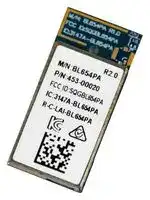
Illustrative purposes only

453-00020C
Bluetooth Module, BLE 5.1, 2 Mbps, -95 dBm, 3 V to 3.6 V, -40 °C to 85 °C
⚠️ Reference pricing provided. In case of supply shortages, we will connect you with our trusted procurement partners to ensure your project's continuity.
- Manufacturer: EZURIO
- Product type: Bluetooth Modules & Adaptors
- SVHC: To Be Advised
- Interfaces: I2C, I2S, SPI, UART, USB
- Product Range: BL654PA Series
- Certifications: FCC, ISED, KC, RCM
- Bluetooth Class: -
- Bluetooth Version: Bluetooth LE 5.1
- Supply Voltage Range: 3 V to 3.6 V
- Receiver Sensitivity Rx: -95 dBm
- Operating Temperature Range: -40 °C to 85 °C
| Delivery and price | |
|---|---|
| Units per pack | 250 |
| Price | 12.53 € |
| Current stock | 10+ |
| Lead time | 30 days |
Datasheet

_Version 2.6_
|**Version**||**Date**|**Notes**|**Contributor(s)**|**Approver**|
|---|---|---|---|---|---|
|1.0|30 Aug 2019|30 Aug 2019|Initial version|Raj Khatri|Jonathan Kaye|
|1.1|24 Oct 2019|24 Oct 2019|Fixed errors in the Pin Definitions table –<br>Comments for Pin 8 and Pin 28|Raj Khatri|Jonathan Kaye|
|1.2|04 Feb 2020|04 Feb 2020|Updated Bluetooth v5.0 to v5.1<br>Updated SIG information||Jonathan Kaye|
||||Updated 4.2 Peripheral Block Current|||
||||Consumption, tables10(UART), table11(SPI),|||
|1.3|06 May 2020|06 May 2020|table12(I2C), table 13(ADC) and added current|Raj Khatri|Jonathan Kaye|
||||consumption when operated from DCDC(REG1)|||
||||and LDO(REG1).|||
|2.0|16 Dec 2020|16 Dec 2020|Updated all regulatory information|Maggie Teng<br>Ryan Urness|Jonathan Kaye|
|2.1|18 Feb 2021|18 Feb 2021|Fixed equation in5.5.2 NFC Antenna Coil Tuning<br>Capacitors|Raj Khatri|Dave Drogowski|
|2.2|18 May 2021|18 May 2021|Specification update for 802.15.4 operation|Henry Wagner|Jonathan Kaye|
|2.3|18 Aug 2021|18 Aug 2021|Added section12 Reliability Tests|Raj Khatri|Jonathan Kaye|
|2.4|14 Oct 2021|14 Oct 2021|Updated Table 25 (removed unnecessary row)|Raj Khatri|Jonathan Kaye|
|2.5|22 Dec 2021|22 Dec 2021|UpdatedMechanical Details|Dave Drogowski|Andrew Chen|
|2.6|29 Nov 2022|29 Nov 2022|UpdatedBluetooth SIG Qualificationwith<br>new QD ID.|Steve Flooks|Jonathan Kaye|
https://www.lairdconnect.com/bl654-pa
2 © Copyright 2021 Laird Connectivity All Rights Reserved
Americas: +1-800-492-2320 Europe: +44-1628-858-940 Hong Kong: +852-2762-4823
|1|Overview and Key Features ................................................................................................................................................... 5|Overview and Key Features ................................................................................................................................................... 5|
|---|---|---|
||1.1|Features and Benefits ................................................................................................................................................... 5|
||1.2|Application Areas .......................................................................................................................................................... 5|
|2|Specification ........................................................................................................................................................................... 6||
||2.1|Specification Summary ................................................................................................................................................. 6|
|3|Hardware Specifications ...................................................................................................................................................... 10||
||3.1|Block Diagram and Pin-out ......................................................................................................................................... 10|
||3.2|Pin Definitions ............................................................................................................................................................. 12|
||3.3|Electrical Specifications .............................................................................................................................................. 17|
||3.3.1|Absolute Maximum Ratings .................................................................................................................................. 17|
||3.3.2|Recommended Operating Parameters ................................................................................................................. 18|
||3.4|Programmability .......................................................................................................................................................... 21|
||3.4.1|BL654PA Default Firmware .................................................................................................................................. 21|
||3.4.2|BL654PA Special Function Pins in_smart_BASIC ................................................................................................... 21|
|4|Power Consumption ............................................................................................................................................................. 22||
||4.1|Power Consumption ................................................................................................................................................... 22|
||4.2|Peripheral Block Current Consumption ....................................................................................................................... 23|
|5|Functional Description ......................................................................................................................................................... 24||
||5.1|Power Management .................................................................................................................................................... 24|
||5.2|BL654PA Power Supply Options ................................................................................................................................ 25|
||5.3|Clocks and Timers ...................................................................................................................................................... 27|
||5.3.1|Clocks ................................................................................................................................................................... 27|
||5.3.2|Timers ................................................................................................................................................................... 27|
||5.4|Radio Frequency (RF) ................................................................................................................................................ 27|
||5.5|NFC ............................................................................................................................................................................ 28|
||5.5.1|Use Cases ............................................................................................................................................................ 28|
||5.5.2|NFC Antenna Coil Tuning Capacitors ................................................................................................................... 28|
||5.6|UART Interface ........................................................................................................................................................... 29|
||5.7|USB interface ............................................................................................................................................................. 30|
||5.8|SPI Bus ....................................................................................................................................................................... 30|
||5.9|I2C Interface ............................................................................................................................................................... 30|
||5.10|General Purpose I/O, ADC, PWM, and FREQ ............................................................................................................ 31|
||5.10.1<br>GPIO ..................................................................................................................................................................... 31||
||5.10.2<br>ADC ...................................................................................................................................................................... 31||
||5.10.3<br>PWM Signal Output on up to 16 SIO Pins ............................................................................................................ 31||
||5.10.4<br>FREQ Signal Output on up to 16 SIO Pins ........................................................................................................... 32||
||5.11|nRESET pin ................................................................................................................................................................ 32|
||5.12|Two-wire Interface JTAG ............................................................................................................................................ 32|
https://www.lairdconnect.com/bl654-pa
3
© Copyright 2021 Laird Connectivity All Rights Reserved
Americas: +1-800-492-2320 Europe: +44-1628-858-940 Hong Kong: +852-2762-4823
||5.13<br>BL654PA Wakeup ...................................................................................................................................................... 33|
|---|---|
||5.13.1<br>Waking Up BL654PA from Host ............................................................................................................................ 33|
||5.14<br>Low Power Modes ...................................................................................................................................................... 33|
||5.15<br>Temperature Sensor ................................................................................................................................................... 33|
||5.16<br>Security/Privacy .......................................................................................................................................................... 33|
||5.16.1<br>Random Number Generator ................................................................................................................................. 33|
||5.16.2<br>AES Encryption/Decryption ................................................................................................................................... 34|
||5.16.3<br>ARM Cryptocell ..................................................................................................................................................... 34|
||5.16.4<br>Readback Protection ............................................................................................................................................. 34|
||5.16.5<br>Elliptic Curve Cryptography .................................................................................................................................. 34|
||5.17<br>Optional External 32.768 kHz Crystal ......................................................................................................................... 34|
||5.18<br>453-00020 On-board PCB Antenna Characteristics ................................................................................................... 35|
|6|Hardware Integration Suggestions ....................................................................................................................................... 37|
||6.1<br>Circuit ......................................................................................................................................................................... 37|
||6.2<br>PCB Layout on Host PCB - General ........................................................................................................................... 38|
||6.3<br>PCB Layout on Host PCB for the 453-00020 .............................................................................................................. 39|
||6.3.1<br>Antenna Keep-out on Host PCB ........................................................................................................................... 39|
||6.3.2<br>Antenna Keep-out and Proximity to Metal or Plastic ............................................................................................. 40|
||6.4<br>External Antenna Integration with the 453-00021 ....................................................................................................... 40|
|7|Mechanical Details ............................................................................................................................................................... 42|
||7.1<br>BL654PA Mechanical Details ..................................................................................................................................... 42|
||7.2<br>Host PCB Land Pattern and Antenna Keep-Out for the 453-00020 ............................................................................ 44|
|8|Application Note for Surface Mount Modules ....................................................................................................................... 45|
||8.1<br>Introduction ................................................................................................................................................................. 45|
||8.2<br>Shipping ...................................................................................................................................................................... 45|
||8.2.1<br>Tape and Reel Package Information..................................................................................................................... 45|
||8.2.2<br>Carton Contents .................................................................................................................................................... 46|
||8.2.3<br>Labeling ................................................................................................................................................................ 46|
||8.3<br>Reflow Parameters ..................................................................................................................................................... 47|
|9|Regulatory Information ......................................................................................................................................................... 48|
|10|Ordering Information ............................................................................................................................................................ 49|
|11|Bluetooth SIG Qualification .................................................................................................................................................. 49|
||11.1<br>Overview ..................................................................................................................................................................... 49|
||11.2<br>Qualification Steps When Referencing a Laird End Product Design........................................................................... 50|
||11.3<br>Qualification Steps When Deviating from a Laird End Product Design ....................................................................... 50|
|12|Reliability Tests .................................................................................................................................................................... 52|
|13|Additional Assistance ........................................................................................................................................................... 52|
https://www.lairdconnect.com/bl654-pa
4 © Copyright 2021 Laird Connectivity All Rights Reserved
Americas: +1-800-492-2320 Europe: +44-1628-858-940 Hong Kong: +852-2762-4823
Every BL654PA module is designed to simplify OEMs enablement of Bluetooth Low Energy (BLE) v5.0 and Thread (802.15.4) to small, portable, highly power-conscious devices. The BL654PA provides engineers with considerable design flexibility in both hardware and software programming capabilities.
Based on the world-leading Nordic Semiconductor nRF52840 chipset, the BL654PA modules provide ultra-low power consumption with outstanding wireless range via +18 dBm of transmit power and the Long Range (CODED PHY) Bluetooth 5 feature. New circuitry both increases TX power and decreases sleep current for impeccable power management. The BL654PA is programmable via AT commands and Laird’s _smart_ BASIC language
_smart_ BASIC is an event-driven programming language that is highly optimized for memory-constrained systems such as embedded modules. It was designed to make BLE development quicker and simpler, vastly cutting down time to market.
**Note:** BL654PA hardware provides all functionality of the nRF52840 chipset used in the module design. This is a hardware datasheet only – it does not cover the software aspects of the BL654PA.
For customers using _smart_ BASIC, refer to the _smart_ BASIC extensions guide (available from the BL654PA product page of the Laird website.
- Bluetooth v5.1 – Single mode
- NFC
- 802.15.4 (Thread) radio support
- External or internal antennas
- Multiple programming options
- _smart_ BASIC
- AT command set
- Compact footprint
- Programmable Tx power +18 dBm to -6 dBm, -26 dBm – LE Coded max Tx is +14 dBm
- Rx sensitivity – -98.5 dBm (1 Mbps), - 107 dBm (125 kbps)
- Standby Doze – 5.9 uA typical
- Deep Sleep – 2.0 uA – (See Note 4 in the _Power Consumption_ section)
- UART, GPIO, ADC, PWM, FREQ output, timers, I2C, SPI, I2S, PDM, and USB interfaces
- Fast time-to-market
- FCC, ISED, AS/NZS, and Korea-certified
- Full Bluetooth Declaration ID
- Other regulatory certifications on request
- No external components required
- ▪ Industrial temperature range (-40° C to +85° C)
- Ultra-low power consumption
- Tx @ +18 dBm– 102.2 mA peak (at 18 dBm, DCDC on) (See Note 1 in the _Power Consumption_ section)
- Rx: 10.9 mA peak (DCDC on) (See Note 1 in the _Power Consumption_ section)
- Medical devices
- IoT Sensors
- Factory Automation
- HVAC Controllers
- Location awareness
- ▪ Home automation
https://www.lairdconnect.com/bl654-pa
5 © Copyright 2021 Laird Connectivity All Rights Reserved
Americas: +1-800-492-2320 Europe: +44-1628-858-940 Hong Kong: +852-2762-4823
|**Categories/Feature**||**Implementation**|
|---|---|---|
|**Wireless Specification**|||
|||▪<br>BT 5.1 – Single mode|
|||▪<br>4x Range (CODED PHY support) – BT 5.1|
|||▪<br>2x Speed (2M PHY support) – BT 5.1|
|||▪<br>Concurrent master, slave|
|Bluetooth®||▪<br>Diffie-Hellman based pairing (LE Secure Connections) – BT 4.2|
|||▪<br>Data Packet Length Extension – BT 4.2|
|||▪<br>Link Layer Privacy (LE Privacy 1.2) – BT 4.2|
|||▪<br>LE Dual Mode Topology – BT 4.1|
|||▪<br>LE Ping– BT 4.1|
|||▪<br>2405-2480 MHz IEEE 802.15.4-2006 radio transceiver, implementing 802.15.4-|
|||2006 compliant|
|IEEE 802.15.4-2006 250kbps<br>PHY (Laird FCC and ISED<br>certified for HW only, customer<br>must implement in their FW<br>conditions inNote 1,Note 2)||▪<br>250 kbps, 2450 MHz, O-QSPK PHY<br>▪<br>Channel 11-25, channel 11 2405 MHz and CH25 2475 MHz (CH26 not<br>certified)<br>▪<br>Clear channel assessment (CCA)<br>▪<br>Energy detection (ED) scan|
|||▪<br>CRCgeneration|
|||2.402 - 2.480 GHz for BLE (CH0 to CH39)|
|Frequency||2.405 - 2.475 GHz for IEEE 802.15.4-2006 (CH1 to CH25). CH26 (2480 MHz) not|
|||certified and therefore customer must not operate at CH26 (2480 MHz).|
|||1 Mbps BLE (over-the-air)|
|Raw Data Rates||2 Mbps BLE (over-the-air)<br>125 kbps BLE (over-the-air)|
|||250 kbps IEEE 802.15.4-2006(over-the-air)|
|Maximum Transmit Power Setting<br>SeeNote 6in_Module_<br>_Specification Notes_.|Maximum Transmit Power Setting|+18 dBm conducted<br>453-00020(integrated antenna)<br>+18 dBm conducted<br>453-00021 (external antenna)|
|Minimum Transmit Power Setting||-26 dBm, -6 dBm, 0 dBm, 6 dBm, 14 dBm|
|||BLE 1 Mbps(BER=1E-3)<br>-98.5 dBm typical|
|Receive Sensitivity<br>(≤37-byte packet)||BLE 2 Mbps<br>-95 dBm typical|
|||BLE 125 kbps<br>-107 dBm typical|
|Link Budget (conducted)||116.5 dB<br>@ BLE 1 Mbps<br>121 dB<br>@ BLE 125 kbps|
|Maximum Received Signal<br>Strength at <0.1% PER|-11 dBm (limited by 11dB RX LNA gain)||
|**RF Cellular Coexistence**|||
|RF Band Pass Filter|Assists withcellular RF co-existence||
https://www.lairdconnect.com/bl654-pa
6
© Copyright 2021 Laird Connectivity All Rights Reserved
Americas: +1-800-492-2320 Europe: +44-1628-858-940 Hong Kong: +852-2762-4823
|**Categories/Feature**|**Implementation**|**Implementation**|
|---|---|---|
|**NFC**|||
||**Based on NFC forum specification**||
||▪|13.56 MHz|
||▪|Date rate 106 kbps|
||▪|NFC Type 2 and Type 4 emulation|
||**Modes of Operation:**||
|NFC-A Listen mode compliant|▪|Disable|
||▪|Sense|
||▪|Activated|
||**Use Cases:**||
||▪|Touch-to-Pair with NFC|
||▪|NFC enabled out of band (OOB) pairing|
|System Wake-On-Field function|Proximity Detection||
|**Host Interfaces and Peripherals**|||
|Total|46 x multifunction I/O lines|46 x multifunction I/O lines|
||▪2 UARTs|2 UARTs|
||▪Tx, Rx, CTS, RTS|Tx, Rx, CTS, RTS|
|UART|▪DCD, RI, DTR, DSR (See|DCD, RI, DTR, DSR (SeeNote 3in the Module Specification Notes)|
||▪Default 115200, n, 8, 1|Default 115200, n, 8, 1|
||▪From 1,200 b|From 1,200 bps to 1 Mbps|
|USB|▪USB 2.0 FS (Full Speed, 12 Mbps)<br>▪CDC driver/virtual UART (baud rate TBD)|USB 2.0 FS (Full Speed, 12 Mbps)<br>CDC driver/virtual UART (baud rate TBD)|
||Up to 46, with configurable:|Up to 46, with configurable:|
||▪I/O direction|I/O direction|
|GPIO|▪O/P drive strength (standard 0.5 mA or high 3mA/5 mA),|O/P drive strength (standard 0.5 mA or high 3mA/5 mA),|
||▪Pull-up/pull-down|Pull-up/pull-down|
||▪In|Input buffer disconnect|
||▪Eight 8/10/12-bit channels|Eight 8/10/12-bit channels|
|||0.6 V internal reference|
|ADC|▪Configurable 4, 2, 1, 1/2, 1/3, 1/4, 1/5 1/6 (default) pre-scaling|Configurable 4, 2, 1, 1/2, 1/3, 1/4, 1/5 1/6 (default) pre-scaling|
||▪Configurable acquisition time 3uS, 5uS, 10uS (default), 15uS, 20uS, 40uS.|Configurable acquisition time 3uS, 5uS, 10uS (default), 15uS, 20uS, 40uS.|
||▪One-shot mode|One-shot mode|
||PWM outputs on 16 GPIO output pins.||
|PWM Output|▪PWM output duty cycle: 0%-100% (per frequency)|PWM output duty cycle: 0%-100% (per frequency)|
||▪PWM out|PWM output frequency: Upto 500 kHz|
|FREQ Output|FREQ outputs on 16 GPIO output pins.<br>▪FREQ output frequency: 0 MHz to 4 MHz(50% dutycycleper frequency)||
|I2C|Two I2C interface (up to 400 kbps) – SeeNote 4in theModule Specification Notes||
|SPI|Four SPI Master Slave interface (up to 4 Mbps)||
|QSPI|▪One 32-MHz QSPI interface. Gives XIP (execute in place) capability<br>▪External serial flash IC must be fitted as|One 32-MHz QSPI interface. Gives XIP (execute in place) capability<br>External serial flash IC must be fitted asper Nordic specifications|
||▪One temperature sensor|One temperature sensor|
|Temperature Sensor|▪Temperature range equal to the operating temperature range|Temperature range equal to the operating temperature range|
||▪Resolution 0.25 de|Resolution 0.25 degrees|
||▪One RF received signal strength indicator|One RF received signal strength indicator|
|RSSI Detector|▪±2 dB accuracy (valid over -101 dBm to -31 dBm) – added 11 dB LNA gain|±2 dB accuracy (valid over -101 dBm to -31 dBm) – added 11 dB LNA gain|
||▪|1 dB resolution|
https://www.lairdconnect.com/bl654-pa
7 © Copyright 2021 Laird Connectivity All Rights Reserved
Americas: +1-800-492-2320 Europe: +44-1628-858-940 Hong Kong: +852-2762-4823
|**Categories/Feature**|**Implementation**|
|---|---|
|I2S|One inter-IC sound interface|
|PDM|One pulse density modulation interface|
|**Optional (External to the BL654PA module)**|**Optional (External to the BL654PA module)**|
|External 32.768 kHz crystal|For customer use, connect +/-20 ppm accuracy crystal for more accurate protocol<br>timing.|
|**Profiles**||
||▪Central mode|
|Services supported|▪Peripheral mode|
||▪Custom and adoptedprofiles|
|**Programmability**||
|_smart_BASIC|▪FW upgrade via JTAG or UART|
||▪Application download via UART or via over-the-air (if SIO_02 pin is pulled high|
||externally)|
|**Operating Modes**||
|_smart_BASIC|**Self-contained Run mode**|
||▪Selected by nAutoRun pin status: LOW (0V).|
||▪Then runs $autorun$ (_smart_BASIC application script) if it exists.|
||**Interactive/Development mode**|
||▪HIGH (VDD).|
||▪Then runs via at+run (and_file name_of_smart_BASIC application script).|
|**Supply Voltage**||
|Supply (VDD or VDD_HV)|▪Normal voltage mode VDD 3.0- 3.6 V – Internal DCDC converter or LDO|
|options|(SeeNote 5in the_Module Specification Notes_)|
||OR|
||▪ High voltage mode VDD_HV 3.0V-5.5V Internal DCDC converter or LDO|
||(SeeNote 5in the_Module Specification Notes_)|
|**Power Consumption**||
|Active Modes Peak Current (for||
|maximum Tx power +18 dBm)|102.2 mA peak Tx (with DCDC)|
|– Radio only||
|Active Modes Peak Current (for<br>Tx power -26 dBm) – Radio only|18.5 mA peak Tx (with DCDC)|
|Active Modes Average Current|Depends on many factors, see_Power Consumption_|
|Ultra-low Power Modes|Standby Doze<br>5.9 uA typical<br>Deep Sleep<br>2.0 uA|
|**Antenna Options**||
|Internal|Printed PCB monopole antenna – on-board|
||**453-00020 variant**|
|External|▪Dipole antenna (with IPEX connector)|
||▪Dipole PCB antenna (with IPEX connector)|
||▪<br>Connection via IPEX MH4 –**453-00021 variant**|
||See the Antenna Information sections forFCC, ISED, AS/NZS, and Korea|
https://www.lairdconnect.com/bl654-pa
8 © Copyright 2021 Laird Connectivity All Rights Reserved
Americas: +1-800-492-2320 Europe: +44-1628-858-940 Hong Kong: +852-2762-4823
|**Categories/Feature**|**Implementation**|
|---|---|
|**Physical**||
|Dimensions|22.0 mm x 10 mm x 2.2 mm|
||Pad Pitch – 0.8 mm|
||Pad Type – Two rows of pads|
|Weight|<1 gram|
|**Environmental**||
|Operating|-40 ˚C to +85 ˚C|
|Storage|-40 ˚C to +85 ˚C|
|**Miscellaneous**||
|Lead Free|Lead-free and RoHS compliant|
|Warranty|One-year warranty|
|**Development Tools**||
|Development Kit|Development kit per module SKU (455-00022 and 455-00023) and free software<br>tools|
|**Approvals**||
|Bluetooth®|Full Bluetooth SIG Declaration ID|
|FCC/ISED/KC/AS/NZS|All BL654PA types|
## **Module Specification Notes:**
**Note 1** The BL654PA module _smart_ BASIC FW does not support IEEE 802.15.4-2006 250 kbps.
The BL654PA module IEEE 802.15.4-2006 250 kbps certifications for FCC and ISED are for HW only. It is the customer’s responsibility to follow the mandatory conditions highlighted in this Note 1 and Note 2 in the FW that the customer implements.
When used in IEEE 802.15.4-2006 250 kbps mode, channel 26 (2480 MHz) is unavailable for use due to the presence of out of band emissions. All other IEEE 802.15.4-2006 250 kbps channels (11-25) may be used up to the maximum +18 dBm conducted output power provided the maximum RF TX duty cycle per frequency is not exceeded (see Note 2).
As module Tx power is controlled by the nRF52840 RF drive level into the FEM, the nRF52840 Tx RF drive level must be limited to a maximum drive of -4 dBm for IEEE 802.15.4-2006 250 kbps channels 11-25. Exceeding this drive level results in damage to the BL654PA and cause the BL654PA to fail regulatory Tx power certifications.
**Note 2** The BL654PA module IEEE 802.15.4-2006 250 kbps certifications for FCC and ISED are for HW only. It is the customer’s responsibility to follow the mandatory conditions highlighted in this Note 1 and Note 2 in the FW that the customer implements.
When used in IEEE 802.15.4-2006 250 kbps mode, in addition to the maximum conducted power limits, a maximum RF TX operational duty cycle of 58% or less (per frequency) must always be maintained, under all operating modes and power levels, to remain compliant with harmonic emission regulatory limits FCC (47 CFR 15.247) and ISED (RSS-247). This RF TX duty cycle limit is measured during any 100 mS period of operation.
**Note 3** DSR, DTR, RI, and DCD can be implemented in the _smart_ BASIC application.
**Note 4** With I2C interface selected, pull-up resistors on I2C SDA and I2C SCL _**must**_ be connected externally as per I2C standard.
https://www.lairdconnect.com/bl654-pa
9
© Copyright 2021 Laird Connectivity All Rights Reserved
Americas: +1-800-492-2320 Europe: +44-1628-858-940 Hong Kong: +852-2762-4823
## **Module Specification Notes:**
- **Note 5** Use of the internal DCDC convertor or LDO is decided by the underlying BLE stack.
- **Note 6** For BL654PA BLE coded PHY 125kbps (s=8), the conducted RF TX power is limited to 14 dBm (conducted) to be within the FCC/ISED TX power spectral density limit.
_**Figure 1: BL654PA block diagram**_
https://www.lairdconnect.com/bl654-pa
10 © Copyright 2021 Laird Connectivity All Rights Reserved
Americas: +1-800-492-2320 Europe: +44-1628-858-940 Hong Kong: +852-2762-4823
_**Figure 2: Functional HW and SW block diagram for BL654PA BLE module**_
_**Figure 3: BL654PA module pin-out (top view). Outer row pads (long red line) and inner row pads (short red line) shown.**_
https://www.lairdconnect.com/bl654-pa
11 © Copyright 2021 Laird Connectivity All Rights Reserved
Americas: +1-800-492-2320 Europe: +44-1628-858-940 Hong Kong: +852-2762-4823
_**Table 1: Pin definitions**_
|**Pin #**|**Pin #**|**Pin Name**|**Default**<br>**Function**|**Alternate**<br>**Function**|**In/ Out**|**Pull**<br>**Up/**<br>**Down**|**nRF52840**<br>**QFN Pin**|**nRF52840**<br>**QFN Name**|**Comment**|
|---|---|---|---|---|---|---|---|---|---|
|0||GND|-|-|-|-|-|-|-|
|1||SWDIO|SWDIO|-|IN|PULL-<br>UP|AC24|SWDIO|-|
|2||DO NOT<br>CONNECT/NC|No<br>Connect||IN|PULL-<br>UP|U24|P1.04|Do Not Connect.|
|3||SWDCLK|SWDCLK|-|IN|PULL-<br>DOWN|AA24|SWDCLK||
|4||DO NOT<br>CONNECT/NC|No<br>Connect|-|-|PULL-<br>UP|W24|P1.02|Do Not Connect.|
|5||SIO_35/<br>nAutoRUN|nAutoRUN|SIO_35|IN|PULL-<br>DOWN|V23|P1.03|**Laird Devkit:**FTDI<br>USB_DTR via jumper<br>on J12 pin1-2.|
|6||SIO_33|SIO_33||IN|PULL-<br>UP|Y23|P1.01|-|
|7||SIO_32|SIO_32|-|IN|PULL-<br>UP|AD22|P1.00|**-**|
|8||SIO_25|SIO_25|-|IN|PULL-<br>UP|AC21|PO.25|**Laird Devkit:**<br>BUTTON4|
|9||SIO_23|SIO_23|QSPI_DIO3|IN|PULL-<br>UP|AC19|PO.23|-|
|10|10|SIO_24|SIO_24||IN|PULL-<br>UP|AD20|PO.24|**Laird Devkit:**<br>BUTTON3|
|11|11|SIO_22|SIO_22|QSPI_DIO2|IN|PULL-<br>UP|AD18|PO.22|-|
|12|12|SIO_21|SIO_21|QSPI_DIO1|IN|PULL-<br>UP|AC17|PO.21|-|
|13|13|SIO_20|SIO_20|QSPI_DIO0|IN|PULL-<br>UP|AD16|PO.20|-|
|14|14|SIO_19|SIO_19|QSPI_CLK|IN|PULL-<br>UP|AC15|PO.19|-|
|15|15|D+|D+|-|IN||AD6|D+|-|
|16|16|SIO_17|SIO_17|QSPI_CS|IN|PULL-<br>UP|AD12|PO.17|-|
|17|17|D-|D-|-|IN||AD4|D-|-|
|18|18|SIO_15|SIO_15|-|IN|PULL-<br>UP|AD10|PO.15|**Laird Devkit:**LED3|
|19|19|nRESET|nRESET|SIO_18|IN|PULL-<br>UP|AC13|PO.18|System Reset (Active<br>Low)|
https://www.lairdconnect.com/bl654-pa
12
© Copyright 2021 Laird Connectivity All Rights Reserved
Americas: +1-800-492-2320 Europe: +44-1628-858-940 Hong Kong: +852-2762-4823
|**Pin #**|**Pin #**|**Pin Name**|**Default**<br>**Function**|**Alternate**<br>**Function**|**In/ Out**|**Pull**<br>**Up/**<br>**Down**|**nRF52840**<br>**QFN Pin**|**nRF52840**<br>**QFN Name**|**Comment**|
|---|---|---|---|---|---|---|---|---|---|
|20|20|SIO_13|SIO_13|-|IN|PULL-<br>UP|AD8|PO.13|**Laird Devkit:**LED1|
|21|21|SIO_16|SIO_16|-|IN|PULL-<br>UP|AC11|PO.16|**Laird Devkit:**LED4|
|22|22|SIO_14|SIO_14|-|IN|PULL-<br>UP|AC9|PO.14|**Laird Devkit:**LED2|
|23|23|GND|-|-|-|-|-|-|-|
|24|24|VBUS|||||||4.35V – 5.5V|
|25|25|VDD_HV|-|-|-|-|-|-|3.0V to 5.5V|
|26|26|GND|-|-|-|-|-|-|-|
|27|27|SIO_11|SIO_11|-|IN|PULL-<br>UP|T2|PO.11|**Laird Devkit:**<br>BUTTON1|
|28|28|SIO_12|SIO_12|-|IN|PULL-<br>UP|U1|PO.12|BUTTON2|
||||||||||UARTCLOSE() selects|
|29|29|SIO_08/<br>UART_RX|SIO_08|UART_RX|IN|PULL-<br>UP|N1|PO.08|DIO functionality.<br>UARTOPEN() selects<br>UART COMMS|
||||||||||behavior|
||||||||||**Laird Devkit:**SPI|
||||||||||EEPROM.|
||||||||||SPI_Eeprom_CLK,|
||||||||||Output:|
|30|30|SIO_41/<br>SPI_CLK|SIO_41|SPI_CLK|IN|PULL-<br>UP|R1|P1.09|SPIOPEN() in<br>_smart_BASIC selects|
||||||||||SPI function, MOSI and|
||||||||||CLK are outputs when|
||||||||||in SPI master mode.|
|31|31|VDD|-|-|-|-|||3.0V to 3.6V|
||||||||||**Laird Devkit:**SPI|
||||||||||EEPROM.|
||||||||||SPI_Eeprom_MOSI,|
||||||||||Output|
|32|32|SIO_40/<br>SPI_MOSI|SIO_40|SPI_MOSI|IN|PULL-<br>UP|P2|P1.08|SPIOPEN() in<br>_smart_BASIC selects|
||||||||||SPI function, MOSI and|
||||||||||CLK are outputs in SPI|
||||||||||master.|
|33|33|GND|-|-|-|-|-|-|-|
||||||||||**Laird Devkit:**SPI|
||||||||||EEPROM.|
|34|34|SIO_04/<br>AIN2/<br>SPI_MISO|SIO_04|AIN2/<br>SPI_MISO|IN|PULL-<br>UP|J1|PO.04/AIN2|SPI_Eeprom_MISO,<br>Input.<br>SPIOPEN() in|
||||||||||_smart_BASIC selects|
https://www.lairdconnect.com/bl654-pa
13
© Copyright 2021 Laird Connectivity All Rights Reserved
Americas: +1-800-492-2320 Europe: +44-1628-858-940 Hong Kong: +852-2762-4823
|**Pin #**|**Pin #**|**Pin Name**|**Default**<br>**Function**|**Alternate**<br>**Function**|**In/ Out**|**Pull**<br>**Up/**<br>**Down**|**nRF52840**<br>**QFN Pin**|**nRF52840**<br>**QFN Name**|**Comment**|
|---|---|---|---|---|---|---|---|---|---|
||||||||||SPI function; MOSI and|
||||||||||CLK are outputs when|
||||||||||in SPI master mode|
||||||||||UARTCLOSE() selects|
|35|35|SIO_06/<br>UART_TX|SIO_06|UART_TX|OUT|Set<br>High in<br>FW|L1|PO.06|DIO functionality.<br>UARTOPEN() selects<br>UART COMMS|
||||||||||behaviour|
|36|36|SIO_26/<br>I2C_SDA|SIO_26|I2C_SDA|IN|PULL-<br>UP|G1|PO.26|**Laird Devkit:**I2C RTC<br>chip. I2C data line.|
||||||||||UARTCLOSE() selects|
|37|37|SIO_07/<br>UART_CTS|SIO_07|UART_CTS|IN|PULL-<br>DOWN|M2|PO.07|DIO functionality.<br>UARTOPEN() selects<br>UART COMMS|
||||||||||behaviour|
|38|38|SIO_27/<br>I2C_SCL|SIO_27|I2C_SCL|IN|PULL-<br>UP|H2|PO.27|**Laird Devkit:**I2C RTC<br>chip. I2C clock line.|
||||||||||UARTCLOSE() selects|
|39|39|SIO_05/<br>UART_RTS/<br>AIN3|SIO_05|UART_RTS/<br>AIN3|OUT|Set<br>Low in<br>FW|K2|PO.05/AIN3|DIO functionality.<br>UARTOPEN() selects<br>UART COMMS|
||||||||||behaviour|
|40|40|GND|-|-|-|-|-|-|-|
||||||||||Laird Devkit: Optional|
|41|41|SIO_01/<br>XL2|SIO_01|XL2|IN|PULL-<br>UP|F2|PO.01/XL2|32.768kHz crystal pad<br>XL2 and associated|
||||||||||load capacitor.|
||||||||||Laird Devkit: Optional|
|42|42|SIO_00/<br>XL1|SIO_00|XL1|IN|PULL-<br>UP|D2|PO.00/XL1|32.768kHz crystal pad<br>XL1 and associated|
||||||||||load capacitor.|
|43|43|GND|-|-|-|-|-|-|-|
|44|44|SIO_31/<br>AIN7|SIO_31|AIN7|IN|PULL-<br>UP|A8|PO.31/AIN7|-|
|45|45|SIO_30/<br>AIN6|SIO_30|AIN6|IN|PULL-<br>UP|B9|PO.30/AIN6|-|
|46|46|SIO_28/<br>AIN4|SIO_28|AIN4|IN|PULL-<br>UP|B11|PO.28/AIN4|-|
|47|47|GND|-|-|-|-|-|-|-|
|48|48|SIO_29/<br>AIN5|SIO_29|AIN5|IN|PULL-<br>UP|A10|PO.29/AIN5|-|
|49|49|SIO_03/<br>AIN1|SIO_03|AIN1|IN|PULL-<br>UP|B13|PO.03/AIN1|**Laird Devkit:**Temp<br>Sens Analog|
https://www.lairdconnect.com/bl654-pa
14
© Copyright 2021 Laird Connectivity All Rights Reserved
Americas: +1-800-492-2320 Europe: +44-1628-858-940 Hong Kong: +852-2762-4823
|**Pin #**|**Pin #**|**Pin Name**|**Default**<br>**Function**|**Alternate**<br>**Function**|**In/ Out**|**Pull**<br>**Up/**<br>**Down**|**nRF52840**<br>**QFN Pin**|**nRF52840**<br>**QFN Name**|**Comment**|
|---|---|---|---|---|---|---|---|---|---|
||||||||||Internal pull-down. Pull|
|50|50|SIO_02/<br>AIN0|SIO_02|AIN0|IN|PULL-<br>DOWN|A12|PO.02/AIN0|High externally to enter<br>VSP (Virtual Serial Port)|
||||||||||Service.|
|51|51|SIO_46|SIO_46|-|IN|PULL-<br>UP|B15|P1.14|-|
|52|52|GND|-|-|-|-|-|-|-|
|53|53|SIO_47|SIO_47|-|IN|PULL-<br>UP|A14|P1.15|-|
|54|54|SIO_44|SIO_44|-|IN|PULL-<br>UP|B17|P1.12|**Laird Devkit:**SPI<br>EEPROM.<br>SPI_Eeprom_CS, Input|
|55|55|GND|-|-|-|-|-|-|-|
|56|56|SIO_45|SIO_45|-|IN|PULL-<br>UP|A16|P1.13|-|
|57|57|NFC2/<br>SIO_10|NFC2|SIO_10|IN|-|J24|PO.10/NFC2|-|
|58|58|GND|-|-|-|-|-|-|-|
|59|59|NFC1/<br>SIO_09|NFC1|SIO_09|IN|-|L24|PO.09/NFC1|-|
|60|60|SIO_43|SIO_43|-|IN|PULL-<br>UP|B19|P1.11|-|
|61|61|SIO_37|SIO_37|-|IN|PULL-<br>UP|T23|P1.05|-|
|62|62|SIO_42|SIO_42|-|IN|PULL-<br>UP|A20|P1.10|-|
|63|63|SIO_38|N/C|-|IN|PULL-<br>UP|R24|P1.06|Reserved for future use.<br>Do not connect.|
|64|64|SIO_39|SIO_39|-|IN|PULL-<br>UP|P23|P1.07|-|
|65|65|GND|-|-|-|-|-|-|-|
|66|66|GND|-|-|-|-|-|-|-|
|67|67|GND|-|-|-|-|-|-|-|
|68|68|GND|-|-|-|-|-|-|-|
|69|69|GND|-|-|-|-|-|-|-|
|70|70|GND|-|-|-|-|-|-|-|
|71|71|GND|-|-|-|-|-|-|-|
|72|72|GND|-|-|-|-|-|-|Added GND in the<br>BL654PA|
|73|73|GND|-|-|-|-|-|-|Added GND in the<br>BL654PA|
https://www.lairdconnect.com/bl654-pa
15
© Copyright 2021 Laird Connectivity All Rights Reserved
Americas: +1-800-492-2320 Europe: +44-1628-858-940 Hong Kong: +852-2762-4823
|**Pin #**|**Pin #**|**Pin Name**|**Default**<br>**Function**|**Alternate**<br>**Function**|**In/ Out**|**Pull**<br>**Up/**<br>**Down**|**nRF52840**<br>**QFN Pin**|**nRF52840**<br>**QFN Name**|**Comment**|
|---|---|---|---|---|---|---|---|---|---|
|74|74|GND|-|-|-|-|-|-|Added GND in the<br>BL654PA|
|75|75|GND|-|-|-|-|-|-|Added GND in the<br>BL654PA|
|76|76|GND|-|-|-|-|-|-|Added GND in the<br>BL654PA|
|77|77|GND|-|-|-|-|-|-|Added GND in the<br>BL654PA|
|78|78|GND|-|-|-|-|-|-|Added GND in the<br>BL654PA|
|79|79|GND|-|-|-|-|-|-|Added GND in the<br>BL654PA|
## **Pin Definition Notes:**
**Note 1** SIO = Signal Input or Output. Secondary function is selectable in _smart_ BASIC application or via Nordic SDK. I/O voltage level tracks VDD. AIN = Analog Input.
- **Note 2**[At reset, all SIO lines are configured as the defaults shown above. ]
SIO lines can be configured through the _smart_ BASIC application script to be either inputs or outputs with pull-ups or pull-downs. When an alternative SIO function is selected (such as I2C or SPI), the firmware does not allow the setup of internal pull-up/pull-down. Therefore, when I2C interface is selected, pull-up resistors on I2C SDA and I2C SCL _**must**_ be connected externally as per I2C standard.
- **Note 3** JTAG (two-wire SWD interface), pin 1 (SWDIO) and pin 3 (SWDCLK).
JTAG is required because Nordic SDK applications can only be loaded using JTAG ( _smart_ BASIC firmware can be loaded using the JTAG as well as UART). We recommend that you use JTAG (2-wire interface) to handle future BL654PAmodule _smart_ BASIC firmware upgrades. You MUST wire out the JTAG (2-wire interface) on your host design (see Figure 7, where four lines (SWDIO, SWDCLK, GND and VDD) should be wired out. _smart_ BASIC firmware upgrades can still be performed over the BL654PAUART interface, but this is slower (60 seconds using UART vs. 10 seconds when using JTAG) than using the BL654PAJTAG (2-wire interface).
Upgrading _smart_ BASIC firmware or loading the _smart_ BASIC applications is done using the UART interface.
- **Note 4** Pull the nRESET pin (pin 19) low for minimum 100 milliseconds to reset the BL654PA.
- **Note 5** The SIO_02 pin (pin 50) must be pulled high externally to enable VSP (Virtual Serial Port) which would allow OTA (over-the-air) _smart_ BASIC application download. Refer to the latest firmware release documentation for details.
- **Note 6** Ensure that SIO_02 (pin 50) and AutoRUN (pin 5) are _**not both high**_ (externally), in that state, the UART is bridged to Virtual Serial Port service; the BL654PAmodule does not respond to AT commands and cannot load _smart_ BASIC application scripts.
- **Note 7**[Pin 5 (nAutoRUN) is an input, with active low logic. In the development kit it is connected so that the state is ] driven by the host’s DTR output line. The nAutoRUN pin must be externally held high or low to select between the following two BL654PAoperating modes:
- Self-contained Run mode (nAutoRUN pin held at 0V –this is the default (internal pull-down enabled))
- ▪ Interactive/Development mode (nAutoRUN pin held at VDD)
https://www.lairdconnect.com/bl654-pa
16
© Copyright 2021 Laird Connectivity All Rights Reserved
Americas: +1-800-492-2320 Europe: +44-1628-858-940 Hong Kong: +852-2762-4823
## **Pin Definition Notes:**
The _smart_ BASIC firmware checks for the status of nAutoRUN during power-up or reset. If it is low and if there is a _smart_ BASIC application script named **$autorun$** , then the _smart_ BASIC firmware executes the application script automatically; hence the name S _elf-contained Run Mode_ .
- **Note 8** The _smartBASIC_ firmware has SIO pins as Digital (Default Function) INPUT pins, which are set PULL-UP by default. This avoids floating inputs (which can cause current consumption to drive with time in low power modes (such as Standby Doze). You can disable the PULL-UP through your _smart_ BASIC application.
All of the SIO pins (with a default function of DIO) are inputs (apart from SIO_05 and SIO_06, which are outputs):
- SIO_06 (alternative function UART_TX) is an output, set High (in the firmware).
- SIO_05 (alternative function UART_RTS) is an output, set Low (in the firmware).
- SIO_08 (alternative function UART_RX) is an input, set with internal pull-up (in the firmware).
- SIO_07 (alternative function UART_CTS) is an input, set with internal pull-down (in the firmware).
- ▪ SIO_02 is an input set with internal pull-down (in the firmware). It is used for OTA downloading of _smart_ BASIC applications. Refer to the latest firmware extension documentation for details.
- UART_RX, UART_TX, and UART_CTS are 3.3 V level logic (if VDD is 3.3 V; such as SIO pin I/O levels track VDD). For example, when Rx and Tx are idle, they sit at 3.3 V (if VDD is 3.3 V). Conversely, handshaking pins CTS and RTS at 0V are treated as assertions.
- **Note 9** BL654PA also allows an option to connect an external higher accuracy (±20 ppm) 32.768 kHz crystal to the BL654PA pins SIO_01/XL2 (pin 41) and SIO_00/XL1 (pin 42). This provides higher accuracy protocol timing and helps with radio power consumption in the system standby doze/deep sleep modes by reducing the time that the Rx window must be open.
- **Note 10** Not required for BL654PA module normal operation. The on-chip 32.768 kHz LFRC oscillator provides the standard accuracy of ±500 ppm, with calibration required every eight seconds (default) to stay within ±500 ppm. BL654PA power supply options:
- **Option 1** – Normal voltage power supply mode entered when the external supply voltage is connected to both the VDD and VDD_HV pins (so that VDD equals VDD_HV). Connect external supply within range 3.0V to 3.6V range to BL654PA VDD and VDD_HV pins.
- _OR_
- **Option 2** – High voltage mode power supply mode (using BL654PA VDD_HV pin) entered when the external supply voltage in ONLY connected to the VDDH pin and the VDD pin is not connected to any external voltage supply. Connect external supply within range 3.0V to 5.5V range to BL654PA VDD_HV pin. BL654PA VDD pin left unconnected.
- For either option, if you use USB interface then the BL654PA VBUS pin must be connected to external supply within the range 4.35V to 5.5V. When using the BL654PA VBUS pin, you MUST externally fit a 4.7uF to ground.
Absolute maximum ratings for supply voltage and voltages on digital and analogue pins of the module are listed below; exceeding these values causes permanent damage.
_**Table 2: Maximum current ratings**_
|**Parameter**|**Min**|**Max**|**Unit**|
|---|---|---|---|
|Voltage at VDDpin|-0.3|+3.9(Note 1)|V|
|Voltage at VDD_HVpin|-0.3|+5.5|V|
|VBUS|-0.3|+5.8|V|
|Voltage at GNDpin||0|V|
https://www.lairdconnect.com/bl654-pa
17
© Copyright 2021 Laird Connectivity All Rights Reserved
Americas: +1-800-492-2320 Europe: +44-1628-858-940 Hong Kong: +852-2762-4823
|**Parameter**|**Min**|**Max**|**Unit**|
|---|---|---|---|
|Voltage at SIOpin(at VDD≤3.6V)|-0.3|VDD +0.3|V|
|Voltage at SIOpin(at VDD≥3.6V)|-0.3|3.9|V|
|NFC antennapin current(NFC1/2)|-|80|mA|
|Radio RF input level|-|-1|dBm|
|**Environmental**||||
|Storage temperature|-40|+85|ºC|
|MSL(Moisture SensitivityLevel)|-|4|-|
|ESD (as per EN301-489)||||
|Conductive||4|KV|
|Air Coupling||8|KV|
|Flash Memory (Endurance) (Note 2)|-|10000|Write/erase cycles|
|Flash Memory (Retention)|-|10years at 40°C|-|
## **Maximum Ratings Notes:**
**Note 1** The absolute maximum rating for VDD pin (max) is 3.9V for the BL654PA.
**Note 2** Wear levelling is used in file system.
## 3.5.2 Recommended Operating Parameters
## _**Table 3: Power supply operating parameters**_
|**_Table 3: Power supply operating parameters_**|||||
|---|---|---|---|---|
|**Parameter**|**Min**|**Typ**|**Max**|**Unit**|
|VDD (independent of DCDC)**1**supply range|3.0|3.3|3.6|V|
|VDD_HV (independent of DCDC) supply range|3.0|3.7|5.5|V|
|VBUS USB supply range|4.35|5|5.5|V|
|VDD Maximum ripple or noise**2**|-|-|10|mV|
|VDD supply rise time (0V to 1.7V)**3**|-|-|60|mS|
|Time in Power||||mS|
|||||mS|
|||||mS|
|VDD_HV supply rise time (0V to 3.7V)**3**|||100|mS|
|Operating Temperature Range|-40|-|+85|ºC|
|Maximum Received Signal Strength at <0.1% PER||-11||dBm|
## **Recommended Operating Parameters Notes:**
**Note 1** 4.7 uF internal to module on VDD. The internal DCDC convertor or LDO is decided by the underlying BLE stack.
- **Note 2** This is the maximum VDD or VDD_HV ripple or noise (at any frequency) that does not disturb the radio.
- **Note 3** The on-board power-on reset circuitry may not function properly for rise times longer than the specified maximum.
https://www.lairdconnect.com/bl654-pa
18 © Copyright 2021 Laird Connectivity All Rights Reserved
Americas: +1-800-492-2320 Europe: +44-1628-858-940 Hong Kong: +852-2762-4823
**Note 4** BL654PA power supply options:
- **Option 1** – Normal voltage power supply mode entered when the external supply voltage is connected to both the VDD and VDD_HV pins (so that VDD equals VDD_HV). Connect external supply within range 3.0V to 3.6V range to BL654PA VDD and VDD_HV pins.
- _OR_
- **Option 2** – High voltage mode power supply mode (using BL654PA VDD_HV pin) entered when the external supply voltage in ONLY connected to the VDD_HV pin and the VDD pin is not connected to any external voltage supply. Connect external supply within range 3.0V to 5.5V range to BL654PA VDD_HV pin. BL654PA VDD pin left unconnected.
For either option, if you use USB interface then the BL654PA VBUS pin must be connected to external supply within the range 4.35V to 5.5V. When using the BL654PA VBUS pin, you MUST externally fit a 4.7uF to ground.
_**Table 4: Signal levels for interface, SIO**_
|**_Table 4: Signal levels for interface, SIO_**|||||
|---|---|---|---|---|
|**Parameter**|**Min**|**Typ**|**Max**|**Unit**|
|VIHInput high voltage|0.7 VDD||VDD|V|
|VILInput low voltage|VSS||0.3 x VDD|V|
|VOHOutput high voltage|||||
|(std. drive, 0.5 mA) (Note 1)|VDD -0.4||VDD|V|
|(high-drive, 3 mA) (Note 1)|VDD -0.4||VDD|V|
|(high-drive, 5mmA) (Note 2)|VDD -0.4||VDD||
|VOLOutput low voltage|||||
|(std. drive, 0.5 mA) (Note 1)|VSS||VSS+0.4|V|
|(high-drive, 3nmA) (Note 1)|VSS||VSS+0.4|V|
|(high-drive, 5mmA) (Note 2)|VSS||VSS+0.4||
|VOLCurrent at VSS+0.4V, Output set low|||||
|(std. drive, 0.5 mA) (Note 1)|1|2|4|mA|
|(high-drive, 3 mA) (Note 1)|3|-|-|mA|
|(high-drive, 5 mA) (Note 2)|6|10|15|mA|
|VOLCurrent at VDD -0.4, Output set low|||||
|(std. drive, 0.5 mA) (Note 1)|1|2|4|mA|
|(high-drive, 3 mA) (Note 1)|3|-|-|mA|
|(high-drive, 5 mA) (Note 2)|6|9|14|mA|
|Pull up resistance|11|13|16|kΩ|
|Pull down resistance|11|13|16|kΩ|
|Pad capacitance||3||pF|
|Pad capacitance at NFC pads||4||pF|
## **Signal Levels Notes:**
**Note 1** For VDD≥1.7V. The firmware supports high drive (3 mA, as well as standard drive).
**Note 2** For VDD≥2.7V. The firmware supports high drive (5 mA (since VDD≥2.7V), as well as standard drive).
The GPIO (SIO) high reference voltage always equals the level on the **VDD** pin.
- Normal voltage mode – The GPIO high level equals the voltage supplied to the VDD pin
https://www.lairdconnect.com/bl654-pa
19 © Copyright 2021 Laird Connectivity All Rights Reserved
Americas: +1-800-492-2320 Europe: +44-1628-858-940 Hong Kong: +852-2762-4823
## **Signal Levels Notes:**
- High voltage mode – The GPIO high level equals the level specified (is configurable to 1.8V, 2.1V, 2.4V, 2.7V, 3.0V, and 3.3V. The default voltage is 1.8V). In High voltage mode, the VDD pin becomes an output voltage pin. The VDD output voltage and hence the GPIO is configurable from 1.8V to 3.3V with possible settings of 1.8V, 2.1V, 2.4V, 2.7V, 3.0V, and 3.3V. Refer to Table 15 for additional details.
## _**Table 5: SIO pin alternative function AIN (ADC) specification**_
|**_Table 5: SIO pin alternative function AIN (ADC) specification_**|**_Table 5: SIO pin alternative function AIN (ADC) specification_**||||
|---|---|---|---|---|
|**Parameter**|**Min**|**Typ**|**Max**|**Unit**|
|**Maximum sample rate**|||**200**|**kHz**|
|ADC Internal reference voltage|-1.5%|0.6 V|+1.5%|%|
|ADC pin input||4, 2, 1, 1/2,||scaling|
|internal selectable scaling||1/3, 1/4, 1/5|||
|||1/6|||
|ADC input pin (AIN) voltage maximum without|||||
|damaging ADC w.r.t (seeNote 1)|||||
|VCC Prescaling|||||
|0V-VDD 4, 2, 1, ½, 1/3, ¼, 1/5, 1/6||VDD+0.3||V|
|Configurable Resolution|8-bit mode|10-bit mode|12-bit mode|bits|
|Configurable (seeNote 2)|||||
|Acquisition Time, source resistance ≤10kΩ Acquisition||3||uS|
|Time, source resistance ≤40kΩ||5||uS|
|Acquisition Time, source resistance ≤100kΩ||10||uS|
|Acquisition Time, source resistance ≤200kΩ||15||uS|
|Acquisition Time, source resistance ≤400kΩ||20||uS|
|Acquisition Time, source resistance ≤800kΩ||40||uS|
|Conversion Time (seeNote 3)||<2||uS|
|ADC input impedance (during operation) (seeNote 3)|||||
|Input Resistance||>1||MOhm|
|Sample and hold capacitance at maximum gain||2.5||pF|
## **Recommended Operating Parameters Notes:**
- **Note 1** Stay within internal 0.6 V reference voltage with given pre-scaling on AIN pin and do not violate ADC maximum input voltage (for damage) for a given VCC, e.g. If VDD is 3.6V, you can only expose AIN pin to VDD+0.3 V. Default pre-scaling is 1/6 which configurable via _smart_ BASIC.
- **Note 2** Firmware allows configurable resolution (8-bit, 10-bit or 12-bit mode) and acquisition time. BL654PA ADC is a Successive Approximation type ADC (SSADC), as a result no external capacitor is needed for ADC operation. Configure the acquisition time according to the source resistance that customer has.
The sampling frequency is limited by the sum of sampling time and acquisition time. The maximum sampling time is 2us. For acquisition time of 3us the total conversion time is therefore 5us, which makes maximum sampling frequency of 1/5us = 200kHz. Similarly, if acquisition time of 40us chosen, then the conversion time is 42us and the maximum sampling frequency is 1/42us = 23.8 kHz.
**Note 3** ADC input impedance is estimated mean impedance of the ADC (AIN) pins.
https://www.lairdconnect.com/bl654-pa
20 © Copyright 2021 Laird Connectivity All Rights Reserved
Americas: +1-800-492-2320 Europe: +44-1628-858-940 Hong Kong: +852-2762-4823
The BL654PA module comes loaded with _smart_ BASIC firmware but does not come loaded with any _smart_ BASIC application script (as that is dependent on customer-end application or use). Laird provides many sample _smart_ BASIC application scripts via a sample application folder on GitHub – https://github.com/LairdCP/BL654-Applications
Therefore, it boots into AT command mode by default.
## 3.4.2 BL654PA Special Function Pins in smartBASIC
Refer to the _smart_ BASIC extension manual for details of functionality connected to this:
- nAutoRUN pin (SIO_35), see Table 6 for default
- VSP pin (SIO_02), see Table 7 for default
- SIO_38 – Reserved for future use. Do not connect. See Table 8
## _**Table 6: nAutoRUN pin**_
|**Signal Name**|**Pin #**|**I/O**||**Comments**|
|---|---|---|---|---|
|nAutoRUN /(SIO_35)|5|I|Input with active low logic. Internal pull down (default).||
||||Operating mode selected by nAutoRun pin status:||
||||▪|Self-contained Run mode (nAutoRUN pin held at 0V).|
||||▪|If Low (0V), runs $autorun$ if it exists|
||||▪|Interactive/Development mode (nAutoRUN pin held at VCC).|
||||▪|If High (VCC), runs via at+run (and file name of application)|
In the development board nAutoRUN pin is connected so that the state is driven by the host’s DTR output line.
## _**Table 7: VSP mode**_
|**Signal Name**|**Pin #**|**I/O**|**Comments**|
|---|---|---|---|
|SIO_02|50|I|Internal pull down (default).|
||||VSP mode selected by externally pulling-up SIO_02 pin:|
||||**High (VCC),**then OTA_smart_ BASIC application download is possible.|
## _**Table 8: SIO_38**_
|**Signal Name**|**Pin #**|**I/O**|**Comments**|
|---|---|---|---|
|SIO_38|63|I|Internal pull up (default).|
||||Reserved for future use. Do not connect if using smartBASIC FW.|
https://www.lairdconnect.com/bl654-pa
21 © Copyright 2021 Laird Connectivity All Rights Reserved
Americas: +1-800-492-2320 Europe: +44-1628-858-940 Hong Kong: +852-2762-4823
Data at VDD of 3.3 V with internal (to chipset) LDO ON or with internal (to chipset) DCDC ON (see Power Consumption Note 1) and 25 º C.
## _**Table 9: Power consumption**_
|**Parameter**|**Min**|**Typ**|**Max**|**Unit**|
|---|---|---|---|---|
|**Active mode ‘peak’ current**(Note 1)||With DCDC [with LDO]|||
|**(Advertising or Connection)**|||||
|Tx only run peak current @ Txpwr = +18 dBm||102.2 [112.7]||mA|
|Tx only run peak current @ Txpwr = +14 dBm||65.9 [77.0]||mA|
|Tx only run peak current @ Txpwr = 6 dBm||37.2 [44.4]||mA|
|Tx only run peak current @ Txpwr = 0 dBm||25.5 [30.5]||mA|
|Tx only run peak current @ Txpwr = -6 dBm||21.2 [25.3]||mA|
|Tx only run peak current @ Txpwr = -26 dBm||18.5 [21.8]||mA|
|Active Mode|||||
|Rx only ‘peak’ current, BLE 1 Mbps (Note 1)||10.9 [17.3]||mA|
|**Ultra-Low Power Mode 1**(Note 2)<br>Standby Doze, 256 k RAM retention||5.9||uA|
|**Ultra-Low Power Mode 2**(Note 3)|||||
|Deep Sleep (no RAM retention)||2.0||uA|
|**Active Mode Average current**(Note 4)|||||
|**Advertising Average** **Current draw**|||||
|**Max**, with advertising interval (min) 20 mS||Note4||uA|
|**Min**, with advertising interval (max) 10240 mS||Note4||uA|
|**Connection** **Average** **Current draw**|||||
|**Max,**with connection interval (min) 7.5 mS||Note4||uA|
|**Min**, with connection interval (max) 4000 mS||Note4||uA|
## **Power Consumption Notes:**
**Note 1** This is for Peak Radio Current only, but there is additional current due to the MCU. The Normal Voltage mode internal REG1 DCDC convertor or LDO is decided by the underlying BLE stack.
- **Note 2** BL654PA modules Standby Doze is 5.9uA typical. When using _smart_ BASIC firmware, Standby Doze is entered automatically (when a waitevent statement is encountered within a smartBASIC application script). In Standby Doze, all peripherals that are enabled stay on and may re-awaken the chip. Depending on active peripherals, current consumption ranges from 5.9 μA to 370 uA (when UART is ON). See individual peripherals current consumption data in the Peripheral Block Current Consumption section. smartBASIC firmware has functionality to detect GPIO change with no current consumption cost, it is possible to close the UART and get to the 5.9 uA current consumption regime and still be able to detect for incoming data and be woken up so that the UART can be re-opened at expense of losing that first character.
The BL654PA Standby Doze current consists of the below nRF52840 blocks:
- nRF52 System ON IDLE current (no RAM retention) (0.97 uA) – This is the base current of the CPU
https://www.lairdconnect.com/bl654-pa
22 © Copyright 2021 Laird Connectivity All Rights Reserved
Americas: +1-800-492-2320 Europe: +44-1628-858-940 Hong Kong: +852-2762-4823
## **Power Consumption Notes:**
||▪<br>LFRC (0.7 uA) and RTC (0.1uA) running as well as 256k RAM retention (1.4 uA) – This adds to the total of<br>3.1 uA typical. The RAM retention is 20nA per 4k block (1.28uA), but this can vary to 30nA per 4k block<br>(1.92uA) which would make the total 3.7uA.<br>▪<br>BL654PA PA and LNA and associated circuitry takes the rest.|
|---|---|
|**Note 3**|In Deep Sleep, everything is disabled and the only wake-up sources (including NFC to wakeup) are reset and<br>changes on SIO or NFC pins on which sense is enabled. The current consumption seen is ~2.0 uA typical in<br>BL654PA modules.<br>▪<br>Coming out from Deep Sleep to Standby Doze through the reset vector.|
|**Note 4**|Average current consumption depends on several factors (including Tx power, VCC, accuracy of 32MHz and<br>32.768 kHz). With these factors fixed, the largest variable is the advertising or connection interval set.<br>Advertising Interval range:<br>▪<br>20 milliseconds to 10240 mS (10485759.375 mS in BT 5.1) in multiples of 0.625 milliseconds.<br>For an advertising event:<br>▪<br>The minimum average current consumption is when the advertising interval is large 10240 mS<br>(10485759.375 mS in BT 5.1) although this may cause long discover times (for the advertising event) by<br>scanners<br>▪<br>The maximum average current consumption is when the advertising interval is small 20 mS<br>Other factors that are also related to average current consumption include the advertising payload bytes in<br>each advertising packet and whether it’s continuously advertising or periodically advertising.<br>Connection Interval range (for a peripheral):<br>▪<br>7.5 milliseconds to 4000 milliseconds in multiples of 1.25 milliseconds.<br>For a connection event (for a peripheral device):<br>▪<br>The minimum average current consumption is when the connection interval is large 4000 milliseconds<br>▪<br>The maximum average current consumption is with the shortest connection interval of 7.5 ms; no slave<br>latency.<br>Other factors that are also related to average current consumption include:<br>▪<br>Number packets per connection interval with each packet payload size<br>▪<br>An inaccurate 32.768 kHz master clock accuracy would increase the average current consumption.<br>Connection Interval range (for a central device):<br>▪<br>2.5 milliseconds to 40959375 milliseconds in multiples of 1.25 milliseconds.|
The values below are calculated for a typical operating voltage of 3V.
_**Table 10: UART power consumption**_
|**_Table 10: UART power consumption_**|||||||
|---|---|---|---|---|---|---|
|||**Typ**|||||
|**Parameter**|**Min**|**WITH**||**WITH**|**Max**|**Unit**|
|||**DCDC(REG1)**||**LDO(REG1)**|||
|UART Run current @ 115200 bps|-|729||951|-|uA|
|UART Run current @ 1200 bps|-|729||951|-|uA|
|Idle current for UART (no activity)|-|29||29|-|uA|
|UART Baud rate|1.2|-|||1000|kbps|
https://www.lairdconnect.com/bl654-pa
23
© Copyright 2021 Laird Connectivity All Rights Reserved
Americas: +1-800-492-2320 Europe: +44-1628-858-940 Hong Kong: +852-2762-4823
_**Table 11: SPI power consumption**_
|**_Table 11: SPI power consumption_**|||||||
|---|---|---|---|---|---|---|
|||**Typ**|||||
|**Parameter**|**Min**|**WITH**||**WITH**|**Max**|**Unit**|
|||**DCDC(REG1)**||**LDO(REG1)**|||
|SPI Master Run current @ 2 Mbps|-|803||1040|-|uA|
|SPI Master Run current @ 8 Mbps|-|803||1040|-|uA|
|Idle current for SPI (no activity)|-|<1||<1|-|uA|
|SPI bit rate|-|-|||8|Mbps|
## _**Table 12: I2C power consumption**_
|**_Table 12: I2C power consumption_**|||||||
|---|---|---|---|---|---|---|
|||**Typ**|||||
|**Parameter**|**Min**|**WITH**||**WITH**|**Max**|**Unit**|
|||**DCDC(REG1)**||**LDO(REG1)**|||
|I2C Run current @ 100 kbps|-|967||1250|-|uA|
|I2C Run current @ 400 kbps|-|967||1250|-|uA|
|Idle current for I2C (no activity)|-|3.2||3.2|-|uA|
|I2C Bit rate|100|-|||400|kbps|
## _**Table 13: ADC power consumption**_
|**_Table 13: ADC power consumption_**|||||||
|---|---|---|---|---|---|---|
|||**Typ**|||||
|**Parameter**|**Min**|**WITH**||**WITH**|**Max**|**Unit**|
|||**DCDC(REG1)**||**LDO(REG1)**|||
|ADC current during conversion|-|1640||2010|-|uA|
|Idle current for ADC (no activity)|-|0||0|-|uA|
The above current consumption is for the given peripheral including the internal blocks that are needed for that peripheral for both the case when DCDC(REG1) is on and off. The peripheral Idle current is when the peripheral is enabled but not running (not sending data or being used) and must be added to the BL654PA StandByDoze current (Nordic System ON Idle current). In all cases radio is not turned on.
For asynchronous interface, like the UART (asynchronous as the other end can communicate at any time), the UART on the BL654PA must be kept open (by a command in _smart_ BASIC application script), resulting in the base current consumption penalty.
For a synchronous interface like the I2C or SPI (since BL654PA side is the master), the interface can be closed and opened (by a command in _smart_ BASIC application script) only when needed, resulting in current saving (no base current consumption penalty). There’s a similar argument for ADC (open ADC when needed).
To provide the widest scope for integration, a variety of physical host interfaces/sensors are provided. The major BL654PA module functional blocks described below.
Power management features:
- System Standby Doze and Deep Sleep modes
- Open/Close peripherals (UART, SPI, QSPI, I2C, SIO’s, ADC, NFC). Peripherals consume current when open; each peripheral can be individually closed to save power consumption
- Use of the internal DCDC convertor or LDO is decided by the underlying BLE stack
- _smart_ BASIC command allows the supply voltage to be read (through the internal ADC)
https://www.lairdconnect.com/bl654-pa
24
© Copyright 2021 Laird Connectivity All Rights Reserved
Americas: +1-800-492-2320 Europe: +44-1628-858-940 Hong Kong: +852-2762-4823
- Pin wake-up system from deep sleep (including from NFC pins)
Power supply features:
- Supervisor hardware to manage power during reset, brownout, or power fail.
- 3.0V to 3.6V supply range for normal power supply (VDD pin) using internal DCDC convertor or LDO decided by the underlying BLE stack.
- 3.0V to 5.5 supply range for High voltage power supply (VDD_HV pin) using internal DCDC convertor or LDO decided by the underlying BLE stack.
- 4.35V to 5.5V supply range for powering USB (VBUS pin) portion of BL654PA only. The remainder of the BL654PA module circuitry must still be powered through the VDD (or VDD_HV) pin.
The BL654PA module power supply internally contains the following two main supply regulator stages (Figure 4):
- REG0 – Connected to the VDD_HV pin
- REG1 – Connected to the VDD pin
The USB power supply is separate (connected to the VBUS pin).
_**Figure 4: BL654PA power supply block diagram (adapted from the following resource: http://infocenter.nordicsemi.com/pdf/nRF52840_PS_v1.0.pdf**_
The BL654PA power supply system enters one of two supply voltage modes, normal or high voltage mode, depending on how the external supply voltage is connected to these pins.
BL654PA power supply options:
- **Option 1 –** Normal voltage power supply mode entered when the external supply voltage is connected to both the VDD and VDD_HV pins (so that VDD equals VDD_HV). Connect external supply within range 3.0V to 3.6V range to BL654PA VDD and VDD_HV pins.
## _OR_
- **Option 2 –** High voltage mode power supply mode (using BL654PA VDD_HV pin) entered when the external supply voltage in ONLY connected to the VDD_HV pin and the VDD pin is not connected to any external voltage supply. Connect external supply within range 3.0V to 5.5V range to BL654PA VDD_HV pin. BL654PA VDD pin left unconnected.
For either option, if you use USB interface then the BL654PA VBUS pin must be connected to external supply within the range 4.35V to 5.5V. When using the BL654PA VBUS pin, you **MUST** externally fit a 4.7uF to ground.
Table 14 summarizes these power supply options.
https://www.lairdconnect.com/bl654-pa
25
© Copyright 2021 Laird Connectivity All Rights Reserved
Americas: +1-800-492-2320 Europe: +44-1628-858-940 Hong Kong: +852-2762-4823
_**Table 14: BL654PA powering options**_
||||**OPTION 1 with USB**|**OPTION 2 with USB**|
|---|---|---|---|---|
|**Power Supply Pins**<br>**and Operating**<br>**Voltage Range**|**OPTION 1**<br>**Normal voltage mode**<br>**operation connect?**|**OPTION 2**<br>**High voltage mode**<br>**operation connect?**|**OPTION 2**<br>**peripheral,**<br>**operation, and normal**<br>**voltage connect?**|**peripheral,**<br>**operation, and high**<br>**voltage connect?**|
|VDD (pin31)<br>3.0V to 3.6V|Yes<br>(Note 1)|No<br>(Note 2)|Yes|No<br>(Note 2)|
|VDD_HV (pin25)<br>3.0V to 5.5V|No|Yes|No|Yes<br>(Note 5)|
|VBUS (pin24)<br>4.35V to 5.5V|No|(Note 3)|Yes<br>(Note 4)|Yes<br>(Note 4)|
## **Power Supply Option Notes:**
**Note 1 Option 1 –** External supply voltage is connected to BOTH the VDD and VDD_HV pins (so that VDD equals VDD_HV). Connect external supply within range 3.0V to 3.6V range to BOTH BL654PA VDD and VDD_HV pins.
**Note 2 Option 2 –** External supply within range 3.0V to 5.5V range to the BL654PA VDD_HV pin ONLY. BL654PA VDD pin left unconnected.
In High voltage mode, the VDD pin becomes an output voltage pin. It can be used to supply external circuitry from the VDD pin. Before any current can be taken from the BL654PA VDD pin, this feature must be enabled in the BL654PA. Additionally, the VDD output voltage is configurable from 1.8V to 3.3V with possible settings of 1.8V, 2.1V, 2.4V, 2.7V, 3.0V, and 3.3V. The default voltage is 1.8V.
The supported BL654PA VDD pin output voltage range depends on the supply voltage provided on the BL654PA VDD_HV pin. The minimum difference between voltage supplied on the VDD_HV pin and the voltage output on the VDD pin is 0.3 V. The maximum output voltage of the VDD pin is VDDH – 0.3V. Table4 shows the current that can be drawn by external circuitry from VDD pin in high voltage mode (supply on VDD_HV).
_**Table 15: Current that can be drawn by external circuitry from VDD pin in High voltage mode (supply on VDD_HV)**_
|||**Parameter**|**Min**|**Typ**|**Max**|**Unit**|
|---|---|---|---|---|---|---|
|||External current draw (from VDD pin) allowed in High Voltage mode|||1|mA|
|||(supply on VDD_HV) during System OFF (BL654PA Deep Sleep)|||||
|||External current draw (from VDD pin) allowed in High Voltage mode|||5|mA|
|||(supply on VDD_HV) when radio Tx RF power**higher**than 4dBm.|||||
|||External current draw (from VDD pin) allowed in High Voltage mode|||25|mA|
|||(supply on VDD_HV) when radio Tx RF power**lower**than 4dBm.|||||
|||Minimum difference between voltage supplied on VDD_HV pin and||0.3||V|
|||voltage on VDD pin|||||
|**Note 3**|**Note 3**|External current draw is the sum of all GPIO currents and current being drawn from VDD.|||||
|||Depends on whether USB operation is required|||||
|**Note 4**|**Note 4**|When using the BL654PA**VBUS**pin, you**must**externally fit a 4.7uF capacitor to ground.|||||
https://www.lairdconnect.com/bl654-pa
26 © Copyright 2021 Laird Connectivity All Rights Reserved
Americas: +1-800-492-2320 Europe: +44-1628-858-940 Hong Kong: +852-2762-4823
## **Power Supply Option Notes:**
**Note 5** To use the BL654PA USB peripheral:
1. Connect the BL654PA VBUS pin to the external supply within the range 4.35V to 5.5V. When using the BL654PA VBUS pin, you **MUST** externally fit a 4.7 uF to ground.
2. Connect the external supply to either the VDD (Option 1) or VDD_HV (Option 2) pin to operate the rest of BL654PA module.
When using the BL654PA USB peripheral, the VBUS pin can be supplied from same source as VDD_HV (within the operating voltage range of the VBUS pin and VDD_HV pin).
The integrated high accuracy 32 MHz (±10 ppm) crystal oscillator helps with radio operation and reducing power consumption in the active modes.
The integrated on-chip 32.768 kHz LFRC oscillator (±500 ppm) provides protocol timing and helps with radio power consumption in the system StandByDoze and Deep Sleep modes by reducing the time that the RX window needs to be open.
To keep the on-chip 32.768 kHz LFRC oscillator within ±500 ppm (which is needed to run the BLE stack) accuracy, RC oscillator needs to be calibrated (which takes 33 mS) regularly. The default calibration interval is eight seconds which is enough to keep within ±500 ppm. The calibration interval ranges from 0.25 seconds to 31.75 seconds (in multiples of 0.25 seconds) and configurable via firmware
## 5.3.2 Timers
When using _smart_ BASIC, the timer subsystem enables applications to be written which allows future events to be generated based on timeouts.
- **Regular Timer** – There are eight built-in timers (regular timers) derived from a single RTC clock which are controlled solely by _smart_ BASIC functions. The resolution of the regular timer is 976 microseconds.
- **Tick Timer –** A 31-bit free running counter that increments every (1) millisecond. The resolution of this counter is 488 microseconds.
Refer to the _**smart**_ **BASIC User Guide** available from the Laird BL654PA product page.
- 2402–2480 MHz Bluetooth Low Energy radio BT 5.1 – 1 Mbps, 2 Mbps, and Long-range (125 kbps) over-the-air data rate.
- Tx output power of +18 dBm programmable down to 14 dBm, 6 dBm, 0 dBm, -6 dBm and final TX power level of -26 dBm.
- TX power for coded PHY 125 kbps (s=8) is limited to 14 dBm to stay within regulatory TX power spectral density requirements.
- Receiver (with integrated channel filters) to achieve maximum sensitivity -98.5 dBm @ 1 Mbps BLE, -95 dBm @ 2 Mbps, - 107 dBm @ 125 kbps long-range).
- RF band pass filter to help with cellular RF co-existence.
- RF conducted interface available in the following two ways:
- 453-00020: RF connected to on-board PCB trace antenna
- 453-00021: RF connected to on-board IPEX MH4 RF connector
- Antenna options:
- Integrated PCB trace antenna on the 453-00020
- External dipole antenna connected with to IPEX MH4 RF connector on the 453-00021
- Received Signal Strength Indicator (RSSI)
- RSSI accuracy (valid range -90 to -20dBm) is ±2dB typical
- BL654PA RX LNA gain is 11dB, so RSSI valid range becomes -101dB to -31dBm
- RSSI resolution 1dB typical
- Maximum Received Signal Strength (at <0.1% PER) of -11dBm. Limited by RX LNA gain of 11dB in Front End Module.
https://www.lairdconnect.com/bl654-pa
27
© Copyright 2021 Laird Connectivity All Rights Reserved
Americas: +1-800-492-2320 Europe: +44-1628-858-940 Hong Kong: +852-2762-4823
NFC support:
- Based on the NFC forum specification
- 13.56 MHz
- Date rate 106 kbps
- NFC Type 2 and Type 4 tag emulation
- Modes of operation:
- Disable
- Sense
- Activated
- Touch to pair with NFC
- Launch a smartphone app (on Android)
- NFC enabled Out-of-Band Pairing
- System Wake-On-Field function
- Proximity Detection
_**Table 16: NFC interface**_
|**Signal Name**|**Pin No**|**I/O**|**Comments**|
|---|---|---|---|
|NFC1/SIO_09|59|I/O|The NFC pins are by default NFC pins and an alternate function on each pin|
|NFC2/SIO_10|57|I/O|is GPIO. Refer to the_smart_BASIC. User manual.|
## 5.5.2 NFC Antenna Coil Tuning Capacitors
From Nordic’s _nRF52840 Objective Product Specification v1.0_ : http://infocenter.nordicsemi.com/pdf/nRF52840_PS_v1.0.pdf
The NFC antenna coil must be the connected differential between the NFC1 and NFC2 pins of the BL654PA. Two external capacitors should be used to tune the resonance of the antenna circuit to 13.56 MHz (Figure 5).
_**Figure 5: NFC antenna coil tuning capacitors**_
The required external tuning capacitor value is given by the following equation:
An antenna inductance of Lant = 0.72 uH provides tuning capacitors in the range of 300 pF on each pin. The total capacitance on NFC1 and NFC2 must be matched. Cint and Cp are small usually (Cint is 4pF), so can be omitted from calculation.
https://www.lairdconnect.com/bl654-pa
28 © Copyright 2021 Laird Connectivity All Rights Reserved
Americas: +1-800-492-2320 Europe: +44-1628-858-940 Hong Kong: +852-2762-4823
**Battery Protection Note:** If the NFC coil antenna is exposed to a strong NFC field, the supply current may flow in the opposite direction due to parasitic diodes and ESD structures.
If the battery does not tolerate a return current, a series diode must be placed between the battery and the BL654PA to protect the battery.
## **Note:** The BL654PA has two UARTs.
The Universal Asynchronous Receiver/Transmitter (UART) offers fast, full-duplex, asynchronous serial communication with builtin flow control support (UART_CTS, UART_RTS) in HW up to one Mbps baud. Parity checking and generation for the ninth data bit are supported.
UART_TX, UART_RX, UART_RTS, and UART_CTS form a conventional asynchronous serial data port with handshaking. The interface is designed to operate correctly when connected to other UART devices such as the 16550A. The signaling levels are nominal 0 V and 3.3 V (tracks VDD) and are inverted with respect to the signaling on an RS232 cable.
Two-way hardware flow control is implemented by UART_RTS and UART_CTS. UART_RTS is an output and UART_CTS is an input. Both are active low.
These signals operate according to normal industry convention. UART_RX, UART_TX, UART_CTS, UART_RTS are all 3.3 V level logic (tracks VDD). For example, when RX and TX are idle, they sit at 3.3 V. Conversely for handshaking pins CTS, RTS at 0 V is treated as an assertion.
The module communicates with the customer application using the following signals:
- Port/TxD of the application sends data to the module’s UART_RX signal line
- Port/RxD of the application receives data from the module’s UART_TX signal line
**==> picture [42 x 8] intentionally omitted <==**
**----- Start of picture text -----**<br>
BL654PA<br>**----- End of picture text -----**<br>
_**Figure 6: UART signals**_
**Note:** The BL654PA serial module output is at 3.3V CMOS logic levels (tracks VDD). Level conversion must be added to interface with an RS-232 level compliant interface.
Some serial implementations link CTS and RTS to remove the need for handshaking. We do not recommend linking CTS and RTS other than for testing and prototyping. If these pins are linked and the host sends data at the point that the BL654PA deasserts its RTS signal, there is significant risk that internal receive buffers will overflow which could lead to an internal processor crash. This drops the connection and may require a power cycle to reset the module. We recommend that you adhere to the correct CTS/RTS handshaking protocol for proper operation.
_**Table 17: UART interface**_
|**Signal Name**|**Pin No**|**I/O**||**Comments**|
|---|---|---|---|---|
|SIO_06 / UART_Tx|35|O|SIO_06 (alternative function UART_Tx) is an output, set high<br>(in firmware).|SIO_06 (alternative function UART_Tx) is an output, set high|
|SIO_08 / UART_Rx|29|I|SIO_08 (alternative function UART_Rx) is an input, set with internal<br>pull-up (in firmware).|SIO_08 (alternative function UART_Rx) is an input, set with internal|
https://www.lairdconnect.com/bl654-pa
29
© Copyright 2021 Laird Connectivity All Rights Reserved
Americas: +1-800-492-2320 Europe: +44-1628-858-940 Hong Kong: +852-2762-4823
|**Signal Name**|**Pin No**|**I/O**||**Comments**|
|---|---|---|---|---|
|SIO_05 / UART_RTS|39|O|SIO_05 (alternative function UART_RTS) is an output, set low<br>(in firmware).|SIO_05 (alternative function UART_RTS) is an output, set low|
|SIO_07 / UART_CTS|37|I|SIO_07 (alternative function UART_CTS) is an input, set with internal<br>pull-down (in firmware).|SIO_07 (alternative function UART_CTS) is an input, set with internal|
The UART interface is also used to load customer developed _smart_ BASIC application script.
BL654PA has USB2.0 FS (Full Speed, 12 Mbps) hardware capability.
_**Table 18: USB interface**_
|**Signal Name**|**Pin No**|**I/O**|**Comments**|
|---|---|---|---|
|D-|17|I/O||
|D+|15|I/O||
||||When using the BL654PA VBUS pin (which is mandatory when a USB interface is used),|
|VBUS|24||you MUST connect a 4.7uF capacitor to ground.|
||||**_Note:_**_You MUST power the rest of BL654PA module circuitry through the VDD pin_|
||||_(OPTION1) or VDD_HV pin (OPTION2)._|
The SPI interface is an alternate function on SIO pins.
The module is a master device that uses terminals SPI_MOSI, SPI_MISO, and SPI_CLK. SPI_CS is implemented using any spare SIO digital output pins to allow for multi-dropping.
The SPI interface enables full duplex synchronous communication between devices. It supports a 3-wire (SPI_MOSI, SPI_MISO, SPI_SCK,) bidirectional bus with fast data transfers to and from multiple slaves. Individual chip select signals are necessary for each of the slave devices attached to a bus, but control of these is left to the application through use of SIO signals. I/O data is double-buffered.
The SPI peripheral supports SPI mode 0, 1, 2, and 3.
_**Table 19: SPI interfaces**_
|**Signal Name**|**Pin No**|**I/O**|**Comments**|
|---|---|---|---|
|SIO_40/SPI_MOSI|32|O|This interface is an alternate function configurable by_smart_BASIC.|
|SIO_04/AIN2/SPI_MISO|34|I|Default in the FW pin 56 and 53 are SIO inputs. SPIOPEN() in<br>_smart_BASIC selects SPI function and changes pin 56 and 53 to outputs|
|SIO_41/SPI_CLK|30|O|(when in SPI master mode).|
|Any_SIO/SPI_CS|54|I|SPI_CS is implemented using any spare SIO digital output pins to allow for<br>multi-dropping. On Laird devboard SIO_44 (pin54) used as SPI_CS.|
The I2C interface is an alternate function on SIO pins.
The two-wire interface can interface a bi-directional wired-OR bus with two lines (SCL, SDA) and has master/slave topology. The interface is capable of clock stretching. Data rates of 100 kbps and 400 kbps are supported.
An I2C interface allows multiple masters and slaves to communicate over a shared wired-OR type bus consisting of two lines which normally sit at VDD. The SCL is the clock line which is always sourced by the master and SDA is a bi-directional data line which can be driven by any device on the bus.
https://www.lairdconnect.com/bl654-pa
30
© Copyright 2021 Laird Connectivity All Rights Reserved
Americas: +1-800-492-2320 Europe: +44-1628-858-940 Hong Kong: +852-2762-4823
**IMPORTANT:** You must remember that pull-up resistors on both SCL and SDA lines are not provided in the module and MUST be provided external to the module.
## _**Table 20: I2C interface**_
|**Signal Name**|**Pin No**|**I/O**|**Comments**|
|---|---|---|---|
|SIO_26/I2C_SDA|36|I/O|This interface is an alternate function on each pin, configurable by|
|SIO_27/I2C_SCL|38|I/O|_smart_BASIC. I2COPEN() in_smart_BASIC selects I2C function.|
## 5.10 General Purpose I/O, ADC, PWM, and FREQ
## 5.10.1 GPIO
The 19 SIO pins are configurable by _smart_ BASIC application script. They can be accessed individually. Each has the following user configured features:
- Input/output direction
- Output drive strength (standard drive 0.5 mA or high drive 5mA)
- Internal pull-up and pull-down resistors (13 K typical) or no pull-up/down or input buffer disconnect
- Wake-up from high or low-level triggers on all pins including NFC pins
## 5.10.2ADC
The ADC is an alternate function on SIO pins, configurable by _smart_ BASIC.
The BL654PA provides access to 8-channel 8/10/12-bit successive approximation ADC in one-shot mode. This enables sampling up to eight external signals through a front-end MUX. The ADC has configurable input and reference pre-scaling and sample resolution (8, 10, and 12 bit).
## 5.10.2.1 Analog Interface (ADC)
## _**Table 21: Analog interface**_
|**_Table 21: Analog interface_**||||
|---|---|---|---|
|**Signal Name**|**Pin No**|**I/O**|**Comments**|
|SIO_05/UART_RTS/AIN3 – Analog Input|39|I|This interface is an alternate function on each pin,|
|SIO_04/AIN2/SPI_MISO – Analog Input|34|I|configurable by_smart_BASIC. AIN configuration|
|SIO_03/AIN1 – Analog Input|49|I|selected using GpioSetFunc() function.|
|SIO_02/AIN0 – Analog Input<br>SIO_31/AIN7 – Analog Input|50<br>44|I<br>I|Configurable 8, 10, 12-bit resolution.<br>Configurable voltage scaling 4, 2, 1/1, 1/3, 1/3, 1/4,<br>1/5, 1/6(default).|
|SIO_30/AIN6 – Analog Input|45|I|Configurable acquisition time 3uS, 5uS, 10uS(default),|
|SIO_29/AIN5 – Analog Input|48|I|15uS, 20uS, 40uS.|
|SIO_28/AIN4 – Analog Input|46|I|Full scale input range (VDD)|
## 5.10.5 PWM Signal Output on up to 16 SIO Pins
The PWM output is an alternate function on ALL (GPIO) SIO pins, configurable by _smart_ BASIC.
The **PWM output** signal has a frequency and duty cycle property. Frequency is adjustable (up to 1 MHz) and the duty cycle can be set over a range from 0% to 100%.
PWM output signal has a frequency and duty cycle property. PWM output is generated using dedicated hardware in the chipset. There is a trade-off between PWM output frequency and resolution.
For example:
- PWM output frequency of 500 kHz (2 uS) results in resolution of 1:2.
- PWM output frequency of 100 kHz (10 uS) results in resolution of 1:10.
https://www.lairdconnect.com/bl654-pa
31
© Copyright 2021 Laird Connectivity All Rights Reserved
Americas: +1-800-492-2320 Europe: +44-1628-858-940 Hong Kong: +852-2762-4823
- PWM output frequency of 10 kHz (100 uS) results in resolution of 1:100.
- PWM output frequency of 1 kHz (1000 uS) results in resolution of 1:1000.
## 5.10.4 FREQ Signal Output on up to 16 SIO Pins
The FREQ output is an alternate function on 16 (GPIO) SIO pins, configurable by _smart_ BASIC.
**Note:** The frequency driving each of the 16 SIO pins is the same but the duty cycle can be independently set for each pin.
**FREQ output** signal frequency can be set over a range of 0 Hz to 4 MHz (with 50% mark-space ratio).
## _**Table 22: nRESET pin**_
|**Signal Name**|**Pin No**|**I/O**|**Comments**|
|---|---|---|---|
|nRESET|19|I|BL654PA HW reset (active low). Pull the nRESET pin low for minimum 100mS<br>for the BL654PA to reset.|
The BL654PA firmware hex file consists of four elements:
- _smart_ BASIC runtime engine
- Nordic Softdevice
- Master Bootloader
Laird BL654PA _smart_ BASIC firmware (FW) image part numbers are referenced as w.x.y.z (ex. v29.x.y.z). The BL654PA _smart_ BASIC runtime engine and Softdevice combined image can be upgraded by the customer over the UART interface.
You also have the option to use the two-wire (JTAG) interface, during production, to clone the file system of a Golden preconfigured BL654PA to others using the Flash Cloning process. This is described in the following application note _Flash Cloning for the BL654PA_ . In this case, the file system is also part of the .hex file.
|**Signal Name**<br>**Pin No**<br>**I/O**<br>**Comments**<br>SWDIO<br>1<br>I/O<br>Internalpull-upresistor<br>~~**e**e~~<br>~~es es~~<br>~~e~~|
|---|
|SWDCLK<br>3<br>I<br>Internalpull-down resistor|
The Laird development board incorporates an on-board JTAG J-link programmer for this purpose. There is also the following JTAG connector which allows on-board JTAG J-link programmer signals to be routed off the development board. The only requirement is that you should use the following JTAG connector on the host PCB.
The JTAG connector MPN is as follows:
|**Reference**|**Part**|**Description and MPN (Manufacturers Part Number)**|
|---|---|---|
|JP1|FTSH-105|Header, 1.27mm, SMD, 10-way, FTSH-105-01-L-DV Samtech|
**Note:** Reference on the BL654PA development board schematic (Figure 7) shows the DVK development schematic wiring only for the JTAG connector and the BL654PA module JTAG pins.
## VDD_VSRC_nRF
**==> picture [140 x 66] intentionally omitted <==**
**----- Start of picture text -----**<br>
JP1<br>1 2 SWDIO_EXT<br>3 4 SWDCLK_EXT<br>5 6 SWO_EXT<br>7 8<br>9 1 0 nRESET_EXT<br>PIN HEADER,1.27mm 2X5P<br>GND<br>**----- End of picture text -----**<br>
https://www.lairdconnect.com/bl654-pa
32 © Copyright 2021 Laird Connectivity All Rights Reserved
Americas: +1-800-492-2320 Europe: +44-1628-858-940 Hong Kong: +852-2762-4823
_**Figure 7: BL654PA development board schematic**_
**Note:** The BL654PA development board allows Laird on-board JTAG J-link programmer signals to be routed off the development board by from connector JP1
JTAG is require because Nordic SDK applications can only be loaded using the JTAG ( _smart_ BASIC firmware can be loaded using JTAG as well as over the UART). We recommend that you use JTAG (2-wire SWD interface) to handle future BL654PA module firmware upgrades. You **must** wire out the JTAG (2-wire SWD interface) on your host design (see Figure 7, where the following four lines should be wired out – SWDIO, SWDCLK, GND and VCC). _smart_ BASIC firmware upgrades can still be performed over the BL654PA UART interface, but this is slower than using the BL654PA JTAG (2-wire SWD interface) – (60 seconds using UART vs. 10 seconds when using JTAG).
SWO (SIO_32) is a Trace output (called SWO, Serial Wire Output) and is not necessary for programming BL654PA over the SWD interface.
nRESET_BLE is not necessary for programming BL654PA over the SWD interface.
## 5.13 BL654PA Wakeup
## 5.13.1 Waking Up BL654PA from Host
Wake the BL654PA from the host using wake-up pins (any SIO pin). You may configure the BL654PA’s wakeup pins via _smart_ BASIC to do any of the following:
- Wake up when signal is low
- Wake up when signal is high
- Wake up when signal changes
Refer to the _smart_ BASIC user guide for details. You can access this guide from the Laird BL654PA product page.
## 5.14 Low Power Modes
The BL654PA has three power modes: Run, Standby Doze, and Deep Sleep.
The module is placed automatically in Standby Doze if there are no pending events (when WAITEVENT statement is encountered within a customer’s _smart_ BASIC script). The module wakes from Standby Doze via any interrupt (such as a received character on the UART Rx line). If the module receives a UART character from either the external UART or the radio, it wakes up.
Deep sleep is the lowest power mode. Once awakened, the system goes through a system reset.
## 5.15 Temperature Sensor
The on-silicon temperature sensor has a temperature range greater than or equal to the operating temperature of the device. Resolution is 0.25°C degrees. The on-silicon temperature sensor accuracy is ±5°C.
To read temperature from on-silicon temperature sensor (in tenth of centigrade, so 23.4°C is output as 234) using _smart_ BASIC:
- In command mode, use **ATI2024** or
- From running a _smart_ BASIC application script, use **SYSINFO(2024)**
## 5.16 Security/Privacy
## 5.16.1 Random Number Generator
Exposed via an API in _smart_ BASIC (see _smart_ BASIC documentation available from the BL654PA product page). The **rand()** function from a running _smart_ BASIC application returns a value.
https://www.lairdconnect.com/bl654-pa
33 © Copyright 2021 Laird Connectivity All Rights Reserved
Americas: +1-800-492-2320 Europe: +44-1628-858-940 Hong Kong: +852-2762-4823
## 5.16.2 AES Encryption/Decryption
Exposed via an API in _smart_ BASIC (see _smart_ BASIC documentation available from the BL654PA product page). Function called **aesencrypt** and **aesdecrypt** .
ARM Cryptocell incorporates a true random generator (TRNG) and support for a wide range of asymmetric, symmetric and hashing cryptographic services for secure applications. For more information, please check the Nordic SDK.
The BL654PA supports readback protection capability that disallows the reading of the memory on the nrf52840 using a JTAG interface. Available via _smart_ BASIC
The BL654PA offers a range of functions for generating public/private keypair, calculating a shared secret, as well as generating an authenticated hash. Available via _smart_ BASIC
## 5.17 Optional External 32.768 kHz Crystal
This is not required for normal BL654PA module operation.
The BL654PA uses the on-chip 32.76 kHz RC oscillator (LFCLK) by default (which has an accuracy of ±500 ppm) which requires regulator calibration (every eight seconds) to within ±500 ppm.
You can connect an optional external high accuracy (±20 ppm) 32.768 kHz crystal (and associated load capacitors) to the BL654PASIO_01/XL2 (pin 41) and SIO_00/XL1 (pin 42) to provide improved protocol timing and to help with radio power consumption in the system standby doze/deep sleep modes by reducing the time that the RX window needs to be open. Table 23 compares the current consumption difference between RC and crystal oscillator.
|**_Table 23: Comparing current consumption difference between BL654PA on-chip RC 32.76 kHz oscillator and optional external crystal_**|**_Table 23: Comparing current consumption difference between BL654PA on-chip RC 32.76 kHz oscillator and optional external crystal_**|
|---|---|
|**_(32.768kHz) based oscillator_**||
|**BL654PA On-chip 32.768 kHz RC Oscillator**<br>**(±500 ppm) LFRC**<br>**Optional External Higher Accuracy (±20**<br>**ppm) 32.768 kHz Crystal-based Oscillator**<br>**LFXO**<br>~~ee~~||
|**Current Consumption**<br>**of 32.768 kHz Block**<br>0.7 uA|0.23 uA|
|**Standby Doze Current**||
|**(SYSTEM ON IDLE +full**||
|**RAM retention +RTC**<br>3.1 uA|2.6 uA|
|**run current + LFRC or**||
|**LFXO)**||
|Calibration required regularly (default eight||
|seconds interval).||
|Calibration takes 33 ms; with DCDC used, the||
|total charge of a calibration event is 16 uC.||
|The average current consumed by the||
|**Calibration**<br>calibration depends on the calibration interval<br>and can be calculated using the following|Not applicable|
|formula:||
|**CAL_charge/CAL_interval –**The lowest||
|calibration interval (0.25 seconds) provides an||
|average current of (DCDC enabled):||
|**16uC/0.25s = 64uA**||
https://www.lairdconnect.com/bl654-pa
34
© Copyright 2021 Laird Connectivity All Rights Reserved
Americas: +1-800-492-2320 Europe: +44-1628-858-940 Hong Kong: +852-2762-4823
**Optional External Higher Accuracy (±20 BL654PA On-chip 32.768 kHz RC Oscillator ppm) 32.768 kHz Crystal-based Oscillator (±500 ppm) LFRC LFXO** To get the 500-ppm accuracy, the BLE stack specification states that a calibration interval of eight seconds is enough. This gives an average current of:
## **16uC/8s = 2 uA**
Added to the LFRC run current and Standby Doze (IDLE) base current shown above results in a total average current of: **LFRC + CAL = 3.1 + 2 = 5.1 uA**
**Total** 5.1 uA 2.6 uA ▪ Lowest current consumption ▪ Low current consumption ▪ Needs external crystal **Summary** ▪ Accuracy 500 ppm ▪ High accuracy (depends on the crystal, usually 20 ppm)
|**_Table 24: Optional external 32.768 kHz crystal specification_**<br>**Optional external 32.768kHz crystal**<br>**Min**<br>**Typ**<br>**Max**<br>~~as~~<br>es|**_Table 24: Optional external 32.768 kHz crystal specification_**<br>**Optional external 32.768kHz crystal**<br>**Min**<br>**Typ**<br>**Max**<br>~~as~~<br>es|**_Table 24: Optional external 32.768 kHz crystal specification_**<br>**Optional external 32.768kHz crystal**<br>**Min**<br>**Typ**<br>**Max**<br>~~as~~<br>es|**_Table 24: Optional external 32.768 kHz crystal specification_**<br>**Optional external 32.768kHz crystal**<br>**Min**<br>**Typ**<br>**Max**<br>~~as~~<br>es|
|---|---|---|---|
|Crystal Frequency|-|32.768 kHz|-|
|Frequency tolerance requirement of BLE stack|-|-|±500 ppm|
|Load Capacitance|-|-|12.5 pF|
|Shunt Capacitance|-|-|2 pF|
|Equivalent series resistance|-|-|100 kOhm|
|Drive level|-|-|1 uW|
|Input capacitance on XL1 and XL2 pads|-|4 pF|-|
|Run current for 32.768 kHz crystal based oscillator|-|0.23 uA|-|
|Start-up time for 32.768 kHz crystal based oscillator|-|0.25 seconds|-|
|Peak to peak amplitude for external low swing clock input signal<br>must not be outside supply rails|200 mV|-|1000 mV|
Be sure to tune the load capacitors on the board design to optimize frequency accuracy (at room temperature) so it matches that of the same crystal standalone, Drive Level (so crystal operated within safe limits) and oscillation margin (Rneg is at least 3 to 5 times ESR) over the operating temperature range.
## 5.18 453-00020 On-board PCB Antenna Characteristics
The 453-00020 on-board PCB trace monopole antenna radiated performance depends on the host PCB layout.
The BL654PA development board was used for BL654PA development and the 453-00020 PCB antenna performance evaluation. To obtain similar performance, follow guidelines in section _PCB Layout on Host PCB for the 453-00020_ to allow the on-board PCB antenna to radiate and reduce proximity effects due to nearby host PCB GND copper or metal covers.
|**Unit in dBi @2440MHz**<br>~~Ee~~|**XY-plane**<br>~~Ee~~|**XY-plane**<br>~~Ee~~|**XZ-plane**<br>~~Ee~~|**XZ-plane**<br>~~Ee~~|**YZ-plane**<br>~~Ee~~|**YZ-plane**<br>~~Ee~~|
|---|---|---|---|---|---|---|
||**Peak**<br>~~Ee~~|**Avg**<br>~~Ee~~|**Peak**<br>~~Ee~~|**Avg**<br>~~Ee~~|**Peak**<br>~~Ee~~|**Avg**<br>~~Ee~~|
|453-00020 PCB trace antenna<br>~~Ee~~|-1.05<br>~~Ee~~|-5.13<br>~~Ee~~|-1.51<br>~~Ee~~|-7.43<br>~~Ee~~|-2.49<br>~~Ee~~|-5.63<br>~~Ee~~|
https://www.lairdconnect.com/bl654-pa
35
© Copyright 2021 Laird Connectivity All Rights Reserved
Americas: +1-800-492-2320 Europe: +44-1628-858-940 Hong Kong: +852-2762-4823
**==> picture [358 x 10] intentionally omitted <==**
**----- Start of picture text -----**<br>
◆ XY-plane ◆ XZ-plane ◆ YZ-plane<br>**----- End of picture text -----**<br>
**==> picture [220 x 77] intentionally omitted <==**
**----- Start of picture text -----**<br>
Y Y<br>X<br>**----- End of picture text -----**<br>
_**Figure 8: 453-00020 on-board PCB antenna performance (Antenna Gain and S11 – whilst 453-00020 module sitting on Devboard 45500022)**_
https://www.lairdconnect.com/bl654-pa
36 © Copyright 2021 Laird Connectivity All Rights Reserved
Americas: +1-800-492-2320 Europe: +44-1628-858-940 Hong Kong: +852-2762-4823
The BL654PA is easy to integrate, requiring no external components on your board apart from those which you require for development and in your end application.
The following are suggestions for your design for the best performance and functionality.
## **Checklist (for Schematic):**
- **BL654PA power supply options:**
**Option 1** – Normal voltage power supply mode entered when the external supply voltage is connected to both the VDD and VDDH pins (so that VDD equals VDD_HV). Connect external supply within range 3.0V to 3.6V range to BL654PA VDD and VDD_HV pins.
## _OR_
**Option 2 –** High voltage mode power supply mode (using BL654PA VDD_HV pin) entered when the external supply voltage in ONLY connected to the VDDH pin and the VDD pin is not connected to any external voltage supply. Connect external supply within range 3.0V to 5.5V range to BL654PA VDD_HV pin. BL654PA VDD pin left unconnected.
For either option, if you use USB interface then the BL654PA VBUS pin must be connected to external supply within the range 4.35V to 5.5V. When using the BL654PA VBUS pin, you MUST externally fit a 4.7uF to ground.
External power source should be within the operating range, rise time and noise/ripple specification of the BL654PA. Add decoupling capacitors for filtering the external source. Power-on reset circuitry within BL654PA module incorporates brownout detector, thus simplifying your power supply design. Upon application of power, the internal power-on reset ensures that the module starts correctly.
- **VDD and coin-cell operation**
With a built-in DCDC (operating range 3.0V to 3.6V) that reduces the peak current required from a coin cell battery, making it easier to use with a coin cell. The coin cell battery MUST be able to service the peak and average current requirements of the customer application.
- **AIN (ADC) and SIO pin IO voltage levels**
BL654PA SIO voltage levels are at VDD. Ensure input voltage levels into SIO pins are at VDD also (if VDD source is a battery whose voltage will drop). Ensure ADC pin maximum input voltage for damage is not violated.
- **AIN (ADC) impedance and external voltage divider setup**
If you need to measure with ADC a voltage higher than 3.6V, you can connect a high impedance voltage divider to lower the voltage to the ADC input pin.
- **JTAG**
- This is REQUIRED as Nordic SDK applications can only be loaded using the JTAG ( _smart_ BASIC firmware can be loaded using the JTAG as well as the UART).
Laird recommends you use JTAG (2-wire interface) to handle future BL654PA module firmware upgrades. You MUST wire out the JTAG (2-wire interface) on your host design (see Figure 7, where four lines should be wired out, namely SWDIO, SWDCLK, GND and VCC). Firmware upgrades can still be performed over the BL654PA UART interface, but this is slower (60 seconds using UART vs. 10 seconds when using JTAG) than using the BL654PA JTAG (2-wire interface). JTAG may be used if you intend to use Flash Cloning during production to load _smart_ BASIC scripts.
- **UART**
Required for loading your _smart_ BASIC application script during development (or for subsequent firmware upgrades (except JTAG for FW upgrades and/or Flash Cloning of the _smart_ BASIC application script). Add connector to allow interfacing with UART via PC (UART–RS232 or UART-USB).
- **UART_RX and UART_CTS**
SIO_08 (alternative function UART_RX) is an input, set with internal weak pull-up (in firmware). The pull-up prevents the module from going into deep sleep when UART_RX line is idling.
SIO_07 (alternative function UART_CTS) is an input, set with internal weak pull-down (in firmware). This pull-down ensures the default state of the UART_CTS will be asserted which means can send data out of the UART_TX line. Laird recommends that UART_CTS be connected.
- **nAutoRUN pin and operating mode selection**
- nAutoRUN pin needs to be externally held high or low to select between the two BL654PA operating modes at power-up: – Self-contained Run mode (nAutoRUN pin held at 0V).
https://www.lairdconnect.com/bl654-pa
37 © Copyright 2021 Laird Connectivity All Rights Reserved
Americas: +1-800-492-2320 Europe: +44-1628-858-940 Hong Kong: +852-2762-4823
## – Interactive / development mode (nAutoRUN pin held at VDD).
Make provision to allow operation in the required mode. Add jumper to allow nAutoRUN pin to be held high or low (BL654PA has internal 13K pull-down by default) OR driven by host GPIO.
- **I2C**
It is essential to remember that pull-up resistors on both I2C_SCL and I2C_SDA lines are not provided in the BL654PA module and MUST be provided external to the module as per I2C standard.
## ▪ **SPI**
Implement SPI chip select using any unused SIO pin within your _smart_ BASIC application script or Nordic application then SPI_CS is controlled from the software application allowing multi-dropping.
- **SIO pin direction**
- BL654PA modules shipped from production with _smart_ BASIC FW, all SIO pins (with default function of DIO) are mostly digital inputs (see Pin Definitions Table2). Remember to change the direction SIO pin (in your _smart_ BASIC application script) if that particular pin is wired to a device that expects to be driven by the BL654PA SIO pin configured as an output. Also, these SIO pins have the internal pull-up or pull-down resistor-enabled by default in firmware (see Pin Definitions Table 2). This was done to avoid floating inputs, which can cause current consumption in low power modes (e.g. StandbyDoze) to drift with time. You can disable the PULL-UP or Pull-down through their _smart_ BASIC application.
**Note:** Internal pull-up, pull down will take current from VDD.
## ▪ **SIO_02 pin** and OTA _smart_ BASIC application download feature
SIO_02 is an input, set with internal pull-down (in FW). Refer to latest firmware release documentation on how SIO_02 is used for Over the Air _smart_ BASIC application download feature. The SIO_02 pin must be pulled high externally to enable the feature. Decide if this feature is required in production. When SIO_02 is high, ensure nAutoRun is NOT high at same time; otherwise you cannot load the _smart_ BASIC application script.
## • **NFC antenna connector**
To make use of the Laird flexi-PCB NFC antenna, fit connector:
- Description – FFC/FPC Connector, Right Angle, SMD/90d, Dual Contact,1.2 mm Mated Height
- Manufacturer – Molex
- Manufacturers Part number – 512810594
Add tuning capacitors of 300 pF on NFC1 pin to GND and 300 pF on NFC2 pins to GND if the PCB track length is similar as development board.
## ▪ **nRESET pin (active low)**
Hardware reset. Wire out to push button or drive by host.
By default module is out of reset when power applied to VCC pins.
## ▪ **Optional External 32.768kHz crystal**
If the optional external 32.768kHz crystal is needed, then use a crystal that meets specification and add load capacitors whose values should be tuned to meet all specification for frequency and oscillation margin.
## ▪
## **SIO_38 special function pin**
This is for future use by Laird. It is currently a Do Not Connect pin if using the _smart_ BASIC FW.
## ▪ **BL654PA pin2 and pin4 are Do No Connect pins (on BL654 SIO_34 and SIO_36)**
Customer MUST NOT connect anything to BL654PA pin2 and pin4 which are Do No connect pins.
## **Checklist (for PCB):**
- MUST locate BL654PA module close to the edge of PCB (mandatory for the 453-00020 for on-board PCB trace antenna to radiate properly).
- Use solid GND plane on inner layer (for best EMC and RF performance).
- All module GND pins MUST be connected to host PCB GND.
- Place GND vias close to module GND pads as possible.
- Unused PCB area on surface layer can flooded with copper but place GND vias regularly to connect the copper flood to the inner GND plane. If GND flood copper is on the bottom of the module, then connect it with GND vias to the inner GND plane.
https://www.lairdconnect.com/bl654-pa
38
© Copyright 2021 Laird Connectivity All Rights Reserved
Americas: +1-800-492-2320 Europe: +44-1628-858-940 Hong Kong: +852-2762-4823
- Route traces to avoid noise being picked up on VDD, VDDH, VBUS supply and AIN (analogue) and SIO (digital) traces. BL654PA pin 2 and 4 (SIO_34 and SIO_36) which are Do No Connect pins are especially important.
- Ensure no exposed copper is on the underside of the module (refer to land pattern of BL654PA development board).
The 453-00020 has an integrated PCB trace antenna and its performance is sensitive to host PCB. It is critical to locate the 45300020 on the edge of the host PCB (or corner) to allow the antenna to radiate properly. Refer to guidelines in section _**PCB land pattern and antenna keep-out area for the 453-00020**_ . Some of those guidelines repeated below.
- Ensure there is no copper in the antenna keep-out area on any layers of the host PCB. Keep all mounting hardware and metal clear of the area to allow proper antenna radiation.
- For best antenna performance, place the 453-00020 module on the edge of the host PCB, preferably in the edge center.
- The BL654PA development board has the 453-00020 module on the edge of the board (not in the corner). The antenna keep-out area is defined by the BL654PA development board which was used for module development and antenna performance evaluation is shown in Figure 9, where the antenna keep-out area is ~5 mm wide, ~39.95 mm long; with PCB dielectric (no copper) height ~1 mm sitting under the 453-00020 PCB trace antenna.
- The 453-00020 PCB trace antenna is tuned when the 453-00020 is sitting on development board (host PCB) with size of 132 mm x 85 mm x 1mm.
- A different host PCB thickness dielectric will have small effect on antenna.
- The antenna-keep-out defined in the Host PCB Land Pattern and Antenna Keep-out for the 453-00020 section.
- Host PCB land pattern and antenna keep-out for the BL654PA applies when the 453-00020 is placed in the edge of the host PCB preferably in the edge center. Figure 9 shows an example.
https://www.lairdconnect.com/bl654-pa
39 © Copyright 2021 Laird Connectivity All Rights Reserved
Americas: +1-800-492-2320 Europe: +44-1628-858-940 Hong Kong: +852-2762-4823
**==> picture [27 x 235] intentionally omitted <==**
**----- Start of picture text -----**<br>
CON6<br>Antenna Keep-out<br>**----- End of picture text -----**<br>
_**Figure 9: PCB trace Antenna keep-out area (shown in red), corner of the BL654PA development board for the 453-00020 module.**_
## **Antenna Keep-out Notes:**
**Note 1** The BL654PA module is placed on the edge, preferably edge centre of the host PCB.
**Note 2** Copper cut-away on all layers in the _Antenna Keep-out_ area under the 453-00020 on host PCB.
## 6.3.2 Antenna Keep-out and Proximity to Metal or Plastic
## **Checklist (for metal /plastic enclosure):**
- Minimum safe distance for metals without seriously compromising the antenna (tuning) is 40 mm top/bottom and 30 mm left or right.
- Metal close to the 453-00020 PCB trace monopole antenna (bottom, top, left, right, any direction) will have degradation on the antenna performance. The amount of that degradation is entirely system dependent, meaning you will need to perform some testing with your host application.
- Any metal closer than 20 mm will begin to significantly degrade performance (S11, gain, radiation efficiency).
- It is best that you test the range with a mock-up (or actual prototype) of the product to assess effects of enclosure height (and materials, whether metal or plastic).
Please refer to the regulatory sections for FCC, ISED, AS/NZS, and Korea for details of use of BL654PA-with external antennas in each regulatory region.
https://www.lairdconnect.com/bl654-pa
40
© Copyright 2021 Laird Connectivity All Rights Reserved
Americas: +1-800-492-2320 Europe: +44-1628-858-940 Hong Kong: +852-2762-4823
The BL654PA family has been designed to operate with the below external antennas (with a maximum gain of 2.0 dBi). The required antenna impedance is 50 ohms. See Table 25. External antennas improve radiation efficiency.
## _**Table 25: External antennas for the BL654PA**_
|**Manufacturer**|**Model**|**Laird**<br>**Part Number**|**Type**|**Connector**|**2400-2500 MHz**|**Peak Gain**<br>**2400-2500 MHz**|**Peak Gain**<br>**2400-2500 MHz**<br>**2400-2480 MHz**|**Peak Gain**<br>**2400-2500 MHz**<br>**2400-2480 MHz**|
|---|---|---|---|---|---|---|---|---|
|Laird|NanoBlue|EBL2400A1-<br>10MH4L|PCB Dipole|IPEX<br>MHF4|2 dBi|2 dBi||-|
|Laird|FlexPIFA|001-0022|PIFA|IPEX<br>MHF4|-|||2 dBi|
|Laird|2.4 GHz dipole|001-0001|Dipole|RP-SMA<br>male|2 dBi|2 dBi||-|
|Mag.Layers|EDA-8709-2G4C1-B27-CY|0600-00057|Dipole|IPEX<br>MHF4|2 dBi|2 dBi||-|
|Laird|mFlexPIFA|EFA2400A3S-<br>10MH4L|PIFA|IPEX<br>MHF4|-|||2 dBI|
|Laird|Laird NFC|0600-00061|NFC|N/A|-|||-|
https://www.lairdconnect.com/bl654-pa
41 © Copyright 2021 Laird Connectivity All Rights Reserved
Americas: +1-800-492-2320 Europe: +44-1628-858-940 Hong Kong: +852-2762-4823
_**Figure 10: BL654PA mechanical drawing**_
https://www.lairdconnect.com/bl654-pa
42 © Copyright 2021 Laird Connectivity All Rights Reserved
Americas: +1-800-492-2320 Europe: +44-1628-858-940 Hong Kong: +852-2762-4823
_**Figure 11: Mechanical Details - External Antenna**_
_**Figure 12: Mechanical Details - Integrated Antenna**_
Development Kit Schematics can be found in the software downloads tab of the BL654PA product page: https://www.lairdconnect.com/bl654-pa
https://www.lairdconnect.com/bl654-pa
43 © Copyright 2021 Laird Connectivity All Rights Reserved
Americas: +1-800-492-2320 Europe: +44-1628-858-940 Hong Kong: +852-2762-4823
_**Figure 13: Land pattern and Keep-out for the 453-00020**_
All dimensions are in mm.
## **Host PCB Land Pattern and Antenna Keep-out for the 453-00020 Notes:**
|**Note 1**|Ensure there is no copper in the antenna ‘keep out area’ on any layers of the host PCB. Also keep all mounting<br>hardware or any metal clear of the area (Refer to6.3.2) to reduce effects of proximity detuning the antenna and to<br>help antenna radiate properly.|
|---|---|
|**Note 2**|For the best on-board antenna performance, the module 453-00020 MUST be placed on the edge of the host<br>PCB and preferably in the edge centre and host PCB, the antenna “Keep Out Area” is extended (seeNote 4).|
|**Note 3**|BL654PA development board has the 453-00020 placed on the edge of the PCB board (and not in corner) for that<br>the Antenna keep out area is extended down to the corner of the development board, see section_PCB Layout on_<br>_Host PCB for the 453-00020_,Figure 13. This was used for module development and antenna performance<br>evaluation.|
|**Note 4**|Ensure that there is no exposed copper under the module on the host PCB.|
|**Note 5**|You may modify the PCB land pattern dimensions based on their experience and/or process capability.|
https://www.lairdconnect.com/bl654-pa
44 © Copyright 2021 Laird Connectivity All Rights Reserved
Americas: +1-800-492-2320 Europe: +44-1628-858-940 Hong Kong: +852-2762-4823
Laird Technologies surface mount modules are designed to conform to all major manufacturing guidelines. This application note is intended to provide additional guidance beyond the information that is presented in the User Manual. This Application Note is considered a living document and will be updated as new information is presented.
The modules are designed to meet the needs of several commercial and industrial applications. They are easy to manufacture and conform to current automated manufacturing processes.
_**Figure 14: Reel specifications**_
There are 1,000 x BL654PA modules taped in a reel (and packaged in a pizza box) and five boxes per carton (5000 modules per carton). Reel, boxes, and carton are labeled with the appropriate labels. See Carton Contents for more information.
_**Figure 15: Tape specifications**_
https://www.lairdconnect.com/bl654-pa
45 © Copyright 2021 Laird Connectivity All Rights Reserved
Americas: +1-800-492-2320 Europe: +44-1628-858-940 Hong Kong: +852-2762-4823
## 8.2.2 Carton Contents
The following are the contents of the carton shipped for the BL654PA modules.
|**#**|**Item**|**Qty**|**#**|**Item**|**Qty**|
|---|---|---|---|---|---|
|1|Module|1|7|Drier (60 g)|1/1000|
|2|Cover Tape|(1/1000)*20m|8|Humidity Card|1/1000|
|3|Carrier<br>Tape|(1/1000)*20m|9|Bag|1/1000|
|4|Reel|1/box<br>5/carton|10|Bubble Cloth|1/1000|
|5|Foam Belt|1/1000|11|Box|1/1000<br>5/carton|
|6|Protective<br>Band|1/1000|12|Carton|1/1000|
## 8.2.3 Labeling
The following labels are included in each shipment.
_**Figure 16: Reel/bag/box label**_
_**Figure 17: Carton label**_
_**Figure 18: MSL label**_
https://www.lairdconnect.com/bl654-pa
46 © Copyright 2021 Laird Connectivity All Rights Reserved
Americas: +1-800-492-2320 Europe: +44-1628-858-940 Hong Kong: +852-2762-4823
Prior to any reflow, it is important to ensure the modules were packaged to prevent moisture absorption. New packages contain desiccate (to absorb moisture) and a humidity indicator card to display the level maintained during storage and shipment. If directed to _bake units_ on the card, see Table 26 and follow instructions specified by IPC/JEDEC J-STD-033. A copy of this standard is available from the JEDEC website: http://www.jedec.org/sites/default/files/docs/jstd033b01.pdf
Any modules not manufactured before exceeding their floor life should be re-packaged with fresh desiccate and a new humidity indicator card. Floor life for MSL (Moisture Sensitivity Level) four devices is 72 hours in ambient environment 30°C/60%RH.
_**Table 26: Recommended baking times and temperatures**_
|||**125°C**|**C**|**90°C/≤ 5%RH**|**90°C/≤ 5%RH**|**40°C/≤ 5%RH**|**40°C/≤ 5%RH**|
|---|---|---|---|---|---|---|---|
||**Baking Temp.**|||**Baking Temp.**||**Baking Temp.**||
|**MSL**|**Saturated**|**Saturated**<br>**Floor Life Limit**||**Saturated**|**Saturated**<br>**Floor Life Limit**|**Saturated**|**Floor Life Limit**|
||**@**|**+ 72 hours**|**+ 72 hours**|**@**|**+ 72 hours**|**@ 30°C/85%**|**C/85%**<br>**+ 72 hours @**|
||**30°C/85%**|**@ 30**|**@ 30°C/60%**|**30°C/85%**|**@ 30°C/60%**||**30°C/60%**|
|4|11 hours||7 hours|37 hours|23 hours|15 days|9 days|
Laird surface mount modules are designed to be easily manufactured, including reflow soldering to a PCB. Ultimately it is the responsibility of the customer to choose the appropriate solder paste and to ensure oven temperatures during reflow meet the requirements of the solder paste. Laird surface mount modules conform to J-STD-020D1 standards for reflow temperatures.
**Important:** During reflow, modules should not be above 260° and not for more than 30 seconds. In addition, we recommend that the BL654PA module **does not** go through the reflow process more than one time; otherwise the BL654PA internal component soldering may be impacted.
_**Figure 19: Recommended reflow temperature**_
Temperatures should not exceed the minimums or maximums presented in Table 27.
_**Table 27: Recommended maximum and minimum temperatures**_
|**Specification**|**Value**|**Unit**|
|---|---|---|
|Temperature Inc./Dec. Rate (max)|1~3|°C / Sec|
|Temperature Decrease rate (goal)|2-4|°C / Sec|
|Soak Temp Increase rate (goal)|.5 - 1|°C / Sec|
|Flux Soak Period (Min)|70|Sec|
https://www.lairdconnect.com/bl654-pa
47
© Copyright 2021 Laird Connectivity All Rights Reserved
Americas: +1-800-492-2320 Europe: +44-1628-858-940 Hong Kong: +852-2762-4823
|**Specification**|**Value**|**Unit**|
|---|---|---|
|Flux Soak Period (Max)|120|Sec|
|Flux Soak Temp (Min)|150|°C|
|Flux Soak Temp (max)|190|°C|
|Time Above Liquidous (max)|70|Sec|
|Time Above Liquidous (min)|50|Sec|
|Time In Target Reflow Range (goal)|30|Sec|
|Time At Absolute Peak (max)|5|Sec|
|Liquidous Temperature (SAC305)|218|°C|
|Lower Target Reflow Temperature|240|°C|
|Upper Target Reflow Temperature|250|°C|
|Absolute Peak Temperature|260|°C|
**Note:** For complete regulatory information, refer to the BL654PA Regulatory Information document which is also available from the BL654PA product page.
The BL654PA holds current certifications in the following countries:
|**Country/Region**|**Regulatory ID**|
|---|---|
|USA (FCC)|SQGBL654PA|
|Canada (ISED)|3147A-BL654PA|
|Korea (KC)|R-C-LAI-BL654PA|
|Australia|N/A|
|New Zealand|N/A|
https://www.lairdconnect.com/bl654-pa
48 © Copyright 2021 Laird Connectivity All Rights Reserved
Americas: +1-800-492-2320 Europe: +44-1628-858-940 Hong Kong: +852-2762-4823
|**Part Number**|**Product Description**|
|---|---|
|453-00020|Bluetooth v5 PA module – Integrated antenna T/R|
|453-00021|Bluetooth v5 PA module – External antenna T/R|
|455-00022|Development Kit for 453-00020 module – Integrated antenna|
|455-00023|Development Kit for the 453-00021 module – External antenna|
|453-00020C|Bluetooth v5 PA module – Integrated antenna – Cut/Tape|
|453-00021C|Bluetooth v5 PA module – External antenna – Cut/Tape|
The BL654PA module is listed on the Bluetooth SIG website as a qualified End Product.
**Note:** The BL654PA is included under the BL654 listing.
|**Design**<br>**Name**|**BT**<br>**Version**|**Owner**|**Declaration**<br>**ID**|**QD ID**|**Link to listing on the SIG website**|
|---|---|---|---|---|---|
|BL654PA|5.0|Laird<br>Connectivity|D040166|114304|https://launchstudio.bluetooth.com/ListingDetails/63185|
|BL654PA|5.0|Laird<br>Connectivity|D041400|117615|https://launchstudio.bluetooth.com/ListingDetails/67595|
|||Laird||||
|BL654PA|5.1|Connectivity|D049255|145177|https://launchstudio.bluetooth.com/ListingDetails/102275|
|||Laird||||
|BL654PA|5.3|Connectivity|D057230|194918|https://launchstudio.bluetooth.com/ListingDetails/163217|
It is a mandatory requirement of the Bluetooth Special Interest Group (SIG) that every product implementing Bluetooth technology has a Declaration ID. Every Bluetooth design is required to go through the qualification process, even when referencing a Bluetooth Design that already has its own Declaration ID. The Qualification Process requires each company to registered as a member of the Bluetooth SIG – www.bluetooth.org
The following link provides a link to the Bluetooth Registration page: https://www.bluetooth.org/login/register/
For each Bluetooth Design, it is necessary to purchase a Declaration ID. This can be done before starting the new qualification, either through invoicing or credit card payment. The fees for the Declaration ID will depend on your membership status, please refer to the following webpage:
https://www.bluetooth.org/en-us/test-qualification/qualification-overview/fees
For a detailed procedure of how to obtain a new Declaration ID for your design, please refer to the following SIG document:
https://www.bluetooth.org/DocMan/handlers/DownloadDoc.ashx?doc_id=283698&vId=317486
https://www.lairdconnect.com/bl654-pa
49 © Copyright 2021 Laird Connectivity All Rights Reserved
Americas: +1-800-492-2320 Europe: +44-1628-858-940 Hong Kong: +852-2762-4823
To start a listing, go to: https://www.bluetooth.org/tpg/QLI_SDoc.cfm
In step 1, select the option, **Reference a Qualified Design** and enter D040166, D041400, or D049255 in the End Product table entry. You can then select your pre-paid Declaration ID from the drop-down menu or go to the Purchase Declaration ID page, (please note that unless the Declaration ID is pre-paid or purchased with a credit card, it will not be possible to proceed until the SIG invoice is paid.
Once all the relevant sections of step 1 are finished, complete steps 2, 3, and 4 as described in the help document. Your new Design will be listed on the SIG website and you can print your Certificate and Declaration of Conformity.
For further information, please refer to the following training material:
https://www.bluetooth.org/en-us/test-qualification/qualification-overview/listing-process-updates
**Note** : If using the BL654PA with Laird Firmware and _smart_ BASIC script, you can skip “Controller Subsystem”, “Host Subsystem”, and “Profile Subsystem”.
|If you wish to deviate from the standard End Product design listed under D040166, D041400 or D049255, the qualification<br>process follows the Traditional Project route, creating a new design. When creating a new design, it is necessary to complete<br>the full qualification listing process and also maintain a compliance folder for the new design.<br>The BL654PA design under D040166 incorporates the following components:<br>Listing reference<br>Design Name<br>Core Spec Version<br>Design~~|~~|
|---|
|D038622<br>S140 Host v6.0.0<br>5.0|
|D038623<br>S140 Link layer v6.0.0<br>5.0|
|The BL654PA design under D041400 incorporates the following components:|
|Listing reference<br>Design Name<br>Core Spec Version<br>D039780<br>S140 Host v6.1.0<br>5.0<br>Lo|
|D040756<br>S140 Link layer v6.1.0x<br>5.0|
|The BL654PA design under D049255 incorporates the following components:|
|Listing reference<br>Design Name<br>Core Spec Version<br>J|
|D043345<br>S140 SoftDevice Link Layer v7.0.1<br>5.1|
|D043346<br>S140 Host Layer v7.0.1<br>5.1|
In the future, Nordic may list updated versions of these components and it is possible to use them in your new design. Please check with Nordic to make sure these software components are compatible with the nRF52 hardware.
If your design is based on un-modified BL654PA hardware it is possible use the following process;
1. Reference the existing RF-PHY test report from the BL654PA listing.
2. Combine the relevant Nordic Link Layer (LL) – check QDID with Nordic.
3. Combine in a Host Component (covering L2CAP, GAP, ATT, GATT, SM) - check QDID with Nordic.
4. Test any standard SIG profiles that are supported in the design (customs profiles are exempt).
https://www.lairdconnect.com/bl654-pa
50 © Copyright 2021 Laird Connectivity All Rights Reserved
Americas: +1-800-492-2320 Europe: +44-1628-858-940 Hong Kong: +852-2762-4823
**==> picture [85 x 190] intentionally omitted <==**
**----- Start of picture text -----**<br>
End Product<br>Tae<br>Laird RF-PHY<br>Nordic LL<br>Host<br>Layers<br>|<br>Profiles<br>**----- End of picture text -----**<br>
_**Figure 20: Scope of the qualification for an End Product Design**_
The first step is to generate a project on the TPG (Test Plan Generator) system. This determines which test cases apply to demonstrate compliance with the Bluetooth Test Specifications. If you are combining pre-tested and qualified components in your design and they are within their three-year listing period, you are not required to re-test those layers covered by these components.
If the design incorporates any standard SIG LE profiles (such as Heart Rate Profile), it is necessary to test these profiles using PTS or other tools where permitted; the results are added to the compliance folder.
You are required to upload your test declaration and test reports (where applicable) and then complete the final listing steps on the SIG website. Remember to purchase your Declaration ID before you start the qualification process, as it’s impossible to complete the listing without it.
For the BL654PA the design under D057230, it is based on Subsystem combination and not from Tested Components, refer to the table below:
|Listing reference<br>D060226<br>a|Design Name<br>nRF Connect SDK Host Subsystem|Core Spec Version<br>5.3<br>[|Core Spec Version<br>5.3<br>[|Core Spec Version<br>5.3<br>[|
|---|---|---|---|---|
|D060225|Zephyr™ OS Controller for nRF Connect SDK v2.1.0|r™ OS Controller for nRF Connect SDK v2.1.0||5.3|
If you change any of the referenced Subsystems in your design, it will be necessary to qualify the new combination. In Launch Studio select the ‘Start the Bluetooth Qualification Process with **No Required Testing** ’ and enter the subsystem references for your new design.
Complete the ‘Product Declaration’ tab on Launch Studio, adding your listing date and all End Products that use your Bluetooth design.
For each Bluetooth Design, it is necessary to purchase a Declaration ID. This can be done before starting the new qualification, either through invoicing or credit card payment. The fees for the Declaration ID will depend on your membership status, please refer to the following webpage:
https://www.bluetooth.org/en-us/test-qualification/qualification-overview/fees
For a detailed procedure of how to obtain a new Declaration ID for your design, please refer to the following SIG document:
https://www.bluetooth.org/DocMan/handlers/DownloadDoc.ashx?doc_id=283698&vId=317486
Select your purchased Declaration ID on the ‘Declaration ID’ tab and then proceed to the ‘Review and Submit’ tab. Launch Studio will perform some system checks and make sure all mandatory items have been completed. Three green ticks will be displayed if everything is correct, or the system will flag up any errors that must be fixed before you can complete the design listing.
Follow the steps to complete the listing, once listed download a copy of the SDoC and place a copy in your compliance folder.
https://www.lairdconnect.com/bl654-pa
51 © Copyright 2021 Laird Connectivity All Rights Reserved
Americas: +1-800-492-2320 Europe: +44-1628-858-940 Hong Kong: +852-2762-4823
The BL654PA module went through the below reliability tests and passed.
|**Test**<br>**Sequence**|**Test Item**|**Test Limits**<br>**and Pass**|**Test Conditions**|
|---|---|---|---|
|1|Vibration|JESD22-B103B|**Sample:**Unpowered.|
||Test|Vibration,|**Sample number:**3.|
|||Variable|**Vibration waveform:**Sine waveform.|
|||frequency|**Vibration frequency /Displacement:**20 to 80Hz /1.52mm.|
||||**Vibration frequency /Acceleration:**80 to 2000Hz /20g.|
||||**Cycle time:**4 minutes.|
||||**Number of cycles:**4 cycles for each axis.|
||||**Vibration axis:**X,Y and Z(Rotatingeach axis on vertical vibration table).|
|2|Mechanical|JESD22-B104C|**Sample:**Unpowered.|
||Shock||**Sample number:**3.|
||||**Pulse shape:**Half-sine waveform.|
||||**Impact acceleration:**1500g.|
||||**Pulse duration:**0.5ms.|
||||**Number of shocks:**30 shocks (5 shocks for each face).|
||||**Orientation:**Bottom,top,left,right,front and rear faces.|
|3|Thermal|JESD22-A104E|**Sample:**Unpowered.|
||Shock|Temperature|**Sample number**: 3.|
|||cycling|**Temperature transition time**: Less than 30 seconds.|
||||**Temperature cycle:**-40℃(10 minutes), +85℃(10 minutes).|
||||**Number of cycles:**350.|
Before and after the testing, visual inspection showed no physical defect on samples.
After Vibration test and Mechanical Shock testing, the samples were functionally tested, and all samples functioned as normal. After the thermal shock test, the samples were functionally tested, and all samples functioned as normal.
Please contact your local sales representative or our support team for further assistance:
Laird Technologies Connectivity Products Business Unit Support Centre: support@lairdconnect.com Phone: Americas: +1-800-492-2320 Europe: +44-1628-858-940 Hong Kong: +852 2923 0610 Web: www.lairdconnect.com
**Note:** Information contained in this document is subject to change.
Copyright 2021 Laird Connectivity. All Rights Reserved. Patent pending. Any information furnished by Laird Connectivity and its agents is believed to be accurate and reliable. All specifications are subject to change without notice. Responsibility for the use and application of Laird Connectivity materials or products rests with the end user since Laird Connectivity and its agents cannot be aware of all potential uses. Laird Connectivity makes no warranties as to non-infringement nor as to the fitness, merchantability, or sustainability of any Laird Connectivity materials or products for any specific or general uses. Laird Connectivity or any of its affiliates or agents shall not be liable for incidental or consequential damages of any kind. All Laird Connectivity products are sold pursuant to the Laird Connectivity Terms and Conditions of Sale in effect from time to time, a copy of which will be furnished upon request. Nothing herein provides a license under any Laird Connectivity or any third-party intellectual property right.
https://www.lairdconnect.com/bl654-pa
52
© Copyright 2021 Laird Connectivity All Rights Reserved
Americas: +1-800-492-2320 Europe: +44-1628-858-940 Hong Kong: +852-2762-4823
Updated at June 5, 2026
About Novapart
Novapart is a B2B electronic component broker specialising in stock shortages and cost reduction. We source hard-to-find parts and identify compliant alternatives across a catalogue of 410,000+ components from 500+ manufacturers.
Learn more →Stock Shortage Specialist
When a component is unavailable, discontinued or has an unacceptable lead time, we tap into our network of vetted European and Asian distributors to source what you need — without compromising on quality or traceability.
Request a quote →Compliant Alternatives
We identify pin-to-pin, electrically equivalent substitutes that meet the same certifications (RoHS, AEC-Q100, REACH) as your original specification — validated against datasheets, not just part numbers. Often at a lower cost.
BOM Analysis service →