
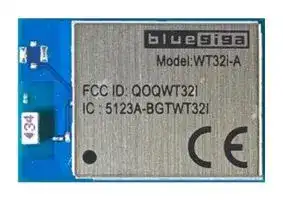


WT32I-A-AI6
Bluetooth 3.0, Module, 1.7V to 3.6V Supply, -90dBm Sensitivity
- Manufacturer: SILICON LABS
- Product type: Bluetooth Modules & Adaptors
- Bluetooth Version:Bluetooth 3.0; Supply Voltage Min:1.7V; Supply Voltage Max:3.6V; Signal Range Max:-; Data Rate:-; Bluetooth Class:-; Receive Sensitivity:-90dBm; Operating Temper
- SVHC: To Be Advised
- Interfaces: I2C, SPI, UART, USB
- Product Range: -
- Certifications: CE, FCC, IC, MIC
- Bluetooth Class: -
- Bluetooth Version: Bluetooth 3.0
- Supply Voltage Range: 1.7 V to 3.6 V
- Receiver Sensitivity Rx: -90 dBm
- Operating Temperature Range: -40 °C to 85 °C
| Delivery and price | |
|---|---|
| Units per pack | 100 |
| Price | 23.83 € |
| Current stock | 10+ |
| Lead time | 30 days |

**WT32i BLUETOOTH AUDIO MODULE** DATA SHEET Monday, 23 October 2017 Version 1.23
## **VERSION HISTORY**
|**VERSION**|**COMMENT**|
|---|---|
|1.0|First version|
|1.1|Added example how to protect the battery by shutting down the regulators at<br>certain voltage level|
|1.2|Fixed PCM pin numbering|
|1.21|Design check list added|
|1.22|UART brake signal updated|
|1.23|Chapter 9.3.1 added|
Silicon Labs
|**TABLE OF CONTENTS**|**TABLE OF CONTENTS**||
|---|---|---|
|1|Design Check List..........................................................................................................................................7||
|2|WT32i Product Numbering ............................................................................................................................8||
|3|Block diagram ................................................................................................................................................9||
|4|Pinout and Terminal Description ................................................................................................................ 10||
|5|Electrical Characteristics ............................................................................................................................ 13||
||5.1<br>Absolute Maximum Ratings ................................................................................................................ 13||
||5.2<br>Recommended Operating|Conditions ................................................................................................. 13|
||5.3<br>Digital Terminals.................................................................................................................................. 13||
||5.4<br>Audio Characteristics .......................................................................................................................... 14||
||5.4.1<br>ADC .............................................................................................................................................. 14||
||5.4.2<br>DAC .............................................................................................................................................. 15||
||5.4.3<br>A2DP Codecs............................................................................................................................... 15||
||5.5<br>RF Characteristics ............................................................................................................................... 17||
||5.5.1<br>RF Transceiver ............................................................................................................................ 17||
||5.5.2<br>Antenna Characteristics ............................................................................................................... 18||
||5.6<br>Current Consumption .......................................................................................................................... 21||
|6|Power Control and Regulation|................................................................................................................... 22|
||6.1<br>Protecting the Battery by Configuring the Module to Turn Off at Certain Voltage .............................. 24||
||6.2<br>Reset ................................................................................................................................................... 25||
||6.2.1<br>Internal POR ................................................................................................................................ 25||
|7|Battery Charger .......................................................................................................................................... 27||
|8|GPIO and AIO Functions ............................................................................................................................ 28||
||8.1<br>iWRAP supported GPIO Functions ..................................................................................................... 28||
||8.2<br>Outputting Internal Clocks ................................................................................................................... 28||
||8.3<br>Auxiliary ADC ...................................................................................................................................... 29||
||8.4<br>Software I2C Interface ........................................................................................................................ 29||
|9|Serial Interfaces .......................................................................................................................................... 30||
||9.1<br>UART Interface .................................................................................................................................... 30||
||9.1.1<br>Resetting Through UART Break Signal ....................................................................................... 31||
||9.1.2<br>UART Configuration While Reset is Active .................................................................................. 31||
||9.1.3<br>UART Bypass Mode .................................................................................................................... 31||
||9.2<br>USB Interface ...................................................................................................................................... 32||
||9.3<br>Programming and Debug Interface (SPI) ............................................................................................ 33||
||9.3.1<br>Multi-slave Operation|................................................................................................................... 33|
|10<br>Audio Interfaces ...................................................................................................................................... 34|||
||10.1<br>Stereo Audio Codec Interface ...................................................................................................... 34||
||10.1.1<br>ADC .............................................................................................................................................. 34||
Bluegiga Technologies Oy
|10.1.2|DAC .............................................................................................................................................. 36|
|---|---|
|10.1.3|Microphone Input ......................................................................................................................... 37|
|10.1.4|Line Input ..................................................................................................................................... 38|
|10.1.5|Output Stage ................................................................................................................................ 39|
|10.1.6|Mono Operation ........................................................................................................................... 41|
|10.1.7|Side Tone ..................................................................................................................................... 41|
|10.2|PCM Interface .............................................................................................................................. 41|
|10.3|I2S Interface ................................................................................................................................. 41|
|10.4|IEC 60958 Interface ..................................................................................................................... 43|
|11<br>Design Guidelines ................................................................................................................................... 45||
|11.1|Audio Layout Guide ..................................................................................................................... 45|
|11.1.1|EMC Considerations .................................................................................................................... 45|
|11.1.2|Choosing Capacitors and Resistors ............................................................................................ 45|
|11.2|RF Layout Guide .......................................................................................................................... 46|
|11.3|Example Application Schematics ................................................................................................. 49|
|12<br>Physical Dimensions ............................................................................................................................... 53||
|13<br>Soldering Recommendations .................................................................................................................. 55||
|14<br>Package .................................................................................................................................................. 56||
|15<br>Certification Guidance for an End Product Using WT32i ....................................................................... 58||
|15.1|Bluetooth End Product Listing...................................................................................................... 58|
|15.2|CE Approval of an End-Product ................................................................................................... 58|
|15.3|FCC Certification of an End Product ............................................................................................ 59|
|15.3.1|Co-location with Other Transmitters ............................................................................................ 60|
|15.4|IC Certification of an End Product ............................................................................................... 60|
|15.5|MIC Japan Certification of an End Product .................................................................................. 60|
|16<br>WT32i|Certifications ................................................................................................................................ 60|
|16.1|Bluetooth ...................................................................................................................................... 60|
|16.2|CE ................................................................................................................................................ 60|
|16.3|FCC .............................................................................................................................................. 61|
|16.4|IC .................................................................................................................................................. 62|
|16.4.1|IC .................................................................................................................................................. 62|
|16.5|MIC Japan .................................................................................................................................... 63|
|16.6|KCC (South-Korea) ...................................................................................................................... 63|
|16.7|Qualified Antenna Types for WT32i-E ......................................................................................... 63|
|17<br>Contact Information................................................................................................................................. 64||
Bluegiga Technologies Oy
## **WT32i** _**Bluetooth®**_ **Audio Module**
## **DESCRIPTION**
WT32i is an audio specific _Bluetooth_ 3.0 module with excellent radio frequency performance and enhanced audio features, enabling a best in class _Bluetooth_ audio experience. In addition to certified _Bluetooth_ radio and software stack, WT32i also contains a DSP, stereo audio codec, and battery charger making it ideal for fixed and portable audio applications. WT32i includes Bluegiga's iWRAP6 _Bluetooth_ stack software which implements A2DP, AVRCP v.1.5 profiles and supports aptX[®] and AAC audio codecs for stereo audio applications. For hands-free applications iWRAP6 software also supports HFP v.1.6, HSP, MAP and PBAP and CVC[®] echo cancellation software. For data communications to Android and iOS applications iWRAP6 also implements _Bluetooth_ Serial Port Profile (SPP) and Apple iAP profiles. WT32i is an ideal solution for developers who want to quickly integrate the latest _Bluetooth_ audio technologies without the time and costs typically involved with a _Bluetooth_ audio chipset design.
## **KEY FEATURES:**
- _Bluetooth_ 3.0 compliant
- Excellent Radio Performance
- Transmit power: +6.5 dBm
- Receiver sensitivity: -90 dBm
- Link budget: 96.5 dB
- Integrated chip antenna or U.FL antenna connector
- Audio features
- Integrated DSP
- 16-bit stereo codec
- 44.1kHz ADC, 48kHz DAC
- Analog, I2S, PCM, SPDIF, and microphone interfaces
- Optional aptX[®] and AAC stereo audio codecs
- Optional CVC[®] echo cancellation
- Wide Band Speech
- Built-in battery charger
- UART host interface
## **APPLICATIONS:**
- Stereo speakers and sound bars
- Hi-Fi devices
- Hands-free kits
- Stereo headsets
- 802.11 co-existence interface
- 10 software programmable IO pins
- Operating voltage: 1.8V to 3.6V
- Temperature range: -40C to +85C
- _Bluetooth_ , CE, FCC, IC, Korea and Japan qualified
- Integrated iWRAP6 _Bluetooth_ stack
- 13 _Bluetooth_ profiles
- Apple iAP1 and iAP2 compatibility
**Figure 1: WT32i Bluetooth Audio Module**
Bluegiga Technologies Oy
## **1 Design Check List**
## POWERING THE MODULE
- Make sure that VRE_ENA is connected correctly
- Use iWRAP command SET CONTROL VREGEN command to configure the VREG_ENA pin according to the HW
- Reserve test points for SPI interface for debugging and FW updates
- The internal power on reset does not work properly if the host pulls the reset line low during boot. To prevent this, place a diode to the reset input.
**==> picture [125 x 25] intentionally omitted <==**
**----- Start of picture text -----**<br>
Host CPU<br>WT32i<br>GPIO Reset<br>**----- End of picture text -----**<br>
**==> picture [122 x 170] intentionally omitted <==**
**----- Start of picture text -----**<br>
Battery Voltage<br>(2.7V...4.4V)<br>VDD_BAT<br>VREG_ENA<br>On/Off cntrl ENIN (1.8V...3.6V)LDO VDD_IO<br>Battery Voltage<br>(2.7V...4.4V)<br>VDD_BAT<br>VREG_ENA<br>On/Off cntrl ENIN (1.8V...3.6V)LDO VDD_IO<br>**----- End of picture text -----**<br>
## RF LAYOUT
- Make sure that the layout for the antenna is done as instrcucted.
**==> picture [21 x 4] intentionally omitted <==**
**----- Start of picture text -----**<br>
Board edge<br>**----- End of picture text -----**<br>
**==> picture [153 x 70] intentionally omitted <==**
**----- Start of picture text -----**<br>
Min 15mm Min 15mm<br>6mm Metal clearancearea fe<br>E =\<br>7 {HHHHHHS<br>GND plane indentation 2mm GND plane indentation max 5.9 mm<br>**----- End of picture text -----**<br>
## AUDIO DESIGN AND LAYOUT
- See the example schematics on pages 49 -52
- Avoid using single ended audio traces. Always use differential audio signaling when possible
- Use solid GND plane and make sure that all the GND pins are connected to it by placing a GND via right next to any GND pins.
- When routing single ended audio traces, make sure that the return current (i.e. GND) follows the traces all the way from start to the end
DifferDiffer **e** ntial audio signals ntial audio t **a** re traced parallelrces are routed symmetrically and parallelto make sure they have perfect common mode rejection . All the audio traces are routed on a
solid GND plane.
- DO NOT COMPROMISE AUDIO ROUTING
Bluegiga Technologies Oy
## **2 WT32i Product Numbering**
|**Product code**|**Description**|
|---|---|
|WT32i-A-AI6|WT32i Bluetooth Module with internal chip antenna and iWRAP6_Bluetooth_<br>software|
|WT32i-A-AI6-APTX|WT32i Bluetooth Module with internal chip antenna and aptX® audio codec<br>capable iWRAP6_Bluetooth_software.|
|WT32i-A-AI6IAP|WT32i Bluetooth Module with internal chip antenna and Apple iAP capable<br>iWRAP6_Bluetooth_software. Available only to Apple MFI licensees. Contact<br>sales@bluegiga.com for more information.|
|WT32i-E-AI6|WT32i Bluetooth Module with U.FL connector and iWRAP6_Bluetooth_<br>software|
|WT32i-E-AI6-APTX|WT32i Bluetooth Module with U.FL connector and aptX® audio codec<br>capable iWRAP6_Bluetooth_software.|
|WT32i-E-AI6IAP|WT32i Bluetooth Module with U.FL connector and Apple iAP capable<br>iWRAP6_Bluetooth_software. Available only to Apple MFI licensees. Contact<br>sales@bluegiga.com for more information.|
|DKWT32i-A|WT32i development kit|
Bluegiga Technologies Oy
## **3 Block diagram**
**==> picture [425 x 240] intentionally omitted <==**
**----- Start of picture text -----**<br>
Flash<br>BC05-MM<br>UART/USB<br>RAM<br>PIO<br>Baseband<br>Balanced 2.4 DSP<br>Antenna filtter GHz I/O Audio In/Out<br>Radio<br>MCU<br>PCM/I [2] S<br>Kalimba DSP<br>SPI<br>Reset<br>XTAL<br>circuitry<br>**----- End of picture text -----**<br>
**Figure 2: Block Diagram of WT32i**
## **BC05-MM**
The BlueCore®5-Multimedia External is a single-chip radio and baseband IC for Bluetooth 2.4GHz systems. It provides a fully compliant Bluetooth v3.0 specification system for data and voice. BlueCore5-Multimedia External contains the Kalimba DSP coprocessor with double the MIPS of BlueCore3-Multimedia External, supporting enhanced audio applications.
## **XTAL**
Ther reference clock of WT32i is generated with 26 MHz crystal. All BC05-MM internal digital clocks are generated using a phase locked loop, which is locked to the frequency of either the 26 MHz crystal or an internally generated watchdog clock frequency of 1kHz.
## **RESET CIRCUITRY**
The internal reset circuitry keeps BC05-MM in reset during boot in order for the supply voltages to stabilize. This is to prevent corruption of the flash memory during booting. Please see chapter 6.1 for more detailed description.
## **BALANCED FILTER**
The internal balanced filter provides optimal impedance matching and band pass filtering in order to achieve lowest possible in-band and out-of-band emissions.
## **ANTENNA**
The antenna is a ceramic chip antenna with high efficiency. The antenna is insensitive to surrounding dielectric materials and requires only a small clearance underneath which makes it compatible with previous WT32I designs and well suitable for designs with high density.
## **FLASH**
16 Mbit flash memory is used for storing the Bluetooth protocol stack and Virtual Machine applications. It can also be used as an optional external RAM for memory-intensive applications.
Bluegiga Technologies Oy
## **4 Pinout and Terminal Description**
**==> picture [345 x 333] intentionally omitted <==**
**----- Start of picture text -----**<br>
50 AUDIO_OUT_P_LEFT<br>49 AUDIO_OUT_N_LEFT<br>48 GND<br>VREG_ENA 1 47 AUDIO_OUT_P_RIGHT<br>GND 2 46 AUDIO_OUT_N_RIGHT<br>GND 3 45 AUDIO_IN_N_LEFT<br>GND 4 44 AUDIO_IN_P_LEFT<br>AIO0 5 43 GND<br>AIO1 6 42 AUDIO_IN_N_RIGHT<br>PIO0 7 41 AUDIO_IN_P_RIGHT<br>PIO1 8 40 MIC_BIAS<br>PIO2 9 39 GND<br>PIO3 10 38 VDD_CHG<br>USB_D- 11 37 VDD_BAT<br>USB_D+ 12 36 LED0<br>PIO9 13 35 SPI_MOSI<br>PIO10 14 34 SPI_MISO<br>UART_RXD 15 33 SPI_CLK<br>UART_TXD 16 32 SPI_NCSB<br>VDD_IO 17 31 GND<br>18 19 21 22 23 24 25 26 27 28 29<br>T S S 8 6 5 4 N T K<br>GND PIO PIO PIO PIO<br>RESE PCM_I PCM_OU PCM_CL<br>UART_NRT UART_NCT PCM_SYNC<br>20 30<br>7<br>PIO<br>**----- End of picture text -----**<br>
**Figure 3: WT32i**
|**Pin Number**|**Pin Name**|**Pad Type**|**Description**|
|---|---|---|---|
|1|VREG_ENA|Input|SW configurable enable pin for the<br>internal regulators|
|2-4, 18, 31,<br>39, 43, 48|GND|GND|GND|
|17|VDD_IO|Power supply|1.7V - 3.6V power supply for the serial<br>interfaces and GPIOs|
|37|VDD_BAT|Power supply / Charger<br>output|2.7V - 4.4V supply voltage for the<br>internal regulators and output of the<br>batterycharger|
|38|VDD_CHG|Power supply|Nominal 5V supply voltage for the<br>batterycharger|
**Table 1: Supply Terminal Descriptions**
Bluegiga Technologies Oy
Page 10 of 64
|**Pin**<br>**Number**|**Pin Name**|**Pin Type**|**Description**|
|---|---|---|---|
|19|RESET|RESET|Active high reset. If not used, leave floating. When<br>connected, make sure that the reset is either pulled<br>high or floating (connected to high impedance)<br>during boot.|
|||||
|5|AIO0|Configurable I/O|AIO0 and AIO1 can be used to read the voltage<br>level through the internal ADC (refer to iWRAP<br>User Guide for details). AIO pins can also be<br>configured to be used as general digital IO pins<br>through PS settings. Internal clocks can be routed<br>out through AIO pins by setting corresponding PS<br>settings. Note that the AIO pins are powered from<br>internal 1.5V supply so the maximum voltage level<br>of the AIO pins is 1.5V.|
|6|AIO1|||
|||||
|7|PIO0|Configurable CMOS I/O|General purpose IO's can be configured with<br>iWRAP for various functions. Each IO can be<br>configured individually as output or input with<br>strong or weak pull-up/-down. Using particular PS<br>setting GPIO pins can be used to implement WiFi<br>co-existence signaling between WT32i and a WiFi<br>radio. Software I2C interface can be implemented<br>for slow I2C functions such as configuring external<br>audio codec or display.|
|8|PIO1|||
|9|PIO2|||
|10|PIO3|||
|13|PIO9|||
|14|PIO10|||
|22|PIO8|||
|23|PIO7|||
|24|PIO6|||
|25|PIO5|||
|26|PIO4|||
|||||
|11|USB_D-|I/O|USB data minus|
|12|USB_D+|I/O|USB data plus with selectable internal 1.5k pull-up<br>resistor|
|||||
|15|UART_RXD|CMOS Input, weak internal<br>pull-down|UART data input|
|16|UART_TXD|CMOS output, tristate,<br>weak internalpull-up|UART data output|
|20|UART_NRTS|CMOS output, tristate,<br>weak internalpull-up|UART request to send, active low|
|21|UART_NCTS|CMOS Input, weak internal<br>pull-down|UART clear to send, active low|
|||||
|32|SPI_NCSB|CMOS Input, weak internal<br>pull-down|SPI chip select|
|33|SPI_CLK|CMOS Input, weak internal<br>pull-down|SPI clock|
Bluegiga Technologies Oy
Page 11 of 64
|34|SPI_MISO|CMOS Input, weak internal<br>pull-down|SPI data input|
|---|---|---|---|
|35|SPI_MOSI|CMOS output, tristate,<br>weak internalpull-down|SPI data output|
|||||
|36|LED0|Open drain output|LED driver|
**Table 2: Terminal Descriptions**
|**Pin**<br>**Number**|**Pin Name**|**Pin Type**|**Description**|
|---|---|---|---|
|40|MIC_BIAS|Analog||
|41|AUDIO_IN_P_RIGHT|Analog||
|42|AUDIO_IN_N_RIGHT|Analog||
|44|AUDIO_IN_P_LEFT|Analog||
|45|AUDIO_IN_N_LEFT|Analog||
|46|AUDIO_OUT_N_RIGHT|Analog||
|47|AUDIO_OUT_P_RIGHT|Analog||
|49|AUDIO_OUT_N_LEFT|Analog||
|50|AUDIO_OUT_P_LEFT|Analog||
|||||
|27|PCM_IN / I2S IN|CMOS input, weak<br>internalpull-down|PCM or I2S data input|
|28|PCM_OUT / I2S_OUT|CMOS outptu, tristate,<br>weak internalpull-down|PCM or I2S data output|
|29|PCM_SYNC / I2S_WS|Bidirectional, weak<br>internal down|PCM sync or I2S word select. WT32i can<br>operate as a PCM/I2S master providing the<br>sync or as a slave receiving the sync|
|30|PCM_CLK / I2S_SCK|Bidirectional, weak<br>internal down|PCM or I2S clock. WT32i can operate as a<br>PCM/I2S master providing the clock or as<br>a slave receiving the clock.|
**Table 3: Audio Terminal Descriptions**
Bluegiga Technologies Oy
Page 12 of 64
## **5 Electrical Characteristics**
## 5.1 Absolute Maximum Ratings
||**Min**|**Max**|**Unit**|
|---|---|---|---|
|Storage temperature range|-40|+85|°C|
|Operatingtemperature range|-40|+85|°C|
|VDD_IO|-0.4|3.6|V|
|VDD_BAT|-0.4|4.4|V|
|VDD_CHG|-0.4|6.5|V|
|Digital Terminal voltages|VSS - 0.4V|VDD + 0.4V|V|
|AIO voltages|VSS - 0.4V|1.9V|V|
**Table 4: Absolute Maximum Ratings**
## 5.2 Recommended Operating Conditions
||**Min**|**Max**|**Unit**|
|---|---|---|---|
|Storage temperaturerange|-40|+85|°C|
|Operatingtemperature range|-40|+85|°C|
|VDD_IO|1.7|3.6|V|
|VDD_BAT|2.7|4.4|V|
|VDD_CHG|0|6.5|V|
|Digital Terminal voltages|0|VDD|V|
|AIO voltages|0|1.5V|V|
**Table 5: Recommended Operating Conditions**
## 5.3 Digital Terminals
|**Input/Output Characteristic**|**Min**|**Max**|**Unit**|
|---|---|---|---|
|VILinput logic level low|-0.3|0.25 x VDD|V|
|VILinput logic level high|0.625 x VDD|VDD + 0.3|V|
|VOLoutput logic level low,IOL= 4.0mA|0|0.125|V|
|VOLoutput logic level high,IOL= -4.0mA|0.75 x VDD|VDD|V|
|Strong pull-up|-100|-10|µA|
|Strong pull-down|10|100|µA|
|Weakpull-up|-5|-0.2|µA|
|Weakpull-down|0.2|5|µA|
**Table 6: Digital Terminal Characteristics**
Bluegiga Technologies Oy
Page 13 of 64
## 5.4 Audio Characteristics
## 5.4.1 ADC
|**Parameter**|**Conditions**|**Conditions**|**Min**|**Typ**|**Max**|**Unit**|
|---|---|---|---|---|---|---|
|Resolution|-||-|-|16|Bits|
|Input Sample<br>Rate,Fsample|-||8|-|44.1|kHz|
|Signal to Noise<br>Ratio, SNR||Fsample|||||
|||8kHz|-|79|-|dB|
|||11.025kHz|-|77|-|dB|
|||16kHz|-|76|-|dB|
|||22.050kHz|-|76|-|dB|
|||32kHz|-|75|-|dB|
|||44.1kHz|-|75|-|dB|
|Input full scale at maximumgain(differential)|||-|4|-|mV rms|
|Input full scale at minimumgain(differential)|||-|800|-|mV rms|
|3dB Bandwidth|||-|20|-|kHz|
|Microphone mode input impedance|||-|6.0|-|kHz|
|THD+N @ 30mV rms input|||-|0.04|-|%|
**Table 7: ADC characteristics**
Bluegiga Technologies Oy
Page 14 of 64
## 5.4.2 DAC
|**Parameter**|**Conditions**|**Conditions**|**Conditions**|**Min**|**Typ**|**Max**|**Unit**|
|---|---|---|---|---|---|---|---|
|Resolution|-|||-|-|16|Bits|
|Output Sample<br>Rate,Fsample|-|||8|-|48|kHz|
|Signal to Noise<br>Ratio, SNR|||Fsample|||||
||||8kHz|-|95|-|dB|
||||11.025kHz|-|95|-|dB|
||||16kHz|-|95|-|dB|
||||22.050kHz|-|95|-|dB|
||||32kHz|-|95|-|dB|
||||44.1kHz|-|95|-|dB|
|Output Full Voltage Swing (differential)||||-|750|-|mV rms|
|Allowed Load||Resistive||16|-|O.C.|Ω|
|||Capacitive||-|-|500|pF|
|THD+N 16Ω Load||||-|-|0.1|%|
|THD+N 100Ω Load||||-|-|0.01|%|
**Table 8: DAC Characteristics**
## 5.4.3 A2DP Codecs
## 5.4.3.1 SBC
SBC codec is the default codec used for Bluetooth A2DP connections. Any Bluetooth device supporting A2DP audio profile supports SBC codec. SBC was originally design to provide reasonable good audio quality while keeping low computational complexity. SBC does not require high bit rates. Thus it works sufficiently with Bluetooth where the bandwidth and the processing power are limited.
## 5.4.3.2 aptX®
The aptX is widely used in high quality audio devices. aptX can provide dynamic range up to 120 dB and it has the shortest coding delay (<2ms) than other coding algorithms. Using aptX[®] the whole system latency can be reduced significantly because unlike SBC, it does not require buffering the audio. SBC reproduces a limited audio band width whereas aptX[®] encode the entire frequency range of audio.
aptX[®] is more robust and resilient coding scheme than SBC and thus re-transmits does not occur as with SBC.
Both SBC and aptX[®] have flat frequency response up to 14 kHz. Up to 14 kHz both algorithms produce good quality audio with very little distortion. At frequencies higher than 14 kHz the benefit of aptX[®] becomes obvious. SBC exhibits increasing attenuation with increasing frequency but aptX[®] retains high reproduction quality.
aptX[® ] requires purchasing a license for each Bluetooth address and the license agreement must be done with CSR. The combination of aptX[®] license and the Bluetooth address is programmed into the module in the module production line.
Bluegiga Technologies Oy
Page 15 of 64
**Figure 4: Frequency response of aptX and SBC codecs**
## 5.4.3.3 AAC
AAC (Advanced Audio Coding) achieves better sound quality than MP3 and it is the default audio format for YouTube and iPhone among others. AAC has long latency (>100ms) compared to aptX[®] . Because of high processing capacity requirement for encoding, WT32i does not support AAC as A2DP source. Thus WT32i can be used for receiving (A2DP sink) AAC (from iPhone for example) but it cannot transmit AAC coded audio.
Bluegiga Technologies Oy
Page 16 of 64
## 5.5 RF Characteristics
## 5.5.1 RF Transceiver
|**Transceiver characteristic**|**Transceiver characteristic**|**Min**|**Typ**|**Max**|**Unit**|
|---|---|---|---|---|---|
|Maximum transmitpower||5|6.5|8|dBm|
|Minimum transmitpower|||-17||dBm|
|Transmitpower stabilityover the temperature range|||+/- 0.5||dB|
|Transmitpower variation within the BT band||||1|dB|
|Sensitivity DH1|RT||-90||dBm|
||-40C||-91||dBm|
||+85C||-86||dBm|
|Sensitivity 3DH5|RT||-83||dBm|
||-40C||-84||dBm|
||+85C||-80||dBm|
**Table 9: Transceiver characteristics**
**Table 10: Power control of WT32i**
Bluegiga Technologies Oy
Page 17 of 64
|**Standard**|**Band /**<br>**Frequency**|**Min**<br>**(AVG /**<br>**PEAK)**|**Typ**<br>**(AVG /**<br>**PEAK)**|**Max**<br>**(AVG /**<br>**PEAK)**|**Limit by the Standard**<br>**(AVG / PEAK)**|**Unit**|
|---|---|---|---|---|---|---|
|FCC part 15<br>transmitter<br>spurious<br>emissions|2nd harmonic||50 / 61||54 / 74|dBuV/m|
||3rd harmonic||< 40 /<br>50||54 / 74|dBuV/m|
||Band edge<br>2390MHz||||54 / 74|dBuV/m|
||Band edge<br>2483.5MHz||||54 / 74|dBuV/m|
||Band edge<br>2400MHz<br>(conducted)||||-20|dBc|
||Band edge<br>2483.5MHz<br>(conducted)||||-20|dBc|
|ETSI EN 300<br>328 transmitter<br>spurious<br>emissions|Band edge<br>2400MHz||||-30|dBm|
||2nd harmonic||-35||-30|dBm|
||3rd harmonic||<-40||-30|dBm|
|ETSI EN 300<br>328 receiver<br>spurious<br>emissions|(2400 - 2479)<br>MHz||||-47|dBm|
||(1600 - 1653)<br>MHz||||-47|dBm|
**Table 11: WT32i-A spurious emissions**
**Note** : All the emissions tested with maximum 8 dBm TX power
## 5.5.2 Antenna Characteristics
Note: Antenna characteristics may vary depending on the mother board layout. Following characteristics have been measured using DKWT32i
- Antenna efficiency -3.5 dB (45%)
- Peak gain 0 dBi
Bluegiga Technologies Oy
Page 18 of 64
**==> picture [21 x 109] intentionally omitted <==**
**----- Start of picture text -----**<br>
0 dB<br>-5 dB<br>-10 dB<br>-15 dB<br>-20 dB<br>**----- End of picture text -----**<br>
**Figure 5: Top view radiation pattern of DKWT32i**
**==> picture [20 x 105] intentionally omitted <==**
**----- Start of picture text -----**<br>
-2 dB<br>-4 dB<br>-6 dB<br>-8 dB<br>-10 dB<br>-12 dB<br>-14 dB<br>**----- End of picture text -----**<br>
**Figure 6: Side view radiation pattern of DKWT32i**
Bluegiga Technologies Oy
Page 19 of 64
**==> picture [264 x 295] intentionally omitted <==**
**----- Start of picture text -----**<br>
-1 dB<br>-2 dB<br>-3 dB<br>-4 dB<br>-5 dB<br>-6 dB<br>-7 dB<br>-8 dB<br>-9 dB<br>-10 dB<br>-11 dB<br>-12 dB<br>(A<br>O y<br>Figure 7: Front view radiation pattern<br>**----- End of picture text -----**<br>
Bluegiga Technologies Oy
Page 20 of 64
## 5.6 Current Consumption
|**Operation Mode**|**Operation Mode**|**Peak**|**Average**|**Unit**|
|---|---|---|---|---|
|Idle|SET BT PAGEMODE02000 0|12|2.0|mA|
||SET BT PAGEMODE 0 2000 1||2.0||
||SET BT PAGEMODE 0 2000 2||2.0||
||SET BT PAGEMODE 1 2000 0|32|2.0||
||SET BT PAGEMODE 1 2000 1||2.1||
||SET BT PAGEMODE 1 2000 2||2.1||
||SET BT PAGEMODE 2 2000 0||23||
||SET BT PAGEMODE 2 2000 1||2.2||
||SET BT PAGEMODE 2 2000 2||2.1||
||SET BT PAGEMODE 3 2000 0||23||
||SET BT PAGEMODE 3 2000 1||2.3||
||SET BT PAGEMODE 3 2000 2||2.2||
||SET BT PAGEMODE 4 2000 0||23||
||SET BT PAGEMODE 4 2000 1||2.3||
||SET BT PAGEMODE 4 2000 2||2.2||
|Sleep|SET BT PAGEMODE 0 2000 0|12|0.08|mA|
||SET BT PAGEMODE 0 2000 1||0.08||
||SET BT PAGEMODE 0 2000 2||0.08||
||SET BT PAGEMODE 1 2000 0|32|0.18||
||SET BT PAGEMODE 1 2000 1||0.18||
||SET BT PAGEMODE 1 2000 2||0.18||
||SET BT PAGEMODE 2 2000 0||23.5||
||SET BT PAGEMODE 2 2000 1||0.31||
||SET BT PAGEMODE 2 2000 2||0.19||
||SET BT PAGEMODE 3 2000 0||23||
||SET BT PAGEMODE 3 2000 1||0.4||
||SET BT PAGEMODE 3 2000 2||0.29||
||SET BT PAGEMODE 4 2000 0||23||
||SET BT PAGEMODE 4 2000 1||0.4||
||SET BT PAGEMODE 4 2000 2||0.29||
|Connected,Sniff disabled|SET BT SNIFF 0 20 1 8||4.7||
|Connected + Sniff,Master|SET BT SNIFF 40 20 1 8||3.9||
|Connected + Sniff,Master|SET BT SNIFF 1000 20 1 8||2.5||
|Connected + Sniff,Slave|SET BT SNIFF 40 20 1 8||3.6||
|Connected + Sniff,Slave|SET BT SNIFF 1000 20 1 8||2.5||
|A2DP Audio Streaming|A2DP SINK,INTERNAL CODEC|75|28|mA|
|A2DP Audio Streaming|A2DP SOURCE,INTERNAL CODEC|70|23||
**Table 12: Current consumption of WT32i**
Bluegiga Technologies Oy
Page 21 of 64
## **6 Power Control and Regulation**
WT32i contains an internal battery charger and a switch mode regulator that is mainly used for internal blocks of the module. The module can be powered from a single 3.3 V supply provided that VDD_CHG is floating. Alternatively the module can be powered from a battery connected to VDD_BAT and using an external regulator for VDD_IO. 1.8 V to 3.3 V supply voltage for VDD_IO can be used to give desired signal levels for the digital interfaces of the module. USB, however, requires 3.3 V for proper operation and thus, when USB is in use, 3.3 V for VDD_IO is required.
**==> picture [427 x 271] intentionally omitted <==**
**----- Start of picture text -----**<br>
VDD_CHG<br>In<br>Battery Charger<br>Out<br>VDD_BAT AIO<br>Switch mode Linear 1.5V RF<br>VREG_ENA 1.8V regulator regulator Core<br>Audio<br>Flash<br>PIO<br>VDD_IO USB<br>UART<br>PCM<br>**----- End of picture text -----**<br>
**Figure 8: Power supply configuration of WT32i**
VDD_ENA is software configurable enable pin for the internal regulators. Using iWRAP the enable pin can be configured to
1. Latch on the internal regulators at the rising edge
2. Turn the regulators on at rising edge and turn off the regulators at falling edge
3. Latch the regulators on at the rising edge and turn off the regulators at the following rising edge
GPIO can be configured to control an external regulator.
Bluegiga Technologies Oy
Page 22 of 64
**==> picture [392 x 292] intentionally omitted <==**
**----- Start of picture text -----**<br>
Battery Voltage<br>(2.7V...4.4V)<br>VDD_BAT<br>ON/OFF<br>Button<br>VREG_ENA<br>IN LDO VDD_IO<br>EN (1.8V...3.6V)<br>100k<br>C1 GPIO (holds the external LDO on)<br>4u7<br>100k<br>R1<br>R2<br>**----- End of picture text -----**<br>
**Figure 9: Example of making a power on/off button using the latch feature of the internal regulators**
_**iWRAP Example:** Creating an on/off button with PIO2 holding the external regulator on_
_“SET CONTROL VREGEN 2 4”_
_(PIO is defined with a bit mask. 4 in hexadecimal is 100 in binary corresponding to PIO2)_
**NOTE:** With the configuration shown above, when doing a SW reset for the module C1 will hold the enable pin of the external regulator high until iWRAP has booted. This will prevent the module from turning off during reset. When resetting through the reset pin one has to make sure that the enable pin is held high as long as the reset pin is held active.
Figure 10 shows an example how to arrange power control when on/off button is not implemented. VREG_ENA pin must not be connected to VDD_IO because leakage from VDD_BAT to VDD_IO will prevent VREG_ENA to fall low enough to turn off the internal regulators.
Bluegiga Technologies Oy
Page 23 of 64
**==> picture [387 x 413] intentionally omitted <==**
**----- Start of picture text -----**<br>
Battery Voltage<br>(2.7V...4.4V)<br>VDD_BAT<br>VREG_ENA<br>IN LDO VDD_IO<br>On/Off cntrl<br>EN (1.8V...3.6V)<br>Battery Voltage<br>(2.7V...4.4V)<br>VDD_BAT<br>VREG_ENA<br>IN LDO VDD_IO<br>On/Off cntrl<br>EN (1.8V...3.6V)<br>**----- End of picture text -----**<br>
**Figure 10: Correct and wrong connection for the power on/off control**
## 6.1 Protecting the Battery by Configuring the Module to Turn Off at Certain Voltage
It is important not to let the battery be drained to voltages below 2.8V. In iWRAP it is possible to define certain level when the module turns off the regulators.
_**iWRAP Example:** Configure WT32i to start sending low battery warning at 3.4V, turn off at 3.3V and cease the low battery warning at 4.0V. Set PIO0 to indicate low batter_
_“SET CONTROL BATTERY 3400 3300 4000 10”_
Bluegiga Technologies Oy
Page 24 of 64
## 6.2 Reset
WT32i may be reset from several sources: reset pin, power on reset, a UART break character or through software configured watchdog timer.
At reset, the digital I/O pins are set to inputs for bi-directional pins and outputs are tri-state.
The chip status after a reset is as follows:
- Warm Reset: data rate and RAM data remain available
- Cold Reset: data rate and RAM data are not available
Table 13 shows the pin states of WT32i on reset. Pull-up (PU) and pull-down (PD) default to weak values unless specified otherwise.
|**Pin Name / Group**|**I/O Type**|**No Core Voltage**<br>**Reset**|**Full Chip Reset**|
|---|---|---|---|
|USB|Digital bi-directional|N/A|N/A|
|UART_RX|Digital input with PD|PD|PD|
|UART_CTS||||
|UART_TX|Digital output with PU|PU|PU|
|UART_RTS||||
|SPI_MOSI|Digital input with PD|PD|PD|
|SPI_CLK||||
|SPI_MISO|Digital tristate output with<br>PD|||
|SPI_CS|Digital input with PU|PU|PU|
|PCM_IN|Digital input with PD|PD|PD|
|PCM_CLK|Digital bi-directional with PD|||
|PCM_SYNC||||
|PCM_OUT|Digital tri-state output with<br>PD|||
|GPIO|Digital bi-directional with<br>PU/PD|PD|PD|
**Table 13: Pin states on reset**
## 6.2.1 Internal POR
WT32i has two internal POR circuits. One is internally to the BC5 chip. In BC5 the power on reset occurs when the core supply voltage (output of the internal 1.5V regulator) falls below typically 1.26V and is released when VDD_CORE rises above typically 1.31V.
Another POR circuit is embedded to the module and it keeps the module in reset until supply voltages have stabilized. This is to prevent corruption of the internal flash memory during boot. The embedded POR is shown in the figure Figure 2Figure 11.
Because the POR is based on a simple RC time constant it will not work if the supply voltage ramps very slowly or if the reset pin is not connected to high impedance. It is recommended that the power ramp will not take more than 10 msec. If the reset pin is connected to a host it is good to place a diode between the host and the module as shown in Figure 12. A diode will prevent the host from pulling the reset low before the internal flash has its supply stabilized.
Bluegiga Technologies Oy
Page 25 of 64
**==> picture [351 x 302] intentionally omitted <==**
**----- Start of picture text -----**<br>
WT32i<br>Reset BC05<br>22nF<br>BC05<br>Reset<br>R1 220k<br>**----- End of picture text -----**<br>
**Figure 11: Embedded POR of WT32i**
**==> picture [341 x 176] intentionally omitted <==**
**----- Start of picture text -----**<br>
Host CPU<br>WT32i<br>GPIO Reset<br>**----- End of picture text -----**<br>
**Figure 12: An example how to connect CPU GPIO to the reset pin of the module**
Bluegiga Technologies Oy
Page 26 of 64
## **7 Battery Charger**
The battery charger is a constant current / constant voltage charger circuit, and is suitable for lithium ion/polymer batteries only. It shares a connection to the battery terminal, VDD_BAT, with the switch-mode regulator. The charger is initially calibrated by Bluegiga Technologies to have Vfloat = 4.15V - 4.2 V.
The constant current level can be varied to allow charging of different capacity batteries. WT32i allows a number of different currents to be used in the battery charger hardware. Values written to PS key 0x039b CHARGER_CURRENT in the range 1..15 specify the charger current from 40..135mA in even steps. Values outside the valid 0..15 range result in no change to the charging current. The default charging current (Key = 0) is nominally 40mA. Setting 0 is interpreted as “no-change” so it will be ignored
The charger enters various states of operation as it charges a battery. These are shown below:
- Off: entered when the charger is disconnected.
- Trickle Charge: entered when the battery voltage is below 2.9V.
- Fast Charge - Constant Current: entered when the battery voltage is above 2.9V.
- Fast Charge - Constant Voltage: entered when the battery has reached Vfloat, the charger switches mode to maintain the cell voltage at Vfloat voltage by adjusting the constant charge current.
- Standby: this is the state when the battery is fully charged and no charging takes place.
When a voltage is applied to the charger input terminal VDD_CHG, and the battery is not fully charged, the charger will operate and a LED connected to the terminal LED0 will illuminate. By default, until the firmware is running, the LED will pulse at a low-duty cycle to minimize current consumption.
The battery charger circuitry auto-detects the presence of a power source, allowing the firmware to detect when the charger is powered. Therefore, when the charger supply is not connected to VDD_CHG, the terminal must be left open circuit. The VDD_CHG pin, when not connected, must be allowed to float and not be pulled to a power rail. When the battery charger is not enabled, this pin may float to a low undefined voltage. Any DC connection will increase current consumption of the device. Capacitive components such as diodes, FETs, and ESD protection, may be connected.
The battery charger is designed to operate with a permanently connected battery. If the application permits the charger input to be connected while the battery is disconnected, the VDD_BAT pin voltage may become unstable. This, in turn, may cause damage to the internal switch-mode regulator. Connecting a 470μF capacitor to VDD_BAT limits these oscillations thus preventing damage.
## **WARNING:**
Use good consideration for battery safety. Do not charge with too much current. Do not charge when the temperature is above 60°C or below 0°C. WT32i is initially calibrated to stop charging when battery voltage is at 4.2 V. Do not try to charge batteries above 4.2 V. Do not short circuit the battery or discharge below 1.5 V.
Bluegiga Technologies Oy
Page 27 of 64
## **8 GPIO and AIO Functions**
## 8.1 iWRAP supported GPIO Functions
Various GPIO functions are supported by iWRAP. These include:
- Setting each GPIO state individually
- Binding certain iWRAP commands to GPIO to trigger the command at either the rising or falling edge of the GPIO
- Carrier detect signal to indicate an active Bluetooth connection
- Implementing RS232 modem signals
- iWRAP ready indicator to signal to a host that iWRAP is ready to use
- UART bypass mode to route UART signals to GPIO pins instead of iWRAP
- Driving low frequency pulsed signal from a GPIO
Some of the functions are FW dependent. Refer to latest iWRAP user manual for the detailed information about the GPIO functions.
## 8.2 Outputting Internal Clocks
Internal clocks can be routed to either AIO0 or AIO1 by setting PS Keys. To route internal clock to AIO0 set PSKEY_AMUX_AIO0 to 0x00fe. Following table shows how to set the PSKEY_AMUX_CLOCK to get certain frequency from AIO0.
|**AMUX_CLOCK**|**Freq (MHz) @ AIO0**|
|---|---|
|0x0014|1|
|0x0004|2|
|0x0013|3|
|0x0017|4|
|0x0003|6|
|0x0016|6.5|
|0x0007|8|
|0x0011|12|
|0x0006|13|
|0x0002|16|
|0x0009|24|
|0x0005|32|
**Table 14: Selectable internal clock frequencies from AIO0**
iWRAP does not support this feature. To use this feature either the particular PS Keys must be set to each module separately or then ask for custom FW from Bluegiga.
Bluegiga Technologies Oy
Page 28 of 64
## 8.3 Auxiliary ADC
Simple iWRAP command can be used to read the ADC output from either of the two AIO pins. Refer to latest iWRAP user manual for the detailed information.
## 8.4 Software I2C Interface
PIO6 and PIO7 can be used to form a master I²C interface. The interface is formed using software to drive these lines. Therefore it is suited only to relatively slow functions such as driving a dot matrix LCD, keyboard scanner or configuring external audio codec. I[2] C interface requires a custom FW.
|**PIO**|**I2C Signal**|
|---|---|
|PIO6|SCL|
|PIO7|SDA|
**Table 15: I2C Interface of WT32i**
Bluegiga Technologies Oy
Page 29 of 64
## **9 Serial Interfaces**
## 9.1 UART Interface
WT32i has a standard UART serial interface that provides a simple mechanism for communicating with other serial devices using the RS232 protocol. UART configuration parameters, such as baud rate, parity and stop bits can be configured with an iWRAP command.
The hardware flow control is enabled by default. HW flow control can be disabled in HW by connecting UART_NCTS to GND and leaving UART_NRTS floating.
|**Parameter**||**Possible Values**|
|---|---|---|
|Baud rate|Minimum|1200 baud(≤2%Error)|
|||9600(≤1%Error)|
||Maximum|4Mbaud(≤1%Error)|
|Flow control||RTS/CTS or None|
|Parity||None,Odd,Even|
|Number of stopbits||1 or 2|
|Bitsper byte||8|
## **Table 16: Possible UART settings**
_**iWRAP Example:**_ Configuring local UART to 9600bps, 8 data bits, no parity and 1 stop bit SET CONTROL BAUD 9600, 8N1
(9600 = baud rate, N = No parity, 1 = 1 stop bit)
|**Baud Rate**|**Error**|
|---|---|
|1200|1.73%|
|2400|1.73%|
|4800|1.73%|
|9600|-0.82%|
|19200|0.45%|
|38400|-0.18%|
|57600|0.03%|
|76800|0.14%|
|115200|0.03%|
|230400|0.03%|
|460800|-0.02%|
|921600|0.00%|
|1382400|-0.01%|
|1843200|0.00%|
|2764800|0.00%|
|3686400|0.00%|
## **Table 17: Standard Baud Rates**
Bluegiga Technologies Oy
Page 30 of 64
## 9.1.1 Resetting Through UART Break Signal
The UART interface can reset WT32i on reception of a break signal. A break is identified by a continuous logic low (0V) on the UART_RX terminal. If tBRK is longer than the value (in microseconds), defined by PSKEY_HOSTIO_UART_RESET_TIMEOUT, (0x1a4), a reset occurs. Values below 1000 are treated as zero and values above 255000 are truncated to 255000. This feature allows a host to initialise the system to a known state. Also, WT32i can emit a break character that may be used to wake the host.
Default PSKEY_HOSTIO_UART_RESET_TIMEOUT setting in WT32i is zero, which means that this feature is disabled. To use this feature, either the PS setting has to be changed for each module separately or ask for modules with custom FW with appropriate settings.
## 9.1.2 UART Configuration While Reset is Active
The UART interface for WT32i is tristate while the chip is being held in reset. This allows the user to daisy chain devices onto the physical UART bus. The constraint on this method is that any devices connected to this bus must tristate when WT32i reset is de-asserted and the firmware begins to run.
## 9.1.3 UART Bypass Mode
Alternatively, for devices that do not tristate the UART bus, the UART bypass mode on WT32i can be used. The default state of WT32i after reset is de-asserted; this is for the host UART bus to be connected to the WT32i UART, thereby allowing communication to WT32i via the UART. All UART bypass mode connections are implemented using CMOS technology and have signalling levels of 0V and VDD_IO.
The bypass mode is enabled with a simple iWRAP command. When in bypass mode, the module is automatically set into deep sleep state indefinitely. Physical reset is required to return to normal operation mode. The current consumption of a module in bypass mode is equal to a module in standby (idle) mode.
It is important for the host to ensure a clean Bluetooth disconnection of any active links before the bypass mode is invoked. Therefore, it is not possible to have active Bluetooth links while operating the bypass mode.
**==> picture [440 x 217] intentionally omitted <==**
**----- Start of picture text -----**<br>
RESET<br>RXD UART_TX PIO4 TX<br>Host CTS UART_RTS PIO5 RTS<br>processor Another<br>RTS UART_CTS PIO6 CTS device<br>UART_RX PIO7<br>TXD RX<br>Test UART<br>interface<br>WT32iWTxx WT12<br>**----- End of picture text -----**<br>
**Figure 13: UART bypass architecture**
Bluegiga Technologies Oy
Page 31 of 64
## 9.2 USB Interface
WT32i has a full-speed (12Mbps) USB interface for communicating with other compatible digital devices. The USB interface on WT32i acts as an USB peripheral, responding to requests from a master host controller. WT32i can be used as bus-powered or self-powered device. See the WT_USB_Design_Guide available in the Bluegiga techforum for details about the SW and HW configuration of the USB interface.
**==> picture [146 x 257] intentionally omitted <==**
**----- Start of picture text -----**<br>
WT32i<br>PIO[X[x] o VDD_IO<br>5<br>a<br>USB<br>Block<br>iar USB VBUS Detection<br>VDD_IO<br>VDD_BAT<br>**----- End of picture text -----**<br>
**Figure 14: Bus-powered WT32i device configuration**
Bluegiga Technologies Oy
Page 32 of 64
**==> picture [138 x 236] intentionally omitted <==**
**----- Start of picture text -----**<br>
WT32i<br>PIO[X]<br>VDD_IO<br>eae~@—___—<br>a<br>i<br>Block<br>PIOfY) USB VBUS Detection<br>VDD_IO<br>**----- End of picture text -----**<br>
**Figure 15: Self powered WT32i device configuration**
## 9.3 Programming and Debug Interface (SPI)
The synchronous serial port interface (SPI) is for interfacing with other digital devices. The SPI port can be used for system debugging. It can also be used for programming the Flash memory. SPI interface is connected by using the MOSI, MISO, CSB and CLK pins.
SPI interface cannot be used for any application purposes.
## 9.3.1 Multi-slave Operation
WT32i should not be connected in a multi-slave arrangement by simple parallel connection of slave MISO lines. When WT32i is deselected (SPI_CS# = 1), the SPI_MISO line does not float. Instead, WT32i outputs 0 if the processor is running or 1 if it is stopped.
Bluegiga Technologies Oy
Page 33 of 64
## **10 Audio Interfaces**
## 10.1 Stereo Audio Codec Interface
Stereo audio CODEC operates from an internal 1.5V power supply. It uses fully differential architecture in analog signal path for the best possible common mode noise rejection while effectively doubling the signal amplitude.
The stereo audio bus standard I2S is supported and a software I2C interface can be implemented using GPIOs to configure an external audio CODEC.
**Figure 16: Stereo CODEC input and output stages**
## 10.1.1 ADC
The ADC consists of two second-order sigma-delta converters and gain stages. The gain stage consists of digital and analog gain stages which are controlled by iWRAP. The optimal combination of digital and analog gain is automatically selected by iWRAP. The analog gain stage consist selectable 24 dB preamplifier for selecting microphone or line input levels and an amplifier which can be configured in 3 dB steps. The iWRAP gain selection values are shown in the Table 19.
Following sample rates are supported
- 8kHz
- 11.025kHz
- 16kHz
- 22.05kHz
- 24kHz
- 32kHz
- 44.1kHz
Bluegiga Technologies Oy
Page 34 of 64
**==> picture [290 x 26] intentionally omitted <==**
**----- Start of picture text -----**<br>
Preamp ON = 24 dB gain (MIC input)<br>iWRAP Gain Setting<br>Preamp OFF = 0 dB gain (line input)<br>(-27...39)dB<br>**----- End of picture text -----**<br>
**Table 18: ADC amplifier block diagram**
|**Gain Setting In iWRAP**|**ADC Gain (dB)**<br>**Preamp OFF**<br>**(Line input mode)**|**ADC GAIN (dB)**<br>**Preamp ON**<br>**(MIC input mode)**|
|---|---|---|
|0|-27|-3|
|1|-24|0|
|2|-21|3|
|3|-18|6|
|4|-15|9|
|5|-12|12|
|6|-9|15|
|7|-6|18|
|8|-3|21|
|9|0|24|
|A|3|27|
|B|6|30|
|C|9|33|
|D|12|36|
|E|15|39|
|F|18|42|
|10|21|45|
|11|24|48|
|12|27|51|
|13|30|54|
|14|33|57|
|15|36|60|
|16|39|63|
**Table 19: ADC Gain Selection In iWRAP**
_**iWRAP Example:** Setting line input with 0 dB gain_
_“SET CONTROL PREAMP 0”_
_”SET CONTROL GAIN 9 x” (x is the DAC gain)_
Bluegiga Technologies Oy
Page 35 of 64
## 10.1.2 DAC
The DAC consists of two second-order sigma-delta converters and gain stages. The gain stage consists of digital and analog gain stages which are controlled by iWRAP. The optimal combination of digital and analog gain is automatically selected by iWRAP. The analog gain stage consist selectable 24 dB preamplifier for selecting microphone or line input levels and an amplifier which can be configured in 3 dB steps. The iWRAP gain selection values are shown in Table 20.
Following sample rates are supported
- 8kHz
- 11.025kHz
- 16kHz
- 22.05kHz
- 24kHz
- 32kHz
- 44.1kHz
- 48kHz
|**Gain Setting In iWRAP**|**DAC Gain (dB)**|
|---|---|
|0|-42|
|1|-39|
|2|-36|
|3|-33|
|4|-30|
|5|-27|
|6|-24|
|7|-21|
|8|-18|
|9|-15|
|A|-12|
|B|-9|
|C|-6|
|D|-3|
|E|0|
|F|3|
|10|6|
|11|9|
|12|12|
|13|15|
|14|18|
|15|21|
|16|24|
**Table 20: DAC gain selection in iWRAP**
_**iWRAP Example:** Setting output with 0 dB gain_
_”SET CONTROL GAIN x E” (x is the ADC gain)_
Bluegiga Technologies Oy
Page 36 of 64
## 10.1.3 Microphone Input
Figure 17 shows the recommended microphone biasing. The microphone bias, MIC_BIAS, derives its power from the VDD_BAT and requires 1uF capacitor on its output (C1).
The input impedance at AUDIO_IN_P_LEFT and AUDIO_IN_N_LEFT is typically 6kohm and C5 and C4 are typically 1uF. If bass roll-off is required to limit the wind noise on the microphone then C4 and C5 should be 150 nF.
R2 sets the microphone load impedance and is normally in the range of 1kΩ to 2kΩ
R1, C2 and C3 improve the supply rejection by decoupling supply noise from the microphone. Values should be selected as required. R1 can be connected or to the MIC_BIAS output (which is ground referenced and provides good rejection of the supply) as shown in Figure 17. MIC_BIAS is configured to provide bias only when the microphone is required. R1 may also be connected to a convenient supply, in which case the bias network is permanently enabled.
**==> picture [317 x 214] intentionally omitted <==**
**----- Start of picture text -----**<br>
MIC_BIAS WT32i<br>C1<br>R1<br>AUDIO_IN_P_LEFT<br>C5<br>C2 R2<br>AUDIO_IN_N_LEFT<br>C4<br>C3<br>MIC<br>**----- End of picture text -----**<br>
**Figure 17: Microphone connection to audio input**
The MIC_BIAS is like any voltage regulator and requires a minimum load to maintain regulation. The MIC_BIAS maintains regulation within the limits 0.200mA to 1.230mA. If the microphone sits below these limits, then the microphone output must be pre-loaded with a large value resistor to ground.
The audio input is intended for use in the range from 1μA @ 94dB SPL to about 10μA @ 94dB SPL. With biasing resistors R1 and R2 equal to 1kΩ, this requires microphones with sensitivity between about –40dBV and –60dBV.
Table 21 lists the possible voltage and current setting in iWRAP for the MIC_BIAS.
|**Setting in iWRAP**|**Voltage (V)**|**Current (mA)**|
|---|---|---|
|0|1.71|0.200|
|1|1.76|0.280|
|2|1.82|0.340|
|3|1.87|0.420|
|4|1.95|0.480|
|5|2.02|0.530|
Bluegiga Technologies Oy
Page 37 of 64
|6|2.10|0.610|
|---|---|---|
|7|2.18|0.670|
|8|2.32|0.750|
|9|2.43|0.810|
|A|2.56|0.860|
|B|2.69|0.950|
|C|2.90|1.000|
|D|3.08|1.090|
|E|3.33|1.140|
|F|3.57|1.230|
**Table 21: MIC_BIAS settings in iWRAP**
## 10.1.4 Line Input
Line input mode is selected by setting the ADC preamplifier off (see chapter 10.1.1). In the line input mode the input impedance varies from 6k to 30 kohm depending on the gain setting.
Figure 18 and Figure 19 show examples of line input connection with WT32i. The maximum line level rms voltage can vary from 0.3 up to 1.6 Vrms depending on the application, while the maximum for WT32i is 0.4Vrms (0.8Vrms differential). Thus it may be necessary to use a voltage divider (R1 and R2) at the input to attenuate the incoming signal. C1 and C2 are typically 1uF ceramic X7R or film type capacitors.
It is a good practice to place a LC (22nH + 15pF) filter close to each input to filter out any RF noise that might couple to the audio traces.
**==> picture [451 x 262] intentionally omitted <==**
**----- Start of picture text -----**<br>
WT32i<br>C1<br>Line input R1 AUDIO_IN_P_LEFT<br>R2<br>C2<br>AUDIO_IN_N_LEFT<br>**----- End of picture text -----**<br>
**Figure 18: Single ended line input example**
Bluegiga Technologies Oy
Page 38 of 64
**==> picture [477 x 271] intentionally omitted <==**
**----- Start of picture text -----**<br>
WT32i<br>C1<br>Line input P R1 AUDIO_IN_P_LEFT<br>R2<br>C2<br>Line input N AUDIO_IN_N_LEFT<br>**----- End of picture text -----**<br>
**Figure 19: Differential line input example**
## 10.1.5 Output Stage
The output stage digital circuitry converts the signal from 16-bit per sample, linear PCM of variable sampling frequency to bit stream, which is fed into the analogue output circuitry. The output stage circuit comprises a DAC with gain setting and class AB output stage amplifier.
The output is available as a differential signal between AUDIO_OUT_N_LEFT and AUDIO_OUT_P_LEFT for left channel and AUDIO_OUT_N_RIGHT and AUDIO_OUT_P_RIGHT for right channel.
The output stage is capable of driving a speaker directly when its impedance is at least 16Ω.
Figure 20 show an example of differentially connected speaker and Figure 21 show an example of speaker connected single-ended. Differential (balanced) connection provides perfect common mode rejection ratio with effectively 3 dB higher amplitude so it is recommended to use differential signaling always when possible.
Bluegiga Technologies Oy
Page 39 of 64
**==> picture [319 x 271] intentionally omitted <==**
**----- Start of picture text -----**<br>
WT32i<br>AUDIO_OUT_P_LEFT<br>AUDIO_OUT_N_LEFT<br>**----- End of picture text -----**<br>
**Figure 20: Differentially connected speaker**
**==> picture [371 x 278] intentionally omitted <==**
**----- Start of picture text -----**<br>
WT32i<br>AUDIO_OUT_P_LEFT C1<br>AUDIO_OUT_N_LEFT<br>**----- End of picture text -----**<br>
**Figure 21: Single-ended speaker connection**
Bluegiga Technologies Oy
Page 40 of 64
## 10.1.6 Mono Operation
Mono operation is a single-channel operation of the stereo codec. The left channel represents the single mono channel for audio in and audio out. In mono operation the right channel is the auxiliary mono channel that may be used in dual mono channel operation. Dual mono feature is FW dependent and iWRAP does not generally support it.
## 10.1.7 Side Tone
In some applications it is necessary to implement side tone. This involves feeding an attenuated version of the microphone signal to the earpiece. The WT32i codec contains side tone circuitry to do this. There is no iWRAP support for the side tone but the side tone is configurable through PS Keys. To implement a side tone, either the PS setting has to be programmed for each module separately or ask for modules with custom FW with appropriate settings.
The side tone hardware is configured through the following PS Keys:
- PSKEY_SIDE_TONE_ENABLE
- PSKEY_SIDE_TONE_GAIN
- PSKEY_SIDE_TONE_AFTER_ADC
- PSKEY_SIDE_TONE_AFTER_DAC
## 10.2 PCM Interface
The audio PCM interface supports continuous transmission and reception of PCM encoded audio data over Bluetooth.
PCM is a standard method used to digitise audio, particularly voice, for transmission over digital communication channels. Through its PCM interface, WT32i has hardware support for continual transmission and reception of PCM data, so reducing processor overhead. WT32i offers a bidirectional digital audio interface that routes directly into the baseband layer of the on-chip firmware. It does not pass through the HCI protocol layer.
Hardware on WT32i allows the data to be sent to and received from a SCO connection.
Using HCI FW up to 3 SCO connections can be supported by the PCM interface at any one time. However iWRAP supports only 1 SCO connection at a time.
WT32i can operate as the PCM interface master generating PCM_SYNC and PCM_CLK or as a PCM interface slave accepting externally generated PCM_SYNC and PCM_CLK. WT32i is compatible with various clock formats, including Long Frame Sync, Short Frame Sync and GCI timing environments.
WT32i supports 13-bit or 16-bit linear, 8-bit μ-law or A-law companded sample formats, and can receive and transmit on any selection of 3 of the first four slots following PCM_SYNC. The PCM configuration options are enabled by setting the PS Key PSKEY_PCM_CONFIG32. Please contact Bluegiga technical support for details about the PCM configuration.
## 10.3 I2S Interface
The digital audio interface supports the industry standard formats for I[2] S, left-justified or righ justified. The interface shares the same pins as the PCM interface, which means each audio bus is mutually exclusive in its usage. The internal representation of audio samples within WT32i is 16-bit and data on SD_OUT is limited to 16-bit per channel.
WT32i is not capable of generating the master clock for I[2] S, so when configured as a master, it can only be used with a codec that is capable of producing the master clock from the SCK.
Bluegiga Technologies Oy
Page 41 of 64
**==> picture [415 x 207] intentionally omitted <==**
**----- Start of picture text -----**<br>
I2S CODEC<br>MCLK Generator<br>ASI<br>SCK<br>WS<br>WT32i<br>I2S_IN<br>I2S_OUT<br>**----- End of picture text -----**<br>
**Figure 22: I[2] S scheme for WT32i**
|**Bit**|**Mask**|**Name**|**Description**|
|---|---|---|---|
|D[0]|0x0001|CONFIG_JUSTIFY_FORMAT|0 for left justified, 1 for right justified.|
||||For left justified formats: 0 is MSB of SD<br>data occurs in the first SCLK period<br>following WS transition. 1 is MSB of SD<br>data occurs in the second SCLK period.|
|D[1]|0x0002|CONFIG_LEFT_JUSTIFY_DELAY||
|D[2]|0x0004|CONFIG_CHANNEL_POLARITY|For 0, SD data is left channel when WS<br>is high. For 1 SD data is right channel.|
|D[3]|0x0008|CONFIG_AUDIO_ATTEN_EN|For 0, 17-bit SD data is rounded down<br>to 16bits. For 1, the audio attenuation<br>defined in CONFIG_AUDIO_ATTEN is<br>applied over 24bits with saturated<br>rounding. Requires<br>CONFIG_16_BIT_CROP_EN to be 0.|
|D[7:4]|0x00F0|CONFIG_AUDIO_ATTEN|Attenuation in 6dB steps.|
|D[9:8]|0x0300|CONFIG_JUSTIFY_RESOLUTION|Resolution of data on SD_IN, 00=16bit,<br>01=20bit, 10=24bit, 11=Reserved. This<br>is required for right justified format and<br>with left justified LSB first.|
|D[10]|0x0400|CONFIG_16_BIT_CROP_EN|For 0, 17-bit SD_IN data is rounded<br>down to 16bits. For 1 only the most<br>significant 16bits of data are received.|
**Table 22: PSKEY_DIGITAL_AUDIO_CONFIG**
Bluegiga Technologies Oy
Page 42 of 64
**Figure 23: Digital Audio Interface Modes**
## 10.4 IEC 60958 Interface
The IEC 60958 interface is a digital audio interface that uses bi-phase coding to minimize the DC content of the transmitted signal and allows the receiver to decode the clock information from the transmitted signal. The IEC 60958 specification is based on the 2 industry standards:
- AES/EBU
- Sony and Philips interface specification SPDIF
The interface is compatible with IEC 60958-1, IEC 60958-3 and IEC 60958-4.
The SPDIF interface signals are SPDIF_IN and SPDIF_OUT and are shared no the PCM interface pins. The input and output stages of the SPDIF pins can interface to:
- 75Ω coaxial cable with an RCA connector, see Figure 24
- An optical link that uses Toslink optical components
Bluegiga Technologies Oy
Page 43 of 64
**==> picture [610 x 400] intentionally omitted <==**
**----- Start of picture text -----**<br>
DC bias for the comparator input<br>3V3<br>10K, 50V, 0.063W<br>R15<br>Impedance matching to 75 ohm<br>3 +<br>5 SPDIF_IN<br>C2 1 - U3<br>COMPARATOR_TLV3501AIDBVT<br>10000pF/25V/X7R<br>3V3 Comparator (Tpd max 10ns)<br>D1<br>13<br>ESD_PROTECTION<br>U1-C<br>R1<br>6 5<br>DC block 560R, 50V, 0.063W 74HC14D<br>2<br>3V3<br>1 U1-B U1-D<br>J2 ESD_PROTECTION R2 4 3 8 9 SPDIF_OUT<br>RCA_RED 13 560R, 50V, 0.063W<br>74HC14D 74HC14D<br>D2<br>U1-A<br>C1 R3<br>2 2 1<br>0.15uF/10V/X5R 560R, 50V, 0.063W<br>1 74HC14D<br>J1<br>RCA_RED<br>Buffering required to drive 75 ohm load<br>Impedance matching to 75 ohm<br>R14<br>1.0K, 50V, 0.063W<br>C7 C5<br>0.15uF/10V/X5R 1uF/6.3V/X5R/10% C6<br>R13 C4 0.15uF/10V/X5R<br>1.0K, 50V, 0.063W R12 1uF/6.3V/X5R/10% 4V+ 6<br>SHTDN<br>10K, 50V, 0.063W V-<br>2<br>R5 R6 R11<br>2<br>150R, 50V, 0.063W 150R, 50V, 0.063W 470K, 50V, 0.063W<br>2 R16<br>100K, 50V, 0.063W<br>R4<br>120R, 50V, 0.063W<br>**----- End of picture text -----**<br>
**Figure 24: Example circuit for SPDIF interface (co-axial)**
Bluegiga Technologies Oy
Page 44 of 64
## **11 Design Guidelines**
This chapter shows briefly the most important points to consider when making a design with WT32i. Please refer to the DKWT32i datasheet for detailed description of the development board design.
## 11.1 Audio Layout Guide
## 11.1.1 EMC Considerations
To avoid RF noise coupling top the audio traces it is extremely important to make sure that there aren’t GND loops in the audio traces. Audio layout can not be compromised. RF noise that couples to audio signal lines usually demodulates down to audio band causing very unpleasant whining noise.
Noise couples to signals lines either through a parasitic capacitance or by coupling to a loop. The noise that couples to a loop is proportional to the area of the loop and to the electromagnetic field flowing through the loop. Thus the noise can be minimized in two ways. Minimizing the field strength flowing through the loop by placing the signal lines far from the RF source or most importantly minimize the size of the loop by keeping the trace as short as possible and making sure that the path for the return current (usually GND) is low impedance and follows the forward current all the way as close as possible. GND vias must be placed right next to the any component GND pins and solid GND plane must follow the trace all the way from start to the end. When using fully differential signals they should be routed as differential pairs, parallel and symmetrically.
**==> picture [461 x 141] intentionally omitted <==**
**----- Start of picture text -----**<br>
Noise couples through a<br>parasitic capacitance<br>EM field couples to a<br>loop<br>RL RL<br>**----- End of picture text -----**<br>
**Figure 25: Noise coupling schemes**
## 11.1.2 Choosing Capacitors and Resistors
Metal film resistors have lower noise than carbon resistors which makes them more suitable for high quality audio.
Non-linearity of capacitors within the audio path will have an impact on the audio quality at the frequencies where the impedance of the capacitors become dominant. At higher frequencies the amplitude is not determined by the value of the capacitors but at the lower frequencies the impact of the capacitors will be seen.
Ceramic capacitors should be X5R or X7R type capacitors with relative high voltage rating. The higher the capacitance value, the lower is the frequency where the non-linearity will start to have an impact. Thus it is not a bad idea to select the capacitors value bigger than necessary from the frequency response point of view.
For optimal audio quality the best selection is to use film capacitors. Film capacitors have excellent linearity and they are non-polarized which makes them perfect choice for using in audio path. The drawback of film capacitors is bigger physical size and higher cost.
Figure 26 shows a modulation distortion measurement when using different type of capacitors in the audio paths. Modulation distortion measures the amount of distortion between two closely located sine waves. The
Bluegiga Technologies Oy
Page 45 of 64
difference between the different capacitors is obvious at low frequencies where the impedance of the capacitor is dominant.
**Figure 26: Modulation distortion with different type of capacitors**
## 11.2 RF Layout Guide
The chip antenna of WT32i requires only a small metal clearance area directly under the antenna. The antenna operation is dependent on the GND planes on both sides of the antenna. Minimum 15mm of GND plane must be placed on both sides of the module and the GND plane of the motherboard must reach under the edges of the module as shown in the Figure 27.
Bluegiga Technologies Oy
Page 46 of 64
**==> picture [387 x 186] intentionally omitted <==**
**----- Start of picture text -----**<br>
Board edge<br>Min 15mm Min 15mm<br>ns— \ <—_—____SSS—S—C—<br>6mm Metal clearance<br>area<br>==_ =-=ps<br>=J<br>—=<br>||<br>==<br>-===—=—==f<br>= =| = =<br>= -=<br>= i a<br>De e<br>TUCCTTTTeetT<br>LADD<br>GND plane indentation 2mm GND plane indentation max 5.9 mm<br>**----- End of picture text -----**<br>
**Figure 27: Recommended layout for WT32i**
**Figure 28: Poor layouts for WT32i**
Use good layout practices to avoid excessive noise coupling to supply voltage traces or sensitive analog signal traces. If using overlapping ground planes use stitching vias separated by max 3 mm to avoid emission from the edges of the PCB. Connect all the GND pins directly to a solid GND plane and make sure that there is a low impedance path for the return current following the signal and supply traces all the way from start to the end.
Bluegiga Technologies Oy
Page 47 of 64
A good practice is to dedicate one of the inner layers to a solid GND plane and one of the inner layers to supply voltage planes and traces and route all the signals on top and bottom layers of the PCB. This arrangement will make sure that any return current follows the forward current as close as possible and any loops are minimized.
**==> picture [396 x 75] intentionally omitted <==**
**----- Start of picture text -----**<br>
Signals<br>GND<br>Power<br>Signals<br>**----- End of picture text -----**<br>
**Figure 29:** Typical 4-layer PCB construction
**==> picture [443 x 129] intentionally omitted <==**
**----- Start of picture text -----**<br>
Overlapping GND layers without Overlapping GND layers with<br>GND stitching vias GND stitching vias shielding the<br>RF energy<br>**----- End of picture text -----**<br>
**Figure 30:** Use of stitching vias to avoid emissions from the edges of the PCB
Bluegiga Technologies Oy
Page 48 of 64
## 11.3 Example Application Schematics
**==> picture [89 x 32] intentionally omitted <==**
**==> picture [75 x 94] intentionally omitted <==**
**==> picture [76 x 44] intentionally omitted <==**
**Figure 31: Example schematic with on/off button, silicon microphone and stereo speakers**
Bluegiga Technologies Oy
Page 49 of 64
**==> picture [678 x 374] intentionally omitted <==**
**----- Start of picture text -----**<br>
NOTE: Differential audio provides excellent common mode rejection and effectively douples the<br>amplitude. Thus it is strongly recommendable to use differential instead of single ended when ever possible<br>C26<br>2TIP<br>330uF/6.3V/20%/TAN/ESR<10mohm<br>C28 3 RING<br>1 SLEEVE<br>330uF/6.3V/20%/TAN/ESR<10mohm J2<br>SJ-3523-SMT-TR<br>5V0<br>MOD4 C24 1uF/X7R R16<br>WT32I 1 2<br>ON/OFF_CNTRL_FROM_HOST 1 INTPS79933U2 OUT 5 3V3 1011121314151617123456789 GNDGNDGNDAIO0AIO1PIO0PIO1PIO2PIO3USB_DNUSB_DPPIO9PIO10RXDTXD3V3 AUDIO_OUT_N_RIGHTAUDIO_OUT_P_RIGHTAUDIO_OUT_N_LEFTAUDIO_IN_N_RIGHTAUDIO_OUT_P_LEFTAUDIO_IN_P_RIGHAUDIO_IN_N_LEFTAUDIO_IN_P_LEFTSPI_MOSISPI_MISOMIC_BIASVDD_CHGVDD_BATSPI_CLKSPI_CSAGNDAGNDLED0GNDGND 5049484746454443424140393837363534333231 C20C21C25 1uF/X7R1uF/X7R1uF/X7R 2.2K, 50V, 0.063W2.2K, 50V, 0.063W1 R17 2 C2215pFC1915pF L4L3 15nH15nH 7.5K, 50V, 0.063W7.5K, 50V, 0.063W11 R12R15 22 231 SLEEVETIPRINGSJ-3523-SMT-TRJ3<br>3 EN NR 4<br>3V3 J1<br>123456 MISO3V3CLKMOSICSBGND Line level input can be as high as 4.37 Vpp.Voltage divider is used to drop this down tobelow 1 Vpp to avoid saturation of WT32 input<br>D1<br>RESET_FROM_HOST<br>During boot the diode will prevent the host pulling reset low<br>before the internal flash has its supply voltage stabilised<br>2 2<br>R3 R11<br>1 1<br>1M, 50V, 0.1W, 5% 1M, 50V, 0.1W, 5%<br>C18 1uF<br>GND<br>2 GND RESET RTS CTS PIO8 PIO7 PIO6 PIO5 PIO4 PCM_IN PCM_OUT PCM_SYNC PCM_CLK<br>C13 2.2uF C11 2.2uF 18 19 20 21 22 23 24 25 26 27 28 29 30<br>**----- End of picture text -----**<br>
**Figure 32: Example schematic with single ended line input, single ended output and with on/off control from a host**
Bluegiga Technologies Oy
Page 50 of 64
**==> picture [96 x 35] intentionally omitted <==**
**==> picture [281 x 48] intentionally omitted <==**
**Figure 33: Example schematic for connecting external audio PA to the stereo audio output**
Bluegiga Technologies Oy
Page 51 of 64
**==> picture [513 x 404] intentionally omitted <==**
**----- Start of picture text -----**<br>
3V3 MOD1<br>WT32I<br>3V3 5 VDD VSSRST 12 1011121314151617123456789 GNDGNDGNDAIO0AIO1PIO0PIO1PIO2PIO3USB_DNUSB_DPPIO9PIO10RXDTXD3V3 AUDIO_OUT_N_RIGHTAUDIO_OUT_P_RIGHTAUDIO_OUT_N_LEFTAUDIO_IN_N_RIGHTAUDIO_OUT_P_LEFTAUDIO_IN_P_RIGHAUDIO_IN_N_LEFTAUDIO_IN_P_LEFTSPI_MOSISPI_MISOMIC_BIASVDD_CHGVDD_BATSPI_CLK SPI AGNDAGNDLED0GNDGND_ CS 5049484746454443424140393837363534333231 3V3 3V3 123456 J7<br>4 MR RST 3<br>MCP1319U10 PIO7/I2C_SDAPIO6/I2C_SCL Debug header<br>I2S_SDIN<br>SW1 3V3 R38 I2S_SDOUTI2S_SCKI2S_WS<br>4.7K, 50V, 0.063W, 5%<br>R40<br>4.7K, 50V, 0.063W, 5% 3V3<br>15 MICBIAS AVDD_DACDRVDDDRVDD 251824<br>10 MIC1L/LINE1L<br>21 1213 MIC2L/LINE2LMIC2R/LINE2R IOVDD 7<br>RCA_WHITEU18 1M, 50V, 0.1W, 5%2 R46 1 1uF/16V/20%C36C35 1416 MIC3L/LINE3LMIC3R/LINE3R DVDDDVSS 326<br>RCA_REDU15 21 1M, 50V, 0.1W, 5%2 R49 1 1uF/16V/20% 11 MIC1R/LINE1R AVSS_ADCAVSS_DACDRVSSGNDGNDGNDGND TLV320AIC3217262133343536 U9 2 U8OUT IN 1<br>AP7313<br>2<br>1<br>U11<br>RCA_RED<br>C33<br>330uF/6.3V/20%/TAN/ESR<10mohm<br>C34<br>2<br>1 330uF/6.3V/20%/TAN/ESR<10mohm<br>U12<br>RCA_WHITE<br>R37 GND RESET RTS CTS PIO8 PIO7 PIO6 PIO5 PIO4 PCM_IN PCM_OUT PCM_SYNC PCM_CLK<br>18 19 20 21 22 23 24 25 26 27 28 29 30<br>5.1K, 50V, 0.063W, +/-5%<br>B1 B22 3<br>A1 1A2 4<br>8 9 31 1 2 3 5 4<br>SCL SDA RESET MCLK BCLK WCLK DOUT DIN<br>C31 C32<br>C25 C26 C28 C29 C30<br>0.1uF/10V/X5R/10% 1uF/6.3V/X5R/10% 0.1uF/10V/X5R/10% 1uF/6.3V/X5R/10% 10uF/6.3V/X5R/10% 0.1uF/10V/X5R/10% 1uF/6.3V/X5R/10%<br>C23 C24<br>C21 C22<br>0.1uF/10V/X5R/10% 1uF/6.3V/X5R/10%<br>0.1uF/10V/X5R/10% 1uF/6.3V/X5R/10%<br>HPROUT HPLOUT HPLCOM HPRCOM RIGHT_LOP RIGHT_LOM LEFT_LOP LEFT_LOM<br>23 19 20 22 29 30 27 28 GND<br>C42 3 C43<br>1uF/6.3V/X5R/10% 1uF/6.3V/X5R/10%<br>C54<br>R65 0.1uF/10V/X5R/10%<br>1M, 50V, 0.1W, 5% R67 NP<br>R66 NP<br>R64<br>1M, 50V, 0.1W, 5% C53<br>0.1uF/10V/X5R/10%<br>**----- End of picture text -----**<br>
**Figure 34: Example schematic with an external I2S codec**
Bluegiga Technologies Oy
Page 52 of 64
**==> picture [437 x 681] intentionally omitted <==**
**----- Start of picture text -----**<br>
12 Physical Dimensions<br>23.9 (+/-0.2) mm<br>Model: WT32i-A<br>FCC ID: QOQWT32I<br>IC: 5123A-BGTWT32I<br>KCC-CRM-BGT-WT32I<br>3.35 mm<br>Ant<br>R<br>209-JXXXXX<br>5.6 (+/-0.2) mm 17.9 (+/-0.1) mm<br>23.9 (+/-0.2) mm<br>Figure 35: Physical dimensions of WT32i<br>[=]<br>Bluegiga Technologies Oy<br>9.15 mm<br>15.9 (+/-0.2) mm 15.0 (+/-0.1) mm<br>3.8 mm<br>2.1 (+/-0.15) mm 2.4 (+/-0.15) mm<br>**----- End of picture text -----**<br>
Page 53 of 64
**Figure 36: Pin dimensions of WT32i, top view**
**Figure 37: Recommended PCB land pattern for WT32i**
Bluegiga Technologies Oy
Page 54 of 64
## **13 Soldering Recommendations**
WT32i is compatible with industrial standard reflow profile for Pb-free solders. The reflow profile used is dependent on the thermal mass of the entire populated PCB, heat transfer efficiency of the oven and particular type of solder paste used. Consult the datasheet of particular solder paste for profile configurations.
Bluegiga Technologies will give following recommendations for soldering the module to ensure reliable solder joint and operation of the module after soldering. Since the profile used is process and layout dependent, the optimum profile should be studied case by case. Thus following recommendation should be taken as a starting point guide.
- Refer to technical documentations of particular solder paste for profile configurations
- Avoid using more than one flow.
- Reliability of the solder joint and self-alignment of the component are dependent on the solder volume. Minimum of 150m stencil thickness is recommended.
- Aperture size of the stencil should be 1:1 with the pad size.
- A low residue, “no clean” solder paste should be used due to low mounted height of the component.
**Figure 38: Reference reflow profile**
Bluegiga Technologies Oy
Page 55 of 64
## **14 Package**
## **Figure 39: Carrier tape dimensions**
Bluegiga Technologies Oy
Page 56 of 64
**Figure 40: Reel dimensions**
Bluegiga Technologies Oy
Page 57 of 64
## **15 Certification Guidance for an End Product Using WT32i**
## 15.1 Bluetooth End Product Listing
The Bluetooth SIG requires for every commercially available product implementing Bluetooth technology to be listed on the Bluetooth SIG End Product Listing (EPL).
For the details on how to make the end product listing, please refer to the _Bluetooth End Product Listing Guide_ available in www.bluegiga.com.
## 15.2 CE Approval of an End-Product
When placing the CE logo to an end-product the manufacturer declares that the product is in conformity with the requirements of the R&TTE directive. The minimum requirements for placing the CE logo to an endproduct are
- Declaration of Conformity signed by the manufacturer. The person who signs the DoC must be traceable
- Generation of a technical construction file including
- Technical information about the product
- Test reports for all the relevant standards required to demonstrate that the product meets the requirements of the R&TTE directive
The end-product manufacturer is fully responsible for the compliance of the end-product. The modules test reports can partly be used to demonstrate the compliance but typically all the radiated tests must be re-tested with the end product. All the conducted RF tests can be inherited from the modules test reports because the conducted RF characteristics are not dependent on the installation of the module.
|**Standard**|**Description**|**Tested with**<br>**the module**|**Test required for**<br>**the end product**|**Modules test**<br>**results can be**<br>**inherited to the**<br>**end product test**<br>**report**|
|---|---|---|---|---|
|EN 300 328|RF emissions|Module fully<br>tested|Radiated test cases|Yes (partly)|
|EN 301 489-1<br>EN 301 489-17|EMC immunity and<br>emissions|Only EM field<br>immunity tested|All the test cases<br>relevant for the end<br>product|No|
|EN 62479|Human exposure to<br>EM fields|Not tested. The<br>module is<br>compliant<br>without testing<br>because the TX<br>power is less<br>than 20mW|Evaluation required<br>in case of multiple<br>radios in co-<br>location.|No|
|EN 60950|Safety|Not tested<br>because there<br>aren’t any test<br>cases that<br>would concern<br>themodule|Full evaluation with<br>the end product|No|
**Table 23: CE standards summary for WT32i**
Bluegiga Technologies Oy
Page 58 of 64
_Note: Because all the radiated emissions must be tested with the end product in any case and because the end product manufacturer is fully responsible for the compliance of the end product, any antenna can be selected for WT32i-E, not just the antenna type that Bluegiga has used in the CE approvals._
## 15.3 FCC Certification of an End Product
In FCC there are three different levels of product authorization:
## VERIFICATION
- Required for digital devices. The end product manufacturer verifies device to FCC rules by performing the required tests and maintains the records in case of questions
## DECLARATION OF CONFORMITY
- Required for computer peripherals and receivers. The product manufacturer tests the emissions in a FCC recognized lab according to the relevant standards, maintains the records in case of questions and creates DoC which is supplied with the device. FCC logo must be placed on the product. The information about the DoC is shown in the user manual
## CERTIFICATION
- Required for most of the radio products. The radio has its own FCC ID and gets listed in FCC files https://apps.fcc.gov/oetcf/eas/reports/GenericSearch.cfm. The FCC ID is labeled on the product.
When using modular certified module, re-certification with the end product is not needed provided that the conditions shown in the modules grant are fulfilled. The end product manufacturer is still responsible for the DoC or the Verification of the end product as required.
The limitations and restrictions related to the modular certification of WT32i are described in the FCC grant of the module. If the conditions mentioned in the grant are met, then only labelling the end product with “Contains: QOQWT32I” is required.
If the conditions are not met, then there are three options to remove the restriction for the end product:
- Class 2 Permissive Change
- Can be done either by Bluegiga or an agent authorized by Bluegiga.
- The FCC ID of WT32i remains unchanged and the end product labelling requirements do not change
- Change of ID
- Can be done by authorization of Bluegiga
- The FCC ID of WT32i is changed.
- The end product is labelled according to the new FCC ID of the module (“Contains: XXXYYYY”)
- NOTE: Bluegiga will not deliver modules with custom labelling.
- New certification of the end product
- Done by the end product manufacturer
- Test reports of the module can be used to reduce the amount of testing
When using WT32i-E, only the antenna types approved with the module can be used. WT32i-E is certified with a standard 2 dBi dipole. Any other type of antenna will require authorisation either through C2PC, Change of ID or new certification.
Bluegiga Technologies Oy
Page 59 of 64
## 15.3.1 Co-location with Other Transmitters
Co-location means co-transmission, not physical co-location. The radios are not considered to be in colocation when the physical separation is more than 20 cm or if the transmissions overlap less than 30 seconds.
When two or more radios are in co-location human exposure must be evaluated as the sum of TX powers from all the radios transmitting simultaneously. The FCC grant of WT32i does not allow co-location so it will require authorization through C2PC, Change of ID or a new certification.
## 15.4 IC Certification of an End Product
IC certification is much like FCC. In IC there are two types of product authorizations:
- Verification
- Certification
When using a modular certified WT32i all that is needed, provided that WT32i is the only radio in the design, is labelling the end product with “Contains IC: 5123ABGTWT32I”. The responsibility for the radio certification remains with Bluegiga but the end product manufacturer is still responsible for the verification of the remaining parts of the product.
Two main differences that are good to be aware of are:
- If the TX power is less than 20 mW human exposure evaluation is not required
- The test reports are valid for 1 year from the certification
## 15.5 MIC Japan Certification of an End Product
WT32i has MIC Japan type certification and it can be used directly in the end product without need for recertification of the end product. Currently there aren’t any labelling requirements for an end product using a certified module but it is recommended to place some indication to the product that it contains certified radio module.
## **16 WT32i Certifications**
## 16.1 Bluetooth
WT32i is qualified as a Bluetooth 3.0 Controller Subsystem with QDID 49552. By combining with a prequalified Host Subsystem WT32i will make a complete Bluetooth end product without any further testing.
Listing an end product will require purchasing a declaration ID from Bluetooth SIG. Declaration ID is required only for certain combination of QDID’s and it is only needed to pay once. After receiving the declaration ID, multiple products can be listed with the same combination of QDID’s under the same declaration ID. If one of the QDID’s under the Declaration ID is changed, then new declaration ID will be required.
## 16.2 CE
WT32i is in conformity with the essential requirements and other relevant requirements of the R&TTE Directive (1999/5/EC). The product is conformity with the following standards and/or normative documents.
- EMC (immunity only) EN 301 489-17 V2.1.1
- Radiated emissions EN 300 328 V1.8.1
Bluegiga Technologies Oy
Page 60 of 64
- Safety EN60950-1:2006+A11:2009+A1:2010+A12:2011
## 16.3 FCC
WT32i complies with Part 15 of the FCC Rules. Operation is subject to the following two conditions:
- (1) this device may not cause harmful interference, and
(2) this device must accept any interference received, including interference that may cause undesired operation.
Any changes or modifications not expressly approved by Bluegiga Technologies could void the user’s authority to operate the equipment.
## **FCC RF Radiation Exposure Statement:**
This equipment complies with FCC radiation exposure limits set forth for an uncontrolled environment. End users must follow the specific operating instructions for satisfying RF exposure compliance. This transmitter meets both portable and mobile limits as demonstrated in the RF Exposure Analysis. This transmitter must not be co-located or operating in conjunction with any other antenna or transmitter except in accordance with FCC multi-transmitter product procedures.
## **OEM Responsibilities to comply with FCC Regulations**
The WT32i module has been certified for integration into products only by OEM integrators under the following condition:
- The transmitter module must not be co-located or operating in conjunction with any other antenna or transmitter except in accordance with FCC multi-transmitter product procedures.
As long as the two conditions above are met, further transmitter testing will not be required. However, the OEM integrator is still responsible for testing their end-product for any additional compliance requirements required with this module installed (for example, digital device emissions, PC peripheral requirements, etc.).
**IMPORTANT NOTE:** In the event that these conditions can not be met (for certain configurations or colocation with another transmitter), then the FCC and Industry Canada authorizations are no longer considered valid and the FCC ID and IC Certification Number can not be used on the final product. In these circumstances, the OEM integrator will be responsible for re-evaluating the end product (including the transmitter) and obtaining a separate FCC and Industry Canada authorization.
## **If detachable antennas are used:**
This radio transmitter has been approved by FCC to operate with a 2.7 dBi dipole antenna. Any antenna of the same type and with equal or less gain can be used with WT32i-E without retesting. Antennas of a different type or higher gain will require authorization from FCC.
## **End Product Labeling**
The WT32i module is labeled with its own FCC ID. If the FCC ID is not visible when the module is installed inside another device, then the outside of the device into which the module is installed must also display a label referring to the enclosed module. In that case, the final end product must be labeled in a visible area with the following:
Bluegiga Technologies Oy
Page 61 of 64
## “ **Contains Transmitter Module FCC ID: QOQWT32I** ”
or
## “ **Contains FCC ID: QOQWT32I** ”
The OEM integrator has to be aware not to provide information to the end user regarding how to install or remove this RF module or change RF related parameters in the user manual of the end product
## 16.4 IC
## **IC Statements:**
WT32i complies with Industry Canada licence-exempt RSS standard(s). Operation is subject to the following two conditions: (1) this device may not cause interference, and (2) this device must accept any interference, including interference that may cause undesired operation of the device.
Under Industry Canada regulations, this radio transmitter may only operate using an antenna of a type and maximum (or lesser) gain approved for the transmitter by Industry Canada. To reduce potential radio interference to other users, the antenna type and its gain should be so chosen that the equivalent isotropically radiated power (e.i.r.p.) is not more than that necessary for successful communication.
## **End Product Labeling**
The WT32i module is labeled with its own IC Certification Number. If the IC Certification Number is not visible when the module is installed inside another device, then the outside of the device into which the module is installed must also display a label referring to the enclosed module. In that case, the final end product must be labeled in a visible area with the following:
## “ **Contains Transmitter Module IC: 5123A-BGTWT32I** ”
or
## “ **Contains IC: 5123A-BGTWT32I** ”
The OEM integrator has to be aware not to provide information to the end user regarding how to install or remove this RF module or change RF related parameters in the user manual of the end product
## **If detachable antennas are used:**
This radio transmitter (identify the device by certification number, or model number ifCategory II) has been approved by Industry Canada to operate 2.7 dBi dipole antenna. Antenna types other than this, having a gain greater than 2.7 dBi, are strictly prohibited for use with this device.
## 16.4.1 IC
## **Déclaration d’IC :**
Ce dispositif est conforme aux normes RSS exemptes de licence d’Industrie Canada. Son fonctionnement est assujetti aux deux conditions suivantes : (1) ce dispositif ne doit pas provoquer de perturbation et (2) ce
Bluegiga Technologies Oy
Page 62 of 64
dispositif doit accepter toute perturbation, y compris les perturbations qui peuvent entraîner un fonctionnement non désiré du dispositif.
Selon les réglementations d’Industrie Canada, cet émetteur radio ne doit fonctionner qu’avec une antenne d’une typologie spécifique et d’un gain maximum (ou inférieur) approuvé pour l’émetteur par Industrie Canada. Pour réduire les éventuelles perturbations radioélectriques nuisibles à d’autres utilisateurs, le type d’antenne et son gain doivent être choisis de manière à ce que la puissance isotrope rayonnée équivalente (P.I.R.E.) n’excède pas les valeurs nécessaires pour obtenir une communication convenable.
## **Étiquetage du produit final**
Le module WT32I est étiqueté avec sa propre identification FCC et son propre numéro de certification IC. Si l’identification FCC et le numéro de certification IC ne sont pas visibles lorsque le module est installé à l’intérieur d’un autre dispositif, la partie externe du dispositif dans lequel le module est installé devra également présenter une étiquette faisant référence au module inclus. Dans ce cas, le produit final devra être étiqueté sur une zone visible avec les informations suivantes :
## **« Contient module émetteur IC : 5123A-BGTWT32I »**
ou
## **« Contient IC : 5123A-BGTWT32I »**
Dans le guide d’utilisation du produit final, l’intégrateur OEM doit s’abstenir de fournir des informations à l’utilisateur final portant sur les procédures à suivre pour installer ou retirer ce module RF ou pour changer les paramètres RF.
## 16.5 MIC Japan
WT32i is has MIC Japan type approval with certification number 209-J00089. WT32i is certified as a module and it can be integrated into an end product without a need for additional MIC radio certification of the end product.
## 16.6 KCC (South-Korea)
WT32i has modular certification in South-Korea with certification ID MSIP-CRM-BGT-WT32i
## 16.7 Qualified Antenna Types for WT32i-E
This device has been designed to operate with a 2.7 dBi dipole antenna. Any antenna of the same type and the same or less gain can be used without additional application to FCC.
Bluegiga Technologies Oy
Page 63 of 64
**==> picture [80 x 34] intentionally omitted <==**
**----- Start of picture text -----**<br>
Smart.<br>Connected.<br>Energy-Friendly.<br>**----- End of picture text -----**<br>
**==> picture [470 x 17] intentionally omitted <==**
**----- Start of picture text -----**<br>
Products Quality Support and Community<br>www.silabs.com/products www.silabs.com/quality community.silabs.com<br>**----- End of picture text -----**<br>
## **Disclaimer**
Silicon Labs intends to provide customers with the latest, accurate, and in-depth documentation of all peripherals and modules available for system and software implementers using or intending to use the Silicon Labs products. Characterization data, available modules and peripherals, memory sizes and memory addresses refer to each specific device, and "Typical" parameters provided can and do vary in different applications. Application examples described herein are for illustrative purposes only. Silicon Labs reserves the right to make changes without further notice and limitation to product information, specifications, and descriptions herein, and does not give warranties as to the accuracy or completeness of the included information. Silicon Labs shall have no liability for the consequences of use of the information supplied herein. This document does not imply or express copyright licenses granted hereunder to design or fabricate any integrated circuits. The products are not designed or authorized to be used within any Life Support System without the specific written consent of Silicon Labs. A "Life Support System" is any product or system intended to support or sustain life and/or health, which, if it fails, can be reasonably expected to result in significant personal injury or death. Silicon Labs products are not designed or authorized for military applications. Silicon Labs products shall under no circumstances be used in weapons of mass destruction including (but not limited to) nuclear, biological or chemical weapons, or missiles capable of delivering such weapons.
## **Trademark Information**
Silicon Laboratories Inc.® , Silicon Laboratories®, Silicon Labs®, SiLabs® and the Silicon Labs logo®, Bluegiga®, Bluegiga Logo®, Clockbuilder®, CMEMS®, DSPLL®, EFM®, EFM32®, EFR, Ember®, Energy Micro, Energy Micro logo and combinations thereof, "the world’s most energy friendly microcontrollers", Ember®, EZLink®, EZRadio®, EZRadioPRO®, Gecko®, ISOmodem®, Micrium, Precision32®, ProSLIC®, Simplicity Studio®, SiPHY®, Telegesis, the Telegesis Logo®, USBXpress®, Zentri and others are trademarks or registered trademarks of Silicon Labs. ARM, CORTEX, Cortex-M3 and THUMB are trademarks or registered trademarks of ARM Holdings. Keil is a registered trademark of ARM Limited. All other products or brand names mentioned herein are trademarks of their respective holders.
**Silicon Laboratories Inc. 400 West Cesar Chavez Austin, TX 78701 USA**
**http://www.silabs.com**
Updated at April 28, 2026
Silicon Labs is a recognized industry leader in secure, intelligent wireless technology and precision timing solutions. Renowned for driving innovation in the Internet of Things (IoT) and industrial automation, the company develops electronic components that deliver the performance, energy savings, and design simplicity required to build a seamlessly connected world. Our extensive portfolio of Silicon Labs components prominently features their robust wireless connectivity and timing products. This includes a comprehensive selection of Bluetooth modules and adaptors engineered for reliable, low-power communication in smart devices. Complementing these wireless offerings is a broad array of precision timing devices, particularly standard and advanced MEMS oscillators, which are critical for ensuring exact synchronization and stable frequency control in demanding circuit designs. To support a wider spectrum of networking and communication requirements, the lineup also encompasses versatile WLAN modules and USB adaptors. Additionally, engineers will find highly integrated sub-2.4GHz ISM band RF transceivers, available as both standalone integrated circuits and complete RF modules, providing exceptional range and signal resilience for complex wireless deployments.
About Novapart
Novapart is a B2B electronic component broker specialising in stock shortages and cost reduction. We source hard-to-find parts and identify compliant alternatives across a catalogue of 410,000+ components from 500+ manufacturers.
Learn more →Stock Shortage Specialist
When a component is unavailable, discontinued or has an unacceptable lead time, we tap into our network of vetted European and Asian distributors to source what you need — without compromising on quality or traceability.
Request a quote →Compliant Alternatives
We identify pin-to-pin, electrically equivalent substitutes that meet the same certifications (RoHS, AEC-Q100, REACH) as your original specification — validated against datasheets, not just part numbers. Often at a lower cost.
BOM Analysis service →