
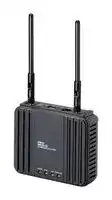


WE70-CL-EU
Wireless LAN Unit, Client, Europe, 24 V DC, IP20, 0 °C to 50 °C
- Manufacturer: OMRON INDUSTRIAL AUTOMATION
- Product type:
- SVHC: No SVHC (16-Jan-2020)
| Delivery and price | |
|---|---|
| Units per pack | 10 |
| Price | 1145.79 € |
| Current stock | 10+ |
| Lead time | 30 days |

**New Product News** (ew

## FA Wireless LAN Unit

## **WE70**

Reliable Wireless Ethernet for Harsh FA Environments Conforms to IEEE 802.11a/b/g

## **The FA Wireless LAN Unit manages FA sites with 3 solutions**

## **Conforms to IEEE 802.11a/b/g (5 GHz/2.4 GHz)! Nominal 54 Mbit/s high-speed communications!**

The WE70 Wireless Unit supports three Wireless LAN standards. The appropriate standard can be selected according to the environment or use of the FA system.

|Standards|IEEE 802.11a|IEEE802.11b|IEEE 802.11g|
|---|---|---|---|
|Maximum speed|54 Mbit/s|11 Mbit/s|54 Mbit/s|
|Frequency band|5-GHz band|2.4 GHz band|2.4 GHz band|
|Modulation|OFDM|DS-SS|OFDM|
|Characteristics|•Five times faster than<br>11b.<br>•Noise resistant.<br>•Less cross talk with<br>other devices.<br>•Multiple 8 channels can<br>be used simultaneously.|•Wide selection of<br>products.<br>•Long communications<br>distance.<br>•Can be used outdoors.|•Five times faster than<br>11b.<br>•Less vulnerable to<br>obstacles.<br>•Compatible with 11b.<br>•Can be used outdoors|


## **Conformance to Radio Wave Standards**

Conforms to radio wave standards for North America, Europe, and China. USA: FCC part 15.247, 401-407 CANADA: IC RSS210 Europe: EN 300 328, EN 301 893 China: SRCC

2

Solutionx **Secure and easy to implement at FA sites.**

## **Stable operation even in harsh FA environments!**

The Wireless LAN Unit has the same level of noise and environmental resistance as OMRON FA Devices, such as PLCs and Power Supply Units. It is capable of stable operation when installed within the same control panel as other FA devices.

There is no need to reset the power supply even if the Wireless LAN Unit runs out of control because it will automatically restart itself.

Good noise resistance can be obtained by connecting the Wireless Unit to an OMRON Power Supply Unit.

## **OMRON'S original security system prevents important production information from being disclosed.**

The latest encryption technology combined with OMRON'S original encryption technology forms a strong security environment.

The FA Wireless LAN contains the following security features.

- Type of FA Wireless LAN Security and Effectiveness

Security Access control Encryption Security level SSID Low MAC Address Filtering WEP WPA-PSK (TKIP/AES) OCB AES _ WOC KEY (OMRON'S original encryption) High e : Very good,     : Good,     : Satisfactory, e ~~[ee]~~ : Not very good[e] **Note:** Partly quoted from the Wireless Security Guidelines (Ministry of Internal Affairs and Communications).

## **Signal status can be observed!**

**==> picture [242 x 145] intentionally omitted <==**

**----- Start of picture text -----**<br>
With the popular Received Signal Strength<br>Indicator (RSSI), the status of invisible<br>radio waves can be easily identified by<br>checking the indicators.<br>● Received Signal Strength Level<br>POWER RSSI LAN WIRELESS<br>Stable<br>POWER RSSI LAN WIRELESS<br>Usable<br>POWER RSSI LAN WIRELESS<br>Unstable<br>Unable to POWER RSSI LAN WIRELESS<br>establish<br>communications a<br>**----- End of picture text -----**<br>


**Versatile and easy installation!** This Wireless LAN Unit can be easily I oo installed anywhere on a DIN Rail or a wall. Use magnets to mount Install it in the it on metal surfaces! control panel with other FA devices! Screwless terminal block (Fs) Easy connection to ‘~ power supplies using the screwless terminal.

## **Versatile and easy installation!**

## **Various antennas are available for different installation locations (optional).**

In addition to the included Pencil Antenna, the popular Magnetic-base Antenna is available. The FA Wireless LAN Unit can be installed inside the control panel and the Antenna on the outside of the control panel.

High-sensitivity Magnetic-base Antenna

**==> picture [145 x 158] intentionally omitted <==**

**----- Start of picture text -----**<br>
Easy Installation<br>2.4-GHz/5-GHz<br>Dual-band compatible<br>● Signal Direction<br>    from Antenna<br>Signal range<br>L 7 a] Top view<br>Side view Antenna<br>Note:  Cannot be used outdoors.<br>**----- End of picture text -----**<br>


3

## **Prevents signal interference! Variable transmission power function!**

There are three transmitter output levels. By setting the level to low, you can reduce its influence on other systems within the same area, and more systems can be added.

**==> picture [437 x 213] intentionally omitted <==**

**----- Start of picture text -----**<br>
High transmitter output Low transmitter output (See note.)<br>kh SSEae teak | Lr —& SEE Ada lai me<br>ili NY SA =n J | Ny Sa [s|]<br>NessieSS Bie IFN AN 4 ns5 SSissSS)  oefs aitso) Fawn;<br>i : it | = J A! ; — (ee<br>te al i 1 [a] eee eS NiEy i Ss<br>{| ‘¢ i J sl | | Ss =a"<br>aSRSS N Ss |e Re STEAENSTNe) [oil<br>a) | ah y TR i qi<br>Note:  The transmission distance will be<br>          shortened.<br>\/ ow, ec<br>Signal interference! Maintains good security.<br>**----- End of picture text -----**<br>


## **FA Wireless LAN settings can be made from a remote location!**

Settings can be managed from a WEB browser. Specific software tools are not required. The status of the FA Wireless LAN can be checked from the control room.

AP Settings Window

CL Settings Window

4

## **Large quantities of production data can be managed as a batch.**

Up to 63 clients can be connected to one access point.

**==> picture [508 x 298] intentionally omitted <==**

**----- Start of picture text -----**<br>
Communications between access points enables switching of access<br>points when expanding the communications area or when there is a  or<br>communications error. PLC<br>Ethernet Computer<br>Up to 6 access points  Communications between Access Points<br>can be registered with  (The access point becomes the repeater<br>one Wireless LAN Unit to extend the communications area.)<br>Communications<br>WE70-AP  between WE70-AP<br>Access point Access Point (repeater)<br>Access Points<br>VYfy)FY (Maximum of 6 repeaters) (oaNV FY<br>WE70-CL<br>Client ·············· ···········<br>63 clients<br>Sy? i hy a<br>Ethernet max.<br>PLC<br>**----- End of picture text -----**<br>


## **The roaming function allows systems to be moved and communicate with mobile devices.**

**Note:** Make sure that you read the _Wireless LAN Unit Operation Manual_ (Cat. No. N153) and check the operating conditions on site before using the roaming function.

**==> picture [469 x 240] intentionally omitted <==**

**----- Start of picture text -----**<br>
WE70-AP Access Point (Master)<br>WE70-AP Access Point (Master)<br>WE70-AP Access Point (Master) :<br>Automatically switches to the next access point<br>WE70-CL Client (Slave)<br>**----- End of picture text -----**<br>


5

**FA Wireless LAN Unit WE70**

## **Highly reliable performance. Ideal Wireless LAN for FA sites.**

- Conforms to IEEE 802.11a/b/g.

- Same noise and environment resistance level as a PLC.

- Features OMRON'S original security system.

- Signals can be observed with LED indicators.

- The Wireless LAN Unit can be installed inside a control panel and the Antenna outside the control panel.

- RoHS-compliant.

- Conforms to radio wave standards for the North America, Europe, and China.

## **Orderin Information g**

■ **Wireless LAN Unit**

**Area Type Model** Europe Access Point (Master) WE70-AP-EU Client (Slave) WE70-CL-EU USA Access Point (Master) WE70-AP-US Client (Slave) WE70-CL-US CANADA Access Point (Master) WE70-AP-CA Client (Slave) WE70-CL-CA China Access Point (Master) WE70-AP-CN ~~==~~ Client (Slave) WE70-CL-CN **Note: 1.** Includes a Pencil Antenna, magnets for mounting the Wireless LAN Unit, and a mounting bracket.

## ■ **WE70 related product**

|**PLC**|**PLC**|**SYSMAC CS/CJ Series**|
|---|---|---|
|CJ-series CPU Bus Unit|EtherNet/IP Unit|CJ1W-EIP21|
|CS-series CPU Bus Unit|EtherNet/IP Unit|CS1W-EIP21|
|CJ-series CPU Bus Unit|Ethernet/ Unit|CJ1W-ETN21|
|CS-series CPU Bus Unit|Ethernet Unit|CS1W-ETN21|
|Industrial Switching Hub||W4S1-03B<br>**Available soon**|
|||W4S1-05B<br>**Available soon**|
|||W4S1-05C<br>**Available soon**|
|Power Supply Unit||S8VS, S8VM Series|


**2.** Make sure that the correct model for the area is used. For example, the use of the WE70-AP-US in an area other than the USA is illegal as stipulated in laws and regulations.

## ■ **Accessories**

## **Antenna**

**Type Specifications Model** High-sensitivity 1 set with two Antennas, WE70-AT001H Magnetic-base 2.4 GHz/5 GHz ~~—~~ Antenna Dual-band compatible ~~—o~~ **Other Typeypepe Model** DIN Rail Mounting Bracket (for TH35 7.5)g Bracket (for TH35 7.5) Bracket (for TH35 7.5)(for TH35 7.5)for TH35 7.5)) WT30-FT001 DIN Rail Mounting Bracket (for TH35 15)g Bracket (for TH35 15) Bracket (for TH35 15)(for TH35 15)for TH35 15)) WT30-FT002 ~~=>~~ Antenna Extension Cable (5 m) WE70-CA5M

**Typeypepe Model** DIN Rail Mounting Bracket (for TH35 7.5)g Bracket (for TH35 7.5) Bracket (for TH35 7.5)(for TH35 7.5)for TH35 7.5)) WT30-FT001 DIN Rail Mounting Bracket (for TH35 15)g Bracket (for TH35 15) Bracket (for TH35 15)(for TH35 15)for TH35 15)) WT30-FT002 ~~=>~~ Antenna Extension Cable (5 m) WE70-CA5M **Conformity to EN Standards** Use a DC power line less than 3 m in length to conform to EN standards. If a power line of 3 m or longer is required, extend the length at the Switching Power Supply's primary side (i.e., the AC power line). ~~es~~ |

**Conformity to Safety Standards**

Always use a Class 2 power supply to conform to UL standards. **Main OMRON Class 2 Switching Power Supplies**

• S8VS (30 W, 60 W type)

FA Wireless LAN Unit **WE70**

6

## **S ecification p**

## ■ **Ratings**

|**Item**|**Model**|**WE70-AP**<br>**Access Point (Master)**|**WE70-CL**<br>**Client (Slave)**|
|---|---|---|---|
|**Power**<br>**supply**|**Rated voltage**|24 V DC||
||**Allowable**<br>**voltage range**|20.4 to 26.4 V DC||
||**Current**<br>**consumption**|250 mA max. (See note.)||
|**Insulation resistance**||20 MΩmin. (at 100 V DC) between the power supplyand mountingbracket||
|**Dielectric strength**||1,500 V AC for 1 min between power supplyand mountingbracket||
|**Noise immunity**||IEC 61000-4-4. 1 kV (power supplyline)||
|**Vibration resistance**||JIS C0040<br>Frequency: 10 to 55 Hz; Amplitude of 0.35 mm or acceleration of 50 m/s2, whichever is smaller<br>10 sweeps of 8 min each (i.e., 80 min in total) in X, Y, Z directions||
|**Shock resistance**||Conforms to JIS C0041: 300 m/s23 times each in X, Y, and Z directions||
|**Ambient operating**<br>**temperature**||0 to 50°C (with no condensation)||
|**Ambient operating humidity**||25% to 85% (with no condensation or icing)||
|**Ambient storage**<br>**temperature range**||−20 to 65°C||
|**Degree of protection**||IP20||
|**Terminal**<br>**construction**|**Power**<br>**terminal**|Screwless terminal block (Phoenix Contact AI 0.75-10 or equivalent)||
|**Applicable Standards**||FCC, UL (USA), IC (CANADA), CE Marking(EU), Chinese Electromagnetic Standards (Mainland China)||
|**Weight**||360gmax. (Wireless LAN Unit only)||


**Note:** Provide a power supply of at least 30 W, considering the inrush current generated at startup.

## ■ **Wireless Interface Specifications**

|**Item**<br>**Standards**|**Conforms to IEEE 802.11a**|**Conforms to IEEE 802.11b**|**Conforms to IEEE 802.11g**|
|---|---|---|---|
|**Wave type**|Orthogonal Frequency Division<br>Multiplexing (OFDM), Simplex|Direct Sequence Spectrum Spread,<br>Simplex|Orthogonal Frequency Division<br>Multiplexing (OFDM), Simplex|
|**Frequency band**|Refer to the following _Frequency Bandwidths and Channels by Area_onpage 8.|||
|**Number of channels**|Refer to the following _Frequency Bandwidths and Channels by Area_onpage 8.|||
|**Baud rate (See note 1.)**|Auto or 54, 48, 36, 24, 18, 12, 9, or<br>6 Mbps|Auto or 11, 5.5, 2, or 1 Mbps|Auto or 54, 48, 36, 24, 18, 12, 9, or<br>6 Mbps|
|**Maximum Transmission**<br>**Distance (Line of Site)**<br>**(See notes 2 and 3.)**|Indoors: Approx. 40 m (with enclosed<br>Pencil Antenna at 54 Mbps) (Outdoor<br>useprohibited.)|Indoors: Approx. 60m (with enclosed Pencil Antenna at 54 Mbps)||
|**Security**|OCB AES (128 bit), WEP KEY (OMRON'S original encryption), WEP (64/128/152 bit),<br>WPA-PSK(with AES <128 bit>/TKIP <128 bit> encryption)|||
|**Transmitter outputpower**|10 mW/MHz max.|||
|**No. of connected clients**|63 max.|||
|**Variable transmission**<br>**power**|3 levels: (High/Mid/Low)<br>If high communications distance is 100%, medium is 50%, and low is 25%. (See note 2.)|||
|**Roaming function**|Provided|||
|**Repeater function**|Provided (Communications between access points, 6 repeaters max.)|||


- **Note: 1.** Theoretical value of the Wireless LAN Standards, not the actual baud rate.

   **2.** Depends on the installation environment.

   **3.** The distance will be shorter when using a Magnetic-base Antenna or an extension cable.

FA Wireless LAN Unit **WE70**

7

## ■ **LAN Cable Specifications**

|**Item**|**Parameter**|
|---|---|
|Standards|Conforms to IEEE 802.3 (10Base-T, 100Base-TX)|
|Interface|RJ-45×1|


**Note:** Connect to computer using a straight cable.

## ■ **Other**

|■**Other**||
|---|---|
|**Item**|**Specification**|
|Wireless LAN<br>Unit Setup|Web browser: Microsoft Internet Explorer 6.0, 7.0,<br>or higher<br>OS: Windows Vista, XP, or 2000 (See note.)|


**Note:** Not compatible with Windows 98, NT, or Me.

## ■ **Frequency Bandwidths and Channels by Area**

## **11a (5 GHz band)**

|**Frequency**<br>**(MHz)**<br>**Area**|5150<br>5350<br>5470<br>5725<br>5825|5150<br>5350<br>5470<br>5725<br>5825|5150<br>5350<br>5470<br>5725<br>5825|5150<br>5350<br>5470<br>5725<br>5825|5150<br>5350<br>5470<br>5725<br>5825|5150<br>5350<br>5470<br>5725<br>5825|
|---|---|---|---|---|---|---|
|USA<br>(24 channels<br>total)|||||||
|||8 ch||11 ch|5 ch||
||||||||
|CANADA<br>(13 channels<br>total)|||||||
|||8 ch|||5 ch||
||||||||
|Europe<br>(19 channels<br>total)|||||||
|||8 ch||11 ch|||
||||||||
|China<br>(5 channels<br>total)|||||||
||||||5 ch||
||||||||


## **11b/g (2.4 GHz band)**

|**Frequency**<br>**(MHz)**<br>**Area**|24|12<br>2462<br>2472|12<br>2462<br>2472|12<br>2462<br>2472|
|---|---|---|---|---|
|USA|||||
|(11 channels<br>||11 ch|||
|total)|||||
|CANADA|||||
|(11 channels<br>||11 ch|||
|total)|||||
|Europe|||||
|<br>(13 channels<br>||13 ch|||
|total)|||||
|China|||||
|(13 channels<br>||13 ch|||
|total)|||||


FA Wireless LAN Unit **WE70**

8

**Nomenclature**

## **Access Point (Master)**

## **Access Point Indicator**

## **WE70-AP(-EU/-US/-CA/-CN)**

|**Indicator**|**Color**|**Status**|**Meaning (primary error)**|
|---|---|---|---|
|**POWER**|Green|Lit|Power ON|
|||Not lit|Power OFF|
|||Flashing|Simultaneous flashing of MODE and<br>POWER indicators shows that the<br>setup is beinginitialized. (See note.)|
|**MODE**|Orange|Lit|UsingIEEE 802.11a|
|||Not lit|UsingIEEE 802.11b/g|
|||Flashing|Simultaneous flashing of MODE and<br>POWER indicators shows that the<br>setupis beinginitialized.(See note.)|
|**WIRELESS**|Orange|Lit|Radio communications are being<br>established with the Wireless LAN<br>client.|
|||Not lit|There is no LAN Client<br>communicating with the Wireless<br>Unit, or no radio communication has<br>been made for 5 minutes or more.|
|**LAN**|Orange|Lit|LAN connection is normal.|
|||Not lit|LAN is not connected.|
|||Flashing|Data is beingtransmitted.|


**Antenna Connector** Used to connect enclosed Antennas. **Note:** To ensure good performance, always connect both of the Antennas. **INIT Button LAN port (RJ-45** × **1)** Used to operate using default Connect a network device, such settings. as a hub, through a LAN cable. **DC Connector** Supplies 24 VDC power.

**POWER Indicator (Green) WIRELESS Indicator (Orange)** Displays the power source status and Displays the status of the the operation mode of the Wireless Wireless LAN LAN Unit. **LAN Indicator (Orange) MODE Indicator (Orange)** Displays the status of the wired Displays the operating mode of the LAN. Wireless LAN Unit.

**Note:** Hold down the initialization switch while the power is OFF and then turn the power ON without releasing the switch. Initialization can also be applied from the settings window using a web browser.

**Client Indicator Client (Slave) Indicator Color Status Meaning (primary error) WE70-CL(-EU/-US/-CA/-CN) POWER** Green Lit Power ON **Antenna Connector** Not lit Power OFF Used to connect enclosed Antennas. Flashing Simultaneous flashing of the RSSI **Note:** To ensure good and POWER indicators shows that performance, always connect both of the the setup is being initialized. (See Antennas. note.) **RSSI** Orange Not lit No margin Flashing Level 1, duty 2 (OFF): Flashes for 1 **RSSI Button LAN port (RJ-45** × **1)** (ON) Switches the received signal status Connect a network device, such indicator to flashing or four-level lit as a hub, through a LAN cable. Flashing Level 2, duty 1 (OFF): Flashes for 2 display. **DC Connector** (ON) **INIT Button** Supplies 24 VDC power. Lit Level 3 Used to operate using default settings. Flashing Simultaneous flashing of MODE and POWER indicators shows that the setup is being initialized. (See note.) **WIRELESS** Orange Lit Radio communications are being established with the Wireless LAN Access Point. Not lit There is no wireless LAN Access Point communicating with the Wireless LAN UNIT, or no radio communication has been made for more than 10 seconds. **POWER Indicator (Green) WIRELESS Indicator (Orange)** Displays the power source status and Displays the status of the **LAN** Orange Lit LAN connection is normal. the operation mode of the Wireless Wireless LAN. LAN Unit. Not lit LAN is not connected. **LAN Indicator (Orange) RSSI Indicator (Orange)** Displays the status of the wired Flashing Data is being transmitted. Displays the received signal strength LAN. ~~(=~~ by flashing. **Note:** Hold down the initialization switch while the power is OFF and **Note:** When the RSSI Button on the back of the WE70 is pressed, the received signal then turn the power ON without releasing the switch. strength will be indicated using the POWER, RSSI, LAN, and WIRELESS indicators. Initialization can also be applied from the settings window using The POWER indicator will flash. Press the button again or wait for 10 minutes of the a web browser.

**Note:** When the RSSI Button on the back of the WE70 is pressed, the received signal strength will be indicated using the POWER, RSSI, LAN, and WIRELESS indicators. The POWER indicator will flash. Press the button again or wait for 10 minutes of the indication to pass and then the indication will return to the original status.

FA Wireless LAN Unit **WE70**

9

## **Dimensions**

**Note:** All units are in millimeters unless otherwise indicated.

## **Access Point (Master)**

**==> picture [480 x 367] intentionally omitted <==**

**----- Start of picture text -----**<br>
Using Pencil Antenna<br>WE70-AP(-EU/-US/-CA/-CN) (129.6)<br>Client (Slave) (26.6)<br>WE70-CL(-EU/-US/-CA/-CN)<br>37.2 37.2<br>22.6<br>(231.5)<br>_ a a E L | |<br>(128.5)<br>107.6±1.0 WE70-APFA WIRELESS LAN ACCESS POINT 103±1.0 103<br>POWER MODE LAN WIRELESS<br>34.5±0.5 12<br>120±1.0<br>(36) 38.5 Mounting Bracket<br>Mounting Bracket<br>120<br>108±0.1<br>a aT 6 =<br>116±.0.2<br>an _|L<br> Leave a gap of approx. 20 mm around the sides of the  6 Four, 4.2-dia. holes  e<br>Wireless LAN Unit for ventilation. (Use flat head screws) Four, 5-dia. holes I 1.5<br>**----- End of picture text -----**<br>


**WE70-AP(-EU/-US/-CA/-CN)**

## **Client (Slave)**

## **WE70-CL(-EU/-US/-CA/-CN)**

**Note:** Leave a gap of approx. 20 mm around the sides of the Wireless LAN Unit for ventilation.

## **High-sensitivity Magnetic-base Antenna**

**WE70-AT001H**

**==> picture [179 x 139] intentionally omitted <==**

**----- Start of picture text -----**<br>
11 A FP 25<br>193<br>22<br>78 a 2,000±2 82.6<br>**----- End of picture text -----**<br>


## **DIN Rail Mounting Bracket**

**WT30-FT001 (for TH35 7.5) WT30-FT002 (for TH35 15)**

**==> picture [158 x 81] intentionally omitted <==**

**----- Start of picture text -----**<br>
Reference: Applicable DIN Rail<br>Detail of section A Detail of section A<br>Section A for TH35 7.5  for TH35 15<br>7.5 [   0    ] −0.4 15<br>1±0.04<br>35±0.3 1±0.04 15°<br>0.3 max.<br>**----- End of picture text -----**<br>


FA Wireless LAN Unit **WE70**

10

## **Read and Understand this Catalog**

Please read and understand this catalog before purchasing the product. Please consult your OMRON representative if you have any questions or comments.

## **Warranty and Limitations of Liability**

## **WARRANTY**

OMRON's exclusive warranty is that the products are free from defects in materials and workmanship for a period of one year (or other period if specified) from date of sale by OMRON.

OMRON MAKES NO WARRANTY OR REPRESENTATION, EXPRESS OR IMPLIED, REGARDING NON-INFRINGEMENT, MERCHANTABILITY, OR FITNESS FOR PARTICULAR PURPOSE OF THE PRODUCTS. ANY BUYER OR USER ACKNOWLEDGES THAT THE BUYER OR USER ALONE HAS DETERMINED THAT THE PRODUCTS WILL SUITABLY MEET THE REQUIREMENTS OF THEIR INTENDED USE. OMRON DISCLAIMS ALL OTHER WARRANTIES, EXPRESS OR IMPLIED.

## **LIMITATIONS OF LIABILITY**

OMRON SHALL NOT BE RESPONSIBLE FOR SPECIAL, INDIRECT, OR CONSEQUENTIAL DAMAGES, LOSS OF PROFITS, OR COMMERCIAL LOSS IN ANY WAY CONNECTED WITH THE PRODUCTS, WHETHER SUCH CLAIM IS BASED ON CONTRACT, WARRANTY, NEGLIGENCE, OR STRICT LIABILITY.

In no event shall the responsibility of OMRON for any act exceed the individual price of the product on which liability is asserted.

IN NO EVENT SHALL OMRON BE RESPONSIBLE FOR WARRANTY, REPAIR, OR OTHER CLAIMS REGARDING THE PRODUCTS UNLESS OMRON'S ANALYSIS CONFIRMS THAT THE PRODUCTS WERE PROPERLY HANDLED, STORED, INSTALLED, AND MAINTAINED AND NOT SUBJECT TO CONTAMINATION, ABUSE, MISUSE, OR INAPPROPRIATE MODIFICATION OR REPAIR.

## **Application Considerations**

## **SUITABILITY FOR USE**

OMRON shall not be responsible for conformity with any standards, codes, or regulations that apply to the combination of the product in the customer's application or use of the product.

Take all necessary steps to determine the suitability of the product for the systems, machines, and equipment with which it will be used.

Know and observe all prohibitions of use applicable to the product.

NEVER USE THE PRODUCTS FOR AN APPLICATION INVOLVING SERIOUS RISK TO LIFE OR PROPERTY WITHOUT ENSURING THAT THE SYSTEM AS A WHOLE HAS BEEN DESIGNED TO ADDRESS THE RISKS, AND THAT THE OMRON PRODUCT ARE PROPERLY RATED AND INSTALLED FOR THE INTENDED USE WITHIN THE OVERALL EQUIPMENT OR SYSTEM.

## **PROGRAMMABLE PRODUCTS**

OMRON shall not be responsible for the user’s programming of a programmable product, or any consequence thereof.

## **Disclaimers**

## **CHANGE IN SPECIFICATIONS**

Product specifications and accessories may be changed at any time based on improvements and other reasons. Consult with your OMRON representative at any time to confirm actual specifications of purchased products.

## **DIMENSIONS AND WEIGHTS**

Dimensions and weights are nominal and are not to be used for manufacturing purposes, even when tolerances are shown. **PERFORMANCE DATA** Performance data given in this catalog is provided as a guide for the user in determining suitability and does not constitute a warranty. It may represent the result of OMRON's test conditions, and the users must correlate it to actual application requirements. Actual performance is subject to the OMRON Warranty and Limitations of Liability _._
Updated at March 31, 2026
With a legacy spanning over 80 years, Omron Industrial Automation is a globally recognized leader in the manufacture of advanced industrial control and automation components. Renowned for their reliability and engineering excellence, Omron delivers comprehensive solutions that enhance efficiency, machine safety, and precision across a wide range of manufacturing environments. Our extensive portfolio of Omron products is heavily focused on their industry-leading sensing and switching technologies. We offer a vast selection of sensors, excelling specifically in high-performance proximity sensors, light sensors, and temperature sensors. Complementing this range are robust switching solutions, featuring a deep inventory of power relays, solid-state relays, safety relays, and essential relay accessories designed for demanding operational requirements. Beyond sensing and switching, Omron is highly regarded for its precision automation and process control equipment. Our selection features highly accurate temperature controllers, versatile process controllers, and sophisticated panel displays and instrumentation. To support these fundamental systems, we also supply dependable Omron power supplies, notably AC/DC converters, alongside vital connectivity components like DIN rail terminal blocks to ensure secure, efficient, and complete industrial setups.
About Novapart
Novapart is a B2B electronic component broker specialising in stock shortages and cost reduction. We source hard-to-find parts and identify compliant alternatives across a catalogue of 410,000+ components from 500+ manufacturers.
Learn more →Stock Shortage Specialist
When a component is unavailable, discontinued or has an unacceptable lead time, we tap into our network of vetted European and Asian distributors to source what you need — without compromising on quality or traceability.
Request a quote →Compliant Alternatives
We identify pin-to-pin, electrically equivalent substitutes that meet the same certifications (RoHS, AEC-Q100, REACH) as your original specification — validated against datasheets, not just part numbers. Often at a lower cost.
BOM Analysis service →