
Image not available
Illustrative purposes only

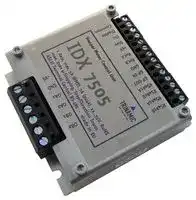
TMC-IDX 7505
Stepper Motor Driver, -, 3.5 A, 12 Vdc to 48 Vdc, RS485
⚠️ Reference pricing provided. In case of supply shortages, we will connect you with our trusted procurement partners to ensure your project's continuity.
- Manufacturer: TRINAMIC / ANALOG DEVICES
- Product type: Stepper Motor Drives
- Product Range: TMC
- Output Current Max: 3.5A
- Supply Voltage Max: 48VDC
- Supply Voltage Min: 15VDC
- Control / Drive Type: Controller / Driver Module
| Delivery and price | |
|---|---|
| Units per pack | 1 |
| Price | 262.11 € |
| Current stock | 10+ |
| Lead time | 30 days |
Datasheet

## **IDX (IDX 4803 and IDX 7505) Manual**

**STEPPER motor controller/driver modules IDX / IDX 4803: 3.5A RMS (5A peak) / 48V IDX 7505: 5.0A RMS (7A peak) / 75V with RS485 and step-/ direction interface**

Trinamic Motion Control GmbH & Co. KG Sternstraße 67 D – 20357 Hamburg, Germany Phone +49-40-51 48 06 – 0 FAX: +49-40-51 48 06 – 60 http://www.trinamic.com INFO@TRINAMIC.COM

IDX Manual (V1.08 / August 30th, 2006)

2

## **Table of Contents**

|1|Features ........................................................................................................................................... 4|Features ........................................................................................................................................... 4|
|---|---|---|
|2|Life support policy ............................................................................................................................ 5||
|3|Electrical and Mechanical Interfacing............................................................................................... 6||
||3.1|Pinning ...................................................................................................................................... 6|
||3.2|Dimensions ............................................................................................................................... 7|
||3.3|Connectors................................................................................................................................ 7|
|4|Operational Ratings ......................................................................................................................... 8||
||4.1|Practical maximum motor current ratings ................................................................................. 9|
||4.2|Step, Direction and Disable Inputs.......................................................................................... 10|
|5|Getting Started ............................................................................................................................... 11||
||5.1|Motor....................................................................................................................................... 11|
||5.1.1<br>Motor Choice...................................................................................................................... 11||
|||5.1.1.1<br>Motor velocity.............................................................................................................. 11|
|||5.1.1.2<br>Chopper Modes 0 (SPI / Default Mode) and 1 (PWM) ............................................... 11|
|||5.1.1.3<br>Chopper Mode 2 (PHASE) ......................................................................................... 12|
||5.2|Connecting Motor and Power Supply ..................................................................................... 14|
||5.3|Power Supply Requirements .................................................................................................. 14|
||5.4|Connections for Step / Direction- Mode.................................................................................. 15|
||5.5|Connections for RS485 Interface............................................................................................ 16|
||5.5.1<br>Interface installation........................................................................................................... 16||
||5.5.2<br>Control with terminal program............................................................................................ 16||
|6|Functional Description.................................................................................................................... 17||
||6.1|Disable Function ..................................................................................................................... 17|
||6.2|RS485 Control Interface ......................................................................................................... 17|
||6.2.1<br>RS485 Commands............................................................................................................. 18||
|||6.2.1.1<br>Examples for test move .............................................................................................. 19|
|||6.2.1.2<br>Motor Current (C)........................................................................................................ 19|
|||6.2.1.3<br>Failure Readout (E)..................................................................................................... 19|
|||6.2.1.4<br>StallGuard (G)............................................................................................................. 20|
|||6.2.1.5<br>Limit Switch (L) ........................................................................................................... 20|
|||6.2.1.6<br>Output setting (O) ....................................................................................................... 20|
|||6.2.1.7<br>I/Os Readout (Q)......................................................................................................... 21|
|||6.2.1.8<br>Baud Rate (U)............................................................................................................. 21|
|||6.2.1.9<br>Velocity Mode (V)........................................................................................................ 21|
|||6.2.1.10 Store Parameters to EEPROM (W) ............................................................................ 22|
|||6.2.1.11 Microstep Resolution (Z)............................................................................................. 22|
||6.2.2<br>Chopper Modes ................................................................................................................. 22||
|||6.2.2.1<br>Chopper Mode 0 (SPI) / Default Mode ....................................................................... 22|
|||6.2.2.2<br>Chopper Mode 1 (PWM)............................................................................................. 23|
|||6.2.2.3<br>Chopper Mode 2 (PHASE) ......................................................................................... 23|
|||6.2.2.4<br>Chopper mode 3 (Phase and SPI).............................................................................. 24|
|||6.2.2.5<br>Chopper mode 4 (PWM and SPI)............................................................................... 24|
||6.3|Step / Direction........................................................................................................................ 25|
||6.3.1<br>Direction............................................................................................................................. 25||
||6.3.2<br>Step.................................................................................................................................... 26||
||6.4|Reset to factory default........................................................................................................... 26|
||6.5|Firmware Update..................................................................................................................... 27|
||6.6|Option: Pseudo DC-Motor mode (not supported by software yet).......................................... 28|
||6.6.1<br>Setting up the module........................................................................................................ 28||
||6.6.2<br>Parameterizing with RS485 ............................................................................................... 28||
||6.6.3<br>Motion Control.................................................................................................................... 28||
|7|Revision History ............................................................................................................................. 29||
||7.1|Documentation Revision......................................................................................................... 29|
||7.2|Firmware Revision .................................................................................................................. 29|


Copyright © 2005, TRINAMIC Motion Control GmbH & Co. KG

IDX Manual (V1.08 / August 30th, 2006)

3

## **List of Figures**

Figure 3.1: Pinning of IDX ....................................................................................................................... 6 Figure 3.2: Dimensions............................................................................................................................ 7 Figure 3.3: Base Plate Dimensions......................................................................................................... 7 Figure 4.1: Step, Direction and Disable Inputs...................................................................................... 10 Figure 5.1: Maximum voltage regarding motor current and inductivity ................................................. 13 Figure 5.2: Connecting Motor and Power Supply ................................................................................. 14 Figure 5.3: Contacts for Step-Direction................................................................................................. 15 Figure 5.4: Contacts for RS485 with an adapter ................................................................................... 16 Figure 5.5 : Connection settings for RS485 .......................................................................................... 16 Figure 6.1: GPO wiring scheme ............................................................................................................ 20 Figure 6.2: Step-Direction signals and motor reactions ........................................................................ 25 Figure 6.3: Step and Direction Signal.................................................................................................... 26 Figure 6.4: Reset to factory default ....................................................................................................... 26 Figure 6.5: Firmware update tool .......................................................................................................... 27 Figure 6.6: GPI wiring scheme .............................................................................................................. 28 Figure 6.7: Layout Changes for DC-Motor option ................................................................................. 28

## **List of Tables**

Table 1.1: Order codes............................................................................................................................ 4 Table 3.1: Power and Motor Pinning....................................................................................................... 6 Table 3.2: Controls Pinning ..................................................................................................................... 6 Table 4.1: Operational Ratings (Orange: Different values for IDX 7505)................................................ 8 Table 4.2.1: Practical motor current limitations for IDX 7505.................................................................. 9 Table 5.1: Maximum voltage regarding motor current and inductivity .................................................. 12 Table 6.1: RS485 Commands ............................................................................................................... 18 Table 6.2: Motor Current Examples for IDX / IDX 4803........................................................................ 19 Table 6.3: Failure readout in SPI mode................................................................................................. 19 Table 6.4: StallGuard............................................................................................................................. 20 Table 6.5: Limit switch........................................................................................................................... 20 Table 6.6: Output adjustment ................................................................................................................ 20 Table 6.7: I/Os Readout ........................................................................................................................ 21 Table 6.8: Baud rate.............................................................................................................................. 21 Table 6.9: Adjustment of Microstep Resolution..................................................................................... 22 Table 6.10: Chopper mode 3 switching velocities................................................................................. 24 Table 6.11: External signals and motor reactions ................................................................................. 25 Table 7.1: Documentation Revisions..................................................................................................... 29 Table 7.2: Firmware Revisions.............................................................................................................. 29

Copyright © 2005, TRINAMIC Motion Control GmbH & Co. KG

IDX Manual (V1.08 / August 30th, 2006)

4

## **1 Features**

The TRINAMIC IDX is a small and rugged step / direction stepper motor driver system with a supply voltage of up to 50V and up to 3.5A RMS motor coil current (up to 75V and up to 5A RMS for IDX 7505). It can be controlled via an RS-485 interface. Up to 256 micro steps are supported for either high accuracy or high speed. An update of the firmware is possible via the serial interface. The system features sensorless stall detection (StallGuard[TM] ) and full protection. The module is fully protected and comes with a stand-alone reference search feature.

The motor, switches and power supply can be connected easily with screw terminal connectors. The housing is based on a thick aluminum plate which is used as a heatsink.

## **Applications**

- Step-/ Direction stepper driver for industrial applications

- Robotics

- Remote diagnostics / feedback allows for high-reliability drives

- Centralized motor driver mounted in switchboard

- Decentralized motor driver mounted near motor

## **Motor type**

- Coil current from 500mA to 3.5A RMS (5A peak)  (IDX / IDX 4803) Coil current from 500mA to 5.0A RMS (7A peak) (IDX 7505)

- 12V to 50V nominal supply voltage (or any value in between) (IDX / IDX 4803) 12V to 75V nominal supply voltage (or any value in between) (IDX 7505)

## **Highlights**

- Remote controlled diagnostics and parameterization (RS485)

- Reference move and turn CW / CCW via RS485

- Stand-alone operation, adjusted via RS485

- Fully protected drive

- Digital selection of motor current and standby current

- Local reference move using sensorless StallGuard feature or reference switch

- All setup parameters are stored in internal EEPROM, no bus system required in end application

- Micro step resolution can be changed to get high accuracy or high speed with the possibility to combine both

- Different chopper modes allow best adaptation to application / motor

- Many adjustment possibilities make this module the solution for a great field of demands

|**Order code**|**Description**|
|---|---|
|IDXor IDX 4805|48V, 3.5A IDX module|
|IDX 7505|75V, 5A IDX module<br>(available anticipated Sept. 2006)|


**Table 1.1: Order codes**

Copyright © 2005, TRINAMIC Motion Control GmbH & Co. KG

IDX Manual (V1.08 / August 30th, 2006)

5

## **2 Life support policy**

TRINAMIC Motion Control GmbH & Co. KG does not authorize or warrant any of its products for use in life support systems, without the specific written consent of TRINAMIC Motion Control GmbH & Co. KG.

Life support systems are equipment intended to support or sustain life, and whose failure to perform, when properly used in accordance with instructions provided, can be reasonably expected to result in personal injury or death.

© TRINAMIC Motion Control GmbH & Co. KG 2005

Information given in this data sheet is believed to be accurate and reliable. However no responsibility is assumed for the consequences of its use nor for any infringement of patents or other rights of third parties, which may result form its use.

Specifications subject to change without notice.

Copyright © 2005, TRINAMIC Motion Control GmbH & Co. KG

IDX Manual (V1.08 / August 30th, 2006)

6

## **3 Electrical and Mechanical Interfacing**

## **3.1 Pinning**

**==> picture [414 x 182] intentionally omitted <==**

**----- Start of picture text -----**<br>
RS485B<br>RS485A<br>RS485B<br>RS485A OB2<br>GPO<br>OB1<br>GPI Power<br>GND OA2<br>Controls IDX &<br>RefB<br>OA1<br>RefA Motor<br>+5V GND<br>Step +VS<br>Dir<br>Disable<br>Common<br>**----- End of picture text -----**<br>


**Figure 3.1: Pinning of IDX**

|||**Pin**|**Number**||**Function**|
|---|---|---|---|---|---|
|||OB1,OB2|1,2||Connections for motor coil B|
|||OA1, OA2|3,4||Connectionsfor motorcoil A|
|||GND|5||GND, power|
|||+VS|6||Positivepower supplyvoltage|


**Table 3.1: Power and Motor Pinning**

|||**Pin**|**Number**|**Function**|
|---|---|---|---|---|
|||RS485-|1, 3|RS485remote controlaccess-,TTL input|
|||RS485+|2,4|RS485remote controlaccess+,TTL input|
|||GPO|5|General Purpose Output,for wiring scheme seeFigure 6.1|
|||GPI|6|General Purpose Input,for wiringscheme see Figure 6.6|
|||GND|7|GND reference|
|||REF B|8|Reference signal B(integrated 3.9Kpullupresistor to+5V)|
|||REF A|9|Reference signal A(integrated 3.9Kpullupresistor to+5V)|
|||+5V|10|Constant +5Voutput,reference|
|||Step|11|Opto-decoupled input (negative terminal):|
|||||Each impulse causes onemotor microstep|
|||Direction|12|Opto-decoupled input (negative terminal):|
|||||Polarity determinesmotordirection|
|||Disable|13|Opto-decoupled input (negative terminal):|
|||||Tie to opto-coupler negative supplyvoltage to disable motor driver|
|||Common|14|5…24V,Opto-couplerpositive supplyvoltage|


**Table 3.2: Controls Pinning**

Copyright © 2005, TRINAMIC Motion Control GmbH & Co. KG

IDX Manual (V1.08 / August 30th, 2006)

7

## **3.2 Dimensions**

**==> picture [307 x 129] intentionally omitted <==**

**----- Start of picture text -----**<br>
63.5mm<br>3mm<br>19mm<br>29.5mm<br>34mm<br>63.5mm<br>**----- End of picture text -----**<br>


**Figure 3.2: Dimensions**

**==> picture [277 x 90] intentionally omitted <==**

**----- Start of picture text -----**<br>
63.0mm<br>12mm 29.5mm<br>3mm<br>63.5mm<br>7mm 4mm<br>6.5mm 4.5mm<br>**----- End of picture text -----**<br>


**Figure 3.3: Base Plate Dimensions**

## **3.3 Connectors**

Both connectors are RIA connectors. Power and motor: 6 pin connector RM 5.0 (07_06_RM5) Control: Two 4 pin and one 6 pin connectors RM 3.5, (2x 166_04_RM3.5, 1x 166_06_RM35)

Copyright © 2005, TRINAMIC Motion Control GmbH & Co. KG

IDX Manual (V1.08 / August 30th, 2006)

8

## **4 Operational Ratings**

The operational ratings show the intended / the characteristic range for the values and should be used as design values. In no case shall the maximum values be exceeded.

|**4 Operational Ratings**<br>The operational ratings show the intended / the characteristic range for the values and should be used<br>as design values. In no case shall the maximum values be exceeded.|**4 Operational Ratings**<br>The operational ratings show the intended / the characteristic range for the values and should be used<br>as design values. In no case shall the maximum values be exceeded.|**4 Operational Ratings**<br>The operational ratings show the intended / the characteristic range for the values and should be used<br>as design values. In no case shall the maximum values be exceeded.|**4 Operational Ratings**<br>The operational ratings show the intended / the characteristic range for the values and should be used<br>as design values. In no case shall the maximum values be exceeded.|**4 Operational Ratings**<br>The operational ratings show the intended / the characteristic range for the values and should be used<br>as design values. In no case shall the maximum values be exceeded.|**4 Operational Ratings**<br>The operational ratings show the intended / the characteristic range for the values and should be used<br>as design values. In no case shall the maximum values be exceeded.|
|---|---|---|---|---|---|
|**Symbol**|**Parameter**|**Min**|**Typ**|**Max**|**Unit**|
|VS|Power supply voltage (IDX 4803)||12 ... 48|58.5|V|
|VS|Power supplyvoltage(IDX 7505)||12 ... 75|78.5|V|
|ICOIL|Motor coil current for sine wave peak<br>(chopper<br>regulated,<br>adjustable<br>via<br>software) (IDX 4803)||0.7 … 4.3|5|A|
|ICOIL|Motor peak coil current (IDX 7505)||0.7 … 6.4|7.1|A|
|IMC|Nominal RMS motor current (IDX 4803)||0.5 ... 3|3.5|A|
|IMC|Nominal motor current (IDX 7505)||0.5 ... 4.5|5|A|
|fCHOP|Motor<br>chopper<br>frequency<br>(actual<br>frequency depends on operation mode)||20 or 36||kHz|
|tSLP|Coil output slope||300||Ns|
|IS|Power supply current||<< ICOIL|1.4 * ICOIL|A|
|VISO|Isolation voltage of optocoupler||± 42|±100|V|
|VCOM|Supply voltage for step, direction and<br>disable; (inputs have negative logic)||5 ... 24|27|V|
|VOPTON|Signal active voltage at disable, step and<br>direction<br>input<br>(optocoupler<br>on,<br>measured from UCOMto input)|3.5|4.5 .. 24|27|V|
|VOPTOFF|Signal inactive voltage at disable, step<br>and direction input (optocoupler off,<br>measured from UCOMto input))|-3|0|2|V|
|IOPT|Optocoupler<br>current<br>(internally<br>regulated)||4|8|mA|
|fStep|Step frequency via step input|||350|kHz|
|tdelay|Direction hold time after step impulse<br>active(falling)edge|||0.7|µs|
|tsetup|setup time before step impulse|||2.0|µs|
|VREF|Input low voltage on REFA / REFB|-2|0|0.8|V|
|VREF|Input high voltage on REFA / REFB|2.4|5|30|V|
|VGPI|Input voltage on GPI|-2|0 ... 5|30|V|
|VGPO|Output voltage on GPO(open collector)|-1||100|V|
|IGPO|Output current on GPO(open collector)|||-150|mA|
|TENV|Environment temperature|-25||70|°C|
|TC|Temperature of case back (cooling<br>plate), operating|-25||85|°C|
|**Table 4.1: Operational Ratings (Orange: Different values for IDX 7505)**||||||


**Table 4.1: Operational Ratings (Orange: Different values for IDX 7505)**

Copyright © 2005, TRINAMIC Motion Control GmbH & Co. KG

IDX Manual (V1.08 / August 30th, 2006)

9

## **4.1 Practical maximum motor current ratings**

The IDX 7505 (IDX 4803) uses eight high power 80V (60V) transistors with low internal on resistance of only 15mOhm (24mOhm) to drive the motor. Due to this, power loss is just a few watts at maximum current. In order to avoid EMV problems and to keep electromagnetic emission low, the transistors are switched smoothly on and off with 300ns transitions. On the other hand, this produces dynamic losses and thus additional power dissipation. The resulting power dissipation has to be cooled away by air convection and via the metal base plate, in order to keep transistor and board temperature well below 125°C (Integrated thermal limit). This especially becomes a limiting point for the IDX7505, because of its high voltage capability. The following table gives some examples for the current capability in a typical mounting situation, where the module is mounted to a metal base plate (heat sink with fins, overall dimensions 100*50*15mm³). In this situation the base plate was always kept at maximum 60°C. However, the actual motor type and velocity setting also influences power dissipation of the module.

|**Chopper**<br>**mode**|**Supply**<br>**voltage**|**Maximum**<br>**ICOILRMS**<br>**for continuous operation**|**Maximum**<br>**duty cycle for**<br>**full current**|
|---|---|---|---|
|0,1|75V|3.5A|50%|
|0,1|70V|4A|60%|
|0,1|60V|4.5A|80%|
|0,1|≤50V|5A|100%|
|2|15V … 75V|4A *)|n/a|


**Table 4.2.1: Practical motor current limitations for IDX 7505**

*) This limit is due to the higher current ripple in chopper mode 2, which allows a maximum of 75% to 90% of the maximum current setting. It is not a thermal limit.

Copyright © 2005, TRINAMIC Motion Control GmbH & Co. KG

IDX Manual (V1.08 / August 30th, 2006)

10

## **4.2 Step, Direction and Disable Inputs**

The inputs disable, dir and step are electrically isolated from the module. The inputs are related to VCOM. In a typical application, UCOM shall be tied to the positive supply voltage of the master and the inputs are driven by open collector or push / pull outputs. VOPTOFF and VOPTON must not exceed VCOM to avoid reverse polarity for the opto couplers.

OFF: VCOM - VIN < 1.0V ON: VCOM - VIN >= 3.5V

**==> picture [342 x 285] intentionally omitted <==**

**----- Start of picture text -----**<br>
U<br>COM +5V<br>5..24V<br>A C<br>Disable<br>C E<br>A C<br>µC<br>Dir<br>C E<br>A C<br>A: Anode<br>C: Cathode<br>C: Collector<br>Step C E E: Emitter<br>GND<br>**----- End of picture text -----**<br>


**Figure 4.1: Step, Direction and Disable Inputs**

## **Examples:**

**==> picture [334 x 162] intentionally omitted <==**

**----- Start of picture text -----**<br>
V  = 5V<br>COM<br>V undefined V<br>OPTON OPTOFF<br>V  = 0V 1.5V 4.0V 5V<br>STEP<br>V  = 20V<br>COM<br>V undefined V<br>OPTON OPTOFF<br>V  = 0V 16.5V 19.0V 20V<br>STEP<br>**----- End of picture text -----**<br>


Copyright © 2005, TRINAMIC Motion Control GmbH & Co. KG

IDX Manual (V1.08 / August 30th, 2006)

11

## **5 Getting Started**

## **5.1 Motor**

_Attention: Do not connect or disconnect the motor while power on. Damage to the module may occur._

_Attention: A too high motor current setting can damage you motor! If in doubt, start with a low current setting and check motor temperature. If the motor heats up very quickly, check all settings. The motor shall never reach a temperature above 100°C under any circumstances. Some stepper motors need contact to metallic parts to allow continuous operation. Mind the default settings, when you operate in step / direction mode the first time! You can store your own settings in the module permanently._

## **5.1.1 Motor Choice**

Care has to be taken concerning the selection of motor and supply voltage. In the different chopper modes different criteria apply. Modes 0 and 1 are quite insensitive to the motor choice, while Mode 2 is very sensitive, because it uses a different motor current regulation scheme. This chapter gives some mathematical information on the motor choice, but you can skip it if you want to experiment with a given motor. Normally, best results will be achieved when operating the given motor in a range of 50 to 100% of nominal motor current (see motor data sheet). Mode 2 and mode 1 are mainly intended for slow, smooth and very exact movements, due to the high microstepping resolution. For most dynamic operation choose mode 0, or the combined modes 3 and 4 which use mode 1 or 2 for slow movements and switch to mode 0 at a defined velocity.

## **5.1.1.1 Motor velocity**

Whenever it is desired to maximize the motor velocity in a given application, it is important to understand limitations due to supply voltage and motor inductivity. Please consult your motor data sheet for this, as well as the choice of the chopper mode. Chopper mode 0 allows maximum motor velocity.

## **5.1.1.2 Chopper Modes 0 (SPI / Default Mode) and 1 (PWM)**

In these two modes the maximum supply voltage (VS) of the motor must not exceed 22-25 times the nominal motor voltage (VN), regarding the multiplication of ICOIL, MAX and RMOTOR. A higher value would lead to an excess of motor rating.

The minimum supply voltage has to be above two times the nominal motor voltage.

**==> picture [142 x 27] intentionally omitted <==**

Copyright © 2005, TRINAMIC Motion Control GmbH & Co. KG

IDX Manual (V1.08 / August 30th, 2006)

12

## **5.1.1.3 Chopper Mode 2 (PHASE)**

In Table 5.1 and Figure 5.1 examples of maximum power supply voltages regarding current ICOIL and inductivity of your motor are specified.

For further information, including a formula and description how to calculate the maximum voltage for your setup, refer to 6.2.2.3

|**ICOIL (RMS)**|**L(min.)**|**VS (max.)**|
|---|---|---|
|3.5 A|456 mH|48 V|
||342 mH|36 V|
||228 mH|24 V|
||114 mH|12 V|
|3.0 A|533 mH|48 V|
||400 mH|36 V|
||266 mH|24 V|
||133 mH|12 V|
|20 A|800 mH|48 V|
||600 mH|36 V|
|.|400 mH|24 V|
||200 mH|12 V|
||1600 mH|48 V|
|10 A|1200 mH|36 V|
|.|800 mH|24 V|
||400 mH|12 V|
|0.5 A|3200 mH|48 V|
||2400 mH|36 V|
||1600 mH|24 V|
||800 mH|12 V|
|0.3 A|5333 mH|48 V|
||4000 mH|36 V|
||2666 mH|24 V|
||1333 mH|12 V|


**Table 5.1: Maximum voltage regarding motor current and inductivity**

Copyright © 2005, TRINAMIC Motion Control GmbH & Co. KG

IDX Manual (V1.08 / August 30th, 2006)

13

**==> picture [448 x 292] intentionally omitted <==**

**----- Start of picture text -----**<br>
5000.0<br>4000.0<br>3000.0<br>2000.0<br>1000.0<br>0.0<br>0.3 0.8 1.3 1.8 2.3 2.8 3.3<br>ICOIL /A<br>VS = 48V VS = 36V VS = 24V VS = 12V<br>L /mH<br>**----- End of picture text -----**<br>


**Figure 5.1: Maximum voltage regarding motor current and inductivity**

Any combination of motor coil current and inductivity which is above the curve for maximum supply voltage (VS) is possible to drive the motor in this mode. Check your motor data sheet, please.

**==> picture [431 x 265] intentionally omitted <==**

**----- Start of picture text -----**<br>
1600.0<br>1400.0<br>1200.0<br>1000.0<br>800.0<br>600.0<br>400.0<br>200.0<br>0.0<br>1 1.5 2 2.5 3 3.5<br>ICOIL /A<br>L /mH<br>**----- End of picture text -----**<br>


If in doubt, please start with a lower supply voltage and check motor heating when raising the voltage.

Copyright © 2005, TRINAMIC Motion Control GmbH & Co. KG

IDX Manual (V1.08 / August 30th, 2006)

14

## **5.2 Connecting Motor and Power Supply**

**==> picture [410 x 185] intentionally omitted <==**

**----- Start of picture text -----**<br>
IDX<br>keep distance<br>short C Power supply<br>**----- End of picture text -----**<br>


**Figure 5.2: Connecting Motor and Power Supply**

## **5.3 Power Supply Requirements**

The power supply voltage shall be in the limits as given in the chapter 4 under operational ratings. Please note that there is no protection against reverse polarity or too high voltage. The power supply typically should be within a range which fits the motor requirements, as described in chapter 5.1.1. When using supply voltages near the upper limit, a regulated power supply becomes a must. Please ensure, that enough power filtering capacitors are provided in the system (1000µF for each ampere of RMS motor current or more recommended), in order to absorb mechanical energy fed back by the motor in stalling conditions. In larger systems a zener diode circuitry might be required, when motors are operated at high velocities.

The power supply should be designed in a way, that it supplies the nominal motor voltage at the desired maximum motor power. In no case shall the supply value exceed the upper / lower voltage limit. To ensure reliable operation of the unit, the power supply has to have a sufficient output capacitor and the supply cables should have a low resistance, so that the chopper operation does not lead to an increased power supply ripple directly at the unit. Power supply ripple due to the chopper operation should be kept at a maximum of a few 100mV.

## **Therefore we recommend to**

- a) keep power supply cables as short as possible

- b) use large diameter for power supply cables

- c) if the distance to the power supply is large (i.e. more than 2-3m), use a robust 4700µF (IDX 7505) or 2200µF (IDX 4803) or similar additional filtering capacitor located near to the motor driver unit. Choose the capacitor voltage rating fitting to the maximum operating voltage.

The overall power rating mainly depends on the motor used and on the mechanical output power, i.e. the motor velocity and desired torque. As a thumb rule, a 42mm class motor will require a 10W (short motor) to 20W (long motor) power supply, while a 57mm motor will require 15W to 30W, when operated at maximum rated current and low velocities. Operation at very high velocities will increase the power demand up to the double value.

Copyright © 2005, TRINAMIC Motion Control GmbH & Co. KG

IDX Manual (V1.08 / August 30th, 2006)

15

## **5.4 Connections for Step / Direction- Mode**

The step-direction-mode is enabled if the acceleration is set to 0 (default) using the RS485 interface.

**==> picture [442 x 151] intentionally omitted <==**

**----- Start of picture text -----**<br>
5 ... 24 V Common<br>Common Disable<br>Disable rotation off   on<br>0 V<br>Common GND Dir<br>Dir rotating direction TMCM-IDX<br>0 V<br>Common GND Step<br>Step<br>0 V<br> Velocity                  Deceleration                   Acceleration GND<br>const.<br>PWR 12...50 V<br>**----- End of picture text -----**<br>


**Figure 5.3: Contacts for Step-Direction**

The maximum step frequency is 350 kHz (limited by the opto couplers).

Copyright © 2005, TRINAMIC Motion Control GmbH & Co. KG

IDX Manual (V1.08 / August 30th, 2006)

16

## **5.5 Connections for RS485 Interface**

The RS485-mode allows for configuration of motor parameters as well as remote control of the motor.

## **5.5.1 Interface installation**

To connect the module to a PC a RS485 interface is required, for example TRINAMIC’s new USB-2485 or any other RS485 adapter, like the standard RS232 to RS485-converters. Input A has to be connected to RS485A of the IDX and Input B with RS485B.

**==> picture [374 x 113] intentionally omitted <==**

**----- Start of picture text -----**<br>
Either use a RS232 to<br>RS485 or alternatively<br>alternative<br>a USB to RS485 adapter -<br>Terminal +<br>-<br>+<br>TMCM-IDX<br>RS-232-port<br>USB-port<br>to<br>RS232 RS485<br>4  3  2  1<br>to<br>USB +   -<br>RS485<br>**----- End of picture text -----**<br>


**Figure 5.4: Contacts for RS485 with an adapter**

## **5.5.2 Control with terminal program**

Having installed the hardware, the IDX can be controlled with any terminal program, like HyperTerminal that comes with MS-Windows. Following steps are described for HyperTerminal but are similar for the other terminal programs:

1. Start HyperTerminal

2. A window for a new connection opens. Fill in a name and press OK.

3. Select the appropriate COM-port and press OK.

4. Fill in the values like in Figure 5.5 and confirm with OK.

**==> picture [169 x 138] intentionally omitted <==**

**----- Start of picture text -----**<br>
Bit rate:<br>Data bits:<br>|<br>Parity: | none<br>Stop bits: |<br>Flow control: none<br>|<br>**----- End of picture text -----**<br>


**Figure 5.5 : Connection settings for RS485**

Type into the terminal window commands like “AV 50000”, “AA 300” or “Ac” and execute each with ENTER. Pay attention to the spaces between command and value. With standard RS485 adapters the typed value may be echoed and lines like AAVV  5500000000 for the typed AV 50000 appear. If this happens best is to pay no attention to the screen and just type in the commands and press ENTER. The value sent to the module is only the typed and not the displayed. First command to the module should be an acceleration differing from 0 to enable RS485 mode. If this value is stored to the EEPROM step/direction control is not possible until acceleration is set to zero again (and eventually stored) or the board is reset to factory default.

Copyright © 2005, TRINAMIC Motion Control GmbH & Co. KG

IDX Manual (V1.08 / August 30th, 2006)

17

## **6 Functional Description**

The IDX module has three different modes to control a stepper motor: step-direction, RS485 and stand alone. With the RS485 it is possible to change parameters and save them to the EEPROM of the module to have all options in any mode. Therefore there are different settings like microstep resolution possible in step-direction mode also.

## **6.1 Disable Function**

**Description:** The disable works as an emergency shutdown. Connected to ground all power to the motor will shut down independent of the current settings.

It is in the users responsibility to stop the step impulses or set the velocity to zero before enabling the motor again, because it would start abrupt otherwise.

## **Function Table:**

|**VOPTON**|**open wire**|**VOPTOFF**|
|---|---|---|
|motor disabled|motor enabled||


## **6.2 RS485 Control Interface**

The RS485 interface can control all functions of the IDX. It is possible to change parameters, with this interface which are also valid in the other modes like max. velocity or acceleration. The parameters can be written to the EEPROM to obtain the changes after a restart.

A Reset to factory default is possible. Default address byte is “A” and default baud rate is 9600 baud. This mode can only be used with an appropriate RS485 interface. Commands are sent with a terminal program, refer 5.5.

Copyright © 2005, TRINAMIC Motion Control GmbH & Co. KG

IDX Manual (V1.08 / August 30th, 2006)

18

## **6.2.1 RS485 Commands**

For RS485 commands write the address byte (default is A) first, followed by an command from the following list. A small command letter provides the actual setting. All values are ASCII.

|**6.2.1 RS485 Commands**<br>For RS485 commands write the address byte (default is A) first, followed by an command from the<br>following list. A small command letter provides the actual setting. All values are ASCII.|**6.2.1 RS485 Commands**<br>For RS485 commands write the address byte (default is A) first, followed by an command from the<br>following list. A small command letter provides the actual setting. All values are ASCII.|**6.2.1 RS485 Commands**<br>For RS485 commands write the address byte (default is A) first, followed by an command from the<br>following list. A small command letter provides the actual setting. All values are ASCII.|**6.2.1 RS485 Commands**<br>For RS485 commands write the address byte (default is A) first, followed by an command from the<br>following list. A small command letter provides the actual setting. All values are ASCII.|**6.2.1 RS485 Commands**<br>For RS485 commands write the address byte (default is A) first, followed by an command from the<br>following list. A small command letter provides the actual setting. All values are ASCII.|
|---|---|---|---|---|
|**Command**|**Function**|**Description**|**Range**|**Factory**<br>**Default**|
|A, a|Acceleration|Acceleration: v = 28.96*a|0..2500000|0|
|C, c|Set<br>Motor<br>Current|Motor current in percentage of maximum<br>current<br>(0..100%* IDX max. current). Refer 6.2.1.2||50|
||||0..100||
||||||
|E|Failure<br>readout|Provides failure readout. Refer 6.2.1.3|8 Bit (SPI)<br>1 Bit(others)||
|G, g|StallGuard|In mode 0 (SPI) the StallGuard feature is<br>functional. ‘g’ provides the actual StallGuard<br>value,not the setting. Refer6.2.1.4||0|
||||-7..0..+7||
||||||
|L, l|Limit switch|Used to switch on and off reference run<br>values. Refer6.2.1.5|byte|-|
|M, m|Select<br>Mode|Select chopper mode: 0:SPI (default), 1:PWM,<br>2:PHASE, 3 &4:Combinations,Refer6.2.2|0, 1, 2, 3, 4|0|
|O, o|SetOutput|Outputadjustments,Refer6.2.1.6|2bit|0|
|P|Set Position|Setposition without movingthemotor|32bit||
|Q|Read I/Os|Provides out of the I/O the values of the ports<br>GPI, REF_A, REF_B, GPO and ALARM. Refer<br>6.2.1.7|||
||||||
||||||
|R|Read<br>Current<br>Position||||
|||Provides the current position of the motor|32 bit||
||||||
|S|Changes<br>address<br>byte|‘’||A|
|||Capital letter followed by the command S<br>k thi ltt th  dd bt|||
|||maes s eer e new aress ye|||
|T, t|RS485-<br>Timeout|Sets the RS485-Timeout|||
|U, u|Set<br>baud<br>rate|Sets baud rate for RS485 communication.<br>Refer to 6.2.1.8|0…7|0|
|V, v|Velocity for<br>Rotation|Velocity for rotation / reference run<br>v = n * 0.149157 usteps/s<br>Additional Parameter is 0 or missing: Carriage<br>Return (CR) comes after acceleration phase<br>Additional Parameter is 1: no delayof CR||0|
||||+/- 2500000,<br>0  1||
||||or||
|W|Store<br>parameters<br>toEEPROM|Stores different parameters to the EEPROM to|||
|||restart with the same performance. Refer|||
|||6.2.1.9|||
|X|Version<br>number|Provides version number of implemented<br>Software|||
|Y, y|Standby<br>current|Sets 0..100% of maximum current after 1<br>second motor inactivity. For no standby current<br>use the same value as for “Set motor current”.||20|
||||0..100||
||||||
|Z, z|Microstep<br>Resolution|Sets the maximum microstep resolution (0:<br>max;4: min),Refer 6.2.1.11|0..4|0|
|**Table 6.1: RS485 Commands**<br>**Examples:**<br>1.<br>Set chopper mode to SPI Mode:<br>AM 0⇒ENTER<br>2.<br>Read out the actual mode<br>Am⇒ENTER|||||


**Table 6.1: RS485 Commands**

## **Examples:**

1. Set chopper mode to SPI Mode: AM 0 ⇒ ENTER

2. Read out the actual mode

   - Am ⇒ ENTER

Copyright © 2005, TRINAMIC Motion Control GmbH & Co. KG

IDX Manual (V1.08 / August 30th, 2006)

19

## **6.2.1.1 Examples for test move**

- **Different accelerations and velocities**

   - AA 500, AV 50000, AV –50000 ⇒ try other AA 100…8000, AV 0…400000

- **Max. current – test of torque**

   - AA 500, AV 50000, AC 255 ⇒ test torque manually ⇒ AC 50 ⇒ test torque

- **Coil current change** AV 0, AA 500, AV 50000, AC 200, AI 0 (100%), AI 18 (50%), AI 45 (33%), AI 63 (25%) AC 100, AI 0, AI 18, AI 45, AI 63

- **Read and set position** AR, AP 0, AR, AA 500, AV 50000, AR

## **6.2.1.2 Motor Current (C)**

The motor current can be set by the user. To do this use the RS485 command “AC” in addition with a percent value. To calculate the actual setting, please use the 100% values as shown in the table. Internally the current is regulated by two independent parameters for the best module/motor performance possible.

For chopper mode 2, the maximum setting is about 75% to 90% - at higher settings, motor microstep behaviour may become harsh. The actual maximum depends upon the actual motor. This is to avoid the motor coil current raising above the 100% setting at any time. Not all currents can be continuously driven at all supply voltages / cooling circumstances. Please refer to motor current limitations.

|**AC**|**ICOIL,PP**<br>**IDX 7505**|**ICOIL,RMS**<br>**IDX 7505**|**ICOIL,PP**<br>**IDX 4803**|**ICOIL,RMS**<br>**IDX 4803**|**% to max.**<br>**ICOIL**|
|---|---|---|---|---|---|
|100|7.1A|5.0A|4.8A|3.4A|100% *)|
|75|5.3A|3.8A|3.6A|2.6A|75%|
|66|4.7A|3.3A|3.2A|2.2A|66%|
|50|3.5A|2.5A|2.4A|1.7A|50%|
|33|2.4A|1.7A|1.6A|1.1A|33%|
|25|1.8A|1.26A|1.2A|0.85A|25%|
|10|0.71A|0.50A|0.5A|0.35A|10%|


**Table 6.2: Motor Current Examples for IDX / IDX 4803**

*) Not possible for chopper mode 2.

## **6.2.1.3 Failure Readout (E)**

The IDX provides a full driver failure analysis in SPI mode (8 Bit). The returned bit assignments are as follows:

|||**Bit**|**Name**|**Function**|**Remark**|
|---|---|---|---|---|---|
|||7|OT|Overtemperature|“1” =driverchip offdueto overtemperature|
|||6|OTPW|temperature prewarning|“1” =driverchip prewarningtemperature exceeded|
|||5|UV|driverundervoltage|“1” =undervoltage on VS–doesnotcoverallcases|
|||4|OCHS|overcurrent high side|(not available in current hardware implementation)|
|||3|OLB|open load bridgeB|Open load detectioncanoccurat fast motionalso.|
|||2|OLA|open load bridgeB|Open load detectioncanoccurat fast motionalso.|
|||1|OCB|overcurrentbridgeB lowside|Shortcircuitdetected. Please check motor wiring.|
|||0|OCA|overcurrent bridge A low side|Short circuit detected. Please check motor wiring.|


**Table 6.3: Failure readout in SPI mode**

- In the other two modes the failure analysis consists of only one bit: 1: short circuit or overtemperature

   - 0: no failure

Copyright © 2005, TRINAMIC Motion Control GmbH & Co. KG

IDX Manual (V1.08 / August 30th, 2006)

20

## **6.2.1.4 StallGuard (G)**

The StallGuard feature is available in the default mode 0 (SPI) only. It is a sensorless load measurement and stall-detection. Overload is indicated before steps are lost. The command letter ‘g’ provides the actual StallGuard value of the motor so easy calibration is possible. To use StallGuard in an actual application, some manual tests should be done first, because the StallGuard level depends upon the motor velocities and on the occurrence of resonances. When switching on StallGuard, the motor operation mode is changed and microstep resolution may be worse. Thus, StallGuard should be switched off when not in use.

|**Value**|**Description**|
|---|---|
|-7..-1|Motor stops when StallGuard value is reached and position is set zero<br>(useful for referencerun).|
|0|StallGuardfunction is deactivated (default)|
|1..7|Motor stops when StallGuard value is reached andposition is**not**set zero.|


**Table 6.4: StallGuard**

## **6.2.1.5 Limit Switch (L)**

The parameter ‘L’ defines the different reference entrances of the module. The motor stops when the defined position is reached.

|**Bit**|**Motor stops at**|
|---|---|
|0|REF_B =0|
|1|REF_A =0|
|2|GPI =0|
|3|REF_B = 1|
|4|REF_A = 1|
|5|GPI = 1|
|6|0:softstop,1: hard stop|
|7|0: sets position zero<br>1: setsposition not to zero|


**Table 6.5: Limit switch**

To activate a reference switch set the appropriate bit to 1. When motor stops the position counter is set to zero.

## **Example:**

AL 8 ⇒ ENTER : Activates REF_B = 1. When destination reached motor stops and position counter is set to zero.

## **6.2.1.6 Output setting (O)**

The bit settings are as follows:

|**Bit**|**Description**|
|---|---|
|0|0: GPO is inactive(LED off)|
||1:GPOis active (LEDon)|
|1|1: Output is changed at end of reference run|


**Table 6.6: Output adjustment**

**Figure 6.1: GPO wiring scheme**

Copyright © 2005, TRINAMIC Motion Control GmbH & Co. KG

IDX Manual (V1.08 / August 30th, 2006)

21

## **6.2.1.7 I/Os Readout (Q)**

## **Command:**

AQ ⇒ ENTER

|||**Bit**|7|6|5|4|3|2|1|0|
|---|---|---|---|---|---|---|---|---|---|---|
|||**Port**|0|0|0|GPI|REF_B|REF_A|GPO|ALARM|


**Table 6.7: I/Os Readout**

## **6.2.1.8 Baud Rate (U)**

The parameter ‘U’ changes the baud rate of the module for RS485 communication.

|**Parameter U**|**Baud rate**|
|---|---|
|0|9600 baud|
|1|14400 baud|
|2|19200 baud|
|3|28800 baud|
|4|38400 baud|
|5|57600 baud|
|6|76800 baud|
|7|115200 baud|


**Table 6.8: Baud rate**

## **6.2.1.9 Velocity Mode (V)**

The velocity mode allows rotation of the motor without external signals. In order to rotate the motor, please set an acceleration value different from zero. The velocity is given by the following equation, when parameter “AV n” is used:

[vmicrosteps / ]s = n ⋅ 0.149157 [microsteps / ]s n ⋅ 0.149157 [vsteps / ]s = [steps / ]s Microstep resolution n ⋅ 0.149157 [vrotations / ]s = [rotations / ]s Microstep resolution ⋅ Fullsteps of motor

For a 200 step motor at 64 microsteps, this gives

**==> picture [171 x 20] intentionally omitted <==**

A practical limit with most stepper motor types is about 20 rotations / second in chopper mode 0 and 5 rotations / second in chopper mode 2.

As a second parameter, value “0” or “1” is optional. Standard is 0 and sends back the Carriage Return character at once. If it is set to “1” sending back of the Carriage Return character is delayed until the target velocity is reached.

**Example:** AV –50000 ⇒ ENTER: Accelerates motor to given velocity AV 0 1 ⇒ ENTER: Accelerates motor to velocity zero (standstill) and delays echoing of carriage return until target velocity has been reached

Copyright © 2005, TRINAMIC Motion Control GmbH & Co. KG

IDX Manual (V1.08 / August 30th, 2006)

22

## **6.2.1.10 Store Parameters to EEPROM (W)**

This command stores the actual parameters to the EEPROM to restart with the same performance after power down.

Stored parameters are:

- Current setting (C)

- Selected Mode (M)

- Output adjustment (O)

- RS485 parameters (U)

- Microstep resolution (Z)

## **6.2.1.11 Microstep Resolution (Z)**

The microstep resolution can be set by the user. It depends on the maximum resolution witch differs in the three different chopper modes (see 6.2.2).

The maximum resolution is set by the parameter ‘Z’.

|**Parameter Z**||**Microstep resolution **|**Microstep resolution **|**Microstep resolution **|
|---|---|---|---|---|
|||**SPI**|**PWM**|**Phase(default)**|
|0|max resolution|64 *)|64|256|
|1|1/2 max|32 *)|32|128|
|2|1/4 max|16|16|64|
|3|1/8max|8|8|32|
|4|1/16 max|4|4|16|


## **Table 6.9: Adjustment of Microstep Resolution**

*) Simulated microsteps, the actual microsteps of the motor are not improved. **Example:**

AZ 2 ⇒ ENTER : Sets the microstep resolution to a quarter of the maximum resolution.

## **6.2.2 Chopper Modes**

## **6.2.2.1 Chopper Mode 0 (SPI) / Default Mode**

In this mode, the motor coil current is regulated on a chopper-cycle-by chopper-cycle bias. This is the standard operation mode for most motor drivers. It brings a medium microstep resolution of 16 microsteps and typically works good with most motors and a high range of supply voltage and motor current settings. A resolution of up to 64 microsteps can be simulated but the motor precision is not improved compared to 16 microsteps.

The maximum supply voltage (VS) of the motor must not exceed 22-25 times the nominal motor voltage (VN), regarding the multiplication of ICOIL, MAX and RMOTOR. A higher value would lead to an excess of motor rating.

The minimum supply voltage has to be above two times the nominal motor voltage.

**==> picture [141 x 27] intentionally omitted <==**

It uses a chopper frequency of about 36kHz.

Copyright © 2005, TRINAMIC Motion Control GmbH & Co. KG

IDX Manual (V1.08 / August 30th, 2006)

23

## **6.2.2.2 Chopper Mode 1 (PWM)**

This mode is identical to the chopper mode 0 (SPI) mode, but it increases the microstep resolution at low velocities / stand still.

**==> picture [141 x 27] intentionally omitted <==**

## **6.2.2.3 Chopper Mode 2 (PHASE)**

This mode uses a different chopper scheme, which provides a very high microstep resolution and smooth motor operation. However motor dynamics and maximum velocity are quite limited. Care has to be taken concerning the selection of motor and supply voltage:

The motor is chopped with 20kHz, and the coil sees a 50% duty cycle at full supply voltage when the coil current is meant to be zero. This is only true for the average, but the motor still sees an alternating current and thus an alternating magnetic field. Now, care has to be taken in order to keep this current to a value which is significantly lower than the motor maximum coil current. If it is too high, the motor has significant magnetization losses and coil power dissipation, and would get much too hot, even with zero average current. The only possibility to limit this effect, is to operate with a comparatively low supply voltage. The following calculation is based on the assumption that full motor current is set.

## **Check list:**

Please take the motor inductivity L [mH] and motor rated full step coil current ICOIL [A] from the motor’s data sheet:

Now choose a supply voltage for the module to fulfil the following comparison:

VS ⋅ 25µs ≤ ICOIL ⋅ 0.5 L � VS ≤ ICOIL ⋅ 20 ⋅ L[mH]

If your parameters do not fulfil the equation, i.e. you calculate a supply voltage which is below the modules’ operation specs or which does not fit your system requirements, try the following:

## **Calculate x:**

**==> picture [74 x 26] intentionally omitted <==**

If x is below 0.5, everything is OK. If x is in the range 0.5 to 1.0, try operating your motor and check if motor or driver gets too hot. If x is above 1.0, choose one of the other chopper modes.

See also 5.1.1.3 for graphical demonstration.

Copyright © 2005, TRINAMIC Motion Control GmbH & Co. KG

IDX Manual (V1.08 / August 30th, 2006)

24

## **6.2.2.4 Chopper mode 3 (Phase and SPI)**

This mode combines the modes 2 (Phase) and 0 (SPI) in order to provide highest accuracy at lower velocities and also the possibility for faster movements. Through the switching between modes some microsteps may be lost. Microstep resolution must not be higher than 64. It is set according to Phase mode, so possible values for Z (microstep resolution) are 2, 3 or 4.

||**µ-steps**|**Phase**<br>**V-value**|**to**|**SPI**<br>**Rounds/s**||**V-value**|**SPI to**<br>|**Phase**<br>**Rounds/s**||
|---|---|---|---|---|---|---|---|---|---|
||64|192000|||2.24||25000||0.29|
||32|96000|||2.24||12500||0.29|
||16|48000|||2.24||6250||0.29|


## **Table 6.10: Chopper mode 3 switching velocities**

Conversion of values above to motors with different fullstep resolutions: v motor (roundss/) = v table (rounds / s) ⋅ motors fullsteps per revolution 200

## **6.2.2.5 Chopper mode 4 (PWM and SPI)**

This mode combines the modes 1 (PWM) and 0 (SPI) in order to provide higher accuracy (up to 64 microsteps) at lower velocities and also the possibility for faster movements. For higher velocities in SPI mode the microstep resolution is always 16, but set resolution is simulated. Through the switching between modes some microsteps may be lost. Microstep resolution must not be higher than 64. It is set according to Phase mode, so possible values for Z (microstep resolution) are 2, 3 or 4. This mode should only be used in very special occasions and mode 3 should be preferred if a combination of high accuracy at slow movements and high speed is needed.

Copyright © 2005, TRINAMIC Motion Control GmbH & Co. KG

IDX Manual (V1.08 / August 30th, 2006)

25

## **6.3 Step / Direction**

Additional Parameters can be set by RS485 i.e. to set a maximum velocity or microsteps per round.

The Step-Direction controls are as follows:

||**Motor**|**Velocity**|**Acceleration**||**Rotate right**|**Rotate left**|
|---|---|---|---|---|---|---|
||**Control**|Step frequency|Increase of Step<br>frequency||Direction open<br>wired or connected<br>to VCOM|Direction<br>connected to<br>Ground|


**Table 6.11: External signals and motor reactions**

**==> picture [443 x 291] intentionally omitted <==**

**----- Start of picture text -----**<br>
V<br>com<br>Disable rotating on    off<br>0 V<br>V<br>com<br>Direction rotating direction<br>0 V<br>Vcom<br>Step<br>0 V<br> Velocity                     Deceleration              Acceleration<br>const.<br>Speed<br>rotate right<br>Motor 0<br>rotate left<br>**----- End of picture text -----**<br>


**Figure 6.2: Step-Direction signals and motor reactions**

## **6.3.1 Direction**

**Description:** The Direction signal changes the motors rotation from clockwise (CW) to counterclockwise (CCW) and vice versa.

## **Function Table:**

|**GND**|**open wire**|**VCOM = 5…24V**|
|---|---|---|
|motor CW|motor CCW||


Copyright © 2005, TRINAMIC Motion Control GmbH & Co. KG

IDX Manual (V1.08 / August 30th, 2006)

26

## **6.3.2 Step**

**Description:** The Step signal adjusts the velocity and acceleration of the motor. The velocity is depending on the frequency, the acceleration on the change of it. One step impulse represents one microstep.

Calculation of rotations per second (refer to 6.2.1.11):

Step input frequency [vrotations / ]s = [rotations / ]s Fullsteps ⋅ Microstep resolution

**Frequency:** The maximum Step input frequency is 350 kHz, aligned to the Direction signal. The minimum logic ”0” time is 0.7 µs and the minimum logic “1” time is 2.0 µs. Maximum frequency at a duty cycle of 1 (“0” time is 2.0 µs and “1” time is 2.0 µs) is 250 kHz.

## **Function Table:**

**==> picture [450 x 481] intentionally omitted <==**

**----- Start of picture text -----**<br>
Extern  GND  open wire  VCOM = 5…24V<br>Intern  HIGH  LOW<br>0.7µs min 0.7µs min<br>step pulse<br>2.0µs min 2.0µs min<br>direction<br>same minimum times as above<br>Figure 6.3: Step and Direction Signal<br>6.4 Reset to factory default<br>If the module seems to function weird this could usually is caused by unintended settings. In this case<br>a reset to factory default might be useful. To do this switch off the module and short-circuit pin 1 and<br>pin 3 of the free contacts for a 6-pin connector on the backside of the module. See Figure 6.4. Turn on<br>the module and switch it off again to remove the short-circuit. All settings are now at factory default.<br>pin 1 pin 3<br>(quadratic)<br>**----- End of picture text -----**<br>


## **6.4 Reset to factory default**

If the module seems to function weird this could usually is caused by unintended settings. In this case a reset to factory default might be useful. To do this switch off the module and short-circuit pin 1 and pin 3 of the free contacts for a 6-pin connector on the backside of the module. See Figure 6.4. Turn on the module and switch it off again to remove the short-circuit. All settings are now at factory default.

**Figure 6.4: Reset to factory default**

Copyright © 2005, TRINAMIC Motion Control GmbH & Co. KG

IDX Manual (V1.08 / August 30th, 2006)

27

## **6.5 Firmware Update**

For Firmware update start the program TMCM013boot.exe contained in the IDX-Folder of your TMCTechLibCD or at www.trinamic.com:

**Figure 6.5: Firmware update tool**

1. Choose your RS485 connection.

2. Select your Module ID (default is A).

3. Load the new firmware file (e.g. IDX_V1.08.hex), to download from www.trinamic.com. 4. Start the update process.

At the end of the update process check your firmware version with command “AX”.

Copyright © 2005, TRINAMIC Motion Control GmbH & Co. KG

IDX Manual (V1.08 / August 30th, 2006)

28

## **6.6 Option: Pseudo DC-Motor mode (not supported by software yet)**

The velocity of the motor in this mode is changed through a constant voltage at the General Purpose input. The operational voltage is 7...48V. This option may be available in a future firmware version.

## **6.6.1 Setting up the module**

It is advised to connect an external voltage divider to the GPI pin, as depicted.

**Figure 6.6: GPI wiring scheme**

However, there are two free places for 0805 SMD resistors to be equipped directly on the module IDX. To enable this mode solder use resistors as follows:

_Attention: Do not try to make changes on the board until you are absolutely sure._

**==> picture [154 x 27] intentionally omitted <==**

**----- Start of picture text -----**<br>
be absolutely sure before<br>making changes on board:<br>**----- End of picture text -----**<br>


**==> picture [426 x 192] intentionally omitted <==**

**----- Start of picture text -----**<br>
making changes on board: mounting hole<br>+V wy :<br>S<br>connector RM 3.5<br>CXXXIX<br>R = 120k T T fe<br>7V...V IC D D D<br>S | one oe<br>T<br>GPI IC<br>per eee<br>R = 2.2k<br>Heg<br>— EI<br>ATM<br>IC<br>168<br>GND<br>free Pads for 2.2k and 120k<br>**----- End of picture text -----**<br>


**Figure 6.7: Layout Changes for DC-Motor option**

## **6.6.2 Parameterizing with RS485**

First set Parameters for minimum voltage, maximum voltage and a zero point in between. Other values can be changed also like max. acceleration, max. velocity, microsteps,…

Before enabling this mode _with the RS485 command_ … connect a voltage of 7…48V to General Purpose Input (GPI). The voltage has to exceed zero point voltage before the regulation works.

## **6.6.3 Motion Control**

Change the voltage at GPI between 7…48V. The motor will accelerate and decelerate relative to the specified zero point. Additional parameters like resolutions of microsteps can be stored in the EEPROM.

Copyright © 2005, TRINAMIC Motion Control GmbH & Co. KG

IDX Manual (V1.08 / August 30th, 2006)

29

## **7 Revision History**

## **7.1 Documentation Revision**

|||**Version**|**Comment**|**Description**|
|---|---|---|---|---|
|||1.00|First Release|Full functionalityfor FirmwareV1.05|
|||1.01|Limitswitch|Addedlimitswitch to documentation|
|||1.02|Additions|StallGuard added with RS485 command ‘G’, formerly used for output|
|||||setting (LED)nowcommand‘O’.Switched default modeto SPI.|
|||1.04|Updates|Added /modified some details|
|||1.05|Updates|RS485 connectiondocumentation revised|
|||1.06|Updates|Corrected current default value,included IDX 7505 information|
|||1.07|Updates|Modes 3,4and GPO, GPI wiring schemeincluded|
|||1.08|Updates|Firmware updateincluded|
||||||
||||||


**Table 7.1: Documentation Revisions**

## **7.2 Firmware Revision**

|||**Version**|**Comment**|**Description**|
|---|---|---|---|---|
|||Pre1.07|Please update||
|||1.07|First Release|Full functionality (except DC-Motor)withsome possibilitiesto expand|
|||1.08|Bug fix, new|Added chopper modes 3 and 4, modified V command, corrected RS485|
||||options|bug (always echoing ofCRatearlier versions)|
||||||


**Table 7.2: Firmware Revisions**

Copyright © 2005, TRINAMIC Motion Control GmbH & Co. KG
Updated at February 9, 2023
About Novapart
Novapart is a B2B electronic component broker specialising in stock shortages and cost reduction. We source hard-to-find parts and identify compliant alternatives across a catalogue of 410,000+ components from 500+ manufacturers.
Learn more →Stock Shortage Specialist
When a component is unavailable, discontinued or has an unacceptable lead time, we tap into our network of vetted European and Asian distributors to source what you need — without compromising on quality or traceability.
Request a quote →Compliant Alternatives
We identify pin-to-pin, electrically equivalent substitutes that meet the same certifications (RoHS, AEC-Q100, REACH) as your original specification — validated against datasheets, not just part numbers. Often at a lower cost.
BOM Analysis service →