
Image not available
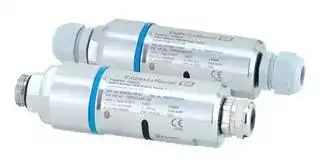
Illustrative purposes only


SWA50-AAB1AA
Signal Converter, HART, Bluetooth, WirelessHART, 1 Channels, 24 VDC
⚠️ Reference pricing provided. In case of supply shortages, we will connect you with our trusted procurement partners to ensure your project's continuity.
- Manufacturer: ENDRESS+HAUSER
- Product type: Signal Converters
- SVHC: To Be Advised
- Accuracy %: -
- Product Range: FieldPort SWA50 Series
- Supply Voltage: 24VDC
- Isolation Input: -
- No. of Channels: 1 Channel
- Output Accuracy: -
- No. of Output Channels: 1Channels
- Signal Conditioner Input: HART
- Signal Conditioner Output: Bluetooth, WirelessHART
- Signal Conditioner Mounting: Cable Mount
| Delivery and price | |
|---|---|
| Units per pack | 1 |
| Price | 281.63 € |
| Current stock | 10+ |
| Lead time | 30 days |
Datasheet

TI01468S/00/EN/06.21-00 71558878 2021-12-01 Products Solutions Services ## Technical Information FieldPort SWA50 Intelligent Bluetooth® and/or WirelessHART adapter for all HART field devices ## Application The FieldPort SWA50 converts the HART signal of the connected HART field device to a reliable and encrypted Bluetooth® or WirelessHART signal. The FieldPort SWA50 can be retrofitted to all 2-wire and 4-wire HART field devices in both hazardous and non-hazardous areas. The robust stainless steel housing allows the FieldPort SWA50 to be installed even in harsh industrial environments. The combination of the Bluetooth® version of the SWA50 with a FieldEdge SGC200 provides fast and easy connection to the Netilion Cloud and supports the use of data in various Netilion Services. ## Your benefits - Reliable transmission of the measured process values through the connected FieldPort SWA50 via encrypted Bluetooth® or WirelessHART communication - Easy to retrofit all 2-wire or 4-wire HART field devices - Easy connection of all HART field devices to the Netilion Cloud - Loop-powered adapter, without affecting the process signal - Easily accessible, wireless, diagnostic information of connected HART field device The WirelessHART version of the SWA50 can be easily integrated into any WirelessHART network. FieldPort SWA50 ## Table of contents |About this document . . . . . . . . . . . . . . . . . . . . . . . .|3| |---|---| |Symbols . . . . . . . . . . . . . . . . . . . . . . . . . . . . . . . . . . . . 3|| |Function and system design . . . . . . . . . . . . . . . . . . .|3| |Function . . . . . . . . . . . . . . . . . . . . . . . . . . . . . . . . . . .|3| |System architecture of the FieldPort SWA50|| |Bluetooth version . . . . . . . . . . . . . . . . . . . . . . . . . . . . .|4| |System architecture of the FieldPort SWA50|| |WirelessHART version . . . . . . . . . . . . . . . . . . . . . . . . . .|5| |Input (wired interface) . . . . . . . . . . . . . . . . . . . . . . . <br>Inputs . . . . . . . . . . . . . . . . . . . . . . . . . . . . . . . . . . . . .<br>Communication interface and protocol version . . . . . . . . . .|5<br>5<br>5| |Output (wireless interface) . . . . . . . . . . . . . . . . . . . .|5| |Communication interface . . . . . . . . . . . . . . . . . . . . . . . .|5| |Transmission frequency band . . . . . . . . . . . . . . . . . . . . .|6| |Range . . . . . . . . . . . . . . . . . . . . . . . . . . . . . . . . . . . . .|6| |Transmission power . . . . . . . . . . . . . . . . . . . . . . . . . . . . 6|| |Device variables . . . . . . . . . . . . . . . . . . . . . . . . . . . . . .|7| |Diagnostics . . . . . . . . . . . . . . . . . . . . . . . . . . . . . . . . .|7| |Power supply . . . . . . . . . . . . . . . . . . . . . . . . . . . . . .<br>Electrical connection . . . . . . . . . . . . . . . . . . . . . . . . . . .|7<br>7| |Terminal assignment . . . . . . . . . . . . . . . . . . . . . . . . . . .|9| |FieldPort SWA50 grounding . . . . . . . . . . . . . . . . . . . . .|10| |Supply voltage . . . . . . . . . . . . . . . . . . . . . . . . . . . . . .|10| |Power consumption . . . . . . . . . . . . . . . . . . . . . . . . . . .|11| |Terminals . . . . . . . . . . . . . . . . . . . . . . . . . . . . . . . . .|11| |Cable entry . . . . . . . . . . . . . . . . . . . . . . . . . . . . . . . . .|11| |Cable specification . . . . . . . . . . . . . . . . . . . . . . . . . . . .|11| |Mounting . . . . . . . . . . . . . . . . . . . . . . . . . . . . . . . .|11| |Mounting methods . . . . . . . . . . . . . . . . . . . . . . . . . . .|11| |Mounting instructions . . . . . . . . . . . . . . . . . . . . . . . . .|12| |Lightning protection . . . . . . . . . . . . . . . . . . . . . . . . . .|13| |Environment . . . . . . . . . . . . . . . . . . . . . . . . . . . . . .|13| |Ambient temperature range . . . . . . . . . . . . . . . . . . . . .|13| |Storage temperature range . . . . . . . . . . . . . . . . . . . . . .|13| |Climate class . . . . . . . . . . . . . . . . . . . . . . . . . . . . . . .|13| |Degree of protection . . . . . . . . . . . . . . . . . . . . . . . . . .|13| |Vibration resistance . . . . . . . . . . . . . . . . . . . . . . . . . . .|13| |Shock resistance . . . . . . . . . . . . . . . . . . . . . . . . . . . . .|13| |Electromagnetic compatibility (EMC) . . . . . . . . . . . . . . .|13| |Mechanical construction . . . . . . . . . . . . . . . . . . . .|14| |Design, dimensions . . . . . . . . . . . . . . . . . . . . . . . . . . .|14| |Weight . . . . . . . . . . . . . . . . . . . . . . . . . . . . . . . . . . .|15| |Materials . . . . . . . . . . . . . . . . . . . . . . . . . . . . . . . . . .|15| |Display and user interface . . . . . . . . . . . . . . . . . . .|15| |Operating concept . . . . . . . . . . . . . . . . . . . . . . . . . . . .|15| |Local operation . . . . . . . . . . . . . . . . . . . . . . . . . . . . . .|15| |Certificates and approvals . . . . . . . . . . . . . . . . . . .|16| |Accessories . . . . . . . . . . . . . . . . . . . . . . . . . . . . . . .|16| |---|---| |Device-specific accessories . . . . . . . . . . . . . . . . . . . . . .|16| |Supplementary documentation . . . . . . . . . . . . . . .|18| |Standard documentation SWA50 . . . . . . . . . . . . . . . . . .|18| |Supplementary device-dependent documentation for|| |SWA50 . . . . . . . . . . . . . . . . . . . . . . . . . . . . . . . . . . .|18| |Standard documentation for SGC200 . . . . . . . . . . . . . . .|18| |Standard documentation for SGC500 . . . . . . . . . . . . . . .|18| |Standard documentation for SMT70 . . . . . . . . . . . . . . . .|18| |Standard documentation for SMT77 . . . . . . . . . . . . . . . .|18| |Standard documentation for SWA70 . . . . . . . . . . . . . . . .|18| |Standard documentation for SWG70 . . . . . . . . . . . . . . . .|19| |Registered trademarks . . . . . . . . . . . . . . . . . . . . . .|19| |Radio approvals . . . . . . . . . . . . . . . . . . . . . . . . . . .|19| |Europe . . . . . . . . . . . . . . . . . . . . . . . . . . . . . . . . . . .|19| |Canada and United States . . . . . . . . . . . . . . . . . . . . . . .|19| |Japan . . . . . . . . . . . . . . . . . . . . . . . . . . . . . . . . . . . .|20| |Thailand . . . . . . . . . . . . . . . . . . . . . . . . . . . . . . . . . .|20| |Indonesia . . . . . . . . . . . . . . . . . . . . . . . . . . . . . . . . . .|20| |Singapore . . . . . . . . . . . . . . . . . . . . . . . . . . . . . . . . .|21| |South Korea . . . . . . . . . . . . . . . . . . . . . . . . . . . . . . . .|21| Endress+Hauser 2 FieldPort SWA50 ## About this document ## Symbols ## Safety symbols **DANGER** This symbol alerts you to a dangerous situation. Failure to avoid this situation will result in serious or fatal injury. **WARNING** This symbol alerts you to a dangerous situation. Failure to avoid this situation can result in serious or fatal injury. **CAUTION** This symbol alerts you to a dangerous situation. Failure to avoid this situation can result in minor or medium injury. **NOTICE** This symbol contains information on procedures and other facts which do not result in personal injury. ## Symbols for certain types of information |Symbol|Meaning| |---|---| ||Permitted<br>Procedures, processes or actions that are permitted.| ||Preferred<br>Procedures, processes or actions that are preferred.| ||Forbidden<br>Procedures, processes or actions that are forbidden.| ||Tip<br>Indicates additional information.| ||Reference to documentation| |**A**|Reference to page| ||Reference to graphic| ||Visual inspection| ## Function and system design ## Function The FieldPort SWA50 converts the HART signal of the connected HART field device to a reliable and encrypted Bluetooth® or WirelessHART signal. The FieldPort SWA50 can be retrofitted to all 2-wire or 4-wire HART field devices. With the Endress+Hauser SmartBlue app and the Endress+Hauser Field Xpert, you have the following capabilities: • Configuration of the FieldPort SWA50 • Visualization of the measured values of the connected HART field device • Visualization of the current combined status, consisting of the status for the FieldPort SWA50 and the status of the connected HART field device HART field devices can be connected to the Netilion Cloud via the FieldPort SWA50 and a FieldEdge device. Detailed information on Netilion Cloud: https://netilion.endress.com The WirelessHART version of the FieldPort SWA50 can be integrated into a WirelessHART network via the Endress+Hauser WirelessHART Fieldgate SWG70 or via any compatible WirelessHART Endress+Hauser 3 FieldPort SWA50 gateway. More information is available from your Endress+Hauser sales organization: www.addresses.endress.com. In addition, the WirelessHART version can be operated as follows: - Local configuration with FieldCare SFE500 or DeviceCare via DTM for FieldPort SWA50 - Remote configuration with FieldCare SFE500 via WirelessHART Fieldgate SWG70 and DTM for FieldPort SWA50 and Fieldgate SWG70 ## NOTICE Safety applications with control functions via Bluetooth signal or WirelessHART signal Undesirable behavior of safety application - ‣ Do not use a wireless signal such as Bluetooth or WirelessHART in a safety application with a control function. System architecture of the FieldPort SWA50 Bluetooth version **==> picture [339 x 46] intentionally omitted <==** **----- Start of picture text -----**<br> 1 2 3 4 5 6 7 8 9 10 11<br>Netilion<br>**----- End of picture text -----**<br> **==> picture [22 x 4] intentionally omitted <==** **----- Start of picture text -----**<br> A0040482<br>**----- End of picture text -----**<br> - _ 1 System architecture of SWA50 Bluetooth version_ - _1 HART field device with FieldPort SWA50, remote mounting_ - _2 Encrypted wireless connection via Bluetooth®_ - _3 HART field device with FieldPort SWA50, direct mounting_ - _4 FieldEdge SGC200_ - _5 LTE connection_ - _6 Netilion Cloud_ - _7 Application Programming Interface (API)_ - _8 https Internet connection_ - _9 Internet browser-based Netilion Service app or user application_ - _10 Endress+Hauser SmartBlue app_ - _11 Endress+Hauser Field Xpert, e.g. SMTxx_ Endress+Hauser 4 FieldPort SWA50 **==> picture [517 x 294] intentionally omitted <==** **----- Start of picture text -----**<br> System architecture of the<br>1 2 3 4 5 6 7 8 6 9 10 1<br>FieldPort SWA50<br>WirelessHART version<br>=n Netilion<br>Sst |<br>ae ‘ . «Tit<br>WirelessHART<br>a<br>15 14 13 12 11<br> A0043239<br>**----- End of picture text -----**<br> - _ 2 System architecture of SWA50 WirelessHART version_ - _1 Endress+Hauser Field Xpert, e.g. SMTxx 2 Host application / FieldCare SFE500 3 Ethernet communication_ - _4 WirelessHART-Fieldgate, e.g. SWG70_ - _5 FieldEdge SGC500_ - _6 https Internet connection 7 Netilion Cloud_ - _8 Application Programming Interface (API)_ - _9 Internet browser-based Netilion Service app or user application 10 Endress+Hauser SmartBlue app_ - _11 Encrypted wireless connection via Bluetooth®_ - _12 HART field device with FieldPort SWA50, direct mounting_ - _13 HART field device with WirelessHART adapter, e.g. SWA70_ - _14 Encrypted wireless connection via WirelessHART_ - _15 HART field device with FieldPort SWA50, remote mounting_ ## Input (wired interface) Inputs A point-to-point connection to a 2-wire or 4-wire HART field device Communication interface Field devices with HART 5, HART 6 or HART 7 and protocol version ## Output (wireless interface) Communication interface Bluetooth Bluetooth IEEE 802.15.1 A In addition to the FieldPort SWA50, there can be only one other HART master in the HART loop of the SWA50. Endress+Hauser 5 FieldPort SWA50 ## WirelessHART - WirelessHART communication interface (IEC 62591) - HART version 7.5, backward-compatible with previous HART versions Transmission frequency band Range ## 2.4 GHz (ISM band) The range depends on the alignment of the FieldPort SWA50, the mounting location and the environmental conditions. As the antenna of the WirelessHART gateway or FieldEdge is normally aligned vertically, we also recommend mounting the FieldPort SWA50 vertically. If the antennas are aligned differently, this can greatly reduce the antenna range. **==> picture [345 x 176] intentionally omitted <==** **----- Start of picture text -----**<br> 60°<br>40°<br>30°<br>120° 100°<br>80° 80°<br>30°<br>4 0 °<br>30° 30°<br>80°<br>**----- End of picture text -----**<br> **==> picture [22 x 4] intentionally omitted <==** **----- Start of picture text -----**<br> A0043409<br>**----- End of picture text -----**<br> _ 3 Different ranges depending on the position of the transmission window_ ## Bluetooth Up to 40 m without obstacles when FieldPort SWA50 is optimally aligned WirelessHART Up to 200 m without obstacles when FieldPort SWA50 is optimally aligned ## Transmission power - 0 dBm or 10 dBm, configurable for adaptation to national regulations Endress+Hauser 6 FieldPort SWA50 ## Device variables ||SmartBlue app|Field Xpert| |---|---|---| |Endress+Hauser<br>field devices|• Measured value output current of HART<br>field device<br>• Device information, configuration data<br>and HART information of the FieldPort<br>SWA50<br>• Measured values PV, SV, TV and QV of<br>HART field device<br>• Additional device information of<br>HART-7- or HART-6 field device<br>• HART information of HART field device<br>• Combined NAMUR NE 107 status,<br>consisting of the status for the FieldPort<br>SWA50 and the status of the connected<br>HART field device|• Measured value output current of HART<br>field device<br>• Device information, configuration data<br>and HART information of the FieldPort<br>SWA50<br>• Measured values PV, SV, TV and QV of<br>HART field device<br>• Additional device information of<br>HART-7- or HART-6 field device<br>• HART information of HART field device<br>• Combined NAMUR NE 107 status,<br>consisting of the status for the FieldPort<br>SWA50 and the status of the connected<br>HART field device| |Field devices of<br>other<br>manufacturers|• Measured value output current of HART<br>field device<br>• Device information, configuration data<br>and HART information of the FieldPort<br>SWA50|• Measured value output current of HART<br>field device<br>• Device information, configuration data<br>and HART information of the FieldPort<br>SWA50<br>Additionally in the livelist<br>• Measured values PV and SV<br>• Combined NAMUR NE 107 status,<br>consisting of the status for the FieldPort<br>SWA50 and the status of the connected<br>HART field device| If the HART field device does not support the extended device status according to NAMUR NE 107, limitations may apply to the display of status information. The following data can be read out via the Bluetooth version of the FieldPort SWA50 and the Endress+Hauser FieldEdge SGC200(Netilion Services): - Process variables PV and SV of HART field device if available - Combined status according to NAMUR NE 107 of the FieldPort SWA50 and the HART field device, if available For the WirelssHART version of the FieldPort SWA50 and the Endress+Hauser FieldEdge SGC500(Netilion Cloud) For detailed information, see the Operating Instructions of the FieldPort SWA50 WirelessHART → 18 ## Diagnostics ## 1 LED Green: Flashes four times at start-up to indicate that the device is operational The LED is located on the electronic insert and is not visible from the outside. ## Power supply Electrical connection - 2-wire HART field device with passive current output Some grounding concepts require shielded cables. If connecting the cable shield to the FieldPort SWA50, you must use a cable gland for shielded cable. See ordering information. Endress+Hauser 7 FieldPort SWA50 **==> picture [222 x 57] intentionally omitted <==** **----- Start of picture text -----**<br> – IN– OUT–<br>+ IN+ OUT+<br>1 2 3<br>–<br>+<br>**----- End of picture text -----**<br> **==> picture [22 x 4] intentionally omitted <==** **----- Start of picture text -----**<br> A0040494<br>**----- End of picture text -----**<br> - _ 4 Electrical connection for 2-wire HART field devices with passive current output (optional grounding not shown)_ - _1 Supply voltage (SELV, PELV or Class 2) or PLC with active current input or transmitter with active current input_ - _2 Electronic insert SWA50_ - _3 2-wire field device 4 to 20 mA-HART_ ## 4-wire HART field device with passive current output Some grounding concepts require shielded cables. If connecting the cable shield to the FieldPort SWA50, you must use a cable gland for shielded cable. See ordering information. **==> picture [387 x 111] intentionally omitted <==** **----- Start of picture text -----**<br> – IN– OUT–<br>+ IN+ OUT+<br>1 2 3 4<br> A0040491<br>– – –<br>+ + +<br>**----- End of picture text -----**<br> - _ 5 Electrical connection for 4-wire HART field devices with passive current output (optional grounding not shown)_ - _1 Supply voltage (SELV, PELV or Class 2) or PLC with active current input or transmitter with active current input_ - _2 Electronic insert SWA50_ - _3 4-wire field device with passive 4 to 20 mA-HART output_ - _4 Supply voltage for 4-wire field device_ ## 4-wire HART field device with active current output Some grounding concepts require shielded cables. If connecting the cable shield to the FieldPort SWA50, you must use a cable gland for shielded cable. See ordering information. **==> picture [387 x 110] intentionally omitted <==** **----- Start of picture text -----**<br> – IN– OUT–<br>+ IN+ OUT+<br>1 2 3 4<br> A0040492<br>– – –<br>+ + +<br>**----- End of picture text -----**<br> - _ 6 Electrical connection for 4-wire HART field devices with active current output (optional grounding not shown) – PLC or transmitter at OUT terminals_ - _1 Supply voltage (SELV, PELV or Class 2) for 4-wire HART field device_ - _2 4-wire field device with active 4 to 20 mA-HART output_ - _3 Electronic insert SWA50_ - _4 PLC or transmitter with passive current input_ Endress+Hauser 8 FieldPort SWA50 **==> picture [244 x 77] intentionally omitted <==** **----- Start of picture text -----**<br> – IN– OUT–<br>+ IN+ OUT+<br>1 2 3 4<br>– –<br>+ +<br>**----- End of picture text -----**<br> **==> picture [22 x 4] intentionally omitted <==** **----- Start of picture text -----**<br> A0045101<br>**----- End of picture text -----**<br> - _ 7 Electrical connection for 4-wire HART field devices with active current output (optional grounding not shown) – resistor at OUT terminals_ - _1 Supply voltage (SELV, PELV or Class 2) for 4-wire HART field device_ - _2 4-wire field device with active 4 to 20 mA-HART output_ - _3 Electronic insert SWA50_ - _4 Resistor 250 to 500 Ohm min. 250 mW between OUT+ and OUT– terminals_ If you select the "direct mounting" version and the "4-wire HART field device with active current output and PLC or transmitter" electrical connection version, you can use core cross-sections of 0.75 mm² at maximum. The wires that you insert into the shorter top housing section must be connected to the IN terminals opposite, and the wires that you insert into the longer bottom housing section must be connected to the OUT terminals opposite. If larger core cross-sections are required, we recommend remote mounting. ## FieldPort SWA50 without HART field device With this connection version, you can preconfigure the FieldPort SWA50. **==> picture [387 x 93] intentionally omitted <==** **----- Start of picture text -----**<br> – IN– OUT–<br>+ IN+ OUT+<br>1 2 3<br> A0040493<br>**----- End of picture text -----**<br> - _ 8 FieldPort SWA50 without HART field device (optional grounding not showing)_ - _1 Supply voltage of FieldPort SWA50, 20 to 30 VDC (SELV, PELV or Class 2)_ - _2 Electronic insert SWA50_ - _3 Resistor 1.5 kOhm and min. 0.5 W between terminals OUT+ and OUT–_ ## Terminal assignment **==> picture [387 x 142] intentionally omitted <==** **----- Start of picture text -----**<br> 1 2<br>1234<br>ON<br>OFF<br> A0040495<br>-<br>IN<br>OUT –<br>+ +<br>–<br>IN<br>+ OUT –+<br>**----- End of picture text -----**<br> - _ 9 FieldPort SWA50 terminal assignment_ - _1 Input terminal IN_ - _2 Output terminal OUT_ Endress+Hauser 9 FieldPort SWA50 |Application|Input terminal IN|Output terminal OUT| |---|---|---| |2-wire HART field device<br>→ 4, 8|Cable from supply voltage, PLC with<br>active current output or transmitter with<br>active current output|Cable to 2-wire HART field device| |4-wire HART field device with<br>passive current output<br>→ 5, 8|Cable from supply voltage, PLC with<br>active current output or transmitter with<br>active current output|Cable to 4-wire HART field device| |4-wire HART field device with<br>active current output<br>→ 8|Cable from 4-wire field device with active<br>4 to 20 mA HART output|PLC or transmitter with passive<br>current output (optional),<br>alternatively wire bridge between<br>terminals OUT+ and OUT–| |FieldPort SWA50 without field<br>device<br>→ 8, 9|Cable from supply voltage for FieldPort<br>SWA50|Resistor between terminals OUT+<br>and OUT–| ## FieldPort SWA50 grounding ## "Direct mounting" version With the "direct mounting" version, the FieldPort SWA50 is grounded via the field device or the metal conduit. ## "Remote mounting" version With the "remote mounting" version, ground the FieldPort SWA50 via the optional mounting bracket or a grounding clamp provided by the customer. ## _Optional mounting bracket_ If using the mounting bracket, ground the FieldPort SWA50 via the grounding screw. Mounting bracket: → 16 ## _Grounding clamp provided by customer_ The grounding clamp provided by the customer must meet the following requirements: - Diameter: approx. 40 mm - Stainless steel - If the FieldPort SWA50 is used in a hazardous area: suitable for hazardous areas as per DIN EN 62305, Sheet 3 and DIN EN 62561-1 **==> picture [387 x 139] intentionally omitted <==** **----- Start of picture text -----**<br> 1<br> A0041808<br>**----- End of picture text -----**<br> **==> picture [137 x 9] intentionally omitted <==** **----- Start of picture text -----**<br> 10 Grounding via grounding clamp<br>**----- End of picture text -----**<br> - _1 Example of grounding clamp provided by customer_ Supply voltage - Loop-powered 4 to 20 mA - 24 V DC (min. 4 V DC, max. 30 V DC): min. 3.6 mA loop current required for start-up - The supply voltage or the power unit must be tested to ensure it meets safety requirements and the requirements for SELV, PELV or Class 2 Endress+Hauser 10 FieldPort SWA50 ||Voltage drop| |---|---| ||• If internal HART communication resistor is deactivated| ||• 3.2 V in operation| ||• < 3.8 V at start-up| ||• If internal HART communication resistor is activated (270 Ohm)| ||• < 4.2 V at 3.6 mA loop current| ||• < 9.3 V at 22.5 mA loop current| ||To select the supply voltage, pay attention to the voltage drop via the FieldPort SWA50. The<br>remaining voltage must be high enough to enable the start-up and operation of the HART field| ||device.| |Power consumption|Max. 0.2 W at 22 mA and with internal HART communication resistor (270 Ohm)| |Terminals|2 x 2-pin screw terminals| |Cable entry|• "Remote mounting" version: 2 cable glands| ||• "Direct mounting" version: 1 cable gland and 1 direct cable entry from field device| ||The following cable glands are available.| ||• Plastic M20 for unshielded cable (only suitable for use in non-hazardous areas)| ||• Brass M20 for unshielded cable| ||• Brass M20 for shielded cable| |Cable specification|Use cables that are suitable for the anticipated minimum and maximum temperatures.| ||Observe grounding concept of the plant.| ||2 x 0.25 mm² to 2 x 1.5 mm²| ||You can use unshielded cable with or without ferrules and shielded cable with or without ferrules.| ||If you select the "direct mounting" version and the "4-wire HART field device with active current<br>output and PLC or transmitter" electrical connection version, you can use core cross-sections of| ||0.75 mm² at maximum. If larger core cross-sections are required, we recommend remote| ||mounting.| ||Mounting| |Mounting methods|• Remote mounting| ||• Direct mounting on HART field device via either M20 or NPT 1/2" connection adapter| ||For remote mounting, we recommend the optional mounting bracket. Alternatively, you can secure| ||the remote version using pipe clips.| Endress+Hauser 11 FieldPort SWA50 **==> picture [158 x 118] intentionally omitted <==** **----- Start of picture text -----**<br> 1 2<br>4<br>5<br>3<br>6<br>7<br>**----- End of picture text -----**<br> **==> picture [69 x 73] intentionally omitted <==** **==> picture [22 x 4] intentionally omitted <==** **----- Start of picture text -----**<br> A0043240<br>**----- End of picture text -----**<br> ## _ 11 Example of remote mounting_ - _1 HART field device_ - _2 Cable_ - _3 FieldPort SWA50 "remote mounting" version_ - _4 Bottom housing section_ - _5 Transmission window_ - _6 Design ring_ - _7 Top housing section_ **==> picture [387 x 177] intentionally omitted <==** **----- Start of picture text -----**<br> 1<br>4<br>5 2<br>6<br>7<br>3<br> A0043241<br>**----- End of picture text -----**<br> - _ 12 Example of direct mounting_ - _1 Cable_ - _2 FieldPort SWA50 "direct mounting" version_ - _3 HART field device_ - _4 Bottom housing section_ - _5 Transmission window_ - _6 Design ring 7 Top housing section_ Mounting instructions - Pay attention to the alignment and range. → 6 - Observe a distance of at least 6 cm from walls and pipes. Pay attention to the expansion of the Fresnel zone. - Avoid mounting in close proximity to high-voltage devices. - Pay attention to the influence of vibrations at the mounting location. → 13 Additional mounting information for Bluetooth version: Mount within the visual range of a FieldEdge SGC200. Endress+Hauser 12 FieldPort SWA50 ||Additional mounting information for WirelessHART version:| |---|---| ||Mount within the visual range of a WirelessHART FieldPort, e.g. SWA50, SWA70, or a| ||WirelessHART Fieldgate, e.g. SWG70.| |Lightning protection|• Do not mount the FieldPort SWA50 at the highest point of the system.| ||• Ground the housing of the FieldPort SWA50.| ||Environment| |Ambient temperature range|–40 to +70 °C (–40 to +158 °F)| |Storage temperature range|–40 to +85 °C (–40 to +185 °F)| |Climate class|As per IEC 60068-2-38 test Z/AD| |Degree of protection|When housing is closed, tested according to:| ||• IP68 / NEMA 6P (24 h at 1 m under water)| ||• IP66 / NEMA 4X| |Vibration resistance|As per IEC 60068-2-64:2008| ||• a(RMS) = 50 m/s²| ||• f = 5 to 2000 Hz| ||• t = 3 planes x 2 h| ||Vibration resistance tested only for "remote mounting" version.| |Shock resistance|As per IEC 60068-2-27:2008| ||300 m/s² [= 30 gn] + 18 ms| |Electromagnetic|Electromagnetic compatibility as per EN 61326 series and NAMUR recommendation EMC (NE 21)| |compatibility (EMC)|| Endress+Hauser 13 FieldPort SWA50 ## Mechanical construction Design, dimensions ## "Remote mounting" version **==> picture [304 x 200] intentionally omitted <==** **----- Start of picture text -----**<br> 1 2 1<br>35.1 (1.38) 79.5 (3.13)<br>114.6 (4.51)<br>Ø 39.9 (1.57) Ø 41.9 (1.65)<br>SW 27 (27 AF) SW 36 (36 AF)<br>**----- End of picture text -----**<br> **==> picture [22 x 4] intentionally omitted <==** **----- Start of picture text -----**<br> A0040484<br>**----- End of picture text -----**<br> - _ 13 Dimensions of "remote mounting" version in mm (in)_ - _1 M20 cable gland_ - _2 Transmission window_ ## "Direct mounting" version **==> picture [322 x 216] intentionally omitted <==** **----- Start of picture text -----**<br> 1 2 3<br>33.6 (1.32) 79.5 (3.13)<br>113.1 (4.45)<br>132.1 (5.20)<br>Ø 39.9 (1.57) Ø 41.9 (1.65)<br>Ø 15 (0.59)<br>SW 24 (24 AF) SW 36 (36 AF)<br>**----- End of picture text -----**<br> **==> picture [22 x 3] intentionally omitted <==** **----- Start of picture text -----**<br> A0040483<br>**----- End of picture text -----**<br> - _ 14 Dimensions of "direct mounting with M20" version in mm (in)_ - _1 Connection adapter with M20 thread_ - _2 Transmission window_ - _3 M20 cable gland_ Endress+Hauser 14 FieldPort SWA50 **==> picture [320 x 214] intentionally omitted <==** **----- Start of picture text -----**<br> 1 2 3<br>33.6 (1.32) 79.5 (3.13)<br>113.1 (4.45)<br>146 (5.75)<br>Ø 39 (1.54) Ø 42 (1.65)<br>SW 24 (24 AF) SW 36 (36 AF)<br>**----- End of picture text -----**<br> **==> picture [22 x 4] intentionally omitted <==** **----- Start of picture text -----**<br> A0043218<br>**----- End of picture text -----**<br> - _ 15 Dimensions of "direct mounting with NPT" version in mm (in)_ - _1 Connection adapter with 1/2 NPT thread_ - _2 Transmission window_ - _3 M20 cable gland_ ## Weight Max. 500 g ## Materials ## Housing Stainless steel 1.4404 (316L) ## Cable glands Plastic or brass, depending on the version. See ordering information. ## Connection adapter - M20 thread: stainless steel. 1.4404 (316L) - • NPT 1/2" thread: stainless steel. 1.4404 (316L) ## Seals - Design ring (housing – cover seal): PC - O-ring: EPDM - Transmission window seal: silicone ## Display and user interface The FieldPort SWA50 can be operated as follows: - Operating concept The FieldPort SWA50 can be operated as follows: • Via a smartphone or tablet with the Endress+Hauser SmartBlue app • Via Endress+Hauser Field Xpert SMT7x tablet PC In addition, the WirelessHART version can be operated as follows: - Local configuration with FieldCare or DeviceCare via DTM for SWA50 - Remote configuration with FieldCare via WirelessHART-Fieldgate SWG70 and DTM for SWA50 and SWG70 - Local operation You can enable and disable the following functions via DIP switches. • Bluetooth communication • Firmware update - Configuration via Bluetooth Endress+Hauser 15 FieldPort SWA50 The DIP switches are located on the electronic insert. ## Certificates and approvals Current certificates and approvals that are available for the product can be selected via the Product Configurator at www.endress.com: 1. Select the product using the filters and search field. 2. Open the product page. 3. Select Configuration. ## Accessories Various accessories are available for the device, and can be ordered with the device or at a later stage from Endress+Hauser. Detailed information on the specific order code is available from your local Endress+Hauser sales organization or on the product page of the Endress+Hauser website: www.endress.com. ## Device-specific accessories ## Mounting bracket Order number 71520242 Material Stainless steel 1.4404 (316L) **==> picture [387 x 222] intentionally omitted <==** **----- Start of picture text -----**<br> 1 2 3 4<br> A0043312<br>**----- End of picture text -----**<br> - _ 16 FieldPort SWA50 mounted via optional mounting bracket_ - _1 Hexagonal-headed bolt for securing and grounding_ - _2 Support bracket_ - _3 Mounting bracket_ - _4 Round bracket_ ## _Mounting and alignment options_ The mounting bracket can be mounted as follows: - On pipes with a maximum diameter of 65 mm - On walls The FieldPort can be aligned as follows using the support bracket: - Via the various mounting positions on the mounting bracket - By rotating the support bracket Endress+Hauser 16 FieldPort SWA50 **==> picture [387 x 282] intentionally omitted <==** **----- Start of picture text -----**<br> 1<br>2<br> A0043411<br>**----- End of picture text -----**<br> **==> picture [159 x 9] intentionally omitted <==** **----- Start of picture text -----**<br> 17 Alignment options via support bracket<br>**----- End of picture text -----**<br> - _1 Various mounting positions on support bracket_ - _2 By rotating the support bracket_ ## _Dimensions_ **==> picture [387 x 196] intentionally omitted <==** **----- Start of picture text -----**<br> 165 (6.50)<br>81 (3.19) 87 (3.43)<br> A0043313<br>52 (2.05)<br>Ø 65<br>(Ø 2.56)<br>**----- End of picture text -----**<br> **==> picture [197 x 10] intentionally omitted <==** **----- Start of picture text -----**<br> 18 Dimensions of mounting bracket – pipe mounting<br>**----- End of picture text -----**<br> Endress+Hauser 17 FieldPort SWA50 |18 (0.71)<br>4.75(0.19)<br>18 (0.71)<br>28 (1.10)|18 (0.71)|18 (0.71)|103 (4.06)<br>78(3.07)<br>40<br>(1.75)<br>33<br>(1.30)| |---|---|---|---| ||||| ||||| ||||| **==> picture [22 x 4] intentionally omitted <==** **----- Start of picture text -----**<br> A0043410<br>**----- End of picture text -----**<br> _ 19 Dimensions of retaining bracket – wall mounting_ ## Supplementary documentation ||Supplementary documentation| |---|---| |Standard documentation|Operating Instructions| |SWA50|• Bluetooth: BA01987S| ||• WirelessHART: BA02046S| ||Brief Operating Instructions| ||WirelessHART: KA01436S| |Supplementary device-|All explosion-protection data are provided in separate Ex documentation. The relevant Ex| |dependent documentation|documentation is delivered with the Ex devices as standard. You can also find the Ex documentation| |for SWA50|via the Product Configurator → 16.| |Standard documentation for|Technical Information| |SGC200|TI01468S| ||Operating Instructions| ||BA02058S| |Standard documentation for|Technical Information| |SGC500|TI01525S| ||Operating Instructions| ||BA02035S| |Standard documentation for|Technical Information| |SMT70|TI01342S| ||Operating Instructions| ||BA01709S| |Standard documentation for|Technical Information| |SMT77|TI01418S| ||Operating Instructions| ||BA01923S| |Standard documentation for|Technical Information| |SWA70|TI00026S| ||Operating Instructions| ||BA00061S| Endress+Hauser 18 FieldPort SWA50 |Standard documentation for|Technical Information| |---|---| |SWG70|TI00027S| ||Operating Instructions| ||BA00064S| ||Registered trademarks| ||Bluetooth®| ||Registered trademark of the Bluetooth Special Interest Group (SIG), Kirkland, Washington, USA| ||HART®| ||Registered trademark of the FieldComm Group, Austin, Texas, USA| ||WirelessHART ®| ||Registered trademark of the FieldComm Group, Austin, Texas, USA| ||Radio approvals| |Europe|This device meets the requirements of the "Radio Equipment Directive" (RED) 2014/53/EU:| ||• EN 300 328 V2.1.1| ||• EN 301 489-1 V2.1.1| ||• EN 301 489-17 V3.1.1| ||• EN 62311: 2008| |Canada and United States|FCC ID: LCGSWA50| ||IC: 2519A-SWA50| ||This device complies with Part 15 of the FCC Rules and with Industry Canada license-exempt RSS| ||standard(s).| ||Operation is subject to the following two conditions:| ||• this device may not cause harmful interference, and| ||• this device must accept any interference received, including interference that may cause undesired| ||operation.| ||Changes or modifications made to this equipment not expressly approved by<br>Endress+Hauser SE+Co. KG may void the FCC authorization to operate this equipment.| ||This device has been tested and found to comply with the limits for a Class B digital device, pursuant| ||to Part 15 of the FCC Rules. These limits are designed to provide reasonable protection against| ||harmful interference in a residential installation. This equipment generates, uses and can radiate| ||radio frequency energy and, if not installed and used in accordance with the instructions, may cause| ||harmful interference to radio communications. However, there is no guarantee that interference will| ||not occur in a particular installation.| ||If this equipment does cause harmful interference to radio or television reception, which can be| ||determined by turning the equipment off and on, the user is encouraged to try to correct the| ||interference by one or more of the following measures:| ||• reorient or relocate the receiving antenna| ||• increase the separation between the equipment and receiver| ||• connect the equipment into an outlet on a circuit different from that to which the receiver is| ||connected| ||• consult the dealer or an experienced radio/TV technician for help with radiofrequency radiation| ||exposure information.| ||This equipment complies with FCC and IC radiation exposure limits set forth for an uncontrolled| ||environment. This equipment should be installed and operated with a minimum distance of 20 cm| ||(7.87 in) between the radiator and your body.| ||This transmitter must not be co-located or operating in conjunction with any other antenna or| ||transmitter.| Endress+Hauser 19 FieldPort SWA50 Changes or modifications made to this device that are not expressly approved by Endress+Hauser may void the FCC authorization to operate this device. This device must be installed to ensure a minimum antenna separation distance of 20 cm from all persons. ## Français Le présent appareil est conforme aux CNR d'industrie Canada applicables aux appareils radio exempts de licence. L'exploitation est autorisée aux deux conditions suivantes : - L'appareil ne doit pas produire de brouillage, et - L'utilisateur de l'appareil doit accepter tout brouillage radioélectrique subi, même si le brouillage est susceptible d'en compromettre le fonctionnement. Les changements ou modifications apportées à cet appareil non expressément approuvée par Endress+Hauser SE+Co. KG peut annuler l'autorisation FCC d'utiliser cet appareil. ## Déclaration d'exposition aux radiations Cet équipement est conforme aux limites d'exposition aux rayonnements IC établies pour un environnement non contrôlé. Cet équipement doit être installé et utilisé avec un minimum de 20 cm (7.87 in) de distance entre la source de rayonnement et votre corps. Ce transmetteur ne doit pas être placé au même endroit ou utilisé simultanément avec un autre transmetteur ou antenne. Japan ## 電気通信事業法 Japanese Radio Law and Japanese Telecommunications Business Law Compliance. This device is granted pursuant to the Japanese Radio Law (電波法) and the Japanese Telecommunications Business Law (電気通信事業法). This device should not be modified (otherwise the granted designation number will become invalid). ## Thailand ## เครื่องโทรคมนาคมและอุปกรณนี้ มีความสอดคลองตามขอกำหนดของ กสทช. (This telecommunication equipment is in compliance with NBTC requirements.) **==> picture [22 x 4] intentionally omitted <==** **----- Start of picture text -----**<br> A0046301<br>**----- End of picture text -----**<br> (This radio communication equipment is exempted from requiring a license, user license, or radio communication station license as per NBTC notification regarding radio communication equipment and radio communication station has been exempted from requiring a license according to radio communication act B.E.2498.) Indonesia Cert. ID: 78107/SDPPI/2021 PLG ID: 4962 A0047307 Endress+Hauser 20 FieldPort SWA50 Singapore Complies with IDMA Standards DA108204 A0042672 South Korea 방송통신기자재등의 적합등록 필증 (Registration of Broadcasting and Communication Equipments) 기자재명칭 (제품명칭) : 특정소출력 무선기기 (무선데이터통신시스템용 무선기기) (Equipment code: LARN8 Registration No.: R-R-EH7-SWA50) 해당 기자재는「전파법」제58조의2 제3항에 따라 등록되었습니다. (It is verified that foregoing equipment has been registered under the Clause 3, Article 58-2 of Radio Waves Act.) Endress+Hauser 21 *71558878* 71558878 www.addresses.endress.com
Updated at April 23, 2026
About Novapart
Novapart is a B2B electronic component broker specialising in stock shortages and cost reduction. We source hard-to-find parts and identify compliant alternatives across a catalogue of 410,000+ components from 500+ manufacturers.
Learn more →Stock Shortage Specialist
When a component is unavailable, discontinued or has an unacceptable lead time, we tap into our network of vetted European and Asian distributors to source what you need — without compromising on quality or traceability.
Request a quote →Compliant Alternatives
We identify pin-to-pin, electrically equivalent substitutes that meet the same certifications (RoHS, AEC-Q100, REACH) as your original specification — validated against datasheets, not just part numbers. Often at a lower cost.
BOM Analysis service →