
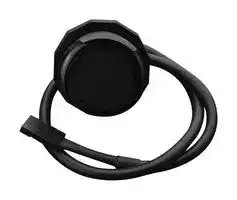


SEN0381
IR Proximity Sensor, Digital, Diffuse Reflective, 2m Sensing Range, 5 VDC, 3 Pin Data Cable
- Manufacturer: DFROBOT
- Product type:
- SVHC: No SVHC (04-Feb-2026)
- Product Range: -
- Sensing Method: Diffuse Reflective
- Connection Method: 3 Pin Data Cable
- Sensing Range Max: 2m
- Sensor Output Type: Digital
- Supply Voltage Max: 5V
- Supply Voltage Min: -
- Sensing Distance Max: 2m
- Supply Voltage DC Max: 5V
| Delivery and price | |
|---|---|
| Units per pack | 1 |
| Price | 9.67 € |
| Current stock | 10+ |
| Lead time | 30 days |

2023/10/24 13:59
Digital IR Proximity Sensor(0-200cm) Wiki - DFRobot
## SKU:SEN0381 (https://www.dfrobot.com/product-2130.html)
Introduction Specification Board Overview Dimensional Drawing Tutorial FAQ More Documents
(https://www.dfrobot.com/product-2130.html)
## Introduction
This is a digital IR Proximity Sensor with on-board button and indicator. It provides adjustable detection distance within 0 to 200cm and comes with real-time status feedback. Press down the button, then the indicator starts to flash, this time the detection distance can be adjusted. The sensor will auto detect and save the distance between it and obstacle ahead. In addition, this sensor is equipped with 3PIN data cable (digital signal output) that can be directly plugged into Arduino IO expansion board. The product can be widely used in applications like smart home, house security, intelligent detection and control, robot obstacle, and so on.
The sensor is based on the principle of diffuse reflection of IR light on objects. When a person or object enters the sensing range in front of the sensor, the sensor immediately determines that there is induction, so as to control the output signal; after the person or object leaves the sensing range, it will judge that there is no induction, and stop signal output, by which intelligent control can be achieved.
## Specification
Power Supply: 5V
https://wiki.dfrobot.com/Digital_IR_Proximity_Sensor_0_200cm_SKU_SEN0381
1/10
2023/10/24 13:59
Digital IR Proximity Sensor(0-200cm) Wiki - DFRobot
- Detection Distance: 0~200cm(adjustable)
- Output: switch quantity(active-high)
- Detection Angle: 30-40° coning angle
Introduction
Specification
Board Overview
Dimensional Drawing
- Detection Mode: active
- Operating Temperature: -10~60°C
- Storage Temperature: -20°~70°C
- Waterproof Performance: IP67
Tutorial
FAQ
## Board Overview
More Documents
Num Label Description 1 Output Sensor Singal Output 2 VCC Positive 3 GND Negative
https://wiki.dfrobot.com/Digital_IR_Proximity_Sensor_0_200cm_SKU_SEN0381
2/10
2023/10/24 13:59
Digital IR Proximity Sensor(0-200cm) Wiki - DFRobot
## Dimensional Drawing
Introduction
Specification
Board Overview
Dimensional Drawing
Tutorial
FAQ
More Documents
## Tutorial
## Requirements
## Hardware
- DFRduino UNO R3 (https://www.dfrobot.com/product-838.html) (or similar) x 1
Digital IR Proximity Sensor(0-200cm) x1
## Software
https://wiki.dfrobot.com/Digital_IR_Proximity_Sensor_0_200cm_SKU_SEN0381
3/10
2023/10/24 13:59
Digital IR Proximity Sensor(0-200cm) Wiki - DFRobot
## Arduino IDE (https://www.arduino.cc/en/Main/Software)
Introduction
Specification Board Overview
Dimensional Drawing
Tutorial
FAQ
More Documents
https://wiki.dfrobot.com/Digital_IR_Proximity_Sensor_0_200cm_SKU_SEN0381
4/10
2023/10/24 13:59
Digital IR Proximity Sensor(0-200cm) Wiki - DFRobot
## Connection Diagram
Introduction
Specification Board Overview
Dimensional Drawing
Tutorial
FAQ
More Documents
5/10
https://wiki.dfrobot.com/Digital_IR_Proximity_Sensor_0_200cm_SKU_SEN0381
2023/10/24 13:59
Digital IR Proximity Sensor(0-200cm) Wiki - DFRobot
Introduction
Specification
Board Overview
Dimensional Drawing
Tutorial
FAQ
More Documents
https://wiki.dfrobot.com/Digital_IR_Proximity_Sensor_0_200cm_SKU_SEN0381
6/10
2023/10/24 13:59
Digital IR Proximity Sensor(0-200cm) Wiki - DFRobot
## Sensor Detection Distance Adjustment
Introduction
Specification
Board Overview
Dimensional Drawing
The sensor will start to work when powered on. Place an object of size 80x60cm at the 80cm(or smaller) in front of the sensor, adjust its detection distance as shown below:
Press down the button, the red LED indicator begins to flash, then it enters auto detection distance adjustment mode.
Tutorial
FAQ
More Documents
https://wiki.dfrobot.com/Digital_IR_Proximity_Sensor_0_200cm_SKU_SEN0381
7/10
2023/10/24 13:59
Digital IR Proximity Sensor(0-200cm) Wiki - DFRobot
## Sample Code
```
/*!
```
Introduction Specification Board Overview
Dimensional Drawing Tutorial
FAQ More Documents
```
* @File infraredApproachSensor.ino
* @brief Detect the status of IO4 and print it in serial port
* @copyright Copyright (c) 2010 DFRobot Co.Ltd (http://www.dfrobot.com)
* @licence The MIT License (MIT)
* @author [liunian](nian.liu@dfrobot.com)
* @version V1.0
* @date 2020-08-20
*/
int OUT = 4;
int i = 0;
void setup()
{
Serial.begin(9600);
pinMode(OUT, INPUT);
}
void loop()
{
i = digitalRead (OUT);
Serial.println(i);
delay(5);
}
```
## Expected Results
Read the status of IO4. When the sensor detected an object, serial print 1, otherwise, print 0.
https://wiki.dfrobot.com/Digital_IR_Proximity_Sensor_0_200cm_SKU_SEN0381
8/10
2023/10/24 13:59
Digital IR Proximity Sensor(0-200cm) Wiki - DFRobot
Introduction
Specification
Board Overview
Dimensional Drawing
Tutorial
FAQ
More Documents
https://wiki.dfrobot.com/Digital_IR_Proximity_Sensor_0_200cm_SKU_SEN0381
9/10
2023/10/24 13:59
Digital IR Proximity Sensor(0-200cm) Wiki - DFRobot
## FAQ
Introduction
Specification Board Overview
For any questions, advice or cool ideas to share, please visit the DFRobot Forum (https://www.dfrobot.com/forum/).
Dimensional Drawing
Tutorial
## More Documents
FAQ
More Documents
> las DFshopping_car1.png[ G][e][t][D][igi][t][al][ IR P][rox][i][m][i][ty][ S][e][nsor][(0-200][c][m][)][(][h][ttps][://][www][.][df][ro][b][ot][.][c][om][/][pro][d][u][c][t][-] 2130.html) from DFRobot Store or DFRobot Distributor. (https://www.dfrobot.com/distributor)
## Turn to the Top
https://wiki.dfrobot.com/Digital_IR_Proximity_Sensor_0_200cm_SKU_SEN0381
10/10
Updated at April 16, 2026
DFRobot is a globally recognized provider of open-source hardware and robotics components, dedicated to making electronics accessible to makers, educators, and engineers. Known for their focus on innovation and user-friendly design, the company has built a comprehensive ecosystem of development boards, sensors, and electronic accessories that streamline the prototyping process from concept to completion. Our selection of DFRobot components features essential power management accessories, with a specific focus on their reliable battery holders. Designed to provide secure, stable power connections, these holders are crucial for keeping portable devices, custom robotics, and remote sensor nodes running efficiently. They are manufactured to ensure a snug fit and consistent electrical contact, minimizing the risk of power disruption in active environments. Built with durability and practical application in mind, DFRobot's accessories are an excellent choice for both rapid prototyping and robust educational projects. Their commitment to reliable hardware ensures that developers and hobbyists alike have the dependable foundational components necessary to bring their innovative electronic designs to life.
About Novapart
Novapart is a B2B electronic component broker specialising in stock shortages and cost reduction. We source hard-to-find parts and identify compliant alternatives across a catalogue of 410,000+ components from 500+ manufacturers.
Learn more →Stock Shortage Specialist
When a component is unavailable, discontinued or has an unacceptable lead time, we tap into our network of vetted European and Asian distributors to source what you need — without compromising on quality or traceability.
Request a quote →Compliant Alternatives
We identify pin-to-pin, electrically equivalent substitutes that meet the same certifications (RoHS, AEC-Q100, REACH) as your original specification — validated against datasheets, not just part numbers. Often at a lower cost.
BOM Analysis service →