
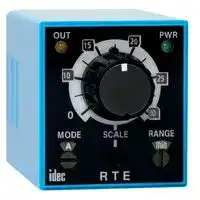


RTE-P2D12
ELECTROMECHANICAL MULTIFUNCTION TIMER
- Manufacturer: IDEC
- Product type: Analogue Timers
- P; ELECTROMECHANICAL MULTIFUNCTION TIMER; Product Range:RTE Series; Timer Functions:Multifunction; No. of Timing Ranges:20Ranges; Time Min:0.1s; Time Max:600h; Timer Output:2 Change
- Time Max: 600h
- Time Min: 0.1s
- Timer Output: 2 Changeover Relays
- Product Range: RTE Series
- Timer Functions: Multifunction
- Current Rating Nom: 10A
- Panel Cutout Width: 45mm
- Supply Voltage Max: 12VDC
- Panel Cutout Height: 45mm
- No. of Timing Ranges: 20Ranges
- Connection / Termination: Plug-In
| Delivery and price | |
|---|---|
| Units per pack | 100 |
| Price | 49.7 € |
| Current stock | 10+ |
| Lead time | 30 days |

_**Timers**_

RTE Series

## **RTE Series — Analog Timers** ~~TT~~

## **Key features of the RTE series include:**

- **20 time ranges and 10 timing functions**

- **Time delays up to 600 hours**

- **Space-saving package**

- **High repeat accuracy of** ± **0.2%**

- **ON and timing OUT LED indicators**

- **Standard 8- or 11-pin and 11-blade termination**

- **2 form C delayed output contacts**

- **10A Contact Rating**

||Cert. No. E9950913332316 (EMC, RTE)<br>cert. No. BL960813332355 (LVD, RTE)<br>~~|~~<br>¢(UL)us|Cert. No. E9950913332316 (EMC, RTE)<br>cert. No. BL960813332355 (LVD, RTE)<br>~~|~~<br>¢(UL)us|UL Listed<br>File No. E66043|C€|C€~~é~~|||
|---|---|---|---|---|---|---|---|
||~~|~~|¢(UL)us||C€|C€~~é~~|||
||~~|~~|¢(UL)us||C€|C€~~é~~|||
|**G**<br>**_Timers_**|**General Specifications**<br>**Operation System**<br>Solid state CMOS Circuit<br>**Operation Type**<br>Multi-Mode<br>**Time Range**<br>0.1sec to 600 hours<br>**Pollution Degree**<br>2 (IE60664-1)<br>**Over voltage category**<br>III (IE60664-1)<br>**Rated Operational**<br>**Voltage**<br>AF20<br>100-240V AC(50/60Hz)<br>AD24<br>24V AC(50/60Hz)/24V DC<br>D12<br>12V DC<br>**Voltage Tolerance**<br>AF20<br>85-264V AC(50/60Hz)<br>AD24<br>20.4-26.4V AC(50/60Hz)/21.6-26.4V DC<br>D12<br>10.8-13.2V DC<br>**Input off Voltage**<br>Rated Voltage x10% minimum<br>**Ambient Operating Temperature**<br>-20 to +65ºC (without freezing)<br>**Ambient Storage and**<br>**Transport Temperature**<br>-30 to +75ºC(without freezing)<br>;<br>—__|||**Contact Ratings**<br>**Contact Configuration**<br>2 Form C, DPDT<br>(Delay output)<br>**Allowable Voltage /**<br>**Allowable Current**<br>240V AC, 30V DC / 10A<br>**Maximum Permissible**<br>**Operating Frequency**<br>1800 cycles per hour<br>**Rated**<br>**Load**<br>Resistive<br>10A 240V AC, 30V DC<br>Inductive<br>7A 240V AC, 30V DC<br>Horse Power Rat-<br>ing<br>1/6 HP 120V AC, 1/3 HP<br>240V AC<br>**Life**<br>Electrical<br>500,000 op. minimum<br>(Resistive)<br>Mechanical<br>50,000,000 op. minimum<br>~~=~~||||
||**Relative Humidity**|35 to 85%RH (without condensation)||||||
||**Atmospheric Pressure**|80kPa to 110kPa (Operating), 70kPa to 110kPa (Transport)||||||
||**Reset Time**|100msec maximum||||||
||**Repeat Error**|±0.2%, ±20msec*||||||
||**Voltage Error**|±0.2%, ±20msec*||||||
||**Temperature Error**|±0.5%, ±20msec*||||||
||**Setting Error**|±10% maximum||||||
||**Insulation Resistance**|100MΩminimum (500V DC)||||||
|||Between power and output terminals: 2000V AC, 1 minute||||||
||**Dielectric Strength**|Between contacts of different poles: 2000V AC, 1 minute||||||
|||Between contacts of the same pole:1000V AC, 1 minute||||||
||**Vibration Resistance**|10 to 55Hz amplitude 0.5mm2 hours in each of 3 axes||||||
|||Operating extremes: 98m/sec2(10G)||||||
||**Shock Resistance**|Damage limits: 490m/sec2(50G)||||||
|||3 times in each of 3 axes||||||
||**Degree of Protection**|IP40 (enclosure) (IEC60529)||||||
||**Power**<br>**Consumption**<br>**(Approx.)**<br>TYPE<br>RTE-P1, -B1<br>AF20<br>120V AC/60Hz<br>6.5VA<br>240V AC/60Hz<br>11.6VA<br>24V AC 60Hz/DC<br>3.4VA/1.7W<br>D12<br>1.6W<br>a<br>|-_—,—<br>PO||RTE-P2, -B2<br>6.6VA<br>11.6VA<br>3.5VA/1.7W<br>1.6W||**RTE Table of Contents**<br>Specifications —G-8<br>Part Number Guide — G-9<br>Part Number List — G-9|||
||**Mounting Position**|Free|||RTE Timing Diagrams — G-10|||
||**Dimensions**<br>RTE-P1, P2<br>40Hx 36W x 77.9D mm<br>RTE-B1, B2<br>40Hx 36W x 74.9D mm<br>**Weight (Approx.)**<br>RTE-P1<br>RTE-P2<br>87g<br>89g<br>[-——_ee||RTE-B1, -B2<br>85g||RTE Accessories — G-12<br>Instructions: Setting Timer — G-11<br>RTE Dimensions — G-13|||


**RTE Table of Contents** Specifications —G-8 Part Number Guide — G-9 Part Number List — G-9 RTE Timing Diagrams — G-10 RTE Accessories — G-12 Instructions: Setting Timer — G-11 RTE Dimensions — G-13 General Timing Diagrams — G-4

- _*For the value of the error against a preset time, whichever the largest._

_**www.idec.com**_

_**USA: (800) 262-IDEC or (408) 747-0550,   Canada: (888) 317-IDEC**_

_**G-8**_

_**Timers**_

RTE Series

## **Part Numbering Guide**

RTE series part numbers are composed of 4 part number codes. When ordering a RTE series part, select one code from each category. Example: RTE-P1AF20

||**Description**|**Part Number Code**|**Remarks**|
|---|---|---|---|
|➀**Series**|RTE series|RTE|For internal circuits, see next page.|
|➁**Terminal Style**|Pin|P|Select one only.|
||Blade|B||
|➂ **Function**<br>**Group**|ON-delay, interval, cycle OFF, cycle ON|1|Each function group has different timing functions.<br>See page G-4.|
||ON-delay, cycle OFF, cycle ON, signal<br>ON/OFF delay, OFF-delay, one-shot|2||
|➃ **Input Voltage**|100 to 240V AC(50/60Hz)|AF20||
||24V AC(50/60Hz)/24V DC|AD24||
||12V DC|D12||
|||||
|||||
||**Part Number List**|||
|||||


**==> picture [26 x 28] intentionally omitted <==**

**----- Start of picture text -----**<br>
G<br>**----- End of picture text -----**<br>


## **Part Numbers**

||**Power Triggered**|**Power Triggered**|**Start Input Triggered**|**Start Input Triggered**|
|---|---|---|---|---|
|**Voltage**|**8-Pin**|**Blade**|**11-Pin**|**Blade**|
|12V DC|RTE-P1D12|RTE-B1D12|RTE-P2D12|RTE-B2D12|
|24V AC/DC|RTE-P1AD24|RTE-B1AD24|RTE-P2AD24|RTE-B2AD24|
|100-240V AC|RTE-P1AF20|RTE-B1AF20|RTE-P2AF20|RTE-B2AF20|


## **Time Range Table**

## **Time Range Determined by Time Range Selector & Dial Selector**

||**Dial**|**0 - 1**|**0 - 3**|**0 - 10**|**0 - 30**|**0 - 60**|
|---|---|---|---|---|---|---|
|**Range**|Second|0.1 sec - 1 sec|0.1 sec - 3 sec|0.2 sec - 10 sec|0.6 sec - 30 sec|1.2 sec - 60 sec|
||Minute|1.2 sec - 1 min|3.6 sec - 3 min|12 sec - 10 min|36 sec - 30 min|1.2 min - 60 min|
||Hour|1.2 min - 1 hr|3.6 min - 3 hr|12 min - 10 hr|36 min - 30 hr|1.2 hr - 60 hr|
||10 Hours|12 min - 10 hr|36 min - 30 hr|2 hr - 100 hr|6 hr - 300 hr|12 hr - 600 hr|


_**www.idec.com**_

_**USA: (800) 262-IDEC or (408) 747-0550,   Canada: (888) 317-IDEC**_

_**G-9**_

_**Timers**_

RTE Series

**G**

## **Timing Diagrams**

**==> picture [286 x 74] intentionally omitted <==**

**----- Start of picture text -----**<br>
RTE-P1 RTE-P2 RTE-B1 RTE-B2<br>externalcontrol start externalcontrol start<br>4 5 1 2 3<br>3 6 5 6 1 2 3<br>2 7 34 89 7 8 9 4 5 6<br>1 8 2 10 A B 7 8 9<br>1 11 A B<br>(~/+) (~/-) (~/+) (~/-)<br>(~/+) (~/-) (~/+) (~/-)<br>**----- End of picture text -----**<br>


_1. RTE-P2: Do not apply voltage to terminals #5, #6 & #7._

_2. RTE-B1, -B2: Do not apply voltage to terminals #2, #5 & #8._

_3. IDEC sockets are as follows: RTE-P1: SR2P-06* pin type socket, RTE-P2: SR3P-05* pin type socket, RTE-B1, -B2: SR3B-05* blade type socket, (*-may be followed by suffix letter A,B,C or U)._

## **RTE-P1, -B1**

## B: Interval (power start)

## A: ON-Delay 1 (power start)

Set timer for desired delay, apply power to coil. Contacts transfer immediately, and return to original position after preset time has elapsed. Reset occurs with removal of power.

Set timer for desired delay, apply power to coil. Contacts transfer after preset time has elapsed, and remain in transferred position until timer is reset. Reset occurs with removal of power.

**==> picture [225 x 70] intentionally omitted <==**

**----- Start of picture text -----**<br>
Item  Terminal No. Operation<br>Power (1)2-7(2)A-B<br>Delayed (1)1-4,5-8(2)1-7,3-9 (NC)<br>Contact (1)1-3,6-8(2)4-7,6-9 (NO)<br>PWR<br>Indicator<br>OUT<br>Set Time T<br>**----- End of picture text -----**<br>


- Item Terminal No. Operation Power (1)2-7(2)A-B Delayed (1)1-4,5-8(2)1-7,3-9 (NC) Contact (1)1-3,6-8(2)4-7,6-9 (NO) PWR

- Indicator OUT

- Set Time T

**==> picture [78 x 40] intentionally omitted <==**

## C: Cycle 1 (power start, OFF first)

## D: Cycle 3 (power start, ON first)

Set timer for desired delay, apply power to coil. First transfer of contacts occurs after preset delay has elapsed, after the next elapse of preset delay contacts return to original position. The timer now cycles between on and off as long as power is applied (duty ratio 1:1).

Functions in same manner as Mode C, with the exception that first transfer of contacts occurs as soon as power is applied. The ratio is 1:1. Time On = Time Off

**==> picture [225 x 70] intentionally omitted <==**

**----- Start of picture text -----**<br>
Item  Terminal No. Operation<br>Power (1)2-7(2)A-B<br>Delayed (1)1-4,5-8(2)1-7,3-9 (NC)<br>Contact (1)1-3,6-8(2)4-7,6-9 (NO)<br>PWR<br>Indicator<br>OUT<br>Set Time T T<br>**----- End of picture text -----**<br>


- Item Terminal No. Operation Power (1)2-7(2)A-B Delayed (1)1-4,5-8(2)1-7,3-9 (NC) Contact (1)1-3,6-8(2)4-7,6-9 (NO) PWR

- Indicator OUT

- Set Time T T

- A: ON-Delay 2 (signal start) the NO output contact goes on. Item Terminal No. Operation Power (A)2-10(B)A-B Start (A)5-6(B)2-5 Delayed (A)1-4,8-11(B)1-7,3-9[(NC)] Contact (A)1-3,9-11(B)4-7,6-9[(NO)] PWR

- Indicator OUT

- Set Time T

**==> picture [71 x 40] intentionally omitted <==**

## **RTE-P2, -B2**

## A: ON-Delay 2 (signal start)

## B: Cycle 2 (signal start, OFF first)

- When a preset time has elapsed after the start  input  turned on while  power is on, the NO output contact goes on.

When the start input turns on while power is on, the output oscillates at a preset cycle (duty ratio 1:1), starting while the NO contact off.

**==> picture [225 x 81] intentionally omitted <==**

**----- Start of picture text -----**<br>
Item  Terminal No. Operation<br>Power (A)2-10(B)A-B<br>Start (A)5-6(B)2-5<br>Delayed (A)1-4,8-11(B)1-7,3-9 [(NC)]<br>Contact (A)1-3,9-11(B)4-7,6-9 [(NO)]<br>PWR<br>Indicator<br>OUT<br>Set Time T T T T T T T T T Ta<br>**----- End of picture text -----**<br>


**==> picture [74 x 51] intentionally omitted <==**

## C: Cycle 4 (signal start, ON first)

## D: Signal ON/OFF-Delay

When the start input turns on while power is on, the NO output contact goes on. When a preset time has elapsed while the start input remains on, the output contact goes off. When the start input turns off, the NO contact goes on again. When a preset time has elapsed after the start input turned off, the NO contact goes off.

- When the start input turns on while power is on, the NO contact goes on. The output oscillates at a preset cycle (duty ratio 1:1).

**==> picture [224 x 81] intentionally omitted <==**

**----- Start of picture text -----**<br>
Item  Terminal No. Operation<br>Power (A)2-10(B)A-B<br>Start (A)5-6(B)2-5<br>Delayed (A)1-4,8-11(B)1-7,3-9 [(NC)]<br>Contact (A)1-3,9-11(B)4-7,6-9 [(NO)]<br>PWR<br>Indicator<br>OUT<br>Set Time T T T T T T T T Ta<br>**----- End of picture text -----**<br>


**==> picture [225 x 81] intentionally omitted <==**

**----- Start of picture text -----**<br>
Item  Terminal No. Operation<br>Power (A)2-10(B)A-B<br>Start (A)5-6(B)2-5<br>Delayed (A)1-4,8-11(B)1-7,3-9 [(NC)]<br>Contact (A)1-3,9-11(B)4-7,6-9 [(NO)]<br>PWR<br>Indicator<br>OUT<br>Set Time T T Ta T T Ta<br>**----- End of picture text -----**<br>


## E: Signal OFF-Delay

## F: One-Shot (signal start)

When power is turned on while the start input is on, the NO output contact goes on. When a preset time has  elapsed after the start input turned off, the NO output contact goes off.

When the start input turns on while power is on, the NO output contact goes on. When a preset time has elapsed, the NO output contact goes off.

**==> picture [465 x 81] intentionally omitted <==**

**----- Start of picture text -----**<br>
Item  Terminal No. Operation Item  Terminal No. Operation<br>Power (A)2-10(B)A-B Power (A)2-10(B)A-B<br>Start (A)5-6(B)2-5 Start (A)5-6(B)2-5<br>Delayed (A)1-4,8-11(B)1-7,3-9 [(NC)] Delayed (A)1-4,8-11(B)1-7,3-9 [(NC)]<br>Contact (A)1-3,9-11(B)4-7,6-9 [(NO)] Contact (A)1-3,9-11(B)4-7,6-9 [(NO)]<br>PWR PWR<br>Indicator Indicator<br>OUT OUT<br>Set Time T Ta T Ta Set Time T Ta<br>**----- End of picture text -----**<br>


Note : T=Set Time, Ta=Shorter than set time,  (1): RTE-P1, (2): RTE-B1, (A): RTE-P2, (B): RTE-B2

_**www.idec.com**_

_**USA: (800) 262-IDEC or (408) 747-0550,   Canada: (888) 317-IDEC**_

_**G-10**_

_**Timers**_

RTE Series

**G** a

## **Temperature Derating Curves**

**==> picture [500 x 212] intentionally omitted <==**

**----- Start of picture text -----**<br>
Mounting A Mounting B<br>10A 7A<br>7A Mounting A 5A Mounting B<br>Derating Curve Derating Curve<br>50ºC   65ºC LhCis —a| 50ºC   65ºC<br>Ambient Temperature  Ambient Temperature<br>Uf |<br>Instructions<br>Types                                                                                                    Switch Settings<br>1. Turn the selectors securely using a flat<br>R T E - P 1 A F 2 0 Power Voltage   AF20: 100 to 240V AC(50/60Hz) screwdriver 4mm wide (maximum).<br>   AD24: 24V AC(50/60Hz)/24V DC Note that incorrect setting may cause<br>   D12: 12V DC 3 malfunction. Do not turn the selectors<br>Connection type Operation Mode<br>  P: Pin 1: No Control Signal 2: Control Signal beyond their limits.<br>  B: Blade A: ON-Delay 1 A: ON-Delay 2 O 1 hy : {_» 2<br>B: Interval B: Cycle 2 te. 2. Since changing the setting during timer<br>C: Cycle 1D: Cycle 3 C: Cycle 4D: Signal ON/OFF-Delay O 1 Operation ModeSelector operation may cause malfunction, turn<br>E: Signal OFF-DelayF: One-Shot O 2 Scale Selector power off before changing.<br>O 3 Time Range<br>Selector<br>Allowable Current Allowable Current<br>**----- End of picture text -----**<br>


## **Types                                                                                                    Switch Settings**

## **Installation of Hold-Down Springs**

## **DIN Rail Mount Socket**

**==> picture [301 x 114] intentionally omitted <==**

**----- Start of picture text -----**<br>
Insert the springs into the outer Insert the springs<br>slots with the projectionsfacing inside. into the slots.<br>|<br>4 en<br>CO ~~<br>Socket SR3P-05 Hold-down Spring (sold separately)<br>SFA-203 (use two springs)<br>Socket SR2P-06 Hold-down Spring (sold separately)<br>SFA-202 (use two springs)<br>Safety Precautions<br>**----- End of picture text -----**<br>


Special expertise is required to use Electronic Timers.

- All Electronic Timers are manufactured under IDEC's rigorous quality control system, but users must add a backup or fail safe provision to the control system when using the Electronic Timer in applications where heavy damage or personal injury may occur should the Electronic Timer fail.

- Install the Electronic Timer according to instructions described in this catalog.

- Make sure that the operating conditions are as described in the specifications. If you are uncertain about the specifications, contact IDEC in advance.

- In these directions, safety precautions are categorized in order of importance under Warning and Caution.

## **Warnings**

Warning notices are used to emphasize that improper operation may cause severe personal injury or death.

- Turn power off to the Electronic timer before starting installation, removal, wiring, maintenance, and inspection on the Electronic Timer.

- Do not use the Electronic Timer for an **emergency stop circuit** or **interlocking circuit** . If the Electronic Timer should fail, a machine malfunction, breakdown, or accident may occur.

## **Caution**

Caution notices are used where inattention might cause personal injury or damage to equipment.

- The Electronic Timer is designed for installation in equipment. Do not install the Electronic Timer outside equipment.

- cations. If the Electronic Timer is used in places where it will be subjected to high-temperature, high-humidity, condensation, corrosive gases, excessive vibrations, or excessive shocks, then electrical shocks, fire hazard, or malfunction could result.

- Use an IEC60127-approved fuse and circuit breaker on the power and output line outside the Electronic Timer.

- Do not disassemble, repair, or modify the Electronic Timer.

- When disposing of the Electronic Timer, do so as industrial waste.

_**www.idec.com**_

_**USA: (800) 262-IDEC or (408) 747-0550,   Canada: (888) 317-IDEC**_

_**G-11**_

_**Timers**_

RTE Series

## **DIN Rail Mounting Accessories**

**G**

**==> picture [504 x 633] intentionally omitted <==**

**----- Start of picture text -----**<br>
Part Numbers: DIN Rail/Surface Mount Sockets and Hold-Down Springs<br>DIN Rail Mount Socket Applicable Hold-Down Springs<br>Style Appearance Use with Timers Part No. Appearance Part No.<br>11-Pin Screw Terminal<br>RTE-P2 SR3P-05<br>(dual tier)<br>SFA-203<br>.<br>11-Pin FingerSafe Socket RTE-P2 SR3P-05C<br>8-Pin Screw Terminal RTE-P1 SR2P-06<br>a<br>SFA-202<br>.<br>RTE-B1<br>11-Blade Screw Terminal SR3B-05<br>RTE-B2<br>[ne<br>DIN Mounting Rail — BNDN1000<br>Length 1000mm<br>a<br>Panel Mounting Accessories<br>Part Numbers: Flush Panel Mount Adapter and Sockets that use an Adapter<br>Accessory Description Appearance Use with Part No.<br>Panel Mount  Adaptor for flush panel  All RTE timers RTB-G01<br>Adapter mounting RTE timers<br>8-pin screw terminal (Shown:  RTE-P1 SR6P-M08G<br>SR6P-M08G<br>Wiring Socket<br>Adapter)<br>11-pin screw terminal RTE-P2 SR6P-M11G<br>oo ss<br>Sockets for use<br>with Panel<br>Mount Adapter 8-pin solder terminal  RTE-P1 SR6P-S08<br>ee<br>11-pin solder terminal RTE-P2 SR6P-S11<br>ee<br>No hold down clips are available for flush panel mounting applications.<br>**----- End of picture text -----**<br>


_**www.idec.com**_

_**USA: (800) 262-IDEC or (408) 747-0550,   Canada: (888) 317-IDEC**_

_**G-12**_

_**Timers**_

RTE Series

## **Dimensions**

**==> picture [208 x 232] intentionally omitted <==**

**----- Start of picture text -----**<br>
77.9 13.0<br>36.0 13.7<br>RTE-P1 (8 pin) Terminal Style<br>RTE-P2 (11 pin)Terminal Style<br>7.3<br>RTE-B1/RTE-B2 (11 blade) Terminal Style<br>40.0<br>**----- End of picture text -----**<br>


## **G**

## **Panel Mount Adapter**

## **RTE Timer, 8-Pin and 11-Pin with SR6P-S08 or SR6P-S11**

**==> picture [188 x 80] intentionally omitted <==**

**----- Start of picture text -----**<br>
98 maximum<br>Panel Thickness 0.8 to 5mm<br>48 11 61.2 Back Wiring Socket<br>1.7<br>48 42.5<br>**----- End of picture text -----**<br>


## **RTE Timer, 8-Pin with SR6P-M08G**

**==> picture [288 x 228] intentionally omitted <==**

**----- Start of picture text -----**<br>
8-M3.5 Terminal Screw<br>Panel Thickness 0.8 to 5mm<br>44.6<br>3.5 max. 5.6 min.<br>3 4 5 6 ø3.6 min.<br>6.9 max.<br>2 1 8 7<br>7<br>80.5 9.8 × 3<br>RTE Timer, 11-Pin with SR6P-M11G<br>11-M3.5 Teminal Screws<br>45<br>16.7<br>3.5 max. 5.8 min.<br>2 1 11 7 6 ø3.6 min.<br>5<br>6.9 max.<br>4 3 8 9 10<br>30.5 7<br>92 8.5 × 4<br>44.6 30.4<br>45 34<br>**----- End of picture text -----**<br>


_**www.idec.com**_

_**USA: (800) 262-IDEC or (408) 747-0550,   Canada: (888) 317-IDEC**_

_**G-13**_

_**Timers**_

General Instructions

## **General Instructions for All Timer Series**

## **Load Current**

With inductive, capacitive, and incandescent lamp loads, inrush current more than 10 times the rated current may cause welded contacts and other undesired effects. The inrush current and steady-state current must be taken into consideration when specifying a timer.

## **Contact Protection**

Switching an inductive load generates a counter-electromotive force (back EMF) in the coil. The back EMF will cause arcing, which may shorten the contact life and cause imperfect contact. Application of a protection circuit is recommended to safeguard the contacts.

## **Temperature and Humidity**

Use the timer within the operating temperature and operating humidity ranges and prevent freezing or condensation. After the timer has been stored below its operating temperature, leave the timer at room temperature for a sufficient period of time to allow it to return to operating temperatures before use.

## **Time Setting**

The time range is calibrated at its maximum time scale; so it is desirable to use the timer at a setting as close to its maximum time scale as possible. For a more accurate time delay, adjust the control knob by measuring the operating time with a watch before application.

## **Input Contacts**

Use mechanical contact switch or relay to supply power to the timer. When driving the timer with a solid-state output device (such as a two-wire proximity switch, photoelectric switch, or solid-state relay), malfunction may be caused by leakage current from the solid-state device. Since AC types comprise a capacitive load, the SSR dielectric strength should be two or more times the power voltage when switching the timer power using an SSR **.**

Generally, it is desirable to use mechanical contacts whenever possible to apply power to a timer or its signal inputs. When using solid state devices, be cautious of inrushes and back-EMF that may exceed the ratings on such devices. Some timers are specially designed so that signal inputs switch at a lower voltage than is used to power the timer (models designated as “B" type).

## **Environment**

Avoid contact between the timer and sulfurous or ammonia gases, organic solvents (alcohol, benzine, thinner, etc.), strong alkaline substances, or strong acids. Do not use the timer in an environment where such substances are prevalent. Do not allow water to run or splash on the timer.

## **Vibration and Shock**

**G**

##

Excessive vibration or shocks can cause the output contacts to bounce, the timer should be used only within the operating extremes for vibration and shock resistance. In applications with significant vibration or shock, use of hold down springs or clips is recommended to secure a timer to its socket.

## **Timing Accuracy Formulas**

Timing accuracies are calculated from the following formulas:

**Repeat Error** = ± 1 x Maximum Measured Value – Minimum Measured Value x 100% 2 Maximum Scale Value

**Voltage Error** = ± Tv - Tr x 100% Tr

TTr:v: Average of measured values at voltage V Average of measured values at the rated voltage

## **Temperature Error**

= ± Tt - T20 x 100% T20

Tt: Average of measured values at °C T20: Average of measured values at 20°C

**Setting Error** = ± Average of Measured Values - Set Value x 100% Maximum Scale Value

_**www.idec.com**_

_**G-68**_

_**USA: (800) 262-IDEC or (408) 747-0550,   Canada: (888) 317-IDEC**_
Updated at April 29, 2026
Founded in 1945, IDEC is a globally recognized leader in industrial automation, machine safety, and control products. Renowned for pioneering innovations in Human-Machine Interface (HMI) systems, the company is dedicated to creating a safe and efficient harmony between advanced workplace technology and human operators. At the core of IDEC’s extensive portfolio is a comprehensive selection of high-performance relays designed for demanding industrial environments. This includes a broad range of electromechanical power relays, solid-state relays, contactors, and critical safety relays, supported by a wide array of specialized relay accessories to ensure reliable and efficient switching. Beyond switching components, IDEC provides complete solutions for modern control panels and automated systems. Their robust engineering extends to advanced panel displays and instrumentation, precision light sensors, and dependable AC/DC power converters. With additional offerings in industrial switches, visual signaling units, and DIN rail terminal blocks, IDEC equips engineers with the high-quality components required to build secure, next-generation automation infrastructure.
About Novapart
Novapart is a B2B electronic component broker specialising in stock shortages and cost reduction. We source hard-to-find parts and identify compliant alternatives across a catalogue of 410,000+ components from 500+ manufacturers.
Learn more →Stock Shortage Specialist
When a component is unavailable, discontinued or has an unacceptable lead time, we tap into our network of vetted European and Asian distributors to source what you need — without compromising on quality or traceability.
Request a quote →Compliant Alternatives
We identify pin-to-pin, electrically equivalent substitutes that meet the same certifications (RoHS, AEC-Q100, REACH) as your original specification — validated against datasheets, not just part numbers. Often at a lower cost.
BOM Analysis service →