
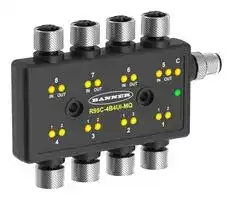


R95C-4B4UI-MQ
Signal Converter, 8-Port, IO Modbus, Current, Voltage, Current, Voltage, 2 Channels, 30 VDC
- Manufacturer: BANNER ENGINEERING
- Product type: Signal Converters
- SVHC: No SVHC (27-Jun-2024)
- Accuracy %: -
- Product Range: SNAP SIGNAL R95C Series
- Supply Voltage: 30VDC
- Isolation Input: -
- No. of Channels: 2 Channel
- Output Accuracy: -
- No. of Output Channels: 2Channels
- Signal Conditioner Input: Current, Voltage
- Signal Conditioner Output: Current, Voltage
- Signal Conditioner Mounting: Screw Mount
| Delivery and price | |
|---|---|
| Units per pack | 1 |
| Price | 341.26 € |
| Current stock | 10+ |
| Lead time | 30 days |

R95C 8-Port 2-Channel Discrete and Analog In-Out Modbus® Hub Product Manual

**==> picture [464 x 368] intentionally omitted <==**

Original Instructions p/n: 234539 Rev. B 09-Apr-25 © Banner Engineering Corp. All rights reserved. www.bannerengineering.com

R95C 8-Port 2-Channel Discrete and Analog In-Out Modbus® Hub Product Manual

## Contents

**Chapter 1 Features.................................................................................................................. 3** Models ........................................................................................................................................................................................................... 3 Overview........................................................................................................................................................................................................ 3 **Chapter 2 Configuration Instructions.................................................................................... 4** Discrete In/Out Configuration ........................................................................................................................................................................ 4 Analog In/Out Configuration .......................................................................................................................................................................... 4 Modbus Configuration ................................................................................................................................................................................... 4 Multi-Port Support: Ports 1-4 .................................................................................................................................................................11 Multi-Port Support: Ports 5-8 ................................................................................................................................................................ 15 **Chapter 3 Mechanical Installation ...................................................................................... 16** Wiring........................................................................................................................................................................................................... 16 **Chapter 4 Status Indicators.................................................................................................. 17 Chapter 5 Specifications ...................................................................................................... 19** FCC Part 15 Class B for Unintentional Radiators........................................................................................................................................ 19 Industry Canada ICES-003(B)..................................................................................................................................................................... 20 Dimensions.................................................................................................................................................................................................. 20 **Chapter 6 Accessories.......................................................................................................... 21 Chapter 7 Product Support and Maintenance .................................................................... 24** Clean with Mild Detergent and Water.......................................................................................................................................................... 24 Repairs ........................................................................................................................................................................................................ 24 Contact Us................................................................................................................................................................................................... 24 Banner Engineering Corp Limited Warranty................................................................................................................................................ 24

© Banner Engineering Corp. All rights reserved. www.bannerengineering.com

R95C 8-Port 2-Channel Discrete And Analog In-Out Modbus® Hub Product Manual

## Chapter Contents

|Models.................................................................................................................................................................................................................. 3|
|---|
|Overview .............................................................................................................................................................................................................. 3|
|Features<br>Chapter 1|


**==> picture [114 x 60] intentionally omitted <==**

- Compact Modbus® device converter with the ability to send 4 ports of discrete input and 4 ports of analog input data (voltage or current)

- • This Modbus converter can also output discrete values and analog outputs (voltage or current) through any of the respective sets of 4 ports

- • 2-Channel Discrete Features: ◦ Enabled Delay Modes: ON/OFF Delay, ON/OFF One-shot, ON/ OFF Retriggerable One-shot, ON/OFF Pulse-stretcher and Totalizer

- ◦ Measurement Metrics: Count, Counts Per Minute (CPM), and Duration

- ◦ Discrete input/output can be independently configured as NPN or PNP

- ◦ Discrete Mirroring: Discrete signals (In/Out) from the four discrete ports can be mirrored to any of the output channels of the four discrete ports

- ◦ PFM output of 0 Hz to 600 Hz can be selected on either or both discrete output channels

- • Analog In/Out Features: ◦ Analog Out Mirroring: The analog input from all four analog ports can be mirrored as an output to any of the four analog ports

- ◦ PFM Output: The analog input from all four analog ports can be mirrored as PFM outputs to any of the four discrete ports.

- • Rugged overmolded design meets IP65, IP67, and IP68 • Connects directly to a sensor or anywhere in-line for ease of use • R95C Modbus hubs are a quick, easy, and economical way to integrate non-Modbus devices into a Modbus system

## Models

**==> picture [500 x 57] intentionally omitted <==**

**----- Start of picture text -----**<br>
Model Number Function Converter Type Control Connectors<br>8-ports: (8) Integral 4-pin M12 female quick-disconnect<br>connectors<br>R95C-4B4UI-MQ Converter 4B: 4 ports, bimodal discrete input/output Modbus®<br>(1) Integral 5-pin M12 male quick-disconnect<br>4UI: 4 ports, analog input/output<br>connector<br>**----- End of picture text -----**<br>


## Overview

The R95C 8-Port 2-Channel Discrete and Analog In/Out Modbus® Hub provides a mix of both discrete input/output and analog input/output functionality distributed to two sets of 4-ports

Ports 1 through 4 contain the discrete functionality, and Ports 5 through 8 contain the analog functionality. These two sets of ports can be monitored and configured using an Modbus registers.

© Banner Engineering Corp. All rights reserved. www.bannerengineering.com

page 3 of 25

09-Apr-25

R95C 8-Port 2-Channel Discrete And Analog In-Out Modbus® Hub Product Manual

## Chapter Contents

Discrete In/Out Configuration............................................................................................................................................................................... 4 Analog In/Out Configuration................................................................................................................................................................................. 4 Modbus Configuration .......................................................................................................................................................................................... 4

## Chapter 2 Configuration Instructions

## Discrete In/Out Configuration

Ports 1 through 4 contain discrete functionality. The figure below details the logic flow for each of the four bimodal discrete in/ out ports, and the tables define the configuration for each pin of the four bimodal ports.

**==> picture [335 x 147] intentionally omitted <==**

**----- Start of picture text -----**<br>
Logic Flow<br>Measurement Statistics<br>Delay Mode • Disabled (active/inactive) MeasurementStatistics • Count• CPM<br>• On Off Delay • Duration<br>Input State • On/Off One-shot• On/Off Pulse Stretcher Discrete1 & 2 Input Input State Discrete 1 and 2 Input<br>• Totalizer Selection • Input (active/inactive) state<br>Ouput<br>MirroringEnable Enabled Mirroring Mirroring - Discrete 1 and 2 Output • Port/Channel selected state<br>Disabled<br>Data Output Discrete 1 and 2 Output<br>• Output (active/inactive) selected state<br>**----- End of picture text -----**<br>


## Analog In/Out Configuration

Ports 5 through 8 contain analog functionality.

## Analog In

When an analog input value is received in Ports 5 through 8, the numerical representational value is sent to Modbus registers. Analog Input Ranges: • Voltage = 0 mV to 11,000 mV • Current = 0 µA to 24,000 µA

## Analog Out

Ports 5 through 8 also allow for the user to output an analog value by sending the numerical analog value to Modbus registers Analog Output Ranges:

- Voltage = 0 mV to 10,000 mV

- • Current = 4000 µA to 20,000 µA

## Output Outside Valid Range (OOVR)

If the analog output value sent from this converter is outside of the Analog Output Range value, then the actual analog output value will be set to one of the three selectable OOVR levels after a 2-second delay:

- Low (default): 0 V or 3.5 mA

- • High: 10.5 V or 20.5 mA • Hold: Level retains previous value indefinitely

## Modbus Configuration

## Device Port States

**==> picture [500 x 97] intentionally omitted <==**

**----- Start of picture text -----**<br>
Modbus Register Address Description I/O Range Comments Default Access Notes<br>Port 4..Port 1 →<br>40001 Active States 0..255 Pin 4[P#1] & Pin  - RO 0b[P42|P41|P32|P31|P22|<br>2[P#2] Active  P21|P12|P11]<br>States<br>40002 Analog Input Active  0..15 Inactive = 0,  - RO 0b[0|0|0|0|P8|P7|P6|P5]<br>States Active = 1<br>Continued on page 5<br>**----- End of picture text -----**<br>


© Banner Engineering Corp. All rights reserved. www.bannerengineering.com

page 4 of 25

09-Apr-25

R95C 8-Port 2-Channel Discrete and Analog In-Out Modbus® Hub Product Manual

Configuration Instructions

**==> picture [500 x 125] intentionally omitted <==**

**----- Start of picture text -----**<br>
Continued from page 4<br>Modbus Register Address Description I/O Range Comments Default Access Notes<br>40003 Measurement Value  0..65535 Voltage = mV,  - RO -<br>- Analog In Port 5 Current = µA<br>40004 Measurement Value  0..65535 Voltage = mV,  - RO -<br>- Analog In Port 6 Current = µA<br>40005 Measurement Value  0..65535 Voltage = mV,  - RO -<br>- Analog In Port 7 Current = µA<br>40006 Measurement Value  0..65535 Voltage = mV,  - RO -<br>- Analog In Port 8 Current = µA<br>**----- End of picture text -----**<br>


## Analog Port Configuration

**==> picture [500 x 145] intentionally omitted <==**

**----- Start of picture text -----**<br>
Modbus Register Address Description I/O Range Comments Default Access Notes<br>40007 Port 8-5 Analog-Out | Port 8-5 Analog-In 0..255 Voltage = 0, Current = 1 0b11111111 RW 0P7I|P6I|P5I]b[P8O|P7O|P6O|P5O] [P8I|<br>Discrete Output States<br>Modbus Register Address Description I/O Range Comments Default Access Notes<br>Port 4..Port<br>40008 Output States 0..255 1 → Pin 4[P#1]  0b00000000 RW 0b[P42|P41|P32|P31|P22|<br>& Pin 2[P#2]  P21|P12|P11]<br>Output States<br>**----- End of picture text -----**<br>


## Analog Out Value

**==> picture [500 x 118] intentionally omitted <==**

**----- Start of picture text -----**<br>
Modbus Register Address Description I/O Range Comments Default Access Notes<br>40009 Port 5 - Analog  0..20500 Voltage = mV,  0 RW Max Voltage = 10000 mV,<br>Value Current = µA Max Current = 20000 µA<br>40010 Port 6 - Analog  0..20500 Voltage = mV,  0 RW Max Voltage = 10000 mV,<br>Value Current = µA Max Current = 20000 µA<br>40011 Port 7 - Analog  0..20500 Voltage = mV,  0 RW Max Voltage = 10000 mV,<br>Value Current = µA Max Current = 20000 µA<br>40012 Port 8 - Analog  0..20500 Voltage = mV,  0 RW Max Voltage = 10000 mV,<br>Value Current = µA Max Current = 20000 µA<br>**----- End of picture text -----**<br>


## Alias RO Registers

**==> picture [500 x 187] intentionally omitted <==**

**----- Start of picture text -----**<br>
Modbus Register Address Description I/O Range Comments Default Access<br>40501 Port 5 Analog In 0..65535 Voltage = mV, Current = µA - RO<br>40502 Port 6 Analog In 0..65535 Voltage = mV, Current = µA - RO<br>40503 Port 7 Analog In 0..65535 Voltage = mV, Current = µA - RO<br>40504 Port 8 Analog In 0..65535 Voltage = mV, Current = µA - RO<br>40505 Port 1 Pin 4 Active  0..1 0 = Inactive, 1 = Active - RO<br>State<br>40506 Port 1 Pin 2 Active  0..1 0 = Inactive, 1 = Active - RO<br>State<br>40507 Port 2 Pin 4 Active  0..1 0 = Inactive, 1 = Active - RO<br>State<br>40508 Port 2 Pin 2 Active  0..1 0 = Inactive, 1 = Active - RO<br>State<br>Continued on page 6<br>**----- End of picture text -----**<br>


© Banner Engineering Corp. All rights reserved. www.bannerengineering.com

page 5 of 25

09-Apr-25

R95C 8-Port 2-Channel Discrete and Analog In-Out Modbus® Hub Product Manual

Configuration Instructions

**==> picture [500 x 591] intentionally omitted <==**

**----- Start of picture text -----**<br>
Continued from page 5<br>Modbus Register Address Description I/O Range Comments Default Access<br>40509 Port 3 Pin 4 Active  0..1 0 = Inactive, 1 = Active - RO<br>State<br>40510 Port 3 Pin 2 Active  0..1 0 = Inactive, 1 = Active - RO<br>State<br>40511 Port 4 Pin 4 Active  0..1 0 = Inactive, 1 = Active - RO<br>State<br>40512 Port 4 Pin 2 Active  0..1 0 = Inactive, 1 = Active - RO<br>State<br>40513 Port 1 Pin 4 Count H 0..65535 Port 1 Pin 4 Count Value Upper - RO<br>40514 Port 1 Pin 4 Count  0..65535 Port 1 Pin 4 Count Value Lower - RO<br>L<br>40515 Port 2 Pin 4 Count H 0..65535 Port 1 Pin 4 Count Value Upper - RO<br>40516 Port 2 Pin 4 Count  0..65535 Port 2 Pin 4 Count Value Lower - RO<br>L<br>40517 Port 3 Pin 4 Count H 0..65535 Port 1 Pin 4 Count Value Upper - RO<br>40518 Port 3 Pin 4 Count  0..65535 Port 3 Pin 4 Count Value Lower - RO<br>L<br>40519 Port 4 Pin 4 Count H 0..65535 Port 1 Pin 4 Count Value Upper - RO<br>40520 Port 4 Pin 4 Count  0..65535 Port 4 Pin 4 Count Value Lower - RO<br>L<br>40521 Port 1 Pin 2 Count H 0..65535 Port 1 Pin 4 Count Value Upper - RO<br>40522 Port 1 Pin 2 Count  0..65535 Port 1 Pin 2 Count Value Lower - RO<br>L<br>40523 Port 2 Pin 2 Count H 0..65535 Port 1 Pin 4 Count Value Upper - RO<br>40524 Port 2 Pin 2 Count  0..65535 Port 2 Pin 2 Count Value Lower - RO<br>L<br>40525 Port 3 Pin 2 Count H 0..65535 Port 1 Pin 4 Count Value Upper - RO<br>40526 Port 3 Pin 2 Count  0..65535 Port 3 Pin 2 Count Value Lower - RO<br>L<br>40527 Port 4 Pin 2 Count H 0..65535 Port 1 Pin 4 Count Value Upper - RO<br>40528 Port 4 Pin 2 Count  0..65535 Port 4 Pin 2 Count Value Lower - RO<br>L<br>40529 Alias Register  0..65535 User defined - RO<br>Value<br>40530 Alias Register  0..65535 User defined - RO<br>Value<br>40531 Alias Register  0..65535 User defined - RO<br>Value<br>40532 Alias Register  0..65535 User defined - RO<br>Value<br>**----- End of picture text -----**<br>


page 6 of 25

© Banner Engineering Corp. All rights reserved. www.bannerengineering.com

09-Apr-25

R95C 8-Port 2-Channel Discrete and Analog In-Out Modbus® Hub Product Manual

Configuration Instructions

## Alias Read/Only Addresses

**==> picture [500 x 640] intentionally omitted <==**

**----- Start of picture text -----**<br>
Modbus Register Address Description I/O Range Comments Register to Assign Access<br>40701 Alias Register Address 0..65535 Value shows up in 40501 45001 RW<br>40702 Alias Register Address 0..65535 Value shows up in 40502 46001 RW<br>40703 Alias Register Address 0..65535 Value shows up in 40503 47001 RW<br>40704 Alias Register Address 0..65535 Value shows up in 40504 48001 RW<br>40705 Alias Register Address 0..65535 Value shows up in 40505 41001 RW<br>40706 Alias Register Address 0..65535 Value shows up in 40506 41002 RW<br>40707 Alias Register Address 0..65535 Value shows up in 40507 42001 RW<br>40708 Alias Register Address 0..65535 Value shows up in 40508 42002 RW<br>40709 Alias Register Address 0..65535 Value shows up in 40509 43001 RW<br>40710 Alias Register Address 0..65535 Value shows up in 40510 43002 RW<br>40711 Alias Register Address 0..65535 Value shows up in 40511 44001 RW<br>40712 Alias Register Address 0..65535 Value shows up in 40512 44002 RW<br>40713 Alias Register Address 0..65535 Value shows up in 40513 41003 RW<br>40714 Alias Register Address 0..65535 Value shows up in 40514 41004 RW<br>40715 Alias Register Address 0..65535 Value shows up in 40515 42003 RW<br>40716 Alias Register Address 0..65535 Value shows up in 40516 42004 RW<br>40717 Alias Register Address 0..65535 Value shows up in 40517 43003 RW<br>40718 Alias Register Address 0..65535 Value shows up in 40518 43004 RW<br>40719 Alias Register Address 0..65535 Value shows up in 40519 44003 RW<br>40720 Alias Register Address 0..65535 Value shows up in 40520 44004 RW<br>40721 Alias Register Address 0..65535 Value shows up in 40521 41011 RW<br>40722 Alias Register Address 0..65535 Value shows up in 40522 41012 RW<br>40723 Alias Register Address 0..65535 Value shows up in 40523 42011 RW<br>40724 Alias Register Address 0..65535 Value shows up in 40524 42012 RW<br>40725 Alias Register Address 0..65535 Value shows up in 40525 43011 RW<br>40726 Alias Register Address 0..65535 Value shows up in 40526 43012 RW<br>Continued on page 7<br>**----- End of picture text -----**<br>


© Banner Engineering Corp. All rights reserved. www.bannerengineering.com

page 7 of 25

09-Apr-25

R95C 8-Port 2-Channel Discrete and Analog In-Out Modbus® Hub Product Manual

Configuration Instructions

**==> picture [500 x 171] intentionally omitted <==**

**----- Start of picture text -----**<br>
Continued from page 7<br>Modbus Register Address Description I/O Range Comments Register to Assign Access<br>40727 Alias Register Address 0..65535 Value shows up in 40527 44011 RW<br>40728 Alias Register Address 0..65535 Value shows up in 40528 44012 RW<br>40729 Alias Register Address 0..65535 Value shows up in 40529 0 RW<br>40730 Alias Register Address 0..65535 Value shows up in 40530 0 RW<br>40731 Alias Register Address 0..65535 Value shows up in 40531 0 RW<br>40732 Alias Register Address 0..65535 Value shows up in 40532 0 RW<br>**----- End of picture text -----**<br>


## Alias RW Registers

**==> picture [500 x 466] intentionally omitted <==**

**----- Start of picture text -----**<br>
Modbus Register Address Description I/O Range Comments Default Access<br>40801 Port 1 Pin 4 Active  0..1 0 = Inactive, 1 = Active - RW<br>State<br>40802 Port 1 Pin 2 Active  0..1 0 = Inactive, 1 = Active - RW<br>State<br>40803 Port 2 Pin 4 Active  0..1 0 = Inactive, 1 = Active - RW<br>State<br>40804 Port 2 Pin 2 Active  0..1 0 = Inactive, 1 = Active - RW<br>State<br>40805 Port 3 Pin 4 Active  0..1 0 = Inactive, 1 = Active - RW<br>State<br>40806 Port 3 Pin 2 Active  0..1 0 = Inactive, 1 = Active - RW<br>State<br>40807 Port 4 Pin 4 Active  0..1 0 = Inactive, 1 = Active - RW<br>State<br>40808 Port 4 Pin 2 Active  0..1 0 = Inactive, 1 = Active - RW<br>State<br>40809 Port 5 Analog Out 0..65535 Voltage = mV, Current = µA - RW<br>40810 Port 6 Analog Out 0..65535 Voltage = mV, Current = µA - RW<br>40811 Port 7 Analog Out 0..65535 Voltage = mV, Current = µA - RW<br>40812 Port 8 Analog Out 0..65535 Voltage = mV, Current = µA - RW<br>40813 Alias RW Register  0..65535 User defined - RW<br>Value<br>40814 Alias RW Register  0..65535 User defined - RW<br>Value<br>40815 Alias RW Register  0..65535 User defined - RW<br>Value<br>40816 Alias RW Register  0..65535 User defined - RW<br>Value<br>40817 Alias RW Register  0..65535 User defined - RW<br>Value<br>40818 Alias RW Register  0..65535 User defined - RW<br>Value<br>40819 Alias RW Register  0..65535 User defined - RW<br>Value<br>40820 Alias RW Register  0..65535 User defined - RW<br>Value<br>Continued on page 9<br>**----- End of picture text -----**<br>


page 8 of 25

© Banner Engineering Corp. All rights reserved. www.bannerengineering.com

09-Apr-25

R95C 8-Port 2-Channel Discrete and Analog In-Out Modbus® Hub Product Manual

Configuration Instructions

**==> picture [500 x 311] intentionally omitted <==**

**----- Start of picture text -----**<br>
Continued from page 8<br>Modbus Register Address Description I/O Range Comments Default Access<br>40821 Alias RW Register  0..65535 User defined - RW<br>Value<br>40822 Alias RW Register  0..65535 User defined - RW<br>Value<br>40823 Alias RW Register  0..65535 User defined - RW<br>Value<br>40824 Alias RW Register  0..65535 User defined - RW<br>Value<br>40825 Alias RW Register  0..65535 User defined - RW<br>Value<br>40826 Alias RW Register  0..65535 User defined - RW<br>Value<br>40827 Alias RW Register  0..65535 User defined - RW<br>Value<br>40828 Alias RW Register  0..65535 User defined - RW<br>Value<br>40829 Alias RW Register  0..65535 User defined - RW<br>Value<br>40830 Alias RW Register  0..65535 User defined - RW<br>Value<br>40831 Alias RW Register  0..65535 User defined - RW<br>Value<br>40832 Alias RW Register  0..65535 User defined - RW<br>Value<br>**----- End of picture text -----**<br>


## Alias Read/Write Addresses

**==> picture [500 x 313] intentionally omitted <==**

**----- Start of picture text -----**<br>
Modbus Register Address Description I/O Range Comments Register to Assign Access<br>40901 Alias Register Address 0..65535 Value shows up in 40801 41401 RW<br>40902 Alias Register Address 0..65535 Value shows up in 40802 41402 RW<br>40903 Alias Register Address 0..65535 Value shows up in 40803 42401 RW<br>40904 Alias Register Address 0..65535 Value shows up in 40804 42402 RW<br>40905 Alias Register Address 0..65535 Value shows up in 40805 43401 RW<br>40906 Alias Register Address 0..65535 Value shows up in 40806 43402 RW<br>40907 Alias Register Address 0..65535 Value shows up in 40807 44401 RW<br>40908 Alias Register Address 0..65535 Value shows up in 40808 44402 RW<br>40909 Alias Register Address 0..65535 Value shows up in 40809 45002 RW<br>40910 Alias Register Address 0..65535 Value shows up in 40810 46002 RW<br>40911 Alias Register Address 0..65535 Value shows up in 40811 47002 RW<br>40912 Alias Register Address 0..65535 Value shows up in 40812 48002 RW<br>Continued on page 10<br>**----- End of picture text -----**<br>


© Banner Engineering Corp. All rights reserved. www.bannerengineering.com

page 9 of 25

09-Apr-25

R95C 8-Port 2-Channel Discrete and Analog In-Out Modbus® Hub Product Manual

Configuration Instructions

**==> picture [500 x 498] intentionally omitted <==**

**----- Start of picture text -----**<br>
Continued from page 9<br>Modbus Register Address Description I/O Range Comments Register to Assign Access<br>40913 Alias Register Address 0..65535 Value shows up in 40813 0 RW<br>40914 Alias Register Address 0..65535 Value shows up in 40814 0 RW<br>40915 Alias Register Address 0..65535 Value shows up in 40815 0 RW<br>40916 Alias Register Address 0..65535 Value shows up in 40816 0 RW<br>40917 Alias Register Address 0..65535 Value shows up in 40817 0 RW<br>40918 Alias Register Address 0..65535 Value shows up in 40818 0 RW<br>40919 Alias Register Address 0..65535 Value shows up in 40819 0 RW<br>40920 Alias Register Address 0..65535 Value shows up in 40820 0 RW<br>40921 Alias Register Address 0..65535 Value shows up in 40821 0 RW<br>40922 Alias Register Address 0..65535 Value shows up in 40822 0 RW<br>40923 Alias Register Address 0..65535 Value shows up in 40823 0 RW<br>40924 Alias Register Address 0..65535 Value shows up in 40824 0 RW<br>40925 Alias Register Address 0..65535 Value shows up in 40825 0 RW<br>40926 Alias Register Address 0..65535 Value shows up in 40826 0 RW<br>40927 Alias Register Address 0..65535 Value shows up in 40827 0 RW<br>40928 Alias Register Address 0..65535 Value shows up in 40828 0 RW<br>40929 Alias Register Address 0..65535 Value shows up in 40829 0 RW<br>40930 Alias Register Address 0..65535 Value shows up in 40830 0 RW<br>40931 Alias Register Address 0..65535 Value shows up in 40831 0 RW<br>40932 Alias Register Address 0..65535 Value shows up in 40832 0 RW<br>**----- End of picture text -----**<br>


## Modbus Configuration

**==> picture [500 x 135] intentionally omitted <==**

**----- Start of picture text -----**<br>
Modbus Register Address Description I/O Range Comments Default Access<br>0 = 9.6k 0 = 9600<br>40601 Baud Rate 1 = 19.2k 1 = 19200 1 RW<br>2 = 38.4k 2 = 38400<br>0 = None 0 = None<br>40602 Parity 1 = Odd 1 = Odd 0 RW<br>2 = Even 2 = Even<br>40603 Address 1-254 - 1 RW<br>40604 Reserved (cannot be read  None - - -<br>or written)<br>Continued on page 11<br>**----- End of picture text -----**<br>


page 10 of 25

© Banner Engineering Corp. All rights reserved. www.bannerengineering.com

09-Apr-25

R95C 8-Port 2-Channel Discrete and Analog In-Out Modbus® Hub Product Manual

Configuration Instructions

**==> picture [500 x 55] intentionally omitted <==**

**----- Start of picture text -----**<br>
Continued from page 10<br>Modbus Register Address Description I/O Range Comments Default Access<br>40605 Restore Factory  0 = No Operation, 1 =  - - WO<br>Configuration Restore<br>**----- End of picture text -----**<br>


## Device Information

**==> picture [500 x 287] intentionally omitted <==**

**----- Start of picture text -----**<br>
Modbus Register Address Description I/O Range Comments Default Access Notes<br>40606-40615 Banner Name 0..65535 - Banner Engineering RO (9 words/18 characters)<br>40616-40631 Product Name 0..65535 - R95C-4B4UI-MQ RO (16 words/32 characters)<br>40632 Item H 0..65535 814993 split into  12 RO Banner Item Number<br>two 16-bit<br>40633 Item L 0..65535 registers 28561 RO -<br>40634 Serial Number H 0..65535 - - RO<br>40635 Serial Number 0..65535 - - RO<br>Serial Number is split into<br>40636 Serial Number 0..65535 - - RO four 16-bit registers<br>40637 Serial Number L 0..65535 - - RO<br>User writable  More Sensors. More<br>40644-40659 User Define Tag 0..65535 space Solutions. RW (16 words/32 characters)<br>40680 Discovery 0..1 0 = Disabled, 1 = Enabled - RW Flash all LEDs to find hub<br>40681 All-Time Run Time H 0..65535 - - RO Upper 16 of 32 bits<br>40682 All-Time Run Time  0..65535 Run counter  - RO Lower 16 of 32 bits<br>L (0.25 hr)<br>40683 Resettable Run Time H 0..65535 - - RW Upper 16 of 32 bits<br>40684 Resettable Run  0..65535 Run counter  - RW Lower 16 of 32 bits<br>Time L (0.25 hr)<br>**----- End of picture text -----**<br>


## Multi-Port Support: Ports 1-4

## Register Ranges for Ports 1-4

**==> picture [500 x 77] intentionally omitted <==**

**----- Start of picture text -----**<br>
Register Ranges Port Number<br>41001-41400 Port 1<br>42001-42400 Port 2<br>43001-43400 Port 3<br>44001-44400 Port 4<br>**----- End of picture text -----**<br>


## Measurement Reads

**==> picture [500 x 112] intentionally omitted <==**

**----- Start of picture text -----**<br>
Modbus Register Address Description I/O Range Comments Default Access Notes<br>41001 Port 1 Pin 4 Active  0..1 0 = Inactive, 1 =  - RO -<br>State Active<br>41002 Port 1 Pin 2 Active  0..1 0 = Inactive, 1 =  - RO -<br>State Active<br>41003 Pin 4 Count H 0..65535 Pin 4 Count  - RO Upper 16 of 32 bits = Running count of the received input<br>Value Upper<br>pulses<br>Continued on page 12<br>**----- End of picture text -----**<br>


© Banner Engineering Corp. All rights reserved. www.bannerengineering.com

page 11 of 25

09-Apr-25

R95C 8-Port 2-Channel Discrete and Analog In-Out Modbus® Hub Product Manual

Configuration Instructions

**==> picture [500 x 538] intentionally omitted <==**

**----- Start of picture text -----**<br>
Continued from page 11<br>Modbus Register Address Description I/O Range Comments Default Access Notes<br>41004 Pin 4 Count L 0..65535 Pin 4 Count Value Lower - RO Lower 16 of 32 bits = Running count of the received input<br>pulses<br>Upper 16 of 32 bits =<br>41005 Pin 4 Duration H 0..65535 Pin 4 Duration  - RO Duration of the last input<br>Value Upper pulse in µs with 50 µs<br>granularity<br>Lower 16 of 32 bits =<br>41006 Pin 4 Duration L 0..65535 Pin 4 Duration  - RO Duration of the last input<br>Value Lower pulse in µs with 50 µs<br>granularity<br>Pin 4 Counts  Upper 16 of 32 bits = Running<br>41007 Pin 4 Counts Per  0..65535 Per Minute  - RO count of the number of pulses<br>Minute H received averaged over one<br>Value Upper<br>minute. Range 1 to 37,500<br>Pin 4 Counts  Lower 16 of 32 bits = Running<br>41008 Pin 4 Counts Per  0..65535 Per Minute  - RO count of the number of pulses<br>Minute L Value Lower received averaged over one<br>minute. Range 1 to 37,500<br>41009 Pin 4 Totalizer  0..65535 Pin 4 Totalizer  - RO Upper 16 of 32 bits = Totalizer<br>Count H Count Upper count<br>41010 Pin 4 Totalizer  0..65535 Pin 4 Totalizer  - RO Lower 16 of 32 bits = Totalizer<br>Count L Count Lower count<br>41011 Pin 2 Count H 0..65535 Pin 2 Count  - RO Upper 16 of 32 bits = Running count of the received input<br>Value Upper<br>pulses<br>41012 Pin 2 Count L 0..65535 Pin 2 Count Value Lower - RO Lower 16 of 32 bits = Running count of the received input<br>pulses<br>Upper 16 of 32 bits =<br>41013 Pin 2 Duration H 0..65535 Pin 2 Duration  - RO Duration of the last input<br>Value Upper pulse in µs with 50 µs<br>granularity<br>Lower 16 of 32 bits =<br>41014 Pin 2 Duration L 0..65535 Pin 2 Duration  - RO Duration of the last input<br>Value Lower pulse in µs with 50 µs<br>granularity<br>Pin 2 Counts  Upper 16 of 32 bits = Running<br>41015 Pin 2 Counts Per  0..65535 Per Minute  - RO count of the number of pulses<br>Minute H received averaged over one<br>Value Upper<br>minute. Range 1 to 37,500<br>Pin 2 Counts  Lower 16 of 32 bits = Running<br>41016 Pin 2 Counts Per  0..65535 Per Minute  - RO count of the number of pulses<br>Minute L Value Lower received averaged over one<br>minute. Range 1 to 37,500<br>41017 Pin 2 Totalizer  0..65535 Pin 2 Totalizer  - RO Upper 16 of 32 bits = Totalizer<br>Count H Count Upper count<br>41018 Pin 2 Totalizer  0..65535 Pin 2 Totalizer  - RO Lower 16 of 32 bits = Totalizer<br>Count L Count Lower count<br>**----- End of picture text -----**<br>


Measurement Count Presets: these registers reset ALL measurements, not just the count values

**==> picture [500 x 103] intentionally omitted <==**

**----- Start of picture text -----**<br>
Modbus Register Address Description I/O Range Comments Default Access Notes<br>41100 Pin 4 Count H 0..65535 Pin 4 Count  - RW Upper 16 of 32 bits<br>Value Upper<br>41101 Pin 4 Count L 0..65535 Pin 4 Count  - RW Lower 16 of 32 bits<br>Value Lower<br>41102 Pin 2 Count H 0..65535 Pin 2 Count  - RW Upper 16 of 32 bits<br>Value Upper<br>Continued on page 13<br>**----- End of picture text -----**<br>


page 12 of 25

© Banner Engineering Corp. All rights reserved. www.bannerengineering.com

09-Apr-25

R95C 8-Port 2-Channel Discrete and Analog In-Out Modbus® Hub Product Manual

Configuration Instructions

**==> picture [500 x 55] intentionally omitted <==**

**----- Start of picture text -----**<br>
Continued from page 12<br>Modbus Register Address Description I/O Range Comments Default Access Notes<br>41103 Pin 2 Count L 0..65535 Pin 2 Count  - RW Lower 16 of 32 bits<br>Value Lower<br>**----- End of picture text -----**<br>


Pin 4 Port Configuration (Black - Female, Discrete 1)

**==> picture [500 x 523] intentionally omitted <==**

**----- Start of picture text -----**<br>
Modbus Register Address Description I/O Range Comments Default Access Notes<br>0 = NPN input<br>1 = PNP input<br>41200 Pin 4 IO Selection 0..5 2 = NPN output with pull up 3 RW -<br>3 = PNP output with pull down<br>4 = NPN output push/pull<br>5 = PNP output push/pull<br>0 = Disabled<br>1 = On Off Delay<br>2 = On One-shot<br>3 = Off One-shot<br>41201 Pin 4 Mode 0..8 4 = On Pulse-stretcher 0 RW -<br>5 = Off Pulse-stretcher<br>6 = Totalizer<br>7 = Retriggerable On One-shot<br>8 = Retriggerable Off One-shot<br>9 = PFM<br>Upper 16 of 32 Bits:<br>41202 Pin 4 Delay Timer 1 Upper 0..65535 Pin 4 On Delay, One-shot, Pulse-stretcher time, Totalizer Count 0 RW Mode 1, 2, 3, 4, 5, 7, 8 = Milliseconds<br>Mode 6 = Count<br>Lower 16 of 32 Bits:<br>41203 Pin 4 Delay Timer 1 Lower 0..65535 Pin 4 On Delay, One-shot, Pulse-stretcher time, Totalizer Count 0 RW Mode 1, 2, 3, 4, 5, 7, 8 = Milliseconds<br>Mode 6 = Count<br>41204 Pin 4 Delay Timer 2 Upper 0..65535 Pin 4 Off Delay or Totalizer time 0 RW Upper 16 of 32 Bits = Milliseconds<br>Lower 16 of 32 Bits =<br>41205 Pin 4 Delay Timer 2 Lower 0..65535 Pin 4 Off Delay or Totalizer time 0 RW Milliseconds<br>41206 Pin 4 Mirroring Enable 0..1 0 = Disabled, 1 = Enabled 0 RW -<br>0 = Port 1<br>1 = Port 2<br>2 = Port 3 If Port 1-4, Discrete<br>3 = Port 4 Mirroring<br>41207 Pin 4 Mirroring Port Selection 0..7 4 = Port 5 0 RW<br>If Port 5-8, PFM of<br>5 = Port 6<br>Analog In<br>6 = Port 7<br>7 = Port 8<br>If Port 1-4, Discrete<br>41208 Pin 4 Mirroring Selection 0..1 0 = Channel 1, 1 = Channel 2 0 RW<br>Mirroring<br>If Port 1-4, Discrete<br>41209 Pin 4 Mirroring Inversion 0..1 0 = Not inverted, 1 = Inverted 0 RW<br>Mirroring<br>41210 Pin 4 PFM Near Frequency  100..600 - 100 RW If Port 5-8, PFM of<br>(Hz) Analog In<br>41211 Pin 4 PFM Far Frequency  100..600 - 600 RW If Port 5-8, PFM of<br>(Hz) Analog In<br>41212 Pin 4 PFM Out 0..600 - 100 RW PFM Output<br>**----- End of picture text -----**<br>


© Banner Engineering Corp. All rights reserved. www.bannerengineering.com

page 13 of 25

09-Apr-25

R95C 8-Port 2-Channel Discrete and Analog In-Out Modbus® Hub Product Manual

Configuration Instructions

Pin 2 Port Configuration (White - Female, Discrete 2)

**==> picture [500 x 523] intentionally omitted <==**

**----- Start of picture text -----**<br>
Modbus Register Address Description I/O Range Comments Default Access Notes<br>0 = NPN input<br>1 = PNP input<br>41300 Pin 2 IO Selection 0..5 2 = NPN output with pull up 3 RW -<br>3 = PNP output with pull down<br>4 = NPN output push/pull<br>5 = PNP output push/pull<br>0 = Disabled<br>1 = On Off Delay<br>2 = On One-shot<br>3 = Off One-shot<br>41301 Pin 2 Mode 0..6 4 = On Pulse-stretcher 0 RW -<br>5 = Off Pulse-stretcher<br>6 = Totalizer<br>7 = Retriggerable On One-shot<br>8 = Retriggerable Off One-shot<br>9 = PFM<br>Upper 16 of 32 Bits:<br>41302 Pin 2 Delay Timer 1 Upper 0..65535 Pin 2 On Delay, One-shot, Pulse-stretcher time, or Totalizer Count 0 RW Mode 1, 2, 3, 4, 5, 7, 8 = Milliseconds<br>Mode 6 = Count<br>Lower 16 of 32 Bits:<br>41303 Pin 2 Delay Timer 1 Lower 0..65535 Pin 2 On Delay, One-shot, Pulse-stretcher time, or Totalizer Count 0 RW Mode 1, 2, 3, 4, 5, 7, 8 = Milliseconds<br>Mode 6 = Count<br>41304 Pin 2 Delay Timer 2 Upper 0..65535 Pin 2 Off Delay or Totalizer time 0 RW Upper 16 of 32 Bits = Milliseconds<br>Lower 16 of 32 Bits =<br>41305 Pin 2 Delay Timer 2 Lower 0..65535 Pin 2 Off Delay or Totalizer time 0 RW Milliseconds<br>41306 Pin 2 Mirroring Enable 0..1 0 = Disabled, 1 = Enabled 0 RW -<br>0 = Port 1<br>1 = Port 2<br>2 = Port 3 If Port 1-4, Discrete<br>3 = Port 4 Mirroring<br>41307 Pin 2 Mirroring Port Selection 0..7 4 = Port 5 0 RW<br>If Port 5-8, PFM of<br>5 = Port 6<br>Analog In<br>6 = Port 7<br>7 = Port 8<br>If Port 1-4, Discrete<br>41308 Pin 2 Mirroring Selection 0..1 0 = Channel 1, 1 = Channel 2 0 RW<br>Mirroring<br>If Port 1-4, Discrete<br>41309 Pin 2 Mirroring Inversion 0..1 0 = Not Inverted, 1 = Inverted 0 RW<br>Mirroring<br>41310 Pin 2 PFM Near Frequency  100..600 - 100 RW If Port 5-8, PFM of<br>(Hz) Analog In<br>41311 Pin 2 PFM Far Frequency  100..600 - 600 RW If Port 5-8, PFM of<br>(Hz) Analog In<br>41312 Pin 2 PFM Out 0..600 - 100 RW PFM Output<br>**----- End of picture text -----**<br>


## Active Configurations

**==> picture [500 x 88] intentionally omitted <==**

**----- Start of picture text -----**<br>
Modbus Register Address Description I/O Range Comments Default Access Notes<br>Port 1 Pin 4 Active  0 = Inactive, 1 =  If mirroring disabled & IO<br>41401 State 0..1 Active 0 RW selection is output, Data<br>Output set to inactive/active<br>Port 1 Pin 2 Active  0 = Inactive, 1 =  If mirroring disabled & IO<br>41402 State 0..1 Active 0 RW selection is output, Data<br>Output set to inactive/active<br>**----- End of picture text -----**<br>


page 14 of 25

© Banner Engineering Corp. All rights reserved. www.bannerengineering.com

09-Apr-25

R95C 8-Port 2-Channel Discrete and Analog In-Out Modbus® Hub Product Manual

Configuration Instructions

## Multi-Port Support: Ports 5-8

## Register Ranges for Ports 5-8

**==> picture [500 x 77] intentionally omitted <==**

**----- Start of picture text -----**<br>
Register Ranges Port Number<br>45001-45305 Port 5<br>46001-46305 Port 6<br>47001-47305 Port 7<br>48001-48305 Port 8<br>**----- End of picture text -----**<br>


## Measurement Reads

**==> picture [500 x 71] intentionally omitted <==**

**----- Start of picture text -----**<br>
Modbus Register Address Description I/O Range Comments Default Access Notes<br>45001 Measurement Value  0..65535 Voltage = mV,  - RO -<br>- Analog In Port 5 Current = µA<br>45002 Port 5 - Analog Out 0..20500 Voltage = mV,  0 RW Voltage = 10000 mV, Current<br>Current = µA = 20000 µA<br>**----- End of picture text -----**<br>


## Port Output Configuration (Black - Channel 1)

**==> picture [500 x 129] intentionally omitted <==**

**----- Start of picture text -----**<br>
Modbus Register Address Description I/O Range Comments Default Access Notes<br>If Enabled, Analog Out value<br>45200 Port 5 - Mirroring Output Enable 0..1 0 = Disabled, 1 = Enabled 0 RW in register 40009 will be<br>ignored<br>0 = Port 5<br>45201 Port 5 - Mirroring  0..1 1 = Port 6 0 RW -<br>Input Port Selection 2 = Port 7<br>3 = Port 8<br>Port 5 - Output<br>45202 Outside of Valid  0..2 0 = Hold, 1 =  1 RW -<br>Low, 2 = High<br>Range<br>**----- End of picture text -----**<br>


Port Output Configuration (White - Channel 2)

**==> picture [500 x 198] intentionally omitted <==**

**----- Start of picture text -----**<br>
Modbus Register Address Description I/O Range Comments Default Access Notes<br>Port 5 - Voltage  Must be less<br>45300 Minimum LED  0..9999 than  V = 0 mV RW -<br>setpoint value maximum.<br>Port 5 - Voltage<br>45301 Maximum LED  0..10000 Must be greater  V = 10000 mV RW If value > Max I/O Range,<br>than minimum.   value = Max<br>setpoint value<br>45302 Port 5 - Voltage  0..500 mV V = 50 mV RW If value > Max I/O Range,<br>Hysteresis value = Max<br>Port 5 - Current  Must be less<br>45303 Minimum LED  0..19999 than  4000 µA RW -<br>setpoint value maximum.<br>Port 5 - Current<br>45304 Maximum LED  0..20000 Must be greater than minimum.   20000 µA RW If value > Max I/O Range, value = Max<br>setpoint value<br>45305 Port 5 - Current Hysteresis 0..500 µA 100 µA RW If value > Max I/O Range, value = Max<br>**----- End of picture text -----**<br>


© Banner Engineering Corp. All rights reserved. www.bannerengineering.com

page 15 of 25

09-Apr-25

R95C 8-Port 2-Channel Discrete And Analog In-Out Modbus® Hub Product Manual

## Chapter Contents

Wiring ................................................................................................................................................................................................................. 16

## Chapter 3 Mechanical Installation

Install the R95C to allow access for functional checks, maintenance, and service or replacement. Do not install the R95C in such a way to allow for intentional defeat.

Fasteners must be of sufficient strength to guard against breakage. The use of permanent fasteners or locking hardware is recommended to prevent the loosening or displacement of the device. The mounting hole (4.5 mm) in the R95C accepts M4 (#8) hardware.

See the figure below to help in determining the minimum screw length.

## MOUNTING SCREW

**==> picture [34 x 7] intentionally omitted <==**

**----- Start of picture text -----**<br>
17.0 mm<br>**----- End of picture text -----**<br>


CAUTION: Do not overtighten the R95C's mounting screw during installation. Overtightening can affect the performance of the R95C.

## Wiring

**==> picture [379 x 259] intentionally omitted <==**

**----- Start of picture text -----**<br>
Male Pin Signal Description<br>1 12 V DC to 30 V DC<br>1<br>2 RS485/D1/B/+<br>2 fsx<br>4 3 Ground<br>S) 4 RS485/D0/A/-<br>3 5<br>5 Banner 1-wire<br>Port 1-Port 4 — Female Pin Signal Description<br>1 12 V DC to 30 V DC<br>2<br>1 2 Discrete 2 (IN/OUT)<br>3 3 Ground<br>4<br>4 Discrete 1 (IN/OUT)<br>Port 5-Port 8 — Female Pin Signal Description<br>1 12 V DC to 30 V DC<br>2<br>1 2 Analog In<br>3 3 Ground<br>4<br>4 Analog Out<br>**----- End of picture text -----**<br>


© Banner Engineering Corp. All rights reserved. www.bannerengineering.com

page 16 of 25

09-Apr-25

R95C 8-Port 2-Channel Discrete And Analog In-Out Modbus® Hub Product Manual

Chapter Contents

## Chapter 4

## Status Indicators

On both sides of the R95C Modbus hub, Ports 1 through 4 have two matching amber LED discrete output indicators, and Ports 5 through 8 have two matching amber LED analog in/analog out indicators. There is also an additional amber LED indicator on both sides of the converter, which is specific to the Modbus communication, and a green LED indicator that shows power status.

**==> picture [440 x 162] intentionally omitted <==**

**----- Start of picture text -----**<br>
Analog In/Out LEDs x8<br>(on either side)<br>Com LED<br>(on either side)<br>Power LED<br>(on either side)<br>8 7 6 5 C C 5 6 7 8<br>IN OUT IN OUT IN OUT IN OUT OUT IN OUT IN OUT IN OUT IN<br>1 2 1 2 1 2 1 2 2 1 2 1 2 1 2 1<br>4 3 2 1 Rotate 180˚ 1 2 3 4<br>**----- End of picture text -----**<br>


**Device LEDs x8** (on either side)

LED 1 = Discrete 1 In/Out LED 2 = Discrete 2 In/Out

**==> picture [500 x 268] intentionally omitted <==**

**----- Start of picture text -----**<br>
LED Indication Status<br>Off Discrete In and Out are inactive<br>Discrete Device Amber<br>LEDs<br>Solid Amber Discrete In or Out is active<br>Analog current value is less than setpoint one OR analog value is<br>Off<br>greater than setpoint two<br>Analog In Amber LED [(1)]<br>Solid Amber Analog current value is between setpoint one AND setpoint two<br>Turns off if written PDO analog value is outside the allowable output<br>range<br>Off<br>Allowable Voltage Range:  0 V to 10 V.<br>Allowable Current Range:  4 mA to 20 mA.<br>Analog Out Amber LED<br>Turns on if written PDO analog value is inside the allowable output<br>range<br>Solid Amber<br>Allowable Voltage Range:  0 V to 10 V.<br>Allowable Current Range:  4 mA to 20 mA.<br>Modbus Communication<br>Off Modbus communications are not present<br>Amber LED<br>Continued on page 18<br>**----- End of picture text -----**<br>


> (1) Default Current Values: SP1 = 0.004 A, SP2 = 0.02 A. Default Voltage values: SP1 = 0 V, SP2 = 10 V.

© Banner Engineering Corp. All rights reserved. www.bannerengineering.com

page 17 of 25

09-Apr-25

R95C 8-Port 2-Channel Discrete and Analog In-Out Modbus® Hub Product Manual

Status Indicators

**==> picture [500 x 175] intentionally omitted <==**

**----- Start of picture text -----**<br>
Continued from page 17<br>LED Indication Status<br>Flashing Amber (4<br>Modbus communications are active<br>Hz)<br>Solid Amber for 2<br>Seconds, Then to  Modbus communications are lost after connection<br>Off<br>Solid Amber for 2<br>Seconds, Then to  Modbus communications momentarily lost, but then communication was<br>Flashing Amber (4  reestablished<br>Hz)<br>Off Power off<br>Power Indicator Green LED<br>Solid Green Power on<br>**----- End of picture text -----**<br>


page 18 of 25

© Banner Engineering Corp. All rights reserved. www.bannerengineering.com

09-Apr-25

R95C 8-Port 2-Channel Discrete And Analog In-Out Modbus® Hub Product Manual

## Chapter Contents

FCC Part 15 Class B for Unintentional Radiators .............................................................................................................................................. 19 Industry Canada ICES-003(B)............................................................................................................................................................................ 20 Dimensions......................................................................................................................................................................................................... 20

## Chapter 5

## Specifications

## Supply Voltage

12 V DC to 30 V DC at 400 mA maximum (exclusive of load)

Power Pass-Through Current Not to exceed 4 amps total

Discrete Output Load Rating 200 mA

Analog Input Impedance Current version: Approximately 250 Ω Voltage version: Approximately 14.3k Ω

Analog Output Load Requirements Voltage version = Resistance > 1000 Ω Current version = Resistance < 500 Ω

Supply Protection Circuitry

Protected against reverse polarity and transient voltages

Leakage Current Immunity 400 µA

Indicators

## Operating Conditions

Temperature: –40 °C to +70 °C (–40 °F to +158 °F) 90% at +70 °C maximum relative humidity (non-condensing) Storage Temperature: –40 °C to +80 °C (–40 °F to +176 °F)

Required Overcurrent Protection

WARNING: Electrical connections must be made by qualified personnel in accordance with local and national electrical codes and regulations.

Overcurrent protection is required to be provided by end product application per the supplied table.

Overcurrent protection may be provided with external fusing or via Current Limiting, Class 2 Power Supply. Supply wiring leads < 24 AWG shall not be spliced. For additional product support, go to www.bannerengineering.com.

Green: Power

Amber: Modbus communications Amber: 2x Discrete IN/OUT status Amber: Analog input value present Amber: Analog output value in range

Connections

(8) Integral 4-pin M12 female quick-disconnect connectors

(1) Integral 5-pin M12 male quick-disconnect connector

Construction

Coupling Material: Nickel-plated brass Connector Body: PVC translucent black

## Vibration and Mechanical Shock

Meets IEC 60068-2-6 requirements (Vibration: 10 Hz to 55 Hz, 0.5 mm amplitude, 5 minutes sweep, 30 minutes dwell) Meets IEC 60068-2-27 requirements (Shock: 15G 11 ms duration, half sine wave)

Environmental Rating IP65, IP67, IP68 UL Type 1

**==> picture [233 x 211] intentionally omitted <==**

**----- Start of picture text -----**<br>
Supply  Supply<br>Required Overcurrent  Required Overcurrent<br>Wiring  Wiring<br>Protection (A) Protection (A)<br>(AWG) (AWG)<br>20 5.0 26 1.0<br>22 3.0 28 0.8<br>24 1.0 30 0.5<br>Certifications<br>Banner Engineering BV<br>Park Lane, Culliganlaan 2F bus 3<br>CE 1831 Diegem, BELGIUM<br>Turck Banner LTD Blenheim House<br>UK Blenheim Court<br>Wickford, Essex SS11 8YT<br>cA GREAT BRITAIN<br>Product Identification<br>**----- End of picture text -----**<br>


## FCC Part 15 Class B for Unintentional Radiators

(Part 15.105(b)) This equipment has been tested and found to comply with the limits for a Class B digital device, pursuant to part 15 of the FCC Rules. These limits are designed to provide reasonable protection against harmful interference in a residential installation. This equipment generates, uses, and can radiate radio frequency energy and, if not installed and used in accordance with the instructions, may cause harmful interference to radio communications. However, there is no guarantee that interference will not occur in a particular installation. If this equipment does cause harmful interference to radio or television reception, which can be determined by turning the equipment off and on, the user is encouraged to try to correct the interference by one or more of the following measures:

- Reorient or relocate the receiving antenna.

- Increase the separation between the equipment and receiver.

- Connect the equipment into an outlet on a circuit different from that to which the receiver is connected.

© Banner Engineering Corp. All rights reserved. www.bannerengineering.com

page 19 of 25

09-Apr-25

R95C 8-Port 2-Channel Discrete and Analog In-Out Modbus® Hub Product Manual

Specifications

- Consult the dealer or an experienced radio/TV technician for help.

(Part 15.21) Any changes or modifications not expressly approved by the party responsible for compliance could void the user’s authority to operate this equipment.

## Industry Canada ICES-003(B)

This device complies with CAN ICES-3 (B)/NMB-3(B). Operation is subject to the following two conditions: 1) This device may not cause harmful interference; and 2) This device must accept any interference received, including interference that may cause undesired operation.

Cet appareil est conforme à la norme NMB-3(B). Le fonctionnement est soumis aux deux conditions suivantes : (1) ce dispositif ne peut pas occasionner d'interférences, et (2) il doit tolérer toute interférence, y compris celles susceptibles de provoquer un fonctionnement non souhaité du dispositif.

## Dimensions

All measurements are listed in millimeters [inches], unless noted otherwise. The measurements provided are subject to change.

**==> picture [35 x 39] intentionally omitted <==**

page 20 of 25

© Banner Engineering Corp. All rights reserved. www.bannerengineering.com

09-Apr-25

R95C 8-Port 2-Channel Discrete And Analog In-Out Modbus® Hub Product Manual

## Chapter Contents

## Chapter 6

## Accessories

## Cordsets

**==> picture [500 x 293] intentionally omitted <==**

**----- Start of picture text -----**<br>
4-pin A-Code Double-Ended M12 Female to M12 Male Right-Angle Cordsets<br>Model Length Dimensions (mm) Pinouts<br>BC-M12F4-M12M4A-22-1 1 m (3.28 ft) Female<br>32 Typ. 2<br>BC-M12F4-M12M4A-22-2 2 m (6.56 ft) [1.26"] 1<br>BC-M12F4-M12M4A-22-5 5 m (16.4 ft) 30 Typ.[1.18"] 4 3 1 = Brown<br>BC-M12F4-M12M4A-22-8 8 m (26.25 ft) ø 14.5 [0.57"]M12 x 1 Male 2 = White 3 = Blue<br>BC-M12F4-M12M4A-22-10 10 m (30.81 ft) 4 = Black<br>ø 14.5 [0.57"] 1<br>44 Typ. M12 x 1 2<br>BC-M12F4-M12M4A-22-15 15 m (49.2 ft) [1.73"] 4<br>3<br>4-pin A-Code Double-Ended M12 Female Right-Angle to M12 Male Right-Angle Cordsets<br>Model Length Dimensions (mm) Pinouts<br>BC-M12F4A-M12M4A-22-0.3 0.3 m (1 ft) Female<br>BC-M12F4A-M12M4A-22-1 1 m (3.28 ft) 32 Typ.[1.26"] 1 2<br>BC-M12F4A-M12M4A-22-2 2 m (6.56 ft) 30 Typ. 4 3<br>[1.18"] 1 = Brown<br>BC-M12F4A-M12M4A-22-5 5 m (16.4 ft) 2 = White<br>M12 x 1 Male 3 = Blue<br>BC-M12F4A-M12M4A-22-8 8 m (26.25 ft) ø 14.5 [0.57"] 31 Typ. 4 = Black<br>1<br>BC-M12F4A-M12M4A-22-10 10 m (30.81 ft) 2<br>32 Typ. 4<br>BC-M12F4A-M12M4A-22-15 15 m (49.2 ft) 3<br>**----- End of picture text -----**<br>


## Splitter Cordsets

**==> picture [500 x 195] intentionally omitted <==**

**----- Start of picture text -----**<br>
5-Pin Double-Ended M12 Female to M12 Male Flat Junction Splitter Cordsets<br>Model  Description Pinout (Male)  Pinout (Female)<br>Four (no cable) 5-pin M12 female quick-disconnect  1<br>connectors 2<br>2 1<br>CSB4-M1251M1250 One 0.3 m (0.98 ft) cable with a 5-pin M12 male quick- 4 3<br>disconnect connector 3 5 4 5<br>Parallel wiring<br>Branch 1<br>2 x 19 Branch 2 1 = Brown 1 = Brown<br>72 mm Branch 3 2 = White3 = Blue 2 = White3 = Blue<br>3 x 18 4 = Black 4 = Black<br>Branch 4 5 = Gray 5 = Gray<br>32 mm Male TrunkLength<br>**----- End of picture text -----**<br>


© Banner Engineering Corp. All rights reserved. www.bannerengineering.com

page 21 of 25

09-Apr-25

R95C 8-Port 2-Channel Discrete and Analog In-Out Modbus® Hub Product Manual

Accessories

**==> picture [482 x 99] intentionally omitted <==**

**----- Start of picture text -----**<br>
4-Pin M12 Female RS-485 to USB Adapter Cordset, with Wall Plug<br>Model  Length  Style  Dimensions  Pinout (Female)<br>2 4<br>1 3<br>BWA-UCT-900 1 m (3.28 ft)  Straight<br>1 = Brown<br>ooo 2 = White<br>3 = Blue<br>4 = Black<br>**----- End of picture text -----**<br>


## Splitter Tee

**==> picture [461 x 121] intentionally omitted <==**

**----- Start of picture text -----**<br>
5-Pin M12 Female to M12 Male Splitter Tee<br>Model  Pinout (Male)  Pinout (Female)<br>1<br>2<br>CSB-M1250M1250-T 2 1<br>• Two 5-pin M12 female  4<br>3<br>quick-disconnect<br>connectors re 3 es 5 4 5<br>• One 5-pin M12 male quick- 1 = Brown<br>disconnect connector 2 = White  1 = Brown<br>• Parallel wiring 3 = Blue  2 = White 3 = Blue<br>4 = Black<br>5 = Gray 4 = Black<br>5 = Gray<br>**----- End of picture text -----**<br>


## 5-Pin Molded Junction Blocks

**==> picture [474 x 142] intentionally omitted <==**

**----- Start of picture text -----**<br>
Model Pinout (Male) Pinout (Female)<br>R50-4M125-M125Q-P  Molded Junction Block<br>• Four integral 5-pin M12 female quick-<br>disconnect connectors<br>• One integral 5-pin M12 male quick-<br>1 2<br>disconnect connector<br>• Parallel wiring 2 (ER 1<br>• Product documentation (p/n 227974) 4 3<br>3 5 4 5<br>R95-8M125-M125Q-P  Molded Junction Block 1 = Brown 1 = Brown<br>2 = White 2 = White<br>• Eight integral 5-pin M12 female quick- 3 = Blue 3 = Blue<br>disconnect connectors 4 = Black 4 = Black<br>• One integral 5-pin M12 male quick- 5 = Gray 5 = Gray<br>**----- End of picture text -----**<br>


- One integral 5-pin M12 male quickdisconnect connector

- Parallel wiring

- • Product documentation (p/n 227974)

## Brackets

- 8.6 B

- • Stainless steel bracket • 4x M4-07 pemnuts (B) • Includes 2x M4 stainless steel hex head screws and flat washers 74 A ol

- Hole center spacing: A = 40, B = 20 o| Hole size: A = ø 5 24 10.1 a

## SMBR90S

page 22 of 25

© Banner Engineering Corp. All rights reserved. www.bannerengineering.com

09-Apr-25

R95C 8-Port 2-Channel Discrete and Analog In-Out Modbus® Hub Product Manual

Accessories

**==> picture [426 x 62] intentionally omitted <==**

**----- Start of picture text -----**<br>
90<br>• Stainless steel right-angle bracket<br>• M4 x 0.7 mm #316SS screws (qty 2) 2X M4 x 0.7 PEM  40<br>Ø4.5<br>2X Ø4.5 40<br>**----- End of picture text -----**<br>


## SMBR95RA

© Banner Engineering Corp. All rights reserved. www.bannerengineering.com

page 23 of 25

09-Apr-25

R95C 8-Port 2-Channel Discrete And Analog In-Out Modbus® Hub Product Manual

## Chapter Contents

Clean with Mild Detergent and Water................................................................................................................................................................. 24 Repairs ............................................................................................................................................................................................................... 24 Contact Us.......................................................................................................................................................................................................... 24 Banner Engineering Corp Limited Warranty....................................................................................................................................................... 24

## Chapter 7 Product Support and Maintenance

## Clean with Mild Detergent and Water

Wipe down the device with a soft cloth that has been dampened with a mild detergent and warm water solution.

## Repairs

Contact Banner Engineering for troubleshooting of this device. Do not attempt any repairs to this Banner device; it contains no field-replaceable parts or components. If the device, device part, or device component is determined to be defective by a Banner Applications Engineer, they will advise you of Banner's RMA (Return Merchandise Authorization) procedure.

IMPORTANT: If instructed to return the device, pack it with care. Damage that occurs in return shipping is not covered by warranty.

## Contact Us

Banner Engineering Corp. headquarters is located at: 9714 Tenth Avenue North | Plymouth, MN 55441, USA | Phone: + 1 888 373 6767

For worldwide locations and local representatives, visit www.bannerengineering.com.

## Banner Engineering Corp Limited Warranty

Banner Engineering Corp. warrants its products to be free from defects in material and workmanship for one year following the date of shipment. Banner Engineering Corp. will repair or replace, free of charge, any product of its manufacture which, at the time it is returned to the factory, is found to have been defective during the warranty period. This warranty does not cover damage or liability for misuse, abuse, or the improper application or installation of the Banner product.

THIS LIMITED WARRANTY IS EXCLUSIVE AND IN LIEU OF ALL OTHER WARRANTIES WHETHER EXPRESS OR IMPLIED (INCLUDING, WITHOUT LIMITATION, ANY WARRANTY OF MERCHANTABILITY OR FITNESS FOR A PARTICULAR PURPOSE), AND WHETHER ARISING UNDER COURSE OF PERFORMANCE, COURSE OF DEALING OR TRADE USAGE.

This Warranty is exclusive and limited to repair or, at the discretion of Banner Engineering Corp., replacement. IN NO EVENT SHALL BANNER ENGINEERING CORP. BE LIABLE TO BUYER OR ANY OTHER PERSON OR ENTITY FOR ANY EXTRA COSTS, EXPENSES, LOSSES, LOSS OF PROFITS, OR ANY INCIDENTAL, CONSEQUENTIAL OR SPECIAL DAMAGES RESULTING FROM ANY PRODUCT DEFECT OR FROM THE USE OR INABILITY TO USE THE PRODUCT, WHETHER ARISING IN CONTRACT OR WARRANTY, STATUTE, TORT, STRICT LIABILITY, NEGLIGENCE, OR OTHERWISE.

Banner Engineering Corp. reserves the right to change, modify or improve the design of the product without assuming any obligations or liabilities relating to any product previously manufactured by Banner Engineering Corp. Any misuse, abuse, or improper application or installation of this product or use of the product for personal protection applications when the product is identified as not intended for such purposes will void the product warranty. Any modifications to this product without prior express approval by Banner Engineering Corp will void the product warranties. All specifications published in this document are subject to change; Banner reserves the right to modify product specifications or update documentation at any time. Specifications and product information in English supersede that which is provided in any other language. For the most recent version of any documentation, refer to: www.bannerengineering.com.

For patent information, see www.bannerengineering.com/patents.

© Banner Engineering Corp. All rights reserved. www.bannerengineering.com

page 24 of 25

09-Apr-25

## LinkedIn

## X (formerly Twitter)

## Facebook

© 2025. All rights reserved. www.bannerengineering.com
Updated at April 23, 2026
Founded in 1966, Banner Engineering is a globally recognized leader in the design and manufacture of industrial automation products. The company is renowned for developing innovative, high-quality solutions that improve operational efficiency, safeguard personnel, and optimize manufacturing processes across a diverse range of industries. Our extensive selection of Banner Engineering components prominently features their industry-leading sensing technologies. We offer a comprehensive array of precision light sensors engineered for accurate detection and measurement in demanding environments. Complementing this core sensing portfolio is a robust offering of automation signaling devices, including visual signal indicator units and essential accessories, which provide clear and immediate communication of machine status. Beyond primary sensing and indication solutions, our range encompasses critical components for broader process control and machine safety. This includes advanced process controllers, reliable pressure sensors and transducers, and dependable safety relays. Supported by a variety of purpose-built sensor accessories and fiber optic lead assemblies, Banner Engineering delivers the durable, high-performance technologies required to build and maintain sophisticated automated systems.
About Novapart
Novapart is a B2B electronic component broker specialising in stock shortages and cost reduction. We source hard-to-find parts and identify compliant alternatives across a catalogue of 410,000+ components from 500+ manufacturers.
Learn more →Stock Shortage Specialist
When a component is unavailable, discontinued or has an unacceptable lead time, we tap into our network of vetted European and Asian distributors to source what you need — without compromising on quality or traceability.
Request a quote →Compliant Alternatives
We identify pin-to-pin, electrically equivalent substitutes that meet the same certifications (RoHS, AEC-Q100, REACH) as your original specification — validated against datasheets, not just part numbers. Often at a lower cost.
BOM Analysis service →