
Image not available
Illustrative purposes only

PR100101
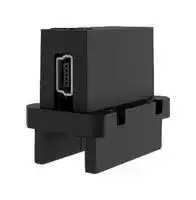
USB-Pi Bridge Plug, Revolution Pi Gate Serial Gateway
⚠️ Reference pricing provided. In case of supply shortages, we will connect you with our trusted procurement partners to ensure your project's continuity.
- Manufacturer: KUNBUS
- Product type: Controller Accessories
- SVHC: No SVHC (17-Jan-2023)
- Product Range: -
- Current Rating: -
| Delivery and price | |
|---|---|
| Units per pack | 1 |
| Price | 24.59 € |
| Current stock | 10+ |
| Lead time | 30 days |
Datasheet

User Manual Gateway Component Serial

3/15/2019

Table of Contents

KUNBUS GmbH

## Table of Contents

**1 General Information........................................................................................................................ 3** 1.1 Disclaimer.................................................................................................................................. 3 1.2 Notes Regarding this User Manual............................................................................................ 4 1.3 Validity....................................................................................................................................... 4 1.4 Limitation of Liability .................................................................................................................. 4 1.5 Customer Service...................................................................................................................... 4 **2 Safe Use........................................................................................................................................... 5** 2.1 Intended Use ............................................................................................................................. 5 2.2 User........................................................................................................................................... 5 2.3 Symbols..................................................................................................................................... 5 2.4 Important safety instructions...................................................................................................... 6 2.5 Environmental Conditions.......................................................................................................... 6 **3 Overview .......................................................................................................................................... 7** 3.1 Functionality .............................................................................................................................. 7 3.2 Scripter ...................................................................................................................................... 8 3.3 Control Elements....................................................................................................................... 9 3.4 Status LEDs............................................................................................................................. 12 **4 Installation ..................................................................................................................................... 13** 4.1 Preparations for Inteference-free Operation............................................................................ 13 4.2 Requirements ......................................................................................................................... 15 4.3 Connecting Gateway Components.......................................................................................... 16 4.4 Installing a Gateway in the Control Cabinet ............................................................................ 17 4.5 Connecting a Power Supply .................................................................................................... 18 4.6 Connecting a Gateway to the Fieldbus.................................................................................... 19 **5 Configuration................................................................................................................................. 20** 5.1 Supported size of process data............................................................................................... 20 5.2 Settings on the Rotary Switches.............................................................................................. 20 5.3 Settings in the memory registers............................................................................................. 23 5.4 Input and Output Data ............................................................................................................. 29 5.5 Access features....................................................................................................................... 29 **6 Technical Data............................................................................................................................... 30** 6.1 Technical Data......................................................................................................................... 30

Gateway Component Serial

ii

## 1 General Information

## 1.1 Disclaimer

© 2019 KUNBUS GmbH, Denkendorf (Deutschland)

The contents of this user manual have been compiled by KUNBUS GmbH with the greatest possible care. Due to technical developments, KUNBUS GmbH reserves the right to change or exchange the contents of this user manual without prior notice. You can always obtain the latest version of the user manual from our homepage: www.kunbus.com

KUNBUS GmbH shall be liable exclusively to the extent specified in the General Terms and Conditions (www.kunbus.de/agb.html).

The contents published in this user manual are protected by copyright. Reproduction or use is permitted for the internal use of the user. Duplication or use for other purposes is not permitted without the express written consent of KUNBUS GmbH. Contraventions will result in damages.

## **Trademark protection**

- KUNBUS is a registered trademark of KUNBUS GmbH.

– Windows® und Microsoft® are registered trademark of Microsoft, Corp.

KUNBUS GmbH

Heerweg 15 C 73770 Denkendorf

Germany

www.kunbus.com

Gateway Component Serial

3 / 31

## 1.2 Notes Regarding this User Manual

This user manual provides important technical information that can enable you as a user to integrate the Gateway into your applications and systems efficiently, safely and conveniently. It is intended for trained, qualified personnel, whose sound knowledge in the field of electronic circuits and expertise of Serial connections  is assumed.

As an integral part of the module, the information provided here should be kept and made available to the user.

## 1.3 Validity

This document describes the application of the Gateway product number:

- PR100068, release 01

- PR100090, release 01

## 1.4 Limitation of Liability

Warranty and liability claims will lapse if:

- the product has been used incorrectly,

- damage is due to non-observance of the operating manual,

- damage is caused by inadequately qualified personnel,

- damage is caused by technical modification to the product (e.g. soldering).

## 1.5 Customer Service

If you have any questions or suggestions concerning this product, please do not hesitate to contact us:

KUNBUS GmbH Heerweg 15 C 73770 Denkendorf

Germany +49 (0)711 3409 7077 support@kunbus.de www.kunbus.de

4 / 31

Gateway Component Serial

## 2 Safe Use

## 2.1 Intended Use

The modular gateway component is part of a gateway that can be combined with another modular gateway component or a RevPi Core/ Connect from KUNBUS as required.

The modular gateway component is designed to forward data from a specific protocol to a controller or other gateway component.

No other purpose is intended. If you do not use the device as intended, damage to property and personal injury may result.

## 2.2 User

The Gateway may only be assembled, installed and put into operation by trained, qualified personnel. Before assembly, it is absolutely essential that this documentation has been read carefully and understood. Expertise in the following fields is assumed:

- electronic circuits,

- basic knowledge of Serial connections,

- work in electrostatic protected areas,

- locally applicable rules and regulations for occupational safety.

## 2.3 Symbols

The symbols used have the following meaning:

## **DANGER**

## **Danger**

Always observe this information!

There is a safety hazard that can lead to serious injuries and death.

## **CAUTION**

## **Caution**

There is a safety hazard that can result in minor injuries and material damage.

**NOTICE**

## **Note**

There is a safety hazard that can result in material damage.

Gateway Component Serial

5 / 31

## 2.4 Im ortant safet instructions p y

## **DANGER**

## **Danger of explosion**

The modular Gateway component do not meet the requirements of the ATEX directive. Therefore, they are not suitable for use in potentially explosive environments.

èDo not use the modular Gateway component in potentially explosive environments.

## **Electric shock**

**CAUTION** Switch off all voltages before assembly/disassembly.

èFailure to observe this warning may result in personal injury.

**The devices are „open equipment“ according to the Standard CAUTION UL61010-2-201.**

To fulfill requirements for safe operation with regard to mechanical stability, flame retardation, stability, and protection against contact, the following alternative types of installation are specified:

èInstallation in a suitable cabinet.

èInstallation in a suitable enclosure.

èInstallation in a suitable equipped, enclosed control room.

## **Incorrect connection of the power supply**

**NOTICE** Using an unsuitable power supply can destroy your modules and connected devices.

èUse a power supply in the approved area for the base modules. The values for this can be found in the technical data of your base module.

## 2.5 Environmental Conditions

To prevent damage, only operate the RevPi module in an environment that corresponds to the operating conditions.

Suitable ambient conditions:

Operating temperature -30 °C to +55 °C Air humidity 93% (no condensation)

## **NOTICE**

## **This device is designed for indoor use only.**

If you use the device outdoors, it may be destroyed.

èOnly use the device indoors.

6 / 31

Gateway Component Serial

## 3 Overview

## 3.1 Functionality

The KUNBUS Gateway is a protocol converter. It allows communication between networks with different protocols.

_Illustration 1:_ Functionality as a slave

A Gateway consists of 2 gateway components that master one specific protocol each. You can combine these gateway components as you wish. This design offers you a high degree of flexibility, since you can exchange the individual gateway components at any time. The following gateway components are currently available as slaves:

- CANopen

- DeviceNet

- EtherCAT

- EtherNet/IP

- Modbus RTU

- Modbus TCP

- POWERLINK

- PROFIBUS

- PROFINET

- Sercos III

The gateway component for DMX can be operated as a master or slave.

In addition, you can combine the gateway components with the RevPi Core.

Gateway Component Serial

7 / 31

## 3.2 Scripter

Product variant "Serial" includes a software component that allows you to set up customer-specific data exchange protocols. If, for example, the gateway component is to communicate in an application with a serial-controlled servomotor, this servomotor expects a preset protocol to be processed in order to receive the actuator values or to return sensor values. With the aid of the Scripter you can load small executable program sequences into the gateway component that are then executed there cyclically. With the appropriate data exchange protocol the gateway component can receive such actuator values and transmit these to the servomotor via the fieldbus. The program sequences required are loaded once into the gateway component in the form of a script and then always executed there cyclically.

To use the Scripter, you need a jumper with USB interface

(PR1000101), which is not included in the scope of deliver.

LG _Illustration 2:_ USB jumper aa ◦Attach the USB adapter to the interconnect port of the gateway components as shown in the figure. Make sure that the mini USB port is facing towards the front of the gateway.

◦Connect the adapter to a USB port of your PC. The appropriate driver will install itself automatically the first time.

ð In the device manager you now see a new entry "USB Serial Port" in the connections section (COM & LPT) with the corresponding interface name COMxx.

If the driver does not install automatically, you can download this at the

following Internet webpage:

http://www.ftdichip.com/Drivers/VCP.htm

8 / 31

Gateway Component Serial

KUNBUS provides you with a PC tool for creating and testing such scripts. You can read all the necessary details in the separate "KUNBUS-Scripter" manual.

## 3.3 Control Elements

Front view

**==> picture [79 x 198] intentionally omitted <==**

**----- Start of picture text -----**<br>
1<br>O—t<br>le<br>|<br>2<br>|<br>1<br>2K<br>3k<br>C) 3 5K<br>**----- End of picture text -----**<br>


**==> picture [96 x 8] intentionally omitted <==**

**----- Start of picture text -----**<br>
Illustration 3:  Front view<br>**----- End of picture text -----**<br>


|1|Status LEDs|
|---|---|
|2|Rotarycodingswitch|
|3|Fieldbus connection|


Gateway Component Serial

9 / 31

**==> picture [234 x 371] intentionally omitted <==**

**----- Start of picture text -----**<br>
Top view<br>1 1<br>2<br>**----- End of picture text -----**<br>


_Illustration 4:_ Top view

|1|Interconnect ports|
|---|---|
||for interconnectingthegatewaycomponents.|
|2|Locking clamps|
||for securely attaching the gateway component to the DIN|
||rail.|


10 / 31

Gateway Component Serial

**==> picture [137 x 380] intentionally omitted <==**

**----- Start of picture text -----**<br>
Bottom view<br>1<br>2<br>(Tl }— =<br>**----- End of picture text -----**<br>


_Illustration 5:_ Bottom view

|1|Mains connection|
|---|---|
||with 24 V supplyvoltage|
|2|Locking clamps|
||for securely attaching the gateway component to the DIN|
||rail.|


Gateway Component Serial

11 / 31

## 3.4 Status LEDs

The signals of the status LEDs for Serial connections have the following meaning:

Status LEDs for PR100068 (variant with serial)

Status LEDs for PR100090 (Variant Modbus RTU Slave)

|**LED des-**|**Signal**|**Meaning**|
|---|---|---|
|**ignation**|||
|Power|off|Gatewaynot running.|
||flashes, green|Initializationphase notyet completed.|
||on, green|Operational.|
||flashes, red|Correctable error (e.g. second gateway|
|||component missing).|
||on,red|Serious error/defect in thegateway.|
|Scr|off|Error during processingof the script|
||on, green|Script is running|
||flashes, green|Script is notprocessed|
|Trf|off|No error during processingof the script|
||on,red|Error during processingof the script|
|**LED des-**|**Signal**|**Meaning**|
|**ignation**|||
|Power|off|Gatewaynot running.|
||flashes, green|Initializationphase notyet completed.|
||on, green|Operational.|
||flashes, red|Correctable error (e.g. second gateway|
|||component missing).|
||on,red|Serious error/defect in thegateway.|
|Scr|on, green|Configuration valid.|
||flashes, red|The rotary switch was changed.|
|||Restart the gateway component to use|
|||the new settings.|
|Trf|off|No data communication.|
||on, green|Data are received or sent.|


12 / 31

Gateway Component Serial

## 4 Installation

## 4.1 Preparations for Inteference-free Operation

In the following section we have compiled some general information for you that is important for trouble-free operation. If you are already acquainted with this topic, you can skip to the next section. There, you will learn about which conditions are necessary for installing the gateway.

## Cable routing

Route your cables separately in cable groups. This will protect your gateway from any unintended electromagnetic interferences.

The following groups should be routed separately from each other:

|**Group**|**Line**|
|---|---|
|A|Data and power supply lines for:|
||DC voltage below 60 V|
||AC voltage below 25 V|
|B|Data and power supply lines for:|
||DC voltage between 60 V and 400 V|
||AC voltage between 25 and 400 V|
|C|Power supplylines above 400 V|


- You can route cables of the same group together in cable ducts or bundles.

- Cables of group A and B:

   - Route the groups in separate bundles or

   - in cable ducts at a minimum distance of 10 cm from each other.

- Cables of group C

   - Route the groups in separate bundles or

   - in cable ducts at a minimum distance of 50 cm from the other groups.

## Shielding

Shield your cables. This will reduce any unintended electromagnetic interferences.

Gateway Component Serial

13 / 31

## Potential equalization

Potential differences occur when devices are connected to different earths. These potential differences cause malfunctions.

To prevent malfunctions, you have to route an equipotential equalization conductor.

When doing so, bear in mind the following points:

- Select an equipotential equalization conductor with low impedance.

- Select the following as a reference value for the cross-section of the potential equalization cable:

   - 16 mm[2] for potential equalization cables of up to 200 m in length

   - 25 mm[2] for potential equalization cables of more than 200 m in length

- Use potential equalization cables made of copper or galvanized steel.

- Connect potential equalization cables extensively with the earth rail.

- The smallest surfaces possible should be sandwiched between potential equalization cables and signal cables.

If the devices of the control system are connected by shielded signal cables that are earthed on both sides, the impedance must be 10% of the shielding impedance.

14 / 31

Gateway Component Serial

## 4.2 Requirements

The Gateway was designed for use in a control cabinet.

- ü The protection class of the control cabinet must be equivalent to at least IP54.

- ü For installation in the control cabinet you need a DIN rail 35 x 7.5 mm (EN50022).

- ◦Install the DIN rail horizontally in the control cabinet according to the manufacturers' specifications. When doing so, make sure that the Gateway is at a sufficient distance from other devices.

## **NOTICE**

**Your gateway could be damaged if temperatures are too high.**

- èMake sure that the ambient temperature in the control cabinet is less than 60 °C.

- èKeep the ventilation slots unobstructed. These must not be covered by cables etc.

- èMaintain sufficient distance from other devices.

_Illustration 6:_ Distances for installation

- ◦Connect each gateway component individually to functional earth. When doing so, make sure that the power supplies of both gateway components have the same ground.

- ð Your control cabinet now meets all requirements for installing the gateway.

Gateway Component Serial

15 / 31

## 4.3 Connecting Gateway Components

In order to attain a fully functional gateway, you have to interconnect both gateway components.

◦Connect an interconnect port to each gateway component using the plug-in jumper (product number PR100101).

◦

## _Illustration 7:_ Connecting gateway components

- ð You can now install the gateway in the control cabinet.

**NOTICE**

**Only ever interconnect 2 gateway components.**

If you connect additional components, severe defects could result on all devices.

16 / 31

Gateway Component Serial

## 4.4 Installing a Gateway in the Control Cabinet

◦Hold the raster element of the gateway on the DIN rail.

- ◦Press down the locking elements towards the gateway.

- ◦Make sure that the gateway is firmly attached to the DIN rail.

Gateway Component Serial

17 / 31

## 4.5 Connecting a Power Supply

To connect the gateway component to the power supply, you need a spring-loaded terminal (e.g. Metz-Connect SP995xxVBNC).

You have to connect each gateway component separately to a power supply. Never interconnect functional earth and GND, otherwise the galvanic isolation between gateway GND and fieldbus ground will be removed. Instead, connect the functional earth with low impedance to the potential equalization. You can then dispense with this connection if the shield of the fieldbus cable is connected to the potential equalization with lower impedance when entering the control cabinet.

## **NOTICE**

## **Connect each of the two gateway components to the power supply**

èEnsure in particular that no potential differences occur between the GND pins (2).

Pin assignment:

|**Pin**|**Assignment**||||||||
|---|---|---|---|---|---|---|---|---|
|1|24 V for module supply|1|2||3||4||
|2|GND||||||||
|3|Do not connect!||||||||
|4|Functional earth||||||||


## **NOTICE**

## **Do not connect GND to PE**

This connection could cause unintended malfunctions.

18 / 31

Gateway Component Serial

## 4.6 Connecting a Gateway to the Fieldbus

To connect the gateway component to the fieldbus, you need a Phoenix connector.

The gateway component supports three different interfaces:

– RS-232

– RS-422

– RS-485

The pin assignment varies depending on the interface used:

|**Modus**|**Pin 1**|**Pin 2**|**Pin 3**|**Pin 4**|**Pin 5**|**Pin 6**|**Pin 7**|**Pin 8**|
|---|---|---|---|---|---|---|---|---|
|RS232|5 V fused|reserved|TX|GND-ISO|RX|reserved|reserved|shield|
|RS485|5 V fused|reserved|reserved|GND-ISO|RX/TX|RX/TX|reserved|shield|
||||||A(+)|B(-)|||
|RS422|5 V fused|RX B(-)|RX A(+)|GND-ISO|TX A(+)|TX B(-)|reserved|shield|


Gateway Component Serial

19 / 31

## 5 Configuration

## 5.1 Supported size of process data

The gateway component for Serial connections supports process data up to a length of 512 bytes per direction.

## **NOTICE**

**Bear in mind that the maximum length of the process data is always determined by the fieldbus with the shorter data length.**

## 5.2 Settings on the Rotary Switches

The gateway component has 3 BCD rotary switches.

**==> picture [109 x 83] intentionally omitted <==**

**----- Start of picture text -----**<br>
1<br>OEE<br>2<br>CO fr<br>3<br>© on<br>**----- End of picture text -----**<br>


**==> picture [108 x 9] intentionally omitted <==**

**----- Start of picture text -----**<br>
Illustration 8:  Rotary switch<br>**----- End of picture text -----**<br>


20 / 31

Gateway Component Serial

You can use these rotary switches for:

|**Switch**|**Function**|
|---|---|
|DR|Settingbitrate|
|FR|SettingFrame Format|
|MD|Settingthe type of interface|


## Setting bitrate

Use switch "DR" (1) to set the bitrate. The settings have the following values:

|**Switch setting**|**PR 100068**|**PR100090**|
|---|---|---|
||**(variant serial)**|**(Variant Modbus RTU**|
|||**Slave)**|
|0|Settings from the|The gateway compo-|
||script are used.**Pre-**|nent works with the|
||**requisite:**You have|default values:|
||called the instruction|– 9600 Bit/s|
||"configPort" in the|– 8Bit|
||Script.|– Even Parity|
|||– 1 StopBit|
|||– Slave address 1|
|1|2400 kBit/s|2400 kBit/s|
|2|4800 kBit/s|4800 kBit/s|
|3|9600 kBit/s|9600 kBit/s|
|4|19200 kBit/s|19200 kBit/s|
|5|38400 kBit/s|38400 kBit/s|
|6|54600 kBit/s|54600 kBit/s|
|7|115200 kBit/s|115200 kBit/s|
|8|115200 kBit/s|115200 kBit/s|
|9|9600 kBit/s(Default)|9600 kBit/s(Default)|


## **NOTICE**

## **Error in the script processing**

If you call up the instruction "configPort" for PR 100068 in the script and simultaneously set rotary switch 1 to one of the positions 1-9, this generates an error in the script processing.

Gateway Component Serial

21 / 31

## Setting Date Frame Format

Use switch "FR" (2) to set the data frame format

## **NOTICE**

If you have selected the configuration via the script for product variant PR 100068, you do not have to perform any further settings here.

– 0: Even Parity 8 Bit 1 Stop-Bit

– 1: Odd Parity 8 Bit 1 Stop-Bit – 2: No Parity 8 Bit 1 Stop-Bit – 3: Even Parity 8 Bit 2 Stop-Bit – 4: Odd Parity 8 Bit 2 Stop-Bit – 5: No Parity 8 Bit 2 Stop-Bit – 6,7,8,9: corresponds to setting "0"

## Setting the type of interface

Use switch MD (3) to define the type of interface.

Here, you can select the appropriate interface mode. In addition, you can activate or deactivate a termination resistor and failsafe.

## Termination resistor

The termination resistor prevents reflexions from occurring at the end of the connection that could cause errors in the data communication.

The integrated termination resistor is 120 Ω.

## **NOTICE**

**Activate the termination resistor only if the module is the first or last subscriber of the connection.**

Errors in the data communication may occur if the termination resistor is activated while the module is connected at a central position in the network.

## Failsafe

A failsafe stabilizes the data transmission.

**Tip!:** Activate this function for longer, failure prone connections.

– 0: RS-232Mode (V.24 ) +- 10V to Ground Rx/Tx

– 1: RS485 mode

– Failsafe deactivated

– Termination resistor deactivated – 2: RS485 mode – Failsafe deactivated – Termination resistor activated – 3: RS485 mode – Failsafe activated – Termination resistor deactivated – 4: RS485 mode – Failsafe activated – Termination resistor activated – 5: RS422 mode – Failsafe deactivated

22 / 31

Gateway Component Serial

- Termination resistor deactivated

- – 6: RS422 mode – Failsafe deactivated – Termination resistor activated

- – 7: RS422 mode – Failsafe activated – Termination resistor deactivated

- 8: RS422 mode

– Failsafe activated – Termination resistor activated – 9: as 0 **Also see about this** 2 [} 24] 2 [} 27]

# 5.3 Settings in the memory registers To configure the gateway component, you have to access the register of the memory unit using the configuration software of your fieldbus master.

# The storage unit is the central component for all functions of the gateway component. It is subdivided into individual Memory Register with a width of 16 bits each. The functionality of the addressing was incorporated from Modbus. The register assignment depends on the application and is not specified by the Modbus specification. A Memory Register according to this specification has a register number between 1 (0x0001) and a maximum of 65536 (0x10000), of which the gateway component only uses a small part, however. The 16-bit values are stored internally in the memory in Little Endian order. This must be taken into account when you access data via the fieldbus interface. You have various access rights to the memory register: – Read/Write: In these memory registers you can perform settings actively. We recommend that you perform the correct settings in all memory registers with this access type. Bear in mind that your settings will first be used by the gateway component after a restart. – Read Only: These memory registers are informative. They display the parameters currently used by the gateway component. Gateway Component Serial 23 / 31

Brief Overview of the Memory Registers

|**Memory Re**<br>4096|**Register Function**<br>Restartingsoftware|**Access**<br>Read/write|
|---|---|---|
|4097|Viewingcurrent bitrate|Read only|
|4098|Current Frame Format|Read only|
|4099|Electrical response|Read only|
|4100|Settingthe slave address|Read/write|
|4101|Default Settings|Read only|
|4102|Input size of the partner gateway|Read only|
||component||
|4103|Output size of the partner gate-|Read only|
||waycomponent||
|4104|Module type of the partner gate-|Read only|
||waycomponent||
|4105|Fieldbus status of the partner|Read only|
||gatewaycomponent||


All memory registers are described in detail below.

4096 Restarting software

In this memory register you can restart the software of the gateway component.

|**Memory Register**|4096|
|---|---|
|**Access type**|Holding|
|**Permanently stored**|No|
|**Access**|Read/write|
|**Meaning**||
|19266(4b42h)|Restartingsoftware|


24 / 31

Gateway Component Serial

## 4097 Current bitrate

In this memory register you will find information for the bitrate currently used.

|**Memory Register**|4097|
|---|---|
|**Value Range**|1-8|
|**Permanently stored**|Yes|
|**Monitors with Range**|Yes|
|**Access**|Read only|
|**Meaning**||
|0|Using settings from the script (only for PR|
||100068)|
|1|2400 kBit/s|
|2|4800 kBit/s|
|3|9600 kBit/s|
|4|19200 kBit/s|
|5|38400 kBit/s|
|6|54600 kBit/s|
|7|115200 kBit/s|
|8|115200 kBit/s|


## 4098 Current Frame Format

In this memory register you will find information of the last frame format set for the Modbus interface.

|**Memory Register**|4098|
|---|---|
|**Value Range**|0-5|
|**Permanently stored**|Yes|
|**Monitors with Range**|Yes|
|**Access**|Read only|
|**Meaning**||
|0|Even Parity8 Bit 1 Stop-Bit|
|1|Odd Parity8 Bit 1 Stop-Bit|
|2|No Parity8 Bit 1 Stop-Bit|
|3|Even Parity8 Bit 2 Stop-Bit|
|4|Odd Parity8 Bit 2 Stop-Bit|
|5|No Parity8 Bit 2 Stop-Bit|


Gateway Component Serial

25 / 31

## 4100 Setting the node ID

In this memory register you have the option, a slave address to set.

|**Memory Register**|4100|
|---|---|
|**Value Range**|1-249|
|**Permanently stored**|Yes|
|**Monitors with Range**|Yes|
|**Access**|Read/write|
|**Meaning**||
|1-249|The set a slave address|


## 4101 Default Settings

In this memory register you can see whether or not the gateway component works with the default settings.

|**Memory Register**|4101|
|---|---|
|**Value Range**|0-1|
|**Default Value**|0|
|**Permanently stored**|No|
|**Monitors with Range**|No|
|**Access**|Read only|
|**Meaning**||
|0|No Default Value.|
|1|Gateway component works with default set-|
||tings.|


26 / 31

Gateway Component Serial

## 4099 Electrical response

In this memory register you can see the current settings for the electrical response on the serial interface.

You can change the settings using the rotary coding switch.

|**Memory Register**|4099|
|---|---|
|**Value Range**|0-9|
|**Permanently stored**|No|
|**Monitors with Range**|Yes|
|**Access**|Read only|
|**Meaning**||
|0|– RS-232Mode (V.24 ) +- 10V to Ground Rx/Tx|
|1|– RS485 mode|
||– Failsafe deactivated|
||– Termination resistor deactivated|
|2|– RS485 mode|
||– Failsafe deactivated|
||– Termination resistor activated|
|3|– RS485 mode|
||– Failsafe activated|
||– Termination resistor deactivated|
|4|– RS485 mode|
||– Failsafe activated|
||– Termination resistor activated|
|5|– RS422 mode|
||– Failsafe deactivated|
||– Termination resistor deactivated|
|6|– RS422 mode|
||– Failsafe deactivated|
||– Termination resistor activated|
|7|– RS422 mode|
||– Failsafe activated|
||– Termination resistor deactivated|
|8|– RS422 mode|
||– Failsafe activated|
||– Termination resistor activated|
|9|corresponds to setting"0"|


Gateway Component Serial

27 / 31

4102 Input size of the partner gateway component

In this memory register you can see how large the input data area of the partner gateway component is.

|**Memory Register**|4102|
|---|---|
|**Access type**|Holding|
|**Permanently stored**|No|
|**Access**|Read only|


4103 Output size of the partner gateway component

In this memory register you can see how large the output data area of the partner gateway component is.

|**Memory Register**|4103|
|---|---|
|**Access type**|Holding|
|**Permanently stored**|No|
|**Access**|Read only|


28 / 31

Gateway Component Serial

## 5.4 Input and Output Data

So that both modular gateway components can exchange data with each other, both components have a separate input and output area.

The input area contains the data received by the second gateway component.

The output area contains the data that is sent to the second gateway component.

|**Register**|**Use**|**Access**|**Access**|**Values**|**Perma-**|
|---|---|---|---|---|---|
||||**type**||**nently**|
||||||**stored**|
|1-256|Input data|Read Only|Holding/In-|Values provided by the other|No|
||||put*|gatewaycomponent.||
|1025-1280|Output data|Read/Write|Holding|Values that are delivered to|No|
|||||the other gateway compo-||
|||||nent.||
|1-3840|Input bits|Read Only|Discrete In-|Values provided by the other|No|
||||puts|gatewaycomponent.||
|10001-138|Output bits|Read/Write|Coils|-|No|
|40||||||


Input and holding registers are not distinguished. They can be read via function code 0x04.

## 5.5 Access features

You can use the following functions to access the data area of the gateway component:

|**Function**|**Use**|**Meaning**|**Max. Size per telegramm**|
|---|---|---|---|
|**code**||||
|0x01|Read data bit by bit|read coils|2000 Bit|
|0x02||read discrete inputs||
|0x05|Write data bit by bit|write single coil|1 Bit|
|0x0f||write multiple coils|1968 Bit|
|0x03|Read data word by word|read holding regis-|125 Words|
|||ters||
|0x04||read input registers||
|0x06|Write data word by word|write single register|123 Words|
|0x10||write multiple regis-||
|||ters||
|0x16||mask write register||
|0x17|Reading and writing data|read/write multiple|Read 125 Words|
||word by word|registers|Write 121 Words|


Gateway Component Serial

29 / 31

|**Dimensions**||
|---|---|
|Width|22.5 mm|
|Height|96 mm|
|Depth|110.4 mm|
|Weight|90g|
|**Electrical data**||
|Power supply|12 -24 VDC -15%/ +20%;|
||1,5W|
|Power consumption during operation|Power consumption during operation<br>100 mA|
|(cyclical data exchange)||
|Source of Supply|The device may only be sup-|
||plied from circuits that comply|
||with Class 2 or Safety Extra|
||Low Voltage (SELV) according|
||to Class 9.4 of UL 61010-1|
|Status display|LED|
|**Environmental conditions**||
|Ambient temperature|0 – 55 °C|
|Storage temperature|- 25 – 60 °C|
|Humidity|93%(at 40 °C)|
|Condensing|Not allowed|
|Protection class||
|Control cabinet|IP54|
|Housing|IP20|
|Terminal area|IP20|
|**Assembly data**||
|DIN rail|35 x 7.5 mm|
|Height|96 mm|
|Depth|110.4 mm|


> Gateway Component Serial

> 30 / 31

6 Technical Data 6.1 Technical Data

_Illustration 9:_ Side dimensions

_Illustration 10:_ Front dimensions

Gateway Component Serial

31 / 31
Updated at April 10, 2026
About Novapart
Novapart is a B2B electronic component broker specialising in stock shortages and cost reduction. We source hard-to-find parts and identify compliant alternatives across a catalogue of 410,000+ components from 500+ manufacturers.
Learn more →Stock Shortage Specialist
When a component is unavailable, discontinued or has an unacceptable lead time, we tap into our network of vetted European and Asian distributors to source what you need — without compromising on quality or traceability.
Request a quote →Compliant Alternatives
We identify pin-to-pin, electrically equivalent substitutes that meet the same certifications (RoHS, AEC-Q100, REACH) as your original specification — validated against datasheets, not just part numbers. Often at a lower cost.
BOM Analysis service →