
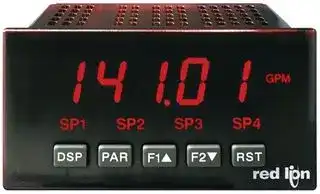
Image not available
Illustrative purposes only

PAXLVA00
PANEL METER, AC VOLTAGE, 115/230VAC
⚠️ Reference pricing provided. In case of supply shortages, we will connect you with our trusted procurement partners to ensure your project's continuity.
- Manufacturer: RED LION CONTROLS
- Product type: Digital Panel Meters
- Meter Range: 0V to 300V
- Digit Height: 14.2mm
- Meter Function: AC Voltage
- Panel Cutout Width: 92mm
- Supply Voltage Max: 253VAC
- Supply Voltage Min: 207VAC
- Panel Cutout Height: 45mm
- No. of Digits / Alpha: 3.5
- Operating Temperature Max: 60°C
- Operating Temperature Min: 0°C
| Delivery and price | |
|---|---|
| Units per pack | 1 |
| Price | 199.07 € |
| Current stock | 10+ |
| Lead time | 7 days |
Datasheet

Bulletin No. PAXLI/V-E Drawing No. LP0566 red @ ® Released 10/10 Tel +1 (717) 767-6511 Fax +1 (717) 764-0839 lpn ~~BS~~ www.redlion.net **MODEL PAXLI - PAX LITE CURRENT METERS & MODEL PAXLV - PAX LITE VOLTMETERS**
- _FOUR MULTI-RANGE UNITS COVER:_
- 199.9 A to 1.999 A *, 199.9 mV (AC or DC)
- 1.999 V to 300 V (AC or DC)
- _3 1/2-DIGIT, 0.56" (14.2 mm) HIGH RED LED DISPLAY W/POLARITY_
- _BUILT-IN SCALING PROVISIONS_
- _SELECTABLE DECIMAL POINT LOCATION_
- _AUTO ZEROING CIRCUITS_
- _OVER-RANGE INDICATION_
- _NEMA 4X/IP65 SEALED FRONT BEZEL_
**==> picture [114 x 39] intentionally omitted <==**
**----- Start of picture text -----**<br>
C ULR US LISTED<br>IND. CONT. EQ.<br>51EB<br>**----- End of picture text -----**<br>
- _OPTIONAL CUSTOM UNITS OVERLAY W/BACKLIGHT_
- [ Accessory Shunts Available For Higher Current Ranges.]
## **GENERAL DESCRIPTION**
PAX Lite Current and Volt Meters are premium quality instruments designed for tough industrial applications. With multi-range capability, built-in provision for scaling, and DIP switch selectable decimal points, these meters offer the ultimate in application flexibility. Four models cover your voltage and current indicator needs. The meter can provide direct readout from pressure, speed or flow transducers, or any other variable that can be translated to voltage or current. The built-in scaling allows the display to be scaled to the desired engineering unit.
The 3 ½ -digit bi-polar display (minus sign displayed when current or voltage is negative) features a 0.56" high, 7-segment LEDs for easy reading. The meter is also available with custom units label capability. Using the PAX label kit (PAXLBK30), the selected label is installed behind the panel, keeping it safe from washdown or other environmental conditions. A DIP switch is used to control the backlight for the units label.
The meters have a NEMA 4X/IP65 sealed bezel and extensive testing of noise effects to CE requirements, allowing the meter to provide a tough yet reliable application solution.
## **SAFETY SUMMARY**
All safety related regulations, local codes and instructions that appear in the literature or on equipment must be observed to ensure personal safety and to prevent damage to either the instrument or equipment connected to it. If equipment is used in a manner not specified by the manufacturer, the protection provided by the equipment may be impaired.
## **DEFINITION OF TERMS**
**INSTALLATION CATEGORY** (overvoltage category) **I** , (CAT I): Signal level, special equipment or parts of equipment, telecommunication, electronic, etc. with smaller transient overvoltages than Installation Category (overvoltage category) II. (See IEC 664 & IEC 61010)
**INSTALLATION CATEGORY** (overvoltage category) **II** , (CAT II): Local level, appliances, portable equipment, etc. with smaller transient overvoltages than Installation Category (overvoltage category) III. (See IEC 664 & IEC 61010)
**CAUTION: Risk of Danger. CAUTION: Risk of electric shock.** Read complete instructions prior to installation and operation of the unit. AN IN
## **DIMENSIONS In inches (mm)**
Note: Recommended minimum clearance (behind the panel) for mounting clip installation is
2.1" (53.4) H x 5.0" (127) W.
**==> picture [512 x 84] intentionally omitted <==**
**----- Start of picture text -----**<br>
� 1.95 1.75 1.75<br>(49.5) (44.5) 1 2 3 4 5 6 7 8 9 10 11 (44.5)<br>cae) C HE,<br>— 3.80 —_ .10 jm 4.10 sey 3.60 (91.4) |<br>(96.5) (2.5) (104.1)<br>**----- End of picture text -----**<br>
_1_
## **TABLE OF CONTENTS**
|**TABLE OF CONTENTS**||
|---|---|
|Ordering Information . . . . . . . . . . . . . . . . . . . . 2|Wiring the Meter . . . . . . . . . . . . . . . . . . . . . . . 5|
|General Meter Specifications . . . . . . . . . . . . . 3|Scaling the Meter . . . . . . . . . . . . . . . . . . . . . . 6|
|Accessories . . . . . . . . . . . . . . . . . . . . . . . . . . . 3|Troubleshooting . . . . . . . . . . . . . . . . . . . . . . . . 7|
|Installing the Meter . . . . . . . . . . . . . . . . . . . . . 4|Calibration . . . . . . . . . . . . . . . . . . . . . . . . . . . . 7|
|Setting the Jumpers and Switches . . . . . . . . . 4||
## **ORDERING INFORMATION**
## **Meter Part Numbers**
**==> picture [367 x 213] intentionally omitted <==**
**----- Start of picture text -----**<br>
PAXL 0 0<br>I - Current Input<br>V - Voltage Input<br>A - AC Input<br>D - DC Input<br>**----- End of picture text -----**<br>
## **Accessories Part Numbers**
|**TYPE**|**MODEL NO.**|**DESCRIPTION**|**PART NUMBERS**|
|---|---|---|---|
|**Accessories**|**PAXLBK**|Units Label Kit Accessory|PAXLBK30|
||**APSCM**|10 Amp DC Current Shunt|APSCM010|
|||100 Amp DC Current Shunt|APSCM100|
_2_
## **GENERAL METER SPECIFICATIONS**
1. **DISPLAY** : 3 1/2-digit, 0.56" (14.2 mm) high, 7-segment red LED, (-) minus sign displayed when current or voltage is negative. Decimal points inserted before 1st, 2nd, or 3rd least significant digits by DIP switch selection.
2. **POWER** : 115/230 VAC, switch selectable. Allowable power line variation ±10%, 50/60 Hz, 6 VA. **Isolation** : 2300 Vrms for 1 min. between input and supply **Working Voltage** : 300 V max. , CAT II
3. **INPUT RANGES/RESOLUTION** : (Selectable by jumper connections.):
**AC Voltmeters AC Current Meters DC Voltmeters DC Current Meters** 0-1.999 V/1 mV 0-199.9 μA/0.1 μA 1.999 V/1 mV 199.9 μA/0.1 μA 0-19.99 V/10 mV 0-1.999 mA/1 μA 19.99 V/10 mV 1.999 mA/1 μA 0-199.9 V/100 mV 0-19.99 mA/10 μA 199.9 V/100 mV 19.99 mA/10 μA 0-300 V/1 V 0-199.9 mA/100 μA 300 V/1 V 199.9 mA/100 μA 0-1.999 A/1 mA 1.999 A/1 mA 0-199.9 mV/100 μV 199.9 mV/100 μV
## **Input Impedance:**
**Voltage** : All ranges1M **Current** : 199.9 μA 1000.1 K 1.999 mA 100.1 19.99 mA 10.1 199.9 mA 1.1 1.999 A 0.1 **Working Voltage** : 300 V max., CAT II
## 4. **ACCURACY** :
- **AC Voltmeters** : ±(0.1% of Reading + 3 digits) (45-500 Hz)
- **AC Current Meters** (45-500 Hz):
- **199.9 μA/199.9 mV, 1.999 mA, 19.99 mA** : ±(0.1% of Reading + 3 digits)
- **199.9 mA** : ±(0.15% of Reading + 3 digits)
- **1 A** : ±(0.5% of Reading + 3 digits)
- **DC Voltmeters** : ±(0.1% of Reading + 1 digit)
## **DC Current Meters** :
- **199.9 μA/199.9 mV, 1.999 mA, 19.99 mA** : ±(0.1% of Reading + 1 digit)
- **199.9 mA** : ±(0.15% of Reading + 1 digit)
- **1.999 A** : ±(0.5% of Reading + 1 digit)
- _Note: Any individual range may be recalibrated (scaled) to 0.1% accuracy with appropriate calibration equipment._
5. **OVER-RANGE INDICATION** : on all modes is indicated by blanking 3 least significant digits.
6. **MAX. VOLTAGE ON LOWEST INPUT RANGE** : 75 VAC or DC (Both voltmeters and current meters).
7. **MAX. VOLTAGE ON TERMINAL BLOCK** : 300 VAC or DC (Both voltmeters and current meters).
8. **MAX. CURRENTS (FOR CURRENT METERS)** :
- **199.9 μA through 19.99 mA** : 10 times max. range current **199.9 mA** : 1 A
- **1.999 A** : 3 A
_Caution: In circuits where fault currents can exceed the maximum shunt current, a fast-blow fuse should be installed in series with the input signal. Otherwise, a slow blow 10 amp fuse is recommended that will allow for start-up over current situations, while still protecting the instrument._
## 9. **TEMPERATURE COEFFICIENTS** :
Current meters Voltmeters DC: 100 PPM/ ° C DC: 75 PPM/ ° C AC: 200 PPM/ ° C AC: 150 PPM/ ° C
10. **ENVIRONMENTAL CONDITIONS** :
**Operating Temperature** : 0° to 60 °C **Storage Temperature** : -40° to 80 °C
- **Operating and Storage Humidity** : 85% max. relative humidity (noncondensing)
- **Vibration According to IEC 68-2-6** : Operational 5 to 150 Hz, in X, Y, Z direction for 1.5 hours, 2g.
- **Shock According to IEC 68-2-27** : Operational 30 g, 11 msec in 3 directions. **Altitude** : Up to 2000 meters
11. **RESPONSE TIME TO STEP CHANGE INPUT** : 1 sec. nominal
12. **READING RATE** : 2.5 readings/sec., nominal
13. **NORMAL MODE REJECTION** : 50 dB 50/60 Hz (DC units only)
14. **COMMON MODE REJECTION** : 110 dB DC or 50/60 Hz (DC units only)
15. **COMMON MODE VOLTAGE (COMM. TO EARTH)** : 350 volt peak
16. **CERTIFICATIONS AND COMPLIANCES** :
## **SAFETY**
- UL Recognized Component, File #E179259, UL61010A-1, CSA C22.2 No. 61010-1
- Recognized to U.S. and Canadian requirements under the Component Recognition Program of Underwriters Laboratories, Inc.
- UL Listed, File #E137808, UL508, CSA C22.2 No. 14-M95
- LISTED by Und. Lab. Inc. to U.S. and Canadian safety standards Type 4X Enclosure rating (Face only), UL50
- IECEE CB Scheme Test Report #04ME11209-20041018
- Issued by Underwriters Laboratories, Inc.
- IEC 61010-1, EN 61010-1: Safety requirements for electrical equipment for measurement, control, and laboratory use, Part 1.
IP65 Enclosure rating (Face only), IEC 529
## **ELECTROMAGNETIC COMPATIBILITY:**
Emissions and Immunity to EN 61326: Electrical Equipment for Measurement, Control and Laboratory use.
|ontrol and Laboratory use.|ontrol and Laboratory use.|
|---|---|
|Criterion B<br>EN 61000-4-3<br>Electromagnetic RF fields<br>8 kV air discharge<br>4 kV contact discharge<br>Criterion A<br>EN 61000-4-2<br>Electrostatic discharge<br>**Immunity to Industrial Locations:**||
||10 V/m|
|Fast transients (burst)|Criterion B<br>EN 61000-4-4|
||2 kV power|
|RF conducted interference<br>Surge|3 V/rms<br>Criterion A<br>EN 61000-4-6<br>1 kV L-L,<br>Criterion A<br>EN 61000-4-5<br>2 kV signal<br>2 kV L&N-E power|
|Voltage dip/interruptions|0.5 cycle; 40 % variation<br>Criterion A<br>EN 61000-4-11|
|**Emissions:**||
|Emissions|Class B<br>EN 55011|
_Notes:_
_1. Criterion A: Normal operation within specified limits._
_2. Criterion B: Temporary loss of performance from which the unit selfrecovers._
17. **CONNECTIONS** : High compression cage-clamp terminal block Wire Strip Length: 0.3" (7.5 mm) Wire Gage: 30-14 AWG copper wire
- Torque: 4.5 inch-lbs (0.51 N-m) max.
18. **CONSTRUCTION** : This unit is rated for NEMA 4X/IP65 outdoor use. Installation Category II, Pollution Degree 2. One piece bezel/case. Flame resistant. Panel gasket and mounting clip included.
19. **WEIGHT** : 0.65 lbs. (0.24 Kg)
## **ACCESSORIES**
## **UNITS LABEL KIT (PAXLBK)**
Each meter has a units indicator with backlighting that can be customized using the Units Label Kit. The backlight is controlled by a DIP switch.
## **EXTERNAL CURRENT SHUNTS (APSCM)**
To measure DC current signals greater than 2 ADC, a shunt must be used. The APSCM010 current shunt converts a maximum 10 ADC signal into 100.0 mV. The APSCM100 current shunt converts a maximum 100 ADC signal into 100.0 mV. The continuous current through the shunt is limited to 115% of the rating.
_3_
## **1.0 INSTALLING THE METER** ~~7~~
## _**Installation**_
The PAX meets NEMA 4X/IP65 requirements when properly installed. The unit is intended to be mounted into an enclosed panel. Prepare the panel cutout to the dimensions shown. Remove the panel latch from the unit. Slide the panel gasket over the rear of the unit to the back of the bezel. The unit should be installed fully assembled. Insert the unit into the panel cutout.
While holding the unit in place, push the panel latch over the rear of the unit so that the tabs of the panel latch engage in the slots on the case. The panel latch should be engaged in the farthest forward slot possible. To achieve a proper seal, tighten the latch screws evenly until the unit is snug in the panel (Torque to approximately 7 in-lbs [79N-cm]). Do not over-tighten the screws.
## _**Installation Environment**_
The unit should be installed in a location that does not exceed the maximum operating temperature and provides good air circulation. Placing the unit near devices that generate excessive heat should be avoided.
**==> picture [479 x 164] intentionally omitted <==**
**----- Start of picture text -----**<br>
PANEL<br>devices that generate excessive heat should be avoided.<br>BEZEL<br>Do NOT use solvents. Continuous exposure to direct sunlight may accelerate the<br>aging process of the bezel.<br>LATCHING PANEL<br>SLOTS LATCH<br>PANEL CUT-OUT<br>LATCHINGTABS 3.62 [+.03] -.00<br>+.8<br>(92 )-.0 1.77+.02-.00<br>PANELGASKET (45 )+.5-.0<br>PANEL<br>MOUNTING<br>SCREWS<br>**----- End of picture text -----**<br>
The bezel should be cleaned only with a soft cloth and neutral soap product. Do NOT use solvents. Continuous exposure to direct sunlight may accelerate the
## **2.0 SETTING THE JUMPERS AND SWITCHES** ~~>~~
## **Set-Up DIP Switches**
The meter has an input jumper and switches, which must be checked and/or changed prior to applying power. To access the input jumper and switches, remove the meter base from the case by firmly squeezing and pulling back on the side rear finger tabs. This should lower the latch below the case slot (which the function. is located just in front of the finger tabs). It is recommended to release the latch on one side, then start the other side latch.
A DIP switch is located inside the meter. It is used for the selection of decimal points, backlight annunciator, and scaling. Selecting the “ON” position enables
|is located just in front of the finger tabs). It is recommended to release the latch<br>on one side, then start the other side latch.|**SWITCH**<br>1|**FUNCTION**<br>Decimal Point 1 (000.0)|
|---|---|---|
|**Power Selection Switch**|2|Decimal Point 2 (00.00)|
|Caution: Insure the AC power selection switch is set for the<br>proper voltage before powering the meter. The meter is shipped<br>from the factory in the 230 VAC position.<br>3<br>Decimal Point 3 (0.000)<br>4<br>Backlight Annunciator for Units Label<br>5<br>Enables the Scaling Pot<br>~~A~~|||
## **Power Selection Switch**
**Input Range Jumper** A jumper is used for selection of the voltage or current input range. Select the proper input range that will be high enough to avoid input signal overload. It is important that only one jumper position is used at a time. Avoid placing a jumper across two different input ranges.
## **PAXLI Jumper Selection**
**==> picture [132 x 145] intentionally omitted <==**
**----- Start of picture text -----**<br>
JUMPER SELECTIONS<br>The indicates factory setting.<br>INPUT RANGE JUMPER<br>ONLY ONE<br>JUMPER IN ±/199.9mV199.9µA<br>THIS AREA! ±1.999mA<br>±19.99mA<br>±199.9mA<br>±1.999A<br>CURRENT<br>REAR TERMINALS<br>**----- End of picture text -----**<br>
**==> picture [225 x 179] intentionally omitted <==**
**----- Start of picture text -----**<br>
FRONT DISPLAY<br>Main<br>Circuit<br>Board ON 5 4 3 2 1<br>SET-UP<br>DIP<br>SWITCHES<br>POWER SELECTION SWITCH<br>INPUT SCALING<br>RANGE POT<br>JUMPER<br>REAR TERMINALS<br>230 115<br>**----- End of picture text -----**<br>
_4_
## **PAXLV Jumper Selection**
**==> picture [425 x 177] intentionally omitted <==**
**----- Start of picture text -----**<br>
FRONT DISPLAY<br>JUMPER SELECTIONS<br>— | ft The 7 indicates factory setting.<br>Main<br>Circuit P T<br>Board 5 4 3 2 1 INPUT RANGE JUMPER<br>ON ;<br>ee SET-UP a | = .-.. | ONLY ONE |<br>DIP JUMPER IN<br>SWITCHES ±1.999V<br>| THIS AREA! oo<br>a ±19.99V±199.9V<br>SCALING ±300V<br>a POWER POT | re VOLT<br>SELECTION<br>SWITCH<br>INPUT RANGE<br>7a JUMPER ae Po<br>InsoalICICI) l y f7 | { REAR TERMINALS |4<br>REAR TERMINALS<br>230 115<br>**----- End of picture text -----**<br>
## **3.0 WIRING THE METER**
## **WIRING OVERVIEW**
Electrical connections are made via screw-clamp terminals located on the back of the meter. All conductors should conform to the meter’s voltage and current ratings. All cabling should conform to appropriate standards of good installation, local codes and regulations. It is recommended that power supplied to the meter (AC) be protected by a fuse or circuit breaker.
When wiring the meter, compare the numbers embossed on the back of the meter case against those shown in wiring drawings for proper wire position. Strip the wire, leaving approximately 0.3" (7.5 mm) bare lead exposed (stranded wires should be tinned with solder). Insert the lead under the correct screw-clamp terminal and tighten until the wire is secure. (Pull wire to verify tightness.)
## **EMC INSTALLATION GUIDELINES**
Although this meter is designed with a high degree of immunity to ElectroMagnetic Interference (EMI), proper installation and wiring methods must be followed to ensure compatibility in each application. The type of the electrical noise, its source or the method of coupling into the unit may be different for various installations. Listed below are some EMC guidelines for successful installation in an industrial environment.
1. The meter should be mounted in a metal enclosure, which is properly connected to protective earth.
4. In extremely high EMI environments, the use of external EMI suppression devices, such as ferrite suppression cores, is effective. Install them on Signal and Control cables as close to the unit as possible. Loop the cable through the core several times or use multiple cores on each cable for additional protection. Install line filters on the power input cable to the unit to suppress power line interference. Install them near the power entry point of the enclosure. The following EMI suppression devices (or equivalent) are recommended: Ferrite Suppression Cores for signal and control cables:
- Fair-Rite # 0443167251 (RLC #FCOR0000) TDK # ZCAT3035-1330A Steward #28B2029-0A0
- Line Filters for input power cables: Schaffner # FN610-1/07 (RLC #LFIL0000) Schaffner # FN670-1.8/07 Corcom #1VR3
_Note: Reference manufacturer’s instructions when installing a line filter._
5. Long cable runs are more susceptible to EMI pickup than short cable runs. Therefore, keep cable runs as short as possible.
6. Switching of inductive loads produces high EMI. Use of snubbers across inductive loads suppresses EMI. Snubber: RLC#SNUB0000.
2. Never run Signal or Control cables in the same conduit or raceway with AC power lines, conductors feeding motors, solenoids, SCR controls, and heaters, etc. The cables should be run in metal conduit that is properly grounded. This is especially useful in applications where cable runs are long and portable two-way radios are used in close proximity or if the installation is near a commercial radio transmitter.
3. Signal or Control cables within an enclosure should be routed as far away as possible from contactors, control relays, transformers, and other noisy components.
_5_
## **3.1 POWER WIRING**
## **3.2 INPUT SIGNAL WIRING**
Before connecting signal wires, the Input Range Jumper should be verified for proper position.
**AC Power** Terminal 1: VAC Terminal 2: VAC 1 2 ~~”~~ 115/230
## **PAXLI**
## **PAXLV**
**Current Signal (self powered)**
**Voltage Signal (self powered)**
Terminal 4: + Volts DC/AC Terminal 4: + Amps DC/AC Terminal 3: - Volts DC/AC Terminal 3: - Amps DC/AC 3 4 3 4 - + - + A V 2A MAX. ~~ase~~ 300V MAX. ~~w~~
## **4.0 SCALING THE METER** Pe
## **PAXLV**
## **DIRECT VOLTMETER READOUT**
When the application requires direct voltmeter readout, the Scale Switch should remain in the “OFF” position. The Input Range Jumper is set to the voltage range being applied. It is possible to select a range higher than being applied to get lower resolution. The Decimal Point switches are set to resolution of the selected Input Range Jumper.
## **SCALING VOLTMETER READOUT**
In many industrial applications, a voltmeter is required to display a reading in terms of PSI, RPM, or some other unit of measure. The signal voltage being measured can be generated by a transducer that senses the variations and delivers a linear output voltage. To provide the desired readout at the specified voltage, the voltmeter must be scaled.
Place the Scale Switch in the “ON” position. This enables the Scale Potentiometer which is accessible from the back of the meter. (Enabling the Scale Potentiometer does NOT affect the calibration of the meter.) Place the Decimal Point Switches to the proper location. To properly set the Input Range Jumper, the Division Factor must be determined by first using the below formula. After the Division Factor is calculated, use the Division Factor Range Selection Chart to choose the proper Input Range Jumper setting. Apply the meter power and the voltage signal. Adjust the Scale Potentiometer to the desired value.
This scaling only effects the span. There is no offset scaling. This means that only zero voltage can display a value of zero.
## DIVISION FACTOR FORMULA:
**VT x D.D.P. = D.F. D.R.**
## **WHERE:**
VT = Maximum Transducer Output D.D.P = Display Decimal Point D.F. = Division Factor D.R. = Desired Reading
**D.D.P.** 0.000 = 1 The Display Decimal Point 00.00 = 10 (D.D.P.) is determined by 000.0 = 100 the desired decimal point 0000 = 1000 placement in the readout.
## **DIVISION FACTOR RANGE SELECTION CHART**
D.F. Use Input Position 0.1 to 1.2 Pos 1: 0-1.999 VDC 1.2 to 10.5 Pos 2: 0-19.99 10.5 to 100.5 Pos 3: 0-199.9 100.5 to 1300 Pos 4: 0-300
_Note: Only one voltage jumper should be selected. Install the jumper before the voltage signal is applied._
## **BLOCK DIAGRAM PAXLV**
**==> picture [229 x 158] intentionally omitted <==**
**----- Start of picture text -----**<br>
+VDC<br>0-1.999V<br>+SIGNAL<br>COMMON 900K 0-19.99V SCALEPOT<br>90K<br>0-199.9V<br>9K<br>0-300V S5<br>1K �<br>S3 S2 S1 S4<br>PROCESS CIRCUITRY<br>**----- End of picture text -----**<br>
**EXAMPLE** : A relative humidity transducer delivers a 7.0 VDC voltage at a relative humidity of 75%. D.F. =[VT x D.D.P.] =[7.0 x 1000 ] = 93.3 D.R. 75
This Division Factor is between 10.5 and 100.5, therefore jumper position 3 (199.9 V) is selected. The Scaling Potentiometer is then adjusted for the desired readout at a known relative humidity.
After the Division Factor for the application has been calculated, the proper voltage range jumper can be selected. Use the “Division Factor Range Selection Chart” to choose the proper jumper setting.
_6_
## **PAXLI**
## **DIRECT CURRENT METER READOUT**
When the application requires direct current meter readout, the Scale Switch should remain in the “OFF” position. The Input Range Jumper is set to the current range being applied. It is possible to select a range higher than being applied to get lower resolution. The Decimal Point switches are set to resolution of the selected Input Range Jumper.
## **SCALING CURRENT METER READOUT**
In many industrial applications, a current meter is required to display a reading in terms of PSI, RPM, or some other unit of measure. The signal voltage being measured can be generated by a transducer that senses the variations and delivers a linear output voltage. To provide the desired readout at the specified current, the current meter must be scaled.
Place the Scale Switch in the “ON” position. This enables the Scale Potentiometer which is accessible from the back of the meter. (Enabling the Scale Potentiometer does NOT affect the calibration of the meter.) Place the Decimal Point Switches to the proper location. The Input Range Jumper is set to the current range being applied. Apply the meter power and the current signal. Adjust the Scale Potentiometer to the desired value. Scaling to obtain a numerical readout higher than the normal value of the current can also be accomplished, in most cases, by selecting a lower current range. However, the maximum current for the range must not be exceeded. (See Specifications for maximum input currents.)
This scaling only effects the span. There is no offset scaling. This means that only zero amps can display a value of zero.
## **BLOCK DIAGRAM PAXLI**
**==> picture [250 x 176] intentionally omitted <==**
**----- Start of picture text -----**<br>
+VDC<br>+SIGNAL 0-199.9µA/<br>199.9mV 900 Ω SCALE<br>COMMON 0-1.999mA POT<br>90 Ω<br>0-19.99mA 9 Ω<br>0-199.9mA S5<br>1 Ω �<br>0-1.999A<br>S3 S2 S1 S4<br>.1 Ω<br>e d<br>PROCESS CIRCUITRY<br>**----- End of picture text -----**<br>
**EXAMPLE** : The Pax Current Meter has been connected to measure a circuit current to 120.0 mA maximum. However, in this application, the display is to indicate percent of load current with 120.0 mA equivalent to 100.0 percent. The scale potentiometer is adjusted to reduce the normal 120.0 mA signal input display reading of 120.0 to indicate the desired reading of 100.0 on the display. Scaling to obtain a numerical readout higher than the normal value of the current can also be accomplished in most cases by selecting a lower current range. However, the maximum current for the range must not be
exceeded. _(See Specifications for maximum input currents.)_
## **5.0 TROUBLESHOOTING** ~~Ps~~
|**PROBLEM**|**REMEDIES**|
|---|---|
|NO DISPLAY|**CHECK**: Power switch and line voltage|
|INCORRECT DISPLAY|**CHECK**: Input jumper position<br>**CHECK**: Scaling adjustment pot DIP switch position<br>**ADJUST**: Scaling pot<br>**VERIFY**: Input Signal|
|OVER-RANGE INDICATION|**CHECK**: Input jumper position<br>**VERIFY**: Input signal|
For further assistance, contact technical support at the appropriate company numbers listed.
## **6.0 CALIBRATION** ~~Pe~~
The meter has been fully calibrated at the factory. Scaling to convert the input signal to a desired display value is performed by enabling the scale pot DIP switch. If the meter appears to be indicating incorrectly or inaccurately, refer to Troubleshooting before attempting to calibrate the meter.
When recalibration is required (generally every 2 years), it should only be performed by qualified technicians using appropriate equipment.
**Input Calibration**
_**WARNING** : Calibration of this meter requires a signal source with an accuracy of 0.01% or better and an external meter with an accuracy of 0.005% or better._
Before starting, verify that the Input Range Jumper is set for the range to be calibrated. Also verify that the precision signal source is connected and ready. Allow a 30 minute warm-up period before calibrating the meter.
Then perform the following procedure:
1. Place jumper in 2 V range (PAXLV) or 2 mA range (PAXLI).
2. Set the DIP switch off to disable the scaling pot.
3. Apply half scale input signal.
4. Adjust calibration potentiometer as necessary for the display to read 1000 (ignore decimal point).
5. Apply zero signal and ensure display reads zero.
6. Apply full scale signal and ensure display reads 1999.
_Note: Any individual range may be recalibrated (scaled) to 0.1% accuracy with appropriate calibration equipment._
_7_
## **LIMITED WARRANTY**
The Company warrants the products it manufactures against defects in materials and workmanship for a period limited to two years from the date of shipment, provided the products have been stored, handled, installed, and used under proper conditions. The Company’s liability under this limited warranty shall extend only to the repair or replacement of a defective product, at The Company’s option. The Company disclaims all liability for any affirmation, promise or representation with respect to the products.
The customer agrees to hold Red Lion Controls harmless from, defend, and indemnify RLC against damages, claims, and expenses arising out of subsequent sales of RLC products or products containing components manufactured by RLC and based upon personal injuries, deaths, property damage, lost profits, and other matters which Buyer, its employees, or sub-contractors are or may be to any extent liable, including without limitation penalties imposed by the Consumer Product Safety Act (P.L. 92-573) and liability imposed upon any person pursuant to the Magnuson-Moss Warranty Act (P.L. 93-637), as now in effect or as amended hereafter.
No warranties expressed or implied are created with respect to The Company’s products except those expressly contained herein. The Customer acknowledges the disclaimers and limitations contained herein and relies on no other warranties or affirmations.
Red Lion Controls Headquarters 20 Willow Springs Circle York PA 17406 Tel +1 (717) 767-6511 Fax +1 (717) 764-0839
Red Lion Controls Europe Printerweg 10 NL - 3821 AD Amersfoort Tel +31 (0) 334 723 225 Fax +31 (0) 334 893 793
Red Lion Controls India 54, Vishvas Tenement GST Road, New Ranip, Ahmedabad-382480 Gujarat, India Tel +91 987 954 0503 Fax +91 79 275 31 350
Red Lion Controls China Unit 101, XinAn Plaza Building 13, No.99 Tianzhou Road ShangHai, P.R. China 200223 Tel +86 21 6113-3688 Fax +86 21 6113-3683
Updated at February 9, 2023
About Novapart
Novapart is a B2B electronic component broker specialising in stock shortages and cost reduction. We source hard-to-find parts and identify compliant alternatives across a catalogue of 410,000+ components from 500+ manufacturers.
Learn more →Stock Shortage Specialist
When a component is unavailable, discontinued or has an unacceptable lead time, we tap into our network of vetted European and Asian distributors to source what you need — without compromising on quality or traceability.
Request a quote →Compliant Alternatives
We identify pin-to-pin, electrically equivalent substitutes that meet the same certifications (RoHS, AEC-Q100, REACH) as your original specification — validated against datasheets, not just part numbers. Often at a lower cost.
BOM Analysis service →