
Image not available
Illustrative purposes only

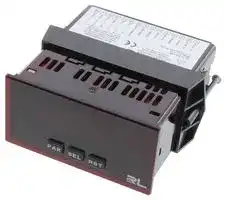
PAXLCR00
COUNTER, 6 DIGIT, DUAL, 250VDC
⚠️ Reference pricing provided. In case of supply shortages, we will connect you with our trusted procurement partners to ensure your project's continuity.
- Manufacturer: RED LION CONTROLS
- Product type: Counters
- Digit Height: 14mm
- Product Range: PAX Lite Series
- Panel Cutout Width: 92mm
- Supply Voltage Max: 250VDC
- Supply Voltage Min: 21.6VDC
- Panel Cutout Height: 45mm
- No. of Digits / Alpha: 6
- Operating Temperature Max: 50°C
- Operating Temperature Min: 0°C
| Delivery and price | |
|---|---|
| Units per pack | 1 |
| Price | 236.9 € |
| Current stock | 10+ |
| Lead time | 7 days |
Datasheet

**Inside US: +1 (877) 432-9908 Outside US: +1 (717) 767-6511 www.redlion.net**
**Bulletin No. PAXLCR-C Drawing No. LP0749 Released 2018-01-16**
## **Model PAXLCR - PAX Lite Dual Counter and Rate Meter**
- 6 DIGIT, 0.56" HIGH RED LED DISPLAY
- PROGRAMMABLE SCALING FOR COUNT AND RATE
- BI-DIRECTIONAL COUNTING, UP/DOWN CONTROL
- QUADRATURE SENSING (UP TO 4 TIMES RESOLUTION)
- BUILT-IN BATCH COUNTING CAPABILITY
- PROGRAMMABLE USER INPUT
- DUAL 5 AMP FORM C RELAYS
**==> picture [88 x 38] intentionally omitted <==**
**----- Start of picture text -----**<br>
C ULR US LISTED<br>O PROC. CONT. EQ.<br>E179259<br>**----- End of picture text -----**<br>
- UNIVERSALLY POWERED
- NEMA 4X/IP65 SEALED FRONT BEZEL
**For Model No. PAXLCRU0 Only**
## **GENERAL DESCRIPTION**
The PAXLCR is a versatile meter that provides a single or dual counter with rate indication, scaling and dual relay outputs. The 6-digit display has 0.56" high digits with adjustable display intensity. The display can be toggled manually or automatically between the selected counter and rate values.
The meter has two signal inputs and a choice of eight different count modes. These include bi-directional, quadrature and anti-coincidence counting, as well as a dual counter mode. When programmed as a Dual Counter, each counter has separate scaling and decimal point selection.
Rate indication is available in all count modes. The Rate Indicator has separate scaling and decimal point selection, along with programmable display update times. In addition to the signal inputs, the User Input can be programmed to perform a variety of meter control functions.
Two setpoint outputs are provided, each with a Form C relay. The outputs can activate based on either counter or rate setpoint values. An internal batch counter can be used to count setpoint output activations.
The PAXLCR can be powered from a wide range of AC or DC voltages. The meter has been specifically designed for harsh industrial environments. With a NEMA 4X/IP65 sealed bezel and extensive testing to meet CE requirements, the meter provides a tough yet reliable application solution.
## **SAFETY SUMMARY**
All safety regulations, local codes and instructions that appear in this and corresponding literature, or on equipment, must be observed to ensure personal safety and to prevent damage to either the instrument or equipment connected to it. If equipment is used in a manner not specified by the manufacturer, the protection provided by the equipment may be impaired. Do not use this meter to directly command motors, valves, or other actuators not equipped with safeguards. To do so can be potentially harmful to persons or equipment in the event of a fault to the meter.
**==> picture [233 x 21] intentionally omitted <==**
**----- Start of picture text -----**<br>
CAUTION: Risk of Danger. CAUTION: Risk of electric shock.<br>Read complete instructions prior to<br>installation and operation of the unit.<br>**----- End of picture text -----**<br>
## **SPECIFICATIONS**
1. **DISPLAY** : 6 digit, 0.56" (14.2 mm) intensity adjustable Red LED
2. **POWER REQUIREMENTS** :
- AC POWER: 50 to 250 VAC 50/60 Hz, 12 VA
- Isolation: 2300 Vrms for 1 min. to all inputs and outputs DC POWER: 21.6 to 250 VDC, 6 W
DC Out: +24 VDC @ 100 mA if input voltage is greater than 50 VAC/VDC +24 VDC @ 50 mA if input voltage is less than 50 VDC
## **ORDERING INFORMATION**
|**MODEL NO.**|**DESCRIPTION**|
|---|---|
|PAXLCR|Dual Counter & Rate Meter with Dual Relay Output|
|PAXLCRU|UL Listed Dual Counter & Rate Meter with Dual<br>Relay Output|
3. **COUNTER DISPLAYS** :
- Counter A: 6-digits, enabled in all count modes Display Designator: “A” to the left side of the display Display Range: -99999 to 999999
- Counter B: 6-digits, enabled in Dual Count mode or Batch Counter Display Designator: “B” to the left side of the display Display Range: 0 to 999999 (positive count only)
Overflow Indication: Display “ ” alternates with overflowed count value Maximum Count Rates: 50% duty cycle, count mode dependent.
## **DIMENSIONS In inches (mm)**
Note: Recommended minimum clearance (behind the panel) for mounting clip installation is 2.1" (53.4) H x 5.0" (127) W.
**==> picture [534 x 115] intentionally omitted <==**
**----- Start of picture text -----**<br>
A<br>B � 1.95 1.75<br>S P1 S P2 (49.5) (44.5) 1 2 3 4 5 6 7 8 9 10 11 12 13 14 15<br>PAR SEL RST<br>3.80 .10 4.10 3.60 (91.4)<br>(96.5) (2.5) (104.1)<br>i -1-<br>**----- End of picture text -----**<br>
**Drawing No. LP0749**
**Released 2018-01-16**
With setpoints disabled: 25 KHz, all modes except Quadrature x4 (23 KHz).
- With setpoint(s) enabled: 20 KHz, all modes except Dual Counter (14 KHz), Quadrature x2 (13 KHz) and Quadrature x4 (12 KHz).
4. **RATE DISPLAY** : 6-digits, may be enabled or disabled in any count mode Display Range: 0 to 999999 Over Range Display: “ ” Maximum Frequency: 25 KHz Minimum Frequency: 0.01 Hz Accuracy: ±0.01%
5. **COUNT/RATE SIGNAL INPUTS (INPUT A and INPUT B)** : See Section 2.0 Setting the DIP Switches for complete Input specifications. DIP switch selectable inputs accept pulses from a variety of sources. Both inputs allow selectable active low or active high logic, and selectable input filtering for low frequency signals or switch contact debounce.
**Input A** : Logic level or magnetic pickup signals.
Trigger levels: VIL = 1.25 V max; VIH = 2.75 V min; VMAX = 28 VDC
- Mag. pickup sensitivity: 200 mV peak, 100 mV hysteresis, 40 V peak max.
**Input B** : Logic level signals only
- Trigger levels: VIL = 1.0 V max; VIH = 2.4 V min; VMAX = 28 VDC
6. **USER INPUT** : Programmable
- Software selectable for active logic state: active low, pull-up (24.7 KΩ to +5 VDC) or active high, pull-down resistor (20 KΩ).
- Trigger levels: VIL = 1.0 V max; VIH = 2.4 V min; VMAX = 28 VDC Response Time: 10 msec typ.; 50 msec debounce (activation and release)
7. **MEMORY** : Nonvolatile E[2] PROM retains all programming parameters and count values when power is removed.
8. **OUTPUTS** :
Type: Dual Form C contacts
- Contact Rating: 5 amps @ 120/240 VAC or 28 VDC (resistive load), 1/8 H.P. @ 120 VAC (inductive load)
- Life Expectancy: 100 K cycles min. at full load rating. External RC snubber extends relay life for operation with inductive loads.
- Response Time: Turn On or Off: 4 msec max.
9. **ENVIRONMENTAL CONDITIONS** : Operating temperature: 0 to 50 °C Storage temperature: -40 to 70 °C
- Operating and storage humidity: 0 to 85% max. RH (non-condensing) Vibration to IEC 68-2-6: Operational 5 to 150 Hz, 2 g. Shock to IEC 68-2-27: Operational 30 g (10 g relay). Altitude: Up to 2,000 meters
10. **CONNECTIONS** : High compression cage-clamp terminal block Wire Strip Length: 0.3" (7.5 mm) Wire Gage: 30-14 AWG copper wire Torque: 4.5 inch-lbs (0.51 N-m) max.
11. **CONSTRUCTION** : This unit is rated for NEMA 4X/IP65 outdoor use. IP20 Touch safe. Installation Category II, Pollution Degree 2. One piece bezel/case. Flame resistant. Synthetic rubber keypad. Panel gasket and mounting clip included.
12. **CERTIFICATIONS AND COMPLIANCES** : **CE Approved** EN 61326-1 Immunity to Industrial Locations Emission CISPR 11 Class A
- Safety requirements for electrical equipment for measurement, control, and laboratory use: EN 61010-1: General Requirements
RoHS Compliant
- UL Listed: File #E179259 **For Model No. PAXLCRU0 Only** Type 4X Enclosure rating (Face only) IP65 Enclosure rating (Face only)
- IP20 Enclosure rating (Rear of unit)
13. **WEIGHT** : 10.4 oz. (295 g)
- Isolation to Input & User/Exc Commons: 1400 Vrms for 1 min. Working Voltage: 150 Vrms
## **1.0 InstallIng the Meter**
## _**Installation**_
The PAX Lite meets NEMA 4X/IP65 requirements when properly installed. The unit is intended to be mounted into an enclosed panel. Prepare the panel cutout to the dimensions shown. Remove the panel latch from the unit. Slide the panel gasket over the rear of the unit to the back of the bezel. The unit should be installed fully assembled. Insert the unit into the panel cutout.
**==> picture [256 x 174] intentionally omitted <==**
**----- Start of picture text -----**<br>
While holding the unit in place, push the<br>panel latch over the rear of the unit so that<br>the tabs of the panel latch engage in<br>PANEL the slots on the case. The panel<br>latch should be engaged in<br>the farthest forward slot<br>BEZEL possible. To achieve<br>a proper seal,<br>LATCHING PANEL<br>SLOTS<br>LATCH<br>LATCHING<br>TABS<br>PANEL<br>GASKET<br>PANEL<br>MOUNTING<br>SCREWS<br>**----- End of picture text -----**<br>
tighten the latch screws evenly until the unit is snug in the panel (Torque to approximately 7 in-lbs [79N-cm]). Do not over-tighten the screws.
## _**Installation Environment**_
The unit should be installed in a location that does not exceed the maximum operating temperature and provides good air circulation. Placing the unit near devices that generate excessive heat should be avoided.
The bezel should be cleaned only with a soft cloth and neutral soap product. Do NOT use solvents. Continuous exposure to direct sunlight may accelerate the aging process of the bezel.
Do not use tools of any kind (screwdrivers, pens, pencils, etc.) to operate the keypad of the unit.
## PANEL CUT-OUT
**==> picture [199 x 81] intentionally omitted <==**
**----- Start of picture text -----**<br>
3.62 [+.03] -.00<br>+.8<br>(92 )-.0 1.77+.02-.00<br>+.5<br>(45 )-.0<br>**----- End of picture text -----**<br>
**==> picture [78 x 34] intentionally omitted <==**
**-2-**
**Released 2018-01-16**
**Drawing No. LP0749**
## **2.0 settIng the DIP sWItches**
To access the switches, remove the meter base from the case by firmly squeezing and pulling back on the side rear finger tabs. This should lower the latch below the case slot (which is located just in front of the finger tabs). It is recommended to release the latch on one side, then start on the other side latch.
- **Warning** : Exposed line voltage exists on the circuit boards. Remove all power to the meter and load circuits before accessing inside of the meter.
## **SWITCH 1 (Input A)**
- **LOGIC** : Input A trigger levels VIL = 1.25 V max.; VIH = 2.75 V min.; VMAX = 28 VDC
- **MAG** : 200 mV peak input sensitivity; 100 mV hysteresis; maximum voltage: 40 V peak (28 Vrms); Must also have Input A SRC switch ON. (Not recommended with counting applications.)
## **SWITCH 2 (Input A)** {See Note 1}
- **SNK** .: Adds internal 7.8 KΩ pull-up resistor to +5 VDC, IMAX = 0.7 mA.
- **SRC** .: Adds internal 3.9 KΩ pull-down resistor, 7.2 mA max. @ 28 VDC max.
## **SWITCH 3 (Input A)**
- **HI Frequency** : Removes damping capacitor and allows max. frequency.
- **LO Frequency** : Adds a damping capacitor for switch contact bounce. Limits input frequency to 50 Hz and input pulse widths to 10 msec.
## **SWITCH 4 (Input B)** {See Note 1}
- **SNK** .: Adds internal 7.8 KΩ pull-up resistor to +5 VDC, IMAX = 0.7 mA. **SRC** .: Adds internal 3.9 KΩ pull-down resistor, 7.2 mA max. @ 28 VDC max.
## **SWITCH 5 (Input B)**
- **HI Frequency** : Removes damping capacitor and allows max. frequency.
- **LO Frequency** : Adds a damping capacitor for switch contact bounce. Limits input frequency to 50 Hz and input pulse widths to 10 msec.
**==> picture [131 x 160] intentionally omitted <==**
**----- Start of picture text -----**<br>
FRONT DISPLAY<br>Main<br>Circuit<br>Board<br>1<br>2<br>3<br>4<br>5<br>INPUT SET-UP<br>DIP SWITCHES<br>**----- End of picture text -----**<br>
**==> picture [70 x 7] intentionally omitted <==**
**----- Start of picture text -----**<br>
REAR TERMINALS<br>**----- End of picture text -----**<br>
_Note 1: When the DIP switch is in the SNK position (OFF), the signal input is configured as active low. When the switch is in the SRC position (ON), the signal input is configured as active high._
**==> picture [208 x 75] intentionally omitted <==**
**----- Start of picture text -----**<br>
LOGIC 1 ON MAG.<br>Input A SNK. 2 SRC.<br>HI FREQ. 3 LO FREQ.<br>SNK. 4 SRC.<br>Input B<br>HI FREQ. 5 LO FREQ.<br>Factory Setting<br>**----- End of picture text -----**<br>
## **3.0 WIrIng the Meter**
## **WIRING OVERVIEW**
Electrical connections are made via screw-clamp terminals located on the back of the meter. All conductors should conform to the meter’s voltage and current ratings. All cabling should conform to appropriate standards of good installation, local codes and regulations. It is recommended that the power supplied to the meter (DC or AC) be protected by a fuse or circuit breaker.
When wiring the meter, compare the numbers embossed on the back of the meter case against those shown in wiring drawings for proper wire position. Strip the wire, leaving approximately 0.3" (7.5 mm) bare lead exposed (stranded wires should be tinned with solder.) Insert the lead under the correct screw-clamp terminal and tighten until the wire is secure. (Pull wire to verify tightness.)
## **EMC INSTALLATION GUIDELINES**
Although Red Lion Controls Products are designed with a high degree of immunity to Electromagnetic Interference (EMI), proper installation and wiring methods must be followed to ensure compatibility in each application. The type of the electrical noise, source or coupling method into a unit may be different for various installations. Cable length, routing, and shield termination are very important and can mean the difference between a successful or troublesome installation. Listed are some EMI guidelines for a successful installation in an industrial environment.
1. A unit should be mounted in a metal enclosure, which is properly connected to protective earth.
2. Use shielded cables for all Signal and Control inputs. The shield connection should be made as short as possible. The connection point for the shield depends somewhat upon the application. Listed below are the recommended methods of connecting the shield, in order of their effectiveness.
- a. Connect the shield to earth ground (protective earth) at one end where the unit is mounted.
- b. Connect the shield to earth ground at both ends of the cable, usually when the noise source frequency is over 1 MHz.
3. Never run Signal or Control cables in the same conduit or raceway with AC power lines, conductors, feeding motors, solenoids, SCR controls, and heaters, etc. The cables should be run through metal conduit that is properly grounded. This is especially useful in
applications where cable runs are long and portable two-way radios are used in close proximity or if the installation is near a commercial radio transmitter. Also, Signal or Control cables within an enclosure should be routed as far away as possible from contactors, control relays, transformers, and other noisy components.
4. Long cable runs are more susceptible to EMI pickup than short cable runs.
5. In extremely high EMI environments, the use of external EMI suppression devices such as Ferrite Suppression Cores for signal and control cables is effective. The following EMI suppression devices (or equivalent) are recommended:
- Fair-Rite part number 0443167251 (RLC part number FCOR0000) Line Filters for input power cables: Schaffner # FN2010-1/07 (Red Lion Controls # LFIL0000)
6. To protect relay contacts that control inductive loads and to minimize radiated and conducted noise (EMI), some type of contact protection network is normally installed across the load, the contacts or both. The most effective location is across the load.
- a. Using a snubber, which is a resistor-capacitor (RC) network or metal oxide varistor (MOV) across an AC inductive load is very effective at reducing EMI and increasing relay contact life.
- b. If a DC inductive load (such as a DC relay coil) is controlled by a transistor switch, care must be taken not to exceed the breakdown voltage of the transistor when the load is switched. One of the most effective ways is to place a diode across the inductive load. Most RLC products with solid state outputs have internal zener diode protection. However external diode protection at the load is always a good design practice to limit EMI. Although the use of a snubber or varistor could be used.
- RLC part numbers: Snubber: SNUB0000
- Varistor: ILS11500 or ILS23000
7. Care should be taken when connecting input and output devices to the instrument. When a separate input and output common is provided, they should not be mixed. Therefore a sensor common should NOT be connected to an output common. This would cause EMI on the sensitive input common, which could affect the instrument’s operation. Visit RLC’s web site at http://www.redlion.net/emi for more information
on EMI guidelines, Safety and CE issues as they relate to Red Lion Controls products.
**==> picture [78 x 34] intentionally omitted <==**
**-3-**
**Drawing No. LP0749**
**Released 2018-01-16**
## **3.1 POWER WIRING**
**Power DC Out Power** Terminal 1: VAC/DC + + 1 AC/DC ~~~~~ Terminal 3: + 24 VDC 3 + 24V EXC Terminal 2: VAC/DC - OUT - 2 AC/DC ~~~~~ Terminal 4: Common 4 COMMON
## **3.2 INPUT SIGNAL WIRING**
The meter provides a choice of eight different count modes using two signal inputs, A and B. The Count Mode selected determines the action of Inputs A and B. Section 5.1, Input Setup Parameters, provides details on count mode selection and input action.
**==> picture [40 x 40] intentionally omitted <==**
**CAUTION** : DC common (Terminal 4) is NOT isolated from Input common (Terminal 7) or User common (Terminal 9). In order to preserve the safety of the meter application, DC common must be suitably isolated from hazardous live earth referenced voltage; or Input common and User common must be at protective earth ground potential. If not, hazardous voltage may be present at the Signal or User Inputs, and Input or User common terminals. Appropriate considerations must then be given to the potential of the Input or User common with respect to earth ground.
**==> picture [535 x 302] intentionally omitted <==**
**----- Start of picture text -----**<br>
Magnetic Pickup AC Inputs From Tach Generators, Etc. Two Wire Proximity, Current Source<br>ON Input A ON Input A ON Input A<br>* * +24V EXC. 3 * * * +24V EXC. 3 * * * +24V EXC. 3<br>1 2 3 4 5 COMMON 4 1 2 3 4 5 COMMON 4 1 2 3 4 5 COMMON 4<br>2.2 k Ω<br>INPUT A 5<br>INPUT A 5 INPUT A 5<br>INPUT B 6 MAGNETIC PICKUP<br>INPUT B 6 AC INPUT B 6<br>COMMON 7<br>COMMON 7 COMMON 7<br>Resistor to Limit Current<br>t 2 5 A MAX<br>Current Sinking Output Current Sourcing Output Interfacing With TTL<br>ON Input A ON Input A ON Input A<br>* * * +24V EXC. 3 * * * +24V EXC. 3 * * +24V EXC. 3<br>1 2 3 4 5 COMMON 4 1 2 3 4 5 COMMON 4 1 2 3 4 5 COMMON 4<br>INPUT BINPUT A 56 NPNO.C. INPUT BINPUT A 56 PNPO.C. INPUT BINPUT A 56 +5 V<br>COMMON 7 COMMON 7 COMMON 7 COMMON<br>Switch or Isolated Transistor; Current Sink Switch or Isolated Transistor; Current Source Current Sink Output; Quad/Direction<br>ON Input A ON Input A ON<br>* * * +24V EXC. 3 * * * +24V EXC. 3 +24V EXC. 3<br>1 2 3 4 5 COMMON 4 1 2 3 4 5 COMMON 4 1 2 3 4 5 COMMON 4<br>INPUT A 5 INPUT A 5 INPUT A 5<br>INPUT B 6 INPUT B 6 INPUT B 6<br>COMMON 7 COMMON 7 COMMON 7<br>* [ Switch position is application dependent.] Shaded areas not recommended for counting applications.<br>**----- End of picture text -----**<br>
## **3.3 USER INPUT WIRING**
Terminal 8: User Input Terminal 9: User Common
## **Current Sinking (Active Low Logic)**
8 USER INPUT
9 USER COMMON
## **Current Sourcing (Active High Logic)**
8 USER INPUT
- 9 USER COMMMON
## **3.4 SETPOINT (OUTPUT) WIRING**
**==> picture [256 x 142] intentionally omitted <==**
**----- Start of picture text -----**<br>
Terminal 10: NC 1<br>Terminal 11: NO 1 10 N.C. 1<br>Terminal 12: Relay 1 Common<br>Terminal 13: NC 2 11 N.O. 1<br>Terminal 14: NO 2<br>Terminal 15: Relay 2 Common 12 COMM 1<br>13 N.C. 2<br>14 N.O. 2<br>15 COMM 2<br>**----- End of picture text -----**<br>
**==> picture [78 x 34] intentionally omitted <==**
**-4-**
**Released 2018-01-16**
**Drawing No. LP0749**
## **4.0 revIeWIng the Front Buttons anD DIsPlay**
**A B** � **����� SP1 SP2 PAR SEL RST**
## **BUTTON**
## **DISPLAY MODE OPERATION**
## **PROGRAMMING MODE OPERATION**
> **PAR** Access Programming Mode Store selected parameter and index to next parameter
> **SEL** Index display through enabled values Advance through selection list/select digit position in parameter value
> **RST** Resets count display(s) and/or outputs Increment selected digit of parameter value
## **OPERATING MODE DISPLAY DESIGNATORS**
- “A” - Counter A value
- “B” - Counter B value (dual count or batch)
“SP1” - Indicates setpoint 1 output status. “SP2” - Indicates setpoint 2 output status.
- Rate value is displayed with no designator
Pressing the **SEL** button toggles the meter through the selected displays. If display scroll is enabled, the display will toggle automatically every four seconds between the enabled display values.
## **5.0 PrograMMIng the Meter**
**==> picture [533 x 112] intentionally omitted <==**
**----- Start of picture text -----**<br>
DISPLAY<br>MODE OVERVIEW<br>PAR<br>PROGRAMMING MENU<br>��<br>Display and Front Setpoint<br>Input Setup Rate Setup Panel Key Output<br>Parameters Parameters Parameters Parameters<br>���<br>SEL<br>PAR PAR PAR PAR<br>����� ������ ����� �����<br>**----- End of picture text -----**<br>
## **PROGRAMMING MODE ENTRY (PAR BUTTON)**
It is recommended all programming changes be made off line, or before installation. The meter normally operates in the Display Mode. No parameters can be programmed in this mode. The Programming Mode is entered by pressing the **PAR** button. If it is not accessible, then it is locked by either a security code or a hardware lock.
## **PROGRAMMING MODE EXIT (PAR BUTTON)**
The Programming Mode is exited by pressing the **PAR** button with displayed. This will commit any stored parameter changes to memory and return the meter to the Display Mode. (If power loss occurs before returning to the Display Mode, verify recent parameter changes.)
## **PROGRAMMING TIPS**
## **MODULE ENTRY (SEL & PAR BUTTONS)**
The Programming Menu is organized into four modules. These modules group together parameters that are related in function. The display will alternate between and the present module. The **SEL** button is used to select the desired module. The displayed module is entered by pressing the **PAR** button.
## **MODULE MENU (PAR BUTTON)**
Each module has a separate module menu (which is shown at the start of each module discussion). The **PAR** button is pressed to advance to a particular parameter to be changed, without changing the programming of preceding parameters. After completing a module, the display will return to . Programming may continue by accessing additional modules.
It is recommended to start with Module 1 and proceed through each module in sequence. When programming is complete, it is recommended to record the parameter programming and lock out parameter programming with the user input or programming security code.
## **FACTORY SETTINGS**
Factory Settings may be completely restored in Module 3. This is useful when encountering programming problems.
## **ALTERNATING SELECTION DISPLAY**
In the explanation of the modules, the following dual display with arrows will appear. This is used to illustrate the display alternating between the parameter on top and the parameter’s Factory Setting on the bottom. In most cases, selections and values for the parameter will be listed on the right.
## **SELECTION / VALUE ENTRY**
For each parameter, the display alternates between the present parameter and the selections/value for that parameter. The **SEL** and **RST** buttons are used to move through the selections/values for that parameter. Pressing the **PAR** button, stores and activates the displayed selection/ value. This also advances the meter to the next parameter.
For numeric values, the value is displayed with one digit flashing (initially the right most digit). Pressing the **RST** button increments the digit by one or the user can hold the **RST** button and the digit will automatically scroll. The **SEL** button will select the next digit to the left. Pressing the **PAR** button will enter the value and move to the next parameter.
**==> picture [172 x 59] intentionally omitted <==**
**----- Start of picture text -----**<br>
Indicates Program Mode Alternating Display<br>Parameter <br> Selection/Value<br>Factory Settings are shown.<br>**----- End of picture text -----**<br>
**==> picture [78 x 34] intentionally omitted <==**
**-5-**
**Drawing No. LP0749**
**Released 2018-01-16**
**==> picture [421 x 149] intentionally omitted <==**
**----- Start of picture text -----**<br>
5.1 MoDule 1 - InPut setuP ParaMeters ( )<br>inne PARAMETER MENU<br>PAR ra Count we } f ica Counter A } f Counter A st | ices Counter A pi Counter A e | ene Counter A ta fo Counter B |<br>Mode Decimal Point Scale Factor Reset Action Count Direction Count Load Batch Count<br>Value Enable<br>Dual Count or<br>Dual Count or Batch Batch Only<br>[— Only 4 [ |<br>Counter B Counter B Counter Reset User Input User Input<br>Decimal Point Scale Factor at Power-up Function Assignment<br>**----- End of picture text -----**<br>
Shaded area selections only apply when Counter B is enabled (Dual Count mode or batch counter).
## **COUNT MODE**
**==> picture [65 x 34] intentionally omitted <==**
**----- Start of picture text -----**<br>
[| <br> [| <br>**----- End of picture text -----**<br>
Select the count mode that corresponds with your application. The input actions are shown in the boxes below. For simple counting applications, it is recommended to use Count with Direction for the count mode. Simply leave the direction input unconnected.
|**DISPLAY**|**MODE**|**INPUT A ACTION**|**INPUT B ACTION**|
|---|---|---|---|
| |Count with Direction|Counter A|Counter A Direction|
||Rate/Counter|Rate only|Counter A Add|
||Dual Counter|Counter A Add|Counter B Add|
| |Quadrature x1|Count A|Quad A|
| |Quadrature x2|Count A|Quad A|
| |Quadrature x4|Count A|Quad A|
||2 Input Add/Add|Counter A Add|Counter A Add|
||2 Input Add/Subtract|Counter A Add|Counter A Subtract|
_Note: The Rate indicator signal is derived from Input A in all count modes._
## **COUNTER A RESET ACTION**
**==> picture [158 x 35] intentionally omitted <==**
**----- Start of picture text -----**<br>
[|| <br> [| <br>**----- End of picture text -----**<br>
When Counter A is reset, it returns to Zero or Counter A Count Load value. This reset action applies to all Counter A resets, except a Setpoint generated Counter Auto Reset programmed in Module 4.
## **COUNTER A COUNT DIRECTION**
[| | Reverse ( ) switches the normal Counter A count direction shown in the Count Mode parameter chart.
## **COUNTER A COUNT LOAD VALUE**
## [| to [|
Counter A resets to this value if Reset to Count Load action is selected. To enter a negative Count Load value, increment digit 6 to display a “-” sign.*
## **COUNTER B BATCH COUNT ENABLE**
**COUNTER A DECIMAL POSITION** r— [| This selects the decimal point position for Counter A. The selection will also affect Counter A scale factor calculations.
[ The Counter B Batch Count function internally counts the number of | _] output activations of the selected setpoint(s). The count source for the batch counter can be SP1, SP2 or both. Batch counting is available in all count modes except Dual Counter, which uses an external input signal for Counter B.
## **COUNTER A SCALE FACTOR**
## [| [|
## to
The number of input counts is multiplied by the scale factor to obtain the desired process value. A scale factor of 1.0000 will result in the display of the actual number of input counts. (Details on scaling calculations are explained at the end of this section.)*
## **COUNTER B DECIMAL POSITION**
a| | This selects the decimal point position for Counter B. The selection will also affect Counter B scale factor calculations.
- *For value entry instructions, refer to selection/value entry in the Programming The Meter section.
**-6-**
**Released 2018-01-16 Drawing No. LP0749** ~~TO~~
## **COUNTER B SCALE FACTOR**
## a | to mas |
The number of input or batch counts is multiplied by the scale factor to obtain the desired process value. A scale factor of 1.0000 will result in the display of the actual number of input or batch counts. (Details on scaling calculations are explained at the end of this section.)*
||**COUNTER RESET AT POWER-UP**|**COUNTER RESET AT POWER-UP**|**COUNTER RESET AT POWER-UP**|**COUNTER RESET AT POWER-UP**|
|---|---|---|---|---|
|<br> <br>[||||| |
|<br><br>[|||| ||
The selected counter(s) will reset at each meter power-up.
## **SCALING FOR COUNT INDICATION**
The counter’s scale factor is factory set to 1, to provide one count on the display for each pulse that is input to the unit. In many applications, there will not be a one-to-one correspondence between input pulses and display units. Therefore, it is necessary for the meter to scale or multiply the input pulses by a scale factor to achieve the desired display units (feet, meters, gallons, etc.)
The Count Scale Factor Value can range from 00.0001 to 99.9999. It is important to note that the precision of a counter application cannot be improved by using a scale factor greater than one. To accomplish greater precision, more pulse information must be generated per measuring unit. The following formula is used to calculate the scale factor.
## **USER INPUT FUNCTION**
Cd **DISPLAY MODE DESCRIPTION** No Function User Input disabled. See Programming Mode Program Mode Lock-out Access chart (Module 3). Inhibit Inhibit counting for the selected counter(s). Level active reset of the Maintained Reset selected counter(s). Freeze display for the selected Store counter(s) while allowing counts to accumulate internally. Edge triggered reset of the Store and Reset selected counter(s) after storing the count. Advance once for each Display Select * activation. Increase intensity one level Display Intensity Level * for each activation. Setpoint 1 Reset * Reset setpoint 1 output. Setpoint 2 Reset * Reset setpoint 2 output. Reset both setpoint 1 and 2 Setpoint 1 and 2 Reset * outputs.
**DISPLAY**
See Programming Mode Access chart (Module 3). Inhibit counting for the selected counter(s). Level active reset of the selected counter(s). Freeze display for the selected counter(s) while allowing counts to accumulate internally.
_* Indicates Edge Triggered function. All others are Level Active functions._
Scale Factor =[Desired Display Units] x Decimal Point Position Number of Pulses
## **WHERE:**
**Desired Display Units** : Count display units acquired after pulses that occurred.
**Number of Pulses** : Number of pulses required to achieve the desired display units.
## **Decimal Point Position** :
|0|=|1|
|---|---|---|
|0.0<br>0.00<br>0.000<br>0.0000|=<br>=<br>=<br>=|10<br>100<br>1000<br>10000|
|0.00000|=|100000|
**EXAMPLE 1** : The counter display is used to indicate the total number of feet used in a process. It is necessary to know the number of pulses for the desired units to be displayed. The decimal point is selected to show the resolution in hundredths. Scale Factor =[Desired Display Units] ~~ee~~ x Decimal Point Position Number of Pulses
Given that 128 pulses are equal to 1 foot, display total feet with a onehundredth resolution.
Scale Factor =[1.00] x 100 128
## **USER INPUT ASSIGNMENT**
**==> picture [258 x 80] intentionally omitted <==**
**----- Start of picture text -----**<br>
a | <br> ae | <br><br>The User Input Assignment is only active when Counter B is enabled<br>and the user input selection performs a Reset, Inhibit or Store function<br>on one or both of the counters.<br>**----- End of picture text -----**<br>
## **USER INPUT ACTIVE LEVEL**
[| [| Select whether the user input is configured as active low or active high.
Scale Factor = 0.007812 x 100 Scale Factor = 0.7812
**EXAMPLE 2** : A manufacturer wants to count the total number of bricks molded in a process yielding 12 bricks per mold. The counter receives 1 pulse per mold and should increase by 12 for each pulse received. Since single brick accuracy is not required, a Scale Factor greater than 1 can be used in this case.
Scale Factor =[Desired Display Units] x Decimal Point Position Number of Pulses
- *For value entry instructions, refer to selection/value entry in the Programming The Meter section.
Scale Factor =[12] x 1 1
Scale Factor = 12.0000
**-7-**
**Drawing No. LP0749**
**Released 2018-01-16**
## **5.2 MoDule 2 - rate setuP ParaMeters (** **)**
**==> picture [213 x 65] intentionally omitted <==**
**----- Start of picture text -----**<br>
������<br>PAR<br>������ ������ ����� ������<br>Rate Rate Decimal Rate Input Rate Scaling<br>Enable Point Scaling Style Display Value<br>**----- End of picture text -----**<br>
**==> picture [205 x 65] intentionally omitted <==**
**----- Start of picture text -----**<br>
���<br>������ ������ ������<br>Rate Scaling Rate Low Rate High<br>Input Value Update Time Update Time<br>**----- End of picture text -----**<br>
## **PARAMETER MENU**
## **RATE LOW UPDATE TIME (DISPLAY UPDATE)** to seconds
## **RATE ENABLE**
##
The Low Update Time is the minimum amount of time between display updates for the Rate display. Values of 0.1 and 0.2 seconds will update the display correctly but may cause the display to appear unsteady.
This parameter enables the Rate display. For maximum input frequency, Rate Enable should be set to when not in use. When set to , the remaining rate parameters are not accessible.
## **RATE DECIMAL POINT**
This selects the decimal point position for the rate display. This parameter does not affect rate scaling calculations.
## **RATE INPUT SCALING STYLE**
##
If a Rate Input value (in Hz) and the corresponding Rate Display value are known, the Key-in ( ) Scaling Style can be used. This allows rate scaling without the presence of a rate input signal.
If the Rate Input value has to be derived from the actual rate input signal, the Apply ( ) Scaling Style should be used.
## **RATE HIGH UPDATE TIME (DISPLAY ZERO)**
##
## to seconds
The High Update Time is the maximum amount of time before the Rate display is forced to zero. (For more explanation, refer to Input Frequency Calculation.) The High Update Time **must** be higher than the Low Update Time and higher than the desired slowest readable speed (one divided by pulses per second). The factory setting of 2.0, will force the display to zero for speeds below 0.5 Hz or a pulse every 2 seconds.
## **SCALING FOR RATE INDICATION**
To scale the Rate, enter a Scaling Display value with a corresponding Scaling Input value. These values are internally plotted to a Display value of 0 and Input value of 0.0 Hz. A linear relationship is formed between these points to yield a rate display value that corresponds to the incoming input signal rate. The meter is capable of showing a rate display value for any positive slope linear process.
## **RATE SCALING DISPLAY VALUE**
##
## to
Enter the desired Rate Display value. This value is entered using the front panel buttons for either Scaling Style.*
## **RATE SCALING INPUT VALUE**
##
## to
Enter the corresponding Rate Input value using the Scaling Style selected.
## **Key-in Style:**
Enter the Rate Input value using the front panel buttons. This value is always in pulses per second (Hz).*
## **Apply Style:**
The meter initially shows the stored Rate Input value. To retain this value, press **PAR** to advance to the next parameter. To enter a new value, apply the rate input signal to Input A. Press **RST** and the applied input frequency (in Hz) will appear on the display. To insure the correct reading, wait several rate sample periods (see Rate Low Update Time) or until a consistent reading is displayed. Press **PAR** to store the displayed value as the new Rate Input value.
- *For value entry instructions, refer to selection/value entry in the Programming The Meter section.
## **SCALING CALCULATION FOR KEY-IN STYLE**
If a display value versus input signal (in pulses per second) is known, then those values can be entered into Scaling Display ( ) and Scaling Input ( ). No further calculations are needed.
If only the number of pulses per ‘single’ unit (i.e. # of pulses per foot) is known, then it can be entered as the Scaling Input value and the Scaling Display value will be entered as the following:
**==> picture [241 x 16] intentionally omitted <==**
**----- Start of picture text -----**<br>
RATE PER DISPLAY ( ) INPUT ( )<br>**----- End of picture text -----**<br>
|Second|1|# of pulses per unit|
|---|---|---|
|Minute<br>Hour|60<br>3600|# of pulses per unit<br># of pulses per unit|
## **NOTES:**
1. If # of pulses per unit is less than 1, multiply both Input and Display values by 10 or 100 as needed to obtain greater accuracy.
2. If the Display value is raised or lowered, then Input value must be raised or lowered by the same proportion (i.e. Display value for per hour is entered by a third less (1200) then Input value is a third less of # of pulses per unit). The same is true if the Input value is raised or lowered, then Display value must be raised or lowered by the same proportion.
3. Both values must be greater than 0.
## **EXAMPLE:**
1. With 15.1 pulses per foot, show feet per minute in tenths. Scaling Display = 60.0 Scaling Input = 15.1.
2. With 0.25 pulses per gallon, show whole gallons per hour. (To have greater accuracy, multiply both Input and Display values by 10.) Scaling Display = 36000 Scaling Input = 2.5.
**==> picture [78 x 34] intentionally omitted <==**
**-8-**
**Released 2018-01-16**
**Drawing No. LP0749**
## **INPUT FREQUENCY CALCULATION**
The meter determines the input frequency by summing the number of falling edges received during a sample period of time. The sample period begins on the first falling edge. At this falling edge, the meter starts accumulating time towards Low Update and High Update values. Also, the meter starts accumulating the number of falling edges. When the time reaches the Low Update Time value, the meter looks for one more falling edge to end the sample period. If a falling edge occurs (before the High Update Time value is reached), the Rate display will update to the new value and the next sample period will start on the same edge. If the High Update Time value is reached (without receiving a falling edge after reaching Low Update Time), then the sample period will end but the Rate display will be forced to zero. The High Update Time value must be greater than the Low Update Time value. Both values must be greater than 0.0. The input frequency calculated during the sample period, is then shown as a Rate value determined by the scaling calculation.
**==> picture [204 x 187] intentionally omitted <==**
## **5.3 MoDule 3 - DIsPlay anD Front Panel Key**
## **ParaMeters** **( )**
**==> picture [395 x 80] intentionally omitted <==**
**----- Start of picture text -----**<br>
����� PARAMETER MENU ���<br>PAR<br>������ ������ ������ ����� ���� ���<br>Display Front Panel Display Scroll Display Programming Factory<br>Select Reset Enable Enable Intensity Security Service<br>Enable Level Code Operations<br>**----- End of picture text -----**<br>
## **FRONT PANEL DISPLAY SELECT ENABLE (SEL)**
The selection allows the **SEL** key to toggle through the enabled displays.
## **FRONT PANEL COUNTER RESET ENABLE (RST)**
|||| <br><br><br><br><br><br> |
|---|---|---|---|
|||||
The selection allows the **RST** key to reset the selected counter(s). The shaded selections are only active when Counter B is enabled (Dual Count Mode or batch counter).
## **DISPLAY SCROLL ENABLE**
The selection allows the display to automatically scroll through the enabled displays. Each display is shown for 4 seconds.
## **DISPLAY INTENSITY LEVEL**
##
to
Enter the desired Display Intensity Level (1-5). The display will actively dim or brighten as levels are changed.
## **PROGRAMMING SECURITY CODE** to
The Security Code determines the programming mode and the accessibility of programming parameters. This code can be used along with the Program Mode Lock-out ( ) in the User Input Function parameter (Module 1).
Two programming modes are available. Full Programming mode allows all unit parameters to be viewed and modified. Quick Programming mode permits only user selected values to be modified, but allows direct access to these values without having to enter Full Programming mode.
Entering a Security Code from 1-99 enables Quick Programming mode, and displays a sublist to select which values appear in the Quick Programming menu. All of the values set to in the sublist are accessible in Quick Programming. The values include Setpoints ( , ), Output Time-outs ( , ), Count Load value ( ) and Display Intensity ( ).
Programming any Security Code other than 0, requires this code to be entered at the prompt in order to access Full Programming mode. Quick Programming mode, if enabled, is accessed before the prompt appears.
|Programming mode, if enab|led, is accessed befo|re theprompt appears.|
|---|---|---|
|**USER INPUT**<br>**FUNCTION**<br>**USER INPUT**<br>**STATE**<br>**SEC**<br>**C**|**URITY**<br>**ODE**<br>**MODE WHEN “**<br>**KEY IS PRESS**|**PAR”**<br>**ED**<br>**FULL PROGRAMMING**<br>**MODE ACCESS**|
|not<br><br>______<br>1<br>10|0<br>Full Programm|ing<br>Immediate Access|
||-99<br>Quick Program|ming<br>After Quick<br>Programming with<br>correct code entry<br>at prompt *|
||0-999<br>prom|pt<br>With correct code<br>entryat prompt *|
|<br>Active<br>1<br>10<br>Not Active<br>0|0<br>Programming|Lock<br>No Access|
||-99<br>Quick Program|ming<br>No Access|
||0-999<br>prom|pt<br>With correct code<br>entryat prompt *|
||-999<br>Full Programm|ing<br>Immediate Access|
_* Entering Code 222 allows access regardless of security code._
**==> picture [78 x 34] intentionally omitted <==**
**-9-**
**Drawing No. LP0749**
**Released 2018-01-16**
## **FACTORY SERVICE OPERATIONS**
Select to perform either of the Factory Service Operations shown below.
## **RESTORE FACTORY DEFAULT SETTINGS**
##
Entering Code 66 will overwrite all user settings with the factory default settings. The meter will display and then return to . Press the **PAR** button to exit the module.
## **VIEW MODEL AND VERSION DISPLAY**
##
Entering Code 50 will display the model and version (x.x) of the meter. The display then returns to . Press the **PAR** button to exit the module.
## **5.4 MoDule 4 - setPoInt outPut ParaMeters (** **)**
**==> picture [436 x 124] intentionally omitted <==**
**----- Start of picture text -----**<br>
����� PARAMETER MENU<br>���<br>PAR<br>�� ��� ����� ����� ����� ������ ����� ����� �����<br>Setpoint Setpoint Setpoint Setpoint Setpoint Setpoint Setpoint Setpoint<br>Select Enable Assignment Output Output Value Output Logic Annunciator<br>Action Time-out<br>SP1 Only SP2 Only<br>������ ������ ������ ������ ������ ������ �����<br>Setpoint Output Setpoint Setpoint Counter SP1 Output SP2 Output Setpoint<br>Power-up Boundary Standby Auto Reset Off at SP2 Off at SP1 Output Reset<br>State Type Operation Output Output with Manual<br>Reset<br>**----- End of picture text -----**<br>
Some Setpoint parameters will not appear depending on the Setpoint Assignment and Setpoint Output Action selected. The Setpoint Parameter Availability chart below illustrates this.
|**PARAMETER**|**DESCRIPTION**|**COUNTER ASSIGNMENT (A or B)***|**COUNTER ASSIGNMENT (A or B)***|**COUNTER ASSIGNMENT (A or B)***|**RATE ASSIGNMENT**|**RATE ASSIGNMENT**|**RATE ASSIGNMENT**|
|---|---|---|---|---|---|---|---|
|||**TIMED OUT**<br>|**BOUNDARY**<br>|**LATCH**<br>|**TIMED OUT**<br>|**BOUNDARY**<br>|**LATCH**<br>|
||Setpoint Output Time-out Value|Yes|No|No|Yes|No|No|
||Setpoint Value|Yes|Yes|Yes|Yes|Yes|Yes|
||Setpoint Output Logic|Yes|Yes|Yes|Yes|Yes|Yes|
||Setpoint Annunciator|Yes|Yes|Yes|Yes|Yes|Yes|
||Setpoint Output Power-up State|No|No|Yes|No|No|Yes|
||Setpoint Boundary Type|No|Yes|No|Yes|Yes|Yes|
||Standby Operation (Low ActingOnly)|No|Yes|No|Yes|Yes|Yes|
||Counter Auto Reset|Yes|No|Yes|No|No|No|
||SP1 Output Off at SP2 (SP1 only)|Yes|No|Yes|No|No|No|
||SP2 Output Off at SP1 (SP2 only)|Yes|No|Yes|No|No|No|
||Output Reset with Manual Reset|Yes|No|Yes|Yes|No|Yes|
* BOUNDARY Setpoint Action not applicable for Counter B assignment.
## **SETPOINT SELECT**
##
Select the Setpoint Output to be programmed, starting with Setpoint 1. The “ ” in the following parameters reflects the chosen Setpoint number. After the selected setpoint is completely programmed, the display returns to . Repeat steps for Setpoint 2 if both Setpoints are being used. Select to exit the Setpoint programming module.
## **SETPOINT ENABLE**
Select to enable the chosen setpoint and access the setup parameters. If is selected, the unit returns to and the setpoint is disabled.
## **SETPOINT ASSIGNMENT**
##
>
Select the display to which the Setpoint is assigned.
**==> picture [78 x 34] intentionally omitted <==**
**-10-**
**Released 2018-01-16**
**Drawing No. LP0749**
## **SETPOINT OUTPUT ACTION**
This parameter selects the action of the Setpoint output as described in the chart below. Boundary mode is not applicable for Counter B assignment.
|**SPT ACTION**|**DESCRIPTION**|**OUTPUT ACTIVATES**|**OUTPUT DEACTIVATES**|
|---|---|---|---|
||Latched Output Mode|When Count =<br>Setpoint|At Manual Reset<br>(if=)|
||Timed Output Mode|When Count =<br>Setpoint|After Setpoint<br>Output Time-Out|
||Boundary Mode<br>(High Acting)|When Count≥<br>Setpoint|When Count<br>< Setpoint|
||Boundary Mode<br>(Low Acting)|When Count≤<br>Setpoint|When Count<br>> Setpoint|
## **SETPOINT OUTPUT TIME-OUT**
to seconds
##
This parameter is only active if the Setpoint Action is set to timed output mode ( ). Enter the value in seconds that the output will be active, once the Setpoint Value is reached.
## **SETPOINT VALUE**
##
Count A: to Count B: to Rate: to
>
Enter the desired Setpoint value. To enter a negative setpoint value, increment digit 6 to display a “-” sign (Counter A only).
## **SETPOINT OUTPUT LOGIC**
##
>
Normal ( ) turns the output “on” when activated and “off” when deactivated. Reverse ( ) turns the output “off” when activated and “on” when deactivated.
## **SETPOINT ANNUNCIATOR**
##
Normal ( ) displays the setpoint annunciator when the corresponding output is “on”. Reverse ( ) displays the setpoint annunciator when the output is “off”.
## **SETPOINT BOUNDARY TYPE**
##
##
High Acting Boundary Type activates the output when the assigned display value ( ) equals or exceeds the Setpoint value. Low Acting activates the output when the assigned display value is less than or equal to the Setpoint.
## **SETPOINT STANDBY OPERATION**
##
This parameter only applies to Low Acting Boundary Type setpoints. Select to disable a Low Acting Setpoint at power-up, until the assigned display value crosses into the output “off” area. Once in the output “off” area, the Setpoint will then function per the description for Low Acting Boundary Type.
## **COUNTER AUTO RESET**
This parameter automatically resets the Setpoint Assigned Counter (A or B) each time the Setpoint value is reached. The automatic reset can occur at output start, or output end if the Setpoint Output Action is programmed for timed output mode. The Reset-to-Count Load selections (“ ”) only apply to Counter A assignment. This reset may be different from the Counter A Reset Action selected in Module 1.
## **SELECTION ACTION**
No Auto Reset Reset to Zero at the Start of output activation Reset to Count Load value at the Start of output activation Reset to Zero at the End of output activation (timed out only) Reset to Count Load at the End of output activation (timed out only)
## **SETPOINT 1 OUTPUT OFF AT SETPOINT 2 (SP1 Only)**
This parameter will deactivate Setpoint 1 output at the Start or End of Setpoint 2 output (O1 off at O2). The “ ” setting only applies if Setpoint 2 Output Action is programmed for timed output.
## **SETPOINT 2 OUTPUT OFF AT SETPOINT 1 (SP2 Only)**
This parameter will deactivate Setpoint 2 output at the Start or End of Setpoint 1 output (O2 off at O1). The “ ” setting only applies if Setpoint 1 Output Action is programmed for timed output.
## **SETPOINT OUTPUT POWER-UP STATE**
will restore the output to the same state it was at before the meter was powered down. will activate the output at power up. will deactivate the output at power up.
## **SETPOINT OUTPUT RESET WITH MANUAL RESET**
##
>
Selecting causes the Setpoint output to deactivate (reset) when the Setpoint Assigned Counter is reset. The counter reset can occur by the **RST** button, User Input or Counter Reset at Power-up.
This output reset will not occur when the Assigned Counter is reset by a Setpoint generated Counter Auto Reset.
**==> picture [78 x 34] intentionally omitted <==**
**-11-**
**Drawing No. LP0749**
**Released 2018-01-16**
## **PaXlcr PrograMMIng QuIcK overvIeW**
**==> picture [9 x 98] intentionally omitted <==**
**----- Start of picture text -----**<br>
key to enter<br>PAR<br>Press<br>**----- End of picture text -----**<br>
**==> picture [9 x 83] intentionally omitted <==**
**----- Start of picture text -----**<br>
Programming Mode.<br>**----- End of picture text -----**<br>
**==> picture [455 x 502] intentionally omitted <==**
**----- Start of picture text -----**<br>
c<br>'<br>at as c<br>Mo Dated ‘<br>oc a4 wia<br>u u<br>wa<br>=3<br>x<br>ectda‘ == ~~a)=3' aw=3c‘ a=<br>a <n &3 om<br>oc == we<br>a =]<br>us<br>=3<br>“a ae<br>ad “a c ==<br>as =’ Ln on '<br>c Fa eo Mos [= rus<br>us == -4 Me wn TE<br>u =]<br>wa<br>=3<br>i. gza ‘c<br>S = us a r<br>“a ' a =3<br>‘ 3 aT a e3 e3<br>Oc = u us u a<br>mB oc<br>uM<br>ba<br>as wm =3 c<br>wi “a hog ' ©<br>u ‘ a4 ald<br>' wi Nd ' Mo a<br>oe a u “a oc 2<br>wm' ow<br>Bs)<br>=J<br>a us =4 c c<br>uy =4 q c. '<br>wm‘ aT nma uu wn= ne<br>oc a wi wi oc a<br>“a' ar<br>Be)<br>a Ns c<br>a ba as c<br>“a “a‘ td' a'<br>' as ws c<br>oc as<br>ac=<br>“a wascas' w asm<br>c ' =<br>as as was mB<br>M wa we<br>wus<br>td mB ae)<br>oc wm i=<br>'M “<a' wn'<br>Pus nm as<br>Setpoint<br>Annunciator Reset<br>Setpoint<br>Output Reset with Manual<br>User Input Active Level<br>Counter B Batch Count Enable Rate High Update Time Setpoint Output Logic SP2 Only SP2 Output Off at SP1 Output<br>Batch Only User Input Assignment<br>Dual Count or<br>Value Value<br>Counter A Count Load Rate Low Update Time Factory Service Operations Setpoint SP1 Only SP1 Output Off at SP2 Output<br>User Input Function<br>Counter A Count Direction Rate Scaling Input Value Programming Security Code Setpoint Output Time-out Counter Auto Reset<br>at Power-up<br>Counter Reset<br>Counter A Reset Action Rate Scaling Display Value Display Intensity Level Setpoint Output Action Setpoint Standby Operation<br>Counter B Scale Factor<br>Only<br>Counter A Scale Factor Dual Count or Batch Rate Input Scaling Style Display Scroll Enable Setpoint Assignment Setpoint Boundary Type<br>Counter B<br>Decimal Point<br>Counter A Decimal Point Rate Decimal Point Front Panel Reset Enable Setpoint Enable State<br>Power-up<br>Setpoint Output<br>Exit Count Mode Rate Enable Display Select Enable Setpoint Select<br>Programming<br>PAR PAR PAR PAR PAR<br>SEL SEL SEL SEL SEL<br>**----- End of picture text -----**<br>
**-12-**
Updated at February 9, 2023
About Novapart
Novapart is a B2B electronic component broker specialising in stock shortages and cost reduction. We source hard-to-find parts and identify compliant alternatives across a catalogue of 410,000+ components from 500+ manufacturers.
Learn more →Stock Shortage Specialist
When a component is unavailable, discontinued or has an unacceptable lead time, we tap into our network of vetted European and Asian distributors to source what you need — without compromising on quality or traceability.
Request a quote →Compliant Alternatives
We identify pin-to-pin, electrically equivalent substitutes that meet the same certifications (RoHS, AEC-Q100, REACH) as your original specification — validated against datasheets, not just part numbers. Often at a lower cost.
BOM Analysis service →