
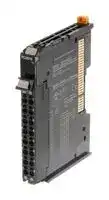


NX-PC0010
I/O POWER SUPPLY UNIT, 4A, 16 TERMINAL
- Manufacturer: OMRON INDUSTRIAL AUTOMATION
- Product type: Controller Accessories
- Current Rating:4A; Product Range:NX Series 52Y3024
- Product Range: NX Series
- Current Rating: 4A
| Delivery and price | |
|---|---|
| Units per pack | 50 |
| Price | 72.16 € |
| Current stock | 10+ |
| Lead time | 30 days |

CSM_NX-PD_PF_PC_TBX_DS_E_5_1
## **NX-series System Unit NX-PD/PF/PC/TBX**
## **Power Supply Unit, Power Connection Unit, and FG Terminal Expansion Unit for NX-series**
## **Features**
- Units to feed in additional Unit power and I/O power to an NX-series remote I/O terminal.
- Screwless clamp terminal block significantly reduces wiring work.
- Space-saving 12 mm wide units.
- The NX Unit Power Supply Unit allows expansion of the I/O configuration beyond the maximum power supply capacity of the EtherCAT Coupler
- The I/O Power Supply Unit is used when the total allowed I/O current per feed terminal is exceeded, or to split I/O power into groups.
- The I/O Power Connection Unit can be used as an additional power supply terminal for connected sensors and actuators.
- The FG Terminal Expansion Unit can be used as ground terminal for wire shields.
- The screwless terminal block is detachable for easy commissioning and maintenance.
Sysmac is a trademark or registered trademark of OMRON Corporation in Japan and other countries for OMRON factory automation products. EtherCAT[] is a registered trademark of Beckhoff Automation GmbH for their patented technology. EtherNet/IP[TM] is the trademarks of ODVA. Other company names and product names in this document are the trademarks or registered trademarks of their respective companies.
**1**
**NX-PD/PF/PC/TBX**
## **System Configuration**
## **System Configuration in the Case of a CPU Unit**
The following figure shows a system configuration when a group of NX Units is connected to an NX-series CPU Unit.
**==> picture [469 x 622] intentionally omitted <==**
**----- Start of picture text -----**<br>
Sysmac Studio<br>● CPU Rack<br>Support Software<br>NX-series CPU Unit<br>NX1P2-@@@@@@@<br>Connection to built-in<br>EtherNet/IP [TM] port<br>Built-in EtherCAT port<br>End Cover<br>NX Units<br>EtherCAT Slave Terminal<br>EtherCAT<br>NX Units<br>EtherCAT Coupler Unit<br> For whether an NX Unit can be connected to the CPU Unit, refer to the version information.<br>System Configuration of Slave Terminals<br>The following figure shows an example of the system configuration when an EtherCAT Coupler Unit is used as a Communications Coupler Unit.<br>Sysmac Studio<br>Support Software EtherCAT master *2<br>NJ/NX-series CPU Unit, NY-series Industrial PC, or<br>master from another manufacturer<br>Connection to peripheral USB port<br>or built-in EtherNet/IP port on<br>CPU Unit or Industrial PC *1<br>.xml<br>ESI files<br>Built-in EtherCAT port<br>Sysmac Studio ●EtherCAT Slave Terminal<br>Support Software Communications cable<br>NX Series<br>Ethernet cables<br>EtherCAT Coupler Unit<br>NX-ECC@@@<br>Peripheral USB port.<br>Connection to peripheral USB<br>port on EtherCAT Coupler Unit<br>.xml<br>ESI files End Cover<br>NX Units<br>**----- End of picture text -----**<br>
**Note:** For whether an NX Unit can be connected to the CPU Unit, refer to the version information.
## **System Configuration of Slave Terminals**
The following figure shows an example of the system configuration when an EtherCAT Coupler Unit is used as a Communications Coupler Unit.
- *1. The connection method for the Sysmac Studio depends on the model of the CPU Unit or Industrial PC.
- *2. An EtherCAT Slave Terminal cannot be connected to any of the OMRON CJ1W-NC @ 81/ @ 82 Position Control Units even though they can operate as EtherCAT masters.
**Note:** For whether an NX Unit can be connected to the Communications Coupler Unit, refer to the version information.
**2**
**NX-PD/PF/PC/TBX**
## **System Configuration in the Case of a Communication Control Unit**
The following figure shows a system configuration when a group of NX Units is connected to an NX-series Communication Control Unit. To configure a Safety Network Controller, mount the Safety CPU Unit, which is one of the NX Units, to the CPU Rack of the Communication Control Unit.
**==> picture [66 x 7] intentionally omitted <==**
**----- Start of picture text -----**<br>
EtherNet/IP Unit<br>**----- End of picture text -----**<br>
**==> picture [117 x 59] intentionally omitted <==**
**==> picture [449 x 229] intentionally omitted <==**
**----- Start of picture text -----**<br>
EtherNet/IP port<br>CPU Rack<br>Communications cable<br>Support Software Ethernet cables NX-series Communication Control Unit<br>NX-CSG320<br>Network Configurator<br>Ethernet switch End Cover<br>NX Units<br>• Safety CPU Unit<br>EDS files • Safety I/O Unit<br>• Other NX Units<br>**----- End of picture text -----**<br>
**==> picture [62 x 69] intentionally omitted <==**
CIP Safety on EtherNet/IP device
**Note:** For whether an NX Unit can be connected to the Communication Control Unit, refer to the version information.
**3**
**NX-PD/PF/PC/TBX**
## **Power Supply Systems**
## **Wiring the Power Supply to the CPU Unit**
There are the following two types of power supplies that supply power to the CPU Rack of the NX1P2 CPU Units. I/O power supply is also required to drive the built-in I/O output circuit. However, only the supply to the NX Unit is described in this section. For the I/O power supply to the built-in I/O, refer to the hardware user’s manual for the CPU Unit to which NX Units are connected.
|**Power supply name**|**Description**|
|---|---|
|Unit power supply|This is the power supply for generating the internal power supply required for the CPU Rack to operate.<br>This power supply is connected to the Unit power supply terminals on the CPU Unit.<br>From the Unit power supply, the internal power supply circuit in the CPU Unit generates the internal<br>circuit power supply, Option Board power supply and NX Unit power supply.<br>The internal circuits of the NX Unit operates on the NX Unit power supply.<br>The NX Unit power supplyis supplied to the NX Units in the CPU Rack through the NX bus connectors.|
|I/O power supply|This power supply is used for driving the I/O circuits of the NX Units and for the connected external<br>devices.<br>There are the following two I/O power supply methods. Either supply method used depends on each<br>model of NX Unit.<br>•<br>Supply from the NX bus<br>•<br>Supply from external source<br>Refer to the_Installation and Wiring_in the_NX-series System Units User’s Manual_(Cat. No. W523) for<br>the details on the power supplymethods.|
The following are wiring diagrams (examples) for each power supply.
**==> picture [511 x 257] intentionally omitted <==**
**----- Start of picture text -----**<br>
NX-series NX1P2 CPU Unit NX Unit<br>Additional NX Unit<br>Unit power NX Unit power supply Power Supply Unit NX Unit power supply<br>supply<br>terminals<br>Internal power<br>supply circuit<br>The I/O power The I/O power<br>supply is supply is not<br>separated. separated.<br>I/O power supply terminals<br>End Cover<br>To external<br>To external devices<br>Unit power External devices<br>supply Additional I/O Power Supply Unit output<br>(24 VDC) device I/O power Additional I/O Power Supply Unit<br>supply<br>I/O power<br>I/O power supply<br>supply<br>(Supply from external source)<br>**----- End of picture text -----**<br>
**Note:** Supply the Unit power and the I/O power from different power supplies. If you supply power from the same power supply the galvanic separation between the bus system and the I/O circuits is no longer effective. Noise generated in the I/O circuits may cause malfunctions in the internal circuits of the units.
**4**
**NX-PD/PF/PC/TBX**
## **Wiring the Power Supply to the Slave Terminal**
There are the following two types of power supplies that supply power to the Slave Terminal.
|**Power supply name**|**Description**|
|---|---|
|Unit power supply|This is the power supply for generating the NX Unit power supply required for the Slave Terminal to<br>operate.<br>This is connected to the Unit power supply terminal on the Communications Coupler Unit or on the<br>Additional NX Unit Power Supply Unit.<br>The internal power supply circuit in the Communications Coupler Unit or the Additional NX Unit Power<br>Supply Unit generates the NX Unit power supply from the Unit power supply.<br>The internal circuits of the Communications Coupler Unit and NX Units operate by the NX Unit power<br>supply.<br>The NX Unit power supply is supplied to the NX Units in the Slave Terminal through the NX bus<br>connectors.|
|I/O power supply|This power supply provides power to drive the I/O circuits of the Position Interface Units and it provides<br>power to external devices such as external encoders and sensors.<br>There are the following two I/O power supply methods. Either supply method used depends on each<br>model of NX Unit.<br>•<br>Supply from the NX bus<br>•<br>Supply from external source<br>Refer to the_Installation and Wiring_in the_NX-series System Units User’s Manual_(Cat. No. W523) for<br>the details on thepower supplymethods.|
The following are wiring diagrams (examples) for each power supply.
**==> picture [511 x 228] intentionally omitted <==**
**----- Start of picture text -----**<br>
NX Unit<br>Communications Coupler Unit NX Unit NX Unit Additional NX Unit power supply<br>power supply Power Supply Unit<br>Unit power supply<br>terminals<br>Internal power<br>supply circuit<br>The I/O power supply is The I/O power<br>separated. supply is not NX bus<br>separated.<br>I/O power<br>supply<br>To external<br>I/O power supply terminals devices Additional End Cover<br>I/O Power<br>Unit To external External External I/O To external<br>power supply devices input input power Supply devices<br>(24 VDC) device device supply Unit<br>I/O power supply (Supply from external source)<br>**----- End of picture text -----**<br>
**Note:** Supply the Unit power and the I/O power from different power supplies. If you supply power from the same power supply the galvanic separation between the bus system and the I/O circuits is no longer effective. Noise generated in the I/O circuits may cause malfunctions in the internal circuits of the units.
**5**
**NX-PD/PF/PC/TBX**
## **Wiring the Power Supply to the Communication Control Unit**
There are the following two types of power supplies that supply power to the Communication Control Unit.
|**Power supply name**|**Description**|
|---|---|
|Unit power supply|This is the power supply for generating the internal power supply required for the CPU Rack to operate.<br>This power supply is connected to the Unit power supply terminals on the Communication Control Unit<br>or Additional NX Unit Power Supply Unit.<br>From the Unit power supply, the internal power supply circuit in the Communication Control Unit<br>generates the power supply to the internal circuit of the Communication Control Unit and NX Unit power<br>supply. The internal power supply circuit in the Additional NX Unit Power Supply Unit generates the NX<br>Unit power supply from the Unit power supply.<br>The internal circuits of the NX Unit operates on the NX Unit power supply.<br>The NX Unit power supplyis supplied to the NX Units in the CPU Rack through the NX bus connectors.|
|I/O power supply|This power supply is used for driving the I/O circuits of the NX Units and for the connected external<br>devices.<br>There are the following two I/O power supply methods. Either supply method used depends on each<br>model of NX Unit.<br>•<br>Supply from the NX bus<br>•<br>Supply from external source<br>Refer to_Supplying Each Power Supply and Wiring_in the User’s Manual for the details on the power<br>supplymethods.|
The following are wiring diagrams (examples) for each power supply.
**==> picture [511 x 236] intentionally omitted <==**
**----- Start of picture text -----**<br>
Communication Control Unit NX Unit NX Unit Additional NX Unit NX Unit power supply<br>power supply Power Supply Unit<br>Unit power<br>supply terminals<br>Internal power<br>supply circuit<br>The I/O power supply is separated. The I/O power supply<br>is not separated.<br>I/O power<br>supply<br>To<br>I/O power supply external devices Additional End Cover<br>Unit power (24 VDC)supply terminals To external devices deviceoutput Exter-nal deviceoutput Exter-nal supplypower I/O I/O Power Supply Unit To external devices<br>I/O power supply<br>(Supply from external source)<br>**----- End of picture text -----**<br>
**Note:** Supply the Unit power and the I/O power from different power supplies. If you supply power from the same power supply the galvanic separation between the bus system and the I/O circuits is no longer effective. Noise generated in the I/O circuits may cause malfunctions in the internal circuits of the units.
**6**
**NX-PD/PF/PC/TBX**
## **Ordering Information**
## **SYSTEM Units**
|**Product Name**|**Specifications**|**Model**|
|---|---|---|
|**Additional NX Unit Power Supply Unit**<br>i|Power supply voltage: 24 VDC (20.4 to 28.8 VDC)<br>NX Bus power supply capacity: 10 W max.|**NX-PD1000**|
|**Additional I/O Power Supply Unit**<br>ee<br>~~Fb~~<br>|<br>~~BC~~|Power supply voltage: 5 to 24 VDC (4.5 to 28.8 VDC)<br>I/O power feed maximum current: 4 A|**NX-PF0630**|
||Power supply voltage: 5 to 24 VDC (4.5 to 28.8 VDC)<br>I/O power feed maximum current: 10 A<br>~~BC~~|**NX-PF0730**|
|**I/O Power Supply Connection Unit**<br>~~Fb~~<br>|<br>~~BC~~<br>~~Bo~~<br>~~Ji~~|Number of I/O power terminals: IOG: 16 terminals<br>Current capacityof I/O power terminal: 4 A/terminal max.<br>~~BC~~<br>~~Bo~~|**NX-PC0010**|
||Number of I/O power terminals: IOV: 16 terminals<br>Current capacityof I/O power terminal: 4 A/terminal max.<br>~~BC~~<br>~~Bo~~|**NX-PC0020**|
||Number of I/O power terminals: IOV: 8 terminals, IOG: 8 terminals<br>Current capacity of I/O power terminal: 4 A/terminal max<br>~~Bo~~<br>|**NX-PC0030**<br>|
|**Shield Connection Unit**<br>~~Bo~~<br>~~Ji~~|Number of shield terminals: 14 terminals (The lower two terminals are functional<br>ground terminals.)<br>~~Bo~~<br>|**NX-TBX01**<br>|
|**Product Name**|**Specification**|**Specification**|**Specification**|**Specification**|**Model**|
|---|---|---|---|---|---|
||**No. of terminals**|**Terminal number**<br>**indications**|**Ground terminal**<br>**mark**|**Terminal current**<br>**capacity**||
|**Terminal Block**|8|A/B|None|10 A|**NX-TBA082**|
||||Provided||**NX-TBC082**|
||16||None||**NX-TBA162**|
||||Provided||**NX-TBC162**|
## **Accessories**
There are no accessories.
**7**
**NX-PD/PF/PC/TBX**
## **General Specification**
|**Item**|**Item**|**Specification**|
|---|---|---|
|Enclosure||Mounted in a panel|
|Groundingmethod||Ground to 100Ωor less|
|Operating<br>environment|Ambient operatingtemperature|0 to 55°C|
||Ambient operatinghumidity|10% to 95% (with no condensation or icing)|
||Atmosphere|Must be free from corrosivegases.|
||Ambient storage temperature|−25 to 70°C (with no condensation or icing)|
||Altitude|2,000 m max.|
||Pollution degree|2 or less: Meets IEC 61010-2-201.|
||Noise immunity|2 kV on power supply line (Conforms to IEC61000-4-4.)|
||Overvoltage category|Category II: Meets IEC 61010-2-201.|
||EMC immunity level|Zone B|
||Vibration resistance|Conforms to IEC 60068-2-6.<br>5 to 8.4 Hz with 3.5-mm amplitude, 8.4 to 150 Hz, acceleration of 9.8 m/s2, 100 min each<br>in X, Y, and Z directions<br>(10 sweeps of 10 min each = 100 min total)|
||Shock resistance|Conforms to IEC 60068-2-27. 147 m/s2, 3 times each in X, Y, and Z directions|
|Applicable standards *||cULus: Listed (UL508), ANSI/ISA 12.12.01, EU: EN 61131-2, C-Tick or RCM,<br>KC Registration, NK, and LR|
* Refer to the OMRON website (www.ia.omron.com) or ask your OMRON representative for the most recent applicable standards for each model.
**8**
**NX-PD/PF/PC/TBX**
## **Specification**
## **Additional NX Unit Power Supply Unit NX-PD1000**
|**Unit name**|Additional NX Unit Power Supply Unit|Additional NX Unit Power Supply Unit|
|---|---|---|
|**Model**|NX-PD1000||
|**External connection**<br>**terminals**|Screwless push-in terminal block (8 terminals)||
|**Power supply voltage**|24 VDC (20.4 to 28.8 VDC)||
|**NX Bus power supply**<br>**capacity**|10 W max. (Refer to Installation orientation and restrictions for details.)||
|**NX Unit power supply**<br>**efficiency**|70%||
|**Unwired terminal**<br>**current capacity**|4 A max. (Including the current of through-wiring)||
|**Dimensions**|12 (W) × 100 (H) 71 × (D)||
|**Isolation method**|No-isolation||
|**Insulation resistance**|20 MΩmin. between isolated circuits (at 100 VDC)||
|**Dielectric strength**|510 VAC between isolated circuits for 1 minute at a leakage current of 5 mA max.||
|**NX Unit power**<br>**consumption**|• Connected to a CPU Unit or Communication Control Unit<br>0.85 W max.<br>• Connected to a Communications Coupler Unit<br>0.45 W max.||
|**I/O current**<br>**consumption**|No consumption||
|**Weight**|65gmax.||
|**Circuit layout**|NX bus<br>connector<br>(left)<br>NX Unit power supply +<br>+<br>+<br>−<br>(Functional ground<br>terminal)<br>Terminal<br>block<br>(Functional ground<br>terminal)<br>−<br>NX Unit power supply -<br>I/O power supply +<br>I/O power supply -|NX bus<br>connector<br>(right)<br>UNIT PWR<br>LED<br>NX Unit power supply +<br>NX Unit power supply−<br>I/O power supply +<br>I/O power supply -<br>DIN Track contact plate<br>(Unit track surface)<br>No-isolation<br>power<br>supply<br>circuit<br>Internal<br>circuits|
**9**
**NX-PD/PF/PC/TBX**
|**Installation orientation**<br>**and restrictions**|Installation orientation:<br>• Connected to a CPU Unit or Communication Control Unit: Possible in upright installation.<br>• Connected to a Communications Coupler Unit: Possible in 6 orientations.<br>Restrictions:<br>•<br>For upright installation<br>•<br>For any installation other than upright<br>Ambient operating temparature (ºC)<br>60<br>55<br>50<br>45<br>40<br>30<br>20<br>10<br>0<br>10<br>8<br>4<br>2<br>0<br>6<br>12<br>Output power (W)<br>For 10 W output, 40ºC<br>For 8.5 W output, 55ºC<br>For 6.0 W output, 55ºC<br>Ambient operating temperature (ºC)<br>60<br>55<br>50<br>45<br>40<br>30<br>20<br>10<br>0<br>10<br>8<br>4<br>2<br>0<br>6<br>12<br>Output power (W)<br>For 10 W output, 40ºC|
|---|---|
|**Terminal connection**<br>**diagram**|UV<br>UG<br>UV<br>UG<br>NC*2 NC*2<br>Additional NX Unit<br>Power Supply Unit<br>NX-PD1000<br>24 VDC Unit<br>power supply<br>A1<br>A8<br>B1<br>B8<br>Through-wiring for surplus terminals*1<br>Ground of 100Ω<br>or less|
- *1. You can use the unwired terminals of the Unit power supply terminals (UV/UG) for through-wiring of the Additional NX Unit Power Supply Unit or the Unit power supply terminals on the EtherCAT Coupler Unit.
- *2. The NC terminal is not connected to the internal circuit.
**10**
**NX-PD/PF/PC/TBX**
## **Additional I/O Power Supply Units NX-PF0** @ **30**
|**Unit name**|Additional I/O Power Supply Unit|Additional I/O Power Supply Unit|Additional I/O Power Supply Unit|Additional I/O Power Supply Unit|Additional I/O Power Supply Unit|Additional I/O Power Supply Unit|Additional I/O Power Supply Unit|
|---|---|---|---|---|---|---|---|
|**Model**|NX-PF0630|||||NX-PF0730||
|**External connection**<br>**terminals**|Screwless push-in terminal block (8 terminals)|||||||
|**Power supply voltage**|5 to 24 VDC (4.5 to 28.8 VDC)*|||||||
|**I/O power supply**<br>**maximum current**|4 A|||||10 A||
|**Current capacity of I/O**<br>**power supply terminal**|4 A max.|||||10 A max.||
|**Dimensions**|12 (W) × 100 (H) 71 × (D)|||||||
|**Isolation method**|No-isolation|||||||
|**Insulation resistance**|20 MΩmin. between isolated circuits (at 100 VDC)|||||||
|**Dielectric strength**|510 VAC between isolated circuits for 1 minute at a leakage current of 5 mA max.|||||||
|**NX Unit power**<br>**consumption**|• Connected to a CPU Unit or Communication Control Unit<br>0.85 W max.<br>• Connected to a Communications Coupler Unit<br>0.45 W max.|||||||
|**I/O current**<br>**consumption**|10 mA max.|||||||
|**Weight**|65gmax.|||||||
|**Circuit layout**|NX bus<br>connector<br>(left)<br>NX Unit power supply +<br>Terminal block<br>IOG<br>IOG<br>IOG<br>IOV<br>IOV<br>IOV<br>NX Unit power supply -<br>I/O power supply +<br>I/O power supply -||NX bus<br>connector<br>(right)<br>IO PWR Indicator<br>NX Unit power supply +<br>NX Unit power supply -<br>I/O power supply +<br>I/O power supply -<br>…<br>…<br>Internal circuits|||||
|**Installation orientation**<br>**and restrictions**|Installation orientation:<br>• Connected to a CPU Unit or Communication Control Unit: Possible in upright installation.<br>• Connected to a Communications Coupler Unit: Possible in 6 orientations.<br>Restrictions: No restrictions|||||||
|**Terminal connection**<br>**diagram**|24 VDC<br>IOV<br>IOG<br>IOV<br>IOG<br>IOV<br>IOG<br>IOV<br>IOG<br>Additional I/O<br>Power Supply Unit<br>NX-PF0630<br>A8<br>A1<br>B8<br>B1|||Two-wire type<br>Three-wire type<br>0<br>IOG<br>IOV<br>IOV<br>A1<br>B1<br>A8<br>B8<br>2<br>IOG<br>1<br>IOG<br>IOV<br>IOV<br>3<br>IOG<br>DC Input Unit<br><br>||||
|||IOV<br>IOG<br>IOV<br>IOG<br>IOV<br>IOG<br>IOV<br>IOG<br>Additional I/O<br>Power Supply Unit<br>NX-PF0630<br>A8<br>A1<br>B8<br>B1|||0<br>IOG<br>IOV<br>IOV<br>A1<br>B1<br>A8<br>B8<br>2<br>IOG<br>1<br>IOG<br>IOV<br>IOV<br>3<br>IOG<br>DC Input Unit|||
|||||||||
|**Overload/low voltage**<br>**detection**|Not supported|||||||
|**Protective function**|Not supported.|||||||
* Use an output voltage that is appropriate for the I/O circuits of the NX Units and the connected external devices.
**11**
**NX-PD/PF/PC/TBX**
## **I/O Power Supply Connection Unit IOG terminal type NX-PC0010**
|**Unit name**|I/O Power Supply Connection Unit|I/O Power Supply Connection Unit|
|---|---|---|
|**Model**|NX-PC0010||
|**External connection**<br>**terminals**|Screwless push-in terminal block (16 terminals)||
|**Number of I/O power**<br>**supply terminals**|IOG: 16 terminals||
|**Current capacity of I/O**<br>**power supply terminal**|4 A/terminal max.||
|**Dimensions**|12 (W) × 100 (H) 71 ×(D)||
|**Isolation method**|No-isolation||
|**Insulation resistance**|20 MΩmin. between isolated circuits (at 100 VDC)||
|**Dielectric strength**|510 VAC between isolated circuits for 1 minute at a leakage current of 5 mA max.||
|**NX Unit power**<br>**consumption**|• Connected to a CPU Unit or Communication Control Unit<br>0.85 W max.<br>• Connected to a Communications Coupler Unit<br>0.45 W max.||
|**I/O current**<br>**consumption**|No consumption||
|**Weight**|65gmax.||
|**Circuit layout**|NX bus<br>connector<br>(left)<br>NX Unit power supply+<br>IOG<br>IOG<br>IOG<br>NX Unit power supply−<br>I/O power supply+<br>I/O power supply−<br>Terminal block|NX bus<br>connector<br>(right)<br>NX Unit power supply+<br>NX Unit power supply−<br>I/O power supply+<br>I/O power supply−<br>…<br>Internal circuits|
|**Installation orientation**<br>**and restrictions**|Installation orientation:<br>• Connected to a CPU Unit or Communication Control Unit: Possible in upright installation.<br>• Connected to a Communications Coupler Unit: Possible in 6 orientations.<br>Restrictions: No restrictions||
|**Terminal connection**<br>**diagram**|I/O Power Supply<br>Connection Unit<br>NX-PC0010<br>0<br>1<br>DC Input Unit<br>or<br>Transistor Output Unit<br>2<br>3<br>4<br>5<br>6<br>7<br>IOG<br>IOG<br>IOG<br>IOG<br>IOG<br>IOG<br>IOG<br>IOG<br>IOG<br>IOG<br>IOG<br>IOG<br>IOG<br>IOG<br>IOG<br>IOG<br>IOV<br>IOV<br>IOV<br>IOV<br>IOV<br>IOV<br>IOV<br>IOV<br>Three-wire type<br>A1<br>B1<br>A8<br>B8<br>A1<br>B1<br>A8<br>B8||
**12**
**NX-PD/PF/PC/TBX**
## **I/O Power Supply Connection Unit IOV terminal type NX-PC0020**
|**Unit name**|I/O Power Supply Connection Unit|I/O Power Supply Connection Unit|
|---|---|---|
|**Model**|NX-PC0020||
|**External connection**<br>**terminals**|Screwless push-in terminal block (16 terminals)||
|**Number of I/O power**<br>**supply terminals**|IOV: 16 terminals||
|**Current capacity of I/O**<br>**power supply terminal**|4 A/terminal max.||
|**Dimensions**|12 (W) × 100 (H) 71 × (D)||
|**Isolation method**|No-isolation||
|**Isolation resistance**|20 MΩmin. between isolated circuits (at 100 VDC)||
|**Dielectric strength**|510 VAC between isolated circuits for 1 minute at a leakage current of 5 mA max.||
|**NX Unit power**<br>**consumption**|• Connected to a CPU Unit or Communication Control Unit<br>0.85 W max.<br>• Connected to a Communications Coupler Unit<br>0.45 W max.||
|**I/O current**<br>**consumption**|No consumption||
|**Weight**|65gmax.||
|**Circuit layout**|NX bus<br>connector<br>(left)<br>NX Unit power supply+<br>IOV<br>IOV<br>IOV<br>NX Unit power supply−<br>I/O power supply+<br>I/O power supply−<br>Terminal block|NX bus<br>connector<br>(right)<br>NX Unit power supply+<br>NX Unit power supply−<br>I/O power supply+<br>I/O power supply−<br>…<br>Internal circuits|
|**Installation orientation**<br>**and restrictions**|Installation orientation:<br>• Connected to a CPU Unit or Communication Control Unit: Possible in upright installation.<br>• Connected to a Communications Coupler Unit: Possible in 6 orientations.<br>Restrictions: No restrictions||
|**Terminal connection**<br>**diagram**|I/O Power Supply<br>Connection Unit<br>NX-PC0020<br>0<br>1<br>DC Input Unit<br>or<br>Transistor Output Unit<br>2<br>3<br>4<br>5<br>6<br>7<br>IOV<br>IOV<br>IOV<br>IOV<br>IOV<br>IOV<br>IOV<br>IOV<br>IOV<br>IOV<br>IOV<br>IOV<br>IOV<br>IOV<br>IOV<br>IOV<br>IOG<br>IOG<br>IOG<br>IOG<br>IOG<br>IOG<br>IOG<br>IOG<br>Three-wire type<br>A1<br>B1<br>A8<br>B8<br>A1<br>B1<br>A8<br>B8||
**13**
**NX-PD/PF/PC/TBX**
## **I/O Power Supply Connection Unit IOV/IOG terminal type NX-PC0030**
|**Unit name**|I/O Power Supply Connection Unit|I/O Power Supply Connection Unit|
|---|---|---|
|**Model**|NX-PC0030||
|**External connection**<br>**terminals**|Screwless push-in terminal block (16 terminals)||
|**Number of I/O power**<br>**supply terminals**|IOV: 8 terminals<br>IOG: 8 terminals||
|**Current capacity of I/O**<br>**power supply terminal**|4 A/terminal max.||
|**Dimensions**|12 (W) × 100 (H) 71 × (D)||
|**Isolation method**|No-isolation||
|**Insulation resistance**|20 MΩmin. between isolated circuits (at 100 VDC)||
|**Dielectric strength**|510 VAC between isolated circuits for 1 minute at a leakage current of 5 mA max.||
|**NX Unit power**<br>**consumption**|• Connected to a CPU Unit or Communication Control Unit<br>0.85 W max.<br>• Connected to a Communications Coupler Unit<br>0.45 W max.||
|**I/O current**<br>**consumption**|No consumption||
|**Weight**|65gmax.||
|**Circuit layout**|NX bus<br>connector<br>(left)<br>NX Unit power supply+<br>Terminal block<br>IOG<br>IOG<br>IOG<br>IOV<br>IOV<br>IOV<br>NX Unit power supply−<br>I/O power supply+<br>I/O power supply−|NX bus<br>connector<br>(right)<br>NX Unit power supply+<br>NX Unit power supply−<br>I/O power supply+<br>I/O power supply−<br>…<br>…<br>Internal circuits|
|**Installation orientation**<br>**and restrictions**|Installation orientation:<br>• Connected to a CPU Unit or Communication Control Unit: Possible in upright installation.<br>• Connected to a Communications Coupler Unit: Possible in 6 orientations.<br>Restrictions: No restrictions||
|**Terminal connection**<br>**diagram**|I/O Power Supply<br>Connection Unit<br>NX-PC0030<br>DC Input Unit<br>or<br>Transistor Output Unit<br>IOV<br>IOV<br>Three-wire type<br>A1<br>B1<br>A8<br>B8<br>A1<br>B1<br>A8<br>B8<br>IOG<br>IOV<br>IOG<br>IOV<br>IOG<br>IOV<br>IOG<br>IOG<br>IOV<br>IOG<br>IOV<br>IOG<br>IOV<br>IOG<br>0<br>2<br>4<br>6<br>8<br>10<br>12<br>14<br>1<br>3<br>5<br>7<br>9<br>11<br>13<br>15||
|||||||||||||||||
|---|---|---|---|---|---|---|---|---|---|---|---|---|---|---|---|
||||I/O Power Supply||||||DC Input Unit|||||||
||||Connection Unit<br>NX-PC0030||||or<br>Transistor Output Unit||||||Three-wire type|||
||||A1||B1|||A1||B1||||||
|||||IOV|IOV||||0|1||||||
|**Terminal**|**connection**|||IOG|IOG||||2|3||||||
|**diagram**||||IOV|IOV||||4|5||||||
|||||IOG|IOG||||6|7||||||
|||||IOV|IOV||||8|9||||||
|||||IOG|IOG||||10|11||||||
|||||IOV|IOV||||12|13||||||
|||||IOG|IOG||||14|15||||||
||||A8||B8|||A8||B8||||||
|||||||||||||||||
**14**
**NX-PD/PF/PC/TBX**
## **Shield Connection Unit NX-TBX01**
|**Unit name**|Shield Connection Unit|Shield Connection Unit|Shield Connection Unit|Shield Connection Unit|Shield Connection Unit|Shield Connection Unit|
|---|---|---|---|---|---|---|
|**Model**|NX-TBX01||||||
|**External connection**<br>**terminals**|Screwless push-in terminal block (16 terminals)||||||
|**Number of shield**<br>**terminals**|14 terminals (The following two terminals are functional ground terminals.)||||||
|**Dimensions**|12 (W) × 100 (H) 71 × (D)||||||
|**Isolation method**|Isolation between the SHLD functionalground terminal, and internal circuit: No-isolation||||||
|**Insulation resistance**|20 MΩmin. between isolated circuits (at 100 VDC)||||||
|**Dielectric strength**|510 VAC between isolated circuits for 1 minute at a leakage current of 5 mA max.||||||
|**NX Unit power**<br>**consumption**|• Connected to a CPU Unit or Communication Control Unit<br>0.85 W max.<br>• Connected to a Communications Coupler Unit<br>0.45 W max.||||||
|**I/O current**<br>**consumption**|No consumption||||||
|**Weight**|65gmax.||||||
|**Circuit layout**|(Functional ground terminal)<br>(Functional ground terminal)<br>NX bus<br>connector<br>(left)<br>NX Unit power supply+<br>NX Unit power supply−<br>I/O power supply+<br>I/O power supply−<br>SHLD terminal<br>SHLD terminal<br>SHLD terminal<br>Terminal<br>block|||Internal circuits<br>NX bus<br>connector<br>(right)<br>NX Unit power supply+<br>NX Unit power supply−<br>I/O power supply+<br>I/O power supply−<br>DIN Track contact plate<br>(Unit back surface)<br>…|||
|**Installation orientation**<br>**and restrictions**|Installation orientation:<br>• Connected to a CPU Unit or Communication Control Unit: Possible in upright installation.<br>• Connected to a Communications Coupler Unit: Possible in 6 orientations.<br>Restrictions: No restrictions||||||
|**Terminal connection**<br>**diagram**|A<br>A<br>Ground of 100Ω<br>or less||||A<br>Z<br>B<br>NC<br>IOV<br>IOG<br>IOV<br>IOG<br>I0<br>I2<br>I1<br>NC<br>IOV<br>IOG<br>IOV<br>IOG<br>A1<br>A8<br>B1<br>B8<br>Incremental Encoder<br>Input Unit<br>(Open collector input)<br>Shield<br>Rotary Encoder||
|||A|Shield<br>Connection Unit<br>NX-TBX01<br>1<br>B1<br>8<br>B8<br>SHLD<br>SHLD<br>SHLD<br>SHLD<br>SHLD<br>SHLD<br>SHLD<br>SHLD<br>SHLD<br>SHLD<br>SHLD<br>SHLD<br>SHLD<br>SHLD||||
|||A|||||
||||||||
**15**
**NX-PD/PF/PC/TBX**
## **Version Information**
## **Connecting with CPU Units**
Refer to the user's manual for the CPU Unit for the models of CPU Unit to which NX Units can be connected.
|**NX Unit**|**NX Unit**|**Corresponding unit versions/versions**|**Corresponding unit versions/versions**|
|---|---|---|---|
|**Model**|**Unit Version**|**CPU Unit**|**Sysmac Studio**|
|NX-PD1000|Ver.1.0|Ver.1.13|Ver.1.17|
|NX-PF0630||||
|NX-PF0730||||
|NX-PC0020||||
|NX-PC0010||||
|NX-PC0030||||
|NX-TBX01||||
**Note:** Some Units do not have all of the versions given in the above table. If a Unit does not have the specified version, support is provided by the oldest available version after the specified version. Refer to the user's manuals for the specific Units for the relation between models and versions.
## **Connecting with EtherCAT Coupler Units**
|**NX Unit**|**NX Unit**|**Corresponding unit versions/versions**|**Corresponding unit versions/versions**|**Corresponding unit versions/versions**|
|---|---|---|---|---|
|**Model**|**Unit Version**|**EtherCAT Coupler Unit**|**CPU Units or Industrial PCs**|**Sysmac Studio**|
|NX-PD1000|Ver.1.0|Ver.1.0|Ver.1.05|Ver.1.06|
|NX-PF0630|||||
|NX-PF0730||||Ver.1.08|
|NX-PC0020||||Ver.1.06|
|NX-PC0010|||||
|NX-PC0030|||||
|NX-TBX01|||||
**Note:** Some Units do not have all of the versions given in the above table. If a Unit does not have the specified version, support is provided by the oldest available version after the specified version. Refer to the user’s manuals for the specific Units for the relation between models and versions.
## **Connecting with EtherNet/IP Coupler Unit**
|**NX Unit**|**NX Unit**|**Corresponding unit versions/versions**|**Corresponding unit versions/versions**|**Corresponding unit versions/versions**|**Corresponding unit versions/versions**|**Corresponding unit versions/versions**|**Corresponding unit versions/versions**|
|---|---|---|---|---|---|---|---|
|**Model**|**Unit**<br>**version**|**Application with an NJ/NX/NY-series Controller *1**|||**Application with a CS/CJ/CP-series PLC *2**|||
|||**EtherNet/IP**<br>**Coupler Unit**|**CPU Unit or**<br>**Industrial PC**|**Sysmac**<br>**Studio**|**EtherNet/IP**<br>**Coupler Unit**|**Sysmac**<br>**Studio**|**NX-IO**<br>**Configurator *3**|
|NX-PD1000|Ver. 1.0|Ver. 1.2|Ver. 1.14|Ver. 1.19|Ver. 1.0|Ver. 1.10|Ver. 1.00|
|NX-PF0630||||||||
|NX-PF0730||||||||
|NX-PC0020||||||||
|NX-PC0010||||||||
|NX-PC0030||||||||
|NX-TBX01||||||||
**Note:** Some Units do not have all of the versions given in the above table. If a Unit does not have the specified version, support is provided by the oldest available version after the specified version. Refer to the user’s manuals for the specific Units for the relation between models and versions.
- *1. Refer to the user’s manual for the EtherNet/IP Coupler Units for information on the unit versions of EtherNet/IP Units that are compatible with EtherNet/IP Coupler Units.
- *2. Refer to the user’s manual for the EtherNet/IP Coupler Units for information on the unit versions of CPU Units and EtherNet/IP Units that are compatible with EtherNet/IP Coupler Units.
- *3. For connection to an EtherNet/IP Coupler Unit with unit version 1.0, You can connect only to the peripheral USB port on the EtherNet/IP Coupler Unit. You cannot connect with any other path. If you need to connect by another path, use an EtherNet/IP Coupler Unit with unit version 1.2 or later.
## **Connecting with Communication Control Units**
|**NX Unit**|**NX Unit**|**Corresponding unit versions/versions**|**Corresponding unit versions/versions**|
|---|---|---|---|
|**Model**|**Unit version**|**Communication Control Unit**|**Sysmac Studio**|
|NX-PD1000|Ver. 1.0|Ver.1.00|Ver.1.24|
|NX-PF0630||||
|NX-PF0730||||
|NX-PC0020||||
|NX-PC0010||||
|NX-PC0030||||
|NX-TBX01||||
**Note:** Some Units do not have all of the versions given in the above table. If a Unit does not have the specified version, support is provided by the oldest available version after the specified version. Refer to the user’s manuals for the specific Units for the relation between models and versions.
**16**
**NX-PD/PF/PC/TBX**
## **External Interface**
## **Additional NX Unit Power Supply Unit, Additional I/O Power Supply Unit, I/O Power Supply Connection Unit, and Shield Connection Unit**
**NX-PD1000/NX-PF0** @ **30/NX-PC00** @ **0/NX-TBX01**
**==> picture [115 x 171] intentionally omitted <==**
**----- Start of picture text -----**<br>
(B)<br>(C)<br>(A)<br>**----- End of picture text -----**<br>
|**Symbol**<br>|**Name**|**Function**|
|---|---|---|
|(A)<br>NX bus co|nnector|This connector is used to connect each Unit.|
|(B)<br>Indicators||The indicators show the current operatingstatus of the Unit.|
|(C)<br>Terminal b|lock|The terminal block is used to connect external devices.<br>The number of terminals depends on the type of Unit.|
|**Terminal Blocks**<br>8-termi<br>(A)<br>A1<br>A2<br>A3<br>A4<br>A5<br>A6<br>A7<br>A8|nal type<br>(B)<br>16-terminal type<br>(C)<br>B1<br>B2<br>B3<br>B4<br>B5<br>B6<br>B7<br>B8<br>A1<br>A2<br>A3<br>A4<br>A5<br>A6<br>A7<br>A8<br>B1<br>B2<br>B3<br>B4<br>B5<br>B6<br>B7<br>B8||
|**Symbol**<br>|**Name**|**Function**|
|---|---|---|
|{A)<br>Terminal n<br>indications|umber|Terminal numbers for which A and B indicate the column, and 1 to 8 indicate the line are<br>displayed. The terminal number is a combination of column and line, so A1 to A8 and B1 to<br>B8 are displayed.<br>The terminal number indications are the same regardless of the number of terminals on the<br>terminal block.|
|(B)<br>Release ho|les|Insert a flat-blade screwdriver into these holes to connect and remove the wires.|
|(C)<br>Terminal h|oles|The wires are inserted into these holes.|
**17**
**NX-PD/PF/PC/TBX**
## **Applicable Terminal Blocks for Each Unit Model**
|**Unit model**|**Terminal Blocks**|**Terminal Blocks**|**Terminal Blocks**|**Terminal Blocks**|**Terminal Blocks**|
|---|---|---|---|---|---|
||**Model**|**No. of terminals**|**Terminal number**<br>**indications**|**Ground terminal**<br>**mark**|**Terminal current**<br>**capacity**|
|NX-PD1000|NX-TBC082|8|A/B|Provided|10 A|
|NX-PF0630|NX-TBA082|8|A/B|None|10 A|
|NX-PF0730|NX-TBA082|8|A/B|None|10 A|
|NX-PC@@@@|NX-TBA162|16|A/B|None|10 A|
|NX-TBX01|NX-TBC162|16|A/B|Provided|10 A|
## **Applicable Wires**
## **Using Ferrules**
If you use ferrules, attach the twisted wires to them. Observe the application instructions for your ferrules for the wire stripping length when attaching ferrules. Always use plated one-pin ferrules. Do not use unplated ferrules or two-pin ferrules.
The applicable ferrules, wires, and crimping tool are given in the following table.
|**Terminal types**|**Manufacturer**|**Ferrule model**|**Applicable wire**<br>**(mm2 (AWG))**|**Crimping tool**|
|---|---|---|---|---|
|Terminals other<br>than ground<br>terminals|Phoenix Contact|AI0,34-8|0.34(#22)|Phoenix Contact (The figure in parentheses is the applicable wire<br>size.)<br>CRIMPFOX 6 (0.25 to 6 mm2, AWG 24 to 10)|
|||AI0,5-8|0.5 (#20)||
|||AI0,5-10|||
|||AI0,75-8|0.75 (#18)||
|||AI0,75-10|||
|||AI1,0-8|1.0 (#18)||
|||AI1,0-10|||
|||AI1,5-8|1.5 (#16)||
|||AI1,5-10|||
|Ground terminals||AI2,5-10|2.0*1||
|Terminals other<br>than ground<br>terminals|Weidmuller|H0.14/12|0.14(#26)|Weidmueller (The figure in parentheses is the applicable wire size.)<br>PZ6 Roto (0.14 to 6 mm2, AWG 26 to 10)|
|||H0.25/12|0.25(#24)||
|||H0.34/12|0.34(#22)||
|||H0.5/14|0.5 (#20)||
|||H0.5/16|||
|||H0.75/14|0.75 (#18)||
|||H0.75/16|||
|||H1.0/14|1.0 (#18)||
|||H1.0/16|||
|||H1.5/14|1.5 (#16)||
|||H1.5/16|||
*1. Some AWG 14 wires exceed 2.0 mm[2] and cannot be used in the screwless clamping terminal block.
When you use any ferrules other than those in the above table, crimp them to the twisted wires so that the following processed dimensions are achieved.
8 to 10 mm 1.6 mm max. (Terminals other than ground terminals) 2.4 mm max. 2.0 mm max. (Terminals other than ground terminals) (Ground terminals) 2.7 mm max. (Ground terminals)
## **Using Twisted Wires/Solid Wires**
If you use the twisted wires or the solid wires, use the following table to determine the correct wire specifications.
|**Terminals**|**Terminals**|**Wire type**|**Wire type**|**Wire type**|**Wire type**|**Wire size**|**Conductor length**<br>**(stripping length)**|
|---|---|---|---|---|---|---|---|
|||**Twisted wires**||**Solid wire**||||
|**Classification**|**Current capacity**|**Plated**|**Unplated**|**Plated**|**Unplated**|||
|All terminals except<br>ground terminals|2 A max.|Possible|Possible|Possible|Possible|0.08 to 1.5 mm2<br>AWG28 to 16|8 to 10 mm|
||Greater than<br>2 A and 4 A or less||Not<br>Possible|Possible *1|Not<br>Possible|||
||Greater than 4 A|Possible *1||Not Possible||||
|Ground terminals|---|Possible|Possible|Possible *2|Possible *2|2.0 mm2|9 to 10 mm|
*1. Secure wires to the screwless clamping terminal block. Refer to the Securing Wires in the USER'S MANUAL for how to secure wires.
*2. With the NX-TB @@@ 1 Terminal Block, use twisted wires to connect the ground terminal. Do not use a solid wire.
Conductor length (stripping length)
**<Additional Information>** If more than 2 A will flow on the wires, use plated wires or use ferrules.
**18**
**NX-PD/PF/PC/TBX**
**(Unit: mm)**
## **Dimensions**
## **Additional NX Unit Power Supply Unit, Additional I/O Power Supply Unit, I/O Power Supply Connection Unit, and Shield Connection Unit NX-PD1000/NX-PF0** @ **30/NX-PC00** @ **0/NX-TBX01**
## ● **Unit Only**
**==> picture [183 x 187] intentionally omitted <==**
**----- Start of picture text -----**<br>
14.1<br>12.0<br>0.55<br>1.5<br>100 104.5<br>1.5 65.2<br>71<br>80<br>**----- End of picture text -----**<br>
## ● **With Cables Connected**
**==> picture [177 x 60] intentionally omitted <==**
**----- Start of picture text -----**<br>
100<br>71<br>**----- End of picture text -----**<br>
## **Related Manuals**
|**Man. No**|**Model**|**Manual**|**Application**|**Description**|
|---|---|---|---|---|
|W523<br> <br> <br> <br>|NX-PD1@@@<br>NX-PF0@@@<br>NX-PC0@@@<br>NX-TBX01|NX-series System Unit<br>User’s Manual|Learning how to use NX-<br>series System Units|The hardware and functions of the NX-series<br>System Units are described.|
**19**
## Terms and Conditions Agreement
## Read and understand this catalog.
Please read and understand this catalog before purchasing the products. Please consult your OMRON representative if you have any questions or comments.
## Warranties.
(a) Exclusive Warranty. Omron’s exclusive warranty is that the Products will be free from defects in materials and workmanship for a period of twelve months from the date of sale by Omron (or such other period expressed in writing by Omron). Omron disclaims all other warranties, express or implied.
(b) Limitations. OMRON MAKES NO WARRANTY OR REPRESENTATION, EXPRESS OR IMPLIED, ABOUT NON-INFRINGEMENT, MERCHANTABILITY OR FITNESS FOR A PARTICULAR PURPOSE OF THE PRODUCTS. BUYER ACKNOWLEDGES THAT IT ALONE HAS DETERMINED THAT THE
PRODUCTS WILL SUITABLY MEET THE REQUIREMENTS OF THEIR INTENDED USE.
Omron further disclaims all warranties and responsibility of any type for claims or expenses based on infringement by the Products or otherwise of any intellectual property right. (c) Buyer Remedy. Omron’s sole obligation hereunder shall be, at Omron’s election, to (i) replace (in the form originally shipped with Buyer responsible for labor charges for removal or replacement thereof) the non-complying Product, (ii) repair the non-complying Product, or (iii) repay or credit Buyer an amount equal to the purchase price of the non-complying Product; provided that in no event shall Omron be responsible for warranty, repair, indemnity or any other claims or expenses regarding the Products unless Omron’s analysis confirms that the Products were properly handled, stored, installed and maintained and not subject to contamination, abuse, misuse or inappropriate modification. Return of any Products by Buyer must be approved in writing by Omron before shipment. Omron Companies shall not be liable for the suitability or unsuitability or the results from the use of Products in combination with any electrical or electronic components, circuits, system assemblies or any other materials or substances or environments. Any advice, recommendations or information given orally or in writing, are not to be construed as an amendment or addition to the above warranty.
See http://www.omron.com/global/ or contact your Omron representative for published information.
## Limitation on Liability; Etc.
OMRON COMPANIES SHALL NOT BE LIABLE FOR SPECIAL, INDIRECT, INCIDENTAL, OR CONSEQUENTIAL DAMAGES, LOSS OF PROFITS OR PRODUCTION OR COMMERCIAL LOSS IN ANY WAY CONNECTED WITH THE PRODUCTS, WHETHER SUCH CLAIM IS BASED IN CONTRACT, WARRANTY, NEGLIGENCE OR STRICT LIABILITY. Further, in no event shall liability of Omron Companies exceed the individual price of the Product on which liability is asserted.
## Suitability of Use.
Omron Companies shall not be responsible for conformity with any standards, codes or regulations which apply to the combination of the Product in the Buyer’s application or use of the Product. At Buyer’s request, Omron will provide applicable third party certification documents identifying ratings and limitations of use which apply to the Product. This information by itself is not sufficient for a complete determination of the suitability of the Product in combination with the end product, machine, system, or other application or use. Buyer shall be solely responsible for determining appropriateness of the particular Product with respect to Buyer’s application, product or system. Buyer shall take application responsibility in all cases.
NEVER USE THE PRODUCT FOR AN APPLICATION INVOLVING SERIOUS RISK TO LIFE OR PROPERTY OR IN LARGE QUANTITIES WITHOUT ENSURING THAT THE SYSTEM AS A WHOLE HAS BEEN DESIGNED TO ADDRESS THE RISKS, AND THAT THE OMRON PRODUCT(S) IS PROPERLY RATED AND INSTALLED FOR THE INTENDED USE WITHIN THE OVERALL EQUIPMENT OR SYSTEM.
## Programmable Products.
Omron Companies shall not be responsible for the user’s programming of a programmable Product, or any consequence thereof.
## Performance Data.
Data presented in Omron Company websites, catalogs and other materials is provided as a guide for the user in determining suitability and does not constitute a warranty. It may represent the result of Omron’s test conditions, and the user must correlate it to actual application requirements. Actual performance is subject to the Omron’s Warranty and Limitations of Liability.
## Change in Specifications.
Product specifications and accessories may be changed at any time based on improvements and other reasons. It is our practice to change part numbers when published ratings or features are changed, or when significant construction changes are made. However, some specifications of the Product may be changed without any notice. When in doubt, special part numbers may be assigned to fix or establish key specifications for your application. Please consult with your Omron’s representative at any time to confirm actual specifications of purchased Product.
## Errors and Omissions.
Information presented by Omron Companies has been checked and is believed to be accurate; however, no responsibility is assumed for clerical, typographical or proofreading errors or omissions.
**In the interest of product improvement, specifications are subject to change without notice.**
## **OMRON Corporation**
## **Industrial Automation Company**
2020.2
**http://www.ia.omron.com/**
(c)Copyright OMRON Corporation 2020 All Right Reserved.
Updated at April 22, 2026
With a legacy spanning over 80 years, Omron Industrial Automation is a globally recognized leader in the manufacture of advanced industrial control and automation components. Renowned for their reliability and engineering excellence, Omron delivers comprehensive solutions that enhance efficiency, machine safety, and precision across a wide range of manufacturing environments. Our extensive portfolio of Omron products is heavily focused on their industry-leading sensing and switching technologies. We offer a vast selection of sensors, excelling specifically in high-performance proximity sensors, light sensors, and temperature sensors. Complementing this range are robust switching solutions, featuring a deep inventory of power relays, solid-state relays, safety relays, and essential relay accessories designed for demanding operational requirements. Beyond sensing and switching, Omron is highly regarded for its precision automation and process control equipment. Our selection features highly accurate temperature controllers, versatile process controllers, and sophisticated panel displays and instrumentation. To support these fundamental systems, we also supply dependable Omron power supplies, notably AC/DC converters, alongside vital connectivity components like DIN rail terminal blocks to ensure secure, efficient, and complete industrial setups.
About Novapart
Novapart is a B2B electronic component broker specialising in stock shortages and cost reduction. We source hard-to-find parts and identify compliant alternatives across a catalogue of 410,000+ components from 500+ manufacturers.
Learn more →Stock Shortage Specialist
When a component is unavailable, discontinued or has an unacceptable lead time, we tap into our network of vetted European and Asian distributors to source what you need — without compromising on quality or traceability.
Request a quote →Compliant Alternatives
We identify pin-to-pin, electrically equivalent substitutes that meet the same certifications (RoHS, AEC-Q100, REACH) as your original specification — validated against datasheets, not just part numbers. Often at a lower cost.
BOM Analysis service →