
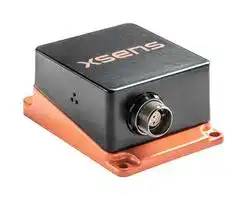


MTI-610R
MEMS Module, Accelerometer, Gyroscope, Magnetometer, X, Y, Z, 4.5 V, 24 V, Module
- Manufacturer: XSENS
- Product type: MEMS Modules
- SVHC: To Be Advised
- No. of Pins: -
- Sensor Type: Accelerometer, Gyroscope, Magnetometer
- Sensing Axis: X, Y, Z
- Product Range: MTi-600 Series
- Output Interface: CAN, RS232, UART
- Sensor Case Style: Module
- Supply Voltage Max: 24V
- Supply Voltage Min: 4.5V
- MEMS Module Function: Tri-Axis Gyroscope, Tri-Axis Accelerometer, Tri-Axis Magnetometer, Tri-Axis Barometer
- Sensor Case / Package: Module
- Operating Temperature Max: 85°C
- Operating Temperature Min: -40°C
- Sensing Range - Gyroscope: ± 2000°/s
- Temperature Sensing Range: -
- Sensing Range - Accelerometer: ± 10g
| Delivery and price | |
|---|---|
| Units per pack | 1 |
| Price | 943.08 € |
| Current stock | 10+ |
| Lead time | 30 days |

1 www.xsens.com
|A|Sept. 2019|AKO, MCR|Initial release|
|---|---|---|---|
|B|Sep 2019|AKO|Grammar and wording<br>update|
|C<br>~~se~~|Nov 2019<br>~~se~~|WBO, MCR<br>~~se~~|Maximum output current for<br>the SYNC output<br>~~ee~~|
|D<br>~~se~~|Nov 2019<br>~~se~~|AKO<br>~~se ~~|Xsens brand update<br> ~~ee~~|
|2020.A|Jun 2020|AKO|Added MTi-680G|
|2020.B|Sept 2020|AKO|Added reach declaration<br>Updated acc specifications<br>Added lever arm figure|
© 2005-2020, Xsens Technologies B.V. All rights reserved. Information in this document is subject to change without notice. Xsens, Xsens DOT, MVN, MotionGrid, MTi, MTi-G, MTx, MTw, Awinda and KiC are registered trademarks or trademarks of Xsens Technologies B.V. and/or its parent, subsidiaries and/or affiliates in The Netherlands, the USA and/or other countries. All other trademarks are the property of their respective owners.
2
www.xsens.com
## Table of Contents
|**1**|**General information .................................................................. 7**|
|---|---|
||1.1<br>Ordering information................................................................................... 8|
||1.2<br>MTi 600-series architecture.......................................................................... 9|
||1.3<br>MTi 600-series product variants .................................................................. 10|
||1.3.1<br>MTi-610 IMU ....................................................................................... 10|
||1.3.2<br>MTi-620 VRU ....................................................................................... 10|
||1.3.3<br>MTi-630 AHRS ..................................................................................... 11|
||1.3.4<br>MTi-670 GNSS/INS .............................................................................. 11|
||1.3.5<br>MTi-680G RTK GNSS/INS ...................................................................... 11|
|**2**|**Sensor specifications .............................................................. 12**|
||2.1<br>MTi 600-series performance specifications .................................................... 12|
||2.2<br>Sensor specifications ................................................................................. 13|
|**3**|**Functional description ............................................................. 15**|
||3.1<br>Pin description module ............................................................................... 15|
||3.2<br>Pin description MTi-680G ............................................................................ 16|
||3.3<br>Peripheral interfaces .................................................................................. 17|
||3.3.1<br>CAN (Controller Area Network) .............................................................. 17|
||3.3.2<br>RS232 with RTS/CTS flow control ........................................................... 17|
||3.3.3<br>UART .................................................................................................. 17|
||3.3.4<br>RTCM input port .................................................................................. 17|
|**4**|**Signal processing and algorithms ........................................... 18**|
||4.1<br>Signal processing pipeline........................................................................... 18|
||4.1.1<br>Strapdown integration .......................................................................... 18|
||4.1.2<br>Xsens sensor fusion algorithm for VRU and AHRS product types ................ 18|
||4.1.3<br>Xsens sensor fusion algorithm for the GNSS/INS product type ................... 22|
||4.2<br>Data output .............................................................................................. 24|
||4.2.1<br>Xbus output ........................................................................................ 25|
||4.2.2<br>NMEA output ....................................................................................... 25|
||4.2.3<br>CAN output ......................................................................................... 25|
||4.3<br>GNSS input ............................................................................................... 25|
||4.4<br>Magnetic interference ................................................................................ 26|
||4.4.1<br>Magnetic Field Mapping (MFM) ............................................................... 26|
||4.5<br>Frames of reference ................................................................................... 27|
|**5**|**Synchronization options .......................................................... 29**|
||5.1<br>Trigger signal ............................................................................................ 29|
3
www.xsens.com
**==> picture [455 x 421] intentionally omitted <==**
**----- Start of picture text -----**<br>
|||
|---|---|
|5.2|SyncIn ..................................................................................................... 30|
|5.2.1|TriggerIndication function ..................................................................... 30|
|5.2.2|SendLatest function ............................................................................. 30|
|5.2.3|StartSampling function ......................................................................... 30|
|5.2.4|Clock Bias Estimation function ............................................................... 30|
|5.2.5|1PPS Time-pulse function ..................................................................... 31|
|5.3|SyncOut ................................................................................................... 32|
|5.3.1|Interval Transition Measurement function ............................................... 32|
|5.4|Combining multiple Sync functions .............................................................. 32|
|6|System and electrical specifications ........................................ 33|
|6.1|Interface specifications .............................................................................. 33|
|6.2|System specifications ................................................................................. 33|
|6.3|Electrical specifications ............................................................................... 35|
|6.4|Absolute maximum ratings ......................................................................... 36|
|7|Design and packaging ............................................................. 37|
|7.1|Design ..................................................................................................... 37|
|7.2|Packaging information ................................................................................ 38|
|7.2.1|MTi 600-series module ......................................................................... 38|
|7.2.2|MTi-680G ............................................................................................ 39|
|8|Declaration of conformity ........................................................ 40|
|8.1|EU Declaration of Conformity MTi-600 module .............................................. 40|
|8.2|EU Declaration of Conformity MTi-600 rugged ............................................... 41|
|8.3|FCC Declaration of Conformity MTi-600 module ............................................. 42|
|8.4|FCC Declaration of Conformity MTi-600 rugged ............................................. 43|
|8.5|Reach Declaration ..................................................................................... 44|
**----- End of picture text -----**<br>
## List of Tables
Table 1: MTi product documentation overview ........................................................... 7 Table 2: Ordering information for MTi 600-series products .......................................... 8 Table 3: Orientation performance specifications ....................................................... 12 Table 4: Position and velocity performance specifications for MTi-670-DK .................... 12 Table 5: Position and velocity performance specifications for MTi-680G with RTK correction signals provided .................................................................................... 12 Table 6: MTi 600-series gyroscope specifications ...................................................... 13 Table 7: MTi 600-series accelerometer specifications ................................................ 13 Table 8: MTi 600-series magnetometer specifications ................................................ 13
4
www.xsens.com
|Table 9: MTi 600-series barometer specifications ...................................................... 13|Table 9: MTi 600-series barometer specifications ...................................................... 13|
|---|---|
|Table 10: MTi 600-series orthogonality specifications ................................................ 13|Table 10: MTi 600-series orthogonality specifications ................................................ 13|
|Table 11: MTi-680G GNSS specifications ................................................................. 14|Table 11: MTi-680G GNSS specifications ................................................................. 14|
|Table 12: Pin descriptions of the MTi-600 ................................................................ 15|Table 12: Pin descriptions of the MTi-600 ................................................................ 15|
|Table 13: Pin descriptions MTi-680G Host Interface .................................................. 16|Table 13: Pin descriptions MTi-680G Host Interface .................................................. 16|
|Table 14: Pin descriptions MTi-680G RTCM corrections .............................................. 16|Table 14: Pin descriptions MTi-680G RTCM corrections .............................................. 16|
|Table 15 RTCM input port baud rates ...................................................................... 17|Table 15 RTCM input port baud rates ...................................................................... 17|
|Table 16: Filter profiles for MTi-620 and MTi-630 ...................................................... 19|Table 16: Filter profiles for MTi-620 and MTi-630 ...................................................... 19|
|Table 17: Heading Behaviour ................................................................................. 20|Table 17: Heading Behaviour ................................................................................. 20|
|Table 18: Filter profiles for MTi-670 and MTi-680G (GNSS/INS).................................. 24|Table 18: Filter profiles for MTi-670 and MTi-680G (GNSS/INS).................................. 24|
|Table 19: Output data rates ................................................................................... 25|Table 19: Output data rates ................................................................................... 25|
|Table 20: Settings required to enable NMEAin for the MTi-670 ................................... 26|Table 20: Settings required to enable NMEAin for the MTi-670 ................................... 26|
|Table 21: Generic synchronization parameters ......................................................... 29|Table 21: Generic synchronization parameters ......................................................... 29|
|Table 22: Remarks on combining multiple Sync functions .......................................... 32|Table 22: Remarks on combining multiple Sync functions .......................................... 32|
|Table 23: Communication interfaces ....................................................................... 33|Table 23: Communication interfaces ....................................................................... 33|
|Table 24: System specifications of MTi 600-series modules ........................................ 33|Table 24: System specifications of MTi 600-series modules ........................................ 33|
|Table 25: System specifications of MTi-680G ........................................................... 33|Table 25: System specifications of MTi-680G ........................................................... 33|
|Table 26: Supply voltage specifications ................................................................... 35|Table 26: Supply voltage specifications ................................................................... 35|
|Table 27: I/O electrical specifications ...................................................................... 35|Table 27: I/O electrical specifications ...................................................................... 35|
|Table 28: Absolute maximum ratings MTi 600-series module ..................................... 36|Table 28: Absolute maximum ratings MTi 600-series module ..................................... 36|
## List of Figures
|Figure 1: MTi 600-series module diagram ................................................................. 9|Figure 1: MTi 600-series module diagram ................................................................. 9|
|---|---|
|Figure 2: Pin configuration of the MTi 600-series module (bottom view) ...................... 15|Figure 2: Pin configuration of the MTi 600-series module (bottom view) ...................... 15|
|Figure 3 Connectors and pin numbers on the MTi-680G housing ................................. 16|Figure 3 Connectors and pin numbers on the MTi-680G housing ................................. 16|
|Figure 4: Filter profile and heading behaviour selection: a tiered approach .................. 21|Figure 4: Filter profile and heading behaviour selection: a tiered approach .................. 21|
|Figure 5: Example of lever arm measurements ........................................................ 23|Figure 5: Example of lever arm measurements ........................................................ 23|
|Figure 6: Lever arm correction for MTi-680G ............................................................ 23|Figure 6: Lever arm correction for MTi-680G ............................................................ 23|
|Figure 7 Default sensor fixed coordinate system (S|Figure 7 Default sensor fixed coordinate system (Sxyz) for the MTi 600-series module ... 27|
|Figure 8: Default sensor coordinate system for the MTi-680G..................................... 28|Figure 8: Default sensor coordinate system for the MTi-680G..................................... 28|
|Figure 9: Location origin of measurements MTi-600 module (dimensions in mm) .......... 37|Figure 9: Location origin of measurements MTi-600 module (dimensions in mm) .......... 37|
|Figure 10: Location origin of measurements MTi-680G (dimensions in mm) ................. 37|Figure 10: Location origin of measurements MTi-680G (dimensions in mm) ................. 37|
## List of Abbreviations
The MT Family Reference Manual[1] provides a list of abbreviations used across our MT documentation.
1The latest available documentation can be found in your MT Software Suite installation folder or via the following link: _https://xsens.com/xsens-mti-documentation_
5
www.xsens.com
## References
|Abbreviation<br>~~SS~~|Description|
|---|---|
|[FRM]<br>~~SS~~|“MT FamilyReference Manual”,document id MT1600P|
|[LLCP]|“MT Low-Level Communication Protocol Documentation.pdf”, document id<br>MT0101P|
|[MFM]|“Magnetic Field Mapper Documentation.pdf”, document id MT0202P|
|[MTM]|“MT Manager User Manual.pdf”, document id MT0216P|
|[CAN]|“MT CAN Protocol Documentation”, document ID MT1604P|
Note: The latest available documentation can be found in your MT Software Suite installation folder or via the following link: _https://xsens.com/xsens-mti-documentation_
6
www.xsens.com
## 1 General information
This document provides information on the usage and technical details of the MTi 600series modules and the MTi-680G. The MTi 600-series module (MTi-600) is a fully functional, self-contained module that is easy to design-in. The MTi-600 module can be connected to a host through RS232, CAN or UART interfaces, or through USB using the UART to USB converter (included in the MTi 600-series Development Kit). Whereas the MTi-680G is a rugged device with integrated RTK GNSS receiver.
The _MTi Family Reference Manual[1]_ supplements this document. It reports generic information on the MTi 1-series and MTi 600-series, such as output definitions, algorithm details and installation tips.
The _MTi 600-series Hardware Integration Manual[2]_ supplements this document. In this document, notes on typical application scenarios, printed circuit board (PCB) layout, origin of measurement reference system, stress related considerations, reference designs and handling information can be found.
For testing and prototyping, Xsens provides the MTi-630 and MTi-670 Development Kits (MTi-630-DK and MTi-670-DK) as well as a Starter Kit for the MTi-680G (MTi-680G-SK). In addition to the RS232, CAN and UART pin connectors of the MTi 600-series module, the Development Kit offers a direct USB, RS232, RS422 and CAN interface. Technical details of the Development Kit and its usage can be found in the _MTi 600-series DK User Manual[1]_ .
The _MT Low Level Communication Protocol[1]_ document provides a complete reference for the protocols used to communicate with Xsens Motion Trackers on low-level basis. The MT Low Level Communication Protocol document also describes the synchronization messages and settings in detail.
Table 1 summarizes all available official documents for the Xsens MTi product line.
Table 1: MTi product documentation overview
|MTi 1-series<br>~~SE~~|MTi 600-series<br>~~SE~~|MTi 10/100-series<br>~~SE~~|
|---|---|---|
|MTi FamilyReferenceManual<br>~~SE~~||MTi User Manual<br>~~SE~~|
|MTi 1-series Datasheet|MTi 600-series Datasheet||
|MTi 1-series DK User Manual|MTi 600-series DK User<br>Manual||
|MTi 1-series HW Integration<br>Manual|MTi 600-series HW<br>Integration Manual||
||MT CAN protocol<br>Documentation||
|MT Manager Manual|||
|Magnetic Calibration Manual|||
|MT Low Level Communication Protocol Documentation|||
|Firmware UpdaterUser Manual|||
> 2 Links to the latest available documentation can be found via the following link: Xsens MTi Documentation
7
www.xsens.com
## _1.1 Ordering information_
Table 2: Ordering information for MTi 600-series products
|Part Number<br>~~SS~~|Description<br>~~SS~~|Packing<br>~~SS~~|
|---|---|---|
|MTi-610<br>~~SS~~|IMU<br>Inertial data<br>~~SS~~|Box<br>(MOQ 5 units)<br>~~SS~~|
|MTi-620|VRU<br>Inertial data, roll/pitch/yaw<br>(unreferenced)|Box<br>(MOQ 5 units)|
|MTi-630|AHRS<br>Inertial data, roll/pitch/yaw (referenced)|Box<br>(MOQ 5 units)|
|MTi-670|GNSS/INS<br>Inertial data, roll/pitch/yaw (referenced),<br>velocity, position|Box<br>(MOQ 5 units)|
|MTi-680G|RTK GNSS/INS<br>Inertial data, roll/pitch/yaw (referenced),<br>velocity, position|Box|
|MTi-630-DK|Development Kit for MTi-630 AHRS<br>(also applicable for MTI-610 IMU and<br>MTi-620 VRU)|Box|
|MTi-670-DK|Development Kit for MTi-670 GNSS/INS|Box|
|MTi-680G-SK|Starter Kit for MTi-680G RTK GNSS/INS|Box|
8
www.xsens.com
## _1.2 MTi 600-series architecture_
Figure 1: MTi 600-series module diagram
The diagram in Figure 1 shows a simplified architecture of the MTi 6x0-series module. The MTi-6x0 contains a 3-axis gyroscope, 3-axis accelerometer, 3-axis magnetometer, barometer, a high-accuracy crystal and a low-power micro controller unit (MCU). The MTi-670 module can also accept the signals from an external GNSS receiver. The MCU coordinates the timing and synchronization of the various sensors. The module offers the possibility to use external signals in order to accurately synchronize the clock and/or outputs of the MTi-6x0 with any user application. The MCU applies calibration models (unique to each sensor and including orientation, gain and bias offsets, plus more advanced relationships such as non-linear temperature effects and other higher order terms) and runs the Xsens optimized strapdown algorithm, which performs highrate dead-reckoning calculations up to 2 kHz, allowing accurate capture of high frequency motions and coning & sculling compensation. The Xsens sensor fusion engine combines all sensor inputs and optimally estimates the orientation, position and velocity at an output data rate of up to 400 Hz. The output data of the MTi-600 is easily configured and
9
www.xsens.com
customized for an application’s needs and can be set to use one of various filter profiles available within the Xsens sensor fusion engine. In this way, the MTi-600 limits the load and the power consumption on the user application’s processor. The user can communicate with the module by means of three different communication interfaces; RS232, CAN and UART[3] . Other interfaces are available using an MTi Development Kit or by using third party equipment (e.g. UART/RS232 to USB converter).
Contrary to the above image, the MTi-680G includes an internal RTK enabled GNSS receiver. Which also provides PPS signals for synchronization purposes.
## _1.3 MTi 600-series product variants_
The MTi-6x0 module is a fully tested self-contained module available as an:
- Inertial Measurement Unit (IMU),
- Vertical Reference Unit (VRU),
- Attitude and Heading Reference System (AHRS)
- GNSS aided Inertial Navigation System (GNSS/INS).
The MTI-680G is a fully tested self-contained rugged product with an integrated RTK GNSS/INS receiver.
It can output 3D orientation data (Euler angles, rotation matrix or quaternions), orientation and velocity increments (∆q and ∆v), position and velocity quantities and calibrated sensor data (acceleration, rate of turn, magnetic field and pressure). Depending on the product variant, output options may differ.
## 1.3.1 MTi-610 IMU
The MTi-610 module is an IMU that outputs calibrated 3D rate of turn, 3D acceleration, 3D magnetic field and barometric pressure. The MTi-610 also outputs coning and sculling compensated orientation increments and velocity increments (∆q and ∆v). Advantages over a simple gyroscope-accelerometer combo-sensor are the inclusion of synchronized magnetic field and barometric data, on-board signal processing and the easy-to-use synchronization and communication protocol. The signal processing pipeline and the suite of output options allow access to the highest possible accuracy at any output data rate up to 2000 Hz. Moreover, the testing and calibration is already performed by Xsens and results in a robust and reliable sensor module, which enables a short time to market for the users.
## 1.3.2 MTi-620 VRU
The MTi-620 is a 3D VRU. On top of the functionality of the MTi-610 IMU, its algorithm computes 3D orientation data with respect to a gravity referenced frame: drift-free roll, pitch and unreferenced yaw. Although the yaw is unreferenced, it is superior to only gyroscope integration as a result of advanced on-board sensor fusion. The 3D acceleration is also available as so-called free acceleration, which has the local-gravity subtracted. The drift in unreferenced heading can be limited by using the Active Heading
> 3 UART port is not available on MTi-680G
10
www.xsens.com
Stabilization (AHS) functionality, see Table 17 for more details. The raw sensor signals are combined and processed at a high frequency to produce a real-time data stream with device’s 3D orientation (roll, pitch and yaw) up to 400 Hz.
## 1.3.3 MTi-630 AHRS
The MTi-630 supports all features of the MTi-610 and MTi-620, and in addition is a full magnetometer-enhanced AHRS. In addition to the roll and pitch, it outputs a true magnetic North referenced yaw (heading) and calibrated sensors data: 3D acceleration, 3D rate of turn, 3D orientation and velocity increments (∆q and ∆v) and 3D earthmagnetic field data. The raw sensor signals are combined and processed at a high frequency to produce a real-time data stream with device’s 3D orientation (roll, pitch and yaw) up to 400 Hz.
## 1.3.4 MTi-670 GNSS/INS
The MTi-670 provides a GNSS/INS solution offering a position and velocity output in addition to orientation estimates. The MTi-670 uses advanced sensor fusion algorithms developed by Xsens to synchronize the inputs from the module’s on-board gyroscope, accelerometer, magnetometer and barometer, with the data from an external GNSS receiver. The raw sensor signals are combined and processed at a high frequency to produce a real-time data stream with device’s 3D position, velocity and orientation (roll, pitch and yaw) up to 400 Hz.
## 1.3.5 MTi-680G RTK GNSS/INS
The MTi-680G provides a GNSS/INS solution offering a cm-level accurate position and velocity output (when correction signals are provided) in addition to orientation estimates. The MTi-680G uses an internal L1/L2 RTK enabled GNSS receiver.
11
www.xsens.com
## 2 Sensor specifications
This section presents the performance and the sensor component specifications for the calibrated MTi-6x0 series products. Each product has passed the Xsens calibration process individually. The Xsens calibration procedure calibrates for many parameters, including bias (offset), alignment of the sensors with respect to the PCB and to each other, and gain (scale factor). All calibration values are temperature dependent and temperature calibrated. The calibration values are stored in the non-volatile memory of the module.
In addition, some calibration parameters are continuously improved and/or re-estimated through the on-board sensor fusion algorithms during normal operation of the product.
## _2.1 MTi 600-series performance specifications_
Table 3: Orientation performance specifications
|Parameter|Condition|MTi-610<br>IMU|MTi-620<br>VRU|MTi-630<br>AHRS|MTi-670<br>GNSS/INS|MTi-680G<br>RTK<br>GNSS/INS|
|---|---|---|---|---|---|---|
|Roll/Pitch|Static|N/A|0.2º|0.2º|0.2º|0.2º|
||Dynamic|N/A|0.5º|0.5º|0.5º|0.5º|
|Yaw|Dynamic|N/A|Unreferenc<br>ed|1º|1º|1º|
Table 4: Position and velocity performance specifications for MTi-670-DK
|Parameter<br>Direction<br>Specification<br>Position<br>Horizontal<br>1.0 m<br>Vertical<br>2.0 m<br>Velocity<br>3D<br>0.05m/s<br>~~—_—_—_—_—_—_—_—_S—_—E"~~<br>~~———~~|Parameter<br>Direction<br>Specification<br>Position<br>Horizontal<br>1.0 m<br>Vertical<br>2.0 m<br>Velocity<br>3D<br>0.05m/s<br>~~—_—_—_—_—_—_—_—_S—_—E"~~<br>~~———~~|Parameter<br>Direction<br>Specification<br>Position<br>Horizontal<br>1.0 m<br>Vertical<br>2.0 m<br>Velocity<br>3D<br>0.05m/s<br>~~—_—_—_—_—_—_—_—_S—_—E"~~<br>~~———~~|Parameter<br>Direction<br>Specification<br>Position<br>Horizontal<br>1.0 m<br>Vertical<br>2.0 m<br>Velocity<br>3D<br>0.05m/s<br>~~—_—_—_—_—_—_—_—_S—_—E"~~<br>~~———~~|
|---|---|---|---|
|Table 5: Position and velocity performance specifications for MTi-680G with RTK correction signals|Table 5: Position and velocity performance specifications for MTi-680G with RTK correction signals|||
|||provided||
||Parameter|Direction|Specification|
||Position|Horizontal|<0.05 m|
|Velocity<br>~~———~~||Vertical<br>3D|0.1 m<br>0.05 m/s|
Table 5: Position and velocity performance specifications for MTi-680G with RTK correction signals provided
All above specifications are RMS values based on typical application scenarios. The specifications mentioned in Table 3 and Table 4 are with MTi-630-DK and MTi-670-DK reference designs.
12
www.xsens.com
## _2.2 Sensor specifications_
Table 6: MTi 600-series gyroscope specifications
|Gyroscope specification4<br>~~es~~|Gyroscope specification4<br>~~es~~|Unit<br>|Value<br>|
|---|---|---|---|
|~~es~~|Standardfull range<br>|[°/s]<br>|±2000<br>|
|~~es~~|In-run bias stability<br>|[°/h]<br>|8<br>|
|~~es~~|Bandwidth (-3dB)<br>|[Hz]<br>|520<br>|
|~~es~~|Noise density<br>|[°/s/√Hz]<br>|0.007<br>|
||g-sensitivity<br>(calibrated)<br>|[°/s/g]<br>|0.001<br>|
||Non-linearity<br>|[%FS]<br>|0.1<br>|
|~~ee~~|Scale Factor variation<br>~~ee~~|[%]<br>~~ee~~|0.5 (typical)<br>1.5 (over life)<br>~~ee~~|
Table 7: MTi 600-series accelerometer specifications
|Accelerometer4<br>~~———~~|Accelerometer4<br>~~———~~|~~———~~|Unit<br>~~———~~|Unit<br>~~———~~|Value<br>~~———~~|
|---|---|---|---|---|---|
|~~———~~|Standard full range<br>~~———~~||[g]<br>~~———~~|±10<br>~~———~~||
||In-run bias stability (x, y)||[µg]|10||
||In-run bias stability (z)||[µg]|15||
||Bandwidth (-3dB)||[Hz]|500||
||Noise density||[µg/√Hz]|60||
||Non-linearity||[%FS]|0.1||
Table 8: MTi 600-series magnetometer specifications
|Magnetometer4<br>~~———~~|Magnetometer4<br>~~———~~|Unit<br>~~———~~|Value<br>~~———~~|Value<br>~~———~~|
|---|---|---|---|---|
|~~———~~|Standard full range<br>~~———~~|[G]<br>~~———~~||±8<br>~~———~~|
||Non-linearity|[%]||0.2|
||Total RMS noise|[mG]||1|
||Resolution|[mG]||0.25|
Table 9: MTi 600-series barometer specifications
|Barometer4<br>~~———~~|Barometer4<br>~~———~~|Unit<br>~~———~~|Value<br>~~———~~|Value<br>~~———~~|
|---|---|---|---|---|
|~~———~~|Full range<br>~~———~~|[hPa]<br>~~———~~||300-1250<br>~~———~~|
||Total RMS Noise|[Pa]||1.2|
||Relative accuracy|[Pa]||±85|
Table 10: MTi 600-series orthogonality specifications
Parameter[4] Unit Value Non[°] 0.05 orthogonality ~~a~~ (accelerometer)
4 As Xsens continues to update the sensors on the module, these specifications are subject to change.
> 5 Equivalent to 0.5 m.
13
www.xsens.com
||Non-<br>orthogonality<br>(gyroscope)|[°]|0.05|
|---|---|---|---|
||Non-<br>orthogonality<br>(magnetometer)|[°]|0.05|
Table 11: MTi-680G GNSS specifications
|GNSS<br>~~SS~~|GNSS<br>~~SS~~|~~SS~~|Unit<br>~~SS~~|Value<br>~~SS~~|
|---|---|---|---|---|
|~~SS~~|Acquisition<br>~~SS~~|Cold start<br>~~SS~~|[s]<br>~~SS~~|246<br>~~SS~~|
|||Hot start|[s]|2|
||Convergence time|RTK|[s]|<107|
||Horizontal pos. accuracy|PVT|[m]|1.5|
|||RTK8|[m]|0.01|
||Vertical pos. accuracy|RTK8|[m]|0.01|
|Supported GNSS signals:|||||
||GPS|L1C/A|[MHz]|1575.42|
|||L2C|[MHz]|1227.60|
||GLONASS|L1OF|[MHz]|1598.0-1605.4|
|||L2OF|[MHz]|1242.9–1248.6|
||Galileo|E1-B/C|[MHz]|1575.42|
|||E5b|[MHz]|1207.14|
||BeiDou|B1l|[MHz]|1561.098|
|||B2l|[MHz]|1207.14|
> 6 Using GPS + GLONASS + Galileo + BeiDou.
> 7 < 30 s for GPS only.
> 8 Measured using 1 km baseline and patch antennas with good ground planes. Does not account for possible antenna phase center offset errors.
14
www.xsens.com
## 3 Functional description
This chapter describes the MTi-600 pinout and gives details about the supported communication interfaces.
## _3.1 Pin description module_
The pin map shows the peripheral interfaces.
Figure 2: Pin configuration of the MTi 600-series module (bottom view)
Table 12: Pin descriptions of the MTi-600
|Pin<br>~~SS~~|Name<br>~~SS~~|I/O type<br>~~SS~~|Description<br>~~SS~~|
|---|---|---|---|
|1<br>~~SS~~|VIN<br>~~SS~~|PWR<br>~~SS~~|Power input<br>~~SS~~|
|2|GND|PWR|Ground|
|3|CAN_H|I/O|CAN bus differential high side|
|4|CAN_L|I/O|CAN bus differential low side|
|5|RS232_TxD|O|RS232 transmitter output to host|
|6|RS232_RTS|O|RS232 Ready To Send output to host|
|7|RS232_RxD|I|RS232 receiver input from host|
|8|RS232_CTS|I|RS232 Clear To Send input from host|
|9|SYNC_IN1|I|Multifunctional synchronization input|
|10|SYNC_IN2|I|Multifunctional synchronization input|
|11|GNSS_TxD9|O|RS232transmitteroutput to GNSSmodule|
|12|GNSS_RxD9|I|RS232 receiver input from GNSS module|
|13|SYNC_OUT|O|Configurable synchronization output|
|14|GND|PWR|Ground|
|15|UART_TxD|O|UART transmitter output|
|16|UART_RxD|I|UART receiver input|
> 9 Only available for MTi-670. Do not connect for other models.
15
www.xsens.com
## _3.2 Pin description MTi-680G_
Figure 3 show the three connectors on the rugged housing
Figure 3 Connectors and pin numbers on the MTi-680G housing
Table 13 shows the pin descriptions of the MTi-680G Host Interface connector.
Table 13: Pin descriptions MTi-680G Host Interface
|Pin|Name|I/O type|Description|
|---|---|---|---|
|1|CAN_H|I/O|CAN bus differential high side|
|2|CAN_L|I/O|CAN bus differential low side|
|3|SYNC_IN1|I|Multifunctional synchronization input|
|4|SYNC_IN2|I|Multifunctional synchronization input|
|5|VIN|PWR|Power input|
|6|RS232_CTS|I|RS232 Clear To Send input from host|
|7|RS232_RxD|I|RS232 receiver input from host|
|8|RS232_TxD|O|RS232 transmitter output to host|
|9|RS232_RTS|O|RS232 Ready To Send output to host|
|10|GND|PWR|Ground|
|11|SYNC_OUT|O|Configurable synchronization output|
|12|GND|PWR|Ground|
Table 14 shows the pin descriptions of the MTi-680G RTCM corrections connector.
Table 14: Pin descriptions MTi-680G RTCM corrections
|Pin|Name|I/O type|Description|
|---|---|---|---|
|1|V_BCKP|PWR|Backup supply for GNSS (3V3).|
|2|GND|PWR|Ground|
|3|RTCM_RxD|I|RS232 receiver inputfrom host|
|4|RTCM_TxD|O|RS232 transmitter output to host|
16
www.xsens.com
## _3.3 Peripheral interfaces_
The MTi 600-series module supports CAN, RS232, and UART interfaces for host communication. For more detailed information on the interfaces please refer to the _MTi 600-series Hardware Integration Manual[10] ._
## 3.3.1 CAN (Controller Area Network)
A Controller Area Network (CAN bus) is a robust standard designed to allow communication between devices in applications without a host computer. The CAN interface of the MTi-600 does not include a termination resistor. It can be used in a CAN bus that already incorporates the required termination. If used in a single device connection, a 120 Ω termination resistor needs to be added between the CAN_H and CAN_L pins.
## 3.3.2 RS232 with RTS/CTS flow control
The RS232 interface complies with the standard RS232 voltage levels. It includes hardware flow control through RTS and CTS lines.
## 3.3.3 UART
The UART interface can be used to directly connect to an MCU with 3.3 V IO-levels. The user can configure the MTi 600-series module to communicate over UART. The UART frame configuration is 8 data bits, no parity and 1 stop bit (8N1). The UART protocol only has the TX and RX lines without any flow control.
Due to the rugged build, the UART port is not available on MTi-680G devices.
## 3.3.4 RTCM input port
The RTCM input port on the MTi-680G can be used to provide RTCM correction messages. The port uses RS232 signalling with 8 data bits, no parity and 1 stop bit. The default baud rate on this port is 38400 bit/s, but a higher baud rate can be configured. Refer to Table 15 for available baud rates, and the low-level communication document for details on the SetPortConfig command to configure it.
Table 15 RTCM input port baud rates
**==> picture [221 x 79] intentionally omitted <==**
**----- Start of picture text -----**<br>
||||
|---|---|---|
|es|baud rate|[bit/s]|
|38k4 (default)|
|57k6|
|115k2|
|230k4|
|460k8|
|921k6|
**----- End of picture text -----**<br>
> 10 Links to the latest available documentation can be found via the following link: Xsens MTi Documentation
17
www.xsens.com
## 4 Signal processing and algorithms
This section discusses the MTi-600 series signal processing and algorithm description.
## _4.1 Signal processing pipeline_
The MTi 600-series is a self-contained product, all calculations and processes such as sampling, coning & sculling compensation and the Xsens sensor fusion algorithm run on board.
## 4.1.1 Strapdown integration
The Xsens optimized strapdown algorithm performs high-rate dead-reckoning calculations up to 2000 Hz allowing accurate capture of high frequency motions. This approach ensures a high bandwidth. Orientation and velocity increments are calculated with full coning & sculling compensation. These orientation and velocity increments are suitable for any 3D motion tracking algorithm. Increments are internally timesynchronized with other sensors. The output data rate can be configured for different frequencies, see Table 19. The inherent design of the signal pipeline with the computation of orientation and velocity increments ensures there is absolutely no loss of information at any output data rate. This makes the MTi 600-series attractive also for systems with limited communication bandwidth.
## 4.1.2 Xsens sensor fusion algorithm for VRU and AHRS product types
MTi-620 and MTi-630 run the newest Xsens sensor fusion algorithm implementing the latest Xsens insights. It optimally estimates the orientation with respect to an Earth fixed frame utilizing the 3D inertial sensor data (orientation and velocity increments) and 3D magnetometer data.
The Xsens sensor fusion algorithm uses assumptions to obtain the orientation estimations. Since the assumptions may be more or less valid based on the characteristics of the typical dynamics of the application, and since the magnetic field differs per application, the Xsens algorithm makes use of a set of filter profiles to be able to use the correct assumptions given the application. This way, the algorithm can be optimized for different types of movements and conditions.
With the MTi-620 and MTi-630, the user can configure different algorithm behaviours by selecting a “base” filter profile and, next to it, a heading behaviour (see Figure 4). The “base” filter profile selection affects the general behaviour of the device, mainly based on the nature of the typical expected dynamics of the application. The heading behaviour, as the name suggests, affects the heading/yaw output of the MTi, and determines how the magnetometer measurements are interpreted. This tiered approach gives more freedom to select the desired behaviour for different user application scenarios. Table 16 and Table 17 summarize the filter profile and heading behaviour options.
18
www.xsens.com
Every application is different and results may vary from setup to setup. It is recommended to reprocess recorded data with different filter profiles in MT Manager[11] to determine the best filter profile for your specific application.
Table 16: Filter profiles for MTi-620 and MTi-630
|Name|Product|Description|Typical applications|
|---|---|---|---|
|Responsive|MTi-620<br>MTi-630|This filter profile is designed for indoor<br>applications as well as applications that<br>experience high dynamics and jerky<br>movements. When the MTi is static, an<br>automatic gyro bias estimation is performed<br>in the background.|• Outdoor/Indoor<br>handling objects<br>• Indoor ground<br>vehicles<br>• Outdoor/Indoor head<br>tracker<br>• Indoor mapping,<br>outdoor mapping if<br>handheld (e.g. tripods<br>with camera,<br>backpack)<br>• Industrial robotic arm|
|Robust|MTi-620<br>MTi-630|This filter profile is suitable for most of the<br>applications. Compared to the other filter<br>profiles it has a more robust tuning. When<br>the MTi is static, an automatic gyro bias<br>estimation is performed in the background.|• Ships/vessels<br>• Automotive<br>• Ground vehicles<br>outdoor<br>• Outdoor mapping with<br>vehicles|
|General12|MTi-620<br>MTi-630|This filter profile behaves like the General<br>filter profile implemented for the previous<br>generation Xsens Products (e.g. MTi-30). It<br>is more sensitive to the magnetic field<br>changes. It does not perform an automatic<br>gyro bias estimation in background. This<br>filter profile cannot be combined with the<br>FixedMagRef heading behaviour.|• Automotive<br>• Ground vehicles<br>outdoor<br>• Outdoor mapping with<br>vehicles|
> 11 Recording a data file to be reprocessed in MT Manager
> 12 The General filter profile is only recommended for users who are looking forsimilar behaviour as the previous generation Xsens products in the typical applications suggested in the table. Using the General filter profile is not recommended for new designed applications.
19
www.xsens.com
Table 17: Heading Behaviour
|Name<br>~~SS~~|Product|Description|Typical applications|
|---|---|---|---|
|NorthReference<br>~~SS~~|MTi-630|This heading behaviour assumes a<br>homogeneous magnetic environment that<br>can be used to estimate a stable North<br>referenced heading.|All applications that<br>require a North<br>referenced heading<br>and are used in a<br>homogeneous<br>magnetic field.|
|FixedMagRef|MTi-630|This heading behaviour is based on the<br>idea that the heading is not necessarily<br>referenced to the local magnetic North.<br>Instead, it maintains a fixed heading<br>reference frame based on what is defined<br>when the MTi is powered up (based on the<br>initially observed magnetic field). This<br>means that there is no drift with respect<br>to the starting frame when the local<br>magnetic field changes. For example,<br>when moving from room A to room B,<br>where room B has a different local<br>magnetic field direction than room A, the<br>heading output of the MTi does not<br>change. This is in contrast to the<br>NorthReference heading behaviour, which<br>forces the MTi to estimate the heading<br>based on the local magnetic field.|All applications that<br>are used in<br>environments where<br>different magnetic<br>fields are present<br>(e.g. mixed<br>indoor/outdoor<br>applications).|
|VRU|MTi-620<br>MTi-630|The yaw is unreferenced. This means that<br>it is initialized at 0° when the MTi is<br>powered up and the yaw will be computed<br>relative to this initial orientation. The<br>magnetic field is not used to estimate the<br>yaw. Because of small inaccuracies that<br>originate when integrating gyroscope<br>data, the Yaw output will contain an error<br>that builds up over time, also known as<br>“drift”. Note however, that because of the<br>working principle of the sensor fusion<br>algorithm, the drift in yaw will be much<br>lower than when gyroscope signals would<br>be simply integrated.|Applications where<br>only roll and pitch is<br>of interest and/or<br>applications that are<br>used in environments<br>where the magnetic<br>field cannot be trusted<br>(e.g. stabilized<br>antenna platforms or<br>pipeline inspection<br>tools).|
|VRUAHS|MTi-620<br>MTi-630|This heading behaviour activates the<br>Active Heading Stabilization (AHS) on top<br>of the above described VRU behaviour.<br>AHS is a software component within the<br>sensor fusion engine designed to give a<br>low-drift unreferenced heading solution,<br>even in a disturbed magnetic<br>environment. The yaw remains<br>unreferenced, but the drift is limited13.|Scenarios where the<br>magnetic field cannot<br>be trusted completely,<br>but a stable yaw is<br>needed.|
> 13 For more information on the capabilities of AHS, refer to the BASE article: AHS. Note that in the previous Xsens products, AHS was activated by means of a separate setting.
20
www.xsens.com
Figure 4: Filter profile and heading behaviour selection: a tiered approach
21
www.xsens.com
## 4.1.3 Xsens sensor fusion algorithm for the GNSS/INS product type
The Xsens sensor fusion algorithm in the GNSS/INS products has several advanced features. The algorithm adds robustness to the orientation and position estimates by combining measurements and estimates from the inertial sensors, magnetometer, barometer and a GNSS receiver in order to compensate for transient accelerations and magnetic disturbances.
The GNSS status is continuously monitored and the filter accepts GNSS data when available and sufficiently trustworthy. When the product has limited/mediocre GNSS reception or even no GNSS reception at all (e.g. during outages), the fusion algorithm seamlessly adjusts the filter settings in such a way that the highest possible accuracy output is maintained. The MTi will continue to output position, velocity and orientation estimates, although the accuracy is likely to degrade over time as the filters can only rely on dead-reckoning. If the GNSS outage lasts longer than 45 seconds, the MTi stops the output of the position and velocity estimates, and resumes sending these outputs once the GNSS data becomes acceptable again.
## Smoothers
The GNSS/INS products (MTi-670 and MTi-680G) have optional sensor fusion functions called _smoothers_ for reducing sudden jumps in the output data that may arise from fusing low-rate GNSS receiver messages with high-rate inertial sensor data. There is a smoother for orientation data for both the MTi-670 and MTi-680G, and a position/velocity smoother for the MTi-680G. The smoothers can be enabled from the Device Settings window in MT Manager, or by using the setOptionFlags low-level communication command (see [LLCP] for details).
## Lever Arm Correction
Due to the improvement in position accuracy on MTi-680G devices with RTK support, the option to configure a GNSS lever arm is available. Figure 6 highlights the effect of the lever-arm on measurements taken with cm level accuracy.
The lever-arm describes the position of the GPS antenna with respect to the origin of measurement of the MT device (see page 37). The algorithm uses this information to correct its position and velocity measurements accordingly. The lever-arm can be set from the Device Settings window in MT-Manager, or by using the setGnssLeverArm lowlevel communication command (see [LLCP] for details).
22
www.xsens.com
Figure 5: Example of lever arm measurements
**==> picture [278 x 182] intentionally omitted <==**
**----- Start of picture text -----**<br>
’ ‘ \<br>‘ aaa ‘<br>{’‘ ‘ ¢ _ 51? of - aso i)ro'' ~. . . . ‘ ‘ \<br>1 v 1 N ,<br>} ‘ ~ < -s. N 1 .,‘<br>' 7 \ ‘ ><br>' , ' ‘ 1<br>1) ’ , 4 ‘<br>ny1 ’nO) ‘ ‘ 'Hoey \<br>\\’<br>..4\Uf d 4 \<br>N,ot —— y '<br>ve ‘ y '<br>.. se. y b qws a - » . — ’ y” , , ' '<br>Se ° '<br>‘ . cd ’<br>‘ ‘ s ae ea ° ’<br>‘ yee w--- _- 7 ’<br>‘<br>‘,<br>»<br>»‘<br>.¢<br>.. 74 ¢<br>so.<br>**----- End of picture text -----**<br>
Figure 6: Lever arm correction for MTi-680G
Filter profiles
Table 18 reports the different filter profiles the user can set based on the application scenario. Every application is different and results may vary from setup to setup. It is recommended to reprocess recorded data with different filter profiles in MT Manager[14] to determine the best results in your specific application.
> 14 Recording a data file to be reprocessed in MT Manager
23
www.xsens.com
Table 18: Filter profiles for MTi-670 and MTi-680G (GNSS/INS)
|Name<br>~~SS~~|GNSS15<br>~~a~~|Barometer<br>~~a~~|Magnetometer<br>~~a~~|Description|
|---|---|---|---|---|
|General /<br>General_RTK<br>~~SS ~~|•<br> ~~a~~|•<br>~~a ~~|~~a~~|This filter profile is the default<br>setting. The yaw output of the MTi<br>is North referenced (when GNSS<br>data is available). Altitude<br>(height) is determined by<br>combining static pressure, GNSS<br>altitude and accelerometers. The<br>barometric baseline is referenced<br>by GNSS, so during GNSS<br>outages, accuracy of height<br>measurements is maintained.|
|GeneralNoBaro /<br>GeneralNoBaro_RTK|•|||This filter profile is very similar to<br>the general filter profile except for<br>the use ofthe barometer.|
|GeneralMag /<br>GeneralMag_RTK|•|•|•|This filter profile bases its yaw<br>estimate mainly on magnetic<br>heading and GNSS<br>measurements. A homogenous<br>magnetic environment and a<br>proper magnetic calibration are<br>essential for a good performance.<br>This filter profile produces a North<br>referenced yaw output directly<br>after powering up the MTi.|
## Real-Time Kinematics
The MTi-680G supports centimetre level position accuracy through RTK (Real-Time Kinematic) positioning, which uses correction messages from a base station with a known position. The RTK correction data must be supplied as RTCM3 messages, either via the dedicated RTCM input connector (see Figure 3) or via the host interface as RTCM messages embedded in xbus (see XMID_ForwardGnssData in the low-level communication documentation). In the later case, the NTRIP client in MT-Manager can be setup to provide the correction data.
## _4.2 Data output_
The MTi 600-series product variants can output many different data types at many different frequencies. Below is a summary of the most relevant data and maximum output data rates. A full overview is available in the _MT Low Level Communication Protocol Documentation[16] ._
15 External GNSS receiver (position aiding sensor) for the MTi-670
> 16 Links to the latest available documentation can be found via the following link: Xsens MTi Documentation
24
www.xsens.com
Table 19: Output data rates
|Data Type<br>~~a~~|Max Output Data Rate<br>~~a~~|
|---|---|
|Orientation data (Euler angles, Rotation Matrix,<br>Quaternions)<br>~~a~~|400Hz<br>~~a~~|
|Position,Velocity,Altitude|400Hz|
|DeltaQ,DeltaV|400Hz|
|Acceleration,Rate of Turn,Free Acceleration|400Hz|
|Acceleration HR(High Rate)|2000Hz|
|Rate of Turn HR(High Rate)|1600Hz|
## 4.2.1 Xbus output
The Xbus protocol is Xsens’ standard output protocol utilizing the MTDATA2 data message structure. This output provides a lot of flexibility and enables users to access all functionality of the MTi product range. The Xbus output format is shared with all other MTi products in the Xsens portfolio, so switching between hardware platforms is very easy. More information is available in the _MT Low Level Communication Protocol Documentation[8] ._
## 4.2.2 NMEA output
NMEA output is a string output mode which outputs data in the commonly used NMEA 0183 format. More information is available in the _MT Low Level Communication Protocol Documentation[8] ._
## 4.2.3 CAN output
The CAN output is an industrial standard interface over which the MTi 600-series can output its data. More information on this output can be found in the _MT Low Level Communication Protocol Documentation[8 ]_ and _Family Reference Manual[8]_ .
## _4.3 GNSS input_
The MTi-670 requires GNSS receiver data to provide a full GNSS/INS solution. This can be achieved by using the UBX protocol (uBlox proprietary protocol) or with NMEA input.
When connecting a uBlox receiver (e.g. uBlox MAX-M8), the MTi will configure it correctly on start-up. No prior configuration of the uBlox receiver is required. It is however recommended to inform the MTi of what type of uBlox receiver is connected. An Xbus message called SetGnssReceiverSettings, described in the _MT Low Level Communication Protocol Documentation_ , can be used to select one of the officially supported uBlox receiver series: MAX-M8 (default), NEO-M8 or ZED-F9.
Alternatively, NMEA input or simply NMEAin is a functionality that allows the input of data from an external GNSS receiver using the NMEA protocol. As almost all GNSS receivers support the output of NMEA messages, this functionality enables the use of virtually any GNSS receiver.
It is important to note that both the GNSS receiver and the MTi must be configured prior
25
www.xsens.com
to connecting both systems to each other. The NMEAin for the MTi-670 can be enabled through the SetGnssReceiverSettings Xbus message, described in the _MT Low Level Communication Protocol Documentation_ .
Table 20 summarizes the settings needed to configure the MTi-670 to use the NMEAin option. This will enable the MTi-670 to use the GNSS data and provide the user with a full GNSS/INS solution. The MTi-670 will also sync its internal clock to the UTC time that is present in the sentences.
Table 20: Settings required to enable NMEAin for the MTi-670
|Setting<br>~~a~~|Description<br>~~a~~|
|---|---|
|Baudrate<br>~~a~~|Minimum 115200 bps<br>~~a~~|
|GNSS Message frequency|4 Hz|
|Talker ID|GN,GP or GL|
|Required messages|GGA, GSA, GST and RMC<br>High precision coordinate formats such as GGALONG are also<br>supported|
## _4.4 Magnetic interference_
Magnetic interference can be a major source of error for the heading accuracy of any AHRS, as an AHRS uses the magnetic field to reference the estimated orientation on the horizontal plane with respect to the (magnetic) North. A severe and prolonged distortion in that magnetic field will cause the magnetic reference to be inaccurate. The MTi 600series has several ways to cope with these distortions to minimize the effect on the estimated orientation, which are discussed in the sections below.
## 4.4.1 Magnetic Field Mapping (MFM)
When the distortion moves with the MTi (i.e. when a ferromagnetic object solidly moves with the MTi module), the MTi can be calibrated for this distortion. Examples are the cases where the MTi is attached to a car, aircraft, ship or other platforms that can distort the magnetic field. It also handles situations in which the sensor has become magnetized. These type of errors are usually referred to as soft and hard iron distortions. The Magnetic Field Mapping procedure compensates for both hard iron and soft iron distortions.
The magnetic field mapping (calibration) is performed by moving the MTi mounted on the object/platform that is causing the distortion. The results are processed on an external computer (Windows or Linux), and the updated magnetic field calibration values are written to the non-volatile memory of the MTi 600-series. The magnetic field mapping procedure is extensively documented in the _Magnetic Calibration Manual_[17] .
> 17 Links to the latest available documentation can be found via the following link: Xsens MTi Documentation
26
www.xsens.com
## _4.5 Frames of reference_
The MTi 600-series uses a right-handed coordinate system. The default sensor-fixed frame (Sxyz) is defined as shown in Figure 7 (module) and Figure 8 (MTi-680G). The frame is also printed on the side of the module (back side of MTi-680G). For a more exact location of the sensor frame origin, refer to Section 7.1. When the sensor is rigidly attached to another object or vehicle, it is possible to rotate the sensor-fixed frame Sxyz to an object coordinate frame (Oxyz)[18] . The default local earth-fixed frame (LXYZ) is EastNorth-Up (ENU). In addition, the MTi-6x0 has predefined output options for North-EastDown (NED) and North-West-Up (NWU). For specifically the MTi-670, the Local Tangent Plane (LTP) is a local linearization of the Ellipsoidal Coordinates (Latitude, Longitude, Altitude) in the WGS-84 Ellipsoid, based on the real time position data retrieved from the GNSS receiver. Since the MTi-620 and MTi-630 cannot receive real time positioning from a GNSS receiver, the user must set correct positional coordinates to allow the MTi-620 or MTi-630 to construct the reference frame, magnetic and gravity models.
Figure 7 Default sensor fixed coordinate system (Sxyz) for the MTi 600-series module
> 18 How to define a new object coordinate system can be found in the _MTi Family Reference Manual_
27
www.xsens.com
Figure 8: Default sensor coordinate system for the MTi-680G
28
www.xsens.com
## 5 Synchronization options
This chapter describes the synchronization functionalities of the MTi-600 series. In the remainder of this chapter, synchronization will be abbreviated as sync, synchronization input as SyncIn and synchronization output as SyncOut. A set of one or more synchronization options and their corresponding parameters are stored in a structure referred to as SyncSettings.
The sync functionalities are in line with the other Xsens motion trackers, however, some minor differences exist because of the different architecture of the MTi-600.
The MTi-600 series has two input lines available for SyncIn, and one for SyncOut (see Table 12). It is not possible to configure a SyncIn line as SyncOut or vice versa.
On devices which employ an external GNSS receiver, a 1PPS signal can be gathered directly form the GNSS receiver. However, it is also possible to configure a 1 Hz output reference signal using the SyncOut functionalities. The output reference signal is synchronized with the 1PPS signal of the external GNSS receiver when using an MTi-670, or the internal GNSS receiver when using an MTi-680G.
## _5.1 Trigger signal_
A trigger signal is expected to be a pulse wave (See Table 27 for the trigger signal requirements). When using a SyncIn function the trigger is an input signal. When using a SyncOut function it is a output signal generated by the MTi. When configuring a sync function, various parameters can be set by the user to interpret/generate the trigger signal. This parameters are reported in Table 21.
Table 21: Generic synchronization parameters
|Parameter<br>~~SS~~|Description|
|---|---|
|Line<br>~~SS~~|Defines the physical line to be used for the sync function.<br>Valid values:<br>•<br>In1<br>•<br>In2<br>•<br>ReqData<br>•<br>Out1<br>All SyncIn functions can be employed on both input lines. If a function has to be<br>enabled on both SyncIn lines, the functions must be included twice in the<br>configuration settings, i.e. once for each line. ReqData is specifically used for the<br>SendLatestfunction.|
|Polarity|Valid values:<br>•<br>Rising edge: the trigger is sensitive to the rising edge of the pulse wave<br>•<br>Falling edge: the trigger is sensitive to the falling edge of the pulse wave<br>•<br>Falling & Rising edge: the trigger is sensitive to both edges|
|SkipFirst|Ignore the first “n” input triggers.|
|SkipFactor|Periodically skips every n input triggers. This skipping starts after the “n” SkipFirst<br>pulses.|
|Trigger<br>Once|If the Once option is set, the sync function is only triggered once and the following<br>pulses are ignored. The Once feature is considered only after the SkipFirst count is<br>reached. Its state is reset when the MTi enters a new Measurement mode.|
29
www.xsens.com
|Pulse<br>width|Pulse duration in microseconds.|
|---|---|
|Delay|Delay in microseconds to react at the trigger event.|
## _5.2 SyncIn_
This chapter describes the functionality and behaviour of the SyncIn line. The SyncIn lines can be used to synchronize the sampling of data or data output of the MTi 600series to an external device or clock by inputting a trigger signal through the SyncIn lines. See Table 27 for the trigger signal requirements.
## 5.2.1 TriggerIndication function
With this function the user can input a trigger signal to mark the output data (e.g. orientation) with the trigger event. Upon receiving a trigger, this function will set the trigger indication status bit (SyncIn Marker) of the Status Word to 1. Furthermore, the user can configure the MTi to output also a TriggerIndication message through the MtData2 stream. The advantage is that this message is timestamped with the trigger moment, so it has better accuracy than just the status flag.
## 5.2.2 SendLatest function
Enabling this function, the last measured/computed desired data available at the trigger instant is outputted by the MTi. The internal signal pipeline of the MTi works as usual, but the desired data is outputted only when a trigger is received.
The trigger can be sent either on a SyncIn line or by means of a software command (Line must be set to ReqData).
## 5.2.3 StartSampling function
When this function is enabled, the device will start outputting data after a SyncIn trigger has been received. It does not trigger every consequent sample, but it accurately starts outputting the first sample, after which the next samples will follow the selected output data rate. A skipFirst value can be set to ignore the first _n_ pulses before considering a pulse as a trigger.
Similarly, a delay parameter can be set to tune when to start the sampling after the trigger.
## 5.2.4 Clock Bias Estimation function
This function enables the user to synchronize the sampling clock of the MTi with an external reference signal. The internal clock of the MTi-600 has an accuracy of about 10 ppm. When a reference clock of better accuracy is available, it is possible to use this clock to improve the sampling accuracy of the MTi-600. Furthermore, it could be beneficial to have all devices in a setup to run at the same clock speed.
If the user does not have a reference clock that is better than 10 ppm, but it is still preferred to run multiple devices at the same clock speed, it is better to use the SyncOut line of the MTi-600 as a clock source for other devices.
30
www.xsens.com
On the MTi-680G the internal clock is always referenced to the internal GNSS receiver. Therefore, on the MTi-680G the clock bias estimation is not user configurable.
## 5.2.5 1PPS Time-pulse function
When an MTi-670 is connected with an external GNSS receiver, the 1PPS signal of the receiver can be used as input to synchronize the MTi-670 with the external receiver. Not available on MTi-610/MTi-620/MTi-630. On the MTi-680G this function is always enabled with the time pulse from the internal GNSS receiver.
31
www.xsens.com
## _5.3 SyncOut_
The MTi 600-series has one output synchronization function.
## 5.3.1 Interval Transition Measurement function
The _Interval Transition Measurement_ function gives a sampling time indication letting the user to synchronize external applications with the same clock employed by the MTi-600 to output the data. It generates a SyncOut trigger based on the internal 400 Hz SDI sampling clock.
## _5.4 Combining multiple Sync functions_
The following list of possible sync functions are available:
- ClockSync [in]
- TriggerIndication [in]
- SendLatest [in]
- StartSampling [in]
- Interval Transition Measurement [out]
Table 22: Remarks on combining multiple Sync functions
|**Function**<br>~~SS~~|**Description**<br>~~SS~~|
|---|---|
|ClockSync<br>~~SS~~|If ClockSync is configured on a SyncIn line, no other function can be<br>configured on this line at the same time.<br>~~SS~~|
|TriggerIndication|Is a somewhat passive function in the sense that it does not change<br>the state or timing of the system. It can therefore be freely<br>combined with all other functions. It can also be configured on both<br>SyncIn lines with different settings.|
|SendLatest/StartSampling|Only one of these functions can be active and only on one line.|
|SamplingIndication|Can be configured next to all possible SyncIn functions.|
32
www.xsens.com
## 6 System and electrical specifications
## _6.1 Interface specifications_
Table 23: Communication interfaces
|Interface<br>~~——_—_—_—~~|Symbol<br>~~——_—_—_—~~|Min<br>~~——_—_—_—~~|Typ<br>~~——_—_—_—~~|Max<br>~~——_—_—_—~~|Unit<br>~~——_—_—_—~~|Description<br>~~——_—_—_—~~|
|---|---|---|---|---|---|---|
|CAN<br>~~——_—_—_—~~|fCAN<br>~~——_—_—_—~~|10.0<br>~~——_—_—_—~~|250.0<br>~~——_—_—_—~~|1000<br>~~——_—_—_—~~|kbps<br>~~——_—_—_—~~|Host CAN Interface Baud Rate<br>~~——_—_—_—~~|
|RS232<br>~~——_—_—_—~~|fRS232<br>~~——_—_—_—~~|4.8<br>~~——_—_—_—~~|115.2<br>~~——_—_—_—~~|1000<br>~~——_—_—_—~~|kbps<br>~~——_—_—_—~~|Host RS232 Interface Baud Rate<br>~~——_—_—_—~~|
|UART19|fUART|4.8|115.2|2000|kbps|Host UART Interface Baud Rate|
## _6.2 System specifications_
Table 24: System specifications of MTi 600-series modules
|~~ey~~||Min|Typ|Max|Unit|Comments|
|---|---|---|---|---|---|---|
|Size<br>~~ey~~|Width||31.5||mm||
||Length||28.0||mm||
||Height||13.0||mm||
|Weight|||8.9||gram||
|Temperature|Operating<br>temperature|-40||+85|ºC|Ambient temperature, non-<br>condensing|
|Power<br>consumption||310|340|530|mW|Depends on used interface and<br>supplied voltage. 5V over UART is<br>most powerefficient|
|Timing<br>accuracy|||10||ppm|Output clock accuracy of 1 ppm<br>can be achieved with the MTi-670<br>with external GNSS module|
|MTBFGM|||40.000||hours||
|MTBF GB|||360.000||hours||
|Output data<br>rate<br>~~a~~|||400|2000|Hz|Data rates larger than 400 Hz<br>available for RateOfTurnHR (1600<br>Hz) and AccelerationHR (2000<br>Hz) only|
Table 25: System specifications of MTi-680G
|||Min|Typ|Max|Unit|Comments|
|---|---|---|---|---|---|---|
|Size|Width||40.9||mm||
||Length||56.5||mm|58.1 mm including SMA connector|
||Height||36.8||mm||
|Weight|||98||gram||
|IP-rating|||IP68|||48 hours at 1 meter under water|
|Temperature|Operating<br>temperature|-40||+85|ºC|Ambient temperature, non-<br>condensing|
19 Not available on MTi-680G.
33
www.xsens.com
|Power<br>consumption||620|720|1000|mW|Depends on used interface and<br>supplied voltage.|
|---|---|---|---|---|---|---|
|Timing<br>accuracy|||1||ppm||
|Output data<br>rate|||400|2000|Hz|Data rates larger than 400 Hz<br>available for RateOfTurnHR (1600<br>Hz) and AccelerationHR (2000 Hz)<br>only|
34
www.xsens.com
## _6.3 Electrical specifications_
Table 26: Supply voltage specifications
|Symbol|Min|Typ|Max|Unit|Description|
|---|---|---|---|---|---|
|VIN|4.5|5|24|V|Power input voltage|
|VBCKP_20_|1.7|3.0|3.6|V|GNSS backup input voltage|
Table 27: I/O electrical specifications
|I/O interface<br>~~a~~|Symbol|Min|Typ|Max|Unit|Description|
|---|---|---|---|---|---|---|
|CAN<br>~~a~~<br>|<br>~~P|~~<br>|<br>Pot<br>~~|~~<br>~~|~~<br>~~|~~<br>|<br>|<br>|<br>~~|~~<br>~~|~~|VI(DIFF)(R)<br>~~P|~~|-4.0<br>||||0.5|V|Recessive differential input voltage<br>-12V<V(CANH, CANL) < +12V<br>||
||VI(DIFF)(D)<br>Pot|0.9<br>||||9.0|V|(CANH, CANL)<br>Dominant differential input voltage<br>-12V<V(CANH, CANL) < +12V<br>||
||VO(DIFF)(R)<br>~~|~~<br>~~|~~<br>~~**e**~~|-500<br>~~|~~<br>~~|~~<br>~~**e**~~|0<br>~~|~~<br>~~|~~<br>~~**e**~~|50<br>~~|~~<br>~~|~~<br>~~**e**~~|mV<br>~~|~~<br>~~|~~<br>~~**e**~~|(CANH, CANL)<br>Recessive differential output voltage<br>~~|~~<br>~~|~~<br>~~**e**~~<br>~~|~~|
||O(DIFF)(R)<br>VO(DIFF)(D)<br>~~|~~<br>|<br>**e**|1.3<br>~~|~~<br>**e**|2.0<br>~~|~~|5.0<br>~~|~~|V<br>~~|~~|Dominant differential output voltage<br>~~|~~<br>||
||O(DIFF)(D)<br>VO(L)(D)<br>|<br>~~oo~~|0.5<br>~~oo~~|1.5<br>~~oo~~|2.25<br>~~oo~~|V|CAN_L dominant output voltage<br>||
||O(L)(D)<br>VO(H)(D)<br>~~|~~<br>~~|~~<br>~~**e**~~|2.75<br>~~|~~<br>~~|~~<br>~~**e**~~|3.5<br>~~|~~<br>~~|~~<br>~~**e**~~|4.5<br>~~|~~<br>~~|~~<br>~~**e**~~|V<br>~~|~~<br>~~|~~<br>~~**e**~~|CAN_H dominant output voltage<br>~~|~~<br>~~|~~<br>~~**e**~~<br>~~|~~|
|RS23221<br>(GNSS/RTCM)<br>~~|~~<br>|<br>|<br>|<br>~~|~~<br>~~|~~|O(H)(D)<br>VIL<br>~~|~~<br>|<br>**e**|-25<br>~~|~~<br>**e**|~~|~~|0.6<br>~~|~~|V<br>~~|~~|Low input voltage<br>~~|~~<br>||
||VIH<br>|<br>~~oo~~|2.4<br>~~oo~~|~~oo~~|+25<br>~~oo~~|V|High input voltage<br>||
||VOT<br>~~|~~<br>~~|~~<br>~~**e**~~|±5<br>~~|~~<br>~~|~~<br>~~**e**~~|±5.4<br>~~|~~<br>~~|~~<br>~~**e**~~|~~|~~<br>~~|~~<br>~~**e**~~|V<br>~~|~~<br>~~|~~<br>~~**e**~~|Driver Output Voltage swing<br>~~|~~<br>~~|~~<br>~~**e**~~<br>~~|~~|
|UART22<br>~~|~~<br>|<br>|<br>|<br>~~|~~<br>~~|~~<br>~~|~~<br>||VIL<br>~~|~~<br>|<br>**e**|0<br>~~|~~<br>**e**|~~|~~|0.88<br>~~|~~|V<br>~~|~~|Low input voltage<br>~~|~~<br>||
||VIH<br>|<br>~~oT~~|2.29<br>~~oT~~|~~oT~~|3.6<br>~~oT~~|V|High input voltage<br>||
||VOL<br>~~|~~<br>~~|~~<br>~~a~~|0<br>~~|~~<br>~~|~~<br>~~a~~|~~|~~<br>~~|~~<br>~~a~~|0.44<br>~~|~~<br>~~|~~<br>~~a~~|V<br>~~|~~<br>~~|~~<br>~~a~~|Low output voltage<br>~~|~~<br>~~|~~<br>~~a~~<br>~~|~~|
||VOH<br>~~|~~<br>|<br>**e**|2.6<br>~~|~~<br>**e**|~~|~~<br>**e**|3.3<br>~~|~~|V<br>~~|~~|Highoutputvoltage<br>~~|~~<br>||
|SYNC_IN1/<br>SYNC_IN2<br>|<br>|<br>~~|~~<br>~~|~~|VIL<br>|<br>~~oT~~|-25<br>~~oT~~|~~oT~~|0.6<br>~~oT~~|V|Low input voltage<br>||
||VIH<br>~~|~~<br>~~|~~<br>~~a~~|2.4<br>~~|~~<br>~~|~~<br>~~a~~|~~|~~<br>~~|~~<br>~~a~~|+25<br>~~|~~<br>~~|~~<br>~~a~~|V<br>~~|~~<br>~~|~~<br>~~a~~|High input voltage<br>~~|~~<br>~~|~~<br>~~a~~<br>~~|~~|
|SYNC_OUT<br>~~|~~<br>|<br>|<br>|<br>|<br>||VOL<br>~~|~~<br>|<br>**e**|0<br>~~|~~<br>**e**|~~|~~<br>**e**|0.44<br>~~|~~|V<br>~~|~~|Lowoutputvoltage<br>~~|~~<br>||
||VOH<br>|<br>~~oT~~|2.6<br>~~oT~~|~~oT~~|3.3<br>~~oT~~|V|High output voltage<br>||
||IO<br>|<br>a|a|**e**|±4|mA|Output current<br>||
> 20 Only available on MTi-680G.
> 21 Also applies to the GNSS (MTi-670) and RTCM (MTi-680G) ports.
> 22 Not available on MTi-680G.
www.xsens.com
## _6.4 Absolute maximum ratings_
Table 28: Absolute maximum ratings MTi 600-series module
|Parameter<br>~~SS~~|~~SS~~|Min<br>~~SS~~|Max<br>~~SS~~|Unit<br>~~SS~~|Comments<br>~~SS~~|
|---|---|---|---|---|---|
|Storage temperature<br>~~SS~~|TS<br>~~SS~~|-40<br>~~SS~~|+90<br>~~SS~~|ºC<br>~~SS~~|~~SS~~|
|Operating temperature|TO|-40|+85|ºC||
|Power input voltage23|VIN|-0.3|30|V||
|CAN DC23|VCAN_DC|-58|58|V|Common mode voltage of<br>CAN_H and CAN_L with respect<br>to ground|
|CAN Differential|VCAN_DIFF|-17|17|V|Differential voltage between<br>CAN_H and CAN_L|
|RS232 inputs23|VRS232|-25|25|V||
|SYNC inputs23|VSYNC|-25|25|V||
|SYNC output|ISYNC||±20|mA|SYNC output current|
|UART input23|VUART|-0.3|3.6|V||
|Acceleration24|||10,000|g|Any axis, unpowered, for 0.2 ms|
|ESD protection|||±8000|V|Human body model|
Stresses beyond those listed under “Absolute Maximum Ratings” may cause permanent damage to the device. These are stress ratings only. Functional operation of the device at these or any other conditions beyond those indicated in the operational sections of the specifications is not implied. Exposure to absolute maximum rating conditions for extended periods may affect device reliability. Particular attention must be paid handling the device. Torques on the connector of the MTi 600-series must be avoided at all times.
> 23 All voltages with respect to GND
> 24 This is a mechanical shock (g) sensitive device. Proper handling is required to prevent damage to the part.
36
www.xsens.com
## 7 Design and packaging
## _7.1 Design_
Figure 9 shows the dimensions of the MTi-600 module together with the origin of measurements (located by the a) symbol). More information about the mounting options and recommended mating/mounting parts can be found in the _MTi 600-series Hardware Integration Manual[25]_ . Figure 10 shows the same information for the MTi-680G.
Figure 9: Location origin of measurements MTi-600 module (dimensions in mm)
Figure 10: Location origin of measurements MTi-680G (dimensions in mm)
25 Links to the latest available documentation can be found via the following link: Xsens MTi Documentation
37
www.xsens.com
## _7.2 Packaging information_
## 7.2.1 MTi 600-series module
The MTi 600-series module packaging boxes contain from 5 up to 20 modules.
**==> picture [61 x 130] intentionally omitted <==**
**----- Start of picture text -----**<br>
Tray lid<br>Tray for 20<br>modules<br>Standard<br>issued<br>Xsens box<br>**----- End of picture text -----**<br>
|**Box Dimensions (mm)**<br>~~SS~~|**Box Dimensions (mm)**<br>~~SS~~|**Box Dimensions (mm)**<br>~~SS~~|**Box packaging information**<br>~~SS~~|**Box packaging information**<br>~~SS~~|
|---|---|---|---|---|
|**Length**<br>~~SS~~|**Width**<br>~~SS~~|**Height**<br>~~SS~~|**Qty/Tray**<br>**MOQ 5**<br>~~SS~~|**Qty/Box**<br>**MOQ 5**<br>~~SS~~|
|285|185|75|5-20 units|5-20 units|
NOTES:
- All dimensions are in millimeters.
- Pictured tray and box representative only, actual tray may look different.
CONTENT:
- 5 to 20 modules per box.
- • Calibration certificate.
38
www.xsens.com
## 7.2.2 MTi-680G
The MTi-680G packaging boxes contain from 1 up to 9 MTi-680G’s.
|**Box Dimensions (mm)**<br>~~a~~|**Box Dimensions (mm)**<br>~~a~~|**Box Dimensions (mm)**<br>~~a~~|**Box packaging information**<br>~~a~~|**Box packaging information**<br>~~a~~|
|---|---|---|---|---|
|**Length**<br>~~a~~|**Width**<br>~~a~~|**Height**<br>~~a~~|**Qty/Tray**<br>**MOQ 1**<br>~~a~~|**Qty/Box**<br>**MOQ 1**<br>~~a~~|
|285|185|75|1-9 units|1-9 units|
## NOTES:
- All dimensions are in millimeters.
- Pictured tray and box representative only, actual tray may look different.
## CONTENT:
- 1 to 9 MTi-680G’s per box.
- Calibration certificate.
39
www.xsens.com
## 8 Declaration of conformity
## _8.1 EU Declaration of Conformity MTi-600 module_
40
www.xsens.com
## _8.2 EU Declaration of Conformity MTi-600 rugged_
41
www.xsens.com
## _8.3 FCC Declaration of Conformity MTi-600 module_
42
www.xsens.com
## _8.4 FCC Declaration of Conformity MTi-600 rugged_
43
www.xsens.com
## _8.5 Reach Declaration_
44
www.xsens.com
Updated at April 24, 2026
Xsens is a recognized industry leader in 3D motion tracking technology and advanced sensor fusion solutions. Their innovative hardware bridges the gap between the physical and digital worlds, providing critical motion data for consumer electronics, industrial control, stabilization systems, and professional motion analysis. Within the electronic components sector, the company is highly regarded for engineering precision sensor technologies that deliver robust and reliable kinematics measurements. Their high-performance components are designed to meet the rigorous demands of complex engineering applications and automated environments. Our selection of Xsens products centers on their highly accurate MEMS modules. These sophisticated integrated circuit sensors deliver dependable orientation, positioning, and inertial data, providing design engineers with the essential building blocks required to integrate professional-grade motion tracking into their next-generation systems.
About Novapart
Novapart is a B2B electronic component broker specialising in stock shortages and cost reduction. We source hard-to-find parts and identify compliant alternatives across a catalogue of 410,000+ components from 500+ manufacturers.
Learn more →Stock Shortage Specialist
When a component is unavailable, discontinued or has an unacceptable lead time, we tap into our network of vetted European and Asian distributors to source what you need — without compromising on quality or traceability.
Request a quote →Compliant Alternatives
We identify pin-to-pin, electrically equivalent substitutes that meet the same certifications (RoHS, AEC-Q100, REACH) as your original specification — validated against datasheets, not just part numbers. Often at a lower cost.
BOM Analysis service →