
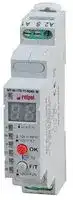
Image not available
Illustrative purposes only

MT-W-17S-11-9240-M
Digital Timer, 12/240V, 22Functions, 10A
⚠️ Reference pricing provided. In case of supply shortages, we will connect you with our trusted procurement partners to ensure your project's continuity.
- Manufacturer: RELPOL
- Product type: Time Delay Relays - Electromechanical
- SVHC: No SVHC (17-Dec-2014)
- Product Range: -
| Delivery and price | |
|---|---|
| Units per pack | 10 |
| Price | 61.21 € |
| Current stock | 10+ |
| Lead time | 30 days |
Datasheet

**MT-W...M** time relays

- **Universal, multifunction time relays with independently controled times T1, T2 and T3 (25 time functions + functions ON and OFF; quick times set with the accuracy of 0,1 s)**

Output circuit - contact data

- Two digit LED display • Programming with two buttons only • Cadmium - free contacts • AC/DC input voltages • Cover - modular, width 17,5 mm • Direct mounting on 35 mm rail mount acc. to PN-EN 60715

- •  Applications: in low-voltage systems • Compliance with standard PN-EN 61812-1 • Recognitions, certifications, directives: C€ Fal

|Output circuit - contact dataput circuit - contact dataut circuit - contact data<br>i y<br>jane|• Two digit LED display • Programming with two buttons only • Cad-<br>mium - free contacts • AC/DC input voltages • Cover - modular, width<br>17,5 mm • Direct mounting on 35 mm rail mount acc. to PN-EN 60715<br>•  Applications: in low-voltage systems • Compliance with standard<br>PN-EN 61812-1 • Recognitions, certifications, directives:<br>C€<br>Fal|
|---|---|
|Number and type of contacts|1 CO|
|Contact material|AgSnO2|
|Max. switchingvoltage|440 V AC / 300 V DC|
|Rated load<br>AC1<br>DC1|10 A / 250 V AC<br>10 A / 24 V DC|
|Max. inrush current|16 A|
|Rated current|10 A|
|Max. breakingcapacity<br>AC1|2 500 VA|
|Min. breakingcapacity|1 W10 V,  10 mA|
|Contact resistance|≤ 100 mΩ|
|Max. operating frequency<br>• at rated load<br>AC1<br>• no load|600 cycles/hour<br>72 000 cycles/hour|
|Input circuit||
|Rated voltage<br>AC: 50/60 HzAC/DC|12...240 V<br>terminals(+)A1 –(-)A2|
|Operatingrange of supplyvoltage|0,9...1,1 Un|
|Rated power consumption<br>AC<br>DC|≤ 2,0 VAAC: 50 Hz<br>≤ 1,5 W|
|Range of supplyfrequency<br>AC|48...63 Hz|
|Residual ripple to DC|5%|
|**Control contact S** ❶<br>• min. voltage❷<br>• min. time of pulse duration❷<br>• max. length of control line|0,9 Un<br>≥30 ms<br>10 m|
|Insulationaccordingto PN-EN 60664-1||
|Insulation rated voltage|250 V AC|
|Rated surge voltage|2 500 V1,2 / 50µs|
|Overvoltage category|II|
|Insulationpollution degree|1|
|Flammabilityclass|V-0UL94|
|Dielectric strength<br>• input - output<br>• contact clearance|2 500 V AC<br>type of insulation: basic<br>1 000 V AC<br>type of clearance: micro-disconnection|
|General data||
|Electrical life<br>• resistive AC1|> 0,5 x 10⁵ <br>10 A, 250 V AC|
|Mechanical life(cycles)|> 3 x 10⁷|
|Dimensions(L x W x H)|90❸x 17,5 x 65,5 mm|
|Weight|70g|
|Ambient temperature<br>• storage<br>• operating|-40...+85oC<br>-20...+50oC|
|Coverprotection category|IP 20<br>PN-EN 60529|
|Environmentalprotection|RTI<br>PN-EN 116000-3|
|Relative humidity|upto 85%|
|Shock resistance|15g|
|Vibration resistance|0,35 mm DA10...55 Hz|


❶ The control terminal S is activated by connection to A1 terminal via the external control contact S.

❷ Where the control signal is recognizable.

❸ Length with 35 mm rail taps: 98,8 mm.

**PRECAUTIONS:**

**1.** Ensure that the parameters of the product described in its specification provide a safety margin for the appropriate operation of the device or system and never use the product in circumstances which exceed the parameters of the product. **2.** Never touch any live parts of the device. **3.** Ensure that the product has been connected correctly. An incorrect connection may cause malfunction, excessive heating or risk of fire. **4.** In case of any risk of any serious material loss or death or injuries of humans or animals, the devices or systems shall be designed so to equip them with double safety system to guarantee their reliable operation.

**1**

**www.relpol.com.pl**

**Export Sales Department** phone +48 68 47 90 832, 951 • e-mail: export@relpol.com.pl

**MT-W...M** time relays

**==> picture [41 x 40] intentionally omitted <==**

## Time module data

Es, E, E(S), E(r), R, Wu, Wu(S), Wu(r), Ws, Wa, B, Wi, ER, EWs, EWa, EWu, WsWa, EWf, Wt, Pi, Pi(S), Pp, Pp(S), Est, Esp, ON, OFF with two buttons: „F/T” and „OK”, to be with viewed on the LED display 0,1 s ... 99 h 59 min. 59,9 s 0,1 s / 0,12 s temperature: ≤ 0,01% / °C supply voltage: ≤ 0,1% / V controlled by contact S / supply voltage: ≤ 50 ms / ≤ 650 ms

Functions

Selection of function and settings of T1, T2, T3 intervals Timing adjustments Setting accuracy / Repeatability Values affecting the timing adjustment Recovery time

## **LED display**

## **LEDs**

- green ”U” - indication of supply voltage U yellow ”h” - indication of setting hours T1, T2, T3 times ❹ yellow ”m” - indication of setting minutes T1, T2, T3 times ❹ yellow ”s” - indication of setting seconds T1, T2, T3 times ❹ green ”T2” - indication of setting T2 time ❹ green ”T3” - indication of setting T3 time ❹ ❺ green ”T3” flashing - measurement of T3 time / request for programming T3 time ❺ yellow ”R” - status ON of operational relay R

strip spinning to the right - measurement of T1 time

strip spinning to the left - measurement of T2 time

message ”End” - stop of the function being carried out pulsating point during programming - indication of setting decimal parts of a second

Note: a new function can be programmed during the operation of the relay (during the operation of any function). The newly programmed function will be active only after turning on and providing feeding voltage.

## **Instruction of programming**

1. Hold the lower button ”F/T” for a longer time (> 2 s). A symbol of service function F0 will appear on LED display.

2.  By pressing the button ”F/T” choose the required number of function (F0 ... F21 - see table below).

**==> picture [225 x 405] intentionally omitted <==**

**----- Start of picture text -----**<br>
Number Name Times ❺  Control ❶<br>F0 OFF – U<br>F1 ON – U<br>F2 Es T1 U, S<br>E  T1  U<br>F3<br>E(S) T1 U, S<br>F4 E(r) T1 U, S<br>F5 R T1 U, S<br>Wu  T1  U<br>F6<br>Wu(S) T1 U, S<br>F7 Wu(r) T1 U, S<br>F8 Ws T1 U, S<br>F9 Wa T1 U, S<br>B  T1 = 0  ❻   U, S<br>F10<br>Wi T1 U, S<br>F11 ER T1, T2 U, S<br>F12 EWs T1, T2 U, S<br>F13 EWa T1, T2 U, S<br>F14 EWu T1, T2 U<br>F15 WsWa T1, T2 U, S<br>F16 EWf T1, T2 U, S<br>F17 Wt T1, T2 U, S<br>Pi  T1, T2, T3  U<br>F18<br>Pi(S) T1, T2, T3 U, S<br>Pp  T1, T2, T3  U<br>F19<br>Pp(S) T1, T2, T3 U, S<br>F20 Est T1 U, S<br>F21 Esp T1 U, S<br>**----- End of picture text -----**<br>


3.  Save the number of the selected function by shortly pressing the upper button ”OK”. The display will show two digits ”Zero” and the yellow LED ”h” will appear (T1 time hours setting). The first ”Zero” is for tens of hours, the other ”Zero” specifies the units of hours. Each number set has to be confirmed with the ”OK” button. Note: similar situation applies for setting minutes and seconds.

4.  By clicking the lower button ”F/T” select the required number of T1 time hours.

5.  After selecting the number of T1 time hours click the ”OK” button in order to confirm the selection.

6.  Again two digits ”Zero” will appear and the yellow LED ”m” will appear - setting minutes. Next, act accordingly to points 4 and 5. Similarly set seconds when the yellow LED ”s” appears. Then set decimal parts of second when a point is pulsing on the display.

7.  After confirming with the ”OK” button the decimal parts of second the green LED ”T2” will start flashing (if T2 time appears in a given function).

8.  If we select T2 time, then we do everything accordingly to the way of T1 time setting.

9.  Next the green LED ”T3” will start flashing (if T3 time appears in a given function) - request for setting T3 time ❺ . T3 time setting may be confirmed with ”OK” or rejected with ”F/T”. T3 time is set similarly to T1 or T2.

10. Turn off feeding. After another provision of feeding the function will start. Some functions are started by the external control contact S ❶ .

11. During carrying out of the function (lasting longer than 60 s) it is possible to check the used time [%] by shortly pressing the ”OK” button. A longer pressing will show the ”presentation” of settings (checking the set function and times).

❶ The control terminal S is activated by connection to A1 terminal via the external control contact S. ❹ View on LED display. ❺ Option: possibility of turninig on or omitting T3 time. ❻ Time T1 has to be set with ”Zero” value.

12. In order to ”exit” the set service function F0 or F1 press the lower button ”F/T” for a longer time until the symbol of a given function disappears from the display.

**2**

**www.relpol.com.pl**

**Export Sales Department** phone +48 68 47 90 832, 951 • e-mail: export@relpol.com.pl

**MT-W...M** time relays

**==> picture [41 x 40] intentionally omitted <==**

## **Time functions**

**F0 – OFF** - Constant service off.

F0 function can be turned on at any time, during feeding the time relay with Un voltage. Turning on F0 function during carrying out any time function will cause the function to stop as well as constant operating relay R off (LED diode ”R” is off). Function F0 is activated by pressing ”F/T” button for a longer time (more than 2 seconds) and selecting F0 function. Confirm this function with red button ”OK” (after confirmation display will show digit 0). Exiting the service function needs a longer pressing of ”F/T” button - until the display stops showing F0 function symbol. Next, after a short time, display will show ”End”. Going back to the function previously carried out is done by turning off feeding voltage Un and turning it on again. If the ”T/F” button is being pressed for too long and it will cause, after turning off F0 function symbol, showing the symbols of other functions, then going back to the function previously carried out (set before F0 function) is done by turning off feeding voltage Un and turning it on again.

## **F1 – ON** - Constant service on.

F1 function can be turned on at any time, during feeding the time relay with Un voltage. Turning on F1 function during carrying out any time function will cause the function to stop as well as constant operating relay R on (LED diode ”R” is on). Function F1 is activated by pressing ”F/T” button for a longer time (more than 2 seconds) and selecting F1 function. Confirm this function with red button ”OK” (after confirmation display will show digit 1). Exiting the service function needs a longer pressing of ”F/T” button - until the display stops showing F1 function symbol. Next, after a short time, display will show ”End”. Going back to the function previously carried out is done by turning off feeding voltage Un and turning it on again. If the ”T/F” button is being pressed for too long and it will cause, after turning off F1 function symbol, showing the symbols of other functions, then going back to the function previously carried out (set before F1 function) is done by turning off feeding voltage Un and turning it on again.

**F2 – Es** - ON delay with the control contact S.

**==> picture [70 x 31] intentionally omitted <==**

Feeding voltage U has to be put onto time relay in a constant way (LED diode ”U” gives constant light). Turning off controlling contact S starts measuring the set time T1 (display shows a vertical strip spinning to the right). When T1 time is finished operating relay R turns on (display shows ”End”, LED diode ”R” is on). Such state lasts until the moment of opening control contact S. Opening the control contact S causes immediate turning off the operating relay R (display still shows ”End”, and LED diode ”R” is off). When the control contact S is open before T1 time is finished, the operating relay will not turn on and the measurement of T time will be cancelled.

**F3 – E** - ON delay.

**==> picture [75 x 31] intentionally omitted <==**

Turning on the feeding voltage U starts measuring set T1 time (display shows vertical strip spinning to the right). After measuring T1 time the operating relay R turns on and stays in this state until feeding U is turned off (display shows ”End”, and LED diode ”R” is on).

**F3 – E(S)** - ON delay, with time measurement stopped with contact S.

**==> picture [75 x 31] intentionally omitted <==**

Turning on the feeding voltage U starts measuring set T1 time (display shows vertical strip spinning to the right). If during measuring T1 time control contact S is closed, measuring of T1 time is stopped for the time of closing contact S (display shows two horizontal strips). Opening of control contact S resumes measuring of T1 time (display shows a vertical strip spinning to the right). After finishing measuring T1 time the operating relay R turns on and stays in this state until feeding U is turned off (display shows ”End”, and LED diode ”R” is on).

**F4 – E(r)** - ON delay with the Reset function.

**==> picture [68 x 31] intentionally omitted <==**

Turning on the feeding voltage U starts measuring set T1 time (display shows vertical strip spinning to the right). After measuring T1 time operating relay R turns on. If control contact S is closed during measuring T1 time measuring of T1 time is stopped for the time of closing contact S (display shows two horizontal strips). After opening contact S T1 time is measured from the start. After measuring T1 time operating relay R turns on (display shows ”End”, and LED diode ”R” is on). and this state lasts until the moment of turning off feeding voltage U or when the control contact is closed again.

**F5 – R** - OFF delay with the control contact S.

**==> picture [71 x 31] intentionally omitted <==**

Time relay input is powered by voltage U in a constant way. Closing the control contact S causes immediate turning on of the operating relay R (display shows two horizontal strips, LED diode ”R” is on). Opening the control contact S starts measuring of the set T1 time (display shows vertical strip spinning to the right). After measuring T1 time the operating relay turns off (display shows ”End”, and LED diode ”R” is off). If control contact S is closed before T1 time is finished, the previously measured time will be restarted and the operating relay will stay on. The delay of turning off the operating relay R will start at the moment of another opening of control contact S.

**F6 – Wu** - ON for the set interval.

**==> picture [75 x 31] intentionally omitted <==**

Turning on the feeding voltage U causes immediate turning on the operating relay R at the set time T1 (display shows vertical strip spinning to the right, LED diode ”R” is on). After measuring T1 time the operating relay R turns off (display shows ”End”, and LED diode ”R” is off).

**U** - supply voltage; **R** - output state of the relay; **S** - control contact state; **T1, T2, T3** - measured times;

**Ts** - pause in function performance - time measurement stop period (applies to F18 and F19); **t** - time axis

**3**

**www.relpol.com.pl**

**Export Sales Department** phone +48 68 47 90 832, 951 • e-mail: export@relpol.com.pl

**MT-W...M** time relays

**==> picture [41 x 40] intentionally omitted <==**

## **Time functions**

**F6 – Wu(S)** - ON for the set interval, with time measurement stopped with contact S closing.

**F10 – B** - Cyclical operation with the control contact S (the feature of a bistable relay) - setting T1 time to the value of ”Zero” is required.

**==> picture [70 x 31] intentionally omitted <==**

Turning on the feeding voltage U causes immediate turning on the operating relay R at the set time T1 (display shows vertical strip spinning to the right, LED diode ”R” is on). If the control contact S is closed, measuring T1 time will be stopped (display shows two horizontal strips) until the moment when control contact is opened. Opening contact S starts further measuring of T1 time. After finishing measuring T1 time the operating relay turns off (display shows ”End”, and LED diode ”R” is off).

**F7 – Wu(r)** - ON for the set interval with the Reset function.

**==> picture [62 x 31] intentionally omitted <==**

Turning on feeding voltage U causes immediate turning on the operating relay R at the set time T1 (display shows vertical strip spinning to the right, LED diode ”R” is on). When control contact S is closed, measuring time T1 is stopped for the time of closing contact S (with operating relay being on, and display showing two horizontal strips). After opening contact S T1 time is measured from the start. After measuring T1 time the operating relay R turns off (display shows ”End”, and LED diode ”R” is off).

**F8 – Ws** - Single shot for the set interval triggered by closing of the control contact S.

**==> picture [72 x 31] intentionally omitted <==**

Time relay input is powered by voltage U in a constant way. Closing the control contact S causes immediate turning on operating relay R for the T1 time (display shows vertical strip spinning to the right, LED diode ”R” is on). After measuring T1 time the operating relay R turns off display shows ”End”, and LED diode ”R” is off). Opening and closing the control contact S during measuring T1 time does not affect the function being carried out. Turning on the operating relay R again is possible (after measuring T1 time) by another closing of control contact S.

**F9 – Wa** - ON for the set interval triggered with the control contact S.

**==> picture [70 x 31] intentionally omitted <==**

Time relay input is powered by voltage U in a constant way. Opening the control contact S causes immediate turning on operating relay R for the T1 time (display shows vertical strip spinning to the right, LED diode ”R” is on). After measuring T1 time the operating relay R turns off display shows ”End”, and LED diode ”R” is off). Opening and closing the control contact S during measuring T1 time does not affect the function being carried out. Turning on the operating relay R again is possible (after measuring T1 time) by another closing of control contact S.

Time relay input is powered by voltage U in a constant way. Each closing of control contact S causes the change of the state of the operating relay R into the opposite one (the feature of a bistable relay).

**F10 – Wi** - ON for the set interval controlled by closing of the control contact S, with the function of switching off the output relay R prior to the lapse of the interval T1 (the feature of a bistable relay).

**==> picture [71 x 31] intentionally omitted <==**

Time relay input is powered by voltage U in a constant way. Closing the control contact S causes immediate turning on the operating relay for T1 time (display shows a vertical strip spinning to the right, and LED diode ”R” is on). After measuring T1 time the operating relay R turns off (display shows ”End”, and LED diode ”R” is off). If during the measuring T1 time the control contact is closed, the measured time T1 will be restarted, and the operating relay R turns off. Another closing of the control contact S causes another turning on the operating relay R for the T1 time. Relay with this function adopts the feature of bistable relay.

**F11 – ER** - ON delay and OFF delay with control contact S. Independent settings of T1 and T2 intervals.

**==> picture [71 x 31] intentionally omitted <==**

Time relay input is powered by voltage U in a constant way Closing the control contact S starts measuring the T1 time (display shows a vertical strip spinning to the right) and after measuring the T1 time the operating relay R turns on (display shows two horizontal strips, and LED diode ”R” is on). Opening the control contact S starts measuring T1 time - the delayed turning off the operating relay R (display shows a vertical strip spinning to the left) and after the time is finished the operating relay R turns off display shows ”End”, and LED diode ”R” is off). If during the measuring T2 time the control contact S is closed, the measured time will be restarted, and the operating relay R stays on. If the control contact S is closed for a shorter time than T1 time, the system will not turn on the operating relay R.

**F12 – EWs** - ON delay and ON for the set time with closing of the control contact S. Independent settings of T1 and T2 intervals.

**==> picture [68 x 31] intentionally omitted <==**

Time relay input is powered by voltage U in a constant way. Closing the control contact (impulsive or constant) starts measuring T1 time (Time relay input is powered by voltage U in a constant way.), and after its completion the operating relay R turns on for T2 time (display shows a vertical strip spinning to the left, LED diode ”R” is on). After the T2 time the operating relay R turns off (display shows ”End”, and LED diode is off). The system is waiting for another closing of the control contact S. During measuring times T1 and T2 the state of the contact S does not matter.

**U** - supply voltage; **R** - output state of the relay; **S** - control contact state; **T1, T2, T3** - measured times; **Ts** - pause in function performance - time measurement stop period (applies to F18 and F19); **t** - time axis

**4**

**www.relpol.com.pl**

**Export Sales Department** phone +48 68 47 90 832, 951 • e-mail: export@relpol.com.pl

**MT-W...M** time relays

**==> picture [41 x 40] intentionally omitted <==**

## **Time functions**

**F13 – EWa** - OFF delay and breaking time delay with opening of the control contact S. Independent settings of T1 and T2 intervals.

**==> picture [70 x 31] intentionally omitted <==**

Time relay input is powered by voltage U in a constant way. Closing the control contact S causes immediate turning on the operating relay R (display shows two horizontal strips, and LED diode ”R” is on). Opening the control contact S starts measuring the time T1 (display shows a vertical strip spinning to the right), and after measuring is finished the operating relay R turns off and measuring of T2 time starts (display shows a vertical strip spinning to the left, and LED diode ”R” is off) After measuring T2 time display shows ”End”, and the operating relay R - depending on the state of the control contact S - stays off when the control contact S is open or turns on when the control contact S is closed, and LED diode ”R” goes on.

**F14 – EWu** - ON delay for the set interval. Independent settings of T1 and T2 intervals.

**==> picture [69 x 31] intentionally omitted <==**

Turning on feeding U starts work from measuring the time T1 (display shows a vertical strip spinning to the right), and after its completion the operating relay R starts at T2 time (display shows a vertical strip spinning to the left, and LED diode ”R” is on). After measuring T2 time the operating relay turns off (display shows ”End”, and LED diode ”R” is off).

**F15 – WsWa** - ON for the set intervals T1 and T2 with the control contact S. Independent settings of T1 and T2 intervals.

**==> picture [71 x 31] intentionally omitted <==**

**==> picture [33 x 7] intentionally omitted <==**

Time relay input is powered by voltage U in a constant way. Closing the control contact S turns on the operating relay R for T1 time (display shows a vertical strip spinning to the right, and the LED diode ”R” is on). After measuring T1 time the operating relay R turns off (display shows two horizontal strips, and LED diode ”R” is off). Opening the control contact S causes another turning on the operating relay R for T2 time (display shows a vertical strip spinning to the left, and the LED diode ”R” is on). After measuring T2 time the operating relay turns off (display shows ”End”, and LED diode ”R” is off).

**a/** If during measuring T1 time the control contact S is opened, then (after measuring T1 time) the operating relay will stay on until the moment of the end of measuring T2 time. After measuring T2 time the operating relay R will turn off (display shows ”End”, and LED diode ”R” turns off) - see Diagram 1.

**b/** If during measuring T1 time the control contact S is opened, and next, during measuring T2 time, it is closed, then (after measuring T1 and T2 times) the operating relay R will turn on for the additional T1 time. After measuring additional T1 time the operating relay R will turn off (display shows two horizontal strips, and LED diode will turn off). Such state will last until the opening of the control contact S. After opening the control contact S the operating relay R will turn on again and the measuring of T2 time will start (display shows a vertical strip spinning to the left, and LED diode ”R” is on). After measuring T2 time the operating relay R will turn off (display shows ”End”, and LED diode ”R” will turn off) - see Diagram 2.

**==> picture [70 x 31] intentionally omitted <==**

Diagram 2

**F16 – EWf** - ON delay and OFF delay with the control contact S. Independent settings of T1 and T2 intervals.

**==> picture [70 x 31] intentionally omitted <==**

Time relay input is powered by voltage U in a constant way. Closing the control contact S starts measuring the time T1 (display shows a vertical strip spinning to the gight). After T1 time is finished, the relay R turns on (display shows two horizontal strips, and LED diode ”R” is on). Opening the control contact S starts measuring the time T2 - delayed turning off the operating relay R (display shows a vertical strip spinning to the left). After measuring T2 time the operating relay R turns off (display shows ”End”, and LED diode ”R” is off).

**F17 – Wt** - Monitoring of the sequence of pulses. Switching on T2 interval is extended with consecutive pulses (closing and opening of the contact S). Independent settings of T1 and T2 intervals.

**==> picture [68 x 31] intentionally omitted <==**

Turning on the feeding voltage U causes immediate turning on of the operating relay R fot the set T1 time (display shows a vertical strip spinning to the right, and LED diode ”R” is on). After measuring T1 time measuring T2 time starts with the operating relay R still being on (display shows a vertical strip spinning to the left, and LED diode ”R” is on) In order to keep the operating relay R on, during measuring T2 time closing, and next opening of the control contact S must occur (single impulse), which will cause resetting the time measured so far and start measuring T2 time again. If before T2 time is finished the single impulse of the control contact S does not occur, the operating relay will turn off (display shows ”End”, and LED diode ”R” will turn off). Another turning on of the operating relay will be possible after turning off feeding U and turning it on again.

**F18 – Pi** - Cyclical operation pulse first. Independent settings of T1 and T2 intervals. Possibility of turninig on or omitting T3 time.

**==> picture [68 x 31] intentionally omitted <==**

**==> picture [33 x 8] intentionally omitted <==**

Turning on feeding voltage U starts cyclic work from turning on the operating relay R for the T1 time (display shows a vertical strip spinning to the right, and LED diode ”R” is on), after which occurs turning off of the operating relay R for T2 time (display shows a vertical strip spinning to the left, and LED diode ”R” is off). Cyclic work lasts until the moment of turning off feeding voltage - see Diagram 1.

**==> picture [73 x 31] intentionally omitted <==**

**==> picture [33 x 8] intentionally omitted <==**

**Note:** it is possible **to turn on T3 time** (i.e. the time of cyclic work) during programming the relay (when the LED T3 diode is flashing) by confirming it with the OK button, or omitting the T3 time by pressing ”F/T” button. When T3 time has been turned on and set, during cyclic work green LED diode T3 is flashing. After T3 time is finished display shows ”End”, LED diode T3 is off, and operating relay R remains in the state which it was in at the moment of the end of T3 time. If T3 time finishes during measuring T1 time, the operating relay R will remain on (LED ”R” is on), and if it finishes during measuring T2 time, the operating relay R will remain off (LED diode ”R” is off). Another turning on the function of cyclic work will be possible after turning off feeding U and turning it on again - see Diagram 2.

**U** - supply voltage; **R** - output state of the relay; **S** - control contact state; **T1, T2, T3** - measured times; **Ts** - pause in function performance - time measurement stop period (applies to F18 and F19); **t** - time axis

**5**

**www.relpol.com.pl**

**Export Sales Department** phone +48 68 47 90 832, 951 • e-mail: export@relpol.com.pl

**MT-W...M** time relays

**==> picture [41 x 40] intentionally omitted <==**

## **Time functions**

**F18 – Pi(S)** - Cyclical operation pulse first. Independent settings of T1 and T2 intervals. Possibility of turninig on or omitting T3 time. Possibility of stopping and resuming cyclic work by control contact S.

**==> picture [69 x 67] intentionally omitted <==**

**----- Start of picture text -----**<br>
<<br>Tc Ts Td<br>T3<br>T3 =Tc +Ts +Td<br>**----- End of picture text -----**<br>


Turning on the feeding voltage U starts cyclic work from turning on the operating relay R for the T1 time (display shows a vertical strip spinning to the right, and LED diode ”R” is on), after which the operating relay turns off for T2 time (display shows a vertical strip spinning to the left, and LED diode ”R” is off). Cyclic work lasts until the moment of turning off feeding voltage U.

**Note** : it is possible **to turn on T3 time** (i.e. the time of cyclic work) during programming the relay (when the LED T3 diode is flashing) by confirming it with the OK button, or omitting the T3 time by pressing ”F/T” button. When T3 time has been turned on and set, during cyclic work green LED diode T3 is flashing. After T3 time is finished display shows ”End”, LED diode T3 is off, and operating relay R remains in the state which it was in at the moment of the end of T3 time. If T3 time finishes during measuring T1 time, the operating relay R will remain on (LED ”R” is on), and if it finishes during measuring T2 time, the operating relay R will remain off (LED diode ”R” is off). Another turning on the function of cyclic work will be possible after turning off feeding U and turning it on again. **Operation of contact S** : closing control contact S immediately stops measuring times. Opening control contact S resumes measuring times. The break in carrying out the function Pi(S) (by the period of closing contact S) is included in T3.

**F19 – Pp** - Cyclical operation pause first. Independent settings of T1 and T2 intervals. Possibility of turninig on or omitting T3 time.

**==> picture [68 x 31] intentionally omitted <==**

**==> picture [34 x 7] intentionally omitted <==**

**----- Start of picture text -----**<br>
Diagram 1<br>**----- End of picture text -----**<br>


Turning on feeding voltage U starts cyclic work from measuring the time of break T1 - the time of turning off the operating relay R (display shows a vertical strip spinning to the right), after which occurs turning off of the operating relay R for the T2 time (Display shows a vertical strip spinning to the left, and LED diode ”R” is on). Cyclic work lasts until the moment of turning off feeding voltage U - see Diagram 1.

**==> picture [73 x 32] intentionally omitted <==**

**==> picture [33 x 7] intentionally omitted <==**

**----- Start of picture text -----**<br>
Diagram 2<br>**----- End of picture text -----**<br>


**Note** : it is possible **to turn on T3 time** (i.e. the time of cyclic work) during programming the relay (when the LED T3 diode is flashing) by confirming it with the OK button, or omitting the T3 time by pressing ”F/T” button. When T3 time has been turned on and set, during cyclic work green LED diode T3 is flashing. After T3 time is finished display shows ”End”, LED diode T3 is off, and operating relay R remains in the state which it was in at the moment of the end of T3 time. If T3 time finishes during measuring T1 time, the operating relay R will remain on (LED ”R” is on), and if it finishes during measuring T2 time, the operating relay R will remain off (LED diode ”R” is off). Another turning on the function of cyclic work will be possible after turning off feeding U and turning it on again - see Diagram 2.

**F19 – Pp(S)** - Cyclical operation pause first. Independent settings of T1 and T2 intervals. Possibility of turninig on or omitting T3 time. Possibility of stopping and resuming cyclic work by control contact S.

**==> picture [68 x 68] intentionally omitted <==**

**----- Start of picture text -----**<br>
<<br>Tc Ts Td<br>T3<br>T3 =Tc +Ts +Td<br>**----- End of picture text -----**<br>


Turning on feeding voltage U starts cyclic work from measuring break time T1 - time of turning off the operating relay R (display shows a vertical strip spinning to the right), after which occurs turning on the operating relay R for the T2 time (display shows a vertical strip spinning to the left, and LED diode ”R” is on). Cyclic work lasts until the moment of turning off feeding voltage U.

**Note** : it is possible **to turn on T3 time** (i.e. the time of cyclic work) during programming the relay (when the LED T3 diode is flashing) by confirming it with the OK button, or omitting the T3 time by pressing ”F/T” button. When T3 time has been turned on and set, during cyclic work green LED diode T3 is flashing. After T3 time is finished display shows ”End”, LED diode T3 is off, and operating relay R remains in the state which it was in at the moment of the end of T3 time. If T3 time finishes during measuring T1 time, the operating relay R will remain on (LED ”R” is on), and if it finishes during measuring T2 time, the operating relay R will remain off (LED diode ”R” is off). Another turning on the function of cyclic work will be possible after turning off feeding U and turning it on again. **Operation of contact S** : closing control contact S immediately stops measuring times. Opening control contact S resumes measuring times. The break in carrying out the function Pi(S) (by the period of closing contact S) is included in T3.

**F20 – Est** - ON delay with closing of the control contact S, with the interval T1 extended.

**==> picture [40 x 50] intentionally omitted <==**

**----- Start of picture text -----**<br>
T1 T1 T1<br>**----- End of picture text -----**<br>


The input of the time relay is supplied with voltage U continuously. Closing of the control contact S for a shorter time than T1 time starts the T1 time, and after the T1 time has lapsed, the output relay R switches on and remains in this position until the control contact S is closed again or until the supply voltage U is interrupted. Closing of the control contact S resets the thus far measured time and starts the new T1 time.

**F21 – Esp** - ON delay - one cycle, with closing of the control contact S.

**==> picture [71 x 32] intentionally omitted <==**

**==> picture [7 x 4] intentionally omitted <==**

**----- Start of picture text -----**<br>
T1<br>**----- End of picture text -----**<br>


The input of the time relay is supplied with voltage U continuously. Closing of the control contact S starts the T1 time, and after the T1 time has lapsed, the output relay R switches on and remains in this position until the supply voltage U is interrupted. When the output relay R is on, opening or closing of the control contact S does not affect its status.

**U** - supply voltage; **R** - output state of the relay; **S** - control contact state; **T1, T2, T3** - measured times; **Ts** - pause in function performance - time measurement stop period (applies to F18 and F19); **t** - time axis

**6**

**www.relpol.com.pl**

**Export Sales Department** phone +48 68 47 90 832, 951 • e-mail: export@relpol.com.pl

**MT-W...M** time relays

## **Dimensions**

## **Front panel description**

**==> picture [129 x 166] intentionally omitted <==**

**----- Start of picture text -----**<br>
44,1<br>r t<br>=<br>I<br>3,5<br>63,5<br>17,5<br>65,5<br>98,8 90 35,4<br>**----- End of picture text -----**<br>


**==> picture [187 x 135] intentionally omitted <==**

**----- Start of picture text -----**<br>
Green LED<br>LED display<br>Yellow LEDs<br>| sx Os<br>Green LEDs *s we OK Upper button ”OK”<br>Lower button ”F/T”<br>Yellow LED<br>**----- End of picture text -----**<br>


## **Connection diagram**

## **Mounting**

**==> picture [38 x 82] intentionally omitted <==**

**----- Start of picture text -----**<br>
❶<br> A2<br> .<br>1 CO<br>**----- End of picture text -----**<br>


Relays **MT-W...M** are designed for direct mounting on 35 mm rail mount acc. to PN-EN 60715. Operational position - any. **Connections:** max. cross section of the cables: 1 x 2,5 mm[2] / 2 x 1,5 mm[2] (1 x 14 / 2 x 16 AWG), length of the cable deinsulation: 6,5 mm, max. tightening moment for the terminal: 0,6 Nm.

❶ The control terminal S is activated by connection to A1 terminal via the external control contact S.

**Two taps** : easy assembly on 35 mm rail, firm tapping (top and bottom).

## **Ordering codes**

**==> picture [436 x 152] intentionally omitted <==**

**----- Start of picture text -----**<br>
Type Cover Number and type  Rated input voltage  Time functions<br>of contacts performed<br>a a a<br>–<br>M T W 1 7 S 1 1 9 2 4 0 M<br>Time functions<br>Rated input voltage performed<br>W  - LED display 9240  - 12...240 V AC/DC AC: 50/60 Hz M  - multifunction<br>Cover Number and type of contacts<br>17S  - modular, width 17,5 mm 11  - 1 CO<br>**----- End of picture text -----**<br>


Example of ordering codes:

**MT-W-17S-11-9240-M**

universal time relay **MT-W...M** with LED display, multifunction (relay perform 6 functions), cover - modular, width 17,5 mm, one changeover contact, contact material AgSnO2, rated input voltage 12...240 V AC/DC AC: 50/60 Hz

**7**

**www.relpol.com.pl**

**Export Sales Department** phone +48 68 47 90 832, 951 • e-mail: export@relpol.com.pl
Updated at June 6, 2026
About Novapart
Novapart is a B2B electronic component broker specialising in stock shortages and cost reduction. We source hard-to-find parts and identify compliant alternatives across a catalogue of 410,000+ components from 500+ manufacturers.
Learn more →Stock Shortage Specialist
When a component is unavailable, discontinued or has an unacceptable lead time, we tap into our network of vetted European and Asian distributors to source what you need — without compromising on quality or traceability.
Request a quote →Compliant Alternatives
We identify pin-to-pin, electrically equivalent substitutes that meet the same certifications (RoHS, AEC-Q100, REACH) as your original specification — validated against datasheets, not just part numbers. Often at a lower cost.
BOM Analysis service →