
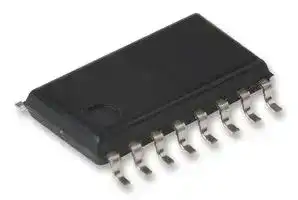


MIC74YQS
I/O Expander, 8bit, I2C, SMBus, 2.7 V, 3.6 V, QSOP
- Manufacturer: MICROCHIP
- Product type: I/O Expanders
- No. of Pins: 16Pins
- No. of I/O's: 8I/O's
- IC Interface Type: I2C, SMBus
- Chip Configuration: 8bit
- Supply Voltage Max: 3.6V
- Supply Voltage Min: 2.7V
- Interface Case Style: QSOP
| Delivery and price | |
|---|---|
| Units per pack | 196 |
| Price | 1.77 € |
| Current stock | 10+ |
| Lead time | 30 days |

## **MIC74**

## **2-Wire Serial I/O Expander and Fan Controller**

## **General Description**

The MIC74 is a fully programmable serial-to-parallel I/O expander compatible with the SMBus™ (system management bus) protocol. It acts as a slave on the bus, providing eight independent I/O lines.

Each I/O bit can be individually programmed as an input or output. If programmed as an output; each I/O bit can be programmed as an open-drain or complementary push-pull output. If desired, the four most significant I/O bits can be programmed to implement fan speed control. An internal clock generator and state machine eliminate the overhead generally associated with “bit-banging” fan speed control.

Programming the device and reading/writing the I/O bits is accomplished using seven internal registers. All registers can be read by the host. Output bits are capable of directly driving high-current loads, such as LEDs. A separate interrupt output can notify the host of state changes on the input bits without requiring the MIC74 to perform a transaction on the serial bus or be polled by the host. Three address selection inputs are provided, allowing up to eight devices to share the same bus and provide a total of 64 bits of I/O.

The MIC74 is available in an ultra-small-footprint 16-pin QSOP. Low quiescent current, small footprint, and low package height make the MIC74 ideal for portable and desktop applications.

## **Features**

- Provides eight bits of general purpose I/O

- Built-in fan speed control logic (optional)

- 2-wire SMBus™/I[2] C™-compatible serial interface plus interrupt output

- 2.7V to 3.6V operating voltage range

- 5V-tolerant I/O

- Low quiescent current: 2µA (typical)

- Bit-programmable I/O options:

   - Input or output

   - Push-pull or open-drain output

   - Interrupt on input changes

- Outputs can directly drive LEDs (10mA IOL)

- Up to 8 devices per bus

## **Applications**

- General purpose I/O expansion via serial bus

- Personal computer system management

- Distributed sensing and control

- Microcontroller I/O expansion

- Fan control

Datasheets and support documentation are available on Micrel’s web site at: www.micrel.com.

## **Typical Application**

SMBus is a trademark of Intel Corporation. I[2] C is a trademark of Phillips Electronics N.V.

**Micrel Inc. • 2180 Fortune Drive • San Jose, CA 95131 • USA • tel +1 (408) 944-0800 • fax + 1 (408) 474-1000 • http://www.micrel.com**

Revision 3.0

September 30, 2014

MIC74

Micrel, Inc.

## **Ordering Information**

|**Ordering Information**|**Ordering Information**|||
|---|---|---|---|
|**Part Number**|**Junction Temperature Range**|**Package**|**Lead Finish**|
|MIC74YQS|–40°C to +85°C|16-Pin QSOP|Pb-Free|


## **Pin Configuration**

## **16-Pin QSOP (QS) (Top View)**

## **Pin Description**

|**Pin Number**|**Pin Name**|**Pin Function**|
|---|---|---|
|1, 2, 3|A0, A1, A2|Address (input): Slave address selection inputs; sets the three least significant bits of the MIC74’s<br>slave address.|
|4, 5, 6, 7|P0, P1,<br>P2, P3|Parallel I/O (input/output): General-purpose I/O pin. Direction and output type are user-<br>programmable.|
|8|GND|Ground|
|9, 10, 11, 12|P4, P5,<br>P6, P7<br>(/SHDN, /FS0<br>/FS1, /FS2)|Parallel I/O (input/output): P4–P7 are general-purpose I/O pins. Direction and output type are<br>user-programmable.<br>Shutdown (output): When the FAN bit is set, pin 9 becomes SHDN.<br>Fan speed (output): When the FAN bit is set, pins 10 through 12 become /FS0 – /FS2<br>respectively, controlled by the FAN_SPEED register.|
|13|/ALERT|Interrupt (output): Active-low, open-drain output signals input-change-interrupts to the host on this<br>pin. Signal is cleared when the bus master (host) polls the ARA (alert response address = 0001<br>100) or reads status.|
|14|CLK|Serial bus clock (input): The host provides the serial bit clock in this input.|
|15|DATA|Serial data (input/output): Serial data input and open-drain serial data output.|
|16|VDD|Power supply (input).|


Revision 3.0

September 30, 2014

2

MIC74

Micrel, Inc.

## **Absolute Maximum Ratings[(][1][)]**

Supply Voltage (VDD) ................................................... +4.6V Input Voltage [all pins except VDD and GND] (VIN). .................................. GND – 0.3V to +5.5V Junction Temperature (TJ) ......................................... 150°C Lead Temperature (soldering, 10s) ............................ 260°C ESD Rating[(][3][)] VDD ...................................................................... 1.5kV A0, A1, A2 .............................................................. 500V Others .................................................................... 200V

## **Operating Ratings[(][2][)]**

Supply Voltage (VDD) .................................... +2.7V to +3.6V Ambient Temperature (TA) .......................... –40°C to +85°C Package Thermal Resistance (θJA) ........................ 163°C/W

## **Electrical Characteristics[(][4][)]**

## 2.7V ≤ VDD ≤ 3.6V; TA = 25°C, bold values indicate –40°C < TA < +85°C, unless noted.

|**Symbol**|**Parameter**|**Condition**|**Min.**|**Typ.**|**Max.**|**Units**|
|---|---|---|---|---|---|---|
|VIN|Input Voltage (any pin except<br>VDD and GND)||GND–0.3||5.5|V|
|IDD|Operating Supply Current|P[7:0] inputs; P[7:0] = VDDor GND<br>/ALERT open; fCLK= 100kHz||2|6|µA|
|ISTART|Fan Startup Supply Current<br>(Fan Mode Only)|during tSTART; /ALERT, /SHDN,<br>/FS2[2:0] = open;<br>VCLK= VDATA= VDD;<br>P[3:0] = inputs|||1.75|mA|
|ISTBY|Standby Supply Current|/ALERT = open,<br>VCLK= VDATA= VDD;<br>P[3:0] = inputs||1|3|µA|
|**Serial I/O (DATA, CLK)**|||||||
|VIL|Input Low Voltage||**–0.3**||**0.8**|V|
|VIH|Input High Voltage||**2**||**5.5**|V|
|VOL|Output Low Voltage|IOL= 3mA|||**0.4**|V|
|ILEAK|Leakage Current|VIN= 5.5V or GND|–1||+1|µA|
|CIN|Input Capacitance|||10||pF|


## **Notes:**

1. Exceeding the absolute maximum ratings may damage the device.

2. The device is not guaranteed to function outside its operating ratings.

3. Devices are ESD sensitive. Handling precautions are recommended. Human body model, 1.5kΩ in series with 100pF.

4. Specification for packaged product only.

5. Devices participating in a transfer will timeout when any clock low exceeds the value of tTIMEOUT(min) of 25ms. Devices that have detected a timeout condition must reset the communication no later than tTIMEOUT(max) of 35ms. The maximum value specified must be adhered to by both a master and a slave as it incorporates the cumulative stretch limit for both a master (10ms) and a slave (25ms).

6. tHIGH(max) provides a simple guaranteed method for devices to detect bus idle conditions.

7. Rise and fall time is defined as follows: tR = VIL(max) – 0.15V to VIH(min) + 0.15V; tF = 0.9VDD to VIL(max) – 0.15V.

8. Guaranteed by design.

Revision 3.0

September 30, 2014

3

MIC74

Micrel, Inc.

## **Electrical Characteristics[(][4][)] (Continued)**

|**Electrical Characteristics(4) (Continued)**|**Electrical Characteristics(4) (Continued)**|**Electrical Characteristics(4) (Continued)**|**Electrical Characteristics(4) (Continued)**|**Electrical Characteristics(4) (Continued)**|**Electrical Characteristics(4) (Continued)**|**Electrical Characteristics(4) (Continued)**|
|---|---|---|---|---|---|---|
||||||||
|**Parallel I/O [P0–P3, P4(/SHDN), P5(/FS0)–P7(/FS2)]**|||||||
|**Symbol**|**Parameter**|**Condition**|**Min.**|**Typ.**|**Max.**|**Units**|
|VIL|Input Low Voltage||**–0.5**||**0.8**|V|
|VIH|Input High Voltage||**2**||**5.5**|V|
|IOL|Output Low Current|VOL= 0.4V, VDD= 2.7V|**7**|||mA|
|||VOL= 1V, VDD= 3.3V|**10**|||mA|
|IOH|Output High Current|VOH= 2.4V|**7**|||mA|
|ILEAK|Leakage Current|VIN= 5.5V or GND|–1||+1|µA|
|CIN|Input Capacitance|||10||pF|
|COUT|Output Capacitance|||10||pF|
|**Address Input (A0–A2)**|||||||
|VIL|Input Low Voltage||**–0.3**||**0.3VDD**|V|
|VIH|Input High Voltage||**0.7VDD**||**VDD+0.3**|V|
|ILEAK|Leakage Current|VIN= VDDor GND|–250||+250|nA|
|**/ALERT**|||||||
|VOL|Output Low Voltage|IOL= 1mA|||**0.4**|V|
|ILEAK|Leakage Current|VIN= VDDor VSS|–1|±250|+1|µA|
|**AC Characteristics**|||||||
|tSTART|Fan Startup Interval|Normal operation|**0.5**|1|**3.3**|sec|
|tPULSE|Minimum Pulse-Width|Minimum pulse-width on P_n_to generate<br>an interrupt,Note 8|**10**|||ns|
|t/INT|Interrupt Delay|Interrupt delay from state change on P_n_to<br>/ALERT ≤ VOL,Note 8|||**4**|µs|
|t/IR|Delay from Status Read or ARA<br>Response to /ALERT ≥ VOH||||**4**|µs|
|tHD:STA|Hold Time,Note 8|Hold time after repeated start condition,<br>after this period, the first clock is<br>generated|4|||µs|
|tSU:STA|Setup Time,Note 8|Repeated start condition setup time|4.7|||µs|
|tSU:STO|Stop Condition Setup Time|Note 8|4|||µs|
|tHD:DAT|Data Hold Time|Note 8|500|||ns|
|tSU:DAT|Data Setup Time|Note 8|0|||ns|
|tTIMEOUT|Clock Low Time-Out|Note 5, 8|25|35||ms|
|tLOW|Clock Low Period|Note 6, 8|4.7|||µs|
|tHIGH|Clock High Period|Note 6, 8|4|50||µs|
|tF|Clock/Data Fall Time|Note 7, 8||300||ns|
|tR|Clock/Data Rise Time|Note 7, 8||1000||ns|
|tBUF|Bus free time between stop and<br>Start condition|Note 8|4.7|||µs|


Revision 3.0

September 30, 2014

4

MIC74

Micrel, Inc.

## **Timing Definitions**

## **Register Descriptions**

## **Table 1. Device Configuration Register**

|**DEV_CFG**|**DEV_CFG**|**DEV_CFG**|**DEV_CFG**|**DEV_CFG**|**DEV_CFG**|**DEV_CFG**|**DEV_CFG**|
|---|---|---|---|---|---|---|---|
|**D[7]**|**D[6]**|**D[5]**|**D[4]**|**D[3]**|**D[2]**|**D[1]**|**D[0]**|
|Always write as zero||||||FAN|IE|


## **Device Configuration Register Parameters**

- Power-on default value: 0000 0000b, 00h

   - Interrupts disabled

   - Not in fan mode

- Command_byte address: 0000 0000b, 00h

- Type: 8-bits, read/write

- Bit name: IE

- Function: Global interrupt enable

- Operation: 1 = enabled; 0 = disabled

- Bit name: FAN

- Function: Selects fan mode (P[7:4] vs. /FS[2:0], /SHDN)

- Operation: 1 = fan mode; 0 = I/O mode

- Bit Name: D[2] through D[6]

- Function: Reserved

- Operation: Reserved; always write as zero

**Table 2. Data Direction Register**

|**Table 2. Data Direction Register**|**Table 2. Data Direction Register**|**Table 2. Data Direction Register**|**Table 2. Data Direction Register**|**Table 2. Data Direction Register**|**Table 2. Data Direction Register**|**Table 2. Data Direction Register**|**Table 2. Data Direction Register**|
|---|---|---|---|---|---|---|---|
|**DIR**||||||||
|**D[7]**|**D[6]**|**D[5]**|**D[4]**|**D[3]**|**D[2]**|**D[1]**|**D[0]**|
|DIR7|DIR6|DIR5|DIR4|DIR3|DIR2|DIR1|DIR0|


## **Data Direction Register Parameters**

- Power-on default value: 0000 0000b, 00h

   - All P _n_ ’s configured as inputs

- Command_byte address: 0000 0001b, 01h

- Type: 8-bits, read/write

   - Notes: If the FAN bit of the DEV_CFG register is set to ‘1’ (i.e., if fan mode is selected), P[7:4] are automatically configured as open-drain outputs. They are then referred to as /FS[2:0] and /SHDN. The DIR register has no effect on these I/O bits while in fan mode.

- Bit name: DIR _n_

- Function: Selects data direction, input or output, of P _n_

- Operation: 1 = output; 0 = input

-

Revision 3.0

September 30, 2014

5

MIC74

Micrel, Inc.

## **Register Descriptions (Continued)**

**Table 3. Output Configuration Register**

|**Register Descriptions (Continued)**<br>**Table 3. Output Configuration Register**|**Register Descriptions (Continued)**<br>**Table 3. Output Configuration Register**|**Register Descriptions (Continued)**<br>**Table 3. Output Configuration Register**|**Register Descriptions (Continued)**<br>**Table 3. Output Configuration Register**|**Register Descriptions (Continued)**<br>**Table 3. Output Configuration Register**|**Register Descriptions (Continued)**<br>**Table 3. Output Configuration Register**|**Register Descriptions (Continued)**<br>**Table 3. Output Configuration Register**|**Register Descriptions (Continued)**<br>**Table 3. Output Configuration Register**|
|---|---|---|---|---|---|---|---|
|||||||||
||||**OUT_CFG**|||||
|**D[7]**|**D[6]**|**D[5]**|**D[4]**|**D[3]**|**D[2]**|**D[1]**|**D[0]**|
|OUT7|OUT6|OUT5|OUT4|OUT3|OUT2|OUT1|OUT0|


## **Output Configuration Register Parameters**

- Power-on default value: 0000 0000b, 00h

   - All outputs open-drain

- Command_byte address: 0000 0010b, 02h

- Type: 8-bits, read/write

- Bit name: OUT _n_

- Function: Selects output driver configuration of P _n_ when P _n_ is configured as an output.

- Operation: 1 = push-pull; 0 = open-drain

- Notes: If the FAN bit of the DEV_CFG register is set to ‘1’ (i.e., if fan mode is selected), P[7:4] are automatically configured as open-drain outputs. They are then referred to as /FS[2:0] and /SHDN. The OUT_CFG register has no effect on these I/O bits while in fan mode.

**Table 4. Status Register**

|**Table 4. Status Register**|**Table 4. Status Register**|**Table 4. Status Register**|**Table 4. Status Register**|**Table 4. Status Register**|**Table 4. Status Register**|**Table 4. Status Register**|**Table 4. Status Register**|
|---|---|---|---|---|---|---|---|
|||||||||
||||**STATUS**|||||
|**D[7]**|**D[6]**|**D[5]**|**D[4]**|**D[3]**|**D[2]**|**D[1]**|**D[0]**|
|S7|S6|S5|S4|S3|S2|S1|S0|


- **Status Register Parameters** • Power-on default value: 0000 0000b, 00h − No interrupts pending

- Command_byte address: 0000 0011b, 03h

- • Type: 8-bits, read/write

- Bit name: S _n_

- Function: Flag for P _n_ input-change event when P _n_ is configured as an input. S _n_ is set when the corresponding input changes state.

- Operation: 1 = change occurred; 0 = no change occurred

- Notes: If the FAN bit of the DEV_CFG register is set to ‘1’ (i.e., if fan mode is selected), P[7:4] are automatically configured as open-drain outputs. They are then referred to as /FS[2:0] and /SHDN. No interrupts of any kind are generated by these pins while in fan mode. All status bits are cleared after any read operation is performed on STATUS.

**Table 5. Interrupt Mask Register**

|**Table 5. Interrupt Mask Register**|**Table 5. Interrupt Mask Register**|**Table 5. Interrupt Mask Register**|**Table 5. Interrupt Mask Register**|**Table 5. Interrupt Mask Register**|**Table 5. Interrupt Mask Register**|**Table 5. Interrupt Mask Register**|**Table 5. Interrupt Mask Register**|
|---|---|---|---|---|---|---|---|
|||||||||
||||**INT_MASK**|||||
|**D[7]**|**D[6]**|**D[5]**|**D[4]**|**D[3]**|**D[2]**|**D[1]**|**D[0]**|
|IM7|IM6|IM5|IM4|IM3|IM2|IM1|IM0|
|**Interrupt Mask Register Parameters**<br>•<br>Power-on default value: 0000 0000b, 00h||||•<br>Operation: 1 = enabled; 0 = disabled||||


- Power-on default value: 0000 0000b, 00h

- • Command_byte address: 0000 0100b, 04h

   - Notes: If the FAN bit of the DEV_CFG register is set to ‘1’ (i.e., if fan mode is selected), P[7:4] are automatically configured as open-drain outputs. They are then referred to as /FS[2:0] and /SHDN. No interrupts of any kind are generated by these pins while in fan mode.

- Type: 8-bits, read/write

- Bit name: Im _n_

- Function: Interrupt enable bit for P _n_ when P _n_ is configured as an input.

Revision 3.0

September 30, 2014

6

MIC74

Micrel, Inc.

## **Register Descriptions (Continued)**

**Table 6. Data Register**

|**Register Descriptions (Continued)**<br>**Table 6. Data Register**|**Register Descriptions (Continued)**<br>**Table 6. Data Register**|**Register Descriptions (Continued)**<br>**Table 6. Data Register**|**Register Descriptions (Continued)**<br>**Table 6. Data Register**|**Register Descriptions (Continued)**<br>**Table 6. Data Register**|**Register Descriptions (Continued)**<br>**Table 6. Data Register**|**Register Descriptions (Continued)**<br>**Table 6. Data Register**|**Register Descriptions (Continued)**<br>**Table 6. Data Register**|
|---|---|---|---|---|---|---|---|
|||||||||
||||**DATA**|||||
|**D[7]**|**D[6]**|**D[5]**|**D[4]**|**D[3]**|**D[2]**|**D[1]**|**D[0]**|
|P7|P6|P5|P4|P3|P2|P1|P0|


## **Data Register Parameters**

- Power-on default value: 1111 1111b, FFh

- Command_byte address: 0000 0101b, 05h

- Type: 8-bits, read/write

- Bit name: P _n_

- Function: Returns the current state of any P _n_ configured as an input and the last value written to P _n_ ’s configured as outputs. Writing the DATA register sets the output state of any Pn’s configured as outputs; writes to I/O bits configured as inputs are ignored.

- Read operation: 1 = P _n_ is high; 0 = P _n_ is low

- Write operation: 1 = P _n_ is set to ‘1’; 0 = P _n_ is cleared

- Notes: If the FAN bit of the DEV_CFG register is set to ‘1’ (i.e., if fan mode is selected), P[7:4] are automatically configured as open-drain outputs. They are then referred to as /FS[2:0] and /SHDN. The state of these pins is determined by the FAN_SPEED register. While in fan mode, D[7:4] of the DATA registers have no effect.

**Table 7. Fan Speed Register**

|**Table 7. Fan Speed Register**|**Table 7. Fan Speed Register**|**Table 7. Fan Speed Register**|**Table 7. Fan Speed Register**|**Table 7. Fan Speed Register**|**Table 7. Fan Speed Register**|**Table 7. Fan Speed Register**|**Table 7. Fan Speed Register**|
|---|---|---|---|---|---|---|---|
|||||||||
|**FAN_SPEED**||||||||
|**D[7]**|**D[6]**|**D[5]**|**D[4]**|**D[3]**|**D[2]**|**D[1]**|**D[0]**|
|Always write as zero|||||Fan Speed|||


## **Fan Speed Register Parameters**

- Power-on default value: 0000 0000b, 00h

   - Fan off

- Command_byte address: 0000 0110b, 06h

- Type: 8-bits, read/write

- Bit name: D[0] through D[2]

- Function: Determines bit-pattern on FS[2:0]

- Operation: Fan speed settings (see below)

|•<br>Operation|: Fan speed settings (see belo|: Fan speed settings (see belo|w)|
|---|---|---|---|
|**D[2:0]**<br>**Value**|**Output State**||**Fan Speed**|
||**/FS[2:0]**|**/SHDN**||
|000|111|0|Off|
|001|110|1|Speed 1<br>(slowest)|
|010|101|1|Speed 2|
|011|100|1|Speed 3|
|100|011|1|Speed 4|
|101|010|1|Speed 5|
|110|001|1|Speed 6|
|111|000|1|Speed 7<br>(fastest)|


- Notes: Any time the fan speed register contains zero, meaning the fan is shut down, and a non-zero value is written into the fan speed register, the /FS[2:0] and /SHDN outputs will assume the highest fan speed state for approximately one second (tSTART). Following this interval, the state of the fan speed control outputs will assume the value indicated by the contents of FAN_SPEED. This insures that the fan will start reliably when low speed operation is desired.

- Bit Name: D[3] through D[7]

- Function: Reserved

- Operation: Always write as zero

Revision 3.0

September 30, 2014

7

MIC74

Micrel, Inc.

## **Functional Diagram**

**Typical I/O Port (Fan Speed Control Logic Not Shown)**

## **Functional Description**

## **Pin Descriptions**

## _**VDD**_

Power supply input connection. See Operating Ratings section for additional information.

## _**GND**_

address. The three address pins allow eight unique MIC74 addresses in a system. When the MIC74’s address matches an address received in the serial bit stream, communication is initiated.

A2, A1 and A0 should be connected to GND or VDD. The state of these pins is sampled only once at device poweron. New slave addresses are not accepted unless the MIC74 is powered off then on.

Ground or return connection for all MIC74 functions.

## _**CLK**_

A CLK signal is provided by the host (master) and is common to all devices on the bus. The CLK signal controls all transactions in both directions on the bus and is applied to each MIC74 at the CLK pin.

## _**DATA**_

Serial data is bidirectional and is common to all devices on the bus. The MIC74’s DATA output is open-drain.

The DATA line requires one external pull-up resistor or current source per system that can be located anywhere along the line.

## _**A2, A1, A0**_

The MIC74 responds to its own unique address which is assigned using the A0–A2 pins. A0–A2 set the three LSBs (least significant bits) of the MIC74’s 7-bit slave

**Table 8. MIC74 Address Configuration**

|**Inputs**<br>~~ee~~<br>~~a~~|**Inputs**<br>~~ee~~<br>~~a~~|**Inputs**<br>~~ee~~<br>~~a~~|**MIC74 Slave Address**<br>~~ee~~<br>~~**e**eee~~<br>|**MIC74 Slave Address**<br>~~ee~~<br>~~**e**eee~~<br>|
|---|---|---|---|---|
|**A2**<br>~~ee~~<br>~~a~~|**A1**<br>~~ee~~<br>|**A0**<br>~~ee~~<br>|**Binary**<br>~~ee~~<br>~~**e**e~~<br>|**Hex**<br>~~ee~~<br>~~ee~~|
|0<br>~~a e~~<br>~~a~~|0<br>~~e~~<br>~~ee~~|0<br>~~e~~<br>~~ee~~|010 0000b<br>~~**e**e~~<br>~~e~~<br>~~ee~~|20h<br>~~ee~~<br>~~ee~~|
|0<br>~~a~~<br>~~a~~|0<br>~~ee~~<br>~~ee~~|1<br>~~ee~~<br>~~ee~~|010 0001b<br>~~ee~~<br>~~ee~~|21h<br>~~ee~~<br>~~ee~~|
|0<br>~~a~~<br>~~a~~<br>~~a~~|1<br>~~ee ~~<br>~~ee~~<br>~~ee~~|0<br> ~~ee~~<br>~~ee~~<br>~~ee~~|010 0010b<br>~~ee~~<br>~~ee~~<br>~~ee~~|22h<br>~~ee~~<br>~~ee~~<br>~~ee~~|
|0<br>~~a~~<br>~~a~~<br>~~a~~|1<br>~~ee ~~<br>~~ee~~<br>~~ee~~|1<br> ~~ee~~<br>~~ee~~<br>~~ee~~|010 0011b<br>~~ee~~<br>~~ee~~<br>~~ee~~|23h<br>~~ee~~<br>~~ee~~<br>~~ee~~|
|1<br>~~a~~<br>~~a~~<br>~~a~~|0<br>~~ee ~~<br>~~ee~~<br>~~ee~~|0<br> ~~ee~~<br>~~ee~~<br>~~ee~~|010 0100b<br>~~ee~~<br>~~ee~~<br>~~ee~~|24h<br>~~ee~~<br>~~ee~~<br>~~ee~~|
|1<br>~~a~~<br>~~a~~<br>~~a~~|0<br>~~ee ~~<br>~~ee~~<br>~~ee~~|1<br> ~~ee~~<br>~~ee~~<br>~~ee~~|010 0101b<br>~~ee~~<br>~~ee~~<br>~~ee~~|25h<br>~~ee~~<br>~~ee~~<br>~~ee~~|
|1<br>~~a~~<br>~~a~~<br>~~a~~|1<br>~~ee ~~<br>~~ee~~<br>~~ee~~|0<br> ~~ee~~<br>~~ee~~<br>~~ee~~|010 0110b<br>~~ee~~<br>~~ee~~<br>~~ee~~|26h<br>~~ee~~<br>~~ee~~<br>~~ee~~|
|1<br>~~a~~<br>~~a~~|1<br>~~ee ~~<br>~~ee~~|1<br> ~~ee~~<br>~~ee~~|010 0111b<br>~~ee~~<br>~~ee~~|27h<br>~~ee~~<br>~~ee~~|


Revision 3.0

September 30, 2014

8

MIC74

Micrel, Inc.

## _**Alert Response Address**_

The MIC74 also responds to the Alert Response Address (ARA). The ARA is used by the master (host) to request the address of a slave that has provided an interrupt to the master via the /ALERT line.

The ARA is a single address (0001 100) common to all slaves and is described in more detail under Interrupt Generation with related information under /ALERT. Also see Figure 7.

## _**Pn, /SHDN, and /FS0 - /FS2**_

P0 through P7 are general-purpose input/output bits. Each bit is independently programmable as an input or an output. If programmed as an output, each bit is further programmable as either a complementary push-pull or open-drain output.

If properly enabled, any P _n_ programmed as an input will generate an interrupt to the host using the /ALERT output when the input changes state. In this way, the MIC74 can notify the host of an input change without requiring periodic polling by the host or a message transaction on the bus.

Regardless of whether interrupts are enabled or disabled, each input-change event also sets the corresponding bit in the status register. I/O configuration is performed using the output configuration (OUT_CFG), I/O direction (DIR), and interrupt mask (INT_MASK) registers.

If the FAN bit in the device configuration register is set, the states of P[7:4] are controlled by the FAN_SPEED register. The bits in the OUT_CFG, DIR, and INT_MASK registers corresponding to P[7:4] are ignored. When in fan mode, P[7:4] are referred to as /FS2, /FS1, /FS0, and /SHDN. While in this mode, no interrupts of any kind will be generated by these pins.

## _**/ALERT**_

The alert signal is an open-drain, active-low output. The operation of the /ALERT output is controlled by the IM _n_ bits in the INT_MASK register and the global interrupt enable bit (IE) in the DEV_CFG register.

If the IE bit is set to zero, or if the corresponding interrupt enable bit, IM _n_ , is set to zero, no input-change interrupts will be generated. Regardless of the IE bit setting, the change will be reflected in the status register.

If the IE bit is set to one, IM _n_ is set to one, and P _n_ is an input, then /ALERT is driven active whenever P _n_ changes state, (goes from a high-to-low or low-to-high state). Once triggered, /ALERT is unconditionally reset to its inactive state once the MIC74 successfully responds to the alert response addressor STATUS is read.

## _**Serial Port Operation**_

The MIC74 uses standard SMBus Read_Byte and Write_Byte operations to communicate with its host.

The Read_Byte operation is a composite read-write operation consisting of first sending the MIC74’s slave address followed by a command byte (a write) and then resending the slave address and clocking out the data byte (a read). The command byte is the address of the target register. See Table 9. An example of a Read_Byte operation is shown in Figure 8.

Similarly, the write-byte operation consists of sending the device’s slave address followed by a command byte and the byte to be written to the target register. Again, in the case of the MIC74, the command byte is the address of the target register. See Table 9.

In addition, to the read byte and write byte protocols, the MIC74 adheres to the SMBus protocol for response to the ARA (alert response address). An MIC74 expects to be interrogated using the ARA when it has asserted its /ALERT output. /ALERT interrupts can be enabled or disabled using the IE bit in the DEV_CFG register.

## _**Power-On**_

When power is initially applied, the MIC74’s internal registers will assume their power-up default state and the state of the address inputs, A2, A1 and A0, will be read to establish the device’s slave address. See the individual register descriptions for each registers default state. Also see Table 9.

## _**I/O Ports**_

Each I/O bit, P0 through P7, may be individually programmed as an input or output using the corresponding bit in the I/O direction register, DIR. If programmed as an output, each is further programmable as either a complementary push-pull or open-drain output using the output configuration register, OUT_CFG.

If enabled by the corresponding bit, IM _n_ , in the interrupt mask register INT_MASK, each P _n_ programmed as an input will generate an interrupt to the host on /ALERT if the input changes state. In this way, the MIC74 can notify the host of an input change without requiring periodic polling by the host or a transaction on the bus.

Each input-change event also sets the corresponding bit in the status register, STATUS. See “Functional Diagram” for the logic arrangement of atypical MIC74 I/O port.

## _**Fan Speed Control**_

If the FAN bit in the device configuration register is set, the state of P[7:4] is controlled by the FAN_SPEED register. The bits in the OUT_CFG, DIR, and INT_MASK registers corresponding to P[7:4] are ignored. When in Fan Control Mode, P[7:4] are referred to as /FS2, /FS1, /FS0, and /SHDN. While in this mode, no interrupts of any kind will be generated by these pins. See “Application Information” for typical fan speed control applications.

Revision 3.0

September 30, 2014

9

MIC74

Micrel, Inc.

**Table 9. Register Summary**

|**Table 9. Register Summary**|**Table 9. Register Summary**||||||
|---|---|---|---|---|---|---|
|**Register**<br>**Name**|**Register**<br>**Description**|**Address**||**Available**<br>**Options**|**Power-On Default**||
|||**Binary**|**Hex**||**Binary**|**Hex**|
|DEV_CFG|Device configuration|0000 0000b|00h|8-bit read/write|0000 0000b|00h|
|DIR|I/O direction|0000 0001b|01h|8-bit read/write|0000 0000b|00h|
|OUT_CFG|Output configuration|0000 0010b|02h|8-bit read/write|0000 0000b|00h|
|STATUS|Interrupt status|0000 0011b|03h|8-bit read|0000 0000b|00h|
|INT_MASK|Interrupt mask|0000 0100b|04h|8-bit read/write|0000 0000b|00h|
|DATA|General purpose I/O|0000 0101b|05h|8-bit read/write|1111 1111b|FFh|
|FAN_SPEED|Fan speed|0000 0110b|06h|8-bit read/write|0000 0000b|00h|


## _**Fan Start-Up**_

Any time the fan speed register contains zero (fan is off) and then a nonzero value is written to FAN_SPEED, the /FS[2:0] and /SHDN outputs will assume the highest fan speed state for approximately one second (tSTART). Following this interval, the state of the fan speed control outputs will assume the value indicated by the contents of FAN_SPEED. This insures that the fan will start reliably when low speed operation is desired. The tSTART interval is generated by an internal oscillator and counters. At the end of tSTART, this oscillator is powered down to reduce overall power consumption.

when the fan is shutdown (zero is written to FAN_SPEED), the /SHDN pin is deasserted first. The /FS[2:0] lines are subsequently deasserted after a delay of 1⁄2tSTART. The internal oscillator is also powered down following the tSTART/2 interval at fan shut-down. These timing relationships are illustrated in Figure 2.

## **Interrupt Generation**

Assuming that any or all of the I/Os are configured as inputs, the MIC74 will reflect the occurrence of an input change in the corresponding bit in the status register, STATUS. This action cannot be masked. An input change will only generate an interrupt to the host if interrupts are properly configured and enabled.

The MIC74 can operate in either polled mode or interrupt mode. In the case of polled operation, the host periodically reads the contents of STATUS to determine the device state. The act of reading STATUS clears its contents. Repeating events which have occurred since the last read from STATUS will not be discernable to the host.

Interrupts are only generated if the global interrupt enable bit, IE, in the DEV_CFG register is set. The /ALERT signal will be asserted (driven low) when an interrupt is generated. The MIC74 expects to be interrogated using the ARA when it has generated an interrupt output. Once it has successfully responded to the ARA (Alert Response Address), the /ALERT output will be deasserted. The contents of the status register will not be cleared until it is read using a read byte operation.

**Figure 1. Fan Speed Control Application**

Proper sequencing of the /FS[2:0] and /SHDN signals is performed by the MIC74’s internal logic state machine. When activating the fan from the off state, the /FS[2:0] lines change state first, then, after a delay equal to onehalf of tSTART, the /SHDN pin is deasserted. Conversely,

If a given system does not wish to use the SMBus ARA protocol for reporting interrupts, the system may simply poll the contents of the status register after detecting an interrupt on /ALERT. This action will clear the contents of STATUS and cause /ALERT to be deasserted. Reading the status register is an acceptable substitute for using the ARA protocol. Presumably, however, it will involve higher system overhead since all the devices on the bus must be polled to determine which one generated the interrupt.

Revision 3.0

September 30, 2014

10

MIC74

Micrel, Inc.

**Figure 2. Typical MIC74 Fan Mode Timing and System Behavior**

Revision 3.0

September 30, 2014

11

MIC74

Micrel, Inc.

## **Application Information**

## **Bit Transfer**

The data received on the DATA pin must be stable during the high period of the clock.

<< ATVAT.

**Figure 4. Start and Stop Definitions**

**Figure 3. Acceptable Bit Transfer Conditions**

Data can change state only when the CLK line is low. Refer to the figure above.

## **Start and Stop Conditions**

Two unique bus situations define start and stop conditions. A high-to-low transition of the DATA line while CLK is high indicates a start condition. A low-to-high transition of the DATA line while CLK is high defines a stop condition. See Figure 4.

Start (leading edge of start) and stop (trailing edge of stop) conditions are always generated by the bus master (host). After a start condition, the bus is considered to be busy. The bus becomes free again after a certain time following a stop condition or after both CLK and DATA lines remain high for more than 50µs.

## **Serial Byte Format**

Every byte consists of 8 bits. Each byte transferred on the bus must be followed by an acknowledge bit. Bytes are transferred with the MSB (most significant bit) first. See Figure 5.

**Figure 5. Serial Byte Format**

## **Acknowledge and Not Acknowledge**

The acknowledge related clock pulse is generated by the master. The transmitter releases the DATA line (high) during the acknowledge clock cycle.

In order to acknowledge (ACK) a byte, the receiver must pull the DATA line low during the high period of the clock pulse according the bus timing specifications. A slave device that wishes to not acknowledge a byte must let the DATA line remain high during the acknowledge clock pulse. See Figure 6.

**Figure 6. Acknowledge and Not Acknowledge**

Revision 3.0

September 30, 2014

12

MIC74

Micrel, Inc.

**Figure 7. Interrupt Handling Using the Alert Response Address**

**Figure 8. Interrupt Handling Without the Alert Response Address**

Revision 3.0

September 30, 2014

13

MIC74

Micrel, Inc.

## **Initializing the MIC74**

The MIC74’s internal registers are reset to their default state at power-on. The MIC74’s default state can be summarized as follows:

- All I/Os configured as inputs (DIR = 00h)

- Output configuration set to open-drain (OUT_CFG = 00h)

- All outputs high/floating (DATA = FFh)

- Fan functions disabled (FAN_SPEED = 00h; FAN bit of DEV_CFG = 0)

- All interrupts masked (IE bit of DEV_CFG = 0)

The result of this configuration is that all I/O pins will essentially float unless driven by external circuitry. Any system using the MIC74 will need to initialize the internal registers to the state required for proper system operation. The recommended order for initializing the MIC74’s registers is as follows:

1. Write DATA

2. Write OUT_CFG

3. Write DIR

4. Write FAN_SPEED (if using fan mode)

5. Write INT_MASK (if using interrupts)

6. Read STATUS to clear it

7. Write DEV_CFG to enable fan mode and/or interrupts, if using.

At the conclusion of step three, any I/Os configured as outputs in step 2 will be driven to the levels programmed into the data register in step one. The order of step 1 through step 3 is important to ensure that spurious data does not appear at the I/Os during configuration. Following step 7, programming the device configuration register, the MIC74 will begin generating interrupts if they are enabled, and the fan will be started if FAN_SPEED contains a nonzero value. The corresponding interrupt service routines (if any) must be initialized and enabled prior to step 7. STATUS should be cleared (step 6) in both polled and interrupt driven systems.

**Figure 9. Initializing the MIC74 for Polled Operation**

**Figure 10. Initializing the MIC74 for Interrupts**

Revision 3.0

September 30, 2014

14

MIC74

Micrel, Inc.

## **Polled Mode**

Input state changes on I/Os configured as inputs will be reflected in the status register regardless of the state of the global interrupt enable bit (IE) and the individual interrupt mask bits in INT_MASK. In a system utilizing polling to monitor for input changes, the status register is periodically read to check for input events. The act of reading STATUS clears it in preparation for detecting future events. The status bits corresponding to I/Os configured as outputs or corresponding to P[7:4] when in fan mode will not be set by state changes on these pins. It is always good practice, however, to mask the value obtained when reading STATUS to eliminate any bits, output or otherwise, that are not of immediate concern. This will help avoid problems if software changes are made in the future.

The flowchart shown in Figure 9 illustrates the steps involved in initializing the MIC74 for polled operation. The flowchart in Figure 11 illustrates the corresponding polling routine. The process for writing output data is straightforward—simply write the desired bit pattern to DATA. Special precautions may be required when changing output data in an interrupt driven system, however. See the Writing to the Data Register section.

## **Interrupt Mode**

Input state changes on I/Os configured as inputs will be reflected in the status register regardless of the state of the global interrupt enable bit (IE) and the individual interrupt mask bits in INT_MASK. In a system utilizing interrupts to detect input changes, one or more of the bits in the interrupt mask register, INT_MASK, are set to allow interrupts on /ALERT to be generated by input events. The global interrupt enable bit, IE, in the device configuration register must also be set to enable interrupts.

The flowchart shown in Figure 10 illustrates the steps involved in initializing the MIC74 for interrupt-driven operation. The flowchart in Figure 12 illustrates the corresponding interrupt service routine using the SMBus ARA. The corresponding timing diagram is shown in Figure 7. The flowchart in Figure 13 illustrates the corresponding interrupt service routine using polling to determine the interrupt source. Figure 8 illustrates the timing. Utilizing the ARA greatly speeds identification of the interrupting slave device and lowers latency, as only a single transaction on the bus is necessary to identify the interrupt source.

Using either method, STATUS must be read to determine the exact source of the interrupt within the MIC74.

**Figure 11. Polling the MIC74**

Revision 3.0

September 30, 2014

15

MIC74

Micrel, Inc.

The act of reading STATUS clears it in preparation for detecting future events. The status bits corresponding to I/Os configured as outputs or corresponding to P[7:4] when in fan mode will not be set by state changes on these pins. It is always good practice, however, for the interrupt service routine to mask the value obtained when reading STATUS to eliminate any bits, output or otherwise, that are not of immediate concern. This will help avoid problems if software changes are made in the future.

The process for writing output data is straight-forward— simply write the desired bit pattern to DATA. Special precautions may be required, however, when changing output data in an interrupt driven system. See the Writing to the Data Register section.

## **Writing to the Data Register**

Multiple software routines may use the various output bits available on the MIC74 to control individual functions such as power switches, LEDs, etc. These various functions may be handled by independent software routines that must manipulate individual output bits without regard for other bits. Care must be taken to ensure that these various software routines do not interfere with each other when modifying output data. The recommended procedure for changing isolated output bits is as follows:

1. Read DATA

2. Set desired bits by ORing the value read from DATA with an appropriate mask value

3. Clear desired bits by ANDing the value read from DATA with an appropriate mask value

4. Write the result back to DATA

A functionally equivalent alternative to this procedure is to keep an image of the data register in software. Any independent routines would make changes to this image using the procedure above and then call a routine that actually writes the new image to DATA. Interrupts would be disabled briefly while DATA is being modified.

**Figure 12. Interrupt Service Routine Using the ARA**

**Figure 13. Interrupt Service Routine Without ARA**

Revision 3.0

September 30, 2014

16

MIC74

Micrel, Inc.

Regardless of which procedure is used, it is important that only one software routine at a time attempts to make changes to the output data. In a system where polling is the exclusive method for servicing inputs, this is usually not a problem. If interrupts are employed to any degree in dealing with MIC74 inputs, care must be taken to ensure that a software routine in the midst of making changes to outputs is not interrupted by another routine that proceeds to make its own changes. The risk is that the value in DATA will be changed by an interrupting routine after it is read by a different routine in the process of making its own changes. If this occurs, the value written to DATA by the first routine may be incorrect. The most straightforward solution to this potential problem is to disable system interrupts while the data register is actually being modified.

## **Application Circuits**

The MIC74, in conjunction with a linear low-dropout or switching regulator, can be configured as a fan speed controller. Most adjustable regulators have a feedback pin and use an external resistor divider to adjust the output voltage. The MIC74 is designed to take advantage of this configuration with its ability to manipulate multiple feedback resistors connected to the P4–P7 outputs. Individual open-drain output bits are selectively grounded or allowed to float under the control of the internal state machine. This action raises or lowers the equivalent resistance seen in the regulator’s feedback path, thus changing the output voltage.

Any conventional adjustable regulator is usually suitable for use with the MIC74. The output voltage corresponding to each value to be programmed into the fan speed register can be determined by selecting the resistors in the circuit. The regulator itself can be chosen to meet the needs of the application, such as input voltage, output voltage, current handling capability, maximum power dissipation, and physical space constraints. Two circuit examples are shown below.

The circuit of Figure 14 illustrates use of a typical LDO linear regulator such as the MIC29152. A switching regulator-based fan control circuit using the MIC4574 200kHz simple 0.5A buck regulator is shown in Figure 15. Both circuits assume a 12V fan power supply but will accommodate much higher input voltages if required (MIC4574: 24V, MIC29152: 26V). Care must be taken, however, to ensure that the maximum power dissipation of the regulator is not exceeded. If the regulator overheats, its internal thermal shutdown circuitry will deactivate it. (See MIC29152 or MIC4574 datasheet.)

Because the MIC74 powers up with all its I/Os inputs (floating), both circuits will power-up with the fan running at a minimum speed determined by the value of RMIN_SPEED. Once the MIC74’s fan mode is activated by setting the appropriate bit in the configuration register

**Figure 14. Fan Speed Control Using an Adjustable Low-Dropout Regulator**

**Figure 15. Fan Speed Control Using a Buck Converter**

Revision 3.0

September 30, 2014

17

MIC74

Micrel, Inc.

the fan will be shutdown by the assertion of the /SHDN output if FAN_SPEED is zero. If FAN_SPEED is programmed with any nonzero value, the fan will be driven to its maximum speed for the duration of tSTART (about 1 second) and then assume the programmed speed. Note that the circuit in Figure 15 contains an additional transistor, Q1, as an inverter because the regulator in this example has an active-high shutdown input rather than an enable input. Otherwise the circuits function identically.

Table 10 lists the output voltages corresponding to all the fan speeds and system states possible with these circuits. The following equations are used to calculate the resistor values used in MIC74 fan speed control circuits. It is assumed here that the regulator’s internal reference voltage is 1.24V. If the regulator uses a different reference voltage, that value should be used instead.

The following equations show how to calculate the resistor values for the fan controllers. For example, when the fan speed register contains 011b, which is the third lowest speed, RF1 and RF0 are parallel to RMIN to give the equivalence resistor (REQ) value of 545Ω.

**==> picture [116 x 46] intentionally omitted <==**

The output voltage is calculated by using:

**==> picture [114 x 66] intentionally omitted <==**

VOUT = 8.06V

**Table 10. Fan Speed Selection**

|**FAN_SPEED**<br>**Value**|**Fan Speed**<br>**Selected**|**RFB**|**RMIN**|**RF2**|**RF1**|**RF0**|**REQ**|**VOUT**|
|---|---|---|---|---|---|---|---|---|
|0000 0000b|Power-up|3k|1k|Open|Open|Open|1k|4.96V|
|0000 0000b|Fan off|3k|1k|Open|Open|Open|1k|0V|
|0000 0001b|Lowest|3k|1k|Open|Open|3.6k|783|5.99V|
|0000 0010b|2ndlowest|3k|1k|Open|1.8k|Open|643|7.03V|
|0000 0011b|3rdlowest|3k|1k|Open|1.8k|3.6k|545|8.06V|
|0000 0100b|Medium|3k|1k|1k|Open|Open|500|8.68V|
|0000 0101b|3rdhighest|3k|1k|1k|Open|3.6k|439|9.71V|
|0000 0110b|2ndhighest|3k|1k|1k|1.8k|Open|391|10.75V|
|0000 0111b|Highest|3k|1k|1k|1.8k|3.6k|353|11.78V|


Revision 3.0

September 30, 2014

18

MIC74

Micrel, Inc.

## **Package Information and Recommended Landing Pattern[(][9][)]**

## **16-Pin QSOP (QS)**

## **Note:**

9. Package information is correct as of the publication date. For updates and most current information, go to www.micrel.com.

Revision 3.0

September 30, 2014

19

MIC74

Micrel, Inc.

## **MICREL, INC.   2180 FORTUNE DRIVE   SAN JOSE, CA  95131   USA**

## TEL +1 (408) 944-0800  FAX +1 (408) 474-1000  WEB http://www.micrel.com

Micrel, Inc. is a leading global manufacturer of IC solutions for the worldwide high performance linear and power, LAN, and timing & communications markets. The Company’s products include advanced mixed-signal, analog & power semiconductors; high-performance communication, clock management, MEMs-based clock oscillators & crystal-less clock generators, Ethernet switches, and physical layer transceiver ICs.  Company customers include leading manufacturers of enterprise, consumer, industrial, mobile, telecommunications, automotive, and computer products. Corporation headquarters and state-of-the-art wafer fabrication facilities are located in San Jose, CA, with regional sales and support offices and advanced technology design centers situated throughout the Americas, Europe, and Asia.  Additionally, the Company maintains an extensive network of distributors and reps worldwide.

Micrel makes no representations or warranties with respect to the accuracy or completeness of the information furnished in this datasheet. This information is not intended as a warranty and Micrel does not assume responsibility for its use.  Micrel reserves the right to change circuitry, specifications and descriptions at any time without notice.  No license, whether express, implied, arising by estoppel or otherwise, to any intellectual property rights is granted by this document. Except as provided in Micrel’s terms and conditions of sale for such products, Micrel assumes no liability whatsoever, and Micrel disclaims any express or implied warranty relating to the sale and/or use of Micrel products including liability or warranties relating to fitness for a particular purpose, merchantability, or infringement of any patent, copyright, or other intellectual property right.

Micrel Products are not designed or authorized for use as components in life support appliances, devices or systems where malfunction of a product can reasonably be expected to result in personal injury. Life support devices or systems are devices or systems that (a) are intended for surgical implant into the body or (b) support or sustain life, and whose failure to perform can be reasonably expected to result in a significant injury to the user. A Purchaser’s use or sale of Micrel Products for use in life support appliances, devices or systems is a Purchaser’s own risk and Purchaser agrees to fully indemnify Micrel for any damages resulting from such use or sale.

© 2000 Micrel, Incorporated.

Revision 3.0

September 30, 2014

20
Updated at February 9, 2023
Microchip Technology Inc. is a leading global provider of smart, connected, and secure embedded control solutions. Known for enabling engineers to design with confidence, the company delivers a comprehensive product portfolio that reduces total system costs and accelerates time to market across the industrial, automotive, communications, and computing sectors. Our extensive selection of Microchip components highlights the manufacturer's strength in both discrete semiconductors and advanced wireless connectivity. We carry a robust lineup of highly efficient single MOSFETs and Schottky diodes tailored for demanding power management and switching applications. Alongside these essential discretes, engineers can source a wide array of ready-to-use networking modules, prominently featuring Bluetooth and WLAN adapters that streamline the development of modern IoT and connected devices. Rounding out the offering is a diverse range of Microchip integrated circuits and specialized components. This includes versatile I/O expanders for simplified system integration, precision timing solutions such as MEMS oscillators and pulse generators, as well as AC/DC LED driver ICs and sub-2.4GHz RF transceivers. Backed by Microchip's renowned commitment to exceptional quality and reliable performance, these components provide scalable, dependable building blocks for complex electronic designs.
About Novapart
Novapart is a B2B electronic component broker specialising in stock shortages and cost reduction. We source hard-to-find parts and identify compliant alternatives across a catalogue of 410,000+ components from 500+ manufacturers.
Learn more →Stock Shortage Specialist
When a component is unavailable, discontinued or has an unacceptable lead time, we tap into our network of vetted European and Asian distributors to source what you need — without compromising on quality or traceability.
Request a quote →Compliant Alternatives
We identify pin-to-pin, electrically equivalent substitutes that meet the same certifications (RoHS, AEC-Q100, REACH) as your original specification — validated against datasheets, not just part numbers. Often at a lower cost.
BOM Analysis service →