
Image not available
Illustrative purposes only

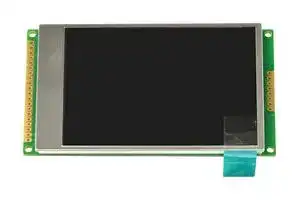
LMT028DHHFWL-NBN
TFT LCD, 2.8 ", 320 x 240 Pixels, Landscape, Black on White, 3V
⚠️ Reference pricing provided. In case of supply shortages, we will connect you with our trusted procurement partners to ensure your project's continuity.
- Manufacturer: INTELLIGENT DISPLAY SOLUTIONS
- Product type: TFT LCD Displays
- SVHC: No SVHC (25-Jun-2025)
- VGA Size: -
- Resolution: 320 x 240 Pixels
- Module Size: 79.3mm x 49.1mm x 6.8mm
- Touchscreen: -
- Display Size: 2.8"
- Logic Voltage: 3V
- Product Range: -
- Display Pinout: 28 Way Connector
- Interface Type: MCU
- Display Appearance: Black on White
- Display Brightness: 250cd/m²
- Display Orientation: Landscape
- Operating Temperature Max: 80°C
- Operating Temperature Min: -30°C
| Delivery and price | |
|---|---|
| Units per pack | 250 |
| Price | 12.57 € |
| Current stock | 10+ |
| Lead time | 30 days |
Datasheet

## **LMT028DHHFWL-NBN** LCD Module User Manual |Prepared by:<br>**Caiwei**<br>Date: 2023-12-06|Checked by:<br>Date:|Approved by:<br>Date:| |---|---|---| |**Rev.**|**Descriptions**|**Release Date**| |---|---|---| |0.1|Preliminary new release|2018-03-15| |0.2|Update description of /RD|2018-11-21| |0.3|Update Terminal Functions|2019-05-08| |0.4|Typing Correction|2020-08-13| |0.5|Update 1.Basic Specifications,Change the BLEN description in 1.2<br>Terminal Functions,Change the Input High Voltage of 3.1 DC<br>Characteristics,Delete the backlight control timingsection|2023-12-06| Page: 1 of 14 Intelligent Display Solutions, Unit 2, Berkshire Business Centre, Berkshire Drive, Thatcham, Berkshire, RG19 4EW Telephone : +44 (0)1635 294600 Fax : +44 (0)1635 869200 Email: info@i-lcd.com www.i-lcd.com A division of Intelligent Group Solutions Ltd LCD Module User Manual LMT028DHHFWL-NBN ## **Table of Content** **1. Basic Specifications....................................................................................................................... 3** 1.1 Block Diagram..................................................................................................................................................................3 1.2 Terminal Functions...........................................................................................................................................................3 **2. Absolute Maximum Ratings...........................................................................................................5 3. Electrical Characteristics............................................................................................................... 5** 3.1 DC Characteristics........................................................................................................................................................... 5 3.2 AC Characteristics............................................................................................................................................................5 3.3 Reset Timing.................................................................................................................................................................... 6 **4. Functions......................................................................................................................................... 7** 4.1 Display Commands.......................................................................................................................................................... 7 4.2 Power off the LCD Module............................................................................................................................................. 12 4.3 Refreshing The LCD Module..........................................................................................................................................12 **5. Optical Characteristics.................................................................................................................12 6. Design and Handling Precaution................................................................................................ 14** Page: 2 of 14 Intelligent Display Solutions, Unit 2, Berkshire Business Centre, Berkshire Drive, Thatcham, Berkshire, RG19 4EW Telephone : +44 (0)1635 294600 Fax : +44 (0)1635 869200 Email: info@i-lcd.com www.i-lcd.com A division of Intelligent Group Solutions Ltd LCD Module User Manual LMT028DHHFWL-NBN ## **1. Basic Specifications** Screen Size(Diagonal) : 2.8” Active Area : 57.6x43.2(mm) Number of dots : 320 x 240(RGB) Pixel Pitch: 0.18x0.18(mm) Color Depth: 65k colors Display Technology : a-Si TFT active matrix Display Mode : Normal White, Transmissive Display Interface : MCU_8bit Viewing Direction : 9 o’clock(Gray scale Inversion) (*1) 3 o’clock (*2) Surface Treatment : HC Operating Temperature : -20 ~ +70°C Storage Temperature : -30 ~ +80°C Note: - *1. For saturated color display content (eg. pure-red, pure-green, pure-blue, or pure-colors-combinations). - *2. For “color scales” display content. - *3. Color tone may slightly change by Temperature and Driving Condition. ## **1.1 Block Diagram** **==> picture [400 x 209] intentionally omitted <==** **----- Start of picture text -----**<br> BLEN Backlight Circuit<br>TFT Panel<br>320 × 240(RGB)<br>VDD<br>VSS ST7789VI or equivalent<br>/RD, /WR, D0~D7<br>/CS, /RES,D/C,FMARK<br>**----- End of picture text -----**<br> Page: 3 of 14 Intelligent Display Solutions, Unit 2, Berkshire Business Centre, Berkshire Drive, Thatcham, Berkshire, RG19 4EW Telephone : +44 (0)1635 294600 Fax : +44 (0)1635 869200 Email: info@i-lcd.com www.i-lcd.com A division of Intelligent Group Solutions Ltd LCD Module User Manual LMT028DHHFWL-NBN ## **1.2 Terminal Functions** |**Pin No.**<br>**(K1)**|**Pin**<br>**Name**|**I/O**|**Descriptions**| |---|---|---|---| |1|VSS|P|Negative power supply,0V| |2|VSS||| |3|BLEN|I|Backlight enable<br>BLEN=L, turn off Backlight<br>BLEN=H(*1), turn on Backlight<br>PWM(*2) brightness control| |4|VDD|P|Positive power supply| |5|VDD||| |6|/RD|I|Read enable input, active low| |7|/WR|I|Write enable input, active low| |8|D/C|I|Register Select<br>D/C=L, Transferring the Control Data<br>D/C=H, Transferring the Display Data| |9|/CS|I|Chip Select<br>/CS=L, enable access to the LCD module<br>/CS=H, disable access to the LCD module| |10|D0|I/O|Data Input| |:|:|:|:| |17|D7|I/O|Data Input| |18|/RES|I|Reset signal<br>/RES = L, Initialization is executed<br>/RES=H, Normal running.| |19|FMARK|O|Displaying Timing Frame Signal| |20~28|NC|-|-| Note: - *1. The output driving current of the BLEN control I/O port must be greater than 2mA. - *2. The PWM frequency is between 200Hz and 10kHz. Page: 4 of 14 Intelligent Display Solutions, Unit 2, Berkshire Business Centre, Berkshire Drive, Thatcham, Berkshire, RG19 4EW Telephone : +44 (0)1635 294600 Fax : +44 (0)1635 869200 Email: info@i-lcd.com www.i-lcd.com A division of Intelligent Group Solutions Ltd LCD Module User Manual LMT028DHHFWL-NBN ## **2. Absolute Maximum Ratings** VDD =5V, VSS=0V, TOP=25C |**Items**|**Symbol**|**Min.**|**Max.**|**Unit**|**Condition**| |---|---|---|---|---|---| |Supply Voltage|VDD|-0.3|+5.5|V|VSS=0V| |Input Voltage|VIN|-0.3|+4.6|V|VSS=0V| |OperatingTemperature|TOP|-20|+70|C|No Condensation| |Storage Temperature|TST|-30|+80|C|No Condensation| Cautions: Any Stresses exceeding the Absolute Maximum Ratings may cause substantial damage to the device. Functional operation of this device at other conditions beyond those listed in the specification is not implied and prolonged exposure to extreme conditions may affect device reliability. ## **3. Electrical Characteristics** ## **3.1 DC Characteristics** VDD=5V, VSS=0V, TOP=25C |**Items**|**Symbol**|**MIN.**|**TYP.**|**MAX.**|**Unit**|**Condition /**<br>**Application Pin**| |---|---|---|---|---|---|---| |Operating Voltage|VDD|4.8|5.0|5.2|V|VDD| ||IOVDD|1.65|3.0|3.6|V|I/O supply Voltage| |Input High Voltage|VIH|0.8*IOVDD|-|IOVDD|V|/RES,D0~D7,/CS<br>/RD,/WR,BLEN,D/C| |Input Low Voltage|VIL|0|-|0.3*IOVDD|V|| |Operating Current|IDD|-|74.5|85|mA|Backlight are ON| ||IDD|-|6.25|16|mA|Backlight are OFF| ## **3.2 AC Characteristics** ## **8080 Mode System Bus Timing** Page: 5 of 14 Intelligent Display Solutions, Unit 2, Berkshire Business Centre, Berkshire Drive, Thatcham, Berkshire, RG19 4EW Telephone : +44 (0)1635 294600 Fax : +44 (0)1635 869200 Email: info@i-lcd.com www.i-lcd.com A division of Intelligent Group Solutions Ltd LCD Module User Manual LMT028DHHFWL-NBN VDD =5V, VSS=0V, TOP=25C |**Signal**<br>~~Pe~~|**Symbo**<br>**l**<br>~~Pe~~|**Parameter**<br>~~Pe~~|**Spec.**<br>~~a~~<br>~~Pe~~|**Spec.**<br>~~a~~<br>~~Pe~~|**Unit**<br>~~a~~<br>~~Pe~~|**Description**<br>~~a~~| |---|---|---|---|---|---|---| ||||**Min.**<br>~~a~~<br>~~Pe~~|**Max.**<br>~~a~~<br>~~Pe~~||| |D/C<br>~~Pe~~<br>~~—~~|TAST<br>~~Pe~~|Address setuptime<br>~~Pe~~|5<br>~~a~~<br>~~Pe~~|-<br>~~a~~<br>~~Pe~~|ns<br>~~a~~<br>~~Pe~~<br>~~P|~~|-<br>~~a~~<br>~~P|~~| ||TAHT<br>~~a~~|Address hole time(Write/Read)|13|-||| |/CS|TCHW<br>~~a~~|Chipselect “H”pulse width|5|-|ns<br>~~ee~~|-| ||TCS<br>~~a~~|Chipselect setuptime(Write)|20|-||| ||TRCS<br>~~a~~|Chipselect setuptime(Read ID)|60|-||| ||TRCSFM<br>~~a~~<br>~~a ee~~|Chipselect setuptime(Read FM)<br>~~ee~~|460<br>~~ee~~|~~ee~~||| ||TCSF<br>~~a ee~~<br>~~a~~|Chipselect wait time(Write/Read)<br>~~ee~~|13<br>~~ee~~|~~ee~~||| ||TCSH<br>~~a~~|Chipselect hold time|13|||| |/WR|TWC<br>~~a~~|Write cycle|86|-|ns|-| ||TWRH<br>~~a~~<br>~~es~~|Controlpulse “H” duration|20|-||| ||TWRL<br>~~a~~<br>~~es~~|Controlpulse “L” duration|20|-||| |DB[7:0]|TDST<br>~~es~~<br>~~a~~|Data setuptime|13|-|ns|For maximum<br>CL=30pF<br>For minimum<br>CL=8pF| ||TDHT<br>~~a~~<br>~~ee~~|Data hold time|13|-||| ||TRAT<br>~~ee~~|Read access time(ID)|-|52||| ||TRATFM<br>~~ee~~<br>~~a~~<br>~~es~~|Read access time(FM)|-|442||| ||TODH<br>~~a~~<br>~~es~~|Ouput disable time|14|104||| |/RD(ID)|TRC<br>~~es~~<br>~~a~~|Read cycle(ID)|208||ns<br>~~Ce~~|When read ID data| ||TRDH<br>~~a~~|Controlpulse “H” duration(ID)|120|||| ||TRDL<br>~~a~~|Controlpulse “H” duration(ID)|60|||| |/RD(FM)|TRCFM<br>~~a Ce~~|Read cycle(FM)<br>~~Ce~~|585<br>~~Ce~~|~~Ce~~||When read from<br>frame memory| ||TRDHFM<br>~~a Ce~~<br>~~a~~<br>~~es~~|Controlpulse “H” duration(FM)<br>~~Ce~~|120<br>~~Ce~~|~~Ce~~||| ||TRDLFM<br>~~es~~|Controlpulse “H” duration(FM)|460|||| Note: - *1. Input signal rise/fall time should be less than 15ns . - *2. All timing is using 20% and 80% of VDD as the reference. - *3. Please refer to ST7789VI datasheet for details ## **3.3 Reset Timing** VDD =5V, VSS=0V, TOP=25C |**Item**|**Symbol**|**MIN.**|**TYP.**|**MAX.**|**Unit**| |---|---|---|---|---|---| |Reset LOW pulse width|tRW|10|-|-|us| |Reset time|TRT|-|-|170|ms| Page: 6 of 14 Intelligent Display Solutions, Unit 2, Berkshire Business Centre, Berkshire Drive, Thatcham, Berkshire, RG19 4EW Telephone : +44 (0)1635 294600 Fax : +44 (0)1635 869200 Email: info@i-lcd.com www.i-lcd.com A division of Intelligent Group Solutions Ltd LCD Module User Manual LMT028DHHFWL-NBN ## **4. Functions** ## **4.1 Display Commands** Page: 7 of 14 Intelligent Display Solutions, Unit 2, Berkshire Business Centre, Berkshire Drive, Thatcham, Berkshire, RG19 4EW Telephone : +44 (0)1635 294600 Fax : +44 (0)1635 869200 Email: info@i-lcd.com www.i-lcd.com A division of Intelligent Group Solutions Ltd LCD Module User Manual LMT028DHHFWL-NBN Intelligent Display Solutions, Unit 2, Berkshire Business Centre, Berkshire Drive, Thatcham, Berkshire, RG19 4EW Telephone : +44 (0)1635 294600 Fax : +44 (0)1635 869200 Email: info@i-lcd.com www.i-lcd.com A division of Intelligent Group Solutions Ltd Page: 8 of 14 LCD Module User Manual LMT028DHHFWL-NBN Intelligent Display Solutions, Unit 2, Berkshire Business Centre, Berkshire Drive, Thatcham, Berkshire, RG19 4EW Telephone : +44 (0)1635 294600 Fax : +44 (0)1635 869200 Email: info@i-lcd.com www.i-lcd.com A division of Intelligent Group Solutions Ltd Page: 9 of 14 LCD Module User Manual LMT028DHHFWL-NBN Page: 10 of 14 Intelligent Display Solutions, Unit 2, Berkshire Business Centre, Berkshire Drive, Thatcham, Berkshire, RG19 4EW Telephone : +44 (0)1635 294600 Fax : +44 (0)1635 869200 Email: info@i-lcd.com www.i-lcd.com A division of Intelligent Group Solutions Ltd LCD Module User Manual LMT028DHHFWL-NBN Notes: 1. There will be no abnormal visible effects on the display when S/W or H/W Reset are applied. 2. Please refer to ST7789s datasheet for details Page: 11 of 14 Intelligent Display Solutions, Unit 2, Berkshire Business Centre, Berkshire Drive, Thatcham, Berkshire, RG19 4EW Telephone : +44 (0)1635 294600 Fax : +44 (0)1635 869200 Email: info@i-lcd.com www.i-lcd.com A division of Intelligent Group Solutions Ltd LCD Module User Manual LMT028DHHFWL-NBN ## **4.2 Power off the LCD Module** It recommends that enter Sleep Mode before power off the LCD module. ## **4.3 Refreshing The LCD Module** It recommends that the operating modes and display contents be refreshed periodically to prevent the effect of unexpected noise. ## **5. Optical Characteristics** |**Item**|**Item**|**Symbol**|**Condition**|**MIN.**|**TYP.**|**MAX.**|**UNIT**|**Note.**| |---|---|---|---|---|---|---|---|---| |Viewing angle||Φ=90o|(CR≥10)|50|60|-|degree|Note 1,6| |||Φ=270o||50|60|-||| |||Φ=180o||40|50|-||| |||Φ=0o||50|60|-||| |Contrast ratio||CR|Φ=0o<br>θ=0o|300|500|-|-|Note 3| |Response Time||Ton|Φ=0o<br>θ=0o|-|30|50|msec|Note 4| |||Toff|||||msec|| |Chromaticlty|Red|X|Backlight<br>is on<br>Φ=0o<br>θ=0o|0.55|0.60|0.65||Note 1,5| |||Y||0.30|0.35|0.40||| ||Green|X||0.27|0.32|0.37||| |||Y||0.56|0.61|0.66||| ||Blue|X||0.09|0.14|0.19||| |||Y||0.05|0.09|0.15||| ||White|X||0.26|0.29|0.32||| |||Y||0.28|0.31|0.34||| |NTSC Ratio|S|||45|65|-|%|| |Luminance||L|Φ=0o<br>θ=0o|200|250|-|cd/m2|Note 1,6| |Luminance uniformity||U||80|-|-|%|Note 1,6| Page: 12 of 14 Intelligent Display Solutions, Unit 2, Berkshire Business Centre, Berkshire Drive, Thatcham, Berkshire, RG19 4EW Telephone : +44 (0)1635 294600 Fax : +44 (0)1635 869200 Email: info@i-lcd.com www.i-lcd.com A division of Intelligent Group Solutions Ltd LCD Module User Manual LMT028DHHFWL-NBN ## Note 1: The data are measured after LEDs are turned on for 5 minutes. LCM displays full white. The brightness is the average value of 9 measured spots. Measurement equipment PR-705 Measuring condition: ## Note 2: The definition of viewing angle: Refer to the graph below marked by θ and Ф - Measuring surroundings: Dark room - Measuring temperature: Ta=25℃. - Adjust operating voltage to get optimum contrast at the center of the display. ## Note 3: The definition of contrast ratio (Test LCM using PR-705): Contrast = Luminance When LCD is at “White” state Ratio(CR) Luminance When LCD is at “Black” state (Contrast Ratio is measured in optimum common electrode voltage) ## Note 4: Definition of Response time. (Test LCD using DMS501): The output signals of photo detector are measured when the input signals are changed from - “black” to “white”(falling time) and from “white” to “black”(rising time), respectively. The response time is defined as the time interval between the 10% and 90% of amplitudes.Refer to figure as below. ## Note 5: Definition of Color of CIE1931 Coordinate and NTSC Ratio. **==> picture [171 x 27] intentionally omitted <==** **----- Start of picture text -----**<br> Color gamut:<br>Area of RGB triangle<br>S= X100%<br>Area of NTSC triangle<br>**----- End of picture text -----**<br> Note 6: The luminance uniformity is calculated by using following formula. △Bp = Bp (Min.) / Bp (Max.)×100 (%) Bp (Max.) = Maximum brightness in 9 measured spots Bp (Min.) = Minimum brightness in 9 measured spots. Note 7: Measured the luminance of white state at center point Page: 13 of 14 Intelligent Display Solutions, Unit 2, Berkshire Business Centre, Berkshire Drive, Thatcham, Berkshire, RG19 4EW Telephone : +44 (0)1635 294600 Fax : +44 (0)1635 869200 Email: info@i-lcd.com www.i-lcd.com A division of Intelligent Group Solutions Ltd LCD Module User Manual LMT028DHHFWL-NBN ## **6. Design and Handling Precaution** 1. The LCD panel is made by glass. Any mechanical shock (eg. dropping form high place) will damage the LCD module. 2. Do not add excessive force on the surface of the display, which may cause the Display color change abnormally. 3. The polarizer on the LCD is easily get scratched. If possible, do not remove the LCD protective film until the last step of installation. 4. Never attempt to disassemble or rework the LCD module. 5. Only Clean the LCD with Isopropyl Alcohol or Ethyl Alcohol. Other solvents (eg. water) may damage the LCD. 6. When mounting the LCD module, make sure that it is free form twisting, warping and distortion. 7. Ensure to provide enough space (with cushion) between case and LCD panel to prevent external force adding on it, or it may cause damage to the LCD or degrade the display result. 8. Only hold the LCD module by its side. Never hold LCD module by add force on the heat seal or TAB. 9. Never add force to component of the LCD module. It may cause invisible damage or degrade of the reliability. 10. LCD module could be easily damaged by static electricity. Be careful to maintain an optimum anti-static work environment to protect the LCD module. 11. When peeling off the protective film from LCD, static charge may cause abnormal display pattern. It is normal and will resume to normal in a short while. 12. Take care and prevent get hurt by the LCD panel sharp edge. 13. Never operate the LCD module exceed the absolute maximum ratings. 14. Keep the signal line as short as possible to prevent noisy signal applying to LCD module. 15. Never apply signal to the LCD module without power supply. 16. IC chip (eg. TAB or COG) is sensitive to the light. Strong lighting environment could possibly cause malfunction. Light sealing structure casing is recommend. 17. LCD module reliability may be reduced by temperature shock. 18. When storing the LCD module, avoid exposure to the direct sunlight, high humidity, high temperature or low temperature. They may damage or degrade the LCD module. Page: 14 of 14 Intelligent Display Solutions, Unit 2, Berkshire Business Centre, Berkshire Drive, Thatcham, Berkshire, RG19 4EW Telephone : +44 (0)1635 294600 Fax : +44 (0)1635 869200 Email: info@i-lcd.com www.i-lcd.com A division of Intelligent Group Solutions Ltd **==> picture [76 x 42] intentionally omitted <==** **==> picture [60 x 32] intentionally omitted <==** **==> picture [445 x 418] intentionally omitted <==** **==> picture [33 x 381] intentionally omitted <==** **==> picture [80 x 50] intentionally omitted <==** **==> picture [55 x 37] intentionally omitted <==**
Updated at April 23, 2026
About Novapart
Novapart is a B2B electronic component broker specialising in stock shortages and cost reduction. We source hard-to-find parts and identify compliant alternatives across a catalogue of 410,000+ components from 500+ manufacturers.
Learn more →Stock Shortage Specialist
When a component is unavailable, discontinued or has an unacceptable lead time, we tap into our network of vetted European and Asian distributors to source what you need — without compromising on quality or traceability.
Request a quote →Compliant Alternatives
We identify pin-to-pin, electrically equivalent substitutes that meet the same certifications (RoHS, AEC-Q100, REACH) as your original specification — validated against datasheets, not just part numbers. Often at a lower cost.
BOM Analysis service →