
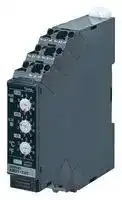


K8DT-TH1CA
Temperature Monitoring Relay, K8DT Series, Thermocouple, RTD, 100 to 240 Vac, SPDT Relay Output
- Manufacturer: OMRON INDUSTRIAL AUTOMATION
- Product type: Temperature Controllers
- Thermocouple Type:E, J, K, T, Pt100, Pt1000; Operating Temperature Max:60°C; Operating Temperature Min:-20°C; Temperature Accuracy ±:1%; Output Voltage Max:250VAC; Output Voltage M
- Product Range: K8DT-TH
- Thermocouple Type: E, J, K, T, Pt100, Pt1000
- Output Voltage Max: 250VAC
- Output Voltage Min: -
- Temperature Accuracy ±: 1%
- Operating Temperature Max: 60°C
- Operating Temperature Min: -20°C
| Delivery and price | |
|---|---|
| Units per pack | 1 |
| Price | 111.43 € |
| Current stock | 10+ |
| Lead time | 30 days |

**New Product**

## **Temperature Monitoring Relay K8DT-TH**

## **Ideal to prevent heater overheating. Self-latching output to contribute to safe equipment operation.**

- Set the temperature with ultra-simple rotary switches.

- Digitally set the temperature to between 0 and 999°C in 1°C increments with one Relay (K8DT-TH1 @@ ).

- (K8DT-TH2 @@ : Set to between 0 and 1,800°C in 10°C increments.)

- Connect a thermocouple or platinum resistance thermometer.

- Width of 17.5 mm to reduce space required in panels.

- Push-In Plus Terminal that reduce wiring work.

- The use of cage clamps enables wiring with bare stranded wires. Double-insertion holes for crossover wiring (all terminals).

- UL listed for easy shipping to North America.

For the most recent information on models that have been certified for safety standards, refer to your OMRON website.

- Models added with transistor outputs for superior contact reliability.

Refer to _Safety Precautions_ on page 9.

## **Ordering Information**

## **Temperature Input Models**

|**Power supply**<br>**voltage**|**Input types**|**Setting units (setting range)**|**Output relays Type**|**Model**|
|---|---|---|---|---|
|24 V AC/DC|Thermocouple or<br>platinum resistance<br>thermometer|Setting unit: 1°C or 1°F<br>(0 to 999°C/°F)|Relay: SPDT contact output|**K8DT-TH1CD**|
||||Transistor|**K8DT-TH1TD**|
|100-240 V AC|||Relay: SPDT contact output|**K8DT-TH1CA**|
||||Transistor|**K8DT-TH1TA**|
|24 V AC/DC|Thermocouple|Setting unit: 10°C/°F*|Relay: SPDT contact output|**K8DT-TH2CD**|
||||Transistor|**K8DT-TH2TD**|
|100-240 V AC|||Relay: SPDT contact output|**K8DT-TH2CA**|
||||Transistor|**K8DT-TH2TA**|


* Refer to Setting Ranges on page 3 for the setting ranges.

## **Options (Order Separately) Front Cover**

**==> picture [109 x 40] intentionally omitted <==**

**----- Start of picture text -----**<br>
Appearance Model<br>Y92A-D1A<br>**----- End of picture text -----**<br>


**1**

**K8DT-TH**

## **Ratings and Specifications**

## **Ratings**

|**Ratings**|**Ratings**||
|---|---|---|
|**Power supply**<br>**voltage**||K8DT-TH@@D: 24 VAC 50/60 Hz or 24 VDC<br>K8DT-TH@@A: 100 to 240 VAC 50/60 Hz|
|**Allowable voltage**<br>**range**||85% to 110% of power supply voltage|
|**Power**<br>**consumption**||24 VAC or 24 VDC: 2.1 VA max. or 1.2 W max.<br>100 to 240 VAC: 3.1 VA max.|
|**Rated insulation**<br>**voltage**||253 VAC|
|**Sensor**<br>**inputs**|**K8DT-TH1**|Thermocouple: K, J, T, E;<br>Platinum-resistance thermometer: Pt100, Pt1000|
||**K8DT-TH2**|Thermocouple: K, J, T, E, B, R, S, PL II|
|**Setting method**||Set of three rotary DIP switches|
|**Indicators**||Power (PWR): Green,<br>Alarm (ALM): Red|
|**Output form**||Relay Output: SPDT contact<br>Transistor Output: 1|
|**Output relay**<br>**ratings**||Rated load<br>5 A at 250 VAC (Resistive load)<br>5 A at 30 VDC (Resistive load)<br>1 A at 250 VAC (Inductive load)<br>0.2 A at 48 VDC (Inductive load)<br>Minimum load: 5 VDC, 10 mA (reference values)<br>Mechanical life: 10 million operations min.<br>Electrical life: 5 A at 250 VAC or 30 VDC: 50,000<br>operations<br>3 A at 250 VAC/30 VDC: 100,000<br>operations|
|**Transistor output**<br>**ratings**||Rated voltage: 24 VDC (maximum voltage: 26.4 VDC)<br>Maximum current: 50 mA DC|
|**Ambient operating**<br>**temperature**||�20 to 60°C (with no condensation or icing)|
|**Storage**<br>**temperature**||�25 to 65°C (with no condensation or icing)|
|**Ambient operating**<br>**humidity**||25% to 85% RH (with no condensation)|
|**Storage humidity**||25% to 85% RH (with no condensation)|
|**Altitude**||2,000 m max.|
|**Applicable wires**||Stranded wires, solid wires, or ferrules|
|**Applicable wire**<br>**size**||0.25 to 1.5 mm2(AWG24 to AWG16)|
|**Wire insertion force**||8 N max. for AWG20 wire|
|**Screwdriver**<br>**insertion force**||15 N max.|
|**Wire stripping**<br>**length**||8 mm|
|**Ferrule length**||8 mm|
|**Recommended flat-**<br>**blade screwdriver**||XW4Z-00B (Omron)<br>SZF 0.4�2.5 (Phoenix Contact)<br>210-719 (Wago)<br>SDI 0.4�2.5�75 (Weidmuller)|
|**Current capacity**||10 A (per pole)|
|**Number of**<br>**insertions**||50 times|
|**Case color**||N1.5|
|**Case material**||PC, UL 94 V-0|
|**Weight**||Approx. 100 g|
|**Mounting**||Mounts to DIN Track, or screw mounting|
|**Dimensions**||17.5�90�90 mm (W�D�H)|


## **Specifications**

|**Measurement**<br>**accuracy**|**Measurement**<br>**accuracy**|K8DT-TH1@@: ±1% of the setting range or ±4 °C,<br>whichever is larger.<br>K8DT-TH2@@: ±1% of the setting range (±1%FS).|
|---|---|---|
|**Hysteresis width**||2°C|
|**Sampling cycle**||100 ms|
|**Applicable**<br>**standards**|**Approved**<br>**standards**|EN 61010-1<br>Installation environment:<br>Overvoltage category II, pollution level 2|
||**EMC**|EN 61326-1*|
||**Safety**<br>**standards**|UL 61010-1 (Listing)<br>Korean Radio Waves Act (Act 10564)|
|**Insulation**|**resistance**|20 M�min.<br>Between all external terminals and the case<br>Between all power supply terminals and all input<br>terminals<br>Between all power supply terminals and all output<br>terminals<br>Between all input terminals and all output<br>terminals|
|**Dielectric strength**||3,000 VAC for 1 min<br>Between all external terminals and the case<br>Between all power supply terminals and all input<br>terminals<br>Between all power supply terminals and all output<br>terminals<br>Between all input terminals and all output<br>terminals|
|**Impulse withstand**<br>**voltage**||6 kV (between live terminals and exposed,<br>non-charged metal parts)|
|**Noise immunity**||Square-wave noise of 1�s/100 ns pulse width with<br>1-ns rise time<br>100 to 240 VAC: 1,500 V power supply terminal<br>common/normal mode<br>24 VAC: 1,500 V power supply terminal common/<br>normal mode<br>24 VDC: 480 V power supply terminal common|
|**Vibration resistance**||Frequency: 10 to 55 Hz, 0.35-mm single amplitude<br>10 sweeps of 5 min each in X,Y, and Z directions|
|**Shock resistance**||100 m/s2, 3 times each in 6 directions along 3 axes|
|**Degree of protection**||Terminals: IP20|


* Industrial Electromagnetic Environment (EN/IEC 61326-1, Table 2)

**2**

**K8DT-TH**

## **Setting Ranges K8DT-TH1 Centigrade**

|**Input**|**K**|**J**|**T**|**E**|**Pt100**|**Pt1000**|
|---|---|---|---|---|---|---|
|**Setting**<br>**temperature**<br>**range**<br>1000<br>800<br>600<br>400<br>200<br>0|999|850|400|600|850|850|
|||~~?~~|||~~**?**~~|~~**?**~~|
||||||||
||||||||
||||||||
||||||||
||0|0|0|0|0|0|
|**Minimum setting**<br>**increment**|1°C||||||


## **Fahrenheit**

|**Input**|**K**|**J**|**T**|**E**|**Pt100**|**Pt1000**|
|---|---|---|---|---|---|---|
|**Setting**<br>**temperature**<br>**range**<br>1000<br>800<br>600<br>400<br>200<br>0|999|999|700|999|999|999|
||?|~~?~~||?|?|?|
||||||||
||||||||
||||||||
||||||||
||0|0|0|0|0|0|
|**Minimum setting**<br>**increment**|1°F||||||


## **K8DT-TH2 Centigrade**

|**Input**|**K**|**J**|**T**|**E**|**B**|**R**|**S**|**PL II**|
|---|---|---|---|---|---|---|---|---|
|**Setting**<br>**temperature**<br>**range**<br>1,800<br>1,700<br>1,600<br>1,500<br>1,400<br>1,300<br>1,200<br>1,100<br>1,000<br>900<br>800<br>700<br>600<br>500<br>400<br>300<br>200<br>100<br>0|||||1,800||||
|||||||1,700|1,700||
||||||||||
||||||||||
||||||||||
||1,300|||||||1,300|
||||||||||
||||||||||
||||||||||
|||850|||||||
||||||||||
||||||||||
|||||600|||||
||||||||||
||||400||||||
||||||||||
||||||||||
||||||||||
||||||100||||
||0|0|0|0||0|0|0|
|**Minimum setting**<br>**increment**|10°C||||||||


## **Fahrenheit**

|**Input**|**K**|**J**|**T**|**E**|**B**|**R**|**S**|**PL II**|
|---|---|---|---|---|---|---|---|---|
|**Setting**<br>**temperature**<br>**range**<br>3,200<br>3,100<br>3,000<br>2,900<br>2,800<br>2,700<br>2,600<br>2,500<br>2,400<br>2,300<br>2,200<br>2,100<br>2,000<br>1,900<br>1,800<br>1,700<br>1,600<br>1,500<br>1,400<br>1,300<br>1,200<br>1,100<br>1,000<br>900<br>800<br>700<br>600<br>500<br>400<br>300<br>200<br>100<br>0|||||3,200||||
||||||||||
|||||||3,000|3,000||
||||||||||
||||||||||
||||||||||
||||||||||
||||||||||
||||||||||
||2,300|||||||2,300|
||||||||||
||||||||||
||||||||||
||||||||||
||||||||||
||||||||||
||||||||||
|||1,500|||||||
||||||||||
||||||||||
||||||||||
|||||1,100|||||
||||||||||
||||||||||
||||||||||
||||700||||||
||||||||||
||||||||||
||||||||||
||||||||||
||||||300||||
||||||||||
||||||||||
||0|0|0|0||0|0|0|
|**Minimum setting**<br>**increment**|10°F||||||||


## **Temperature Input Range**

|**K8DT-TH1**|**°C**|**°C**|**°F**|**°F**||**K8DT-TH2**|**°C**|**°C**|**°F**|**°F**|
|---|---|---|---|---|---|---|---|---|---|---|
|**Input type**|Lower<br>limit|Upper<br>limit|Lower<br>limit|Upper<br>limit||**Input type**|Lower<br>limit|Upper<br>limit|Lower<br>limit|Upper<br>limit|
|**K**|−20|1019|−40|1039||**K**|−20|1320|−40|2340|
|**J**|−20|870|−40|1039||**J**|−20|870|−40|1540|
|**T**|−20|420|−40|740||**T**|−20|420|−40|740|
|**E**|−20|620|−40|1039||**E**|−20|620|−40|1140|
|**Pt100**|−20|870|−40|1039||**B**|0|1820|0|3240|
|**Pt1000**|−20|870|−40|1039||**R**|−20|1720|−40|3040|
|**---**|---|---|---|---||**S**|−20|1720|−40|3040|
|**---**|---|---|---|---||**PL II**|−20|1320|−40|2340|


**3**

**K8DT-TH Connections**

## **Terminal Diagram**

**==> picture [370 x 198] intentionally omitted <==**

**----- Start of picture text -----**<br>
(3) Power supply voltage<br>K8DT-TH1 C A<br>(1) (2)(3) A: 100 to 240 VAC D: 24 VAC/VDC<br>(1) Temperature sensor input A1 A2 A1 A2 A1 A2<br>TH1 TH2<br>B B B+ B− (No polarity)<br>+ − A<br>B+ B− B+ B−<br>A<br>A<br>(2) Output<br>DIP SW C: Relay Output T: Transistor Output<br>12 12<br>14 11 14 11 14 11<br>Inside<br>Inside<br>**----- End of picture text -----**<br>


**Note: 1.** Do not connect anything to terminals that are shaded in gray. **2.** There is no polarity for the DC power supply input.

## **Timing Charts**

**==> picture [232 x 139] intentionally omitted <==**

**----- Start of picture text -----**<br>
Temperature Alarm: Hysteresis: 2°C or 2°F<br>2°C (°F)<br>Temperature settings<br>2°C (°F)<br>Temperature alarm upper limit<br>(11) to (14)<br>Temperature alarm lower limit<br>(11) to (14)<br>Changing between Normally Open and Normally Closed<br>Power supply<br>Temperature alarm or other error<br>Relay output (normally open)<br>(11) to (14)<br>Relay output (normally closed)<br>(11) to (14)<br>**----- End of picture text -----**<br>


## **Functions**

## **SV Protection**

This function protects (i.e., prohibits changing) the alarm setting, operating method, and modes for the Temperature Monitoring Relay that have been set on the rotary switches and DIP switch. The protection function is activated by pressing the output latch reset button on the Temperature Monitoring Relay for at least 5 s. The power indicator will flash when the protection is activated. The protection function can be released by pressing the output latch reset button on the Temperature Monitoring Relay for at least 5 s. The power indicator will light while the protection is being reset.

Note: Other errors: sensor open circuit error, sensor input error, temperature setting error, and memory error.

Latched Operation: Relay outputs remain latched even after the alarm or error is reset. Power supply Temperature alarm or other error LATCH_RESET Relay output (latched) (11) to (14) 0.02 s

Note: If LATCH_RESET is enabled, alarm status will be retained even if the power supply is cycled. To clear the alarm status, press the LATCH_RESET button. (Default: Latching enabled.)

**==> picture [224 x 109] intentionally omitted <==**

**----- Start of picture text -----**<br>
Operation of Indicators<br>Power supply<br>SV Protect Mode<br>Flashing<br>PWR_LED<br>Power supply<br>Temperature alarm<br>Other error<br>ALM_LED Flashing<br>**----- End of picture text -----**<br>


**4**

**K8DT-TH**

## **Nomenclature**

## **Front**

## **K8DT-TH1**

## **K8DT-TH2**

**==> picture [414 x 228] intentionally omitted <==**

**----- Start of picture text -----**<br>
Terminal block<br>(See note.)<br>Terminal block<br>(See note.)<br>Power indicator Temperature setting  Power indicator Temperature setting<br>switch for increments  switch for increments<br>of 100°C/°F of 1,000°C/°F<br>Alarm indicator Temperature setting  Alarm indicator Temperature setting<br>switch for increments  switch for increments<br>of 10°C/°F of 100°C/°F<br>Temperature setting  Temperature setting<br>Temperature unit switch for increments  Temperature unit switch for increments<br>(Black out  of 1°C/°F (Black out  of 10°C/°F<br>the unnecessary label:  the unnecessary label:<br>°C or °F.) LATCH_RESET button * °C or °F.) LATCH_RESET button *<br>Terminal block Terminal block<br>(See note.) (See note.)<br>**----- End of picture text -----**<br>


## **Error (ALM indicator: Flashing)**

**Note:** Use solid wires, stranded wires, or ferrules to connect to the terminals.

One of the following items 1 to 3 has occurred.

To maintain the withstand voltage after connecting the terminals, insert 8 mm of exposed conductor into the terminal.

**1.** The sensor circuit is disconnected or the temperature setting is out of the specified range.

Solid Wire Stranded Wires Ferrules 8 mm 8 mm 8 mm

**2.** The temperature setting is out of the specified range.

**3.** There is a problem in the internal circuits.

## **Corrections**

**1.** Check for incorrect wiring, circuit disconnections, short circuits, and whether the input type and temperature settings are correct.

## **Temperature Setting Switch**

**2.** Disable SV Protect Mode.

The rotary switches are used to set the alarm value. Point the arrow to the required number.

**3.** If the wiring and settings are correct, reset the power supply. If the Unit resumes normal operation, the problem may have been caused by noise. If the Unit does not resume normal operation, it must be replaced.

- Latching and the SV Protect Mode are stored in non-volatile memory. An error may occur if the data is updated more than one million times.

- If you press and hold the LATCH_RESET button for 5 seconds or longer, the SV Protect Mode will go into effect. When SV Protect Mode is enabled, the PWR indicator flashes. To disable the SV Protect Mode, press and hold the LATCH_RESET Button for at least 5 seconds.

**5**

**K8DT-TH**

**Operation Method**

## **Connections**

## **Outputs**

For a relay output, the SPDT contacts are output on terminals 11, 12, and 14. For a transistor output, the output is on terminals 11 and 14. The internal circuit of the transistor output is NPN, but application is possible for either a sinking or sourcing output.

**==> picture [317 x 68] intentionally omitted <==**

**----- Start of picture text -----**<br>
In the case of sinking output applications In the case of sourcing output applications<br>14 14<br>load<br>Sourcing<br>Sinking<br>load<br>K8DT 11 K8DT 11<br>**----- End of picture text -----**<br>


## **DIP Switch Settings**

**==> picture [61 x 24] intentionally omitted <==**

**----- Start of picture text -----**<br>
O N<br>1 2 3 4 5 6 7 8<br>**----- End of picture text -----**<br>


Turn OFF the power to the Temperature Monitoring Relay before you change the DIP switch settings. The DIP switch settings take effect when the power is turned ON. Use a flat-blade screwdriver to set the DIP switch pins. **Note:** Open the DIP switch cover to set the DIP switch. Keep the DIP switch cover closed while the power supply to the Relay is ON.

**==> picture [54 x 51] intentionally omitted <==**

**----- Start of picture text -----**<br>
SW8<br>SW7<br>SW6<br>SW5<br>SW4 DIP Switch<br>SW3<br>SW2<br>SW1<br>**----- End of picture text -----**<br>


**6**

**K8DT-TH**

## **DIP Switch Functions**

## **K8DT-TH1**

|**R_SW3**|100°C/°F units (0 to 9)|
|---|---|
|**R_SW2**|10°C/°F units (0 to 9)|
|**R_SW1**|1°C/°F units (0 to 9)|


**Note:** The default setting is 0°C.

|**PIN**|**ON**❍↑<br>**OFF**●↓|1<br>ON<br>OFF|2|2|2|3|3|3|4|4|4|5|5|5|6|6|6|7|7|7|8|8|
|---|---|---|---|---|---|---|---|---|---|---|---|---|---|---|---|---|---|---|---|---|---|---|
||||||||||||||||||||||||
||||||||||||||||||||||||
|**Alarm Mode**|**Upper limit**|●<br>|---|||---|||---|||---|||---|||---|||Not used.||
||**Lower limit**|❍|---|||---|||---|||---|||---|||---|||||
|**Latching**|**With latching**|---|●|||---|||---|||---|||---|||---|||||
||**Without latching**|---|❍|||---|||---|||---|||---|||---|||||
|**Output drive**<br>**method**|**Normally open**|---|---|||●|||---|||---|||---|||---|||||
||**Normally closed**|---|---|||❍|||---|||---|||---|||---|||||
|**Temperature**<br>**unit**|**°C**|---|---|||---|||●|||---|||---|||---|||||
||**°F**|---|---|||---|||❍|||---|||---|||---|||||
|**Input type**|**K**|---|---|||---|||---|||●|||●|||●|||||
||**J**|---|---|||---|||---|||●|||●|||❍|||||
||**T**|---|---|||---|||---|||●|||❍|||●|||||
||**E**|---|---|||---|||---|||●|||❍|||❍|||||
||**Pt100**|---|---|||---|||---|||❍|||●|||●|||||
||**Pt1000**|---|---|||---|||---|||❍|||●|||❍|||||
||**NOT USE**|---|---|||---|||---|||❍|||❍|||●|||||
||**NOT USE**|---|---|||---|||---|||❍|||❍|||❍|||||


**Note:** All pins are set to OFF by default.

## **K8DT-TH2**

|**R_SW3**|1,000°C/°F units (0 to 3)<br>**Note:**A temperature setting error occurs if this switch<br>is set to a value from 4 to 9.|
|---|---|
|**R_SW2**|100°C/°F units (0 to 9)|
|**R_SW1**|10°C/°F units (0 to 9)|


**Note:** The default setting is 0°C.

|**PIN**|**ON**❍↑<br>**OFF**●↓|1<br>ON<br>OFF|2|2|2|3|3|3|4|4|4|5|5|5|6|6|6|7|7|7|8|8|
|---|---|---|---|---|---|---|---|---|---|---|---|---|---|---|---|---|---|---|---|---|---|---|
||||||||||||||||||||||||
||||||||||||||||||||||||
|**Alarm Mode**|**Upper limit**|●<br>|---|||---|||---|||---|||---|||---|||Not used.||
||**Lower limit**|❍|---|||---|||---|||---|||---|||---|||||
|**Latching**|**With latching**|---|●|||---|||---|||---|||---|||---|||||
||**Without latching**|---|❍|||---|||---|||---|||---|||---|||||
|**Output drive**<br>**method**|**Normally open**|---|---|||●|||---|||---|||---|||---|||||
||**Normally closed**|---|---|||❍|||---|||---|||---|||---|||||
|**Temperature**<br>**unit**|**°C**|---|---|||---|||●|||---|||---|||---|||||
||**°F**|---|---|||---|||❍|||---|||---|||---|||||
|**Input type**|**K**|---|---|||---|||---|||●|||●|||●|||||
||**J**|---|---|||---|||---|||●|||●|||❍|||||
||**T**|---|---|||---|||---|||●|||❍|||●|||||
||**E**|---|---|||---|||---|||●|||❍|||❍|||||
||**B**|---|---|||---|||---|||❍|||●|||●|||||
||**R**|---|---|||---|||---|||❍|||●|||❍|||||
||**S**|---|---|||---|||---|||❍|||❍|||●|||||
||**PL II**|---|---|||---|||---|||❍|||❍|||❍|||||


**Note:** All pins are set to OFF by default.

**7**

**K8DT-TH**

**Dimensions**

**(Unit: mm)**

## **Temperature Monitoring Relay K8DT-TH**

**==> picture [191 x 83] intentionally omitted <==**

**----- Start of picture text -----**<br>
100<br>90<br>17.5 86 5<br>Pl 90 —<br>**----- End of picture text -----**<br>


## **Options (Order Separately)**

**==> picture [242 x 125] intentionally omitted <==**

**----- Start of picture text -----**<br>
Front Cover<br>Y92A-D1A<br>1.8<br>52.7<br>3.5<br>| it<br>17.5 5.85<br>=“<br>**----- End of picture text -----**<br>


## **Optional Parts for DIN Track Mounting**

**==> picture [389 x 78] intentionally omitted <==**

**----- Start of picture text -----**<br>
DIN Tracks<br>7.3 [±0.15]<br>PFP-100N 4.5<br>PFP-50N 35 [±0.3] 27 [±0.15]<br>15 25 10 25 25 10 25 15(5)* 1<br>1000(500)*<br>* Dimensions in parentheses are for the PFP-50N.<br>**----- End of picture text -----**<br>


**8**

**K8DT-TH**

## **Safety Precautions**

**Be sure to read the precautions for all models in the website at the following URL: http://www.ia.omron.com/.**

## **Warning Indications**

**Indicates a potentially hazardous CAUTION situation which, if not avoided, may result in minor or moderate injury or in property damage.**

**Precautions for Supplementary comments on what to do Safe Use or avoid doing, to use the product safely. Supplementary comments on what to do Precautions for or avoid doing, to prevent failure to Correct Use operate, malfunction, or undesirable effects on product performance.**

## **Meaning of Product Safety Symbols**

**==> picture [34 x 103] intentionally omitted <==**

**Used to warn of the risk of electric shock under specific conditions.**

**Used for general prohibitions for which there is no specific symbol.**

**Used to indicate prohibition when there is a risk of minor injury from electrical shock or other source if the product is disassembled.**

**Used for general mandatory action precautions for which there is no specified symbol.**

## ! **CAUTION**

**Doing so may occasionally result in minor injury due to electric shock. Do not touch the Relay while the power supply is ON, except for the adjustment knob and buttons.**

**There is a risk of minor electrical shock, fire, or device failure. Do not allow any pieces of metal, conductors, or cutting chips that occur during the installation process to enter the product.**

**Explosions may cause minor injuries. Do not use the product in locations with inflammable or explosive gases.**

**There is a risk of minor electrical shock, fire, or device failure. Do not disassemble, modify, repair, or touch the inside of the product.**

**If the setting does not match the element to be controlled, the product may behave unexpectedly and damage the machine or cause accidents. Set the Temperature Monitoring Relay as described below.**

- Make sure that all parameters are set suitably for the monitor targets.

- Make sure that the power supply is turned OFF before you change any DIP switch setting. The DIP switch settings take effect when the power is turned ON.

**If the Relay fails, monitoring and alarm outputs may fail to operate. This may result in physical damage to the facilities, equipment, or other devices that are connected to it. To reduce this risk, inspect the Relay regularly. To maintain safety in the event of malfunction of the Relay, take appropriate safety measures, such as installing a monitoring device on a separate line.**

**Use of the product beyond its life may result in contact welding or burning. Make sure to consider the actual operating conditions and use the product within its rated load and electrical life count. The life of the output relay varies significantly with the switching capacity and switching conditions.**

**If the Relay is used with incorrect wiring, fire may occasionally occur, possibly resulting in physical damage. Check the wiring for mistakes before you turn ON the power supply.**

**If the wire insertion length is insufficient, fire may occasionally occur, possibly resulting in physical damage. Insert the wires all the way to the back.**

**The terminal block may be damaged if you insert a flat-blade screwdriver in the release hole with excessive force. Insert the flat-blade screwdriver into the release holes with a force of 15 N or less.**

**9**

**K8DT-TH**

## **Precautions for Safe Use**

**1.** Do not use or store the product in the following locations.

   - Locations subject to water or oil

   - Locations subject to direct radiant heating equipment

   - Outdoor locations or under direct sunlight

   - Locations subject to dust or corrosive gases (sulfurizing gases, ammonia gases, etc.)

   - Locations subject to rapid temperature changes

   - Locations prone to icing and dew condensation

**35.** Do not bend a wire past its natural bending radius or pull in it with excessive force. Doing so may break the wires.

**36.** Do not insert more than one wire into each terminal insertion hole. **37.** To prevent wiring materials from smoking or igniting, confirm wire ratings and use the wiring materials given in the following table.

|**Recommended wire**|**Stripping length**<br>**(Ferrules not used)**|
|---|---|
|0.25 to 1.5mm2/Equivalent to AWG24 to 16|8 mm|


      **38.** Use only the specified wires for wiring.

      **39.** When wiring the terminals, allow some leeway in the wire length.

   - Locations subject to vibration and large shocks

   - Locations subject to wind and rain

   - Locations subject to direct radiant heating equipment

   - Locations subject to static electricity or noise

   - Locations subject to insects or small animals

**2.** Use and store the product in a location where the ambient temperature and humidity are within the specified ranges. If applicable, provide forced cooling.

**3.** Check terminal polarity when wiring and wire all connections correctly. The power supply terminals do not have polarity.

**4.** Do not wire the input and output terminals incorrectly.

**5.** Make sure the power supply voltage and loads are within the specifications and ratings for the product.

**6.** Make sure the type of the thermocouple matches the input type that the Temperature Monitoring Relay is designed for.

**7.** If you need to extend the length of the lead wires on the thermocouple, make sure to match the type of thermocouple and always use compensating conductors.

**8.** Point the arrows on the rotary switches to the required numbers. Do not set a switch midway between two positions. Malfunction could result from an improper setting.

**9.** To extend the lead wires on the platinum resistance thermometer, use lead wires with a low resistance (5 Ω or less per wire), and make the resistance equal on all three lead wires.

**10.** Make sure the ferrule terminals for wiring are of the specified size.

**11.** The stripping length is 8 mm. Insert the wires all the way to the back.

**12.** Do not connect anything to terminals that are not being used.

**13.** Use a power supply that will reach the rated voltage within 1 second after the power is turned ON.

**14.** After you turn ON the power, it takes 2 seconds for the outputs of the Temperature Monitoring Relay to stabilize. Take this time into account when you design the control panel.

**15.** Allow at least 30 minutes for the product to warm up. During this time, the correct temperature will not be detected and the output may malfunction.

**16.** Keep wiring separate from high voltages and power lines that draw large currents. Do not place product wiring in parallel with or in the same path as high-voltage or high-current lines.

**17.** Do not install the product near equipment that generates high frequencies or surges.

**18.** The product may cause incoming radio wave interference. Do not use the product near radio wave receivers.

## **Precautions for Correct Use**

## **Observe the following operating methods to prevent failure and malfunction.**

**1.** Use the power supply voltage, input power, and other power supplies and converters with suitable capacities and rated outputs.

**2.** When cleaning the product, do not use thinners or solvents. Use commercial alcohol.

**3.** If you use stranded wires, make sure that there are no loose wire strands.

**4.** If you wire crossovers and connect terminal blocks in parallel, a large current will flow. Make sure that the current does not exceed 10 A.

**5.** The terminal block may be damaged if the recommended tool is not used. Use the recommended flat-blade screwdriver to operate the release holes.

## **Correct Mounting Direction, Mounting, and Removing**

## **Mounting to DIN Track**

To mount the Relay to a DIN Track, hook the Relay onto the DIN Track and press the Relay in the direction of the arrow until you hear it lock into place.

**==> picture [136 x 90] intentionally omitted <==**

**----- Start of picture text -----**<br>
(1) (2)<br>**----- End of picture text -----**<br>


## **Removing from the DIN Track**

To remove the Relay, insert a screwdriver into the hook on the top or bottom and pull out the hook to release the Relay.

**19.** Install an external switch or circuit breaker and label it clearly so that the operator can quickly turn OFF the power supply.

**20.** When discarding the product, properly dispose of it as industrial waste.

**21.** Make sure the indicators operate correctly. Depending on the application environment, the indicators may deteriorate prematurely and become difficult to see.

**22.** The maximum terminal temperature is 80°C. Use wires with a temperature resistance of at least 80°C.

**23.** Do not use the product if it is accidentally dropped. The internal components may be damaged.

**24.** Be sure you understand the contents of this catalog and handle the product according to the instructions provided.

**25.** Do not install the product in any way that would place a load on it.

**==> picture [101 x 42] intentionally omitted <==**

**----- Start of picture text -----**<br>
Applicable DIN Tracks<br>PFP-100N (100 cm)<br>PFP-50N (50 cm)<br>30 mm min.<br>**----- End of picture text -----**<br>


   - Leave at least 30 mm of space between the product and other devices to allow easy installation and removal.

**26.** When using the product, remember that the power supply terminals carry a high voltage.

**27.** The product must be handled only by trained electrician.

**28.** Prior to operation, check the wiring before you supply power to the product.

**29.** Do not install the product immediately next to heat sources.

**30.** Perform periodic maintenance.

**31.** Do not wire anything to the release holes.

**32.** When you insert a flat-blade screwdriver into a release hole, do not tilt or twist the screwdriver. The terminal block may be damaged.

**33.** Insert a flat-blade screwdriver into the release holes at an angle. The terminal block may be damaged if the screwdriver is inserted straight in.

**34.** Do not allow the flat-blade screwdriver to fall when you are holding it in a release hole.

**10**

**K8DT-TH**

## **Screw Mounting**

**1.** Pull out the two hooks on the back of the Relay to the outside until you hear them click in place.

**2.** Insert M3 screws into the hook holes and secure the Relay.

**==> picture [222 x 113] intentionally omitted <==**

**----- Start of picture text -----**<br>
Mounting Hole Dimensions<br>(1)<br>Two M3 screw holes or<br>(2) two 3-dia. holes<br>7a 7]<br>108<br>(1)<br>Note: 1. Pull out the hooks to mount<br>(2) the Relay with screws.<br>**----- End of picture text -----**<br>


**2.** Recommended tightening torque: 0.5 to 0.6 N·m.

## **Adjusting the Setting Knobs**

- Use a flat-blade screwdriver to adjust the setting knobs.

**==> picture [140 x 48] intentionally omitted <==**

**----- Start of picture text -----**<br>
Setting knob A 1 : E<br>**----- End of picture text -----**<br>


## **Connecting Wires to the Push-In Plus Terminal Block Part Names of the Terminal Block**

**==> picture [233 x 61] intentionally omitted <==**

**----- Start of picture text -----**<br>
<Upper side> <Lower side><br>Terminal<br>a (Insertion) hole o e h o Release hole<br>Release hole<br>Terminal<br>(Insertion) hole<br>**----- End of picture text -----**<br>


## **Connecting Stranded Wires**

Use the following procedure to connect the wires to the terminal block.

**1.** Hold a flat-blade screwdriver at an angle and insert it into the release hole. The angle should be between 10° and 15°. If the flat-blade screwdriver is inserted correctly, you will feel the spring in the release hole respond.

**2.** With flat-blade screwdriver still inserted into the release hole, insert the wire into the terminal hole until it strikes the terminal block.

**3.** Remove the flat-blade screwdriver from the release hole.

**==> picture [224 x 161] intentionally omitted <==**

**----- Start of picture text -----**<br>
<Upper side> <Lower side><br>Flat-blade screwdriver<br>(2) (3)<br>( 1)<br>Wire Wire<br>(2)<br>(3)<br>(1)<br>Flat-blade screwdriver<br>10 to 15°<br>Flat-blade  Flat-blade<br>screwdriv er screwdriver<br>10 to 15°<br>**----- End of picture text -----**<br>


## **Checking Connec** ~~**ti**~~ **ons**

- After the insertion, ~~p~~ ull gently on the wire to make sure that it will not come off and th ~~e~~ wire is securely fastened to the terminal block.

- If you use a ferrule ~~w~~ ith a conductor length of 10 mm, part of the conductor may b ~~e v~~ isible after the ferrule is inserted into the terminal block, b ~~ut t~~ he product insulation distance will still be satisfied.

## ~~**Remov**~~ **ing Wires from the Push-In Plus Terminal Block**

Use the following procedure to remove wires from the terminal block. The same method is used to remove stranded wires, solid wires, and ferrules.

**1.** Hold a flat-blade screwdriver at an angle and insert it into the release hole.

**2.** With the flat-blade screwdriver still inserted into the release hole, remove the wire from the terminal insertion hole.

**3.** Remove the flat-blade screwdriver from the release hole.

## **Connecting Wires with Ferrules and Solid Wires**

Insert the solid wire or ferrule straight into the terminal block until the end strikes the terminal block.

**==> picture [239 x 121] intentionally omitted <==**

**----- Start of picture text -----**<br>
<Upper side> <Lower side><br>Terminal<br>(Insertion) hole<br>Ferrule Release hole<br>Release hole Ferrule<br>Terminal<br>(Insertion) ho le<br>If a wire is difficult to connect because it is too thin, use a flat-blade<br>screwdriver in the same way as when connecting stranded wire. (fy A) ——<br>**----- End of picture text -----**<br>


**==> picture [194 x 158] intentionally omitted <==**

**----- Start of picture text -----**<br>
<Lower side><br>Flat-blade screwdriver<br>(2) (3)<br>(1)<br>Wire Wire<br>(2)<br>(3)<br>(1)<br>Flat-blade screwdriver<br>10 to 15°<br>Flat-blade  Flat-blade<br>screwdriv er screwdriver<br>: 10 to 15°<br>**----- End of picture text -----**<br>


**<Upper side>**

**11** omron ~~a~~

**K8DT-TH**

## **Recommended Ferrules and Tools Recommended ferrules**

|**Applicable**<br>**wire**|**Applicable**<br>**wire**|**Ferrule**<br>**Conducto**<br>**Length**<br>**(mm)**|**r**<br>**Stripping**<br>**length**<br>**(mm)**<br>**(Ferrules**<br>**used)**|<br>**Recommended ferrules**|<br>**Recommended ferrules**|<br>**Recommended ferrules**|
|---|---|---|---|---|---|---|
|**(mm2)**|**(AWG)**|||<br>**Phoenix Contact**<br>**product**|**Weidmuller**<br>**product**|**Wago product**|
|0.25|24|8|10|AI 0.25-8|H0.25/12|FE-0.25-8N-YE|
|||10|12|AI 0.25-10|---|---|
|0.34|22|8|10|AI 0.34-8|H0.34/12|FE-0.34-8N-TQ|
|||10|12|AI 0.34-10|---|---|
|0.5|20|8|10|AI 0.5-8|H0.5/14|FE-0.5-8N-WH|
|||10|12|AI 0.5-10|H0.5/16|FE-0.5-10N-WH|
|0.75|18|8|10|AI 0.75-8|H0.75/14|FE-0.75-8N-GY|
|||10|12|AI 0.75-10|H0.75/16|FE-0.75-10N-GY|
|1/1.25|18/17|8|10|AI 1-8|H1.0/14|FE-1.0-8N-RD|
|||10|12|AI 1-10|H1.0/16|FE-1.0-10N-RD|
|1.25/1.5|17/16|8|10|AI 1.5-8|H1.5/14|FE-1.5-8N-BK|
|||10|12|AI 1.5-10|H1.5/16|FE-1.5-10N-BK|
|Recommended crimp tool||||CRIMPFOX6<br>CRIMPFOX6T-F<br>CRIMPFOX10S|PZ6 roto|Variocrimp4|


- **Note: 1.** Make sure that the outer diameter of the wire coating is smaller than the inner diameter of the insulation sleeve of the recommended ferrule.

   **2.** Make sure that the ferrule processing dimensions conform to the following figures.

**==> picture [29 x 5] intentionally omitted <==**

**----- Start of picture text -----**<br>
8 to 10 mm<br>**----- End of picture text -----**<br>


1.9 mm max. 2.6 mm max.

## **Recommended Flat-blade Screwdriver**

Use a flat-blade screwdriver to connect and remove wires. Use the flat-blade screwdriver.

## **EN/IEC Standard Compliance**

- Refer to the contents of this datasheet for cable selection and other conditions for compliance with EMC standards.

## **Precaution on EN Standard Compliance**

The K8DT complies with EN 61010-1 when it is built into a panel, but observe the following handling methods to ensure compliance with the requirements of this standard.

## **Wiring**

Overvoltage category II Pollution degree 2

- Open-frame Device

- If basic, double, or reinforced insulation is required, use the basic, double, or reinforced insulation defined in IEC 60664 that is suitable for the maximum applied voltage for the clearance, solid insulation, and other factors.

- There is basic insulation between the power supply terminals and input terminals.

- There is basic insulation between the power supply terminals and output terminals.

- There is basic insulation between the input terminals and output terminals.

- Operating section must have reinforced or double insulation.

- The sides of the case are not isolated.

- Connect the output contacts (contacts with different polarity) so that they reach the same potential.

**==> picture [228 x 117] intentionally omitted <==**

**----- Start of picture text -----**<br>
Not isolated<br>Reinforced insulation<br>(Double insulation)<br>**----- End of picture text -----**<br>


The following table shows manufacturers and models as of 2015/Dec.

**==> picture [138 x 77] intentionally omitted <==**

**----- Start of picture text -----**<br>
Side Front<br>2.5 mm dia.<br>0.4 mm 2.5 mm<br>**----- End of picture text -----**<br>


|**Model**|**Manufacturer**|
|---|---|
|ESD0.40×2.5|Wera|
|SZS 0.4×2.5<br>SZF 0-0.4×2.5*|Phoenix Contact|
|0.4×2.5×75 302|Wiha|
|AEF.2.5×75|Facom|
|210-719|Wago|
|SDI 0.4×2.5×75|Weidmuller|


- OMRON's exclusive purchase model XW4Z-00B is available to order as SZF 0-0.4 × 2.5 (manufactured by Phoenix Contact).

**12**

## **Terms and Conditions Agreement**

## **Read and understand this catalog.**

Please read and understand this catalog before purchasing the products. Please consult your OMRON representative if you have any questions or comments.

## **Warranties.**

(a) Exclusive Warranty. Omron’s exclusive warranty is that the Products will be free from defects in materials and workmanship for a period of twelve months from the date of sale by Omron (or such other period expressed in writing by Omron). Omron disclaims all other warranties, express or implied.

(b) Limitations. OMRON MAKES NO WARRANTY OR REPRESENTATION, EXPRESS OR IMPLIED, ABOUT NON-INFRINGEMENT, MERCHANTABILITY OR FITNESS FOR A PARTICULAR PURPOSE OF THE PRODUCTS. BUYER ACKNOWLEDGES THAT IT ALONE HAS DETERMINED THAT THE PRODUCTS WILL SUITABLY MEET THE REQUIREMENTS OF THEIR INTENDED USE.

Omron further disclaims all warranties and responsibility of any type for claims or expenses based on infringement by the Products or otherwise of any intellectual property right. (c) Buyer Remedy. Omron’s sole obligation hereunder shall be, at Omron’s election, to (i) replace (in the form originally shipped with Buyer responsible for labor charges for removal or replacement thereof) the non-complying Product, (ii) repair the non-complying Product, or (iii) repay or credit Buyer an amount equal to the purchase price of the non-complying Product; provided that in no event shall Omron be responsible for warranty, repair, indemnity or any other claims or expenses regarding the Products unless Omron’s analysis confirms that the Products were properly handled, stored, installed and maintained and not subject to contamination, abuse, misuse or inappropriate modification. Return of any Products by Buyer must be approved in writing by Omron before shipment. Omron Companies shall not be liable for the suitability or unsuitability or the results from the use of Products in combination with any electrical or electronic components, circuits, system assemblies or any other materials or substances or environments. Any advice, recommendations or information given orally or in writing, are not to be construed as an amendment or addition to the above warranty.

See http://www.omron.com/global/ or contact your Omron representative for published information.

## **Limitation on Liability; Etc.**

OMRON COMPANIES SHALL NOT BE LIABLE FOR SPECIAL, INDIRECT, INCIDENTAL, OR CONSEQUENTIAL DAMAGES, LOSS OF PROFITS OR PRODUCTION OR COMMERCIAL LOSS IN ANY WAY CONNECTED WITH THE PRODUCTS, WHETHER SUCH CLAIM IS BASED IN CONTRACT, WARRANTY, NEGLIGENCE OR STRICT LIABILITY.

Further, in no event shall liability of Omron Companies exceed the individual price of the Product on which liability is asserted.

## **Suitability of Use.**

Omron Companies shall not be responsible for conformity with any standards, codes or regulations which apply to the combination of the Product in the Buyer’s application or use of the Product. At Buyer’s request, Omron will provide applicable third party certification documents identifying ratings and limitations of use which apply to the Product. This information by itself is not sufficient for a complete determination of the suitability of the Product in combination with the end product, machine, system, or other application or use. Buyer shall be solely responsible for determining appropriateness of the particular Product with respect to Buyer’s application, product or system. Buyer shall take application responsibility in all cases.

NEVER USE THE PRODUCT FOR AN APPLICATION INVOLVING SERIOUS RISK TO LIFE OR PROPERTY OR IN LARGE QUANTITIES WITHOUT ENSURING THAT THE SYSTEM AS A WHOLE HAS BEEN DESIGNED TO ADDRESS THE RISKS, AND THAT THE OMRON PRODUCT(S) IS PROPERLY RATED AND INSTALLED FOR THE INTENDED USE WITHIN THE OVERALL EQUIPMENT OR SYSTEM.

## **Programmable Products.**

Omron Companies shall not be responsible for the user’s programming of a programmable Product, or any consequence thereof.

## **Performance Data.**

Data presented in Omron Company websites, catalogs and other materials is provided as a guide for the user in determining suitability and does not constitute a warranty. It may represent the result of Omron’s test conditions, and the user must correlate it to actual application requirements. Actual performance is subject to the Omron’s Warranty and Limitations of Liability.

## **Change in Specifications.**

Product specifications and accessories may be changed at any time based on improvements and other reasons. It is our practice to change part numbers when published ratings or features are changed, or when significant construction changes are made. However, some specifications of the Product may be changed without any notice. When in doubt, special part numbers may be assigned to fix or establish key specifications for your application. Please consult with your Omron’s representative at any time to confirm actual specifications of purchased Product.

## **Errors and Omissions.**

Information presented by Omron Companies has been checked and is believed to be accurate; however, no responsibility is assumed for clerical, typographical or proofreading errors or omissions.

**==> picture [499 x 86] intentionally omitted <==**

**----- Start of picture text -----**<br>
OMRON Corporation      Industrial Automation Company Authorized Distributor:<br>Kyoto, JAPAN<br> Contact:  www.ia.omron.com<br>Regional Headquarters<br>OMRON EUROPE B.V. OMRON ELECTRONICS LLC<br>Wegalaan 67-69, 2132 JD Hoofddorp 2895 Greenspoint Parkway, Suite 200<br>The Netherlands Hoffman Estates, IL 60169 U.S.A.<br>Tel: (31)2356-81-300/Fax: (31)2356-81-388 Tel: (1) 847-843-7900/Fax: (1) 847-843-7787<br>**----- End of picture text -----**<br>


_**Regional Headquarters**_

**OMRON EUROPE B.V.** Wegalaan 67-69, 2132 JD Hoofddorp The Netherlands Tel: (31)2356-81-300/Fax: (31)2356-81-388

© OMRON Corporation 2016  All Rights Reserved. In the interest of product improvement, specifications are subject to change without notice. CSM_1_5_0317 **Cat. No. N209-E1-01**

**OMRON (CHINA) CO., LTD.** Room 2211, Bank of China Tower, 200 Yin Cheng Zhong Road, PuDong New Area, Shanghai, 200120, China Tel: (86) 21-5037-2222/Fax: (86) 21-5037-2200

**OMRON ASIA PACIFIC PTE. LTD.**

No. 438A Alexandra Road # 05-05/08 (Lobby 2), Alexandra Technopark, Singapore 119967 Tel: (65) 6835-3011/Fax: (65) 6835-2711

0316(0316)
Updated at April 14, 2026
With a legacy spanning over 80 years, Omron Industrial Automation is a globally recognized leader in the manufacture of advanced industrial control and automation components. Renowned for their reliability and engineering excellence, Omron delivers comprehensive solutions that enhance efficiency, machine safety, and precision across a wide range of manufacturing environments. Our extensive portfolio of Omron products is heavily focused on their industry-leading sensing and switching technologies. We offer a vast selection of sensors, excelling specifically in high-performance proximity sensors, light sensors, and temperature sensors. Complementing this range are robust switching solutions, featuring a deep inventory of power relays, solid-state relays, safety relays, and essential relay accessories designed for demanding operational requirements. Beyond sensing and switching, Omron is highly regarded for its precision automation and process control equipment. Our selection features highly accurate temperature controllers, versatile process controllers, and sophisticated panel displays and instrumentation. To support these fundamental systems, we also supply dependable Omron power supplies, notably AC/DC converters, alongside vital connectivity components like DIN rail terminal blocks to ensure secure, efficient, and complete industrial setups.
About Novapart
Novapart is a B2B electronic component broker specialising in stock shortages and cost reduction. We source hard-to-find parts and identify compliant alternatives across a catalogue of 410,000+ components from 500+ manufacturers.
Learn more →Stock Shortage Specialist
When a component is unavailable, discontinued or has an unacceptable lead time, we tap into our network of vetted European and Asian distributors to source what you need — without compromising on quality or traceability.
Request a quote →Compliant Alternatives
We identify pin-to-pin, electrically equivalent substitutes that meet the same certifications (RoHS, AEC-Q100, REACH) as your original specification — validated against datasheets, not just part numbers. Often at a lower cost.
BOM Analysis service →