
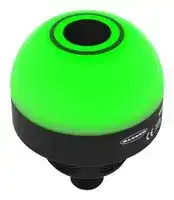


K50PSAF1000KQ
Programmable Touchless Button, Blue/Green/Red, Multifunction, 30 VDC, IP66/IP67/IP69K
- Manufacturer: BANNER ENGINEERING
- Product type: Visual Signal Indicator Units
- SVHC: No SVHC (25-Jun-2025)
- Power Rating: -
- Lens Diameter: 50.04mm
- Product Range: K50 Pro Series
- External Height: 62.99mm
- IP / NEMA Rating: IP66, IP67, IP69K
- Module Lens Colour: Blue, Green, Red
- Supply Voltage VAC: -
- Supply Voltage VDC: 30V
- Visual Signal Type: Multifunction
- Operating Temperature Max: 50°C
- Operating Temperature Min: -20°C
| Delivery and price | |
|---|---|
| Units per pack | 1 |
| Price | 153.07 € |
| Current stock | 10+ |
| Lead time | 30 days |

**==> picture [148 x 792] intentionally omitted <==**

K50 Pro Optical Sensor with IOLink Product Manual

Original Instructions p/n: 246257 Rev. B 30-May-25

© Banner Engineering Corp. All rights reserved. www.bannerengineering.com

K50 Pro Optical Sensor with IO-Link Product Manual

## Contents

**Chapter 1 Features.................................................................................................................. 3** Models ........................................................................................................................................................................................................... 3 Overview........................................................................................................................................................................................................ 3 Class 1 Laser Description and Safety Information ........................................................................................................................................ 4

**Chapter 2 Wiring...................................................................................................................... 6 Chapter 3 IO-Link® ................................................................................................................. 7** IO-Link Process Data In (Device to Master).................................................................................................................................................. 7 IO-Link Process Data Out (Master to Device) ............................................................................................................................................... 7 IO-Link Data Map .......................................................................................................................................................................................... 9 Communication Parameters ................................................................................................................................................................... 9 Process Data: Multicolor......................................................................................................................................................................... 9 Process Data: Four State Full Logic......................................................................................................................................................11 Process Data: Advanced ...................................................................................................................................................................... 12 Process Data: LED Control................................................................................................................................................................... 14 Process Data: Distance ........................................................................................................................................................................ 17 Parameters Set Using IO-Link.............................................................................................................................................................. 18 IO-Link Events ...................................................................................................................................................................................... 21

**Chapter 4 Specifications ...................................................................................................... 23** FCC Part 15 Class B for Unintentional Radiators........................................................................................................................................ 24 Industry Canada ICES-003(B)..................................................................................................................................................................... 24 Dimensions.................................................................................................................................................................................................. 25 Beam Pattern............................................................................................................................................................................................... 25 **Chapter 5 Accessories.......................................................................................................... 26** Cordsets ...................................................................................................................................................................................................... 26 Brackets ...................................................................................................................................................................................................... 26 Elevated Mount System............................................................................................................................................................................... 28 **Chapter 6 Product Support and Maintenance .................................................................... 29** Clean with Mild Detergent and Warm Water ............................................................................................................................................... 29 Repairs ........................................................................................................................................................................................................ 29 Contact Us................................................................................................................................................................................................... 29 Banner Engineering Corp Limited Warranty................................................................................................................................................ 29

© Banner Engineering Corp. All rights reserved. www.bannerengineering.com

K50 Pro Optical Sensor With IO-Link Product Manual

## Chapter Contents

Models.................................................................................................................................................................................................................. 3 Overview .............................................................................................................................................................................................................. 3 Class 1 Laser Description and Safety Information ............................................................................................................................................... 4

Chapter 1

## Features

50 mm Programmable Multicolor RGB Optical Sensor and Indicator

- Three default colors in one device (Green, Red, Yellow)

- • Devices are completely self-contained—no controller needed • Teachable modes with color feedback for ease of use

- Touchless activation removes the need for physical force to activate

- • Rugged IP66, IP67, IP69K per ISO 20653 and UL Type 4X and UL Type 13 design

- Resistant to ambient light, EMI, and RFI interference

- Sensing and indication in one device

- • Bright, uniform indicator light

- Translucent polycarbonate dome

## WARNING:

- Do not use this device for personnel protection

- Using this device for personnel protection could result in serious injury or death.

- This device does not include the self-checking redundant circuitry necessary to allow its use in personnel safety applications. A device failure or malfunction can cause either an energized (on) or de-energized (off) output condition.

## Models

**==> picture [440 x 46] intentionally omitted <==**

**----- Start of picture text -----**<br>
Family Style Color and Input Connector [(1)]<br>K50PS AF1000 K Q<br>AF1000 = 1000 mm Adjustable Field  K = IO-Link Q = Integral 4-pin M12 male quick-<br>Sensor disconnect connector<br>**----- End of picture text -----**<br>


## Overview

The K50 Pro Optical Sensor with IO-Link is an adjustable field optical sensor that can detect a wide variety of materials and objects.

Configure the sensor using software or remote input wires to sense objects up to a specific distance, ignoring objects beyond this distance (background suppression), or within a windowed range.

> (1) Models with a quick-disconnect connector require a mating cordset.

© Banner Engineering Corp. All rights reserved. www.bannerengineering.com

page 3 of 30

30-May-25

K50 Pro Optical Sensor with IO-Link Product Manual

Features

**==> picture [468 x 132] intentionally omitted <==**

**----- Start of picture text -----**<br>
Measurement  Detection Area<br>Reference Point<br>Detection not Reliable detection of a stationary<br>ooo possible  and moving object<br>D0 D1 D2<br>Model D0 (mm) Switch Point D1 (mm) Switch Point D2 (mm)<br>K50PSAF1000KQ 0 20 1000<br>**----- End of picture text -----**<br>


## Class 1 Laser Description and Safety Information

- Laser light. Do not stare into the beam. **CLASS 1 LASER PRODUCT**

- Complies with 21 CFR 1040.10 and 1040.11 except for deviations pursuant to Laser Notice No. 56, dated May 8, 2019. -

- CAUTION: • Never stare directly into the sensor lens. • Laser light can damage your eyes. • Avoid placing any mirror-like object in the beam. Never use a mirror as a retroreflective target.

- CAUTION: • Return defective units to the manufacturer. • Use of controls or adjustments or performance of procedures other than those specified herein may result in hazardous radiation exposure.

- • Do not attempt to disassemble this sensor for repair. A defective unit must be returned to the manufacturer.

- CAUTION: • Ne regardez jamais directement la lentille du capteur. • La lumière laser peut endommager la vision. • Évitez de placer un objet réfléchissant (de type miroir) dans la trajectoire du faisceau. N'utilisez jamais de miroir comme cible rétro-réfléchissante.

- CAUTION: • Tout dispositif défectueux doit être renvoyé au fabricant. • L'utilisation de commandes, de réglages ou de procédures autres que celles décrites dans le présent document peut entraîner une exposition dangereuse aux radiations.

- • N'essayez pas de démonter ce capteur pour le réparer. Tout dispositif défectueux doit être renvoyé au fabricant.

Class 1 lasers are lasers that are safe under reasonably foreseeable conditions of operation, including the use of optical instruments for intrabeam viewing.

Complies with IEC 60825-1:2014 and EN 60825-1:2014+A11:2021.

page 4 of 30

© Banner Engineering Corp. All rights reserved. www.bannerengineering.com

30-May-25

K50 Pro Optical Sensor with IO-Link Product Manual

Features

## For safe laser use:

- Do not stare at the laser.

- Do not point the laser at a person’s eye.

- Mount open laser beam paths either above or below eye level, where practical.

- Terminate the beam emitted by the laser product at the end of its useful path.

© Banner Engineering Corp. All rights reserved. www.bannerengineering.com

page 5 of 30

30-May-25

K50 Pro Optical Sensor With IO-Link Product Manual

## Chapter Contents

## Chapter 2

## Wiring

**==> picture [500 x 109] intentionally omitted <==**

**----- Start of picture text -----**<br>
Diagram Pinout<br>bu 3<br>24 V DC 1<br>bn<br>4<br>2<br>bk IO-Link<br>Communication 1 = Brown (bn)<br>wh 2 = White (wh)<br>Not used 3 = Blue (bu)<br>4 = Black (bk)<br>**----- End of picture text -----**<br>


© Banner Engineering Corp. All rights reserved. www.bannerengineering.com

page 6 of 30

30-May-25

K50 Pro Optical Sensor With IO-Link Product Manual

## Chapter Contents

IO-Link Process Data In (Device to Master)......................................................................................................................................................... 7 IO-Link Process Data Out (Master to Device)...................................................................................................................................................... 7 IO-Link Data Map ................................................................................................................................................................................................. 9

## Chapter 3

## IO-Link®

IO-Link® is a point-to-point communication link between a master device and a sensor and/or light. It can be used to automatically parameterize sensors or lights and to transmit process data. For the latest IO-Link protocol and specifications, please visit www.io-link.com.

For the latest IODD files, please refer to the Banner Engineering Corp website at: www.bannerengineering.com.

## IO-Link Process Data In (Device to Master)

Use process data to read the device output state. When the device is in Four State Full Logic mode, use process data to read the device logic state in addition to the output state.

Name Description Output State Output state follows touch, optical sensor, or push button input Device State Current state (State 1, State 2, State 3, State 4). Only available with Operation Mode set to Four State Full Logic, Multicolor, or Coarse Distance

## IO-Link Process Data Out (Master to Device)

Use process data out to define device states. Use parameter data to define device modes, states, output settings, and custom colors.

## Multicolor Mode

Use process data to activate the defined device state. Use parameter data to define output settings, control delays, color, intensity, flash, and other animation types for State 1, State 2, State 3, and State 4.

## Four State Full Logic Mode

Use process data to define the Job Input state and device state (State 1, State 2, State 3, State 4). See below for more information about how to achieve legacy logic types (C, D, E, and H). Use parameter data to change color, intensity, flash, speed, select animation type, and define output settings.

## Advanced Mode

Use process data to control delays, color, intensity, flash, and other animation types. Process data is also used to control the sequence value dynamically. Use parameter data to create custom colors, intensity, speeds, and to define output settings.

Definitions for device states in Multicolor Mode, Four State Full Logic Mode, and Advanced Mode

**==> picture [500 x 142] intentionally omitted <==**

**----- Start of picture text -----**<br>
Name Description<br>Animation Type<br>Off Indicator is off<br>Steady Color 1 is solid on at defined intensity<br>Flash Color 1 flashes at defined speed, color intensity, and pattern<br>Two Color Flash Color 1 and Color 2 flash alternately at defined speed, color intensities, and pattern<br>Color 1 is displayed on 50% of the indicator and Color 2 is displayed on the other 50% of<br>50/50<br>the indicator at the defined color intensities<br>Continued on page 8<br>**----- End of picture text -----**<br>


© Banner Engineering Corp. All rights reserved. www.bannerengineering.com

page 7 of 30

30-May-25

K50 Pro Optical Sensor with IO-Link Product Manual

IO-Link®

## Continued from page 7

**==> picture [500 x 471] intentionally omitted <==**

**----- Start of picture text -----**<br>
Name Description<br>Color 1 is displayed on 50% of the indicator and Color 2 is displayed on the other 50% of<br>50/50 Rotate<br>the indicator while rotating at the defined speed, color intensities, and rotational direction<br>Color 1 is displayed as a single spot against the background of Color 2 while rotating at the<br>Chase<br>defined speed, color intensities, and rotational direction<br>Color 1 repeatedly increases and decreases intensity between 0% to 100% at defined<br>Intensity Sweep<br>speed and color intensity<br>Color Sweep Color 1 and Color 2 transition alternately at defined speed and color intensities<br>Color 1 increments against the background of Color 2 at defined Dynamic or Static<br>Sequence<br>Sequence Value (Advanced mode and other modes respectively)<br>Wave Color 2 increments across the background of Color 1<br>Double Wave Color 2 increments across the background of Color 1, and then the reverse occurs<br>Defines the direction of rotation for the 50/50 rotate, chase, and sequence animations (CW<br>Animation Direction<br>or CCW)<br>Defines the flash pattern for flash and two color flash animations (normal, strobe, three<br>Animation Pattern<br>pulse, SOS, or random); also defines the pattern of the vibration feedback<br>Defines the animation speed (slow, medium, fast, or custom); also defines the speed of the<br>Animation Speed<br>vibration feedback pattern<br>Defines if the Off Delay should be measured from when the conditions for the State began<br>Off Delay Type<br>(Leading Edge) or from when the conditions ended (Trailing Edge)<br>The duration of the animation Off Delay. Leading Edge Off Delays can be used to ensure<br>Off Delay (ms)<br>the animation is active for at least a minimum amount of time.<br>Defines the span of Color 1 in the Sequence animation [0-255]. 0 means no portion of the<br>animation will be Color 1, and it increases in a circular manner to 255 which indicates the<br>Static Sequence Value full circumference will be Color 1. In Advanced Mode, this is in process data and is called<br>Dynamic Sequence Value. In the other modes, this is in parameter data and is called Static<br>Sequence Value.<br>Shifts the beginning of the sequence animation to the specified LED (LED1 at 12 o'clock<br>Sequence Start Location<br>continuing in the direction indicated by the Animation Direction parameter)<br>Color 1 Defines Color 1 of defined animation<br>Color 1 Intensity Defines the intensity of Color 1 in the animation (high, medium, low, off, or custom)<br>Color 2 Defines Color 2 of defined animation<br>Color 2 Intensity Defines the intensity of Color 2 in the animation (high, medium, low, off, or custom)<br>**----- End of picture text -----**<br>


## LED Control Mode

Use process data to define the color and intensity of each individual LED. Use parameter data to define customer colors and intensities. LED1 is oriented at the 12 o'clock position, continuing clockwise through LED8 near 11 o'clock position.

## Distance Mode

Use process data to set the device to operate as a gauge, which allows the user to configure a background color and a fill color to display how far an object is within the Detection Area. As an object moves along the sensing range, the proportion of fill color to background color changes in a clockwise (CW) or counter-clockwise (CCW) direction. The proportion of fill color increases as an object approaches the maximum range, and decreases as it moves towards the minimum.

## Coarse Distance Mode

Use process data to divide the Detection Area into custom zones to generate a unique animation when an object is present within that zone distance. Configure up to five zones for animation and output state. The minimum zone distance is 50 mm.

## Demo Mode

The device cycles through color spectrum, 50/50 rotate, intensity sweep, and sequence mode. It also speeds the cycle rate up or down (can be either Momentary or Latching), and initiates a state showing individually colored LEDs. When set

page 8 of 30

© Banner Engineering Corp. All rights reserved. www.bannerengineering.com

30-May-25

IO-Link®

K50 Pro Optical Sensor with IO-Link Product Manual

to demo mode, the device cycles through the defined sequence when power is applied regardless of its connection to an IO-Link master.

## IO-Link Data Map

This section refers to the following IODD file: Banner_Engineering-K50PSAF1000KQ-20250107-IODD1.1-en.html. The IODD file and support files can be found on www.bannerengineering.com under the download section of the product family page.

## Communication Parameters

The following communication parameters are used.

**==> picture [500 x 106] intentionally omitted <==**

**----- Start of picture text -----**<br>
Parameter Value Parameter Value<br>IO-Link revision V1.1 Port class A<br>Process data in length 32 bits SIO mode No<br>Process data out length 320 bits Smart sensor profile Yes<br>Bit rate 38400 bps Block parameterization Yes<br>Minimum cycle time 5 ms Data storage Yes<br>Device ID 0×060012<br>**----- End of picture text -----**<br>


## Process Data: Multicolor

ProcessData id=V_Pd_Multicolor (condition V_OperationMode == 0)

## IO-Link Process Data In (Device to Master)

ProcessDataIn id=V_Pd_InMulticolor

- Bit Length: 32

- Data Type: 32-bit Record (subindex access not supported)

**==> picture [500 x 332] intentionally omitted <==**

**----- Start of picture text -----**<br>
Subindex Bit Offset Data Type Allowed Values Name Description<br>1 24 Boolean false = Inactive, true = Active Output State Output State. Related parameters are defined in<br>output and touch settings parameter data.<br>2 16 3-bit UInteger 0 = State 1, 1 = State 2, 2 = State 3, 3 = State 4 State Output State. Related parameters are defined in output and touch settings parameter data.<br>3 0 16-bit UInteger Distance The measured distance in millimeters.<br>Octet 0<br>Bit offset 31 30 29 28 27 26 25 24<br>Subindex - - - - - - - 1<br>Octet 1<br>Bit offset 23 22 21 20 19 18 17 16<br>Subindex - - - - - 2<br>Element bit 2 1 0<br>Octet 2<br>Bit offset 15 14 13 12 11 10 9 8<br>Subindex 3<br>Element bit 15 14 13 12 11 10 9 0<br>Octet 3<br>Bit offset 7 6 5 4 3 2 1 0<br>Continued on page 10<br>**----- End of picture text -----**<br>


© Banner Engineering Corp. All rights reserved. www.bannerengineering.com

page 9 of 30

30-May-25

K50 Pro Optical Sensor with IO-Link Product Manual

IO-Link®

**==> picture [500 x 53] intentionally omitted <==**

**----- Start of picture text -----**<br>
Continued from page 9<br>Octet 3<br>Subindex 3<br>Element bit 7 6 5 4 3 2 1 0<br>**----- End of picture text -----**<br>


## IO-Link Process Data Out (Master to Device)

## ProcessDataOut id=V_Pd_OutMulticolor

- Bit Length: 64

- Data Type: 64-bit Record (subindex access not supported)

**==> picture [500 x 518] intentionally omitted <==**

**----- Start of picture text -----**<br>
Subindex Bit Offset Data Type Allowed Values Name Description<br>1 56 3-bit UInteger 0 = State 1, 1 = State 2, 2 = State 3, 3 = State 4 State Animation State. Related parameters are defined in Four State Full Logic/Multicolor parameter data.<br>Octet 0<br>Bit offset 63 62 61 60 59 58 57 56<br>Subindex - - - - - 1<br>Element bit 2 1 0<br>Octet 1<br>Bit offset 55 54 53 52 51 50 49 48<br>Subindex - - - - - - - -<br>Octet 2<br>Bit offset 47 46 45 44 43 42 41 40<br>Subindex - - - - - - - -<br>Octet 3<br>Bit offset 39 38 37 36 35 34 33 32<br>Subindex - - - - - - - -<br>Octet 4<br>Bit offset 31 30 29 28 27 26 25 24<br>Subindex - - - - - - - -<br>Octet 5<br>Bit offset 23 22 21 20 19 18 17 16<br>Subindex - - - - - - - -<br>Octet 6<br>Bit offset 15 14 13 12 11 10 9 8<br>Subindex - - - - - - - -<br>Octet 7<br>Bit offset 7 6 5 4 3 2 1 0<br>Subindex - - - - - - - -<br>**----- End of picture text -----**<br>


page 10 of 30

© Banner Engineering Corp. All rights reserved. www.bannerengineering.com

30-May-25

IO-Link®

K50 Pro Optical Sensor with IO-Link Product Manual

## Process Data: Four State Full Logic

ProcessData id=V_Pd_FourStateFullLogic (condition V_OperationMode == 1)

## IO-Link Process Data In (Device to Master)

ProcessDataIn id=V_Pd_InFourStateFullLogic

- Bit Length: 32

- Data Type: 32-bit Record (subindex access not supported)

**==> picture [500 x 355] intentionally omitted <==**

**----- Start of picture text -----**<br>
Subindex Bit Offset Data Type Allowed Values Name Description<br>1 24 Boolean false = Inactive, true = Active Output State Output State. Related parameters are defined in<br>output and touch settings parameter data.<br>2 16 2-bit UInteger 0 = State 1, 1 = State 2, 2 = State 3, 3 = State 4 State Animation State. Related parameters are defined in Four State Full Logic/Multicolor parameter data.<br>3 0 16-bit UInteger Distance The measured distance in millimeters.<br>Octet 0<br>Bit offset 31 30 29 28 27 26 25 24<br>Subindex - - - - - - - 1<br>Octet 1<br>Bit offset 23 22 21 20 19 18 17 16<br>Subindex - - - - - - 2<br>Element bit 1 0<br>Octet 2<br>Bit offset 15 14 13 12 11 10 9 8<br>Subindex 3<br>Element bit 15 14 13 12 11 10 9 8<br>Octet 3<br>Bit offset 7 6 5 4 3 2 1 0<br>Subindex 3<br>Element bit 7 6 5 4 3 2 1 0<br>**----- End of picture text -----**<br>


## IO-Link Process Data Out (Master to Device)

## ProcessDataOut id=V_Pd_OutFourStateFullLogic

- Bit Length: 64

- Data Type: 64-bit Record (subindex access not supported)

**==> picture [500 x 148] intentionally omitted <==**

**----- Start of picture text -----**<br>
Subindex Bit Offset Data Type Allowed Values Name Description<br>1 56 Boolean false = Off, true = On Job Input The Job Input for Four State Full Logic mode.<br>Octet 0<br>Bit offset 63 62 61 60 59 58 57 56<br>Subindex - - - - - - - 1<br>Octet 1<br>Bit offset 55 54 53 52 51 50 49 48<br>Subindex - - - - - - - -<br>**----- End of picture text -----**<br>


© Banner Engineering Corp. All rights reserved. www.bannerengineering.com

page 11 of 30

30-May-25

K50 Pro Optical Sensor with IO-Link Product Manual

IO-Link®

**==> picture [500 x 336] intentionally omitted <==**

**----- Start of picture text -----**<br>
Octet 2<br>Bit offset 47 46 45 44 43 42 41 40<br>Subindex - - - - - - - -<br>Octet 3<br>Bit offset 39 38 37 36 35 34 33 32<br>Subindex - - - - - - - -<br>Octet 4<br>Bit offset 31 30 29 28 27 26 25 24<br>Subindex - - - - - - - -<br>Octet 5<br>Bit offset 23 22 21 20 19 18 17 16<br>Subindex - - - - - - - -<br>Octet 6<br>Bit offset 15 14 13 12 11 10 9 8<br>Subindex - - - - - - - -<br>Octet 7<br>Bit offset 7 6 5 4 3 2 1 0<br>Subindex - - - - - - - -<br>**----- End of picture text -----**<br>


## Process Data: Advanced

ProcessData id=V_Pd_Advanced (condition V_OperationMode == 2)

IO-Link Process Data In (Device to Master) ProcessDataIn id=V_Pd_InAdvanced

- Bit Length: 32

- Data Type: 32-bit Record (subindex access not supported)

**==> picture [500 x 237] intentionally omitted <==**

**----- Start of picture text -----**<br>
Subindex Bit Offset Data Type Allowed Values Name Description<br>1 24 Boolean false = Inactive, true = Active Output State Output State. Related parameters are defined in<br>output and touch settings parameter data.<br>2 0 16-bit UInteger Distance The measured distance in millimeters.<br>Octet 0<br>Bit offset 31 30 29 28 27 26 25 24<br>Subindex - - - - - - - 1<br>Octet 1<br>Bit offset 23 22 21 20 19 18 17 16<br>Subindex - - - - - - - -<br>Octet 2<br>Bit offset 15 14 13 12 11 10 9 8<br>Subindex 2<br>Continued on page 13<br>**----- End of picture text -----**<br>


page 12 of 30

© Banner Engineering Corp. All rights reserved. www.bannerengineering.com

30-May-25

IO-Link®

K50 Pro Optical Sensor with IO-Link Product Manual

**==> picture [500 x 111] intentionally omitted <==**

**----- Start of picture text -----**<br>
Continued from page 12<br>Octet 2<br>Element bit 15 14 13 12 11 10 9 8<br>Octet 3<br>Bit offset 7 6 5 4 3 2 1 0<br>Subindex 2<br>Element bit 7 6 5 4 3 2 1 0<br>**----- End of picture text -----**<br>


IO-Link Process Data Out (Master to Device) ProcessDataOut id=V_Pd_OutAdvanced

- Bit Length: 64

- Data Type: 64-bit Record (subindex access not supported)

**==> picture [500 x 497] intentionally omitted <==**

**----- Start of picture text -----**<br>
Subindex Bit Offset Data Type Allowed Values Name Description<br>0 = Off, 1 = Steady, 2 = Flash, 3 = Two<br>Color Flash, 4 = 50/50, 5 = 50/50<br>1 56 4-bit UInteger Rotate, 6 = Chase, 7 = Intensity Sweep,  Animation Type The animation type<br>8 = Color Sweep, 9 = Sequence, 10 =<br>Wave, 11 = Double Wave<br>Animation<br>2 60 Boolean false = CW, true = CCW The direction the animation rotates<br>Direction<br>0 = Flash, 1 = Strobe, 2 = Three Pulse,  Animation<br>3 61 3-bit UInteger 3 = SOS, 4 = Random Pattern The pattern of the animation<br>0 = Slow, 1 = Medium, 2 = Fast, 3 =<br>4 48 2-bit UInteger Custom Animation Speed The speed of the animation<br>The value that describes the LED position of the<br>5 24 8-bit UInteger 0..255 Static Sequence  device. LED state is defined in Parameters Set<br>Value (0-255)<br>Using IO-Link.<br>0 = LED 1, 1 = LED 2, 2 = LED 3, 3 =<br>6 16 3-bit UInteger LED 4, 4 = LED 5, 5 = LED 6, 6 = LED  Sequence Start Location Defines the LED location where the sequence animation is initiated.<br>7, 7 = LED 8<br>0 = Green, 1 = Red, 2 = Orange, 3 =<br>Amber, 4 = Yellow, 5 = Lime Green, 6 =<br>7 8 5-bit UInteger Spring Green, 7 = Cyan, 8 = Sky Blue, 9  Color 1 The main color of the animation. Custom Colors<br>= Blue, 10 = Violet, 11 = Magenta, 12 =  are defined in Parameters Set Using IO-Link.<br>Rose, 13 = White, 14 = Custom 1, 15 =<br>Custom 2<br>8 13 3-bit UInteger 0 = High, 1 = Medium, 2 = Low, 3 = Off, 4 = Custom Color 1 Intensity The intensity of Color 1. Custom Intensity is defined in Parameters Set Using IO-Link.<br>0 = Green, 1 = Red, 2 = Orange, 3 =<br>Amber, 4 = Yellow, 5 = Lime Green, 6 =<br>The secondary color of the animation. Custom<br>9 0 5-bit UInteger Spring Green, 7 = Cyan, 8 = Sky Blue, 9  Color 2 Colors are defined in Parameters Set Using IO-<br>= Blue, 10 = Violet, 11 = Magenta, 12 =  Link.<br>Rose, 13 = White, 14 = Custom 1, 15 =<br>Custom 2<br>10 5 3-bit UInteger 0 = High, 1 = Medium, 2 = Low, 3 = Off, 4 = Custom Color 2 Intensity The intensity of Color 2. Custom Intensity is defined in Parameters Set Using IO-Link.<br>Octet 0<br>Bit offset 63 62 61 60 59 58 57 56<br>Subindex 3 2 1<br>Element Bit 2 1 0 3 2 1 0<br>Octet 1<br>Bit offset 55 54 53 52 51 50 49 48<br>Subindex - - - - - - 4<br>Continued on page 14<br>**----- End of picture text -----**<br>


© Banner Engineering Corp. All rights reserved. www.bannerengineering.com

page 13 of 30

30-May-25

K50 Pro Optical Sensor with IO-Link Product Manual

IO-Link®

**==> picture [500 x 445] intentionally omitted <==**

**----- Start of picture text -----**<br>
Continued from page 13<br>Octet 1<br>Element Bit 1 0<br>Octet 2<br>Bit offset 47 46 45 44 43 42 41 40<br>Subindex - - - - - - - -<br>Octet 3<br>Bit offset 39 38 37 36 35 34 33 32<br>Subindex - - - - - - - -<br>Octet 4<br>Bit offset 31 30 29 28 27 26 25 24<br>Subindex 5<br>Element Bit 7 6 5 4 3 2 1 0<br>Octet 5<br>Bit offset 23 22 21 20 19 18 17 16<br>Subindex - - - - - 6<br>Element Bit 2 1 0<br>Octet 6<br>Bit offset 15 14 13 12 11 10 9 8<br>Subindex 8 7<br>Element Bit 2 1 0 4 3 2 1 0<br>Octet 7<br>Bit offset 7 6 5 4 3 2 1 0<br>Subindex 10 9<br>Element Bit 2 1 0 4 3 2 1 0<br>**----- End of picture text -----**<br>


## Process Data: LED Control

ProcessData id=V_Pd_LedControl (condition V_OperationMode == 3)

## IO-Link Process Data In (Device to Master)

## ProcessDataIn id=V_Pd_InLedControl

- Bit Length: 32

- Data Type: 32-bit Record (subindex access not supported)

**==> picture [500 x 113] intentionally omitted <==**

**----- Start of picture text -----**<br>
Subindex Bit Offset Data Type Allowed Values Name Description<br>1 24 Boolean false = Inactive, true = Active Output State Output State. Related parameters are defined in<br>output and touch settings parameter data.<br>2 0 16-bit UInteger Distance The measured distance in millimeters.<br>Octet 0<br>Bit offset 31 30 29 28 27 26 25 24<br>Subindex - - - - - - - 1<br>**----- End of picture text -----**<br>


page 14 of 30

© Banner Engineering Corp. All rights reserved. www.bannerengineering.com

30-May-25

IO-Link®

K50 Pro Optical Sensor with IO-Link Product Manual

**==> picture [500 x 193] intentionally omitted <==**

**----- Start of picture text -----**<br>
Octet 1<br>Bit offset 23 22 21 20 19 18 17 16<br>Subindex - - - - - - - -<br>Octet 2<br>Bit offset 15 14 13 12 11 10 9 8<br>Subindex 2<br>Element bit 15 14 13 12 11 10 9 8<br>Octet 3<br>Bit offset 7 6 5 4 3 2 1 0<br>Subindex 2<br>Element bit 7 6 5 4 3 2 1 0<br>**----- End of picture text -----**<br>


IO-Link Process Data Out (Master to Device) ProcessDataOut id=V_Pd_OutLedControl

- Bit Length: 64

- • Data Type: 64-bit Record (subindex access not supported)

**==> picture [500 x 400] intentionally omitted <==**

**----- Start of picture text -----**<br>
Subindex Bit Offset Data Type Allowed Values Name Description<br>0 = Green, 1 = Red, 2 = Orange, 3 =<br>Amber, 4 = Yellow, 5 = Lime Green, 6 =<br>1 56 4-bit UInteger Spring Green, 7 = Cyan, 8 = Sky Blue, 9  LED 1 Color Defines the color of the designated LED. LED 1 is<br>= Blue, 10 = Violet, 11 = Magenta, 12 =  oriented at the 12 o'clock position.<br>Rose, 13 = White, 14 = Custom 1, 15 =<br>Custom 2<br>2 60 4-bit UInteger 0..10 LED 1 Intensity  Defines the intensity of the designated LED<br>(0-10)<br>0 = Green, 1 = Red, 2 = Orange, 3 =<br>Amber, 4 = Yellow, 5 = Lime Green, 6 =<br>3 48 4-bit UInteger Spring Green, 7 = Cyan, 8 = Sky Blue, 9  LED 2 Color Defines the color of the designated LED<br>= Blue, 10 = Violet, 11 = Magenta, 12 =<br>Rose, 13 = White, 14 = Custom 1, 15 =<br>Custom 2<br>4 52 4-bit UInteger 0..10 LED 2 Intensity  Defines the intensity of the designated LED<br>(0-10)<br>0 = Green, 1 = Red, 2 = Orange, 3 =<br>Amber, 4 = Yellow, 5 = Lime Green, 6 =<br>5 40 4-bit UInteger Spring Green, 7 = Cyan, 8 = Sky Blue, 9  LED 3 Color Defines the color of the designated LED<br>= Blue, 10 = Violet, 11 = Magenta, 12 =<br>Rose, 13 = White, 14 = Custom 1, 15 =<br>Custom 2<br>6 44 4-bit UInteger 0..10 LED 3 Intensity  Defines the intensity of the designated LED<br>(0-10)<br>0 = Green, 1 = Red, 2 = Orange, 3 =<br>Amber, 4 = Yellow, 5 = Lime Green, 6 =<br>7 32 4-bit UInteger Spring Green, 7 = Cyan, 8 = Sky Blue, 9  LED 4 Color Defines the color of the designated LED<br>= Blue, 10 = Violet, 11 = Magenta, 12 =<br>Rose, 13 = White, 14 = Custom 1, 15 =<br>Custom 2<br>8 36 4-bit UInteger 0..10 LED 4 Intensity  Defines the intensity of the designated LED<br>(0-10)<br>0 = Green, 1 = Red, 2 = Orange, 3 =<br>Amber, 4 = Yellow, 5 = Lime Green, 6 =<br>9 24 4-bit UInteger Spring Green, 7 = Cyan, 8 = Sky Blue, 9  LED 5 Color Defines the color of the designated LED<br>= Blue, 10 = Violet, 11 = Magenta, 12 =<br>Rose, 13 = White, 14 = Custom 1, 15 =<br>Custom 2<br>Continued on page 16<br>**----- End of picture text -----**<br>


© Banner Engineering Corp. All rights reserved. www.bannerengineering.com

page 15 of 30

30-May-25

K50 Pro Optical Sensor with IO-Link Product Manual

IO-Link®

**==> picture [500 x 650] intentionally omitted <==**

**----- Start of picture text -----**<br>
Continued from page 15<br>Subindex Bit Offset Data Type Allowed Values Name Description<br>10 28 4-bit UInteger 0..10 LED 5 Intensity  Defines the intensity of the designated LED<br>(0-10)<br>0 = Green, 1 = Red, 2 = Orange, 3 =<br>Amber, 4 = Yellow, 5 = Lime Green, 6 =<br>11 16 4-bit UInteger Spring Green, 7 = Cyan, 8 = Sky Blue, 9  LED 6 Color Defines the color of the designated LED<br>= Blue, 10 = Violet, 11 = Magenta, 12 =<br>Rose, 13 = White, 14 = Custom 1, 15 =<br>Custom 2<br>12 20 4-bit UInteger 0..10 LED 6 Intensity  Defines the intensity of the designated LED<br>(0-10)<br>0 = Green, 1 = Red, 2 = Orange, 3 =<br>Amber, 4 = Yellow, 5 = Lime Green, 6 =<br>13 8 4-bit UInteger Spring Green, 7 = Cyan, 8 = Sky Blue, 9  LED 7 Color Defines the color of the designated LED<br>= Blue, 10 = Violet, 11 = Magenta, 12 =<br>Rose, 13 = White, 14 = Custom 1, 15 =<br>Custom 2<br>14 12 4-bit UInteger 0..10 LED 7 Intensity  Defines the intensity of the designated LED<br>(0-10)<br>0 = Green, 1 = Red, 2 = Orange, 3 =<br>Amber, 4 = Yellow, 5 = Lime Green, 6 =<br>15 0 4-bit UInteger Spring Green, 7 = Cyan, 8 = Sky Blue, 9  LED 8 Color Defines the color of the designated LED<br>= Blue, 10 = Violet, 11 = Magenta, 12 =<br>Rose, 13 = White, 14 = Custom 1, 15 =<br>Custom 2<br>16 4 4-bit UInteger 0..10 LED 8 Intensity  Defines the intensity of the designated LED<br>(0-10)<br>Octet 0<br>Bit offset 63 62 61 60 59 58 57 56<br>Subindex 2 1<br>Element Bit 3 2 1 0 3 2 1 0<br>Octet 1<br>Bit offset 55 54 53 52 51 50 49 48<br>Subindex 4 3<br>Element Bit 3 2 1 0 3 2 1 0<br>Octet 2<br>Bit offset 47 46 45 44 43 42 41 40<br>Subindex 6 5<br>Element Bit 3 2 1 0 3 2 1 0<br>Octet 3<br>Bit offset 39 38 37 36 35 34 33 32<br>Subindex 8 7<br>Element Bit 3 2 1 0 3 2 1 0<br>Octet 4<br>Bit offset 31 30 29 28 27 26 25 24<br>Subindex 10 9<br>Element Bit 3 2 1 0 3 2 1 0<br>**----- End of picture text -----**<br>


page 16 of 30

© Banner Engineering Corp. All rights reserved. www.bannerengineering.com

30-May-25

IO-Link®

K50 Pro Optical Sensor with IO-Link Product Manual

**==> picture [500 x 208] intentionally omitted <==**

**----- Start of picture text -----**<br>
Octet 5<br>Bit offset 23 22 21 20 19 18 17 16<br>Subindex 12 11<br>Element Bit 3 2 1 0 3 2 1 0<br>Octet 6<br>Bit offset 15 14 13 12 11 10 9 8<br>Subindex 14 13<br>Element Bit 3 2 1 0 3 2 1 0<br>Octet 7<br>Bit offset 7 6 5 4 3 2 1 0<br>Subindex 16 15<br>Element Bit 3 2 1 0 3 2 1 0<br>**----- End of picture text -----**<br>


## Process Data: Distance

## ProcessData id=V_Pd_Distance (condition V_OperationMode == 5)

## IO-Link Process Data In (Device to Master)

ProcessDataIn id=V_Pd_InDistance

- Bit Length: 32

- Data Type: 32-bit Record (subindex access not supported)

**==> picture [500 x 316] intentionally omitted <==**

**----- Start of picture text -----**<br>
Subindex Bit Offset Data Type Allowed Values Name Description<br>1 24 Boolean false = Inactive, true = Active Output State Output State. Related parameters are defined in<br>output and touch settings parameter data.<br>2 0 16-bit UInteger Distance The measured distance in millimeters.<br>Octet 0<br>Bit offset 31 30 29 28 27 26 25 24<br>Subindex - - - - - - - 1<br>Octet 1<br>Bit offset 23 22 21 20 19 18 17 16<br>Subindex - - - - - - - -<br>Octet 2<br>Bit offset 15 14 13 12 11 10 9 8<br>Subindex 2<br>Element bit 15 14 13 12 11 10 9 8<br>Octet 3<br>Bit offset 7 6 5 4 3 2 1 0<br>Subindex 2<br>Element bit 7 6 5 4 3 2 1 0<br>**----- End of picture text -----**<br>


## IO-Link Process Data Out (Master to Device)

ProcessDataOut id=V_Pd_OutDistance

- Bit Length: 64

© Banner Engineering Corp. All rights reserved. www.bannerengineering.com

page 17 of 30

30-May-25

K50 Pro Optical Sensor with IO-Link Product Manual

IO-Link®

## • Data Type: 64-bit Record (subindex access not supported)

**==> picture [500 x 509] intentionally omitted <==**

**----- Start of picture text -----**<br>
Subindex Bit Offset Data Type Allowed Values Name Description<br>1 56 2-bit UInteger 0 Reserved Reserved<br>Octet 0<br>Bit offset 63 62 61 60 59 58 57 56<br>Subindex - - - - - - 1<br>Element bit 1 0<br>Octet 1<br>Bit offset 55 54 53 52 51 50 49 48<br>Subindex - - - - - - - -<br>Octet 2<br>Bit offset 47 46 45 44 43 42 41 40<br>Subindex - - - - - - - -<br>Octet 3<br>Bit offset 39 38 37 36 35 34 33 32<br>Subindex - - - - - - - -<br>Octet 4<br>Bit offset 31 30 29 28 27 26 25 24<br>Subindex - - - - - - - -<br>Octet 5<br>Bit offset 23 22 21 20 19 18 17 16<br>Subindex - - - - - - - -<br>Octet 6<br>Bit offset 15 14 13 12 11 10 9 8<br>Subindex - - - - - - - -<br>Octet 7<br>Bit offset 7 6 5 4 3 2 1 0<br>Subindex - - - - - - - -<br>**----- End of picture text -----**<br>


## Parameters Set Using IO-Link

**==> picture [500 x 109] intentionally omitted <==**

**----- Start of picture text -----**<br>
Access  Data<br>Index Subindex Name Length Value Range Default<br>Rights Storage?<br>0 1-16 Direct Parameters 1 128 rw<br>1 1-16 Direct Parameters 2 128 rw<br>65 = Teach Object Mode<br>66 = Teach Background Mode<br>67 = Teach Window Mode<br>2 Standard Command 8 wo<br>68 = Teach Cancel<br>69 = Teach Off<br>130 = Restore Factory Settings<br>Continued on page 19<br>**----- End of picture text -----**<br>


page 18 of 30

© Banner Engineering Corp. All rights reserved. www.bannerengineering.com

30-May-25

IO-Link®

K50 Pro Optical Sensor with IO-Link Product Manual

**==> picture [500 x 670] intentionally omitted <==**

**----- Start of picture text -----**<br>
Continued from page 18<br>Access  Data<br>Index Subindex Name Length Value Range Default<br>Rights Storage?<br>3-11<br>Direct Access Locks 16<br>1 Parameter (write) Access Lock 1 0 = Off, 1 = On False rw y<br>12 2 Data Storage Lock 1 0 = Off, 1 = On False rw y<br>3 Local Parameterization Lock 1 0 = Off, 1 = On rw y<br>4 Local User Interface Lock 1 0 = Off, 1 = On rw y<br>13-15<br>16 Vendor Name string 240 Banner Engineering Corporation ro<br>17 Vendor Text string 232 More Sensors. More Solutions. ro<br>18 Product Name string 256 K50 ro<br>19 Product ID string 256 K50PSAF1000KQ ro<br>20 Product Text string 256 K50 ToF with IOL ro<br>21 Serial Number 128 ro<br>22 Hardware Version 512 ro<br>23 Firmware Version 128 ro<br>24 App Specific Tag (user defined) 256 rw y<br>25-35<br>0 = Device is OK<br>1 = Maintenance required<br>36 Device Status 8 2 = Out of specification ro<br>3 = Functional check<br>4 = Failure<br>5–255 = Reserved<br>Array[6]<br>37 Detailed Device Status of 3- ro<br>octet<br>38-79<br>0 = Multicolor<br>1 = Full State Full Logic<br>80 Operation Mode 3 2 = Advanced 2 rw y<br>3 = LED Control<br>4 = Demo<br>Setting 24<br>1 Custom Intensity (0 - 100%) 8 0..100 100 rw y<br>81<br>2 Custom Flash Rate (0.5 - 25.5 Hz) 8 5..255 15 rw y<br>3 Restrict To Gamut 8 0 = Off, 1 = On 0 rw y<br>User Input Settings 56<br>1 Function 1 false = Momentary, true = Latched False rw<br>2 Mute Enable 1 false = Off, true = On False rw<br>82<br>3 On Delay (ms) 16 0..65535 0 rw<br>4 Target Threshold Low (mm) 16 20..1500 20 rw<br>5 Target Threshold High(mm) 16 20..1500 500 rw<br>Output Settings 24<br>1 Output State 1 false = Normally Closed, true = Normally Open True rw<br>83<br>2 Off Delay Type 1 false = Leading Edge, true = Trailing Edge False rw<br>3 Off Delay (ms) 16 0..65535 0 rw<br>State 1 Parameters<br>0 = Off, 1 = Steady, 2 = Flash, 3 = Two Color Flash, 4<br>84 1 Animation Type 4 = 50/50, 5 = 50/50 Rotate, 6 = Chase, 7 = Intensity Sweep, 8 = Color Sweep, 9 = Sequence, 10 = Wave,  1 rw y<br>11 = Double Wave<br>2 Animation Direction 1 false = CW, true = CCW False rw y<br>Continued on page 20<br>**----- End of picture text -----**<br>


© Banner Engineering Corp. All rights reserved. www.bannerengineering.com

page 19 of 30

30-May-25

K50 Pro Optical Sensor with IO-Link Product Manual

IO-Link®

**==> picture [500 x 665] intentionally omitted <==**

**----- Start of picture text -----**<br>
Continued from page 19<br>Access  Data<br>Index Subindex Name Length Value Range Default<br>Rights Storage?<br>3 Animation Pattern 3 0 = Flash, 1 = Strobe, 2 = Three Pulse, 3 = SOS, 4 = Random 0 rw y<br>4 Animation Speed 2 0 = Slow, 1 = Medium, 2 = Fast, 3 = Custom 1 rw y<br>5 Reserved 2 0 0 rw y<br>6 Off Delay Type 1 false = Leading Edge, true = Trailing Edge False rw y<br>7 Off Delay (ms) 16 0..65535 0 rw y<br>8 Static Sequence Value (0-255) 8 0..255 0 rw y<br>9 Sequence Start Location 3 0 = LED 1, 1 = LED 2, 2 = LED 3, 3 = LED 4, 4 = LED 5, 5 = LED 6, 6 = LED 7, 7 = LED 8 0 rw y<br>0 = Green, 1 = Red, 2 = Orange, 3 = Amber, 4 =<br>10 Color 1 5 Yellow, 5 = Lime Green, 6 = Spring Green, 7 = Cyan, 8 = Sky Blue, 9 = Blue, 10 = Violet, 11 = Magenta, 12  0 rw y<br>= Rose, 13 = White, 14 = Custom 1, 15 = Custom 2<br>11 Color 1 Intensity 3 0 = High, 1 = Medium, 2 = Low, 3 = Off, 4 = Custom 0 rw y<br>0 = Green, 1 = Red, 2 = Orange, 3 = Amber, 4 =<br>12 Color 2 5 Yellow, 5 = Lime Green, 6 = Spring Green, 7 = Cyan, 8 = Sky Blue, 9 = Blue, 10 = Violet, 11 = Magenta, 12  0 rw y<br>= Rose, 13 = White, 14 = Custom 1, 15 = Custom 2<br>13 Color 2 Intensity 3 0 = High, 1 = Medium, 2 = Low, 3 = Off, 4 = Custom 0 rw y<br>State 2 Parameters<br>0 = Off, 1 = Steady, 2 = Flash, 3 = Two Color Flash, 4<br>1 Animation Type 4 = 50/50, 5 = 50/50 Rotate, 6 = Chase, 7 = Intensity Sweep, 8 = Color Sweep, 9 = Sequence, 10 = Wave,  1 rw y<br>11 = Double Wave<br>2 Animation Direction 1 false = CW, true = CCW False rw y<br>3 Animation Pattern 3 0 = Flash, 1 = Strobe, 2 = Three Pulse, 3 = SOS, 4 = Random 0 rw y<br>4 Animation Speed 2 0 = Slow, 1 = Medium, 2 = Fast, 3 = Custom 1 rw y<br>5 Reserved 2 0 0 rw y<br>6 Off Delay Type 1 false = Leading Edge, true = Trailing Edge False rw y<br>85 7 Off Delay (ms) 16 0..65535 0 rw y<br>8 Static Sequence Value (0-255) 8 0..255 0 rw y<br>9 Sequence Start Location 3 0 = LED 1, 1 = LED 2, 2 = LED 3, 3 = LED 4, 4 = LED 5, 5 = LED 6, 6 = LED 7, 7 = LED 8 0 rw y<br>0 = Green, 1 = Red, 2 = Orange, 3 = Amber, 4 =<br>10 Color 1 5 Yellow, 5 = Lime Green, 6 = Spring Green, 7 = Cyan, 8 = Sky Blue, 9 = Blue, 10 = Violet, 11 = Magenta, 12  0 rw y<br>= Rose, 13 = White, 14 = Custom 1, 15 = Custom 2<br>11 Color 1 Intensity 3 0 = High, 1 = Medium, 2 = Low, 3 = Off, 4 = Custom 0 rw y<br>0 = Green, 1 = Red, 2 = Orange, 3 = Amber, 4 =<br>12 Color 2 5 Yellow, 5 = Lime Green, 6 = Spring Green, 7 = Cyan, 8 = Sky Blue, 9 = Blue, 10 = Violet, 11 = Magenta, 12  0 rw y<br>= Rose, 13 = White, 14 = Custom 1, 15 = Custom 2<br>13 Color 2 Intensity 3 0 = High, 1 = Medium, 2 = Low, 3 = Off, 4 = Custom 0 rw y<br>State 3 Parameters<br>0 = Off, 1 = Steady, 2 = Flash, 3 = Two Color Flash, 4<br>1 Animation Type 4 = 50/50, 5 = 50/50 Rotate, 6 = Chase, 7 = Intensity Sweep, 8 = Color Sweep, 9 = Sequence, 10 = Wave,  1 rw y<br>11 = Double Wave<br>2 Animation Direction 1 false = CW, true = CCW False rw y<br>86 3 Animation Pattern 3 0 = Flash, 1 = Strobe, 2 = Three Pulse, 3 = SOS, 4 = Random 0 rw y<br>4 Animation Speed 2 0 = Slow, 1 = Medium, 2 = Fast, 3 = Custom 1 rw y<br>5 Reserved 2 0 0 rw y<br>6 Off Delay Type 1 false = Leading Edge, true = Trailing Edge False rw y<br>7 Off Delay (ms) 16 0..65535 0 rw y<br>Continued on page 21<br>**----- End of picture text -----**<br>


page 20 of 30

© Banner Engineering Corp. All rights reserved. www.bannerengineering.com

30-May-25

IO-Link®

K50 Pro Optical Sensor with IO-Link Product Manual

**==> picture [500 x 552] intentionally omitted <==**

**----- Start of picture text -----**<br>
Continued from page 20<br>Access  Data<br>Index Subindex Name Length Value Range Default<br>Rights Storage?<br>8 Static Sequence Value (0-255) 8 0..255 0 rw y<br>9 Sequence Start Location 3 0 = LED 1, 1 = LED 2, 2 = LED 3, 3 = LED 4, 4 = LED 5, 5 = LED 6, 6 = LED 7, 7 = LED 8 0 rw y<br>0 = Green, 1 = Red, 2 = Orange, 3 = Amber, 4 =<br>10 Color 1 5 Yellow, 5 = Lime Green, 6 = Spring Green, 7 = Cyan, 8 = Sky Blue, 9 = Blue, 10 = Violet, 11 = Magenta, 12  0 rw y<br>= Rose, 13 = White, 14 = Custom 1, 15 = Custom 2<br>11 Color 1 Intensity 3 0 = High, 1 = Medium, 2 = Low, 3 = Off, 4 = Custom 0 rw y<br>0 = Green, 1 = Red, 2 = Orange, 3 = Amber, 4 =<br>12 Color 2 5 Yellow, 5 = Lime Green, 6 = Spring Green, 7 = Cyan, 8 = Sky Blue, 9 = Blue, 10 = Violet, 11 = Magenta, 12  0 rw y<br>= Rose, 13 = White, 14 = Custom 1, 15 = Custom 2<br>13 Color 2 Intensity 3 0 = High, 1 = Medium, 2 = Low, 3 = Off, 4 = Custom 0 rw y<br>State 4 Parameters<br>0 = Off, 1 = Steady, 2 = Flash, 3 = Two Color Flash, 4<br>1 Animation Type 4 = 50/50, 5 = 50/50 Rotate, 6 = Chase, 7 = Intensity Sweep, 8 = Color Sweep, 9 = Sequence, 10 = Wave,  1 rw y<br>11 = Double Wave<br>2 Animation Direction 1 false = CW, true = CCW False rw y<br>3 Animation Pattern 3 0 = Flash, 1 = Strobe, 2 = Three Pulse, 3 = SOS, 4 = Random 0 rw y<br>4 Animation Speed 2 0 = Slow, 1 = Medium, 2 = Fast, 3 = Custom 1 rw y<br>5 Reserved 2 0 0 rw y<br>6 Off Delay Type 1 false = Leading Edge, true = Trailing Edge False rw y<br>87 7 Off Delay (ms) 16 0..65535 0 rw y<br>8 Static Sequence Value (0-255) 8 0..255 0 rw y<br>9 Sequence Start Location 3 0 = LED 1, 1 = LED 2, 2 = LED 3, 3 = LED 4, 4 = LED 5, 5 = LED 6, 6 = LED 7, 7 = LED 8 0 rw y<br>0 = Green, 1 = Red, 2 = Orange, 3 = Amber, 4 =<br>10 Color 1 5 Yellow, 5 = Lime Green, 6 = Spring Green, 7 = Cyan, 8 = Sky Blue, 9 = Blue, 10 = Violet, 11 = Magenta, 12  0 rw y<br>= Rose, 13 = White, 14 = Custom 1, 15 = Custom 2<br>11 Color 1 Intensity 3 0 = High, 1 = Medium, 2 = Low, 3 = Off, 4 = Custom 0 rw y<br>0 = Green, 1 = Red, 2 = Orange, 3 = Amber, 4 =<br>12 Color 2 5 Yellow, 5 = Lime Green, 6 = Spring Green, 7 = Cyan, 8 = Sky Blue, 9 = Blue, 10 = Violet, 11 = Magenta, 12  0 rw y<br>= Rose, 13 = White, 14 = Custom 1, 15 = Custom 2<br>13 Color 2 Intensity 3 0 = High, 1 = Medium, 2 = Low, 3 = Off, 4 = Custom 0 rw y<br>Custom Color 1 24<br>1 Red 8 0..255 255 rw y<br>88<br>2 Green 8 0..255 255 rw y<br>3 Blue 8 0..255 255 rw y<br>Custom Color 2 24<br>1 Red 8 0..255 255 rw y<br>89<br>2 Green 8 0..255 255 rw y<br>3 Blue 8 0..255 255 rw y<br>**----- End of picture text -----**<br>


## IO-Link Events

Events and Error Types are acyclic transmissions from the IO-Link device to the IO-Link master. Events can be error messages and/or warning or maintenance data.

**==> picture [500 x 61] intentionally omitted <==**

**----- Start of picture text -----**<br>
Event Types<br>Code Type Description<br>0 (0x0000) Notification No malfunction<br>20480 (0x5000) Error Device hardware fault/Device exchange<br>**----- End of picture text -----**<br>


© Banner Engineering Corp. All rights reserved. www.bannerengineering.com

page 21 of 30

30-May-25

K50 Pro Optical Sensor with IO-Link Product Manual

IO-Link®

**==> picture [500 x 237] intentionally omitted <==**

**----- Start of picture text -----**<br>
Error Types<br>Code Additional Code Name Description<br>Device application error - no  Service has been refused by the device application and no detailed information of<br>0 (0x00) details the incident is available<br>17 (0x11) Index not available Access occurs to a not existing device<br>18 (0x12) Subindex not available Access occurs to a not existing subindex<br>32 (0x20) Service temporarily not available Parameter is not accessible because of the current state of the device application<br>35 (0x23) Access denied Write access on a read-only parameter<br>48 (0x30) Parameter value out of range Written parameter value is outside its permitted value range<br>128 (0x80) 49 (0x31) Parameter value above limit Written parameter value is above its specific value limit<br>51 (0x33) Parameter length overrun Written parameter length is above its predefined length<br>52 (0x34) Parameter length underrun Written parameter length is below its predefined length<br>53 (0x35) Function not available Written command is not supported by the device application<br>Written command is not available because of the current state of the device<br>54 (0x36) Function temporarily unavailable<br>application<br>Parameter inconsistencies were found at the end of the block parameter transfer,<br>65 (0x41) Inconsistent parameter set<br>device plausibility check failed<br>**----- End of picture text -----**<br>


page 22 of 30

© Banner Engineering Corp. All rights reserved. www.bannerengineering.com

30-May-25

K50 Pro Optical Sensor With IO-Link Product Manual

## Chapter Contents

FCC Part 15 Class B for Unintentional Radiators .............................................................................................................................................. 24 Industry Canada ICES-003(B)............................................................................................................................................................................ 24 Dimensions......................................................................................................................................................................................................... 25 Beam Pattern ..................................................................................................................................................................................................... 25

## Chapter 4

## Specifications

Supply Voltage and Current 18 V DC to 30 V DC

- 220 mA at 10 V DC (exclusive of load)

- • 190 mA at 12 V DC (exclusive of load) • 115 mA at 24 V DC (exclusive of load) • 100 mA at 30 V DC (exclusive of load)

## Supply Protection Circuitry

## Repeatability

5 mm from 20 to 300 mm

- 8 mm from 300 mm to 600 mm

- 14 mm from 600 mm to 1000 mm

Temperature Effect

<±5 mm from –20 °C to +50 °C (–4 °F to +122 °F)

Required Overcurrent Protection

Protected against transient voltages and output short-circuit

Leakage Current Immunity 400 µA

Vibration and Mechanical Shock

Meets IEC 60068-2-6 requirements (Vibration: 10 Hz to 55 Hz, 1.0 mm amplitude, 5 minutes sweep, 30 minutes dwell) Meets IEC 60068-2-27 requirements (Shock: 30G 11 ms duration, half sine wave)

## Operating Conditions

–20 °C to +50 °C (–4 °F to +122 °F)

90% at +50 °C maximum relative humidity (non-condensing)

Storage Temperature: –40 °C to +70 °C (–40 °F to +158 °F)

WARNING: Electrical connections must be made by qualified personnel in accordance with local and national electrical codes and regulations.

Overcurrent protection is required to be provided by end product application per the supplied table.

Overcurrent protection may be provided with external fusing or via Current Limiting, Class 2 Power Supply.

Supply wiring leads < 24 AWG shall not be spliced.

For additional product support, go

to www.bannerengineering.com.

## Environmental Rating

IP66, IP67, IP69K per ISO 20653

Connections

Integral 4-pin M12 male quick-disconnect connector

Mounting

M30 by 1.5 threaded base, maximum torque 4.5 N·m (40 inch-lbf)

Mounting nut included

**==> picture [208 x 68] intentionally omitted <==**

**----- Start of picture text -----**<br>
|||||
|---|---|---|---|
|Supply|Supply|
|Required Overcurrent|Required Overcurrent|
|Wiring|Wiring|
|Protection (A)|Protection (A)|
|(AWG)|(AWG)|
|20|5.0|26|1.0|
|22|3.0|28|0.8|
|24|1.0|30|0.5|

**----- End of picture text -----**<br>


## Construction

Base and Dome: Polycarbonate

## Certifications

Mounting Nut: Polybutylene terephthalate (PBT)

## Application Note

For the most accurate measurements, allow 5 minutes for the sensor to warm up

Banner Engineering BV Park Lane, Culliganlaan 2F bus 3 1831 Diegem, BELGIUM

## Remote Input

Allowable Input Voltage Range: 0 to Vsupply

Active High (internal weak pull-down): High state > (Vsupply - 2.25 V) at 2 mA maximum

Active Low (internal weak pull-up): Low state < 2.25 V at 2 mA maximum

## Range

The sensor can detect an object at the following ranges, depending on the material and size of the target: 20 mm to 1000 mm

Sensing Beam Infrared, 940 nm

© Banner Engineering Corp. All rights reserved. www.bannerengineering.com

page 23 of 30

30-May-25

K50 Pro Optical Sensor with IO-Link Product Manual

Specifications

## Default Indicator Characteristics

**==> picture [483 x 264] intentionally omitted <==**

**----- Start of picture text -----**<br>
Color Coordinates [(2)]<br>Dominant Wavelength (nm) or Color Temperature  Lumen Output Per Segment<br>Color<br>(CCT) X Y (Typical at 25 °C)<br>Green 522 0.154 0.7 19.5<br>Red 620 0.689 0.309 10.3<br>Yellow 576 0.477 0.493 25.8<br>Blue 466 0.14 0.054 3.6<br>White 5700K 0.328 0.337 30.5<br>Cyan 493 0.17 0.34 22.1<br>Magenta - 0.379 0.172 12.7<br>Amber 589 0.556 0.42 17.9<br>Rose - 0.525 0.237 10.6<br>Lime Green 562 0.383 0.523 25.3<br>Sky Blue 486 0.145 0.24 17.8<br>Orange 599 0.616 0.37 14.3<br>Violet - 0.224 0.099 14.3<br>Spring Green 508 0.155 0.524 20<br>**----- End of picture text -----**<br>


## FCC Part 15 Class B for Unintentional Radiators

(Part 15.105(b)) This equipment has been tested and found to comply with the limits for a Class B digital device, pursuant to part 15 of the FCC Rules. These limits are designed to provide reasonable protection against harmful interference in a residential installation. This equipment generates, uses, and can radiate radio frequency energy and, if not installed and used in accordance with the instructions, may cause harmful interference to radio communications. However, there is no guarantee that interference will not occur in a particular installation. If this equipment does cause harmful interference to radio or television reception, which can be determined by turning the equipment off and on, the user is encouraged to try to correct the interference by one or more of the following measures:

- Reorient or relocate the receiving antenna.

- Increase the separation between the equipment and receiver.

- Connect the equipment into an outlet on a circuit different from that to which the receiver is connected.

- Consult the dealer or an experienced radio/TV technician for help.

(Part 15.21) Any changes or modifications not expressly approved by the party responsible for compliance could void the user’s authority to operate this equipment.

## Industry Canada ICES-003(B)

This device complies with CAN ICES-3 (B)/NMB-3(B). Operation is subject to the following two conditions: 1) This device may not cause harmful interference; and 2) This device must accept any interference received, including interference that may cause undesired operation.

Cet appareil est conforme à la norme NMB-3(B). Le fonctionnement est soumis aux deux conditions suivantes : (1) ce dispositif ne peut pas occasionner d'interférences, et (2) il doit tolérer toute interférence, y compris celles susceptibles de provoquer un fonctionnement non souhaité du dispositif.

> (2) Refer to CIE 1931 chromaticity diagram or color chart to show equivalent color with indicated color coordinates. Actual coordinates may differ by 10%.

page 24 of 30

© Banner Engineering Corp. All rights reserved. www.bannerengineering.com

30-May-25

K50 Pro Optical Sensor with IO-Link Product Manual

Specifications

## Dimensions

All measurements are listed in millimeters [inches], unless noted otherwise. The measurements provided are subject to change.

**==> picture [208 x 180] intentionally omitted <==**

**----- Start of picture text -----**<br>
50.0 mm<br>(1.97")<br>34.1 mm<br>[1.34"]<br>50.1 mm<br>[1.97"]<br>63.1 mm<br>[2.48"]<br>M30 × 1.5<br>M12 × 1<br>**----- End of picture text -----**<br>


## Beam Pattern

Typical beam pattern, in millimeters

**==> picture [215 x 138] intentionally omitted <==**

**----- Start of picture text -----**<br>
100<br>80 90% White Card<br>18% Gray Card<br>60<br>40<br>20<br>0<br>-20<br>-40<br>-60<br>-80<br>-100<br>0 200 400 600 800 1000<br>DISTANCE (mm)<br>BEAM WIDTH (mm)<br>**----- End of picture text -----**<br>


© Banner Engineering Corp. All rights reserved. www.bannerengineering.com

page 25 of 30

30-May-25

K50 Pro Optical Sensor With IO-Link Product Manual

## Chapter Contents

Cordsets ............................................................................................................................................................................................................. 26 Brackets ............................................................................................................................................................................................................ 26 Elevated Mount System ..................................................................................................................................................................................... 28

## Chapter 5 Accessories

## Cordsets

**==> picture [500 x 140] intentionally omitted <==**

**----- Start of picture text -----**<br>
4-pin A-Code Double-Ended M12 Female to M12 Male Cordsets<br>Model Length Dimensions (mm) Pinouts<br>BC-M12F4-M12M4-22-1 1 m (3.28 ft) Female<br>40 Typ.<br>BC-M12F4-M12M4-22-2 2 m (6.56 ft) [1.58"] 1 2<br>3<br>BC-M12F4-M12M4-22-3 3 m (9.84 ft) M12 x 1 4 1 = Brown<br>BC-M12F4-M12M4-22-4 4 m (13.12 ft) ø 14.5 [0.57"] 2 = White<br>44 Typ. Male 3 = Blue<br>BC-M12F4-M12M4-22-5 5 m (16.4 ft) [1.73"] 4 = Black<br>1<br>BC-M12F4-M12M4-22-10 10 m (30.81 ft) M12 x 1 2<br>ø 14.5 [0.57"] 4<br>BC-M12F4-M12M4-22-15 15 m (49.2 ft) 3<br>**----- End of picture text -----**<br>


## Brackets

**==> picture [433 x 88] intentionally omitted <==**

**----- Start of picture text -----**<br>
45<br>• Right-angle bracket with curved slot for versatile orientation<br>• Clearance for M6 (¼ in) hardware C<br>61<br>• Mounting hole for 30 mm sensor<br>• 12-gauge stainless steel B<br>A<br>Hole center spacing:  A to B=40 69<br>Hole size:  A=ø 6.3, B= 27.1 × 6.3, C=ø 30.5<br>**----- End of picture text -----**<br>


## SMB30A

**==> picture [437 x 173] intentionally omitted <==**

**----- Start of picture text -----**<br>
• V-clamp, flat bracket and fasteners for mounting to pipe or extensions 46 118<br>• Clamp accommodates 28 mm dia. tubing or 1 in. square extrusions A<br>• 30 mm hole for mounting sensors<br> A= ø 31<br>A<br>• V-clamp, right-angle bracket and fasteners for mounting sensors to pipe or<br>extrusion<br>46<br>• Clamp accommodates 28 mm dia. tubing or 1 in. square extrusions<br>• 30 mm hole for mounting sensors<br>57 90<br> A = ø 30.5<br>**----- End of picture text -----**<br>


## SMB30FVK

Hole size: A= ø 31

## SMB30RAVK

Hole size: A = ø 30.5

© Banner Engineering Corp. All rights reserved. www.bannerengineering.com

page 26 of 30

30-May-25

K50 Pro Optical Sensor with IO-Link Product Manual

Accessories

## SMBAMS30P

- Flat SMBAMS series bracket

- • 30 mm hole for mounting sensors • Articulation slots for 90°+ rotation

- 12-gauge 300 series stainless steel

**==> picture [46 x 48] intentionally omitted <==**

**----- Start of picture text -----**<br>
45<br>C<br>A<br>93<br>B<br>**----- End of picture text -----**<br>


Hole center spacing: A=26.0, A to B=13.0 Hole size: A=26.8 × 7.0, B=ø 6.5, C=ø 31.0

## SMBAMS30RA

- Right-angle SMBAMS series bracket

- 30 mm hole for mounting sensors

- Articulation slots for 90°+ rotation

- 12-gauge (2.6 mm) cold-rolled steel

Hole center spacing: A=26.0, A to B=13.0 Hole size: A=26.8 × 7.0, B=ø 6.5, C=ø 31.0

**==> picture [54 x 57] intentionally omitted <==**

**----- Start of picture text -----**<br>
45<br>C<br>53 A<br>B<br>48<br>**----- End of picture text -----**<br>


**==> picture [429 x 87] intentionally omitted <==**

**----- Start of picture text -----**<br>
70 57<br>• 12-gauge stainless steel bracket with curved mounting slots for versatile<br>orientation<br>• Clearance for M6 (¼ in) hardware 57 C<br>• Mounting hole for 30 mm sensor B<br>Hole center spacing:  A = 51, A to B = 25.4<br> A = 42.6 × 7, B = ø 6.4, C = ø 30.1 A<br>**----- End of picture text -----**<br>


## SMB30MM

Hole center spacing: A = 51, A to B = 25.4 Hole size: A = 42.6 × 7, B = ø 6.4, C = ø 30.1

## SMB30SC

- Swivel bracket with 30 mm mounting hole for sensor

- Black reinforced thermoplastic polyester

- Stainless steel mounting and swivel locking hardware included

Hole center spacing: A=ø 50.8 Hole size: A=ø 7.0, B=ø 30.0

**==> picture [64 x 66] intentionally omitted <==**

**----- Start of picture text -----**<br>
67<br>B<br>58<br>29<br>A<br>**----- End of picture text -----**<br>


**==> picture [432 x 99] intentionally omitted <==**

**----- Start of picture text -----**<br>
• Swivel bracket with tilt and pan movement for precise adjustment 83.2<br>• Mounting hole for 30 mm sensor<br>• 12-gauge 304 stainless steel<br>• Easy sensor mounting to extrude rail T-slot 36.3 B 68.9<br>• Metric- and inch-size bolt available<br>A<br> SMB30FA, A= 3/8 - 16 × 2 in; SMB30FAM10, A= M10 - 1.5 × 50<br> B= ø 30.1<br>**----- End of picture text -----**<br>


## SMB30FA

Bolt thread: SMB30FA, A= 3/8 - 16 × 2 in; SMB30FAM10, A= M10 - 1.5 × 50 Hole size: B= ø 30.1

## LMBE12RA35

- Direct mounting of stand-off pipe, with common bracket type

- Zinc-plated steel

- 1/2-14 NPSM nut

- Mounting distance from the wall to the center of the 1/2-14 NPSM nut is 35 mm

- Hole center spacing: 20.0

**==> picture [65 x 79] intentionally omitted <==**

**----- Start of picture text -----**<br>
55<br>35<br>38.25<br>57<br>2X Ø9<br>**----- End of picture text -----**<br>


© Banner Engineering Corp. All rights reserved. www.bannerengineering.com

page 27 of 30

30-May-25

K50 Pro Optical Sensor with IO-Link Product Manual

Accessories

## LMBE12RA45

- Direct mounting of stand-off pipe, with common bracket type

- • Zinc-plated steel • 1/2-14 NPSM nut • Mounting distance from the wall to the center of the 1/2-14 NPSM nut is 45 mm

Hole center spacing: 35.0

**==> picture [65 x 81] intentionally omitted <==**

**----- Start of picture text -----**<br>
65<br>45<br>38.25<br>81<br>2X Ø11<br>**----- End of picture text -----**<br>


All measurements are listed in millimeters [inches], unless noted otherwise. The measurements provided are subject to change.

## Elevated Mount System

Model Description Components • Streamlined black acetal stand-off pipe adapter/cover • Connects between 30 mm light base and ½ in. NPSM/ SA-M30E12P - Black Acetal DN15 pipe • Mounting hardware included Black Anodized Aluminum Clear Anodized Aluminum SOP-E12-150A SOP-E12-150AC 150 mm (6 in) long 150 mm (6 in) long • Elevated-use stand-off pipe (½ in. NPSM/DN15) • Polished 304 stainless steel, black anodized aluminum, or SOP-E12-300A SOP-E12-300AC clear anodized aluminum surface 300 mm (12 in) long 300 mm (12 in) long • ½ in. NPT thread at both ends: one end screws into the internal threads of the light's base, and one end screws into SOP-E12-600A SOP-E12-600AC the mounting base adapter/cover • Compatible with most industrial environments 600 mm (24 in) long 600 mm (24 in) long SOP-E12-900A SOP-E12-900AC 900 mm (36 in) long 900 mm (36 in) long

page 28 of 30

© Banner Engineering Corp. All rights reserved. www.bannerengineering.com

30-May-25

K50 Pro Optical Sensor With IO-Link Product Manual

## Chapter Contents

Clean with Mild Detergent and Warm Water ...................................................................................................................................................... 29 Repairs ............................................................................................................................................................................................................... 29 Contact Us.......................................................................................................................................................................................................... 29 Banner Engineering Corp Limited Warranty....................................................................................................................................................... 29

## Chapter 6 Product Support and Maintenance

## Clean with Mild Detergent and Warm Water

Wipe down the device with a soft cloth dampened with a mild detergent and warm water solution. Do not use any other chemicals for cleaning.

## Repairs

Contact Banner Engineering for troubleshooting of this device. Do not attempt any repairs to this Banner device; it contains no field-replaceable parts or components. If the device, device part, or device component is determined to be defective by a Banner Applications Engineer, they will advise you of Banner's RMA (Return Merchandise Authorization) procedure.

IMPORTANT: If instructed to return the device, pack it with care. Damage that occurs in return shipping is not covered by warranty.

## Contact Us

Banner Engineering Corp. headquarters is located at: 9714 Tenth Avenue North | Plymouth, MN 55441, USA | Phone: + 1 888 373 6767

For worldwide locations and local representatives, visit www.bannerengineering.com.

## Banner Engineering Corp Limited Warranty

Banner Engineering Corp. warrants its products to be free from defects in material and workmanship for one year following the date of shipment. Banner Engineering Corp. will repair or replace, free of charge, any product of its manufacture which, at the time it is returned to the factory, is found to have been defective during the warranty period. This warranty does not cover damage or liability for misuse, abuse, or the improper application or installation of the Banner product.

THIS LIMITED WARRANTY IS EXCLUSIVE AND IN LIEU OF ALL OTHER WARRANTIES WHETHER EXPRESS OR IMPLIED (INCLUDING, WITHOUT LIMITATION, ANY WARRANTY OF MERCHANTABILITY OR FITNESS FOR A PARTICULAR PURPOSE), AND WHETHER ARISING UNDER COURSE OF PERFORMANCE, COURSE OF DEALING OR TRADE USAGE.

This Warranty is exclusive and limited to repair or, at the discretion of Banner Engineering Corp., replacement. IN NO EVENT SHALL BANNER ENGINEERING CORP. BE LIABLE TO BUYER OR ANY OTHER PERSON OR ENTITY FOR ANY EXTRA COSTS, EXPENSES, LOSSES, LOSS OF PROFITS, OR ANY INCIDENTAL, CONSEQUENTIAL OR SPECIAL DAMAGES RESULTING FROM ANY PRODUCT DEFECT OR FROM THE USE OR INABILITY TO USE THE PRODUCT, WHETHER ARISING IN CONTRACT OR WARRANTY, STATUTE, TORT, STRICT LIABILITY, NEGLIGENCE, OR OTHERWISE.

Banner Engineering Corp. reserves the right to change, modify or improve the design of the product without assuming any obligations or liabilities relating to any product previously manufactured by Banner Engineering Corp. Any misuse, abuse, or improper application or installation of this product or use of the product for personal protection applications when the product is identified as not intended for such purposes will void the product warranty. Any modifications to this product without prior express approval by Banner Engineering Corp will void the product warranties. All specifications published in this document are subject to change; Banner reserves the right to modify product specifications or update documentation at any time. Specifications and product information in English supersede that which is provided in any other language. For the most recent version of any documentation, refer to: www.bannerengineering.com.

For patent information, see www.bannerengineering.com/patents.

© Banner Engineering Corp. All rights reserved. www.bannerengineering.com

page 29 of 30

30-May-25

## LinkedIn

## X (formerly Twitter)

## Facebook

© 2025. All rights reserved. www.bannerengineering.com
Updated at April 23, 2026
Founded in 1966, Banner Engineering is a globally recognized leader in the design and manufacture of industrial automation products. The company is renowned for developing innovative, high-quality solutions that improve operational efficiency, safeguard personnel, and optimize manufacturing processes across a diverse range of industries. Our extensive selection of Banner Engineering components prominently features their industry-leading sensing technologies. We offer a comprehensive array of precision light sensors engineered for accurate detection and measurement in demanding environments. Complementing this core sensing portfolio is a robust offering of automation signaling devices, including visual signal indicator units and essential accessories, which provide clear and immediate communication of machine status. Beyond primary sensing and indication solutions, our range encompasses critical components for broader process control and machine safety. This includes advanced process controllers, reliable pressure sensors and transducers, and dependable safety relays. Supported by a variety of purpose-built sensor accessories and fiber optic lead assemblies, Banner Engineering delivers the durable, high-performance technologies required to build and maintain sophisticated automated systems.
About Novapart
Novapart is a B2B electronic component broker specialising in stock shortages and cost reduction. We source hard-to-find parts and identify compliant alternatives across a catalogue of 540,000+ components from 500+ manufacturers.
Learn more →Stock Shortage Specialist
When a component is unavailable, discontinued or has an unacceptable lead time, we tap into our network of vetted European and Asian distributors to source what you need — without compromising on quality or traceability.
Request a quote →Compliant Alternatives
We identify pin-to-pin, electrically equivalent substitutes that meet the same certifications (RoHS, AEC-Q100, REACH) as your original specification — validated against datasheets, not just part numbers. Often at a lower cost.
BOM Analysis service →