
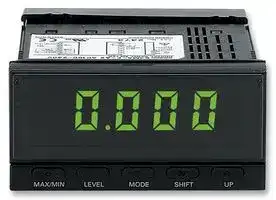


K3MALC24ACDC
Temperature Meter, K3MA-L Series, -200°C to +850°C, -300°F to +1500°F, 4 Digits, 24 V, Relay Output
- Manufacturer: OMRON INDUSTRIAL AUTOMATION
- Product type: Digital Panel Meters
- No. of Digits / Alpha:4; Meter Function:-; Meter Range:-200°C to +850°C, -300°F to +1500°F; Digit Height:14.2mm; Panel Cutout Height:-; Panel Cutout Width:-; Supply Voltage Min:-; Sup
- SVHC: No SVHC (17-Dec-2014)
- Meter Range: -200°C to +850°C, -300°F to +1500°F
- Digit Height: 14.2mm
- Product Range: -
- Meter Function: -
- Panel Cutout Width: -
- Supply Voltage Max: 24V
- Supply Voltage Min: -
- Panel Cutout Height: -
- No. of Digits / Alpha: 4
- Operating Temperature Max: 55°C
- Operating Temperature Min: -10°C
| Delivery and price | |
|---|---|
| Units per pack | 1 |
| Price | 187.6 € |
| Current stock | 10+ |
| Lead time | 30 days |

## **Tem erature Meter K3MA-L p** ~~oo~~

## **Highly Visible LCD Display with 2-color (Red and Green) LEDs**

- Wide input range - select from two types of platinum-resistance thermometers and ten types of thermocouples.

- Front-panel key operation for easy setting.

- Average processing function suppresses flicker.

- Temperature input shift and temperature unit selection functions.

- Easy confirmation of max/min display.

- Short 80-mm depth (measured from edge of face plate).

- Finger protective cover (standard equipment) protects against electric shock.

**==> picture [100 x 36] intentionally omitted <==**

**----- Start of picture text -----**<br>
— C US<br>**----- End of picture text -----**<br>


- Water- and dust-proof NEMA4X (IP66 equivalent) front panel.

- Recognized to U.S. and Canadian requirements under the Component Recognition Program of UL with CE marking.

## Orderin Information g

|**Input type**|**Supply voltage**|**Output**|**Model**|
|---|---|---|---|
|Platinum-resistance thermometer or<br>thermocouple|100 to 240 VAC|None|K3MA-L 100-240VAC|
|||1 relaycontact output(SPDT)|K3MA-L-C 100-240VAC|
||24 VAC/VDC|None|K3MA-L 24VAC/VDC|
|||1 relaycontact output(SPDT)|K3MA-L-C  24VAC/VDC|


## **Model Number Legend:**

## K3MA-L-@

- 1     2          3

## **1. Input Type**

   - L: Platinum-resistance thermometer or thermocouple

**2. Output Type** None: No output

   - C: With relay contact output (SPDT)

**3. Supply Voltage** 100-240VAC: 100 to 240 VAC

   - 24VAC/VDC: 24 VAC/VDC

1

**K** ~~**3MA-L**~~

~~**K3**~~ **MA-L**

## S ecifications p

## ■ **Ratings**

|■**Ratings**|||
|---|---|---|
||**K3MA-L 100-240VAC, K3MA-L-C 100-240VAC**|**K3MA-L 24VAC/VDC, K3MA-L-C 24VAC/VDC**|
|**Supply voltage**|100 to 240 VAC|24 VAC (50/60 Hz), 24 VDC|
|**Operating voltage range**|85% to 110% of the rated supply voltage||
|**Power consumption (under**<br>**maximum load)**|6 VA max.|4.5 VA max. (24 VAC)<br>4.5 W max. (24 VDC)|
|**Insulation resistance**|20 M�min. (at 500 VDC) between external terminal and case.<br>Insulation provided between inputs, outputs, and power supply.||
|**Dielectric withstand voltage**|2,000 VAC for 1 min between external terminal and case.<br>Insulation provided between inputs, outputs, and power supply.||
|**Noise immunity**|�1,500 V on power supply terminals in normal or<br>common mode.<br>�1�s, or 100 ns for square-wave noise with 1 ns.|�480 V on power supply terminals in normal mode.<br>�1,500 V in common mode.<br>�1�s, or 100 ns for square-wave noise with 1 ns.|
|**Vibration resistance**|Vibration: 10 to 55 Hz, Acceleration: 50 m/s2<br>5 min each in X, Y, and Z directions for 10 sweeps.||
|**Shock resistance**|150 m/s2(100 m/s2for relay contact outputs) 3 times each on 3 axes, 6 directions.||
|**Ambient temperature**|Operating:<br>�10�C to 55�C (with no condensation or icing)<br>Storage:<br>�25�C to 65�C (with no condensation or icing)||
|**Ambient humidity**|Operating: 25% to 85% (with no condensation)||
|**Ambient atmosphere**|Must be free of corrosive gas.||
|**Approved safety standards**|UL3121, conforms to EN61010-1 (Pollution degree 2/overvoltage category II)<br>Conforms to VDE0106/P100 (finger protection)||
|**EMC**|(EMI)<br>EN61326+A1<br>Industry<br>Emission Enclosure:<br>CISPR 11 Group 1 class A: CISRP16-1/-2<br>Emission AC Mains:<br>CISPR 11 Group 1 class A: CISRP16-1/-2<br>(EMS)<br>EN61326+A1<br>Industry<br>Immunity ESD:<br>EN61000-4-2:<br>4-kV contact discharge<br>8-kV air discharge<br>Immunity RF-interference:<br>EN61000-4-3:<br>10 V/m (amplitude-modulated, 80 MHz to 1 GHz)<br>Electrical Fast Transient Noise:<br>EN61000-4-4:<br>2 kV (power line)<br>Immunity Burst Noise:<br>1 kV line to line (I/O signal line)<br>Immunity Surge:<br>EN61000-4-5:<br>1 kV (power line)<br>2-kV line to ground (power line)<br>Immunity Conducted Disturbance:<br>EN61000-4-6:<br>3 V (0.15 to 80 MHz)<br>Immunity Voltage Dip/Interrupting:<br>EN61000-4-11:<br>0.5 cycle, 0, 180��100% (rated voltage)||
|**Weight**|Approx. 200 g||


## **Input/Output Ratings**

## **Relay Contact Output**

|**Relay Contact Output**|||
|---|---|---|
|**Item**|**Resistive load (cos**�**= 1)**|**Inductive load (cos**�**= 0.4, L/R = 7 ms)**|
|Rated load|5 A at 250 VAC, 5 A at 30 VDC|1.5 A at 250 VAC, 1.5 A at 30 VDC|
|Rated carrycurrent|5 A max.(at COM terminal)||
|Max. contact voltage|400 VAC, 150 VDC||
|Max. contact current|5 A(at COM terminal)||
|Max. switchingcapacity|2,000 VA, 192 W|375 VA, 36 W|
|Min. permissible load<br>(P level, reference value)|10 mA at 5 VDC||
|Mechanical life|20,000,000 times min.(at a switchingfrequencyof 1,200 time/min)||
|Electrical life<br>(at an ambient temperature of 20�C)|100,000 times min. (at a rated load switching frequency of 10 time/min)||


2

**K** ~~**3MA-L**~~

~~**K3**~~ **MA-L**

## ■ **Measuring Ranges**

## **Platinum-resistance Thermometer**

|**Input**|**Input**|**Pt100**|**Pt100**|**Pt100**|**JPt100**|**JPt100**|
|---|---|---|---|---|---|---|
|Range|�C|�200 to 850|�199.9 to 500.0|0.0 to 100.0|�199.9 to 500.0|0.0 to 100.0|
||�F|�300 to 1500|�199.9 to 900.0|0.0 to 210.0|�199.9 to 900.0|0.0 to 210.0|
|Parameter||�|�|�|�|�|


## **Thermocouple**

|**Input**|**Input**|**K**|**K**|**J**|**J**|**T**|**T**|**E**|**L**|**U**|**U**|**N**|**R**|**S**|**B**|
|---|---|---|---|---|---|---|---|---|---|---|---|---|---|---|---|
|Range|�C|�200<br>to<br>1300|�20.0<br>to<br>500.0|�100<br>to<br>850|�20.0<br>to<br>400.0|�200<br>to<br>400|�199.9<br>to<br>400.0|0<br>to<br>600|�100<br>to<br>850|�200<br>to<br>400|�199.9<br>to<br>400.0|�200<br>to<br>1300|0<br>to<br>1700|0<br>to<br>1700|100<br>to<br>1800|
||�F|�300<br>to<br>2300|0.0<br>to<br>900.0|�100<br>to<br>1500|0.0<br>to<br>750|�300<br>to<br>700|�199.9<br>to<br>700.0|0<br>to<br>1100|�100<br>to<br>1500|�300<br>to<br>700|�199.9<br>to<br>700.0|�300<br>to<br>2300|0<br>to<br>3000|0<br>to<br>3000|300<br>to<br>3200|
|Parameter||�|�|�|�|�|��|��|��|��|��|��|��|��|��|


## ■ **Characteristics**

|■**Characteristics**||
|---|---|
|**Indication accuracy (at 23**�**5**�**C)**<br>**(See note.)**|Thermocouple:<br>(�0.5% of indication value or�1�C, whichever greater)�1 digit max.<br>Platinum-resistance thermometer:<br>(�0.5% of indication value or�1�C, whichever greater)�1 digit max.|
|**Input**|Thermocouple: K, J, T, E, L, U, N, R, S, B<br>Platinum-resistance thermometer: JPt100, Pt100|
|**Measurement method**|Double integral method|
|**Sampling period**|500 ms|
|**Display refresh period**|Sampling period (sampling times multiplied by number of averaging times if average processing<br>is selected.)|
|**Max. displayed digits**|4 digits (�1999 to 9999)|
|**Display**|7-segment digital display, Character height: 14.2 mm|
|**Polarity display**|“�” is displayed automatically with a negative input signal.|
|**Zero display**|Leading zeros are not displayed.|
|**Input shift**|Input shift equivalent to the setting value supported for all points within the sensor measurement<br>range.|
|**Hold function**|Max hold (maximum value), Min hold (minimum value)|
|**Hysteresis setting**|Programmable with front-panel key inputs (0001 to 9999).|
|**Other functions**|Display color change (green (red), green, red (green), red)<br>Average processing (simple average OFF/2/4/8 operations)<br>Setting change lockout<br>Parameter initialization|
|**Output**|Relay contact (SPDT)|
|**Delay in comparative outputs**|1 s max.|
|**Enclosure ratings**|Front panel: NEMA4X for indoor use (equivalent to IP66)<br>Rear case: IEC standard IP20<br>Terminals: IEC standard IP00 + finger protection (VDE0106/100)|
|**Memory protection**|Non-volatile memory (EEPROM) (possible to rewrite 100,000 times)|


**Note:** The indication accuracy of the K thermocouple at a temperature of �200 to 1300�C is �2�C��1 digit maximum. The indication accuracy of the T and N thermocouples at a temperature of �100�C or less is �2�C��1 digit maximum. The indicator accuracy of the U and L thermocouples at any temperature is �2�C��1 digit maximum. The indication accuracy of the B thermocouple at a temperature of 400�C or less is unrestricted. The indication accuracy of the R and S thermocouples at a temperature of 200�C or less is �3�C��1 digit maximum.

3

**K** ~~**3MA-L**~~

~~**K3**~~ **MA-L**

## Nomenclature

**==> picture [61 x 6] intentionally omitted <==**

**----- Start of picture text -----**<br>
2. Operation indicators<br>**----- End of picture text -----**<br>


**==> picture [294 x 133] intentionally omitted <==**

**----- Start of picture text -----**<br>
1 Max<br>Min 1. Main indicator<br>3. Level indicator SV<br>MAX/MIN LEVEL MODE SHIFT UP<br>4. MAX/MIN key 8. Up key<br>5. Level key 7. Shift key<br>6. Mode key<br>**----- End of picture text -----**<br>


|**Name**|**Name**|**Functions**|
|---|---|---|
|1. Main indicator||Displays current values, parameters, and set values.|
|2. Opera-<br>tion indi-<br>cators|1|Lit when output 1 is ON.|
||SV|Lit when a set value is being displayed or changed.|
||Max|Lit when the main indicator is showing the MAX value.|
||Min|Lit when the main indicator is showing the MIN value.|
|3. Level indicator||Displays the current level that the K3MA-L is in. (See below for details.)|
|4. MAX/MIN Key||Used to display the MAX and MIN values when a measurement value is being displayed.|
|5. Level Key||Used to change the level.|
|6. Mode Key||Used to allow the main indicator to indicate parameters sequentially.|
|7. Shift Key||Used to enable a set value to be changed. When changing a set value, this key is used to move along the digits.|
|8. Up Key||Used to change a set value. Used to set or clear a forced-zero function when a measurement value is being dis-<br>played.|


|**Level indicator**|**Level**|
|---|---|
|�|Protect|
|Not lit|Operation|
|�|Adjustment|
|�|Initial setting|
|�|Advanced-function setting|


4

**K** ~~**3MA-L**~~

~~**K3**~~ **MA-L**

## O eration p

## ■ **Main Functions**

## **Input Types and Ranges**

|**Input Types and**|**Ranges**|||||
|---|---|---|---|---|---|
|**Parameter**|**Setting**|**Input type**||**Meaning**||
|����|�|Platinum-resistance<br>thermometer|Pt100|�200 to 850�C|�300 to 1500�F|
||�|||�199.9 to 500.0�C|�1999 to 900.0�F|
||�|||0.0 to 100.0�C|0.0 to 210.0�F|
||�||JPt100|�199.9 to 500.0�C|�199.9 to 900.0�F|
||�|||0.0 to 100.0�C|0.0 to 210.0�F|
||�|Thermocouple|K|�200 to 1300�C|�300 to 2300�F|
||�|||�20.0 to 500.0�C|0.0 to 900.0�F|
||�||J|�100 to 850�C|�100 to 1500�F|
||�|||�20.0 to 400.0�C|0.0 to 750.0�F|
||�||T|�200 to 400�C|�300 to 700�F|
||��|||�199.9 to 400.0�C|�199.9 to 700.0�F|
||��||E|0 to 600�C|0 to 1100�F|
||��||L|�100 to 850�C|�100 to 1500�F|
||��||U|�200 to 400�C|�300 to 700�F|
||��|||�199.9 to 400.0�C|�199.9 to 700.0�F|
||��||N|�200 to 1300�C|�300 to 2300�F|
||��||R|0 to 1700�C|0 to 3000�F|
||��||S|0 to 1700�C|0 to 3000�F|
||��||B|100 to 1800�C|300 to 3200�F|


**Note:** The initial value is “���thermocouple K (�200 to 1300�C/�300 to 2300�F).”

## **Temperature Unit Selection**

Either centigrade (�C) or fahrenheit (�F) can be selected as the temperature unit.

|<br>temperature unit.|||
|---|---|---|
|**Parameter**|**Setting**|**Meaning**|
|���|�|Displayin�C.|
||�|Displayin�F.|


## **OUT Types (Comparative Output Models Only)**

OUT 1 can be set to operate in one of the three following modes in accordance with the compared values:

- Upper limit (High Acting): The output is turned ON when the measurement value is greater than its set value.

- Lower limit (Low Acting): The output is turned ON when the measurement value is less than its set value.

- Upper and lower limits (Outside Band Acting): An upper limit (H set value) and lower limit (L set value) can be set independently.

The output is turned ON when the measurement value is greater than the upper-limit set value or less than the lower-limit set value.

|<br>ue.|||
|---|---|---|
|**Parameter**|**Setting**|**Meaning**|
|�������|��|Upper limit: Alarm<br>operates at upper<br>limit.|
||��|Lower limit: Alarm<br>operates at lower<br>limit.|
||�����|Upper and lower<br>limits: Alarm oper-<br>ates at upper and<br>lower limits.|


## **Upper Limit (High Acting)**

## **Lower Limit (Low Acting)**

## **Upper and Lower Limits (Outside Band Acting)**

**==> picture [485 x 74] intentionally omitted <==**

**----- Start of picture text -----**<br>
OUT1 upper-limit<br>OUT1 value Hysteresis value Hysteresis<br>Measurement  Measurement<br>Measurement  value value<br>value OUT1 value Hysteresis OUT1 lower-limit  Hysteresis<br>value<br>ON ON ON<br>Output Output Output<br>OFF OFF OFF<br>**----- End of picture text -----**<br>


5

**K** ~~**3MA-L**~~

~~**K3**~~ **MA-L**

## **Temperature Input Shift**

Input shift equivalent to the setting value supported for all points within the sensor measurement range.

**==> picture [164 x 129] intentionally omitted <==**

**----- Start of picture text -----**<br>
Parameter Setting<br> to<br>Temperature<br>Before shift<br>After shift<br>a<br>Temperature input<br>shift value<br>Input<br>**----- End of picture text -----**<br>


## **Parameter Initialization**

This function returns all of the parameters to their initial values.

|**Parameter**|**Setting**|**Meaning**|
|---|---|---|
|||---|
|||Initializes all param-<br>eters.|


Use this to reset the K3MA-L after returning it to its factory-set condition.

## **Average Processing**

Average processing stabilizes displayed values to minimize flicker by averaging the fluctuating input signals. Average processing can be performed for the measurement values in either of four steps (OFF, 2 times, 4 times, or 8 times).

This is useful for ignoring rapid fluctuations, e.g., eliminating spike noise.

## **Changing the Display Color**

The color of the value displayed can be set to either red or green. For comparative output models, the display color can be set to change from green to red, or from red to green, according to the status of the comparison criterion.

**==> picture [179 x 80] intentionally omitted <==**

**----- Start of picture text -----**<br>
Red<br>258.9<br>OUT1 value<br>Green<br>192.0<br>=<br>**----- End of picture text -----**<br>


## **Display Auto-return Time**

This function automatically returns the display to the operation level’s current value if no keys are pressed for a preset time (called the display auto-return time).

## **Move-to-Protect-Level Time**

The time required to shift to the protect level can be set as desired.

## **MAX/MIN Display**

The maximum and minimum measurement (display) values from the time the power is turned ON until the current time can be stored and displayed. This is useful, for example, when measuring the maximum value.

**==> picture [59 x 132] intentionally omitted <==**

**----- Start of picture text -----**<br>
Current value<br>> )<br>MAX/MIN<br>MAX value<br>>!)<br>MAX/MIN<br>MIN value<br>=»<br>MAX/MIN<br>**----- End of picture text -----**<br>


## **Hysteresis (Comparative Output Models Only)**

The hysteresis of comparative outputs can be set to prevent chattering in the output when the measurement value fluctuates finely near the OUT value.

## **Upper limit (high acting)**

**==> picture [168 x 76] intentionally omitted <==**

**----- Start of picture text -----**<br>
Set value Hysteresis<br>Measurement value<br>ON<br>Output<br>OFF<br>**----- End of picture text -----**<br>


6

**K** ~~**3MA-L**~~

~~**K3**~~ **MA-L**

## ■ **External Connections**

## **Terminal Arrangement**

**==> picture [481 x 130] intentionally omitted <==**

**----- Start of picture text -----**<br>
Models with<br>A1 comparative  E1<br>output<br>Power<br>supply Output  A2 E2<br>terminals 100- to 240-VAC type or<br>24-VAC/VDC type E3<br>(No polarity for 24-VDC<br>connection.) E4 E4 A<br>Input<br>terminals E5 + E5 B<br>B<br>E6 − E6<br>For thermocouple  For platinum-<br>input resistance<br>thermometer input<br>**----- End of picture text -----**<br>


|||||For platinum-<br>resistance<br>thermometer input<br>For thermocouple<br>input|
|---|---|---|---|---|
|||**Terminal No.**|**Name**|**Description**|
|**A1**|**A**<br>-|**2**|Operation power|Connects the operation power supply.|
|**E4**|**E6**<br> -|**E5**<br>-|Thermocouple or platinum-resistance ther-<br>mometer input|Connects the thermocouple or platinum-re-<br>sistance thermometer input.|
|**E1**|**E2**<br> ,|**E3**<br>-|Outputs|Outputs the relay outputs.|


7

**K** ~~**3MA-L**~~

~~**K3**~~ **MA-L**

## ■ **Block Diagram**

**==> picture [272 x 167] intentionally omitted <==**

**----- Start of picture text -----**<br>
Key<br>Input Input<br>Micro-<br>computer Display<br>Contact<br>EEPROM Output circuit X output (See<br>note.)<br>5 V 12 V<br>Constant voltage circuit<br>Power supply circuit<br>**----- End of picture text -----**<br>


**Note:** Relay output models only.

8

**K** ~~**3MA-L**~~

~~**K3**~~ **MA-L**

## ■ **Levels**

“Level” refers to a grouping of parameters. The following table lists the operations that are possible in each of the levels, and the diagram tells how to move between levels. There are some parameters that are not displayed for certain models.

|**Level name**|**Function**|**Measurement**|
|---|---|---|
|Protect|Setting lockouts.|Continue|
|Operation|Displaying current values, and setting OUT 1 value.|Continue|
|Adjustment|Setting communications writing control.|Continue|
|Initial setting|Making initial settings of input type, output operating action, and<br>other parameters.|Stopped|
|Advanced-function setting|Setting average processing, display color settings, and other ad-<br>vanced function parameters.|Stopped|


**==> picture [40 x 7] intentionally omitted <==**

**----- Start of picture text -----**<br>
Power ON<br>**----- End of picture text -----**<br>


**==> picture [353 x 268] intentionally omitted <==**

**----- Start of picture text -----**<br>
Operation level Adjustment level<br>+<br>Time set  Less than 1 s<br>by user<br>(See note.) Flashing stops if key<br>1 s min.<br>is released.<br>Protect level 1 s min.<br>+<br>1 s min.  - 123.4<br>Indicates change of level.<br>Continue to press the key for 2 s min.<br>Initial setting level<br>Password " − 169"<br>1 s min.<br>Advanced-function<br>setting level<br>**----- End of picture text -----**<br>


**Note:** The move-to-protect-level time can be set in the advanced-function setting level.

9

**K** ~~**3MA-L**~~

~~**K3**~~ **MA-L**

## ■ **Parameters**

- **Note:** 1. Some parameters are not displayed for certain models.

   2. The K3MA-L will stop measurement if the level is changed to the initial setting level or the advanced-function setting level.

   3. If the input range is changed, some parameters are set to default values. Therefore, set the input range first.

   4. Settings displayed in reversed colors are initial settings.

**==> picture [393 x 306] intentionally omitted <==**

**----- Start of picture text -----**<br>
Power ON<br>Press Level Key<br>for less than 1 s.<br>Adjustment level Operation level<br>Press Level Key<br>for less than 1 s.<br>Current value<br>Temperature input shift MODE<br>For models with the<br>∼ 0 ∼ comparative output function OUT1 value ∼<br>MODE<br>Set one of these. OUT1<br>upper-limit  value ∼<br>MODE<br>OUT1<br>lower-limit  ∼<br>value<br>MODE<br>**----- End of picture text -----**<br>


10

**K** ~~**3MA-L**~~

~~**K3**~~ **MA-L**

**==> picture [487 x 683] intentionally omitted <==**

**----- Start of picture text -----**<br>
Press Level<br>Key        for<br>more than 3 s.<br>Press Level Key        for less than 1 s.<br>Initial setting level Advanced-function<br>setting level<br>Press Level<br>Key         for  Enter<br>more than 1 s. password " − 169"<br>Input type ∼ ∼ Parameter<br>initialization /<br>MODE<br>Temperature unit MODE<br>Temperature unit ∼<br>MODE Averageprocessing / / /<br>Models with the  OUT1 type OUT1 typeUpper Limit MODE OUT1 hysteresisUnit: times<br>compara-tive out-put function MODE Upper/Lower LimitsLower Limit Models with the compar-ative out- OUT1 Hysteresis ∼ ∼<br>Move to advanced- function  ∼ put function MODE<br>setting level<br>MODE Display  Green (red)<br>color change Green<br>Password: �169 Red (green)<br>MODE Red<br>Display<br>auto-return time ∼ ∼<br>Unit: s<br>MODE<br>Move-to-<br>protect- ∼ ∼<br>level time<br>Unit: s<br>MODE<br>Settings displayed in reversed colors are initial settings.<br>**----- End of picture text -----**<br>


11

**K** ~~**3MA-L**~~

~~**K3**~~ **MA-L**

Press             Level Key +           Mode Key for more than 1 s.

**==> picture [366 x 139] intentionally omitted <==**

**----- Start of picture text -----**<br>
Operation Level Protect level<br>Press           Level Key +           Mode Key<br>for more than preset time.<br>Operation/adjustment<br>lockouts / /<br>MODE<br>Setting level lockouts / /<br>MODE<br>Setting change lockout /<br>MODE<br>**----- End of picture text -----**<br>


## **Operation/Adjustment Lockouts**

Restricts key operations for operation level and adjustment level.

|**Param-**<br>**eter**|**Setting**|**Operation level**|**Operation level**|**Moving to**<br>**adjustment**<br>**level**|
|---|---|---|---|---|
|||**Process value**<br>**display**|**Set value**<br>**display**||
|����|�|Allowed|Allowed|Allowed|
||�|Allowed|Allowed|Prohibited|
||�|Allowed|Prohibited|Prohibited|


- Initial setting is 0.

- This cannot be displayed on models not equipped with the comparative output function.

## **Setting Level Lockouts**

Restricts shifting to initial setting level or advanced-function setting level.

|**Parameter**|**Setting**|**Shift to initial**<br>**setting level**|**Shift to**<br>**advanced-**<br>**function**<br>**setting level**|
|---|---|---|---|
|����|�|Allowed|Allowed|
||�|Allowed|Prohibited|
||�|Prohibited|Prohibited|


## **Setting Change Lockout**

## ■ **Initial Settings**

**==> picture [70 x 22] intentionally omitted <==**

**----- Start of picture text -----**<br>
Power ON<br>**----- End of picture text -----**<br>


Press the Level Key        for 3 s min. to move to the initial setting level. Select the input type.

If desired, shift to the adjustment level to set the temperature input shift value.

If required, shift to the advanced-function setting level to set the number of measurements for averaging, hysteresis values, auto-zero time, display color change, display auto-return time, or move-to-protect-level time.

Press the Level Key        for less than 1 s min. to return to the operation level.

Restricts setting changes by key operation. When this lockout is set, it is no longer possible to shift to a setting change mode.

|**Parameter**|**Setting**|**Setting change by key**<br>**operation**|
|---|---|---|
|����|���|Allowed|
||��|Prohibited|


However, all protect level parameters can still be changed.

**==> picture [224 x 66] intentionally omitted <==**

**----- Start of picture text -----**<br>
Set the OUT values.<br>Measurement starts.<br>**----- End of picture text -----**<br>


12

> **K** ~~—~~ ~~**3MA-L** -_~~ ~~**K3**~~ **MA-L-LL**

~~**K3**~~ **MA-L-LL**

## ■ **Setting Example**

## **Initial Settings**

The settings for the following example are shown here.

## **Example: Monitoring the temperature of an industrial furnace**

Here, the temperature inside the furnace is to be displayed in centigrade ( C).

Temperature sensor: E52-PR Thermocouple, Measurement range: 0 to 1,400 C.

1. Set the K3MA-L input type to the thermocouple R input range. Parameter: (input type), Setting value:

**==> picture [162 x 58] intentionally omitted <==**

**----- Start of picture text -----**<br>
E52-PR Thermocouple<br>Industrial furnace<br>SV1 MaxMin<br>MAX/MIN LEVEL MODE SHIFT UP<br>K3MA-L-C AC100-240V<br>**----- End of picture text -----**<br>


2. Select centigrade ( C) as the temperature unit. Parameter: ob (temperature unit), Setting value: .

If you are using a comparative output model, make the setting as desired.

## ■ **Application Examples**

**Monitoring the temperature of an industrial furnace**

**==> picture [116 x 90] intentionally omitted <==**

**----- Start of picture text -----**<br>
‘c]<br>K3MA-L<br>Industrial furnace<br>**----- End of picture text -----**<br>


## **Sending a temperature alarm for molding equipment**

**==> picture [137 x 101] intentionally omitted <==**

**----- Start of picture text -----**<br>
PID control<br>E5EN ©<br>K3MA-L<br>a Alarm output<br>Molding equipment<br>**----- End of picture text -----**<br>


## **Monitoring the bearing temperature for a generator motor**

**==> picture [133 x 98] intentionally omitted <==**

**----- Start of picture text -----**<br>
°<br>Generator motor<br>K3MA-L Alarm output<br>**----- End of picture text -----**<br>


- Monitoring the temperature of an industrial furnace/sintering furnace.

- Monitoring/alarm function for disinfecting equipment.

- Monitoring (failsafe checking) abnormal temperatures in molding equipment.

- Monitoring the liquid temperature for cleaning devices.

- Monitoring temperature rises in electric power generating facilities.

- Inspecting temperatures in machines and devices.

13

**K** ~~**3MA-L**~~

~~**K3**~~ **MA-L**

## Dimensions

**==> picture [112 x 69] intentionally omitted <==**

**==> picture [364 x 162] intentionally omitted <==**

**----- Start of picture text -----**<br>
101.2 Finger protective  Main indicator  Panel cut-out<br>91 cover (provided) character size<br>120 min.<br>14.2 mm<br>85<br>97 7.6 mm<br>75 min.<br>92 [+0.5]   0<br>12 45 [+0.5]   0<br>1.3<br>80<br>96<br>44.8<br>48<br>MAX/MIN LEVEL MODE SHIFT UP<br>E D C B A<br>**----- End of picture text -----**<br>


## Optional Parts (Order Separately)

|**Name**|**Shape**|**Model**|
|---|---|---|
|Splash-proof Soft Cover||K32-49SC|
|Hard Cover||K32-49HC|


## Installation

1. Insert the K3MA-L into the panel cut-out hole.

2. For a waterproof installation, insert the rubber gasket onto the body of the K3MA-L.

**==> picture [140 x 99] intentionally omitted <==**

3. Fit the adaptor into the grooves on the left and right sides of the rear case, then push it until it contacts the panel to secure the K3MA-L.

**==> picture [122 x 105] intentionally omitted <==**

## ■ **Wiring Precautions**

- Use crimp terminals.

- Tighten the terminal screws to a torque of approximately 0.5 N�m.

- To avoid the influence of noise, route signal lines and power lines separately.

## ■ **Wiring**

- Use the following M3 crimp terminals.

**==> picture [96 x 47] intentionally omitted <==**

**----- Start of picture text -----**<br>
5.8 mm max.<br>5.8 mm max.<br>**----- End of picture text -----**<br>


## ■ **Unit Markings (Provided)**

- The unit markings are not attached to the K3MA-L. Select the desired markings from the provided sheet.

**==> picture [108 x 101] intentionally omitted <==**

**Note:** For scales and gauges, use the unit markings that are specified by the relevant laws or regulations.

14

**K** ~~**3MA-L**~~

~~**K3**~~ **MA-L**

## Precautions

~~!Caution~~ Do not touch the terminals while the power is being supplied. Doing so may result in electric shock.

## ~~!Caution~~

Do not disassemble the product or touch the internal components of the product while the power is being supplied. Doing so may result in electric shock.

~~!Caution~~ Do not allow pieces of metal or wire clippings to enter the product. Doing so may result in electric shock, fire, or malfunction.

## ~~!Caution~~

Perform correct settings for the product according to the control application. Failure to do so may cause unexpected operation, resulting in damage to the product or injury.

## ~~!Caution~~

Take safety measures, such as installing a separate monitoring system, to ensure safety even if the product fails. Product failure may prevent comparative outputs from being generated, resulting in serious accidents.

Observe the following precautions to ensure safety.

1. Maintain the power supply voltage within the range specified in the specifications.

2. Maintain the load within the ratings specified in the specifications.

3. Check each terminal for correct number and polarity before connecting it. Incorrect or reverse connections may damage or burn out internal components in the product.

4. Tighten the terminal screws securely. The recommended tightening torque is 0.43 to 0.58 N � m. Loose screws may cause fire or malfunction.

5. Do not connect anything to unused terminals.

6. Provide a switch or circuit breaker so that operators can easily turn OFF the power supply when necessary. Also provide appropriate indications of such devices.

7. Do not attempt to disassemble, repair, or modify the product.

8. Do not use the product where flammable or combustible gases are present.

## **Application**

## **General Precautions**

1. Do not use the product in the following locations:

   - Locations subject to direct radiant heat from heating equipment.

   - Locations subject to exposure to water, oil, or chemicals.

   - Locations subject to direct sunlight.

   - Locations subject to dust or corrosive gases (particularly, sulfuric gas or ammonia gas).

   - Locations subject to severe changes in temperature.

   - Locations subject to icing or condensation.

   - Locations subject to shock or vibration.

2. Do not block heat dissipation around the product, i.e., provide sufficient space for heat dissipation.

3. Ensure that the rated voltage is reached within two seconds after the power is turned ON.

5. Do not touch the slit sections or terminals while the power is being supplied to prevent the product from being affected by static electricity.

6. Do not lay heavy objects on the product during use or storage. Doing so may deform or deteriorate the product.

7. Do not use paint thinner for cleaning. Use commercially available alcohol.

## **Mounting**

- Mount the product to a panel that is 1 to 8 mm thick.

- Install the product in a horizontal position.

- Use crimp terminals that match screw sizes.

## **Noise Prevention**

- Install the product as far as possible from devices that generate strong, high-frequency fields (such as high-frequency welders or sewing machines) or surges.

- Install surge absorbers or noise filters on nearby devices that generate noise (particularly motors, transformers, solenoids, magnet coils, and other devices that have a high inductance component). Do not connect a surge absorber to the temperature sensor input section of the K3MA-L.

**==> picture [228 x 60] intentionally omitted <==**

**----- Start of picture text -----**<br>
Line filter<br>Power supply input Tempera-ture Meter Signal input + Tempera-ture Meter Power supply input<br>−<br>Surge absorber<br>**----- End of picture text -----**<br>


- To prevent inductive noise, separate the terminal block wiring for the product from high-voltage or high-current power lines. Do not route the wiring for the product in parallel with or tie it in a bundle with power lines.

- Take the following countermeasures against inductive noise in input lines.

## **Temperature Inputs**

Separate the lead wire that connects the product with a temperature sensor from the load line to prevent the product from being affected by inductive noise.

- When using a noise filter for the power supply, check for the voltage and current and install it as close as possible to the Temperature Meter.

- Do not install the product near radios, television sets, or wireless devices. Doing so may cause reception interference.

## **Increasing Service Life**

   - Do not use the product in locations where the temperature or humidity exceeds the ratings or where condensation may occur. When installing the product in a panel, be sure that the temperature around the product (not the temperature around the panel) does not exceed the ratings. The product service life depends on the ambient temperature. The higher the ambient temperature, the shorter the service life. To extend the product service life, lower the temperature inside the Temperature Meter.

   - Use and store the product within the temperature and humidity ranges given in the specifications. When gang-mounting Temperature Meters or arranging them vertically, heat generated by the Temperature Meters will cause the internal temperature to rise, reducing the service life. In such cases, consider forced cooling methods, such as using a fan to circulate air around the Temperature Meters. Do not, however, allow only the terminals to be cooled. Doing so will increase measurement error.

   - The life of the output relays are greatly affected by the switching capacity and switching conditions. Use these relays within their rated load and electrical life. The contacts may fuse or burn if they are used past their electrical life.

4. Conduct aging for 15 minutes min. after power is turned ON for correct measurement.

15

**K** ~~**3MA-L**~~

~~**K3**~~ **MA-L**

## ■ **Troubleshooting**

When an error occurs, error details will be displayed on the main indicator. Confirm the error from the main indicator and take the appropriate countermeasures.

|<br>ate countermeasures.||||
|---|---|---|---|
|**Level display**|**Main indicator**|**Error contents**|**Countermeasures**|
|Not lit|����|RAM memory error|Repair is necessary.<br>Consult your OMRON sales rep-<br>resentative.|
|�|����|EEPROM memory error|When this error is displayed,<br>press the Level Key for 3 sec-<br>onds, and the settings will be re-<br>stored to the factory settings.<br>If the error cannot be recovered,<br>repair is necessary.<br>Consult your OMRON sales rep-<br>resentative.|
|Not lit|Flashes�����|Input error|Confirm that the temperature<br>sensor is correctly connected,<br>and that there are no broken sig-<br>nal lines to the temperature sen-<br>sor.<br>If the condition does not return to<br>normal, repair is necessary.<br>Consult your OMRON sales rep-<br>resentative.|
|Not lit|Flashes����|The measurement value after<br>temperature input correction ex-<br>ceeds 9999.|The temperature input correction<br>value may be inappropriate.<br>Use the adjustment level to re-<br>view the temperature input cor-<br>rection value.|
|Not lit|Flashes�����|The measurement value after<br>temperature input correction is<br>lower than -1999.|The temperature input correction<br>value may be inappropriate.<br>Use the adjustment level to re-<br>view the temperature input cor-<br>rection value.|


## **ALL DIMENSIONS SHOWN ARE IN MILLIMETERS.**

To convert millimeters into inches, multiply by 0.03937. To convert grams into ounces, multiply by 0.03527.

## Cat. No. N109-E1-01 **In the interest of product improvement, specifications are subject to change without notice.**

## **OMRON Corporation**

Industrial Automation Company

Measuring and Supervisory Controls Department Shiokoji Horikawa, Shimogyo-ku Kyoto, 600-8530 Japan Tel: (81)75-344-7108/Fax: (81)75-344-7189

Printed in Japan 1001-1M (1001) (B)

16
Updated at June 9, 2026
With a legacy spanning over 80 years, Omron Industrial Automation is a globally recognized leader in the manufacture of advanced industrial control and automation components. Renowned for their reliability and engineering excellence, Omron delivers comprehensive solutions that enhance efficiency, machine safety, and precision across a wide range of manufacturing environments. Our extensive portfolio of Omron products is heavily focused on their industry-leading sensing and switching technologies. We offer a vast selection of sensors, excelling specifically in high-performance proximity sensors, light sensors, and temperature sensors. Complementing this range are robust switching solutions, featuring a deep inventory of power relays, solid-state relays, safety relays, and essential relay accessories designed for demanding operational requirements. Beyond sensing and switching, Omron is highly regarded for its precision automation and process control equipment. Our selection features highly accurate temperature controllers, versatile process controllers, and sophisticated panel displays and instrumentation. To support these fundamental systems, we also supply dependable Omron power supplies, notably AC/DC converters, alongside vital connectivity components like DIN rail terminal blocks to ensure secure, efficient, and complete industrial setups.
About Novapart
Novapart is a B2B electronic component broker specialising in stock shortages and cost reduction. We source hard-to-find parts and identify compliant alternatives across a catalogue of 410,000+ components from 500+ manufacturers.
Learn more →Stock Shortage Specialist
When a component is unavailable, discontinued or has an unacceptable lead time, we tap into our network of vetted European and Asian distributors to source what you need — without compromising on quality or traceability.
Request a quote →Compliant Alternatives
We identify pin-to-pin, electrically equivalent substitutes that meet the same certifications (RoHS, AEC-Q100, REACH) as your original specification — validated against datasheets, not just part numbers. Often at a lower cost.
BOM Analysis service →