
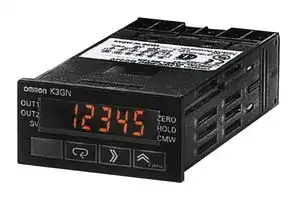


K3GN-PDT2 DC24
Panel Meter, 5 Digit, DC Current/Voltage, 7 mm, 24 VDC, K3GN Series
- Manufacturer: OMRON INDUSTRIAL AUTOMATION
- Product type: Digital Panel Meters
- SVHC: To Be Advised
- Meter Range: 0mA to 20mA, 4mA to 20mA, 0V to 5V, 1V to 5V, -5V to +5V, -10V to +10V
- Digit Height: 7mm
- Product Range: K3GN Series
- Meter Function: DC Current / DC Voltage
- Panel Cutout Width: 45mm
- Supply Voltage Max: 24VDC
- Supply Voltage Min: -
- Panel Cutout Height: 22.2mm
- No. of Digits / Alpha: 5
- Operating Temperature Max: 55°C
- Operating Temperature Min: -10°C
| Delivery and price | |
|---|---|
| Units per pack | 1 |
| Price | 228.03 € |
| Current stock | 10+ |
| Lead time | 30 days |

## **1/32 DIN Digital Panel Meter K3GN**

## **Compact and Intelligent Digital Panel Meter**

- A single Panel Meter covering a wide range of applications. 3 main applicable functions:

   - Process meter (DC voltage/current input).

   - RPM processor/tachometer (frequency input).

   - Digital data display for PC/PLC (RS-485 communications).

- Easy configuration

   - Multi-range analog input: applicable for all standard analog signals.

**==> picture [3 x 4] intentionally omitted <==**

**----- Start of picture text -----**<br>
®<br>**----- End of picture text -----**<br>


   - 6 input ranges available: 4 to 20 mA/0 to 20 mA, 1 to 5 VDC/ 0 to 5 VDC, ±5 VDC, ±10 VDC.

   - 5 KHz max. input-pulse frequency range.

   - Scaling in a wide range of engineering units.

   - Programmable output operation action, decimal point position setting, teaching function for input range, leading zero suppression, average processing.

- Advanced and compact design

   - Very compact 1/32 DIN housing: 48 (W) x 24 (H) x 83 (D).

   - 5-digit display with programmable display color in red or green.

   - Good visibility: High contrast backlit LCD display.

   - High protection against water and dust: NEMA4X/IP66 front panel.

- Selectable outputs: 2 relay outputs, 3 transistor outputs, RS-485, and combinations of these.

- High accuracy: ±0.1% full scale.

- Easy to configure through the front panel or via RS-485.

- EN/IEC conformity with CE marking and UL/CSA approval.

## **Model Number Structure**

## ■ **Model Number Legend**

> **K3GN -             -** HU U **24 VDC 1 2 3**

## **1. Input Type**

ND: DC voltage/current, NPN

PD: DC voltage/current, PNP

## **2. Output Type**

C: 2 relay contact outputs (SPST-NO)

- T1: 3 transistor outputs (NPN open collector)

- T2: 3 transistor outputs (PNP open collector)

## **3. Communications Output Type**

None: Communications not supported

FLK: RS-485

1/32 DIN Digital Panel Meter **K3GN**

K-7

## **Orderin Information g**

## ■ **List of Models**

|**Input type**|**Supply**<br>**voltage**|**Output**|**Communications**|**Communications**|
|---|---|---|---|---|
||||**No communications**|**RS-485**|
|DC voltage/current, NPN|24 VDC|Dual relays (SPST-NO)|K3GN-NDC 24 VDC|K3GN-NDC-FLK 24 VDC|
|||Three NPN open collector|K3GN-NDT1 24 VDC|K3GN-NDT1-FLK 24 VDC|
|DC voltage/current, PNP||Dual relays (SPST-NO)|K3GN-PDC 24 VDC|K3GN-PDC-FLK 24 VDC|
|||Three PNP open collector|K3GN-PDT2 24 VDC|K3GN-PDT2-FLK 24 VDC|


## **S ecifications p**

## ■ **Ratings**

|**Supply voltage**|24 VDC|
|---|---|
|**Operating voltage range**|85% to 110% of the rated supplyvoltage|
|**Power consumption (see note)**|2.5 W max. (at max. DC load with all indicators lit)|
|**Insulation resistance**|20 MΩmin. (at 500 VDC) between external terminal and case.<br>Insulation provided between inputs, outputs, and power supply.|
|**Dielectric strength**|1,000 VAC for 1 min between external terminal and case.<br>Insulation provided between inputs, outputs, and power supply.|
|**Noise immunity**|±480 V on power supply terminals in normal mode,±1,500 V in common mode,±1µs, or 100 ns for square-<br>wave noise with 1 ns|
|**Vibration resistance**|Malfunction: 10 to 55 Hz, 10 min each in X, Y, and Z directions; acceleration: 9.8 m/s2<br>Destruction: 10 to 55 Hz, 30 min each in X, Y, and Z directions; acceleration: 19.6 m/s2|
|**Shock resistance**|Malfunction: Models with transistor outputs: 196 m/s2for 3 times each in X, Y, and Z directions<br>Models with relay contact outputs: 98 m/s2for 3 times each in X, Y, and Z directions<br>Destruction: 294 m/s2for 3 times each in X, Y, and Z directions|
|**Ambient temperature**|Operating:<br>−10°C to 55°C (with no condensation or icing)<br>Storage:<br>−25°C to 65°C (with no condensation or icing)|
|**Ambient humidity**|Operating:<br>25% to 85% (with no condensation)|
|**EMC**|(EMI)<br>EN61326+A1<br>Industry<br>Emission Enclosure:<br>CISPR 11 Group 1 class A: CISRP16-1/-2<br>Emission AC Mains:<br>CISPR 11 Group 1 class A: CISRP16-1/-2<br>(EMS)<br>EN61326+A1<br>Industry<br>Immunity ESD:<br>EN61000-4-2:<br>4 kV contact discharge (level 2)<br>8 kV air discharge (level 3)<br>Immunity RF-interference:<br>EN61000-4-3:<br>10 V/m (amplitude-modulated,<br>80 MHz to 1 GHz) (level 3)<br>Immunity Fast Transient Noise:<br>EN61000-4-4:<br>2 kV (power line) (level 3)<br>Immunity Burst Noise:<br>1 kV line to line (I/O signal line)<br>Immunity Surge:<br>EN61000-4-5:<br>1 kV line to line<br>2 kV line to ground (power line)<br>Immunity Conducted Disturbance EN61000-4-6:<br>3 V (0.15 to 80 MHz) (level 2)<br>ImmunityVoltage Dip/Interrupting EN61000-4-11:<br>0.5 cycles, 0, 180°, 100% (rated voltage)|
|**Approved standards**|UL508, CSA22.2;<br>Conforms to EN61326+A1, EN61010-1 (IEC61010-1)<br>Conforms to VDE0106/P100 (finger protection) when the terminal cover is mounted.|
|**Weight**|Approx. 100g|


**Note:** A control power supply capacity greater than the rated capacity is required when the Digital Panel Meter is turned ON. Do not forget to take this into consideration when using several Digital Panel Meters. When power is supplied, all indicators will light and outputs will be OFF. When using startup compensation time operation, the display will read “00000” and all outputs will be OFF.

1/32 DIN Digital Panel Meter **K3GN**

K-8

## ■ **Characteristics**

|**Input signal**|Process voltage<br>(1 to 5 V, 0 to 5 V,±5V,±10 V)<br>Process current<br>(4 to 20 mA, 0 to 20 mA)|No-voltage contact<br>(30 Hz max. with ON/OFF pulse width<br>of 16 ms min.)<br>Open collector<br>(5 kHz max. with ON/OFF pulse width<br>of 90µs min.)|Digital data display (by RS-485<br>communication)|
|---|---|---|---|
|**A/D conversion**|Double integral method<br>14 bit resolution|---||
|**Sampling period**|250 ms|---||
|**Display refresh**<br>**period**|Sampling period (sampling times multiplied by number of averaging times if average processing is selected.)|||
|**Pulse measurement**<br>**method**|---|Periodic measurement|---|
|**Connectable Sensors**|---|ON residual voltage: 2.5 V max.<br>OFF leakage current:0.1 mA max.<br>Load current:<br>Must have a switching capacity of 15 mA min.<br>Must be able to reliablyswitch load currents of 5 mA max.||
|**Max. displayed digits**|5 digits (−19999 to 99999)|||
|**Display**|7-segment digital display, character height: 7.0 mm|||
|**Polarity display**|“−” is displayed automaticallywith a negative input signal.|||
|**Zero display**|Leadingzeros are not displayed.|||
|**Scaling function**|Programmable with front-panel key inputs (range of display:−19999 to 99999). The decimal point position can be set as<br>desired.|||
|**External controls**<br>**(see note 1)**|HOLD: (Measurement value held)<br>ZERO: (Forced-zero)|---||
|**Hysteresis setting**|Programmable with front-panel keyinputs (0001 to 9999).|||
|**Other functions**|Programmable Color Display<br>Selectable output operating action<br>Teaching set values<br>Average processing (simple average)<br>Lockout configuration<br>Communications writingcontrol (communications output models only)|||
||Forced-zero set with front panel keys<br>Control inputs (HOLD/ZERO) selection<br>via front panel keys<br>Field calibration|Startup compensation time (0.00 to 99.9 s)<br>Auto-zero time (0.0 to 19.9 s)||
|**Output**|Relays:<br>2 SPST-NO<br>Transistors: 3 NPN open collector<br>3 PNP open collector|||
||Combinations:<br>Communications output (RS-485) + relay outputs (2 SPST-NO);<br>Communications output (RS-485) + transistor outputs (3 NPN open collector);<br>Communications output (RS-485) + transistor outputs (3 PNP open collector)|||
|**Communications**|Communications function: RS-485|||
|**Delay in comparative**<br>**outputs**<br>**(transistor outputs)**|750 ms max.|||
|**Degree of protection**|Front panel:NEMA4X for indoor use (equivalent to IP66)<br>Rear case: IEC standard IP20<br>Terminals: IEC standard IP20|||
|**Memory protection**|Non-volatile memory(EEPROM) (possible to rewrite 100,000 times)|||


**Note 1.** The minimum input time for control signals is 80 ms.

**2.** Refer to _N102 Operation Manual_ for more details.

1/32 DIN Digital Panel Meter **K3GN**

K-9

## ■ **Measuring Ranges**

## **Process Voltage/Current Inputs**

|**Input**|**Measuring range**|**Measuring accuracy**|**Input impedance**|**Displayable range**|
|---|---|---|---|---|
|DC voltage|1.000 to 5.000 V/<br>0.000 to 5.000 V|±0.1% FS±1 digit max.<br>(at 23±3°C)|1 MΩmin.|−19999 to 99999<br>(with scaling function)|
||−5.000 to 5.000 V|±0.1% FS±1 digit max.<br>(at 23±5°C)|||
||−10.00 to 10.00 V||||
|DC current|4.00 to 20.00 mA/<br>0.00 to 20.00 mA|±0.1% FS±1 digit max.<br>(at 23±3°C)|60Ω||


## **No-voltage Contact/Open Collector Inputs**

|**No-voltage Contact/Open**|**Collector Inputs**|||
|---|---|---|---|
|**Input**|**Measuring range**|**Measuring accuracy**<br>**(at 23**±**5**°**C)**|**Displayable range**|
|No-voltage contact (30 Hz max.) with ON/<br>OFF pulse width of 16 ms min.|0.05 to 30.00 HZ|±0.1% FS±1 digit max.|−19999 to 99999<br>(with scaling function)|
|Open collector (5 kHz max.) with ON/OFF<br>pulse width of 90µs min.|0 to 5000 HZ|||


## **- Digital Data Display (By RS 485 Communications)**

**Displayable range** −19999 to 99999

## ■ **Input/Output Ratings**

## **Relay Contact Output**

(Incorporating G6K Relays)

|**Item**|**Resistive load (cos**φ**= 1)**|
|---|---|
|**Rated load**|1 A at 30 VDC|
|**Rated carry current**|1 A max. (at COM terminal)|
|**Max. contact voltage**|60 VDC|
|**Max. contact current**|1 A (at COM terminal)|
|**Max. switching capacity**|30 VA|
|**Min. permissible load**<br>**(P level, reference value)**|10 mV, 10µA|
|**Mechanical life**|50,000,000 times min. (at a switchingfrequencyof 36,000 times/hr)|
|**Electrical life**<br>**(at an ambient temperature of 23**°**C)**|100,000 times min. (at the rated load with a switching frequency of 1,800 times/hr)|


## **Transistor Output**

|**Rated load voltage**|24 VDC|
|---|---|
|**Max. load current**|50 mA|
|**Leakage current**|100µA max.|


## ■ **Communications Specifications**

|**Item**|**Item**|**RS-485**|
|---|---|---|
|**Transmission method**||2-wire, half-duplex|
|**Synchronization method**||Start-stop synchronization|
|**Baud rate**||1,200/2,400/4,800/9,600/19,200 bps|
|**Transmission code**||ASCII|
|**Communications**|**Reading/Writing to**<br>**the K3GN**|Read/write set values, read/write scaling values, enable/disable the writing of data through commu-<br>nications, forced-zero control, and other data.|


Refer to _N102 Operation Manual_ for more details.

1/32 DIN Digital Panel Meter **K3GN**

K-10

## **Connections**

## ■ **Terminal Arrangement**

Output terminals

**==> picture [508 x 444] intentionally omitted <==**

**----- Start of picture text -----**<br>
Input terminals<br>OUT1 NC OUT2 COM<br>NC NC 9 10 11 12<br>7 8<br>O-S- py<br>C | D<br>OUT1 PASS OUT2 COM<br>C RS-485 7 8 9 10 11 12 9 10 11 12<br>7 8<br>1 2 3 4 5 6<br>O-0- B (+) A (−) D |“\ SA——<br>A B —~<br>OUT1 PASS OUT2 COM<br>9 10 11 12<br>Y-O—-O- 1 2 3<br>Operation  oh mae<br>power supply<br>24 VDC* LA gO<br>Event or pulse/contact input<br>A<br>1 2 3<br>Operation<br>power supply  4 5 6<br>24 VDC* B COM<br>Cr| — | |eo->ry Voltage Current<br>Analog input<br>4<br>Event or pulse/contact input<br>Note:  *Operation power supply 24VDC: Recommended DC power supply: eg. OMRON s8VS<br>Terminal No. Name Description<br>A-B Operation power Connect the operation power supply.<br>-<br>C B Event input or pulse/contact input Operates as follows depending on parameter<br>C-A setting:<br>• Holds process value.<br>• Calibrate the process value to zero and clear<br>the forced-zero function.<br>• Pulse or contact input.<br>D,F-E Analog input Connect the voltage or current analog input.<br>G-H Communications RS-485 communications terminals.<br>I,K-L Outputs Outputs relay or transistor outputs. There is<br>I,J,K-L also a PASS output for models with transistor<br>outputs.<br>Models with  relay outputs<br>Models without  communications<br>Models with<br>Models with<br>communications NPN transistor outputs<br>Models with<br>PNP transistor outputs<br>Models with NPN inputs<br>Analog input<br>Models with PNP inputs<br>**----- End of picture text -----**<br>


**Note:** *Operation power supply 24VDC: Recommended DC power supply: eg. OMRON s8VS

1/32 DIN Digital Panel Meter **K3GN**

K-11

## ■ **Wiring**

## **Block Diagram**

**==> picture [482 x 376] intentionally omitted <==**

**----- Start of picture text -----**<br>
Key Display<br>Transistor output<br>A/D  (See note 1.)<br>Analog input  Input circuit conversion  Drive circuit<br>terminal circuit<br>Contact output<br>EEPROM Micro-computer Drive circuit Output circuit (See note 2.)<br>Communica-<br>Pulse/ Control input  Control input circuit Waveform rectification  Drive circuit tions driver Communications terminal (See note 3.)<br>terminal circuit<br>Constant voltage circuit 1 Constant voltage circuit 2<br>Ta Power supply circuit Note:    1. Transistor output models only.<br>2. Relay output models only.<br>3. Models with communications functions only.<br>Operating power supply<br>Input Circuits<br>Analog Input (DC Voltage/Current)<br>A To A/D To A/D<br>Voltage input 4 Current input 6<br>B 60 Ω<br>5 A+B=1 MΩ COM 5<br>COM P| a |<br>**----- End of picture text -----**<br>


## **Input Circuits**

## **Analog Input (DC Voltage/Current)**

## **Pulse Input/Control Event Input (HOLD/ZERO)**

**==> picture [417 x 98] intentionally omitted <==**

**----- Start of picture text -----**<br>
NPN Input PNP Input<br>24 VDC + 24 VDC +<br>1 1<br>4.7 kΩ<br>Hold/Zero Pulse 2.35 kΩ 2.35 kΩ<br>3 — eo f 3 e<br>Hold/Zero Pulse<br>. at<br>4.7 kΩ<br>2 2<br>Eh 24 VDC − 24 VDC − eee<br>**----- End of picture text -----**<br>


1/32 DIN Digital Panel Meter **K3GN**

K-12

**Output Circuits**

## **Contact Output**

**==> picture [181 x 141] intentionally omitted <==**

**----- Start of picture text -----**<br>
5 V<br>9 OUT1<br>5 V 11 OUT2<br>12 OUT3<br>**----- End of picture text -----**<br>


## **Transistor Output**

**==> picture [205 x 156] intentionally omitted <==**

**----- Start of picture text -----**<br>
NPN Output<br>8.2 Ω<br>9 OUT1<br>8.2 Ω<br>10 PASS<br>8.2 Ω<br>11 OUT2<br>12 COM<br>**----- End of picture text -----**<br>


## **PNP Output**

**==> picture [204 x 133] intentionally omitted <==**

**----- Start of picture text -----**<br>
12 COM<br>8.2 Ω<br>11 OUT2<br>8.2 Ω<br>10 PASS<br>8.2 Ω<br>9 OUT1<br>**----- End of picture text -----**<br>


1/32 DIN Digital Panel Meter **K3GN**

K-13

## **O eration p**

## ■ **Main Functions**

## **Input Types and Ranges**

|**Input type (setting parameter)**|**Function**|**Input range (setting parameters)**|**Setting range**|
|---|---|---|---|
|Analog input (analg)|Selects DC voltage/current signal<br>input.|4 to 20 mA/0 to 20 mA (4-20)|Displayable from−19999 to 99999<br>with scaling function. The position<br>of the decimal point can be set as<br>desired.|
|||1 to 5 V/0 to 5 V (1-5)||
|||±5 V (5)||
|||±10 V (10)||
|Pulse input (pulse)|Selects pulse input signal.|0.05 to 30 Hz (30)||
|||0 to 5 kHz (sk)||
|Remote (rmt)|Displays digital data from PLC or<br>PC.|---||


## **Scaling**

## **Analog (Process) Inputs**

The K3GN converts input signals into desired physical values.

INPUT2: Any input value DISPLAY2: Displayed value corresponding to INPUT2 INPUT1: Any input value DISPLAY1: Displayed value corresponding to INPUT1

**==> picture [214 x 97] intentionally omitted <==**

**----- Start of picture text -----**<br>
INPUT1 INPUT2 INPUT2 INPUT1<br>Input value Input value<br>DISPLAY2<br>DISPLAY2<br>Displayed value Displayed value<br>DISPLAY1<br>DISPLAY1<br>**----- End of picture text -----**<br>


## **Pulse Frequency**

The K3GN converts pulse signal inputs into desired units such as revolutions or rotational speeds.

The slope of the linear relationship between the input value and display value is calculated automatically when an input value and its corresponding display value are entered.

Input value: Any arbitrary input value

Display value: Desired display value corresponding to input value

If scaling for pulse signals is not performed, the input frequency will be displayed.

The relationship between input, f, and display, D, is expressed in the form D = f × _a_ (multiplication factor). The value of _a_ will vary according to the display unit. For example, if the display unit is rpm, Y is given by the following:

D = f × 1/N × 60 (i.e., _a_ = 1/N × 60)

where N is the number of pulses per revolution and f is the input pulse frequency (Hz).

If the display unit is m/min, Y is given by the following:

D = f × πd × 1/N × 60 (i.e., _a_ = πd × 1/N × 60)

where πd = the wavelength (m) per revolution.

**Example** : When displaying the rotational speed (rpm) for a machine that generates 5 pulse signals per revolution, D is given by the following:

D = f × 1/5 × 60,

so if f = 1, then D = 12. Therefore, input 1 for inp and 12 for dsp.

**==> picture [145 x 159] intentionally omitted <==**

**----- Start of picture text -----**<br>
inp<br>Input value<br>K3GN<br>See Proximity Sensor<br>dsp<br>Displayed value<br>**----- End of picture text -----**<br>


## **Average Processing**

The average processing function stabilizes displayed values by averaging the corresponding input signals that fluctuate dynamically.

## **Hysteresis**

The hysteresis of comparative outputs can be set to prevent the chattering of relay or transistor outputs.

**Upper limit (high acting)**

**==> picture [140 x 73] intentionally omitted <==**

**----- Start of picture text -----**<br>
Set value<br>Hysteresis<br>Measurement value<br>ON<br>Output<br>OFF<br>**----- End of picture text -----**<br>


1/32 DIN Digital Panel Meter **K3GN**

K-14

## **Startup Compensation Time (Pulse Input Only)**

The startup compensation time parameter keeps the measurement operation from sending an unnecessary output corresponding to instantaneous, fluctuating input from the moment the K3GN is turned ON until the end of the preset period.

## **Forced-zero Function**

It is possible to shift the zero point to a desired value (such as might be required when adjusting reference values) with one touch of the Up/Zero Key on the front panel.

The compensation time can be set in a range from 0.0 to 99.9 seconds as the waiting time until the devices subject to measurement become stable after the startup of the power supply.

## **Changing the Display Color**

The display can be programmed to change color when an output turns ON. In an example, the K3GN can be programmed to display Green for normal, and Red for errors. The color can be set to change from either green to red or red to green when output turns ON. K3GN can also be programmed to display only one unchanging color: Red or Green.

## **Teaching**

An actual measured value as a set value without any front panel key input can be set with the teaching function. Teaching is useful for making settings while checking the operation status of K3GN.

## **Configurable Output Operating Action**

Output 1 and output 2 can be set to operate in one of the 3 following modes:

- Upper limit (High Acting):

The output is turned ON when the measured value is greater than its set value.

- Lower limit (Low Acting):

The output is turned ON when the measured value is less than its set value.

- Upper and lower limits (Outside band Acting):

An upper limit (H set value) and lower limit (L set value) can be set independently. The output is turned ON when the measured value is greater than upper-limit set value or less than the lower-limit set value.

Only transistor outputs have a PASS output which is output when both OUT1 and OUT2 are OFF.

**==> picture [482 x 92] intentionally omitted <==**

**----- Start of picture text -----**<br>
Upper Limit (High Acting) Lower Limit (Low Acting) Upper and Lower Limits<br>(Outside Band Acting)<br>OUT1/2 set value Hysteresis Upper-limit set value for OUT1/2 Hysteresis<br>Measurement value Measurement value Measurement value<br>OUT1/2 set value Hysteresis Lower-limit set value  Hysteresis<br>for OUT1/2<br>Output ON ey OutputON _sd Output ON<br>OFF OFF OFF<br>**----- End of picture text -----**<br>


The three types of output operations shown above can be combined as desired. The following are examples of possible combinations.

## **Upper Limit 2-stage Output**

## **Threshold Output**

## **Combination of Upper Limit and Upper/Lower Limits**

**==> picture [404 x 111] intentionally omitted <==**

**----- Start of picture text -----**<br>
OUT2  Upper-limit OUT2 set value Measurement  Upper-limit OUT2 set value<br>set value Upper-limit OUT1  value<br>Measurement  set value OUT1 set value<br>value Measurement<br>Lower-limit OUT1  value<br>set value<br>OUT1 set value Lower-limit OUT2 set value Lower-limit OUT2 set value<br>OUT2 OFFON OUT2 OFFON OUT2 OFFON<br>OUT1 OFFON OUT1 OFFON OUT1 OFFON<br>**----- End of picture text -----**<br>


1/32 DIN Digital Panel Meter **K3GN**

K-15

## **Nomenclature**

1. Main display 2. Status indicators

2. Status indicators 3. Level indicator 4. Level key

5. Mode key 6. Shift key 7. Up/Zero key

**==> picture [508 x 364] intentionally omitted <==**

**----- Start of picture text -----**<br>
||||
|---|---|---|
|Name|Functions|
|1. Main display|Displays process values, parameters, and set values.|
|2. Status indicators|OUT1|Lit when output 1 is ON.|
|OUT2|Lit when output 2 is ON.|
|SV|Lit when a set value is being displayed or changed.|
|T|Lit when the teaching function is enabled. Flashes when the K3GN is in teaching operation.|
|Lit when a calibration value is being displayed during user calibration. Flashes while reading a calibra-|
|tion value.|
|ZERO|Lit while the forced-zero function is activated.|
|HOLD|Lit when HOLD input is ON.|
|CMW|Lit when communications writing is “enabled” and is out when it is “disabled.”|
|3. Level indicator|Displays the current level that the K3GN is in. (See below for details.)|
|4. Level Key|Used to change the level.|
|5. Mode Key|Used to allow the Main display to indicate parameters sequentially.|
|6. Shift Key|Used to enable that set value to be changed. When changing a set value, this key is used to move|
|along the digits.|
|7. Up/Zero Key|Used to change a set value. Used to set or clear a forced-zero function when a measurement value is|
|being displayed.|
|Level indicator|Level|
|p|Protect|
|Not lit|Operation|
|a|Adjustment|
|s|Initial setting|
|c|Communications setting|
|f|Advanced function setting|
|u|User calibration|

**----- End of picture text -----**<br>


1/32 DIN Digital Panel Meter **K3GN**

K-16

## **Dimensions**

**Note:** All units are in millimeters unless otherwise indicated.

**==> picture [300 x 204] intentionally omitted <==**

**----- Start of picture text -----**<br>
Panel Cutouts<br>Separate  Gang Mounting<br>Le Lal 448 mounting (48 × No. of Panels − 2.5) [+1.0] 0<br>+0.6<br>45 0<br>| i ao ital 22.2 — +0.30 22.2 +0.30<br>—ie >| Leto<br>40 min.<br>The products cannot be<br>——— ° made waterproof when<br>: Be, gang-mounted.<br>—eee) ie<br>doh80 The K3GN uses M3 terminals. A terminal cover is provided.<br>Main Display Character Size<br>—,<br>ci 7 mm<br>A<br>3.6 mm<br>**----- End of picture text -----**<br>


## **A lication Exam les pp p**

## **Detection of Dust Exhaust**

The change in the density of the dust is detected via the E3SA and discriminated by the K3GN.

**==> picture [224 x 167] intentionally omitted <==**

**----- Start of picture text -----**<br>
Exhaust<br>4 to 20 mA<br>E3SA TL K3GN<br>y.--Y<br>Grinder Dust collecting machine<br>Yh LLL<br>OUT2  OUT1<br>(Upper upper- (Upper-limit<br>limit alarm)  alarm) Output<br>Device stops reduction<br>instruction<br>**----- End of picture text -----**<br>


## **Monitoring of Tank Pressure**

The output of the pressure sensor is processed and the pressure is displayed. Remote monitoring of the operation is possible with the communications function.

**==> picture [214 x 102] intentionally omitted <==**

**----- Start of picture text -----**<br>
E8AA<br>Pressure<br>Sensor t<br>YY © K3GN<br>Host PC<br>RS-485<br>Foam RS-232C<br>Beer<br>Pump<br>Ss Ce ‘i sy) Ey<br>Tank<br>Exhaust valve<br>**----- End of picture text -----**<br>


1/32 DIN Digital Panel Meter **K3GN**

K-17

## **Monitoring of Motor Load Current**

If the startup time compensation of the K3GN is enabled, the K3GN will not be influenced by the inrush current from starting the motor, and no signal will be output from the K3GN.

**==> picture [235 x 141] intentionally omitted <==**

**----- Start of picture text -----**<br>
Power supply*<br>Electroma-gnetic relay l 24-VDC power supply*<br>Signal input<br>OUT1<br>(Upper-limit<br>alarm)<br>OUT2<br>K3GN (Lower-limit<br>alarm)<br>K3FK<br>CT Converter<br>**----- End of picture text -----**<br>


## **Monitoring the Remaining Quantity of Soup**

The distance to the surface of the soup is detected with an ultrasonic sensor and, based on this distance, the K3GN displays the remaining quantity. When the remaining quantity of soup decreases to less than 20%, the K3GN lights the “Replenish” indicator.

**==> picture [172 x 96] intentionally omitted <==**

**----- Start of picture text -----**<br>
E4PA-LS50-M1  4 to 20 mA<br>Ultrasonic Sensor K3GN<br>100 % Volume of soup OUT 1<br>Replenish<br>Large cup<br>Medium<br>cup<br>20 %<br>Small<br>cup<br>**----- End of picture text -----**<br>


**Note:** *Power Supply: Recommended DC power supply: eg. OMRON S8VS.

## **Monitoring Difference between Two Line Speeds**

The difference between the two line speeds is calculated by the PLC and the result is written via RS-485 to the K3GN where it is displayed.

**==> picture [90 x 76] intentionally omitted <==**

**----- Start of picture text -----**<br>
RS-485 communications output<br>(calculation result)<br>e  2888<br>K3GN<br>(Set the in-<br>put type to<br>"Remote").<br>**----- End of picture text -----**<br>


## **Position Indication on X-Y Table**

The position on the X-Y table is calculated by the PLC and the result is written via RS-485 to the K3GN where it is displayed. The scaling function can be used to display the result in millimeter units.

**==> picture [157 x 143] intentionally omitted <==**

**----- Start of picture text -----**<br>
PLC<br>V4<br>RS-485 Communica-<br>tion output<br>X<br>135.4<br>=| | a | | mm ae<br>Y X-Y Table<br>Cj] 00<br>mm<br>K3GN<br>(Set the in-<br>a put type to  o \<br>"Remote".)<br>**----- End of picture text -----**<br>


## **Monitoring Number of Motor Revolutions**

**==> picture [235 x 151] intentionally omitted <==**

**----- Start of picture text -----**<br>
Power supply*<br>Signal input 24-VDC power supply*<br>ed Electromagnetic relay a<br>4 to 20 mA<br>OUT1 (Upper limit)<br>S 0 to 1 A<br>OUT2 (Lower limit)<br>K3FK CT Converter K3GN-NDC<br>SaaS aqe OUT1 (Upper limit)<br>in SeU00002<br>E2E Proximity  OUT2 (Lower limit)<br>Sensor<br>(2 K3GN-NDC<br>**----- End of picture text -----**<br>


**Note:** *Power Supply: Recommended DC power supply: eg. OMRON S8VS.

1/32 DIN Digital Panel Meter **K3GN**

K-18

## **Precautions**

## ~~!WARNING~~

Do not touch any of the terminals while power is being supplied. Doing so may result in electric shock. Also, do not touch the terminals with a screwdriver while power is being supplied. Electrical shock may result via the screwdriver.

~~!Caution~~ Do not allow metal objects or conductive wire cuttings to enter the product. Doing so may result in electric shock, fire, or malfunction.

~~!Caution~~ Do not attempt to disassemble, repair, or alter the product. Doing so may result in electric shock, fire, or malfunction.

~~!Caution~~ Do not use the product where flammable or combustion gasses are present.

## ~~!Caution~~

The lifetime of output relays varies greatly with the switching capacity and conditions. Consider the actual operating conditions, and use the product within the rated load and electrical service life.

~~!Caution~~ Do not use loads exceeding the rated value. Doing so may result in damage or burning.

~~!Caution~~ Use a power supply voltage within the specified ratings. Not doing so may result in damage or burning.

## ~~!Caution~~

Be sure to tighten the terminal screws securely. The recommended tightening torque is 0.5 N·m. Loose screws may result in product failure or malfunction.

## ~~!Caution~~

Perform correct setting of the product according to the application. Failure to do so may cause unexpected operation, resulting in damage to the unit or injury.

## ~~!Caution~~

This product is not a safety device. Product failure may prevent operation of comparative outputs. Take safety measures, such as installing a separate monitoring system, to ensure safety and to prevent serious accidents caused by such failure, thus ensuring safety.

Observe the following precautions to ensure safety:

**1.** Do not connect anything to unused terminals.

**2.** Be sure to check each terminal for correct number and polarity before connection. Incorrect or reverse connection may damage or burn out internal components of the K3GN.

**3.** Do not use the product in locations subject to the following:

   - Dust or explosive gasses (e.g., sulfide gas or ammonia gas).

   - Condensation or icing as a result of high humidity.

   - Outdoors or in direct sunlight.

   - Splashing liquid or oil atmosphere.

**6.** Use a power supply meeting the power supply specifications of the K3GN. Be sure that the rated voltage is achieved within 2 s after turning ON the power.

**7.** Use the K3GN within the specified temperature and humidity ranges. When installing the K3GN in a panel, be sure that the temperature around the K3GN (not the temperature around the panel) does not exceed 55°C. If the K3GN is subject to radiant heat, be sure that the temperature of the surface of the K3GN exposed to the radiant heat does not exceed 55°C by providing a fan or other heat removal method.

**8.** Store the K3GN within the specified temperature and humidity ranges.

**9.** Do not lay heavy objects on the product during use or storage. Doing so may deform or deteriorate the K3GN.

**10.** Conduct aging for 15 minutes min. after power is ON for correct measurement.

## **Mounting**

Recommended panel thickness is 1 to 5 mm.

Insert the K3GN in the square cutout, insert the adapter from the back, and push the K3GN into the cutout as far as possible. Use screws to secure the K3GN. To make the K3GN waterproof, insert watertight packing in the K3GN.

Install the watertight packing in the proper direction. Note that the packing is direction-sensitive.

When gang-mounting two or more products in a cutout, be sure that the ambient temperature does not exceed the specifications.

Mount the K3GN as horizontally as possible.

Separate the K3GN from machines generating high-frequency noise, such as high-frequency welding machines and high-frequency sewing machines.

## **Operation**

A K3GN model with a relay contact or transistor output may not output any alarm signal normally if the model has an error. It is recommended that an independent alarm device be connected to the model.

The parameters are factory-set so that the K3GN will operate normally. The settings of the parameters may be changed according to the application.

## **Wiring**

Wire the power supply with the correct polarity. Wiring with incorrect polarity may result in damage or burning.

Wire the terminals using crimp terminals.

Tighten terminal screws to a torque of approx. 0.5 N·m.

Wire signal lines and power lines separately to reduce the influence of noise.

Use M3 crimp terminals of the type shown below.

5.8 mm max. 5.8 mm max. To)!

   - Direct radiant heat from heating equipment.

   - Extreme changes in temperature.

**4.** Do not block heat dissipation around the product, i.e., provide sufficient space for heat dissipation. Do not block the ventilation holes on the back of the product.

**5.** Do not use paint thinner for cleaning. Use commercially available alcohol.

1/32 DIN Digital Panel Meter **K3GN**

K-19

**O eratin Procedures p g**

## ■ **Initial Settings**

Power ON

Press the Level Key @ for 3 s min. to move to the initial setting level.

Select the input type and specify the analog input range or pulse frequency input range. Set the scaling values and specify output operating action as required.

With communications output models, press the Level Key @ for less than 1 s to move to the communications setting level. After making communications settings, press the Level Key @ for less than 1 s to move to the initial setting level.

Move to the advanced function setting level and make settings for average processing, HOLD/ZERO selection, hysteresis values, auto-zero time, startup compensation time, display color programming, and other advanced function parameters as required.

Press the Level Key @ for less than 1 s min. to return to the operation level.

Specify set value of OUT 1 and 2.

Measurement starts.

1/32 DIN Digital Panel Meter **K3GN**

K-20

## ■ **Levels**

“Level” refers to a grouping of parameters. The following table lists the operations that are possible in each of the levels, and how to move between levels. There are some parameters that are not displayed for certain models.

|**Level name**|**Function**|**Measurement**|
|---|---|---|
|Protect|Settinglockouts.|Continue|
|Operation|Displaying process values, setting/clearing forced-zero function, and<br>settingOUT 1/2 set values.|Continue|
|Adjustment|Settingcommunications writingcontrol.|Continue|
|Initial setting|Making initial settings of input type, scaling, output operating action,<br>and other parameters.|Stopped|
|Communications setting|Settingbaud rate, word length, and other communications data.|Stopped|
|Advanced function setting|Setting average processing, display color settings, and other ad-<br>vanced function parameters.|Stopped|
|Calibration|Settinguser calibration of the inputs.|Stopped|


**Power ON**

**==> picture [353 x 331] intentionally omitted <==**

**----- Start of picture text -----**<br>
Operation Adjustment<br>+<br>Time set  Less than 1 s<br>I by user<br>(see note)<br>Flashing stops if key<br>1 s min.<br>is released.<br>Protection 1 s min.<br>+<br>1 s min.  -1234.5<br>Indicates change of level.<br>Continue to press the key for 2 s min.<br>Communications<br>Initial setting setting<br>Less than 1 s<br>Password "−0169"<br>1 s min.<br>Advanced function<br>setting<br>C o<br>Password "1201"<br>Calibration<br>=<br>**----- End of picture text -----**<br>


**Note:** The move to protection level time can be set in the advanced function setting level.

1/32 DIN Digital Panel Meter **K3GN**

K-21

## ■ **Parameters**

**Note:** 1. Some parameters are not displayed for certain models.

2.  The K3GN will stop measurement if the level is changed to the initial setting level, the advanced function setting level, the communications setting level, or the calibration level.

3. If the input range is changed, some parameters are set to default values. Therefore, set the input range first.

4. Settings displayed in reverse black/white are defaults.

**==> picture [481 x 398] intentionally omitted <==**

**----- Start of picture text -----**<br>
Power ON<br>Press Level Key       for less than 1 s.<br>Adjustment level Operation level<br>a f<br>Commu- 2 o<br>nications<br>writing  a 20802 Process value<br>control<br>Oo sed<br>ooeeeeseeseee<br>EBB BBB BBB BBB EE BEE EeE Eee EP eEeeeee aa => jo‘ Ou =| OUT1 set value −<br>ee<br>Changing Set Values 1 Set one  of these. =ee|al an Upper-limit OUT1 set  _ −<br>:= value<br>While parameters are being displayed, set values can be displayed by pressing the Shift Key       (monitor status).   '<br>Pressing the Shift Key     again will make it possible for this set value to be changed (setting status). The part that can be changed will  ; : ic Lower-limit OUT1 set  H −<br>flash.   :1a Souk eoacd value :: 49999 99999<br>Change the set value as required, and press the Mode Key     to reg-<br>ister the setting and move to the next parameter.<br>OUT2  −<br>,| (20o_o1a 9S ) set value (19999 99999<br>Monitor Status Setting Status :| Set one   ee [=] ceeeeeeeeceees,<br>of these. Upper-limit<br>" U p TSh—s9 Jue OUT2 set  ‘DB − 999<br>ACS A na ES | oukeHs| value<br>Change the set<br>value using the  Lower-limit<br>Next parameter The set value  flashes. If there is no key op-eration for 5 seconds,  Up Key     and the Shift Key     . OUT2 set value −<br>the setting is regis-tered and the display returns to monitor sta- :f oSI<br>tus. |<br>**----- End of picture text -----**<br>


1/32 DIN Digital Panel Meter **K3GN**

K-22

**==> picture [470 x 678] intentionally omitted <==**

**----- Start of picture text -----**<br>
Press Level Key       for less than 1 s. Communications<br>setting level<br>|<br>Commu-<br>nications  −<br>unit no.<br>[s<br>Ta a Baud rate DY] 2 724 /ug/<br>+f bPSE<br>[s]<br>oo =) Word  Dy]<br>length<br>[al<br>ar Sbck=<br>Stop bits<br>er Sbcte ‘78<br>[|<br>Parity bits None<br>Even<br>is} Odd odd<br>Press Level Key  Oo<br>for more than 3 s.<br>Press Level Key       for more than 1 s. Oo<br>Advanced function<br>Initial setting level setting level<br>Press Level Key      for  oO Enter password "−0169"<br>more than 1 s.<br>og = o D] Analog An ft G| oo = =, 2 Parameter  D>] =<br>Input type Pulse initialization<br>Remote<br>ee (digital  data display) PULSE el<br>For analog input ‘fog = Analog input  1D] - op oO Average processing [>]<br>BScAnGEs| range — Piers/s Unit: times<br>ees |— ne ee |<br>For pulse input ‘oq [=] Input-pulse frequency  ‘D] For analog/ remote input ‘foo oO HOLD/ ZERO  ‘D] =<br>‘esP -Fr&e range ‘SreuEnts selection<br>a (aioe Unit: Hz SSreeseeayap Taettcconsees<br>For analog/ remote input ‘an - 9s o Input value 1 for  :D − Ta = OUT1 Hysteresis Di] − −<br>ES‘ CaPIs] scaling H BF OWYSce)  2<br>Display<br>(50 i= value 1  ‘ 1] − Do o OUT2  D] − −<br>eo JSF is for  ae HYS¢= Hysteresis<br>scaling<br>Input<br>‘og el value 2 for  − For pulse input al Auto-zero time −<br>‘je onPes= a scaling ‘Dl {Shonerat az?--o)| 1D Unit: s<br>Startup<br>Display  compen-<br>(82‘eS yopasSj £5 value 2 for scaling ‘2 − ‘B06lSro-tars- il =_8 sation time ‘By — −<br>Unit: s<br>For pulse input a Input value for  aT − pss Display color  (OD Green (red)Green<br>scaling change Red (green)<br>[es caPs Red Eis<br>Display  Display<br>io [2] = value for  :‘Dy − oo ey) Auto-return  2] − − rEd<br>[EE_a5Ps scaling 2 ete time<br>Unit: s<br>2<br>50 o Decimal point  2) − Ela et a Move-to-protect- 1] − −<br>position level time<br>[Ss] Is] Unit: s<br>Operating  Upper Limit Send<br>a=Souk[S| tbe=] Action for OUT1 set value Dp) Upper/Lower LimitsLower Limit He ogSF SdueeiS] S waiting time D] − − Unit: ms<br>op a Operating Action for OUT2 set  [>] Upper LimitLower Limit He For analog input oo -- G Move to calibration  >) − −<br>Spout 2k8 value Upper/Lower  level<br>Limits<br>ey) . al<br>Move to<br>advanced function  − −<br>[S| setting level<br>Calibration level<br>Enter password "1201"<br>**----- End of picture text -----**<br>


1/32 DIN Digital Panel Meter **K3GN**

K-23

**==> picture [441 x 202] intentionally omitted <==**

**----- Start of picture text -----**<br>
Protect level<br>• Prohibits menu display, writing, etc., for<br>p Operation/adjustment   operation level and adjustment level.<br>lockouts<br>[<>]<br>• Prohibits access to menu display, initial setting<br>p Initial setting/communi- level, communications setting level, and<br>cations lockouts advanced function setting level.<br>[=]<br>o =<br>p • Prohibits setting changes using front panel keys.<br>[co] Setting change lockout<br>= oO = = • Prohibits use of the forced-zero function using<br>p Forced-zero shift  front panel keys.<br>lockout<br>**----- End of picture text -----**<br>


## **Operation/Adjustment Lockouts**

Prohibits key operations for operation level and adjustment level.

|**Setting**|**Operation level**|**Operation level**|**Moving to**<br>**adjustment**<br>**level**|
|---|---|---|---|
||**Process value**<br>**display**|**Set value display**||
|0|Allowed|Allowed|Allowed|
|1|Allowed|Allowed|Prohibited|
|2|Allowed|Prohibited|Prohibited|


- Initial setting is 0.

- When the set value is 0 (the initial setting), protection is not set.

## **Setting Change Lockout**

Prohibits setting changes.

|**Setting**|**Meaning**|
|---|---|
|**OFF**|Setting changes using front panel keys allowed (i.e., it is<br>possible to move to the state where changes to settings<br>can be made).|
|**ON**|Setting changes using front panel keys prohibited (i.e., it<br>is not possible to move to the state where changes to<br>settings can be made).|


- The initial setting is OFF.

**Note:** Changes to protection level parameters, moving to advanced function setting level, and moving to calibration level are all allowed.

## **Initial Setting/Communications Lockouts**

Prohibits moving to the initial setting level, the communications setting level, and the advanced function setting level.

|**Setting**|**Moving to initial setting**<br>**level**|**Moving to**<br>**communications setting**<br>**level**|
|---|---|---|
|0|Allowed (message for mov-<br>ing to advanced function<br>settinglevel displayed)|Allowed|
|1|Allowed (message for mov-<br>ing to advanced function<br>settinglevel not displayed)|Allowed|
|2|Prohibited|Prohibited|


- The initial setting is 1.

## **Forced-zero shift Lockout**

Prohibits the setting or clearing of a forced-zero using the front panel key.

|**Setting**|**Meaning**|
|---|---|
|**OFF**|Executingand clearingof forced-zero allowed.|
|**ON**|Executingand clearingof forced-zero prohibited.|


- The initial setting is OFF.

1/32 DIN Digital Panel Meter **K3GN**

K-24

## ■ **Troubleshooting**

When an error occurs, error details will be displayed on the main display. Confirm the error from the main display and take the appropriate countermeasures.

|termeasures.||||
|---|---|---|---|
|**Main display**|**Level**<br>**display**|**Error contents**|**Countermeasure**|
|e111(E111)|Not lit|RAM memoryerror|Turn the power supply OFF and ON again. If the same error is displayed<br>even after the power is turned OFF and ON, it is necessary to replace<br>the memory. If normal operation is restored by turning the power supply<br>OFF and ON, it is possible that there is noise interference. Check that<br>there is nothingin the vicinitythat maybe the source of noise.|
|e111(E111)|5|EEPROM memory<br>error||
|s.err(S.Err)<br>(Flashes at 0.5-s intervals)|Not lit|Input error or input<br>range exceeded|All outputs turn OFF.<br>Check for incorrect input wiring, for disconnected power lines, for short-<br>circuiting, and the input type.<br>Bringthe input value within range.|
|99999<br>(Flashes at 0.5-s intervals)|Not lit|Greater than<br>displayable range|This is not an operational error. These messages are displayed when a<br>value to be displayed lies outside the displayable range, even if the input<br>value is within the input range and the range for which measurement is<br>possible.<br>Bringthe input value and displayvalue within range.|
|-19999<br>(Flashes at 0.5-s intervals)|Not lit|Less than displayable<br>range||


1/32 DIN Digital Panel Meter **K3GN**

K-25

## **Additional Information**

## ■ **Application as a Process Meter**

The initial settings required when using the K3GN a process meter are explained below using the following example.

## **Setting Example**

Inputs in the range 1 to 5 V are scaled to the range 0 to 100.0 kg and displayed. If the measurement value goes over 70.0 kg, output 1 turns ON. If the measurement value goes below 50.0 kg, output 2 turns ON.

**==> picture [185 x 177] intentionally omitted <==**

**----- Start of picture text -----**<br>
Displayed<br>value<br>100.0 kg<br>0.0 kg<br>1.000 V 5.000 V<br>Input value<br>Output 2 Output 1<br>Normal<br>50.0 kg 70.0 kg<br>**----- End of picture text -----**<br>


## **Initial Setting Procedure**

## **1. Check the wiring and turn ON the power.**

## **2. Set analog input as the input type.**

If a measurement value is displayed (operation level), move to the initial setting level by holding down the Level Key for 3 s min. Set parameter in-t to analg.

## **3. Set the analog range to 1 to 5 V.**

Set parameter range to 1-5.

## **4. Set the scaling values.**

   - Set parameter inp.1 to 1.000. Set parameter dsp.1 to 0. Set parameter inp.2 to 5.000. Set parameter dsp.2 to 1000.

**5. Set the position of the decimal point.** Set parameter dp to %%%%.%.

**6. Operating action for OUT1 and OUT2 set values.** Set parameter out1.t to hi. Set parameter out2.t to lo.

**7. Set OUT1 set value to 70.0 and OUT2 set value to 50.0.**

   - If an initial setting level parameter is displayed, press the Level Key for 1 s min. to return to the operation level. Set parameter out1 to 70.0. Set parameter out2 to 50.0.

**8. Start actual operation.**

## ■ **Application as a Tachometer**

The initial settings required when using the K3GN as a tachometer are explained below using the following example.

## **Setting Example**

The speed of a conveyor belt is displayed in m/min units. For every revolution of the shaft, 4 pulses are output. The diameter of the axis of rotation is 12 cm. If the Rotational speed goes over 10.500 m/min, output 1 turns ON. If the speed goes below 9.500 m/min, output 2 turns ON.

**==> picture [222 x 84] intentionally omitted <==**

**----- Start of picture text -----**<br>
Output  Output<br>2 Normal 1<br>12 cm 9.500  10.500<br>m/min m/min<br>**----- End of picture text -----**<br>


Speed (m/min) = 5654.866... × Input frequency (Hz)

**==> picture [40 x 39] intentionally omitted <==**

**----- Start of picture text -----**<br>
Displayed<br>value<br>56549<br>**----- End of picture text -----**<br>


10 Hz Input value

To limit inaccuracies due to scaling, select a round number (e.g., 10) as the input value and select a display value of as many digits as possible. In this example, scaling is performed so that an input value of 10 gives a displayed value of 56549.

## **Deciding the Scaling Value**

Rotational speed (m/min) = π × Diameter (m) × Revolutions per minute (rpm)

Revolutions per minute (rpm) = Input frequency (Hz) ÷ Number of pulses per revolution × 60

Applying the appropriate values to these 2 equations gives: Speed (m/min) = 5.654866... × Input frequency (Hz)

Multiply by 1,000 to display the first 3 digits to the right of the decimal point.

1/32 DIN Digital Panel Meter **K3GN**

K-26

## **Initial Setting Procedure**

## **1. Check the wiring and turn ON the power.**

## **2. Set pulse input as the input type.**

If a measurement value is displayed (operation level), move to the initial setting level by holding down the Level Key for 3 s min. Set parameter in-t to pulse.

## **3. Set the pulse frequency to 30 Hz.**

The input pulse frequency for the application is approximately 2 Hz and so can be assumed not to exceed 30 Hz. Set parameter p-fre to 30.

## **4. Set the scaling values.**

Set parameter inp to 10. Set parameter dsp to 56549.

## **5. Set the decimal point.**

Set parameter dp to %%.%%%.

## **6. Operating action for OUT1 and OUT2 set values.**

Set parameter out1.t to hi. Set parameter out2.t to lo.

## **7. Set OUT1 set value to 10.500 and OUT2 set value to 9.500.**

If an initial setting level parameter is displayed, press the Level Key for 1 s min. to return to the operation level. Set parameter out1 to 10.500. Set parameter out2 to 9.500.

## **8. Start actual operation.**

1/32 DIN Digital Panel Meter **K3GN**

K-27

ALL DIMENSIONS SHOWN ARE IN MILLIMETERS.

To convert millimeters into inches, multiply by 0.03937. To convert grams into ounces, multiply by 0.03527. Cat. No. N101-E1-03 In the interest of product improvement, specifications are subject to change without notice.

1/32 DIN Digital Panel Meter **K3GN**

K-28
Updated at June 9, 2026
With a legacy spanning over 80 years, Omron Industrial Automation is a globally recognized leader in the manufacture of advanced industrial control and automation components. Renowned for their reliability and engineering excellence, Omron delivers comprehensive solutions that enhance efficiency, machine safety, and precision across a wide range of manufacturing environments. Our extensive portfolio of Omron products is heavily focused on their industry-leading sensing and switching technologies. We offer a vast selection of sensors, excelling specifically in high-performance proximity sensors, light sensors, and temperature sensors. Complementing this range are robust switching solutions, featuring a deep inventory of power relays, solid-state relays, safety relays, and essential relay accessories designed for demanding operational requirements. Beyond sensing and switching, Omron is highly regarded for its precision automation and process control equipment. Our selection features highly accurate temperature controllers, versatile process controllers, and sophisticated panel displays and instrumentation. To support these fundamental systems, we also supply dependable Omron power supplies, notably AC/DC converters, alongside vital connectivity components like DIN rail terminal blocks to ensure secure, efficient, and complete industrial setups.
About Novapart
Novapart is a B2B electronic component broker specialising in stock shortages and cost reduction. We source hard-to-find parts and identify compliant alternatives across a catalogue of 410,000+ components from 500+ manufacturers.
Learn more →Stock Shortage Specialist
When a component is unavailable, discontinued or has an unacceptable lead time, we tap into our network of vetted European and Asian distributors to source what you need — without compromising on quality or traceability.
Request a quote →Compliant Alternatives
We identify pin-to-pin, electrically equivalent substitutes that meet the same certifications (RoHS, AEC-Q100, REACH) as your original specification — validated against datasheets, not just part numbers. Often at a lower cost.
BOM Analysis service →