
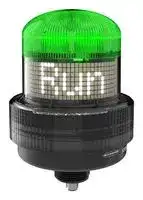


K100PDBLRGBD15Q
Indicator, Programable Display, Multicolour, 30 VDC, IP66, IP69K, 134.62 mm H, 118.62 mm Lens
- Manufacturer: BANNER ENGINEERING
- Product type: Visual Signal Indicator Units
- SVHC: No SVHC (25-Jun-2025)
- Power Rating: -
- Lens Diameter: 118.62mm
- Product Range: K100 Pro Series
- External Height: 5.3"
- IP / NEMA Rating: IP66, IP69K
- Module Lens Colour: Multicolour
- Supply Voltage VAC: -
- Supply Voltage VDC: 30V
- Visual Signal Type: Continuous, Intensity Sweep, Steady
- Operating Temperature Max: 50°C
- Operating Temperature Min: -40°C
| Delivery and price | |
|---|---|
| Units per pack | 1 |
| Price | 368.58 € |
| Current stock | 10+ |
| Lead time | 30 days |

**==> picture [148 x 792] intentionally omitted <==**

K100 Programmable Display Beacon Product Manual

Original Instructions p/n: 245810 Rev. A 02-Sep-25

© Banner Engineering Corp. All rights reserved. www.bannerengineering.com

K100 Programmable Display Beacon Product Manual

## Contents

**Chapter 1 Features.................................................................................................................. 3** Models ........................................................................................................................................................................................................... 3 **Chapter 2 Wiring...................................................................................................................... 4 Chapter 3 Pro Editor Configuration for the K100 Programmable Display Beacon........... 5** Discrete Control............................................................................................................................................................................................. 5 Basic I/O State........................................................................................................................................................................................ 6 Advanced I/O State................................................................................................................................................................................. 6 I/O Block I/O State .................................................................................................................................................................................. 7 Sequence Mode ............................................................................................................................................................................................ 7 Timer Mode.................................................................................................................................................................................................... 7 Counter Mode................................................................................................................................................................................................ 8 Measure Mode............................................................................................................................................................................................... 9 Pulse Control ............................................................................................................................................................................................... 10 Demo Mode ................................................................................................................................................................................................. 10 Factory Reset .............................................................................................................................................................................................. 10 Display Settings........................................................................................................................................................................................... 10 **Chapter 4 Specifications ...................................................................................................... 12** FCC Part 15 Class B for Unintentional Radiators........................................................................................................................................ 13 Industry Canada ICES-003(B)..................................................................................................................................................................... 13 Dimensions.................................................................................................................................................................................................. 14 **Chapter 5 Accessories.......................................................................................................... 15** Cordsets ...................................................................................................................................................................................................... 15 Brackets....................................................................................................................................................................................................... 15 Elevated Mount System............................................................................................................................................................................... 16 Pro Editor Hardware.................................................................................................................................................................................... 16 **Chapter 6 Product Support and Maintenance .................................................................... 17** UTF-8 Encoding Table and Unicode Characters......................................................................................................................................... 17 Clean with Mild Detergent and Warm Water ............................................................................................................................................... 21 Repairs ........................................................................................................................................................................................................ 21 Contact Us................................................................................................................................................................................................... 22 Banner Engineering Corp Limited Warranty................................................................................................................................................ 22

© Banner Engineering Corp. All rights reserved. www.bannerengineering.com

K100 Programmable Display Beacon Product Manual

## Chapter Contents

Models.................................................................................................................................................................................................................. 3

## Chapter 1

## Features

The K100 Programmable Display Beacon provides diagnostics and indication for control engineers and OEMs who need to improve the interaction between operators and equipment to drive response speed and productivity improvements.

- Easily configurable, versatile display can be installed nearly anywhere, making it a simple yet powerful alternative to complex HMIs and other displays

- Great for displaying takt time, equipment status, assembly sequences, counts, and measurements where they are most useful

- Discrete models integrate into many different systems and applications, especially Banner sensing, safety, and monitoring solutions

- Quick and easy configuration—simply define the desired text and call it via discrete control or process data

- Bright white LED display and multicolored beacon LEDs legible from 10 meters away inform operators about exactly what is going on so they can respond quickly and accurately

- IP66- and IP69K per ISO 20653-rated polycarbonate housing resists impact and condensation to provide clear communication in challenging and changing environmental conditions

- Wireless communication facilitates remote monitoring and control

## Models

## Model Key

**==> picture [492 x 62] intentionally omitted <==**

**----- Start of picture text -----**<br>
||||||||||
|---|---|---|---|---|---|---|---|---|
|Series|Style|Type|Voltage|Color|Control|Audible|Connector|[(1)]|
|K100P|D|BL|RGB|D15|Q|
|Blank = No|Q = Integral 5-|
|K100P = K100 Pro|D = Display|BL = Beacon Light|Blank = DC|RGB = Multicolor|D15 = Discrete 15 states|Audible|pin M12 male quick-disconnect|
|A = Audible|connector|

**----- End of picture text -----**<br>


> (1) Models with a quick-disconnect connector require a mating cordset.

02-Sep-25

© Banner Engineering Corp. All rights reserved. www.bannerengineering.com

page 3 of 23

K100 Programmable Display Beacon Product Manual

## Chapter Contents

## Chapter 2

## Wiring

## Wiring

- 5-Pin Male M12 Pinout Pinout Key and Wiring 1. Brown - Input 2

- 1 2. White - Input 3

- 2 3. Blue - DC Common 4

- 3 5 4. Black - Input 1 5. Gray - Input 4

02-Sep-25

© Banner Engineering Corp. All rights reserved. www.bannerengineering.com

page 4 of 23

K100 Programmable Display Beacon Product Manual

## Chapter Contents

|Discrete Control.................................................................................................................................................................................................... 5|
|---|
|Sequence Mode ................................................................................................................................................................................................... 7|
|Timer Mode .......................................................................................................................................................................................................... 7|
|Counter Mode....................................................................................................................................................................................................... 8|
|Measure Mode ..................................................................................................................................................................................................... 9|
|Pulse Control...................................................................................................................................................................................................... 10|
|Demo Mode........................................................................................................................................................................................................ 10|
|Factory Reset..................................................................................................................................................................................................... 10|
|Display Settings.................................................................................................................................................................................................. 10|
|Pro Editor Configuration for the K100<br>Programmable Display Beacon<br>Chapter 3|


Banner's Pro Editor software offers an easy way to configure Pro Series-enabled indication, touch, and illumination devices, allowing users full control of device states and device logic modes. The easy-to-use configuration software provides a variety of tools and capabilities to solve a wide range of applications such as indicating machine status or warm-up time, indicating unique steps in an assembly process, or incorporating status information into touch buttons.

Set up any Pro Series-enabled device using the free Pro Editor software, available for download at www.bannerengineering.com/proeditor.

## Discrete Control

Selecting the Discrete Control tile displays three I/O State tiles:

- Basic

- Advanced

- I/O Block

02-Sep-25

© Banner Engineering Corp. All rights reserved. www.bannerengineering.com

page 5 of 23

Pro Editor Configuration for the K100 Programmable Display Beacon

K100 Programmable Display Beacon Product Manual

## Basic I/O State

Basic four-state control. Configurations made in Basic I/O State assign one wire to one state, with the following override control:

- Pin 1 (Brown) overrides Pin 4 (Black)

- Pin 2 (White) overrides Pins 1 and 4 (Brown and Black)

- Pin 5 (Gray) overrides Pins 1, 2, and 4 (Brown, White, and Black)

## Advanced I/O State

Advanced, default I/O state, with fifteen state options for maximum configuration ability. Configurations made in Advanced I/O State assign binary wiring combinations of all valid inputs to each state. Both the indication LEDs and the display text can be programmed for each of the states.

page 6 of 23

© Banner Engineering Corp. All rights reserved. www.bannerengineering.com

02-Sep-25

Pro Editor Configuration for the K100 Programmable Display Beacon

K100 Programmable Display Beacon Product Manual

## I/O Block I/O State

Three-state control for use with I/O block. Configurations made in I/O Block assign state to the black, white, and combination of black and white wires for use with the I/O blocks, for which power (brown) and common (blue) are always on for five-pin connections.

## Sequence Mode

Sequence Mode allows up to sixteen states that a single input can control. A pulse on the input wire moves the K100 Pro to the next state.

Reset State Input Choose the desired input wire to restart the K100 Pro to the First Animation as chosen in the dropdown menu. Choose the desired input wire to move K100 Pro to the next state in the series until the Last Animation is Next State Input reached. First Animation Choose the initial state to display as the sequence is initiated. Last Animation Choose the final state to include in the sequence.

## Timer Mode

Set a total time and up to four thresholds. Start and stop the timer counting up or down with discrete control. Colors change across threshold values.

02-Sep-25

© Banner Engineering Corp. All rights reserved. www.bannerengineering.com

page 7 of 23

Pro Editor Configuration for the K100 Programmable Display Beacon

K100 Programmable Display Beacon Product Manual

**==> picture [461 x 209] intentionally omitted <==**

**----- Start of picture text -----**<br>
|||
|---|---|
|Count Seconds|The total time of the timer.|
|Direction|Up: Counts up from zero to Count Seconds.|
|Down: Counts down from Count Seconds to zero.|
|Reset Input|Enable or disable the input wire to reset the timer to the initial value.|
|Auto Restart|The timer loops back to the original value automatically when it reaches its final value.|
|Bar Graph Orientation|Determine the starting side of the bar graph.|
|Decimal Places|Determine the number of decimal places displayed on the Count Value.|
|Display Graph Only|Only display the bar graph, and not the numerical Count Value.|
|Display Bar Graph|Display the bar graph across the full display.|
|Display Slim Bar Graph|Display the bar graph as a single line of LEDs.|
|Display Level as Time|Display the time in HH:MM:SS format without data labels.|
|Data Label|Text that displays before the Count Value.|
|Value Label|Text that displays after the Count Value to indicate the units displayed. This can be up to three characters.|
|Standard Settings|Reset the K100 Pro to predetermined settings.|

**----- End of picture text -----**<br>


## Counter Mode

Set a total count and up to four thresholds. Discrete, rising edge pulses count up or down. Colors change across threshold values.

**==> picture [478 x 28] intentionally omitted <==**

**----- Start of picture text -----**<br>
Pulses Determine the number of counts that are either counted up to or counted down from, depending on the chosen<br>direction.<br>Continued on page 9<br>**----- End of picture text -----**<br>


page 8 of 23

© Banner Engineering Corp. All rights reserved. www.bannerengineering.com

02-Sep-25

Pro Editor Configuration for the K100 Programmable Display Beacon

K100 Programmable Display Beacon Product Manual

**==> picture [461 x 176] intentionally omitted <==**

**----- Start of picture text -----**<br>
|||
|---|---|
|Continued from page 8|
|Direction|Up: Counts from zero to Pulses.|
|Down: Counts from Pulses to zero.|
|Reset Input|Enable or disable the input wire to reset the count to the initial value.|
|Bar Graph Orientation|Determine the starting side of the bar graph.|
|Decimal Places|Determine the number of decimal places displayed on the Count Value.|
|Display Graph Only|Only display the bar graph, and not the numerical Count Value.|
|Display Bar Graph|Display the bar graph across the full display.|
|Display Slim Bar Graph|Display the bar graph as a single line of LEDs.|
|Data Label|Text that displays before the Count Value.|
|Value Label|Text that displays after the Count Value to indicate the units displayed. This can be up to three characters.|
|Standard Settings|Reset the K100 Pro to predetermined settings.|

**----- End of picture text -----**<br>


## Measure Mode

Measure Mode uses the K100 Pro to display a measurement as either PWM control or PFM control.

**==> picture [461 x 239] intentionally omitted <==**

**----- Start of picture text -----**<br>
|||
|---|---|
|PWM: Pulse-Width Modulation.|
|PWM/PFM|
|PFM: Pulse-Frequency Modulation.|
|PWM/PFM Low|The lowest frequency of the input range.|
|PWM/PFM High|The highest frequency of the input range.|
|Filter Level|The level of filtering used to minimize the effects of noise on the output.|
|Hysteresis Level|The level of lag between the measurement thresholds to minimize the flickering at switch points.|
|Output Scale Value Low|The low-end value of the output translated from the input frequency.|
|Output Scale Value High|The high-end value of the output translated from the input frequency.|
|Bar Graph Orientation|Determine the starting side of the bar graph.|
|Decimal Places|Determine the number of decimal places displayed on the Count Value.|
|Display Graph Only|Only display the bar graph, and not the numerical value.|
|Display Bar Graph|Display the bar graph across the full display.|
|Display Slim Bar Graph|Display the bar graph as a single line of LEDs.|
|Data Label|Text that displays before the Count Value.|
|Value Label|Text that displays after the Count Value to indicate the units displayed. This can be up to three characters.|
|Standard Settings|Reset the K100 Pro to predetermined settings.|

**----- End of picture text -----**<br>


02-Sep-25

© Banner Engineering Corp. All rights reserved. www.bannerengineering.com

page 9 of 23

Pro Editor Configuration for the K100 Programmable Display Beacon

K100 Programmable Display Beacon Product Manual

## Pulse Control

Selecting the Pulse Control tile displays up to sixteen states that correspond to input frequencies on the white wire. The number of states (1) and input characteristics (2) are user-defined. Ranges are calculated (3).

1 2 CO Applicatings -> Pulse Control SS TN)a 3

Number of States Determine the number of states from 1 to 16. PWM/PFM Select either PWM (Pulse Width Modulation) or PFM (Pulse Frequency Modulation) as the device's input. PWM/PFM Low Determine the low end of the input signal range. PWM/PFM High Determine the high end of the input signal range.

## Demo Mode

Activate Demo Mode on the device to cycle through various modes automatically as a demonstration.

## Factory Reset

Restore the K100 Pro to default settings.

## Display Settings

Display Settings are a type of advanced settings that are accessible across all Applications.

page 10 of 23

© Banner Engineering Corp. All rights reserved. www.bannerengineering.com

02-Sep-25

Pro Editor Configuration for the K100 Programmable Display Beacon

K100 Programmable Display Beacon Product Manual

**==> picture [473 x 183] intentionally omitted <==**

**----- Start of picture text -----**<br>
|||
|---|---|
|Text Color|Configure the primary text color as either white or black.|
|Brightness|Control the brightness of the display text.|
|Scroll Direction|Scroll the display text either clockwise or counterclockwise when looking at the top of the device.|
|Scroll Speed|Control the speed the display text scrolls.|
|Auto: Scrolls if the number of characters is greater thanfourteen.|
|Scroll Mode|Off: Does not scroll the display text.|
|On: Scrolls the display text regardless of the number of characters.|
|Connector Orientation|Determine the orientation of the connector when installed. The display text automatically adjusts to the correct orientation.|
|Text Justification|Control the alignment of the display text: left, right, or center.|
|Mirror|Enable this setting to reverse the display text so that it can be read in a mirror.|
|Display the dynamic value of Timer, Counter, or Measure Mode multiple times around the device for increased visibility.|
|Repeat Display Value|
|The value repeats the maximum number of times allowed by the display size. As the size of the value increases, the device|
|updates the number of times the value is displayed. The Data Label should be blank when this setting is enabled.|
|Deadspace|Enable this setting to add a blank space at the end of the display to separate scrolling text.|

**----- End of picture text -----**<br>


02-Sep-25

© Banner Engineering Corp. All rights reserved. www.bannerengineering.com

page 11 of 23

K100 Programmable Display Beacon Product Manual

## Chapter Contents

FCC Part 15 Class B for Unintentional Radiators .............................................................................................................................................. 13 Industry Canada ICES-003(B)............................................................................................................................................................................ 13 Dimensions......................................................................................................................................................................................................... 14

## Chapter 4

## Specifications

Supply Voltage 12 V DC to 30 V DC

Use only with a suitable Class 2 power supply (UL) or SELV power supply (CE)

Supply Current 550 mA max. at 12 V DC 270 mA max. at 24 V DC

## Character Limit

Discrete Control: 29 characters All other modes: 32 characters Construction Black polycarbonate housing Smoky polycarbonate dome Certifications

220 mA max. at 30 V DC

Supply Protection Circuitry Protected against reverse polarity and transient voltages Leakage Current Immunity 400 µA Indicator Response Time On response: 325 ms (max) Off response: 20 ms (max)

Connections Integral 5-pin M12 male quick-disconnect connector Models with a quick-disconnect connector require a mating cordset Do not spray cable with high-pressure sprayer or cable damage will result

Operating Temperature –40 °C to +50 °C (–40 °F to +122 °F) Storage Temperature –40 °C to +70 °C (–40 °F to +158 °F)

Environmental Rating Rated IP66 and IP69K per ISO 20653 UL Type 4X

Vibration and Mechanical Shock

Meets IEC 60068-2-6 requirements (Vibration: 10 Hz to 55 Hz, 1.0 mm amplitude, 5 minutes sweep, 30 minutes dwell) Meets IEC 60068-2-27 requirements (Shock: 15G 11 ms duration, half sine wave) Impact: IK10 (60068-2-75) Audible Characteristics Sound Intensity at 2.5 KHz, at 1 m (typical): Low volume setting: 93 dB Medium volume setting: 96 dB High volume setting: 101 dB

Banner Engineering BV Park Lane, Culliganlaan 2F bus 3 CE 1831 Diegem, BELGIUM Required Overcurrent Protection

WARNING: Electrical connections must be made by qualified personnel in accordance with local and national electrical codes and regulations.

Overcurrent protection is required to be provided by end product application per the supplied table. Overcurrent protection may be provided with external fusing or via Current Limiting, Class 2 Power Supply. Supply wiring leads < 24 AWG shall not be spliced. For additional product support, go to www.bannerengineering.com.

**==> picture [208 x 68] intentionally omitted <==**

**----- Start of picture text -----**<br>
|||||
|---|---|---|---|
|Supply|Supply|
|Required Overcurrent|Required Overcurrent|
|Wiring|Wiring|
|Protection (A)|Protection (A)|
|(AWG)|(AWG)|
|20|5.0|26|1.0|
|22|3.0|28|0.8|
|24|2.0|30|0.5|

**----- End of picture text -----**<br>


## Mounting

M36 x 2 threaded base, maximum torque 5 N·m (44 inch-lbf) Interior 3/4-14 NPT thread Mounting nut included

02-Sep-25

© Banner Engineering Corp. All rights reserved. www.bannerengineering.com

page 12 of 23

Specifications

K100 Programmable Display Beacon Product Manual

## Indicator Characteristics

**==> picture [483 x 264] intentionally omitted <==**

**----- Start of picture text -----**<br>
Color Coordinates [(2)]<br>Dominant Wavelength (nm) or Color  Lumen Output (Typical at 25<br>Color<br>Temperature (CCT) x y °C)<br>Green 523 0.159 0.6987 30.4<br>Red 620 0.6895 0.3087 14.6<br>Orange 599 0.5992 0.3752 17.7<br>Amber 588 0.535 0.4223 19.8<br>Yellow 575 0.4518 0.4834 22.4<br>Lime Green 560 0.3655 0.5471 25<br>Spring Green 506 0.1572 0.5171 26.6<br>Cyan 491 0.1565 0.3201 21.3<br>Sky Blue 484 0.1443 0.2271 16.8<br>Blue 467 0.1371 0.0555 5.4<br>Violet 415 0.2141 0.0904 7.9<br>Magenta - 0.3661 0.1644 11.4<br>Rose - 0.4976 0.2201 12.9<br>White 5500K 0.3309 0.3385 41.7<br>**----- End of picture text -----**<br>


## FCC Part 15 Class B for Unintentional Radiators

(Part 15.105(b)) This equipment has been tested and found to comply with the limits for a Class B digital device, pursuant to part 15 of the FCC Rules. These limits are designed to provide reasonable protection against harmful interference in a residential installation. This equipment generates, uses, and can radiate radio frequency energy and, if not installed and used in accordance with the instructions, may cause harmful interference to radio communications. However, there is no guarantee that interference will not occur in a particular installation. If this equipment does cause harmful interference to radio or television reception, which can be determined by turning the equipment off and on, the user is encouraged to try to correct the interference by one or more of the following measures:

- Reorient or relocate the receiving antenna.

- Increase the separation between the equipment and receiver.

- Connect the equipment into an outlet on a circuit different from that to which the receiver is connected.

- Consult the dealer or an experienced radio/TV technician for help.

(Part 15.21) Any changes or modifications not expressly approved by the party responsible for compliance could void the user’s authority to operate this equipment.

## Industry Canada ICES-003(B)

This device complies with CAN ICES-3 (B)/NMB-3(B). Operation is subject to the following two conditions: 1) This device may not cause harmful interference; and 2) This device must accept any interference received, including interference that may cause undesired operation.

Cet appareil est conforme à la norme NMB-3(B). Le fonctionnement est soumis aux deux conditions suivantes : (1) ce dispositif ne peut pas occasionner d'interférences, et (2) il doit tolérer toute interférence, y compris celles susceptibles de provoquer un fonctionnement non souhaité du dispositif.

> (2) Refer to CIE 1931 chromaticity diagram or color chart, to show equivalent color with indicated color coordinates. Actual coordinates may differ by 10%.

02-Sep-25

© Banner Engineering Corp. All rights reserved. www.bannerengineering.com

page 13 of 23

Specifications

K100 Programmable Display Beacon Product Manual

## Dimensions

All measurements are listed in millimeters [inches], unless noted otherwise. The measurements provided are subject to change.

**==> picture [500 x 283] intentionally omitted <==**

**----- Start of picture text -----**<br>
Standard Models Audible Models<br>Ø 92.8 Ø 92.8<br>[3.65] [3.65]<br>80.9 81.0<br>[3.18] [3.19]<br>134.7 134.8<br>[5.3] [5.31]<br>25.5<br>25.5 M36 x 2.0 [1.01]<br>M36 x 2.0 [1.01]<br>Interior<br>Interior 3/4 - 14 NPT<br>3/4 - 14 NPT<br>13.0 M12 x 1.0 13.0<br>M12 x 1.0 [0.51] [0.51]<br>Ø 118.5<br>Ø 118.5 [4.67]<br>[4.67]<br>**----- End of picture text -----**<br>


page 14 of 23

© Banner Engineering Corp. All rights reserved. www.bannerengineering.com

02-Sep-25

K100 Programmable Display Beacon Product Manual

## Chapter Contents

Cordsets ............................................................................................................................................................................................................. 15 Brackets ............................................................................................................................................................................................................. 15 Elevated Mount System ..................................................................................................................................................................................... 16 Pro Editor Hardware........................................................................................................................................................................................... 16

## Chapter 5

## Accessories

## Cordsets

All measurements are listed in millimeters [inches], unless noted otherwise. The measurements provided are subject to change.

**==> picture [500 x 327] intentionally omitted <==**

**----- Start of picture text -----**<br>
5-pin A-Code Double-Ended M12 Female to M12 Male Cordsets (datasheet p/n 236183)<br>Model Length Dimensions (mm) Pinouts<br>BC-M12F5-M12M5-22-1 1 m (3.28 ft) Female<br>2<br>BC-M12F5-M12M5-22-2 2 m (6.56 ft) 40 Typ.<br>[1.58"] 1<br>BC-M12F5-M12M5-22-5 5 m (16.4 ft) 3<br>BC-M12F5-M12M5-22-8 8 m (26.25 ft) ø 14.5 [0.57"]M12 x 1 4 5 1 = Brown 2 = White<br>3 = Blue<br>BC-M12F5-M12M5-22-10 10 m (30.81 ft) 44 Typ.[1.73"] Male 4 = Black<br>5 = Gray<br>1<br>M12 x 1 2<br>BC-M12F5-M12M5-22-15 15 m (49.2 ft) ø 14.5 [0.57"]<br>4<br>3 5<br>5-pin A-Code Double-Ended M12 Female Right-Angle to M12 Male Right-Angle Cordsets (datasheet p/n 236183)<br>Model Length Dimensions (mm) Pinouts<br>BC-M12F5A-M12M5A-22-1 1 m (3.28 ft) Female<br>2<br>BC-M12F5A-M12M5A-22-2 2 m (6.56 ft) 32 Typ.<br>[1.26"] 1<br>BC-M12F5A-M12M5A-22-5 5 m (16.4 ft) 3<br>BC-M12F5A-M12M5A-22-8 8 m (26.25 ft) 30 Typ.[1.18"] 4 5 1 = Brown 2 = White<br>3 = Blue<br>BC-M12F5A-M12M5A-22-10 10 m (30.81 ft) M12 x 1 Male 4 = Black<br>ø 14.5 [0.57"]<br>31 Typ. 5 = Gray<br>1<br>2<br>BC-M12F5A-M12M5A-22-15 15 m (49.2 ft) 32 Typ.<br>4<br>3 5<br>**----- End of picture text -----**<br>


## Brackets

**==> picture [433 x 85] intentionally omitted <==**

**----- Start of picture text -----**<br>
65 70<br>50.8<br>• Indicator light right-angle mounting  4 X Ø6.5 25.4<br>• 36 mm mounting hole  Ø36.5<br>• Stainless steel  62.5<br>**----- End of picture text -----**<br>


## LMB36RA

02-Sep-25

© Banner Engineering Corp. All rights reserved. www.bannerengineering.com

page 15 of 23

K100 Programmable Display Beacon Product Manual

Accessories

## Elevated Mount System

Elevated Mount System (1/2" Pipes)

**==> picture [500 x 243] intentionally omitted <==**

**----- Start of picture text -----**<br>
Adapter/Cover Model Description<br>• Adapter from M36 thread to ½-14 NPSM thread<br>SA-M36E12 • Streamlined black plastic mounting base adapter/cover<br>• Drilled hole<br>Black Anodized Aluminum, ½ in. NPT Pipe  Clear Anodized Aluminum, ½ in. NPT Pipe<br>Models Models Description<br>Pipe<br>SOP-E12-150A , 150 mm (6 in) long SOP-E12-150AC , 150 mm (6 in) long<br>• Elevated-use stand-off pipe<br>SOP-E12-300A , 300 mm (12 in) long SOP-E12-300AC , 300 mm (12 in) long • Threaded at both ends<br>SOP-E12-600A , 600 mm (24 in) long - • Compatible with most industrial environments<br>SOP-E12-900A , 900 mm (36 in) long SOP-E12-900AC , 900 mm (36 in) long<br>Mounting Base Model Description<br>• Elevated-use stand-off pipes (½ in, NPSM/DN15)<br>SA-F12 • M5 mounting hardware and nitrile gasket included<br>• Die-cast zinc base with black paint<br>**----- End of picture text -----**<br>


Elevated Mount System (3/4" Pipes)

**==> picture [500 x 170] intentionally omitted <==**

**----- Start of picture text -----**<br>
Adapter/Cover Model Description<br>Adapter/ • M36 thread adapter with clearance for ¾ pipe mount<br>Cover SA-M36SOP • Streamlined black plastic mounting base adapter/cover<br>• Drilled hole<br>Pipe Black Anodized Aluminum, ¾ in. NPT Pipe Models Description<br>SOP-E34-150A , 150 mm (6 in) long<br>SOP-E34-300A , 300 mm (12 in) long •• Elevated-use stand-off pipeThreaded at both ends<br>SOP-E34-600A , 600 mm (24 in) long • Compatible with most industrial environments<br>SOP-E34-900A , 900 mm (36 in) long<br>**----- End of picture text -----**<br>


## Pro Editor Hardware

## PRO-KIT

Includes:

- Pro Converter Cable (MQDC-506-USB)

- • Splitter (CSB-M1251FM1251M) • Power Supply (PSW-24-1)

**==> picture [58 x 39] intentionally omitted <==**

page 16 of 23

© Banner Engineering Corp. All rights reserved. www.bannerengineering.com

02-Sep-25

K100 Programmable Display Beacon Product Manual

## Chapter Contents

|UTF-8 Encoding Table and Unicode Characters................................................................................................................................................ 17|
|---|
|Clean with Mild Detergent and Warm Water ...................................................................................................................................................... 21|
|Repairs ............................................................................................................................................................................................................... 21|
|Contact Us.......................................................................................................................................................................................................... 22|
|Banner Engineering Corp Limited Warranty....................................................................................................................................................... 22|
|Product Support and Maintenance<br>Chapter 6|


## UTF-8 Encoding Table and Unicode Characters

**==> picture [500 x 491] intentionally omitted <==**

**----- Start of picture text -----**<br>
Unicode Code Point Character UTF-8 (hex.) Name<br>U+0020 20 SPACE<br>U+0021 ! 21 EXCLAMATION MARK<br>U+0022 " 22 QUOTATION MARK<br>U+0023 # 23 NUMBER SIGN<br>U+0024 $ 24 DOLLAR SIGN<br>U+0025 % 25 PERCENT SIGN<br>U+0026 & 26 AMPERSAND<br>U+0027 ' 27 APOSTROPHE<br>U+0028 ( 28 LEFT PARENTHESIS<br>U+0029 ) 29 RIGHT PARENTHESIS<br>U+002A * 2a ASTERISK<br>U+002B + 2b PLUS SIGN<br>U+002C , 2c COMMA<br>U+002D - 2d HYPHEN-MINUS<br>U+002E . 2e FULL STOP<br>U+002F / 2f SOLIDUS<br>U+0030 0 30 DIGIT ZERO<br>U+0031 1 31 DIGIT ONE<br>U+0032 2 32 DIGIT TWO<br>U+0033 3 33 DIGIT THREE<br>U+0034 4 34 DIGIT FOUR<br>U+0035 5 35 DIGIT FIVE<br>U+0036 6 36 DIGIT SIX<br>U+0037 7 37 DIGIT SEVEN<br>U+0038 8 38 DIGIT EIGHT<br>U+0039 9 39 DIGIT NINE<br>U+003A : 3a COLON<br>U+003B ; 3b SEMICOLON<br>U+003C < 3c LESS-THAN SIGN<br>U+003D = 3d EQUALS SIGN<br>U+003E > 3e GREATER-THAN SIGN<br>Continued on page 18<br>**----- End of picture text -----**<br>


02-Sep-25

© Banner Engineering Corp. All rights reserved. www.bannerengineering.com

page 17 of 23

Product Support and Maintenance

K100 Programmable Display Beacon Product Manual

**==> picture [500 x 663] intentionally omitted <==**

**----- Start of picture text -----**<br>
Continued from page 17<br>Unicode Code Point Character UTF-8 (hex.) Name<br>U+003F ? 3f QUESTION MARK<br>U+0040 @ 40 COMMERCIAL AT<br>U+0041 A 41 LATIN CAPITAL LETTER A<br>U+0042 B 42 LATIN CAPITAL LETTER B<br>U+0043 C 43 LATIN CAPITAL LETTER C<br>U+0044 D 44 LATIN CAPITAL LETTER D<br>U+0045 E 45 LATIN CAPITAL LETTER E<br>U+0046 F 46 LATIN CAPITAL LETTER F<br>U+0047 G 47 LATIN CAPITAL LETTER G<br>U+0048 H 48 LATIN CAPITAL LETTER H<br>U+0049 I 49 LATIN CAPITAL LETTER I<br>U+004A J 4a LATIN CAPITAL LETTER J<br>U+004B K 4b LATIN CAPITAL LETTER K<br>U+004C L 4c LATIN CAPITAL LETTER L<br>U+004D M 4d LATIN CAPITAL LETTER M<br>U+004E N 4e LATIN CAPITAL LETTER N<br>U+004F O 4f LATIN CAPITAL LETTER O<br>U+0050 P 50 LATIN CAPITAL LETTER P<br>U+0051 Q 51 LATIN CAPITAL LETTER Q<br>U+0052 R 52 LATIN CAPITAL LETTER R<br>U+0053 S 53 LATIN CAPITAL LETTER S<br>U+0054 T 54 LATIN CAPITAL LETTER T<br>U+0055 U 55 LATIN CAPITAL LETTER U<br>U+0056 V 56 LATIN CAPITAL LETTER V<br>U+0057 W 57 LATIN CAPITAL LETTER W<br>U+0058 X 58 LATIN CAPITAL LETTER X<br>U+0059 Y 59 LATIN CAPITAL LETTER Y<br>U+005A Z 5a LATIN CAPITAL LETTER Z<br>U+005B [ 5b LEFT SQUARE BRACKET<br>U+005C \ 5c REVERSE SOLIDUS<br>U+005D ] 5d RIGHT SQUARE BRACKET<br>U+005E ^ 5e CIRCUMFLEX ACCENT<br>U+005F _ 5f LOW LINE<br>U+0060 ` 60 GRAVE ACCENT<br>U+0061 a 61 LATIN SMALL LETTER A<br>U+0062 b 62 LATIN SMALL LETTER B<br>U+0063 c 63 LATIN SMALL LETTER C<br>U+0064 d 64 LATIN SMALL LETTER D<br>U+0065 e 65 LATIN SMALL LETTER E<br>U+0066 f 66 LATIN SMALL LETTER F<br>U+0067 g 67 LATIN SMALL LETTER G<br>U+0068 h 68 LATIN SMALL LETTER H<br>Continued on page 19<br>**----- End of picture text -----**<br>


page 18 of 23

© Banner Engineering Corp. All rights reserved. www.bannerengineering.com

02-Sep-25

Product Support and Maintenance

K100 Programmable Display Beacon Product Manual

**==> picture [500 x 663] intentionally omitted <==**

**----- Start of picture text -----**<br>
Continued from page 18<br>Unicode Code Point Character UTF-8 (hex.) Name<br>U+0069 i 69 LATIN SMALL LETTER I<br>U+006A j 6a LATIN SMALL LETTER J<br>U+006B k 6b LATIN SMALL LETTER K<br>U+006C l 6c LATIN SMALL LETTER L<br>U+006D m 6d LATIN SMALL LETTER M<br>U+006E n 6e LATIN SMALL LETTER N<br>U+006F o 6f LATIN SMALL LETTER O<br>U+0070 p 70 LATIN SMALL LETTER P<br>U+0071 q 71 LATIN SMALL LETTER Q<br>U+0072 r 72 LATIN SMALL LETTER R<br>U+0073 s 73 LATIN SMALL LETTER S<br>U+0074 t 74 LATIN SMALL LETTER T<br>U+0075 u 75 LATIN SMALL LETTER U<br>U+0076 v 76 LATIN SMALL LETTER V<br>U+0077 w 77 LATIN SMALL LETTER W<br>U+0078 x 78 LATIN SMALL LETTER X<br>U+0079 y 79 LATIN SMALL LETTER Y<br>U+007A z 7a LATIN SMALL LETTER Z<br>U+007B { 7b LEFT CURLY BRACKET<br>U+007C | 7c VERTICAL LINE<br>U+007D } 7d RIGHT CURLY BRACKET<br>U+007E ~ 7e TILDE<br>U+00A0 c2 a0 NO-BREAK SPACE<br>U+00A1 ¡ c2 a1 INVERTED EXCLAMATION MARK<br>U+00A2 ¢ c2 a2 CENT SIGN<br>U+00A3 £ c2 a3 POUND SIGN<br>U+00A4 ¤ c2 a4 CURRENCY SIGN<br>U+00A5 ¥ c2 a5 YEN SIGN<br>U+00A6 ¦ c2 a6 BROKEN BAR<br>U+00A7 § c2 a7 SECTION SIGN<br>U+00A8 ¨ c2 a8 DIAERESIS<br>U+00A9 © c2 a9 COPYRIGHT SIGN<br>U+00AA ª c2 aa FEMININE ORDINAL INDICATOR<br>U+00AB « c2 ab LEFT-POINTING DOUBLE ANGLE QUOTATION MARK<br>U+00AC ¬ c2 ac NOT SIGN<br>U+00AD c2 ad SOFT HYPHEN<br>U+00AE ® c2 ae REGISTERED SIGN<br>U+00AF ¯ c2 af MACRON<br>U+00B0 ° c2 b0 DEGREE SIGN<br>U+00B1 ± c2 b1 PLUS-MINUS SIGN<br>U+00B2 ² c2 b2 SUPERSCRIPT TWO<br>U+00B3 ³ c2 b3 SUPERSCRIPT THREE<br>Continued on page 20<br>**----- End of picture text -----**<br>


02-Sep-25

© Banner Engineering Corp. All rights reserved. www.bannerengineering.com

page 19 of 23

Product Support and Maintenance

K100 Programmable Display Beacon Product Manual

**==> picture [500 x 663] intentionally omitted <==**

**----- Start of picture text -----**<br>
Continued from page 19<br>Unicode Code Point Character UTF-8 (hex.) Name<br>U+00B4 ´ c2 b4 ACUTE ACCENT<br>U+00B5 µ c2 b5 MICRO SIGN<br>U+00B6 ¶ c2 b6 PILCROW SIGN<br>U+00B7 · c2 b7 MIDDLE DOT<br>U+00B8 ¸ c2 b8 CEDILLA<br>U+00B9 ¹ c2 b9 SUPERSCRIPT ONE<br>U+00BA º c2 ba MASCULINE ORDINAL INDICATOR<br>U+00BB » c2 bb RIGHT-POINTING DOUBLE ANGLE QUOTATION MARK<br>U+00BC ¼ c2 bc VULGAR FRACTION ONE QUARTER<br>U+00BD ½ c2 bd VULGAR FRACTION ONE HALF<br>U+00BE ¾ c2 be VULGAR FRACTION THREE QUARTERS<br>U+00BF ¿ c2 bf INVERTED QUESTION MARK<br>U+00C0 À c3 80 LATIN CAPITAL LETTER A WITH GRAVE<br>U+00C1 Á c3 81 LATIN CAPITAL LETTER A WITH ACUTE<br>U+00C2 Â c3 82 LATIN CAPITAL LETTER A WITH CIRCUMFLEX<br>U+00C3 Ã c3 83 LATIN CAPITAL LETTER A WITH TILDE<br>U+00C4 Ä c3 84 LATIN CAPITAL LETTER A WITH DIAERESIS<br>U+00C5 Å c3 85 LATIN CAPITAL LETTER A WITH RING ABOVE<br>U+00C6 Æ c3 86 LATIN CAPITAL LETTER AE<br>U+00C7 Ç c3 87 LATIN CAPITAL LETTER C WITH CEDILLA<br>U+00C8 È c3 88 LATIN CAPITAL LETTER E WITH GRAVE<br>U+00C9 É c3 89 LATIN CAPITAL LETTER E WITH ACUTE<br>U+00CA Ê c3 8a LATIN CAPITAL LETTER E WITH CIRCUMFLEX<br>U+00CB Ë c3 8b LATIN CAPITAL LETTER E WITH DIAERESIS<br>U+00CC Ì c3 8c LATIN CAPITAL LETTER I WITH GRAVE<br>U+00CD Í c3 8d LATIN CAPITAL LETTER I WITH ACUTE<br>U+00CE Î c3 8e LATIN CAPITAL LETTER I WITH CIRCUMFLEX<br>U+00CF Ï c3 8f LATIN CAPITAL LETTER I WITH DIAERESIS<br>U+00D0 Ð c3 90 LATIN CAPITAL LETTER ETH<br>U+00D1 Ñ c3 91 LATIN CAPITAL LETTER N WITH TILDE<br>U+00D2 Ò c3 92 LATIN CAPITAL LETTER O WITH GRAVE<br>U+00D3 Ó c3 93 LATIN CAPITAL LETTER O WITH ACUTE<br>U+00D4 Ô c3 94 LATIN CAPITAL LETTER O WITH CIRCUMFLEX<br>U+00D5 Õ c3 95 LATIN CAPITAL LETTER O WITH TILDE<br>U+00D6 Ö c3 96 LATIN CAPITAL LETTER O WITH DIAERESIS<br>U+00D7 × c3 97 MULTIPLICATION SIGN<br>U+00D8 Ø c3 98 LATIN CAPITAL LETTER O WITH STROKE<br>U+00D9 Ù c3 99 LATIN CAPITAL LETTER U WITH GRAVE<br>U+00DA Ú c3 9a LATIN CAPITAL LETTER U WITH ACUTE<br>U+00DB Û c3 9b LATIN CAPITAL LETTER U WITH CIRCUMFLEX<br>U+00DC Ü c3 9c LATIN CAPITAL LETTER U WITH DIAERESIS<br>U+00DD Ý c3 9d LATIN CAPITAL LETTER Y WITH ACUTE<br>Continued on page 21<br>**----- End of picture text -----**<br>


page 20 of 23

© Banner Engineering Corp. All rights reserved. www.bannerengineering.com

02-Sep-25

Product Support and Maintenance

K100 Programmable Display Beacon Product Manual

**==> picture [500 x 534] intentionally omitted <==**

**----- Start of picture text -----**<br>
Continued from page 20<br>Unicode Code Point Character UTF-8 (hex.) Name<br>U+00DE Þ c3 9e LATIN CAPITAL LETTER THORN<br>U+00DF ß c3 9f LATIN SMALL LETTER SHARP S<br>U+00E0 à c3 a0 LATIN SMALL LETTER A WITH GRAVE<br>U+00E1 á c3 a1 LATIN SMALL LETTER A WITH ACUTE<br>U+00E2 â c3 a2 LATIN SMALL LETTER A WITH CIRCUMFLEX<br>U+00E3 ã c3 a3 LATIN SMALL LETTER A WITH TILDE<br>U+00E4 ä c3 a4 LATIN SMALL LETTER A WITH DIAERESIS<br>U+00E5 å c3 a5 LATIN SMALL LETTER A WITH RING ABOVE<br>U+00E6 æ c3 a6 LATIN SMALL LETTER AE<br>U+00E7 ç c3 a7 LATIN SMALL LETTER C WITH CEDILLA<br>U+00E8 è c3 a8 LATIN SMALL LETTER E WITH GRAVE<br>U+00E9 é c3 a9 LATIN SMALL LETTER E WITH ACUTE<br>U+00EA ê c3 aa LATIN SMALL LETTER E WITH CIRCUMFLEX<br>U+00EB ë c3 ab LATIN SMALL LETTER E WITH DIAERESIS<br>U+00EC ì c3 ac LATIN SMALL LETTER I WITH GRAVE<br>U+00ED í c3 ad LATIN SMALL LETTER I WITH ACUTE<br>U+00EE î c3 ae LATIN SMALL LETTER I WITH CIRCUMFLEX<br>U+00EF ï c3 af LATIN SMALL LETTER I WITH DIAERESIS<br>U+00F0 ð c3 b0 LATIN SMALL LETTER ETH<br>U+00F1 ñ c3 b1 LATIN SMALL LETTER N WITH TILDE<br>U+00F2 ò c3 b2 LATIN SMALL LETTER O WITH GRAVE<br>U+00F3 ó c3 b3 LATIN SMALL LETTER O WITH ACUTE<br>U+00F4 ô c3 b4 LATIN SMALL LETTER O WITH CIRCUMFLEX<br>U+00F5 õ c3 b5 LATIN SMALL LETTER O WITH TILDE<br>U+00F6 ö c3 b6 LATIN SMALL LETTER O WITH DIAERESIS<br>U+00F7 ÷ c3 b7 DIVISION SIGN<br>U+00F8 ø c3 b8 LATIN SMALL LETTER O WITH STROKE<br>U+00F9 ù c3 b9 LATIN SMALL LETTER U WITH GRAVE<br>U+00FA ú c3 ba LATIN SMALL LETTER U WITH ACUTE<br>U+00FB û c3 bb LATIN SMALL LETTER U WITH CIRCUMFLEX<br>U+00FC ü c3 bc LATIN SMALL LETTER U WITH DIAERESIS<br>U+00FD ý c3 bd LATIN SMALL LETTER Y WITH ACUTE<br>U+00FE þ c3 be LATIN SMALL LETTER THORN<br>U+00FF ÿ c3 bf LATIN SMALL LETTER Y WITH DIAERESIS<br>**----- End of picture text -----**<br>


## Clean with Mild Detergent and Warm Water

Wipe down the device with a soft cloth dampened with a mild detergent and warm water solution. Do not use any other chemicals for cleaning.

## Repairs

Contact Banner Engineering for troubleshooting of this device. Do not attempt any repairs to this Banner device; it contains no field-replaceable parts or components. If the device, device part, or device component is determined to be defective by a Banner Applications Engineer, they will advise you of Banner's RMA (Return Merchandise Authorization) procedure.

02-Sep-25

© Banner Engineering Corp. All rights reserved. www.bannerengineering.com

page 21 of 23

Product Support and Maintenance

K100 Programmable Display Beacon Product Manual

IMPORTANT: If instructed to return the device, pack it with care. Damage that occurs in return shipping is not covered by warranty.

## Contact Us

Banner Engineering Corp. | 9714 Tenth Avenue North | Plymouth, MN 55441, USA | Phone: + 1 888 373 6767

For worldwide locations and local representatives, visit www.bannerengineering.com.

## Banner Engineering Corp Limited Warranty

Banner Engineering Corp. warrants its products to be free from defects in material and workmanship for one year following the date of shipment. Banner Engineering Corp. will repair or replace, free of charge, any product of its manufacture which, at the time it is returned to the factory, is found to have been defective during the warranty period. This warranty does not cover damage or liability for misuse, abuse, or the improper application or installation of the Banner product.

THIS LIMITED WARRANTY IS EXCLUSIVE AND IN LIEU OF ALL OTHER WARRANTIES WHETHER EXPRESS OR IMPLIED (INCLUDING, WITHOUT LIMITATION, ANY WARRANTY OF MERCHANTABILITY OR FITNESS FOR A PARTICULAR PURPOSE), AND WHETHER ARISING UNDER COURSE OF PERFORMANCE, COURSE OF DEALING OR TRADE USAGE.

This Warranty is exclusive and limited to repair or, at the discretion of Banner Engineering Corp., replacement. IN NO EVENT SHALL BANNER ENGINEERING CORP. BE LIABLE TO BUYER OR ANY OTHER PERSON OR ENTITY FOR ANY EXTRA COSTS, EXPENSES, LOSSES, LOSS OF PROFITS, OR ANY INCIDENTAL, CONSEQUENTIAL OR SPECIAL DAMAGES RESULTING FROM ANY PRODUCT DEFECT OR FROM THE USE OR INABILITY TO USE THE PRODUCT, WHETHER ARISING IN CONTRACT OR WARRANTY, STATUTE, TORT, STRICT LIABILITY, NEGLIGENCE, OR OTHERWISE.

Banner Engineering Corp. reserves the right to change, modify or improve the design of the product without assuming any obligations or liabilities relating to any product previously manufactured by Banner Engineering Corp. Any misuse, abuse, or improper application or installation of this product or use of the product for personal protection applications when the product is identified as not intended for such purposes will void the product warranty. Any modifications to this product without prior express approval by Banner Engineering Corp will void the product warranties. All specifications published in this document are subject to change; Banner reserves the right to modify product specifications or update documentation at any time. Specifications and product information in English supersede that which is provided in any other language. For the most recent version of any documentation, refer to: www.bannerengineering.com.

For patent information, see www.bannerengineering.com/patents.

page 22 of 23

© Banner Engineering Corp. All rights reserved. www.bannerengineering.com

02-Sep-25

## LinkedIn

## X (formerly Twitter)

## Facebook

© 2025. All rights reserved. www.bannerengineering.com
Updated at April 23, 2026
Founded in 1966, Banner Engineering is a globally recognized leader in the design and manufacture of industrial automation products. The company is renowned for developing innovative, high-quality solutions that improve operational efficiency, safeguard personnel, and optimize manufacturing processes across a diverse range of industries. Our extensive selection of Banner Engineering components prominently features their industry-leading sensing technologies. We offer a comprehensive array of precision light sensors engineered for accurate detection and measurement in demanding environments. Complementing this core sensing portfolio is a robust offering of automation signaling devices, including visual signal indicator units and essential accessories, which provide clear and immediate communication of machine status. Beyond primary sensing and indication solutions, our range encompasses critical components for broader process control and machine safety. This includes advanced process controllers, reliable pressure sensors and transducers, and dependable safety relays. Supported by a variety of purpose-built sensor accessories and fiber optic lead assemblies, Banner Engineering delivers the durable, high-performance technologies required to build and maintain sophisticated automated systems.
About Novapart
Novapart is a B2B electronic component broker specialising in stock shortages and cost reduction. We source hard-to-find parts and identify compliant alternatives across a catalogue of 410,000+ components from 500+ manufacturers.
Learn more →Stock Shortage Specialist
When a component is unavailable, discontinued or has an unacceptable lead time, we tap into our network of vetted European and Asian distributors to source what you need — without compromising on quality or traceability.
Request a quote →Compliant Alternatives
We identify pin-to-pin, electrically equivalent substitutes that meet the same certifications (RoHS, AEC-Q100, REACH) as your original specification — validated against datasheets, not just part numbers. Often at a lower cost.
BOM Analysis service →