
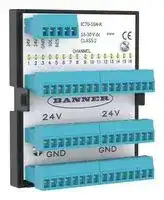


IC70-16N-K
In Cabinet IO-Link Hub, Converter, 16 NPN Input/Output, IP20, IC70 Series
- Manufacturer: BANNER ENGINEERING
- Product type: Signal Converters
- SVHC: No SVHC (21-Jan-2025)
- Accuracy %: -
- Product Range: IC70 Series
- Supply Voltage: 30VDC
- Isolation Input: -
- No. of Channels: 16 Channel
- Output Accuracy: -
- No. of Output Channels: 16Channels
- Signal Conditioner Input: NPN
- Signal Conditioner Output: NPN
- Signal Conditioner Mounting: DIN Rail
| Delivery and price | |
|---|---|
| Units per pack | 1 |
| Price | 145.78 € |
| Current stock | 10+ |
| Lead time | 30 days |

**==> picture [148 x 792] intentionally omitted <==**

IC70-16N-K In-Cabinet IO-Link Hub Product Manual

Original Instructions p/n: 248590 Rev. A 12-May-25

© Banner Engineering Corp. All rights reserved. www.bannerengineering.com

IC70-16N-K In-Cabinet IO-Link Hub Product Manual

## Contents

**Chapter 1 Features.................................................................................................................. 3** Models ........................................................................................................................................................................................................... 3 Overview........................................................................................................................................................................................................ 3 **Chapter 2 IC70N Configuration.............................................................................................. 4** IO-Link® ....................................................................................................................................................................................................... 4 **Chapter 3 Mechanical Installation ......................................................................................... 5** Wiring............................................................................................................................................................................................................. 5 **Chapter 4 Operating Instructions ......................................................................................... 7** Status Indicators............................................................................................................................................................................................ 7 **Chapter 5 IO-Link Data Reference Guide.............................................................................. 8** Communication Parameters.......................................................................................................................................................................... 8 Process Data In (Device to Master)............................................................................................................................................................... 8 Process Data Out (Master to Device)............................................................................................................................................................ 9 Parameters Set Using IO-Link..................................................................................................................................................................... 10 IO-Link Events ............................................................................................................................................................................................. 19 **Chapter 6 Specifications ...................................................................................................... 20** FCC Part 15 Class B for Unintentional Radiators........................................................................................................................................ 20 Industry Canada ICES-003(B)..................................................................................................................................................................... 20 Dimensions.................................................................................................................................................................................................. 21 **Chapter 7 Accessories.......................................................................................................... 22** IC70 Cordsets.............................................................................................................................................................................................. 22 **Chapter 8 Product Support and Maintenance .................................................................... 24** Resources ................................................................................................................................................................................................... 24 Repairs ........................................................................................................................................................................................................ 24 Contact Us................................................................................................................................................................................................... 24 Banner Engineering Corp Limited Warranty................................................................................................................................................ 24

© Banner Engineering Corp. All rights reserved. www.bannerengineering.com

IC70-16N-K In-Cabinet IO-Link Hub Product Manual

## Chapter Contents

Models.................................................................................................................................................................................................................. 3 Overview .............................................................................................................................................................................................................. 3

## Chapter 1 Features

IO-Link hubs are a quick, easy, and economical way to integrate non-IO-Link devices into an IO-Link system

- Compact, rugged, and lightweight IP20 IO-Link hub

- Metal screw terminal connectors

- • 16 NPN discrete channels can be configured as inputs or outputs • DIN rail mountable hub base for easy control cabinet installation

- Compact IO-Link hub connects discrete inputs as Process Data In and outputs a discrete value as Process Data Out

- Enabled delay modes: ON/OFF Delay, ON/OFF One-shot, ON/OFF/Retriggerable Oneshot, and ON/OFF Pulse-stretcher and Totalizer

- Measurement metrics: Count, Events Per Minute (EPM), and Duration

- Discrete Mirroring: Discrete signals (in/out) from all 16 channels can be mirrored to any of the 16 channels, discrete out

## Models

**==> picture [469 x 29] intentionally omitted <==**

**----- Start of picture text -----**<br>
Model Function Type Control Connector<br>IC70-16N-K Converter 16 NPN input/output  IO-Link Metal screw terminals<br>channels<br>**----- End of picture text -----**<br>


## Overview

Banner Engineering's IC70-16N-K In-Cabinet IO-Link Hub provides a compact, affordable, and lightweight solution for consolidating discrete signals from sensors and actuators, making it easy to connect these devices to an IO-Link master.

The hub's compact design and DIN-rail mountable base make it an excellent solution for mounting within control cabinets. Two 24 V DC power supply screw terminals are connected internally to the 24 V DC rail, allowing you to use multiple 24 V DC sources if needed or supply power to a nearby device.

**==> picture [87 x 80] intentionally omitted <==**

**----- Start of picture text -----**<br>
1 2<br>PWR IC70-16N-K<br>COM 18-30 V DCCLASS 2<br>CHANNEL 3<br>1 2 3 4 5 6 7 8 9 10 11 12 13 14 15 16<br>BANNEEF.<br>24V 24V<br>GND GND<br>24V 24V GND IOL RES<br>**----- End of picture text -----**<br>


The IC70-16N-K In-Cabinet IO-Link Hub connects the 16 inputs as Process Data In and the 16 outputs as Process Data Out. Use an IO-Link master device to monitor and configure the I/O channels.

1. Power LED

2. COM LED

3. Sixteen I/O channel LEDs

© Banner Engineering Corp. All rights reserved. www.bannerengineering.com

page 3 of 25

12-May-25

IC70-16N-K In-Cabinet IO-Link Hub Product Manual

## Chapter Contents

IO-Link® .............................................................................................................................................................................................................. 4

## Chapter 2 IC70N Configuration

For more information, see the IO-Link Data Reference Guide chapter (also a standalone document p/n 248591) and the IODD file (p/n 248441).

## Measurements

**==> picture [500 x 108] intentionally omitted <==**

**----- Start of picture text -----**<br>
Channels 1-16 Description IO Metric Description<br>Count Value Running count of the received input pulses<br>Duration Value Duration of the last input pulse in µs with 500 µs granularity<br>Running count of the number of pulses received averaged over one minute<br>Channels 1-16 Events per Minute Value<br>Range: 1 to 37,500<br>Do not reset<br>Reset Metrics<br>Reset<br>**----- End of picture text -----**<br>


## Channel Configuration – Input

**==> picture [500 x 292] intentionally omitted <==**

**----- Start of picture text -----**<br>
Channels 1-16 Description Name Values<br>NPN Input<br>Discrete I/O Selection<br>NPN Output with Pull-Up<br>Disabled<br>On/Off Delay<br>On One-shot<br>Off One-shot<br>Discrete Delay Mode On Pulse-stretcher<br>Off Pulse-stretcher<br>Totalizer<br>Channels 1-16<br>Retriggerable On One-shot<br>Retriggerable Off One-shot<br>Discrete Delay Timer 1 Discrete On Delay, One-shot, Pulse-Stretcher Time, or Totalizer Count<br>Discrete Delay Timer 2 Discrete Off Delay or Totalizer Time<br>Disabled<br>Mirroring Enable<br>Enabled<br>Mirroring Channel Selection Channel 1 through 16<br>Not Inverted<br>Mirroring Inversion<br>Inverted<br>**----- End of picture text -----**<br>


## IO-Link®

IO-Link® is a point-to-point communication link between a master device and a sensor and/or light. It can be used to automatically parameterize sensors or lights and to transmit process data. For the latest IO-Link protocol and specifications, please visit www.io-link.com.

For the latest IODD files, please refer to the Banner Engineering Corp website at: www.bannerengineering.com.

© Banner Engineering Corp. All rights reserved. www.bannerengineering.com

page 4 of 25

12-May-25

IC70-16N-K In-Cabinet IO-Link Hub Product Manual

## Chapter Contents

Wiring ................................................................................................................................................................................................................... 5

## Chapter 3

## Mechanical Installation

Install the IC70 to allow access for functional checks, maintenance, and service or replacement.

Do not exceed the operating specifications for reliable operation. The enclosure must provide adequate heat dissipation so that the air closely surrounding the IC70 does not exceed its maximum operating temperature.

The IC70 mounts to a standard 35 mm DIN-rail track. It must be installed inside an enclosure rated NEMA 3 (IEC IP54) or better.

To mount the IC70:

1. Tilt the top of the module slightly backward and place it on the DIN rail.

2. Straighten the module against the rail.

3. Lower the module onto the rail.

To remove the IC70

1. Push up on the bottom of the module.

2. Tilt the top of the module slightly forward.

3. Lower the module after the top rigid clip is clear of the DIN rail.

## Wiring

## Power supply screw terminals

**==> picture [500 x 110] intentionally omitted <==**

**----- Start of picture text -----**<br>
Power Supply Screw Terminals Terminals Description<br>1 18 to 30 V DC<br>2 18 to 30 V DC<br>3 Ground<br>4 IO-Link<br>1 2 3 4 5 5 Not used/no connection<br>24V 24V GND IOL RES<br>**----- End of picture text -----**<br>


## Input/output screw terminals

**==> picture [500 x 111] intentionally omitted <==**

**----- Start of picture text -----**<br>
I/O Channel Screw Terminals Terminals Description<br>1 I/O Channel 1<br>CHANNEL<br>2 I/O Channel 2<br>1 2 3 4 5 6 7 8 9 10 11 12 13 14 15 16 3 I/O Channel 3<br>... ...<br>16 I/O Channel 16<br>**----- End of picture text -----**<br>


© Banner Engineering Corp. All rights reserved. www.bannerengineering.com

page 5 of 25

12-May-25

IC70-16N-K In-Cabinet IO-Link Hub Product Manual

Mechanical Installation

**==> picture [169 x 188] intentionally omitted <==**

**----- Start of picture text -----**<br>
I/O Channels<br>24V 24V<br>GND GND<br>Left Power Right Power<br>Channels Channels<br>**----- End of picture text -----**<br>


The left and right power channels are tied internally to screw terminals 1–3 on the power supply screw terminals.

page 6 of 25

© Banner Engineering Corp. All rights reserved. www.bannerengineering.com

12-May-25

IC70-16N-K In-Cabinet IO-Link Hub Product Manual

## Chapter Contents

Status Indicators................................................................................................................................................................................................... 7

## Chapter 4

## Operating Instructions

## Status Indicators

The IC70-16N-K In-Cabinet IO-Link Hub has 16 amber LEDs to indicate discrete I/O status. There is also an additional amber LED specific to the IO-Link communications and a green power indication LED.

**==> picture [149 x 72] intentionally omitted <==**

**----- Start of picture text -----**<br>
1 2<br>IC70-16P-K<br>PWR<br>COM<br>CHANNEL 3<br>o0000000 DO0000008<br>1 2 3 4 5 6 7 8 9 10 11 12 13 14 15 16<br>24V 24V GND IOL RES<br>**----- End of picture text -----**<br>


|LED|Indication|Status|
|---|---|---|
|Discrete Device Amber LEDs (3)|Off|Discrete In and Out are inactive|
||Solid Amber|Discrete In or Out is active|
|IO-Link Communication Amber LED (2)|Off|IO-Link communications are not present|
||Flashing Amber (900 ms On, 100 ms Off)|IO-Link communications are active|
|Power Indicator Green LED (1)|Off|Power off|
||Solid Green|Power on|


© Banner Engineering Corp. All rights reserved. www.bannerengineering.com

page 7 of 25

12-May-25

IC70-16N-K In-Cabinet IO-Link Hub Product Manual

## Chapter Contents

|Communication Parameters................................................................................................................................................................................. 8|
|---|
|Process Data In (Device to Master) ..................................................................................................................................................................... 8|
|Process Data Out (Master to Device)................................................................................................................................................................... 9|
|Parameters Set Using IO-Link............................................................................................................................................................................ 10|
|IO-Link Events.................................................................................................................................................................................................... 19|
|IO-Link Data Reference Guide<br>Chapter 5|


This document refers to the following IODD file: Banner_Engineering-IC70-16N-K-20241101-IODD1.. The IODD file and support files can be found on www.bannerengineering.com under the download section of the product family page.

## Communication Parameters

**==> picture [500 x 107] intentionally omitted <==**

**----- Start of picture text -----**<br>
Parameter Value Parameter Value<br>IO-Link revision V1.1 Port class A<br>Process data in length 16-bits SIO mode Yes<br>Process data out length 16-bits Smart sensor profile No<br>Bit rate 38400 bps Block parameterization Yes<br>Minimum cycle time 3.3 ms Data storage Yes<br>Device ID 659478<br>**----- End of picture text -----**<br>


## Process Data In (Device to Master)

**==> picture [500 x 286] intentionally omitted <==**

**----- Start of picture text -----**<br>
Subindex Name Number of  Data Values<br>Bits<br>1 Channel 1 Input State 1 false=inactive, true=active<br>2 Channel 2 Input State 1 false=inactive, true=active<br>3 Channel 3 Input State 1 false=inactive, true=active<br>4 Channel 4 Input State 1 false=inactive, true=active<br>5 Channel 5 Input State 1 false=inactive, true=active<br>6 Channel 6 Input State 1 false=inactive, true=active<br>7 Channel 7 Input State 1 false=inactive, true=active<br>8 Channel 8 Input State 1 false=inactive, true=active<br>9 Channel 9 Input State 1 false=inactive, true=active<br>10 Channel 10 Input State 1 false=inactive, true=active<br>11 Channel 11 Input State 1 false=inactive, true=active<br>12 Channel 12 Input State 1 false=inactive, true=active<br>13 Channel 13 Input State 1 false=inactive, true=active<br>14 Channel 14 Input State 1 false=inactive, true=active<br>15 Channel 15 Input State 1 false=inactive, true=active<br>16 Channel 16 Input State 1 false=inactive, true=active<br>**----- End of picture text -----**<br>


© Banner Engineering Corp. All rights reserved. www.bannerengineering.com

page 8 of 25

12-May-25

IO-Link Data Reference Guide

IC70-16N-K In-Cabinet IO-Link Hub Product Manual

Octet 0

**==> picture [500 x 124] intentionally omitted <==**

**----- Start of picture text -----**<br>
Subindex 8 7 6 5 4 3 2 1<br>Bit offset 15 14 13 12 11 10 9 8<br>Value 1 1 1 1 1 1 0 1<br>Octet 1<br>Subindex 16 15 14 13 12 11 10 9<br>Bit offset 7 6 5 4 3 2 1 0<br>Value 1 1 1 0 1 1 1 0<br>**----- End of picture text -----**<br>


## Example based on the listed values

**==> picture [500 x 139] intentionally omitted <==**

**----- Start of picture text -----**<br>
1 Channel 1 input state active 9 Channel 9 input state inactive<br>2 Channel 2 input state inactive 10 Channel 10 input state active<br>3 Channel 3 input state active 11 Channel 11 input state active<br>4 Channel 4 input state active 12 Channel 12 input state active<br>5 Channel 5 input state active 13 Channel 13 input state inactive<br>6 Channel 6 input state active 14 Channel 14 input state active<br>7 Channel 7 input state active 15 Channel 15 input state active<br>8 Channel 8 input state active 16 Channel 16 input state active<br>**----- End of picture text -----**<br>


## Process Data Out (Master to Device)

**==> picture [500 x 286] intentionally omitted <==**

**----- Start of picture text -----**<br>
Number of<br>Subindex Name Data Values<br>Bits<br>1 Channel 1 Output State 1 false=Off/InActive, true=On/Active<br>2 Channel 2 Output State 1 false=Off/InActive, true=On/Active<br>3 Channel 3 Output State 1 false=Off/InActive, true=On/Active<br>4 Channel 4 Output State 1 false=Off/InActive, true=On/Active<br>5 Channel 5 Output State 1 false=Off/InActive, true=On/Active<br>6 Channel 6 Output State 1 false=Off/InActive, true=On/Active<br>7 Channel 7 Output State 1 false=Off/InActive, true=On/Active<br>8 Channel 8 Output State 1 false=Off/InActive, true=On/Active<br>1 Channel 9 Output State 1 false=Off/InActive, true=On/Active<br>2 Channel 10 Output State 1 false=Off/InActive, true=On/Active<br>3 Channel 11 Output State 1 false=Off/InActive, true=On/Active<br>4 Channel 12 Output State 1 false=Off/InActive, true=On/Active<br>5 Channel 13 Output State 1 false=Off/InActive, true=On/Active<br>6 Channel 14 Output State 1 false=Off/InActive, true=On/Active<br>7 Channel 15 Output State 1 false=Off/InActive, true=On/Active<br>8 Channel 16 Output State 1 false=Off/InActive, true=On/Active<br>**----- End of picture text -----**<br>


© Banner Engineering Corp. All rights reserved. www.bannerengineering.com

page 9 of 25

12-May-25

IC70-16N-K In-Cabinet IO-Link Hub Product Manual

IO-Link Data Reference Guide

Octet 0

**==> picture [500 x 94] intentionally omitted <==**

**----- Start of picture text -----**<br>
Subindex 8 7 6 5 4 3 2 1<br>Bit offset 15 14 13 12 11 10 9 8<br>Octet 1<br>Subindex 16 15 14 13 12 11 10 9<br>Bit offset 7 6 5 4 3 2 1 0<br>**----- End of picture text -----**<br>


## Parameters Set Using IO-Link

These parameters can be read from and/or written to an IC70-16N-K IO-Link Hub. Also included is information about whether the variable in question is saved during data storage and whether the variable came from the IO-Link Smart Sensor Profile. Unlike process data in, which is transmitted from the IO-Link device to the IO-Link master cyclically, these parameters are read or written acyclically as needed.

**==> picture [500 x 445] intentionally omitted <==**

**----- Start of picture text -----**<br>
Access  Data<br>Index Subindex Name Length Value Range Default<br>Rights Storage?<br>0 1-16 Direct Parameter Page 1  ro<br>(incl. Vendor ID & Device ID)<br>1 1-16 Direct Parameters Page 2 rw<br>130 = Restore Factory Settings 162 = Start<br>2 System Command discovery 163 = Stop discovery 164 = Reset  wo<br>All Metrics<br>Data Storage Index (device-<br>3 specific list of parameters to  rw<br>be stored)<br>4-11 reserved by IO-Link<br>Specification<br>12 Device Access Locks<br>12 1 Parameter Write Access Lock 0 = off 1 = on 0 rw y<br>12 2 Data Storage Lock 0 = off, 1 = on 0 rw y<br>12 3 Local Parameterization Lock 0 = off, 1 = on 0 rw y<br>12 4 Local User Interface Lock 0 = off, 1 = on 0 rw y<br>16 Vendor Name string Banner Engineering Corporation ro<br>17 Vendor Text string More Sensors. More Solutions. ro<br>18 Product Name string IC70-16N-K ro<br>19 Product ID string IC70-16N-K ro<br>20 Product Text string ro<br>21 Serial Number ro<br>23 Firmware Version ro<br>24 App Specific Tag (user-defined) rw y<br>0=Device is OK, 1=Maintainance required,<br>36 Device Status 8-bit integer 2=Out of specification, 3=Functional check,  ro<br>4=Failure, 5..255 Reserved<br>37 Detailed Device Status Array[6] of 3- ro<br>octet<br>38-39 reserved<br>40 Process Data Input see Process Data In ro<br>41 Process Data Output see Process Data Out ro<br>42-57 unused/reserved<br>69 All-Time Run Time<br>**----- End of picture text -----**<br>


Continued on page 11

page 10 of 25

© Banner Engineering Corp. All rights reserved. www.bannerengineering.com

12-May-25

IO-Link Data Reference Guide

IC70-16N-K In-Cabinet IO-Link Hub Product Manual

**==> picture [500 x 659] intentionally omitted <==**

**----- Start of picture text -----**<br>
Continued from page 10<br>Access  Data<br>Index Subindex Name Length Value Range Default<br>Rights Storage?<br>32-bit<br>69 1 Run counter Uinteger 0..2147483647 ro y<br>70 Resettable Run Time<br>32-bit<br>70 1 Run counter 0..2147483647 0 rw<br>Uinteger<br>All-Time Run Time Event<br>78<br>Time<br>32-bit<br>78 1 Event Time Uinteger 0..2147483647 0 rw y<br>Resettable Run Time Event<br>79<br>Time<br>32-bit<br>79 1 Event Time Uinteger 0..2147483647 0 rw y<br>80 IO Metrics Channels 1 to 8<br>32-bit<br>80 1 Channel 1 Count 0..2147483647 ro<br>Uinteger<br>32-bit<br>80 2 Channel 1 Count Duration - 0..2147483647, 50µS resolution ro<br>Uinteger<br>80 3 Channel 1 Count Events per  32-bit  1..300000 ro<br>Minute Uinteger<br>Channel 1 CountTotalizer  32-bit<br>80 4 0..2147483647 ro<br>Counter Uinteger<br>32-bit<br>80 5 Channel 2 Count 0..2147483647 ro<br>Uinteger<br>32-bit<br>80 6 Channel 2 Duration 0..2147483647, 50µS resolution ro<br>Uinteger<br>32-bit<br>80 7 Channel 2 Events per Minute 1..300000 ro<br>Uinteger<br>32-bit<br>80 8 Channel 2 Totalizer Counter 0..2147483647 ro<br>Uinteger<br>32-bit<br>80 9 Channel 3 Count 0..2147483647 ro<br>Uinteger<br>32-bit<br>80 10 Channel 3 Duration 0..2147483647, 50µS resolution ro<br>Uinteger<br>32-bit<br>80 11 Channel 3 Events per Minute 1..300000 ro<br>Uinteger<br>32-bit<br>80 12 Channel 3 Totalizer Counter 0..2147483647 ro<br>Uinteger<br>32-bit<br>80 13 Channel 4 Count 0..2147483647 ro<br>Uinteger<br>32-bit<br>80 14 Channel 4 Duration 0..2147483647, 50µS resolution ro<br>Uinteger<br>32-bit<br>80 15 Channel 4 Events per Minute 1..300000 ro<br>Uinteger<br>32-bit<br>80 16 Channel 4 Totalizer Counter 0..2147483647 ro<br>Uinteger<br>32-bit<br>80 17 Channel 5 Count 0..2147483647 ro<br>Uinteger<br>32-bit<br>80 18 Channel 5 Duration 0..2147483647, 50µS resolution ro<br>Uinteger<br>32-bit<br>80 19 Channel 5 Events per Minute 1..300000 ro<br>Uinteger<br>32-bit<br>80 20 Channel 5 Totalizer Counter 0..2147483647 ro<br>Uinteger<br>32-bit<br>80 21 Channel 6 Count 0..2147483647 ro<br>Uinteger<br>32-bit<br>80 22 Channel 6 Duration 0..2147483647, 50µS resolution ro<br>Uinteger<br>Continued on page 12<br>**----- End of picture text -----**<br>


© Banner Engineering Corp. All rights reserved. www.bannerengineering.com

page 11 of 25

12-May-25

IC70-16N-K In-Cabinet IO-Link Hub Product Manual

IO-Link Data Reference Guide

**==> picture [500 x 667] intentionally omitted <==**

**----- Start of picture text -----**<br>
Continued from page 11<br>Access  Data<br>Index Subindex Name Length Value Range Default<br>Rights Storage?<br>32-bit<br>80 23 Channel 6 Events per Minute 1..300000 ro<br>Uinteger<br>32-bit<br>80 24 Channel 6 Totalizer Counter 0..2147483647 ro<br>Uinteger<br>32-bit<br>80 25 Channel 7 Count 0..2147483647 ro<br>Uinteger<br>32-bit<br>80 26 Channel 7 Duration 0..2147483647, 50µS resolution ro<br>Uinteger<br>32-bit<br>80 27 Channel 7 Events per Minute 1..300000 ro<br>Uinteger<br>32-bit<br>80 28 Channel 7 Totalizer Counter 0..2147483647 ro<br>Uinteger<br>32-bit<br>80 29 Channel 8 Count 0..2147483647 ro<br>Uinteger<br>32-bit<br>80 30 Channel 8 Duration 0..2147483647, 50µS resolution ro<br>Uinteger<br>32-bit<br>80 31 Channel 8 Events per Minute 1..300000 ro<br>Uinteger<br>32-bit<br>80 32 Channel 8 Totalizer Counter 0..2147483647 ro<br>Uinteger<br>81 IO Metrics Channels 9 to 16<br>32-bit<br>81 1 Channel 9 Count 0..2147483647 ro<br>Uinteger<br>32-bit<br>81 2 Channel 9 Duration - 0..2147483647, 50µS resolution ro<br>Uinteger<br>32-bit<br>81 3 Channel 9 Events per Minute 1..300000 ro<br>Uinteger<br>32-bit<br>81 4 Channel 9 Totalizer Counter 0..2147483647 ro<br>Uinteger<br>32-bit<br>81 5 Channel 10 Count 0..2147483647 ro<br>Uinteger<br>32-bit<br>81 6 Channel 10 Duration 0..2147483647, 50µS resolution ro<br>Uinteger<br>81 7 Channel 10 Events per  32-bit  1..300000 ro<br>Minute Uinteger<br>32-bit<br>81 8 Channel 10 Totalizer Counter 0..2147483647 ro<br>Uinteger<br>32-bit<br>81 9 Channel 11 Count 0..2147483647 ro<br>Uinteger<br>32-bit<br>81 10 Channel 11 Duration 0..2147483647, 50µS resolution ro<br>Uinteger<br>81 11 Channel 11 Events per  32-bit  1..300000 ro<br>Minute Uinteger<br>32-bit<br>81 12 Channel 11 Totalizer Counter 0..2147483647 ro<br>Uinteger<br>32-bit<br>81 13 Channel 12 Count 0..2147483647 ro<br>Uinteger<br>32-bit<br>81 14 Channel 12 Duration 0..2147483647, 50µS resolution ro<br>Uinteger<br>81 15 Channel 12 Events per  32-bit  1..300000 ro<br>Minute Uinteger<br>32-bit<br>81 16 Channel 12 Totalizer Counter 0..2147483647 ro<br>Uinteger<br>32-bit<br>81 17 Channel 13 Count 0..2147483647 ro<br>Uinteger<br>32-bit<br>81 18 Channel 13 Duration 0..2147483647, 50µS resolution ro<br>Uinteger<br>81 19 Channel 13 Events per  32-bit  1..300000 ro<br>Minute Uinteger<br>Continued on page 13<br>**----- End of picture text -----**<br>


page 12 of 25

© Banner Engineering Corp. All rights reserved. www.bannerengineering.com

12-May-25

IO-Link Data Reference Guide

IC70-16N-K In-Cabinet IO-Link Hub Product Manual

**==> picture [500 x 678] intentionally omitted <==**

**----- Start of picture text -----**<br>
Continued from page 12<br>Access  Data<br>Index Subindex Name Length Value Range Default<br>Rights Storage?<br>32-bit<br>81 20 Channel 13 Totalizer Counter 0..2147483647 ro<br>Uinteger<br>32-bit<br>81 21 Channel 14 Count 0..2147483647 ro<br>Uinteger<br>32-bit<br>81 22 Channel 14 Duration 0..2147483647, 50µS resolution ro<br>Uinteger<br>81 23 Channel 14 Events per  32-bit  1..300000 ro<br>Minute Uinteger<br>32-bit<br>81 24 Channel 14 Totalizer Counter 0..2147483647 ro<br>Uinteger<br>32-bit<br>81 25 Channel 15 Count 0..2147483647 ro<br>Uinteger<br>32-bit<br>81 26 Channel 15 Duration 0..2147483647, 50µS resolution ro<br>Uinteger<br>81 27 Channel 15 Events per  32-bit  1..300000 ro<br>Minute Uinteger<br>32-bit<br>81 28 Channel 15 Totalizer Counter 0..2147483647 ro<br>Uinteger<br>32-bit<br>81 29 Channel 16 Count 0..2147483647 ro<br>Uinteger<br>32-bit<br>81 30 Channel 16 Duration 0..2147483647, 50µS resolution ro<br>Uinteger<br>81 31 Channel 16 Events per  32-bit  1..300000 ro<br>Minute Uinteger<br>32-bit<br>81 32 Channel 16 Totalizer Counter 0..2147483647 ro<br>Uinteger<br>82 Selectable Metric Reset<br>82 1 Channel 1 Boolean false=Do Not Reset, true=Reset false rw<br>82 2 Channel 2 Boolean false=Do Not Reset, true=Reset false rw<br>82 3 Channel 3 Boolean false=Do Not Reset, true=Reset false rw<br>82 4 Channel 4 Boolean false=Do Not Reset, true=Reset false rw<br>82 5 Channel 5 Boolean false=Do Not Reset, true=Reset false rw<br>82 6 Channel 6 Boolean false=Do Not Reset, true=Reset false rw<br>82 7 Channel 7 Boolean false=Do Not Reset, true=Reset false rw<br>82 8 Channel 8 Boolean false=Do Not Reset, true=Reset false rw<br>82 9 Channel 9 Boolean false=Do Not Reset, true=Reset false rw<br>82 10 Channel 10 Boolean false=Do Not Reset, true=Reset false rw<br>82 11 Channel 11 Boolean false=Do Not Reset, true=Reset false rw<br>82 12 Channel 12 Boolean false=Do Not Reset, true=Reset false rw<br>82 13 Channel 13 Boolean false=Do Not Reset, true=Reset false rw<br>82 14 Channel 14 Boolean false=Do Not Reset, true=Reset false rw<br>82 15 Channel 15 Boolean false=Do Not Reset, true=Reset false rw<br>82 16 Channel 16 Boolean false=Do Not Reset, true=Reset false rw<br>32-bit<br>82 17 Channel 1 Reset Count 0..2147483647 0 rw<br>Uinteger<br>32-bit<br>82 18 Channel 1 Reset Count 0..2147483647 0 rw<br>Uinteger<br>32-bit<br>82 19 Channel 3 Reset Count 0..2147483647 0 rw<br>Uinteger<br>32-bit<br>82 20 Channel 4 Reset Count 0..2147483647 0 rw<br>Uinteger<br>32-bit<br>82 21 Channel 5 Reset Count 0..2147483647 0 rw<br>Uinteger<br>32-bit<br>82 22 Channel 6 Reset Count 0..2147483647 0 rw<br>Uinteger<br>Continued on page 14<br>**----- End of picture text -----**<br>


© Banner Engineering Corp. All rights reserved. www.bannerengineering.com

page 13 of 25

12-May-25

IC70-16N-K In-Cabinet IO-Link Hub Product Manual

IO-Link Data Reference Guide

**==> picture [500 x 660] intentionally omitted <==**

**----- Start of picture text -----**<br>
Continued from page 13<br>Access  Data<br>Index Subindex Name Length Value Range Default<br>Rights Storage?<br>32-bit<br>82 23 Channel 7 Reset Count 0..2147483647 0 rw<br>Uinteger<br>32-bit<br>82 24 Channel 8 Reset Count 0..2147483647 0 rw<br>Uinteger<br>32-bit<br>82 25 Channel 9 Reset Count 0..2147483647 0 rw<br>Uinteger<br>32-bit<br>82 26 Channel 10 Reset Count 0..2147483647 0 rw<br>Uinteger<br>32-bit<br>82 27 Channel 11 Reset Count 0..2147483647 0 rw<br>Uinteger<br>32-bit<br>82 28 Channel 12 Reset Count 0..2147483647 0 rw<br>Uinteger<br>32-bit<br>82 29 Channel 13 Reset Count 0..2147483647 0 rw<br>Uinteger<br>32-bit<br>82 30 Channel 14 Reset Count 0..2147483647 0 rw<br>Uinteger<br>32-bit<br>82 31 Channel 15 Reset Count 0..2147483647 0 rw<br>Uinteger<br>32-bit<br>82 32 Channel 16 Reset Count 0..2147483647 0 rw<br>Uinteger<br>87 Channel 1 Configuration<br>87 1 IO Selection 8-bit Uinteger 0=NPN Input, 2=NPN Output with Pull Up 2 rw y<br>0 = Disabled, 1 = On Off Delay, 2 = On One-<br>shot, 3 = Off One-shot, 4 = On Pulse-<br>87 2 Delay Mode 8-bit Uinteger stretcher, 5 = Off Pulse-stretcher, 6 =  0 rw y<br>Totalizer, 7 = Retriggerable On One-shot, 8 =<br>Retriggerable Off One-Shot<br>87 3 Delay Timer 1 32-bit Uinteger 0..2147483647 [Channel On Delay, One-shot, Pulse-stretcher time(ms) or Totalizer Count] 0 rw y<br>87 4 Delay Timer 2 32-bit Uinteger 0..2147483647 (Channel Off Delay or Totalizer time)ms 0 rw y<br>87 5 Mirroring Enable 8-bit Uinteger 0=Disabled, 1=Enabled 0 rw y<br>0=Channel 1, 1=Channel 2, 2=Channel 3,<br>3=Channel 4, 4=Channel 5, 5=Channel 6,<br>87 6 Mirroring Channel Selection 8-bit Uinteger 6=Channel 7, 7=Channel 8, 8=Channel 9, 9=Channel 10, 10=Channel 11, 11=Channel  0 rw y<br>12, 12=Channel 13, 13=Channel 14,<br>14=Channel 15, 15=Channel 16<br>87 7 Mirroring Inversion 8-bit Uinteger 0=Not Inverted, 1=Inverted 0 rw y<br>88 Channel 2 Configuration<br>88 1 IO Selection 8-bit Uinteger 0=NPN Input, 2=NPN Output with Pull Up 2 rw y<br>0 = Disabled, 1 = On Off Delay, 2 = On One-<br>shot, 3 = Off One-shot, 4 = On Pulse-<br>88 2 Delay Mode 8-bit Uinteger stretcher, 5 = Off Pulse-stretcher, 6 =  0 rw y<br>Totalizer, 7 = Retriggerable On One-shot, 8 =<br>Retriggerable Off One-Shot<br>88 3 Delay Timer 1 32-bit Uinteger 0..2147483647 [Channel On Delay, One-shot, Pulse-stretcher time(ms) or Totalizer Count] 0 rw y<br>88 4 Delay Timer 2 32-bit Uinteger 0..2147483647 (Channel Off Delay or Totalizer time)ms 0 rw y<br>88 5 Mirroring Enable 8-bit Uinteger 0=Disabled, 1=Enabled 0 rw y<br>0=Channel 1, 1=Channel 2, 2=Channel 3,<br>3=Channel 4, 4=Channel 5, 5=Channel 6,<br>88 6 Mirroring Channel Selection 8-bit Uinteger 6=Channel 7, 7=Channel 8, 8=Channel 9, 9=Channel 10, 10=Channel 11, 11=Channel  0 rw y<br>12, 12=Channel 13, 13=Channel 14,<br>14=Channel 15, 15=Channel 16<br>88 7 Mirroring Inversion 8-bit Uinteger 0=Not Inverted, 1=Inverted 0 rw y<br>89 Channel 3 Configuration<br>89 1 IO Selection 8-bit Uinteger 0=NPN Input, 2=NPN Output with Pull Up 2 rw y<br>Continued on page 15<br>**----- End of picture text -----**<br>


page 14 of 25

© Banner Engineering Corp. All rights reserved. www.bannerengineering.com

12-May-25

IO-Link Data Reference Guide

IC70-16N-K In-Cabinet IO-Link Hub Product Manual

**==> picture [500 x 676] intentionally omitted <==**

**----- Start of picture text -----**<br>
Continued from page 14<br>Access  Data<br>Index Subindex Name Length Value Range Default<br>Rights Storage?<br>0 = Disabled, 1 = On Off Delay, 2 = On One-<br>shot, 3 = Off One-shot, 4 = On Pulse-<br>89 2 Delay Mode 8-bit Uinteger stretcher, 5 = Off Pulse-stretcher, 6 =  0 rw y<br>Totalizer, 7 = Retriggerable On One-shot, 8 =<br>Retriggerable Off One-Shot<br>89 3 Delay Timer 1 32-bit Uinteger 0..2147483647 [Channel On Delay, One-shot, Pulse-stretcher time(ms) or Totalizer Count] 0 rw y<br>89 4 Delay Timer 2 32-bit Uinteger 0..2147483647 (Channel Off Delay or Totalizer time)ms 0 rw y<br>89 5 Mirroring Enable 8-bit Uinteger 0=Disabled, 1=Enabled 0 rw y<br>0=Channel 1, 1=Channel 2, 2=Channel 3,<br>3=Channel 4, 4=Channel 5, 5=Channel 6,<br>89 6 Mirroring Channel Selection 8-bit Uinteger 6=Channel 7, 7=Channel 8, 8=Channel 9, 9=Channel 10, 10=Channel 11, 11=Channel  0 rw y<br>12, 12=Channel 13, 13=Channel 14,<br>14=Channel 15, 15=Channel 16<br>89 7 Mirroring Inversion 8-bit Uinteger 0=Not Inverted, 1=Inverted 0 rw y<br>90 Channel 4 Configuration<br>90 1 IO Selection 8-bit Uinteger 0=NPN Input, 2=NPN Output with Pull Up 2 rw y<br>0 = Disabled, 1 = On Off Delay, 2 = On One-<br>shot, 3 = Off One-shot, 4 = On Pulse-<br>90 2 Delay Mode 8-bit Uinteger stretcher, 5 = Off Pulse-stretcher, 6 =  0 rw y<br>Totalizer, 7 = Retriggerable On One-shot, 8 =<br>Retriggerable Off One-Shot<br>90 3 Delay Timer 1 32-bit Uinteger 0..2147483647 [Channel On Delay, One-shot, Pulse-stretcher time(ms) or Totalizer Count] 0 rw y<br>90 4 Delay Timer 2 32-bit Uinteger 0..2147483647 (Channel Off Delay or Totalizer time)ms 0 rw y<br>90 5 Mirroring Enable 8-bit Uinteger 0=Disabled, 1=Enabled 0 rw y<br>0=Channel 1, 1=Channel 2, 2=Channel 3,<br>3=Channel 4, 4=Channel 5, 5=Channel 6,<br>90 6 Mirroring Channel Selection 8-bit Uinteger 6=Channel 7, 7=Channel 8, 8=Channel 9, 9=Channel 10, 10=Channel 11, 11=Channel  0 rw y<br>12, 12=Channel 13, 13=Channel 14,<br>14=Channel 15, 15=Channel 16<br>90 7 Mirroring Inversion 8-bit Uinteger 0=Not Inverted, 1=Inverted 0 rw y<br>91 Channel 5 Configuration<br>91 1 IO Selection 8-bit Uinteger 0=NPN Input, 2=NPN Output with Pull Up 2 rw y<br>0 = Disabled, 1 = On Off Delay, 2 = On One-<br>shot, 3 = Off One-shot, 4 = On Pulse-<br>91 2 Delay Mode 8-bit Uinteger stretcher, 5 = Off Pulse-stretcher, 6 =  0 rw y<br>Totalizer, 7 = Retriggerable On One-shot, 8 =<br>Retriggerable Off One-Shot<br>91 3 Delay Timer 1 32-bit Uinteger 0..2147483647 [Channel On Delay, One-shot, Pulse-stretcher time(ms) or Totalizer Count] 0 rw y<br>91 4 Delay Timer 2 32-bit Uinteger 0..2147483647 (Channel Off Delay or Totalizer time)ms 0 rw y<br>91 5 Mirroring Enable 8-bit Uinteger 0=Disabled, 1=Enabled 0 rw y<br>0=Channel 1, 1=Channel 2, 2=Channel 3,<br>3=Channel 4, 4=Channel 5, 5=Channel 6,<br>91 6 Mirroring Channel Selection 8-bit Uinteger 6=Channel 7, 7=Channel 8, 8=Channel 9, 9=Channel 10, 10=Channel 11, 11=Channel  0 rw y<br>12, 12=Channel 13, 13=Channel 14,<br>14=Channel 15, 15=Channel 16<br>91 7 Mirroring Inversion 8-bit Uinteger 0=Not Inverted, 1=Inverted 0 rw y<br>92 Channel 6 Configuration<br>92 1 IO Selection 8-bit Uinteger 0=NPN Input, 2=NPN Output with Pull Up 2 rw y<br>0 = Disabled, 1 = On Off Delay, 2 = On One-<br>shot, 3 = Off One-shot, 4 = On Pulse-<br>92 2 Delay Mode 8-bit Uinteger stretcher, 5 = Off Pulse-stretcher, 6 =  0 rw y<br>Totalizer, 7 = Retriggerable On One-shot, 8 =<br>Retriggerable Off One-Shot<br>92 3 Delay Timer 1 32-bit Uinteger 0..2147483647 [Channel On Delay, One-shot, Pulse-stretcher time(ms) or Totalizer Count] 0 rw y<br>Continued on page 16<br>**----- End of picture text -----**<br>


© Banner Engineering Corp. All rights reserved. www.bannerengineering.com

page 15 of 25

12-May-25

IC70-16N-K In-Cabinet IO-Link Hub Product Manual

IO-Link Data Reference Guide

**==> picture [500 x 647] intentionally omitted <==**

**----- Start of picture text -----**<br>
Continued from page 15<br>Access  Data<br>Index Subindex Name Length Value Range Default<br>Rights Storage?<br>92 4 Delay Timer 2 32-bit Uinteger 0..2147483647 (Channel Off Delay or Totalizer time)ms 0 rw y<br>92 5 Mirroring Enable 8-bit Uinteger 0=Disabled, 1=Enabled 0 rw y<br>0=Channel 1, 1=Channel 2, 2=Channel 3,<br>3=Channel 4, 4=Channel 5, 5=Channel 6,<br>92 6 Mirroring Channel Selection 8-bit Uinteger 6=Channel 7, 7=Channel 8, 8=Channel 9, 9=Channel 10, 10=Channel 11, 11=Channel  0 rw y<br>12, 12=Channel 13, 13=Channel 14,<br>14=Channel 15, 15=Channel 16<br>92 7 Mirroring Inversion 8-bit Uinteger 0=Not Inverted, 1=Inverted 0 rw y<br>93 Channel 7 Configuration<br>93 1 IO Selection 8-bit Uinteger 0=NPN Input, 2=NPN Output with Pull Up 2 rw y<br>0 = Disabled, 1 = On Off Delay, 2 = On One-<br>shot, 3 = Off One-shot, 4 = On Pulse-<br>93 2 Delay Mode 8-bit Uinteger stretcher, 5 = Off Pulse-stretcher, 6 =  0 rw y<br>Totalizer, 7 = Retriggerable On One-shot, 8 =<br>Retriggerable Off One-Shot<br>93 3 Delay Timer 1 32-bit Uinteger 0..2147483647 [Channel On Delay, One-shot, Pulse-stretcher time(ms) or Totalizer Count] 0 rw y<br>93 4 Delay Timer 2 32-bit Uinteger 0..2147483647 (Channel Off Delay or Totalizer time)ms 0 rw y<br>93 5 Mirroring Enable 8-bit Uinteger 0=Disabled, 1=Enabled 0 rw y<br>0=Channel 1, 1=Channel 2, 2=Channel 3,<br>3=Channel 4, 4=Channel 5, 5=Channel 6,<br>93 6 Mirroring Channel Selection 8-bit Uinteger 6=Channel 7, 7=Channel 8, 8=Channel 9, 9=Channel 10, 10=Channel 11, 11=Channel  0 rw y<br>12, 12=Channel 13, 13=Channel 14,<br>14=Channel 15, 15=Channel 16<br>93 7 Mirroring Inversion 8-bit Uinteger 0=Not Inverted, 1=Inverted 0 rw y<br>94 Channel 8 Configuration<br>94 1 IO Selection 8-bit Uinteger 0=NPN Input, 2=NPN Output with Pull Up 2 rw y<br>0 = Disabled, 1 = On Off Delay, 2 = On One-<br>shot, 3 = Off One-shot, 4 = On Pulse-<br>94 2 Delay Mode 8-bit Uinteger stretcher, 5 = Off Pulse-stretcher, 6 =  0 rw y<br>Totalizer, 7 = Retriggerable On One-shot, 8 =<br>Retriggerable Off One-Shot<br>94 3 Delay Timer 1 32-bit Uinteger 0..2147483647 [Channel On Delay, One-shot, Pulse-stretcher time(ms) or Totalizer Count] 0 rw y<br>94 4 Delay Timer 2 32-bit Uinteger 0..2147483647 (Channel Off Delay or Totalizer time)ms 0 rw y<br>94 5 Mirroring Enable 8-bit Uinteger 0=Disabled, 1=Enabled 0 rw y<br>0=Channel 1, 1=Channel 2, 2=Channel 3,<br>3=Channel 4, 4=Channel 5, 5=Channel 6,<br>94 6 Mirroring Channel Selection 8-bit Uinteger 6=Channel 7, 7=Channel 8, 8=Channel 9, 9=Channel 10, 10=Channel 11, 11=Channel  0 rw y<br>12, 12=Channel 13, 13=Channel 14,<br>14=Channel 15, 15=Channel 16<br>94 7 Mirroring Inversion 8-bit Uinteger 0=Not Inverted, 1=Inverted 0 rw y<br>95 Channel 9 Configuration<br>95 1 IO Selection 8-bit Uinteger 0=NPN Input, 2=NPN Output with Pull Up 2 rw y<br>0 = Disabled, 1 = On Off Delay, 2 = On One-<br>shot, 3 = Off One-shot, 4 = On Pulse-<br>95 2 Delay Mode 8-bit Uinteger stretcher, 5 = Off Pulse-stretcher, 6 =  0 rw y<br>Totalizer, 7 = Retriggerable On One-shot, 8 =<br>Retriggerable Off One-Shot<br>95 3 Delay Timer 1 32-bit Uinteger 0..2147483647 [Channel On Delay, One-shot, Pulse-stretcher time(ms) or Totalizer Count] 0 rw y<br>95 4 Delay Timer 2 32-bit Uinteger 0..2147483647 (Channel Off Delay or Totalizer time)ms 0 rw y<br>95 5 Mirroring Enable 8-bit Uinteger 0=Disabled, 1=Enabled 0 rw y<br>Continued on page 17<br>**----- End of picture text -----**<br>


page 16 of 25

© Banner Engineering Corp. All rights reserved. www.bannerengineering.com

12-May-25

IO-Link Data Reference Guide

IC70-16N-K In-Cabinet IO-Link Hub Product Manual

**==> picture [500 x 676] intentionally omitted <==**

**----- Start of picture text -----**<br>
Continued from page 16<br>Access  Data<br>Index Subindex Name Length Value Range Default<br>Rights Storage?<br>0=Channel 1, 1=Channel 2, 2=Channel 3,<br>3=Channel 4, 4=Channel 5, 5=Channel 6,<br>95 6 Mirroring Channel Selection 8-bit Uinteger 6=Channel 7, 7=Channel 8, 8=Channel 9, 9=Channel 10, 10=Channel 11, 11=Channel  0 rw y<br>12, 12=Channel 13, 13=Channel 14,<br>14=Channel 15, 15=Channel 16<br>95 7 Mirroring Inversion 8-bit Uinteger 0=Not Inverted, 1=Inverted 0 rw y<br>96 Channel 10 Configuration<br>96 1 IO Selection 8-bit Uinteger 0=NPN Input, 2=NPN Output with Pull Up 2 rw y<br>0 = Disabled, 1 = On Off Delay, 2 = On One-<br>shot, 3 = Off One-shot, 4 = On Pulse-<br>96 2 Delay Mode 8-bit Uinteger stretcher, 5 = Off Pulse-stretcher, 6 =  0 rw y<br>Totalizer, 7 = Retriggerable On One-shot, 8 =<br>Retriggerable Off One-Shot<br>96 3 Delay Timer 1 32-bit Uinteger 0..2147483647 [Channel On Delay, One-shot, Pulse-stretcher time(ms) or Totalizer Count] 0 rw y<br>96 4 Delay Timer 2 32-bit Uinteger 0..2147483647 (Channel Off Delay or Totalizer time)ms 0 rw y<br>96 5 Mirroring Enable 8-bit Uinteger 0=Disabled, 1=Enabled 0 rw y<br>0=Channel 1, 1=Channel 2, 2=Channel 3,<br>3=Channel 4, 4=Channel 5, 5=Channel 6,<br>96 6 Mirroring Channel Selection 8-bit Uinteger 6=Channel 7, 7=Channel 8, 8=Channel 9, 9=Channel 10, 10=Channel 11, 11=Channel  0 rw y<br>12, 12=Channel 13, 13=Channel 14,<br>14=Channel 15, 15=Channel 16<br>96 7 Mirroring Inversion 8-bit Uinteger 0=Not Inverted, 1=Inverted 0 rw y<br>97 Channel 11 Configuration<br>97 1 IO Selection 8-bit Uinteger 0=NPN Input, 2=NPN Output with Pull Up 2 rw y<br>0 = Disabled, 1 = On Off Delay, 2 = On One-<br>shot, 3 = Off One-shot, 4 = On Pulse-<br>97 2 Delay Mode 8-bit Uinteger stretcher, 5 = Off Pulse-stretcher, 6 =  0 rw y<br>Totalizer, 7 = Retriggerable On One-shot, 8 =<br>Retriggerable Off One-Shot<br>97 3 Delay Timer 1 32-bit Uinteger 0..2147483647 [Channel On Delay, One-shot, Pulse-stretcher time(ms) or Totalizer Count] 0 rw y<br>97 4 Delay Timer 2 32-bit Uinteger 0..2147483647 (Channel Off Delay or Totalizer time)ms 0 rw y<br>97 5 Mirroring Enable 8-bit Uinteger 0=Disabled, 1=Enabled 0 rw y<br>0=Channel 1, 1=Channel 2, 2=Channel 3,<br>3=Channel 4, 4=Channel 5, 5=Channel 6,<br>97 6 Mirroring Channel Selection 8-bit Uinteger 6=Channel 7, 7=Channel 8, 8=Channel 9, 9=Channel 10, 10=Channel 11, 11=Channel  0 rw y<br>12, 12=Channel 13, 13=Channel 14,<br>14=Channel 15, 15=Channel 16<br>97 7 Mirroring Inversion 8-bit Uinteger 0=Not Inverted, 1=Inverted 0 rw y<br>98 Channel 12 Configuration<br>98 1 IO Selection 8-bit Uinteger 0=NPN Input, 2=NPN Output with Pull Up 2 rw y<br>0 = Disabled, 1 = On Off Delay, 2 = On One-<br>shot, 3 = Off One-shot, 4 = On Pulse-<br>98 2 Delay Mode 8-bit Uinteger stretcher, 5 = Off Pulse-stretcher, 6 =  0 rw y<br>Totalizer, 7 = Retriggerable On One-shot, 8 =<br>Retriggerable Off One-Shot<br>98 3 Delay Timer 1 32-bit Uinteger 0..2147483647 [Channel On Delay, One-shot, Pulse-stretcher time(ms) or Totalizer Count] 0 rw y<br>98 4 Delay Timer 2 32-bit Uinteger 0..2147483647 (Channel Off Delay or Totalizer time)ms 0 rw y<br>98 5 Mirroring Enable 8-bit Uinteger 0=Disabled, 1=Enabled 0 rw y<br>0=Channel 1, 1=Channel 2, 2=Channel 3,<br>3=Channel 4, 4=Channel 5, 5=Channel 6,<br>98 6 Mirroring Channel Selection 8-bit Uinteger 6=Channel 7, 7=Channel 8, 8=Channel 9, 9=Channel 10, 10=Channel 11, 11=Channel  0 rw y<br>12, 12=Channel 13, 13=Channel 14,<br>14=Channel 15, 15=Channel 16<br>98 7 Mirroring Inversion 8-bit Uinteger 0=Not Inverted, 1=Inverted 0 rw y<br>Continued on page 18<br>**----- End of picture text -----**<br>


© Banner Engineering Corp. All rights reserved. www.bannerengineering.com

page 17 of 25

12-May-25

IC70-16N-K In-Cabinet IO-Link Hub Product Manual

IO-Link Data Reference Guide

**==> picture [500 x 640] intentionally omitted <==**

**----- Start of picture text -----**<br>
Continued from page 17<br>Access  Data<br>Index Subindex Name Length Value Range Default<br>Rights Storage?<br>99 Channel 13 Configuration<br>99 1 IO Selection 8-bit Uinteger 0=NPN Input, 2=NPN Output with Pull Up 2 rw y<br>0 = Disabled, 1 = On Off Delay, 2 = On One-<br>shot, 3 = Off One-shot, 4 = On Pulse-<br>99 2 Delay Mode 8-bit Uinteger stretcher, 5 = Off Pulse-stretcher, 6 =  0 rw y<br>Totalizer, 7 = Retriggerable On One-shot, 8 =<br>Retriggerable Off One-Shot<br>99 3 Delay Timer 1 32-bit Uinteger 0..2147483647 [Channel On Delay, One-shot, Pulse-stretcher time(ms) or Totalizer Count] 0 rw y<br>99 4 Delay Timer 2 32-bit Uinteger 0..2147483647 (Channel Off Delay or Totalizer time)ms 0 rw y<br>99 5 Mirroring Enable 8-bit Uinteger 0=Disabled, 1=Enabled 0 rw y<br>0=Channel 1, 1=Channel 2, 2=Channel 3,<br>3=Channel 4, 4=Channel 5, 5=Channel 6,<br>99 6 Mirroring Channel Selection 8-bit Uinteger 6=Channel 7, 7=Channel 8, 8=Channel 9, 9=Channel 10, 10=Channel 11, 11=Channel  0 rw y<br>12, 12=Channel 13, 13=Channel 14,<br>14=Channel 15, 15=Channel 16<br>99 7 Mirroring Inversion 8-bit Uinteger 0=Not Inverted, 1=Inverted 0 rw y<br>100 Channel 14 Configuration<br>100 1 IO Selection 8-bit Uinteger 0=NPN Input, 2=NPN Output with Pull Up 2 rw y<br>0 = Disabled, 1 = On Off Delay, 2 = On One-<br>shot, 3 = Off One-shot, 4 = On Pulse-<br>100 2 Delay Mode 8-bit Uinteger stretcher, 5 = Off Pulse-stretcher, 6 =  0 rw y<br>Totalizer, 7 = Retriggerable On One-shot, 8 =<br>Retriggerable Off One-Shot<br>100 3 Delay Timer 1 32-bit Uinteger 0..2147483647 [Channel On Delay, One-shot, Pulse-stretcher time(ms) or Totalizer Count] 0 rw y<br>100 4 Delay Timer 2 32-bit Uinteger 0..2147483647 (Channel Off Delay or Totalizer time)ms 0 rw y<br>100 5 Mirroring Enable 8-bit Uinteger 0=Disabled, 1=Enabled 0 rw y<br>0=Channel 1, 1=Channel 2, 2=Channel 3,<br>3=Channel 4, 4=Channel 5, 5=Channel 6,<br>100 6 Mirroring Channel Selection 8-bit Uinteger 6=Channel 7, 7=Channel 8, 8=Channel 9, 9=Channel 10, 10=Channel 11, 11=Channel  0 rw y<br>12, 12=Channel 13, 13=Channel 14,<br>14=Channel 15, 15=Channel 16<br>100 7 Mirroring Inversion 8-bit Uinteger 0=Not Inverted, 1=Inverted 0 rw y<br>101 Channel 15 Configuration<br>101 1 IO Selection 8-bit Uinteger 0=NPN Input, 2=NPN Output with Pull Up 2 rw y<br>0 = Disabled, 1 = On Off Delay, 2 = On One-<br>shot, 3 = Off One-shot, 4 = On Pulse-<br>101 2 Delay Mode 8-bit Uinteger stretcher, 5 = Off Pulse-stretcher, 6 =  0 rw y<br>Totalizer, 7 = Retriggerable On One-shot, 8 =<br>Retriggerable Off One-Shot<br>101 3 Delay Timer 1 32-bit Uinteger 0..2147483647 [Channel On Delay, One-shot, Pulse-stretcher time(ms) or Totalizer Count] 0 rw y<br>101 4 Delay Timer 2 32-bit Uinteger 0..2147483647 (Channel Off Delay or Totalizer time)ms 0 rw y<br>101 5 Mirroring Enable 8-bit Uinteger 0=Disabled, 1=Enabled 0 rw y<br>0=Channel 1, 1=Channel 2, 2=Channel 3,<br>3=Channel 4, 4=Channel 5, 5=Channel 6,<br>101 6 Mirroring Channel Selection 8-bit Uinteger 6=Channel 7, 7=Channel 8, 8=Channel 9, 9=Channel 10, 10=Channel 11, 11=Channel  0 rw y<br>12, 12=Channel 13, 13=Channel 14,<br>14=Channel 15, 15=Channel 16<br>101 7 Mirroring Inversion 8-bit Uinteger 0=Not Inverted, 1=Inverted 0 rw y<br>102 Channel 16 Configuration<br>102 1 IO Selection 8-bit Uinteger 0=NPN Input, 2=NPN Output with Pull Up 2 rw y<br>Continued on page 19<br>**----- End of picture text -----**<br>


page 18 of 25

© Banner Engineering Corp. All rights reserved. www.bannerengineering.com

12-May-25

IO-Link Data Reference Guide

IC70-16N-K In-Cabinet IO-Link Hub Product Manual

**==> picture [500 x 193] intentionally omitted <==**

**----- Start of picture text -----**<br>
Continued from page 18<br>Access  Data<br>Index Subindex Name Length Value Range Default<br>Rights Storage?<br>0 = Disabled, 1 = On Off Delay, 2 = On One-<br>shot, 3 = Off One-shot, 4 = On Pulse-<br>102 2 Delay Mode 8-bit Uinteger stretcher, 5 = Off Pulse-stretcher, 6 =  0 rw y<br>Totalizer, 7 = Retriggerable On One-shot, 8 =<br>Retriggerable Off One-Shot<br>102 3 Delay Timer 1 32-bit Uinteger 0..2147483647 [Channel On Delay, One-shot, Pulse-stretcher time(ms) or Totalizer Count] 0 rw y<br>102 4 Delay Timer 2 32-bit Uinteger 0..2147483647 (Channel Off Delay or Totalizer time)ms 0 rw y<br>102 5 Mirroring Enable 8-bit Uinteger 0=Disabled, 1=Enabled 0 rw y<br>0=Channel 1, 1=Channel 2, 2=Channel 3,<br>3=Channel 4, 4=Channel 5, 5=Channel 6,<br>102 6 Mirroring Channel Selection 8-bit Uinteger 6=Channel 7, 7=Channel 8, 8=Channel 9, 9=Channel 10, 10=Channel 11, 11=Channel  0 rw y<br>12, 12=Channel 13, 13=Channel 14,<br>14=Channel 15, 15=Channel 16<br>102 7 Mirroring Inversion 8-bit Uinteger 0=Not Inverted, 1=Inverted 0 rw y<br>**----- End of picture text -----**<br>


## IO-Link Events

Events are acyclic transmissions from the IO-Link device to the IO-Link master. Events can be error messages and/or warning or maintenance data.

**==> picture [500 x 78] intentionally omitted <==**

**----- Start of picture text -----**<br>
Code Type Name Description<br>25376 (0x6320) Error Parameter error Check datasheet and values<br>36000 (0x8CA0) Warning All-time Run Time Event Event indicating the corresponding configured running time<br>has elapsed.<br>36001 (0x8CA1) Warning Resettable Run Time Event Event indicating the corresponding configured running time<br>has elapsed.<br>**----- End of picture text -----**<br>


© Banner Engineering Corp. All rights reserved. www.bannerengineering.com

page 19 of 25

12-May-25

IC70-16N-K In-Cabinet IO-Link Hub Product Manual

## Chapter Contents

FCC Part 15 Class B for Unintentional Radiators .............................................................................................................................................. 20 Industry Canada ICES-003(B)............................................................................................................................................................................ 20 Dimensions......................................................................................................................................................................................................... 21

## Chapter 6

## Specifications

## Supply Voltage

18 V DC to 30 V DC at 400 mA maximum (exclusive of load) Use only with a suitable Class 2 power supply (UL) or Limited Power Supply (CE)

Power Pass-Through Current

4 amps maximum total for up to 24 V DC

3.3 amps maximum total for up to 30 V DC

Discrete Output Load Rating

200 mA maximum at 40 °C Derating of 2 mA per degree Celsius above 40 °C 140 mA maximum at 70 °C

Supply Protection Circuitry

Protected against reverse polarity and transient voltages

Leakage Current Immunity 400 µA

Indicators Green: Power Amber: IO-Link communications Amber: 16x Discrete In/Out statuses Connections Screw terminals

Removable Screw Terminals Wire size: 24–16AWG Wire strip length: 7 mm Tightening torque: 0.2 N·m

## Construction

Hub Base: black plastic polybutylene terephthalate (PBT) Vibration and Mechanical Shock

Meets IEC 60068-2-6 requirements (Vibration: 10 Hz to 55 Hz, 0.5 mm amplitude, 5 minutes sweep, 30 minutes dwell) Meets IEC 60068-2-27 requirements (Shock: 15G 11 ms duration, half sine wave)

## Environmental Rating

IP20; for use inside an IP54 or better enclosure

## Operating Conditions

Temperature: –40 °C to +70 °C (–40 °F to +158 °F)

90% at +70 °C maximum relative humidity (non-condensing) Storage Temperature: –40 °C to +80 °C (–40 °F to +176 °F)

Certifications

Banner Engineering BV Park Lane, Culliganlaan 2F bus 3 1831 Diegem, BELGIUM Turck Banner LTD Blenheim House Blenheim Court Wickford, Essex SS11 8YT GREAT BRITAIN

Product Identification

## FCC Part 15 Class B for Unintentional Radiators

(Part 15.105(b)) This equipment has been tested and found to comply with the limits for a Class B digital device, pursuant to part 15 of the FCC Rules. These limits are designed to provide reasonable protection against harmful interference in a residential installation. This equipment generates, uses, and can radiate radio frequency energy and, if not installed and used in accordance with the instructions, may cause harmful interference to radio communications. However, there is no guarantee that interference will not occur in a particular installation. If this equipment does cause harmful interference to radio or television reception, which can be determined by turning the equipment off and on, the user is encouraged to try to correct the interference by one or more of the following measures:

- Reorient or relocate the receiving antenna.

- Increase the separation between the equipment and receiver.

- Connect the equipment into an outlet on a circuit different from that to which the receiver is connected.

- Consult the dealer or an experienced radio/TV technician for help.

(Part 15.21) Any changes or modifications not expressly approved by the party responsible for compliance could void the user’s authority to operate this equipment.

## Industry Canada ICES-003(B)

This device complies with CAN ICES-3 (B)/NMB-3(B). Operation is subject to the following two conditions: 1) This device may not cause harmful interference; and 2) This device must accept any interference received, including interference that may cause undesired operation.

Cet appareil est conforme à la norme NMB-3(B). Le fonctionnement est soumis aux deux conditions suivantes : (1) ce dispositif ne peut pas occasionner d'interférences, et (2) il doit tolérer toute interférence, y compris celles susceptibles de provoquer un fonctionnement non souhaité du dispositif.

© Banner Engineering Corp. All rights reserved. www.bannerengineering.com

page 20 of 25

12-May-25

IC70-16N-K In-Cabinet IO-Link Hub Product Manual

Specifications

## Dimensions

All measurements are listed in millimeters [inches], unless noted otherwise. The measurements provided are subject to change.

© Banner Engineering Corp. All rights reserved. www.bannerengineering.com

page 21 of 25

12-May-25

IC70-16N-K In-Cabinet IO-Link Hub Product Manual

## Chapter Contents

IC70 Cordsets .................................................................................................................................................................................................... 22

## Chapter 7 Accessories

## IC70 Cordsets

**==> picture [500 x 528] intentionally omitted <==**

**----- Start of picture text -----**<br>
4-pin Single-Ended M12 Male Cordsets<br>Model Length Dimensions (mm) Pinout (Male)<br>BC-M12M4-22-1 1 m (3.28 ft) M12X1<br>BC-M12M4-22-2 2 m (6.56 ft)<br>Ø14.5 mm<br>BC-M12M4-22-5 5 m (16.4 ft) (0.57")<br>1<br>BC-M12M4-22-8 8 m (26.25 ft) 40.0 mm(1.57") 2 1 = Brown 2 = White<br>BC-M12M4-22-10 10 m (30.81 ft) Ø5.2 mm 4 3 = Blue<br>3 4 = Black<br>BC-M12M4-22-15 15 m (49.2 ft) 7 mm<br>58 mm<br>4-pin Single-Ended M12 Male Right-Angle Cordsets<br>Model Length Dimensions (mm) Pinout (Male)<br>BC-M12M4A-22-1 1 m (3.28 ft) 31.8 mm<br>(1.25")<br>BC-M12M4A-22-2 2 m (6.56 ft)<br>BC-M12M4A-22-5 5 m (16.4 ft)<br>31 mm<br>BC-M12M4A-22-8 8 m (26.25 ft) (1.22") 2<br>BC-M12M4A-22-10 10 m (30.81 ft) M12X1 1 1 = Brown<br>2 = White<br>Ø13.5 mm 3 3 = Blue<br>(0.53") 4 4 = Black<br>Ø5.2 mm<br>BC-M12M4A-22-15 15 m (49.2 ft)<br>7 mm<br>58 mm<br>4-pin Single-Ended M12 Female Cordsets<br>Model Length Dimensions (mm) Pinout (Female)<br>BC-M12F4-22-1 1 m (3.28 ft)<br>44 Typ.<br>BC-M12F4-22-2 2 m (6.56 ft)<br>BC-M12F4-22-5 5 m (16.4 ft)<br>BC-M12F4-22-8 8 m (26.25 ft) M12 x 1 2 1 = Brown<br>ø 14.5 1 2 = White<br>BC-M12F4-22-10 10 m (30.81 ft) 3 3 = Blue<br>Ø5.2 mm 4 = Black<br>BC-M12F4-22-15 15 m (49.2 ft) 4 5 5 = Unused<br>BC-M12F4-22-20 20 m (65.61 ft)<br>7 mm<br>BC-M12F4-22-25 25 m (82.02 ft) 58 mm<br>BC-M12F4-22-30 30 m (98.42 ft)<br>**----- End of picture text -----**<br>


© Banner Engineering Corp. All rights reserved. www.bannerengineering.com

page 22 of 25

12-May-25

IC70-16N-K In-Cabinet IO-Link Hub Product Manual

Accessories

**==> picture [500 x 184] intentionally omitted <==**

**----- Start of picture text -----**<br>
4-pin Single-Ended M12 Female Right-Angle Cordsets<br>Model Length Dimensions (mm) Pinout (Female)<br>BC-M12F4A-22-1 1 m (3.28 ft) 32 Typ.<br>[1.26"]<br>BC-M12F4A-22-2 2 m (6.56 ft)<br>BC-M12F4A-22-5 5 m (16.4 ft) 30 Typ.<br>BC-M12F4A-22-8 8 m (26.25 ft) [1.18"] 2 3<br>1 = Brown<br>BC-M12F4A-22-10 10 m (30.81 ft) 1 2 = White<br>M12 x 1 4 3 = Blue<br>ø 14.5 [0.57"] 4 = Black<br>5 = Unused<br>Ø5.2 mm<br>BC-M12F4A-22-15 15 m (49.2 ft)<br>7 mm<br>58 mm<br>**----- End of picture text -----**<br>


© Banner Engineering Corp. All rights reserved. www.bannerengineering.com

page 23 of 25

12-May-25

IC70-16N-K In-Cabinet IO-Link Hub Product Manual

## Chapter Contents

Resources .......................................................................................................................................................................................................... 24 Repairs ............................................................................................................................................................................................................... 24 Contact Us.......................................................................................................................................................................................................... 24 Banner Engineering Corp Limited Warranty....................................................................................................................................................... 24

## Chapter 8 Product Support and Maintenance

## Resources

For more information, see the following documents and files.

IC70-16N-K In-Cabinet IO-Link Hub IO-Link Data Reference Guide, p/n 248591 IODD file: Banner_Engineering-IC70-16N-K-20241101-IODD1.1 IC70-16N-K In-Cabinet IO-Link Hub Product Manual, p/n 248590

The IODD file and support files can be found on www.bannerengineering.com under the download section of the product family page.

## Repairs

Contact Banner Engineering for troubleshooting of this device. Do not attempt any repairs to this Banner device; it contains no field-replaceable parts or components. If the device, device part, or device component is determined to be defective by a Banner Applications Engineer, they will advise you of Banner's RMA (Return Merchandise Authorization) procedure.

IMPORTANT: If instructed to return the device, pack it with care. Damage that occurs in return shipping is not covered by warranty.

## Contact Us

Banner Engineering Corp. headquarters is located at: 9714 Tenth Avenue North | Plymouth, MN 55441, USA | Phone: + 1 888 373 6767

For worldwide locations and local representatives, visit www.bannerengineering.com.

## Banner Engineering Corp Limited Warranty

Banner Engineering Corp. warrants its products to be free from defects in material and workmanship for one year following the date of shipment. Banner Engineering Corp. will repair or replace, free of charge, any product of its manufacture which, at the time it is returned to the factory, is found to have been defective during the warranty period. This warranty does not cover damage or liability for misuse, abuse, or the improper application or installation of the Banner product.

THIS LIMITED WARRANTY IS EXCLUSIVE AND IN LIEU OF ALL OTHER WARRANTIES WHETHER EXPRESS OR IMPLIED (INCLUDING, WITHOUT LIMITATION, ANY WARRANTY OF MERCHANTABILITY OR FITNESS FOR A PARTICULAR PURPOSE), AND WHETHER ARISING UNDER COURSE OF PERFORMANCE, COURSE OF DEALING OR TRADE USAGE.

This Warranty is exclusive and limited to repair or, at the discretion of Banner Engineering Corp., replacement. IN NO EVENT SHALL BANNER ENGINEERING CORP. BE LIABLE TO BUYER OR ANY OTHER PERSON OR ENTITY FOR ANY EXTRA COSTS, EXPENSES, LOSSES, LOSS OF PROFITS, OR ANY INCIDENTAL, CONSEQUENTIAL OR SPECIAL DAMAGES RESULTING FROM ANY PRODUCT DEFECT OR FROM THE USE OR INABILITY TO USE THE PRODUCT, WHETHER ARISING IN CONTRACT OR WARRANTY, STATUTE, TORT, STRICT LIABILITY, NEGLIGENCE, OR OTHERWISE.

Banner Engineering Corp. reserves the right to change, modify or improve the design of the product without assuming any obligations or liabilities relating to any product previously manufactured by Banner Engineering Corp. Any misuse, abuse, or improper application or installation of this product or use of the product for personal protection applications when the product is identified as not intended for such purposes will void the product warranty. Any modifications to this product without prior express approval by Banner Engineering Corp will void the product warranties. All specifications published in this document are subject to change; Banner reserves the right to modify product specifications or update documentation at any time. Specifications and product information in English supersede that which is provided in any other language. For the most recent version of any documentation, refer to: www.bannerengineering.com.

For patent information, see www.bannerengineering.com/patents.

© Banner Engineering Corp. All rights reserved. www.bannerengineering.com

page 24 of 25

12-May-25

## LinkedIn

## X (formerly Twitter)

## Facebook

© 2025. All rights reserved. www.bannerengineering.com
Updated at April 23, 2026
Founded in 1966, Banner Engineering is a globally recognized leader in the design and manufacture of industrial automation products. The company is renowned for developing innovative, high-quality solutions that improve operational efficiency, safeguard personnel, and optimize manufacturing processes across a diverse range of industries. Our extensive selection of Banner Engineering components prominently features their industry-leading sensing technologies. We offer a comprehensive array of precision light sensors engineered for accurate detection and measurement in demanding environments. Complementing this core sensing portfolio is a robust offering of automation signaling devices, including visual signal indicator units and essential accessories, which provide clear and immediate communication of machine status. Beyond primary sensing and indication solutions, our range encompasses critical components for broader process control and machine safety. This includes advanced process controllers, reliable pressure sensors and transducers, and dependable safety relays. Supported by a variety of purpose-built sensor accessories and fiber optic lead assemblies, Banner Engineering delivers the durable, high-performance technologies required to build and maintain sophisticated automated systems.
About Novapart
Novapart is a B2B electronic component broker specialising in stock shortages and cost reduction. We source hard-to-find parts and identify compliant alternatives across a catalogue of 410,000+ components from 500+ manufacturers.
Learn more →Stock Shortage Specialist
When a component is unavailable, discontinued or has an unacceptable lead time, we tap into our network of vetted European and Asian distributors to source what you need — without compromising on quality or traceability.
Request a quote →Compliant Alternatives
We identify pin-to-pin, electrically equivalent substitutes that meet the same certifications (RoHS, AEC-Q100, REACH) as your original specification — validated against datasheets, not just part numbers. Often at a lower cost.
BOM Analysis service →