
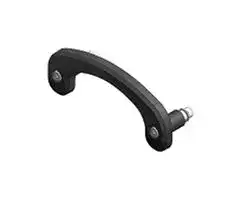


HT9Z-3PHZ
HOOK, CONTROL STATION, ALUMINUM/PLASTIC
- Manufacturer: IDEC
- Product type: Industrial Switch Accessories
- Accessory Type:Hook; For Use With:IDEC HT3P Safety Commander Series Control Station; Product Range:HT3P Safety Commander Series 57AJ3458
- For Use With: IDEC HT3P Safety Commander Series Control Station
- Product Range: HT3P Safety Commander Series
- Accessory Type: Hook
| Delivery and price | |
|---|---|
| Units per pack | 50 |
| Price | 28.08 € |
| Current stock | 10+ |
| Lead time | 30 days |

Safety Commander™

HT3P

Safety Commander[™] Enable industrial tablets to provide operation safety

## Tablet use on the production floor is on the rise, and safety is an issue

Tablets are more often used as control terminals at manufacturing sites. From the standpoint of ISO/IEC safety standards, when tablets or other operation devices are used near sources of danger from machinery, the tablets need to be equipped with safety devices, such as an enabling switch and an emergency stop switch for immediately shutting down the machinery.

**==> picture [160 x 50] intentionally omitted <==**

**----- Start of picture text -----**<br>
+ =<br> ?<br>Tablet Safety products<br>**----- End of picture text -----**<br>


**==> picture [39 x 7] intentionally omitted <==**

**----- Start of picture text -----**<br>
Safety products<br>**----- End of picture text -----**<br>


## Adapts to both vertical and horizontal use

With Safety Command™, a tablet can be used in both vertical and horizontal orientation, thanks to a rotating holder. The emergency stop switch, which must be accessed instantly, can also be positioned for ease of use.

Vertical right-hand and left-hand use

**==> picture [203 x 9] intentionally omitted <==**

**----- Start of picture text -----**<br>
Horizontal left-hand use Horizontal right-hand use<br>**----- End of picture text -----**<br>


## Safety device easily attaches to tablet

With Safety Commander™, a tablet can be readily equipped with a safety device

**==> picture [138 x 43] intentionally omitted <==**

**----- Start of picture text -----**<br>
+ =<br>(=.<br>Holds the tablet Safety Commander™<br>**----- End of picture text -----**<br>


## Operability regardless of handedness

The ergonomic holder design and enabling switch position result in ease of holding and operability. Held with left hand Held with right hand ee

## Improves safety and operability

With Safety Commander™, tablets now come with safety. Operability is also improved by the ergonomic design. Furthermore, lower equipment cost and higher work efficiency can be achieved.

2

Tablet size: 8 to 11 inches

**==> picture [85 x 8] intentionally omitted <==**

**----- Start of picture text -----**<br>
Thickness: up to 24mm (*1)<br>**----- End of picture text -----**<br>


## Fit tablets of various sizes i ~~SS~~

The adjustable docking structure fits screen sizes of 8 to 11 inches. Safety Commander™ can also be attached to rugged tablets with thicknesses of 10 to 24mm (*1) by using a spacer accessory.

*1) Standard thickness: up to 10mm

When accessory "tablet thickness adjustment kit A" is used: up to 18mm When accessory "tablet thickness adjustment kit B" is used: up to 24mm

## Emergency stop switch with LED indicator

Equipped with a safety lock mechanism, safe break action structure, and direct opening action. The LED indicator shows the enabled status of the emergency stop switch.

## Three-position enabling switch

Safety during work operations is assured by the ergonomically designed three-position action (OFF➞ ON➞OFF) for avoiding danger.

**==> picture [13 x 5] intentionally omitted <==**

**----- Start of picture text -----**<br>
1.2m<br>**----- End of picture text -----**<br>


## Rugged construction with drop resistance of 1.2 meters ~~_~~

Designed for assurance, the product has passed drop tests assuming accidental drop or impact while carrying. (*1)

- *1)  Drop resistance has been tested for tablet weights up to 1.1 kilogram. Note: Drop protection of the product or tablet is not guaranteed.

## IP54 protection

Usable even in dusty environments or when exposed to splashing or spraying.

## USB charging port

For charging the tablet, with no worries about losing battery power during use.

* 5V DC-1.5A output

USB port: Type-C

## Key locking function

Locks down the telescope brackets.

• Photo shows the product mounted on a commercially-available tablet.

3

Combining Safety Commander™ with a tablet solves common problems on the work floor

## Can the need for dedicated terminal development be eliminated?

Is there a way to improve touch panel functions?

## **BEFORE**

Creating dedicated terminal devices in house can be costly, including the development costs. Keeping up with changing needs as features are removed or upgraded is also a burden.

## **BEFORE**

A dedicated touch panel is used for equipment control. We would like to increase the functions but also want to keep costs down.

## **AFTER** Lo]

Combining Safety Commander™ with a tablet results in a low-cost dedicated control terminal. ~~Hardware development is unnecessary,~~ and discontinuations or upgrades can be ~~handled readily at the software level~~ . Safety and security are also maintained.

## **AFTER** [

Combining Safety Commander™ with a tablet enables use for process control, viewing of drawings, and operation log checking. Along with ~~safety assurance, on-site work effciency is improved. Costs have also been kept low.~~

Can the number of different touch panels on panel boards be reduced?

Can an existing tablet be used for equipment control?

## **BEFORE**

Individual touch panels are installed on multiple panel boards, but this is inefficient as the panels are used infrequently.

## **BEFORE**

We already have a tablet for process control and would like to use it also for controlling equipment, but are concerned about safety.

## **AFTER** [

Using one detachabl ~~e Safety Commander™ and tablet, operations can be performed in multiple workplaces.~~ It is no longer necessary to install permanent touch panels in each workplace. ~~Safety is also improved,~~ since the safety features are right at hand.

**==> picture [79 x 198] intentionally omitted <==**

**----- Start of picture text -----**<br>
+ ?<br>‘FS<br> saved on equipment costs.<br>+<br>**----- End of picture text -----**<br>


## **AFTER** [|

By simply attaching safety features onto the tablet, we were able to use it for ~~equipment control~~ . We also ~~saved on equipment costs.~~

4

## Application examples

Robot teaching

Manual control of AGVs and AMRs

Control of automobile production lines and conveyor lines

Add safety to tablets used on the factory floor

Control of large equipment or equipment operations

Control of semiconductor manufacturing equipment, and chip placement machines.

**==> picture [114 x 7] intentionally omitted <==**

**----- Start of picture text -----**<br>
Maintain automated car parking systems<br>**----- End of picture text -----**<br>


Utilize Web browser functions on PLCs

Safer use of industrial tablets

## The story of Safety Commander™ development

**==> picture [466 x 60] intentionally omitted <==**

**----- Start of picture text -----**<br>
*1)  SUI (Solid User Interface)<br>For more than 20 years, IDEC has been engaged in development of devices  Human/machine interface based on operation of<br>that merge SUI (*1) and GUI (*2). As tablets have come into wide use, we  physical switches, buttons and other such parts.<br>developed the Safety Commander™, aiming to add easy-to-use touch panels  *2)  GUI (Graphical User Interface)<br>Human/machine interface based on operation of<br>and reliable switches while maintaining high ergonomics and ruggedness.  virtual parts displayed on a screen, such as figures<br>and icons.<br>**----- End of picture text -----**<br>


**==> picture [457 x 139] intentionally omitted <==**

**----- Start of picture text -----**<br>
1997  ~ 2003  ~ 2019 2021<br>Development of control & teaching pendants that combine the operating/display devices of each era with the concept of merging SUI and GUI<br>pine oc in pet ni ne<br>om os 4 ‘age!<br>HG2R / S HG1T HG1H HG1U HG1P HT3P<br>Large LCD touch panel. Equipped with   Small LCD + mechanical switches.  High-resolution touch panel + mechanical  Tablet + mechanical switches<br>“CC click” providing operating feedback Membrane and mechanical switches  switches Merged tablet with emergency stop<br>became mainstream  switch/enabling switch<br>**----- End of picture text -----**<br>


5

## HT3P Safety Commander[™]

## Enhance safety and usability

|➀||||||
|---|---|---|---|---|---|
||||||➁|
|||||||
||||||➂|
|➄|||➅|||
||||||➆|
|➃||||a|➉|
||||||➇|
|C€|BK||\||➈|
||||:|||
|||||||
|||No.|Name|Details||
|||1|Emergencystopswitch|XA1E-LV302Q4R(IDEC)||
|||2|Enablingswitch|HE5B-M2PY(IDEC)||
|||3|Handgrip|Gripof theproduct||
|||4|Hook|Tablet holding part||
|||5|Emergencystopswitch unit|Tablet holding part||
|||6|Supportpad|Tablet holding part||
|||7|Extendable lock lever|Extendable lever for tablet holder||
|||8|Extendable lock key|Keylock for extendable lever||
|||9|Cable|5m wire||
|||10|USB interface|USB charging port USBport: Type-C||
|||11|Hand strap|Accessory||


## HT3P

Main unit

|Name|Table size|Part no.<br>(Ordering no.)|Part no.<br>(Ordering no.)|
|---|---|---|---|
|Safety Commander™|8 to 11 inches|HT3P-SLNP-5M|Switches used:<br>Emergency stop switch XA1E-LV302Q4R<br>Enabling switch HE5B-M2PY|


## Maintenance Parts

|Name<br>~~a~~|Shape|Specification<br>~~ee~~|Part no.<br>(Ordering no.)<br>~~ee~~|Package Quantity<br>~~ee~~|Remarks<br>~~ee~~|
|---|---|---|---|---|---|
|Hand strap<br>~~a~~||Artificial leather<br>~~ee~~|HT9Z-3PS1<br>~~ee~~|1<br>~~ee~~|Back hand hold type<br>~~ee~~|
|Extendable lock release<br>key<br>~~a~~||Metal<br>~~ee~~|HT9Z-3PK01<br>~~ee~~|2<br>~~ee~~|–<br>~~ee~~|
|Sponge sheet for<br>thickness adjustment||EVA foam<br>Height: 4mm|HT9Z-3PHA04|1|Used when there is a gap between the<br>tablet and tablet holder|
|Hook||Frame: Plastic<br>Spacer: Aluminum<br>Rubber tube: Rubber|HT9Z-3PHZ|1|Hook to hold the tablet|


6

HT3P  Safety Commander™

Accessories Dimensions in mm.

|Name<br>Shape<br>Material<br>Part no.<br>(Ordering no.)<br>Package<br>Quantity<br>Remarks<br>Wall mount bracket<br>Stainless steel<br>HT9Z-3PF1<br>1<br>For mounting on walls<br>The mounting centers of the screws comply with<br>VESA standards<br>120<br>96<br>90<br>Tablet thickness<br>adjustment kit A<br>Spacer: Aluminum<br>Rubber tube: Rubber<br>HT9Z-3PHB08<br>Spacer: 4<br>Rubber tube: 4<br>For tablets with 11 to 18mm thickness tablets<br>Tablet thickness<br>adjustment kit B<br>Spacer: Aluminum<br>Rubber tube: Rubber<br>HT9Z-3PHB14<br>Spacer: 4<br>Rubber tube: 4<br>For tablets with 19 to 24mm thickness<br>Neck strap<br>Artificial leather<br>HT9Z-3PS2<br>1<br>To wear around the neck.<br>For safety, the strap will loosen when a certain<br>amount of load is applied.<br>~~a~~<br>~~ican~~<br>~~a~~<br>~~ee ee ee~~<br>~~ee~~<br>~~| i278~~<br>~~|le~~<br>~~ee~~|Name<br>Shape<br>Material<br>Part no.<br>(Ordering no.)<br>Package<br>Quantity<br>Remarks<br>Wall mount bracket<br>Stainless steel<br>HT9Z-3PF1<br>1<br>For mounting on walls<br>The mounting centers of the screws comply with<br>VESA standards<br>120<br>96<br>90<br>Tablet thickness<br>adjustment kit A<br>Spacer: Aluminum<br>Rubber tube: Rubber<br>HT9Z-3PHB08<br>Spacer: 4<br>Rubber tube: 4<br>For tablets with 11 to 18mm thickness tablets<br>Tablet thickness<br>adjustment kit B<br>Spacer: Aluminum<br>Rubber tube: Rubber<br>HT9Z-3PHB14<br>Spacer: 4<br>Rubber tube: 4<br>For tablets with 19 to 24mm thickness<br>Neck strap<br>Artificial leather<br>HT9Z-3PS2<br>1<br>To wear around the neck.<br>For safety, the strap will loosen when a certain<br>amount of load is applied.<br>~~a~~<br>~~ican~~<br>~~a~~<br>~~ee ee ee~~<br>~~ee~~<br>~~| i278~~<br>~~|le~~<br>~~ee~~|Name<br>Shape<br>Material<br>Part no.<br>(Ordering no.)<br>Package<br>Quantity<br>Remarks<br>Wall mount bracket<br>Stainless steel<br>HT9Z-3PF1<br>1<br>For mounting on walls<br>The mounting centers of the screws comply with<br>VESA standards<br>120<br>96<br>90<br>Tablet thickness<br>adjustment kit A<br>Spacer: Aluminum<br>Rubber tube: Rubber<br>HT9Z-3PHB08<br>Spacer: 4<br>Rubber tube: 4<br>For tablets with 11 to 18mm thickness tablets<br>Tablet thickness<br>adjustment kit B<br>Spacer: Aluminum<br>Rubber tube: Rubber<br>HT9Z-3PHB14<br>Spacer: 4<br>Rubber tube: 4<br>For tablets with 19 to 24mm thickness<br>Neck strap<br>Artificial leather<br>HT9Z-3PS2<br>1<br>To wear around the neck.<br>For safety, the strap will loosen when a certain<br>amount of load is applied.<br>~~a~~<br>~~ican~~<br>~~a~~<br>~~ee ee ee~~<br>~~ee~~<br>~~| i278~~<br>~~|le~~<br>~~ee~~|
|---|---|---|
|General Specifications|||
|Environmental<br>specifications<br>Operating temperature<br>-20 to +55oC<br>(USB power supplied while holding the grip:<br>-20 to +35oC)<br>Operatingtemperature<br>-20 to +55oC<br>Operatinghumidity<br>45 to 85%RH(without condensation)<br>Storage humidity<br>45 to 85%RH(without condensation)<br>Pollution degree<br>3<br>Electrical<br>specifications<br>(*2)<br>Rated input voltage<br>XA1E illuminated part: 24V DC±10%<br>USBpower input: 24V DC –15%/+20%(*1)<br>Rated input voltage<br>60V<br>Contact<br>rating<br>(*3)<br>XA1E-LV302Q4R<br>(Illuminated type)<br>2A/30V DC (resistive load)<br>1A/30V DC(inductive load)<br>HE5B-N2PY<br>1A/30V DC (resistive load)<br>0.7A/30V DC(inductive load)<br>EMC<br>ImmunityZone<br>Zone A<br>*1)  If there is a risk of malfunction or destruction to the USB power<br>supply or tablet due to noise from the connected power supply, use<br>a dedicated USB power supply power supply that is independent of<br>other power supplies.<br>*2)  Safety approval ratings<br>UL certification Overall Device: Rated Class 2<br>Switch Contact: 30V DC/0.7A Resistive<br>Illumination for Switch: 24V DC/11mA<br>USB Power Supply Input: 24V DC/0.5A<br>USB Power Output: 5V DC/1.5A<br>Maximum ambient temperature: 40°C<br>Environmental rating: Type 1<br>Certified with a maximum tablet weight of 1.1 kg<br>*3) Product specifications of consisting items<br>*4) Except when connecting a USB cable.<br>~~TT~~<br>~~————~~<br>~~f=~~|||
|Mechanical<br>specification<br>Vibration<br>5 to 8.4Hz: amplitude: 3.5mm<br>8.4 to 150Hz acceleration: 9.8m/s²<br>(2 hours on each of 3 directions)<br>Shock<br>147m/s², 11ms<br>(5 times on each of 6 directions)<br>Construction<br>Specifications<br>Degree ofprotection<br>IP54(*4)<br>Table size<br>Tablet diagonal length: 234 to 300mm<br>(when expanded: up to 320mm)<br>Screen size : 8 to 11 inch<br>Compatible tablet<br>thickness (*5)<br>Standard thickness: up to 10mm (*6)<br>Weight (approx.) (*7)<br>530g (Approx.) (Excluding Cable)<br>980g (Approx.) (IncludingCable)<br>Tablet holder rotation angle 200° Approx.<br>Housing<br>Black<br>*5) Some tablets may not apply depending on the shape.<br>*6)  If the tablet does not have enough thickness, use a sponge sheet for<br>adjusting the thickness.<br>When the tablet thickness is 11 to 18mm, use HT9Z-3PHB08, when<br>the thickness is 19 to 2mm, use HT9Z-3PHB14 as additional parts.<br>*7) Excluding hand strap and other accessories.<br>~~ae~~<br>~~ee~~<br>~~——EE~~|||
|USB specifications<br>Interface<br>USB Type-C connector<br>Power supply only: 5V DC-1.5A output|||
|Applicable standards<br>IEC/EN 60947-5-1<br>IEC/EN 60947-5-5 (XA1E-LV302Q4R)<br>IEC/EN 60947-5-8 (HE5B-M2PY)<br>UL 508<br>UL 60947-1<br>UL 60947-5-1<br>UL 60947-5-5<br>Safety standards IEC/EN 61010-1<br>IEC/EN 61010-2-201<br>Applicable<br>standards for use<br>ISO 12100<br>IEC/EN 60204-1<br>EMC standards<br>IEC/EN 61131-2<br>~~=~~|||
|Certification standard<br>UL508<br>UL60947-5-5<br>~~ee~~|||


7

™

HT3P  Safety Commander

Dimensions in mm

## Dimensions

**==> picture [533 x 717] intentionally omitted <==**

**----- Start of picture text -----**<br>
Cable<br>Length: Approx. 0.3m<br>(Grip unit and emergency stop switch unit (EMSW unit))<br>Tablet holder unit   Tablet holder unit<br>Maximum expansion Minimum expansion<br>141.5<br>Emergency stop switch unit<br>105.0 (EMSW unit)<br>Emergency stop switch unit<br>Part no.: XA1E-LV302Q4R(IDEC)<br>Tablet holder unit<br>USB interface<br>Hook<br>Hook unit<br>Enabling switch<br>Part no.: HE5B-M2PY (IDEC)<br>132.4<br>Grip unit<br>Lock lever for<br>expansion<br>Cable<br>Length : 5m<br>(Host device connection)<br>ø7.7<br>Lock button<br>External Interfaces<br>335.1<br>261.5<br>**----- End of picture text -----**<br>


**==> picture [247 x 20] intentionally omitted <==**

**----- Start of picture text -----**<br>
Tablet holder unit   Tablet holder unit<br>Maximum expansion Minimum expansion<br>**----- End of picture text -----**<br>


8

™

HT3P  Safety Commander

## External Interface

**==> picture [248 x 176] intentionally omitted <==**

**----- Start of picture text -----**<br>
Shielded cable<br>6P×AWG24 (Outside diameter of insulator ø0.97mm)<br>Finish outside diameter ø7.7mm<br>Emergency Stop Switch connector (*1)<br>Manufacturer : J.S.T.MFG.CO.,LTD.<br>Type No. : PAP-06V-S<br>Number of lines : 6<br>4 1 6 1<br>Semi-strip for<br>USB power supply<br>Gray Yellow<br>(FE) (+) Enabling switch connector (*1)<br>Manufacturer : J.S.T.MFG.CO.,LTD.<br>Type No. : PAP-04V-S<br>Yellow (white) Number of lines : 4<br>(-)<br>**----- End of picture text -----**<br>


- *1)  Disconnect the connector if it is not necessary.

When mounting the connector to the end of the cable, select the connector depending on the specifications of the cable and the operating environment. Recommended connector: CA-12PIN128007-1619709 (PHOENIX CONTACT)

The connector part is not UL approved.

||Connector terminal no.|Wire color|Function name|
|---|---|---|---|
|Emergency stop switch|Emergency stop switch<br>1<br>2<br>3<br>4<br>5<br>6|Red|LED lamp (24V DC)|
|||Black|LED lamp (0V DC)|
|||Green|Contact 1 (NC)|
|||Green (white)|Contact 1 (NC)|
|||Red (white)|Contact 2 (NC)|
|||Black (white)|Contact 2 (NC)|
|Enabling switch|1<br>2<br>3<br>4|Brown|Contact 1 (NC)|
|||Brown (white)|Contact 1 (NC)|
|||Blue|Contact 2 (NC)|
|||Blue (white)|Contact 2 (NC)|
|USB power supply|–|Yellow|+ (24V DC)|
|||Yellow (white)|- (0V)|
|||Gray|FE|


## System Configuration

**==> picture [288 x 204] intentionally omitted <==**

**----- Start of picture text -----**<br>
Safety Commander™<br>Wire<br>Emergency Stop<br>SW<br>24V DC<br>LED<br>Enabling Wire<br>SW<br>24V DC 24V power Controller<br>supply<br>Tablet<br>24V DC<br>/USB 5V<br>Converter<br>USB port<br>Type-C<br>**----- End of picture text -----**<br>


Power supply

9

™

HT3P  Safety Commander

## Tablet holder unit rotating mechanism

- Tablet base installing position

**==> picture [277 x 179] intentionally omitted <==**

**----- Start of picture text -----**<br>
Use the tablet vertically and hold<br>with right hand or left hand<br>Use the tablet horizontally and hold Use the tablet horizontally and hold<br>with right hand with left hand<br>**----- End of picture text -----**<br>


- Rotatable angle of the tablet holder unit relative to the grip unit (*1)

**==> picture [236 x 238] intentionally omitted <==**

**----- Start of picture text -----**<br>
100°(Approx.) 100°(Approx.)<br>**----- End of picture text -----**<br>


*1) Do not force the tablet holder to rotate. Otherwise, damage may occur..

10

™

HT3P  Safety Commander

Safety Precautions Turn off the power before installation, removal, wiring, maintenance, and inspection. Failure to turn power off may cause electrical shock or fire hazard. ~~[ee]~~ Instructions

## Instructions ~~Lo~~

Be sure to read the instruction sheet before installation, wiring, operation, and maintenance of the product.

For details on installation, wiring, and maintenance, see the Instruction sheet and User’s Manual from the URL below. URL: https://product.idec.com/?product=HT3P

- When using the HT3P in applications which require high level of safety, add a fail-safe or backup functionality, and verify an adequate level of safety using the product specifications.

- Turn off the power to the HT3P before installation, removal, wiring, maintenance, and inspection of HT3P.Failure to turn power off may cause electrical shock or fire hazard.

- Special expertise is required to install and wire the HT3P. Users without such expertise must not perform installation or wiring.

- An emergency circuit must be configured outside of the HT3P by using the emergency stop switch mounted on HT3P unit.

- Connect the emergency stop switch and the enabling switch on the HT3P to function as either a category 0 or category 1 stop in accordance with IEC/EN60204-1.

- Do not, under any circumstances, hold the enabling switch on the HT3P in position 2 with tape, string, or deform the rubber cover. The intrinsic function of the enabling switch will be lost, and the enabling switch may not work in case of an emergency situation.

- When using the HT3P, place your finger firmly on the enabling switch.

- Perform regular checks to confirm that the emergency stop switch and enabling switch work properly. It is extremely dangerous if the enabling switch no longer returns to position 1 due to a foreign object becoming lodged in the switch because position 2 will be maintained even when you remove your hand.

- The enable functionality must be evaluated with the robot.

- Stop using the HT3P if it is accidentally dropped or exposed to significant shocks, check for damage, and confirm that its various functions work safely and correctly.

- Malfunction may result due to noise. Follow the instructions below –  Set the FE terminals to class D grounding (Class 3 grounding : Grounding resistance: 100Ω or less).

- Do not connect the grounding conductor to the grounding conductor of the power unit.

- Do not supply power to the USB with foreign matter or water on the product.

- HT3P is designed for use in pollution degree 3 environment. Use the HT3P under pollution degree 3 environment. (according to IEC606641 rating)

- Be sure to prevent metal fragments or wire chips from dropping inside the HT3P housing. Ingress of such fragments and chips may cause fire hazard, damage, and malfunction.

- Use a power supply of the rated value. Using a wrong power supply or wiring in reverse polarity may cause fire hazard and damage.

- Make sure of safety before starting and stopping HT3P. Incorrect operation of HT3P may cause mechanical damage or accidents.

- Do not attempt to disassemble, repair or modify HT3P. This can create the risk of fire or electrical shock.

- When disposing of HT3P, do so as an industrial waste.

- Install according to the instructions. Improper installation may result in, failure, electrical shock, fire hazard, or malfunction.

- Use the HT3P only for its intended purpose. Otherwise functions of the product may be impaired.

- Please note that some tablets may interfere with power or volume buttons at installation.

## 3-position operation of enabling switch

**==> picture [225 x 120] intentionally omitted <==**

**----- Start of picture text -----**<br>
General Pushbutton Switch<br>3-position Enabling Switch<br>(2-position)<br>Position 1 ee ee<br>Buttonreleased OFF OFF<br>1. Press 1. Press<br>Position 2 2. Release lightly 2. Release<br>Buttonpressed ON ON<br>3. Press 4. Release<br>Position 3 fully<br>Button No position<br>pressed OFF<br>fully<br>Terminal Movable<br>Contact Contact<br>|<br>**----- End of picture text -----**<br>


- Do not pull or apply load to the cable, USB cable, or the connector. Otherwise, fire or malfunction may occur.

- Use a dedicated optional neck strap. Be careful not to get neck straps getting caught in machines during operation.

- Use the emergency stop switch indicator LED to determine whether the emergency stop switch is enabled or disabled. When the product is disconnected from the control device (when the emergency stop switch is disabled), make sure to store the product where it is not accessible to the operator so that it will not accidentally be operated.

- HT3P is designed for indoor use only (Not for outdoor use)

- Do not apply strong shock such as dropping the HT3P. Otherwise damage or malfunction will result.

- Use of the product in high temperature or high-humidity environments, or in locations where it is exposed to condensation, corrosive gas or large shock loads, can create the risk of electric shock or fire.

11

™

HT3P  Safety Commander

## Ordering Terms and Conditions

## Thank you for using IDEC Products.

By purchasing products listed in our catalogs, datasheets, and the like (hereinafter referred to as “Catalogs”) you agree to be bound by these terms and conditions. Please read and agree to the terms and conditions before placing your order.

## 1. Notes on contents of Catalogs

- (1)  Rated values, performance values, and specification values of IDEC products listed in this Catalog are values acquired under respective conditions in independent testing, and do not guarantee values gained in combined conditions.

- Also, durability varies depending on the usage environment and usage conditions.

- (2)  Reference data and reference values listed in Catalogs are for reference purposes only, and do not guarantee that the product will always operate appropriately in that range.

- (3)  The specifications / appearance and accessories of IDEC products listed in Catalogs are subject to change or termination of sales without notice, for improvement or other reasons.

- (4) The content of Catalogs is subject to change without notice.

## 2. Note on applications

- (1)  If using IDEC products in combination with other products, confirm the applicable laws / regulations and standards.

Also, confirm that IDEC products are compatible with your systems, machines, devices, and the like by using under the actual conditions. IDEC shall bear no liability whatsoever regarding the compatibility with IDEC products.

- (2)  The usage examples and application examples listed in Catalogs are for reference purposes only. Therefore, when introducing a product, confirm the performance and safety of the instruments, devices, and the like before use. Furthermore, regarding these examples, IDEC does not grant license to use IDEC products to you, and IDEC offers no warranties regarding the ownership of intellectual property rights or non-infringement upon the intellectual property rights of third parties.

- (3) When using IDEC products, be cautious when implementing the following. i. Use of IDEC products with sufficient allowance for rating and performance

   - ii.  Safety design, including redundant design and malfunction prevention design that prevents other danger and damage even in the event that an IDEC product fails

   - iii.  Wiring and installation that ensures the IDEC product used in your system, machine, device, or the like can perform and function according to its specifications

- (4)  Continuing to use an IDEC product even after the performance has deteriorated can result in abnormal heat, smoke, fires, and the like due to insulation deterioration or the like. Perform periodic maintenance for IDEC products and the systems, machines, devices, and the like in which they are used.

- (5)  IDEC products are developed and manufactured as general-purpose products for general industrial products. They are not intended for use in the following applications, and in the event that you use an IDEC product for these applications, unless otherwise agreed upon between you and IDEC, IDEC shall provide no guarantees whatsoever regarding IDEC products.

   - i. Use in applications that require a high degree of safety, including nuclear power control equipment, transportation equipment (railroads / airplanes / ships / vehicles / vehicle instruments, etc.), equipment for use in outer space, elevating equipment, medical instruments, safety devices, or any other equipment, instruments, or the like that could endanger life or human health

   - ii.  Use in applications that require a high degree of reliability, such as provision systems for gas / waterworks / electricity, etc., systems that operate continuously for 24 hours, and settlement systems

## 3. Inspections

We ask that you implement inspections for IDEC products you purchase without delay, as well as thoroughly keep in mind management/maintenance regarding handling of the product before and during the inspection.

## 4. Warranty

- (1) Warranty period

The warranty period for IDEC products shall be one (1) year after purchase or delivery to the specified location. However, this shall not apply in cases where there is a different specification in the Catalogs or there is another agreement in place between you and IDEC.

- (2) Warranty scope

Should a failure occur in an IDEC product during the above warranty period for reasons attributable to IDEC, then IDEC shall replace or repair that product, free of charge, at the purchase location / delivery location of the product, or an IDEC service base. However, failures caused by the following reasons shall be deemed outside the scope of this warranty.

i. The product was handled or used deviating from the conditions / environment listed in the Catalogs

- ii. The failure was caused by reasons other than an IDEC product

iii. Modification or repair was performed by a party other than IDEC

- iv. The failure was caused by a software program of a party other than IDEC

- v. The product was used outside of its original purpose

- vi.  Replacement of maintenance parts, installation of accessories, or the like was not performed properly in accordance with the user’s manual and Catalogs

vii. The failure could not have been predicted with the scientific and technical standards at the time when the product was shipped from IDEC

- viii.  The failure was due to other causes not attributable to IDEC (including cases of force majeure such as natural disasters and other disasters)

Furthermore, the warranty described here refers to a warranty on the IDEC product as a unit, and damages induced by the failure of an IDEC product are excluded from this warranty.

## 5. Limitation of liability

The warranty listed in this Agreement is the full and complete warranty for IDEC products, and IDEC shall bear no liability whatsoever regarding special damages, indirect damages, incidental damages, or passive damages that occurred due to an IDEC product.

## 6. Service scope

The prices of IDEC products do not include the cost of services, such as dispatching technicians. Therefore, separate fees are required in the following cases.

- (1)  Instructions for installation / adjustment and accompaniment at test operation (including creating application software and testing operation, etc.)

- (2) Maintenance inspections, adjustments, and repairs

- (3) Technical instructions and technical training

- (4) Product tests or inspections specified by you

The above content assumes transactions and usage within your region. Please consult with an IDEC sales representative regarding transactions and usage outside of your region. Also, IDEC provides no guarantees whatsoever regarding IDEC products sold outside your region.

- iii.  Use in applications where the product may be handled or used deviating from the specifications or conditions / environment listed in the Catalogs, such as equipment used outdoors or applications in environments subject to chemical pollution or electromagnetic interference If you would like to use IDEC products in the above applications, be sure to consult with an IDEC sales representative.

##

## **www.idec.com**

6-64, Nishi-Miyahara-2-Chome, Yodogawa-ku, Osaka 532-0004, Japan

**USA** IDEC Corporation Tel: +1-408-747-0550 opencontact@idec.com **Germany** APEM GmbH Tel: +49-40-25 30 54-0 service@eu.idec.com **Singapore** IDEC Izumi Asia Pte. Ltd. Tel: +65-6746-1155 info@sg.idec.com **Thailand** IDEC Asia (Thailand) Co., Ltd Tel: +66-2-392-9765 sales@th.idec.com **Australia** IDEC Australia Pty. Ltd. Tel: +61-3-8523-5900 sales@au.idec.com **India** IDEC Controls India Private Limited Tel: +91-80679-35328 info_india@idec.com

**Taiwan** IDEC Taiwan Corporation Tel: +886-2-2577-6938 service@tw.idec.com **Hong Kong** IDEC Izumi (H.K.) Co., Ltd. Tel: +852-2803-8989 info@hk.idec.com **China** IDEC (Shanghai) Corporation Tel: +86-21-6135-1515 idec@cn.idec.com Beijing Branch Tel: +86-10-6581-6131 idec@cn.idec.com Guangzhou Branch Tel: +86-20-8362-2394 idec@cn.idec.com **Japan** IDEC Corporation Tel: +81-6-6398-2527 jp_marketing@idec.com

**Taiwan Hong Kong China**

**==> picture [96 x 33] intentionally omitted <==**

Specifications and other descriptions in this brochure are subject to change without notice. Info ~~rmation in this brochure is current as of February, 2021.~~ 2021 IDEC Corporation, All Rights Reserved. 12 EP1746-1
Updated at April 23, 2026
Founded in 1945, IDEC is a globally recognized leader in industrial automation, machine safety, and control products. Renowned for pioneering innovations in Human-Machine Interface (HMI) systems, the company is dedicated to creating a safe and efficient harmony between advanced workplace technology and human operators. At the core of IDEC’s extensive portfolio is a comprehensive selection of high-performance relays designed for demanding industrial environments. This includes a broad range of electromechanical power relays, solid-state relays, contactors, and critical safety relays, supported by a wide array of specialized relay accessories to ensure reliable and efficient switching. Beyond switching components, IDEC provides complete solutions for modern control panels and automated systems. Their robust engineering extends to advanced panel displays and instrumentation, precision light sensors, and dependable AC/DC power converters. With additional offerings in industrial switches, visual signaling units, and DIN rail terminal blocks, IDEC equips engineers with the high-quality components required to build secure, next-generation automation infrastructure.
About Novapart
Novapart is a B2B electronic component broker specialising in stock shortages and cost reduction. We source hard-to-find parts and identify compliant alternatives across a catalogue of 410,000+ components from 500+ manufacturers.
Learn more →Stock Shortage Specialist
When a component is unavailable, discontinued or has an unacceptable lead time, we tap into our network of vetted European and Asian distributors to source what you need — without compromising on quality or traceability.
Request a quote →Compliant Alternatives
We identify pin-to-pin, electrically equivalent substitutes that meet the same certifications (RoHS, AEC-Q100, REACH) as your original specification — validated against datasheets, not just part numbers. Often at a lower cost.
BOM Analysis service →