
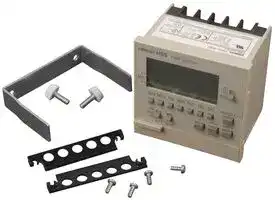


H5S-WB2
DIGITAL TIME SWITCH
- Manufacturer: OMRON INDUSTRIAL AUTOMATION
- Product type: Hour Meters
- Supply Voltage Min:; DIGITAL TIME SWITCH; Supply Voltage Min:100VAC; Supply Voltage Max:240VAC; Time Min:24h; Time Max:7Days; Panel Cutout Height:68mm; Panel Cutout Width:68mm; Product Range:-; Power
- Time Max: 7Days
- Time Min: 24h
- Product Range: -
- Panel Cutout Width: 68mm
- Supply Voltage Max: 240VAC
- Supply Voltage Min: 100VAC
- Panel Cutout Height: 68mm
| Delivery and price | |
|---|---|
| Units per pack | 1 |
| Price | 285.5 € |
| Current stock | 10+ |
| Lead time | 30 days |

**Digital Time Switch H5S**
CSM_H5S_DS_E_9_2
## **Easier, More Convenient Time Switches, with New 4-circuit Output and Yearly Models in Addition to 2-circuit Weekly Models**
- Independent Day Keys provide easier operation.
- Temporary holiday setting function makes it easy to turn OFF output for holidays and non-operating days.
- Settings can be made even with the Time Switch turned OFF.
- Test mode enables easy program checking.
- Complies with EMC Directives, UL/CSA, and other safety standards.
- Includes summer time (DST) adjustment. Yearly models also offer automatic switching to DST.
- Set value can be changed both upward and downward for speedier setting.
- Integrated temperature compensation circuit helps keep accurate time over a wide temperature range. (See note 1.)
For the most recent information on models that have been certified for safety standards, refer to your OMRON website.
- Includes time counter and total counter functions with alarm indicator. (See note 2.)
- Bank function allows program switching by an external input. (See note 3.)
- New 4-circuit output models with a compact, 72 × 72-mm DIN size added to the series.
- **Note: 1.** Available only on yearly models.
**2.** Available only on 2-circuit models.
**3.** Available only on weekly models.
## **Features**
## **Easier and More Convenient to Use**
## ■ **Simple Setting**
**Independent Day Keys make setting easy.**
**Up/down set value changing for speedy setting.**
## **Time Adjustment Function (See note.)**
The time can be set to 00 min 00 s by using an external input. The times on multiple Time Switches can also be easily synchronized.
**Temporary holidays (non-operating days) are also easy to set.** Weekly models: Specify the day. Yearly models: Specify the date.
## ■ **Convenient Functions**
## **Time Counter/Total Counter Functions (See note.)**
**==> picture [115 x 7] intentionally omitted <==**
**----- Start of picture text -----**<br>
Master Slave Slave<br>**----- End of picture text -----**<br>
This function makes it possible to monitor the total time that a load has been applied, or the total number of operating cycles. It allows the Time Switch to be used for managing maintenance.
**Note:** Equipped on 2-circuit models.
**==> picture [164 x 80] intentionally omitted <==**
**----- Start of picture text -----**<br>
With alarm indicator<br>wl 4 Fa. |<br>/ a/ <i, a, )<br> itrir= =<br>Shows total lamp ON time<br>se |ioe<br>**----- End of picture text -----**<br>
**1**
**H5S**
## **More Applications on New Series Models**
## a Yearly Models
## **Automatic Program Switching by Seasons**
The yearly operation can be set to automatically change the weekly program depending on the season. (See note.)
|Mar<br>Li|Apr<br>LitT|May<br>tT<br>tT|May<br>tT<br>tT|Jun<br>tT|}|Jul<br>|}tT|Jul<br>|}tT|Aug<br>tT<br>tT|Sep<br>tTtT|Oct<br>tTtT|Nov<br>tT<br>tT|Dec<br>tTyt|Dec<br>tTyt|Jan<br>ytTf|Feb<br>Tf|
|---|---|---|---|---|---|---|---|---|---|---|---|---|---|---|
|Spring<br>Summer<br>Autumn<br>Winter<br>Li tT<br>tT |} tT<br>tT tT tT<br>tT yt Tf|||||||||||||||
|Season<br>(See note 2.)|||Spring|||Summer|||Autumn|||Winter|||
|Program<br>example|||17:30 ON<br>21:00 OFF|||19:00 ON<br>22:00 OFF|||18:00 ON<br>21:00 OFF|||17:00 ON<br>21:00 OFF|||
## 4-circuit Models Cc
## **Space-saving, Economical 4-circuit Models Added to the Series**
The new 4-circuit models are 72 × 72-mm DIN size. Their spacesaving size allows use in more applications.
Control all four floors with a single unit. —on:
**Note:** Up to four seasons can be set for 4-circuit models, and up to two seasons for 2-circuit models.
## **Temperature Compensation Circuit Maintains Accurate Time**
A temperature compensation circuit is provided in the yearly models to maintain accurate time keeping even when the ambient temperature varies greatly. This ensures precise operation with minimal time lags all year round, regardless of temperature changes.
## **Model Number Structure**
## ■ **Model Number Legend**
**Note:** This model number legend includes combinations that are not available. Please check the “List of Models” for availability.
## **H5S-** @@@@@ **-** @ **1 2 3 4 5 6**
## **1. Control cycle**
- W: Weekly
- Y: Yearly
**2. Mounting method** None: Flush mounting
- F: Surface mounting/track mounting
## **3. Panel language**
B: English
A: Japanese
## **4. Number of outputs**
2: 2 circuits
- 4: 4 circuits
## **5. Supply voltage**
None: 100 to 240 VAC
D: 24 VDC
**6. Time accuracy**
None: Standard
X: With temperature compensation
**2**
**H5S**
## **Orderin Information g**
## ■ **List of Models**
|**Control cycle**|**Number of outputs**|**Mounting method**|**Supply voltage**|**Models**|
|---|---|---|---|---|
|Weekly|2 circuits|Flush mounting|100 to 240 VAC|H5S-WB2|
||||24 VDC|H5S-WB2D|
|||Surface mounting/<br>track mounting|100 to 240 VAC|H5S-WFB2|
||||24 VDC|H5S-WFB2D|
|Yearly|2 circuits|Flush mounting|100 to 240 VAC|H5S-YB2-X|
||||24 VDC|H5S-YB2D-X|
|||Surface mounting/<br>track mounting|100 to 240 VAC|H5S-YFB2-X|
||||24 VDC|H5S-YFB2D-X|
||4 circuits|Flush mounting|100 to 240 VAC|H5S-YB4-X|
||||24 VDC|H5S-YB4D-X|
|||Surface mounting/<br>track mounting|100 to 240 VAC|H5S-YFB4-X|
||||24 VDC|H5S-YFB4D-X|
## ■ **Accessories (Order Separately)**
|**Name**|**Model**|
|---|---|
|**Protective Cover**|Y92A-72C|
|**Track Mounting Base**|Y92F-90|
|**Large Terminal Cover (in pairs)**|Y92A-72H|
## **S ecifications p**
## ■ **Ratings**
|■**Ratings**|■**Ratings**|■**Ratings**||||
|---|---|---|---|---|---|
|**Item**|||**Weekly 2-circuit Models**<br>**(H5S-W**@**2)**|**Yearly 2-circuit Models**<br>**(H5S-Y**@**2)**|**Yearly 4-circuit Models**<br>**(H5S-Y**@**4)**|
|**Rated supply voltage**|||100 to 240 VAC (50/60 Hz), 24 VDC (See note 1.)|||
|**Operating voltage range**|||AC: 85% to 110% rated supply voltage<br>DC: 85% to 120% rated supply voltage|||
|**Power consumption**|||Approx. 2.9 VA at 264 VAC 60 Hz<br>Approx. 0.8 W at 28.8 VDC|Approx. 3.2 VA at 264 VAC 60 Hz<br>Approx. 0.9 W at 28.8 VDC|Approx. 3.5 VA at 264 VAC 60 Hz<br>Approx. 1.0 W at 28.8 VDC|
|**Control**<br>**outputs**|<br>**Number of circuits**||SPST-NO×2 circuits||SPST-NO×4 circuits|
||**Circuits**||Power supplycircuit and other (no-voltage) circuit|||
||**Capacity**|**Resistive load**<br>**(cos**φ **= 1)**|15 A at 250 VAC (See note 2.)||3 A at 250 VAC|
|||**Inductive load**|10 A at 250 VAC (cosφ = 0.7)||2 A at 250 VAC (cosφ = 0.4)|
|**Ambient operating temperature**|||−10 to 55°C(with no icingor condensation)|||
|**Ambient operating humidity**|||25 to 85%|||
|**Storage temperature**|||−25 to 65°C(with no icingor condensation)|||
|**Case color**|||Lightgray(Munsell 5Y7/1)|||
- **Note: 1.** Do not use inverter output as a power supply. For details, refer to _Precautions for Safe Use_ , item 24, on page 12.
**2.** The capacity is 15 A per circuit, but derating of the total current for two circuits is required as shown below depending on the ambient temperature.
**==> picture [158 x 88] intentionally omitted <==**
**----- Start of picture text -----**<br>
40<br>30<br>20<br>10<br>0<br>10 0 20 40 50 55 60 80<br>Ambient temperature (°C)<br>Total current (A)<br>**----- End of picture text -----**<br>
**3**
**H5S**
## ■ **Characteristics**
|**Item**|**Item**|**Weekly 2-circuit Models**<br>**(H5S-W**@**2)**|**Yearly 2-circuit Models**<br>**(H5S-Y**@**2)**|**Yearly 4-circuit Models**<br>**(H5S-Y**@**4)**|
|---|---|---|---|---|
|**Accuracy of operating**<br>**time**||±0.01%±0.05 s max. (See note 1.)<br>The±0.01% value applies to the set time interval.|||
|**Setting error**|||||
|**Influence of voltage**|||||
|**Influence of temperature**|||||
|**Cyclic error**||±15 sper month(at 25°C)|±15 sper month(at−10 to 45°C),±20 sper month(at 45 to 55°C)||
|**Memory protection**||Continuous use: 5years min.(at 25°C) (See note 2.)|||
|**Insulation resistance**||100 MΩmin. (between current-carrying terminals and exposed non-current carrying metal parts, between operation<br>circuit and control output circuit, between control output circuits, and between non-continuous contacts.)|||
|**Dielectric strength**||2,950 VAC, 50/60 Hz for 1 min (between current-carrying terminals and exposed non-current carrying metal parts)<br>2,000 VAC, 50/60 Hz for 1 min (between operation circuit and control output circuit, and between control output<br>circuits)<br>1,000 VAC, 50/60 Hz for 1 min(between non-continuous contacts)|||
|**Noise immunity**||±1,500 V (between power terminals, for AC power models),±500 V (between power terminals, for DC power models)<br>Square-wave noise bynoise simulator(pulse width: 100 ns, for 1μs, 1-ns rise time)|||
|**Vibration**<br>**resistance**|**Destruction**|10 to 55 Hz with 0.375-mm single amplitude in 3 directions for 2 hours each|||
||**Malfunction**|10 to 55 Hz with 0.25-mm single amplitude in 3 directions for 10 minutes each|||
|**Shock**<br>**resistance**|**Destruction**|300 m/s23 times each in x,y, and z axes, 6 directions|||
||**Malfunction**|100 m/s23 times each in x, y, and z axes, 6 directions|||
|**Life**<br>**expectancy**|**Mechanical**|100,000 operations min.|||
||**Electrical**|50,000 operations min. (15 A at 250 VAC, resistive load)<br>50,000 operations min. (10 A at 30 VDC, resistive load)<br>50,000 operations min. (10 A at 250 VAC, inductive load (cosφ= 0.7))<br>50,000 operations min. (1 HP at 250 VAC, motor load)<br>50,000 operations min. (100 W at 100 VAC, lamp load)<br>10,000 operations min. (300 W at 100 VAC, lamp load)||50,000 operations min. (3 A at<br>250 VAC, resistive load)<br>50,000 operations min. (3 A at<br>30 VDC, resistive load)|
|**Approved standards**||CURUS: UL 508/CSA C22.2 No.14,<br>Conforms to EN 60730-2-7(Pollution degree 2/overvoltage category II),<br>Conforms to VDE 0106/part100.<br>Conforms to Electrical Appliance and Material SafetyLaw (for Japan)|||
|**EMC**||(EMI)<br>EN 60730-2-7<br>EMI Radiated:<br>EN 60730-2-7 (CISPR 22 Class B)<br>EMI Conducted (Continuous):<br>EN 60730-2-7 (CISPR 22 Class B)<br>EMI Conducted (Non-continuous):<br>EN 60730-2-7 (CISPR 14-1)<br>Harmonic Current:<br>EN 60730-2-7 (IEC 61000-3-2 Class A)<br>Voltage fluctuation/flicker:<br>EN 60730-2-7 (IEC 61000-3-3)<br>(EMS)<br>EN 60730-2-7<br>ESD Immunity:<br>EN 60730-2-7 (IEC 61000-4-2):<br>6 kV contact discharge<br>8 kV air discharge<br>Radiated Electromagnetic Field Immunity: EN 60730-2-7 (IEC 61000-4-3): 10-V/m AM modulation<br>(80 MHz to 1 GHz, 1.4 GHz to 2 GHz)<br>10-V/m pulse modulation (900 MHz)<br>Conducted Disturbance Immunity:<br>EN 60730-2-7 (IEC 61000-4-6):<br>10 V (0.15 to 80 MHz)<br>Burst Immunity:<br>EN 60730-2-7 (IEC 61000-4-4):<br>2 kV power line<br>1 kV control line<br>Surge Immunity:<br>EN 60730-2-7 (IEC 61000-4-5):<br>1 kV line to line (power line, output line)<br>2 kV line to ground (power line, output<br>line)<br>0.5 kV line to line (input line)<br>1 kV line to ground (input line)<br>Voltage Dip/InterruptingImmunity:<br>EN 60730-2-7(IEC 61000-4-11): 0.5-s cycle, 100%(rated voltage)|||
|**Weight**||Approx. 200g|||
- **Note: 1.** The total error including the repeat accuracy, setting error, variation due to voltage change, and variation due to temperature change is ±0.01% ±0.05 s max.
**2.** The time given for memory protection is the calculated time of when power is not being supplied (including during storage) at an ambient temperature of 25°C. The timer functions and set program are backed up by a lithium battery that is built into the Time Switch. These will be lost if the life of the battery expires. If the lithium battery is replaced (if the PCB is replaced), the stored contents will also be lost.
**4**
**H5S**
## ■ **Operation**
|■**Operation**|■**Operation**||||
|---|---|---|---|---|
|**Item**||**Weekly 2-circuit Models**<br>**(H5S-W**@**2)**|**Yearly 2-circuit Models**<br>**(H5S-Y**@**2)**|**Yearly 4-circuit Models**<br>**(H5S-Y**@**4)**|
|**Operation method**||Digital quartz|||
|**Operation period**||1 week (7 days)|1year (with integrated calendar to 2099)||
|**Display**||**•** Day, hrs (switchable between 24-hr indication and a.m./p.m. 12-hr indication), minutes, seconds<br>(0.00 to 23:59, 0.00 to 11:59 a.m., 0.00 to 11:59 p.m.)<br>**•** Digital indication by LCD (character height: 10 mm)<br>**•** Digital display of operation schedule during operation<br>**•** Timingchart displayof operation schedule duringoperation|||
|**Min. setting unit**||1 min|||
|**Number of**<br>**steps that**<br>**can be set**|**Weekly program**<br>**(See note 1.)**|40 steps/circuit|48 steps/circuit (See note 2.)<br>24 steps/circuit (per season) (See<br>note 3.)|48 steps/circuit (See note 2.)<br>12 steps/circuit (per season) (See<br>note 3.)|
||**Yearly program**|---|4yearlyprograms/circuit||
||**Number of**<br>**settable yearly**<br>**temporary**<br>**holiday settings**|---|16||
- **Note: 1.** Depending the operation, the following steps can be used for weekly programs. Timer operation: 2 steps Pulse-output operation: 1 step Cyclic operation: 4 steps
**2.** When the season switching setting is not being used.
**3.** When the season switching setting is being used.
## ■ **Operation Functions**
|**Item**|**Weekly 2-circuit Models (H5S-W**@**2)**|**Weekly 2-circuit Models (H5S-W**@**2)**|**Weekly 2-circuit Models (H5S-W**@**2)**|**Weekly 2-circuit Models (H5S-W**@**2)**|**Weekly 2-circuit Models (H5S-W**@**2)**|**Yearly 2-circuit Models (H5S-Y**@**2)**|**Yearly 4-circuit Models (H5S-Y**@**4)**|
|---|---|---|---|---|---|---|---|
|**Weekly timer**<br>**operation**|Controls the output according to the set time of ON and OFF.<br>**•** Min. setting unit: 1 min<br>**•** Multiple-dayoperation also possible.<br>ON<br>OFF<br>Timer operation|||||||
|||||||||
|||||||||
|||||||||
|**Weekly pulse-**<br>**output**<br>**operation**||||||||
|||||||||
|**Weekly cyclic**<br>**operation**||||||||
|||||||||
|||Star||||||
|||||||||
|**Yearly timer**<br>**operation**|---|||||Adds a yearly timer operation to the weekly timer program.<br>For details, refer to_About Yearly Programs_on page 18.||
|**Yearly pulse-**<br>**output**<br>**operation**|---|||||Adds a yearly pulse-output operation to the weekly pulse-output program.<br>For details, refer to_About Yearly Programs_on page 18.||
|**Temporary**<br>**holiday setting**|Sets temporary holidays (non-operating days) without having to revise the existing program.<br>For details, refer to_Setting Temporary Holidays (Weekly) and Setting Temporary Holidays (Yearly)_on page 20.|||||||
|**Day override**<br>**operation**|Executes the operation for one day<br>temporarily on another day in the 7-day<br>period starting from the current day.<br>For details, refer to_Day Override_<br>_Operation_on page 21.|||||---||
|**Program check**|Consecutively displays the days and times when the output is set to turn ON and OFF over the course of one week in the<br>sequence in which the Time Switch is to operate.<br>For details, refer to_Program Check Function_on page 21.|||||||
**5**
**H5S**
||||**H5S**|
|---|---|---|---|
|**Item**|**Weekly 2-circuit Models (H5S-W**@**2)**|**Yearly 2-circuit Models (H5S-Y**@**2)**|**Yearly 4-circuit Models (H5S-Y**@**4)**|
|**Checking the**<br>**settings**|Consecutively displays the times when the output is set to turn ON and OFF for one day in the sequence in which the Time<br>Switch is to operate.<br>For details, refer to_Checking the Settings_on page 21.|||
|**Forced ON/OFF**<br>**operation**|Allows the output to be forcibly turned ON/OFF by the Output ON/OFF Switch regardless of the control output setting.|||
|**Override and**<br>**automatic**<br>**return**<br>**operation**|Allows the control output to be maintained in the ON (or OFF) state until the next OFF (or ON) time. This operation is controlled<br>by using the Output ON/OFF Switch and Write Key. When completed, the Time Switch automatically resumes the previously<br>set operation.<br>For details, refer to_Override and Automatic Return Operation_onpage 22.|||
|**Summertime**<br>**(DST)**<br>**adjustment**|Switches the current time from “current time” to “current time + 1 h” for daylight savings time. Yearly models also offer automatic<br>switching to daylight savings time.<br>For details, refer to_Manual Summer Time(DST) Adjustment_onpage 21.|||
|**Time counter/**<br>**total counter**<br>**display**|Displays the total elapsed time and total count of external input. It also displays a<br>warning when a set value is entered.<br>For details, refer to_Time Counter/Total Counter Display (F2, F3, F4)_onpage 23.||---|
|**Time**<br>**adjustment**<br>**input**|Allows the time to be set to 00 min 00 s at the same time as an external input is<br>applied.<br>For details, refer to_Time Adjustment Input Function(F2)_onpage 24.||---|
|**Manual**<br>**operation on**<br>**recovery from**<br>**power failure**|Allows the output state to be specified following recovery from a power failure.<br>For details, refer to_Manual Operation on Recovery from Power Failure (F2)_on page<br>24.||---|
|**Bank switching**|Allows two groups (banks) of programs to<br>be registered and switched by external<br>input.<br>For details, refer to_Bank Switching (F2)_<br>onpage 24.|---||
|**Season**<br>**switching**|---|Allows weekly programs to be automatically switched in response to seasons<br>throughout the year.<br>For details, refer to_Season Switching/Period of Season(F8/F9)_onpage 24.||
|**Power OFF**<br>**settings**|Allows the display to remain lit even when the power is turned OFF, and settings to be made for all functions except Override<br>and Automatic Return Operation.<br>**•** The display illumination will turn OFF when there has been no operation for 2 min. The display will light again when any key<br>other than a slide switch is pressed for at least 1 s.<br>**•** No output will begenerated.|||
**6**
**H5S**
## **Connections**
## ■ **Terminal Arrangement**
## **H5S-** @ **A** @ **/-** @ **B** @ **Flush Mounting Models**
## **Two-circuit Models**
**==> picture [155 x 139] intentionally omitted <==**
**----- Start of picture text -----**<br>
Output 2 Input<br>G H I J<br>(Rear View)<br>A B C D<br>+∼ −∼<br>Power Output 1<br>source<br>**----- End of picture text -----**<br>
## **Four-circuit Models**
**==> picture [161 x 139] intentionally omitted <==**
**----- Start of picture text -----**<br>
Output 2 Output 3<br>Output 4<br>F G H I J<br>(Rear View)<br>A B C D E<br>+∼ −∼<br>Power Output 1<br>source<br>**----- End of picture text -----**<br>
## **H5S-** @ **FA** @ **/-** @ **FB** @ **Surface Mounting Models**
## **Two-circuit Models**
**==> picture [156 x 167] intentionally omitted <==**
**----- Start of picture text -----**<br>
Input Output 2<br>F G H I<br>(Front View)<br>B C D E<br>−∼ +∼<br>Output 1 Power<br>source<br>**----- End of picture text -----**<br>
## **Four-circuit Models**
**==> picture [157 x 169] intentionally omitted <==**
**----- Start of picture text -----**<br>
Output 3 Output 2<br>Output 4<br>F G H I J<br>(Front View)<br>A B C D E<br>−∼ +∼<br>Output 1 Power<br>source<br>**----- End of picture text -----**<br>
- **Note: 1.** The Time Switch output uses a no-voltage contact. An external power supply is required for applications in which a load is driven. **2.** The output contact ratings are different for 2-circuit and 4-circuit models.
## ■ **Input Connection (Two-circuit Models Only)**
Use a switch or relay as the input contact.
Use a contact that is capable of operating with 5 V, 0.1 A (with a minimum signal input width of 100 ms).
**==> picture [141 x 62] intentionally omitted <==**
**----- Start of picture text -----**<br>
Flush mounting models I J<br> (H5S-@A2@/-@B2@)<br>Surface mounting models F G<br> (H5S-@FA2@/-@FB2@)<br>**----- End of picture text -----**<br>
One of the following functions can be assigned to the input.
- Time Counter/Total Counter Display
- Time Adjustment
- Manual Operation on Recovery from Power Failure
- Bank Switching
**Note:** Input must be selected using the “F2: Input selection” step of initial setting mode. For details, refer to _Using Advanced Functions_ on page 23.
**7**
**H5S**
## **Nomenclature**
## **Front Panel (with Cover Open)**
## **Weekly Two-circuit Models**
**==> picture [246 x 124] intentionally omitted <==**
**----- Start of picture text -----**<br>
1. Mode<br>Switch<br>SUNMON TUE WED THU FRI SAT HOUDAY | =<br>2. Holiday/<br>13. Day Keys<br> Down Key<br>12. Output<br>ON/OFF | aso h min WRITE 3. Write Key<br>EB =) &ILI-—<br>Switches<br>| SPOUT “OUTS PULSE 4. m/Pulse Key<br>11. Output<br>5. h Key<br>Setting<br>Switches 4= OO meo= | 6. Reset Key<br>10. Time Adjustment 9. Test 7. +1h/Clear<br>Key Key 8. Copy/Cycle Key Key<br>**----- End of picture text -----**<br>
## **Yearly Two-circuit Models**
**==> picture [245 x 132] intentionally omitted <==**
**----- Start of picture text -----**<br>
1. Mode<br>Switch<br>SUNMON TUE WED THU FRI SAT HOUOAY ! =<br>2. Holiday/<br>13. Day Keys<br>12. Output oe YM D Down Key<br>ON/OFF 3. Write Key<br>Switches<br>see Gay<br>| Outi O0Te h mPLS WRITE 4. m/Pulse Key<br>11. Output<br>5. h Key<br>Setting<br>Switches 4=O OO geo= | 6. Reset Key<br>10. Time Adjustment 9. Test/ 7. +1h/Clear<br>Key Year 8. Cycle Key Key<br> Key<br>**----- End of picture text -----**<br>
## **Yearly Four-circuit Models**
**==> picture [255 x 132] intentionally omitted <==**
**----- Start of picture text -----**<br>
1. Mode<br>Switch<br>SELECT<br>SUNMON TUE WEOTHUFRI SAT FAG ys 2. Holiday/<br>13. Day Keys Select Program/<br> Down Key<br>12. Output<br>ON/OFF —jonecopeg Oy 3. Write Key<br>Switches<br>BREE EE Ay<br>| “OUTT” CUTZ” GUTS” OUT hb m/PLS WRITE 4. m/Pulse Key<br>11. Output<br>5. h Key<br>SwitchesSetting Ee4 ar 4 ioiela Call 6. Reset Key<br>10. Time Adjustment 9. Test/ 7. +1h/Clear<br>Key Year 8. Cycle Key Key<br> Key<br>**----- End of picture text -----**<br>
## **Key Operations**
|**No.**|**Functions**|
|---|---|
|**1**|Two-circuit Models<br>P1: Circuit (output) 1 Setting mode<br>P2: Circuit (output) 2 Setting mode<br>RUN: RUN mode<br>Four-circuit Models<br>PRGM: Setting mode (allows use of the Select Program Key<br>to set the circuit (output) number)<br>RUN: RUN mode|
|**2**|Two-circuit Models<br>In RUN mode, this key shifts the Time Switch to the Holiday<br>Setting mode<br>In Setting mode or Time Adjustment mode, this key<br>decrements the value for the operation just completed.<br>Four-circuit Models<br>In RUN mode, this key shifts the Time Switch to the Holiday<br>Setting mode.<br>When selecting the output, this key is used to set the circuit<br>(output) number.<br>In Setting mode or Time Adjustment mode, this key<br>decrements the value for the operation just completed.|
|**3**|Sets parameters.|
|**4**|Used to set the current time, ON/OFF time, or pulse width.|
|**5**||
|**6**|Used to reset all parameters, includingthe current time.|
|**7**|In RUN mode, this key sets or cancels summer time (+1 h)<br>In Settingmode, this keyclears theparameter.|
|**8**|In RUN mode (weekly models only), this key shifts the Time<br>Switch to the Day Override operation setting mode.<br>In Setting mode, this key shifts the Time Switch to cyclic<br>operation setting.|
|**9**|In RUN mode, this key shifts the Time Switch to the Program<br>Check mode.<br>In Setting mode (yearly models only), this key is used to set<br>theyearly program.|
|**10**|This keyshifts the Time Switch to the time adjustment mode.|
|**11**|TIMER: Executes a timer or cyclic operation.<br>PULSE: Executes apulse-output operation.|
|**12**|ON: Turns ON the output regardless of the setting.<br>AUTO: Executes automatic operation as specified by these<br>settings.<br>OFF: Turns OFF the output regardless of the setting.|
|**13**|**•** Used to set the current day, operating day, etc.<br>**•** Used to specify the date (yearly models only)<br>**•** In RUN mode, these keys are used to shift the Time Switch<br>to the Checkingthe Settings mode.|
**Note:** To enable operation according to the settings that you made, first make the settings and then set the Output ON/OFF Switch (12) to AUTO and the Mode Switch (1) to RUN.
**8**
**H5S**
## **Display**
## **Display Description**
## **Weekly Two-circuit Models**
|17. Day indic~~ator~~<br>11. Bank indicator<br>12. From/To indicator<br>14. Copy indicator<br>1. Power indic~~ator~~<br>2. AM/PM indicat~~or~~<br>3. Summer time indicator<br>18. Output circuit number<br>indicator<br>16. Time adjustment mode<br>indicator|17. Day indic~~ator~~<br>11. Bank indicator<br>12. From/To indicator<br>14. Copy indicator<br>1. Power indic~~ator~~<br>2. AM/PM indicat~~or~~<br>3. Summer time indicator<br>18. Output circuit number<br>indicator<br>16. Time adjustment mode<br>indicator|17. Day indic~~ator~~<br>11. Bank indicator<br>12. From/To indicator<br>14. Copy indicator<br>1. Power indic~~ator~~<br>2. AM/PM indicat~~or~~<br>3. Summer time indicator<br>18. Output circuit number<br>indicator<br>16. Time adjustment mode<br>indicator|5. Pulse width unit indicator<br>4. Main display<br>9. Sub-display<br>10. Timing chart display<br>2. AM/PM indicator<br>13. Holiday indicator<br>7. Display of number<br>of remaining steps<br>8. Set circuit number<br>indicator<br>6. Total value alarm<br>indicator<br>4. Main display<br>9. Sub-display<br>10. Timing chart display<br>2. AM/PM indicator<br>15. Year indicator<br>7. Display of number<br>of remaining steps<br>8. Set circuit number<br>indicator<br>6. Total value alarm<br>indicator<br>5. Pulse width unit<br>indicator<br>4. Main display<br>5. Pulse width unit<br>|**No.**<br>**1**|**Function**<br>Lights when power is supplied to the Time|
|---|---|---|---|---|---|
||||||<br>Switch.|
|||||**2**|When 12-hour display is selected, either AM<br>or PM lights. (24-hour display is the default.)|
|||||**3**<br>**4**|Lights when summer time (+1 h) is activated.<br>Displays the current time and other values.|
|||||**5**|Displays the unit for the pulse width.|
|||||**6**|Lights when the total time or count value<br>exceeds the alarm setting.|
|||||**7**|Displays the number of remaining steps for<br>programmingin settingmode.|
|**Yearly Two-circuit Models**||||||
|||||**8**|Displays the number of the circuit (output)<br>that has been set.|
|||||**9**<br>**10**|Displays the time for the next operation, the<br>date(yearlymodels only), and other values.<br>Dislas the next oeration and other|
|17. Day indicator<br>11. Season indicators<br>12. From/To indicator<br>13. Holiday indicator<br>1. Power indicato~~r~~<br>2. AM/PM indicator<br>3. Summer time indicator<br>16. Time adjustment mode<br>indicator<br>18. Output circuit number<br>indicator||||||
||ndicator|||||
||~~r~~<br>or<br>number||||py p<br>information in chart form.|
|||||**11**|Displays the bank name (weekly models) or<br>season name(yearlymodels).|
||tors<br>ator<br>tor<br>ent mode|||**12**|Lights when setting the ON/OFF time or<br>when settinga dayoverride operation.|
|||||**13**|Lit during the temporary holiday operation or<br>when settinga temporaryholiday.|
|||||||
|||||**14**|Lit during the day override operation or when<br>settinga dayoverride operation.|
|<br>**Yearly Four-circuit Models**||||**15**|Lit duringsettingayearly program.|
|||||**16**|Flashes duringthe Time Adjustment mode.|
|||||**17**|Displays the current day or the day set for an<br>operation.|
|<br>3. Summer time i|<br>ndicator|||**18**|Displays the number of the circuit (output) for<br>which output is ON.|
||r<br>or<br>number|||||
||~~s~~<br>tor<br>ator<br>t<br>ent mode|||||
|||||||
|||||||
## **Yearly Two-circuit Models**
4. Main display
3. Summer time indicator 5. Pulse width unit indicator
1. Power indicato ~~r~~ 6. Total value alarm
2. AM/PM indicator indicator 18. Output circuit number 7. Display of number indicator of remaining steps 8. Set circuit number
17. Day indicator indicator 16. Time adjustment mode 9. Sub-display indicator 2. AM/PM indicator 11. Season indicators 10. Timing chart display 12. From/To indicator 15. Year indicator 13. Holiday indicator
## **Yearly Four-circuit Models**
4. Main display 3. Summer time indicator 5. Pulse width unit 1. Power indicator indicator 2. AM/PM indicator 7. Display of number 18. Output circuit number of remaining steps indicator 8. Set circuit number 17. Day indicator ~~s~~ indicator
9. Sub-display
16. Time adjustment mode indicator 11. Season indicator
2. AM/PM indicator
10. Timing chart display
12. From/To indicator 13. Holiday indicator
15. Year indicator
**9**
**H5S**
## **Dimensions**
## **Note:** All units are in millimeters unless otherwise indicated.
## **Digital Time Switch**
**==> picture [487 x 172] intentionally omitted <==**
**----- Start of picture text -----**<br>
Flush Mounting Model 9.5 (53.2) Two terminal covers (included) Panel Cutout<br>H5S- @ A @ /- @ B @ 72 6 49 Four M3 x 8 screws (included) for mounting<br>the terminal covers<br>68 0 [+][0.8]<br>72 (75 × 75) 67.6 × 67.6<br>Two M4 x 12 screws (included) 68 0 [+][0.8]<br>(12.5) for the mounting bracket 9.5 49<br>Mounting bracket (included)<br>Protective Cover<br>Y92A-72C (Order separately)<br>Note: 1. The terminal screws are M3.5.<br>2. This illustration shows a 2-circuit model. The 4-circuit model<br>Mounting panel<br>H5S TIME SWITCH<br>**----- End of picture text -----**<br>
**2.** This illustration shows a 2-circuit model. The 4-circuit model has the same dimensions.
**Note:** Panel thickness: 1 to 5 mm
**==> picture [503 x 184] intentionally omitted <==**
**----- Start of picture text -----**<br>
Surface Mounting Model (61.5) (9.5)<br>H5S- @ FA @ /- @ FB @ 58.555 (Surface mounted) Mounting holes<br>Mounting holes 72 49<br>for four M4 screws 63.2 (20.2)<br>56 16 4-dia. *<br>96 89 72 (75 × 75) 89± [0.2]<br>Y92F-90 DIN Track<br>Mounting Base<br>(Order separately)<br>Protective Cover Four M3 x 8 screws (included) 56± [0.15]<br>Y92A-72C (Order separately) for mounting terminal covers Mounting panel *Diameter of pilot holes for<br>Two terminal covers (included) included M4 tapping screws (guideline)<br>Panel thickness t 0.8 to 1.2 1.6 to 4<br>Hole diameter 3.6 3.7<br>H5S TIME SWITCH<br>**----- End of picture text -----**<br>
## (With the large terminal cover (order separately) attached)
**==> picture [250 x 189] intentionally omitted <==**
**----- Start of picture text -----**<br>
37<br>66.7 17.7<br>When using the product<br>in an exposed mounting<br>condition, always use the<br>126.7 Y92A-72H Large<br>Terminal Cover (order<br>separately) to comply<br>with Electrical Appliance<br>and Material Safety Law<br>(for Japan).<br>Four M3 x 8 screws for<br>mounting the Y92A-72H<br>Large Terminal Cover<br>(included with the Y92A-72H)<br>Y92A-72H Large Terminal Cover<br>(Order separately)<br>Use a tool such as long nose pliers to prepare the openings for pulling wires.<br>**----- End of picture text -----**<br>
## (DIN track mounted)
**==> picture [154 x 117] intentionally omitted <==**
**----- Start of picture text -----**<br>
Y92F-90 DIN Track Mounting Base<br>(Order separately)<br>DIN Track<br>Mounting panel<br>71.1 *1<br>79.8 *2<br>**----- End of picture text -----**<br>
**Note: 1.** Using a PFP-50N or PFP-100N Mounting Track.
**2.** Using a PFP-100N2 Mounting Track.
## **Note: 1.** The terminal screws are M3.5.
**2.** This illustration shows a 2-circuit model. The 4-circuit model has the same dimensions.
**10**
**H5S**
## ■ **Accessories (Order Separately)**
**==> picture [113 x 93] intentionally omitted <==**
**----- Start of picture text -----**<br>
Protective Cover<br>Y92A-72C<br>**----- End of picture text -----**<br>
**==> picture [262 x 28] intentionally omitted <==**
**----- Start of picture text -----**<br>
DIN Track Mounting<br>Base Y92A-72H (two per set)<br>**----- End of picture text -----**<br>
**==> picture [140 x 13] intentionally omitted <==**
**----- Start of picture text -----**<br>
Large Terminal Covers<br>**----- End of picture text -----**<br>
**==> picture [72 x 44] intentionally omitted <==**
**==> picture [32 x 7] intentionally omitted <==**
**----- Start of picture text -----**<br>
Y92F-90<br>**----- End of picture text -----**<br>
**==> picture [327 x 27] intentionally omitted <==**
**----- Start of picture text -----**<br>
Note: The DIN Track Mounting Base can be Note: The Large Terminal Cover can be<br>used only with the surface mounting used only with the surface mounting<br>models (H5S-@FA@/-@FB@). models (H5S-@FA@/-@FB@).<br>**----- End of picture text -----**<br>
## ■ **Track Mounting Accessories (Order Separately)**
## **Mounting Track**
**==> picture [381 x 136] intentionally omitted <==**
**----- Start of picture text -----**<br>
PFP-100N PFP-100N2<br>PFP-50N<br> 7.3 [±][0.15]<br>4.5 4.5<br>35 [±][0.3] 27 [±][0.15]<br>15 25 10 25 1,000 (500) * 25 10 25 15 (5) * 1 15 25 10 25 1,000 25 10<br>* The numbers in parentheses ( ) are dimensions for the PFP-50N<br>**----- End of picture text -----**<br>
**==> picture [243 x 60] intentionally omitted <==**
**----- Start of picture text -----**<br>
16<br>4.5<br>35 [±][0.3] 27 24 29.2<br>15 25 25 25 25 15 1 1.5<br>10 10<br>1,000<br>**----- End of picture text -----**<br>
## **Spacer**
## **End Plate**
**==> picture [230 x 93] intentionally omitted <==**
**----- Start of picture text -----**<br>
16<br>5 12<br>PFP-S<br>34.8<br>44.3<br>16.5<br>**----- End of picture text -----**<br>
**==> picture [244 x 89] intentionally omitted <==**
**----- Start of picture text -----**<br>
10<br>PFP-M 6.2 1.8<br>M4 × 8<br>pan-head<br>screw 1<br>50 35.5 35.3<br>1.8<br>11.5<br>10 1.3<br>M4 spring washer 4.8<br>**----- End of picture text -----**<br>
**11**
**H5S**
## **Safet Precautions y**
## ! **CAUTION**
Minor injury by electric shock may occasionally occur. Do not touch any of the terminals while power is being supplied. Be sure to mount the terminal cover after wiring. When using a surface-mounting model in an exposed condition, always install the Y92A-72H terminal cover (separately purchased) to comply with Electrical Appliance and Material Safety Law (for Japan).
**==> picture [37 x 233] intentionally omitted <==**
Minor injury due to explosion may occasionally occur. Do not use the product where subject to flammable or explosive gas.
Minor electric shock, fire or malfunction may occasionally occur. Never attempt to disassemble, modify, or repair the product or touch any of the internal parts.
Fire may occasionally occur. Tighten the terminal screws to the rated torque (from 0.98 to 1.17 N·m).
Unexpected operation may occasionally occur. Before changing times or other settings while power is being supplied, either turn OFF the power on the load side or set the output ON/OFF switch to OFF and confirm the safety of the system.
Minor electric shock, fire, or malfunction may occasionally occur. Do not allow metal fragments, lead wire scraps, or shavings from installation work to fall inside the Time Switch.
If the output relay is used beyond its life expectancy, its contacts may become fused or there may be a risk of burning. Use the product within its rated load and electrical life expectancy. The life expectancy of the output relay varies considerably according to its capacity and operating conditions.
Serious injury may occasionally occur due to fire or explosion of a battery, or leakage from a battery. Never attempt to short the positive and negative terminals, recharge, disassemble, deform by applying excessive pressure, or expose the battery to fire.
## ■ **Precautions for Safe Use**
Please comply strictly with the following instructions which are intended to ensure safe operation of the product.
**1.** Have the Time Switch installed only by qualified electrical workers.
**2.** Store the Time Switch within the specified ratings. If the Time Switch has been stored at temperatures of −10°C or lower, let it stand for three hours or longer at room temperature before turning ON the power supply.
**3.** Mounting the Time Switch side-by-side may reduce the life expectancies of internal components.
**4.** Use the Time Switch within the specified ratings for operating temperature and humidity.
**5.** Do not operate the Time Switch in any of the following locations.
- Locations subject to sudden or extreme changes in temperature.
- Locations where high humidity may result in condensation.
**6.** The Time Switch is not waterproof or oil resistant. Do not use it in locations subject to water or oil.
**7.** Do not use the Time Switch in locations subject to excessive dust, corrosive gas, or direct sunlight.
**12.** Separate equipment that produces input signals, input signal wiring, and the Time Switch from noise-generating sources and high-voltage lines containing noise.
**13.** Do not connect more than two crimp terminals to each Time Switch terminal.
**14.** Up to two wires of the same size and type can be inserted into a single terminals.
**15.** Use the specified wires for wiring. Applicable wire: AWG 22 to AWG 14 (equal to a cross-sectional area of 0.326 to 2.081 mm[2] ) Solid wire or twisted wire
- Material: Copper
**16.** Install a switch or circuit breaker that allows the operator to immediately turn OFF the power, and label it to clearly indicate its function.
**17.** Take adequate protective measures (such as a breaker, or fuse) for the power supply of the Time Switch.
**18.** When using heaters, be sure to use a thermal switch for the load circuit.
**19.** Always maintain the load current within specifications.
**20.** Use a switch, relay, or other contacts so that the rated power supply voltage will be reached within 0.1 s. If the power supply voltage is not reached quickly enough, the power source may fail to reset or the outputs may fail to operate correctly.
**21.** Use a switch, relay, or other contact to turn the power supply OFF instantaneously. Outputs may malfunction and memory errors may occur if the power supply voltage is decreased gradually.
**22.** The Time Switch utilizes a transformerless power supply. Do not touch the input terminal while power is being supplied; touching live terminals may result in electric shock.
**23.** Use the Time Switch within the specified ratings for vibration and shock.
**24.** Use a commercial power supply when using AC power supply voltage input. Although some inverters specify their output frequency as 50/ 60 Hz, smoke or burning may occur from a rise in internal temperature. Do not use inverter output as the power supply.
**25.** Do not leave the Time Switch for long periods at a high temperature with output current in the ON state. Doing so may result in the premature deterioration of internal components (e.g., electrolytic capacitors).
**26.** Do not use organic solvents (such as paint thinner or benzine), strong alkaline, or strong acids to clean the case because they will damage the external finish.
**27.** None of the Time Switch components are user-replaceable, including the battery.
**28.** Use a tool such as long nose pliers to prepare the openings for pulling wires out of the optional Y92A-72H Large Terminal Cover. Attempts to form an opening by hand may result in injury.
## ■ **Precautions for Correct Use**
**1.** When the power is turned ON, an inrush current will flow for a short time (AC: Approx. 2.5 A (0.3 ms), DC: Approx. 1.1 A (3 ms)). Depending on the power supply capacity, operation may not start. Be sure to use a power supply with a sufficient capacity.
**2.** Inrush current generated by turning ON or OFF the power supply may deteriorate contacts on the power supply circuit. Use to turn ON or OFF devices with a rated current of 10 A min.
**3.** The timer functions and set program are backed up by a battery. If the life of the battery expires, the display will become irregular or may fail to function. The battery cannot be replaced by the user. Contact your OMRON representative.
**8.** Install the Time Switch well away from any sources of excessive static electricity, such as pipes transporting molding materials, powders, or liquids.
**9.** Maintain voltage fluctuations in the power supply within the specified range.
**10.** Internal elements may be destroyed if a voltage outside the rated voltage is applied.
**11.** Be sure to wire the terminals correctly and use the correct polarity.
**12**
**H5S**
## ■ **EN/IEC Standards**
- The insulation system between the power supply circuit and inputoutput terminals provides basic insulation. Therefore connect the output terminals only to circuits without exposed conductive parts. If a connection to a Safety Extra Low Voltage (SELV) circuit is desired, supplementary insulation must be provided.
- Use crimp type cable lug terminals with insulating sleeves for wiring.
- Be sure to mount a surface-mounting model (H5S-@FA@/-@FB@) in an enclosure.
- The relationship between load current and ambient air temperature is shown by the range below for 2-circuit models.
**==> picture [157 x 89] intentionally omitted <==**
**----- Start of picture text -----**<br>
40<br>30<br>20<br>10<br>0<br>10 0 20 40 55 60 80<br>Ambient temperature (°C)<br>Total current (A)<br>**----- End of picture text -----**<br>
If wires with a temperature rating of 105 °C or higher are used, refer to the derating curve in _Specifications_ on page 3.
**•** Control system: Electronic Types of automatic operation: Weekly models - Type 1 BSTU Yearly models - Type 2 BSTU Protective class: Class 0 Rated impulse withstand voltage: 2,500 V AC Ball-pressure test temperature (enclosure material): 125°C
## **Basic Use**
## **Prior to Using**
Before setting the parameters necessary for each operation, the operation of each circuit (output) must be determined. Begin by setting initial setting mode as required.
**==> picture [509 x 268] intentionally omitted <==**
**----- Start of picture text -----**<br>
Open the front cover. Determine and Set initial setting mode.<br>set the operation<br>of each circuit (output).<br>Timer operation Pulse operation The Initial Setting mode must be<br>set to use the following functions.<br>Common to all models:<br> P1 • Next Operation Display Switching<br> P2 Set as necessary:<br>OUT RUN SUN MON TUE WED THU FRI SAT HOLIDA Weekly models:<br>AUTOOFFSUNON OUT1MONOUT2TUE WED THUY FRIMh SATm/PLSD HOLIDAWR PULSETIMERAUTOOFFONOUTOUT1 OUT2TIME ADJ YEARTESTY CYCLEMh m/PLSCLEARD WRIR Note: These settings are not required to use the basic Ti m e Switch •••• Time Adjustment InputManual Operation on Recovery from Power FailureBank SwitchingTime Counter/Total Counter Display To enable operation according to the settings that you made, first make the<br>functions.<br>Yearly models: settings and then set<br>• Time Counter/Total Counter the Output ON/OFF<br>Switch to AUTO and<br>Display the Mode Switch to<br>(See note.) RUN.<br>• Time Adjustment Input (See note.)<br>Note: Pull the front cover Note: Use the tip of a ball- • Manual Operation on Recovery<br>open with your point pen, or other<br>from Power Failure (See note.)<br>fingertips. sharp instrument, to<br>make the settings. • Season Switching<br>• Date Format Selection<br>• Summer Time (DST) Adjustment<br>Note: 2-circuit models only<br>**----- End of picture text -----**<br>
For details, refer to _Using Advanced Functions_ on page 23.
**13**
**H5S**
## **Time Adjustment (Weekly Models)**
Weekly, 2 Circuits
**Example:** Set the current time to Saturday 17:28.
**1.** Set the Mode P1 Switch to RUN. P2 Shaded portion indicates RUN blinking of the indicator.
**2.** Press TIME ADJ for 2 s or more. The symbol flashes.
**==> picture [237 x 119] intentionally omitted <==**
**----- Start of picture text -----**<br>
SUN MON TUE WED THU FRI SAT<br>3. Press SAT .<br>(The bar ( ) mark at the Saturday<br>position will turn ON.)<br>Set the time with h and m . *<br>SUN MON TUE WED THU FRI SAT<br>4. Press WRITE to enter the setting,<br>and the Time Switch will start from 0<br>second.<br>SUN MON TUE WED THU FRI SAT<br>**----- End of picture text -----**<br>
- Holding down the h and m Keys rapidly advances the value. Pressing decrements the value of the key that was last pressed.
## **Note:**
**==> picture [237 x 81] intentionally omitted <==**
**----- Start of picture text -----**<br>
Note:<br>• When first turned ON or after a reset,<br>the time adjustment display appears<br>on the screen. Adjust the time by<br>following steps 3 and 4. SUN MON TUE WED THU FRI SAT<br>• If TIME ADJ is pressed again before<br>pressing WRITE , the setting is<br>cancelled. (The setting is not revised.)<br>**----- End of picture text -----**<br>
## **Time Adjustment (Yearly Models)**
Yearly, 2 Circuits Yearly, 4 Circuits
**Example:** Set the current time to 17:28 on August 15, 2006.
**1.** Set the Mode P1 Switch to RUN. P2 PRGM RUN RUN Shaded portion indicates
2 circuits 4 circuits blinking of the indicator.
**2.** Press TIME ADJ for 2 s or more. The symbol flashes.
**3.** Specify the date by pressing Y , M and D . *
**4.** Press WRITE . Set the time with h and m . *
**==> picture [88 x 43] intentionally omitted <==**
**5.** Press WRITE to enter the settings, and the Time Switch will start from 0 second.
* Holding down the h and m Keys rapidly advances the value. Pressing decrements the value of the key that was last pressed.
## **Note:**
**==> picture [88 x 43] intentionally omitted <==**
- When first turned ON or after a reset, the time adjustment display appears on the screen. Adjust the time by following steps 3 through 5.
- If TIME ADJ is pressed again before pressing WRITE , the setting is cancelled. (The setting is not revised.)
**14**
**H5S**
## **Ordinary Timer Operation**
## **- Multiple day Operation 1**
Weekly, 2 Circuits Yearly, 2 Circuits Yearly, 4 Circuits
Weekly, 2 Circuits Yearly, 2 Circuits Yearly, 4 Circuits
**Example:** ON at 8:30 and OFF at 17:15 on Monday through Friday.
**Example:** ON continuously from 8:30 on Monday to 17:15 on Friday.
**==> picture [512 x 268] intentionally omitted <==**
**----- Start of picture text -----**<br>
SUN MON TUE WED THU FRI SAT SUN MON TUE WED THU FRI SAT<br>8:30 17:15 8:30 17:15 8:30 17:15 8:30 17:15 8:30 17:15 8:30 17:15<br>1. Set the Mode Switch to P1 or P2. *1 (The Time Switch enters program Shaded portion remaining stepsNumber of 1. Set the Mode Switch to P1 or P2.*1 (The Time Switch enters program Shaded portion remaining stepsNumber of<br>indicates blinking of indicates blinking of<br>setting mode.) the indicator. setting mode.) the indicator.<br>→For 4-circuit models, refer to →For 4-circuit models, refer to<br> page 18. page 18.<br>P1 TIMER P1 TIMER<br>P2 P2<br>RUN PULSE SUN MON TUE WED THU FRI SAT RUN PULSE SUN MON TUE WED THU FRI SAT<br>2. Press the Day Keys to turn ON the 2. Press the Day Keys to turn ON the<br>bars ( ) at the positions of Monday bar ( ) at the Monday position.Set<br>through Friday. the ON time with h and m . *2<br>Set the ON time with h and m . *2<br>SUN MON TUE WED THU FRI SAT SUN MON TUE WED THU FRI SAT<br>3. Press WRITE . 3. Press WRITE .<br>Set the OFF time with h and m . *2 Press MON to flash the bar ( ) at<br>all day positions and press FRI to<br>SUN MON TUE WED THU FRI SAT turn ON the bar (position. ) at the Friday SUN MON TUE WED THU FRI SAT<br>4. Press WRITE to enter the settings. Set the OFF time with h and m . *2<br>*1 If one or more programs have already been set, the display 4. Press WRITE to enter the settings.<br>**----- End of picture text -----**<br>
- *1 If one or more programs have already been set, the display starts showing the set programs.
- *1 If one or more programs have already been set, the display starts showing the set programs. To add another program, press WRITE repeatedly until “--:--“ is displayed.
- To add another program, press WRITE repeatedly until “--:--“ is displayed.
- *2 Holding down the h and m Keys rapidly advances the value. Pressing decrements the value of the key that was last pressed.
- *2 Holding down the h and m Keys rapidly advances the value. Pressing decrements the value of the key that was last pressed.
## **Note:**
- If multiple settings are required, repeat steps 2 through 4.
- Both the ON and OFF times must be set.
- All of the weekly programs for the selected circuit (output) can be checked by pressing WRITE in program setting mode.
- When the Mode Switch is set to P1 or P2 (to PRGM for 4-circuit models), the Time Switch stops automatic operation. To forcibly turn ON or OFF the output, use the Output ON/OFF Switches.
- The set data will be cleared if the Output Setting Switch is moved between the TIMER and PULSE positions after the data has been set.
**15**
**H5S**
## **- Multiple day Operation 2**
Weekly, 2 Circuits Yearly, 2 Circuits Yearly, 4 Circuits
**Example:** ON at 22:00 from Monday through Friday and OFF at 8:00 each following morning.
**==> picture [244 x 249] intentionally omitted <==**
**----- Start of picture text -----**<br>
SUN MON TUE WED THU FRI SAT<br>22 8 22 8 22 8 22 8 22 8<br>1. Set the Mode Switch to P1 or P2. *1<br>Number of<br>(The Time Switch enters program Shaded portion remaining steps<br>setting mode.) indicates blinking of the indicator.<br>→For 4-circuit models, refer to<br> page 18.<br>P1 TIMER<br>P2<br>RUN PULSE<br>SUN MON TUE WED THU FRI SAT<br>2. Press the Day Keys to turn ON the<br>bar ( ) at the positions of Monday<br>through Friday.<br>Set the ON time with h and m . *2<br>SUN MON TUE WED THU FRI SAT<br>3. Press WRITE .<br>Press MON to turn OFF the bar<br>( ) at the Monday position and<br>press at the Friday position. SAT to turn ON the bar ( ) SUN MON TUE WED THU FRI SAT<br>Set the OFF time with h and m . *2<br>**----- End of picture text -----**<br>
**4.** Press WRITE to enter the settings.
- *1If one or more programs have already been set, the display starts showing the set programs.
- To add another program, press WRITE repeatedly until “--:--“ is displayed.
- *2Holding down the h and m Keys rapidly advances the value. Pressing decrements the value of the key that was last pressed.
## **Pulse-output Operation**
Weekly, 2 Circuits Yearly, 2 Circuits Yearly, 4 Circuits
**Example:** ON for 30 seconds at 8:25 am from Monday through Saturday.
**==> picture [242 x 232] intentionally omitted <==**
**----- Start of picture text -----**<br>
SUN MON TUE WED THU FRI SAT<br>30 s<br>AM8:25<br>1. Set the Mode Switch to P1 or P2.*1<br>(The Time Switch enters program Shaded portion remaining stepsNumber of<br>setting mode.) indicates blinking of the indicator.<br>→For 4-circuit models, refer to<br> page 18.<br>P1 TIMER<br>P2<br>RUN PULSE<br>SUN MON TUE WED THU FRI SAT<br>2. Press the Day Keys to turn ON the<br>bars ( ) at the positions of Monday<br>through Saturday.Set the ON time<br>with h and m . *2<br>SUN MON TUE WED THU FRI SAT<br>3. Press WRITE .<br>Set the pulse width with PLS . *2<br>The displayed pulse width changes<br>by pressing this key in the following<br>order. SUN MON TUE WED THU FRI SAT<br>**----- End of picture text -----**<br>
- 1s→2s…→59s→1m…→59m→60m→1s
**4.** Press WRITE to enter the settings.
- *1If one or more programs have already been set, the display starts showing the set programs.
- To add another program, press WRITE repeatedly until “--:--“ is displayed.
- *2Holding down the h and m Keys rapidly advances the value. Pressing decrements the value of the key that was last pressed.
## **Note:**
- If multiple settings are required, repeat steps 2 through 4.
- Both the ON time and pulse width must be set.
- All of the weekly programs for the selected circuit (output) can be checked by pressing WRITE in program setting mode.
- When the Mode Switch is set to P1 or P2 (to PRGM for the 4- circuit model), the Time Switch stops automatic operation. To forcibly turn ON or OFF the output, use the Output ON/OFF switches.
- The set data will be cleared if the Output setting switch is moved between the TIMER and PULSE positions after the data has been set.
**16**
**H5S**
## **Cyclic Operation**
## Weekly, 2 Circuits Yearly, 2 Circuits Yearly, 4 Circuits
**Example:** ON for 5 minutes and OFF for 1 hour 55 minutes repeatedly from 8:00 to 19:00 on Sunday.
**==> picture [244 x 523] intentionally omitted <==**
**----- Start of picture text -----**<br>
SUN<br>Start Stop<br>5 min<br>1 h 55 min<br>8:00 19:00<br>1. Set the Mode Switch to P1 or P2. *1<br>Number of<br>(The Time Switch enters program Shaded portion remaining steps<br>setting mode.) indicates blinking of the indicator.<br>→For 4-circuit models, refer to<br> page 18.<br>P1 TIMER<br>P2<br>RUN PULSE<br>SUN MON TUE WED THU FRI SAT<br>2. Press CYCLE .<br>(The Time Switch enters cyclic<br>program setting mode.)<br>SUN MON TUE WED THU FRI SAT<br>3. Press the Day Keys to turn ON the bar<br>( ) at the Sunday position.<br>Set the start time to 8:00 with h and<br>m . *2<br>SUN MON TUE WED THU FRI SAT<br>4. Press WRITE .<br>Set the stop time to 19:00 with h<br>and m . *2<br>SUN MON TUE WED THU FRI SAT<br>5. Press WRITE .<br>Set the ON time period with h and<br>m . *2<br>SUN MON TUE WED THU FRI SAT<br>6. Press WRITE .<br>Set the OFF time period with h and<br>m . *2<br>SUN MON TUE WED THU FRI SAT<br>7. Press WRITE to enter the settings.<br>*1If one or more programs have already been set, the display starts<br>showing the set programs.<br>To add another program, press WRITE repeatedly until “--:--“<br>is displayed.<br>*2Holding down the h and m Keys rapidly advances the value.<br>Pressing decrements the value of the key that was last<br>pressed.<br>The ON time width and OFF time width can each be set to<br>between 1 minute and 11 hours 59 minutes.<br>**----- End of picture text -----**<br>
## **Note:**
- If multiple settings are required, repeat steps 2 through 7.
- All the start/stop times, and ON/OFF time periods must be set.
- All of the weekly programs for the selected circuit (output) can be checked by pressing WRITE in program setting mode.
- When the Mode Switch is set to P1 or P2 (to PRGM for 4-circuit models), the Time Switch stops automatic operation. To forcibly turn ON or OFF the output, use the Output ON/OFF Switches.
- Set cyclic operation so as not to overlap other operations in individual circuits.
- The set data will be cleared if the Output Setting Switch is moved between the TIMER and PULSE positions after the data has been set.
**17**
**H5S**
Weekly, 2 Circuits Yearly, 2 Circuits Yearly, 4 Circuits
## **Clearing the Settings**
## **About Yearly Programs**
Yearly, 2 Circuits Yearly, 4 Circuits
## **Partial clearing**
**1.** Set the Mode Switch to P1 or P2 and Shaded portion indicates
select the setting to be cleared. blinking of the indicator.
**==> picture [88 x 43] intentionally omitted <==**
**2.** Press CLEAR briefly.
**3.** Press WRITE to clear the setting. *
## **Clearing all the settings in an entire circuit**
**1.** Set the Mode Switch to the position for the circuit whose settings are to Shaded portion indicates be cleared. blinking of the indicator.
**==> picture [88 x 43] intentionally omitted <==**
**2.** Press and hold CLEAR for 3 s or more.
**3.** Press WRITE to clear all the settings of the circuit. *
- The clearing operation can be cancelled by pressing CLEAR while clr is displayed.
Yearly programs in addition to ordinary weekly programs can be set for 2- and 4-circuit yearly models.
**Example:** Extend ordinary weekly operation from 18:00 to 22:15 on March 25 only.
**==> picture [218 x 110] intentionally omitted <==**
**----- Start of picture text -----**<br>
3/22(THU) 3/23(FRI) 3/24(SAT) 3/25(SUN) 3/26(MON)<br>Weekly<br>Program<br>9 18 9 18 9 18<br>Yearly<br>Program<br>18 22:15<br>Output<br>performance<br>of H5S<br>9 18 9 18 9 22:15<br>**----- End of picture text -----**<br>
**Note: 1.** This example combines the following programs. For details on yearly programming, refer to page 19. Weekly program Friday, Saturday, and Sunday: 9:00 (ON time), 18:00 (OFF time)
Yearly program March 25: 18:00 (ON time), 22:15 (OFF time)
**2.** For details on automatically switching the weekly program depending on the season, refer to page 24.
## **Programming for 4-circuit models**
## Yearly, 4 Circuits
The following shows how to program (select the output circuit number) for 4-circuit models.
**1.** Set the Mode Switch to PRGM. (The Time Switch enters program setting mode.)
**==> picture [225 x 91] intentionally omitted <==**
**----- Start of picture text -----**<br>
PRGM<br>RUN Shaded portion indicates blinking of the indicator.<br>Select an output circuit with<br>SELECT PRGM . Pressing the key<br>changes the set circuit number<br>displayed in the lower right corner of<br>the LCD. SUN MON TUE WED THU FRI SAT<br>1 2 3 4<br>**----- End of picture text -----**<br>
**2.** Select an output circuit with
The rest of the procedure is the same as for 2-circuit models.
**Note:** The circuit number cannot be changed during the course of setting.
**Example:** ON continuously from 18:00 on March 25, 2006, to 12:00 on April 9, 2006.
**==> picture [224 x 40] intentionally omitted <==**
**----- Start of picture text -----**<br>
2006/3/24 3/25 3/26 4/7 4/8 4/9<br>18 12<br>**----- End of picture text -----**<br>
To set multiple-day operation for a yearly program, two yearly programs must to be set as shown in the following example.
**==> picture [220 x 57] intentionally omitted <==**
**----- Start of picture text -----**<br>
Program A Program B<br>March 25, 2006 (Start date) March 26, 2006 (Start date)<br>April 8, 2006 (End date) April 8, 2006 (End date)<br>18:00 (ON time) 8:00 (ON time)<br>12:00 (OFF time) 22:00 (OFF time)<br>**----- End of picture text -----**<br>
**Note:** Do not enter a weekly program.
**==> picture [235 x 111] intentionally omitted <==**
**----- Start of picture text -----**<br>
3/25/2006 3/26 4/7 4/8 4/9<br>Program A<br>18 12 18 12 18 12 18 12<br>Program B<br>8 22 8 22 8 22<br>Output<br>performance<br>of H5S<br>18 12<br>**----- End of picture text -----**<br>
**18**
**H5S**
## **Yearly Timer Operation**
## Yearly, 2 Circuits Yearly, 4 Circuits
## **- Yearly Pulse output Operation**
Yearly, 2 Circuits Yearly, 4 Circuits
**==> picture [512 x 517] intentionally omitted <==**
**----- Start of picture text -----**<br>
Example: ON at 18:00 and OFF at 22:15 on March 25 every year. Example: To produce output for 2 minutes at 18:00 from March 25 to<br>April 9.<br>Set the program in the following order.<br>Day March 25, 2006 (Start date) Set the program in the following order.<br>period March 25, 2006 (End date) Day March 25, 2006 (Start date)<br>Time 18:00 (ON time) period April 9, 2006 (End date)<br>period 22:15 (OFF time) Time 18:00 (ON time)<br>Shaded portion indicates period 2 minutes (Pulse width) Shaded portion indicates blinking of the indicator.<br>blinking of the indicator.<br>1. Set the Mode Switch to P1 or P2.<br>1. Set the Mode Switch to P1 or P2. →For 4-circuit models, refer to<br>→For 4-circuit models, refer to page 18.<br>page 18.<br>P1 TIMER<br>P1 TIMER P2<br>P2 RUN PULSE SUN MON TUE WED THU FRI SAT<br>RUN PULSE SUN MON TUE WED THU FRI SAT<br>2. Press YEAR for 1 s or more. (The<br>2. Press YEAR for 1 s or more. (The Time Switch enters yearly program<br>Time Switch enters yearly program setting mode. *1)<br>setting mode. *1)<br>3. Specify the start date using Y , m<br>3. Specify the start date using Y , m and D . *2<br>and D . *2 The year can be set from the current<br>The year can be set from the current year to the next two years as shown year to the next two years as shown in the example. If the year is set to “--”,<br>the operation performs every year.<br>in the example. If the year is set to<br>“--”, the operation performs every <Example><br>If the current year is 2006, the<br>year. displayed year changes as follows.<br><Example> -- → 06 → 07 → 08 → -- → 06 →<br>If the current year is 2006, the<br>displayed year changes as follows. 4. Press WRITE .<br>-- → 06 → 07 → 08 → -- → 06 → Specify the end date using Y , m<br>4. Press WRITE . and D . *2<br>Specify the end date using Y , m If the starting year has been set to “--<br>”, the ending year cannot be set.<br>and D . *2<br>If the starting year has been set to 5. Press WRITE . Number of<br>“-- remaining steps<br>”, the ending year cannot be set. Set the ON time with h and m . *2<br>Number of<br>remaining steps<br>5. Press WRITE .<br>Set the ON time with h and m . *2<br>6. Press WRITE .<br>Set the pulse width with PLS .<br>The displayed pulse width changes<br>6. Press WRITE . by pressing this key in the following<br>Set the OFF time with h and m . *2 order.<br>1 s → 2 s → ··· 59 s → 1 m → ···<br>59 m → 60 m → 1 s<br>7. Press WRITE to enter the settings.<br>7. Press WRITE to enter the settings. *1 If one or more programs have already been set, the display starts showing the set programs.<br>**----- End of picture text -----**<br>
- *1 If one or more programs have already been set, the display starts showing the set programs.
- To add another program, press WRITE repeatedly until “--:--“ is displayed.
- *2 Holding down the date- or time-setting keys rapidly advances the value. Pressing decrements the value of the key that was last pressed.
- **Note:** • Yearly programs are added to weekly programs. • All the start/end dates and ON/OFF times must be set. the maximum number of yearly timer operations that can be set is four for each output circuit.
- If multiple settings are required, repeat steps 3 through 7. • All of the yearly programs for the selected circuit (output) can be checked by pressing WRITE in yearly program setting mode.
- • The set data will be cleared if the Output Setting Switch is moved between the TIMER and PULSE positions after the data has been set.
- To add another program, press WRITE repeatedly until “--:--“ is displayed.
- *2 Holding down the date- or time-setting keys rapidly advances the value.
- Pressing decrements the value of the key that was last pressed.
## **Note:**
- Yearly programs are added to weekly programs.
- • All the start/end dates, ON time, and pulse width must be set. The maximum number of yearly pulse output operations that can be set is four for each output circuit.
- If multiple settings are required, repeat steps 3 through 7. • All of the yearly programs for the selected circuit (output) can be checked by pressing WRITE in yearly program setting mode.
- • The set data will be cleared if the Output Setting Switch is moved between the TIMER and PULSE positions after the data has been set.
**19**
**H5S**
**Convenient Functions**
## **Setting Temporary Holidays (Weekly)**
## Weekly, 2 Circuits
Temporary holidays (non-operating days) can be easily set.
Because the setting is automatically cleared after the set holiday has passed, temporary holidays are easily set without changing other settings, including those of the Output ON/OFF Switches.
**Example:** Friday and Saturday in the current week are set as holidays (non-operating days).
The Time Switch then operates according to the ordinary (previous) settings from the following week onward.
Shaded portion indicates blinking of the indicator.
**==> picture [87 x 105] intentionally omitted <==**
**----- Start of picture text -----**<br>
SUN MON TUE WED THU FRI SAT<br>SUN MON TUE WED THU FRI SAT<br>**----- End of picture text -----**<br>
**1.** Press HOLIDAY for 2 s or more in RUN mode. (The Time Switch enters holiday setting mode.)
**2.** Turn OFF the bars ( ) at the positions of the days to be set as holidays. Bar ON: Operating day Bar OFF: Holiday
**3.** Press WRITE to enter the setting. After “hday” is displayed for approximately 1 s, the Time Switch returns to RUN mode.
## **Note:**
- Any day in the 7-day period starting from the current day can be set as a holiday.
- The setting is automatically cleared after the set holiday has passed.
- All ON operations are cancelled on the holiday.
- The set holidays are valid for all the output circuits.
- You must be in RUN mode to enter to holiday setting mode.
- If the current day of the week is changed, the holiday settings will be cleared.
- Press HOLIDAY for 2 s in holiday setting mode to return to RUN mode. If you do nothing for 30 s, the Time Switch will automatically return to RUN mode.
## **Setting Temporary Holidays (Yearly)**
## Yearly, 2 Circuits Yearly, 4 Circuits
Temporary* holidays (non-operating days) can be set simply by specifying dates. The holidays will be OFF in both the weekly and yearly programs. Because the setting is automatically cleared after the set holiday has passed, temporary holidays are easily set without changing other settings, including those of the Output ON/OFF Switches.
* Annual holidays can also be set.
**Example:** The days from April 29 to May 7 in 2006 are set as holidays (non-operating days). The Time Switch then operates according to the ordinary (previous) settings from the following year onward.
Shaded portion indicates blinking of the indicator.
**==> picture [87 x 93] intentionally omitted <==**
**1.** Press HOLIDAY for 2 s or more in RUN mode. *1 (The Time Switch enters holiday setting mode.)
**2.** Specify the start date of holidays using Y , M and D . *2 The year is displayed in the following order by pressing Y . (The year can be set from the current year to the next two years.)
- <Example> If the current year is 2006, the displayed year changes as follows.
06→07→08→--→06→
If the year is set to --, the holiday setting is executed every year.
**==> picture [87 x 43] intentionally omitted <==**
**3.** Press WRITE . In the same manner, specify the end date of holidays using Y , M and
- D . *2
- If the starting year has been set to
- “--“, the ending year cannot be set.
**4.** Press WRITE to enter the settings.
**5.** Press HOLIDAY for 2 s or more to return to RUN mode.
- *1 If one or more programs have already been set, the display starts showing the set programs.
To add another program, press WRITE repeatedly until “--.--“ is displayed.
- *2 Holding down the date-setting keys rapidly advances the value.
Pressing decrements the value of the key that was last pressed.
## **Note:**
- Any date between the current date and December 31 in the year after the following year can be specified as a holiday.
- The setting is automatically cleared after the set holiday has passed (unless the year is set to --).
- Repeat steps 2 to 4 to make other settings.
- Both the start and end dates of holidays must be set. The maximum number of holidays that can be set is 16.
- You must be in RUN mode to enter to holiday setting mode.
- If the current date is changed, the holiday settings will be cleared.
- When you specify the year, be sure to set the end date so that it is after the start date.
- Press HOLIDAY for 2 s in holiday setting mode to return to RUN mode. If you do nothing for 30 s, the Time Switch will automatically return to RUN mode.
- All ON operations are cancelled on the holiday.
- The set holidays are valid for all the output circuits.
**20**
**H5S**
## **Program Check Function**
## Weekly, 2 Circuits Yearly, 2 Circuits Yearly, 4 Circuits
The days and times when output is set to turn ON and OFF over the course of one week can be displayed in the sequence in which the Time Switch is to operate.
However, for timer operation, only the OFF time will be displayed for the programming that is currently being executed. The ON time will not be displayed.
For a program that is not being executed, all of the programming for circuit 1 will be displayed and then the programming for circuit 2 and later will be displayed.
**==> picture [236 x 69] intentionally omitted <==**
**----- Start of picture text -----**<br>
Shaded portion indicates<br>blinking of the indicator.<br>1. Press TEST for 2 s or more in RUN<br>mode.<br>(“test” flashes and the day and time<br>of the next change in output state are<br>displayed.) SUN MON TUE WED THU FRI SAT<br>**----- End of picture text -----**<br>
**2.** Press WRITE . The display shows the time of the next change in output state.
- Each time WRITE is pressed, the display shows the days and times for one week.
**Note:** A yearly program cannot be tested.
## **Checking the Settings**
## Weekly, 2 Circuits Yearly, 2 Circuits Yearly, 4 Circuits
The program can be checked for one week from the current day. Change to the setting mode to check the year program past one week.
Shaded portion indicates blinking of the indicator. SUN MON TUE WED THU FRI SAT
**1.** Press one of the Day Keys for 2 s or more in RUN mode to check settings for the day. (“chec” flashes and the time of the first ON time is displayed.)
**2.** Press WRITE . The display shows the time of the next change in output state.
## **Day Override Operation**
Weekly, 2 Circuits
Operation for one day can be temporarily (for only one week) executed on another day.
**Example:** The operation set for Sunday is executed this Saturday. The Time Switch performs the ordinary operation (according to the previous settings) from next Saturday onward.
- Shaded portion indicates blinking of the indicator.
- **1.** Press COPY for 2 s or more in RUN mode. (The Time Switch enters day override operation setting mode.) SUN MON TUE WED THU FRI SAT
- **2.** Turn ON the bar ( ) at the position of the day for which the set operation is to be executed on another day. (“copy” will flash.) SUN MON TUE WED THU FRI SAT
- **3.** Press WRITE to select the day on which the operation is to be executed. SUN MON TUE WED THU FRI SAT
- **4.** Turn ON the bar ( ) at the position of the day. More than one day can be selected. SUN MON TUE WED THU FRI SAT
**5.** Press WRITE to enter the setting.
## **Note:**
- Any day in the 7-day period starting from the current day can be set as a day on which another day's operation is to be executed. The setting is automatically cleared after the day has passed.
- All ON operations are executed on another day.
- The day override operation settings are valid for all the output circuits.
## **Manual Summer Time (DST) Adjustment**
## Weekly, 2 Circuits Yearly, 2 Circuits Yearly, 4 Circuits
Each time +1h is pressed for 2 s or more in RUN mode, the current time switches between the current time and the current time +1 hour.
**==> picture [208 x 48] intentionally omitted <==**
**----- Start of picture text -----**<br>
SUN MON TUE WED THU FRI SAT SUN MON TUE WED THU FRI SAT<br>**----- End of picture text -----**<br>
**Note:** With Yearly models, the current time can also be automatically switched to DST. For details, refer to functions F6 and F7 on page 25.
**21**
**H5S**
## **Switching between 12-hour and 24hour display**
Weekly, 2 Circuits Yearly, 2 Circuits Yearly, 4 Circuits
Each time h is pressed for 2 s or more in RUN mode, the current time switches between 12-hour (AM/PM) and 24-hour display.
**==> picture [209 x 49] intentionally omitted <==**
**----- Start of picture text -----**<br>
SUN MON TUE WED THU FRI SAT SUN MON TUE WED THU FRI SAT<br>**----- End of picture text -----**<br>
## **Display Switching**
Each time m is pressed for 2 s or more in RUN mode, the displayed content switches as shown below.
## Weekly, 2 Circuits
**==> picture [164 x 37] intentionally omitted <==**
**----- Start of picture text -----**<br>
Current time Total time Total count<br>Next operation hour cnt<br>(Factory setting) (See note.) (See note.)<br>**----- End of picture text -----**<br>
**Note:** Displays only when Input selection (see function F2 on page 23) is set to totl.
## Yearly, 2 Circuits
## **Override and Automatic Return Operation**
Weekly, 2 Circuits Yearly, 2 Circuits Yearly, 4 Circuits
Helps to cope with sudden schedule changes without having to revise the existing program. This function allows ON/OFF states that were forcibly set using the Output ON/OFF Switch to be maintained until the next ON/OFF time.
## **Turn output OFF while maintaining AUTO operation**
**1.** Change the setting of the Output ON/OFF Switch from AUTO to OFF.
**2.** Return the Output ON/OFF Switch from OFF to AUTO ON while pressing WRITE . (Output remains in the OFF AUTO state.) OFF
**3.** The regular operation will be performed from the next ON time.
## **Turn output ON while maintaining AUTO operation**
**1.** Change the setting of the Output ON/OFF Switch from AUTO to ON.
**2.** Return the Output ON/OFF Switch from ON to AUTO ON with WRITE pressed. (Output remains in the ON AUTO state.) OFF
**3.** The regular operation will be performed from the next OFF time.
**==> picture [217 x 37] intentionally omitted <==**
**----- Start of picture text -----**<br>
Current time Current time Total time Total count<br>Current month and day Next operation hour cnt<br>(Factory setting) (See note.) (See note.)<br>**----- End of picture text -----**<br>
**Note:** Displays only when Input selection (see function F2 on page 23) is set to totl.
## Yearly, 4 Circuits
**==> picture [115 x 37] intentionally omitted <==**
**----- Start of picture text -----**<br>
Current time Current time<br>Current month and day Next operation<br>(Factory setting)<br>**----- End of picture text -----**<br>
**22**
**H5S**
**Usin Advanced Functions g**
## **About Advanced Functions**
Set the advanced functions as required to perform more advanced operation. Outlines of the advanced functions are provided on the following pages.
Refer to the _Instruction Manual_ enclosed with the H5S for details.
## **Initial Setting Mode**
## Weekly, 2 Circuits Yearly, 2 Circuits Yearly, 4 Circuits
**==> picture [234 x 365] intentionally omitted <==**
**----- Start of picture text -----**<br>
Press TIME ADJ Initial setting mode<br>for 3 s or more.<br>Program setting mode F1:Next operation display<br>Press briefly<br><2-circuit models> . TIME ADJ<br>P1P2 or P1P2 F2:Input selection *2-circuit models only<br>RUN RUN Press briefly<br> . TIME ADJ<br><4-circuit models> F3:Total time alarm *Only when "totl"<br>is selected in F2.<br>Press briefly<br>PRGM . TIME ADJ<br>RUN<br>F4:Total count alarm *Only when "totl"<br>is selected in F2.<br>Press briefly<br> . TIME ADJ<br>F5:Date format<br>selection *Yearly models only<br>Press briefly<br> . TIME ADJ<br>F6:Summer time<br>(DST) adjustment *Yearly models only<br>Press briefly<br> . TIME ADJ<br>F7:Summer time<br>schedule selection [*Yearly models only] Only when "auto"<br>Press briefly is selected in F6.<br> . TIME ADJ<br>F8:Season switching *Yearly models only<br>Press briefly<br> . TIME ADJ<br>F9:Period of season *Yearly models only<br>Only when "on"<br>Press briefly is selected in F8.<br> . TIME ADJ<br>**----- End of picture text -----**<br>
## **Time Counter/Total Counter Display (F2, F3, F4)**
Yearly, 2 Circuits Yearly, 2 Circuits
This function displays the total elapsed time and total input count for an external input.
The alarm indicator can also be displayed if an alarm value has been set.
**==> picture [236 x 99] intentionally omitted <==**
**----- Start of picture text -----**<br>
Alarm<br>indicator<br>Time counter display Total counter display<br>(Example shows display (Example shows display<br>when the total elapsed time when the total input<br>is 30,000 hours.) count is 500,000.)<br>**----- End of picture text -----**<br>
**Note:** For display details, refer to _Display Switching_ on page 22.
.
## **<Resetting the total time and count>**
- The color indicates flashing.
- **1.** Press CLEAR for 3 s or more while the total time or count is displayed.
**2.** Press WRITE to reset the total time and total count * The resetting is cancelled by pressing
- CLEAR again while “clr” is flashing.
## **Input selection (F2)**
- Set Input selection (F2) in initial setting mode to Time Counter/Total Counter.
Shaded portion indicates blinking of the indicator.
**==> picture [87 x 42] intentionally omitted <==**
**1.** Press h or m to change the display to totl. **2.** Press WRITE to enter the setting.
## **Alarm for time counter (F3)**
> Shaded portion indicates **1.** The display will automatically change
> blinking of the indicator. to the alarm setting screen 2 s after switching to F3. Press the h or m .
> h Key: Increments in units of 1,000 h*
> m Key: Increments in units of 10 h* **Note:** The default setting **2.** Press WRITE to enter the setting. is 0.0 h (no alarm display). * Pressing decrements the value of the key that was last pressed.
## **Alarm for total counter (F4)**
> Shaded portion indicates **1.** The display will automatically change
> blinking of the indicator. to the alarm setting screen 2 s after switching to F4.
Press the h or m . h Key: Increments in units of 10,000* m Key: Increments in units of 100*
**Note:** The default setting **2.** Press WRITE to enter the setting. is 0 (no alarm display). * Pressing decrements the value of the key that was last pressed.
**23**
**H5S**
## **Time Adjustment Input Function (F2)**
## Weekly, 2 Circuits Yearly, 2 Circuits
The time can be set to 00 min 00 s at the same time as external input is applied. (The hours is rounded up for 30 minutes or higher and rounded down for 29 minutes or lower.) When using two or more Time Switches, their times can be synchronized.
## **Input selection (F2)**
- Set Input selection (F2) in initial setting mode to Time Adjustment Input.
Shaded portion indicates blinking of the indicator.
**==> picture [88 x 43] intentionally omitted <==**
**1.** Press h or m to change the display to sync.
**2.** Press WRITE to enter the setting.
## **Manual Operation on Recovery from Power Failure (F2)**
## Weekly, 2 Circuits Yearly, 2 Circuits
After power is restored to the H5S, it is possible to set the Time Switch to stop turning ON output until external input is applied.
**==> picture [124 x 84] intentionally omitted <==**
**----- Start of picture text -----**<br>
Power<br>supply<br>External<br>input<br>Output<br>ON OFF Flashing ON<br>indicator<br>(in the upper left corner of the screen)<br>**----- End of picture text -----**<br>
## **Input selection (F2)**
- Set Input selection (F2) in initial setting mode to Manual Operation on Recovery from Power Failure.
Shaded portion indicates blinking of the indicator.
**==> picture [88 x 43] intentionally omitted <==**
**1.** Press h or m to change the display to boot.
**2.** Press WRITE to enter the setting.
## **Bank Switching (F2)**
## Weekly, 2 Circuits
Two groups (banks) of programs can be registered with the Time Switch. Banks can be switched by external input.
**==> picture [194 x 73] intentionally omitted <==**
**----- Start of picture text -----**<br>
Bank A Bank B<br>Weekly programs Weekly programs<br> 13:00 ON 8:00 ON<br> 16:00 OFF Switching 10:00 OFF<br>**----- End of picture text -----**<br>
## **Input selection (F2)**
- Set Input selection (F2) in initial setting mode to Bank Switching.
Shaded portion indicates blinking of the indicator.
**==> picture [88 x 43] intentionally omitted <==**
**1.** Press h or m to change the display to bank. **2.** Press WRITE to enter the setting.
## **Switching banks in RUN mode**
Banks are switched as shown in the following table depending on the external input state.
||**Open-circuited**|**Short-circuited**|
|---|---|---|
|Bank|A|B|
## **Programming a bank**
Press TIME ADJ in program setting mode to switch banks.
Different programs can be set for each bank.
## **Season Switching/Period of Season (F8/F9)**
Yearly, 2 Circuits Yearly, 4 Circuits
Weekly programs can be set to automatically switch throughout the year in response to seasons.
Mar. Apr. May Jun. Jul. Aug. Sept. Oct. Nov. Dec. Jan. Feb.
|Spring<br>Summer<br>Autumn<br>Winter|Spring<br>Summer<br>Autumn<br>Winter|Spring<br>Summer<br>Autumn<br>Winter|Spring<br>Summer<br>Autumn<br>Winter|Spring<br>Summer<br>Autumn<br>Winter|
|---|---|---|---|---|
|Seasons(*)|Spring|Summer|Autumn|Winter|
|Setting|17:30 ON<br>21:00 OFF|19:00 ON<br>22:00 OFF|18:00 ON<br>21:00 OFF|17:00 ON<br>21:00 OFF|
* Up to four seasons can be set for 4-circuit models, and up to two seasons for 2-circuit models.
## **Season switching (F8)**
- Turn ON Season switching (F8) in initial setting mode.
Shaded portion indicates blinking of the indicator. **Note:** The “C” and “D” indications are not displayed in 2-circuit models.
**1.** Press h or m to change the display to on.
**2.** Press WRITE to enter the setting.
**24**
**H5S**
## **Period of Season (F9)**
Shaded portion indicates blinking of the indicator.
**==> picture [88 x 154] intentionally omitted <==**
**1.** Press h or m to select the desired season.
**2.** Press WRITE to enter the setting. The display then changes to the start period of season input screen. Press M or D to designate the starting
date.
**3.** Press WRITE to enter the setting. The display then changes to the end period of season input screen. Press M or D to designate the ending
date.
**4.** Press WRITE to enter the setting.
## **Note:**
## **Date Format Selection (F5)**
Yearly, 2 Circuits Yearly, 4 Circuits
The displayed date format is selectable between “month. day” and “day. month”.
## **Parameters**
mm.dd : “month. day”
dd.nn: “day. month”
**Note:** The inverted characters indicate the default.
## **Setting method**
Shaded portion indicates blinking of the indicator.
**==> picture [88 x 43] intentionally omitted <==**
**1.** Press h or m to select one of the parameters.
**2.** Press WRITE to enter the setting.
## **Summer Time (DST) Adjustment (F6)**
- The following is set as the default period of season.
- A: 1.1 to 12.31 (1/1 to 12/31)
- B to D: --.-- to --.-- (no setting)
- *The “C” and “D” indications are not displayed in 2-circuit models.
- If overlapping periods are set, the priority becomes A<B<C<D. For example, setting A (1/1 to 12/31) and B (4/1 to 9/30) will result in the following: 1/1 to 3/31: A, 4/1 to 9/30: B, 10/1 to 12/31: A.
- All outputs are OFF in the weekly program for all dates that do not come in any period.
## **Switching seasons**
One group of programs is automatically switched to another, according to the seasons set in initial setting mode.*
* The season switching functions apply only to weekly programs, not yearly programs.
## **Programming a season**
Press TIME ADJ in program setting mode to switch seasons. Different weekly programs can be set for each season.
## Yearly, 2 Circuits Yearly, 4 Circuits
Manual or automatic summer time adjustment can be selected.
## **Parameters**
off : Manual adjustment auto: Automatic adjustment (Select summer time schedule in F7.) **Note:** The inverted characters indicate the default.
## **Setting method**
Shaded portion indicates blinking of the indicator.
**==> picture [88 x 43] intentionally omitted <==**
**1.** Press h or m to select one of the parameters. **2.** Press WRITE to enter the setting.
## **Next Operation Display (F1)**
## Weekly, 2 Circuits Yearly, 2 Circuits Yearly, 4 Circuits
The order of the output channels for which the next operation (the next ON or OFF time) is set can be selected for the sub-display.
This function is useful when an operation in a particular circuit is to be monitored.
## **Parameters**
only 1 - - - - - - - - - -Displays the next operation for circuit 1 only. only 2 - - - - - - - - - -Displays the next operation for circuit 2 only. only 3 - - - - - - - - - -Displays the next operation for circuit 3 only. only 4 - - - - - - - - - -Displays the next operation for circuit 4 only. all 1234 - - - - - - - -Displays the next operation for all circuits.
**Note: 1.** Circuits 3 and 4 are not displayed for 2-circuit models. **2.** The inverted characters indicate the default.
## **Setting method**
Shaded portion indicates blinking of the indicator.
**==> picture [88 x 43] intentionally omitted <==**
**1.** Select one of the parameters using h or m . **2.** Press WRITE to enter the setting.
**25**
**H5S**
## **Summer Time Schedule Selection (F7)**
## Yearly, 2 Circuits Yearly, 4 Circuits
The time and date when the Time Switch automatically switches to and from summer time can be selected with reference to the following regions.
## **Parameters**
|**Parameters**|||
|---|---|---|
|**Regions**|**Summer time start**<br>**date and time**|**Summer time end**<br>**date and time**|
|(North<br>America)<br>us|At 2:00 on the second<br>Sundayin March|At 2:00 on the first<br>Sundayin November|
|eu<br>(Europe)|At 2:00 on the last<br>Sundayin March|At 3:00 on the last<br>Sundayin October|
|aust<br>(Australia)|At 2:00 on the last<br>Sundayin October|At 3:00 on the last<br>Sundayin March|
**Note:** The inverted characters
indicate the default.
## **Setting method**
Shaded portion indicates blinking of the indicator.
**==> picture [88 x 43] intentionally omitted <==**
**1.** Press h or m to select one of the parameters. **2.** Press WRITE to enter the setting.
## **About the Self Dia nosis Function g**
The following indications will be displayed when an error is generated.
|generated.||||
|---|---|---|---|
|**Indication**|**Description**|**Output**|**Remedy**|
|e1|CPU error|OFF|Press<br>“RESET”|
|e2|Memory error|OFF|Press<br>“RESET”|
ALL DIMENSIONS SHOWN ARE IN MILLIMETERS.
To convert millimeters into inches, multiply by 0.03937. To convert grams into ounces, multiply by 0.03527.
In the interest of product improvement, specifications are subject to change without notice.
**26**
## **Read and Understand This Catalog**
Please read and understand this catalog before purchasing the products. Please consult your OMRON representative if you have any questions or comments.
## **Warranty and Limitations of Liability**
- **WARRANTY** OMRON's exclusive warranty is that the products are free from defects in materials and workmanship for a period of one year (or other period if specified) from date of sale by OMRON.
**==> picture [481 x 31] intentionally omitted <==**
**----- Start of picture text -----**<br>
OMRON MAKES NO WARRANTY OR REPRESENTATION, EXPRESS OR IMPLIED, REGARDING NON-INFRINGEMENT, MERCHANTABILITY, OR<br>FITNESS FOR PARTICULAR PURPOSE OF THE PRODUCTS. ANY BUYER OR USER ACKNOWLEDGES THAT THE BUYER OR USER ALONE HAS<br>DETERMINED THAT THE PRODUCTS WILL SUITABLY MEET THE REQUIREMENTS OF THEIR INTENDED USE. OMRON DISCLAIMS ALL OTHER<br>WARRANTIES, EXPRESS OR IMPLIED.<br>**----- End of picture text -----**<br>
**==> picture [479 x 33] intentionally omitted <==**
**----- Start of picture text -----**<br>
LIMITATIONS OF LIABILITY<br>OMRON SHALL NOT BE RESPONSIBLE FOR SPECIAL, INDIRECT, OR CONSEQUENTIAL DAMAGES, LOSS OF PROFITS OR COMMERCIAL LOSS<br>IN ANY WAY CONNECTED WITH THE PRODUCTS, WHETHER SUCH CLAIM IS BASED ON CONTRACT, WARRANTY, NEGLIGENCE, OR STRICT<br>LIABILITY.<br>**----- End of picture text -----**<br>
In no event shall the responsibility of OMRON for any act exceed the individual price of the product on which liability is asserted. IN NO EVENT SHALL OMRON BE RESPONSIBLE FOR WARRANTY, REPAIR, OR OTHER CLAIMS REGARDING THE PRODUCTS UNLESS OMRON'S ANALYSIS CONFIRMS THAT THE PRODUCTS WERE PROPERLY HANDLED, STORED, INSTALLED, AND MAINTAINED AND NOT SUBJECT TO CONTAMINATION, ABUSE, MISUSE, OR INAPPROPRIATE MODIFICATION OR REPAIR.
## **Application Considerations**
**==> picture [508 x 457] intentionally omitted <==**
**----- Start of picture text -----**<br>
SUITABILITY FOR USE<br>OMRON shall not be responsible for conformity with any standards, codes, or regulations that apply to the combination of products in the customer's<br>application or use of the products.<br>At the customer's request, OMRON will provide applicable third party certification documents identifying ratings and limitations of use that apply to the<br>products. This information by itself is not sufficient for a complete determination of the suitability of the products in combination with the end product,<br>machine, system, or other application or use.<br>The following are some examples of applications for which particular attention must be given. This is not intended to be an exhaustive list of all possible<br>uses of the products, nor is it intended to imply that the uses listed may be suitable for the products:<br> Outdoor use, uses involving potential chemical contamination or electrical interference, or conditions or uses not described in this catalog.<br> Nuclear energy control systems, combustion systems, railroad systems, aviation systems, medical equipment, amusement machines, vehicles,<br>safety equipment, and installations subject to separate industry or government regulations.<br> Systems, machines, and equipment that could present a risk to life or property.<br>Please know and observe all prohibitions of use applicable to the products.<br>NEVER USE THE PRODUCTS FOR AN APPLICATION INVOLVING SERIOUS RISK TO LIFE OR PROPERTY WITHOUT ENSURING THAT THE<br>SYSTEM AS A WHOLE HAS BEEN DESIGNED TO ADDRESS THE RISKS, AND THAT THE OMRON PRODUCTS ARE PROPERLY RATED AND<br>INSTALLED FOR THE INTENDED USE WITHIN THE OVERALL EQUIPMENT OR SYSTEM.<br>PROGRAMMABLE PRODUCTS<br>OMRON shall not be responsible for the user's programming of a programmable product, or any consequence thereof.<br>Disclaimers<br>CHANGE IN SPECIFICATIONS<br>Product specifications and accessories may be changed at any time based on improvements and other reasons.<br>It is our practice to change model numbers when published ratings or features are changed, or when significant construction changes are made.<br>However, some specifications of the products may be changed without any notice. When in doubt, special model numbers may be assigned to fix or<br>establish key specifications for your application on your request. Please consult with your OMRON representative at any time to confirm actual<br>specifications of purchased products.<br>DIMENSIONS AND WEIGHTS<br>Dimensions and weights are nominal and are not to be used for manufacturing purposes, even when tolerances are shown.<br>PERFORMANCE DATA<br>Performance data given in this catalog is provided as a guide for the user in determining suitability and does not constitute a warranty. It may represent the<br>result of OMRON’s test conditions, and the users must correlate it to actual application requirements. Actual performance is subject to the OMRON<br>Warranty and Limitations of Liability.<br>ERRORS AND OMISSIONS<br>The information in this document has been carefully checked and is believed to be accurate; however, no responsibility is assumed for clerical,<br>typographical, or proofreading errors, or omissions.<br>2012.8<br>In the interest of product improvement, specifications are subject to change without notice.<br>**----- End of picture text -----**<br>
## **OMRON Corporation Industrial Automation Company**
**http://www.ia.omron.com/**
(c)Copyright OMRON Corporation 2012 All Right Reserved.
Updated at April 22, 2026
With a legacy spanning over 80 years, Omron Industrial Automation is a globally recognized leader in the manufacture of advanced industrial control and automation components. Renowned for their reliability and engineering excellence, Omron delivers comprehensive solutions that enhance efficiency, machine safety, and precision across a wide range of manufacturing environments. Our extensive portfolio of Omron products is heavily focused on their industry-leading sensing and switching technologies. We offer a vast selection of sensors, excelling specifically in high-performance proximity sensors, light sensors, and temperature sensors. Complementing this range are robust switching solutions, featuring a deep inventory of power relays, solid-state relays, safety relays, and essential relay accessories designed for demanding operational requirements. Beyond sensing and switching, Omron is highly regarded for its precision automation and process control equipment. Our selection features highly accurate temperature controllers, versatile process controllers, and sophisticated panel displays and instrumentation. To support these fundamental systems, we also supply dependable Omron power supplies, notably AC/DC converters, alongside vital connectivity components like DIN rail terminal blocks to ensure secure, efficient, and complete industrial setups.
About Novapart
Novapart is a B2B electronic component broker specialising in stock shortages and cost reduction. We source hard-to-find parts and identify compliant alternatives across a catalogue of 410,000+ components from 500+ manufacturers.
Learn more →Stock Shortage Specialist
When a component is unavailable, discontinued or has an unacceptable lead time, we tap into our network of vetted European and Asian distributors to source what you need — without compromising on quality or traceability.
Request a quote →Compliant Alternatives
We identify pin-to-pin, electrically equivalent substitutes that meet the same certifications (RoHS, AEC-Q100, REACH) as your original specification — validated against datasheets, not just part numbers. Often at a lower cost.
BOM Analysis service →