
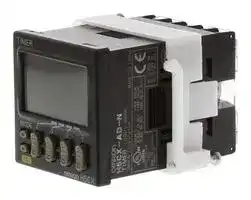


H5CX-AD-N AC24/DC12-24
ELECTROMECHANICAL MULTIFUNCTION TIMER
- Manufacturer: OMRON INDUSTRIAL AUTOMATION
- Product type: Hour Meters
- S; ELECTROMECHANICAL MULTIFUNCTION TIMER; Supply Voltage Min:12V; Supply Voltage Max:24V; Time Min:9.999s; Time Max:9999h; Panel Cutout Height:45mm; Panel Cutout Width:45mm; Product
- Time Max: 9999h
- Time Min: 9.999s
- Product Range: H5CX-A Series
- Panel Cutout Width: 45mm
- Supply Voltage Max: 24V
- Supply Voltage Min: 12V
- Panel Cutout Height: 45mm
| Delivery and price | |
|---|---|
| Units per pack | 10 |
| Price | 290.24 € |
| Current stock | 10+ |
| Lead time | 30 days |

**New Product**

**Digital Timer H5CX-** @ **-N**

## **Ultra-compact Timer Provides Advanced Functions and Security Settings.**

## **Basic Features**

- Short body with depth of only 59 mm (for 24-VAC / 12 to 24-VDC Models with Screw Terminals).[*1]

- Character height of 12 mm for better readability (on models with 4 digits).

- The present value display characters can be switched between red, green, and orange.[*2]

## **Safety and Reliability**

- Power supply circuit and input circuits are isolated for safety and reliability.[*3]

- New set value limit and output counter functions have been added.[*4]

## **Other Features**

- Front Panel can be changed to white or light gray.[*5]

- Models with instantaneous contact output added to the series.

- *1. For 100 to 240 VAC Models with Screw Terminals 78 mm, Models with Sockets: 63.7 mm (case dimension).

For the most recent information on models that have been certified for safety standards, refer to your OMRON website.

- *2. The H5CX-A11, H5CX-L8 and H5CX-B Timers have only red characters.

- *3. Specifications: 100 to 240 VAC

Refer to “ **Safety Precautions** ” on **page 41** .

- *4. The value of the output counter can only be monitored. It cannot be reset.

- *5. Replacement Front Panels sold separately.

## **Features**

## **Basic Features**

## **Ultra Short Body**

The body depth has been greatly reduced. Helps in making thinner control panels. (Models with Screw Terminals)

- 24-VAC / 12 to 24-VDC Models with Screw Terminals: 59 mm 100 to 240-VAC / VDC Models with Screw Terminals: 78 mm[*] Models with Sockets: 63.7 mm (case dimension)

- The shortest body for a timer with isolated power supply and input circuits and a maximum ambient temperature of 55°C (according to OMRON investigation in June 2009).

**==> picture [86 x 11] intentionally omitted <==**

**----- Start of picture text -----**<br>
New models Previous models<br>**----- End of picture text -----**<br>


## **Safety and Reliability**

## **Isolated Power Supply and Input Circuits**[*1]

Power supply circuit and input circuits are isolated for safety and reliability.

Previous non-isolated timers had wiring restrictions and could be damaged if wired incorrectly. The New H5CX removes these worries.

**==> picture [222 x 75] intentionally omitted <==**

**----- Start of picture text -----**<br>
Previous Output terminal on PLC or other device<br>H5CX<br>Input terminal<br>AC power<br>supply [*2] 0-V terminal<br>COM terminal<br>Forget These<br>Worries with the<br>–V +V New H5CX<br>Stabilized DC<br>power supply<br>**----- End of picture text -----**<br>


**==> picture [131 x 5] intentionally omitted <==**

**----- Start of picture text -----**<br>
*2.  The AC power supply ground is on the commercial power supply side.<br>**----- End of picture text -----**<br>


## **Easier to Read**

For better readability, the character height for the present value display is 12 mm (on models with 4 digits), the largest class in the industry. The wide viewing angle and brightness provide excellent visibility. The number of display segments has also been increased to make settings easier to understand, and the present value display can be switched between red, green and orange so that output status can be seen from a distance.

## **Model with 4 Digits Model with 6 Digits**

**==> picture [240 x 62] intentionally omitted <==**

**----- Start of picture text -----**<br>
12 mm 10 mm<br>(actual size) (actual size) modelsNew  Previous models<br>0. 8 Ml<br>= l =—— i!<br>(Display example) Easy to read from the top, bottom, and sides!<br>itera -<br>Note: The H5CX-A11 and H5CX-L8 Timers have only red characters.<br>**----- End of picture text -----**<br>


## **The Easiest Operation**

Operation is simplified by the Up/Down Keys for each digit on 4-digit models and Up Keys for each digit on 6-digit models.

Model with 4 Digits Model with 6 Digits

*1. New Models (H5CX-@-N) with 100 to 240-VAC specifications.

## **Set Value Limit**

You can set an upper limit for the set value to prevent unexpected operation of output devices caused by setting mistakes.

**==> picture [57 x 35] intentionally omitted <==**

**----- Start of picture text -----**<br>
Worry-free operation<br>is achieved with the<br>New H5CX by<br>restricting the time<br>that can be set.<br>**----- End of picture text -----**<br>


## **Output Counter**

An output counter counts the number of times that the output turns ON. (An alarm can be set and the value of the output counter can be monitored, Unit: 1,000 operations.) This counter is useful in managing the service life of the Timer or the load.

**1** omrRONn ~~a~~

**H5CX-** @ **-N**

## **Other Features**

## **Change the Front Panel Color**

The Front Panel can be replaced with an optional Front Panel (order separately) with a different color to match the installation site. Select from black, white, and light gray.

**==> picture [186 x 50] intentionally omitted <==**

**==> picture [164 x 31] intentionally omitted <==**

**----- Start of picture text -----**<br>
Black White Light gray<br>(standard)<br>You can replace<br>the Front Panel.<br>**----- End of picture text -----**<br>


## **Models with Instantaneous Contact Output**

Models with instantaneous contact outputs have been added to the lineup for use with self-holding circuits and as auxiliary relays. These models are also convenient when replacing analog timers.

## **Universal NPN/PNP Input**

DC 2-wire sensors can be connected for a wide range of input devices.

## **Waterproof, Dust-proof Structure (UL508 Type 4X and IP66)**

Worry-free application is possible in locations subject to water. **Note:** When the Y92S-29 Waterproof Packing is used.

## **Key Protection**

Select from any of seven protection patterns. Use the best one for the application.

## **New Modes**

Modes, such as a stopwatch mode (Mode S), have been added. Select any of 15 modes.

## **Model Number Structure**

## **Model Configuration**

|||**H5CX Series**|**H5CX Series**|**H5CX Series**|**H5CX Series**|**H5CX Series**|
|---|---|---|---|---|---|---|
||||||||
||||||||
|**Type**||**Standard Type**<br>**H5CX-A Series**||**Economy Type**<br>**H5CX-L Series**||**Six-digit Type**|
|**Model**|**H**|**5CX-A**@**-N**<br>**H5**|**CX-A11**@**-N**|**H5CX-L8**@**-N**|**H5CX-L8E**@**-N**|**H5CX-BWSD-N**|
|**Function**<br>**Time**<br>**Twin**<br>**Two-**<br>**forec**|**r**|Yes||Yes||No|
||**timer**|Yes||Yes||No|
||**stage settings/**<br>**ast output**|No||No||Yes|
|**Operating modes**||Timer Mode: 11 modes<br>Twin Timer Mode: 4 modes|||Timer Mode<br>: 4 modes<br>Twin Timer Mode<br>: 2 modes|Timer Mode: 2 modes|
|**Input**||NPN/PNP input||NPN input|None|NPN/PNP input|
|**External connections**<br>Sc||rew terminal<br>block<br>1|1-pin socket|8-pin socket||Screw terminal block|
|**Present value display**<br>**character color**<br>Re||d, green, or<br>orange|Red||||
|**Number of display digits**||4||||6|
|**Instantaneous contacts**||None|||Provided|None|
|**Gate input**||Supported||Not supported||Supported|
|**DIP switch settings**||Provided||None||Provided|
|**Power supply voltage**||100 to 240 VAC or 24 VAC/12 to 24 VDC||||12 to 24 VDC|


**2**

**H5CX-** @ **-N**

**Model Number Legend** (Not all possible combinations of functions are available.) **H5CX-** @@@@@ **-N**

– – – – – **1 2 3 4 5**

## 1. **Type Classifier** 2. **External Connections** 3. **Settings**

|**Symbol**|**Meaning**|
|---|---|
|A|Standard type|
|B|6-digit type|
|L|Economy type|


|**Symbol**|**Meaning**||**Symbol**|**Meaning**|
|---|---|---|---|---|
|None|Screw terminals||None|One stage|
|8|8-pin socket||W|Two stages|
|11|11-pin socket||||


## 4. **Output type**

5. **Supply voltage**

|**Symbol**|**Meaning**||**Symbol**|**Meaning**|
|---|---|---|---|---|
|None|Contact output (time-limit SPDT)||None|100 to 240 VAC 50/60 Hz|
|E|Contact output (time-limit<br>SPDT + instantaneous SPDT)*||D|12 to 24 VDC/24 VAC 50/60 Hz*|
||||***** The H5CX-BWSD-N is available only for 12 to 24 VDC.||
|S|Transistor output||||


***** Can be used as a time-limit DPDT output.

**Note:** Estimates can be provided for coatings and other specifications that are not given in the datasheet. Ask your OMRON representative for details.

## **Ordering Information**

## **List of Models**

|**Type**|**Time specifications**|**Operating modes**|**External**<br>**connections**|**Inputs**|**Outputs**|**Supply voltage**|**Models**|
|---|---|---|---|---|---|---|---|
|H5CX-A|0.001 to 9.999 s<br>0.01 to 99.99 s<br>0.1 to 999.9 s<br>1 to 9999 s<br>1 s to 99 min 59 s<br>0.1 to 999.9 min<br>1 to 9999 min<br>1 min to 99 h 59 min<br>0.1 to 999.9 h<br>1 to 9999 h|Timer Mode<br>A: Signal ON Delay I<br>A-1: Signal ON Delay II<br>A-2: Power ON Delay I<br>A-3: Power ON Delay II<br>b: Repeat cycle 1<br>b-1: Repeat cycle 2<br>d: Signal OFF Delay<br>E: Interval<br>F: Cumulative<br>Z:ON/OFF-duty-adjustable flicker<br>S: Stopwatch<br>Twin Timer Mode<br>toff: Flicker OFF Start 1<br>ton: Flicker ON Start 1<br>toff-1: Flicker OFF Start 2<br>ton-1: Flicker ON Start 2|Screw terminals|Signal, Reset,<br>Gate (NPN/<br>PNP inputs)|Contact output<br>(time-limit<br>SPDT)|100 to 240 VAC|**H5CX-A-N**|
|||||||12 to 24 VDC/<br>24 VAC|**H5CX-AD-N**|
||||||Transistor<br>output (SPST)|100 to 240 VAC|**H5CX-AS-N**|
|||||||12 to 24 VDC/<br>24 VAC|**H5CX-ASD-N**|
||||11-pin socket||Contact output<br>(time-limit<br>SPDT)|100 to 240 VAC|**H5CX-A11-N**|
|||||||12 to 24 VDC/<br>24 VAC|**H5CX-A11D-N**|
||||||Transistor<br>output (SPST)|100 to 240 VAC|**H5CX-A11S-N**|
|||||||12 to 24 VDC/<br>24 VAC|**H5CX-A11SD-N**|
|H5CX-L|||8-pin socket|Signal, Reset<br>(NPN inputs)|Contact output<br>(time-limit<br>SPDT)|100 to 240 VAC|**H5CX-L8-N**|
|||||||12 to 24 VDC/<br>24 VAC|**H5CX-L8D-N**|
||||||Transistor<br>output (SPST)|100 to 240 VAC|**H5CX-L8S-N**|
|||||||12 to 24 VDC/<br>24 VAC|**H5CX-L8SD-N**|
|||Timer Mode<br>A-2: Power ON Delay I<br>b: Repeat cycle 1<br>E: Interval<br>Z:ON/OFF-duty-adjustable flicker<br>Twin Timer Mode<br>toff: Flicker OFF Start 1<br>ton: Flicker ON Start 1||None|Contact output<br>(time-limit SPDT<br>+ instantaneous<br>SPDT)<br>Models with<br>instantaneous<br>contact outputs|<br>100 to 240 VAC|**H5CX-L8E-N**|
|||||||12 to 24 VDC/<br>24 VAC|**H5CX-L8ED-N**|
|H5CX-B|0.01 to 9999.99 s<br>1 s to 99 h 59 min 59 s<br>0.1 to 99999.9 min<br>0.1 to 99999.9 h|A: Signal ON Delay I<br>F-1: Cumulative|Screw terminals|Signal, Reset,<br>Gate (NPN/<br>PNP inputs)|Transistor<br>output (DPST)|12 to 24 VDC|**H5CX-BWSD-N**|


**Note: 1.** The functions that are provided depend on the model. Check detailed specifications before ordering. **2.** Refer to **page 33** and later for information on H5CX-B Timers (6-digit display).

**3**

**H5CX-** @ **-N**

## **Accessories (Order Separately) Front Panels (Replacement Parts)**

|**Models**|**Color**|**Applicable Timers**|**Page**|
|---|---|---|---|
|**Y92P-CXT4G**|Light gray (5Y7/1)|Four-digit models|**12**|
|**Y92P-CXT4S**|White (5Y9.2 / 0.5)|||
|**Y92P-CXT4B**|Black (N1.5)|||


**Note: 1.** You can change the color of the front panel when mounting the Timer. The Timer is shipped with a black (N1.5) Front Panel. **2.** "TIMER" is printed on the front of Replacement Front Panels.

## **Soft Cover**

|**Models**|**Remarks**|**Page**|
|---|---|---|
|**Y92A-48F1**|---|**12**|
|**Hard Cover**|||
|**Models**|**Remarks**|**Page**|
|**Y92A-48**|---|**12**|
|**Flush Mounting Adapter**|||
|**Models**|**Remarks**|**Page**|
|**Y92F-30**|Included with models with terminal blocks.|**12**|
|**Y92F-45**|Use this Adapter to install the Timer in a cutout<br>previously made for a DIN 72 x 72 mm device<br>(panel cutout: 68 x 68 mm).||


## **Waterproof Packing**

|**Models**|**Remarks**|**Page**|
|---|---|---|
|**Y92S-29**|Included with models with terminal blocks.|**12**|


## **Connection Sockets**

|**Models**|**Type**|**Connectable Timers**|**Remarks**|**Page**|
|---|---|---|---|---|
|**P2CF-08**|Front Connecting<br>Socket|H5CX-L8@||**13**|
|**P2CF-08-E**|Front Connecting<br>Socket<br>(Finger-safe Type)||Round crimp terminals cannot be used on Finger-safe<br>Sockets. Use forked crimp terminals.||
|**P2CF-11**|Front Connecting<br>Socket|H5CX-A11@|||
|**P2CF-11-E**|Front Connecting<br>Socket<br>(Finger-safe Type)||Round crimp terminals cannot be used on Finger-safe<br>Sockets. Use forked crimp terminals.||
|**P3G-08**|Back Connecting Socket|H5CX-L8@|A Y92A-48G Terminal Cover can be used with the<br>Socket to create a finger-safe construction.||
|**P3GA-11**||H5CX-A11@|||


## **Terminal Covers for P3G-08 and P3GA-11 Back-connecting Sockets**

|**Models**|**Remarks**|**Page**|
|---|---|---|
|**Y92A-48G**|---|**14**|


**4**

**H5CX-A** @-N/-L@-N

## **H5CX-A** @ **-N/-L** @ **-N Digital Timers**

- Switch the display color * between red, green, and orange to see the output status from a distance.

- Up/Down Keys for each digit enable easy operation.

- Cyclic control is easy with the Twin Timer and Variable ON/OFF Duty modes.

- Not supported by the H5CX-A11@ or H5CX-L8@.

## **Specifications**

For the most recent information on models that have been certified for safety standards, refer to your OMRON website.

## **Ratings**

|**Item**<br>**Models**<br>~~PC~~|**Item**<br>**Models**<br>~~PC~~|**H5CX-A**@**-N**<br>~~PC~~|**H5CX-A11**@**-N**<br>|**H5CX-L8**@**-N**|
|---|---|---|---|---|
|**Classification**<br>~~PC~~<br>~~|~~||Standard Type<br>~~PCCe~~||Economy Type|
|**Ratings**<br>~~|~~|**Power supply**<br>**voltage***1<br><br>~~|~~|• 100 to 240 VAC 50/60 Hz<br>• 12 to 24 VDC/24 VAC 50/60 Hz<br>~~Ce~~|||
||**Operating voltage**<br>**fluctuation range**<br><br>~~|ee~~|85% to 110% of rated supply voltage (90% to 110% at 12 to 24 VDC)<br>~~Ce~~|||
||**Power consumption**<br>~~Po~~|Approx. 6.2 VA at 100 to 240 VAC, Approx. 5.1 VA/2.4 W at 24 VAC/12 to 24 VDC*2<br>|||
|**Mounting method**<br>||Flush mounting<br>~~Pp~~|Flush mounting, surface mounting, DIN track mounting||
|**External connections**<br>||Screw terminals<br>~~Pp~~<br>~~a~~|11-pin socket<br>~~a~~|8-pin socket|
|**Degree of protection**||IEC IP66, UL508 Type 4X (indoors) for panel surface only and when Y92S-29 Waterproof Packing is used<br>4 digits|||
|**Digits**|||||
|**Time ranges**||0.001 s to 9.999 s, 0.01 s to 99.99 s, 0.1 s to 999.9 s, 1 s to 9999 s, 1 s ti 99 min 59 s<br>0.1 m to 999.9 min, 1 min to 9999 min, 1 min to 99 h 59 min, 0.1 h to 999.9 h, 1 h to 9999 h|||
|**Timer mode**||Elapsed time (Up), remaining time (Down) (selectable)|||
|**Inputs**|**Input signals**|Signal, Reset, Gate||Signal, Reset<br>(no inputs on models with instantaneous<br>contact outputs)|
||**Input method**<br>~~|~~|No-voltage Input<br>ON impedance: 1 kΩmax. (Leakage current: 12 mA when 0Ω)<br>ON residual voltage: 3 V max.<br>OFF impedance: 100 kΩmin.<br>Voltage Input<br>High (logic) level: 4.5 to 30 VDC<br>Low (logic) level: 0 to 2 VDC (Input resistance: approx. 4.7 kΩ)<br>No-voltage input/voltage input (switchable)||No-voltage Input<br>ON impedance: 1 kΩmax.<br>(Leakage current: 12 mA when 0Ω)<br>ON residual voltage: 3 V max.<br>OFF impedance: 100 kΩmin.|
||**Signal, reset, gate**|Minimum input signal width: 1 or 20 ms (selectable, same for all input)|||
|**Reset system**||Power reset (depending on output mode), external reset, manual reset, automatic reset (depending on output mode)|||
|**Power reset**||Minimum power-opening time: 0.5 s (except for A-3, b-1, F, ton-1, and toff-1 mode)|||
|**Reset voltage**||10% max. of rated supply voltage|||
|**Sensor waiting time**||250 ms max. (Control output is turned OFF and no input is accepted during sensor waiting time.)|||
|**Output**|**Output modes**|A: Signal ON Delay I, A-1: Signal ON Delay II, A-2: Power ON Delay I, A-3: Power ON<br>Delay II, b: Repeat Cycle 1, b-1: Repeat Cycle 2, d: Signal OFF Delay, E: Interval, F:<br>Cumulative, Z: ON/OFF-duty-adjustable flicker, S: Stopwatch, toff: Flicker OFF Start 1,<br>ton: Flicker ON Start 1, toff-1: Flicker OFF Start 2, ton-1: Flicker ON Start 2<br>Models with Instantaneous Contact Outputs<br>A-2: Power ON Delay I, b: Repeat Cycle 1, E:<br>Interval, Z: ON/OFF-duty-adjustable flicker,<br>toff: Flicker OFF Start 1, ton: Flicker ON Start 1|||
|||||Models with Instantaneous Contact Outputs<br>A-2: Power ON Delay I, b: Repeat Cycle 1, E:<br>Interval, Z: ON/OFF-duty-adjustable flicker,<br>toff: Flicker OFF Start 1, ton: Flicker ON Start 1|
||**One-shot output**<br>**time**|0.01 to 99.99 s|||
||**Control output**<br>~~a~~|• Models with Contact Outputs<br>5 A at 250 VAC/30 VDC, resistive load (cos =1)<br>Minimum applied load: 10 mA at 5 VDC (failure level: P, reference value)<br>Contact materials : AgSnIn<br>• Transistor output: NPN open collector,<br>100 mA at 30 VDC max., residual voltage: 1.5 VDC max. (Approx. 1 V), Leakage current: 0.1 mA max.|||
|**Display method***3||7-segment, negative transmissive LCD;<br>Present value: 12-mm-high characters,<br>(switchable between red,<br>green, and orange)<br>Set value:<br>6-mm-high characters, green|7-segment, negative transmissive LCD;<br>Present value: 12-mm-high characters, red<br>Set value:<br>6-mm-high characters, green||
|**Memory backup**||EEPROM (overwrites: 100,000 times min.) that can store data for 10 years min.|||
|**Operating temperature range**||-10 to 55°C (-10 to 50°C if counters are mounted side by side) (with no icing or condensation)|||
|**Storage temperature range**||-25 to 70°C  (with no icing or condensation)|||
|**Operating humidity range**||25% to 85%|||
|**Case color**||Black (N1.5) (Optional Front Panels are available to change the Front Panel color to light gray or white.)|||
|**Attachments**||Waterproof packing, flush mounting<br>adapter, label for DIP switch settings<br>~~ee~~|Label for DIP switch settings<br>~~ee~~|---|


*1. Do not use the output from an inverter as the power supply. The ripple must be 20% maximum for DC power.

- *2. Inrush current will flow for a short time when the power supply is turned ON. Inrush Current (Reference Values)

- *3. The display is lit only when the power is ON. Nothing is displayed when power is OFF.

**5** omrROnNn ~~a~~

**H5CX-A** @-N/-L@-N

## **Characteristics**

|**Accuracy of operating time**<br>**and setting error (including**<br>**temperature and voltage**<br>**influences)**|**Accuracy of operating time**<br>**and setting error (including**<br>**temperature and voltage**<br>**influences)**|Power-ON start: ±0.01% ±50 ms max. (See note 1.)<br>Signal start: ±0.005%±30 ms max. (See note 1.)<br>Signal start for transistor output model: ±0.005%±3 ms max. (See note<br>1 and 2.)<br>If the set value is within the sensor waiting time at startup the control<br>output of the H5CX will not turn ON until the sensor waiting time passes.<br>**Note: 1.** The values are based on the set value.<br>**2.** The value is applied for a minimum pulse width of 1 ms.||**Life-test Curve (Reference**<br>**Values)**<br>A maximum current of 0.15 A can be switched at<br>~~DC30V L/R=7ms~~<br>AC250V/DC30V<br>cos<br>φ<br>=1<br>AC250V  cos<br>φ<br>=0.4<br>0<br>1<br>2<br>3<br>4<br>5<br>1,000<br>500<br>100<br>50<br>10<br>Switching operations (× 104)<br>Load current (A)|
|---|---|---|---|---|
|**Insulation resistance**||100 MΩmin. (at 500 VDC) between current-carrying terminal and<br>exposed non-current-carrying metal parts, and between non-continuous<br>contacts|||
|**Dielectric strength**||2,000 VAC, 50/60 Hz for 1 min between current-carrying metal parts and<br>non-current-carrying metal parts<br>2,000 VAC, 50/60 Hz for 1 min between power supply and input circuits<br>for the models other than H5CX-@D-N<br>1,000 VAC, 50/60 Hz for 1 min between control output, power supply,<br>and input circuits for H5CX-@SD-N<br>2,000 VAC, 50/60 Hz for 1 min between control output, power supply,<br>and input circuits for other models<br>1,000 VAC, 50/60 Hz for 1 min between non-continuous contacts|||
|**Impulse withstand voltage**||5 kV (between power terminals) for 100 to 240 VAC, 1 kV for 24 VAC/12<br>to 24 VDC<br>5 kV (between current-carrying terminal and exposed non-current-<br>carrying metal parts) for 100 to 240 VAC 1.5 kV for 24 VAC/12 to 24 VDC|||
|||||125 VDC(cosφ=1)and a maximum current of 0.1<br>A can be switched if L/R is 7 ms. In both cases,a<br>life of 100,000 operations can be expected.|
|**Noise immunity**||±1.5 kV (between power terminals) and ±600 V (between input<br>terminals), square-wave noise by noise simulator (pulse width: 100 ns/<br>1 µs, 1-ns rise)|||
|**Static immunity**||Malfunction: 8 kV<br>Destruction: 15 kV|||
|**Vibration**<br>**resistance**|**Destruction**|10 to 55 Hz with 0.75-mm single amplitude each in three directions for<br>2 h each|||
||**Malfunction**|10 to 55 Hz with 0.35-mm single amplitude each in three directions for<br>10 min each|||
|**Shock**<br>**resistance**|**Destruction**|300 m/s2in three directions, three cycles|||
||**Malfunction**|100 m/s2in three directions, three cycles|||
|**Life**<br>**expectancy**|**Mechanical**|10,000,000 operations min. (under no load at 1,800 operations/h and<br>ambient temperature of 23°C)|||
||**Electrical**|100,000 operations min. (5 A at 250 VAC, resistive load at 1,800<br>operations/h and ambient temperature of 23°C)*|||
|**Weight**||Approx. 115 g (Timer only)|||


* Refer to Life-test Curve.

**6**

**H5CX-A** @-N/-L@-N

## **Applicable Standards**

|**Approved safety standards**|UL508/Listing, UL508 Type 4X for indoor use (enclosure rating), CSA C22.2 No. 14*1,<br>conforms to EN61812-1 (Pollution degree 2/overvoltage category III)<br>B300 PILOT DUTY<br>1/4 HP 120 VAC, 1/3 HP, 240 VAC, 5 A resistive load<br>VDE0106/P100<br>CCC: Pollution degree 2, Overvoltage category II*2|
|---|---|
|**EMC**|(EMI)<br>EN61812-1<br>Emission Enclosure:<br>EN55011 Group 1 class A<br>Emission AC mains:<br>EN55011 Group 1 class A<br>(EMS)<br>EN61812-1<br>Immunity ESD:<br>IEC61000-4-2<br>Immunity RF-interference:<br>IEC61000-4-3<br>Immunity Burst:<br>IEC61000-4-4<br>Immunity Surge:<br>IEC61000-4-5<br>Immunity Conducted Disturbance:<br>IEC61000-4-6<br>Immunity Voltage Dip/Interruption:<br>IEC61000-4-11|


*1. The following safety standards apply to models with sockets (H5CX-A11@ or H5CX-L8@). cUL (Listing): Applicable when an OMRON P2CF (-E) Socket is used. cUR (Recognition): Applicable when any other socket is used.

- *2. Excluding the H5CX-ASD-N/-A11SD-N/-L8SD-N.

## **I/O Functions**

For details, refer to the timing charts on **page 20 and page 29** .

|**Inputs***1|**Start signal**|Normally functions to start timing.<br>In modes A-2 and A-3, disable timing. In mode S, starts and stops timing.|
|---|---|---|
||**Reset**|• Resets present value. (In elapsed time mode, the present value returns to 0; in remaining time mode,<br>the present value returns to the set value.)<br>• Count inputs are not accepted and control output turns OFF while reset input is ON.<br>• Reset indicator is lit while reset input is ON.|
||**Gate***2|Disables timing. (If a reset occurs while the gate input is ON, a reset will be performed.)|
|**Outputs**|**Control output (OUT)**|Outputs take place according to designated operating mode when timer reaches corresponding set value.|


*1. The H5CX-L8E@ does not have an input.

- *2. The H5CX-L@ does not have a gate input.

## **Response Delay Time When Resetting (Transistor Output)**

The following table shows the delay from when the reset signal is input until the output is turned OFF.

(Reference value)

|**Minimum reset signal width**|**Output delay time**|
|---|---|
|1 ms|0.8 to 1.2 ms|
|20 ms|15 to 25 ms|


**7**

**H5CX-A** @-N/-L@-N

**Connections**

## **Block Diagram**

**==> picture [172 x 80] intentionally omitted <==**

**----- Start of picture text -----**<br>
(Basic insulation)<br>Power supply<br>Output circuit circuit<br>(Basic insulation) (See note.)<br>Display circuit<br>Internal control<br>Input circuits  circuit<br>Key switch circuit<br>**----- End of picture text -----**<br>


**Note:** Basic insulation is provided between the power supply circuit and the input circuits. However, basic insulation is not provided in the H5CX-@D-N.

## **Terminal Arrangement**

Confirm that the power supply meets specifications before use.

**==> picture [512 x 503] intentionally omitted <==**

**----- Start of picture text -----**<br>
H5CX-A-N/-AD-N H5CX-AS-N/-ASD-N<br>0V 0V<br>6 7 8 9 6 7 8 9<br>1 2 3 4 5 1 2 3 4 5<br>Contact output Transistor output<br>Terminals 1 and 6 of the H5CX-AD-N  Terminals 1 and 6 of the H5CX-ASD-N<br>(-) (+) are connected internally. (-) (+) are connected internally.<br>H5CX-A11-N/-A11D-N H5CX-A11S-N/-A11SD-N<br>Reset Reset<br>Signal Signal<br>Gate Internal circuit Gate Internal circuit<br>5 6 7 5 6 7<br>Unused 4 8 Unused 4 8<br>0V 3 9 0V 3 9<br>Contact  Transistor<br>2 1 11 10 output 2 1 11 10 output<br>Unused Terminals 2 and 3 of the  Unused Terminals 2 and 3 of the<br>H5CX-A11D-N are  H5CX-A11SD-N are<br>connected internally. connected internally.<br>(-) (+) (-) (+)<br>H5CX-L8-N/-L8D-N H5CX-L8S-N/-L8SD-N<br>Internal circuit Internal circuit<br>Signal Signal<br>Unused<br>4 5 4 5<br>Reset Reset<br>3 6 3 6<br>Contact  Transistor<br>2 7 output 2 7 output<br>1 8 1 8<br>0V 0V<br>Terminals 1 and 2 of the H5CX-L8D-N  Terminals 1 and 2 of the H5CX-L8SD-N<br>(-) (+) are connected internally. (-) (+) are connected internally.<br>H5CX-L8E-N/-L8ED-N<br>Transistor Output<br>Internal circuit Internal circuit • The transistor output of  NPN Output PNP Output<br>the H5CX is insulated<br>Instantaneous contact outputOUT1 32 4 5 67     Time-limit contact output    OUT2 from the internal circuitry by a photocoupler, so the transistor output can be by a photocoupler, so the transistor output can be transistor output can be<br>1 8 used as both NPN and  Load Load<br>PNP output.  + +<br>Power for load Power for load<br>(–) (+) • The diode connected to  Timer<br>Reset Signal Gate Reset Signal Gate<br>**----- End of picture text -----**<br>


- The transistor output of **NPN Output PNP Output** the H5CX is insulated from the internal circuitry by a photocoupler, so the transistor output can be by a photocoupler, so the transistor output can be transistor output can be used as both NPN and Load Load PNP output. + + Power for load Power for load

- • The diode connected to Timer the collector of the output transistor is used to absorb inverted voltage Inductive

- that is generated when an load inductive load is + connected to the H5CX. Power for load

**Note:** Do not connect unused terminals as relay terminals.

**8**

**H5CX-A** @-N/-L@-N

## **Input Circuits**

## **Signal, Reset, and Gate Input**

**No-voltage Inputs (NPN Inputs) Voltage Inputs (PNP Inputs)**

+14 V 1 kΩ IN Internal circuit IN Approx. 4.7 kΩ Internal circuit

## **Input Connections**

The inputs are no-voltage (closed or open) inputs or voltage inputs except for the H5CX-L8@. (The inputs of the H5CX-L8@ are no-voltage inputs only. The H5CX-L8E@ does not have an input.)

## **No-voltage Inputs (NPN Inputs)**

**==> picture [511 x 230] intentionally omitted <==**

**----- Start of picture text -----**<br>
Open Collector Voltage Output Contact Input DC Two-wire Sensor<br>PLC or<br>Sensor<br>sensor<br>H5CX-A@ 6 7 8 9 H5CX-A@ 6 7 8 9 H5CX-A@ 6 7 8 9 H5CX-A@ 6 7 8 9<br>H5CX-A11@ 3 7 6 5 H5CX-A11@ 3 7 6 5 H5CX-A11@ 3 7 6 5 H5CX-A11@ 3 7 6 5<br>H5CX-L8@ 1 3 4 - H5CX-L8@ 1 3 4 - H5CX-L8@ 1 3 4 - H5CX-L8@ 1 3 4 -<br>Note:  Operate with transistor ON Note:  Operate with transistor ON Note:  Operate with relay ON Note:  Operate with transistor ON<br>No-voltage Input Signal Levels Applicable Two-wire Sensor<br>Short-circuit level Transistor ON • Leakage current: 1.5 mA max.<br>• Residual voltage: 3 V max. • Switching capacity: 5 mA min.<br>• Impedance when ON: 1 k Ω  max. • Residual voltage: 3.0 VDC max.<br>No-contact  (The leakage current is approx. 12 mA when the  • Operating voltage: 10 VDC<br>input impedance is 0  Ω .)<br>Open level Transistor OFF<br>• Impedance when OFF: 100 k Ω  min.<br>Contact input  Use contacts which can adequately switch 5 mA at 10 V<br>0 V for inputs Reset input Signal input Gate input 0 V for inputs Reset input Signal input Gate input 0 V for inputs Reset input Signal input Gate input 0 V for inputs Reset input Signal input Gate input<br>**----- End of picture text -----**<br>


**Note:** The DC voltage must be 30 VDC max.

**Voltage Inputs (PNP Inputs)** The inputs of the H5CX-L8@ are no-voltage inputs only.

**No-contact Input (NPN Transistor) No-contact Input (PNP Transistor) Contact Input**

**==> picture [285 x 105] intentionally omitted <==**

**----- Start of picture text -----**<br>
Sensor Sensor<br>H5CX-A@ 6 7 8 9 H5CX-A@ 6 7 8 9<br>H5CX-A11@ 3 7 6 H5CX-A11@ 3 7 6 5<br>Note:  Operate with transistor OFF Note:  Operate with transistor ON<br>5<br>0 V for inputs Reset input Signal input Gate input 0 V for inputs Reset input Signal input Gate input<br>**----- End of picture text -----**<br>


**==> picture [101 x 73] intentionally omitted <==**

**----- Start of picture text -----**<br>
H5CX-A@ 6 7 8 9<br>H5CX-A11@ 3 7 6 5<br>Note:  Operate with relay ON<br>0 V for inputs Reset input Signal input Gate input<br>**----- End of picture text -----**<br>


## **Voltage Input Signal Levels**

High level (Input ON): 4.5 to 30 VDC

Low level (Input OFF): 0 to 2 VDC

**Note: 1.** The DC voltage must be 30 VDC max. **2.** Input resistance: Approx. 4.7 k Ω

**9**

**H5CX-A** @-N/-L@-N

## **Nomenclature**

**==> picture [511 x 254] intentionally omitted <==**

**----- Start of picture text -----**<br>
Display Section Operation Key<br>1. Key Protect Indicator (orange) 4 8. Mode Key<br>(Changes modes and setting items)<br>2. Control Output Indicator (orange)<br>5 9. Reset Key<br>3. Reset Indicator (orange) 1 6 (Resets present value and output)<br>4. Present Value Display (Main display) 2<br>(Character height: 12 mm, red  [*] ) 3 7 10. Up Keys 1 to 4<br>*  Characters on models with screw terminals  8 10 11. Down Keys 1 to 4<br>(H5CX-A@) can be switched between red,<br>green, and orange. 9 11<br>5. Time Unit Indicators Switches<br>(Color is same as present value display.) Front View<br>(If the time range is 0 min, 0 h, 0.0 h, or 0 h  12. Key-protect Switch<br>0 min, these indicators flash to indicate  (Default setting) OFF ON<br>(Disabled) (Enabled)<br>timing operation.) 12 13<br>6. Set Value Display (Sub-display)<br>(Character height: 6 mm, green)<br>7. Set Value 1, 2 Indicator (green)<br>Character Size  Character Size  13. DIP Switch<br>for Present  for Set Value<br>ON<br>Value Display Display<br>OFF 1 2 3 4 5 6 7 8<br>12mm 6mm Note:  There is no DIP switch on the<br>H5CX-L8@.<br>**----- End of picture text -----**<br>


## **Dimensions**

**(unit: mm)**

## **Digital Timers Digital Timers**

## **H5CX-A-N/-AS-N (Flush Mounting Models)**

**==> picture [69 x 68] intentionally omitted <==**

## **H5CX-AD-N/-ASD-N (Flush Mounting Models)**

**==> picture [62 x 63] intentionally omitted <==**

**==> picture [486 x 76] intentionally omitted <==**

**----- Start of picture text -----**<br>
48×48 6 78 48×48 6 59<br>44.8×44.8 44.8×44.8<br>Note:  M3.5 terminal screw (effective length: 6 mm) Note:  M3.5 terminal screw (effective length: 6 mm)<br>**----- End of picture text -----**<br>


## **H5CX-A11** @ **-N**

**H5CX-L8** @ **-N (Flush Mounting/Surface Mounting Models)**

**(Flush Mounting/Surface Mounting Models)**

**==> picture [63 x 63] intentionally omitted <==**

**==> picture [63 x 62] intentionally omitted <==**

**==> picture [458 x 75] intentionally omitted <==**

**----- Start of picture text -----**<br>
14.4<br>48×48 6 63.7 14.2<br>48×48 6 63.7<br>44.8×44.8<br>44.8×44.8<br>**----- End of picture text -----**<br>


**10**

**H5CX-A** @-N/-L@-N

## **Dimensions with Flush Mounting Adapter**

## **H5CX-A-N/-AS-N (Provided with Adapter and Waterproof Packing)**

**==> picture [195 x 101] intentionally omitted <==**

**----- Start of picture text -----**<br>
Y92S-29 (provided)  Panel Y92F-30 (provided)<br>Waterproof  Flush Mounting Adapter<br>Packing<br>58 (51)<br>48 7.5 76.5<br>**----- End of picture text -----**<br>


**==> picture [69 x 68] intentionally omitted <==**

## **H5CX-AD-N/-ASD-N (Provided with Adapter and Waterproof Packing)**

**==> picture [196 x 101] intentionally omitted <==**

**----- Start of picture text -----**<br>
Y92S-29 (provided)  Panel Y92F-30 (provided)<br>Waterproof  Flush Mounting Adapter<br>Packing<br>58 (51)<br>48 7.5 57.5<br>**----- End of picture text -----**<br>


**==> picture [62 x 64] intentionally omitted <==**

## **H5CX-A11** @ **-N (Adapter and Waterproof Packing Ordered Separately)**

**==> picture [247 x 101] intentionally omitted <==**

**----- Start of picture text -----**<br>
Y92S-29 (order separately)  Panel Y92F-30 (order separately)<br>Waterproof Packing Flush Mounting Adapter<br>P3GA-11 (order<br>separately)<br>Back-connecting<br>Socket<br>58 (51)<br>48 7.5 89.9<br>**----- End of picture text -----**<br>


**==> picture [64 x 63] intentionally omitted <==**

## **H5CX-L8** @ **-N (Adapter and Waterproof Packing Ordered Separately)**

**==> picture [247 x 101] intentionally omitted <==**

**----- Start of picture text -----**<br>
Y92S-29 (order separately)  Panel Y92F-30 (order separately)<br>Waterproof Packing Flush Mounting Adapter P3G-08 (order<br>separately)<br>Back-connecting<br>Socket<br>58 (51)<br>48 7.5 84.8<br>**----- End of picture text -----**<br>


**==> picture [64 x 63] intentionally omitted <==**

## **Panel Cutouts**

Panel cutouts areas shown below. (according to DIN43700).

**==> picture [101 x 82] intentionally omitted <==**

**----- Start of picture text -----**<br>
60 min.<br>45 [+0.6] 0<br>45 [+0.6] 0<br>15 min.<br>60 min.<br>**----- End of picture text -----**<br>


- **Note: 1.** The mounting panel thickness should be 1 to 5 mm.

   **2.** To allow easier operation, it is recommended that Adapters be mounted so that the gap between sides with hooks is at least 15 mm (i.e., with the panel cutouts separated by at least 60 mm).

   **3.** It is possible to horizontally mount Timers side by side. Attach the Flush Mounting Adapters so that the surfaces without hooks are on the sides of the Timers. (However, if Timers are mounted side by side, water resistance will be lost.)

n Units mounted side-by-side A A=(48n-2.5) +1–0 With Y92A-48F1 attached. A={48n-2.5+(n-1)×4} +1–0 With Y92A-48 attached. +1 A = (51n - 5.5) –0

## **Dimensions with Front Connecting Socket**

**==> picture [87 x 90] intentionally omitted <==**

**----- Start of picture text -----**<br>
H5CX<br>* -A11@-N<br>103.2 100.9<br>P2CF-11(-E) (order separately)<br>Front Connecting Socket<br>**----- End of picture text -----**<br>


**==> picture [139 x 102] intentionally omitted <==**

**----- Start of picture text -----**<br>
* H5CX<br>92.3 -L8@-N 90<br>P2CF-08(-E) (order separately)<br>Front Connecting Socket<br>*  These dimensions vary with the type of DIN track<br>(reference value).<br>**----- End of picture text -----**<br>


**11**

**H5CX-A** @-N/-L@-N

## **Accessories (Order Separately)**

**Note:**

**Depending on the operating environment, the condition of resin products may deteriorate, and may shrink or become harder. Therefore, it is recommended that resin products are replaced regularly.**

## **Soft Cover Hard Cover Y92A-48F1 Y92A-48**

## **Front Panel (Replacement Part)**

You can change the color of the front panel when mounting the Timer. The Timer is shipped with a black (N1.5) Front Panel.

## **Y92P-CXT4S**

Cover for Timer with 4 Digits White (5Y9.2/0.5)

**==> picture [42 x 50] intentionally omitted <==**

**Y92P-CXT4G** Cover for Timer with 4 Digits Light gray (5Y7/1)

## **Y92P-CXT4B**

Cover for Timer with 4 Digits Black (N1.5)

## **Replacement Method**

The Front Panel is attached to the Terminal with tabs in four locations. To remove the Front Panel, open the tabs and pull the Front Panel forward.

**==> picture [48 x 42] intentionally omitted <==**

To attach the Front Panel, press Tabs it onto the Timer so that all four Grooves tabs lodge into the groves on the body of the Timer.

## **Protecting the Timer in Environments Subject to Oil**

The H5CX's panel surface is water-resistive (IP@6, UL Type 4X) and so even if drops of water penetrate the gaps between the keys, there will be no adverse effect on internal circuits. If, however, there is a possibility of oil being present on the operator's hands, use the Soft Cover. The Soft Cover ensures protection equivalent to IP54 against oil. Do not, however, use the H5CX in locations where it would come in direct contact with oil.

**Flush Mounting Adapter Y92F-30 Y92F-45** Order the Flush Use this Adapter Mounting Adapter to install the separately if it is Timer in a cutout lost or damaged. previously made **Note:** A Flush for a DIN 72 x 72 Mounting mm device Adapter is included with (panel cutout: models with 68 x 68 mm). screw terminals.

**==> picture [65 x 75] intentionally omitted <==**

**==> picture [243 x 65] intentionally omitted <==**

**----- Start of picture text -----**<br>
Waterproof Packing<br>Y92S-29 Order the Waterproof Packing<br>Note: The  separately if it is lost or damaged.<br>Waterproof  The Waterproof Packing can be used<br>Packing is  to achieve IP66 protection.<br>included with<br>models with<br>screw<br>terminals.<br>**----- End of picture text -----**<br>


The Waterproof Packing will deteriorate, harden, and shrink depending on the application environment. To ensure maintaining the IP@6, UL Type 4X waterproof level, periodically replace the Waterproof Packing. The periodic replacement period will depend on the application environment. You must confirm the proper replacement period. Use 1 year or less as a guideline. If the Waterproof Packing is not replaced periodically, the waterproof level will not be maintained.

It is not necessary to mount the Waterproof Packing if waterproof construction is not required.

**12**

**H5CX-A** @-N/-L@-N

## **Connection Sockets**

## **Front-connecting Sockets**

**==> picture [511 x 468] intentionally omitted <==**

**----- Start of picture text -----**<br>
Model Dimensions  Terminal arrangement  Mounting hole<br>and internal connections dimensions<br>P2CF-08 20.3 max.<br>50 max.<br>Two, 4.5-dia. holes<br>70 max. 35.4<br>4<br>6 5 4 3<br>Two, M4 or 4.5-dia. holes<br>7.8<br>Eight, M3.5 x 7.5 sems screws 3 4.5<br>P2CF-08-E  21.5 max. 40 [±0.2]<br>20.3<br>(Finger Safe Terminal) 50 max. Note:  The Socket can<br>40 [±0.2] 19 7 8 1 2 also be mounted<br>to DIN track.<br>Two, 4.5-dia. holes P2CF-08-E6 5 4 3 3 (Top View)<br>1.3<br>70 max. 35.4<br>7 10A250VACRESISTIVE8 1 2 4<br>7.8<br>Eight, M3.5 x 7.5 set screws 5 4.5<br>P2CF-11 50 max. 31.2 max.<br>Two, 4.5-dia. holes<br>70 max. 35.4<br>4 8 7 6 5<br>4 Two, M4 or 4.5-dia. holes<br>7.8<br>Eleven, M3.5 x 7.5 sems screws 3 4.5<br>P2CF-11-E  50 max. 31.2 max. 40 [±0.2]<br>(Finger Safe Terminal Type) 40 [±0.2] 30 9 3 Note:  The Socket can<br>8 7 6 5 10 11 1 2 also be mounted<br>Two, 4.5-dia. holes P2CF-11-E 4 3 (Top View) to DIN track.<br>1.2<br>70 max. 35.4<br>9 3<br>10A250VACRESISTIVE<br>10 11 1 2 4<br>7.8<br>Eleven, M3.5 x 7.5 set screws 5 4.5<br>**----- End of picture text -----**<br>


**Note:** Round crimp terminals cannot be used on Finger-safe Sockets. Use forked crimp terminals.

## **Back-connecting Sockets**

**==> picture [417 x 179] intentionally omitted <==**

**----- Start of picture text -----**<br>
Model Dimensions Terminal arrangement<br>and internal connections<br>P3G-08<br>27 dia<br>3 4 5 6<br>45<br>2 1 8 7<br>(Bottom View)<br>45 4.9 17<br>P3GA-11 27 dia<br>5 6 7 8<br>4<br>45 25.6<br>3 9<br>2 1 11 10<br>45 4.5 6.2 (Bottom View)<br>16.3<br>**----- End of picture text -----**<br>


**Note:** A Y92A-48G Terminal Cover can be used with the Socket to create a finger-safe construction.

**13**

**H5CX-A** @-N/-L@-N

## **Terminal Covers for P3G-08 and P3GA-11 Back-connecting Sockets**

**==> picture [327 x 140] intentionally omitted <==**

**----- Start of picture text -----**<br>
Model Dimensions<br>Y92A-48G<br>Twelve, 6.4 dia<br>34  Y92A-48G  UP 47.7×47.7 48×48<br>P  C<br>16.5<br>24.6  27.6<br>47.4<br>**----- End of picture text -----**<br>


**Note:** The Terminal Cover can be used with a Back-mounting Socket (P3G-08 or P3GA-11) to create a finger-safe construction.

## **Optional Products for Track Mounting**

**==> picture [512 x 354] intentionally omitted <==**

**----- Start of picture text -----**<br>
Mounting Track<br>PFP-100N  7.3 [±0.15]<br>PFP-50N 4.5<br>35 [±0.3] 27 [±0.15]<br>15 25 10 25 * 25 10 25 15 (5)  * 1<br>1,000 (500)  *   The values shown in parentheses are for the PFP-50N.<br>Mounting Track 16<br>PFP-100N2 4.5<br>35 [±0.3] 27 24 29.2<br>1 1.5<br>15 25 10 25 25 10 25 15<br>1,000<br>End Plate 10<br>6.2<br>PFP-M 1.8<br>M4 x 8 pan<br>head screw<br>1<br>50 35.5 35.3<br>1.8<br>11.5<br>10 1.3<br>M4 spring washer 4.8<br>Spacer 5 1216<br>PFP-S<br>34.8<br>44.3<br>16.5<br>**----- End of picture text -----**<br>


**Note:** Order Spacers in increments of 10.

**14**

**H5CX-A** @-N/-L@-N **Timer**

## **Operating Procedures**

## **Setting Procedure Guide**

## **Settings for Timer Operation[*]**

Use the following settings.

## **Settings for Twin Timer Operation[*]**

Refer to **page 25** .

***** It is not necessary to mount the Waterproof Packing if waterproof construction is not required.

## **Operating Procedures for Timer Function**

**==> picture [513 x 416] intentionally omitted <==**

**----- Start of picture text -----**<br>
Step1 Settings for basic functions can be performed with just the DIP switch.<br>Note:  There is no DIP switch on the H5CX-L8@. Go to             .Step2<br>Key-protect Switch<br>Be sure to set pin 1 to ON when using the DIP switch.<br>ON<br>OFF 1 2 3 4 5 6 7 8<br>Item OFF ON Pin 2 Pin 3 Pin 4 Time range<br>1 DIP switch settings Disabled Enabled ON ON ON 0.001 s to 9.999 s<br>2 OFF OFF OFF 0.01 s to 99.99 s<br>3 Time range Refer to the table on  ON OFF OFF 0.1 s to 999.9 s<br>the right.<br>4 OFF ON OFF 1 s to 9999 s<br>5 Refer to the table on  ON ON OFF 0 min 01 s to 99 min 59 s<br>Output modes<br>6 the right. OFF OFF ON 0.1 min to 999.9 min<br>7 Timer mode UP DOWN ON OFF ON 0 h 01 min to 99 h 59 min<br>8 Input signal width 20 ms 1 ms OFF ON ON 0.1 h to 999.9 h<br>Note:  All the pins are factory-set to OFF.<br>Pin 5 Pin 6  Output mode<br>� Be sure to turn ON pin 1 of the DIP switch.<br>� Changes to DIP switch settings are enabled when the  OFF OFF Mode A: Signal ON delay 1(Timer resets when power comes ON.)<br>power is turned ON. Mode A-2: Power ON delay 1<br>ON OFF<br> (Set the DIP switch while the power is OFF.) (Timer resets when power comes ON.)<br>Mode E: Interval<br>OFF ON<br>(Timer resets when power comes ON.)<br>Mode F: Cumulative<br>ON ON (Timer does not reset when power<br>comes ON.)<br>**----- End of picture text -----**<br>


After making DIP switch settings for basic operation, advanced functions can be added using the operation keys on the front panel. Refer to **Step2** on **page 16** for details.

**15**

**H5CX-A** @-N/-L@-N **Timer**

**==> picture [513 x 692] intentionally omitted <==**

**----- Start of picture text -----**<br>
Step2 Settings that cannot be performed with the DIP switch are performed with the operation keys.<br>• Change to Function Setting Mode.<br>Power ON  For details on operations in run mode, refer to  page 19 .<br>3 s min.   [*][1]<br>Run mode  Function setting mode<br>3 s min.   [*][2]<br>*1.  If the mode is switched to the function setting mode during operation, operation will continue.<br>*2. Changes made to settings in function setting mode are enabled for the first time when the mode is changed to run mode.<br>Also, when settings are changed, the timer is reset (time initialized and output turned OFF).<br>The characters displayed in reverse video are the default settings.<br>When performing settings with operation keys only, set pin1 of the DIP switch to OFF (factory setting).<br>If pin 1 of the DIP switch is set to ON, the setting items indicated in          will not be displayed.<br>� Set the time range using the                 keys.<br>Time range<br>Time Range List<br>s s s …… h s Display Set Value<br>For details, refer to the  Time Range List . 0.01 s to 99.99 s<br>(default setting)<br>Timer mode � Set the timer mode using the                 keys. 0.1 s to 999.9 s<br>up down 1 s to 9999 s<br>(UP) (DOWN)<br>0 min 01 s to<br>� Set the output mode using the                 keys. 99 min 59 s<br>0.1 min to<br>Output modes a a-1 a-2 a-3 b b-1 d e f z s 999.9 min<br>(A) (A-1) (A-2) (A-3) (b) (b-1) (d) (E) (F) (Z) (S) 1 min to<br>Note: Only modes A-2, b, E, and Z can be selected for models with instantaneous  9999 min<br>contact outputs.<br>0 h 01 min to<br>� Set each digit for the output time using the corresponding                 keys. 99 h 59 min<br>Output time hold 0.01~ 99.99 0.1 h to 999.9 h<br>(Output hold) (0.01s) (99.99s)<br>(If the output time is set to 0.00,            is displayed.)hold 1 h to 9999 h<br>Note: Displayed for modes A, A-1, A-2, A-3, b, b-1 and S only.<br>0.001 s to<br>� Set the input signal width using the                 keys. 9.999 s<br>Input signal<br>20ms 1ms<br>(20ms) (1ms)<br>Note: Not displayed for models with instantaneous contact outputs.<br>NPN/PNP  � Set the NPN/PNP mode using the                 keys.<br>input<br>npn pnp<br>(NPN input) (PNP input)<br>Note: Only displayed for the H5CX-A@ and H5CX-A11@.<br>� Set the display color using the                 keys.<br>Display color<br>red grn org r-g g-r r-o o-r g-o o-g<br>(Red) (Green) (Orange) (Red-green) (Green-red) (Red-orange) (Orange-red) (Green-orange)(Orange-green)<br>Note: Displayed only for models with terminal screws (H5CX-A@).<br>� Set the function (instantaneous or time-limit operation) for the instantaneous output (output 1)<br>Instantaneous/time-limit using the                 Keys.<br>1c1c 2c<br>(Instantaneous) (Time-limit)<br>Note: Displayed only for models with instantaneous contact outputs.<br>From next page To next page<br>Function setting mode<br>**----- End of picture text -----**<br>


**16**

**H5CX-A** @-N/-L@-N **Timer**

**==> picture [512 x 621] intentionally omitted <==**

**----- Start of picture text -----**<br>
From previous  To previous<br>page page<br>� Set the digits for the set value limit using the corresponding                 keys.<br>Set value<br>upper limit<br>1 9999<br>(1) (9999)<br>� Set the key protect level using the                 keys.<br>Key protect<br>level<br>kp-1 kp-2 kp-3 kp-4 kp-5 kp-6 kp-7<br>(KP-1) (KP-2) (KP-3) (KP-4) (KP-5) (KP-6) (KP-7)<br>*1<br>*1.  Set each digit for the output time using the corresponding                 keys.<br>Output ON<br>count alarm<br>set value/<br>monitor value • Models without Instantaneous Contact Outputs<br>Output ON<br>count alarm  0 ~ 9999<br>set value (0 x 1000 times) (9999 x 1000 times)<br>Output ON<br>count monitor  Note:  The monitor value is only displayed.<br>value It cannot be set.<br>• Models with Instantaneous Contact Outputs<br>Instantaneous<br>output 1<br>(OUT1) ON  0 ~ 9999<br>count alarm  (0 x 1000 times) (9999 x 1000 times)<br>set value<br>Instantaneous<br>output 2<br>(OUT2) ON  0 ~ 9999<br>count alarm  (0 x 1000 times) (9999 x 1000 times)<br>set value<br>Instantaneous<br>output 1<br>(OUT1) ON  Note:  The monitor value is only displayed.<br>count monitor  It cannot be set.<br>value<br>Instantaneous<br>output 2<br>(OUT2) ON  Note:  The monitor value is only displayed.<br>count monitor  It cannot be set.<br>value<br>Function setting mode<br>**----- End of picture text -----**<br>


**17**

**H5CX-A** @-N/-L@-N **Timer**

## **Explanation of Functions**

## **Operating Procedures for Timer Function**

**Items marked with stars (** � **) can be set using the DIP switch.**

## **Time Range (** timr **)** �

Set the range to be timed in the range 0.001 s to 9,999 h. Settings of type ---- h (9,999 h) and ---- min (9,999 min) cannot be made with the DIP switch. Use the operation keys if these settings are required.

## **Timer Mode (** timm **)** �

Set either the elapsed time (UP) or remaining time (DOWN) mode. In UP mode, the elapsed time is displayed, and in DOWN mode, the remaining time is displayed.

## **Output Mode (** outm **)** �

Set the output mode.

The possible settings are A, A-1, A-2, A-3, b, b-1, d, E, F, Z and S. Only output modes A, A-2, E, and F can be set using the DIP switch. Use the operation keys if a different setting is required. (For details on output mode operation, refer to **"Timing Charts"** on **page 20** .)

## **Output Time (** otim **)**

When using one-shot output, set the output time for one-shot output (0.01 to 99.99 s). One-shot output can be used only if the selected output mode is A, A-1, A-2, A-3, b, b-1 or S.

If the output time is set to 0.00, hold is displayed, and the output is held.

## **Input Signal Width (** iflt **)** �

Set the minimum signal input width (20 ms or 1 ms) for signal, reset, and gate inputs.

The same setting is used for all external inputs (signal, reset, and gate inputs). If contacts are used for the input signal, set the input signal width to 20 ms. Processing to eliminate chattering is performed for this setting.

## **NPN/PNP Input Mode (** imod **)**

Select either NPN input (no-voltage input) or PNP input (voltage input) as the input format.

Set an NPN input when using a 2-wire sensor. For details on input connections, refer to " **Input Connections** " on **page 9** .

## **Display Color (** colr **)**

## **(Terminal block model: H5CX-A** @ **only)**

Set the color used for the present value.

||**Output OFF**|**Output ON**|
|---|---|---|
|red|Red (fixed)||
|grn|Green (fixed)||
|org|Orange (fixed)||
|r-g|Red|Green|
|g-r|Green|Red|
|r-o|Red|Orange|
|o-r|Orange|Red|
|g-o|Green|Orange|
|o-g|Orange|Green|


## **Key Protect Level (** kypt **)**

Set the key protect level.

Refer to “ **Key Protect Level** ” on **page 32** .

## **Instantaneous/Time-limit (** otmd **)**

Set the contact output to time-limit SPDT + instantaneous SPDT or time-limit SPDT operation.

## **Set Value Upper Limit (** sl-h **)**

Set the upper limit for the set value when it is set in Run Mode. The limit can be set to between 1 and 9999. This setting does not apply to the ON duty in Z mode.

## **Output ON Count Alarm Set Value (** on-a **)**

Set the alarm value for the output ON count.

The limit can be set to between 0 x 1000 (0 times) and 9999 x 1000 (9,999,000 times). Only the underlined values are set. The alarm will be disabled if 0 is set.

If the total ON count of the output exceeds the alarm set value, e3 will be displayed on the Timer to indicate that the output ON count alarm value was exceeded. Refer to “ **Self-diagnostic Function** ” on **page 32** for information on the e3 display.

## **ON Count Alarm Set Values for Outputs 1 and 2 (OUT1 and OUT2) (** on1a **and** on2a **)**

Set the ON count alarm values for the outputs 1 and 2. The limit can be set to between 0 x 1000 (0 times) and 9999 x 1000 (9,999,000 times). Only the underlined values are set. The alarm will be disabled if 0 is set.

If the total ON count of instantaneous output 1 or 2 exceeds the alarm set value, e3 will be displayed on the Timer to indicate that the output ON count alarm value was exceeded. Refer to “ **Self-diagnostic Function** ” on **page 32** for information on the e3 display.

## **Output ON Count Monitor Value (** on-c **)**

The monitor value is only displayed. It cannot be set. The output ON count will be 1,000 times the displayed value.

## **ON Count Monitor Values for Outputs 1 and 2 (OUT1 and OUT2) (** on1c **and** on2c **)**

The monitor value for output 1 or 2 is only displayed. It cannot be set. The output ON count will be 1,000 times the displayed value.

**18**

**H5CX-A** @-N/-L@-N **Timer**

## **Operation in Run Mode Operating Procedures for Timer Function**

**==> picture [513 x 286] intentionally omitted <==**

**----- Start of picture text -----**<br>
� Set each digit for the output time using the corresponding                 keys.<br>Present value<br>Set value<br>Note:  H5CX-L8E @ -N Precautions<br>Set the Timer’s set value before using the Timer in a self-holding circuit.<br>� When Output Mode Z Is Selected<br>� Set each digit for the output time using the corresponding                 keys.<br>Present value  (The                  keys for the 4th digit cannot be used.)<br>ON duty ratio<br>Present value � Set each digit for the output time using the corresponding                 keys.<br>Cycle time<br>**----- End of picture text -----**<br>


## **Present Value and Set Value**

These items are displayed when the power is turned ON. The present value is displayed in the main display and the set value is displayed in the sub-display.

The values displayed will be determined by the settings made for the time range and the timer mode in function setting mode.

## **Present Value and ON Duty Ratio (Output Mode = Z)**

The present value is displayed in the main display and the ON duty ratio is displayed in the sub-display. Set the ON duty ratio used in ON/ OFF-duty-adjustable flicker mode (Z) as a percentage.

**==> picture [170 x 19] intentionally omitted <==**

The output accuracy will vary with the time range, even if the ON duty ratio setting is the same. Therefore, if fine output time adjustment is required, it is recommended that the time range for the cycle time is set as small as possible.

**Examples: 1.** When Time Range = - - - - s (9999 s)

**==> picture [182 x 44] intentionally omitted <==**

**==> picture [146 x 9] intentionally omitted <==**

**==> picture [235 x 161] intentionally omitted <==**

**----- Start of picture text -----**<br>
Elapsed cycle time<br>ON duty set as a percentage<br>Up/Down keys used for analog<br>adjustment of the ON duty<br>Cycle time Close Open<br>ON duty (%)<br>Control output<br>Opening/ Fully closed ↔<br>closing valve Fully open<br>ON duty 0%↔100%<br>**----- End of picture text -----**<br>


**==> picture [192 x 44] intentionally omitted <==**

If a cycle time is set, cyclic control can be performed in ON/OFF-dutyadjustable flicker mode simply by changing the ON duty ratio.

## **Present Value and Cycle Time (Output Mode = Z)**

The present value is displayed in the main display and the cycle time is displayed in the sub-display. Set the cycle time.

**19**

**H5CX-A** @-N/-L@-N **Timer**

## **Timing Charts**

## **Operating Procedures for Timer Function Models without Instantaneous Contact Outputs**

The gate input is not included in the H5CX-L8@ models.

**Either one-shot output or sustained output can be selected.**

**Mode A: Signal ON delay 1 (Timer resets when power comes ON.)**

**==> picture [512 x 328] intentionally omitted <==**

**----- Start of picture text -----**<br>
Basic operation Detailed operation<br>Power<br>Power<br>Start signal<br>*<br>Start signal<br> input Timing Gate<br>Output<br>Reset<br>* Start signal input is disabled during timing.<br>t t<br>Timing starts when the start signal goes ON. Control output<br>While the start signal is ON, the timer starts when the<br>power comes ON or when the reset input goes OFF.  Set value<br>The control output is controlled using a sustained or one-shot time period.  UP 0<br>Note: Output is instantaneous when setting is 0.  DOWNSet value<br>0<br>Mode A-1: Signal ON delay 2 (Timer resets when power comes ON.)<br>Basic operation  Detailed operation<br>Power<br>Power<br>Start signal<br>Start signal<br> input Timing Gate<br>Output<br>Reset<br>Timing starts when the start signal goes ON, and<br>resets when the start signal goes OFF. t<br>While the start signal is ON, the timer starts when the  Control output<br>power comes ON or when the reset input goes OFF.<br>The control output is controlled using a sustained or  UPSet value<br>one-shot time period.  0<br>Note: Output is instantaneous when setting is 0. Set value<br>DOWN<br>0<br>Timing diagram<br>Timing diagram<br>**----- End of picture text -----**<br>


## **Mode A-2: Power ON delay 1 (Timer resets when power comes ON.) Basic operation Detailed opperation**

## **Detailed opperation**

**==> picture [452 x 141] intentionally omitted <==**

**----- Start of picture text -----**<br>
Power<br>Power<br>Start signal<br>Timing<br>Output Gate<br>Timing starts when the reset input goes OFF. Reset<br>The start signal disables the timing function (i.e.,<br>same function as the gate input).  t<br>The control output is controlled using a sustained or  Control output<br>one-shot time period.<br>Output is instantaneous when setting is 0. UPSet value<br>0<br>Set value<br>DOWN<br>0<br>Timing diagram<br>**----- End of picture text -----**<br>


Timing starts when the reset input goes OFF. The start signal disables the timing function (i.e., same function as the gate input). The control output is controlled using a sustained or one-shot time period. **Note:** Output is instantaneous when setting is 0.

## **Mode A-3: Power ON delay 2 (Timer does not reset when power comes ON.)**

**==> picture [512 x 160] intentionally omitted <==**

**----- Start of picture text -----**<br>
Basic operation Detailed operation<br>Power<br>Power<br>Start signal<br>Timing<br>Sustained<br>Output Gate<br>Timing starts when the reset input goes OFF.  Reset<br>The start signal disables the timing function (i.e.,<br>same function as the gate input).  t t t<br>The control output is controlled using a sustained or  Control output<br>one-shot time period.<br>Note: Output is instantaneous when setting is 0. UPSet value<br>0<br>Set value<br>DOWN<br>0<br>Timing diagram<br>**----- End of picture text -----**<br>


**20**

**H5CX-A** @-N/-L@-N **Timer**

**==> picture [511 x 198] intentionally omitted <==**

**----- Start of picture text -----**<br>
Mode b: Repeat cycle 1 (Timer resets when power comes ON.)<br>Basic operation Detailed operation<br>Sustained Output<br>Power Power<br>Start signal * Start signal<br> input Timing Timing Timing Timing<br>Gate<br>Output<br>* Start signal input is disabled during timing. Reset<br>Timing starts when the start signal goes ON.<br>The status of the control output is reversed when time  Control output<br>is up (OFF at start).<br>While the start signal is ON, the timer starts when the  Set value<br>power comes ON or when the reset input goes OFF.  UP<br>Note: Normal output operation will not be possible if  0<br>the set time is too short. Set value<br>Set the value to at least 100 ms (contact  DOWN<br>output type). 0<br>One-shot Output<br>Timing diagram<br>**----- End of picture text -----**<br>


**==> picture [487 x 145] intentionally omitted <==**

**----- Start of picture text -----**<br>
Power Power<br>Start signal * Start signal<br> input Timing Timing Timing Timing<br>Gate<br>Output<br>* Start signal input is disabled during timing. Reset<br>Timing starts when the start signal goes ON. t t<br>The control output is turned ON when time is up.  Control output<br>While the start signal is ON, the timer starts when the<br>power comes ON or when the reset input goes OFF.  Set value<br>Note: Normal output operation will not be possible if the set time is too short.  UP 0<br>Set the value to at least 100 ms (contact  Set value<br>output type).  DOWN<br>0<br>Timing diagram<br>**----- End of picture text -----**<br>


## **Mode b-1: Repeat cycle 2 (Timer does not reset when power comes ON.) Basic operation Detailed operation**

**Sustained Output**

**==> picture [511 x 316] intentionally omitted <==**

**----- Start of picture text -----**<br>
Power<br>Power<br>*<br>Start signal Start signal<br> input TimingTiming Sustained [Timing] Timing Timing<br>Output Gate<br>* Start signal input is disabled during timing.<br>Reset<br>Timing starts when the start signal goes ON.<br>The status of the control output is reversed when time<br>is up (OFF at start).  Control output<br>While the start signal is ON, the timer starts when the<br>power comes ON or when the reset input goes OFF.  UPSet value<br>Note: Normal output operation will not be possible if  0<br>the set time is too short.<br>Set the value to at least 100 ms (contact  DOWNSet value<br>output type). 0<br>One-shot Output<br>Power<br>Power<br>*<br>Start signal Start signal<br> input TimingTiming Sustained TimingTiming Timing<br>Output Gate<br>* Start signal input is disabled during timing.<br>Reset<br>Timing starts when the start signal goes ON.The control output is turned ON when time is up.  t t t t t<br>While the start signal is ON, the timer starts when the  Control output<br>power comes ON or when the reset input goes OFF.<br>Set value<br>Note: Normal output operation will not be possible if  UP<br>the set time is too short.  0<br>Set the value to at least 100 ms (contact output type). DOWNSet value<br>0<br>Timing diagram<br>Timing diagram<br>**----- End of picture text -----**<br>


**21**

**H5CX-A** @-N/-L@-N **Timer**

**==> picture [512 x 511] intentionally omitted <==**

**----- Start of picture text -----**<br>
Mode d: Signal OFF delay (Timer resets when power comes ON.)<br>Basic operation Detailed operation<br>Power<br>Power<br>Start signal<br>*<br>Start signal<br> input Timing Gate<br>Output<br>* Start signal input is enabled during timing. Reset<br>The control output is ON when the start signal is ON  Control output<br>(except when the power is OFF or the reset is ON).<br>The timer resets when the time is up.  Set value<br>Note: Output functions only during start signal input when setting is 0.  UP 0<br>Set value<br>DOWN<br>0<br>Mode E: Interval (Timer resets when power comes ON.)<br>Basic operation  Detailed operation<br>Power<br>Power<br>Start signal<br>*<br>Start signal<br> input Timing Gate<br>Output<br>* Start signal input is enabled during timing. Reset<br>Timing starts when the start signal comes ON. Control output<br>The timer resets when the time is up.<br>While the start signal is ON, the timer starts when the  Set value<br>power comes ON or when the reset input goes OFF.  UP<br>Note: Output is disabled when the setting is 0. 0<br>Set value<br>DOWN<br>0<br>Mode F: Cumulative (Timer does not reset when power comes ON.)<br>Basic operation Detailed operation<br>Power<br>Power<br>Start signal<br>Start signal<br> input Timing<br>Sustained Timing Gate<br>Output<br>Start signal enables timing (timing is stopped when the  Reset<br>start signal is OFF or when the power is OFF).<br>A sustained control output is used.<br>Note: Output is instantaneous when setting is 0.  Control output<br>When the H5CX is used with power start, there will be a  Set value<br>timer error (approximately 100 ms each time the H5CX  UP<br>is turned ON) due to the characteristics of the internal  0<br>circuitry. Use the H5CX with signal start if timer  Set value<br>accuracy is required. DOWN<br>0<br>Timing diagram<br>Timing diagram<br>Timing diagram<br>**----- End of picture text -----**<br>


## **Mode Z: ON/OFF-duty-adjustable flicker (Timer resets when power comes ON.)**

**Basic operation**

**==> picture [17 x 5] intentionally omitted <==**

**----- Start of picture text -----**<br>
Power<br>**----- End of picture text -----**<br>


**==> picture [152 x 53] intentionally omitted <==**

**----- Start of picture text -----**<br>
*<br>Start signal<br> input Timing Timing<br>(cycle time) (cycle time)<br>Timing Timing<br>ON duty  ON duty<br>(%) (%)<br>Output<br>**----- End of picture text -----**<br>


- Start signal input is disabled during timing.

Timing starts when the start signal goes ON. The status of the control output is reversed when time is up (ON at start).

While the start signal is ON, the timer starts when power comes ON or when the reset input goes OFF.

**Note:** Normal output operation will not be possible if the set time is too short. Set the value to at least 100 ms (contact output type).

## **Detailed operation**

**==> picture [38 x 163] intentionally omitted <==**

**----- Start of picture text -----**<br>
Power<br>Start signal<br>Gate<br>Reset<br>Control output<br>Cycle time<br>UP<br>ON duty setting<br>(%) ON time<br>0<br>Cycle time<br>ON duty setting<br>(%) ON time<br>DOWN<br>0<br>Timing diagram<br>**----- End of picture text -----**<br>


**==> picture [222 x 166] intentionally omitted <==**

**22**

**H5CX-A** @-N/-L@-N **Timer**

**==> picture [511 x 201] intentionally omitted <==**

**----- Start of picture text -----**<br>
Mode S: Stopwatch (Timer resets when power comes ON.)<br>Basic operation Detailed operation<br>Power Power<br>Start signal<br>Start signal<br> input Timing<br>Gate/Reset Gate/Reset<br>9999<br>Set time<br>UP<br>Display * 0<br>(for elapsed time) * RST     flashes Set time<br>The signal starts and stops timing.  DOWN<br>The display is held and timing is continued if the reset<br>or gate input is received during timing operation.  0<br>The timer resets if the reset or gate input is received<br>when the timing operation is stopped.  Output<br>Note: Output is instantaneous when setting is 0.<br>Timing diagram<br>**----- End of picture text -----**<br>


## **Models with Instantaneous Contact Outputs**

**==> picture [171 x 7] intentionally omitted <==**

**----- Start of picture text -----**<br>
Either one-shot output or sustained output can be selected.<br>**----- End of picture text -----**<br>


**==> picture [511 x 171] intentionally omitted <==**

**----- Start of picture text -----**<br>
Mode A-2: Power ON delay (Timer resets when power comes ON.)<br>Basic operation Detailed operation<br>t-a t Rt t t-a Rt t-a<br>Power<br>Timing Power<br>Time-limit<br>Reset Key<br> output<br>Instantaneous Time-limit<br> output  contacts, NC<br>The Timer starts when the power comes ON or when  Time-limit<br>the reset input goes OFF.  contacts, NO<br>Note: Output is instantaneous when setting is 0.  Instantaneous<br> contacts, NC<br>Instantaneous<br> contacts, NO<br>t = Set time, Rt = Reset time (0.5 s min.), t – a < t (Indicates the time is less than the set time.)<br>**----- End of picture text -----**<br>


## **Mode b: Repeat cycle 1 (Timer resets when power comes ON.)**

**==> picture [511 x 201] intentionally omitted <==**

**----- Start of picture text -----**<br>
Basic operation Detailed operation<br>t-a t t t t-a Rt t t t t-a t-a Rt t-a<br>Power<br>t (time) t (time) t (time) t (time) Power<br>Time-limit<br>Reset Key<br> output<br>Instantaneous Time-limit<br> output  contacts, NC<br>Sustained Output<br>The Timer starts when the power comes ON or when  Time-limit<br>the reset input goes OFF.  contacts, NO<br>Note: Normal output operation will not be possible if  Time-limit<br>the set time is too short.  contacts, NC<br>Set the value to at least 100 ms.  One-shot Output<br>Time-limit<br> contacts, NO<br>Instantaneous<br> contacts, NC<br>Instantaneous<br> contacts, NO<br>t = Set time, Rt = Reset time (0.5 s min.), t – a < t (Indicates the time is less than the set time.)<br>**----- End of picture text -----**<br>


**Note: H5CX-L8E@-N Precautions**

Set the Timer’s set value before using the Timer in a self-holding circuit.

**23**

**H5CX-A** @-N/-L@-N **Timer**

**==> picture [512 x 340] intentionally omitted <==**

**----- Start of picture text -----**<br>
Mode E: Interval (Timer resets when power comes ON.)<br>Basic operation  Detailed operation<br>t-a t Rt t t-a Rt t-a<br>Power<br>Timing Power<br>Time-limit<br>Reset Key<br> output<br>Instantaneous Time-limit<br> output  contacts, NC<br>The Timer starts when the power comes ON or when  Time-limit<br>the reset input goes OFF.  contacts, NO<br>Note: Output is not instantaneous when setting is 0. Instantaneous<br> contacts, NC<br>Instantaneous<br> contacts, NO<br>t = Set time, Rt = Reset time (0.5 s min.), t – a < t (Indicates the time is less than the set time.)<br>Mode Z: ON/OFF-duty adjustable flicker (Timer resets when power comes ON.)<br>Basic operation Detailed operation<br>t-a t t-a Rt t t-a t-a Rt t-a<br>Power dty dty dty dty<br>Timing (cycle time) Timing (cycle time) Power<br>Time-limit<br> output (ON duty)Timing Timing(ON duty) Reset Key<br>Instantaneous Time-limit<br> output  contacts, NC<br>The Timer starts when the power comes ON or when  Time-limit<br>the reset input goes OFF.  contacts, NO<br>Note: Normal output operation will not be possible if  Instantaneous<br>the set time is too short.   contacts, NC<br>Set the value to at least 100 ms.<br>Instantaneous<br> contacts, NO<br>t = Set time, dty = ON duty time, Rt = Reset time (0.5 s min.), t – a < t (Indicates the time is less than the set time.)<br>**----- End of picture text -----**<br>


**Note: H5CX-L8E@-N Precautions**

Set the Timer’s set value before using the Timer in a self-holding circuit.

**24**

**H5CX-A** @-N/-L@-N **Twin Timer**

## **Setting Procedure Guide Operating Procedures for Twin Timer Function**

**==> picture [513 x 480] intentionally omitted <==**

**----- Start of picture text -----**<br>
Step1 Switching to a Twin Timer<br>Press the         or         Key to<br>Power ON<br>Timer/twin timer  switch to a Twin Timer.<br>selection mode<br>+ 1<br>Run mode  Hold down for 1 s min. tim twn<br>Timer  Twin timer<br>+ 1<br>Hold down for 1 s min.<br>Step2 Settings for basic functions can be performed with just the DIP switch.<br>Note:  There is no DIP switch on the H5CX-L8@. Go to              . Step3<br>Key-protect Switch<br>Be sure to set pin 1 to ON when using the DIP switch.<br>ON<br>OFF 1 2 3 4 5 6 7 8<br>Item OFF ON Pin 2 Pin 3 OFF time range<br>1 DIP switch settings Disabled Enabled OFF OFF 0.01 s to 99.99 s<br>2 ON OFF 0.1 s to 999.9 s<br>3 OFF time range Refer to the table on the right. OFF ON 1 s to 9999 s<br>4 ON ON 0 min 01 s to 99 min 59 s<br>ON time range Refer to the table on the right.<br>5<br>6 Output mode Flicker OFF start Flicker ON start Pin 4 Pin 5 ON time range<br>7 Timer mode UP DOWN OFF OFF 0.01 s to 99.99 s<br>8 Input signal width 20 ms 1 ms ON OFF 0.1 s to 999.9 s<br>Note:  All the pins are factory-set to OFF. OFF ON 1 s to 9999 s<br>ON ON 0 min 01 s to 99 min 59 s<br>� Be sure to turn ON pin 1 on the DIP switch.<br>� Changes to DIP switch settings are enabled when the power is turned ON.<br> (Perform DIP switch settings while the power is OFF.)<br>**----- End of picture text -----**<br>


After making DIP switch settings for basic operation, advanced functions can be added using the operation keys on the front panel.  Refer to **Step3** on **page 26** for details.

**25**

**H5CX-A** @-N/-L@-N **Twin Timer**

## **To switch to twin timer operation, use the procedure given below. For details, refer to page 31.**

**==> picture [513 x 691] intentionally omitted <==**

**----- Start of picture text -----**<br>
Step3 Settings that cannot be performed with the DIP switch are performed with the operation keys.<br>• Change to Function Setting Mode.<br>Power ON   For details on operations in run mode, refer to  page 28 .<br>3 s min.   [*1]<br>Run mode Function setting mode<br>3 s min.  [*2]<br>*1.  If the mode is switched to the function setting mode during operation, operation will continue.<br>*2. Changes made to settings in function setting mode are enabled for the first time when the mode is changed to run mode.<br>Also, when settings are changed, the timer is reset (time initialized and output turned OFF).<br>The characters displayed in reverse video are the default settings.<br>When performing settings with operation keys only, set pin1 of the DIP switch to OFF (factory setting).<br>If pin 1 of the DIP switch is set to ON, the setting items indicated in          will not be displayed.<br>� Set the OFF time range using the                keys.<br>OFF time<br>range Time Range List<br>s s s …… h s Display Set Value<br>For details, refer to  Time Range List . 0.01 s to 99.99 s<br>(default setting)<br>� Set the ON time range using the                keys. 0.1 s to 999.9 s<br>ON time<br>range<br>s s s …… h s 1 s to 9999 s<br>For details, refer to  Time Range List . 0 min 01 s to<br>99 min 59 s<br>� Set the timer mode using the                keys. 0.1 min to<br>Timer mode 999.9 min<br>up down 1 min to<br>(UP) (DOWN) 9999 min<br>0 h 01 min to<br>99 h 59 min<br>� Set the twin timer output mode using the                keys.<br>ON/OFF<br>start mode 0.1 h to 999.9 h<br>toff ton tof1 ton1<br>Flicker  Flicker  Flicker  Flicker<br>1 h to 9999 h<br>(                 ) (                ) (                 ) (                )OFF start 1 On Start 1 OFF start 2 On Start 2<br>Note: Only Flicker OFF Start 1 or Flicker ON Start 1 can be selected for the H5CX-L8E@. 0.001 s to<br>� Set the input signal width using the                keys. 9.999 s<br>Input signal<br>width<br>20ms 1ms<br>(20 ms) (1 ms)<br>Note: Not displayed for models with instantaneous contact outputs.<br>NPN/PNP  � Set the NPN/PNP input mode using the                keys.<br>input<br>npn pnp<br>(NPN input) (PNP input)<br>Note:  Displayed only for the H5CX-A@ and H5CX-A11@.<br>� Set the display color using the                keys.<br>Display<br>color<br>red grn org r-g g-r r-o o-r g-o o-g<br>(Red) (Green) (Orange) (Red-green) (Green-red) (Red-orange) (Orange-red)  (Green-orange) (Orange-green)<br>Note:  Displayed only for models with terminal screws (H5CX-A@).<br>� Set the function (instantaneous or time-limit operation) for the instantaneous output (output 1)<br>Instantaneous/ time-limit using the                 Keys.<br>1c1c 2c<br>(Instantaneous) (Time-limit)<br>Note:  Displayed only for models with instantaneous contact outputs.<br>To next page From next page<br>Function setting mode<br>**----- End of picture text -----**<br>


**26**

**H5CX-A** @-N/-L@-N **Twin Timer**

**==> picture [513 x 628] intentionally omitted <==**

**----- Start of picture text -----**<br>
From previous  To previous<br>page page<br>� Set the digits for the set value limit using the corresponding                 keys.<br>Set value<br>upper limit 1<br>1 9999<br>(1) (9999)<br>Set value  � Set the digits for the set value limit using the corresponding                 keys.<br>upper limit 2<br>1 9999<br>(1) (9999)<br>� Set the key protect level using the                 keys.<br>Key protect<br>level<br>kp-1 kp-2 kp-3 kp-4 kp-5 kp-6 kp-7<br>(KP-1) (KP-2) (KP-3) (KP-4) (KP-5) (KP-6) (KP-7)<br>*1<br>Output ON  *1.  Set the digits for the output ON alarm set value using the corresponding<br>count alarm                 keys.<br>set value/<br>monitor value<br>• Models without Instantaneous Contact Outputs<br>Output ON<br>count alarm  0 ~ 9999<br>set value (0 x 1000 times) (9999 x 1000 times)<br>Output ON<br>count monitor  Note:  The monitor value is only displayed.<br>value It cannot be set.<br>• Models with Instantaneous Contact Outputs<br>Instantaneous<br>output 1<br>(OUT1) ON  0 ~ 9999<br>count alarm  (0 x 1000 times) (9999 x 1000 times)<br>set value<br>Instantaneous<br>output 2<br>(OUT2) ON  0 ~ 9999<br>count alarm  (0 x 1000 times) (9999 x 1000 times)<br>set value<br>Instantaneous<br>output 1<br>(OUT1) ON  Note:  The monitor value is only displayed.<br>count monitor  It cannot be set.<br>value<br>Instantaneous<br>output 2<br>(OUT2) ON  Note:  The monitor value is only displayed.<br>count monitor  It cannot be set.<br>value<br>Function setting mode<br>**----- End of picture text -----**<br>


**27**

**H5CX-A** @-N/-L@-N **Twin Timer**

## **Explanation of Functions**

## **Operating Procedures for Twin Timer Function**

**Items marked with stars (** � **) can be set using the DIP switch.**

## **OFF Time Range (** oftr **)** �

Set the time range for the OFF time in the range 0.000 s to 9,999 h. Only settings of type --.-- s (99.99 s), ---.- s (999.9 s), ---- s (9,999 s), and -- min -- s (99 min 59 s) can be made with the DIP switch. Use the operation keys if another type of setting is required.

## **ON Time Range (** ontr **)** �

Set the time range for the ON time in the range 0.001 s to 9,999 h. Only settings of type --.-- s (99.99 s), ---.- s (999.9 s), ---- s (9,999 s), and -- min -- s (99 min 59 s) can be made with the DIP switch. Use the operation keys if another type of setting is required.

## **Timer Mode (** timm **)** �

Set either the elapsed time (UP) or remaining time (DOWN) mode. In UP mode, the elapsed time is displayed, and in DOWN mode, the remaining time is displayed.

## **ON/OFF Start Mode (** totm **)** �

Set the output mode.

Set either flicker OFF start or flicker ON start. (For details on output mode operation, refer to " **Timing Charts** " on **page 29** .)

## **Input Signal Width (** iflt **)** �

Set the minimum signal input width (20 ms or 1 ms) for signal, reset, and gate inputs.

The same setting is used for all external inputs (signal, reset, and gate inputs).

If contacts are used for the input signal, set the input signal width to 20 ms.

## **NPN/PNP Input Mode (** imod **)**

Select either NPN input (no-voltage input) or PNP input (voltage input) as the input format. Set an NPN input when using a 2-wire sensor. The same setting is used for all external inputs.

For details on input connections, refer to " **Input Connections** " on **page 9** .

## **Display Color (** colr **)**

## **(Terminal black model: H5CX-A** @ **only)**

Set the color used for the present value.

||**Output OFF**|**Output ON**|
|---|---|---|
|red|Red (fixed)||
|grn|Green (fixed)||
|org|Orange (fixed)||
|r-g|Red|Green|
|g-r|Green|Red|
|r-o|Red|Orange|
|o-r|Orange|Red|
|g-o|Green|Orange|
|o-g|Orange|Green|


## **Key Protect Level (** kypt **)**

Set the key protect level.

Refer to “ **Key Protect Level** ” on **page 32** .

Processing to eliminate chattering is performed for this setting.

## **Operation in Run Mode Operating Procedures for Twin Timer Function**

**==> picture [96 x 115] intentionally omitted <==**

**==> picture [280 x 110] intentionally omitted <==**

**----- Start of picture text -----**<br>
Present value  � Set the digits for the OFF set time using the corresponding                 keys.<br>OFF set time<br>Present value  � Set the digits for the ON set time using the corresponding                 keys.<br>ON set time<br>**----- End of picture text -----**<br>


**Note: 1.** The display will automatically show the OFF set time when the OFF time is being timed and the ON set time when the ON time is being timed. **Note: 2. H5CX-L8E@-N Precautions**

Set the Timer’s set value before using the Timer in a self-holding circuit.

## **Present Value and OFF Set Time**

The present value is displayed in the main display and the OFF set time is displayed in the sub-display. Set the OFF time.

## **Present Value and ON Set Time**

The present value is displayed in the main display and the ON set time is displayed in the sub-display. Set the ON time.

**28**

**H5CX-A** @-N/-L@-N **Twin Timer**

## **Timing Charts Operating Procedures for Timer Function Models without Instantaneous Contact Outputs**

The gate input is not included in the H5CX-L8@ models.

## **Mode toff: Flicker OFF start 1 (Timer resets when power comes ON.)**

## **Basic operation Detailed operation**

**==> picture [511 x 370] intentionally omitted <==**

**----- Start of picture text -----**<br>
Power<br>Power<br>Start signal<br>*<br>Start signal<br> input Timing  Timing  Timing  Timing  Gate<br>OFF ON OFF ON<br>Output Reset<br>* Start signal input is disabled during timing.<br>Control output<br>Timing starts when the start signal goes ON.<br>The status of the control output is reversed when time is  OFF time<br>up (OFF at start).  UP<br>While the start signal is ON, the timer starts when the  ON time<br>power comes ON or when the reset input goes OFF.  0<br>Note: Normal output operation will not be possible if the set time is too short.Set the value to at least 100 ms (contact output  DOWNOFF timeON time<br>type).<br>0<br>Mode ton: Flicker OFF start 1 (Timer resets when power comes ON.)<br>Basic operation Detailed operation<br>Power<br>Power<br>Start signal<br>*<br>Start signal<br> input Timing  Timing  Timing  Timing  Gate<br>ON OFF ON OFF<br>Output Reset<br>* Start signal input is disabled during timing.<br>Control output<br>Timing starts when the start signal goes ON.<br>The status of the control output is reversed when time is  OFF time<br>up (ON at start).  UP<br>While the start signal is ON, the timer starts when the  ON time<br>power comes ON or when the reset input goes OFF. 0<br>Note: Normal output operation will not be possible if the set time is too short.  DOWNOFF time<br>Set the value to at least 100 ms (contact output  ON time<br>type).<br>0<br>Timing diagram<br>Timing diagram<br>**----- End of picture text -----**<br>


## **Mode toff-1: Flicker OFF start 2 (Timer does not reset when power comes ON.)**

**==> picture [511 x 193] intentionally omitted <==**

**----- Start of picture text -----**<br>
Basic operation Detailed operation<br>Power<br>Power<br>* Start signal<br>Start signal<br> input Timing OFF Timing ON Timing OFF a b Gate<br>Output<br>(a + b = ON time) Reset<br>* Start signal input is disabled during timing.<br>Control output<br>Timing starts when the start signal goes ON.<br>The status of the control output is reversed when time is  OFF time<br>up (OFF at start).  UP<br>While the start signal is ON, the timer starts when the  ON time<br>power comes ON or when the reset input goes OFF.  0<br>Note: Normal output operation will not be possible if the set time is too short. DOWNOFF time<br>Set the value to at least 100 ms (contact output  ON time<br>type).<br>0<br>Timing diagram<br>**----- End of picture text -----**<br>


**29**

**H5CX-A** @-N/-L@-N **Twin Timer**

**==> picture [512 x 205] intentionally omitted <==**

**----- Start of picture text -----**<br>
Mode ton-1: Flicker ON start 2 (Timer does not reset when power comes ON.)<br>Basic operation Detailed operation<br>Power<br>Power<br>* Start signal<br>Start signal<br> input Timing ON Timing OFF Timing ON a b Gate<br>Output<br>(a + b = OFF time) Reset<br>* Start signal input is disabled during timing.<br>Control output<br>Timing starts when the start signal goes ON.<br>The status of the control output is reversed when time is  OFF time<br>up (ON at start). UP<br>While the start signal is ON, the timer starts when the  ON time<br>power comes ON or when the reset input goes OFF. 0<br>Note: Normal output operation will not be possible if the set time is too short.Set the value to at least 100 ms (contact output  DOWNOFF timeON time<br>type).<br>0<br>Timing diagram<br>**----- End of picture text -----**<br>


## **Models with Instantaneous Contact Outputs**

**==> picture [512 x 345] intentionally omitted <==**

**----- Start of picture text -----**<br>
Mode toff: Flicker OFF start 1 (Timer resets when power comes ON.)<br>Basic operation Detailed operation<br>t-a t-off t-on t-off t-b Rt t-off t-on t-off t-b t-a Rt t-a<br>Power Power<br>Toff time Ton time Toff time Ton time<br>Time-limit Reset Key<br> output<br>Time-limit<br>Instantaneous  contacts, NC<br> output<br>The Timer starts when the power comes ON or when   contacts, NOTime-limit<br>the reset input goes OFF.<br>Note: Normal output operation will not be possible if  Instantaneous contacts, NC<br>the set time is too short.<br>Set the ON time and OFF time to at least 100  Instantaneous<br>ms.  contacts, NO<br>t-on = ON time, t-off = OFF time, Rt = Reset time (0.1 s min.), t – a < t-off and t – b < t-on<br>(Indicates the time is less than the set time.)<br>Mode ton: Flicker ON start 1 (Timer resets when power comes ON.)<br>Basic operation Detailed operation<br>t-b t-on t-off t-on t-a Rt t-on t-off t-on t-a t-b Rt t-b<br>Power Power<br>Ton time Toff time Ton time Toff time<br>Time-limit Reset Key<br> output<br>Time-limit<br>Instantaneous  contacts, NC<br> output<br>The Timer starts when the power comes ON or when   contacts, NOTime-limit<br>the reset input goes OFF.<br>Instantaneous<br>Note: Normal output operation will not be possible if   contacts, NC<br>the set time is too short.<br>Set the ON time and OFF time to at least 100  Instantaneous<br>ms.   contacts, NO<br>t-on = ON time, t-off = OFF time, Rt = Reset time (0.1 s min.), t – a < t-off and t – b < t-on<br>(Indicates the time is less than the set time.)<br>**----- End of picture text -----**<br>


## **Note: H5CX-L8E@-N Precautions**

Set the Timer’s set value before using the Timer in a self-holding circuit.

**30**

**H5CX-A** @-N/-L@-N

## **Timer/Twin Timer Selection Mode (Function Selection)**

Select whether the H5CX is used as a timer or a twin timer in timer/twin timer selection mode.

The H5CX is also equipped with a DIP switch monitor function, a convenient function that enables the settings of the DIP switch pins to be confirmed using the front display.

**==> picture [504 x 476] intentionally omitted <==**

**----- Start of picture text -----**<br>
Power ON<br>Key 1 Key<br>Caution<br>*2 +1 *1 To change the mode to timer/twin timer selection mode, hold down the          key for 1 s min. with the          key held 1<br>down. The          key must be pressed before the key. If the 1<br>1 s min.<br>key is pressed first, the mode will not change.<br>Select either           timer operation or          twin timer operation using the tim twn<br>Timer/Twin<br>                 keys.<br>timer selection Note:  The H5CX is factory-set for timer operation.<br>Confirm the status of DIP switch pins 1 to 8 using the                   keys.<br>DIP switch  Note: 1.  This display is not supported with H5CX-L8@-N.<br>monitor 2.  This display is only possible when DIP switch pin 1 (DIP switch settings<br>enable/disable) is set to ON (enable).<br>Example<br>ON<br>OFF 1 2 3 4 5 6 7 8<br>Indicates that DIP switch pin 8 is ON.<br>Indicates that DIP switch pin 7 is OFF.<br>Indicates that DIP switch pin 6 is ON.<br>Indicates that DIP switch pin 5 is OFF.<br>Indicates that DIP switch pin 4 is ON.<br>Indicates that DIP switch pin 3 is OFF.<br>Indicates that DIP switch pin 2 is ON.<br>Indicates that DIP switch pin 1 is ON.<br>Convenient<br>Run mode<br>Timer/Twin Timer Selection Mode<br>**----- End of picture text -----**<br>


- ***1.** When the mode is changed to timer/twin timer selection mode, the present value is reset and output turns OFF. Timing operation is not performed in timer/twin timer selection mode.

- ***2.** Setting changes made in timer/twin timer selection mode are enabled when the mode is changed to run mode.

   - If settings are changed, the HC5X is automatically reset (present value initialized, output turned OFF).

**31**

**H5CX-A** @-N/-L@-N

## **Key Protect Level**

When the key-protect switch is set to ON, it is possible to prevent setting errors by prohibiting the use of certain operation keys by specifying the key protect level (KP-1 to KP-7).

The key protect indicator is lit while the key-protect switch is set to ON.

**==> picture [178 x 105] intentionally omitted <==**

**----- Start of picture text -----**<br>
OFF * ON<br>(Disabled) (Enabled)<br>*  Factory-set to OFF<br>Key protect indicator<br>**----- End of picture text -----**<br>


**==> picture [88 x 120] intentionally omitted <==**

|**Level**|||**Meaning**|**Details**<br>**Changing mode***<br>**Switching display**<br>**during operation**<br>**Reset Key**<br>**Up/down key**|**Details**<br>**Changing mode***<br>**Switching display**<br>**during operation**<br>**Reset Key**<br>**Up/down key**|**Details**<br>**Changing mode***<br>**Switching display**<br>**during operation**<br>**Reset Key**<br>**Up/down key**|**Details**<br>**Changing mode***<br>**Switching display**<br>**during operation**<br>**Reset Key**<br>**Up/down key**|
|---|---|---|---|---|---|---|---|
||||||**Switching display**<br>**during operation**|**Reset Key**|**Up/down key**|
|**KP-1**<br>**(default setting)**||||Invalid|Valid|Valid|Valid|
|||||||||
|||||||||
|**KP-2**||||Invalid|Valid|Invalid|Valid|
|||||||||
|||||||||
|**KP-3**||||Invalid|Valid|Valid|Invalid|
|||||||||
|||||||||
|**KP-4**||||Invalid|Valid|Invalid|Invalid|
|||||||||
|||||||||
|**KP-5**||||Invalid|Invalid|Invalid|Invalid|
|||||||||
|||||||||
|**KP-6**||||Invalid|Invalid|Valid|Valid|
|||||||||
|||||||||
|**KP-7**||||Invalid|Invalid|Invalid|Valid|
|||||||||
|||||||||


- Changing mode to Timer/Twin Timer Selection Mode or Function Setting Mode.

## **Self-diagnostic Function**

The following displays will appear if an error occurs.

|**Main display**|**Sub-display**|**Error**|**Output status**|**Correction method**|**Set value after reset**|
|---|---|---|---|---|---|
|e1|Not lit|CPU|OFF|Either press the reset key or<br>reset the power supply.|No change|
|e2|Not lit|Memory error (RAM)|OFF|Reset the power supply.|No change|
|e2|sum|Memory error EEPROM***1**|OFF|Reset Key|Factory setting|
|e3 ***2**|No change|Output ON count alarm set<br>value exceeded|No change|Reset Key|No change|


- ***1.** This includes times when the life of the EEPROM has expired.

- ***2.** The normal display and e3 will appear alternately.

When the Reset Key is pressed, e3 will no longer be displayed even if the alarm set value is exceeded. (Monitoring is possible, however, because the Timer will continue without clearing the output ON count.)

**32**

**H5CX-BWSD-N**

## **Digital Timer H5CX-BWSD-N**

- H5CX Digital Timers with 6-digit Display, 2-stage Setting, and Forecast Output (DIN 48 x 48-mm)

- Times the daily operating hours of machinery and tools, predicting and notifying when maintenance is required.

- Easy-to-read backlit negative LCD with 6 digits (displays to 99999.9 h).

- The 2-stage settings and forecast output are ideal for maintenance applications.

For the most recent information on models that have been certified for safety standards, refer to your OMRON website.

## **Specifications**

## **Ratings**

|**Ratings**|**Ratings**||
|---|---|---|
|**Classification**||Digital Timer with 6-digit display, 2-stage setting, and forecast output|
|**Ratings**|**Power supply voltage**<br>~~Po~~|12 to 24 VDC|
||**Operating voltage**<br>**fluctuation range**<br>~~Po~~|90% to 110% rated supply voltage|
||**Power consumption**<br>~~Pp~~|Approx. 2.3 W*1|
|**Mounting method**<br>~~Pp~~||Flush mounting|
|**External connections**||Screw terminals|
|**Degree of protection**||IEC IP66, UL508 Type 4X (indoors) for panel front surface only and only when Y92S-29 Waterproof Packing is used|
|**Digits**||6 digits|
|**Time range**||0.01 s to 9999.99 s, 1 s to 99 h 59 min 59 s, 0.1 min to 99999.9 min, 0.1 h to 99999.9 h|
|**Timer mode**<br>~~PF~~||Elapsed time (Up)|
|**Inputs**<br>~~PF~~|**Input signals**<br>~~PF~~|Signal, reset, gate|
||**Input method**<br>~~PF~~|No-voltage Input<br>ON impedance<br>:  1 kΩmax. (Leakage current: 12 mA when 0Ω)<br>ON residual voltage :  3 V max.<br>OFF impedance<br>:  100 kΩmin.<br>Voltage Input<br>High (logic) level<br>:  4.5 to 30 VDC<br>Low (logic) level<br>:  0 to 2 VDC (Input resistance: approx. 4.7 kΩ)<br>No-voltage (NPN) input/voltage (PNP) input (switchable)|
||**Signal, reset, gate**<br>~~Pn~~|Minimum input signal width: 1 or 20 ms (selectable, same for all input)|
|**Reset system**<br>~~Pn~~||Power resets (only for A mode), external and manual reset|
|**Power reset**||Minimum power-opening time: 0.5 s (except for F-1 mode)|
|**Reset voltage**||10% max. of rated supply voltage|
|**Sensor waiting time**<br>~~FP~~||250 ms max. (Control output is turned OFF and no input is accepted during sensor waiting time.)|
|**Outputs**<br>~~FP~~|**Output modes**<br>~~FP~~|A, F-1|
||**Output type**<br>~~FP~~|Transistor output:  NPN open collector, 100 mA at 30 VDC max. residual voltage: 1.5 VDC max. (Approx. 1 V)<br>Leakage current: 0.1 mA max.|
|**Display**||7-segment, negative transmissive LCD;<br>Present value: 10-mm-high characters, red<br>Set value: 6-mm-high characters, green*2|
|**Memory backup**||EEPROM (overwrites: 100,000 times min.) that can store data for 10 years min.|
|**Operating temperature range**||-10 to 55°C (-10 to 50°C if counters are mounted side by side) (with no icing or condensation)|
|**Storage temperature range**||-25 to 70°C (with no icing or condensation)|
|**Operating humidity range**||25 to 85%|
|**Case color**||Black (N1.5)|
|**Attachments**||Waterproof packing, flush mounting adapter, unit label|


- *2. The display is lit only when the power is ON.

**33**

**H5CX-BWSD-N**

## **Characteristics**

|**Characteristics**|**Characteristics**||
|---|---|---|
|**Accuracy of operating time**<br>**and setting error**<br>**(including temperature and**<br>**voltage influences)**||Power-ON start: ±0.01% ±50 ms max. (See note 1.)<br>Signal start: ±0.005%±0.03 ms max. (See note 1.)<br>Signal start for transistor output model: ±0.005%±3 ms max. (See note 1 and 2.)<br>If the set value is within the sensor waiting time at startup the control output of the H5CX will not turn ON until the sensor waiting<br>time passes.<br>**Note: 1.** The values are based on the set value.<br>**2.** The value is applied for a minimum pulse width of 1 ms.|
|**Insulation resistance**||100 MΩmin. (at 500 VDC) between current-carrying terminal and exposed non-current-carrying metal parts|
|**Dielectric strength**||2,000 VAC, 50/60 Hz for 1 min between current-carrying metal parts and non-current-carrying metal parts<br>1,000 VAC, 50/60 Hz for 1 min between control output, power supply, and input circuit|
|**Impulse withstand voltage**||1.0 kV (between power terminals)<br>1.5 kV (between current-carrying terminal and exposed non-current-carrying metal parts)|
|**Noise immunity**||±480 V (between power terminals) and ±600 V (between input terminals), square-wave noise by noise simulator<br>(pulse width: 100 ns/1 µs, 1-ns rise)|
|**Static immunity**||Destruction: 15 kV<br>Malfunction: 8 kV|
|**Vibration**<br>**resistance**|**Destruction**|10 to 55 Hz with 0.75-mm single amplitude in three directions for 2 h each|
||**Malfunction**|10 to 55 Hz with 0.35-mm single amplitude in three directions for 10 min each|
|**Shock**<br>**resistance**|**Destruction**|300 m/s2in three directions, three cycles|
||**Malfunction**|100m/s2in three directions, three cycles|
|**Weight**||Approx. 105 g (Timer only)|


## **Applicable Standards**

|**Approved safety standards**|UL508/Listing, CSA C22.2 No. 14, conforms to EN 61812-1 (pollution degree 2/overvoltage category III)<br>Conforms to VDE0106/P100 (finger protection).|
|---|---|
|**EMC**|(EMI)<br>Emission Enclosure:<br>(EMS)<br>Immunity ESD:<br>Immunity RF-interference:<br>Immunity Burst:<br>Immunity Surge:<br>Immunity Conducted Disturbance:<br>Immunity Voltage Dip/Interruption:<br>EN61812-1<br>EN55011 Group 1 class A<br>EN61812-1<br>IEC61000-4-2<br>IEC61000-4-3<br>IEC61000-4-4<br>IEC61000-4-5<br>IEC61000-4-6<br>IEC61000-4-11|


## **I/O Functions**

|**Inputs**|**Start signal**||Starts timing.|
|---|---|---|---|
||**Reset**||• Resets present value. (The present value returns to 0.)<br>• Timing stops and control output turns OFF while reset input is ON.<br>• Reset indicator is lit while reset input is ON.|
||**Gate**||Inhibits timer operation.|
|**Outputs**|**Forecast value**<br>**setting**|**Control output(OUT2)**|Turns ON when thepresent value reaches the set value.|
|||**Forecast output(OUT1)**|Turns ON when thepresent value reaches the forecast value.|
||**Absolute value**<br>**setting**|**Control output 2(OUT2)**|Turns ON when thepresent value reaches set value 2.|
|||**Control output 1(OUT1)**|Turns ON when thepresent value reaches set value 1.|


## **Response Delay Time When Resetting (Transistor Output)**

The following table shows the delay from when the reset signal is input until the output is turned OFF.

(Reference value)

|**Minimum reset signal width**|**Output delay time**|
|---|---|
|1 ms|0.8 to 1.2 ms|
|20 ms|15 to 25 ms|


**34**

**H5CX-BWSD-N**

## **Connections**

## **Block Diagram**

**==> picture [172 x 80] intentionally omitted <==**

**----- Start of picture text -----**<br>
Output circuit Power supply circuit<br>(Basic insulation)<br>Display circuit<br>Internal control<br>Input circuits  circuit<br>Key switch<br> circuit<br>**----- End of picture text -----**<br>


## **Terminal Arrangement**

**==> picture [244 x 124] intentionally omitted <==**

**----- Start of picture text -----**<br>
0 V<br>6 7 8 9 10<br>Note: 1. The power supply and input circuit<br>are not isolated.<br>2. Terminals 1 and 6 are connected<br>12 13 OUT 1 internally.<br>3. Terminals 7 and 10 have the same<br>reset function. The same function will<br>be performed whichever terminal is<br>1 2 3 4 5 connected. Terminals 7 and 10 are<br>OUT 2 not connected internally, however, so<br>(–) (+) do not use them for cross-over wiring.<br>Reset Signal Gate Reset<br>**----- End of picture text -----**<br>


## **Input Circuits**

## **Signal, Reset, and Gate Input**

**No-voltage Inputs (NPN Inputs) Voltage Inputs (PNP Inputs)**

**==> picture [243 x 216] intentionally omitted <==**

**----- Start of picture text -----**<br>
+14 V<br>1 kΩ<br>IN Internal circuit IN Approx. 4.7 kΩ Internal circuit<br>Transistor Output<br>• The transistor output of  NPN Output PNP Output<br>the H5CX is insulated<br>from the internal circuitry<br>by a photocoupler, so the<br>transistor output can be<br>used as both NPN and  Load Load<br>PNP output.  + +<br>Power for load Power for load<br>• The diode connected to  Timer<br>the collector of the output<br>transistor is used to<br>absorb inverted voltage<br>Inductive<br>that is generated when an  load<br>inductive load is  +<br>connected to the H5CX.  Power for load<br>**----- End of picture text -----**<br>


## **Input Connections**

The inputs of the H5CX-B are no-voltage (short-circuit or open) inputs or voltage inputs. **No-voltage Inputs (NPN Inputs)**

## **Open Collector**

## **Voltage Output**

**==> picture [242 x 97] intentionally omitted <==**

**----- Start of picture text -----**<br>
PLC or<br>Sensor<br>sensor<br>6 7 8 9 10 6 7 8 9 10<br>Note:  Operate with transistor ON Note:  Operate with transistor ON<br>0 V for inputs Reset Signal Gate Reset 0 V for inputs Reset Signal Gate Reset<br>**----- End of picture text -----**<br>


## **No-voltage Input Signal Levels**

Short-circuit level (Transistor ON) • Residual voltage: 3 V max. **No-contact** • Impedance when ON: 1 kΩ max. **input** (The leakage current is approx. 12 mA when the impedance is 0 Ω.) Open level (Transistor OFF) • Impedance when OFF: 100 kΩ min. **Contact input** Use contacts which can adequately switch 5 mA at 10 V

## **Contact Input**

## **DC Two-wire Sensor**

**==> picture [207 x 97] intentionally omitted <==**

**----- Start of picture text -----**<br>
6 7 8 9 10 6 7 8 9 10<br>Note:  Operate with relay ON Note:  Operate with transistor ON<br>0 V for inputs Reset Signal Gate Reset 0 V for inputs Reset Signal Gate Reset<br>**----- End of picture text -----**<br>


## **Applicable Two-wire Sensor**

- Leakage current: 1.5 mA max.

- Switching capacity: 5 mA min.

- Residual voltage: 3.0 VDC max.

- Operating voltage: 10 VDC

## **Voltage Inputs (PNP Inputs)**

**No-contact Input (NPN Transistor)**

**No-contact Input (PNP Transistor)**

## **Contact Input**

**==> picture [429 x 97] intentionally omitted <==**

**----- Start of picture text -----**<br>
Sensor Sensor<br>6 7 8 9 10 6 7 8 9 10 6 7 8 9 10<br>Note:  Operate with transistor OFF Note:  Operate with transistor ON Note:  Operate with relay ON<br>0 V for inputs Reset Signal Gate Reset 0 V for inputs Reset Signal Gate Reset 0 V for inputs Reset Signal Gate Reset<br>**----- End of picture text -----**<br>


## **Voltage Input Signal Levels**

High level (Input ON): 4.5 to 30 VDC Low level (Input OFF): 0 to 2 VDC

**Note: 1.** The DC voltage must be 30 VDC max. **2.** Input resistance: Approx. 4.7 kΩ

**35**

**H5CX-BWSD-N Nomenclature**

## **Display Section**

## **Operation Key**

**==> picture [510 x 216] intentionally omitted <==**

**----- Start of picture text -----**<br>
1. Key Protection Indicator (orange) 8. Mode Key<br>Lit when the reset input or Reset Key is ON. (Changes modes and setting items)<br>4<br>2. Control Output Indicator (orange)<br>Forecast value setting 1 5 9. Reset Key<br>Resets present value and output.<br>  Forecast output ON: OUT 1 is lit. 2 6<br>  Control output ON: OUT 2 is lit. 3 7 10. Up Keys 1 to 6<br>Absolute value setting 8<br>  Control output 1 ON: OUT 1 is lit.<br>  Control output 2 ON: OUT 2 is lit.  9 10 Switches<br>3. Reset Indicator (orange) 11. Key-protect Switch<br>Lit when the reset input or Reset Key is ON. Sixth digit First digit (Default setting) OFF ON<br>(Disabled) (Enabled)<br>4. Present Value Display (red)<br>Character height: 10 mm<br>If the time range is 0.0 min or 0.0 h, the decimal point flashes to indicate timing operation.  11 12<br>5. Time Unit Indicators (green)<br>6. Set Value (green) 12. DIP Switch<br>Character height: 6 mm<br>ON<br>7. Set Value 1, 2 Indicator  (green)<br>Character Size  Character Size  OFF 1 2 3 4 5 6 7 8<br>for Present  for Set Value<br>**----- End of picture text -----**<br>


for Present for Set Value Value Display Display 10mm 6mm

## **Key Protect Level**

When the Key-protect Switch is ON, key operations are prohibited according to the settings for DIP switch pins 6 to 8, thus preventing setting errors.

The Key-protect Switch can be turned ON and OFF while the power is ON.

## **Dimensions**

The Key Protection Indicator is lit orange when the Key-protect Switch is ON.

If the key protect switch is ON, you will not be able to switch to Function Setting Mode.

**(unit: mm)**

## **Digital Timers**

## **Digital Timers**

## **Panel Cutouts**

Panel cutouts areas shown below. (according to DIN43700)

## **H5CX-BWSD-N (Flush Mounting Models)**

**==> picture [101 x 84] intentionally omitted <==**

**----- Start of picture text -----**<br>
60 min.<br>45 [+0.6] –0<br>45 [+0.6] –0<br>15 min.<br>60 min.<br>**----- End of picture text -----**<br>


**==> picture [370 x 236] intentionally omitted <==**

**----- Start of picture text -----**<br>
48×48 6 59<br>44.8×44.8<br>Note:  M3.5 terminal screw (effective length: 6 mm)<br>Dimensions with Flush Mounting Adapter<br>H5CX-BWSD-N (Provided with Adapter and Waterproof Packing)<br>Y92S-29 (provided)  Panel Y92F-30 (provided)<br>Waterproof Packing Flush Mounting Adapter<br>58 (51)<br>48 7.5 57.5<br>**----- End of picture text -----**<br>


- **Note: 1.** The mounting panel thickness should be 1 to 5 mm.

   **2.** To allow easier operation, it is recommended that Adapters be mounted so that the gap between sides with hooks is at least 15 mm (i.e., with the panel cutouts separated by at least 60 mm).

   **3.** It is possible to mount Timers side by side, but only in the direction without the hooks. However, if Timers are mounted side by side, water resistance will be lost.

n side by side mounting A –0A= (48n–2.5)[+1]

With Y92A-48F1 attached. A={48n–2.5+(n–1)×4}                                                    –0[+1] With Y92A-48 attached. A= (51n–5.5)                               –0[+1]

## **Accessories (Order Separately)**

Refer to **page 12** for details.

**36**

**H5CX-BWSD-N**

## **Operating Procedures**

## **DIP Switch Settings**

All functions are set using the DIP switch.

**==> picture [466 x 157] intentionally omitted <==**

**----- Start of picture text -----**<br>
||||||||||||
|---|---|---|---|---|---|---|---|---|---|---|
|Item|OFF|ON|Pin 1|Pin 2|Time range|
|1|Refer to the table on the|OFF|OFF|0.1 h to 99999.9 h|
|Time range|
|2|right.|ON|OFF|0.01 s to 9999.99 s|
|3|Output modes|F-1 mode|A mode|OFF|ON|0 h 00 min 01 s to|
|99 h 59 min 59 s|
|4|Input signal width|20 ms|1 ms|
|ON|ON|0.1 min to 99999.9 min|
|NPN|PNP|
|5|NPN/PNP input mode|
|(no-voltage)|(voltage)|
|6|Reset Key protection|Disabled|Enabled|
|7|Up Key protection|Disabled|Enabled|
|ON|
|8|Mode Key protection|Disabled|Enabled|
|Note:|1.|All the pins are factory-set to OFF.|
|2.|DIP switch settings are effective when the power is|OFF|1|2|3|4|5|6|7|8|
|turned ON again. (Set the DIP switch before installation|
|and power-up.)|

**----- End of picture text -----**<br>


## **Operation in Run Mode**

Set the digits for the set values using the corresponding Key.

## **Forecast Value Setting**

## **Absolute Value Setting**

**==> picture [76 x 80] intentionally omitted <==**

**==> picture [144 x 69] intentionally omitted <==**

**----- Start of picture text -----**<br>
Present value<br>Set value Each time the         Key is pressed,<br>the sub-display will switch between<br>the set value (“SET” is lit) and the<br>forecast set value (“1” is lit).<br>Present value<br>Forecast set value<br>**----- End of picture text -----**<br>


**==> picture [76 x 80] intentionally omitted <==**

**==> picture [145 x 69] intentionally omitted <==**

**----- Start of picture text -----**<br>
Present value<br>Set value 1 Each time the         Key is pressed,<br>the sub-display will switch between<br>set value 1 (“SET 1” is lit) and set<br>value 2 (“SET 2” is lit).<br>Present value<br>Set value 2<br>**----- End of picture text -----**<br>


**37**

**H5CX-BWSD-N**

## **Operation in Function Setting Mode**

Settings that cannot be performed with the DIP switch are performed with the operation keys.

- Change to Function Setting Mode.

**==> picture [398 x 577] intentionally omitted <==**

**----- Start of picture text -----**<br>
Power ON<br>3 s min.   [*1]<br>Run mode  Function setting mode<br>3 s min.   [*2]<br>*1.  If the mode is switched to the function setting mode during operation, operation will continue.<br>*2. Changes made to settings in function setting mode are enabled for the first time when the mode is changed to run mode.<br>Also, when settings are changed, the timer is reset (time initialized and output turned OFF).<br>Absolute  Set the digits for the set values using the<br>value setting/ corresponding         Key.<br>forecast value<br>setting ~<br>(Forecast  (Absolute<br>value setting) value setting)<br>Set the digits for the set values using the<br>Set value  corresponding         Key.<br>upper limit<br>~<br>(1) (999999)<br>Set the digits for the set values using the<br>corresponding         Key.<br>Forecast<br>setting upper limit ~<br>(1) (999999)<br>Note:  Displayed only in forecast setting mode.<br>Set the digits for the set values using the<br>Output 1  corresponding         Key.<br>(OUT1)<br>alarm set valueON count  ~<br>(0 x 1000 (9999 x 1000<br> times) times)<br>Set the digits for the set values using the<br>Output 2  corresponding         Key.<br>(OUT2)<br>alarm set valueON count  ~<br>(0 x 1000 (9999 x 1000<br> times) times)<br>Output 1<br>(OUT1)  Note:  The monitor value is only displayed. It cannot be set.<br>ON count<br>monitor value<br>Output 2<br>(OUT2)  Note:  The monitor value is only displayed. It cannot be set.<br>ON count<br>monitor value<br>Function Setting Mode<br>**----- End of picture text -----**<br>


**38**

**H5CX-BWSD-N**

## **Explanation of Functions**

## **Absolute value setting/forecast value setting (** setm **)**

Set value 1 can be set as the forecast value setting (ofst) or the absolute value setting (abs).

## **Forecast Value Setting**

**==> picture [160 x 97] intentionally omitted <==**

**----- Start of picture text -----**<br>
Example: F-1 Mode Present value<br>Set<br> value<br>Forecast<br>set value<br>Forecast<br> value<br>0<br>Forecast output<br> (OUT1)<br>Control output<br> (OUT 2)<br>**----- End of picture text -----**<br>


## **Absolute Value Setting**

**==> picture [149 x 98] intentionally omitted <==**

**----- Start of picture text -----**<br>
Present<br>Example: F-1 Mode value<br>Set value 2<br>Set value 1<br>0<br>Control output 1<br> (OUT1)<br>Control output 2<br> (OUT2)<br>**----- End of picture text -----**<br>


- OUT1 (control output 1) turns ON when the present value reaches set value 1.

- OUT2 (control output 2) turns ON when the present value reaches set value 2.

Refer to **pages 18 and 28** for information on other functions.

- OUT1 (forecast output) turns ON when the present value reaches the forecast value.

- Forecast value = Set value - Forecast set value

**Note:** The forecast set value is used to set the deviation for the set value.

- OUT2 (control output) turns ON when the present value reaches the set value.

- If the forecast set value ≥ set value, OUT1 (forecast output) will turn ON as soon as timing starts.

## **Self-diagnostic Function**

The following displays will appear if an error occurs.

|**Main display**|**Sub-display**|**Error**|**Output status**|**Correction method**|**Set value after reset**|
|---|---|---|---|---|---|
|e1|Not lit|CPU|OFF|Either press the Reset Key or<br>reset the power supply.|No change|
|e2|Not lit|Memory error (RAM)|OFF|Reset the power supply.|No change|
|e2|sum|Memory error EEPROM*1|OFF|Reset Key.|Factory setting|
|e3 *2|No change|Output ON count alarm set<br>value exceeded|No change|Reset Key|No change|


- *1. This includes times when the life of the EEPROM has expired.

- *2. The normal display and e3 will appear alternately.

   - When the Reset Key is pressed, e3 will no longer be displayed even if the alarm set value is exceeded. (Monitoring is possible, however, because the Timer will continue without clearing the output ON count.)

**39**

**H5CX-BWSD-N**

## **Timing Charts**

**==> picture [512 x 194] intentionally omitted <==**

**----- Start of picture text -----**<br>
Mode A: Signal ON delay (Timer resets when power comes ON.)<br>Basic operation Detailed operation<br>Power<br>Power<br>* Start signal<br>Start signal input<br>Timing<br>Forecast Control<br> output OUT1 [( ]  output 1 OUT1 [)] Gate<br>Control Control<br> output OUT2 [( ]  output 2 OUT2 [)] Reset<br>(  ) The names in parentheses are used for the absolute value setting. 999999<br>Set value (SV 2)<br>* Start signal input is disabled during timing. Forecast value (SV 1)<br>• Timing starts when the start signal goes ON. 0<br>• While the start signal is ON, the timer starts when the  OUT1<br>power comes ON or when the reset input goes OFF.<br>• A sustained control output is used.<br>• Timing stops when the time is up.  OUT2<br>Note: Output is instantaneous when the set value is 0.<br>The names in parentheses are used for the absolute value setting.<br>Timing diagram<br>**----- End of picture text -----**<br>


**==> picture [512 x 217] intentionally omitted <==**

**----- Start of picture text -----**<br>
Mode F-1: Cumulative (Timer does not reset when power comes ON.)<br>Basic operation  Detailed operation<br>Power<br>Power<br>Start signal input<br>Forecast Control Timing Sustained Timing Start signal<br> output OUT1 [( ]  output 1 OUT1 [)]<br>Gate<br>Control Control<br> output OUT2 [( ]  output 2 OUT2 [)]<br>(  ) The names in parentheses are used for the absolute value setting. Reset<br>• Start signal enables timing (timing is stopped when the  999999<br>start signal is OFF or when the power is OFF). Set value (SV 2)Forecast value<br>• A sustained control output is used.  (SV 1)<br>• Timing continues even after the time is up. 0<br>Note: Output is instantaneous when the set value is  OUT1<br>0.<br>When the H5CX is used with power start, there will be<br>a timer error (approximately 100 ms each time the  OUT2<br>H5CX is turned ON) due to the characteristics of the  The names in parentheses are used for the absolute value setting.<br>internal circuitry. Use the H5CX with signal start if<br>timer accuracy is required.<br>Timing diagram<br>**----- End of picture text -----**<br>


**Note: 1.** The forecast value = set value - forecast set value **2.** The forecast set value is used to set the deviation for the set value.

**40**

**H5CX-** @ **-N**

## **Safety Precautions for All H5CX Series (Common)**

## **CAUTION**

**Do not allow pieces of metal, wire clippings, or fine metallic shavings or fillings from installation to enter the product. Doing so may occasionally result in electric shock, fire, or malfunction.**

**Minor injury due to explosion may occasionally occur. Do not use the Timer where subject to flammable or explosive gas.**

**Fire may occasionally occur. Tighten the terminal screws to the rated torque.**

**H5CX terminals: 6.55 to 7.97 lb-in (0.74 to 0.90 N** • **m) P2CF Socket terminals: 4.4 lb-in (0.5 N** • **m)**

**Minor injury due to electric shock may occasionally occur. Do not touch any of the terminals while power is being supplied. Be sure to mount the terminal cover after wiring.**

**The life expectancy of the output relay varies considerably according to its usage. Use the output relay within its rated load and electrical life expectancy. If the output relay is used beyond its life expectancy, its contacts may become fused or there may be a risk of fire. Also, be sure that the load current does not exceed the rated load current and when using a heater, be sure to use a thermal switch in the load circuit.**

**Minor electric shock, fire, or malfunction may occasionally occur. Do not disassemble, modify, or repair the Timer or touch internal components.**

## **Precautions for Safe Use**

- The panel surface of the H5CX is water-resistant (conforming to NEMA4, IP66, UL Type 4X (Indoor Use Only). To protect the internal circuits from water penetration through the space between the H5CX and operating panel, waterproof packing is included. Attach the Y92F-30 Adapter with sufficient pressure with the reinforcing screws so that water does not penetrate the panel.

0.5 to 1 mm

It is recommended that the space between the screw head and the Adapter be 0.5 to 1 mm.

- When mounting the Timer to a panel, tighten the two mounting screws alternately, a little at a time, so as to keep them at an equal tightness. If the panel screws are tightened unequally, water may enter the panel.

- Store the Timer at the specified temperature. If the Time has been stored at a temperature of less than -10°C, allow the Time to stand at room temperature for at least 3 hours before use.

- Mounting the Timer side-by-side may reduce the life expectancies of internal components.

- Use the Timer within the specified ranges for the ambient operating temperature and humidity.

- Do not use in the following locations:

- Locations subject to sudden or extreme changes in temperature.

- Locations where high humidity may result in condensation.

- Do not use the Timer outside of the rated ranges for vibration, shock, water exposure, and oil exposure.

- Do not use this Timer in dusty environments, in locations where corrosive gasses are present, or in locations subject to direct sunlight.

- Install the Timer well away from any sources of static electricity, such as pipes transporting molding materials, powders, or liquids.

- Internal elements may be destroyed if a voltage outside the rated voltage range is applied.

- Be sure that polarity is correct when wiring the terminals.

- Separate the Timer from sources of noise, such as devices with input signals from power lines carrying noise, and wiring for I/O signals.

- Do not connect more than two crimp terminals to the same terminal.

- Up to two wires of the same size and type can be inserted into a single terminals.

- Use the specified wires for wiring. Applicable Wires: AWG 18 to AWG 22, solid or twisted, copper.

- Install a switch or circuit breaker that allows the operator to immediately turn OFF the power, and label it to clearly indicate its function.

- When the Timer is operated with no-voltage input (NPN input), approximately 14 V is output from the input terminals. Use a sensor that contains a diode.

**==> picture [92 x 56] intentionally omitted <==**

**----- Start of picture text -----**<br>
Sensor<br>Diode<br>0V Input<br>**----- End of picture text -----**<br>


- Use a switch, relay, or other contact so that the rated power supply voltage will be reached within 0.1 seconds. If the power supply voltage is not reached quickly enough, the Timer may malfunction or outputs may be unstable.

- Use a switch, relay, or other contact to turn the power supply OFF instantaneously. Outputs may malfunction and memory errors may occur if the power supply voltage is decreased gradually.

- H5CX-A@-N/-L@-N:

- When changing the set value during a timing operation, the output will turn ON if the set value is changed as follows because of the use of a constant read-in system:

- Elapsed time (UP) mode: Present value ≥ Set value Remaining time (DOWN) mode: Elapsed time ≥ Set value (The present value is set to 0.)

When in the remaining time mode, the amount the set value is changed is added to or subtracted from the present value. Operation with a set value of 0 will vary with the output mode. Refer to the timing charts on **page 20** .

- H5CX-B@-N:

When changing the set value during a timing operation, the output will turn ON if the set value is changed as follows because of the use of a constant read-in system:

1. Forecast Value Setting

   - When the present value ≥ the set value, OUT2 (control output) turns ON.

   - When the present value ≥ the forecast value (forecast value = set value - forecast set value), OUT1 (forecast output) turns ON.

2. Absolute Value Setting

   - When the present value ≥ set value 2, OUT2 (control output 2) turns ON.

   - When the present value ≥ the forecast value (forecast value = set value - forecast set value), OUT1 (control output 1) turns ON.

   - When the set value is 0, the output turns ON the moment the signal is input. The reset operation turns OFF the output.

- Do not use organic solvents (such as paint thinners or benzine), strong alkali, or strong acids. They will damage the external finish.

- Confirm that indications are working normally, including the backlight LED, and LCD. The indicator LEDs, LCD, and resin parts may deteriorate more quickly depending on the application environment, preventing normal indications. Periodic inspection and replacement are required.

- The waterproof packing may deteriorate, shrink, or harden depending on the application environment. Periodic inspection and replacement are required.

**41**

**H5CX-** @ **-N**

## **Precautions for Correct Use**

- H5CX models with a 24-VDC/12 to 24-VDC power supply use a transformer-free power supply method in which the power supply terminals are not isolated from the signal input terminals. If a nonisolating DC power supply is used, unwanted current paths may occasionally burn or destroy internal components depending on the wiring. Always check the wiring sufficiently before use.

- An inrush current of approx. 10 A will flow for a short time when the power supply is turned ON. If the capacity of the power supply is not sufficient, the Timer may not start. Be sure to use a power supply with sufficient capacity.

- Maintain voltage fluctuations in the power supply within the specified operating voltage range.

- When turning the power ON and OFF, input signal reception is possible, unstable, or impossible as shown in the diagram below.

Power ON supply OFF 200ms 0 to 50 ms 5ms 0 to 500 ms Input Impossible Unstable Possible Unstable Impossible

- To allow for the startup time of peripheral devices (sensors, etc.), the Timer starts timing operation between 200 to 250 ms after power is turned ON. For this reason, in operations where timing starts from power ON, the time display will actually start from 249 ms. If the set value is 249 ms or less, the time until output turns ON will be a fixed value between 200 and 250. The present value display will start from 250 ms. (Normal operation is possible for set values of 250 ms or more.) In applications where a set value of 249 ms or less is required, use start timing with signal input.

## **Conformance to EN/IEC Standards**

- When conforming to EMC standards, refer to the information provided in this datasheet for cable selection and other conditions.

- This is a class A product. In residential areas it may cause radio interference, in which case the user may be required to take adequate measures to reduce interference.

- H5CX-A@-N/-L@-N:

Basic insulation is provided between the power supply and input terminals. (No insulation is provided between the power supply and input terminals for the H5CX-@D-N.)

Basic insulation is provided between power supply and output terminals, and between input and output terminals.

      - H5CX-B@-N:

      - No insulation is provided between the power supply and input terminals.

      - Basic insulation is provided between the power supply and output terminals.

      - When double insulation or reinforced insulation is required, apply double insulation or reinforced insulation as defined in IEC 60664 that is suitable for the maximum operating voltage with clearances or solid insulation.

      - Connect the input and output terminals to devices that do not have any exposed charged parts.

- Inrush current generated by turning ON or OFF the power supply may deteriorate contacts on the power supply circuit. Turn ON or OFF to a device with the rated current of more than 10 A.

- Make sure that all settings are appropriate for the application. Unexpected operation resulting in property damage or accidents may occur if the settings are not appropriate.

- Do not leave the Timer for long periods at a high temperature with output current in the ON state. Doing so may result in the premature deterioration of internal components (e.g., electrolytic capacitors).

- EEPROM is used as backup memory when the power is interrupted. The write life of the EEPROM is 100,000 writes. The EEPROM is written at the following times:

   - When the power supply is turned OFF

   - When switching from Timer/Twin Timer Selection Mode or Function Setting Mode to Run Mode

- Dispose of the product according to local ordinances as they apply.

- Attach the front panel when using the Timer. The tabs in the middle of each of four sides secure the front panel to the main body. To remove the panel, widen the four tabs and pull the panel toward you. To mount the panel, fit all four tabs correctly into the grooves on the main body.

**==> picture [114 x 82] intentionally omitted <==**

**----- Start of picture text -----**<br>
Tabs<br>Grooves<br>**----- End of picture text -----**<br>


**42**

## **Warranty and Application Considerations**

## **Read and Understand This Catalog**

Please read and understand this catalog before purchasing the products. Please consult your OMRON representative if you have any questions or comments.

## **Warranty and Limitations of Liability**

## **WARRANTY**

OMRON's exclusive warranty is that the products are free from defects in materials and workmanship for a period of one year (or other period if specified) from date of sale by OMRON.

OMRON MAKES NO WARRANTY OR REPRESENTATION, EXPRESS OR IMPLIED, REGARDING NON-INFRINGEMENT, MERCHANTABILITY, OR FITNESS FOR PARTICULAR PURPOSE OF THE PRODUCTS. ANY BUYER OR USER ACKNOWLEDGES THAT THE BUYER OR USER ALONE HAS DETERMINED THAT THE PRODUCTS WILL SUITABLY MEET THE REQUIREMENTS OF THEIR INTENDED USE. OMRON DISCLAIMS ALL OTHER WARRANTIES, EXPRESS OR IMPLIED.

## **LIMITATIONS OF LIABILITY**

OMRON SHALL NOT BE RESPONSIBLE FOR SPECIAL, INDIRECT, OR CONSEQUENTIAL DAMAGES, LOSS OF PROFITS, OR COMMERCIAL LOSS IN ANY WAY CONNECTED WITH THE PRODUCTS, WHETHER SUCH CLAIM IS BASED ON CONTRACT, WARRANTY, NEGLIGENCE, OR STRICT LIABILITY.

In no event shall the responsibility of OMRON for any act exceed the individual price of the product on which liability is asserted. IN NO EVENT SHALL OMRON BE RESPONSIBLE FOR WARRANTY, REPAIR, OR OTHER CLAIMS REGARDING THE PRODUCTS UNLESS OMRON'S ANALYSIS CONFIRMS THAT THE PRODUCTS WERE PROPERLY HANDLED, STORED, INSTALLED, AND MAINTAINED AND NOT SUBJECT TO CONTAMINATION, ABUSE, MISUSE, OR INAPPROPRIATE MODIFICATION OR REPAIR.

## **Application Considerations**

## **SUITABILITY FOR USE**

OMRON shall not be responsible for conformity with any standards, codes, or regulations that apply to the combination of products in the customer's application or use of the products.

Take all necessary steps to determine the suitability of the product for the systems, machines, and equipment with which it will be used.

Know and observe all prohibitions of use applicable to this product.

NEVER USE THE PRODUCTS FOR AN APPLICATION INVOLVING SERIOUS RISK TO LIFE OR PROPERTY WITHOUT ENSURING THAT THE SYSTEM AS A WHOLE HAS BEEN DESIGNED TO ADDRESS THE RISKS, AND THAT THE OMRON PRODUCTS ARE PROPERLY RATED AND INSTALLED FOR THE INTENDED USE WITHIN THE OVERALL EQUIPMENT OR SYSTEM.

## **Disclaimers**

## **PERFORMANCE DATA**

Performance data given in this catalog is provided as a guide for the user in determining suitability and does not constitute a warranty. It may represent the result of OMRON's test conditions, and the users must correlate it to actual application requirements. Actual performance is subject to the OMRON _Warranty and Limitations of Liability._

## **CHANGE IN SPECIFICATIONS**

Product specifications and accessories may be changed at any time based on improvements and other reasons. Consult with your OMRON representative at any time to confirm actual specifications of purchased product.

## **DIMENSIONS AND WEIGHTS**

Dimensions and weights are nominal and are not to be used for manufacturing purposes, even when tolerances are shown.

## **ALL DIMENSIONS SHOWN ARE IN MILLIMETERS.**

To convert millimeters into inches, multiply by 0.03937. To convert grams into ounces, multiply by 0.03527.

**==> picture [185 x 86] intentionally omitted <==**

**----- Start of picture text -----**<br>
Authorized Distributor:<br>**----- End of picture text -----**<br>


## **OMRON Corporation      Industrial Automation Company**

## **Tokyo, JAPAN**

**Contact:  www.ia.omron.com**

_**Regional Headquarters**_

**OMRON EUROPE B.V. OMRON ELECTRONICS LLC** Wegalaan 67-69-2132 JD Hoofddorp One Commerce Drive Schaumburg, The Netherlands IL 60173-5302 U.S.A. Tel: (31)2356-81-300/Fax: (31)2356-81-388 Tel: (1) 847-843-7900/Fax: (1) 847-843-7787

**OMRON (CHINA) CO., LTD.** © OMRON Corporation 2009  All Rights Reserved. Room 2211, Bank of China Tower, In the interest of product improvement, 200 Yin Cheng Zhong Road, specifications are subject to change without notice. PuDong New Area, Shanghai, 200120, China **CSM_ 5 _ 1 _0 6 1 4** Printed in Japan Tel: (86) 21-5037-2222/Fax: (86) 21-5037-2200 **Cat. No. L111-E1-01** 0709

**OMRON ASIA PACIFIC PTE. LTD.** No. 438A Alexandra Road # 05-05/08 (Lobby 2), Alexandra Technopark, Singapore 119967 Tel: (65) 6835-3011/Fax: (65) 6835-2711
Updated at April 22, 2026
With a legacy spanning over 80 years, Omron Industrial Automation is a globally recognized leader in the manufacture of advanced industrial control and automation components. Renowned for their reliability and engineering excellence, Omron delivers comprehensive solutions that enhance efficiency, machine safety, and precision across a wide range of manufacturing environments. Our extensive portfolio of Omron products is heavily focused on their industry-leading sensing and switching technologies. We offer a vast selection of sensors, excelling specifically in high-performance proximity sensors, light sensors, and temperature sensors. Complementing this range are robust switching solutions, featuring a deep inventory of power relays, solid-state relays, safety relays, and essential relay accessories designed for demanding operational requirements. Beyond sensing and switching, Omron is highly regarded for its precision automation and process control equipment. Our selection features highly accurate temperature controllers, versatile process controllers, and sophisticated panel displays and instrumentation. To support these fundamental systems, we also supply dependable Omron power supplies, notably AC/DC converters, alongside vital connectivity components like DIN rail terminal blocks to ensure secure, efficient, and complete industrial setups.
About Novapart
Novapart is a B2B electronic component broker specialising in stock shortages and cost reduction. We source hard-to-find parts and identify compliant alternatives across a catalogue of 410,000+ components from 500+ manufacturers.
Learn more →Stock Shortage Specialist
When a component is unavailable, discontinued or has an unacceptable lead time, we tap into our network of vetted European and Asian distributors to source what you need — without compromising on quality or traceability.
Request a quote →Compliant Alternatives
We identify pin-to-pin, electrically equivalent substitutes that meet the same certifications (RoHS, AEC-Q100, REACH) as your original specification — validated against datasheets, not just part numbers. Often at a lower cost.
BOM Analysis service →