
Image not available
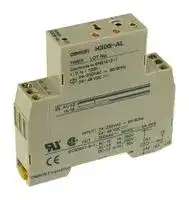
Illustrative purposes only

H3DSALAC24230DC2448
Analogue Timer, H3DS-A Series, On-Delay, 8 Ranges, 0.1 s, 120 h, 1 Changeover Relay
⚠️ Reference pricing provided. In case of supply shortages, we will connect you with our trusted procurement partners to ensure your project's continuity.
- Manufacturer: OMRON / PARTNER STOCK
- Product type: Analogue Timers
- SVHC: To Be Advised
- Time Max: 120h
- Time Min: 0.1s
- Timer Output: 1 Changeover Relay
- Product Range: H3DS-A Series
- Timer Functions: On-Delay
- Current Rating Nom: 5A
- Supply Voltage Max: 230VAC
- No. of Timing Ranges: 8Ranges
- Connection / Termination: Screw Terminals
| Delivery and price | |
|---|---|
| Units per pack | 3 |
| Price | 172.53 € |
| Current stock | 10+ |
| Lead time | 30 days |
Datasheet

**Solid-state Timer H3DS** CSM_H3DS_DS_E_5_3 ## **DIN Track Mounted, Standard 17.5-mm Width Timer Range** - A wide AC/DC power supply range (24 to 230 VAC/ 24 to 48 VDC) reduces the number of timer models kept in stock. (24 to 230 VAC/VDC with H3DS-XL @ ) - Smart Dial/Selector-locking Mechanism: Prevents the dials and selectors on the Timer’s front panel from being inadvertently operated or being operated without authorization. The lock can only be unlocked and locked with an optional pen-type Lock Key. - Screw-Less Clamp type available. (H3DS- @ LC) - Sticker provided for easy timer identification and management. - Terminal clamp left open when delivered (screw terminal type). - Finger protection terminal block to meet VDE0106/P100. - Enables easy sequence checks through instantaneous outputs for a zero set value at any time range. - Incorporates environment-friendly, cadmium-free contacts. - Conforms to EN61812-1 and IEC60664-1 4 kV/2 for Low Voltage, and EMC Directives. ## **Broad Line-up of H3DS Series** ## **H3DS** **==> picture [450 x 173] intentionally omitted <==** **----- Start of picture text -----**<br> H3DS-M/S/A H3DS-F H3DS-G H3DS-X<br>4 ie, enn<br>: eee<br>off ss ke2 tee= an val<br>| 4<br>pie em oul :<br>=o? E<br>ye .<br>Standard Timer Twin Timer Star-delta Timer Two-wired Timer<br>H3DS-M (eight multi-modes) H3DS-F H3DS-G H3DS-X<br>H3DS-S (four multi-modes)<br>H3DS-A (single mode)<br>**----- End of picture text -----**<br> ## **Contents** ## **Solid-state Timer** |**Solid-state Timer**|| |---|---| |H3DS-M/-S/-A...........................................................................................|2| |H3DS-F.....................................................................................................|13| |H3DS-G....................................................................................................|20| |H3DS-X ....................................................................................................|27| |**Common to ALL Timers**|| |Installation of Screw-Less Clamp Models.................................................|33| |Accessories ..............................................................................................|36| |Precautions...............................................................................................|37| ## **Common to ALL Timers** **1** **Solid-state Multi-functional Timer H3DS-M/-S/-A** - Eight operating modes (H3DS-M) and four operating modes (H3DS-S) cover a wide range of applications. - A wide time setting range of 0.10 s to 120 h. - Two LEDs indicate power and relay status respectively. ## **Model Number Structure** ## **Model Number Legend** ## **H3DS - L** ~~Wu~~ **1 2 3** 1. M: Multi-function type - S: Standard type - A: Single-function type 2. L: Smart lock mechanism 3. None: Screw terminal type - Screw-Less Clamp type ## **Orderin Information g** ## **List of Models** |**Supply voltage**|**Control output**|**Input type**|**Operating mode**<br>**(see note)**|**Model**|**Model**| |---|---|---|---|---|---| |||||**Screw terminal**<br>**type**|**Screw-Less**<br>**Clamp type**| |24 to 230 VAC (50/60Hz)/<br>24 to 48 VDC|Contact output: SPDT<br>(time-limit output SP-<br>DT)|Voltage input|Eight multi-modes: A, B,<br>B2, C, D, E, G, J|H3DS-ML|H3DS-MLC| |||No-input available|Four multi-modes: A, B2,<br>E, J|H3DS-SL|H3DS-SLC| ||||Single mode: A|H3DS-AL|H3DS-ALC| **Note:** The operating modes are as follows: - A: ON-delay - B: Flicker OFF start - B2: Flicker ON start - C: Signal ON/OFF-delay - D: SIgnal OFF-delay - E: Interval - G: Signal ON/OFF-delay - J: One shot **2** **H3DS-M/-S/-A** ## **Accessories (Order Separately)** |**Lock Key**||Y92S-38| |---|---|---| |**Mounting Track**|50 cm(l)x 7.3 mm(t)|PFP-50N| ||1 m(l)x 7.3 mm(t)|PFP-100N| ||1 m(l)x 16 mm(t)|PFP-100N2| |**End Plate**||PFP-M| |**Spacer**||PEP-S| **==> picture [539 x 34] intentionally omitted <==** **3** **H3DS-M/-S/-A** ## **S ecifications p** ## **General** |**General**|||| |---|---|---|---| |**Item**|**H3DS-ML**@|**H3DS-SL**@|**H3DS-AL**@| |**Operating mode**|A:<br>ON-delay (Signal or Power)<br>B:<br>Flicker OFF start (Signal or Power)<br>B2: Flicker ON start (Signal or Power)<br>C:<br>Signal ON/OFF-delay<br>D:<br>Signal OFF-delay<br>E:<br>Interval (Signal or Power)<br>G:<br>Signal ON/OFF-delay<br>J:<br>One-shot(Signal or Power)|A:<br>ON-delay<br>B2: Flicker ON start<br>E:<br>Interval<br>J:<br>One-shot|A: ON-delay (fixed)| |**Input type**|Voltage input|---|| |**Output type**|Relay: SPDT||| |**External connections**|Screw terminal, Screw-Less Clamp||| |**Terminal block**|Screw terminal type:<br>Clamps two 2.5-mm2max. bar terminals without sleeves.<br>Screw-Less Clamp type: Clamps two 1.5-mm2max. bar terminals without sleeves.||| |**Terminal screw**<br>**tightening torque**|0.98 N·m max.||| |**Mounting method**|DIN track mounting (see note)||| |**Attachment**|Nameplate label||| |**Approved standards**|UL508, CSA C22.2 No.14<br>Conforms to EN61812-1, IEC60664-1 4 kV/2, VDE0106/P100||| **Note:** Can be mounted to 35-mm DIN Track with a plate thickness of 1 to 2.5 mm. ## **Time Ranges** |**Time scale display**|**Time range**| |---|---| |0.1 s|0.1 to 1.2 s| |1 s|1 to 12 s| |0.1 m|0.1 to 1.2 min| |1 m|1 to 12 min| |0.1 h|0.1 to 1.2 h| |1 h|1 to 12 h| |10 h|10 to 120 h| **Note:** When the time setting dial is set to “0” for any time scale, the output will operate instantaneously. ## **Ratings** |**Ratings**|| |---|---| |**Rated supply voltage**<br> **(see notes 1 and 2)**|24 to 230 VAC (50/60 Hz)/24 to 48 VDC| |**Operating voltage range**|85% to 110% of rated supplyvoltage| |**Power reset**|Minimum power-off time: 0.1 s| |**Reset voltage**|2.4 VAC/DC max.| |**Power consumption (see note 3)**|AC: 32 VA max./3.0 W max. (typical: 30 VA/2.7 W) at 230 VAC<br>DC: 0.7 W max. (typical: 0.6 W) at 24 VDC<br>1.4 W max.(typical: 1.3 W)at 48 VDC| |**Voltage input**|Max. permissible capacitance between inputs lines (terminals B1 and A2): 2,000 pF<br>Load connectable in parallel with inputs (terminals B1 and A1).<br>H-level: 20.4 to 253 VAC/20.4 to 52.8 VDC<br>L-level: 0 to 2.4 VAC/DC| |**Control output**|Contact output: 5 A at 250 VAC with resistive load (cosφ= 1)<br>1 A at 250 VAC with inductive load (cosφ= 0.3)<br>5 A at 30 VDC with resistive load (cosφ= 1)<br>0.15 A max. at 125 VDC with resistive load,<br>0.1 A max. at 125 VDC with L/R of 7 ms.<br>The minimum applicable load is 10 mA at 5 VDC (P reference value).<br>Contact materials : Ag-alloy| |**Ambient temperature**|Operating: –10°C to 55°C (with no icing)<br>Storage:<br>–25°C to 65°C(with no icing)| |**Ambient humidity**|Operating: 35% to 85%| **Note: 1.** DC ripple rate: 20% max. **2.** Since an inrush current of 0.5 A will occur when using the power supply voltage at 24 VDC, pay careful attention when turning on or off the power supply to the Timer with a solid-state output such as a sensor. **3.** The power consumption is for mode A after the Timer counts the time-up time and for the AC input at 50 Hz. The power consumption of the H3DS-ML includes the input circuit with the B1 and A1 terminals short-circuited. **==> picture [539 x 34] intentionally omitted <==** **4** **H3DS-M/-S/-A** ## **Characteristics** |**Accuracy of operating time**|±1% max. of FS(±1%±10 ms max. at 1.2-s range)| |---|---| |**Setting error**|±10%±50 ms max. of FS| |**Signal input time**|50 ms min.| |**Influence of voltage**|±0.7% max. of FS(±0.7%±10 ms max. at 1.2-s range)| |**Influence of temperature**|±5% max. of FS(±5%±10 ms max. at 1.2-s range)| |**Insulation resistance**|100 MΩmin. at 500 VDC| |**Dielectric strength**|Between current-carrying metal parts and exposed non-current-carrying metal parts: 2,000 VAC for 1 min.<br>Between control output terminals and operating circuit: 2,000 VAC for 1 min.<br>Between contacts not located next to each other: 1,000 VAC for 1 min.| |**Vibration resistance**|Malfunction: 0.5-mm single amplitude at 10 to 55 Hz<br>Destruction: 0.75-mm single amplitude at 10 to 55 Hz| |**Shock resistance**|Malfunction: 100 m/s23 times each in 6 directions<br>Destruction: 1,000 m/s23 times each in 6 directions| |**Impulse withstand voltage**|5 kV (between power terminals)<br>5 kV(between current-carryingmetal parts and exposed non-current-carryingmetal parts)| |**Noise immunity**|Square-wave noisegenerated bynoise simulator(pulse width: 100 ns/1μs, 1-ns rise) ±1.5 kV| |**Static immunity**|Malfunction: 4 kV<br>Destruction: 8 kV| |**Life expectancy**|Mechanical: 10 million operations min. (under no load at 1,800 operations/h)<br>Electrical:<br>100,000 operations min. (5 A at 250 VAC, resistive load at 360 operations/h)<br>(see note)| |**EMC**|(EMI)<br>EN61812-1<br>Emission Enclosure:<br>EN55011 Group 1 class B<br>Emission AC Mains:<br>EN55011 Group 1 class B<br>Harmonic Current:<br>EN61000-3-2<br>Voltage Fluctuation and Flickering:<br>EN61000-3-3<br>(EMS)<br>EN61812-1<br>Immunity ESD:<br>IEC61000-4-2<br>Immunity RF-interference:<br>IEC61000-4-3<br>Immunity Burst:<br>IEC61000-4-4<br>Immunity Surge:<br>IEC61000-4-5<br>Immunity Conducted Disturbance:<br>IEC61000-4-6<br>ImmunityVoltage Dip/Interruption:<br>IEC61000-4-11| |**Case color**|Lightgray (5Y7/1)| |**Degree of protection**|IP30(Terminal block: IP20)| |**Weight**|Approx. 70g| **Note:** For reference: In both cases, a life of 100,000 operations can be expected. **==> picture [539 x 34] intentionally omitted <==** **5** **H3DS-M/-S/-A** ## **Connections** ## **Block Diagram** **==> picture [442 x 405] intentionally omitted <==** **----- Start of picture text -----**<br> H3DS-ML @<br>AC (DC) input Zero setting detection Time scale/ Operating<br>unit selectors mode selector<br>circuit<br>Power supply Oscillation Counting<br>Output circuit<br>circuit circuit circuit<br>Indicator<br>Start input Input circuit circuit<br>Power-ON Output<br>indicator indicator<br>H3DS-SL @ /-AL @<br>AC (DC) input Zero setting detection Time scale/ Operating<br>unit selectors mode selector<br>circuit<br>Power supply Oscillation Counting<br>Output circuit<br>circuit circuit circuit<br>Indicator<br>circuit<br>Power-ON Output<br>indicator indicator<br>**----- End of picture text -----**<br> ## **I/O Functions** |**I/O Functions**|**I/O Functions**||| |---|---|---|---| |**Item**||**H3DS-ML**@|**H3DS-SL**@**/-AL**@| |**Input**|**Start**|Starts operation.|No input is available.| |**Output**|**Control output**|Outputs are turned ON according to designated out-<br>put mode when preset value is reached.|Outputs are turned ON according to designated out-<br>put mode when preset value is reached.| **==> picture [539 x 34] intentionally omitted <==** **6** **H3DS-M/-S/-A** ## **Terminal Arrangement** **==> picture [424 x 181] intentionally omitted <==** **----- Start of picture text -----**<br> H3DS-MLC H3DS-ML H3DS-SLC/-ALC H3DS-SL/-AL<br>A1 15 B1 A1 15<br>A1 15 B1 A1 15<br>(Tirt] §=[OCo}* — ‘im [OOo]<br>L<br>15 15 15 15<br>18 16 18 16 18 16 18 16<br>18 16 A2 18 16 A2<br>18 16 A2 18 16 A2<br>(see note 1) (see note 1)<br>(DIN notation) (DIN notation)<br>**----- End of picture text -----**<br> **Note: 1.** DC supply voltage does not require the designation of polarity. **2.** The contact symbol for the H3DS is indicated with because it offers multiple operating modes and is different from the delayed contact for conventional timers. ## **Input Connections** The inputs of the H3DS-ML @ are voltage (voltage imposition or open) inputs. **==> picture [455 x 278] intentionally omitted <==** **----- Start of picture text -----**<br> No-contact Input No-contact Input Contact Input<br>(Connection to PNP output sensor.) (Connection to NPN output sensor.)<br>Sensor<br>Timer<br>Timer (+) 24 VDC A2 Timer<br>(−)<br>(+) B1 A1 B1 A1 B1 A1<br>24 VDC Start Start<br>(−) A2 A2<br>Operates with PNP transistor ON Sensor<br>Operates with relay ON<br>Operates with NPN transistor ON<br>Voltage Input Signal Levels<br>1. Transistor ON<br>Residual voltage: 1 V max.<br>No-contact (Voltage between terminals B1 and A2 must be more than the rated "H-level" voltage (20.4 VDC min.).)<br>input<br>2. Transistor OFF<br>Leakage current: 0.01 mA max.<br>(Voltage between terminals B1 and A2 must be less than the rated "L-level" voltage (2.4 VDC max.).)<br>Use contacts that can adequately switch 0.1 mA at each voltage to be imposed. (When the contacts are<br>Contact ON or OFF, voltage between terminals B1 and A2 must be within the following ranges:<br>input When contacts are ON: 20.4 to 253 VAC/20.4 to 52.8 VDC<br>When contacts are OFF: 0 to 2.4 VAC/DC<br>**----- End of picture text -----**<br> **No-contact Input** (Connection to PNP output sensor.) ## **Voltage Input Signal Levels** **7** omron ~~a~~ **H3DS-M/-S/-A** ## **O eration p** ## **Basic Operation** ## **Setting of Selector** The selectors can be turned clockwise and counterclockwise to select the desired time scale, or operating mode. Each selector has a snap mechanism that secures the selector at a given position. Set the selector at a position at which it is secured. Do not set it midway between two securing positions or a malfunction could result from improper setting. ## **Selection of Operating Mode (except for H3DS-AL)** ## **Locking/Unlocking of Selectors and Time Setting Dial** The time setting dial, time scale selector, and operating mode selector can be locked using the Y92S-38 Lock Key, a special pen type tool that is sold separately. To lock the dial or selectors, insert the Lock Key in the keyhole to the lower right of the dial or selector and turn it clockwise until the dial or selector is completely covered with the red cover. To unlock, turn the Lock Key in the opposite direction. The H3DS-ML/-SL can be set to any one of the operating modes A to J. Turn the operating mode selector with a screwdriver until the desired operating mode appears in the operating mode display window. H3DS-ML (8 modes): A, B, B2, C, D, E, G, J (In order of appearance) H3DS-SL (4 modes): A, E, B2, J, E, E, J, J (In order of appearance) **Note:** Letters that appear more than once indicate exactly the same operating mode. **==> picture [25 x 7] intentionally omitted <==** **----- Start of picture text -----**<br> Key hole<br>**----- End of picture text -----**<br> ## **Selection of Time Scale** The time scale is selected by turning the time scale selector. The time scales will appear in the following order in the time scale display window on the left of the selector: 1 s, 0.1 s, 1 h, 0.1 h, 10 h, 1 h, 1 m, 0.1 m. **Note:** The time scale “1h” appears twice. Both instances indicate exactly the same time scale. **==> picture [140 x 76] intentionally omitted <==** **----- Start of picture text -----**<br> Time scale display<br>window and selector Hee<br>seg eel! aie ae<br>(4er Operating mode display $9<br>window and selector<br>**----- End of picture text -----**<br> **8** omrRon ~~a~~ **H3DS-M/-S/-A** ## **Timing Chart** **Note: 1.** The minimum power reset time is 0.1 s and the minimum signal input time is 0.05 s. **2.** The letter “t” in the timing charts stands for the set time and “t–a” means that the period is less than the time set. **3.** There is no start input for H3DS-SL @ /-AL @ models. Operation starts at power-on. **==> picture [465 x 596] intentionally omitted <==** **----- Start of picture text -----**<br> Operating Timing chart<br>mode<br>A: ON-delay t t–a t<br>Power (A1 and A2) Basic operation<br>Power<br>Start (B1 and A2) a L a<br>(see note) **<br>*<br>Start<br>Output relay: NC 15 and 16 I | lot I | | | f t<br>Output<br>Output relay: NO<br>(output indicator) * For power-on operation, impose voltage to the<br>15 and 18 Start input. The Timer starts operating at the<br>moment the power is turned on.<br>| I | I | ** Start input is invalid while the Timer is in<br>Power indicator operation.<br>B: t t t–a t t t t–a<br>Flicker OFF<br>start<br>Basic operation<br>Power (A1 and A2)<br>Power<br>Start (B1 and A2) p o L ** s<br>(see note) *<br>Start<br>Output relay: NC t t t t<br>15 and 16<br>Output<br>Output relay: NO<br>(output indicator) * For power-on operation, impose voltage to the<br>15 and 18 Start input. The Timer starts operating at the<br>moment the power is turned on.<br>** Start input is invalid while the Timer is in<br>Power indicator operation.<br>B2: t t t–a t t t t–a<br>Flicker ON<br>start Power (A1 and A2)<br>_LnCFSE Basic operation<br>Start (B1 and A2)<br>(see note) Power<br>**<br>*<br>Output relay: NC Start<br>15 and 16<br>t t t t<br>Output<br>Output relay: NO<br>(output indicator)<br>15 and 18 * For power-on operation, impose voltage to the<br>Start input. The Timer starts operating at the<br>moment the power is turned on.<br>Power indicator ** Start input is invalid while the Timer is in<br>operation.<br>C: t t t t–a t t–a<br>Signal<br>ON/OFF-<br>delay Power (A1 and A2)<br>Start (B1 and A2) Basic operation<br>(see note)<br>i eel<br>Power<br>Output relay: NC<br>15 and 16 Spe §) p> e * s<br>Start<br>Output relay: NO (output indicator) t t t t<br>15 and 18<br>Output<br>* Start input is invalid while the Timer is in<br>Power indicator En operation.<br>**----- End of picture text -----**<br> **Note:** The start input of the H3DS-ML @ model is activated by applying a voltage to B1 and A2 terminals. The voltage can be applied by turning on the contact between B1 and A1 (Refer to _Terminal Arrangement_ ). **9** **H3DS-M/-S/-A** **==> picture [504 x 538] intentionally omitted <==** **----- Start of picture text -----**<br> Operating Timing chart<br>mode<br>D: t t–a t–a t t–a<br>Signal | lel | pe l | ++<br>OFF-delay l |<br>Power (A1 and A2)<br>toy | | 1 ol | | | |<br>Basic operation<br>Start (B1 and A2)<br>(see note) | | | , tot 1 ol | —<br>Power<br>| hit Lt Po<br>Output relay: NC *<br>15 and 16<br>| 1 | Start be<br>Output relay: NO t<br>(output indicator)<br>15 and 18 ||| Output<br>| ) | |<br>| | * Start input is valid and re-triggerable while the<br>Power indicator Timer is in operation.<br>E: Interval t t t–a t–a t<br>]1|DI1<br>Basic operation<br>Power (A1 and A2)<br>| rtd iyo I 14 Le<br>Power<br>**<br>Start (B1 and A2) *<br>(see note) Id retool roy ly Start =<br>Lod rtotol boyd 14 . 2<br>Output relay: NC t<br>15 and 16<br>| lod rtd roy 14 Output<br>Output relay: NO lotLi | | * For power-on operation, impose voltage to the<br>(output indicator) 15 and 18 rt1d ryly || Start input. The Timer starts operating at the moment the power is turned on.<br>** Start input is valid and re-triggerable while the<br>Power indicator Timer is in operation.<br>G:Signal t t t–a t t t–a t t–a Basic operation<br>ON/OFF- Power (A1 and A2) Power ee<br>delay<br>Start (B(see note) 1 and A2) *<br>Start<br>Output relay: NC<br>15 and 16 t t t t<br>Output relay: NO Output<br>(output indicator)<br>15 and 18<br>* Start input is valid and re-triggerable while the<br>Power indicator Timer is in operation.<br>J: t t t–a t–a t Basic operation<br>One-shot out-<br>put (ON delay) Power (A1 and A2) | hyo | Power =<br>(see note)Start (B1 and A2) | Lod Ld * **<br>Start<br>Output relay: NC<br>15 and 16Output relay: NO I Approx. 1±0.6 s lt rs Approx. 1±0.6 s tL boyy1 || TyItly Approx. 1±0.6 s ooI ] Output t Approx. 1(fixed) ±0.6 s<br>(output indicator) eC (fixed) (fixed) (fixed)<br>15 and 18 rd T | * For power-on operation, impose voltage to the<br>| Io | Start input. The Timer starts operating at the<br>moment the power is turned on.<br>Power indicator ** Start input is valid and re-triggerable while the<br>Timer is in operation.<br>**----- End of picture text -----**<br> **Note:** The start input of the H3DS-ML @ model is activated by applying a voltage to B1 and A2 terminals. The voltage can be applied by turning on the contact between B1 and A1 (Refer to _Terminal Arrangement_ ). **10** **H3DS-M/-S/-A** ## **Nomenclature** ## **H3DS-ML** @ **/-SL** @ **==> picture [403 x 400] intentionally omitted <==** **----- Start of picture text -----**<br> H3DS-MLC/-SLC<br>ate 8] eseieBse Wire connection holes<br>Output indicator (orange) er ae<br>(Lit while Timer output is ON.)<br>Set time window "ge Time setting dial (set time) a<br>Time scale display window and f f @ Lock for time setting dial -Go ©<br>selector (select one from 1 s, Lock for time scale selector 2 Release holes<br>0.1 s, 1 h, 0.1 h, 10 h, 1 h, 1 m,<br>and 0.1 m) n+)<br>Lock for operating mode selector<br>Operating mode display window oman= @a2 Zs<br>and selector (select the mode from<br>A, B, B2, C, D, E, G, and J for the<br>H3DS-ML, from A, B2, E, and J for the H3DS-SL) 16 Aa] Power-ON indicator (green) (Lit while the power is ON.) es 18 16 a A2<br>Wire connection holes<br>ane (Front View) at e<br>(Front View)<br>H3DS-AL @<br>H3DS-ALC<br>st — — Wire connection holes<br>Output indicator (orange)<br>(Lit while Timer output is ON.)<br>Set time window wail Time setting dial (set time) Gaaleo)<br>Lock for time setting dial<br>Time scale display window and ——] xm<br>selector (select one from 1 s, 0.1 s, 1 h, 0.1 h, 10 h, 1 h, 1 m, © Lock for time scale selector mt Release holes<br>and 0.1 m)<br>omaon<br>fe 16@ 52] Power-ON indicator (green) E 18 16 o A2<br>(Lit while the power is ON.)<br>Wire connection holes<br>are (Front View) =<br>(Front View)<br>**----- End of picture text -----**<br> Attach the enclosed label here as a nameplate. (The label is attached to the Timer's DIN Track hook section at the time of shipment.) **11** **H3DS-M/-S/-A** ## **Dimensions** ## **Note:** All units are in millimeters unless otherwise indicated. ## **H3DS-ML/-SL/-AL** ## **H3DS-MLC/-SLC/-ALC** **==> picture [200 x 328] intentionally omitted <==** **----- Start of picture text -----**<br> Surface color: Light gray 5Y7/1 (OMRON)<br>1 7.5 74<br>pee °<br>o. |. 45 80 |<br>i<br>O00<br>_ 44<br>68<br>| e<br>1 7.5 74<br>45 80<br>_<br>44<br>i: 68<br>**----- End of picture text -----**<br> ALL DIMENSIONS SHOWN ARE IN MILLIMETERS. To convert millimeters into inches, multiply by 0.03937. To convert grams into ounces, multiply by 0.03527. In the interest of product improvement, specifications are subject to change without notice. **12** **Solid-state Twin Timer H3DS-F** - Operates in flicker-OFF or flicker-ON start mode with one Unit. - Independent ON- and OFF-time settings. Combinations of long ON- or OFF-time and short OFF- or ONtime setting are possible. - Long time range from 0.1 s to 12 h for both ON and OFF time settings. For the most recent information on models that have been certified for safety standards, refer to your OMRON website. ## **Model Number Structure** ## **Model Number Legend** > **H3DS -F L** ~~__U~~ **1 2 3** 1. F: Twin timers 2. L: Smart lock mechanism 3. None: Screw terminal type - C: Screw-Less Clamp type ## **Orderin Information g** ## **List of Models** |**List of Models**|||| |---|---|---|---| |**Operating mode**|**Supply voltage**|**Model**|| |||**Screw terminal type**|**Screw-Less Clamp type**| |Flicker-OFF/Flicker-ON start|24 to 230 VAC (50/60 Hz)/24 to 48 VDC|H3DS-FL|H3DS-FLC| ## **Accessories (Order Separately)** |**Accessories (Order Separately)**|**Accessories (Order Separately)**|| |---|---|---| |**Lock Key**||Y92S-38| |**Mounting Track**|50 cm(l)x 7.3 mm(t)|PFP-50N| ||1 m(l)x 7.3 mm(t)|PFP-100N| ||1 m(l)x 16 mm(t)|PFP-100N2| |**End Plate**||PFP-M| |**Spacer**||PEP-S| **13** **H3DS-F** ## **S ecifications p** ## **General** |**General**|| |---|---| |**Item**|**H3DS-F**| |**Operating mode**|Flicker-OFF/Flicker-ON start| |**Output type**|Relay: SPDT| |**External connections**|Screw terminal, Screw-Less Clamp| |**Terminal block**|Screw terminal type:<br>Clamps two 2.5-mm2max. bar terminals without sleeves.<br>Screw-Less Clamp type: Clamps two 1.5-mm2max. bar terminals without sleeves.| |**Terminal screw tightening torque**|0.98 N·m max.| |**Mounting method**|DIN track mounting (see note)| |**Attachment**|Nameplate label| |**Approved standards**|UL508, CSA C22.2 No.14<br>Conforms to EN61812-1, IEC60664-1 4 kV/2, VDE0106/P 100| **Note:** Can be mounted to 35-mm DIN Track with a plate thickness of 1 to 2.5 mm. ## **Time Ranges** |**Time Ranges**|| |---|---| |**Time scale display**|**Time range**| |0.1 s|0.1 to 1.2 s| |1 s|1 to 12 s| |0.1 m|0.1 to 1.2 min| |1 m|1 to 12 min| |0.1 h|0.1 to 1.2 h| |1 h|1 to 12 h| **Note:** When the time setting dial is set to “0” for any time scale, the output will operate instantaneously. ## **Ratings** |**Ratings**|| |---|---| |**Rated supply voltage (See note.)**|24 to 230 VAC(50/60 Hz)/24 to 48 VDC| |**Operating voltage range**|85% to 110% of rated supplyvoltage| |**Power reset**|Minimum power-off time: 0.1 s| |**Reset voltage**|2.4 VAC/DC max.| |**Power consumption**|AC: 33 VA max./2.2 W max. (typical: 31 VA/2.0 W) at 230 VAC<br>DC: 0.7 W max. (typical: 0.6 W) at 24 VDC<br>1.4 W max.(typical: 1.2 W)at 48 VDC| |**Voltage input**|Max. permissible capacitance between inputs lines (terminals B1 and A2): 2,000 pF<br>Load connectable in parallel with inputs (terminals B1 and A1).<br>H-level: 20.4 to 253 VAC/20.4 to 52.8 VDC<br>L-level: 0 to 2.4 VAC/DC| |**Control output**|Contact output:<br>5 A at 250 VAC with resistive load (cosφ= 1)<br>1 A at 250 VAC with inductive load (cosφ= 0.3)<br>5 A at 30 VDC with resistive load(cosφ= 1)| |**Ambient temperature**|Operating: –10°C to 55°C (with no icing)<br>Storage:<br>–25°C to 65°C(with no icing)| |**Ambient humidity**|Operating: 35% to 85%| **Note:** DC ripple rate: 20% max. **==> picture [539 x 34] intentionally omitted <==** **14** **H3DS-F** ## **Characteristics** |**Accuracy of operating time**|±1% max. of FS(±1%±10 ms max. at 1.2-s range)| |---|---| |**Setting error**|±10%±50 ms max. of FS| |**Influence of voltage**|±0.5% max. of FS(±0.5%±10 ms max. at 1.2-s range)| |**Influence of temperature**|±5% max. of FS(±5%±10 ms max. at 1.2-s range)| |**Insulation resistance**|100 MΩmin. at 500 VDC| |**Dielectric strength**|Between current-carrying metal parts and exposed non-current-carrying metal parts: 2,000 VAC (50/60 Hz) for 1<br>min.<br>Between control output terminals and operating circuit: 2,000 VAC (50/60 Hz) for 1 min.<br>Between contacts not located next to each other: 1,000 VAC(50/60 Hz)for 1 min.| |**Impulse withstand voltage**|3 kV (between power supply terminals)<br>4.5 kV(between current-carryingmetal parts and exposed non-current-carryingmetal parts)| |**Noise immunity**|Square-wave noisegenerated bynoise simulator(pulse width: 100 ns/1μs, 1-ns rise) ±1.5 kV| |**Static immunity**|Malfunction: 4 kV<br>Destruction: 8 kV| |**Vibration resistance**|Malfunction: 0.5-mm single amplitude at 10 to 55 Hz<br>Destruction: 0.75-mm single amplitude at 10 to 55 Hz| |**Shock resistance**|Malfunction: 200 m/s2, 3 times each in 6 directions<br>Destruction: 300 m/s2, 3 times each in 6 directions| |**Life expectancy**|Mechanical: 10 million operations min. (under no load at 1,800 operations/h)<br>Electrical:<br>100,000 operations min.(5 A at 250 VAC, resistive load at 360 operations/h) (see note)| |**EMC**|(EMI)<br>EN61812-1<br>Emission Enclosure:<br>EN55011 Group 1 class B<br>Emission AC Mains:<br>EN55011 Group 1 class B<br>Harmonic Current:<br>EN61000-3-2<br>Voltage Fluctuation and Flickering: EN61000-3-3<br>(EMS)<br>EN61812-1<br>Immunity ESD:<br>EN61000-4-2:<br>6 kV contact discharge (level 3)<br>8 kV air discharge (level 3)<br>Immunity RF-interference from AM Radio Waves:<br>EN61000-4-3:<br>10 V/m (80 MHz to 1 GHz) (level 3)<br>Immunity Burst:<br>EN61000-4-4:<br>2 kV power port and output port (level 3)<br>1 kV control port with capacitive clamp (level 3)<br>Immunity Surge:<br>EN61000-4-5:<br>2 kV common mode (level 3)<br>1 kV differential mode(level 3)| |**Case color**|Lightgray (5Y7/1)| |**Degree of protection**|IP30(IP20 for terminal block)| |**Weight**|Approx. 70g| **Note:** For reference: A maximum current of 0.15 A can be switched at 125 VDC (cos φ =1). A maximum current of 0.1 A can be switched if L/R is 7 ms. In both cases, a life of 100,000 operations can be expected. The minimum applicable load is 10 mA at 5 VDC (failure level: P). **==> picture [539 x 34] intentionally omitted <==** **15** **H3DS-F** ## **Connections** ## **Block Diagram** **==> picture [316 x 116] intentionally omitted <==** **----- Start of picture text -----**<br> ON OFF<br>indicator indicator<br>(Orange) (Green) ON/OFF start<br>selector<br>AC (DC) Indicator Time scale<br>input circuit selector<br>ROM RAM Clock<br>Power One-chip microcomputer Output<br>supply circuit<br>circuit<br>**----- End of picture text -----**<br> ## **I/O Function** **Inputs** Flicker-ON start operation begins when inputs are turned ON. **Outputs Control output** Outputs are turned ON/OFF according to the time set by the ON-and OFF-time setting dial. ~~———~~ ## **Terminal Arrangement** **==> picture [182 x 161] intentionally omitted <==** **----- Start of picture text -----**<br> H3DS-FLC H3DS-FL<br>A1 15 B1<br>A1 15 B1<br>L<br>15 15<br>18 16 18 16<br>18 16 A2<br>18 16 A2<br>(See note 2.)<br>**----- End of picture text -----**<br> - **Note: 1.** If voltage is applied to terminal B1, or if terminals A1 and B1 are shorted, the operating mode is switched to flicker-ON start mode. If these terminals are disconnected, the mode switches to flicker-OFF start mode. **2.** DC supply voltage does not require the designation of polarity. **16** omRON ~~a~~ **H3DS-F** ## **O eration p** ## **Basic Operation** ## **Setting of Selector** The selectors can be turned clockwise and counterclockwise to select the desired time scale, or operating mode. Each selector has a snap mechanism that secures the selector at a given position. Set the selector at a position at which it is secured. Do not set it midway between two securing positions or a malfunction could result from improper setting. ## **Settings for ON/OFF Start** If voltage is applied to terminal B1, or if terminals A1 and B1 are shorted, the operating mode is switched to flicker-ON start mode. If these terminals are disconnected, the mode switches to flicker-OFF start mode. The operating mode will not change if the state of the applied voltage changes during timer operation. ## **Selection of Time Scale** ## ~~ee~~ The time scale is selected by turning the ON-time scale selector and OFF-time scale selector. The time scales will appear in the following order in each time scale display window on the left of the selector: ## **Time Setting** Use the ON/OFF-time setting dials to set the ON/OFF time. ## **Locking/Unlocking of Selectors and Time Setting Dial** The ON/OFF-time setting dials and time scale selectors can be locked using the Y92S-38 Lock Key, a special pen type tool that is sold separately. To lock the dials or selectors, insert the Lock Key in the keyhole to the lower right of the dial or selector and turn it clockwise until the dial or selector is completely covered with the red cover. To unlock, turn the Lock Key in the opposite direction. 0.1 s, 1 h, 0.1 h, 1 m, 1 s, 0.1 h, 0.1 m, 1 s. **Note:** The time scales “1 s” and “0.1 h” appear twice. Both instances indicate exactly the same time scale. **==> picture [25 x 6] intentionally omitted <==** **----- Start of picture text -----**<br> Key hole<br>**----- End of picture text -----**<br> **==> picture [118 x 75] intentionally omitted <==** **----- Start of picture text -----**<br> ON-time scale<br>display window<br>and selector<br>kk of ee ye<br>CG eu)<br>OFF-time scale display<br>window and selector<br>**----- End of picture text -----**<br> ## **Timing Charts** **==> picture [426 x 196] intentionally omitted <==** **----- Start of picture text -----**<br> Operating Timing chart<br>mode<br>Flicker-OFF 0.1 s min.<br>start(See note 1.) Power (A1 and A2) ONOFF Le Le<br>Output relay: NO 15 and 18 ON Fe Fo ee<br>(ON indicator) OFF<br>Output relay: NC 15 and 16 ONOFF Lo FS pees tON: ON set time<br>OFF indicator ON cS eee tOFF: OFF set time<br>OFF<br>Flicker-ON 0.1 s min.<br>start Power (A1 and A2) ON La<br>(See note 1.) OFF<br>Signal (B1 and A2) ON Le<br>OFF ato torr 1 tow torr (tow) ft tow!<br>Output relay: NO 15 and 18 ON<br>(ON indicator) OFF<br>Output relay: NC ON<br>15 and 16 OFF tON: ON set time<br>OFF indicator ON tOFF: OFF set time<br>OFF<br>**----- End of picture text -----**<br> - **Note: 1.** If voltage is applied to terminal B1, or if terminals A1 and B1 are shorted, the operating mode is switched to flicker-ON start mode. If these terminals are disconnected, the mode switches to flicker-OFF start mode. **2.** The reset time requires a minimum of 0.1 s. **3.** When power is supplied in flicker-ON start mode, the OFF indicator lights momentarily. This, however, has no effect on the performance of the Timer. **17** omRon ~~a~~ **H3DS-F** ## **Nomenclature** **==> picture [433 x 244] intentionally omitted <==** **----- Start of picture text -----**<br> H3DS-FL @<br>H3DS-FLC<br>Wire connection holes<br>Output ON/OFF indicator<br>When the output is ON: Orange<br>ars oy] When the output is OFF: Green REZ!Selsle=<br>ON-time display window ON-time setting dial<br>Lock for ON-time setting dial<br>ON Ke, ig ko<br>ON-time scale display window xe ON Ke]<br>and selector (select one from Lock for ON-time scale selector<br>0.1 s, 1 s, 0.1 m, 1 m, 0.1 h, Ka) xmqD<br>and 1 h) OFF-time setting dial Release holes<br>OFF-time display window - fo ©<br>Lock for OFF-time setting dial<br>OFF oO . go<br>OFF-time scale display window XExD or =O<br>and selector (select one from 0.1 s, 1 s, 0.1 m, 1 m, 0.1 h, omronH30S-FL (Q) Lock for OFF-time scale selector xe<br>and 1 h)<br>foe |-=- 18 =_ 16 = _ A2 }]<br>Wire connection holes<br>(Front View) FA AB B<br>(Front View)<br>Attach the enclosed label here as a nameplate.<br>(The label is attached to the Timer's DIN Track<br>hook section at the time of shipment.)<br>**----- End of picture text -----**<br> **18** **H3DS-F** ## **Dimensions** ## **H3DS-FL** **==> picture [195 x 130] intentionally omitted <==** **----- Start of picture text -----**<br> Surface color: Light gray 5Y7/1 (OMRON)<br>1 7.5 74<br>rt<br>Go °<br>45 80<br>00 ° |<br>0° ,<br>bod7<br>44<br>68<br>**----- End of picture text -----**<br> ## **H3DS-FLC** **==> picture [192 x 131] intentionally omitted <==** **----- Start of picture text -----**<br> Surface color: Light gray 5Y7/1 (OMRON)<br>1 7.5 74<br>i<br>oo t 45 | 80 |<br>ed ° |<br>Ey tf<br>44<br>68<br>**----- End of picture text -----**<br> ALL DIMENSIONS SHOWN ARE IN MILLIMETERS. To convert millimeters into inches, multiply by 0.03937. To convert grams into ounces, multiply by 0.03527. In the interest of product improvement, specifications are subject to change without notice. **19** **Solid-state Star-delta Timer H3DS-G** - A wide star-time range (up to 120 seconds) and star-delta transfer time range (up to 1 second) For the most recent information on models that have been certified for safety standards, refer to your OMRON website. ## **Model Number Structure** ## **Model Number Legend** ## **H3DS -G L** **1 2 3** 1. G: Star-delta timer 2. L: Smart lock mechanism 3. None: Screw terminal type - C: Screw-Less Clamp type ## **Orderin Information g** ## **List of Models** |**List of Models**|||| |---|---|---|---| |**Operating mode**|**Supply voltage**|**Model**|| |||**Screw terminal type**|**Screw-Less Clamp type**| |Star-delta operation|24 to 230 VAC (50/60 Hz)/24 to 48 VDC|H3DS-GL|H3DS-GLC| ## **Accessories (Order Separately)** |**Accessories (Order Separately)**|**Accessories (Order Separately)**|| |---|---|---| |**Lock Key**||Y92S-38| |**Mounting Track**|50 cm(l)x 7.3 mm(t)|PFP-50N| ||1 m(l)x 7.3 mm(t)|PFP-100N| ||1 m(l)x 16 mm(t)|PFP-100N2| |**End Plate**||PFP-M| |**Spacer**||PEP-S| **20** omron ~~a~~ **H3DS-G** ## **S ecifications p** ## **General** |**General**|| |---|---| |**Item**|**H3DS-G**| |**Operating mode**|Star-delta operation| |**Operating/Reset method**|Time-limit operation/Self-reset| |**External connections**|Screw terminal, Screw-Less Clamp| |**Terminal block**|Screw terminal type:<br>Clamps two 2.5-mm2max. bar terminals without sleeves.<br>Screw-Less Clamp type: Clamps two 1.5-mm2max. bar terminals without sleeves.| |**Terminal screw tightening torque**|0.98 N·m max.| |**Output type**|(Star operation circuit) Relay:<br>SPST-NO<br>(Delta operation circuit)Relay: SPST-NO| |**Mounting method**|DIN track mounting (see note)| |**Attachment**|Nameplate label| |**Approved standards**|UL508, CSA C22.2 No.14<br>Conforms to EN61812-1, IEC60664-1 4 kV/2, VDE0106/P100| **Note:** Can be mounted to 35-mm DIN Track with a plate thickness of 1 to 2.5 mm. ## **Time Ranges** |**Time Ranges**|**Time Ranges**|| |---|---|---| |**Time scale**<br>**Star operation time ranges**||| |**x 1**<br>1 to 12 s||| |**x 10**<br>10 to 120 s||| |||| |**Star-delta transfer time**|Programmable at 0.05 s,|0.1 s, 0.5 s, or 1 s| ## **Ratings** |**Ratings**|| |---|---| |**Rated supply voltage (see note)**|24 to 230 VAC(50/60 Hz)/24 to 48 VDC| |**Operating voltage range**|85% to 110% of rated supplyvoltage| |**Power reset**|Minimum power-off time: 0.5 s| |**Reset voltage**|2.4 VAC/DC max.| |**Power consumption**|AC: 21 VA max./1.7 W max. (typical: 20 VA/1.6 W) at 230 VAC<br>DC: 1.3 W max. (typical: 1.2 W) at 24 VDC<br>0.7 W max.(typical: 0.6 W)at 48 VDC| |**Control output**|Contact output:<br>5 A at 250 VAC with resistive load (cosφ= 1)<br>1 A at 250 VAC with inductive load (cosφ= 0.3)<br>5 A at 30 VDC with resistive load(cosφ= 1)| |**Ambient temperature**|Operating: –10°C to 55°C (with no icing)<br>Storage:<br>–25°C to 65°C(with no icing)| |**Ambient humidity**|Operating: 35% to 85%| **Note:** DC ripple rate: 20% max. **==> picture [539 x 34] intentionally omitted <==** **21** **H3DS-G** ## **Characteristics** |**Accuracy of operating time**|±1% max. of FS| |---|---| |**Setting error**|±10%±50 ms max. of FS| |**Total tolerance of transfer**<br>**time**|±(25% FS + 5 ms) max.| |**Influence of voltage**|±0.5% max. of FS| |**Influence of temperature**|±5% max. of FS| |**Insulation resistance**|100 MΩmin. at 500 VDC| |**Dielectric strength**|Between current-carrying metal parts and exposed non-current-carrying metal parts: 2,000 VAC (50/60 Hz) for 1<br>min.<br>Between control output terminals and operating circuit: 2,000 VAC (50/60 Hz) for 1 min.<br>Between contacts not located next to each other: 1,000 VAC(50/60 Hz)for 1 min.| |**Impulse withstand voltage**|3 kV (between power supply terminals)<br>4.5 kV(between current-carryingmetal parts and exposed non-current-carryingmetal parts)| |**Noise immunity**|Square-wave noisegenerated bynoise simulator(pulse width: 100 ns/1μs, 1-ns rise) ±1.5 kV| |**Static immunity**|Malfunction: 4 kV<br>Destruction: 8 kV| |**Vibration resistance**|Malfunction: 0.5-mm single amplitude at 10 to 55 Hz<br>Destruction: 0.75-mm single amplitude at 10 to 55 Hz| |**Shock resistance**|Malfunction: 200 m/s2, 3 times each in 6 directions<br>Destruction: 300 m/s2, 3 times each in 6 directions| |**Life expectancy**|Mechanical: 10 million operations min. (under no load at 1,800 operations/h)<br>Electrical:<br>100,000 operations min.(5 A at 250 VAC, resistive load at 360 operations/h) (see note)| |**EMC**|(EMI)<br>EN61812-1<br>Emission Enclosure:<br>EN55011 Group 1 class B<br>Emission AC Mains:<br>EN55011 Group 1 class B<br>Harmonic Current:<br>EN61000-3-2<br>Voltage Fluctuation and Flickering: EN61000-3-3<br>(EMS)<br>EN61812-1<br>Immunity ESD:<br>EN61000-4-2:<br>6 kV contact discharge (level 3)<br>8 kV air discharge (level 3)<br>Immunity RF-interference from AM Radio Waves:<br>EN61000-4-3: 10 V/m (80 MHz to 1 GHz) (level 3)<br>Immunity Burst:<br>EN61000-4-4:<br>2 kV power port and output port (level 3)<br>1 kV control port with capacitive clamp (level 3)<br>Immunity Surge:<br>EN61000-4-5:<br>2 kV common mode (level 3)<br>1 kV differential mode(level 3)| |**Case color**|Lightgray (5Y7/1)| |**Degree of protection**|IP30(IP20 for terminal block)| |**Weight**|Approx. 70g| **Note:** For reference: A maximum current of 0.15 A can be switched at 125 VDC (cos φ =1). A maximum current of 0.1 A can be switched if L/R is 7 ms. In both cases, a life of 100,000 operations can be expected. The minimum applicable load is 10 mA at 5 VDC (failure level: P). **==> picture [539 x 34] intentionally omitted <==** **22** **H3DS-G** ## **Connections** ## **Block Diagram** **==> picture [387 x 180] intentionally omitted <==** **----- Start of picture text -----**<br> Star Star-delta<br>AC (DC) input operation transfer<br>time scale time<br>selector selection<br>Power supply circuit Star operation time oscillation circuit Star operation time counting circuit Star-delta transfer time oscillation circuit Star-delta transfer time counting circuit Output circuit Star operation<br>Delta operation<br>Indicator<br>circuit<br>Star operation Delta operation<br>indicator indicator<br>**----- End of picture text -----**<br> ## **I/O Functions** |**I/O Functions**|**I/O Functions**|| |---|---|---| |**Inputs**||---| |**Outputs**|**Control output**|Star output is turned OFF when the dial set value is reached and delta output is ON after<br>the preset transfer time elapses| ## **Terminal Arrangement** **==> picture [168 x 167] intentionally omitted <==** **----- Start of picture text -----**<br> H3DS-GLC H3DS-GL<br>A1 17 27<br>A1 17 27<br>17 27 17 27<br>18 28 18 28<br>18 28 A2<br>18 28 A2<br>(see note)<br>**----- End of picture text -----**<br> **Note:** DC supply voltage does not require the designation of polarity. **23** **H3DS-G** ## **O eration p** ## **Basic Operation** ## **Setting of Selector** The selectors can be turned clockwise and counterclockwise to select the desired time scale, or operating mode. Each selector has a snap mechanism that secures the selector at a given position. Set the selector at a position at which it is secured. Do not set it midway between two securing positions or a malfunction could result from improper setting. ## **Selection of Time Unit and Time Scale** The star-delta transfer time and star operation time scale are set with the same selector. The star-delta transfer time can be set to 0.05, 0.1, 0.5, or 1. The star operation time scale can be set to a multiplication factor of 1 or 10. If the star-delta transfer time is displayed in the display window in white letters, this means that the star operation time scale is “x10”. Refer to the example below. |**Star-delta transfer time**|**Star-delta transfer time**|**Star-delta transfer time**|**Star operation time scale**| |---|---|---|---| ||0.05 s||x1| ||0.1 s||| ||0.5 s||| |1 s|||| |0.05 s|||x10| |0.1 s<br>~~a~~<br>~~|~~<br>~~|~~|||| |0.5 s<br>~~|~~<br>~~|~~|||| |1 s<br>~~|~~<br>~~|~~|||| ## **Time Setting** The star operation time of the Timer is set with the time setting dial. ## **Locking/Unlocking of Selectors and Time Setting Dial** The time setting dial and time scale selector can be locked using the Y92S-38 Lock Key, a special pen type tool that is sold separately. To lock the dial or selectors, insert the Lock Key in the keyhole to the lower right of the dial or selector and turn it clockwise until the dial or selector is completely covered with the red cover. To unlock, turn the Lock Key in the opposite direction. **==> picture [25 x 7] intentionally omitted <==** **----- Start of picture text -----**<br> Key hole<br>**----- End of picture text -----**<br> **==> picture [78 x 19] intentionally omitted <==** **----- Start of picture text -----**<br> Star-delta transfer time and<br>star operation time scale<br>display window and selector<br>**----- End of picture text -----**<br> ## **Timing Charts** **==> picture [198 x 91] intentionally omitted <==** **----- Start of picture text -----**<br> 0.5 s<br>Power (A1 and A2) ON<br>OFF<br>Star contact t 1 t2<br>17 and 18 ON<br>(star indicator) OFF<br>Delta contact<br>27 and 28 ON<br>(delta indicator) OFF t1: Star operation time setting<br>t2: Star-delta transfer time<br>**----- End of picture text -----**<br> **Note:** The reset time requires a maximum of 0.5 s. **24** **H3DS-G** ## **Nomenclature** **==> picture [437 x 245] intentionally omitted <==** **----- Start of picture text -----**<br> H3DS-GL @<br>H3DS-GLC<br>Wire connection holes<br>FARES<br>Delta operation indicator (orange)<br>@A<br>Set time window g e Time setting dial (for setting ©<br>Star-delta transfer time and om> © star operation time)Lock for time setting dial “ge ©<br>star operation time scale Lock for star-delta transfer time Release holes<br>display window and selector and star operation time scale<br>Ee? ES| Time Sey<br>Star operation indicator omeon @<br>oe iS (green) H3DS-GL<br>18 28 A2<br>pe i<br>a = A AB S Wire connection holes<br>(Front View)<br>(Front View)<br>asa,<br>Attach the enclosed label here as a nameplate.<br>(The label is attached to the Timer's DIN Track<br>hook section at the time of shipment.)<br>**----- End of picture text -----**<br> **25** **H3DS-G** ## **Dimensions** ## **H3DS-GL** ## **H3DS-GLC** **==> picture [191 x 356] intentionally omitted <==** **----- Start of picture text -----**<br> (a<br>|re|e|BL ee|<br>Surface color: Light gray 5Y7/1 (OMRON)<br>1 7.5 74<br>e(e. g n | |<br>45 80<br>—<br>44<br>68<br>|y [EB | Ga P Te<br>Surface color: Light gray 5Y7/1 (OMRON)<br>1 7.5 74<br>(00000)<br>°<br>(0 , iz 45 80 |<br>°<br>ro)<br>44<br>68<br>**----- End of picture text -----**<br> ALL DIMENSIONS SHOWN ARE IN MILLIMETERS. To convert millimeters into inches, multiply by 0.03937. To convert grams into ounces, multiply by 0.03527. In the interest of product improvement, specifications are subject to change without notice. **26** **Solid-state Two-wired Timer H3DS-X** - Covers wide range of supply voltage (24 to 230 VAC/VDC). For the most recent information on models that have been certified for safety standards, refer to your OMRON website. ## **Model Number Structure** ## **Model Number Legend** ## **H3DS -** ~~__U~~ **X L** **1 2 3** 1. X: Two-wired timer 2. L: Smart lock mechanism 3. None: Screw terminal type C: Screw-Less Clamp type ## **Orderin Information g** ## **List of Models** |**List of Models**||||| |---|---|---|---|---| |**Supply voltage**|**Input type**|**Operating mode**|**Model**|| ||||**Screw terminal type**|**Screw-Less Clamp**<br>**type**| |24 to 230 VAC/VDC (50/60 Hz)|No-input available|ON-delay|H3DS-XL|H3DS-XLC| ## **Accessories (Order Separately)** |**Accessories (Order Separately)**|**Accessories (Order Separately)**|| |---|---|---| |**Lock Key**||Y92S-38| |**Mounting Track**|50 cm(l)x 7.3 mm(t)|PFP-50N| ||1 m(l)x 7.3 mm(t)|PFP-100N| ||1 m(l)x 16 mm(t)|PFP-100N2| |**End Plate**||PFP-M| |**Spacer**||PEP-S| **27** **H3DS-X** ## **S ecifications p** ## **General** |**General**|| |---|---| |**Item**|**H3DS-X**| |**Operating mode**|ON-delay| |**Operating/Reset method**|Time-limit operation/self-resetting| |**Output type**|SCR output| |**External connections**|Screw terminal, Screw-Less Clamp| |**Terminal block**|Screw terminal type:<br>Clamps two 2.5-mm2max. bar terminals without sleeves.<br>Screw-Less Clamp type: Clamps two 1.5-mm2max. bar terminals without sleeves.| |**Terminal screw tightening torque**|0.98 N·m max.| |**Mounting method**|DIN track mounting (see note)| |**Attachment**|Nameplate label| |**Approved standards**|UL508, CSA C22.2 No.14<br>Conforms to EN61812-1, IEC60664-1 4 kV/2, VDE0106/P100| **Note:** Can be mounted to 35-mm DIN Track with a plate thickness of 1 to 2.5 mm. ## **Time Ranges** |**Time scale display**|**Time range**| |---|---| |0.1 s|0.1 to 1.2 s| |1 s|1 to 12 s| |0.1 m|0.1 to 1.2 min| |1 m|1 to 12 min| |0.1 h|0.1 to 1.2 h| |1 h|1 to 12 h| |10 h|10 to 120 h| **Note:** When the time setting dial is set to “0” for any time scale, the output will operate instantaneously. ## **Ratings** |**Ratings**|| |---|---| |**Rated supply voltage (see note)**|24 to 230 VAC/VDC(50/60 Hz)| |**Operating voltage range**|85% to 110% of rated supplyvoltage| |**Power reset**|Minimum power-off time: 0.1 s| |**Reset voltage**|1.0 VAC/VDC max.| |**Reset current**|5 mA max.| |**Power consumption**|5 mA max.| |**Control output**|SCR output:5 mA to 0.7 A| |**Ambient temperature**|Operating: –10°C to 55°C (with no icing)<br>Storage:<br>–25°C to 65°C(with no icing)| |**Ambient humidity**|Operating: 35% to 85%| **Note:** The ripple in DC power supply must be 5% max. **==> picture [539 x 34] intentionally omitted <==** **28** **H3DS-X** ## **Characteristics** |**Accuracy of operating time**|±1% max. of FS(±1%±10 ms max. at 1.2-s range)| |---|---| |**Setting error**|±10%±50 ms max. of FS| |**Reset time**|0.1 s max.| |**Influence of voltage**|±0.5% max. of FS(±0.5%±10 ms max. at 1.2-s range)| |**Influence of temperature**|±5% max. of FS(±5%±10 ms max. at 1.2-s range)| |**Insulation resistance**|100 MΩmin. at 500 VDC| |**Dielectric strength**|Between current-carryingmetal parts and exposed non-current-carryingmetal parts: 2,000 VAC for 1 min| |**Impulse withstand voltage**|3 kV (between power supply terminals)<br>4.5 kV(between current-carryingmetal parts and exposed non-current-carryingmetal parts)| |**Noise immunity**|Square-wave noise generated by noise simulator (pulse width: 100 ns/1μs, 1-ns rise)±1.5 kV (between power<br>supplyterminals)| |**Static immunity**|Malfunction: 4 kV<br>Destruction: 8 kV| |**Vibration resistance**|Malfunction: 0.5-mm single amplitude at 10 to 55 Hz<br>Destruction: 0.75-mm single amplitude at 10 to 55 Hz| |**Shock resistance**|Malfunction: 200 m/s2, 3 times each in 6 directions<br>Destruction: 300 m/s2, 3 times each in 6 directions| |**EMC**|(EMI)<br>EN61812-1<br>Emission Enclosure:<br>EN55011 Group 1 class B<br>Emission AC Mains:<br>EN55011 Group 1 class B<br>Harmonic Current:<br>EN61000-3-2<br>Voltage Fluctuation and Flickering: EN61000-3-3<br>(EMS)<br>EN61812-1<br>Immunity ESD:<br>EN61000-4-2:<br>6 kV contact discharge (level 3)<br>8 kV air discharge (level 3)<br>Immunity RF-interference from AM Radio Waves:<br>EN61000-4-3:<br>10 V/m (80 MHz to 1 GHz) (level 3)<br>Immunity Burst:<br>EN61000-4-4:<br>2 kV power port and output port (level 3)<br>1 kV control port with capacitive clamp (level 3)<br>Immunity Surge:<br>EN61000-4-5:<br>2 kV common mode (level 3)<br>1 kV differential mode(level 3)| |**Case color**|Lightgray (5Y7/1)| |**Degree of protection**|IP30(IP20 for terminal block)| |**Weight**|Approx. 70g| ## **Connections** ## **Block Diagram** **==> picture [339 x 138] intentionally omitted <==** **----- Start of picture text -----**<br> Zero setting Time scale/ Indicator<br>detection<br>unit selectors circuit<br>circuit<br>AC (DC) Power supply Oscillation Counting Output<br>input circuit circuit circuit circuit<br>**----- End of picture text -----**<br> ## **I/O Functions** |**I/O Functions**|**I/O Functions**|| |---|---|---| |**Inputs**||---| |**Outputs**|**Control output**|Outputs are turned ON when the preset value is reached.| **==> picture [539 x 34] intentionally omitted <==** **29** **H3DS-X** ## **Terminal Arrangement** **==> picture [122 x 159] intentionally omitted <==** **----- Start of picture text -----**<br> H3DS-XLC H3DS-XL<br>A1<br>A1<br>A2<br>A2<br>**----- End of picture text -----**<br> **Note:** DC supply voltage does not require the designation of polarity. ## **O eration p** ## **Basic Operation** ## **Setting of Selector** The selectors can be turned clockwise and counterclockwise to select the desired time scale, or operating mode. Each selector has a snap mechanism that secures the selector at a given position. Set the selector at a position at which it is secured. Do not set it midway between two securing positions or a malfunction could result from improper setting. ## **Selection of Time Scale** ## **Locking/Unlocking of Selectors and Time Setting Dial** The time setting dial and time scale selector can be locked using the Y92S-38 Lock Key, a special pen type tool that is sold separately. To lock the dial or selectors, insert the Lock Key in the keyhole to the lower right of the dial or selector and turn it clockwise until the dial or selector is completely covered with the red cover. To unlock, turn the Lock Key in the opposite direction. The time scale is selected by turning the time scale selector. The time scales will appear in the following order in the time scale display window on the left of the selector: 1 s, 0.1 s, 1 h, 0.1 h, 10 h, 1 h, 1 m, 0.1 m. **Note:** The time scale “1h” appears twice. Both instances indicate exactly the same time scale. **==> picture [25 x 6] intentionally omitted <==** **----- Start of picture text -----**<br> Key hole<br>**----- End of picture text -----**<br> **==> picture [57 x 12] intentionally omitted <==** **----- Start of picture text -----**<br> Time scale display<br>window and selector<br>**----- End of picture text -----**<br> **30** omrRon ~~a~~ **H3DS-X** **Timing Charts** **==> picture [172 x 104] intentionally omitted <==** **----- Start of picture text -----**<br> Rt 0.1 s min.<br>Power<br>(A1 and A2)<br>Output<br>ON<br>Indicator<br>OFF a<br>L Set tim e =<br>Rt: Resetting time<br>**----- End of picture text -----**<br> ## **Nomenclature** **==> picture [404 x 251] intentionally omitted <==** **----- Start of picture text -----**<br> H3DS-XL @<br>H3DS-XLC<br>Wire connection holes<br>ar aS =I<br>Set time window Time setting dial (set time)<br>es F +) © Lock for time setting dial -@o<br>Time scale display window and ee , ©<br>selector (select one from 1 s, Lock for time scale selector Release holes<br>0.1 s, 1 h, 0.1 h, 10 h, 1 h, 1 m,<br>and 0.1 m) » xe ©<br>H3DS-XL<br>vii en<br>A2<br>oo Power-ON indicator (green) [1HDS A2<br>(Lit while the power is ON.)<br>—= AA AE S Wire connection holes<br>(Front View)<br>(Front View)<br>Attach the enclosed label here as a nameplate.<br>(The label is attached to the Timer's DIN Track<br>hook section at the time of shipment.)<br>**----- End of picture text -----**<br> **31** **H3DS-X** ## **Dimensions** ## **H3DS-XL** ## **H3DS-XLC** **==> picture [199 x 334] intentionally omitted <==** **----- Start of picture text -----**<br> Surface color: Light gray 5Y7/1 (OMRON)<br>tr 1 7.5 74 |<br>io}<br>ef 45 80<br>ere L— 44<br>68<br>TEETF “| Gar Te<br>Surface color: Light gray 5Y7/1 (OMRON)<br>1 7.5 74<br>fre<br>°<br>ee |<br>45 80<br>° | |<br>JToom<br>44<br>68<br>**----- End of picture text -----**<br> ALL DIMENSIONS SHOWN ARE IN MILLIMETERS. To convert millimeters into inches, multiply by 0.03937. To convert grams into ounces, multiply by 0.03527. In the interest of product improvement, specifications are subject to change without notice. **32** **H3DS-** @LC ## **Installation of Screw-Less Clam Models p** ## **Tools** A flat-blade screwdriver should be used to mount the cables. ## **Applicable Screwdriver** Flat-blade, Parallel-tip, 2.5 mm diameter Examples: FACOM AEF.2.5 × 75E VESSEL No. 9900-(-)2.5 × 75 WAGO 210-119 WIHA 260/2.5 × 40 ## **Applicable Wires** ## **Applicable Wire Sizes** 0.2 to 1.5 mm[2] , AWG24 to AWG16 ## **Applicable Wire Type** Solid wires, stranded wires, flexible wires, or wires with ferules can be used. (See note 1) < 1.8 ≤ Diameter D (mm) ≤ 3.0 (see note 2) Conductor diameter d (mm) or length of sides a and b (mm) ≤ 1.6 **==> picture [74 x 7] intentionally omitted <==** **----- Start of picture text -----**<br> Wires with Ferules<br>**----- End of picture text -----**<br> - **Note: 1.** If the overall diameter of the wire is less than 1.8 mm, do not insert the wire past the conductor. Refer to the following diagrams. **==> picture [137 x 11] intentionally omitted <==** **----- Start of picture text -----**<br> OK NG<br>**----- End of picture text -----**<br> **2.** If the overall diameter of the wire is over 2.8 mm, it will be difficult to use double wiring. **33** **H3DS-** @LC ## **Wiring** Use wires of the applicable sizes specified above. The length of the exposed conductor should be 6 to 7 mm. **==> picture [29 x 6] intentionally omitted <==** **----- Start of picture text -----**<br> 6 to 7 mm<br>**----- End of picture text -----**<br> **Fig. 1 Exposed Conductor Length** Use the following wiring procedure. **1.** Insert the specified screwdriver into the release hole located beside the wire connection hole where the wire is to be inserted. **==> picture [157 x 91] intentionally omitted <==** **----- Start of picture text -----**<br> ae d A<br>Wire<br>connection<br>holes<br>Release ae a ee<br>holes<br>IONE<br>A<br>**----- End of picture text -----**<br> **Fig. 2 Wire Connection Holes and Release Holes** **==> picture [267 x 83] intentionally omitted <==** **----- Start of picture text -----**<br> Wire connection hole<br>Release hole<br>Insert<br>(J [CUSiaS] [Ss] a Screwdriver = _<br>Fig. 3 Section A-A of Fig. 2<br>**----- End of picture text -----**<br> **2.** Insert the exposed conductor into the wire connection hole. Insert ——— Coes SCC YW Insert = = Pull out =~. **3.** Pull out the screwdriver. **34** omron ~~a~~ **H3DS-** @LC ## **Precautions** Always insert the screwdriver straight into the hole, never at an angle. The clamp spring may be deformed if the screwdriver is not straight. Do not move the screwdriver side to side in the clamp hole. The clamp spring may be deformed if the screwdriver is moved sideways. **35** **H3DS** **Accessories Order Se aratel ( p y)** **Note:** All units are in millimeters unless otherwise indicated. ## **Dimensions** **==> picture [472 x 320] intentionally omitted <==** **----- Start of picture text -----**<br> Lock Key<br>Y92S-38<br>4<br>6.4<br>100<br>Mounting Track<br>PFP-100N, PFP-50N PFP-100N2<br>oaaiak a a — —o —aTa<br>16<br>7.3±0.15<br>4.5 =—— 4.5 =<br>35±0.3 27±0.15 35±0.3 27 24 29.2<br>==Se 15 25 10 25 1,000 (500) SE 25 10 25 15 (5) F 1 = 15 25 10 25 1,000 a 25 s 10 25 15 ae= 1 1.5<br>(see note) (see note)<br>Note: The values shown in parentheses are for the<br>PFP-50N.<br>**----- End of picture text -----**<br> **==> picture [440 x 123] intentionally omitted <==** **----- Start of picture text -----**<br> End Plate Spacer<br>PFP-M PFP-S<br>16<br>10 5 12<br>6.2 1.8<br>] rT “LF PI<br>1<br>50 35.5 35.5 34.8<br>1.8 44.3<br>11.5 1.3<br>10 M4 x 8 4.8<br>pan head 16.5<br>screw<br>**----- End of picture text -----**<br> **36** omRON ~~a~~ **H3DS** ## **Safet Precautions y** ## **Changing of Setting** ## ~~ee~~ ! **CAUTION** ~~a~~ **Switching Current vs. Ambient** ~~____—~~ Do not change the time scale or operating mode, while the Timer is in **Temperature** operation or malfunction could result. **(When Mounting Two or More H3DS** **Power Supplies Units Side-by-Side)** Do not change the time scale or operating mode, while the Timer is in operation or malfunction could result. ## **Power Supplies** - H3DS-ML @ /-SL @ /-AL- @ The H3DS Series is provided with a transformerless power supply system. An electric shock may be received if the input terminal is touched while power is being supplied. **==> picture [227 x 284] intentionally omitted <==** **----- Start of picture text -----**<br> 70<br>60 Mounting clearance:<br>5 mm<br>re<br>Maximum range of<br>operating ambient<br>50 temperature<br>See<br>40 | rs Mounting clearance:<br>0 mm<br>30<br>EEE<br>0 1 2 3 4 5 Load current (A)<br>• H3DS-FL @ /-GL @<br>70<br>Mounting clearance:<br>60 10 mm<br>Pe<br>Maximum range of<br>operating ambient<br>50 temperature<br>oe<br>Mounting clearance:<br>40 5 mm<br>Mounting clearance:<br>0 mm<br>30<br>CCA<br>aan<br>0 1 2 3 4 5 Load current (A)<br>C)<br>°<br>Ambient temperature (<br>C)<br>°<br>Ambient temperature (<br>**----- End of picture text -----**<br> Use the bar terminal for wiring the H3DS. Using a stranded-wire terminal may cause a short-circuit due to a stray wire entering into the Timer. Both AC and DC power supplies can be connected to the power input terminals without regarding polarity. With the H3DS only, a DC power supply must be connected to the power input terminals as designated according to the polarity of the terminals. A DC power supply can be connected if its ripple factor is 20% or less and the mean voltage is within the rated operating voltage range of the Timer. Make sure that the voltage is applied within the specified range, otherwise the internal elements of the Timer may be damaged. Connect the power supply voltage through a relay or switch in such a way that the voltage reaches a fixed value at once or the Timer may not be reset or a timer error could result. Be sure that the capacity of the power supply is large enough, otherwise the Timer may not start due to inrush current (approx. 3 A) that may flow for an instant when the Timer is turned on. For the power supply of an input device of the H3DS-ML @ , use an isolating transformer, of which the primary and secondary windings are mutually isolated and the secondary winding is not grounded. **==> picture [200 x 117] intentionally omitted <==** **----- Start of picture text -----**<br> A1<br>B1<br>li te:<br>H3DS-ML@ Power supply<br>Start<br>input<br>sy | re<br>A2<br>Circuit<br>| sai.<br>Lo ! t Isolation transformer is required.<br>Rectifier circuit<br>**----- End of picture text -----**<br> ## **Input/Output** ## **Relationship between Input and Power Supply Circuits (H3DS-ML** @ **)** ## **Installation** If the load current is continuously being supplied to the Timer for a long period of time, be sure to provide the mounting clearance as shown in the figure below. If used under the conditions other than those specified below (except for the H3DS-XL @ ), the life of internal components may be shortened due to an excessive rise in the internal temperature. **==> picture [125 x 53] intentionally omitted <==** **----- Start of picture text -----**<br> B1 A1<br>AC/DC<br>power supply Input circuit Power supply circuit<br>A2<br>**----- End of picture text -----**<br> Since the input circuit and the power supply circuit are configured independently, the input circuit can be turned on or off irrespective of the on/off state of the power supply. **==> picture [182 x 95] intentionally omitted <==** **----- Start of picture text -----**<br> H3DS H3DS H3DS<br>Go Go Go<br>DIN track<br>ELELE t t<br>PF} Lo<br>t: Mounting clearance (mm)<br>**----- End of picture text -----**<br> It must be noted that a voltage equivalent to the power supply voltage is applied to the input circuit. When connecting a relay or a transistor as an external signal input device, pay attention to the following points to prevent short-circuiting due to a sneak current to the transformerless power supply. **37** omrRON ~~a~~ **H3DS** If a relay or transistor is connected to two or more Timers, the input terminals of those Timers must be wired properly so that they will not be different in phase or the terminals will be short-circuited to one another (refer to the figures below). **==> picture [225 x 329] intentionally omitted <==** **----- Start of picture text -----**<br> Contact or transistor for<br>external input signal<br>A1<br>B1<br>Incorrect H3DS-ML@ Power supply<br>A2<br>Short-circuit<br>current<br>A1<br>B1<br>H3DS-ML@<br>A2<br>Contact or transistor for<br>external input signal<br>A1<br>B1<br>Correct H3DS-ML@ Power supply<br>A2<br>Short-circuit<br>current<br>A1<br>B1<br>H3DS-ML@<br>A2<br>**----- End of picture text -----**<br> The H3DS Series is provided with a transformerless power supply system. ## **Input Wires** The input wires must be as short as possible. If the floating capacity of wires exceeds 2,000 pF (approx. 17 m for cables with 120 pF/m), the operation will be affected. Pay particular attention when using shielded cables. ## **Precautions for EN61812-1 Conformance** The H3DS as a built-in timer conforms to EN61812-1 provided that the following conditions are satisfied: The output section of the H3DS is provided only with basic isolation. To ensure reinforced isolation required by the EN61812-1, provide supplementary basic isolation on the load side connected to the output. The H3DS itself is designed according to the following: - Overvoltage category III - Pollution degree 2 On the above basis: Operation parts on the front and bottom: Reinforced isolation - With clearance of 5.5 mm and creepage distance of 5.5 mm at 230 VAC Output: Basic isolation - With clearance of 3 mm and creepage distance of 3 mm at 230 VAC ## **Environment** When using the Timer in an area with excess electronic noise, separate the Timer, wiring, and the equipment which generates the input signals as far as possible from the noise sources. It is also recommended to shield the input signal wiring to prevent electronic interference. Organic solvents (such as paint thinner), as well as very acidic or basic solutions can damage the outer casing of the Timer. Do not use the Timer in places where it is exposed to dust, corrosive gas, or direct sunlight. When storing the Timer, make sure that the ambient temperature and humidity are within the rated values. Leave the Timer at room temperature for at least three hours before using the Timer if it has been stored at an ambient temperature of –10 ° C or below. Leaving the Timer with outputs ON at a high temperature for a long time may hasten the degradation of internal parts (such as electrolytic capacitors). Therefore, use the product in combination with relays and avoid leaving the product as long as more than 1 month with the output turned ON. ## **Others** If the Timer is mounted on a control board, dismount the Timer from the control board or short-circuit the circuitry of the power board before carrying out a voltage withstand test between the electric circuitry and non current-carrying metal part of the Timer, in order to prevent the internal circuitry of the Timer from damage. ALL DIMENSIONS SHOWN ARE IN MILLIMETERS. To convert millimeters into inches, multiply by 0.03937. To convert grams into ounces, multiply by 0.03527. In the interest of product improvement, specifications are subject to change without notice. **==> picture [539 x 34] intentionally omitted <==** **38** ## Terms and Conditions Agreement ## Read and understand this catalog. Please read and understand this catalog before purchasing the products. Please consult your OMRON representative if you have any questions or comments. ## Warranties. (a) Exclusive Warranty. Omron’s exclusive warranty is that the Products will be free from defects in materials and workmanship for a period of twelve months from the date of sale by Omron (or such other period expressed in writing by Omron). Omron disclaims all other warranties, express or implied. (b) Limitations. OMRON MAKES NO WARRANTY OR REPRESENTATION, EXPRESS OR IMPLIED, ABOUT NON-INFRINGEMENT, MERCHANTABILITY OR FITNESS FOR A PARTICULAR PURPOSE OF THE PRODUCTS. BUYER ACKNOWLEDGES THAT IT ALONE HAS DETERMINED THAT THE PRODUCTS WILL SUITABLY MEET THE REQUIREMENTS OF THEIR INTENDED USE. Omron further disclaims all warranties and responsibility of any type for claims or expenses based on infringement by the Products or otherwise of any intellectual property right. (c) Buyer Remedy. Omron’s sole obligation hereunder shall be, at Omron’s election, to (i) replace (in the form originally shipped with Buyer responsible for labor charges for removal or replacement thereof) the non-complying Product, (ii) repair the non-complying Product, or (iii) repay or credit Buyer an amount equal to the purchase price of the non-complying Product; provided that in no event shall Omron be responsible for warranty, repair, indemnity or any other claims or expenses regarding the Products unless Omron’s analysis confirms that the Products were properly handled, stored, installed and maintained and not subject to contamination, abuse, misuse or inappropriate modification. Return of any Products by Buyer must be approved in writing by Omron before shipment. Omron Companies shall not be liable for the suitability or unsuitability or the results from the use of Products in combination with any electrical or electronic components, circuits, system assemblies or any other materials or substances or environments. Any advice, recommendations or information given orally or in writing, are not to be construed as an amendment or addition to the above warranty. See http://www.omron.com/global/ or contact your Omron representative for published information. ## Limitation on Liability; Etc. OMRON COMPANIES SHALL NOT BE LIABLE FOR SPECIAL, INDIRECT, INCIDENTAL, OR CONSEQUENTIAL DAMAGES, LOSS OF PROFITS OR PRODUCTION OR COMMERCIAL LOSS IN ANY WAY CONNECTED WITH THE PRODUCTS, WHETHER SUCH CLAIM IS BASED IN CONTRACT, WARRANTY, NEGLIGENCE OR STRICT LIABILITY. Further, in no event shall liability of Omron Companies exceed the individual price of the Product on which liability is asserted. ## Suitability of Use. Omron Companies shall not be responsible for conformity with any standards, codes or regulations which apply to the combination of the Product in the Buyer’s application or use of the Product. At Buyer’s request, Omron will provide applicable third party certification documents identifying ratings and limitations of use which apply to the Product. This information by itself is not sufficient for a complete determination of the suitability of the Product in combination with the end product, machine, system, or other application or use. Buyer shall be solely responsible for determining appropriateness of the particular Product with respect to Buyer’s application, product or system. Buyer shall take application responsibility in all cases. NEVER USE THE PRODUCT FOR AN APPLICATION INVOLVING SERIOUS RISK TO LIFE OR PROPERTY OR IN LARGE QUANTITIES WITHOUT ENSURING THAT THE SYSTEM AS A WHOLE HAS BEEN DESIGNED TO ADDRESS THE RISKS, AND THAT THE OMRON PRODUCT(S) IS PROPERLY RATED AND INSTALLED FOR THE INTENDED USE WITHIN THE OVERALL EQUIPMENT OR SYSTEM. ## Programmable Products. Omron Companies shall not be responsible for the user’s programming of a programmable Product, or any consequence thereof. ## Performance Data. Data presented in Omron Company websites, catalogs and other materials is provided as a guide for the user in determining suitability and does not constitute a warranty. It may represent the result of Omron’s test conditions, and the user must correlate it to actual application requirements. Actual performance is subject to the Omron’s Warranty and Limitations of Liability. ## Change in Specifications. Product specifications and accessories may be changed at any time based on improvements and other reasons. It is our practice to change part numbers when published ratings or features are changed, or when significant construction changes are made. However, some specifications of the Product may be changed without any notice. When in doubt, special part numbers may be assigned to fix or establish key specifications for your application. Please consult with your Omron’s representative at any time to confirm actual specifications of purchased Product. ## Errors and Omissions. Information presented by Omron Companies has been checked and is believed to be accurate; however, no responsibility is assumed for clerical, typographical or proofreading errors or omissions. **In the interest of product improvement, specifications are subject to change without notice.** ## **OMRON Corporation** 2024.1 **Industrial Automation Company** **http://www.ia.omron.com/** (c)Copyright OMRON Corporation 2024 All Right Reserved.
Updated at April 29, 2026
About Novapart
Novapart is a B2B electronic component broker specialising in stock shortages and cost reduction. We source hard-to-find parts and identify compliant alternatives across a catalogue of 410,000+ components from 500+ manufacturers.
Learn more →Stock Shortage Specialist
When a component is unavailable, discontinued or has an unacceptable lead time, we tap into our network of vetted European and Asian distributors to source what you need — without compromising on quality or traceability.
Request a quote →Compliant Alternatives
We identify pin-to-pin, electrically equivalent substitutes that meet the same certifications (RoHS, AEC-Q100, REACH) as your original specification — validated against datasheets, not just part numbers. Often at a lower cost.
BOM Analysis service →