
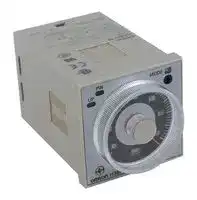


H3BA-N 110 VAC
TIMER, 0.05S TO 300HR
- Manufacturer: OMRON INDUSTRIAL AUTOMATION
- Product type: Analogue Timers
- Time Max: 300h
- Time Min: 0.05s
- Timer Output: Solid State
- Product Range: H3BA-N Series
- Timer Functions: Multifunction
- Current Rating Nom: 5A
- Panel Cutout Width: 45mm
- Supply Voltage Max: 110VAC
- Panel Cutout Height: 45mm
- No. of Timing Ranges: 9Ranges
- Connection / Termination: Plug-In
| Delivery and price | |
|---|---|
| Units per pack | 50 |
| Price | 115.46 € |
| Current stock | 25+ |
| Lead time | 7 days |

## **Solid-state Timer H3BA-N**

Please read and understand this catalog before purchasing the products. Please consult your OMRON representative if you have any questions or comments. Refer to _Warranty and Application Considerations_ (page 20), and _Safety Precautions_ (page 16).

## **Solid-state Timer with Valuable Multiple-time Ranges and Multiple-operating Modes**

- Handles a wide range of applications through six operating modes.

- With H3BA-N8H models, the output type can be switched between time-limit DPDT and time-limit SPDT + instantaneous SPDT using a selector.

- Setting rings (order separately) to enable consistent settings and to limit the setting range.

## RC

- Panel Covers (order separately) to enable various panel designs.

- Conforms to LR and approved by UL and CSA.

## ■ **Broad Line-up of H3B@-N Series**

**==> picture [473 x 264] intentionally omitted <==**

**----- Start of picture text -----**<br>
H3B@-N<br>a<br>H3BA-N H3BF-N H3BG-N H3BH-N<br>Hop Ha) Pap ofah<br>Multi-functional Timer Twin Timer Star-delta Timer Power OFF-delay Timer<br>H3BA-N 11-pin model H3BF-N8 8-pin model H3BG-N8 8-pin model H3BH-N8 8-pin model<br>H3BA-N8H 8-pin with  H3BG-N8H 8-pin with<br>instantaneous  instantaneous<br>contact output contact output<br>and time-limit<br>output<br>**----- End of picture text -----**<br>


**Note:** Refer to the _H3BF-N/BG-N/BH-N Datasheet (Cat. No. L094-E1-1)_ for details.

Solid-state Timer **H3BA-N**

1

## **Model Number Structure**

## ■ **Model Number Legend**

## **H3BA-N** @

**1**

## **1. Number of Pins/Output**

None: 11-pin models/Time-limit DPDT

- 8H: 8-pin models/Time-limit SPDT and switchable SPDT (time-limit ↔ instantaneous)

## **Orderin Information g**

## ■ **List of Models**

|■**List of Models**||||
|---|---|---|---|
|**Control output**|**Supply voltage**|**11-pin models**|**8-pin models**|
|Contact output: DPDT (time-limit output)|110 VAC(50/60 Hz)|H3BA-N 110 VAC|---|
||220 VAC(50/60 Hz)|H3BA-N 220 VAC||
||24 VDC|H3BA-N 24 VDC||
|Contact output: Time-limit SPDT and<br>switchable SPDT<br>(time-limit↔instantaneous)|110 VAC(50/60 Hz)|---|H3BA-N8H 110 VAC|
||220 VAC(50/60 Hz)||H3BA-N8H 220 VAC|
||24 VDC||H3BA-N8H 24 VDC|


## ■ **Accessories (Order Separately)**

|■**Accessories (Order Separately)**|■**Accessories (Order Separately)**||
|---|---|---|
|**Name/specifications**||**Models**|
|**Flush Mounting Adapters**||Y92F-30|
|||Y92F-70|
|||Y92F-71|
|**Mounting Tracks**|**50 cm(l) **×**7.3 mm(t)**|PFP-50N|
||**1 m(l) **×**7.3 mm(t)**|PFP-100N|
||**1 m(l) **×**16 mm(t)**|PFP-100N2|
|**End Plate**||PFP-M|
|**Spacer**||PFP-S|
|**Protective Cover**||Y92A-48B|
|**Track Mounting/**<br>**Front Connecting Sockets**|**8-pin**|P2CF-08|
||**11-pin**|P2CF-11|
|**Back Connecting Sockets**|**8-pin**|P3G-08|
||**11-pin**|P3GA-11|
|**Time Setting Ranges**|**Setting a specific time**|Y92S-27|
||**Limiting the setting range**|Y92S-28|
|**Panel Covers (See note 1.)**|**Lightgray (5Y7/1)**|Y92P-48GL|
||**Black(N1.5)**|Y92P-48GB|
||**Mediumgray (5Y5/1)**|Y92P-48GM|
|**Hold-down Clips (See note 2.)**|**For PL08 Socket**|Y92H-1|
||**For PF085A Socket**|Y92H-2|


- **Note: 1.** The Time Setting Ring and Panel Cover are sold together.

   **2.** Hold-down Clips are sold in sets of two.

Solid-state Timer **H3BA-N**

2

**S ecifications p**

## ■ **General**

|■**General**|||
|---|---|---|
|**Item**|**H3BA-N**|**H3BA-N8H**|
|**Operating mode**|A: ON-delay<br>B: Flicker OFF start<br>B2: Flicker ON start<br>C: Signal ON/OFF-delay<br>D: Signal OFF-delay<br>E: Interval|A: ON-delay<br>H: ON-delay with instantaneous output contact|
|**Pin type**|11-pin|8-pin|
|**Input type**|No-voltage input|---|
|**Output type**|DPDT (time-limit)|SPDT (time-limit) and switchable SPDT (time-limit <---><br>instantaneous)|
|**Mounting method**|DIN track mounting, surface mounting, and flush mounting||
|**Approved standards**|UL508, CSA C22.2 No.14,<br>Conforms to LR (currentlyunder application and approval is expected bythe end of Feb. 2006)||


## ■ **Time Ranges**

|**Time unit**|**Time unit**|**s(sec)**|**min**|**h(hrs)**|×**10 h(10 h)**|
|---|---|---|---|---|---|
|**Setting**|**1.2**|0.05 to 1.2|0.12 to 1.2||1.2 to 12|
||**3**|0.3 to 3|||3 to 30|
||**12**|1.2 to 12|||12 to 120|
||**30**|3 to 30|||30 to 300|


## ■ **Ratings**

|■**Ratings**|||
|---|---|---|
|**Item**|**H3BA-N**|**H3BA-N8H**|
|**Rated supply voltage**<br>**(See notes 1 and 2)**|110 VAC (50/60 Hz), 220 VAC (50/60 Hz), 24 VDC||
|**Operating voltage range**<br>**(See note 3)**|85% to 110% of rated supply voltage||
|**Power reset**|Minimumpower-openingtime: 0.1 s||
|**No-voltage input**|ON impedance:<br>1 kΩmax.<br>ON residual voltage: 1 V max.<br>OFF impedance:<br>200 kΩmin.||
|**Power consumption**|110 VAC: Approx. 4.6 VA (1.5 W)<br>220 VAC: Approx. 7.9 VA (1.3 W)<br>24 VDC: Approx. 0.6 W|110 VAC: Approx. 3.6 VA (1.6 W)<br>220 VAC: Approx. 5.4 VA (1.4 W)<br>24 VDC: Approx. 0.9 W|
|**Control outputs**|Contact:<br>5 A at 250 VAC, resistance load (cosφ= 1)||


- **Note: 1.** DC ripple rate: 20% max.

   **2.** Models other than 24-VDC H3BA-N models cause an inrush current. Pay careful attention when attempting to turn on power to such models with non-contact output from a device such as a sensor.

   **3.** 90% or higher if the Timer is used continuously at a high ambient temperature.

Solid-state Timer **H3BA-N**

3

## ■ **Characteristics**

|■**Characteristics**|||
|---|---|---|
|**Item**|**H3BA-N**|**H3BA-N8H**|
|**Accuracy of operating time**|±0.3% FS max.(±0.3%±10 ms in a range of 1.2 s)||
|**Setting error**|±5% FS±0.05 s max.||
|**Reset time**|Min. power-opening time: 0.1 s max.<br>Min. pulse-input time:<br>50 ms||
|**Influence of voltage**|±0.5% FS max. (±0.5%±10 ms in a range of 1.2 s)||
|**Influence of temperature**|±2% FS max. (±2%±10 ms in a range of 1.2 s)||
|**Insulation resistance**|100 MΩmin. (at 500 VDC)||
|**Dielectric strength**|2,000 VAC, 50/60 Hz for 1 min between current-carrying metal parts and exposed non-current-carrying metal<br>parts<br>2,000 VAC, 50/60 Hz for 1 min between control output terminals and operating circuit<br>1,000 VAC, 50/60 Hz for 1 min between contacts not located next to each other (750 VAC for H3BA-N8H)||
|**Impulse withstand voltage**|1 kV (between power terminals)<br>2 kV (between current-carrying terminal and exposed non-current-carrying metal parts,<br>1.5 kV for 24-VDC models)||
|**Noise immunity**|AC models:±1.5 kV (between power terminals), and±600 V (between input terminals),<br>square-wave noise by noise simulator (pulse width: 100 ns/1µs, 1-ns rise)<br>DC models:±480 V (between power terminals), and±600 V (between input terminals),<br>square-wave noise bynoise simulator(pulse width: 100 ns/1µs, 1-ns rise)||
|**Static immunity**|Malfunction: 4 kV<br>Destruction: 8 kV||
|**Vibration resistance**|Destruction: 10 to 55 Hz with 0.75-mm single amplitude each in three directions<br>Malfunction: 10 to 55 Hz with 0.5-mm single amplitude each in three directions||
|**Shock resistance**|Destruction: 1,000 m/s2(approx. 100G) each in three directions<br>Malfunction: 100 m/s2 (approx. 10G)each in three directions||
|**Ambient temperature**|Operating: –10°C to 55°C (with no icing)<br>Storage:<br>–25°C to 65°C (with no icing)||
|**Ambient humidity**|Operating: 35% to 85%||
|**Life expectancy**|Mechanical: 20 million operations min. (under no load<br>at 1,800 operations/h)<br>Electrical:<br>100,000 operations min. (5 A at 250 VAC,<br>resistive load at 1,800 operations/h)|Mechanical: 10 million operations min. (under no<br>load at 1,800 operations/h)<br>Electrical:<br>100,000 operations min. (5 A at 250<br>VAC, resistive load at 360 operations/h)|
|**Case color**|Light gray (Munsell 5Y7/1)||
|**Enclosure ratings**|IEC: IP40 (panel surface)||
|**Weight**|Approx. 95 g||


**Note:** For setting the time-limit of the Timer to a cycle of less than 3 seconds or applying the forced reset, use the H3BA-N in mode D (signal OFFdelay).

## **Nomenclature**

## **H3BA-N**

**==> picture [173 x 14] intentionally omitted <==**

**----- Start of picture text -----**<br>
Power Indicator (Green):  Operating Mode Display Window<br>Lit when Timer operates.<br>**----- End of picture text -----**<br>


**==> picture [252 x 128] intentionally omitted <==**

**----- Start of picture text -----**<br>
PW MODE A<br>UP Operating Mode Selector:<br>Output Indicator (Orange):  1.5 Select a mode from<br>Lit when Timer outputs. 1 2 A, B, B2, C, D, and E<br>0.5 2.5 Scale Range Display<br>Time Range Selector:  Windows<br>Select one from  0 3<br>1.2, 3, 12, and 30.<br>sec<br>H3BA<br>Time Unit Selector<br>Time setting knob (set time) Select a unit from<br>sec, min, hrs, and 10h.<br>**----- End of picture text -----**<br>


## **H3BA-N8H**

**==> picture [246 x 144] intentionally omitted <==**

**----- Start of picture text -----**<br>
Power Indicator (Green):  Output Type Display Window<br>Lit when Timer operates.<br>Output Type Selector:<br>Select a type from A<br>and H<br>PW MODE A A: Time-limit DPDT<br>Output Indicator (Orange): Lit when Timer outputs. UP 1 1.5 2     (default setting)H: Time-limit SPDT and     instantaneous SPDT<br>Time Range Selector: Select one from  0.5 2.5 Scale Range Display<br>1.2, 3, 12, and 30. Windows<br>0 3<br>sec<br>H3BA<br>Time Unit Selector<br>Time setting knob (set time) Select a unit from sec,<br>min, hrs, and 10 h.<br>**----- End of picture text -----**<br>


Solid-state Timer **H3BA-N**

4

## **O eration p**

## ■ **Block Diagrams**

**==> picture [444 x 474] intentionally omitted <==**

**----- Start of picture text -----**<br>
H3BA-N<br>AC (DC) input Time range/ Operating<br>unit selectors mode selector<br>Power supply  Oscillation  Counting<br>circuit circuit circuit Output circuit<br>Indicator<br>Reset input, start input, and gate input Input circuit circuit<br>Power-ON  Output-ON<br>indicator indicator<br>H3BA-N8H<br>AC (DC) input Time range/ Output type<br>unit selectors selector<br>Power supply  Oscillation  Counting<br>Output circuit<br>circuit circuit circuit<br>Indicator<br>circuit<br>Power-ON  Output-ON<br>indicator indicator<br>Instantaneous<br>output circuit<br>**----- End of picture text -----**<br>


## ■ **I/O Functions**

|**Inputs**|**Start**|Starts time-measurement.|
|---|---|---|
||**Reset**|Interrupts time-measurement and resets time-measurement value. No time-measurement is made and<br>control output is OFF while the reset input is ON.|
||**Gate**|Prohibits time-measurement.|
|**Outputs**|**Control output**|Outputs are turned ON accordingto designated output mode whenpreset value is reached.|


Solid-state Timer **H3BA-N**

5

## ■ **Basic Setting**

## **Setting of Selector**

The selectors can be turned clockwise and counterclockwise to select the desired time unit, time range, output type (only for H3BAN8H) or operating mode.

Each selector has a snap mechanism that secures the selector at a given position. Set the selector at a position at which it is secured. Do not set it midway between two securing positions or a malfunction could result from improper setting.

**==> picture [71 x 15] intentionally omitted <==**

**----- Start of picture text -----**<br>
Operating mode selector/<br>Output type selector<br>**----- End of picture text -----**<br>


**==> picture [47 x 62] intentionally omitted <==**

**----- Start of picture text -----**<br>
Operating mode/<br>Output type<br>display window<br>&<br>Groove for<br>screwdriver<br>**----- End of picture text -----**<br>


## ■ **Using the Setting Ring**

## **Setting a Specific Time**

Mount the Panel Cover on the Timer, set the desired time with the time setting knob, and place Time Setting Ring A onto the time setting knob so that the time setting notch of Time Setting Ring A is in the center of the reset lock position of the Panel Cover.

**==> picture [156 x 92] intentionally omitted <==**

**----- Start of picture text -----**<br>
Time setting notch Reset lock position<br>Time setting ring A Panel cover<br>Setting position<br>Time setting notch<br>**----- End of picture text -----**<br>


## **Selection of Operating Mode with H3BA-N**

Turn the operating mode selector with a screwdriver until the desired operating mode (A, B, B2, C, D, or E) appears in the display window located above the selector.

## **Selection of Output Type with H3BA-N8H**

Turn the output type selector with a screwdriver until the desired output type (A or H) appears in the display window located above the selector.

## **Selection of Time Unit and Time Range**

The desired time unit (sec, min, hrs, or 10h) is displayed in the window below the time setting knob by turning the time unit selector located at the lower right corner of the front panel. A time range (1.2, 3, 12, or 30) is selected with the time range selector at the lower left corner of the front panel, and the selected time range appears (in the window at the lower right part) within the plastic frame of the time setting knob.

Example: To set the time to 10 s.

## **Limiting the Setting Range**

Example: To set a range of 10 and 20 s.

Mount the Panel Cover on the Timer, set the time setting knob to 10 s (the lower limit of the setting range), and place Time Setting Ring C onto the time setting knob so that the stopper of Time Setting Ring C is on the right edge of the reset lock position of the Panel cover. Next, set the time setting knob to 20 s (the upper limit of the setting range), place Time Setting Ring B onto the time setting knob so that the stopper of Time Setting Ring B is on the left edge of the reset lock position of the Panel Cover.

**==> picture [150 x 88] intentionally omitted <==**

**----- Start of picture text -----**<br>
Stopper Reset lock position<br>> > io ed<br>Time setting  Time setting  Panel cover<br>ring B ring C<br>Range<br>**----- End of picture text -----**<br>


**==> picture [180 x 59] intentionally omitted <==**

**----- Start of picture text -----**<br>
Operating mode<br>Time range  display window<br>selector<br>Time unit selector<br>)<br>Time unit display window<br>**----- End of picture text -----**<br>


## **Setting of Time**

Use the time setting knob to set the desired time.

Solid-state Timer **H3BA-N**

6

## ■ **Timing Chart**

## **Note: 1.** The minimum power-opening time (“Rt”) is 0.1 s and the minimum pulse width is 0.05 s.

**2.** The letter “t” in the timing charts stands for the set time and “t–a” means that the period is less than the time set.

## **H3BA-N**

|**H3BA-N**||
|---|---|
|**Operating mode**|**Timing chart**|
|A: ON-delay|Power<br>Start<br>Output<br>t<br>Basic operation<br>Power<br>2 and 10<br>Start<br>2 and 6<br>Reset<br>2 and 7<br>Output relay (NC)<br>1 and 4 (11 and 8)<br>Output relay (NO) 1<br>and 3 (11 and 9)<br>and output indicator<br>Power indicator<br>t<br>t<br>4.<br>—_____»|<br>_———_-<br>—__-»|<br>Ee Re AS Reae|
|B: Flicker OFF start|Basic operation<br>Power<br>Start<br>Output<br>t<br>t<br>t<br>t<br>t<br>t<br>t<br>t<br>t - a<br>t<br>Power<br>2 and 10<br>Start<br>2 and 6<br>Reset<br>2 and 7<br>Output relay (NC)<br>1 and 4 (11 and 8)<br>Output relay (NO)<br>1 and 3 (11 and 9)<br>and output indicator<br>Power indicator<br>SSRIOR RRRRII IRR<br>GREISROESAR<br>ERG<br>ne<br>a<br>oe<br>se|
|B2: Flicker ON start|Basic operation<br>Power<br>Start<br>Output<br>t<br>t<br>t<br>t<br>t<br>t<br>t<br>t<br>t - a<br>t<br>Power<br>2 and 10<br>Start<br>2 and 6<br>Reset<br>2 and 7<br>Output relay<br>1 and 4 (11 and 8)<br>(NC)<br>Output relay (NO)<br>(Output indicator)<br>1 and 3 (11 and 9)<br>Power indicator<br>SSSIISRO<br>ESER ENSEREE RERES SEO IE O ESSE RIIETTE<br>LOSE<br>Suan<br>aneiaenaaeioeiameerie<br>ce bee<br>Reeok |Sees<br>Sa|
|C: Signal ON/OFF-delay|Basic operation<br>Power<br>Start<br>Output<br>t<br>t<br>t<br>t<br>t<br>t<br>t<br>t<br>t - a<br>t - a<br>t - a<br>Power<br>2 and 10<br>Start<br>2 and 6<br>Reset<br>2 and 7<br>Output relay<br>1 and 4 (11 and 8)<br>(NC)<br>Output relay (NO)<br>(Output indicator)<br>1 and 3 (11 and 9)<br>Power indicator<br><= — ~~+~~ -— —+<br><— ——>|<br>|<+|<br>—>|<br>irises Saeeene<br>ee<br>ES<br>SSSSSE<br>~~ee ~~e~~e~~e<br>ano|


Solid-state Timer **H3BA-N**

7

**==> picture [463 x 397] intentionally omitted <==**

**----- Start of picture text -----**<br>
Operating mode Timing chart<br>D: Signal OFF-delay t - a t - a<br>t t - a t<br>Power<br>2 and 10<br>Start<br>2 and 6<br>Reset<br>2 and 7<br>Output relay<br>1 and 4 (11 and 8)<br>(NC)<br>Output relay (NO)<br>(Output indicator)<br>1 and 3 (11 and 9)<br>Power indicator<br>Basic operation Power<br>Start<br>_ t<br>Output<br>E: Interval<br>t - a t - a<br>t t t t<br>Power<br>2 and 10<br>Start<br>2 and 6<br>Reset<br>2 and 7<br>Output relay<br>1 and 4 (11 and 8)<br>(NC)<br>Output relay (NO)<br>(Output indicator)<br>1 and 3 (11 and 9)<br>Power indicator le ~ <——» <— —- <—>| :  —>|<br>Basic operation Power<br>Start<br>t<br>Output<br>**----- End of picture text -----**<br>


## **Gate Signal Input in Operating Mode A (ON-delay Operation)**

**==> picture [131 x 115] intentionally omitted <==**

**----- Start of picture text -----**<br>
t1 t2<br>ON<br>Power OFF<br>ON<br>Start OFF<br>a |<br>Gate ONOFF Frscteretetsnrcrstre<br>ON<br>Reset OFF<br>Output  ON<br>relay OFF<br>**----- End of picture text -----**<br>


**Note:** The set time is the sum of t1 and t2.

Solid-state Timer **H3BA-N**

8

## **H3BA-N8H, Output Type: A Type**

**==> picture [447 x 343] intentionally omitted <==**

**----- Start of picture text -----**<br>
Operating mode Timing chart<br>A: ON-delay Rt Rt t - a<br>t t<br>Power 2 and 7<br>Output relay (NC)<br>8 and 5 (1 and 4)<br>Output relay (NO)<br>8 and 6 (1 and 3)<br>and output indicator<br>Power indicator<br>Basic operation Power<br>Fes ee ne eee emma eaSe<br>t<br>Output<br>7 ===<br>H3BA-N8H, Output Type: H Type<br>Operating mode Timing chart<br>H: ON-delay with instantaneous output  t Rt t Rt t - a<br>contact Power 2 and 7<br>Output relay<br>8 and 5 (NC)<br>Output relay 8 and 6<br>(NO) (output indicator)<br>Instantaneous 1 and<br>4 output relay (NC)<br>Instantaneous 1 and<br>3 output relay (NO)<br>Power indicator<br>Slr<br>Basic operation<br>Power<br>t<br>Output See eee<br>**----- End of picture text -----**<br>


## **H3BA-N8H, Output Type: H Type**

Solid-state Timer **H3BA-N**

9

## **Dimensions**

**Note:** All units are in millimeters unless otherwise indicated.

## **H3BA-N**

**==> picture [454 x 459] intentionally omitted <==**

**----- Start of picture text -----**<br>
15<br>78<br>6 63.7<br>13.6<br>48 0.7<br>— i<br>48 39 dia. 44.8 × 44.8<br>f e} i l ek<br>11 pins<br>H3BA-N8H<br>15 78<br>6 63.7<br>13.6<br>48 0.7<br>— a n<br>48 39 dia. 44.8 × 44.8<br>f e) We k<br>8 pins<br>Dimensions with Set Ring<br>16.5<br>50<br>50 42 dia.<br>m s O fe o<br>Time setting ring Panel cover<br>Dimensions with Y92F-30 Flush Mounting Adapter<br>Panel<br>P3G Back Connecting Socket<br>(sold separately)<br>58 52<br>T<7 F I ae<br>| ED I E ES ee:<br>42<br>48<br>PW<br>UP<br>PW<br>UP<br>PW<br>UP<br>**----- End of picture text -----**<br>


## **H3BA-N8H**

## **Dimensions with Set Ring**

## **Dimensions with Y92F-30 Flush Mounting Adapter**

## **Panel Cutout**

**Note:** The mounting panel thickness should be 1 to 5 mm.

**==> picture [71 x 59] intentionally omitted <==**

**----- Start of picture text -----**<br>
0.5 R max. 45− [+0.6] 0<br>4 (N)<br>45− [+0.6] 0<br>i L f<br>**----- End of picture text -----**<br>


Solid-state Timer **H3BA-N**

10

## **Dimensions with Y92F-70 Flush Mounting Adapter**

**==> picture [258 x 108] intentionally omitted <==**

**----- Start of picture text -----**<br>
Panel<br>45±<br>88 0.15<br>He<br>lb [ben] e [t] y | iif<br>LP || Bo % ——>—<br>45±0.15<br>58<br>PW<br>UP<br>**----- End of picture text -----**<br>


## **Panel Cutout**

Adapter mounting hole Two, 4.5 dia.

**==> picture [105 x 43] intentionally omitted <==**

**----- Start of picture text -----**<br>
R0.5 max. 52 to 53<br>|<br>65 to 66 76±0.2<br>**----- End of picture text -----**<br>


## **Dimensions with Y92F-71 Flush Mounting Adapter**

**==> picture [369 x 89] intentionally omitted <==**

**----- Start of picture text -----**<br>
56 Panel R0.5 max. 45− [+0.5] 0<br>58 45±0.2 68 55− [+0.5] 0<br>O l c o te ,<br>43±0.2 Note:<br>50− [+0.2] 0<br>PW<br>UP<br>**----- End of picture text -----**<br>


al; ~~O~~ l

**Note:** The mounting panel thickness should be 1 to 3.2 mm.

## **Track Mounting**

**==> picture [471 x 118] intentionally omitted <==**

**----- Start of picture text -----**<br>
Track Mounting Flush Mounting<br>15 15<br>91.4 86.4<br>H3BA-N H3BA-N<br>112.2* 109.9 101.3* H3BA-N8H 99  + Adapter H3BA-N8H<br>P3GA-11 P3G-08<br>Le Y92F-30 qe Y92F-30<br>P2CF-11 2.3* P2CF-08 2.3*<br>**----- End of picture text -----**<br>


**Note:** These dimensions vary with the kind of DIN track (reference value).

Solid-state Timer **H3BA-N**

11

## ■ **Accessories (Order Separately)**

## **Track Mounting/Front Connecting Socket**

## **P2CF-08**

**==> picture [206 x 153] intentionally omitted <==**

**----- Start of picture text -----**<br>
Terminal Arrangement/<br>Internal Connections<br>(Top View) Surface Mounting Holes<br>9OO€ Two, 4.5 dia. or two, M4<br>40±0.2<br>Hoe ~<br>pooe<br>8Y7T6X5 / Two, 4.5 dia. or two, M4<br>40±0.2<br>**----- End of picture text -----**<br>


**==> picture [471 x 628] intentionally omitted <==**

**----- Start of picture text -----**<br>
Eight, M3.5 × 7.5 sems 7.8 3 4.5 Internal Connections<br>(Top View) Surface Mounting Holes<br>rae {  P 9OO€ Two, 4.5 dia. or two, M4<br>70 max. 35.4<br>Two, 4.5 dia.<br>40±0.2<br>holes<br>=i —— Y 6 Hoe ~<br>, este |<br>4 —p in pooe<br>50 max.<br>20.3 max.<br>P2CF-11 Eleven,  3 4.5 Two, 4.5 dia. or two, M4<br>M3.5 × 7.5 sems 7.8<br>| | al 8Y7T6X5 /<br>40±0.2<br>70 max. 35.4<br>ant ! meee Two, 4.5 dia.  bE ready<br>holes<br>q iq eG , Bal a ' by ©Oo0e@<br>4<br>50 max.<br>31.2 max.<br>Back Connecting Socket<br>P3G-08 Terminal Arrangement/<br>27 dia. Internal Connections<br>(Bottom View)<br>45<br>45 4.9 iE 17 2004<br>P3GA-11 27 dia.<br>45 25.6<br>7 |\@ a<br>aly ‘ 45 4.5 |L_J 6.2 2iying<br>16.3<br>Mounting Track<br>PFP-100N, PFP-50N PFP-100N2<br>——= aee<br>16<br>7.3±0.15<br>4.5<br>4.5<br>35±0.3 27±0.15 35±0.3 27 24 29.2<br>wene ee =a ee<br>tT SSSrE 15 25 th 10 25 spas L Ltt 25 10 25 * 4 1 rt————— 15 25 10 25 L ht 25 10 25 15 1 4 1.5<br>L: Length<br>1 m  PFP-100N<br>50 cm  PFP-50N<br>1 m  PFP-100N2<br>**----- End of picture text -----**<br>


## **Back Connecting Socket**

## **Mounting Track**

Solid-state Timer **H3BA-N**

12

**End Plate** ~~ee~~

## **Time Setting Ring/Panel Cover**

## **PFP-M**

**==> picture [136 x 96] intentionally omitted <==**

**----- Start of picture text -----**<br>
10<br>6.2<br>1.8<br>1<br>50 35.5 35.3<br>1.8<br>_<br>11.5 Lt 10 M4 × 8  | 1.3<br>pan head 4.8<br>screw<br>**----- End of picture text -----**<br>


## **Spacer**

**==> picture [199 x 102] intentionally omitted <==**

**----- Start of picture text -----**<br>
PFP-S 16<br>wan 5 P| 12<br>_<br>34.8<br>44.3<br>{~ |<br>16.5<br>**----- End of picture text -----**<br>


## **Protective Cover Y92A-48B** ~~oe~~

## **Protective Cover**

The protective cover protects the front panel, particularly the time setting section, against dust, dirt, and water. It also prevents the set value from being altered due to accidental contact with the time setting knob.

- **Note: 1.** The Y92A-48B Protective Cover is made of a hard plastic and therefore it must be removed to change the timer set value.

There are three types of Panel Covers (Y92P-48GL, Y92P-48GB, and Y92P-48GM), all of which are available in three colors. Use the most suitable type of Panel Cover with the design of the scaling plate according to the application.

When setting a given time for the Timer, use of the Y92S-27 or Y92S-28 Time Setting Ring facilitates the time setting operation and minimizes possible setting errors by operators.

The Time Setting Ring and Panel Cover should be used as a pair.

**==> picture [242 x 163] intentionally omitted <==**

**----- Start of picture text -----**<br>
Setting a specific time Time Setting Ring A (Y92S-27) and Panel<br>Cover (Y92P-48GL, -48GB, or -48GM)<br>Limiting the setting  Time Setting Ring B or C (Y92S-28), and<br>range Panel Cover (Y92P-48GL, -48GB, or -<br>48GA)<br>ee<br>Y92S-27 Y92S-28 Y92S-28<br>Time Setting A Time Setting B Time Setting C<br>OO<br>Y92P-48GL Y92P-48GB Y92P-48GM<br>Light Gray Black Medium Gray<br>**----- End of picture text -----**<br>


## **Hold-down Clip**

**==> picture [210 x 15] intentionally omitted <==**

**----- Start of picture text -----**<br>
Y92H-1 Y92H-2<br>For PL08 Socket For PF085A Socket<br>**----- End of picture text -----**<br>


**2.** The Protective Cover cannot be mounted if the Panel Cover (sold separately) is used on the Timer.

## **Y92A-48B**

**==> picture [68 x 51] intentionally omitted <==**

**----- Start of picture text -----**<br>
Q PW &<br>UP<br>**----- End of picture text -----**<br>


Solid-state Timer **H3BA-N**

13

## **Installation**

## ■ **Terminal Arrangement**

## **H3BA-N  (Contact Output)**

**==> picture [214 x 134] intentionally omitted <==**

**----- Start of picture text -----**<br>
(–)(~) Power supply (+)(~)<br>Reset input Start input Gate input<br>**----- End of picture text -----**<br>


## **H3BA-N8H (Contact Output)**

**==> picture [177 x 111] intentionally omitted <==**

**----- Start of picture text -----**<br>
A H<br>MODE<br>(See note.) Power supply<br>−<br>( )(~) (+)(~)<br>**----- End of picture text -----**<br>


**Note:** The delayed contacts of conventional timers are shown as follows:

The contact symbol of the H3BA-N is expressed as follows because of its multiple operating modes:

The instantaneous contacts of conventional timers are shown as follows:

**Note:** The output contact can be set to either instantaneous or time-limit contact using the output type selector located at the upper right corner of the front panel.

Solid-state Timer **H3BA-N**

14

## ■ **Input Connections**

The inputs of the H3BA-N are no-voltage (short circuit or open) inputs.

## **No-voltage Inputs**

**==> picture [255 x 159] intentionally omitted <==**

**----- Start of picture text -----**<br>
No-contact Input Contact Input<br>(Connection to NPN open<br>collector output sensor.)<br>12 to 24 VDC<br>(sensor power supply)<br>+  DC power<br>− supply<br>Timer Timer<br>Sensor<br>Start/reset/ Start/reset/<br>gate gate<br>Input (0 V) Input (0 V)<br>(No. 2 pin) (No. 2 pin)<br>Operates with transistor ON Operates with relay ON<br>**----- End of picture text -----**<br>


**==> picture [122 x 155] intentionally omitted <==**

**----- Start of picture text -----**<br>
No-contact Input<br>(Connection to a voltage<br>output sensor.)<br>12 to 24 VDC<br>(sensor power supply)<br>+  DC power<br>− supply<br>Timer<br>Sensor<br>Start/reset/<br>gate<br>Input (0 V)<br>(No. 2 pin)<br>Operates with transistor ON<br>**----- End of picture text -----**<br>


## **No-voltage Input Signal Levels**

No-contact 1. Short-circuit level input Transistor ON Residual voltage: 1 V max. Impedance when ON: 1 kΩ max. 2. Open level Transistor OFF Impedance when OFF: 200 kΩ min. Contact Use contacts which can adequately input switch 0.1 mA at 5 V

Solid-state Timer **H3BA-N**

15

## **Safet Precautions y**

## **CAUTION**

**==> picture [38 x 170] intentionally omitted <==**

Minor electric shock may occasionally occur.  Do not disassemble the product or touch the interior of the Timer.

Minor burns may occasionally occur.  Do not touch the product while power is being supplied or immediately after power is turned OFF.

Minor fires may occasionally occur.  Tighten terminal screws to a torque of 1.08 N·m so that they do not become loose.

Minor electric shock may occasionally occur during operation.  Install the terminal cover.

Minor electric shock, fire, or malfunction may occasionally occur.

Do not allow metal fragments, lead wire scraps, or chips from processing during installation to fall inside the Timer.

## ■ **Precautions for Safe Use**

Please observe the following precautions for safe use of this product.

## **Environmental Precautions**

Store the Timer within specified ratings.  If the Timer has been stored at -10°C or lower, let it stand for 3 hours or longer at room temperature before turning ON the power supply.

Use the Timer within the specified ratings for operating temperature and humidity.

Do not operate the Timer in locations subject to sudden or extreme changes in temperature, or locations where high humidity may result in condensation.

Do not use the Timer in locations subject to excessive dust, corrosive gas, or direct sunlight.

Do not use the Timer in locations subject to vibration or shock. Extended use in such locations may result in damage due to stress. Install the Timer well away from any sources of static electricity, such as pipes transporting molding materials, powders, or liquids.

## **Usage Precautions**

Install a switch or circuit breaker that allows the operator to immediately turn OFF the power, and label it to clearly indicate its function.

Pay careful attention to polarity to prevent wrong connections when wiring terminals.

Internal elements may be destroyed if a voltage outside the rated voltage is applied.

Maintain voltage fluctuations in the power supply within the specified range.

The Timer uses a transformerless power supply.  Do not touch the input terminals while the supply voltage is being applied, otherwise an electric shock may occur.

## ■ **Precautions for Correct Use**

## **Changing the Setting**

Do not change the time unit, time range, or operation mode while the Timer is in operation, otherwise the Timer may malfunction.

## **Connecting the Operating Power Supply**

The H3BA-N@ contains a capacitor-drop power circuit. Use a sinusoidal power supply with a commercial frequency. Do not use power supplies with a high frequency component (such as inverter power supplies) for Timers with 110 or 220-VAC specifications. Using these power supplies can damage internal circuits.

If voltages other than the rated voltage is applied, the internal components may be damaged. The internal element (varistor) will be damaged if a voltage of higher than 100 VAC is applied to the 24VDC line.

Connect the power supply voltage through a relay or switch in such a way that the voltage reaches a fixed value immediately or the Timer may not be reset or a timer error could result.

A DC power supply can be connected if its ripple factor is 20% or less and the mean voltage is within the rated operating voltage range of the Timer.

If the wiring to the terminal 2 (common terminal for both the power supply and input signals) is broken, the internal circuit will be destroyed.

**==> picture [171 x 96] intentionally omitted <==**

**----- Start of picture text -----**<br>
5,   6,   7 10<br>G,   S,   R<br>Input terminal<br>H3BA-N<br>Closed<br>2<br>**----- End of picture text -----**<br>


## **Input/Output**

An appropriate input will be applied to the input signal terminals of the Timer when one of the input terminals (terminals 5, 6, and 7) and the common terminal (terminal 2) for the input signals are shortcircuited. Do not attempt to connect any input terminal to any terminal other than the common terminal or to apply voltage across other than the specified input and common terminals or the internal circuits of the Timer may be damaged.

**==> picture [189 x 92] intentionally omitted <==**

**----- Start of picture text -----**<br>
10<br>(See note 2)<br>Power supply<br>AC or DC<br>H3BA-N<br>5,   6,   7<br>G,   S,   R<br>Input contact<br>Input terminal 2 (see note 1)<br>**----- End of picture text -----**<br>


- **Note: 1.** Power supply terminal 2 is a common terminal for the input signals (G, S, R) to the Timer. Never use terminal 10 as the common terminal for this purpose, otherwise the internal circuit of the Timer may be damaged.

   **2.** Do not connect a relay or any other load between these two points, otherwise the internal circuit of the Timer may be damaged due to the high-tension voltage applied to the input terminals.

Solid-state Timer **H3BA-N**

16

## **Operating Time Setting**

When setting the operating time, do not turn the setting knob beyond its scale range. For precise time setting, conduct operation tests by adjusting the setting knob.

The accuracy of the operating time of the Analog Timer is indicated by the percentage value on the basis of the full-scale time. The absolute fluctuation value will not be improved by changing the time setting. Therefore, when selecting the model, be sure that the application will be able to use a time setting as close as the full-scale time setting of the Timer.

## **Others**

When conducting a dielectric test, impulse voltage test, or insulation resistance test between the electric circuit and non-current-carrying metal parts of the Timer mounted to a control panel, be sure to take the following steps. These steps will prevent the internal circuitry of the Timer from damage that may be caused if a machine on the control panel has an improper dielectric strength or insulation resistance.

**1.** Separate the Timer from the circuitry of the control panel by disconnecting the socket from the Timer or wires.

## ■ **Mounting**

## **Surface Mounting**

There is no particular restriction on surface mounting directions, but be sure that the Timer is securely mounted horizontally.

## **P2CF Socket**

When mounting the Timer vertically with the P2CF Socket, consider the movable hooks and be sure that there is a 20-mm space on each of the upper and lower parts of the Socket.

**==> picture [106 x 93] intentionally omitted <==**

**----- Start of picture text -----**<br>
Duct<br>Hook<br>P2CF-08<br>o d Panel<br>**----- End of picture text -----**<br>


**2.** Short-circuit all terminals of the Timer. If any device with no-contact output, such as a proximity sensor, photoelectric sensor, or SSR, is directly connected to the Timer, current leakage from the device may cause Timer malfunction. Be sure to test the device with the Timer before using the device for actual applications.

Before using the Timer to switch inductive loads, be sure to connect a surge absorbing element to the Timer in order to prevent the Timer from malfunction and damage. A diode is an example of a surge absorbing element for DC circuits and a surge absorber is an example of a surge absorbing element for AC circuits.

Do not leave the Timer in time-up condition for a month or longer in places with high temperatures, otherwise the internal parts, such as an electrolytic capacitor, of the Timer may be damaged. Use the Timer with an appropriate relay so that the Timer will not be left in time-up condition for a long time.

If the Timer is mounted in contact with a mounting surface, the service life of internal parts may be shortened. Provide at least 10 mm between the Timer and the mounting surface to prolong the service life of the Timer.

When the Timer is reset right after the Timer goes into time-up condition, be sure to provide the Timer with an appropriate circuit configuration considering the resetting time of the Timer so that a sequential error will not result.

The Timer uses the constant value read method. Be careful when changing the set value because the output of the Timer will be ON when the set value coincides with the count value.

Be sure that the casing of the Timer is free from organic solvents, such as paint thinner and benzene, strong acid, and alkali solvents, which will damage the casing.

**Note:** It is impossible to connect more than two Timers in parallel.

Solid-state Timer **H3BA-N**

17

## **PL Socket**

**1.** Secure the Socket to the panel surface with screws and insert the F-shaped hook into the sockets.

## a

**2.** Connect the Timer to the Socket and press the tip of each hook by hand.

## ■ **Dismounting**

## **Surface Mounting with P2CF**

## **Panel Mounting**

Loosen the screws of the Flush Mounting Adapter, spread open the hooks, and remove the Mounting Adapter.

## **Panel Mounting**

When the Y92F-30 Flush Mounting Adapter is used, insert the Timer into the square hole from the front side of the panel and put on the Flush Mounting Adapter from the rear side of the Timer. Press the Flush Mounting Adapter so that the space between the Flush Mounting Adapter and the panel is reduced as much as possible, and secure the Flush Mounting Adapter with screws.

**==> picture [38 x 68] intentionally omitted <==**

**----- Start of picture text -----**<br>
Panel<br>Screw<br>Y92F-30<br>**----- End of picture text -----**<br>


When the Y92F-40, Y92F-70, Y92F-71 Mounting Adapter is used, press the hook inwards with the thumb and index finger of both hands, and press the Timer towards the front side.

When using the US08, be sure to use 10.5-dia. max. multi-conductor cable or 3-dia. max. insulated stranded wire for wiring.

When the Y92F-40, Y92F-70 or Y92F-71 Flush Mounting Adapter is used, just insert the Timer into the square panel hole. If the panel coating is too thick and the hooks do not click, spread open the hooks appropriately to the left and right after inserting the Timer to the hole.

**==> picture [144 x 92] intentionally omitted <==**

**----- Start of picture text -----**<br>
Spread open the hooks to the left and right.<br>Panel<br>The illustration is an ex<br>ample with the Y92F-70.<br>Spread open the hooks to the left and right.<br>**----- End of picture text -----**<br>


Solid-state Timer **H3BA-N**

18

Solid-state Timer **H3BA-N**

19

## **Terms and Conditions of Sale**

1. Offer; Acceptance. These terms and conditions (these "Terms") are deemed part of all quotes, agreements, purchase orders, acknowledgments, price lists, catalogs, manuals, brochures and other documents, whether electronic or in writing, relating to the sale of products or services (collectively, the "Products") by Omron Electronics LLC and its subsidiary companies (“Omron”). Omron objects to any terms or conditions proposed in Buyer’s purchase order or other documents which are inconsistent with, or in addition to, these Terms.

2. Prices; Payment Terms. All prices stated are current, subject to change without notice by Omron. Omron reserves the right to increase or decrease prices on any unshipped portions of outstanding orders. Payments for Products are due net 30 days unless otherwise stated in the invoice.

3. Discounts. Cash discounts, if any, will apply only on the net amount of invoices sent to Buyer after deducting transportation charges, taxes and duties, and will be allowed only if (i) the invoice is paid according to Omron’s payment terms and (ii) Buyer has no past due amounts.

4. Interest. Omron, at its option, may charge Buyer 1-1/2% interest per month or the maximum legal rate, whichever is less, on any balance not paid within the stated terms.

5. Orders. Omron will accept no order less than $200 net billing.

6. Governmental Approvals. Buyer shall be responsible for, and shall bear all costs involved in, obtaining any government approvals required for the importation or sale of the Products.

7. Taxes. All taxes, duties and other governmental charges (other than general real property and income taxes), including any interest or penalties thereon, imposed directly or indirectly on Omron or required to be collected directly or indirectly by Omron for the manufacture, production, sale, delivery, importation, consumption or use of the Products sold hereunder (including customs duties and sales, excise, use, turnover and license taxes) shall be charged to and remitted by Buyer to Omron.

8. Financial. If the financial position of Buyer at any time becomes unsatisfactory to Omron, Omron reserves the right to stop shipments or require satisfactory security or payment in advance. If Buyer fails to make payment or otherwise comply with these Terms or any related agreement, Omron may (without liability and in addition to other remedies) cancel any unshipped portion of Products sold hereunder and stop any Products in transit until Buyer pays all amounts, including amounts payable hereunder, whether or not then due, which are owing to it by Buyer. Buyer shall in any event remain liable for all unpaid accounts.

9. Cancellation; Etc. Orders are not subject to rescheduling or cancellation unless Buyer indemnifies Omron against all related costs or expenses.

10. Force Majeure. Omron shall not be liable for any delay or failure in delivery resulting from causes beyond its control, including earthquakes, fires, floods, strikes or other labor disputes, shortage of labor or materials, accidents to machinery, acts of sabotage, riots, delay in or lack of transportation or the requirements of any government authority.

11. Shipping; Delivery. Unless otherwise expressly agreed in writing by Omron: a. Shipments shall be by a carrier selected by Omron; Omron will not drop ship except in “break down” situations.

   - b. Such carrier shall act as the agent of Buyer and delivery to such carrier shall constitute delivery to Buyer;

   - c. All sales and shipments of Products shall be FOB shipping point (unless otherwise stated in writing by Omron), at which point title and risk of loss shall pass from Omron to Buyer; provided that Omron shall retain a security interest in the Products until the full purchase price is paid;

   - d. Delivery and shipping dates are estimates only; and

   - e. Omron will package Products as it deems proper for protection against normal handling and extra charges apply to special conditions.

12. Claims. Any claim by Buyer against Omron for shortage or damage to the Products occurring before delivery to the carrier must be presented in writing to Omron within 30 days of receipt of shipment and include the original transportation bill signed by the carrier noting that the carrier received the Products from Omron in the condition claimed.

13. Warranties. (a) Exclusive Warranty. Omron’s exclusive warranty is that the Products will be free from defects in materials and workmanship for a period of twelve months from the date of sale by Omron (or such other period expressed in writing by Omron). Omron disclaims all other warranties, express or implied. (b) Limitations. OMRON MAKES NO WARRANTY OR REPRESENTATION, EXPRESS OR IMPLIED, ABOUT NON-INFRINGEMENT, MERCHANTABIL-

ITY OR FITNESS FOR A PARTICULAR PURPOSE OF THE PRODUCTS. BUYER ACKNOWLEDGES THAT IT ALONE HAS DETERMINED THAT THE PRODUCTS WILL SUITABLY MEET THE REQUIREMENTS OF THEIR INTENDED USE. Omron further disclaims all warranties and responsibility of any type for claims or expenses based on infringement by the Products or otherwise of any intellectual property right. (c) Buyer Remedy. Omron’s sole obligation hereunder shall be, at Omron’s election, to (i) replace (in the form originally shipped with Buyer responsible for labor charges for removal or replacement thereof) the non-complying Product, (ii) repair the non-complying Product, or (iii) repay or credit Buyer an amount equal to the purchase price of the non-complying Product; provided that in no event shall Omron be responsible for warranty, repair, indemnity or any other claims or expenses regarding the Products unless Omron’s analysis confirms that the Products were properly handled, stored, installed and maintained and not subject to contamination, abuse, misuse or inappropriate modification. Return of any Products by Buyer must be approved in writing by Omron before shipment. Omron Companies shall not be liable for the suitability or unsuitability or the results from the use of Products in combination with any electrical or electronic components, circuits, system assemblies or any other materials or substances or environments. Any advice, recommendations or information given orally or in writing, are not to be construed as an amendment or addition to the above warranty. See http://www.omron247.com or contact your Omron representative for published information.

14. Limitation on Liability; Etc. OMRON COMPANIES SHALL NOT BE LIABLE FOR SPECIAL, INDIRECT, INCIDENTAL, OR CONSEQUENTIAL DAMAGES, LOSS OF PROFITS OR PRODUCTION OR COMMERCIAL LOSS IN ANY WAY CONNECTED WITH THE PRODUCTS, WHETHER SUCH CLAIM IS BASED IN CONTRACT, WARRANTY, NEGLIGENCE OR STRICT LIABILITY. Further, in no event shall liability of Omron Companies exceed the individual price of the Product on which liability is asserted.

15. Indemnities. Buyer shall indemnify and hold harmless Omron Companies and their employees from and against all liabilities, losses, claims, costs and expenses (including attorney's fees and expenses) related to any claim, investigation, litigation or proceeding (whether or not Omron is a party) which arises or is alleged to arise from Buyer's acts or omissions under these Terms or in any way with respect to the Products.   Without limiting the foregoing, Buyer (at its own expense) shall indemnify and hold harmless Omron and defend or settle any action brought against such Companies to the extent based on a claim that any Product made to Buyer specifications infringed intellectual property rights of another party.

16. Property; Confidentiality. Any intellectual property in the Products is the exclusive property of Omron Companies and Buyer shall not attempt to duplicate it in any way without the written permission of Omron. Notwithstanding any charges to Buyer for engineering or tooling, all engineering and tooling shall remain the exclusive property of Omron. All information and materials supplied by Omron to Buyer relating to the Products are confidential and proprietary, and Buyer shall limit distribution thereof to its trusted employees and strictly prevent disclosure to any third party.

17. Export Controls. Buyer shall comply with all applicable laws, regulations and licenses regarding (i) export of products or information; (iii) sale of products to “forbidden” or other proscribed persons; and (ii) disclosure to non-citizens of regulated technology or information.

18. Miscellaneous. (a) Waiver. No failure or delay by Omron in exercising any right and no course of dealing between Buyer and Omron shall operate as a waiver of rights by Omron. (b) Assignment. Buyer may not assign its rights hereunder without Omron's written consent. (c) Law. These Terms are governed by the law of the jurisdiction of the home office of the Omron company from which Buyer is purchasing the Products (without regard to conflict of law principles).   (d) Amendment. These Terms constitute the entire agreement between Buyer and Omron relating to the Products, and no provision may be changed or waived unless in writing signed by the parties. (e) Severability. If any provision hereof is rendered ineffective or invalid, such provision shall not invalidate any other provision. (f) Setoff. Buyer shall have no right to set off any amounts against the amount owing in respect of this invoice. (g) Definitions. As used herein, “including” means “including without limitation”; and “Omron Companies” (or similar words) mean Omron Corporation and any direct or indirect subsidiary or affiliate thereof.

## **Certain Precautions on S ecifications and Use p**

1. Suitability of Use. Omron Companies shall not be responsible for conformity with any standards, codes or regulations which apply to the combination of the Product in the Buyer’s application or use of the Product. At Buyer’s request, Omron will provide applicable third party certification documents identifying ratings and limitations of use which apply to the Product. This information by itself is not sufficient for a complete determination of the suitability of the Product in combination with the end product, machine, system, or other application or use. Buyer shall be solely responsible for determining appropriateness of the particular Product with respect to Buyer’s application, product or system. Buyer shall take application responsibility in all cases but the following is a non-exhaustive list of applications for which particular attention must be given: (i) Outdoor use, uses involving potential chemical contamination or electrical interference, or conditions or uses not described in this document. (ii) Use in consumer products or any use in significant quantities.

   - (iii) Energy control systems, combustion systems, railroad systems, aviation systems, medical equipment, amusement machines, vehicles, safety equipment, and installations subject to separate industry or government regulations. (iv) Systems, machines and equipment that could present a risk to life or property. Please know and observe all prohibitions of use applicable to this Product.

NEVER USE THE PRODUCT FOR AN APPLICATION INVOLVING SERIOUS RISK TO LIFE OR PROPERTY OR IN LARGE QUANTITIES WITHOUT ENSURING THAT THE SYSTEM AS A WHOLE HAS BEEN DESIGNED TO

ADDRESS THE RISKS, AND THAT THE OMRON’S PRODUCT IS PROPERLY RATED AND INSTALLED FOR THE INTENDED USE WITHIN THE OVERALL EQUIPMENT OR SYSTEM.

2. Programmable Products. Omron Companies shall not be responsible for the user’s programming of a programmable Product, or any consequence thereof.

3. Performance Data. Data presented in Omron Company websites, catalogs and other materials is provided as a guide for the user in determining suitability and does not constitute a warranty. It may represent the result of Omron’s test conditions, and the user must correlate it to actual application requirements. Actual performance is subject to the Omron’s Warranty and Limitations of Liability.

4. Change in Specifications. Product specifications and accessories may be changed at any time based on improvements and other reasons. It is our practice to change part numbers when published ratings or features are changed, or when significant construction changes are made. However, some specifications of the Product may be changed without any notice. When in doubt, special part numbers may be assigned to fix or establish key specifications for your application. Please consult with your Omron’s representative at any time to confirm actual specifications of purchased Product.

5. Errors and Omissions. Information presented by Omron Companies has been checked and is believed to be accurate; however, no responsibility is assumed for clerical, typographical or proofreading errors or omissions.

**Note:** This datasheet is provided as a guideline for selecting products. Do not use this document to operate the Unit.

## **ALL DIMENSIONS SHOWN ARE IN MILLIMETERS.**

To convert millimeters into inches, multiply by 0.03937. To convert grams into ounces, multiply by 0.03527.

**==> picture [90 x 43] intentionally omitted <==**

**==> picture [44 x 43] intentionally omitted <==**

**OMRON ELECTRONICS LLC • THE AMERICAS HEADQUARTERS** Schaumburg, IL USA • 847.843.7900 • 800.556.6766 • www.omron247.com

## **OMRON CANADA, INC. • HEAD OFFICE**

Toronto, ON, Canada • 416.286.6465 • 866.986.6766 • www.omron247.com

## **OMRON ELETRÔNICA DO BRASIL LTDA • HEAD OFFICE**

São Paulo, SP, Brasil • 55.11.2101.6300 • www.omron.com.br

## **OMRON ELECTRONICS MEXICO SA DE CV • HEAD OFFICE**

Apodaca, N.L. • 52.811.156.99.10 • 001.800.556.6766 • mela@omron.com

## **OMRON ARGENTINA • SALES OFFICE**

Cono Sur • 54.11.4783.5300

## **OMRON CHILE • SALES OFFICE**

Santiago • 56.9.9917.3920

## **OTHER OMRON LATIN AMERICA SALES**

54.11.4783.5300

© 2009 Omron Electronics LLC

Cat. No. L093-E1-02A Specifications are subject to change without notice.
Updated at February 9, 2023
With a legacy spanning over 80 years, Omron Industrial Automation is a globally recognized leader in the manufacture of advanced industrial control and automation components. Renowned for their reliability and engineering excellence, Omron delivers comprehensive solutions that enhance efficiency, machine safety, and precision across a wide range of manufacturing environments. Our extensive portfolio of Omron products is heavily focused on their industry-leading sensing and switching technologies. We offer a vast selection of sensors, excelling specifically in high-performance proximity sensors, light sensors, and temperature sensors. Complementing this range are robust switching solutions, featuring a deep inventory of power relays, solid-state relays, safety relays, and essential relay accessories designed for demanding operational requirements. Beyond sensing and switching, Omron is highly regarded for its precision automation and process control equipment. Our selection features highly accurate temperature controllers, versatile process controllers, and sophisticated panel displays and instrumentation. To support these fundamental systems, we also supply dependable Omron power supplies, notably AC/DC converters, alongside vital connectivity components like DIN rail terminal blocks to ensure secure, efficient, and complete industrial setups.
About Novapart
Novapart is a B2B electronic component broker specialising in stock shortages and cost reduction. We source hard-to-find parts and identify compliant alternatives across a catalogue of 410,000+ components from 500+ manufacturers.
Learn more →Stock Shortage Specialist
When a component is unavailable, discontinued or has an unacceptable lead time, we tap into our network of vetted European and Asian distributors to source what you need — without compromising on quality or traceability.
Request a quote →Compliant Alternatives
We identify pin-to-pin, electrically equivalent substitutes that meet the same certifications (RoHS, AEC-Q100, REACH) as your original specification — validated against datasheets, not just part numbers. Often at a lower cost.
BOM Analysis service →