
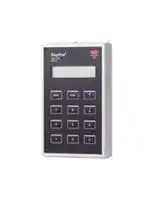


GTU8
Test Unit, Portable, 0°C to 50°C, Dupline Series
- Manufacturer: CARLO GAVAZZI
- Product type: Controller Accessories
- SVHC: No SVHC (21-Jan-2025)
- Product Range: Dupline Series
- Current Rating: 4mA
| Delivery and price | |
|---|---|
| Units per pack | 1 |
| Price | 476.2 € |
| Current stock | 10+ |
| Lead time | 30 days |

## **Test Unit Type GTU8**

## **Du line®** ~~PP.~~ _**Fieldbus Installationbus**_

- **Portable test unit**

- **Monitoring of Dupline[®] channel status**

- **LCD-display**

- **12-key tactile keyboard**

- **Supplied by Dupline[®]**

- **Transmission latch**

- **Dual-group reading**

- **Analog BCD reading**

- **Split I/O channel reading**

**Orderin Ke g y**

## **Product Descri tion p**

**GTU8**

~~E~~ Test unit for Dupline[®] modules Highly recommended for Dupand networks. Monitoring/con - line[®] system start-up, trou ble - trol unit with LCD-dis play. shoot ing and main te nance.

~~E~~ **Type: Dupline[®] Type no.**

## **T e Selection yp**

**Supply Ordering no. Test unit** Supplied by Dupline[®] **GTU8**

## **Su l S ecifications pp y p**

**Power supply** Supplied by Dupline[®] Reverse-polarity protection Yes Rated operational current < 4.0 mA

## **Product S ecifications p**

## **General S ecifications p**

|**Output**|Dupline®|**Environment**||||||||
|---|---|---|---|---|---|---|---|---|---|
|Connection|3 mm Jack socket|Degree of protection|Degree of protection||||IP 40|||
|**Display**<br>Type<br>Height of dots|2 x 16 characters<br>LCD<br>5 mm|Pollution degree<br>Operating temperature<br>Storage temperature|erature||||3  (IEC 60664)<br>0° to +50°C (+32° to +122°F)<br>-20° to +60°C(-4° to +140°F||0° to +50°C (+32° to +122°F)<br>-4° to +140°F)|
|**Keyboard**<br>No. of keys|Tactile keys<br>12|**Humidity **(non-condensing)<br>**Mechanical resistance**|||||20 to 80%|||
|Channel keys|1-8|Shock|||||15 G (11 ms)|||
|Command keys|«↑» «↓» (scroll up/down)|Vibration|||||2 G(6 to 55 Hz)|||
||« MODE »,« ENTER »|**Dimensions** (l x w x d)|||||145 x 90 x 28 mm|||
|**Cable 1**<br>GTU8 connector<br>Dupline® connector|GTU8 to Dupline®<br>3 mm Jack plug<br>2 mini grips|**Material**<br>**Weight**|||||ABS, grey<br>250 g|||
|Signal|Red|||||||||
|Common|Black|||||||||
|**Cable 2**<br>GTU8 to ASIC module<br>GTU8 connector<br>3 mm Jack plug<br>Dupline® connector<br>1 6/6 modular plug<br>**Additional Information**<br>**Scope of supply**<br>1 x Test unit<br>GTU8<br>1 x Cable 1 (mini grips)<br>GTU8 - GRIP - CAB<br>1 x Cable 2<br>GTU8 - ASIC - CAB<br>**Wiring Diagram**<br>S: Signal wire<br>Supplied by Dupline®<br>Black<br>Red<br>~~TE~~||||||||||
|Specifications are subject to change without notice (07.06.2007)|||||||||**1**|
|Dupline® is a registered trademark. A product of the CARLO GAVAZZI Group||||||||||


**Du line®** _**Fieldbus Installationbus**_

**GTU8**

## **Mode of O eration p**

key only changes the channel group in the upper row of the display.

128-channel portable trans - mit ter/receiver unit supplied by Dupline[®] . The GTU8 can be used an y where along the two wires to monitor and control the status of Dupline[®] chan nels. This unit is highly recommended for start-up and main te nance work on Dupline[®] systems.

## **Edit Tx-latch**

In this mode it is possible to "latch" the ac ti va tion of one or more channels. This means that the GTU8 will continue transmitting on the channel(s) even though the cor re spond - ing transmission but ton is re - leased.

The GTU8 can operate in 6 different modes:

Digital 1 group Digital 2 groups To cancel the transmission on Edit Tx-latch a channel, press the cor re - Analog BCD spond ing transmission but ton Split I/O again. Sensor Calibration The latched transmission will continue even if the channel The start-up mode is "Digital group or mode is changed. In 1 group". order to change the status of a latched transmission, it is To change mode: nec es sary to re-enter the 1. Press « Mode » "Edit Tx-latch" mode.

1. Press « Mode »

2.Shift between mode options by pressing either All the latched channels are « ↑ » or « ↓ ». reset to normal Dupline[®] op - 3.Select mode by presser a tion whenever the GTU8 ing « Enter ». becomes disconnected from the Dupline[®] .

## **Digital 1 group**

Once connected to the Dupline[®] , the display shows the status of channel group A. Active channels are in di cat ed by their numbers. Pressing «1», «2» ... «8» will activate the corresponding Dupline channel in the se lect ed channel group.

## **Analog BCD**

In this mode it is possible to monitor values from analog transmitters that use the multiplexed 3 1/2-digit BCD format. The analog values are shown as BCD numbers with - in the range of -1999 to 1999.

By pressing « ↑ » or « ↓ » the group ad dress es can be changed. By keeping « Enter » pressed while ac ti vat ing « ↑ » or « ↓ », the multiplex ad dress will change instead.

Pressing « ↑ » or « ↓ » chang - es the channel group shown in the display.

## **Digital 2 groups**

When the mode "Digital 2 groups" is selected, the user may select an additional chan nel group for permanent monitoring on the bottom line of the display. The channel status of the two selected groups can now be mon i - tored, but changing the chan - nel sta tus through the keys «1» ... «8» only affects the channels displayed in the upper row of the display. Even so, pressing the « ↑ » or « ↓ »

The display will show "Wait" until the selected multiplex address has been present on chan nels A1-A4.

If no analog value is trans mit - ted on the selected address, the display will show: "None".

If the analog value on the se - lect ed address is not valid, the display will show: "Error".

If the multiplex address "OFF" is selected, the display will show the analog value trans - mit ted on the selected chan - nel groups disregarding the multiplex address.

"OFF" should be selected when the analog trans mit ters are used in non-multiplexed mode.

If a specific analog trans mit ter is to be tested, it is pos si ble to set up its multiplex ad dress in "Tx-latch" mode and then go back to the "Analog BCD" mode to monitor the value.

## **Split I/O**

In this mode it is possible to see the status of split I/O channels.

The upper row in the display shows the output from the master generator.

The lower row in the display shows inputs from Dupline units to the master generator.

By pressing « ↑ » or « ↓ » the group ad dress es can be changed.

Pressing «1», «2» ... «8» will activate the corresponding Dupline channel in the se lect - ed channel group.

## **Sensor Calibration**

The Sensor Calibration function is carried out as a sequence of steps. The function controls one channel on the Dupline[®] bus to tell the attached sensors to calibrate.

1. Enter this function and select the decided Dupline[®] group:

- “SELECT SENSOR CALI GROUP: X”

- (X is the group number). Press enter when the want-

- ed group is selected.

2. When Group is selected the channel within the group must be selected.

- “SELECT SENSOR CALI CHANNEL: XY”

- (X = Group number,

Y = Channel in group X). Press enter when the wanted channel is selected.

3. When the channel has been selected, an intermediate state is entered:

“ PRESS ENTER TO CALIBRATE!” Press enter to start Calibrating.

4. When enter is pressed the calibration is started and a progress bar is shown in the display:

“0%:************

************:100%”

Don’t press anything the GTU8 will change state automatically.

5. When calibration is finished the following will be shown in the display:

“FINISHED! PRESS MODE TO EXIT”

Pressing the mode button is the only way to restart calibration or entering a new mode of operation!

**Warning:** Do not plug or un - plug the Jack con nec tor when the GTU8 is connected to Dupline[®] . This will cause a short-circuit of the two wires.

**Note:** If the Dupline[®] carrier is missing, the display will not turn on.

**2**

Specifications are subject to change without notice (07.06.2007) Dupline[®] is a registered trademark. A product of the CARLO GAVAZZI Group
Updated at April 10, 2026
Founded in Milan in 1931, Carlo Gavazzi is a globally recognized leader in the design and manufacture of high-quality automation components. For nearly a century, the company has driven technological innovation in the industrial and building automation markets. With ISO 9001-certified production facilities across Europe and Asia, Carlo Gavazzi delivers state-of-the-art solutions tailored for demanding applications, including HVAC, renewable energy, semiconductor manufacturing, and electric vehicle charging infrastructure. Our extensive portfolio of Carlo Gavazzi components focuses heavily on their industry-leading switching and sensing technologies. We carry a comprehensive selection of solid state relays, contactors, and power relays engineered for exceptional reliability and thermal performance. Alongside these robust switching solutions, our range features a wide array of precision sensors, with a strong emphasis on proximity switches and light sensors that are critical for automated manufacturing processes, mobile equipment, and access control systems. Beyond core sensing and switching, the Carlo Gavazzi lineup extends into essential power management, circuit protection, and control devices. This includes highly efficient AC/DC converters, thermal magnetic circuit breakers, and advanced panel instrumentation designed to monitor and optimize energy efficiency. From current sensing transformers to motor starters, engineers consistently trust Carlo Gavazzi to provide competitive, dependable, and forward-thinking components for their most complex automation challenges.
About Novapart
Novapart is a B2B electronic component broker specialising in stock shortages and cost reduction. We source hard-to-find parts and identify compliant alternatives across a catalogue of 540,000+ components from 500+ manufacturers.
Learn more →Stock Shortage Specialist
When a component is unavailable, discontinued or has an unacceptable lead time, we tap into our network of vetted European and Asian distributors to source what you need — without compromising on quality or traceability.
Request a quote →Compliant Alternatives
We identify pin-to-pin, electrically equivalent substitutes that meet the same certifications (RoHS, AEC-Q100, REACH) as your original specification — validated against datasheets, not just part numbers. Often at a lower cost.
BOM Analysis service →