
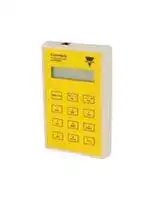


GS73800080
Configuration and Test Unit, 0°C to 50°C, Dupline Series
- Manufacturer: CARLO GAVAZZI
- Product type: Controller Accessories
- SVHC: No SVHC (21-Jan-2025)
- Product Range: Dupline Series
- Current Rating: -
| Delivery and price | |
|---|---|
| Units per pack | 1 |
| Price | 450.01 € |
| Current stock | 10+ |
| Lead time | 30 days |

**DuplineSafe Configuration and Test Unit Type GS 7380 0080**

**Du line®** = _**Fieldbus Installationbus**_

- **Portable Configuration and Test Unit**

- **Configures the DuplineSafe Relay Output module GS38300143230**

- **Configures the DuplineSafe Input module GS75102101**

- **Monitoring of DuplineSafe Input module status**

- **LCD-display**

- **12-key tactile keyboard**

- **Supplied by standard 9V battery**

- **ADAPT 7380 included**

## **Product De scri tion p**

## **Orderin Ke g y**

## **GS 7380 0080**

Configuration and Test Unit DuplineSafe bus in Test Unit **Type: Dupline[®]** for DuplineSafe. Configures mode. **Type no.** Dupline Safe Safety Relay Output module type number Highly recommended for ~~Oe ee~~ GS38300143230 and DuplineSafe system startDuplineSafe Safety Input up, troubleshooting and module type number maintenance. GS75102101. Monitors the

## **T e Selection yp**

**Supply                                        Ordering no.**

Internal battery GS 7380 0080

## **Su l S ec i fi ca tions pp y p**

**Power supply** 9V battery (not included) **Type** 6LR61 **Battery Life Time (Sleep)** Typ. 2 years

## **Product S ecifications p**

**Display** 2 x 16 characters Type LCD Height of dots                            5 mm **Keyboard** Tactile keys No. of keys                                 12 Channel keys 1-8 Command keys « ← » « → » (scroll up/down) « NO », « YES », « READ/ON » **Cable 1** GS73800080 to Adapt 7380 or safety module GS73800080 connector            1 6/6 modular plug Adapt 7380                                1 6/6 modular plug Programmer cable                     GAP-CAB **Cable 2** GS73800080 to Safety module GS73800080 connector            1 6/6 modular plug Safety module connector          GRIP Test cable                                   GTU8-GRIB-CAB

## **General S ecifications p**

**==> picture [241 x 133] intentionally omitted <==**

**----- Start of picture text -----**<br>
||||
|---|---|---|
|Environment|
|Degree of protection                  IP 40|
|Pollution degree                        3  (IEC 60664)|
|Operating temperature             0° to +50°C (+32° to +122°F)|
|Storage temperature                 -20° to +60°C (-4° to +140°F)|
|Humidity|(non-condensing)|20 to 80%|
|Mechanical resistance|
|Shock                                         15 G (11 ms)|
|Vibration                                    2 G (6 to 55 Hz)|
|Dimensions|(l x w x d)                 145 x 90 x 28 mm|
|Material|ABS,|grey|
|Weight|250 g excluding battery|

**----- End of picture text -----**<br>


**1**

Specifications are subject to change without notice (06.02.2008) Dupline[®] is a registered trademark. A product of the CARLO GAVAZZI Group

**GS73800080**

**Du line®** — _**Fieldbus**_ ~~P~~ _**Installationbus**_ _.

## **Confi uration Mode g**

When connecting to a DuplineSafe Safety Relay Output module directly or to a Safety Input module through the Adapt 7380, configuration mode is enabled. This is done automatically when activating the unit where the text “Configurator mode selected!” is shown shortly in the display, followed by the text “Config Unit begin?”. Now pressing the “Read / On” or the “Yes” button will start the reading of the connected unit, “Reading Configuration” is shown in the display while reading is in progress.

Next, you must enter whether the currently connected Safety Relay Output module should generate the sync channel, or if it should just listen to a sync channel gene rated by another Safety Relay Output  module.

Press the button “1” for Yes and the button “2” for No. Press the button “No” to go back and press the button “Yes” to approve.

## **Output Unit:**

Finally, enter if the Output unit should use Automatic or Manual restart.

If a Safety Relay Output module is connected the following screen will now be shown: ay

## [REF

Press the button “1” for Yes and the button “2” for No. Press the button Here the number of channels selected “No” to go back and press the button on the Dupline channel generator must “Yes” to approve. be entered. Press ”No” to change, press ”Yes” to approve and continue. Now the following text will appear: The next thing to do is selecting the “Send data to unit?   Yes / No”. Press channels where Safety Input modules button “Yes” to send the entered conare placed. The following screen is figuration to the connected Safety shown on the display (Note. In Grp.A Relay Output module. Press “No” to channels 1 and 2 are not selectable): reenter the configuration data.

Now the following text will appear: “Send data to unit?   Yes / No”. Press button “Yes” to send the entered configuration to the connected Safety Relay Output module. Press “No” to reenter the configuration data.

## The black numbers show that a Safety Sa

## **Input Unit:**

If a Safety Input module is connected through the ADAPT 7380, the following screen will be shown:

The black numbers show that a Safety Input is selected for these channels. The ordinary big numbers show that the channels are not used. To change channels 1,2 use button “1” or “2”. To change

As shown, a cursor will start at the first letter. Enter the letter required. The letters on the Con figuration and Test Unit buttons work just like on a cell phone (e.g. press 3 times on button “2” to get an “F”). Press “Yes” to go forward and press “No” to go back.

channels 3,4 use button “3” or ”4”, channels 5,6 use button “5” or “6”, channels 7,8 use Button “7” or “8”. Use button “No” to go back and button “Yes” to approve. Selecting Safety Inputs must be done for all used Dupline groups.

When done, the following text will appear: “Send data to unit?   Yes / No”. Press button “Yes” to send the entered configuration to the connected Safety Input module. Press “No” to reenter the con figuration data.

Next, the synchronization channel must be entered.

## Eee|

Press “No” to change Sync channel and “Yes” to approve. The letters on the Configuration and Test Unit buttons works just like on a cell phone (e.g. press 3 times on button “2” to get an “F”).

## **Test Unit  mode**

When connecting to a DuplineSafe bus, the Test Unit mode is entered. When activating the unit as described above the text “GTU mode selected!” is shown shortly on the display, fol-

lowed by the text “Enter Sync. Channel:  A1”.

Here the Sync. Channel used in the connected DuplineSafe system must be entered. Press the “No” button to change the Sync. Channel, or press the “Yes” button to use the default A1 channel.

When the “Yes” button is pressed, the GTU unit will try to lock on to the Sync. Channel. During this operation, the words “Please Wait.!  Locking Sync.*” will be shown in the display.

If the sync. Channel is found, the text “Sync. Channel Locked to:   xx”  (xx is the channel entered) will be shown in the display, or else “Sync. Channel Not Found!” will be displayed, and the Sync.  Channel can be reentered.

If the Sync. Channel is OK, the top line in the display will show “UNITS ON GROUP.A” and the bottom line will show the current state of the Safety Input modules on group A:

Explanation of symbols used in the bottom line:

1. “S”: The Sync. Channel is placed on this Dupline channel.

2. “--“ The Channels are unused.

3. Ordinary numbers, e.g “34”: An Input unit is placed on these chan nels and it’s not activated. 4. Darkened numbers, e.g “           ”: An Input unit is placed on these chanae nels and it’s activated.

Press button “Yes” to go to the next group or press “No” to go to the previous group.

## **Low Battery**

If, when activating the Con figuration and Test Unit, “ * LOW BATTERY * ” is showed in the display, it is time for changing the battery. The unit will continue to work, but it is recommended that the battery is changed. The battery is changed by dismounting the 4 screws on the back of the unit and removing the back cover. After that, take out the PCB, change the 9V battery and then reassemble the unit.

**2**

Specifications are subject to change without notice (06.02.2008) Dupline[®] is a registered trademark. A product of the CARLO GAVAZZI Group

**GS73800080**

**Du line®** _**Fieldbus Installationbus**_

## **Modes of O eration p**

There are two modes of operation for the DuplineSafe Configuration and test unit:

unit can set up the DuplineSafe Safety Relay Output module or the Safety Input module.

1. Configuration mode and

2. Test Unit mode. In Test Unit mode the unit can monitor the Safety units In Configuration mode the on the DuplineSafe bus.

Activation of the Con - figuration and Test Unit for both modes is done by pressing the “Read / On” button.

Determination of the mode of operation is done automatically according to the

connection used. If the RJ connection is used, the configuration mode will be entered. If the jack connector is used, the Test Unit mode will be entered.

## **Additional Information**

## **Scope of supply:**

1 x Conf./Test unit GS7380 0080 1 x Coding adaptor ADAPT 7380 1 x Programmer cable GAP CAB 1 x Test cable GTU8 GRIP CAB

**3**

Specifications are subject to change without notice (06.02.2008) Dupline[®] is a registered trademark. A product of the CARLO GAVAZZI Group
Updated at April 10, 2026
Founded in Milan in 1931, Carlo Gavazzi is a globally recognized leader in the design and manufacture of high-quality automation components. For nearly a century, the company has driven technological innovation in the industrial and building automation markets. With ISO 9001-certified production facilities across Europe and Asia, Carlo Gavazzi delivers state-of-the-art solutions tailored for demanding applications, including HVAC, renewable energy, semiconductor manufacturing, and electric vehicle charging infrastructure. Our extensive portfolio of Carlo Gavazzi components focuses heavily on their industry-leading switching and sensing technologies. We carry a comprehensive selection of solid state relays, contactors, and power relays engineered for exceptional reliability and thermal performance. Alongside these robust switching solutions, our range features a wide array of precision sensors, with a strong emphasis on proximity switches and light sensors that are critical for automated manufacturing processes, mobile equipment, and access control systems. Beyond core sensing and switching, the Carlo Gavazzi lineup extends into essential power management, circuit protection, and control devices. This includes highly efficient AC/DC converters, thermal magnetic circuit breakers, and advanced panel instrumentation designed to monitor and optimize energy efficiency. From current sensing transformers to motor starters, engineers consistently trust Carlo Gavazzi to provide competitive, dependable, and forward-thinking components for their most complex automation challenges.
About Novapart
Novapart is a B2B electronic component broker specialising in stock shortages and cost reduction. We source hard-to-find parts and identify compliant alternatives across a catalogue of 540,000+ components from 500+ manufacturers.
Learn more →Stock Shortage Specialist
When a component is unavailable, discontinued or has an unacceptable lead time, we tap into our network of vetted European and Asian distributors to source what you need — without compromising on quality or traceability.
Request a quote →Compliant Alternatives
We identify pin-to-pin, electrically equivalent substitutes that meet the same certifications (RoHS, AEC-Q100, REACH) as your original specification — validated against datasheets, not just part numbers. Often at a lower cost.
BOM Analysis service →