
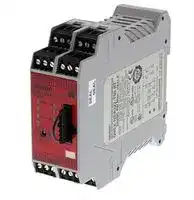


G9SX-NSA222-T03-RT DC24
Safety Relay, 24 VDC, G9SX-NS Series, DIN Rail, Screw
- Manufacturer: OMRON INDUSTRIAL AUTOMATION
- Product type: Safety Relays
- SVHC: To Be Advised
- Product Range: G9SX Series
| Delivery and price | |
|---|---|
| Units per pack | 1 |
| Price | 394.89 € |
| Current stock | 10+ |
| Lead time | 30 days |

## **Compact Non-Contact Door Switch/Non-Contact Door Switch Controller D40A/G9SX-NS**

## **Electronic Detection Mechanism for Better Stability in Non-contact Door Switch Operation**

For the most recent information on models that have been certified for safety standards, refer to your OMRON website.

Be sure to read the _“Safety Precautions”_ on page 32.

## **Features**

**==> picture [534 x 253] intentionally omitted <==**

**----- Start of picture text -----**<br>
. ere > x BN .° ve ~<br>●  Easy-to-see 2-Color Indicators  ●  Mount from Either Side<br>4 Sais< ° ra J‘ ’! . . 4<br>sae? oe of |<br>Switch status is easy to see at a glance with  Mount from whichever side provides the<br>these red/yellow LED indicators.  easiest wiring path to enable mounting to all<br>types of doors.<br>fa292 f---< — =<br>, 22 (-/ 500pb 1: 644 .~ v! _ aes= =o<br>ompO2 -5° ae onyBy -. “kaaeYO6e “a m ry1 tal- :<br>Red:   Yellow:  Not lit:  =Z 2 2. 5@S y — ls =<br>Open door   Closed door  Power OFF  Swinging doors Sliding doors<br>detected.  detected.  or failure<br>‘<br>- a” - oo | ada ~<br>ween<br>Pleat talialaaliatalatalalalaiaialaiaieiaiaiaialiae wepes<br>. fas,<br>‘.s ● Small Actuator  ’ ’ “oyohaa'. ●  Save Labor with Connector and Reduce Inventory .:<br>An actuator that is smaller than the switch  : . pe<br>:<br>actuator's height will not hinder installation or saves space, even inside the door.  Even when mounted with an L-bracket, the  ‘Y-" :.1: Wiring time can be reduced with the connector. Cable lengths can be selected, and only cables of required lengths can be purchased.<br>s ¥ Switches can be integrated into a single Switch<br>operation.  —_1 - with a connector when installing in a machine with<br>e 48mm e| Compact 78 1:1/ multiple doors or various types of machines, which can reduce inventory.<br>Switch Actuator '<br>**----- End of picture text -----**<br>


**==> picture [255 x 27] intentionally omitted <==**

**----- Start of picture text -----**<br>
'<br>‘’ ●  Connect Up to 30 Switches to a Single Controller  4<br>. Py<br>Reduce costs by connecting up to 30 Switches to a single Controller.<br>**----- End of picture text -----**<br>


**==> picture [78 x 9] intentionally omitted <==**

**----- Start of picture text -----**<br>
Up to 30 Switches<br>**----- End of picture text -----**<br>


**1**

**D40A/G9SX-NS**

## **Solves Conventional Switch Issues to Provide Stable Detection**

> **Issue 1 The Switch does not accurately detect the door when it is closed slowly, resulting in an error.**

**==> picture [63 x 6] intentionally omitted <==**

**----- Start of picture text -----**<br>
Conventional switch<br>**----- End of picture text -----**<br>


**==> picture [259 x 50] intentionally omitted <==**

**----- Start of picture text -----**<br>
An error can occur<br>Door  if the door is closed<br>closed  slowly with<br>slowly. conventional<br>switches.<br>**----- End of picture text -----**<br>


**==> picture [495 x 96] intentionally omitted <==**

**----- Start of picture text -----**<br>
| Solution 1 Conventional Switches The D40A does not use reed switches and<br>provides stable detection with electronic switches.<br>Slow<br>Slow<br>—_ —_<br>If the switching timing of reed<br>Magnet Magnet switch contacts 1 and 2 varies  Stable Detection<br>ae too much, the Controller  with the D40A's<br>detects an error and turns OFF<br>Reed switch contacts Reed switch contacts the output to maintain safety. New System<br>Note: The figure is intended<br>Error          only as an illustration. 7<br>Detects slow lateral operation. Detects slow rotating operation.<br>**----- End of picture text -----**<br>


| **Issue 2 It is nearly impossible to tell which door is open in a multi-door application.**

**If an error occurs...** _ The system cannot be started because the Controller has turned OFF the output even though all doors appear to be closed. It's impossible to tell if there is a door open or if an error has occurred.

All doors must be opened and closed before operation can be started.

## Pe **Solution 2**

## With the D40A...

The auxiliary outputs can be used to easily indicate which door is open.

And with two-color indicators, mounting adjustments are also easy. The D40A is the first Non-contact Door Switch to combine 2-color indicators, auxiliary outputs, and 30-switch connection capacity, allowing you to create a better safety environment.

> **Issue 3 Various cable lengths and complex wiring are required for multiple doors.**

## **Solution 3**

The model with a connector allows you to select the cable lengths that are connected and purchase the cables of required lengths. Switches can be integrated into a single Switch with a connector. Downtime can be reduced by replacing the cable and switch partially at maintenance time.

**2** ~~a~~

**D40A/G9SX-NS**

## **Two Types of Controller to Solve Productivity, Expandability, and Maintenance Issues**

The G9SX-NS and G9SX-NSA are designed specifically for use with Non-contact door switch, and with the G9SX-NSA you can also connect mechanical safety door switches. Among other features, these Controllers support logical AND connections that enable partial stops. These Controllers make the most of D40A Switches.

## ● **Two Different Controllers**

**==> picture [419 x 288] intentionally omitted <==**

**----- Start of picture text -----**<br>
¢<br>G9SX-NS  G9SX-NSA<br>@Logical AND  @Logical AND<br>   connection input    connection input<br>@D40A plus mechanical<br>   safety door switch input,<br>@D40A input    channel 1 or 2<br>@Two instantaneous  @Two instantaneous safety<br>   safety outputs    outputs<br>@Two OFF-delay safety<br>   outputs<br>@Logical AND  @Logical AND<br>   connection output    connection output<br>Ib<br>omen gy<br>° ° .<br>> o ' ●  Indicators That Make Maintenance Easier<br>° ¢ ‘. ,<br>**----- End of picture text -----**<br>


The indicators show the location and cause of wiring errors and any other errors that are detected. Auxiliary outputs for errors also contribute to reducing down time. Input error connection error Logical AND Output error

- .

- ● **Mechanical Safety Door Switches Can Also Be Connected with the G9SX-NSA**

Inputs can be accepted

from both D40A Switches

and mechanical switches to reduce the number of Controllers and costs.

**==> picture [30 x 43] intentionally omitted <==**

**----- Start of picture text -----**<br>
D40A<br>Safety Door<br>Switches<br>**----- End of picture text -----**<br>


- ‘ ~~'~~ ● **Expansion Units to Easily Increase the Number of Outputs with the G9SX-NSA**

s7 The number of outputs = can be easily increased using connectors. Up to 25 outputs can be configured. Up to 25 Outputs G9SX-EX Expansion Unit

**3**

**D40A/G9SX-NS**

## **Reduce Costs with these New-Concept Controllers**

## | **Issue 1 Two Controllers are required for emergency stop switches and non-contact door switches.**

**==> picture [482 x 183] intentionally omitted <==**

**----- Start of picture text -----**<br>
Application<br>● One hazard.<br>● The system must be stopped   D40B<br>   when either a door is opened<br>   or an emergency stop switch  Emergency stop switch * D40A<br>   is pressed.<br>Solution 1<br>D40B-J1<br>— —<br>Emergency stop switch * The D40A  Simplifies the<br>Configuration<br>The G9SA must be<br>o D Y G9SX-NSA<br>added to connect the  With only one<br>G9SA  G9SX-NSA222-T03@<br>emergency stop<br>Controller, both a<br>switch.<br>Non-contact Door Switch<br>Controllers  Two  and an emergency stop  Controller  One<br>. = switch can be connected.  -<br>**----- End of picture text -----**<br>


## | **Issue 2 Another Controller has to be added to use an OFF-delay timer.**

**==> picture [218 x 182] intentionally omitted <==**

**----- Start of picture text -----**<br>
Application<br>● Two hazards.<br>● The power supply must be  D40B<br>turned OFF immediately when<br>the emergency stop switch is<br>“<br>pressed.<br>● When a door is opened, a stop<br>signal is sent to only servomotor B and then the  Emergency stop switch * D40B-J1<br>power supply is turned OFF.  Wiring<br>The G9SA must be<br>added to use an  G9SA  G9SA-321-T@<br>zi OFF-delay<br>OFF-delay timer.  output<br>Three<br>© A  © B  Controllers<br>**----- End of picture text -----**<br>


**==> picture [225 x 173] intentionally omitted <==**

**----- Start of picture text -----**<br>
Emergency stop switch * D40A<br>of<br>Solution 2<br>The D40A<br>Simplifies the<br>Configuration  G9SX-BC  G9SX-NSA<br>Logical AND<br>connection<br>A Controller can be<br>po<br>eliminated because the<br>G9SX-NSA222-T03@ A  B<br>provides an OFF-delay  Two<br>output. LJ Controllers<br>**----- End of picture text -----**<br>


- Always use a manual reset when using an emergency stop.

Refer to G9SX for the features of the G9SX Series.

**4**

**D40A/G9SX-NS**

## **[Connectable Controllers]**

## Safety Controller G9SP

Non-contact Door Switch Controller G9SX-NS@

**==> picture [476 x 29] intentionally omitted <==**

**----- Start of picture text -----**<br>
Safety Controller Non-contact Door Switch Controller<br>G9SP  G9SX-NS @<br>**----- End of picture text -----**<br>


Note: For product information, refer to your OMRON website.

**5**

**Compact Non-Contact Door Switch D40A**

## **Electronic Detection Mechanism for Better Stability**

- Up to 30 units can be connected to a G9SX-NS@ or G9SP. (The G9SP supports 2 channels and up to 15 units per channel.)

- Compact Non-contact Door Switch can be mounted from both sides.

- The cable length can be selected, reducing wiring restrictions, and Switches can be integrated into a single Switch with a connector, reducing inventory.

- Easy maintenance with color LEDs identifying opening/closing of the door and breaking of cable.

- Complies with ISO 13849-1 (PLd/Safety Category 3).

For the most recent information on models that have been certified for safety standards, refer to your OMRON website.

Be sure to read the _“Safety Precautions”_ on page 32.

## **Model Number Structure**

## **Model Number Legend Non-Contact Door Switch (Switch/Actuator)**

## **D40A -** @@@

**1 2 3 1. Type 2. Auxiliary outputs** 1: Standard model C: 1NO (PNP transistor output)

**3. Cable length**

2: 2 m

5: 5 m 015-F: Connector type (Cable length :15cm)

**Note:** The Switch must be used in combination with a Non-Contact Door Switch Controller (G9SX-NS@) or Safety Controller (G9SP). For details on G9SX-NS@, refer to page 14 or subsequent pages, and for details on G9SP series, refer to "G9SP Series Catalog" (Cat. No. F090).

**6**

**D40A**

## **Ordering Information**

## **List of Models**

## **Non-Contact Door Switches (Switch/Actuator)**

|**Classification**|**Appearance**|**Auxiliary outputs**|**Cable length**|**Model**|
|---|---|---|---|---|
|Standard models||Semiconductor<br>outputs*1|2 m|**D40A-1C2**|
||||5 m|**D40A-1C5**|
|Connector model|||0.15 m|**D40A-1C015-F** *2|


**Note:** The Switch must be used in combination with a Non-Contact Door Switch Controller (G9SX-NS@) or Safety Controller (G9SP).

- *1. PNP open-collector semiconductor output.

- *2. The model with a connector is not KOSHA certified.

## **Cable with connector**

|**Connector**<br>**Type**|**Cable**<br>**Length**|**Model**|**Packing**<br>**Unit**||**Connector**<br>**Type**|**Cable**<br>**Length**|**Model**|**Packing**<br>**Unit**|
|---|---|---|---|---|---|---|---|---|
|Single-end|2 m|**XS2F-D521-DG0-A**|5||Double-end|2 m|**XS2W-D521-DG1-A**|5|
||5 m|**XS2F-D521-GG0-A**|5|||5 m|**XS2W-D521-GG1-A**|5|
||10 m|**XS2F-D521-JG0-A**|1|||10 m|**XS2W-D521-JG1-A**|1|
||15 m|**XS2F-D521-KG0-A**|1|||15 m|**XS2W-D521-KG1-A**|1|
||20 m|**XS2F-D521-LG0-A**|1|||20 m|**XS2W-D521-LG1-A**|1|


## **Controllers**

## **Non-Contact Door Switch Controllers G9SX-NS@**

|**Safety outputs*1**|**Safety outputs*1**|**Auxiliary**<br>**outputs*3**|**Logical**<br>**AND**<br>**connection**<br>**input**|<br>**Logical**<br>**AND**<br>**connection**<br>**output**|**Max. OFF delay**<br>**time*4**|**Rated**<br>**voltage**|**Terminal block type**|**Model**|
|---|---|---|---|---|---|---|---|---|
|**Instantaneous**|**OFF-delayed**<br>***2**||||||||
|2<br>(Semi-<br>conductors)|0|2<br>(Semi-<br>conductors)|1|1|---|24 VDC|Screw terminals|**G9SX-NS202-RT**|
||||||||Spring-cage terminals|**G9SX-NS202-RC**|
||2<br>(Semiconductors)||||3.0 s||Screw terminals|**G9SX-NSA222-T03-RT**|
||||||||Spring-cage terminals|**G9SX-NSA222-T03-RC**|


**Note:** For details, refer to page 12 or subsequent pages.

- *1. P channel MOS FET transistor output

- *2. The OFF-delayed output becomes an instantaneous output by setting the OFF-delay time to 0 s.

- *3. PNP transistor output

- *4. The OFF-delay time can be set in 16 steps as follows:

0/0.2/0.3/0.4/0.5/0.6/0.7/0.8/0.9/1.0/1.2/1.4/1.8/2.0/2.5/3.0 s

## **Safety Controller G9SP Series**

|**Name**|**No. of I/O points**|**No. of I/O points**|**No. of I/O points**|**No. of I/O points**|**Unit version**|**Model**|
|---|---|---|---|---|---|---|
||**Safety**<br>**inputs**|**Test**<br>**outputs**|**Safety outputs**|**Standard**<br>**outputs**|||
|Safety Controller|10|4|Semiconductor outputs: 4|4|Ver.2.0|**G9SP-N10S**|
||10|6|Semiconductor outputs: 16|--||**G9SP-N10D**|
||20|6|Semiconductor outputs: 8|--||**G9SP-N20S**|


**Note:** For details, refer to the G9SP Series Catalog (Catalog No. F090).

**7**

**D40A**

**Specifications**

## **Non-contact Door Switches**

## **Ratings and Characteristics**

|**Item**|**Model**|**D40A-1C@**|
|---|---|---|
|**Interlock type**||Type 4(EN ISO 14119)|
|**Coding level**||Low level coded(EN ISO 14119)|
|**Operating**<br>**characteristics *2**|**Operating distance OFF**→**ON**|5 mm min.*1|
||**Operating distance ON**→**OFF**|15 mm max.*1|
||**Differential travel**|20% or less of operatingdistance at 23°C(maximum 2.5 mm)|
||**Influence of temperature(max.)**|±20% of operatingdistance at 23°C,within temperature range of−10 to 55°C|
||**Repeat accuracy**|±10% or less of operatingdistance at 23°C|
|**Ambient operating temperature**||−10 to 55°C(no icingor condensation)|
|**Ambient operating humidity**||25% to 85%|
|**Insulation resistance (between charged parts and**<br>**case)**||50 MΩmax. (at 500 VDC)|
|**Dielectric strength(between chargedparts and case)**||1,000 VAC for 1 min|
|**Pollution degree**||3|
|**Electromagnetic compatibility**||IEC/EN 60497-5-3 compliant|
|**Vibration resistance**||10 to 55 to 10 Hz (single amplitude: 0.75 mm, double<br>amplitude: 1.5 mm)|
|**Shock resistance**||300 m/s2min.|
|**Degree ofprotection**||IP67|
|**Material**||PBT resin|
|**Mounting method**||M4 screws|
|**Terminal screw tightening torque**||1 N·m|
|**Power supply voltage**||24 VDC +10%/−15%|
|**Power consumption**||0.6 W max.|
|**Auxiliary outputs*3**||24 VDC, 10 mA(PNP open-collector outputs)|
|**LED indicators**||Actuator not detected(red); actuator detected(yellow)|
|**Connection cables**||2 m, 5 m, 0.15m(Connector type)|
|**Number of connectable switches**||30 max.(wiringlength: 100 m max.) *4|
|**Weight**||Switch: approx. 145g, actuator: approx. 20g (D40A-1C2)|


- *1. The condition of this distance are  that the switch and actuator target marks are on the same axis and the sensing surfaces are exactly parallel condition. OFF to ON distance shows the switch approaching (Point A in the engineering data graph) and ON to OFF distance shows the switch separating away (Point B in the engineering data graph).

- *2. For details on response time and operating time, refer to the catalog or manual of a safety controller to be connected.

- *3. Turns ON when the actuator is approaching. The G3R series of the SSR can be driven at an auxiliary output of 10 mA. Contact your OMRON representative for details.

- *4. For details, refer to item 5 on page 33.

## **Engineering Data**

**Note: 1.** The operating distance is the distance between the switch and actuator sensing surfaces.

**==> picture [230 x 271] intentionally omitted <==**

**----- Start of picture text -----**<br>
 5mm (point A) 15mm (point B) Note: 1.<br>2.<br>condition.<br>Y-direction movement 3.<br>temperature.<br>Unstable<br>ON OFF<br>range<br>18<br>16 OFF range Maximum  X Sensing<br>B operating distance surface<br>14 (ON to OFF)<br>Engineering Data<br>12 (ON to OFF)<br>10 EngineData ering  Y<br>(OFF to ON)<br>8<br>Minimum<br>6 operating distance Target marks<br>(OFF to ON)<br>A<br>4<br>2 ON range<br>0<br>−6 −4 −2 0 2 4 6<br>Distance from the target mark on the switch X (mm)<br>Operating distance Y (mm)<br>**----- End of picture text -----**<br>


**2.** The graph indicates shifting to X or Z direction from following condition that the switch and actuator target marks are on the same axis and the sensing surfaces are exactly parallel condition.

Dashed lines indate reference value for maximum and minimun oprating distance at abient temperature +23°C. The solid line indicates reference values of the maximum and minimum operating distances.

**3.** The operating distance may be affected by ambient metal, magnet catches, and temperature.

**==> picture [230 x 174] intentionally omitted <==**

**----- Start of picture text -----**<br>
18<br>16 OFF range Maximum  Sensing<br>B operating distance surface<br>14 (ON to OFF)<br>Engineering Data<br>12 (ON to OFF)<br>10 Z Y<br>Engineering<br>Data<br>8 (OFF to  ON)<br>6 Minimum  Target marks<br>operating distance<br>(OFF to ON)<br>4 A<br>2 ON range<br>0<br>−15 −10 −5 0 5 10 15<br>Distance from the target mark on the switch Z (mm)<br>Operating distance Y (mm)<br>**----- End of picture text -----**<br>


**8**

**D40A**

## **Cable with connector**

## **Ratings and Characteristics**

|**Cable with connector**<br>**Ratings and Characteristics**||
|---|---|
|**Rated current**|4 A|
|**Rated voltage**|250 VAC/VDC|
|**Contact resistance (Connector)**|40 mΩmax. (20 mV max., 100 mA max.)|
|**Insulation resistance**|1,000 MΩmin. (at 500 VDC)|
|**Dielectric strength (Connector)**|1,500 VAC for 1 min (leakage current: 1 mA max.).|
|**Degree of protection**|IP67 (IEC60529)|
|**Insertion tolerance**|200 times min.|
|**Cable holding strength**|Cable diameter: 6 mm<br>98 N/15 s|
|**Ambient operating temperature range**|Operating:−25°C to 70°C|
|**Ambient humidity range**|20% to 85%|


## **Materials and Finish**

|**Item**||**XS2F/H/W**|
|---|---|---|
|**Contacts**|**Materials**|Phosphor bronze|
||**Finish**|Nickel base, 0.4-μm gold plating|
|**Thread bracket**|**Materials**|Brass|
||**Finish**|Nickel plated|
|**Pin block**|**Materials**|PBT resin (UL94V-0)|
||**Finish**|For DC: light gray; for AC: dark gray|
|**O-ring/rubber bushing**||Rubber|
|**Cover**||PBT resin (UL94V-0)|


**9**

**D40A**

## **Connections**

## **Internal Circuit Diagram**

## **D40A-1C @**

**==> picture [72 x 87] intentionally omitted <==**

**----- Start of picture text -----**<br>
Brown<br>Blue<br>White<br>Black<br>Yellow<br>Internal circuit<br>**----- End of picture text -----**<br>


## **D40A and G9SX-NS @ Wiring Example: Wiring a Single Switch**

**==> picture [160 x 129] intentionally omitted <==**

**----- Start of picture text -----**<br>
D40A-1C@<br>* [2]<br>Auxiliary output load * [1]<br>D1 D2 D3 D4 A2<br>G9SX-NS202-@<br>G9SX-NSA222-T03-@<br>White Black Brown Blue Yellow<br>**----- End of picture text -----**<br>


- *1. The auxiliary output load current must be 10 mA max.

- *2. When connecting a XS2F series connector with cable to a connector type, the color of the auxiliary output cable is gray.

**Example: Wiring Multiple Switches** Connect Up to 30 Non-contact Door Switches

**==> picture [153 x 40] intentionally omitted <==**

**==> picture [177 x 121] intentionally omitted <==**

**----- Start of picture text -----**<br>
D1 D2 D3 D4<br>G9SX-NS202-@<br>G9SX-NSA222-T03-@<br>White  Black  Brown  Blue  White  Black  Brown  Blue White  Black  Brown  Blue<br>**----- End of picture text -----**<br>


## **Wiring of Inputs and Outputs**

|**Signal name**||**Wire color**|**Pin No. of**<br>**connector type**|**Description of operation**|
|---|---|---|---|---|
|Non-contact Door Switch<br>power supply input|+|Brown|1<br>Su<br>Co<br>3|pplies power to the D40A.<br>nnect to the D3 and D4 terminal of the G9SX-NS@.|
||-|Blue|||
|Non-contact Door Switch input||White|2<br>Inp<br>Th<br>the|uts signals from the G9SX-NS@.<br>e Non-contact Door Switch input must be ON as a required condition for<br>Non-contact Door Switch output to be ON.|
|Non-contact Door Switch<br>output||Black|4<br>Tur<br>No|ns ON and OFF according to actuator detection and the status of the<br>n-contact Door Switch input.|
|Auxiliary output<br>(PNP open-collector output)||Yellow|5<br>Tur|ns ON when actuator is detected.|


**Note:** When connecting a XS2F series connector with cable to a connector type, the color of the auxiliary output cable is gray.

**==> picture [78 x 57] intentionally omitted <==**

**----- Start of picture text -----**<br>
4 3<br>5<br>1 2<br>**----- End of picture text -----**<br>


**Pin arrangement of connector type**

**For more information on connection terminal and wiring of G9SP, refer to G9SP Series Safety Controller OPERATION MANUAL (Man. No. Z922).**

**10**

**D40A**

**Dimensions and Terminal Arrangement**

**(Unit: mm)**

## **Non-contact Door Switch (Switch/Actuator)**

**==> picture [483 x 157] intentionally omitted <==**

**----- Start of picture text -----**<br>
D40A-1C2<br>D40A-1C5<br>D40A-1C015-F 2-4.2 dia. (1.5) Indicator 9.5<br>7.2 dia. 7.2 dia.<br>38 48 48 38<br>7.2 dia. Sensing 7.2 dia.<br>surface<br>1712 136 (150) (2) 20 2-4.2 dia.<br>25 Vinyl-insulated round cable:<br>Diameter 4 mm, 5-wire<br>(46) (15 dia.) (Conductor cross-sectional area: 0.2 mm [2] /<br>M12  Insulator diameter: 1.0 mm)<br>13 Standard length: 2 m/5 m<br>(Actuator) (Switch)<br>**----- End of picture text -----**<br>


## **Accessories (Sold separately)**

**==> picture [41 x 8] intentionally omitted <==**

**----- Start of picture text -----**<br>
(Unit: mm)<br>**----- End of picture text -----**<br>


**==> picture [501 x 166] intentionally omitted <==**

**----- Start of picture text -----**<br>
Socket on One Cable End  Straight Connectors<br>(5-pole Connectors) M12 45° 6 dia.<br>XS2F-D521-DG0-A (L=2m) 5 dia.<br>XS2F-D521-GG0-A (L=5m) 14.9 dia.<br>XS2F-D521-JG0-A (L=10m)<br>XS2F-D521-KG0-A (L=15m) 40.7 30 5<br>XS2F-D521-LG0-A (L=20m) L 50<br>Pin Arrangements<br>Wiring Diagram<br>(Engagement Side)<br>Contact No. Cable lead<br>colors 2<br>2 1 WhiteBrown 5<br>3 Blue<br>4 5 BlackGray 1 4 3<br>**----- End of picture text -----**<br>


**==> picture [487 x 138] intentionally omitted <==**

**----- Start of picture text -----**<br>
Sockets and Plugs on Cable Ends  Straight/Straight Connectors<br>(5-pole Connectors) 6 dia.<br>XS2W-D521-DG1-A (L=2m)<br>XS2W-D521-GG1-A (L=5m) 14.9 dia. 14.9 dia.<br>XS2W-D521-JG1-A (L=10m)<br>XS2W-D521-KG1-A (L=15m) 40.7 44.7<br>XS2W-D521-LG1-A (L=20m) L<br>Wiring Diagram for 5 Cores<br>Contact No. Cable lead<br>colors<br>1 1 Brown<br>2 2 White<br>3 3 Blue<br>4 4 Black<br>5 5 Gray<br>**----- End of picture text -----**<br>


**11**

**Non-Contact Door Switch Controller G9SX-NS**

## **Dedicated controller for Non-Contact Door Switch with programless and safety circuit configuration**

- Up to 30 units of D40A/D40Z Compact Non-Contact Door Switch can be connected to a single Controller.

- Logical AND connection function provides easy system configuration for partial stop and complete stop.

- Programless.

- G9SX-NSA provides simultaneous inputs of a Non-Contact Door Switch and a conventional key-insertion type Safety Door Switch.

For the most recent information on models that have been certified for safety standards, refer to your OMRON website.

Be sure to read the _“Safety Precautions”_ on page 32.

## **Model Number Structure**

## **Model Number Legend**

## **Non-Contact Door Switch Controller**

**G9SX -** @@@@@@ **-** @@@ **-** @@

**1 2 3 4 5**

## **1. Functions**

NS/NSA: Controller EX: Expansion Unit

## **2. Output Configuration**

**(Instantaneous Safety Outputs)**

2: 2 outputs

4: 4 outputs

**3. Output Configuration (OFF-delayed Safety Outputs)**

0: None

**6**

**4. Output Configuration (Auxiliary Outputs)**

- 1: 1 output

- 2: 2 outputs

**5. Max. OFF-delay Time** Controller

T03: 3 s (Variable) Expansion Unit Blank: No OFF delay

T: OFF delay

## **6. Terminal Block Type**

RT: Screw terminals

RC: Spring-cage terminals

- 2: 2 outputs

**12**

**G9SX-NS**

## **Ordering Information**

## **List of Models**

## **Non-Contact Door Switch Controllers**

|**Safety outputs*1**|**Safety outputs*1**|**Auxiliary**<br>**outputs*3**|**Logical**<br>**AND**<br>**connection**<br>**input**|**Logical**<br>**AND**<br>**connection**<br>**output**|**Max. OFF delay**<br>**time*4**|**Rated**<br>**voltage**|**Terminal block type**|**Model**|
|---|---|---|---|---|---|---|---|---|
|**Instantaneous**|**OFF-delayed**<br>***2**||||||||
|2<br>(Semi-<br>conductors)|0<br>2<br>(Semiconductors)|2<br>(Semi-<br>conductors)|1|1|---|24 VDC|Screw terminals|**G9SX-NS202-RT**|
||||||||Spring-cage terminals|**G9SX-NS202-RC**|
||||||3.0 s||Screw terminals|**G9SX-NSA222-T03-RT**|
||||||||Spring-cage terminals|**G9SX-NSA222-T03-RC**|


- *1. P channel MOS FET transistor output

- *2. The OFF-delayed output becomes an instantaneous output by setting the OFF-delay time to 0 s.

- *3. PNP transistor output

- *4. The OFF-delay time can be set in 16 steps as follows:

0/0.2/0.3/0.4/0.5/0.6/0.7/0.8/0.9/1.0/1.2/1.4/1.8/2.0/2.5/3.0 s

## **Expansion Units**

|**Safety outputs**|**Safety outputs**|**Auxiliary**<br>**outputs**|**OFF-delay time**|**Rated**<br>**voltage**|**Terminal block type**|**Model**|
|---|---|---|---|---|---|---|
|**Instantaneous**|**OFF-delayed**||||||
|4PST-NO|---|1<br>(Semiconductor)*1|---|24 VDC|Screw terminals|**G9SX-EX401-RT**|
||||||Spring-cage terminals|**G9SX-EX401-RC**|
|---|4PST-NO||*2||Screw terminals|**G9SX-EX041-T-RT**|
||||||Spring-cage terminals|**G9SX-EX041-T-RC**|


- *1. PNP transistor output

- *2. The OFF-delay time is synchronized to the OFF-delay time setting in the connected Controller (G9SX-NSA222-T03-@).

## **Accessories**

## **Terminal Block**

|**Appearance***|**Specifications**|**Applicable units**|**Model**|**Remarks**|
|---|---|---|---|---|
||Terminal Block with screw<br>terminals (3-pin)|G9SX-NSA|**Y9S-03T1B-02A**|Two Terminal Blocks (black) with screw<br>terminals, and a set of six code marks to<br>prevent erroneous insertion.|
||Terminal Block with screw<br>terminals (4-pin)|G9SX-NS<br>G9SX-EX-@|**Y9S-04T1B-02A**|Two Terminal Blocks (black) with screw<br>terminals, and a set of six code marks to<br>prevent erroneous insertion.|
||Terminal Block with spring-<br>cage terminals (3-pin)|G9SX-NSA|**Y9S-03C1B-02A**|Two Terminal Blocks (black) with spring-cage<br>terminals, and a set of six code marks to<br>prevent erroneous insertion.|
||Terminal Block with spring-<br>cage terminals (4-pin)|G9SX-NS<br>G9SX-EX-@|**Y9S-04C1B-02A**|Two Terminal Blocks (black) with spring-cage<br>terminals, and a set of six code marks to<br>prevent erroneous insertion.|


**Note:** The G9SX main unit comes with a terminal block as standard equipment. The accessories shown here can be ordered as a replacement.

- The illustrations show 3-pin types

**13**

**G9SX-NS**

**Specifications**

## **Non-contact Door Switch Controllers Ratings**

## **Power input**

|**Item**<br>**Model**|**G9SX-NS202-@**|**G9SX-NSA222-T03-@**|**G9SX-EX-@**|
|---|---|---|---|
|**Rated supply voltage**|24 V DC|||
|**Operating voltage range**|−15% to 10% of rated supplyvoltage|||
|**Rated power consumption***|3 W max.|4 W max.|2 W max.|


- Power consumption of loads not included.

## **Inputs**

|**Item**<br>**Model**|**G9SX-NS202-@/G9SX-NSA222-T03-@**|
|---|---|
|**Safety input*1**|Operating voltage: 20.4 VDC to 26.4 VDC, internal impedance: approx. 2.8 kΩ *2|
|**Feedback/reset input**||


- *1. Only applies to the G9SX-NSA222-T03-@. Refers to input other than that from the Non-contact Door Switch.

- *2. Provide a current equal to or higher than that of the minimum applicable load of the connected input control device.

## **Outputs**

|**Item**<br>**Model**|**G9SX-NS202-@/G9SX-NSA222-T03-@**|
|---|---|
|**Instantaneous safety output*1**<br>**OFF-delayed safety output*1**|P channel MOS FET transistor output<br>Load current: 0.8 A DC max.*2|
|**Auxiliary output**|PNP transistor output<br>Load current: 100 mA max.|


- *1. While safety outputs are in the ON state, the following signal sequence is output continuously for diagnosis.

When using the safety outputs as input signals to control devices (i.e. Programmable Controllers), consider the OFF pulse shown below.

~~Ap~~ prox.100 ~~ms~~

ON

OFF

360 μs max.

- *2. The following derating is required when Units are mounted side-by-side. G9SX-NS202-@/G9SX-NSA222-T03-@: 0.4 A max. load current

## **Expansion Unit**

|**Item**<br>**Model**|**G9SX-EX-@**|
|---|---|
|**Rated load**|250 VAC, 3 A/30 VDC, 3 A (resistive load)|
|**Rated carry current**|3 A|
|**Maximum switching voltage**|250 VAC, 125 VDC|


**14**

**G9SX-NS**

## **Characteristics**

|**Item**<br>**Model**|**Item**<br>**Model**|**G9SX-NS202-@**|**G9SX-NSA222-T03-@**|**G9SX-EX-@**|
|---|---|---|---|---|
|**Over-voltage category**<br>**(IEC/EN 60664-1)**||II||II (Relay outputs 13 to 43<br>and 14 to 44: III)|
|**Operating time (OFF to ON state)*1**||Logical AND connection input:<br>100 ms max.<br>D40A connected: 100 ms max.<br>D40Z connected: 200 ms max.|Safety input: 50 ms max. *2<br>Logical AND connection input:<br>100 ms max. *3<br>D40A connected: 100 ms max. *3<br>D40Z connected: 200 ms max. *3|30 ms max.*4|
|**Response time (ON to OFF state)*1**||15 ms max. (Logical AND<br>connection input: OFF)<br>Logical AND connection input:<br>15 ms max.<br>D40A connected: 20 ms max. *6<br>D40Z connected: 45 ms max.|15 ms max. (Logical AND<br>connection input: OFF)<br>Safety input: 15 ms max.<br>Logical AND connection input:<br>15 ms max.<br>D40A connected: 20 ms max. *6<br>D40Z connected: 45 ms max.|10 ms max.*4|
|**ON-state residual voltage**||3.0 V max. (safetyoutput, auxiliaryoutput)|||
|**OFF-state leakage current**||0.1 mA max. (safetyoutput, auxiliaryoutput)|||
|**Maximum wiring length of safety**<br>**input, logical AND connection input,**<br>**and Non-contact Door Switch input**||100 m max. (External connection impedance: 100Ωmax. and 10 nF max.)|||
|**Reset input time**<br>**(Reset button pressing time)**||100 ms min.|||
|**Accuracy of OFF-delay time*5**||---|Within±5% of the set value|Within±5% of the set value|
|**Insulation**<br>**resistance**|**Between logical AND**<br>**connection terminals,**<br>**and power supply input**<br>**terminals and other input**<br>**and output terminals**<br>**connected together**|20 MΩmin. (at 100 VDC)||---|
||**Between all terminals**<br>**connected together and**<br>**DIN rail**|||100 MΩmin.<br>(at 500 VDC)|
|**Dielectric**<br>**strength**|**Between logical AND**<br>**connection terminals,**<br>**and power supply input**<br>**terminals and other input**<br>**and output terminals**<br>**connected together**|500 VAC for 1 min.||---|
||**Between all terminals**<br>**connected together and**<br>**DIN rail**|||1,200 VAC for 1 min|
||**Between different poles**<br>**of outputs**|---|||
||**Between relay outputs**<br>**connected together and**<br>**other terminals**<br>**connected together**|||2,200 VAC for 1 min|
|**Vibration resistance**||10 to 55 to 10 Hz, 0.375 mm single amplitude (0.75 mm double amplitude)|||
|**Shock**<br>**resistance**|**Destruction**|300 m/s2|||
||**Malfunction**|100 m/s2|||
|**Durability**|**Electrical**|---||100,000 cycles min. rated<br>load, switching frequency:<br>1,800 cycles/hour)|
||**Mechanical**|---||5,000,000 cycles min.<br>(switching frequency:<br>7,200 cycles/hour)|
|**Ambient operating temperature**||−10 to 55°C (no icingor condensation)|||
|**Ambient operating humidity**||25% to 85%|||
|**Terminal tightening torque**||0.5 N·m (For the G9SX-NS@-RT (with screw terminals) only)|||
|**Weight**||Approx. 125g|Approx. 200g|Approx. 165g|


*1. When two or more Units are connected by logical AND, the operating time and response time are the sum total of the operating times and response times, respectively, of all the Units connected by logical AND. The operating time/response time of the Non-contact Door Switch are included of the time with the D40A/D40Z.

*2. Represents the operating time when the safety input turns ON with all other conditions set.

*3. Represents the operating time when the logical AND input and the Non-contact Door Switch input turn ON with all other conditions set.

*4. This does not include the operating time or response time of G9SX-NS@ that are connected.

*5. This does not include the operating time or response time of internal relays in the G9SX-EX-@.

*6. The failure detection time for 24 V short-circuit failure on the input to Non-contact Door Switches is 35 ms max.

If using the Switch for an application other than as a Door Switch, calculate the safe distance using a failure detection time of 35 ms.

**15**

**G9SX-NS**

## **Logical AND Connection**

|**Item**<br>**Model**|**G9SX-NS202-@**|**G9SX-NSA222-T03-@**|**G9SX-EX-@**|
|---|---|---|---|
|**Number of Units connected per logical**<br>**AND output**|4 Units max.||---|
|**Total number of Units connected by**<br>**logical AND*1**|20 Units max.||---|
|**Number of Units connected in series**<br>**by logical AND**|5 Units max.||---|
|**Max. number of Expansion Units**<br>**connected*2**|---||5 Units max.|
|**Maximum cable length for logical AND**<br>**input**|100 m max.||---|


**Note:** See Logical AND Connection Combinations below for details.

- *1. The number of G9SX-EX401-@ Expansion Units or G9SX-EX041-T-@ Expansion Units (OFF-delayed Model) not included.

- *2. G9SX-EX401-@ Expansion Units and G9SX-EX041-T-@ Expansion Units (OFF-delayed Model) can be mixed.

## **Logical AND Connection Combinations**

**1.** One logical AND connection output from a G9SX-NS@ Controller can be logical AND connected to up to four Controllers.

|G9SX-NS@|||||||||
|---|---|---|---|---|---|---|---|---|
||||||||||
|||G9SX-NS@||G9SX-NS@||G9SX-NS@||G9SX-NS@|


**2.** Any G9SX-NS@ Controller that receives a logical AND connection input can be logically connected to other Controllers on up to five layers.

G9SX-NS@ G9SX-NS@ G9SX-NS@ G9SX-NS@ G9SX-NS@

- **Note:** The G9SX-NS@ in the above diagram can be replaced by the G9SX-AD@ Advanced Unit.

   - For details on G9SX-AD@ advanced unit, refer to G9SX Flexible Safety Unit on your OMRON website.

**3.** The largest possible system configuration contains a total of 20 G9SX-NS@ Controllers, G9SX-AD@ Advanced Units, and G9SX-BC Basic Units. In this configuration, each Controller or Advanced Unit can have up to five Expansion Units.

**==> picture [242 x 257] intentionally omitted <==**

**----- Start of picture text -----**<br>
G9SX-@<br>G9SX-AD@ G9SX-AD@ G9SX-AD@ G9SX-AD@<br>or or or or<br>G9SX-NS@ G9SX-NS@ G9SX-NS@ G9SX-NS@<br>G9SX-AD@ G9SX-AD@ G9SX-AD@ G9SX-AD@<br>or or or or<br>G9SX-NS@ G9SX-NS@ G9SX-NS@ G9SX-NS@<br>Number of Units connected<br>per logical AND output: 4<br>G9SX-AD@ G9SX-AD@ G9SX-AD@ Units max.<br>or or or<br>G9SX-NS@ G9SX-NS@ G9SX-NS@<br>G9SX-AD@ G9SX-AD@ G9SX-AD@ G9SX-AD@ G9SX-AD@<br>or or or or or<br>G9SX-NS@ G9SX-NS@ G9SX-NS@ G9SX-NS@ G9SX-NS@<br>G9SX-AD@ G9SX-AD@ G9SX-AD@<br>or or or<br>G9SX-NS@ G9SX-NS@ G9SX-NS@<br>Number of Units connected<br>in series by logical AND: 5 Units max. Total number of Units<br>connected by logical AND:<br>20 Units max.<br>**----- End of picture text -----**<br>


**16**

**G9SX-NS**

## **Response Time and Operating Time**

## **1. G9SX-NS@**

**==> picture [134 x 47] intentionally omitted <==**

**----- Start of picture text -----**<br>
Non-contact Door<br>Switch input<br>Logical AND input<br>**----- End of picture text -----**<br>


||**Max. response time**<br>**(excluding Expansion Units)*1**|**Max. operating time**<br>**(excluding Expansion Units)*2**|
|---|---|---|
|**Non-contact Door**<br>**Switch input**|D40A connected: 20 ms max. *3<br>D40Z connected: 45 ms max. *3|D40A connected: 100 ms max. *4<br>D40Z connected: 200 ms max. *4|
|**Logical AND input**|15 ms|100 ms|


- *1. The maximum response time is the time it takes the output to switch from ON to OFF after the input switches from ON to OFF.

- *2. The maximum operating time is the time it takes the output to switch from OFF to ON after the input switches from OFF to ON.

- *3. Represents the response time of Non-contact Door Switch (1 to 30 units connected) and the response time of G9SX-NS added.

- *4. Represents the operating time of Non-contact Door Switch (1 to 30 units connected) and the operating time of G9SX-NS added.

## **2. G9SX-NSA@**

**==> picture [143 x 61] intentionally omitted <==**

**----- Start of picture text -----**<br>
Non-contact Door   D4NS<br>Switch input  Safety input<br>Logical AND input<br>**----- End of picture text -----**<br>


||**Max. response time**<br>**(excluding Expansion Units)*1**|**Max. operating time**<br>**(excluding Expansion Units)*2**|
|---|---|---|
|**Non-contact Door**<br>**Switch input**|D40A connected: 20 ms max. *3<br>D40Z connected: 45 ms max. *3|D40A connected: 100 ms max. *4<br>D40Z connected: 200 ms max. *4|
|**Safety input**|15 ms|50 ms|
|**Logical AND input**|15 ms|100 ms|


- *1. The maximum response time is the time it takes the output to switch from ON to OFF after the input switches from ON to OFF.

- *2. The maximum operating time is the time it takes the output to switch from OFF to ON after the input switches from OFF to ON.

- *3. Represents the response time of Non-contact Door Switch (1 to 30 units connected) and the response time of G9SX-NS added.

- *4. Represents the operating time of Non-contact Door Switch (1 to 30 units connected) and the operating time of G9SX-NS added.

## **3. Multiple G9SX-NS@/NSA@ Non-contact Door Switch Controllers**

When multiple Controllers are logically connected with AND connections, the response time is the sum of the response times given in 1 and 2 above. (It is the same for the operating time.)

**==> picture [508 x 309] intentionally omitted <==**

**----- Start of picture text -----**<br>
D4NS Case (a)<br>D40A (1) Safety input Response Time from When D40A (1) Turns from ON to OFF until Safety Output (2) Turns from<br>ON to OFF<br>(<br>20 ms + 15 ms = 35 ms<br>(D40A (1)) (Logical AND<br>connection (1))<br>Note:  45 ms + 15 ms = 60 ms when D40Z is connected.<br>Case (b)<br>Safety output (1)<br>Response Time from When D4NS Turns from ON to OFF until Safety Output (3) Turns from<br>D40A (2) ON to OFF<br>Logical AND<br> (1) 15 ms + 15 ms + 15 ms = 45 ms<br>(D4NS) (Logical AND  (Logical AND<br>connection (1)) connection (2))<br>Safety output (2)<br>D40A (3)<br>Logical AND<br> (2)<br>Safety output (3)<br>**----- End of picture text -----**<br>


**17**

**G9SX-NS**

**Connections**

## **Internal Connection**

## **G9SX-NS202-@ (Non-contact Door Switch Controller)**

**==> picture [143 x 96] intentionally omitted <==**

**----- Start of picture text -----**<br>
A1  D1  D2  D3  D4  T31  T32  T33  T41  T42<br>*2<br>Power Non-contact Door   Reset/Feedback  Logical AND<br>supply Switch control  Input  input<br>circuit<br>*1 Safety output control  output control Auxiliary<br>A2  S14  S24  L1  X1  X2<br>*3<br>**----- End of picture text -----**<br>


## **G9SX-NSA222-T03-@**

## **(Non-contact Door Switch Controller)**

**==> picture [184 x 99] intentionally omitted <==**

**----- Start of picture text -----**<br>
A1  T11  T12  T21  T22  T31  T32  T33  Y1  D1  D2  D3  D4  T41  T42<br>*2<br>Power supply circuit input 1 Safety   input 2 Safety   Reset/Feedback Input  Cross fault detection input  Non-contact Door  Switch control  Logical AND input<br>*1 Auxiliary  Expansion Unit<br>Safety output control  output control  output control<br>A2  S14  S24  S44  S54  L1  X1  X2<br>*3<br>**----- End of picture text -----**<br>


- *1. Internal power supply circuit is not isolated.

- *2. Logical AND input is isolated.

- *3. Outputs S14 to S24 are internally redundant.

## **G9SX-EX401-@/G9SX-EX041-T-@**

- *1. Internal power supply circuit is not isolated.

- *2. Logical AND input is isolated.

- *3. Outputs S14 to S54 are internally redundant.

## **(Expansion Unit/Expansion Unit OFF-delayed Model)**

**==> picture [186 x 87] intentionally omitted <==**

**----- Start of picture text -----**<br>
A1  13  23  33  43<br>*1<br>Safety  *2<br>output<br>Power  control<br>supply<br>Exp. sig. IN  circuit  Auxiliary output control  K1  K2  Exp. sig. OUT<br>A2  X2  14  24  34  44<br>**----- End of picture text -----**<br>


- *1. Internal power supply circuit is not isolated.

- *2. Relay outputs are isolated.

**18**

**G9SX-NS**

## **D40A, D40Z and G9SX-NS @ Wiring**

## **Example: Wiring a Single Switch**

## **D40A**

**==> picture [160 x 129] intentionally omitted <==**

**----- Start of picture text -----**<br>
D40A-1C@<br>* [2]<br>Auxiliary output load * [1]<br>D1 D2 D3 D4 A2<br>G9SX-NS202-@<br>G9SX-NSA222-T03-@<br>White Black Brown Blue Yellow<br>**----- End of picture text -----**<br>


## **D40Z**

**==> picture [84 x 124] intentionally omitted <==**

**----- Start of picture text -----**<br>
D40Z-1C@<br>D1 D2 D3 D4<br>G9SX-NS202<br>G9SX-NSA222<br>White  Black  Brown  Blue<br>**----- End of picture text -----**<br>


- *1. The auxiliary output load current must be 10 mA max.

- *2. When connecting a XS2F series connector with cable to a

connector type, the color of the auxiliary output cable is gray.

## **Example: Wiring Multiple Switches**

## **Example of auxiliary outputs of the D40Z**

Connect Up to 30 Non-contact Door Switches

The auxiliary output of the D40Z supports the input polarities of both PNP and NPN.

**==> picture [127 x 125] intentionally omitted <==**

**----- Start of picture text -----**<br>
PNP<br>24 VDC<br>Yellow COM<br>PLC etc.<br>Gray IN<br>NPN<br>Yellow IN<br>PLC etc.<br>Gray COM<br>24 VDC<br>**----- End of picture text -----**<br>


**==> picture [153 x 40] intentionally omitted <==**

|||||||||||||
|---|---|---|---|---|---|---|---|---|---|---|---|
|**Wiring of Inputs and**<br>G9SX-NS202-@<br>G9SX-NSA222-T03-@<br>White<br>D1 D2 D3 D4<br>White<br>Black<br>Black<br>Brown<br>Blue|White<br>D<br>Black|Brown|Blue|White<br>Black|<br>Brown||Blue|White|Brown|Blue||
|||||||||||||
|||||||||||||
|||||||||||||
|||||||||||||
|||||||||||||
|**Signal name**||||||**Cable color of**<br>**D40A/D40Z**||||**Pin No. of D40A**<br>**connector type**|**Description of operation**|
|Non-contact Door Switch<br>power supply input|||||+|Brown||||1<br>Sup<br>Co<br>3|plies power to the D40A or D40Z.<br>nnect to the D3 and D4 terminal of the G9SX-NS@.|
||||||-|Blue||||||
|Non-contact Door Switch input||||||White||||2<br>Inp<br>The<br>the|uts signals from the G9SX-NS@.<br>Non-contact Door Switch input must be ON as a required condition for<br>Non-contact Door Switch output to be ON.|
|Non-contact Door Switch<br>output||||||Black||||4<br>Tur<br>No|ns ON and OFF according to actuator detection and the status of the<br>n-contact Door Switch input.|
|Auxiliary output||||||Yellow||||---<br>Tur<br>Wh<br>5|ns ON when actuator is detected.<br>en a fault is detected, turns into OFF state regardless of actuator status. *3|
|||||||Gray||||||


- **Note: 1.** When connecting a XS2F series connector with cable to a D40A connector type, the cable color of the auxiliary output is gray. **2.** For details, refer to the data sheet of each Non-contact Door Switch.

- *3. Only D40Z turns into OFF state when a fault is detected by the actuator.

**==> picture [78 x 57] intentionally omitted <==**

**----- Start of picture text -----**<br>
4 3<br>5<br>1 2<br>**----- End of picture text -----**<br>


**Pin arrangement of D40A connector type**

**19**

**G9SX-NS**

## **Wiring of Inputs and Outputs**

## **G9SX-NS202-** @

|**Signal name**|**Terminal**<br>**name**|**Description of operation**|**Wiring**|**Wiring**|**Wiring**|**Wiring**|**Wiring**|**Wiring**|**Wiring**|
|---|---|---|---|---|---|---|---|---|---|
|Power supply<br>input|A1, A2|Connect the power source to the A1 and A2<br>terminals.|Connect the power supply plus (24 VDC) to the A1<br>terminal.<br>Connect the power supply minus (GND) to the A2<br>terminal.|||||||
|Non-contact<br>Door Switch input|D1, D2,<br>D3, D4|All Non-contact Door Switch inputs connected to the<br>G9SX-NS@must be ON as a required condition for<br>the safety outputs to be ON. Otherwise the safety<br>outputs cannot be in the ON state.|D1<br>D2<br>D3<br>White<br>Black<br>Brown||||||D4<br>Blue|
|Feedback/reset<br>input|T31, T32,<br>T33|To set the safety outputs in the ON state, the ON state<br>signal must be input to T33. Otherwise the safety<br>outputs cannot be in the ON state.|Auto reset|||||T|Feedback loop<br>KM<br>+24 V<br>31<br>T33<br>T32|
|||To set the safety outputs in the ON state, the signal<br>input to T32 must change from the OFF state to the<br>ON state, and then to the OFF state. Otherwise the<br>safety outputs cannot be in the ON state.|Manual reset|||||T<br>Reset<br>Switch|Feedback loop<br>KM<br>+24 V<br>31<br>T33<br>T32|
|Logical AND<br>connection input|T41, T42|A logical AND connection means that one unit (Unit<br>A) outputs a safety signal “a” to a subsequent unit<br>(Unit B) and Unit B calculates the logical AND (i.e.,<br>outputs the AND) of the signal “a” and safety signal<br>“b”, which is input to Unit B.<br>Thereby the logic of the safety output of Unit B is<br>(AND). (An AND of inputs “a” and “b” is output.)<br>To set the safety outputs of the subsequent Unit in the<br>ON state, its logical AND connection preset switch<br>must be set to AND (enable) and the high signal must<br>be input to T41 of the subsequent unit.|G9S<br>L<br>G9S<br>L<br>T<br>Next unit<br>G9S<br>L<br>T<br>Output (a)<br>Output (a&b)<br>Unit B<br>Unit A||||NSA<br>2<br>Logical AND connection sig.<br>(1st layer)<br>Input a||G9SX-NS/NSA<br> <br>T41<br>T42<br> <br>Next unit (4 unit max.)<br>Next unit (4 unit max.)|
|||||Unit A||||||
||||||G9S|X-NS/|NSA|||
|||||||1<br>A||||
|||||Unit B||41<br>T|NSA<br>42<br>2<br>Logical AND connection sig.<br>(2nd layer)<br>Input b|||
||||||G9S|X-NS/|NSA|||
|||||||1<br>A||||
|||||||41<br>T|2<br>ers max.)<br>NSA<br>42|||
||||||G9S<br>|X-NS/<br><br>|NSA<br>|||
|||||||A<br> (5 lay <br>1||||
|Instantaneous<br>safety output|S14, S24|Turns ON/OFF according to the state of the safety<br>inputs, Non-contact Door Switch inputs, feedback/<br>reset inputs, and logical AND connection inputs.<br>During OFF-delay state, the Instantaneous safety<br>outputs are not able to turn ON.|Keep these outputs open when not used.|||||||
|Logical AND<br>connection<br>output|L1|Outputs a signal of the same logic and at the same<br>time as the instantaneous safety outputs.|Keep these outputs open when not used.|||||||
|Auxiliary monitor<br>output|X1|Outputs a signal of the same logic and at the same<br>time as the instantaneous safetyoutputs.|Keep these outputs open when not used.|||||||
|Auxiliary error<br>output|X2|Outputs when the error indicator is lit or flashing.|Keep these outputs open when not used.|||||||


**20**

**G9SX-NS**

## **G9SX-NSA222-T03-** @

|**Signal name**|**Terminal**<br>**name**|**Description of operation**|**Wiring**|**Wiring**|**Wiring**|**Wiring**|**Wiring**|**Wiring**|**Wiring**|**Wiring**|
|---|---|---|---|---|---|---|---|---|---|---|
|Power supply<br>input|A1, A2|Connect the power source to the A1 and A2<br>terminals.|Connect the power supply plus (24 VDC) to the A1 terminal.<br>Connect the power supply minus (GND) to the A2 terminal.||||||||
|Safety input 1|T11, T12|To set the safety outputs in the ON state, the high<br>state signals must be input to both safety input 1<br>and safety input 2. Otherwise the safety outputs<br>cannot be in the ON state.|Using safety input 1 system|||||T11<br>T||12<br>T21<br>T22<br>Y1<br>+24V<br>+24V|
||||Using safety input 2 system<br>(without short-circuit<br>monitoring between<br>systems)|||||T11<br>T||12<br>T21<br>T22<br>Y1<br>+24V<br>+24V<br>+24V|
|Safety input 2|T21, T22||||||||||
||||Using safety input 2 system<br>(with short-circuit monitoring<br>between systems)|||||T11<br>T||12<br>T21<br>T22<br>Y1<br>NC|
|Non-contact<br>Door Switch<br>input|D1, D2,<br>D3, D4|All Non-contact Door Switch inputs connected to<br>the G9SX-NS must be ON as a required condition<br>for the safety outputs to be ON.<br>Otherwise the safety outputs cannot be in the ON<br>state.|D1<br>D2<br>D3<br>D4<br>White<br>Black<br>Brown<br>Blue||||||||
|Feedback/reset<br>input|T31, T32,<br>T33|To set the safety outputs in the ON state, the ON<br>state signal must be input to T33.<br>Otherwise the safety outputs cannot be in the ON<br>state.|Auto reset|||||T||Feedback loop<br>KM<br>+24 V<br>31<br>T33<br>T32|
|||||||||||31<br>T33<br>T32|
|||To set the safety outputs in the ON state, the signal<br>input to T32 must change from the OFF state to the<br>ON state, and then to the OFF state. Otherwise the<br>safety outputs cannot be in the ON state.|Manual reset|||||T<br>Reset<br>Switch||Feedback loop<br>KM<br>+24 V<br>31<br>T33<br>T32|
|||||||||||31<br>T33<br>T32|
|Logical AND<br>connection input|T41, T42|A logical AND connection means that one unit (Unit<br>A) outputs a safety signal “a” to a subsequent unit<br>(Unit B) and Unit B calculates the logical AND (i.e.,<br>outputs the AND) of the signal “a” and safety signal<br>“b”, which is input to Unit B.<br>Thereby the logic of the safety output “b” is output.)<br>To set the safety outputs of the subsequent Unit in<br>the ON state, its logical AND connection preset<br>switch must be set to AND (enable) and the high<br>signal must be input to T41 of the subsequent unit.|G9S<br>L<br>L<br>T<br>Next unit<br>L<br>T<br>Output (a)<br>Output (a&b)<br>Unit B<br>Unit A<br>G9S<br>G9S||||/NSA<br>2<br>Logical AND connection sig.<br>(1st layer)<br>Next unit<br>Input a|||A<br>(4 unit max.)<br>(4 unit max.)|
|||||Unit A|||||||
||||||G9S|X-NS|/NSA||||
|||||||1<br>A|||||
|||||Unit B||41<br>T|42<br>2<br>G9SX-NS/NS<br>Next unit<br>T41<br>T42<br>Logical AND connection sig.<br>(2nd layer)<br>Input b<br>/NSA||||
||||||G9S|X-NS|/NSA||||
|||||||1<br>A|||||
|||||||41<br>T|2<br>ers max.)<br>42<br>/NSA||||
||||||G9S|X-NS|/NSA||||
|||||||A<br>(5 lay<br>1|||||
|Cross fault<br>detection input|Y1|Selects the mode for the failure detecting (cross<br>fault detecting) function for the safety inputs of<br>G9SX corresponding to the connection of the cross<br>fault detection input.|Whether Y1 is connected depends on whether the T11 and<br>T21 terminals are used.<br>Refer to wiring information for safety inputs 1 and 2.||||||||
|Instantaneous<br>safety output|S14, S24|Turns ON/OFF according to the state of the safety<br>inputs, feedback/reset inputs, and logical AND<br>connection inputs.<br>During OFF-delay state, the Instantaneous safety<br>outputs are not able to turn ON.|Keep these outputs open when not used.||||||||
|OFF-delayed<br>safety output|S44, S54|OFF-delayed safety outputs.<br>The OFF-delay time is set by the OFF-delay preset<br>switch.<br>When the delay time is set to zero, these outputs<br>can be used as non-delayoutputs.|Keep these outputs open when not used.||||||||
|Logical AND<br>connection<br>output|L1|Outputs a signal of the same logic and at the same<br>time as the instantaneous safety outputs.|Keep these outputs open when not used.||||||||
|Auxiliary<br>monitor output|X1|Outputs a signal of the same logic and at the same<br>time as the instantaneous safetyoutputs.|Keep these outputs open when not used.||||||||
|Auxiliary error<br>output|X2|Outputs when the error indicator is lit or flashing.|Keep these outputs open when not used.||||||||


**21**

**G9SX-NS**

**Dimensions and Terminal Arrangement**

**(Unit: mm)**

## **Non-contact Door Switch Controller**

**G9SX-NS202-@**

**==> picture [69 x 110] intentionally omitted <==**

**==> picture [364 x 157] intentionally omitted <==**

**----- Start of picture text -----**<br>
(6) (See note 2.) Terminal arrangement<br>T31 T32 T33 D3<br>D1 D2 X1 A1<br>T31  T32 T33  D3<br>D1  D2  X1  A1<br>G9SX-NS202<br>24VDC<br>PWR FB<br>PWR  FB<br>AND  NS  100 max.  AND NS<br>EI  ERR<br>EI ERR<br>No.<br>T41  T42  X2  A2<br>S14  S24  L1  D4<br>T41 T42 X2 A2<br>S14 S24 L1 D4<br>23 max.<br>(22.5) * 115 max. (6) (See note 2.)<br>**----- End of picture text -----**<br>


**Note: 1.** Above outline drawing is for models with spring-cage terminals (-RC). **2.** For models with spring-cage terminals (-RC) only. * Typical dimension

**==> picture [180 x 21] intentionally omitted <==**

**----- Start of picture text -----**<br>
Non-contact Door Switch Controller<br>G9SX-NSA222-T03-@<br>**----- End of picture text -----**<br>


**==> picture [313 x 153] intentionally omitted <==**

**----- Start of picture text -----**<br>
(6) (See note 2.) Terminal arrangement<br>T31 T32 T33 D1 D2 D3<br>T11 T12 Y1 X1 X2 A1<br>PWR FB<br>T1 T2<br>100 max.  AND NS<br>EI ED<br>ERR<br>T21 T22 T41 T42 A2<br>S14 S24 S44 S54 L1 D4<br>(10) 115 max. (6) (See note 2.)<br>**----- End of picture text -----**<br>


**==> picture [40 x 124] intentionally omitted <==**

**----- Start of picture text -----**<br>
T31  T32  T33  D1  D2  D3<br>T11  T12  Y1  X1  X2  A1<br>G9SX-NSA222-T03<br>24VDC<br>PWR  FB<br>T1  T2<br>AND  NS<br>0.4 0.7 0.3 0.5 0.2 0.6 OFF-DELAY 0.8 EI 0.9 0 1.0 3.0 1.2 2.5 1.4 2.0 1.8 ED ERR  No.<br>T21  T22  T41  T42  A2<br>S14  S24  S44  S54  L1  D4<br>35.5 max.<br>(35) *<br>**----- End of picture text -----**<br>


**==> picture [79 x 112] intentionally omitted <==**

**Note: 1.** Above outline drawing is for models with spring-cage terminals (-RC). **2.** For models with spring-cage terminals (-RC) only.

* Typical dimension

**Expansion Unit G9SX-EX401-@ Expansion Unit (OFF-delayed Model) G9SX-EX041-T-@**

**==> picture [382 x 207] intentionally omitted <==**

**----- Start of picture text -----**<br>
Terminal arrangement<br>G9SX-EX401- @ G9SX-EX041-T- @<br>(Expansion Unit) (Expansion Unit<br>with OFF Delay)<br>(6) (See note 2.) 13 23 33 43 13  23  33  43<br>PWR PWR<br>EI ED<br>ERR ERR<br>100 max.<br>A1 X2 A2 A1  X2  A2<br>14 24 34 44 14  24  34  44<br>23 max.<br>(22.5) * 115 max. (6) (See note 2.)<br>**----- End of picture text -----**<br>


**==> picture [67 x 110] intentionally omitted <==**

**Note: 1.** Above outline drawing is for models with spring-cage terminals (-RC). **2.** For models with spring-cage terminals (-RC) only.

* Typical dimension

**22**

**G9SX-NS**

## **Operation**

## **Functions**

## **Logical AND Connection**

A logical AND connection means that the G9SX outputs a safety signal “a” to another G9SX, and that G9SX creates the logical AND of safety signal “a” and safety signal “b.” The safety output of the G9SX-NSA222-T03-@ with the logical AND connection shown in the following diagram is “a” AND “b.”

**==> picture [235 x 73] intentionally omitted <==**

**----- Start of picture text -----**<br>
a b<br>G9SX-NS202-@ G9SX-NSA222-T03-@<br>a a (AND) b<br>**----- End of picture text -----**<br>


This is illustrated using the application in the following diagram as an example. The equipment here has two hazards identified as Robot 1 and Robot 2, and it is equipped with Non-contact Door Switches and an emergency stop button as safety measures. If the door to Robot 2 is opened, only Robot 2 is stopped (i.e., a partial stop). If the door to Robot 1 is opened or the emergency stop button is pressed, both Robot 1 and Robot 2 stop (i.e., a complete stop).

The actual situation using a G9SX for this application is shown in this example.

## **Connecting Expansion Units**

- The G9SX-EX and G9SX-EX-T Expansion Units can be connected to a G9SX-NSA222-T3-@ Non-contact Door Switch Controller to increase the number of safety outputs. (They cannot be connected to a G9SX-NS202-@.)

- A maximum of five Expansion Units can be connected to one G9SX-NSA222-T03-@. This may be a combination of G9SX-EX instantaneous models and G9SX-EX-T OFF-delayed models.

- Remove the terminating connector from the receptacle on G9SX-NSA222-T03-@ and insert the Expansion Unit cable connector into the receptacle. Insert the terminating connector into the receptacle on the Expansion Unit at the very end (rightmost).

- When Expansion Units are connected to a Controller, make sure that power is supplied to every Expansion Unit. (Refer to the following diagram for actual Expansion Unit connection.)

**==> picture [228 x 61] intentionally omitted <==**

**----- Start of picture text -----**<br>
Terminating<br>connector<br>G9SX-NSA222-T03-@ tT Lit t Expansion Unit<br>**----- End of picture text -----**<br>


**Note:** The logical AND setting on the G9SX-NS202-@ must be set to AND (enabled).

**==> picture [220 x 300] intentionally omitted <==**

**----- Start of picture text -----**<br>
Non-contact Door Switch 2<br>Non-contact Door Switch 1<br>_ |oN<br>Emergency stop button<br>Robot 2<br>[s i]<br>Robot 1<br>S S a<br>Emergency<br>stop switch * D40A  D40A<br>G9SX- G9SX-<br>NSA222-T03-@ NS202-@<br>Robot 1  Robot 2<br>**----- End of picture text -----**<br>


- A manual reset is required when an emergency stop is used.

**23**

**G9SX-NS**

## **Setting Procedure**

## **1. Cross Fault Detection (G9SX-NSA222-T03-@)**

Set the cross fault detection mode for safety inputs by shorting Y1 to 24 V or leaving it open.

When cross fault detection is set to ON, short-circuit failures are detected between safety inputs T11-T12 and T21-22. When a cross fault is detected, the following will occur.

(1) The safety outputs and logical AND outputs lock out.

## **3. Setting Logical AND Connection (G9SX-NS202-@/ NSA222-T03-@)**

When connecting two or more Non-contact Door Switch Controllers by logical AND connection, set the logical AND connection preset switch on the Controller that is on the input side (Unit B in the following diagram) to AND. The default setting of the logical AND connection preset switch is set to OFF.

- (2) The LED error indicator is lit.

- (3) The error output (auxiliary output) turns ON.

**==> picture [243 x 202] intentionally omitted <==**

**----- Start of picture text -----**<br>
Cross fault<br>detection Wiring<br>+24 V<br>Using safety input 1 system +24 V<br>T11  T12  T21  T22  Y1<br>OFF<br>+24 V  +24 V<br>+24 V<br>T11  T12  T21  T22  Y1<br>Using safety input 2<br>system<br>ON<br>T11  T12  T21  T22  Y1<br>**----- End of picture text -----**<br>


## **2. Reset Mode (G9SX-NS202-@/NSA222-T03-@)**

Set the reset mode using feedback/reset input terminals T31, T32, and T33.

Auto reset mode is selected when terminal T32 is shorted to 24 V and manual reset mode is selected when terminal T33 is shorted to 24 V.

**==> picture [160 x 118] intentionally omitted <==**

**----- Start of picture text -----**<br>
Auto reset mode  Manual reset mode<br>KM1  KM1<br>KM2  Reset  KM2<br>switch<br>KM3  KM3<br>KM4  KM4<br>+24 V  +24 V<br>KM5  KM5<br>T31  T32  T33  T31  T32  T33<br>**----- End of picture text -----**<br>


**==> picture [195 x 91] intentionally omitted <==**

**----- Start of picture text -----**<br>
Back<br>Unit A<br>AND<br>L1 A2<br>OFF<br>Switch<br>T41 T42 AND<br>OFF<br>Unit B<br>**----- End of picture text -----**<br>


**Note:** A setting error will occur and Unit B will lock out if the logical AND setting switch on the Unit B is set to OFF.

## **4. Setting the OFF-delay Time (G9SX-NSA222-T03-@)**

The OFF-delay preset time on G9SX-NSA222-T03-@ is set from the OFF-delay time preset switch (1 each on the front and back of the Unit).

Normal operation will only occur if both switches are identically set. An error will occur if the switches are not identically set. The default setting of the OFF-delay time preset switch is set to 0 s.

**==> picture [172 x 91] intentionally omitted <==**

**----- Start of picture text -----**<br>
Front Back<br>Switch<br>Switch<br>**----- End of picture text -----**<br>


Refer to the following illustration for details on setting switch positions.

## **G9SX-NSA222-T03-@**

**==> picture [195 x 79] intentionally omitted <==**

**----- Start of picture text -----**<br>
0.80.91.0 0.80.91.0<br>0.7 1.2 0.7 1.2<br>0.6 1.4 0.6 1.4<br>0.5 1.8 0.5 1.8<br>0.4 2.0 0.4 2.0<br>0.3 2.5 0.3 2.5<br>0.2 0 3.0 0.2 0 3.0<br>OFF-DELAY Notch OFF-DELAY<br>Example 1: 0-second  Example 2: 0.8-second<br>**----- End of picture text -----**<br>


**24**

**G9SX-NS**

## **LED Indicators**

|**Marking**|**Color**|**Name**|**G9SX-NS202**|**G9SX-**<br>**NSA222**|**G9SX-EX**|**G9SX-EX-T**|**Function**|**Reference**|
|---|---|---|---|---|---|---|---|---|
|**PWR**|**Green**|**Power supply**<br>**indicator**|❍|❍|❍|❍|Lights while power is supplied.|---|
|**T1**|**Orange**|**Safety input #1**<br>**indicator**|---|❍|---|---|Lights while a high signal is input to T12.<br>Flashes when an error relating to safety<br>input #1 occurs.|*|
|**T2**|**Orange**|**Safety input #2**<br>**indicator**|---|❍|---|---|Lights while a high signal is input to T22.<br>Flashes when an error relating to safety<br>input #2 occurs.||
|**NS**|**Orange**|**Non-contact Door**<br>**Switch input**<br>**indicator**|❍|❍|---|---|Lights when the Non-contact Door Switch<br>input turns ON. Flashes when an error<br>relating to the Non-contact Door Switch<br>input occurs.||
|**FB**|**Orange**|**Feedback/reset**<br>**input indicator**|❍|❍|---|---|Lights in the following cases:<br>With automatic reset while a high signal is<br>input to T33.<br>With manual reset while a high signal is<br>input to T32.<br>Flashes when an error relating to feedback/<br>reset input occurs.||
|**AND**|**Orange**|**Logical AND input**<br>**indicator**|❍|❍|---|---|Lights while a high signal is input to T41.<br>Flashes when an error relating to logical<br>AND connection input occurs.||
|**EI**|**Orange**|**Instantaneous**<br>**safety output**<br>**indicator**|❍|❍|❍|---|Lights while the Instantaneous safety<br>outputs (S14, S24, S34) are in the ON state.<br>Flashes when an error relating to the<br>instantaneous safety output occurs.||
|**ED**|**Orange**|**OFF-delayed**<br>**safety output**<br>**indicator**|---|❍|---|❍|Lights while OFF-delayed safety outputs<br>(S44, S54) are in the ON-state.<br>Flashes when an error relating to<br>OFF-delayed safety output occurs.||
|**ERR**|**Red**|**Error indicator**|❍|❍|❍|❍|Lights or flashes when an error occurs.||


* Refer to _“Fault Detection”_ on the next page for details.

## **Settings Indication (at Power ON)**

Settings for the G9SX can be checked by the orange indicators for approx. 3 seconds after the power is turned ON. During this settings indication period, the ERR indicator will light, however the auxiliary error output will remain OFF.

|**Indicator**|**Item**|**Setting**<br>**position**|**Indicator**<br>**status**|**Setting mode**|**Setting status**|
|---|---|---|---|---|---|
|**T1**|**Cross fault**<br>**detection**<br>**mode**|Y1 terminal|Lit|Detection mode|Y1 = open|
||||Not lit|Non-detection mode|Y1 = 24 VDC|
|**FB**|**Reset mode**|T32 or T33<br>terminal|Lit|Manual reset mode|T33 = 24 VDC|
||||Not lit|Auto reset mode|T32 = 24 VDC|
|**AND**|**Logical AND**<br>**connection**<br>**input mode**|Logical AND<br>connection<br>preset switch|Lit|Enable logical AND input|AND|
||||Not lit|Disable logical AND input|OFF|


**25**

**G9SX-NS**

## **Fault Detection**

When the Non-contact Door Switch Controller detects a fault, the ERR indicator and/or other indicators light up or flash to inform the user about the fault.

Check and take necessary measures referring to the following table, and then re-supply power to the Non-contact Door Switch Controller.

## **(G9SX-NS202-@/NSA222-T03-@)**

|**ERR**<br>**indicator**|**Other**<br>**indicator**|**Fault**|**Expected causes of the fault**|**Check points and measures to take**|
|---|---|---|---|---|
|**Flashes**|**---**|Fault due to<br>electromagnetic<br>disturbance or of internal<br>circuits.|1. Excessive electromagnetic<br>disturbance<br>2. Failure of the internal circuit|1. Check the disturbance level around the G9SX<br>and the related system.<br>2. Replace with a new product.|
|**Lights**|**T1 flashes**|Fault involved with safety<br>input 1|1. Error in the wiring of safety input 1<br>2. Incorrect setting of cross fault<br>detection input<br>3. Failure of the circuit of safetyinput 1|1. Check the wiring to T11 and T12.<br>2. Check the wiring to Y1.<br>3. Replace with a new product.|
||**T2 flashes**|Fault involved with safety<br>input 2|1. Error in the wiring of safety input 2<br>2. Incorrect setting of cross fault<br>detection input<br>3. Failure of the circuit of safetyinput 2|1. Check the wiring to T21 and T22.<br>2. Check the wiring to Y1.<br>3. Replace with a new product.|
||**NS**<br>**flashes**|Fault involved with<br>Non-contact Door Switch<br>input|1. Error in the wiring of Non-contact<br>Door Switch input<br>2. Error in the wiring of Non-contact<br>Door Switch inputs in series<br>connections.<br>3. Failure of the internal circuits of<br>Non-contact Door Switch inputs<br>4. Failure of the Non-contact Door<br>Switch|1. Check the wiring to D1 and D2.<br>2. Check the wiring to the D40A.<br>3. Replace with a new product.<br>4. Replace with a new D40A.|
||**FB**<br>**flashes**|Fault involved with<br>feedback/reset inputs|1. Error in the wiring of feedback/reset<br>input.<br>2. Failure of the circuit of feedback/<br>reset input|1. Check the wiring to T31, T32 and T33.<br>2. Replace with a new product.|
|||Fault in Expansion Unit|1. Improper feedback signals from<br>Expansion Unit<br>2. Abnormal supply voltage to<br>Expansion Unit<br>3. Failure of the circuit of safety relay<br>contact outputs|1. Check the connecting cable of Expansion Unit<br>and the connection of the termination socket.<br>2. Check the supply voltage to Expansion Unit.<br>**Note:**Make sure that all Expansion Units' PWR<br>indicators are lit.<br>3. Replace with a new product.|
||**EI flashes**|Fault involved with<br>instantaneous safety<br>outputs, logical AND<br>connection outputs, or<br>auxiliary monitor output|1. Error in the wiring of instantaneous<br>safety outputs<br>2. Failure of the circuit of instantaneous<br>safety outputs<br>3. Error in the wiring of the logical AND<br>connection output<br>4. Failure of the circuit of the logical<br>AND connection output<br>5. Error in the wiring of the auxiliary<br>monitor output<br>6. Impermissible high ambient<br>temperature|1. Check the wiring to S14 and S24.<br>2. Replace with a new product.<br>3. Check the wiring to L1.<br>4. Replace with a new product.<br>5. Check the wiring to X1.<br>6. Check the ambient temperature and spacing<br>around the G9SX.|
||**ED**<br>**flashes**|Fault involved with<br>OFF-delayed safety<br>outputs|1. Error in the wiring of OFF-delayed<br>safety relay contact outputs<br>2. Incorrect set values for OFF-delay<br>time<br>3. Failure of the circuit of OFF-delayed<br>safety relay contact outputs<br>4. Impermissible high ambient<br>temperature|1. Check the wiring to S44 and S54.<br>2. Check the settings of the OFF-delay time setting<br>switch.<br>3. Replace with a new product.<br>4. Check the ambient temperature and spacing<br>around the G9SX.|


**26**

**G9SX-NS**

|**ERR**<br>**indicator**|**Other**<br>**indicator**|**Other**<br>**indicator**|**Fault**|**Expected causes of the fault**|**Check points and measures to take**|
|---|---|---|---|---|---|
|**Lights**|**AND**<br>**flashes**||Fault involved with logical<br>AND connection input|1. Error in the wiring of the logical AND<br>connection input<br>2. Incorrect setting for the logical AND<br>connection input<br>3. Failure of the circuit of the logical<br>AND connection input|1. Check the wiring to T41 and T42.<br>**Note: 1.** Make sure that the wiring length for the<br>T41, T42 terminal is 100 meters or less.<br>**2.** Make sure that the logical AND<br>connection signal is branched for 4 units<br>or fewer.<br>2. Confirm the set value of the logical AND<br>connection preset switch.<br>3. Replace with a new product.|
||**All**<br>**indicators**<br>**except**<br>**PWR flash**||Supply voltage outside the<br>rated value|1. Supply voltage outside the rated<br>value|1. Check the supply voltage to the Units.|
|When indicators other than the ERR indicator flash, check and take necessary actions referring to the following table.||||||
|**ERR**<br>**indicator**|**Other**<br>**indicators**||**Fault**|**Expected cause of the fault**|**Check points and measures to take**|
|**Off**|**T1**|**flash**|Mismatch between input 1<br>and input 2.|The input status between input 1 and<br>input 2 is different, due to contact failure<br>or a short circuit of safety input<br>device(s) or a wiringfault.|Check the wiring from safety input devices to the<br>G9SX. Or check the input sequence of safety input<br>devices. After removing the fault, turn both safety<br>inputs 1 and 2 to the OFF state.|
||**T2**|||||
|**(Expansion Unit)**||||||
|**ERR**<br>**indicator**|**Other**<br>**indicators**||**Fault**|**Expected cause of the fault**|**Check points and measures to take**|
|**Lights**|**---**||Fault involved with safety<br>relay outputs of<br>Expansion Units|1. Welding of relay contacts<br>2. Failure of the internal circuit|Replace with a new product.|


**27**

**G9SX-NS**

**Application Examples**

## **Example 1: Connection with D40A**

|**Highest achievable**<br>**PL/safety category**|**Model**|**Stop category**|**Reset**|
|---|---|---|---|
|PLd/3 equivalent|Emergency Stop Switch A165E/A22E<br>Non-contact Door Switch D40A<br>Non-contact Door Switch Controller G9SX-NSA222-T03-@|0|Manual|


- **Note:** The PL evaluation result on this connection example applies to safety functions related to the D40A Non-Contact Door Switch. The above PL is only the evaluation result of the example. The PL must be evaluated in an actual application by the customer after confirming the usage conditions.

## ● **Application Overview**

- The power supply to the motor M is turned OFF immediately when the emergency stop switch S1 is pressed.

- The power supply to the motor M is turned OFF immediately when the S2 detects that the guard is opened.

- The power supply to the motor M is kept OFF until the reset switch S3 is pressed while the guard is closed and the emergency stop switch S1 is released.

**==> picture [500 x 397] intentionally omitted <==**

**----- Start of picture text -----**<br>
Feedback Loop<br>KM1 Guard<br>S2<br>S3 KM2<br>+24 V<br>Emergency<br>Stop Switch<br>S1<br>KM1<br>+24 V<br>KM2<br>NC NC NC NC<br>AND<br>A1 T11 T12 T21 T22 T31 T32 T33 Y1 D1 D2 D3 D4 T41 T42<br>M<br>OFF<br>G9SX-NSA222-T03-@<br>+24 V<br>Control circuit<br>A2 S14 S24 S44 S54 L1 X1 X2<br>Timing chart<br>KM1 KM2 PLC etc.<br>Emergency stop<br>switch operation<br>Emergency stop switch  S1<br>Guard opens Guard closes<br>S1: Emergency Stop Switch Non-contact Door Switch  S2<br>S2: Non-contact Door Switch (D40A)<br>Reset switch  S3<br>S3: Reset Switch<br>KM1, KM2: Magnetic contactor G9SX-NSA  S14, S24<br>M: Motor<br>KM1, KM2 N.O. contact<br>Rotation of motor  M<br>Actuator<br>Non-contact Door Switch<br>White Black Brown blue<br>**----- End of picture text -----**<br>


Emergency stop switch operation

**Note:** For details on Non-contact Door Switch wiring, refer to page 19 or to the Instruction Sheet.

**28**

**G9SX-NS**

## **Example 2: Connection with D40A**

|**Highest achievable**<br>**PL/safety category**|<br>**Model**|**Stop category**|**Reset**|
|---|---|---|---|
|PLd/3 equivalent|Emergency Stop Switch A165E/A22E<br>Non-contact Door Switch D40A<br>Flexible Safety Unit G9SX-BC202-@<br>Non-contact Door Switch Controller G9SX-NS202-@|0|Emergency Stop Switch: Manual<br>Non-contact Door Switch: Auto|


- **Note:** The PL evaluation result on this connection example applies to safety functions related to the D40A Non-Contact Door Switch. The above PL is only the evaluation result of the example. The PL must be evaluated in an actual application by the customer after confirming the usage conditions.

## ● **Application Overview**

- The power supply to the motor M1 and M2 is turned OFF immediately when the emergency stop switch S1 is pressed.

- The power supply to the Motor M1 is kept OFF until the reset switch S2 is pressed while the emergency stop switch S1 is released.

- The power supply to the motor M2 is turned OFF immediately when the S3 detects that the guard is opened.

- The power supply to the motor M2 is kept OFF until the reset switch S1 is pressed while the guard is closed and the emergency stop switch S1 is released.

**==> picture [510 x 482] intentionally omitted <==**

**----- Start of picture text -----**<br>
Feedback Loop<br>Emergency<br>Stop Switch<br>KM1<br>S1<br>KM2<br>S2 +24V<br>KM1<br>KM2<br>A1 T11 T12 T21 T22 T31 T32 T33 Y1<br>G9SX-BC202-@ (Unit 1) M1<br>+24 V<br>Control circuit<br>S1: Emergency Stop Switch<br>S2: Reset Switch<br>KM1, KM2: Magnetic contactor<br>M1: Motor<br>A2 S14 S24 L1 L2 X1 X2<br>KM1 KM2 PLC etc.<br>S3<br>Timing chart<br>Feedback Loop<br>Guard Emergency stop<br>switch operation<br>G9SX-BC202-@ (Unit 1)<br>KM3<br>Emergency stop switch  S1<br>KM4<br>Reset switch  S2<br>Unit 1  S14, S24<br>+24 V +24 V<br>AND KM1, KM2 N.O. contact<br>A1 D1 D2 D3 D4 T31 T32 T33 T41 T42<br>OFF<br>Logical AND output  L1<br>G9SX-NS202-@ (Unit 2)<br>KM3<br>Rotation of motor  M1<br>Control circuit KM4<br>G9SX-NS202-@ (Unit 2)<br>M2 Logical AND input  T41<br>A2 S14 S24 L1 X1 X2 Guard opens Guard closes<br>Non-contact Door Switch  S3<br>KM3 KM4 PLC etc.<br>Unit 2  S14, S24<br>S3: Non-contact Door Switch (D40A)<br>KM3, KM4: Magnetic contactor KM3, KM4 N.O. contact<br>M2: Motor<br>Rotation of motor  M2<br>Actuator<br>Non-contact Door Switch<br>White Black Brown Blue<br>**----- End of picture text -----**<br>


**Note:** For details on Non-contact Door Switch wiring, refer to page 19 or to the Instruction Sheet.

**29**

**G9SX-NS**

## **Example 1: Connection with D40Z**

|**Highest achievable**<br>**PL/safety category**|**Model**|**Stop category**|**Reset**|
|---|---|---|---|
|PLe/4 equivalent|Emergency Stop Switch A165E/A22E<br>Non-contact Door Switch  D40Z<br>Non-contact Door Switch Controller  G9SX-NSA222-T03-@|0|Manual|


- **Note:** The above PL is only the evaluation result of the example. The PL must be evaluated in an actual application by the customer after confirming the usage conditions.

## ● **Application Overview**

- The power supply to the motor M1 is turned OFF immediately when the emergency stop switch S1 is pressed.

- The power supply to the motor M1 is turned OFF immediately when the S2 detects that the guard is opened.

- The power supply to the motor M1 is kept OFF until the reset switch S3 is pressed while the guard is closed and the emergency stop switch S1 is released.

**==> picture [500 x 354] intentionally omitted <==**

**----- Start of picture text -----**<br>
Feedback Loop<br>Guard<br>KM1<br>S2<br>KM2<br>Emergency<br>Stop Switch<br>S1<br>S3<br>+24 V<br>NC NC NC<br>A1 T11 T12 T21 T22 Y1 T31 T32 T33 D1 D2 D3 D4 T41 T42<br>G9SX-NSA222-T03-@ AND<br>Control circuit OFF<br>A2 S14 S24 S44 S54 L1 X1 X2<br>PLC etc.<br>24 VDC KM1 KM2<br>Timing chart<br>KM1<br>Emergency stop<br>switch operation<br>KM2 Emergency stop switch  S1<br>Guard opens Guard closes<br>Non-contact Door Switch  S2<br>M1<br>Reset switch  S3<br>S1: Emergency Stop Switch<br>S2: Non-contact Door Switch (D40Z) G9SX-NSA  S14, S24<br>S3: Reset Switch<br>KM1, KM2: Magnetic contactor KM1, KM2 N.O. contact<br>M1: Motor<br>Rotation of motor  M<br>Actuator<br>Non-contact Door Switch<br>White Black Brown Blue<br>**----- End of picture text -----**<br>


Emergency stop switch operation

**Note:** For details on Non-contact Door Switch wiring, refer to page 19 or to the Instruction Sheet.

**30**

**G9SX-NS**

## **Example 2: Connection with D40Z**

|**Highest achievable**<br>**PL/safety category**|**Model**|**Stop category**|**Reset**|
|---|---|---|---|
|PLe/4 equivalent|Emergency Stop Switch A165E/A22E<br>Non-contact Door Switch D40Z<br>Flexible Safety Unit G9SX-BC202-@<br>Non-contact Door Switch Controller G9SX-NS202-@|0|Emergency Stop Switch: Manual<br>Non-contact Door Switch: Auto|


- **Note:** The above PL is only the evaluation result of the example. The PL must be evaluated in an actual application by the customer after confirming the usage conditions.

## ● **Application Overview**

- The power supply to the motor M1 and M2 is turned OFF immediately when the emergency stop switch S1 is pressed.

- The power supply to the Motor M1 is kept OFF until the reset switch S2 is pressed while the emergency stop switch S1 is released.

- The power supply to the motor M2 is turned OFF immediately when the S3 detects that the guard is opened.

- The power supply to the motor M2 is kept OFF until the reset switch S1 is pressed while the guard is closed and the emergency stop switch S1 is released.

**==> picture [505 x 470] intentionally omitted <==**

**----- Start of picture text -----**<br>
Emergency<br>Stop Switch KM1 Feedback Loop<br>S1<br>KM2<br>S2 +24 V<br>NC<br>A1 T11 T12 T21 T22 T31 T32 T33 Y1<br>KM1<br>G9SX-BC202-@ (Unit 1)<br>KM2<br>+24 V<br>Control circuit S1: Emergency Stop Switch<br>M1 S2: Reset Switch<br>KM1, KM2: Magnetic contactor<br>A2 S14 S24 L1 L2 X1 X2 M1: Motor<br>KM1 KM2 PLC etc.<br>Feedback Loop<br>Timing chart<br>S3<br>KM3<br>Guard<br>Emergency stop<br>KM4 switch operation<br>G9SX-BC202-@ (Unit 1)<br>Emergency stop switch  S1<br>Reset switch  S2<br>Unit 1  S14, S24<br>+24 V<br>KM1, KM2 N.O. contact<br>A1 D1 D2 D3 D4 T31 T32 T33 T41 T42 Logical AND output  L1<br>G9SX-NS202-@ (Unit 2) AND<br>Rotation of motor  M1<br>Control circuit OFF<br>G9SX-NS202-@ (Unit 2)<br>A2 S14 S24 L1 X1 X2<br>Logical AND input  T41<br>Guard opens Guard closes<br>PLC etc.<br>24 VDC KM3<br>KM3 KM4 Non-contact Door Switch  S3<br>KM4<br>Unit 2  S14, S24<br>M2<br>KM3, KM4 N.O. contact<br>S3: Non-contact Door Switch (D40Z) Rotation of motor  M2<br>KM3, KM4: Magnetic contactor<br>M2: Motor<br>Actuator<br>Non-contact Door Switch<br>White Black Brown Blue<br>**----- End of picture text -----**<br>


**Note:** For details on Non-contact Door Switch wiring, refer to page 19 or to the Instruction Sheet.

**31**

**D40A/G9SX-NS**

## **Safety Precautions**

**Be sure to read the** _**Common Precautions for Safety Warning**_ **at the following URL: http://www.ia.omron.com/.**

## **Indication and Meaning for Safe Use**

**Indicates a potentially hazardous situation which, if not avoided, will result in minor** WARNING **or moderate injury, or may result in serious injury or death. Additionally there may be significant property damage. Precautions Supplementary comments on what to do for Safe Use or avoid doing, to use the product safely. Precautions Supplementary comments on what to do or avoid doing, to prevent failure to for Correct operate, or undesirable effect on product Use performance.**

## **Precautions for Safe Use**

- <D40A/G9SX-NS@>

**1.** Disconnect the G9SX-NS from the power supply when wiring the D40A.

   1. Turn OFF the load power supply before wiring. Failure to do so may cause electric shock.

   2. Devices connected to the product may operate unexpectedly.

**2.** Do not operate the product in atmospheres containing flammable or explosive gas. Arcs or heating of relays during switching may cause fire or explosion.

**3.** Wire conductors correctly and verify the operation of the product before using the system in which the product is incorporated. Incorrect wiring may lead to loss of safety functions.

**4.** Do not dismantle, repair, or modify the product. Doing so may lead to loss of safety functions.

- <D40A>

## ! **WARNING**

Serious injury may possibly occur due to breakdown of safety outputs.

**==> picture [32 x 32] intentionally omitted <==**

Do not connect loads beyond the rated value to the safety outputs.

Serious injury may possibly occur due to loss of required safety functions.

Wire the D40A and G9SX-NS properly so that supply voltages or voltages for loads do NOT touch the safety outputs accidentally.

Serious injury may possibly occur due to damage to safety outputs.

Provide protective circuits against counter-electromotive force if inductive loads are connected to safety outputs. Serious injury may possibly occur due to loss of safety functions. Use appropriate devices referring to the information provided below.

The machine may start operating and may result in serious injury or death. Do not put the actuator close to the switch when the door is open.

|**Control device**|**Requirements**|
|---|---|
|Emergency stop<br>switch|Use approved device with direct opening<br>mechanism complyingwith IEC/EN 60947-5-1.|
|Safety door switch,<br>Safety limit switch|Use approved device with direct opening<br>mechanism complying with IEC/EN 60947-5-1<br>and capable of switching micro loads of 24 VDC,<br>5 mA.|
|Non-contact<br>Door Switch|The G9SX-NS must be used with D40A<br>Non-contact Door Switches.|
|Relay with<br>forcibly guided<br>contacts|Use approved devices with forcibly guided<br>contacts complying with EN 50205.<br>For feedback, use devices with contacts<br>capable of switching micro loads of 24 VDC,<br>5 mA.|
|Contactor|Use approved devices complying with IEC/EN<br>60947-4-1 for auxiliary contact linked with power<br>contact (mirror contact).<br>For feedback, use devices with contacts<br>capable of switching micro loads of 24 VDC,<br>5 mA.|
|Other devices|Evaluate whether devices used are appropriate<br>to satisfy the requirements of the safety<br>categorylevel.|


**5.** Auxiliary monitoring outputs are NOT safety outputs. Do not use auxiliary monitoring outputs as safety outputs. Such incorrect use will cause loss of safety function of D40A and peripheral devices.

**6.** After installing the D40A, qualified personnel must confirm the installation, and must conduct test operations and maintenance. The qualified personnel must be qualified and authorized to secure safety at each phases of design, installation, running, maintenance, and disposal of the system.

**7.** A qualified person in charge, who is familiar with the machine in which the D40A is to be installed, must conduct and verify the installation.

**8.** Be sure to inspect the D40A daily and every 6 months. Otherwise, serious injury may possibly occur due to system malfunctions.

**9.** Connect the D40A to only appropriate components or devices complying with relevant safety standards corresponding to the required level of safety category. Conformity to requirements of the safety category must be determined for the entire system. It is recommended to consult an authorized certification body regarding assessment of conformity to the required safety level.

- <G9SX-NS@>

**10.** Use the G9SX within an enclosure with a IP54 degree of protection or higher according to IEC/EN 60529.

**11.** Do not apply DC voltages exceeding the rated voltages, nor any AC voltages to G9SX-NS@.

**12.** Use a DC supply satisfying the requirements given below to prevent electric shock.

   - A DC power supply with double or reinforced insulation, for example, according to IEC/EN 60950 or EN 50178, or a transformer according to IEC/EN 61558.

   - A DC supply satisfying the requirements for class 2 circuits or limited voltage/current circuits stated in UL 508.

**13.** Properly apply the specified voltages to the inputs. Applying inappropriate voltages may cause the product to fail to perform its specified function, which could lead to the loss of safety functions or damages to the product.

**14.** Auxiliary error outputs and auxiliary monitoring outputs are NOT safety outputs. Do not use these outputs as safety outputs. Such incorrect use will cause loss of safety functions of the G9SX and its relevant system. Also logical AND connection outputs can only be used for logical AND connections with the G9SX-@.

**15.** After installing the G9SX-NS@, qualified personnel must confirm the installation, and must conduct test operations and maintenance. The qualified personnel must be qualified and authorized to secure safety at each phases of design, installation, running, maintenance, and disposal of system.

**16.** A qualified person in charge, who is familiar with the machine in which G9SX-NS@ is to be installed, must conduct and verify the installation.

**17.** Perform daily and 6-month inspections for the G9SX-NS@. Otherwise, the system may fail to work properly, resulting in serious injury.

**32**

**D40A/G9SX-NS**

**18.** Connect to the G9SX-NS@ only appropriate components or devices complying with relevant safety standards corresponding to the required level of safety category. Conformity to requirements of safety category must be determined as an entire system. It is recommended to consult an authorized certification body regarding assessment of conformity to the required safety level.

**19.** OMRON is not responsible for conformity with any safety standards covering the customer's entire system.

**20.** Be careful not to have your fingers caught when mounting terminal blocks.

**21.** The service life will depend on the switching conditions. Be sure to check the actual operating conditions using the actual devices, and make sure that the number of switching operations will not cause performance problems.

## **Precautions for Correct Use**

## <D40A/G9SX-NS@>

**1.** Handle with Care.

Do not drop the product or expose it to excessive vibration or mechanical shock. The product may be damaged and may not function properly.

**2.** Storage and Operating Conditions

   - Do not store or use the products under the following conditions. 1. In direct sunlight

   2. At ambient temperatures not between −10 and 55°C

   3. At relative humidity not between 25% and 85% or under temperature changes that could causes condensation

   4. In corrosive or combustible gases

   - 5 Where subject to vibration or mechanical shock beyond the rated values

   6. Where subject to contact with water, oil, or chemicals

   7. In an atmosphere containing excessive dust, saline, or metal powder

   8. Where iron filings or powder may fall on the product

**3.** D40A is a class A product.In residential areas D40A may cause radio interference, in which case the user may be required to take adequate measures to reduce interference.

- <D40A>

**4.** Always use the D40A/G9SX-NS together with the special actuator and a G9X-NS@ Controller. If you use any other OMRON Safety Controller, confirm applicability in the manual for the Safety Controller.

**5.** Use cables with a length of less than 100 m total to connect D40A Switches. The supply voltage to D40A may decrease by the voltage drop depending on the cable or the wiring configuration. Check the power-supply voltage is in the rated range.

Total wiring length 100 m max.

D1 D2 D3 D4

G9SX-NS202-@

G9SX-NSA222-T03-@

**6.** Disconnect the G9SX-NS@ from the power supply when replacing the D40A. Devices connected to the G9SX-NS@ may operate unexpectedly.

**7.** Adhesion of solvent such as alcohol, thinner, trichlorobenzene or gasoline on the product should be avoided. Such solvents make the marking on D40A illegible and cause deterioration of parts.

**8.** Do not use the D40A in a magnetic field of 1.5 mT or higher. The D40A may not function properly.

**9.** Do not use the D40A in the water or in an environment continuously exposed to water. Water may penetrate into the D40A. (The IP67 degree of protection for this switch means that it has been checked for penetration of water after having been left in water for a fixed period of time.)

**10.** Do not use the switch or actuator as a stopper. Protect the switch and the actuator by installing a stopper. Separate the switch and the actuator to a distance of 1 mm or more.

**11.** Install the actuator and switch at an appropriate distance so that they do not create a gap that provides access to the hazard.

## **Correct**

## **Incorrect**

**33**

**D40A/G9SX-NS**

**12.** When two or more Switches are mounted side-by-side, they must be no closer than 25 mm in the X, Y, and Z directions.

**==> picture [168 x 6] intentionally omitted <==**

**----- Start of picture text -----**<br>
25 mm min. 25 mm min. 25 mm min.<br>**----- End of picture text -----**<br>


**13.** Check that the machine is stopped whenever the interlocked guard door is open.

**==> picture [85 x 43] intentionally omitted <==**

**14.** Do not mount the switch and actuator on magnetic materials, otherwise it may affect the operating distance.

|**magnetic body**<br>0 to 5 mm<br> <br>o<br>5 mm or longer<br>|**Operating distance**<br>Reduce to approx. 90% of<br>riginal value.<br>No influence.|
|---|---|


**15.** Tighten all screws to the specified torque by using non-magnetic M4 screws with a maximum diameter of 7 mm and washer for the installation of the switch and actuator. After installation and using, the actuator and switch fixing screws must be coated with tamper proof varnish or similar

compound. Using anaerobic locking compounds can have a detrimental effect on the plastic switch case if the compounds come into contact with the switch case.

**==> picture [142 x 97] intentionally omitted <==**

**----- Start of picture text -----**<br>
Actuator<br>1.0 N·m<br>Switch<br>**----- End of picture text -----**<br>


**16.** Wiring

   1. Use the following to wire to the product.

   - Stranded wire (flexible wire): 0.2 to 2.5 mm[2] (AWG24 to AWG12)

   - Solid wire (steel wire): 0.2 to 2.5 mm[2] (AWG24 to AWG12)

   2. When an auxiliary output is not used, cut off the wiring and cover it with tape so that it does not contact other terminals.

   3. When you use an additional cable of 20m or longer, use a multiconductor cable to group the white, black, brown, and blue lines together.

**17.** Handle cables with care

   1. For bending cables, it is recommended to bend them with a radius of bend no less than six times the cable outer diameter.

   2. Do not apply a tensile strength of 50N or greater to the cables.

   3. For the handling of the XS2F/XS2W connector with cable, refer to Precautions for Correct Use of the XS2 series.

**18.** If there is any machine that has a large surge current (e.g., amotor) near D40A, connect a surge absorber to D40A between the blue and the other cables (white, black, brown, and yellow), respectively. Suggested surge absorber's specification is as follows:

   - Peak pulse power: 600W (10/1000 ms) or more (Per IEC61000-4-5(surge immunity))

   - Breakdown voltage: 27-33V

## <G9SX-NS@>

## **19.** Mounting

Mount the G9SX-NS to a DIN rail using End Plates (PFP-M, not included with the product) so that the G9SX-NS does not fall off of the rails due to vibration or other causes, especially when the length of DIN railing is short compared to the width of the G9SX-NS@.

**20.** The following space must be provided around the G9SX-NS@ to enable applying the rated current to the outputs of the G9SXNS@, to ensure sufficient ventilation, and to enable wiring:

   1. At least 25 mm between side surfaces of the G9SX-NS@

   2. At least 50 mm above the top surface of the G9SX-NS@ and below the bottom surface of the G9SX-NS@.

**==> picture [167 x 104] intentionally omitted <==**

**----- Start of picture text -----**<br>
50 mm min.<br>25 mm min. 25 mm min. 50 mm min.<br>**----- End of picture text -----**<br>


## **21.** Wiring

1. G9SX-NS@-RT (with Screw Terminals)

- Use the following to wire the G9SX-NS@-RT.

|**Solid wire**<br>**(steel wire)**|0.2 to 2.5 mm2(AWG24 to<br>AWG12)|
|---|---|
|**Stranded wire**<br>**(flexible wire)**|0.2 to 2.5 mm2(AWG24 to<br>AWG12)|


- Tighten each screw to the specified torque of 0.5 to 0.6 N·m, or the G9SX-NS@ may malfunction or generate heat.

- Strip the wire for no longer than 7 mm.

2. G9SX-NS@-RC (with Spring-cage Terminals)

- Use the following to wire the G9SX-NS@-RC.

|**Solid wire**<br>**(steel wire)**|0.2 to 2.5 mm2(AWG24 to<br>AWG12)|
|---|---|
|**Stranded wire**<br>**(flexible wire)**|0.2 to 2.5 mm2(AWG24 to<br>AWG12)|


   - Strip the wire for no longer than 7 mm.

   3. Logical AND Connections

   - Use VCTF cables or shielded cables for logical AND connect ions between Units.

**22.** Connecting G9SX-EX@-@ Expansion Units

   1. Remove the terminating connector from the connector on the G9SX-NSA222-T03@. Insert the connector on the connecting cable of Expansion Unit into the connector on the G9SX-NSA222T03-@.

   2. Connect the terminating connector to the connector on the Expansion Unit at the end position.

   - When the G9SX-NSA222-T03-@ is used without Expansion Units, leave the terminating connector on the G9SX-NSA222T03-@.

   3. Do not remove the terminating connector or connecting cables of Expansion Units while the system is operating.

   4. Before applying the supply voltage, confirm that the connectors are locked firmly.

   5. All of the Expansion Units must be supplied with its specified voltages within 10 s after the connected G9SX-NSA222-T03-@ is supplied with voltage.

   - Otherwise, the G9SX-NSA222-T03-@ will detect a power supply error for the Expansion Units.

**23.** Use cables with a length of less than 100 m total to connect the safety inputs, feedback/reset inputs, and logical AND connection inputs and outputs.

**34**

**D40A/G9SX-NS**

**24.** Set the time duration of OFF-delay to an appropriate value that does not cause the loss of safety functions of system.

**25.** Logical AND connections between Units (Refer to _“Functions”_ on page 23.)

   1. To use logical AND connection inputs, enable the logical AND connection input for the G9SX-NS@ that will receive the inputs.

   2. Connect the logical AND connection inputs appropriately to the logical AND connection outputs of the G9SX-@.

   3. When configuring the safety system, be sure to consider that the delay of response time caused by logical AND connection does not degrade the safety functions of the system. (Refer to _“Response Time and Operating Time”_ on page 17.)

**26.** To determine safety distance to hazards, take into account the delay of safety outputs caused by the following time:

## **Switch and Actuator Operation**

## **Switch and Actuator Mounting Directions**

**==> picture [134 x 60] intentionally omitted <==**

**----- Start of picture text -----**<br>
Switch<br>Switch<br>Actuator Actuator<br>**----- End of picture text -----**<br>


## **Switch and Actuator Operating Directions**

   1. Response time of safety inputs

   2. Response time of D40A Non-contact Door Switch inputs

   3. Response time of logical AND connection input

   - (Refer to _“Response Time and Operating Time”_ on page 17.)

   4. Preset OFF-delay time

   5. Accuracy of OFF-delay time

**27.** Start the rest of the system after 5 s or longer has passed since applying supply voltage to all G9SX-@ in the system.

**28.** Be sure to ground the A2 terminal of the power supply to help prevent malfunctions caused by noise. Also, connect a surge absorber to each end of the coil on inductive loads to reduce noise generation. When sharing a power supply with a Light Curtain, use a DC power supply that will not fail for a momentary power interruption of 20 ms or less.

**29.** Devices connected to the G9SX-NS may operate unexpectedly. When replacing the G9SX-NS, disconnect it from power supply.

**30.** Adhesion of solvent

   - Do not allow organic solvents, such as alcohol, thinner, trichloroethane, or gasoline, to come into contact with the product. Such solvents make the markings on G9SX-NS illegible and cause deterioration of parts.

**31.** Do not mix AC and DC circuits for contact outputs in a single G9SX-EX@-@. When using AC and DC circuits, connect at least two G9SX-EX@-@ Units and use them respectively as dedicated DC-circuit and AC-circuit contact outputs.

**32.** Safety Application Controller’s Relay durability depends greatly on the switching condition. Confirm the actual conditions of operation in which the Relay will be used in order to make sure the permissible number of switching operations. When the accumulated number of operation exceeds its permissible range, it can cause failure of reset of safety control circuit. In such case, please replace the Relay or the Safety Application Controller immediately.

   - If the Relay or the Safety Application Controller is used continuously without replacing, then it can lead to loss of safety function.

**33.** Operate the reset input more than 0.4 seconds immediately after the safety outputs are OFF. G9SX does not accept the reset input from when the outputs are turned ON and until 0.4 seconds passes after the outputs are turned OFF.

**==> picture [188 x 7] intentionally omitted <==**

**----- Start of picture text -----**<br>
Correct Correct Correct Incorrect<br>**----- End of picture text -----**<br>


## **Safety Categories**

You can use the D40A with the G9SX-NS@ for applications in PLd and Safety Category 3 environments defined in the EN ISO13849-1 European standard and the ISO 13849-1 international standard. Compliance was determined using circuit examples specified by OMRON and may not be applicable to all conditions. Safety categories are determined for the overall safety control system. Confirm compliance sufficiently with your application.

## **Requirements for Safety Category 3 (ISO 13849-1)**

**1.** Connect external input D1-D2 and external output D3-D4 to D40A Switches.

**2.** Input two channels for external inputs T11-T12 and T21-T22.

**3.** Input external inputs T11-T12 and T21-T22 from switches with direct opening mechanisms. For limit switches, make sure at least one of the switches has a direct opening mechanism.

**4.** Input the NC signal from the contactor to T31-T32 for a manual reset and to T31-T33 for an auto reset. (Refer to _“Application Examples”_ on page 28)

**5.** Make sure to connect the A2 terminal to ground.

## **Approved Standards**

<D40A/G9SX-NS@>

- EN ISO 13849-1 PLd/Safety Category 3 (Used with D40A and G9SX-NS **@** )

- EN 61508 SIL 3 (Used with D40A and G9SX-NS **@** )

- EN 60947-5-3 (Used with D40A and G9SX-NS **@** )

- EN ISO14119 (Used with D40A and G9SX-NS **@** )

- UL 508

- CAN/CSA C22.2 No.14

- KOSHA certification (excluding connector model)

**35**

## **Terms and Conditions Agreement**

## **Read and understand this catalog.**

Please read and understand this catalog before purchasing the products. Please consult your OMRON representative if you have any questions or comments.

## **Warranties.**

(a) Exclusive Warranty. Omron’s exclusive warranty is that the Products will be free from defects in materials and workmanship for a period of twelve months from the date of sale by Omron (or such other period expressed in writing by Omron). Omron disclaims all other warranties, express or implied. (b) Limitations. OMRON MAKES NO WARRANTY OR REPRESENTATION, EXPRESS OR IMPLIED, ABOUT NON-INFRINGEMENT, MERCHANTABILITY OR FITNESS FOR A PARTICULAR PURPOSE OF THE PRODUCTS. BUYER ACKNOWLEDGES THAT IT ALONE HAS DETERMINED THAT THE PRODUCTS WILL SUITABLY MEET THE REQUIREMENTS OF THEIR INTENDED USE.

Omron further disclaims all warranties and responsibility of any type for claims or expenses based on infringement by the Products or otherwise of any intellectual property right. (c) Buyer Remedy. Omron’s sole obligation hereunder shall be, at Omron’s election, to (i) replace (in the form originally shipped with Buyer responsible for labor charges for removal or replacement thereof) the non-complying Product, (ii) repair the non-complying Product, or (iii) repay or credit Buyer an amount equal to the purchase price of the non-complying Product; provided that in no event shall Omron be responsible for warranty, repair, indemnity or any other claims or expenses regarding the Products unless Omron’s analysis confirms that the Products were properly handled, stored, installed and maintained and not subject to contamination, abuse, misuse or inappropriate modification. Return of any Products by Buyer must be approved in writing by Omron before shipment. Omron Companies shall not be liable for the suitability or unsuitability or the results from the use of Products in combination with any electrical or electronic components, circuits, system assemblies or any other materials or substances or environments. Any advice, recommendations or information given orally or in writing, are not to be construed as an amendment or addition to the above warranty.

See http://www.omron.com/global/ or contact your Omron representative for published information.

## **Limitation on Liability; Etc.**

OMRON COMPANIES SHALL NOT BE LIABLE FOR SPECIAL, INDIRECT, INCIDENTAL, OR CONSEQUENTIAL DAMAGES, LOSS OF PROFITS OR PRODUCTION OR COMMERCIAL LOSS IN ANY WAY CONNECTED WITH THE PRODUCTS, WHETHER SUCH CLAIM IS BASED IN CONTRACT, WARRANTY, NEGLIGENCE OR STRICT LIABILITY.

Further, in no event shall liability of Omron Companies exceed the individual price of the Product on which liability is asserted.

## **Suitability of Use.**

Omron Companies shall not be responsible for conformity with any standards, codes or regulations which apply to the combination of the Product in the Buyer’s application or use of the Product. At Buyer’s request, Omron will provide applicable third party certification documents identifying ratings and limitations of use which apply to the Product. This information by itself is not sufficient for a complete determination of the suitability of the Product in combination with the end product, machine, system, or other application or use. Buyer shall be solely responsible for determining appropriateness of the particular Product with respect to Buyer’s application, product or system. Buyer shall take application responsibility in all cases.

NEVER USE THE PRODUCT FOR AN APPLICATION INVOLVING SERIOUS RISK TO LIFE OR PROPERTY OR IN LARGE QUANTITIES WITHOUT ENSURING THAT THE SYSTEM AS A WHOLE HAS BEEN DESIGNED TO ADDRESS THE RISKS, AND THAT THE OMRON PRODUCT(S) IS PROPERLY RATED AND INSTALLED FOR THE INTENDED USE WITHIN THE OVERALL EQUIPMENT OR SYSTEM.

## **Programmable Products.**

Omron Companies shall not be responsible for the user’s programming of a programmable Product, or any consequence thereof.

## **Performance Data.**

Data presented in Omron Company websites, catalogs and other materials is provided as a guide for the user in determining suitability and does not constitute a warranty. It may represent the result of Omron’s test conditions, and the user must correlate it to actual application requirements. Actual performance is subject to the Omron’s Warranty and Limitations of Liability.

## **Change in Specifications.**

Product specifications and accessories may be changed at any time based on improvements and other reasons. It is our practice to change part numbers when published ratings or features are changed, or when significant construction changes are made. However, some specifications of the Product may be changed without any notice. When in doubt, special part numbers may be assigned to fix or establish key specifications for your application. Please consult with your Omron’s representative at any time to confirm actual specifications of purchased Product.

## **Errors and Omissions.**

Information presented by Omron Companies has been checked and is believed to be accurate; however, no responsibility is assumed for clerical, typographical or proofreading errors or omissions.

## **OMRON Corporation      Industrial Automation Company**

## **Kyoto, JAPAN**

## **Contact:  www.ia.omron.com**

_**Regional Headquarters**_

## **OMRON ELECTRONICS LLC**

**OMRON EUROPE B.V.**

2895 Greenspoint Parkway, Suite 200 Hoffman Estates, IL 60169 U.S.A. Tel: (1) 847-843-7900/Fax: (1) 847-843-7787

Wegalaan 67-69, 2132 JD Hoofddorp The Netherlands Tel: (31)2356-81-300/Fax: (31)2356-81-388

**OMRON (CHINA) CO., LTD.**

## **OMRON ASIA PACIFIC PTE. LTD.**

Room 2211, Bank of China Tower, 200 Yin Cheng Zhong Road, PuDong New Area, Shanghai, 200120, China Tel: (86) 21-5037-2222/Fax: (86) 21-5037-2200

No. 438A Alexandra Road # 05-05/08 (Lobby 2), Alexandra Technopark, Singapore 119967 Tel: (65) 6835-3011/Fax: (65) 6835-2711

**==> picture [185 x 86] intentionally omitted <==**

**----- Start of picture text -----**<br>
Authorized Distributor:<br>**----- End of picture text -----**<br>


© OMRON Corporation 2006-2017  All Rights Reserved. In the interest of product improvement, specifications are subject to change without notice. CSM_10_ **Cat. No. C140-E1-02** 4 _ 1018

1117 (0906)
Updated at April 23, 2026
With a legacy spanning over 80 years, Omron Industrial Automation is a globally recognized leader in the manufacture of advanced industrial control and automation components. Renowned for their reliability and engineering excellence, Omron delivers comprehensive solutions that enhance efficiency, machine safety, and precision across a wide range of manufacturing environments. Our extensive portfolio of Omron products is heavily focused on their industry-leading sensing and switching technologies. We offer a vast selection of sensors, excelling specifically in high-performance proximity sensors, light sensors, and temperature sensors. Complementing this range are robust switching solutions, featuring a deep inventory of power relays, solid-state relays, safety relays, and essential relay accessories designed for demanding operational requirements. Beyond sensing and switching, Omron is highly regarded for its precision automation and process control equipment. Our selection features highly accurate temperature controllers, versatile process controllers, and sophisticated panel displays and instrumentation. To support these fundamental systems, we also supply dependable Omron power supplies, notably AC/DC converters, alongside vital connectivity components like DIN rail terminal blocks to ensure secure, efficient, and complete industrial setups.
About Novapart
Novapart is a B2B electronic component broker specialising in stock shortages and cost reduction. We source hard-to-find parts and identify compliant alternatives across a catalogue of 410,000+ components from 500+ manufacturers.
Learn more →Stock Shortage Specialist
When a component is unavailable, discontinued or has an unacceptable lead time, we tap into our network of vetted European and Asian distributors to source what you need — without compromising on quality or traceability.
Request a quote →Compliant Alternatives
We identify pin-to-pin, electrically equivalent substitutes that meet the same certifications (RoHS, AEC-Q100, REACH) as your original specification — validated against datasheets, not just part numbers. Often at a lower cost.
BOM Analysis service →