
Image not available
Illustrative purposes only

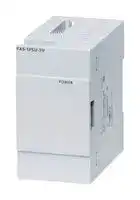
FX5-1PSU-5V
POWER SUPPLY, EXTENSION MODULE, 1.2A/5V
⚠️ Reference pricing provided. In case of supply shortages, we will connect you with our trusted procurement partners to ensure your project's continuity.
- Manufacturer: MITSUBISHI
- Product type: Controller Accessories
- SVHC: No SVHC (15-Jan-2018)
- Product Range: MELSEC iQ-F FX5
- Current Rating: 1.2A
| Delivery and price | |
|---|---|
| Units per pack | 1 |
| Price | 163.86 € |
| Current stock | 10+ |
| Lead time | 30 days |
Datasheet

**JY997D56801G Side B**
**==> picture [71 x 48] intentionally omitted <==**
**==> picture [50 x 25] intentionally omitted <==**
**----- Start of picture text -----**<br>
SideA JAPANESE<br>SideB ENGLISH<br>**----- End of picture text -----**<br>
## MELSEC iQ-F FX5-1PSU-5V
## Hardware Manual
|ardware|Manual|
|---|---|
|Manual Number|JY997D56801|
|Revision|G|
|Date|October 2019|
This manual describes the part names, dimensions, installation, and specifications of the product. Before use, read this manual and manuals of relevant products fully to acquire proficiency in handling and operating the product. Make sure to learn all the product information, safety information, and precautions.
And, store this manual in a safe place so that you can take it out and read it whenever necessary. Always forward it to the end user. Registration: The company names, system names and product names mentioned in this manual are either registered trademarks or trademarks of their respective companies. In some cases, trademark symbols such as '' or '[] ' are not specified in this manual.
Effective October 2019 Specifications are subject to change without notice.
- 2014 MITSUBISHI ELECTRIC CORPORATION
## **Safety Precautions** (Read these precautions before use.)
If the equipment is used in a manner not specified by the manufacturer, the protection provided by the equipment may be impaired. This manual classifies the safety precautions into two categories:
and
. Indicates that incorrect handling may cause hazardous conditions, resulting in death or severe injury. Indicates that incorrect handling may cause hazardous conditions, resulting in minor or moderate injury or property damage.
Depending on the circumstances, procedures indicated by may also cause severe injury. It is important to follow all precautions for personal safety.
## **Associated Manual**
|**Manual name**|**Manual No.**|**Description**|
|---|---|---|
|MELSEC iQ-F FX5UJ<br>User's Manual<br>(Hardware)|SH-082206ENG|Explains FX5UJ CPU module<br>specification details for I/O, wiring,<br>installation, and maintenance.|
|MELSEC iQ-F FX5U<br>User's Manual<br>(Hardware)|JY997D55301|Explains FX5U CPU module<br>specification details for I/O, wiring,<br>installation, and maintenance.|
## **How to obtain manuals**
For the necessary product manuals or documents, consult with your local Mitsubishi Electric representative.
## **Applicable standards**
FX5-1PSU-5V comply with the EC Directive (EMC Directive, LVD Directive) and UL standards (UL, cUL). Further information can be found in the following manual. **MELSEC iQ-F FX5UJ User's Manual (Hardware)** **MELSEC iQ-F FX5U User's Manual (Hardware)** Regarding the standards that relate to the CPU module, please refer to either the product catalog or consult with your local Mitsubishi Electric representative.
## **Compliance with EC directive (CE Marking)**
This product complies with EC directive, however, this document does not guarantee that a mechanical system including this product will comply with EC directive. Compliance to EMC directive and LVD directive for the entire mechanical module should be checked by the user / manufacturer. For more information please consult with your local Mitsubishi Electric representative.
## **Caution for compliance with EC Directive**
- Please use the FX5-1PSU-5V while installed in conductive shielded control panels under a general industrial environment.
- Programmable controllers are open-type devices that must be installed and used within conductive control panels. Please secure the control box lid to the control box (for conduction). Installation within a control box greatly affects the safety of the system and aids in shielding noise from the programmable controller.
- For the control panel, use the product having sufficient strength, fire protectiveness and shielding property to an installation environment.
## **Caution for compliance with the LVD directive (EN61010-2-201:2013)[*1]**
- To an external connection port other than AC power supply terminal and AC input/ output terminal, connect the circuit separated from a dangerous voltage by a double/reinforced insulation.
- Do not wire two or more crimp terminals to one terminal. (If the wiring with two or more wires is needed, take an appropriate action such as adding an external terminal.)
- For crimp terminals to be used for the wiring applied with 30 V AC or higher, use the products with insulating sleeves.
- Cutoff device such as a breaker or a circuit protector should be installed in accordance with the following precautions.
- Use EN60947-1 or EN60947-3 standards.
- Place the cutoff device so that it can be operated easily.
- Specify that the cutoff device is for this equipment.
- *1 For the time of compliance with the LVD directive (EN61010-2-201:2013), refer to the manual of the PLC to be connected.
## **1. Outline**
When the FX5UJ/FX5U CPU module (AC power supply type) internal power supplied from the FX5UJ/FX5U CPU module (AC power supply type) is insufficient for powering the output modules or intelligent function modules, the FX5-1PSU-5V (extension power supply module) is available. In the FX5UJ CPU module, only one units FX5-1PSU-5V can be used for one system. In the FX5U CPU module, up to two units, the FX5-1PSU5V or FX3U-1PSU-5V, can be used for one system. Connect extension module to the FX5-1PSU-5V according to the configuration specification limits described in the following manual.
For details on installation and wiring, and system configuration with the FX5UJ/FX5U CPU module including the FX5-1PSU-5V, refer to the following manual.
- **MELSEC iQ-F FX5UJ User's Manual (Hardware)** **MELSEC iQ-F FX5U User's Manual (Hardware)**
**1.1 Incorporated Items**
Check that the following product and items are included in the package:
**Product** FX5-1PSU-5V extension power supply module Extension cable
Dust proof protection sheet
## **Included Items**
Hardware manual [Japanese /English] (This manual) Hardware manual [Chinese]
## **1.2 External Dimensions, Part Names and Terminal Layout**
**==> picture [180 x 118] intentionally omitted <==**
**----- Start of picture text -----**<br>
2-4.5 Mounting hole Unit: mm<br>[4]<br>[3]<br>[2]<br>[5]<br>[1]<br>16 8 [6]<br>50 83<br>90<br>80 (Mounting hole pitch)<br>**----- End of picture text -----**<br>
**==> picture [180 x 105] intentionally omitted <==**
**----- Start of picture text -----**<br>
Top cover is removed<br>Terminal<br>[8] layout<br>[7] [9]<br>MASS (Weight): Approx. 0.3 kg<br>Outer painting color: Munsell 0.6B7.6/0.2<br>**----- End of picture text -----**<br>
[1] Direct mounting hole: 2 holes of 4.5 (mounting screw: M4 screw) [2] Top cover
[3] POWER LED (green) [4] Name plate [5] DIN rail mounting groove (DIN rail: DIN 46277, 35 mm wide) [6] DIN rail mounting hook [7] Extension connector (for preceding module) [8] Power supply terminal block
shows a function grounding terminal. [9] Extension connector (for next module)
## **2. Installation**
## **INSTALLATION PRECAUTIONS**
Make sure to cut off all phases of the power supply externally before attempting installation or wiring work. Failure to do so may cause electric shock or damage to the product. Use the product within the generic environment specifications described in the User's Manual (Hardware) of the CPU module used. Never use the product in areas with excessive dust, oily smoke, conductive dusts, corrosive gas (salt air, Cl2, H2S, SO2 or NO2), flammable gas, vibration or impacts, or expose it to high temperature, condensation, or rain and wind. If the product is used in such conditions, electric shock, fire, malfunctions, deterioration or damage may occur.
## **INSTALLATION PRECAUTIONS**
Do not touch the conductive parts of the product directly. Doing so may cause device failures or malfunctions. When drilling screw holes or wiring, make sure that cutting and wiring debris do not enter the ventilation slits of the PLC. Failure to do so may cause fire, equipment failures or malfunctions. For the product supplied together with a dust proof sheet, the sheet should be affixed to the ventilation slits before the installation and wiring work to prevent foreign objects such as cutting and wiring debris. However, when the installation work is completed, make sure to remove the sheet to provide adequate ventilation. Failure to do so may cause fire, equipment failures or malfunctions. Install the product on a flat surface. If the mounting surface is rough, undue force will be applied to the PC board, thereby causing nonconformities. Install the product securely using a DIN rail or mounting screws. Work carefully when using a screwdriver such as installation of the product. Failure to do so may cause damage to the product or accidents. Connect the extension cables, peripheral device cables, input/output cables and battery connecting cable securely to their designated connectors. Loose connections may cause malfunctions.
## **Notes**
- When a dust proof sheet is supplied with module, keep the sheet applied to the ventilation slits during installation and wiring work.
- To prevent temperature rise, do not install the PLC on a floor, a ceiling or a vertical surface. Install it horizontally on a wall.
- Keep a space of 50 mm or more between the module main body and another device or structure. Install the module as far away as possible from high-voltage lines, highvoltage devices and power equipment. Failure to do so may cause fire, equipment failures or malfunctions.
## **2.1 Arrangements**
The product connects on the right side of CPU module or extension module. For further information of installation arrangements, refer to the following manual.
- **MELSEC iQ-F FX5UJ User's Manual (Hardware)**
- **MELSEC iQ-F FX5U User's Manual (Hardware)**
## **2.2 Mounting**
The product is mounted by the following method.
- Direct mounting (with M4 screws)
- DIN rail mounting
## **2.2.1 Direct Mounting (with M4 screws)**
The product can be mounted with M4 screws by using the direct mounting holes. Refer to the External Dimensions (Section 1.2) for the product’s mounting hole pitch information.
Keep a gap of approximately 2 mm between the products.
For further information on direct installation, also refer to the following manual.
- **MELSEC iQ-F FX5UJ User's Manual (Hardware)**
- **MELSEC iQ-F FX5U User's Manual (Hardware)**
## **2.2.2 DIN Rail Mounting**
The product can be mounted on a DIN rail.
- 1) Connect the extension cable (below fig. A) to the CPU module, and extension module on the left. When connecting to the CPU module, FX5-32E, put the pullout tub of the extension cable inside the extension connector cover.
When connecting to an extension module other than FX5-32E, pull the pullout tub (below fig. B) of the extension cable out to the right side of the top cover.
For details on the extension cable connection, refer to the following manual.
## **MELSEC iQ-F FX5UJ User's Manual (Hardware)**
- **MELSEC iQ-F FX5U User's Manual (Hardware)**
**==> picture [72 x 76] intentionally omitted <==**
**----- Start of picture text -----**<br>
B<br>A<br>FX5-16E<br>**----- End of picture text -----**<br>
- 2) Connect the extension cable (below fig. A) connected in the procedure 1) to the extension connector of FX5-1PSU-5V. Put the pullout tub (below fig. B) of the extension cable inside the top cover.
**==> picture [118 x 96] intentionally omitted <==**
**----- Start of picture text -----**<br>
B<br>A<br>FX5-1PSU-5V<br>**----- End of picture text -----**<br>
- 3) Push out DIN rail mounting hook.
- 4) Fit the upper edge of the DIN rail mounting groove (below fig. C) onto the DIN rail.
- 5) Press the product against the DIN rail.
**==> picture [68 x 70] intentionally omitted <==**
**----- Start of picture text -----**<br>
4)<br>C<br>5)<br>**----- End of picture text -----**<br>
- 6) Lock the DIN rail mounting hook while pressing the product against the DIN rail. Keep a gap of approximately 2 mm between the products.
**4.3 Power Supply Specifications**
|**Cautions on mounting and removing extension cables**<br>Make sure that the pullout tab of extension cables do not contact with the<br>conductive parts of the module.<br>When removing the extension cable, pull the pullout tab of the extension cable<br>straight up.<br>**3. Wiring**<br>**WIRING PRECAUTIONS**<br>Make sure to cut off all phases of the power supply externally before<br>attempting installation or wiring work.<br>Failure to do so may cause electric shock or damage to the product.<br>Make sure to attach the terminal cover, provided as an accessory, before<br>turning on the power or initiating operation after installation or wiring work.<br>Failure to do so may cause electric shock.<br>Make sure to wire the screw terminal block in accordance with the following<br>precautions.<br>Failure to do so may cause electric shock, equipment failures, a short-circuit,<br>wire breakage, malfunctions, or damage to the product.<br>- The disposal size of the cable end should follow the dimensions described<br>in the manual.<br>- Tightening torque should follow the specifications in the manual.<br>- Tighten the screws using a Phillips-head screwdriver No.2 (shaft diameter<br>6 mm or less). Make sure that the screwdriver does not touch the partition<br>part of the terminal block.|When two wires are<br><Reference><br>6.2 mm<br>or less<br>6.2 mm<br>or less|connected to one t<br>|connected to one t<br>|erminal*1|erminal*1|erminal*1|erminal*1|minal<br>Terminal<br>screw<br>Crimp<br>terminal|minal<br>Terminal<br>screw<br>Crimp<br>terminal|
|---|---|---|---|---|---|---|---|---|---|
|||Ter<br>6.3 mm<br>or more<br>3.2<br>3.2<br>6.3 mm||||||||
||||||Ter|||||
|Make sure to cut off all phases of the power supply externally before<br>attempting installation or wiring work.<br>Failure to do so may cause electric shock or damage to the product.<br>Make sure to attach the terminal cover, provided as an accessory, before<br>turning on the power or initiating operation after installation or wiring work.<br>Failure to do so may cause electric shock.<br>Make sure to wire the screw terminal block in accordance with the following<br>precautions.<br>Failure to do so may cause electric shock, equipment failures, a short-circuit,<br>||6.3 mm||||||minal||
|||or more||||||||
|||||||||||
||**Terminal**<br>**manufacturer**|**Type No.**|**Applicable**<br>**cable**||||**C**|**ertification**|**Pressure**<br>**bonding tool**|
||J.S.T. Mfg. Co., Ltd.|FV1.25-B3A|AWG22 to 16||||U|L Listed|YA-1 (J.S.T. Mfg.<br>Co., Ltd.)|
|wire breakage, malfunctions, or damage to the product.<br>- The disposal size of the cable end should follow the dimensions described<br>in the manual.<br>||||||||||
||*1 To adapt the LVD<br>wiring with two wi<br>as adding an exte<br>|directive (EN61010-2-201:2013<br>res to the built-in terminal, and t<br>rnal terminal.<br>||||||) of the EC directive, avoid the<br>ake an appropriate action such<br>||
|- Tightening torque should follow the specifications in the manual.<br>- Tighten the screws using a Phillips-head screwdriver No.2 (shaft diameter<br>6 mm or less). Make sure that the screwdriver does not touch the partition<br>part of the terminal block.||||||||||
||For the time of c<br>to the manual of t<br><br>|ompliance with the LVD directive<br>he PLC to be connected.<br>||||||(EN61010-2-201:2013), refer||
|**WIRING PRECAUTIONS**||||||||||
|Perform class D grounding (grounding resistance: 100or less) of the<br>grounding terminal on the CPU module and extension modules with a wire 2<br>mm2or thicker.<br>Do not use common grounding with heavy electrical systems (refer to<br>Section 3.3).||||||||||
|Connect the power supply wiring to the dedicated terminals described in this<br>manual.<br>If an AC power supply is connected to a DC input/output terminal or DC<br>||||||||||
|power supply terminal, the PLC will burn out.<br>Make sure to observe the following precautions in order to prevent any<br>damage to the machinery or accidents due to malfunction of the PLC caused<br>||||||||||
## **3.2 Power Supply Wiring**
For the power supply wiring, refer to the following manual.
## **WIRING PRECAUTIONS**
- **MELSEC iQ-F FX5UJ User's Manual (Hardware)** **MELSEC iQ-F FX5U User's Manual (Hardware)**
- Perform class D grounding (grounding resistance: 100 or less) of the **MELSEC iQ-F FX5U User's Manual (Hardware)** grounding terminal on the CPU module and extension modules with a wire 2 **Caution** mm[2] or thicker. The FX5-1PSU-5V power supply should be turn ON simultaneously or before the Do not use common grounding with heavy electrical systems (refer to CPU module. Before turning the power OFF, ensure the safety of the system and Section 3.3). then simultaneously turn the CPU module, FX5-1PSU-5V, and other extension
- Connect the power supply wiring to the dedicated terminals described in this equipment (the special extension equipment is included) OFF. manual. For details, refer to the following manual.
- If an AC power supply is connected to a DC input/output terminal or DCpower supply terminal, the PLC will burn out.Make sure to observe the following precautions in order to prevent any Grounding and power cables should be positioned to exit the module from above as **MELSEC iQ-F FX5UJ User's Manual (Hardware)MELSEC iQ-F FX5U User's Manual (Hardware)** damage to the machinery or accidents due to malfunction of the PLC caused shown in the following figure. by abnormal data written to the PLC due to the effects of noise: - Do not bundle the power line, control line and communication cables Grounding cable and power cable together with or lay them close to the main circuit, high-voltage line, load line or power line. As a guideline, lay the power line, control line and communication cables at least 100 mm away from the main circuit, highvoltage line, load line or power line.
- - Ground the shield of the shielded wire or shielded cable at one point on the PLC. However, do not use common grounding with heavy electrical systems.
- shown in the following figure.
## **3.1 Applicable Cable and Terminal Tightening Torque**
The size of the terminal screws is M3.
The end disposal of the cable shows below.
Tighten the terminal to a torque of 0.5 to 0.8 Nm. Do not tighten terminal screws with a torque outside the above-mentioned range. Failure to do so may cause equipment failures or malfunctions.
- When one wire is connected to one terminal
- When connecting an input module to the FX5-1PSU-5V, supply the power of input circuit from the 24 V DC service power supply of the preceding CPU module or external power supply.
**==> picture [188 x 106] intentionally omitted <==**
**----- Start of picture text -----**<br>
3.2 Terminalscrew Crimpterminal<br>6.2 mm<br>or less<br>3.2<br>6.2 mm Terminal<br>or less<br><Reference><br>manufacturerTerminal Type No. Applicable cable Certification bonding toolPressure<br>J.S.T. Mfg. FV1.25-B3A AWG22 to 16 UL Listed YA-1 (J.S.T. Mfg.<br>Co., Ltd. FV2-MS3 AWG16 to 14 Co., Ltd.)<br>**----- End of picture text -----**<br>
**Power supply wiring**
**==> picture [180 x 54] intentionally omitted <==**
**----- Start of picture text -----**<br>
FX5-1PSU-5V<br>L N<br>100 to 240 V AC Class D grounding(Grounding resistance: 100 or less)<br>3.3 Grounding<br>**----- End of picture text -----**<br>
Ground the PLC as stated below.
- Perform class D grounding. (Grounding resistance: 100 or less)
- Ground the PLC independently if possible.
- If it cannot be grounded independently, ground it jointly as shown below. For details, refer to the following manual.
- **MELSEC iQ-F FX5UJ User's Manual (Hardware)** **MELSEC iQ-F FX5U User's Manual (Hardware)**
|PLC<br>Ot<br>equi|PLC<br>her<br>pment|Other<br>equipment||P|LC|Other<br>equipment|Other<br>equipment|
|---|---|---|---|---|---|---|---|
||Shared<br>(Good<br>ounding<br>ion)|grounding<br>condition)||||||
|||||||||
|Independent gr<br>(Best condit||||Co|mmon<br>(Not|grounding<br>allowed)||
- Use ground wires thicker than AWG14 (2 mm[2] ).
- Position the grounding point as close to the PLC as possible to decrease the length of the ground wire.
## **4. Specification**
**DESIGN PRECAUTIONS** Make sure to set up the following safety circuits outside the PLC to ensure safe system operation even during external power supply problems or PLC failure. Otherwise, malfunctions may cause serious accidents.
- Most importantly, set up the following: an emergency stop circuit, a protection circuit, an interlock circuit for opposite movements (such as normal vs. reverse rotation), and an interlock circuit (to prevent damage to the equipment at the upper and lower positioning limits).
- Note that when the CPU module detects an error, such as a watchdog timer error, during self-diagnosis, all outputs are turned off. Also, when an error that cannot be detected by the CPU module occurs in an input/output control block, output control may be disabled. External circuits and mechanisms should be designed to ensure safe machinery operation in such a case.
- Note that when an error occurs in a relay, transistor or triac of an output circuit, the output might stay on or off. For output signals that may lead to serious accidents, external circuits and mechanisms should be designed to ensure safe machinery operation in such a case.
## **DESIGN PRECAUTIONS**
Simultaneously turn on and off the power supplies of the CPU module and extension modules.
**STARTUP AND MAINTENANCE PRECAUTIONS**
Do not disassemble or modify the PLC. Doing so may cause fire, equipment failures, or malfunctions. For repair, contact your local Mitsubishi Electric representative. Do not drop the product or exert strong impact to it. Doing so may cause damage. Do not use the chemicals for cleaning. If there is the possibility of touching the PLC inside a control panel in maintenance, make sure to discharge to avoid the influence of static electricity.
**DISPOSAL PRECAUTIONS**
Please contact a certified electronic waste disposal company for the environmentally safe recycling and disposal of your device.
**TRANSPORTATION PRECAUTIONS**
The product is a precision instrument. During transportation, avoid impacts larger than those specified in the general specifications by using dedicated packaging boxes and shock-absorbing palettes. Failure to do so may cause failures in the product. After transportation, verify operation of the product and check for damage of the mounting part, etc.
## **4.1 Applicable CPU module**
|**Model name**|**Applicability**|
|---|---|
|FX5UJ CPU module<br>(AC power supply type)<br>FX5U CPU module<br>(AC power supply type)|From first production<br>From first production|
## **4.2 General Specifications**
The items other than the following are equivalent to those of the CPU module. For the general specification, refer to the following manual.
- **MELSEC iQ-F FX5UJ User's Manual (Hardware)** **MELSEC iQ-F FX5U User's Manual (Hardware)**
|**Items**|**Specifications**|**Specifications**|
|---|---|---|
|Dielectric withstand<br>voltage|1.5 kV AC for 1 minute|Between power supply<br>terminal (AC power) and<br>ground terminal|
|Insulation<br>resistance|10 Mor higher by 500 V DC<br>insulation resistance tester||
|**Items**<br>Rtd Sl lt||**Specifications**<br>100 t 240 V AC|
|---|---|---|
|ae uppy voa<br>Voltage fluctuation<br>Rated frequency<br>|ge<br>range<br>|o<br>-15%, +10%<br>50/60 Hz<br>|
|Allowable instantan<br>power failure time<br>Power fuse|eous|Operation can be continued upon occurrence of<br>instantaneous power failure for 10 ms or less.<br>250 V 3.15 A Time-lag Fuse|
|In-rush current||25 A Max. 5 ms or less/ 100 V AC<br>50 A Max. 5 ms or less/ 200 V AC|
|Power consumptio|n|20 W Max.|
|Output current*1|24 V DC|300mA*2|
||5 V DC|1200mA*2|
- *1 Supply for extension modules connected after this module.
- *2 Maximum output current depends on the ambient temperature. For details, refer to the following manual.
- **MELSEC iQ-F FX5UJ User's Manual (Hardware)**
- **MELSEC iQ-F FX5U User's Manual (Hardware)**
## **Note for system configuration**
For further details on system configuration, refer to the following manual.
- **MELSEC iQ-F FX5UJ User's Manual (Hardware)** **MELSEC iQ-F FX5U User's Manual (Hardware)**
- In the FX5UJ CPU module, only one units FX5-1PSU-5V can be used for one system.
- In the FX5U CPU module, up to two units, the FX5-1PSU-5V or FX3U-1PSU5V, can be used for one system.
- The total of the consumed current of the extension module connected to FX51PSU-5V should be the output current capacity or less. However, when connecting an input module to the FX5-1PSU-5V, supply the power of input circuit from the 24 V DC service power supply of the preceding CPU module or external power supply.
- Do not use FX5-1PSU-5V together with a CPU module (DC power supply type).
This manual confers no industrial property rights or any rights of any other kind, nor does it confer any patent licenses. Mitsubishi Electric Corporation cannot be held responsible for any problems involving industrial property rights which may occur as a result of using the contents noted in this manual.
## **Warranty**
Exclusion of loss in opportunity and secondary loss from warranty liability Regardless of the gratis warranty term, Mitsubishi shall not be liable for compensation to: (1) Damages caused by any cause found not to be the responsibility of Mitsubishi.
- (2) Loss in opportunity, lost profits incurred to the user by Failures of Mitsubishi products.
- (3) Special damages and secondary damages whether foreseeable or not, compensation for accidents, and compensation for damages to products other than Mitsubishi products.
- (4) Replacement by the user, maintenance of on-site equipment, start-up test run and other tasks.
## **For safe use**
This product has been manufactured as a general-purpose part for general industries, and has not been designed or manufactured to be incorporated in a device or system used in purposes related to human life. Before using the product for special purposes such as nuclear power, electric power, aerospace, medicine or passenger movement vehicles, consult with Mitsubishi Electric. This product has been manufactured under strict quality control. However when installing the product where major accidents or losses could occur if the product fails, install appropriate backup or failsafe functions in the system.
HEAD OFFICE : TOKYO BUILDING, 2-7-3 MARUNOUCHI, CHIYODA-KU, TOKYO 100-8310, JAPAN
Updated at April 10, 2026
About Novapart
Novapart is a B2B electronic component broker specialising in stock shortages and cost reduction. We source hard-to-find parts and identify compliant alternatives across a catalogue of 540,000+ components from 500+ manufacturers.
Learn more →Stock Shortage Specialist
When a component is unavailable, discontinued or has an unacceptable lead time, we tap into our network of vetted European and Asian distributors to source what you need — without compromising on quality or traceability.
Request a quote →Compliant Alternatives
We identify pin-to-pin, electrically equivalent substitutes that meet the same certifications (RoHS, AEC-Q100, REACH) as your original specification — validated against datasheets, not just part numbers. Often at a lower cost.
BOM Analysis service →