
Image not available
Illustrative purposes only

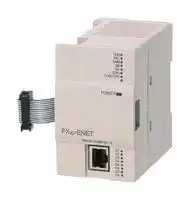
FX3U-ENET
ETHERNET COMM MODULE, TCP/IP, UDP, RJ45
⚠️ Reference pricing provided. In case of supply shortages, we will connect you with our trusted procurement partners to ensure your project's continuity.
- Manufacturer: MITSUBISHI
- Product type: Controller Accessories
- SVHC: No SVHC (15-Jan-2018)
- Product Range: MELSEC FX3U
- Current Rating: 240mA
| Delivery and price | |
|---|---|
| Units per pack | 1 |
| Price | 470.03 € |
| Current stock | 10+ |
| Lead time | 30 days |
Datasheet

**JY997D15901B**

**==> picture [182 x 35] intentionally omitted <==**

## FX3U-ENET

INSTALLATION MANUAL Manual Number JY997D15901 Revision B Date November 2007

This manual describes the part names, dimensions, mounting, and specifications of the product. Before use, read this manual and the manuals of all relevant products fully to acquire proficiency in handling and operating the product. Make sure to learn all the product information, safety information, and precautions. Store this manual in a safe place so that it can be taken out and read whenever necessary. Always forward it to the end user. Registration: The company and product name described in this manual are registered trademarks or the trademarks of their respective companies.

Effective Nov. 2007 Specifications are subject to change without notice. © 2005 Mitsubishi Electric Corporation

## **Safety Precaution** (Read these precautions before use.)

This manual classifies the safety precautions into two categories:

and .

Indicates that incorrect handling may cause hazardous conditions, resulting in death or severe injury. Indicates that incorrect handling may cause hazardous conditions, resulting in medium or slight personal injury or physical damage.

Depending on circumstances, procedures indicated by may also cause severe injury. It is important to follow all precautions for personal safety.

## **Associated Manuals**

|**Manual name**|**Manual No.**|**Description**|
|---|---|---|
|3U-ENET<br>STALLATION<br>NUAL|JY997D15901|This manual<br>|
|3U-ENET<br>er’s Manual|JY997D18101|Describes the specifications,<br>wiring, installation, maintenance,<br>and operations of the FX3U-<br>ENET.|
|3USeries<br>RDWARE MANUAL|JY997D18801|Briefly describes the I/O<br>specifications, wiring, and<br>installation of the FX3USeries<br>PLC.|
|3USeries<br>er’s Manual<br>ardware Edition|JY997D16501<br>MODEL CODE:<br>09R516|Describes the I/O specifications,<br>wiring, installation, and<br>maintenance of the FX3USeries<br>PLC in detail.|
|3U/FX3UCSeries<br>ogramming Manual<br>asic & Applied<br>truction Edition|JY997D16601<br>MODEL CODE:<br>09R517|Describes PLC programming for<br>basic/applied instructions and<br>devices.|
|3UC(D, DSS)<br>ries<br>RDWARE MANUAL|JY997D28601|Briefly describesthe I/O<br>specifications, wiring, and<br>installation of the FX3UCSeries<br>PLC|
|3UCSeries<br>er’s Manual<br>ardware Edition|JY997D28701<br>MODEL CODE:<br>09R519|.<br>Describes the I/O specifications,<br>wiring, installation, and<br>maintenance of the FX3UCSeries<br>PLC in detail.|
|<br>Configurator-EN<br>eration Manual|<br>JY997D20501|<br>Describes the operation method<br>of FX Configurator-EN.|


Only this INSTALLATION MANUAL is supplied with the FX3U-ENET. For more details regarding the FX3U/FX3UC Series hardware, PLC programming commands, and special function blocks/units, refer to the appropriate manuals.

## **1.2 External Dimensions and Part Names**

## **How to obtain manuals**

For the necessary product manuals or documents, consult with the Mitsubishi Electric dealer from who you purchased this product.

**==> picture [407 x 150] intentionally omitted <==**

**----- Start of picture text -----**<br>
dealer from who you purchased this product. 2-φ4.5<br>How to obtain FX Configurator-EN The parameter setting software, FX Configurator-EN is not supplied with this product.Consult with the Mitsubishi Electric dealer from who you purchased this product 9(0.36")87(3.43") mounting holes(M4 screw) 55(2.17") [16]<br>DESIGN [1] [4] COM. ERR.100MERR.RUNINIT.RDSD [5][6][7]<br>PRECAUTION POWER [8]<br>•• Configure an interlock circuit in the sequence program so that the systemoperates safely and uses the communication information in case of acommunication error.Do not bundle the communication cable or the 24V power supply together with themain circuit or power line. Lay them at least 100mm (3.94") apart from each other.  [2] FX3U-ENET10BASE-T/100BASE-TX C1C2C3C4C5C6C7C8 [9][10][11][12][13][14] 10BASE-T/100BASE-TX [17]<br>• Failure to do so may result in noise and malfunctions.Ensure that the unit and cable are not subjected to excessive force. Failure to do [3] [15] Top cover isremoved<br>so may result in wire damage/breakage or PLC failure.<br>Applicable Standard<br>Certification of UL, cUL standards<br>The following product has UL and cUL certification.<br>UL, cUL File Number:E95239<br>Models: MELSEC FX3U series manufactured3U series manufactured series manufactured Unit:mm(inches)<br>24+ 24-<br>FX3U-ENET<br>3.15")(80 3.55")(90<br>**----- End of picture text -----**<br>


**UL, cUL File Number:E95239 Models: MELSEC FX3U series manufactured3U series manufactured series manufactured** FX3U-ENET

MASS(Weigth):0.3kg(0.66lbs)

## **Compliance with EC directive (CE Marking)**

- [1] Direct mounting hole:2 holes of φ4.5 Used when ENET is directly mounted. Not used when DIN rail is mounted.

This notification and its contents do not guarantee that an entire mechanical module will comply with the following standards.

Compliance to EMC and LVD directives for the entire mechanical module should be checked by the user / manufacturer. For more details please contact your local Mitsubishi Electric sales site.

- [2] DIN rail mounting groove [3] DIN rail mounting hook [4] Extension cable [5] RUN LED [6] INIT. LED [7] 100M LED [8] SD LED [9] RD LED [10] ERR. LED [11] COM.ERR. LED [12] Not available [13] POWER LED [14] C1 to C8 LEDs [15] RJ45 modular jack [16] Terminal block for power supply (24V DC) (M3 terminal block screw) [17] Extension connector

## **Requirement for Compliance with EMC directive**

Through direct testing (of the identified standards below) and design analysis (through the creation of a technical construction file), the following products have shown compliance to the European Directive for Electromagnetic compatibility (89/336/EEC) when used as directed by the appropriate documentation.

**Type: Programmable Controller (Open Type Equipment) Models: MELSEC FX3U series manufactured**

## **Indications of LEDs**

from August 1st, 2005 FX3U-ENET

|,<br><br>**Standard**<br>**Remark**<br>EN61131-2:2003<br>Programmable controllers<br>Compliance with all relevant aspects of the<br>standard.|RUN<br>INIT.<br>100M<br>SD<br>RD|**LED**<br>RUN<br>INIT.<br>100M|**Indication (**�**: Off,**●**: On)**<br>●: Normal operation<br>�: Operation error<br>●: Normal completion of initial processing<br>�: Initial processing not yet completed<br>●: 100Mbps|
|---|---|---|---|
|**Notes for compliance to EMC regulation.**<br>The (FX3U-ENET) must be installed in a shielded metal control panel.<br> <br>- Equipment requirements and<br>tests<br>• Radiated Emissions<br>• Mains Terminal Voltage Emissions<br>• RF immunity<br>• Fast Transients<br>• ESD<br>• Conducted<br>• Surge<br>• Power magnetic fields|ERR.<br>COM.ERR.<br>POWER<br>C1<br>C2<br>C3<br>C4<br>C5<br>C6<br>C7<br>C8|SD<br>RD<br>ERR<br>COM ERR <br>POWER<br>C1 to C8|�: 10Mbps not connected<br>●: Sending data<br>�: Not sending data<br>●: Receiving data<br>�: Not receiving data<br>●: Setting error*<br>�: No setting error<br> ●: Communication error<br>�: Normal communication<br>●: Power on<br>�: Power off<br>●: Channel is open|


The (FX3U-ENET) must be installed in a shielded metal control panel. For more details please contact your local Mitsubishi Electric sales site.

- : Channel is closed

## **1. Outline**

*The ERR LED illuminates in the following cases:

FX3U-ENET is an Ethernet unit for the FX3U/FX3UC Series (Ver.2.21 or later) PLC that is compliant with 100BASE-TX/10BASE-T and has the features as follows.

   - When an operational error occurs in the PLC CPU

   - When an error is found in the Ethernet unit (H/W error)

- 1) Data and programs within the PLC can be sent and received via Ethernet by using GX Developer Ver.8.25B or later.

## **Pin Configuration**

- 2) Communication between PLCs or with a general Ethernet device is possible by fixed buffer communication. (TCP/IP or UDP/IP)

The pin configuration of ENET RJ45 type modular jack (for category 5 or category 3) is as follows:

- 3) Users can develop custom software to communicate with the PLC by using MC (MELSEC Communication) protocol (A-compatible 1E frame subset, for details, refer to user's manual). (TCP/IP or UDP/IP)

||1<br>2<br>3<br>4<br>5<br>6<br>7<br>8|TD+<br>|Out|+ side of sending data|
|---|---|---|---|---|
|||TD−<br>|Out|−side of sending data|
|||RD+|In|+ side of receiving data|
|8<br>1||Not used|-||
|||Not used|-||
|||RD−|In|−side of receiving data|
|||Not used|-||
|||Not used|-||


- 4) E-mail can be sent and received. (SMTP or POP3 protocol)

- 5) The FX3U-ENET parameters can be set easily using FX Configurator-EN.

- 6) The diagnostic functions of FX Configurator-EN enables easy diagnostics and troubleshooting of the FX3U-ENET.

## **1.1 Incorporated Items**

|**Product**|Ethernet unit for the FX3U/FX3UCSeries PLC|
|---|---|
|**Included items**|Installation Manual (this manual)<br>Dust sheet<br>Label for indication of special function unit/block number|


## **Cables to be used**

||||Category|5e, shielded twisted-pair cable|
|---|---|---|---|---|
||For<br>For|10BASE-T<br>100BASE-TX|Category<br>Category<br>Category<br>Category|5, shielded twisted-pair cable<br>3, shielded twisted-pair cable<br>5e, shielded twisted-pair cable<br>5, shielded twisted-pair cable|


## **2. Installation**

**INSTALLATION PRECAUTIONS** • Make sure to cut off all phases of the power supply externally before attempting installation or wiring work. Failure to do so may cause electric shock. • Before attaching or replacing the main unit or extension unit, externally cut off all phases of the power supply. If not, it may cause malfunctions or misoperations.

## **INSTALLATION PRECAUTIONS**

- Use this product in the environment within the general specifications described in this manual.

Never use the product in areas with excessive dust, oily smoke, conductive dusts, corrosive gas (salt air, Cl2, H2S, SO2, or NO2), flammable gas, vibration or impacts, or expose it to high temperature, condensation, or rain and wind. Doing so may cause electrical shock, fire, malfunctions, or damage or critical deterioration to the product.

- When tightening the terminal screws, stay within the specified torque range. When tightened insufficiently, short-circuit or failure may occur. When tightened too much, the screws or the unit may be damaged, causing the unit disposal, short-circuit, or failure.

- Do not touch the conductive part or electric parts of this unit directly. Doing so may cause failure or malfunctions.

- Install the unit on a flat surface.

- If the mounting surface is rough, undue force will be applied to the PC board, thereby causing nonconformities.

## **2.1 Mounting**

The FX3U-ENET can be mounted directly using screws or on a DIN rail (DIN46227).

**2.1.1 Direct Mounting** The FX3U-ENET can be mounted with M4 screws by using the direct mounting holes.

- A space of 1 to 2 mm (0.04” to 0.08”) between each unit is necessary.

   - → **For the mounting hole pitch information, refer to Section 1.2**

**2.1.2**

## **DIN Rail Mounting**

- The FX3U-ENET can be mounted on a DIN rail (DIN46227, 35mm width).

- 1) Fit the upper edge of the DIN rail mounting 1) groove (fig. A) onto the DIN rail.

- 2) Push the unit onto the DIN rail. A 2)

- **2.1.3 Procedure for connecting with the FX3U Series PLC When connecting to an FX3U:** Before connections, turn off the power to the PLC. 1) 1) Remove the extension device connector cover of the main unit. 3)

- 2) Fold and insert the extension cable in the corresponding connector as shown to the right.

- 3) Reattach the extension device connector cover 2) on the main unit.

**==> picture [607 x 420] intentionally omitted <==**

**----- Start of picture text -----**<br>
When connecting to an FX3UC: Connector cover DISPOSAL  4. System configuration<br>When connecting the FX3U-ENET, either  (A) PRECAUTIONS System configuration example<br>the FX3UC-1PS-5V or FX2NC-CNV-IF is  FX3UC-1PS-5V<br>required. • Please contact a certified electronic waste disposal company for the PC<br>environmentally safe recycling and disposal of your device.<br>1) The connector cover (A) of the shown in the figure to the right.FX3UC-1PS-5V is removed as  TRANSPORT AND   - GX Developer - FX Configurator-EN<br>The FX2NC-CNV-IF does not have a  STORAGE PRECAUTIONS<br>connector cover. • The product is a precision instrument. During transportation, avoid any impacts. HUB<br>Extension cable on  Failure to do so may cause failures in the product.<br>2) Connect the extension cable as shown to the right. the right side • After transportation, verify the operations of the product.<br>FX3U/ FX3U- FX3U/ FX3U- FX3U/ FX3U-<br>For the general specifications, refer to the manual of FX Series PLC.  FX3UC ENET  FX3UC ENET  FX3UC ENET<br>FXFX3UC2NC-1PS-5V or -CNV-IF Item Specifications<br>0 to 55°C (32 to 131°F) when operating and -20 PLC Ethernet unit LAN cable<br>2.2 Wire end treatment Ambient temperature to 75°C (-4 to 167°F) when stored FX3U Series PLC<br>The solderless terminal size depends on the terminal screw size and wiringmethod.- Use solderless terminals of the following size. General specifi-cation Dielectric withstandvoltage 500 V AC for one minute Conforming to JEM-1021Between all  + FXFX3UC2NC Series PLC-CNV-IF FX3U-ENET Shielded twisted-pair cable10BASE-T100BASE-T : Category 5e or 5: Category 5e, 5 or 3<br>When using M3 terminal screw - Tighten the terminals to a torque of 0.5 N•m to 0.8 N•m. Insulation resistance 5MΩ or more by 500V DC terminals and the ground terminal FX+ FX3UC3UC Series PLC-1PS-5V<br>For the main unit, input/output powered extension unit/block and special functionunit/block• When one wire is connected to one terminalφ 3.2(0.13") Terminalscrew Crimpterminal Trans-mission  Baud rateCommunicationmethodTransmission method Base band100MbpsFull-duplex/Half-duplex 10Mbps FX Configurator-EN Ver.1.00 or later GX Developer applicable version Ver.8.25B or later<br>6.2mm(0.24")or less φ 3.2(0.13") specifi-cations Maximum length ofsegment 100m(328’2”) [*1] Ver.2.21 or later FX3U/FX3UC PLC applicable version<br>6.2mm(0.24")or less Terminal Maximum number of Cascade connection 2 Cascade connection 4<br>nodes/connections stages max. stages max. 5. Wiring<br>• When two wires are connected to one terminal<br>Number of available  WIRING<br>6.2mm(0.24")or less φ 3.2(0.13") Terminalscrew Crimpterminal Sending/receiv- files opened simultaneously 8 connections (Available connections for sequence program) PRECAUTIONS • Make sure to cut off all phases of the power supply externally before attempting<br>6.3mm(0.25") ing data  Fixed buffer 1023 word × 8 wiring work.<br>or more capacity  Failure to do so may cause electric shock or damage to the product.<br>6.2mm(0.24")or less φ 3.2(0.13") Terminal specifi-cations E-mail Attached fileBody text 2048 word 256 word × 1× 1 [*2][*2] WIRING PRECAUTIONS<br>6.3mm(0.25")or more Number of I/O occupied points 8 points • Before wiring the unit, confirm that the rated voltage and terminal allocation of<br>Power  24V DC  the unit are correct. An incorrect voltage supply and/or incorrect wiring may<br>supply  Power supply +20%, -15%, ripple (p-p) less than 5% cause fire, malfunction, or failure.<br>3. Specification   specifi-cations Current consumption 240mA • grounding terminal on the main unit. Perform class D grounding (grounding resistance: 100Ω or less) to the<br>STARTUP AND MAINTENANCE PRECAUTIONS External dimensions 90(H) 3.55"(H) × 55(W) × 2.17"(W) × 87(D) [mm]× 3.43"(D) [inches] • Do not use common grounding with heavy electrical systems.Prevent cutting or wiring debris from entering the main unit. Failure to do socause fire, malfunctions, or failures.<br>• Do not touch any terminals or connector while the PLC's power is on. MASS (Weight) 0.3kg(0.66lbs) • Place a label that warns of electrical shock (417-IEC-5036) on the enclosure of<br>Doing so may cause electrical shock or malfunctions. Number of connectable units to the final equipment.<br>• Before cleaning or retightening screws, externally cut off all phases of the the main unit 1<br>power supply.Failure to do so may cause malfunction or failure of this unit. *1 Length between a hub and a node PLC eqOtheruipment PLC eqOtheruipment PLC eqOtheruipment<br>When the screws are tightened insufficiently, they may fall out and cause a *2 Refer to the FX3U-ENET User's Manual of e-mail sending/receiving function<br>• short-circuit or malfunction. When tightened too much, the screws or the unitmay be damaged, resulting in short-circuit, or malfunction.When controlling the PLC (especially when changing data, the program or specifications. Independent groundingBest condition Shared groundingGood condition Common groundingNot allowed<br>changing the operating conditions) during operation, ensure that it is safe todo so. Wiring and power supply wiring between PLC and FX3U-ENET<br>Example usage of FX3U<br>**----- End of picture text -----**<br>


**==> picture [599 x 95] intentionally omitted <==**

**----- Start of picture text -----**<br>
STARTUP AND  Externally supplied<br>MAINTENANCE  for ENET<br>PRECAUTIONS • Do not disassemble or modify the unit. D Grounding(100 Ω or less) 24+24-<br>Doing so may cause fire, equipment failures, or malfunctions. 24+<br>• The unit case is made of resin. If dropped or subjected to strong impact, the 24- Ethernet<br>• unit may be damaged.When this unit is installed or removed from the panel, make sure to externally FX3U ENET modular jack(RJ-45)<br>cut off all phases of the power supply. Failure to do so may cause malfunction<br>or failure of this unit. LAN<br>HUB<br>**----- End of picture text -----**<br>


This manual confers no industrial property rights or any rights of any other kind, nor does it confer any patent licenses. Mitsubishi Electric Corporation cannot be held responsible for any problems involving industrial property rights which may occur as a result of using the contents noted in this manual.

## **Warranty**

Mitsubishi will not be held liable for damage caused by factors found not to be the cause of Mitsubishi; opportunity loss or lost profits caused by faults in the Mitsubishi products; damage, secondary damage, accident compensation caused by special factors unpredictable by Mitsubishi; damages to products other than Mitsubishi products; and to other duties.

## **For safe use**

This product has been manufactured as a general-purpose part for general industries, and has not been designed or manufactured to be incorporated in a device or system used in purposes related to human life. Before using the product for special purposes such as nuclear power, electric power, aerospace, medicine or passenger movement vehicles, consult with Mitsubishi Electric.

-

-

This product has been manufactured under strict quality control. However when installing the product where major accidents or losses could occur if the product fails, install appropriate backup or failsafe functions in the system.

-

HEAD OFFICE : TOKYO BUILDING, 2-7-3 MARUNOUCHI, CHIYODA-KU, TOKYO 100-8310, JAPAN

HIMEJI WORKS : 840, CHIYODA CHO, HIMEJI, JAPAN
Updated at April 10, 2026
About Novapart
Novapart is a B2B electronic component broker specialising in stock shortages and cost reduction. We source hard-to-find parts and identify compliant alternatives across a catalogue of 540,000+ components from 500+ manufacturers.
Learn more →Stock Shortage Specialist
When a component is unavailable, discontinued or has an unacceptable lead time, we tap into our network of vetted European and Asian distributors to source what you need — without compromising on quality or traceability.
Request a quote →Compliant Alternatives
We identify pin-to-pin, electrically equivalent substitutes that meet the same certifications (RoHS, AEC-Q100, REACH) as your original specification — validated against datasheets, not just part numbers. Often at a lower cost.
BOM Analysis service →