
Image not available
Illustrative purposes only

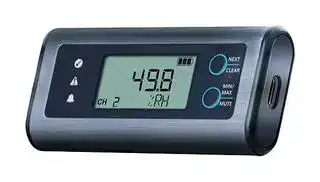
EL-SIE-2
Data Logger, -18 to 55°C Temperature, 0 to 100% RH, Temperature & Humidity, 2 Channel
⚠️ Reference pricing provided. In case of supply shortages, we will connect you with our trusted procurement partners to ensure your project's continuity.
- Manufacturer: LASCAR
- Product type:
- SVHC: No SVHC (07-Nov-2024)
- Display Type: LCD
- Product Range: EasyLog Series
- Data Interface: USB
- Maximum Samples: 1000K Samples
- Data Logger Type: Temperature & Humidity
- No. of Channels / Inputs: 2 Channel
- Sensor / Measurement Type: -
| Delivery and price | |
|---|---|
| Units per pack | 20 |
| Price | 74.55 € |
| Current stock | 25+ |
| Lead time | 30 days |
Datasheet

This datasheet is also available in other languages.

## **EL-SIE-2**

## Temperature and Humidity USB Data Logger, EasyLog Cloud Compatible

- -18 to +55°C (-0.4 to +131°F) temperature measurement range

- 0 to 100%RH humidity measurement range

- Stores over 1,000,000 readings (As per spec table)

- No software to install - configure using your normal web browser

- Use with a PC or Mac

- Display shows current, maximum and minimum readings

- Status and alarm indicators

- Data can be uploaded to the EasyLog Cloud

Monitor the environment you live and work in with the EasyLog EL-SIE-2. Configuration is simple, with no software to install on your PC or Mac – just connect the logger with a USB cable, and use your standard web browser to configure the device for logging. You don’t even need internet access to set up and use the EL-SIE-2, it really couldn’t be easier.

The logging interval can be set between 10 seconds and 24 hours, with immediate, delayed, triggered or push-to-start logging. Alarms are fully user configurable, with functionality including cumulative alarms, pre-alarms, a delay before alarm triggering, and an alarm hold option, which continues showing the alarm condition even if the reading returns to an acceptable level.

The display shows current, maximum and minimum readings, and three coloured LEDs indicate device status at a glance.

Once logging is complete, re-connect to your computer and use your browser to view, analyse and save your data. You can also choose to upload your data to an Easy Log Cloud account, making the data accessible online for powerful graphing, analysis and report generation.

Typical battery life is over 1 year using standard AAA alkaline batteries, and a wall mounting bracket is supplied with the device. SPECIFICATIONS INCLUDED IN THE BOX Temperature Measurement range -18 to +55°C (-0.4 to +131°F) **BAT 1V5 AAA** 2 x AAA 1.5V alkaline Resolution 0.01° batteries Accuracy ±0.3°C (±0.54°F) typical **EL-SIE WALL BRACKET** Mounting bracket Long term stability <0.03°C (<0.054°F) / year **CABLE USB C 0.5M** USB A to USB C Cable Measurement units °C, °F or K ACCESSORIES Relative Humidity Measurement range 0 to 100%RH Resolution 0.1% **BAT 1V5 AAA** 2 x AAA 1.5V alkaline Accuracy ±2.0% typical (0 to 100%RH) batteries Long term stability <0.25%RH / year typical **CABLE USB C 0.5M** USB A to USB C Cable Dew Point Accuracy 1.7°C typical (40 to 100%RH) Logging rate 10 seconds to 24 hours, user selectable Start modes Immediate, push to start, delayed start, parameter triggered Memory capacity Over 1,000,000 total readings >500,000 readings per channel Power source 2 x AAA 1.5V battery Battery life >1 year (at 25°C with 10 minute logging rate) Dimensions 93 x 42 x 17 mm (excluding bracket) Operating temperature range -18 to +55°C (-0.4 to +131°F) ~~7~~ Environmental rating IP2X ~~—~~ CALIBRATION CERTIFICATES AVAILABLE Lascar offers a Traceable Calibration Certificate Service on Temperature Data Loggers. Using reference equipment which has been calibrated by a UKAS/NIST/CNAS accredited laboratory and using apparatus traceable to national or international standards. For more information please see **www.lascarelectronics.com** . <S

## **EL-SIE-2** Temperature and Humidity USB Data Logger, EasyLog Cloud Compatible

## NO SOFTWARE TO INSTALL

All the software needed to configure your EL-SIE-2, and view and analyse the data it logs, is contained within the product itself. Just connect the logger to your PC or Mac with a USB cable, open any web browser and in the address bar type “http://EasyLog.local”. No internet connection is needed, and you can save this address in your bookmarks or favourites as normal.

The interface is easy to use and allows the following parameters to be configured:

- Logger and channel names

- Measurement units

- Logging rate and start mode

- Up to 16 separate alarms  (high/low/pre-alarm/cumulative) with thresholds, delay and hold

- Display and LED indicator modes

Once the logger is running, you can plug it back into your computer and see the latest data, device status and the event log. You can also choose to stop the logger and change the configuration, or just let it continue logging.

## EASYLOG CLOUD DATA STORAGE

Store your data securely, and make it available from any internet-connected PC or mobile device, with EasyLog Cloud. The EL-SIE-2 can upload logged data to the Cloud from your PC or Mac, making sharing and analysis easier than ever. For more information and to set up an account on EasyLog Cloud, visit www.easylogcloud.com.

www.lascarelectronics.com

Issue 4   11/2022    Page 2 of 5

## **EL-SIE-2** Temperature and Humidity USB Data Logger, EasyLog Cloud Compatible

Min Reading Max Reading

## DISPLAY STATUS INDICATION

The high-contrast LCD shows current, maximum and minimum readings, as well as alarm and logger status:

Calibration reminder Battery level Atlidclila Reading Alarm status

Channel No Warning Units

|**Display**||**Logger Status**|**Explanation**|||**Display**|**Logger Status**|**Explanation**|
|---|---|---|---|---|---|---|---|---|
|||USB Connected|The logger is connected<br>via the USB cable||||Logger Running|The logger is still logging<br>but can be stopped by a<br>long press of the bottom<br>button|
||||||||||
|||Push to Start|The logger is set up for<br>Push to Start logging, a<br>long press of either<br>button will start logging||||Alarm Triggered|An alarm is currently<br>active on the logger|
|||Delayed Start|The logger is set up for<br>Delayed Start logging and<br>will automatically start<br>logging at the specified<br>time||||Cumulative Alarm|A cumulative alarm is<br>active on the channel<br>currently being displayed|
||||||||||
|~~a~~<br>~~™~~|~~™~~|Triggered Start<br>~~™~~|The logger is set up for<br>Triggered Start logging<br>and will start logging as<br>soon as the specified<br>limit (either temperature,<br>~~™~~|~~™~~|~~™~~|yN<br>~~™-~~|High Alarm<br>~~-~~|A high alarm is active on<br>the channel currently<br>being displayed<br>~~-~~|
|humidity or pressure) is<br>reached<br>Low Battery<br>The batteries are low and<br>should be changed when<br>possible<br>Memory Full<br>The memory is full and<br>logging has stopped<br>~~a~~<br>~~(|~~<br>L\<br>_ hh a<br>4<br>~~a~~<br>wN|||||||Low Alarm<br>Held High Alarm|A low alarm is active on<br>the channel currently<br>being displayed<br>A high alarm is being held<br>on the channel currently<br>being displayed|
|ZV MEM<br>ene<br>|<br>Ct}||Memory 90%<br>Calibration Pending<br>Calibration Expired|The memory is 90%<br>full, and data should<br>be downloaded when<br>possible<br>The calibration will expire<br>in < 30 days on the date<br>shown (can be DD/MM/<br>YYYY or MM/DD/YYYY)<br>The calibration has<br>expired on the date<br>shown (can be DD/MM/||Held Low Alarm<br>High Pre-alarm<br>Low Pre-alarm<br>a<br>~~ee~~|||A low alarm is being held<br>on the channel currently<br>being displayed<br>A high pre-alarm is active<br>on the channel currently<br>being displayed<br>A low pre-alarm is active<br>on the channel currently<br>being displayed|
||||YYYY or MM/DD/YYYY)||||||


On power up, the LCD runs through a test sequence in which all elements are activated and the LEDs light up and the sounder beeps.

www.lascarelectronics.com

Issue 4   11/2022    Page 3 of 5

## **EL-SIE-2** Temperature and Humidity USB Data Logger, EasyLog Cloud Compatible

## LED STATUS INDICATION

The EL-SIE-2 has three LEDs to clearly indicate the status:

**==> picture [355 x 119] intentionally omitted <==**

**----- Start of picture text -----**<br>
LEDs Sounder Status LEDs Sounder Status<br>ee<br>Logger in operation, no  Alarm / Memory Full /<br>Off Active<br>alarms or warnings Calibration Expired<br>Flashing Flashing<br>oOo<br>Logger primed but not<br>yet logging / Pre-alarm<br>Off / Memory 90% Full /  Off Battery Low<br>Calibration Pending<br>Flashing (check display for  Slow Flash<br>specific warning)<br>**----- End of picture text -----**<br>


## BUTTON FUNCTIONS

The two buttons are used to navigate between display screens and control other functions, some of which also create a record in an Event Log, which can be viewed using the web browser.

|**Screen**<br>~~ss~~|**Button**<br>~~ss~~|**Press**|**Function**|**Event Recorded**|
|---|---|---|---|---|
|USB<br>~~ss~~<br>~~aa~~<br><br>~~a~~|n/a<br>~~ss~~<br>~~aa~~<br>~~**ee**~~|n/a<br>~~aa~~<br>~~**ee**~~|n/a<br>~~aa~~<br>~~ee~~|n/a|
|Push to Start<br>~~a~~<br>~~a~~|Any<br>~~a~~~~**ee**~~|Long<br>~~**ee**~~|Start logging<br>~~ee~~|n/a|
|Triggered Start<br><br>~~a~~|n/a<br>~~**ee**~~|n/a<br>~~**ee**~~|n/a<br>~~ee~~|n/a|
|Delayed Start<br><br>~~a~~<br>~~a ee~~|n/a<br>~~**ee**~~<br>~~ee~~|n/a<br>~~**ee**~~<br>~~ee~~<br>~~a~~|n/a<br>~~ee~~<br>~~ee~~|n/a<br>~~ee~~<br>~~eee~~|
|Channel –<br>Current reading|Top<br>~~ee~~<br>~~—————E~~|Short<br>~~ee~~<br>~~a~~|Move to next channel or STOP LOG<br>~~eee~~|n/a<br>~~eee~~<br>~~eee~~|
|||Long<br>~~ee~~<br>~~a~~<br>~~—————E~~|Clear alarm hold for all channels<br>~~eee~~<br>~~—————E~~|Clear Held Alarms<br>~~eee~~<br>~~eee~~<br>~~—————E~~|
||Bottom<br>~~ee~~<br>~~—————E~~<br>~~EE~~|Short<br>~~ee~~<br>~~a~~<br>~~—————E~~|Show Min reading for this channel<br>~~eee~~<br>~~—————E~~|n/a<br>~~eee~~<br>~~eee~~<br>~~—————E~~|
|||Long<br>~~—————E~~<br>~~——~~<br>~~EE~~|Mute alarm sounder<br>~~—————E~~<br>~~——~~<br>~~EE~~|Mute Alarm<br>~~—————E~~<br>~~——~~<br>~~EE~~|
|Channel –<br>Min reading|Top<br>~~—————E~~<br>~~EE~~<br>~~———————a~~|Short<br>~~—————E~~<br>~~——~~<br>~~EE~~|Show Min reading for next channel or STOP<br>LOG<br>~~—————E~~<br>~~——~~<br>~~EE~~|n/a<br>~~—————E~~<br>~~——~~<br>~~EE~~|
|||Long<br>~~——~~<br>~~EE~~<br>~~———————a~~|Reset Max/Min reading for all channels<br>~~——~~<br>~~EE~~<br>~~———————a~~|Clear Max/Min<br>~~——~~<br>~~EE~~<br>~~———————a~~|
||Bottom<br>~~EE~~<br>~~———————a~~|Short<br>~~EE~~<br>~~———————a~~|Show Max reading for this channel<br>~~EE~~<br>~~———————a~~|n/a<br>~~EE~~<br>~~———————a~~|
|||Long<br>~~———————a~~<br>~~SS~~|Mute alarm sounder<br>~~———————a~~<br>~~SS~~|Mute Alarm<br>~~———————a~~<br>~~SS~~|
|Channel –<br>Max reading<br>~~|~~<br>~~a~~|Top<br>~~———————a~~<br>~~ee~~<br>~~——————E~~|Short<br>~~———————a~~<br>~~SS~~<br>~~ee~~|Show Max reading for next channel or STOP<br>LOG<br>~~———————a~~<br>~~SS~~<br>~~ee~~|n/a<br>~~———————a~~<br>~~SS~~<br>~~ee~~|
|||Long<br>~~ee~~<br>~~——————E~~|Reset Max/Min reading for all channels<br>~~ee~~<br>~~——————E~~|Clear Max/Min<br>~~ee~~<br>~~——————E~~|
||Bottom<br>~~——————E~~<br>~~[/44}_—_+}~~|Short<br>~~——————E~~<br>~~>~—~~<br>|Show current reading for this channel<br>~~——————E~~<br>~~>~—~~<br>|n/a<br>~~——————E~~<br>|
|||Long<br>~~——————E~~<br>~~>~—~~<br>~~[/44}_—_+}~~|Mute alarm sounder<br>~~——————E~~<br>~~>~—~~<br>~~[/44}_—_+}~~|Mute Alarm<br>~~——————E~~<br>~~[/44}_—_+}__~~|
|STOP LOG?<br>~~| ~~<br>~~a~~|Top<br>~~——————E~~<br>~~[/44}_—_+}~~|Short<br>~~——————E~~<br>~~>~—~~<br>~~[/44}_—_+}~~|Move to Channel 1 (or Warning Screen), also<br>generates an Audit Mark when cycling back<br>through to Channel 1<br>~~——————E~~<br>~~>~—~~<br>~~[/44}_—_+}~~|Audit Mark<br>~~——————E~~<br>~~[/44}_—_+}__~~|
||Bottom<br> ~~[/44}_—_+}~~|Long<br>~~>~—~~<br>~~[/44}_—_+}~~|Stop logging, returns to Push to Start<br>~~>~—~~<br>~~[/44}_—_+}~~|n/a<br>~~[/44}_—_+}__~~|
|Warning Screen<br> <br>~~a~~|Any<br> ~~[/44}_—_+}~~<br>~~a~~|Short<br>~~[/44}_—_+}~~|Move to next warning or Channel 1<br>~~[/44}_—_+}~~|n/a<br>~~[/44}_—_+} __~~|


www.lascarelectronics.com

Issue 4   11/2022    Page 4 of 5

## **EL-SIE-2** Temperature and Humidity USB Data Logger, EasyLog Cloud Compatible

## SENSOR ACCURACY AND INFORMATION

Typical and maximal tolerance for the temperature sensor in °C: Typical and maximal tolerance for the relative humidity sensor at 25°C:

## Operating Conditions

The performance of the humidity sensor can be affected by long-term exposure to operating conditions at the extents of the logger’s range. The sensor shows best performance when operated within the recommended normal temperature and humidity range of 5 to 55°C and 20 to 80%RH, respectively. Long-term exposure to conditions outside the normal range, especially at high humidity, may temporarily offset the RH signal (e.g. +3%RH after 60h kept at >80%RH). After returning into the normal temperature and humidity range the sensor will slowly come back within the calibration state by itself. Prolonged exposure to extreme conditions may also accelerate ageing.

When tracking changes in ambient conditions, the response time of the humidity sensor in your data logger is approximately 20 minutes to reach 90% of the reading. However, if you are measuring step changes in humidity (for example if calibrating the product) it is advised that you leave the unit for up to four hours to ensure that it has enough time to settle at the new level.

It is worth remembering that the value of relative humidity is of course sensitive to temperature variation. As an example, at a relative humidity of ~90%RH at ambient temperature, a variation in temperature of 1°C will result in a change of up to -5%RH. Therefore when comparing multiple devices or calibrating them, any temperature variations must be considered.

The humidity measuring element in the humidity data loggers can be contaminated through exposure to a variety of compounds. These products should not be kept in proximity to volatile chemicals such as solvents and other organic compounds. Generally speaking, if a material or compound emits a strong odour you should not keep your humidity data logger in close proximity to it. If you would like more information, please contact your local Lascar Electronics office.

High levels of pollutants may cause permanent damage to the internal sensor.

## BATTERY INFORMATION

We recommend that you replace the batteries annually, or prior to logging critical data. Use only AAA 1.5V alkaline batteries. Before replacing the batteries, disconnect the logger from your computer.

The logger does not lose its stored data readings when the batteries are discharged or replaced. However, the logging process will stop and will not resume until the batteries are replaced and the logger is connected to your computer and the logger is started.

Note that while the logger is plugged into a computer it draws power from the USB port instead of the batteries, which can raise the temperature of the logger slightly. It will return to normal shortly after disconnection.

www.lascarelectronics.com

Issue 4   11/2022    Page 5 of 5
Updated at June 4, 2026
About Novapart
Novapart is a B2B electronic component broker specialising in stock shortages and cost reduction. We source hard-to-find parts and identify compliant alternatives across a catalogue of 410,000+ components from 500+ manufacturers.
Learn more →Stock Shortage Specialist
When a component is unavailable, discontinued or has an unacceptable lead time, we tap into our network of vetted European and Asian distributors to source what you need — without compromising on quality or traceability.
Request a quote →Compliant Alternatives
We identify pin-to-pin, electrically equivalent substitutes that meet the same certifications (RoHS, AEC-Q100, REACH) as your original specification — validated against datasheets, not just part numbers. Often at a lower cost.
BOM Analysis service →