
Image not available
Illustrative purposes only

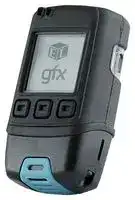
EL-GFX-2+
Data Logger, USB Temperature, Humidity & Dew Point
⚠️ Reference pricing provided. In case of supply shortages, we will connect you with our trusted procurement partners to ensure your project's continuity.
- Manufacturer: LASCAR
- Product type:
- Data Logger Type:USB Temperature, Humidity & Dew Point; No. of Channels:1Channels; Reading Capacity:252928; Product Range:EL-GFX Series; SVHC:No SVHC (15-Jan-2019)
- SVHC: No SVHC (07-Nov-2024)
- Product Range: EL-GFX Series
- Data Logger Type: USB Temperature, Humidity & Dew Point
| Delivery and price | |
|---|---|
| Units per pack | 20 |
| Price | 155.04 € |
| Current stock | 10+ |
| Lead time | 30 days |
Datasheet

## **EL-GFX-2+** High Accuracy Temperature, Humidity & Dew Point Data Logger with Graphic Screen

▪  -30 to +80°C (-22 to +176°F) and 0 to 100%RH measurement range

- Stores over 250,000 readings

- EasyLog software available as a free download

- Logging rates between 10 seconds and 1 hour

- On-screen graphing, and menu options to start, stop, review and

- restart the logger in the field

- Immediate, delayed, push-button or level (temperature or humidity)

- triggered start mode

- User-programmable audible alarm thresholds with highly visible confidence/alarm LEDs

- Environmental protection to IP67

- Higher accuracy sensor when compared with the EL-GFX-2

This stand-alone data logger measures and stores over 250,000 temperature and humidity readings over a -30 to +80°C (-22 to +176°F) and 0 to 100%RH range at a resolution of 0.1°C (0.2°F) and 0.1%RH.

The user can easily set up the logger and view downloaded data by plugging the data logger into a PC’s USB port and using the free EasyLog software. Data can then be graphed, printed and exported to other applications for detailed analysis.

The data logger features a high contrast dot-matrix LCD and three buttons to navigate through an on-screen menu. This menu provides the user with access to real-time trend analysis, data summaries and the ability to start, stop and restart the data logger without the need to connect the data logger to the host-PC. Users can reset the maximum / minimum reading using the on-screen menu. This introduces an ‘event marker’ into the data which can later be viewed in the graphing software (‘Mark Events’ option) and the data file after download.

The data logger is supplied complete with two lithium metal batteries, which can typically allow logging for up to 1 year and is protected against moisture to IP67 when the battery case is securely fitted. Can be powered from USB. SPECIFICATIONS ACCESSORIES **Temperature Measurement Range** -30°C to 80°C (-22°F to 176°F) **BAT 3V6 1/2AA** Replacement **Internal Resolution** 0.1°C (0.2°F) battery (2 required) **Accuracy (overall error)*** ± 0.25°C (0.41°F) typical (5 to 60°C) INCLUDED IN THE BOX **Long Term Stability** <0.02°C (0.04°F) / year **Relative Humidity Measurement Range** 0 to 100%RH **x2 BAT 3V6 1/2AA** Battery **Internal Resolution** 0.1%RH **CABLE USB A-MICRO B** USB cable **Accuracy (overall error)*** ± 1.85%RH typical (10 to 90%RH) **EL-GFX WALL BRACKET** Magnetic mounting bracket **Long Term Stability** <0.25%RH / year **Dew Point Accuracy (overall error)*** ± 1.2°C typical (-30 to 80°C, 40 to 100%RH) **Logging Rate** Every 10 seconds to 1 hour **Operating temperature Range** -30 to 80°C (-22 to 176°F) **Battery Life** 1 year (at 25°C, 1 minute logging rate, LCD off) **Dimensions** 88 x 48.5 x 30.5mm (3.46 x 3.46 x 1.20”) **Readings** 252,928 ~~7~~ CE ~~E~~ @B * The overall error takes in to account the sensor accuracy (as shown on page 3) and the resolution of the data logger. CALIBRATION CERTIFICATES NOW AVAILABLE

Lascar now offers a Traceable Calibration Certificate Service on Temperature Data Loggers. Using reference equipment which has been calibrated by a UKAS/NIST accredited laboratory and using apparatus traceable to national or www.lascarelectronics.com/data-loggers international standards. For more information, please see **www.lascarelectronics.com** .

Cay Issue 18   03/2018   Page 1 of 4

## **EL-GFX-2+** High Accuracy Temperature, Humidity & Dew Point Data Logger with Graphic Screen

## EL-WIN-USB

Lascar’s EasyLog control software is available as a free download from www.easylogusb.com. Easy to install and use, the control software  is compatible with 32-bit and 64-bit versions of Windows 7, 8 and 10. The software is used to set up the logger, download, graph and annotate data or export in Excel, PDF and jpeg formats.

## The software allows the following parameters to be configured:

## ▪  Logger name

- Measurement parameter (°C or °F) ▪  Logging rate (user selectable between 10 seconds and 1 hour) ▪  Display off, on for 30 seconds after button press, or permanently on ▪  High and low alarms ▪  Disable or enable LEDs and sounder with delayed activation ▪  Immediate, delayed, push-button or level (temperature or humidity) triggered start mode

## **Download the latest version of the software free of charge from www.lascarelectronics.com/software/easylog-usb**

## MENU BUTTON FUNCTIONS AND LCD SCREEN INDICATION

**==> picture [497 x 248] intentionally omitted <==**

**----- Start of picture text -----**<br>
START LOGGER ¢ q DISPLAY DATA<br>ARMED! button | DELAYED START|. DELAYED START ▪ Loggers can be started immediately  26 8 ° 26.8°C ▪ Data can be displayed on screen in tabular or graphical format<br>start logging Starts logging at whentemactae on a button press, delayed to a specific time or delayed to specific  . . ▪ You can switch between these views by<br>v p.0:30:00 04/03/42] |" pn ag 9°¢ temperature reading ok | 2 foe tt | zt0 jo pressing the              /              buttons at the bottom-left of your screen<br>ON-SCREEN ICONS STOP/START LOGGING<br>q q q & MUTE ALARM<br>+ SLoORK<br>ALARMSLARM+ a | @OLogger Stop LoggingSettings | |@StartOLogger LoggingSettings | |@MuteC Stop Logging Alarm ▪ By pressing the               button, you can stop your logger, or view logger settings.  Ea<br>OLogger Settings If you have already stopped logging, this<br>▪ When the EasyLog cube is  ▪ High/Low Alarm indicators  ▪ This icon indicates that your  option will change to ‘Start Logging’.<br>shown in the top-left corner  are displayed at the top of  battery is low and will need  elvyvivielvivtelviv The audible alarm can be muted from<br>your logger is logging your screen to be replaced soon this menu if enabled<br>Temperature SUMMARY DATA LOCKED MODE<br>Max 34.8°C Mem Used 32% ▪ Summary screen displays max/min  ▪ When in locked mode - an option<br>Min 22.8°C Readings 6336 log and last log. Reset function clears  during PC set-up - the logger can only<br>Since summary if required Locked Mode be stopped and re-started using a PC<br>10:30 24/09/2012 ▪ These screens can be reached by  loaded with the unit’s configuration<br>wv | reset i pressing the               button ri | ox | j | me software<br>POP-UP MESSAGES<br>LOGGER SETTINGS<br>:Sineogger vettingSettingsi SampleSanaaaei Ratetore6, 10:° ▪ To view a summary of the logger’s  StartTimeimenotunit & set&loggingdatedat DownloadM90%emoryfulldataisi loggerDownloadMemlemoryorystoppeddatafullfull, ▪ A message will overlay the screen - if there is an issue - the next time a<br>S/NHigh Alm000000001 40°C settings press the               button, then click ‘Logger Settings’ using PC to a PC to clear to a PC toclear button is pressed, e.g. if the logger is running low on memory<br>**----- End of picture text -----**<br>


_Please note that screens may vary slightly depending on model._

www.lascarelectronics.com/data-loggers

Issue 18   03/2018   Page 2 of 4

## **EL-GFX-2+** High Accuracy Temperature, Humidity & Dew Point Data Logger with Graphic Screen

## SENSOR ACCURACY & INFORMATION

Typical and maximal tolerance for temperature.

Typical and maximal tolerance at 25°C for relative humidity.

**==> picture [157 x 138] intentionally omitted <==**

**----- Start of picture text -----**<br>
±2.0<br>maximum accuracy<br>typical accuracy<br>±1.5<br>±1.0<br>±0.5<br>±0.0<br>-30 -20 0 20 40 60 80<br>Temperature (°C)<br>**----- End of picture text -----**<br>


**==> picture [198 x 141] intentionally omitted <==**

**----- Start of picture text -----**<br>
Δ RH (%RH)<br>± 10<br>maximum accuracy<br>± 8 typical accuracy<br>± 6<br>± 4<br>± 2<br>± 0<br>0 10 20 30 40 50 60 70 80 90 100<br>Relative H umidity (%RH)<br>**----- End of picture text -----**<br>


**==> picture [198 x 189] intentionally omitted <==**

**----- Start of picture text -----**<br>
Typical accuracy of r elatve humidity measurements given in<br>%RH for temperatures 0  to 80°C.<br>100 ±3 ±2.5 ±3 ±3.5<br>90 ±2 ±2.5 ±3<br>80 ±2.5 ±3<br>70 ±2.5 ±2 ±2.5<br>60<br>50 ±2 ±1.8<br>40<br>30<br>20<br>10 ±2.5 ±2<br>0 ±3 ±2.5<br>=<br>0 10 20 30 40 50 60 70 80<br>Temperature (°C)<br>)H<br>R<br>%<br>( ytidi<br>m<br>u<br>H<br> e<br>vitale<br>R<br>**----- End of picture text -----**<br>


Operating conditions

**==> picture [213 x 182] intentionally omitted <==**

**----- Start of picture text -----**<br>
10080 PTa [eee] eeett<br>eee<br>60 at ity | PP PP PN Py<br>rs] WV | tT PT Normal  ET Max.<br>40 PAi Vt fy PP Range  A  Range<br>PA TVET PP PP<br>20 PosiP Xp ee [tN] NTTS<br>0 Oo<br>-40 -20 0 20 40 60 80 100 120<br>Temperature (°C)<br>| RINT TT tT tT TP AT Td<br>Long term exposure to humidity levels outside of the<br>‘normal’ range may temporarily offset RH measurements<br>(±3%RH after 60 hours). Once returned to less extreme<br>conditions the device will slowly return towards calibration<br>state.<br>Relative Humidity (%)<br>**----- End of picture text -----**<br>


When tracking changes in ambient conditions, the response time of the humidity sensor in your data logger is approximately 20 minutes to reach 90% of the reading. However, if you are measuring step changes in humidity (for example if calibrating the product) it is advised that you leave the unit for up to four hours to ensure that it has enough time to settle at the new level.

It is worth remembering that the value of relative humidity is of course sensitive to temperature variation. As an example, at a relative humidity of ~90%RH at ambient temperature, a variation in temperature of 1°C will result in a change of up to -5%RH. Therefore when comparing multiple devices or calibrating them, any temperature variations must be considered.

www.lascarelectronics.com/data-loggers

Issue 18   03/2018   Page 3 of 4

## **EL-GFX-2+** High Accuracy Temperature, Humidity & Dew Point Data Logger with Graphic Screen

## SENSOR ACCURACY & INFORMATION

The humidity measuring element in the humidity data loggers can be contaminated through exposure to a variety of compounds. These products should not be kept in proximity to volatile chemicals such as solvents and other organic compounds. Generally speaking, if a material or compound emits a strong odour you should not keep your humidity data logger in close proximity to it. If you would like more information, please contact your local Lascar Electronics office.

Exposure to extreme conditions or chemical vapours will require the following reconditioning procedure to bring the internal sensor back to calibration state:

_**Baking**_ 80°C (176°F) at < 5%RH for 36 hours. _**Re-hydration**_ 20 to 30°C (70 to 90°F) at > 74%RH for 48 hours.

High levels of pollutants may cause permanent damage to the internal sensor.

## BATTERY INFORMATION

## **Replacement**

We recommend that you replace the battery every year, or prior to logging critical data. Only use 3.6V ½AA lithium batteries. The data logger does not lose its stored readings when the battery is discharged or replaced; however, the data logging process will stop and will not resume until the battery is replaced. The logger may need to be restarted by EL WIN USB.

Before replacing the battery, remove the data logger from the PC.

## **Passivation**

If left unused for extended periods of time, lithium batteries including those used in the EasyLog range of data loggers naturally form a non-conductive internal layer, preventing them from self-discharge and effectively increasing their shelf life. When first installed in the data logger, this may cause a momentary drop in the battery voltage (the Transient Minimum Voltage) as the internal layer is broken down, resulting in the data logger resetting. Inserting the batteries in the data logger and leaving it connected to a PC for about 30 seconds will remove this layer. After this, remove and re-install the batteries to reset the data logger. Overall battery life will not be affected.

## WARNING

Handle lithium batteries carefully, observe warnings on battery casing. Dispose of in accordance with local regulations.

www.lascarelectronics.com/data-loggers

Issue 18   03/2018   Page 4 of 4
Updated at June 4, 2026
About Novapart
Novapart is a B2B electronic component broker specialising in stock shortages and cost reduction. We source hard-to-find parts and identify compliant alternatives across a catalogue of 410,000+ components from 500+ manufacturers.
Learn more →Stock Shortage Specialist
When a component is unavailable, discontinued or has an unacceptable lead time, we tap into our network of vetted European and Asian distributors to source what you need — without compromising on quality or traceability.
Request a quote →Compliant Alternatives
We identify pin-to-pin, electrically equivalent substitutes that meet the same certifications (RoHS, AEC-Q100, REACH) as your original specification — validated against datasheets, not just part numbers. Often at a lower cost.
BOM Analysis service →