
Image not available
Illustrative purposes only

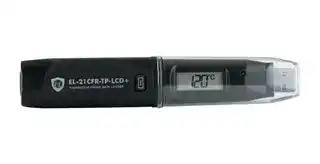
EL-21CFR-TP-LCD+
Data Logger, -40 to 125°C Measurement Range, Temperature Probe, 1 Channel, 32510 Samples, USB, LCD
⚠️ Reference pricing provided. In case of supply shortages, we will connect you with our trusted procurement partners to ensure your project's continuity.
- Manufacturer: LASCAR
- Product type:
- Data Logger Type:USB Temperature Probe; No. of Channels:1Channels; Reading Capacity:32510; Product Range:EL-21CFR Series; SVHC:No SVHC (15-Jan-2019)
- SVHC: No SVHC (07-Nov-2024)
- Display Type: LCD
- Product Range: EasyLog Series
- Data Interface: USB
- Maximum Samples: 32510 Samples
- Data Logger Type: Temperature Probe
- No. of Channels / Inputs: 1 Channel
- Sensor / Measurement Type: -
| Delivery and price | |
|---|---|
| Units per pack | 1 |
| Price | 132.07 € |
| Current stock | 10+ |
| Lead time | 30 days |
Datasheet

## **EL-21CFR-TP-LCD+**

## High Accuracy Temperature Probe Data Logger with LCD Screen, Easylog  21CFR Compatible

▪  -40 to +125°C (-40 to +257°F) measurement range

- Stores over 32,000 readings

- EasyLog 21CFR software available as a free download

- Logging rates between 1 second and 12 hours

- High contrast LCD, with four digit temperature display function

- Immediate, delayed and push-to-start logging

- User-programmable alarm thresholds

- Use as part of a 21CFR Part 11 compliant system

This standalone data logger measures and stores more than 32,000 temperature readings over a -40 to +125°C (-40 to +257°F) range with a resolution of 0.1°C (0.2°F).

The user can easily set up the logger and view downloaded data by plugging the data logger into a PC’s USB port and using the free EasyLog 21CFR software. Data can then be graphed, printed and exported to other applications for detailed analysis. The encrypted data has full audit tracking to comply with the requirements of 21CFR Part 11.

The high contrast LCD can show a variety of temperature information. At the touch of a button, the user can cycle between the current, maximum and minimum stored values for temperature.

The data logger is supplied with a lithium metal battery which typically gives two years’ logging life.

## SPECIFICATIONS

|SPECIFICATIONS||
|---|---|
|**Measurement range**|-40 to +125°C (-40 to +257°F)|
|**Accuracy (logger error)**|±0.1°C (±0.2°F)|
|**Accuracy (probe)**|See ‘Temperature Probe Accuracy’ on page 4|
|**Resolution (display)**|0.5°C (1°F)|
|**Resolution (data)**|0.1°C (0.2°F)|
|**Logging rate**|User selectable between 1 second & 12 hours|
|**Operating temperature range**|-35 to +80°C (-31 to +176°F)(data logger only)|
|**Battery Life**|2 years(at 25°C and 1 minute logging rate,<br>LCD on)|
|**Readings**|32,510|
|**Dimensions**|135 x 24 x 21mm (5.31 x 0.94 x 0.82”)|


## ACCESSORIES

**BAT 3V6 1/2AA** Battery **EL-P-TP+** Replacement high accuracy thermistor probe

**EL-PROBE-EXTENDER-** Probe extension **5.0M-TP** (5.0m) **EL-PROBE-EXTENDER-** Probe extension **10.0M-TP** (10.0m)

## INCLUDED IN THE BOX

**BAT 3V6 1/2AA** Battery **EL-P-TP+** High accuracy thermistor probe **EL-LCD-WALL BRACKET** Mounting Bracket

## CALIBRATION CERTIFICATES NOW AVAILABLE

Lascar now offers a Traceable Calibration Certificate Service on Temperature Data Loggers. Using reference equipment which has been calibrated by a UKAS/NIST accredited laboratory and using apparatus traceable to national or international standards. For more information, please see **www.lascarelectronics.com** .

## **EL-21CFR-TP-LCD+**

High Accuracy Temperature Probe Data Logger with LCD Screen, Easylog  21CFR Compatible

## STORE DATA IN COMPLIANCE WITH THE REGULATIONS OF 21CFR PART 11

Easy to install and use, Lascar’s **EasyLog 21CFR software** is compatible with all latest versions of Windows (7, 8 & 10 - both 32-bit & 64-bit) and is available as a free download from **www.EasyLog21CFR.com** . All data collected from the logger and associated audit trails are stored in an encrypted format which cannot be edited.

## CONTROL YOUR LOGGER

Users can configure their loggers with the following parameters:

▪  Logger name

- Temperature measurement parameter (°C or °F)

- Logging rate (user selectable between 1 second and 12 hours)

- High and low alarms for temperature

- Immediate and delayed logging start

- Probe type

Once users have recorded data, the built-in graphing software allows them to graph and annotate their data, or export it to Excel, PDF or jpeg formats.

## CONTROL YOUR DATA

EasyLog 21CFR software ensures digital security and compliance:

- Assign individual users with specific permissions

- Full software & session data audit trails

- Receive email alerts for failed log in attempts

- Digital signatures added to all reports ▪  Add comments to specific readings

~~ee~~ For more information, and to download the latest version of the software free of charge, visit **www.EasyLog21CFR.com**

www.lascarelectronics.com

Issue 3    10/2018   Page 2 of 5

## **EL-21CFR-TP-LCD+**

## High Accuracy Temperature Probe Data Logger with LCD Screen, Easylog  21CFR Compatible

## DISPLAY STATUS INDICATION

**Temperature scale symbols**

The EL-21CFR-TP-LCD+ features a high contrast LCD which shows logged temperature values using seven segment numbers, along with annunciators. The LCD can also show information regarding the loging status.

The LCD shows three different recorded readings, which can be cycled through using the built-in push button. The most recent logged temperature, maximum logged temperature and minimum logged temperature can be displayed.

To increase battery life it is possible, via the software, to turn off the display or have it active only after pressing the button.

**Reading Maximum/Minimum logged value symbol**

|~~a~~|||
|---|---|---|
|**Display**<br>~~a~~|**Logger Status**|**Explanation**|
|~~a~~<br>~~dO~~|Delayed Start<br>~~dO~~|This is shown when the button is pressed and the logger is set to start at a specific date and time|
|PS|Push to Start|This will flash when the logger is setup for ‘Push to Start’ logging|
|~~a~~|Logging|This is shown when the logger is running in ‘LCD off’ mode, and the button is pressed. The display clears<br>again after a short period|
||Stopped|If the logger has not been set to log and the button is pressed, three dashes are displayed for a short period|
||Clear Max/Min|This indicates that the maximum and minimum stored values have been cleared after pressing the button for<br>a few seconds. This will not work if the probe is disconnected or the logger is connected to a USB port|
|~~Prob~~|Probe<br>has been<br>disconnected<br>~~Prob~~|The flashing message ‘Prob’, followed by a number or letter, will be displayed if the logger is logging and the<br>probe becomes disconnected. The number/letter confirms the type of probe that should be connected|


www.lascarelectronics.com

Issue 3    10/2018   Page 3 of 5

## **EL-21CFR-TP-LCD+**

## High Accuracy Temperature Probe Data Logger with LCD Screen, Easylog  21CFR Compatible

## LED STATUS INDICATION

The EL-21CFR-TP-LCD+ features two LEDs:

▪  The first LED flashes **red** to indicate that the EL-21CFR-TP-LCD+ is in an alarm condition. It will flash when the logged temperature has exceeded a Low or High alarm level.

▪ The second LED flashes **green** to indicate that the EL-21CFR-TP-LCD+  is not in an alarm condition.

Using EasyLog 21CFR Software it is possible to set the alarm to remain active even if the reading has returned to normal, in which case the alarm LED will continue to flash red. This ‘Hold’ feature in the software ensures the user is notified that at some point an alarm level has been exceeded, without needing to download the data.

Hold is enabled by default, and can be turned off via the control software. The red LED will then only flash whilst the logger is in an alarm condition. When the temperature returns to normal, the green LED will flash.

Using the control software it is possible to set a delayed alarm. In this mode the logger has to see multiple consecutive alarms before being activated.

**Green single flash (every 30 seconds)** ~~SO~~ The data logger is not currently logging, but is primed to start at a later date and time (delayed start) **Green single flash (every 10 seconds)** ~~SO~~ The data logger is currently logging. No alarm **Red single flash (every 10 seconds)** The data logger is currently logging. Low alarm ~~OF~~ **Red double flash (every 10 seconds)** ~~OF~~ The data logger is currently logging. High alarm **Green single flash (every 20 seconds)** The data logger is currently logging. Low battery ~~SO~~ **Red single flash (every 20 seconds)** ~~OF~~ The data logger is currently logging, however the battery is running low. Low alarm **Red double flash (every 20 seconds)** The data logger is currently logging, however the battery is running low. High alarm ~~OF~~ **Green double flash (every 20 seconds)** The data logger is full and has stopped logging ~~CO~~ **Red & Green single flash alternately (every 20 seconds)** The data logger is full and has stopped logging. High or low alarm ~~OO~~ **No LEDs flash** ~~00~~ The data logger is stopped, the battery is empty or there is no battery **Red Triple flash (every 10 seconds)** The data logger is currently logging, but the probe has been disconnected ~~OO~~

www.lascarelectronics.com

Issue 3    10/2018   Page 4 of 5

## **EL-21CFR-TP-LCD+**

## High Accuracy Temperature Probe Data Logger with LCD Screen, Easylog  21CFR Compatible

## THERMISTOR PROBE

The probes supplied with the EL-21CFR-TP-LCD+ uses a precision thermistor to sense the temperature. Alternative lengths and probe options are available. The probe type is selected in the control software and should match the label on the probe in use.

Alternatively, the probe length may be extended by the use of a suitable extension cable. We recommend twisted pair with high quality 3.5mm jack socket/plugs for best results.

The thermistor is externally isolated from the probe tip.

## THERMISTOR PROBE ACCURACY

**==> picture [144 x 21] intentionally omitted <==**

**----- Start of picture text -----**<br>
Supplied ‘Type A’ Thermistor Probe<br>Part number: EL-P-TP+<br>**----- End of picture text -----**<br>


## BATTERY INFORMATION

## **Replacement**

We recommend that you replace the battery annually, or prior to logging critical data. Only use 3.6V ½AA lithium metal batteries. The data logger does not lose its stored readings when the battery is discharged or replaced; however, the data logging process will stop and will not resume until the battery is replaced and the logger restarted by the EasyLog 21CFR Software.

Before replacing the battery, remove the data logger from the PC. Please note that leaving the data logger plugged into the USB port for extended periods will cause some of the battery capacity to be lost.

## **Passivation**

If left unused for extended periods of time lithium metal batteries, including those used in the EasyLog range of data loggers, naturally form a non-conductive internal layer preventing them from self-discharge and effectively increasing their shelf life. When first installed in the data logger, this may cause a momentary drop in the battery voltage (the Transient Minimum Voltage) as the internal layer is broken down, resulting in the data logger resetting. Inserting the batteries in the data logger and leaving it connected to a PC for about 30 seconds will remove this layer. After this, remove and re-install the batteries to reset the data logger. Overall battery life will not be affected.

## WARNING

Handle lithium metal batteries carefully, observe warnings on battery casing. Dispose of in accordance with local regulations.

www.lascarelectronics.com

Issue 3    10/2018   Page 5 of 5
Updated at June 4, 2026
About Novapart
Novapart is a B2B electronic component broker specialising in stock shortages and cost reduction. We source hard-to-find parts and identify compliant alternatives across a catalogue of 410,000+ components from 500+ manufacturers.
Learn more →Stock Shortage Specialist
When a component is unavailable, discontinued or has an unacceptable lead time, we tap into our network of vetted European and Asian distributors to source what you need — without compromising on quality or traceability.
Request a quote →Compliant Alternatives
We identify pin-to-pin, electrically equivalent substitutes that meet the same certifications (RoHS, AEC-Q100, REACH) as your original specification — validated against datasheets, not just part numbers. Often at a lower cost.
BOM Analysis service →