
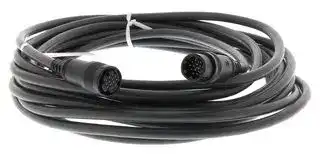


E69DF5 5M
EXTENSION CABLE, 5M
- Manufacturer: OMRON INDUSTRIAL AUTOMATION
- Product type:
- Product Range:- 38B400
- For Use With: Omron E6C2-A/E6C3-A/E6CP/E6F Series Encoders
- Accessory Type: Extension Cable
| Delivery and price | |
|---|---|
| Units per pack | 1 |
| Price | 261.09 € |
| Current stock | 10+ |
| Lead time | 30 days |

Cat. No. I562-E1-03
## **USER’S MANUAL**
## **OMNUC G** SERIES
R88M-G@ (AC Servomotors) R88D-GT@ (AC Servo Drives)
## **AC SERVOMOTORS/SERVO DRIVES**
## Trademarks and Copyrights
- Product names and system names in this manual are trademarks or registered trademarks of their respective companies.
## **OMRON, 2008**
All rights reserved. No part of this publication may be reproduced, stored in a retrieval system, or transmitted, in any form, or by any means, mechanical, electronic, photocopying, recording, or otherwise, without the prior written permission of OMRON.
No patent liability is assumed with respect to the use of the information contained herein. Moreover, because OMRON is constantly striving to improve its high-quality products, the information contained in this manual is subject to change without notice. Every precaution has been taken in the preparation of this manual. Nevertheless, OMRON assumes no responsibility for errors or omissions. Neither is any liability assumed for damages resulting from the use of the information contained in this publication.
**Introduction**
## **Introduction**
Thank you for choosing the OMNUC G Series. This User’s Manual describes installation/wiring methods and parameter setting procedures required for the operation of the OMNUC G Series as well as troubleshooting and inspection methods.
## **Intended Readers**
This manual is intended for the following personnel.
Those with knowledge of electrical systems (a qualified electrical engineer or the equivalent) as follows:
- Personnel in charge of introducing FA equipment
- Personnel in charge of designing FA systems
- Personnel in charge of managing FA systems and facilities
## **NOTICE**
This manual contains information necessary to ensure safe and proper use of the OMNUC G Series and its peripheral devices. Please read this manual thoroughly and understand its contents before using the products.
Please keep this manual handy for future reference.
Make sure this User’s Manual is delivered to the actual end user of the products.
**1**
**Read and Understand This Manual**
## **Read and Understand This Manual**
Please read and understand this manual before using the product. Please consult your OMRON representative if you have any questions or comments.
## _**Warranty and Limitations of Liability**_
## _**WARRANTY**_
OMRON's exclusive warranty is that the products are free from defects in materials and workmanship for a period of one year (or other period if specified) from date of sale by OMRON.
OMRON MAKES NO WARRANTY OR REPRESENTATION, EXPRESS OR IMPLIED, REGARDING NON-INFRINGEMENT, MERCHANTABILITY, OR FITNESS FOR PARTICULAR PURPOSE OF THE PRODUCTS. ANY BUYER OR USER ACKNOWLEDGES THAT THE BUYER OR USER ALONE HAS DETERMINED THAT THE PRODUCTS WILL SUITABLY MEET THE REQUIREMENTS OF THEIR INTENDED USE. OMRON DISCLAIMS ALL OTHER WARRANTIES, EXPRESS OR IMPLIED.
## _**LIMITATIONS OF LIABILITY**_
OMRON SHALL NOT BE RESPONSIBLE FOR SPECIAL, INDIRECT, OR CONSEQUENTIAL DAMAGES, LOSS OF PROFITS OR COMMERCIAL LOSS IN ANY WAY CONNECTED WITH THE PRODUCTS, WHETHER SUCH CLAIM IS BASED ON CONTRACT, WARRANTY, NEGLIGENCE, OR STRICT LIABILITY.
In no event shall the responsibility of OMRON for any act exceed the individual price of the product on which liability is asserted.
IN NO EVENT SHALL OMRON BE RESPONSIBLE FOR WARRANTY, REPAIR, OR OTHER CLAIMS REGARDING THE PRODUCTS UNLESS OMRON'S ANALYSIS CONFIRMS THAT THE PRODUCTS WERE PROPERLY HANDLED, STORED, INSTALLED, AND MAINTAINED AND NOT SUBJECT TO CONTAMINATION, ABUSE, MISUSE, OR INAPPROPRIATE MODIFICATION OR REPAIR.
**2**
**Read and Understand This Manual**
## _**Application Considerations**_
## _**SUITABILITY FOR USE**_
OMRON shall not be responsible for conformity with any standards, codes, or regulations that apply to the combination of products in the customer's application or use of the products.
At the customer's request, OMRON will provide applicable third party certification documents identifying ratings and limitations of use that apply to the products. This information by itself is not sufficient for a complete determination of the suitability of the products in combination with the end product, machine, system, or other application or use.
The following are some examples of applications for which particular attention must be given. This is not intended to be an exhaustive list of all possible uses of the products, nor is it intended to imply that the uses listed may be suitable for the products:
- Outdoor use, uses involving potential chemical contamination or electrical interference, or conditions or uses not described in this manual.
- Nuclear energy control systems, combustion systems, railroad systems, aviation systems, medical equipment, amusement machines, vehicles, safety equipment, and installations subject to separate industry or government regulations.
- Systems, machines, and equipment that could present a risk to life or property.
Please know and observe all prohibitions of use applicable to the products.
NEVER USE THE PRODUCTS FOR AN APPLICATION INVOLVING SERIOUS RISK TO LIFE OR PROPERTY WITHOUT ENSURING THAT THE SYSTEM AS A WHOLE HAS BEEN DESIGNED TO ADDRESS THE RISKS, AND THAT THE OMRON PRODUCTS ARE PROPERLY RATED AND INSTALLED FOR THE INTENDED USE WITHIN THE OVERALL EQUIPMENT OR SYSTEM.
## _**PROGRAMMABLE PRODUCTS**_
OMRON shall not be responsible for the user's programming of a programmable product, or any consequence thereof.
## _**Disclaimers**_
## _**CHANGE IN SPECIFICATIONS**_
Product specifications and accessories may be changed at any time based on improvements and other reasons.
It is our practice to change model numbers when published ratings or features are changed, or when significant construction changes are made. However, some specifications of the products may be changed without any notice. When in doubt, special model numbers may be assigned to fix or establish key specifications for your application on your request. Please consult with your OMRON representative at any time to confirm actual specifications of purchased products.
## _**DIMENSIONS AND WEIGHTS**_
Dimensions and weights are nominal and are not to be used for manufacturing purposes, even when tolerances are shown.
**3**
**Read and Understand This Manual**
## _**PERFORMANCE DATA**_
Performance data given in this manual is provided as a guide for the user in determining suitability and does not constitute a warranty. It may represent the result of OMRON's test conditions, and the users must correlate it to actual application requirements. Actual performance is subject to the OMRON Warranty and Limitations of Liability.
## _**ERRORS AND OMISSIONS**_
The information in this manual has been carefully checked and is believed to be accurate; however, no responsibility is assumed for clerical, typographical, or proofreading errors, or omissions.
**4**
**Precautions for Safe Use**
## **Precautions for Safe Use**
- To ensure safe and proper use of the OMNUC G Series and its peripheral devices, read the “Precautions for Safe Use” and the rest of the manual thoroughly to acquire sufficient knowledge of the devices, safety information, and precautions before using the products.
- Make sure this User’s Manual is delivered to the actual end users of the products.
- Please keep this manual close at hand for future reference.
## **Explanation of Signal Words**
- The precautions indicated here provide important information for safety. Be sure to heed the information provided with the precautions.
- The following signal words are used to indicate and classify precautions in this manual.
**==> picture [36 x 32] intentionally omitted <==**
Indicates a potentially hazardous situation which, if not **WARNING** avoided, could result in death or serious injury. Additionally, there may be severe property damage.
**==> picture [36 x 32] intentionally omitted <==**
Indicates a potentially hazardous situation which, if not avoided, may result in minor or moderate injury, or property **Caution** damage.
Failure to heed the precautions classified as “Caution” may also lead to serious results. Always heed these precautions.
## **Safety Precautions**
- This manual may include illustrations of the product with protective covers or shields removed in order to show the components of the product in detail. Make sure that these protective covers and shields are put in place as specified before using the product.
- Consult your OMRON representative when using the product after a long period of storage.
**==> picture [37 x 32] intentionally omitted <==**
## **WARNING**
**==> picture [37 x 164] intentionally omitted <==**
Always connect the frame ground terminals of the Servo Drive and the Servomotor to 100 Ω or less.
Incorrect grounding may result in electric shock.
Do not touch the inside of the Servo Drive. Doing so may result in electric shock.
When turning OFF the main circuit power supply, turn OFF the RUN Command Input (RUN) at the same time. Residual voltage may cause the Servomotor to continue rotating and result in injury or equipment damage even if the main circuit power supply is turned OFF externally, e.g., with an emergency stop.
Do not remove the front cover, terminal covers, cables, or optional items while the power is being supplied. Doing so may result in electric shock.
**5**
**Precautions for Safe Use**
Installation, operation, maintenance, or inspection must be performed by authorized personnel. Not doing so may result in electric shock or injury. Wiring or inspection must not be performed for at least 15 minutes after turning OFF the power supply. Doing so may result in electric shock. Do not damage or pull on the cables, place heavy objects on them, or subject them to excessive stress. Doing so may result in electric shock, stopping product operation, or burning. Do not touch the rotating parts of the Servomotor during operation. Doing so may result in injury. Do not modify the product. Doing so may result in injury or damage to the product. Provide a stopping mechanism on the machine to ensure safety. *The holding brake is not designed as a stopping mechanism for safety purposes. Not doing so may result in injury. Provide an external emergency stopping mechanism that can stop operation and shut off the power supply immediately. Not doing so may result in injury. Do not come close to the machine immediately after resetting momentary power interruption to avoid an unexpected restart. Doing so may result in injury. Take appropriate measures to secure safety against an unexpected restart. Confirm safety after an earthquake has occurred. Failure to do so may result in electric shock, injury, or fire. Do not use external force to drive the Servomotor. Doing so may result in fire.
**6**
**Precautions for Safe Use**
**==> picture [37 x 32] intentionally omitted <==**
## **WARNING**
**==> picture [37 x 110] intentionally omitted <==**
Do not place any flammable materials near the Servomotor, Servo Drive, or Regeneration Resistor.
Doing so may result in fire.
Mount the Servomotor, Servo Drive, and Regeneration Resistor on metal or other nonflammable materials. Failure to do so may result in fire.
Do not frequently and repeatedly turn the main power supply ON and OFF. Doing so may result in product failure.
**==> picture [37 x 33] intentionally omitted <==**
**==> picture [36 x 32] intentionally omitted <==**
## **Caution**
Use the Servomotors and Servo Drives in a specified combination.
Using them incorrectly may result in fire or damage to the products.
Do not store or install the product in the following places. Doing so may result in fire, electric shock, or damage to the product.
- Locations subject to direct sunlight.
**==> picture [37 x 33] intentionally omitted <==**
- Locations subject to temperatures outside the specified range.
- Locations subject to humidity outside the specified range.
- Locations subject to condensation as the result of severe changes in temperature.
- Locations subject to corrosive or flammable gases.
- Locations subject to dust (especially iron dust) or salts.
- Locations subject to exposure to water, oil, or chemicals.
- Locations subject to shock or vibration.
**==> picture [37 x 33] intentionally omitted <==**
Do not touch the Servo Drive radiator, Servo Drive regeneration resistor, or Servomotor while the power is being supplied or soon after the power is turned OFF. Doing so may result in burn injuries.
- Storage and Transportation Precautions
**==> picture [36 x 32] intentionally omitted <==**
## **Caution**
**==> picture [37 x 109] intentionally omitted <==**
Do not hold the product by the cables or motor shaft while transporting it. Doing so may result in injury or malfunction.
Do not place any load exceeding the figure indicated on the product. Doing so may result in injury or malfunction.
Use the motor eye-bolts only for transporting the Servomotor. Using them for transporting the machinery may result in injury or malfunction.
**7**
**Precautions for Safe Use**
- Installation and Wiring Precautions
**==> picture [36 x 32] intentionally omitted <==**
## **Caution**
Do not step on or place a heavy object on the product. Doing so may result in injury. Do not cover the inlet or outlet ports and prevent any foreign objects from entering the product. Covering them or not preventing entry of foreign objects may result in fire. Be sure to install the product in the correct direction. Not doing so may result in malfunction. Provide the specified clearances between the Servo Drive and the control panel or with other devices. Not doing so may result in fire or malfunction. Do not subject Servomotor shaft or Servo Drive to strong impacts. Doing so may result in malfunction. Be sure to wire correctly and securely. Not doing so may result in motor runaway, injury, or malfunction. Be sure that all the mounting screws, terminal screws, and cable connector screws are tightened properly. Incorrect tightening torque may result in malfunction. Use crimp terminals for wiring. Do not connect bare stranded wires directly to the protective ground terminal. Doing so may result in burning. Always use the power supply voltage specified in the User’s Manual. An incorrect voltage may result in malfunction or burning. Take appropriate measures to ensure that the specified power with the rated voltage and frequency is supplied. Be particularly careful in places where the power supply is unstable. An incorrect power supply may result in equipment damage. Install external breakers and take other safety measures against short-circuiting in external wiring. Insufficient safety measures against short-circuiting may result in burning. Take appropriate and sufficient shielding measures when installing systems in the following locations. Failure to do so may result in damage to the product. • Locations subject to static electricity or other forms of noise. • Locations subject to strong electromagnetic fields and magnetic fields. • Locations subject to possible exposure to radioactivity. • Locations close to power supplies. Connect an emergency stop cutoff relay in series with the brake control relay. Failure to do so may result in injury or product failure. Do not reverse the polarity of the battery when connecting it. Reversing the polarity may damage the battery or cause it to explode.
**8**
**Precautions for Safe Use**
## � Operation and Adjustment Precautions
**==> picture [36 x 32] intentionally omitted <==**
## **Caution**
**==> picture [37 x 278] intentionally omitted <==**
Confirm that no adverse effects will occur in the system before performing the test operation. Not doing so may result in equipment damage.
Check the newly set parameters for proper operation before actually running them. Not doing so may result in equipment damage. Do not make any extreme adjustments or setting changes. Doing so may result in unstable operation and injury.
Separate the Servomotor from the machine, check for proper operation, and then connect to the machine. Not doing so may cause injury. When an alarm occurs, remove the cause, reset the alarm after confirming safety, and then resume operation. Not doing so may result in injury. Do not use the built-in brake of the Servomotor for ordinary braking. Doing so may result in malfunction.
Do not operate the Servomotor connected to a load that exceeds the applicable load moment of inertia. Doing so may result in malfunction.
## � Maintenance and Inspection Precautions
**==> picture [36 x 32] intentionally omitted <==**
## **Caution**
**==> picture [37 x 76] intentionally omitted <==**
Resume operation only after transferring to the new Unit the contents of the data required for operation.
Not doing so may result in equipment damage.
Do not attempt to disassemble or repair any of the products. Any attempt to do so may result in electric shock or injury.
**9**
**Precautions for Safe Use**
## Warning Label Position
Warning labels are located on the product as shown in the following illustration. Be sure to follow the instructions given there.
**==> picture [216 x 127] intentionally omitted <==**
**----- Start of picture text -----**<br>
Location of warning label<br>(R88D-GT01H)<br>**----- End of picture text -----**<br>
## Warning Label Contents
## Disposing of the Product
- Dispose of the batteries according to local ordinances and regulations. Wrap the batteries in tape or other insulative material before disposing of them.
- Dispose of the product as industrial waste.
**10**
**Items to Check When Unpacking**
## **Items to Check When Un ackin p g**
Check the following items after removing the product from the package.
- Has the correct product been delivered?
- Has the product been damaged in shipping?
## � **Accessories Provided with Product**
**Safety Precautions document** × **1**
- No connectors or mounting screws are provided. They have to be prepared by the user.
- Should you find any problems (missing parts, damage to the Servo Drive, etc.), please contact your local sales representative or OMRON sales office.
## � **Understanding Servo Drive Model Numbers**
The model number provides information such as the Servo Drive type, the applicable Servomotor capacity, and the power supply voltage.
R88D-GT01H
OMNUC G-Series Servo Drive Drive Type T: Three-mode type Applicable Servomotor Capacity A5: 50 W 01: 100 W 02: 200 W 04: 400 W 08: 750 W 10: 1 kW 15: 1.5 kW 20: 2 kW 30: 3 kW 50: 5 kW 75: 7.5 kW
Power Supply Voltage L: 100 VAC H: 200 VAC
**11**
**Items to Check When Unpacking**
## � **Understanding Servomotor Model Numbers**
**==> picture [460 x 304] intentionally omitted <==**
**----- Start of picture text -----**<br>
R88M-GP10030H-BOS2<br>G-Series<br>Servomotor<br>Motor Type<br>Blank: Cylinder type<br>P: Flat type<br>Servomotor Capacity<br>050: 50 W<br>100: 100 W<br>200: 200 W<br>400: 400 W<br>750: 750 W<br>900: 900 W<br>1K0: 1 kW<br>1K5: 1.5 kW<br>2K0: 2 kW<br>3K0: 3 kW<br>4K0: 4 kW<br>4K5: 4.5 kW<br>5K0: 5 kW<br>6K0: 6 kW<br>7K5: 7.5 kW<br>Rated Rotation Speed<br>**----- End of picture text -----**<br>
- 10: 1,000 r/min
- 15: 1,500 r/min 20: 2,000 r/min 30: 3,000 r/min
## Applied Voltage
- H: 200 VAC with incremental encoder specifications
- L: 100 VAC with incremental encoder specifications
- T: 200 VAC with absolute encoder specifications S: 100 VAC with absolute encoder specifications
## Option
Blank: Straight shaft
B: With brake O: With oil seal S2: With key and tap
**12**
**Items to Check When Unpacking**
- **Understanding Decelerator Model Numbers (Backlash = 3' Max.)**
## R88G-HPG14A05100PBJ
Decelerator for G-Series Servomotors Backlash = 3’ Max.
Flange Size Number 11B :@40 14A :@60 20A :@90 32A :@120 50A :@170 65A :@230
Gear Ratio 05 :1/5 09 :1/9 (only frame number 11A) 11 :1/11 (except frame number 65A) 12 :1/12 (only frame number 65A) 20 :1/20 (only frame number 65A) 21 :1/21 (except frame number 65A) 25 :1/25 (only frame number 65A) 33 :1/33 45 :1/45
Applicable Servomotor Capacity
050 : 50 W 100 :100 W 200 :200 W 400 :400 W 750 :750 W 900 :900 W 1K0 :1 kW 1K5 :1.5 kW 2K0 :2 kW 3K0 :3 kW 4K0 :4 kW 4K5 :4.5 kW 5K0 :5 kW 6K0 :6 kW 7K5 :7.5 kW
Motor Type
Blank :3,000-r/min cylindrical Servomotors P :flat Servomotors S :2,000-r/min Servomotors T :1,000-r/min Servomotors
## Backlash
B :3’ max.
## Option
Blank :Straight shaft J :With key and tap
**13**
**Items to Check When Unpacking**
## � **Understanding Decelerator Model Numbers (Backlash = 15' Max.)**
**==> picture [444 x 309] intentionally omitted <==**
**----- Start of picture text -----**<br>
R88G-VRSF09B100PCJ<br>Decelerator for<br>G-Series Servomotors<br>Backlash = 15’ Max.<br>Gear Ratio<br>05 :1/5<br>09 :1/9<br>15 :1/15<br>25 :1/25<br>Flange Size Number<br>B :@52<br>C :@78<br>D :@98<br>Applicable Servomotor Capacity<br>050 : 50 W<br>100 :100 W<br>200 :200 W<br>400 :400 W<br>750 :750 W<br>Motor Type<br>Blank :3,000-r/min cylindrical Servomotors<br>P :flat Servomotors<br>**----- End of picture text -----**<br>
## Backlash
C :15’ max.
Option J :With key
**14**
**About This Manual**
## **About This Manual**
This manual consists of the following chapters. Refer to this table and chose the required chapters of the manual.
||Overview|
|---|---|
|Chapter 1<br>Features and System<br>Configuration|Describes the features and names of parts of the product as well<br>as the EC Directives and the UL standards.|
|Chapter 2<br>Standard Models and<br>Dimensions|Provides the model numbers, external and mounting hole dimen-<br>sions for Servo Drives, Servomotors, Decelerators, and peripheral<br>devices.|
|Chapter 3<br>Specifications|Provides the general specifications, characteristics, connector<br>specifications, and I/O circuit specifications for Servo Drives, and<br>the general specifications and characteristics for Servomotors, as<br>well as specifications for accessories such as encoders.|
|Chapter 4<br>System Design|Describes the installation conditions for Servo Drives, Servomo-<br>tors, and Decelerators, EMC conforming wiring methods, calcula-<br>tions of regenerative energy, and performance information on the<br>External Regeneration Resistor.|
|Chapter 5<br>Operating Functions|Describes the control functions, parameter settings, and operation.|
|Chapter 6<br>Operation|Describes operating procedures and operating methods for each<br>mode.|
|Chapter 7<br>Adjustment Functions|Describes gain adjustment functions, setting methods, and precau-<br>tions.|
|Chapter 8<br>Troubleshooting|Describes items to check for troubleshooting, error diagnoses us-<br>ing alarm LED displays and the countermeasures, error diagnoses<br>based on the operation status and the countermeasures, and peri-<br>odic maintenance.|
|Chapter 9<br>Appendix|Provides examples of connections with OMRON PLCs and Posi-<br>tion Controllers, and the parameter tables.|
**15**
## **Table of Contents**
|Introduction......................................................................................1|Introduction......................................................................................1|
|---|---|
|Read|and Understand This Manual.................................................2|
|Precautions for Safe Use.................................................................5||
|Items|to Check When Unpacking ....................................................11|
|About This Manual...........................................................................15||
|Chapter 1|Features and System Configuration|
|1-1|Overview........................................................................................... 1-1|
|1-2|System Configuration ....................................................................... 1-2|
|1-3|Names of Parts and Functions ......................................................... 1-3|
|1-4|System Block Diagrams ................................................................... 1-5|
|1-5|Applicable Standards........................................................................ 1-10|
|Chapter 2|Standard Models and Dimensions|
|2-1|Standard Models .............................................................................. 2-1|
|2-2|External and Mounting Hole Dimensions ......................................... 2-25|
|Chapter 3|Specifications|
|3-1|Servo Drive Specifications................................................................ 3-1|
|3-2|Servomotor Specifications................................................................ 3-32|
|3-3|Decelerator Specifications................................................................ 3-47|
|3-4|Cable and Connector Specifications ................................................ 3-57|
|3-5|Servo Relay Units and Cable Specifications .................................... 3-99|
|3-6|Parameter Unit Specifications .......................................................... 3-129|
|3-7|External Regeneration Resistor Specifications ................................ 3-130|
|3-8|Reactor Specifications...................................................................... 3-131|
|Chapter 4|System Design|
|4-1|Installation Conditions ...................................................................... 4-1|
|4-2|Wiring ............................................................................................... 4-11|
|4-3|Wiring Conforming to EMC Directives.............................................. 4-27|
|4-4|Regenerative Energy Absorption...................................................... 4-45|
|Chapter 5|Operating Functions|
|5-1|Position Control ................................................................................ 5-1|
|5-2|Speed Control................................................................................... 5-3|
|5-3|Internally Set Speed Control............................................................. 5-5|
|5-4|Torque Control.................................................................................. 5-8|
|5-5|Switching the Control Mode.............................................................. 5-11|
|5-6|Forward and Reverse Drive Prohibit ................................................ 5-14|
|5-7|Encoder Dividing .............................................................................. 5-15|
|5-8|Electronic Gear................................................................................. 5-16|
|5-9|Overrun Limit.................................................................................... 5-18|
**16**
**Table of Contents**
|5-10|Brake Interlock ................................................................................. 5-20|
|---|---|
|5-11|Gain Switching ................................................................................. 5-24|
|5-12|Torque Limit ..................................................................................... 5-25|
|5-13|Soft Start .......................................................................................... 5-27|
|5-14|Position Command Filter.................................................................. 5-28|
|5-15|Speed Limit ...................................................................................... 5-29|
|5-16|User Parameters .............................................................................. 5-30|
|Chapter 6 Operation||
|6-1|Operational Procedure ..................................................................... 6-1|
|6-2|Preparing for Operation.................................................................... 6-2|
|6-3|Using the Parameter Unit................................................................. 6-6|
|6-4|Setting the Mode .............................................................................. 6-7|
|6-5|Trial Operation ................................................................................. 6-28|
|Chapter 7 Adjustment Functions||
|7-1|Gain Adjustment............................................................................... 7-1|
|7-2|Realtime Autotuning......................................................................... 7-4|
|7-3|Normal Mode Autotuning ................................................................. 7-14|
|7-4|Disabling the Automatic Gain Adjustment Function ......................... 7-19|
|7-5|Manual Tuning ................................................................................. 7-21|
|Chapter 8 Troubleshooting||
|8-1|Error Processing .............................................................................. 8-1|
|8-2|Alarm Table...................................................................................... 8-3|
|8-3|Troubleshooting ............................................................................... 8-6|
|8-4|Overload Characteristics (Electronic Thermal Function).................. 8-20|
|8-5|Periodic Maintenance....................................................................... 8-21|
|Chapter 9 Appendix||
|9-1|Connection Examples ...................................................................... 9-1|
|9-2|Parameter Tables............................................................................. 9-11|
|Revision|History......................................................................................R-1|
**17**
## **Chapter 1**
## **Features and System Configuration**
|1-1|Overview ............................................................ 1-1|
|---|---|
||Overview of the G Series ......................................................1-1|
||Features of the G Series.......................................................1-1|
|1-2|System Configuration......................................... 1-2|
|1-3|Names of Parts and Functions........................... 1-3|
||Servo Drive Part Names .......................................................1-3|
||Servo Drive Functions...........................................................1-4|
||Forward and Reverse Motor Rotation...................................1-4|
|1-4|System Block Diagrams ..................................... 1-5|
|1-5|Applicable Standards ......................................... 1-10|
||EC Directives ........................................................................1-10|
||UL and CSA Standards.........................................................1-10|
**1-1 Overview**
**1**
## **1-1 Overview**
## **Overview of the G Series**
The OMNUC G Series has been developed for a wide range of applications with position control, speed control, and torque control. The Series offers a wide variety of Servomotor capacities, ranging from 50 W to 7.5 kW. Servomotors with 2,500-pulse incremental encoders and highresolution 17-bit absolute/incremental encoders are available as standard models.
The OMNUC G Series features realtime autotuning and adaptive filter functions that automatically perform complicated gain adjustments. A notch filter can also be automatically set to suppress machine vibration by reducing mechanical resonance during operation. The damping control function of the OMNUC G Series realizes stable stopping performance in a mechanism which vibrates because of the low rigidity of the load.
## **Features of the G Series**
The OMNUC G Series has the following features.
## � **High-speed Response**
The G-Series AC Servomotors and Servo Drives have achieved high-speed response capabilities exceeding OMRON’s W-Series models, with a high-response frequency of 1 kHz (compared to 400 Hz for the W Series).
## � **Suppressing Vibration of Low-rigidity Mechanisms during Acceleration/ Deceleration**
The damping control function suppresses vibration of low-rigidity mechanisms or devices whose ends tend to vibrate. Two vibration filters are provided to enable switching the vibration frequency automatically according to the direction of rotation and also via an external signal. In addition, the settings can be made easily merely by just setting the vibration frequency and filter values, and you are assured of stable operation even if the settings are inappropriate.
## � **High-speed Positioning via Resonance Suppression Control**
The realtime autotuning function automatically estimates the load inertia of the machine in realtime and sets the optimal gain. The adaptive filter automatically suppresses vibration caused by resonance. Also, two independent notch filters make it possible to reduce vibration of a mechanism with multiple resonance frequencies.
## � **Command Control Mode Switching**
Operation can be performed by switching between two of the following control modes: Position control, speed control (including internal speed) and torque control. Therefore, a variety of applications can be supported by one Servo Drive.
## � **Simplified Speed Control with Internal Speed Settings**
Eight internal speed settings allow you to change the speed easily by using external signals.
**1-1**
**1-2 System Configuration**
**1**
## **1-2 S stem Confi uration y g**
**==> picture [393 x 491] intentionally omitted <==**
**----- Start of picture text -----**<br>
Controller with Voltage Output<br>SYSMAC CS-series Motion Control Unit<br>Programmable CS1W-MC221/421(-V1) Analog voltage<br>Controller<br>Flexible Motion Controller<br>OMNUC G-Series<br>AC Servo Drive<br>Pulse<br>R88D-G@<br>string<br>FQM1-MMA22<br>FQM1-MMP22<br>SYSMAC PLC and Position Control Unit<br>with pulse output functions<br>INC ABS<br>SYSMAC CJ/CS-series Position Control Unit<br>Programmable CJ1W-NC113/213/413 OMNUC G-Series<br>Controller CJ1W-NC133/233/433 AC Servomotor<br>CS1W-NC113/213/413<br>R88M-G@<br>CS1W-NC133/233/433<br>C200HW-NC113/213/413<br>**----- End of picture text -----**<br>
- Servomotors with absolute encoders can be used in combination with CS1W-MC221/421(-V1) Motion Control Units.
**1-2**
**1-3 Names of Parts and Functions**
**1**
## **1-3 Names of Parts and Functions**
## **Servo Drive Part Names**
**==> picture [444 x 425] intentionally omitted <==**
**----- Start of picture text -----**<br>
Display area<br>Unit No. switch<br>Settings area<br>Analog monitor 1 check pin (IM)<br>Analog monitor 2 check pin (SP) Check pin (G: GND)<br>RS-485<br>Communications connector<br>(CN3A)<br>Main-circuit power terminals<br>(L1, L2, L3) RS-232<br>Communications connector/<br>Control-circuit power terminals<br>Parameter Unit connector<br>(L1C, L2C)<br>(CN3B)<br>Control I/O connector (CN1)<br>External Regeneration Resistor<br>connection terminals<br>(B1, B2, B3)<br>Servomotor connection terminals<br>(U, V, W)<br>Encoder connector (CN2)<br>Protective ground terminals<br>**----- End of picture text -----**<br>
**1-3**
**1-3 Names of Parts and Functions**
**1**
## **Servo Drive Functions**
## � **Display Area**
A 6-digit 7-segment LED display shows the Servo Drive status, alarm codes, parameters, and other information.
## � **Check Pins (IM, SP, and G)**
The actual Servomotor speed, command speed, torque, and number of accumulated pulses can be measured based on the analog voltage level by using an oscilloscope. The type of signal to output and the output voltage level are set in the SP Selection (Pn07) and IM Selection (Pn08) parameters. For details, refer to _5-16 User Parameters_ on page 5-30.
## � **Unit No. Switch**
The Servo Drive number in serial communications is set to a value from 0 to F. This number is used to identify which Servo Drive the computer is accessing in RS-232/485 communications between multiple Servo Drives and a computer.
## **Forward and Reverse Motor Rotation**
**==> picture [103 x 93] intentionally omitted <==**
Reverse (CW) Forward (CCW)
When the motor output shaft is viewed from the end, counterclockwise (CCW) rotation is forward and clockwise (CW) rotation is reverse.
**1-4**
**1-4 System Block Diagrams**
**1**
## **1-4 S stem Block Dia rams y g**
## **R88D-GTA5L/-GT01L/-GT02L/-GTA5H/-GT01H/-GT02H/-GT04H**
**==> picture [463 x 389] intentionally omitted <==**
**----- Start of picture text -----**<br>
Voltage<br>detec-<br>tion<br>SW power<br>supplyMain circuit control Relaydrive Regene-rativecontrol Over-currentdetection Gate drive Currentdetection<br>Internal<br>E5V control Display/<br>power MPU & ASIC setting circuits<br>supply Position, speed, and torque processor,<br>PWM control<br>Encoder RS-<br>communications<br>interface 485<br>+E5V<br>Control I/O interface<br>RS-232 RS-485<br>interface interface<br>CN3A CN3B<br>CN1 control I/O connector<br>connector connector<br>CN2 encoder signal connector<br>**----- End of picture text -----**<br>
**1-5**
**1-4 System Block Diagrams**
**1**
## **R88D-GT04L/-GT08H/-GT10H/-GT15H**
**==> picture [463 x 390] intentionally omitted <==**
**----- Start of picture text -----**<br>
Internal regeneration resistor<br>Voltage<br>detec-<br>tion<br>SW power<br>supply Main circuit Relay Regene-rative Over-current Gate drive Currentdetection<br>control drive control detection<br>Internal<br>E5V control Display/<br>MPU & ASIC<br>power setting circuits<br>supply Position, speed, and torque processor,<br>PWM control<br>Encoder RS-<br>communications<br>interface 485<br>+E5V<br>Cooling fan Control I/O interface<br>(except for the RS-232 RS-485<br>R88D-GT04L/-GT08H) interface interface<br>CN3A CN3B<br>CN1 control I/O connector<br>connector connector<br>CN2 encoder signal connector<br>**----- End of picture text -----**<br>
**1-6**
**1-4 System Block Diagrams**
## **R88D-GT20H**
**1**
**==> picture [463 x 389] intentionally omitted <==**
**----- Start of picture text -----**<br>
Terminals Terminals<br>Internal regeneration resistor<br>SW power<br>supply Main circuit Relay Regene-rative Voltage Gate drive Currentdetection<br>control drive control detection<br>Internal<br>E5V control Display/<br>MPU & ASIC<br>power setting circuits<br>supply Position, speed, and torque processor,<br>PWM control<br>Encoder RS-<br>communications<br>interface 485<br>+E5V<br>Control I/O interface<br>RS-232 RS-485<br>interface interface<br>Cooling fan<br>CN3A CN3B<br>CN1 control I/O connector<br>connector connector<br>CN2 encoder signal connector<br>**----- End of picture text -----**<br>
**1-7**
**1-4 System Block Diagrams**
**1**
## **R88D-GT30H/GT50H**
**==> picture [463 x 389] intentionally omitted <==**
**----- Start of picture text -----**<br>
Terminals Terminals<br>Internal regeneration resistor<br>SW power<br>supply Main circuit control Relay Gate drive Regene-rative control Voltagedetection Gate drive Currentdetection<br>Internal<br>E5V control Display/<br>MPU & ASIC<br>power setting circuits<br>supply Position, speed, and torque processor,<br>PWM control<br>Encoder RS-<br>communications<br>interface 485<br>+E5V<br>Cooling fan Control I/O interface<br>RS-232 RS-485<br>interface interface<br>CN3A CN3B<br>CN1 control I/O connector<br>connector connector<br>CN2 encoder signal connector<br>**----- End of picture text -----**<br>
**1-8**
**1-4 System Block Diagrams**
**1**
## **R88D-GT75H**
**==> picture [455 x 389] intentionally omitted <==**
**----- Start of picture text -----**<br>
Terminals Terminals<br>SW power<br>supply Main circuit control RelayGate drive Regene-rative control Voltagedetection Gate drive Currentdetection<br>Internal<br>E5V control Display/<br>MPU & ASIC<br>power setting circuits<br>supply Position, speed, and torque processor,<br>PWM control<br>Encoder RS-<br>communications<br>interface 485<br>+E5V<br>Cooling fan Control I/O interface<br>RS-232 RS-485<br>interface interface<br>CN3A CN3B<br>CN1 control I/O connector<br>connector connector<br>CN2 encoder signal connector<br>**----- End of picture text -----**<br>
**1-9**
**1-5 Applicable Standards**
**1**
## **1-5 A licable Standards pp**
## **EC Directives**
|EC Directive|Product|Applicable standards|Comments|
|---|---|---|---|
|Low Voltage<br>Directive|AC Servo Drive|EN 50178|Safety requirements for electrical equipment for<br>measurement, control, or laboratory use|
||AC Servomotor|IEC 60034-1/-5|Rotating electrical machines|
|EMC Directive|AC Servo Drive and<br>AC Servomotor|EN 55011 Class A Group1|Limits of radio disturbance and measurement<br>methods for industrial, scientific, and medical<br>radio-frequency equipment|
|||EN 61000-6-2|Electromagnetic compatibility (EMC) Immunity<br>standard for industrial environments|
|||IEC 61000-4-2|Electrostatic discharge immunity testing|
|||IEC 61000-4-3|Radio frequency radiation field immunity testing|
|||IEC 61000-4-4|Electrical fast transient burst immunity testing|
|||IEC 61000-4-5|Lightning surge immunity testing|
|||IEC 61000-4-6|High-frequency conduction immunity testing|
|||IEC 61000-4-11|Momentary power interruption immunity testing|
**Note** To conform to EMC Directives, the Servomotor and Servo Drive must be installed under the conditions described in _Wiring Conforming to EMC Directives_ on page 4-27.
## **UL and CSA Standards**
|Standard|Product|Applicable standards|File number|Comments|
|---|---|---|---|---|
|UL<br>standard|AC Servo Drive|UL 508C|E179149|Power conversion equipment|
||AC Servomotor*1|UL1004|E179189|Electric motor|
|CSA<br>standard|AC Servomotors*1|CSA22.2 No.100|E179189|Motor and generator|
*1 UL approval is pending for Servomotor capacities of 6 to 7.5 kW.
**1-10**
## **Chapter 2**
## **Standard Models and Dimensions**
|2-1|Standard Models ................................................ 2-1|
|---|---|
||Servo Drives .........................................................................2-1|
||Servomotors..........................................................................2-2|
||Servo Drive-Servomotor Combinations ................................2-5|
||Decelerators..........................................................................2-7|
||Accessories and Cables .......................................................2-14|
|2-2|External and Mounting Hole Dimensions ........... 2-25|
||Servo Drives .........................................................................2-25|
||Servomotors..........................................................................2-35|
||Parameter Unit Dimensions ..................................................2-45|
||Servomotor and Decelerator Combinations..........................2-46|
||Decelerator Dimensions........................................................2-49|
||External Regeneration Resistor Dimensions ........................2-63|
||Reactor Dimensions..............................................................2-64|
**2-1 Standard Models**
**2**
## **2-1 Standard Models**
## **Servo Drives**
|Specifications||Model|
|---|---|---|
|Single-phase 100 VAC|50 W|R88D-GTA5L|
||100 W|R88D-GT01L|
||200 W|R88D-GT02L|
||400 W|R88D-GT04L|
|Single-phase 200 VAC|50 W|R88D-GT01H|
||100 W||
||200 W|R88D-GT02H|
||400 W|R88D-GT04H|
|Single-phase/three-phase 200 VAC|750 W|R88D-GT08H|
||1 kW|R88D-GT10H|
||900 W|R88D-GT15H|
||1 kW||
||1.5 kW||
|Three-phase 200 VAC|2 kW|R88D-GT20H|
||2 kW|R88D-GT30H|
||3 kW||
||3 kW|R88D-GT50H|
||4 kW||
||4.5 kW||
||5 kW||
||6 kW|R88D-GT75H|
||7.5 kW||
**2-1**
**2-1 Standard Models**
**2**
## **Servomotors**
## � **3,000-r/min Servomotors**
|Specifications|Specifications|Specifications|Model|Model|Model|Model|
|---|---|---|---|---|---|---|
||||With incremental encoder||With absolute encoder||
||||Straight shaft without<br>key|Straight shaft with key<br>and tap|Straight shaft without<br>key|Straight shaft with key<br>and tap|
|With-<br>out<br>brake|100 V|50 W|R88M-G05030H|R88M-G05030H-S2|R88M-G05030T|R88M-G05030T-S2|
|||<br>100 W|R88M-G10030L|R88M-G10030L-S2|R88M-G10030S|R88M-G10030S-S2|
|||<br>200 W|R88M-G20030L|R88M-G20030L-S2|R88M-G20030S|R88M-G20030S-S2|
|||400 W|R88M-G40030L|R88M-G40030L-S2|R88M-G40030S|R88M-G40030S-S2|
||200 V|50 W|R88M-G05030H|R88M-G05300H-S2|R88M-G05030T|R88M-G05030T-S2|
|||100 W|R88M-G10030H|R88M-G10030H-S2|R88M-G10030T|R88M-G10030T-S2|
|||200 W|R88M-G20030H|R88M-G20030H-S2|R88M-G20030T|R88M-G20030T-S2|
|||400 W|R88M-G40030H|R88M-G40030H-S2|R88M-G40030T|R88M-G40030T-S2|
|||750 W|R88M-G75030H|R88M-G75030H-S2|R88M-G75030T|R88M-G75030T-S2|
|||<br>1 kW|---|---|R88M-G1K030T|R88M-G1K030T-S2|
|||1.5 kW|---|---|R88M-G1K530T|R88M-G1K530T-S2|
|||2 kW|---|---|R88M-G2K030T|R88M-G2K030T-S2|
|||3 kW|---|---|R88M-G3K030T|R88M-G3K030T-S2|
|||4 kW|---|---|R88M-G4K030T|R88M-G4K030T-S2|
|||5 kW|---|---|R88M-G5K030T|R88M-G5K030T-S2|
|With<br>brake|100 V|50 W|R88M-G05030H-B|R88M-G05030H-BS2|R88M-G05030T-B|R88M-G05030T-BS2|
|||<br>100 W|R88M-G10030L-B|R88M-G10030L-BS2|R88M-G10030S-B|R88M-G10030S-BS2|
|||<br>200 W|R88M-G20030L-B|R88M-G20030L-BS2|R88M-G20030S-B|R88M-G20030S-BS2|
|||400 W|R88M-G40030L-B|R88M-G40030L-BS2|R88M-G40030S-B|R88M-G40030S-BS2|
||<br>200 V|50 W|R88M-G05030H-B|R88M-G05030H-BS2|R88M-G05030T-B|R88M-G05030T-BS2|
|||100 W|R88M-G10030H-B|R88M-G10030H-BS2|R88M-G10030T-B|R88M-G10030T-BS2|
|||200 W|R88M-G20030H-B|R88M-G20030H-BS2|R88M-G20030T-B|R88M-G20030T-BS2|
|||400 W|R88M-G40030H-B|R88M-G40030H-BS2|R88M-G40030T-B|R88M-G40030T-BS2|
|||750 W|R88M-G75030H-B|R88M-G75030H-BS2|R88M-G75030T-B|R88M-G75030T-BS2|
|||<br>1 kW|---|---|R88M-G1K030T-B|R88M-G1K030T-BS2|
|||1.5 kW|---|---|R88M-G1K530T-B|R88M-G1K530T-BS2|
|||2 kW|---|---|R88M-G2K030T-B|R88M-G2K030T-BS2|
|||3 kW|---|---|R88M-G3K030T-B|R88M-G3K030T-BS2|
|||4 kW|---|---|R88M-G4K030T-B|R88M-G4K030T-BS2|
|||5 kW|---|---|R88M-G5K030T-B|R88M-G5K030T-BS2|
**Note** Models with oil seals are also available.
**2-2**
**2-1 Standard Models**
**2**
## � **3,000-r/min Flat Servomotors**
|Specifications|Specifications|Specifications|Model|Model|Model|Model|
|---|---|---|---|---|---|---|
||||With incremental encoder||With absolute encoder||
||||Straight shaft without<br>key|Straight shaft with key<br>and tap|Straight shaft without<br>key|Straight shaft with key<br>and tap|
|With-<br>out<br>brake|100 V|100 W|R88M-GP10030L|R88M-GP10030L-S2|R88M-GP10030S|R88M-GP10030S-S2|
|||<br>200 W|R88M-GP20030L|R88M-GP20030L-S2|R88M-GP20030S|R88M-GP20030S-S2|
|||400 W|R88M-GP40030L|R88M-GP40030L-S2|R88M-GP40030S|R88M-GP40030S-S2|
||200 V|100 W|R88M-GP10030H|R88M-GP10030H-S2|R88M-GP10030T|R88M-GP10030T-S2|
|||<br>200 W|R88M-GP20030H|R88M-GP20030H-S2|R88M-GP20030T|R88M-GP20030T-S2|
|||400 W|R88M-GP40030H|R88M-GP40030H-S2|R88M-GP40030T|R88M-GP40030T-S2|
|With<br>brake|100 V|100 W|R88M-GP10030L-B|R88M-GP10030L-BS2|R88M-GP10030S-B|R88M-GP10030S-BS2|
|||<br>200 W|R88M-GP20030L-B|R88M-GP20030L-BS2|R88M-GP20030S-B|R88M-GP20030S-BS2|
|||400 W|R88M-GP40030L-B|R88M-GP40030L-BS2|R88M-GP40030S-B|R88M-GP40030S-BS2|
||200 V|100 W|R88M-GP10030H-B|R88M-GP10030H-BS2|R88M-GP10030T-B|R88M-GP10030T-BS2|
|||<br>200 W|R88M-GP20030H-B|R88M-GP20030H-BS2|R88M-GP20030T-B|R88M-GP20030T-BS2|
|||400 W|R88M-GP40030H-B|R88M-GP40030H-BS2|R88M-GP40030T-B|R88M-GP40030T-BS2|
**Note** Models with oil seals are also available.
## � **2,000-r/min Servomotors**
|Specifications|Specifications|Specifications|Model|Model|
|---|---|---|---|---|
||||With absolute encoder||
||||Straight shaft without<br>key|Straight shaft with key and<br>tap|
|With-<br>out<br>brake|200 V|1 kW|R88M-G1K020T|R88M-G1K020T-S2|
|||1.5 kW|R88M-G1K520T|R88M-G1K520T-S2|
|||2 kW|R88M-G2K020T|R88M-G2K020T-S2|
|||<br>3 kW|R88M-G3K020T|R88M-G3K020T-S2|
|||4 kW|R88M-G4K020T|R88M-G4K020T-S2|
|||5 kW|R88M-G5K020T|R88M-G5K020T-S2|
|||7.5 kW|R88M-G7K515T|R88M-G7K515T-S2|
|With<br>brake|200 V|1 kW|R88M-G1K020T-B|R88M-G1K020T-BS2|
|||1.5 kW|R88M-G1K520T-B|R88M-G1K520T-BS2|
|||2 kW|R88M-G2K020T-B|R88M-G2K020T-BS2|
|||<br>3 kW|R88M-G3K020T-B|R88M-G3K020T-BS2|
|||4 kW|R88M-G4K020T-B|R88M-G4K020T-BS2|
|||5 kW|R88M-G5K020T-B|R88M-G5K020T-BS2|
|||7.5 kW|R88M-G7K515T-B|R88M-G7K515T-BS2|
**Note 1.** Models with oil seals are also available.
**Note 2.** The rated rotation speed for 7.5-kW Servomotors is 1,500 r/min.
**2-3**
**2-1 Standard Models**
**2**
## � **1,000-r/min Servomotors**
|Specifications|Specifications|Specifications|Model|Model|
|---|---|---|---|---|
||||With absolute encoder||
||||Straight shaft without key|Straight shaft with key<br>and tap|
|With-<br>out<br>brake|200 V|900 W|R88M-G90010T|R88M-G90010T-S2|
|||2 kW|R88M-G2K010T|R88M-G2K010T-S2|
|||<br>3 kW|R88M-G3K010T|R88M-G3K010T-S2|
|||4.5 kW|R88M-G4K510T|R88M-G4K510T-S2|
|||6 kW|R88M-G6K010T|R88M-G6K010T-S2|
|With<br>brake|200 V|900 W|R88M-G90010T-B|R88M-G90010T-BS2|
|||2 kW|R88M-G2K010T-B|R88M-G2K010T-BS2|
|||<br>3 kW|R88M-G3K010T-B|R88M-G3K010T-BS2|
|||4.5 kW|R88M-G4K510T-B|R88M-G4K510T-BS2|
|||6 kW|R88M-G6K010T-B|R88M-G6K010T-BS2|
**Note** Models with oil seals are also available.
**2-4**
**2-1 Standard Models**
**2**
## **Servo Drive-Servomotor Combinations**
The tables in this section show the possible combinations of OMNUC G-Series Servo Drives and Servomotors. The Servomotors and Servo Drives can only be used in the listed combinations. The box (-@) at the end of the model number is for options, such as the shaft type, brake and Decelerators.
## � **3,000-r/min Servomotors and Servo Drives**
|Voltage|Servomotor|Servomotor|Servomotor|Servo Drive|
|---|---|---|---|---|
||Rated output|With incremental encoder|With absolute encoder||
|100 V|50 W|R88M-G05030H-@|R88M-G05030T-@|R88D-GTA5L|
||100 W|R88M-G10030L-@|R88M-G10030S-@|R88D-GT01L|
||200 W|R88M-G20030L-@|R88M-G20030S-@|R88D-GT02L|
||400 W|R88M-G40030L-@|R88M-G40030S-@|R88D-GT04L|
|Single-<br>phase 200 V|50 W|R88M-G05030H-@|R88M-G05030T-@|R88D-GT01H|
||100 W|R88M-G10030H-@|R88M-G10030T-@|R88D-GT01H|
||<br>200 W|R88M-G20030H-@|R88M-G20030T-@|R88D-GT02H|
||400 W|R88M-G40030H-@|R88M-G40030T-@|R88D-GT04H|
|Single-<br>phase/three-<br>phase 200 V|750 W|R88M-G75030H-@|R88M-G75030T-@|R88D-GT08H|
||<br>1 kW|---|R88M-G1K030T-@|R88D-GT15H|
||<br>1.5 kW|---|R88M-G1K530T-@|R88D-GT15H|
|Three-phase<br>200 V|2 kW|---|R88M-G2K030T-@|R88D-GT20H|
||<br>3 kW|---|R88M-G3K030T-@|R88D-GT30H|
||4 kW|---|R88M-G4K030T-@|R88D-GT50H|
||5 kW|---|R88M-G5K030T-@|R88D-GT50H|
## � **3,000-r/min Flat Servomotors and Servo Drives**
|Voltage|Servomotor|Servomotor|Servomotor|Servo Drive|
|---|---|---|---|---|
||Rated output|With incremental encoder|With absolute encoder||
|100 V|100 W|R88M-GP10030L-@|R88M-GP10030S-@|R88D-GT01L|
||200 W|R88M-GP20030L-@|R88M-GP20030S-@|R88D-GT02L|
||400 W|R88M-GP40030L-@|R88M-GP40030S-@|R88D-GT04L|
|Single-<br>phase 200 V|100 W|R88M-GP10030H-@|R88M-GP10030T-@|R88D-GT01H|
||<br>200 W|R88M-GP20030H-@|R88M-GP20030T-@|R88D-GT02H|
||<br>400 W|R88M-GP40030H-@|R88M-GP40030T-@|R88D-GT04H|
**2-5**
**2-1 Standard Models**
**2**
## � **2,000-r/min Servomotors and Servo Drives**
|Voltage|Servomotor|Servomotor|Servo Drive|
|---|---|---|---|
||Rated output|With absolute encoder||
|Single-phase/<br>three-phase 200 V|1 kW|R88M-G1K020T-@|R88D-GT10H|
||1.5 kW|R88M-G1K520T-@|R88D-GT15H|
|Three-phase<br>200 V|2 kW|R88M-G2K020T-@|R88D-GT20H|
||3 kW|R88M-G3K020T-@|R88D-GT30H|
||4 kW|R88M-G4K020T-@|R88D-GT50H|
||5 kW|R88M-G5K020T-@|R88D-GT50H|
||7.5 kW|R88M-G7K515T-@|R88D-GT75H|
## � **1,000-r/min Servomotors and Servo Drives**
|Voltage|Servomotor|Servomotor|Servo Drive|
|---|---|---|---|
||Rated output|With absolute encoder||
|Single-phase/<br>three-phase 200 V|900 W|R88M-G90010T-@|R88D-GT15H|
|Three-phase 200 V|2 kW|R88M-G2K010T-@|R88D-GT30H|
||<br>3 kW|R88M-G3K010T-@|R88D-GT50H|
||<br>4.5 kW|R88M-G4K510T-@|R88D-GT50H|
||6 kW|R88M-G6K010T-@|R88D-GT75H|
**2-6**
**2-1 Standard Models**
**2**
## **Decelerators**
The following types of Decelerators are available for OMNUC G-Series Servomotors. Select a Decelerator based on the Servomotor capacity.
## � **Backlash = 3’ Max.**
## **Decelerators for 3,000-r/min Servomotors**
|Specifications|Specifications|Model|
|---|---|---|
|Motor capacity|Gear ratio||
|50 W|1/5|R88G-HPG11B05100B@|
||1/9|R88G-HPG11B09050B@|
||1/21|R88G-HPG14A21100B@|
||1/33|R88G-HPG14A33050B@|
||1/45|R88G-HPG14A45050B@|
|100 W|1/5|R88G-HPG11B05100B@|
||1/11|R88G-HPG14A11100B@|
||1/21|R88G-HPG14A21100B@|
||1/33|R88G-HPG20A33100B@|
||1/45|R88G-HPG20A45100B@|
|200 W|1/5|R88G-HPG14A05200B@|
||1/11|R88G-HPG14A11200B@|
||1/21|R88G-HPG20A21200B@|
||1/33|R88G-HPG20A33200B@|
||1/45|R88G-HPG20A45200B@|
|400 W|1/5|R88G-HPG14A05400B@|
||1/11|R88G-HPG20A11400B@|
||1/21|R88G-HPG20A21400B@|
||1/33|R88G-HPG32A33400B@|
||1/45|R88G-HPG32A45400B@|
|750 W|1/5|R88G-HPG20A05750B@|
||1/11|R88G-HPG20A11750B@|
||1/21|R88G-HPG32A21750B@|
||1/33|R88G-HPG32A33750B@|
||1/45|R88G-HPG32A45750B@|
**2-7**
**2-1 Standard Models**
|Specifications|Specifications|Model|
|---|---|---|
|Motor<br>capacity|Gear ratio||
|1 kW|1/5|R88G-HPG32A051K0B@|
||1/11|R88G-HPG32A111K0B@|
||1/21|R88G-HPG32A211K0B@|
||1/33|R88G-HPG32A331K0B@|
||1/45|R88G-HPG50A451K0B@|
|1.5 kW|1/5|R88G-HPG32A052K0B@|
||1/11|R88G-HPG32A112K0B@|
||1/21|R88G-HPG32A211K5B@|
||1/33|R88G-HPG50A332K0B@|
||1/45|R88G-HPG50A451K5B@|
|2 kW|1/5|R88G-HPG32A052K0B@|
||1/11|R88G-HPG32A112K0B@|
||1/21|R88G-HPG50A212K0B@|
||1/33|R88G-HPG50A332K0B@|
|3 kW|1/5|R88G-HPG32A053K0B@|
||1/11|R88G-HPG50A113K0B@|
||1/21|R88G-HPG50A213K0B@|
|4 kW|1/5|R88G-HPG32A054K0B@|
||1/11|R88G-HPG50A115K0B@|
|5 kW|1/5|R88G-HPG50A055K0B@|
||1/11|R88G-HPG50A115K0B@|
**2**
**Note 1.** The standard models have a straight shaft.
**Note 2.** Models with a key and tap are indicated with “J” at the end of the model number (the suffix shown in the box). (Example: R88G-HPG11B05100BJ)
**2-8**
**2-1 Standard Models**
**2**
## **Decelerators for 2,000-r/min Servomotors**
|Specifications|Specifications|Model|
|---|---|---|
|Motor<br>capacity|Gear ratio||
|1 kW|1/5|R88G-HPG32A053K0B@|
||1/11|R88G-HPG32A112K0SB@|
||1/21|R88G-HPG32A211K0SB@|
||1/33|R88G-HPG50A332K0SB@|
||1/45|R88G-HPG50A451K0SB@|
|1.5 kW|1/5|R88G-HPG32A053K0B@|
||1/11|R88G-HPG32A112K0SB@|
||1/21|R88G-HPG50A213K0B@|
||1/33|R88G-HPG50A332K0SB@|
|2 kW|1/5|R88G-HPG32A053K0B@|
||1/11|R88G-HPG32A112K0SB@|
||1/21|R88G-HPG50A213K0B@|
||1/33|R88G-HPG50A332K0SB@|
|3 kW|1/5|R88G-HPG32A054K0B@|
||1/11|R88G-HPG50A115K0B@|
||1/21|R88G-HPG50A213K0SB@|
||1/25|R88G-HPG65A253K0SB@|
|4 kW|1/5|R88G-HPG50A054K0SB@|
||1/11|R88G-HPG50A114K0SB@|
||1/20|R88G-HPG65A204K0SB@|
||1/25|R88G-HPG65A254K0SB@|
|5 kW|1/5|R88G-HPG50A055K0SB@|
||1/11|R88G-HPG50A115K0SB@|
||1/20|R88G-HPG65A205K0SB@|
||1/25|R88G-HPG65A255K0SB@|
|7.5 kW|1/5|R88G-HPG65A057K5SB@|
||1/12|R88G-HPG65A127K5SB@|
**Note 1.** The standard models have a straight shaft.
**Note 2.** Models with a key and tap are indicated with “J” at the end of the model number (the suffix shown in the box). (Example: R88G-HPG32A053K0BJ)
**2-9**
**2-1 Standard Models**
## **Decelerators for 1,000-r/min Servomotors**
|Specifications|Specifications|Model|
|---|---|---|
|Motor<br>capacity|Gear ratio||
|900 W|1/5|R88G-HPG32A05900TB@|
||1/11|R88G-HPG32A11900TB@|
||1/21|R88G-HPG50A21900TB@|
||1/33|R88G-HPG50A33900TB@|
|2 kW|1/5|R88G-HPG32A052K0TB@|
||1/11|R88G-HPG50A112K0TB@|
||1/21|R88G-HPG50A212K0TB@|
||1/25|R88G-HPG65A255K0SB@|
|3 kW|1/5|R88G-HPG50A055K0SB@|
||1/11|R88G-HPG50A115K0SB@|
||1/20|R88G-HPG65A205K0SB@|
||1/25|R88G-HPG65A255K0SB@|
|4.5 kW|1/5|R88G-HPG50A054K5TB@|
||1/12|R88G-HPG65A127K5SB@|
||1/20|R88G-HPG65A204K5TB@|
|6 kW|1/5|R88G-HPG65A057K5SB@|
||1/12|R88G-HPG65A127K5SB@|
**2**
**Note 1.** The standard models have a straight shaft.
**Note 2.** Models with a key and tap are indicated with “J” at the end of the model number (the suffix shown in the box). (Example: R88G-HPG32A05900TBJ)
**2-10**
**2-1 Standard Models**
**2**
## **Decelerators for 3,000-r/min Flat Servomotors**
|Specifications|Specifications|Model|
|---|---|---|
|Motor capacity|Gear ratio||
|100 W|1/5|R88G-HPG11B05100PB@|
||1/11|R88G-HPG14A11100PB@|
||1/21|R88G-HPG14A21100PB@|
||1/33|R88G-HPG20A33100PB@|
||1/45|R88G-HPG20A45100PB@|
|200 W|1/5|R88G-HPG14A05200PB@|
||1/11|R88G-HPG20A11200PB@|
||1/21|R88G-HPG20A21200PB@|
||1/33|R88G-HPG20A33200PB@|
||1/45|R88G-HPG20A45200PB@|
|400 W|1/5|R88G-HPG20A05400PB@|
||1/11|R88G-HPG20A11400PB@|
||1/21|R88G-HPG20A21400PB@|
||1/33|R88G-HPG32A33400PB@|
||1/45|R88G-HPG32A45400PB@|
**Note 1.** The standard models have a straight shaft.
**Note 2.** Models with a key and tap are indicated with “J” at the end of the model number (the suffix shown in the box). (Example: R88G-HPG11B05100PBJ)
**2-11**
**2-1 Standard Models**
**2**
## � **Backlash = 15’ Max.**
## **Decelerators for 3,000-r/min Servomotors (Straight Shaft with Key)**
|Specifications|Specifications|Model|
|---|---|---|
|Motor capacity|Gear ratio||
|50 W|1/5|R88G-VRSF05B100CJ|
||1/9|R88G-VRSF09B100CJ|
||1/15|R88G-VRSF15B100CJ|
||1/25|R88G-VRSF25B100CJ|
|100 W|1/5|R88G-VRSF05B100CJ|
||1/9|R88G-VRSF09B100CJ|
||1/15|R88G-VRSF15B100CJ|
||1/25|R88G-VRSF25B100CJ|
|200 W|1/5|R88G-VRSF05B200CJ|
||1/9|R88G-VRSF09C200CJ|
||1/15|R88G-VRSF15C200CJ|
||1/25|R88G-VRSF25C200CJ|
|400 W|1/5|R88G-VRSF05C400CJ|
||1/9|R88G-VRSF09C400CJ|
||1/15|R88G-VRSF15C400CJ|
||1/25|R88G-VRSF25C400CJ|
|750 W|1/5|R88G-VRSF05C750CJ|
||1/9|R88G-VRSF09D750CJ|
||1/15|R88G-VRSF15D750CJ|
||1/25|R88G-VRSF25D750CJ|
**2-12**
**2-1 Standard Models**
**2**
## **Decelerators for 3,000-r/min Flat Servomotors (Straight Shaft with Key)**
|Specifications|Specifications|Model|
|---|---|---|
|Motor capacity|Gear ratio||
|100 W|1/5|R88G-VRSF05B100PCJ|
||1/9|R88G-VRSF09B100PCJ|
||1/15|R88G-VRSF15B100PCJ|
||1/25|R88G-VRSF25B100PCJ|
|200 W|1/5|R88G-VRSF05B200PCJ|
||1/9|R88G-VRSF09C200PCJ|
||1/15|R88G-VRSF15C200PCJ|
||1/25|R88G-VRSF25C200PCJ|
|400 W|1/5|R88G-VRSF05C400PCJ|
||1/9|R88G-VRSF09C400PCJ|
||1/15|R88G-VRSF15C400PCJ|
||1/25|R88G-VRSF25C400PCJ|
**2-13**
**2-1 Standard Models**
## **Accessories and Cables**
## � **Encoder Cables (Standard Cables)**
|Specifications||Model|
|---|---|---|
|3,000-r/min Servomotors of 50 to 750 W with an absolute encoder,<br>3,000-r/min Flat Servomotors of 100 to 400 W with an absolute<br>encoder|3 m|R88A-CRGA003C|
||5 m|R88A-CRGA005C|
||10 m|R88A-CRGA010C|
||15 m|R88A-CRGA015C|
||20 m|R88A-CRGA020C|
||30 m|R88A-CRGA030C|
||40 m|R88A-CRGA040C|
||50 m|R88A-CRGA050C|
|3,000-r/min Servomotors of 50 to 750 W with an incremental<br>encoder,<br>3,000-r/min Flat Servomotors of 100 to 400 W with an incremental<br>encoder|3 m|R88A-CRGB003C|
||5 m|R88A-CRGB005C|
||10 m|R88A-CRGB010C|
||15 m|R88A-CRGB015C|
||20 m|R88A-CRGB020C|
||30 m|R88A-CRGB030C|
||40 m|R88A-CRGB040C|
||50 m|R88A-CRGB050C|
|3,000-r/min Servomotors of 1 to 5 kW,<br>2,000-r/min Servomotors of 1 to 5 kW,<br>1,500-r/min Servomotors of 7.5 kW,<br>1,000-r/min Servomotors of 900 W to 6 kW|3 m|R88A-CRGC003N|
||5 m|R88A-CRGC005N|
||10 m|R88A-CRGC010N|
||15 m|R88A-CRGC015N|
||20 m|R88A-CRGC020N|
||30 m|R88A-CRGC030N|
||40 m|R88A-CRGC040N|
||50 m|R88A-CRGC050N|
**2**
**2-14**
**2-1 Standard Models**
**2**
## � **Servomotor Power Cables (Standard Cables)**
|Specifications||Model|Model|
|---|---|---|---|
|||For Servomotor without<br>brake|For Servomotor with<br>brake|
|3,000-r/min Servomotors of 50 to 750 W,<br>3,000-r/min Flat Servomotors of 100 to<br>400 W|3 m|R88A-CAGA003S|---|
||5 m|R88A-CAGA005S|---|
||10 m|R88A-CAGA010S|---|
||15 m|R88A-CAGA015S|---|
||20 m|R88A-CAGA020S|---|
||30 m|R88A-CAGA030S|---|
||40 m|R88A-CAGA040S|---|
||50 m|R88A-CAGA050S|---|
|3,000-r/min Servomotors of 1 to 1.5 kW,<br>2,000-r/min Servomotors of 1 to 1.5 kW,<br>1,000-r/min Servomotors of 900 W|3 m|R88A-CAGB003S|R88A-CAGB003B|
||5 m|R88A-CAGB005S|R88A-CAGB005B|
||10 m|R88A-CAGB010S|R88A-CAGB010B|
||15 m|R88A-CAGB015S|R88A-CAGB015B|
||20 m|R88A-CAGB020S|R88A-CAGB020B|
||30 m|R88A-CAGB030S|R88A-CAGB030B|
||40 m|R88A-CAGB040S|R88A-CAGB040B|
||50 m|R88A-CAGB050S|R88A-CAGB050B|
|3,000-r/min Servomotors of 2 kW,<br>2,000-r/min Servomotors of 2 kW|3 m|R88A-CAGC003S|R88A-CAGC003B|
||5 m|R88A-CAGC005S|R88A-CAGC005B|
||10 m|R88A-CAGC010S|R88A-CAGC010B|
||15 m|R88A-CAGC015S|R88A-CAGC015B|
||20 m|R88A-CAGC020S|R88A-CAGC020B|
||30 m|R88A-CAGC030S|R88A-CAGC030B|
||40 m|R88A-CAGC040S|R88A-CAGC040B|
||50 m|R88A-CAGC050S|R88A-CAGC050B|
|3,000-r/min Servomotors of 3 to 5 kW,<br>2,000-r/min Servomotors of 3 to 5 kW,<br>1,000-r/min Servomotors of 2 to 4.5 kW|3 m|R88A-CAGD003S|R88A-CAGD003B|
||5 m|R88A-CAGD005S|R88A-CAGD005B|
||10 m|R88A-CAGD010S|R88A-CAGD010B|
||15 m|R88A-CAGD015S|R88A-CAGD015B|
||20 m|R88A-CAGD020S|R88A-CAGD020B|
||30 m|R88A-CAGD030S|R88A-CAGD030B|
||40 m|R88A-CAGD040S|R88A-CAGD040B|
||50 m|R88A-CAGD050S|R88A-CAGD050B|
**2-15**
**2-1 Standard Models**
**2**
|Specifications||Model|Model|
|---|---|---|---|
|||For Servomotor without<br>brake|For Servomotor with<br>brake|
|1,500-r/min Servomotors of 7.5 kW,<br>1,000-r/min Servomotors of 6 kW|3 m|R88A-CAGE003S|---|
||5 m|R88A-CAGE005S|---|
||10 m|R88A-CAGE010S|---|
||15 m|R88A-CAGE015S|---|
||20 m|R88A-CAGE020S|---|
||30 m|R88A-CAGE030S|---|
||40 m|R88A-CAGE040S|---|
||50 m|R88A-CAGE050S|---|
**Note** There are separate connectors for power and brakes for 3,000-r/min Servomotors of 50 to 750 W, Flat Servomotors, and Servomotors of 6 kW or higher. Therefore, when a Servomotor with a brake is used, it will require both a Power Cable for a Servomotor without a brake and a Brake Cable.
**2-16**
**2-1 Standard Models**
**2**
## � **Brake Cables (Standard Cables)**
|Specifications||Model|
|---|---|---|
|3,000-r/min Servomotors of 50 to 750 W,<br>3,000-r/min Flat Servomotors of 100 to 400 W|3 m|R88A-CAGA003B|
||5 m|R88A-CAGA005B|
||10 m|R88A-CAGA010B|
||15 m|R88A-CAGA015B|
||20 m|R88A-CAGA020B|
||30 m|R88A-CAGA030B|
||40 m|R88A-CAGA040B|
||50 m|R88A-CAGA050B|
|1,500-r/min Servomotors of 7.5 kW,<br>1,000-r/min Servomotors of 6 kW|3 m|R88A-CAGE003B|
||5 m|R88A-CAGE005B|
||10 m|R88A-CAGE010B|
||15 m|R88A-CAGE015B|
||20 m|R88A-CAGE020B|
||30 m|R88A-CAGE030B|
||40 m|R88A-CAGE040B|
||50 m|R88A-CAGE050B|
**2-17**
**2-1 Standard Models**
**2**
## � **Encoder Cables (Robot Cables)**
|Specifications||Model|
|---|---|---|
|3,000-r/min Servomotors of 50 to 750 W<br>with an absolute encoder,<br>3,000-r/min Flat Servomotors of 100 to 400 W<br>with an absolute encoder|3 m|R88A-CRGA003CR|
||5 m|R88A-CRGA005CR|
||10 m|R88A-CRGA010CR|
||15 m|R88A-CRGA015CR|
||20 m|R88A-CRGA020CR|
||30 m|R88A-CRGA030CR|
||40 m|R88A-CRGA040CR|
||50 m|R88A-CRGA050CR|
|3,000-r/min Servomotors of 50 to 750 W<br>with an incremental encoder,<br>3,000-r/min Flat Servomotors of 100 to 400 W<br>with an incremental encoder|3 m|R88A-CRGB003CR|
||5 m|R88A-CRGB005CR|
||10 m|R88A-CRGB010CR|
||15 m|R88A-CRGB015CR|
||20 m|R88A-CRGB020CR|
||30 m|R88A-CRGB030CR|
||40 m|R88A-CRGB040CR|
||50 m|R88A-CRGB050CR|
|3,000-r/min Servomotors of 1 to 5 kW,<br>2,000-r/min Servomotors of 1 to 5 kW,<br>1,500-r/min Servomotors of 7.5 kW<br>1,000-r/min Servomotors of 900 W to 6 kW|3 m|R88A-CRGC003NR|
||5 m|R88A-CRGC005NR|
||10 m|R88A-CRGC010NR|
||15 m|R88A-CRGC015NR|
||20 m|R88A-CRGC020NR|
||30 m|R88A-CRGC030NR|
||40 m|R88A-CRGC040NR|
||50 m|R88A-CRGC050NR|
**2-18**
**2-1 Standard Models**
**2**
## � **Servomotor Power Cables (Robot Cables)**
|Specifications||Model|Model|
|---|---|---|---|
|||For Servomotor without<br>brake|For Servomotor with<br>brake|
|3,000-r/min Servomotors of 50 to 750 W,<br>3,000-r/min Flat Servomotors of<br>100 to 400 W|3 m|R88A-CAGA003SR|---|
||5 m|R88A-CAGA005SR|---|
||10 m|R88A-CAGA010SR|---|
||15 m|R88A-CAGA015SR|---|
||20 m|R88A-CAGA020SR|---|
||30 m|R88A-CAGA030SR|---|
||40 m|R88A-CAGA040SR|---|
||50 m|R88A-CAGA050SR|---|
|3,000-r/min Servomotors of 1 to 1.5 kW,<br>2,000-r/min Servomotors of 1 to 1.5 kW,<br>1,000-r/min Servomotors of 900 W|3 m|R88A-CAGB003SR|R88A-CAGB003BR|
||5 m|R88A-CAGB005SR|R88A-CAGB005BR|
||10 m|R88A-CAGB010SR|R88A-CAGB010BR|
||15 m|R88A-CAGB015SR|R88A-CAGB015BR|
||20 m|R88A-CAGB020SR|R88A-CAGB020BR|
||30 m|R88A-CAGB030SR|R88A-CAGB030BR|
||40 m|R88A-CAGB040SR|R88A-CAGB040BR|
||50 m|R88A-CAGB050SR|R88A-CAGB050BR|
|3,000-r/min Servomotors of 2 kW,<br>2,000-r/min Servomotors of 2 kW|3 m|R88A-CAGC003SR|R88A-CAGC003BR|
||5 m|R88A-CAGC005SR|R88A-CAGC005BR|
||10 m|R88A-CAGC010SR|R88A-CAGC010BR|
||15 m|R88A-CAGC015SR|R88A-CAGC015BR|
||20 m|R88A-CAGC020SR|R88A-CAGC020BR|
||30 m|R88A-CAGC030SR|R88A-CAGC030BR|
||40 m|R88A-CAGC040SR|R88A-CAGC040BR|
||50 m|R88A-CAGC050SR|R88A-CAGC050BR|
|3,000-r/min Servomotors of 3 to 5 kW,<br>2,000-r/min Servomotors of 3 to 5 kW,<br>1,000-r/min Servomotors of 2 to 4.5 kW|3 m|R88A-CAGD003SR|R88A-CAGD003BR|
||5 m|R88A-CAGD005SR|R88A-CAGD005BR|
||10 m|R88A-CAGD010SR|R88A-CAGD010BR|
||15 m|R88A-CAGD015SR|R88A-CAGD015BR|
||20 m|R88A-CAGD020SR|R88A-CAGD020BR|
||30 m|R88A-CAGD030SR|R88A-CAGD030BR|
||40 m|R88A-CAGD040SR|R88A-CAGD040BR|
||50 m|R88A-CAGD050SR|R88A-CAGD050BR|
**Note** There are separate connectors for power and brakes for 3,000-r/min Servomotors of 50 to 750 W and Flat Servomotors.
Therefore, when a Servomotor with a brake is used, it will require a Power Cable for a Servomotor without a brake and a Brake Cable.
**2-19**
**2-1 Standard Models**
**2**
## � **Brake Cables (Robot Cables)**
|Specifications||Model|
|---|---|---|
|3,000-r/min Servomotors of 50 to 750 W,<br>3,000-r/min Flat Servomotors of 100 to 400 W|3 m|R88A-CAGA003BR|
||5 m|R88A-CAGA005BR|
||10 m|R88A-CAGA010BR|
||15 m|R88A-CAGA015BR|
||20 m|R88A-CAGA020BR|
||30 m|R88A-CAGA030BR|
||40 m|R88A-CAGA040BR|
||50 m|R88A-CAGA050BR|
## � **Communications Cable**
|Specifications||Model|
|---|---|---|
|RS-232 Communications Cable|2 m|R88A-CCG002P2|
|RS-485 Communications Cable|0.5 m|R88A-CCG0R5P4|
||1 m|R88A-CCG001P4|
## � **Absolute Encoder Battery Cable**
|Specifications|Specifications|Model|
|---|---|---|
|Absolute Encoder Battery Cable|0.3 m|R88A-CRGD0R3C|
## � **Connectors**
|Specifications|Specifications|Model|
|---|---|---|
|Servomotor Connector for Encoder<br>Cable|Absolute Encoder|R88A-CNG01R|
||Incremental Encoder|R88A-CNG02R|
|Control I/O Connector (CN1)||R88A-CNU11C|
|Encoder Connector (CN2)||R88A-CNW01R|
|Power Cable Connector (750 W max.)||R88A-CNG01A|
|Brake Cable Connector (750 W max.)||R88A-CNG01B|
**2-20**
**2-1 Standard Models**
**2**
## � **Servo Relay Units (for CN1)**
||Specifications|Model|
|---|---|---|
|Servo Relay Units|For CS1W-NC113/-NC133<br>For CJ1W-NC113/-NC133<br>For C200HW-NC113|XW2B-20J6-1B|
||For CS1W-NC213/-NC413/-NC233/-NC433<br>For CJ1W-NC213/-NC413/-NC233/-NC433<br>For C200HW-NC213/-NC413|XW2B-40J6-2B|
||For CJ1M-CPU21/-CPU22/-CPU23|XW2B-20J6-8A<br>XW2B-40J6-9A|
||For FQM1-MMA22<br>For FQM1-MMP22|XW2B-80J7-12A|
||For CQM1-CPU43-V1|XW2B-20J6-3B|
## � **Servo Relay Unit Cables for Servo Drives**
||Specifications||Model|
|---|---|---|---|
|Servo Drive<br>Cables|For Position Control Unit (XW2B-@J6-@B)<br>For CQM1 (XW2B-20J6-3B)|1 m|XW2Z-100J-B25|
|||2 m|XW2Z-200J-B25|
||For CJ1M (XW2B-20J6-8A/XW2B-40J6-9A)|1 m|XW2Z-100J-B31|
|||2 m|XW2Z-200J-B31|
||For FQM1-MMA22 (XW2B-80J7-12A)|1 m|XW2Z-100J-B27|
|||2 m|XW2Z-200J-B27|
||For FQM1-MMP22 (XW2B-80J7-12A)|1 m|XW2Z-100J-B26|
|||2 m|XW2Z-200J-B26|
**2-21**
**2-1 Standard Models**
**2**
## � **Servo Relay Unit Cables for Position Control Units**
||Specifications|Specifications||Model|
|---|---|---|---|---|
|Position Control<br>Unit Cables|For CQM1-CPU43-V1 (XW2B-20J6-3B)||0.5 m|XW2Z-050J-A3|
||||1 m|XW2Z-100J-A3|
||For CS1W-NC113, C200HW-NC113<br>(XW2B-20J6-1B)||0.5 m|XW2Z-050J-A6|
||||1 m|XW2Z-100J-A6|
||For CS1W-NC213/-NC413, C200HW-NC213/<br>-NC413 (XW2B-20J6-2B)||0.5 m|XW2Z-050J-A7|
||||1 m|XW2Z-100J-A7|
||For CS1W-NC133 (XW2B-20J6-1B)||0.5 m|XW2Z-050J-A10|
||||1 m|XW2Z-100J-A10|
||For CS1W-NC233/-NC433 (XW2B-20J6-2B)||0.5 m|XW2Z-050J-A11|
||||1 m|XW2Z-100J-A11|
||For CJ1W-NC113 (XW2B-20J6-1B)||0.5 m|XW2Z-050J-A14|
||||1 m|XW2Z-100J-A14|
||For CJ1W-NC213/-NC413 (XW2B-20J6-2B)||0.5 m|XW2Z-050J-A15|
||||1 m|XW2Z-100J-A15|
||For CJ1W-NC133 (XW2B-20J6-1B)||0.5 m|XW2Z-050J-A18|
||||1 m|XW2Z-100J-A18|
||For CJ1W-NC233/-NC433 (XW2B-20J6-2B)||0.5 m|XW2Z-050J-A19|
||||1 m|XW2Z-100J-A19|
||For CJ1M-CPU21/-CPU22/-CPU23<br>(XW2B-20J6-8A/XW2B-40J6-9A)||0.5 m|XW2Z-050J-A33|
||||1 m|XW2Z-100J-A33|
||For FQM1-MMA22<br>(XW2B-80J7-12A)|General-purpose<br>I/O Cables|0.5 m|XW2Z-050J-A28|
||||1 m|XW2Z-100J-A28|
||||2 m|XW2Z-200J-A28|
|||Special I/O Cables|0.5 m|XW2Z-050J-A31|
||||1 m|XW2Z-100J-A31|
||||2 m|XW2Z-200J-A31|
||For FQM1-MMP22<br>(XW2B-80J7-12A)|General-purpose<br>I/O Cables|0.5 m|XW2Z-050J-A28|
||||1 m|XW2Z-100J-A28|
||||2 m|XW2Z-200J-A28|
|||Special I/O Cables|0.5 m|XW2Z-050J-A30|
||||1 m|XW2Z-100J-A30|
||||2 m|XW2Z-200J-A30|
**2-22**
**2-1 Standard Models**
**2**
## � **Control Cables**
|Specifications|||Model|
|---|---|---|---|
|Motion Control Unit Cables for 1 axis<br>CS1W-MC221-V1/-MC421-V1||1 m|R88A-CPG001M1|
|||2 m|R88A-CPG002M1|
|||3 m|R88A-CPG003M1|
|||5 m|R88A-CPG005M1|
|Motion Control Unit Cables for 2 axes<br>CS1W-MC221-V1/-MC421-V1||1 m|R88A-CPG001M2|
|||2 m|R88A-CPG002M2|
|||3 m|R88A-CPG003M2|
|||5 m|R88A-CPG005M2|
|General-purpose Control Cables with Connector on One|End|1 m|R88A-CPG001S|
|||2 m|R88A-CPG002S|
|Connector-Terminal Block Cables||1 m|XW2Z-100J-B24|
|||2 m|XW2Z-200J-B24|
|Connector Terminal Block|M3 screw|type|XW2B-50G4|
||M3.5 scre|w type|XW2B-50G5|
||M3 screw|type|XW2D-50G6|
## � **External Regeneration Resistors**
|Specifications|Model|
|---|---|
|Regeneration capacity: 20 W, 50Ω(with 150°C thermal switch)|R88A-RR08050S|
|Regeneration capacity: 20 W, 100Ω(with 150°C thermal switch)|R88A-RR080100S|
|Regeneration capacity: 70 W, 47Ω(with 170°C thermal switch)|R88A-RR22047S|
|Regeneration capacity: 180 W, 20Ω(with 200°C thermal switch)|R88A-RR50020S|
## � **Reactors**
|Specifications|Model|
|---|---|
|R88D-GTA5L/-GT01H|3G3AX-DL2002|
|R88D-GT01L/-GT02H|3G3AX-DL2004|
|R88D-GT02L/-GT04H|3G3AX-DL2007|
|R88D-GT04L/-GT08H/-GT10H|3G3AX-DL2015|
|R88D-GT15H|3G3AX-DL2022|
|R88D-GT08H/-GT10H/-GT15H|3G3AX-AL2025|
|R88D-GT20H/-GT30H|3G3AX-AL2055|
|R88D-GT50H|3G3AX-AL2110|
|R88D-GT75H|3G3AX-AL2220|
**2-23**
**2-1 Standard Models**
**2**
## � **Mounting Brackets (L Brackets for Rack Mounting)**
|Specifications|Model|
|---|---|
|R88D-GTA5L/-GT01L/-GT01H/-GT02H|R88A-TK01G|
|R88D-GT02L/-GT04H|R88A-TK02G|
|R88D-GT04L/-GT08H|R88A-TK03G|
|R88D-GT10H/-GT15H|R88A-TK04G|
## � **Absolute Encoder Backup Battery**
|Specifications|Model|
|---|---|
|2,000 mA·h 3.6 V|R88A-BAT01G|
**2-24**
**2-2 External and Mounting Hole Dimensions**
**2**
## **2-2 External and Mounting Hole Dimensions**
## **Servo Drives**
� **Single-phase 100 VAC: R88D-GTA5L/-GT01L (50 to 100 W) Single-phase 200 VAC: R88D-GT01H/-GT02H (50 to 200 W)**
## **Wall Mounting**
## External Dimensions
## Mounting Hole Dimensions
**==> picture [423 x 233] intentionally omitted <==**
**----- Start of picture text -----**<br>
40 70 130<br>4<br>Two, M4<br>AC SERVO DRIVER<br>UNIT No.<br>DATA<br>IM SP G<br>6 28 [±][0.5]<br>40<br>150 140<br>5<br>**----- End of picture text -----**<br>
**2-25**
**2-2 External and Mounting Hole Dimensions**
**2**
## **Front Panel Mounting (Using Mounting Brackets)**
## External Dimensions
## Mounting Hole Dimensions (Reference)
**==> picture [449 x 243] intentionally omitted <==**
**----- Start of picture text -----**<br>
70 130<br>21 22 4<br>5.2 dia. 7 2.6 8 Two, M4<br>Square<br>hole<br>R2.6<br>5.2 2.6<br>(42)*<br>7<br>150 170 180 0.5±170 (158)*<br>6<br>**----- End of picture text -----**<br>
* The dimensions of the square hole are reference values.
Dimensions for front panel mounting are references values that provide leeway.
**2-26**
**2-2 External and Mounting Hole Dimensions**
**2**
## � **Single-phase 100 VAC: R88D-GT02L (200 W) Single-phase 200 VAC: R88D-GT04H (400 W)**
## **Wall Mounting**
**==> picture [430 x 243] intentionally omitted <==**
**----- Start of picture text -----**<br>
External Dimensions Mounting Hole Dimensions<br>55 70 130<br>4<br>Two, M4<br>AC SERVO DRIVER<br>UNIT No.<br>DATA<br>IM SP G<br>6 43<br>55<br>150 140<br>150<br>5<br>**----- End of picture text -----**<br>
## **Front Panel Mounting (Using Mounting Brackets)**
External Dimensions Mounting Hole Dimensions (Reference)
**==> picture [445 x 235] intentionally omitted <==**
**----- Start of picture text -----**<br>
55 70 130<br>28 22 4<br>8<br>7 2.6 Two, M4<br>5.2 dia.<br>Square hole<br>R2.6<br>2.6<br>5.2 (57)*<br>7<br>150 170 180 170 (158)*<br>**----- End of picture text -----**<br>
* The dimensions of the square hole are reference values.
Dimensions for front panel mounting are references values that provide leeway.
**2-27**
**2-2 External and Mounting Hole Dimensions**
**2**
## � **Single-phase 100 VAC: R88D-GT04L (400 W) Single-phase/Three-phase 200 VAC: R88D-GT08H (750 W)**
## **Wall Mounting**
**==> picture [428 x 220] intentionally omitted <==**
**----- Start of picture text -----**<br>
External Dimensions Mounting Hole Dimensions<br>65 70 170<br>4<br>Two, M4<br>AC SERVO DRIVER<br>UNIT No.<br>DATA<br>IM SP G<br>7.5 50<br>65<br>150 150 140<br>5<br>**----- End of picture text -----**<br>
## **Front Panel Mounting (Using Mounting Brackets)**
**==> picture [444 x 260] intentionally omitted <==**
**----- Start of picture text -----**<br>
External Dimensions Mounting Hole Dimensions (Reference)<br>65 70 170<br>40 22 4<br>21<br>5.2 dia. 20 2.6 Two, M4<br>Square hole<br>R2.6 2.6<br>5.2 (67)*<br>20<br>40 * The dimensions of<br>the square hole are<br>reference values.<br>150 170 180 170 (158)*<br>6<br>**----- End of picture text -----**<br>
Dimensions for front panel mounting are references values that provide leeway.
**2-28**
**2-2 External and Mounting Hole Dimensions**
**2**
## � **Single-phase/Three-phase 200 VAC: R88D-GT10H/-GT15H (900 W to 1.5 kW)**
## **Wall Mounting**
**==> picture [452 x 225] intentionally omitted <==**
**----- Start of picture text -----**<br>
External Dimensions Mounting Hole Dimensions<br>85 70 170<br>4<br>Two, M4<br>AC SERVO DRIVER<br>UNIT No.<br>DATA<br>IM SP G<br>7.5 70<br>85<br>150 150 140<br>5<br>**----- End of picture text -----**<br>
## **Front Panel Mounting (Using Mounting Brackets)**
**==> picture [440 x 231] intentionally omitted <==**
**----- Start of picture text -----**<br>
External Dimensions Mounting Hole Dimensions (Reference)<br>85 70 170<br>60<br>10 40 22 4<br>5.2 2.6 Four, M4<br>5.2 dia. dia.<br>Square hole<br>R2.6 R2.6 2.6<br>11 40<br>5.2 5.2<br>10 40 (87)*<br>150 170 180 170 (158)*<br>6<br>**----- End of picture text -----**<br>
* The dimensions of the square hole are reference values.
Dimensions for front panel mounting are references values that provide leeway.
**2-29**
**2-2 External and Mounting Hole Dimensions**
**2**
## � **Three-phase 200 VAC: R88D-GT20H (2 kW)**
## **Wall Mounting**
## External Dimensions
**==> picture [422 x 288] intentionally omitted <==**
**----- Start of picture text -----**<br>
85<br>17.5 50 70 200 3.5<br>42.5<br>5.2 5.2<br>R2.6 5.2 R2.6<br>dia.<br>AC SERVO DRIVER<br>UNIT No.<br>DATA<br>IM SP G<br>5.2<br>R2.6 dia. R2.6 3.5<br>5.2 5.2<br>42.5<br>17.5 50<br>168 188 198<br>**----- End of picture text -----**<br>
## Mounting Hole Dimensions
**==> picture [132 x 227] intentionally omitted <==**
**----- Start of picture text -----**<br>
Four, M4<br>17.5 50<br>85<br>±0.5<br>168 188<br>**----- End of picture text -----**<br>
**2-30**
**2-2 External and Mounting Hole Dimensions**
**2**
## **Front Panel Mounting (Using Mounting Brackets)**
## External Dimensions
**==> picture [401 x 288] intentionally omitted <==**
**----- Start of picture text -----**<br>
85<br>17.5 50 70 200<br>42.5<br>32<br>5.2 5.2<br>R2.6 5.2 R2.6 2.6<br>dia.<br>AC SERVO DRIVER<br>UNIT No.<br>DATA<br>IM SP G<br>5.2<br>R2.6 dia. R2.6<br>5.2 5.2<br>42.5<br>17.5 50<br>168 188 198<br>**----- End of picture text -----**<br>
## Mounting Hole Dimensions (Reference)
**==> picture [140 x 227] intentionally omitted <==**
**----- Start of picture text -----**<br>
Four, M4<br>Square hole<br>20.5 50<br>(89)*<br>(176)* 188<br>6<br>**----- End of picture text -----**<br>
**==> picture [88 x 8] intentionally omitted <==**
**----- Start of picture text -----**<br>
* The dimensions of<br>**----- End of picture text -----**<br>
the square hole are reference values.
Dimensions for front panel mounting are references values that provide leeway.
**2-31**
**2-2 External and Mounting Hole Dimensions**
**2**
## � **Three-phase 200 VAC: R88D-GT30H/-GT50H (2 to 5 kW)**
## **Wall Mounting**
## External Dimensions
**==> picture [408 x 280] intentionally omitted <==**
**----- Start of picture text -----**<br>
130<br>15 100 70 200 3.5<br>65<br>5.2 5.2<br>R2.6 5.2 dia. R2.6<br>AC SERVO DRIVER<br>UNIT No.<br>DATA<br>IM SP G<br>5.2<br>R2.6 dia. R2.6<br>5.2 5.2 3.5<br>65<br>15 100<br>220 240 250<br>**----- End of picture text -----**<br>
## Mounting Hole Dimensions
**==> picture [161 x 234] intentionally omitted <==**
**----- Start of picture text -----**<br>
50 Six, M4<br>15 100<br>130<br>220 240<br>**----- End of picture text -----**<br>
**2-32**
**2-2 External and Mounting Hole Dimensions**
**2**
## **Front Panel Mounting (Using Mounting Brackets)**
## External Dimensions
**==> picture [397 x 280] intentionally omitted <==**
**----- Start of picture text -----**<br>
130<br>15 100 70 200<br>65<br>32.3<br>5.2 5.2<br>R2.6 5.2 dia. R2.6 2.6<br>AC SERVO DRIVER<br>UNIT No.<br>DATA<br>IM SP G<br>5.2<br>R2.6 dia. R2.6<br>5.2 5.2<br>65<br>15 100<br>220 240 250<br>**----- End of picture text -----**<br>
## Mounting Hole Dimensions (Reference)
**==> picture [164 x 240] intentionally omitted <==**
**----- Start of picture text -----**<br>
50 Six, M4<br>Square hole<br>16 100<br>(132)*<br>(228)*<br>240<br>6<br>**----- End of picture text -----**<br>
* The dimensions of
the square hole are reference values.
Dimensions for front panel mounting are references values that provide leeway.
**2-33**
**2-2 External and Mounting Hole Dimensions**
**2**
## � **Three-phase 200 VAC: R88D-GT75H (7.5 kW)**
## **Front Panel Mounting (Using Mounting Brackets)**
## External Dimensions
**==> picture [423 x 337] intentionally omitted <==**
**----- Start of picture text -----**<br>
248<br>37.5 90 90 70 339.3 (4)<br>82.5 90 45.1<br>5.2 5.2 5.2 (2.3)<br>5.2 5.2 5.2<br>Four, 5.2 dia.<br>(4)<br>220 235 250<br>85<br>**----- End of picture text -----**<br>
## Mounting Hole Dimensions (Reference)
**==> picture [370 x 240] intentionally omitted <==**
**----- Start of picture text -----**<br>
Six, M4<br>Square hole<br>* The dimensions of<br>the square hole are<br>38.5 90 90 reference values.<br>(250)*<br>(226)*<br>235<br>4.5<br>**----- End of picture text -----**<br>
Dimensions for front panel mounting are references values that provide leeway.
**2-34**
**2-2 External and Mounting Hole Dimensions**
**2**
## **Servomotors**
## � **3,000-r/min Servomotors**
## **50 W/100 W**
R88M-G05030H(-S2)/-G10030L(-S2)/-G10030H(-S2)/-G05030H-B(S2)
> /-G10030L-B(S2)/-G10030H-B(S2) **INC**
R88M-G05030T(-S2)/-G10030S(-S2)/-G10030T(-S2)/-G05030T-B(S2) /-G10030S-B(S2)/-G10030T-B(S2) **ABS**
**==> picture [459 x 184] intentionally omitted <==**
**----- Start of picture text -----**<br>
Brake connector<br>Encoder<br>Motor connector<br>connector<br>LL 25<br>6 3<br>(Dimensions of shaft end<br>with key and tap)<br>40 × 40 14<br>12.5 Three, h: 9<br>LN<br>Two, 4.3 dia. M3 (depth: 6)<br>46 dia.<br>230<br>200<br>8 dia., h: 6 30 dia., h: 7<br>32 1.8<br>3<br>**----- End of picture text -----**<br>
|Model|Dimensions (mm)|Dimensions (mm)|
|---|---|---|
||LL|LN|
|R88M-G05030@|72|26.5|
|R88M-G10030@|92|46.5|
|R88M-G05030@-B@|102|26.5|
|R88M-G10030@-B@|122|46.5|
**Note** The standard models have a straight shaft. Models with a key and tap are indicated with “S2” at the end of the model number.
**2-35**
**2-2 External and Mounting Hole Dimensions**
**2**
## � **3,000-r/min Servomotors**
## **200 W/400 W/750 W**
R88M-G20030L(-S2)/-G40030L(-S2)/-G20030H(-S2)/-G40030H(-S2)
/-G75030H(-S2)/-G20030L-B(S2)/-G40030L-B(S2)
> /-G20030H-B(S2)/-G40030H-B(S2)/-G75030H-B(S2) **INC** R88M-G20030S(-S2)/-G40030S(-S2)/-G20030T(-S2)/-G40030T(-S2) /-G75030T(-S2)/-G20030S-B(S2)/-G40030S-B(S2)
> /-G20030T-B(S2)/-G40030T-B(S2)/-G75030T-B(S2) **ABS**
**==> picture [471 x 181] intentionally omitted <==**
**----- Start of picture text -----**<br>
Brake connector<br>Encoder Motor connector<br>connector<br>LL LR<br>G 3<br>(Dimensions of shaft end<br>Four, Z dia. C × C with key and tap)<br>QK<br>b<br>M(effective depth: L)<br>D1 dia.<br>220<br>200<br>S dia., h: 6<br>KL1 t1<br>h<br>D2 dia., h: 7<br>**----- End of picture text -----**<br>
|Model|Dimensions (mm)|Dimensions (mm)|Dimensions (mm)|Dimensions (mm)|Dimensions (mm)|Dimensions (mm)|Dimensions (mm)|Dimensions (mm)|Dimensions (mm)|Dimensions (mm)|Dimensions (mm)|Dimensions (mm)|Dimensions (mm)|||
|---|---|---|---|---|---|---|---|---|---|---|---|---|---|---|---|
||LL|LR|S|D1|D2|C|G|KL1|Z|QK|b|h|M|t1|L|
|R88M-G20030@|79.5|30|11|70|50|60|6.5|43|4.5|18|4h9|4|M4|2.5|8|
|R88M-G40030@|99||14|||||||22.5|5h9|5|M5|3|10|
|R88M-G75030@|112.2|35|19|90|70|80|8|53|6|22|6h9|6||3.5||
|R88M-G20030@-B@|116|30|11|70|50|60|6.5|43|4.5|18|4h9|4|M4|2.5|8|
|R88M-G40030@-B@|135.5||14|||||||22.5|5h9|5|M5|3|10|
|R88M-G75030@-B@|149.2|35|19|90|70|80|8|53|6|22|6h9|6||3.5||
**Note** The standard models have a straight shaft. Models with a key and tap are indicated with “S2” at the end of the model number.
**2-36**
**2-2 External and Mounting Hole Dimensions**
**2**
## � **3,000-r/min Servomotors**
## **1 kW/1.5 kW/2 kW**
R88M-G1K030T(-S2)/-G1K530T(-S2)/-G2K030T(-S2)/-G1K030T-B(S2)
> /-G1K530T-B(S2)/-G2K030T-B(S2) **ABS**
|Servomotor<br>canon plug|Servomotor<br>canon plug||LL|55|KL1<br>D2 dia., h: 7<br>19 dia., h: 6|KL1<br>D2 dia., h: 7<br>19 dia., h: 6|KL1<br>D2 dia., h: 7<br>19 dia., h: 6|KL1<br>D2 dia., h: 7<br>19 dia., h: 6||C×C|C×C|C×C|C×C|C×C|||||
|---|---|---|---|---|---|---|---|---|---|---|---|---|---|---|---|---|---|---|
||||||||||||||||45<br>42<br>M5(depth: 12)<br>Six, h: 9<br>3.5<br>6<br>(Dimensions of shaft end<br>with key and tap)||||
|Encoder<br>canon plug|||G|3||19 dia., h: 6|7<br>||||||For Z dia||||||
||||||||||||||||||||
|84<br>||||||||||||||||42|||
||||||D2 dia., h:|||||D3 dia.||||||||M5(depth: 12)<br>|
||||||||||||||||||||
||||||||||||||||||||
||||Model|||||||Dimensions (mm)|||||||||
||||||LL|||D1<br>||D2|C|D3|G|KL1|Z||||
|||R88M-G1K030@|||175|||100||80|90|120|7|98|6.6||||
|||R88M-G1K530@|||180|||115||95<br>|100|135|10|103|9||||
|||R88M-G2K030@|||205||||||||||||||
|||R88M-G1K030@-B@|||200|||100||80|90|120|7|98|6.6||||
|||R88M-G1K530@-B@|||205|||115||95<br>|100|135|10|103|9||||
|||R88M-G2K030@-B@|||230||||||||||||||
**Note** The standard models have a straight shaft. Models with a key and tap are indicated with “S2” at the end of the model number.
## � **3,000-r/min Servomotors**
## **3 kW**
## R88M-G3K030T(-S2)/-G3K030T-B(S2) **ABS**
**==> picture [466 x 185] intentionally omitted <==**
**----- Start of picture text -----**<br>
Servomotor/brake<br>(Dimensions of the shaft end<br>connector<br>LL 55 120×120 with key and tap)<br>Encoder<br>connector 12 3 45<br>41 Eight, h: 9<br>M5 (depth: 12)<br>Dimensions (mm)<br>Model<br>LL<br>R88M-G3K030@ 217<br>R88M-G3K030@-B@ 242<br>162 dia. 145 dia.<br>9<br>130 dia.<br>84 22 dia., h: 6 111 4<br>7<br>110 dia., h: 7<br>**----- End of picture text -----**<br>
**Note** The standard models have a straight shaft. Models with a key and tap are indicated with “S2” at the end of the model number.
**2-37**
**2-2 External and Mounting Hole Dimensions**
**2**
## � **3,000-r/min Servomotors**
## **4 kW/5 kW**
> R88M-G4K030T(-S2)/-G5K030T(-S2)/-G4K030T-B(S2)/-G5K030T-B(S2) **ABS**
**==> picture [470 x 123] intentionally omitted <==**
**----- Start of picture text -----**<br>
Servomotor/brake<br>connector LL 65 130×130 (Dimensions of shaft end<br>Encoder with key and tap)<br>connector 12 6 Four, 9 dia.<br>55<br>51 Eight, h: 9<br> 145 dia. M8 (depth: 20)<br>165 dia.<br>118<br>84 24 dia., h: 6<br>4<br>7<br>110 dia., h: 7<br>**----- End of picture text -----**<br>
|Model|Dimensions (mm)|
|---|---|
||LL|
|R88M-G4K030@|240|
|R88M-G5K030@|280|
|R88M-G4K030@-B@|265|
|R88M-G5K030@-B@|305|
**Note** The standard models have a straight shaft. Models with a key and tap are indicated with “S2” at the end of the model number.
**2-38**
**2-2 External and Mounting Hole Dimensions**
**2**
## � **3,000-r/min Flat Servomotors**
## **100 W/200 W/400 W**
R88M-GP10030L(-S2)/-GP20030L(-S2)/-GP40030L(-S2)/-GP10030H(-S2) /-GP20030H(-S2)/-GP40030H(-S2)/-GP10030L-B(S2)/-GP20030L-B(S2) /-GP40030L-B(S2)/-GP10030H-B(S2)/-GP20030H-B(S2)/-GP40030H-B(S2) **INC** R88M-GP10030S(-S2)/-GP20030S(-S2)/-GP40030S(-S2)/-GP10030T(-S2) /-GP20030T(-S2)/-GP40030T(-S2)/-GP10030S-B(S2)/-GP20030S-B(S2) /-GP40030S-B(S2)/-GP10030T-B(S2)/-GP20030T-B(S2)/-GP40030T-B(S2) **ABS**
||Encoder<br>connector|Encoder<br>connector|Encoder<br>connector|Encoder<br>connector|Encoder<br>connector|LL<br>LR<br>F<br>G<br>200<br>KL1<br>C×C<br>Brake connector<br>Motor connector<br>(7)<br>Four, Z dia.<br>D2 dia., h: 7<br>S dia., h: 6<br>D1 dia.|LL<br>LR<br>F<br>G<br>200<br>KL1<br>C×C<br>Brake connector<br>Motor connector<br>(7)<br>Four, Z dia.<br>D2 dia., h: 7<br>S dia., h: 6<br>D1 dia.|LL<br>LR<br>F<br>G<br>200<br>KL1<br>C×C<br>Brake connector<br>Motor connector<br>(7)<br>Four, Z dia.<br>D2 dia., h: 7<br>S dia., h: 6<br>D1 dia.|LL<br>LR<br>F<br>G<br>200<br>KL1<br>C×C<br>Brake connector<br>Motor connector<br>(7)<br>Four, Z dia.<br>D2 dia., h: 7<br>S dia., h: 6<br>D1 dia.|LL<br>LR<br>F<br>G<br>200<br>KL1<br>C×C<br>Brake connector<br>Motor connector<br>(7)<br>Four, Z dia.<br>D2 dia., h: 7<br>S dia., h: 6<br>D1 dia.|LL<br>LR<br>F<br>G<br>200<br>KL1<br>C×C<br>Brake connector<br>Motor connector<br>(7)<br>Four, Z dia.<br>D2 dia., h: 7<br>S dia., h: 6<br>D1 dia.|LL<br>LR<br>F<br>G<br>200<br>KL1<br>C×C<br>Brake connector<br>Motor connector<br>(7)<br>Four, Z dia.<br>D2 dia., h: 7<br>S dia., h: 6<br>D1 dia.|LL<br>LR<br>F<br>G<br>200<br>KL1<br>C×C<br>Brake connector<br>Motor connector<br>(7)<br>Four, Z dia.<br>D2 dia., h: 7<br>S dia., h: 6<br>D1 dia.|LL<br>LR<br>F<br>G<br>200<br>KL1<br>C×C<br>Brake connector<br>Motor connector<br>(7)<br>Four, Z dia.<br>D2 dia., h: 7<br>S dia., h: 6<br>D1 dia.|LL<br>LR<br>F<br>G<br>200<br>KL1<br>C×C<br>Brake connector<br>Motor connector<br>(7)<br>Four, Z dia.<br>D2 dia., h: 7<br>S dia., h: 6<br>D1 dia.|LL<br>LR<br>F<br>G<br>200<br>KL1<br>C×C<br>Brake connector<br>Motor connector<br>(7)<br>Four, Z dia.<br>D2 dia., h: 7<br>S dia., h: 6<br>D1 dia.|LL<br>LR<br>F<br>G<br>200<br>KL1<br>C×C<br>Brake connector<br>Motor connector<br>(7)<br>Four, Z dia.<br>D2 dia., h: 7<br>S dia., h: 6<br>D1 dia.|LL<br>LR<br>F<br>G<br>200<br>KL1<br>C×C<br>Brake connector<br>Motor connector<br>(7)<br>Four, Z dia.<br>D2 dia., h: 7<br>S dia., h: 6<br>D1 dia.|LL<br>LR<br>F<br>G<br>200<br>KL1<br>C×C<br>Brake connector<br>Motor connector<br>(7)<br>Four, Z dia.<br>D2 dia., h: 7<br>S dia., h: 6<br>D1 dia.|LL<br>LR<br>F<br>G<br>200<br>KL1<br>C×C<br>Brake connector<br>Motor connector<br>(7)<br>Four, Z dia.<br>D2 dia., h: 7<br>S dia., h: 6<br>D1 dia.|LL<br>LR<br>F<br>G<br>200<br>KL1<br>C×C<br>Brake connector<br>Motor connector<br>(7)<br>Four, Z dia.<br>D2 dia., h: 7<br>S dia., h: 6<br>D1 dia.||||||||||||||
|---|---|---|---|---|---|---|---|---|---|---|---|---|---|---|---|---|---|---|---|---|---|---|---|---|---|---|---|---|---|---|---|---|---|---|
|||||||LL|||||LR<br>F<br>KL1<br>C×C<br>Brake connector<br>Four, Z dia.<br>D2 dia., h: 7<br>S dia., h: 6<br>D1 dia.||||||||||||||||||||||||
|||||220<br>(7)||G<br>200<br>(7)|||||F||||<br>Z dia.||||||||||||||||||||
||||||||||||||||||||||||||||||||||||
|||||||||||||||||||||||b<br>QK<br>M(depth: L)<br>t1<br>h<br>(Dimensions of shaft end<br>with key and tap)|||||||||||||
||||||||||||||||KL1||||||||||||||||||||
||||||||||||||S||||||||||||||QK<br>h||||||b<br>M(depth: L<br>t1||
||||||||||||||||||||||||||||||||||||
||||||||||||||||||||||||||||||||||||
||||||||||||||||||||||||||||||||||||
||||||||||||||||||||||||||||||||||||
||||||||||||||||||||||||||||||||||||
||||||||||||||||||||||||||||||||||||
||||||||||||||||||||||||||||||||||||
||||||||||||||||||||||||||||||||||||
|||Model|||||||||||||||Dimensions (mm)||||||||||||||||||
|||||||||LL||LR||S|D1|D2|C||F|G||KL1|Z|QK|||||b|h|t1||M|||L|
|R88M-GP10030L<br>R88M-GP10030H||||||||60.5||25||8|70|50|60||3|7||43|4.5|12.5|||||3h9|3|1.8||M3|||6|
|R88M-GP10030S<br>R88M-GP10030T||||||||87.5|||||||||||||||||||||||||||
|R88M-GP20030L<br>R88M-GP20030H||||||||67.5||30||11|90|70|80||5|8||53|5.5|18|||||4h9|4|2.5||M4|||8|
|R88M-GP20030S<br>R88M-GP20030T||||||||94.5|||||||||||||||||||||||||||
|R88M-GP40030L<br>R88M-GP40030H||||||||82.5||||14||||||||||22.5|||||5h9|5|3||M5|||10|
|R88M-GP40030S<br>R88M-GP40030T||||||||109.5|||||||||||||||||||||||||||
|R88M-GP10030L-B@<br>R88M-GP10030H-B@||||||||84.5||25||8|70|50|60||3|7||43|4.5|12.5|||||3h9|3|1.8||M3|||6|
|R88M-GP10030S-B@<br>R88M-GP10030T-B@||||||||111.5|||||||||||||||||||||||||||
|R88M-GP20030L-B@<br>R88M-GP20030H-B@||||||||100||30||11|90|70|80||5|8||53|5.5|18|||||4h9|4|2.5||M4|||8|
|R88M-GP20030S-B@<br>R88M-GP20030T-B@||||||||127|||||||||||||||||||||||||||
|R88M-GP40030L-B@<br>R88M-GP40030H-B@||||||||115||||14||||||||||22.5|||||5h9|5|3||M5|||10|
|R88M-GP40030S-B@<br>R88M-GP40030T-B@||||||||142|||||||||||||||||||||||||||
**Note** The standard models have a straight shaft. Models with a key and tap are indicated with “S2” at the end of the model number.
**2-39**
**2-2 External and Mounting Hole Dimensions**
**2**
## � **2,000-r/min Servomotors**
## **1 kW/1.5 kW**
R88M-G1K020T(-S2)/-G1K520T(-S2)/-G1K020T-B(S2)/-G1K520T-B(S2)
## **ABS**
**==> picture [475 x 117] intentionally omitted <==**
**----- Start of picture text -----**<br>
Servomotor/brake<br>connector (Dimensions of shaft end<br>Encoder LL 55 130 × 130 with key and tap)<br>connector 12 6 Four, 9 dia. 45<br>41 Eight, h: 9<br>M5 (depth: 12)<br>165 dia. 145 dia.<br>22 dia., h: 6<br>118<br>84 4<br>7<br>110 dia., h: 7<br>**----- End of picture text -----**<br>
|Model<br>R88M-G1K020@<br>R88M-G1K520@<br>R88M-G1K020@-B@<br>R88M-G1K520@-B@|Dimensions (mm)<br>LL<br>150<br>175<br>200|
|---|---|
**Note** The standard models have a straight shaft. Models with a key and tap are indicated with “S2” at the end of the model number.
## � **2,000-r/min Servomotors**
## **2 kW/3 kW**
> R88M-G2K020T(-S2)/-G3K020T(-S2)/-G2K020T-B(S2)/-G3K020T-B(S2) **ABS**
**==> picture [460 x 114] intentionally omitted <==**
**----- Start of picture text -----**<br>
Servomotor/brake (Dimensions of shaft end<br>connector<br>LL LR 130 × 130 with key and tap)<br>Encoder<br>connector 12 6 Four, 9 dia. LW<br>QK Eight, h: 9<br>M (depth: L)<br>165 dia. 145 dia.<br>S dia., h: 6<br>118<br>84 4<br>7<br>110 dia., h: 7<br>**----- End of picture text -----**<br>
|Model|Dimensions (mm)<br>LL<br>LR<br>S<br>LW<br>QK<br>M<br>L|Dimensions (mm)<br>LL<br>LR<br>S<br>LW<br>QK<br>M<br>L|Dimensions (mm)<br>LL<br>LR<br>S<br>LW<br>QK<br>M<br>L|Dimensions (mm)<br>LL<br>LR<br>S<br>LW<br>QK<br>M<br>L|Dimensions (mm)<br>LL<br>LR<br>S<br>LW<br>QK<br>M<br>L|Dimensions (mm)<br>LL<br>LR<br>S<br>LW<br>QK<br>M<br>L|Dimensions (mm)<br>LL<br>LR<br>S<br>LW<br>QK<br>M<br>L|
|---|---|---|---|---|---|---|---|
|||LR|S|LW|QK|M|L|
|R88M-G2K020@|200|55<br>|22|45|41|M5|12|
|R88M-G3K020@|250|65<br>|24|55|51|M8|20|
|R88M-G2K020@-B@|225|55<br>|22|45|41|M5|12|
|R88M-G3K020@-B@|275|65<br>|24|55|51|M8|20|
**Note** The standard models have a straight shaft. Models with a key and tap are indicated with “S2” at the end of the model number.
**2-40**
**2-2 External and Mounting Hole Dimensions**
**2**
## � **2,000-r/min Servomotors**
## **4 kW/5 kW**
> R88M-G4K020T(-S2)/-G5K020T(-S2)/-G4K020T-B(S2)/-G5K020T-B(S2) **ABS**
**==> picture [466 x 116] intentionally omitted <==**
**----- Start of picture text -----**<br>
Servomotor/brake<br>connector<br>LL LR C × C (Dimensions of shaft end<br>Encoder<br>with key and tap)<br>connector 18 3.2 Four, Z dia.<br>QK<br>b<br>M (depth: L)<br>D3 dia. D1 dia.<br>S dia.,h: 6<br>84 KL1 t1<br>h<br>D2 dia., h: 7<br>**----- End of picture text -----**<br>
|Model|Dimensions (mm)<br>LL<br>LR<br>S<br>D1<br>D2<br>C<br>D3<br>KL1<br>Z<br>QK<br>b<br>h<br>t1<br>M<br>L|Dimensions (mm)<br>LL<br>LR<br>S<br>D1<br>D2<br>C<br>D3<br>KL1<br>Z<br>QK<br>b<br>h<br>t1<br>M<br>L|Dimensions (mm)<br>LL<br>LR<br>S<br>D1<br>D2<br>C<br>D3<br>KL1<br>Z<br>QK<br>b<br>h<br>t1<br>M<br>L|Dimensions (mm)<br>LL<br>LR<br>S<br>D1<br>D2<br>C<br>D3<br>KL1<br>Z<br>QK<br>b<br>h<br>t1<br>M<br>L|Dimensions (mm)<br>LL<br>LR<br>S<br>D1<br>D2<br>C<br>D3<br>KL1<br>Z<br>QK<br>b<br>h<br>t1<br>M<br>L|Dimensions (mm)<br>LL<br>LR<br>S<br>D1<br>D2<br>C<br>D3<br>KL1<br>Z<br>QK<br>b<br>h<br>t1<br>M<br>L|Dimensions (mm)<br>LL<br>LR<br>S<br>D1<br>D2<br>C<br>D3<br>KL1<br>Z<br>QK<br>b<br>h<br>t1<br>M<br>L|Dimensions (mm)<br>LL<br>LR<br>S<br>D1<br>D2<br>C<br>D3<br>KL1<br>Z<br>QK<br>b<br>h<br>t1<br>M<br>L|Dimensions (mm)<br>LL<br>LR<br>S<br>D1<br>D2<br>C<br>D3<br>KL1<br>Z<br>QK<br>b<br>h<br>t1<br>M<br>L|Dimensions (mm)<br>LL<br>LR<br>S<br>D1<br>D2<br>C<br>D3<br>KL1<br>Z<br>QK<br>b<br>h<br>t1<br>M<br>L|Dimensions (mm)<br>LL<br>LR<br>S<br>D1<br>D2<br>C<br>D3<br>KL1<br>Z<br>QK<br>b<br>h<br>t1<br>M<br>L|Dimensions (mm)<br>LL<br>LR<br>S<br>D1<br>D2<br>C<br>D3<br>KL1<br>Z<br>QK<br>b<br>h<br>t1<br>M<br>L|Dimensions (mm)<br>LL<br>LR<br>S<br>D1<br>D2<br>C<br>D3<br>KL1<br>Z<br>QK<br>b<br>h<br>t1<br>M<br>L|Dimensions (mm)<br>LL<br>LR<br>S<br>D1<br>D2<br>C<br>D3<br>KL1<br>Z<br>QK<br>b<br>h<br>t1<br>M<br>L|Dimensions (mm)<br>LL<br>LR<br>S<br>D1<br>D2<br>C<br>D3<br>KL1<br>Z<br>QK<br>b<br>h<br>t1<br>M<br>L|
|---|---|---|---|---|---|---|---|---|---|---|---|---|---|---|---|
|||LR|S|D1|D2|C|D3|KL1|Z|QK|b|h|t1|M|L|
|R88M-G4K020@|242|65|28|165|130|150|190|128|11|51|8h9|7|4|M8|20|
|R88M-G5K020@|225|70|35|200|114.3|176|233|143|13.5|50|10h9|8|5|M12|25|
|R88M-G4K020@-B@|267|65|28|165|130|150|190|128|11|51|8h9|7|4|M8|20|
|R88M-G5K020@-B@|250|70|35|200|114.3|176|233|143|13.5|50|10h9|8|5|M12|25|
**Note** The standard models have a straight shaft. Models with a key and tap are indicated with “S2” at the end of the model number.
**2-41**
**2-2 External and Mounting Hole Dimensions**
**2**
## � **1,500-r/min Servomotors**
## **7.5 kW**
**==> picture [468 x 254] intentionally omitted <==**
**----- Start of picture text -----**<br>
R88M-G7K515T(-S2)/-G7K515T-B(S2) ABS<br>Brake connector<br>Motor (Dimensions of shaft end<br>Eye-bolt<br>connector Nominal diameter: 10 with key and tap)<br>LL 113 176 × 176<br>96<br>90<br>Encoder 12, h: 9<br>24 3.2 Four, 13.5 dia.<br>connector<br>M16 (depth:32)<br>Dimensions (mm)<br>Model<br>LL<br>R88M-G7K515@ 340.5<br>R88M-G7K515@-B@ 380.5<br>233 dia.<br>200 dia.<br>42 dia., h: 6<br>114.3 dia., h: 7 183 8 5<br>84<br>**----- End of picture text -----**<br>
**Note** The standard models have a straight shaft. Models with a key and tap are indicated with “S2” at the end of the model number.
**2-42**
**2-2 External and Mounting Hole Dimensions**
**2**
## � **1,000-r/min Servomotors**
## **900 W/2 kW**
> R88M-G90010T(-S2)/-G2K010T(-S2)/-G90010T-B(S2)/-G2K010T-B(S2) **ABS**
**==> picture [77 x 8] intentionally omitted <==**
**----- Start of picture text -----**<br>
Encoder connector<br>**----- End of picture text -----**<br>
||Encoder connector|Encoder connector|Encoder connector|Encoder connector|Encoder connector|Encoder connector|Encoder connector|Encoder connector|Encoder connector|Encoder connector|Encoder connector|Encoder connector|Encoder connector|Encoder connector|Encoder connector|Encoder connector|Encoder connector|Encoder connector|Encoder connector|Encoder connector|Encoder connector|
|---|---|---|---|---|---|---|---|---|---|---|---|---|---|---|---|---|---|---|---|---|---|
|||||||||||||||||||||||
|84|||S dia., h: 6<br>D2 dia., h: 7<br>LR<br>F<br>LL<br>G<br>KL1<br>Servomotor/brake connector||||||||C×C<br>Four, Z dia.<br>D1 dia.<br>D3 dia.|||||||||||
|||||||||||||||||||||||
|||||G|||F|||||||||||||||
|||||||||||||||||||||||
|||||||||||||||||||||||
|||||||||||||||||||||t1<br>M(depth: L)||
||||||||||||D3 dia.|||||||||||
|||||||||||||||||||||||
|||||||||||||||||||||||
|||||||||||||||||||||M<br>L<br>M5<br>12<br>M12 25<br>M5<br>12<br>M12 25||
||Mode||l||||||||Dimensions (mm)|||||||||||
|||||LL|LR||S|D1|D2|C|D3|F|G|KL1|Z|QK|b|h|t1|M|L|
|R88M-G90010@||||175|70||22<br>|145|110|130|165|6|12|118|9|41|8h9|7|4|M5|12|
|R88M-G2K010@||||182|80||35<br>|200|114.3|176|233|3.2|18|143|13.5|50|10h9|8|5|M12|25|
|R88M-G90010@-B@||||200|70||22<br>|145|110|130|165|6|12|118|9|41|8h9|7|4|M5|12|
|R88M-G2K010@-B@||||207|80||35<br>|200|114.3|176|233|3.2|18|143|13.5|50|10h9|8|5|M12|25|
**Note** The standard models have a straight shaft. Models with a key and tap are indicated with “S2” at the end of the model number.
## � **1,000-r/min Servomotors**
## **3 kW**
**==> picture [211 x 14] intentionally omitted <==**
**----- Start of picture text -----**<br>
R88M-G3K010T(-S2)/-G3K010T-B(S2) ABS<br>**----- End of picture text -----**<br>
**==> picture [468 x 194] intentionally omitted <==**
**----- Start of picture text -----**<br>
(Dimensions of shaft end<br>Servomotor/brake<br>with key and tap)<br>connector LL 80<br>176 × 176 50<br>10, h: 9<br>Encoder connector 18 3.2 Four, 13.5 dia.<br>M12 (depth: 25)<br>Dimensions (mm)<br>Model<br>LL<br>R88M-G3K010@ 222<br>R88M-G3K010@-B@ 271<br>233 dia. 200 dia.<br>h: 6<br>.,<br>5<br>35 dia<br>143 8<br>84 h: 7<br>.,<br>114.3 dia<br>**----- End of picture text -----**<br>
**Note** The standard models have a straight shaft. Models with a key and tap are indicated with “S2” at the end of the model number.
**2-43**
**2-2 External and Mounting Hole Dimensions**
## � **1,000-r/min Servomotors**
## **4.5 kW**
**==> picture [211 x 14] intentionally omitted <==**
**----- Start of picture text -----**<br>
R88M-G4K510T(-S2)/-G4K510T-B(S2) ABS<br>**----- End of picture text -----**<br>
**2**
**==> picture [469 x 194] intentionally omitted <==**
**----- Start of picture text -----**<br>
(Dimensions of shaft end<br>Servomotor/brake with key and tap)<br>connector Eye-bolt LL 113 176 × 176 90<br>Encoder connector Nominal diameter: 10 24 3.2 Four, 13.5 dia. 12, h: 9<br>M16 (depth: 32)<br>Dimensions (mm)<br>Model<br>LL<br>R88M-G4K510@ 300.5<br>R88M-G4K510@-B@ 337.5<br>233 dia. 200 dia.<br>42 dia., h: 6 143 8 5<br>84 114.3 dia., h: 7<br>**----- End of picture text -----**<br>
**Note** The standard models have a straight shaft. Models with a key and tap are indicated with “S2” at the end of the model number.
## � **1,000-r/min Servomotors**
## **6 kW**
> R88M-G6K010T(-S2)/-G6K010T-B(S2) **ABS**
**==> picture [479 x 149] intentionally omitted <==**
**----- Start of picture text -----**<br>
Brake connector<br>Motor (Dimensions of shaft end<br>Eye-bolt<br>connector Nominal diameter: 10 with key and tap)<br>176 × 176<br>96<br>90<br>Encoder<br>Four, 13.5 dia. 12, h: 9<br>connector<br>M16 (depth: 32)<br>233 dia.<br>200 dia.<br>42 dia., h: 6 8 5<br>114.3 dia., h: 7<br>**----- End of picture text -----**<br>
|Model|Dimensions (mm)<br>LL|
|---|---|
|R88M-G6K010@|340.5|
|R88M-G6K010@-B@|380.5|
**Note** The standard models have a straight shaft. Models with a key and tap are indicated with “S2” at the end of the model number.
**2-44**
**2-2 External and Mounting Hole Dimensions**
**2**
## **Parameter Unit Dimensions**
## � **R88A-PR02G Hand-held Parameter Unit**
**==> picture [375 x 290] intentionally omitted <==**
**----- Start of picture text -----**<br>
(62)<br>(24)<br>M3 (depth: 5)<br>(15)<br>Mini DIN 8-pin<br>(1500)<br>MD connector<br>(15)<br>(114)<br>**----- End of picture text -----**<br>
**2-45**
**2-2 External and Mounting Hole Dimensions**
**2**
## **Servomotor and Decelerator Combinations**
## **3,000-r/min Servomotors**
|Motor model|1/5|1/11<br>(1/9 for flange size<br>No.11)|1/21|1/33|1/45|
|---|---|---|---|---|---|
|R88M-<br>G05030@|R88G-<br>HPG11B05100B@<br>(Also used with<br>R88M-G10030@)|R88G-<br>HPG11B09050B@<br>(Gear ratio 1/9)|R88G-<br>HPG14A21100B@<br>(Also used with<br>R88M-G10030@)|R88G-<br>HPG14A33050B@|R88G-<br>HPG14A45050B@|
|R88M-<br>G10030@|R88G-<br>HPG11B05100B@|R88G-<br>HPG14A11100B@|R88G-<br>HPG14A21100B@|R88G-<br>HPG20A33100B@|R88G-<br>HPG20A45100B@|
|R88M-<br>G20030@|R88G-<br>HPG14A05200B@|R88G-<br>HPG14A11200B@|R88G-<br>HPG20A21200B@|R88G-<br>HPG20A33200B@|R88G-<br>HPG20A45200B@|
|R88M-<br>G40030@|R88G-<br>HPG14A05400B@|R88G-<br>HPG20A11400B@|R88G-<br>HPG20A21400B@|R88G-<br>HPG32A33400B@|R88G-<br>HPG32A45400B@|
|R88M-<br>G75030@|R88G-<br>HPG20A05750B@|R88G-<br>HPG20A11750B@|R88G-<br>HPG32A21750B@|R88G-<br>HPG32A33750B@|R88G-<br>HPG32A45750B@|
|R88M-<br>G1K030T|R88G-<br>HPG32A051K0B@|R88G-<br>HPG32A111K0B@|R88G-<br>HPG32A211K0B@|R88G-<br>HPG32A331K0B@|R88G-<br>HPG50A451K0B@|
|R88M-<br>G1K530T|R88G-<br>HPG32A052K0B@<br>(Also used with<br>R88M-G2K030T)|R88G-<br>HPG32A112K0B@<br>(Also used with<br>R88M-G2K030T)|R88G-<br>HPG32A211K5B@|R88G-<br>HPG50A332K0B@<br>(Also used with<br>R88M-G2K030T)|R88G-<br>HPG50A451K5B@|
|R88M-<br>G2K030T|R88G-<br>HPG32A052K0B@|R88G-<br>HPG32A112K0B@|R88G-<br>HPG50A212K0B@|R88G-<br>HPG50A332K0B@|---|
|R88M-<br>G3K030T|R88G-<br>HPG32A053K0B@|R88G-<br>HPG50A113K0B@|R88G-<br>HPG50A213K0B@|---|---|
|R88M-<br>G4K030T|R88G-<br>HPG32A054K0B@|R88G-<br>HPG50A115K0B@<br>(Also used with<br>R88M-G5K030T)|---|---|---|
|R88M-<br>G5K030T|R88G-<br>HPG50A055K0B@|R88G-<br>HPG50A115K0B@|---|---|---|
**2-46**
**2-2 External and Mounting Hole Dimensions**
**2**
## **3,000-r/min Flat Servomotors**
|Motor<br>model|1/5|1/11|1/21|1/33|1/45|
|---|---|---|---|---|---|
|R88M-<br>GP10030@|R88G-<br>HPG11B05100PB@|R88G-<br>HPG14A11100PB@|R88G-<br>HPG14A21100PB@|R88G-<br>HPG20A33100PB@|R88G-<br>HPG20A45100PB@|
|R88M-<br>GP20030@|R88G-<br>HPG14A05200PB@|R88G-<br>HPG20A11200PB@|R88G-<br>HPG20A21200PB@|R88G-<br>HPG20A33200PB@|R88G-<br>HPG20A45200PB@|
|R88M-<br>GP40030@|R88G-<br>HPG20A05400PB@|R88G-<br>HPG20A11400PB@|R88G-<br>HPG20A21400PB@|R88G-<br>HPG32A33400PB@|R88G-<br>HPG32A45400PB@|
## **2,000-r/min Servomotors**
|Motor<br>model|1/5|1/11<br>(1/12 for flange size<br>No.65)|1/21<br>(1/20 for flange size<br>No.65)|1/33<br>(1/25 for flange size<br>No.65)|1/45|
|---|---|---|---|---|---|
|R88M-<br>G1K020T|R88G-<br>HPG32A053K0B@<br>(Also used with<br>R88M-G3K030T)|R88G-<br>HPG32A112K0SB@<br>(Also used with<br>R88M-G2K020T)|R88G-<br>HPG32A211K0SB@|R88G-<br>HPG50A332K0SB@<br>(Also used with<br>R88M-G2K020T)|R88G-<br>HPG50A451K0SB@|
|R88M-<br>G1K520T|R88G-<br>HPG32A053K0B@<br>(Also used with<br>R88M-G3K030T)|R88G-<br>HPG32A112K0SB@<br>(Also used with<br>R88M-G2K020T)|R88G-<br>HPG50A213K0B@<br>(Also used with<br>R88M-G3K030T)|R88G-<br>HPG50A332K0SB@<br>(Also used with<br>R88M-G2K020T)|---|
|R88M-<br>G2K020T|R88G-<br>HPG32A053K0B@<br>(Also used with<br>R88M-G3K030T)|R88G-<br>HPG32A112K0SB@|R88G-<br>HPG50A213K0B@<br>(Also used with<br>R88M-G3K030T)|R88G-<br>HPG50A332K0SB@|---|
|R88M-<br>G3K020T|R88G-<br>HPG32A054K0B@<br>(Also used with<br>R88M-G4K030T)|R88G-<br>HPG50A115K0B@<br>(Also used with<br>R88M-G5K030T)|R88G-<br>HPG50A213K0SB@|R88G-<br>HPG65A253K0SB@|---|
|R88M-<br>G4K020T|R88G-<br>HPG50A054K0SB@|R88G-<br>HPG50A114K0SB@|R88G-<br>HPG65A204K0SB@|R88G-<br>HPG65A254K0SB@|---|
|R88M-<br>G5K020T|R88G-<br>HPG50A055K0SB@|R88G-<br>HPG50A115K0SB@|R88G-<br>HPG65A205K0SB@|R88G-<br>HPG65A255K0SB@|---|
|R88M-<br>G7K515T|R88G-<br>HPG65A057K5SB@|R88G-<br>HPG65A127K5SB@|---|---|---|
**2-47**
**2-2 External and Mounting Hole Dimensions**
**2**
## **1,000-r/min Servomotors**
|Motor model|1/5|1/11<br>(1/12 for flange size<br>No.65)|1/21<br>(1/20 for flange size<br>No.65)|1/33<br>(1/25 for flange size<br>No.65)|
|---|---|---|---|---|
|R88M-<br>G90010T|R88G-<br>HPG32A05900TB@|R88G-<br>HPG32A11900TB@|R88G-<br>HPG50A21900TB@|R88G-<br>HPG50A33900TB@|
|R88M-<br>G2K010T|R88G-<br>HPG32A052K0TB@|R88G-<br>HPG50A112K0TB@|R88G-<br>HPG50A212K0TB@|R88G-<br>HPG65A255K0SB@<br>(Also used with R88M-<br>G5K020T)|
|R88M-<br>G3K010T|R88G-<br>HPG50A055K0SB@<br>(Also used with R88M-<br>G5K020T)|R88G-<br>HPG50A115K0SB@<br>(Also used with R88M-<br>G5K020T)|R88G-<br>HPG65A205K0SB@<br>(Also used with R88M-<br>G5K020T)|R88G-<br>HPG65A255K0SB@<br>(Also used with R88M-<br>G5K020T)|
|R88M-<br>G4K510T|R88G-<br>HPG50A054K5TB@|R88G-<br>HPG65A127K5SB@<br>(Also used with R88M-<br>G7K515T)|R88G-<br>HPG65A204K5TB@|---|
|R88M-<br>G6K010T|R88G-<br>HPG65A057K5SB@<br>(Also used with R88M-<br>G7K515T)|R88G-<br>HPG65A127K5SB@<br>(Also used with R88M-<br>G7K515T)|---|---|
**2-48**
**2-2 External and Mounting Hole Dimensions**
**2**
## **Decelerator Dimensions**
## � **Backlash = 3’ Max.**
## **Decelerators for 3,000-r/min Servomotors**
||Model|Model|Dimensions (mm)|Dimensions (mm)|Dimensions (mm)|Dimensions (mm)|Dimensions (mm)|Dimensions (mm)|Dimensions (mm)|Dimensions (mm)|Dimensions (mm)|Dimensions (mm)|Dimensions (mm)|Dimensions (mm)|Dimensions (mm)|
|---|---|---|---|---|---|---|---|---|---|---|---|---|---|---|---|
||||LM|LR|C1|C2|D1|D2|D3|D4|D5|E|F1|F2|G|
|50 W|1/5|R88G-HPG11B05100B@|39.5|42|40|40×40|46|46|40.0|39.5|29|27|2.2|15|5|
||1/9|R88G-HPG11B09050B@|39.5|42|40|40×40|46|46|40.0|39.5|29|27|2.2|15|5|
||1/21|R88G-HPG14A21100B@|64.0|58|60|60×60|70|46|56.0|55.5|40|37|2.5|21|8|
||1/33|R88G-HPG14A33050B@|64.0|58|60|60×60|70|46|56.0|55.5|40|37|2.5|21|8|
||1/45|R88G-HPG14A45050B@|64.0|58|60|60×60|70|46|56.0|55.5|40|37|2.5|21|8|
|100 W|1/5|R88G-HPG11B05100B@|39.5|42|40|40×40|46|46|40.0|39.5|29|27|2.2|15|5|
||1/11|R88G-HPG14A11100B@|64.0|58|60|60×60|70|46|56.0|55.5|40|37|2.5|21|8|
||<br>1/21|R88G-HPG14A21100B@|64.0|58|60|60×60|70|46|56.0|55.5|40|37|2.5|21|8|
||1/33|R88G-HPG20A33100B@|66.5|80|90|55 dia.|105|46|85.0|84.0|59|53|7.5|27|10|
||1/45|R88G-HPG20A45100B@|66.5|80|90|55 dia.|105|46|85.0|84.0|59|53|7.5|27|10|
|200 W|1/5|R88G-HPG14A05200B@|64.0|58|60|60×60|70|70|56.0|55.5|40|37|2.5|21|8|
||1/11|R88G-HPG14A11200B@|64.0|58|60|60×60|70|70|56.0|55.5|40|37|2.5|21|8|
||<br>1/21|R88G-HPG20A21200B@|71.0|80|90|89 dia.|105|70|85.0|84.0|59|53|7.5|27|10|
||1/33|R88G-HPG20A33200B@|71.0|80|90|89 dia.|105|70|85.0|84.0|59|53|7.5|27|10|
||1/45|R88G-HPG20A45200B@|71.0|80|90|89 dia.|105|70|85.0|84.0|59|53|7.5|27|10|
||Model|Model|Dimensions(mm)|Dimensions(mm)|Dimensions(mm)|Dimensions(mm)|Dimensions(mm)|Dimensions(mm)|Dimensions(mm)|Dimensions(mm)|Dimensions(mm)|Dimensions(mm)|Dimensions(mm)|
|---|---|---|---|---|---|---|---|---|---|---|---|---|---|
||||S|T|Z1|Z2|AT*1|Key dimensions||||Tap<br>dimensions||
|||||||||QK|b|h|t1|M|L|
|50 W|1/5|R88G-HPG11B05100B@|8|20|3.4|M4×9|M3|15|3|3|1.8|M3|6|
||1/9|R88G-HPG11B09050B@|8|20|3.4|M4×9|M3|15|3|3|1.8|M3|6|
||1/21|R88G-HPG14A21100B@|16|28|5.5|M4×10|M3|25|5|5|3|M4|8|
||1/33|R88G-HPG14A33050B@|16|28|5.5|M4×10|M3|25|5|5|3|M4|8|
||1/45|R88G-HPG14A45050B@|16|28|5.5|M4×10|M3|25|5|5|3|M4|8|
|100 W|1/5|R88G-HPG11B05100B@|8|20|3.4|M4×9|M3|15|3|3|1.8|M3|6|
||1/11|R88G-HPG14A11100B@|16|28|5.5|M4×10|M3|25|5|5|3|M4|8|
||<br>1/21|R88G-HPG14A21100B@|16|28|5.5|M4×10|M3|25|5|5|3|M4|8|
||1/33|R88G-HPG20A33100B@|25|42|9.0|M4×10|M4|36|8|7|4.0|M6|12|
||1/45|R88G-HPG20A45100B@|25|42|9.0|M4×10|M4|36|8|7|4.0|M6|12|
|200 W|1/5|R88G-HPG14A05200B@|16|28|5.5|M4×10|M4|25|5|5|3|M4|8|
||1/11|R88G-HPG14A11200B@|16|28|5.5|M4×10|M4|25|5|5|3|M4|8|
||<br>1/21|R88G-HPG20A21200B@|25|42|9.0|M4×10|M4|36|8|7|4.0|M6|12|
||1/33|R88G-HPG20A33200B@|25|42|9.0|M4×10|M4|36|8|7|4.0|M6|12|
||1/45|R88G-HPG20A45200B@|25|42|9.0|M4×10|M4|36|8|7|4.0|M6|12|
**Note 1.** The standard models have a straight shaft.
**Note 2.** Models with a key and tap are indicated with “J” at the end of the model number (the suffix shown in the box). (Example: R88G-HPG11B05100BJ)
**2-49**
**2-2 External and Mounting Hole Dimensions**
**2**
||Model|Model|Dimensions (mm)|Dimensions (mm)|Dimensions (mm)|Dimensions (mm)|Dimensions (mm)|Dimensions (mm)|Dimensions (mm)|Dimensions (mm)|Dimensions (mm)|Dimensions (mm)|Dimensions (mm)|Dimensions (mm)|
|---|---|---|---|---|---|---|---|---|---|---|---|---|---|---|
||||LM|LR|C1|C2|D1|D2|D3|D4|D5<br>E|F1|F2|G|
|400 W|1/5|R88G-HPG14A05400B@|64.0|58|60|60×60|70|70|<br>56.0|55.5|40<br>3|7<br>2.5|<br>21|8|
||1/11|R88G-HPG20A11400B@|71.0|80|90|89 dia.|105|70|<br>85.0|84.0|59<br>5|3<br>7.5|<br>27|10|
||1/21|R88G-HPG20A21400B@|71.0|80|90|89 dia.|105|70|<br>85.0|84.0|59<br>5|3<br>7.5|<br>27|10|
||1/33|R88G-HPG32A33400B@|104.0|133|120|122 dia.|135|70|115.0|114.0|84<br>9|8 12.5|35|13|
||1/45|R88G-HPG32A45400B@|104.0|133|120|122 dia.|135|70|115.0|114.0|84<br>9|8 12.5|35|13|
|750 W|1/5|R88G-HPG20A05750B@|78.0|80|90|80×80|105|90|<br>85.0|84.0|59<br>5|3<br>7.5|<br>27|10|
||1/11|R88G-HPG20A11750B@|78.0|80|90|80×80|105|90|<br>85.0|84.0|59<br>5|3<br>7.5|<br>27|10|
||1/21|R88G-HPG32A21750B@|104.0|133|120|122 dia.|135|90|115.0|114.0|84<br>9|8 12.5|35|13|
||1/33|R88G-HPG32A33750B@|104.0|133|120|122 dia.|135|90|115.0|114.0|84<br>9|8 12.5|35|13|
||1/45|R88G-HPG32A45750B@|104.0|133|120|122 dia.|135|90|115.0|114.0|84<br>9|8 12.5|35|13|
||Model|Model|Dimensions (mm)|Dimensions (mm)|Dimensions (mm)|Dimensions (mm)|Dimensions (mm)|Dimensions (mm)|Dimensions (mm)|Dimensions (mm)|Dimensions (mm)|Dimensions (mm)|Dimensions (mm)|
|---|---|---|---|---|---|---|---|---|---|---|---|---|---|
||||S|T|Z1|Z2|AT*1<br>|Key dimensions||||Tap<br>dimensions||
|||||||||QK|b|h|t1|M|L|
|400 W|1/5|R88G-HPG14A05400B@|16|28|5.5|M4×10|M4<br>|25|5|5|3|M4|8|
||1/11|R88G-HPG20A11400B@|25|42|9.0|M4×10|M4<br>|36|8|7|4.0|<br>M6|12|
||1/21|R88G-HPG20A21400B@|25|42|9.0|M4×10|M4<br>|36|8|7|4.0|M6|12|
||1/33|R88G-HPG32A33400B@|40|82|11.0|M4×10|M4<br>|70|12|8|5.0|M10|20|
||1/45|R88G-HPG32A45400B@|40|82|11.0|M4×10|M4<br>|70|12|8|5.0|<br>M10|20|
|750 W|1/5|R88G-HPG20A05750B@|25|42|9.0|M5×12|M4<br>|36|8|7|4.0|<br>M6|12|
||1/11|R88G-HPG20A11750B@|25|42|9.0|M5×12|M4<br>|36|8|7|4.0|M6|12|
||1/21|R88G-HPG32A21750B@|40|82|11.0|M5×12|M6<br>|70|12|8|5.0|M10|20|
||1/33|R88G-HPG32A33750B@|40|82|11.0|M5×12|M6<br>|70|12|8|5.0|<br>M10|20|
||1/45|R88G-HPG32A45750B@|40|82|11.0|M5×12|M6<br>|70|12|8|5.0|<br>M10|20|
*1. This is the set bolt.
## **Outline Drawings**
**==> picture [491 x 277] intentionally omitted <==**
**----- Start of picture text -----**<br>
C1 × C1 E Set bolt (AT) Four, Z2<br>D1 dia. D2 dia.<br>T<br>F1<br>Four, Z1 dia. C2 × C2<br>F2 G<br>LR LM Set bolt (AT)<br>Key and Tap Dimensions Four, Z2<br>D2 dia.<br>QK<br>b<br>M (depth: L)<br>C2 dia.<br>h: 7,<br>D4 dia. D5 dia.<br>D3 dia. S dia.,h: 7<br>h t1<br>**----- End of picture text -----**<br>
**2-50**
**2-2 External and Mounting Hole Dimensions**
**2**
||Model|Model|Dimensions(mm)|Dimensions(mm)|Dimensions(mm)|Dimensions(mm)|Dimensions(mm)|Dimensions(mm)|Dimensions(mm)|Dimensions(mm)|Dimensions(mm)|Dimensions(mm)|Dimensions(mm)|Dimensions(mm)|
|---|---|---|---|---|---|---|---|---|---|---|---|---|---|---|
||||LM|LR|C1|C2|D1|D2|D3|D4|D5|E|F1|F2|
|1 kW|1/5|R88G-HPG32A051K0B@|104|133|120|122 dia.|135|100|115|114|84|98|12.5|35|
||1/11|R88G-HPG32A111K0B@|104|133|120|122 dia.|135|100|115|114|84|98|12.5|35|
||1/21|R88G-HPG32A211K0B@|104|133|120|122 dia.|135|100|115|114|84|98|12.5|35|
||1/33|R88G-HPG32A331K0B@|104|133|120|122 dia.|135|100|115|114|84|98|12.5|35|
||1/45|R88G-HPG50A451K0B@|123|156|170|170 dia.|190|100|165|163|122|103|12.0|53|
|1.5 kW|1/5|R88G-HPG32A052K0B@|110|133|120|135 dia.|135|115|115|114|84|98|12.5|35|
||1/11|R88G-HPG32A112K0B@|110|133|120|135 dia.|135|115|115|114|84|98|12.5|35|
||1/21|R88G-HPG32A211K5B@|110|133|120|135 dia.|135|115|115|114|84|98|12.5|35|
||1/33|R88G-HPG50A332K0B@|123|156|170|170 dia.|190|115|165|163|122|103|12.0|53|
||1/45|R88G-HPG50A451K5B@|123|156|170|170 dia.|190|115|165|163|122|103|12.0|53|
|2 kW|1/5|R88G-HPG32A052K0B@|110|133|120|135 dia.|135|115|115|114|84|98|12.5|35|
||1/11|R88G-HPG32A112K0B@|110|133|120|135 dia.|135|115|115|114|84|98|12.5|35|
||1/21|R88G-HPG50A212K0B@|123|156|170|170 dia.|190|115|165|163|122|103|12.0|53|
||1/33|R88G-HPG50A332K0B@|123|156|170|170 dia.|190|115|165|163|122|103|12.0|53|
|3 kW|1/5|R88G-HPG32A053K0B@|107|133|120|130×130|135|145|115|114|84|98|12.5|35|
||1/11|R88G-HPG50A113K0B@|123|156|170|170 dia.|190|145|165|163|122|103|12.0|53|
||1/21|R88G-HPG50A213K0B@|123|156|170|170 dia.|190|145|165|163|122|103|12.0|53|
|4 kW|1/5|R88G-HPG32A054K0B@|129|133|120|130×130|135|145|115|114|84|98|12.5|35|
||1/11|R88G-HPG50A115K0B@|149|156|170|130×130|190|145|165|163|122|103|12.0|53|
|5 kW|1/5|R88G-HPG50A055K0B@|149|156|170|130×130|190|145|165|163|122|103|12.0|53|
||1/11|R88G-HPG50A115K0B@|149|156|170|130×130|190|145|165|163|122|103|12.0|53|
**Note 1.** The standard models have a straight shaft.
**Note 2.** Models with a key and tap are indicated with “J” at the end of the model number (the suffix shown in the box). (Example: R88G-HPG32A051K0BJ)
**2-51**
**2-2 External and Mounting Hole Dimensions**
**2**
||Model|Model|Dimensions(mm)|Dimensions(mm)|Dimensions(mm)|Dimensions(mm)|Dimensions(mm)|Dimensions(mm)|Dimensions(mm)|Dimensions(mm)|Dimensions(mm)|Dimensions(mm)|Dimensions(mm)|Dimensions(mm)|
|---|---|---|---|---|---|---|---|---|---|---|---|---|---|---|
||||G|S|T|Z1|Z2|AT*1|Key dimensions<br>QK<br>b<br>h<br>t1||||Tap<br>dimensions||
|||||||||||b|h|t1|M|L|
|1 kW|1/5|R88G-HPG32A051K0B@|13|40|82|11|M6×12|M6|70|12|8|5.0|M10|20|
||1/11|R88G-HPG32A111K0B@|13|40|82|11|M6×12|M6|70|12|8|5.0|M10|20|
||1/21|R88G-HPG32A211K0B@|13|40|82|11|M6×12|M6|70|12|8|5.0|M10|20|
||1/33|R88G-HPG32A331K0B@|13|40|82|11|M6×12|M6|70|12|8|5.0|M10|20|
||1/45|R88G-HPG50A451K0B@|16|50|82|14|M6×10|M6|70|14|9|5.5|M10|20|
|1.5 kW|1/5|R88G-HPG32A052K0B@|13|40|82|11|M8×10|M6|70|12|8|5.0|M10|20|
||1/11|R88G-HPG32A112K0B@|13|40|82|11|M8×10|M6|70|12|8|5.0|M10|20|
||<br>1/21|R88G-HPG32A211K5B@|13|40|82|11|M8×10|M6|70|12|8|5.0|M10|20|
||1/33|R88G-HPG50A332K0B@|16|50|82|14|M8×10|M6|70|14|9|5.5|M10|20|
||1/45|R88G-HPG50A451K5B@|16|50|82|14|M8×10|M6|70|14|9|5.5|M10|20|
|2 kW|1/5|R88G-HPG32A052K0B@|13|40|82|11|M8×10|M6|70|12|8|5.0|M10|20|
||1/11|R88G-HPG32A112K0B@|13|40|82|11|M8×10|M6|70|12|8|5.0|M10|20|
||1/21|R88G-HPG50A212K0B@|16|50|82|14|M8×10|M6|70|14|9|5.5|M10|20|
||1/33|R88G-HPG50A332K0B@|16|50|82|14|M8×10|M6|70|14|9|5.5|M10|20|
|3 kW|1/5|R88G-HPG32A053K0B@|13|40|82|11|M8×18|M6|70|12|8|5.0|M10|20|
||1/11|R88G-HPG50A113K0B@|16|50|82|14|M8×16|M6|70|14|9|5.5|M10|20|
||1/21|R88G-HPG50A213K0B@|16|50|82|14|M8×16|M6|70|14|9|5.5|M10|20|
|4 kW|1/5|R88G-HPG32A054K0B@|13|40|82|11|M8×25|M6|70|12|8|5.0|M10|20|
||1/11|R88G-HPG50A115K0B@|16|50|82|14|M8×25|M6|70|14|9|5.5|M10|20|
|5 kW|1/5|R88G-HPG50A055K0B@|16|50|82|14|M8×25|M6|70|14|9|5.5|M10|20|
||1/11|R88G-HPG50A115K0B@|16|50|82|14|M8×25|M6|70|14|9|5.5|M10|20|
- *1. This is the set bolt.
## **Outline Drawings**
**==> picture [489 x 287] intentionally omitted <==**
**----- Start of picture text -----**<br>
C1 × C1 E Set bolt (AT) Four, Z2<br>D1 dia. D2 dia.<br>T F1<br>Four, Z1 dia. C2 × C2<br>F2 G<br>Set bolt (AT)<br>LR LM<br>Four, Z2<br>Key and Tap Dimensions<br>D2 dia.<br>QK<br>b<br>C2 dia.<br>M (depth: L)<br>D4 dia. D5 dia.<br>S dia.,h: 7<br>D3 dia.,h: 7 *2<br>h t1<br>**----- End of picture text -----**<br>
- *2. With the R88G-HPG50@, the height tolerance is 8 mm (D3 dia., h: 8).
**2-52**
**2-2 External and Mounting Hole Dimensions**
**2**
## **Decelerators for 2,000-r/min Servomotors**
||Model|Model|Dimensions(mm)|Dimensions(mm)|Dimensions(mm)|Dimensions(mm)|Dimensions(mm)|Dimensions(mm)|Dimensions(mm)|Dimensions(mm)|Dimensions(mm)|Dimensions(mm)|Dimensions(mm)|Dimensions(mm)|
|---|---|---|---|---|---|---|---|---|---|---|---|---|---|---|
||||LM|LR|C1|C2|D1|D2|D3|D4|D5|E|F1|F2|
|1 kW|1/5|R88G-HPG32A053K0B@|107|133|120|130×130|135|145|115|114|84|98|12.5|35|
||1/11|R88G-HPG32A112K0SB@|107|133|120|130×130|135|145|115|114|84|98|12.5|35|
||1/21|R88G-HPG32A211K0SB@|107|133|120|130×130|135|145|115|114|84|98|12.5|35|
||1/33|R88G-HPG50A332K0SB@|123|156|170|170 dia.|190|145|165|163|122|103|12.0|53|
||1/45|R88G-HPG50A451K0SB@|123|156|170|170 dia.|190|145|165|163|122|103|12.0|53|
|1.5 kW|1/5|R88G-HPG32A053K0B@|107|133|120|130×130|135|145|115|114|84|98|12.5|35|
||1/11|R88G-HPG32A112K0SB@|107|133|120|130×130|135|145|115|114|84|98|12.5|35|
||1/21|R88G-HPG50A213K0B@|123|156|170|170 dia.|190|145|165|163|122|103|12.0|53|
||1/33|R88G-HPG50A332K0SB@|123|156|170|170 dia.|190|145|165|163|122|103|12.0|53|
|2 kW|1/5|R88G-HPG32A053K0B@|107|133|120|130×130|135|145|115|114|84|98|12.5|35|
||1/11|R88G-HPG32A112K0SB@|107|133|120|130×130|135|145|115|114|84|98|12.5|35|
||1/21|R88G-HPG50A213K0B@|123|156|170|170 dia.|190|145|165|163|122|103|12.0|53|
||1/33|R88G-HPG50A332K0SB@|123|156|170|170 dia.|190|145|165|163|122|103|12.0|53|
|3 kW|1/5|R88G-HPG32A054K0B@|129|133|120|130×130|135|145|115|114|84|98|12.5|35|
||1/11|R88G-HPG50A115K0B@|149|156|170|130×130|190|145|165|163|122|103|12.0|53|
||1/21|R88G-HPG50A213K0SB@|149|156|170|130×130|190|145|165|163|122|103|12.0|53|
||1/25|R88G-HPG65A253K0SB@|231|222|230|130×130|260|145|220|214|168|165|12.0|57|
||Model|Model|Dimensions(mm)|Dimensions(mm)|Dimensions(mm)|Dimensions(mm)|Dimensions(mm)|Dimensions(mm)|Dimensions(mm)|Dimensions(mm)|Dimensions(mm)|Dimensions(mm)|Dimensions(mm)|Dimensions(mm)|
|---|---|---|---|---|---|---|---|---|---|---|---|---|---|---|
||||G|S|T|Z1|Z2|AT*1|Key dimensions||||Tap<br>dimensions||
||||||||||QK|b|h|t1|M|L|
|1 kW|1/5|R88G-HPG32A053K0B@|13|40|82|11|M8×18|M6|70|12|8|5.0|M10|20|
||1/11|R88G-HPG32A112K0SB@|13|40|82|11|M8×18|M6|70|12|8|5.0|M10|20|
||1/21|R88G-HPG32A211K0SB@|13|40|82|11|M8×18|M6|70|12|8|5.0|M10|20|
||1/33|R88G-HPG50A332K0SB@|16|50|82|14|M8×16|M6|70|14|9|5.5|M10|20|
||1/45|R88G-HPG50A451K0SB@|16|50|82|14|M8×16|M6|70|14|9|5.5|M10|20|
|1.5 kW|1/5|R88G-HPG32A053K0B@|13|40|82|11|M8×18|M6|70|12|8|5.0|M10|20|
||1/11|R88G-HPG32A112K0SB@|13|40|82|11|M8×18|M6|70|12|8|5.0|M10|20|
||1/21|R88G-HPG50A213K0B@|16|50|82|14|M8×16|M6|70|14|9|5.5|M10|20|
||1/33|R88G-HPG50A332K0SB@|16|50|82|14|M8×16|M6|70|14|9|5.5|M10|20|
|2 kW|1/5|R88G-HPG32A053K0B@|13|40|82|11|M8×18|M6|70|12|8|5.0|M10|20|
||1/11|R88G-HPG32A112K0SB@|13|40|82|11|M8×18|M6|70|12|8|5.0|M10|20|
||1/21|R88G-HPG50A213K0B@|16|50|82|14|M8×16|M6|70|14|9|5.5|M10|20|
||1/33|R88G-HPG50A332K0SB@|16|50|82|14|M8×16|M6|70|14|9|5.5|M10|20|
|3 kW|1/5|R88G-HPG32A054K0B@|13|40|82|11|M8×25|M6|70|12|8|5.0|M10|20|
||1/11|R88G-HPG50A115K0B@|16|50|82|14|M8×25|M6|70|14|9|5.5|M10|20|
||1/21|R88G-HPG50A213K0SB@|16|50|82|14|M8×25|M6|70|14|9|5.5|M10|20|
||1/25|R88G-HPG65A253K0SB@|25|80|130|18|M8×25|M8|110|22|14|9.0|M16|35|
**Note 1.** The standard models have a straight shaft.
**Note 2.** Models with a key and tap are indicated with “J” at the end of the model number (the suffix shown in the box). (Example: R88G-HPG32A053K0BJ)
**2-53**
**2-2 External and Mounting Hole Dimensions**
**2**
||Model|Model|Dimensions(mm)|Dimensions(mm)|Dimensions(mm)|Dimensions(mm)|Dimensions(mm)|Dimensions(mm)|Dimensions(mm)|Dimensions(mm)|Dimensions(mm)|Dimensions(mm)|Dimensions(mm)|Dimensions(mm)|
|---|---|---|---|---|---|---|---|---|---|---|---|---|---|---|
||||LM|LR|C1|C2|D1|D2|D3|D4|D5|E|F1|F2|
|4 kW|1/5|R88G-HPG50A054K0SB@|149|156|170|180×180|190|165|165|163|122|103|12.0|53|
||1/11|R88G-HPG50A114K0SB@|149|156|170|180×180|190|165|165|163|122|103|12.0|53|
||1/20|R88G-HPG65A204K0SB@|231|222|230|180×180|260|165|220|214|168|165|12.0|57|
||1/25|R88G-HPG65A254K0SB@|231|222|230|180×180|260|165|220|214|168|165|12.0|57|
|5 kW|1/5|R88G-HPG50A055K0SB@|149|156|170|180×180|190|200|165|163|122|103|12.0|53|
||1/11|R88G-HPG50A115K0SB@|149|156|170|180×180|190|200|165|163|122|103|12.0|53|
||1/20|R88G-HPG65A205K0SB@|231|222|230|180×180|260|200|220|214|168|165|12.0|57|
||1/25|R88G-HPG65A255K0SB@|231|222|230|180×180|260|200|220|214|168|165|12.0|57|
|7.5 kW|1/5|R88G-HPG65A057K5SB@|184.5|222|230|180×180|260|200|220|214|168|165|12.0|57|
||<br>1/12|R88G-HPG65A127K5SB@|254.5|222|230|180×180|260|200|220|214|168|165|12.0|57|
||Model|Model|Dimensions(mm)|Dimensions(mm)|Dimensions(mm)|Dimensions(mm)|Dimensions(mm)|Dimensions(mm)|Dimensions(mm)|Dimensions(mm)|Dimensions(mm)|Dimensions(mm)|Dimensions(mm)|Dimensions(mm)|
|---|---|---|---|---|---|---|---|---|---|---|---|---|---|---|
||||G|S|T|Z1|Z2|AT*1|Key dimensions||||Tap<br>dimensions||
||||||||||QK|b|h|t1|M|L|
|4 kW|1/5|R88G-HPG50A054K0SB@|16|50|82|14|M10×25|M6|70|14|9|5.5|M10|20|
||1/11|R88G-HPG50A114K0SB@|16|50|82|14|M10×25|M6|70|14|9|5.5|M10|20|
||1/20|R88G-HPG65A204K0SB@|25|80|130|18|M10×25|M8|110|22|14|9.0|M16|35|
||1/25|R88G-HPG65A254K0SB@|25|80|130|18|M10×25|M8|110|22|14|9.0|M16|35|
|5 kW|1/5|R88G-HPG50A055K0SB@|16|50|82|14|M12×25|M6|70|14|9|5.5|M10|20|
||1/11|R88G-HPG50A115K0SB@|16|50|82|14|M12×25|M6|70|14|9|5.5|M10|20|
||1/20|R88G-HPG65A205K0SB@|25|80|130|18|M12×25|M8|110|22|14|9.0|M16|35|
||1/25|R88G-HPG65A255K0SB@|25|80|130|18|M12×25|M8|110|22|14|9.0|M16|35|
|7.5 kW|1/5|R88G-HPG65A057K5SB@|25|80|130|18|M12×25|M8|110|22|14|9.0|M16|35|
||<br>1/12|R88G-HPG65A127K5SB@|25|80|130|18|M12×25|M8|110|22|14|9.0|M16|35|
- *1. This is the set bolt.
## **Outline Drawings**
**==> picture [471 x 281] intentionally omitted <==**
**----- Start of picture text -----**<br>
C1 × C1 E Set bolt (AT) Four, Z2<br>D1 dia. D2 dia.<br>T F1<br>Four, Z1 dia. C2 × C2<br>F2 G<br>Set bolt (AT)<br>LR LM<br>Key and Tap Dimensions Four, Z2<br>D2 dia.<br>QK<br>b<br>M (depth: L)<br>C2 dia.<br> dia.<br>5<br>D4 dia. D<br>S dia.,h: 7<br>D3 dia.,h: 7 *2<br>h t1<br>**----- End of picture text -----**<br>
- *2. With the R88G-HPG50@/-HPG65@, the height tolerance is 8 mm (D3 dia., h: 8).
**2-54**
**2-2 External and Mounting Hole Dimensions**
**2**
## **Decelerators for 1,000-r/min Servomotors**
||Model|Model|Dimensions(mm)|Dimensions(mm)|Dimensions(mm)|Dimensions(mm)|Dimensions(mm)|Dimensions(mm)|Dimensions(mm)|Dimensions(mm)|Dimensions(mm)|Dimensions(mm)|Dimensions(mm)|Dimensions(mm)|
|---|---|---|---|---|---|---|---|---|---|---|---|---|---|---|
||||LM|LR|C1|C2|D1|D2|D3|D4|D5|E|F1|F2|
|900 W|1/5|R88G-HPG32A05900TB@|129|133|120|130×130|135|145|115|114|84|98|12.5|35|
||1/11|R88G-HPG32A11900TB@|129|133|120|130×130|135|145|115|114|84|98|12.5|35|
||1/21|R88G-HPG50A21900TB@|149|156|170|130×130|190|145|165|163|122|103|12.0|53|
||1/33|R88G-HPG50A33900TB@|149|156|170|130×130|190|145|165|163|122|103|12.0|53|
|2 kW|1/5|R88G-HPG32A052K0TB@|129|133|120|180×180|135|200|115|114|84|98|12.5|35|
||1/11|R88G-HPG50A112K0TB@|149|156|170|180×180|190|200|165|163|122|103|12.0|53|
||1/21|R88G-HPG50A212K0TB@|149|156|170|180×180|190|200|165|163|122|103|12.0|53|
||1/25|R88G-HPG65A255K0SB@|231|222|230|180×180|260|200|220|214|168|165|12.0|57|
|3 kW|1/5|R88G-HPG50A055K0SB@|149|156|170|180×180|190|200|165|163|122|103|12.0|53|
||1/11|R88G-HPG50A115K0SB@|149|156|170|180×180|190|200|165|163|122|103|12.0|53|
||1/20|R88G-HPG65A205K0SB@|231|222|230|180×180|260|200|220|214|168|165|12.0|57|
||1/25|R88G-HPG65A255K0SB@|231|222|230|180×180|260|200|220|214|168|165|12.0|57|
|4.5 kW|1/5|R88G-HPG50A054K5TB@|149|156|170|180×180|190|200|165|163|122|103|12.0|53|
||1/12|R88G-HPG65A127K5SB@|254.5|222|230|180×180|260|200|220|214|168|165|12.0|57|
||1/20|R88G-HPG65A204K5TB@|254.5|222|230|180×180|260|200|220|214|168|165|12.0|57|
|6 kW|1/5|R88G-HPG65A057K5SB@|184.5|222|230|180×180|260|200|220|214|168|165|12.0|57|
||1/12|R88G-HPG65A127K5SB@|254.5|222|230|180×180|260|200|220|214|168|165|12.0|57|
**Note 1.** The standard models have a straight shaft.
**Note 2.** Models with a key and tap are indicated with “J” at the end of the model number (the suffix shown in the box). (Example: R88G-HPG32A05900TBJ)
**2-55**
**2-2 External and Mounting Hole Dimensions**
**2**
||Model|Model|Dimensions(mm)|Dimensions(mm)|Dimensions(mm)|Dimensions(mm)|Dimensions(mm)|Dimensions(mm)|Dimensions(mm)|Dimensions(mm)|Dimensions(mm)|Dimensions(mm)|Dimensions(mm)|Dimensions(mm)|
|---|---|---|---|---|---|---|---|---|---|---|---|---|---|---|
||||G|S|T|Z1|Z2|AT*1|Key dimensions||||Tap<br>dimensions||
||||||||||QK|b|h|t1|M|L|
|900 W|1/5|R88G-HPG32A05900TB@|13|40|82|11|M8×25|M6|70|12|8|5.0|M10|20|
||1/11|R88G-HPG32A11900TB@|13|40|82|11|M8×25|M6|70|12|8|5.0|M10|20|
||1/21|R88G-HPG50A21900TB@|16|50|82|14|M8×25|M6|70|14|9|5.5|M10|20|
||1/33|R88G-HPG50A33900TB@|16|50|82|14|M8×25|M6|70|14|9|5.5|M10|20|
|2 kW|1/5|R88G-HPG32A052K0TB@|13|40|82|11|M12×25|M6|70|12|8|5.0|M10|20|
||1/11|R88G-HPG50A112K0TB@|16|50|82|14|M12×25|M6|70|14|9|5.5|M10|20|
||1/21|R88G-HPG50A212K0TB@|16|50|82|14|M12×25|M6|70|14|9|5.5|M10|20|
||1/25|R88G-HPG65A255K0SB@|25|80<br>|130|18|M12×25|M8|110|22|14|9.0|M16|35|
|3 kW|1/5|R88G-HPG50A055K0SB@|16|50|82|14|M12×25|M6|70|14|9|5.5|M10|20|
||1/11|R88G-HPG50A115K0SB@|16|50|82|14|M12×25|M6|70|14|9|5.5|M10|20|
||1/20|R88G-HPG65A205K0SB@|25|80<br>|130|18|M12×25|M8|110|22|14|9.0|M16|35|
||1/25|R88G-HPG65A255K0SB@|25|80<br>|130|18|M12×25|M8|110|22|14|9.0|M16|35|
|4.5 kW|1/5|R88G-HPG50A054K5TB@|16|50|82|14|M12×25|M6|70|14|9|5.5|M10|20|
||1/12|R88G-HPG65A127K5SB@|25|80<br>|130|18|M12×25|M8|110|22|14|9.0|M16|35|
||1/20|R88G-HPG65A204K5TB@|25|80<br>|130|18|M12×25|M8|110|22|14|9.0|M16|35|
|6 kW|1/5|R88G-HPG65A057K5SB@|25|80<br>|130|18|M12×25|M8|110|22|14|9.0|M16|35|
||1/12|R88G-HPG65A127K5SB@|25|80<br>|130|18|M12×25|M8|110|22|14|9.0|M16|35|
- *1. This is the set bolt.
## **Outline Drawings**
**==> picture [475 x 160] intentionally omitted <==**
**----- Start of picture text -----**<br>
C1 × C1 E Set bolt (AT) Four, Z2<br>D1 dia. D2 dia.<br>T F1<br>Four, Z1 dia. C2 × C2<br>F2 G<br>LR LM<br>h: 7 *2,<br>D4 dia. D5 dia.<br>S dia.,h: 7<br>D3 dia.<br>**----- End of picture text -----**<br>
**==> picture [110 x 10] intentionally omitted <==**
**----- Start of picture text -----**<br>
Key and Tap Dimensions<br>**----- End of picture text -----**<br>
**==> picture [148 x 78] intentionally omitted <==**
**----- Start of picture text -----**<br>
QK<br>b<br>M (depth: L)<br>h t1<br>**----- End of picture text -----**<br>
- *2. With the R88G-HPG50@/-HPG65@, the height tolerance is 8 mm (D3 dia., h: 8).
**2-56**
**2-2 External and Mounting Hole Dimensions**
**2**
## **Decelerators for 3,000-r/min Flat Servomotors**
||Model|Model|Dimensions (mm)|Dimensions (mm)|Dimensions (mm)|Dimensions (mm)|Dimensions (mm)|Dimensions (mm)|Dimensions (mm)|Dimensions (mm)|Dimensions (mm)|Dimensions (mm)|Dimensions (mm)|Dimensions (mm)|
|---|---|---|---|---|---|---|---|---|---|---|---|---|---|---|
||||LM|LR|C1|C2|D1|D2|D3|D4|D5|E|F1|F2|
|100 W|1/5|R88G-HPG11B05100PB@|39.5|42|40|60×60|46|70|40.0|39.5|29|27|2.2|15|
||1/11|R88G-HPG14A11100PB@|64.0|58|60|60×60|70|70|56.0|55.5|40|37|2.5|21|
||<br>1/21|R88G-HPG14A21100PB@|64.0|58|60|60×60|70|70|56.0|55.5|40|37|2.5|21|
||1/33|R88G-HPG20A33100PB@|71.0|80|90|89 dia.|105|70|85.0|84.0|59|53|7.5|27|
||1/45|R88G-HPG20A45100PB@|71.0|80|90|89 dia.|105|70|85.0|84.0|59|53|7.5|27|
||Model|Model|Dimensions (mm)|Dimensions (mm)|Dimensions (mm)|Dimensions (mm)|Dimensions (mm)|Dimensions (mm)|Dimensions (mm)|Dimensions (mm)|Dimensions (mm)|Dimensions (mm)|Dimensions (mm)|Dimensions (mm)|
|---|---|---|---|---|---|---|---|---|---|---|---|---|---|---|
||||G|S|T|Z1|Z2|AT*1|Key dimensions||||Tap<br>dimensions||
||||||||||QK|b|h|t1|M|L|
|100 W|1/5|R88G-HPG11B05100PB@|5|8|20|3.4|M4×9|M3|15|3|3|1.8|M3|6|
||1/11|R88G-HPG14A11100PB@|8|16|28|5.5|M4×10|M3|25|5|5|3.0|M4|8|
||<br>1/21|R88G-HPG14A21100PB@|8|16|28|5.5|M4×10|M3|25|5|5|3.0|M4|8|
||1/33|R88G-HPG20A33100PB@|10|25|42|9.0|M4×10|M3|36|8|7|4.0|M6|12|
||1/45|R88G-HPG20A45100PB@|10|25|42|9.0|M4×10|M3|36|8|7|4.0|M6|12|
||Model|Model|Dimensions (mm)|Dimensions (mm)|Dimensions (mm)|Dimensions (mm)|Dimensions (mm)|Dimensions (mm)|Dimensions (mm)|Dimensions (mm)|Dimensions (mm)|Dimensions (mm)|Dimensions (mm)|Dimensions (mm)|
|---|---|---|---|---|---|---|---|---|---|---|---|---|---|---|
||||LM|LR|C1|C2|D1|D2|D3|D4|D5|E|F1|F2|
|200 W|1/5|R88G-HPG14A05200PB@|65.0|58|60|80×80|70|90|56.0|55.5|40|37|2.5|21|
||1/11|R88G-HPG20A11200PB@|78.0|80|90|80×80|105|90|85.0|84.0|59|53|7.5|27|
||<br>1/21|R88G-HPG20A21200PB@|78.0|80|90|80×80|105|90|85.0|84.0|59|53|7.5|27|
||1/33|R88G-HPG20A33200PB@|78.0|80|90|80×80|105|90|85.0|84.0|59|53|7.5|27|
||1/45|R88G-HPG20A45200PB@|78.0|80|90|80×80|105|90|85.0|84.0|59|53|7.5|27|
||Model|Model|Dimensions (mm)|Dimensions (mm)|Dimensions (mm)|Dimensions (mm)|Dimensions (mm)|Dimensions (mm)|Dimensions (mm)|Dimensions (mm)|Dimensions (mm)|Dimensions (mm)|Dimensions (mm)|Dimensions (mm)|
|---|---|---|---|---|---|---|---|---|---|---|---|---|---|---|
||||G|S|T|Z1|Z2|AT*1|<br>Key dimensions||||Tap<br>dimensions||
||||||||||QK|b|h|t1|M|L|
|200 W|1/5|R88G-HPG14A05200PB@|8|16|28|5.5|M5×12|M4|25|5|5|3.0|M4|8|
||1/11|R88G-HPG20A11200PB@|10|25|42|9.0|M5×12|M4|36|8|7|4.0|M6|12|
||<br>1/21|R88G-HPG20A21200PB@|10|25|42|9.0|M5×12|M4|36|8|7|4.0|M6|12|
||1/33|R88G-HPG20A33200PB@|10|25|42|9.0|M5×12|M4|36|8|7|4.0|M6|12|
||1/45|R88G-HPG20A45200PB@|10|25|42|9.0|M5×12|M4|36|8|7|4.0|M6|12|
**Note 1.** The standard models have a straight shaft.
**Note 2.** Models with a key and tap are indicated with “J” at the end of the model number (the suffix shown in the box). (Example: R88G-HPG11B05100PBJ)
**2-57**
**2-2 External and Mounting Hole Dimensions**
**2**
|400 W|Model|Model|Dimensions (mm)|Dimensions (mm)|Dimensions (mm)|Dimensions (mm)|Dimensions (mm)|Dimensions (mm)|Dimensions (mm)|Dimensions (mm)|Dimensions (mm)|Dimensions (mm)|Dimensions (mm)|
|---|---|---|---|---|---|---|---|---|---|---|---|---|---|
||||LM|LR|C1|C2|D1<br>D|2<br>D3|D4|D5|E|F1|F2|
||1/5|R88G-HPG20A05400PB@|78.0|80|90|80×80|105<br>9|0<br>85.0|84.0|59|53|7.5|27|
||1/11|R88G-HPG20A11400PB@|78.0|80|90|80×80|105<br>9|0<br>85.0|84.0|59|53|7.5|27|
||<br>1/21|R88G-HPG20A21400PB@|78.0|80|90|80×80|105<br>9|0<br>85.0|84.0|59|53|7.5|27|
||1/33|R88G-HPG32A33400PB@|104.0|133|120|122 dia.|135<br>9|0 115.0|114.0|84|98|12.5|<br>35|
||1/45|R88G-HPG32A45400PB@|104.0|133|120|122 dia.|135<br>9|0 115.0|114.0|84|98|12.5|<br>35|
|400 W|Model|Model|Dimensions (mm)|Dimensions (mm)|Dimensions (mm)|Dimensions (mm)|Dimensions (mm)|Dimensions (mm)|Dimensions (mm)|Dimensions (mm)|Dimensions (mm)|Dimensions (mm)|Dimensions (mm)|
|---|---|---|---|---|---|---|---|---|---|---|---|---|---|
||||G|S|T|Z1|Z2<br>AT|*1<br>Key dimensions<br><br>QK<br>b<br>h<br>t1||||Tap<br>dimensions||
||||||||||b|h|t1|M|L|
||1/5|R88G-HPG20A05400PB@|10|25|42|9.0|M5×12<br>M|4<br>36|8|7<br>|4.0|M6|12|
||1/11|R88G-HPG20A11400PB@|10|25|42|9.0|M5×12<br>M|4<br>36|8|7<br>|4.0|M6|12|
||<br>1/21|R88G-HPG20A21400PB@|10|25|42|9.0|M5×12<br>M|4<br>36|8|7<br>|4.0|M6|12|
||1/33|R88G-HPG32A33400PB@|13|40|82|11.0|M5×12<br>M|6<br>70|12|8<br>|5.0<br>|M10|20|
||1/45|R88G-HPG32A45400PB@|13|40|82|11.0|M5×12<br>M|6<br>70|12|8<br>|5.0<br>|M10|20|
*1 This is the set bolt.
## **Outline Drawings**
**==> picture [492 x 274] intentionally omitted <==**
**----- Start of picture text -----**<br>
C1 × C1 E Set bolt (AT) Four, Z2<br>D1 dia. D2 dia.<br>T<br>F1<br>Four, Z1 dia. C2 × C2<br>F2 G<br>LR LM Set bolt (AT)<br>Four, Z2<br>Key and Tap Dimensions<br>D2 dia.<br>QK<br>b<br>M (depth: L)<br>C2 dia.<br>h: 7,<br>D4 dia. D5 dia.<br>D3 dia. S dia.,h: 7<br>h t1<br>**----- End of picture text -----**<br>
**2-58**
**2-2 External and Mounting Hole Dimensions**
**2**
## � **Backlash = 15’ Max.**
## **Decelerators for 3,000-r/min Servomotors**
||Model|Model|Dimensions (mm)|Dimensions (mm)|Dimensions (mm)|Dimensions (mm)|Dimensions (mm)|Dimensions (mm)|Dimensions (mm)|Dimensions (mm)|Dimensions (mm)|Dimensions (mm)|Dimensions (mm)|
|---|---|---|---|---|---|---|---|---|---|---|---|---|---|
||||LM|LR|C1|C2|D1|D2|D3|D4|E3|F|G|
|50 W|1/5|R88G-VRSF05B100CJ|67.5|32|40|52|46|60|50|45|10|3|6|
||1/9|R88G-VRSF09B100CJ|67.5|32|40|52|46|60|50|45|10|3|6|
||1/15|R88G-VRSF15B100CJ|78.0|32|40|52|46|60|50|45|10|3|6|
||1/25|R88G-VRSF25B050CJ|78.0|32|40|52|46|60|50|45|10|3|6|
|100 W|1/5|R88G-VRSF05B100CJ|67.5|32|40|52|46|60|50|45|10|3|6|
||<br>1/9|R88G-VRSF09B100CJ|67.5|32|40|52|46|60|50|45|10|3|6|
||<br>1/15|R88G-VRSF15B100CJ|78.0|32|40|52|46|60|50|45|10|3|6|
||1/25|R88G-VRSF25B100CJ|78.0|32|40|52|46|60|50|45|10|3|6|
|200 W|1/5|R88G-VRSF05B200CJ|72.5|32|60|52|70|60|50|45|10|3|10|
||<br>1/9|R88G-VRSF09C200CJ|89.5|50|60|78|70|90|70|62|17|3|8|
||<br>1/15|R88G-VRSF15C200CJ|100.0|50|60|78|70|90|70|62|17|3|8|
||1/25|R88G-VRSF25C200CJ|100.0|50|60|78|70|90|70|62|17|3|8|
|400 W|1/5|R88G-VRSF05C400CJ|89.5|50|60|78|70|90|70|62|17|3|8|
||<br>1/9|R88G-VRSF09C400CJ|89.5|50|60|78|70|90|70|62|17|3|8|
||<br>1/15|R88G-VRSF15C400CJ|100.0|50|60|78|70|90|70|62|17|3|8|
||1/25|R88G-VRSF25C400CJ|100.0|50|60|78|70|90|70|62|17|3|8|
|750 W|1/5|R88G-VRSF05C750CJ|93.5|50|80|78|90|90|70|62|17|3|10|
||<br>1/9|R88G-VRSF09D750CJ|97.5|61|80|98|90|115|90|75|18|5|10|
||<br>1/15|R88G-VRSF15D750CJ|110.0|61|80|98|90|115|90|75|18|5|10|
||1/25|R88G-VRSF25D750CJ|110.0|61|80|98|90|115|90|75|18|5|10|
**Note** The standard models have a straight shaft with a key.
## **Outline Drawings**
**==> picture [415 x 146] intentionally omitted <==**
**----- Start of picture text -----**<br>
E3<br>F<br>Four, Z2 (effective depth: L)<br>Four, Z1<br>C1 × C1 G T C2 × C2<br>LM LR<br>D2 dia.<br>D1 dia.<br>S dia., h: 6 D4 dia.<br>D3 dia., h: 7<br>**----- End of picture text -----**<br>
**2-59**
**2-2 External and Mounting Hole Dimensions**
**2**
||Model|Model|Dimensions (mm)|Dimensions (mm)|Dimensions (mm)|Dimensions (mm)|Dimensions (mm)|Dimensions (mm)|Dimensions (mm)|Dimensions (mm)|Dimensions (mm)|Dimensions (mm)|
|---|---|---|---|---|---|---|---|---|---|---|---|---|
||||S|T|Z1|Z2|AT|L|Key dimensions||||
||||||||||QK|b|h|t1|
|50 W|1/5|R88G-VRSF05B100CJ|12|20|M4|M5|M3|12|16|4|4|2.5|
||1/9|R88G-VRSF09B100CJ|12|20|M4|M5|M3|12|16|4|4|2.5|
||1/15|R88G-VRSF15B100CJ|12|20|M4|M5|M3|12|16|4|4|2.5|
||1/25|R88G-VRSF25B050CJ|12|20|M4|M5|M3|12|16|4|4|2.5|
|100 W|1/5|R88G-VRSF05B100CJ|12|20|M4|M5|M3|12|16|4|4|2.5|
||<br>1/9|R88G-VRSF09B100CJ|12|20|M4|M5|M3|12|16|4|4|2.5|
||<br>1/15|R88G-VRSF15B100CJ|12|20|M4|M5|M3|12|16|4|4|2.5|
||1/25|R88G-VRSF25B100CJ|12|20|M4|M5|M3|12|16|4|4|2.5|
|200 W|1/5|R88G-VRSF05B200CJ|12|20|M4|M5|M4|12|16|4|4|2.5|
||<br>1/9|R88G-VRSF09C200CJ|19|30|M4|M6|M4|20|22|6|6|3.5|
||<br>1/15|R88G-VRSF15C200CJ|19|30|M4|M6|M4|20|22|6|6|3.5|
||1/25|R88G-VRSF25C200CJ|19|30|M4|M6|M4|20|22|6|6|3.5|
|400 W|1/5|R88G-VRSF05C400CJ|19|30|M4|M6|M4|20|22|6|6|3.5|
||<br>1/9|R88G-VRSF09C400CJ|19|30|M4|M6|M4|20|22|6|6|3.5|
||<br>1/15|R88G-VRSF15C400CJ|19|30|M4|M6|M4|20|22|6|6|3.5|
||1/25|R88G-VRSF25C400CJ|19|30|M4|M6|M4|20|22|6|6|3.5|
|750 W|1/5|R88G-VRSF05C750CJ|19|30|M5|M6|M4|20|22|6|6|3.5|
||<br>1/9|R88G-VRSF09D750CJ|24|40|M5|M8|M4|20|30|8|7|4|
||<br>1/15|R88G-VRSF15D750CJ|24|40|M5|M8|M4|20|30|8|7|4|
||1/25|R88G-VRSF25D750CJ|24|40|M5|M8|M4|20|30|8|7|4|
## **Outline Drawings**
**==> picture [50 x 9] intentionally omitted <==**
**----- Start of picture text -----**<br>
Set bolt (AT)<br>**----- End of picture text -----**<br>
**==> picture [302 x 120] intentionally omitted <==**
**----- Start of picture text -----**<br>
Key Dimensions<br>QK t1<br>h<br>b<br>**----- End of picture text -----**<br>
**2-60**
**2-2 External and Mounting Hole Dimensions**
**2**
## **Decelerators for 3,000-r/min Flat Servomotors**
||Model|Model|Dimensions (mm)|Dimensions (mm)|Dimensions (mm)|Dimensions (mm)|Dimensions (mm)|Dimensions (mm)|Dimensions (mm)|Dimensions (mm)|Dimensions (mm)|Dimensions (mm)|Dimensions (mm)|
|---|---|---|---|---|---|---|---|---|---|---|---|---|---|
||||LM|LR|C1|C2|D1|D2|D3|D4|E3|F|G|
|100 W|1/5|R88G-VRSF05B100PCJ|67.5|32|60|52|70|60|50|45|10|3|8|
||<br>1/9|R88G-VRSF09B100PCJ|67.5|32|60|52|70|60|50|45|10|3|8|
||<br>1/15|R88G-VRSF15B100PCJ|78.0|32|60|52|70|60|50|45|10|3|8|
||1/25|R88G-VRSF25B100PCJ|78.0|32|60|52|70|60|50|45|10|3|8|
|200 W|1/5|R88G-VRSF05B200PCJ|72.5|32|80|52|90|60|50|45|10|3|12|
||<br>1/9|R88G-VRSF09C200PCJ|89.5|50|80|78|90|90|70|62|17|3|12|
||<br>1/15|R88G-VRSF15C200PCJ|100.0|50|80|78|90|90|70|62|17|3|12|
||1/25|R88G-VRSF25C200PCJ|100.0|50|80|78|90|90|70|62|17|3|12|
|400 W|1/5|R88G-VRSF05C400PCJ|89.5|50|80|78|90|90|70|62|17|3|12|
||<br>1/9|R88G-VRSF09C400PCJ|89.5|50|80|78|90|90|70|62|17|3|12|
||<br>1/15|R88G-VRSF15C400PCJ|100.0|50|80|78|90|90|70|62|17|3|12|
||1/25|R88G-VRSF25C400PCJ|100.0|50|80|78|90|90|70|62|17|3|12|
**Note** The standard models have a straight shaft with a key.
## **Outline Drawings**
**==> picture [413 x 148] intentionally omitted <==**
**----- Start of picture text -----**<br>
E3<br>Four, Z1 F<br>Four, Z2 (effective depth: L)<br>C2 × C2<br>C1 × C1 G T<br>LM LR<br>D1 dia. D2 dia.<br>S dia., h: 6<br>D4 dia.<br>D3 dia., h: 7<br>**----- End of picture text -----**<br>
**2-61**
**2-2 External and Mounting Hole Dimensions**
**2**
||Model|Model|Dimensions (mm)|Dimensions (mm)|Dimensions (mm)|Dimensions (mm)|Dimensions (mm)|Dimensions (mm)|Dimensions (mm)|Dimensions (mm)|Dimensions (mm)|Dimensions (mm)|
|---|---|---|---|---|---|---|---|---|---|---|---|---|
||||S|T|Z1|Z2|AT|L|Key dimensions||||
||||||||||QK|b|h|t1|
|100 W|1/5|R88G-VRSF05B100PCJ|12|20|M4|M5|M3|12|16|4|4|2.5|
||<br>1/9|R88G-VRSF09B100PCJ|12|20|M4|M5|M3|12|16|4|4|2.5|
||<br>1/15|R88G-VRSF15B100PCJ|12|20|M4|M5|M3|12|16|4|4|2.5|
||1/25|R88G-VRSF25B100PCJ|12|20|M4|M5|M3|12|16|4|4|2.5|
|200 W|1/5|R88G-VRSF05B200PCJ|12|20|M5|M5|M4|12|16|4|4|2.5|
||<br>1/9|R88G-VRSF09C200PCJ|19|30|M5|M6|M4|20|22|6|6|3.5|
||<br>1/15|R88G-VRSF15C200PCJ|19|30|M5|M6|M4|20|22|6|6|3.5|
||1/25|R88G-VRSF25C200PCJ|19|30|M5|M6|M4|20|22|6|6|3.5|
|400 W|1/5|R88G-VRSF05C400PCJ|19|30|M5|M6|M4|20|22|6|6|3.5|
||<br>1/9|R88G-VRSF09C400PCJ|19|30|M5|M6|M4|20|22|6|6|3.5|
||<br>1/15|R88G-VRSF15C400PCJ|19|30|M5|M6|M4|20|22|6|6|3.5|
||1/25|R88G-VRSF25C400PCJ|19|30|M5|M6|M4|20|22|6|6|3.5|
## **Outline Drawings**
**==> picture [303 x 125] intentionally omitted <==**
**----- Start of picture text -----**<br>
Set bolt (AT) Key Dimensions<br>QK t1<br>h<br>b<br>**----- End of picture text -----**<br>
**2-62**
**2-2 External and Mounting Hole Dimensions**
**2**
## **External Regeneration Resistor Dimensions**
## � **External Regeneration Resistor**
## **R88A-RR08050S/-RR080100S**
**==> picture [409 x 351] intentionally omitted <==**
**----- Start of picture text -----**<br>
Thermal switch output<br>6<br>t1.2 500 104<br>20 122<br>130<br>R88A-RR22047S<br>Thermal switch output<br>6<br>t1.2 500 200<br>20 220<br>230<br>2) 2)<br>1.5 dia. (0.3mm 3 dia. (0.75mm<br>4.2<br>28<br>43.5<br>2) 2)<br>1.5 dia. (0.3mm 3 dia. (0.75mm<br>4.2<br>48 62<br>**----- End of picture text -----**<br>
## **R88A-RR50020S**
**==> picture [405 x 88] intentionally omitted <==**
**----- Start of picture text -----**<br>
360<br>25 43 10 386<br>78 402<br>40 76<br>5.2<br>**----- End of picture text -----**<br>
**2-63**
**2-2 External and Mounting Hole Dimensions**
**2**
## **Reactor Dimensions**
## � **3G3AX-DL2002**
**==> picture [331 x 248] intentionally omitted <==**
**----- Start of picture text -----**<br>
Two, M4<br>Ground terminal<br>56<br>(M4) 66 Four, 5.2 × 8 85<br>72 90<br>98<br>**----- End of picture text -----**<br>
## � **3G3AX-DL2004**
**==> picture [318 x 264] intentionally omitted <==**
**----- Start of picture text -----**<br>
Two, M4<br>Ground terminal<br>(M4) 56<br>Four, 5.2 × 8<br>66<br>95<br>72 90<br> 98<br>**----- End of picture text -----**<br>
**2-64**
**2-2 External and Mounting Hole Dimensions**
**2**
## � **3G3AX-DL2007**
**==> picture [328 x 264] intentionally omitted <==**
**----- Start of picture text -----**<br>
Two, M4<br>Ground terminal<br>(M4)<br>56<br>Four, 5.2 × 8<br>66<br>105<br>72 90<br>98<br>**----- End of picture text -----**<br>
## � **3G3AX-DL2015**
**==> picture [364 x 253] intentionally omitted <==**
**----- Start of picture text -----**<br>
Two, M4<br>Ground terminal<br>(M4)<br>56<br>66 Four, 5.2 × 8 115<br>72 90<br>98<br>**----- End of picture text -----**<br>
**2-65**
**2-2 External and Mounting Hole Dimensions**
**2**
## � **3G3AX-DL2022**
**==> picture [328 x 254] intentionally omitted <==**
**----- Start of picture text -----**<br>
Two, M4<br>Ground terminal<br>(M4)<br>71<br>86 Four, 6 × 9<br>105<br>80 100<br>116<br>**----- End of picture text -----**<br>
## � **3G3AX-AL2025/-AL2055**
**==> picture [346 x 252] intentionally omitted <==**
**----- Start of picture text -----**<br>
Ground terminal (M5)<br>Six, M4<br>terminal screws<br>Terminal<br>block<br>60 40<br>Ro R So S To T<br>Ro R So S To T<br>Connection Diagram<br>50±1 Four, 6 dia. Y±1<br>(Notch)<br>A C<br>9.5<br>150<br> 92<br>**----- End of picture text -----**<br>
|Model<br>Dim<br>A|ensions (mm)|ensions (mm)|
|---|---|---|
||C|Y|
|3G3AX-AL2025<br>13|0<br>82|67|
|3G3AX-AL2055<br>14|0<br>98|75|
**2-66**
**2-2 External and Mounting Hole Dimensions**
**2**
**2-67**
## **Chapter 3**
## **Specifications**
|3-1|Servo Drive Specifications ................................. 3-1|
|---|---|
||General Specifications ..........................................................3-1|
||Characteristics ......................................................................3-2|
||Main Circuit and Servomotor Connections ...........................3-6|
||Control I/O Connector Specifications (CN1) .........................3-9|
||Control Input Circuits ............................................................3-17|
||Control Input Details .............................................................3-20|
||Control Output Circuits..........................................................3-26|
||Control Output Details...........................................................3-27|
||Encoder Connector Specifications (CN2) .............................3-30|
||Parameter Unit Connector Specifications (CN3B) ................3-31|
|3-2|Servomotor Specifications ................................. 3-32|
||General Specifications ..........................................................3-32|
||Characteristics ......................................................................3-33|
||Encoder Specifications .........................................................3-46|
|3-3|Decelerator Specifications ................................. 3-47|
||Standard Models and Specifications.....................................3-47|
|3-4|Cable and Connector Specifications .................. 3-57|
||Encoder Cable Specifications ...............................................3-57|
||Absolute Encoder Battery Cable Specifications....................3-63|
||Servomotor Power Cable Specifications...............................3-64|
||Communications Cable Specifications..................................3-84|
||Connector Specifications ......................................................3-86|
||Control Cable Specifications.................................................3-89|
|3-5|Servo Relay Units and Cable Specifications...... 3-99|
||Servo Relay Units Specifications ..........................................3-99|
||Servo Drive-Servo Relay Unit Cable Specifications .............3-112|
||Position Control Unit-Servo Relay Unit Cable|
||Specifications........................................................................3-116|
|3-6|Parameter Unit Specifications.......................... 3-129|
|3-7|External Regeneration Resistor|
||Specifications ................................................... 3-130|
||External Regeneration Resistor Specifications.....................3-130|
|3-8|Reactor Specifications ..................................... 3-131|
**3-1 Servo Drive Specifications**
**3**
## **3-1 Servo Drive S ecifications p**
Select the Servo Drive matching the Servomotor to be used. (For details, refer to _Servo DriveServomotor Combinations_ on page 2-5.)
The same OMNUC G-Series Servo Drive can be used for either a pulse string input or analog input. You can change the control mode according to the Controller. (The default setting is for position control with pulse string commands.)
## **General Specifications**
|Item|Item|Item|Specifications|
|---|---|---|---|
|Ambient operating temperature<br>and operating humidity|||0 to 55°C, 90% RH max. (with no condensation)|
|Ambient storage temperature<br>and storage humidity|||−20 to 65°C, 90% RH max. (with no condensation)|
|Storage and operating<br>atmosphere|||No corrosive gasses|
|Vibration resistance|||Smaller of either 10 to 60 Hz with double amplitude of 0.1 mm or acceleration of<br>5.88 m/s2max. in X, Y, and Z directions.|
|Impact resistance|||Acceleration of 19.6 m/s2max. 2 times each in X, Y, and Z directions|
|Insulation resistance|||Between power supply/power line terminals and frame ground: 0.5 MΩ. min.<br>(at 500 VDC)|
|Dielectric strength|||Between power supply/power line terminals and frame ground: 1,500 VAC for 1 min<br>at 50/60 Hz<br>Between each control signal and frame ground: 500 VAC for 1 min|
|Protective structure|||Built into panel (IP10).|
|Interna-<br>tional<br>standards|EC<br>Direc-<br>tives|EMC<br>Directive|EN 55011 class A group 1|
||||EN 61000-6-2, IEC 61000-4-2/-3/-4/-5/-6/-11|
|||Low-<br>voltage<br>Directive|EN 50178|
||UL standards||UL 508C|
||CSA standards||CSA 22.2 No.14|
**Note 1.** The above items reflect individual evaluation testing. The results may differ under compound conditions.
**Note 2.** Never perform withstand-voltage or other megameter tests on the Servo Drive. Doing so may damage the internal elements.
- **Note 3.** Depending on the operating conditions, some Servo Drive parts will require maintenance. Refer to _8-5 Periodic Maintenance_ on page 8-21.
- **Note 4.** The service life of the Servo Drive is 28,000 hours at an average ambient temperature of 55°C at 100% of the rated torque.
**3-1**
**3-1 Servo Drive Specifications**
**3**
## **Characteristics**
## � **Servo Drives with 100-VAC Input Power**
|Item|Item|Item|Item|R88D-GTA5L|R88D-GT01L|R88D-GT02L|R88D-GT04L|
|---|---|---|---|---|---|---|---|
|Continuous output current (rms)||||1.3 A|1.8 A|2.4 A|4.9 A|
|Momentary maximum output current (rms)||||3.9 A|5.4 A|7.2 A|14.7 A|
|Input power<br>supply||Main circuit|Power<br>supply<br>capacity|0.4 KVA|0.4 KVA|0.5 KVA|0.9 KVA|
||||Power<br>supply<br>voltage|Single-phase 100 to 115 VAC (85 to 127 V), 50/60 Hz||||
||||Rated<br>current|1.4 A|2.2 A|3.7 A|6.6 A|
|||Control circuit|Power<br>supply<br>voltage|Single-phase 100 to 115 VAC (85 to 127 V), 50/60 Hz||||
||||Rated<br>current|0.09 A|0.09 A|0.09 A|0.09 A|
|Heat<br>generated||Main circuit||10.1 W|14.4 W|18.4 W|41.4 W|
|||Control circuit||4.4 W|4.4 W|4.4 W|4.4 W|
|Control method||||All-digital servo||||
|Inverter method||||IGBT-driven PWM method||||
|PWM frequency||||12.0 kHz||6.0 kHz||
|Weight||||Approx. 0.8 kg|Approx. 0.8 kg|Approx. 1.1 kg|Approx. 1.5 kg|
|Maximum applicable motor capacity||||50 W|100 W|200 W|400 W|
|Applicable<br>Servomo-<br>tors||3,000-r/min<br>Servomotors|**INC**|G05030H|G10030L|G20030L|G40030L|
||||**ABS**|G05030T|G10030S|G20030S|G40030S|
|||3,000-r/min<br>Flat Servomo-<br>tors|**INC**|---|GP10030L|GP20030L|GP40030L|
||||**ABS**|---|GP10030S|GP20030S|GP40030S|
|||2,000-r/min<br>Servomotors|**ABS**|---|---|---|---|
|||1,000-r/min<br>Servomotors|**ABS**|---|---|---|---|
|Performance|Speed control range|||1: 5000||||
||Speed variability: Load characteristic|||0.01% or less at 0% to 100% (at rated speed)||||
||Speed variability: Voltage characteris-<br>tic|||0% at±10% of rated voltage (at rated speed)||||
||Speed variability: Temperature<br>characteristic|||±0.1% or less at 0 to 50°C (at rated speed)||||
||Torque control reproducibility|||±3% (at 20% to 100% of rated torque)||||
**3-2**
**3-1 Servo Drive Specifications**
**3**
## � **Servo Drives with Single-phase 200-VAC Input Power**
|Item|Item|Item|Item|R88D-<br>GT01H|R88D-<br>GT02H|R88D-<br>GT04H|R88D-<br>GT08H|R88D-<br>GT10H|R88D-<br>GT15H|
|---|---|---|---|---|---|---|---|---|---|
|Continuous output current (rms)||||1.16 A|1.6 A|2.7 A|4.0 A|5.9 A|9.8 A|
|Momentary maximum output current (rms)||||3.5 A|5.3 A|7.1 A|14.1 A|21.2 A|28.3 A|
|Input<br>power<br>supply||Main circuit|Power<br>supply<br>capacity|0.5 KVA|0.5 KVA|0.9 KVA|1.3 KVA|1.8 KVA|2.3 KVA|
||||Power<br>supply<br>voltage|Single-phase 200 to 240 VAC (170<br>to 264 V), 50/60 Hz|||Single-phase or three-phase 200 to<br>240 VAC (170 to 264 V), 50/60 Hz|||
||||Rated<br>current|1.3 A|2.0 A|3.7 A|5.0/3.3*1A|7.5/4.1*1A|11/8.0*1A|
|||Control circuit|Power<br>supply<br>voltage|Single-phase 200 to 240 VAC (170 to 264 V), 50/60 Hz||||||
||||Rated<br>current|0.05 A|0.05 A|0.05 A|0.05 A|0.07 A|0.07 A|
|Heat<br>generated||Main circuit||14.3 W|14.8 W|23.6 W|38.7 W|52.9 W|105.9 W|
|||Control circuit||4.5 W|4.5 W|4.5 W|4.3 W|6.1 W|6.1 W|
|PWM frequency||||12.0 kHz||6.0 kHz||||
|Weight||||Approx.<br>0.8 kg|Approx.<br>0.8 kg|Approx.<br>1.1 kg|Approx.<br>1.5 kg|Approx.<br>1.7 kg|Approx.<br>1.7 kg|
|Maximum applicable motor capacity||||100 W|200 W|400 W|750 W|1 k W|1.5 kW|
|Applicable<br>Servomo-<br>tors||3,000-r/min<br>Servomotors|**INC**|G05030H<br>G10030H|G20030H|G40030H|G75030H|---|---|
||||**ABS**|G05030T<br>G10030T|G20030T|G40030T|G75030T|---|G1K030T<br>G1K530T|
|||3,000-r/min Flat<br>Servomotors|**INC**|GP10030H|GP20030H|GP40030H|---|---|---|
||||**ABS**|GP10030T|GP20030T|GP40030T|---|---|---|
|||2,000-r/min<br>Servomotors|**ABS**|---|---|---|---|G1K020T|G1K520T|
|||1,000-r/min<br>Servomotors|**ABS**|---|---|---|---|---|G90010T|
|Control method||||All-digital servo||||||
|Inverter method||||IGBT-driven PWM method||||||
|Performance|Speed control range|||1:5000||||||
||Speed variability: Load characteristic|||0.01% or less at 0% to 100% (at rated speed)||||||
||Speed variability: Voltage characteris-<br>tic|||0% at±10% of rated voltage (at rated speed)||||||
||Speed variability: Temperature<br>characteristic|||±0.1% or less at 0 to 50°C (at rated speed)||||||
||Torque control reproducibility|||±3% (at 20% to 100% of rated torque)||||||
*1. The left value is for single-phase input power and the right value is for three-phase input power.
**3-3**
**3-1 Servo Drive Specifications**
**3**
## � **Servo Drives with Three-phase 200-VAC Input Power**
|Item|Item|Item|Item|R88D-GT20H|R88D-GT30H|R88D-GT50H|R88D-GT75H|
|---|---|---|---|---|---|---|---|
|Continuous output current (rms)||||14.3 A|17.4 A|31.0 A|45.4 A|
|Momentary maximum output current<br>(rms)||||45.3 A|63.6 A|84.8 A|170.0 A|
|Input<br>power<br>supply||Main circuit|Power<br>supply<br>capacity|3.3 KVA|4.5 KVA|7.5 KVA|11 KVA|
||||Power<br>supply<br>voltage|Three-phase 200 to 230 VAC (170 to 253 V), 50/60 Hz||||
||||Rated<br>current|10.2 A|15.2 A|23.7 A|35.0 A|
|||Control circuit|Power<br>supply<br>voltage|Single-phase 200 to 230 VAC (170 to 253 V), 50/60 Hz||||
||||Rated<br>current|0.1 A|0.12 A|0.12 A|0.14 A|
|Heat<br>generat-<br>ed||Main circuit||112.3 W|219.6 W|391.7 W|376.2 W|
|||Control circuit||10.7 W|13.3 W|13.3 W|13.8 W|
|PWM frequency||||6.0 kHz||||
|Weight||||Approx. 3.2 kg|Approx. 6.0 kg|Approx. 6.0 kg|Approx. 16.4 kg|
|Maximum||applicable motor|capacity|2 kW|3 kW|5 kW|7.5 kW|
|Applica-<br>ble<br>Servo-<br>motors||3,000-r/min<br>Servomotors|**INC**|---|---|---|---|
||||**ABS**|G2K030T|G3K030T|G4K030T<br>G5K030T|---|
|||3,000-r/min<br>Flat Servomo-<br>tors|**INC**|---|---|---|---|
||||**ABS**|---|---|---|---|
|||2,000-r/min<br>Servomotors|**ABS**|G2K020T|G3K020T|G4K020T<br>G5K020T|G7K515T|
|||1,000-r/min<br>Servomotors|**ABS**|---|G2K010T|G3K010T<br>G4K510T|G6K010T|
|Control method||||All-digital servo||||
|Inverter method||||IGBT-driven PWM method||||
|Performance|Speed control range|||1:5000||||
||Speed variability: Load<br>tic||characteris-|0.01% or less at 0% to 100% (at rated speed)||||
||Speed variability: Voltage charac-<br>teristic|||0% at±10% of rated voltage (at rated speed)||||
||Speed variability: Temperature<br>characteristic|||±0.1% or less at 0 to 50°C (at rated speed)||||
||Torque control reproducibility|||±3% (at 20% to 100% of rated torque)||||
**3-4**
**3-1 Servo Drive Specifications**
**3**
## � **Protective Functions**
|Error detection|Description|
|---|---|
|Control power supply undervoltage|The voltage between P and N in the control voltage converter has dropped below the spec-<br>ified value.|
|Overvoltage|The voltage between P and N in the converter has exceeded the specified value.|
|Undervoltage|The main power supply between L1−L3 was interrupted for longer than the time set in the<br>Momentary Hold Time (Pn6D) when the Undervoltage Alarm Selection (Pn65) was set to 1.<br>Alternatively, the voltage between P and N in the main power supply converter dropped be-<br>low the specified value while the Servo Drive was ON.|
|Overcurrent|The current flowing to the converter exceeded the specified value.|
|Overheating|The temperature of the Servo Drive radiator or power elements exceeded the specified val-<br>ue.|
|Overload|The torque command value exceeded the level set in the Overload Detection Level Setting<br>(Pn72), resulting in an overload due to the time characteristics.|
|Regeneration overload|The regenerative energy exceeded the capacity of the regeneration resistor.|
|Encoder communications error|The disconnection detection function was activated because communications between the<br>encoder and Servo Drive were interrupted for a specified number of times.|
|Encoder communications data error|There was an error in the communications data from the encoder. (The encoder is connect-<br>ed, but there is an error in the communications data.)|
|Deviation counter overflow|The number of position deviation pulses exceeded the Deviation Counter Overflow Level<br>(Pn70).|
|Overspeed|The rotation speed of the Servomotor exceeded the setting of the Overspeed Detection Level<br>Setting (Pn73).|
|Command pulse multiplying error|The settings of the gear ratio (Pn48 to Pn4B: Electronic Gear Ratio Numerator 1, Electronic<br>Gear Ratio Numerator 2, Electronic Gear Ratio Numerator Exponent and Electronic Gear<br>Ratio Denominator) are not appropriate.|
|Overrun limit error|The allowable range of movement set in the Overrun Limit Setting (Pn26) was exceeded by<br>the Servomotor.|
|EEPROM parameter error|The data in the parameter storage area was corrupted when the data was read from EE-<br>PROM at power-ON.|
|EEPROM check code error|The EEPROM write verification data was corrupted when the data was read from EEPROM<br>at power-ON.|
|Drive prohibit input|Both the forward and reverse drive prohibit inputs were open when the Drive Prohibit Input<br>Selection (Pn04) was set to 0 or either the forward or reverse drive prohibit input was open<br>when the Drive Prohibit Input Selection (Pn04) was set to 2.|
|Excessive analog input|A voltage exceeding the Speed Command/ Torque Command Input Overflow Level Setting<br>(Pn71) was applied to the Speed Command Input (REF: CN1 pin 14).|
|Absolute encoder<br>system down error<br>**ABS**|The power supply and battery to the absolute encoder went down and the capacitor voltage<br>dropped below the specified value.|
|Absolute encoder<br>counter overflow error<br>**ABS**|The multiturn counter for the absolute encoder has exceeded the specified value.|
|Absolute encoder<br>overspeed error<br>**ABS**|The Servomotor speed exceeded the specified value when the power to the absolute encod-<br>er was interrupted and power was supplied only from the battery.|
|Absolute encoder<br>one-turn counter error<br>**ABS**|An error was detected in the one-turn counter for the absolute encoder.|
|Absolute encoder<br>multi-turn counter error<br>**ABS**|An error was detected in the multiturn counter for the absolute encoder.|
|Absolute encoder status<br>error<br>**ABS**|The number of rotations of the encoder exceeded the specified value when the power supply<br>was turned ON.|
|Encoder phase Z error|A phase Z pulse was not detected regularly for the serial encoder.|
|Encoder PS signal error|A logic error in the PS signal was detected for the serial encoder.|
|PCL input exceeded|A voltage exceeding±10 V was applied to the Forward Torque Limit Input (PCL: CN1 pin 16).|
|NCL input exceeded|A voltage exceeding±10 V was applied to the Reverse Torque Limit Input (NCL: CN1 pin 18).|
|Motor automatic recognition error|The Servomotor and Servo Drive do not match.|
|CPU error|The Servo Drive or Servomotor failed.|
|Encoder error|The Servo Drive or Servomotor failed.|
**3-5**
**3-1 Servo Drive Specifications**
**3**
## **Main Circuit and Servomotor Connections**
When wiring the main circuit, use proper wire sizes, grounding systems, and anti-noise measures.
## � **R88D-GTA5L/-GT01L/-GT02L/-GT04L R88D-GT01H/-GT02H/-GT04H/-GT08H/-GT10H/-GT15H**
## **Main Circuit Connector Specifications (CNA)**
|Symbol|Name|Function|
|---|---|---|
|L1|Main circuit power<br>supply input|R88D-GT@L (50 W to 400 W):<br>Single-phase 100 to 115 VAC (85 to 127 V),<br>50/60 Hz<br>R88D-GT@H (50 W to 1.5 kW): Single-phase 200 to 240 VAC (170 to 264 V),<br>50/60 Hz<br>(750 W to 1.5 kW): Three-phase 200 to 240 VAC (170 to 264 V),<br>50/60 Hz|
|L2|||
|L3|||
|L1C|Control circuit power<br>supply input|R88D-GT@L: Single-phase 100 to 115 VAC (85 to 127 V) 50/60 Hz<br>R88D-GT@H: Single-phase 200 to 240 VAC (170 to 264 V) 50/60 Hz|
|L2C|||
## **Servomotor Connector Specifications (CNB)**
|Symbol|Name|Function|Function|
|---|---|---|---|
|B1|External<br>Regeneration<br>Resistor connection<br>terminals|50 W to 400 W:<br>These terminals normally do not need to be connected. If there is<br>high regenerative energy, connect an External Regeneration Re-<br>sistor between B1 and B2.<br>750 W to 1.5 kW: Normally B2 and B3 are connected. If there is high regenerative<br>energy, remove the short-circuit bar between B2 and B3 and con-<br>nect an External Regeneration Resistor between B1 and B2.||
|B2||||
|B3||||
|U|Servomotor<br>connection terminals|Red|These are the output terminals to the Servomotor.<br>Be sure to wire them correctly.|
|V||White||
|W||Blue||
|||Green/<br>Yellow||
||Frame ground|This is the ground terminal. Ground to a 100Ωor less.||
**3-6**
**3-1 Servo Drive Specifications**
**3**
## � **R88D-GT20H/-GT30H/-GT50H**
## **Main Circuit Terminal Block Specifications**
|Symbol|Name|Function|Function|
|---|---|---|---|
|L1|Main circuit power<br>supply input|R88D-GT@H (2 to 5 kW): Three-phase 200 to 230 VAC (170 to 253 V), 50/60Hz||
|L2||||
|L3||||
|L1C|Control circuit<br>power supply input|R88D-GT@H: Single-phase 200 to 230 VAC (170 to 253V), 50/60 Hz||
|L2C||||
|B1|External<br>Regeneration<br>Resistor connection<br>terminals|2 to 5 kW: Normally B2 and B3 are connected. If there is high regenerative energy,<br>remove the short-circuit bar between B2 and B3 and connect an External<br>Regeneration Resistor between B1 and B2.||
|B2||||
|B3||||
|U|Servomotor<br>connection terminals|Red|These are the output terminals to the Servomotor.<br>Be sure to wire them correctly.|
|V||White||
|W||Blue||
|||Green/<br>Yellow||
||Frame ground|This is the ground terminal. Ground to 100Ωor less.||
**3-7**
**3-1 Servo Drive Specifications**
**3**
## � **R88D-GT75H**
## **Main Circuit Terminal Block Specifications (TB1)**
|Symbol|Name|Function|Function|
|---|---|---|---|
|L1|Main circuit power<br>supply input|R88D-GT75H (6 to 7.5 kW): Three-phase 200 to 230 VAC (170 to 253 V),<br>50/60Hz||
|L2||||
|L3||||
|B1|External<br>Regeneration<br>Resistor connection<br>terminals|6 kW, 7.5 kW: A regeneration resistor is not built in.<br>Connect an External Regeneration Resistor between B1 and B2,<br>if necessary.||
|B2||||
|U|Servomotor<br>connection terminals|Red|These are the output terminals to the Servomotor.<br>Be sure to wire them correctly.|
|V||White||
|W||Blue||
|||Green/<br>Yellow||
||Frame ground|This is the ground terminal. Ground to 100Ωor less.||
## **Main Circuit Terminal Block Specifications (TB2)**
|Symbol|Name|Function|
|---|---|---|
|NC|---|Do not connect.|
|L1C|Control circuit<br>power supply input|R88D-GT75H: Single-phase 200 to 230 VAC (170 to 253 V), 50/60Hz|
|L2C|||
||Frame ground|This is the ground terminal. Ground to 100Ωor less.|
|NC|---|Do not connect.|
|EX1|||
|EX2|||
|EX3|||
|NC|||
|FN(+)|Fan Stop Output|Outputs a warning signal when the fan inside the Servo Drive stops.<br>(30 VDC, 50 mA max.)|
|FN(−)|||
**3-8**
**3-1 Servo Drive Specifications**
## **Control I/O Connector Specifications (CN1)**
## � **Control I/O Signal Connections and External Signal Processing for Position Control**
**3**
**==> picture [452 x 625] intentionally omitted <==**
**----- Start of picture text -----**<br>
Reverse<br>pulse<br>500 kpps max. Brake Interlock Maximum<br>operating<br>voltage:<br>Forward 30 VDC<br>pulse Servo Ready Output Maximum<br>output<br>current:<br>Reverse 50 mA DC<br>pulse<br>Alarm Output<br>2 Mpps max.<br>Forward<br>Positioning<br>pulse<br>Completed Output<br>12 to 24 VDC General-purpose Output 1<br>RUN Command<br>Input<br>General-purpose Output 2<br>Vibration Filter<br>Switch Phase-Z Output<br>(open collector output)<br>Gain Switch<br>Input Encoder Phase-A<br>Line driver output<br>Output<br>Conforms to<br>EIA RS-422A<br>Electronic Gear<br>(Load resistance:<br>Switch Input Encoder Phase-B<br>120 Ω min.)<br>Output<br>Deviation Counter<br>Reset Input Encoder Phase-Z<br>Output<br>Alarm Reset 100 Ω 20 SEN Sensor ON<br>Input<br>4.7 kΩ<br>1 µF 13 SENGND<br>Control Mode<br>Switch Input<br>42 BAT Backup Battery Input *1<br>Pulse Prohibit 43 BATCOM<br>Input<br>Forward Torque Limit Input<br>Reverse Drive<br>Prohibit Input<br>Reverse Torque Limit Input<br>Forward Drive<br>Prohibit Input<br>Frame ground<br>**----- End of picture text -----**<br>
- *1. If a backup battery is connected, a cable with a battery is not required.
**3-9**
**3-1 Servo Drive Specifications**
**3**
## � **Control I/O Signal Connections and External Signal Processing for Speed Control**
**==> picture [444 x 622] intentionally omitted <==**
**----- Start of picture text -----**<br>
Speed Command Input REF 14 11 BKIR<br>Brake Interlock Maximum<br>AGND 15 10 BKIRCOM operating<br>voltage:<br>Forward Torque Limit Input PCL 16 35 READY 30 VDC<br>Servo Ready Output Maximum<br>AGND 17 34 READYCOM output<br>current:<br>Reverse Torque 37 /ALM 50 mA DC<br>Limit Input NCL 18<br>Alarm Output<br>36 ALMCOM<br>Sensor ON Input SEN 20 39 TGONServomotor Rotation<br>Speed Detection Output<br>38 TGONCOM<br>SENGND 13<br>12 OUTM1<br>12 to 24 VDC 7 General-purpose Output 1<br>RUN Command 40 OUTM2<br>Input RUN 29 General-purpose Output 2<br>41 COM<br>Zero Speed<br>Designation Input 19 Z Phase-Z Output<br>VZERO 26 (open collector output)<br>25 ZCOM<br>Gain Switch<br>Input<br>GSEL 27<br>21<br>Internally Set Encoder Phase-A Line driver output<br>Output<br>Speed Selection 3 22 Conforms to<br>VSEL3 28 EIA RS-422A<br>49 (Load resistance:<br>Encoder Phase-B<br>Internally Set Output 120 Ω min.)<br>Speed Selection 2 48<br>VSEL2 30<br>23 Encoder Phase-Z<br>Alarm Reset Output<br>Input 24<br>RESET 31<br>Control Mode<br>Switch Input<br>TVSEL 32<br>Internally Set<br>Speed Selection 1 42 BAT Backup Battery Input *1<br>VSEL1 33<br>43 BATCOM<br>Reverse Drive<br>Prohibit Input<br>NOT 8<br>Forward Drive<br>Prohibit Input 50 FG<br>POT 9<br>Frame ground<br>**----- End of picture text -----**<br>
- *1. If a backup battery is connected, a cable with a battery is not required.
**3-10**
**3-1 Servo Drive Specifications**
**3**
## � **Control I/O Signal Connections and External Signal Processing for Torque Control**
**==> picture [444 x 516] intentionally omitted <==**
**----- Start of picture text -----**<br>
Torque Command<br>Input or<br>Speed Limit<br>Input TREF1/VLIM 14 11 BKIR<br>Brake Interlock Maximum<br>AGND 15 10 BKIRCOM operating<br>voltage:<br>Torque Command<br>Input TREF2 16 35 READ Y 30 VDC<br>Servo Ready Output Maximum<br>AGND 17 34 READYCOM output<br>current:<br>50 mA DC<br>37 /ALM<br>Sensor ON SEN 20 [100 ][Ω] Alarm Output<br>36 ALMCOM<br>4.7 kΩ<br>SENGND 13 1µF 39 TGON<br>Servomotor Rotation<br>Speed Detection Output<br>38 TGONCOM<br>12 OUTM1<br>12 to 24 VDC 7 General-purpose Output 1<br>RUN Command 40 OUTM2<br>Input RUN 29 General-purpose Output 2<br>41 COM<br>Zero Speed<br>Designation Input 19 Z Phase-Z Output<br>VZERO 26 (open collector output)<br>25 ZCOM<br>Gain Switch<br>Input<br>GSEL 27 21<br>Encoder Phase-A<br>Line driver output<br>Output<br>22 Conforms to<br>Alarm Reset<br>EIA RS-422A<br>Input<br>RESET 31 49 (Load resistance:<br>Encoder Phase-B 120 Ω min.)<br>Output<br>48<br>Control Mode<br>Switch Input<br>TVSEL 32 23<br>Encoder Phase-Z<br>Output<br>24<br>Reverse Drive<br>Prohibit Input<br>NOT 8 42 BAT Backup Battery Input *1<br>43 BATCOM<br>Forward Drive<br>Prohibit Input<br>POT 9 50 FG<br>Frame ground<br>**----- End of picture text -----**<br>
- *1. If a backup battery is connected, a cable with a battery is not required.
**3-11**
**3-1 Servo Drive Specifications**
**3**
## � **Control I/O Signals**
## **CN1 Control Inputs**
|Pin<br>No.|Symbol|Name|Function/Interface|Control<br>mode|
|---|---|---|---|---|
|1|+24VCW|24-V Open-collector Input<br>for Command Pulse|Input terminals for position command pulses.<br>These are selected by setting the Command Pulse Input<br>Selection (Pn40) to 0.<br>Line-Driver input:<br>Maximum response frequency: 500 kpps<br>Open-collector input:<br>Maximum response frequency: 200 kpps<br>Any of the following can be selected by using the Pn42 set-<br>ting: reverse and forward pulses (CW/CCW), feed pulse<br>and direction signal (PULS/SIGN), 90°phase difference<br>(phase A/B) signals (FA/FB).|Position|
|2|+24VCC<br>W|24-V Open-collector Input<br>for Command Pulse|||
|3|+CW/<br>PULS/FA|Reverse Pulses Input/<br>Feed Pulses Input,<br>or 90°Phase Difference<br>Pulse Input (Phase A)|||
|4|−CW/<br>PULS/FA||||
|5|+CCW/<br>SIGN/FB|Forward Pulse Input/<br>Direction Signal,<br>or 90°Phase Difference<br>Pulse Input (Phase B)|||
|6|−CCW/<br>SIGN/FB||||
|7|+24VIN|12 to 24-VDC Power<br>Supply Input|Power supply input terminal (+12 to 24 VDC) for sequence<br>inputs.|All|
|8|NOT|Reverse Drive Prohibit<br>Input|Reverse rotation overtravel input.<br>OFF: Prohibited, ON: Permitted|All|
|9|POT|Forward Drive Prohibit<br>Input|Forward rotation overtravel input.<br>OFF: Prohibited, ON: Permitted|All|
|14|REF|Speed Command Input|Analog input terminal for speed commands.*1|Speed|
||TREF1|Torque Command Input|Analog input terminal for torque command when Torque<br>Command/Speed Limit Selection (Pn5B) is set to 0.*1|Torque|
||VLIM|Speed Limit Input|Analog input terminal for speed limit when Torque Com-<br>mand/Speed Limit Selection (Pn5B) is set to 1.*1|Torque|
|15|AGND|Analog Input Ground|Analog input ground.|All|
|16|PCL|Forward Torque Limit Input|Analog input terminal for forward torque limit.*1|Position,<br>speed|
||TREF2|Torque Command Input|Analog input terminal for torque command by setting the<br>Control Mode Selection (Pn02) and Torque Command/<br>Speed Limit Selection (Pn5B).*1|Torque|
|17|AGND|Analog Input Ground|Analog input ground.|All|
|18|NCL|Reverse Torque Limit Input|Analog input terminal for reverse torque limit.*1|Position,<br>speed|
|20|SEN|Sensor ON Input|ON: Absolute encoder's multi-turn amount and initial incre-<br>mental pulses are sent.<br>Required signal when using an absolute encoder.|All|
|13|SENGND||||
**3-12**
**3-1 Servo Drive Specifications**
**3**
|Pin<br>No.|Symbol|Name|Function/Interface|Control<br>mode|
|---|---|---|---|---|
|26|VZERO|Zero Speed Designation<br>Input|When the Zero Speed Designation/Speed Command Di-<br>rection Switch (Pn06) is set to 0, Zero Speed Designation<br>Input is disabled.<br>When the Zero Speed Designation/Speed Command Di-<br>rection Switch (Pn06) is set to 1, Zero Speed Designation<br>Input is enabled.<br>OFF: Speed Command is regarded as 0.<br>ON: Normal operation.|Speed,<br>torque|
||PNSEL|Speed Command Rotation<br>Direction Switch|When the Zero Speed Designation/Speed Command Di-<br>rection Switch (Pn06) is set to 0, Speed Command Direc-<br>tion Switch input is disabled.<br>When the Zero Speed Designation/Speed Command Di-<br>rection Switch (Pn06) is set to 2, it will determine the direc-<br>tion of the speed command.<br>OFF: Forward rotation<br>ON: Reverse rotation|Speed|
||DFSEL|Vibration Filter Switch|Vibration filter switch input when the Vibration Filter Selec-<br>tion (Pn24) is set to 1.<br>OFF: Vibration filter 1 (Pn2B, Pn2C) enabled.<br>ON: Vibration filter 2 (Pn2D, Pn2E) enabled.|Position|
|27|GSEL|Gain Switch|Gain switch input when the Torque Limit Selection (Pn03)<br>is set to 0 to 2.<br>If the Gain Switching Input Operating Mode Selection<br>(Pn30) is set to 0:<br>OFF: PI (Proportional/Integral) operation<br>ON: P (Proportional) operation<br>When the Gain Switching Input Operating Mode Selection<br>(Pn30) is set to 1, switches between Gain 1 and Gain 2.<br>The selected Gain will differ depending on the settings for<br>Pn31 and Pn36.|All|
||TLSEL|Torque Limit Switch|Torque limit switch input when the Torque Limit Selection<br>(Pn03) is set to 3.<br>OFF: No. 1 Torque Limit (Pn5E) enabled.<br>ON: No. 2 Torque Limit (Pn5F) enabled.|All|
|28|GESEL|Electronic Gear Switch|Electronic gear switch input.*2<br>OFF: Electronic Gear Ratio Numerator 1 (Pn48)<br>ON: Electronic Gear Ratio Numerator 2 (Pn49)|Position|
||VSEL3|Internally Set Speed<br>Selection 3|Internally set speed selection 3.<br>ON: Internally set speed selection 3 is input.|Speed|
|29|RUN|RUN Command|ON: Servo ON (Starts power to Servomotor.)*3|All|
|30|ECRST|Deviation Counter Reset<br>Input|Deviation counter reset input.*4<br>ON: The deviation counter is reset (i.e., cleared).|Position|
||VSEL2|Internally Set Speed<br>Selection 2|Internally set speed selection 2.<br>ON: Internally set speed selection 2 is input.|Speed|
|31|RESET|Alarm Reset Input|ON: Servo alarm status is reset.*5<br>Must be ON for 120 ms min.|All|
|32|TVSEL|Control Mode Switch Input|The control mode can be switched when the Control Mode<br>Selection (Pn02) is set to 3 to 5.|All|
|33|IPG|Pulse Prohibit Input|Pulse prohibit input (IPG) when the Command Pulse Pro-<br>hibited Input (Pn43) is set to 0.<br>OFF: The command pulse is ignored.|Position|
||VSEL1|Internally Set Speed<br>Selection 1|Internally set speed selection 1.<br>ON: Internally set speed selection 1 is input.|Speed|
**3-13**
**3-1 Servo Drive Specifications**
**3**
|Pin<br>No.|Symbol|Name|Function/Interface|Control<br>mode|
|---|---|---|---|---|
|42|BAT|Backup Battery<br>Input<br>**ABS**|Backup battery connector terminals when the absolute<br>encoder power is interrupted.<br>When a backup battery is connected to this terminal,<br>the battery caseisnot required.|All|
|43|BATGND||||
|44|+CWLD|Reverse Pulse<br>(input for line driver only)|Position command pulse input when the Command<br>Pulse Input Selection (Pn40) is set to 1.<br>Line-driver input:<br>Maximum response frequency: 2 Mpps<br>Any of the following can be selected by using the Pn42<br>setting: reverse and forward pulses (CW/CCW), feed<br>pulse and direction signal (PULS/SIGN), 90°phase dif-<br>ference (phase A/B) signals (FA/FB).|Position|
|45|−CWLD||||
|46|+CCWLD|Forward Pulse<br>(input for line driver only)|||
|47|−CCWLD||||
- *1. Do not apply a voltage that exceeds ±10 V.
- *2. Do not input a command pulse within 10 ms before and after switching.
- *3. Dynamic brake operation and deviation counter clear can be selected using the Stop Selection with Servo OFF (Pn69).
- *4. Must be ON for 2 ms min.
- *5. The deviation counter is cleared when the alarm is reset. Some alarms cannot be reset with this input.
**3-14**
**3-1 Servo Drive Specifications**
**3**
## � **CN1 Control Outputs**
|Pin<br>No.|Symbol|Name|Function/Interface|Control<br>mode|
|---|---|---|---|---|
|10|BKIRCOM|Brake Interlock Output|Outputs holding brake timing signals.<br>Releases the holding brake when ON.|All|
|11|BKIR||||
|12|OUTM1|General-purpose Output 1|Used according to the setting of the General-<br>purpose Output 1 Selection (Pn0A).|All|
|19|Z|Phase-Z Output (open collector)|Outputs the encoder phase-Z signal (1 pulse/<br>revolution). Open-collector output.|All|
|25|ZCOM|Phase-Z Output (open collector)<br>common|||
|21|+A|Encoder Phase-A + Output|Outputs encoder pulses according to the Encod-<br>er Dividing Rate Setting (Pn44 and Pn45).<br>This is the line-driver output (equivalent to<br>RS-422).|All|
|22|−A|Encoder Phase-A−Output|||
|48|−B|Encoder Phase-B−Output|||
|49|+B|Encoder Phase-B + Output|||
|23|+Z|Encoder Phase-Z + Output|||
|24|−Z|Encoder Phase-Z−Output|||
|35|READY|Servo Ready Output|Output signal to indicate that power can be<br>supplied to the Servo Drive.<br>ON if no errors are found after the power is<br>supplied to themaincircuit.|All|
|34|READYCOM||||
|37|/ALM|Alarm Output|The output is OFF when an alarm is generated<br>for the Servo Drive.|All|
|36|ALMCOM||||
|39|INP|Positioning Completed Output|Positioning completed output.<br>ON: The accumulated pulses in the deviation<br>counter are within the setting for Positioning<br>Completion Range (Pn60).|Position|
|38|INPCOM||||
|39|TGON|Servomotor Rotation Speed<br>Detection Output|Servomotor rotation speed detection output.<br>ON: The number of Servomotor rotations<br>exceeds the value set for Rotation Speed for Mo-<br>tor Rotation Detection(Pn62).|Speed,<br>torque|
|38|TGONCOM||||
|40|OUTM2|General-purpose Output 2|Used according to the setting of the General-pur-<br>pose Output 2 Selection (Pn09).|All|
|41|COM|General-purpose Output<br>Common|Ground common for sequence outputs.|All|
|Shell|FG|Frame Ground|Connected to the ground terminal inside the<br>Servo Drive.|All|
**3-15**
**3-1 Servo Drive Specifications**
**3**
## � **CN1 Pin Arrangement**
**==> picture [456 x 419] intentionally omitted <==**
**----- Start of picture text -----**<br>
24-V Open- Zero Speed Designation<br>1 +24VCW collector Input 26 VZERO/DF Input/Vibration Filter<br>24-V Open- for Command Gain Switch/ SEL/PNSEL Switch/Speed Command<br>2 +24VCCW collector Input for Command Reverse Pulses Input/ Pulse 27 GSEL/TLSEL Torque Limit Rotation Direction SwitchElectronic Gear<br>Pulse +CW/ Feed Pulses Input, or Switch GESEL/ Switch/<br>4 -PULS/-FA−CW/ Reverse Pulses Input/ Feed Pulses Input, or 90° Phase Difference 3 +PULS/+FA Pulse Input (Phase A)90°Forward Pulses/ Phase Difference 29 RUN CommandRUN 28 VSEL3 Deviation Counter Speed Selection 3Internally Set<br>Pulse Input (Phase A)Forward Pulses/ 5 +SIGN/+FB+CCW/ 90Direction Signal, or ° Phase Difference 30 ECRST/VSEL2 Reset/InternallySet Speed<br>−CCW/ Direction Signal, or Pulse Input (Phase B) Alarm Reset Selection 2<br>6 −SIGN/−FB 90° Phase Difference 12 to 24-VDC 31 RESET Input<br>Pulse Input (Phase B) 7 +24VIN Power Supply 32 TVSEL Control Mode<br>Pulse Prohibit Switch Input<br>8 NOT Reverse Drive Input 33 IPG/VSEL1 Input/Internally<br>Prohibit Input Set Speed<br>Forward Drive Selection 1 Servo Ready<br>9 POT 34 READYCOM<br>Brake Prohibit Input Output<br>Servo Ready<br>10 BKIRCOM Interlock 35 READY<br>Output Brake Output<br>11 BKIR Interlock 36 ALMCOM Alarm Output<br>General- Output<br>12 OUTM1 purpose 37 /ALM Alarm Output<br>Output 1 Ground INPCOM/ Positioning Completed Output/Servomotor<br>13 SENGND 38<br>Speed Command Common Positioning Completed TGONCOM Rotation Speed Detection<br>14 REF/TREF1/ Input/Torque 39 INP/TGON Output/Servomotor Output Common<br>VLIM Command Input/ Rotation Speed General-<br>Speed Limit Input Sensor Input Detection Output<br>15 AGND 40 OUTM2 purpose<br>Forward Torque Ground General- Output 2<br>16 PCL/TREF2 Limit Input/ 41 COM purpose Output<br>Torque Absolute<br>Command Input 17 AGND Sensor Input Common 42 BAT Encoder<br>Reverse Ground Absolute Backup Battery<br>18 NCL Torque Limit 43 BATGND Encoder Input<br>Input Phase-Z Backup BatteryInput Reverse Pulse<br>19 Z Output (open 44 +CWLD (input for line<br>Sensor ON collector) Reverse Pulse driver only)<br>20 SEN 45 −CWLD (input for line<br>Input Encoder driver only) Forward Pulse<br>21 +A Phase-A 46 +CCWLD (input for line<br>22 −A Phase-AEncoder + Output 47 −CCWLD Forward Pulse (input for line driver only)<br> Output Encoder driver only) Encoder<br>23 +Z Phase-Z 48 −B Phase-B<br>Encoder + Output Encoder − Output<br>24 −Z Phase-Z 49 +B Phase-B<br> Output 25 ZCOM Phase-Z Output (open collector) + Output 50 *<br>Common<br>**----- End of picture text -----**<br>
**Note** Do not connect anything to unused pins (*).
## � **CN1 Connectors (50 Pins)**
|Name|Model|Manufacturer|
|---|---|---|
|Servo Drive Connector|52986-3679|Molex Japan|
|Cable Plug|10150-3000PE|Sumitomo 3M|
|Cable Case (Shell Kit)|10350-52A0-008||
**3-16**
**3-1 Servo Drive Specifications**
## **Control Input Circuits**
## � **Speed Command/Torque Command Input**
**3**
**==> picture [249 x 196] intentionally omitted <==**
**----- Start of picture text -----**<br>
REF/TREF1/VLIM 14<br>– ADC<br>+ 1<br>15 AGND<br>+3.3 V<br>–<br>PCL/TREF2 16<br>+<br>ADC<br>17 AGND 2<br>+3.3 V<br>–<br>NCL 18 +<br>**----- End of picture text -----**<br>
The maximum allowable input voltage is ±10 V for each input. The VR must **Precautions** be 2 kΩ with B characteristics and 1/2 W minimum. R must be 200 Ω and **for Correct Use** 1/2 W minimum.
## � **Position Command Pulse Input (Line Receiver Input)**
- When connecting with a line driver and a line receiver, up to 2 Mpps will be available. − −
- (+CWLD:44, CWLD:45, +CCWLD:46, CCWLD:47)
**==> picture [301 x 137] intentionally omitted <==**
**----- Start of picture text -----**<br>
Controller Servo Drive<br>4.3 kΩ<br>3 kΩ<br>110 Ω<br>Applicable line driver: 3 kΩ 4.3 kΩ<br>AM26LS31A GND AGND 15,17<br>or the equivalent<br>Applicable line driver:<br>AM26LS32A<br>or the equivalent<br>**----- End of picture text -----**<br>
**==> picture [366 x 26] intentionally omitted <==**
**----- Start of picture text -----**<br>
Precautions<br>for Correct Use The shielded twisted-pair cable should not exceed 20 m in length.<br>**----- End of picture text -----**<br>
**3-17**
**3-1 Servo Drive Specifications**
**3**
## � **Position Command Pulse Input (Photocoupler Input)**
## **Line Driver Input (500 kpps Maximum)**
- −
- (+CW:3, CW:4, +CCW:5, CCW:6)
**==> picture [325 x 85] intentionally omitted <==**
**----- Start of picture text -----**<br>
Controller Servo Drive<br>Input current: 9 mA, 3 V<br>Applicable line driver:<br>AM26LS31A or<br>the equivalent<br>**----- End of picture text -----**<br>
**==> picture [330 x 26] intentionally omitted <==**
**----- Start of picture text -----**<br>
Precautions<br>for Correct Use The twisted-pair cable should not exceed 10 m in length.<br>**----- End of picture text -----**<br>
## **Open-collector Input**
- External 24-V power supply without a current-limiting resistor (200 kpps maximum) − −
- (+24VCW: 1, CW: 4, +24VCCW: 2, CCW: 6)
**==> picture [282 x 133] intentionally omitted <==**
**----- Start of picture text -----**<br>
Controller Servo Drive<br>Vcc 24 V<br>**----- End of picture text -----**<br>
**Precautions for Correct Use** The open-collector wiring should not exceed 2 m in length.
- External control power supply (200 kpps maximum)
- −
- (+CW: 3, CW: 4, +CCW: 5, CCW: 6)
**==> picture [319 x 105] intentionally omitted <==**
**----- Start of picture text -----**<br>
Controller Servo Drive<br>Vcc<br>R<br>Input current: 7 to 15 mA<br>**----- End of picture text -----**<br>
- Select a resistance R value so that the input current will be from 7 to 15 mA. Refer to the following table.
|VCC|R|
|---|---|
|24 V|2 kΩ(1/2 W)|
|12 V|1 kΩ(1/2 W)|
**3-18**
**3-1 Servo Drive Specifications**
**3**
## � **Sequence Input**
**==> picture [406 x 95] intentionally omitted <==**
**----- Start of picture text -----**<br>
External power supply:<br> 12 VDC ±5% to +24VIN 7<br> 24 VDC ±5%<br>Power supply capacity: Photocoupler input<br> 50 mA min. (per Unit) RUN 29<br>Minimum ON time:<br>40 ms<br>To other input circuit ground commons To other input circuits<br>**----- End of picture text -----**<br>
Signal Levels ON level: 10 V min. OFF level: 3 V max.
## � **Sensor Input**
## **Sensor ON Input ABS**
**==> picture [347 x 109] intentionally omitted <==**
**----- Start of picture text -----**<br>
Servo Drive<br>SEN 20<br>Input voltage:<br>When at high level: 5 VDC - 1 mA<br>Approx. 1 mA 4.7 k<br>SENGND 13<br>7406 or the equivalent<br>0 V<br>Signal Levels High level: 4 V min.<br>Low level: 0.8 V max.<br>**----- End of picture text -----**<br>
**Precautions for Correct Use**
A PNP transistor is recommended.
**3-19**
**3-1 Servo Drive Specifications**
**3**
## **Control Input Details**
Details on the input pins for the CN1 connector are described here.
## � **High-speed Photocoupler Inputs:**
## **Reverse Pulse/Forward Pulse Inputs, Feed Pulse/Direction Signal Inputs, or 90** ° **Phase Difference Signal Input**
Pin 3: +Reverse Pulse Input (+CW), +Feed Pulse Input (+PULS), or +Phase A Input (+FA) Pin 4: −Reverse Pulse Input (−CW), −Feed Pulse Input (−PULS), or −Phase A Input (−FA) Pin 5: +Forward Pulse Input (+CCW), +Direction Signal (+SIGN), or +Phase B Input (+FB) Pin 6: −Forward Pulse Input (−CCW), −Direction Signal (−SIGN), or −Phase B Input (−FB)
## **Functions**
- The functions of these signals depend on the settings of the Command Pulse Rotation Direction Switch (Pn41) and the Command Pulse Mode (Pn42).
|Pn41<br>setting|Pn42<br>setting|Command pulse<br>mode|Input pins|Servomotor forward command|Servomotor reverse command|
|---|---|---|---|---|---|
|0|0/2|90°phase<br>difference<br>signals<br>(multiplier: 4)|3: +FA<br>4:−FA<br>5: +FB<br>6:−FB|||
||1|Reverse pulses/<br>forward pulses|3: +CW<br>4:−CW<br>5: +CCW<br>6:−CCW|L|L|
||3|Feed pulses/<br>direction signal|3: +PULS<br>4:−PULS<br>5: +SIGN<br>6:−SIGN|H|L|
- If the Command Pulse Rotation Direction Switch (Pn41) is set to 1, the rotation direction will be reversed.
- If the photocoupler LED is turned ON, each signal will go high as shown above.
**3-20**
**3-1 Servo Drive Specifications**
**3**
## **Command Pulse Timing for Photocoupler Inputs**
|Command pulse mode|||Timing|Timing|Timing|||
|---|---|---|---|---|---|---|---|
|Feed pulses/direction<br>signal<br>Maximum Input Frequency<br>Line driver: 500 kpps<br>Open collector: 200 kpps|Feed pulses<br>t<br>Direction signal||||||Reverse command<br>t2<br>t1≤0.1µs<br>t2>1.0µs<br>τ ≥1.0µs<br>T≥2.0µs<br>(τ/T)×100≤50 (%)|
||||Forward command<br>1<br>t1<br>t2<br>t2<br>t1<br>t1<br>T<br>τ<br>t1≤0.5µs<br>t2>2.5µs<br>τ ≥2.5µs<br>T≥5.0µs<br>(τ/T)×100≤50 (%)|||t1<br>t2||
|||||T<br>τ|τ|t2||
|||||||||
|||||||||
|Forward pulses/reverse<br>pulses<br>Maximum Input Frequency<br>Line driver: 500 kpps<br>Open collector: 200 kpps|t<br>Reverse pulses<br>Forward pulses||||||<br>t1≤0.1µs<br>t2>1.0µs<br>τ ≥1.0µs<br>T≥2.0µs<br>(τ/T)×100≤50 (%)<br>Reverse command|
||||Forward command||t2|||
||||||t2|||
|||||||||
|90°phase difference<br>signals<br>Maximum Input Frequency<br>Line driver: 500 kpps<br>Open collector: 200 kpps|t1<br>τ<br>Phase-A pulses<br>Phase-B pulses||||||t1≤0.1µs<br>τ ≥4.0µs<br>T≥8.0µs<br>(τ/T)×100≤50 (%)<br>Reverse command|
||||t1<br>T<br><br>t1≤0.5µs<br>τ ≥10µs<br>T≥20µs<br>(τ/T)×100≤50 (%)<br>Forward command|||||
|||||||||
|||||||||
|||||||||
**3-21**
**3-1 Servo Drive Specifications**
**3**
## � **Line-receiver Inputs:**
## **Reverse Pulse/Forward Pulse Inputs, Feed Pulse/Direction Signal Inputs, or 90** ° **Phase Difference Signal Inputs**
Pin 44: +Reverse Pulse Input (+CW), +Feed Pulse Input (+PULS), or +Phase A Input (+FA) Pin 45: −Reverse Pulse Input (−CW), −Feed Pulse Input (−PULS), or −Phase A Input (−FA) Pin 46: +Forward Pulse Input (+CCW), +Direction Signal (+SIGN), or +Phase B Input (+FB) Pin 47: −Forward Pulse Input (−CCW), −Direction Signal (−SIGN), or −Phase B Input (−FB)
## **Functions**
- The functions of these signals depend on the settings of the Command Pulse Rotation Direction Switch (Pn41) and the Command Pulse Mode (Pn42).
|Pn41<br>setting|Pn42<br>setting|Command pulse<br>mode|Input pins|Servomotor forward command|Servomotor reverse command|
|---|---|---|---|---|---|
|0|0/2|90°phase<br>difference<br>signals<br>(multiplier: 4)|44: +FA<br>45:−FA<br>46: +FB<br>47:−FB|||
||1|Reverse pulse/<br>forward pulses|44: +CW<br>45:−CW<br>46: +CCW<br>47:−CCW|L|L|
||3|Feed pulses/<br>direction signal|44: +PULS<br>45:−PULS<br>46: +SIGN<br>47:−SIGN|H|L|
- If the Command Pulse Rotation Direction Switch (Pn41) is set to 1, the rotation direction will be reversed.
**3-22**
**3-1 Servo Drive Specifications**
**3**
## **Command Pulse Timing for Line-receiver Inputs**
|Command pulse mode|||Timing|Timing|Timing|||
|---|---|---|---|---|---|---|---|
|Feed pulses/direction<br>signal<br>Maximum Input Frequency<br>Line driver: 2 Mpps|Feed pulses<br>Direction signal|||||||
|||||||||
|Forward pulses/reverse<br>pulses<br>Maximum Input Frequency<br>Line driver: 2 Mpps|t1<br>Reverse pulses<br>Forward pulses|||||||
||||Forward command|||||
||||||t2|||
|||||||||
|90°phase difference<br>signals<br>Maximum Input Frequency<br>Line driver: 2 Mpps|t1<br>τ<br>Phase-A pulses<br>Phase-B pulses||||||Reverse command|
||||t1<br>T<br>t1≤20 ns<br>τ ≥4.0 ns<br>T≥8.0 ns<br>(τ/T)×100≤50 (%)<br>Forward command|||||
|||||||||
|||||||||
|||||||||
|||||||||
**3-23**
**3-1 Servo Drive Specifications**
**3**
## � **Reverse Drive Prohibit Input (NOT) and Forward Drive Prohibit Input (POT)**
Pin 8: Reverse Drive Prohibit Input (NOT) Pin 9: Forward Drive Prohibit Input (POT)
## **Functions**
- These inputs are used to prohibit driving in the forward and reverse directions.
- If the Drive Prohibit Input Selection (Pn04) is set to 1, both inputs will be disabled.
- The Stop Selection for Drive Prohibition Input (Pn66) changes the operation when these inputs are enabled.
## � **Speed Command Input (REF) or Torque Command Input (TREF1)**
Pin 14: Speed Command Input (REF) or Torque Command Input (TREF1) Pin 15: Analog Input Ground (AGND)
## **Functions**
- Speed Control Mode
- Pin 14 is the Speed Command Input when the Control Mode Selection (Pn02) is set to 1 (Speed Control). Use the Speed Command Scale (Pn50) to set the rotation speed scale for the command input.
- Torque Control Mode
Pin 14 is the Torque Command Input when the Control Mode Selection (Pn02) is set to 2 (Torque Control). The input gain, polarity, offset, and filters can be set for the torque command.
## � **RUN Command Input (RUN)**
Pin 29: RUN Command Input (RUN)
## **Functions**
- This input turns ON the power drive circuit for the main circuit of the Servo Drive. If this signal is not input (i.e., servo-OFF status), the Servomotor cannot operate.
## � **Deviation Counter Reset Input (ECRST)**
Pin 30: Deviation Counter Reset Input (ECRST)
## **Functions**
- Position Control Mode
The value of the deviation counter will be reset when the deviation counter reset input turns ON. The condition for resetting is selected in the Deviation Counter Reset Condition Setting (Pn4E). The pulse width of the Deviation Counter Reset Signal must be at least 1 ms.
**3-24**
**3-1 Servo Drive Specifications**
**3**
## � **Alarm Reset Input (RESET)**
Pin 31: Alarm Reset Input (RESET)
## **Functions**
- Pin 31 is the external reset signal for Servo Drive alarms. (The alarms are reset when this signal is input.)
- The alarm status is reset when RESET is connected to the 24-V power supply ground for +24VIN for 120 ms or longer.
- The deviation counter is also reset when alarms are reset.
- Eliminate the cause of the alarm before resuming operation. To prevent danger, turn OFF the RUN Command Input first, then input the alarm reset signal.
## � **Control Mode Switch Input (TVSEL)**
Pin 32: Control Mode Switch Input (TVSEL)
## **Functions**
- If the Control Mode Selection (Pn02) is set to 3, 4, or 5, the control mode can be switched as given in the following table.
|Pn02 setting|Mode 1|Mode 2|
|---|---|---|
|3|Position control|Speed control|
|4|Position control|Torque control|
|5|Speed control|Torque control|
## � **Pulse Prohibit Input (IPG) and Internally Set Speed Selection 1 (VSEL1)**
Pin 33: Pulse Prohibit Input (IPG) / Internally Set Speed Selection 1 (VSEL1)
## **Functions**
- Position Control Mode
Pin 33 is the Pulse Prohibit Input.
When the input is OFF, inputting command pulses will be disabled. The Pulse Prohibit Input can be disabled by setting the Command Pulse Prohibited Input (Pn43).
- Speed Control Mode
Pin 33 is the Internally Set Speed Selection 1 (VSEL1).
This input can be used together with the ECRST/VSEL2 and GESEL/VSEL3 inputs to select any of eight internally set speeds.
- Torque Control Mode
This input is disabled.
**3-25**
**3-1 Servo Drive Specifications**
## **Control Output Circuits**
## � **Position Feedback Output**
**==> picture [443 x 195] intentionally omitted <==**
**----- Start of picture text -----**<br>
Servo Drive Controller<br>R = 120 to 180 Ω<br>5 V<br>21<br>Phase A R Phase A<br>22<br>Output line driver 48<br>AM26C31 or Phase B R Phase B<br>49<br>the equivalent<br>23<br>Phase Z R Phase Z<br>24<br>0 V<br>25 ZCOM GND<br>0 V Shell FG 0 V Applicable line receiver<br>FG FG AM26C32 or the equivalent<br>**----- End of picture text -----**<br>
**3**
## � **Phase-Z Output (Open-collector Output)**
**==> picture [348 x 93] intentionally omitted <==**
**----- Start of picture text -----**<br>
Servo Drive Controller<br>19 Z<br>Maximum operating voltage: 30 VDC<br>25 ZCOM Maximum output current: 50 mA<br>0 V<br>**----- End of picture text -----**<br>
## � **Sequence Output**
**==> picture [348 x 158] intentionally omitted <==**
**----- Start of picture text -----**<br>
Servo Drive To other output<br>circuits<br>X<br>External power supply<br>Di 24 VDC ±1 V<br>Maximum operating voltage: 30 VDC<br>Maximum output current: 50 mA<br>X<br>Di<br>Di: Diode for preventing surge voltage<br>(Use high-speed diodes.)<br>**----- End of picture text -----**<br>
**3-26**
**3-1 Servo Drive Specifications**
## **Control Output Details**
## � **Control Output Sequence**
**3**
**==> picture [445 x 480] intentionally omitted <==**
**----- Start of picture text -----**<br>
ON<br>Control power supply<br>(L1C, L2C)<br>OFF<br>Approx. 100 to 300 ms<br>ON<br>Internal control power supply<br>OFF<br>Approx. 2 s<br>ON<br>MPU initialization completed<br>OFF<br>0 ms min.<br>ON<br>Main circuit power supply<br>(L1, L2, L3)<br>OFF<br>Approx. 10 ms after the main circuit power is<br>turned ON after initialization is completed.<br>ON<br>Servo Ready Output<br>(READY)<br>OFF<br>ON<br>Alarm Output<br>(ALM) OFF<br>ON<br>Positioning Completed<br>Output (INP) OFF<br>0 ms min.<br>RUN Command Input ON<br>(RUN)<br>OFF<br>Approx. 2 ms<br>ON<br>Dynamic brake<br>OFF<br>Approx. 40 ms Pn6A<br>ON<br>Servomotor<br>power supply<br>OFF<br>Approx. 2 ms 1 to 5 ms<br>ON<br>Brake Interlock Output<br>(BKIR)<br>OFF<br>100 ms min.<br>ON<br>Servomotor position, speed,<br>or torque input OFF<br>**----- End of picture text -----**<br>
**3-27**
**3-1 Servo Drive Specifications**
**3**
## � **Encoder Outputs (Phases A, B, and Z)**
Pin 21: +A, 22: −A, 48: −B, 49: +B, 23: +Z, 24: −Z
## **Functions**
- Pin 21 outputs the phase-A, phase-B, and phase-Z encoder signals for the Servomotor.
- The encoder outputs conform to the RS-422 communication method.
- The dividing ratio is set in the Encoder Divider Numerator Setting (Pn44) and the Encoder Divider Denominator Setting (Pn45).
- The logical relation of phase B to the phase-A pulse is set in the Encoder Output Direction Switch (Pn46).
- The ground for the output circuit line driver is connected to the signal ground (GND). It is not isolated.
- The maximum output frequency is 4 Mpps (after multiplying by 4). The output frequency equals the Servomotor encoder resolution × (Pn44/Pn45) × 4 × Servomotor rotation speed (r/min) ÷ 60
- The output phases are shown below. (They are the same for both incremental and absolute encoders.)
**==> picture [397 x 86] intentionally omitted <==**
**----- Start of picture text -----**<br>
Phase A Phase A<br>Phase B Phase B<br>Phase Z Phase Z<br>Synched Not synched<br>**----- End of picture text -----**<br>
- If the Servomotor encoder resolution × (Pn44/ • In cases except for the one on the left, phases Pn45) is a multiple of 4, phases Z and A are A and Z are not synchronized. synchronized.
**3-28**
**3-1 Servo Drive Specifications**
**3**
## � **Brake Interlock Output (BKIR)**
Pin 11: Brake Interlock Output (BKIR)
## **Functions**
- Pin 11 outputs an external brake timing signal according to the settings of the Brake Timing When Stopped (Pn6A) and Brake Timing During Operation (Pn6B).
## � **Servo Ready Output (READY)**
Pin 35: Servo Ready Output (READY)
## **Functions**
- This output signal indicates that the Servo Drive is turned ON and ready to start operation.
- This output will turn ON if no errors occur after the main circuit power supply is turned ON.
## � **Alarm Output (/ALM)**
Pin 37: Alarm Output (/ALM)
## **Functions**
- The alarm output is turned OFF when the Servo Drive detects an error.
- This output is OFF at power-ON, but turns ON when the Servo Drive’s initial processing has been completed.
## � **Positioning Completed Output (INP) or Servomotor Rotation Speed Detection Output (TGON)**
Pin 39: Positioning Completed Output (INP) or Servomotor Rotation Speed Detection Output (TGON)
## **Functions**
- Position Control Mode
The INP signal turns ON when the number of accumulated pulses in the deviation counter is less than the Positioning Completion Range (Pn60). The output condition is set in the Positioning Completion Condition Setting (Pn63).
- Speed Control or Torque Control Mode
The TGON signal turns ON when the speed of the Servomotor exceeds the setting of the Rotation Speed for Motor Rotation Detection (Pn62).
**3-29**
**3-1 Servo Drive Specifications**
**3**
## **Encoder Connector Specifications (CN2)**
|Pin<br>No.|Symbol|Name|Function/Interface|
|---|---|---|---|
|1|E5V|Encoder power supply<br>+5 V|Power supply output for the encoder 5.2 V, 180 mA|
|2|E0V|Encoder power supply<br>GND||
|3|BAT+|Battery +|Backup power supply output for the absolute encoder.<br>3.6 V, 100µA for operation during power interruption, 265µA for<br>power interruption timer, and 3.6µA when power is supplied to<br>ServoDrive|
|4|BAT−|Battery−||
|5|PS+|Encoder +phase S input|Line-driver input (corresponding with the EIA RS-485 communica-<br>tions method)|
|6|PS−|Encoder−phaseS input||
|Shell|FG|Shield ground|Cable shield ground|
## **Connectors for CN2 (6 Pins)**
|Name|Model|Manufacturer|
|---|---|---|
|Servo Drive Connector|53460-0629|Molex Japan Co.|
|Cable Connector|55100-0670||
**3-30**
**3-1 Servo Drive Specifications**
**3**
## **Communications Connector Specifications (CN3A)**
|Pin<br>No.|Symbol|Name|Function/Interface|
|---|---|---|---|
|4|GND|Ground|---|
|7|B+|RS-485<br>communications data|Communications data interface between Servo Drives|
|8|A−|||
## **Connector for CN3A (8 Pins)**
|Name|Model|Manufacturer|
|---|---|---|
|Connector|MD-S8000-10|J.S.T. Mfg. Co.|
## **Parameter Unit Connector Specifications (CN3B)**
|Pin<br>No.|Symbol|Name|Function/Interface|
|---|---|---|---|
|3|TXD|RS-232 send data|Send data output to the Parameter Unit or personal computer|
|4|GND|Ground|---|
|5|RXD|RS-232 receive data|Receive data input from the Parameter Unit or personal computer|
|7|B+|RS-485<br>communications data|Communications data interface between Servo Drives|
|8|A−|||
## **Connector for CN3B (8 Pins)**
|Name|Model|Manufacturer|
|---|---|---|
|Connector|MD-S8000-10|J.S.T. Mfg. Co.|
**3-31**
**3-2 Servomotor Specifications**
**3**
## **3-2 Servomotor S ecifications p**
The following OMNUC G-Series AC Servomotors are available.
- 3,000-r/min Servomotors
- 3,000-r/min Flat Servomotors
- 2,000-r/min Servomotors
- 1,000-r/min Servomotors
There are various options available on the Servomotors, such as models with brakes or different shaft types. Select a Servomotor based on the mechanical system’s load conditions and the installation environment.
## **General Specifications**
|Item|Item|Item|3,000-r/min Servomotors|3,000-r/min Servomotors|3,000-r/min Flat<br>Servomotors|1,000-r/min Servomotors<br>2,000-r/min Servomotors|1,000-r/min Servomotors<br>2,000-r/min Servomotors|
|---|---|---|---|---|---|---|---|
||||50 to 750 W|1 to 5 kW|100 to 400 W|900 W to 5 kW|6 to 7.5 kW|
|Ambient operating<br>temperature and humidity|||0 to 40°C, 85% RH max. (with no condensation)|||||
|Ambient storage<br>temperature and humidity|||−20 to 65°C, 85% RH<br>max. (with no con-<br>densation)|−20 to 80°C, 85% RH max. (with no condensation)||||
|Storage and operating<br>atmosphere|||No corrosive gases|||||
|Vibration resistance*1|||10 to 2,500 Hz and<br>acceleration of<br>49 m/s2max. in the<br>X, Y, and Z directions|10 to 2,500 Hz and<br>acceleration of<br>24.5 m/s2max. in the<br>X, Y, and Z directions|10 to 2,500 Hz and<br>acceleration of<br>49 m/s2max. in the<br>X, Y, and Z direc-<br>tions|10 to 2,500 Hz and accelera-<br>tion of 24.5 m/s2max. in the X,<br>Y, and Z directions||
|Impact resistance|||Acceleration of<br>98 m/s2max. 3 times<br>each in the X, Y, and<br>Z directions|Acceleration of<br>98 m/s2max. 3 times<br>each in the X, Y, and<br>Z directions|Acceleration of<br>98 m/s2max. 3 times<br>each in the X, Y, and<br>Z directions|Acceleration of 98 m/s2max.<br>2 times vertically||
|Insulation resistance|||20 MΩmin. at 500 VDC between the power terminals and FG terminal|||||
|Dielectric strength|||1,500 VAC (50 or 60 Hz) for 1 minute between the power terminals and FG terminal|||||
|Operating position|||All directions|||||
|Insulation grade|||Type B|Type F|Type B|Type F||
|Structure|||Totally enclosed, self-cooling|||||
|Protective structure|||IP65 (excluding the output shaft rotating section and lead wire ends)|||||
|Vibration grade|||V-15|||||
|Mounting method|||Flange-mounting|||||
|International standards|EC<br>Direc-<br>tives|EMC<br>Directive|EN 55011 Class A Group 1|||||
||||EN 61000-6-2, IEC 61000-4-2/-3/-4/-5/-6/-11|||||
|||Low-voltage<br>Directive|IEC 60034-1/-5|||||
||UL standards||UL 1004||||UL:<br>pending*2|
||CSA standards||CSA 22.2 No.100|||||
*1. The amplitude may be amplified by mechanical resonance. Do not exceed 80% of the specified value for extended periods of time.
*2. UL application pending for Servomotor sizes from 6 to 7.5 kW.
**Note 1.** Do not use the cable when it is laying in oil or water.
**Note 2.** Do not expose the cable outlet or connections to stress due to bending or the weight of the cable itself.
**3-32**
**3-2 Servomotor Specifications**
**3**
## **Characteristics**
## � **3,000-r/min Servomotors**
|Model (R88M-)<br>Item<br>Unit|Model (R88M-)<br>Item<br>Unit|Model (R88M-)<br>Item<br>Unit|Model (R88M-)<br>Item<br>Unit|100 VAC|100 VAC|100 VAC|100 VAC|
|---|---|---|---|---|---|---|---|
|||||G05030H|G10030L|G20030L|G40030L|
|||||G05030T|G10030S|G20030S|G40030S|
|Rated output*1|||W|50|100|200|400|
|Rated torque*1|||N·m|0.16|0.32|0.64|1.3|
|Rated rotation speed|||r/min|3000||||
|Max. momentary rotation<br>speed|||r/min|5000||||
|Max. momentary torque<br>*1|||N·m|0.45|0.93|1.78|3.6|
|Rated current*1|||A (rms)|1.1|1.7|2.5|4.6|
|Max. momentary current<br>*1|||A (rms)|3.4|5.1|7.6|13.9|
|Rotor inertia|||kg·m2<br>(GD2/4)|2.5×10−6|5.1×10−6|1.4×10−5|2.6×10−5|
|Applicable load inertia|||---|30 times the rotor inertia max.*2||||
|Torque constant*1|||N·m/A|0.14|0.19|0.26|0.28|
|Power rate*1|||kW/s|10.4|20.1|30.3|62.5|
|Mechanical time<br>constant|||ms|1.56|1.11|0.72|0.55|
|Electrical time constant|||ms|0.7|0.8|2.5|2.9|
|Allowable radial load*3|||N|68|68|245|245|
|Allowable thrust load*3|||N|58|58|98|98|
|Weight||Without brake|kg|Approx. 0.3|Approx. 0.5|Approx. 0.8|Approx. 1.2|
|||With brake|kg|Approx. 0.5|Approx. 0.7|Approx. 1.3|Approx. 1.7|
|Radiation shield dimensions<br>(material)||||100×80×t10 (AI)||130×120×t12 (AI)||
|Applicable Servo Drives (R88D-)||||GTA5L|GT01L|GT02L|GT04L|
|Brake specifications|Brake inertia||kg·m2<br>(GD2/4)|2×10−7|2×10−7|1.8×10−6|1.8×10−6|
||Excitation voltage*4||V|24 VDC±5%||||
||Power consumption<br>(at 20°C)||W|7|7|9|9|
||Current consump-<br>tion (at 20°C)||A|0.3|0.3|0.36|0.36|
||Static friction torque||N·m|0.29 min.|0.29 min.|1.27 min.|1.27 min.|
||Attraction time*5||ms|35 max.|35 max.|50 max.|50 max.|
||Release time*5||ms|20 max.|20 max.|15 max.|15 max.|
||Backlash|||1°(reference value)||||
||Allowable work per<br>braking||J|39.2|39.2|137|137|
||Allowable total work||J|4.9×10³|4.9×10³|44.1×10³|44.1×10³|
||Allowable angular<br>acceleration||rad/s2|30,000 max.<br>(Speed of 2,800 r/min or more must not be changed in less than 10 ms)||||
||Brake life||---|10,000,000 operations||||
||Rating||---|Continuous||||
||Insulation grade||---|Type B||||
**3-33**
**3-2 Servomotor Specifications**
**3**
|Model (R88M-)<br>Item<br>Unit|Model (R88M-)<br>Item<br>Unit|Model (R88M-)<br>Item<br>Unit|Model (R88M-)<br>Item<br>Unit|<br>200 VAC|<br>200 VAC|<br>200 VAC|<br>200 VAC|<br>200 VAC|
|---|---|---|---|---|---|---|---|---|
|||||<br>G05030H|G10030H|G20030H|G40030H|G75030H|
|||||G05030T|G10030T|G20030T|G40030T|G75030T|
|Rated output t*1|||W|50|100|200|400|750|
|Rated torque*1|||N·m|0.16|0.32|0.64|1.3|2.4|
|Rated rotation speed|||r/min|3000|||||
|Max. momentary rotation<br>speed|||r/min|5000||||4500|
|Max. momentary torque<br>*1|||N·m|0.45|0.90|1.78|3.67|7.05|
|Rated current*1|||A (rms)|1.1|1.1|1.6|2.6|4|
|Max. momentary current<br>*1|||A (rms)|3.4|3.4|4.9|7.9|12.1|
|Rotor inertia|||kg·m2<br>(GD2/4)|2.5×10−6|5.1×10−6|1.4×10−5|2.6×10−5|8.7×10−5|
|Applicable load inertia|||---|30 times the rotor inertia max.*2||||20 times the<br>rotor inertia<br>max.*2|
|Torque constant*1|||N·m/A|0.14|0.19|0.41|0.51|0.64|
|Power rate*1|||kW/s|10.4|20.1|30.3|62.5|66|
|Mechanical time<br>constant|||ms|1.56|1.1|0.71|0.52|0.45|
|Electrical time constant|||ms|0.7|0.79|2.6|3|4.6|
|Allowable radial load*3|||N|68|68|245|245|392|
|Allowable thrust load*3|||N|58|58|98|98|147|
|Weight||Without brake|kg|Approx. 0.3|Approx. 0.5|Approx. 0.8|Approx. 1.2|Approx. 2.3|
|||With brake|kg|Approx. 0.5|Approx. 0.7|Approx. 1.3|Approx. 1.7|Approx. 3.1|
|Radiation shield dimensions<br>(material)||||100×80×t10 (AI)||130×120×t12 (AI)||170×160×<br>t12 (AI)|
|Applicable Servo Drives (R88D-)||||GT01H|GT01H|GT02H|GT04H|GT08H|
|Brake specifications|Brake inertia||kg·m2<br>(GD2/4)|2×10−7|2×10−7|1.8×10−6|1.8×10−6|7.5×10−6|
||Excitation voltage*4||V|24 VDC±5%|||||
||Power consumption<br>(at 20°C)||W|7|7|9|9|10|
||Current consump-<br>tion (at 20°C)||A|0.3|0.3|0.36|0.36|0.42|
||Static friction torque||N·m|0.29min.|0.29 min.|1.27 min.|1.27 min.|2.45 min.|
||Attraction time*5||ms|35 max.|35 max.|50 max.|50 max.|70 max.|
||Release time*5||ms|20 max.|20 max.|15 max.|15 max.|20 max.|
||Backlash|||1°(reference value)|||||
||Allowable work per<br>braking||J|39.2|39.2|137|137|196|
||Allowable total work||J|4.9×10³|4.9×10³|44.1×10³|44.1×10³|147×103|
||Allowable angular<br>acceleration||rad/s2|30,000 max.<br>(Speed of 2,800 r/min or more must not be changed in less than 10 ms)|||||
||Brake life||---|10,000,000 operations|||||
||Rating||---|Continuous|||||
||Insulation grade||---|Type B|||||
**3-34**
**3-2 Servomotor Specifications**
**3**
|Model (R88M-)<br>Item<br>Unit|Model (R88M-)<br>Item<br>Unit|Model (R88M-)<br>Item<br>Unit|Model (R88M-)<br>Item<br>Unit|200 VAC|200 VAC|200 VAC|200 VAC|200 VAC|200 VAC|
|---|---|---|---|---|---|---|---|---|---|
|||||G1K030T|G1K530T|G2K030T|G3K030T|G4K030T|G5K030T|
|Rated output*1|||W|1000|1500|2000|3000|4000|5000|
|Rated torque*1|||N·m|3.18|4.77|6.36|9.54|12.6|15.8|
|Rated rotation speed|||r/min|3000||||||
|Max. momentary rotation<br>speed|||r/min|5000||||4500||
|Max. momentary torque<br>*1|||N·m|9.1|12.8|18.4|27.0|36.3|45.1|
|Rated current*1|||A (rms)|7.2|9.4|13|18.6|24.7|28.5|
|Max. momentary current<br>*1|||A (rms)|21.4|28.5|40|57.1|75|85.7|
|Rotor inertia|||kg·m2<br>(GD2/4)|1.69×10−4|2.59×10−4|3.46×10−4|6.77×10−4|1.27×10−3|1.78×10−3|
|Applicable load inertia|||---|15 times the rotor inertia max.*2||||||
|Torque constant*1|||N·m/A|0.44|0.51|0.48|0.51|0.51|0.57|
|Power rate*1|||kW/s|60|88|117|134|125|140|
|Mechanical time<br>constant|||ms|0.78|0.54|0.53|0.46|0.51|0.46|
|Electrical time constant|||ms|6.7|10|10.8|20|20|20|
|Allowable radial load*3|||N|392|490|490|490|784|784|
|Allowable thrust load*3|||N|147|196|196|196|343|343|
|Weight||Without brake|kg|Approx. 4.5|Approx. 5.1|Approx. 6.5|Approx. 9.3|Approx.<br>12.9|Approx.<br>17.3|
|||With brake|kg|Approx. 5.1|Approx. 6.5|Approx. 7.9|Approx. 11|Approx.<br>14.8|Approx.<br>19.2|
|Radiation shield dimensions<br>(material)||||170×160×<br>t12 (AI)|320×300×<br>t30 (AI)|320×300×<br>t20 (AI)|380×350×t30 (AI)|||
|Applicable Servo Drives (R88D-)||||GT15H|GT15H|GT20H|GT30H|GT50H|GT50H|
|Brake specifications|Brake inertia||kg·m2<br>(GD2/4)|2.5×10−5|3.3×10−5|3.3×10−5|3.3×10−5|1.35×10−4|1.35×10−4|
||Excitation voltage*4||V|24 VDC±10%||||||
||Power consumption<br>(at 20°C)||W|18|19|19|19|22|22|
||Current consump-<br>tion (at 20°C)||A|0.74|0.81|0.81|0.81|0.9|0.9|
||Static friction torque||N·m|4.9 min.|7.8 min.|7.8 min.|11.8 min.|16.1 min.|16.1 min.|
||Attraction time*5||ms|50 max.|50 max.|50 max.|80 max.|110 max.|110 max.|
||Release time*5||ms|15 max.|15 max.|15 max.|15 max.|50 max.|50 max.|
||Backlash|||1°(reference value)||||||
||Allowable work per<br>braking||J|392|392|392|392|1470|1470|
||Allowable total work||J|2.0×10⁵|4.9×10⁵|4.9×10⁵|4.9×10⁵|2.2×10⁶|2.2×10⁶|
||Allowable angular<br>acceleration||rad/s2|10,000 max.<br>(Speed of 900 r/min or more must not be changed in less than 10 ms)||||||
||Brake life||---|10,000,000 operations||||||
||Rating||---|Continuous||||||
||Insulation grade||---|Type F||||||
**3-35**
**3-2 Servomotor Specifications**
**3**
- *1. These are the values when the Servomotor is combined with a Servo Drive at room temperature (20°C, 65%). The maximum momentary torque indicates the standard value.
- *2. Applicable Load Inertia:
- The operable load inertia ratio (load inertia/rotor inertia) depends on the mechanical configuration and its rigidity. For a machine with high rigidity, operation is possible even with high load inertia. Select an appropriate motor and confirm that operation is possible.
- If the dynamic brake is activated frequently with high load inertia, the dynamic brake resistor may burn. Do not repeatedly turn the Servomotor ON and OFF while the dynamic brake is enabled.
- *3. The allowable radial and thrust loads are the values determined for a service life of 20,000 hours at normal operating temperatures. The allowable radial loads are applied as shown in the following diagram.
**==> picture [169 x 51] intentionally omitted <==**
**----- Start of picture text -----**<br>
Radial load<br>Thrust load<br>Center of shaft (LR/2)<br>**----- End of picture text -----**<br>
- *4. This is an OFF brake. (It is reset when excitation voltage is applied).
- *5. The operation time is the value (reference value) measured with a surge suppressor (CR50500 manufactured by Okaya Electric Industries Co., Ltd.).
## **Torque-Rotational Speed Characteristics for 3,000-r/min Servomotors**
- 3,000-r/min Servomotors with 100-VAC Power Input
The following graphs show the characteristics with a 3-m standard cable and a 100-VAC input.
## � R88M-G05030H/T (50 W)
## � R88M-G10030L/S (100 W) � R88M-G20030L/S (200 W)
**==> picture [454 x 90] intentionally omitted <==**
**----- Start of picture text -----**<br>
(N·m) (N·m) (N·m)<br>0.5 0.48 0.48 1.0 0.83 0.83 (3600) 0.75 2.0 1.78 1.78 (3500)<br>Repetitive usage Repetitive usage Repetitive usage<br>0.25 0.16 0.16 0.5 0.32 0.32 1.0 0.64 0.64 0.9<br>Continuous usage 0.1 Continuous usage 0.28 Continuous usage 0.6<br>0 1000 2000 3000 4000 5000 0 1000 2000 3000 4000 5000 0 1000 2000 3000 4000 5000<br>(r/min) (r/min) (r/min)<br>**----- End of picture text -----**<br>
## � R88M-G40030L/S (400 W)
**==> picture [144 x 90] intentionally omitted <==**
**----- Start of picture text -----**<br>
(N·m)<br>4.0 3.6 3.6 (3000)<br>Repetitive usage<br>2.0<br>1.3 1.3 1.3<br>Continuous usage 0.6<br>0 1000 2000 3000 4000 5000<br>(r/min)<br>**----- End of picture text -----**<br>
**3-36**
**3-2 Servomotor Specifications**
## • 3,000-r/min Servomotors with 200-VAC Power Input
The following graphs show the characteristics with a 3-m standard cable and a 200-VAC input.
**3**
## � R88M-G05030H/T (50 W)
## � R88M-G10030H/T (100 W) � R88M-G20030H/T (200 W)
**==> picture [459 x 89] intentionally omitted <==**
**----- Start of picture text -----**<br>
(N·m) (N·m) (N·m)<br>0.5 0.45 0.45 1.0 [0.93] 0.93 2.0 [1.78] 1.78 (4500)<br>Repetitive usage Repetitive usage Repetitive usage 1.5<br>0.25 0.16 0.16 0.5 0.32 0.32 1.0 0.64 0.64<br>Continuous usage 0.1 Continuous usage 0.28 Continuous usage 0.38<br>0 1000 2000 3000 4000 5000 0 1000 2000 3000 4000 5000 0 1000 2000 3000 4000 5000<br>(r/min) (r/min) (r/min)<br>**----- End of picture text -----**<br>
## � R88M-G40030H/T (400 W)
## � R88M-G75030H/T (750 W)
## � R88M-G1K030T (1 kW)
**==> picture [460 x 328] intentionally omitted <==**
**----- Start of picture text -----**<br>
(N·m) (N·m) (N·m)<br>4.0 3.6 3.6 (3800) 8.0 [7.05] 7.05 (3600) 10 9.1 9.1 (4000)<br>Repetitive usage Repetitive usage Repetitive usage<br>2.0 1.3 1.3 1.7 4.0 2.4 2.4 4.0 5 3.18 3.18 4.8<br>Continuous usage 0.78 Continuous usage 1.0 Continuous usage<br>0 1000 2000 3000 4000 5000 0 1000 2000 3000 4000 5000 0 1000 2000 3000 4000 5000<br>(r/min) (r/min) (r/min)<br> R88M-G1K530T (1.5 kW) � R88M-G2K030T (2 kW) � R88M-G3K030T (3 kW)<br>(N·m) (N·m) (N·m)<br>15 12.9 12.9 (3500) 20 18.4 18.4 (3600) 30 27.0 27.0 (3400)<br>Repetitive usage<br>Repetitive usage Repetitive usage<br>7.5 4.77 4.77 10 6.36 6.36 15 9.54 9.54 5.5<br>3.8 6.0 Continuous usage<br>Continuous usage Continuous usage<br>0 1000 2000 3000 4000 5000 0 1000 2000 3000 4000 5000 0 1000 2000 3000 4000 5000<br>(r/min) (r/min) (r/min)<br> R88M-G4K030T (4 kW) � R88M-G5K030T (5 kW)<br>(N·m) (N·m)<br>40 36.3 37.9 50 45.1 47.6<br>Repetitive usage Repetitive usage<br>20 25<br>12.6 12.6 15.8 15.8<br>15.0<br>Continuous usage 10.0 Continuous usage<br>0 1000 2000 3000 4000 5000 0 1000 2000 3000 4000 5000<br>(r/min) (r/min)<br>**----- End of picture text -----**<br>
## � R88M-G1K530T (1.5 kW)
## � R88M-G4K030T (4 kW)
**3-37**
**3-2 Servomotor Specifications**
**3**
**Precautions for Correct Use**
Use the following Servomotors in the ranges shown in the graphs below. Using outside of these ranges may cause the Servomotor to generate heat, which could result in encoder malfunction.
## � R88M-G05030H/T R88M-G05030H/T
**==> picture [467 x 295] intentionally omitted <==**
**----- Start of picture text -----**<br>
� R88M-G05030H/T R88M-G05030H/T � R88M-G05030H/T � R88M-G10030H/T<br> 50 W (Without Oil Seal) 50 W (With Oil Seal) 100 W (Without Oil Seal)<br>Rated Torque (%) With brake Rated Torque (%) Without brake Rated Torque (%) With brake<br>100% 95% 100% With brake 100% 95%<br>70%<br>60%<br>Ambient Ambient Ambient<br>temperature temperature temperature<br>0 10 20 30 40 0 10 20 30 40 0 10 20 30 40<br> R88M-G10030H/T � R88M-G20030H/T � R88M-G40030H/T<br> 100 W (With Oil Seal) 200 W (With Oil Seal) 400 W (Without Oil Seal)<br>Rated Torque (%) Without brake Rated Torque (%) Without brake Rated Torque (%) With brake<br>100% With brake 100% With brake 100%<br>90%<br>75% 80%<br>70%<br>70%<br>Ambient Ambient Ambient<br>temperature temperature temperature<br>0 10 20 30 40 0 10 20 30 40 0 10 20 30 40<br> R88M-G40030H/T � R88M-G1K530T (1.5 kW) � R88M-G2K030T (2 kW)<br>**----- End of picture text -----**<br>
## 50 W (Without Oil Seal)
## � R88M-G10030H/T
100 W (With Oil Seal)
- R88M-G40030H/T
400 W (With Oil Seal)
**==> picture [464 x 108] intentionally omitted <==**
**----- Start of picture text -----**<br>
Without brake<br>Without brake<br>Rated Torque (%) Rated Torque (%) Rated Torque (%)<br>With brake With brake<br>100% 100% 100% With brake<br>85% 85%<br>75%<br>70%<br>Ambient Ambient Ambient<br>temperature temperature temperature<br>0 10 20 30 40 0 10 20 30 40 0 10 20 30 40<br>**----- End of picture text -----**<br>
## � R88M-G3K030T (3 kW)
- R88M-G4K030T (4 kW)
## � R88M-G5K030T (5 kW)
**==> picture [464 x 110] intentionally omitted <==**
**----- Start of picture text -----**<br>
Without brake Without brake<br>Rated Torque (%) Rated Torque (%) Rated Torque (%)<br>With brake With brake With brake<br>100% 100% 100%<br>90% 90%<br>85% 85%<br>70%<br>Ambient Ambient Ambient<br>temperature temperature temperature<br>0 10 20 30 40 0 10 20 30 40 0 10 20 30 40<br>**----- End of picture text -----**<br>
**3-38**
**3-2 Servomotor Specifications**
**3**
## � **3,000-r/min Flat Servomotors**
|Model (R88M-)<br>Item<br>Unit|Model (R88M-)<br>Item<br>Unit|Model (R88M-)<br>Item<br>Unit|Model (R88M-)<br>Item<br>Unit|<br>100 VAC|<br>100 VAC|<br>100 VAC|200 VAC|200 VAC|200 VAC|
|---|---|---|---|---|---|---|---|---|---|
|||||<br>GP10030L|GP20030L|GP40030L|GP10030H|GP20030H|G40030H|
|||||GP10030S|GP20030S|GP40030S|GP10030T|GP20030T|G40030T|
|Rated output*1|||W|100|200|400|100|200|400|
|Rated torque*1|||N·m|0.32|0.64|1.3|0.32|0.64|1.3|
|Rated rotation speed|||r/min|3000|||3000|||
|Max. momentary rotation<br>speed|||r/min|5000||4500|5000|||
|Max. momentary torque<br>*1|||N·m|0.84|1.8|3.6|0.86|1.8|3.65|
|Rated current*1|||A (rms)|1.6|2.5|4.4|1|1.6|2.5|
|Max. momentary current<br>*1|||A (rms)|4.9|7.5|13.3|3.1|4.9|7.5|
|Rotor inertia|||kg·m2<br>(GD2/4)|1.0×10−5|3.5×10−5|6.5×10−5|1.0×10−5|3.5×10−5|6.4×10−5|
|Applicable load inertia|||---|20 times the rotor inertia max.*2||||||
|Torque constant*1|||N·m/A|0.21|0.27|0.3|0.34|0.42|0.54|
|Power rate*1|||kW/s|10.2|11.7|26.0|10.2|11.5|25.5|
|Mechanical time<br>constant|||ms|0.87|0.75|0.55|1.05|0.81|0.59|
|Electrical time constant|||ms|3.4|6.7|6.7|2.9|5.6|6.6|
|Allowable radial load*3|||N|68|245|245|68|245|245|
|Allowable thrust load*3|||N|58|98|98|58|98|98|
|Weight||Without brake|kg|Approx. 0.7|Approx. 1.3|Approx. 1.8|Approx. 0.7|Approx. 1.3|Approx. 1.8|
|||With brake|kg|Approx. 0.9|Approx. 2|Approx. 2.5|Approx. 0.9|Approx. 2|Approx. 2.5|
|Radiation shield dimensions<br>(material)||||130×120×<br>t10 (AI)|170×160×t12 (AI)||130×120×<br>t10 (AI)|170×160×t12 (AI)||
|Applicable Servo Drives (R88D-)||||GT01L|GT02L|GT04L|GT01H|GT02H|GT04H|
|Brake specifications|Brake inertia||kg·m2<br>(GD2/4)|3×10−6|9×10−6|9×10−6|3×10−6|9×10−6|9×10−6|
||Excitation voltage*4||V|24 VDC±10%|||24 VDC±10%|||
||Power consumption<br>(at 20°C)||W|7|10|10|7|10|10|
||Current consump-<br>tion (at 20°C)||A|0.29|0.41|0.41|0.29|0.41|0.41|
||Static friction torque||N·m|0.29 min.|1.27 min.|1.27 min.|0.29 min.|1.27 min.|1.27 min.|
||Attraction time*5||ms|50 max.|60 max.|60 max.|50 max.|60 max.|60 max.|
||Release time*5||ms|15 max.|15 max.|15 max.|15 max.|15 max.|15 max.|
||Backlash|||1°(reference value)|||1°(reference value)|||
||Allowable work per<br>braking||J|137|196|196|137|196|196|
||Allowable total work||J|44.1×10³|147×103|147×103|44.1×10³|147×103|147×103|
||Allowable angular<br>acceleration||rad/s2|10,000 max.<br>(Speed of 900 r/min or more must not be changed in less than 10 ms)||||||
||Brake life||---|10,000,000 operations||||||
||Rating||---|Continuous|||Continuous|||
||Insulation grade||---|Type B|||Type B|||
**3-39**
**3-2 Servomotor Specifications**
**3**
- *1. These are the values when the Servomotor is combined with a Servo Drive at room temperature (20°C, 65%). The maximum momentary torque indicates the standard value.
- *2. Applicable Load Inertia:
- The operable load inertia ratio (load inertia/rotor inertia) depends on the mechanical configuration and its rigidity. For a machine with high rigidity, operation is possible even with high load inertia. Select an appropriate motor and confirm that operation is possible.
- If the dynamic brake is activated frequently with high load inertia, the dynamic brake resistor may burn. Do not repeatedly turn the Servomotor ON and OFF while the dynamic brake is enabled.
- *3. The allowable radial and thrust loads are the values determined for a service life of 20,000 hours at normal operating temperatures. The allowable radial loads are applied as shown in the following diagram.
**==> picture [169 x 51] intentionally omitted <==**
**----- Start of picture text -----**<br>
Radial load<br>Thrust load<br>Center of shaft (LR/2)<br>**----- End of picture text -----**<br>
- *4. This is an OFF brake. (It is reset when excitation voltage is applied).
- *5. The operation time is the value (reference value) measured with a surge suppressor (CR50500 manufactured by Okaya Electric Industries Co., Ltd.).
## **Torque-Rotational Speed Characteristics for 3,000-r/min Flat Servomotors**
- 3,000-r/min Flat Servomotors with 100-VAC Power Input
The following graphs show the characteristics with a 3-m standard cable and a 100-VAC input.
- R88M-GP10030L/S (100 W) � R88M-GP20030L/S (200 W) � R88M-GP40030L/S (400 W)
**==> picture [456 x 89] intentionally omitted <==**
**----- Start of picture text -----**<br>
(N·m) (N·m) (N·m)<br>1.0 0.84 0.84 (3500) 2.0 1.8 1.8 (3400) 4.0 3.6 3.6 (3300)<br>Repetitive usage Repetitive usage Repetitive usage<br>0.5 0.32 0.32 0.32 1.0 0.64 0.64 2.0 1.3 1.3 1.5<br>Continuous usage 0.19 Continuous usage 0.38 Continuous usage 0.78<br>0 1000 2000 3000 4000 5000 0 1000 2000 3000 4000 5000 0 1000 2000 3000 4000 4500<br>(r/min) (r/min) (r/min)<br>**----- End of picture text -----**<br>
- 3,000-r/min Flat Servomotors with 200-VAC Power Input
The following graphs show the characteristics with a 3-m standard cable and a 200-VAC input.
**==> picture [433 x 10] intentionally omitted <==**
**----- Start of picture text -----**<br>
� R88M-GP10030H/T (100 W) � R88M-GP20030H/T (200 W) � R88M-GP40030H/T (400 W)<br>**----- End of picture text -----**<br>
**==> picture [458 x 89] intentionally omitted <==**
**----- Start of picture text -----**<br>
(N·m) (N·m) (N·m)<br>1.0 0.86 0.86 2.0 [1.8] 1.8 (4500) 4.0 3.65 3.65 (3600)<br>Repetitive usage Repetitive usage Repetitive usage<br>0.5 0.32 0.32 1.0 0.64 0.64 2.0 1.3 1.3 2.0<br>Continuous usage 0.19 Continuous usage 0.38 Continuous usage 0.78<br>0 1000 2000 3000 4000 5000 0 1000 2000 3000 4000 5000 0 1000 2000 3000 4000 5000<br>(r/min) (r/min) (r/min)<br>**----- End of picture text -----**<br>
**3-40**
**3-2 Servomotor Specifications**
**3**
## � **2,000-r/min Servomotors**
|Model (R88M-)<br>Item<br>Unit|Model (R88M-)<br>Item<br>Unit|Model (R88M-)<br>Item<br>Unit|Model (R88M-)<br>Item<br>Unit|<br>200 VAC|<br>200 VAC|<br>200 VAC|<br>200 VAC|<br>200 VAC|<br>200 VAC|<br>200 VAC|
|---|---|---|---|---|---|---|---|---|---|---|
|||||G1K020T|G1K520T|G2K020T|G3K020T|G4K020T|G5K020T|G7K515T|
|Rated output*1|||W|1000|1500|2000|3000|4000|5000|7500|
|Rated torque*1|||N·m|4.8|7.15|9.54|14.3|18.8|23.8|48|
|Rated rotation speed|||r/min|2000||||||1500|
|Max. momentary rotation<br>speed|||r/min|3000||||||2000|
|Max. momentary torque<br>*1|||N·m|13.5|19.6|26.5|41.2|54.9|70.6|111|
|Rated current*1|||A (rms)|5.6|9.4|12.3|17.8|23.4|28|46.6|
|Max. momentary current<br>*1|||A (rms)|17.1|28.5|37.1|54.2|71.4|85.7|117.8|
|Rotor inertia|||kg·m2<br>(GD2/4)|6.17×10−4|1.12×10−3|1.52×10−3|2.23×10−3|4.25×10−3|6.07×10−3|9.9×10−3|
|Applicable load inertia|||---|10 times the rotor inertia max.*2|||||||
|Torque constant*1|||N·m/A|0.88|0.76|0.78|0.81|0.81|0.85|1.03|
|Power rate*1|||kW/s|37.3|45.8|60|91.6|83.2|93.5|230|
|Mechanical time<br>constant|||ms|0.7|0.81|0.75|0.72|1|0.9|0.71|
|Electrical time constant|||ms|18|19|21|20|24|32|34|
|Allowable radial load*3|||N|490|490|490|784|784|784|1176|
|Allowable thrust load*3|||N|196|196|196|343|343|343|490|
|Weight||Without brake|kg|Approx. 6.8|Approx. 8.5|Approx.<br>10.6|Approx.<br>14.6|Approx.<br>18.8|Approx. 25|Approx.<br>41|
|||With brake|kg|Approx. 8.7|Approx.<br>10.1|Approx.<br>12.5|Approx.<br>16.5|Approx.<br>21.3|Approx.<br>28.5|Approx.<br>45|
|Radiation shield dimensions<br>(material)||||275×260×t15 (AI)|||380×350×<br>t30 (AI)|470×440×t30 (AI)|||
|Applicable Servo Drives (R88D-)||||GT10H|GT15H|GT20H|GT30H|GT50H|GT50H|GT75H|
|Brake specifications|Brake inertia||kg·m2<br>(GD2/4)|1.35×10−4||||4.25×10−4|4.7×10−4|4.7×10−4|
||Excitation voltage*4||V|24 VDC±10%|||||||
||Power consumption<br>(at 20°C)||W|14|19|19|22|26|31|34|
||Current consumption<br>(at 20°C)||A|0.59|0.79|0.79|0.9|1.1|1.3|1.4|
||Static friction torque||N·m|4.9 min.|13.7 min.|13.7 min.|16.1 min.|21.5 min.|24.5 min.|58.8 min.|
||Attraction time*5||ms|80 max.|100 max.|100 max.|110 max.|90 max.|80 max.|150 max.|
||Release time*5||ms|70 max.|50 max.|50 max.|50 max.|35 min.|25 min.|50 max.|
||Backlash|||1°(reference value)|||||||
||Allowable work per<br>braking||J|588|1176|1176|1170|1078|1372|1372|
||Allowable total work||J|7.8×10⁵|1.5×10⁶|1.5×10⁶|2.2×10⁶|2.5×10⁶|2.9×10⁶|2.9×10⁶|
||Allowable angular<br>acceleration||rad/s2|10,000 max.<br>(Speed of 900 r/min or more must not be changed in less than 10 ms)|||||||
||Brake life||---|10,000,000 operations|||||||
||Rating||---|Continuous|||||||
||Insulation grade||---|Type F|||||||
**3-41**
**3-2 Servomotor Specifications**
**3**
- *1. These are the values when the Servomotor is combined with a Servo Drive at room temperature (20°C, 65%). The maximum momentary torque indicates the standard value.
- *2. Applicable Load Inertia:
- The operable load inertia ratio (load inertia/rotor inertia) depends on the mechanical configuration and its rigidity. For a machine with high rigidity, operation is possible even with high load inertia. Select an appropriate motor and confirm that operation is possible.
- If the dynamic brake is activated frequently with high load inertia, the dynamic brake resistor may burn. Do not repeatedly turn the Servomotor ON and OFF while the dynamic brake is enabled.
- *3. The allowable radial and thrust loads are the values determined for a service life of 20,000 hours at normal operating temperatures. The allowable radial loads are applied as shown in the following diagram.
**==> picture [169 x 51] intentionally omitted <==**
**----- Start of picture text -----**<br>
Radial load<br>Thrust load<br>Center of shaft (LR/2)<br>**----- End of picture text -----**<br>
- *4. This is an OFF brake. (It is reset when excitation voltage is applied).
- *5. The operation time is the value (reference value) measured with a surge suppressor (CR50500 manufactured by Okaya Electric Industries Co., Ltd.).
## **Torque-Rotational Speed Characteristics for 2,000-r/min Servomotors**
- 2,000-r/min Servomotors with 200-VAC Power Input
The following graphs show the characteristics with a 3-m standard cable and a 200-VAC input.
## � R88M-G1K020T (1 kW)
- R88M-G1K520T (1.5 kW) � R88M-G2K020T (2 kW)
**==> picture [458 x 89] intentionally omitted <==**
**----- Start of picture text -----**<br>
(N·m) (N·m) (N·m)<br>15 13.5 13.5 (2200) 20 18.5 18.5 (2200) 30 26.5 26.5 (2200)<br>10 Repetitive usage Repetitive usage<br>14.3 Repetitive usage<br>5 4.8 4.8 5.5 10 7.15 7.15 15 9.54 9.54 13.2<br>Continuous usage 3.2 Continuous usage 4.7 Continuous usage 6.3<br>0 1000 2000 3000 (r/min) 0 1000 2000 3000 (r/min) 0 1000 2000 3000 (r/min)<br>**----- End of picture text -----**<br>
- R88M-G3K020T (3 kW)
- R88M-G4K020T (4 kW)
- R88M-G5K020T (5 kW)
**==> picture [462 x 94] intentionally omitted <==**
**----- Start of picture text -----**<br>
(N·m) (N·m) (N·m)<br>50 41.2 41.2 (2200) 54.9 (2000) 70 70.6 70.6 (2000)<br>Repetitive usage Repetitive usage<br>25 Repetitive usage<br>14.3 14.3 14.3 35 23.8 23.8<br>23.0<br>Continuous usage 9.5<br>Continuous usage Continuous usage 15.8<br>0 1000 2000 3000 (r/min)<br>0 1000 2000 3000 (r/min)<br>(r/min)<br>**----- End of picture text -----**<br>
## � R88M-G7K520T (7.5 kW)
**==> picture [150 x 91] intentionally omitted <==**
**----- Start of picture text -----**<br>
(N·m)<br>111 111<br>100 100<br>Repetitive usage<br>50 48 48<br>Continuous usage 36<br>0 1000 1500 2000 (r/min)<br>**----- End of picture text -----**<br>
**3-42**
**3-2 Servomotor Specifications**
**3**
## � **1,000-r/min Servomotors**
|Model (R88M-)<br>Item<br>Unit|Model (R88M-)<br>Item<br>Unit|Model (R88M-)<br>Item<br>Unit|Model (R88M-)<br>Item<br>Unit|200 VAC|200 VAC|200 VAC|200 VAC|200 VAC|
|---|---|---|---|---|---|---|---|---|
|||||G90010T|G2K010T|G3K010T|G4K510T|G6K010T|
|Rated output*1|||W|900|2000|3000|4500|6000|
|Rated torque*1|||N·m|8.62|19.1|28.4|42.9|57.2|
|Rated rotation speed|||r/min|1000|||||
|Max. momentary rotation<br>speed|||r/min|2000|||||
|Max. momentary torque<br>*1|||N·m|18.4|41.5|60|101|130|
|Rated current*1|||A (rms)|7.6|18.5|24|33|47|
|Max. momentary current<br>*1|||A (rms)|17.1|44|57.1|84.2|121.4|
|Rotor inertia|||kg·m2<br>(GD2/4)|1.12×10−3|3.55×10−3|5.57×10−3|8.09×10−3|9.9×10−3|
|Applicable load inertia|||---|10 times the rotor inertia max.*2|||||
|Torque constant*1|||N·m/A|1.13|1|1.1|1.3|1.22|
|Power rate*1|||kW/s|66.3|103|145|228|331|
|Mechanical time<br>constant|||ms|0.88|0.97|0.74|0.7|0.65|
|Electrical time constant|||ms|20|25|30|31|46.2|
|Allowable radial load*3|||N|686|1176|1470|1470|1764|
|Allowable thrust load*3|||N|196|490|490|490|588|
|Weight||Without brake|kg|Approx. 8.5|Approx. 17.5|Approx. 25|Approx. 34|Approx. 41|
|||With brake|kg|Approx. 10|Approx. 21|Approx. 28.5|Approx. 39.5|Approx. 45|
|Radiation shield dimensions<br>(material)||||275×260×<br>t15 (AI)|470×440×t30 (AI)||||
|Applicable Servo Drives (R88D-)||||GT15H|GT30H|GT50H|GT50H|GT75H|
|Brake specifications|Brake inertia||kg·m2<br>(GD2/4)|1.35×10−4|4.7×10−4|4.7×10−4|4.7×10−4|4.7×10−4|
||Excitation voltage*4||V|24 VDC±10%|||||
||Power consumption<br>(at 20°C)||W|19|31|34|34|34|
||Current consumption<br>(at 20°C)||A|0.79|1.3|1.4|1.4|1.4|
||Static friction torque||N·m|13.7 min.|24.5 min.|58.8 min.|58.8 min.|58.8 min.|
||Attraction time*5||ms|100 max.|80 max.|150 max.|150 max.|150 max.|
||Release time*5||ms|50 max.|25 max.|50 max.|50 max.|50 max.|
||Backlash|||1°(reference value)|||||
||Allowable work per<br>braking||J|1176|1372|1372|1372|1372|
||Allowable total work||J|1.6×10⁶|2.9×10⁶|2.9×10⁶|2.9×10⁶|2.9×10⁶|
||Allowable angular<br>acceleration||rad/s2|10,000 max.<br>(Speed of 900 r/min or more must not be changed in less than 10 ms)|||||
||Brake life||---|10,000,000 operations|||||
||Rating||---|Continuous|||||
||Insulation grade||---|Type F|||||
**3-43**
**3-2 Servomotor Specifications**
**3**
- *1. These are the values when the Servomotor is combined with a Servo Drive at room temperature (20°C, 65%). The maximum momentary torque indicates the standard value.
- *2. Applicable Load Inertia:
- The operable load inertia ratio (load inertia/rotor inertia) depends on the mechanical configuration and its rigidity. For a machine with high rigidity, operation is possible even with high load inertia. Select an appropriate motor and confirm that operation is possible.
- If the dynamic brake is activated frequently with high load inertia, the dynamic brake resistor may burn. Do not repeatedly turn the Servomotor ON and OFF while the dynamic brake is enabled.
- *3. The allowable radial and thrust loads are the values determined for a service life of 20,000 hours at normal operating temperatures. The allowable radial loads are applied as shown in the following diagram.
**==> picture [169 x 51] intentionally omitted <==**
**----- Start of picture text -----**<br>
Radial load<br>Thrust load<br>Center of shaft (LR/2)<br>**----- End of picture text -----**<br>
- *4. This is an OFF brake. (It is reset when excitation voltage is applied).
- *5. The operation time is the value (reference value) measured with a surge suppressor (CR50500 manufactured by Okaya Electric Industries Co., Ltd.).
## **Torque-Rotational Speed Characteristics for 1,000-r/min Servomotors**
- 1,000-r/min Servomotors with 200-VAC Power Input
The following graphs show the characteristics with a 3-m standard cable and a 200-VAC input.
- R88M-G90010T (100 W) � R88M-G2K010T (2 kW) � R88M-G3K010T (3 kW)
**==> picture [463 x 208] intentionally omitted <==**
**----- Start of picture text -----**<br>
(N·m) 20 [18.4] 18.4 (1600) (N·m) 50 41.5 41.5 (1600) (N·m) 70 60 60 (1350)<br>Repetitive usage Repetitive usage 34.9 Repetitive usage 38<br>10 8.62 8.62 10.0 25 19.1 19.1 35 28.4 28.4<br>Continuous usage 4.31 Continuous usage 9.5 Continuous usage 14.2<br>0 1000 2000 (r/min) 0 1000 2000 (r/min) 0 1000 2000 (r/min)<br> R88M-G4K510T (4.5 kW) � R88M-G6K010T (6 kW) R88M-G6K010T (6 kW)<br>130 130 (1500)<br>101 101 (1300)<br>(N·m) 100 (N·m) 100<br>Repetitive usage<br>Repetitive usage 57.2 57.2 71<br>50 42.9 42.9 50<br>40<br>Continuous usage 28.6<br>Continuous usage 21.5<br>0 1000 2000 (r/min) 0 1000 2000 (r/min)<br>**----- End of picture text -----**<br>
- R88M-G4K510T (4.5 kW) � R88M-G6K010T (6 kW) R88M-G6K010T (6 kW)
**3-44**
**3-2 Servomotor Specifications**
**3**
Use the following Servomotors in the ranges shown in the graphs below. **Precautions for Correct Use** Using outside of these ranges may cause the Servomotor to generate heat, which could result in encoder malfunction.
**==> picture [337 x 137] intentionally omitted <==**
**----- Start of picture text -----**<br>
� R88M-G4K510 � R88M-G6K010T<br>4.5 kW (Without Oil Seal) 6 kW (With Oil Seal)<br>Without brake Without brake<br>Rated Torque (%) Rated Torque (%)<br>With brake With brake<br>100% 100%<br>85% 90%<br>85%<br>70%<br>Ambient Ambient<br>0 10 20 30 40 temperature 0 10 20 30 40 temperature<br>**----- End of picture text -----**<br>
## � **Temperature Characteristics of the Servomotor and Mechanical System**
- OMNUC G-Series AC Servomotors use rare earth magnets (neodymium-iron magnets). The temperature coefficient for these magnets is approximately −0.13%/°C. As the temperature drops, the Servomotor's maximum momentary torque increases, and as the temperature rises, the Servomotor's maximum momentary torque decreases.
- The maximum momentary torque rises by 4% at a normal temperature of 20°C compared to a temperature of −10°C. Conversely, the maximum momentary torque decreases about 8% when the magnet warms up to 80°C from the normal temperature.
- Generally, when the temperature drops in a mechanical system, the friction torque and the load torque increase. For that reason, overloading may occur at low temperatures. In particular, in systems that use a Decelerator, the load torque at low temperatures may be nearly twice as much as the load torque at normal temperatures. Check whether overloading may occur at low temperature startup. Also check to see whether abnormal Servomotor overheating or alarms occur at high temperatures.
- An increase in load friction torque seemingly increases load inertia. Therefore, even if the Servo Drive gains are adjusted at a normal temperature, the Servomotor may not operate properly at low temperatures. Check to see whether there is optimal operation even at low temperatures.
**3-45**
**3-2 Servomotor Specifications**
**3**
## **Encoder Specifications**
## � **Incremental Encoders**
|Item|Specifications|
|---|---|
|Encoder system|Optical encoder|
|No. of output pulses|Phases A and B: 2,500 pulses/rotation, Phase Z: 1 pulse/rotation|
|Power supply voltage|5 VDC±5%|
|Power supply current|180 mA (max.)|
|Output signals|+S,−S|
|Output interface|RS-485 compliance|
## � **Absolute Encoders**
|Item|Specifications|
|---|---|
|Encoder system|Optical encoder|
||17 bits|
|No. of output pulses|Phases A and B: 32,768 pulses/rotation, Phase Z: 1 pulse/rotation|
|Maximum rotations|−32,768 to +32,767 rotations or 0 to 65,534 rotations|
|Power supply<br>voltage|5 VDC±5%|
|Power supply current|110 mA (max.)|
|Applicable battery<br>voltage|3.6 VDC|
|Current consumption<br>of battery|265µA for a maximum of 5 s right after power interruption<br>100µA for operation during power interruption<br>3.6µA when power is supplied to Servo Drive|
|Output signals|+S,−S|
|Output interface|RS-485 compliance|
**3-46**
**3-3 Decelerator Specifications**
**3**
## **3-3 Decelerator S ecifications p**
The following Decelerators are available for use with OMNUC G-Series Servomotors. Select a Decelerator matching the Servomotor capacity.
## **Standard Models and Specifications**
## � **Backlash = 3’ Max.**
## **Decelerators for 3,000-r/min Servomotors**
||Model|Model|Rated<br>rota-<br>tion<br>speed|Rated<br>torque|Effi-<br>cien-<br>cy|Maxi-<br>mum<br>momen-<br>tary<br>rotation<br>speed|Maxi-<br>mum<br>momen-<br>tary<br>torque|Decelera-<br>tor<br>inertia|Allow-<br>able<br>radial<br>load|Allow-<br>able<br>thrust<br>load|Weight|
|---|---|---|---|---|---|---|---|---|---|---|---|
||||r/min|N·m|%|r/min|N·m|kg·m2|N|N|kg|
|50<br>W|1/5|R88G-<br>HPG11B05100B@|600|0.50|63|1000|1.42|5.00×10−7|135|538|0.29|
||1/9|R88G-<br>HPG11B09050B@|333|1.12|78|555|3.16|3.00×10−7|161|642|0.29|
||1/21|R88G-<br>HPG14A21100B@|143|2.18|65|238|6.13|5.00×10−6|340|1358|1.04|
||1/33|R88G-<br>HPG14A33050B@|91|3.73|71|151|10.5|4.40×10−6|389|1555|1.04|
||1/45|R88G-<br>HPG14A45050B@|67|5.09|71|111|14.3|4.40×10−6|427|1707|1.04|
|100<br>W|1/5|R88G-<br>HPG11B05100B@|600|1.28|80|1000|3.6|5.00×10−7|135|538|0.29|
||1/11|R88G-<br>HPG14A11100B@|273|2.63|75|454|7.39|6.00×10−6|280|1119|1.04|
||<br>1/21|R88G-<br>HPG14A21100B@|143|5.40|80|238|15.2|5.00×10−6|340|1358|1.04|
||1/33|R88G-<br>HPG20A33100B@|91|6.91|65|151|19.4|6.50×10−5|916|3226|2.4|
||1/45|R88G-<br>HPG20A45100B@|67|9.42|65|111|26.5|6.50×10−5|1006|3541|2.4|
|200<br>W|1/5|R88G-<br>HPG14A05200B@|600|2.49|78|1000|6.93|2.07×10−5|221|883|1.02|
||1/11|R88G-<br>HPG14A11200B@|273|6.01|85|454|16.7|1.93×10−5|280|1119|1.09|
||<br>1/21|R88G-<br>HPG20A21200B@|143|10.2|76|238|28.5|4.90×10−5|800|2817|2.9|
||1/33|R88G-<br>HPG20A33200B@|91|17.0|81|151|47.4|4.50×10−5|916|3226|2.9|
||1/45|R88G-<br>HPG20A45200B@|67|23.2|81|111|64.6|4.50×10−5|1006|3541|2.9|
**3-47**
**3-3 Decelerator Specifications**
**3**
||Model|Model|Rated<br>rota-<br>tion<br>speed|Rated<br>torque|Effi-<br>cien-<br>cy|Maxi-<br>mum<br>momen-<br>tary<br>rotation<br>speed|Maxi-<br>mum<br>momen-<br>tary<br>torque|Decelerator<br>inertia|Allow-<br>able<br>radial<br>load|Allow-<br>able<br>thrust<br>load|Weight|
|---|---|---|---|---|---|---|---|---|---|---|---|
||||r/min|N·m|%|r/min|N·m|kg·m2|N|N|kg|
|400<br>W|1/5|R88G-<br>HPG14A05400B@|600|5.66|87|1000|16.0<br>(15.7)|2.07×10−5|221|883|1.09|
||1/11|R88G-<br>HPG20A11400B@|273|11.73|82|454|33.1<br>(32.5)|5.70×10−5|659|2320|2.9|
||<br>1/21|R88G-<br>HPG20A21400B@|143|23.56|86|238|66.5<br>(65.2)|4.90×10−5|800|2547|2.9|
||1/33|R88G-<br>HPG32A33400B@|91|34.79|81|151|98.2<br>(96.3)|6.20×10−5|1565|6240|7.5|
||1/45|R88G-<br>HPG32A45400B@|67|47.44|81|111|133.9<br>(131.4)|6.10×10−5|1718|6848|7.5|
|750<br>W|1/5|R88G-<br>HPG20A05750B@|600|9.94|83|1000|29.2|6.80×10−5|520|1832|2.9|
||1/11|R88G-<br>HPG20A11750B@|273|23.23|88|454|68.1|6.00×10−5|659|2320|3.1|
||<br>1/21|R88G-<br>HPG32A21750B@|143|42.34|84|238|124.3|3.00×10−4|1367|5448|7.8|
||1/33|R88G-<br>HPG32A33750B@|91|69.70|88|151|204.7|2.70×10−4|1565|6240|7.8|
||1/45|R88G-<br>HPG32A45750B@|67|95.04|88|111|279.2|2.70×10−4|1718|6848|7.8|
|1<br>kW|1/5|R88G-<br>HPG32A051K0B@|600|11.5|72|1000|32.9|3.90×10-4|889|3542|7.3|
||1/11|R88G-<br>HPG32A111K0B@|273|28.9|83|454|82.6|3.40×10-4|1126|4488|7.8|
||1/21|R88G-<br>HPG32A211K0B@|143|58.1|87|238|166.1|3.00×10-4|1367|5488|7.8|
||1/33|R88G-<br>HPG32A331K0B@|91|94.3|90|151|270.0|2.80×10-4|1565|6240|7.8|
||1/45|R88G-<br>HPG50A451K0B@|67|124.2|87|100*1|355.4|4.70×10-4|4538|15694|19.0|
|1.5<br>kW|1/5|R88G-<br>HPG32A052K0B@|600|19.1|80|1000|51.3|3.90×10-4|889|3542|7.4|
||1/11|R88G-<br>HPG32A112K0B@|273|45.7|87|454|122.5|3.40×10-4|1126|4488|7.9|
||1/21|R88G-<br>HPG32A211K5B@|143|90.1|90|238|241.9|3.00×10-4|1367|5448|7.9|
||1/33|R88G-<br>HPG50A332K0B@|91|141.5|90|136*1|379.7|4.80×10-4|4135|14300|19.0|
||1/45|R88G-<br>HPG50A451K5B@|67|192.9|90|100*1|517.8|4.70×10-4|4538|15694|19.0|
**3-48**
**3-3 Decelerator Specifications**
**3**
||Model|Model|Rated<br>rota-<br>tion<br>speed|Rated<br>torque|Effi-<br>cien-<br>cy|Maxi-<br>mum<br>momen-<br>tary<br>rotation<br>speed|Maxi-<br>mum<br>momen-<br>tary<br>torque|Decelera-<br>tor<br>inertia|Allow-<br>able<br>radial<br>load|Allow-<br>able<br>thrust<br>load|Weight|
|---|---|---|---|---|---|---|---|---|---|---|---|
||||r/min|N·m|%|r/min|N·m|kg·m2|N|N|kg|
|2<br>kW|1/5|R88G-<br>HPG32A052K0B@|600|26.7|84|1000|77.4|3.90×10-4|889|3542|7.4|
||1/11|R88G-<br>HPG32A112K0B@|273|62.4|89|454|180.7|3.40×10-4|1126|4488|7.9|
||1/21|R88G-<br>HPG50A212K0B@|143|118.9|89|214*1|343.9|5.80×10-4|3611|12486|19.0|
||1/33|R88G-<br>HPG50A332K0B@|91|191.8|91|136*1|555.0|4.80×10-4|4135|14300|19.0|
|3<br>kW|1/5|R88G-<br>HPG32A053K0B@|600|42.0|88|1000|118.9|3.80×10-4|889|3542|7.3|
||1/11|R88G-<br>HPG50A113K0B@|273|92.3|88|409*1|261.4|7.70×10-4|2974|10285|19.0|
||1/21|R88G-<br>HPG50A213K0B@|143|183.0|91|214*1|517.7|5.80×10-4|3611|12486|19.0|
|4<br>kW|1/5|R88G-<br>HPG32A054K0B@|600|53.9|90|900*1|163.4|3.80×10-4|889|3542|7.9|
||1/11|R88G-<br>HPG50A115K0B@|273|124.6|90|409*1|359.0|8.80×10-4|2974|10285|19.1|
|5<br>kW|1/5|R88G-<br>HPG50A055K0B@|600|69.3|88|900*1|197.8|1.20×10-3|2347|8118|17.7|
||1/11|R88G-<br>HPG50A115K0B@|273|158.4|91|409*1|451.9|8.80×10-4|2974|10285|19.1|
- *1. Keep the maximum Servomotor rotation speed at 4,500 r/min or less.
- *2. If a cold start is used for the R88G-HPG11B05100B(J) when using a 50-W Servomotor, the efficiency will be reduced slightly. (The is because the viscosity of the lubricant in the Decelerator will increase if the Decelerator is cold, such as when starting after stopping for a period of time. If operation is continued until the temperature of the Decelerator increases, the viscosity of the lubricant will decrease and the efficiency will increase.)
**Note 1.** The values inside parentheses ( ) are for 100-V Servomotors.
**Note 2.** The Decelerator inertia is the Servomotor shaft conversion value.
**Note 3.** The protective structure for Servomotors with Decelerators satisfies IP44.
**Note 4.** The allowable radial load is the value at the LR/2 position.
- **Note 5.** The standard models have a straight shaft. Models with a key and tap are indicated with “J” at the end of the model number (the suffix in the box).
**3-49**
**3-3 Decelerator Specifications**
**3**
## **Decelerators for 2,000-r/min Servomotors**
||Model|Model|Rated<br>rota-<br>tion<br>speed|Rated<br>torque|Effi-<br>cien-<br>cy|Maxi-<br>mum<br>momen-<br>tary<br>rotation<br>speed|Maxi-<br>mum<br>momen-<br>tary<br>torque|Decelerator<br>inertia|Allow-<br>able<br>radial<br>load|Allow-<br>able<br>thrust<br>load|Weight|
|---|---|---|---|---|---|---|---|---|---|---|---|
||||r/min|N·m|%|r/min|N·m|kg·m2|N|N|kg|
|1<br>kW|1/5|R88G-<br>HPG32A053K0B@|400|20.4|85|600|57.4|3.80×10-4|889|3542|7.3|
||1/11|R88G-<br>HPG32A112K0SB@|182|47.3|90|273|133.1|3.40×10-4|1126|4488|7.8|
||1/21|R88G-<br>HPG32A211K0SB@|95|92.3|92|143|259.7|2.90×10-4|1367|5448|7.8|
||1/33|R88G-<br>HPG50A332K0SB@|60|144.9|92|91|407.6|4.70×10-4|4135|14300|19.0|
||1/45|R88G-<br>HPG50A451K0SB@|44|197.7|92|67|555.9|4.70×10-4|4538|15694|19.0|
|1.5<br>kW|1/5|R88G-<br>HPG32A053K0B@|400|31.7|89|600|86.8|3.80×10-4|889|3542|7.3|
||1/11|R88G-<br>HPG32A112K0SB@|182|72.1|92|273|197.7|3.40×10-4|1126|4488|7.8|
||1/21|R88G-<br>HPG50A213K0B@|95|137.5|92|143|377.0|5.80×10-4|3611|12486|19.0|
||1/33|R88G-<br>HPG50A332K0SB@|60|219.4|93|91|601.5|4.70×10-4|4135|14300|19.0|
|2<br>kW|1/5|R88G-<br>HPG32A053K0B@|400|43.2|91|600|119.9|3.80×10-4|889|3542|7.3|
||1/11|R88G-<br>HPG32A112K0SB@|182|97.4|93|273|270.5|3.40×10-4|1126|4488|7.8|
||1/21|R88G-<br>HPG50A213K0B@|95|185.6|93|143|515.9|5.80×10-4|3611|12486|19.0|
||1/33|R88G-<br>HPG50A332K0SB@|60|270.0*1|93|91|815.0|4.70×10-4|4135|14300|19.0|
*1. This is the allowable rated output torque for the decelerator only. Do not exceed this value.
**3-50**
**3-3 Decelerator Specifications**
**3**
||Model|Model|Rated<br>rota-<br>tion<br>speed|Rated<br>torque|Effi-<br>ciency|Maxi-<br>mum<br>momen-<br>tary<br>rotation<br>speed|Maximum<br>momen-<br>tary<br>torque|Decelerator<br>inertia|Allow-<br>able<br>radial<br>load|Allow-<br>able<br>thrust<br>load|Weight|
|---|---|---|---|---|---|---|---|---|---|---|---|
||||r/min|N·m|%|r/min|N·m|kg·m2|N|N|kg|
|3<br>kW|1/5|R88G-<br>HPG32A054K0B@|400|66.0|92|600|190.1|3.80×10-4|889|3542|7.9|
||1/11|R88G-<br>HPG50A115K0B@|182|145.2|92|273|418.3|8.80×10-4|2974|10285|19.1|
||1/21|R88G-<br>HPG50A213K0SB@|95|260.0*1|93|143|806.4|6.90×10-4|3611|12486|19.1|
||1/25|R88G-<br>HPG65A253K0SB@|80|322.9|90|120|930.1|3.00×10-3|7846|28654|52.0|
|4<br>kW|1/5|R88G-<br>HPG50A054K0SB@|400|85.8|91|600|250.3|1.20×10-3|2347|8118|18.6|
||1/11|R88G-<br>HPG50A114K0SB@|182|192.7|93|273|562.8|8.70×10-4|2974|10285|20.1|
||1/20|R88G-<br>HPG65A204K0SB@|100|342.2|91|150|999.2|3.28×10-3|7338|26799|52.0|
||1/25|R88G-<br>HPG65A254K0SB@|80|430.9|92|120|1258.6|3.24×10-3|7846|28654|52.0|
|5<br>kW|1/5|R88G-<br>HPG50A055K0SB@|400|109.8|92|600|325.5|1.10×10-3|2347|8118|22.0|
||1/11|R88G-<br>HPG50A115K0SB@|182|200.0*1|93|273|723.8|8.40×10-4|2974|10285|23.5|
||1/20|R88G-<br>HPG65A205K0SB@|100|438.2|92|150|1300.5|2.85×10-3|7338|26799|55.4|
||1/25|R88G-<br>HPG65A255K0SB@|80|550.9|93|120|1634.4|2.81×10-3|7846|28654|55.4|
|7.5<br>kW|1/5|R88G-<br>HPG65A057K5SB@|300|221.1|92|400|511.2|2.07×10-2|4841|17681|48.0|
||1/12|R88G-<br>HPG65A127K5SB@|125|540.8|94|166|1250.7|2.02×10-2|6295|22991|52.0|
*1. This is the allowable rated output torque for the decelerator only. Do not exceed this value.
**Note 1.** The Decelerator inertia is the Servomotor shaft conversion value.
**Note 2.** The protective structure for Servomotors with Decelerators satisfies IP44. **Note 3.** The allowable radial load is the value at the LR/2 position.
**Note 4.** The standard models have a straight shaft. Models with a key and tap are indicated with “J” at the end of the model number (the suffix in the box).
**3-51**
**3-3 Decelerator Specifications**
**3**
## **Decelerators for 1,000-r/min Servomotors**
||Model|Model|Rated<br>rota-<br>tion<br>speed|Rated<br>torque|Effi-<br>ciency|Maxi-<br>mum<br>momen-<br>tary<br>rotation<br>speed|Maxi-<br>mum<br>momen-<br>tary<br>torque|Decelerator<br>inertia|Allow-<br>able<br>radial<br>load|Allow-<br>able<br>thrust<br>load|Weight|
|---|---|---|---|---|---|---|---|---|---|---|---|
||||r/min|N·m|%|r/min|N·m|kg·m2|N|N|kg|
|900<br>W|1/5|R88G-<br>HPG32A05900TB@|200|39.9|93|400|85.2|3.80×10-4|889|3542|7.9|
||1/11|R88G-<br>HPG32A11900TB@|90|89.0|94|182|190.1|3.40×10-4|1126|4488|8.4|
||1/21|R88G-<br>HPG50A21900TB@|47|169.8|94|95|362.4|7.00×10-4|3611|12486|19.1|
||1/33|R88G-<br>HPG50A33900TB@|30|268.5|94|60|573.2|5.90×10-4|4135|14300|19.1|
|2<br>kW|1/5|R88G-<br>HPG32A052K0TB@|200|90.2|95|400|196.1|4.90×10-4|889|3542|8.9|
||1/11|R88G-<br>HPG50A112K0TB@|90|198.4|94|182|430.9|8.40×10-4|2974|10285|20.1|
||1/21|R88G-<br>HPG50A212K0TB@|47|320.0*1|95|95|786.8|6.50×10-4|3611|12486|20.1|
||1/25|R88G-<br>HPG65A255K0SB@|40|446.7|94|80|971.1|2.81×10-3|7846|28654|55.4|
|3<br>kW|1/5|R88G-<br>HPG50A055K0SB@|200|133.9|94|400|282.9|1.10×10-3|2347|8118|22.0|
||1/11|R88G-<br>HPG50A115K0SB@|90|246.0*1|95|182|684.0|8.40×10-3|2974|10285|23.5|
||1/20|R88G-<br>HPG65A205K0SB@|50|534.7|94|100|1129.2|2.85×10-3|7338|26799|55.4|
||1/25|R88G-<br>HPG65A255K0SB@|40|669.9|94|80|1411.5|2.81×10-3|7846|28654|55.4|
|4.5<br>kW|1/5|R88G-<br>HPG50A054K5TB@|200|203.5|95|400|479.2|1.20×10-3|2347|8118|22.0|
||1/12|R88G-<br>HPG65A127K5SB@|83|485.6|94|166|1142.9|2.02×10-2|6295|22991|52.0|
||1/20|R88G-<br>HPG65A204K5TB@|50|813.1|95|100|1915.0|1.92×10-2|7338|26799|52.0|
|6<br>kW|1/5|R88G-<br>HPG65A057K5SB@|200|268.1|94|400|609.7|2.07×10-2|4841|17681|48.0|
||1/12|R88G-<br>HPG65A127K5SB@|83|650.3|95|166|1477.3|2.02×10-2|6295|22991|52.0|
*1. This is the allowable rated output torque for the decelerator only. Do not exceed this value.
**Note 1.** The Decelerator inertia is the Servomotor shaft conversion value.
**Note 2.** The protective structure for Servomotors with Decelerators satisfies IP44.
**Note 3.** The allowable radial load is the value at the LR/2 position.
**Note 4.** The standard models have a straight shaft. Models with a key and tap are indicated with “J” at the end of the model number (the suffix in the box).
**3-52**
**3-3 Decelerator Specifications**
**3**
## **Decelerators for 3,000-r/min Flat Servomotors**
||Model|Model|Rated<br>rota-<br>tion<br>speed|Rated<br>torque|Effi-<br>cien-<br>cy|Maxi-<br>mum<br>momen-<br>tary<br>rotation<br>speed|Maxi-<br>mum<br>momen-<br>tary<br>torque|Decelera-<br>tor<br>inertia|Allow-<br>able<br>radial<br>load|Allow-<br>able<br>thrust<br>load|Weight|
|---|---|---|---|---|---|---|---|---|---|---|---|
||||r/min|N·m|%|r/min|N·m|kg·m2|N|N|kg|
|100<br>W|1/5|R88G-<br>HPG11B05100PB@|600|1.28|80|1000|3.44<br>(3.36)|5.00×10−7|135|538|0.34|
||1/11|R88G-<br>HPG14A11100PB@|273|2.63|75|454|7.06<br>(6.89)|6.00×10−6|280|1119|1.04|
||<br>1/21|R88G-<br>HPG14A21100PB@|143|5.40|80|238|14.5<br>(14.2)|5.00×10−6|340|1358|1.04|
||1/33|R88G-<br>HPG20A33100PB@|91|6.91|65|151|18.6<br>(18.1)|4.50×10−5|916|3226|2.9|
||1/45|R88G-<br>HPG20A45100PB@|67|9.42|65|111|25.3<br>(24.7)|4.50×10−5|1006|3541|2.9|
|200<br>W|1/5|R88G-<br>HPG14A05200PB@|600|2.49|78|1000|7.01|2.07×10−5|221|883|0.99|
||1/11|R88G-<br>HPG20A11200PB@|273|4.75|68|454|13.4|5.80×10−5|659|2320|3.1|
||<br>1/21|R88G-<br>HPG20A21200PB@|143|10.2|76|238|28.8|4.90×10−5|800|2817|3.1|
||1/33|R88G-<br>HPG20A33200PB@|91|17.0|81|151|47.9|4.50×10−5|916|3226|3.1|
||1/45|R88G-<br>HPG20A45200PB@|67|23.2|81|111|65.4|4.50×10−5|1006|3541|3.1|
|400<br>W|1/5|R88G-<br>HPG20A05400PB@|600|4.67|72|1000<br>(900)|13.1<br>(12.9)|7.10×10−5|520|1832|3.1|
||1/11|R88G-<br>HPG20A11400PB@|273|11.7|82|454<br>(409)|32.9<br>(32.4)|5.80×10−5|659|2320|3.1|
||<br>1/21|R88G-<br>HPG20A21400PB@|143|23.5|86|238<br>(214)|66.2<br>(65.2)|4.90×10−5|800|2817|3.1|
||1/33|R88G-<br>HPG32A33400PB@|91|34.7|81|151<br>(136)|97.6<br>(96.2)|2.80×10−4|1565|6240|7.8|
||1/45|R88G-<br>HPG32A45400PB@|67|47.4|81|111<br>(100)|133.0<br>(131.2)|2.80×10−4|1718|6848|7.8|
**Note 1.** The values inside parentheses ( ) are for 100-V Servomotors.
**Note 2.** The Decelerator inertia is the Servomotor shaft conversion value.
**Note 3.** The protective structure for Servomotors with Decelerators satisfies IP44.
**Note 4.** The allowable radial load is the value at the LR/2 position.
**Note 5.** The standard models have a straight shaft. Models with a key and tap are indicated with “J” at the end of the model number (the suffix in the box).
**3-53**
**3-3 Decelerator Specifications**
**3**
## � **Backlash = 15’ Max.**
## **Decelerators for 3,000-r/min Servomotors**
||Model|Model|Rated<br>rota-<br>tion<br>speed|Rated<br>torque|Effi-<br>cien-<br>cy|Maxi-<br>mum<br>mo-<br>mentary<br>rotation<br>speed|Maxi-<br>mum<br>mo-<br>mentary<br>torque|Decelera-<br>tor<br>inertia|Allow-<br>able<br>radial<br>load|Allow-<br>able<br>thrust<br>load|Weight|
|---|---|---|---|---|---|---|---|---|---|---|---|
||||r/min|N·m|%|r/min|N·m|kg·m2|N|N|kg|
|50<br>W|1/5|R88G-<br>VRSF05B100CJ|600|0.52|65|1000|1.46|4.00×10−6|392|196|0.55|
||1/9|R88G-<br>VRSF09B100CJ|333|0.93|65|556|2.63|3.50×10−6|441|220|0.55|
||1/15|R88G-<br>VRSF15B100CJ|200|1.67|70|333|4.73|3.50×10−6|588|294|0.70|
||1/25|R88G-<br>VRSF25B100CJ|120|2.78|70|200|7.88|3.25×10−6|686|343|0.70|
|100<br>W|1/5|R88G-<br>VRSF05B100CJ|600|1.19|75|1000|3.38|4.00×10−6|392|196|0.55|
||1/9|R88G-<br>VRSF09B100CJ|333|2.29|80|556|6.48|3.50×10−6|441|220|0.55|
||1/15|R88G-<br>VRSF15B100CJ|200|3.81|80|333|10.8|3.50×10−6|588|294|0.70|
||1/25|R88G-<br>VRSF25B100CJ|120|6.36|80|200|18.0|3.25×10−6|686|343|0.70|
|200<br>W|1/5|R88G-<br>VRSF05B200CJ|600|2.70|85|1000|7.57|1.18×10−5|392|196|0.72|
||1/9|R88G-<br>VRSF09C200CJ|333|3.77|66|556|10.6|2.75×10−5|931|465|1.70|
||1/15|R88G-<br>VRSF15C200CJ|200|6.29|66|333|17.6|3.00×10−5|1176|588|2.10|
||1/25|R88G-<br>VRSF25C200CJ|120|11.1|70|200|31.2|2.88×10−5|1323|661|2.10|
**3-54**
**3-3 Decelerator Specifications**
**3**
||Model|Model|Rated<br>rota-<br>tion<br>speed|Rated<br>torque|Effi-<br>cien-<br>cy|Maxi-<br>mum<br>mo-<br>mentary<br>rotation<br>speed|Maxi-<br>mum<br>mo-<br>mentary<br>torque|Decelera-<br>tor<br>inertia|Allow-<br>able<br>radial<br>load|Allow-<br>able<br>thrust<br>load|Weight|
|---|---|---|---|---|---|---|---|---|---|---|---|
||||r/min|N·m|%|r/min|N·m|kg·m2|N|N|kg|
|400<br>W|1/5|R88G-<br>VRSF05C400CJ|600|5.40|85|1000|15.6<br>(15.3)|3.63×10−5|784|392|1.70|
||<br>1/9|R88G-<br>VRSF09C400CJ|333|9.50|83|556|27.4<br>(26.8)|2.75×10−5|931|465|1.70|
||1/15|R88G-<br>VRSF15C400CJ|200|15.8|83|333|45.7<br>(44.8)|3.00×10−5|1176|588|2.10|
||1/25|R88G-<br>VRSF25C400CJ|120|26.4|83|200|76.1<br>(74.7)|2.88×10−5|1323|661|2.10|
|750<br>W|1/5|R88G-<br>VRSF05C750CJ|600|10.7|90|1000|31.7|7.13×10−5|784|392|2.10|
||<br>1/9|R88G-<br>VRSF09D750CJ|333|18.2|85|556|53.9|6.50×10−5|1176|588|3.40|
||1/15|R88G-<br>VRSF15D750CJ|200|30.4|85|333|89.9|7.00×10−5|1372|686|3.80|
||1/25|R88G-<br>VRSF25D750CJ|120|50.7|85|200|149.8|6.80×10−5|1617|808|3.80|
**Note 1.** The values inside parentheses ( ) are for 100-V Servomotors.
**Note 2.** The Decelerator inertia is the Servomotor shaft conversion value.
**Note 3.** The protective structure for Servomotors with Decelerators satisfies IP44.
**Note 4.** The allowable radial load is the value at the LR/2 position.
**Note 5.** The standard models have a straight shaft with a key.
**3-55**
**3-3 Decelerator Specifications**
**3**
## **Decelerators for 3,000-r/min Flat Servomotors**
||Model|Model|Rated<br>rota-<br>tion<br>speed|Rated<br>torque|Effi-<br>cien-<br>cy|Maxi-<br>mum<br>momen-<br>tary<br>rotation<br>speed|Maxi-<br>mum<br>momen-<br>tary<br>torque|Decelera-<br>tor<br>inertia|Allow-<br>able<br>radial<br>load|Allow-<br>able<br>thrust<br>load|Weight|
|---|---|---|---|---|---|---|---|---|---|---|---|
||||r/min|N·m|%|r/min|N·m|kg·m2|N|N|kg|
|100<br>W|1/5|R88G-<br>VRSF05B100PCJ|600|1.19|75|1000|3.15|4.00×10−6|392|196|0.72|
||<br>1/9|R88G-<br>VRSF09B100PCJ|333|2.29|80|556|6.048|3.50×10−6|441|220|0.72|
||1/15|R88G-<br>VRSF15B100PCJ|200|3.81|80|333|10.08|3.50×10−6|588|294|0.87|
||1/25|R88G-<br>VRSF25B100PCJ|120|6.36|80|200|16.8|3.25×10−6|686|343|0.87|
|200<br>W|1/5|R88G-<br>VRSF05B200PCJ|600|2.70|85|1000|7.65|1.18×10−5|392|196|0.85|
||<br>1/9|R88G-<br>VRSF09C200PCJ|333|3.77|66|556|10.692|2.75×10−5|931|465|1.80|
||1/15|R88G-<br>VRSF15C200PCJ|200|6.29|66|333|17.82|3.00×10−5|1176|588|2.20|
||1/25|R88G-<br>VRSF25C200PCJ|120|11.1|70|200|31.5|2.88×10−5|1323|661|2.20|
|400<br>W|1/5|R88G-<br>VRSF05C400PCJ|600|5.40|85|1000<br>(900)|15.5<br>(15.3)|3.63×10−5|784|392|1.80|
||<br>1/9|R88G-<br>VRSF09C400PCJ|333|9.50|83|556<br>(500)|27.3<br>(26.9)|2.75×10−5|931|465|1.80|
||1/15|R88G-<br>VRSF15C400PCJ|200|15.8|83|333<br>(300)|45.4<br>(44.8)|3.00×10−5|1176|588|2.20|
||1/25|R88G-<br>VRSF25C400PCJ|120|26.4|83|200<br>(180)|75.7<br>(74.7)|2.88×10−5|1323|661|2.20|
**Note 1.** The values inside parentheses ( ) are for 100-V Servomotors.
**Note 2.** The Decelerator inertia is the Servomotor shaft conversion value. **Note 3.** The protective structure for Servomotors with Decelerators satisfies IP44. **Note 4.** The allowable radial load is the value at the LR/2 position.
**Note 5.** The standard models have a straight shaft with a key.
**3-56**
**3-4 Cable and Connector Specifications**
**3**
## **3-4 Cable and Connector S ecifications p**
## **Encoder Cable Specifications**
These cables are used to connect the encoder between a Servo Drive and Servomotor. Select the Encoder Cable matching the Servomotor.
## � **Encoder Cables (Standard Cables)**
## **R88A-CRGA@C**
## **Cable Models**
For absolute encoders: 3,000-r/min Servomotors of 50 to 750 W and 3,000-r/min Flat Servomotors of 100 to 400 W
|Model|Length (L)|Outer diameter of sheath|Weight|
|---|---|---|---|
|R88A-CRGA003C|3 m|6.5 dia.|Approx. 0.2 kg|
|R88A-CRGA005C|5 m||Approx. 0.3 kg|
|R88A-CRGA010C|10 m||Approx. 0.6 kg|
|R88A-CRGA015C|15 m||Approx. 0.9 kg|
|R88A-CRGA020C|20 m||Approx. 1.2 kg|
|R88A-CRGA030C|30 m|6.8 dia.|Approx. 2.4 kg|
|R88A-CRGA040C|40 m||Approx. 3.2 kg|
|R88A-CRGA050C|50 m||Approx. 4.0 kg|
## **Connection Configuration and Dimensions**
**==> picture [387 x 57] intentionally omitted <==**
**----- Start of picture text -----**<br>
L<br>Servo Drive Servomotor<br>R88D-G@ R88M-G@<br>(6.5/6.8 dia.)<br>**----- End of picture text -----**<br>
## **Wiring**
**==> picture [408 x 189] intentionally omitted <==**
**----- Start of picture text -----**<br>
Servo Drive Servomotor<br>Signal No. No. Signal<br>Red<br>E5V 1 7 E5V<br>Black<br>E0V 2 8 E0V<br>Orange<br>BAT 3 1 BAT<br>Orange/White<br>4 2<br>Blue<br>S 5 4 S<br>Blue/White<br>6 5<br>FG Shell 3 FG<br>Cable:<br>Servo Drive Connector AWG22 × 2C + AWG24×2P UL20276 (3 to 20 m) Servomotor Connector<br>AWG16 × 2C + AWG26×2P UL20276 (30 to 50 m)<br>Connector: Connector:<br>3 to 20 m: Crimp-type I/O Connector (Molex Japan) (Tyco Electronics AMP KK)<br>30 to 50 m: 55100-0670 (Molex Japan) Connector pins:<br>Connector pins: (Tyco Electronics AMP KK)<br>50639-8028 (Molex Japan) (Tyco Electronics AMP KK)<br>for AWG16<br>**----- End of picture text -----**<br>
**3-57**
**3-4 Cable and Connector Specifications**
**3**
## **R88A-CRGB@C**
## **Cable Models**
For incremental encoders: 3,000-r/min Servomotors of 50 to 750 W and 3,000-r/min Flat Servomotors of 100 to 400 W
|Model|Length (L)|Outer diameter of sheath|Weight|
|---|---|---|---|
|R88A-CRGB003C|3 m|6.5 dia.|Approx. 0.2 kg|
|R88A-CRGB005C|5 m||Approx. 0.3 kg|
|R88A-CRGB010C|10 m||Approx. 0.6 kg|
|R88A-CRGB015C|15 m||Approx. 0.9 kg|
|R88A-CRGB020C|20 m||Approx. 1.2 kg|
|R88A-CRGB030C|30 m|6.8 dia.|Approx. 2.4 kg|
|R88A-CRGB040C|40 m||Approx. 3.2 kg|
|R88A-CRGB050C|50 m||Approx. 4.0 kg|
## **Connection Configuration and Dimensions**
**==> picture [387 x 57] intentionally omitted <==**
**----- Start of picture text -----**<br>
L<br>Servo Drive Servomotor<br>R88D-G@ R88M-G@<br>(6.5/6.8 dia.)<br>**----- End of picture text -----**<br>
## **Wiring**
**==> picture [337 x 82] intentionally omitted <==**
**----- Start of picture text -----**<br>
Servo Drive Servomotor<br>Signal No. No. Signal<br>Red<br>E5V 1 4 E5V<br>Black<br>E0V 2 5 E0V<br>Blue<br>S 5 2 S<br>Blue/White<br>6 3<br>FG Shell 6 FG<br>Cable<br>**----- End of picture text -----**<br>
Servo Drive Connector AWG22 × 2C + AWG24×2P UL20276 (3 to 20 m) Servomotor Connector AWG16 × 2C + AWG26×2P UL20276 (30 to 50 m) Connector: Connector: 3 to 20 m: Crimp-type I/O Connector (Molex Japan) 172161-1 (Tyco Electronics AMP KK) 30 to 50 m: 55100-0670 (Molex Japan) Connector pins: Connector pins: 170365-1 (Tyco Electronics AMP KK) 50639-8028 (Molex Japan) 171639-1 (Tyco Electronics AMP KK) for AWG16
**3-58**
**3-4 Cable and Connector Specifications**
**3**
## **R88A-CRGC@N**
## **Cable Models**
For both absolute encoders and incremental encoders: 3,000-r/min Servomotors of 1 to 5 kW, 2,000-r/min Servomotors of 1 to 5 kW, 1,500-r/min Servomotors of 7.5 kW, and 1,000-r/min Servomotors of 900 W to 6 kW
|Model|Length (L)|Outer diameter of sheath|Weight|
|---|---|---|---|
|R88A-CRGC003N|3 m|6.5 dia.|Approx. 0.3 kg|
|R88A-CRGC005N|5 m||Approx. 0.4 kg|
|R88A-CRGC010N|10 m||Approx. 0.7 kg|
|R88A-CRGC015N|15 m||Approx. 1.0 kg|
|R88A-CRGC020N|20 m||Approx. 1.5 kg|
|R88A-CRGC030N|30 m|6.8 dia.|Approx. 2.5 kg|
|R88A-CRGC040N|40 m||Approx. 3.3 kg|
|R88A-CRGC050N|50 m||Approx. 4.1 kg|
## **Connection Configuration and Dimensions**
**==> picture [393 x 283] intentionally omitted <==**
**----- Start of picture text -----**<br>
L<br>Servo Drive Servomotor<br>R88D-G@ R88M-G@<br>Wiring<br>Servo Drive Servomotor<br>Signal No. No. Signal<br>Red<br>E5V 1 H E5V<br>Black<br>E0V 2 G E0V<br>Orange<br>BAT 3 T BAT<br>Orange/White<br>4 S<br>Blue<br>S 5 K S<br>Blue/White<br>6 L<br>FG Shell J FG<br>Cable:<br>Servo Drive Connector AWG22 × 2C + AWG24×2P UL20276 (3 to 20 m) Servomotor Connector<br>AWG16 × 2C + AWG26×2P UL20276 (30 to 50 m)<br>Connector: Straight plug:<br>3 to 20 m: Crimp-type I/O Connector (Molex Japan) N/MS3106B20-29S<br>30 to 50 m: 55100-0670 (Molex Japan) (Japan Aviation Electronics)<br>Connector pins: Cable clamp:<br>50639-8028 (Molex Japan) N/MS3057-12A<br>(Japan Aviation Electronics)<br>(6.5/6.8 dia.)<br>**----- End of picture text -----**<br>
## **Wiring**
**3-59**
**3-4 Cable and Connector Specifications**
**3**
## � **Encoder Cables (Robot Cables)**
## **R88A-CRGA@CR**
## **Cable Models**
For absolute encoders: 3,000-r/min Servomotors of 50 to 750 W and 3,000-r/min Flat Servomotors of 100 to 400 W
|Model|Length (L)|Outer diameter of sheath|Weight|
|---|---|---|---|
|R88A-CRGA003CR|3 m|7.5 dia.|Approx. 0.2 kg<br>Approx. 0.4 kg<br>Approx. 0.8 kg<br>Approx. 1.1 kg<br>Approx. 1.5 kg|
|R88A-CRGA005CR|5 m|||
|R88A-CRGA010CR|10 m|||
|R88A-CRGA015CR|15 m|||
|R88A-CRGA020CR|20 m|||
|R88A-CRGA030CR|30 m|8.2 dia.|Approx. 2.8 kg<br>Approx. 3.7 kg<br>Approx. 4.6 kg|
|R88A-CRGA040CR|40 m|||
|R88A-CRGA050CR|50 m|||
## **Connection Configuration and Dimensions**
**==> picture [390 x 222] intentionally omitted <==**
**----- Start of picture text -----**<br>
L<br>Servo Drive Servomotor<br>R88D-G@ R88M-G@<br>Wiring (3 to 20 m)<br>Servo Drive Servomotor<br>Signal No. Blue/Red No. Signal<br>E5V 1 Blue/Black 7 E5V<br>Pink<br>/Red<br>Pink/Black<br>E0V 2 8 E0V<br>Green/Red<br>BAT+ 3 1 BAT+<br>Green/Black<br>BAT− 4 2 BAT−<br>S + 5 Orange/Red 4 S +<br>Orange/Black<br>S− 6 5 S−<br>FG Shell 3 FG<br>Cable:<br>Servo Drive Connector AWG24×4P UL20276 Servomotor Connector<br>Connector: Connector:<br> Crimp-type I/O Connector (Molex Japan) 172161-1(Tyco Electronics AMP KK)<br>Connector pins: Connector pins:<br> 50639-8028 (Molex Japan) 170365-1(Tyco Electronics AMP KK)<br>(7.5/8.2 dia.)<br>**----- End of picture text -----**<br>
## **Wiring (30 to 50 m)**
**==> picture [276 x 166] intentionally omitted <==**
**----- Start of picture text -----**<br>
Servo Drive Servomotor<br>Signal No. No. Signal<br>E5V 1 Blue 7 E5V<br>White<br>Yellow<br>Brown<br>Green<br>Black<br>Red<br>E0V 2 Grey 8 E0V<br>BAT+ 3 Purple 1 BAT+<br>BAT− 4 Orange 2 BAT−<br>S+ 5 Blue 4 S+<br>S− 6 Brown 5 S−<br>FG Shell 3 FG<br>Cable<br>Servo Drive Connector AWG25 × 6P UL2517 Servomotor Connector<br>Connector: Connector:<br>Crimp-type I/O Connector (Molex Japan) 172161−1 (Tyco Electronics AMP KK)<br>Connector pins: Connector pins:<br>50639-8028 (Molex Japan) 170365−1 (Tyco Electronics AMP KK)<br>**----- End of picture text -----**<br>
**3-60**
**3-4 Cable and Connector Specifications**
**3**
## **R88A-CRGB@CR**
## **Cable Models**
For incremental encoders: 3,000-r/min Servomotors of 50 to 750 W and 3,000-r/min Flat Servomotors of 100 to 400 W
|Model|Length (L)|Outer diameter of sheath|Weight|
|---|---|---|---|
|R88A-CRGB003CR|3 m<br>5 m<br>10 m<br>15 m<br>20 m|7.5 dia.|Approx. 0.2 kg|
|R88A-CRGB005CR|||Approx. 0.4 kg|
|R88A-CRGB010CR|||Approx. 0.8 kg|
|R88A-CRGB015CR|||Approx. 1.1 kg|
|R88A-CRGB020CR|||Approx. 1.5 kg|
|R88A-CRGB030CR|30 m<br>40 m<br>50 m|8.2 dia.|Approx. 2.8 kg|
|R88A-CRGB040CR|||Approx. 3.7 kg|
|R88A-CRGB050CR|||Approx. 4.6 kg|
## **Connection Configuration and Dimensions**
**==> picture [387 x 56] intentionally omitted <==**
**----- Start of picture text -----**<br>
L<br>Servo Drive Servomotor<br>R88D-G@ R88M-G@<br>(7.5/8.2 dia.)<br>**----- End of picture text -----**<br>
## **Wiring (3 to 20 m)**
|Servo Drive|Servo Drive||No.<br>4<br>5<br>2<br>3<br>E5V<br>E0V<br>S<br>S−<br>FG<br>Servomotor<br>6<br>Signal<br>Servomotor Connector<br>Connector:<br>172160-1(Tyco Electronics AMP KK)<br>Connector pins:<br>170365-1(Tyco Electronics AMP KK)<br>+|No.<br>4<br>5<br>2<br>3<br>E5V<br>E0V<br>S<br>S−<br>FG<br>Servomotor<br>6<br>Signal<br>Servomotor Connector<br>Connector:<br>172160-1(Tyco Electronics AMP KK)<br>Connector pins:<br>170365-1(Tyco Electronics AMP KK)<br>+|No.<br>4<br>5<br>2<br>3<br>E5V<br>E0V<br>S<br>S−<br>FG<br>Servomotor<br>6<br>Signal<br>Servomotor Connector<br>Connector:<br>172160-1(Tyco Electronics AMP KK)<br>Connector pins:<br>170365-1(Tyco Electronics AMP KK)<br>+|
|---|---|---|---|---|---|
|Signal|No.|l<br>Pink<br>/Red<br>Pink/Black<br>Orange/Black<br>Orange/Red<br>Blue/Red<br>Blue/Black||No.|Signal|
|E5V|1|||4|E5V|
|||||||
|||||||
|E0V|2|||5|E0V|
|||||||
|S<br>+|5|||2|S<br>+|
|||||||
|S−|6|||3|S−|
|||||||
|FG|Shel|||6|FG|
|||||||
|Cable:<br>AWG24×4P UL20276<br>Servo Drive Connector<br>Connector:<br>Crimp-type I/O Connector (Molex Japan)<br>Connector pins:<br>50639-8028 (Molex Japan)||||||
## **Wiring (30 to 50 m)**
**==> picture [325 x 176] intentionally omitted <==**
**----- Start of picture text -----**<br>
Servo Drive Servomotor<br>Signal No. No. Signal<br>Blue<br>E5V 1 4 E5V<br>White<br>Yellow<br>Brown<br>Green<br>Black<br>Red<br>E0V 2 Grey 5 E0V<br>S+ 5 Blue 2 S+<br>S− 6 Brown 3 S−<br>FG Shell 6 FG<br>Cable<br>Servo Drive Connector AWG25 × 6P UL2517 Servomotor Connector<br>Connector: Connector:<br>Crimp-type I/O Connector (Molex Japan) 172160−1 (Tyco Electronics AMP KK)<br>Connector pins: Connector pins:<br>50639-8028 (Molex Japan) 170365−1 (Tyco Electronics AMP KK)<br>**----- End of picture text -----**<br>
**3-61**
**3-4 Cable and Connector Specifications**
**3**
## **R88A-CRGC@NR**
## **Cable Models**
For both absolute encoders and incremental encoders: 3,000-r/min Servomotors of 1 to 5 kW, 2,000-r/min Servomotors of 1 to 5 kW, 1,000-r/min Servomotors of 900 W to 4.5 kW
|Model|Length (L)|Outer diameter of sheath|Weight|
|---|---|---|---|
|R88A-CRGC003NR|3 m|7.5 dia.|Approx. 0.4 kg|
|R88A-CRGC005NR|5 m||Approx. 0.5 kg|
|R88A-CRGC010NR|10 m||Approx. 0.9 kg|
|R88A-CRGC015NR|15 m||Approx. 1.3 kg|
|R88A-CRGC020NR|20 m||Approx. 1.6 kg|
|R88A-CRGC030NR|30 m|8.2 dia.|Approx. 2.9 kg|
|R88A-CRGC040NR|40 m||Approx. 3.8 kg|
|R88A-CRGC050NR|50 m||Approx. 4.7 kg|
## **Connection Configuration and Dimensions**
**==> picture [389 x 57] intentionally omitted <==**
**----- Start of picture text -----**<br>
L<br>Servo Drive Servomotor<br>R88D-G@ R88M-G@<br>(7.5/8.2 dia.)<br>**----- End of picture text -----**<br>
## **Wiring (3 to 20 m)**
**==> picture [298 x 164] intentionally omitted <==**
**----- Start of picture text -----**<br>
Servo Drive Servomotor<br>Signal No. Blue/Red No. Signal<br>E5V 1 Blue/Black H E5V<br>Pink<br>/Red<br>Pink/Black<br>E0V 2 G E0V<br>Green/Red<br>BAT+ 3 T BAT+<br>Green/Black<br>BAT− 4 S BAT−<br>S + 5 Orange/Red K S+<br>Orange/Black<br>S− 6 L S−<br>FG Shell J FG<br>Cable:<br>Servo Drive Connector AWG24×4P UL20276 Servomotor Connector<br>Connector: Straight plug:<br>Crimp-type I/O Connector (Molex Japan) N/MS3106B20-29S<br>Connector pins: (Japan Aviation Electronics)<br>50639-8028 (Molex Japan) Cable clamp:<br>N/MS3057-12A<br>(Japan Aviation Electronics)<br>**----- End of picture text -----**<br>
## **Wiring (30 to 50 m)**
**==> picture [299 x 166] intentionally omitted <==**
**----- Start of picture text -----**<br>
Servo Drive Servomotor<br>Signal No. No. Signal<br>E5V 1 Blue H E5V<br>White<br>Yellow<br>Brown<br>Green<br>Black<br>Red<br>E0V 2 Grey G E0V<br>BAT+ 3 Purple T BAT+<br>BAT− 4 Orange S BAT−<br>S+ 5 Blue K S+<br>S− 6 Brown L S−<br>FG J FG<br>Cable<br>Servo Drive Connector AWG25 × 6P UL2517 Servomotor Connector<br>Connector: Connector:<br>Crimp-type I/O Connector (Molex Japan) N/MS3106B20-29S (Japan Aviation Electronics)<br>Connector pins: Connector pins:<br>50639-8028 (Molex Japan) N/MS3057-12A (Japan Aviation Electronics)<br>**----- End of picture text -----**<br>
**3-62**
**3-4 Cable and Connector Specifications**
**3**
## **Absolute Encoder Battery Cable Specifications**
## **ABS**
## **Cable Models**
|Model|Length (L)|
|---|---|
|R88A-CRGD0R3C|0.3 m|
## **Connection Configuration and Dimensions**
**==> picture [398 x 64] intentionally omitted <==**
**----- Start of picture text -----**<br>
43.5 300 43.5<br>Servo Drive Servomotor<br>R88D−<br>R88M−G@<br>GN@−<br>ML2 t=12 Battery holder t=12<br>18.8 18.8<br>**----- End of picture text -----**<br>
## **Wiring**
**==> picture [422 x 182] intentionally omitted <==**
**----- Start of picture text -----**<br>
Servo Drive Servomotor<br>Signal No. No. Signal<br>Red<br>E5V 1 1 E5V Connector socket:<br>Black<br>E0V 2 2 E0V 54280-0609<br>BAT + 3 OrangeOrange/White 3 BAT + (Molex Japan)<br>BAT− 4 4 BAT−<br>Blue<br>S + 5 5 S +<br>Blue/White<br>S− 6 6 S−<br>FG Shell Shell FG<br>Battery holder<br>Signal No.<br>BAT + 1<br>BAT− 2<br>Connector plug:<br>55100-0670 (Molex Japan)<br>**----- End of picture text -----**<br>
**3-63**
**3-4 Cable and Connector Specifications**
**3**
## **Servomotor Power Cable Specifications**
These cables connect the Servo Drive and Servomotor. Select the cable matching the Servomotor.
**Precautions for Correct Use** �Use a robot cable if the Servomotor is to be used on moving parts.
## � **Power Cables for Servomotors without Brakes (Standard Cables)**
## **R88A-CAGA@S**
## **Cable Models**
For 3,000-r/min Servomotors of 50 to 750 W and 3,000-r/min Flat Servomotors of 100 to 400 W
|Model|Length (L)|Outer diameter of sheath|Weight|
|---|---|---|---|
|R88A-CAGA003S|3 m|6.2 dia.|Approx. 0.2 kg|
|R88A-CAGA005S|5 m||Approx. 0.3 kg|
|R88A-CAGA010S|10 m||Approx. 0.6 kg|
|R88A-CAGA015S|15 m||Approx. 0.9 kg|
|R88A-CAGA020S|20 m||Approx. 1.2 kg|
|R88A-CAGA030S|30 m||Approx. 1.8 kg|
|R88A-CAGA040S|40 m||Approx. 2.4 kg|
|R88A-CAGA050S|50 m||Approx. 3.0 kg|
## **Connection Configuration and Dimensions**
**==> picture [385 x 61] intentionally omitted <==**
**----- Start of picture text -----**<br>
(50) L (50)<br>Servo Drive Servomotor<br>R88D-G@ R88M-G@<br>(6.2 dia.)<br>**----- End of picture text -----**<br>
## **Wiring**
||Servo|Drive|||||Servomotor||
|---|---|---|---|---|---|---|---|---|
||||||||No.<br>Signal||
|||Blue<br>Green/Yellow<br>Cable:<br>Red<br>White|AWG20|×|4C|UL2464|1<br>2<br>3<br>4<br>Phase U<br>Phase V<br>Phase W<br>FG||
|M4|crimp|terminals|||||Servomotor Connector||
||||||||Connector:||
(Tyco Electronics AMP KK)
Connector pins:
(Tyco Electronics AMP KK) (Tyco Electronics AMP KK)
**3-64**
**3-4 Cable and Connector Specifications**
**3**
## **R88A-CAGB@S**
## **Cable Models**
For 3,000-r/min Servomotors of 1 to 1.5 kW, 2,000-r/min Servomotors of 1 to 1.5 kW, and 1,000-r/min Servomotors of 900 W
|Model|Length (L)|Outer diameter of sheath|Weight|
|---|---|---|---|
|R88A-CAGB003S|3 m|10.4 dia.|Approx. 0.7 kg|
|R88A-CAGB005S|5 m||Approx. 1.0 kg|
|R88A-CAGB010S|10 m||Approx. 2.0 kg|
|R88A-CAGB015S|15 m||Approx. 2.9 kg|
|R88A-CAGB020S|20 m||Approx. 3.8 kg|
|R88A-CAGB030S|30 m||Approx. 5.6 kg|
|R88A-CAGB040S|40 m||Approx. 7.4 kg|
|R88A-CAGB050S|50 m||Approx. 9.2 kg|
## **Connection Configuration and Dimensions**
**==> picture [385 x 62] intentionally omitted <==**
**----- Start of picture text -----**<br>
(70) L<br>Servo Drive Servomotor<br>R88D-G@ R88M-G@<br>(10.4 dia.)<br>37.3 dia.<br>**----- End of picture text -----**<br>
## **Wiring**
**==> picture [274 x 77] intentionally omitted <==**
**----- Start of picture text -----**<br>
Servo Drive Servomotor<br>No. Signal<br>Red<br>A Phase U<br>White<br>B Phase V<br>Blue<br>C Phase W<br>Green/Yellow<br>D FG<br>Cable: AWG14 × 4C UL2463<br>**----- End of picture text -----**<br>
Servo Drive
Servomotor Connector Straight plug:
M4 crimp terminals
N/MS3106B20-4S (Japan Aviation Electronics) Cable clamp:
N/MS3057-12A (Japan Aviation Electronics)
**3-65**
**3-4 Cable and Connector Specifications**
**3**
## **R88A-CAGC@S**
## **Cable Models**
For 3,000-r/min Servomotors of 2 kW and 2,000-r/min Servomotors of 2 kW
|Model|Length (L)|Outer diameter of sheath|Weight|
|---|---|---|---|
|R88A-CAGC003S|3 m|10.4 dia.|Approx. 0.7 kg|
|R88A-CAGC005S|5 m||Approx. 1.0 kg|
|R88A-CAGC010S|10 m||Approx. 2.0 kg|
|R88A-CAGC015S|15 m||Approx. 2.9 kg|
|R88A-CAGC020S|20 m||Approx. 3.8 kg|
|R88A-CAGC030S|30 m||Approx. 5.6 kg|
|R88A-CAGC040S|40 m||Approx. 7.4 kg|
|R88A-CAGC050S|50 m||Approx. 9.2 kg|
## **Connection Configuration and Dimensions**
**==> picture [385 x 62] intentionally omitted <==**
**----- Start of picture text -----**<br>
(70) L<br>Servo Drive Servomotor<br>R88D-G@ R88M-G@<br>(10.4 dia.)<br>37.3 dia.<br>**----- End of picture text -----**<br>
## **Wiring**
Servo Drive Red White Blue Green/Yellow Cable: AWG14 × 4C UL2463 M5 crimp terminals
||Servomotor||
|---|---|---|
||No.<br>A<br>Phase U<br>Signal||
||B<br>C<br>D<br>Phase V<br>Phase W<br>FG||
||||
|Servomotor Connector|||
||Straight plug:||
||N/MS3106B20-4S (Japan Aviation Electronics)||
||Cable clamp:||
N/MS3057-12A (Japan Aviation Electronics)
**3-66**
**3-4 Cable and Connector Specifications**
**3**
## **R88A-CAGD@S**
## **Cable Models**
For 3,000-r/min Servomotors of 3 to 5 kW, 2,000-r/min Servomotors of 3 to 5 kW, and 1,000-r/min Servomotors of 2 to 4.5 kW
|Model|Length (L)|Outer diameter of sheath|Weight|
|---|---|---|---|
|R88A-CAGD003S|3 m|14.7 dia.|Approx. 1.3 kg|
|R88A-CAGD005S|5 m||Approx. 2.1 kg|
|R88A-CAGD010S|10 m||Approx. 4.0 kg|
|R88A-CAGD015S|15 m||Approx. 6.0 kg|
|R88A-CAGD020S|20 m||Approx. 8.0 kg|
|R88A-CAGD030S|30 m||Approx. 11.9 kg|
|R88A-CAGD040S|40 m||Approx. 15.8 kg|
|R88A-CAGD050S|50 m||Approx. 19.7 kg|
## **Connection Configuration and Dimensions**
**==> picture [294 x 56] intentionally omitted <==**
**----- Start of picture text -----**<br>
(70) L<br>Servo Drive<br>R88D-G@<br>(14.7 dia.)<br>**----- End of picture text -----**<br>
**==> picture [95 x 30] intentionally omitted <==**
**----- Start of picture text -----**<br>
Servomotor<br>R88M-G@<br>40.5 dia.<br>**----- End of picture text -----**<br>
## **Wiring**
**==> picture [279 x 74] intentionally omitted <==**
**----- Start of picture text -----**<br>
Servo Drive Servomotor<br>No. Signal<br>Red<br>A Phase U<br>White<br>B Phase V<br>Blue<br>C Phase W<br>Green/Yellow<br>D FG<br>**----- End of picture text -----**<br>
Red White Blue Green/Yellow Cable: AWG10 × 4C UL2463
Servomotor Connector Straight plug:
M5 crimp terminals
N/MS3106B22-22S (Japan Aviation Electronics) Cable clamp:
N/MS3057-12A (Japan Aviation Electronics)
**3-67**
**3-4 Cable and Connector Specifications**
**3**
## **R88A-CAGE@S**
## **Cable Models**
For 1,500-r/min Servomotors of 7.5 kW and 1,000-r/min Servomotors of 6 kW
|Model|Length (L)|Outer diameter of sheath|Weight|
|---|---|---|---|
|R88A-CAGE003S|3 m|28.5 dia.|Approx. 4.0 kg|
|R88A-CAGE005S|5 m||Approx. 6.5 kg|
|R88A-CAGE010S|10 m||Approx. 12.6 kg|
|R88A-CAGE015S|15 m||Approx. 18.8 kg|
|R88A-CAGE020S|20 m||Approx. 24.9 kg|
|R88A-CAGE030S|30 m||Approx. 37.2 kg|
|R88A-CAGE040S|40 m||Approx. 49.5 kg|
|R88A-CAGE050S|50 m||Approx. 61.8 kg|
## **Connection Configuration and Dimensions**
**==> picture [385 x 59] intentionally omitted <==**
**----- Start of picture text -----**<br>
(70) L<br>Servo Drive Servomotor<br>R88D-G@ R88M-G@<br>(28.5 dia.)<br>56.4 dia.<br>**----- End of picture text -----**<br>
## **Wiring** Servo Drive
|**Wiring**|**Wiring**|**Wiring**|**Wiring**|**Wiring**|
|---|---|---|---|---|
|<br>Servo Drive<br>Servomotor|||||
|No.<br>A<br>B<br>C<br>D<br>Cable: AWG6 × 4C UL62<br>M5 crimp terminals<br>Phase U<br>Phase V<br>Phase W<br>FG<br>Blue<br>Green/Yellow<br>Red<br>White<br>Signal<br>||Red|No.|Signal|
||||A|Phase U|
|||White|||
||||B|Phase V|
|||Blue|||
||||C|Phase W|
|||Green/Yellow|||
||||D|FG|
||||||
Servomotor Connector Straight plug:
- N/MS3106B32-17S (Japan Aviation Electronics)
- Cable clamp:
N/MS3057-20A (Japan Aviation Electronics)
**3-68**
**3-4 Cable and Connector Specifications**
**3**
## � **Power Cables for Servomotors without Brakes (Robot Cables)**
## **R88A-CAGA@SR**
## **Cable Models**
For 3,000-r/min Servomotors of 50 to 750 W and 3,000-r/min Flat Servomotors of 100 to 400 W
|Model|Length (L)|Outer diameter of sheath|Weight|
|---|---|---|---|
|R88A-CAGA003SR|3 m|6.9 dia.|Approx. 0.2 kg|
|R88A-CAGA005SR|5 m||Approx. 0.3 kg|
|R88A-CAGA010SR|10 m||Approx. 0.7 kg|
|R88A-CAGA015SR|15 m||Approx. 1.0 kg|
|R88A-CAGA020SR|20 m||Approx. 1.3 kg|
|R88A-CAGA030SR|30 m||Approx. 1.9 kg|
|R88A-CAGA040SR|40 m||Approx. 2.6 kg|
|R88A-CAGA050SR|50 m||Approx. 3.2 kg|
## **Connection Configuration and Dimensions**
**==> picture [392 x 60] intentionally omitted <==**
**----- Start of picture text -----**<br>
(50) L (50)<br>Servo Drive Servomotor<br>R88D-G@ R88M-G@<br>(6.9 dia.)<br>**----- End of picture text -----**<br>
## **Wiring**
|No.<br>1<br>2<br>3<br>4<br>FG<br>Servo Drive<br>Red<br>White<br>Black<br>Green/Yellow<br> <br>Servomotor<br>Signal<br>Phase U<br>Phase V<br>Phase W|No.<br>1<br>2<br>3<br>4<br>FG<br>Servo Drive<br>Red<br>White<br>Black<br>Green/Yellow<br> <br>Servomotor<br>Signal<br>Phase U<br>Phase V<br>Phase W|No.<br>1<br>2<br>3<br>4<br>FG<br>Servo Drive<br>Red<br>White<br>Black<br>Green/Yellow<br> <br>Servomotor<br>Signal<br>Phase U<br>Phase V<br>Phase W|No.<br>1<br>2<br>3<br>4<br>FG<br>Servo Drive<br>Red<br>White<br>Black<br>Green/Yellow<br> <br>Servomotor<br>Signal<br>Phase U<br>Phase V<br>Phase W|No.<br>1<br>2<br>3<br>4<br>FG<br>Servo Drive<br>Red<br>White<br>Black<br>Green/Yellow<br> <br>Servomotor<br>Signal<br>Phase U<br>Phase V<br>Phase W|
|---|---|---|---|---|
|||Red|No.|Signal|
||||1|Phase U|
|||White|||
||||2|Phase V|
|||Black|||
||||3|Phase W|
|||Green/Yellow|||
||||4|FG|
||||||
Cable: AWG20×4C UL2464 M4 crimp terminals
Servomotor Connector Connector:
172159-1(Tyco Electronics AMP KK) Connector pins: 170362-1(Tyco Electronics AMP KK) 170366-1(Tyco Electronics AMP KK)
**3-69**
**3-4 Cable and Connector Specifications**
**3**
## **R88A-CAGB@SR**
## **Cable Models**
For 3,000-r/min Servomotors of 1 to 1.5 kW, 2,000-r/min Servomotors of 1 to 1.5 kW, and 1,000-r/min Servomotors of 900 W
|Model|Length (L)|Outer diameter of sheath|Weight|
|---|---|---|---|
|R88A-CAGB003SR|3 m|12.7 dia.|Approx. 0.8 kg|
|R88A-CAGB005SR|5 m||Approx. 1.3 kg|
|R88A-CAGB010SR|10 m||Approx. 2.4 kg|
|R88A-CAGB015SR|15 m||Approx. 3.5 kg|
|R88A-CAGB020SR|20 m||Approx. 4.6 kg|
|R88A-CAGB030SR|30 m||Approx. 6.9 kg|
|R88A-CAGB040SR|40 m||Approx. 9.2 kg|
|R88A-CAGB050SR|50 m||Approx. 11.4 kg|
## **Connection Configuration and Dimensions**
**==> picture [394 x 61] intentionally omitted <==**
**----- Start of picture text -----**<br>
(70) L<br>Servo Drive Servomotor<br>R88D−G@ R88M−G@<br>(12.7 dia.)<br>37.3 dia.<br>**----- End of picture text -----**<br>
## **Wiring**
|No.<br>A<br>B<br>C<br>D<br>FG<br>Signal<br>Servo Drive<br>Red<br>White<br>Blue<br>Green/Yellow<br>Servomotor<br> <br>Phase U<br>Phase V<br>Phase W|No.<br>A<br>B<br>C<br>D<br>FG<br>Signal<br>Servo Drive<br>Red<br>White<br>Blue<br>Green/Yellow<br>Servomotor<br> <br>Phase U<br>Phase V<br>Phase W|No.<br>A<br>B<br>C<br>D<br>FG<br>Signal<br>Servo Drive<br>Red<br>White<br>Blue<br>Green/Yellow<br>Servomotor<br> <br>Phase U<br>Phase V<br>Phase W|No.<br>A<br>B<br>C<br>D<br>FG<br>Signal<br>Servo Drive<br>Red<br>White<br>Blue<br>Green/Yellow<br>Servomotor<br> <br>Phase U<br>Phase V<br>Phase W|No.<br>A<br>B<br>C<br>D<br>FG<br>Signal<br>Servo Drive<br>Red<br>White<br>Blue<br>Green/Yellow<br>Servomotor<br> <br>Phase U<br>Phase V<br>Phase W|
|---|---|---|---|---|
|||Red|No.|Signal|
||||A|Phase U|
|||White|||
||||B|Phase V|
|||Blue|||
||||C|Phase W|
|||Green/Yellow|||
||||D|FG|
||||||
Cable: AWG14×4C UL2501
M4 crimp terminals
Servomotor Connector Straight plug: N/MS3106B20-4S (Japan Aviation Electronics) Cable clamp: N/MS3057-12A (Japan Aviation Electronics)
**3-70**
**3-4 Cable and Connector Specifications**
**3**
## **R88A-CAGC@SR**
## **Cable Models**
For 3,000-r/min Servomotors of 2 kW and 2,000-r/min Servomotors of 2 kW
|Model|Length (L)|Outer diameter of sheath|Weight|
|---|---|---|---|
|R88A-CAGC003SR|3 m|12.7 dia.|Approx. 0.8 kg|
|R88A-CAGC005SR|5 m||Approx. 1.3 kg|
|R88A-CAGC010SR|10 m||Approx. 2.4 kg|
|R88A-CAGC015SR|15 m||Approx. 3.5 kg|
|R88A-CAGC020SR|20 m||Approx. 4.6 kg|
|R88A-CAGC030SR|30 m||Approx. 6.9 kg|
|R88A-CAGC040SR|40 m||Approx. 9.2 kg|
|R88A-CAGC050SR|50 m||Approx. 11.4 kg|
## **Connection Configuration and Dimensions**
**==> picture [393 x 61] intentionally omitted <==**
**----- Start of picture text -----**<br>
(70) L<br>Servo Drive Servomotor<br>R88D−G@ R88M−G@<br>(12.7dia.)<br>37.3dia.<br>**----- End of picture text -----**<br>
## **Wiring**
||Red|No.|Signal|
|---|---|---|---|
|||A|Phase U|
||White|||
|||B|Phase V|
||Blue|||
|||C|Phase W|
||Green/Yellow|||
|||D|FG|
|||||
Servomotor Connector Straight plug: N/MS3106B20-4S (Japan Aviation Electronics) Cable clamp: N/MS3057-12A (Japan Aviation Electronics)
**3-71**
**3-4 Cable and Connector Specifications**
**3**
## **R88A-CAGD@SR**
## **Cable Models**
For 3,000-r/min Servomotors of 3 to 5 kW, 2,000-r/min Servomotors of 3 to 5 kW, and 1,000-r/min Servomotors of 2 to 4.5 kW
|Model|Length (L)|Outer diameter of sheath|Weight|
|---|---|---|---|
|R88A-CAGD003SR|3 m|15.6 dia.|Approx. 1.4 kg|
|R88A-CAGD005SR|5 m||Approx. 2.2 kg|
|R88A-CAGD010SR|10 m||Approx. 4.2 kg|
|R88A-CAGD015SR|15 m||Approx. 6.3 kg|
|R88A-CAGD020SR|20 m||Approx. 8.3 kg|
|R88A-CAGD030SR|30 m||Approx. 12.4 kg|
|R88A-CAGD040SR|40 m||Approx. 16.5 kg|
|R88A-CAGD050SR|50 m||Approx. 20.5 kg|
## **Connection Configuration and Dimensions**
**==> picture [387 x 58] intentionally omitted <==**
**----- Start of picture text -----**<br>
(70) L<br>Servo Drive Servomotor<br>R88D-G@ R88M-G@<br>(15.6dia.)<br>40.5 dia.<br>**----- End of picture text -----**<br>
## **Wiring**
|No.<br>A<br>B<br>C<br>D<br>Phase U<br>Phase V<br>Phase W<br>FG<br>Signal<br>Servo Drive<br>Servomotor<br>Red<br>White<br>Blue<br>Green/Yellow|No.<br>A<br>B<br>C<br>D<br>Phase U<br>Phase V<br>Phase W<br>FG<br>Signal<br>Servo Drive<br>Servomotor<br>Red<br>White<br>Blue<br>Green/Yellow|No.<br>A<br>B<br>C<br>D<br>Phase U<br>Phase V<br>Phase W<br>FG<br>Signal<br>Servo Drive<br>Servomotor<br>Red<br>White<br>Blue<br>Green/Yellow|No.<br>A<br>B<br>C<br>D<br>Phase U<br>Phase V<br>Phase W<br>FG<br>Signal<br>Servo Drive<br>Servomotor<br>Red<br>White<br>Blue<br>Green/Yellow|No.<br>A<br>B<br>C<br>D<br>Phase U<br>Phase V<br>Phase W<br>FG<br>Signal<br>Servo Drive<br>Servomotor<br>Red<br>White<br>Blue<br>Green/Yellow|
|---|---|---|---|---|
|||Red|No.|Signal|
||||A|Phase U|
|||White|||
||||B|Phase V|
|||Blue|||
||||C|Phase W|
|||Green/Yellow|||
||||D|FG|
||||||
Cable: AWG10×4C UL2501 M5 crimp terminals
Servomotor Connector Straight plug: N/MS3106B22-22S (Japan Aviation Electronics) Cable clamp: N/MS3057-12A (Japan Aviation Electronics)
**3-72**
**3-4 Cable and Connector Specifications**
**3**
## � **Power Cables for Servomotors with Brakes (Standard Cables)**
## **R88A-CAGB@B**
## **Cable Models**
For 3,000-r/min Servomotors of 1 to 1.5 kW, 2,000-r/min Servomotors of 1 to 1.5 kW, and 1,000-r/min Servomotors of 900 W
|Model|Length (L)|Outer diameter of sheath|Weight|
|---|---|---|---|
|R88A-CAGB003B|3 m|10.4/5.4 dia.|Approx. 0.8 kg|
|R88A-CAGB005B|5 m||Approx. 1.3 kg|
|R88A-CAGB010B|10 m||Approx. 2.4 kg|
|R88A-CAGB015B|15 m||Approx. 3.5 kg|
|R88A-CAGB020B|20 m||Approx. 4.6 kg|
|R88A-CAGB030B|30 m||Approx. 6.8 kg|
|R88A-CAGB040B|40 m||Approx. 9.1 kg|
|R88A-CAGB050B|50 m||Approx. 11.3 kg|
## **Connection Configuration and Dimensions**
**==> picture [367 x 101] intentionally omitted <==**
**----- Start of picture text -----**<br>
(70) L<br>Servo Drive Servomotor<br>R88D-G@ R88M-G@<br>L<br>(70)<br>(10.4 dia.)<br>(5.4 dia.)<br>**----- End of picture text -----**<br>
## **Wiring**
**==> picture [409 x 211] intentionally omitted <==**
**----- Start of picture text -----**<br>
Servo Drive Servomotor<br>No. Signal<br>Black<br>G Brake<br>Brown<br>H Brake<br>A NC<br>Red<br>F Phase U<br>White<br>I Phase V<br>Blue<br>B Phase W<br>Green/Yellow<br>E Ground<br>D Ground<br>C NC<br>Cable: AWG20 × 2C UL2464<br>M4 crimp terminals<br>Cable: AWG14 × 4C UL2463<br>Servomotor Connector<br>Straight plug:<br>N/MS3106B20-18S (Japan Aviation Electronics)<br>Cable clamp:<br>N/MS3057-12A (Japan Aviation Electronics)<br>**----- End of picture text -----**<br>
**3-73**
**3-4 Cable and Connector Specifications**
**3**
## **R88A-CAGC@B**
## **Cable Models**
For 3,000-r/min Servomotors of 2 kW and 2,000-r/min Servomotors of 2 kW
|Model|Length (L)|Outer diameter of sheath|Weight|
|---|---|---|---|
|R88A-CAGC003B|3 m|10.4/5.4 dia.|Approx. 0.8 kg|
|R88A-CAGC005B|5 m||Approx. 1.3 kg|
|R88A-CAGC010B|10 m||Approx. 2.4 kg|
|R88A-CAGC015B|15 m||Approx. 3.5 kg|
|R88A-CAGC020B|20 m||Approx. 4.6 kg|
|R88A-CAGC030B|30 m||Approx. 6.8 kg|
|R88A-CAGC040B|40 m||Approx. 9.1 kg|
|R88A-CAGC050B|50 m||Approx. 11.3 kg|
## **Connection Configuration and Dimensions**
**==> picture [366 x 103] intentionally omitted <==**
**----- Start of picture text -----**<br>
(70) L<br>Servo Drive Servomotor<br>R88D-G@ R88M-G@<br>L<br>(70)<br>10.4 dia.)(<br>37.3 dia.<br>(5.4 dia.)<br>**----- End of picture text -----**<br>
## **Wiring**
**==> picture [406 x 211] intentionally omitted <==**
**----- Start of picture text -----**<br>
Servo Drive Servomotor<br>No. Signal<br>Black<br>G Brake<br>M4 Brown<br>H Brake<br>A NC<br>Red<br>F Phase U<br>White<br>I Phase V<br>M5 Blue<br>B Phase W<br>Green/Yellow<br>E Ground<br>D Ground<br>C NC<br>Cable: AWG20 × 2C UL2464<br>Crimp terminals Cable: AWG14 × 4C UL2463<br>Servomotor Connector<br>Straight plug:<br>N/MS3106B20-18S (Japan Aviation Electronics)<br>Cable clamp:<br>N/MS3057-12A (Japan Aviation Electronics)<br>**----- End of picture text -----**<br>
**3-74**
**3-4 Cable and Connector Specifications**
**3**
## **R88A-CAGD@B**
## **Cable Models**
For 3,000-r/min Servomotors of 3 to 5 kW, 2,000-r/min Servomotors of 3 to 5 kW, and 1,000-r/min Servomotors of 2 to 4.5 kW
|Model|Length (L)|Outer diameter of sheath|Weight|
|---|---|---|---|
|R88A-CAGD003B|3 m|14.7/5.4 dia.|Approx. 1.5 kg|
|R88A-CAGD005B|5 m||Approx. 2.4 kg|
|R88A-CAGD010B|10 m||Approx. 4.5 kg|
|R88A-CAGD015B|15 m||Approx. 6.7 kg|
|R88A-CAGD020B|20 m||Approx. 8.8 kg|
|R88A-CAGD030B|30 m||Approx. 13.1 kg|
|R88A-CAGD040B|40 m||Approx. 17.4 kg|
|R88A-CAGD050B|50 m||Approx. 21.8 kg|
## **Connection Configuration and Dimensions**
**==> picture [366 x 105] intentionally omitted <==**
**----- Start of picture text -----**<br>
(70) L<br>Servo Drive Servomotor<br>R88D-G@ R88M-G@<br>(70)<br>L<br>14.7 dia.)(<br>43.7 dia.<br>(5.4 dia.)<br>**----- End of picture text -----**<br>
## **Wiring**
**==> picture [293 x 137] intentionally omitted <==**
**----- Start of picture text -----**<br>
Servo Drive Servomotor<br>No. Signal<br>Black<br>A Brake<br>M4 Brown<br>B Brake<br>C NC<br>Red<br>D Phase U<br>White<br>E Phase V<br>M5 Blue<br>F Phase W<br>Green/Yellow<br>G Ground<br>H Ground<br>I NC<br>**----- End of picture text -----**<br>
Cable: AWG20 × 2C UL2464 Crimp terminals Cable: AWG10 × 4C UL2463
Servomotor Connector Straight plug: N/MS3106B24-11S (Japan Aviation Electronics) Cable clamp: N/MS3057-16A (Japan Aviation Electronics)
**3-75**
**3-4 Cable and Connector Specifications**
**3**
## � **Power Cables for Servomotors with Brakes (Robot Cables)**
## **R88A-CAGB@BR**
## **Cable Models**
For 3,000-r/min Servomotors of 1 to 1.5 kW, 2,000-r/min Servomotors of 1 to 1.5 kW, and 1,000-r/min Servomotors of 900 W
|Model|Length (L)|Outer diameter of sheath|Weight|
|---|---|---|---|
|R88A-CAGB003BR|3 m|12.7/6.1 dia.|Approx. 0.9 kg|
|R88A-CAGB005BR|5 m||Approx. 1.5 kg|
|R88A-CAGB010BR|10 m||Approx. 2.8 kg|
|R88A-CAGB015BR|15 m||Approx. 4.2 kg|
|R88A-CAGB020BR|20 m||Approx. 5.5 kg|
|R88A-CAGB030BR|30 m||Approx. 8.2 kg|
|R88A-CAGB040BR|40 m||Approx. 10.9 kg|
|R88A-CAGB050BR|50 m||Approx. 13.6 kg|
## **Connection Configuration and Dimensions**
**==> picture [366 x 100] intentionally omitted <==**
**----- Start of picture text -----**<br>
(70) L<br>Servo Drive Servomotor<br>R88D-G@ R88M-G@<br>(70)<br>L<br>(12.7dia.)<br>(6.1dia.)<br>**----- End of picture text -----**<br>
## **Wiring**
**==> picture [346 x 226] intentionally omitted <==**
**----- Start of picture text -----**<br>
Servo Drive Servomotor<br>No. Signal<br>Black<br>G Brake<br>White<br>H Brake<br>A NC<br>Red<br>F Phase U<br>White<br>I Phase V<br>Blue<br>B Phase W<br>Green/Yellow<br>E Ground<br>D Ground<br>M4 crimp terminals<br>Cable: AWG20 × 2C UL2464 C NC<br>Cable: AWG14 × 4C UL2501<br>Servomotor Connector<br>Straight plug:<br>N/MS3106B20-18S<br>(Japan Aviation Electronics)<br>Cable clamp:<br>N/MS3057-12A<br>(Japan Aviation Electronics)<br>**----- End of picture text -----**<br>
**3-76**
**3-4 Cable and Connector Specifications**
**3**
## **R88A-CAGC@BR**
## **Cable Models**
For 3,000-r/min Servomotors of 2 kW and 2,000-r/min Servomotors of 2 kW
**==> picture [415 x 150] intentionally omitted <==**
**----- Start of picture text -----**<br>
|||||
|---|---|---|---|
|Model|Length (L)|Outer diameter of sheath|Weight|
|R88A-CAGC003BR|3 m|Approx. 0.9 kg|
|R88A-CAGC005BR|5 m|Approx. 1.5 kg|
|R88A-CAGC010BR|10 m|Approx. 2.8 kg|
|R88A-CAGC015BR|15 m|Approx. 4.2 kg|
|12.7/6.1 dia.|
|R88A-CAGC020BR|20 m|Approx. 5.5 kg|
|R88A-CAGC030BR|30 m|Approx. 8.2 kg|
|R88A-CAGC040BR|40 m|Approx. 10.9 kg|
|R88A-CAGC050BR|50 m|Approx. 13.6 kg|
**----- End of picture text -----**<br>
## **Connection Configuration and Dimensions**
**==> picture [378 x 102] intentionally omitted <==**
**----- Start of picture text -----**<br>
(70) L<br>Servo Drive Servomotor<br>R88D-G@ R88M-G@<br>(70)<br>L<br>(12.7dia.)<br>37.3dia.<br>(6.1dia.)<br>**----- End of picture text -----**<br>
## **Wiring**
**==> picture [343 x 222] intentionally omitted <==**
**----- Start of picture text -----**<br>
||||
|---|---|---|
|Servo Drive|Servomotor|
|No.|Signal|
|Black|
|G|Brake|
|M4|White|
|H|Brake|
|A|NC|
|Red|
|F|Phase U|
|White|
|I|Phase V|
|M5|Blue|
|B|Phase W|
|Green/Yellow|
|E|Ground|
|D|Ground|
|Cable: AWG20 × 2C UL2464|C|NC|
|Crimp terminals|
|Cable: AWG14 × 4C UL2501|
|Servomotor Connector|
|Straight plug:|
|N/MS3106B20-18S|
|(Japan Aviation Electronics)|
|Cable clamp:|
|N/MS3057-12A|
|(Japan Aviation Electronics)|
**----- End of picture text -----**<br>
**3-77**
**3-4 Cable and Connector Specifications**
**3**
## **R88A-CAGD@BR**
## **Cable Models**
For 3,000-r/min Servomotors of 3 to 5 kW, 2,000-r/min Servomotors of 3 to 5 kW, and 1,000-r/min Servomotors of 2 to 4.5 kW
|Model|Length (L)|Outer diameter of sheath|Weight|
|---|---|---|---|
|R88A-CAGD003BR|3 m|15.6/6.1 dia.|Approx. 1.6 kg|
|R88A-CAGD005BR|5 m||Approx. 2.5 kg|
|R88A-CAGD010BR|10 m||Approx. 4.7 kg|
|R88A-CAGD015BR|15 m||Approx. 7.0 kg|
|R88A-CAGD020BR|20 m||Approx. 9.2 kg|
|R88A-CAGD030BR|30 m||Approx. 13.7 kg|
|R88A-CAGD040BR|40 m||Approx. 18.2 kg|
|R88A-CAGD050BR|50 m||Approx. 22.7 kg|
## **Connection Configuration and Dimensions**
**==> picture [371 x 103] intentionally omitted <==**
**----- Start of picture text -----**<br>
(70) L<br>Servo Drive Servomotor<br>R88D-G@ R88M-G@<br>(70)<br>L<br>(15.6dia.)<br>43.7dia.<br>(6.1dia.)<br>**----- End of picture text -----**<br>
## **Wiring**
**==> picture [342 x 225] intentionally omitted <==**
**----- Start of picture text -----**<br>
Servo Drive Servomotor<br>No. Signal<br>Black<br>A Brake<br>M4 White<br>B Brake<br>C NC<br>Red<br>D Phase U<br>White<br>E Phase V<br>M5 Blue<br>F Phase W<br>Green/Yellow<br>G Ground<br>H Ground<br>Cable: AWG20 × 2C UL2464 I NC<br>Crimp terminals<br>Cable: AWG10 × 4C UL2501<br>Servomotor Connector<br>Straight plug:<br>N/MS3106B24-11S<br>(Japan Aviation Electronics)<br>Cable clamp:<br>N/MS3057-16A<br>(Japan Aviation Electronics)<br>**----- End of picture text -----**<br>
**3-78**
**3-4 Cable and Connector Specifications**
**3**
## � **Brake Cables (Standard Cables)**
## **R88A-CAGA@B**
## **Cable Models**
For 3,000-r/min Servomotors of 50 to 750 W and 3,000-r/min Flat Servomotors of 100 to 400 W
|Model|Length (L)|Outer diameter of sheath|Weight|
|---|---|---|---|
|R88A-CAGA003B|3 m|5.4 dia.|Approx. 0.1 kg|
|R88A-CAGA005B|5 m||Approx. 0.2 kg|
|R88A-CAGA010B|10 m||Approx. 0.4 kg|
|R88A-CAGA015B|15 m||Approx. 0.6 kg|
|R88A-CAGA020B|20 m||Approx. 0.8 kg|
|R88A-CAGA030B|30 m||Approx. 1.2 kg|
|R88A-CAGA040B|40 m||Approx. 1.6 kg|
|R88A-CAGA050B|50 m||Approx. 2.1 kg|
## **Connection Configuration and Dimensions**
**==> picture [385 x 58] intentionally omitted <==**
**----- Start of picture text -----**<br>
(50) L (50)<br>Servo Drive Servomotor<br>R88D-G@ R88M-G@<br>5.4 dia.)(<br>**----- End of picture text -----**<br>
## **Wiring**
**==> picture [217 x 59] intentionally omitted <==**
**----- Start of picture text -----**<br>
Servo Drive<br>Black<br>Brown<br>Cable: AWG20 × 2C UL2464<br>M4 crimp terminals<br>**----- End of picture text -----**<br>
||Servomotor|Servomotor||
|---|---|---|---|
||No.<br>A|Brake<br>Signal||
||B|Brake||
Servomotor Connector Connector:
172157-1 (Tyco Electronics AMP KK) Connector pins: 170362-1 (Tyco Electronics AMP KK) 170366-1 (Tyco Electronics AMP KK)
**3-79**
**3-4 Cable and Connector Specifications**
**3**
## **R88A-CAGE@B**
## **Cable Models**
For 1,500-r/min Servomotors of 7.5 kW and 1,000-r/min Servomotors of 6 kW
|Model|Length (L)|Outer diameter of sheath|Weight|
|---|---|---|---|
|R88A-CAGE003B|3 m|5.4 dia.|Approx. 0.2 kg|
|R88A-CAGE005B|5 m||Approx. 0.3 kg|
|R88A-CAGE010B|10 m||Approx. 0.5 kg|
|R88A-CAGE015B|15 m||Approx. 0.7 kg|
|R88A-CAGE020B|20 m||Approx. 0.9 kg|
|R88A-CAGE030B|30 m||Approx. 1.3 kg|
|R88A-CAGE040B|40 m||Approx. 1.7 kg|
|R88A-CAGE050B|50 m||Approx. 2.1 kg|
## **Connection Configuration and Dimensions**
|**Wiring**<br>Servo Drive<br>R88D-G@|**Wiring**<br>Servo Drive<br>R88D-G@|**Wiring**<br>Servo Drive<br>R88D-G@|**Wiring**<br>Servo Drive<br>R88D-G@|(70)<br>L|(70)<br>L|(70)<br>L|(70)<br>L|(70)<br>L|Servomotor<br>R88M-G@|
|---|---|---|---|---|---|---|---|---|---|
||||||(5.4 dia.)|||||
|||||||||||
|No.<br>A<br>B<br>Brake<br>Brake<br>Cable: AWG20 × 2C UL2464<br>M4 crimp terminals<br>Straight plug:<br>N/MS3106B14S-2S (Japan Aviation Electronics)<br>Cable clamp:<br>N/MS3057-6A (Japan Aviation Electronics)<br>Black<br>Brown<br>Servo Drive<br>Signal<br>Servomotor<br>Servomotor Connector||||Servomotor||||||
|||Black|||||No.|Signal||
||||||||A|Brake||
|||Brown||||||||
||||||||B|Brake||
|||||||||||
**3-80**
**3-4 Cable and Connector Specifications**
**3**
## � **Brake Cables (Robot Cables)**
## **R88A-CAGA@BR**
## **Cable Models**
For 3,000-r/min Servomotors of 50 to 750 W and 3,000-r/min Flat Servomotors of 100 to 400 W
|Model|Length (L)|Outer diameter of sheath|Weight|
|---|---|---|---|
|R88A-CAGA003BR|3 m|6.1 dia.|Approx. 0.1 kg|
|R88A-CAGA005BR|5 m||Approx. 0.2 kg|
|R88A-CAGA010BR|10 m||Approx. 0.4 kg|
|R88A-CAGA015BR|15 m||Approx. 0.7 kg|
|R88A-CAGA020BR|20 m||Approx. 0.9 kg|
|R88A-CAGA030BR|30 m||Approx. 1.3 kg|
|R88A-CAGA040BR|40 m||Approx. 1.8 kg|
|R88A-CAGA050BR|50 m||Approx. 2.2 kg|
## **Connection Configuration and Dimensions**
**==> picture [389 x 58] intentionally omitted <==**
**----- Start of picture text -----**<br>
(50) L (50)<br>Servo Drive Servomotor<br>R88D-G@ R88M-G@<br>(6.1dia.)<br>**----- End of picture text -----**<br>
## **Wiring**
||Servo Drive||Servomotor|
|---|---|---|---|
||Black||No.<br>A<br>Brake<br>Signal|
|M4|White<br>crimp terminals|Cable: AWG20×2C UL2464|B<br>Brake<br>|
Servomotor Connector Connector:
172157-1 (Tyco Electronics AMP KK) Connector pins: 170362-1 (Tyco Electronics AMP KK) 170366-1 (Tyco Electronics AMP KK)
**3-81**
**3-4 Cable and Connector Specifications**
**3**
## **Resistant to Bending of Robot Cables**
Use Robot Cable that can withstand at least 20 million bends to the minimum bending radius (R) given below or larger.
- **Note 1.** The service life data for resistant to bending is based on test data. Use it for reference only, and provide sufficient allowance.
- **Note 2.** This value is the number of bends when electricity is conducted through the conductors that will not result in cracking or damage to an extent that would affect the functionality of the sheath. Broken shield strands may occur.
- **Note 3.** If a bending radius smaller than the minimum bending radius is used, it may result in mechanical damage or ground fault damage due to insulation breakdown. If it is necessary to use a bending radius smaller than the minimum bending radius, consult with your OMRON representative.
## **Encoder Cables**
|Model|Minimum bending radius (R)|
|---|---|
|R88A-CAGA@@@CR|45 mm|
|R88A-CAGA■■■CR*1|50 mm|
|R88A-CAGB@@@CR|45 mm|
|R88A-CAGB■■■CR*1|50 mm|
|R88A-CAGC@@@CR|45 mm|
|R88A-CAGC■■■CR*1|50 mm|
@@@: 003 to 020
■■■: 030 to 050
## **Power Cables for Servomotors without Brakes**
|Model|Minimum bending radius (R)|
|---|---|
|R88A-CAGA@@@SR|45 mm|
|R88A-CAGB@@@SR|90 mm|
|R88A-CAGC@@@SR|90 mm|
|R88A-CAGD@@@SR|100 mm|
@@@: 003 to 050
## **Power Cables for Servomotors with Brakes**
|Model||Minimum bending radius (R)|
|---|---|---|
|R88A-CAGB@@@BR|Power cable|90 mm|
||Brake Cables|45 mm|
|R88A-CAGC@@@BR|Power cable|90 mm|
||Brake Cables|45 mm|
|R88A-CAGD@@@BR|Power cable|100 mm|
||Brake Cables|45 mm|
@@@: 003 to 050
**3-82**
**3-4 Cable and Connector Specifications**
**3**
## **Brake Cables**
**==> picture [293 x 52] intentionally omitted <==**
**----- Start of picture text -----**<br>
Model Minimum bending radius (R)<br>R88A-CAGA@@@BR 45 mm<br>@@@: 003 to 050<br>**----- End of picture text -----**<br>
## **Moving Bend Test**
**==> picture [282 x 158] intentionally omitted <==**
**----- Start of picture text -----**<br>
Stroke:<br>750 mm<br>Bending<br>radius (R)<br>30 times/min<br>**----- End of picture text -----**<br>
- *1. Encoder cable: 30 to 50 m only Stroke: 550 mm, 50 times/min
**3-83**
**3-4 Cable and Connector Specifications**
**3**
## **Communications Cable Specifications**
## � **Computer Monitor Cable**
## **Cable Models**
Cables for RS-232 Communications
|Model|Length (L)|Outer diameter of sheath|Weight|
|---|---|---|---|
|R88A-CCG002P2|2 m|4.2 dia.|Approx. 0.1 kg|
## **Connection Configuration and Dimensions**
**==> picture [112 x 8] intentionally omitted <==**
**----- Start of picture text -----**<br>
38 2000<br>**----- End of picture text -----**<br>
**==> picture [421 x 47] intentionally omitted <==**
**----- Start of picture text -----**<br>
Servo Drive<br>Personal computer R88D-G@<br>**----- End of picture text -----**<br>
## **Wiring**
**==> picture [338 x 117] intentionally omitted <==**
**----- Start of picture text -----**<br>
Personal computer<br>Signal No.<br>RTS 7 Servo Drive<br>CTS 8 No. Signal<br>RXD 2 3 TXD<br>GND 5 4 GND<br>TXD 3 5 RXD<br>FG Shell Shell FG<br>Cable: AWG28 × 3C UL20276<br>PC Connector<br>17JE-13090-02 (D8A) (DDK Ltd.)<br>**----- End of picture text -----**<br>
- Communications with the Host Device
**Precautions for Correct Use** After confirming the startup of the Servo Drive, initiate communications with the host device.
Note that irregular signals may be received from the host interface during startup. For this reason, take appropriate initialization measures such as clearing the receive buffer.
**3-84**
**3-4 Cable and Connector Specifications**
**3**
## � **Communications Cables**
## **Cable Models**
Cables for RS-485 Communications
|Model|Length (L)|Outer diameter of sheath|Weight|
|---|---|---|---|
|R88A-CCG0R5P4|0.5 m|4.2 dia.|Approx. 0.1 kg|
|R88A-CCG001P4|1 m|||
## **Connection Configuration and Dimensions**
L
## **Wiring**
|**Wiring**|**Wiring**|||||||
|---|---|---|---|---|---|---|---|
|Servo Drive|||||Servo Drive|||
|Signal|No.||||No.|Signal||
|GND|4||||4|GND||
|RS485|7||||7|RS485||
|RS485|8||||8|RS485||
|FG|Shell||||Shell|FG||
|||Cable: AWG28 × 3C UL20276||||||
**3-85**
**3-4 Cable and Connector Specifications**
**3**
## **Connector Specifications**
## � **Control I/O Connector (R88A-CNU11C)**
This connector connects to the control I/O connector (CN1) on the Servo Drive. Use this connector when preparing a control cable yourself.
## **Dimensions**
**==> picture [265 x 140] intentionally omitted <==**
**----- Start of picture text -----**<br>
39<br>Connector plug:<br>10150-3000PE (Sumitomo 3M)<br>Connector case:<br>10350-52A0-008 (Sumitomo 3M)<br>t = 18<br>52.4<br>**----- End of picture text -----**<br>
## � **Encoder Connectors**
These connectors are used for encoder cables.
Use them when preparing an encoder cable yourself.
## **Dimensions**
R88A-CNW01R (for Servo Drive’s CN2 Connector)
This connector is a soldering type. Use the following cable.
- Applicable wire: AWG16 max.
- Insulating cover outer diameter: 2.1 mm dia. max.
- Outer diameter of sheath: 6.7 dia. ±0.5 mm
**==> picture [118 x 79] intentionally omitted <==**
**----- Start of picture text -----**<br>
43.5<br>t = 12<br>18.8<br>**----- End of picture text -----**<br>
Connector plug: 55100-0670 (Molex Japan Co.)
**3-86**
**3-4 Cable and Connector Specifications**
**3**
> R88A-CNG01R (for Servomotor Connector) **ABS** Use the following cable.
- Applicable wire: AWG22 max.
- Outer diameter of sheath: 1.75mm dia. max.
**==> picture [242 x 156] intentionally omitted <==**
**----- Start of picture text -----**<br>
16 [±][0.4] 23.7 [±][0.4]<br>4.2 2.8 *1 (8.8)<br>8.4<br>14 [±][0.15]<br>(4)<br>0.15<br>±<br>8.4<br>4.2 14<br>2.8<br>**----- End of picture text -----**<br>
Connector housing: 172161-1 (Tyco Electronics AMP KK) Contact socket: 170365-1 (Tyco Electronics AMP KK)
## **INC**
R88A-CNG02R (for Servomotor Connector) Use the following cable.
## Panel Mounting Hole
**==> picture [119 x 140] intentionally omitted <==**
**----- Start of picture text -----**<br>
4.6 5.35<br>1.6 14.55<br>(2.28)<br>19.1 14.55<br>3.35<br>**----- End of picture text -----**<br>
- *1. Applicable panel thickness: 0.8 to 2.0 mm
- Applicable wire: AWG22 max.
- Outer diameter of sheath: 1.75 mm dia. max.
**==> picture [246 x 147] intentionally omitted <==**
**----- Start of picture text -----**<br>
11.8 [±][0.4] 23.7 [±][0.4]<br>4.2 2.8 *1 (8.8)<br>9.8 [±][0.15]<br>(4)<br>0.15<br>±<br>8.4<br>4.2 14<br>2.8<br>**----- End of picture text -----**<br>
Connector housing: 172160-1 (Tyco Electronics AMP KK) Contact socket: 170365-1 (Tyco Electronics AMP KK)
## Panel Mounting Hole
**==> picture [110 x 140] intentionally omitted <==**
**----- Start of picture text -----**<br>
2.5 5.35<br>1.6 10.35<br>(2.28)<br>3.35<br>19.1 14.55<br>**----- End of picture text -----**<br>
- *1. Applicable panel thickness: 0.8 to 2.0 mm
**3-87**
**3-4 Cable and Connector Specifications**
## � **Power Cable Connector (R88A-CNG01A)**
This connector is used for power cables.
Use it when preparing a power cable yourself.
## Panel Mounting Hole
**==> picture [232 x 132] intentionally omitted <==**
**----- Start of picture text -----**<br>
11.8 [±][0.4] 23.7 [±][0.4]<br>4.2 2.8 (8.8)<br>9.8 [±][0.15]<br>(4)<br>0.15<br>±<br>4.2<br>9.8<br>2.8<br>**----- End of picture text -----**<br>
Connector housing: 172159-1 (Tyco Electronics AMP KK) Contact socket: 170366-1 (Tyco Electronics AMP KK)
**==> picture [110 x 124] intentionally omitted <==**
**----- Start of picture text -----**<br>
2.5 5.35<br>1.6 10.35<br>(2.28)<br>3.35<br>14.9 10.35<br>**----- End of picture text -----**<br>
Applicable panel thickness: 0.8 to 2.0 mm
**3**
## � **Brake Cable Connector (R88A-CNG01B)**
This connector is used for brake cables.
Use it when preparing a brake cable yourself.
Panel Mounting Hole
**==> picture [231 x 115] intentionally omitted <==**
**----- Start of picture text -----**<br>
23.7 [±][0.4]<br>4.2 2.8 (8.8)<br>9.8 [±][0.15]<br>(4)<br>0.15<br>±<br>5.6<br>2.8<br>**----- End of picture text -----**<br>
Connector housing: 172157-1 (Tyco Electronics AMP KK) Contact socket: 170366-1 (Tyco Electronics AMP KK)
**==> picture [111 x 108] intentionally omitted <==**
**----- Start of picture text -----**<br>
2.5 5.35<br>1.6 10.35<br>(2.28)<br>3.35<br>10.7 6.15<br>**----- End of picture text -----**<br>
Applicable panel thickness: 0.8 to 2.0 mm
**3-88**
**3-4 Cable and Connector Specifications**
**3**
## **Control Cable Specifications**
## � **Motion Control Unit Cables (R88A-CPG@M@)**
Use this cable to connect to the Motion Control Units in OMRON SYSMAC Programmable Controllers. Cables are available for either one axis or two axes. The following Motion Control Units can be used. CS1W-MC221/421(-V1)
## **Cable Models**
- Cables for One Axis
|Model|Length (L)|Outer diameter of sheath|Weight|
|---|---|---|---|
|R88A-CPG001M1|1 m|8.3 dia.|Approx. 0.2 kg|
|R88A-CPG002M1|2 m||Approx. 0.3 kg|
|R88A-CPG003M1|3 m||Approx. 0.4 kg|
|R88A-CPG005M1|5 m||Approx. 0.6 kg|
- Cables for Two Axes
|Model|Length (L)|Outer diameter of sheath|Weight|
|---|---|---|---|
|R88A-CPG001M2|1 m|8.3 dia.|Approx. 0.3 kg|
|R88A-CPG002M2|2 m||Approx. 0.5 kg|
|R88A-CPG003M2|3 m||Approx. 0.7 kg|
|R88A-CPG005M2|5 m||Approx. 1.0 kg|
## **Connection Configuration and Dimensions**
- Cables for One Axis
**==> picture [385 x 172] intentionally omitted <==**
**----- Start of picture text -----**<br>
39 L 39<br>Motion Control Unit Servo Drive<br>R88D-G@<br>t = 18 t = 18<br>• Cables for Two Axes<br>39 L 39<br>Servo Drive<br>R88D-G@<br>Motion Control Unit<br>t = 18<br>Servo Drive<br>t = 18 R88D-G@<br>t = 18<br>43.5 52.4<br>52.4<br>43.5<br>52.4<br>**----- End of picture text -----**<br>
- Cables for Two Axes
**3-89**
**3-4 Cable and Connector Specifications**
## **Wiring**
- Cables for One Axis
**==> picture [397 x 388] intentionally omitted <==**
**----- Start of picture text -----**<br>
Motion Control Unit Servo Drive<br>AWG20 Red<br>Signal No. No. Signal<br>AWG20 Black<br>+24V 1<br>DCGND 2<br>White/Black (1)<br>XALM 3 37 /ALM<br>Pink/Black (1)<br>XRUN 4 29 RUN<br>Yellow/Black (1)<br>XALMRS 5 31 RESET<br>Gray/Black (1) *<br>XSGND 8 13 SENGND<br>Gray/Red (1) *<br>XSOUT 9 20 SEN<br>Orange/Black (2)<br>10 25 ZCOM<br>White/Red (1)<br>11 21 +A<br>White/Black (1)<br>12 22<br>Yellow/Red (1)<br>13 49 +B<br>Yellow/Black (1)<br>14 48<br>Pink/Red (1)<br>15 23 +Z<br>Pink/Black (1)<br>16 24<br>Orange/Red (1) Connector plug:<br>XOUT 17 Orange/Black (1) 14 REF/TREF1/VLIM 10150-3000PE<br>XAGND 18 15 AGND (Sumitomo 3M)<br>Orange/Black (1) Shell FG Connector case:<br>+F24V 19 7 +24VIN 10350-52A0-008<br>Gray/Black (1)<br>FDC GND 20 36 ALMCOM (Sumitomo 3M)<br>YALM 21 Cable: AWG26 × 5P + AWG26 × 6C<br>YRUN 22<br>YALMRS 23<br>YSGND 26<br>YSOUT 27<br>28<br>29<br>30<br>31<br>32<br>33 Connector plug:<br>34 10136-3000PE (Sumitomo 3M)<br>YOUT 35 Connector case:<br>YAGND 36 10336-52A0-008 (Sumitomo 3M)<br>**----- End of picture text -----**<br>
**3**
- The Motion Control Unit signals are the DRVX and DRVY connector signals. For the DRVZ and DRVU connectors, X and Y are indicated as Z and U, respectively.
- Pins marked with asterisks are for absolute encoders.
- Connect 24 VDC to the two lines (red and black) extending from the Motion Control Unit connector
-
- (red: +24 V, black: ).
**3-90**
**3-4 Cable and Connector Specifications**
- Cables for Two Axes
**3**
**==> picture [399 x 490] intentionally omitted <==**
**----- Start of picture text -----**<br>
Motion Control Unit Servo Drive<br>AWG20 Red<br>Signal No. No. Signal<br>AWG20 Black<br>+24V 1<br>DCGND 2<br>White/Black (1)<br>XALM 3 37 /ALM<br>XRUN 4 Pink/Black (1) 29 RUN<br>XALMRS 5 Yellow/Black (1) 31 RESET<br>Gray/Black (1) *<br>XSGND 8 13 SENGND<br>Gray/Red (1) *<br>XSOUT 9 20 SEN<br>10 Orange/Black (2) 25 ZCOM<br>11 White/Red (1) 21 +A<br>White/Black (1)<br>12 22<br>Yellow/Red (1)<br>13 49 +B<br>14 Yellow/Black (1) 48<br>15 Pink/Red (1) 23 +Z<br>16 Pink/Black (1)Orange/Red (1) 24 Connector plug:<br>XOUT 17 Orange/Black (1) 14 REF/TREF1/VLIM 10150-3000PE<br>XAGND 18 15 AGND (Sumitomo 3M)<br>Shell FG Connector case:<br>Orange/Black (1)<br>+F24V 19 7 +24VIN 10350-52A0-008<br>Gray/Black (1)<br>FDC GND 20 36 ALMCOM (Sumitomo 3M)<br>Cable: AWG26 × 5P + AWG26 × 6C<br>No. Signal<br>7 +24VIN<br>36 ALMCOM<br>YALM 21 White/Black (1) 37 /ALM<br>YRUN 22 Pink/Black (1) 29 RUN<br>YALMRS 23 Yellow/Black (1) 31 RESET<br>YSGND 26 Gray/Black (1) 13 SENGND *<br>YSOUT 27 Gray/Red (1) 20 SEN *<br>28 Orange/Black (2) 25 ZCOM<br>29 White/Red (1) 21 +A<br>30 White/Black (1) 22<br>31 Yellow/Red (1) 49 +B<br>32 Yellow/Black (1) 48 Connector plug:<br>33 Pink/Red (1) 23 +Z 10150-3000PE<br>34 Pink/Black (1) 24 (Sumitomo 3M)<br>Orange/Red (1)<br>YOUT 35 14 REF/TREF1/VLIM Connector case:<br>YAGND 36 Orange/Black (1) 15 AGND 10350-52A0-008<br>Connector plug: Cable: AWG26 × 5P + AWG26 × 6C Shell FG (Sumitomo 3M)<br>10136-3000PE (Sumitomo 3M)<br>Connector case:<br>10336-52A0-008 (Sumitomo 3M)<br>**----- End of picture text -----**<br>
- The Motion Control Unit signals are the DRVX and DRVY connector signals. For the DRVZ and DRVU connectors, X and Y are indicated as Z and U, respectively.
- Pins marked with asterisks are for absolute encoders.
- Connect 24 VDC to the two lines (red and black) extending from the Motion Control Unit connector −
- (red: +24 V, black: ).
**3-91**
**3-4 Cable and Connector Specifications**
**3**
## � **General-purpose Control Cables (R88A-CPG@S)**
A General-purpose Control Cable connects to the Servo Drive's control I/O connector (CN1). The connector for the controller is not provided. When connecting to a Position Control Unit which doesn’t have a specified cable or connecting to another company’s controller, prepare wiring suited for the controller to be connected.
- When connecting to a controller which doesn’t have a specified cable, either use a Generalpurpose Control Cable or a Connector Terminal Block Cable and a Connector Terminal Block.
## **Cable Models**
|Model|Length (L)|Outer diameter of sheath|Weight|
|---|---|---|---|
|R88A-CPG001S|1 m|12.8 dia.|Approx. 0.3 kg|
|R88A-CPG002S|2 m||Approx. 0.6 kg|
## **Connection Configuration and Dimensions**
**==> picture [370 x 64] intentionally omitted <==**
**----- Start of picture text -----**<br>
L 39<br>Servo Drive<br>Controller R88D-G@<br>t = 18<br>52.4<br>**----- End of picture text -----**<br>
**3-92**
**3-4 Cable and Connector Specifications**
## **Wiring**
**3**
|No.|Wire/mark color|Signal||No.|Wire/mark color|Signal|
|---|---|---|---|---|---|---|
|1|Orange/Red (1)|+24VCW||27|Pink/Black (3)|GSEL/TLSEL|
|2|Orange/Black (1)|+24VCCW||28|White/Black (3)|GESEL/VSEL3|
|3|Gray/Red (1)|+CW/+PULS/+FA||29|Yellow/Red (3)|RUN|
|4|Gray/Black (1)|−CW/−PULS/−FA||30|Pink/Red (3)|ECRST/VSEL2|
|5|White/Red (1)|+CCW/+SIGN/+FB||31|Yellow/Black (3)|RESET|
|6|White/Black (1)|−CCW/−SIGN/−FB||32|Gray/Black (4)|TVSEL|
|7|Yellow/Red (1)|+24VIN||33|Orange/Red (4)|IPG/VSEL1|
|8|Pink/Red (1)|NOT||34|White/Red (4)|READYCOM|
|9|Pink/Black (1)|POT||35|White/Black (4)|READY|
|10|Orange/Red (2)|BKIRCOM||36|Yellow/Red (4)|ALMCOM|
|11|Orange/Black (2)|BKIR||37|Yellow/Black (4)|/ALM|
|12|Yellow/Black (1)|OUTM1||38|Pink/Red (4)|INPCOM/TGONCOM|
|13|Gray/Black (2)|GND||39|Pink/Black (4)|INP/TGON|
|14|White/Red (2)|REF/TREF1/VLIM||40|Gray/Red (4)|OUTM2|
|15|White/Black (2)|AGND||41|Orange/Black (4)|COM|
|16|Yellow/Red (2)|PCL/TREF2||42|Gray/Red (5)|BAT|
|17|Yellow/Black (2),<br>Pink/Black (2)|AGND||43|Gray/Black (5)|BATGND|
|18|Pink/Red (2)|NCL||44|White/Red (5)|+CWLD|
|19|Orange/Red (5)|Z||45|White/Black (5)|−CWLD|
|20|Gray/Red (2)|SEN||46|Yellow/Red (5)|+CCWLD|
|21|Orange/Red (3)|+A||47|Yellow/Black (5)|−CCWLD|
|22|Orange/Black (3)|−A||48|Pink/Black (5)|−B|
|23|Gray/Red (3)|+Z||49|Pink/Red (5)|+B|
|24|Gray/Black (3)|−Z||50|---|---|
|25|Orange/Black (5)|ZCOM||Shell|---|FG|
|26|White /Red (3)|VZERO/DFSEL/<br>PNSEL|||||
Connector plug: 10150-3000PE (Sumitomo 3M) Connector case: 10350-52A0-008 (Sumitomo 3M) Cable: AWG24 × 25P UL20276
- Wires with the same wire color and the same number of marks form a twisted pair. Example: An orange/red (1) wire and orange/black (1) wire form are a twisted pair.
**3-93**
**3-4 Cable and Connector Specifications**
**3**
## � **Connector Terminal Block Cables (XW2Z-@J-B24)**
This Cable is for the connector terminal block of the Servo Drive's control I/O connector (CN1). All of the pins in the control I/O connector (CN1) can be converted to terminals on the terminal block.
## **Cable Models**
|Model|Length (L)|Outer diameter of sheath|Weight|
|---|---|---|---|
|XW2Z-100J-B24|1 m|11.2 dia.|Approx. 0.2 kg|
|XW2Z-200J-B24|2 m||Approx. 0.4 kg|
## **Connection Configuration and Dimensions**
**==> picture [400 x 88] intentionally omitted <==**
**----- Start of picture text -----**<br>
16.1 L 39<br>Connector terminal<br>block<br>Servo Drive<br>R88D-G@<br>t = 6.1 t = 18<br>68.1 52.4<br>**----- End of picture text -----**<br>
**3-94**
**3-4 Cable and Connector Specifications**
**3**
|No.<br>1<br>2<br>3<br>4<br>5<br>6<br>7<br>8<br>9<br>10<br>11<br>20<br>21<br>22<br>23<br>24<br>26<br>27<br>28<br>29<br>30<br>31<br>32<br>33<br>34<br>37<br>38<br>35<br>36<br>39<br>40<br>41<br>42<br>43<br>44<br>45<br>46<br>47<br>48<br>49<br>50<br>No.<br>1<br>2<br>3<br>4<br>5<br>6<br>7<br>8<br>9<br>10<br>11<br>20<br>21<br>22<br>23<br>24<br>26<br>27<br>28<br>29<br>30<br>31<br>32<br>33<br>34<br>37<br>38<br>35<br>36<br>39<br>40<br>41<br>42<br>43<br>44<br>45<br>46<br>47<br>48<br>49<br>5<br>0<br>13<br>1<br>3<br>12<br>1<br>2<br>14<br>15<br>16<br>17<br>18<br>19<br>14<br>15<br>16<br>17<br>18<br>1<br>9<br>25<br>2<br>5<br>Connector<br>Terminal<br>block|No.<br>1<br>2<br>3<br>4<br>5<br>6<br>7<br>8<br>9<br>10<br>11<br>20<br>21<br>22<br>23<br>24<br>26<br>27<br>28<br>29<br>30<br>31<br>32<br>33<br>34<br>37<br>38<br>35<br>36<br>39<br>40<br>41<br>42<br>43<br>44<br>45<br>46<br>47<br>48<br>49<br>50<br>No.<br>1<br>2<br>3<br>4<br>5<br>6<br>7<br>8<br>9<br>10<br>11<br>20<br>21<br>22<br>23<br>24<br>26<br>27<br>28<br>29<br>30<br>31<br>32<br>33<br>34<br>37<br>38<br>35<br>36<br>39<br>40<br>41<br>42<br>43<br>44<br>45<br>46<br>47<br>48<br>49<br>5<br>0<br>13<br>1<br>3<br>12<br>1<br>2<br>14<br>15<br>16<br>17<br>18<br>19<br>14<br>15<br>16<br>17<br>18<br>1<br>9<br>25<br>2<br>5<br>Connector<br>Terminal<br>block|No.<br>1<br>2<br>3<br>4<br>5<br>6<br>7<br>8<br>9<br>10<br>11<br>20<br>21<br>22<br>23<br>24<br>26<br>27<br>28<br>29<br>30<br>31<br>32<br>33<br>34<br>37<br>38<br>35<br>36<br>39<br>40<br>41<br>42<br>43<br>44<br>45<br>46<br>47<br>48<br>49<br>50<br>No.<br>1<br>2<br>3<br>4<br>5<br>6<br>7<br>8<br>9<br>10<br>11<br>20<br>21<br>22<br>23<br>24<br>26<br>27<br>28<br>29<br>30<br>31<br>32<br>33<br>34<br>37<br>38<br>35<br>36<br>39<br>40<br>41<br>42<br>43<br>44<br>45<br>46<br>47<br>48<br>49<br>5<br>0<br>13<br>1<br>3<br>12<br>1<br>2<br>14<br>15<br>16<br>17<br>18<br>19<br>14<br>15<br>16<br>17<br>18<br>1<br>9<br>25<br>2<br>5<br>Connector<br>Terminal<br>block|No.<br>1<br>+24VCW<br>2<br>+24VCCW<br>3<br>4<br>CW/ PULS/−FA<br>5<br>6<br>7<br>+24VIN<br>BKIR<br>8<br>NOT<br>POT<br>BKIRCOM<br>9<br>10<br>11<br>20<br>SEN<br>21<br>+A<br>22<br>A<br>+Z<br>Z<br>23<br>24<br>VZERO/DFSEL/PNSEL<br>26<br>27<br>GSEL/TLSEL<br>28<br>GESEL/VSEL3<br>29<br>RUN<br>30<br>ECRST/VSEL2<br>31<br>32<br>TVSEL<br>RESET<br>33<br>IPG/VSEL1<br>34<br>READYCOM<br>37<br>/ALM<br>38<br>INPCOM/TGONCOM<br>35<br>READY<br>36<br>ALMCOM<br>39<br>INP/TGON<br>40<br>OUTM2<br>41<br>COM<br>42<br>BAT<br>43<br>BATGND<br>44<br>+CWLD<br>45<br>CWLD<br>46<br>+CCWLD<br>47<br>CCWLD<br>48<br>B<br>49<br>+B<br>5<br>0<br>F<br>G<br>+CW/+PULS/+FA<br>+CCW/+SIGN/+FB<br>CCW/ SIGN/−FB<br>SENGND<br>13<br>OUTM1<br>1<br>2<br>REF/TREF1/VLIM<br>14<br>AGND<br>PCL**/TRE**<br>**F**2<br>AGND<br>15<br>16<br>17<br>18<br>NCL<br>19<br>Z<br>ZCOM<br>25<br>Shell<br>Wire/mark color<br>Servo Drive<br>Signal<br>Wires with the same wire color and<br>the same number of marks form a<br>twisted pair.<br>Servo Drive Connector<br>Connector plug:<br>10150-3000PE (Sumitomo 3M)<br>Connector case:<br>10350-52A0-008 (Sumitomo 3M)<br>Terminal Block Connector<br>Connector socket: XG4M-5030<br>(OMRON)<br>Strain relief: XG4T-5004<br>(OMRON)<br>Cable<br>AWG28×25P UL2464<br>Blue/Red (1)<br>Blue/Black (1)<br>Pink/Red (1)<br>Pink/Black (1)<br>Green/Red (1)<br>Green/Black (1)<br>Orange/Red (1)<br>Gray/Red (1)<br>Gray/Black (1)<br>Blue/Red (2)<br>Blue/Black (2)<br>Pink/Red (2)<br>Pink/Black (2)<br>Green/Red (2)<br>Green/Black (2)<br>Orange/Red (2)<br>Orange/Black (2)<br>Gray/Red (2)<br>Gray/Black (2)<br>Blue/Red (3)<br>Blue/Black (3)<br>Pink/Red (3)<br>Pink/Black (3)<br>Green/Red (3)<br>Green/Black (3)<br>Orange/Red (3)<br>Orange/Black (3)<br>Gray/Red (3)<br>Gray/Black (3)<br>Blue/Red (4)<br>Blue/Black (4)<br>Pink/Red (4)<br>Pink/Black (4)<br>Green/Red (4)<br>Green/Black (4)<br>Orange/Red (4)<br>Orange/Black (4)<br>Gray/Red (4)<br>Gray/Black (4)<br>Blue/Red (5)<br>Blue/Black (5)<br>Pink/Red (5)<br>Pink/Black (5)<br>Green/Red (5)<br>Green/Black (5)<br>Orange/Red (5)<br>Orange/Black (5)<br>Gray/Red (5)<br>Gray/Black (5)<br>Orange/Black (1)<br>Example:<br>A yellow/black (1) wire and<br>pink/black (1) wire form a twisted<br>pair.|
|---|---|---|---|
|||||
|||||
|||||
|||||
|||||
|||||
|||||
|||||
|||||
|||||
|||||
|||||
|||||
|||||
**3-95**
**3-4 Cable and Connector Specifications**
## � **Connector-Terminal Block Conversion Unit**
The Connector-Terminal Block Conversion Unit can be used along with a Connector Terminal Block Cable (XW2Z-@J-B24) to convert the Servo Drive's control I/O connector (CN1) to a terminal block.
## **XW2B-50G4 (M3 screw terminal block)**
**==> picture [119 x 81] intentionally omitted <==**
**3**
- Dimensions
**==> picture [275 x 158] intentionally omitted <==**
**----- Start of picture text -----**<br>
Flat cable connector (MIL plug)<br>3.5 157.5 3.5<br>15.5<br>29.5<br>45<br>Two,<br>3.5 dia.<br>5.08 Terminal block<br>38.1 [(45.3)]<br>20.5<br>**----- End of picture text -----**<br>
**==> picture [74 x 26] intentionally omitted <==**
**----- Start of picture text -----**<br>
Precautions<br>for Correct Use<br>**----- End of picture text -----**<br>
- Use 0.30 to 1.25 mm[2] wire (AWG22 to AWG16).
- The wire inlet is 1.8 mm (height) × 2.5 mm (width).
- Strip the insulation from the end of the wire for 6 mm as shown below.
**==> picture [106 x 45] intentionally omitted <==**
**----- Start of picture text -----**<br>
6 mm<br>**----- End of picture text -----**<br>
**3-96**
**3-4 Cable and Connector Specifications**
**3**
## **XW2B-50G5 (M3.5 Screw Terminal Block)**
- Dimensions
**==> picture [348 x 139] intentionally omitted <==**
**----- Start of picture text -----**<br>
Flat cable connector (MIL plug)<br>3.5 247.5 3.5<br>15.5<br>29.5<br>45<br>Two,<br>3.5 dia.<br>7 Terminal 7<br>8.5 7.3 block<br>SEE R. 7 7 Bae ee | 43.5 (45.3)<br>20.5<br>**----- End of picture text -----**<br>
- When using crimp terminals, use crimp terminals with the following
- **Precautions** dimensions.
- **for Correct Use**
- When connecting wires and crimp terminals to a terminal block, tighten them with a tightening torque of 0.59 N·m.
Round Crimp Terminals Fork Terminals 3.7-mm dia. 6.8 mm max. 3.7 mm 6.8 mm max. Sl aeT
|Applicable Crimp Terminals|Applicable Crimp Terminals|Applicable Wires|
|---|---|---|
|Round Crimp Terminals|Round Crimp Terminals<br>1.25-3<br>2-3.5|AWG22-16<br>(0.3 to 1.25 mm2)|
|||AWG16-14<br>(1.25 to 2.0 mm2)|
|Fork Terminals|Fork Terminals<br>1.25Y-3<br>2-3.5|AWG22-16<br>(0.3 to 1.25 mm2)|
|||AWG16-14<br>(1.25 to 2.0 mm2)|
**3-97**
**3-4 Cable and Connector Specifications**
**3**
## **XW2D-50G6 (M3 Screw Terminal Block)**
**==> picture [161 x 122] intentionally omitted <==**
**----- Start of picture text -----**<br>
A1 A2 A3 A4 A5 A6 A7 A8 A9 A10<br>B1 B2 B3 B4 B5 B 6 B7 B8 B9<br>B10<br>**----- End of picture text -----**<br>
- Dimensions
**==> picture [343 x 179] intentionally omitted <==**
**----- Start of picture text -----**<br>
XG4A MIL Connector<br>184 Two, 4.5 dia. (39.1)<br>144 17.6<br>6 40<br>DIN Track lock 7 (4.5) 7 39<br>5.8<br>1.2<br>M3<br>7<br>**----- End of picture text -----**<br>
- When using crimp terminals, use crimp terminals with the following
- **Precautions** dimensions.
- **for Correct Use**
- When connecting wires and crimp terminals to a terminal block, tighten them with a tightening torque of 0.7 N·m.
**==> picture [175 x 10] intentionally omitted <==**
**----- Start of picture text -----**<br>
Round Crimp Terminals Fork Terminals<br>**----- End of picture text -----**<br>
**==> picture [236 x 36] intentionally omitted <==**
**----- Start of picture text -----**<br>
3.2-mm dia.<br>5.8 mm max. 3.2 mm 5.8 mm max.<br>**----- End of picture text -----**<br>
|Applicable Crimp Ter|minals<br>Applicable Wires|
|---|---|
|Round Crimp Terminals|1.25-3<br>AWG22-16<br>(0.3 to 1.25 mm2)|
|Fork Terminals|1.25Y-3<br>AWG22-16<br>(0.3 to 1.25 mm2)|
**3-98**
**3-5 Servo Relay Units and Cable Specifications**
**3**
## **3-5 Servo Rela Units and Cable S ecifications y p**
This section provides the specifications for the Servo Relay Units and Cables used for connecting to Position Control Units for OMRON Programmable Controllers (SYSMAC). Select the models that match the Position Control Unit to be used.
## **Servo Relay Units Specifications**
## � **XW2B-20J6-1B**
This Servo Relay Unit connects to the following OMRON Position Control Units.
**==> picture [130 x 100] intentionally omitted <==**
**----- Start of picture text -----**<br>
10<br>11<br>0 1 12 13<br>2 3 14 15<br>4 5 16 17<br>18<br>6 19<br>7<br>8<br>9<br>**----- End of picture text -----**<br>
- CJ1W-NC113/-NC133
- CS1W-NC113/-NC133
- C200HW-NC113
## **Dimensions**
**==> picture [301 x 194] intentionally omitted <==**
**----- Start of picture text -----**<br>
Position Control Unit connector Servo Drive connector<br>3.5 135 3.5<br>7 7<br>10 19<br>0 9<br>Two, 3.5 dia.<br>15.5<br>29.5<br>45<br>44.3 (46)<br>2<br>20.5<br>**----- End of picture text -----**<br>
- Terminal Block pitch: 7.62 mm.
**3-99**
**3-5 Servo Relay Units and Cable Specifications**
**3**
## **Wiring**
**==> picture [234 x 162] intentionally omitted <==**
**----- Start of picture text -----**<br>
10 +24 V Emer-gency stop CWlimit CCWlimit Origin prox-imity RUN ALM BKIR 19<br>0 0 V Common Common Common [External] interrupt Common Common RESET ALMCOM FG 9<br>X1 X1 XB<br>(*1)<br>24 VDC<br>24 VDC<br>**----- End of picture text -----**<br>
- *1. The XB contacts are used to turn ON/OFF the electromagnetic brake.
- *2. Do not connect unused terminals.
- *3. The 0 V terminal is internally connected to the common terminals.
- *4. The following crimp terminal is applicable: R1.25-3 (round with open end).
## � **XW2B-40J6-2B**
This Servo Relay Unit connects to the following OMRON Position Control Units.
**==> picture [346 x 353] intentionally omitted <==**
**----- Start of picture text -----**<br>
• CJ1W-NC213/-NC233/-NC413/-NC433<br>• CS1W-NC213/-NC233/-NC413/-NC433<br>• C200HW-NC213/-NC413<br>X-axis Servo Y-axis Servo<br>Position Control Unit connector Drive connector Drive connector<br>3.5 180 3.5<br>7 7<br>20 39<br>0 19<br>Two, 3.5 dia.<br>23<br>20<br>21<br>13<br>14<br>15<br>16<br>17<br>18<br>19<br>22<br>29<br>30<br>31<br>32<br>33<br>34<br>35<br>36<br>24<br>0<br>1<br>2 3<br>4<br>5<br>25<br>26<br>27<br>28<br>10<br>11<br>12<br>6<br>7<br>8<br>9<br>37<br>38<br>39<br>15.5<br>29.5<br>45<br>44.3 (46)<br>2<br>20.5<br>**----- End of picture text -----**<br>
## **Dimensions**
- Terminal Block pitch: 7.62 mm
**3-100**
**3-5 Servo Relay Units and Cable Specifications**
**3**
## **Wiring**
**==> picture [435 x 162] intentionally omitted <==**
**----- Start of picture text -----**<br>
X/Y-axis X-axis X-axis X-axis X-axis X-axis X-axis Y-axis Y-axis Y-axis Y-axis Y-axis Y-axis<br>20 +24 V emergency stop CW limit CCW limit origin proximity RUN ALM BKIR CW limit CCW limit origin proximity RUN ALM BKIR 39<br>X-axis X-axis X-axis Y-axis Y-axis Y-axis<br>0 0 V Common Common Common external interrupt Common Common RESET ALMCOM Common Common external interrupt Common Common RESET ALMCOM FG 19<br>X1 X1 XB Y1 Y1 YB<br>(*1) (*1)<br>24 VDC 24 VDC<br>24 VDC<br>**----- End of picture text -----**<br>
- *1. The XB contacts and YB contacts are used to turn ON/OFF the electromagnetic brake.
- *2. Do not connect unused terminals.
- *3. The 0 V terminal is internally connected to the common terminals.
- *4. The following crimp terminal is applicable: R1.25-3 (round with open end).
## � **XW2B-20J6-3B**
This Servo Relay Unit connects to the following OMRON Programmable Controller.
**==> picture [301 x 328] intentionally omitted <==**
**----- Start of picture text -----**<br>
• CQM1-CPU43-V1<br>CQM1 connector Servo Drive connector<br>3.5 135 3.5<br>7 7<br>10 19<br>0 9<br>Two, 3.5 dia.<br>10<br>11<br>0 1 12 13<br>2 3 14 15<br>4 5 16 17<br>18<br>6 19<br>7<br>8<br>9<br>15.5<br>29.5<br>45<br>44.3 (46)<br>2<br>20.5<br>**----- End of picture text -----**<br>
## **Dimensions**
- Terminal Block pitch: 7.62 mm.
**3-101**
**3-5 Servo Relay Units and Cable Specifications**
## **Wiring**
**==> picture [234 x 162] intentionally omitted <==**
**----- Start of picture text -----**<br>
10 +24 V CW CCW RUN ECRST INP ALM BKIR 19<br>0 0V CW CCW Common Common Z RESET ALMCOM FG<br>9<br>X1 X1 XB<br>(*3)<br>(*1) (*1)<br>24 VDC<br>(*2)<br>24 VDC<br>CQM1 Input Unit<br>**----- End of picture text -----**<br>
**3**
- *1. If this signal is input, the output pulse from the CQM1 will be input to the high-speed counter.
- *2. Input this output signal to a CQM1 Input Unit.
- *3. The XB contacts are used to turn ON/OFF the electromagnetic brake.
- *4. The phase-Z output is an open-collector output.
- *5. Do not connect unused terminals.
- *6. The 0 V terminal is internally connected to the common terminals.
- *7. The following crimp terminal is applicable: R1.25-3 (round with open end).
**3-102**
**3-5 Servo Relay Units and Cable Specifications**
**3**
## � **XW2B-20J6-8A**
This Servo Relay Unit connects to the following OMRON Programmable Controllers.
**==> picture [129 x 100] intentionally omitted <==**
**----- Start of picture text -----**<br>
10<br>11<br>0 1 12 13<br>2 3 14 15<br>4 5 16 17<br>18<br>6 19<br>7<br>8<br>9<br>**----- End of picture text -----**<br>
**==> picture [185 x 10] intentionally omitted <==**
**----- Start of picture text -----**<br>
• CJ1M-CPU21/-CPU22/-CPU23 (for 1 axis)<br>**----- End of picture text -----**<br>
## **Dimensions**
**==> picture [300 x 194] intentionally omitted <==**
**----- Start of picture text -----**<br>
CJ1M-CPU21/22/23 connector Servo Drive connector<br>3.5 135 3.5<br>7 7<br>10 19<br>0 9<br>Two, 3.5 dia.<br>15.5<br>29.5<br>45<br>42.8 (46)<br>2<br>20.5<br>**----- End of picture text -----**<br>
- Terminal Block pitch: 7.62 mm.
**3-103**
**3-5 Servo Relay Units and Cable Specifications**
**3**
## **Wiring**
The Servo Drive phase-Z output signal is wired to the origin proximity signal in this Terminal Block.
**==> picture [234 x 162] intentionally omitted <==**
**----- Start of picture text -----**<br>
(*3)<br>10 +24 V IN6 IN7 IN8 Originproximity RUN MING ALM BKIR 19<br>0 0 V Common Common Common IN9 Common Common RESET ALMCOM FG 9<br>X1 X1 XB<br>(*2)<br>CW limit (*1) CCW limit (*1)<br>(CIO 2960.06) (CIO 2960.07) 24 VDC<br>24 VDC<br>**----- End of picture text -----**<br>
- *1. CW and CCW limit input signals can also be input through Input Units. The bits for the CW/CCW limit inputs in the CJ1M are as follows: CW: A540.08, CCW: A540.09 for pulse output 0 and CW: A541.08, CCW: A541.09 for pulse output 1. For example, the flag for the CW limit input (A540.08) can be controlled with an output from the ladder diagram using a bit allocated to the actual input (CIO 2960.06) on the Input Unit, as shown below.
- Example:
## 2960.06
## A540.08
- *2. The XB contacts are used to turn ON/OFF the electromagnetic brake.
- *3. Connection to the MING input terminal is invalid.
- *4. Do not connect unused terminals.
- *5. The 0 V terminal is internally connected to the common terminals.
- *6. The following crimp terminal is applicable: R1.25-3 (round with open end).
**3-104**
**3-5 Servo Relay Units and Cable Specifications**
**3**
## � **XW2B-40J6-9A**
This Servo Relay Unit connects to the following OMRON Programmable Controllers.
**==> picture [329 x 354] intentionally omitted <==**
**----- Start of picture text -----**<br>
• CJ1M-CPU21/-CPU22/-CPU23 (for 2 axes)<br>X-axis Servo Y-axis Servo<br>CJ1M-CPU21/22/23 connector Drive connector Drive connector<br>3.5 180 3.5<br>7 7<br>20 39<br>0 19<br>Two, 3.5 dia.<br>23<br>20<br>21<br>13<br>14<br>15<br>16<br>17<br>18<br>19<br>22<br>29<br>30<br>31<br>32<br>33<br>34<br>35<br>36<br>24<br>0<br>1<br>2 3<br>4<br>5<br>25<br>26<br>27<br>28<br>10<br>11<br>12<br>6<br>7<br>8<br>9<br>37<br>38<br>39<br>15.5<br>29.5<br>45<br>42.8 (46)<br>2<br>20.5<br>**----- End of picture text -----**<br>
**==> picture [189 x 10] intentionally omitted <==**
**----- Start of picture text -----**<br>
• CJ1M-CPU21/-CPU22/-CPU23 (for 2 axes)<br>**----- End of picture text -----**<br>
## **Dimensions**
- Terminal Block pitch: 7.62 mm.
**3-105**
**3-5 Servo Relay Units and Cable Specifications**
**3**
## **Wiring**
The Servo Drive phase-Z output signal is wired to the origin proximity signal in this Terminal Block.
**==> picture [435 x 153] intentionally omitted <==**
**----- Start of picture text -----**<br>
(*3) (*3)<br>X-axis X-axis X-axis X-axis X-axis Y-axis Y-axis Y-axis Y-axis Y-axis<br>20 +24 V IN6 IN7 origin proximity RUN MING ALM BKIR IN8 IN9 origin proximity RUN MING ALM BKIR 39<br>X-axis X-axis Y-axis Y-axis<br>0 0 V Common Common Common Common Common Common Common Common Common Common Common FG<br>RESET ALMCOM RESET ALMCOM 19<br>X1 X1 XB Y1 Y1 YB<br>(*2) (*2)<br>X-axis X-axis Y-axis Y-axis<br>CW limit CCW limit 24 VDC CW limit CCW limit 24 VDC<br>(CIO (CIO (CIO (CIO<br>2960.06) 2960.07) 2960.08) 2960.09)<br>(*1) (*1) (*1) (*1)<br>**----- End of picture text -----**<br>
24 VDC
- *1. CW and CCW limit input signals can also be input through Input Units. The bits for the CW/CCW limit inputs in the CJ1M are as follows: CW: A540.08, CCW: A540.09 for pulse output 0 and CW: A541.08, CCW: A541.09 for pulse output 1. For example, the flag for the CW limit input (A540.08) can be controlled with an output from the ladder diagram using a bit allocated to the actual input (CIO 2960.06) on the Input Unit, as shown below.
- Example:
2960.06
A540.08
- *2. The XB and YB contacts are used to turn ON/OFF the electromagnetic brake.
- *3. Connection to the MING input terminal is invalid.
- *4. Do not connect unused terminals.
- *5. The 0 V terminal is internally connected to the common terminals.
- *6. The following crimp terminal is applicable: R1.25-3 (round with open end).
**3-106**
**3-5 Servo Relay Units and Cable Specifications**
**3**
## � **XW2B-80J7-12A**
This Servo Relay Unit connects to the following OMRON Programmable Controllers.
**==> picture [169 x 118] intentionally omitted <==**
**==> picture [69 x 21] intentionally omitted <==**
**----- Start of picture text -----**<br>
• FQM1-MMA22<br>• FQM1-MMP22<br>**----- End of picture text -----**<br>
## **Dimensions**
**==> picture [312 x 221] intentionally omitted <==**
**----- Start of picture text -----**<br>
Signal selection switch<br>160<br>4.5 dia.<br>Servo Drive<br>phase B<br>selection<br>switch<br>100 90<br>Controller general-purpose I/O<br>Y-axis Servo Drive X-axis Servo Drive<br>Controller special I/O<br>41.7<br>30.7<br>15.9<br>**----- End of picture text -----**<br>
**3-107**
**3-5 Servo Relay Units and Cable Specifications**
## **System Configuration Example for the FQM1**
**==> picture [391 x 475] intentionally omitted <==**
**----- Start of picture text -----**<br>
FQM1-MMP22<br>FQM1 Motion Control Module<br>Flexible Motion Controller<br>PA202 CM002 MMP22 MMA22<br>AC100-240VL1 POWER FLEXIBLEMOTIONCONTROLLERPERIPHERALCOMM1COMM2PRPHLRUNERRRDY 1ON OFF2 IN01234567891011 RUNERRRDY01234567OUT 1 A1B1A2B22 IN01234567891011 RUNERRRDY01234567OUT 1 A1B1A2B22<br>INPUTL2/N<br>26 25 26 25<br>PORT CN1 CN2 CN2<br>CN1 CN1<br>NC<br>RS422<br>NC<br>39 40 2 1 39 40 2 1 39 40<br>XW2Z-@J-A28 XW2Z-@ J-A30<br>General-purpose I/O Connecting Cable Special I/O Connecting Cable<br>XW2B-80J7-12A<br>Servo Relay Unit<br>XW2Z-@J-B26<br>Servo Relay Unit Cables<br>AC SERVO DRIVE AC SERVO DRIVE<br>UNIT No. UNIT No.<br>R88D-GTOMNUC G-Series @ IM SPDATA G IM SPDATA G<br>Servo Drives<br>R88M-G@<br>OMNUC G-Series Servomotors<br>1 2<br>**----- End of picture text -----**<br>
**3**
## **Terminal Block Connection**
- The terminal block signal names are different depending on the Controller to be connected.
- A total of 80 terminals are provided (terminal numbers 0 to 79).
- Signal names and standard connections are listed in the following table.
60
**==> picture [286 x 111] intentionally omitted <==**
**----- Start of picture text -----**<br>
60 79<br>0 1 2 3 4 5 6 7 8 9 0 1 2 3 4 5 6 7 8 9<br>Upper terminal block<br>0 1 2 3 4 5 6 7 8 9 0 1 2 3 4 5 6 7 8 9<br>0 1 2 3 4 5 6 7 8 9 0 1 2 3 4 5 6 7 8 9<br>Lower terminal block<br>0 1 2 3 4 5 6 7 8 9 0 1 2 3 4 5 6 7 8 9<br>0 19<br>**----- End of picture text -----**<br>
**3-108**
**3-5 Servo Relay Units and Cable Specifications**
**3**
## **FQM1-MMA22 Signal Names**
**==> picture [422 x 418] intentionally omitted <==**
**----- Start of picture text -----**<br>
No. 60 61 62 63 64 65 66 67 68 69 70 71 72 73 74 75 76 77 78 79<br>No. 40 41 42 43 44 45 46 47 48 49 50 51 52 53 54 55 56 57 58 59<br>No. 20 21 22 23 24 25 26 27 28 29 30 31 32 33 34 35 36 37 38 39<br>No. 0 1 2 3 4 5 6 7 8 9 10 11 12 13 14 15 16 17 18 19<br>)+<br>IN4 IN5 IN6 IN7 − − −<br>5 V (*1)<br>Signal name Voltage input ( Servo #1 ALM Servo #1 BKIR Servo #1 RUN Servo #1 RESET Servo #1 ECRST<br>Latch signal 1 input Latch signal 2 input Servo #1 phase-A LD+ Servo #1 phase-B LD+ Servo #1 phase-Z LD+ Servo #1 GSEL/TLSEL<br>− − − *4 *4 *4 *4<br>) *4<br>−<br>0 V − − −<br>OUT0 OUT1 OUT2 OUT3<br>Signal name Latch signal 1 common (0 V)*5 Latch signal 2 common (0 V)*5 Servo #1 phase-A LD Servo #1 phase-B LD Servo #1 phase-Z LD Voltage input ( Servo #1 READY Common (0 V) IN4 Common (0 V) IN5 Common (0 V) IN6 Common (0 V) IN7 Common (0 V)<br>IN0 IN1 IN2 IN3 − IN8 IN9 IN10 IN11 − − FG<br>+24 V *2 +24 V *3<br>Signal name Servo #2 ALM Servo #2 BKIR Servo #2 RUN<br>Servo #2 RESET Servo #2 ECRST<br>Servo #2 GSEL/TLSEL<br>*5 *5 *5 *5 *4 *4 *4 *4<br>*4<br>0 V 0 V − − − FG<br>OUT4 OUT5 OUT6 OUT7<br>Signal name<br>Common (0 V)<br>IN0 Common (0 V) IN1 Common (0 V) IN2 Common (0 V) IN3 Common (0 V) Servo #2 READY IN8 Common (0 V) IN9 Common (0 V) IN10 Common (0 V) IN11 Common (0 V)<br>**----- End of picture text -----**<br>
- *1. Use as a power supply for FQM1-MMA22 pulse outputs, or as a power supply for the SEN output for an Absolute Encoder Servo Drive.
- *2. Use as a power supply for IN4 to IN11, OUT0 to OUT7, or Servo Drive control signals.
- *3. Use as a power supply for IN0 to IN3 (interrupt inputs) or latch inputs.
- *4. Connected to 0 V at pin 0.
- *5. Connected to 0 V at pin 1.
**3-109**
**3-5 Servo Relay Units and Cable Specifications**
**3**
## **FQM1-MMP22 Signal Names**
**==> picture [422 x 418] intentionally omitted <==**
**----- Start of picture text -----**<br>
No. 60 61 62 63 64 65 66 67 68 69 70 71 72 73 74 75 76 77 78 79<br>No. 40 41 42 43 44 45 46 47 48 49 50 51 52 53 54 55 56 57 58 59<br>No. 20 21 22 23 24 25 26 27 28 29 30 31 32 33 34 35 36 37 38 39<br>No. 0 1 2 3 4 5 6 7 8 9 10 11 12 13 14 15 16 17 18 19<br>− IN4 IN5 IN6 IN7 − − −<br>5 V (*1)<br>Signal name Servo #1 ALM Servo #1 BKIR Servo #1 RUN<br>Servo #1 RESET Servo #1 ECRST<br>Latch signal 1 input Latch signal 2 input Servo #1 phase-A LD+ Servo #1 phase-B LD+ Servo #1 phase-Z LD+ Servo #1 GSEL/TLSEL<br>− − − *4 *4 *4 *4<br>*4<br>0 V − − − −<br>OUT0 OUT1 OUT2 OUT3<br>Signal name Servo #1 INP Common (0 V)<br>Latch signal 1 common (0 V)*5 Latch signal 2 common (0 V)*5 Servo #1 phase-A LD Servo #1 phase-B LD Servo #1 phase-Z LD IN4 Common (0 V) IN5 Common (0 V) IN6 Common (0 V) IN7 Common (0 V)<br>*2 *3<br>IN0 IN1 IN2 IN3 − IN8 IN9 IN10 IN11 − − FG<br>+24 V +24 V<br>Signal name Servo #2 ALM Servo #2 BKIR Servo #2 RUN<br>Servo #2 RESET Servo #2 ECRST<br>Servo #2 GSEL/TLSEL<br>*5 *5 *5 *5 *4 *4 *4 *4<br>*4<br>0 V 0 V − − − FG<br>OUT4 OUT5 OUT6 OUT7<br>Signal name Servo #2 INP<br>Common (0 V)<br>IN0 Common (0 V) IN1 Common (0 V) IN2 Common (0 V) IN3 Common (0 V) IN8 Common (0 V) IN9 Common (0 V) IN10 Common (0 V) IN11 Common (0 V)<br>**----- End of picture text -----**<br>
- *1. Use as a power supply for FQM1-MMP22 pulse outputs, or as a power supply for the SEN output for an Absolute Encoder Servo Drive.
- *2. Use as a power supply for IN4 to IN11, OUT0 to OUT7, or Servo Drive control signals.
- *3. Use as a power supply for IN0 to IN3 (interrupt inputs) or latch inputs.
- *4. Connected to 0 V at pin 0.
- *5. Connected to 0 V at pin 1.
**3-110**
**3-5 Servo Relay Units and Cable Specifications**
## **Wiring Example**
**3**
**==> picture [251 x 101] intentionally omitted <==**
**----- Start of picture text -----**<br>
Servo Drive signals FQM1 signals<br>#1 #2 For Servo Drive #1 For Servo Drive #2<br>RUN 74 34 54 OUT0 14 OUT4<br>ECRST 76 36 56 OUT2 16 OUT6<br>INP 47 7 69 IN4 29 IN8<br>/ALM 67 27 70 IN5 30 IN9<br>BKIR 68 28 71 IN6 31 IN10<br>**----- End of picture text -----**<br>
Terminal block No. 20 +24 V XB 60 61 62 63 64 65 66 67 68 69 70 71 72 73 74 75 76 77 78 79
40 41 42 43 44 45 46 47 48 49 50 51 52 53 54 55 56 57 58 59 20 21 22 23 24 25 26 27 28 29 30 31 32 33 34 35 36 37 38 39
0 1 2 3 4 5 6 7 8 9 10 11 12 13 14 15 16 17 18 19
**3-111**
**3-5 Servo Relay Units and Cable Specifications**
**3**
## **Servo Drive-Servo Relay Unit Cable Specifications**
## � **Servo Drive Cable (XW2Z-@J-B25)**
This Cable connects the Servo Drive to a Servo Relay Unit (XW2B-20J6-1B/-3B, XW2B-40J6-2B).
## **Cable Models**
|Model|Length (L)|Outer diameter of sheath|Weight|
|---|---|---|---|
|XW2Z-100J-B25|1 m|8.1 dia.|Approx. 0.1 kg|
|XW2Z-200J-B25|2 m||Approx. 0.2 kg|
## **Connection Configuration and Dimensions**
**==> picture [418 x 72] intentionally omitted <==**
**----- Start of picture text -----**<br>
L<br>Servo Relay Unit Servo Drive<br>XW2B-20J6-1B<br>XW2B-40J6-2B R88D-GT@<br>XW2B-20J6-3B<br>30 52.4<br>**----- End of picture text -----**<br>
## **Wiring**
**==> picture [255 x 221] intentionally omitted <==**
**----- Start of picture text -----**<br>
Servo Relay Unit Servo Drive<br>Wire/mark color No. No.<br>Blue/Red (1) 1 7<br>Blue/Black (1) 2 38<br>Pink/Red (1) 3 5<br>Pink/Black (1) 4 6<br>Green/Red (1) 5 3<br>Green/Black (1) 6 4<br>Orange/Red (1) 7<br>− 8 30<br>Orange/Black (1) 9 10<br>Gray/Red (1) 10 23<br>Gray/Black (1) 11 24<br>Blue/Red (2) 12 39<br>Blue/Black (2) 13 29<br>− 14<br>Pink/Red (2) 15 27<br>Pink/Black (2) 16 31<br>Green/Red (2) 17 11<br>Green/Black (2) 18 37<br>Orange/Red (2) 19 36<br>Not specified 20 Shell<br>**----- End of picture text -----**<br>
Servo Relay Unit Connector Connector socket: XG4M-2030 Strain relief: XG4T-2004 Cable AWG28 × 10P UL2464 Servo Drive Connector Connector plug: 10150-3000PE (Sumitomo 3M) Connector case: 10350-52A0-008 (Sumitomo 3M)
**3-112**
**3-5 Servo Relay Units and Cable Specifications**
**3**
## � **Servo Drive Cable (XW2Z-@J-B26)**
This Cable connects the Servo Drive to a Servo Relay Unit (XW2B-80J7-12A). Use this Cable only with the FQM1-MMP22 Motion Control Module.
## **Cable Models**
|Model|Length (L)|Outer diameter of sheath|Weight|
|---|---|---|---|
|XW2Z-100J-B26|1 m|9.1 dia.|Approx. 0.1 kg|
|XW2Z-200J-B26|2 m||Approx. 0.2 kg|
## **Connection Configuration and Dimensions**
**==> picture [418 x 72] intentionally omitted <==**
**----- Start of picture text -----**<br>
L<br>Servo Relay Unit Servo Drive<br>XW2B-80J7-12A 48 R88D-GT@<br>52.4<br>**----- End of picture text -----**<br>
## **Wiring**
**==> picture [240 x 305] intentionally omitted <==**
**----- Start of picture text -----**<br>
Servo Relay Unit Servo Drive<br>Wire/mark color No. No.<br>Blue/Red (1) 1 7<br>Blue/Black (1) 2 38<br>Pink/Red (1) 3 5<br>Pink/Black (1) 4 6<br>Green/Red (1) 5 3<br>Green/Black (1) 6 4<br>Orange/Red (1) 7<br>Orange/Black (1) 8 30<br>Gray/Red (1) 9 23<br>Gray/Black (1) 10 24<br>Blue/Red (2) 11 39<br>Blue/Black (2) 12 29<br>− 13<br>− 14<br>Pink/Red (2) 15 31<br>Pink/Black (2) 16 11<br>Green/Red (2) 17 37<br>− 18 36<br>Orange/Red (2) 19 13<br>Orange/Black (2) 20 20<br>Gray/Red (2) 21 21<br>Gray/Black (2) 22 22<br>Blue/Red (3) 23 49<br>Blue/Black (3) 24 48<br>Pink/Red (3) 25 27<br>− 26 34<br>− 27 10<br>− 28<br>− 29<br>Not specified 30 Shell<br>**----- End of picture text -----**<br>
Servo Relay Unit Connector Connector socket: XG4M-3030 Strain relief: XG4T-3004 Cable AWG28 × 13P UL2464 Servo Drive Connector Connector plug: 10150-3000PE (Sumitomo 3M) Connector case: 10350-52A0-008 (Sumitomo 3M)
**3-113**
**3-5 Servo Relay Units and Cable Specifications**
**3**
## � **Servo Drive Cable (XW2Z-@J-B27)**
This Cable connects the Servo Drive to a Servo Relay Unit (XW2B-80J7-12A). Use this Cable only with the FQM1-MMA22 Motion Control Module.
## **Cable Models**
|Model|Length (L)|Outer diameter of sheath|Weight|
|---|---|---|---|
|XW2Z-100J-B27|1 m|9.1 dia.|Approx. 0.1 kg<br>Approx. 0.2 kg|
|XW2Z-200J-B27|2 m|||
## **Connection Configuration and Dimensions**
**==> picture [417 x 72] intentionally omitted <==**
**----- Start of picture text -----**<br>
L<br>Servo Relay Unit Servo Drive<br>XW2B-80J7-12A 48 R88D-GT@<br>52.4<br>**----- End of picture text -----**<br>
## **Wiring**
**==> picture [237 x 301] intentionally omitted <==**
**----- Start of picture text -----**<br>
Servo Relay Unit Servo Drive<br>Wire/mark color No. No.<br>Blue/Red (1) 1 7<br>Blue/Black (1) 2 38<br>Pink/Red (1) 3 14<br>Pink/Black (1) 4 15<br>− 5<br>− 6<br>− 7<br>− 8<br>Green/Red (1) 9 23<br>Green/Black (1) 10 24<br>Orange/Red (1) 11 35<br>Orange/Black (1) 12 29<br>Gray/Red (1) 13 16<br>Gray/Black (1) 14 17<br>Blue/Red (2) 15 31<br>Blue/Black (2) 16 11<br>Pink/Red (2) 17 37<br>− 18 36<br>Green/Red (2) 19 13<br>Green/Black (2) 20 20<br>Orange/Red (2) 21 21<br>Orange/Black (2) 22 22<br>Gray/Red (2) 23 49<br>Gray/Black (2) 24 48<br>Blue/Red (3) 25 27<br>− 26 34<br>− 27 10<br>− 28<br>− 29<br>Not specified 30 Shell<br>**----- End of picture text -----**<br>
Servo Relay Unit Connector Connector socket: XG4M-3030 Strain relief: XG4T-3004 Cable AWG28 × 13P UL2464 Servo Drive Connector Connector plug: 10150-3000PE (Sumitomo 3M) Connector case: 10350-52A0-008 (Sumitomo 3M)
**3-114**
**3-5 Servo Relay Units and Cable Specifications**
**3**
## � **Servo Drive Cable (XW2Z-@J-B31)**
This Cable connects the Servo Drive to a Servo Relay Unit (XW2B-20J6-8A, XW2B-40J6-9A).
## **Cable Models**
|Model|Length (L)|Outer diameter of sheath|<br>Weight|
|---|---|---|---|
|XW2Z-100J-B31|1 m|8.1 dia.|Approx. 0.1 kg<br>Approx. 0.2 kg|
|XW2Z-200J-B31|2 m|||
## **Connection Configuration and Dimensions**
**==> picture [418 x 72] intentionally omitted <==**
**----- Start of picture text -----**<br>
L<br>Servo Relay Unit Servo Drive<br>XW2B-20J6-8A<br>R88D-GT@<br>XW2B-40J6-9A<br>30 52.4<br>**----- End of picture text -----**<br>
## **Wiring**
**==> picture [323 x 283] intentionally omitted <==**
**----- Start of picture text -----**<br>
Servo Relay Unit Servo Drive<br>Wire/mark color No. No.<br>Blue/Red (1) 1 7<br>Blue/Black (1) 2 38<br>Pink/Red (1) 3 5<br>Pink/Black (1) 4 6<br>Green/Red (1) 5 3<br>Green/Black (1) 6 4<br>Orange/Red (1) 7<br>− 8 30<br>− 9 10<br>Gray/Red (1) 10 23<br>Gray/Black (1) 11 24<br>Blue/Red (2) 12 39<br>Blue/Black (2) 13 29<br>Orange/Black (1) 14<br>Pink/Red (2) 15 27<br>Pink/Black (2) 16 31<br>Green/Red (2) 17 11<br>Green/Black (2) 18 37<br>Orange/Red (2) 19 36<br>Not specified 20 Shell<br>**----- End of picture text -----**<br>
Servo Relay Unit Connector Connector socket: XG4M-2030 Strain relief: XG4T-2004 Cable AWG28 × 10P UL2464 Servo Drive Connector Connector plug: 10150-3000PE (Sumitomo 3M) Connector case: 10350-52A0-008 (Sumitomo 3M)
**3-115**
**3-5 Servo Relay Units and Cable Specifications**
**3**
## **Position Control Unit-Servo Relay Unit Cable Specifications**
## � **Position Control Unit Cable (XW2Z-@J-A3)**
This Cable connects a Programmable Controller (CQM1-CPU43-V1) to a Servo Relay Unit (XW2B20J6-3B).
## **Cable Models**
|Model|Length (L)|Outer diameter of sheath|<br>Weight|
|---|---|---|---|
|XW2Z-050J-A3|50 cm|7.5 dia.|Approx. 0.1 kg<br>Approx. 0.1 kg|
|XW2Z-100J-A3|1 m|||
## **Connection Configuration and Dimensions**
**==> picture [440 x 92] intentionally omitted <==**
**----- Start of picture text -----**<br>
39 L 6<br>CQM1<br>Servo Relay Unit<br>CQM1-CPU43-V1 XW2B-20J6-3B<br>t = 15<br>25<br>32.2<br>**----- End of picture text -----**<br>
## **Wiring**
**==> picture [337 x 205] intentionally omitted <==**
**----- Start of picture text -----**<br>
CQM1 Servo Relay Unit<br>No. No.<br>15 1<br>12 2<br>3<br>13 4<br>5<br>14 6<br>1 7<br>3 8<br>9<br>4 10<br>5 11<br>6 12<br>Hood cover 13<br>Cable: AWG28 × 4P + AWG28 × 4C 14<br>15<br>16<br>**----- End of picture text -----**<br>
**3-116**
**3-5 Servo Relay Units and Cable Specifications**
**3**
## � **Position Control Unit Cable (XW2Z-@J-A6)**
This Cable connects a Position Control Unit (CS1W-NC113) to a Servo Relay Unit (XW2B-20J61B).
## **Cable Models**
|Model|Length (L)|Outer diameter of sheath|Weight|
|---|---|---|---|
|XW2Z-050J-A6|50 cm|8.0 dia.|Approx. 0.1 kg<br>Approx. 0.1 kg|
|XW2Z-100J-A6|1 m|||
## **Connection Configuration and Dimensions**
**==> picture [429 x 105] intentionally omitted <==**
**----- Start of picture text -----**<br>
47 L 6<br>Position Control Unit Servo Relay Unit<br>CS1W-NC113 XW2B-20J6-1B<br>t = 11<br>83 38<br>**----- End of picture text -----**<br>
## **Wiring**
**==> picture [340 x 319] intentionally omitted <==**
**----- Start of picture text -----**<br>
Position Control Unit Servo Relay Unit<br>No. No.<br>A1 1<br>A2 2<br>3<br>A8 4<br>5<br>A6 6<br>7<br>A10 8<br>9<br>A16 10<br>A14 11<br>A24 12<br>A12 13<br>14<br>A21 15<br>16<br>A23 17<br>18<br>A22 19<br>20<br>A19 21<br>22<br>A20 23<br>24<br>Crimp terminal 25<br>Cable: AWG28 × 4P + AWG28 × 10C 26<br>**----- End of picture text -----**<br>
**3-117**
**3-5 Servo Relay Units and Cable Specifications**
**3**
## � **Position Control Unit Cable (XW2Z-@J-A7)**
This Cable connects a Position Control Unit (C1W-NC213 or CS1W-NC413) to a Servo Relay Unit (XW2B-40J6-2B).
## **Cable Models**
|Model|Length (L)|Outer diameter of sheath|Weight|
|---|---|---|---|
|XW2Z-050J-A7|50 cm|10.0 dia.|Approx. 0.1 kg|
|XW2Z-100J-A7|1 m||Approx. 0.2 kg|
## **Connection Configuration and Dimensions**
**==> picture [426 x 105] intentionally omitted <==**
**----- Start of picture text -----**<br>
47 L 6<br>Position Control Unit Servo Relay Unit<br>CS1W-NC213<br>XW2B-40J6-2B<br>CS1W-NC413<br>t = 11<br>83 48<br>**----- End of picture text -----**<br>
## **Wiring**
**==> picture [298 x 358] intentionally omitted <==**
**----- Start of picture text -----**<br>
Position Control Unit Servo Relay Unit<br>No. No.<br>A1/B1 1<br>A2/B2 2<br>3<br>A8 4<br>5<br>A6 6<br>7<br>A10 8<br>9<br>A16 10<br>A14 11<br>A24/B24 12<br>A19 13<br>A21 14<br>A12 15<br>A23 16<br>A22 17<br>A20/B20 18<br>19<br>B8 20<br>21<br>B6 22<br>23<br>B10 24<br>25<br>B16 26<br>B14 27<br>B23 28<br>B22 29<br>B21 30<br>B19 31<br>B12 32<br>33<br>Crimp terminal Cable: AWG28 × 6P + AWG28 × 16C 34<br>**----- End of picture text -----**<br>
**3-118**
**3-5 Servo Relay Units and Cable Specifications**
**3**
## � **Position Control Unit Cable (XW2Z-@J-A10)**
This Cable connects a Position Control Unit (CS1W-NC133) to a Servo Relay Unit (XW2B-20J61B).
## **Cable Models**
|Model|Length (L)|Outer diameter of sheath|Weight|
|---|---|---|---|
|XW2Z-050J-A10|50 cm|10.0 dia.|Approx. 0.1 kg|
|XW2Z-100J-A10|1 m||Approx. 0.2 kg|
## **Connection Configuration and Dimensions**
**==> picture [439 x 121] intentionally omitted <==**
**----- Start of picture text -----**<br>
47 L 6<br>Position Control Unit Servo Relay Unit<br>CS1W-NC133 XW2B-20J6-1B<br>t = 11 1000<br>83 48<br>**----- End of picture text -----**<br>
## **Wiring**
**==> picture [340 x 342] intentionally omitted <==**
**----- Start of picture text -----**<br>
Position Control Unit Servo Relay Unit<br>No. No.<br>AWG20, black<br>A3<br>AWG20, red<br>A4<br>A1 1<br>A2 2<br>A7 3<br>A8 4<br>A5 5<br>A6 6<br>7<br>A10 8<br>9<br>A16 10<br>A14 11<br>A24 12<br>A12 13<br>14<br>A21 15<br>16<br>A23 17<br>18<br>A22 19<br>20<br>A19 21<br>22<br>A20 23<br>24<br>Crimp terminal 25<br>Cable: AWG28 × 4P + AWG28 × 10C 26<br>**----- End of picture text -----**<br>
**3-119**
**3-5 Servo Relay Units and Cable Specifications**
**3**
## � **Position Control Unit Cable (XW2Z-@J-A11)**
This Cable connects a Position Control Unit (CS1W-NC233/433) to a Servo Relay Unit (XW2B40J6-2B).
## **Cable Models**
|Model|Length (L)|Outer diameter of sheath|Weight|
|---|---|---|---|
|XW2Z-050J-A11|50 cm|10.0 dia.|Approx. 0.1 kg|
|XW2Z-100J-A11|1 m||Approx. 0.2 kg|
## **Connection Configuration and Dimensions**
**==> picture [431 x 120] intentionally omitted <==**
**----- Start of picture text -----**<br>
47 L 6<br>Position Control Unit Servo Relay Unit<br>CS1W-NC233<br>XW2B-40J6-2B<br>CS1W-NC433<br>t = 11 1000<br>83 48<br>**----- End of picture text -----**<br>
## **Wiring**
**==> picture [285 x 358] intentionally omitted <==**
**----- Start of picture text -----**<br>
Position Control Unit Servo Relay Unit<br>No. No.<br>AWG20, black<br>A3/B3<br>A4/B4 AWG20, red<br>A1/B1 1<br>A2/B2 2<br>A7 3<br>A8 4<br>A5 5<br>A6 6<br>7<br>A10 8<br>9<br>A16 10<br>A14 11<br>A24/B24 12<br>A19 13<br>A21 14<br>A12 15<br>A23 16<br>A22 17<br>A20/B20 18<br>B7 19<br>B8 20<br>B5 21<br>B6 22<br>23<br>B10 24<br>25<br>B16 26<br>B14 27<br>B23 28<br>B22 29<br>B21 30<br>B19 31<br>B12 32<br>33<br>Crimp terminal Cable: AWG28 × 6P + AWG28 × 16C 34<br>**----- End of picture text -----**<br>
**3-120**
**3-5 Servo Relay Units and Cable Specifications**
**3**
## � **Position Control Unit Cable (XW2Z-@J-A14)**
This Cable connects a Position Control Unit (CJ1W-NC113) to a Servo Relay Unit (XW2B-20J61B).
## **Cable Models**
|Model|Length (L)|Outer diameter of sheath|Weight|
|---|---|---|---|
|XW2Z-050J-A14|50 cm|10.0 dia.|Approx. 0.1 kg|
|XW2Z-100J-A14|1 m||Approx. 0.2 kg|
## **Connection Configuration and Dimensions**
**==> picture [438 x 138] intentionally omitted <==**
**----- Start of picture text -----**<br>
Position Control Unit Servo Relay Unit<br>CJ1W-NC113 XW2B-20J6-1B<br>t = 11<br>L 6<br>500<br>38<br>**----- End of picture text -----**<br>
## **Wiring**
**==> picture [340 x 319] intentionally omitted <==**
**----- Start of picture text -----**<br>
Position Control Unit Servo Relay Unit<br>No. No.<br>A1 1<br>A2 2<br>3<br>A8 4<br>5<br>A6 6<br>7<br>A9 8<br>9<br>A14 10<br>A12 11<br>A20 12<br>A11 13<br>14<br>A17 15<br>16<br>A19 17<br>18<br>A18 19<br>20<br>A15 21<br>22<br>A16 23<br>24<br>Crimp terminal 25<br>Cable: AWG28 × 4P + AWG28 × 10C 26<br>**----- End of picture text -----**<br>
**3-121**
**3-5 Servo Relay Units and Cable Specifications**
**3**
## � **Position Control Unit Cable (XW2Z-@J-A15)**
This Cable connects a Position Control Unit (CJ1W-NC213/NC413) to a Servo Relay Unit (XW2B40J6-2B).
## **Cable Models**
|Model|Length (L)|Outer diameter of sheath|Weight|
|---|---|---|---|
|XW2Z-050J-A15|50 cm|10.0 dia.|Approx. 0.1 kg|
|XW2Z-100J-A15|1 m||Approx. 0.2 kg|
## **Connection Configuration and Dimensions**
**==> picture [439 x 138] intentionally omitted <==**
**----- Start of picture text -----**<br>
Position Control Unit Servo Relay Unit<br>CJ1W-NC213<br>XW2B-40J6-2B<br>CJ1W-NC413<br>t = 11<br>L 6<br>500<br>48<br>**----- End of picture text -----**<br>
## **Wiring**
**==> picture [281 x 335] intentionally omitted <==**
**----- Start of picture text -----**<br>
Position Control Unit Servo Relay Unit<br>No. No.<br>A1/ B1 1<br>A2/ B2 2<br>3<br>A8 4<br>5<br>A6 6<br>7<br>A9 8<br>9<br>A14 10<br>A12 11<br>A20/ B20 12<br>A15 13<br>A17 14<br>A11 15<br>A19 16<br>A18 17<br>A16/ B16 18<br>19<br>B8 20<br>21<br>B6 22<br>23<br>B9 24<br>25<br>B14 26<br>B12 27<br>B19 28<br>B18 29<br>B17 30<br>B15 31<br>B11 32<br>33<br>Crimp terminal Cable: AWG28 × 8P + AWG28 × 16C 34<br>**----- End of picture text -----**<br>
**3-122**
**3-5 Servo Relay Units and Cable Specifications**
**3**
## � **Position Control Unit Cable (XW2Z-@J-A18)**
This Cable connects a Position Control Unit (CJ1W-NC133) to a Servo Relay Unit (XW2B-20J61B).
## **Cable Models**
|Model|Length (L)|Outer diameter of sheath|Weight|
|---|---|---|---|
|XW2Z-050J-A18|50 cm|10.0 dia.|Approx. 0.1 kg|
|XW2Z-100J-A18|1 m||Approx. 0.2 kg|
## **Connection Configuration and Dimensions**
**==> picture [439 x 138] intentionally omitted <==**
**----- Start of picture text -----**<br>
Position Control Unit Servo Relay Unit<br>CJ1W-NC133 XW2B-20J6-1B<br>t = 11<br>L 6<br>1000<br>500<br>38<br>**----- End of picture text -----**<br>
## **Wiring**
**==> picture [325 x 325] intentionally omitted <==**
**----- Start of picture text -----**<br>
Position Control Unit Servo Relay Unit<br>No. No.<br>AWG20, black<br>A3<br>AWG20, red<br>A4<br>A1 1<br>A2 2<br>A7 3<br>A8 4<br>A5 5<br>A6 6<br>7<br>A9 8<br>9<br>A14 10<br>A12 11<br>A20 12<br>A11 13<br>14<br>A17 15<br>16<br>A19 17<br>18<br>A18 19<br>20<br>A15 21<br>22<br>A16 23<br>24<br>Crimp terminal 25<br>Cable: AWG28 × 4P + AWG28 × 10C 26<br>**----- End of picture text -----**<br>
**3-123**
**3-5 Servo Relay Units and Cable Specifications**
**3**
## � **Position Control Unit Cable (XW2Z-@J-A19)**
This Cable connects a Position Control Unit (CJ1W-NC233/NC433) to a Servo Relay Unit (XW2B40J6-2B).
## **Cable Models**
|Model|Length (L)|Outer diameter of sheath|Weight|
|---|---|---|---|
|XW2Z-050J-A19|50 cm|10.0 dia.|Approx. 0.1 kg|
|XW2Z-100J-A19|1 m||Approx. 0.2 kg|
## **Connection Configuration and Dimensions**
**==> picture [439 x 131] intentionally omitted <==**
**----- Start of picture text -----**<br>
Position Control Unit Servo Relay Unit<br>CJ1W-NC233<br>XW2B-40J6-2B<br>CJ1W-NC433<br>t = 11<br>L 6<br>1000<br>500<br>48<br>**----- End of picture text -----**<br>
## **Wiring**
**==> picture [281 x 360] intentionally omitted <==**
**----- Start of picture text -----**<br>
Position Control Unit Servo Relay Unit<br>No. No.<br>AWG20, black<br>A3/ B3<br>AWG20, red<br>A4/ B4<br>A1/ B1 1<br>A2/ B2 2<br>A7 3<br>A8 4<br>A5 5<br>A6 6<br>7<br>A9 8<br>9<br>A14 10<br>A12 11<br>A20/ B20 12<br>A15 13<br>A17 14<br>A11 15<br>A19 16<br>A18 17<br>A16/ B16 18<br>B7 19<br>B8 20<br>B5 21<br>B6 22<br>23<br>B9 24<br>25<br>B14 26<br>B12 27<br>B19 28<br>B18 29<br>B17 30<br>B15 31<br>B11 32<br>33<br>34<br>Crimp terminal Cable: AWG28 × 8P + AWG28 × 16C<br>**----- End of picture text -----**<br>
**3-124**
**3-5 Servo Relay Units and Cable Specifications**
**3**
## � **Position Control Unit Cable (XW2Z-@J-A33)**
This Cable connects a Programmable Controller (CJ1M-CPU21/CPU22/CPU23) to a Servo Relay Unit (XW2B-20J6-8A or XW2B-40J6-9A).
## **Cable Models**
|Model|Length (L)|Outer diameter of sheath|Weight|
|---|---|---|---|
|XW2Z-050J-A33|50 cm|10.0 dia.|Approx. 0.1 kg<br>Approx. 0.2 kg|
|XW2Z-100J-A33|1 m|||
## **Connection Configuration and Dimensions**
**==> picture [439 x 94] intentionally omitted <==**
**----- Start of picture text -----**<br>
CJ1M Servo Relay Unit<br>CJ1M-CPU21<br>XW2B-20J6-8A<br>CJ1M-CPU22<br>XW2B-40J6-9A<br>CJ1M-CPU23<br>6 L 6<br>500<br>56 43<br>CJ1M-CPU22/23 20J6-8A/40J6-9A<br>**----- End of picture text -----**<br>
## **Wiring**
**==> picture [309 x 387] intentionally omitted <==**
**----- Start of picture text -----**<br>
CJ1M Servo Relay Unit<br>No. No.<br>37 1<br>39 2<br>40 3<br>32 4<br>5<br>31 6<br>7<br>35 8<br>5 11<br>17 12<br>6 13<br>14<br>23 15<br>24 16<br>17<br>34 18<br>19<br>33 20<br>21<br>36 22<br>9 23<br>11 24<br>18 25<br>12 26<br>27<br>29 28<br>30 29<br>2 30<br>8<br>13<br>14<br>19<br>20<br>25<br>26<br>Cable: AWG28 × 6P + AWG28 × 14C<br>Crimp terminal<br>**----- End of picture text -----**<br>
**3-125**
**3-5 Servo Relay Units and Cable Specifications**
**3**
## **Position Control Unit Cable (XW2Z-@J-A28)**
This Cable connects the general-purpose I/O connector of a Flexible Motion Control Module (FQM1-MMP22/-MMA22) to a Servo Relay Unit (XW2B-80J7-12A).
## **Cable Models**
|Model<br>~~—==~~|Length (L)|Outer diameter of sheath|Weight|
|---|---|---|---|
|XW2Z-050J-A28<br>~~—==~~|50 cm|10.0 dia.|Approx. 0.1 kg|
|XW2Z-100J-A28<br>~~—==~~|1 m||Approx. 0.2 kg|
|XW2Z-200J-A28<br>~~—==~~|2 m||Approx. 0.3 kg|
## **Connection Configuration and Dimensions**
**==> picture [442 x 77] intentionally omitted <==**
**----- Start of picture text -----**<br>
FQM1<br>Servo Relay Unit<br>FQM1-MMP22<br>XW2B-80J7-12A<br>FQM1-MMA22<br>17 L 17<br>500<br>38 FQM1-MMA22 80J7-12A 48<br>**----- End of picture text -----**<br>
## **Wiring**
**==> picture [336 x 348] intentionally omitted <==**
**----- Start of picture text -----**<br>
FQM1 Servo Relay Unit<br>No. No.<br>1 1<br>2 2<br>3 3<br>4 4<br>5 5<br>6 6<br>7 7<br>8 8<br>9 9<br>10 10<br>11 11<br>12 12<br>13 13<br>14 14<br>15 15<br>16 16<br>17 17<br>18 18<br>19 19<br>20 20<br>21 21<br>22 22<br>23 23<br>24 24<br>25<br>26 33<br>34<br>Cable: AWG28 × 24C<br>Crimp terminal<br>**----- End of picture text -----**<br>
**3-126**
**3-5 Servo Relay Units and Cable Specifications**
**3**
## **Position Control Unit Cable (XW2Z-@J-A30)**
This Cable connects the special I/O connector of a Flexible Motion Control Module (FQM1-MMP22) to a Servo Relay Unit (XW2B-80J7-12A).
## **Cable Models**
**==> picture [440 x 205] intentionally omitted <==**
**----- Start of picture text -----**<br>
Model Length (L) Outer diameter of sheath Weight<br>XW2Z-050J-A30 50 cm Approx. 0.1 kg<br>XW2Z-100J-A30 1 m 10.0 dia. Approx. 0.2 kg<br>XW2Z-200J-A30 2 m Approx. 0.3 kg<br>—+t— OE<br>Connection Configuration and Dimensions<br>FQM1 m= Servo Relay Unit<br>«<br>FQM1-MMP22 XW2B-80J7-12A<br>17 L 17<br>|<br>500<br>48 80J7-12A 56<br>FQM1-MMP22<br>**----- End of picture text -----**<br>
## **Wiring**
**==> picture [291 x 354] intentionally omitted <==**
**----- Start of picture text -----**<br>
FQM1 Servo Relay Unit<br>No. No.<br>3 1<br>I 5 2<br>9 3<br>—— 11 on>—>—H 4<br>15 5<br>e 17 e 6<br>19 7<br>———— 21 8<br>23 9<br>ee 13 10<br>25 11<br>———— 27 12<br>ee 29 13<br>a 31 enD0 GTQe ee ee 14<br>33 15<br>=e 35 16<br>4 21<br>—f 6 22<br>10 23<br>—— 12 a 24<br>16 25<br>SE 18 26<br>20 27<br>22 28<br>es 24 So 29<br>a 14 eS SE ee 30<br>26 31<br>a 28 ee a 32<br>a<br>30 33<br>ed 32 oe 34<br>34 35<br>36 36<br>40<br>Crimp terminal Cable: AWG28 × 14P + AWG28 × 4C<br>**----- End of picture text -----**<br>
**3-127**
**3-5 Servo Relay Units and Cable Specifications**
**3** ~~=~~
## **Position Control Unit Cable (XW2Z-@J-A31)**
This Cable connects the special I/O connector of a Flexible Motion Control Module (FQM1-MMA22) to a Servo Relay Unit (XW2B-80J7-12A).
**Cable Models**
|Model<br>Length (L)<br>Outer diameter of sheath<br>Weight<br>XW2Z-050J-A31<br>50 cm<br>10.0 dia.<br>Approx. 0.1 kg<br>XW2Z-100J-A31<br>1 m<br>Approx. 0.2 kg<br>XW2Z-200J-A31<br>2 m<br>Approx. 0.3 kg<br>~~——~~|
|---|
|**Connection Configuration and Dimensions**<br>L<br>17<br>17<br>55<br>Servo Relay Unit<br>XW2B-80J7-12A<br>500<br>55<br>FQM1<br>FQM1-MMA22<br>80J7-12A<br>FQM1-MMA22<br>o=]<br>||—_]}|
## **Connection Configuration and Dimensions**
## **Wiring**
**==> picture [333 x 357] intentionally omitted <==**
**----- Start of picture text -----**<br>
FQM1 Servo Relay Unit<br>No. No.<br>3 1<br>> 5 — Kp 2<br>9 3<br>a 11 4<br>15 5<br>e 17 e 6<br>19 7<br>———— 21 8<br>23 9<br>i 25 11<br>27 12<br>37 15<br>—— 39 OO 16<br>33 17<br>op 35 18<br>Se 4 oo 21<br>J] 6 —O—R 22<br>10 23<br>———— 12 24<br>16 25<br>a 18 26<br>20 27<br>ee 22 28<br>24 29<br>e 38 e 35<br>40 36<br>34 37<br>40<br>Cable: AWG28 × 18P<br>Crimp terminal<br>**----- End of picture text -----**<br>
**3-128**
**3-6 Parameter Unit Specifications**
**3**
## **3-6 Parameter Unit S ecifications p**
## � **R88A-PR02G Hand-held Parameter Unit**
The Parameter Unit is required to operate the Servo Drive from a distance away from the Servo Drive, or to operate and monitor the Servo Drive from a control panel. The cable connected to the Parameter Unit is 1.5 m long.
## � **General Specifications**
|Item|Specifications|
|---|---|
|Ambient operating<br>temperature and humidity|0 to 55°C, 90% RH max. (with no condensation)|
|Ambient storage<br>temperature and humidity|−20 to 80°C, 90% RH max. (with no condensation)|
|Operating and storage<br>atmosphere|No corrosive gases|
|Vibration resistance|5.9 m/s2max.|
## � **Performance Specifications**
|Item|Item|Specifications|
|---|---|---|
|Type||Hand-held|
|Cable length||1.5 m|
|Connectors||Mini DIN 8-pin MD connector|
|Display||7-segment LED|
|Dimensions||62 (W)×114 (H)×15 (D) mm|
|Weight||Approx. 0.1 kg (including cable)|
|Communications specifications|Standard|RS-232|
||Communications method|Asynchronous (ASYNC)|
||Baud rate|9,600 bps|
||Start bits|1 bit|
||Data|8 bits|
||Parity|None|
||Stop bits|1 bit|
**3-129**
**3-7 External Regeneration Resistor Specifications**
**3**
## **3-7 External Regeneration Resistor S ecifications p**
## **External Regeneration Resistor Specifications**
## � **R88A-RR08050S**
|Model|Resistance|Nominal<br>capacity|Regeneration<br>absorption for 120°C<br>temperature rise|Heat radiation<br>condition|Thermal switch output<br>specifications|
|---|---|---|---|---|---|
|R88A-<br>RR08050S|50Ω|80 W|20 W|Aluminum<br>250×250,<br>Thickness: 3.0|Operating temperature:<br>150°C±5%,<br>NC contact,<br>Rated output:<br>30 VDC, 50 mA max.|
## � **R88A-RR080100S**
|Model|Resistance|Nominal<br>capacity|Regeneration<br>absorption for 120°C<br>temperature rise|Heat radiation<br>condition|Thermal switch output<br>specifications|
|---|---|---|---|---|---|
|R88A-<br>RR080100S|100Ω|80 W|20 W|Aluminum<br>250×250,<br>Thickness: 3.0|Operating temperature:<br>150°C±5%,<br>NC contact,<br>Rated output:<br>30 VDC, 50 mA max.|
## � **R88A-RR22047S**
|Model|Resistance|Nominal<br>capacity|Regeneration<br>absorption for 120°C<br>temperature rise|Heat radiation<br>condition|Thermal switch output<br>specifications|
|---|---|---|---|---|---|
|R88A-<br>RR22047S|47Ω|220 W|70 W|Aluminum<br>350×350,<br>Thickness: 3.0|Operating tempera-<br>ture: 170°C±7%,<br>NC contact,<br>Rated output:<br>250 VAC, 0.2 A max.|
## � **R88A-RR50020S**
|Model|Resistance|Nominal<br>capacity|Regeneration<br>absorption for 120°C<br>temperature rise|Heat radiation<br>condition|Thermal switch<br>output specifications|
|---|---|---|---|---|---|
|R88A-<br>RR50020S|20Ω|500 W|180 W|Aluminum,<br>600×600,<br>Thickness: 3.0|Operating tempera-<br>ture: 200°C±7°C,<br>NC contact<br>Rated output:<br>250 VAC, 0.2 A max.<br>24 VDC,0.2 A max.|
**3-130**
**3-8 Reactor Specifications**
**3**
## **3-8 Reactor S ecifications p**
Connect a Reactor to the Servo Drive as a harmonic current control measure. Select a model matching the Servo Drive to be used.
## � **Specifications**
|Servo Drive|Reactor|Reactor|Reactor|Reactor||
|---|---|---|---|---|---|
||Model|Rated<br>current|Inductance|Weight|Reactor<br>type|
|R88D-GTA5L<br>R88D-GT01H|3G3AX-DL2002|1.6 A|21.4 mH|Approx.<br>0.8 kg|Single-<br>phase|
|R88D-GT01L<br>R88D-GT02H|3G3AX-DL2004|3.2 A|10.7 mH|Approx.<br>1.0 kg|Single-<br>phase|
|R88D-GT02L<br>R88D-GT04H|3G3AX-DL2007|6.1 A|6.75 mH|Approx.<br>1.3 kg|Single-<br>phase|
|R88D-GT04L<br>R88D-GT08H<br>R88D-GT10H|3G3AX-DL2015|9.3 A|3.51 mH|Approx.<br>1.6 kg|Single-<br>phase|
|R88D-GT15H|3G3AX-DL2022|13.8 A|2.51 mH|Approx.<br>2.1 kg|Single-<br>phase|
|R88D-GT08H<br>R88D-GT10H<br>R88D-GT15H|3G3AX-AL2025|10.0 A|2.8 mH|Approx.<br>2.8 kg|Three-<br>phase|
|R88D-GT20H<br>R88D-GT30H|3G3AX-AL2055|20.0 A|0.88 mH|Approx.<br>4.0 kg|Three-<br>phase|
|R88D-GT50H|3G3AX-AL2110|34.0 A|0.35 mH|Approx.<br>5.0 kg|Three-<br>phase|
|R88D-GT75H|3G3AX-AL2220|67.0 A|0.18 mH|Approx.<br>10.0 kg|Three-<br>phase|
**3-131**
## **Chapter 4**
## **System Design**
|4-1|Installation Conditions........................................ 4-1|
|---|---|
||Servo Drives .........................................................................4-1|
||Servomotors..........................................................................4-3|
||Decelerators..........................................................................4-7|
|4-2|Wiring................................................................. 4-11|
||Connecting Cables................................................................4-11|
||Selecting Connecting Cables................................................4-12|
||Peripheral Device Connection Examples..............................4-17|
||Main Circuit and Servomotor Connections ...........................4-21|
|4-3|Wiring Conforming to EMC Directives................ 4-27|
||Wiring Method.......................................................................4-27|
||Selecting Connection Components.......................................4-32|
|4-4|Regenerative Energy Absorption ....................... 4-45|
||Calculating the Regenerative Energy ...................................4-45|
||Servo Drive Regenerative Energy Absorption Capacity .......4-48|
||Absorbing Regenerative Energy with an External|
||Regeneration Resistor ..........................................................4-49|
||Connecting an External Regeneration Resistor....................4-49|
**4-1 Installation Conditions**
**4**
## **4-1 Installation Conditions**
## **Servo Drives**
## � **Space around Drives**
- Install Servo Drives according to the dimensions shown in the following illustration to ensure proper heat dispersion and convection inside the panel. If the Servo Drives are installed side by side, install a fan for air circulation to prevent uneven temperatures from developing inside the panel.
**==> picture [331 x 143] intentionally omitted <==**
**----- Start of picture text -----**<br>
100 mm min. Air<br>Fan Fan<br>Servo Servo Servo Side<br>Drive Drive Drive panel<br>W W<br>100 mm min. Air<br>40 mm min. W = 10 mm min.<br>**----- End of picture text -----**<br>
## � **Mounting Direction**
- Mount the Servo Drives in a direction (perpendicular) so that the model number can be seen properly.
## � **Operating Environment**
- The environment in which Servo Drives are operated must meet the following conditions. Servo Drives may malfunction if operated under any other conditions.
- Ambient operating temperature: 0 to 55°C (Take into account temperature rises in the individual Servo Drives themselves.)
Ambient operating humidity: 90% RH max. (with no condensation) Atmosphere: No corrosive gases. Altitude: 1,000 m max.
## � **Ambient Temperature Control**
- Servo Drives should be operated in environments in which there is minimal temperature rise to maintain a high level of reliability.
- Temperature rise in any Unit installed in a closed space, such as a control box, will cause the Servo Drive’s ambient temperature to rise. Use a fan or air conditioner to prevent the Servo Drive's ambient temperature from exceeding 55°C.
- Servo Drive surface temperatures may rise to as much as 30°C above the ambient temperature. Use heat-resistant materials for wiring, and keep its distance from any devices or wiring that are sensitive to heat.
- The service life of a Servo Drive is largely determined by the temperature around the internal electrolytic capacitors. The service life of an electrolytic capacitor is affected by a drop in electrostatic capacity and an increase in internal resistance, which can result in overvoltage alarms, malfunctioning due to noise, and damage to individual elements.
**4-1**
**4-1 Installation Conditions**
**4**
- If a Servo Drive is always operated at the ambient temperature of 55°C and with 100% of the rated torque and rated rotation speed, its service life is expected to be approximately 28,000 hours (excluding the axial-flow fan). A drop of 10°C in the ambient temperature will double the expected service life.
## � **Keeping Foreign Objects Out of Units**
- Place a cover over the Units or take other preventative measures to prevent foreign objects, such as drill filings, from getting into the Units during installation. Be sure to remove the cover after installation is complete. If the cover is left on during operation, Servo Drive’s heat dissipation is blocked, which may result in malfunction.
- Take measures during installation and operation to prevent foreign objects such as metal particles, oil, machining oil, dust, or water from getting inside of Servo Drives.
**4-2**
**4-1 Installation Conditions**
**4 Impact and Load** 7” -
## **Servomotors**
## **Operating Environment**
- The environment in which the Servomotor is operated must meet the following conditions. Operating the Servomotor outside of the following ranges may result in malfunction of the Servomotor.
- Ambient operating temperature: 0 to 40°C (See note.) Ambient operating humidity: 85% RH max. (with no condensation) Atmosphere: No corrosive gases.
**Note** The ambient temperature is the temperature at a point 5 cm from the Servomotor.
- The Servomotor is resistant to impacts of up to 98 m/s[2] . Do not apply heavy impacts or loads during transport, installation, or removal.
- When transporting, hold the Servomotor body itself, and do not hold the encoder, cable, or connector areas. Doing so may damage the Servomotor.
- Always use a pulley remover to remove pulleys, couplings, or other objects from the shaft.
- Secure cables so that there is no impact or load placed on the cable connector areas.
## **Connecting to Mechanical Systems**
- The axial loads for Servomotors are
- specified in _Characteristics_ on page 3-33. If an axial load greater than that specified is applied to a Servomotor, it will reduce the service life of the motor bearings and may break the motor shaft.
- When connecting to a load, use couplings that can sufficiently absorb mechanical eccentricity and declination.
- For spur gears, an extremely large radial load may be applied depending on the gear precision. Use spur gears with a high degree of precision (for example, JIS class 2: normal line pitch error of 6 µm max. for a pitch circle diameter of 50 mm).
- If the gear precision is not adequate, allow backlash to ensure that no radial load is placed on the motor shaft.
- Bevel gears will cause a load to be applied in the thrust direction depending on the structural precision, the gear precision, and temperature changes. Provide appropriate backlash or take other measures to ensure that a thrust load larger than the specified level is not applied.
**==> picture [206 x 285] intentionally omitted <==**
**----- Start of picture text -----**<br>
Ball screw center line<br>Do not offset center lines.<br>Servomotor shaft<br>center line<br>Backlash 4<br>le Structure in which —><br>the distance between<br>shafts adjustable.<br>TA|<br>Bevel gear<br>fax<br>— o ><br>Make<br>movable.<br>**----- End of picture text -----**<br>
- Do not put rubber packing on the flange surface. If the flange is mounted with rubber packing, the motor flange may crack under the tightening force.
**4-3**
**4-1 Installation Conditions**
**4**
- When connecting to a V-belt or timing belt, consult the manufacturer for belt selection and tension.
- A radial load twice the belt tension will be placed on the motor shaft. Do not allow a radial load exceeding specifications to be placed on the motor shaft. If an excessive radial load is applied, the motor shaft and bearings may be damaged.
- Set up a movable pulley between the motor shaft and the load shaft so that the belt tension can be adjusted.
**==> picture [371 x 104] intentionally omitted <==**
**----- Start of picture text -----**<br>
Pulley<br>Tension adjustment<br>(Make adjustable.)<br>Belt<br>Tension<br>**----- End of picture text -----**<br>
## � **Water and Drip Resistance**
- The protective structure for the Servomotors is as follows:
IP65 (except for through-shaft parts and cable outlets)
## � **Countermeasures against Oil**
When using the Servo Motor in an environment in which the shaft through-hole is exposed to oil spray, use a Servomotor with an oil seal. The operating conditions for a Servomotor with an oil seal are as follows:
- Keep the oil level below the lip of the oil seal.
- Set up good lubricating conditions so that any oil spray falls on the oil seal.
- If the Servomotor is used with the shaft pointing upwards, be careful to not allow oil to accumulate at the lip of the oil seal.
## � **Radiator Plate Installation Conditions**
- When the Servomotor is installed in a small space, the Servomotor temperature may rise unless sufficient surface area is provided to allow heat dissipation from the Servomotor mounting surface. Take measures such as inserting a radiator plate between the Servomotor mounting surface and the flange. If radiator plates are not inserted, the motor may be damaged by increased temperatures. For radiator plate specifications, refer to _3-2 Servomotor Specifications_ .
- Servomotor heating will depend on the material of the mounting surface and on the installation environment. Be sure to check the Servomotor temperature under actual operating conditions.
- The Servomotor temperature may rise sharply if the Servomotor is installed in an environment such as near a heat source. Take the following countermeasures as required by the installation environment.
- Reduce the load ratio.
- Modify the Servomotor's heat dissipation conditions.
- Forcibly cool the Servomotor by installing a cooling fan.
**==> picture [153 x 104] intentionally omitted <==**
**----- Start of picture text -----**<br>
Radiator plate<br>**----- End of picture text -----**<br>
**4-4**
**4-1 Installation Conditions**
**4**
## � **Oil Seal**
The Servomotor oil seal dimensions are given below. The expected service life of an oil seal is approximately 5,000 hours. The actual life depends on the application conditions and environment. Oil seal installation and replacement are treated as repair work. For inquiries, consult your OMRON representative.
|Motor model|Shaft diameter (mm)|Outer diameter (mm)|Width (mm)|
|---|---|---|---|
|R88M-G05030@|8.9|17|4|
|R88M-G10030@|8.9|17|4|
|R88M-G20030@|14|28|4|
|R88M-G40030@|14|28|4|
|R88M-G75030@|19.8|30|4|
|R88M-GP10030@|8.9|22|4|
|R88M-GP20030@|14|28|4|
|R88M-GP40030@|14|28|4|
|R88M-G1K030@|20|35|7|
|R88M-G1K530@|20|35|7|
|R88M-G2K030@|20|35|7|
|R88M-G3K030@|24|38|7|
|R88M-G4K030@|24|38|7|
|R88M-G5K030@|24|38|7|
|R88M-G1K020@|24|38|7|
|R88M-G1K520@|24|38|7|
|R88M-G2K020@|24|38|7|
|R88M-G3K020@|24|38|7|
|R88M-G4K020@|30|45|7|
|R88M-G5K020@|40|58|7|
|R88M-G7K515@|45|62|9|
|R88M-G90010@|24|38|7|
|R88M-G2K010@|40|58|7|
|R88M-G3K010@|40|58|7|
|R88M-G4K510@|45|62|9|
|R88M-G6K010@|45|62|9|
When using the Servomotor in an environment where the Servomotor shaft will be exposed to oil, select a Servomotor with an oil seal.
## Precautions
- Keep the oil level below the oil seal.
- If there is no oil at all on the oil seal, the oil seal, which is made of rubber, will be glazed. Use the Servomotor in an environment with a suitable amount of oil.
- Install the Servomotor so that oil does not accumulate around the oil seal.
**4-5**
**4-1 Installation Conditions**
**4**
## � **Other Precautions**
- Take measures to protect the shaft from corrosion.
The shafts are coated with anti-corrosion oil when shipped, but anti-corrosion oil or grease should also be applied when connecting the shaft to a load.
**==> picture [36 x 32] intentionally omitted <==**
## WARNING
**==> picture [36 x 33] intentionally omitted <==**
Do not apply commercial power directly to the Servomotor. Doing so may result in fire.
**==> picture [34 x 35] intentionally omitted <==**
Do not dismantle or repair the product. Doing so may result in electric shock or injury.
**4-6**
**4-1 Installation Conditions**
**4**
## **Decelerators**
## � **Installing Decelerators**
## **Installing an R88G-HPG@@@ (Backlash = 3’ Max.)**
Use the following procedure to install the Decelerator on the Servomotor.
## **1. Turn the input joint and align the head of the bolt that secures the shaft with the rubber cap.**
## **2. Apply sealant to the installation surface on the Servomotor (recommended sealant: Loctite 515).**
## **3. Gently insert the Servomotor into the Decelerator.**
As shown in the figures on the next page, stand the Decelerator upright and slide the Servomotor shaft into the input shaft joint while making sure it does not fall over. If the Decelerator cannot be stood upright, tighten each bolt evenly little by little to ensure that the Servomotor is not inserted at a tilt.
## **4. Bolt together the Servomotor and the Decelerator flanges.**
Bolt Tightening Torque for Aluminum
|Allen head bolt size|M4|M5|M6|M8|M10|M12|
|---|---|---|---|---|---|---|
|Tightening torque (N·m)|3.2|6.3|10.7|26.1|51.5|89.9|
## **5. Tighten the input joint bolt.**
Bolt Tightening Torque for Duralumin
|Bolt Tightening Torque for|Duralumin||||||
|---|---|---|---|---|---|---|
|Allen head bolt size|M4|M5|M6|M8|M10|M12|
|Tightening torque (N·m)|2.0|4.5|15.3|37.2|73.5|128|
**Note** Always use the torque given in the table above. The Servomotor may slip or other problems may occur if the specified torque level is not satisfied.
The R88G-HPG11@ uses two set screws for the connecting section.
|The R88G-HPG11@uses|two set screws for the c|
|---|---|
|Allen head bolt size|M3|
|Tightening torque (N·m)|0.69|
## **6. Mount the supplied rubber cap to complete the installation procedure.**
(For the R88G-HPG11@, mount two screws with gaskets.)
**4-7**
**4-1 Installation Conditions**
**==> picture [41 x 40] intentionally omitted <==**
**==> picture [40 x 41] intentionally omitted <==**
**==> picture [126 x 76] intentionally omitted <==**
**----- Start of picture text -----**<br>
A<br>B<br>**----- End of picture text -----**<br>
**==> picture [130 x 107] intentionally omitted <==**
**==> picture [161 x 333] intentionally omitted <==**
**----- Start of picture text -----**<br>
D<br>C<br>F<br>E<br>**----- End of picture text -----**<br>
**4**
## **Installing the Decelerator**
When installing the R88G-HPG@@@, first make sure that the mounting surface is flat and that there are no burrs on the tap sections, and then bolt on the mounting flanges.
Mounting Flange Bolt Tightening Torque for Aluminum
|R88G-HPG|11|14|20|32|50|65|
|---|---|---|---|---|---|---|
|Number of bolts|4|4|4|4|4|4|
|Bolt size|M3|M5|M8|M10|M12|M16|
|Mounting PCD (mm)|46|70|105|135|190|260|
|Tightening torque (N·m|)<br>1.4|6.3|26.1|51.5|103|255|
**4-8**
**4-1 Installation Conditions**
**4**
## **Installing an R88G-VRSF@@@ (Backlash = 15’ Max.)**
Use the following procedure to install the Decelerator to the Servomotor.
## **1. Turn the input joint and align the head of the bolt that secures the shaft with the rubber cap.**
Make sure the set bolts are loose.
## **2. Gently insert the Servomotor into the Decelerator.**
As shown in the figures below, stand the Decelerator upright and slide the Servomotor shaft into the input shaft joint while making sure it does not fall over. If the Decelerator cannot be stood upright, tighten each bolt evenly little by little to ensure that the Servomotor is not inserted at a tilt.
## **3. Bolt together the Servomotor and the Decelerator flanges.**
Bolt Tightening Torque
|Bolt Tightening Torque||||
|---|---|---|---|
|Allen head bolt size|M4|M5|M6|
|Tightening torque (N·m)|3.0|5.8|9.8|
## **4. Tighten the input joint bolt.**
Bolt Tightening Torque for Duralumin
|Allen head bolt size|M3|M4|M5|
|---|---|---|---|
|Tightening torque (N·m)|1.5|4.5|7.1|
**Note** Always use the torque given in the table above. Sliding or other problems may occur if the specified torque level is not satisfied.
## **5. Mount the supplied rubber cap to complete the installation procedure.**
**==> picture [288 x 233] intentionally omitted <==**
**----- Start of picture text -----**<br>
C<br>B<br>E<br>D<br>A<br>**----- End of picture text -----**<br>
**4-9**
**4-1 Installation Conditions**
**4**
## **Installing the Decelerator**
When installing the R88G-VRSF@@@, first make sure that the mounting surface is flat and that there are no burrs on the tap sections, and then bolt on the mounting flanges.
Mounting Flange Bolt Tightening Torque for Aluminum
|R88G-VRSF|B frame|C frame|D frame|
|---|---|---|---|
|Number of bolts|4|4|4|
|Bolt size|M5|M6|M8|
|Mounting PCD (mm)|60|90|115|
|Tightening torque (N·m)|5.8|9.8|19.6|
## � **Using Another Company's Decelerator (Reference Information)**
If the system configuration requires another company's decelerator to be used in combination with an OMNUC G-Series Servomotor, select the decelerator so that the load on the motor shaft (i.e., both the radial and thrust loads) is within the allowable range.
(Refer to _Characteristics_ on page 3-33 for details on the allowable loads for the motors.) Also, select the decelerator so that the allowable input rotation speed and allowable input torque of the decelerator are not exceeded.
**4-10**
**4-2 Wiring**
**4 System Configuration** ~~7~~ 7
## **4-2 Wirin g**
## **Connecting Cables**
This section shows the types of connecting cables used in an OMNUC G-Series servo system. A wide selection of cables are available when configuring a servo system with an OMRON SYSMAC Motion Control Unit or Position Unit, which makes wiring easy.
**==> picture [456 x 380] intentionally omitted <==**
**----- Start of picture text -----**<br>
Controller<br>Po Motion Control Unit For 1 axis 1 Motion Control Unit Cable wunY,<br>. ge<br>For 2 axes<br>CN1<br>(Control I/O Connector)<br>Ul aS : a fl aay’<br>CS1W -M C221/421 (-V1) ale i 1. ) f<br>De, i<br>Position Control Unit 2 Servo Relay Unit Cable<br>Servo Drive<br>Position Control Unit Position Control Servo Drive<br>with a pulse-string output CJ1W -N C113/213/413 Unit Cable Cable Terminal block ; ; CN2 R88D-GTI_]<br>yo (Encoder Connector)<br>C JS 1W- N C C113/213/413133/233/433 b = Swy = : el dl fhi<br>CS1W- N C133/233/433 1 f<br>Servo Relay Unit<br>C200HW- N C113/213/413<br>CPU Units with Pulse-string<br>Outputs<br>5 Power Cable 6 Encoder Cable<br>CQM1 -c PU43 -V 1 zx: «=Eti<C‘C~SY | Zz: «h—t<CS—~‘“<br>1 1<br>Power Cable Encoder Cable<br>7 7<br>3 Connector Terminal Block and Cable (Robot Cables) (Robot Cables)<br>Other Controllers<br>CPU Units with Pulse-string Cable for Connector<br>Outputs Terminal Block<br>CP1H - x40DC -( Connector | h<br>Terminal 1 Use a robot cable when the cable must be flexible.<br>CP1HCP1H -X-Y A40D20DTC1 - D -C 1 mes Block [>=] *<br>cP1 L- LIpTL - p<br>4 General-purpose Control Cable and Control I/O Connector<br>Flexible Motion Controllers eM CPN P O by Servomotor<br>FQ1M - MMP22 rT | ri | a Gia R88M-GL]<br>010 111 212 313 414 515891861619717<br>**----- End of picture text -----**<br>
**4-11**
**4-2 Wiring**
**4**
## **Selecting Connecting Cables**
## � **Encoder Cables (Standard Cables)**
Select an Encoder Cable matching the Servomotor to be used.
|Servomotor type|Servomotor type|Encoder Cable|Comments|
|---|---|---|---|
|3,000-r/min Servomotors|50 to 750 W<br>**ABS**|R88A-CRGA@@@C|The@@@digits in the model<br>number indicate the cable<br>length (3 m, 5 m, 10 m, 15 m,<br>20 m, 30 m, 40 m, or 50 m).<br>Example model number for a<br>3-m cable:<br>R88A-CRGA003C|
||50 to 750 W<br>**INC**|R88A-CRGB@@@C||
||1 to 5 kW|R88A-CRGC@@@N||
|3,000-r/min Flat Servomotors|100 to 400 W<br>**ABS**|R88A-CRGA@@@C||
||100 to 400 W<br>**INC**|R88A-CRGB@@@C||
|2,000-r/min Servomotors<br>(1,500-r/min Servomotors)|1 to 7.5 kW|R88A-CRGC@@@N||
|1,000-r/min Servomotors|900 W to 6 kW|R88A-CRGC@@@N||
**4-12**
**4-2 Wiring**
**4**
## � **Power Cables (Standard Cables)**
Select a Power Cable matching the Servomotor to be used.
|Servomotor type|Servomotor type|Power Cables for Servomotors<br>Without Brakes|Power Cables for Servomotors<br>With Brakes|
|---|---|---|---|
|3,000-r/min Servomotors|50 to 750 W<br>1 to 1.5 kW<br>2 kW<br>3 to 5 kW|R88A-CAGA@@@S|R88A-CAGA@@@S<br>(For Power Connector)<br>R88A-CAGA@@@B<br>(For Brake Connector)|
|||R88A-CAGB@@@S|R88A-CAGB@@@B|
|||R88A-CAGC@@@S|R88A-CAGC@@@B|
|||R88A-CAGD@@@S|R88A-CAGD@@@B|
|3,000-r/min Flat Servomotors|100 to 400 W|R88A-CAGA@@@S|R88A-CAGA@@@S<br>(For Power Connector)<br>R88A-CAGA@@@B<br>(For Brake Connector)|
|2,000-r/min Servomotors<br>(1,500-r/min Servomotors)|1 to 1.5 kW<br>2 kW<br>3 to 5kW<br>7.5 kW|R88A-CAGB@@@S|R88A-CAGB@@@B|
|||R88A-CAGC@@@S|R88A-CAGC@@@B|
|||R88A-CAGD@@@S|R88A-CAGD@@@B|
|||R88A-CAGE@@@S|R88A-CAGE@@@S<br>(For Power Connector)<br>R88A-CAGE@@@B<br>(For Brake Connector)|
|1,000-r/min Servomotors|900 W<br>2 to 4.5 kW<br>6 kW|R88A-CAGB@@@S|R88A-CAGB@@@B|
|||R88A-CAGD@@@S|R88A-CAGD@@@B|
|||R88A-CAGE@@@S|R88A-CAGE@@@S<br>(For Power Connector)<br>R88A-CAGE@@@B<br>(For Brake Connector)|
**Note 1.** The @@@ digits in the model number indicate the cable length (3 m, 5 m, 10 m, 15 m, 20 m, 30 m, 40 m, or 50 m).
Example model number for a 3-m cable: R88A-CAGA003S
**Note 2.** For 50 to 750 W (3,000-r/min) Servomotors, Flat Servomotors, and 6-kW and higher Servomotors, there are separate connectors for power and brakes. Therefore, when a Servomotor with a brake is used, it will require both a Power Cable for a Servomotor without a brake and a Brake Cable.
## � **Encoder Cables (Robot Cables)**
Use a robot cable when the encoder cable must be flexible.
|Servomotor type|Servomotor type|Encoder Cable|Comments|
|---|---|---|---|
|3,000-r/min Servomotors|50 to 750 W<br>**ABS**|R88A-CRGA@@@CR|The@@@digits in the model<br>number indicate the cable<br>length.<br>(3 m, 5 m, 10 m, 15 m, 20 m,<br>30 m, 40 m, or 50 m).<br>Example model number for a 3-<br>m cable: R88A-CRGA003CR|
||50 to 750 W<br>**INC**|R88A-CRGB@@@CR||
||1 to 5 kW|R88A-CRGC@@@NR||
|3,000-r/min<br>Flat Servomotors|100 to 400 W<br>**ABS**|R88A-CRGA@@@CR||
||100 to 400 W<br>**INC**|R88A-CRGB@@@CR||
|2,000-r/min Servomotors|1 to 5 kW|R88A-CRGC@@@NR||
|1,000-r/min Servomotors|900 W to 4.5 kW|R88A-CRGC@@@NR||
**4-13**
**4-2 Wiring**
**4**
## � **Power Cables (Robot Cables)**
Use a robot cable when the power cable must be flexible.
|Servomotor|type|Power Cables for Servomo-<br>tors without Brakes|Power Cables for Servomotors<br>with Brakes|
|---|---|---|---|
|3,000-r/min Servomotors|50 to 750 W|R88A-CAGA@@@SR|R88A-CAGA@@@SR<br>(For Power Connector)<br>R88A-CAGA@@@BR<br>(For Brake Connector)|
||1 to 1.5 kW|R88A-CAGB@@@SR|R88A-CAGB@@@BR|
||2 kW|R88A-CAGC@@@SR|R88A-CAGC@@@BR|
||3 to 5 kW|R88A-CAGD@@@SR|R88A-CAGD@@@BR|
|3,000-r/min<br>Flat Servomotors|100 to 400 W|R88A-CAGA@@@SR|R88A-CAGA@@@SR<br>(For Power Connector)<br>R88A-CAGA@@@BR<br>(For Brake Connector)|
|2,000-r/min Servomotors|1 to 1.5 kW|R88A-CAGB@@@SR|R88A-CAGB@@@BR|
||2 kW|R88A-CAGC@@@SR|R88A-CAGC@@@BR|
||3 to 5 kW|R88A-CAGD@@@SR|R88A-CAGD@@@BR|
|1,000-r/min Servomotors|900 W|R88A-CAGB@@@SR|R88A-CAGB@@@BR|
||2 to 4.5 kW|R88A-CAGD@@@SR|R88A-CAGD@@@BR|
- **Note 1.** The @@@ digits in the model number indicate the cable length (3 m, 5 m, 10 m, 15 m, 20 m, 30 m, 40 m, or 50 m). Example model number for a 3-m cable: R88A-CAGA003SR
**Note 2.** For 50 to 750 W (3,000-r/min) Servomotors and Flat Servomotors, there are separate connectors for power and brakes. Therefore, when a Servomotor with a brake is used, it will require both a Power Cable for a Servomotor without a brake and a Brake Cable.
## � **Computer Monitor Cable**
A Computer Monitor Cable and the Computer Monitor Software for Servo Drives (CX-Drive) are required to set Servo Drive parameters and perform monitoring with a personal computer.
|Name/specifications|Name/specifications|Model|Remarks|
|---|---|---|---|
|Computer Monitor Cable|2 m|R88A-CCG002P2|Only a 2-meter cable is avail-<br>able.|
**4-14**
**4-2 Wiring**
**4**
## � **RS-485 Communications Cable**
Multiple Servo Drives can be connected by connecting one Servo Drive to a computer or a host controller using RS-232 communications and by connecting the other Servo Drives together with RS-485 communications.
|Name/specifications|Model|Remarks|
|---|---|---|
|RS-485 Communications Cable|R88A-CCG@@@P4|The@@@digits in the model<br>number indicate the cable<br>length.<br>RS-485 Communications Ca-<br>bles come in two lengths: 0.5 m<br>and 1 m.|
## � **Servo Relay Units and Cables**
Select the Servo Relay Unit and Cable according to the model of the Position Control Unit to be used.
|Position Control Unit|Position Control Unit Cable|Servo Relay Unit|Servo Drive Cable|
|---|---|---|---|
|CQM1-CPU43-V1|XW2Z-@@@J-A3|XW2B-20J6-3B|XW2Z-@@@J-B25|
|CS1W-NC113|XW2Z-@@@J-A6|XW2B-20J6-1B||
|C200HW-NC113||||
|CS1W-NC213|XW2Z-@@@J-A7|XW2B-40J6-2B||
|CS1W-NC413||||
|C200HW-NC213||||
|C200HW-NC413||||
|CS1W-NC133|XW2Z-@@@J-A10|XW2B-20J6-1B||
|CS1W-NC233|XW2Z-@@@J-A11|XW2B-40J6-2B||
|CS1W-NC433||||
|CJ1W-NC113|XW2Z-@@@J-A14|XW2B-20J6-1B||
|CJ1W-NC213|XW2Z-@@@J-A15|XW2B-40J6-2B||
|CJ1W-NC413||||
|CJ1W-NC133|XW2Z-@@@J-A18|XW2B-20J6-1B||
|CJ1W-NC233|XW2Z-@@@J-A19|XW2B-40J6-2B||
|CJ1W-NC433||||
|CJ1M-CPU21|XW2Z-100J-A33|XW2B-20J6-8A<br>XW2B-40J6-9A|XW2Z-@@@J-B31|
|CJ1M-CPU22||||
|CJ1M-CPU23||||
|FQM1-MMP22|XW2Z-@@@J-A28<br>XW2Z-@@@J-A30|XW2B-80J7-12A|XW2Z-@@@J-B26|
|FQM1-MMA22|XW2Z-@@@J-A28<br>XW2Z-@@@J-A31||XW2Z-@@@J-B27|
**Note 1.** The cable length is indicated in the boxes of the model number (@@@). Position Control Unit cables come in two lengths: 0.5 m and 1 m (example for 0.5-m cable: XW2Z-050J-A3). Servo Drive Cables also come in two lengths: 1 m and 2 m (example for 1-m cable: XW2Z-100J-B25).
**Note 2.** Two Servo Drive Cables are required if 2-axis control is performed using one Position Control Unit.
**4-15**
**4-2 Wiring**
**4**
## � **Motion Control Unit Cable**
There are special cables for 1-axis and 2-axis Motion Control Unit operation. Select the appropriate cable for the number of axes to be connected.
|Motion Control Unit|Cable|Cable|Remarks|
|---|---|---|---|
|CS1W-MC221/421(-V1)|For 1<br>axis|R88A-CPG@@@M1|The@@@digits in the model number<br>indicate the cable length.<br>Motion Control Unit Cables come in<br>four lengths: 1 m, 2 m, 3 m, and 5 m.<br>Example model number for 2-m<br>1-axis cable: R88A-CPG002M1|
||For 2<br>axes|R88A-CPG@@@M2||
## � **General-purpose Control Cable and Control I/O Connector**
These cables and connector are used when connecting to Controllers for which no specific cable is available, and the cable for the Servo Drive’s control I/O connector (CN1) is prepared by the user.
|Name|Model|Remarks|
|---|---|---|
|General-purpose<br>Control Cable|R88A-CPG@@@S|A cable for the control I/O connector (CN1)<br>The@@@digits in the model number indicate the<br>cable length (either 1 m or 2 m).<br>Example model number for 1-m cable:<br>R88A-CPG001S|
|Control I/O Connector|R88A-CNU11C|This is the connector for connecting to the Control<br>I/O Connector (CN1). (This item is a connector<br>only.)|
## � **Connector-Terminal Blocks and Cables**
These are for connecting to Controllers for which no specific cable is available, and are used to convert the Servo Drive's control I/O Connector (CN1) signals to a terminal block.
|Connector Terminal<br>Block|Cable|Remarks|
|---|---|---|
|XW2B-50G4<br>XW2B-50G5<br>XW2D-50G6|XW2Z-@@@J-B24|The@@@digits in the model number indicate the<br>cable length.<br>There are two cable lengths: 1 m and 2 m. Exam-<br>ple model number for 2-m cable: XW2Z-200J-B24|
**4-16**
**4-2 Wiring**
## **Peripheral Device Connection Examples**
## � **R88D-GTA5L/-GT01L/-GT02L/-GT04L R88D-GT01H/-GT02H/-GT04H/-GT08H/-GT10H/-GT15H**
**4**
**==> picture [451 x 594] intentionally omitted <==**
**----- Start of picture text -----**<br>
R T<br>Single-phase 100 to 115 VAC, 50/60 Hz: R88D-GT@@L<br>Single-phase 200 to 240 VAC, 50/60 Hz: R88D-GT@@H<br>NFB<br>1 2 Main-circuit contactor (*1)<br>Noise filter<br>E NF<br>(*1) Main-circuit power supply 2MC<br>3 4 OFF ON 1MC 2MC<br>1MC<br> (Ground to<br>100 Ω or less.)<br>Surge killer (*1)<br>X 1MC 2MC X<br>PL<br>Servo error display<br>OMNUC G-Series OMNUC G-Series<br>AC Servo Drive AC Servomotor<br>Power Cable<br> CNA<br>XB (*3)<br>L1C<br>B<br>L2C<br> CNB 24 VDC<br>1MC U<br>2MC V<br> CNA M<br>W<br>L1<br>Reactor<br>L3<br> CNB<br>B1 (Ground to<br>Regeneration CN2 100 Ω or less.)<br>resistor (*4) B3<br>(*5) Encoder Cable E<br>B2<br>CN1<br>X 37 /ALM *1. Recommended products are listed in 4-3<br>24 VDC Wiring Conforming to EMC Directives .<br>36 ALMCOM Also, to ensure safety (i.e., to ensure that the<br>CN1 power supply can be shut OFF) for contactor<br>X 24 VDC welding, we recommend using two magnetic<br>BKIR 11 XB contactors (MC).<br>User (*2) *2. Recommended relay: MY Relay (24 V), by<br>CN1 BKIRCOM 10 OMRON. For example, the MY2 Relay's<br>control<br>rated inductive load is 2 A at 24 VDC and<br>device applicable to all G-Series Servomotors<br>with brakes.<br> *3. The brake is not affected by the polarity of<br>Control Cable the power supply.<br> *4. Connect B2-B3 for the models with a<br>built-in regeneration resistor (GT04L,<br>GT08H, GT10H, and GT15H).If the amount<br>of regeneration is large,disconnect B2-B3<br>and connect an External Regeneration<br>Resistor to B1-B2.<br>**----- End of picture text -----**<br>
- *5. The models GTA5L to GT02L and GT01H to GT04H do not have a built-in regeneration resistor. If the amount of regeneration is large, an External Regeneration Resistor must be connected to B1-B2.
**4-17**
**4-2 Wiring**
**4**
## � **R88D-GT08H/-GT10H/-GT15H**
**==> picture [467 x 605] intentionally omitted <==**
**----- Start of picture text -----**<br>
R S T<br>Three-phase 200 to 240 VAC, 50/60 Hz<br>NFB<br>1 2 3 Noise filter Main-circuit contactor (*1)<br>E NF (*1)<br>Main-circuit power supply 2MC<br>4 5 6 OFF ON 1MC 2MC<br>1MC<br> (Ground to<br>100 Ω or less.)<br>Surge killer (*1)<br>X 1MC 2MC X<br>PL<br>Servo error display<br>OMNUC G-Series OMNUC G-Series<br>AC Servo Drive AC Servomotor<br>Power Cable<br> CNA<br>XB (*3)<br>L1C<br>B<br>L2C CNB<br>24 VDC<br>1MC U<br>V<br>2MC<br>M<br> CNA W<br>L1<br>Reactor<br>L2<br>L3 (Ground to<br>CN2 100 Ω or less.)<br> CNB<br>B1<br>Encoder Cable E<br>Regeneration (*4) B3<br>resistor<br>B2 *1. Recommended products are listed in 4-3<br>Wiring Conforming to EMC Directives .<br>CN1 Also, to ensure safety (i.e., to ensure that<br>X 37 /ALM the power supply can be shut OFF) for<br>24 VDC contactor welding, we recommend using<br>36 ALMCOM 24 VDC two magnetic contactors (MC).<br> *2. Recommended relay: MY Relay (24 V), by<br>CN1<br>X OMRON. For example, the MY2 Relay's<br>BKIR 11 XB rated inductive load is 2 A at 24 VDC and<br>applicable to all G-Series Servomotors with<br>Usercontrol CN1 BKIRCOM 10 (*2) *3. brakes.The brake is not affected by the polarity of<br>device the power supply.<br> *4. Connect B2-B3 for the models with a built-in<br>regeneration resistor (GT08H to GT15H). If<br>Control Cable the amount of regeneration is large,<br>disconnect B2-B3 and connect an External<br>Regeneration Resistor to B1-B2.<br>**----- End of picture text -----**<br>
**4-18**
**4-2 Wiring**
## � **R88D-GT20H/-GT30H/-GT50H**
**4**
**==> picture [467 x 603] intentionally omitted <==**
**----- Start of picture text -----**<br>
R S T<br>Three-phase 200 to 230 VAC 50/60 Hz<br>NFB<br>1 2 3 Noise filter Main-circuit contactor (*1)<br>E NF (*1)<br>Main-circuit power supply 2MC<br>4 5 6 OFF ON 1MC 2MC<br>1MC<br> (Ground to<br>100 Ω or less.)<br>Surge killer (*1)<br>X 1MC 2MC X<br>PL<br>Servo error display<br>OMNUC G-Series OMNUC G-Series<br>AC Servo Drive AC Servomotor<br> TB1 Power Cable<br>XB (*3)<br>L1C<br>B<br> TB1<br>L2C<br>U<br>1MC 24 VDC<br>V<br>M<br>2MC W<br> TB1<br>L1<br>Reactor<br>L2<br> (Ground to<br>L3 CN2 100 Ω or less.)<br>B1 Encoder Cable E<br>(*4)<br>Regeneration B3<br>resistor *1. Recommended products are listed in 4-3<br>B2 Wiring Conforming to EMC Directives .<br>Also, to ensure safety (i.e., to ensure that<br>CN1<br>the power supply can be shut OFF) for<br>X 37 /ALM contactor welding, we recommend using<br>24 VDC two magnetic contactors (MC).<br>36 ALMCOM *2. Recommended relay: MY Relay (24 V),<br>X CN1 24 VDC by OMRON. For example, the MY2 Relay's rated inductive load is 2 A at 24<br>BKIR 11 XB VDC and applicable to all G-Series<br>Usercontrol CN1 BKIRCOM 10 (*2) *3. Servomotors with brakes.The brake is not affected by the polarity<br>of the power supply.<br>device<br> *4. Connect B2-B3 for the models with a<br>built-in regeneration resistor (GT20H to<br>Control Cable GT50H). If the amount of regeneration<br>is large, disconnect B2-B3 and connect<br>an External Regeneration Resistor to<br>B1-B2.<br>**----- End of picture text -----**<br>
**4-19**
**4-2 Wiring**
**4**
## � **R88D-GT75H**
**==> picture [467 x 586] intentionally omitted <==**
**----- Start of picture text -----**<br>
R S T<br>Three-phase 200 to 230 VAC 50/60 Hz<br>NFB<br>1 2 3 Noise filter Main-circuit contactor (*1)<br>E NF (*1)<br>Main-circuit power supply 2MC<br>4 5 6 OFF ON 1MC 2MC<br>1MC<br> (Ground to<br>100 Ω or less.)<br>Surge killer (*1)<br>X 1MC 2MC X<br>PL<br>Servo error display<br>OMNUC G-Series OMNUC G-Series<br>AC Servo Drive AC Servomotor<br>Power Cable<br> TB2<br>XB (*3)<br>L1C<br>B<br>L2C TB1<br>24 VDC<br>U<br>1MC V<br>M<br>W<br>2MC<br> TB1<br>L1<br>Reactor<br>L2 (Ground to<br>CN2 100 Ω or less.)<br>L3<br>Regeneration B1 Encoder Cable E<br>resistor<br>(*4) B2<br> TB2 *1. Recommended products are listed in 4-3<br>FN(+) Wiring Conforming to EMC Directives .<br>CN1 FAN Stop Also, to ensure safety (i.e., to ensure that<br>X 37 /ALM FN( − ) the power supply can be shut OFF) for<br>24 VDC contactor welding, we recommend using<br>36 ALMCOM two magnetic contactors (MC).<br> *2. Recommended relay: MY Relay (24 V), by<br>X CN1 24 VDC OMRON. For example, the MY2 Relay's<br>rated inductive load is 2 A at 24 VDC and<br>BKIR 11 XB<br>applicable to all G-Series Servomotors with<br>Usercontrol CN1 BKIRCOM 10 (*2) *3. brakes.The brake is not affected by the polarity of<br>device the power supply.<br> *4. The model GT75H does not have a built-in<br>regeneration resistor. If the amount of<br>Control Cable regeneration is large, an External<br>Regeneration Resistor must be connected to<br>B1-B2.<br>**----- End of picture text -----**<br>
**4-20**
**4-2 Wiring**
**4**
## **Main Circuit and Servomotor Connections**
When wiring the main circuit, use proper wire sizes, grounding systems, and anti-noise measures.
## � **R88D-GTA5L/-GT01L/-GT02L/-GT04L R88D-GT01H/-GT02H/-GT04H/-GT08H/-GT10H/-GT15H**
## **Main Circuit Connector Specifications (CNA)**
|Sym-<br>bol|Name|Description|
|---|---|---|
|L1|Main circuits power<br>supply input|R88D-GT@L (50 W to 400 W):<br>Single-phase 100 to 115 VAC (85 to 127 V),<br>50/60 Hz<br>R88D-GT@H (50 W to 1.5 kW):<br>Single-phase 200 to 240 VAC (170 to 264 V),<br>50/60 Hz<br>R88D-GT@H (750 W to 1.5 kW):<br>Three-phase 200 to 240 VAC (170 to 264 V),<br>50/60 Hz|
|L2|||
|L3|||
|L1C|Control circuit power<br>supply input|R88D-GT@L: Single-phase 100 to 115 VAC (85 to 127 V), 50/60 Hz<br>R88D-GT@H: Single-phase 200 to 240 VAC (170 to 264 V), 50/60 Hz|
|L2C|||
## **Servomotor Connector Specifications (CNB)**
|Sym-<br>bol|Name|Description|Description|
|---|---|---|---|
|B1|External<br>Regeneration<br>Resistor connection<br>terminals|50 W to 400 W: These terminals normally do not need to be connected. If there is<br>high regenerative energy, connect an External Regeneration Resis-<br>tor between B1 and B2.<br>750 W to 1.5 kW:Normally B2 and B3 are connected. If there is high regenerative en-<br>ergy, remove the short-circuit bar between B2 and B3 and connect<br>an External Regeneration Resistor between B1 and B2.||
|B2||||
|B3||||
|U|Servomotor<br>connection terminals|Red|These are the output terminals to the Servomotor.<br>Be sure to wire them correctly.|
|V||White||
|W||Blue||
|||Green/<br>Yellow||
||Frame ground|This is the ground terminal. Ground to a 100Ωor less.||
**4-21**
**4-2 Wiring**
**4**
## � **R88D-GT20H/-GT30H/-GT50H**
## **Main Circuit Terminal Block Specifications**
|Symbol|Name|Function|Function|
|---|---|---|---|
|L1|Main circuit power<br>supply input|R88D-GT@H (2 to 5 kW): Three-phase 200 to 230 VAC (170 to 253 V), 50/60Hz||
|L2||||
|L3||||
|L1C|Control circuit power<br>supply input|R88D-GT@H: Single-phase 200 to 230 VAC (170 to 253 V), 50/60 Hz||
|L2C||||
|B1|External<br>Regeneration<br>Resistor connection<br>terminals|2 to 5 kW: Normally B2 and B3 are connected. If there is high regenerative energy,<br>remove the short-circuit bar between B2 and B3 and connect an Exter-<br>nal Regeneration Resistor between B1 and B2.||
|B2||||
|B3||||
|U|Servomotor<br>connection terminals|Red|These are the output terminals to the Servomotor.<br>Be sure to wire them correctly.|
|V||White||
|W||Blue||
|||Green/<br>Yellow||
||Frame ground|This is the ground terminal. Ground to 100Ωor less.||
**4-22**
**4-2 Wiring**
**4**
## � **R88D-GT75H**
## **Main Circuit Terminal Block Specifications (TB1)**
|Symbol|Name|Function|Function|
|---|---|---|---|
|L1|Main circuit power<br>supply input|R88D-GT75H (6 to 7.5 kW):<br>Three-phase 200 to 230 VAC (170 to 253 V),<br>50/60Hz||
|L2||||
|L3||||
|B1|External<br>Regeneration<br>Resistor connection<br>terminals|6 kW, 7.5 kW: A regeneration resistor is not built in.<br>Connect an External Regeneration Resistor between B1 and B2,<br>if necessary.||
|B2||||
|U|Servomotor<br>connection terminals|Red|These are the output terminals to the Servomotor.<br>Be sure to wire them correctly.|
|V||White||
|W||Blue||
|||Green/<br>Yellow||
||Frame ground|This is the ground terminal. Ground to 100Ωor less.||
## **Main Circuit Terminal Block Specifications (TB2)**
|Symbol|Name|Function|
|---|---|---|
|NC|---|Do not connect.|
|L1C|Control circuit power<br>supply input|R88D-GT75H: Single-phase 200 to 230 VAC (170 to 253 V), 50/60Hz|
|L2C|||
||Frame ground|This is the ground terminal. Ground to 100Ωor less.|
|NC|---|Do not connect.|
|EX1|||
|EX2|||
|EX3|||
|NC|||
|FN(+)|Fan Stop Output|Outputs a warning signal when the fan inside the Servo Drive stops.<br>(30 VDC, 50 mA max).|
|FN(−)|||
**4-23**
**4-2 Wiring**
**4**
## � **Terminal Block Wire Sizes**
## **100-VAC Input: R88D-GT@@L**
|Model (R88D-)|Model (R88D-)|Model (R88D-)|GTA5L|GT01L|GT02L|GT04L|
|---|---|---|---|---|---|---|
|Item<br>Unit|||||||
|Power supply capacity||kVA|0.4|0.4|0.5|0.9|
|Main circuit power<br>supply input<br>(L1 and L3, or<br>L1, L2, and L3)*1|Rated current|A|1.4|2.2|3.7|6.6|
||Wire size|---|AWG18|||AWG16|
|Control circuit<br>power supply input<br>(L1C and L2C)|Rated current|A|0.09|0.09|0.09|0.09|
||Wire size|---|AWG18||||
|Servomotor<br>connection<br>terminals (U, V, W,<br>and GR)*2|Rated current|A|1.2|1.7|2.5|4.6|
||Wire size|---|AWG18||||
|Frame ground<br>(GR)|Wire size|---|AWG14||||
||Screw size|---|M4||||
||Torque|N⋅m|1.2||||
## **200-VAC Input: R88D-GT@@H**
|Model (R88D-)|Model (R88D-)|Model (R88D-)|GT01H|GT02H|GT04H|GT08H|GT10H|
|---|---|---|---|---|---|---|---|
|Item<br>Unit||||||||
|Power supply capacity||kVA|0.5|0.5|0.9|1.3|1.8|
|Main circuit power<br>supply input<br>(L1 and L3, or<br>L1, L2, and L3)*1|Rated current|A|1.3|2.0|3.7|5.0/3.3*1|7.5/4.1*1|
||Wire size|---|AWG18||||AWG16|
||Screw size|---|---|---|---|---|---|
||Torque|N⋅m|---|---|---|---|---|
|Control circuit<br>power supply input<br>(L1C and L2C)|Rated current|A|0.05|0.05|0.05|0.05|0.07|
||Wire size|---|AWG18|||||
||Screw size|---|---|---|---|---|---|
||Torque|N⋅m|---|---|---|---|---|
|Servomotor<br>connection<br>terminals (U, V, W,<br>and GR)*2|Rated current|A|1.2|1.6|2.6|4.0|5.8|
||Wire size|---|AWG18||||AWG16|
||Screw size|---|---|---|---|---|---|
||Torque|N⋅m|---|---|---|---|---|
|Frame ground (GR)|Wire size|---|AWG14|||||
||Screw size|---|M4|||||
||Torque|N⋅m|1.2|||||
**4-24**
**4-2 Wiring**
**4**
|Model (R88D-)|Model (R88D-)|Model (R88D-)|GT15H|GT20H|GT30H|GT50H|GT75H|
|---|---|---|---|---|---|---|---|
|Item<br>Unit||||||||
|Power supply capacity||kVA|2.3|3.3|4.5|7.5|11|
|Main circuit power<br>supply input<br>(L1 and L3, or<br>L1, L2, and L3)*1|Rated current|A|11.0/8.0*1|10.2|15.2|23.7|35.0|
||Wire size|---|AWG14||AWG12|AWG10|AWG8|
||Screw size|---|---|M5||||
||Torque|N⋅m|---|2.0||||
|Control circuit<br>power supply input<br>(L1C and L2C)|Rated current|A|0.07|0.1|0.12|0.12|0.14|
||Wire size|---|AWG18|||||
||Screw size|---|---|M5||||
||Torque|N⋅m|---|2.0||||
|Servomotor<br>connection<br>terminals (U, V, W,<br>and GR)*2|Rated current|A|9.4|13.4|18.6|33.0|47.0|
||Wire size|---|AWG14||AWG12|AWG8|AWG6|
||Screw size|---|---|M5||||
||Torque|N⋅m|---|2.0||||
|Frame ground<br>(GR)|Wire size|---|AWG14|AWG12|||AWG8|
||Screw size|---|M4|M5||||
||Torque|N⋅m|1.2|2.0||||
- *1. The left value is for single-phase input power, and the right value is for three-phase input power.
- *2. Use the same wire sizes for B1 and B2.
- *3. Connect an OMRON Servomotor Power Cable to the Servomotor connection terminals.
## � **Wire Sizes and Allowable Current (Reference)**
The following table shows the allowable current when there are three power supply wires. Use a current below these specified values.
## **600-V Heat-resistant Vinyl Wire (HIV)**
|AWG size|Nominal<br>cross-sec-<br>tional area<br>(mm2)|Configura-<br>tion (wires/<br>mm2)|Conductive<br>resistance<br>(Ω/km)|Allowable current (A) for ambient temperature|Allowable current (A) for ambient temperature|Allowable current (A) for ambient temperature|
|---|---|---|---|---|---|---|
|||||30°C|40°C|50°C|
|20|0.5|19/0.18|39.5|6.6|5.6|4.5|
|---|0.75|30/0.18|26.0|8.8|7.0|5.5|
|18|0.9|37/0.18|24.4|9.0|7.7|6.0|
|16|1.25|50/0.18|15.6|12.0|11.0|8.5|
|14|2.0|7/0.6|9.53|23|20|16|
|12|3.5|7/0.8|5.41|33|29|24|
|10|5.5|7/1.0|3.47|43|38|31|
|8|8.0|7/1.2|2.41|55|49|40|
|6|14.0|7/1.6|1.35|79|70|57|
**4-25**
**4-2 Wiring**
## � **Terminal Block Wiring Procedure**
Connector-type Terminal Blocks are used for Servo Drives of 1.5 kW or less (R88D-GTA5L to GT15H). The procedure for wiring these Terminal Blocks is explained below.
**==> picture [261 x 159] intentionally omitted <==**
**----- Start of picture text -----**<br>
Connector-type<br>Terminal Block<br>(Example: R88D-GT01H)<br>**----- End of picture text -----**<br>
**4**
## **1. Remove the Terminal Block from the Servo Drive before wiring.**
The Servo Drive will be damaged if the wiring is done with the Terminal Block in place.
## **2. Strip off 8 to 9 mm of the covering from the end of each wire.**
Refer to _Terminal Block Wire Sizes_ on page 4-24 for applicable wire sizes.
**==> picture [104 x 39] intentionally omitted <==**
**----- Start of picture text -----**<br>
8 to 9 mm<br>**----- End of picture text -----**<br>
## **3. Open the wire insertion slots in the Terminal Block**
There are two ways to open the wire insertion slots, as follows:
- Pry the slot open using the lever that comes with the Servo Drive (as in Fig. A).
- Insert a flat-blade screwdriver (end width: 3.0 to 3.5 mm) into the opening for the screwdriver, and press down firmly to open the slot (as in Fig. B).
**==> picture [136 x 132] intentionally omitted <==**
**----- Start of picture text -----**<br>
Fig. A<br>**----- End of picture text -----**<br>
**==> picture [129 x 140] intentionally omitted <==**
**----- Start of picture text -----**<br>
Fig. B<br>**----- End of picture text -----**<br>
## **4. With the slot held open, insert the end of the wire.**
After inserting the wire, let the slot close by releasing the pressure from the lever or the screwdriver.
## **5. Mount the Terminal Block to the Servo Drive.**
After all of the terminals have been wired, return the Terminal Block to its original position on the Servo Drive.
**4-26**
**4-3 Wiring Conforming to EMC Directives**
**4**
## **4-3 Wirin Conformin to EMC Directives g g**
Conformance to the EMC Directives (EN 55011 Class A Group 1 (EMI) and EN 61000-6-2 (EMS)) can be ensured by wiring under the conditions described below. These conditions are for conformance of OMNUC G-Series products to the EMC Directives.
EMC-related performance of these products, however, depends on the configuration, wiring, and other conditions of the equipment in which the products are installed. The EMC conformance of the system as a whole must be confirmed by the customer.
The following are the requirements for EMC Directive conformance.
- The Servo Drive must be installed in a metal case (control panel). (The Servomotor does not, however, have to be covered with a metal plate.)
- Noise filters and surge absorbers must be installed on power supply lines.
- Shielded cables must be used for all I/O signal lines and encoder lines. (Use tin-plated, mild steel wires for the shielding.)
- All cables, I/O wiring, and power lines connected to the Servo Drive must have clamp filters installed.
- The shields of all cables must be directly connected to a ground plate.
## **Wiring Method**
## **R88D-GTA5L/-GT01L/-GT02L/-GT04L/-GT01H/-GT02H/-GT04H/-GT08H/-GT10H/ -GT15H/-GT20H/-GT30H/-GT50H**
**==> picture [463 x 267] intentionally omitted <==**
**----- Start of picture text -----**<br>
Single-phase: 100 VACThree-phase: 200 VAC A B FC SV FC C<br>L1 CNA U<br>NF L2 V<br>CNB<br>L3 W<br>L1C D<br>FC<br>L2C<br>SG F<br>CN2<br>FC<br>E CN1<br>G<br>SM<br>Single-phase:<br>100 VAC H TB Controller<br>**----- End of picture text -----**<br>
- *1. For models with a single-phase power supply input (R88D-GTA5L/-GT01L/-GT02L/-GT04L/GT01H/-GT02H/-GT04H/-GT08H), the main circuit power supply input terminals are L1 and L3.
- Ground the motor's frame to the machine ground when the motor is on a movable shaft.
- Use a ground plate for the frame ground for each Unit, as shown in the above diagrams, and ground to a single point.
- Use ground lines with a minimum thickness of 3.5 mm[2] , and arrange the wiring so that the ground lines are as short as possible.
**4-27**
**4-3 Wiring Conforming to EMC Directives**
**4**
- No-fuse breakers, surge absorbers, and noise filters should be positioned near the input terminal block (ground plate), and I/O lines should be separated and wired at the shortest distance.
## **R88D-GT75H**
**==> picture [461 x 288] intentionally omitted <==**
**----- Start of picture text -----**<br>
FC<br>L1 SV FC<br>NF L2 CNA U<br>CNB<br>V<br>L3<br>Three-phase:<br>200 VAC<br>W<br>L1C<br>SG<br>L2C<br>FC<br>CN1 FC<br>CN2<br>Single-phase:<br>100 VAC TB Controller SM<br>**----- End of picture text -----**<br>
## **Unit Details**
|Symbol|Name|Manufacturer|Model|Remarks|
|---|---|---|---|---|
|SG|Surge absorber|Okaya Electric<br>Industries Co., Ltd.|RAV781BWZ-4|Single-phase 100 VAC|
||||RAV781BXZ-4|Three-phase 200 VAC|
|NF|Noise filter|Okaya Electric<br>Industries Co., Ltd.|SPU-EK5-ER-6|Single-phase<br>100/200 VAC (5 A)|
||||3SUP-HQ10-ER-6|Three-phase 200 VAC<br>(10 A)|
||||3SUP-HU30-ER-6|Three-phase 200 VAC<br>(30 A)|
||||3SUP-HL50-ER-6B|Three-phase 200 VAC<br>(50 A)|
|SV|Servo Drive|OMRON Corp.|---|*1|
|SM|Servomotor|OMRON Corp.|---|*1|
|FC|Clamp core|TDK|ZACT305-1330|---|
|TB|Controller|---|---|Switch box|
*1. A specified combination of Servo Drive and Servomotor must be used.
**4-28**
**4-3 Wiring Conforming to EMC Directives**
**4**
## **Cable Details**
|Symbol|Supplies from|Connects to|Cable name|Length|Remarks|Shielded|Ferrite|
|---|---|---|---|---|---|---|---|
||AC power supply|Noise filter|Power supply line|2 m|Three-<br>phase<br>200 VAC|No|No|
||Noise filter|Servo Drive|Power supply line|2 m|---|No|Yes|
||Servo Drive|Servomotor|Power cable|20 m|---|Yes|Yes|
||Servo Drive|Servomotor|Encoder cable|20 m|---|No|Yes|
||Switch box|Servo Drive|I/O cable|2 m|---|No|Yes|
||Frame ground|Noise filter|Frame ground line|1.5 m|---|No|No|
||Frame ground|Noise filter|Frame ground line|1.5 m|---|No|No|
||AC power supply|Switch box|Power supply line|1.5 m|---|No|No|
## � **Noise Filters for Power Supply Input**
Use the following noise filters for the Servo Drive power supply
|Servo Drive<br>model|Noise Filter|Noise Filter|Noise Filter|Noise Filter|Noise Filter|
|---|---|---|---|---|---|
||Model|Rated<br>current|Phases|Maximum leakage<br>current (60 Hz)|Manufacturer|
|R88D-GTA5L|SUP-EK5-ER-6|5 A|Single|1.0 mA (at 250 VAC)|Okaya Electric<br>Industries Co.,<br>Ltd.|
|R88D-GT01L||||||
|R88D-GT02L||||||
|R88D-GT04L|3SUP-HQ10-ER-6|10 A|Three|3.5 mA (at 500 VAC)||
|R88D-GT01H|SUP-EK5-ER-6|5 A|Single|1.0 mA (at 250 VAC)||
|R88D-GT02H||||||
|R88D-GT04H||||||
|R88D-GT08H|3SUP-HQ10-ER-6|10 A|Three|3.5 mA (at 500 VAC)||
|R88D-GT10H|3SUP-HU30-ER-6|30 A|Three|3.5 mA (at 500 VAC)||
|R88D-GT15H||||||
|R88D-GT20H||||||
|R88D-GT30H|3SUP-HL50-ER-6B|50 A|Three|8.0 mA (at 500 VAC)||
|R88D-GT50H||||||
|R88D-GT75H||||||
**4-29**
**4-3 Wiring Conforming to EMC Directives**
- If no-fuse breakers are installed at the top and the power supply line is wired from the lower duct, use metal tubes for wiring or make sure that there is adequate distance between the input lines and the internal wiring. If input and output lines are wired together, noise resistance will decrease.
- Wire the noise filter as shown at the left in the following illustration. The noise filter must be installed as close as possible to the entrance of the control box.
**Correct: Separate input and output**
**==> picture [171 x 11] intentionally omitted <==**
**----- Start of picture text -----**<br>
Wrong: Noise not filtered effectively<br>**----- End of picture text -----**<br>
**==> picture [393 x 96] intentionally omitted <==**
**----- Start of picture text -----**<br>
AC input AC output AC input<br>1 NF 4 1 NF 4<br>2 5 2 5<br>3 E 6 3 E 6<br>Ground<br>Ground<br>AC output<br>**----- End of picture text -----**<br>
**4**
- Use twisted-pair cables for the power supply cables, or bind the cables.
**==> picture [414 x 102] intentionally omitted <==**
**----- Start of picture text -----**<br>
Correct: Properly twisted Correct: Cables are bound.<br>Servo Drive Servo Drive<br>L1<br>L1C<br>L2<br>L2C<br>L3<br>Binding<br>**----- End of picture text -----**<br>
- Separate power supply cables and signal cables when wiring.
## � **Control Panel Structure**
Openings in the control panel, such as holes for cables, operating panel mounting holes, and gaps around the door, may allow electromagnetic waves into the panel. To prevent this, observe the recommendations described below when designing or selecting a control panel.
## **Case Structure**
- Use a metal control panel with welded joints at the top, bottom, and sides so that the surfaces will be electrically conductive.
- If assembly is required, strip the paint off the joint areas (or mask them during painting), to make them electrically conductive.
- The panel may warp and gaps may appear when screws are tightened. Be sure that no gaps appear when tightening screws.
- Do not leave any conductive part unconnected.
- Ground all Units within the case to the case itself.
**4-30**
**4-3 Wiring Conforming to EMC Directives**
**4**
## **Door Structure**
- Use a metal door.
- Use a water-draining structure where the door and case fit together, and leave no gaps. (Refer to the diagrams on the next page.)
- Use a conductive gasket between the door and the case. (Refer to the diagrams on the next page.)
- Strip the paint off the sections of the door and case that will be in contact with the conductive gasket (or mask them during painting), so that they will be electrically conductive.
- The panel may warp and gaps may appear when screws are tightened. Be sure that no gaps appear when tightening screws.
**==> picture [354 x 177] intentionally omitted <==**
**----- Start of picture text -----**<br>
Case<br>Door<br>A<br>B<br>Door<br>Oil-resistant gasket Conductive gasket<br>Control panel Cross-sectional view of A–B<br>**----- End of picture text -----**<br>
**==> picture [101 x 132] intentionally omitted <==**
**==> picture [78 x 27] intentionally omitted <==**
**----- Start of picture text -----**<br>
Oil-resistant gasket<br>Conductive gasket<br>**----- End of picture text -----**<br>
Door (interior view)
**4-31**
**4-3 Wiring Conforming to EMC Directives**
**4**
## **Selecting Connection Components**
This section explains the criteria for selecting the connection components required to improve noise resistance. Understand each component's characteristics, such as its capacity, performance, and applicable conditions when selecting the components. For more details, contact the manufacturers directly.
## � **No-fuse Breakers (NFB)**
When selecting a no-fuse breaker, consider the maximum input current and the inrush current.
## **Maximum Input Current:**
- The Servo Drive's maximum momentary output is approximately three times the rated output, and can be output for up to three seconds. Therefore, select no-fuse breakers with an operating time of at least five seconds at 300% of the rated current. General-purpose and low-speed no-fuse breakers are generally suitable.
- Select a no-fuse-breaker with a rated current greater than the total effective load current of all the Servomotors. The rated current of the power supply input for each Servomotor is provided in _Main Circuit and Servomotor Connections_ on page 4-21.
- Add the current consumption of other controllers, and any other components, when selecting the NFB.
## **Inrush Current:**
- The following table lists the Servo Drive inrush currents.
- With low-speed no-fuse breakers, an inrush current 10 times the rated current can flow for 0.02 second.
- When multiple Servo Drives are turned ON simultaneously, select a no-fuse-breaker with a 20-ms allowable current that is greater than the total inrush current, shown in the following table.
|Servo Drive model|Inrush current (Ao-p)|Inrush current (Ao-p)|
|---|---|---|
||Main circuit power supply|Control circuit power supply|
|R88D-GTA5L|7|14|
|R88D-GT01L|7|14|
|R88D-GT02L|7|14|
|R88D-GT04L|30|14|
|R88D-GT01H|14|28|
|R88D-GT02H|14|28|
|R88D-GT04H|14|28|
|R88D-GT08H|60|28|
|R88D-GT10H|29|28|
|R88D-GT15H|29|28|
|R88D-GT20H|29|14|
|R88D-GT30H|22|14|
|R88D-GT50H|22|14|
|R88D-GT75H|88|66|
**4-32**
**4-3 Wiring Conforming to EMC Directives**
**4**
## � **Leakage Breakers**
- Select leakage breakers designed for protection against grounding faults.
- Because switching takes place inside the Servo Drives, high-frequency current leaks from the switching elements of the Servo Drive, the armature of the motor, and the cables. High-frequency breakers with surge withstand capability do not detect high-frequency current, preventing the breaker from operating with high-frequency leakage current. When using a general-purpose leakage breaker, use three times the sum of the leakage current given in the following table as a reference value.
- When selecting leakage breakers, remember to add the leakage current from devices other than the Servomotor, such as machines using a switching power supply, noise filters, inverters, and so on. To prevent malfunction due to inrush current, we recommend using a leakage breaker of ten times the total of all current values.
- The leakage breaker is activated at 50% of the rated current. Allow leeway when selecting a leakage breaker.
- For details on leakage breakers, refer to the manufacturer’s catalog.
- The following table shows the Servomotor leakage current for each Servo Drive model.
|Servo Drive<br>model|Input power|Leakage current (mA)|Leakage current (mA)|Leakage current (mA)|
|---|---|---|---|---|
|||Resistance method<br>Resistor plus<br>capacitor|Clamping method<br>(Measurement filter ON at H10K13283)||
|||Motor cable length:<br>3 m|Motor cable length:<br>3 m|Per meter of motor cable|
|R88D-GTA5L|Single-phase 100 V|0.42 mA|0.33 mA|0.003 mA|
|R88D-GT01L|Single-phase 100 V|0.45 mA|0.35 mA|0.002 mA|
|R88D-GT02L|Single-phase 100 V|0.46 mA|0.35 mA|0.002 mA|
|R88D-GT04L|Single-phase 100 V|0.48 mA|0.35 mA|0.002 mA|
|R88D-GT01H|Single-phase 200 V|0.92 mA|1.04 mA|0.016 mA|
|R88D-GT02H|Single-phase 200 V|0.94 mA|1.06 mA|0.013 mA|
|R88D-GT04H|Single-phase 200 V|1.15 mA|1.13 mA|0.013 mA|
|R88D-GT08H|Single-phase 200 V|1.27 mA|1.09 mA|0.014 mA|
|R88D-GT10H|Single-phase 200 V|1.27 mA|1.19 mA|0.015 mA|
|R88D-GT15H|Single-phase 200 V|1.51 mA|1.20 mA|0.015 mA|
|R88D-GT08H|Three-phase 200 V|1.62 mA|0.98 mA|0.009 mA|
|R88D-GT10H|Three-phase 200 V|1.77 mA|1.03 mA|0.008 mA|
|R88D-GT15H|Three-phase 200 V|2.18 mA|1.04 mA|0.003 mA|
|R88D-GT20H|Three-phase 200 V|2.88 mA|1.08 mA|0.008 mA|
|R88D-GT30H|Three-phase 200 V|2.83 mA|1.15 mA|0.011 mA|
|R88D-GT50H|Three-phase 200 V|3.07 mA|1.14 mA|0.011 mA|
|R88D-GT75H|Three-phase 200 V|6.32 mA|1.23 mA|0.013 mA|
- **Note 1.** The above leakage current is for cases when Servomotor power cable length is 3 meters or shorter. (The leakage current depends on the power cable length and the insulation.)
- **Note 2.** The resistor plus capacitor method provides a yardstick to measure the leakage current that may flow through the human body when the Servomotor or Servo Drive is not grounded correctly. The above leakage current is for normal temperature and humidity. (The leakage current depends on the temperature and humidity.)
**4-33**
**4-3 Wiring Conforming to EMC Directives**
**4**
## � **Surge Absorbers**
- Use surge absorbers to absorb lightning surge voltage and abnormal voltage from power supply input lines.
- When selecting surge absorbers, take into account the varistor voltage, the allowable surge current and the energy.
- For 200-VAC systems, use surge absorbers with a varistor voltage of 620 V.
- The surge absorbers shown in the following table are recommended.
|Manufacturer|Model|Surge immunity|Surge immunity|Type|Remarks|
|---|---|---|---|---|---|
|Okaya Electric<br>Industries Co., Ltd.|R·A·V-781BWZ-4|700 V±20%|2500 A|Block|Single-phase<br>100/200 VAC|
|Okaya Electric<br>Industries Co., Ltd.|R·A·V-781BXZ-4|700 V±20%|2500 A||Three-phase<br>200 VAC|
**Note 1.** Refer to the manufacturers' documentation for operating details.
- **Note 2.** The surge immunity is for a standard impulse current of 8/20 µs. If pulses are wide, either decrease the current or change to a larger-capacity surge absorber.
## **Dimensions**
**==> picture [370 x 229] intentionally omitted <==**
**----- Start of picture text -----**<br>
Single-phase BWZ Series Three-phase BXZ Series<br>4.2 dia. 4.2 dia.<br>1 2 1 2 3<br>41 41<br>5.5 11 5.5 11<br>28.5 28.5<br>200 200<br>28 4.5 28 4.5<br>**----- End of picture text -----**<br>
## **Equalizing Circuits**
Single-phase BWZ Series Three-phase BXZ Series
**==> picture [240 x 102] intentionally omitted <==**
**4-34**
**4-3 Wiring Conforming to EMC Directives**
## � **Noise Filters for the Power Supply Input**
- Use the following noise filters for the Servo Drive's power supply.
**4**
|Servo Drive model|Noise filter for the power supply Input|Noise filter for the power supply Input|Noise filter for the power supply Input|Noise filter for the power supply Input|
|---|---|---|---|---|
||Model|Rated<br>current|Max. leakage<br>current (60 Hz)|Manufacturer|
|R88D-GTA5L|SUP-EK5-ER-6|5 A|1 mA<br>(at 250 VAC)|Okaya Electric<br>Industries Co.,<br>Ltd.|
|R88D-GT01L|||||
|R88D-GT02L|||||
|R88D-GT04L|3SUP-HQ10-ER-6|10 A|3.5 mA<br>(at 500 VAC)||
|R88D-GT01H|SUP-EK5-ER-6|5 A|1 mA<br>(at 250 VAC)||
|R88D-GT02H|||||
|R88D-GT04H|||||
|R88D-GT08H|3SUP-HQ10-ER-6|10 A|3.5 mA<br>(at 500 VAC)||
|R88D-GT10H|3SUP-HU30-ER-6|30 A|3.5 mA<br>(at 500 VAC)||
|R88D-GT15H|||||
|R88D-GT20H|||||
|R88D-GT30H|3SUP-HL50-ER-6B|50 A|8 mA<br>(at 500 VAC)||
|R88D-GT50H|||||
|R88D-GT75H|||||
## **Dimensions**
**==> picture [314 x 8] intentionally omitted <==**
**----- Start of picture text -----**<br>
SUP-EK5-ER-6 3SUP-HQ10-ER-6<br>**----- End of picture text -----**<br>
**==> picture [467 x 199] intentionally omitted <==**
**----- Start of picture text -----**<br>
100±2.0 53.1±2.0<br>115<br>88.0<br>105<br>7.0 75.0 5.0<br>95 5.5<br>Ground<br>2.0 terminal<br>M4<br>Cover mounting<br>11.6 screw M3<br>Two, 4.5 × 6.75 dia. Two, 4.5 dia. Six, M4 13.0<br>M4<br>Cover<br>Noise Filter<br>12.0<br>10.0 50.0 60.0<br>10<br>70 43<br>52<br>**----- End of picture text -----**<br>
**4-35**
**4-3 Wiring Conforming to EMC Directives**
3SUP-HU30-ER-6
**==> picture [228 x 198] intentionally omitted <==**
**----- Start of picture text -----**<br>
115<br>105<br>95 5.5<br>Ground terminal<br>M4<br>Cover mounting<br>screw M3<br>M4<br>Cover<br>Noise Filter<br>10<br>70 43<br>52<br>**----- End of picture text -----**<br>
## 3SUP-HL50-ER-6B
**==> picture [236 x 102] intentionally omitted <==**
**----- Start of picture text -----**<br>
150 286 [±][3.0]<br>270<br>255 [±][1.0] Two,<br>Two, 5.5 × 7 dia. 240 5.5 dia.<br>M6<br>M6 18<br>1.0<br>±<br>120<br>90<br>3<br>1<br>**----- End of picture text -----**<br>
**4**
## **Circuit Diagrams**
SUP-EK5-ER-6
**==> picture [227 x 84] intentionally omitted <==**
**----- Start of picture text -----**<br>
L L<br>Cy<br>R Cx Cx<br>Cy<br>**----- End of picture text -----**<br>
3SUP-HU30-ER-6
3SUP-HQ10-ER-6
**==> picture [226 x 133] intentionally omitted <==**
**----- Start of picture text -----**<br>
IN OUT<br>L1<br>R Cx1 Cx1<br>Cy1<br>**----- End of picture text -----**<br>
3SUP-HL50-ER-6B
**==> picture [466 x 136] intentionally omitted <==**
**----- Start of picture text -----**<br>
LINE LOAD<br>IN OUT<br>L1<br>R Cx1 Cx1<br>Cy1<br>**----- End of picture text -----**<br>
## � **Noise Filter for the Brake Power Supply**
- Use the following noise filter for the brake power supply.
|Model|Rated current|Rated voltage|Leakage current|Manufacturer|
|---|---|---|---|---|
|SUP-EK5-ER-6|5 A|250 V|1.0 mA<br>(at 250 Vrms, 60 Hz)|Okaya Electric<br>Industries Co., Ltd.|
**Note** Noise can also be reduced by using 1.5 turns with the ZCAT3035-1330 (TDK) Radio Noise Filter.
**4-36**
**4-3 Wiring Conforming to EMC Directives**
**4**
## � **Radio Noise Filters and Emission Noise Prevention Clamp Cores**
Use one of the following filters to prevent switching noise of PWM of the Servo Drive and to prevent noise emitted from the internal oscillation circuit.
|Model|Manufacturer|Application|
|---|---|---|
|3G3AX-ZCL1*1|OMRON|Servo Drive output and power cable|
|3G3AX-ZCL2*2|OMRON|Servo Drive output and power cable|
|ESD-R-47B*3|NEC TOKIN|Servo Drive output and power cable|
|ZCAT3035-1330*4|TDK|Encoder cable and I/O cable|
- *1. Generally used for 1.5 W or higher.
- *2. Generally used for 1.5 W or lower. The maximum number of windings is three turns.
- *3. Generally used for 50/100 W. The maximum number of windings is two turns.
- *4. Also used on the Servo Drive output power lines to comply with the EMC Directives. Only a clamp is used. This clamp can also be used to reduce noise current on a frame ground line.
## **Dimensions**
**==> picture [408 x 183] intentionally omitted <==**
**----- Start of picture text -----**<br>
3G3AX-ZCL1 3G3AX-ZCL2<br>130<br>85 Three, M4<br>50 26<br>180±2 95<br>160±2 80 Two, M5<br>7 × 14 oval hole 7 dia.<br>35 80 2± 78 72 39.5<br>83<br>7<br>1.5 12.5<br>3<br>**----- End of picture text -----**<br>
**==> picture [48 x 7] intentionally omitted <==**
**----- Start of picture text -----**<br>
ESD-R-47B<br>**----- End of picture text -----**<br>
**==> picture [68 x 7] intentionally omitted <==**
**----- Start of picture text -----**<br>
ZCAT3035-1330<br>**----- End of picture text -----**<br>
**==> picture [405 x 126] intentionally omitted <==**
**----- Start of picture text -----**<br>
3.0 17.5 39 30<br>5.1 dia.<br>34 13<br>6.5<br>34.0<br>51.5<br>25.5 dia.<br>**----- End of picture text -----**<br>
**4-37**
**4-3 Wiring Conforming to EMC Directives**
**4**
## **Impedance Characteristics**
**==> picture [451 x 439] intentionally omitted <==**
**----- Start of picture text -----**<br>
3G3AX-ZCL1 3G3AX-ZCL2<br>1000<br>4T<br>20<br>100<br>RNS A<br>40 15T | |<br>10<br>60<br>1 SA<br>80<br>el 0.1 PECP| TTTenTTT PT<br>100<br>1 10 100 1000 10000<br>0.1 1 10 100<br>Frequency (kHz) Frequency (kHz)<br>ESD-R-47B ZCAT3035-1330<br>1000<br>10000 P EHH<br>ee<br>a<br>1000 i eeel<br>ae Pt TT<br>100 a -htht 100 eerapoee ee||ee ee<br>ar Pe<br>a a ee<br>10 7 PT ETTTT<br>10 Oncol<br>1<br>1 10 100 1000 10 100 1000<br>Frequency (MHz) Frequency (MHz)<br>)<br>) Ω<br>Ω<br>Impedance (<br>Impedance (<br>)Ω<br>Impedance (<br>**----- End of picture text -----**<br>
**==> picture [201 x 204] intentionally omitted <==**
**----- Start of picture text -----**<br>
ESD-R-47B<br>10000<br>1000 i<br>ae<br>a -htht<br>100<br>ar<br>10 7<br>1<br>1 10 100 1000<br>Frequency (MHz)<br>)Ω<br>Impedance (<br>**----- End of picture text -----**<br>
**4-38**
**4-3 Wiring Conforming to EMC Directives**
**4**
## � **Surge Suppressors**
- Install surge suppressors for loads that have induction coils, such as relays, solenoids, brakes, clutches, etc.
- The following table shows the types of surge suppressors and recommended products.
|Type|Features|Recommended products|
|---|---|---|
|Diode|Diodes are used for relatively small loads<br>when the reset time is not an issue, such<br>as relays.<br>At power shutoff the surge voltage is the<br>lowest, but the rest time takes longer.<br>Used for 24/48-VDC systems.|Use a fast-recovery diode with a short re-<br>verse recovery time (e.g. RU2 of Sanken<br>Electric Co., Ltd.).|
|Thyristor or<br>varistor|Thyristors and varistors are used for loads<br>when induction coils are large, as in elec-<br>tromagnetic brakes, solenoids, etc., and<br>when reset time is an issue. The surge<br>voltage at power shutoff is approximately<br>1.5 times the varistor voltage.|Select the varistor voltage as follows:<br>24 VDC system: 39 V<br>100 VDC system: Varistor V. 200 V<br>100 VAC system: Varistor V. 270 V<br>200 VAC system: Varistor V. 470 V|
|Capacitor<br>+ resistor|The capacitor plus resistor combination is<br>used to absorb vibration in the surge at<br>power shutoff. The reset time can be<br>shortened by selecting the appropriate ca-<br>pacitance and resistance.|Okaya Electric Industries Co., Ltd.<br>XEB12002 0.2µF - 120Ω<br>XEB12003 0.3µF - 120Ω|
- Thyristors and varistors are made by the following companies. Refer to manufacturers' documentation for details on these components. Thyristors: Ishizuka Electronics Co.
Varistors: Ishizuka Electronics Co., Matsushita Electric Industrial Co.
## � **Contactors**
- Select contactors based on the circuit's inrush current and the maximum momentary phase current.
- The Servo Drive inrush current is covered in the preceding explanation of no-fuse breaker selection, and the maximum momentary phase current is approximately twice the rated current.
- The following table shows the recommended contactors.
|Manufacturer|Model|Rated current|Coil voltage|
|---|---|---|---|
|OMRON|J7L-09-22200|11 A|200 VAC|
||J7L-12-22200|13 A|200 VAC|
||J7L-18-22200|18 A|200 VAC|
||J7L-32-22200|26 A|200 VAC|
||J7L-40-22200|35 A|200 VAC|
||J7L-50-22200|50 A|200 VAC|
||J7L-65-22200|65 A|200 VAC|
||J7L-75-22200|75 A|200 VAC|
**4-39**
**4-3 Wiring Conforming to EMC Directives**
**4**
## **Improving Encoder Cable Noise Resistance**
Take the following steps during wiring and installation to improve the encoder's noise resistance.
- Always use the specified Encoder Cables.
- If cables are joined midway, be sure to use connectors and do not remove more than 50 mm of the cable insulation. In addition, always use shielded cables.
- Do not coil cables. If cables are long and are coiled, mutual induction and inductance will increase and cause malfunctions. Always use cables fully extended.
- When installing noise filters for Encoder Cables, use clamp filters.
- The following table shows the recommended clamp filters.
|Manufacturer|Product name|Model|Specifications|
|---|---|---|---|
|NEC TOKIN|Clamp Filters|ESD-SR-250|For cable diameter up to<br>13 mm|
|TDK|Clamp Filters|ZCAT3035-1330|For cable diameter up to<br>13 mm|
- Do not place the Encoder Cable with the following cables in the same duct: Control Cables for brakes, solenoids, clutches, and valves.
## **Dimensions**
ESD-SR-250
**==> picture [189 x 88] intentionally omitted <==**
**----- Start of picture text -----**<br>
~13<br>dia.<br>Ry<br>31.5 38.0<br>31.6<br>**----- End of picture text -----**<br>
## **Impedance Characteristics**
**==> picture [53 x 8] intentionally omitted <==**
**----- Start of picture text -----**<br>
ESD-SR-250<br>**----- End of picture text -----**<br>
**==> picture [290 x 190] intentionally omitted <==**
**----- Start of picture text -----**<br>
10000<br>e e<br>Sa ESS ES BEE. SSS SS SS EE Ss ESS S| SB SStAe<br>pt tT Petty tt ee<br>1000 ee<br>ss a SS SS ee ie ee ee a eee<br>————= 31 Sece ee<br>100 eei e ) e T TT<br>TeITES as i SSS SS ESE SSS Si ESS Saas<br>10 a<br>eS). SS SS Sali SSS abs eS SeSrri8<br>iW’ WIREBWI<br>1 ee ell<br>1 10 100 1000<br>Frequency (MHz)<br>)(Ω<br>Impedance<br>**----- End of picture text -----**<br>
**4-40**
**4-3 Wiring Conforming to EMC Directives**
**4**
## � **Improving Control I/O Signal Noise Resistance**
Positioning can be affected and I/O signal errors can occur if control I/O is influenced by noise.
- Use completely separate power supplies for the control power supply (especially 24 VDC) and the external operation power supply. In particular, do not connect the two power supply ground wires.
- Install a noise filter on the primary side of the control power supply.
- If Servomotors with brakes are being used, do not use the same 24-VDC power supply for both the brakes and the control I/O. Additionally, do not connect the ground wires. Connecting the ground wires may cause I/O signal errors.
- Keep the power supply for pulse commands and deviation counter reset input lines separated from the control power supply as far as possible. In particular, do not connect the two power supply ground lines.
- We recommend using line drivers for the pulse command and deviation counter reset outputs.
- Always use twisted-pair shielded cable for the pulse command and deviation counter reset signal lines, and connect both ends of the shield to frame grounds.
- If the control power supply wiring is long, noise resistance can be improved by adding 1-µF laminated ceramic capacitors between the control power supply and ground at the Servo Drive input section or the controller output section.
- For open-collector specifications, keep the length of wires to within two meters.
## � **Reactors to Reduce Harmonic Current**
## **Harmonic Current Countermeasures**
- The Reactor is used for suppressing harmonic currents. It suppresses sudden and quick changes in electric currents.
- _The Guidelines for Suppressing Harmonic Currents in Home Appliances and General Purpose Components_ requires that manufacturers take appropriate measures to suppress harmonic current emissions onto power supply lines.
- Select the proper Reactor model according to the Servo Drive to be used.
|Servo Drive|Reactor specifications|Reactor specifications|Reactor specifications|
|---|---|---|---|
||Model number|Rated current|Inductance|
|R88D-GTA5L<br>R88D-GT01H|3G3AX-DL2002|1.6 A|21.4 mH|
|R88D-GT01L<br>R88D-GT02H|3G3AX-DL2004|3.2 A|10.7 mH|
|R88D-GT02L<br>R88D-GT04H|3G3AX-DL2007|6.1 A|6.75 mH|
|R88D-GT04L<br>R88D-GT08H<br>R88D-GT10H|3G3AX-DL2015|9.3 A|3.51 mH|
|R88D-GT15H|3G3AX-DL2022|13.8 A|2.51 mH|
|R88D-GT08H<br>R88D-GT10H<br>R88D-GT15H|3G3AX-AL2025|10.0 A|2.8 mH|
|R88D-GT20H<br>R88D-GT30H|3G3AX-AL2055|20.0A|0.88 mH|
|R88D-GT50H|3G3AX-AL2110|34.0 A|0.35 mH|
|R88D-GT75H|3G3AX-AL2220|67.0A|0.18 mH|
**4-41**
**4-3 Wiring Conforming to EMC Directives**
## � **Selecting Other Parts for Noise Resistance**
This section explains the criteria for selecting other connection components required to improve noise resistance.
Understand each component's characteristics, such as its capacity, performance, and applicable conditions when selecting the components.
For more details, contact the manufacturers directly.
## **Noise Filters for the Power Supply Input**
- Use a noise filter to attenuate external noise and reduce noise emitted from the Servo Drive.
- Select a noise filter with a rated current that is at least two times greater than the effective load current (the rated current of the main circuit power supply input given in _Main Circuit and Servomotor Connections_ on page 4-21).
**4**
|Manufacturer|Model|Rated<br>current|Applicable standards|Remarks|
|---|---|---|---|---|
|NEC TOKIN|GT-2050|5 A|UL, CSA, VDE, TÜV|Single-<br>phase|
||GT-2100|10 A|||
||GT-2150|15 A|||
||GT-2150|20 A|||
||HFP-2153|15 A|UL, CSA, TÜV|Three-<br>phase|
||HFP-2303|30 A|||
|Okaya Electric<br>Industries Co.,<br>ltd.|SUP-EK10-ER-6|10 A|UL, cUL, TÜV|Single-<br>phase|
||SUP-EK15-ER-6|15 A|||
||SUP-EK20-ER-6|20 A|||
||SUP-EK30-ER-6|30 A|||
||SUP-HL10-ER-6|10 A|UL, TÜV|Three-<br>phase|
||SUP-H15-ER-6|15 A|||
||3SUP-HL30-ER-6|30 A|||
||3SUP-HL75-ER-6|75 A|||
||3SUP-HL100-ER-6|100 A|||
|TDK|ZRCS2006-00S|6 A|UL, CSA, NEMKO|Single-<br>phase|
||ZRCS2010-00S|10 A|||
||ZRCS2020-00S|20 A|||
||ZRCS2030-00S|30 A|||
||ZRCT5050-MF|50 A|UL, CSA, NEMKO|Three-<br>phase|
||ZRCT5080-MF|80 A|||
||ZRCT5100-MF|100 A|||
- **Note 1.** To attenuate noise at low frequencies below 200 kHz, use an isolation transformer and a noise filter.
- **Note 2.** To attenuate noise at high frequencies over 30 MHz, use a ferrite core and a high-frequency noise filter with a feed-through capacitor.
- **Note 3.** If multiple Servo Drives are connected to a single noise filter, select a noise filter with a rated current at least two times the total rated current of all the Servo Drives.
**4-42**
**4-3 Wiring Conforming to EMC Directives**
**4**
## **Noise Filters for Servomotor Output**
- Use noise filters without built-in capacitors on the Servomotor output lines.
- Select a noise filter with a rated current at least two times the Servo Drive's continuous output current.
- The following table shows the noise filters that are recommended for Servomotor output.
|Manufacturer|Model|Rated<br>current|Remarks|
|---|---|---|---|
|OMRON|3G3AX-NF001|6 A|For inverter output|
||3G3AX-NF002|12 A||
||3G3AX-NF003|25 A||
||3G3AX-NF004|50 A||
||3G3AX-NF005|75 A||
||3G3AX-NF006|100 A||
**Note 1.** Servomotor output lines cannot use the same noise filters for power supplies.
**Note 2.** Typical general-purpose noise filters are made for power supply frequencies of 50/60 Hz. If these noise filters are connected to the PWM output of the Servo Drive, a very large (about 100 times larger) leakage current will flow through the noise filter's condenser and the Servo Drive could be damaged.
## **Dimensions**
## **3G3AX-NF001/-NF002**
**==> picture [220 x 146] intentionally omitted <==**
**----- Start of picture text -----**<br>
Four, M<br>C J<br>B M4<br>A H<br>P<br>G<br>E F<br>**----- End of picture text -----**<br>
|Model|Dimensions (mm)|Dimensions (mm)|Dimensions (mm)|Dimensions (mm)|Dimensions (mm)|Dimensions (mm)|Dimensions (mm)|Dimensions (mm)|Dimensions (mm)|Dimensions (mm)|
|---|---|---|---|---|---|---|---|---|---|---|
||A|B|C|E|F|G|H|J|M|P|
|3G3AX-NF001|140|125|110|70|95|22|50|20|4.5 dia.|156|
|3G3AX-NF002|160|145|130|80|110|30|70|25|5.5 dia.|176|
**4-43**
**4-3 Wiring Conforming to EMC Directives**
**4**
## **3G3AX-NF003/-NF004/-NF005/-NF006**
**==> picture [306 x 287] intentionally omitted <==**
**----- Start of picture text -----**<br>
Six, O<br>Two, N<br>C<br>Four, 6.5 dia. B<br>A<br>50<br>P F E 50 30<br>H<br>J<br>**----- End of picture text -----**<br>
|Model|Dimensions (mm)|Dimensions (mm)|Dimensions (mm)|Dimensions (mm)|Dimensions (mm)|Dimensions (mm)|Dimensions (mm)|Dimensions (mm)|Dimensions (mm)|
|---|---|---|---|---|---|---|---|---|---|
||A|B<br>C|E|F|H|J|N|O|P|
|3G3AX-NF003|160<br>1|45<br>130|80|112|120|---|---|M4|154|
|3G3AX-NF004|200<br>1|80<br>160|100|162|150|120|M5|M5|210|
|3G3AX-NF005|220<br>2|00<br>180|100|182|170|140|M6|M6|230|
|3G3AX-NF006|220<br>2|00<br>180|100|182|170|140|M8|M8|237|
**4-44**
**4-4 Regenerative Energy Absorption**
**4**
## **4-4 Re enerative Ener Absor tion g gy p**
The Servo Drives have internal regenerative energy absorption circuitry, which absorbs the regenerative energy produced during Servomotor deceleration and prevents the DC voltage from increasing. An overvoltage error occurs, however, if the amount of regenerative energy from the Servomotor is too large. If this occurs, measures must be taken to reduce the regenerative energy by changing operating patterns, or to increase the regenerative energy absorption capacity by connecting an External Regeneration Resistor.
## **Calculating the Regenerative Energy**
**==> picture [447 x 256] intentionally omitted <==**
**----- Start of picture text -----**<br>
Horizontal Axis<br>+N1<br>Servomotor<br>operation<br>(NF −N2<br>TD2<br>Eg2<br>Servomotor TD1<br>output torque<br>Eg1<br>t 1 t 2<br>aw<br>T<br>• In the output torque graph, acceleration in the positive direction is shown as positive, and<br>acceleration in the negative direction is shown as negative.<br>**----- End of picture text -----**<br>
- The regenerative energy values for each region can be derived from the following equations.
**==> picture [143 x 51] intentionally omitted <==**
N1, N2: Rotation speed at beginning of deceleration [r/min] TD1, TD2: Deceleration torque [N·m] t1, t2: Deceleration time [s]
- **Note** Due to the loss of winding resistance and PWM, the actual regenerative energy will be approximately 90% of the values derived from these equations.
**4-45**
**4-4 Regenerative Energy Absorption**
**4**
- For Servo Drive models with internal capacitors used for absorbing regenerative energy (i.e., models of 400 W or less), the values for both Eg1 or Eg2 (unit: J) must be lower than the Servo Drive’s regenerative energy absorption capacity. (The capacity depends on the model. For details, refer to _Servo Drive Regenerative Energy Absorption Capacity_ on page 4-48.)
- For Servo Drive models with an internal regeneration resistor used for absorbing regenerative energy (i.e., models of 500 W or more), the average amount of regeneration Pr (unit: W) must be calculated, and this value must be lower than the Servo Drive’s regenerative energy absorption capacity. (The capacity depends on the model. For details, refer to _Servo Drive Regenerative Energy Absorption Capacity_ on page 4-48.)
The average regeneration power (Pr) is the regeneration power produced in one cycle of operation.
Pr = (Eg1 + Eg2) / T [W]
- T: Operation cycle [s]
**4-46**
**4-4 Regenerative Energy Absorption**
**4**
## **Vertical Axis**
**==> picture [306 x 190] intentionally omitted <==**
**----- Start of picture text -----**<br>
+N1<br>Falling<br>Servomotor<br>operation Rising<br>−N2<br>TD2<br>Eg2 TL2 Eg3<br>Servomotor<br>output torque<br>TD1<br>Lf<br>Eg1<br>t 1 t 2 t 3<br>T<br>**----- End of picture text -----**<br>
- In the output torque graph, acceleration in the positive direction (rising) is shown as positive, and acceleration in the negative direction (falling) is shown as negative.
- The regenerative energy values in each region can be derived from the following equations.
N1, N2: Rotation speed at beginning of deceleration [r/min] TD1, TD2: Deceleration torque [N·m] TL2: Torque when falling [N·m] t1, t3: Deceleration time [s] t2: Constant-velocity travel time when falling [s]
- **Note** Due to the loss of winding resistance, the actual regenerative energy will be approximately 90% of the values derived from these equations.
- For Servo Drive models with internal capacitors used for absorbing regenerative energy (i.e., models of 400 W or less.), the values for both Eg1 or Eg2 + Eg3 (unit: J) must be lower than the Servo Drive’s regenerative energy absorption capacity. (The capacity depends on the model. For details, refer to _Servo Drive Regenerative Energy Absorption Capacity_ on page 4-48.)
- For Servo Drive models with an internal regeneration resistor used for absorbing regenerative energy (i.e., models of 500 W or more), the average amount of regeneration Pr (unit: W) must be calculated, and this value must be lower than the Servo Drive’s regenerative energy absorption capacity. (The capacity depends on the model. For details, refer to _Servo Drive Regenerative Energy Absorption Capacity_ on page 4-48.)
The average regeneration power (Pr) is the regeneration power produced in one cycle of operation [W].
> Pr = ( Eg1 + Eg2 + Eg2) / T [W] T: Operation cycle [s]
**4-47**
**4-4 Regenerative Energy Absorption**
**4**
## **Servo Drive Regenerative Energy Absorption Capacity**
## � **Amount of Internal Regeneration Absorption in Servo Drives**
The OMNUC G-Series Servo Drives absorb regenerative energy internally with built-in capacitors. If the regenerative energy is too large to be processed internally, an overvoltage error occurs and operation cannot continue. The following table shows the regenerative energy (and amount of regeneration) that each Servo Drive can absorb.
If these values are exceeded, take the following measures.
- Connect an External Regeneration Resistor (to improve the regeneration processing capacity).
- Reduce the operating rotation speed. (The amount of regeneration is proportional to the square of the rotation speed.)
- Lengthen the deceleration time (to decrease the regenerative energy produced per time unit).
- Lengthen the operation cycle, i.e., the cycle time (to decrease the average regeneration power).
|Servo Drive|Regenerative<br>energy (J) that can<br>be absorbed by<br>internal capacitor|Internal regeneration resistance|Internal regeneration resistance|Minimum value<br>of regeneration<br>resistance<br>(Ω)|
|---|---|---|---|---|
|||Average amount of<br>regeneration that can<br>be absorbed (W)|Resis-<br>tance (Ω)||
|R88D-GTA5L|12|---|---|18|
|R88D-GT01L|12|---|---|18|
|R88D-GT02L|18|---|---|18|
|R88D-GT04L|27|12|50|13|
|R88D-GT01H|16|---|---|35|
|R88D-GT02H|16|---|---|35|
|R88D-GT04H|25|---|---|35|
|R88D-GT08H|43|12|100|27|
|R88D-GT10H|70|20|30|27|
|R88D-GT15H|70|20|30|18|
|R88D-GT20H|70|40|15|11|
|R88D-GT30H|70|40|15|11|
|R88D-GT50H|105|80|10|7|
|R88D-GT75H|250|---|---|4|
**Note** These are the values at 100 VAC for 100-VAC models, and at 200 VAC for 200-VAC models.
**4-48**
**4-4 Regenerative Energy Absorption**
**4**
## **Absorbing Regenerative Energy with an External Regeneration Resistor**
If the regenerative energy exceeds the absorption capacity of the Servo Drive, connect an External Regeneration Resistor. Connect the External Regeneration Resistor between B1 and B2 terminals on the Servo Drive. Double-check the terminal names when connecting the resistor because the Servo Drive may be damaged by burning if connected to the wrong terminals. The External Regeneration Resistor will heat up to approximately 120°C. Do not place it near equipment and wiring that is easily affected by heat. Attach radiator plates suitable for the heat radiation conditions.
## � **External Regeneration Resistor**
## **Performance Specifications**
|Model|Resistance|Nominal<br>capacity|Regeneration ab-<br>sorption at 120°C|Heat radiation<br>condition|Thermal switch output<br>specifications|
|---|---|---|---|---|---|
|R88A-<br>RR08050S|50Ω|80 W|20 W|Aluminum,<br>250×250,<br>Thickness: 3.0|Operating temperature:<br>150°C±5%<br>NC contact<br>Rated output: 30 VDC,<br>50 mA max.|
|R88A-<br>RR080100S|100Ω|80 W|20 W|Aluminum,<br>250×250,<br>Thickness: 3.0|Operating temperature:<br>150°C±5%<br>NC contact<br>Rated output: 30 VDC,<br>50 mA max.|
|R88A-<br>RR22047S|47Ω|220 W|70 W|Aluminum,<br>350×350,<br>Thickness: 3.0|Operating temperature:<br>170°C±7%<br>NC contact<br>Rated output: 250 VAC,<br>0.2 A max.|
|R88A-<br>RR50020S|20Ω|500 W|180 W|Aluminum,<br>600×600,<br>Thickness: 3.0|Operating temperature:<br>200°C±7°C<br>NC contact<br>Rated output:<br>250 VAC, 0.2 A max.<br>24 VDC, 0.2 A max.|
## **Connecting an External Regeneration Resistor**
## � **R88D-GTA5L/-GT01L/-GT02L/-GT01H/-GT02H/-GT04H**
If an External Regeneration Resistor is necessary, connect it between B1 and B2 as shown in the diagram below.
**==> picture [413 x 148] intentionally omitted <==**
**----- Start of picture text -----**<br>
Servo Drive<br>θ> Thermal Switch Output<br>B1<br>B2<br>External<br>Regeneration<br>Resistor<br>� Connect the thermal switch output so that the main circuit power supply is<br>Precautions<br>for Correct Use shut OFF when the contacts open. The resistor may be damaged by<br>burning, or cause fire if it is used without setting up a power supply shutoff<br>sequence using the output from the thermal switch.<br>**----- End of picture text -----**<br>
**4-49**
**4-4 Regenerative Energy Absorption**
**4**
## � **R88D-GT04L/-GT08H/-GT10H/-GT15H/-GT20H/-GT30H/-GT50H**
If an External Regeneration Resistor is necessary, remove the short-circuit bar between B2 and B3, and then connect the External Regeneration Resistor between B1 and B2 as shown in the diagram below.
**==> picture [413 x 188] intentionally omitted <==**
**----- Start of picture text -----**<br>
Servo Drive<br>θ> Thermal Switch Output<br>B1 External Regeneration<br>B3 Resistor<br>B2<br>Remove the short-circuit bar between B2 and B3.<br>� Connect the thermal switch output so that the main circuit power supply is<br>Precautions<br>for Correct Use shut OFF when the contacts open.<br>When using multiple External Regeneration Resistors, connect each<br>thermal switch in series.<br>The resistor may be damaged by burning, or cause fire if it is used without<br>setting up a power supply shutoff sequence using the output from the<br>thermal switch.<br>**----- End of picture text -----**<br>
## � **R88D-GT75H**
If an External Regeneration Resistor is necessary, connect it between B1 and B2 as shown in the diagram below.
||Servo Drive<br>B1<br>B2<br>External<br>Regeneration<br>Resistor<br>θ><br>Thermal Switch Output|
|---|---|
||Servo Drive<br>B1<br>B2<br>External<br> <br>θ><br>T|
||B1<br>B2|
|||
|||
||�Connect the thermal switch output so that the main circuit power supply is<br>shut OFF when the contacts open.<br>When using multiple External Regeneration Resistors, connect each<br>thermal switch in series.<br>The resistor may be damaged by burning, or cause fire if it is used without<br>setting up a power supply shutoff sequence using the output from the<br>thermal switch.<br>**Precautions**<br>**for Correct Use**|
**4-50**
**4-4 Regenerative Energy Absorption**
**4**
## **Combining External Regeneration Resistors**
|Regeneration<br>absorption<br>capacity*1|20 W|20 W|20 W|20 W|40 W|40 W|40 W|40 W|40 W|40 W|70 W|70 W|140 W|
|---|---|---|---|---|---|---|---|---|---|---|---|---|---|
|Model|R88A-RR08050S<br>R88A-RR080100S||||R88A-RR08050S<br>R88A-RR080100S||||||R88A-RR22047S||R88A-RR22047S|
|Resistance*2||50Ω/100Ω||||25Ω/50Ω|||||47Ω||94Ω|
|Connection<br>method||R||||**R**|||||R||R<br>R|
|||||||||||||||
|||||||||**R**||||||
|||||||||||||R||
||||R|||||||||||
|||||||||||||||
|||||||||**R**||||||
|Regeneration<br>absorption<br>capacity*1|140 W|140 W|140 W|140 W|140 W|140 W|280 W|280 W|280 W|280 W|280 W|280 W|280 W|560 W|560 W|560 W|560 W|560 W|
|---|---|---|---|---|---|---|---|---|---|---|---|---|---|---|---|---|---|---|
|Model|R88A-RR22047S||||||R88A-RR22047S|||||||R88A-RR22047S|||||
|Resistance*2||23.5Ω|||||47Ω|||||||23.5Ω|||||
|Connection<br>method||||||||||||||**R**<br>**R**<br>**R**<br>**R**<br>**R**<br>**R**<br>**R**<br>**R**|||||
||||||||||||||||**R**<br>**R**||||
|||**R**<br>**R**|||||||||||||||||
||||**R**|**R**|||||R||R|||||**R**||**R**|
||||||||||||||||||||
||||||||||||||||||||
|||||**R**|||||R||R|||||**R**||**R**|
||||||||||||||||||||
|Regeneration<br>absorption<br>capacity*1|180 W|180 W|360 W|1440 W|
|---|---|---|---|---|
|Model|R88A-RR50020S||R88A-RR50020S|R88A-RR50020S|
|Resistance*2||20Ω|10Ω|10Ω|
|Connection<br>method||R|**R**<br>**R**|**R**<br>**R**<br>**R**<br>**R**<br>**R**<br>**R**<br>**R**<br>**R**|
- *1. Select a combination that has an absorption capacity greater than the average regeneration power (Pr).
- *2. Do not use a combination with resistance values lower than the minimum external regeneration resistance of each Servo Drive. For information on the minimum external regeneration resistance, refer to _Servo Drive Regenerative Energy Absorption Capacity_ on page 4-48.
� Surface temperatures on regeneration resistors can reach 200°C. **Precautions for Correct Use** Do not place objects that tend to catch fire near the resistors. To prevent people from touching them, install a type of cover that enables heat dissipation.
**4-51**
## **Chapter 5**
## **Operating Functions**
|5-1|Position Control.................................................. 5-1|
|---|---|
|5-2|Speed Control .................................................... 5-3|
|5-3|Internally Set Speed Control .............................. 5-5|
|5-4|Torque Control ................................................... 5-8|
|5-5|Switching the Control Mode ............................... 5-11|
|5-6|Forward and Reverse Drive Prohibit .................. 5-14|
|5-7|Encoder Dividing ................................................ 5-15|
|5-8|Electronic Gear .................................................. 5-16|
|5-9|Overrun Limit...................................................... 5-18|
|5-10|Brake Interlock ................................................... 5-20|
|5-11|Gain Switching ................................................... 5-24|
|5-12|Torque Limit ....................................................... 5-25|
|5-13|Soft Start ............................................................ 5-27|
|5-14|Position Command Filter.................................... 5-28|
|5-15|Speed Limit ........................................................ 5-29|
|5-16|User Parameters ................................................ 5-30|
||Setting and Checking Parameters ........................................5-30|
||Parameter Tables .................................................................5-32|
||Parameters Details ...............................................................5-50|
**5-1 Position Control**
## **5-1 Position Control**
## **Function**
- Perform control using the pulse-string input from CN1 pins 3 to 6.
- The Servomotor rotates using the value of the pulse-string input multiplied by the Electronic Gear Ratio (Pn48 to Pn4B).
**5**
**==> picture [454 x 192] intentionally omitted <==**
**----- Start of picture text -----**<br>
Controller with<br>pulse-string output<br>Position Control Unit<br>CJ1W-NC113/133<br>CJ1W-NC213/233 OMNUC G-Series Servo Drive<br>CJ1W-NC413/433<br>CS1W-NC113/133 44 +CWLD Position Control<br>Mode<br>CS1W-NC213/233 45 −CWLD<br>CS1W-NC413/433<br>46 +CCWLD<br>CPU Units with built-in Electronic Gear Ratio<br>OMNUC G-Series<br>pulse I/O 47 −CCWLD (Pn48 to Pn4B) Servomotor<br>CJ1M-CPU21/22/23 Pulse string<br>3 +CW<br>CP1H-X/XA/Y<br>CP1L-M/L 4 −CW<br>Numerator × Ratio<br>Flexible Motion 5 +CCW Denominator<br>Controller<br>6 −CCW<br>FQM1-MMP22<br>**----- End of picture text -----**<br>
## **Parameters Requiring Settings**
|Parameter No.|Parameter name|Explanation|Reference<br>page|
|---|---|---|---|
|Pn02|Control Mode Selection|Select the control mode for position control (setting: 0, 3, or 4).|5-52|
|Pn40|Command Pulse Input<br>Selection|Select using a photocoupler input or a line-driver input as the<br>command pulse input.|5-73|
|Pn41|Command Pulse<br>Rotation Direction<br>Switch|Set to match the command pulse form of the controller.|5-73|
|Pn42|Command Pulse Mode||5-74|
|Pn48 to Pn4B|Electronic Gear Ratio|Set the pulse rate for command pulses and Servomotor travel<br>amount.|5-77|
**5-1**
**5-1 Position Control**
## **Related Functions**
- The main functions related to position control are as follows:
|Function|Explanation|Reference<br>page|
|---|---|---|
|Position command filter function|Sets the soft start for the command pulse.|5-28|
|Feed-forward function|Adds the command pulse differential to the speed loop to reduce the<br>positioning time.|5-60|
|Torque limit function|Limits the Servomotor’s torque output.|5-25|
## **Parameter Block Diagram for Position Control Mode**
**==> picture [459 x 539] intentionally omitted <==**
**----- Start of picture text -----**<br>
Input Condition Electronic Gear<br>CW SettingPn40: Input Pn4D: Pn48: Numerator G1 Pn4C:<br>Selection Smoothing Filter Pn49: Numerator G2 Position<br>CCW Pn41: Rotation Setting Pn4A: Numerator Command<br>Direction Exponent Filter<br>Pn42: Mode<br>Pn4B: Denominator<br>Vibration Filter<br>Speed FF<br>Pn2B: Frequency 1 Pn15: FF Amount<br>Pn2C: Filter 1 Pn16: FF Command Filter<br>Pn2D: Frequency 2<br>Speed PI Processor<br>Pn2E: Filter 2<br>Deviation Counter + Pn11: Speed Gain 1<br>+ + + Pn12: Integration Time *1<br>Pn10: Loop Gain 1 Constant 1<br>Pn19: Speed Gain 2<br>− Pn18: Loop Gain 2 −<br>Pn1A: Integration Time<br>Constant 2<br>Speed Command Pn20: Inertia Ratio<br>Monitor<br>Position Deviation<br>Monitor Speed Detection Filter<br>Pn13: Filter 1<br>Actual Speed<br>Divider Setting Monitor Pn1B: Filter 2<br>Phase A, B, Z Pn44: Numerator<br>Pn45: Denominator<br>Receive<br>Pn46: Direction<br>Encoder RE<br>Switch Signal<br>Notch Filter<br>Torque Command/Limit<br>*1 Pn1D: Filter 1 Frequency Pn14: Filter + Torque<br>Pn1E: Filter 1 Width Pn1C: Filter 2 PI SM<br>Pn28: Filter 2 FrequencyPn29: Filter 2 Width Pn5E: No.1 Torque LimitPn5F: No.2 Torque Limit − Processor<br>Pn2A: Notch Filter 2 Depth<br>Pn2F: Adaptive Filter Current Feedback<br>Torque Command<br>Torque Limit Monitor<br>PCL<br>Torque Limit Input<br>3 V/100 %<br>Torque Limit<br>NCL<br>**----- End of picture text -----**<br>
**5**
**5-2**
**5-2 Speed Control**
**5**
## **5-2 S eed Control p**
## **Function**
- Performs Servomotor speed control using analog voltage input from the speed command (REF: CN1 pins 14 and 15). You can also perform speed control by combining with a controller that has a position control function.
- You can change the relation between the speed command and the rotation speed by setting the Speed Command Scale (Pn50).
**==> picture [466 x 143] intentionally omitted <==**
**----- Start of picture text -----**<br>
OMNUC G-Series Servo Drive<br>Controller with<br>Speed Control Mode<br>analog voltage output<br>Analog voltage Speed Command OMNUC G-Series<br>Motion Control Unit<br>(speed command) Scale (Pn50) Servomotor<br>CS1W-MC221/421 (-V1)<br>r/min<br>Flexible Motion 14 REF<br>Controller<br>15 AGND V<br>FQM1-MMA22<br>**----- End of picture text -----**<br>
## **Parameters Requiring Settings**
|Parameter<br>No.|Parameter name|Explanation|Reference page|
|---|---|---|---|
|Pn02|Control Mode<br>Selection|Set the control mode for speed control (Settings: 1, 3, 5)|5-52|
|Pn50|Speed Command<br>Scale|Set the REF (speed command input) voltage for operating<br>at the rated rotation speed.<br>Default slope<br>−10<br>−6<br>2<br>4<br>6<br>8<br>10<br>Rotation speed (r/min.)<br>Rated rotation<br>Speed command<br>voltage (V)<br>Rated rotation speed|5-80|
**5-3**
**5-2 Speed Control**
## **Related Functions**
- The main functions related to speed control are as follows:
|Function|Explanation|Reference page|
|---|---|---|
|Soft start function|Sets the soft start for the speed command.|5-27|
|Torque limit function|Limits the Servomotor’s torque output.|5-25|
## **Parameter Block Diagram for Speed Control Mode**
**==> picture [459 x 458] intentionally omitted <==**
**----- Start of picture text -----**<br>
Internally Set Speed Setting<br>Pn53: No.1 Speed Pn54: No.2 Speed<br>Pn55: No.3 Speed Pn56: No.4 Speed<br>Pn74: No.5 Speed Pn75: No.6 Speed<br>Speed Command<br>Pn76: No.7 Speed Pn77: No.8 Speed Monitor<br>Speed PI Processor<br>Speed<br>Speed Input Setting Soft Start Setting<br>CommandREF Pn50: Speed Scale Pn05: Command Pn58: Acceleration TimePn59: Deceleration Time + Pn11: Speed Gain 1Pn12: Integration Time *1<br>Constant 1<br>Pn51: Rotation Direction Speed Pn5A: S-curve<br>Pn52: Offset Selection Acceleration/ − Pn19: Speed Gain 2Pn1A: Integration Time<br>Deceleration<br>Pn57: Filter Time Constant Constant 2<br>Pn20: Inertia Ratio<br>Speed Detection Filter<br>Actual Speed<br>Monitor Pn13: Filter 1<br>Divider Setting Pn1B: Filter 2<br>Phase A, B, Z Pn44: Numerator<br>Pn45: Denominator<br>Receive<br>Pn46: Direction<br>Encoder RE<br>Switch Signal<br>Notch Filter<br>Torque Command/Limit<br>*1 Pn1D: Filter 1 Frequency Pn14: Filter + Torque<br>Pn1E: Filter 1 Width Pn1C: Filter 2 PI SM<br>Pn28: Filter 2 FrequencyPn29: Filter 2 Width Pn5E: No.1 Torque LimitPn5F: No.2 Torque Limit − Processor<br>Pn2A: Notch Filter 2 Depth<br>Pn2F: Adaptive Filter Current Feedback<br>Torque Command<br>Torque Limit Monitor<br>PCL<br>Torque Limit Input<br>3 V/100 %<br>Torque Limit<br>NCL<br>**----- End of picture text -----**<br>
**5**
**5-4**
**5-3 Internally Set Speed Control**
**5**
## **5-3 Internall Set S eed Control y p**
## **Function**
- Performs Servomotor speed control using the speeds set in the No. 1 to 8 Internally Set Speeds.
- Select the internally set speed using the Internally Set Speed Selection 1 to 3 of the control input terminals (VSEL1: CN1 pin 33, VSEL2: CN1 pin 30, VSEL3: CN1 pin 28).
**==> picture [454 x 128] intentionally omitted <==**
**----- Start of picture text -----**<br>
Controller OMNUC G-Series Servo Drive<br>Internally set speed control<br>Speed selection<br>command 28 VSEL3 No. 1 to 8 OMNUC G-Series<br>*Internally set Internally Set Servomotor<br>speed control can 30 VSEL2<br>Speeds<br>be performed<br>using only digital 33 VSEL1 (Pn53 to Pn56,<br>Pn74 to Pn77)<br>I/O signals.<br>**----- End of picture text -----**<br>
## **Parameters Requiring Settings**
|Parameter No.|Parameter name|Explanation|Reference<br>page|
|---|---|---|---|
|Pn02|Control Mode Selection|Select the control mode for internally set speeds<br>(setting: 1, 3, or 5).|5-52|
|Pn05|Command Speed Selection|Make a setting to use the internally set speeds<br>(setting: 1, 2, or 3).|5-53|
|Pn53|No. 1 Internally Set Speed|Set the internally set speeds (r/min).<br>The settings can be made from−20,000 to 20,000 r/min.<br>Be sure to set the speeds within the allowable range of<br>rotation speed of the Servomotor.|5-81|
|Pn54|No. 2 Internally Set Speed|||
|Pn55|No. 3 Internally Set Speed|||
|Pn56|No. 4 Internally Set Speed|||
|Pn74|No. 5 Internally Set Speed|||
|Pn75|No. 6 Internally Set Speed|||
|Pn76|No. 7 Internally Set Speed|||
|Pn77|No. 8 Internally Set Speed|||
|Pn58|Soft Start Acceleration Time|Set the acceleration time for internally set speed control.<br>Set the time (setting×2 ms) until 1,000 r/min is reached.|5-82|
|Pn59|Soft Start Deceleration Time|Set the deceleration time for internally set speed control.<br>Set the time (setting×2 ms) until 1,000 r/min is reached.|5-82|
|Pn5A|S-curve Acceleration/<br>Deceleration Time Setting|Set the S-curve time width (setting×2 ms) centered on<br>the inflection points for acceleration and deceleration.|5-82|
## � **Selecting the Internally Set Speeds**
The following tables show the internally set speeds that are set with VSEL1, VSEL2, and VSEL3 (Internally Set Speed Selection 1, 2, and 3 Inputs).
**5-5**
**5-3 Internally Set Speed Control**
**5**
## **Pn05 = 1**
|No.|VSEL1|VSEL2|VSEL3|Set speed|
|---|---|---|---|---|
|0|OFF|OFF|OFF|Pn53|
|1|ON|OFF|OFF|Pn54|
|2|OFF|ON|OFF|Pn55|
|3|ON|ON|OFF|Pn56|
|4|OFF|OFF|ON|Pn53|
|5|ON|OFF|ON|Pn54|
|6|OFF|ON|ON|Pn55|
|7|ON|ON|ON|Pn56|
**Pn05 = 2**
|No.|VSEL1|VSEL2|VSEL3|Set speed|
|---|---|---|---|---|
|0|OFF|OFF|OFF|Pn53|
|1|ON|OFF|OFF|Pn54|
|2|OFF|ON|OFF|Pn55|
|3|ON|ON|OFF|*1|
|4|OFF|OFF|ON|Pn53|
|5|ON|OFF|ON|Pn54|
|6|OFF|ON|ON|Pn55|
|7|ON|ON|ON|*1|
- *1. The mode will be analog speed control.
Input the proper current to REF.
## **Pn05 = 3**
|No.|VSEL1|VSEL2|VSEL3|Set speed|
|---|---|---|---|---|
|0|OFF|OFF|OFF|Pn53|
|1|ON|OFF|OFF|Pn54|
|2|OFF|ON|OFF|Pn55|
|3|ON|ON|OFF|Pn56|
|4|OFF|OFF|ON|Pn74|
|5|ON|OFF|ON|Pn75|
|6|OFF|ON|ON|Pn76|
|7|ON|ON|ON|Pn77|
## � **Operation Example**
- Internally Set Speed Control with Four Speed Changes When Pn05 = 1
**5-6**
**5-3 Internally Set Speed Control**
**5**
**==> picture [368 x 150] intentionally omitted <==**
**----- Start of picture text -----**<br>
RUN Command (RUN) Servo ON<br>Zero Speed Designation (VZERO) Drive<br>Stop<br>Internally Set Speed Selection1 (VSEL1)<br>Closed Closed<br>Open Open<br>Internally Set Speed Selection 2 (VSEL2)<br>Closed Closed<br>Open Open<br>Speed 2<br>Speed Speed 3<br>Speed 1<br>Speed 4<br>Time<br>(*1)<br>**----- End of picture text -----**<br>
- *1. The acceleration time, deceleration time, and S-curve acceleration/deceleration time can be set using parameters (Pn58, Pn59, and Pn5A).
**5-7**
**5-4 Torque Control**
## **5-4 Tor ue Control q**
## **Function**
- Controls the Servomotor output torque using analog voltage input from the torque command (TREF: CN1 pins 14 to 17).
- You can change the relation between the torque command and output torque using the Torque Command Scale (Pn5C) setting.
- The setting procedure depends on the control mode.
**==> picture [454 x 160] intentionally omitted <==**
**----- Start of picture text -----**<br>
Controller with<br>analog voltage Analog voltage<br>output (torque command) OMNUC G-Series Servo Drive<br>Torque Control Mode<br>Torque Command<br>Scale (Pn5C)<br>OMRON TREF1 OMNUC G-Series<br>controllers are not 14 /VLIM Torque Servomotor<br>available with<br>15 AGND<br>torque command<br>V<br>voltage output. 16 TREF2<br>17 AGND<br>**----- End of picture text -----**<br>
**5**
## **Parameters Requiring Settings**
## **Pn02 = 2 or 4 (Torque Control, Torque/Position Switch Control)**
||Pn5B = 0|Pn5B = 1|
|---|---|---|
|TREF1/<br>VLIM<br>pin 14|Torque command input. Set the gain, polar-<br>ity, offset, and filter for the torque command<br>by using Pn5C, Pn5D, Pn52, and Pn57.|Analog speed limit input. To set the gain,<br>offset, and filter for the speed limit, use<br>Pn50, Pn52, and Pn57, respectively.|
|TREF2<br>pin 16|This input is disabled.<br>The speed limit will be the No. 4 Internally<br>Set Speed (Pn56).|Torque command input. Set the gain and<br>polarity for the torque command by using<br>Pn5C and Pn5D. Offsets and filters cannot<br>be used.|
**Note** Servomotor rotation speed in torque control varies according to the Servomotor load conditions (e.g., friction, external power, inertia). Take safety measures on the machine device side to prevent Servomotor runaway.
**5-8**
**5-4 Torque Control**
**5**
|Parameter<br>No.|Parameter name<br>(function)|Explanation|Reference page|
|---|---|---|---|
|Pn52|Speed Command<br>Offset Adjustment|The speed command input will be offset by<br>approximately the set value times 0.3 mV.|5-80|
|Pn57|Speed Command<br>Filter Time Constant|Set the time constant for the first-order lag fil-<br>ter.|5-81|
|Pn5C|Torque Command<br>Scale|Set the TREF (torque command input) volt-<br>age to output the rated torque.<br>3<br>−3<br>−9V<br>100<br>100<br>200<br>300[%]<br>200<br>300[%]<br>9V<br>6<br>−6<br>Output torque (rated torque ratio)<br>Default setting<br>Command input<br>voltage|5-83|
|Pn5D|Torque Output<br>Direction Switch|Reverse the polarity of the torque command<br>input.|5-83|
## **Pn02 = 5 (Torque/Speed Switch Control)**
||Pn5B = 0|Pn5B = 1|
|---|---|---|
|TREF1/<br>VLIM<br>pin 14|This input is disabled.<br>The speed limit will be the No. 4 Internally<br>Set Speed (Pn56).|Analog speed limit input. To set the gain,<br>offset, and filter for the speed limit, use<br>Pn50, Pn52, and Pn57, respectively.|
|TREF2<br>pin 16|Torque command input. The gain, polarity, offset, and filter for the torque command can<br>be set using Pn5C and Pn5D. Offsets and filters cannot be used.||
## **Related Functions**
Functions related to torque control are as follows:
|Function|Explanation|Reference page|
|---|---|---|
|Torque limit function|This function limits the Servomotor’s torque output.|5-25|
|Speed limit function|This function controls the Servomotor rotation speed so<br>that it does not become too high.|5-29|
**5-9**
**5-4 Torque Control**
## **Parameter Block Diagram for Torque Control Mode**
**==> picture [456 x 391] intentionally omitted <==**
**----- Start of picture text -----**<br>
Speed Command<br>Monitor<br>Torque Command<br>Speed PI Processor<br>TREF1/ Torque Input Setting<br>TREF2 Pn11: Speed Gain 1<br>Pn5C: Torque ScalePn5D: Output Direction Sign(±) X + − Pn12: Integration Time Pn19: Speed Gain 2Constant 1 TorqueLimit *1<br>(Pn52: Offset)<br>Speed Limit Pn1A: Integration Time<br>(Pn57: Filter Time Constant 2<br>VLIM Constant) Internally Set Pn20: Inertia Ratio<br>Speed Limit<br>Pn56: Speed Limit<br>Speed Detection Filter<br>Actual Speed<br>Monitor Pn13: Filter 1<br>Divider Setting Pn1B: Filter 2<br>Phase A, B, Z Pn44: Numerator<br>Pn45: Denominator<br>Receive<br>Pn46: Direction<br>Switch Encoder RE<br>Signal<br>Notch Filter<br>Torque Command/Limit<br>*1 Pn1D: Filter 1 Frequency Pn14: Filter + Torque<br>Pn1E: Filter 1 Width Pn1C: Filter 2 PI SM<br>Pn28: Filter 2 FrequencyPn29: Filter 2 Width Pn5E: No.1 Torque Limit − Processor<br>Pn5F: No.2 Torque Limit<br>Pn2A: Notch Filter 2 Depth<br>Pn2F: Adaptive Filter Current Feedback<br>Torque Command<br>Monitor<br>**----- End of picture text -----**<br>
**5**
**5-10**
**5-5 Switching the Control Mode**
**5**
## **5-5 Switchin the Control Mode g**
## **Function**
- This function controls the Servomotor by switching between two control modes via external inputs.
- The control mode switching is performed at the Control Mode Switch Input (TVSEL: CN1 pin 32).
**==> picture [454 x 172] intentionally omitted <==**
**----- Start of picture text -----**<br>
OMNUC G-Series<br>Servo Drive<br>Controller<br>Analog voltage<br>Switching control<br>(speed command)<br>(Example: Between position<br>control and speed control)<br>14 REF Speed OMNUC G-Series<br>15 AGND control Servomotor<br>Pulse string<br>3 +CW<br>4<br>Position<br>5 +CCW control<br>6<br>32 TVSEL<br>**----- End of picture text -----**<br>
## **Parameters Requiring Settings**
|Parameter<br>No.|Parameter name|Explanation|Reference<br>page|
|---|---|---|---|
|Pn02|Control Mode Selection|Select control mode for switching control (Settings: 3, 4, 5)|5-52|
## � **Control Mode Selected at TVSEL (Control Mode Switch Input)**
- The following table shows the relation between TVSEL (Control Mode Switch Input) and the control mode selected.
|Control Mode<br>Selection (Pn02)<br>setting|TVSEL|TVSEL|
|---|---|---|
||OFF|ON|
|3|Position control|Speed control|
|4|Position control|Position control|
|5|Speed control|Torque control|
- **Note** Use caution when switching control modes. Operation may change suddenly depending on the control mode settings.
**5-11**
**5-5 Switching the Control Mode**
**5**
## � **Operation Examples**
## **Position and Speed Control Switching Example (Pn02 = 3)**
**==> picture [328 x 221] intentionally omitted <==**
**----- Start of picture text -----**<br>
10 ms min.<br>10 ms min.<br>**----- End of picture text -----**<br>
**==> picture [126 x 208] intentionally omitted <==**
**----- Start of picture text -----**<br>
ON<br>Control Mode Switch<br>OFF<br>Input (TVSEL)<br>+V<br>Speed Command Input<br>(REF)<br>ON<br>Pulse commands<br>OFF<br>Positioning Completed ON<br>Output (INP) OFF<br>Motor Rotation Speed<br>Detection Output (TGON) +r/min<br>Servomotor operation<br>**----- End of picture text -----**<br>
- There is a maximum delay of 10 ms in reading the input signal.
- When switching from speed control to position control, turn OFF the Control Mode Switch Input (TVSEL) and wait at least 10 ms after the Positioning Completed Output (INP) turns ON before inputting the pulse command. The pulses input before INP turns ON will be ignored.
- The shaded areas for the Positioning Completed Output (INP) in the time chart show that the signal is turned ON as the Servomotor Rotation Detection Output (TGON). (The meaning of the signal depends on the control mode.)
## **Position and Torque Control Switching Example (Pn02 = 4)**
**==> picture [456 x 191] intentionally omitted <==**
**----- Start of picture text -----**<br>
10 ms min.<br>Control Mode Switch ON<br>Input (TVSEL) OFF<br>+V<br>Torque Command Input<br>(TREF)<br>(Forward operation) 10 ms min. (Reverse operation)<br>Pulse commands ON<br>OFF<br>ON<br>Positioning Completed<br>Output (INP) OFF<br>+r/min<br>Servomotor operation<br>Impact<br>**----- End of picture text -----**<br>
- This time chart shows an example of torque thrust.
- There is a maximum delay of 10 ms in reading the input signal.
- When switching from torque control to position control, turn OFF the Control Mode Switch Input (TVSEL) and wait at least 10 ms after the Positioning Completed Output (INP) turns ON before inputting the pulse command. The pulses input before INP turns ON will be ignored.
**5-12**
**5-5 Switching the Control Mode**
**5**
## **Speed and Torque Control Switching Example (Pn02 = 5)**
**==> picture [454 x 209] intentionally omitted <==**
**----- Start of picture text -----**<br>
ON<br>Control Mode Switch<br>OFF<br>Input (TVSEL)<br>+V<br>Speed Command Input<br>(REF)<br>+V<br>Torque Command Input<br>(TREF)<br>+r/min<br>*1<br>*2<br>Servomotor operation<br>Torque Control Mode<br>**----- End of picture text -----**<br>
- *1. Deceleration for the torque command.
- *2. Deceleration due to load inertia energy and load friction torque.
- There is a maximum delay of 10 ms in reading the input signal.
- Servomotor operation in Torque Control Mode changes according to the Servomotor load conditions (e.g., friction, external power, inertia). Take safety measures on the machine side to prevent Servomotor runaway.
## **Related Functions**
Refer to the related functions for each control mode.
**5-13**
**5-6 Forward and Reverse Drive Prohibit**
**5**
## **5-6 Forward and Reverse Drive Prohibit**
## **Function**
- When the Forward Drive Prohibit Input (POT: CN1 pin 9) and Reverse Drive Prohibit Input (NOT: CN1 pin 8) are turned OFF, the Servomotor will stop rotating.
- You can stop the Servomotor from rotating beyond the device's operating range by connecting limit inputs.
## **Parameters Requiring Settings**
|Parameter<br>No.|Parameter name|Explanation|Reference page|
|---|---|---|---|
|Pn04|Drive Prohibit Input<br>Selection|Enable or disable the Forward/Reverse Drive Prohibit In-<br>puts.|5-53|
|Pn66|Stop Selection for<br>Drive Prohibition<br>Input|Set the operation for decelerating to a stop after the For-<br>ward/Reverse Drive Prohibit Input turns OFF. Set whether<br>to use the dynamic brake to stop or free-running.|5-87|
## **Operation**
Stopping Methods When Forward/Reverse Drive Prohibit Is OFF
**==> picture [475 x 94] intentionally omitted <==**
**----- Start of picture text -----**<br>
Stop Selection for Drive Deceleration Method Stopped Status<br>Prohibition Input (Pn66)<br>Dynamic brake Disables torque in drive<br>0 prohibited direction<br>1<br>POT (NOT) turns OFF. Free run<br>2<br>Emergency Stop Servo locked<br>Torque (Pn6E)<br>**----- End of picture text -----**<br>
While the Forward Drive Prohibit Input (POT) is OFF, the Servomotor cannot be driven in the forward direction, but it can be driven in the reverse direction. Conversely, while the Reverse Drive Prohibit Input (NOT) is OFF, the Servomotor cannot be driven in the reverse direction, but it can be driven in the forward direction.
With a vertical axis, there is a risk that the load may drop when drive is prohibited by the drive prohibit input. To prevent this, it is recommended that the deceleration method be set to use emergency stop torque in the Drive Prohibit Input Stop Selection parameter (Pn066), and that stopping in the servo-lock state be set (set value: 2).
**5-14**
**5-7 Encoder Dividing**
**5**
## **5-7 Encoder Dividin g**
## **Function**
- The number of pulses can be set for the encoder signals output from the Servo Drive.
## **Parameters Requiring Settings**
|Parameter<br>No.|Parameter name|Explanation|Reference page|
|---|---|---|---|
|Pn44|Encoder Divider<br>Numerator Setting|Set the number of pulses to be output in combination with<br>the Encoder Divider Denominator Setting (Pn45).|5-75|
|Pn45|Encoder Divider<br>Denominator<br>Setting|Set the number of pulses to be output in combination with<br>the Encoder Divider Numerator Setting (Pn44).|5-75|
|Pn46|Encoder Output<br>Direction Switch|Set the phase-B logic and output source for the pulse out-<br>put (CN1−B: pin 48, CN1 +B: pin 49)|5-76|
## **Operation**
- Incremental pulses are output from the Servo Drive through a frequency divider.
**==> picture [335 x 52] intentionally omitted <==**
**----- Start of picture text -----**<br>
Encoder [Servo Drive]<br>S Frequency Phase A<br>E Processing divider Phase B<br>circuit<br>Phase Z<br>**----- End of picture text -----**<br>
- The output phases of the encoder signal output from the Servo Drive are as shown below.
**==> picture [399 x 82] intentionally omitted <==**
**----- Start of picture text -----**<br>
Forward Rotation Reverse Rotation<br>Phase A Phase A<br>Phase B Phase B<br>Phase Z Phase Z<br>**----- End of picture text -----**<br>
**5-15**
**5-8 Electronic Gear**
**5**
## **5-8 Electronic Gear**
## **Function**
- The Servomotor can be rotated for the number of pulses obtained by multiplying the command pulses by the electronic gear ratio.
- This function is effective under the following conditions:
- When fine-tuning the position and speed of two lines that are to be synchronous.
- When using a position controller with a low command pulse frequency.
- When you want to set the machine travel distance per pulse, to 0.01 mm for example.
## **Parameters Requiring Settings**
|Parameter<br>No.|Parameter name||Explanation|Reference<br>page|
|---|---|---|---|---|
|Pn48|Electronic Gear Ratio<br>Numerator 1*1||Set the pulse rate for command pulses and Servomotor trav-<br>el distance.<br>The upper limit of the gear ratio numerator is determined by<br>the following formulas.<br>•Electronic Gear Ratio Numerator 1<br>Pn48×2Pn4A ≤4,194,304/(Pn4D+1)<br>•Electronic Gear Ratio Numerator 2<br>Pn49×2Pn4A ≤4,194,304/(Pn4D+1)<br>Pn48: Electronic Gear Ratio Numerator 1<br>Pn49: Electronic Gear Ratio Numerator 2<br>Pn4A: Electronic Gear Ratio Numerator Exponent<br>Pn4D: Smoothing Filter Setting<br>Any higher setting will be invalid, and the numerator will be<br>4,194,304/(Pn4D+1). If the numerator is 0, the encoder res-<br>olution will be automatically set to the value of the numerator<br>and the number of command pulses per rotation can be set<br>in Pn4B.<br>Electronic Gear Ratio Denominator (Pn4B)<br>×2<br>Electronic Gear Ratio Numerator Exponent (Pn4A)<br>Electronic Gear Ratio Numerator 1 (Pn48)<br>or<br>Electronic Gear Ratio Numerator 2(Pn49)|5-77|
|Pn49|Electronic Gear Ratio<br>Numerator 2*1||||
|Pn4A|Electronic Gear Ratio<br>Numerator Exponent||||
|Pn4B|Electronic Gear Ratio<br>Denominator||||
- *1. The Electronic Gear Switch Input (GESEL) is used to switch between Electronic Gear Ratio Numerator 1 (Pn48) and Electronic Gear Ratio Numerator 2 (Pn49).
## **Operation**
## **Calculation Method**
- The following equation shows the relation between the number of internal command pulses (F) multiplied by the electronic gear ratio and the number of command pulses (f) per Servomotor
**5-16**
**5-8 Electronic Gear**
**5**
rotation.
Pn46 × 2[Pn4A] F = f × Pn4B
- When an encoder with a resolution of 2,500 pulses/rotation is used, the number of internal command pulses (F) in the Servo Drive will be 10,000 pulses/rotation (2,500 pulses/rotation × 4).
- Given the conditions above, the relation between the number of command pulses per Servomotor rotation (f) and the electronic gear ratio is as follows:
F 10000 Pn48 × 2[Pn4A] f = f = Pn4B
## **Calculation Examples (For a 2,500 pulses/rotation encoder)**
- Make the following settings to operate with 2,000 pulses/rotation.
10000 (Pn48) × 2[0 (Pn4A)] 2000 (Pn4B)
- Similarly, make the following settings to operate with 1,000 pulses/rotation.
10000 (Pn48) × 2[0 (Pn4A)] 1000 (Pn4B)
- Conversely, make the following settings to increase the resolution per rotation and operate with 40,000 pulses/rotation.
10000 2500 (Pn48) × 2[0 (Pn4A)] = 40000 10000 (Pn4B)
The setting ranges for Pn48, Pn49, and Pn4B are from 1 to 10,000, so reduction is required in the settings.
## **Calculation Example (For a 17-bit encoder)**
- Use the following setting to operate at 5,000 pulses/rotation:
1 (Pn48) ×2[17 (Pn4A)] 5000 (Pn4B)
## **Related Parameter**
The main function provided by the parameter related to the electronic gear is given in the following table.
|Parameter<br>No.|Parameter name|Explanation|Reference<br>page|
|---|---|---|---|
|Pn40|Command Pulse Input<br>Selection|The command pulses are multiplied by a factor of 2 or 4 when<br>using 90°phase difference signal inputs is selected as the in-<br>put format for the command pulse in the Command Pulse<br>Mode (Pn42).|5-73|
**5-17**
**5-9 Overrun Limit**
## **5-9 Overrun Limit**
## **Function**
- The Servomotor can be stopped with an alarm for an overrun limit error (alarm code 34) if the Servomotor exceeds the allowable operating range set in the Overrun Limit Setting (Pn26) with respect to the position command input.
- This can be used to prevent impact on the edges of the machine because of Servomotor oscillation.
**5**
## **Parameters Requiring Settings**
|Parameter No.|Parameter name|Explanation|Reference<br>page|
|---|---|---|---|
|Pn26|Overrun Limit Setting|Set the Servomotor’s allowable operating range for<br>the position command input range.<br>An overrun limit error (alarm code 34) will occur if the<br>set value is exceeded.|5-64|
## **Operating Conditions**
- The overrun limit will operate under the following conditions.
Conditions under which the overrun limit will operate Position Control Mode is used. Pn02 = 0: Position control Operating mode Pn02 = 3: First control mode for position/speed control Pn02 = 4: First control mode for position/torque control � 1.The servo is ON. � 2.The Overrun Limit Setting (Pn26) is not 0. � 3.The allowable operating range for both forward and reverse is within 2147483647 after the position command input range is cleared to zero. Others If the condition 1 above is not met, the Overrun Limit Setting will be disabled until the conditions for clearing the position command input range are satisfied, as described below. If the conditions 1 and 2 above are not met, the position command input range will be cleared to zero.
Conditions for Clearing the Position Command Input Range
The position command input range will be cleared to zero under the following conditions.
- The power supply is turned ON.
- The position deviation is cleared. (The deviation counter clearing is enabled and drive prohibit input is enabled by setting the Stop Selection for Drive Prohibition Input (Pn66) to 2.)
- Normal Mode Autotuning starts or ends.
**5-18**
**5-9 Overrun Limit**
**5**
## **Operating Examples**
## � **No Position Command Input (Servo ON)**
No position command is input, and so the Servomotor’s allowable operating range for both sides will be the range of the travel distance set in Pn26. An overrun limit error will occur if the load enters the range for generating alarm code 34 (range of slanted lines) due to oscillation.
**==> picture [330 x 104] intentionally omitted <==**
**----- Start of picture text -----**<br>
Servo-<br>Load<br>motor<br>Pn26 Pn26<br>Range for generating Servomotor'sallowable Range for generating<br>alarm code 34 operating range alarm code 34<br>**----- End of picture text -----**<br>
## � **Right Side Operation (Servo ON)**
When the position command to the right is input, the Servomotor’s allowable operating range will increase by the input position command and will be the range with the rotations set in Pn26 added on both sides of the position command input range.
**==> picture [350 x 104] intentionally omitted <==**
**----- Start of picture text -----**<br>
Servo-<br>Load<br>motor<br>Position command<br>Pn26 input range Pn26<br>Range for generating Servomotor's allowable operating Range for generating<br>alarm code 34 range alarm code 34<br>**----- End of picture text -----**<br>
## � **Left Side Operation (Servo ON)**
When the position command to the left is input, the position command input range will further increase.
**==> picture [335 x 104] intentionally omitted <==**
**----- Start of picture text -----**<br>
Servo-<br>Load<br>motor<br>Pn26 Position command input range Pn26<br>Range for generating Range for generating<br>alarm code 34 Servomotor's allowable operating range alarm code 34<br>**----- End of picture text -----**<br>
**5-19**
**5-10 Brake Interlock**
**5**
## **5-10 Brake Interlock**
## **Precautions for Using the Electromagnetic Brake**
- The electromagnetic brake on a Servomotor with a brake is a nonexcitation brake designed for holding. Set the parameter to first stop the Servomotor, and then turn OFF the power supply to the brake.
- If the brake is applied while the Servomotor is rotating, the brake disk may become damaged due to friction, damaging the Servomotor.
## **Function**
- You can set the Brake Interlock Output (BKIR) timing to turn ON and OFF the electromagnetic brake.
## **Parameters Requiring Settings**
|Parameter<br>No.|Parameter name|Explanation|Reference page|
|---|---|---|---|
|Pn6A|Brake Timing when<br>Stopped|Use this parameter to set the output timing of the Brake In-<br>terlock Output (BKIR).<br>Pn6A: Delay time setting from BKIR OFF until servo OFF.<br>Pn6B: Wait time setting from servo OFF until BKIR OFF.|5-89|
|Pn6B|Brake Timing<br>during Operation||5-90|
**5-20**
**5-10 Brake Interlock**
**5**
## **Operation**
## � **RUN Command Timing (When Servomotor Is Stopped)**
**==> picture [456 x 251] intentionally omitted <==**
**----- Start of picture text -----**<br>
ON<br>RUN Command (RUN) OFF<br>Approx. 42 ms 1 to 5 ms<br>ON<br>Brake Interlock (BKIR)<br>OFF<br>Approx. 2 ms<br>ON<br>Brake power supply<br>OFF<br>200 ms max. 100 ms max.<br>Brake operation ON<br>OFF<br>Speed command +V (*1)<br>(or pulse command)<br>Approx. 2 ms (*3)<br>Released<br>Dynamic brake<br>Engaged<br>Approx. 42 ms Pn6A (*2)<br>Energized<br>Servomotor<br>Deenergized<br>**----- End of picture text -----**<br>
- *1. The time from turning ON the brake power supply to the brake being released is 200 ms max. Take this delay into account and be sure the brake has been released before providing a speed command (pulse command).
- *2. The time from turning OFF the brake power supply to the brake engaging is 100 ms max. If using the Servomotor on a vertical axis, take this delay into account and set the Brake Timing when Stopped (Pn6A) so that the Servomotor is deenergized after the brake has engaged.
- *3. The Servo ON status will not occur until the Servomotor drops to 30 r/min or less.
## � **Power Supply OFF Timing (When Servomotor Is Stopped)**
**==> picture [455 x 90] intentionally omitted <==**
**----- Start of picture text -----**<br>
ON<br>Power supply<br>OFF<br>25 to 35 ms<br>ON<br>Brake Interlock (BKIR) OFF<br>Pn6A (*1)<br>Energized<br>Servomotor<br>Deenergized<br>**----- End of picture text -----**<br>
- *1. The time from turning OFF the brake power supply to the brake engaging is 100 ms max. If using the Servomotor on a vertical axis, take this delay into account and set the Brake Timing when Stopped (Pn6A) so that the Servomotor is deenergized after the brake has engaged.
**5-21**
**5-10 Brake Interlock**
## � **RUN Command, Errors, and Power Supply OFF Timing (When Servomotor Is Rotating)**
**==> picture [459 x 285] intentionally omitted <==**
**----- Start of picture text -----**<br>
ON<br>Power supply<br>OFF<br>25 to 35 ms<br>ON<br>Servo Ready (READY)<br>OFF<br>ON<br>RUN Command (RUN)<br>OFF<br>ON<br>Alarm Output (/ALM) OFF<br>(Pn6B *2)<br>ON<br>Brake Interlock (BKIR)<br>OFF<br>Approx. 1 to 5 ms<br>Released<br>Dynamic brake<br>Engaged<br>Energized<br>Servomotor<br>Deenergized<br>Approx. 10 ms (*1)<br>Servomotor rotation speed<br>Braking using dynamic brake<br>**----- End of picture text -----**<br>
**5**
- *1. After the Servomotor is deenergized, it will rotate by inertia for approximately 10 ms until the dynamic brake operates.
- *2. The Brake Interlock (BKIR) signal will turn OFF when the Servomotor’s rotation speed is 30 r/min. or lower, or the time set in the Brake Timing during Operation (Pn6B) has elapsed.
**5-22**
**5-10 Brake Interlock**
**5**
## � **Alarm Clear (When Servo Is ON)**
**==> picture [455 x 364] intentionally omitted <==**
**----- Start of picture text -----**<br>
120 ms min.<br>ON<br>Alarm Reset (RESET)<br>OFF<br>Approx. 2 ms<br>Released<br>Dynamic brake<br>Engaged<br>Approx. 40 ms<br>Servomotor Energized<br>Deenergized<br>Approx. 2 ms<br>Brake Interlock Output ON<br>(BKIR)<br>OFF<br>Servo Ready Output ON<br>(READY)<br>OFF<br>ON<br>Alarm Output (ALM)<br>OFF<br>220 ms min.<br>ON<br>Servo position, speed,<br>or torque input<br>OFF<br>**----- End of picture text -----**<br>
**5-23**
**5-11 Gain Switching**
**5**
## **5-11 Gain Switchin g**
## **Function**
- This function switches the speed loop and position loop gain. Enabled when Pn30 is set to 1 and Pn31 is not set to 1, 2, or 4, or when Pn36 is not set to 0 or 1 under Speed Control.
- If GSEL (gain switching) signal is not input, perform control using the Speed Loop Gain (Pn11), Speed Loop Integration Time Constant (Pn12), and Position Loop Gain (Pn10). If GSEL is input, perform control using the Speed Loop Gain 2 (Pn19), Speed Loop Integration Time Constant 2 (Pn1A), and Position Loop Gain 2 (Pn18).
- If the mechanical system inertia fluctuates too much, or if you want different responsiveness during operation and stoppage, you can perform applicable control using gain switching.
- If realtime autotuning is not effective (under the conditions shown below), the gain switching function will be useful.
- When the load inertia fluctuates in 200 ms or less.
- When rotation speed does not exceed 500 r/min., or output torque does not exceed 50% of the rated torque.
- When external force is constantly applied, as with a vertical axis.
- **Note** When No. 2 gain has been selected (i.e., GSEL ON), realtime autotuning will not operate normally. If using the gain switching function, set the Realtime Autotuning Mode Selection (Pn21) to 0 (not used).
## **Parameters Requiring Settings**
|Parameter<br>No.|Parameter name|Explanation|Reference page|
|---|---|---|---|
|Pn18|Position Loop Gain<br>2|Set the responsiveness of the position control system when<br>gain 2 is selected.|5-60|
|Pn19|Speed Loop Gain 2|Set the responsiveness of the speed loop when gain 2 is<br>selected.|5-60|
|Pn1A|Speed Loop<br>Integration Time<br>Constant 2|Set the integration time constant of the speed loop when<br>gain 2 is selected.|5-61|
|Pn30|Gain Switching<br>Input Operating<br>Mode Selection|Set switching between PI and P operation for speed control<br>or switching between gain 1 and gain 2. This parameter can<br>be set if 0 to 2 is set for the Torque Limit Selection (Pn03)<br>(setting: 1).|5-67|
|Pn31|Control Gain<br>Switch 1 Setting|If 1 is set for the Gain Switching Input Operating Mode<br>Selection (Pn30), set the switching conditions for gain 1 and<br>gain 2 (setting: 0).<br>If a composite mode is set, the setting of this parameter is<br>valid when the first control mode is used.|5-68|
|Pn36|Control Gain<br>Switch 2 Setting|Select the conditions for switching between gain 1 and gain<br>2 when the second control mode is used. The Gain Switch-<br>ing Input Operating Mode Selection (Pn30) must be set to 1<br>(enabled).|5-72|
**Note** Adjust Pn18, Pn19, and Pn1A with GSEL turned ON according to _7-5 Manual Tuning_ on page 7-21. The Realtime Autotuning Machine Rigidity Selection (Pn22) cannot be applied to gain 2. Set the default values for adjustment referring to the table on page 7-16.
**5-24**
**5-12 Torque Limit**
**5**
## **5-12 Tor ue Limit q**
## **Function**
- The torque output by the Servomotor can be limited.
- This function is effective in the following cases:
- Pressing a moving part of a machine (such as a bending machine) against a workpiece with constant force.
- Protecting the Servomotor and mechanical system from excessive force or torque.
- The torque limit method depends on the setting of Pn03.
## **Parameters Requiring Settings**
## **Pn03 = 0**
During operation, the torque is limited to the torque specified with the analog voltage or the torque set in the parameter, whichever is smaller.
- If a positive voltage between 0 and 10 V is applied to PCL (forward torque limit input), the torque will be limited for forward operation (+3 V/100%).
-
- • If a negative voltage between 0 and 10 V is applied to NCL (reverse torque limit input), the −
- torque will be limited for reverse operation ( 3 V/100%).
For the parameter setting, the maximum torque is limited by Pn5E for both forward and reverse operation.
**==> picture [337 x 357] intentionally omitted <==**
**----- Start of picture text -----**<br>
PCL (forward torque limit input) NCL (reverse torque limit input)<br>Pn5E = 300%<br>Pn5E = 300%<br>Torque output limit<br>Torque output limit<br>300[%]<br>Torque command<br>100 input voltage<br>−9 V −3 3 V 9 V<br>−9 V −3 3 9 V<br>Torque command 100<br>input voltage<br>300[%]<br>Pn5E = 100%<br>Pn5E = 100%<br>Torque output limit<br>Torque output limit<br>300[%]<br>300[%]<br>Torque command<br>100<br>input voltage<br>100<br>−9 V −3 3 9 V<br>−9 V −3 3 9 V<br>Torque command<br>input voltage 100<br>300[%]<br>**----- End of picture text -----**<br>
**5-25**
**5-12 Torque Limit**
## **Pn03 = 1**
Torque is limited during operation to a constant torque (parameter settings). For both forward and reverse operation, use Pn5E to limit the maximum torque.
## **Pn03 = 2**
Torque is limited during operation to a constant torque (parameter settings). To limit the maximum torque, use Pn5E for forward operation, and Pn5F for reverse operation.
## **Pn03 = 3**
The torque limit setting is switched by turning pin 27 ON and OFF.
- For both forward and reverse operation, use Pn5E to limit the maximum torque when pin 27 is OFF, and use Pn5F when pin 27 is ON.
## � **Torque Limit Settings**
- The setting range for the torque limit is 0 to 300 and the standard default setting is 300 except for the following combinations of Servo Drives and Servomotors.
**5**
|Servo Drive|Applicable Servomotor|Maximum torque limit|
|---|---|---|
|R88D-GT15H|R88M-G90010T|225|
|R88D-GT30H|R88M-G2K010T|230|
|R88D-GT50H|R88M-G3K010T|235|
||R88M-G4K510T|255|
|R88D-GT75H|R88M-G6K010T|256|
||R88M-G7K515T|250|
**5-26**
**5-13 Soft Start**
**5**
## **5-13 Soft Start**
## **Function**
- This function accelerates and decelerates the Servomotor in the set acceleration and deceleration times.
- You can set the acceleration and deceleration independently of each other using the trapezoidal acceleration and deceleration curve.
- The soft start processes speed command input (REF) or internally set speed control switching to reduce impact during acceleration and deceleration.
- This function is effective for simple positioning and speed switching operations.
- Do not use this function for a position controller with an acceleration/deceleration function.
## **Parameters Requiring Settings**
|Parameter<br>No.|Parameter name|Explanation|Reference page|
|---|---|---|---|
|Pn58|Soft Start<br>Acceleration Time|Set the time using the following formula.<br>Setting = Acceleration time (setting×2 ms) from 0 r/min to<br>1,000 r/min.|5-82|
|Pn59|Soft Start<br>Deceleration Time|Set the time using the following formula.<br>Setting = Deceleration time (setting×2 ms) from 1,000<br>r/min to 0 r/min.|5-82|
- If the soft start function is not used, set this parameter to 0 (default setting).
- The actual acceleration and deceleration time is as follows:
**==> picture [274 x 58] intentionally omitted <==**
**----- Start of picture text -----**<br>
Speed command ta = Pn58 × 2 ms/(1000 r/min)<br>td = Pn59 × 2 ms/(1000 r/min)<br>Speed<br>ta td<br>**----- End of picture text -----**<br>
**5-27**
**5-14 Position Command Filter**
**5**
## **5-14 Position Command Filter**
## **Function**
- Perform soft start processing for the command pulses using the selected filter to gently accelerate and decelerate.
- Select the filter characteristics using the Position Command Filter Time Constant Setting (Pn4C).
- This function is effective in the following cases:
- There is no acceleration/deceleration function in the command pulse (controller).
- The command pulse frequency changes abruptly, causing the machinery to vibrate during acceleration and deceleration.
- The electronic gear setting is high (G1/G2 ≥ 10)
## **Parameters Requiring Settings**
|Parameter<br>No.|Parameter name|Explanation|Reference<br>page|
|---|---|---|---|
|Pn4C|Position<br>Command Filter<br>Time Constant<br>Setting|This is a first-order lag filter for the command pulse input section. If the<br>command pulses change abruptly, this filter can be used to reduce the<br>stepping movement of the Servomotor.<br>The larger the setting, the larger the time constant (setting range: 0 to 7).|5-78|
## **Operation Example**
- The characteristics for each filter are shown below.
- Servomotor acceleration and deceleration are delayed further than the characteristics shown below due to position loop gain.
Acceleration: 2/Kp (s); Deceleration: 3/Kp (s); Kp: Position loop gain
## � **Primary Filter**
**==> picture [281 x 102] intentionally omitted <==**
**----- Start of picture text -----**<br>
Speed<br>Command pulse input<br>frequency<br>Input frequency × 0.63<br>Input frequency × 0.37<br>Time<br>Time constant Time constant<br>**----- End of picture text -----**<br>
**Note** The time constant will be as follows according to the setting of Pn4C.
|Pn4C|Time constant (ms)|
|---|---|
|0|Disabled|
|1|0.2|
|2|0.6|
|3|1.3|
|4|2.6|
|5|5.3|
|6|10.6|
|7|21.2|
**5-28**
**5-15 Speed Limit**
**5**
## **5-15 S eed Limit p**
## **Function**
- This function limits Servomotor rotation speed when torque control is used.
- Set a limit so that the Servomotor rotation speed does not exceed the maximum speed of the mechanical system.
- Outside of the speed limit range, a torque in proportion to the difference from the speed limit value is generated to slow down the Servomotor rotation speed. In such cases the number of Servomotor rotations does not necessarily match the speed limit value. (The number of Servomotor rotations varies depending on the load.)
- There are two methods that can be used for limiting the speed:
- Apply a constant fixed speed limit in Torque Control Mode (parameter settings). The speed is limited using the No. 4 Internally Set Speed (Pn56).
- Limit the speed with an analog voltage.
Use the Speed Command Input (REF) as an Analog Speed Limit Input (VLIM).
## **Parameters Requiring Settings**
## **Limiting the Speed to a Constant Speed in Torque Control Mode**
- The speed will be limited according to the following parameter setting if the Torque Command/ Speed Limit Selection (Pn5B) is set to 0.
|Parameter No.|Parameter name|Explanation|Reference page|
|---|---|---|---|
|Pn56|No. 4 Internally<br>Set Speed|Set the speed limit when torque control is used<br>(setting range:−20,000 to 20,000 (r/min.))|5-81|
## **Limiting the Speed with Analog Voltage**
- The Speed Command Input (REF) will be the Analog Speed Limit Input terminal if the Torque Command/Speed Limit Selection (Pn5B) is set to 1. Therefore, the speed can be limited on multiple levels.
**==> picture [469 x 212] intentionally omitted <==**
**----- Start of picture text -----**<br>
Parameter No. Parameter name Explanation Reference page<br>Set the relation between the command input voltage and<br>the rotation speed by using the slope.<br>Rotation speed (r/min.)<br>Rated rotation<br>Speed Command Default slope<br>Pn50 5-80<br>Scale −10 −6<br>2 4 6 8 10<br>Speed command<br>voltage (V)<br>Rated rotation speed<br>**----- End of picture text -----**<br>
The default setting for Pn50 is 300, so the speed will be 3,000 r/min for an input of 10 V.
**5-29**
**5-16 User Parameters**
## **5-16 User Parameters**
Set and check the user parameters in Parameter Setting Mode. Fully understand what the parameters mean and the setting procedures, and set the parameters according to the control system.
Some parameters are enabled by turning the power OFF and then ON again. After changing these parameters, turn OFF the power, confirm that the power indicator has gone OFF, and then turn ON the power again.
## **Setting and Checking Parameters**
## � **Overview**
**5**
Use the following procedure to set or check parameters.
- •Go to Parameter Setting Mode. Press the Data key, and then press the Mode key once.
- •Set the parameter number (Pn@@) using the Increment and Decrement keys.
- •Display the parameter setting by pressing the Data key.
- •Change the parameter setting using the Increment, Decrement, and Shift keys.
- •Save the changed setting to memory and return to the parameter number display by pressing the Data key.
## � **Operating Procedures**
## **Displaying Parameter Setting Mode**
|PR02G<br>keys|Front panel<br>keys|Display example|Explanation|
|---|---|---|---|
|||r 0|The default display is displayed.|
|||Un_5pd.|Press the Data key to display Monitor Mode.|
|||pn_r00.|Press the Mode key to display Parameter Setting Mode.|
## **Setting the Parameter Number**
|PR02G<br>keys|Front panel<br>keys|Front panel<br>keys|Display example|Explanation|
|---|---|---|---|---|
||||pn_ 07.|Set the number of the parameter to be set or checked.|
**5-30**
**5-16 User Parameters**
## **Displaying Parameter Settings**
|PR02G<br>keys|Front panel<br>keys|Display example|Explanation|
|---|---|---|---|
|||pn_ 07.|The parameter number will be displayed.|
|||3.|Press the Data key. The setting of the parameter will be displayed.|
## **Changing Parameter Settings**
- The following operation is not required if you are only checking a parameter setting.
**5**
|PR02G<br>keys|Front panel<br>keys|Front panel<br>keys|Front panel<br>keys|Display example|Explanation|
|---|---|---|---|---|---|
|||||3.|The present setting will be displayed.|
|||||5.|Use the Shift, Increment, and Decrement keys to change the setting.<br>The Shift key is used to change the digit.|
|||||||
|||||||
## **Saving the New Setting to Memory and Returning to the Parameter Number Display**
- The following operation is not required if you are only checking a parameter setting.
|PR02G<br>keys|Front panel<br>keys|Display example|Explanation|
|---|---|---|---|
|||5.|Press the Data key. The new parameter setting will be saved and the<br>parameter number will be displayed again.|
**5-31**
**5-16 User Parameters**
## **Parameter Tables**
- Some parameters are enabled by turning the power OFF and then ON again. (Those parameters are indicated in the table.) After changing these parameters, turn OFF the power, confirm that the power indicator has gone OFF, and then turn ON the power again.
- Do not change the parameters or settings marked “Reserved”.
## � **Function Selection Parameters**
|Pn<br>No.|Parameter<br>name|Setting|Explanation|Default<br>setting|Unit|Setting<br>range|Power<br>OFF→<br>ON|
|---|---|---|---|---|---|---|---|
|00|Unit No. Setting|Set the unit number.||1|---|0 to 15|Yes|
|01|Default Display|Set the data to display on the Parameter Unit when the<br>power supply is turned ON.||1||0 to 17|Yes|
|||0|Position deviation||Pulses|||
|||1|Servomotor rotation speed||r/min|||
|||2|Torque output||%|||
|||3|Control mode||---|||
|||4|I/O signal status||---|||
|||5|Alarm code and history||---|||
|||6|Software version||---|||
|||7|Warning display||---|||
|||8|Regeneration load ratio||%|||
|||9|Overload load ratio||%|||
|||10|Inertia ratio||%|||
|||11|Total feedback pulses||Pulses|||
|||12|Total command pulses||Pulses|||
|||13|Reserved||---|||
|||14|Reserved||---|||
|||15|Automatic Servomotor recognition display||---|||
|||16|Analog input value||---|||
|||17|Reason for no rotation||---|||
|02|Control Mode<br>Selection|Set the control mode to be used.||0|---|0 to 6|Yes|
|||0|Position|||||
|||1|Speed|||||
|||2|Torque|||||
|||3|Position/speed|||||
|||4|Position/torque|||||
|||5|Speed/torque|||||
|||6|Reserved|||||
**5**
**5-32**
**5-16 User Parameters**
**5**
|Pn<br>No.|Parameter<br>name|Setting|Explanation|Default<br>setting|Unit|Setting<br>range|Power<br>OFF→<br>ON|
|---|---|---|---|---|---|---|---|
|03|Torque Limit<br>Selection|Set the torque limit method for forward and reverse op-<br>eration.||1|---|0 to 3|---|
|||0|Use PCL and NCL as analog torque limit in-<br>puts.|||||
|||1|Use Pn5E as the limit value for forward and<br>reverse operation.|||||
|||2|Forward: Use Pn5E, Reverse: Use Pn5F.|||||
|||3|GSEL/TLSEL input is open: Use Pn5E,<br>Input is closed: Use Pn5F.|||||
|04|Drive Prohibit<br>Input Selection|You can stop the Servomotor from rotating beyond the<br>device's travel distance range by setting limit inputs.||1|---|0 to 2|Yes|
|||0|POT input and NOT input enabled.|||||
|||1|POT input and NOT input disabled.|||||
|||2|POT input and NOT input enabled (alarm<br>code 38 appears).|||||
|05|Command<br>Speed Selection|Select the speed command when using speed control.||0|---|0 to 3|---|
|||0|Speed command input (REF)|||||
|||1|No. 1 Internally Set Speed to No. 4 Internally<br>Set Speed (Pn53 to Pn56)|||||
|||2|No. 1 Internally Set Speed to No. 3 Internally<br>Set Speed (Pn53 to Pn55) and External<br>Speed Command (REF)|||||
|||3|No. 1 Internally Set Speed to No. 8 Internally<br>Set Speed (Pn53 to Pn56 and Pn74 to Pn77)|||||
|06|Zero Speed<br>Designation/<br>Speed<br>Command<br>Direction Switch|Set the function of the Zero-speed Designation Input<br>(VZERO).||0|---|0 to 2|---|
|||0|The zero-speed designation input will be ig-<br>nored, and a zero-speed designation will not<br>be detected.|||||
|||1|The zero-speed designation input will be en-<br>abled, and the speed command will be as-<br>sumed to be zero when the connection<br>between the input and common is open.|||||
|||2|Used as the speed command sign.|||||
**5-33**
**5-16 User Parameters**
|Pn<br>No.|Parameter<br>name|Setting|Explanation|Default<br>setting|Unit|Setting<br>range|Power<br>OFF→<br>ON|
|---|---|---|---|---|---|---|---|
|07|SP Selection|Select the relation between the output voltage level<br>and the speed.||3|---|0 to 9|---|
|||0|Actual Servomotor speed: 6 V/47 r/min|||||
|||1|Actual Servomotor speed: 6 V/188 r/min|||||
|||2|Actual Servomotor speed: 6 V/750 r/min|||||
|||3|Actual Servomotor speed: 6 V/3000 r/min|||||
|||4|Actual Servomotor speed: 1.5 V/3000 r/min|||||
|||5|Command speed: 6 V/47 r/min|||||
|||6|Command speed: 6 V/188 r/min|||||
|||7|Command speed: 6 V/750 r/min|||||
|||8|Command speed: 6 V/3000 r/min|||||
|||9|Command speed: 1.5 V/3000 r/min|||||
|08|IM Selection|Select the relation between the output voltage level<br>and the torque or number of pulses.||0|---|0 to 12|---|
|||0|Torque command: 3 V/rated (100%) torque|||||
|||1|Position deviation: 3 V/31 pulses|||||
|||2|Position deviation: 3 V/125 pulses|||||
|||3|Position deviation: 3 V/500 pulses|||||
|||4|Position deviation: 3 V/2000 pulses|||||
|||5|Position deviation: 3 V/8000 pulses|||||
|||6|Reserved|||||
|||7|Reserved|||||
|||8|Reserved|||||
|||9|Reserved|||||
|||10|Reserved|||||
|||11|Torque command: 3 V/200% torque|||||
|||12|Torque command: 3 V/400% torque|||||
**5**
**5-34**
**5-16 User Parameters**
**5**
##
|Pn<br>No.|Parameter<br>name|Setting|Explanation|Default<br>setting|Unit|Setting<br>range|Power<br>OFF→<br>ON|
|---|---|---|---|---|---|---|---|
|09|General-<br>purpose Output<br>2 Selection|Assign the function of General-purpose Output 2<br>(OUTM2).||0|---|0 to 8|---|
|||0|Output during torque limit|||||
|||1|Zero speed detection output|||||
|||2|Warning output for regeneration overload,<br>overload, absolute encoder battery, or fan<br>lock.|||||
|||3|Regeneration overload warning output|||||
|||4|Overload warning|||||
|||5|Absolute encoder battery warning output|||||
|||6|Fan lock warning output|||||
|||7|Reserved|||||
|||8|Speed conformity output|||||
|0A|General-<br>purpose Output<br>1 Selection|Assign the function of General-purpose Output 1<br>(OUTM1).||1|---|0 to 8|---|
|||0|Output during torque limit|||||
|||1|Zero speed detection output|||||
|||2|Warning output for regeneration overload,<br>overload, absolute encoder battery, or fan<br>lock.|||||
|||3|Regeneration overload warning output|||||
|||4|Overload warning|||||
|||5|Absolute encoder battery warning output|||||
|||6|Fan lock warning output|||||
|||7|Reserved|||||
|||8|Speed conformity output|||||
|0B|Operation<br>Switch When<br>Using Absolute<br>Encoder|Set the operating method for the 17-bit absolute en-<br>coder.||0|---|0 to 2|Yes|
|||0|Use as absolute encoder.|||||
|||1|Use as incremental encoder.|||||
|||2|Use as absolute encoder but ignore multi-turn<br>counter overflow.|||||
|0C|RS-232 Baud<br>Rate Setting|Select the baud rate for the RS-232 port.||2|---|0 to 5|Yes|
|||0|2,400 bps|||||
|||1|4,800 bps|||||
|||2|9,600 bps|||||
|||3|19,200 bps|||||
|||4|38,400 bps|||||
|||5|57,600 bps|||||
**5-35**
**5-16 User Parameters**
**5**
|Pn<br>No.|Parameter<br>name|Setting|Explanation|Default<br>setting|Unit|Setting<br>range|Power<br>OFF→<br>ON|
|---|---|---|---|---|---|---|---|
|0D|RS-485 Baud<br>Rate Setting|Select the baud rate for RS-485 communications.||2|---|0 to 5|Yes|
|||0|2,400 bps|||||
|||1|4,800 bps|||||
|||2|9,600 bps|||||
|||3|19,200 bps|||||
|||4|38,400 bps|||||
|||5|57,600 bps|||||
|0E|Front Key<br>Protection<br>Setting|Front panel key operation can be limited to Monitor<br>Mode.||0|---|0 to 1|Yes|
|||0|All enabled|||||
|||1|Limited to Monitor Mode|||||
|0F|Reserved|(Do not change setting.)||---|---|---|---|
**5-36**
**5-16 User Parameters**
**5**
## � **Gain Parameters**
|Pn<br>No.|Parameter<br>name|Setting|Explanation|Default<br>setting|Unit|Setting<br>range|Power<br>OFF→<br>ON|
|---|---|---|---|---|---|---|---|
|10|Position Loop<br>Gain|Set to adjust position control system responsiveness.||40|1/s|0 to<br>3000|---|
|11|Speed Loop<br>Gain|Set to adjust speed loop responsiveness.||50|Hz|1 to<br>3500|---|
|12|Speed Loop<br>Integration Time<br>Constant|Set to adjust the speed loop integration time constant.||20|ms|1 to<br>1000|---|
|13|Speed<br>Feedback Filter<br>Time Constant|The encoder signal is converted to the speed signal<br>via the low pass filter.||0|---|0 to 5|---|
|14|Torque<br>Command Filter<br>Time Constant|Set to adjust the first-order lag filter time constant for<br>the torque command section.||80|0.01 ms|0 to<br>2500|---|
|15|Feed-forward<br>Amount|Set the position control feed-forward compensation<br>value.||300|0.1%|−2000<br>to<br>2000|---|
|16|Feed-forward<br>Command Filter|Set the time constant of the first-order lag filter used<br>in the speed feed-forward section.||100|0.01 ms|0 to<br>6400|---|
|17|Reserved|(Do not change setting.)||---|---|---|---|
|18|Position Loop<br>Gain 2|Set to adjust position control system responsiveness.||20|1/s|0 to<br>3000|---|
|19|Speed Loop<br>Gain 2|Set to adjust speed loop responsiveness.||80|Hz|1 to<br>3500|---|
|1A|Speed Loop<br>Integration Time<br>Constant 2|Set to adjust the speed loop integration time constant.||50|ms|1 to<br>1000|---|
|1B|Speed<br>Feedback Filter<br>Time Constant 2|The encoder signal is converted to the speed signal<br>via the low pass filter.||0|---|0 to 5|---|
|1C|Torque<br>Command Filter<br>Time Constant 2|Set to adjust the first-order lag filter time constant for<br>the torque command section.||100|0.01 ms|0 to<br>2500|---|
|1D|Notch Filter 1<br>Frequency|Set the notch frequency of the resonance suppres-<br>sion notch filter.||1500|Hz|100 to<br>1500|---|
|1E|Notch Filter 1<br>Width|Set the width to one of five levels for the resonance<br>suppression notch filter. Normally, use the default set-<br>ting.||2|---|0 to 4|---|
|1F|Reserved|(Do not change setting.)||---|---|---|---|
|20|Inertia Ratio|Set the ratio between the mechanical system inertia<br>and the Servomotor rotor inertia.||300|%|0 to<br>10000|---|
**5-37**
**5-16 User Parameters**
**5**
|Pn<br>No.|Parameter<br>name|Setting|Explanation|Default<br>setting|Unit|Setting<br>range|Power<br>OFF→<br>ON|
|---|---|---|---|---|---|---|---|
|21|Realtime<br>Autotuning<br>Mode Selection|Set the operating mode for realtime autotuning.||0|---|0 to 7|---|
|||0|Realtime autotuning is not used.|||||
|||1|Realtime autotuning is used in normal mode.<br>Use this setting if there are almost no chang-<br>es in load inertia during operation.|||||
|||2|Realtime autotuning is used in normal mode.<br>Use this setting if there are gradual changes<br>in load inertia during operation.|||||
|||3|Realtime autotuning is used in normal mode.<br>Use this setting if there are sudden changes<br>in load inertia during operation.|||||
|||4|Realtime autotuning is used in vertical axis<br>mode. Use this setting if there are almost no<br>changes in load inertia during operation.|||||
|||5|Realtime autotuning is used in vertical axis<br>mode. Use this setting if there are gradual<br>changes in load inertia during operation.|||||
|||6|Realtime autotuning is used in vertical axis<br>mode. Use this setting if there are sudden<br>changes in load inertia during operation.|||||
|||7|Set to use realtime autotuning without<br>switching the gain.|||||
|22|Realtime<br>Autotuning<br>Machine Rigidity<br>Selection|Set the machine rigidity to one of 16 levels during re-<br>altime autotuning.<br>The higher the machine rigidity, the greater the setting<br>needs to be.<br>The higher the setting, the higher the responsiveness.<br>When the Parameter Unit is used, 0 cannot be set.||2|---|0 to F|---|
|23|Adaptive Filter<br>Selection|Enable or disable the adaptive filter.||0|---|0 to 2|---|
|||0|Adaptive filter disabled.|||||
|||1|Adaptive filter enabled. Adaptive operation<br>performed.|||||
|||2|Adaptive filter enabled. Adaptive operation<br>will not be performed (i.e., it will be held).|||||
|24|Vibration Filter<br>Selection|Vibration filters 1 and 2 can be switched.||0|---|0 to 2|---|
|||0|No switching. (Both filter 1 and filter 2 are en-<br>abled.)|||||
|||1|Switching with the DFSEL/PNSEL input.<br>Open: Vibration filter 1<br>Closed: Vibration filter 2|||||
|||2|Switching with command direction.<br>Forward: Vibration filter 1<br>Reverse: Vibration filter 2|||||
**5-38**
**5-16 User Parameters**
**5**
|Pn<br>No.|Parameter<br>name|Setting|Explanation|Default<br>setting|Unit|Setting<br>range|Power<br>OFF→<br>ON|
|---|---|---|---|---|---|---|---|
|25|Autotuning<br>Operation<br>Setting|Set the operating pattern for normal mode autotuning.||0|---|0 to 7|---|
|||0|Rotation direction: Forward to reverse, two<br>rotations|||||
|||1|Rotation direction: Reverse to forward, two<br>rotations|||||
|||2|Rotation direction: Forward to forward, two<br>rotations|||||
|||3|Rotation direction: Reverse to reverse, two<br>rotations|||||
|||4|Rotation direction: Forward to reverse, one<br>rotation|||||
|||5|Rotation direction: Reverse to forward, one<br>rotation|||||
|||6|Rotation direction: Forward to forward, one<br>rotation|||||
|||7|Rotation direction: Reverse to reverse, one<br>rotation|||||
|26|Overrun Limit<br>Setting|Set the allowable operating range for the Servomotor.<br>The overrun limit function is disabled if the parameter<br>is set to 0.||10|0.1 ro-<br>tation|0 to<br>1000|---|
|27|Instantaneous<br>Speed Observer<br>Setting|Set the instantaneous speed observer.||0|---|0 to 1|---|
|||0|Disabled|||||
|||1|Enabled|||||
|28|Notch Filter 2<br>Frequency|Set the notch frequency of the resonance suppres-<br>sion notch filter.||1500|Hz|100 to<br>1500|---|
|29|Notch Filter 2<br>Width|Set the notch filter width to one of five levels for the<br>resonance suppression notch filter. Normally, use the<br>default setting.||2|---|0 to 4|---|
|2A|Notch Filter 2<br>Depth|Set the depth of the resonance suppression notch fil-<br>ter.||0|---|0 to 99|---|
|2B|Vibration<br>Frequency 1|Set vibration frequency 1 to suppress vibration at the<br>end of the load in damping control.||0|0.1 Hz|0 to<br>2000|---|
|2C|Vibration Filter 1<br>Setting|Set vibration filter 1 to suppress vibration at the end of<br>the load in damping control.||0|0.1 Hz|−200<br>to<br>2000|---|
|2D|Vibration<br>Frequency 2|Set vibration frequency 2 to suppress vibration at the<br>end of the load in damping control.||0|0.1 Hz|0 to<br>2000|---|
|2E|Vibration Filter 2<br>Setting|Set vibration filter 2 to suppress vibration at the end of<br>the load in damping control.||0|0.1 Hz|−200<br>to<br>2000|---|
|2F|Adaptive Filter<br>Table Number<br>Display|Displays the table entry number corresponding to the<br>frequency for the adaptive filter.<br>This parameter is set automatically and cannot be<br>changed if the adaptive filter is enabled (i.e., if Real-<br>time Autotuning Mode Selection (Pn21) is 1 to 3 or 7).||0|---|0 to 64|---|
**5-39**
**5-16 User Parameters**
**5**
|Pn<br>No.|Parameter<br>name|Setting|Explanation|Default<br>setting|Unit|Setting<br>range|Power<br>OFF→<br>ON|
|---|---|---|---|---|---|---|---|
|30|Gain Switching<br>Input Operating<br>Mode Selection|Enable or disable gain switching.<br>If gain switching is enabled, the setting of the Control<br>Gain Switch Setting (Pn31) is used as the condition<br>for switching between gain 1 and gain 2.||1|---|0 to 1|---|
|||0|Disabled. The gain set in Pn10 to Pn14 is<br>used, and the Gain Switching Input (GSEL)<br>will be used to switch between PI operation<br>and P operation.|||||
|||1|Enabled. The gain will be switched between<br>gain 1 (Pn10 to Pn14) and gain 2 (Pn18 to<br>Pn1C).|||||
|31|Control Gain<br>Switch 1 Setting|Select the condition for switching between gain 1 and<br>gain 2. The details depend on the control mode.<br>If a composite mode is set, the setting of this param-<br>eter is valid when the first control mode is used. The<br>Gain Switching Input Operating Mode Selection<br>(Pn30) must be set to 1 (enabled).||0|---|0 to 10|---|
|||0|Always gain 1|||||
|||1|Always gain 2|||||
|||2|Switching using Gain Switching Input<br>(GSEL)|||||
|||3|Amount of change in torque command|||||
|||4|Always gain 1|||||
|||5|Command speed|||||
|||6|Amount of position deviation|||||
|||7|Command pulses received|||||
|||8|Positioning Completed Signal (INP) OFF|||||
|||9|Actual Servomotor speed|||||
|||10|Combination of command pulse input and<br>speed|||||
|32|Gain Switch 1<br>Time|This parameter is enabled when the Control Gain<br>Switch 1 Setting (Pn31) is 3 to 10. Set the delay time<br>from the moment the condition set in the Control Gain<br>Switch 1 Setting (Pn31) is not met until returning to<br>gain 1.||30|166µs|0 to<br>10000|---|
|33|Gain Switch 1<br>Level Setting|This parameter is enabled when the Control Gain<br>Switch 1 Setting (Pn31) is 3 to 6, 9, or 10. Set the<br>judgment level for switching between gain 1 and gain<br>2.<br>The unit for the setting depends on the condition set<br>in the Control Gain Switch 1 Setting (Pn31).||600|---|0 to<br>20000|---|
|34|Gain Switch 1<br>Hysteresis<br>Setting|Set the hysteresis width above and below the judg-<br>ment level set in the Gain Switch 1 Level Setting<br>(Pn33).||50|---|0 to<br>20000|---|
|35|Position Loop<br>Gain Switching<br>Time|When switching between gain 1 and gain 2 is en-<br>abled, set the phased switching time only for the posi-<br>tion loop gain at gain switching.||20|166µs|0 to<br>10000|---|
**5-40**
**5-16 User Parameters**
**5**
|Pn<br>No.|Parameter<br>name|Setting|Explanation|Default<br>setting|Unit|Setting<br>range|Power<br>OFF→<br>ON|
|---|---|---|---|---|---|---|---|
|36|Control Gain<br>Switch 2 Setting|Select the condition for switching between gain 1 and<br>gain 2 in the second control mode.<br>The Gain Switching Input Operating Mode Selection<br>(Pn30) must be set to 1 (enabled).||0|---|0 to 5|---|
|||0|Always gain 1|||||
|||1|Always gain 2|||||
|||2|Switching using gain switching input (GSEL)|||||
|||3|Amount of change in torque command|||||
|||4|Amount of change in speed command|||||
|||5|Command speed|||||
|37|Gain Switch 2<br>Time|This parameter is enabled when Control Gain Switch<br>2 Setting (Pn36) is 3 to 5. Set the delay time for return-<br>ing from gain 2 to gain 1.||30|166µs|0 to<br>10000|---|
|38|Gain Switch 2<br>Level Setting|This parameter is enabled when Control Gain Switch<br>2 Setting (Pn36) is 3 to 5. Set the judgment level for<br>switching between gain 1 and gain 2. The unit de-<br>pends on the setting of Control Gain Switch 2 Setting<br>(Pn36).||0|---|0 to<br>20000|---|
|39|Gain Switch 2<br>Hysteresis<br>Setting|Set the hysteresis width above and below the judg-<br>ment level set in the Gain Switch 2 Level Setting<br>(Pn38). The unit depends on the setting of the Control<br>Gain Switch 2 Setting (Pn36).||0|---|0 to<br>20000|---|
|3A|Reserved|(Do not change setting.)||---|---|---|---|
|3B|Reserved|(Do not change setting.)||---|---|---|---|
|3C|Reserved|(Do not change setting.)||---|---|---|---|
|3D|Jog Speed|Set the speed for jogging.||200|r/min|0 to<br>500|---|
|3E|Reserved|(Do not change setting.)||---|---|---|---|
|3F|Reserved|(Do not change setting.)||---|---|---|---|
**5-41**
**5-16 User Parameters**
**5**
## � **Position Control Parameters**
|Pn<br>No.|Parameter<br>name|Setting|Explanation|Default<br>setting|Unit|Setting<br>range|Power<br>OFF→<br>ON|
|---|---|---|---|---|---|---|---|
|40|Command<br>Pulse Input<br>Selection|Selects whether to use photocoupler or line-driver-only<br>input for the command pulse input.||0|---|0 to 1|Yes|
|||0|Photocoupler|||||
|||1|Input for line driver only|||||
|41|Command<br>Pulse Rotation<br>Direction Switch|Set the Servomotor rotation direction for the command<br>pulse input.||0|---|0 to 1|Yes|
|||0|The Servomotor rotates in the direction spec-<br>ified by the command pulse.|||||
|||1|The Servomotor rotates in the opposite direc-<br>tion from the direction specified by the com-<br>mand pulse.|||||
|42|Command<br>Pulse Mode|Set the form of the pulse inputs sent as command to<br>the Servo Drive from a position controller.||1|---|0 to 3|Yes|
|||0|90°phase difference (phase A/B) signal in-<br>puts|||||
|||1|Forward pulse and reverse pulse inputs|||||
|||2|90°phase difference (phase A/B) signal in-<br>puts|||||
|||3|Feed pulses and forward/reverse signal input|||||
|43|Command<br>Pulse Prohibited<br>Input Setting|Enable or disable the pulse disable input (IPG).||1|---|0 to 1|---|
|||0|Enabled|||||
|||1|Disabled|||||
|44|Encoder Divider<br>Numerator<br>Setting|Set the number of encoder pulses (+A,−A,−B, +B) out-<br>put from the Servo Drive for each Servomotor rotation.||2500|---|1 to<br>32767|Yes|
|45|Encoder Divider<br>Denominator<br>Setting|||0|---|0 to<br>32767|Yes|
|46|Encoder Output<br>Direction Switch|Set the phase-B logic for pulse output (−B, +B).||0|---|0 to 1|Yes|
|||0|Phase-B output: Not reversed.|||||
|||1|Phase-B output: Reversed.|||||
|47|Reserved|(Do not change setting.)||---|---|---|---|
**5-42**
**5-16 User Parameters**
**5**
|Pn<br>No.|Parameter<br>name|Setting|Explanation|Default<br>setting|Unit|Setting<br>range|Power<br>OFF→<br>ON|
|---|---|---|---|---|---|---|---|
|48|Electronic Gear<br>Ratio Numerator<br>1|Set the pulse rate for command pulses and Servomo-<br>tor travel distance. If Pn48 or Pn49 is 0, the encoder<br>resolution is set to a numerator.<br>Electronic Gear Ratio Numerator 1 (Pn48)<br>or<br>Electronic Gear Ratio Numerator 2 (Pn49)<br>Electronic Gear Ratio<br>Numerator Exponent (Pn4A)<br>×2<br>Electronic Gear Ratio Denominator (Pn4B)||0|---|0 to<br>10000|---|
|49|Electronic Gear<br>Ratio Numerator<br>2|||0|---|0 to<br>10000|---|
|4A|Electronic Gear<br>Ratio Numerator<br>Exponent|||0|---|0 to 17|---|
|4B|Electronic Gear<br>Ratio<br>Denominator|||10000|---|1 to<br>10000|---|
|4C|Position<br>Command Filter<br>Time Constant<br>Setting|Set the time constant for the first-order lag filter for the<br>command pulse input.<br>If the parameter is set to 0, the filter will not function.<br>The larger the setting, the larger the time constant.||0|---|0 to 7|---|
|4D|Smoothing Filter<br>Setting|Select the FIR filter time constant used for the com-<br>mand pulse input.<br>The higher the setting, the smoother the command<br>pulses.||0|---|0 to 31|Yes|
|4E|Deviation<br>Counter Reset<br>Condition<br>Setting|Set the deviation counter reset conditions.||1|---|0 to 2|---|
|||0|Clears the deviation counter when the signal<br>is closed for 100µs or longer.|||||
|||1|Clears the deviation counter on the falling<br>edge of the signal (open and then closed for<br>100µs or longer).|||||
|||2|Disabled|||||
|4F|Reserved|(Do not change setting.)||---|---|---|---|
**5-43**
**5-16 User Parameters**
**5**
## � **Speed and Torque Control Parameters**
|Pn<br>No.|Parameter name|Setting|Explanation|Default<br>setting|Unit|Setting<br>range|Power<br>OFF→O<br>N|
|---|---|---|---|---|---|---|---|
|50|Speed<br>Command Scale|Set the relation between the voltage applied to the<br>Speed Command Input (REF) and the Servomotor<br>speed.||300|(r/min)<br>/V|10 to<br>2000|---|
|51|Command Speed<br>Rotation<br>Direction Switch|<br>Set to reverse the polarity of the speed command input<br>(REF).||0|---|0 to 1|---|
|||0|Forward|||||
|||1|Reverse|||||
|52|Speed<br>Command<br>Offset<br>Adjustment|Set to adjust the offset of the Speed Command Input<br>(REF).||0|0.3 mV|−2047<br>to 2047|---|
|53|No. 1 Internally<br>Set Speed|Set the No. 1 internally set rotation speed.||100|r/min|−20000<br>to<br>20000|---|
|54|No. 2 Internally<br>Set Speed|Set the No. 2 internally set rotation speed.||200|r/min|−20000<br>to<br>20000|---|
|55|No. 3 Internally<br>Set Speed|Set the No. 3 internally set rotation speed.||300|r/min|−20000<br>to<br>20000|---|
|56|No. 4 Internally<br>Set Speed|Set the No. 4 internally set rotation speed.<br>For torque control (when Pn5B = 0), set the speed limit.||50|r/min|−20000<br>to<br>20000|---|
|74|No. 5 Internally<br>Set Speed|Set the No. 5 internally set rotation speed.||500|r/min|−20000<br>to<br>20000|---|
|75|No. 6 Internally<br>Set Speed|Set the No. 6 internally set rotation speed.||600|r/min|−20000<br>to<br>20000|---|
|76|No. 7 Internally<br>Set Speed|Set the No. 7 internally set rotation speed.||700|r/min|−20000<br>to<br>20000|---|
|77|No. 8 Internally<br>Set Speed|Set the No. 8 internally set rotation speed.||800|r/min|−20000<br>to<br>20000|---|
|57|Speed<br>Command Filter<br>Time Constant|Set the first-order lag filter time constant in the Speed<br>Command Input (REF: CN1 pin 14).||0|0.01 ms|0 to<br>6400|---|
|58|Soft Start<br>Acceleration<br>Time|Set the acceleration time for the speed command.||0|2 ms<br>(1000<br>r/min)|0 to<br>5000|---|
|59|Soft Start<br>Deceleration<br>Time|Set the deceleration time for the speed command.||0|2 ms<br>(1000<br>r/min)|0 to<br>5000|---|
**5-44**
**5-16 User Parameters**
**5**
|Pn<br>No.|Parameter name|Setting|Explanation|Default<br>setting|Unit|Setting<br>range|Power<br>OFF→O<br>N|
|---|---|---|---|---|---|---|---|
|5A|S-curve<br>Acceleration/<br>Deceleration<br>Time Setting|Set the pseudo-S-curve acceleration/deceleration value<br>to add to the speed command to enable smooth opera-<br>tion.||0|2 ms|0 to 500|---|
|5B|Torque<br>Command/<br>Speed Limit<br>Selection|Select the input for the torque command and speed<br>limit. For the settings and control mode, refer to the<br>description of the_Torque Command/Speed Limit Selec-_<br>_tion_on page 5-83.||0|---|0 to 1|---|
|5C|Torque<br>Command Scale|Set the relation between the voltage applied to the<br>torque command input (TREF1 or TREF2) and the Ser-<br>vomotor’s output torque.||30|0.1 V/<br>100%|10 to<br>100|---|
|5D|Torque Output<br>Direction Switch|Set to reverse the polarity of the Torque Command<br>Input (REF/TREF1 or PCL/TREF2).||0|---|0 to 1|---|
|||0|Forward|||||
|||1|Reverse|||||
|5E|No. 1 Torque<br>Limit|Set the limit to the Servomotor's maximum torque.||300|%|0 to 500|---|
|5F|No. 2 Torque<br>Limit|Set the limit to the Servomotor's maximum torque.||100|%|0 to 500|---|
**5-45**
**5-16 User Parameters**
## � **Sequence Parameters**
|Pn<br>No.|Parameter name|Setting|Explanation|Default<br>setting|Unit|Setting<br>range|Power<br>OFF→<br>ON|
|---|---|---|---|---|---|---|---|
|60|Positioning<br>Completion<br>Range|Set the range for the Positioning Completed Output<br>(INP).||25|Pulse|0 to<br>32767|---|
|61|Zero Speed<br>Detection|Set the rotation speed to output for the general-pur-<br>pose output (zero speed detection output or speed co-<br>incidence output).||20|r/min|10 to<br>20000|---|
|62|Rotation Speed<br>for Motor<br>Rotation<br>Detection|Set the rotation speed for the Servomotor Rotation<br>Detection Output (TGON) for Internally Set Speed<br>Control.||50|r/min|10 to<br>20000|---|
|63|Positioning<br>Completion<br>Condition Setting|Set the operation for positioning completion output<br>(INP).||0|---|0 to 3|---|
|||0|Positioning completion output turns ON when<br>the position deviation is within the Positioning<br>Completion Range (Pn60).|||||
|||1|Positioning completion output turns ON when<br>the position deviation is within the Positioning<br>Completion Range (Pn60) and there is no<br>position command.|||||
|||2|Positioning completion output turns ON when<br>the zero speed detection signal is ON and the<br>position deviation is within the Positioning<br>Completion Range (Pn60) and there is no<br>position command.|||||
|||3|Positioning completion output turns ON when<br>the position deviation is within the Positioning<br>Completion Range (Pn60) and there is no<br>position command. The ON status will then be<br>held until the next position command is<br>received.|||||
|64|Reserved|(Do not change setting.)||---|---|---|---|
|65|Undervoltage<br>Alarm Selection|Select whether to activate the main power supply<br>undervoltage function (alarm code 13) if the main<br>power supply is interrupted for the Momentary Hold<br>Time (Pn6D) during Servo ON.||1|---|0 to 1|---|
|||0|A main power supply undervoltage alarm<br>(alarm code 13) is not generated and the<br>Servomotor turns OFF. When the main power<br>supply turns ON again, the Servo ON status<br>returns.|||||
|||1|An error is generated for a main power supply<br>undervoltage alarm (alarm code 13).|||||
**5**
**5-46**
**5-16 User Parameters**
**5**
|Pn<br>No.|Parameter name|Setting|Explanation|Default<br>setting|Unit|Setting<br>range|Power<br>OFF→<br>ON|
|---|---|---|---|---|---|---|---|
|66|Stop Selection<br>for Drive<br>Prohibition Input|Set the operation used to decelerate to a stop after the<br>Forward Drive Prohibit Input (POT) or Reverse Drive<br>Prohibit Input (NOT) has been received.||0|---|0 to 2|Yes|
|||0|The torque in the drive prohibit direction is<br>disabled, and the dynamic brake is activated.|||||
|||1|The torque in the drive prohibit direction is<br>disabled, and free-run deceleration is<br>performed.|||||
|||2|The torque in the drive prohibit direction is<br>disabled, and an emergency stop is<br>performed.|||||
|67|Stop Selection<br>with Main Power<br>OFF|Set one of the following operations to be performed<br>after the main power supply is cut off if the Undervolt-<br>age Alarm Selection (Pn65) is set to 0.<br>�Operation during deceleration and after stopping<br>�Clearing the deviation counter||0|---|0 to 9|---|
|||0|During deceleration: Dynamic brake<br>After stopping: Dynamic brake<br>Deviation counter: Clear|||||
|||1|During deceleration: Free run<br>After stopping: Dynamic brake<br>Deviation counter: Clear|||||
|||2|During deceleration: Dynamic brake<br>After stopping: Servo free<br>Deviation counter: Clear|||||
|||3|During deceleration: Free run<br>After stopping: Servo free<br>Deviation counter: Clear|||||
|||4|During deceleration: Dynamic brake<br>After stopping: Dynamic brake<br>Deviation counter: Hold|||||
|||5|During deceleration: Free run<br>After stopping: Dynamic brake<br>Deviation counter: Hold|||||
|||6|During deceleration: Dynamic brake<br>After stopping: Servo free<br>Deviation counter: Hold|||||
|||7|During deceleration: Free run<br>After stopping: Servo free<br>Deviation counter: Hold|||||
|||8|During deceleration: Emergency stop<br>After stopping: Dynamic brake<br>Deviation counter: Clear|||||
|||9|During deceleration: Emergency stop<br>After stopping: Servo free<br>Deviation counter: Clear|||||
**5-47**
**5-16 User Parameters**
|Pn<br>No.|Parameter name|Setting|Explanation|Default<br>setting|Unit|Setting<br>range|Power<br>OFF→<br>ON|
|---|---|---|---|---|---|---|---|
|68|Stop Selection<br>for Alarm<br>Generation|Set the operation to be performed after stopping or dur-<br>ing deceleration when any protective function of the<br>Servo Drive operates and an error occurs.||0|---|0 to 3|---|
|||0|During deceleration: Dynamic brake<br>After stopping: Dynamic brake|||||
|||1|During deceleration: Free run<br>After stopping: Dynamic brake|||||
|||2|During deceleration: Dynamic brake<br>After stopping: Servo free|||||
|||3|During deceleration: Free run<br>After stopping: Servo free|||||
|69|Stop Selection<br>with Servo OFF|Set the operation to be performed after the Servomotor<br>turns OFF (i.e., RUN ON to OFF).<br>The relation between set values, operation, and devia-<br>tion counter processing for this parameter is the same<br>as for the Stop Selection with Main Power OFF (Pn67).||0|---|0 to 9|---|
|6A|Brake Timing<br>when Stopped|When the Servomotor is stopped and the RUN Com-<br>mand Input (RUN) is turned OFF, the Brake Interlock<br>Signal (BKIR) will turn OFF, and the Servomotor will<br>turn OFF after waiting for the time period set for this pa-<br>rameter (i.e., setting×2 ms).||10|2 ms|0 to<br>100|---|
|6B|Brake Timing<br>during Operation|When the Servomotor is stopped and the RUN Com-<br>mand Input (RUN) is turned OFF, the Servomotor will<br>decelerate to reduce rotation speed, and the Brake In-<br>terlock Signal (BKIR) will turn OFF after the set time for<br>the parameter (i.e., setting×2 ms) has elapsed.<br>BKIR will also turn OFF if the speed drops to 30 r/min<br>or lower before the set time elapses.||50|2 ms|0 to<br>100|---|
|6C|Regeneration<br>Resistor<br>Selection|Set whether to use a built-in resistor or to add an Exter-<br>nal Regeneration Resistor.||0|---|0 to 3|Yes|
|||0|Regeneration resistor used: Built-in resistor<br>The regeneration processing circuit will oper-<br>ate and the regeneration overload (alarm<br>code 18) will be enabled according to the in-<br>ternal resistance (with approximately 1% du-<br>ty).|||||
|||1|Regeneration resistor used: External resistor<br>The regeneration processing circuit will oper-<br>ate, and regeneration overload (alarm code<br>18) will cause a trip when the operating rate of<br>the regeneration resistor exceeds 10%.|||||
|||2|Regeneration resistor used: External resistor<br>The regeneration processing circuit will oper-<br>ate, but regeneration overload (alarm code<br>18) will not occur.|||||
|||3|Regeneration resistor used: None<br>The regeneration processing circuit and re-<br>generation overload (alarm code 18) will not<br>operate, and all regenerative energy will be<br>processed by the built-in capacitor.|||||
|6D|Momentary Hold<br>Time|Set the amount of time required until shutoff is detected<br>if the main power supply continues to shut off.||35|2 ms|35 to<br>1000|Yes|
**5**
**5-48**
**5-16 User Parameters**
**5**
|Pn<br>No.|Parameter name|Setting|Explanation|Default<br>setting|Unit|Setting<br>range|Power<br>OFF→<br>ON|
|---|---|---|---|---|---|---|---|
|6E|Emergency Stop<br>Torque|Set the torque limit for the following cases.<br>�Drive prohibit deceleration with the Stop Selection<br>for Drive Prohibition Input (Pn66) set to 2.<br>�Deceleration with the Stop Selection with Main Pow-<br>er OFF (Pn67) set to 8 or 9.<br>�Deceleration with the Stop Selection with Servo OFF<br>(Pn69) set to 8 or 9.||0|%|0 to<br>500|---|
|6F|Reserved|(Do not change setting.)||---|---|---|---|
|70|Deviation<br>Counter<br>Overflow Level|Set the deviation counter overflow level.||100|×256<br>puls-<br>es|0 to<br>32767|---|
|71|Speed<br>Command/<br>Torque<br>Command Input<br>Overflow Level<br>Setting|Set the overflow level for Speed Command Input (REF)<br>or Torque Command Input (TREF) using voltage after<br>offset adjustment.||0|0.1 V|0 to<br>100|---|
|72|Overload<br>Detection Level<br>Setting|Set the overload detection level.||0|%|0 to<br>500|---|
|73|Overspeed<br>Detection Level<br>Setting|Set the overspeed detection level.||0|r/min|0 to<br>20000|---|
|78|Reserved|(Do not change setting.)||---|---|---|---|
|79|Reserved|(Do not change setting.)||---|---|---|---|
|7A|Reserved|(Do not change setting.)||---|---|---|---|
|7B|Reserved|(Do not change setting.)||---|---|---|---|
|7C|Reserved|(Do not change setting.)||---|---|---|---|
|7D|Reserved|(Do not change setting.)||---|---|---|---|
|7E|Reserved|(Do not change setting.)||---|---|---|---|
|7F|Reserved|(Do not change setting.)||---|---|---|---|
**5-49**
**5-16 User Parameters**
**5**
## **Parameters Details**
- This section provides an explanation for all parameters.
- Be sure to fully understand the meanings of parameters before making changes to the parameter settings.
Do not change the parameters marked “Reserved”.
Do not change the settings marked “Reserved”.
## � **Function Selection Parameters (Pn00 to Pn0F)**
|**Pn00**|Unit No. Setting<br>All modes|Unit No. Setting<br>All modes|Unit No. Setting<br>All modes|Unit No. Setting<br>All modes|Unit No. Setting<br>All modes|Unit No. Setting<br>All modes|Unit No. Setting<br>All modes|
|---|---|---|---|---|---|---|---|
|Setting range|0 to 15|Unit|---|Default setting|1|Power OFF→ON|Yes|
- If communications with a computer or other host controller are used by multiple Units via RS-232 or RS-485, it is necessary to identify which Unit the host is accessing. With this parameter, the unit number can be confirmed using alphanumeric characters.
- The unit number is determined by the unit number switch setting on the front panel when the power supply is turned ON. This number is the unit number when using serial communications.
- The setting of this parameter has no effect on Servomotor operation.
- The setting of this parameter can be changed only by using the unit number switch on the front panel.
**5-50**
**5-16 User Parameters**
**5**
|**Pn01**|Default Display<br>All modes|Default Display<br>All modes|Default Display<br>All modes|Default Display<br>All modes|Default Display<br>All modes|Default Display<br>All modes|Default Display<br>All modes|
|---|---|---|---|---|---|---|---|
|Setting range|0 to 17|Unit|---|Default setting|1|Power OFF→ON|Yes|
## **Explanation of Settings**
|Setting|Explanation|
|---|---|
|0|Position deviation|
|1|Servomotor rotation speed|
|2|Torque output|
|3|Control mode|
|4|I/O signal status|
|5|Alarm code and history|
|6|Software version|
|7|Warning display|
|8|Regeneration load ratio|
|9|Overload load ratio|
|10|Inertia ratio|
|11|Total feedback pulses|
|12|Total command pulses|
|13|Reserved|
|14|Reserved|
|15|Automatic Servomotor recognition display|
|16|Analog input value|
|17|Reason for no rotation|
- Select the data to be displayed on the 7-segment display on the front panel after the power supply is turned ON.
- For information on the display, refer to _6-4 Setting the Mode_ on page 6-7.
**5-51**
**5-16 User Parameters**
**5**
|**Pn02**|Control Mode Selection<br>All modes|Control Mode Selection<br>All modes|Control Mode Selection<br>All modes|Control Mode Selection<br>All modes|Control Mode Selection<br>All modes|Control Mode Selection<br>All modes|Control Mode Selection<br>All modes|
|---|---|---|---|---|---|---|---|
|Setting range|0 to 6|Unit|---|Default setting|0|Power OFF→ON|Yes|
## **Explanation of Settings**
|Setting|Explanation|
|---|---|
|0|Position Control Mode (pulse-string command)|
|1|Speed Control Mode (analog command)|
|2|Torque Control Mode (analog command)|
|3|Mode 1: Position Control Mode, Mode 2: Speed Control Mode|
|4|Mode 1: Position Control Mode, Mode 2: Torque Control Mode|
|5|Mode 1: Speed Control Mode, Mode 2: Torque Control Mode|
|6|Reserved|
- Use this parameter to set the control mode.
- If composite modes are set (settings 3 to 5), Mode 1 or Mode 2 can be selected using the Control Mode Switch Input (TVSEL).
- Open the Control Mode Switch Input to select Mode 1.
- Close the Control Mode Switch Input to select Mode 2.
- Do not input a command within 10 ms before or after switching.
**==> picture [228 x 74] intentionally omitted <==**
**----- Start of picture text -----**<br>
Control Mode Closed<br>Switch Input Open Open<br>Mode 1 Mode 2 Mode 1<br>10 ms min. 10 ms min.<br>**----- End of picture text -----**<br>
|**Pn03**|Torque Limit Selection|Torque Limit Selection|Torque Limit Selection|Torque Limit Selection|Torque Limit Selection|Torque Limit Selection|Position||Speed|Speed||
|---|---|---|---|---|---|---|---|---|---|---|---|
|Setting range|0 to 3|Unit|---|Default setting|1|Power OFF→ON||||---||
## **Explanation of Settings**
|Setting|Explanation|
|---|---|
|0|Use PCL (CN1 pin 16) as the limit value for forward operation and NCL (CN1 pin 18) as<br>the limit value for reverse operation.|
|1|Use Pn5E as the limit value for forward and reverse operation.|
|2|Use Pn5E as the limit value for forward operation and Pn5F as the limit value for reverse<br>operation.|
|3|Use Pn5E as the value when the GSEL/TLSEL input is open and use Pn5F as the value<br>when the GSEL/TLSEL input is closed.|
- Use this parameter to set the torque limit method for forward and reverse operation.
- If this parameter is set to 0, the torque limit input for forward and reverse operation will be limited by the No.1 Torque Limit (Pn5E).
- When using torque control, the No.1 Torque Limit (Pn5E) will be the limit value for forward and reverse operation regardless of the setting of this parameter.
**5-52**
**5-16 User Parameters**
|**Pn04**|Drive Prohibit Input Selection<br>All modes|Drive Prohibit Input Selection<br>All modes|Drive Prohibit Input Selection<br>All modes|Drive Prohibit Input Selection<br>All modes|Drive Prohibit Input Selection<br>All modes|Drive Prohibit Input Selection<br>All modes|Drive Prohibit Input Selection<br>All modes|
|---|---|---|---|---|---|---|---|
|Setting range|0 to 2|Unit|---|Default setting|1|Power OFF→ON|Yes|
## **Explanation of Settings**
|Setting|Explanation|
|---|---|
|0|Forward Drive Prohibit Input and Reverse Drive Prohibit Input enabled.|
|1|Forward Drive Prohibit Input and Reverse Drive Prohibit Input disabled.|
|2|Forward Drive Prohibit Input and Reverse Drive Prohibit Input enabled.|
**5**
- Install limit switches at both ends of the axis to prohibit the Servomotor from traveling in the direction specified by the switch. This can be used to prevent the workpiece from traveling too far and thus prevent damage to the machine.
- Operation will be as follows if 0 is set.
- Connection between Forward Drive Prohibit Input (POT: CN1 pin 9) and COM closed: Forward limit switch not operating and status normal.
- Connection between Forward Drive Prohibit Input (POT: CN1 pin 9) and COM open: Forward drive prohibited and reverse drive permitted.
- Connection between Reverse Drive Prohibit Input (NOT: CN1 pin 8) and COM closed: Reverse limit switch not operating and status normal.
- Connection between Reverse Drive Prohibit Input (NOT: CN1 pin 8) and COM open: Reverse drive prohibited and forward drive permitted.
- If this parameter is set to 0, the Servomotor will decelerate and stop according to the sequence set in the Stop Selection for Drive Prohibition Input (Pn66). For details, refer to the explanation for _Stop Selection for Drive Prohibition Input (Pn66)_ on page 5-87.
- If this parameter is set to 0 and the forward and reverse prohibit inputs are both open, an error will be detected in the Servo Drive, and a drive prohibit input error (alarm code 38) will occur.
- If this parameter is set to 2, a drive prohibit input error (alarm code 38) will occur when the connection between either the forward or reverse prohibit input and COM is open.
- If a limit switch above the workpiece is turned OFF when using a vertical axis, the upward torque will be eliminated, and there may be repeated vertical movement of the workpiece. If this occurs, set the Stop Selection for Drive Prohibition Input (Pn66) to 2 or limit operation using the host controller rather than using this parameter.
|**Pn05**|Command Speed Selection<br>Speed|Command Speed Selection<br>Speed|Command Speed Selection<br>Speed|Command Speed Selection<br>Speed|Command Speed Selection<br>Speed|Command Speed Selection<br>Speed|Command Speed Selection<br>Speed|
|---|---|---|---|---|---|---|---|
|Setting range|0 to 3|Unit|---|Default setting|0|Power OFF→ON|---|
|**Explanation of Settings**||||||||
|Setting|Explanation|
|---|---|
|0|Speed Command Input (REF: CN1 pin 14)|
|1|No. 1 Internally Set Speed to No. 4 Internally Set Speed (Pn53 to Pn56)|
|2|No. 1 Internally Set Speed to No. 3 Internally Set Speed (Pn53 to Pn55) and Speed Com-<br>mand Input (REF)|
|3|No. 1 Internally Set Speed to No. 8 Internally Set Speed (Pn53 to Pn56 and Pn74 to Pn77)|
- Use this parameter to select the speed command when using speed control. The Servo Drive has internally set speeds that can be used to easily achieve speed control by using contact inputs.
- For details on internally set speeds, refer to _5-3 Internally Set Speed Control_ on page 5-5.
**5-53**
**5-16 User Parameters**
|**Pn06**|Zero Speed Designation/Speed Command Direction Switch<br>Speed<br>Torque|Zero Speed Designation/Speed Command Direction Switch<br>Speed<br>Torque|Zero Speed Designation/Speed Command Direction Switch<br>Speed<br>Torque|Zero Speed Designation/Speed Command Direction Switch<br>Speed<br>Torque|Zero Speed Designation/Speed Command Direction Switch<br>Speed<br>Torque|Zero Speed Designation/Speed Command Direction Switch<br>Speed<br>Torque|Zero Speed Designation/Speed Command Direction Switch<br>Speed<br>Torque|
|---|---|---|---|---|---|---|---|
|Setting range|0 to 2|Unit|---|Default setting|0|Power OFF→ON|---|
## **Explanation of Settings**
|Setting|Explanation|
|---|---|
|0|The zero-speed designation input will be ignored, and a zero-speed designation will not<br>be detected.|
|1|The zero-speed designation input will be enabled, and the speed command will be<br>assumed to be zero when the connection between the input and common is open.|
|2|Speed mode: Use as the speed command sign. The rotation direction is forward when<br>the connection between the input and common is open and reverse when<br>the connection between the input and common is closed.<br>Torque mode: The zero-speed designation input will be ignored, and a zero-speed<br>designation will not be detected.|
**5**
- Use this parameter to set the function of the Zero-speed Designation Input (VZERO: CN1 pin 26).
|**Pn07**|SP Selection<br>All modes|SP Selection<br>All modes|SP Selection<br>All modes|SP Selection<br>All modes|SP Selection<br>All modes|SP Selection<br>All modes|SP Selection<br>All modes|
|---|---|---|---|---|---|---|---|
|Setting range|0 to 9|Unit|---|Default setting|3|Power OFF→ON|---|
## **Explanation of Settings**
|Setting|Explanation|
|---|---|
|0|Actual Servomotor speed: 6 V/47 r/min|
|1|Actual Servomotor speed: 6 V/188 r/min|
|2|Actual Servomotor speed: 6 V/750 r/min|
|3|Actual Servomotor speed: 6 V/3000 r/min|
|4|Actual Servomotor speed: 1.5 V/3000 r/min|
|5|Command speed: 6 V/47 r/min|
|6|Command speed: 6 V/188 r/min|
|7|Command speed: 6 V/750 r/min|
|8|Command speed: 6 V/3000 r/min|
|9|Command speed: 1.5 V/3000 r/min|
**5-54**
**5-16 User Parameters**
**5**
|**Pn08**|IM Selection<br>All modes|IM Selection<br>All modes|IM Selection<br>All modes|IM Selection<br>All modes|IM Selection<br>All modes|IM Selection<br>All modes|IM Selection<br>All modes|
|---|---|---|---|---|---|---|---|
|Setting range|0 to 12|Unit|---|Default setting|0|Power OFF→ON|---|
## **Explanation of Settings**
|Setting|Explanation|
|---|---|
|0|Torque command: 3 V/rated (100%) torque|
|1|Position deviation: 3 V/31 pulses|
|2|Position deviation: 3 V/125 pulses|
|3|Position deviation: 3 V/500 pulses|
|4|Position deviation: 3 V/2000 pulses|
|5|Position deviation: 3 V/8000 pulses|
|6|Reserved|
|7|Reserved|
|8|Reserved|
|9|Reserved|
|10|Reserved|
|11|Torque command: 3 V/200% torque|
|12|Torque command: 3 V/400% torque|
|**Pn09**|General-purpose Output 2 Selection<br>All modes|General-purpose Output 2 Selection<br>All modes|General-purpose Output 2 Selection<br>All modes|General-purpose Output 2 Selection<br>All modes|General-purpose Output 2 Selection<br>All modes|General-purpose Output 2 Selection<br>All modes|General-purpose Output 2 Selection<br>All modes|
|---|---|---|---|---|---|---|---|
|Setting range|0 to 8|Unit|---|Default setting|0|Power OFF→ON|---|
## **Explanation of Settings**
|Setting|Explanation|
|---|---|
|0|Output during torque limit|
|1|Zero speed detection output|
|2|Warning output for over regeneration, overload, absolute encoder battery, or fan lock|
|3|Over regeneration warning output|
|4|Overload warning output|
|5|Absolute encoder battery warning output|
|6|Fan lock warning output|
|7|Reserved|
|8|Speed conformity output|
• Use this parameter to assign the function of General-purpose Output 2 (OUTM2: CN1 pin 40).
**5-55**
**5-16 User Parameters**
**5**
|**Pn0A**|General-purpose Output 1 Selection<br>All modes|General-purpose Output 1 Selection<br>All modes|General-purpose Output 1 Selection<br>All modes|General-purpose Output 1 Selection<br>All modes|General-purpose Output 1 Selection<br>All modes|General-purpose Output 1 Selection<br>All modes|General-purpose Output 1 Selection<br>All modes|
|---|---|---|---|---|---|---|---|
|Setting range|0 to 8|Unit|---|Default setting|1|Power OFF→ON|---|
## **Explanation of Settings**
|Setting|Explanation|
|---|---|
|0|Output during torque limit|
|1|Zero speed detection output|
|2|Warning output for over regeneration, overload, absolute encoder battery, or fan lock|
|3|Over regeneration warning output|
|4|Overload warning output|
|5|Absolute encoder battery warning output|
|6|Fan lock warning output|
|7|Reserved|
|8|Speed conformity output|
- Use this parameter to assign the function of General-purpose Output 1 (OUTM1: CN1 pin 12).
|**Pn0B**|Operation Switch When Using Absolute Encoder<br>All modes|Operation Switch When Using Absolute Encoder<br>All modes|Operation Switch When Using Absolute Encoder<br>All modes|Operation Switch When Using Absolute Encoder<br>All modes|Operation Switch When Using Absolute Encoder<br>All modes|Operation Switch When Using Absolute Encoder<br>All modes|Operation Switch When Using Absolute Encoder<br>All modes|
|---|---|---|---|---|---|---|---|
|Setting range|0 to 2|Unit|---|Default setting|0|Power OFF→ON|Yes|
## **Explanation of Settings**
|Setting|Explanation|
|---|---|
|0|Use as absolute encoder.|
|1|Use as incremental encoder.|
|2|Use as absolute encoder but ignore multi-turn counter overflow.|
- Use this parameter to set the operating method for the 17-bit absolute encoder.
- The setting of this parameter is disabled if a 5-core 2,500-pulse/revolution incremental encoder is used.
**5-56**
**5-16 User Parameters**
**5**
|**Pn0C**|RS-232 Baud Rate Setting<br>All modes|RS-232 Baud Rate Setting<br>All modes|RS-232 Baud Rate Setting<br>All modes|RS-232 Baud Rate Setting<br>All modes|RS-232 Baud Rate Setting<br>All modes|RS-232 Baud Rate Setting<br>All modes|RS-232 Baud Rate Setting<br>All modes|
|---|---|---|---|---|---|---|---|
|Setting range|0 to 5|Unit|---|Default setting|2|Power OFF→ON|Yes|
## **Explanation of Settings**
|Setting|Explanation|
|---|---|
|0|2,400 bps|
|1|4,800 bps|
|2|9,600 bps|
|3|19,200 bps|
|4|38,400 bps|
|5|57,600 bps|
- Use this parameter to select the baud rate for RS-232 communications.
- Baud rate error: ±0.5%.
|**Pn0D**|RS-485 Baud Rate Setting<br>All modes|RS-485 Baud Rate Setting<br>All modes|RS-485 Baud Rate Setting<br>All modes|RS-485 Baud Rate Setting<br>All modes|RS-485 Baud Rate Setting<br>All modes|RS-485 Baud Rate Setting<br>All modes|RS-485 Baud Rate Setting<br>All modes|
|---|---|---|---|---|---|---|---|
|Setting range|0 to 5|Unit|---|Default setting|2|Power OFF→ON|Yes|
## **Explanation of Settings**
|Setting|Explanation|
|---|---|
|0|2,400 bps|
|1|4,800 bps|
|2|9,600 bps|
|3|19,200 bps|
|4|38,400 bps|
|5|57,600 bps|
- Use this parameter to select the baud rate for RS-485 communications.
- Baud rate error: ±0.5%.
|**Pn0E**|Front Key Protection Setting<br>All modes|Front Key Protection Setting<br>All modes|Front Key Protection Setting<br>All modes|Front Key Protection Setting<br>All modes|Front Key Protection Setting<br>All modes|Front Key Protection Setting<br>All modes|Front Key Protection Setting<br>All modes|
|---|---|---|---|---|---|---|---|
|Setting range|0 to 1|Unit|---|Default setting|0|Power OFF→ON|Yes|
## **Explanation of Settings**
|Setting|Explanation|
|---|---|
|0|All enabled|
|1|Limited to Monitor Mode|
- Front panel key operations can be limited to Monitor Mode. This function can be used to prevent unintended changes to parameters because of incorrect key operations.
- Even if this parameter is set to 1, parameters can be changed by using communications.
- Use communications to return this parameter to 0.
**5-57**
**5-16 User Parameters**
**5**
|**Pn0F**|Reserved|Reserved|Reserved|Reserved|Reserved|Reserved|Reserved|
|---|---|---|---|---|---|---|---|
|Setting range|---|Unit|---|Default setting|---|Power OFF→ON|---|
## � **Gain Parameters (Pn10 to Pn3D)**
|**Pn10**|Position Loop Gain<br>Position|Position Loop Gain<br>Position|Position Loop Gain<br>Position|Position Loop Gain<br>Position|Position Loop Gain<br>Position|Position Loop Gain<br>Position|Position Loop Gain<br>Position|
|---|---|---|---|---|---|---|---|
|Setting range|0 to 3000|Unit|1/s|Default setting|40|Power OFF→ON|---|
- Use this parameter to adjust the position loop response to suit the mechanical rigidity.
- The responsiveness of the servo system is determined by the position loop gain. Servo systems with a high loop gain have a high responsiveness and fast positioning. To increase the position loop gain, you must improve mechanical rigidity and increase the specific oscillation frequency. This should be 50 to 70 (1/s) for ordinary machine tools, 30 to 50 (1/s) for general-use and assembly machines, and 10 to 30 (1/s) for industrial robots. The default position loop gain is 40 (1/s), so be sure to lower the setting for machines with low rigidity.
- Increasing the position loop gain in systems with low mechanical rigidity or systems with low specific oscillation frequencies may cause machine resonance, resulting in an overload alarm.
- If the position loop gain is low, you can shorten the positioning time using feed forward.
- This parameter is automatically changed by executing realtime autotuning. To set it manually, set the Realtime Autotuning Mode Selection (Pn21) to 0.
- Position loop gain is generally expressed as follows:
## Command pulse frequency (pulses/s)
Position loop gain (Kp) = Deviation counter accumulated pulses (pulses)[(1/s)]
When the position loop gain is changed, the response is as shown in the following diagram.
**==> picture [376 x 138] intentionally omitted <==**
**----- Start of picture text -----**<br>
When position loop gain is high.<br>Servomotor<br>speed<br>When speed loop gain is low.<br>Time<br>**----- End of picture text -----**<br>
- If the speed loop gain and position loop gain are optimally set, the Servomotor operation for the command will be delayed 2/Kp at acceleration and delayed 3/Kp at deceleration.
**==> picture [260 x 129] intentionally omitted <==**
**----- Start of picture text -----**<br>
2<br>Servomotor Kp<br>Position<br>speed<br>command<br>Servomotor operation<br>Time<br>3<br>Kp<br>**----- End of picture text -----**<br>
**5-58**
**5-16 User Parameters**
|**Pn11**|Speed Loop Gain<br>All modes|Speed Loop Gain<br>All modes|Speed Loop Gain<br>All modes|Speed Loop Gain<br>All modes|Speed Loop Gain<br>All modes|Speed Loop Gain<br>All modes|Speed Loop Gain<br>All modes|
|---|---|---|---|---|---|---|---|
|Setting range|1 to 3500|Unit|Hz|Default setting|50|Power OFF→ON|---|
- Use this parameter to determine speed loop responsiveness.
- The setting for the Speed Loop Gain must be increased to increase the Position Loop Gain and improve the responsiveness of the entire servo system. Setting the Speed Loop Gain too high, however, may result in oscillation.
- The setting unit for Pn11 will be Hz if the Inertia Ratio (Pn20) is set correctly.
When the speed loop gain is changed, the response is as shown in the following diagram.
**5**
**==> picture [371 x 145] intentionally omitted <==**
**----- Start of picture text -----**<br>
Overshoots when speed loop gain is<br>Servomotor high. (Oscillates when gain is too high.)<br>speed<br>When speed loop gain is low.<br>Time<br>**----- End of picture text -----**<br>
|**Pn12**|Speed Loop Integration Time Constant<br>All modes|Speed Loop Integration Time Constant<br>All modes|Speed Loop Integration Time Constant<br>All modes|Speed Loop Integration Time Constant<br>All modes|Speed Loop Integration Time Constant<br>All modes|Speed Loop Integration Time Constant<br>All modes|Speed Loop Integration Time Constant<br>All modes|
|---|---|---|---|---|---|---|---|
|Setting range|1 to 1000|Unit|ms|Default setting|20|Power OFF→ON|---|
- Use this parameter to set the speed loop integration time constant.
- The smaller the setting, the faster the deviation will come close to 0 when stopping. If 1000 is set, the integral will be ineffective.
When the speed loop integration time constant is changed, the response is as shown in the following diagram.
**==> picture [371 x 142] intentionally omitted <==**
**----- Start of picture text -----**<br>
Overshoots when speed loop integration time constant is small.<br>Servomotor<br>speed<br>When speed loop integration<br>time constant is large.<br>Time<br>**----- End of picture text -----**<br>
**5-59**
**5-16 User Parameters**
**5**
|**Pn13**|Speed Feedback Filter Time Constant<br>All modes|Speed Feedback Filter Time Constant<br>All modes|Speed Feedback Filter Time Constant<br>All modes|Speed Feedback Filter Time Constant<br>All modes|Speed Feedback Filter Time Constant<br>All modes|Speed Feedback Filter Time Constant<br>All modes|Speed Feedback Filter Time Constant<br>All modes|
|---|---|---|---|---|---|---|---|
|Setting range|0 to 5|Unit|---|Default setting|0|Power OFF→ON|---|
- Use this parameter to set the time constant for the low-pass filter (LPF) after speed detection to one of six value (0 to 5).
- Increasing the setting increases the time constant and decreases the noise generated by the Servomotor. Responsiveness, however, also decreases.
- Normally, use the default setting.
|**Pn14**|Torque Command Filter Time Constant<br>All modes|Torque Command Filter Time Constant<br>All modes|Torque Command Filter Time Constant<br>All modes|Torque Command Filter Time Constant<br>All modes|Torque Command Filter Time Constant<br>All modes|Torque Command Filter Time Constant<br>All modes|Torque Command Filter Time Constant<br>All modes|
|---|---|---|---|---|---|---|---|
|Setting range|0 to 2500|Unit|0.01ms|Default setting|80|Power OFF→ON|---|
- Use this parameter to set the time constant for the first-order lag filter inserted into the torque command.
- This parameter may be effective in suppressing oscillation due to torsion resonance.
|**Pn15**|Feed-forward Amount<br>Position|Feed-forward Amount<br>Position|Feed-forward Amount<br>Position|Feed-forward Amount<br>Position|Feed-forward Amount<br>Position|Feed-forward Amount<br>Position|Feed-forward Amount<br>Position|
|---|---|---|---|---|---|---|---|
|Setting range|−2000 to 2000|Unit|0.10%|Default setting|300|Power OFF→ON|---|
- Use this parameter to set the feed-forward amount in Position Control Mode.
- Increasing the setting decreases the position deviation and increases the responsiveness. Overshooting, however, will occur more easily.
|**Pn16**|Feed-forward Command Filter<br>Position|Feed-forward Command Filter<br>Position|Feed-forward Command Filter<br>Position|Feed-forward Command Filter<br>Position|Feed-forward Command Filter<br>Position|Feed-forward Command Filter<br>Position|Feed-forward Command Filter<br>Position|
|---|---|---|---|---|---|---|---|
|Setting range|0 to 6400|Unit|0.01ms|Default setting|100|Power OFF→ON|---|
- Use this parameter to set the time constant for the first-order lag filter inserted into the feedforward.
- Setting the Feed-forward Command Filter may improve operation if speed overshooting occurs or the noise during operation is large when the feed forward is set high.
|**Pn17**|Reserved|Reserved|Reserved|Reserved|Reserved|Reserved|Reserved|
|---|---|---|---|---|---|---|---|
|Setting range|---|Unit|---|Default setting|---|Power OFF→ON|---|
|||||||||
|**Pn18**|Position Loop Gain 2<br>Position|||||||
|Setting range|1 to 3000|Unit|1/s|Default setting|20|Power OFF→ON|---|
- Use this parameter to set the responsiveness of the position control system for the second position loop.
|**Pn19**|Speed Loop Gain 2<br>All modes|Speed Loop Gain 2<br>All modes|Speed Loop Gain 2<br>All modes|Speed Loop Gain 2<br>All modes|Speed Loop Gain 2<br>All modes|Speed Loop Gain 2<br>All modes|Speed Loop Gain 2<br>All modes|
|---|---|---|---|---|---|---|---|
|Setting range|1 to 3500|Unit|Hz|Default setting|80|Power OFF→ON|---|
- Use this parameter to set the responsiveness of the second speed loop.
**5-60**
**5-16 User Parameters**
**5**
|**Pn1A**|Speed Loop Integration Time Constant 2<br>All modes|Speed Loop Integration Time Constant 2<br>All modes|Speed Loop Integration Time Constant 2<br>All modes|Speed Loop Integration Time Constant 2<br>All modes|Speed Loop Integration Time Constant 2<br>All modes|Speed Loop Integration Time Constant 2<br>All modes|Speed Loop Integration Time Constant 2<br>All modes|
|---|---|---|---|---|---|---|---|
|Setting range|1 to 1000|Unit|ms|Default setting|50|Power OFF→ON|---|
- Use this parameter to set the second speed loop integration time constant.
|**Pn1B**|Speed Feedback Filter Time Constant 2<br>All modes|Speed Feedback Filter Time Constant 2<br>All modes|Speed Feedback Filter Time Constant 2<br>All modes|Speed Feedback Filter Time Constant 2<br>All modes|Speed Feedback Filter Time Constant 2<br>All modes|Speed Feedback Filter Time Constant 2<br>All modes|Speed Feedback Filter Time Constant 2<br>All modes|
|---|---|---|---|---|---|---|---|
|Setting range|0 to 5|Unit|---|Default setting|0|Power OFF→ON|---|
- Use this parameter to set the second speed feedback filter time constant.
|**Pn1C**|Torque Command Filter Time Constant 2<br>All modes|Torque Command Filter Time Constant 2<br>All modes|Torque Command Filter Time Constant 2<br>All modes|Torque Command Filter Time Constant 2<br>All modes|Torque Command Filter Time Constant 2<br>All modes|Torque Command Filter Time Constant 2<br>All modes|Torque Command Filter Time Constant 2<br>All modes|
|---|---|---|---|---|---|---|---|
|Setting range|0 to 2500|Unit|0.01 ms|Default setting|100|Power OFF→ON|---|
- Use this parameter to set the second torque command filter time constant.
- The parameters from Pn18 to Pn1C are the gain and time constants to be selected when gain switching is enabled in the Gain Switching Input Operating Mode Selection (Pn30).
- The gain is switched according to the condition set in the Control Gain Switch 1 Setting (Pn31).
- If the mechanical system inertia changes greatly or if you want to change the responsiveness when the Servomotor is rotating and when it is being stopped, you can achieve the appropriate control by setting the gains and time constants beforehand for each of these conditions, and switch them according to the condition.
- These parameters are automatically changed by executing realtime autotuning. To set them manually, set the Realtime Autotuning Mode Selection (Pn21) to 0.
- Gain switching is enabled only for position control.
|**Pn1D**|Notch Filter 1 Frequency<br>All modes|Notch Filter 1 Frequency<br>All modes|Notch Filter 1 Frequency<br>All modes|Notch Filter 1 Frequency<br>All modes|Notch Filter 1 Frequency<br>All modes|Notch Filter 1 Frequency<br>All modes|Notch Filter 1 Frequency<br>All modes|
|---|---|---|---|---|---|---|---|
|Setting range|100 to 1500|Unit|Hz|Default setting|1500|Power OFF→ON|---|
- Use this parameter to set the frequency of notch filter 1 for resonance suppression.
- The notch filter function will be disabled if this parameter is set to 1500.
|**Pn1E**|Notch Filter 1 Width<br>All modes|Notch Filter 1 Width<br>All modes|Notch Filter 1 Width<br>All modes|Notch Filter 1 Width<br>All modes|Notch Filter 1 Width<br>All modes|Notch Filter 1 Width<br>All modes|Notch Filter 1 Width<br>All modes|
|---|---|---|---|---|---|---|---|
|Setting range|0 to 4|Unit|---|Default setting|2|Power OFF→ON|---|
- Use this parameter to set the width of notch filter 1 for resonance suppression to one of 5 levels.
- Increasing the setting increases the notch width. Normally, use the default setting.
|**Pn1F**|Reserved|Reserved|Reserved|Reserved|Reserved|Reserved|Reserved|
|---|---|---|---|---|---|---|---|
|Setting range|---|Unit|---|Default setting|---|Power OFF→ON|---|
**5-61**
**5-16 User Parameters**
**5**
|**Pn20**|Inertia Ratio<br>All modes|Inertia Ratio<br>All modes|Inertia Ratio<br>All modes|Inertia Ratio<br>All modes|Inertia Ratio<br>All modes|Inertia Ratio<br>All modes|Inertia Ratio<br>All modes|
|---|---|---|---|---|---|---|---|
|Setting range|0 to 10000|Unit|%|Default setting|300|Power OFF→ON|---|
|• Use this parameter to set the load inertia as a percentage of the Servomotor rotor inertia.<br>• Pn20 = (Load inertia÷Rotor inertia)×100%<br>• When normal mode autotuning is executed, the load inertia will be automatically estimated after<br>the specified operation, and this parameter will be updated with the result.||||||||
- When realtime autotuning is enabled, the inertia ratio is continuously estimated and saved in EEPROM every 30 min.
- If the inertia ratio is set correctly, the setting unit for the Speed Loop Gain (Pn11) and Speed Loop Gain 2 (Pn19) will be Hz.
- If the Inertia Ratio (Pn20) is set larger than the actual value, the setting for speed loop gain will increase. If the inertia ratio is set smaller than the actual value, the setting for speed loop gain will decrease.
|**Pn21**|Realtime Autotuning Mode Selection<br>All modes|Realtime Autotuning Mode Selection<br>All modes|Realtime Autotuning Mode Selection<br>All modes|Realtime Autotuning Mode Selection<br>All modes|Realtime Autotuning Mode Selection<br>All modes|Realtime Autotuning Mode Selection<br>All modes|Realtime Autotuning Mode Selection<br>All modes|
|---|---|---|---|---|---|---|---|
|Setting range|0 to 7|Unit|---|Default setting|0|Power OFF→ON|---|
## **Explanation of Settings**
|Setting|Explanation|
|---|---|
|0|Realtime autotuning is disabled.|
|1|Normal mode: There is almost no change.|
|2|Normal mode: There are gradual changes.|
|3|Normal mode: There are sudden changes.|
|4|Vertical axis mode: There is almost no change.|
|5|Vertical axis mode: There are gradual changes.|
|6|Vertical axis mode: There are sudden changes.|
|7|No gain switching: There is almost no change.|
- Use this parameter to set the operating mode for realtime autotuning.
- The higher the value that is set (e.g., 3 or 6), the faster the response is for a change in inertia during operation. Operation, however, may be unstable depending on the operating pattern. Normally, set the parameter to 1 or 4.
- Use a setting of 4 to 6 if a vertical axis is used.
- Use setting 7 if vibration is caused by gain switching.
|**Pn22**|Realtime Autotuning Machine Rigidity Selection<br>All modes|Realtime Autotuning Machine Rigidity Selection<br>All modes|Realtime Autotuning Machine Rigidity Selection<br>All modes|Realtime Autotuning Machine Rigidity Selection<br>All modes|Realtime Autotuning Machine Rigidity Selection<br>All modes|Realtime Autotuning Machine Rigidity Selection<br>All modes|Realtime Autotuning Machine Rigidity Selection<br>All modes|
|---|---|---|---|---|---|---|---|
|Setting range|0 to F|Unit|---|Default setting|2|Power OFF→ON|---|
- Use this parameter to set the machine rigidity to one of 16 levels when realtime autotuning is enabled.
|abled.|abled.|
|---|---|
|Low<br>Low<br>High<br>High<br>Servo gain<br>Machine rigidity||
|Pn22|0·1 - - - - - - - - - - - - - - - E·F|
|Low<br>High<br>Responsiveness||
- If the setting is changed suddenly by a large amount, the gain will change rapidly, subjecting the machine to shock. Always start by making small changes in the setting, and gradually increase the setting while monitoring machine operation.
**5-62**
**5-16 User Parameters**
**5**
|**Pn23**|Adaptive Filter Selection|Adaptive Filter Selection|Adaptive Filter Selection|Adaptive Filter Selection|Adaptive Filter Selection|Adaptive Filter Selection|Position||Speed|Speed||
|---|---|---|---|---|---|---|---|---|---|---|---|
|Setting range|0 to 2|Unit|---|Default setting|0|Power OFF→ON||||Yes||
## **Explanation of Settings**
|Setting|Explanation|
|---|---|
|0|Adaptive filter disabled.|
|1|Adaptive filter enabled.|
|2|Hold (The adaptive filter frequency when the setting was changed to 2 will be held.)|
- Use this parameter to set the operation of the adaptive filter.
- The Adaptive Filter Table Number Display (Pn2F) will be reset to 0 when the adaptive filter is disabled.
- The adaptive filter is normally disabled in the torque control mode.
|**Pn24**|Vibration Filter Selection<br>Position|Vibration Filter Selection<br>Position|Vibration Filter Selection<br>Position|Vibration Filter Selection<br>Position|Vibration Filter Selection<br>Position|Vibration Filter Selection<br>Position|Vibration Filter Selection<br>Position|
|---|---|---|---|---|---|---|---|
|Setting range|0 to 2|Unit|---|Default setting|0|Power OFF→ON|---|
## **Explanation of Settings**
|Setting|Explanation|
|---|---|
|0|No switching. (Both filter 1 and filter 2 are enabled.)|
|1|Filter 1 or filter 2 can be selected using vibration filter switching (DFSEL).<br>�DFSEL open: Vibration filter 1 (Pn2B and Pn2C) is selected.<br>�DFSEL closed: Vibration filter 2 (Pn2D and Pn2E) is selected.|
|2|Switching with position command direction.<br>�Forward: Vibration filter 1 (Pn2B and Pn2C) is selected.<br>�Reverse: Vibration filter 2 (Pn2D and Pn2E) is selected.|
|**Pn25**|Autotuning Operation Setting<br>All modes|Autotuning Operation Setting<br>All modes|Autotuning Operation Setting<br>All modes|Autotuning Operation Setting<br>All modes|Autotuning Operation Setting<br>All modes|Autotuning Operation Setting<br>All modes|Autotuning Operation Setting<br>All modes|
|---|---|---|---|---|---|---|---|
|Setting range|0 to 7|Unit|---|Default setting|0|Power OFF→ON|---|
## **Explanation of Settings**
|Setting|Rotation direction|Number of rotations|
|---|---|---|
|0|Forward to reverse|Two rotations|
|1|Reverse to forward||
|2|Forward to forward||
|3|Reverse to reverse||
|4|Forward to reverse|One rotation|
|5|Reverse to forward||
|6|Forward to forward||
|7|Reverse to reverse||
- Set the operating pattern for normal mode autotuning.
**5-63**
**5-16 User Parameters**
**5**
|**Pn26**|Overrun Limit Setting<br>Position|Overrun Limit Setting<br>Position|Overrun Limit Setting<br>Position|Overrun Limit Setting<br>Position|Overrun Limit Setting<br>Position|Overrun Limit Setting<br>Position|Overrun Limit Setting<br>Position|
|---|---|---|---|---|---|---|---|
|Setting range|0 to 1000|Unit|0.1 revolution|Default setting|10|Power OFF→ON|---|
- Use this parameter to set the Servomotor’s allowable operating range for the position command input range.
- An overrun limit error (alarm code 34) will occur if the setting is exceeded.
- The function will be disabled if the setting is 0.
- For details, refer to _Overrun Limit_ on page 5-18.
|**Pn27**|Instantaneous Speed Observer Setting|Instantaneous Speed Observer Setting|Instantaneous Speed Observer Setting|Instantaneous Speed Observer Setting|Instantaneous Speed Observer Setting|Instantaneous Speed Observer Setting|Position||Speed|Speed|
|---|---|---|---|---|---|---|---|---|---|---|
|Setting range|0 to 1|Unit|---|Default setting|0|Power OFF→ON||||---|
## **Explanation of Settings**
|Setting|Explanation|
|---|---|
|0|Disabled|
|1|Enabled|
- The instantaneous speed observer can both increase the responsiveness and reduce vibration at stopping by improving the speed detection accuracy for devices with high rigidity.
- The Inertia Ratio (Pn20) must be set correctly.
- The Instantaneous Speed Observer Setting (Pn27) will be 0 (disabled) if the Realtime Autotuning Mode Selection (Pn21) is not set to 0 (enabled).
|**Pn28**|Notch Filter 2 Frequency<br>All modes|Notch Filter 2 Frequency<br>All modes|Notch Filter 2 Frequency<br>All modes|Notch Filter 2 Frequency<br>All modes|Notch Filter 2 Frequency<br>All modes|Notch Filter 2 Frequency<br>All modes|Notch Filter 2 Frequency<br>All modes|
|---|---|---|---|---|---|---|---|
|Setting range|100 to 1500|Unit|Hz|Default setting|1500|Power OFF→ON|---|
- Use this parameter to set the notch frequency of notch filter 2 for resonance suppression.
- The notch filter will be disabled if the setting is 1500.
|**Pn29**|Notch Filter 2 Width<br>All modes|Notch Filter 2 Width<br>All modes|Notch Filter 2 Width<br>All modes|Notch Filter 2 Width<br>All modes|Notch Filter 2 Width<br>All modes|Notch Filter 2 Width<br>All modes|Notch Filter 2 Width<br>All modes|
|---|---|---|---|---|---|---|---|
|Setting range|0 to 4|Unit|---|Default setting|2|Power OFF→ON|---|
- Use this parameter to set the notch width of notch filter 2 for resonance suppression.
- Increasing the setting will increase the notch width. Normally, use the default setting.
|**Pn2A**|Notch Filter 2 Depth<br>All modes|Notch Filter 2 Depth<br>All modes|Notch Filter 2 Depth<br>All modes|Notch Filter 2 Depth<br>All modes|Notch Filter 2 Depth<br>All modes|Notch Filter 2 Depth<br>All modes|Notch Filter 2 Depth<br>All modes|
|---|---|---|---|---|---|---|---|
|Setting range|0 to 99|Unit|---|Default setting|0|Power OFF→ON|---|
- Use this parameter to set the notch depth of notch filter 2 for resonance suppression.
- Increasing the setting will decrease the notch depth and the phase lag.
|**Pn2B**|Vibration Frequency 1<br>Position|Vibration Frequency 1<br>Position|Vibration Frequency 1<br>Position|Vibration Frequency 1<br>Position|Vibration Frequency 1<br>Position|Vibration Frequency 1<br>Position|Vibration Frequency 1<br>Position|
|---|---|---|---|---|---|---|---|
|Setting range|0 to 2000|Unit|0.1 Hz|Default setting|0|Power OFF→ON|---|
- Use this parameter to set vibration frequency 1 for damping control to suppress vibration at the end of the load.
- Measure the frequency at the end of the load and make the setting in units of 0.1 Hz.
- Setting frequency: 10.0 to 200.0 Hz. The function will be disabled if the setting is 0 to 9.9 Hz.
- Refer to _Damping Control_ on page 7-35 for more information.
**5-64**
**5-16 User Parameters**
**5**
|**Pn2C**|Vibration Filter 1 Setting<br>Position|Vibration Filter 1 Setting<br>Position|Vibration Filter 1 Setting<br>Position|Vibration Filter 1 Setting<br>Position|Vibration Filter 1 Setting<br>Position|Vibration Filter 1 Setting<br>Position|Vibration Filter 1 Setting<br>Position|
|---|---|---|---|---|---|---|---|
|Setting range|−200 to 2000|Unit|0.1 Hz|Default setting|0|Power OFF→ON|---|
- First set the Vibration Frequency 1 (Pn2B). Then reduce the setting of Pn2C if torque saturation occurs or increase the setting of Pn2C to increase operation speed. Normally, use a setting of 0.
- • Other than the setting range, the following restriction also applies: 10.0 Hz − Pn2B ≤ Pn2C ≤ Pn2B. • Refer to _Damping Control_ on page 7-35 for more information.
|**Pn2D**|Vibration Frequency 2<br>Position|Vibration Frequency 2<br>Position|Vibration Frequency 2<br>Position|Vibration Frequency 2<br>Position|Vibration Frequency 2<br>Position|Vibration Frequency 2<br>Position|Vibration Frequency 2<br>Position|
|---|---|---|---|---|---|---|---|
|Setting range|0 to 2000|Unit|0.1 Hz|Default setting|0|Power OFF→ON|---|
- Use this parameter to set the vibration frequency 2 for damping control to suppress vibration at the end of the load.
- Measure the frequency at the end of the load and make the setting in units of 0.1 Hz.
- Setting frequency: 10.0 to 200.0 Hz. The function will be disabled if the setting is 0 to 9.9 Hz.
- Refer to _Damping Control_ on page 7-35 for more information.
|**Pn2E**|Vibration Filter 2 Setting<br>Position|Vibration Filter 2 Setting<br>Position|Vibration Filter 2 Setting<br>Position|Vibration Filter 2 Setting<br>Position|Vibration Filter 2 Setting<br>Position|Vibration Filter 2 Setting<br>Position|Vibration Filter 2 Setting<br>Position|
|---|---|---|---|---|---|---|---|
|Setting range|−200 to 2000|Unit|0.1 Hz|Default setting|0|Power OFF→ON|---|
- First set the Vibration Frequency 2 (Pn2D). Then reduce the setting of Pn2E if torque saturation occurs or increase the setting of Pn2E to increase operation speed. Normally, use a setting of 0.
- Other than the setting range, the following restriction also applies: 10.0 Hz − Pn2D ≤ Pn2E ≤ Pn2D
- Refer to _Damping Control_ on page 7-35 for more information.
**5-65**
**5-16 User Parameters**
**5**
|**Pn2F**|Adaptive Filter Table Number Display<br>Position<br>Speed|Adaptive Filter Table Number Display<br>Position<br>Speed|Adaptive Filter Table Number Display<br>Position<br>Speed|Adaptive Filter Table Number Display<br>Position<br>Speed|Adaptive Filter Table Number Display<br>Position<br>Speed|Adaptive Filter Table Number Display<br>Position<br>Speed|Adaptive Filter Table Number Display<br>Position<br>Speed|
|---|---|---|---|---|---|---|---|
|Setting range|0 to 64|Unit|---|Default setting|0|Power OFF→ON|---|
## **Explanation of Settings**
|Displayed<br>value|Notch Filter 1<br>Frequency (Hz)||Displayed<br>value|Notch Filter 1<br>Frequency (Hz)||Displayed<br>value|Notch Filter 1<br>Frequency (Hz)|
|---|---|---|---|---|---|---|---|
|0|Disabled||22|766||44|326|
|1|Disabled||23|737||45|314|
|2|Disabled||24|709||46|302|
|3|Disabled||25|682||47|290|
|4|Disabled||26|656||48|279|
|5|1482||27|631||49|269 (Disabled when Pn22≥F)|
|6|1426||28|607||50|258 (Disabled when Pn22≥F)|
|7|1372||29|584||51|248 (Disabled when Pn22≥F)|
|8|1319||30|562||52|239 (Disabled when Pn22≥F)|
|9|1269||31|540||53|230 (Disabled when Pn22≥F)|
|10|1221||32|520||54|221 (Disabled when Pn22≥E)|
|11|1174||33|500||55|213 (Disabled when Pn22≥E)|
|12|1130||34|481||56|205 (Disabled when Pn22≥E)|
|13|1087||35|462||57|197 (Disabled when Pn22≥E)|
|14|1045||36|445||58|189 (Disabled when Pn22≥E)|
|15|1005||37|428||59|182 (Disabled when Pn22≥D)|
|16|967||38|412||60|Disabled|
|17|930||39|396||61|Disabled|
|18|895||40|381||62|Disabled|
|19|861||41|366||63|Disabled|
|20|828||42|352||64|Disabled|
|21|796||43|339||||
- This parameter displays the table entry number corresponding to the frequency of the adaptive filter.
- This parameter is set automatically and cannot be changed if the adaptive filter is enabled (if the Adaptive Filter Selection (Pn23) is not 0).
- When the adaptive filter is enabled, data will be saved in EEPROM every 30 min. If the adaptive filter is enabled the next time the power supply is turned ON, adaptive operation will start with the data saved in EEPROM as the default value.
- To clear this parameter and reset the adaptive operation, disable the adaptive filter by setting the Adaptive Filter Selection (Pn23) to 0, and then enable it again.
**5-66**
**5-16 User Parameters**
**5**
|**Pn30**|Gain Switching Input Operating Mode Selection<br>All modes|Gain Switching Input Operating Mode Selection<br>All modes|Gain Switching Input Operating Mode Selection<br>All modes|Gain Switching Input Operating Mode Selection<br>All modes|Gain Switching Input Operating Mode Selection<br>All modes|Gain Switching Input Operating Mode Selection<br>All modes|Gain Switching Input Operating Mode Selection<br>All modes|Gain Switching Input Operating Mode Selection<br>All modes|
|---|---|---|---|---|---|---|---|---|
|Setting range|0 or 1||Unit|---|Default setting|1|Power OFF→ON|---|
|**Explanation of Settings**<br>Setting<br>Explanation<br>0<br>Gain 1 (PI/P switching enabled)<br>1<br>Gain 1/gain 2 switching enabled|||||||||
||Setting|Explanation|||||||
||0|Gain 1 (PI/P switching enabled)|||||||
||1|Gain 1/gain 2 switching enabled|||||||
- Use this parameter to select whether to switch between PI and P operation or to switch between gain 1 and gain 2 in Speed Control Mode.
- PI/P operation switching is performed using gain switching (GSEL: CN1 pin 27). PI is not changed, however, if the Torque Limit Selection (Pn03) is set to 3.
|Gain input|Speed loop operation|
|---|---|
|COM open|PI operation|
|COM connection|P operation|
- For information on conditions for switching between gain 1 and gain 2, refer to _Gain Switching Function_ on page 7-26.
**5-67**
**5-16 User Parameters**
|**Pn31**|Control Gain Switch 1 Setting<br>All modes|Control Gain Switch 1 Setting<br>All modes|Control Gain Switch 1 Setting<br>All modes|Control Gain Switch 1 Setting<br>All modes|Control Gain Switch 1 Setting<br>All modes|Control Gain Switch 1 Setting<br>All modes|Control Gain Switch 1 Setting<br>All modes|
|---|---|---|---|---|---|---|---|
|Setting range|0 to 10|Unit|---|Default setting|0|Power OFF→ON|---|
## **Explanation of Settings**
Position Control Mode
(�: Enabled, ×: Disabled)
|Setting|Explanation|Explanation|Explanation|Explanation|
|---|---|---|---|---|
||Gain switching conditions|Gain Switch 1<br>Time (Pn32) *1|Gain Switch 1<br>Level Setting<br>(Pn33)|Gain Switch 1<br>Hysteresis Set-<br>ting (Pn34) *2|
|0|Always gain 1 (Pn10 to Pn14)|×|×|×|
|1|Always gain 2 (Pn18 to Pn1C)|×|×|×|
|2|Switching using Gain Switch Input<br>(GSEL) for CN1 pin 27|×|×|×|
|3|Amount of change in torque<br>command (Figure A)|�|� *3<br>(×0.05%)|� *3<br>(×0.05%)|
|4|Always gain 1 (Pn10 to Pn14)|×|×|×|
|5|Command speed (Figure B)|�|�(r/min)|�(r/min)|
|6|Amount of position deviation<br>(Figure C)|�|� *4<br>(Pulse)|� *4<br>(Pulse)|
|7|Command pulses received (Figure D)|�|×|×|
|8|Positioning Completed Signal (INP)<br>OFF (Figure E)|�|×|×|
|9|Actual Servomotor speed (Figure B)|�|�(r/min)|�(r/min)|
|10|Combination of command pulse input<br>and speed (Figure F)|�|� *5<br>(r/min)|� *5<br>(r/min)|
**5**
## Speed Control Mode
|Setting|Explanation|Explanation|Explanation|Explanation|
|---|---|---|---|---|
||Gain switching conditions|Gain Switch Time<br>(Pn32, 37) *1|Gain Switch<br>Level Setting<br>(Pn33, 38)|Gain Switch<br>Hysteresis Set-<br>ting (Pn34, 39)*2|
|0|Always gain 1 (Pn10 to Pn14)|×|×|×|
|1|Always gain 2 (Pn18 to Pn1C)|×|×|×|
|2|Switching using Gain Switch Input<br>(GSEL) for CN1 pin 27|×|×|×|
|3|Amount of change in torque<br>command (Figure A)|�|�*3<br>(0.05%/166µs)|�*3<br>(0.05%/166µs)|
|4|Amount of change in speed<br>command (Figure B)|�|�*5<br>(10 r/min/s)|�*5<br>(10 r/min/s)|
|5|Command speed (Figure C)|�|�(r/min)|�(r/min)|
**5-68**
**5-16 User Parameters**
**5**
## Torque Control Mode
|Setting|Explanation|Explanation|Explanation|Explanation|
|---|---|---|---|---|
||Gain switching conditions|Gain Switch Time<br>(Pn32, 37)*1|Gain Switch<br>Level Setting<br>(Pn33, 38)|Gain Switch<br>Hysteresis Set-<br>ting (Pn34, 39)*2|
|0|Always gain 1 (Pn10 to Pn14)|×|×|×|
|1|Always gain 2 (Pn18 to Pn1C)|×|×|×|
|2|Switching using Gain Switch Input<br>(GSEL) for CN1 pin 27|×|×|×|
|3|Amount of change in torque command<br>(Figure A)|�|�*3<br>(0.05%/166µs)|�*3<br>(0.05%/166µs)|
- Use this parameter to select the conditions for switching between gain 1 and gain 2 when the Gain Switching Input Operation Mode Selection (Pn30) is set to 1.
- The gain is always gain 1 regardless of the gain input if the Control Gain Switch 1 Setting (Pn31) is 2 and the Torque Limit Selection (Pn03) is 3.
- If the Control Mode Setting (Pn02) is set to a composite mode (3, 4, or 5), the setting of this parameter is valid when the first control mode is used.
- *1. The Gain Switch 1 Time (Pn32) is used when returning from gain 2 to gain 1.
- *2. The Gain Switch 1 Hysteresis Setting (Pn34) is defined as shown in the following figure.
**==> picture [193 x 88] intentionally omitted <==**
**----- Start of picture text -----**<br>
Pn33<br>Pn34<br>0<br>Gain 1 Gain 2 Gain 1<br>Pn32<br>**----- End of picture text -----**<br>
- *3. The amount of change is the value within 166 µs.
Example: When the condition is a 10% change in torque in 166 µs, the set value is 200.
- *4. This is the encoder resolution.
- *5. The meanings of the Gain Switch Time, Gain Switch Level Setting, and Gain Switch Hysteresis Setting are different from normal if this parameter is set to 10. (Refer to Figure F.)
**5-69**
**5-16 User Parameters**
**==> picture [340 x 480] intentionally omitted <==**
**----- Start of picture text -----**<br>
Figure A Figure C<br>Speed V<br>Speed V<br>Accumulated pulses<br>H<br>Torque T Level L<br>Time<br>Gain 1 Gain 2 Gain 1<br>T<br>H<br>Level L Command Figure D<br>L speed S<br>H<br>Time<br>Time<br>1 2 2 Gain 1 2 2 1 Gain 1 Gain 2 Gain 1<br>1 1<br>Speed V Figure B Actual Figure E<br>Level HL speed N<br>Time<br>Gain 1 Gain 2 Gain 1<br>INP<br>Time<br>Gain 1 Gain 2 Gain 1<br>Command Figure F<br>speed S<br>Actual<br>speed N H<br>Level<br>L<br>Time<br>Gain 1 Gain 2 Gain 1<br>**----- End of picture text -----**<br>
**5**
Gain 2 is used only during the Speed Loop Integration Time Constant. Gain 1 is used at other times.
|**Pn32**|Gain Switch 1 Time<br>All modes|Gain Switch 1 Time<br>All modes|Gain Switch 1 Time<br>All modes|Gain Switch 1 Time<br>All modes|Gain Switch 1 Time<br>All modes|Gain Switch 1 Time<br>All modes|Gain Switch 1 Time<br>All modes|
|---|---|---|---|---|---|---|---|
|Setting range|0 to 10000|Unit|×166µs|Default setting|30|Power OFF→ON|---|
- For Position Control Mode, use this parameter to set the delay time when returning from gain 2 to gain 1 if the Control Gain Switch 1 Setting (Pn31) is 3 or 5 to 10.
- For Speed Control Mode, use this parameter to set the delay time when returning from gain 2 to gain 1 if the Control Gain Switch 1 Setting (Pn31) is 3 to 5.
- For Torque Control Mode, use this parameter to set the delay time when returning from gain 2 to gain 1 if the Control Gain Switch 1 Setting (Pn31) is 3.
**5-70**
**5-16 User Parameters**
**5**
|**Pn33**|Gain Switch 1 Level Setting<br>All modes|Gain Switch 1 Level Setting<br>All modes|Gain Switch 1 Level Setting<br>All modes|Gain Switch 1 Level Setting<br>All modes|Gain Switch 1 Level Setting<br>All modes|Gain Switch 1 Level Setting<br>All modes|Gain Switch 1 Level Setting<br>All modes|
|---|---|---|---|---|---|---|---|
|Setting range|0 to 20000|Unit|---|Default setting|600|Power OFF→ON|---|
- For Position Control Mode, use this parameter to set the judgment level for switching between gain 1 and gain 2. If the Control Gain Switch 1 Setting (Pn31) is set to 3, 5, 6, 9, or 10, Pn33 is enabled. The unit depends on the Control Gain Switch 1 Setting (Pn31).
- For Speed Control Mode, use this parameter to set the judgment level for switching between gain 1 and gain 2. If the Control Gain Switch 1 Setting (Pn31) is set to 3 to 5. Pn33 is enabled. The unit depends on the Control Gain Switch 1 Setting (Pn31).
- For Torque Control Mode, use this parameter to set the judgment level for switching between gain 1 and gain 2. If the Control Gain Switch 1 Setting (Pn31) is set to 3, Pn33 is enabled. The unit depends on the Control Gain Switch 1 Setting (Pn31).
|**Pn34**|Gain Switch 1 Hysteresis Setting<br>All modes|Gain Switch 1 Hysteresis Setting<br>All modes|Gain Switch 1 Hysteresis Setting<br>All modes|Gain Switch 1 Hysteresis Setting<br>All modes|Gain Switch 1 Hysteresis Setting<br>All modes|Gain Switch 1 Hysteresis Setting<br>All modes|Gain Switch 1 Hysteresis Setting<br>All modes|
|---|---|---|---|---|---|---|---|
|Setting range|0 to 20000|Unit|---|Default setting|50|Power OFF→ON|---|
- Use this parameter to set the hysteresis width for the judgment level set in the Gain Switch 1 Level Setting (Pn33). The unit depends on the Control Gain Switch 1 Setting (Pn31). The following shows the definitions for the Gain Switch 1 Time (Pn32), Gain Switch 1 Level Setting (Pn33), and Gain Switch 1 Hysteresis Setting (Pn34).
**==> picture [193 x 88] intentionally omitted <==**
**----- Start of picture text -----**<br>
Pn33<br>Pn34<br>0<br>Gain 1 Gain 2 Gain 1<br>Pn32<br>**----- End of picture text -----**<br>
- The settings for the Gain Switch 1 Level Setting (Pn33) and the Gain Switch 1 Hysteresis Setting (Pn34) are effective as absolute values (positive/negative).
|**Pn35**|Position Loop Gain Switching Time<br>Position|Position Loop Gain Switching Time<br>Position|Position Loop Gain Switching Time<br>Position|Position Loop Gain Switching Time<br>Position|Position Loop Gain Switching Time<br>Position|Position Loop Gain Switching Time<br>Position|Position Loop Gain Switching Time<br>Position|
|---|---|---|---|---|---|---|---|
|Setting range|0 to 10000|Unit|×166µs|Default setting|20|Power OFF→ON|---|
- When switching between gain 1 and gain 2 is enabled, set the phased switching time only for position loop gain at gain switching.
**==> picture [221 x 101] intentionally omitted <==**
**----- Start of picture text -----**<br>
Example: 166<br>Kp1 (Pn10) > Kp2 (Pn18)<br>166 166<br>Kp1 (Pn10) 0 Bold solid line<br>Pn35= 0 3 1<br>2 2<br>1 3 Thin solid line<br>Kp2 (Pn18)<br>Gain 1 Gain 2 Gain 1<br>**----- End of picture text -----**<br>
**5-71**
**5-16 User Parameters**
**5**
|**Pn36**|Control Gain Switch 2 Setting<br>Speed<br>Torque|Control Gain Switch 2 Setting<br>Speed<br>Torque|Control Gain Switch 2 Setting<br>Speed<br>Torque|Control Gain Switch 2 Setting<br>Speed<br>Torque|Control Gain Switch 2 Setting<br>Speed<br>Torque|Control Gain Switch 2 Setting<br>Speed<br>Torque|Control Gain Switch 2 Setting<br>Speed<br>Torque|
|---|---|---|---|---|---|---|---|
|Setting range|0 to 5|Unit|---|Default setting|0|Power OFF→ON|---|
## **Explanation of Settings**
|Setting|Explanation|
|---|---|
|0|Always gain 1|
|1|Always gain 2|
|2|Gain 2 is selected when the Gain Switching Input (GSEL: CN1 pin 27) is ON. (The Gain<br>Switching Input Operating Mode Selection (Pn30) must be set to 1.)|
|3|Gain 2 is selected as the amount of change in the torque command increases.|
|4|Gain 2 is selected as the amount of change in speed command (i.e., acceleration)<br>increases.|
|5|Gain 2 is selected as the command speed increases.|
- If the Control Mode Setting (Pn02) is set to a composite mode (3, 4, or 5), the setting of this parameter is valid when the second control mode is used.
- Use this parameter to select the conditions for switching between gain 1 and gain 2 if the second control mode is used when the Gain Switching Input Operating Mode Selection (Pn30) is set to 1.
- If 2 is selected, the Control Gain Switch 1 Setting (Pn31) is set to 2 and the Torque Limit Selection (Pn03) is set to 3, the gain is always gain 1 regardless of the gain input.
- For information on switching levels and timing, refer to _Gain Switching Function_ on page 7-26.
|**Pn37**|Gain Switch 2 Time<br>Speed<br>Torque|Gain Switch 2 Time<br>Speed<br>Torque|Gain Switch 2 Time<br>Speed<br>Torque|Gain Switch 2 Time<br>Speed<br>Torque|Gain Switch 2 Time<br>Speed<br>Torque|Gain Switch 2 Time<br>Speed<br>Torque|Gain Switch 2 Time<br>Speed<br>Torque|
|---|---|---|---|---|---|---|---|
|Setting range|0 to 10000|Unit|×166µs|Default setting|30|Power OFF→ON|---|
- Use this parameter to set the delay time when returning from gain 2 to gain 1 if the Control Gain Switch 2 Setting (Pn36) is 3 to 5.
|**Pn38**|Gain Switch 2 Level Setting<br>Speed<br>Torque|Gain Switch 2 Level Setting<br>Speed<br>Torque|Gain Switch 2 Level Setting<br>Speed<br>Torque|Gain Switch 2 Level Setting<br>Speed<br>Torque|Gain Switch 2 Level Setting<br>Speed<br>Torque|Gain Switch 2 Level Setting<br>Speed<br>Torque|Gain Switch 2 Level Setting<br>Speed<br>Torque|
|---|---|---|---|---|---|---|---|
|Setting range|0 to 20000|Unit|---|Default setting|0|Power OFF→ON|---|
- Use this parameter to set the judgment level for switching between gain 1 and gain 2 when the Control Gain Switch 2 Setting (Pn36) is set to 3 to 5. The unit depends on the setting for the Control Gain Switch 2 Setting (Pn36).
|**Pn39**|Gain Switch 2 Hysteresis Setting<br>Speed<br>Torque|Gain Switch 2 Hysteresis Setting<br>Speed<br>Torque|Gain Switch 2 Hysteresis Setting<br>Speed<br>Torque|Gain Switch 2 Hysteresis Setting<br>Speed<br>Torque|Gain Switch 2 Hysteresis Setting<br>Speed<br>Torque|Gain Switch 2 Hysteresis Setting<br>Speed<br>Torque|Gain Switch 2 Hysteresis Setting<br>Speed<br>Torque|
|---|---|---|---|---|---|---|---|
|Setting range|0 to 20000|Unit|---|Default setting|0|Power OFF→ON|---|
- Use this parameter to set the hysteresis width for the judgment level set in the Gain Switch 2 Level setting (Pn38). The unit depends on the Control Gain Switch 2 Setting (Pn36). The following shows the definitions for the Gain Switch 2 Time (Pn37), Gain Switch 2 Level Setting (Pn38), and Gain Switch 2 Hysteresis Setting (Pn39).
**==> picture [199 x 88] intentionally omitted <==**
**----- Start of picture text -----**<br>
Pn38<br>Pn39<br>0<br>Gain 1 Gain 2 Gain 1<br>Pn37<br>**----- End of picture text -----**<br>
- The settings for the Gain Switch 2 Level Setting (Pn38) and the Gain Switch 2 Hysteresis Setting
**5-72**
**5-16 User Parameters**
**5**
(Pn39) are effective as absolute values (positive/negative).
|**Pn3D**|Jog Speed<br>All modes|Jog Speed<br>All modes|Jog Speed<br>All modes|Jog Speed<br>All modes|Jog Speed<br>All modes|Jog Speed<br>All modes|Jog Speed<br>All modes|
|---|---|---|---|---|---|---|---|
|Setting range|0 to 500|Unit|r/min|Default setting|200|Power OFF→ON|---|
- Use this parameter to set the speed for jog operation.
- Before use, refer to _Jog Operation_ on page 6-24.
## � **Position Control Parameters (Pn40 to Pn4E)**
|**Pn40**|Command Pulse Input Selection<br>Position|Command Pulse Input Selection<br>Position|Command Pulse Input Selection<br>Position|Command Pulse Input Selection<br>Position|Command Pulse Input Selection<br>Position|Command Pulse Input Selection<br>Position|Command Pulse Input Selection<br>Position|
|---|---|---|---|---|---|---|---|
|Setting range|0 or 1|Unit|---|Default setting|0|Power OFF→ON|Yes|
## **Explanation of Settings**
|Setting|Explanation|
|---|---|
|0|Photocoupler input (+PULS: CN1 pin 3,−PULS: CN1 pin 4, +SIGN: CN1 pin 5,<br>−SIGN: CN1 pin 6)|
|1|Line driver input (+CWLD: CN1 pin 44,−CWLD: CN1 pin 45, +CCWLD: CN1 pin 46,<br>−CCWLD: CN1 pin 47)|
- Use this parameter to select whether to use photocoupler or line-driver input for the command pulse input.
|**Pn41**|Command Pulse Rotation Direction Switch<br>Position|Command Pulse Rotation Direction Switch<br>Position|Command Pulse Rotation Direction Switch<br>Position|Command Pulse Rotation Direction Switch<br>Position|Command Pulse Rotation Direction Switch<br>Position|Command Pulse Rotation Direction Switch<br>Position|Command Pulse Rotation Direction Switch<br>Position|
|---|---|---|---|---|---|---|---|
|Setting range|0 or 1|Unit|---|Default setting|0|Power OFF→ON|Yes|
## **Explanation of Settings**
|Setting|Explanation|
|---|---|
|0|The Servomotor rotates in the direction specified by the command pulse.|
|1|The Servomotor rotates in the opposite direction from the direction specified by the<br>command pulse.|
- Use this parameter to set the Servomotor rotation direction used for the command pulse input.
**5-73**
**5-16 User Parameters**
**==> picture [469 x 41] intentionally omitted <==**
**----- Start of picture text -----**<br>
Pn42 Command Pulse Mode Position<br>Setting range 0 to 3 Unit --- Default setting 1 Power OFF→ON Yes<br>**----- End of picture text -----**<br>
## **Explanation of Settings**
**==> picture [398 x 341] intentionally omitted <==**
**----- Start of picture text -----**<br>
Setting Command pulse mode Servomotor forward command Servomotor reverse command<br>90° phase difference Phase A<br>0 or 2 (phases A and B) sig- Phase B<br>nal inputs<br>Line driver: t1 ≥ 2 µs<br>Open collector: t1 ≥ 5 µs<br>Reverse pulse and for-<br>1<br>ward pulse inputs<br>Line driver: t2 ≥ 1 µs<br>Open collector: t2 ≥ 2.5 µs<br>Feed pulse input and<br>3 forward/reverse signal<br>input<br>Line driver: t2 ≥ 1 µs<br>Open collector: t2 ≥ 2.5 µs<br>**----- End of picture text -----**<br>
**5**
- Use this parameter to set the form of the pulse inputs sent as commands to the Servo Drive from the position controller.
|**Pn43**|Command Pulse Prohibited Input<br>Position|Command Pulse Prohibited Input<br>Position|Command Pulse Prohibited Input<br>Position|Command Pulse Prohibited Input<br>Position|Command Pulse Prohibited Input<br>Position|Command Pulse Prohibited Input<br>Position|Command Pulse Prohibited Input<br>Position|
|---|---|---|---|---|---|---|---|
|Setting range|0 or 1|Unit|---|Default setting|1|Power OFF→ON|---|
## **Explanation of Settings**
|Setting|Explanation|
|---|---|
|0|Enabled|
|1|Disabled|
- Use this parameter to enable or disable the Pulse Prohibit Input (IPG: CN1 pin 33).
- Command pulse inputs will be prohibited when the connection between the IPG input and COM is open.
- Set this parameter to 1 when the IPG input is not used. This will eliminate the necessity to externally connect the IPG input (CN1 pin 33) and COM (CN1 pin 41).
**5-74**
**5-16 User Parameters**
**5**
|**Pn44**|Encoder Divider Numerator Setting<br>All modes|Encoder Divider Numerator Setting<br>All modes|Encoder Divider Numerator Setting<br>All modes|Encoder Divider Numerator Setting<br>All modes|Encoder Divider Numerator Setting<br>All modes|Encoder Divider Numerator Setting<br>All modes|Encoder Divider Numerator Setting<br>All modes|
|---|---|---|---|---|---|---|---|
|Setting range|0 to 32767|Unit|---|Default setting|2500|Power OFF→ON|Yes|
|||||||||
|**Pn45**|Encoder Divider Denominator Setting<br>All modes|||||||
|Setting range|0 to 32767|Unit|---|Default setting|0|Power OFF→ON|Yes|
|• Use this parameter to set the number of encoder pulses output from the pulse outputs (+A: CN1<br>pin 21,−A: CN1 pin 22,−B: CN1 pin 48, +B: CN1 pin 49)||||||||
- If the Encoder Divider Denominator Setting (Pn45) is 0, the number of output pulses for one Servomotor rotation can be set for A and B using the Encoder Divider Numerator Setting (Pn44). The resolution of the pulse output after multiplication by 4 will be as follows:
Pulse output resolution per rotation = Encoder Divider Numerator Setting (Pn44) × 4
- If the Encoder Divider Denominator Setting (Pn45) is not 0, the pulse output resolution per rotation can be set using the following encoder divider equation.
Pulse output resolution per rotation =[Pn44 ][(][Encoder Divider Numerator Settin][g)] × Encoder resolution Pn45 (Encoder Divider Denominator Setting)
- The encoder resolution for a 17-bit absolute encoder is 131,072 pulses/rotation and a 2,500-pulse/ rotation, 5-core incremental encoder is 10,000 pulses/rotation.
- The pulse output resolution per rotation will never exceed the encoder resolution. (If the above settings are used, the pulse output resolution per rotation will be equal to the encoder resolution.)
- • One phase-Z signal is output for each rotation of the Servomotor.
- If the value from the above equation is a multiple of 4, phases Z and A are synchronized. In all other cases, the output width of phase Z will coincide with the encoder resolution, so phases A and Z will not be synchronized.
**==> picture [288 x 93] intentionally omitted <==**
**----- Start of picture text -----**<br>
Pn44 Pn44<br>Encoder resolution × : Multiple of 4 Encoder resolution × : Not multiple of 4<br>Pn45 Pn45<br>A A<br>B B<br>Z Z<br>Synched Not synched<br>**----- End of picture text -----**<br>
- Refer to _5-7 Encoder Dividing_ on page 5-15 for more information on the encoder divider.
**5-75**
**5-16 User Parameters**
**==> picture [469 x 204] intentionally omitted <==**
**----- Start of picture text -----**<br>
Pn46 Encoder Output Direction Switch All modes<br>Setting range 0 or 1 Unit --- Default setting 0 Power OFF→ON Yes<br>Setting Phase Forward motor operation Reverse motor operation<br>--- Phase A<br>0 Non-inverted phase B<br>1 Inverted phase B<br>**----- End of picture text -----**<br>
**5**
## **Explanation of Settings**
|Setting|Explanation|
|---|---|
|0|Phase−B output: Not inverted, Output source: Encoder position|
|1|Phase−B output: Inverted, Output source: Encoder position|
- −
- • Use this parameter to set the phase B logic for pulse output ( B: CN1 pin 48, +B: CN1 pin 49).
-
- • This parameter can be used to invert the output direction of the phase B pulse to reverse the −
- relation of the phase B pulse to the phase-A pulse.
**5-76**
**5-16 User Parameters**
**5**
|**Pn48**|Electronic Gear Ratio Numerator 1<br>Position|Electronic Gear Ratio Numerator 1<br>Position|Electronic Gear Ratio Numerator 1<br>Position|Electronic Gear Ratio Numerator 1<br>Position|Electronic Gear Ratio Numerator 1<br>Position|Electronic Gear Ratio Numerator 1<br>Position|Electronic Gear Ratio Numerator 1<br>Position|
|---|---|---|---|---|---|---|---|
|Setting range|0 to 10000|Unit|---|Default setting|0|Power OFF→ON|---|
|||||||||
|**Pn49**|Electronic Gear Ratio Numerator 2<br>Position|||||||
|Setting range|0 to 10000|Unit|---|Default setting|0|Power OFF→ON|---|
|||||||||
|**Pn4A**|Electronic Gear Ratio Numerator Exponent<br>Position|||||||
|Setting range|0 to 17|Unit|---|Default setting|0|Power OFF→ON|---|
|||||||||
|**Pn4B**|Electronic Gear Ratio Denominator<br>Position|||||||
|Setting range|0 to 10000|Unit|---|Default setting|10000|Power OFF→ON|---|
- Use these parameters to set the electronic gear.
- The electronic gear can be used for the following:
- To set the amount of Servomotor rotation or movement per input command pulse.
- To increase the nominal command pulse frequency by using a multiplier when the desired Servomotor speed cannot be achieved due to the limited pulse oscillation capability of the host controller.
- Electronic Gear Block Diagram
**==> picture [379 x 87] intentionally omitted <==**
**----- Start of picture text -----**<br>
Command pulses *1*1 Numerator 2 (Pn49)Numerator 1 (Pn48) × 2 Exponent (Pn4A) Internal command + To deviation<br>f F − counter<br>Denominator (Pn4B)<br>Feedback<br>10,000 pulses/rev<br>pulses (resolution) or 2 [17] pulses/rev<br>**----- End of picture text -----**<br>
- *1. Numerator 1 or Numerator 2 is selected using the Electronic Gear Switch Input (GESEL: CN1 pin 28).
GESEL input open Numerator 1 (Pn48) selected. GESEL input connected to COM Numerator 2 (Pn49) selected.
- The gear ratio is set using the following equations.
- If the numerator equals 0, the following value is set automatically.
Numerator ((Pn48 or Pn49) × 2[Pn4A] ) = Encoder resolution
In this case, the number of command pulses per revolution can be set in Pn4B.
Encoder resolution Electronic gear ratio = Number of command pulses per Servomotor rotation (Pn4B) If the numerator does not equal 0, the gear ratio is as follows: does not equal 0, the gear ratio is as follows: Electronic gear ratio numerator exponent (Pn4A)[×][ 2] Electronic gear ratio =[Electronic ][g][ear ratio numerator ][(][Pn48 or Pn49][)] Electronic gear ratio denominator (Pn4B)
If the numerator does not equal 0, the gear ratio is as follows: does not equal 0, the gear ratio is as follows:
The upper limit of the calculated numerator ((Pn48 or Pn49) × 2[Pn4A] ) is 4,194,304/ (Pn4D setting + 1).
**5-77**
**5-16 User Parameters**
|**Pn4C**|Position Command Filter Time Constant Setting|Position Command Filter Time Constant Setting|Position Command Filter Time Constant Setting|Position Command Filter Time Constant Setting|Position Command Filter Time Constant Setting|Position Command Filter Time Constant Setting|Position|Position||
|---|---|---|---|---|---|---|---|---|---|
|Setting range|0 to 7|Unit|---|Default setting|0|Power OFF→ON||---||
## **Explanation of Settings**
|Setting|Explanation|
|---|---|
|0|No filter|
|1|Time constant: 0.2 ms|
|2|Time constant: 0.6 ms|
|3|Time constant: 1.3 ms|
|4|Time constant: 2.6 ms|
|5|Time constant: 5.3 ms|
|6|Time constant: 10.6 ms|
|7|Time constant: 21.2 ms|
**5**
- The position command filter is the first-order lag filter for the command pulse input.
- The time constant of the position command filter can be set to one of eight values.
- The position command filter can be used for the following:
- If the command pulses change abruptly, the filter can be used to reduce the stepping movement of the Servomotor.
- The following are examples of when the command pulses can change abruptly: The electronic gear setting is high (10 times or higher). The command pulse frequency is low.
**5-78**
**5-16 User Parameters**
**5**
|**Pn4D**|Smoothing Filter Setting|Smoothing Filter Setting|Smoothing Filter Setting|Smoothing Filter Setting|Smoothing Filter Setting|Smoothing Filter Setting|Position|Position||
|---|---|---|---|---|---|---|---|---|---|
|Setting range|0 to 31|Unit|---|Default setting|0|Power OFF→ON||Yes||
|• Use this parameter to select the FIR filter time constant used for the command pulses (FIR: Finite<br>impulse response).||||||||||
**==> picture [359 x 200] intentionally omitted <==**
**----- Start of picture text -----**<br>
• The higher the setting, the smoother the command pulses.<br>Input position command Position command after<br>smoothing filter processing<br>Position command after FIR filter processing<br>Time<br>tf tf<br>tf = (Pn4E + 1) × Control cycle<br>Command<br>**----- End of picture text -----**<br>
- If the setting is 0, the control cycle will be (0 + 1) × 166 = 166 µs. If the setting is 1, the control cycle will be (1 + 1) × 166 = 332 µs. Likewise, if the setting is 31, the control cycle will be (31 + 1) × 166 = 5,312 µs.
|||||||tf<br>Response with position<br>loop gain|tf<br>Response with position<br>loop gain|tf<br>Response with position<br>loop gain|tf<br>Response with position<br>loop gain|tf<br>Response with position<br>loop gain|tf<br>Response with position<br>loop gain|tf<br>Response with position<br>loop gain|tf<br>Response with position<br>loop gain|
|---|---|---|---|---|---|---|---|---|---|---|---|---|---|
|||Response with position loop gain||||Response<br>loop gain||||||||
|||tf||||tf||||||||
|||||||||||||||
|||||||||||||||
|**Pn4E**|Deviation Counter Reset Condition Setting||||||||||Position|||
|Setting range|0 to 2|||Unit|---|||Default setting|1|Power OFF→ON||---||
## **Explanation of Settings**
|Setting|Explanation|Explanation|Explanation|Explanation|
|---|---|---|---|---|
|0|Clears the deviation counter when the signal is closed for 100µs or longer.||||
|1|Clears the deviation counter on the falling edge of the signal (open and then closed for<br>100µs or longer).||||
|2|Disabled||||
|If Pn4E is set to 0, the minimum time width of the ECRST signal will be as follows:<br>ECRST (pin 30)<br>100µs min.|||||
|ECRST (pin 30)||||100µs min.|
||||||
||||||
- If Pn4E is set to 0, the minimum time width of the ECRST signal will be as follows:
**5-79**
**5-16 User Parameters**
**5**
## � **Speed and Torque Control Parameters (Pn50 and Higher)**
|**Pn50**|Speed Command Scale<br>Speed<br>Torque|Speed Command Scale<br>Speed<br>Torque|Speed Command Scale<br>Speed<br>Torque|Speed Command Scale<br>Speed<br>Torque|Speed Command Scale<br>Speed<br>Torque|Speed Command Scale<br>Speed<br>Torque|Speed Command Scale<br>Speed<br>Torque|
|---|---|---|---|---|---|---|---|
|Setting range|10 to 2000|Unit|(r/min)/V|Default setting|300|Power OFF→ON|---|
- Use this parameter to set the relation between the voltage applied to the Speed Command Input (REF: CN1 pin 14) and the Servomotor speed.
- Refer to _5-2 Speed Control_ on page 5-3 for information on speed control.
- Refer to _5-4 Torque Control_ on page 5-8 for information on torque control.
|**Pn51**|Command Speed Rotation Direction Switch<br>Speed|Command Speed Rotation Direction Switch<br>Speed|Command Speed Rotation Direction Switch<br>Speed|Command Speed Rotation Direction Switch<br>Speed|Command Speed Rotation Direction Switch<br>Speed|Command Speed Rotation Direction Switch<br>Speed|Command Speed Rotation Direction Switch<br>Speed|
|---|---|---|---|---|---|---|---|
|Setting range|0 or 1|Unit|---|Default setting|0|Power OFF→ON|---|
## **Explanation of Settings**
|Setting|Explanation|
|---|---|
|0|Direction of motor rotation:<br>Clockwise (forward) for positive commands when viewing the end of the shaft|
|1|Direction of motor rotation:<br>Counterclockwise (reverse) for positive commands when viewing the end of the shaft|
- Use this parameter to reverse the polarity of the Speed Command Input (REF: CN1 pin 14) to change the Servomotor rotation direction without reversing the polarity of the commands from the host controller.
- This parameter is set to 0 by default (counterclockwise (reverse) for positive commands) for compatibility with all OMNUC W-Series Servo Drives.
- This parameter is disabled if the Zero Speed Designation/Speed Command Direction Switch (Pn06) is set to 2.
- The operation of the Servomotor may be abnormal if the polarity of the speed command signal from the Position Control Unit does not agree with the setting of this parameter when the Servo Drive is in Speed Control Mode and the Servo Drive is used in combination with an external Position Control Unit.
|**Pn52**|Speed Command Offset Adjustment<br>Speed<br>Torque|Speed Command Offset Adjustment<br>Speed<br>Torque|Speed Command Offset Adjustment<br>Speed<br>Torque|Speed Command Offset Adjustment<br>Speed<br>Torque|Speed Command Offset Adjustment<br>Speed<br>Torque|Speed Command Offset Adjustment<br>Speed<br>Torque|Speed Command Offset Adjustment<br>Speed<br>Torque|
|---|---|---|---|---|---|---|---|
|Setting range|−2047 to 2047|Unit|0.3 mV|Default setting|0|Power OFF→ON|---|
- Use this parameter to adjust the offset of the Speed Command Input (REF: CN1 pin 14).
- The offset amount is approximately the set value times 0.3 mV.
- There are two ways to adjust the offset.
- Manually
- Automatically
- The manual adjustment is as follows:
- To adjust the offset for individual Servo Drives, accurately input 0 V to the Speed/Torque Command Input (REF/TREF1) (or connect REF/TREF1 to the signal ground), and then set this parameter so that the Servomotor does not rotate.
- If you use a position loop in the host controller, set this parameter so that there are no accumulated pulses at servo lock status.
- The automatic adjustment is as follows:
- This parameter will be automatically set when automatic offset adjustment is executed. Refer to _Automatic Offset Adjustment_ on page 6-22 for the procedure.
**5-80**
**5-16 User Parameters**
**5**
|**Pn53**|No. 1 Internally Set Speed<br>Speed|No. 1 Internally Set Speed<br>Speed|No. 1 Internally Set Speed<br>Speed|No. 1 Internally Set Speed<br>Speed|No. 1 Internally Set Speed<br>Speed|No. 1 Internally Set Speed<br>Speed|No. 1 Internally Set Speed<br>Speed|
|---|---|---|---|---|---|---|---|
|Setting range|−20000 to 20000|Unit|r/min|Default setting|100|Power OFF→ON|---|
|||||||||
|**Pn54**|No. 2 Internally Set Speed<br>Speed|||||||
|Setting range|−20000 to 20000|Unit|r/min|Default setting|200|Power OFF→ON|---|
|||||||||
|**Pn55**|No. 3 Internally Set Speed<br>Speed|||||||
|Setting range|−20000 to 20000|Unit|r/min|Default setting|300|Power OFF→ON|---|
|||||||||
|**Pn56**|No. 4 Internally Set Speed<br>Speed<br>Torque|||||||
|Setting range|−20000 to 20000|Unit|r/min|Default setting|50|Power OFF→ON|---|
- Pn56 is also the Speed Limit in Torque Control Mode. The Torque Command/Speed Limit Selection (Pn5B) can be used to switch to an external analog limit.
|**Pn74**|No. 5 Internally Set Speed<br>Speed|No. 5 Internally Set Speed<br>Speed|No. 5 Internally Set Speed<br>Speed|No. 5 Internally Set Speed<br>Speed|No. 5 Internally Set Speed<br>Speed|No. 5 Internally Set Speed<br>Speed|No. 5 Internally Set Speed<br>Speed|
|---|---|---|---|---|---|---|---|
|Setting range|−20000 to 20000|Unit|r/min|Default setting|500|Power OFF→ON|---|
|||||||||
|**Pn75**|No. 6 Internally Set Speed<br>Speed|||||||
|Setting range|−20000 to 20000|Unit|r/min|Default setting|600|Power OFF→ON|---|
|||||||||
|**Pn76**|No. 7 Internally Set Speed<br>Speed|||||||
|Setting range|−20000 to 20000|Unit|r/min|Default setting|700|Power OFF→ON|---|
|||||||||
|**Pn77**|No. 8 Internally Set Speed<br>Speed|||||||
|Setting range|−20000 to 20000|Unit|r/min|Default setting|800|Power OFF→ON|---|
- If internally set speed settings are enabled in the Command Speed Selection (Pn05), set the number 1 to 4 internal speeds in Pn53 to Pn56 and the number 5 to 8 internal speeds in Pn74 to Pn77. Set the speed in r/min.
- The polarity of the settings indicates the polarity of the internal command speed.
|+|Clockwise (forward) when viewing the end of the shaft|
|---|---|
|−|Counterclockwise (reverse) when viewing the end of the shaft|
- The absolute value of the internally set speed is limited by the Overspeed Detection Level Setting (Pn73).
|**Pn57**|Speed Command Filter Time Constant<br>Speed<br>Torque|Speed Command Filter Time Constant<br>Speed<br>Torque|Speed Command Filter Time Constant<br>Speed<br>Torque|Speed Command Filter Time Constant<br>Speed<br>Torque|Speed Command Filter Time Constant<br>Speed<br>Torque|Speed Command Filter Time Constant<br>Speed<br>Torque|Speed Command Filter Time Constant<br>Speed<br>Torque|
|---|---|---|---|---|---|---|---|
|Setting range|0 to 6400|Unit|0.01 ms|Default setting|0|Power OFF→ON|---|
- Use this parameter to set the first-order lag filter time constant in the Speed Command Input (REF: CN1 pin 14).
**5-81**
**5-16 User Parameters**
|**Pn58**|Soft Start Acceleration Time<br>Speed|Soft Start Acceleration Time<br>Speed|Soft Start Acceleration Time<br>Speed|Soft Start Acceleration Time<br>Speed|Soft Start Acceleration Time<br>Speed|Soft Start Acceleration Time<br>Speed|Soft Start Acceleration Time<br>Speed|
|---|---|---|---|---|---|---|---|
|Setting range|0 to 5000|Unit|2 ms/ (1000 r/min)|Default setting|0|Power OFF→ON|---|
|||||||||
|**Pn59**|Soft Start Deceleration Time<br>Speed|||||||
|Setting range|0 to 5000|Unit|2 ms/ (1000 r/min)|Default setting|0|Power OFF→ON|---|
- Use these parameters to set acceleration and deceleration times for the speed command inside the Servo Drive.
- A soft start can be set when inputting speed commands of stepping movement or when using internally set speed.
- Do not set acceleration and deceleration times when using the Servo Drive in combination with an external position loop. (Set both Pn58 and Pn59 to 0.)
- Refer to _5-13 Soft Start_ on page 5-27 for more information on the soft start function.
**==> picture [217 x 90] intentionally omitted <==**
**----- Start of picture text -----**<br>
Internally Set Speed<br>1000 r/min<br>Speed<br>ta td<br>**----- End of picture text -----**<br>
**5**
|**Pn5A**|S-curve Acceleration/Deceleration Time Setting<br>Speed|S-curve Acceleration/Deceleration Time Setting<br>Speed|S-curve Acceleration/Deceleration Time Setting<br>Speed|S-curve Acceleration/Deceleration Time Setting<br>Speed|S-curve Acceleration/Deceleration Time Setting<br>Speed|S-curve Acceleration/Deceleration Time Setting<br>Speed|S-curve Acceleration/Deceleration Time Setting<br>Speed|
|---|---|---|---|---|---|---|---|
|Setting range|0 to 500|Unit|2 ms|Default setting|0|Power OFF→ON|---|
- Use this parameter to set the pseudo-S-curve acceleration/deceleration value to add to the speed command to enable smooth operation. This parameter is useful for applications where impact may occur due to a large change in acceleration or deceleration when starting or stopping with linear acceleration or deceleration.
**==> picture [307 x 118] intentionally omitted <==**
**----- Start of picture text -----**<br>
1. Set the linear acceleration and<br>deceleration times in Pn58 and<br>Speed Pn59.<br>2. Set the time width for the S-curve<br>portion centered on the inflection<br>points for acceleration and<br>deceleration in Pn5A (unit: 2 ms).<br>ts ts ts ts<br>Set as follows:<br>ta: Pn58<br>ta td<br>ta td td: Pn59 > ts and > ts<br>ts: Pn5A 2 2<br>**----- End of picture text -----**<br>
**5-82**
**5-16 User Parameters**
**5**
|**Pn5B**|Torque Command/Speed Limit Selection<br>Torque|Torque Command/Speed Limit Selection<br>Torque|Torque Command/Speed Limit Selection<br>Torque|Torque Command/Speed Limit Selection<br>Torque|Torque Command/Speed Limit Selection<br>Torque|Torque Command/Speed Limit Selection<br>Torque|Torque Command/Speed Limit Selection<br>Torque|
|---|---|---|---|---|---|---|---|
|Setting range|0 or 1|Unit|---|Default setting|0|Power OFF→ON|---|
## **Explanation of Settings**
|Setting|Control mode|Torque command|Speed limit|
|---|---|---|---|
|0|Torque control|TREF1<br>(CN1 pin 14)|Pn5b|
||Torque control in Position Control/Torque Control Mode|||
||Torque control in Speed Control/Torque Control Mode|TREF2<br>(CN1 pin 16)||
|1|Torque control|TREF2<br>(CN1 pin 16)|VLIM (CN1<br>pin 14)|
||Torque control in Position Control/Torque Control Mode|||
||Torque control in Speed Control/Torque Control Mode|||
- The use of this parameter depends on the control mode.
|**Pn5C**|Torque Command Scale<br>Torque|Torque Command Scale<br>Torque|Torque Command Scale<br>Torque|Torque Command Scale<br>Torque|Torque Command Scale<br>Torque|Torque Command Scale<br>Torque|Torque Command Scale<br>Torque|
|---|---|---|---|---|---|---|---|
|Setting range|10 to 100|Unit|0.1 V/100%|Default setting|30|Power OFF→ON|---|
- Use this parameter to set the relation between the voltage applied to the torque command input (TREF1: CN1 pin 14 or TREF2: CN1 pin 16) and the Servomotor’s output torque.
- Refer to _5-4 Torque Control_ on page 5-8 for information on torque command scaling.
|**Pn5D**|Torque Output Direction Switch<br>Torque|Torque Output Direction Switch<br>Torque|Torque Output Direction Switch<br>Torque|Torque Output Direction Switch<br>Torque|Torque Output Direction Switch<br>Torque|Torque Output Direction Switch<br>Torque|Torque Output Direction Switch<br>Torque|
|---|---|---|---|---|---|---|---|
|Setting range|0 or 1|Unit|---|Default setting|0|Power OFF→ON|---|
## **Explanation of Settings**
|Setting|Explanation|
|---|---|
|0|Direction of motor torque:<br>Clockwise (forward) for positive commands when viewing the end of the shaft|
|1|Direction of motor torque:<br>Counterclockwise (reverse) for positive commands when viewing the end of the shaft|
- Use this parameter to reverse the polarity of the Torque Command Input (REF/TREF1: CN1 pin 14 or PCL/TREF2: CN1 pin 16).
**5-83**
**5-16 User Parameters**
|**Pn5E**|No. 1 Torque Limit<br>All modes|No. 1 Torque Limit<br>All modes|No. 1 Torque Limit<br>All modes|No. 1 Torque Limit<br>All modes|No. 1 Torque Limit<br>All modes|No. 1 Torque Limit<br>All modes|No. 1 Torque Limit<br>All modes|No. 1 Torque Limit<br>All modes|No. 1 Torque Limit<br>All modes|No. 1 Torque Limit<br>All modes|No. 1 Torque Limit<br>All modes|
|---|---|---|---|---|---|---|---|---|---|---|---|
|Setting range|0 to 500|Unit|%|Default setting|300|Power OFF→ON||||---||
|||||||||||||
|**Pn5F**|No. 2 Torque Limit||||||Position||Speed|||
|Setting range|0 to 500|Unit|%|Default setting|100|Power OFF→ON||||---||
- Use these parameters to set the limit value for the output torque (Pn5E: No. 1 Torque Limit, Pn5F: No. 2 Torque Limit) of the Servomotor.
- Refer to information on the Torque Limit Selection (Pn03) to select the torque limits.
- The maximum torque in the forward and reverse directions is limited in Torque Control Mode, and the settings of the Torque Limit Selection (Pn03) and No. 2 Torque Limit (Pn5F) are ignored.
- Make the settings as a percentage of the rated torque.
- Example: Maximum torque is limited to 150%
**==> picture [262 x 184] intentionally omitted <==**
**----- Start of picture text -----**<br>
Torque (%) Forward<br>300 (max.)<br>Pn5E, Pn5F = 150 200<br>100 (rated)<br>Speed<br>100 (Rated) (Maximum)<br>200<br>300<br>Reverse<br>**----- End of picture text -----**<br>
**5**
- Refer to _5-12 Torque Limit_ on page 5-25 for information on torque limits and the torque limit selection.
**5-84**
**5-16 User Parameters**
**5**
|**Pn60**|Positioning Completion Range<br>Position|Positioning Completion Range<br>Position|Positioning Completion Range<br>Position|Positioning Completion Range<br>Position|Positioning Completion Range<br>Position|Positioning Completion Range<br>Position|Positioning Completion Range<br>Position|
|---|---|---|---|---|---|---|---|
|Setting range|0 to 32767|Unit|Pulse|Default setting|25|Power OFF→ON|---|
- Use this parameter in combination with the Positioning Completion Condition Setting (Pn63) to set the timing to output the Positioning Completed Output (INP: CN1 pin 39). The Positioning Completed Output (INP) will turn ON when command pulse input is completed, the Servomotor (workpiece) movement stops, and the number of the accumulated pulses in the deviation counter is less than the setting of this parameter.
- For position control, set the number of encoder pulses.
- The basic unit for accumulated pulses is the encoder resolution. The encoder resolutions are as follows:
- 17-bit encoder: 2[17] = 131,072
- 2,500-pulse/revolution encoder: 4 × 2500 = 10000
- If this parameter is set to a very small value, the time required for the INP signal to turn ON will increase and the output may chatter. The setting of the Positioning Completion Range does not affect the precision of the final position.
**==> picture [233 x 111] intentionally omitted <==**
**----- Start of picture text -----**<br>
Accumulated pulses<br>Pn60<br>ON<br>INP Pn60<br>**----- End of picture text -----**<br>
|**Pn61**|Zero Speed Detection<br>All modes|Zero Speed Detection<br>All modes|Zero Speed Detection<br>All modes|Zero Speed Detection<br>All modes|Zero Speed Detection<br>All modes|Zero Speed Detection<br>All modes|Zero Speed Detection<br>All modes|
|---|---|---|---|---|---|---|---|
|Setting range|10 to 20000|Unit|r/min|Default setting|20|Power OFF→ON|---|
- Use this parameter to set the rotation speed threshold at which to output a zero speed detection output or speed coincidence output from the general-purpose output (OUTM1: CN1 pin 12 or OUTM2: CN1 pin 40).
- If a speed detection output is assigned, an output will be made when the speed of the motor is lower than the value set for this parameter.
- If a speed coincidence output is assigned, an output will be made when difference between the speed command and the speed of the motor is lower than the value set for this parameter.
- The setting of this parameter is valid for both forward and reverse operation regardless of the Servomotor rotation direction. This setting has a hysteresis of 10 r/min.
**==> picture [199 x 143] intentionally omitted <==**
**----- Start of picture text -----**<br>
Forward<br>Speed<br>(Pn61 + 10) r/min<br>−<br>(Pn61 10) r/min<br>Reverse<br>ON<br>OUTM1<br>**----- End of picture text -----**<br>
**5-85**
**5-16 User Parameters**
|**Pn62**|Rotation Speed for Motor Rotation Detection<br>Speed<br>Torque|Rotation Speed for Motor Rotation Detection<br>Speed<br>Torque|Rotation Speed for Motor Rotation Detection<br>Speed<br>Torque|Rotation Speed for Motor Rotation Detection<br>Speed<br>Torque|Rotation Speed for Motor Rotation Detection<br>Speed<br>Torque|Rotation Speed for Motor Rotation Detection<br>Speed<br>Torque|Rotation Speed for Motor Rotation Detection<br>Speed<br>Torque|
|---|---|---|---|---|---|---|---|
|Setting range|10 to 20000|Unit|r/min|Default setting|50|Power OFF→ON|---|
- Use this parameter to set the rotation speed (r/min) at which to output the Servomotor Rotation Detection Output (TGON: CN1 pin 39, TGONCOM: CN1 pin 38).
- The Servomotor Rotation Detection Output (TGON) will turn ON when the Servomotor speed exceeds the setting of this parameter.
- The setting of this parameter is valid for both forward and reverse operation regardless of the Servomotor direction. This setting has a hysteresis of 10 r/min.
**==> picture [205 x 184] intentionally omitted <==**
**----- Start of picture text -----**<br>
Speed<br>(Pn62 + 10) r/min<br>Forward<br>Reverse<br>−<br>(Pn62 10) r/min<br>TGON OFF ON<br>**----- End of picture text -----**<br>
**5**
|**Pn63**|Positioning Completion Condition Setting<br>Position|Positioning Completion Condition Setting<br>Position|Positioning Completion Condition Setting<br>Position|Positioning Completion Condition Setting<br>Position|Positioning Completion Condition Setting<br>Position|Positioning Completion Condition Setting<br>Position|Positioning Completion Condition Setting<br>Position|
|---|---|---|---|---|---|---|---|
|Setting range|0 to 3|Unit|---|Default setting|0|Power OFF→ON|---|
## **Explanation of Settings**
|Setting|Explanation|
|---|---|
|0|Positioning completion output turns ON when the position deviation is within the Positioning<br>Completion Range (Pn60).|
|1|Positioning completion output turns ON when the position deviation is within the Positioning<br>Completion Range (Pn60) and there is no position command.|
|2|Positioning completion output turns ON when the zero speed detection signal is ON, the po-<br>sition deviation is within the Positioning Completion Range (Pn60), and there is no position<br>command.|
|3|Positioning completion output turns ON when the position deviation is within the Positioning<br>Completion Range (Pn60) and there is no position command. The ON status will be main-<br>tained until the next position command is received.|
- Use this parameter in combination with the Positioning Completion Range (Pn60) to set the operation for Positioning Completed Output (INP: CN1 pin 39).
**5-86**
**5-16 User Parameters**
**5**
|**Pn65**|Undervoltage Alarm Selection<br>All modes|Undervoltage Alarm Selection<br>All modes|Undervoltage Alarm Selection<br>All modes|Undervoltage Alarm Selection<br>All modes|Undervoltage Alarm Selection<br>All modes|Undervoltage Alarm Selection<br>All modes|Undervoltage Alarm Selection<br>All modes|
|---|---|---|---|---|---|---|---|
|Setting range|0 or 1|Unit|---|Default setting|1|Power OFF→ON|---|
## **Explanation of Settings**
|• Use this parameter to select whether to activate the main power supply undervoltage function<br>(alarm code 13) if the main power supply is interrupted for the Momentary Hold Time (Pn6D).<br>• If the Momentary Hold Time (Pn6D) is set to 1,000, Pn65 is disabled.<br>Setting<br>Explanation<br>0<br>When the main power supply is interrupted during Servo ON status, a main power supply<br>undervoltage alarm (alarm code 13) does not occur and the Servo OFF status is entered.<br>When the main power supply turns ON again, the Servo ON status is reset.<br>1<br>When the main power supply is interrupted during Servo ON status, an error occurs for a<br>main power supply undervoltage (alarm code 13).|Setting|Explanation|
|---|---|---|
||0|When the main power supply is interrupted during Servo ON status, a main power supply<br>undervoltage alarm (alarm code 13) does not occur and the Servo OFF status is entered.<br>When the main power supply turns ON again, the Servo ON status is reset.|
||1|When the main power supply is interrupted during Servo ON status, an error occurs for a<br>main power supply undervoltage (alarm code 13).|
- If the setting of Momentary Hold Time (Pn6D) is too long and the voltage between P and N in the main power supply converter drops below the specified value before a main power supply interruption is detected, a main power supply undervoltage (alarm code 13) will occur regardless of the setting of Pn65.
|**Pn66**|Stop Selection for Drive Prohibition Input<br>All modes|Stop Selection for Drive Prohibition Input<br>All modes|Stop Selection for Drive Prohibition Input<br>All modes|Stop Selection for Drive Prohibition Input<br>All modes|Stop Selection for Drive Prohibition Input<br>All modes|Stop Selection for Drive Prohibition Input<br>All modes|Stop Selection for Drive Prohibition Input<br>All modes|
|---|---|---|---|---|---|---|---|
|Setting range|0 to 2|Unit|---|Default setting|0|Power OFF→ON|Yes|
## **Explanation of Settings**
|Setting|Explanation|
|---|---|
|0|During deceleration: The dynamic brake is activated. After stopping: The torque command<br>in the drive prohibit direction is set to 0. Deviation counter contents: Held|
|1|During deceleration: The torque command in the drive prohibit direction is set to 0. After<br>stopping: The torque command in the drive prohibit direction is set to 0. Deviation counter<br>contents: Held|
|2|During deceleration: An emergency stop is performed. After stopping: The servo is locked.<br>Deviation counter contents: Cleared before and after deceleration.|
- Use this parameter to set the drive conditions during deceleration or after stopping after the Forward Drive Prohibit Input (POT: CN1 pin 9) or Reverse Drive Prohibit Input (NOT: CN1 pin 8) is enabled.
- If this parameter is set to 2, the Emergency Stop Torque (Pn6E) will be used to limit the torque during deceleration.
- With a vertical axis, there is a risk that the load may drop when drive is prohibited by the drive prohibit input. To prevent this, it is recommended that the deceleration method be set to use emergency stop torque in the Drive Prohibit Input Stop Selection parameter (Pn066), and that stopping in the servo-lock state be set (set value: 2).
**5-87**
**5-16 User Parameters**
**5**
|**Pn67**|Stop Selection with Main Power OFF<br>All modes|Stop Selection with Main Power OFF<br>All modes|Stop Selection with Main Power OFF<br>All modes|Stop Selection with Main Power OFF<br>All modes|Stop Selection with Main Power OFF<br>All modes|Stop Selection with Main Power OFF<br>All modes|Stop Selection with Main Power OFF<br>All modes|
|---|---|---|---|---|---|---|---|
|Setting range|0 to 9|Unit|---|Default setting|0|Power OFF→ON|---|
## **Explanation of Settings**
|Setting|Explanation|Explanation|Explanation|
|---|---|---|---|
||During deceleration|After stopping|Deviation counter|
|0|Dynamic brake|Dynamic brake|Cleared|
|1|Free run|Dynamic brake|Cleared|
|2|Dynamic brake|Servo free|Cleared|
|3|Free run|Servo free|Cleared|
|4|Dynamic brake|Dynamic brake|Held|
|5|Free run|Dynamic brake|Held|
|6|Dynamic brake|Servo free|Held|
|7|Free run|Servo free|Held|
|8|Emergency stop|Dynamic brake|Cleared|
|9|Emergency stop|Servo free|Cleared|
- Use this parameter to set the operation to be performed after the main power supply is shut off if the Undervoltage Alarm Selection (Pn65) is set to 0.
- Operation during deceleration and after stopping
- Clearing the deviation counter
- If this parameter is set to 8 or 9, the Emergency Stop Torque (Pn6E) will be used to limit the torque during deceleration.
|**Pn68**|Stop Selection for Alarm Generation<br>All modes|Stop Selection for Alarm Generation<br>All modes|Stop Selection for Alarm Generation<br>All modes|Stop Selection for Alarm Generation<br>All modes|Stop Selection for Alarm Generation<br>All modes|Stop Selection for Alarm Generation<br>All modes|Stop Selection for Alarm Generation<br>All modes|
|---|---|---|---|---|---|---|---|
|Setting range|0 to 3|Unit|---|Default setting|0|Power OFF→ON|---|
## **Explanation of Settings**
|Setting|Explanation|Explanation|Explanation|
|---|---|---|---|
||During deceleration|After stopping|Deviation counter|
|0|Dynamic brake|Dynamic brake|Held|
|1|Free run|Dynamic brake|Held|
|2|Dynamic brake|Servo free|Held|
|3|Free run|Servo free|Held|
- Use this parameter to set the operation to be performed after stopping or during deceleration when any protective function of the Servo Drive operates and an error occurs.
- The deviation counter is cleared when an alarm is cleared.
**5-88**
**5-16 User Parameters**
**5**
|**Pn69**|Stop Selection with Servo OFF<br>All modes|Stop Selection with Servo OFF<br>All modes|Stop Selection with Servo OFF<br>All modes|Stop Selection with Servo OFF<br>All modes|Stop Selection with Servo OFF<br>All modes|Stop Selection with Servo OFF<br>All modes|Stop Selection with Servo OFF<br>All modes|
|---|---|---|---|---|---|---|---|
|Setting range|0 to 9|Unit|---|Default setting|0|Power OFF→ON|---|
- Use this parameter to set the operation to be performed after Servo OFF status is entered (i.e., after RUN (CN1 pin 29) changes from ON to OFF).
- Operation during deceleration and after stopping
- Clearing the deviation counter
- The relations between set values, operation, and deviation counter processing for this parameter are the same as for the Stop Selection with Main Power OFF (Pn67).
|**Pn6A**|Brake Timing When Stopped<br>All modes|Brake Timing When Stopped<br>All modes|Brake Timing When Stopped<br>All modes|Brake Timing When Stopped<br>All modes|Brake Timing When Stopped<br>All modes|Brake Timing When Stopped<br>All modes|Brake Timing When Stopped<br>All modes|
|---|---|---|---|---|---|---|---|
|Setting range|0 to 100|Unit|2 ms|Default setting|10|Power OFF→ON|---|
- Use this parameter to set the brake timing from when the Brake Interlock Output (BKIRCOM: CN1 pin 10, BKIR: CN1 pin 11) turns OFF (i.e., braking held) until the Servomotor is deenergized (servo free) when Servo OFF status is entered while the Servomotor is stopped.
- When the RUN Command Input is turned OFF while the Servomotor is stopped, the Brake Interlock Signal (BKIR) will turn OFF, and the Servo will turn OFF after the time set for this parameter (setting × 2 ms) elapses.
**==> picture [229 x 160] intentionally omitted <==**
**----- Start of picture text -----**<br>
RUN Command (RUN)<br>Brake Interlock (BKIR) Released Hold<br>Actual brake tb<br>Released Hold<br>Servomotor ON/OFF ON OFF<br>status<br>Pn6A<br>**----- End of picture text -----**<br>
- Make the setting as follows to prevent the machine (workpiece) from moving or falling due to the delay in the brake operation (tb).
- Brake timing when stopped (setting × 2 ms) ≥ tb
- Refer to _5-10 Brake Interlock_ on page 5-20 for more information.
**5-89**
**5-16 User Parameters**
|**Pn6B**|Brake Timing during Operation<br>All modes|Brake Timing during Operation<br>All modes|Brake Timing during Operation<br>All modes|Brake Timing during Operation<br>All modes|Brake Timing during Operation<br>All modes|Brake Timing during Operation<br>All modes|Brake Timing during Operation<br>All modes|
|---|---|---|---|---|---|---|---|
|Setting range|0 to 100|Unit|2 ms|Default setting|50|Power OFF→ON|---|
- Use this parameter to set the brake timing from when the RUN Command Input (RUN: CN1 pin 29) is detected to be OFF until the Brake Interlock Output (BKIRCOM: CN1 pin 10, BKIR: CN1 pin
- 11) turns OFF when Servo OFF status is entered while the Servomotor is operating.
- When the RUN Command Input is turned OFF while the Servomotor is operating, the Servomotor will decelerate reducing the number of rotations, and the Brake Interlock Signal (BKIR) will turn OFF after the time set for this parameter has elapsed (setting × 2 ms).
**==> picture [242 x 167] intentionally omitted <==**
**----- Start of picture text -----**<br>
RUN Command (RUN)<br>Brake Interlock (BKIR) Released Hold<br>TB<br>Servomotor ON/OFF status ON OFF<br>Servomotor speed<br>30 r/min<br>**----- End of picture text -----**<br>
**5**
“TB” in the above figure is the brake timing during operation (setting × 2 ms) or the time until the speed of the Servomotor falls to 30 r/min or lower, whichever is shorter.
- Refer to _5-10 Brake Interlock_ on page 5-20 for more information.
**5-90**
**5-16 User Parameters**
**5**
|**Pn6C**|Regeneration Resistor Selection<br>All modes|Regeneration Resistor Selection<br>All modes|Regeneration Resistor Selection<br>All modes|Regeneration Resistor Selection<br>All modes|Regeneration Resistor Selection<br>All modes|Regeneration Resistor Selection<br>All modes|Regeneration Resistor Selection<br>All modes|
|---|---|---|---|---|---|---|---|
|Setting range|0 to 3|Unit|---|Default setting|0|Power OFF→ON|Yes|
|**Explanation of Settings**||||||||
|Setting|Explanation|
|---|---|
|0|Regeneration resistor used: Built-in resistor<br>The regeneration processing circuit will operate and the regeneration overload (alarm code<br>18) will operate according to the internal resistor (with approximately 1% duty).|
|1|Regeneration resistor used: External resistor<br>The regeneration processing circuit will operate, and regeneration overload (alarm code 18)<br>will cause a trip when the operating rate of the regeneration resistor exceeds 10%.|
|2|Regeneration resistor used: External resistor<br>The regeneration processing circuit will operate, but regeneration overload (alarm code 18)<br>will not.|
|3|Regeneration resistor used: None<br>The regeneration processing circuit and regeneration overload (alarm code 18) will not<br>operate, and all regenerative energy will be processed by the built-in capacitor.|
- Do not touch the External Regeneration Resistor. It can be very hot and may cause burns.
- Always provide a temperature fuse or other protective measure when using an External Regeneration Resistor. Regardless of whether the regeneration overload is enabled or disabled, the External Regeneration Resistor can become extremely hot and may cause burning.
- Set this parameter depending on whether the built-in regeneration resistor is used, or the built-in regeneration resistor is disconnected and an External Regeneration Resistor is connected. (The External Regeneration Resistor is connected between B1 and B2.)
- To use the built-in regeneration resistor, always set this parameter to 0.
|**Pn6D**|Momentary Hold Time<br>All modes|Momentary Hold Time<br>All modes|Momentary Hold Time<br>All modes|Momentary Hold Time<br>All modes|Momentary Hold Time<br>All modes|Momentary Hold Time<br>All modes|Momentary Hold Time<br>All modes|
|---|---|---|---|---|---|---|---|
|Setting range|35 to 1000|Unit|2 ms|Default setting|35|Power OFF→ON|Yes|
- Use this parameter to set the amount of time required until shutoff is detected if the main power supply remains shut off.
- The main power OFF detection will be disabled if this parameter is set to 1000.
|**Pn6E**|Emergency Stop Torque<br>All modes|Emergency Stop Torque<br>All modes|Emergency Stop Torque<br>All modes|Emergency Stop Torque<br>All modes|Emergency Stop Torque<br>All modes|Emergency Stop Torque<br>All modes|Emergency Stop Torque<br>All modes|
|---|---|---|---|---|---|---|---|
|Setting range|0 to 500|Unit|%|Default setting|0|Power OFF→ON|---|
- Use this parameter to set the torque limit for the following cases.
- Drive prohibit deceleration with the Stop Selection for Drive Prohibition Input (Pn66) set to 2.
- Deceleration with the Stop Selection with Main Power OFF (Pn67) set to 8 or 9.
- Deceleration with the Stop Selection with Servo OFF (Pn69) set to 8 or 9.
- The normal torque limit will be used if this parameter is set to 0.
|**Pn70**|Deviation Counter Overflow Level|Deviation Counter Overflow Level|Deviation Counter Overflow Level|Deviation Counter Overflow Level|Deviation Counter Overflow Level|Deviation Counter Overflow Level|Deviation Counter Overflow Level|
|---|---|---|---|---|---|---|---|
|Setting range|0 to 32767|Unit|256×resolution|Default setting|100|Power OFF→ON|---|
- Use this parameter to set the deviation counter overflow level.
- The set value is calculated using the following formula.
Set value = Deviation counter overflow detection pulses [pulses]/256
**5-91**
**5-16 User Parameters**
**5**
- If the positioning loop gain is small and the setting of this parameter is too small, a deviation counter overflow (alarm code 24) may be detected even during normal operation.
- Deviation counter overflow (alarm code 24) will not be detected if this parameter is set to 0.
|**Pn71**|Speed Command/Torque Command Input Overflow Level Setting<br>Speed<br>Torque|Speed Command/Torque Command Input Overflow Level Setting<br>Speed<br>Torque|Speed Command/Torque Command Input Overflow Level Setting<br>Speed<br>Torque|Speed Command/Torque Command Input Overflow Level Setting<br>Speed<br>Torque|Speed Command/Torque Command Input Overflow Level Setting<br>Speed<br>Torque|Speed Command/Torque Command Input Overflow Level Setting<br>Speed<br>Torque|Speed Command/Torque Command Input Overflow Level Setting<br>Speed<br>Torque|
|---|---|---|---|---|---|---|---|
|Setting range|0 to 100|Unit|0.1 V|Default setting|0|Power OFF→ON|---|
- Use this parameter to set the overflow level for Speed Command Input (REF: CN1 pin 14) or Torque Command Input (TREF1: CN1 pin 14) using voltage after offset adjustment.
- Excessive analog input (alarm code 39) will not be detected if this parameter is set to 0.
|**Pn72**|Overload Detection Level Setting<br>All modes|Overload Detection Level Setting<br>All modes|Overload Detection Level Setting<br>All modes|Overload Detection Level Setting<br>All modes|Overload Detection Level Setting<br>All modes|Overload Detection Level Setting<br>All modes|Overload Detection Level Setting<br>All modes|
|---|---|---|---|---|---|---|---|
|Setting range|0 to 500|Unit|%|Default setting|0|Power OFF→ON|---|
- Use this parameter to set the overload detection level.
- The overload detection level will be 115% if this parameter is set to 0.
- This parameter should normally be set to 0. The setting should be changed only when it is necessary to reduce the overload detection level.
- The setting of this parameter is limited to 115% of the Servomotor rating.
|**Pn73**|Overspeed Detection Level Setting<br>All modes|Overspeed Detection Level Setting<br>All modes|Overspeed Detection Level Setting<br>All modes|Overspeed Detection Level Setting<br>All modes|Overspeed Detection Level Setting<br>All modes|Overspeed Detection Level Setting<br>All modes|Overspeed Detection Level Setting<br>All modes|
|---|---|---|---|---|---|---|---|
|Setting range|0 to 20000|Unit|r/min|Default setting|0|Power OFF→ON|---|
- Use this parameter to set the overspeed detection level.
- The overspeed detection level will be 1.2 times the maximum Servomotor rotation speed if this parameter is set to 0.
- This parameter should normally be set to 0. The setting should be changed only when it is necessary to reduce the overspeed detection level.
- The setting of this parameter is limited to 1.2 times the maximum Servomotor rotation speed.
- The detection margin of error for the setting is ±3 r/min for a 7-core absolute encoder and
- ±36 r/min for a 5-core incremental encoder.
**5-92**
## **Chapter 6**
## **Operation**
|6-1|Operational Procedure ....................................... 6-1|
|---|---|
|6-2|Preparing for Operation...................................... 6-2|
||Items to Check Before Turning ON the Power......................6-2|
||Turning ON Power ................................................................6-3|
||Checking Displays ................................................................6-3|
||Absolute Encoder Setup .......................................................6-5|
|6-3|Using the Parameter Unit................................... 6-6|
||Names of Parts and Functions..............................................6-6|
|6-4|Setting the Mode................................................ 6-7|
||Changing the Mode...............................................................6-7|
||Monitor Mode ........................................................................6-8|
||Parameter Setting Mode .......................................................6-17|
||Parameter Write Mode..........................................................6-19|
||Normal Mode Autotuning ......................................................6-20|
||Auxiliary Function Mode........................................................6-21|
||Copy Mode............................................................................6-25|
|6-5|Trial Operation ................................................... 6-28|
||Preparation for Trial Operation .............................................6-28|
||Trial Operation in Position Control Mode ..............................6-28|
||Trial Operation in Speed Control Mode ................................6-29|
||Trial Operation in Torque Control Mode ...............................6-29|
**6-1 Operational Procedure**
**6**
## **6-1 O erational Procedure p**
After mounting, wiring, and connecting a power supply, check the operation of the Servomotor and Servo Drive. Then make the function settings as required according to the use of the Servomotor and Servo Drive. If the parameters are set incorrectly, there is a risk of an unpredictable Servomotor operation. Set the parameters according to the instructions in this manual.
|Item|Item|Contents|Reference|
|---|---|---|---|
|Mounting and<br>installation||Install the Servomotor and Servo Drive according to the installation<br>conditions. (Do not connect the Servomotor to the mechanical<br>system before checking the no-load operation.)|_4-1 Installation_<br>_Conditions_|
|||||
|||||
|Wiring and<br>connections||Connect the Servomotor and Servo Drive to the power supply and<br>peripheral devices.<br>Specified installation and wiring requirements must be satisfied,<br>particularly for models conforming to the EC Directives.|_4-2 Wiring_|
|||||
|||||
|Preparing for<br>operation||Check the necessary items and then turn ON the power supply.<br>Check on the display to see whether there are any internal errors in<br>the Servo Drive.<br>If using a Servomotor with an absolute encoder, first set up the<br>absolute encoder.|_6-2 Preparing for_<br>_Operation_|
|||||
|||||
|Setting functions||By means of the user parameters, set the functions according to the<br>operating conditions.|_5-16 User Pa-_<br>_rameters_|
|||||
|||||
|Trial operation||First, test operation without a load connected to the motor. Then turn<br>the power OFF and connect the mechanical system to the motor. If<br>using a Servomotor with an absolute encoder, set up the absolute<br>encoder and set the Motion Control Unit’s initial parameters.<br>Turn ON the power, and check to see whether protective functions,<br>such as the emergency stop and operational limits, work properly.<br>Check operation at both low speed and high speed using the system<br>without a workpiece, or with dummy workpieces.<br>Even without a load, the Servomotor may vibrate. If the Inertia Ratio<br>(Pn20) is set low, adjust the gain as required for operation.|_6-5 Trial Opera-_<br>_tion_|
|||||
|||||
|Adjustments||Manually adjust the gain if necessary. Further adjust the various<br>functions to improve the control performance.|_Chapter 7 Ad-_<br>_justment Func-_<br>_tions_|
|||||
|||||
|Operation||Operation can now be started. If any problems should occur, refer to<br>_Chapter 8 Troubleshooting_.|_Chapter 8 Trou-_<br>_bleshooting_|
**6-1**
**6-2 Preparing for Operation**
**6**
## **6-2 Pre arin for O eration p g p**
This section explains the procedure to prepare the mechanical system for operation following installation and wiring of the Servomotor and Servo Drive. It explains what you need to check both before and after turning ON the power.
It also explains the setup procedure required if using a Servomotor with an absolute encoder.
## **Items to Check Before Turning ON the Power**
## � **Checking Power Supply Voltage**
- Check to be sure that the power supply voltage is within the ranges shown below. R88D-GT@L (single-phase 100 VAC input)
Main-circuit power supply: Single-phase 100 to 115 VAC (85 to 127 V) 50/60 Hz Control-circuit power supply: Single-phase 100 to 115 VAC (85 to 127 V) 50/60 Hz
- R88D-GT01H/02H/04H/08H/10H/15H (single-phase or single-phase/three-phase 200 VAC input) Main-circuit power supply: Single-phase or single-phase/three-phase 200 to 240 VAC (170 to 264 V), 50/60 Hz
Control-circuit power supply: Single-phase or single-phase/three-phase 200 to 240 VAC (170 to 264 V), 50/60 Hz
## R88D-GT20H/30H/50H/75H (three-phase 200 VAC input)
Main-circuit power supply: Three-phase 200 to 230 VAC (170 to 253 V), 50/60 Hz Control-circuit power supply: Single-phase 200 to 230 VAC (170 to 253 V), 50/60 Hz
## � **Checking Terminal Block Wiring**
- The main-circuit power supply input lines (L1/L3 or L1/L2/L3) must be properly connected to the terminal block.
- The control-circuit power supply inputs (L1C/L2C) must be properly connected to the terminal block.
- The Servomotor's red (U), white (V), and blue (W) power lines and the green/yellow ground wire ( ) must be properly connected to the terminal block.
## � **Checking the Servomotor**
- There should be no load on the Servomotor. (Do not connect the mechanical system.)
- The Servomotor’s power lines and the power cables must be securely connected.
## � **Checking the Encoder Connectors**
- The Encoder Cable must be securely connected to the Encoder Connector (CN2) at the Servo Drive.
- The Encoder Cable must be securely connected to the Encoder Connector at the Servomotor.
## � **Checking the Control I/O Connectors**
- The Control Cable must be securely connected to the Control I/O Connector (CN1).
- The RUN Command Input (RUN) must be OFF.
## � **Checking Parameter Unit Connections**
- When using the Parameter Unit (R88A-PR02G), the enclosed cable must be securely connected to the CN3B connector.
**6-2**
**6-2 Preparing for Operation**
**6**
## **Turning ON Power**
- First carry out the preliminary checks, and then turn ON the control-circuit power supply. It makes no difference whether or not the main-circuit power supply is turned ON.
- The alarm (/ALM) output will take approximately 2 seconds to turn ON after the power has been turned ON. Do not attempt to detect an alarm using the Host Controller during this time (if power is turned ON while the Host Controller is connected).
## **Checking Displays**
## � **Displays on the Servo Drive**
- The following will appear on the display on the Servo Drive when the power supply is turned ON.
## 8.8.8.8.8.8.
Approx. 2 s
## . . . . . .
Approx. 0.6 s
## 8k8k8k8k8k8k
Approx. 0.6 s
rk k k k k0k …Default display (Determined by the setting of parameter Pn01.)
**6-3**
**6-2 Preparing for Operation**
**6**
## � **Displays on the Parameter Unit**
- Connect the Parameter Unit to the Servo Drive and turn ON the power to the Servo Drive, or alternatively, connect the Parameter Unit to the Servo Drive when power to the Servo Drive is already ON. The following displays will appear.
**==> picture [441 x 382] intentionally omitted <==**
**----- Start of picture text -----**<br>
0.6 s 0.6 s 0.6 s<br>8.8.8.8.8.8. . . . . . . 8k8k8k8k8k8k<br>8.8. . . 8k8kk<br>· The Parameter Unit is initialized.<br>The display will flash every 0.6 s.<br>Servo Drive with unit number other than 0 Servo Drive with unit number 0<br>Communicating via RS-232 Only Communicating with Other Drives<br>connected via RS-485<br>The Parameter Unit<br>Ukekrk1.0k0k The microcomputer Ukekrk1.0k0k<br>version is displayed.<br>version is displayed.<br>The dot will flash if RS-485 is<br>(The numbers depend on<br> k1 k0. connected. Set the unit number<br>the microcomputer<br>of the Drive to connect to using<br>version.)<br>the Increment and Decrement<br>keys.<br>The Drive's unit number<br>set in parameter Pn00 is Ukekrk1.0k0k The Parameter Unit<br>version is displayed.<br>displayed.<br>1 s k3. The specified unit number<br>is displayed.<br>Press the Data key.<br>rk k k k k0k Default Display<br>(Determined (0.6 s later)<br>by the setting of<br> k1<br>parameter Pn01.) rk k k k k0k Default Display<br> k3. The specified unit number<br>is displayed.<br>**----- End of picture text -----**<br>
**6-4**
**6-2 Preparing for Operation**
**6**
## **Absolute Encoder Setup**
## **ABS**
You must set up the absolute encoder if using a Servomotor with an absolute encoder. The setup is also required if an absolute encoder system down error (alarm code 40) occurs when you turn ON the power supply for the first time or if the encoder cable is disconnected and then connected again.
When using an absolute encoder, set Pn0B to 0 or 2 and set Pn45 to 0.
## � **Absolute Encoder Setup Procedure**
## **1. Turn ON the power supply and align the origin.**
Turn ON the power supply, perform the origin alignment operation, and move the machine to the origin position.
## **2. Go to Auxiliary Function Mode.**
Press the Data key and Mode key on the Servo Drive. Auxiliary Function Mode will be displayed.
## **3. Go to Absolute Encoder Clear Mode.**
Press the Data key again. Absolute Encode Clear Mode will be displayed.
## Auxiliary Function Mode
**==> picture [294 x 146] intentionally omitted <==**
**----- Start of picture text -----**<br>
Select mode. Execute.<br>fknk_kokfk5. Automatic Offset okfk5k k k-.<br>Adjustment Mode<br>fknk_kjkokg. Motor Trial jkokgk k k-.<br>Operation Mode<br>fknk_kakckl. Alarm Clear Mode akcklk k k-.<br>fknk_keknkc. Absolute EncoderClear Mode eknkck k k-.<br>**----- End of picture text -----**<br>
## **4. Start clearing the absolute encoder.**
Hold down the Increment key. Clearing the absolute encoder will be started.
> Hold down the Increment eknkck k k-.k key for approx. 3 seconds. The number of dashes on
> the display will increase. eknkck k-k-.k -k-k-k-k-k-.k Clearing the absolute encoder will be started. sktkakrktk k Clearing will be finished
> almost immediately. fkiknkikskh.k ekrkrkokrk .k
Clearing will be finished almost immediately.
**==> picture [237 x 22] intentionally omitted <==**
**----- Start of picture text -----**<br>
Note: If you attempt to clear an incremental encoder,<br>"Error" will be displayed.<br>**----- End of picture text -----**<br>
## **5. Restart the Servo Drive.**
Turn OFF the control power supply to the Servo Drive and then turn it back ON.
**6-5**
**6-3 Using the Parameter Unit**
## **6-3 Usin the Parameter Unit g**
## **Names of Parts and Functions**
**==> picture [446 x 495] intentionally omitted <==**
**----- Start of picture text -----**<br>
Connector<br>Parameter Unit<br>Cable Display area<br>Operating area<br>LED Display (6 Digits)<br>If an error occurs, all digits will flash and the<br>display will switch to the error display.<br>Unit No. Display (2 Digits)<br>Displays the selected Servo Drive's unit<br>8.8.8.8.8.8. number set in the Unit No. Setting (Pn00).<br>In Parameter Setting Mode, displays the<br>2-digit parameter number.<br>8.8<br>Mode Key<br>Switches between the following six modes.<br>· Monitor Mode · Normal Mode Autotuning<br>· Parameter Setting Mode · Auxiliary Function Mode<br>· Parameter Write Mode · Copy Mode<br>Increment/Decrement Key<br>Increases or decreases parameter numbers<br>or set values.<br>Shift Key<br>Shifts the digit being changed to the left.<br>Data Key<br>**----- End of picture text -----**<br>
## Data Key
**6**
Switches between the parameter and setting displays, saves settings, etc.
**6-6**
**6-4 Setting the Mode**
## **6-4 Settin the Mode g**
## **Changing the Mode**
**6**
**==> picture [421 x 498] intentionally omitted <==**
**----- Start of picture text -----**<br>
Parameter Unit<br>default display<br>Monitor<br>Setting<br>Parameter<br>Write<br>Parameter<br>Autotuning<br>Normal Mode<br>AuxiliaryFunction<br>Copy<br>**----- End of picture text -----**<br>
**6-7**
**6-4 Setting the Mode**
## **Monitor Mode**
**==> picture [393 x 641] intentionally omitted <==**
**----- Start of picture text -----**<br>
Position deviation Position deviation: 8 pulses<br>Servomotor speed 1000r/min<br>Torque output Torque output: 100%<br>Control mode Position control display<br>I/O signal status Input signal No. 0 enabled<br>Alarm history No current errors<br>Software version Software version 0.23<br>Warning display No current warnings<br>Regeneration load 30% of allowable<br>ratio regeneration energy<br>Overload load Overload load ratio: 30%<br>ratio<br>Inertia ratio Inertia ratio: 100%<br>Total feedback<br>Total feedback pulses: 50<br>pulses<br>Total command<br>Total command pulses: 10<br>pulses<br>Not used.<br>Not used.<br>Automatic Servomotor<br>Automatic Servomotor<br>recognition enabled/<br>disabled display recognition enabled<br>Communications<br>RS-232 communications<br>method display<br>(Note: Front panel displays.)<br>Commu-<br>nications<br>selected.<br>Front Panel<br>Parameter Unit<br>Analog input value REF input +10.00 V<br>Reason for no<br>No servo ON input<br>rotation<br>**----- End of picture text -----**<br>
**6**
**6-8**
**6-4 Setting the Mode**
**6**
- The Servomotor speed will be displayed the first time the power is turned ON after purchase. To change the initial display when the power is turned ON, change the setting for the Default Display (Pn01). For details, refer to _Pn01 Default Display_ on page 5-51.
## � **Position Deviation**
- Displays the number of accumulated pulses in the deviation counter (unit: pulse).
- Accumulated pulses in reverse rotation are displayed with “−”.
## � **Servomotor Speed**
- Displays the Servomotor speed (unit: r/min).
- Speeds in reverse rotation are displayed with “−”.
## � **Torque Output**
- Displays the percentage of Servomotor torque output.
- When the rated toque output for the Servomotor is used, “100%” is displayed.
- Torque outputs in reverse rotation are displayed with “−”.
## � **Control Mode**
**==> picture [80 x 67] intentionally omitted <==**
Position Control Mode Speed Control Mode Torque Control Mode
- Displays whether position control, speed control, or torque control is being used.
**6-9**
**6-4 Setting the Mode**
**6**
## � **I/O Signal Status**
Input signal No. 00 ON Output signal No. 1A OFF or disabled ON OFF or disabled Signal No. display (0 to 1F hex) Input Output
- Displays the status of the control input and output signals connected to CN1.
## **Input Signals**
|CN1|CN1|CN1|CN1|
|---|---|---|---|
|Signal<br>No.|Abbreviation|Name|Pin<br>No.|
|00|RUN|RUN command|29|
|01|RESET|Alarm reset|31|
|02|NOT|Reverse drive prohibit|8|
|03|POT|Forward drive prohibit|9|
|04|TVSEL|Control mode switch|32|
|05|VZERO|Zero speed designation|26|
|06|GESEL|Electronic gear switch|28|
|08|IPG|Pulse disable|33|
|09|GSEL|Gain switch|27|
|0A|ECRST|Deviation counter reset|30|
|0C|VSEL1|Internally set speed selection 1|33|
|0D|VSEL2|Internally set speed selection 2|30|
|13|DFSEL|Vibration filter switch|26|
|14|VSEL3|Internally set speed selection 3|28|
|15|TLSEL|Torque limit switch|27|
**6-10**
**6-4 Setting the Mode**
**6**
## **Output Signals**
|CN1|CN1|CN1|CN1|
|---|---|---|---|
|Signal<br>No.|Abbreviation|Name|Pin<br>No.|
|00|READY|Servo Ready|35|
|01|/ALM|Alarm Output|37|
|02|INP|Positioning Completion Output|39|
|03|BKIR|Brake Interlock|11|
|04|OUTM1|Zero Speed Detection|12|
|05|OUTM2|Torque Limiting|40|
|06|---|Speed Conformity|12/40|
|09|TGON|Servomotor Rotation Speed<br>Detection|39|
## **Switching between Input Signals and Output Signals**
If the decimal point is at the right of the signal number, the signal number can be changed.
Move the flashing decimal point with the Shift key. If the decimal point is at the right of the input/output indication, you can switch between inputs and outputs. Switches between inputs and outputs.
The following procedure can also be used to switch between inputs and outputs.
Press the Increment or Decrement key to select the signal number to be monitored.
**==> picture [80 x 54] intentionally omitted <==**
(Lowest input signal number) (Highest input signal number) (Lowest output signal number) (Highest output signal number)
**6-11**
**6-4 Setting the Mode**
**6**
## � **Alarm History**
Alarm code ("- -" is displayed if no alarms have occurred.)
**==> picture [35 x 55] intentionally omitted <==**
: Current alarm : Alarm 0 (newest alarm) : Alarm 13 (oldest alarm)
- Up to the most recent 14 alarms, including the current one, can be viewed in the alarm history.
- The display will flash when an alarm occurs.
- If an alarm that is recorded in the history occurs, the alarm code for the current alarm and for alarm 0 will be the same.
**6-12**
**6-4 Setting the Mode**
**6**
## **Alarm Codes and Meanings**
|Alarm<br>codes|Meaning||Alarm<br>codes|Meaning|
|---|---|---|---|---|
|11|Control power supply undervoltage||45|Multi-turn counter error|
|12|Overvoltage||46|Encoder error 1|
|13|Undervoltage||47|Absolute encoder status<br>error<br>**ABS**|
|14|Overcurrent||48|Encoder phase Z error|
|15|Servo Drive overheat||49|Encoder PS signal error|
|16|Overload||58|CPU error 1|
|18|Regeneration overload||60|CPU error 2|
|21|Encoder disconnection detected||61|CPU error 3|
|23|Encoder communications error||62|CPU error 4|
|24|Deviation counter overflow||63|CPU error 5|
|26|Overspeed||65|Excessive analog input 2|
|27|Electronic gear setting error||66|Excessive analog input 3|
|34|Overrun limit error||73|CPU error 6|
|36|Parameter error||77|CPU error 7|
|37|Parameter corruption||81|CPU error 8|
|38|Drive prohibit input error||94|Encoder error 2|
|39|Excessive analog input 1||95|Servomotor non-conformity|
|40|Absolute encoder system<br>down error<br>**ABS**||96|CPU error 9|
|41|Absolute encoder counter<br>overflow error<br>**ABS**||97|CPU error 10|
|42|Absolute encoder overspeed<br>error<br>**ABS**||99|CPU error 11|
|44|One-turn counter error||||
**Note** The following alarms are not recorded in the history.
11: Control power supply undervoltage
13: Undervoltage
36: Parameter error
37: Parameter corruption
38: Drive prohibit input error
- 95: Servomotor non-conformity
## � **Software Version**
- Displays the software version of the Servo Drive.
**6-13**
**6-4 Setting the Mode**
**6**
## � **Warning Display**
: No warning, : Warning Over-regeneration: 85% or more of the alarm level for regeneration overload.
The alarm level will be 10% of the operating ratio of the regeneration resistance if the Regeneration Resistor Selection (Pn6C) is set to 1. Overload: 85% or more of the alarm level for overload.
Absolute encoder battery voltage dropped to 3.2 V or less Fan lock: Abnormal cooling fan speed. Not used.
## � **Regeneration Load Ratio**
- Displays the regeneration resistance load ratio as a percentage of the detection level for the regeneration load.
## � **Overload Load Ratio**
- Displays the load ratio as a percentage of the rated load.
## � **Inertia Ratio**
Displays the inertia ratio as a percentage.
## � **Total Feedback Pulses and Total Command Pulses**
- Displays the total number of pulses after the power supply is turned ON.
- The display on the front panel will overflow as shown in the following figure.
**==> picture [300 x 88] intentionally omitted <==**
**----- Start of picture text -----**<br>
2,147,483,647 pulses<br>0<br>− −<br>2,147,483,647 pulses 2,147,483,647 pulses<br>Reverse Power ON Forward<br>**----- End of picture text -----**<br>
- The display on the Parameter Unit will be as shown in the following figure.
- Use the Shift key to switch the display between the upper and lower digits of the total number of pulses.
Upper digits Lower digits
Hk-k2k1kk4k7 4k8k3k6k4k7
- Hold down the Data key for 5 s or longer to reset the total pulses to 0.
**6-14**
**6-4 Setting the Mode**
**6**
## � **Automatic Servomotor Recognition**
Automatic recognition enabled (Always this indication is displayed.)
## � **Analog Input Value Display (Front Panel Operation)**
Input signal Input voltage (V)
Press the Increment or Decrement key to select the signal to monitor.
**==> picture [81 x 81] intentionally omitted <==**
The REF analog input value (V) after offset adjustment is displayed. The PCL analog input value (V) is displayed. The NCL analog input value (V) is displayed.
**Note:** The displayed value will not be accurate if the voltage exceeds ±10 V.
**6-15**
**6-4 Setting the Mode**
**6**
## � **Reason for No Rotation Display (Front Panel Operation)**
A number is displayed to indicate the reason the Servomotor does not rotate.
: Position control : Torque control : Speed control Control mode Reason number
|No.|Reason|Relevant<br>control<br>modes|Description|
|---|---|---|---|
|Flash-<br>ing|Error or warning has<br>occurred|All|An error or warning has occurred.|
|0|No reason|All|No reason has been detected. The motor operation should be<br>possible.|
|1|Main power supply<br>interrupted|All|The main power supply to the Servo Drive is not turned ON.|
|2|No RUN input|All|The RUN command is not connected to COM.|
|3|Drive prohibit input is<br>enabled|All|When Pn04 = 0 (drive prohibit input enabled):<br>�The Forward Drive Prohibit Input (POT) is open and the speed<br>command is in the forward direction.<br>�The Reverse Drive Prohibit Input (NOT) is open and the speed<br>command is in the reverse direction.|
|4|Low torque limit|All|The currently effective torque limit, Pn5E (No. 1 Torque Limit) or Pn5F<br>(No. 2 Torque Limit), is less than 5% of the rated torque.|
|5|Analog torque limit<br>input is enabled|P, S|When Pn03=0 (analog torque limit input):<br>�The forward analog torque limit input is negative and the speed<br>command is in the forward direction.<br>�The reverse analog torque limit input is positive and the speed<br>command is in the reverse direction.|
|6|IPG input is disabled|P|Pn43 = 0 (Command Pulse Prohibited Input Enabled) and the IPG input<br>is open.|
|7|Frequency of<br>command pulse input<br>is low|P|The position command per control cycle is 1 pulse or less and the<br>following are some of the possible causes.<br>�The command pulse is not input correctly.<br>�The input specified in Pn40 is not connected correctly.<br>�The type of input specified in Pn41 or Pn42 is not correct.|
|8|ECRST input is<br>enabled|P|Pn4E = 0 (Clear deviation counter when signal is closed for 100µs or<br>longer) and the deviation counter reset input (ECRST) is connected<br>to COM.|
|9|VZERO input is<br>enabled|S, T|Pn06 = 1 (zero-speed designation input enabled) and the Zero-speed<br>Designation Input (VZERO) is open.|
|10|External speed<br>command is low|S|The analog speed command is 0.06 V or smaller when the analog<br>speed command is selected.|
|11|Internal speed<br>command is zero|S|The internal speed command is 30 r/min or less when the internal<br>speed command is selected.|
|12|Torque command is<br>low|T|The analog torque command input (REF or PCL) is 5% or less of the<br>rated torque.|
|13|Speed limit is low|T|�Pn5B = 0 (limit speed with No. 4 Internally Set Speed) and the No. 4<br>Internally Set Speed (Pn56) is30 r/min or lower.<br>�Pn5B = 1 (limit speed with REF input) and the analog speed command<br>input (REF) is 0.06 V or lower.|
|14|Other|All|Reasons 1 to 13 do not apply, but the motor is rotating at 20 r/min or<br>lower. (Command is low, load is heavy, load is locked, load has hit<br>something, Servo Drive is faulty, Servomotor is faulty, etc.)|
**Note** The Servomotor may rotate even if a reason number other than 0 is displayed.
**6-16**
**6-4 Setting the Mode**
**6**
## **Parameter Setting Mode**
## **1. Displaying Parameter Setting Mode**
|Key operation|Display example|Explanation|
|---|---|---|
|||The item set for the Default Display (Pn01) is displayed.|
|||Press the Data key to display Monitor Mode.|
|||Press the Mode key to display Parameter Setting Mode.|
## **2. Setting the Parameter Number**
|Key operation|Display example|Explanation|
|---|---|---|
|||Use the Shift, Increment, and Decrement keys to set the parameter number.<br>If the parameter number is large, the setting can be made more quickly by<br>using the Shift key to change the digit that is being set. The decimal point<br>will flash for the digit that can be set.|
## **3. Displaying the Parameter Setting**
|Key operation|Display example|Explanation|
|---|---|---|
||40|Press the Data key to display the setting.|
## **4. Changing the Parameter Setting**
|Key operation|Display example|Explanation|
|---|---|---|
|||Use the Shift, Increment, and Decrement key to change the setting.<br>The decimal point will flash for the digit that can be set.|
|||Press the Data key to save the new setting.|
**6-17**
**6-4 Setting the Mode**
**6**
## **5. Returning to Parameter Setting Mode**
|Key operation|Key operation|Display example|Explanation|
|---|---|---|---|
||||Press the Data key to return to Parameter Setting Mode.|
|||||
||�Some parameters will be displayed with an “r” before the number when the<br>display returns to the Parameter Setting Mode Display. To enable the<br>settings that have been changed for these parameters, you must turn the<br>power supply OFF and ON after saving the parameters to the EEPROM.<br>�When the setting for a parameter is saved, the new setting will be used for<br>control. Make gradual rather than large changes when changing values for<br>parameters that greatly affect motor operation. This is particularly true for<br>the speed loop gain and position loop gain.<br>�For details onparameters, refer to_Parameters Details_onpage 5-50.<br>**Precautions**<br>**for Correct Use**|||
**6-18**
**6-4 Setting the Mode**
**6**
## **Parameter Write Mode**
Settings changed in Parameter Setting Mode must be saved to EEPROM. To do so, the following procedure must be performed.
## **1. Saving Changed Settings**
|Key operation|Display example|Explanation|
|---|---|---|
|||Press the Mode key to display Parameter Write Mode.|
|||Press the Data key to enter Parameter Write Mode.|
|||Press the Increment key for 5 s or longer.|
|||The bar indicator will increase.|
|||Writing will start. (This display will appear only momentarily.)|
|||This display indicates a normal completion. In addition to the “Finish,” either<br>“Reset” or “Error” may be displayed. If “Reset” is displayed, writing has been<br>completed normally, but some of the changed parameters will be enabled<br>only after the power has been turned OFF and ON again. Turn OFF the<br>Servo Drive power supply and then turn it ON again. “Error” is displayed if<br>there is a writing error. Write the data again.|
## **2. Returning to Parameter Write Mode**
|Key operation|Key operation|Display example|Explanation|
|---|---|---|---|
||||Press the Data key to return to Parameter Write Mode.|
|||||
||�If a write error occurs, write the data again. If write errors continue to occur,<br>there may be a fault in the Servo Drive.<br>�Do not turn OFF the power supply while writing to EEPROM. Incorrect data<br>may be written if the power supply is turned OFF. If the power supply is<br>turned OFF, perform the settings again for all parameters, and write the<br>data again.<br>�Do not disconnect the Parameter Unit from the Servo Drive during the time<br>from writing start (“Start”) to writing completion (“Finish” or “Reset”). If the<br>Parameter Unit is disconnected, repeat theprocedure from the beginning.<br>**Precautions**<br>**for Correct Use**|||
**6-19**
**6-4 Setting the Mode**
**6**
## **Normal Mode Autotuning**
For details on normal mode autotuning, refer to _Normal Mode Autotuning_ on page 7-16. This section describes only the operating procedure.
## **1. Displaying Normal Mode Autotuning**
|Key operation|Display example|Explanation|
|---|---|---|
|||The item set for the Default Display (Pn01) is displayed.|
|||Press the Data key to display Monitor Mode.|
|||Press the Mode key three times to display Normal Mode Autotuning.|
## **2. Executing Normal Mode Autotuning**
|Key operation|Display example|Explanation|
|---|---|---|
|||Press the Data key to enter Normal Mode Autotuning.|
|||Press and hold the Increment key until “Start” is displayed.<br>The bar indicator will increase when the key is pressed for 5 s or longer.|
|||The bar indicator will increase.|
|||The Servomotor will start, and normal mode autotuning will begin.|
|||This display indicates a normal completion.<br>“Error” will be displayed if a tuning error has occurred.|
## **3. Returning to Normal Mode Autotuning**
|Key operation|Key operation|Display example|Explanation|
|---|---|---|---|
||||Press the Data key to return to Normal Mode Autotuning.|
|||||
||�For details on normal mode autotuning, refer to_Normal Mode Autotuning_<br>on page 7-16. This section describes only the operating procedure.<br>�Always save each gain value changed with normal mode autotuning in the<br>EEPROM so that the data is not lost when the power is turned OFF or for<br>some other reason.<br>�If a tuning error occurs, the values for each gain will return to the values<br>before executingthe tuning.<br>**Precautions**<br>**for Correct Use**|||
**6-20**
**6-4 Setting the Mode**
**6**
## **Auxiliary Function Mode**
Auxiliary Function Mode includes the alarm reset, automatic offset adjustment, absolute encoder reset, and jog operation.
## **Displaying Auxiliary Function Mode**
|Key operation|Display example|Explanation|
|---|---|---|
|||The item set for the Default Display (Pn01) is displayed.|
|||Press the Data key to display Monitor Mode.|
|||Press the Mode key four times to display Auxiliary Function Mode.|
## � **Alarm Reset**
## **1. Executing Alarm Reset**
|Key operation|Display example|Explanation|
|---|---|---|
|||Press the Data key to enter Alarm Reset Mode.|
|||Press and hold the Increment key until “Start” is displayed.<br>The bar indicator will increase when the key is pressed for 5 s or longer.|
|||The bar indicator will increase.|
|||Alarm reset will start.|
|||This display indicates a normal completion.<br>“Error” will be displayed if the alarm could not be reset. Reset the power<br>supply to clear the error.|
## **2. Returning to Auxiliary Function Mode**
|Key operation|Display example|Explanation|
|---|---|---|
|||Press the Data key to return to Auxiliary Function Mode.|
**6-21**
**6-4 Setting the Mode**
**6**
## � **Automatic Offset Adjustment**
## **1. Executing Automatic Offset Adjustment**
|Key operation|Display example|Explanation|
|---|---|---|
||ofs -.|Press the Data key to enter Automatic Offset Adjustment Mode.|
||ofs --.|Press and hold the Increment key until “Start” is displayed.<br>The bar indicator will increase when the key is pressed for 5 s or longer.|
|||The bar indicator will increase.|
|||Automatic offset adjustment will start.|
|||This display indicates a normal completion.<br>“Error” will be displayed if the automatic offset adjustment could not be<br>performed. Set a valid control mode or make the setting so that the offset<br>value does not exceed the range for the Speed Command Offset<br>Adjustment (Pn52), and then perform the procedure again.|
**Note** Do not perform this operation if a position loop has been configured with the host system.
## **2. Returning to Auxiliary Function Mode**
|Key operation|Key operation|Display example|Explanation|
|---|---|---|---|
|||fn_ofs|Press the Data key to return to Auxiliary Function Mode.|
|||||
||�Automatic offset adjustment cannot be performed in Position Control<br>Mode.<br>�Data is not written to the EEPROM simply by performing automatic offset<br>adjustment.<br>The data must be written to the EEPROM for the results to be saved.<br>**Precautions**<br>**for Correct Use**|||
**6-22**
**6-4 Setting the Mode**
**6**
## � **Absolute Encoder Reset**
## **ABS**
## **1. Executing Absolute Encoder Reset**
|Key operation|Display example|Explanation|
|---|---|---|
||enc -.|Press the Data key to enter Absolute Encoder Reset Mode.|
||enc --.|Press and hold the Increment key until “Start” is displayed.<br>The bar indicator will increase when the key is pressed for 5 s or longer.|
|||The bar indicator will increase.|
|||Absolute encoder reset will start.|
|||This display indicates a normal completion.<br>“Error” will be displayed if the absolute encoder reset could not be<br>performed. Check whether an unsupported encoder is connected, and then<br>perform the procedure again.|
## **2. Returning to Auxiliary Function Mode**
|Key operation|Key operation|Display example|Explanation|
|---|---|---|---|
|||fn_enc|Press the Data key to return to Auxiliary Function Mode.|
|||||
||�The absolute encoder can be reset only with systems that use an absolute<br>encoder.<br>�Do not disconnect the Parameter Unit from the Servo Drive until resetting<br>the absolute encoder has completed. If the Parameter Unit is<br>disconnected, reconnect it and make the settings from the beginning.<br>**Precautions**<br>**for Correct Use**|||
**6-23**
**6-4 Setting the Mode**
**6**
## � **Jog Operation**
## **1. Executing Jog Operation**
|Key operation|Display example|Explanation|
|---|---|---|
|||Press the Increment key to display the Jog Operation Mode from the alarm<br>reset display in Auxiliary Function Mode.|
|||Press the Data key to enter Jog Operation Mode.|
|||Press and hold the Increment key until “Ready” is displayed.<br>The bar indicator will increase when the key is pressed for 5 s or longer.|
|||The bar indicator will increase.|
|||This completes preparations for jog operation.|
|||Press and hold the Shift key until “Sev_on” is displayed.<br>The decimal point will move to the left when the key is pressed for 3 s or<br>longer.|
||||
|||The Servo will turn ON.|
|||Forward operation will be performed while the Increment key is pressed,<br>and reverse operation will be performed while the Decrement key is<br>pressed.<br>The Servomotor will stop when the key is released. The speed set for the<br>Jog Speed (Pn3D) will be used for jogging.|
## **2. Returning to Auxiliary Function Mode**
|Key operation|Display example|Explanation|
|---|---|---|
|||Press the Data key to return to Auxiliary Function Mode.<br>The Servo lock will be released.|
**6-24**
**6-4 Setting the Mode**
**6**
## **Copy Mode**
In Copy Mode, user parameters set in the Servo Drive can be copied to the Parameter Unit, and user parameters stored in the Parameter Unit can be copied to the Servo Drive. This function can be used to easily set the same user parameters for more than one Servo Drive.
## � **Copying from the Servo Drive to the Parameter Unit**
## **1. Displaying Copy Mode**
|Key operation|Display example|Explanation|
|---|---|---|
|||The item set for the Default Display (Pn01) is displayed.|
|||Press the Data key to display Monitor Mode.|
|||Press the Mode key five times to display Copy Mode.|
## **2. Executing Copying**
|Key operation|Display example|Explanation|
|---|---|---|
|||Press the Data key to enter Copy Mode.|
|||Press and hold the Increment key until “EEPCLR” is displayed.<br>The bar indicator will increase when the key is pressed for 3 s or longer.|
|||The bar indicator will increase.|
||eepclr<br>--|Initialization of the EEPROM in the Parameter Unit will start.|
|||This display indicates a normal completion.|
## **3. Returning to Copy Mode**
|Key operation|Key operation|Display example|Explanation|
|---|---|---|---|
||||Press the Data key to return to Copy Mode.|
|||||
||�If “Error” is displayed before completion, repeat the procedure from the<br>beginning. Press the Data key to clear the error.<br>�Do not disconnect the Parameter Unit from the Servo Drive while copying<br>is being performed. If the Parameter Unit is disconnected, connect it and<br>then repeat the procedure from the beginning.<br>�If errors are repeatedly displayed, the following may be the cause: cable<br>disconnection, connector contact failure, incorrect operation due to noise,<br>or EEPROM fault in the Parameter Unit.<br>**Precautions**<br>**for Correct Use**|||
**6-25**
**6-4 Setting the Mode**
## � **Copying from the Parameter Unit to the Servo Drive**
## **1. Displaying Copy Mode**
|Key operation|Display example|Explanation|
|---|---|---|
|||The item set for the Default Display (Pn01) is displayed.|
|||Press the Data key to display Monitor Mode.|
|||Press the Mode key five times to display Copy Mode.|
|||Press the Increment key to switch to the copy display for copying from the<br>Parameter Unit to the Servo Drive.|
## **2. Checking the Servo Drive Model Code**
|Key operation|Display example|Explanation|
|---|---|---|
|||Press the Data key to enter Copy Mode.|
|||Press and hold the Increment key until “EEP_CH” is displayed.<br>“DIFFER” will be displayed if a different model code is entered.<br>The bar indicator will increase when the key is pressed for 3 s or longer.|
|||The bar indicator will increase.<br>The Servo Drive model code is being checked. If a different model code has<br>been entered, refer to_3. Different Model Codes_below to perform the<br>procedure.<br>If the model codes match, the display will proceed to the display in_4. Exe-_<br>_cuting Copying_.|
**6**
## **3. Different Model Codes**
|Key operation|Display example|Explanation|
|---|---|---|
|||The decimal point will move to the left when the Shift key is pressed for 3 s<br>or longer.|
|||The model codes are being matched.<br>Press the Data key to cancel copying before completion.|
||||
**6-26**
**6-4 Setting the Mode**
**6**
## **4. Executing Copying**
|Key operation|Display example|Explanation|
|---|---|---|
||eep_ch<br>--|Writing user parameters to the EEPROM of the Servo Drive will start.|
|||This display indicates a normal completion.|
## **5. Returning to Copy Mode**
|Key operation|Key operation|Display example|Explanation|
|---|---|---|---|
||||Press the Data key to return to Copy Mode.|
|||||
||�If “Error” is displayed before completion, repeat the procedure from the<br>beginning.<br>�Press the Data key to clear the error.<br>�If errors are repeatedly displayed, the following may be the cause: cable<br>disconnection, connector contact failure, incorrect operation due to noise,<br>or EEPROM fault in the Parameter Unit.<br>�Do not disconnect the Parameter Unit from the Servo Drive while copying<br>is being performed. If the Parameter Unit is disconnected, incorrect data<br>may be written and the data may be corrupted. Copy the user parameters<br>again from the source Servo Drive to the Parameter Unit, and then copy<br>the userparameters from the Parameter Unit to the other Servo Drive.<br>**Precautions**<br>**for Correct Use**|||
**6-27**
**6-5 Trial Operation**
**6**
## **6-5 Trial O eration p**
When you have finished installation, wiring, and switch settings and have confirmed that status is normal after turning ON the power supply, perform trial operation. The main purpose of trial operation is to confirm that the servo system is electrically correct.
If an error occurs during the trial operation, refer to _Chapter 8 Troubleshooting_ to eliminate the cause. Then check for safety, and then retry the trial operation.
## **Preparation for Trial Operation**
## � **Checks before Trial Operation**
Check the following items before starting trial operation.
## **Wiring**
- Make sure that all wiring is correct, especially the power supply input and motor output.
- Make sure that there are no short-circuits. Check the ground for short-circuits as well.
- Make sure that there are no loose connections.
## **Power Supply Voltage**
- Make sure that the voltage corresponds to the rated voltage.
## **Motor Installation**
- Make sure that the Servomotor has been securely installed.
## **Disconnection from Mechanical System**
- If necessary, make sure that the Servomotor has been disconnected from the mechanical system.
## **Brake**
- Make sure that the brake has been released.
## **Trial Operation in Position Control Mode**
## **1. Connect connector CN1.**
**2. Input power (12 to 24 VDC) for the control signals (+24VIN, COM).**
**3. Turn ON the power supply to the Servo Drive.**
**4. Confirm that the parameters are set to the standard settings.**
**5. Set the outputs from the host device to agree with the Command Pulse Mode (Pn42).**
**6. Write the parameters to EEPROM and then turn OFF the power supply and turn it ON again.**
**7. Connect the RUN Command Input (RUN: CN1 pin 29) to COM (CN1 pin 41). Servo ON status will be entered and the Servomotor will be activated.**
**8. Input a low-frequency pulse signal from the host device to start low-speed operation.**
**9. Check the Servomotor rotation speed in Monitor Mode.**
Check to see if the Servomotor is rotating at the specified speed and to see if the Servomotor stops when the command pulses are stopped.
**6-28**
**6-5 Trial Operation**
**6**
## **Trial Operation in Speed Control Mode**
**1. Connect connector CN1.**
**2. Input power (12 to 24 VDC) for the control signals (+24VIN, COM).**
**3. Turn ON the power supply to the Servo Drive.**
**4. Confirm that the parameters are set to the standard settings.**
**5. Connect the RUN Command Input (RUN: CN1 pin 29) to COM (CN1 pin 41). Servo ON status will be entered and the Servomotor will be activated.**
**6. Close the Zero-speed Designation Input (VZERO) and gradually increase the DC voltage across the Speed Command Input (REF: CN1 pin 14) and AGND (CN1 pin 15) from 0 V. Check to see if the Servomotor rotates.**
**7. Check the Servomotor rotation speed in Monitor Mode.**
Check to see if the Servomotor is rotating at the specified speed and to see if the Servomotor stops when the command pulses are stopped. Use the following parameters to change the Servomotor rotation speed or direction.
- Pn50: Speed Command Scale
- Pn51: Command Speed Rotation Direction Switch
## **Trial Operation in Torque Control Mode**
**1. Connect connector CN1.**
**2. Input power (12 to 24 VDC) for the control signals (+24VIN, COM).**
**3. Turn ON the power supply to the Servo Drive.**
**4. Confirm that the parameters are set to the standard settings.**
**5. Set a low speed in the No. 4 Internally Set Speed (Pn56).**
**6. Connect the RUN Command Input (RUN: CN1 pin 29) to COM (CN1 pin 41). Servo ON status will be entered and the Servomotor will be activated.**
**7. Apply a positive or negative DC voltage across the Torque Command Input (TREF1: CN1 pin 14) and AGND (CN1 pin 15). Check to see if the Servomotor rotates according to the direction (forward/reverse) set in Pn56.**
Use the following parameters to change the amount of the torque, direction of the torque, or speed limit for the command voltage.
- Pn56: No. 4 Internally Set Speed (default value: 50 r/min)
- Pn5C: Torque Command Scale
- Pn5D: Torque Output Direction Switch
**6-29**
## **Chapter 7**
## **Adjustment Functions**
|7-1|Gain Adjustment................................................. 7-1|
|---|---|
||Purpose of the Gain Adjustment ...........................................7-1|
||Gain Adjustment Methods.....................................................7-2|
||Gain Adjustment Procedure..................................................7-3|
|7-2|Realtime Autotuning........................................... 7-4|
||Realtime Autotuning Setting Method ....................................7-5|
||Operating Procedure.............................................................7-6|
||Fit Gain Function...................................................................7-7|
||Adaptive Filter .......................................................................7-11|
||Automatically Set Parameters...............................................7-12|
|7-3|Normal Mode Autotuning ................................... 7-14|
||Normal Mode Autotuning Setting Method .............................7-15|
||Automatically Set Parameters...............................................7-16|
|7-4|Disabling the Automatic Gain Adjustment|
||Function ............................................................. 7-19|
||Disabling Realtime Autotuning..............................................7-19|
||Disabling the Adaptive Filter .................................................7-20|
|7-5|Manual Tuning ................................................... 7-21|
||Basic Settings .......................................................................7-21|
||Gain Switching Function .......................................................7-26|
||Machine Resonance Control.................................................7-30|
||Automatic Gain Setting .........................................................7-32|
||Instantaneous Speed Observer ............................................7-33|
||Damping Control ...................................................................7-35|
**7-1 Gain Adjustment**
**7**
## **7-1 Gain Adjustment**
OMNUC G-Series Servo Drives provide realtime autotuning and normal mode autotuning functions. With these functions, gain adjustments can be made easily even by those who use a servo system for the first time. If you cannot obtain desired responsiveness with autotuning, use manual tuning.
## **Purpose of the Gain Adjustment**
The Servomotor must operate in response to commands from the host system with minimal time delay and maximum reliability. The gain is adjusted to bring the actual operation of the Servomotor as close as possible to the operations specified by the commands, and to maximize the performance of the machine.
Example: Ball screw
**==> picture [434 x 166] intentionally omitted <==**
**----- Start of picture text -----**<br>
High Gain Setting and<br>(r/min) Low Gain Setting High Gain Setting Feed-forward Setting<br>+2000<br>0<br>Actual Servomotor speed<br>Command speed<br>−2000<br>0.0 125 250 375 0.0 125 250 375 0.0 125 250 375<br>Position Loop Gain: 20 Position Loop Gain: 70 Position Loop Gain: 100<br>Speed Loop Gain: 40 Speed Loop Gain: 50 Speed Loop Gain: 80<br>Speed Loop Integration Speed Loop Integration Speed Loop Integration<br>Time Constant: 50 Time Constant: 30 Time Constant: 20<br>Speed feed-forward 0 Speed feed-forward 0 Speed feed-forward 500<br>Inertia Ratio: 300 Inertia Ratio: 300 Inertia Ratio: 300<br>**----- End of picture text -----**<br>
**7-1**
**7-1 Gain Adjustment**
**7**
## **Gain Adjustment Methods**
||Function|Function|Explanation|Refer-<br>ence<br>page|
|---|---|---|---|---|
|Automatic<br>adjust-<br>ment|Realtime autotuning<br>Fit gain function||Realtime autotuning estimates the load inertia of the me-<br>chanical system in realtime and automatically sets the<br>optimal gain according to the estimated load inertia.|7-4|
|||Fit gain function|The fit gain function automatically searches for the appropri-<br>ate rigidity setting by repeating input of an operation with a<br>specified pattern to automatically make the rigidity setting for<br>realtime autotuning when position control is performed.|7-7|
||Adaptive filter||The adaptive filter reduces resonance point vibration by<br>estimating the resonance frequency from the vibration com-<br>ponent that appears in the Servomotor speed during actual<br>operation and automatically sets the coefficient of the notch<br>filter, which removes the resonance component from the<br>torque command.|7-11|
||Normal Mode Autotuning||Normal mode autotuning automatically sets the appropriate<br>gain by operating the Servomotor with the command pattern<br>automatically generated by the Servo Drive and estimating<br>the load inertia from the torque required at that time.|7-14|
||Automatic gain adjustment reset||This function disables the default settings for realtime auto-<br>tuning and the adaptive filter.|7-19|
|Manual<br>adjust-<br>ment|Manual tuning (basic)<br>Basic procedure<br>Gain switching<br>Machine resonance suppression<br>Automatic gain setting||Manual tuning is performed if autotuning cannot be executed<br>due to restrictions on the control mode or load conditions or<br>if ensuring the maximum responsiveness to match each load<br>is required.||
|||Basic procedure|Position control mode adjustment|7-22|
||||Speed control mode adjustment|7-24|
||||Torque control mode adjustment|7-25|
|||Gain switching|Gain switching can be used with internal data or external sig-<br>nals to perform such actions as reducing vibration at stop-<br>ping, shortening stabilization time, and improving command<br>follow-up.|7-26|
|||Machine resonance suppression|It is sometimes not possible to set the gain high because of<br>vibration or sound due to resonance caused by shaft contor-<br>tion when the machine rigidity is low. In these cases, two<br>types of filters can be used to suppress resonance.|7-30|
|||Automatic gain setting|This function initializes control parameters and gain switch-<br>ing parameters to settings that match the normal mode auto-<br>tuning rigidity parameters before manual tuning is<br>performed.|7-32|
||Manual tuning (application)<br>Instantaneous speed observer<br>Damping control||The following application functions can be used to further<br>improve performance if the specifications cannot be satisfied<br>using basic adjustment.||
|||Instantaneous speed observer|The instantaneous speed observer both increases respon-<br>siveness and reduces vibration at stopping by estimating the<br>Servomotor speed using a load model and improving the<br>speed detection accuracy.|7-33|
|||Damping control|Damping control reduces vibration by removing the vibration<br>frequency component from the command when the end of<br>mechanisms or devices vibrates.|7-35|
**Note 1.** Take sufficient care for safety.
**Note 2.** If oscillation occurs (e.g., abnormal sound or vibration), immediately turn OFF the power supply or let the servo OFF status occur.
**7-2**
**7-1 Gain Adjustment**
## **Gain Adjustment Procedure**
**7**
**==> picture [450 x 517] intentionally omitted <==**
**----- Start of picture text -----**<br>
Start of adjustment<br>Use automatic<br>adjustment? No<br>Yes<br>Is command input<br>possible? No<br>Yes<br>Realtime autotuning<br>setting<br>Realtime autotuning Normal mode autotuning<br>Will<br>rigidity also be set<br>automatically? Yes<br>No<br>Fit gain function<br>Is operation OK?<br>No<br>Yes<br>Reset of<br>Is operation OK? automatic<br>No<br>adjustment<br>Yes function (Default setting)<br>Manual tuning<br>Reset of automatic<br>adjustment function<br>Is operation OK?<br>No<br>Yes<br>Writing in EEPROM<br>End of adjustment Consult your OMRON<br>representative.<br>**----- End of picture text -----**<br>
## � **Gain Adjustment and Machine Rigidity**
Do the following to increase the machine rigidity:
- Install the machine on a secure base so that it does not wobble.
- Use couplings that have a high rigidity, and that are designed for servo systems.
- Use a wide timing belt, and use a tension within the allowable axial load for the Servomotor.
- Use gears with small backlash.
The specific vibration (resonance frequency) of the mechanical system has a large impact on the gain adjustment. The servo system responsiveness cannot be set high for machines with a low resonance frequency (low machine rigidity).
**7-3**
**7-2 Realtime Autotuning**
**7**
## **7-2 Realtime Autotunin g**
Realtime autotuning estimates the load inertia of the machine in realtime, and automatically sets the optimal gain according to the estimated load inertia. Realtime autotuning can be applied to all control modes.
**==> picture [342 x 131] intentionally omitted <==**
**----- Start of picture text -----**<br>
Automatic gain Automatic filter<br>Position/speed adjustment adjustment Torque Servo-<br>command command motor<br>Position/speed Adaptive Current current Servo-<br>control filter control motor<br>Operation commands for<br>actual conditions of use<br>Estimated resonance frequency<br>Estimated load inertia<br>Realtime autotuning Servomotor<br>speed<br>Encoder<br>Servo Drive<br>**----- End of picture text -----**<br>
• Realtime autotuning may not function properly under the conditions **Precautions for Correct Use** described in the following table. If realtime autotuning does not function properly, use normal mode autotuning or manual tuning.
||Conditions under which realtime autotuning does not function properly|
|---|---|
|Load inertia|• If the load inertia is too small or too large compared with the rotor inertia (i.e., less<br>than 3 times, more than 20 times, or more than the applicable load inertia ratio).<br>• If the load inertia changes quickly, i.e., in less than 10 seconds.|
|Load|• If the machine rigidity is extremely low.<br>• If there is backlash or play in the system.|
|Operating<br>pattern|• If the speed is continuously run at a low speed below 100 r/min.<br>• If the acceleration/deceleration gradually changes at less than 2,000 r/min in 1 s.<br>• If the acceleration/deceleration torque is too small compared with the unbalanced<br>load and the viscous friction torque.<br>• If a speed of 100 r/min or an acceleration/deceleration of 2,000 r/min/s does not<br>continue for at least 50 ms.|
**7-4**
**7-2 Realtime Autotuning**
**7**
## **Realtime Autotuning Setting Method**
## **1. Stop the Servomotor (i.e., turn the servo OFF).**
## **2. Set the Realtime Autotuning Mode Selection (Pn21) to 1 to 7.**
The default setting is 1.
|Setting|Realtime Autotuning|Degree of change in load inertia during<br>operation|
|---|---|---|
|0|Not used|---|
|1|Normal mode|No change in load inertia|
|2||Gradual changes in load inertia|
|3||Sudden changes in load inertia|
|4|Vertical axis mode|No change in load inertia|
|5||Gradual changes in load inertia|
|6||Sudden changes in load inertia|
|7|No gain switching mode|No change in load inertia|
When the degree of load inertia change is high, set the value to 3 or 6.
Use a setting of 4 to 6 when the vertical axis is used.
Use setting 7 if vibration occurs due to gain switching.
## **3. Set the Realtime Autotuning Machine Rigidity Selection (Pn22) to 0 or a low value.**
## **4. Turn the servo ON, and operate the machine as normally.**
## **5. To increase system responsiveness, gradually increase the setting of the Realtime Autotuning Machine Rigidity Selection (Pn22).**
If the machine produces unusual noise or oscillation, return the Realtime Autotuning Machine Rigidity Selection to a low value (e.g., 0 to 3) immediately.
## **6. Write data to the EEPROM if the results are to be saved.**
**7-5**
**7-2 Realtime Autotuning**
**7**
## **Operating Procedure**
> Insert the Parameter Unit connector into CN3B of the rk k k k k0k Servo Drive and turn ON the Servo Drive power supply. **Setting Parameter Pn21**
> Press the key. Uknk_kskpkdk
> Press the key. pknk_k k0k0. Select the number of the parameter to be set by
> using the and keys. pknk_k k2k1. (Pn21 is selected in this example.) 1. Press the key. Change the value by using the and keys. Press the key. pknk_k k2k1. **Setting Parameter Pn22**
> Select Pn22 by using the key. pknk_k k2k2.
> Press the key. 4 (Default setting) Increase the value by using the key. Decrease the value by using the key. Press the key.
## **Writing to EEPROM**
> Press the key. ekek_kskekt. Press the key. ekekpk k k-.
> The bars as shown in the figure on the right will ekekpk k-k-. increase when the key is pressed down for approx. 5 s. -k-k-k-k-k-. sktkakrktk Writing will start (momentary display).
> End fkiknkikskh. rkekskektk . ekrkrkokrkkkk. Writing completed. Writing error occurred.
**7-6**
**7-2 Realtime Autotuning**
**7**
## **Fit Gain Function**
OMNUC G-Series products include a a fit gain function that automatically sets the rigidity to match the device when realtime autotuning is used at position control. A fully automatic search is performed for the optimal rigidity setting by repeating a specified reciprocating operation with position control.
**==> picture [411 x 210] intentionally omitted <==**
**----- Start of picture text -----**<br>
Position command<br>(reciprocating<br>command Servo-<br>for trapezoidal speed waveform) + deviationPosition Position/ Adaptive Torquecommand Current motor current Servo- motor<br>− speed control filter control<br>Estimated resonance<br>frequency<br>Estimated load inertia Servo-<br>motor<br>Realtime autotuning speed<br>Encoder<br>(Stabilization Automatic setting of (Vibration<br>time) rigidity and gain table detection)<br>Fit gain function<br>Servo Drive<br>Precautions • To be applicable, this function must satisfy the following conditions in<br>for Correct Use addition to the conditions for realtime autotuning.<br>**----- End of picture text -----**<br>
**==> picture [415 x 272] intentionally omitted <==**
**----- Start of picture text -----**<br>
Conditions under which the fit gain functions properly<br>Realtime • The realtime autotuning operates normally.<br>autotuning • The Servo is ON.<br>operation • Pn21= 1 to 6. (Operation is not possible if Pn21 is 0 or 7.)<br>• The adaptive filter is enabled.<br>Adaptive filter<br>Pn23 = 1: Enabled<br>• The control mode is position control.<br>Pn02 = 0: Position control<br>Control mode<br>Pn02 = 3: First control mode for position/speed control<br>Pn02 = 4: First control mode for position/torque control<br>• The position command is for reciprocating operation.<br>• The time per position command is at least 50 ms.<br>• The minimum frequency for the position command is 1 kpps.<br>(Required to determine the start and end of the command.)<br>Operating Acceleration/deceleration ≤ (3,000 r/min/0.1 s)<br>pattern 1 s min.<br>Command<br>waveform<br>ON 50 ms min.<br>Positioning<br>completed OFF 1 s min.<br>**----- End of picture text -----**<br>
- In addition to the precautions for realtime autotuning, be aware of the following conditions under which operation may not be performed correctly. If that occurs, use normal realtime autotuning.
Conditions under which the fit gain does not function properly
- One position command is too short, i.e., less than two revolutions.
- Operating • Positioning is not completed after the position command is completed and before pattern the next position command starts.
- The acceleration/deceleration is sudden, i.e., 3,000 r/min/0.1 s.
**7-7**
**7-2 Realtime Autotuning**
**7**
Before starting the fit gain function, make the following settings using the fit gain window on the front panel, parameter setting mode, the Parameter Unit, or CX-Drive.
|Parameter|Setting|Remarks|
|---|---|---|
|Realtime Autotuning<br>Mode Selection (Pn21)|Make one of the following settings.<br>1: Normal mode (almost no change)<br>2: Normal mode (gradual change)<br>3: Normal mode (sudden change)<br>4: Vertical axis mode (almost no change)<br>5: Vertical axis mode (gradual change)<br>6: Vertical axis mode (sudden change)|The parameters at the left<br>can also be set using the<br>execution display in the fit<br>gain window on the front<br>panel.|
|Realtime Autotuning<br>Machine Rigidity Selection<br>(Pn22)|0: Realtime rigidity No. 0||
|Adaptive Filter Selection<br>(Pn23)|1: Enabled||
|Positioning Completion<br>Range (Pn60)|17-bit encoder: 20 pulses min.<br>2,500 P/r encoder: 10 pulses min.||
## � **Operating Procedure**
**1. Set the front panel display to the execution display of the fit gain window.** (Refer to the _Front Panel Display Example_ on page 7-9 for information on using the front panel.)
**2. With the dot at the far right flashing, decrease the rigidity to 0, and press the Decrement key on the front panel for 3 s min. to start the fit gain function.**
**3. Input a position command that satisfies the operating pattern conditions given in** _**Precautions for Correct Use**_ **under** _**Fit Gain Function**_ **on page 7-7.**
If the fit gain is completed normally, will be displayed, and will be displayed if it is completed with an error. (The display can be cleared using the keys.)
- Time is required for the change to be made for fit gain operation. It may take approximately 2 or 3 min. depending on the equipment configuration, which may require up to approximately 50 reciprocating operations. Normally, the fit gain will be completed when the optimal realtime rigidity number is found.
- will be displayed in the following cases.
- The INP signal becomes unstable, or a realtime rigidity number without small vibration is not found.
- The keys on the front panel are used while fit gain is operating or the applicable conditions are not satisfied.
**7-8**
**7-2 Realtime Autotuning**
**7**
## � **Operating Procedure**
**==> picture [344 x 368] intentionally omitted <==**
**----- Start of picture text -----**<br>
Front Panel Display Example<br>Selection display Execution display<br>Execution display in fit<br>Fit gain window gain window<br>aktk_kfkikt fk k1k-k1k0.<br>(Pn23 = 1)<br>Value set for Pn21<br>Perform the servo lock and set the rigidity to 0,<br>and then press the key for 3 s<br>while the dot ( ) at the far right is flashing<br>as shown in the display above.<br>The front panel display will 0k0k0.0k0k0 Fit gain will start.<br>change to 000.000.<br>The front panel display will change<br>along with the machine operation. 0k0k0.1k0k0<br>Time is required before the change<br>is made.<br>4k0k0.4k0k0<br>fkiknkikskh. ekrkrkokrkkkk.<br>Completed normally. Error occurred.<br>**----- End of picture text -----**<br>
## � **Fit Gain Results**
If fit gain is completed normally, will be displayed, and will be displayed if it is completed with an error. To apply the results obtained from fit gain after resetting the power supply, write the data to the EEPROM. (Refer to the following description.)
## f. k1k-k1k4k
Move the dot ( ) to this point using the key, . and press the key for 3 s min. to write the present settings to the EEPROM.
**7-9**
**7-2 Realtime Autotuning**
**7**
## � **Automatically Set Parameters**
The following parameters are set automatically.
|Parameter No.|Parameter name|
|---|---|
|Pn10|Position Loop Gain|
|Pn11|Speed Loop Gain|
|Pn12|Speed Loop Integration Time Constant|
|Pn13|Speed Feedback Filter Time Constant|
|Pn14|Torque Command Filter Time Constant|
|Pn18|Position Loop Gain 2|
|Pn19|Speed Loop Gain 2|
|Pn1A|Speed Loop Integration Time Constant 2|
|Pn1B|Speed Feedback Filter Time Constant 2|
|Pn1C|Torque Command Filter Time Constant 2|
|Pn20|Inertia Ratio|
|Pn22|Realtime Autotuning Machine Rigidity Selection|
The following parameters are set automatically. (The settings will not change even if realtime autotuning is executed.)
|Parameter No.|Parameter name|Set value|
|---|---|---|
|Pn15|Feed-forward Amount|300|
|Pn16|Feed-forward Command Filter|50|
|Pn27|Instantaneous Speed Observer Setting|0|
|Pn30|Gain Switching Input Operating Mode Selection|1|
|Pn31|Control Gain Switch 1 Setting|10|
|Pn32|Gain Switch 1 Time 1|30|
|Pn33|Gain Switch 1 Level Setting|50|
|Pn34|Gain Switch 1 Hysteresis Setting|33|
|Pn35|Position Loop Gain Switching Time|20|
|Pn36|Control Gain Switch 2 Setting|0|
|**Precautions**<br>**for Correct Use**|• Some degree of noise or vibration may occur during fit gain operation, but<br>this is normally not a problem because the gain is lowered automatically.|
|---|---|
||If the noise or vibration continues, however, press any key on the front|
||panel to cancel the fitgain operation.|
**7-10**
**7-2 Realtime Autotuning**
**7**
## **Adaptive Filter**
The adaptive filter reduces resonance point vibration by estimating the resonance frequency from the vibration component that appears in the Servomotor speed during actual operation, and automatically sets the coefficient of the notch filter. This removes the resonance component from the torque command.
**==> picture [347 x 135] intentionally omitted <==**
**----- Start of picture text -----**<br>
Automatic gain Automatic filter Servo-<br>Position/speed adjustment adjustment Torque motor<br>command<br>Position/speed Adaptive command Current current Servo-<br>control filter control motor<br>Operation commands for<br>actual conditions of use<br>Estimated resonance<br>frequency<br>Estimated load inertia<br>Realtime autotuning Servo-<br>motor<br>speed<br>Encoder<br>Servo Drive<br>**----- End of picture text -----**<br>
- **Precautions** • The adaptive filter operates under the following conditions.
- **for Correct Use**
||Conditions under which the adaptive filter operates|
|---|---|
|Control mode|•The control mode is not torque control.|
- The adaptive filter may not operate correctly under the following conditions. If it does not, take measures against resonance by following the manual adjustment procedure using Notch Filter 1 (Pn1D/1E) or Notch Filter 2 (Pn28 to 2A).
- Refer to _Machine Resonance Control_ on page 7-30 for details on notch filters.
- Adaptive filter may not operate correctly under the following conditions.
||Conditions under which the adaptive filter does not function properly|
|---|---|
|Resonance<br>points|•If the resonance frequency is 300 Hz or lower.<br>•If the resonance peak or control gain is low, and the Servomotor speed is not af-<br>fected by it.<br>•If there are multiple points of resonance.|
|Load|•If the Servomotor speed with high-frequency components changes due to back-<br>lash or other non-linear elements.|
|Command<br>pattern|•If the acceleration/deceleration suddenly changes, i.e. 3,000 r/min or more<br>in 0.1 s.|
## � **Operating Procedure**
## **1. Set the Adaptive Filter Selection (Pn23) to 1.**
The adaptive filter will be enabled.
|Setting|Adaptive filter|Adaptive operation|
|---|---|---|
|0|Disabled|---|
|1|Enabled|Yes|
|2||Yes (hold)|
Set the Adaptive Filter Selection to 2 if the resonance point may not have changed when the adaptive operation is completed (i.e., Pn2F does not change).
## **2. Write the data to the EEPROM if the results are to be saved.**
**7-11**
**7-2 Realtime Autotuning**
**7**
- An unusual noise or vibration may occur until the adaptive filter stabilizes
- **Precautions for Correct Use** after startup, immediately after the first servo ON, or when the Realtime Autotuning Machine Rigidity Selection (Pn22) is increased, but this is not a problem if it disappears right away. If the unusual noise or vibration, however, continues for three or more reciprocating operations, take one or more of the following measures.
- Write the parameters used during normal operation to the EEPROM.
- Lower the Realtime Autotuning Machine Rigidity Selection (Pn22).
- Disable the adaptive filter by setting the Adaptive Filter Selection (Pn23) to 0 (resetting the inertia estimation and the adaptive operation).
- Manually set the notch filter.
- Once unusual noise or vibration occurs, the Adaptive Filter Table Number Display (Pn2F) may have changed to an extreme value. In this case, also take the measures described above.
- The Adaptive Filter Table Number Display (Pn2F) is written to the EEPROM every 30 minutes, and when the power supply is turned OFF and turned ON again, this data is used as the initial values for the adaptive operation.
- The adaptive filter is normally disabled when torque control is performed, but the adaptive filter frequency used in the control mode before switching will be held if torque control has been selected by setting the Control Mode Selection (Pn02) to 4 or 5.
## **Automatically Set Parameters**
The following parameters are set automatically.
|Parameter No.|Parameter name|
|---|---|
|Pn10|Position Loop Gain|
|Pn11|Speed Loop Gain|
|Pn12|Speed Loop Integration Time Constant|
|Pn13|Speed Feedback Filter Time Constant|
|Pn14|Torque Command Filter Time Constant|
|Pn18|Position Loop Gain 2|
|Pn19|Speed Loop Gain 2|
|Pn1A|Speed Loop Integration Time Constant 2|
|Pn1B|Speed Feedback Filter Time Constant 2|
|Pn1C|Torque Command Filter Time Constant 2|
|Pn20|Inertia Ratio|
**7-12**
**7-2 Realtime Autotuning**
The settings for the following parameters are automatically set and cannot be changed. (The settings will not change even if realtime autotuning is executed.)
|Parameter No.|Parameter name|Set value|
|---|---|---|
|Pn15|Feed-forward Amount|300|
|Pn16|Feed-forward Command Filter|50|
|Pn27|Instantaneous Speed Observer Setting|0|
|Pn30|Gain Switching Input Operating Mode Selection|1|
|Pn31|Control Gain Switch 1 Setting|10|
|Pn32|Gain Switch 1 Time|30|
|Pn33|Gain Switch 1 Level Setting|50|
|Pn34|Gain Switch 1 Hysteresis Setting|33|
|Pn35|Position Loop Gain Switching Time|20|
|Pn36|Control Gain Switch 2 Setting|0|
## **7**
**Note 1.** Parameters that are automatically set cannot be changed if realtime autotuning is enabled. **Note 2.** Pn31 is 10 when position control is used and the Realtime Autotuning Mode Selection (Pn21) is set to 1 to 6. Otherwise, it is 0.
- Unusual noise or vibration may occur until the load inertia is estimated or
- **Precautions for Correct Use** the adaptive filter stabilizes after startup, immediately after the first servo turns ON, or when the Realtime Autotuning Machine Rigidity Selection (Pn22) is increased. This is not a problem if it disappears right away. If the unusual noise or vibration, however, continues for three or more reciprocating operations, take the following measures in any order you can.
- Write the parameters used during normal operation to the EEPROM. • Lower the Realtime Autotuning Machine Rigidity Selection (Pn22). • Manually set the notch filter.
- Once unusual noise or vibration occurs, the Inertia Ratio (Pn20) may have changed to an extreme value. In this case, also take the measures described above.
- Out of the results of realtime autotuning, the Inertia Ratio (Pn20) is automatically saved to the EEPROM every 30 minutes. Realtime autotuning will use this saved data as the default value when the power is turned OFF and turned ON again.
- • The Instantaneous Speed Observer Setting (Pn27) will automatically be disabled (0) if realtime autotuning is enabled.
**7-13**
**7-3 Normal Mode Autotuning**
**7**
## **7-3 Normal Mode Autotunin g**
Normal mode autotuning operates the Servomotor according to command patterns automatically created in the Servo Drive, then estimates the load inertia based on the torque required at that time and automatically sets the appropriate gain.
**==> picture [293 x 173] intentionally omitted <==**
**----- Start of picture text -----**<br>
Position command Motor acceleration<br>Normal mode autotuning<br>Estimated load<br>inertia<br>Automatic gain Torque Servo-<br>adjustment com- motor<br>Internal position command speed controlPosition/ mand Current control current Servo-motor<br>generation<br>Servomotor torque<br>Servo-<br>motor<br>speed<br>Encoder<br>Servo Drive<br>**----- End of picture text -----**<br>
**Precautions** • Normal mode autotuning operates under the following conditions. **for Correct Use**
||Conditions under which normal mode autotuning operates|
|---|---|
|Control mode|All control modes can be used.|
|Others|•The servo is ON.<br>•The deviation counter reset signal is not input.|
**Note** Set the Torque Limit Selection (Pn03) to 1. Operation may be incorrect if the setting is not 1.
- Normal mode autotuning may not function properly under the conditions described in the following table. If normal mode autotuning does not function properly, use manual tuning.
||Conditions under which normal mode autotuning does not function properly|
|---|---|
|Load inertia|•If the load inertia is too small or too large compared with the rotor inertia (i.e., less<br>than 3 times, more than 20 times, or more than the applicable load inertia ratio).<br>•If the load inertia changes.|
|Load|•If the machine rigidity is extremely low.<br>•If there is backlash or play in the system.|
- **Note 1.** A tuning error will occur if an error occurs, the servo turns OFF, the main power supply is turned OFF, drive prohibit is enabled, or a deviation counter reset occurs while normal mode autotuning is in operation.
- **Note 2.** If normal mode autotuning is executed, and the load inertia cannot be estimated, the gain will remain the same as it was before normal mode autotuning.
- **Note 3.** When normal mode autotuning is being executed, the Servomotor output torque can be output to the maximum set in the No. 1 Torque Limit (Pn5E) parameter.
- **Note 4.** Take sufficient care to ensure safety. If vibration occurs, immediately turn OFF the power supply or the servo and return the gain to the default by using the parameter settings.
**7-14**
**7-3 Normal Mode Autotuning**
**7**
## � **Normal Mode Autotuning Operation**
- Normal mode autotuning sets the responsiveness with the machine rigidity number.
## **Machine Rigidity Numbers**
The degree of rigidity for the machine used is set to a number from 0 to F. The higher the rigidity of the machine, the higher the rigidity number and gain that can be set. Normally, start with a low rigidity number, increase the number in sequence while repeating normal mode autotuning, and stop before oscillation, unusual noise, or vibration occurs.
- The operating pattern set in the Autotuning Operation Setting (Pn25) is repeated for up to five cycles. The operating acceleration doubles each cycle starting with the third cycle. Depending on the load, operation may end before completing five cycles or the operating acceleration may not change. This is not an error.
## **Normal Mode Autotuning Setting Method**
## **1. Set the operating pattern using the Autotuning Operation Setting (Pn25) parameter.**
## **2. Move the load to a safe position even if the Servomotor performs the operating pattern set in Pn25.**
**3. Prohibit the command.**
**4. Turn the servo ON.**
## **5. Start normal mode autotuning.**
Start normal mode autotuning from the front panel or by using CX-Drive. Refer to _Front Panel Display Example_ on page 7-9 for information on using the front panel.
**6. Adjust the machine rigidity for the desired responsiveness at a level where vibration does not occur.**
**7. If there are no problems with the results, write the data to the EEPROM.**
**7-15**
**7-3 Normal Mode Autotuning**
**7**
## **Automatically Set Parameters**
## **Normal Mode Autotuning**
|Parameter<br>No.|Parameter<br>name|Rigidity No.|Rigidity No.|Rigidity No.|Rigidity No.|Rigidity No.|Rigidity No.|Rigidity No.|Rigidity No.|Rigidity No.|Rigidity No.|Rigidity No.|Rigidity No.|Rigidity No.|Rigidity No.|Rigidity No.|Rigidity No.|
|---|---|---|---|---|---|---|---|---|---|---|---|---|---|---|---|---|---|
|||0|1|2|3|4|5|6|7|8|9|A|B|C|D|E|F|
|Pn10|Position Loop Gain|12|32|39|48|63|72|90|108|135|162|206|251|305|377|449|557|
|Pn11|Speed Loop Gain|9|18|22|27|35|40|50|60|75|90|115|140|170|210|250|310|
|Pn12|Speed Loop<br>Integration Time<br>Constant|62|31|25|21|16|14|12|11|9|8|7|6|5|4|4|3|
|Pn13|Speed Feedback<br>Filter Time<br>Constant|0|0|0|0|0|0|0|0|0|0|0|0|0|0|0|0|
|Pn14|Torque Command<br>Filter Time<br>Constant*2|253|126|103|84|65|57|45|38|30|25|20|16|13|11|10|10|
|Pn15|Feed-forward<br>Amount|300|300|300|300|300|300|300|300|300|300|300|300|300|300|300|300|
|Pn16|Feed-forward<br>Command Filter|50|50|50|50|50|50|50|50|50|50|50|50|50|50|50|50|
|Pn18|Position Loop Gain<br>2|19|38|46|57|73|84|105|126|157|188|241|293|356|440|524|649|
|Pn19|Speed Loop Gain 2|9|18|22|27|35|40|50|60|75|90|115|140|1170|210|250|310|
|Pn1A|Speed Loop<br>Integration Time<br>Constant 2|999|999|999|999|999|999|999|999|999|999|999|999|999|999|999|999|
|Pn1B|Speed Feedback<br>Filter Time<br>Constant 2|0|0|0|0|0|0|0|0|0|0|0|0|0|0|0|0|
|Pn1C|Torque Command<br>Filter Time<br>Constant 2*2|253|126|103|84|65|57|45|38|30|25|20|16|13|11|10|10|
|Pn20|Inertia Ratio|Estimated load inertia ratio||||||||||||||||
|Pn27|Instantaneous<br>Speed Observer<br>Setting|0|0|0|0|0|0|0|0|0|0|0|0|0|0|0|0|
|Pn30|Gain Switching<br>Input Operating<br>Mode Selection|1|1|1|1|1|1|1|1|1|1|1|1|1|1|1|1|
|Pn31|Control Gain Switch<br>1 Setting*1|<br>10|10|10|10|10|10|10|10|10|10|10|10|10|10|10|10|
|Pn32|Gain Switch 1 Time|30|30|30|30|30|30|30|30|30|30|30|30|30|30|30|30|
|Pn33|Gain Switch 1 Level<br>Setting|<br>50|50|50|50|50|50|50|50|50|50|50|50|50|50|50|50|
|Pn34|Gain Switch 1<br>Hysteresis Setting|33|33|33|33|33|33|33|33|33|33|33|33|33|33|33|33|
|Pn35|Position Loop Gain<br>Switching Time|20|20|20|20|20|20|20|20|20|20|20|20|20|20|20|20|
|Pn36|Control Gain Switch<br>2 Setting|<br>0|0|0|0|0|0|0|0|0|0|0|0|0|0|0|0|
- The parameters Pn15, Pn16, Pn1A, Pn30, and Pn32 to Pn36 are set to fixed values. For normal mode autotuning, the default rigidity is 2.
- *1. The value is 10 for position control and 0 for speed and torque control.
- *2. The lower limit is set to 10 if a 17-bit encoder is used and to 25 if a 2,500-pulse/revolution encoder is used.
**7-16**
**7-3 Normal Mode Autotuning**
**7**
## � **Front Panel Operating Procedure**
## **1. Switch to the Normal Mode Autotuning from the Monitor Mode.**
Press the Data key and then press the Mode key three times to change the mode. For details, refer to _Normal Mode Autotuning_ on page 6-20.
rkkkkkkkkkkkkkkkk0 Servomotor rotation speed display (default display)
## **2. Input the machine rigidity number using the Increment and Decrement keys.**
Cannot be set to 0 when using the Parameter Unit.
aktk_knkok0.
Machine rigidity No.
aktk_knkokf. Machine rigidity No.: High Press the key to move in the direction of the arrow. Press the key to move in the opposite direction of the arrow. aktk_knkok0. Machine rigidity No.: Low
|Drive system|Machine rigidity No.|
|---|---|
|Ball screw direct coupling|6 to C|
|Ball screw and timing belt|4 to A|
|Timing belt|2 to 8|
|Gears, rack and pinion drives|2 to 8|
|Machines with low rigidity, etc.|0 to 4|
## **3. Press the Data key to enter the Monitor/Run Mode.**
## **4. Press and hold the Increment key until the display changes to**
**.**
The Servo will be ON for pin 29 of connector CN1.
**7-17**
**7-3 Normal Mode Autotuning**
## **5. Press the Increment key for approx. 3 s.**
The bar indicator will increase as shown in the following figure.
The Servomotor will start to rotate.
For a period of approximately 15 s, the Servomotor will make two revolutions in the forward/reverse direction, which will comprise one cycle and will be repeated up to five times. There is no problem if operation ends before five cycles have been completed.
**==> picture [208 x 270] intentionally omitted <==**
**----- Start of picture text -----**<br>
aktkuk k k-.<br>aktkuk k-k-.<br>-k-k-k-k-k-.<br>sktkakrktk<br>fkiknkikskh. ekrkrkokrkkkk.<br>Tuning completed normally. Tuning error occurred.<br>**----- End of picture text -----**<br>
**==> picture [41 x 29] intentionally omitted <==**
**----- Start of picture text -----**<br>
7<br>**----- End of picture text -----**<br>
## **6. Write the data to the EEPROM so that the gain values are not lost when the power supply is shut off.**
- Do not perform normal mode autotuning with the Servomotor or Servo Drive alone. The Inertia Ratio (Pn20) will become 0.
## **Precautions for Correct Use**
|Problem|Likely cause|Countermeasures|
|---|---|---|
|An error is displayed.|An alarm has occurred, the servo is<br>OFF, or the deviation counter is<br>reset.|•Do not operate the Servomotor<br>near the Limit Switches or Origin<br>Proximity Sensor.<br>•Turn the servo ON.<br>•Release the deviation counter<br>reset.|
|Values for Pn10 or other<br>parameters related to gain<br>are the same as before<br>execution.|The load inertia cannot be<br>estimated.|•Lower Pn10 to 10 and Pn11 to<br>50, and then execute again.<br>•Make the adjustment manually.<br>(Input the calculated load<br>inertia.)|
|The Servomotor does not<br>rotate.|The ECRST (pin 30) of CN1 is input.|•Turn OFF the ECRST (pin 30) of<br>CN1.|
**7-18**
**7-4 Disabling the Automatic Gain Adjustment Function**
**7**
## **7-4 Disabling the Automatic Gain Adjustment Function**
This section provides precautions for disabling realtime autotuning and the adaptive filter. These functions are enabled by default.
**Precautions** • When disabling the automatic adjustment function, the RUN Command **for Correct Use** Input (RUN) must be turned OFF.
## **Disabling Realtime Autotuning**
By setting the Realtime Autotuning Mode Selection (Pn21) to 0, the automatic estimation of the Inertia Ratio (Pn20) will stop, and realtime autotuning will be disabled.
However, the estimated Inertia Ratio (Pn20) will remain. If the Pn20 value is obviously incorrect, perform normal mode autotuning or calculate and set the appropriate value manually.
**Precautions for Correct Use**
- To enable the Realtime Autotuning Mode Selection (Pn21), turn OFF the RUN Command Input (RUN), and then turn it back ON.
**7-19**
**7-4 Disabling the Automatic Gain Adjustment Function**
**7**
## **Disabling the Adaptive Filter**
The adaptive filter function, which performs automatic tracking in response to the load resonance, can be disabled by setting the Adaptive Filter Selection (Pn23) to 0. If the adaptive filter is disabled when it is correctly operating, suppressed resonance will become apparent, and noise or vibration may occur. Therefore, before disabling the adaptive filter, perform copying function to the Notch Filter 1 Frequency (Pn1D) of the Adaptive Filter Table Number Display (Pn2F) from the Fit Gain Window on the front panel (refer to _Front Panel Display Example_ on page 7-9) or manually set the Notch Filter 1 Frequency (Pn1D) based on the Adaptive Filter Table Number Display (Pn2F) in the following tables.
|Pn2F|Notch Filter 1 Frequency (Hz)||Pn2F|Notch Filter 1 Frequency (Hz)||Pn2F|Notch Filter 1 Frequency (Hz)|
|---|---|---|---|---|---|---|---|
|0|(Disabled)||22|766||44|326|
|1|(Disabled)||23|737||45|314|
|2|(Disabled)||24|709||46|302|
|3|(Disabled)||25|682||47|290|
|4|(Disabled)||26|656||48|279|
|5|1482||27|631||49|269 (Disabled when Pn22≥F)|
|6|1426||28|607||50|258 (Disabled when Pn22≥F)|
|7|1372||29|584||51|248 (Disabled when Pn22≥F)|
|8|1319||30|562||52|239 (Disabled when Pn22≥F)|
|9|1269||31|540||53|230 (Disabled when Pn22≥F)|
|10|1221||32|520||54|221 (Disabled when Pn22≥E)|
|11|1174||33|500||55|213 (Disabled when Pn22≥E)|
|12|1130||34|481||56|205 (Disabled when Pn22≥E)|
|13|1087||35|462||57|197 (Disabled when Pn22≥E)|
|14|1045||36|445||58|189 (Disabled when Pn22≥E)|
|15|1005||37|428||59|182 (Disabled when Pn22≥D)|
|16|967||38|412||60|(Disabled)|
|17|930||39|396||61|(Disabled)|
|18|895||40|381||62|(Disabled)|
|19|861||41|366||63|(Disabled)|
|20|828||42|352||64|(Disabled)|
|21|796||43|339||||
- Set the Notch Filter 1 Frequency (Pn1D) to 1,500 when disabling the adaptive filter using the above table.
**7-20**
**7-5 Manual Tuning**
**7**
## **7-5 Manual Tunin g**
## **Basic Settings**
As described before, the OMNUC G-Series Servo Drives have an autotuning function. Depending on load conditions or other restrictions, however, readjustment may be required if the gain cannot be properly adjusted when autotuning is performed or the optimum responsiveness or stability is required to match each load. This section describes how to perform manual tuning for each control mode and function.
## � **Before Manual Setting**
The front panel or the Parameter Unit can be used to adjust the Servomotor (machine) while monitoring the operation or noise, but more reliable adjustment can be performed quickly by using waveform monitoring with the data tracing function of CX-Drive or by measuring the analog voltage waveform with the monitor function.
## **Analog Monitor Output**
The actual Servomotor speed, command speed, torque, and number of accumulated pulses can be measured in the analog voltage level using an oscilloscope or other device. Set the type of signal to be output and the output voltage level by setting the SP Selection (Pn07) and IM Selection (Pn08). For details, refer to _Control I/O Connector Specifications (CN1)_ on page 3-9 and _Parameter Tables_ on page 5-32.
**==> picture [128 x 160] intentionally omitted <==**
## **CX-Drive Data Tracing**
Commands to the Servomotor and Servomotor operation (e.g., speed, torque commands, and position deviation) can be displayed on a computer as waveforms. Refer to the _CX-Drive Operation Manual_ (Cat. No. W453).
**==> picture [284 x 146] intentionally omitted <==**
**----- Start of picture text -----**<br>
RS-232 connection cable<br>Connect to CN3B.<br>(Do not connect to CN3A.)<br>**----- End of picture text -----**<br>
**7-21**
**7-5 Manual Tuning**
**7**
## � **Position Control Mode Adjustment**
Use the following procedure to make adjustments in position control for the OMNUC G Series.
**==> picture [463 x 453] intentionally omitted <==**
**----- Start of picture text -----**<br>
Start of adjustment<br>Never make extreme adjustment or<br>changes to settings. Doing so will result<br>Disable realtime autotuning (Pn21 = 0 or 7). in unstable operation and may lead to<br>injuries. Adjust the gain in small<br>increments while checking Servomotor<br>Set each parameter to the values in Table 1. operation.<br>Set the Inertia Ratio (Pn20) (value calculated at motor selection).<br>Operate with a normal operating pattern and load.<br>Positioning time and other operation performance satisfactory?<br>Yes<br>No<br>End of adjustment<br>Increase the Speed Loop Gain (Pn11),<br>but not so much that it causes hunting when the servo is locked.<br>Reduce the Speed Loop Integration Time Constant (Pn12),<br>but not so much that it causes hunting when the servo is locked.<br>Does hunting (vibration) occur when the Servomotor is rotated?<br>Yes<br>No<br>Reduce the Speed Loop Gain (Pn11).<br>Increase the Position Loop Gain (Pn10),<br>but not so much that it causes overshooting.<br>Increase the Speed Loop Integration Time<br>Constant (Pn12).<br>Write the data to EEPROM in the parameter write mode.<br>End of adjustment If vibration does not stop no matter how many times<br>you perform adjustments, or if positioning is slow:<br>Increase the Torque Command Filter Time<br>Constant (Pn14).<br>**----- End of picture text -----**<br>
**7-22**
**7-5 Manual Tuning**
**7**
Set the following parameters.
Table 1: Parameter Adjustment Values
|Parameter No.|Parameter name|Guideline|
|---|---|---|
|Pn10|Position Loop Gain|30|
|Pn11|Speed Loop Gain|50|
|Pn12|Speed Loop Integration Time Constant|40|
|Pn13|Speed Feedback Filter Time Constant|0|
|Pn14|Torque Command Filter Time Constant|160|
|Pn15|Feed-forward Amount|0|
|Pn16|Feed-forward Command Filter|0|
|Pn18|Position Loop Gain 2|30|
|Pn19|Speed Loop Gain 2|50|
|Pn1A|Speed Loop Integration Time Constant 2|40|
|Pn1B|Speed Feedback Filter Time Constant 2|0|
|Pn1C|Torque Command Filter Time Constant 2|160|
|Pn1D|Notch Filter 1 Frequency|1500|
|Pn1E|Notch Filter 1 Width|2|
|Pn20|Inertia Ratio|*1|
- *1. Input the Inertia Ratio (Pn20). The inertia ratio can be measured with normal mode autotuning or set to a calculated value. When the inertia ratio is unknown, enter 300 as the inertia ratio.
**7-23**
**7-5 Manual Tuning**
**7**
## � **Speed Control Mode Adjustment**
With the OMNUC G Series, adjustments for speed control are almost the same as adjustments for the position control mode. Use the following procedure to adjust parameters except for setting the Position Loop Gain and Speed Feed-forward.
**==> picture [467 x 453] intentionally omitted <==**
**----- Start of picture text -----**<br>
Start of adjustment<br>Never make extreme adjustment or<br>changes to settings. Doing so will result<br>Disable realtime autotuning (Pn21 = 0 or 7). in unstable operation and may lead to<br>injuries.<br>Adjust the gain in small increments while<br>Set each parameter to the values in Table 1 (Pn11, Pn12, and Pn14 only). checking Servomotor operation.<br>Set the Inertia Ratio (Pn20) (value calculated at motor selection).<br>Operate with a normal operating pattern and load.<br>Speed responsiveness and other operational performance satisfactory?<br>Yes<br>No<br>End of adjustment<br>Increase the Speed Loop Gain (Pn11),<br>but not so much that it causes hunting when the servo is locked.<br>Reduce the Speed Loop Integration Time Constant (Pn12),<br>but not so much that it causes hunting when the servo is locked.<br>Does hunting (vibration) occur when the Servomotor is rotated?<br>Yes<br>No<br>Reduce the Speed Loop Gain (Pn11).<br>Write the data to EEPROM in the parameter write mode.<br>Increase the Speed Loop Integration<br>Time Constant (Pn12).<br>End of adjustment<br>If vibration does not stop no matter how many times<br>you perform adjustments, or if positioning is slow:<br>Increase the Torque Command Filter Time<br>Constant (Pn14).<br>**----- End of picture text -----**<br>
**7-24**
**7-5 Manual Tuning**
**7**
## � **Torque Control Mode Adjustment**
Torque control is based on a speed control loop using the No. 4 Internally Set Speed (Pn56) or the Speed Command Input/Torque Command Input as the speed limit. This section describes the settings for these speed limit values.
## **Setting Speed Limit Values**
Set the speed limit value in the No.4 Internally Set Speed (Pn56) (if the Torque Command/Speed Limit Selection (Pn5B) is set to 0) or input the speed limit value to the Speed Command Input/ Torque Command Input (REF/TREF1) (if the Torque Command/Speed Limit Selection (Pn5B) is set to 1).
- When the Servomotor nears the speed limit, it will switch from torque control following the analog torque command to speed control commanded with speed limit values determined by the No. 4 Internally Set Speed (Pn56) or the Speed Command Input/Torque Command Input (REF/TREF1).
- Parameters must be set according to the procedure given in _Speed Control Mode Adjustment_ to perform stable operation when the speed is limited.
- The input to the torque limit section will be small and the torque may not be produced as specified by the analog torque command if the No.4 Internally Set Speed (Pn56) or the Speed Command Input/Torque Command Input (REF/TREF1) is too small or if the Speed Loop Gain is too low or the Speed Loop Integration Time Constant is 1000 (disabled).
**7-25**
**7-5 Manual Tuning**
**7**
## **Gain Switching Function**
With manual tuning, Gain 1 and Gain 2 can be set manually. The gain can be switched according to the operation.
Switching from Gain 1 to Gain 2 can be used for the following applications.
- To increase responsiveness by increasing the gain during operation.
- To increase servo lock rigidity by increasing the gain when operation is stopped.
- To switch to an optimal gain according to the operating mode.
- To reduce the gain to suppress vibration when operation is stopped.
**==> picture [261 x 121] intentionally omitted <==**
**----- Start of picture text -----**<br>
Command<br>Operation<br>speed<br>Stop Drive Stop Time<br>Status (Servo lock) (Servo lock)<br>Low gain Low gain<br>High gain<br>Gain (Gain 1) (Gain 2) (Gain 1)<br>1 ms 2 ms<br>Vibration is suppressed<br>by lowering the gain.<br>**----- End of picture text -----**<br>
## **Application Example**
The example is for a case where noise is a problem when the Servomotor is stopped (servo lock), and the noise is reduced by switching to a lower gain setting after the Servomotor has stopped. Refer to _Normal Mode Autotuning_ on page 7-16 for information on making adjustments.
|Parameter<br>No.|Parameter name|Perform<br>manual tuning<br>without gain<br>switching.||Set Gain 2<br>(Pn18 to Pn1C)<br>to the same<br>values as Gain<br>1 (Pn10 to<br>Pn14).<br>60<br>50<br>16<br>0<br>60|Set gain<br>switching<br>conditions<br>(Pn30 to Pn35).|Adjust Pn11<br>and Pn14<br>(for Gain 1)<br>when stopped.|
|---|---|---|---|---|---|---|
|Pn10|Position Loop Gain|60|||||
|Pn11|Speed Loop Gain|50||||30|
|Pn12|Speed Loop Integration Time<br>Constant|16|||||
|Pn13|Speed Feedback Filter Time<br>Constant|0|||||
|Pn14|Torque Command Filter Time<br>Constant|50||||85|
|Pn15|Feed-forward Amount|300|||||
|Pn16|Feed-forward Command<br>Filter|50|||||
|Pn18|Position Loop Gain 2||||||
|Pn19|Speed Loop Gain 2||||||
|Pn1A|Speed Loop Integration Time<br>Constant 2||||||
|Pn1B|Speed Feedback Filter Time<br>Constant 2||||||
|Pn1C|Torque Command Filter Time<br>Constant 2||||||
**7-26**
**7-5 Manual Tuning**
**7**
|Parameter<br>No.|Name|Perform<br>manual tuning<br>without gain<br>switching.||Set Gain 2<br>(Pn18 to Pn1C)<br>to the same<br>values as Gain<br>1 (Pn10 to<br>Pn14).|Set gain<br>switching<br>conditions<br>(Pn30 to Pn35).<br>1<br>7<br>30<br>0<br>0<br>0|Adjust Pn11<br>and Pn14<br>(for Gain 1)<br>when stopped.|
|---|---|---|---|---|---|---|
|Pn20|Inertia Ratio|•Enter the<br>value for<br>load calcu-<br>lation if<br>already<br>known.<br>•Perform<br>normal<br>mode auto-<br>tuning and<br>measure<br>the inertia<br>ratio.<br>•The default<br>is 300.|||||
|Pn30|Gain Switching Input<br>Operating Mode Selection|0|||||
|Pn31|Control Gain Switch 1 Setting||||||
|Pn32|Gain Switch 1 Time||||||
|Pn33|Gain Switch 1 Level Setting||||||
|Pn34|Gain Switch 1 Hysteresis<br>Setting||||||
|Pn35|Position Loop Gain Switching<br>Time||||||
## � **Setting Gain Switching Conditions**
## **Position Control Mode (** � **: Relevant parameter enabled, ---: Disabled)**
|Gain Switch Setting|Gain Switch Setting|Gain Switch Setting|Setting parameters for position control mode|Setting parameters for position control mode|Setting parameters for position control mode|
|---|---|---|---|---|---|
|Pn31|Conditions for switching to<br>gain 2|Fig-<br>ure|Gain Switch Time*1|Gain Switch Level<br>Setting|Gain Switch Hysteresis<br>Setting*2|
||||Pn32|Pn33|Pn34|
|0|Always gain 1|---|---|---|---|
|1|Always gain 2|---|---|---|---|
|2|Switching using Gain Switch<br>Input (GSEL)|---|---|---|---|
|3|Amount of change in torque<br>command|---|�|� *3(0.05%/166µs)|� *3(0.05%/166µs)|
|4|Always gain 1|A|---|---|---|
|5|Command speed|---|�|�(r/min)|�(r/min)|
|6|Amount of position deviation|C|�|� *4(pulse)|� *4(pulse)|
|7|Command pulses received|D|�|---|---|
|8|Positioning Completed<br>Output|F|�|---|---|
|9|Actual Servomotor speed|C|�|�(r/min)|�(r/min)|
|10|Combination of command<br>pulse input and speed|G|�|�(r/min)*6|�(r/min)*6|
**7-27**
**7-5 Manual Tuning**
**7**
## **Speed Control Mode**
|Gain Switch Setting|Gain Switch Setting|Gain Switch Setting|Setting parameters for speed control mode|Setting parameters for speed control mode|Setting parameters for speed control mode|
|---|---|---|---|---|---|
|Pn31|Conditions for switching to<br>gain 2|Fig-<br>ure|Gain Switch Time*1|Gain Switch Level<br>Setting|Gain Switch Hysteresis<br>Setting*2|
||||Pn32, 37|Pn33, 38|Pn34, 39|
|0|Always gain 1|---|---|---|---|
|1|Always gain 2|---|---|---|---|
|2|Switching using Gain Switch<br>Input (GSEL)|---|---|---|---|
|3|Amount of change in torque<br>command|A|�|� *3(0.05%/166µs)|� *3(0.05%/166µs)|
|4|Amount of change in speed<br>command|B|�|� *5(10 r/min/s)|� *5(10 r/min/s)|
|5|Command speed|C|�|�(r/min)|�(r/min)|
## **Torque Control Mode**
|Gain Switch Setting|Gain Switch Setting|Gain Switch Setting|Setting parameters for torque control mode|Setting parameters for torque control mode|Setting parameters for torque control mode|
|---|---|---|---|---|---|
|Pn31|Conditions for switching to<br>gain 2|Fig-<br>ure|Gain Switch Time*1|Gain Switch Level<br>Setting|Gain Switch Hysteresis<br>Setting*2|
||||Pn32, 37|Pn33, 38|Pn34, 39|
|0|Always gain 1|---|---|---|---|
|1|Always gain 2|---|---|---|---|
|2|Switching using Gain Switch<br>Input (GSEL)|---|---|---|---|
|3|Amount of change in torque<br>command|---|�|� *3(0.05%/166µs)|� *3(0.05%/166µs)|
- *1. The Gain Switch Time (Pn32, Pn37) is used when returning from gain 2 to gain 1.
- *2. The Gain Switch Hysteresis Setting (Pn34, Pn39) is defined as shown in the following figure.
- *3. A setting of 200 is used for a 10% change in torque over a period of 166 µs. 10%/166 µs = setting of 200 × (0.05%/166 µs).
- *4. Specify the encoder resolution based on the control mode.
- *5. The setting is 1 given the condition of a change in speed of 10 r/min. over a period of 1 s.
- *6. The delay, level, and hysteresis have different meanings when Pn31 = 10. (Refer to figure F.)
**==> picture [193 x 88] intentionally omitted <==**
**----- Start of picture text -----**<br>
Pn33<br>Pn34<br>0<br>Gain 1 Gain 2 Gain 1<br>Pn32<br>**----- End of picture text -----**<br>
**7-28**
**7-5 Manual Tuning**
**7**
**==> picture [348 x 480] intentionally omitted <==**
**----- Start of picture text -----**<br>
Figure A Figure C<br>Speed V<br>Speed V<br>Accumulated pulses<br>H<br>Torque T Level L<br>Time<br>Gain 1 Gain 2 1<br>∆T<br>H<br>Level L Command speed S Figure D<br>L<br>H<br>Time Time<br>1 2 2 Gain 1 2 2 1 Gain 1 Gain 2 1<br>1 1<br>Speed V Figure B Actual speed N Figure E<br>H<br>Level L<br>Time<br>Gain 1 Gain 2 Gain 1<br>INP<br>Time<br>Gain 1 Gain 2 1<br>Figure F<br>Command speed S<br>Actual speed N<br>H<br>Level<br>L<br>Time<br>Gain 1 Gain 2 Gain 1<br>**----- End of picture text -----**<br>
Gain 2 only for Speed Loop Integration Time Constant. Gain 1 for others.
**7-29**
**7-5 Manual Tuning**
**7**
## **Machine Resonance Control**
When machine rigidity is low, shaft torsion may cause resonance, leading to vibration or noise, thus not allowing the gain to be set to a high value. In this case, the resonance can be suppressed by using the two filter types.
## **Torque Command Filter (Pn14, Pn1C)**
The filter time constant is set to attenuate the resonance frequency. The cut-off frequency can be calculated using the following equation.
1 1 Cut-off frequency (Hz) fc = = 2πT 2π × parameter setting × 10[−][5]
## **Notch Filter**
- Adaptive Filter (Pn23, Pn2F)
The OMNUC G-Series Servo Drives use an adaptive filter to control vibration for loads that are difficult to handle with the previous notch filters and torque filters, such as when each device has a different resonance point. The adaptive filter is enabled by setting the Adaptive Filter Selection (Pn23) to 1.
|Parameter<br>No.|Parameter name|Explanation|
|---|---|---|
|Pn23|Adaptive Filter<br>Selection|1: The adaptive filter is enabled.|
|Pn2F|Adaptive Filter Table<br>Number Display|Displays the table number corresponding to the frequency for<br>the adaptive filter.<br>The setting of this parameter cannot be changed.|
## • Notch Filters 1 and 2 (Pn1D, Pn1E, Pn28, Pn29, and Pn2A)
The OMNUC G-Series Servo Drives provide two normal notch filters. Notch Filter 1 can be used to adjust the frequency and width, and Notch Filter 2 can be used to adjust frequency, width, and depth with parameters.
|Parameter<br>No.|Parameter name|Explanation|
|---|---|---|
|Pn1D|Notch Filter 1<br>Frequency|Set 10% lower.|
|Pn1E|Notch Filter 1 Width|Set according to the characteristics of the resonance points.|
|Pn28|Notch Filter 2<br>Frequency|Set 10% lower.|
|Pn29|Notch Filter 2 Width|Set according to the characteristics of the resonance points.|
|Pn2A|Notch Filter 2 Depth||
**7-30**
**7-5 Manual Tuning**
**7**
**==> picture [465 x 555] intentionally omitted <==**
**----- Start of picture text -----**<br>
Notch Filter Characteristics Torque Command Filter<br>Machine characteristics at resonance Machine characteristics at resonance<br>Resonance<br>Gain<br>Anti-resonance<br>Frequency Frequency<br>Notch Filter Characteristics Torque command filter characteristics<br>-3dB<br>Gain<br>Notch<br>f f<br>Frequency Cut-off frequency Frequency<br>Adjust a bit lower (approx. 0.9 f).<br>No more Resonance<br>resonance peak falls.<br>peak<br>Anti-resonance<br>Anti-resonance<br>Frequency Frequency<br>Examples of applicable devices<br>Gain Gain Gain<br>Frequency Frequency<br>Fre-<br>quency<br>Speed response<br>Devices that have a resonance Devices that have a resonance Devices that have a resonance<br>point that changes due to point with a frequency that does peak in a frequency range<br>individual differences and age not change separated from the speed<br>deterioration response<br>Suppression of Large Resonance<br>Instantaneous Suppression Point with a Frequency that Does Lowering All Resonance Peaks<br>Tracking the Resonance Point not Change in a High Frequency Range<br>Width<br>Torque -3dB Torque command<br>command after filter<br>Automatic frequency<br>tracking Frequency Cut-off frequency<br>Adaptive filter Notch filter Toque filter<br>**----- End of picture text -----**<br>
**7-31**
**7-5 Manual Tuning**
**7**
## **Automatic Gain Setting**
Automatic gain setting initializes the control parameters and the gain switching parameters to gain settings for normal mode autotuning to match the rigidity before manual tuning is performed.
**Precautions** • Stop operation before making changes when executing the automatic gain **for Correct Use** setting function.
## � **Operating Procedure**
Refer to _Front Panel Display Example_ on page 7-9.
## **1. Stop operation.**
## **2. Start the automatic gain setting function in the fit gain window on the front panel.**
If the fit gain is completed normally, will be displayed, and will be displayed if it is completed with an error. (The display can be cleared using the keys.)
## **3. Write data to the EEPROM if the results are to be saved.**
## � **Automatically Set Parameters**
The following parameters are set automatically.
|Parameter No.|Parameter name|
|---|---|
|Pn10|Position Loop Gain|
|Pn11|Speed Loop Gain|
|Pn12|Speed Loop Integration Time Constant|
|Pn13|Speed Feedback Filter Time Constant|
|Pn14|Torque Command Filter Time Constant|
|Pn18|Position Loop Gain 2|
|Pn19|Speed Loop Gain 2|
|Pn1A|Speed Loop Integration Time Constant 2|
|Pn1B|Speed Feedback Filter Time Constant 2|
|Pn1C|Torque Command Filter Time Constant 2|
Settings for the following parameters are set automatically.
|Parameter No.|Parameter name|Set value|
|---|---|---|
|Pn15|Feed-forward Amount|300|
|Pn16|Feed-forward Command Filter|50|
|Pn27|Instantaneous Speed Observer Setting|0|
|Pn30|Gain Switching Input Operating Mode Selection|1|
|Pn31|Control Gain Switch 1 Setting|10*1|
|Pn32|Gain Switch 1 Time|30|
|Pn33|Gain Switch 1 Level Setting|50|
|Pn34|Gain Switch 1 Hysteresis Setting|33|
|Pn35|Position Loop Gain Switching Time|20|
|Pn36|Control Gain Switch 2 Setting|0|
- *1. The setting is 10 for position control and 0 for speed and torque control.
**7-32**
**7-5 Manual Tuning**
**7**
## **Instantaneous Speed Observer**
The instantaneous speed observer improves speed detection accuracy, increases responsiveness, and reduces vibration at stopping by estimating the Servomotor speed using a load model.
**==> picture [339 x 131] intentionally omitted <==**
**----- Start of picture text -----**<br>
Servo-<br>Speed Torque motor<br>command command current<br>Speed Current Servo- Load<br>control control motor<br>Estimated<br>Instantaneous<br>speed Speed Observer<br>(Total inertia)<br>Load model<br>Feedback<br>To position control pulse<br>Encoder<br>Servo Drive<br>**----- End of picture text -----**<br>
**==> picture [399 x 27] intentionally omitted <==**
**----- Start of picture text -----**<br>
Precautions • The instantaneous speed observer cannot be used unless the following<br>for Correct Use conditions are satisfied.<br>**----- End of picture text -----**<br>
||Conditions under which the instantaneous speed observer operates|
|---|---|
|Control mode|•Position control or speed control is used.<br>Pn02 = 0: Position control<br>Pn02 = 1: Speed control<br>Pn02 = 3: Position/speed control<br>Pn02 = 4: Position control only<br>Pn02 = 5: Speed control only|
|Encoder|•A 7-core absolute encoder is used.|
- The instantaneous speed observer may not function properly or the effect may not be apparent under the following conditions.
||Conditions under which the instantaneous speed observer does not function properly|
|---|---|
|Load|• If the margin of error with the actual device is too large for the inertia load of the<br>Servomotor and load combined.<br>Example : If there is a large resonance point at the frequency of 300 Hz or lower.<br>: There is a non-linear element, such as large backlash.<br>• If the load inertia changes.<br>• If a large disturbance torque with high-frequency elements is applied.|
|Others|•If the stabilization range for positioning is extremely small.|
**7-33**
**7-5 Manual Tuning**
## � **Operating Procedure**
## **1. Set the Inertia Ratio (Pn20).**
Set the inertia ratio as correctly as possible.
- Use the Pn20 setting if the Inertia Ratio (Pn20) is found using realtime autotuning that can be used in normal position control.
- Input the calculated value if it is already known by load calculation.
- If the inertia ratio is not known, perform normal mode autotuning and measure the inertia.
## **2. Perform adjustments for normal position control.**
- Refer to _Position Control Mode Adjustment_ on page 7-22.
## **3. Set the Instantaneous Speed Observer Setting (Pn27).**
- Set the Instantaneous Speed Observer Setting (Pn27) to 1. The speed detection method will switch to Instantaneous Speed Observer.
- If the change in torque waveform or the operation noise is large, return the setting to 0 and check the precautions above as well as the Inertia Ratio (Pn20) again.
- If the change in torque waveform or the operation noise is small, make small adjustments in the Inertia Ratio (Pn20) to find the setting that makes the smallest change while monitoring the position deviation waveform and the actual speed waveform. If the Position Loop Gain or Speed Loop Gain is changed, the optimal setting for the Inertia Ratio (Pn20) may have changed, so set it again by making small adjustments.
**7**
**7-34**
**7-5 Manual Tuning**
**7**
## **Damping Control**
When the machine end vibrates, damping removes the vibration frequency from the commands, reducing vibration.
**==> picture [436 x 233] intentionally omitted <==**
**----- Start of picture text -----**<br>
Vibrating end<br>Vibration measured<br>Set the frequency of the vibrating end. with Displacement Sensor<br>Servo Drive Move-<br>Servomotor ment Ball screw<br>Position controller<br>Coupling Moving body Machine table<br>Torque<br>Position<br>com-<br>command Control filter Position/ mand Current Servo- Load<br>speed control motor<br>control<br>Feedback pulse<br>Encoder<br>Servo Drive<br>Precautions<br>• The following conditions must be met to use damping control.<br>for Correct Use<br>**----- End of picture text -----**<br>
Conditions under which damping control operates • The Position Control Mode must be used. Pn02 = 0: Position control Control Mode Pn02 = 3: Control mode 1 for position/speed control Pn02 = 4: Control mode 1 for position/torque control
- Stop operation before changing the parameters or switching with DFSEL/PNSEL.
- Under the following conditions, damping control may not operate properly or may have no effect.
||Conditions under which the effect of damping control is inhibited|
|---|---|
|Load|•If forces other than commands, such as external forces, cause vibration.<br>•If the ratio of the resonance frequency to anti-resonance frequency is large.<br>•If the vibration frequency is outside the range of 10.0 to 200.0 Hz.|
**7-35**
**7-5 Manual Tuning**
**7**
## � **Operating Procedure**
## **1. Setting the Vibration Frequency (Frequency 1: Pn2B, Frequency 2: Pn2D)**
Measure the vibration frequency at the end of the machine. When the end vibration can be measured directly using a laser displacement sensor, read the vibration frequency f (Hz) from the waveform measurement and set it as the Vibration Frequency (Pn2B, Pn2D). If no measurement device is available, use CX-Drive data tracing function, and read the residual vibration frequency (Hz) from the position deviation waveform as shown in the following figure.
**==> picture [396 x 127] intentionally omitted <==**
**----- Start of picture text -----**<br>
• The following gives the vibration frequency in the<br>Position deviation<br>Command figure.<br>speed<br>Calculation of 1<br>vibration frequency f (Hz) =<br>T(s)<br>(Pn2B, Pn2D) = 10 × f<br>• Example:<br>When the vibration cycle is 100 ms and 20 ms, the<br>Vibration cycle T<br>vibration frequency is 10 Hz and 40 Hz,<br>therefore set Pn2B = 100, Pn2D = 400.<br>**----- End of picture text -----**<br>
## **2. Setting the Vibration Filter (Filter 1: Pn2C, Filter 2: Pn2E)**
First, set the Vibration Filter (Pn2C, Pn2E) to 0. The stabilization time can be reduced by setting a large value; however, torque ripple will increase at the command change point as shown in the following figure. Set a range that will not cause torque saturation under actual operation conditions. The effects of vibration suppression will be lost if torque saturation occurs.
**==> picture [248 x 98] intentionally omitted <==**
**----- Start of picture text -----**<br>
Vibration filter Vibration filter setting too large<br>setting appropriate<br>Torque saturation<br>Torque command<br>**----- End of picture text -----**<br>
- The vibration filter setting is restricted by the following equation.
- 10.0 Hz − Vibration frequency ≤ Vibration filter setting ≤ Vibration frequency
## **3. Set the Vibration Filter Selection (Pn24).**
Vibration filters 1 and 2 can be switched according to the conditions of the machine vibration.
|Pn24|Switching mode|
|---|---|
|0|No switching (1 and 2 both enabled)|
|1|Switching with DFSEL/PNSEL input<br>Open: Vibration filter 1<br>Closed: Vibration filter 2|
|2|Switching with command direction<br>Forward operation: Vibration filter 1<br>Reverse operation: Vibration filter 2|
**7-36**
## **Chapter 8**
## **Troubleshooting**
|8-1|Error Processing ................................................ 8-1|
|---|---|
||Preliminary Checks When a Problem Occurs.......................8-1|
||Precautions When Troubleshooting......................................8-2|
||Replacing the Servomotor and Servo Drive..........................8-2|
|8-2|Alarm Table........................................................ 8-3|
|8-3|Troubleshooting ................................................. 8-6|
||Error Diagnosis Using the Displayed Alarm Codes ..............8-6|
||Error Diagnosis Using the Operating Status .........................8-15|
|8-4|Overload Characteristics|
||(Electronic Thermal Function) ............................ 8-20|
||Overload Characteristics Graphs..........................................8-20|
|8-5|Periodic Maintenance......................................... 8-21|
||Servomotor Service Life........................................................8-21|
||Servo Drive Service Life .......................................................8-22|
||Replacing the Absolute Encoder Battery ..............................8-23|
**8-1 Error Processing**
**8**
## **8-1 Error Processin g**
## **Preliminary Checks When a Problem Occurs**
This section explains the preliminary checks and analytical tools required to determine the cause of a problem if one occurs.
## � **Checking the Power Supply Voltage**
- Check the voltage at the power supply input terminals.
Main-circuit Power Supply Input Terminals (L1, L2, and L3)
R88D-GT@L (50 W to 400 W) : Single-phase 100 to 115 VAC (85 to 127 V), 50/60 Hz R88D-GT@H (100 W to 1.5 kW) : Single-phase 200 to 240 VAC (170 to 264 V), 50/60 Hz (750 W to 1.5 kW) : Three-phase 200 to 240 VAC (170 to 264 V), 50/60 Hz (2 kW to 7.5 kW) : Three-phase 200 to 230 VAC (170 to 253 V), 50/60 Hz
- Control Circuit Power Supply Input Terminals (L1C and L2C) R88D-GT@L (50 W to 400 W) : Single-phase 100 to 115 VAC (85 to 127 V), 50/60 Hz R88D-GT@H (100 W to 1.5 kW) : Single-phase 200 to 240 VAC (170 to 264 V), 50/60 Hz (2 kW to 7.5 kW) : Single-phase 200 to 230 VAC (170 to 253 V), 50/60 Hz
If the voltage is outside of this range, there is a risk of operation failure, so be sure that the power supply is correct.
- Check the voltage of the sequence input power supply. (+24 VIN Terminal (CN1 pin 7)) Within the range of 11 to 25 VDC
If the voltage is outside of this range, there is a risk of operation failure, so be sure that the power supply is correct.
## � **Checking Whether an Alarm Has Occurred**
- Evaluate the problem using the 7-segment LED display on the front panel and using the operation keys. You can also evaluate the problem by using the R88A-PR02G Parameter Unit.
- When an alarm has occurred:
Check the alarm code that is displayed (@@) and evaluate the problem based on the alarm that is indicated.
- When an alarm has not occurred:
Make an analysis according to the problem.
- In either case, refer to _8-3 Troubleshooting_ for details.
**8-1**
**8-1 Error Processing**
## **Precautions When Troubleshooting**
When checking and verifying I/O after a problem has occurred, the Servo Drive may suddenly start to operate or suddenly stop, so always take the following precautions.
You should assure that anything not described in this manual is not possible with this product.
## � **Precautions**
- Disconnect the cable before checking for wire breakage. Even if you test conduction with the cable connected, test results may not be accurate due to conduction via bypassing circuit.
- If the encoder signal is lost, the Servomotor may run away, or an error may occur. Be sure to disconnect the Servomotor from the mechanical system before checking the encoder signal.
- When measuring the encoder output, perform the measurement based on the SENGND (CN1 pin 13). When an oscilloscope is used for measurement, it will not be affected by noise if measurements are performed using the differential between CH1 and CH2.
- When performing tests, first check that there are no persons in the vicinity of the equipment, and that the equipment will not be damaged even if the Servomotor runs away. Before performing the tests, verify that you can immediately stop the machine using an emergency stop even if the Servomotor runs away.
## **Replacing the Servomotor and Servo Drive**
Use the following procedure to replace the Servomotor or Servo Drive.
## � **Replacing the Servomotor**
## **1. Replace the Servomotor.**
**8**
## **2. Perform origin position alignment (for position control).**
- When the Servomotor is replaced, the Servomotor’s origin position (phase Z) may deviate, so origin alignment must be performed.
- Refer to the Position Controller’s manual for details on performing origin alignment.
## **3. Set up the absolute encoder.**
- If a Servomotor with an absolute encoder is used, the absolute value data in the absolute encoder will be cleared when the Servomotor is replaced, so setup is again required. The rotation data will be different from before the Servomotor was replaced, so reset the initial Motion Control Unit parameters.
- For details, refer to _Absolute Encoder Setup Procedure_ on page 6-5.
## � **Replacing the Servo Drive**
## **1. Copy the parameters.**
Use the Parameter Unit or the operation keys on the Servo Drive to write down all the parameter settings.
## **2. Replace the Servo Drive.**
## **3. Set the parameters.**
Use the Parameter Unit or the operation keys on the Servo Drive to set all the parameters.
## **4. Set up the absolute encoder.**
- If a Servomotor with an absolute encoder is used, the absolute value data in the absolute encoder will be cleared when the Servo Drive is replaced, so setup is again required. The rotation data will be different from before the Servo Drive was replaced, so reset the initial Motion Control Unit parameters.
- For details, refer to _Absolute Encoder Setup Procedure_ on page 6-5.
**8-2**
**8-2 Alarm Table**
## **8-2 Alarm Table**
If the Servo Drive detects an error, the Alarm Output (ALM) will turn ON, the power drive circuit in the Servo Drive will turn OFF, and the alarm code will be displayed.
## **Precautions for Correct Use**
- Refer to _Error Diagnosis Using the Displayed Alarm Codes_ on page 8-6 for appropriate alarm countermeasures.
- Reset the alarm using one of the following methods. Remove the cause of the alarm first.
- Turn ON the Alarm Reset Input (RESET).
- Turn OFF the power supply, then turn it ON again.
- Reset the alarm on the Parameter Unit.
Note, however, that some alarms can only be cleared by recycling the power (turn ON → OFF → ON). Refer to the _Alarms_ table on the next page.
- If you clear an alarm while the RUN Command Input (RUN) is turned ON, the Servo Drive will start operation as soon as the alarm is cleared, which is dangerous. Be sure to turn OFF the RUN Command Input (RUN) before clearing the alarm. If the RUN Command Input (RUN) is always ON, first check safety sufficiently before clearing the alarm.
## **8**
**8-3**
**8-2 Alarm Table**
**8**
## � **Alarms**
|Alarm<br>code|Error detection function|Detection details and cause of error|Alarm reset<br>possible|
|---|---|---|---|
|11|Control power supply undervoltage|The DC voltage of the main circuit fell<br>below the specified value.|Yes|
|12|Overvoltage|The DC voltage in the main circuit is<br>abnormally high.|Yes|
|13|Main power supply undervoltage|The DC voltage of the main circuit is low.|Yes|
|14|Overcurrent|Overcurrent flowed to the IGBT.<br>Servomotor power line ground fault or<br>short circuit.|No|
|15|Servo Drive overheating|The temperature of the Servo Drive<br>radiator exceeded the specified value.|No|
|16|Overload|Operation was performed with torque<br>significantly exceeding the rating for<br>several seconds to several tens of<br>seconds.|Yes|
|18|Regeneration overload|The regeneration energy exceeds the<br>processing capacity of the regeneration<br>resistor.|No|
|21|Encoder communications error|The encoder wiring is disconnected.|No|
|23|Encoder communications data error|Communications cannot be performed<br>between the Encoder and the Servo<br>Drive.|No|
|24|Deviation counter overflow|The number of accumulated pulses in the<br>deviation counter exceeded the setting for<br>the Deviation Counter Overflow Level<br>(Pn70).|Yes|
|26|Overspeed|The Servomotor exceeded the maximum<br>number of rotations.|Yes|
|27|Electronic gear setting error|The setting for the electronic gear ratio<br>(Pn48 to 4B) is not appropriate.|Yes|
|34|Overrun limit error|The Servomotor exceeded the allowable<br>operating range set in the Overrun Limit<br>Setting (Pn26) with respect to the position<br>command input.|Yes|
|36|Parameter error|Data in the parameter save area was<br>corrupted when the power supply was<br>turned ON and data was read from the<br>EEPROM.|No|
|37|Parameter corruption|The checksum for the data read from the<br>EEPROM when the power supply was<br>turned ON does not match.|No|
|38|Drive prohibit input error|The forward drive prohibit and reverse<br>drive prohibit inputs are both turned OFF.|Yes|
|39|Excessive analog input 1|A voltage exceeding the Speed<br>Command/ Torque Command Input<br>Overflow Level Setting (Pn71) was<br>applied to the Speed Command Input<br>(REF: CN1 pin 14).|Yes|
|40|Absolute encoder system<br>down error<br>**ABS**|The voltage supplied to the absolute<br>encoder is lower than the specified value.|Yes|
|41|Absolute encoder counter<br>overflow error<br>**ABS**|The multi-turn counter of the absolute<br>encoder exceeds the specified value.|No|
**8-4**
**8-2 Alarm Table**
**8**
|Alarm<br>code|Error detection function|Detection details and cause of error|Alarm reset<br>possible|
|---|---|---|---|
|42|Absolute encoder overspeed<br>error<br>**ABS**|The Servomotor rotation speed exceeds<br>the specified value when only the battery<br>power supply of the absolute encoder is<br>used.|Yes|
|44|Absolute encoder one-turn counter error|A one-turn counter error was detected.|No|
|45|Absolute encoder multi-turn counter error|<br>An absolute encoder multi-turn counter or<br>incremental encoder phase-AB signal er-<br>ror was detected.|No|
|46|Encoder error 1|The Servomotor is faulty.|No|
|47|Absolute encoder status error<br>**ABS**|The rotation of the absolute encoder is<br>higher than the specified value.|Yes|
|48|Encoder phase Z error|A phase-Z pulse was not detected<br>regularly.|No|
|49|Encoder PS signal error|A logic error was detected in the PS<br>signal.|No|
|58|CPU error 1|The Servo Drive is faulty.|No|
|60|CPU error 2|The Servo Drive is faulty.|No|
|61|CPU error 3|The Servo Drive is faulty.|No|
|62|CPU error 4|The Servo Drive is faulty.|No|
|63|CPU error 5|The Servo Drive is faulty.|No|
|65|Excessive analog input 2|A voltage exceeding the Speed<br>Command/ Torque Command Input<br>Overflow Level Setting (Pn71) was<br>applied to the analog command input<br>(CN1 pin 16).|Yes|
|66|Excessive analog input 3|A voltage exceeding the Speed Com-<br>mand/ Torque Command Input Overflow<br>Level Setting (Pn71) was applied to the<br>analog command input (CN1 pin 18).|Yes|
|73|CPU error 6|The Servo Drive is faulty.|No|
|77|CPU error 7|The Servo Drive is faulty.|No|
|81|CPU error 8|The Servo Drive is faulty.|No|
|94|Encoder error 2|The Servomotor is faulty.|No|
|95|Servomotor non-conformity|The combination of the Servomotor and<br>Servo Drive is not appropriate.<br>The encoder was not connected when the<br>power supply was turned ON.|No|
|96|CPU error 9|The Servo Drive is faulty.|No|
|97|CPU error 10|The Servo Drive is faulty.|No|
|99|CPU error 11|The Servo Drive is faulty.|No|
**8-5**
**8-3 Troubleshooting**
## **8-3 Troubleshootin g**
If an error occurs in the machine, determine the error conditions from the alarm indicator and operating status, identify the cause of the error, and take appropriate countermeasures.
## **Error Diagnosis Using the Displayed Alarm Codes**
|Alarm<br>code|Error|Status when error occurs|Cause|Countermeasure|
|---|---|---|---|---|
|11|Power supply<br>undervoltage|Occurs when the power<br>supply is turned ON.|•The power supply<br>voltage is low.<br>•Momentary power<br>interruption occurred.<br>•Power supply capacity<br>is insufficient.<br>•The power supply<br>voltage is reduced<br>because the main<br>power supply is OFF.<br>•The main power<br>supply is not input.|•Increase the power<br>supply capacity.<br>•Change the power<br>supply.<br>•Turn ON the power<br>supply.|
||||•Power supply capacity<br>is insufficient.|•Increase the power<br>supply capacity.|
||||•Phase loss.|•Connect the phases<br>(L1, L2, L3) of the<br>power supply voltage<br>correctly.<br>•For single-phase,<br>connect to L1 and L3<br>correctly.|
||||•The main circuit power<br>supply is damaged.<br>•Control PCB error.|•Replace the Servo<br>Drive.|
**8**
**8-6**
**8-3 Troubleshooting**
**8**
|Alarm<br>code|Error|Status when error occurs|Cause|Countermeasure|
|---|---|---|---|---|
|12|Overvoltage|Occurs when power<br>supply is turned ON.|•Main circuit power<br>supply voltage is<br>outside allowable<br>range.|•Change the main<br>circuit power supply<br>voltage to within<br>allowable range.|
|||Occurs when Servomo-<br>tor is decelerating.|•Load inertia is too<br>great.|•Calculate the regener-<br>ative energy, and<br>connect an External<br>Regeneration Resistor<br>with the required<br>regeneration<br>absorption capacity.<br>•Extend the<br>deceleration time.|
||||•Main circuit power<br>supply voltage is<br>outside allowable<br>range.|•Change main circuit<br>power supply voltage<br>to within allowable<br>range.|
|||Occurs during descent<br>(vertical axis).|•Gravitational torque is<br>too large.|•Add a counterbalance<br>to the machine to<br>lower gravitational<br>torque.<br>•Slow the descent<br>speed.<br>•Calculate the regener-<br>ative energy, and<br>connect an External<br>Regeneration Resistor<br>with the required<br>regeneration<br>absorption capacity.|
|13|Main power supply<br>undervoltage|Occurs when the Servo<br>Drive is turned ON.|•The power supply<br>voltage is low.<br>•Momentary power<br>interruption occurred.<br>•Power supply capacity<br>is insufficient.<br>•The power supply<br>voltage is reduced<br>because the main<br>power supply is OFF.<br>•The main power<br>supply is not input.|•Check the power<br>supply capacity.<br>•Change the power<br>supply.<br>•Turn ON the power<br>supply.<br>•Extend the<br>Momentary Hold Time<br>(Pn6D).|
|||Occurs when power<br>supply is turned ON.|•Phase loss.|•Correctly connect the<br>phases of the power<br>supply voltage.|
|||||•Correctly connect the<br>single phase.|
||||•The main circuit power<br>supply is damaged.<br>•Control PCB error.|•Replace the Servo<br>Drive.|
**8-7**
**8-3 Troubleshooting**
**8**
|Alarm<br>code|Error|Status when error occurs|Cause|Countermeasure|
|---|---|---|---|---|
|14|Overcurrent|Occurs when the Servo<br>Drive is turned ON.|•Control PCB error|•Replace the Servo<br>Drive.|
||||•Servomotor power line<br>is short-circuited or<br>ground-faulted<br>between phases.|•Repair the short-cir-<br>cuited or ground-fault-<br>ed wire.<br>•Measure the<br>insulation resistance<br>at the Servomotor<br>and, if there is a short-<br>circuit, replace the<br>Servomotor.|
||||•Miswiring between<br>phase U, phase V,<br>phase W, and ground.|•Correct the wiring.|
||||•Servomotor winding is<br>burned out.|•Measure the winding<br>resistance, and if the<br>winding is burned out,<br>replace the Servomo-<br>tor.|
||||•The relay for the<br>dynamic brake has<br>been consequently<br>welded.|•Do not frequently input<br>the RUN Command<br>Input.<br>•Do not operate the<br>system by turning the<br>servo ON and OFF.|
||||•Servomotor<br>non-conformity|•Use a Servomotor that<br>is appropriate for use<br>with the Servo Drive.|
||||•The pulse input timing<br>is too fast.|•Wait 100 ms min.<br>before inputting<br>pulses after turning<br>ON the RUN<br>Command Input<br>(RUN).|
||||•The resistor in the<br>Servo Drive is<br>abnormally<br>overheating.|•Reduce the ambient<br>temperature of the<br>Servo Drive to 55°C or<br>lower.<br>•If the relay doesn’t<br>click when the power<br>supply is turned ON,<br>replace the Servo<br>Drive.|
|15|Servo Drive<br>overheating|Occurs during operation.|•The ambient tempera-<br>ture is too high.<br>•The load is too large.|•Lower the ambient<br>temperature.<br>•Increase the capacity<br>of the Servo Drive and<br>Servomotor.<br>•Lighten the load.<br>•Extend the accelera-<br>tion and deceleration<br>times.|
**8-8**
**8-3 Troubleshooting**
|Alarm<br>code|Error|Status when error occurs|Cause|Countermeasure|
|---|---|---|---|---|
|16|Overload|Occurs when the Servo<br>Drive is turned ON.|•There is an error in the<br>Servomotor wiring<br>(e.g., the wiring or the<br>contacts are faulty).|•Wire the Servomotor<br>power cable correctly.|
||||•The electromagnetic<br>brake is ON.|•Turn OFF the brake.|
||||•The Servo Drive is<br>faulty.|•Replace the Servo<br>Drive.|
|||Occurs during operation.|•The actual torque<br>exceeds the rated<br>torque.<br>•The starting torque<br>exceeds the maximum<br>torque.|•Review the load<br>conditions and<br>operating conditions.<br>•Review the Servomo-<br>tor capacity.|
||||•An unusual noise, os-<br>cillation, or vibration is<br>caused by faulty gain<br>adjustment.|•Adjust the gain<br>correctly.|
||||•The Servo Drive is<br>faulty.|•Replace the Servo<br>Drive.|
## **8**
**8-9**
**8-3 Troubleshooting**
**8**
|Alarm<br>code|Error|Status when error occurs|Cause|Countermeasure|
|---|---|---|---|---|
|18|Regeneration<br>overload|Occurs when the Servo-<br>motor is decelerating.|•Load inertia is too<br>great.|•Calculate the<br>regenerative energy,<br>and connect an<br>External Regeneration<br>Resistor with the<br>required regeneration<br>absorption capacity.<br>•Extend the<br>deceleration time.|
||||•The deceleration time<br>is too short.<br>•The Servomotor<br>rotation speed is too<br>high.|•Reduce the Servomo-<br>tor rotation speed.<br>•Extend the<br>deceleration time.<br>•Calculate the<br>regenerative energy,<br>and connect an<br>External Regeneration<br>Resistor with the<br>required regeneration<br>absorption capacity.|
||||•The operating limit of<br>the External Regener-<br>ation Resistor is limit-<br>ed to 10%.|•Set Pn6C to 2.<br>For details, refer to<br>_Parameters Details_on<br>page 5-50.|
|||Occurs during descent<br>(vertical axis)|•Gravitational torque is<br>too large.|•Add a counterbalance<br>to the machine to<br>lower gravitational<br>torque.<br>•Reduce the descent<br>speed.<br>•Calculate the<br>regenerative energy<br>and connect an<br>External Regeneration<br>Resistor with the<br>required regeneration<br>absorption capacity.|
||||•The operating limit of<br>the External Regener-<br>ation Resistor is limit-<br>ed to 10%.|•Set Pn6C to 2.<br>For details, refer to<br>_Parameters Details_on<br>page 5-50.|
|21|Encoder<br>communications error|Occurs during operation.|•The encoder is<br>disconnected.<br>•Connector contacts<br>are faulty.|•Fix the locations that<br>are disconnected.<br>•Correct the wiring.|
||||•The encoder wiring is<br>incorrect.|•Correct the wiring|
||||•The encoder is dam-<br>aged.|•Replace the Servomo-<br>tor.|
||||•The Servo Drive is<br>faulty.|•Replace the Servo<br>Drive.|
||||•The Servomotor is<br>mechanically being<br>held.|•If the Servomotor<br>shaft is held by<br>external force, release<br>it.|
**8-10**
**8-3 Troubleshooting**
**8**
|Alarm<br>code|Error|Status when error occurs|Cause|Countermeasure|
|---|---|---|---|---|
|23|Encoder<br>communications data<br>error|Occurs when the power<br>supply is turned ON or<br>during operation.|•The encoder signal<br>wiring is incorrect.|•Correct the wiring.|
||||•Noise on the encoder<br>wiring causes<br>incorrect operation.|•Take measures<br>against noise on the<br>encoder wiring.|
||||•The power supply<br>voltage for the<br>encoder has dropped<br>(especially when the<br>cable is long.)|•Provide the required<br>encoder power supply<br>voltage (5 VDC±5%).|
|24|Deviation counter<br>overflow|Occurs when the Servo-<br>motor does not rotate<br>even when command<br>pulses are input.|•The Servomotor<br>power wiring or the<br>encoder wiring is<br>incorrect.|•Correct the wiring.|
||||•The Servomotor is<br>mechanically being<br>held.|•If the Servomotor<br>shaft is held by<br>external force, release<br>it.<br>•Release the electro-<br>magnetic brake.|
||||•Control PCB error.|•Replace the Servo<br>Drive.|
|||Occurs during<br>high-speed rotation.|•The Servomotor<br>power wiring or the<br>encoder wiring is<br>incorrect.|•Correct the wiring.|
|||Occurs when a long<br>string of command<br>pulses is given.|•Gain adjustment is<br>insufficient.|•Adjust the gain.|
||||•The acceleration and<br>deceleration rapid.|•Extend the accelera-<br>tion and deceleration<br>times.|
||||•The load is too large.|•Reduce the load.<br>•Select a suitable<br>Servomotor.|
|||Occurs during operation.|•The setting for the<br>Deviation Counter<br>Overflow Level (Pn70)<br>was exceeded.|•Increase the setting of<br>Pn70.<br>•Reduce the rotation<br>speed.<br>•Lighten the load.<br>•Extend the accelera-<br>tion and deceleration<br>times.|
**8-11**
**8-3 Troubleshooting**
**8**
|Alarm<br>code|Error|Status when error occurs|Cause|Countermeasure|
|---|---|---|---|---|
|26|Overspeed|Occurs during high-<br>speed rotation.|•The speed command<br>input is too large.|•Set the command<br>pulse frequency to<br>500 kpps max.|
||||•The setting for the<br>Electronic Gear Ratio<br>Numerator (Pn48 or<br>Pn49) is not<br>appropriate.|•Set Pn48 and Pn49 so<br>that the command<br>pulse frequency is<br>500 kpps max.|
||||•The maximum number<br>of rotations is<br>exceeded due to<br>overshooting.|•Adjust the gain.<br>•Reduce the maximum<br>command speed.|
||||•The encoder wiring is<br>incorrect.|•Correct the wiring|
|||Occurs when torque limit<br>switching is used.|•The Overspeed<br>Detection Level<br>Setting (Pn73) has<br>been exceeded.|•If torque limit<br>switching is used,<br>correctly set the<br>allowable operating<br>speed for Pn73.|
|27|Electronic gear setting<br>error|Occurs when command<br>signal is input or com-<br>mand is input.|•The setting for the<br>Electronic Gear Ratio<br>Numerator (Pn48 or<br>Pn49) is not appropri-<br>ate.|•Set Pn48 and Pn49 so<br>that the command<br>pulse frequency is<br>500 kpps max.|
|34|Overrun limit error|Occurs during operation.|•The Overrun Limit<br>Setting (Pn26) is ex-<br>ceeded during opera-<br>tion.|•Adjust the gain.<br>•Increase the setting<br>for Pn26.<br>•Set Pn26 to 0 to<br>disable the function.|
|36|Overrun limit error|Occurs when the power<br>supply is turned ON.|•There are data errors<br>in the parameters that<br>were read.|•Reset all parameters.|
||||•The Servo Drive is<br>faulty.|•Replace the Servo<br>Drive.|
|37|Parameter corruption|Occurs when the power<br>supply is turned ON.|•The parameters that<br>were read are corrupt.|•Replace the Servo<br>Drive.|
|38|Drive prohibit input<br>error|Occurs when the Servo<br>Drive is turned ON or<br>during operation.|•The Forward Drive<br>Prohibit Input (POT)<br>and Reverse Drive<br>Prohibit Input (NOT)<br>were both OFF at the<br>same time.|•Correct the wiring.<br>•Replace the limit<br>sensor.<br>•Check whether the<br>power supply for<br>control is input<br>correctly.<br>•Check whether the<br>setting for Drive Pro-<br>hibit Input Selection<br>(Pn04) is correct.|
|39|Excessive analog<br>input 1|Occurs during operation.|•The voltage input to<br>pin 14 is too high.|•Lower the input<br>voltage.<br>•Change the value for<br>Pn71.|
**8-12**
**8-3 Troubleshooting**
**8**
|Alarm<br>code|Error|Status when error occurs|Cause|Countermeasure|
|---|---|---|---|---|
|40|Absolute encoder<br>system down error<br>**ABS**|Occurs when the power<br>supply is turned ON or<br>during operation.|•The voltage supplied<br>to the absolute<br>encoder is low.|•Set up the absolute<br>encoder.<br>•Connect the battery<br>power supply.|
|41|Absolute encoder<br>counter overflow error<br>**ABS**|Occurs during operation.|•The multi-turn counter<br>of the absolute<br>encoder exceeds the<br>specified value.|•Properly set the<br>Operation Switch<br>when Using Absolute<br>Encoder (Pn0B).|
|42|Absolute encoder<br>overspeed error<br>**ABS**|Occurs when the power<br>supply is turned ON.|•The Servomotor<br>rotation speed<br>exceeds the specified<br>value when the battery<br>power supply is turned<br>ON.<br>•The wiring is incorrect.|•Lower the Servomotor<br>rotation speed and<br>supply power.<br>•Check the wiring.|
|44|Absolute encoder<br>one-turn counter error|Occurs when the power<br>supply is turned ON.|•The encoder is faulty.|•Replace the Servomo-<br>tor.|
|45|Absolute encoder<br>multi-turn counter er-<br>ror|Occurs when the power<br>supply is turned ON.|•The encoder is faulty.|•Replace the Servomo-<br>tor.|
|46|Encoder error 1|Occurs when the power<br>supply is turned ON|•The Servomotor is<br>faulty.|•Replace the Servo<br>Drive.<br>•Replace the Servomo-<br>tor.|
|47|Absolute encoder<br>status error<br>**ABS**|Occurs when the power<br>supply is turned ON.|•The Servomotor was<br>moving when the<br>power supply was<br>turned ON.|•Do not let the Servo-<br>motor move when the<br>power supply is turned<br>ON.|
|48|Encoder phase Z error|Occurs during operation.|•A phase-Z pulse from<br>the encoder was not<br>detected regularly.|•Replace the Servomo-<br>tor.|
|49|Encoder PS signal<br>error|Occurs during operation.|•A logic error was<br>detected in the PS<br>signal from the<br>encoder.|•Replace the Servomo-<br>tor.|
|58|CPU error 1|Occurs when the power<br>supply is turned ON.|•The Servo Drive is<br>faulty.|•Replace the Servo<br>Drive.|
|60|CPU error 2|Occurs when the power<br>supply is turned ON.|•The Servo Drive is<br>faulty.|•Replace the Servo<br>Drive.|
|61|CPU error 3|Occurs when the power<br>supply is turned ON.|•The Servo Drive is<br>faulty.|•Replace the Servo<br>Drive.|
|62|CPU error 4|Occurs when the power<br>supply is turned ON.|•The Servo Drive is<br>faulty.|•Replace the Servo<br>Drive.|
|63|CPU error 5|Occurs when the power<br>supply is turned ON.|•The Servo Drive is<br>faulty.|•Replace the Servo<br>Drive.|
|65|Excessive analog<br>input 2|Occurs during operation.|•The voltage input to<br>pin 16 is too high.|•Reduce the input<br>voltage.<br>•Change the value for<br>Pn71.|
**8-13**
**8-3 Troubleshooting**
**8**
|Alarm<br>code|Error|Status when error occurs|Cause|Countermeasure|
|---|---|---|---|---|
|66|Excessive analog<br>input 3|Occurs during operation.|•The voltage input to<br>pin 18 is too high.|•Reduce the input<br>voltage.<br>•Change the value for<br>Pn71.|
|73|CPU error 6|Occurs when the power<br>supply is turned ON.|•The Servo Drive is<br>faulty.|•Replace the Servo<br>Drive.|
|77|CPU error 7|Occurs when the power<br>supply is turned ON.|•The Servo Drive is<br>faulty.|•Replace the Servo<br>Drive.|
|81|CPU error 8|Occurs when the power<br>supply is turned ON.|•The Servo Drive is<br>faulty.|•Replace the Servo<br>Drive.|
|94|Encoder error 2|Occurs when the power<br>supply is turned ON.|•The Servomotor is<br>faulty.|•Replace the Servo<br>Drive.<br>•Replace the Servomo-<br>tor.|
|95|Servomotor<br>non-conformity|Occurs when the power<br>supply is turned ON.|•The Servomotor and<br>Servo Drive combina-<br>tion is incorrect.|•Use a correct<br>combination.|
||||•The encoder wiring is<br>disconnected.|•Wire the encoder.<br>•Fix the locations that<br>are disconnected.|
|96|CPU error 9|Occurs when the power<br>supply is turned ON.|•The Servo Drive is<br>faulty.|•Replace the Servo<br>Drive.|
|97|CPU error 10|Occurs when the power<br>supply is turned ON.|•The Servo Drive is<br>faulty.|•Replace the Servo<br>Drive.|
|99|CPU error 11|Occurs when the power<br>supply is turned ON.|•The Servo Drive is<br>faulty.|•Replace the Servo<br>Drive.|
**8-14**
**8-3 Troubleshooting**
**8**
## **Error Diagnosis Using the Operating Status**
|Symptom|Probable cause|Items to check|Countermeasures|
|---|---|---|---|
|The power LED<br>indicator (PWR)<br>does not light<br>when the power<br>supply is turned<br>ON.|The power supply cable is<br>wired incorrectly.|Check whether the power supply<br>input is within the allowed voltage<br>range.|Supply the correct voltage.|
|||Check whether the power supply<br>input is wired correctly.|Correct the wiring.|
|The Servomotor<br>does not rotate<br>even if<br>commands are<br>input from the<br>Controller.<br>(Continued on<br>next page.)|The RUN Command Input<br>is OFF.|In monitor mode, check whether the<br>RUN signal is ON or OFF.|•Turn ON the RUN<br>Command Input.<br>•Correct the wiring.|
||The Forward Drive Prohibit<br>Input (POT) and Reverse<br>Drive Prohibit Input (NOT)<br>are OFF.|In monitor mode, check whether the<br>POT input and NOT input are ON or<br>OFF.|•Turn ON the POT and<br>NOT inputs.<br>•If the POT and NOT<br>inputs are not used,<br>disabled them.|
||The control mode is not<br>correct.|Check the Control Mode Selection<br>(Pn02).|Set the control mode to<br>match the command type.|
||The Deviation Counter<br>Reset Input (ECRST) is<br>ON.|In monitor mode, check whether the<br>ECRST Input is ON or OFF.|•Turn the ECRST Input<br>OFF.<br>•Correct the wiring.|
||The Command Pulse Mode<br>(Pn42) is incorrect.|Check the Controller’s command<br>pulse type and the Servo Drive’s<br>command pulse type.|Set the Servo Drive’s pulse<br>type to match the Control-<br>ler’s command pulse type.|
||The Zero Speed Designa-<br>tion Input (VZERO) is OFF.|In monitor mode, check whether the<br>VZERO Input is ON or OFF.|•Turn ON the VZERO<br>Input.<br>•Correct the wiring.|
||The internally set speeds<br>are not set.|Check the settings for Pn53 to<br>Pn56 or Pn74 to Pn77.|Set the desired speeds.|
||No. 1 Torque Limit (Pn5E)<br>or No. 2 Torque Limit<br>(Pn5F) is set to 0.|Check the setting for Pn5E or<br>Pn5F.|Return the setting to the<br>default.|
||The Servomotor Power<br>Cable is wired incorrectly.|Check the wiring.|Correct the wiring.|
||The Encoder Cable is wired<br>incorrectly.|||
||The Control I/O Connector<br>CN1) is wired incorrectly.|Check the command pulse’s wiring.|Correct the wiring.|
|||Check the command pulse type.|Set the Servo Drive’s pulse<br>type to match the Control-<br>ler’s command pulse type.|
|||Check the command pulse’s<br>voltage.|Connect a resistor that<br>matches the voltage.|
||The power supply is not<br>ON.|Check whether the power supply is<br>ON and check the PWR LED<br>indicator.|Turn ON the power supply.|
|||Check the voltage across the power<br>supply terminals.|Wire the power supply’s ON<br>circuit correctly.|
||The speed command is<br>disabled.|Check if the speed command<br>procedure is correct.|•Correctly set the external<br>analog command.<br>•Correctly set the internal<br>speed.|
**8-15**
**8-3 Troubleshooting**
**8**
|Symptom|Probable cause|Items to check|Countermeasures|
|---|---|---|---|
|The Servomotor<br>does not rotate<br>even if<br>commands are<br>input from the<br>Controller.|The torque command is<br>disabled.|Check if the torque command input<br>procedure is correct.|Correctly set the torque<br>command.|
||The CW Input and CCW<br>Input are ON at the same<br>time.|Check the command pulse’s wiring.|•Input the pulse signal ei-<br>ther to the CW Input or<br>CCW Input to the pulse<br>signal.<br>•Always turn OFF the ter-<br>minal that is not being<br>input to.|
||Servo Drive is faulty.|---|Replace the Servo Drive.|
|The Servomotor<br>operates<br>momentarily, but<br>then it does not<br>operate after that.|The Servomotor Power<br>Cable is wired incorrectly.|Check the wiring of the Servomotor<br>Power Cable’s phases U, V, and W.|Wire correctly.|
||The Encoder Cable is wired<br>incorrectly.|Check the Encoder Cable’s wiring.|Wire correctly.|
|The Servomotor<br>rotates without a<br>command.|The command pulse input<br>is incorrect.|Check the command pulse type.|Set the correct command<br>pulse input.|
|||Check the command pulse’s<br>voltage.|Connect a resistor that<br>matches the voltage.|
||Servo Drive is faulty.|---|Replace the Servo Drive.|
|The Servomotor<br>rotates in the<br>opposite direction<br>from the<br>command.|The CW input and CCW<br>input connections are<br>reversed.|Check the Controller’s command<br>pulse type and the Servo Drive’s<br>command pulse type.|Connect the CW pulse signal<br>to the CW Input and the<br>CCW pulse signal to the<br>CCW Input.|
**8-16**
**8-3 Troubleshooting**
**8**
|Symptom|Probable cause|Items to check|Countermeasures|
|---|---|---|---|
|Servomotor<br>rotation is<br>unstable.|The Servomotor Power<br>Cable or Encoder Cable is<br>wired incorrectly.|Check the wiring of the Servomotor<br>Power Cable’s phases U, V, and W<br>and check the Encoder Cable’s<br>wiring.|Wire correctly.|
||The coupling system<br>between the Servomotor<br>shaft and the mechanical<br>system has eccentricity or<br>loose screws, or the torque<br>is fluctuating due to<br>engagement between<br>pulleys or gears.|Check the mechanical system’s<br>coupling section.|Review and adjust the<br>machine.|
|||Try rotating the Servomotor without<br>a load. (Disconnect it from the<br>mechanical system.)||
||The load’s moment of<br>inertia exceeds the Servo<br>Drive’s allowed value.|Try rotating the Servomotor without<br>a load. (Disconnect it from the<br>mechanical system.)|•Lighten the load.<br>•Replace the Servomotor<br>and Servo Drive with<br>higher capacity models.|
||The pulse signal line’s<br>connections are loose.|Check the pulse signal wiring at the<br>Controller and Servo Drive.|Wire correctly.|
|||Check the Controller’s command<br>pulse type and the Servo Drive’s<br>command pulse type.|Set the Servo Drive’s pulse<br>type to match the Control-<br>ler’s command pulse type.|
||The gain is wrong.|---|•Use normal mode<br>autotuning.<br>•Adjust the gain manually.|
||The CN1 input signal is<br>chattering.|Check the RUN Command Input<br>(RUN), Deviation Counter Reset<br>Input (ECRST), Zero Speed<br>Designation Input (VZERO),<br>Internally set Speed Selection 1<br>Input (VSEL1) and Internally Set<br>Speed Selection 2 Input (VSEL2).|Correct the wiring so that<br>there is no chattering.|
|The Servomotor<br>is overheating.|The ambient temperature is<br>too high.|Check that the ambient tempera-<br>ture around the Servomotor is<br>below 40°C.|Lower the ambient tempera-<br>ture to 40°C or less. (Use a<br>cooler or fan.)|
||Ventilation is obstructed.|Check to see whether anything is<br>blocking ventilation.|Improve ventilation.|
||The Servomotor is<br>overloaded.|Try rotating the Servomotor without<br>a load. (Disconnect it from the<br>mechanical system.)|•Reduce the load.<br>•Replace the Servomotor<br>and Servo Drive with<br>higher capacity models.|
||The Servomotor is<br>vibrating.|||
|The holding<br>brake is<br>ineffective.|Power is supplied to the<br>holding brake.|Check whether power is supplied to<br>the holding brake.|Configure a circuit that cuts<br>power to the holding brake<br>when the motor stops and<br>the load is held by the<br>holding brake.|
|The Servomotor<br>does not stop or<br>is hard to stop<br>even if the RUN<br>Command Input<br>(RUN) is turned<br>OFF while the<br>Servomotor is<br>rotating.|The load inertia is too large.|Check the following:<br>•Is the load too large?<br>•Is the Servomotor speed too<br>high?|Re-evaluate the load<br>conditions and replace the<br>Servomotor/Servo Drive with<br>appropriate models if<br>necessary.|
||The stop circuit failed.|---|Replace the Servo Drive.|
**8-17**
**8-3 Troubleshooting**
**8**
|Symptom|Probable cause|Items to check|Countermeasures|
|---|---|---|---|
|The Servomotor<br>is producing<br>unusual noises or<br>the machine is<br>vibrating.|There are problems with<br>the machine’s installation.|Check whether the Servomotor’s<br>mounting screws are loose.|Tighten the mounting<br>screws.|
|||Check whether the axes are<br>misaligned in the mechanical<br>coupling system.|Align the mechanical<br>couplings.|
|||Check whether the coupling is<br>unbalanced.|Adjust the coupling’s<br>balance.|
||There is a problem with the<br>bearings.|Check for noise or vibration around<br>the bearings.|Contact your OMRON<br>representative.|
||The gain is wrong.|---|•Use normal mode<br>autotuning.<br>•Adjust the gain manually.|
||The Speed Feedback Filter<br>Time Constant (Pn13) is<br>wrong.|Check the setting of Pn13.|Return the setting to 0<br>(default) or increase the<br>setting.|
||Noise is entering the<br>Control I/O Cable because<br>the cable does not meet<br>specifications.|Check that the cable wire is a<br>twisted-pair wire or shielded<br>twisted-pair cable with wires of at<br>least 0.08 mm2.|Use Control I/O Cable that<br>meets specifications.|
||Noise is entering the Con-<br>trol I/O Cable because the<br>cable is longer than the<br>specified length.|Check the length of the Control I/O<br>Cable.|Shorten the Control I/O<br>Cable to 3 m or less.|
||Noise is entering the cable<br>because the Encoder<br>Cable does not meet<br>specifications.|Check that the cable wires are<br>shielded twisted-pair wires that are<br>at least 0.12 mm2.|Use Encoder Cable that<br>meets specifications.|
||Noise is entering the<br>Encoder Cable because<br>the cable is longer than the<br>specified length.|Check the length of the Encoder<br>Cable.|Shorten the Encoder Cable<br>to less than 50 m.|
||Noise is entering the signal<br>wires because the Encoder<br>Cable is stuck or the sheath<br>is damaged.|Check the Encoder Cable for cuts<br>or other damage.|Correct the Encoder Cable’s<br>pathway to prevent damage.|
||Too much noise is entering<br>the Encoder Cable.|Separate the Encoder Cables far<br>from high-current lines or check<br>whether the lines are too close.|Install the Encoder Cable<br>where it won’t be subjected<br>to surges.|
||The FG’s potential is fluctu-<br>ating due to devices near<br>the Servomotor, such as<br>welding machines.|Check for ground problems (loss of<br>ground or incomplete ground) at<br>equipment such as welding<br>machines near the Servomotor.|Ground the equipment<br>properly and prevent<br>currents from flowing to the<br>encoder FG.|
||Errors are being caused by<br>excessive vibration or<br>shock on the encoder.|There are problems with mechani-<br>cal vibration or motor installation<br>(such as the mounting surface,<br>attachment, or axial offset).|Reduce the mechanical<br>vibration or correct the<br>Servomotor’s installation.|
||The machine and the<br>Servomotor are resonating.|Check whether the machine is<br>resonating.|•Readjust the Torque<br>Command Filter Time<br>Constant.<br>•If there is resonance, set<br>the Notch Filter 1<br>Frequency (Pn1D) and<br>Notch Filter 1 Width<br>(Pn1E).|
**8-18**
**8-3 Troubleshooting**
**8**
|Symptom|Probable cause|Items to check|Countermeasures|
|---|---|---|---|
|Vibration is<br>occurring at the<br>same frequency<br>as the power<br>supply.|Inductive noise is<br>occurring.|Check whether the Servo Drive<br>control signal lines are too long.|Shorten the control signal<br>lines.|
|||Check to see whether control signal<br>lines and power supply lines are<br>bundled together.|•Separate control signal<br>lines from power supply<br>lines.<br>•Use a low-impedance<br>power supply for control<br>signals.|
|The position is<br>misaligned.<br>(Position<br>misalignment<br>occurs without an<br>alarm being<br>output.)|There is an error in the<br>coupling of the mechanical<br>system and the Servomo-<br>tor.|Check whether the coupling of the<br>mechanical system and the Servo-<br>motor is misaligned.|Correct the coupling<br>between the mechanical<br>system and the Servomotor.|
||Noise is entering the Devia-<br>tion Counter Reset Input<br>(ECRST).|Check whether the control signal<br>lines and power supply lines are<br>bundled together.|Separate the control signal<br>lines from the power supply<br>lines or take other measures<br>against noise.|
||The gain is wrong.|---|•Perform normal mode<br>autotuning.<br>•Perform manual tuning.|
||The load inertia is too large.|Check the following:<br>•Check whether the load is too<br>large.<br>•Check whether the rotation<br>speed of the Servomotor is too<br>high.|•Adjust the gain.<br>•Review the load condi-<br>tions, and replace the<br>Servomotor and Servo<br>Drive with appropriate<br>models.|
**8-19**
**8-4 Overload Characteristics (Electronic Thermal Function)**
## **8-4 Overload Characteristics (Electronic Thermal Function)**
An overload protection (electronic thermal) function is built into the Servo Drive to protect the Servo Drive and Servomotor from overloading.
If an overload does occur, first eliminate the cause of the error and then wait at least one minute for the Servomotor temperature to drop before turning ON the power again.
If the power is turned ON again repeatedly at short intervals, the Servomotor windings may burn out.
## **Overload Characteristics Graphs**
The following graphs show the characteristics of the load rate and electronic thermal function’s operation time.
**==> picture [335 x 395] intentionally omitted <==**
**----- Start of picture text -----**<br>
Time (s)<br>100<br>50 W<br>100 W (100 V)<br>100 W (200 V)<br>200 W<br>400 W<br>10 750 W<br>1<br>0.1<br>115<br>100 150 200 250 300 Torque (%)<br>Time (s)<br>100<br>R88M-G@10T 900 W to 6 kW<br>R88M-G@20T 1 kW to 5 kW<br>R88M-G@15T 7.5 kW<br>R88M-G@30T 1 kW to 5 kW<br>10 R88M-GP@ 100 W to 400 W<br>1<br>0.1<br>100 [115] 150 200 250 300 Torque (%)<br>**----- End of picture text -----**<br>
**8**
When the torque command = 0, and a constant torque command is continuously applied after three or more times the overload time constant has elapsed, the overload time t [s] will be: t [s] = − Overload time constant [s] × loge (1 − Overload level [%] / Torque command [%])[2]
(The overload time constant [s] depends on the Servomotor. The standard overload level is 115%.)
• Overload (alarm code 16) cannot be reset for approximately 10 seconds **Precautions** after its occurrence. **for Correct Use**
**8-20**
**8-5 Periodic Maintenance**
## **8-5 Periodic Maintenance**
**==> picture [36 x 32] intentionally omitted <==**
**==> picture [34 x 34] intentionally omitted <==**
**==> picture [36 x 32] intentionally omitted <==**
## **Caution**
Resume operation only after transferring to the new Unit the contents of the data required for operation. Not doing so may result in equipment damage.
Do not attempt to disassemble or repair any of the products. Any attempt to do so may result in electric shock or injury.
Servomotors and Servo Drives contain many components and will operate properly only when each of the individual components is operating properly.
Some of the electrical and mechanical components require maintenance depending on application conditions. Periodic inspection and part replacement are necessary to ensure proper long-term operation of Servomotors and Servo Drives. (quotes from “The Recommendation for Periodic Maintenance of a General-purpose Inverter” published by JEMA)
**8**
The periodic maintenance cycle depends on the installation environment and application conditions of the Servomotor or Servo Drive.
Recommended maintenance times are listed below for Servomotors and Servo Drives. Use these for reference in determining actual maintenance schedules.
## **Servomotor Service Life**
- The service life for components is listed below.
Bearings: 20,000 hours Decelerator: 20,000 hours Oil seal: 5,000 hours
Encoder: 30,000 hours
These values presume an ambient Servomotor operating temperature of 40°C, shaft loads within the allowable range, rated operation (rated torque and rated r/min), and proper installation as described in this manual.
The oil seal can be replaced.
- The radial loads during operation (rotation) on timing pulleys and other components contacting belts is twice the still load. Consult with the belt and pulley manufacturers and adjust designs and system settings so that the allowable shaft load is not exceeded even during operation. If a Servomotor is used under a shaft load exceeding the allowable limit, the Servomotor shaft can break, the bearings can burn out, and other problems can occur.
**8-21**
**8-5 Periodic Maintenance**
## **Servo Drive Service Life**
- Details on the service life of the Servo Drive are provided below.
- Aluminum electrolytic capacitors: 28,000 hours
- (at an ambient Servo Drive operating temperature of 55°C, the rated operation output (rated torque), installed as described in this manual.)
Axial fan: 10,000 to 30,000 hours
- Inrush current prevention relay: Approx. 20,000 operations (The service life depends on the operating conditions.)
- When using the Servo Drive in continuous operation, use fans or air conditioners to maintain an ambient operating temperature below 40°C.
- We recommend that ambient operating temperature and the power ON time be reduced as much as possible to lengthen the service life of the Servo Drive.
- The life of aluminum electrolytic capacitors is greatly affected by the ambient operating temperature. Generally speaking, an increase of 10°C in the ambient operating temperature will reduce capacitor life by 50%.
- The aluminum electrolytic capacitors deteriorate even when the Servo Drive is stored with no power supplied. If the Servo Drive is not used for a long time, we recommend a periodic inspection and part replacement schedule of five years.
- If the Servomotor or Servo Drive is not to be used for a long time, or if they are to be used under conditions worse than those described above, a periodic inspection schedule of five years is recommended.
- Upon request, OMRON will examine the Servo Drive and Servomotor and determine if a replacement is required.
**8**
**8-22**
**8-5 Periodic Maintenance**
**8**
## **Replacing the Absolute Encoder Battery**
## **ABS**
Replace the Absolute Encoder Backup Battery if it has been used for more than three years or if an absolute encoder system down error (alarm code 40) has occurred.
## � **Replacement Battery Model and Specifications**
|Item|Specifications|
|---|---|
|Name|Absolute Encoder Backup Battery|
|Model|R88A-BAT01G|
|Battery model|ER6V (Toshiba)|
|Battery voltage|3.6 V|
|Current capacity|2000 mA·h|
## � **Mounting the Backup Battery**
## **Mounting the Battery for the First Time**
Connect the absolute encoder battery to the Servomotor, and then set up the absolute encoder. Refer to _Absolute Encoder Setup Procedure_ on page 6-5.
Once the absolute encoder battery is attached, it is recommended that the control power supply be turned ON and OFF once a day to refresh the battery.
If you neglect to refresh the battery, battery errors will occur due to voltage delay in the battery.
## **Replacing the Battery**
If a battery alarm occurs, the absolute encoder battery must be replaced. Replace the battery with the control power supply of the Servo Drive ON. If the battery is replaced with the control power supply of the Servo Drive OFF, data held in the encoder will be lost. Once the absolute encoder battery has been replaced, clear the battery alarm from the front panel. Refer to _Alarm Reset_ on page 6-21 for information on clearing alarms.
- **Note** If the absolute encoder is cleared using the front panel or the absolute values are cleared using communications, all error and rotation data will be lost and the absolute encoder must be set up. Refer to _Absolute Encoder Setup Procedure_ on page 6-5.
**8-23**
**8-5 Periodic Maintenance**
## **Battery Mounting Procedure**
## **1. Prepare the R88A-BAT01G replacement battery.**
**==> picture [106 x 89] intentionally omitted <==**
**----- Start of picture text -----**<br>
R88A-BAT01G<br>**----- End of picture text -----**<br>
## **2. Remove the battery box cover.**
**==> picture [158 x 163] intentionally omitted <==**
Raise the hooks to remove the cover.
**8**
## **3. Put the battery into the battery box.**
**==> picture [88 x 95] intentionally omitted <==**
**==> picture [65 x 95] intentionally omitted <==**
Insert the battery. Attach the connector.
## **4. Close the cover to the battery box.**
**==> picture [38 x 119] intentionally omitted <==**
Make sure that the connector wiring does not get caught when closing the cover to the battery box.
**==> picture [36 x 114] intentionally omitted <==**
**8-24**
## **Chapter 9**
## **Appendix**
|9-1|Connection Examples ........................................ 9-1|
|---|---|
|9-2|Parameter Tables............................................... 9-11|
**9-1 Connection Examples**
**9**
## **9-1 Connection Exam les p**
## � **Connection Example 1: Connecting to SYSMAC CJ1W-NC133/233/433**
**==> picture [458 x 390] intentionally omitted <==**
**----- Start of picture text -----**<br>
Main circuit power supply<br>NFB OFF ON MC1MC2 MC2<br>R MC1 Main circuit contact<br>SUP Surge killer<br>3-phase 200 to 240 VAC 50/60 Hz S MC1 MC2 X1<br>T<br>CJ1W-NC133/233/433 (Ground to R88D-GT@<br>100 or less.)<br>Contents<br>5-VDC power supply (for pulse output) 5 VDC Reactor<br>5-V GND (for pulse output)<br>24-V power supply for outputs<br>0-V power supply for output MC1 MC2<br>CCW (output (+))<br>CW (output (+))<br>Servomotor Power<br>R88M-G@<br>Cable<br>R88A-CAG@<br>Red<br>X-axis dev. cntr. reset output<br>White<br>X-axis origin line driver input<br>Blue M<br>X-axis origin common Green/<br>Yellow<br>X-axis positioning complete input<br>Input common Encoder Cable<br>24 VDC R88A-CRG@<br>X1<br>X-axis external interrupt input E<br>X-axis origin proximity input<br>X-axis CCW limit input<br>X-axis CW limit input Brake Cable<br>X-axis emerg. stop input X1 R88A-CAGA@B<br>24 VDC<br>R88A-CAGE@B<br>XB Shell<br>B<br>24 VDC<br>Noise filter<br>X-axis pulse output<br>**----- End of picture text -----**<br>
- The example shows a three-phase, 200-VAC input to the Servo Drive for
- **Precautions for Correct Use** the main circuit power supply. Be sure to provide a power supply and wiring conforming to the power supply specifications for the Servo Drive in use.
- Incorrect signal wiring can cause damage to Units and the Servo Drive.
- Leave unused signal lines open and do not wire them.
- Use mode 2 for origin search.
- The diode recommended for surge absorption is the RU 2 manufactured by Sanken Electric or the equivalent.
- Make the setting so that the Servo can be turned ON and OFF with the RUN signal.
**9-1**
**9-1 Connection Examples**
## � **Connection Example 2: Connecting to SYSMAC CJ1W-NC113/213/413**
**==> picture [458 x 390] intentionally omitted <==**
**----- Start of picture text -----**<br>
Main circuit power supply<br>OFF ON MC1 MC2 MC2<br>MC1 Main circuit contact<br>SUP Surge killer<br>3-phase 200 to 240 VAC 50/60 Hz MC1 MC2 X1<br>CJ1W-NC113/213/413 (Ground to R88D-GT@<br>100 or less.)<br>Contents<br>24-V power supply for outputs Reactor<br>24 VDC<br>0-V power supply for output<br>CCW (with a resistor) MC1 MC2<br>CCW (without a resistor)<br>CW (with a resistor)<br>CW (without a resistor)<br>Servomotor Power<br>X-axis dev. cntr. reset output Cable R88M-G@<br>X-axis origin line driver input R88A-CAG@<br>Red<br>X-axis origin common<br>White<br>X-axis positioning complete input<br>Blue<br>Green/<br>Yellow<br>Input common<br>X-axis external interrupt input Encoder Cable<br>X-axis origin proximity input R88A-CRG@<br>X-axis CCW limit input<br>X-axis CW limit input<br>X-axis emerg. stop input<br>24 VDC Brake Cable<br>Shell R88A-CAGA@B<br>R88A-CAGE@B<br>XB<br>24 VDC<br>Noise filter<br>X-axis pulse output<br>**----- End of picture text -----**<br>
**9**
- The example shows a three-phase, 200-VAC input to the Servo Drive for
- **Precautions for Correct Use** the main circuit power supply. Be sure to provide a power supply and wiring conforming to the power supply specifications for the Servo Drive in use.
- Incorrect signal wiring can cause damage to Units and the Servo Drive.
- Leave unused signal lines open and do not wire them.
- Use mode 2 for origin search.
- The diode recommended for surge absorption is the RU 2 manufactured by Sanken Electric or the equivalent.
- Make the setting so that the Servo can be turned ON and OFF with the RUN signal.
**9-2**
**9-1 Connection Examples**
**9**
## � **Connection Example 3: Connecting to SYSMAC CS1W-NC133/233/433**
**==> picture [459 x 390] intentionally omitted <==**
**----- Start of picture text -----**<br>
Main circuit power supply<br>NFB OFF ON MC1 MC2 MC2<br>R MC1 Main circuit contact<br>SUP Surge killer<br>3-phase 200 to 240 VAC 50/60 Hz S MC1 MC2 X1<br>T<br>CJ1W-NC133/233/433 (Ground to R88D-GT@<br>100 Ω or less.)<br>CN1 TB<br>Contents No. L1C<br>5-VDC power supply (for pulse output) A4 5 VDC L2C Reactor<br>5-V GND (for pulse output) A3 L1<br>24-V power supply for outputs A1 L2<br>24 VDC L3<br>0-V power supply for output A2 MC1 MC2<br>CCW (with a resistor) A7 5<br>CCW (without a resistor) A8 6<br>CW (with a resistor) A5 3 TB<br>CW (without a resistor) A6 4 B1 Servomotor Power<br>B3 Cable R88M-G@<br>B2 Red R88A-CAG@<br>X-axis dev. cntr. reset output A10 30 U<br>White<br>X-axis origin line driver input A16 23 V Blue M<br>X-axis origin common A14 24 W Green/<br>X-axis positioning complete input A12 39 Yellow<br>38<br>Input common A24 7 CN2 Encoder Cable<br>24 VDC<br>R88A-CRG@<br>X1<br>X-axis external interrupt input A19 29 E<br>X-axis origin proximity input A21 31<br>X-axis CCW limit input A23 10<br>X-axis CW limit input A22 36 Brake Cable<br>X-axis emerg. stop input A20 X1 37 R88A-CAGA@B<br>24 VDC 11 R88A-CAGE@B<br>XB Shell<br>XB<br>B<br>24 VDC<br>Noise filter<br>X-axis pulse output<br>**----- End of picture text -----**<br>
- The example shows a three-phase, 200-VAC input to the Servo Drive for
- **Precautions for Correct Use** the main circuit power supply. Be sure to provide a power supply and wiring conforming to the power supply specifications for the Servo Drive in use.
- Incorrect signal wiring can cause damage to Units and the Servo Drive.
- Leave unused signal lines open and do not wire them.
- Use mode 2 for origin search.
- The diode recommended for surge absorption is the RU 2 manufactured by Sanken Electric or the equivalent.
- Make the setting so that the Servo can be turned ON and OFF with the RUN signal.
**9-3**
**9-1 Connection Examples**
- **Connection Example 4: Connecting to SYSMAC CS1W-NC113/213/413 or C200HW-NC113/213/413**
**==> picture [458 x 391] intentionally omitted <==**
**----- Start of picture text -----**<br>
Main circuit power supply<br>NFB OFF ON MC1 MC2 MC2<br>R MC1 Main circuit contact<br>SUP Surge killer<br>3-phase 200 to 240 VAC 50/60 Hz S MC1 MC2 X1<br>T<br>CS1W-NC113/213/413<br>C200HW-NC113/213/413 (Ground to R88D-GT@<br>100 Ω or less.)<br>Contents No.<br>24-V power supply for outputs A1 Reactor<br>0-V power supply for output A2<br>CCW (with a resistor) A8 MC1 MC2<br>CCW (without a resistor) A7<br>CW (with a resistor) A6<br>CW (without a resistor) A5<br>Servomotor Power<br>X-axis dev. cntr. reset output A10 Cable R88M-G@<br>X-axis origin line driver input A16 R88A-CAG@<br>Red<br>X-axis origin common A14<br>White<br>X-axis positioning complete input A12 Blue M<br>Green/<br>Yellow<br>Input common A24<br>24 VDC<br>X1<br>X-axis external interrupt input A19 Encoder Cable<br>X-axis origin proximity input A21 R88A-CRG@<br>X-axis CCW limit input A23 E<br>X-axis CW limit input A22<br>X-axis emerg. stop input A20 X1<br>24 VDC Brake Cable<br>XB Shell R88A-CAGA@B<br>R88A-CAGE@B<br>XB<br>B<br>24 VDC<br>Noise filter<br>X-axis pulse output<br>**----- End of picture text -----**<br>
**9**
- The example shows a three-phase, 200-VAC input to the Servo Drive for
- **Precautions for Correct Use** the main circuit power supply. Be sure to provide a power supply and wiring conforming to the power supply specifications for the Servo Drive in use.
- Incorrect signal wiring can cause damage to Units and the Servo Drive.
- Leave unused signal lines open and do not wire them.
- Use mode 2 for origin search.
- The diode recommended for surge absorption is the RU 2 manufactured by Sanken Electric or the equivalent.
- Make the setting so that the Servo can be turned ON and OFF with the RUN signal.
**9-4**
**9-1 Connection Examples**
**9**
## � **Connection Example 5: Connecting to a SYSMAC Motion Control Unit**
**==> picture [458 x 390] intentionally omitted <==**
**----- Start of picture text -----**<br>
Main circuit power supply<br>NFB OFF ON MC1MC2 MC2<br>R MC1 Main circuit contact<br>SUP Surge killer<br>3-phase 200 to 240 VAC 50/60 Hz S MC1 MC2<br>T<br>CS1W-MC221/421 (-V1) (Ground to R88D-GT@<br>100 or less.)<br>DRV connector<br>Contents No. 24 VDC<br>24 V input 1 Reactor<br>24 V input ground 2<br>X-axis alarm input 3<br>X-axis RUN command output 4<br>X-axis alarm reset output 5 MC1 MC2<br>X-axis SEN signal ground 8<br>X-axis SEN signal output 9<br>X-axis feedback ground 10<br>X-axis phase A input 11 Servomotor Power<br>X-axis phase A input 12 Cable R88M-G@<br>X-axis phase B input 13 R88A-CAG@<br>Red<br>X-axis phase B input 14<br>White<br>X-axis phase Z input 15<br>Blue M<br>X-axis phase Z input 16 Green/<br>X-axis speed command 17 Yellow<br>X-axis speed command ground 18<br>Shell<br>24 V output 19 Encoder Cable<br>24 V output ground 20 R88A-CRG@<br>I/O connector E<br>Contents No. 24 VDC XB<br>24 V input 1 24 VDC<br>X-axis CW limit input 2 Brake Cable<br>X-axis CCW limit input 4 Battery* R88A-CAGA@B<br>X-axis emerg. stop input 6 2.8 to 4.5 V DC R88A-CAGE@B<br>X-axis origin proximity input 10<br>XB<br>24 V input ground 14<br>B<br>24 VDC<br>Noise filter<br>**----- End of picture text -----**<br>
**Precautions for Correct Use**
- The example shows a three-phase, 200-VAC input to the Servo Drive for the main circuit power supply. Be sure to provide a power supply and wiring conforming to the power supply specifications for the Servo Drive in use.
- Incorrect signal wiring can cause damage to Units and the Servo Drive.
- Leave unused signal lines open and do not wire them.
- Connect terminals and wiring marked with an asterisk (*) when using an Absolute Encoder.
- This wiring diagram is an example of X-axis wiring only. For other axes, connections must be made in the same way with the Servo Drive.
- Always close unused NC input terminals at the Motion Control Unit’s I/O connectors.
- Make the setting so that the Servo can be turned ON and OFF with the RUN signal.
**9-5**
**9-1 Connection Examples**
## � **Connection Example 6: Connecting to SYSMAC CP1H-Y@@DT-D**
**==> picture [458 x 395] intentionally omitted <==**
**----- Start of picture text -----**<br>
Main circuit power supply<br>NFB OFF ON MC1MC2 MC2<br>R MC1 Main circuit contact<br>SUP Surge killer<br>3-phase 200 to 240 VAC 50/60 Hz S X1 MC1 MC2 X1<br>PL Servo error display<br>T<br>CP1H-Y20DT-D R88-GT@<br>Reactor<br>Output terminal block<br>CW0+ MC1 MC2<br>CCW0+<br>Servomotor<br>Origin search 0 (CIO 0101.02) Power Cable R88M-G@<br>24-VDC input terminal (+) Red R88A-CAG@<br>24-VDC input ter<br>White<br>COM (CIO 0101.00 to CIO 0101.03)<br>Blue M<br>Input terminal block Green/<br>Yellow<br>Pulse 0 origin input signal (CIO 0001.03)<br>COM (CIO 0000)<br>24 VDC<br>X1<br>Pulse 0 origin proximity input signal (CIO 0001.05) Encoder Cable<br>R88A-CRG@<br>E<br>X1<br>24 VDC Brake Cable<br>XB R88A-CAGA@B<br>R88A-CAGE@B<br>Shell<br>XB<br>B<br>24 VDC<br>Noise filter<br>Pulse output 0<br>**----- End of picture text -----**<br>
- Incorrect signal wiring can cause damage to Units and the Servo Drive.
**Precautions for Correct Use**
- Leave unused signal lines open and do not wire them.
**9**
- Do not share the power supply for brakes (24 VDC) with the 24-VDC power supply for controls.
- The diode recommended for surge absorption is the RU 2 manufactured by Sanken Electric or the equivalent.
**9-6**
**9-1 Connection Examples**
**9**
## � **Connection Example 7: Connecting to SYSMAC CP1H-X@@DT-D/ CP1L-@@@DT-D**
**==> picture [458 x 395] intentionally omitted <==**
**----- Start of picture text -----**<br>
Main circuit power supply<br>NFB OFF ON MC1MC2 MC2<br>R MC1 Main circuit contact<br>SUP Surge killer<br>3-phase 200 to 240 VAC 50/60 Hz S X1 MC1MC2 X1<br>PL Servo error display<br>T<br>CP1H-X40DT-D R88-GT@<br>Reactor<br>Output terminal block<br>CW0 (CIO 0100.00) MC1 MC2<br>COM (for CIO 0100.00)<br>CCW0 (CIO 0100.01)<br>COM (for CIO 0100.01)<br>Servomotor<br>Origin search 0 (CIO 0101.02) Power Cable R88M-G@<br>24-VDC input terminal (+) Red R88A-CAG@<br>24-VDC input ter<br>White<br>COM (CIO 0101.00 to 0101.03)<br>Blue M<br>Input terminal block Green/<br>Pulse 0 origin input signal (CIO 0001.03) Yellow<br>COM (CIO 0000)<br>24 VDC<br>X1<br>Pulse 0 origin proximity input signal (CIO 0000.01) Encoder Cable<br>R88A-CRG@<br>E<br>X1<br>24 VDC Brake Cable<br>XB R88A-CAGA@B<br>R88A-CAGE@B<br>Shell<br>XB<br>B<br>24 VDC<br>Noise filter<br>Pulse output 0<br>**----- End of picture text -----**<br>
**Precautions for Correct Use**
- Incorrect signal wiring can cause damage to Units and the Servo Drive.
- Leave unused signal lines open and do not wire them.
- Do not share the power supply for brakes (24 VDC) with the 24-VDC power supply for controls.
- The diode recommended for surge absorption is the RU 2 manufactured by Sanken Electric or the equivalent.
**9-7**
**9-1 Connection Examples**
## � **Connection Example 8: Connecting to SYSMAC CJ1M**
**==> picture [458 x 395] intentionally omitted <==**
**----- Start of picture text -----**<br>
Main circuit power supply<br>NFB OFF ON MC1MC2 MC2<br>R MC1 Main circuit contact<br>SUP Surge killer<br>3-phase 200 to 240 VAC 50/60 Hz S X1 MC1 MC2 X1<br>PL Servo error display<br>T<br>CJ1M R88-GT@<br>Contents No. Reactor<br>Input for the output power supply 37<br>24 VDC<br>Output COM 39<br>MC1 MC2<br>CW output 31<br>CCW output 32<br>Servomotor<br>35 R88M-G@<br>Power Cable<br>Origin input DC24V 1 Red R88A-CAG@<br>signal 5<br>White<br>Positioning DC24V 13<br>completed Blue M<br>output 17 Green/<br>Origin DC24V 2 Yellow<br>proximity input<br>signal 6<br>X1<br>Encoder Cable<br>R88A-CRG@<br>E<br>X1<br>24 VDC Brake Cable<br>XB R88A-CAGA@B<br>R88A-CAGE@B<br>Shell<br>XB<br>B<br>24 VDC<br>(Ground to<br>100 Ω or less.)<br>Noise filter<br>Pulse output 0<br>**----- End of picture text -----**<br>
- Incorrect signal wiring can cause damage to Units and the Servo Drive.
**Precautions for Correct Use**
- Leave unused signal lines open and do not wire them.
**9**
- Use mode 2 for origin search.
- Use the 24-VDC power supply for command pulse signals as a dedicated power supply.
- Do not share the power supply for brakes (24 VDC) with the 24-VDC power supply for controls.
- The diode recommended for surge absorption is the RU 2 manufactured by Sanken Electric or the equivalent.
**9-8**
**9-1 Connection Examples**
**9**
## � **Connection Example 9: Connecting to a SYSMAC CS1W-HCP22-V1 Customizable Counter Unit**
**==> picture [458 x 390] intentionally omitted <==**
**----- Start of picture text -----**<br>
Main circuit power supply<br>NFB OFF ON MC1 MC2 MC2<br>R MC1 Main circuit contact<br>SUP Surge killer<br>3-phase 200 to 240 VAC 50/60 Hz S MC1 MC2 X1<br>T<br>CS1W-HCP22-V1 R88-GT@<br>Special I/O connector<br>Contents No.<br>24-VDC power supply (for output) A19 Reactor<br>24 VDC<br>Common A20<br>CCW (1.6 kW) A18 MC1 MC2<br>CW (1.6 kW) A16<br>Phase-Z LD+ B5<br>Servomotor<br>Phase-Z LD A5 R88M-G@<br>Power Cable<br>I/O connector<br>Red R88A-CAG@<br>24 V (for output) A1<br>White<br>Deviation counter clear *1 B3 Blue M<br>Common (for output) B1 Green/<br>Deviation positioning completed signal *1 B7 Yellow<br>X1<br>Servo ON*1 B5 Encoder Cable<br>Alarm reset *1 B4 R88A-CRG@<br>Origin proximity input signal *1 B12 E<br>CCW limit input signal *1 B8<br>CW limit input signal *1 B9 X1<br>Common (for input) *1 A10 24 Brake Cable<br>VDC XB R88A-CAGA@B<br>R88A-CAGE@B<br>Shell<br>XB<br>B<br>24 VDC<br>(Ground to<br>100 or less.)<br>Noise filter<br>Pulse output 1<br>**----- End of picture text -----**<br>
- *1. The I/O bits for the CS1W-HCP22 depend on the memory allocations in the CIO Area. Change the wiring according to the allocations.
**Precautions for Correct Use**
- Incorrect signal wiring can cause damage to Units and the Servo Drive.
- Leave unused signal lines open and do not wire them.
- Use the 24-VDC power supply for command pulse signals as a dedicated power supply.
- The diode recommended for surge absorption is the RU 2 manufactured by Sanken Electric or the equivalent.
- Do not share the power supply for brakes (24 VDC) with the 24-VDC power supply for controls.
**9-9**
**9-1 Connection Examples**
**9**
## � **Connection Example 10: Connecting to a SYSMAC CS1W-HCA12/22-V1 Customizable Counter Unit**
**==> picture [458 x 390] intentionally omitted <==**
**----- Start of picture text -----**<br>
Main circuit power supply<br>NFB OFF ON MC1 MC2 MC2<br>R MC1 Main circuit contact<br>SUP Surge killer<br>3-phase 200 to 240 VAC 50/60 Hz S MC1 MC2 X1<br>T<br>CS1W-HCA12/22-V1 R88-GT@<br>Special I/O connector<br>Contents No.<br>Phase-A LD+ B1 Reactor<br>Phase-A LD A1<br>Phase-B LD+ B3<br>Phase-B LD A3<br>Phase-Z LD+ B5 MC1 MC2<br>Phase-Z LD A5<br>Analog output 1 (+) A19<br>Analog output 1 ( ) A20<br>Analog output 2 (+) B19 Servomotor<br>Analog output 2 ( ) B20 Power Cable R88M-G@<br>24 VDC Red R88A-CAG@<br>I/O connector<br>White<br>Origin proximity input signal *1 B12 Blue M<br>CCW limit input signal *1 B8 Green/<br>CW limit input signal *1 B9 Yellow<br>Common (for input) A10 X1<br>Servo ON*1 B5 24<br>Alarm reset *1 B4 VDC Encoder Cable<br>R88A-CRG@<br>E<br>XB<br>Shell Brake Cable<br>R88A-CAGA@B<br>R88A-CAGE@B<br>XB<br>B<br>24 VDC<br>(Ground to<br>100 or less.)<br>Noise filter<br>**----- End of picture text -----**<br>
- *1. The I/O bits for the CS1W-HCA12/22 depend on the memory allocations in the CIO Area. Change the wiring according to the allocations.
**Precautions for Correct Use**
- Incorrect signal wiring can cause damage to Units and the Servo Drive.
- Leave unused signal lines open and do not wire them.
- Use the 24-VDC power supply for command pulse signals as a dedicated power supply.
- The diode recommended for surge absorption is the RU 2 manufactured by Sanken Electric or the equivalent.
- Do not share the power supply for brakes (24 VDC) with the 24-VDC power supply for controls.
**9-10**
**9-2 Parameter Tables**
## **9-2 Parameter Tables**
- Some parameters are enabled by turning the power OFF and then ON again. (Those parameters are indicated in the table.) After changing these parameters, turn OFF the power, confirm that the power indicator has gone OFF, and then turn ON the power again.
- Do not change the parameters or settings marked “Reserved”.
## � **Function Selection Parameters**
**9**
|Pn<br>No.|Parameter<br>name|Setting|Explanation|Default<br>setting|Unit|Setting<br>range|Power<br>OFF→<br>ON|
|---|---|---|---|---|---|---|---|
|00|Unit No. Setting|Set the unit number.||1|---|0 to 15|Yes|
|01|Default Display|Set the data to display on the Parameter Unit when the<br>power supply is turned ON.||1||0 to 17|Yes|
|||0|Position deviation||Pulses|||
|||1|Servomotor rotation speed||r/min|||
|||2|Torque output||%|||
|||3|Control mode||---|||
|||4|I/O signal status||---|||
|||5|Alarm code and history||---|||
|||6|Software version||---|||
|||7|Warning display||---|||
|||8|Regeneration load ratio||%|||
|||9|Overload load ratio||%|||
|||10|Inertia ratio||%|||
|||11|Total feedback pulses||Pulses|||
|||12|Total command pulses||Pulses|||
|||13|Reserved||---|||
|||14|Reserved||---|||
|||15|Automatic Servomotor recognition display||---|||
|||16|Analog input value||---|||
|||17|Reason for no rotation||---|||
**9-11**
**9-2 Parameter Tables**
|Pn<br>No.|Parameter<br>name|Setting|Explanation|Default<br>setting|Unit|Setting<br>range|Power<br>OFF→<br>ON|
|---|---|---|---|---|---|---|---|
|02|Control Mode<br>Selection|Set the control mode to be used.||0|---|0 to 6|Yes|
|||0|Position|||||
|||1|Speed|||||
|||2|Torque|||||
|||3|Position/speed|||||
|||4|Position/torque|||||
|||5|Speed/torque|||||
|||6|Reserved|||||
|03|Torque Limit<br>Selection|Set the torque limit method for forward and reverse op-<br>eration.||1|---|0 to 3|---|
|||0|Use PCL and NCL as analog torque limit in-<br>puts.|||||
|||1|Use Pn5E as the limit value for forward and<br>reverse operation.|||||
|||2|Forward: Use Pn5E, Reverse: Use Pn5F.|||||
|||3|GSEL/TLSEL input is open: Use Pn5E,<br>Input is closed: Use Pn5F.|||||
|04|Drive Prohibit<br>Input Selection|You can stop the Servomotor from rotating beyond the<br>device's travel distance range by setting limit inputs.||1|---|0 to 2|Yes|
|||0|POT input and NOT input enabled.|||||
|||1|POT input and NOT input disabled.|||||
|||2|POT input and NOT input enabled (alarm<br>code 38 appears).|||||
|05|Command<br>Speed Selection|Select the speed command when using speed control.||0|---|0 to 3|---|
|||0|Speed command input (REF)|||||
|||1|No. 1 Internally Set Speed to No. 4 Internally<br>Set Speed (Pn53 to Pn56)|||||
|||2|No. 1 Internally Set Speed to No. 3 Internally<br>Set Speed (Pn53 to Pn55) and External<br>Speed Command (REF)|||||
|||3|No. 1 Internally Set Speed to No. 8 Internally<br>Set Speed (Pn53 to Pn56 and Pn74 to Pn77)|||||
|06|Zero Speed<br>Designation/<br>Speed<br>Command<br>Direction Switch|Set the function of the Zero-speed Designation Input<br>(VZERO).||0|---|0 to 2|---|
|||0|The zero-speed designation input will be ig-<br>nored, and a zero-speed designation will not<br>be detected.|||||
|||1|The zero-speed designation input will be en-<br>abled, and the speed command will be as-<br>sumed to be zero when the connection<br>between the input and common is open.|||||
|||2|Used as the speed command sign.|||||
**9**
**9-12**
**9-2 Parameter Tables**
**9**
|Pn<br>No.|Parameter<br>name|Setting|Explanation|Default<br>setting|Unit|Setting<br>range|Power<br>OFF→<br>ON|
|---|---|---|---|---|---|---|---|
|07|SP Selection|Select the relation between the output voltage level<br>and the speed.||3|---|0 to 9|---|
|||0|Actual Servomotor speed: 6 V/47 r/min|||||
|||1|Actual Servomotor speed: 6 V/188 r/min|||||
|||2|Actual Servomotor speed: 6 V/750 r/min|||||
|||3|Actual Servomotor speed: 6 V/3000 r/min|||||
|||4|Actual Servomotor speed: 1.5 V/3000 r/min|||||
|||5|Command speed: 6 V/47 r/min|||||
|||6|Command speed: 6 V/188 r/min|||||
|||7|Command speed: 6 V/750 r/min|||||
|||8|Command speed: 6 V/3000 r/min|||||
|||9|Command speed: 1.5 V/3000 r/min|||||
|08|IM Selection|Select the relation between the output voltage level<br>and the torque or number of pulses.||0|---|0 to 12|---|
|||0|Torque command: 3 V/rated (100%) torque|||||
|||1|Position deviation: 3 V/31 pulses|||||
|||2|Position deviation: 3 V/125 pulses|||||
|||3|Position deviation: 3 V/500 pulses|||||
|||4|Position deviation: 3 V/2000 pulses|||||
|||5|Position deviation: 3 V/8000 pulses|||||
|||6|Reserved|||||
|||7|Reserved|||||
|||8|Reserved|||||
|||9|Reserved|||||
|||10|Reserved|||||
|||11|Torque command: 3 V/200% torque|||||
|||12|Torque command: 3 V/400% torque|||||
**9-13**
**9-2 Parameter Tables**
|Pn<br>No.|Parameter<br>name|Setting|Explanation|Default<br>setting|Unit|Setting<br>range|Power<br>OFF→<br>ON|
|---|---|---|---|---|---|---|---|
|09|General-<br>purpose Output<br>2 Selection|Assign the function of General-purpose Output 2<br>(OUTM2).||0|---|0 to 8|---|
|||0|Output during torque limit|||||
|||1|Zero speed detection output|||||
|||2|Warning output for regeneration overload,<br>overload, absolute encoder battery, or fan<br>lock.|||||
|||3|Regeneration overload warning output|||||
|||4|Overload warning|||||
|||5|Absolute encoder battery warning output|||||
|||6|Fan lock warning output|||||
|||7|Reserved|||||
|||8|Speed conformity output|||||
|0A|General-<br>purpose Output<br>1 Selection|Assign the function of General-purpose Output 1<br>(OUTM1).||1|---|0 to 8|---|
|||0|Output during torque limit|||||
|||1|Zero speed detection output|||||
|||2|Warning output for regeneration overload,<br>overload, absolute encoder battery, or fan<br>lock.|||||
|||3|Regeneration overload warning output|||||
|||4|Overload warning|||||
|||5|Absolute encoder battery warning output|||||
|||6|Fan lock warning output|||||
|||7|Reserved|||||
|||8|Speed conformity output|||||
|0B|Operation<br>Switch When<br>Using Absolute<br>Encoder|Set the operating method for the 17-bit absolute en-<br>coder.||0|---|0 to 2|Yes|
|||0|Use as absolute encoder.|||||
|||1|Use as incremental encoder.|||||
|||2|Use as absolute encoder but ignore multi-turn<br>counter overflow.|||||
|0C|RS-232 Baud<br>Rate Setting|Select the baud rate for the RS-232 port.||2|---|0 to 5|Yes|
|||0|2,400 bps|||||
|||1|4,800 bps|||||
|||2|9,600 bps|||||
|||3|19,200 bps|||||
|||4|38,400 bps|||||
|||5|57,600 bps|||||
**9**
**9-14**
**9-2 Parameter Tables**
**9**
|Pn<br>No.|Parameter<br>name|Setting|Explanation|Default<br>setting|Unit|Setting<br>range|Power<br>OFF→<br>ON|
|---|---|---|---|---|---|---|---|
|0D|RS-485 Baud<br>Rate Setting|Select the baud rate for RS-485 communications.||2|---|0 to 5|Yes|
|||0|2,400 bps|||||
|||1|4,800 bps|||||
|||2|9,600 bps|||||
|||3|19,200 bps|||||
|||4|38,400 bps|||||
|||5|57,600 bps|||||
|0E|Front Key<br>Protection<br>Setting|Front panel key operation can be limited to Monitor<br>Mode.||0|---|0 to 1|Yes|
|||0|All enabled|||||
|||1|Limited to Monitor Mode|||||
|0F|Reserved|(Do not change setting.)||---|---|---|---|
**9-15**
**9-2 Parameter Tables**
**9**
## � **Gain Parameters**
|Pn<br>No.|Parameter<br>name|Setting|Explanation|Default<br>setting|Unit|Setting<br>range|Power<br>OFF→<br>ON|
|---|---|---|---|---|---|---|---|
|10|Position Loop<br>Gain|Set to adjust position control system responsiveness.||40|1/s|0 to<br>3000|---|
|11|Speed Loop<br>Gain|Set to adjust speed loop responsiveness.||50|Hz|1 to<br>3500|---|
|12|Speed Loop<br>Integration Time<br>Constant|Set to adjust the speed loop integration time constant.||20|ms|1 to<br>1000|---|
|13|Speed<br>Feedback Filter<br>Time Constant|The encoder signal is converted to the speed signal<br>via the low pass filter.||0|---|0 to 5|---|
|14|Torque<br>Command Filter<br>Time Constant|Set to adjust the first-order lag filter time constant for<br>the torque command section.||80|0.01 ms|0 to<br>2500|---|
|15|Feed-forward<br>Amount|Set the position control feed-forward compensation<br>value.||300|0.1%|−2000<br>to<br>2000|---|
|16|Feed-forward<br>Command Filter|Set the time constant of the first-order lag filter used<br>in the speed feed-forward section.||100|0.01 ms|0 to<br>6400|---|
|17|Reserved|(Do not change setting.)||---|---|---|---|
|18|Position Loop<br>Gain 2|Set to adjust position control system responsiveness.||20|1/s|0 to<br>3000|---|
|19|Speed Loop<br>Gain 2|Set to adjust speed loop responsiveness.||80|Hz|1 to<br>3500|---|
|1A|Speed Loop<br>Integration Time<br>Constant 2|Set to adjust the speed loop integration time constant.||50|ms|1 to<br>1000|---|
|1B|Speed<br>Feedback Filter<br>Time Constant 2|The encoder signal is converted to the speed signal<br>via the low pass filter.||0|---|0 to 5|---|
|1C|Torque<br>Command Filter<br>Time Constant 2|Set to adjust the first-order lag filter time constant for<br>the torque command section.||100|0.01 ms|0 to<br>2500|---|
|1D|Notch Filter 1<br>Frequency|Set the notch frequency of the resonance suppres-<br>sion notch filter.||1500|Hz|100 to<br>1500|---|
|1E|Notch Filter 1<br>Width|Set the width to one of five levels for the resonance<br>suppression notch filter. Normally, use the default set-<br>ting.||2|---|0 to 4|---|
|1F|Reserved|(Do not change setting.)||---|---|---|---|
|20|Inertia Ratio|Set the ratio between the mechanical system inertia<br>and the Servomotor rotor inertia.||300|%|0 to<br>10000|---|
**9-16**
**9-2 Parameter Tables**
**9**
|Pn<br>No.|Parameter<br>name|Setting|Explanation|Default<br>setting|Unit|Setting<br>range|Power<br>OFF→<br>ON|
|---|---|---|---|---|---|---|---|
|21|Realtime<br>Autotuning<br>Mode Selection|Set the operating mode for realtime autotuning.||0|---|0 to 7|---|
|||0|Realtime autotuning is not used.|||||
|||1|Realtime autotuning is used in normal mode.<br>Use this setting if there are almost no chang-<br>es in load inertia during operation.|||||
|||2|Realtime autotuning is used in normal mode.<br>Use this setting if there are gradual changes<br>in load inertia during operation.|||||
|||3|Realtime autotuning is used in normal mode.<br>Use this setting if there are sudden changes<br>in load inertia during operation.|||||
|||4|Realtime autotuning is used in vertical axis<br>mode. Use this setting if there are almost no<br>changes in load inertia during operation.|||||
|||5|Realtime autotuning is used in vertical axis<br>mode. Use this setting if there are gradual<br>changes in load inertia during operation.|||||
|||6|Realtime autotuning is used in vertical axis<br>mode. Use this setting if there are sudden<br>changes in load inertia during operation.|||||
|||7|Set to use realtime autotuning without<br>switching the gain.|||||
|22|Realtime<br>Autotuning<br>Machine Rigidity<br>Selection|Set the machine rigidity to one of 16 levels during re-<br>altime autotuning.<br>The higher the machine rigidity, the greater the setting<br>needs to be.<br>The higher the setting, the higher the responsiveness.<br>When the Parameter Unit is used, 0 cannot be set.||2|---|0 to F|---|
|23|Adaptive Filter<br>Selection|Enable or disable the adaptive filter.||0|---|0 to 2|---|
|||0|Adaptive filter disabled.|||||
|||1|Adaptive filter enabled. Adaptive operation<br>performed.|||||
|||2|Adaptive filter enabled. Adaptive operation<br>will not be performed (i.e., it will be held).|||||
|24|Vibration Filter<br>Selection|Vibration filters 1 and 2 can be switched.||0|---|0 to 2|---|
|||0|No switching. (Both filter 1 and filter 2 are en-<br>abled.)|||||
|||1|Switching with the DFSEL/PNSEL input.<br>Open: Vibration filter 1<br>Closed: Vibration filter 2|||||
|||2|Switching with command direction.<br>Forward: Vibration filter 1<br>Reverse: Vibration filter 2|||||
**9-17**
**9-2 Parameter Tables**
**9**
|Pn<br>No.|Parameter<br>name|Setting|Explanation|Default<br>setting|Unit|Setting<br>range|Power<br>OFF→<br>ON|
|---|---|---|---|---|---|---|---|
|25|Autotuning<br>Operation<br>Setting|Set the operating pattern for normal mode autotuning.||0|---|0 to 7|---|
|||0|Rotation direction: Forward to reverse, two<br>rotations|||||
|||1|Rotation direction: Reverse to forward, two<br>rotations|||||
|||2|Rotation direction: Forward to forward, two<br>rotations|||||
|||3|Rotation direction: Reverse to reverse, two<br>rotations|||||
|||4|Rotation direction: Forward to reverse, one<br>rotation|||||
|||5|Rotation direction: Reverse to forward, one<br>rotation|||||
|||6|Rotation direction: Forward to forward, one<br>rotation|||||
|||7|Rotation direction: Reverse to reverse, one<br>rotation|||||
|26|Overrun Limit<br>Setting|Set the allowable operating range for the Servomotor.<br>The overrun limit function is disabled if the parameter<br>is set to 0.||10|0.1 ro-<br>tation|0 to<br>1000|---|
|27|Instantaneous<br>Speed Observer<br>Setting|Set the instantaneous speed observer.||0|---|0 to 1|---|
|||0|Disabled|||||
|||1|Enabled|||||
|28|Notch Filter 2<br>Frequency|Set the notch frequency of the resonance suppres-<br>sion notch filter.||1500|Hz|100 to<br>1500|---|
|29|Notch Filter 2<br>Width|Set the notch filter width to one of five levels for the<br>resonance suppression notch filter. Normally, use the<br>default setting.||2|---|0 to 4|---|
|2A|Notch Filter 2<br>Depth|Set the depth of the resonance suppression notch fil-<br>ter.||0|---|0 to 99|---|
|2B|Vibration<br>Frequency 1|Set vibration frequency 1 to suppress vibration at the<br>end of the load in damping control.||0|0.1 Hz|0 to<br>2000|---|
|2C|Vibration Filter 1<br>Setting|Set vibration filter 1 to suppress vibration at the end of<br>the load in damping control.||0|0.1 Hz|−200<br>to<br>2000|---|
|2D|Vibration<br>Frequency 2|Set vibration frequency 2 to suppress vibration at the<br>end of the load in damping control.||0|0.1 Hz|0 to<br>2000|---|
|2E|Vibration Filter 2<br>Setting|Set vibration filter 2 to suppress vibration at the end of<br>the load in damping control.||0|0.1 Hz|−200<br>to<br>2000|---|
|2F|Adaptive Filter<br>Table Number<br>Display|Displays the table entry number corresponding to the<br>frequency for the adaptive filter.<br>This parameter is set automatically and cannot be<br>changed if the adaptive filter is enabled (i.e., if Real-<br>time Autotuning Mode Selection (Pn21) is 1 to 3 or 7).||0|---|0 to 64|---|
**9-18**
**9-2 Parameter Tables**
**9**
|Pn<br>No.|Parameter<br>name|Setting|Explanation|Default<br>setting|Unit|Setting<br>range|Power<br>OFF→<br>ON|
|---|---|---|---|---|---|---|---|
|30|Gain Switching<br>Input Operating<br>Mode Selection|Enable or disable gain switching.<br>If gain switching is enabled, the setting of the Control<br>Gain Switch Setting (Pn31) is used as the condition<br>for switching between gain 1 and gain 2.||1|---|0 to 1|---|
|||0|Disabled. The gain set in Pn10 to Pn14 is<br>used, and the Gain Switching Input (GSEL)<br>will be used to switch between PI operation<br>and P operation.|||||
|||1|Enabled. The gain will be switched between<br>gain 1 (Pn10 to Pn14) and gain 2 (Pn18 to<br>Pn1C).|||||
|31|Control Gain<br>Switch 1 Setting|Select the condition for switching between gain 1 and<br>gain 2. The details depend on the control mode.<br>If a composite mode is set, the setting of this param-<br>eter is valid when the first control mode is used. The<br>Gain Switching Input Operating Mode Selection<br>(Pn30) must be set to 1 (enabled).||0|---|0 to 10|---|
|||0|Always gain 1|||||
|||1|Always gain 2|||||
|||2|Switching using Gain Switching Input<br>(GSEL)|||||
|||3|Amount of change in torque command|||||
|||4|Always gain 1|||||
|||5|Command speed|||||
|||6|Amount of position deviation|||||
|||7|Command pulses received|||||
|||8|Positioning Completed Signal (INP) OFF|||||
|||9|Actual Servomotor speed|||||
|||10|Combination of command pulse input and<br>speed|||||
|32|Gain Switch 1<br>Time|This parameter is enabled when the Control Gain<br>Switch 1 Setting (Pn31) is 3 to 10. Set the delay time<br>from the moment the condition set in the Control Gain<br>Switch 1 Setting (Pn31) is not met until returning to<br>gain 1.||30|166µs|0 to<br>10000|---|
|33|Gain Switch 1<br>Level Setting|This parameter is enabled when the Control Gain<br>Switch 1 Setting (Pn31) is 3 to 6, 9, or 10. Set the<br>judgment level for switching between gain 1 and gain<br>2.<br>The unit for the setting depends on the condition set<br>in the Control Gain Switch 1 Setting (Pn31).||600|---|0 to<br>20000|---|
|34|Gain Switch 1<br>Hysteresis<br>Setting|Set the hysteresis width above and below the judg-<br>ment level set in the Gain Switch 1 Level Setting<br>(Pn33).||50|---|0 to<br>20000|---|
|35|Position Loop<br>Gain Switching<br>Time|When switching between gain 1 and gain 2 is en-<br>abled, set the phased switching time only for the posi-<br>tion loop gain at gain switching.||20|166µs|0 to<br>10000|---|
**9-19**
**9-2 Parameter Tables**
|Pn<br>No.|Parameter<br>name|Setting|Explanation|Default<br>setting|Unit|Setting<br>range|Power<br>OFF→<br>ON|
|---|---|---|---|---|---|---|---|
|36|Control Gain<br>Switch 2 Setting|Select the condition for switching between gain 1 and<br>gain 2 in the second control mode.<br>The Gain Switching Input Operating Mode Selection<br>(Pn30) must be set to 1 (enabled).||0|---|0 to 5|---|
|||0|Always gain 1|||||
|||1|Always gain 2|||||
|||2|Switching using gain switching input (GSEL)|||||
|||3|Amount of change in torque command|||||
|||4|Amount of change in speed command|||||
|||5|Command speed|||||
|37|Gain Switch 2<br>Time|This parameter is enabled when Control Gain Switch<br>2 Setting (Pn36) is 3 to 5. Set the delay time for return-<br>ing from gain 2 to gain 1.||30|166µs|0 to<br>10000|---|
|38|Gain Switch 2<br>Level Setting|This parameter is enabled when Control Gain Switch<br>2 Setting (Pn36) is 3 to 5. Set the judgment level for<br>switching between gain 1 and gain 2. The unit de-<br>pends on the setting of Control Gain Switch 2 Setting<br>(Pn36).||0|---|0 to<br>20000|---|
|39|Gain Switch 2<br>Hysteresis<br>Setting|Set the hysteresis width above and below the judg-<br>ment level set in the Gain Switch 2 Level Setting<br>(Pn38). The unit depends on the setting of the Control<br>Gain Switch 2 Setting (Pn36).||0|---|0 to<br>20000|---|
|3A|Reserved|(Do not change setting.)||---|---|---|---|
|3B|Reserved|(Do not change setting.)||---|---|---|---|
|3C|Reserved|(Do not change setting.)||---|---|---|---|
|3D|Jog Speed|Set the speed for jogging.||200|r/min|0 to<br>500|---|
|3E|Reserved|(Do not change setting.)||---|---|---|---|
|3F|Reserved|(Do not change setting.)||---|---|---|---|
**9**
**9-20**
**9-2 Parameter Tables**
**9**
## � **Position Control Parameters**
|Pn<br>No.|Parameter<br>name|Setting|Explanation|Default<br>setting|Unit|Setting<br>range|Power<br>OFF→<br>ON|
|---|---|---|---|---|---|---|---|
|40|Command<br>Pulse Input<br>Selection|Selects whether to use photocoupler or line-driver-only<br>input for the command pulse input.||0|---|0 to 1|Yes|
|||0|Photocoupler|||||
|||1|Input for line driver only|||||
|41|Command<br>Pulse Rotation<br>Direction Switch|Set the Servomotor rotation direction for the command<br>pulse input.||0|---|0 to 1|Yes|
|||0|The Servomotor rotates in the direction spec-<br>ified by the command pulse.|||||
|||1|The Servomotor rotates in the opposite direc-<br>tion from the direction specified by the com-<br>mand pulse.|||||
|42|Command<br>Pulse Mode|Set the form of the pulse inputs sent as command to<br>the Servo Drive from a position controller.||1|---|0 to 3|Yes|
|||0|90°phase difference (phase A/B) signal in-<br>puts|||||
|||1|Forward pulse and reverse pulse inputs|||||
|||2|90°phase difference (phase A/B) signal in-<br>puts|||||
|||3|Feed pulses and forward/reverse signal input|||||
|43|Command<br>Pulse Prohibited<br>Input Setting|Enable or disable the pulse disable input (IPG).||1|---|0 to 1|---|
|||0|Enabled|||||
|||1|Disabled|||||
|44|Encoder Divider<br>Numerator<br>Setting|Set the number of encoder pulses (+A,−A,−B, +B) out-<br>put from the Servo Drive for each Servomotor rotation.||2500|---|1 to<br>32767|Yes|
|45|Encoder Divider<br>Denominator<br>Setting|||0|---|0 to<br>32767|Yes|
|46|Encoder Output<br>Direction Switch|Set the phase-B logic for pulse output (−B, +B).||0|---|0 to 1|Yes|
|||0|Phase-B output: Not reversed.|||||
|||1|Phase-B output: Reversed.|||||
|47|Reserved|(Do not change setting.)||---|---|---|---|
**9-21**
**9-2 Parameter Tables**
|Pn<br>No.|Parameter<br>name|Setting|Explanation|Default<br>setting|Unit|Setting<br>range|Power<br>OFF→<br>ON|
|---|---|---|---|---|---|---|---|
|48|Electronic Gear<br>Ratio Numerator<br>1|Set the pulse rate for command pulses and Servomo-<br>tor travel distance. If Pn48 or Pn49 is 0, the encoder<br>resolution is set to a numerator.<br>Electronic Gear Ratio Numerator 1 (Pn48)<br>or<br>Electronic Gear Ratio Numerator 2 (Pn49)<br>Electronic Gear Ratio<br>Numerator Exponent (Pn4A)<br>×2<br>Electronic Gear Ratio Denominator (Pn4B)||0|---|0 to<br>10000|---|
|49|Electronic Gear<br>Ratio Numerator<br>2|||0|---|0 to<br>10000|---|
|4A|Electronic Gear<br>Ratio Numerator<br>Exponent|||0|---|0 to 17|---|
|4B|Electronic Gear<br>Ratio<br>Denominator|||10000|---|1 to<br>10000|---|
|4C|Position<br>Command Filter<br>Time Constant<br>Setting|Set the time constant for the first-order lag filter for the<br>command pulse input.<br>If the parameter is set to 0, the filter will not function.<br>The larger the setting, the larger the time constant.||0|---|0 to 7|---|
|4D|Smoothing Filter<br>Setting|Select the FIR filter time constant used for the com-<br>mand pulse input.<br>The higher the setting, the smoother the command<br>pulses.||0|---|0 to 31|Yes|
|4E|Deviation<br>Counter Reset<br>Condition<br>Setting|Set the deviation counter reset conditions.||1|---|0 to 2|---|
|||0|Clears the deviation counter when the signal<br>is closed for 100µs or longer.|||||
|||1|Clears the deviation counter on the falling<br>edge of the signal (open and then closed for<br>100µs or longer).|||||
|||2|Disabled|||||
|4F|Reserved|(Do not change setting.)||---|---|---|---|
**9**
**9-22**
**9-2 Parameter Tables**
**9**
## � **Speed and Torque Control Parameters**
|Pn<br>No.|Parameter name|Setting|Explanation|Default<br>setting|Unit|Setting<br>range|Power<br>OFF→<br>ON|
|---|---|---|---|---|---|---|---|
|50|Speed<br>Command Scale|Set the relation between the voltage applied to the<br>Speed Command Input (REF) and the Servomotor<br>speed.||300|(r/min)<br>/V|10 to<br>2000|---|
|51|Command<br>Speed Rotation<br>Direction Switch|Set to reverse the polarity of the speed command input<br>(REF).||0|---|0 to 1|---|
|||0|Forward|||||
|||1|Reverse|||||
|52|Speed<br>Command<br>Offset<br>Adjustment|Set to adjust the offset of the Speed Command Input<br>(REF).||0|0.3 mV|−2047<br>to 2047|---|
|53|No. 1 Internally<br>Set Speed|Set the No. 1 internally set rotation speed.||100|r/min|−20000<br>to<br>20000|---|
|54|No. 2 Internally<br>Set Speed|Set the No. 2 internally set rotation speed.||200|r/min|−20000<br>to<br>20000|---|
|55|No. 3 Internally<br>Set Speed|Set the No. 3 internally set rotation speed.||300|r/min|−20000<br>to<br>20000|---|
|56|No. 4 Internally<br>Set Speed|Set the No. 4 internally set rotation speed.<br>For torque control (when Pn5B = 0), set the speed limit.||50|r/min|−20000<br>to<br>20000|---|
|74|No. 5 Internally<br>Set Speed|Set the No. 5 internally set rotation speed.||500|r/min|−20000<br>to<br>20000|---|
|75|No. 6 Internally<br>Set Speed|Set the No. 6 internally set rotation speed.||600|r/min|−20000<br>to<br>20000|---|
|76|No. 7 Internally<br>Set Speed|Set the No. 7 internally set rotation speed.||700|r/min|−20000<br>to<br>20000|---|
|77|No. 8 Internally<br>Set Speed|Set the No. 8 internally set rotation speed.||800|r/min|−20000<br>to<br>20000|---|
|57|Speed<br>Command Filter<br>Time Constant|Set the first-order lag filter time constant in the Speed<br>Command Input (REF: CN1 pin 14).||0|0.01<br>ms|0 to<br>6400|---|
|58|Soft Start<br>Acceleration<br>Time|Set the acceleration time for the speed command.||0|2 ms<br>(1000<br>r/min)|0 to<br>5000|---|
|59|Soft Start<br>Deceleration<br>Time|Set the deceleration time for the speed command.||0|2 ms<br>(1000<br>r/min)|0 to<br>5000|---|
**9-23**
**9-2 Parameter Tables**
**9**
|Pn<br>No.|Parameter name|Setting|Explanation|Default<br>setting|Unit|Setting<br>range|Power<br>OFF→<br>ON|
|---|---|---|---|---|---|---|---|
|5A|S-curve<br>Acceleration/<br>Deceleration<br>Time Setting|Set the pseudo-S-curve acceleration/deceleration val-<br>ue to add to the speed command to enable smooth op-<br>eration.||0|2 ms|0 to<br>500|---|
|5B|Torque<br>Command/<br>Speed Limit<br>Selection|Select the input for the torque command and speed<br>limit. For the settings and control mode, refer to the<br>description of the_Torque Command/Speed Limit Se-_<br>_lection_on page 5-83.||0|---|0 to 1|---|
|5C|Torque<br>Command Scale|Set the relation between the voltage applied to the<br>Speed Limit Input (VLIM) and the Servomotor speed.||30|0.1 V/<br>100%|10 to<br>100|---|
|5D|Torque Output<br>Direction Switch|Set to reverse the polarity of the Torque Command<br>Input (REF/TREF1 or PCL/TREF2).||0|---|0 to 1|---|
|||0|Forward|||||
|||1|Reverse|||||
|5E|No. 1 Torque<br>Limit|Set the limit to the Servomotor's maximum torque.||300|%|0 to<br>500|---|
|5F|No. 2 Torque<br>Limit|Set the limit to the Servomotor's maximum torque.||100|%|0 to<br>500|---|
**9-24**
**9-2 Parameter Tables**
## � **Sequence Parameters**
**9**
|Pn<br>No.|Parameter name|Setting|Explanation|Default<br>setting|Unit|Setting<br>range|Power<br>OFF→<br>ON|
|---|---|---|---|---|---|---|---|
|60|Positioning<br>Completion<br>Range|Set the range for the Positioning Completed Output<br>(INP).||25|Pulse|0 to<br>32767|---|
|61|Zero Speed<br>Detection|Set the rotation speed to output for the general-pur-<br>pose output (zero speed detection output or speed co-<br>incidence output).||20|r/min|10 to<br>20000|---|
|62|Rotation Speed<br>for Motor<br>Rotation<br>Detection|Set the rotation speed for the Servomotor Rotation<br>Detection Output (TGON) for Internally Set Speed<br>Control.||50|r/min|10 to<br>20000|---|
|63|Positioning<br>Completion<br>Condition Setting|Set the operation for positioning completion output<br>(INP).||0|---|0 to 3|---|
|||0|Positioning completion output turns ON when<br>the position deviation is within the Positioning<br>Completion Range (Pn60).|||||
|||1|Positioning completion output turns ON when<br>the position deviation is within the Positioning<br>Completion Range (Pn60) and there is no<br>position command.|||||
|||2|Positioning completion output turns ON when<br>the zero speed detection signal is ON and the<br>position deviation is within the Positioning<br>Completion Range (Pn60) and there is no<br>position command.|||||
|||3|Positioning completion output turns ON when<br>the position deviation is within the Positioning<br>Completion Range (Pn60) and there is no<br>position command. The ON status will then be<br>held until the next position command is<br>received.|||||
|64|Reserved|(Do not change setting.)||---|---|---|---|
|65|Undervoltage<br>Alarm Selection|Select whether to activate the main power supply<br>undervoltage function (alarm code 13) if the main<br>power supply is interrupted for the Momentary Hold<br>Time (Pn6D) during Servo ON.||1|---|0 to 1|---|
|||0|A main power supply undervoltage alarm<br>(alarm code 13) is not generated and the<br>Servomotor turns OFF. When the main power<br>supply turns ON again, the Servo ON status<br>returns.|||||
|||1|An error is generated for a main power supply<br>undervoltage alarm (alarm code 13).|||||
**9-25**
**9-2 Parameter Tables**
|Pn<br>No.|Parameter name|Setting|Explanation|Default<br>setting|Unit|Setting<br>range|Power<br>OFF→<br>ON|
|---|---|---|---|---|---|---|---|
|66|Stop Selection<br>for Drive<br>Prohibition Input|Set the operation used to decelerate to a stop after the<br>Forward Drive Prohibit Input (POT) or Reverse Drive<br>Prohibit Input (NOT) has been received.||0|---|0 to 2|Yes|
|||0|The torque in the drive prohibit direction is<br>disabled, and the dynamic brake is activated.|||||
|||1|The torque in the drive prohibit direction is<br>disabled, and free-run deceleration is<br>performed.|||||
|||2|The torque in the drive prohibit direction is<br>disabled, and an emergency stop is<br>performed.|||||
|67|Stop Selection<br>with Main Power<br>OFF|Set one of the following operations to be performed<br>after the main power supply is cut off if the Undervolt-<br>age Alarm Selection (Pn65) is set to 0.<br>�Operation during deceleration and after stopping<br>�Clearing the deviation counter||0|---|0 to 9|---|
|||0|During deceleration: Dynamic brake<br>After stopping: Dynamic brake<br>Deviation counter: Clear|||||
|||1|During deceleration: Free run<br>After stopping: Dynamic brake<br>Deviation counter: Clear|||||
|||2|During deceleration: Dynamic brake<br>After stopping: Servo free<br>Deviation counter: Clear|||||
|||3|During deceleration: Free run<br>After stopping: Servo free<br>Deviation counter: Clear|||||
|||4|During deceleration: Dynamic brake<br>After stopping: Dynamic brake<br>Deviation counter: Hold|||||
|||5|During deceleration: Free run<br>After stopping: Dynamic brake<br>Deviation counter: Hold|||||
|||6|During deceleration: Dynamic brake<br>After stopping: Servo free<br>Deviation counter: Hold|||||
|||7|During deceleration: Free run<br>After stopping: Servo free<br>Deviation counter: Hold|||||
|||8|During deceleration: Emergency stop<br>After stopping: Dynamic brake<br>Deviation counter: Clear|||||
|||9|During deceleration: Emergency stop<br>After stopping: Servo free<br>Deviation counter: Clear|||||
**9**
**9-26**
**9-2 Parameter Tables**
**9**
|Pn<br>No.|Parameter name|Setting|Explanation|Default<br>setting|Unit|Setting<br>range|Power<br>OFF→<br>ON|
|---|---|---|---|---|---|---|---|
|68|Stop Selection<br>for Alarm<br>Generation|Set the operation to be performed after stopping or dur-<br>ing deceleration when any protective function of the<br>Servo Drive operates and an error occurs.||0|---|0 to 3|---|
|||0|During deceleration: Dynamic brake<br>After stopping: Dynamic brake|||||
|||1|During deceleration: Free run<br>After stopping: Dynamic brake|||||
|||2|During deceleration: Dynamic brake<br>After stopping: Servo free|||||
|||3|During deceleration: Free run<br>After stopping: Servo free|||||
|69|Stop Selection<br>with Servo OFF|Set the operation to be performed after the Servomotor<br>turns OFF (i.e., RUN ON to OFF).<br>The relation between set values, operation, and devia-<br>tion counter processing for this parameter is the same<br>as for the Stop Selection with Main Power OFF (Pn67).||0|---|0 to 9|---|
|6A|Brake Timing<br>when Stopped|When the Servomotor is stopped and the RUN Com-<br>mand Input (RUN) is turned OFF, the Brake Interlock<br>Signal (BKIR) will turn OFF, and the Servomotor will<br>turn OFF after waiting for the time period set for this pa-<br>rameter (i.e., setting×2 ms).||10|2 ms|0 to<br>100|---|
|6B|Brake Timing<br>during Operation|When the Servomotor is stopped and the RUN Com-<br>mand Input (RUN) is turned OFF, the Servomotor will<br>decelerate to reduce rotation speed, and the Brake In-<br>terlock Signal (BKIR) will turn OFF after the set time for<br>the parameter (i.e., setting×2 ms) has elapsed.<br>BKIR will also turn OFF if the speed drops to 30 r/min<br>or lower before the set time elapses.||50|2 ms|0 to<br>100|---|
|6C|Regeneration<br>Resistor<br>Selection|Set whether to use a built-in resistor or to add an Exter-<br>nal Regeneration Resistor.||0|---|0 to 3|Yes|
|||0|Regeneration resistor used: Built-in resistor<br>The regeneration processing circuit will oper-<br>ate and the regeneration overload (alarm<br>code 18) will be enabled according to the in-<br>ternal resistance (with approximately 1% du-<br>ty).|||||
|||1|Regeneration resistor used: External resistor<br>The regeneration processing circuit will oper-<br>ate, and regeneration overload (alarm code<br>18) will cause a trip when the operating rate of<br>the regeneration resistor exceeds 10%.|||||
|||2|Regeneration resistor used: External resistor<br>The regeneration processing circuit will oper-<br>ate, but regeneration overload (alarm code<br>18) will not occur.|||||
|||3|Regeneration resistor used: None<br>The regeneration processing circuit and re-<br>generation overload (alarm code 18) will not<br>operate, and all regenerative energy will be<br>processed by the built-in capacitor.|||||
|6D|Momentary Hold<br>Time|Set the amount of time required until shutoff is detected<br>if the main power supply continues to shut off.||35|2 ms|35 to<br>1000|Yes|
**9-27**
**9-2 Parameter Tables**
|Pn<br>No.|Parameter name|Setting|Explanation|Default<br>setting|Unit|Setting<br>range|Power<br>OFF→<br>ON|
|---|---|---|---|---|---|---|---|
|6E|Emergency Stop<br>Torque|Set the torque limit for the following cases.<br>�Drive prohibit deceleration with the Stop Selection<br>for Drive Prohibition Input (Pn66) set to 2.<br>�Deceleration with the Stop Selection with Main Pow-<br>er OFF (Pn67) set to 8 or 9.<br>�Deceleration with the Stop Selection with Servo OFF<br>(Pn69) set to 8 or 9.||0|%|0 to<br>500|---|
|6F|Reserved|(Do not change setting.)||---|---|---|---|
|70|Deviation<br>Counter<br>Overflow Level|Set the deviation counter overflow level.||100|×256<br>pulses|0 to<br>32767|---|
|71|Speed<br>Command/<br>Torque<br>Command Input<br>Overflow Level<br>Setting|Set the overflow level for Speed Command Input (REF)<br>or Torque Command Input (TREF) using voltage after<br>offset adjustment.||0|0.1 V|0 to<br>100|---|
|72|Overload<br>Detection Level<br>Setting|Set the overload detection level.||0|%|0 to<br>500|---|
|73|Overspeed<br>Detection Level<br>Setting|Set the overspeed detection level.||0|r/min|0 to<br>20000|---|
|78|Reserved|(Do not change setting.)||---|---|---|---|
|79|Reserved|(Do not change setting.)||---|---|---|---|
|7A|Reserved|(Do not change setting.)||---|---|---|---|
|7B|Reserved|(Do not change setting.)||---|---|---|---|
|7C|Reserved|(Do not change setting.)||---|---|---|---|
|7D|Reserved|(Do not change setting.)||---|---|---|---|
|7E|Reserved|(Do not change setting.)||---|---|---|---|
|7F|Reserved|(Do not change setting.)||---|---|---|---|
**9**
**9-28**
## Index
Numerics 1,000-r/min Servomotors................................... 2-4, 3-43 12 to 24-VDC Power Supply Input (24VIN) .............. 3-12 2,000-r/min Servomotors................................... 2-3, 3-41 24-V Open-collector Input for Command Pulse (+24VCW)................................................................. 3-12 3,000-r/min Flat Servomotors............................ 2-3, 3-39 3,000-r/min Servomotors................................... 2-2, 3-33 90-degree Phase Difference Pulse Input (Phase A) (FA).......................................................... 3-12 90-degree Phase Difference Pulse Input (Phase B) (FB).......................................................... 3-12 A Absolute Encoder Battery Cable ..................... 2-20, 3-63 Absolute Encoder Reset Mode................................. 6-23 absolute encoder setup .............................................. 6-5 absolute encoders .................................................... 3-46 adaptive filter ............................................................ 7-11 Adaptive Filter Selection (Pn23)............................... 5-63 Adaptive Filter Table Number Display (Pn2F).......... 5-66 Alarm Output (/ALM)........................................ 3-15, 3-29 Alarm Reset Input (RESET) ............................ 3-13, 3-25 Alarm Reset Mode.................................................... 6-21 alarm table.................................................................. 8-4 allowable current ...................................................... 4-25 Analog Input Ground (AGND)................................... 3-12 applicable standards................................................. 1-10 Automatic Offset Adjustment Mode.......................... 6-22 Autotuning Operation Setting (Pn25)........................ 5-63 autotuning table........................................................ 7-16 B Backup Battery Input (BAT)...................................... 3-14 Brake Cables............................................................ 3-79 Brake Cables (Robot Cables).......................... 2-20, 3-81 Brake Cables (Standard Cables).............................. 2-17 brake interlock .......................................................... 5-20 Brake Interlock Output (BKIR).................................. 3-15 Brake Timing during Operation (Pn6B) .................... 5-90 Brake Timing When Stopped (Pn6A) ....................... 5-89 C
cable specifications .................................................. 3-57 changing the mode..................................................... 6-7 check pins................................................................... 1-4 clamp cores .............................................................. 4-37 Command Pulse Input Selection (Pn40) .................. 5-73 Command Pulse Mode (Pn42) ................................. 5-74 Command Pulse Prohibited Input (Pn43)................. 5-74 Command Speed Rotation Direction Switch (Pn51). 5-80 Command Speed Selection (Pn05).......................... 5-53 Communications Cables.........................2-20, 3-84, 3-85 communications connector specifications (CN3A) ... 3-31 Computer Monitor Cables................................ 3-84, 4-14 connecting cables..................................................... 4-11 connection examples.................................................. 9-1 connector specifications ........................................... 3-57 Connector Terminal Block Cables................... 2-23, 3-94 Connector Terminal Blocks ...................................... 2-23
Connectors ............................................................... 2-20 Connector-Terminal Block Conversion Unit ............. 3-96 Connector-Terminal Blocks and Cables................... 4-16 contactors................................................................. 4-39 control cable specifications....................................... 3-57 Control Cables.......................................................... 2-23 Control Gain Switch 1 Setting (Pn31)....................... 5-68 Control Gain Switch 2 Setting (Pn36)....................... 5-72 control I/O connector specifications............................ 3-9 control I/O connectors .............................................. 3-86 control input circuits.................................................. 3-17 control input signals.................................................. 3-12 Control Mode Selection (Pn02) ................................ 5-52 Control Mode Switch Input (TVSEL)................ 3-13, 3-25 control mode switching............................................. 5-11 control output circuits................................................ 3-26 control output sequence ........................................... 3-27 Copy Mode ............................................................... 6-24 D damping control........................................................ 7-35 Decelerator dimensions............................................ 2-49 Decelerator installation conditions.............................. 4-7 Decelerator specifications ........................................ 3-47 Decelerators ............................................................... 2-7 Decelerators for 1,000-r/min Servomotors (Backlash = 3’ Max.)........................................ 2-55, 3-52 Decelerators for 2,000-r/min Servomotors (Backlash = 3’ Max.)........................................ 2-53, 3-50 Decelerators for 3,000-r/min Flat Servomotors (Backlash = 15’ Max.)...................................... 2-61, 3-56 Decelerators for 3,000-r/min Flat Servomotors (Backlash = 3’ Max.)........................................ 2-57, 3-53 Decelerators for 3,000-r/min Servomotors (Backlash = 15’ Max.)...................................... 2-59, 3-54 Decelerators for 3,000-r/min Servomotors (Backlash = 3’ Max.)........................................ 2-49, 3-47 Default Display (Pn01).............................................. 5-51 Deviation Counter Overflow Level (Pn70) ................ 5-91 Deviation Counter Reset Condition Setting (Pn4E).. 5-79 Deviation Counter Reset Input (ECRST)......... 3-13, 3-24 Direction Signal (SIGN) ..........................3-12, 3-20, 3-22 disabling adaptive filter............................................. 7-20 disabling realtime autotuning.................................... 7-19 disabling the automatic gain adjustment function..... 7-19 Drive Prohibit Input Selection (Pn04) ....................... 5-53 E
EC Directives............................................................ 1-10 electronic gear.......................................................... 5-16 Electronic Gear Ratio Denominator (Pn4B).............. 5-77 Electronic Gear Ratio Numerator 1 (Pn48)............... 5-77 Electronic Gear Ratio Numerator 2 (Pn49)............... 5-77 Electronic Gear Ratio Numerator Exponent (Pn4A). 5-77 Electronic Gear Switch (GESEL).............................. 3-13 electronic thermal function........................................ 8-20 Emergency Stop Torque (Pn6E) .............................. 5-91 encoder cable noise resistance................................ 4-40 Encoder Cables........................................................ 3-57 Encoder Cables (Robot Cables).............2-18, 3-60, 4-13 Encoder Cables (Standard Cables)........2-14, 3-57, 4-12 encoder connector specifications (CN2)................... 3-30
**Index-1**
**Index**
encoder connectors.................................................. 3-86 Encoder Divider Denominator Setting (Pn45) .......... 5-75 Encoder Divider Numerator Setting (Pn44).............. 5-75 encoder dividing ....................................................... 5-15 Encoder Output Direction Switch (Pn46).................. 5-76 encoder outputs (phases A, B, and Z)...................... 3-28 Encoder Phase-A - Output (-A) ................................ 3-15 Encoder Phase-A + Output (+A)............................... 3-15 Encoder Phase-B - Output (-B) ................................ 3-15 Encoder Phase-B + Output (+B)............................... 3-15 Encoder Phase-Z - Output (-Z)................................. 3-15 Encoder Phase-Z + Output (+Z)............................... 3-15 encoder specifications.............................................. 3-46 error diagnosis using the displayed alarm codes ....... 8-6 error diagnosis using the operating status................ 8-15 error processing.......................................................... 8-1 external dimensions.................................................. 2-25 External Regeneration Resistor Dimensions............ 2-63 External Regeneration Resistor specifications....... 3-130 External Regeneration Resistors.............................. 2-23 F
Feed Pulse (PULS).................................3-12, 3-20, 3-22 Feed-forward Amount (Pn15)................................... 5-60 Feed-forward Command Filter (Pn16)...................... 5-60 fit gain function ........................................................... 7-7 Forward Drive Prohibit.............................................. 5-14 Forward Drive Prohibit Input (POT)................. 3-12, 3-24 Forward Pulse (CCW) ............................3-12, 3-20, 3-22 Forward Pulse (CCWLD).......................................... 3-14 Forward Torque Limit Input (PCL)............................ 3-12 Frame Ground (FG).................................................. 3-15 Front Key Protection Setting (Pn0E) ........................ 5-57 G
gain adjustment .......................................................... 7-1 Gain Switch (GSEL) ................................................. 3-13 Gain Switch 1 Hysteresis Setting (Pn34).................. 5-71 Gain Switch 1 Level Setting (Pn33).......................... 5-71 Gain Switch 1 Time (Pn32)....................................... 5-70 Gain Switch 2 Hysteresis Setting (Pn39).................. 5-72 Gain Switch 2 Level Setting (Pn38).......................... 5-72 Gain Switch 2 Time (Pn37)....................................... 5-72 gain switching........................................................... 5-24 gain switching function ............................................. 7-26 Gain Switching Input Operating Mode Selection (Pn30)....................................................................... 5-67 General-purpose Control Cables............2-23, 3-92, 4-16 General-purpose Output 1 (OUTM1)........................ 3-15 General-purpose Output 1 Selection (Pn0A)............ 5-56 General-purpose Output 2 (OUTM2)........................ 3-15 General-purpose Output 2 Selection (Pn09) ............ 5-55 General-purpose Output Common (COM) ............... 3-15 H
harmonic current countermeasures.......................... 4-41 I
IM Selection (Pn08).................................................. 5-55 incremental encoders ............................................... 3-46 Inertia Ratio (Pn20) .................................................. 5-62
instantaneous speed observer ................................. 7-33 Instantaneous Speed Observer Setting (Pn27)........ 5-64 internally set speed control......................................... 5-5 Internally Set Speed Selection 1 (VSEL1)................ 3-13 Internally Set Speed Selection 2 (VSEL2)................ 3-13 Internally Set Speed Selection 3 (VSEL3)................ 3-13 J Jog Operation Mode................................................. 6-24 Jog Speed (Pn3D).................................................... 5-73 L leakage breakers...................................................... 4-33 M machine resonance control ...................................... 7-30 machine rigidity numbers.......................................... 7-15 main circuit connector................................................. 3-6 Main Circuit Connector Specifications (CNA).... 3-6, 4-21 Main Circuit Terminal Block Specifications ...........................................................3-7, 3-8, 4-22, 4-23 manual tuning........................................................... 7-21 Momentary Hold Time (Pn6D).................................. 5-91 Monitor Mode.............................................................. 6-8 Motion Control Unit Cables.............................. 3-89, 4-16 Mounting Brackets (L brackets for rack mounting)... 2-24 mounting hole dimensions........................................ 2-25 N No. 1 Internally Set Speed (Pn53)............................ 5-81 No. 1 Torque Limit (Pn5E)........................................ 5-84 No. 2 Internally Set Speed (Pn54)............................ 5-81 No. 2 Torque Limit (Pn5F)........................................ 5-84 No. 3 Internally Set Speed (Pn55)............................ 5-81 No. 4 Internally Set Speed (Pn56)............................ 5-81 No. 5 Internally Set Speed (Pn74)............................ 5-81 No. 6 Internally Set Speed (Pn75)............................ 5-81 No. 7 Internally Set Speed (Pn76)............................ 5-81 No. 8 Internally Set Speed (Pn77)............................ 5-81 no-fuse breakers....................................................... 4-32 noise filters ....................................4-35, 4-36, 4-37, 4-43 noise filters for brake power supply.......................... 4-36 noise filters for power supply input ........................... 4-35 noise filters for Servomotor output............................ 4-43 Normal mode autotuning ................................. 6-20, 7-14 Notch Filter 1 Frequency (Pn1D).............................. 5-61 Notch Filter 1 Width (Pn1E)...................................... 5-61 Notch Filter 2 Depth (Pn2A) ..................................... 5-64 Notch Filter 2 Frequency (Pn28) .............................. 5-64 Notch Filter 2 Width (Pn29) ...................................... 5-64 O
oil seal ........................................................................ 4-5 Operation Switch When Using Absolute Encoder (Pn0B) ...................................................................... 5-56 operational procedure................................................. 6-1 overload characteristics............................................ 8-20 Overload Detection Level Setting (Pn72) ................. 5-92 overrun limit.............................................................. 5-18 Overrun Limit Setting (Pn26).................................... 5-64 Overspeed Detection Level Setting (Pn73) .............. 5-92
**Index-2**
**Index**
## P
parameter details...................................................... 5-50 Parameter Setting Mode........................................... 6-17 parameter tables.............................................. 5-32, 9-11 Parameter Unit Connector specifications (CN3B) .... 3-31 Parameter Unit dimensions ...................................... 2-45 Parameter Unit specifications................................. 3-129 Parameter Write Mode ............................................. 6-19 periodic maintenance ............................................... 8-21 phase-Z output (open-collector output) .................... 3-26 Phase-Z Output (Z)................................................... 3-15 Phase-Z Output Common (ZCOM)........................... 3-15 pin arrangement ....................................................... 3-16 position command filter............................................. 5-28 Position Command Filter Time Constant Setting (Pn4C) ...................................................................... 5-78 Position Command Pulse ................................ 3-17, 3-18 position control ........................................................... 5-1 Position Control Mode .............................................. 7-22 Position Control Unit-Servo Relay Unit Cable specifications.......................................................... 3-116 position feedback output........................................... 3-26 Position Loop Gain (Pn10) ....................................... 5-58 Position Loop Gain 2 (Pn18) .................................... 5-60 Position Loop Gain Switching Time (Pn35).............. 5-71 Positioning Completed Output (INP) ............... 3-15, 3-29 Positioning Completion Condition Setting (Pn63)..... 5-86 Positioning Completion Range (Pn60) ..................... 5-85 Power Cables (Robot Cables).................................. 4-14 Power Cables (Standard Cables)............................. 4-13 Power cables for Servomotors with brakes (Robot Cables) ......................................................... 3-76 power cables for Servomotors with brakes (Standard Cables) .................................................... 3-73 Power cables for Servomotors without brakes (Robot Cables) ......................................................... 3-69 power cables for Servomotors without brakes (Standard Cables) .................................................... 3-64 preparing for operation ............................................... 6-2 protective functions..................................................... 3-5 Pulse Prohibit Input (IPG)................................ 3-13, 3-25 R
radio noise filters ...................................................... 4-37 Reactor dimensions.................................................. 2-64 Reactors ...............................................2-23, 3-131, 4-41 Realtime Autotuning Machine Rigidity Selection (Pn22)....................................................................... 5-62 Realtime Autotuning Mode Selection (Pn21)............ 5-62 Regeneration Resistor Selection (Pn6C).................. 5-91 regenerative energy.................................................. 4-45 regenerative energy (External Regeneration Resistors) ........................... 4-49 regenerative energy absorption................................ 4-48 replacement procedure...................................... 8-2, 8-23 replacing the Absolute Encoder Battery ................... 8-23 replacing the Servo Drive ........................................... 8-2 replacing the Servomotor ........................................... 8-2 Reverse Drive Prohibit.............................................. 5-14 Reverse Drive Prohibit Input (NOT)................. 3-12, 3-24 Reverse Pulse (CW)................................................. 3-12
Reverse Pulse (CWLD) ............................................ 3-14 Reverse Torque Limit Input (NCL)............................ 3-12 Rotation Speed for Motor Rotation Detection (Pn62)....................................................................... 5-86 rotational speed characteristics for 1,000-r/min Servomotors ............................................................. 3-44 rotational speed characteristics for 2,000-r/min Servomotors ............................................................. 3-42 rotational speed characteristics for 3,000-r/min Flat Servomotors ............................................................. 3-40 rotational speed characteristics for 3,000-r/min Servomotors ............................................................. 3-36 RS-232 Baud Rate Setting (Pn0C)........................... 5-57 RS-485 Baud Rate Setting (Pn0D)........................... 5-57 RS-485 communications cables............................... 4-15 RUN Command (RUN).................................... 3-13, 3-24
## S
S-curve Acceleration/Deceleration Time Settings (Pn5A) ...................................................................... 5-82 sensor input.............................................................. 3-19 Sensor ON Input (SEN)............................................ 3-12 Sequence Input ........................................................ 3-19 Sequence Output...................................................... 3-26 Servo Drive characteristics......................................... 3-2 Servo Drive dimensions............................................ 2-25 Servo Drive functions ................................................. 1-4 Servo Drive general specifications ............................. 3-1 Servo Drive installation conditions.............................. 4-1 Servo Drive models .................................................... 2-1 Servo Drive part names.............................................. 1-3 Servo Drive service life............................................. 8-22 Servo Drive-Servo Relay Unit Cables .................... 3-112 Servo Drive-Servomotor combinations....................... 2-5 Servo Ready Output (READY) ........................ 3-15, 3-29 Servo Relay Unit Cables for Position Control Units.. 2-22 Servo Relay Unit Cables for Servo Drives................ 2-21 Servo Relay Units..................................................... 2-21 Servomotor and Decelerator Combinations ............. 2-46 Servomotor characteristics....................................... 3-33 Servomotor connector specifications (CNB)...... 3-6, 4-21 Servomotor general specifications ........................... 3-32 Servomotor installation conditions.............................. 4-3 Servomotor models .................................................... 2-2 Servomotor Power Cables (Robot Cables) .............. 2-19 Servomotor Power Cables (Standard Cables) ......... 2-15 Servomotor Rotation Speed Detection Output (TGON)............................................................ 3-15, 3-29 Servomotor service life............................................. 8-21 setting the mode......................................................... 6-7 Smoothing Filter Setting (Pn4D)............................... 5-79 soft start.................................................................... 5-27 Soft Start Acceleration Time (Pn58)......................... 5-82 Soft Start Deceleration Time (Pn59)......................... 5-82 SP Selection (Pn07) ................................................. 5-54 Speed Command Filter Time Constant (Pn57) ........ 5-81 Speed Command Input (REF)................3-12, 3-17, 3-24 Speed Command Offset Adjustment (Pn52) ............ 5-80 Speed Command Rotation Direction Switch (PNSEL) ................................................................... 3-13 Speed Command Scale (Pn50)................................ 5-80
**Index-3**
**Index**
Speed Command/Torque Command Input Overflow Level Setting (Pn71).................................. 5-92 speed control.............................................................. 5-3 speed control mode adjustment ............................... 7-24 Speed Feedback Filter Time Constant (Pn13) ......... 5-60 Speed Feedback Filter Time Constant 2 (Pn1B)...... 5-61 speed limit ................................................................ 5-29 Speed Limit Input (VLIM).......................................... 3-12 speed limit values..................................................... 7-25 Speed Loop Gain (Pn11).......................................... 5-59 Speed Loop Gain 2 (Pn19)....................................... 5-60 Speed Loop Integration Time Constant (Pn12)........ 5-59 Speed Loop Integration Time Constant 2 (Pn1A)..... 5-61 Stop Selection for Alarm Generation (Pn68) ............ 5-88 Stop Selection for Drive Prohibition Input (Pn66)..... 5-87 Stop Selection with Main Power OFF (Pn67)........... 5-88 Stop Selection with Servo OFF (Pn69)..................... 5-89 surge absorbers........................................................ 4-34 surge suppressors.................................................... 4-39 Switching the Control Mode...................................... 5-11 system block diagrams............................................... 1-5 system configuration................................................... 1-2 T terminal block wire sizes........................................... 4-24 terminal block wiring................................................. 4-26 Torque Command Filter Time Constant (Pn14) ....... 5-60 Torque Command Filter Time Constant 2 (Pn1C).... 5-61 Torque Command Input (TREF1)............................. 3-12 Torque Command Input (TREF2)............................. 3-12 Torque Command Scale (Pn5C) .............................. 5-83 Torque Command/Speed Limit Selection (Pn5B)..... 5-83 torque control.............................................................. 5-8 torque control mode adjustment............................... 7-25 torque limit................................................................ 5-25 Torque Limit Selection (Pn03).................................. 5-52 Torque Limit Switch (TLSEL).................................... 3-13 Torque Output Direction Switch (Pn5D) ................... 5-83 trial operation............................................................ 6-28 troubleshooting........................................................... 8-6 U UL and CSA standards............................................. 1-10 Undervoltage Alarm Selection (Pn65) ...................... 5-87 Unit No. Setting (Pn00)............................................. 5-50 unit No. switch ............................................................ 1-4 user parameters ....................................................... 5-30 using the Parameter Unit............................................ 6-6 V Vibration Filter 1 Setting (Pn2C)............................... 5-65 Vibration Filter 2 Setting (Pn2E)............................... 5-65 Vibration Filter Selection (Pn24)............................... 5-63 Vibration Filter Switch (DFSEL)................................ 3-13 Vibration Frequency 1 (Pn2B) .................................. 5-64 Vibration Frequency 2 (Pn2D).................................. 5-65 W wire sizes.................................................................. 4-25 wiring conforming to EMC Directives........................ 4-27
## Z
Zero Speed Designation Input (VZERO).................. 3-13 Zero Speed Designation/Speed Command Direction Switch (Pn06)............................................ 5-54 Zero Speed Detection (Pn61)................................... 5-85
**Index-4**
## **Revision History**
A manual revision code appears as a suffix to the catalog number on the front and back covers of the manual.
Cat. No. I562-E1-03
## Revision code
The following table outlines the changes made to the manual during each revision. Page numbers refer to the previous version.
|**Revision code**|**Date**|**Revised content andpages**|
|---|---|---|
|01|February2008|Originalproduction|
|02|July 2008|Changes were made throughout the manual to add information, and make<br>minor corrections.|
|03|October 2009|Changes were made throughout the manual to add information, and make<br>minor corrections.|
**R-1**
## **Terms and Conditions of Sale**
1. Offer; Acceptance. These terms and conditions (these "Terms") are deemed part of all quotes, agreements, purchase orders, acknowledgments, price lists, catalogs, manuals, brochures and other documents, whether electronic or in writing, relating to the sale of products or services (collectively, the "Products") by Omron Electronics LLC and its subsidiary companies (“Omron”). Omron objects to any terms or conditions proposed in Buyer’s purchase order or other documents which are inconsistent with, or in addition to, these Terms.
2. Prices; Payment Terms. All prices stated are current, subject to change without notice by Omron. Omron reserves the right to increase or decrease prices on any unshipped portions of outstanding orders. Payments for Products are due net 30 days unless otherwise stated in the invoice.
3. Discounts. Cash discounts, if any, will apply only on the net amount of invoices sent to Buyer after deducting transportation charges, taxes and duties, and will be allowed only if (i) the invoice is paid according to Omron’s payment terms and (ii) Buyer has no past due amounts.
4. Interest. Omron, at its option, may charge Buyer 1-1/2% interest per month or the maximum legal rate, whichever is less, on any balance not paid within the stated terms.
5. Orders. Omron will accept no order less than $200 net billing.
6. Governmental Approvals. Buyer shall be responsible for, and shall bear all costs involved in, obtaining any government approvals required for the importation or sale of the Products.
7. Taxes. All taxes, duties and other governmental charges (other than general real property and income taxes), including any interest or penalties thereon, imposed directly or indirectly on Omron or required to be collected directly or indirectly by Omron for the manufacture, production, sale, delivery, importation, consumption or use of the Products sold hereunder (including customs duties and sales, excise, use, turnover and license taxes) shall be charged to and remitted by Buyer to Omron.
8. Financial. If the financial position of Buyer at any time becomes unsatisfactory to Omron, Omron reserves the right to stop shipments or require satisfactory security or payment in advance. If Buyer fails to make payment or otherwise comply with these Terms or any related agreement, Omron may (without liability and in addition to other remedies) cancel any unshipped portion of Products sold hereunder and stop any Products in transit until Buyer pays all amounts, including amounts payable hereunder, whether or not then due, which are owing to it by Buyer. Buyer shall in any event remain liable for all unpaid accounts.
9. Cancellation; Etc. Orders are not subject to rescheduling or cancellation unless Buyer indemnifies Omron against all related costs or expenses.
10. Force Majeure. Omron shall not be liable for any delay or failure in delivery resulting from causes beyond its control, including earthquakes, fires, floods, strikes or other labor disputes, shortage of labor or materials, accidents to machinery, acts of sabotage, riots, delay in or lack of transportation or the requirements of any government authority.
11. Shipping; Delivery. Unless otherwise expressly agreed in writing by Omron: a. Shipments shall be by a carrier selected by Omron; Omron will not drop ship except in “break down” situations.
- b. Such carrier shall act as the agent of Buyer and delivery to such carrier shall constitute delivery to Buyer;
- c. All sales and shipments of Products shall be FOB shipping point (unless otherwise stated in writing by Omron), at which point title and risk of loss shall pass from Omron to Buyer; provided that Omron shall retain a security interest in the Products until the full purchase price is paid;
- d. Delivery and shipping dates are estimates only; and
- e. Omron will package Products as it deems proper for protection against normal handling and extra charges apply to special conditions.
12. Claims. Any claim by Buyer against Omron for shortage or damage to the Products occurring before delivery to the carrier must be presented in writing to Omron within 30 days of receipt of shipment and include the original transportation bill signed by the carrier noting that the carrier received the Products from Omron in the condition claimed.
13. Warranties. (a) Exclusive Warranty. Omron’s exclusive warranty is that the Products will be free from defects in materials and workmanship for a period of twelve months from the date of sale by Omron (or such other period expressed in writing by Omron). Omron disclaims all other warranties, express or implied. (b) Limitations. OMRON MAKES NO WARRANTY OR REPRESENTATION, EXPRESS OR IMPLIED, ABOUT NON-INFRINGEMENT, MERCHANTABIL-
ITY OR FITNESS FOR A PARTICULAR PURPOSE OF THE PRODUCTS. BUYER ACKNOWLEDGES THAT IT ALONE HAS DETERMINED THAT THE PRODUCTS WILL SUITABLY MEET THE REQUIREMENTS OF THEIR INTENDED USE. Omron further disclaims all warranties and responsibility of any type for claims or expenses based on infringement by the Products or otherwise of any intellectual property right. (c) Buyer Remedy. Omron’s sole obligation hereunder shall be, at Omron’s election, to (i) replace (in the form originally shipped with Buyer responsible for labor charges for removal or replacement thereof) the non-complying Product, (ii) repair the non-complying Product, or (iii) repay or credit Buyer an amount equal to the purchase price of the non-complying Product; provided that in no event shall Omron be responsible for warranty, repair, indemnity or any other claims or expenses regarding the Products unless Omron’s analysis confirms that the Products were properly handled, stored, installed and maintained and not subject to contamination, abuse, misuse or inappropriate modification. Return of any Products by Buyer must be approved in writing by Omron before shipment. Omron Companies shall not be liable for the suitability or unsuitability or the results from the use of Products in combination with any electrical or electronic components, circuits, system assemblies or any other materials or substances or environments. Any advice, recommendations or information given orally or in writing, are not to be construed as an amendment or addition to the above warranty. See http://www.omron247.com or contact your Omron representative for published information.
14. Limitation on Liability; Etc. OMRON COMPANIES SHALL NOT BE LIABLE FOR SPECIAL, INDIRECT, INCIDENTAL, OR CONSEQUENTIAL DAMAGES, LOSS OF PROFITS OR PRODUCTION OR COMMERCIAL LOSS IN ANY WAY CONNECTED WITH THE PRODUCTS, WHETHER SUCH CLAIM IS BASED IN CONTRACT, WARRANTY, NEGLIGENCE OR STRICT LIABILITY. Further, in no event shall liability of Omron Companies exceed the individual price of the Product on which liability is asserted.
15. Indemnities. Buyer shall indemnify and hold harmless Omron Companies and their employees from and against all liabilities, losses, claims, costs and expenses (including attorney's fees and expenses) related to any claim, investigation, litigation or proceeding (whether or not Omron is a party) which arises or is alleged to arise from Buyer's acts or omissions under these Terms or in any way with respect to the Products. Without limiting the foregoing, Buyer (at its own expense) shall indemnify and hold harmless Omron and defend or settle any action brought against such Companies to the extent based on a claim that any Product made to Buyer specifications infringed intellectual property rights of another party.
16. Property; Confidentiality. Any intellectual property in the Products is the exclusive property of Omron Companies and Buyer shall not attempt to duplicate it in any way without the written permission of Omron. Notwithstanding any charges to Buyer for engineering or tooling, all engineering and tooling shall remain the exclusive property of Omron. All information and materials supplied by Omron to Buyer relating to the Products are confidential and proprietary, and Buyer shall limit distribution thereof to its trusted employees and strictly prevent disclosure to any third party.
17. Export Controls. Buyer shall comply with all applicable laws, regulations and licenses regarding (i) export of products or information; (iii) sale of products to “forbidden” or other proscribed persons; and (ii) disclosure to non-citizens of regulated technology or information.
18. Miscellaneous. (a) Waiver. No failure or delay by Omron in exercising any right and no course of dealing between Buyer and Omron shall operate as a waiver of rights by Omron. (b) Assignment. Buyer may not assign its rights hereunder without Omron's written consent. (c) Law. These Terms are governed by the law of the jurisdiction of the home office of the Omron company from which Buyer is purchasing the Products (without regard to conflict of law principles). (d) Amendment. These Terms constitute the entire agreement between Buyer and Omron relating to the Products, and no provision may be changed or waived unless in writing signed by the parties. (e) Severability. If any provision hereof is rendered ineffective or invalid, such provision shall not invalidate any other provision. (f) Setoff. Buyer shall have no right to set off any amounts against the amount owing in respect of this invoice. (g) Definitions. As used herein, “including” means “including without limitation”; and “Omron Companies” (or similar words) mean Omron Corporation and any direct or indirect subsidiary or affiliate thereof.
## **Certain Precautions on S ecifications and Use p**
1. Suitability of Use. Omron Companies shall not be responsible for conformity with any standards, codes or regulations which apply to the combination of the Product in the Buyer’s application or use of the Product. At Buyer’s request, Omron will provide applicable third party certification documents identifying ratings and limitations of use which apply to the Product. This information by itself is not sufficient for a complete determination of the suitability of the Product in combination with the end product, machine, system, or other application or use. Buyer shall be solely responsible for determining appropriateness of the particular Product with respect to Buyer’s application, product or system. Buyer shall take application responsibility in all cases but the following is a non-exhaustive list of applications for which particular attention must be given: (i) Outdoor use, uses involving potential chemical contamination or electrical interference, or conditions or uses not described in this document. (ii) Use in consumer products or any use in significant quantities.
- (iii) Energy control systems, combustion systems, railroad systems, aviation systems, medical equipment, amusement machines, vehicles, safety equipment, and installations subject to separate industry or government regulations. (iv) Systems, machines and equipment that could present a risk to life or property. Please know and observe all prohibitions of use applicable to this Product.
NEVER USE THE PRODUCT FOR AN APPLICATION INVOLVING SERIOUS RISK TO LIFE OR PROPERTY OR IN LARGE QUANTITIES WITHOUT ENSURING THAT THE SYSTEM AS A WHOLE HAS BEEN DESIGNED TO
ADDRESS THE RISKS, AND THAT THE OMRON’S PRODUCT IS PROPERLY RATED AND INSTALLED FOR THE INTENDED USE WITHIN THE OVERALL EQUIPMENT OR SYSTEM.
2. Programmable Products. Omron Companies shall not be responsible for the user’s programming of a programmable Product, or any consequence thereof.
3. Performance Data. Data presented in Omron Company websites, catalogs and other materials is provided as a guide for the user in determining suitability and does not constitute a warranty. It may represent the result of Omron’s test conditions, and the user must correlate it to actual application requirements. Actual performance is subject to the Omron’s Warranty and Limitations of Liability.
4. Change in Specifications. Product specifications and accessories may be changed at any time based on improvements and other reasons. It is our practice to change part numbers when published ratings or features are changed, or when significant construction changes are made. However, some specifications of the Product may be changed without any notice. When in doubt, special part numbers may be assigned to fix or establish key specifications for your application. Please consult with your Omron’s representative at any time to confirm actual specifications of purchased Product.
5. Errors and Omissions. Information presented by Omron Companies has been checked and is believed to be accurate; however, no responsibility is assumed for clerical, typographical or proofreading errors or omissions.
**==> picture [90 x 43] intentionally omitted <==**
**==> picture [44 x 43] intentionally omitted <==**
**OMRON ELECTRONICS LLC • THE AMERICAS HEADQUARTERS** Schaumburg, IL USA • 847.843.7900 • 800.556.6766 • www.omron247.com
## **OMRON CANADA, INC. • HEAD OFFICE**
Toronto, ON, Canada • 416.286.6465 • 866.986.6766 • www.omron247.com
## **OMRON ELETRÔNICA DO BRASIL LTDA • HEAD OFFICE**
São Paulo, SP, Brasil • 55.11.2101.6300 • www.omron.com.br
## **OMRON ELECTRONICS MEXICO SA DE CV • HEAD OFFICE**
Apodaca, N.L. • 52.811.156.99.10 • 001.800.556.6766 • mela@omron.com
## **OMRON ARGENTINA • SALES OFFICE**
Cono Sur • 54.11.4783.5300
## **OMRON CHILE • SALES OFFICE**
Santiago • 56.9.9917.3920
**OTHER OMRON LATIN AMERICA SALES** 54.11.4783.5300
© 2009 Omron Electronics LLC
Cat. No. I562-E1-03 10/09 Specifications are subject to change without notice. Printed in U.S.A.
Updated at June 9, 2026
With a legacy spanning over 80 years, Omron Industrial Automation is a globally recognized leader in the manufacture of advanced industrial control and automation components. Renowned for their reliability and engineering excellence, Omron delivers comprehensive solutions that enhance efficiency, machine safety, and precision across a wide range of manufacturing environments. Our extensive portfolio of Omron products is heavily focused on their industry-leading sensing and switching technologies. We offer a vast selection of sensors, excelling specifically in high-performance proximity sensors, light sensors, and temperature sensors. Complementing this range are robust switching solutions, featuring a deep inventory of power relays, solid-state relays, safety relays, and essential relay accessories designed for demanding operational requirements. Beyond sensing and switching, Omron is highly regarded for its precision automation and process control equipment. Our selection features highly accurate temperature controllers, versatile process controllers, and sophisticated panel displays and instrumentation. To support these fundamental systems, we also supply dependable Omron power supplies, notably AC/DC converters, alongside vital connectivity components like DIN rail terminal blocks to ensure secure, efficient, and complete industrial setups.
About Novapart
Novapart is a B2B electronic component broker specialising in stock shortages and cost reduction. We source hard-to-find parts and identify compliant alternatives across a catalogue of 410,000+ components from 500+ manufacturers.
Learn more →Stock Shortage Specialist
When a component is unavailable, discontinued or has an unacceptable lead time, we tap into our network of vetted European and Asian distributors to source what you need — without compromising on quality or traceability.
Request a quote →Compliant Alternatives
We identify pin-to-pin, electrically equivalent substitutes that meet the same certifications (RoHS, AEC-Q100, REACH) as your original specification — validated against datasheets, not just part numbers. Often at a lower cost.
BOM Analysis service →