
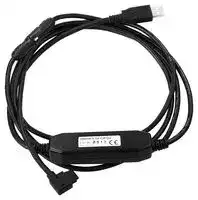


E58-CIFQ2
USB CABLE, TEMPERATURE CONTROLLER
- Manufacturer: OMRON INDUSTRIAL AUTOMATION
- Product type: Controller Accessories
- Current Rating:250mA; Product Range:- 06X2905
- Product Range: -
- Current Rating: 250mA
| Delivery and price | |
|---|---|
| Units per pack | 1 |
| Price | 331.5 € |
| Current stock | 10+ |
| Lead time | 30 days |

**New Product**

## **Digital Temperature Controller E5@C/E5@C-T**

**Large White PV Display That's Easier to Read. Easy to Use, from Model Selection to Setup and Operation. New Plug-in Models That Are Convenient for Maintenance and Replacement as replacing temperature controllers is possible without changing wiring. New Models That Mount to DIN Track and Are Ideal for HMI/PLC Connections. And Programmable Models to Support a Wider Range of Applications.**

**==> picture [491 x 494] intentionally omitted <==**

**----- Start of picture text -----**<br>
DIN 48 × 24 mm<br>E5GC<br>page 2<br>E5CC DIN 48 × 48 mm<br>page 16<br>E5CC-U<br>Digital Temperature Controller<br>E5@C  DIN 48 × 96 mm<br>E5EC page 34<br>Series<br>DIN 96 × 96 mm<br>E5AC page 34<br>22.5 mm wide<br>E5DC Mounts to DIN<br>Track page 50<br>DIN 48 × 48 mm<br>Programmable<br>E5CC-T page 64<br>Temperature Controller<br>(Digital Controller)<br>E5@C-T  DIN 48 × 96 mm<br>E5EC-T page 80<br>Series<br>—<br>DIN 96 × 96 mm<br>E5AC-T page 80<br>**----- End of picture text -----**<br>


**1**

## **Digital Temperature Controller E5GC (48** × **24 mm)** ee **Easy Operation and High Performance of the E5@C Series in a Compact 48** × **24-** @uleCE **mm Body**

- A compact body of 48 × 24 × 90 mm (W × H × D) that is ideal for small equipment, laboratory instruments, and others.

- White PV display with a height of 10.5 mm for high visibility even with the compact body.

- Removable terminal block to simplify maintenance. Select from screw terminals or screwless clamp terminals for the wiring method.

- High-speed sampling at 50 ms.

- Easy connections to a PLC with programless communications.

- Set up the Controller without wiring the power supply by connecting to the computer with a Communications Conversion Cable (sold separately). Setup is easy with the CX-Thermo (sold separately).

**==> picture [182 x 31] intentionally omitted <==**

**----- Start of picture text -----**<br>
48  ×  24 mm 48  ×  24 mm<br>Models with Screw  Models with Screwless<br>Terminal Blocks  Clamp Terminal Blocks<br>E5GC-@6 E5GC-@C<br>**----- End of picture text -----**<br>


**==> picture [158 x 16] intentionally omitted <==**

**----- Start of picture text -----**<br>
Refer to your OMRON website for the most recent<br>information on applicable safety standards.<br>**----- End of picture text -----**<br>


**Refer to** _**Safety Precautions**_ **on page 104.**

## **Main I/O Functions**

**==> picture [439 x 229] intentionally omitted <==**

**----- Start of picture text -----**<br>
Sensor Input E5GC<br>Universal input<br>• Thermocouple Dual displays: PV/SV 4-digit displays<br>• Pt<br>• Analog current/voltage<br>Control Output 1<br>Indication Accuracy<br>• Thermocouple input: • Relay output<br>±0.3% of PV • Voltage output (for driving SSR)<br>• Pt input: ±0.2% of PV<br>• Analog input: ±0.2% of FS • Linear current output<br>Sampling Period<br>• 50 ms Auxiliary Outputs<br>• None<br>• PF (shift) Key<br>Event Inputs  • Temperature status display  • 1<br>• 2<br>• None • Simple programming<br>• 1 • Independent heating and<br>• 2 cooling PID control<br>• Changed parameter display<br>Serial Communications • Display brightness setting<br>• Simple transfer output (only on<br>• None<br>models with liner current outputs)<br>• RS-485 • Work Bit Message<br>**----- End of picture text -----**<br>


**This datasheet is provided as a guideline for selecting products.**

**Be sure to refer to the following manuals for application precautions and other information required for operation before attempting to use the product.**

**E5@C Digital Temperature Controllers User’s Manual (Cat. No. H174)**

**E5@C Digital Temperature Controllers Communications Manual (Cat. No. H175)**

**2**

**E5GC**

**Model Number Legend and Standard Models**

## **Model Number Legend**

> **E5GC-** −−−−−− **@@** A **@** B C **@ @** D **M-** E **@@@** −−−F **(Example: E5GC-RX1A6M-015)**

|**Model**|A|B|C|D|E|F|**Meaning**|**Meaning**|**Meaning**|
|---|---|---|---|---|---|---|---|---|---|
||**Control**<br>**outputs 1**<br>**and 2**|<br>**No. of**<br>**auxiliary**<br>**outputs**|**Power**<br>**supply**<br>**voltage**|**Terminal**<br>**type**|**Input**<br>**type**|**Options**||||
|**E5GC**|||||||48×24 mm|||
|***1**|||||||**Control output 1**|**Control output 2**||
||**RX**||||||Relayoutput|None||
||**QX**||||||Voltage output<br>(for drivingSSR)|None||
||**CX**||||||Linear current output|None||
||***2 **|**0**|||||None|||
|||**1**|||||1|||
|||**2**|||||2|||
||||**A**||||100 to 240 VAC|||
||||**D**||||24 VAC/DC|||
|||||**6**|||Screw terminals(with cover)|||
|||||**C**|||Screwless clampterminals|||
||||||**M**||Universal input|||
||||||***3**<br>***3, *4**<br>***5**||**HB alarm and HS alarm**|**Communications**|**Event inputs**|
|||||||000|---|---|---|
|||||||015|---|RS-485|---|
|||||||016|---|---|1|
|||||||<br>023|1|---|---|
|||||||024|---|---|2|


- *1 The control output can be used as a simple transfer output.

- *2 Only option 000 can be selected if an auxiliary output is zero.

- *3 Option 016 and 023 can be selected only if two auxiliary outputs are selected.

- *4 Option with HB and HS alarms (023) cannot be selected if a linear current output is selected for the control output.

- *5 Option 024 can be selected only if one auxiliary output is selected.

## **Heating and Cooling Control**

## ● **Using Heating and Cooling Control**

A Control Output Assignment

An auxiliary output is used as the cooling control output.

B Control

If PID control is used, you can set PID control separately for heating and cooling. This allows you to handle control systems with different heating and cooling response characteristics.

**3**

**E5GC**

## **Optional Products (Order Separately) USB-Serial Conversion Cable**

**Model E58-CIFQ2**

## **Communications Conversion Cable**

## **Waterproof Packing**

**Model Y92S-P12**

**Note:** This Waterproof Packing is provided with the Digital Temperature Controller.

## **Model**

## **E58-CIFQ2-E**

**Note:** Always use this product together with the E58-CIFQ2. This Cable is used to connect to the bottom-panel Setup Tool port.

## **Current Transformers (CTs)**

|**Hole diameter**|**Model**|
|---|---|
|5.8 mm|**E54-CT1**|
|12.0 mm|**E54-CT3**|


## **Mounting Adapter**

**Model**

## **Draw-out Jig**

**Model Y92F-55**

## **CX-Thermo Support Software**

**Model EST2-2C-MV4**

**Note:** CX-Thermo version 4.62 or higher is required for the E5GC. For the system requirements for the CX-Thermo, refer to information on the EST2-2C-MV4 on the OMRON website (www.ia.omron.com).

## **Y92F-53 (2pcs)**

**Note:** This Mounting Adapter is provided with the Digital Temperature Controller.

**4**

**E5GC**

## **Specifications**

## **Ratings**

|**Ratings**|**Ratings**||
|---|---|---|
|**Power supply voltage**||A in model number: 100 to 240 VAC, 50/60 Hz<br>D in model number: 24 VAC, 50/60 Hz; 24 VDC|
|**Operating voltage range**||85% to 110% of rated supplyvoltage|
|**Power consumption**||5.9 VA max. at 100 to 240 VAC, and 3.2 VA max. at 24 VAC or 1.8 W max. at 24 VDC|
|**Sensor input**||Temperature input<br>Thermocouple: K, J, T, E, L, U, N, R, S, B, W, or PL II<br>Platinum resistance thermometer: Pt100 or JPt100<br>Infrared temperature sensor (ES1B): 10 to 70°C, 60 to 120°C, 115 to 165°C, or 140 to 260°C<br>Analog input<br>Current input: 4 to 20 mA or 0 to 20 mA<br>Voltage input: 1 to 5 V, 0 to 5 V, or 0 to 10 V|
|**Input impedance**||Current input: 150Ωmax., Voltage input: 1 MΩmin. (Use a 1:1 connection when connecting the ES2-HB/<br>THB.)|
|**Control method**||ON/OFF control or 2-PID control (with auto-tuning)|
|**Control**<br>**output**|**Relay output**|SPST-NO, 250 VAC, 2 A (resistive load), electrical life: 100,000 operations, minimum applicable load: 5<br>V, 10 mA (reference value)|
||**Voltage output**<br>**(for driving SSR)**|Output voltage 12 VDC±20% (PNP), max. Load current: 21 mA, with short-circuit protection circuit|
||**Linear current output**|4 to 20 mA DC/0 to 20 mA DC, load: 500Ωmax., resolution: Approx. 10,000|
|**Auxiliary**<br>**output**|**Number of outputs**|1 or 2 (depends on model)|
||**Output specifications**|SPST-NO relay outputs, 250 VAC, 2 A (resistive load),<br>Electrical life: 100,000 operations, Minimum applicable load: 10 mA at 5 V (reference value)|
|**Event**<br>**input**|**Number of inputs**|1 or 2 (depends on model)|
||**External contact input**<br>**specifications**|Contact input ON: 1 kΩmax., OFF: 100 kΩmin.|
|||Non-contact input ON: Residual voltage 1.5 V max.; OFF: Leakage current 0.1 mA max.|
|||Current flow: approx. 7 mA per contact|
|**Setting method**||Digital settingusingfront panel keys|
|**Indication method**||11-segment digital displays and individual indicators<br>Character height: PV: 10.5 mm, SV: 5.0 mm|
|**Multi SP**||Up to eight set points (SP0 to SP7) can be saved and selected using the event inputs, key operations, or<br>serial communications.*|
|**Bank switching**||None|
|**Other functions**||Manual output, heating/cooling control, loop burnout alarm, SP ramp, other alarm functions, heater burn-<br>out (HB) alarm (including SSR failure (HS) alarm), 40% AT, 100% AT, MV limiter, input digital filter, self<br>tuning, robust tuning, PV input shift, run/stop, protection functions, extraction of square root, MV change<br>rate limit, logic operations, temperature status display, simple programming, moving average of input val-<br>ue, display brightness setting, simple transfer output, and work bit message|
|**Ambient operating temperature**||−10 to 55°C (with no condensation or icing), For 3-year warranty:−10 to 50°C with standard mounting (with<br>no condensation or icing)|
|**Ambient operating humidity**||25% to 85%|
|**Storage temperature**||−25 to 65°C (with no condensation or icing)|
|**Altitude**||2,000 m max.|
|**Recommended fuse**||T2A, 250 VAC, time-lag, low-breakingcapacity|
|**Installation environment**||Installation CategoryII, Pollution Degree 2 (IEC 61010-1 compliant)|


* Only four set points are selectable for event inputs.

**5**

**E5GC**

## **Input Ranges**

## ● **Thermocouple/Platinum Resistance Thermometer (Universal inputs)**

**==> picture [513 x 265] intentionally omitted <==**

**----- Start of picture text -----**<br>
Sensor  Platinum resistance  Infrared temperature<br>type thermometer Thermocouple sensor<br>Sensor<br>specifica- Pt100 JPt100 K J T E L U N R S B W PLII 70°C10 to  120°C60 to  115 to 165°C 260°C140 to<br>tion<br>2300<br>2300<br>1800<br>1800<br>1700 1700<br>1700<br>1600<br>1500<br>1400<br>1300 1300 1300<br>1300<br>1200<br>1100<br>1000<br>850 850 850<br>900<br>800<br>700<br>600<br>600<br>500.0 500.0 500.0<br>500<br>400.0 400 400.0 400 400.0<br>400<br>260<br>300<br>120 165<br>200<br>100.0 100.0 90<br>100<br>100<br>0.0 0.0 0 0 0 0 0 0 0 0<br>-100<br>-20.0 -100 -20.0 -100<br>-200<br>-200 -199.9 -199.9 -200 -200 -199.9 -200 -200 -199.9 -200<br>Set value 0 1 2 3 4 5 6 7 8 9 10 11 12 13 14 15 16 17 18 19 20 21 22 23 24<br> Shaded settings are the default settings.<br>Temperature range (°C)<br>**----- End of picture text -----**<br>


The applicable standards for the input types are as follows: K, J, T, E, N, R, S, B: JIS C 1602-1995, IEC 60584-1 JPt100: JIS C 1604-1989, JIS C 1606-1989 L: Fe-CuNi, DIN 43710-1985 Pt100: JIS C 1604-1997, IEC 60751 U: Cu-CuNi, DIN 43710-1985 PL II: According to Platinel II electromotive force charts from BASF (previously Engelhard) W: W5Re/W26Re, ASTM E988-1990

## ● **Analog input**

|**Input type**|**Current**|**Current**|**Voltage**|**Voltage**|**Voltage**|
|---|---|---|---|---|---|
|**Input specification**|4 to 20 mA|0 to 20 mA|1 to 5 V|0 to 5 V|0 to 10 V|
|**Setting range**|Usable in the following ranges by scaling:<br>-1999 to 9999, -199.9 to 999.9,<br>-19.99 to 99.99 or -1.999 to 9.999|||||
|**Set value**|25|26|27|28|29|


**6**

**E5GC**

## **Alarm Types**

Each alarm can be independently set to one of the following 17 alarm types. The default is 2: Upper limit. (See note.) Auxiliary outputs are allocated to alarms. ON delays and OFF delays (0 to 999 s) can also be specified. **Note:** In the default settings for models with HB or HS alarms, alarm 1 is set to a heater alarm (HA) and the Alarm Type 1 parameter is not displayed.

To use alarm 1, set the output assignment to alarm 1.

|**Set**<br>**value**|**Alarm type**|**Alarm output operation**|**Alarm output operation**|**Alarm output operation**|**Alarm output operation**|**Alarm output operation**|**Alarm output operation**|**Alarm output operation**|**Alarm output operation**|**Alarm output operation**|**Alarm output operation**|**Description of function**|
|---|---|---|---|---|---|---|---|---|---|---|---|---|
|||**When alarm value X**<br>**is positive**||||||**When alarm value X**<br>**is negative**|||||
|0|Alarm function OFF||||||Output OFF|||||No alarm|
|1|Upper- and lower-limit *1|ON<br>OFF||L||H|PV|*2||||Set the upward deviation in the set point for the alarm upper<br>limit (H) and the lower deviation in the set point for the alarm<br>lower limit (L). The alarm is ON when the PV is outside this<br>deviation range.|
||||||||||||||
|||||S||P|||||||
|2<br>(default)|Upper-limit|ON<br>OFF||||X|PV|ON<br>OFF|SP<br>X<br>PV|||Set the upward deviation in the set point by setting the alarm<br>value (X). The alarm is ON when the PV is higher than the<br>SP bythe deviation or more.|
|||||S||P|||||||
|3|Lower-limit|ON<br>OFF||X|||PV|ON<br>OFF|SP<br>X<br>PV|||Set the downward deviation in the set point by setting the<br>alarm value (X). The alarm is ON when the PV is lower than<br>the SP bythe deviation or more.|
||||||||||||||
|||||S||P|||||||
|4|Upper- and lower-limit<br>range *1|ON<br>OFF||L||H|PV|*3||||Set the upward deviation in the set point for the alarm upper<br>limit (H) and the lower deviation in the set point for the alarm<br>lower limit (L). The alarm is ON when the PV is inside this de-<br>viation range.|
||||||||||||||
|||||S||P|||||||
|5|Upper- and lower-limit<br>with standby sequence *1|ON<br>OFF<br>*5|||L|H|PV|*4||||A standby sequence is added to the upper- and lower-limit<br>alarm (1). *6|
||||||||||||||
|||||S||P|||||||
|6|Upper-limit with standby<br>sequence|ON<br>OFF||||X|PV|ON<br>OFF||X||A standby sequence is added to the upper-limit alarm (2). *6|
||||||||||||||
|||||S||P|||||||
|7|Lower-limit with standby<br>sequence|ON<br>OFF|||X||PV|ON<br>OFF|||X|A standby sequence is added to the lower-limit alarm (3). *6|
||||||||||||||
|||||S||P|||||||
|8|Absolute-value upper-lim-<br>it|ON<br>OFF||||X|PV|ON<br>OFF||X||The alarm will turn ON if the process value is larger than the<br>alarm value (X) regardless of the set point.|
||||||||||||||
|||||0|||||||||
|9|Absolute-value lower-limit|ON<br>OFF|||||PV|ON<br>OFF||X||The alarm will turn ON if the process value is smaller than the<br>alarm value (X) regardless of the set point.|
||||||||||||||
|||||0|||||||||
|10|Absolute-value upper-lim-<br>it with standby sequence|ON<br>OFF||||X||||X||A standby sequence is added to the absolute-value upper-<br>limit alarm (8). *6|
||||||||PV|ON<br>OFF|||||
|||||0|||||||||
|11|Absolute-value lower-limit<br>with standby sequence|ON<br>OFF||||X|PV|ON<br>OFF||X||A standby sequence is added to the absolute-value lower-<br>limit alarm (9). *6|
||||||||||||||
|||||0|||||||||
|12|LBA (alarm 1 type only)||||||-|||||*7|
|13|PV change rate alarm||||||-|||||*8|
|14|SP absolute-value<br>upper-limit alarm|ON<br>OFF||||X||||X||This alarm type turns ON the alarm when the set point (SP)<br>is higher than the alarm value (X).|
||||||||SP|ON<br>OFF|||||
|||||0|||||||||
|15|SP absolute-value<br>lower-limit alarm|ON<br>OFF||||X|SP|ON<br>OFF||X||This alarm type turns ON the alarm when the set point (SP)<br>is lower than the alarm value (X).|
||||||||||||||
|||||0|||||||||
|16|MV absolute-value<br>upper-limit alarm *9|Standard Control<br>0<br>X<br>ON<br>OFF<br>MV||||||Standard Control<br>0<br>X<br>ON<br>OFF<br>MV||||This alarm type turns ON the alarm when the manipulated<br>variable (MV) is higher than the alarm value (X).|
|||Heating/Cooling<br>Control (Heating MV)<br>0<br>X<br>ON<br>OFF<br>MV||||||Heating/Cooling<br>Control (Heating MV)<br>Always ON|||||
|17|MV absolute-value<br>lower-limit alarm *9|Standard Control<br>0<br>X<br>ON<br>OFF<br>MV||||||Standard Control<br>0<br>X<br>ON<br>OFF<br>MV||||This alarm type turns ON the alarm when the manipulated<br>variable (MV) is lower than the alarm value (X).|
|||Heating/Cooling<br>Control (Cooling MV) <br>0<br>X<br>ON<br>OFF<br>MV||||||Heating/Cooling<br>Control (Cooling MV)<br>Always ON|||||


**7**

## **E5GC**

- *1 With set values 1, 4, and 5, the upper- and lower-limit values can be set independently for each alarm type, and are expressed as “L” and “H.”

- *2 Set value: 1, Upper- and lower-limit alarm

**==> picture [209 x 134] intentionally omitted <==**

**----- Start of picture text -----**<br>
Case 1 Case 2 Case 3 (Always OFF)<br>H<0, L<0<br>L H SP SP L H H SP L<br>H<0, L>0<br>H<0, L>0 H>0, L<0 H L SP |H| ≥ |L|<br>|H| < |L| |H| > |L|<br>H>0, L<0<br>SP H L |H| ≤ |L|<br>Set value: 4, Upper- and lower-limit range<br>Case 1 Case 2 Case 3 (Always ON)<br>H<0, L<0<br>L H SP SP L H H SP L<br>H<0, L>0<br>H<0, L>0|H| < |L| H>0, L<0|H| > |L| H L SP |H| ≥ |L|<br>H>0, L<0<br>SP H L |H| ≤ |L|<br>**----- End of picture text -----**<br>


- *3 Set value: 4, Upper- and lower-limit range

- *4 Set value: 5, Upper- and lower-limit with standby sequence For Upper- and Lower-Limit Alarm Described Above at *2

   - In cases 1 and 2 above, the alarm is always OFF if the upperand lower-limit hysteresis overlaps.

   - In case 3, the alarm is always OFF.

- *5 Set value: 5, Upper- and lower-limit alarm with standby sequence The alarm is always OFF if upper- and lower-limit hysteresis overlaps.

- *6 Refer to the _E5_ @ _C Digital Temperature Controllers User’s Manual_ (Cat. No. H174) for information on the operation of the standby sequence.

- *7 Refer to the _E5_ @ _C Digital Temperature Controllers User’s Manual_ (Cat. No. H174) for information on the LBA.

- *8 Refer to the _E5_ @ _C Digital Temperature Controllers User’s Manual_ (Cat. No. H174) for information on the PV change rate alarm.

- *9 When heating/cooling control is performed, the MV absolutevalue upper-limit alarm functions only for the heating operation and the MV absolute-value lower-limit alarm functions only for the cooling operation.

**8**

**E5GC**

## **Characteristics**

|**Characteristics**|**Characteristics**||
|---|---|---|
|**Indication accuracy**<br>**(at the temperature of 23**°**C)**||Thermocouple:<br>(±0.3 % of indication value or±1°C, whichever is greater)±1 digit max.*1<br>Platinum resistance thermometer: (±0.2 % of indication value or±0.8°C, whichever is greater)±1 digit max.<br>Analog input:<br>±0.2% FS±1 digit max.<br>CT input:<br>±5% FS±1 digit max.|
|**Influence of temperature  *2**||Thermocouple input (R, S, B, W, PL II): (±1% of indication value or±10°C, whichever is greater)±1 digit<br>max.<br>Other thermocouple input: (±1% of indication value or±4°C, whichever is greater)±1 digit max.  *3<br>Platinum resistance thermometer: (±1% of indication value or±2°C, whichever is greater)±1 digit max.<br>Analog input:±1% FS±1 digit max.<br>CT input:±5% FS±1 digit max.|
|**Influence of voltage  *2**|||
|**Input sampling period**||50 ms|
|**Hysteresis**||Temperature input: 0.1 to 999.9°C or°F (in units of 0.1°C or°F)<br>Analoginput: 0.01% to 99.99% FS (in units of 0.01% FS)|
|**Proportional band (P)**||Temperature input: 0.1 to 999.9°C or°F (in units of 0.1°C or°F)<br>Analoginput: 0.1% to 999.9% FS (in units of 0.1% FS)|
|**Integral time (I)**||0 to 9999 s (in units of 1 s), 0.0 to 999.9 s (in units of 0.1 s) *4|
|**Derivative time (D)**||0 to 9999 s (in units of 1 s), 0.0 to 999.9 s (in units of 0.1 s) *4|
|**Proportional band (P) for cooling**||Temperature input: 0.1 to 999.9°C or°F (in units of 0.1°C or°F)<br>Analoginput: 0.1% to 999.9% FS (in units of 0.1% FS)|
|**Integral time (I) for cooling**||0 to 9999 s (in units of 1 s), 0.0 to 999.9 s (in units of 0.1 s) *4|
|**Derivative time (D) for cooling**||0 to 9999 s (in units of 1 s), 0.0 to 999.9 s (in units of 0.1 s) *4|
|**Control period**||0.1, 0.2, 0.5, 1 to 99 s (in units of 1 s)|
|**Manual reset value**||0.0% to 100.0% (in units of 0.1%)|
|**Alarm setting range**||−1,999 to 9,999 (decimal point position depends on input type)|
|**Influence of signal source resis-**<br>**tance**||Thermocouple: 0.1°C/Ωmax. (100Ωmax.), Platinum resistance thermometer: 0.1°C/Ωmax. (10Ωmax.)|
|**Insulation resistance**||20 MΩmin. (at 500 VDC)|
|**Dielectric strength**||100 to 240 VAC: 3,000 VAC, 50/60 Hz for 1 min between terminals of different charge<br>24 VAC/DC: 2,300 VAC, 50/60 Hz for 1 min between terminals of different charge|
|**Vibration**|**Malfunction**|10 to 55 Hz, 20 m/s2for 10 min each in X, Y and Z directions|
||**Resistance**|10 to 55 Hz, 20 m/s2for 2 hr each in X, Y, and Z directions|
|**Shock**|**Malfunction**|100 m/s2, 3 times each in X, Y, and Z directions|
||**Resistance**|300 m/s2, 3 times each in X, Y, and Z directions|
|**Weight**||Controller: Approx. 80g, Adapter: Approx. 4g ×2|
|**Degree of protection**||Front panel: IP66, Rear case: IP20, Terminals: IP00|
|**Memory protection**||Non-volatile memory(number of writes: 1,000,000 times)|
|**Setup Tool**||CX-Thermo version 4.62 or higher|
|**Setup Tool port**||E5GC side panel: An E58-CIFQ2 USB-Serial Conversion Cable is used to connect a USB port on the com-<br>puter. *5<br>E5GC bottom panel: An E58-CIFQ2 USB-Serial Conversion Cable and E58-CIFQ2-E Conversion Cable<br>are used together to connect a USB port on the computer.*5|
|**Standards**|**Approved standards**|UL 61010-1, Korean Radio Waves Act (Act 10564)|
||**Conformed standards**|EN 61010-1 (IEC 61010-1): Pollution Degree 2 , overvoltage categoryII|
|**EMC**||EMI:<br>EN61326<br>Radiated Interference Electromagnetic Field Strength: EN55011  Group 1, class A<br>Noise Terminal Voltage:<br>EN55011  Group 1, class A<br>EMS:<br>EN61326<br>ESD Immunity:<br>EN61000-4-2<br>Electromagnetic Field Immunity:<br>EN61000-4-3<br>Burst Noise Immunity:<br>EN61000-4-4<br>Conducted Disturbance Immunity:<br>EN61000-4-6<br>Surge Immunity:<br>EN61000-4-5<br>Voltage Dip/InterruptingImmunity:<br>EN61000-4-11|


*1 The indication accuracy of K thermocouples in the −200 to 1,300°C range, T and N thermocouples at a temperature of −100°C max., and U and L thermocouples at any temperature is ±2°C ±1 digit max. The indication accuracy of B thermocouples at a temperature of 400°C max. is not specified. The indication accuracy of B thermocouples at a temperature of 400 to 800°C is ±3°C max. The indication accuracy of R and S thermocouples at a temperature of 200°C max. is ±3°C ±1 digit max. The indication accuracy of W thermocouples is (±0.3% of PV or ±3°C, whichever is greater) ±1 digit max. The indication accuracy of PLII thermocouples is (±0.3% of PV or ±2°C, whichever is greater) ±1 digit max.

*2 Ambient temperature: −10°C to 23°C to 55°C, Voltage range: −15% to 10% of rated voltage

*3 K thermocouple at −100°C max.: ±10°C max.

*4 The unit is determined by the setting of the Integral/Derivative Time Unit parameter.

*5 External serial communications (RS-485) and USB-Serial Conversion Cable communications can be used at the same time.

**9**

**E5GC**

## **USB-Serial Conversion Cable**

|**Applicable OS**|Windows XP/Vista/7/8|
|---|---|
|**Applicable software**|CX-Thermo version 4.62 or higher|
|**Applicable models**|E5@C-T Series, E5@C Series, and E5CB Series|
|**USB interface standard**|Conforms to USB Specification 2.0|
|**DTE speed**|38,400 bps|
|**Connector**<br>**specifications**|Computer: USB (Type A plug)<br>Digital Temperature Controller: Special serial con-<br>nector|
|**Power supply**|Bus power (Supplied from the USB host controller) *|
|**Power supply voltage**|5 VDC|
|**Current consumption**|450 mA max.|
|**Output voltage**|4.7±0.2 VDC (Supplied from USB-Serial Conver-<br>sion Cable to the Digital Temperature Controller.)|
|**Output current**|250 mA max. (Supplied from USB-Serial Conver-<br>sion Cable to the Digital Temperature Controller.)|
|**Ambient operating**<br>**temperature**|0 to 55°C (with no condensation or icing)|
|**Ambient operating**<br>**humidity**|10% to 80%|
|**Storage temperature**|−20 to 60°C (with no condensation or icing)|
|**Storage humidity**|10% to 80%|
|**Altitude**|2,000 m max.|
|**Weight**|Approx. 120 g|


Windows is a registered trademark of Microsoft Corporation in the United States and or other countries.

- Use a high-power port for the USB port.

- **Note:** A driver must be installed on the computer. Refer to the _Instruction Manual_ included with the Cable for the installation procedure.

## **Communications Specifications**

|**Transmission line connection**<br>**method**|RS-485: Multidrop|
|---|---|
|**Communications**|RS-485 (two-wire, half duplex)|
|**Synchronization method**|Start-stop synchronization|
|**Protocol**|CompoWay/F, or Modbus|
|**Baud rate***|9,600, 19,200, 38,400, or 57,600 bps|
|**Transmission code**|ASCII|
|**Data bit length ***|7 or 8 bits|
|**Stop bit length ***|1 or 2 bits|
|**Error detection**|Vertical parity (none, even, odd)<br>Block check character (BCC)<br>with CompoWay/F or<br>CRC-16 with Modbus|
|**Flow control**|None|
|**Interface**|RS-485|
|**Retry function**|None|
|**Communications buffer**|217 bytes|
|**Communications response**<br>**wait time**|0 to 99 ms<br>Default: 20 ms|


* The baud rate, data bit length, stop bit length, and vertical parity can be individually set using the Communications Setting Level.

## **Communications Functions**

|**Programless**<br>**communica-**<br>**tions**|You can use the memory in the PLC to read and write E5@C<br>parameters, start and stop operation, etc.<br>The E5@C automatically performs communications with<br>PLCs. No communications programming is required.<br>Number of connected Digital Temperature Controllers: 32<br>max. (Up to 16 for the FX Series)<br>Applicable PLCs: OMRON PLCs<br>CS Series, CJ Series, or CP Series<br>Mitsubishi Electric PLCs<br>MELSEC Q Series, L Series, or FX Series (compati-<br>ble with the FX2 or FX3 (excluding the FX1S))<br>KEYENCE PLCs<br>KEYENCE KV Series|
|---|---|


|**Component**<br>**Communica-**<br>**tions**|When Digital Temperature Controllers are connected, set<br>points and RUN/STOP commands can be sent from the Dig-<br>ital Temperature Controller that is set as the master to the<br>Digital Temperature Controllers that are set as slaves.<br>Slope and offsets can be set for the set point.<br>Number of connected Digital Temperature Controllers: 32<br>max. (including master)|
|---|---|
|**Copying***|When Digital Temperature Controllers are connected, the pa-<br>rameters can be copied from the Digital Temperature Control-<br>ler that is set as the master to the Digital Temperature<br>Controllers that are set as slaves.|


MELSEC is a registered trademark of Mitsubishi Electric Corporation. KEYENCE is a registered trademark of Keyence Corporation.

- Both the programless communications and the component communications support the copying.

## **Current Transformer (Order Separately) Ratings**

|**Ratings**||
|---|---|
|**Dielectric strength**|1,000 VAC for 1 min|
|**Vibration resistance**|50 Hz, 98 m/s2|
|**Weight**|E54-CT1: Approx. 11.5 g,<br>E54-CT3: Approx. 50 g|
|**Accessories (E54-CT3 only)**|Armatures (2)<br>Plugs (2)|


## **Heater Burnout Alarms and SSR Failure Alarms**

|**CT input (for heater current**<br>**detection)**|Models with detection for single-phase heat-<br>ers: One input|
|---|---|
|**Maximum heater current**|50 A AC|
|**Input current**<br>**indication accuracy**|±5% FS±1 digit max.|
|**Heater burnout alarm**<br>**setting range *1**|0.1 to 49.9 A (in units of 0.1 A)<br>Minimum detection ON time: 100 ms *3|
|**SSR failure alarm setting**<br>**range *2**|0.1 to 49.9 A (in units of 0.1 A)<br>Minimum detection OFF time: 100 ms *4|


- *1 For heater burnout alarms, the heater current will be measured when the control output is ON, and the output will turn ON if the heater current is lower than the set value (i.e., heater burnout detection current value).

- *2 For SSR failure alarms, the heater current will be measured when the control output is OFF, and the output will turn ON if the heater current is higher than the set value (i.e., SSR failure detection current value).

- *3 The value is 30 ms for a control period of 0.1 s or 0.2 s.

- *4 The value is 35 ms for a control period of 0.1 s or 0.2 s.

## **Electrical Life Expectancy Curve for Control Output Relay (Reference Values)**

**==> picture [159 x 155] intentionally omitted <==**

**----- Start of picture text -----**<br>
500<br>300<br>200<br>100<br>E5GC<br>250 VAC, 30 VDC<br>50 (resistive load)<br>30 cosφ = 1<br>20<br>10<br>5<br>3<br>2<br>1<br>0.1 0.2 0.3 0.5 1 2 3 5 10<br>Switching current (A)<br>4 operations)Life (× 10<br>**----- End of picture text -----**<br>


**10**

**E5GC**

## **External Connections**

## **E5GC**

**==> picture [424 x 389] intentionally omitted <==**

**----- Start of picture text -----**<br>
Control Outputs<br>Relay output E5GC-@@@@@ M- @@@<br>250 VAC, 2 A  (1) (2)(3)(4)(5) (6)<br>(resistive load) ↑<br>Voltage output (for driving SSR) Terminal type<br>12 VDC, 21 mA<br>Auxiliary outputs 1, 2<br>Linear current output The E5GC is set for a K-type thermocouple (input type = 5) by<br>0 to 20 mA DC Relay outputs default. An input error (s.err) wil occur if the input type setting<br>4 to 20 mA DC 250 VAC, 2 A  does not agree with the temperature sensor. Check the input type.<br>Load: 500 Ω max. (resistive load)<br>(6) Options (5) Sensor<br>015 016 023 024 (Temperature/<br>Communications  Event input 1 CT input Event inputs 1 and 2 Analog) Input<br>B(+)(RS-485)RS-485A(−) EV1 − + CT EV2EV1 − + + − +<br>TC 10 11 12<br>7 8 9 7 8 9 7 8 9 7 8 9<br>A B B<br>Pt 10 11 12<br>(3) Input Power Supply + mA −<br>100 to 240 VAC 24 VAC/DC<br>7 8 9 10 11 12 I 10 11 12<br>1 2 1 2<br>− V +<br>1 2 3 4 5 6<br>(no polarity) V 10 11 12<br>(2) Auxiliary Outputs<br>Auxiliary  Auxiliary outputs 1, 2<br>(1) Control Outputs output 1 Auxiliary<br>RX QX CX output 2<br>Relay output Voltage output (for driving SSR) Linear current output 9<br>R Q C<br>+ − + −<br>5 6 5 6<br>3 4 3 4 3 4<br>Auxiliary  Auxiliary<br>output 1 output 1<br>**----- End of picture text -----**<br>


## **Note: 1.** The application of the terminals depends on the model.

**2.** Do not wire the terminals that are shown with a gray background.

**3.** When complying with EMC standards, the cable that connects the sensor must be 30 m or less. If the cable length exceeds 30 m, compliance with EMC standards will not be possible.

**4.** Connect M3 crimped terminals.

## **Isolation/Insulation Block Diagrams**

**==> picture [214 x 103] intentionally omitted <==**

**----- Start of picture text -----**<br>
Sensor input and CT input<br>Communications and event inputs<br>Power<br>Voltage output (for driving SSR) and linear current output<br>supply<br>Relay output<br>Auxiliary outputs 1 and 2<br>: Reinforced insulation<br>: Functional isolation<br>**----- End of picture text -----**<br>


**Note:** Auxiliary outputs 1 to 2 are not insulated.

**11**

**E5GC**

## **Wiring Methods**

## **E5GC-@6 Controllers with Screw Terminal Blocks (M3 Screws)**

## **E5GC-@C Controllers with Screwless Clamp Terminal Blocks**

Controllers with Screw Terminal Blocks Controllers with Screwless Clamp Terminals Blocks • Terminal type: Forked or round crimped terminals • Wire stripping length: 8 to 12 mm • Tightening torque for all terminals: 0.43 to 0.58 N·m • Ferrules: 8 to 12 mm 0.8 to 1.4 mm 5.8 mm max. on 8 to 12 mm 8 to 12 mm 5.8 mm max. e:74 FE FRE

Wires: AWG24 to AWG18 (equal to a cross-sectional area of 0.205 to 0.823 mm[2] ) braided or solid wires

## **Nomenclature**

## **E5GC**

**==> picture [444 x 155] intentionally omitted <==**

**----- Start of picture text -----**<br>
Front panel See Left Side View of the E5GC<br>SS No. 1 display Left-panel<br>Setup Tool<br>Temperature unit — PV or specified parameter port<br>No.2 display<br>SP or specified parameter value Bottom View of E5GC<br>Operation indicators<br>Press O Key once to go to Adjustment Level.<br>Use the U D Keys to set the parameter.<br>Press O Key for at least 3 seconds  . *, Bottom-panel Setup<br>to go to the Initial Setting Level. Tool port<br>Use the M Key to change  Use S Key to change the<br>to another parameter. digit (default setting).<br>**----- End of picture text -----**<br>


**12**

**E5GC**

**Dimensions**

(Unit: mm)

## **Controllers**

**==> picture [506 x 236] intentionally omitted <==**

**----- Start of picture text -----**<br>
E5GC-@6 Waterproof Packing (Accessory)<br>Controllers with Screw  Mounting Adapter (Accessory)<br>Terminal Blocks 63.6 4 90 Terminal Cover (Accessory)<br>48 44.8<br>1<br>24 40.8 22 22<br>— |) oe<br>• Use two Mounting Adapters, either on the top and bottom or on the right and left.<br>• Setup Tool ports are provided as standard feature. Use these ports to connect a computer to the Digital Temperature Controller. The E58-<br>CIFQ2 USB-Serial Conversion Cable is required to connect to the port on the side panel. The E58-CIFQ2 USB-Serial Conversion Cable<br>and E58-CIFQ2-E Communications Conversion Cable are required to connect to the port on the bottom panel. (You cannot leave either<br>port connected constantly during operation.)<br>Mounted Separately Horizontally Group Mounted<br>L1<br>o w eS 22.2             0 [+0.3] To mount the Temperature Controller so that it is waterproof,<br>in EH insert the Waterproof Packing onto the Temperature Controller.<br>40 min 45           0 [+0.6] L1=(48×n-2.5) +1.0+0 Group mounting does not allow waterproofing.<br>n: Number of mounted Controllers (2 ≤ n ≤ 6)<br>i inl >| 22.2             0 [+0.3]<br>Ee<br>• To install the Temperature Controller, insert it into a square hole in a panel with a thickness of 1 to 8 mm, and then insert the enclosed<br>adapter so that it locks into the grooves on the top and bottom or on the left and right of the rear case.<br>**----- End of picture text -----**<br>


- Setup Tool ports are provided as standard feature. Use these ports to connect a computer to the Digital Temperature Controller. The E58CIFQ2 USB-Serial Conversion Cable is required to connect to the port on the side panel. The E58-CIFQ2 USB-Serial Conversion Cable and E58-CIFQ2-E Communications Conversion Cable are required to connect to the port on the bottom panel. (You cannot leave either port connected constantly during operation.)

- Tighten the two mounting screws on the top and bottom or on the right and left of the Mounting Adapters alternately little by little to maintain a balance, and tighten them to a torque of between 0.29 and 0.39 N·m.

- When two or more Temperature Controllers are mounted, make sure that the surrounding temperature does not exceed the allowable operating temperature range given below.

- Horizontal group mounting: −10 to 55°C

- Use Temperature Controllers with Screwless Clamp Terminal Blocks for vertical group mounting.

**==> picture [509 x 232] intentionally omitted <==**

**----- Start of picture text -----**<br>
E5GC-@C<br>Waterproof Packing (Accessory)<br>Controllers with Screwless  Mounting Adapter (Accessory)<br>63.6<br>Clamp Terminal Blocks 48 4 93 44.8<br>1<br>24 40.8 22 22<br>• Use two Mounting Adapters, either on the top and bottom or on the right and left. —_ o i =<br>• Setup Tool ports are provided as standard feature. Use these ports to connect a computer to the Digital Temperature Controller. The E58-<br>CIFQ2 USB-Serial Conversion Cable is required to connect to the port on the side panel. The E58-CIFQ2 USB-Serial Conversion Cable<br>and E58-CIFQ2-E Communications Conversion Cable are required to connect to the port on the bottom panel. (You cannot leave either<br>port connected constantly during operation.)<br>Mounted Separately Horizontally Group Mounted Vertically Group Mounted<br>L1 45 [+0.6] +0<br>E S E= 22.2             0 [+0.3] te To mount the Temperature Controller so<br>40 min anee 45           0 [+0.6] —2 L1=(48×n-2.5) +1.0+0 | that it is waterproof, insert the Waterproof Packing onto the Temperature Controller.<br>n: Number of mounted Controllers (2 ≤ n ≤ 6) L2 Group mounting does not allow waterproof-<br>22.2             0 [+0.3] ing.<br>ees |<br>+1.0<br>L2=(24×n-1.5) +0<br>**----- End of picture text -----**<br>


- To install the Temperature Controller, insert it into a square hole in a panel with a thickness of 1 to 8 mm, and then insert the enclosed adapter so that it locks into the grooves on the top and bottom or on the left and right of the rear case.

- Tighten the two mounting screws on the top and bottom or on the right and left of the Mounting Adapters alternately little by little to maintain a balance, and tighten them to a torque of between 0.29 and 0.39 N·m.

- When two or more Temperature Controllers are mounted, make sure that the surrounding temperature does not exceed the allowable operating temperature range given below.

- Horizontal group mounting: −10 to 55°C

- Vertical group mounting of two Controllers: −10 to 45°C

- Vertical group mounting of three or more Controllers: −10 to 40°C

- If you use vertical group mounting, you cannot draw out the interior body of the Controller.

**13**

**E5GC**

## **Accessories (Order Separately)**

**==> picture [136 x 20] intentionally omitted <==**

**----- Start of picture text -----**<br>
● USB-Serial Conversion Cable<br>E58-CIFQ2<br>**----- End of picture text -----**<br>


**==> picture [474 x 187] intentionally omitted <==**

**----- Start of picture text -----**<br>
(2110)<br>250 263 1510<br>LED (RD)<br>USB connector<br>(type A plug)<br>LED (PWR) Serial connector<br>LED (SD)<br>Conversion Cable Connecting to the E58-CIFQ2 USB-Serial Conversion Cable<br>(2110)<br>(1510) 250 263 1510<br>ieee eee To er<br>**----- End of picture text -----**<br>


**==> picture [87 x 20] intentionally omitted <==**

**----- Start of picture text -----**<br>
● Conversion Cable<br>E58-CIFQ2-E<br>**----- End of picture text -----**<br>


E58-CIFQ2 (Order separately)

**==> picture [45 x 5] intentionally omitted <==**

**----- Start of picture text -----**<br>
Conversion Cable<br>**----- End of picture text -----**<br>


**Note:** Always use this product together with the E58-CIFQ2.

## ● **Current Transformers**

**==> picture [37 x 7] intentionally omitted <==**

**----- Start of picture text -----**<br>
E54-CT1<br>**----- End of picture text -----**<br>


**==> picture [250 x 266] intentionally omitted <==**

**----- Start of picture text -----**<br>
21<br>2.8<br>15<br>5.8 dia.<br>7.5<br>= | (Lo<br>25 3<br>10.5<br>40<br>Two, 3.5 dia.<br>10<br>30<br>E54-CT3 2.36 dia.<br>30<br>12 dia.<br>9<br>=rCT3<br>40 × 40<br>¥ i}<br>Two , M3 holes (depth: 4)<br>15<br>Tee<br>T o 30<br>**----- End of picture text -----**<br>


## **E54-CT3 Accessories**

**==> picture [218 x 136] intentionally omitted <==**

**----- Start of picture text -----**<br>
• Armature Connection Example<br>Armature<br>Approx. 3 dia. Plug<br>_ Lead<br>ae 18<br>• Plug<br>Approx. 6 dia. t<br>| (22)<br>**----- End of picture text -----**<br>


**==> picture [205 x 10] intentionally omitted <==**

**----- Start of picture text -----**<br>
Thru-current (Io) vs. Output Voltage (Eo) (Reference Values)<br>**----- End of picture text -----**<br>


## **E54-CT1**

**==> picture [210 x 417] intentionally omitted <==**

**----- Start of picture text -----**<br>
Maximum continuous heater current: 50 A (50/60 Hz)<br>Number of windings:  400±2<br>Winding resistance:  18±2 Ω<br>100V Frequency: 50 Hz<br>10 ∞ Distortion<br>1kΩ factor<br>10%<br>1<br>3%<br>1%<br>100mV<br>10 100Ω<br>1 RL=10Ω<br>100μV<br>10 LLU TTTTPTTT<br>1 10 100mA 1 10 100 1,000A<br>Thru-current (Io) A (r.m.s.)<br>Thru-current (Io) vs. Output Voltage (Eo) (Reference Values)<br>E54-CT3<br>Maximum continuous heater current: 120 A (50/60 Hz) (Maximum<br>continuous heater current for an OMRON Digital Temperature Con-<br>troller is 50 A.)<br>Number of windings: 400±2<br>Winding resistance: 8±0.8 Ω<br>100V<br>Frequency: 50 Hz<br>10 Feces 1kΩ∞ Distortion factor<br>10%<br>500Ω 3%<br>1 1%<br>FaNO<br>100mV<br>100Ω<br>10 EH gm GR” 50Ω  CH<br>S S a RL=10Ω<br>1<br>100μV PoeT<br>10<br>1 FEE 10 EE 100mA 1 10 100 1,000A<br>Thru-current (Io) A (r.m.s.)<br>Output voltage (Eo) V (r.m.s.)<br>Output voltage (Eo) V (r.m.s.)<br>**----- End of picture text -----**<br>


**14**

**E5GC**

## ● **Mounting Adapter Y92F-53 (Two provided.)**

One pair is provided with the Termperature Controller. Order this Adapter separately if it becomes lost or damaged.

**==> picture [78 x 51] intentionally omitted <==**

**==> picture [107 x 86] intentionally omitted <==**

**----- Start of picture text -----**<br>
34.7<br>12<br>11.8 9.4<br>**----- End of picture text -----**<br>


## ● **Waterproof Packing Y92S-P12**

**==> picture [76 x 62] intentionally omitted <==**

The Waterproof Packing is provided with the Temperature Controller. Order the Waterproof Packing separately if it becomes lost or damaged. The Waterproof Packing can be used to achieve an IP66 degree of protection.

(Deterioration, shrinking, or hardening of the waterproof packing may occur depending on the operating environment. Therefore, periodic replacement is recommended to ensure the level of waterproofing specified in IP66. The time for periodic replacement depends on the operating environment. Be sure to confirm this point at your site. Consider three years a rough standard.) The Waterproof Packing does not need to be attached if a waterproof structure is not required.

## ● **Draw-out Jig Y92F-55**

**==> picture [213 x 134] intentionally omitted <==**

**----- Start of picture text -----**<br>
32.9<br>15 30.5 1.4<br>27.4<br>22<br>28.7<br>20<br>23<br>**----- End of picture text -----**<br>


Use this Draw-out Jig to remove the interior body of the Digital Temperature Controller from the case to perform maintenance without removing the terminal wiring.

**==> picture [49 x 59] intentionally omitted <==**

**15**

## **Digital Temperature Controller E5CC/E5CC-U (48** × **48 mm)**

## **Large White PV Display That’s Easier to Read. Easy to Use, from Model Selection to Setup and Operation. A Complete Range of I/O Capacities, Functions, and Performance. Handles More Applications.**

- The white PV display with a height of 15.2 mm improves visibility.

- High-speed sampling at 50 ms.

- Models are available with up to 3 auxiliary outputs, up to 4 event inputs, a transfer output, and a remote SP input to cover a wide range of applications.

**==> picture [140 x 15] intentionally omitted <==**

**----- Start of picture text -----**<br>
48  ×  48 mm 48  ×  48 mm<br>E5CC E5CC-U<br>**----- End of picture text -----**<br>


Refer to your OMRON website for the most recent information on applicable safety standards.

- E5CC: Short body with depth of only 60 mm.

- Set up the Controller without wiring the power supply by connecting to the computer with a Communications Conversion Cable (sold separately). Setup is easy with the CX-Thermo (sold separately).

Refer to Safety Precautions on page 104.

- Easy connections to a PLC with programless communications. Use component communications to link Temperature Controllers to each other.

## **Main I/O Functions**

**==> picture [447 x 306] intentionally omitted <==**

**----- Start of picture text -----**<br>
Sensor Input E5CC/E5CC-U<br>Universal input<br>• Thermocouple<br>• Pt Dual displays: PV/SV 4-digit displays<br>• Analog current/voltage<br>Control Output 1<br>Indication Accuracy<br>•± Thermocouple input:0.3% of PV •• Relay output Voltage output (for driving SSR)<br>• Pt input: ±0.2% of PV • Linear current output<br>• Analog input:<br>±0.2% of FS Control Output 2<br><E5CC> <E5CC-U><br>2 • None • None<br>Sampling Period • Voltage output<br>• 50 ms (for driving SSR)<br>Event Inputs Auxiliary Outputs<br><E5CC> <E5CC-U> • PF (shift) Key <E5CC> <E5CC-U><br>• None • None • Temperature status display • 3 • None<br>• 2 • Simple programming • 1<br>• 4 • Independent heating and  • 2<br>cooling PID control<br>Remote SP Input • Changed parameter display Transfer Output<br><E5CC>• None <E5CC-U>• None • Display brightness setting <E5CC>• None <E5CC-U>• None<br>• 1 • 1<br>Serial Communications<br><E5CC> <E5CC-U><br>• None • None<br>• RS-485<br>**----- End of picture text -----**<br>


**This datasheet is provided as a guideline for selecting products.**

**Be sure to refer to the following manuals for application precautions and other information required for operation before attempting to use the product.**

**E5@C Digital Temperature Controllers User’s Manual (Cat. No. H174)**

**E5@C Digital Temperature Controllers Communications Manual (Cat. No. H175)**

**16**

**E5CC/E5CC-U**

## **Model Number Legend and Standard Models**

## **Model Number Legend**

## ● **Models with Screw Terminals E5CC-@@ 3 @ 5 M -@@@ (Example: E5CC-RX3A5M-000)**

||−−−−−−−<br>A<br>B C D E|−−<br>F||||||||||
|---|---|---|---|---|---|---|---|---|---|---|---|
|**Model**|A|B|C|D|E|F|**Meaning**|||||
||**Control outputs**<br>**1 and 2**|**No. of**<br>**auxiliary**<br>**outputs**|<br>**Power**<br>**supply**<br>**voltage**|**Terminal**<br>**type**|<br>**Input**<br>**type**|**Options**||||||
|**E5CC**|||||||**48**×**48 mm**|||||
|***1 *3**|||||||**Control output 1**|||**Control output 2**||
||**RX**||||||Relayoutput|||None||
||**QX**||||||Voltage output<br>(for drivingSSR)|||None||
||**CX**||||||Linear current output *2|||None||
||**QQ**||||||Voltage output<br>(for drivingSSR)|||Voltage output<br>(for drivingSSR)||
||**CQ**||||||Linear current output *2|||Voltage output<br>(for drivingSSR)||
|||**3**|||||3 (one common)|||||
||||**A**||||100 to 240 VAC|||||
||||**D**||||24 VAC/DC|||||
|||||**5**|||Screw terminals (with cover)|||||
||||||**M**||Universal input|||||
||||||***1**<br>***1**<br>***3**||**HB alarm and**<br>**HS alarm**|<br>**Communications**|**Event**<br>**inputs**|**Remote**<br>**SP Input**|**Transfer**<br>**output**|
|||||||000|---|---|---|---|---|
|||||||001|1|---|2|---|---|
|||||||003|2<br>(for 3-phase<br>heaters)|RS-485|---|---|---|
|||||||004|---|RS-485|2|---|---|
|||||||005|---|---|4|---|---|
|||||||006|---|---|2||Provided.|
|||||||007|---|---|2|Provided.|---|


*1. Options with HB and HS alarms (001 and 003) cannot be selected if a linear current output is selected for the control output.

*2. The control output cannot be used as a transfer output.

*3. Option 004 can be selected only when "CX" is selected for the control outputs.

## **Heating and Cooling Control**

## ● **Using Heating and Cooling Control**

## A Control Output Assignment

If there is no control output 2, an auxiliary output is used as the cooling control output.

If there is a control output 2, the two control outputs are used for heating and cooling. (It does not matter which output is used for heating and which output is used for cooling.)

## B Control

If PID control is used, you can set PID control separately for heating and cooling.

This allows you to handle control systems with different heating and cooling response characteristics.

**17**

**E5CC/E5CC-U**

## **Model Number Legend**

## ● **Plug-in Models**

## **E5CC-@@ @ @ U M -000 (Example: E5CC-RW0AUM-000)**

A B C D E F

|**Model**|A|B|C|D|E|F|**Meaning**|**Meaning**|**Meaning**|**Meaning**|**Meaning**|
|---|---|---|---|---|---|---|---|---|---|---|---|
||**Contro**<br>**outputs**<br>**1 and 2**|**l**<br> <br> <br>**No. of**<br>**auxiliary**<br>**outputs**|<br>**Power**<br>**supply**<br>**voltage**|**Terminal**<br>**type**|<br>**Input**<br>**type**|**Options**||||||
|**E5CC**|||||||**48**×**48 mm**|||||
||||||||**Control output 1**||**Control output 2**|||
||**RW**||||||Relay output (SPDT)||None|||
||**QX**||||||Voltage output (for driving SSR)||None|||
||**CX**||||||Linear current output*||None|||
|||**0**<br>**1**<br>**2**|||||None|||||
||||||||1|||||
||||||||2 (one common)|||||
||||**A**||||100 to 240 VAC|||||
||||**D**||||24 VAC/DC|||||
|||||**U**|||Plug-in model|||||
||||||**M**||Universal input|||||
||||||||**HB alarm and HS**<br>**alarm**|**Communi-**<br>**cations**|**Event inputs**|**Remote SP**<br>**Input**|**Transfer out-**<br>**put**|
|||||||000|---|---|---|---|---|


* The control output can be used as a simple transfer output for the Digital Temperature Controllers manufactured in May 2014 or later.

## **List of Models**

|**Control output**|**No. of auxiliary**<br>**outputs**|**Options**|**Options**|**Options**|**Model**|**Model**|
|---|---|---|---|---|---|---|
|||**HB alarm and**<br>**HS alarm**|**No. of event**<br>**inputs**|**Communications**|**Power supply voltage**|**Power supply voltage**|
||||||**100 to 240 VAC**|**24 VAC/DC**|
|Relay output|---|---|---|---|**E5CC-RW0AUM-000**|**E5CC-RW0DUM-000**|
||1||||**E5CC-RW1AUM-000**|**E5CC-RW1DUM-000**|
||2||||**E5CC-RW2AUM-000**|**E5CC-RW2DUM-000**|
|Voltage output<br>(for driving SSR)|---|---|---|---|**E5CC-QX0AUM-000**|**E5CC-QX0DUM-000**|
||1||||**E5CC-QX1AUM-000**|**E5CC-QX1DUM-000**|
||2||||**E5CC-QX2AUM-000**|**E5CC-QX2DUM-000**|
|Linear current<br>output|---|---|---|---|**E5CC-CX0AUM-000**|**E5CC-CX0DUM-000**|
||1||||**E5CC-CX1AUM-000**|**E5CC-CX1DUM-000**|
||2||||**E5CC-CX2AUM-000**|**E5CC-CX2DUM-000**|


## **Heating and Cooling Control**

## ● **Using Heating and Cooling Control**

A Control Output Assignment

An auxiliary output is used as the cooling control output. B Control

If PID control is used, you can set PID control separately for heating and cooling. This allows you to handle control systems with different heating and cooling response characteristics.

**18**

**E5CC/E5CC-U**

## **Optional Products (Order Separately) USB-Serial Conversion Cable**

**Model E58-CIFQ2**

## **Terminal Covers (for E5CC)**

**Model E53-COV17 E53-COV23 (3pcs)**

**Note:** The Terminal Covers E53-COV23 are provided only with E5CC Controllers. The E53-COV10 cannot be used. Refer to page 28 for the mounted dimensions.

## **Waterproof Packing**

## **Front Covers**

|**Type**|**Model**|
|---|---|
|Hard Front Cover|**Y92A-48H**|
|Soft Front Cover|**Y92A-48D**|


## **CX-Thermo Support Software**

**Model EST2-2C-MV4**

**Note:** CX-Thermo version 4.5 or higher is required for the E5CC. CX-Thermo version 4.61 or higher is required for the E5CC-U. For the system requirements for the CX-Thermo, refer to information on the EST2-2C-MV4 on the OMRON website (www.ia.omron.com).

## **Model Y92S-P8**

**Note:** The Waterproof Packing is provided only with E5CC Controllers.

The E5CC-U cannot be waterproofed even if the Waterproof Packing is attached.

## **Current Transformers (CTs)**

|**Hole diameter**|**Model**|
|---|---|
|5.8 mm|**E54-CT1**|
|12.0 mm|**E54-CT3**|


## **Adapter**

## **Model**

## **Y92F-45**

**Note:** Use this Adapter when the panel has already been prepared for an E5B@ Controller.

## **Waterproof Cover**

**Model Y92A-48N**

## **Mounting Adapter**

**Model**

**Y92F-49**

**Note:** This Mounting Adapter is provided with the Digital Temperature Controller.

## **DIN Track Mounting Adapter**

**Model Y92F-52**

## **Sockets (for E5CC-U)**

|**Type**|**Model**|
|---|---|
|Front-connectingSocket|**P2CF-11**|
|Front-connectingSocket with Finger Protection|**P2CF-11-E**|
|Back-connectingSocket|**P3GA-11**|
|Terminal Cover for Back-connecting socket<br>with Finger Protection|**Y92A-48G**|


**19**

**E5CC/E5CC-U**

## **Specifications**

## **Ratings**

|**Ratings**|**Ratings**||
|---|---|---|
|**Power supply voltage**||A in model number: 100 to 240 VAC, 50/60 Hz<br>D in model number: 24 VAC, 50/60 Hz; 24 VDC|
|**Operating voltage range**||85% to 110% of rated supplyvoltage|
|**Power consumption**||Models with option selection of 000:5.2 VA max. at 100 to 240 VAC, and 3.1 VA max. at 24 VAC or<br>1.6 W max. at 24 VDC<br>All other models: 6.5 VA max. at 100 to 240 VAC, and 4.1 VA max. at 24 VAC or 2.3 W max. at 24 VDC|
|**Sensor input**||Temperature input<br>Thermocouple: K, J, T, E, L, U, N, R, S, B, W, or PL II<br>Platinum resistance thermometer: Pt100 or JPt100<br>Infrared temperature sensor (ES1B): 10 to 70°C, 60 to 120°C, 115 to 165°C, or 140 to 260°C<br>Analog input<br>Current input: 4 to 20 mA or 0 to 20 mA<br>Voltage input: 1 to 5 V, 0 to 5 V, 0 to 10 V,or 0 to 50 mV (The 0 to 50 mV range applies to the<br>E5CC-U onlyfor those manufactured in May2014 or later.)|
|**Input impedance**||Current input: 150Ωmax., Voltage input: 1 MΩmin.<br>(Use a 1:1 connection when connectingthe ES2-HB/THB.)|
|**Control method**||ON/OFF control or 2-PID control (with auto-tuning)|
|**Control**<br>**output**|**Relay output**|E5CC:<br>SPST-NO, 250 VAC, 3 A (resistive load), electrical life: 100,000 operations, minimum ap-<br>plicable load: 5 V, 10 mA (reference value)<br>E5CC-U:<br>SPDT, 250 VAC, 3 A (resistive load), electrical life: 100,000 operations, minimum applica-<br>ble load: 5 V, 10 mA (reference value)|
||**Voltage output**<br>**(for driving SSR)**|Output voltage: 12 VDC±20% (PNP), max. load current: 21 mA, with short-circuit protection circuit|
||**Linear current output**|4 to 20 mA DC/0 to 20 mA DC, load: 500Ωmax., resolution: approx. 10,000|
|**Auxiliary**<br>**output**|**Number of outputs**|E5CC: 3<br>E5CC-U: 1 or 2 (depends on model)|
||**Output specifications**|SPST-NO relay outputs, 250 VAC, Models with 1 or 2 outputs: 3 A (resistive load), or Models with 3<br>outputs: 2 A (resistive load), Electrical life: 100,000 operations, Minimum applicable load: 10 mA at<br>5 V (reference value)|
|**Event**<br>**input***|**Number of inputs**|2 or 4 (depends on model)|
||**External contact input**<br>**specifications**|Contact input: ON: 1 kΩmax., OFF: 100 kΩmin.|
|||Non-contact input: ON: Residual voltage: 1.5 V max., OFF: Leakage current: 0.1 mA max.|
|||Current flow: Approx. 7 mA per contact|
|**Transfer**<br>**output***|**Number of outputs**|1 (onlyon models with a transfer output)|
||**Output specifications**|Current output: 4 to 20 mA DC, load: 500Ωmax., resolution: approx. 10,000<br>Linear voltage output: 1 to 5 VDC, load: 1 kΩmin., resolution: Approx. 10,000|
|**Setting method**||Digital settingusingfront panel keys|
|**Remote SP input***||Current input: 4 to 20 mA DC or 0 to 20 mA DC (input impedance: 150Ωmax.)<br>Voltage input: 1 to 5 V, 0 to 5 V, or 0 to 10 V (input impedance: 1 MΩmin.)|
|**Indication method**||11-segment digital display and individual indicators<br>Character height: PV: 15.2 mm, SV: 7.1 mm|
|**Multi SP***||Up to eight set points (SP0 to SP7) can be saved and selected using the event inputs, key operations,<br>or serial communications.|
|**Bank switching**||None|
|**Other functions**||Manual output, heating/cooling control, loop burnout alarm, SP ramp, other alarm functions, heater<br>burnout (HB) alarm (including SSR failure (HS) alarm), 40% AT, 100% AT, MV limiter, input digital<br>filter, self tuning, robust tuning, PV input shift, run/stop, protection functions, extraction of square root,<br>MV change rate limit, logic operations, temperature status display, simple programming, moving<br>average of input value, and displaybrightness setting|
|**Ambient operating temperature**||−10 to 55°C (with no condensation or icing), For 3-year warranty:−10 to 50°C with standard mounting<br>(with no condensation or icing)|
|**Ambient operating humidity**||25% to 85%|
|**Storage temperature**||-25 to 65°C (with no condensation or icing)|
|**Altitude**||2,000 m max.|
|**Recommended fuse**||T2A, 250 VAC, time-lag, low-breakingcapacity|
|**Installation environment**||Installation CategoryII, Pollution Degree 2 (IEC 61010-1 compliant)|


* There are no optional functions for the E5CC-U. Refer to _Model Number Legend_ and _List of Models_ on page 18.

**20**

**E5CC/E5CC-U**

## **Input Ranges**

## ● **Thermocouple/Platinum Resistance Thermometer (Universal inputs)**

|**Sensor**<br>**type**|**Platinum resistance**<br>**thermometer**|**Platinum resistance**<br>**thermometer**|**Platinum resistance**<br>**thermometer**|**Platinum resistance**<br>**thermometer**|**Platinum resistance**<br>**thermometer**|**Platinum resistance**<br>**thermometer**|**Platinum resistance**<br>**thermometer**|**Platinum resistance**<br>**thermometer**|**Thermocouple**|**Thermocouple**|**Thermocouple**|**Thermocouple**|**Thermocouple**|**Thermocouple**|**Thermocouple**|**Thermocouple**|**Thermocouple**|**Thermocouple**|**Thermocouple**|**Thermocouple**|**Thermocouple**|**Thermocouple**|**Thermocouple**|**Thermocouple**|**Thermocouple**|**Thermocouple**|**Thermocouple**|**Thermocouple**|**Thermocouple**|**Thermocouple**|**Infrared temperature**<br>**sensor**|**Infrared temperature**<br>**sensor**|**Infrared temperature**<br>**sensor**|**Infrared temperature**<br>**sensor**|
|---|---|---|---|---|---|---|---|---|---|---|---|---|---|---|---|---|---|---|---|---|---|---|---|---|---|---|---|---|---|---|---|---|---|---|
|**Sensor**<br>**specifica-**<br>**tion**|**Pt100**|||||**JPt100**|||**K**|||||**J**|||**T**||**E**||**L**|**U**|||**N**|**R**|**S**|**B**|**W**|**PLII**|10 to<br>70°C|60 to<br>120°C|115 to<br>165°C|140 to<br>260°C|
|2300<br>1800<br>1700<br>1600<br>1500<br>1400<br>1300<br>1200<br>1100<br>1000<br>900<br>800<br>700<br>600<br>500<br>400<br>300<br>200<br>100<br>0<br>-100<br>-200<br>**Temperature range (°C)**|||||||||||||||||||||||||||||2300||||||
|||||||||||||||||||||||||||||1800|||||||
|||||||||||||||||||||||||||1700|1700||||||||
||||||||||||||||||||||||||||||||||||
||||||||||||||||||||||||||||||||||||
||||||||||||||||||||||||||||||||||||
||||||||||1300||||||||||||||||1300|||||1300|||||
||||||||||||||||||||||||||||||||||||
||||||||||||||||||||||||||||||||||||
||||||||||||||||||||||||||||||||||||
||850|||||||||||||850|||||||850||||||||||||||
||||||||||||||||||||||||||||||||||||
||||||||||||||||||||||||||||||||||||
||||||||||||||||||||||||||||||||||||
||||||||||||||||||||600||||||||||||||||
|||||500.0||500.0||||||500.0|||||||||||||||||||||||
||||||||||||||||400.0||400|400.0||||400||400.0|||||||||||
|||||||||||||||||||||||||||||||||||260|
|||||||||||||||||||||||||||||||||120|165||
||||||100.0|||100.0|||||||||||||||||||||||90||||
|||||||||||||||||||||||||||||100|||||||
||||||0.0|||0.0||||||||||||||||||0|0||0|0|0|0|0|0|
|||||||||||||-20.0||-100|-20.0||||||-100||||||||||||||
||-200|||-199.9||199.9|||-200||||||||-200|-199.9|-200|||-200||-199.9|-200||||||||||
|**Set value**|0|||1|2|3||4|5|||6||7|8||9|10|11||12|13||14|15|16|17|18|19|20|21|22|23|24|
|Shaded settings are the default settings.<br>The applicable standards for the input types are as follows:<br>K, J, T, E, N, R, S, B: JIS C 1602-1995, IEC 60584-1<br>JPt100: JIS C 1604-1989, JIS C 1606-1989<br>L: Fe-CuNi, DIN 43710-1985<br>Pt100: JIS C 1604-1997, IEC 60751<br>U: Cu-CuNi, DIN 43710-1985<br>PL II: According to Platinel II electromotive force charts from BASF (previously Engelhard)<br>W: W5Re/W26Re, ASTM E988-1990<br>●**Analog input**<br>**Input type**<br>**Current**<br>**Voltage**<br>**Input**<br>**specification**<br>4 to 20 mA<br>0 to 20 mA<br>1 to 5 V<br>0 to 5 V<br>0 to 10 V<br>0 to 50 mV*<br>**Setting range**<br>Usable in the following ranges by scaling:<br>-1999 to 9999, -199.9 to 999.9,<br>-19.99 to 99.99 or -1.999 to 9.999<br>**Set value**<br>25<br>26<br>27<br>28<br>29<br>30|||||||||||||||||||||||||||||||||||
|**Input type**||||**Current**|||||||||**Voltage**||||||||||||||||||||||
|**Input**<br>**specification**||||4 to 20 mA|||0 to 20 mA||||||1 to 5 V|||0 to 5 V||||0 to 10 V|||0 to 50 mV*||||||||||||
|**Setting range**||||Usable in the following ranges by scaling:<br>-1999 to 9999, -199.9 to 999.9,<br>-19.99 to 99.99 or -1.999 to 9.999|||||||||||||||||||||||||||||||
|**Set value**||||25|||26||||||27|||28||||29|||30||||||||||||


* The range applies to the E5CC-U only for those manufactured in May 2014 or later.

**21**

**E5CC/E5CC-U**

## **Alarm Types**

Each alarm can be independently set to one of the following 19 alarm types. The default is 2: Upper limit. (see note.) Auxiliary outputs are allocated for alarms. ON delays and OFF delays (0 to 999 s) can also be specified. **Note:** In the default settings for models with HB or HS alarms, alarm 1 is set to a heater alarm (HA) and the Alarm Type 1 parameter is not displayed. To use alarm 1, set the output assignment to alarm 1.

|**Set**<br>**value**|**Alarm type**|**Alarm output operation**|**Alarm output operation**|**Alarm output operation**|**Alarm output operation**|**Alarm output operation**|**Alarm output operation**|**Alarm output operation**|**Alarm output operation**|**Alarm output operation**|**Alarm output operation**|**Description of function**|
|---|---|---|---|---|---|---|---|---|---|---|---|---|
|||**When alarm value X**<br>**is positive**||||||**When alarm value X**<br>**is negative**|||||
|0|Alarm function OFF|||||Output OFF||||||No alarm|
|1|Upper- and lower-limit *1|ON<br>OFF|||L|PV<br>P<br>H||*2||||Set the upward deviation in the set point for the alarm upper<br>limit (H) and the lower deviation in the set point for the alarm<br>lower limit (L). The alarm is ON when the PV is outside this<br>deviation range.|
||||||||||||||
||||||S||||||||
|2<br>(default)|Upper-limit|ON<br>OFF||||P<br>X<br>PV||ON<br>OFF|SP<br>X<br>PV|||Set the upward deviation in the set point by setting the alarm<br>value (X). The alarm is ON when the PV is higher than the<br>SP bythe deviation or more.|
||||||||||||||
||||||S||||||||
|3|Lower-limit|ON<br>OFF|||X|P<br>PV||ON<br>OFF|SP<br>X<br>PV|||Set the downward deviation in the set point by setting the<br>alarm value (X). The alarm is ON when the PV is lower than<br>the SP bythe deviation or more.|
||||||||||||||
||||||S||||||||
|4|Upper- and lower-limit<br>range *1|ON<br>OFF|||L|P<br>H<br>PV||*3||||Set the upward deviation in the set point for the alarm upper<br>limit (H) and the lower deviation in the set point for the alarm<br>lower limit (L). The alarm is ON when the PV is inside this de-<br>viation range.|
||||||||||||||
||||||S||||||||
|5|Upper- and lower-limit<br>with standby sequence *1|ON<br>OFF<br>*5|||L|H||*4||||A standby sequence is added to the upper- and lower-limit<br>alarm (1). *6|
||||||||||||||
||||||S||||||||
|6|Upper-limit with standby<br>sequence|ON<br>OFF||||X||ON<br>OFF||X||A standby sequence is added to the upper-limit alarm (2). *6|
||||||||||||||
||||||S||||||||
|7|Lower-limit with standby<br>sequence|ON<br>OFF|||X|P<br>PV||ON<br>OFF|||X|A standby sequence is added to the lower-limit alarm (3). *6|
||||||||||||||
||||||S||||||||
|8|Absolute-value upper-lim-<br>it|ON<br>OFF||||X||ON<br>OFF||X||The alarm will turn ON if the process value is larger than the<br>alarm value (X) regardless of the set point.|
||||||||||||||
|||||0|||||||||
|9|Absolute-value lower-limit|ON<br>OFF||||X||ON<br>OFF||X||The alarm will turn ON if the process value is smaller than the<br>alarm value (X) regardless of the set point.|
||||||||||||||
|||||0|||||||||
|10|Absolute-value upper-lim-<br>it with standby sequence|ON<br>OFF||||X||||X||A standby sequence is added to the absolute-value upper-<br>limit alarm (8). *6|
||||||||PV|ON<br>OFF|||||
|||||0|||||||||
|11|Absolute-value lower-limit<br>with standby sequence|ON<br>OFF||||X||ON<br>OFF||X||A standby sequence is added to the absolute-value lower-<br>limit alarm (9). *6|
||||||||||||||
|||||0|||||||||
|12|LBA (alarm 1 type only)|||||-||||||*7|
|13|PV change rate alarm|||||-||||||*8|
|14|SP absolute-value<br>upper-limit alarm|ON<br>OFF||||X||||X||This alarm type turns ON the alarm when the set point (SP)<br>is higher than the alarm value (X).|
||||||||SP|ON<br>OFF|||||
|||||0|||||||||
|15|SP absolute-value<br>lower-limit alarm|ON<br>OFF||||X||ON<br>OFF||X||This alarm type turns ON the alarm when the set point (SP)<br>is lower than the alarm value (X).|
||||||||||||||
|||||0|||||||||
|16|MV absolute-value<br>upper-limit alarm *9|Standard Control<br>0<br>X<br>ON<br>OFF<br>MV||||||Standard Control<br>0<br>X<br>ON<br>OFF<br>MV||||This alarm type turns ON the alarm when the manipulated<br>variable (MV) is higher than the alarm value (X).|
|||Heating/Cooling<br>Control (Heating MV)<br>0<br>X<br>ON<br>OFF<br>MV||||||Heating/Cooling<br>Control (Heating MV)<br>Always ON|||||
|17|MV absolute-value<br>lower-limit alarm *9|Standard Control<br>0<br>X<br>ON<br>OFF<br>MV||||||Standard Control<br>0<br>X<br>ON<br>OFF<br>MV||||This alarm type turns ON the alarm when the manipulated<br>variable (MV) is lower than the alarm value (X).|
|||Heating/Cooling<br>Control (Cooling MV) <br>0<br>X<br>ON<br>OFF<br>MV||||||Heating/Cooling<br>Control (Cooling MV)<br>Always ON|||||
||||||||||||||
|18|RSP absolute-value<br>upper-limit alarm *10|ON<br>OFF|||X|||ON<br>OFF||X||This alarm type turns ON the alarm when the remote SP<br>(RSP) is higher than the alarm value (X).|
||||||||||||||
||||0||||||||||
|19|RSP absolute-value<br>lower-limit alarm *10|ON<br>OFF|||X|||ON<br>OFF||X||This alarm type turns ON the alarm when the remote SP<br>(RSP) is lower than the alarm value (X).|
||||||||||||||
||||0||||||||||


**22**

**E5CC/E5CC-U**

- *1 With set values 1, 4 and 5, the upper and lower limit values can be set independently for each alarm type, and are expressed as “L” and “H.”

- *2 Set value: 1, Upper- and lower-limit alarm

**==> picture [228 x 130] intentionally omitted <==**

**----- Start of picture text -----**<br>
Case 1 Case 2 Case 3 (Always ON)<br>H<0, L<0<br>L H SP SP L H H SP L<br>H<0, L>0<br>H<0, L>0 H>0, L<0<br>H L SP |H| ≥ |L|<br>|H| < |L| |H| > |L|<br>H>0, L<0<br>SP H L |H| ≤ |L|<br>*3 Set value: 4, Upper- and lower-limit range<br>Case 1 Case 2 Case 3 (Always OFF)<br>H<0, L<0<br>L H SP SP L H H SP L<br>H<0, L>0 H>0, L<0 H<0, L>0<br>|H| < |L| |H| > |L| H L SP |H| ≥ |L|<br>H>0, L<0<br>SP H L |H| ≤ |L|<br>**----- End of picture text -----**<br>


- *4 Set value: 5, Upper- and lower-limit with standby sequence For Upper- and Lower-Limit Alarm Described Above *2

   - Case 1 and 2

   - Always OFF when the upper-limit and lower-limit hysteresis overlaps.

   - Case 3: Always OFF

- *5. Set value: 5, Upper- and lower-limit with standby sequence Always OFF when the upper-limit and lower-limit hysteresis overlaps.

- *6 Refer to the _E5_ @ _C Digital Temperature Controllers User's Manual_ (Cat. No. H174) for information on the operation of the standby sequence.

- *7 Refer to the _E5_ @ _C Digital Temperature Controllers User's Manual_ (Cat. No.H174)  for information on the loop burnout alarm (LBA).

- *8 Refer to the _E5_ @ _C Digital Temperature Controllers User's Manual_ (Cat. No. H174) for information on the PV change rate alarm.

- *9 When heating/cooling control is performed, the MV absolute upper limit alarm functions only for the heating operation and the MV absolute lower limit alarm functions only for the cooling operation.

- *10 This value is displayed only when a remote SP input is used. It functions in both Local SP Mode and Remote SP Mode. Remote SP input is supported only for the E5CC.

**23**

**E5CC/E5CC-U**

## **Characteristics**

|**Characteristics**|**Characteristics**||
|---|---|---|
|**Indication accuracy**<br>**(at the ambient temperature of 23°C)**||E5CC<br>Thermocouple:<br>(±0.3% of indication value or±1°C, whichever is greater)±1 digit max. *1<br>Platinum resistance thermometer: (±0.2% of indication value or±0.8°C, whichever is greater)±1 digit max.<br>Analog input:<br> ±0.2% FS±1 digit max.<br>CT input:<br> ±5% FS±1 digit max.<br>E5CC-U<br>Thermocouple:<br>(±1% of indication value or±2°C, whichever is greater)±1 digit max. *1<br>Platinum resistance thermometer: (±0.2% of indication value or±0.8°C, whichever is greater)±1 digit max.<br>Analoginput:<br> ±0.2% FS±1 digit max.|
|**Transfer output accuracy**||±0.3% FS max.|
|**Remote SP Input Type**||±0.2% FS±1 digit max.|
|**Influence of temperature  *2**||Thermocouple input (R, S, B, W, PL II): (±1% of indication value or±10°C, whichever is greater)±1 digit<br>max.<br>Other thermocouple input: (±1% of indication value or±4°C, whichever is greater)±1 digit max. *3<br>Platinum resistance thermometer: (±1% of indication value or±2°C, whichever is greater)±1 digit max.<br>Analog input:±1%FS±1 digit max.<br>CT input:±5% FS±1 digit max.<br>Remote SP  input:±1% FS±1 digit max.|
|**Influence of voltage  *2**|||
|**Input sampling period**||50 ms|
|**Hysteresis**||Temperature input: 0.1 to 999.9°C or °F (in units of 0.1°C or °F)<br>Analoginput: 0.01% to 99.99% FS(in units of 0.01% FS)|
|**Proportional band (P)**||Temperature input: 0.1 to 999.9°C or °F (in units of 0.1°C or °F)<br>Analoginput: 0.1% to 999.9% FS(in units of 0.1% FS)|
|**Integral time(I)**||0 to 9999 s(in units of 1 s), 0.0 to 999.9 s(in units of 0.1 s)*4|
|**Derivative time(D)**||0 to 9999 s(in units of 1 s), 0.0 to 999.9 s(in units of 0.1 s)*4|
|**Proportional band (P) for cooling**||Temperature input: 0.1 to 999.9°C or °F (in units of 0.1°C or °F)<br>Analoginput: 0.1% to 999.9% FS(in units of 0.1% FS)|
|**Integral time(I) for cooling**||0 to 9999 s(in units of 1 s), 0.0 to 999.9 s(in units of 0.1 s)*4|
|**Derivative time(D) for cooling**||0 to 9999 s(in units of 1 s), 0.0 to 999.9 s(in units of 0.1 s)*4|
|**Controlperiod**||0.1, 0.2, 0.5, 1 to 99 s(in units of 1 s)|
|**Manual reset value**||0.0 to 100.0%(in units of 0.1%)|
|**Alarm setting range**||-1999 to 9999(decimalpointposition depends on input type)|
|**Influence of signal source resistance**||Thermocouple: 0.1°C/Ωmax. (100Ωmax.)<br>Platinum resistance thermometer: 0.1°C/Ωmax.(10Ωmax.)|
|**Insulation resistance**||20 MΩmin.(at 500 VDC)|
|**Dielectric strength**||3,000 VAC, 50/60 Hz for 1 min between terminals of different charge|
|**Vibration**|**Malfunction**|10 to 55 Hz, 20 m/s2for 10 min each in X, Y, and Z directions|
||**Resistance**|10 to 55 Hz, 20 m/s2for 2 hrs each in X, Y, and Z directions|
|**Shock**|**Malfunction**|100 m/s2, 3 times each in X, Y, and Z directions|
||**Resistance**|300 m/s2, 3 times each in X, Y, and Z directions|
|**Weight**||E5CC: Controller: Approx. 120 g, Adapter: Approx. 10 g<br>E5CC-U: Controller: Approx. 100g, Adapter: Approx. 10g|
|**Degree of protection**||E5CC: Front panel: IP66, Rear case: IP20, Terminals: IP00<br>E5CC-U: Frontpanel: IP50, Rear case: IP20, Terminals: IP00|
|**Memory protection**||Non-volatile memory (number of writes: 1,000,000 times)|
|**Setup Tool**||E5CC: CX-Thermo version 4.5 or higher<br>E5CC-U: CX-Thermo version 4.61 or higher|
|**Setup Tool port**||E5CC/E5CC-U top panel: An E58-CIFQ2 USB-Serial Conversion Cable is used to connect to a USB<br>port on the computer. *5|
|**Standards**|**Approved standards**|UL 61010-1*6, KOSHA certified(some models)*7, Korean Radio Waves Act(Act 10564)|
||**Conformed standards**|EN 61010-1(IEC 61010-1): Pollution Degree 2, overvoltage categoryII, Lloyd's standards *8|
|**EMC**||EMI:<br>EN61326<br>Radiated Interference Electromagnetic Field Strength:<br>EN 55011 Group 1, class A<br>Noise Terminal Voltage:<br>EN 55011 Group 1, class A<br>EMS:<br>EN 61326<br>ESD Immunity:<br>EN 61000-4-2<br>Electromagnetic Field Immunity:<br>EN 61000-4-3<br>Burst Noise Immunity:<br>EN 61000-4-4<br>Conducted Disturbance Immunity:<br>EN 61000-4-6<br>Surge Immunity:<br>EN 61000-4-5<br>Voltage Dip/InterruptingImmunity:<br>EN 61000-4-11|


*1 The indication accuracy of K thermocouples in the -200 to 1,300°C range, T and N thermocouples at a temperature of -100°C max., and U and L thermocouples at any temperatures is ±2°C ±1 digit max. The indication accuracy of the B thermocouple at a temperature of 400°C max. is not specified. The indication accuracy of B thermocouples at a temperature of 400 to 800°C is ±3°C max. The indication accuracy of the R and S thermocouples at a temperature of 200°C max. is ±3°C ±1 digit max. The indication accuracy of W thermocouples is (±0.3% of PV or ±3°C, whichever is greater) ±1 digit max. The indication accuracy of PL II thermocouples is (±0.3% of PV or ±2°C, whichever is greater) ±1 digit max.

*2 Ambient temperature: -10°C to 23°C to 55°C, Voltage range: -15% to 10% of rated voltage

- *3 K thermocouple at -100°C max.: ±10°C max.

- *4 The unit is determined by the setting of the Integral/Derivative Time Unit parameter.

- *5 External communications (RS-485) and USB-serial conversion cable communications can be used at the same time.

*6 The E5CC-U plug-in model is certified for UL listing only when used together with the OMRON P2CF-11 or P2CF-11-E Socket. The P3GA-11 is not certified for UL listing.

- *7 Access the following website for information on certified models. _http://www.ia.omron.com/support/models/index.html_

*8 Refer to information on maritime standards in _Shipping Standards_ on page 106 for compliance with Lloyd's Standards.

**24**

**E5CC/E5CC-U**

## **USB-Serial Conversion Cable**

|**Applicable OS**|Windows XP/Vista/7/8|
|---|---|
|**Applicable software**|CX-Thermo version 4.5 or higher (Version 4.61 or<br>higher is required for the E5CC-U.)|
|**Applicable models**|E5@C-T Series, E5@C Series, and E5CB Series|
|**USB interface standard**|Conforms to USB Specification 2.0.|
|**DTE speed**|38400 bps|
|**Connector**<br>**specifications**|Computer: USB (type A plug)<br>Digital Temperature Controller:<br>Special serial connector|
|**Power supply**|Bus power (Supplied from USB host controller.)*|
|**Power supply voltage**|5 VDC|
|**Current consumption**|450 mA max.|
|**Output voltage**|4.7±0.2 VDC<br>(Supplied from USB-Serial Conversion Cable to<br>the Digital Temperature Controller.)|
|**Output current**|250 mA max.<br>(Supplied from USB-Serial Conversion Cable to<br>the Digital Temperature Controller.)|
|**Ambient operating**<br>**temperature**|0 to 55°C (with no condensation or icing)|
|**Ambient operating**<br>**humidity**|10% to 80%|
|**Storage temperature**|-20 to 60°C (with no condensation or icing)|
|**Storage humidity**|10% to 80%|
|**Altitude**|2,000 m max.|
|**Weight**|Approx. 120 g|


Windows is a registered trademark of Microsoft Corporation in the United States and or other countries.

- Use a high-power port for the USB port.

- **Note:** A driver must be installed on the computer. Refer to the _Instruction Manual_ included with the Cable for the installation procedure.

## **Communications Specifications**

|**Transmission line**<br>**connection method**|RS-485: Multidrop|
|---|---|
|**Communications**|RS-485 (two-wire, half duplex)|
|**Synchronization**<br>**method**|Start-stop synchronization|
|**Protocol**|CompoWay/F, or Modbus|
|**Baud rate***|9600, 19200, 38400, or 57600 bps|
|**Transmission code**|ASCII|
|**Data bit length***|7 or 8 bits|
|**Stop bit length***|1 or 2 bits|
|**Error detection**|Vertical parity (none, even, odd)<br>Block check character (BCC) with<br>CompoWay/F or CRC-16 Modbus|
|**Flow control**|None|
|**Interface**|RS-485|
|**Retry function**|None|
|**Communications buffer**|217 bytes|
|**Communications**<br>**response wait time**|0 to 99 ms<br>Default: 20 ms|


* The baud rate, data bit length, stop bit length, and vertical parity can be individually set using the Communications Setting Level.

## **Communications Functions**

You can use the memory in the PLC to read and write E5@C parameters, start and stop operation, etc. The E5@C automatically performs communications with PLCs. No communications programming is required. Number of connected Digital Temperature Controllers: 32 max. (Up to 16 for the FX Series) Applicable PLCs **Programless** OMRON PLCs **communications[*1]** CS Series, CJ Series, or CP Series Mitsubishi Electric PLCs MELSEC Q Series, L Series, or FX Series (compatible with the FX2 or FX3 (excluding the FX1S)) KEYENCE PLCs KEYENCE KV Series

When Digital Temperature Controllers are connected, set points and RUN/STOP commands can be sent from the Digital Temperature Control- **Component** ler that is set as the master to the Digital Temper- **Communications[*1]** ature Controllers that are set as slaves. Slope and offsets can be set for the set point. Number of connected Digital Temperature Controllers: 32 max. (including master) When Digital Temperature Controllers are connected, the parameters can be copied from the **Copying[*2]** Digital Temperature Controller that is set as the master to the Digital Temperature Controllers that are set as slaves.

MELSEC is a registered trademark of Mitsubishi Electric Corporation. KEYENCE is a registered trademark of Keyence Corporation.

- *1 A Temperature Controller with version 1.1 or higher is required. A Temperature Controller with version 2.1 or higher is required for the FX Series or the KV Series.

- *2 Both the programless communications and the component communications support the copying.

## **Current Transformer (Order Separately) Ratings**

|**Ratings**||
|---|---|
|**Dielectric strength**|1,000 VAC for 1 min|
|**Vibration resistance**|50 Hz, 98 m/s2|
|**Weight**|E54-CT1: Approx. 11.5 g,<br>E54-CT3: Approx. 50g|
|**Accessories**<br>**(E54-CT3 only)**|Armatures (2)<br>Plugs (2)|


## **Heater Burnout Alarms and SSR Failure Alarms**

|**Alarms**||
|---|---|
|**CT input (for heater**<br>**current detection)**|Models with detection for single-phase<br>heaters: One input<br>Models with detection for singlephase or<br>three-phase heaters: Two inputs|
|**Maximum heater**<br>**current**|50 A AC|
|**Input current**<br>**indication accuracy**|±5% FS±1 digit max.|
|**Heater burnout**<br>**alarm setting range**<br>***1**|0.1 to 49.9 A (in units of 0.1 A)<br>Minimum detection ON time: 100 ms *3|
|**SSR failure alarm**<br>**setting range *2**|0.1 to 49.9 A (in units of 0.1 A)<br>Minimum detection OFF time: 100 ms *4|


- *1 For heater burnout alarms, the heater current will be measured when the control output is ON, and the output will turn ON if the heater current is lower than the set value (i.e., heater burnout detection current value).

- *2 For SSR failure alarms, the heater current will be measured when the control output is OFF, and the output will turn ON if the heater current is higher than the set value (i.e., SSR failure detection current value).

- *3 The value is 30 ms for a control period of 0.1 s or 0.2 s.

- *4 The value is 35 ms for a control period of 0.1 s or 0.2 s.

## **Electrical Life Expectancy Curve for Relays (Reference Values)**

**==> picture [156 x 155] intentionally omitted <==**

**----- Start of picture text -----**<br>
500<br>300<br>100<br>50<br>30<br>10<br>5<br>E5CC<br>3 250 VAC, 30 VDC<br>(resistive load)<br>cosφ = 1<br>1<br>0 1 2 3 4 5 6<br>Switching current (A)<br>4 operations)Life (× 10<br>**----- End of picture text -----**<br>


**25**

**E5CC/E5CC-U**

## **External Connections**

## **E5CC**

**==> picture [487 x 384] intentionally omitted <==**

**----- Start of picture text -----**<br>
Control output 1<br>Relay output E5CC-@@  3  @  5  M - @@@<br>250 VAC, 3A<br>(resistive load) (1)  (2) (3) (4) (5) (6)<br>Voltage output ↑<br>(for driving SSR) Auxiliary outputs 1, 2, 3 Terminal type<br>12 VDC, 21 mA Control output 2 Relay outputs<br>Linear current output0 to 20 mA DC Voltage output Models with 3 auxiliary  The E5CC is set for a K-type thermocouple (input type = 5) by<br>4 to 20 mA DC (for driving SSR) outputs: 250 VAC, 2 A  default. An input error (s.err) will occur if the input type setting does<br>Load: 500 Ω max. 12 VDC, 21 mA (resistive load) not agree with the temperature sensor. Check the input type.<br>(1) Control outputs 1, 2<br>RX QX CX QQ CQ<br>Models with  Models with 1  Models with  Models with 2  Models with 2 Outputs: Linear Current  (2) Auxiliary Outputs<br>1 Relay  Voltage Output  1 Linear  Voltage Outputs  Output and Voltage (for Driving SSR) Auxiliary outputs 1, 2, 3<br>Output (for Driving SSR) Current Output (for Driving SSR)<br>12 OUT1R 12 +- OUT1Q 12 +- OUT1C 12 +- QOUT1 12 +- COUT1 78 Auxiliary output 3Auxiliary output 2<br>3 3 3 3 + [Q] OUT2 3 + [Q] OUT2 109 Auxiliary output 1● ●<br>1 13 7<br>2 14 8<br>3 15 9<br>(5) Sensor (Temperature/Analog) Input (3) Input Power Supply<br>4 16 10<br>TC Pt I V 100 to 240 VAC 24 VAC/DC<br>4 A 4 + 4 4 5 17 11<br>- B mA - 6 18 12 11 11<br>5 5 5 5<br>B - V 12 12<br>+ 6 6 6 + 6<br>(no polarity)<br>(6) Options<br>001 003 004 005 006 007<br>Event Inputs 1  Communications  Communications  Event Inputs  Event Inputs  Event Inputs<br>and 2, and CT1 (RS-485), CT1,  (RS-485), and  1 to 4 1 and 2, and  1 and 2, and<br>and CT2 Event Inputs 3 and 4 Transfer Output Remote SP Input<br>- 13 B(+) 13 B(+) 13 - 13 - 13 - 13<br>RS-485 RS-485<br>+ 14 14 14 + 14 + 14 + 14<br>+EV2EV1 15 A(-) 15 A(-) 15 +EV2EV1 15 +EV2EV1 15 +EV2EV1 15<br>16 16 - 16 - 16 16 + + 16<br>CT1 17 CT1 COM 17 + 17 + 17 17 + V V + 17<br>CT2 + EV3 + EV3 I mA<br>18 18 EV4 18 EV4 18 18 - - 18<br>**----- End of picture text -----**<br>


## **E5CC-U**

**==> picture [397 x 235] intentionally omitted <==**

**----- Start of picture text -----**<br>
E5CC-����UM-000<br>The E5CC-U is set for a K-type thermocouple (input type =<br>5) by default. An input error (s.err) will occur if the input  Control output 1<br>type setting does not agree with the temperature sensor.<br>Check the input type. Auxiliary outputs 1, 2<br>Relay output<br>250 VAC, 3 A (resistive load)<br>Control output 1<br>Auxiliary output 1<br>I Pt Auxiliary output 2:<br>+ A Control output (cooling side)<br>mA V TC<br>− − B<br>− V<br>+ + B Input power supply<br>Sensor (temperature/analog) input • 100 to 240 VAC<br>•  24 VAC/DC (no polarity)<br>Control output 1<br>Voltage output (for driving SSR) Control output 1:<br>12 VDC, 21 mA QX CX RW<br>Linear current output Models with 1 Models with 1 Models with 1<br>4 to 20 mA DC  Voltage Output Linear Current Relay Output<br>0 to 20 mA DC (for Driving SSR) Output<br>Load: 500 Ω max.  − − Output 1<br>Relay output (three terminals used) Output 1 Output 1 R<br>SPDT, 250 VAC, 3 A  Q C<br>(resistive load) + +<br>**----- End of picture text -----**<br>


**Note: 1.** The application of the terminals depends on the model.

**2.** Do not wire the terminals that are shown with a gray background.

**3.** When complying with EMC standards, the cable that connects the sensor must be 30 m or less. If the cable length exceeds 30 m, compliance with EMC standards will not be possible.

**4.** Connect M3 crimped terminals.

Connect M3.5 crimped terminals for the E5CC-U.

**26**

**E5CC/E5CC-U**

## **Isolation/Insulation Block Diagrams**

- E5CC

## **Models with 3 Auxiliary Outputs**

**==> picture [214 x 110] intentionally omitted <==**

**----- Start of picture text -----**<br>
Sensor input, CT inputs, and remote SP input<br>Communications and event inputs<br>Power  Voltage output (for driving SSR),<br>supply linear current output, and transfer output<br>Relay output<br>Auxiliary outputs 1, 2, 3<br>: Reinforced insulation<br>: Functional isolation<br>**----- End of picture text -----**<br>


**Note:** Auxiliary outputs 1 to 3 are not insulated.

- E5CC-U

## **Models with 2 Auxiliary Outputs**

**==> picture [214 x 92] intentionally omitted <==**

**----- Start of picture text -----**<br>
Sensor input<br>Power  Voltage output (for driving SSR) and linear current output<br>supply<br>Relay output<br>Auxiliary outputs 1 and 2<br>: Reinforced insulation<br>: Functional isolation<br>**----- End of picture text -----**<br>


## **Nomenclature**

**==> picture [437 x 156] intentionally omitted <==**

**----- Start of picture text -----**<br>
E5CC Front panel<br>E5CC-U Temperature unit Top View of E5CC Top View of E5CC-U<br>Operation indicators No. 1 display<br>PV or specified parameter<br>No. 2 display<br>SP or specified parameter value<br>Use the U D Keys to set the<br>parameter.<br>Top-panel Setup Tool port<br>Press O Key once to go to Adjustment Level.<br>Use S Key to change the digit (default setting).<br>Press O Key for at least 3 seconds to go to Initial Setting Level.<br>Use the M Key to change to another parameter.<br>**----- End of picture text -----**<br>


**27**

**E5CC/E5CC-U Dimensions**

**(Unit: mm)**

## **Controllers**

## **E5CC**

**==> picture [224 x 121] intentionally omitted <==**

**----- Start of picture text -----**<br>
73.1<br>4<br>60<br>48 × 48 1 48 × 48<br>— ll<br>a ERICH<br>ra 44.8 × 44.8 48.8 58 ie<br>©) cegu)[Li [eaea<br>Waterproof Packing  Mounting Adapter<br>(Accessory) (Accessory)<br>Terminal Cover<br>(E53-COV17)<br>(Sold separately)<br>**----- End of picture text -----**<br>


The Setup Tool port is on the top of the Temperature Controller.

It is used to connect the Temperature Controller to the computer to use the Setup Tool. The E58-CIFQ2 USB-Serial Conversion Cable is required to make the connection. Refer to the instructions that are provided with the USB-Serial Conversion Cable for the connection procedure.

**Note:** Do not leave the USB-Serial Conversion Cable connected when you use the Temperature Controller.

**==> picture [413 x 120] intentionally omitted <==**

**----- Start of picture text -----**<br>
Panel Cutout<br>Mounted Separately Group Mounted<br>(48 × number of units - 2.5)                                                                  0 [+1.0]<br>-—+ • Recommended panel thickness is 1 to 5 mm.<br>45 [+0.6] 0 • Group mounting is not possible in the vertical direction. (Maintain<br>the specified mounting space between Controllers.)<br>60 min. • To mount the Controller so that it is waterproof, insert the<br>waterproof packing onto the Controller.<br>• When two or more Controllers are mounted, make sure that the<br>        045 [+0.6] surrounding temperature does not exceed the allowable operating<br>temperature specified in the specifications.<br>45 [+0.6] 0 • Use a control panel thickness of 1 to 3 mm if the Y92A-48N and a USB-Serial Conversion Cable are used together.<br>**----- End of picture text -----**<br>


## **E5CC-U**

**==> picture [270 x 124] intentionally omitted <==**

**----- Start of picture text -----**<br>
76.8<br>48 × 48 4 58.6 | 14.2 — 48 × 48 i<br>Fv) |, = Za<br>58<br>JAA ANA) | =) h Ss<br>8 RH =<br>ao |<br>Mounting Adapter<br>(Accessory)<br>The Setup Tool port is on the top of the Temperature Controller.<br>It is used to connect the Temperature Controller to the computer to use the Setup Tool.<br>The E58-CIFQ2 USB-Serial Conversion Cable is required to make the connection.<br>**----- End of picture text -----**<br>


Refer to the instructions that are provided with the USB-Serial Conversion Cable for the connection procedure.

**Note:** Do not leave the USB-Serial Conversion Cable connected when you use the Temperature Controller.

**==> picture [407 x 115] intentionally omitted <==**

**----- Start of picture text -----**<br>
Panel Cutout<br>Mounted Separately Group Mounted<br>(48 × number of units - 2.5)                                                                  0 [+1.0]<br>—+ • Recommended panel thickness is 1 to 5 mm.<br>45 [+0.6] 0 • Group mounting is not possible in the vertical direction. (Maintain<br>the specified mounting space between Controllers.)<br>60 min. • When two or more Controllers are mounted, make sure that the<br>surrounding temperature does not exceed the allowable operating<br>temperature specified in the specifications.<br>        045 [+0.6] • Use a control panel thickness of 1 to 3 mm if the Y92A-48N and a<br>USB-Serial Conversion Cable are used together.<br>45 [+0.6] 0<br>**----- End of picture text -----**<br>


**28** ~~—~~

**E5CC/E5CC-U**

## **Accessories (Order Separately)**

● **USB-Serial Conversion Cable E58-CIFQ2**

**==> picture [506 x 229] intentionally omitted <==**

**----- Start of picture text -----**<br>
(2110)<br>250 263 1510<br>LED (RD)<br>USB connector<br>(type A plug) LED (PWR) Serial connector<br>QO» a rs<br>LED (SD)<br>● Terminal Covers 48 ● Terminal Covers<br>E53-COV17 —_ 1 E53-COV23 (Three Covers provided.)<br>“ T<br>2 3.8<br>48.8<br>ah ie 10<br>a | iS |. i r Terminal Cover<br>(E53-COV23)<br>22 44.8<br>9.1<br>**----- End of picture text -----**<br>


- **Terminal Cover (for the P3GA-11 Back-connecting Socket)**

- **Y92A-48G**

**==> picture [213 x 120] intentionally omitted <==**

**----- Start of picture text -----**<br>
Twelve, 6.4-dia.<br>se, 34 To Y92A-48G UP lgo 47.7×47.7 48×48<br>ee] |, TS) 0<br>P  C<br>eel) | boolost | | |<br>16.5 ff<br>24.6 27.6<br>+<br>—— 47.4 |<br>**----- End of picture text -----**<br>


**Note:** You can attach the P3GA-11 Back-connecting Socket for finger protection.

## ● **Waterproof Packing Y92S-P8 (for DIN 48** × **48)**

The Waterproof Packing is provided only with the E5CC. Order the Waterproof Packing separately if it becomes lost or damaged. The Waterproof Packing can be used to achieve an IP66 degree of protection. (Deterioration, shrinking, or hardening of the waterproof packing may occur depending on the operating environment. Therefore, periodic replacement is recommended to ensure the level of waterproofing specified in IP66. The time for periodic replacement depends on the operating environment. Be sure to confirm this point at your site. Consider three years as a rough standard.) The Waterproof Packing does not need to be attached if a waterproof structure is not required. The E5CC-U cannot be waterproofed even if the Waterproof Packing is attached.

**29**

**E5CC/E5CC-U**

## ● **Current Transformers**

## **E54-CT1**

## **Thru-current (Io) vs. Output Voltage (Eo) (Reference Values) E54-CT1**

**==> picture [505 x 444] intentionally omitted <==**

**----- Start of picture text -----**<br>
21<br>15 2.8 (Reference Values)<br>5.8 dia.<br>E54-CT1<br>7.5<br>Maximum continuous heater current: 50 A (50/60 Hz)<br>25 3  Number of windings:  400±2<br>Winding resistance:  18±2 Ω<br>10.5<br>100V<br>Frequency: 50 Hz<br>40<br>10 ∞ Distortion<br>Two, 3.5 dia. 1kΩ factor<br>10%<br>10 1<br>3%<br>1%<br>30 100mV<br>E54-CT3 10 100Ω<br>2.36 dia.<br>30 1 RL=10Ω<br>12 dia.<br>9<br>100μV<br>10<br>40 × 40 1 10 100mA 1 10 100 1,000A<br>Thru-current (Io) A (r.m.s.)<br>Thru-current (Io) vs. Output Voltage (Eo)<br>Two, M3 (depth: 4) (Reference Values)<br>E54-CT3<br>15<br>Maximum continuous heater current: 120 A (50/60 Hz)<br>30 (Maximum continuous heater current for an OMRON<br>Digital Temperature Controller is 50 A.)<br>Number of windings:  400±2±22<br>E54-CT3 Accessories<br>•  Armature Connection Example Winding resistance:  8±0.8 Ω±0.8 Ω0.8 ΩΩ<br>100V<br>Frequency: 50 Hz<br>Approx. 3 dia. Plug Armature 10 1kΩ∞ Distortion factor factor<br>10%<br>Lead 500Ω 3%<br>1 1%<br>18 100mV<br>100Ω<br>• Plug 10 50Ω<br>RL=10ΩL=10Ω=10Ω<br>1<br>Approx. 6 dia.<br>100μV<br>(22)<br>Output voltage (Eo) V (r.m.s.)<br>Output voltage (Eo) V (r.m.s.)<br>**----- End of picture text -----**<br>


## **E54-CT3**

## **Thru-current (Io) vs. Output Voltage (Eo) (Reference Values) E54-CT3**

**==> picture [178 x 205] intentionally omitted <==**

**----- Start of picture text -----**<br>
Maximum continuous heater current: 120 A (50/60 Hz)<br>(Maximum continuous heater current for an OMRON<br>Digital Temperature Controller is 50 A.)<br>Number of windings:  400±2±22<br>Winding resistance:  8±0.8 Ω±0.8 Ω0.8 ΩΩ<br>100V<br>Frequency: 50 Hz<br>∞<br>10 1kΩ∞ Distortion factor factor<br>10%<br>500Ω 3%<br>1 1%<br>100mV<br>100Ω<br>50Ω<br>10<br>RL=10ΩL=10Ω=10Ω<br>1<br>100μV<br>10<br>1 10 100mA 1 10 100 1,000A<br>Thru-current (Io) A (r.m.s.)<br>Output voltage (Eo) V (r.m.s.)<br>**----- End of picture text -----**<br>


## **E54-CT3 Accessories**

**30**

**E5CC/E5CC-U**

## ● **Adapter**

**==> picture [35 x 8] intentionally omitted <==**

**----- Start of picture text -----**<br>
Y92F-45<br>**----- End of picture text -----**<br>


**Note: 1.** Use this Adapter when the Front Panel has already been prepared for the E5B@.

**2.** Only black is available.

**3.** You cannot use the E58-CIFQ2 USB-Serial Conversion Cable if you use the Y92F-45 Adapter. To use the USB-Serial Conversion Cable to make the settings, do so before you mount the Temperature Controller in the panel.

## **Mounted to E5CC**

**==> picture [84 x 102] intentionally omitted <==**

**==> picture [266 x 298] intentionally omitted <==**

**----- Start of picture text -----**<br>
Fixture (Accessory)<br>4.7 76<br>69.6 to 77.6<br>72 × 72<br>67 × 67 87<br>Panel (1 to 8 mm) Mounting Adapter<br>72 × 72 Y92F-30<br>(Accessory)<br>48 × 48<br>2.2 4.7<br>62.8<br>To back of the E5CC<br>**----- End of picture text -----**<br>


## ● **DIN Track Mounting Adapter**

**Y92F-52 Note:** This Adapter cannot be used together with the Terminal Cover. Remove the Terminal Cover to use the Adapter.

**==> picture [66 x 84] intentionally omitted <==**

This Adapter is used to mount the E5CC to a DIN Track. 61 If you use the Adapter, there is no need for a plate to mount in the panel or to drill mounting holes in 3.5 the panel. 50 38

## **Mounted to E5CC**

**==> picture [83 x 75] intentionally omitted <==**

**==> picture [58 x 72] intentionally omitted <==**

**==> picture [108 x 83] intentionally omitted <==**

**----- Start of picture text -----**<br>
48<br>80.5<br>**----- End of picture text -----**<br>


**31**

**E5CC/E5CC-U**

## ● **Watertight Cover Y92A-48N**

**==> picture [181 x 164] intentionally omitted <==**

**----- Start of picture text -----**<br>
21.9 14<br>(2 )<br>87.7 79.2 69<br>12<br>67.6<br>**----- End of picture text -----**<br>


## ● **Mounting Adapter**

## **Y92F-49**

The Mounting Adapter is provided with the Temperature Controller. Order this Adapter separately if it becomes lost or damaged.

**==> picture [59 x 79] intentionally omitted <==**

## ● **Protective Cover**

## ● **Protective Cover**

## **Y92A-48H**

**Y92A-48D Note:** This Protective Cover cannot be used if the Waterproof Packing is installed. This Protective Cover is hard type. Please use it for the mis-operation This Protective Cover is soft type. prevention etc. It is able to operate the controller with using this cover.

## ● **E5CC-U Wiring Socket**

**Front-connecting Socket P2CF-11**

**==> picture [78 x 72] intentionally omitted <==**

**==> picture [390 x 103] intentionally omitted <==**

**----- Start of picture text -----**<br>
Eleven, M3.5 × 7.5 3 4.5 Terminal Layout/Internal Connections<br>sems screws 7.8 (Top View)<br>8 7 6 5 Mounting Holes<br>4<br>Two, 4.5 dia. mounting holes<br>70 max. 35.4<br>Two,<br>4.5-dia. 9 3 40 [±][0.2]<br>holes 10 11 1 2 Note:  Can also be mounted<br>to a DIN track<br>4 50 max. 31.2 max .<br>**----- End of picture text -----**<br>


**Note: 1.** A model with finger protection (P2CF-11-E) is also available. **2.** You cannot use the P2CF-11 or P2CF-11-E together with the Y92F-45.

## **Back-connecting Socket P3GA-11**

**==> picture [69 x 54] intentionally omitted <==**

**==> picture [328 x 94] intentionally omitted <==**

**----- Start of picture text -----**<br>
Eleven, M3.5sems screws Terminal Layout/Internal Connections<br>27dia. 4 7 3 (Bottom View)<br>5 6 7 8<br>4<br>45 25.6<br>3 9<br>2 1 11 10<br>45<br>4.5 16.3 6.2<br>6<br>8.7<br>**----- End of picture text -----**<br>


- **Note: 1.** Using any other sockets will adversely affect accuracy. Use only the specified sockets. **2.** A Protective Cover for finger protection (Y92A-48G) is also available.

   **3.** You cannot use the P3GA-11 together with the Y92F-45.

**32**

## **MEMO**

**33**

**Digital Temperature Controller E5EC/E5AC (48** × **96 mm/96** × **96 mm)**

## **Large White PV Display That’s Easier to Read. Easy to Use, from Model Selection to Setup and Operation. A Complete Range of I/O Capacities, Functions, and Performance. Handles More Applications.**

- A white LCD PV display with a height of approx. 18 mm for the E5EC and 25 mm for the E5AC improves visibility.

- Tool ports are provided both on the top panel and the front panel. Set up the Controller without wiring the power supply by connecting to the computer with a Communications Conversion Cable (sold separately). Setup is easy with the CX-Thermo (sold separately).

- High-speed sampling at 50 ms.

- Models are available with up to 4 auxiliary outputs, up to 6 event inputs, a transfer output, and a remote SP input to cover a wide range of applications.

**==> picture [142 x 15] intentionally omitted <==**

**----- Start of picture text -----**<br>
48  ×  96 mm 96  ×  96 mm<br>E5EC E5AC<br>**----- End of picture text -----**<br>


**==> picture [158 x 15] intentionally omitted <==**

**----- Start of picture text -----**<br>
Refer to your OMRON website for the most recent<br>information on applicable safety standards.<br>**----- End of picture text -----**<br>


**Refer to Safety Precautions on page 104.**

- Short body with depth of only 60 mm.

- Easy connections to a PLC with programless communications. Use component communications to link Temperature Controllers to each other.

- The new position-proportional control models allow you to control valves as well.

## **Main I/O Functions**

**==> picture [491 x 279] intentionally omitted <==**

**----- Start of picture text -----**<br>
Sensor Input E5EC E5AC<br>Universal input<br>• Thermocouple<br>• Pt<br>• Analog current/voltage Three-level Display<br>PV, SV, and MV displayed  4-digit<br>at the same time. displays<br>Indication Accuracy<br>• Thermocouple input:  Control Output 1<br>±0.3% of PV<br>•• Pt input:  Analog input: ±0.2% of PV±0.2% of FS ••• Relay output Voltage output (for driving SSR) Linear current output<br>Sampling Period<br>• 50 ms Control Output 2<br>• Voltage output (for driving SSR)<br>• Relay output<br>Event Inputs • Linear current output<br>• None<br>• 2 • PF (shift) Key<br>• 4 • Setup Tool port on front panel Auxiliary Outputs<br>• 6 • Temperature status display • 4<br>• Simple programming<br>Remote SP Input • Independent heating and  Transfer Output<br>cooling PID control<br>• None • Changed parameter display • None<br>• 1 • Display brightness setting • 1<br>Serial Communications<br>• None<br>**----- End of picture text -----**<br>


- RS-485

**This datasheet is provided as a guideline for selecting products.**

**Be sure to refer to the following manuals for application precautions and other information required for operation before attempting to use the product.**

**E5@C Digital Temperature Controllers User’s Manual (Cat. No. H174)**

- **E5@C Digital Temperature Controllers Communications Manual (Cat. No. H175)**

**34** ~~—~~

**E5EC/E5AC**

## **Model Number Legend and Standard Models**

## **Model Number Legend**

## ● **Models with Screw Terminals**

## **E5EC-@@ 4 @ 5 M -@@@ (Example: E5EC-RX4A5M-000)**

−−−−−−A B C D E −−−F **E5AC-** −−−−−− **@@** A B **4** C **@ 5** D **M -** E −−− **@@@** F **(Example: E5AC-RX4A5M-000)**

|**Model**|A|A|B|C|D|E|F|**Meaning**|**Meaning**|**Meaning**|**Meaning**|**Meaning**|
|---|---|---|---|---|---|---|---|---|---|---|---|---|
||**Control outputs**<br>**1 and 2**||**No. of auxil-**<br>**iary out-**<br>**puts**|**Power**<br>**supply**<br>**voltage**|**Terminal**<br>**type**|**Input**<br>**type**|**Options**||||||
|**E5EC**||||||||48×96 mm|||||
|**E5AC**||||||||96×96 mm|||||
|***2**<br>***2**<br>***2**||||||||**Control output 1**|||**Control output 2**||
||RX|||||||Relayoutput|||None||
||QX|||||||Voltage output<br>(for drivingSSR)|||None||
||CX|||||||Linear current output|||None||
||QQ|||||||Voltage output<br>(for drivingSSR)|||Voltage output<br>(for drivingSSR)||
||QR|||||||Voltage output<br>(for drivingSSR)|||Relay output||
||RR|||||||Relayoutput|||Relayoutput||
||CC|||||||Linear current output|||Linear current out-<br>put||
||CQ|||||||Linear current output|||Voltage output<br>(for drivingSSR)||
||PR|||||||Position-proportional relay output|||Position-proportion-<br>al relayoutput||
||***3**||4|||||4 (auxiliary outputs 1 and 2 with same common and auxilia-<br>ryoutputs 3 and 4 with same common)|||||
|||||A||||100 to 240 VAC|||||
|||||D||||24 VAC/DC|||||
||||||5|||Screw terminals(with cover)|||||
||**Control outputs 1 and 2**|||||M||Universal input|||||
|**Option**<br>**selection**<br>**conditions**<br>***1**|For RX,<br>QX, QQ,<br>QR, RR, or<br>CQ|For CX or<br>CC|For PR||||||||||
|||||||||**HB alarm**<br>**and**<br>**HS alarm**|**Communications**|**Event**<br>**inputs**|**Remote**<br>**SP Input**|**Transfer**<br>**output**|
||Selectable|Selectable|Selectable||||000|---|---|---|---|---|
|||Selectable|Selectable||||004|---|RS-485|2|---|---|
|||Selectable|||||005|---|---|4|---|---|
||Selectable||||||009|2<br>(for 3-phase<br>heaters)|RS-485|2|---|---|
||Selectable||||||010|1|---|4|---|---|
||Selectable||||||011|1|---|6|Provided.|Provided.|
|||Selectable|||||013|---|---|6|Provided.|Provided.|
|||Selectable|Selectable||||014|---|RS-485|4|Provided.|Provided.|


*1. The options that can be selected depend on the type of control output.

*2. The control output cannot be used as a transfer output.

*3. A model with four auxiliary outputs must be selected.

## **Heating and Cooling Control**

## **l Using Heating and Cooling Control**

A Control Output Assignment

If there is no control output 2, an auxiliary output is used as the cooling control output. If there is a control output 2, the two control outputs are used for heating and cooling. (It does not matter which output is used for heating and which output is used for cooling.) B Control

If PID control is used, you can set PID control separately for heating and cooling. This allows you to handle control systems with different heating and cooling response characteristics.

**35**

**E5EC/E5AC**

## **Optional Products (Order Separately) USB-Serial Conversion Cable**

**Model E58-CIFQ2**

## **Communications Conversion Cable**

**Model E58-CIFQ2-E**

**Note:** Always use this product together with the E58-CIFQ2. This Cable is used to connect to the front-panel Setup Tool port.

## **Terminal Covers**

## **Model**

## **Current Transformers (CTs)**

|**Hole diameter**|**Model**|
|---|---|
|5.8 mm|**E54-CT1**|
|12.0 mm|**E54-CT3**|


## **CX-Thermo Support Software**

**Model**

## **EST2-2C-MV4**

**Note:** CX-Thermo version 4.5 or higher is required for the E5EC/ E5AC.

For the system requirements for the CX-Thermo, refer to information on the EST2-2C-MV4 on the OMRON website (www.ia.omron.com).

## **E53-COV24 (3pcs)**

**Note:** The Terminal Covers E53-COV24 are provided with the Digital Temperature Controller.

## **Waterproof Packing**

|**Applicable Controller**|**Model**|
|---|---|
|**E5EC**|**Y92S-P9**|
|**E5AC**|**Y92S-P10**|


**Note:** This Waterproof Packing is provided with the Digital Temperature Controller.

## **Waterproof Cover**

|**Applicable Controller**|**Model**|
|---|---|
|**E5EC**|**Y92A-49N**|
|**E5AC**|**Y92A-96N**|


## **Front Port Cover**

**Model**

**Y92S-P7**

**Note:** This Front Port Cover is provided with the Digital Temperature Controller.

## **Mounting Adapter**

## **Model**

## **Y92F-51 (2pcs)**

**Note:** This Mounting Adapter is provided with the Digital Temperature Controller.

**36**

**E5EC/E5AC**

## **Specifications**

## **Ratings**

|**Ratings**|**Ratings**|||
|---|---|---|---|
|**Power supply voltage**|||A in model number: 100 to 240 VAC, 50/60 Hz<br>D in model number: 24 VAC, 50/60 Hz; 24 VDC|
|**Operating voltage range**|||85% to 110% of rated supplyvoltage|
|**Power consumption**||**E5EC**|Models with option selection of 000:6.6 VA max. at 100 to 240 VAC, and 4.1 VA max. at 24 VAC or<br>2.3 W max. at 24 VDC<br>All other models: 8.3 VA max. at 100 to 240 VAC, and 5.5 VA max. at 24 VAC or 3.2 W max. at 24 VDC|
|||**E5AC**|Models with option selection of 000:7.0 VA max. at 100 to 240 VAC, and 4.2 VA max. at 24 VAC or<br>2.4 W max. at 24 VDC<br>All other models: 9.0 VA max. at 100 to 240 VAC, and 5.6 VA max. at 24 VAC or 3.4 W max. at 24 VDC|
|**Sensor input**|||Temperature input<br>Thermocouple: K, J, T, E, L, U, N, R, S, B, W, or PL II<br>Platinum resistance thermometer: Pt100 or JPt100<br>Infrared temperature sensor (ES1B): 10 to 70°C, 60 to 120°C, 115 to 165°C, or 140 to 260°C<br>Analog input<br>Current input: 4 to 20 mA or 0 to 20 mA<br>Voltage input: 1 to 5 V, 0 to 5 V, or 0 to 10 V|
|**Input impedance**|||Current input: 150Ωmax., Voltage input: 1 MΩmin.<br>(Use a 1:1 connection when connectingthe ES2-HB/THB.)|
|**Control method**|||ON/OFF or 2-PID control (with auto-tuning)|
|**Control**<br>**output**|**Relay output**||SPST-NO, 250 VAC, 5 A (resistive load), electrical life: 100,000 operations,<br>minimum applicable load: 5 V, 10 mA (reference value)|
||**Voltage output**<br>**(for driving SSR)**||Output voltage: 12 VDC±20% (PNP), max. load current: 40 mA, with short-circuit protection circuit<br>(The maximum load current is 21 mA for models with two control outputs.)|
||**Linear current output**||4 to 20 mA DC/0 to 20 mA DC, load: 500Ωmax., resolution: approx. 10,000|
|**Auxiliary**<br>**output**|**Number of outputs**||4|
||**Output specifications**||SPST-NO. relay outputs, 250 VAC, Models with 4 outputs: 2 A (resistive load),<br>Electrical life: 100,000 operations, Minimum applicable load: 10 mA at 5 V (reference value)|
|**Event input**|**Number of inputs**||2, 4 or 6 (depends on model)|
||**External contact input**<br>**specifications**||Contact input: ON: 1 kΩmax., OFF: 100 kΩmin.|
||||Non-contact input: ON: Residual voltage: 1.5 V max., OFF: Leakage current: 0.1 mA max.|
||||Current flow: Approx. 7 mA per contact|
|**Transfer**<br>**output**|**Number of outputs**||1 (only on models with a transfer output)|
||**Output specifications**||Current output: 4 to 20 mA DC, Load: 500Ωmax., Resolution: Approx. 10,000<br>Linear voltage output: 1 to 5 VDC, load: 1 kΩmin., Resolution: Approx. 10,000|
|**Remote SP input**|||Current input: 4 to 20 mA DC or 0 to 20 mA DC (input impedance: 150Ωmax.)<br>Voltage input: 1 to 5 V, 0 to 5 V, or 0 to 10 V (input impedance: 1 MΩmin.)|
|**Potentiometer input**|||100Ωto 10 kΩ|
|**Setting method**|||Digital settingusingfront panel keys|
|**Indication method**|||11-segment digital display and individual indicators<br>Character height:<br>E5EC: PV: 18.0 mm, SV: 11.0 mm, MV: 7.8 mm<br>E5AC: PV: 25.0 mm, SV: 15.0 mm, MV: 9.5 mm<br>Three displays Contents: PV/SV/MV, PV/SV/Multi-SP, or PV/SV/Remaining soak time<br>Numbers of digits: 4 digits each for PM, SV, and MV displays|
|**Multi SP**|||Up to eight set points (SP0 to SP7) can be saved and selected using the event inputs, key operations,<br>or serial communications.|
|**Bank switching**|||None|
|**Other functions**|||Manual output, heating/cooling control, loop burnout alarm, SP ramp, other alarm functions, heater<br>burnout (HB) alarm (including SSR failure (HS) alarm), 40% AT, 100% AT, MV limiter, input digital<br>filter, self tuning, robust tuning, PV input shift, run/stop, protection functions, extraction of square root,<br>MV change rate limit, logic operations, temperature status display, simple programming, moving av-<br>erage of input value, and displaybrightness setting|
|**Ambient operating temperature**|||−10 to 55°C (with no condensation or icing), For 3-year warranty:−10 to 50°C with standard mounting<br>(with no condensation or icing)|
|**Ambient operating humidity**|||25% to 85%|
|**Storage temperature**|||-25 to 65°C (with no condensation or icing)|
|**Altitude**|||2,000 m max.|
|**Recommended fuse**|||T2A, 250 VAC, time-lag, low-breakingcapacity|
|**Installation environment**|||Installation CategoryII, Pollution Degree 2 (IEC 61010-1 compliant)|


**37**

**E5EC/E5AC**

## **Input Ranges**

## ● **Thermocouple/Platinum Resistance Thermometer (Universal inputs)**

|**Sensor**<br>**type**|**Platinum resistance**<br>**thermometer**|**Platinum resistance**<br>**thermometer**|**Platinum resistance**<br>**thermometer**|**Platinum resistance**<br>**thermometer**|**Platinum resistance**<br>**thermometer**|**Platinum resistance**<br>**thermometer**|**Platinum resistance**<br>**thermometer**|**Thermocouple**|**Thermocouple**|**Thermocouple**|**Thermocouple**|**Thermocouple**|**Thermocouple**|**Thermocouple**|**Thermocouple**|**Thermocouple**|**Thermocouple**|**Thermocouple**|**Thermocouple**|**Thermocouple**|**Thermocouple**|**Thermocouple**|**Thermocouple**|**Thermocouple**|**Thermocouple**|**Infrared temperature**<br>**sensor**|**Infrared temperature**<br>**sensor**|**Infrared temperature**<br>**sensor**|**Infrared temperature**<br>**sensor**|
|---|---|---|---|---|---|---|---|---|---|---|---|---|---|---|---|---|---|---|---|---|---|---|---|---|---|---|---|---|---|
|**Sensor**<br>**specifica-**<br>**tion**|**Pt100**|||||**JPt100**||**K**||||**J**||**T**||**E**|**L**|**U**||**N**|**R**|**S**|**B**|**W**|**PLII**|10 to<br>70°C|60 to<br>120°C|115 to<br>165°C|140 to<br>260°C|
|2300<br>1800<br>1700<br>1600<br>1500<br>1400<br>1300<br>1200<br>1100<br>1000<br>900<br>800<br>700<br>600<br>500<br>400<br>300<br>200<br>100<br>-100<br>-200<br>**Temperature range (°C)**||||||||||||||||||||||||2300||||||
||||||||||||||||||||||||1800|||||||
||||||||||||||||||||||1700|1700||||||||
|||||||||||||||||||||||||||||||
|||||||||||||||||||||||||||||||
|||||||||||||||||||||||||||||||
|||||||||1300||||||||||||1300|||||1300|||||
|||||||||||||||||||||||||||||||
|||||||||||||||||||||||||||||||
|||||||||||||||||||||||||||||||
||850|||||||||||850|||||850|||||||||||||
|||||||||||||||||||||||||||||||
|||||||||||||||||||||||||||||||
|||||||||||||||||||||||||||||||
|||||||||||||||||600||||||||||||||
|||||500.0||500.0|||||500.0|||||||||||||||||||
||||||||||||||400.0|400|400.0|||400|400.0|||||||||||
||||||||||||||||||||||||||||||260|
||||||||||||||||||||||||||||120|165||
||||||100.0||100.0|||||||||||||||||||90||||
||||||||||||||||||||||||100|||||||
||||||0.0||0.0||||||||||||||0|0||0|0|0|0|0|0|
||||||||||||-20.0|-100|-20.0||||-100|||||||||||||
||-200|||-199.9||-199.9||-200||||||-200|-199.9|-200||-200|-199.9|-200||||||||||
|**Set value**|0|||1|2|3|4|5|||6|7|8|9|10|11|12|13|14|15|16|17|18|19|20|21|22|23|24|
|Shaded settings are the default settings.||||||||||||||||||||||||||||||


The applicable standards for the input types are as follows: K, J, T, E, N, R, S, B: JIS C 1602-1995, IEC 60584-1 JPt100: JIS C 1604-1989, JIS C 1606-1989 L: Fe-CuNi, DIN 43710-1985 Pt100: JIS C 1604-1997, IEC 60751 U: Cu-CuNi, DIN 43710-1985 PL II: According to Platinel II electromotive force charts from BASF (previously Engelhard) W: W5Re/W26Re, ASTM E988-1990

## ● **Analog input**

|**Input type**|**Current**|**Current**|**Voltage**|**Voltage**|**Voltage**|
|---|---|---|---|---|---|
|**Input**<br>**specification**|4 to 20 mA|0 to 20 mA|1 to 5 V|0 to 5 V|0 to 10 V|
|**Setting range**|Usable in the following ranges by scaling:<br>-1999 to 9999, -199.9 to 999.9,<br>-19.99 to 99.99 or -1.999 to 9.999|||||
|**Set value**|25|26|27|28|29|


**38**

**E5EC/E5AC**

## **Alarm Types**

Each alarm can be independently set to one of the following 19 alarm types. The default is 2: Upper limit. (see note.) Auxiliary outputs are allocated for alarms. ON delays and OFF delays (0 to 999 s) can also be specified. **Note:** In the default settings for models with HB or HS alarms, alarm 1 is set to a heater alarm (HA) and the Alarm Type 1 parameter is not displayed. To use alarm 1, set the output assignment to alarm 1.

|**Set**<br>**value**|**Alarm type**|**Alarm output operation**|**Alarm output operation**|**Alarm output operation**|**Alarm output operation**|**Alarm output operation**|**Alarm output operation**|**Alarm output operation**|**Alarm output operation**|**Alarm output operation**|**Alarm output operation**|**Description of function**|
|---|---|---|---|---|---|---|---|---|---|---|---|---|
|||**When alarm value X**<br>**is positive**||||||**When alarm value X**<br>**is negative**|||||
|0|Alarm function OFF|||||Output OFF||||||No alarm|
|1|Upper- and lower-limit *1|ON<br>OFF|||L|PV<br>P<br>H||*2||||Set the upward deviation in the set point for the alarm upper<br>limit (H) and the lower deviation in the set point for the alarm<br>lower limit (L). The alarm is ON when the PV is outside this<br>deviation range.|
||||||||||||||
||||||S||||||||
|2<br>(default)|Upper-limit|ON<br>OFF||||P<br>X<br>PV||ON<br>OFF|SP<br>X<br>PV|||Set the upward deviation in the set point by setting the alarm<br>value (X). The alarm is ON when the PV is higher than the<br>SP bythe deviation or more.|
||||||||||||||
||||||S||||||||
|3|Lower-limit|ON<br>OFF|||X|P<br>PV||ON<br>OFF|SP<br>X<br>PV|||Set the downward deviation in the set point by setting the<br>alarm value (X). The alarm is ON when the PV is lower than<br>the SP bythe deviation or more.|
||||||||||||||
||||||S||||||||
|4|Upper- and lower-limit<br>range *1|ON<br>OFF|||L|P<br>H<br>PV||*3||||Set the upward deviation in the set point for the alarm upper<br>limit (H) and the lower deviation in the set point for the alarm<br>lower limit (L). The alarm is ON when the PV is inside this de-<br>viation range.|
||||||||||||||
||||||S||||||||
|5|Upper- and lower-limit<br>with standby sequence *1|ON<br>OFF<br>*5|||L|H||*4||||A standby sequence is added to the upper- and lower-limit<br>alarm (1). *6|
||||||||||||||
||||||S||||||||
|6|Upper-limit with standby<br>sequence|ON<br>OFF||||X||ON<br>OFF||X||A standby sequence is added to the upper-limit alarm (2). *6|
||||||||||||||
||||||S||||||||
|7|Lower-limit with standby<br>sequence|ON<br>OFF|||X|P<br>PV||ON<br>OFF|||X|A standby sequence is added to the lower-limit alarm (3). *6|
||||||||||||||
||||||S||||||||
|8|Absolute-value upper-lim-<br>it|ON<br>OFF||||X||ON<br>OFF||X||The alarm will turn ON if the process value is larger than the<br>alarm value (X) regardless of the set point.|
||||||||||||||
|||||0|||||||||
|9|Absolute-value lower-limit|ON<br>OFF||||X||ON<br>OFF||X||The alarm will turn ON if the process value is smaller than the<br>alarm value (X) regardless of the set point.|
||||||||||||||
|||||0|||||||||
|10|Absolute-value upper-lim-<br>it with standby sequence|ON<br>OFF||||X||||X||A standby sequence is added to the absolute-value upper-<br>limit alarm (8). *6|
||||||||PV|ON<br>OFF|||||
|||||0|||||||||
|11|Absolute-value lower-limit<br>with standby sequence|ON<br>OFF||||X||ON<br>OFF||X||A standby sequence is added to the absolute-value lower-<br>limit alarm (9). *6|
||||||||||||||
|||||0|||||||||
|12|LBA (alarm 1 type only)|||||-||||||*7|
|13|PV change rate alarm|||||-||||||*8|
|14|SP absolute-value<br>upper-limit alarm|ON<br>OFF||||X||||X||This alarm type turns ON the alarm when the set point (SP)<br>is higher than the alarm value (X).|
||||||||SP|ON<br>OFF|||||
|||||0|||||||||
|15|SP absolute-value<br>lower-limit alarm|ON<br>OFF||||X||ON<br>OFF||X||This alarm type turns ON the alarm when the set point (SP)<br>is lower than the alarm value (X).|
||||||||||||||
|||||0|||||||||
|16|MV absolute-value<br>upper-limit alarm *9|Standard Control<br>0<br>X<br>ON<br>OFF<br>MV||||||Standard Control<br>0<br>X<br>ON<br>OFF<br>MV||||This alarm type turns ON the alarm when the manipulated<br>variable (MV) is higher than the alarm value (X).|
|||Heating/Cooling<br>Control (Heating MV)<br>0<br>X<br>ON<br>OFF<br>MV||||||Heating/Cooling<br>Control (Heating MV)<br>Always ON|||||
|17|MV absolute-value<br>lower-limit alarm *9|Standard Control<br>0<br>X<br>ON<br>OFF<br>MV||||||Standard Control<br>0<br>X<br>ON<br>OFF<br>MV||||This alarm type turns ON the alarm when the manipulated<br>variable (MV) is lower than the alarm value (X).|
|||Heating/Cooling<br>Control (Cooling MV) <br>0<br>X<br>ON<br>OFF<br>MV||||||Heating/Cooling<br>Control (Cooling MV)<br>Always ON|||||
|18|RSP absolute-value<br>upper-limit alarm *10|ON<br>OFF|||X|||ON<br>OFF||X||This alarm type turns ON the alarm when the remote SP<br>(RSP) is higher than the alarm value (X).|
||||||||||||||
|19|RSP absolute-value<br>lower-limit alarm *10|ON<br>OFF|||X|||ON<br>OFF||X||This alarm type turns ON the alarm when the remote SP<br>(RSP) is lower than the alarm value (X).|
||||||||||||||


**39**

## **E5EC/E5AC**

|*1<br>*2.<br>*3.|With set values 1, 4 and 5, the upper and lower limit values can be set<br>independently for each alarm type, and are expressed as “L” and “H.”<br>Set value: 1, Upper- and lower-limit alarm<br>Set value: 4, Upper- and lower-limit range<br>L<br>H SP<br>Case 1<br>L<br>H<br>SP<br>Case 2<br>L<br>H<br>SP<br>L<br>H<br>SP<br>L<br>H<br>SP<br>Case 3 (Always ON)<br>H<0, L<0<br>H<0, L>0<br>|H| ≥ |L|<br>H>0, L<0<br>|H| ≤ |L|<br>H<0, L>0<br>|H| < |L|<br>H>0, L<0<br>|H| > |L|<br>L<br>H SP<br>Case 1<br>L<br>H<br>SP<br>Case 2<br>L<br>H<br>SP<br>L<br>L<br>H<br>SP<br>H<br>SP<br>Case 3 (Always OFF)<br>H<0, L>0<br>|H| < |L|<br>H>0, L<0<br>|H| > |L|<br>H<0, L<0<br>H<0, L>0<br>|H| ≥ |L|<br>H>0, L<0<br>|H| ≤ |L||
|---|---|


- *4. Set value: 5, Upper- and lower-limit with standby sequence For Upper- and Lower-Limit Alarm Described Above *2

   - Case 1 and 2

   - Always OFF when the upper-limit and lower-limit hysteresis overlaps.

   - Case 3: Always OFF

- *5. Set value: 5, Upper- and lower-limit with standby sequence Always OFF when the upper-limit and lower-limit hysteresis overlaps.

- *6. Refer to the _E5_ @ _C Digital Temperature Controllers User's Manual_ (Cat. No. H174) for information on the operation of the standby sequence.

- *7. Refer to the _E5_ @ _C Digital Temperature Controllers User's Manual_ (Cat. No. H174) for information on the loop burnout alarm (LBA). This setting cannot be used with a position-proportional model.

- *8. Refer to the _E5_ @ _C Digital Temperature Controllers User's Manual_ (Cat. No. H174) for information on the PV change rate alarm.

- *9. When heating/cooling control is performed, the MV absolute upper limit alarm functions only for the heating operation and the MV absolute lower limit alarm functions only for the cooling operation.

- *10. This value is displayed only when a remote SP input is used. It functions in both Local SP Mode and Remote SP Mode.

**40**

**E5EC/E5AC**

## **Characteristics**

|**Characteristics**|**Characteristics**|**Characteristics**||
|---|---|---|---|
|**Indication accuracy**<br>**(at the ambient temperature of**<br>**23°C)**|||Thermocouple: (±0.3% of indication value or±1°C, whichever is greater)±1 digit max. *1<br>Platinum resistance thermometer: (±0.2% of indication value or±0.8°C, whichever is greater)±1 digit max.<br>Analog input:±0.2% FS±1 digit max.<br>CT input:±5% FS±1 digit max.<br>Potentiometer input:±5% FS±1 digit max.|
|**Transfer output accuracy**|||±0.3% FS max.|
|**Remote SP Input Type**|||±0.2% FS±1 digit max.|
|**Influence of temperature *2**|||Thermocouple input (R, S, B, W, PL II): (±1% of indication value or±10°C, whichever is greater)±1 digit<br>max.<br>Other thermocouple input: (±1% of indication value or±4°C, whichever is greater)±1 digit max. *3<br>Platinum resistance thermometer: (±1% of indication value or±2°C, whichever is greater)±1 digit max.<br>Analog input:±1%FS±1 digit max.<br>CT input:±5% FS±1 digit max.<br>Remote SP  input:±1% FS±1 digit max.|
|**Influence of voltage *2**||||
|**Input sampling period**|||50ms|
|**Hysteresis**|||Temperature input: 0.1 to 999.9°C or °F (in units of 0.1°C or°F)<br>Analoginput: 0.01% to 99.99% FS (in units of 0.01% FS)|
|**Proportional band (P)**|||Temperature input: 0.1 to 999.9°C or °F (in units of 0.1°C or °F)<br>Analoginput: 0.1 to 999.9% FS (in units of 0.1% FS)|
|**Integral time (I)**|||Standard, heating/cooling, or Position-proportional (Close): 0 to 9999 s (in units of 1 s), 0.0 to 999.9 s (in<br>units of 0.1 s)<br>Position-proportional (Floating): 1 to 9999 s (in units of 1 s), 0.1 to 999.9 s (in units of 0.1 s)*4|
|**Derivative time (D)**|||0 to 9999 s (in units of 1 s), 0.0 to 999.9 s (in units of 0.1 s) *4|
|**Proportional band (P) for cooling**|||Temperature input: 0.1 to 999.9°C or °F (in units of 0.1°C or °F)<br>Analoginput: 0.1 to 999.9% FS (in units of 0.1% FS)|
|**Integral time (I) for cooling**|||0 to 9999 s (in units of 1 s), 0.0 to 999.9 s (in units of 0.1 s) *4|
|**Derivative time (D) for cooling**|||0 to 9999 s (in units of 1 s), 0.0 to 999.9 s (in units of 0.1 s) *4|
|**Control period**|||0.1, 0.2, 0.5, 1 to 99 s (in units of 1 s)|
|**Manual reset value**|||0.0 to 100.0% (in units of 0.1%)|
|**Alarm setting range**|||-1999 to 9999 (decimal point position depends on input type)|
|**Influence of signal source resis-**<br>**tance**|||Thermocouple: 0.1°C/Ωmax. (100Ωmax.)<br>Platinum resistance thermometer: 0.1°C/Ωmax. (10Ωmax.)|
|**Insulation resistance**|||20 MΩmin. (at 500 VDC)|
|**Dielectric strength**|||3,000 VAC, 50/60 Hz for 1 min between terminals of different charge|
|**Vibration**|**Malfunction**||10 to 55 Hz, 20 m/s2for 10 min each in X, Y, and Z directions|
||**Resistance**||10 to 55 Hz, 20 m/s2for 2 hrs each in X, Y, and Z directions|
|**Shock**|**Malfunction**||100 m/s2, 3 times each in X, Y, and Z directions|
||**Resistance**||300 m/s2, 3 times each in X, Y, and Z directions|
|**Weight**||**E5EC**|Controller: Approx. 210g, Adapter: Approx. 4g ×2|
|||**E5AC**|Controller: Approx. 250g, Adapter: Approx. 4g ×2|
|**Degree of protection**|||Front panel: IP66, Rear case: IP20, Terminals: IP00|
|**Memory protection**|||Non-volatile memory(number of writes: 1,000,000 times)|
|**Setup Tool**|||CX-Thermo version 4.5 or higher|
|**Setup Tool port**|||E5EC/E5AC top panel:<br>An E58-CIFQ2 USB-Serial Conversion Cable is used to connect to a USB port<br>on the computer.*5<br>E5EC/E5AC front panel: An E58-CIFQ2 USB-Serial Conversion Cable and E58-CIFQ2-E Conversion<br>Cable are used together to connect to a USB port on the computer.*5|
|**Standards**|**Approved**|**standards**|UL 61010-1, Korean Radio Waves Act (Act 10564)|
||**Conformed standards**||EN 61010-1 (IEC 61010-1): Pollution Degree 2, overvoltage categoryII, Lloyd's standards *6|
|**EMC**|||EMI<br>EN61326<br>Radiated Interference Electromagnetic Field Strength: EN 55011 Group 1, class A<br>Noise Terminal Voltage:<br>EN 55011 Group 1, class A<br>EMS:<br>EN 61326<br>ESD Immunity:<br>EN 61000-4-2<br>Electromagnetic Field Immunity:<br>EN 61000-4-3<br>Burst Noise Immunity:<br>EN 61000-4-4<br>Conducted Disturbance Immunity:<br>EN 61000-4-6<br>Surge Immunity:<br>EN 61000-4-5<br>Voltage Dip/InterruptingImmunity:<br>EN 61000-4-11|


*1 The indication accuracy of K thermocouples in the -200 to 1,300°C range, T and N thermocouples at a temperature of -100°C max., and U and L thermocouples at any temperatures is ±2°C ±1 digit max. The indication accuracy of the B thermocouple at a temperature of 400°C max. at a temperature of 200°C max. is is not specified. The indication accuracy of B thermocouples at a temperature of 400 to 800°C is ±3°C ±1 digit max. The indication accuracy of W thermocouples is (±3°C max. The indication accuracy of the R and S thermocouples ±0.3% of PV or ±3°C, whichever is greater) ±1 digit max. The indication accuracy of PL II thermocouples is (±0.3% of PV or ±2°C, whichever is greater) ±1 digit max.

*2 Ambient temperature: -10°C to 23°C to 55°C, Voltage range: -15% to 10% of rated voltage *3 K thermocouple at -100°C max.: ±10°C max.

*4 The unit is determined by the setting of the Integral/Derivative Time Unit parameter.

*5 External communications (RS-485) and USB-serial conversion cable communications can be used at the same time.

*6 Refer to information on maritime standards in _Shipping Standards_ on page 106 for compliance with Lloyd's Standards.

**41**

**E5EC/E5AC**

## **USB-Serial Conversion Cable**

|**Applicable OS**|Windows XP/Vista/7/8|
|---|---|
|**Applicable software**|CX-Thermo version 4.5 or higher|
|**Applicable models**|E5@C-T Series, E5@C Series, and E5CB Series|
|**USB interface standard**|Conforms to USB Specification 2.0.|
|**DTE speed**|38,400 bps|
|**Connector**<br>**specifications**|Computer: USB (type A plug)<br>Digital Temperature Controller:<br>Special serial connector|
|**Power supply**|Bus power (Supplied from USB host controller.)*|
|**Power supply voltage**|5 VDC|
|**Current consumption**|450 mA max.|
|**Output voltage**|4.7±0.2 VDC<br>(Supplied from USB-Serial Conversion Cable to<br>the Digital Temperature Controller.)|
|**Output current**|250 mA max.<br>(Supplied from USB-Serial Conversion Cable to<br>the Digital Temperature Controller.)|
|**Ambient operating**<br>**temperature**|0 to 55°C (with no condensation or icing)|
|**Ambient operating**<br>**humidity**|10% to 80%|
|**Storage temperature**|-20 to 60°C (with no condensation or icing)|
|**Storage humidity**|10% to 80%|
|**Altitude**|2,000 m max.|
|**Weight**|Approx. 120 g|


Windows is a registered trademark of Microsoft Corporation in the United States and or other countries.

- Use a high-power port for the USB port.

- **Note:** A driver must be installed on the computer. Refer to the _Instruction Manual_ included with the Cable for the installation procedure.

## **Communications Specifications**

|**Transmission line**<br>**connection method**|RS-485: Multidrop|
|---|---|
|**Communications**|RS-485 (two-wire, half duplex)|
|**Synchronization**<br>**method**|Start-stop synchronization|
|**Protocol**|CompoWay/F, or Modbus|
|**Baud rate***|9600, 19200, 38400, or 57600 bps|
|**Transmission**<br>**code**|ASCII|
|**Data bit length***|7 or 8 bits|
|**Stop bit length***|1 or 2 bits|
|**Error detection**|Vertical parity (none, even, odd)<br>Block check character (BCC) with<br>CompoWay/F or CRC-16 Modbus|
|**Flow control**|None|
|**Interface**|RS-485|
|**Retry function**|None|
|**Communications buffer**|217 bytes|
|**Communications**<br>**response wait time**|0 to 99 ms<br>Default: 20 ms|


- The baud rate, data bit length, stop bit length, and vertical parity can be individually set using the Communications Setting Level.

## **Communications Functions**

You can use the memory in the PLC to read and write E5@C parameters, start and stop operation, etc. The E5@C automatically performs communications with PLCs. No communications programming is required. Number of connected Digital Temperature Controllers: 32 max. (Up to 16 for the FX Series) **Programless** Applicable PLCs **communications[*1]** OMRON PLCs CS Series, CJ Series, or CP Series Mitsubishi Electric PLCs MELSEC Q Series, L Series, or FX Series (compatible with the FX2 or FX3 (excluding the FX1S)) KEYENCE PLCs KEYENCE KV Series

When Digital Temperature Controllers are connected, set points and RUN/STOP commands can be sent from the Digital Temperature Control- **Component** ler that is set as the master to the Digital Temper- **Communications[*1]** ature Controllers that are set as slaves. Slope and offsets can be set for the set point. Number of connected Digital Temperature Controllers: 32 max. (including master) When Digital Temperature Controllers are connected, the parameters can be copied from the **Copying[*2]** Digital Temperature Controller that is set as the master to the Digital Temperature Controllers that are set as slaves.

MELSEC is a registered trademark of Mitsubishi Electric Corporation. KEYENCE is a registered trademark of Keyence Corporation.

- *1 A Temperature Controller with version 1.1 or higher is required. A Temperature Controller with version 2.1 or higher is required for the FX Series or the KV Series.

- *2 Both the programless communications and the component communications support the copying.

## **Current Transformer (Order Separately) Ratings**

|**Ratings**||
|---|---|
|**Dielectric strength**|1,000 VAC for 1 min|
|**Vibration resistance**|50 Hz, 98 m/s2|
|**Weight**|E54-CT1: Approx. 11.5 g,<br>E54-CT3: Approx. 50g|
|**Accessories**<br>**(E54-CT3 only)**|Armatures (2)<br>Plugs (2)|


## **Heater Burnout Alarms and SSR Failure Alarms**

|**Alarms**||
|---|---|
|**CT input (for heater**<br>**current detection)**|Models with detection for singlephase<br>heaters: One input<br>Models with detection for singlephase or<br>three-phase heaters: Two inputs|
|**Maximum heater**<br>**current**|50 A AC|
|**Input current indica-**<br>**tion accuracy**|±5% FS±1 digit max.|
|**Heater burnout**<br>**alarm setting range**<br>***1**|0.1 to 49.9 A (in units of 0.1 A)<br>Minimum detection ON time: 100 ms *3|
|**SSR failure alarm**<br>**setting range *2**|0.1 to 49.9 A (in units of 0.1 A)<br>Minimum detection OFF time: 100 ms *4|


- *1. For heater burnout alarms, the heater current will be measured when the control output is ON, and the output will turn ON if the heater current is lower than the set value (i.e., heater burnout detection current value).

- *2. For SSR failure alarms, the heater current will be measured when the control output is OFF, and the output will turn ON if the heater current is higher than the set value (i.e., SSR failure detection current value).

- *3. The value is 30 ms for a control period of 0.1 s or 0.2 s.

- *4. The value is 35 ms for a control period of 0.1 s or 0.2 s.

## **Electrical Life Expectancy Curve for Relays (Reference Values)**

**==> picture [157 x 155] intentionally omitted <==**

**----- Start of picture text -----**<br>
500<br>300<br>E5EC/E5AC<br>100 250 VAC, 30 VDC<br>(resistive load)<br>50 cosφ = 1<br>30<br>10<br>5<br>3<br>1<br>0 1 2 3 4 5 6<br>Switching current (A)<br>4 operations)Life (× 10<br>**----- End of picture text -----**<br>


**42**

**E5EC/E5AC**

## **External Connections**

## **E5EC/E5AC**

**==> picture [504 x 519] intentionally omitted <==**

**----- Start of picture text -----**<br>
E5EC-@@  4  @  5  M - @@@ E5AC-@@  4  @  5  M - @@@<br>(1) (2) (3) (4) (5) (6) (1) (2) (3) (4) (5) (6) The E5EC is set for a K-type thermocouple (input<br>↑ ↑ type = 5) by default. An input error (s.err) will occur<br>Terminal type Terminal type if the input type setting does not agree with the temperature sensor. Check the input type.<br>Control output 1 Control output 2 Auxiliary outputs 1, 2, 3, 4 (6) Options<br>Relay output Relay output Relay output 004 005 009 010<br>250 VAC, 5 A 250 VAC, 5 A Models with 4 auxiliary  Communications  4 event inputs Communications, 2 event  4 event inputs<br>(resistive load) (resistive load) outputs: 250 VAC, 2 A  and 2 event inputs inputs, and 2 CT inputs and 1 CT input<br>Voltage output (for driving SSR)12 VDC, 40 mAWhen There Is a  Voltage output (for driving SSR)12 VDC, 21 mALinear current output (resistive load) RS-485B(+)A(-) 131415 +-EV4+EV3 131415 RS-485B(+)A(-) 131415 +-EV4+EV3 131514<br>Control Output 2: 0 to 20 mA DC - 16 - 16 - 16 - 16<br>21 mA 4 to 20 mA DC + 17 + 17 + 17 + 17<br>Linear current output0 to 20 mA DC Load: 500 Ω max. +EV2EV1 18 +EV2EV1 18 +EV2EV1 18 +EV2EV1 18<br>4 to 20 mA DC 19 19 19 19<br>Load: 500 Ω max. 20 20 CT1 COM 20 CT1 20<br>CT2<br>21 21 21 21<br>(1) Control output<br>RX QX CX<br>011<br>Models with 1 Relay Output Models with 1 Voltage Output  Models with 1 Linear Current Output 6 event Inputs, 1 CT input,<br>(for Driving SSR) transfer output, and remote SP input<br>34 OUT1R 34 +- OUT1Q 34 +- OUT1C (3) Input Power Supply100 to 240 VAC 24 VAC/DC +- +EV3 1314<br>5 5 5 1 1 - 28 -EV4 1516<br>QQ6 6 QR 6 2 (no polarity)2 +EV6+EV5 2930 +EV2+EV1 1718<br>Models with 2 Voltage  Models with Voltage Output (for  + 31 19<br>Outputs (for Driving SSR)3456 ++-- QQOUT1OUT2 Driving SSR) and Relay Output3456 +- QOUT1ROUT2 1234 25262728 13141516 Transfer outputRemote SP input+-- VV mA I++ 3233343536 CT1 2021<br>5 29 17<br>RR PR CC 013 014<br>Models with 2  Models with 2  Models with 2  6 30 18 6 event Inputs, transfer  Communications, 4 event Inputs,<br>Relay Outputs Position-proportional  Linear Current  7 31 19 output, and remote SP input transfer output, and remote SP input<br>34 OUT1R Relay Output34 OpenR Outputs34 +- COUT1 1089 323334 202122 +- +EV3 131415 RS-485B(+)A(-) 131415<br>56CQ OUT2R 56 CloseR 56 +- COUT2 1112 3536 2324 +-EV6+EV5 282930 +-EV4EV2+EV1 161718 +-EV6+EV5 282930 +-EV2+EV1 161718<br>Models with 2 Outputs: Linear Current Output  + 31 19 + 31 19<br>and Voltage (for Driving SSR) Transfer output V I+ 32 20 Transfer output V I+ 32 20<br>3456 ++-- CQOUT1OUT2 (2) Auxiliary OutputsAuxiliary outputs 1, 2, 3, 478 Auxiliary output 4Auxiliary output 3 Potentiometer InputWCO 192021 Remote SP input+-- V mA+ 36333435 21 Remote SP input+-- V mA+ 34353633 21<br>9 Note: 1. The application of the terminals depends on<br>10 the model.<br>11 Auxiliary output 2 (5) Sensor (Temperature/Analog) Input 2. Do not wire the terminals that are shown with<br>12 Auxiliary output 1 TC22 A 22Pt + 22I 22V 3. a gray background.When complying with EMC standards, the<br>- B mA - cable that connects the sensor must be 30 m<br>23 23 23 23<br>B - V or less. If the cable length exceeds 30 m,<br>+ 24 24 24 + 24 compliance with EMC standards will not be<br>possible.<br>**----- End of picture text -----**<br>


**4.** Connect M3 crimped terminals.

## **Isolation/Insulation Block Diagrams**

## **Models with 4 Auxiliary Outputs**

Sensor input, CT inputs, potentiometer input, and remote SP input Communications and event inputs Voltage output (for driving SSR), Power linear current output, and transfer output Supply Relay output Auxiliary outputs 1, 2 Auxiliary outputs 3, 4

: Reinforced insulation

: Functional isolation

**Note:** Auxiliary outputs 1 to 2 and 3 to 4 are not insulated.

**43**

**E5EC/E5AC**

**Nomenclature**

## **E5EC**

**==> picture [496 x 183] intentionally omitted <==**

**----- Start of picture text -----**<br>
Front panel<br>No. 1 display<br>PV or specified parameter Top View of E5EC<br>Temperature unit<br>No. 2 display<br>Operation indicators<br>SP or specified parameter value<br>No. 3 display Top-panel<br>Front-panel Setup Tool port Manipulated value or other value Setup<br>Tool port<br>Manipulated value or other valueUse the U D Keys to set<br>the parameter.<br>Use S Key to change the digit (default setting).<br>Use the M Key to change to another parameter.<br>Press O Key once to go to Adjustment Level.<br>**----- End of picture text -----**<br>


**==> picture [209 x 21] intentionally omitted <==**

**----- Start of picture text -----**<br>
Press O Key for at least 3 seconds to go to Initial Setting Level.<br>**----- End of picture text -----**<br>


## **E5AC**

**==> picture [508 x 237] intentionally omitted <==**

**----- Start of picture text -----**<br>
Front Panel<br>Top View of E5AC<br>Temperature unit<br>No. 1 display<br>Operation indicators<br>PV or specified parameter<br>No. 2 display<br>SP or specified parameter value<br>Front-panel Setup Tool port No. 3 display<br>Manipulated value or other value<br>Press the U or D Key to set the parameter. Top-panel<br>Setup<br>Tool port<br>Press the S Key to change the digit (default setting).<br>Press the O Key once to go to the Adjustment Level.<br>Press the M Key to change to another parameter.<br>Press the O Key for at least 3 seconds to go to the Initial Setting Level.<br>**----- End of picture text -----**<br>


**44**

**E5EC/E5AC**

**Dimensions**

(Unit: mm)

## **Controllers**

## **E5EC**

**==> picture [384 x 152] intentionally omitted <==**

**----- Start of picture text -----**<br>
4 (64)<br>48 1 60 44<br>; om<br>[—aml |= Tara. The Setup Tool ports are on the front and top<br>SS - GTTIC| of the Digital Temperature Controller.<br>It is used to connect the Temperature Con-<br>ec SEs | ce ene a<br>troller to the computer to use the Setup Tool.<br>J The E58-CIFQ2 USB-Serial Conversion<br>AUATATAY S55 Ff Rie<br>96 = SS op 110 “Hor MCIGI | 91 Cable is required to make the connection.Refer to the instructions that are provided<br>with the USB-Serial Conversion Cable for the<br>ga ORGS SoD >} eee a<br>connection procedure.<br>SSS f DET MRTG<br>Note: Do not leave the USB-Serial<br>=Pea= ———|4 SSSSee D- BGIBEOHNC KTt=| Conversion Cable connected when<br>=i(es)(~] (CoC Z) IN icq}Tdee) eeCocayncnicn.| you use the Temperature Controller.<br>Waterproof<br>Packing (Accessory) Mounting Adapter<br> (Accessory)<br>**----- End of picture text -----**<br>


**==> picture [153 x 142] intentionally omitted <==**

**----- Start of picture text -----**<br>
Mounted Separately Group Mounted *<br>                                                                    0(48 × number of units − 2.5) [+1.0]<br>45          0 [+0.6]<br>92         0 [+0.8]<br>7 |<br>120 min. Group mounting does not<br>allow waterproofing.<br>92         0 [-0.8]<br>**----- End of picture text -----**<br>


**==> picture [217 x 158] intentionally omitted <==**

**----- Start of picture text -----**<br>
* Selections for Control Outputs 1 and 2: QQ, QR, RR, CC, PR, or CQ<br>If you also specify 011, 013, or 014 for the option selection and use<br>group mounting, the ambient temperature must be 45°C or less.<br>If the ambient temperature is 55°C, maintain the following mounting<br>spaces between Controllers.<br>60 min.<br>45        0 [-0.6]<br>=<br>         092 [+0.8]<br>120 min.<br>**----- End of picture text -----**<br>


- Recommended panel thickness is 1 to 8 mm.

- Group mounting is not possible in the vertical direction. (Maintain the specified mounting space between Controllers.)

- To mount the Controller so that it is waterproof, insert the waterproof packing onto the Controller.

- When two or more Controllers are mounted, make sure that the surrounding temperature does not exceed the allowable operating temperature specified in the specifications.

**45**

**E5EC/E5AC**

## **E5AC**

**==> picture [260 x 162] intentionally omitted <==**

**----- Start of picture text -----**<br>
(64)<br>4<br>60<br>96 x 96 A 1 91 x 91 _<br>iH) ie)<br>‘y = WGN) emai colic<br>= fer ot Atl econ<br>pv S= I eC)fen) «| |fal TIC(ACT<br>aeele sv ===|= Oo[iyi 110 eo)toneEo)arHy] =:«|| fel) 91 eeeslsR [OUEG.] [tio<br>= mer) =|) Ll STS<br>ow va i S wen «| iy |gmc<br>es Q eT a oa—<br>A S<br>Waterproof<br>Packing (Accessory) Mounting Adapter<br> (Accessory)<br>**----- End of picture text -----**<br>


The Setup Tool ports are on the front and top of the Digital Temperature Controller. It is used to connect the Temperature Controller to the computer to use the Setup Tool. The E58-CIFQ2 USB-Serial Conversion Cable is required to make the connection. Refer to the instructions that are provided with the USB-Serial Conversion Cable for the connection procedure.

**Note:** Do not leave the USB-Serial Conversion Cable connected when you use the Temperature Controller.

## **Mounted Separately**

**==> picture [66 x 88] intentionally omitted <==**

**----- Start of picture text -----**<br>
92         0 [+0.8]<br>120 min.<br>**----- End of picture text -----**<br>


## **Group Mounted ***

**==> picture [79 x 8] intentionally omitted <==**

**----- Start of picture text -----**<br>
(96 × number of units − 3.5)                                                                    0 [+1.0]<br>**----- End of picture text -----**<br>


Group mounting does not allow waterproofing.

**==> picture [15 x 7] intentionally omitted <==**

**----- Start of picture text -----**<br>
92         0 [+0.8]<br>**----- End of picture text -----**<br>


- Recommended panel thickness is 1 to 8 mm.

- Group mounting is not possible in the vertical direction. (Maintain the specified mounting space between Controllers.)

- To mount the Controller so that it is waterproof, insert the waterproof packing onto the Controller.

- When two or more Controllers are mounted, make sure that the surrounding temperature does not exceed the allowable operating temperature specified in the specifications.

**==> picture [15 x 8] intentionally omitted <==**

**----- Start of picture text -----**<br>
92         0 [+0.8]<br>**----- End of picture text -----**<br>


**46**

**E5EC/E5AC**

## **Accessories (Order Separately)**

● **USB-Serial Conversion Cable E58-CIFQ2**

**==> picture [365 x 90] intentionally omitted <==**

**----- Start of picture text -----**<br>
(2110)<br>250 263 1510<br>LED (RD)<br>USB connector<br>(type A plug)<br>LED (PWR) Serial connector<br>LED (SD)<br>**----- End of picture text -----**<br>


## ● **Conversion Cable**

**E58-CIFQ2-E** Conversion Cable

Connecting to the E58-CIFQ2 USB-Serial Conversion Cable

**==> picture [393 x 63] intentionally omitted <==**

**----- Start of picture text -----**<br>
(2110)<br>(1510) 250 263 1510<br>E58-CIFQ2 (Order Separately) Conversion Cable<br>**----- End of picture text -----**<br>


diepear (1510)

**Note:** Always use this product together with the E58-CIFQ2.

● **Terminal Covers** ● **Waterproof Packing E53-COV24 (Three Covers provided.) Y92S-P9 (for DIN 48** × **96)** 2 3.8 10 91 **Y92S-P10 (for DIN 96** × **96)**

The Waterproof Packing is provided with the Temperature Controller.

Order the Waterproof Packing separately if it becomes lost or damaged.

The degree of protection when the Waterproof Packing is used is IP66.

Also, keep the Port Cover on the front-panel Setup Tool port of the E5EC/E5AC securely closed.

To maintain an IP66 degree of protection, the Waterproof Packing and the Port Cover for the front-panel Setup Tool port must be periodically replaced because they may deteriorate, shrink, or harden depending on the operating environment. The replacement period will vary with the operating environment.

Check the required period in the actual application. Use 3 years or sooner as a guideline.

If a waterproof structure is not required, then the Waterproof Packing does not need to be installed.

● **Setup Tool Port Cover for top panel Y92S-P7**

● **Mounting Adapter Y92F-51 (Two Adapters provided.)**

Order this Port Cover separately if the Port Cover on the front-panel Setup Tool port is lost or damaged. The Waterproof Packing must be periodically replaced because it may deteriorate, shrink, or harden depending on the operating environment.

One pair is provided with the Controller. Order this Adapter separately if it becomes lost or damaged.

**47**

**E5EC/E5AC**

## ● **Watertight Cover Y92A-49N (48** × **96)**

## ● **Watertight Cover Y92A-96N (96** × **96)**

**==> picture [164 x 136] intentionally omitted <==**

**----- Start of picture text -----**<br>
21.9<br>(2)<br>131.7<br>67.6 29.4<br>**----- End of picture text -----**<br>


**==> picture [183 x 136] intentionally omitted <==**

**----- Start of picture text -----**<br>
21.9<br>(2)<br>131.7<br>115.6 29.4<br>**----- End of picture text -----**<br>


## ● **Current Transformers**

## **E54-CT1**

**Thru-current (Io) vs. Output Voltage (Eo) (Reference Values) E54-CT1**

**==> picture [319 x 444] intentionally omitted <==**

**----- Start of picture text -----**<br>
21<br>2.8<br>15<br>5.8 dia.<br>7.5<br>25 3<br>10.5<br>40<br>Two, 3.5 dia.<br>10<br>30<br>E54-CT3<br>2.36 dia.<br>30<br>12 dia.<br>9<br>40 × 40<br>Two, M3 (depth: 4)<br>15<br>30<br>E54-CT3 Accessories<br>• Armature Connection Example<br>Armature<br>Approx. 3 dia. Plug<br>Lead<br>18<br>• Plug<br>Approx. 6 dia.<br>(22)<br>**----- End of picture text -----**<br>


**==> picture [192 x 427] intentionally omitted <==**

**----- Start of picture text -----**<br>
Maximum continuous heater current: 50 A (50/60 Hz)<br>Number of windings:  400±2<br>Winding resistance:  18±2 Ω<br>100V<br>Frequency: 50 Hz<br>10 ∞ Distortion<br>1kΩ factor<br>10%<br>1<br>3%<br>1%<br>100mV<br>10 100Ω<br>1 RL=10Ω<br>100μV<br>10<br>1 10 100mA 1 10 100 1,000A<br>Thru-current (Io) A (r.m.s.)<br>Thru-current (Io) vs. Output Voltage (Eo)<br>(Reference Values)<br>E54-CT3<br>Maximum continuous heater current: 120 A (50/60 Hz)<br>(Maximum continuous heater current for an OMRON Digital<br>Temperature Controller is 50 A.)<br>Number of windings:  400±2<br>Winding resistance:  8±0.8 Ω<br>100V<br>Frequency: 50 Hz<br>10 1kΩ∞ Distortion factor<br>10%<br>500Ω 3%<br>1 1%<br>100mV<br>100Ω<br>50Ω<br>10<br>RL=10Ω<br>1<br>100μV<br>10<br>1 10 100mA 1 10 100 1,000A<br>Thru-current (Io) A (r.m.s.)<br>Output voltage (Eo) V (r.m.s.)<br>Output voltage (Eo) V (r.m.s.)<br>**----- End of picture text -----**<br>


## **E54-CT3**

**==> picture [93 x 8] intentionally omitted <==**

**----- Start of picture text -----**<br>
E54-CT3 Accessories<br>**----- End of picture text -----**<br>


**48**

## **MEMO**

**49**

**Digital Temperature Controller E5DC (22.5 mm Wide, and DIN Track-mounting Type)**

## **The E5DC Mounts to DIN Track and Is Ideal for Connections to HMIs and PLCs. It provides the Same Easy Operation and Advanced Performance as the Rest of the E5@C Series.**

- A slim body at 85 × 22.5 mm (D × W) that fits into narrow control panels and mounts to DIN Track.

- Removable terminal block for easy replacement to simplify maintenance.

- High-speed sampling at 50 ms for applications with high-speed temperature increases.

- Easy connections to a PLC with programless communications.

- Set up the Controller without wiring the power supply by connecting to the computer with a Communications Conversion Cable (sold separately). Setup is easy with the CX-Thermo (sold separately).

**22.5 mm Wide, and DIN Track-mounting Type E5DC**

- Models are available with up to 2 auxiliary outputs and 1 event input to complete basic functions.

Refer to your OMRON website for the most recent information on applicable safety standards.

- A white PV display (height: 8.5 mm) is easy to read when setting up, checking alarms, and making settings in a control panel.

**Refer to** _**Safety Precautions**_ **on page 104.**

## **Main I/O Functions**

**==> picture [441 x 257] intentionally omitted <==**

**----- Start of picture text -----**<br>
Sensor Input E5DC<br>Universal input<br>• Thermocouple<br>• Pt Dual displays: PV/SV 4-digit displays<br>• Analog current/voltage<br>Indication Accuracy Control Output 1<br>• Thermocouple input: • Relay output<br>±0.3% of PV • Voltage output (for driving SSR)<br>• Pt input: ±0.2% of PV • Linear current output<br>• Analog input:<br>±0.2% of FS<br>Auxiliary Outputs<br>Sampling Period • None<br>• 50 ms • 2<br>Event Inputs<br>• None<br>• PF (shift) Key<br>• 1<br>• Temperature status display<br>• Simple programming<br>Serial Communications<br>• Independent heating and<br>• None<br>cooling PID control<br>• RS-485 • Changed parameter display<br>• Display brightness setting<br>**----- End of picture text -----**<br>


**This datasheet is provided as a guideline for selecting products.**

**Be sure to refer to the following manuals for application precautions and other information required for operation before attempting to use the product.**

**E5@C Digital Temperature Controllers User’s Manual (Cat. No. H174)**

**E5@C Digital Temperature Controllers Communications Manual (Cat. No. H175)**

**50**

**E5DC**

**Model Number Legend and Standard Models**

## **Model Number Legend**

● **Models with Screw Terminals E5DC-** −−−−−− **@@** A **@** B C **@ S** D **M-** E **@@@** −−−F **(Example: E5DC-RX0ASM-015)**

|**Model**|A|B|C|D|E|F|**Meaning**|**Meaning**|**Meaning**|
|---|---|---|---|---|---|---|---|---|---|
||**Control**<br>**output 1**|**No. of**<br>**auxiliary**<br>**outputs**|**Power**<br>**supply**<br>**voltage**|**Terminal**<br>**type**|<br>**Input**<br>**type**|**Options**||||
|**E5DC**|||||||22.5 mm wide and mounts to DIN Track|||
||||||||**Control output 1**|**Control output 2**||
||**RX**||||||Relayoutput|None||
||**QX**||||||Voltage output<br>(for drivingSSR)|None||
||**CX**||||||Linear current output *5|None||
|||**0**|||||None|||
|||**2**|||||2 (one common)|||
||||**A**||||100 to 240 VAC|||
||||**D**||||24 VAC/DC|||
|||||**S**|||Screw terminals|||
||||||**M**||Universal input|||
||||||***1**<br>***2**<br>***3**<br>***4**<br>***2**||**HB alarm and HS alarm**|**Communications**|**Event input**|
|||||||000|---|---|---|
|||||||002|1|RS-485|---|
|||||||015|---|RS-485|---|
|||||||016|---|---|1|
|||||||017|1|---|1|


- *1 Option 000 can be selected only if two auxiliary outputs are selected.

- *2 Options 002 and 017 can be selected only if the control output is a relay output or voltage output and two auxiliary outputs are selected.

- *3 Option 015 cannot be selected if the control output is a relay output or voltage output and two auxiliary outputs are selected.

- *4 Options 016 can be selected only if the control output is a linear current output and two auxiliary outputs are selected.

- *5 The control output cannot be used as a transfer output.

## **List of Models**

|**Control output**|**No. of auxiliary**<br>**outputs**||**Options**||**Model**|**Model**|
|---|---|---|---|---|---|---|
|||**HB alarm and HS**<br>**alarm**|**No. of event inputs**|**Communications**|**Power supply voltage**|**Power supply voltage**|
||||||**100 to 240 VAC**|**24 VAC/DC**|
|Relay output|---|---|---|RS-485|**E5DC-RX0ASM-015**|**E5DC-RX0DSM-015**|
||2|||---|**E5DC-RX2ASM-000**|**E5DC-RX2DSM-000**|
|||Detection for single-<br>phase heater||RS-485|**E5DC-RX2ASM-002**|**E5DC-RX2DSM-002**|
||||1|---|**E5DC-RX2ASM-017**|**E5DC-RX2DSM-017**|
|Voltage output<br>(for driving SSR)|---|---|---|RS-485|**E5DC-QX0ASM-015**|**E5DC-QX0DSM-015**|
||2|||---|**E5DC-QX2ASM-000**|**E5DC-QX2DSM-000**|
|||Detection for single-<br>phase heater||RS-485|**E5DC-QX2ASM-002**|**E5DC-QX2DSM-002**|
||||1|---|**E5DC-QX2ASM-017**|**E5DC-QX2DSM-017**|
|Linear current<br>output|---|---|---|RS-485|**E5DC-CX0ASM-015**|**E5DC-CX0DSM-015**|
||2|||---|**E5DC-CX2ASM-000**|**E5DC-CX2DSM-000**|
|||||RS-485|**E5DC-CX2ASM-015**|**E5DC-CX2DSM-015**|
||||1|---|**E5DC-CX2ASM-016**|**E5DC-CX2DSM-016**|


**Note:** These products are sold as a set with a terminal block (i.e., Terminal Unit).

## **Heating and Cooling Control**

## ● **Using Heating and Cooling Control**

A Control Output Assignment

An auxiliary output is used as the cooling control output. B Control If PID control is used, you can set PID control separately for heating and cooling. This allows you to handle control systems with different heating and cooling response characteristics.

**51**

**E5DC**

## **Optional Products (Order Separately) USB-Serial Conversion Cable**

## **Model E58-CIFQ2**

## **Communications Conversion Cable**

## **Model**

## **E58-CIFQ2-E**

**Note:** Always use this product together with the E58-CIFQ2. This Cable is used to connect to the front-panel Setup Tool port.

## **Current Transformers (CTs)**

|**Hole diameter**|**Model**|
|---|---|
|5.8 mm|**E54-CT1**|
|12.0 mm|**E54-CT3**|


## **Mounting Adapter**

**Model Y92F-53 (2pcs)**

## **Short Bars**

## **End Plate**

**==> picture [144 x 68] intentionally omitted <==**

**----- Start of picture text -----**<br>
Model<br>PFP-M<br>Spacer<br>Model<br>PFP-S<br>**----- End of picture text -----**<br>


## **DIN Tracks**

**Model PFP-100N PFP-50N Unit Labels Model Y92S-L2 End Cover Model Y92F-54**

**Model Y92S-P11 (4 pcs)**

## **CX-Thermo Support Software**

## **Model**

## **EST2-2C-MV4**

**Note:** CX-Thermo version 4.6 or higher is required for the E5DC. For the system requirements for the CX-Thermo, refer to information on the EST2-2C-MV4 on the OMRON website (www.ia.omron.com).

**52**

**E5DC**

## **Specifications**

## **Ratings**

|**Ratings**|**Ratings**||
|---|---|---|
|**Power supply voltage**||A in model number: 100 to 240 VAC, 50/60 Hz<br>D in model number: 24 VAC, 50/60 Hz; 24 VDC|
|**Operating voltage range**||85% to 110% of rated supplyvoltage|
|**Power consumption**||4.9 VA max. at 100 to 240 VAC, and 2.8 VA max. at 24 VDC or 1.5 W max. at 24 VDC|
|**Sensor input**||Temperature input<br>Thermocouple: K, J, T, E, L, U, N, R, S, B, W, or PL II<br>Platinum resistance thermometer: Pt100 or JPt100<br>Infrared temperature sensor (ES1B): 10 to 70°C, 60 to 120°C, 115 to 165°C, or 140 to 260°C<br>Analog input<br>Current input: 4 to 20 mA or 0 to 20 mA<br>Voltage input: 1 to 5 V, 0 to 5 V, or 0 to 10 V|
|**Input impedance**||Current input: 150Ωmax., Voltage input: 1 MΩmin. (Use a 1:1 connection when connecting the ES2-HB/<br>THB.)|
|**Control method**||ON/OFF control or 2-PID control (with auto-tuning)|
|**Control**<br>**output**|**Relay output**|SPST-NO, 250 VAC, 3 A (resistive load), electrical life: 100,000 operations, minimum applicable load: 5<br>V, 10 mA (reference value)|
||**Voltage output**<br>**(for driving SSR)**|Output voltage 12 VDC±20% (PNP), max. Load current: 21 mA, with short-circuit protection circuit|
||**Linear current output**|4 to 20 mA DC/0 to 20 mA DC, load: 500Ωmax., resolution: Approx. 10,000|
|**Auxiliary**<br>**output**|**Number of outputs**|2 (depends on model)|
||**Output specifications**|SPST-NO relay outputs: 250 VAC, 2 A (resistive load),<br>Electrical life: 100,000 operations, Minimum applicable load: 10 mA at 5 V (reference value)|
|**Event**<br>**input**|**Number of inputs**|1 (depends on model)|
||**External contact input**<br>**specifications**|Contact input ON: 1 kΩmax., OFF: 100 kΩmin.|
|||Non-contact input ON: Residual voltage 1.5 V max.; OFF: Leakage current 0.1 mA max.|
|||Current flow: approx. 7 mA per contact|
|**Setting method**||Digital settingusingfront panel keys|
|**Indication method**||11-segment digital displays and individual indicators<br>Character height: PV: 8.5 mm, SV: 8.0 mm|
|**Multi SP**||Up to eight set points (SP0 to SP7) can be saved and selected using the event inputs, key operations, or<br>serial communications.*|
|**Bank switching**||None|
|**Other functions**||Manual output, heating/cooling control, loop burnout alarm, SP ramp, other alarm functions, heater burn-<br>out (HB) alarm (including SSR failure (HS) alarm), 40% AT, 100% AT, MV limiter, input digital filter, self<br>tuning, robust tuning, PV input shift, run/stop, protection functions, extraction of square root, MV change<br>rate limit, logic operations, temperature status display, simple programming, moving average of input val-<br>ue, and display brightness setting|
|**Ambient operating temperature**||−10 to 55°C (with no condensation or icing), For 3-year warranty:−10 to 50°C with standard mounting (with<br>no condensation or icing)|
|**Ambient operating humidity**||25% to 85%|
|**Storage temperature**||−25 to 65°C (with no condensation or icing)|
|**Altitude**||2,000 m max.|
|**Recommended fuse**||T2A, 250 VAC, time-lag, low-breakingcapacity|
|**Installation environment**||Installation CategoryII, Pollution Degree 2 (IEC 61010-1 compliant)|


* Only two set points are selectable for event inputs.

**53**

**E5DC**

## **Input Ranges**

## ● **Thermocouple/Platinum Resistance Thermometer (Universal inputs)**

**==> picture [513 x 265] intentionally omitted <==**

**----- Start of picture text -----**<br>
Sensor  Platinum resistance  Infrared temperature<br>type thermometer Thermocouple sensor<br>Sensor<br>specifica- Pt100 JPt100 K J T E L U N R S B W PLII 70°C10 to  120°C60 to  115 to 165°C 260°C140 to<br>tion<br>2300<br>2300<br>1800<br>1800<br>1700 1700<br>1700<br>1600<br>1500<br>1400<br>1300 1300 1300<br>1300<br>1200<br>1100<br>1000<br>850 850 850<br>900<br>800<br>700<br>600<br>600<br>500.0 500.0 500.0<br>500<br>400.0 400 400.0 400 400.0<br>400<br>260<br>300<br>120 165<br>200<br>100.0 100.0 90<br>100<br>100<br>0.0 0.0 0 0 0 0 0 0 0 0<br>-100<br>-20.0 -100 -20.0 -100<br>-200<br>-200 -199.9 -199.9 -200 -200 -199.9 -200 -200 -199.9 -200<br>Set value 0 1 2 3 4 5 6 7 8 9 10 11 12 13 14 15 16 17 18 19 20 21 22 23 24<br> Shaded settings are the default settings.<br>Temperature range (°C)<br>**----- End of picture text -----**<br>


The applicable standards for the input types are as follows: K, J, T, E, N, R, S, B: JIS C 1602-1995, IEC 60584-1 JPt100: JIS C 1604-1989, JIS C 1606-1989 L: Fe-CuNi, DIN 43710-1985 Pt100: JIS C 1604-1997, IEC 60751 U: Cu-CuNi, DIN 43710-1985 PL II: According to Platinel II electromotive force charts from BASF (previously Engelhard) W: W5Re/W26Re, ASTM E988-1990

## ● **Analog input**

|**Input type**|**Current**|**Current**|**Voltage**|**Voltage**|**Voltage**|
|---|---|---|---|---|---|
|**Input specification**|4 to 20 mA|0 to 20 mA|1 to 5 V|0 to 5 V|0 to 10 V|
|**Setting range**|Usable in the following ranges by scaling:<br>-1999 to 9999, -199.9 to 999.9,<br>-19.99 to 99.99 or -1.999 to 9.999|||||
|**Set value**|25|26|27|28|29|


**54**

**E5DC**

## **Alarm Types**

Each alarm can be independently set to one of the following 17 alarm types. The default is 2: Upper limit. (See note.) Auxiliary outputs are allocated to alarms. ON delays and OFF delays (0 to 999 s) can also be specified.

**Note:** In the default settings for models with HB or HS alarms, alarm 1 is set to a heater alarm (HA) and the Alarm Type 1 parameter is not displayed.

To use alarm 1, set the output assignment to alarm 1.

|**Set**<br>**value**|**Alarm type**|**Alarm output operation**|**Alarm output operation**|**Alarm output operation**|**Alarm output operation**|**Alarm output operation**|**Alarm output operation**|**Alarm output operation**|**Alarm output operation**|**Alarm output operation**|**Alarm output operation**|**Description of function**|
|---|---|---|---|---|---|---|---|---|---|---|---|---|
|||**When alarm value X**<br>**is positive**||||||**When alarm value X**<br>**is negative**|||||
|0|Alarm function OFF||||||Output OFF|||||No alarm|
|1|Upper- and lower-limit *1|ON<br>OFF|||L<br>H||PV|*2||||Set the upward deviation in the set point for the alarm upper<br>limit (H) and the lower deviation in the set point for the alarm<br>lower limit (L). The alarm is ON when the PV is outside this<br>deviation range.|
||||||||||||||
||||||SP||||||||
|2<br>(default)|Upper-limit|ON<br>OFF|||X||PV|ON<br>OFF|SP<br>X<br>PV|||Set the upward deviation in the set point by setting the alarm<br>value (X). The alarm is ON when the PV is higher than the<br>SP bythe deviation or more.|
||||||||||||||
||||||SP||||||||
|3|Lower-limit|ON<br>OFF|||X||PV|ON<br>OFF|SP<br>X<br>PV|||Set the downward deviation in the set point by setting the<br>alarm value (X). The alarm is ON when the PV is lower than<br>the SP bythe deviation or more.|
||||||||||||||
||||||SP||||||||
|4|Upper- and lower-limit<br>range *1|ON<br>OFF|||L<br>H||PV|*3||||Set the upward deviation in the set point for the alarm upper<br>limit (H) and the lower deviation in the set point for the alarm<br>lower limit (L). The alarm is ON when the PV is inside this de-<br>viation range.|
||||||||||||||
||||||SP||||||||
|5|Upper- and lower-limit<br>with standby sequence *1|ON<br>OFF<br>*5|||L|H|PV|*4||||A standby sequence is added to the upper- and lower-limit<br>alarm (1). *6|
||||||||||||||
||||||SP||||||||
|6|Upper-limit with standby<br>sequence|ON<br>OFF||||X|PV|ON<br>OFF||X||A standby sequence is added to the upper-limit alarm (2). *6|
||||||||||||||
||||||SP||||||||
|7|Lower-limit with standby<br>sequence|ON<br>OFF|||X||PV|ON<br>OFF|||X|A standby sequence is added to the lower-limit alarm (3). *6|
||||||||||||||
||||||SP||||||||
|8|Absolute-value upper-lim-<br>it|ON<br>OFF|||X||PV|ON<br>OFF||X||The alarm will turn ON if the process value is larger than the<br>alarm value (X) regardless of the set point.|
||||||||||||||
|||||0|||||||||
|9|Absolute-value lower-limit|ON<br>OFF|||X||PV|ON<br>OFF||X||The alarm will turn ON if the process value is smaller than the<br>alarm value (X) regardless of the set point.|
||||||||||||||
|||||0|||||||||
|10|Absolute-value upper-lim-<br>it with standby sequence|ON<br>OFF|||X|||||X||A standby sequence is added to the absolute-value upper-<br>limit alarm (8). *6|
||||||||PV|ON<br>OFF|||||
|||||0|||||||||
|11|Absolute-value lower-limit<br>with standby sequence|ON<br>OFF|||X||PV|ON<br>OFF||X||A standby sequence is added to the absolute-value lower-<br>limit alarm (9). *6|
||||||||||||||
|||||0|||||||||
|12|LBA (alarm 1 type only)||||||-|||||*7|
|13|PV change rate alarm||||||-|||||*8|
|14|SP absolute-value<br>upper-limit alarm|ON<br>OFF|||X|||||X||This alarm type turns ON the alarm when the set point (SP)<br>is higher than the alarm value (X).|
||||||||SP|ON<br>OFF|||||
|||||0|||||||||
|15|SP absolute-value<br>lower-limit alarm|ON<br>OFF|||X||SP|ON<br>OFF||X||This alarm type turns ON the alarm when the set point (SP)<br>is lower than the alarm value (X).|
||||||||||||||
|||||0|||||||||
|16|MV absolute-value<br>upper-limit alarm *9|Standard Control<br>0<br>X<br>ON<br>OFF<br>MV||||||Standard Control<br>0<br>X<br>ON<br>OFF<br>MV||||This alarm type turns ON the alarm when the manipulated<br>variable (MV) is higher than the alarm value (X).|
|||Heating/Cooling<br>Control (Heating MV)<br>0<br>X<br>ON<br>OFF<br>MV||||||Heating/Cooling<br>Control (Heating MV)<br>Always ON|||||
|17|MV absolute-value<br>lower-limit alarm *9|Standard Control<br>0<br>X<br>ON<br>OFF<br>MV||||||Standard Control<br>0<br>X<br>ON<br>OFF<br>MV||||This alarm type turns ON the alarm when the manipulated<br>variable (MV) is lower than the alarm value (X).|
|||Heating/Cooling<br>Control (Cooling MV) <br>0<br>X<br>ON<br>OFF<br>MV||||||Heating/Cooling<br>Control (Cooling MV)<br>Always ON|||||


**55**

## **E5DC**

- *1 With set values 1, 4, and 5, the upper- and lower-limit values can be set independently for each alarm type, and are expressed as “L” and “H.”

- *2 Set value: 1, Upper- and lower-limit alarm

**==> picture [209 x 134] intentionally omitted <==**

**----- Start of picture text -----**<br>
Case 1 Case 2 Case 3 (Always OFF)<br>H<0, L<0<br>L H SP SP L H H SP L<br>H<0, L>0<br>H<0, L>0 H>0, L<0 H L SP |H| ≥ |L|<br>|H| < |L| |H| > |L|<br>H>0, L<0<br>SP H L |H| ≤ |L|<br>Set value: 4, Upper- and lower-limit range<br>Case 1 Case 2 Case 3 (Always ON)<br>H<0, L<0<br>L H SP SP L H H SP L<br>H<0, L>0<br>H<0, L>0 H>0, L<0<br>|H| < |L| |H| > |L| H L SP |H| ≥ |L|<br>H>0, L<0<br>SP H L |H| ≤ |L|<br>**----- End of picture text -----**<br>


- *3 Set value: 4, Upper- and lower-limit range

- *4 Set value: 5, Upper- and lower-limit with standby sequence For Upper- and Lower-Limit Alarm Described Above at *2

   - In cases 1 and 2 above, the alarm is always OFF if the upperand lower-limit hysteresis overlaps.

   - In case 3, the alarm is always OFF.

- *5 Set value: 5, Upper- and lower-limit alarm with standby sequence The alarm is always OFF if upper- and lower-limit hysteresis overlaps.

- *6 Refer to the _E5_ @ _C Digital Temperature Controllers User’s Manual_ (Cat. No. H174) for information on the operation of the standby sequence.

- *7 Refer to the _E5_ @ _C Digital Temperature Controllers User’s Manual_ (Cat. No. H174) for information on the LBA.

- *8 Refer to the _E5_ @ _C Digital Temperature Controllers User’s Manual_ (Cat. No. H174) for information on the PV change rate alarm.

- *9 When heating/cooling control is performed, the MV absolutevalue upper-limit alarm functions only for the heating operation and the MV absolute-value lower-limit alarm functions only for the cooling operation.

**56**

**E5DC**

## **Characteristics**

|**Characteristics**|**Characteristics**||
|---|---|---|
|**Indication accuracy**<br>**(when mounted individually, ambi-**<br>**ent temperature of 23**°**C)**||Thermocouple:<br>(±0.3 % of indication value or±1°C, whichever is greater)±1 digit max.*1<br>Platinum resistance thermometer: (±0.2 % of indication value or±0.8°C, whichever is greater)±1 digit max.<br>Analog input:<br>±0.2% FS±1 digit max.<br>CT input:<br>±5% FS±1 digit max.|
|**Influence of temperature  *2**||Thermocouple input (R, S, B, W, PL II): (±1% of indication value or±10°C, whichever is greater)±1 digit<br>max.<br>Other thermocouple input: (±1% of indication value or±4°C, whichever is greater)±1 digit max.  *3<br>Platinum resistance thermometer: (±1% of indication value or±2°C, whichever is greater)±1 digit max.<br>Analog input:±1% FS±1 digit max.<br>CT input:±5% FS±1 digit max.|
|**Influence of voltage  *2**|||
|**Installation influence (E5DC only)**||R, S, B, W, or PLII thermocouple: (±1% of PV or±10°C, whichever is greater)±1 digit max.<br>Other thermocouple: (±1% of PV or±4°C, whichever isgreater)±1 digit max. *3|
|**Input sampling period**||50 ms|
|**Hysteresis**||Temperature input: 0.1 to 999.9°C or°F (in units of 0.1°C or°F)<br>Analoginput: 0.01% to 99.99% FS (in units of 0.01% FS)|
|**Proportional band (P)**||Temperature input: 0.1 to 999.9°C or°F (in units of 0.1°C or°F)<br>Analoginput: 0.1% to 999.9% FS (in units of 0.1% FS)|
|**Integral time (I)**||0 to 9999 s (in units of 1 s), 0.0 to 999.9 s (in units of 0.1 s) *4|
|**Derivative time (D)**||0 to 9999 s (in units of 1 s), 0.0 to 999.9 s (in units of 0.1 s) *4|
|**Proportional band (P) for cooling**||Temperature input: 0.1 to 999.9°C or°F (in units of 0.1°C or°F)<br>Analoginput: 0.1% to 999.9% FS (in units of 0.1% FS)|
|**Integral time (I) for cooling**||0 to 9999 s (in units of 1 s), 0.0 to 999.9 s (in units of 0.1 s) *4|
|**Derivative time (D) for cooling**||0 to 9999 s (in units of 1 s), 0.0 to 999.9 s (in units of 0.1 s) *4|
|**Control period**||0.1, 0.2, 0.5, 1 to 99 s (in units of 1 s)|
|**Manual reset value**||0.0% to 100.0% (in units of 0.1%)|
|**Alarm setting range**||−1,999 to 9,999 (decimal point position depends on input type)|
|**Influence of signal source resis-**<br>**tance**||Thermocouple: 0.1°C/Ωmax. (100Ωmax.), Platinum resistance thermometer: 0.1°C/Ωmax. (10Ωmax.)|
|**Insulation resistance**||20 MΩmin. (at 500 VDC)|
|**Dielectric strength**||3,000 VAC, 50/60 Hz for 1 min between terminals of different charge|
|**Vibration**|**Malfunction**|10 to 55 Hz, 20 m/s2for 10 min each in X, Y and Z directions|
||**Resistance**|10 to 55 Hz, 20 m/s2for 2 hr each in X, Y, and Z directions|
|**Shock**|**Malfunction**|100 m/s2, 3 times each in X, Y, and Z directions|
||**Resistance**|300 m/s2, 3 times each in X, Y, and Z directions|
|**Weight**||Controller: Approx. 120g|
|**Degree of protection**||Main unit: IP20, Terminal unit: IP00|
|**Memory protection**||Non-volatile memory(number of writes: 1,000,000 times)|
|**Setup Tool**||CX-Thermo version 4.6 or higher|
|**Setup Tool port**||E5DC bottom panel: An E58-CIFQ2 USB-Serial Conversion Cable is used to connect a USB port on the<br>computer. *5<br>E5DC front panel: An E58-CIFQ2 USB-Serial Conversion Cable and E58-CIFQ2-E Conversion Cable are<br>used together to connect a USB port on the computer.*5|
|**Standards**|**Approved standards**|UL 61010-1, Korean Radio Waves Act (Act 10564)|
||**Conformed standards**|EN 61010-1 (IEC 61010-1): Pollution Degree 2 , overvoltage categoryII|
|**EMC**||EMI:<br>EN61326<br>Radiated Interference Electromagnetic Field Strength: EN55011  Group 1, class A<br>Noise Terminal Voltage:<br>EN55011  Group 1, class A<br>EMS:<br>EN61326<br>ESD Immunity:<br>EN61000-4-2<br>Electromagnetic Field Immunity:<br>EN61000-4-3<br>Burst Noise Immunity:<br>EN61000-4-4<br>Conducted Disturbance Immunity:<br>EN61000-4-6<br>Surge Immunity:<br>EN61000-4-5<br>Voltage Dip/InterruptingImmunity:<br>EN61000-4-11|


*1 The indication accuracy of K thermocouples in the −200 to 1,300°C range, T and N thermocouples at a temperature of −100°C max., and U and L thermocouples at any temperature is ±2°C ±1 digit max. The indication accuracy of B thermocouples at a temperature of 400°C max. is not specified. The indication accuracy of B thermocouples at a temperature of 400 to 800°C is ±3°C max. The indication accuracy of R and S thermocouples at a temperature of 200°C max. is ±3°C ±1 digit max. The indication accuracy of W thermocouples is (±0.3% of PV or ±3°C, whichever is greater) ±1 digit max. The indication accuracy of PLII thermocouples is (±0.3% of PV or ±2°C, whichever is greater) ±1 digit max.

*2 Ambient temperature: −10°C to 23°C to 55°C, Voltage range: −15% to 10% of rated voltage

- *3 K thermocouple at −100°C max.: ±10°C max.

- *4 The unit is determined by the setting of the Integral/Derivative Time Unit parameter.

*5 External serial communications (RS-485) and USB-Serial Conversion Cable communications can be used at the same time.

**57**

**E5DC**

## **USB-Serial Conversion Cable**

|**Applicable OS**|Windows XP/Vista/7/8|
|---|---|
|**Applicable software**|CX-Thermo version 4.6 or higher|
|**Applicable models**|E5@C-T Series, E5@C Series, and E5CB Series|
|**USB interface standard**|Conforms to USB Specification 2.0|
|**DTE speed**|38,400 bps|
|**Connector**<br>**specifications**|Computer: USB (Type A plug)<br>Digital Temperature Controller: Special serial con-<br>nector|
|**Power supply**|Bus power (Supplied from the USB host controller) *|
|**Power supply voltage**|5 VDC|
|**Current consumption**|450 mA max.|
|**Output voltage**|4.7±0.2 VDC (Supplied from USB-Serial Conver-<br>sion Cable to the Digital Temperature Controller.)|
|**Output current**|250 mA max. (Supplied from USB-Serial Conver-<br>sion Cable to the Digital Temperature Controller.)|
|**Ambient operating**<br>**temperature**|0 to 55°C (with no condensation or icing)|
|**Ambient operating**<br>**humidity**|10% to 80%|
|**Storage temperature**|−20 to 60°C (with no condensation or icing)|
|**Storage humidity**|10% to 80%|
|**Altitude**|2,000 m max.|
|**Weight**|Approx. 120 g|


Windows is a registered trademark of Microsoft Corporation in the United States and or other countries.

- Use a high-power port for the USB port.

- **Note:** A driver must be installed on the computer. Refer to the _Instruction Manual_ included with the Cable for the installation procedure.

## **Communications Specifications**

|**Transmission line connection**<br>**method**|RS-485: Multidrop|
|---|---|
|**Communications**|RS-485 (two-wire, half duplex)|
|**Synchronization method**|Start-stop synchronization|
|**Protocol**|CompoWay/F, or Modbus|
|**Baud rate***|9,600, 19,200, 38,400, or 57,600 bps|
|**Transmission code**|ASCII|
|**Data bit length ***|7 or 8 bits|
|**Stop bit length ***|1 or 2 bits|
|**Error detection**|Vertical parity (none, even, odd)<br>Block check character (BCC)<br>with CompoWay/F or<br>CRC-16 with Modbus|
|**Flow control**|None|
|**Interface**|RS-485|
|**Retry function**|None|
|**Communications buffer**|217 bytes|
|**Communications response**<br>**wait time**|0 to 99 ms<br>Default: 20 ms|


* The baud rate, data bit length, stop bit length, and vertical parity can be individually set using the Communications Setting Level.

## **Communications Functions**

|**Programless**<br>**communica-**<br>**tions*1**|You can use the memory in the PLC to read and write E5@C<br>parameters, start and stop operation, etc.<br>The E5@C automatically performs communications with<br>PLCs. No communications programming is required.<br>Number of connected Digital Temperature Controllers: 32<br>max. (Up to 16 for the FX Series)<br>Applicable PLCs: OMRON PLCs<br>CS Series, CJ Series, or CP Series<br>Mitsubishi Electric PLCs<br>MELSEC Q Series, L Series, or FX Series (compati-<br>ble with the FX2 or FX3 (excluding the FX1S))<br>KEYENCE PLCs<br>KEYENCE KV Series|
|---|---|


When Digital Temperature Controllers are connected, set points and RUN/STOP commands can be sent from the Digi- **Component** tal Temperature Controller that is set as the master to the Dig- **Communica-** ital Temperature Controllers that are set as slaves. **tions[*1]** Slope and offsets can be set for the set point. Number of connected Digital Temperature Controllers: 32 max. (including master) When Digital Temperature Controllers are connected, the parameters can be copied from the Digital Temperature Control- **Copying[*2]** ler that is set as the master to the Digital Temperature Controllers that are set as slaves.

MELSEC is a registered trademark of Mitsubishi Electric Corporation. KEYENCE is a registered trademark of Keyence Corporation.

- *1 A Temperature Controller with version 2.1 or higher is required for the FX Series or the KV Series.

- *2 Both the programless communications and the component communications support the copying.

## **Current Transformer (Order Separately) Ratings**

|**Ratings**||
|---|---|
|**Dielectric strength**|1,000 VAC for 1 min|
|**Vibration resistance**|50 Hz, 98 m/s2|
|**Weight**|E54-CT1: Approx. 11.5 g,<br>E54-CT3: Approx. 50 g|
|**Accessories (E54-CT3 only)**|Armatures (2)<br>Plugs (2)|


## **Heater Burnout Alarms and SSR Failure Alarms**

|**Alarms**||
|---|---|
|**CT input (for heater current**<br>**detection)**|Models with detection for single-phase heat-<br>ers: One input|
|**Maximum heater current**|50 A AC|
|**Input current**<br>**indication accuracy**|±5% FS±1 digit max.|
|**Heater burnout alarm**<br>**setting range *1**|0.1 to 49.9 A (in units of 0.1 A)<br>Minimum detection ON time: 100 ms *3|
|**SSR failure alarm setting**<br>**range *2**|0.1 to 49.9 A (in units of 0.1 A)<br>Minimum detection OFF time: 100 ms *4|


- *1 For heater burnout alarms, the heater current will be measured when the control output is ON, and the output will turn ON if the heater current is lower than the set value (i.e., heater burnout detection current value).

- *2 For SSR failure alarms, the heater current will be measured when the control output is OFF, and the output will turn ON if the heater current is higher than the set value (i.e., SSR failure detection current value).

- *3 The value is 30 ms for a control period of 0.1 s or 0.2 s.

- *4 The value is 35 ms for a control period of 0.1 s or 0.2 s.

## **Electrical Life Expectancy Curve for Control Output Relay (Reference Values)**

**==> picture [157 x 154] intentionally omitted <==**

**----- Start of picture text -----**<br>
500<br>300<br>100<br>50<br>30<br>10<br>5 E5DC<br>3 250 VAC, 30 VDC<br>(resistive load)<br>cosφ = 1<br>1<br>0 1 2 3 4 5 6<br>Switching current (A)<br>4 operations)Life (× 10<br>**----- End of picture text -----**<br>


**58**

**E5DC**

## **External Connections**

## **E5DC**

**==> picture [428 x 379] intentionally omitted <==**

**----- Start of picture text -----**<br>
Control output Auxiliary outputs 1, 2<br>The E5DC is set for a K-type thermocouple (input type = 5) by default.<br>Relay output Relay outputs An input error (s.err) will occur if the input type setting does not agree<br>250 VAC, 3 A (resistive load)   250 VAC: 2 A (resistive load) with the temperature sensor. Check the input type.<br>Voltage output (for driving SSR)<br>12 VDC, 21 mA E5DC SM<br>Linear current output<br>0 to 20 mA DC4 to 20 mA DC Control output Options<br>Load: 500 Ω max. Input Power Supply Control Output<br>100 to 240 VAC 24 VAC/DC RX QX CX<br>1 relay  1 voltage output 1 linear<br>1 1 output (for driving SSR)  current output<br>2 (no polarity)2 56 R 56 +- Q 56 +- C<br>1 5 9<br>2 6 10 Auxiliary Outputs<br>Options002 11 9 Auxiliary output 2<br>10<br>Communications and 1 CT Auxiliary output 1<br>B(+) 11<br>3 7<br>RS-485 CT1<br>4 8<br>A(-)<br>015 Sensor (Temperature/Analog) Input<br>Communications<br>TC Pt I V<br>RS-485B(+)A(-) 34 78 3 7 1213 +- 121314 BBA 121314 mA+- 121314 V +- 121314<br>016 4 8 14 Do not connect anything to the terminals<br>One event input that are shaded gray.<br>- 3 7<br>+ 4 8<br>EV1<br>017<br>One event input and one CT<br>- 3 7<br>CT1<br>+ 4 8<br>EV1<br>**----- End of picture text -----**<br>


## **Note: 1.** The application of the terminals depends on the model.

**2.** Do not wire the terminals that are shown with a gray background.

**3.** When complying with EMC standards, the cable that connects the sensor must be 30 m or less. If the cable length exceeds 30m, compliance with EMC standards will not be possible.

**4.** Connect M3 crimped terminals.

## **Isolation/Insulation Block Diagrams**

**==> picture [214 x 104] intentionally omitted <==**

**----- Start of picture text -----**<br>
Sensor input and CT input<br>Communications and event input<br>Power<br>Voltage output (for driving SSR) and linear current output<br>supply<br>Relay output<br>Auxiliary outputs 1 and 2<br>: Reinforced insulation<br>: Functional isolation<br>**----- End of picture text -----**<br>


**Note:** Auxiliary outputs 1 to 2 are not insulated.

**59**

**E5DC**

## **Nomenclature**

## **E5DC**

**==> picture [419 x 152] intentionally omitted <==**

**----- Start of picture text -----**<br>
Front panel<br>V ))<br>| No. 1 display [Lo Bottom View of E5DC<br>Operation indicators PV or specified parameter<br>No.2 display<br>SP or specified parameter value<br>Press O Key once to go to  Use the M Key to change to another<br>Adjustment Level.<br>parameter.<br>Press O Key for at least 3  Use the U D Keys to  Bottom- “_ |g glo<br>seconds to go to Initial  oe set the parameter. panel Setup  l a.<br>Setting Level. Tool port<br>Use S Key to change the digit (default setting). Front-panel Setup Tool port<br>**----- End of picture text -----**<br>


## **Dimensions**

(Unit: mm)

## **Controllers**

## **E5DC**

**==> picture [242 x 112] intentionally omitted <==**

**----- Start of picture text -----**<br>
(85)<br>4 81<br>22.5 be —— — 22.5 |<br>96 35 110 91<br>2 53 || _ li | Ey fe|<br>4<br>**----- End of picture text -----**<br>


Mounting Adapter (Accessory: Sold separately)

The Setup Tool ports are on the front and bottom of the Digital Temperature Controller. It is used to connect the Temperature Controller to the computer to use the Setup Tool. The E58-CIFQ2 USB-Serial Conversion Cable is required to make the connection. Refer to the instructions that are provided with the USB-Serial Conversion Cable for the connection procedure.

**Note:** Do not leave the USB-Serial Conversion Cable connected when you use the Digital Temperature Controller.

**==> picture [238 x 109] intentionally omitted <==**

**----- Start of picture text -----**<br>
Mounted Separately Two-Unit Mounting Group Mounted<br>22.7 [+0.3] 0 45 [+0.6] 0 (22.5 × number of units) [+1.0] 0<br>92 [+0.8] 0 92 [+0.8] 0 92 [+0.8] 0<br>120 min<br>**----- End of picture text -----**<br>


- Recommended panel thickness is 1 to 8 mm.

- Group mounting is not possible in the vertical direction. (Maintain the specified mounting space between Controllers.)

- When two or more Digital Temperature Controllers are mounted, make sure that the surrounding temperature does not exceed the allowable operating temperature specified in the specifications.

**60**

**E5DC**

## **Accessories (Order Separately)**

**==> picture [136 x 20] intentionally omitted <==**

**----- Start of picture text -----**<br>
● USB-Serial Conversion Cable<br>E58-CIFQ2<br>**----- End of picture text -----**<br>


**==> picture [474 x 187] intentionally omitted <==**

**----- Start of picture text -----**<br>
(2110)<br>250 263 1510<br>LED (RD)<br>USB connector<br>(type A plug)<br>LED (PWR) Serial connector<br>LED (SD)<br>Conversion Cable Connecting to the E58-CIFQ2 USB-Serial Conversion Cable<br>(2110)<br>(1510) 250 263 1510<br>pean eee ian<br>**----- End of picture text -----**<br>


**==> picture [87 x 8] intentionally omitted <==**

**----- Start of picture text -----**<br>
● Conversion Cable<br>**----- End of picture text -----**<br>


## **E58-CIFQ2-E**

E58-CIFQ2 (Order separately) Conversion Cable

**Note:** Always use this product together with the E58-CIFQ2.

## ● **Current Transformers**

## **E54-CT1**

**==> picture [250 x 265] intentionally omitted <==**

**----- Start of picture text -----**<br>
21<br>2.8<br>15<br>5.8 dia.<br>7.5<br>= | (<br>25 3<br>10.5<br>a & | Kt<br>40<br>Two, 3.5 dia.<br>10<br>30<br>E54-CT3 2.36 dia.<br>30<br>12 dia.<br>9<br>e7Xonronarcs 40 × I}|  40 —-<br>Two , M3 holes (depth: 4)<br>15<br>4<br>TE 30<br>**----- End of picture text -----**<br>


## **E54-CT3 Accessories**

**==> picture [204 x 10] intentionally omitted <==**

**----- Start of picture text -----**<br>
• Armature Connection Example<br>**----- End of picture text -----**<br>


**==> picture [218 x 120] intentionally omitted <==**

**----- Start of picture text -----**<br>
Armature<br>Approx. 3 dia. Plug<br>Lead<br>me<br>18<br>• Plug<br>~~<br>Approx. 6 dia. +—<br>| (22) |<br>**----- End of picture text -----**<br>


## **Thru-current (Io) vs. Output Voltage (Eo) (Reference Values)**

## **E54-CT1**

**==> picture [173 x 417] intentionally omitted <==**

**----- Start of picture text -----**<br>
Maximum continuous heater current: 50 A (50/60 Hz)<br>Number of windings:  400±2<br>Winding resistance:  18±2 Ω<br>100V Ec Frequency: 50 Hz e tt<br>10 ∞ Distortion<br>1kΩ factor<br>10%<br>1<br>3%<br>1%<br>100mV<br>10 100Ω<br>1 RL=10Ω<br>100μV10 LEHHTET TET FT TT ETT PTT<br>1 10 100mA 1 10 100 1,000A<br>Thru-current (Io) A (r.m.s.)<br>Thru-current (Io) vs. Output Voltage (Eo) (Reference Values)<br>E54-CT3<br>Maximum continuous heater current: 120 A (50/60 Hz) (Maximum<br>continuous heater current for an OMRON Digital Temperature Con-<br>troller is 50 A.)<br>Number of windings: 400±2<br>Winding resistance: 8±0.8 Ω<br>100V<br>Frequency: 50 Hz<br>10 CeCe cotter 1kΩ∞ Distortion factor<br>10%<br>500Ω 3%<br>100mV1 mesiilemea sili ear aii sulla allo 1%<br>100Ω<br>50Ω<br>10<br>1 SSSciir/ cet cette RL=10Ω<br>aati seit taiit a cat on le a<br>100μV<br>HAH<br>10<br>1 EttLET TP 10 100mA 1 10 100 1,000A<br>Thru-current (Io) A (r.m.s.)<br>Output voltage (Eo) V (r.m.s.)<br>Output voltage (Eo) V (r.m.s.)<br>**----- End of picture text -----**<br>


## **Thru-current (Io) vs. Output Voltage (Eo) (Reference Values)**

Maximum continuous heater current: 120 A (50/60 Hz) (Maximum continuous heater current for an OMRON Digital Temperature Controller is 50 A.)

**61**

## **E5DC**

**==> picture [512 x 499] intentionally omitted <==**

**----- Start of picture text -----**<br>
●  Mounting Adapters ●  Short Bars<br>Y92F-53 (Two included.) Y92S-P11 (Four included.)<br>This accessory is not included with the  Use this product to connect between terminals (for power supplies,<br>product. Order it separately to mount  communications, etc.) when you use multiple E5DC Controllers.<br>the product to a panel.<br>27.5<br>34.7 2.4<br>22.5<br>12<br>24.8<br>11.8 9.4 0.8 3<br>5<br>●  End Plate ● DIN Tracks<br>PFP-M PFP-100N<br>PFP-50N<br>10<br>6.2<br>1.8<br>M4×8<br>pan head<br>screw 1<br>50 35.5 35.3<br>1.8<br>11.5<br>7.3 [±0.15]<br>10 1.3<br>M4 spring washer 4.8 4.5<br>35 [±0.3] 27 [±0.15]<br>15 25 10 25 25 10 25 15 (5)* 1<br>1000 (500)*<br>* Dimensions in parentheses are for the PFP-50N.<br>● Spacer ● Unit Labels<br>PFP-S Y92S-L2<br>16<br>5 12<br>The Unit Labels for the Digital Panel<br>Meter are used. Use either the °C or °F<br>label from the sheet.<br>34.8<br>44.3<br>16.5<br>**----- End of picture text -----**<br>


## ● **End Cover Y92F-54 (Two included.)**

**==> picture [84 x 119] intentionally omitted <==**

**----- Start of picture text -----**<br>
3.9 5.3<br>96<br>68<br>**----- End of picture text -----**<br>


Use the End Cover when you mount the E5DC to a panel to hide the gap between the Controller and the panel.

**62**

## **MEMO**

**63**

**Programmable Temperature Controller (Digital Controller) E5CC-T (48** × **48 mm)**

## **Programmable Controllers Join the E5** o **C Series! Program up to 256 segments can handle a wide variety of applications.**

- Set up to 8 Programs (Patterns) with 32 Segments (Steps) Each

- The white PV display with a height of 15.2 mm improves visibility.

- High-speed sampling at 50 ms.

- Models are available with up to 3 auxiliary outputs, up to 4 event inputs, and a transfer output to cover a wide range of applications.

- Short body with depth of only 60 mm.

- Set up the Controller without wiring the power supply by connecting to the computer with a Communications Conversion Cable (sold separately). Setup is easy with the CX-Thermo (sold separately).

- Easy connections to a PLC with programless communications. Use component communications to link Temperature Controllers to each other.

**==> picture [38 x 14] intentionally omitted <==**

**----- Start of picture text -----**<br>
48  ×  48 mm<br>E5CC-T<br>**----- End of picture text -----**<br>


Refer to your OMRON website for the most recent information on applicable safety standards.

Refer to Safety Precautions on page 104.

## **Main I/O Functions**

**==> picture [439 x 245] intentionally omitted <==**

**----- Start of picture text -----**<br>
E5CC-T<br>Sensor Input<br>Universal input<br>• Thermocouple Dual displays: PV/SV 4-digit displays<br>• Pt<br>• Analog current/voltage<br>Control Output 1<br>Indication Accuracy • Relay output<br>• Thermocouple input: ±0.3%  • Voltage output (for driving<br>• Pt input: of PV ±0.2% of PV SSR)<br>• Analog input: ±0.2% of FS • Linear current output<br>Sampling Period Control Output 2<br>• 50 ms • None<br>• Voltage output (for driving<br>SSR)<br>Event Inputs<br>• None Auxiliary Outputs<br>• 2<br>• 3<br>• 4<br>• PF (shift) Key<br>• Temperature status display Transfer Output<br>Serial Communications • Operating and editing the program<br>• None • Independent heating and cooling  •• None 1<br>• RS-485 PID control<br>• Parameter mask setting<br>• Display brightness setting<br>**----- End of picture text -----**<br>


**This datasheet is provided as a guideline for selecting products.**

**Be sure to refer to the following manuals for application precautions and other information required for operation before attempting to use the product.**

**E5@C-T Digital Temperature Controllers Programmable Type User’s Manual (Cat. No. H185)**

**E5@C-T Digital Temperature Controllers Programmable Type Communications Manual (Cat. No. H186)**

**64** ~~—~~

**E5CC-T**

**Model Number Legend and Standard Models**

## **Model Number Legend**

● **Models with Screw Terminals E5CC-T** −−−− **@@** A **3** BC D E **@** −− **5 M -** −−− **@@@** F **(Example: E5CC-TRX3A5M-000)**

|**Model**|A|B|C|D|E|F|**Meaning**|**Meaning**|**Meaning**|**Meaning**|
|---|---|---|---|---|---|---|---|---|---|---|
||**Control outputs**<br>**1 and 2**|**No. of**<br>**auxiliary**<br>**outputs**|<br>**Power**<br>**supply**<br>**voltage**|**Terminal**<br>**type**|<br>**Input**<br>**type**|**Options**|||||
|**E5CC-T**|||||||**48**×**48 mm Programmable Type**||||
|***1**|||||||**Control output 1**||**Control output 2**||
||**RX**||||||Relayoutput||None||
||**QX**||||||Voltage output<br>(for drivingSSR)||None||
||**CX**||||||Linear current output *2||None||
||**QQ**||||||Voltage output<br>(for drivingSSR)||Voltage output<br>(for drivingSSR)||
||**CQ**||||||Linear current output *2||Voltage output<br>(for drivingSSR)||
|||**3**|||||3 (one common)||||
||||**A**||||100 to 240 VAC||||
||||**D**||||24 VAC/DC||||
|||||**5**|||Screw terminals (with cover)||||
||||||**M**||Universal input||||
||||||***1**<br>***1**<br>***3**||**HB alarm**<br>**and HS**<br>**alarm**|**Communica-**<br>**tions**|**Event**<br>**inputs**|**Transfer**<br>**output**|
|||||||000|---|---|---|---|
|||||||001|1|---|2|---|
|||||||003|2 (for 3-phase<br>heaters)|RS-485|---|---|
|||||||004|---|RS-485|2|---|
|||||||005|---|---|4|---|
|||||||006|---|---|2|Provided.|


*1. Options with HB and HS alarms (001 and 003) cannot be selected if a linear current output is selected for the control output.

*2. The linear current output cannot be used as a transfer output.

*3. Option 004 can be selected only when “CX” is selected for the control outputs.

## **Heating and Cooling Control**

## ● **Using Heating and Cooling Control**

## A Control Output Assignment

If there is no control output 2, an auxiliary output is used as the cooling control output.

If there is a control output 2, the two control outputs are used for heating and cooling. (It does not matter which output is used for heating and which output is used for cooling.)

B Control

If PID control is used, you can set PID control separately for heating and cooling. This allows you to handle control systems with different heating and cooling response characteristics.

**65**

**E5CC-T**

## **Optional Products (Order Separately) USB-Serial Conversion Cable**

**Model E58-CIFQ2 Terminal Covers Model E53-COV17 E53-COV23 (3pcs)**

**Note:** The Terminal Covers E53-COV23 are provided with the Digital Temperature Controller. The E53-COV10 cannot be used. Refer to page 75 for the mounted dimensions.

## **Waterproof Packing**

## **Front Covers**

|**Type**|**Model**|
|---|---|
|Hard Front Cover|**Y92A-48H**|
|Soft Front Cover|**Y92A-48D**|


## **CX-Thermo Support Software**

**Model EST2-2C-MV4**

**Note:** CX-Thermo version 4.61 or higher is required for the E5CC-T. For the system requirements for the CX-Thermo, refer to information on the EST2-2C-MV4 on the OMRON website (www.ia.omron.com).

**Model Y92S-P8**

**Note:** The Waterproof Packing is provided with the Digital Temperature Controller.

## **Current Transformers (CTs)**

|**Hole diameter**|**Model**|
|---|---|
|5.8 mm|**E54-CT1**|
|12.0 mm|**E54-CT3**|


## **Adapter**

**Model Y92F-45**

**Note:** Use this Adapter when the panel has already been prepared for an E5B@ Controller.

## **Waterproof Cover**

**Model Y92A-48N**

## **Mounting Adapter**

**Model Y92F-49**

**Note:** This Mounting Adapter is provided with the Digital Temperature Controller.

## **DIN Track Mounting Adapter**

**Model Y92F-52**

**66**

**E5CC-T**

**Specifications**

## **Ratings**

|**Ratings**|**Ratings**||
|---|---|---|
|**Power supply voltage**||A in model number: 100 to 240 VAC, 50/60 Hz<br>D in model number: 24 VAC, 50/60 Hz; 24 VDC|
|**Operating voltage range**||85% to 110% of rated supplyvoltage|
|**Power consumption**||7.5 VA max. at 100 to 240 VAC, and 4.1 VA max. at 24 VAC or 2.3 W max. at 24 VDC|
|**Sensor input**||Temperature input<br>Thermocouple: K, J, T, E, L, U, N, R, S, B, W, or PL II<br>Platinum resistance thermometer: Pt100 or JPt100<br>Infrared temperature sensor (ES1B): 10 to 70°C, 60 to 120°C, 115 to 165°C, or 140 to 260°C<br>Analog input<br>Current input: 4 to 20 mA or 0 to 20 mA<br>Voltage input: 1 to 5 V, 0 to 5 V, or 0 to 10 V|
|**Input impedance**||Current input: 150Ωmax., Voltage input: 1 MΩmin.<br>(Use a 1:1 connection when connectingthe ES2-HB/THB.)|
|**Control method**||2-PID control (with auto-tuning) or ON/OFF control|
|**Control**<br>**output**|**Relay output**|SPST-NO, 250 VAC, 3 A (resistive load), electrical life: 100,000 operations, minimum applicable load:<br>5 V, 10 mA (reference value)|
||**Voltage output**<br>**(for driving SSR)**|Output voltage: 12 VDC±20% (PNP), max. load current: 21 mA, with short-circuit protection circuit|
||**Linear current output**|4 to 20 mA DC/0 to 20 mA DC, load: 500Ωmax., resolution: approx. 10,000|
|**Auxiliary**<br>**output**|**Number of outputs**|3|
||**Output specifications**|SPST-NO relay outputs, 250 VAC, Models with 3 outputs: 2 A (resistive load), Electrical life: 100,000<br>operations, Minimum applicable load: 10 mA at 5 V (reference value)|
|**Event input**|**Number of inputs**|2 or 4 (depends on model)|
||**External contact input**<br>**specifications**|Contact input: ON: 1 kΩmax., OFF: 100 kΩmin.|
|||Non-contact input: ON: Residual voltage: 1.5 V max., OFF: Leakage current: 0.1 mA max.|
|||Current flow: Approx. 7 mA per contact|
|**Transfer**<br>**output**|**Number of outputs**|1 (onlyon models with a transfer output)|
||**Output specifications**|Current output: 4 to 20 mA DC, load: 500Ωmax., resolution: approx. 10,000<br>Linear voltage output: 1 to 5 VDC, load: 1 kΩmin., resolution: Approx. 10,000|
|**Setting method**||Digital settingusingfront panel keys|
|**Indication method**||11-segment digital display and individual indicators<br>Character height: PV: 15.2 mm, SV: 7.1 mm|
|**Bank switching**||None|
|**Other functions**||Manual output, heating/cooling control, loop burnout alarm, other alarm functions, heater burnout (HB)<br>alarm (including SSR failure (HS) alarm), 40% AT, 100% AT, MV limiter, input digital filter, robust<br>tuning, PV input shift, protection functions, extraction of square root, MV change rate limit, logic<br>operations, temperature status display, movingaverage of input value, and displaybrightness setting|
|**Ambient operating temperature**||−10 to 55°C (with no condensation or icing), For 3-year warranty:−10 to 50°C with standard mounting<br>(with no condensation or icing)|
|**Ambient operating humidity**||25% to 85%|
|**Storage temperature**||−25 to 65°C (with no condensation or icing)|
|**Altitude**||2,000 m max.|
|**Recommended fuse**||T2A, 250 VAC, time-lag, low-breakingcapacity|
|**Installation environment**||Installation CategoryII, Pollution Degree 2 (IEC 61010-1 compliant)|


**67**

**E5CC-T**

## **Input Ranges**

## ● **Thermocouple/Platinum Resistance Thermometer (Universal inputs)**

|**Sensor**<br>**type**|**Platinum resistance**<br>**thermometer**|**Platinum resistance**<br>**thermometer**|**Platinum resistance**<br>**thermometer**|**Platinum resistance**<br>**thermometer**|**Platinum resistance**<br>**thermometer**|**Platinum resistance**<br>**thermometer**|**Platinum resistance**<br>**thermometer**|**Thermocouple**|**Thermocouple**|**Thermocouple**|**Thermocouple**|**Thermocouple**|**Thermocouple**|**Thermocouple**|**Thermocouple**|**Thermocouple**|**Thermocouple**|**Thermocouple**|**Thermocouple**|**Thermocouple**|**Thermocouple**|**Thermocouple**|**Thermocouple**|**Thermocouple**|**Thermocouple**|**Infrared temperature**<br>**sensor**|**Infrared temperature**<br>**sensor**|**Infrared temperature**<br>**sensor**|**Infrared temperature**<br>**sensor**|
|---|---|---|---|---|---|---|---|---|---|---|---|---|---|---|---|---|---|---|---|---|---|---|---|---|---|---|---|---|---|
|**Sensor**<br>**specifica-**<br>**tion**|**Pt100**|||||**JPt100**||**K**||||**J**||**T**||**E**|**L**|**U**||**N**|**R**|**S**|**B**|**W**|**PLII**|10 to<br>70°C|60 to<br>120°C|115 to<br>165°C|140 to<br>260°C|
|2300<br>1800<br>1700<br>1600<br>1500<br>1400<br>1300<br>1200<br>1100<br>1000<br>900<br>800<br>700<br>600<br>500<br>400<br>300<br>200<br>100<br>0<br>-100<br>-200<br>**Temperature range (°C)**||||||||||||||||||||||||2300||||||
||||||||||||||||||||||||1800|||||||
||||||||||||||||||||||1700|1700||||||||
|||||||||||||||||||||||||||||||
|||||||||||||||||||||||||||||||
|||||||||||||||||||||||||||||||
|||||||||1300||||||||||||1300|||||1300|||||
|||||||||||||||||||||||||||||||
|||||||||||||||||||||||||||||||
|||||||||||||||||||||||||||||||
||850|||||||||||850|||||850|||||||||||||
|||||||||||||||||||||||||||||||
|||||||||||||||||||||||||||||||
|||||||||||||||||||||||||||||||
|||||||||||||||||600||||||||||||||
|||||500.0||500.0|||||500.0|||||||||||||||||||
||||||||||||||400.0|400|400.0|||400|400.0|||||||||||
||||||||||||||||||||||||||||||260|
||||||||||||||||||||||||||||120|165||
||||||100.0||100.0|||||||||||||||||||90||||
||||||||||||||||||||||||100|||||||
||||||0.0||0.0||||||||||||||0|0||0|0|0|0|0|0|
||||||||||||-20.0|-100|-20.0||||-100|||||||||||||
||-200|||-199.9||199.9||-200||||||-200|-199.9|-200||-200|-199.9|-200||||||||||
|**Set value**|0|||1|2|3|4|5|||6|7|8|9|10|11|12|13|14|15|16|17|18|19|20|21|22|23|24|
|Shaded settings are the default settings.||||||||||||||||||||||||||||||


The applicable standards for the input types are as follows: K, J, T, E, N, R, S, B: JIS C 1602-1995, IEC 60584-1 JPt100: JIS C 1604-1989, JIS C 1606-1989 L: Fe-CuNi, DIN 43710-1985 Pt100: JIS C 1604-1997, IEC 60751 U: Cu-CuNi, DIN 43710-1985 PL II: According to Platinel II electromotive force charts from BASF (previously Engelhard)

W: W5Re/W26Re, ASTM E988-1990

## ● **Analog input**

|**Input type**|**Current**|**Current**|**Voltage**|**Voltage**|**Voltage**|
|---|---|---|---|---|---|
|**Input**<br>**specification**|4 to 20 mA|0 to 20 mA|1 to 5 V|0 to 5 V|0 to 10 V|
|**Setting range**|Usable in the following ranges by scaling:<br>-1999 to 9999, -199.9 to 999.9,<br>-19.99 to 99.99 or -1.999 to 9.999|||||
|**Set value**|25|26|27|28|29|


**68**

**E5CC-T**

## **Alarm Types**

Each alarm can be independently set to one of the following 17 alarm types. The default is 2: Upper limit. (see note.) Auxiliary outputs are allocated for alarms. ON delays and OFF delays (0 to 999 s) can also be specified. **Note:** In the default settings for models with HB or HS alarms, alarm 1 is set to a heater alarm (HA) and the Alarm Type 1 parameter is not displayed. To use alarm 1, set the output assignment to alarm 1.

|**Set**<br>**value**|**Alarm type**|**Alarm output operation**|**Alarm output operation**|**Alarm output operation**|**Alarm output operation**|**Alarm output operation**|**Alarm output operation**|**Alarm output operation**|**Alarm output operation**|**Alarm output operation**|**Description of function**|
|---|---|---|---|---|---|---|---|---|---|---|---|
|||**When alarm value X**<br>**is positive**|||||**When alarm value X**<br>**is negative**|||||
|0|Alarm function OFF|||||Output OFF|||||No alarm|
|1|Upper- and lower-limit *1|ON<br>OFF||L|H|PV|*2||||Set the upward deviation in the set point for the alarm upper<br>limit (H) and the lower deviation in the set point for the alarm<br>lower limit (L). The alarm is ON when the PV is outside this<br>deviation range.|
|||||||||||||
|||||S|P|||||||
|2<br>(default)|Upper-limit|ON<br>OFF|||X|PV|ON<br>OFF|SP<br>X<br>PV|||Set the upward deviation in the set point by setting the alarm<br>value (X). The alarm is ON when the PV is higher than the<br>SP bythe deviation or more.|
|||||||||||||
|||||S|P|||||||
|3|Lower-limit|ON<br>OFF||X||PV|ON<br>OFF|SP<br>X<br>PV|||Set the downward deviation in the set point by setting the<br>alarm value (X). The alarm is ON when the PV is lower than<br>the SP bythe deviation or more.|
|||||||||||||
|||||S|P|||||||
|4|Upper- and lower-limit<br>range *1|ON<br>OFF||L|H|PV|*3||||Set the upward deviation in the set point for the alarm upper<br>limit (H) and the lower deviation in the set point for the alarm<br>lower limit (L). The alarm is ON when the PV is inside this de-<br>viation range.|
|||||||||||||
|||||S|P|||||||
|5|Upper- and lower-limit<br>with standby sequence *1|ON<br>OFF<br>*5||L|H|PV|*4||||A standby sequence is added to the upper- and lower-limit<br>alarm (1). *6|
|||||||||||||
|||||S|P|||||||
|6|Upper-limit with standby<br>sequence|ON<br>OFF|||X|PV|ON<br>OFF||X||A standby sequence is added to the upper-limit alarm (2). *6|
|||||||||||||
|||||S|P|||||||
|7|Lower-limit with standby<br>sequence|ON<br>OFF||X||PV|ON<br>OFF|||X|A standby sequence is added to the lower-limit alarm (3). *6|
|||||||||||||
|||||S|P|||||||
|8|Absolute-value upper-lim-<br>it|ON<br>OFF|||X|PV|ON<br>OFF||X||The alarm will turn ON if the process value is larger than the<br>alarm value (X) regardless of the set point.|
|||||||||||||
||||0|||||||||
|9|Absolute-value lower-limit|ON<br>OFF|||X|PV|ON<br>OFF||X||The alarm will turn ON if the process value is smaller than the<br>alarm value (X) regardless of the set point.|
|||||||||||||
||||0|||||||||
|10|Absolute-value upper-lim-<br>it with standby sequence|ON<br>OFF|||X||||X||A standby sequence is added to the absolute-value upper-<br>limit alarm (8). *6|
|||||||PV|ON<br>OFF|||||
||||0|||||||||
|11|Absolute-value lower-limit<br>with standby sequence|ON<br>OFF|||X|PV|ON<br>OFF||X||A standby sequence is added to the absolute-value lower-<br>limit alarm (9). *6|
|||||||||||||
||||0|||||||||
|12|LBA (alarm 1 type only)|||||-|||||*7|
|13|PV change rate alarm|||||-|||||*8|
|14|SP absolute-value<br>upper-limit alarm|ON<br>OFF|||X||||X||This alarm type turns ON the alarm when the set point (SP)<br>is higher than the alarm value (X).|
|||||||SP|ON<br>OFF|||||
||||0|||||||||
|15|SP absolute-value<br>lower-limit alarm|ON<br>OFF|||X|SP|ON<br>OFF||X||This alarm type turns ON the alarm when the set point (SP)<br>is lower than the alarm value (X).|
|||||||||||||
||||0|||||||||
|16|MV absolute-value<br>upper-limit alarm *9|Standard Control<br>0<br>X<br>ON<br>OFF<br>MV|||||Standard Control<br>0<br>X<br>ON<br>OFF<br>MV||||This alarm type turns ON the alarm when the manipulated<br>variable (MV) is higher than the alarm value (X).|
|||Heating/Cooling<br>Control (Heating MV)<br>0<br>X<br>ON<br>OFF<br>MV|||||Heating/Cooling<br>Control (Heating MV)<br>Always ON|||||
|17|MV absolute-value<br>lower-limit alarm *9|Standard Control<br>0<br>X<br>ON<br>OFF<br>MV|||||Standard Control<br>0<br>X<br>ON<br>OFF<br>MV||||This alarm type turns ON the alarm when the manipulated<br>variable (MV) is lower than the alarm value (X).|
|||Heating/Cooling<br>Control (Cooling MV) <br>0<br>X<br>ON<br>OFF<br>MV|||||Heating/Cooling<br>Control (Cooling MV)<br>Always ON|||||


**69**

## **E5CC-T**

|*1<br>*2<br>*3|With set values 1, 4 and 5, the upper and lower limit values can be set<br>independently for each alarm type, and are expressed as “L” and “H.”<br>Set value: 1, Upper- and lower-limit alarm<br>Set value: 4, Upper- and lower-limit range<br>L<br>H<br>H<0, L>0<br>|H| < |L|<br>SP<br>Case 1<br>L<br>H<br>H>0, L<0<br>|H| > |L|<br>SP<br>Case 2<br>L<br>H<br>H<0, L<0<br>SP<br>L<br>H<br>H<0, L>0<br>|H| ≥ |L|<br>SP<br>L<br>H<br>H>0, L<0<br>|H| ≤ |L|<br>SP<br>Case 3 (Always ON)<br>L<br>H<br>H<0, L>0<br>|H| < |L|<br>SP<br>Case 1<br>L<br>H<br>H>0, L<0<br>|H| > |L|<br>SP<br>Case 2<br>L<br>H<br>H<0, L<0<br>SP<br>L<br>L<br>H<br>H<0, L>0<br>|H| ≥ |L|<br>SP<br>H<br>H>0, L<0<br>|H| ≤ |L|<br>SP<br>Case 3 (Always OFF)|
|---|---|


- *4 Set value: 5, Upper- and lower-limit with standby sequence For Upper- and Lower-Limit Alarm Described Above *2

   - Case 1 and 2

   - Always OFF when the upper-limit and lower-limit hysteresis overlaps.

   - Case 3: Always OFF

- *5. Set value: 5, Upper- and lower-limit with standby sequence Always OFF when the upper-limit and lower-limit hysteresis overlaps.

- *6 Refer to the _E5_ @ _C-T Digital Temperature Controllers Programmable Type User's Manual_ (Cat. No. H185) for information on the operation of the standby sequence.

- *7 Refer to the _E5_ @ _C-T Digital Temperature Controllers Programmable Type User's Manual_ (Cat. No. H185)  for information on the loop burnout alarm (LBA).

- *8 Refer to the _E5_ @ _C-T Digital Temperature Controllers Programmable Type User's Manual_ (Cat. No. H185) for information on the PV change rate alarm.

- *9 When heating/cooling control is performed, the MV absolute upper limit alarm functions only for the heating operation and the MV absolute lower limit alarm functions only for the cooling operation.

**70**

**E5CC-T**

## **Characteristics**

|**Characteristics**|**Characteristics**||
|---|---|---|
|**Indication accuracy**<br>**(at the ambient temperature of 23°C)**||Thermocouple:<br>(±0.3% of indication value or±1°C, whichever is greater)±1 digit max. *1<br>Platinum resistance thermometer: (±0.2% of indication value or±0.8°C, whichever is greater)±1 digit max.<br>Analog input:<br> ±0.2% FS±1 digit max.<br>CT input:<br> ±5% FS±1 digit max.|
|**Transfer output accuracy**||±0.3% FS max.|
|**Influence of temperature  *2**||Thermocouple input (R, S, B, W, PL II): (±1% of indication value or±10°C, whichever is greater)±1 digit<br>max.<br>Other thermocouple input: (±1% of indication value or±4°C, whichever is greater)±1 digit max. *3<br>Platinum resistance thermometer: (±1% of indication value or±2°C, whichever is greater)±1 digit max.<br>Analog input:±1%FS±1 digit max.<br>CT input:±5% FS±1 digit max.|
|**Influence of voltage  *2**|||
|**Input sampling period**||50 ms|
|**Hysteresis**||Temperature input: 0.1 to 999.9°C or °F (in units of 0.1°C or °F)<br>Analoginput: 0.01% to 99.99% FS(in units of 0.01% FS)|
|**Proportional band (P)**||Temperature input: 0.1 to 999.9°C or °F (in units of 0.1°C or °F)<br>Analoginput: 0.1% to 999.9% FS(in units of 0.1% FS)|
|**Integral time(I)**||0 to 9999 s(in units of 1 s), 0.0 to 999.9 s(in units of 0.1 s)*4|
|**Derivative time(D)**||0 to 9999 s(in units of 1 s), 0.0 to 999.9 s(in units of 0.1 s)*4|
|**Proportional band (P) for cooling**||Temperature input: 0.1 to 999.9°C or °F (in units of 0.1°C or °F)<br>Analoginput: 0.1% to 999.9% FS(in units of 0.1% FS)|
|**Integral time(I) for cooling**||0 to 9999 s(in units of 1 s), 0.0 to 999.9 s(in units of 0.1 s)*4|
|**Derivative time(D) for cooling**||0 to 9999 s(in units of 1 s), 0.0 to 999.9 s(in units of 0.1 s)*4|
|**Controlperiod**||0.1, 0.2, 0.5, 1 to 99 s(in units of 1 s)|
|**Manual reset value**||0.0 to 100.0%(in units of 0.1%)|
|**Alarm setting range**||-1999 to 9999(decimalpointposition depends on input type)|
|**Influence of signal source resistance**||Thermocouple: 0.1°C/Ωmax. (100Ωmax.)<br>Platinum resistance thermometer: 0.1°C/Ωmax.(10Ωmax.)|
|**Insulation resistance**||20 MΩmin.(at 500 VDC)|
|**Dielectric strength**||3,000 VAC, 50/60 Hz for 1 min between terminals of different charge|
|**Vibration**|**Malfunction**|10 to 55 Hz, 20 m/s2for 10 min each in X, Y, and Z directions|
||**Resistance**|10 to 55 Hz, 20 m/s2for 2 hrs each in X, Y, and Z directions|
|**Shock**|**Malfunction**|100 m/s2, 3 times each in X, Y, and Z directions|
||**Resistance**|300 m/s2, 3 times each in X, Y, and Z directions|
|**Weight**||Controller: Approx. 120g, Adapter: Approx. 10g|
|**Degree ofprotection**||Frontpanel: IP66, Rear case: IP20, Terminals: IP00|
|**Memory protection**||Non-volatile memory (number of writes: 1,000,000 times)|
|**Setup Tool**||CX-Thermo version 4.61 or higher|
|**Setup Tool port**||E5CC-T top panel: An E58-CIFQ2 USB-Serial Conversion Cable is used to connect to a USB port on<br>the computer. *5|
|**Standards**|**Approved standards**|UL 61010-1, Korean Radio Waves Act(Act 10564)|
||**Conformed standards**|EN 61010-1(IEC 61010-1): Pollution Degree 2, overvoltage categoryII|
|**EMC**||EMI:<br>EN61326<br>Radiated Interference Electromagnetic Field Strength:<br>EN 55011 Group 1, class A<br>Noise Terminal Voltage:<br>EN 55011 Group 1, class A<br>EMS:<br>EN 61326<br>ESD Immunity:<br>EN 61000-4-2<br>Electromagnetic Field Immunity:<br>EN 61000-4-3<br>Burst Noise Immunity:<br>EN 61000-4-4<br>Conducted Disturbance Immunity:<br>EN 61000-4-6<br>Surge Immunity:<br>EN 61000-4-5<br>Voltage Dip/InterruptingImmunity:<br>EN 61000-4-11|


*1 The indication accuracy of K thermocouples in the −200 to 1300°C range, T and N thermocouples at a temperature of −100°C max., and U and L thermocouples at any temperatures is ±2°C ±1 digit max. The indication accuracy of the B thermocouple at a temperature of 400°C max. is not specified. The indication accuracy of B thermocouples at a temperature of 400 to 800°C is ±3°C max. The indication accuracy of the R and S thermocouples at a temperature of 200°C max. is ±3°C ±1 digit max. The indication accuracy of W thermocouples is (±0.3% of PV or ±3°C, whichever is greater) ±1 digit max. The indication accuracy of PL II thermocouples is (±0.3% of PV or ±2°C, whichever is greater) ±1 digit max.

*2 Ambient temperature: −10°C to 23°C to 55°C, Voltage range: −15% to 10% of rated voltage

*3 K thermocouple at −100°C max.: ±10°C max.

*4 The unit is determined by the setting of the Integral/Derivative Time Unit parameter.

*5 External communications (RS-485) and USB-serial conversion cable communications can be used at the same time.

**71**

**E5CC-T**

## **Program Control**

|**Program Control**|||
|---|---|---|
|**Number of programs (patterns)**||8|
|**Number of segments (steps)**||32|
|**Segment setting method**||Time setting(Segment set with set point and time.)|
|||Slope setting(Segment set with segment type, set point, slope, and time.)|
|**Segment times**||0 h 0 min to 99 h 59 min|
|||0 min 0 s to 99 min 59 s|
|**Alarm setting**||Set separatelyfor each program.|
|**Reset operation**||Select either stoppingcontrol or fixed SP operation.|
|**Startup operation**||Select continuing, resetting, manual operation, or run mode.|
|**PID sets**|**Number of sets**|8|
||**Setting method**|Set separatelyfor each program (automatic PIDgroup selection also supported).|
|**Alarm SP function**||Select from ramp SP and target SP.|
|**Program status control**|**Segment operation**|Advance, segment jump, hold, and wait|
||**Program operation**|Program repetitions and program links|
|**Wait operation**|**Wait method**|Waitingat segment ends|
||**Wait width setting**|Same wait width settingfor all programs|
|**Time signals**|**Number of outputs**|2|
||**Number of ON/OFF**<br>**Operations**|1 each per output|
||**Setting method**|Set separatelyfor each program.|
|**Program status output**||Program end output (pulse width can be set), run output, stage output|
|**Program startup operation**|**PV start**|Select from segment 1 set point, slope-priorityPV start|
||**Standby**|0 h 0 min to 99 h 59 min|
|||0 day0 h to 99 day23h|
|**Operation end operation**||Select from resetting, continuingcontrol at final set point, and fixed SP control.|
|**Program SP shift**||Same program SP shift for all programs|


**72**

**E5CC-T**

## **USB-Serial Conversion Cable**

|**Applicable OS**|Windows XP/Vista/7/8|
|---|---|
|**Applicable software**|CX-Thermo version 4.61 or higher|
|**Applicable models**|E5@C-T Series, E5@C Series, and E5CB Series|
|**USB interface standard**|Conforms to USB Specification 2.0.|
|**DTE speed**|38400 bps|
|**Connector**<br>**specifications**|Computer: USB (type A plug)<br>Digital Temperature Controller:<br>Special serial connector|
|**Power supply**|Bus power (Supplied from USB host controller.)*|
|**Power supply voltage**|5 VDC|
|**Current consumption**|450 mA max.|
|**Output voltage**|4.7±0.2 VDC<br>(Supplied from USB-Serial Conversion Cable to<br>the Digital Temperature Controller.)|
|**Output current**|250 mA max.<br>(Supplied from USB-Serial Conversion Cable to<br>the Digital Temperature Controller.)|
|**Ambient operating**<br>**temperature**|0 to 55°C (with no condensation or icing)|
|**Ambient operating**<br>**humidity**|10% to 80%|
|**Storage temperature**|-20 to 60°C (with no condensation or icing)|
|**Storage humidity**|10% to 80%|
|**Altitude**|2,000 m max.|
|**Weight**|Approx. 120 g|


Windows is a registered trademark of Microsoft Corporation in the United States and or other countries.

- Use a high-power port for the USB port.

- **Note:** A driver must be installed on the computer. Refer to the _Instruction Manual_ included with the Cable for the installation procedure.

## **Communications Specifications**

|**Transmission line**<br>**connection method**|RS-485: Multidrop|
|---|---|
|**Communications**|RS-485 (two-wire, half duplex)|
|**Synchronization**<br>**method**|Start-stop synchronization|
|**Protocol**|CompoWay/F, or Modbus|
|**Baud rate***|9600, 19200, 38400, or 57600 bps|
|**Transmission code**|<br>ASCII|
|**Data bit length***|7 or 8 bits|
|**Stop bit length***|1 or 2 bits|
|**Error detection**|Vertical parity (none, even, odd)<br>Block check character (BCC) with<br>CompoWay/F or CRC-16 Modbus|
|**Flow control**|None|
|**Interface**|RS-485|
|**Retry function**|None|
|**Communications buffer**|217 bytes|
|**Communications**<br>**response wait time**|0 to 99 ms<br>Default: 20 ms|


- The baud rate, data bit length, stop bit length, and vertical parity can be individually set using the Communications Setting Level.

## **Communications Functions**

You can use the memory in the PLC to read and write E5@C-T parameters, start and reset operation, etc. The E5@C-T automatically performs communications with PLCs. No communications programming is required. Number of connected Digital Temperature Con- **Programless** trollers: 32 max. **communications[*1]** Applicable PLCs OMRON PLCs CS Series, CJ Series, or CP Series Mitsubishi Electric PLCs MELSEC Q Series, L Series

When Digital Temperature Controllers are connected, set points and RUN/STOP commands can be sent from the Digital Temperature Control- **Component** ler that is set as the master to the Digital Temper- **Communications** ature Controllers that are set as slaves. Slope and offsets can be set for the set point. Number of connected Digital Temperature Controllers: 32 max. (including master) When Digital Temperature Controllers are connected, the parameters can be copied from the **Copying[*1]** Digital Temperature Controller that is set as the master to the Digital Temperature Controllers that are set as slaves.

- MELSEC is a registered trademark of Mitsubishi Electric Corporation.

- *1 Both the programless communications and the component communications support the copying.

## **Current Transformer (Order Separately) Ratings**

|**Ratings**||
|---|---|
|**Dielectric strength**|1,000 VAC for 1 min|
|**Vibration resistance**|50 Hz, 98 m/s2|
|**Weight**|E54-CT1: Approx. 11.5 g,<br>E54-CT3: Approx. 50g|
|**Accessories**<br>**(E54-CT3 only)**|Armatures (2)<br>Plugs (2)|


## **Heater Burnout Alarms and SSR Failure Alarms**

|**Alarms**||
|---|---|
|**CT input (for heater**<br>**current detection)**|Models with detection for single-phase<br>heaters: One input<br>Models with detection for singlephase or<br>three-phase heaters: Two inputs|
|**Maximum heater**<br>**current**|50 A AC|
|**Input current**<br>**indication accuracy**|±5% FS±1 digit max.|
|**Heater burnout**<br>**alarm setting range**<br>***1**|0.1 to 49.9 A (in units of 0.1 A)<br>Minimum detection ON time: 100 ms *3|
|**SSR failure alarm**<br>**setting range *2**|0.1 to 49.9 A (in units of 0.1 A)<br>Minimum detection OFF time: 100 ms *4|


- *1 For heater burnout alarms, the heater current will be measured when the control output is ON, and the output will turn ON if the heater current is lower than the set value (i.e., heater burnout detection current value).

- *2 For SSR failure alarms, the heater current will be measured when the control output is OFF, and the output will turn ON if the heater current is higher than the set value (i.e., SSR failure detection current value).

- *3 The value is 30 ms for a control period of 0.1 s or 0.2 s. *4 The value is 35 ms for a control period of 0.1 s or 0.2 s.

## **Electrical Life Expectancy Curve for Relays (Reference Values)**

**==> picture [156 x 155] intentionally omitted <==**

**----- Start of picture text -----**<br>
500<br>300<br>100<br>50<br>30<br>10<br>5 E5CC-T<br>3 250 VAC, 30 VDC<br>(resistive load)<br>cosφ = 1<br>1<br>0 1 2 3 4 5 6<br>Switching current (A)<br>4 operations)Life (× 10<br>**----- End of picture text -----**<br>


**73**

**E5CC-T**

## **External Connections**

## **E5CC-T**

**==> picture [472 x 392] intentionally omitted <==**

**----- Start of picture text -----**<br>
Control output 1<br>Relay output E5CC T 3 5 M<br>250 VAC, 3 A<br>(resistive load) (1) (2) (3) (4) (5) (6)<br>Voltage output Terminal type<br>(for driving SSR)<br>12 VDC, 21 mALinear current output0 to 20 mA DC4 to 20 mA DC Voltage output (for driving SSR)Control output 2  Relay outputModels with 3 auxiliary outputs:250 VAC: 2 AAuxiliary outputs if the input type setting does not agree with the The E5CC-T is set for a K-type thermocouple (input type = 5) by default. An input error (s.err) will occur<br>Load: 500 Ω max. 12 VDC, 21 mA (resistive load) temperature sensor. Check the input type.<br>(1) Control outputs 1, 2<br>RX QX CX QQ CQ<br>Models with Models with 1 Models with 1 Models with 2 Models with 2 Outputs:<br>1 Relay  Voltage Output Linear Current  Voltage Outputs  Linear Current Output<br>Output (for Driving SSR) Output (for Driving SSR) and Voltage (for Driving SSR)<br>(2) Auxiliary Outputs<br>1 ROUT1 1 + QOUT1 1 + COUT1 1 + OUT1Q 1 + OUT1C Auxiliary outputs 1, 2, and 3<br>23 23 − 23 − 23 +− OUT2Q 23 +- OUT2Q 7 Auxiliary output 3<br>8<br>Auxiliary output 2<br>9<br>Auxiliary output 1<br>1 13 7 10<br>2 14 8<br>(5) Sensor (Temperature/Analog) Input 3 15 9 (3) Input Power Supply<br>4 16 10<br>TC Pt I V 100 to 240 VAC 24 VAC/DC<br>4 A 4 + 4 4 5 17 11 11 11<br>− B mA − 6 18 12<br>5 5 5 5<br>B − V 12 12<br>+ 6 6 6 + 6 (no polarity)<br>(6) Options<br>001 003 004 005 006<br>Event inputs 1 and 2,  Communications Communications (RS-485)  Event inputs 1 to 4 Event inputs 1 and 2, and<br>and CT1 (RS-485), CT1, and CT2 and event inputs 3 and 4 transfer output<br>− 13 B(+) 13 B(+) 13 − 13 − 13<br>RS-485 RS-485<br>+EV2+EV1 1415 A(−) 1415 A(−) 1415 +EV2+EV1 1514 +EV2EV1+ 1514<br>16 16 − 16 − 16 16 +<br>CT1 17 CT1 COM 17 + 17 + 17 17 + V Transfer output<br>CT2 EV3 EV3 I<br>18 18 +EV4 18 + EV4 18 18 −<br>**----- End of picture text -----**<br>


**Note: 1.** The application of the terminals depends on the model.

**2.** Do not wire the terminals that are shown with a gray background.

**3.** When complying with EMC standards, the cable that connects the sensor must be 30 m or less. If the cable length exceeds 30 m, compliance with EMC standards will not be possible.

**4.** Connect M3 crimped terminals.

## **Isolation/Insulation Block Diagrams**

## **Models with 3 Auxiliary Outputs**

**==> picture [214 x 109] intentionally omitted <==**

**----- Start of picture text -----**<br>
Sensor input and CT inputs<br>Communications and event inputs<br>Power  Voltage output (for driving SSR),<br>supply linear current output, and transfer output<br>Relay output<br>Auxiliary outputs 1, 2, 3<br>: Reinforced insulation<br>: Functional isolation<br>**----- End of picture text -----**<br>


**Note:** Auxiliary outputs 1 to 3 are not insulated.

**74**

**E5CC-T**

**Nomenclature**

## **E5CC-T**

**==> picture [417 x 193] intentionally omitted <==**

**----- Start of picture text -----**<br>
Front panel<br>Temperature unit<br>Operation indicators No. 1 display<br>PV or specified monitor/setting parameter<br>Top View of E5CC-T<br>No. 2 display<br>Press O Key once to go to<br>SP or specified monitor/parameter value<br>Program Setting Level.<br>Top-panel Setup Tool port<br>Press O Key for at least 3  or oa ig] C000<br>seconds to go to Initial Setting  \SGDOGD. 4 ih<br>Level. Kas*Oe ee SE‘* Use the parameter.UD Keys to set the  goo000 ooggs000680<br>: 00-2 06-00<br>Use the M Key to change to another parameter. : Press U Key for at least 1 second  Ee —<br>when Process value/Set point<br>Press M and D Keys simultaneously for at  parameter are displayed in Program<br>least 1 second to switch between run and reset  SP Mode to go to Display Segment<br>status. Selection parameter in Program<br>Setting Level.<br>Use S Key to change the digit (default setting).<br>**----- End of picture text -----**<br>


## **Dimensions**

**(Unit: mm)**

## **Controllers**

## **E5CC-T**

**==> picture [170 x 107] intentionally omitted <==**

**----- Start of picture text -----**<br>
(64)<br>4 60<br>48 × 48 1 48 × 48<br>_———<br>: Dil | [ISS<br>IA) || i<br>ESe) D TEINS<br>TOS |<br>Waterproof Packing  Mounting Adapter<br>(Accessory) (Accessory)<br>58<br>**----- End of picture text -----**<br>


The Setup Tool port is on the top of the Temperature Controller. It is used to connect the Temperature Controller to the computer to use the Setup Tool.

The E58-CIFQ2 USB-Serial Conversion Cable is required to make the connection.

Refer to the instructions that are provided with the USB-Serial Conversion Cable for the connection procedure.

**Note:** Do not leave the USB-Serial Conversion Cable connected when you use the Temperature Controller.

**==> picture [192 x 115] intentionally omitted <==**

**----- Start of picture text -----**<br>
Panel Cutout<br>Mounted Separately Group Mounted<br>(48 × number of units - 2.5)                                                                  0 [+1.0]<br>—<— 45 [+0.6] 0<br>60 min. Group mounting does not  |<br>        045 [+0.6] | allow waterproofing.<br>45 [+0.6] 0<br>**----- End of picture text -----**<br>


- Recommended panel thickness is 1 to 5 mm.

- Group mounting is not possible in the vertical direction. (Maintain the specified mounting space between Controllers.)

- To mount the Controller so that it is waterproof, insert the waterproof packing onto the Controller.

- When two or more Controllers are mounted, make sure that the surrounding temperature does not exceed the allowable operating temperature specified in the specifications.

- Use a control panel thickness of 1 to 3 mm if the Y92A-48N and a USB-Serial Conversion Cable are used together.

**75**

**E5CC-T**

## **Accessories (Order Separately)**

● **USB-Serial Conversion Cable E58-CIFQ2**

**==> picture [511 x 228] intentionally omitted <==**

**----- Start of picture text -----**<br>
(2110)<br>250 263 1510<br>LED (RD)<br>USB connector<br>(type A plug)<br>LED (PWR) Serial connector<br>aS a€{ Ue<br>LED (SD)<br>● Terminal Covers 48 ● Terminal Covers<br>a E53-COV17 e E53-COV23 (Three Covers provided.)<br>2 3.8<br>48.8<br>10<br>T e) =<br>Terminal Cover<br>(E53-COV23)<br>22 44.8<br>9.1<br>**----- End of picture text -----**<br>


## ● **Waterproof Packing Y92S-P8 (for DIN 48** × **48)**

The Waterproof Packing is provided with the Temperature Controller. Order the Waterproof Packing separately if it becomes lost or damaged. The Waterproof Packing can be used to achieve an IP66 degree of protection. (Deterioration, shrinking, or hardening of the waterproof packing may occur depending on the operating environment. Therefore, periodic replacement is recommended to ensure the level of waterproofing specified in IP66. The time for periodic replacement depends on the operating environment. Be sure to confirm this point at your site. Consider three years as a rough standard.)

The Waterproof Packing does not need to be attached if a waterproof structure is not required.

**76** ~~—~~

**E5CC-T**

## ● **Current Transformers**

## **E54-CT1**

## **Thru-current (Io) vs. Output Voltage (Eo) (Reference Values)**

**==> picture [333 x 286] intentionally omitted <==**

**----- Start of picture text -----**<br>
21<br>2.8<br>15<br>5.8 dia.<br>7.5<br>25 3<br>10.5<br>40<br>Two, 3.5 dia.<br>10<br>30<br>E54-CT3<br>2.36 dia.<br>30<br>12 dia.<br>9<br>40 × 40<br>Two, M3 (depth: 4)<br>15<br>30<br>**----- End of picture text -----**<br>


## **E54-CT1**

**==> picture [169 x 190] intentionally omitted <==**

**----- Start of picture text -----**<br>
Maximum continuous heater current: 50 A (50/60 Hz)<br>Number of windings:  400±2<br>Winding resistance:  18±2 Ω<br>100V<br>Frequency: 50 Hz<br>10 ∞ Distortion<br>1kΩ factor<br>10%<br>1<br>3%<br>1%<br>100mV<br>10 100Ω<br>1 RL=10Ω<br>100μV<br>10<br>1 10 100mA 1 10 100 1,000A<br>Thru-current (Io) A (r.m.s.)<br>Output voltage (Eo) V (r.m.s.)<br>**----- End of picture text -----**<br>


## **E54-CT3**

## **Thru-current (Io) vs. Output Voltage (Eo) (Reference Values) E54-CT3**

**==> picture [178 x 205] intentionally omitted <==**

**----- Start of picture text -----**<br>
Maximum continuous heater current: 120 A (50/60 Hz)<br>(Maximum continuous heater current for an OMRON<br>Digital Temperature Controller is 50 A.)<br>Number of windings:  400±2<br>Winding resistance:  8±0.8 Ω<br>100V<br>Frequency: 50 Hz<br>10 1kΩ∞ Distortion factor<br>10%<br>500Ω 3%<br>1 1%<br>100mV<br>100Ω<br>50Ω<br>10<br>RL=10Ω<br>1<br>100μV<br>10<br>1 10 100mA 1 10 100 1,000A<br>Thru-current (Io) A (r.m.s.)<br>Output voltage (Eo) V (r.m.s.)<br>**----- End of picture text -----**<br>


## **E54-CT3 Accessories**

## **• Armature**

## **Connection Example**

**==> picture [235 x 122] intentionally omitted <==**

**----- Start of picture text -----**<br>
Armature<br>Approx. 3 dia. Plug<br>Lead<br>18<br>• Plug<br>Approx. 6 dia.<br>(22)<br>**----- End of picture text -----**<br>


**==> picture [42 x 33] intentionally omitted <==**

**77**

**E5CC-T**

## ● **Adapter**

## **Y92F-45**

- **Note: 1.** Use this Adapter when the Front Panel has already been prepared for the E5B@. **2.** Only black is available.

   **3.** You cannot use the E58-CIFQ2 USB-Serial Conversion Cable if you use the Y92F-45 Adapter. To use the USB-Serial Conversion Cable to make the settings, do so before you mount the Temperature Controller in the panel.

## **Mounted to E5CC-T**

**==> picture [84 x 102] intentionally omitted <==**

**==> picture [266 x 299] intentionally omitted <==**

**----- Start of picture text -----**<br>
Fixture (Accessory)<br>4.7 76<br>69.6 to 77.6<br>72 × 72<br>67 × 67 87<br>Panel (1 to 8 mm) Mounting AdapterY92F-30<br>72 × 72 (Accessory)<br>48 × 48<br>2.2 4.7<br>62.8<br>To back of the E5CC-T<br>**----- End of picture text -----**<br>


## ● **DIN Track Mounting Adapter**

**Y92F-52 Note:** This Adapter cannot be used together with the Terminal Cover. Remove the Terminal Cover to use the Adapter.

**==> picture [66 x 84] intentionally omitted <==**

**==> picture [169 x 83] intentionally omitted <==**

**----- Start of picture text -----**<br>
61<br>3.5<br>50 38<br>**----- End of picture text -----**<br>


This Adapter is used to mount the E5CC-T to a DIN Track. If you use the Adapter, there is no need for a plate to mount in the panel or to drill mounting holes in the panel.

## **Mounted to E5CC-T**

**==> picture [83 x 75] intentionally omitted <==**

**==> picture [188 x 83] intentionally omitted <==**

**----- Start of picture text -----**<br>
48<br>80.5<br>**----- End of picture text -----**<br>


**78**

**E5CC-T**

## ● **Watertight Cover**

## **Y92A-48N**

**==> picture [181 x 164] intentionally omitted <==**

**----- Start of picture text -----**<br>
21.9 14<br>(2 )<br>87.7 79.2 69<br>12<br>67.6<br>**----- End of picture text -----**<br>


## ● **Mounting Adapter**

## **Y92F-49**

The Mounting Adapter is provided with the Temperature Controller. Order this Adapter separately if it becomes lost or damaged.

**==> picture [59 x 79] intentionally omitted <==**

## ● **Protective Cover**

**Y92A-48D Note:** This Protective Cover cannot be used if the Waterproof Packing is installed.

**==> picture [59 x 80] intentionally omitted <==**

This Protective Cover is soft type. It is able to operate the controller with using this cover.

## ● **Protective Cover**

## **Y92A-48H**

**==> picture [55 x 80] intentionally omitted <==**

This Protective Cover is hard type. Please use it for the mis-operation prevention etc.

**79**

**Programmable Temperature Controller (Digital Controller) E5EC-T/E5AC-T (48** × **96 mm/96** × **96 mm)**

## **Programmable Controllers Join the E5** O **C Series! Program up to 256 segments can handle a wide variety of applications.**

- Set up to 8 Programs (Patterns) with 32 Segments (Steps) Each

- A white LCD PV display with a height of approx. 18 mm for the E5ECT and 25 mm for the E5AC-T improves visibility.

- Tool ports are provided both on the top panel and the front panel. Set up the Controller without wiring the power supply by connecting to the computer with a Communications Conversion Cable (sold separately). Setup is easy with the CX-Thermo (sold separately).

- High-speed sampling at 50 ms.

- Models are available with up to 4 auxiliary outputs, up to 6 event inputs, and a transfer output to cover a wide range of applications.

- Short body with depth of only 60 mm.

- Easy connections to a PLC with programless communications. Use component communications to link Temperature Controllers to each other.

**==> picture [134 x 15] intentionally omitted <==**

**----- Start of picture text -----**<br>
48  ×  96 mm 96  ×  96 mm<br>E5EC-T E5AC-T<br>**----- End of picture text -----**<br>


Refer to your OMRON website for the most recent information on applicable safety standards.

## **Refer to Safety Precautions on page 104.**

- The new position-proportional control models allow you to control valves as well. (The position-proportional control models are scheduled to be released in May, 2014.)

## **Main I/O Functions**

**==> picture [496 x 234] intentionally omitted <==**

**----- Start of picture text -----**<br>
E5EC-T E5AC-T<br>Sensor Input<br>Universal input<br>• Thermocouple<br>• Pt Three-level Display<br>• Analog current/voltage —— |F He : Billi Simultaneous display of the PV, SP,  4-digit<br>Program No., Segment No., etc. displays<br>Indication Accuracy<br>• Thermocouple input: ±0.3% of PV Control Output 1<br>• Pt input: ±0.2% of PV • Relay output<br>• Analog input: ±0.2% of FS • Voltage output (for driving SSR)<br>Sampling Period • Linear current output<br>• 50 ms<br>Control Output 2<br>Event Inputs<br>• Voltage output (for driving SSR)<br>• None • Relay output<br>•• 2 4 • PF (shift) Key • Linear current output<br>• 6 • Setup Tool port on front panel<br>• Temperature status display Auxiliary Outputs<br>Serial Communications •• Independent heating and Operating and editting the program • 4<br>• None cooling PID control<br>• RS-485 • Parameter mask setting Transfer Output<br>• Display brightness setting • None<br>• 1<br>**----- End of picture text -----**<br>


**This datasheet is provided as a guideline for selecting products.**

**Be sure to refer to the following manuals for application precautions and other information required for operation before attempting to use the product.**

**E5@C-T Digital Temperature Controllers Programmable Type User’s Manual (Cat. No. H185)**

**E5@C-T Digital Temperature Controllers Programmable Type Communications Manual (Cat. No. H186)**

**80**

**E5EC-T/E5AC-T**

## **Model Number Legend and Standard Models**

## **Model Number Legend**

## ● **Models with Screw Terminals**

> **E5EC-T** −−−−−− **@@** A B **4 @** C D **5 M -** E −−− **@@@** F **(Example: E5EC-TRX4A5M-000)**

> **E5AC-T@@** −−−−−− **@@** A B **4 @** C D **5 M -@@@ (Example: E5AC-TRX4A5M-000)** E −−− **@@@ (Example: E5AC-TRX4A5M-000)** F **(Example: E5AC-TRX4A5M-000)**

## **E5AC-T@@ 4 @ 5 M -@@@ (Example: E5AC-TRX4A5M-000)**

|**Model**|A|A|B<br>~~|~~|C<br>~~|tt~~|D<br>~~tt~~|E<br>~~tt~~|F|**Meaning**|**Meaning**|**Meaning**|**Meaning**|
|---|---|---|---|---|---|---|---|---|---|---|---|
||**Control outputs**<br>**1 and 2**<br>~~ft~~||**No. of auxil-**<br>**iary out-**<br>**puts**<br>~~ft~~<br>~~|~~|**Power**<br>**supply**<br>**voltage**<br>~~ft~~<br>~~|tt~~|**Terminal**<br>**type**<br>~~ft~~<br>~~tt~~|**Input**<br>**type**<br>~~ft~~<br>~~tt~~|**Options**<br>~~ft~~|||||
|**E5EC-T**|~~ee~~||~~|~~<br>~~ee~~|~~| tt~~<br>~~ee~~|~~tt~~<br>~~ee~~|~~tt~~<br>~~ee~~|~~ee~~|48×96 mm Programmable Type||||
|**E5AC-T**<br>~~po~~|~~ee~~<br>~~po~~||~~ee~~|~~ee~~|~~ee~~|~~ee~~|~~ee~~|96×96 mm Programmable Type||||
|**Control output 1**<br>**Control output 2**<br>RX<br>Relayoutput<br>None<br>QX<br>Voltage output<br>(for drivingSSR)<br>None<br>***2** CX<br>Linear current output<br>None<br>QQ<br>Voltage output<br>(for drivingSSR)<br>Voltage output<br>(for drivingSSR)<br>QR<br>Voltage output<br>(for drivingSSR)<br>Relay output<br>RR<br>Relayoutput<br>Relayoutput<br>***2** CC<br>Linear current output<br>Linear current output<br>***2** CQ<br>Linear current output<br>Voltage output<br>(for drivingSSR)<br>PR<br>Position-proportional relay out-<br>put<br>Position-proportional re-<br>layoutput<br>4<br>4 (auxiliary outputs 1 and 2 with same common and<br>auxiliaryoutputs 3 and 4 with same common)<br>A<br>100 to 240 VAC<br>D<br>24 VAC/DC<br>5<br>Screw terminals(with cover)<br>**Control outputs 1 and 2**<br>M<br>Universal input<br>**Option**<br>**selection**<br>**conditions**<br>***1**<br>For RX,<br>QX, QQ,<br>QR, RR, or<br>CQ<br>For CX or<br>CC<br>For PR<br>**HB alarm and**<br>**HS alarm**<br>**Communications**<br>**Event**<br>**inputs**<br>**Transfer output**<br>Selectable<br>Selectable Selectable<br>000<br>---<br>---<br>---<br>---<br>Selectable Selectable<br>004<br>---<br>RS-485<br>2<br>---<br>Selectable<br>005<br>---<br>---<br>4<br>---<br>Selectable<br>008<br>1<br>RS-485<br>2<br>---<br>Selectable<br>010<br>1<br>---<br>4<br>---<br>Selectable<br>019<br>1<br>---<br>6<br>Provided.<br>Selectable<br>021<br>---<br>---<br>6<br>Provided.<br>Selectable Selectable<br>022<br>---<br>RS-485<br>4<br>Provided.<br>~~po~~<br>~~pO~~<br>~~a~~<br>~~po~~<br>~~ee ee~~<br>~~pO~~<br>~~pO~~<br>~~a~~<br>~~po pT~~<br>~~ee~~<br>~~ee ee~~<br>~~ee~~<br>~~ee~~<br>~~ee ee ee~~<br>~~ee~~<br>~~ee ee~~<br>~~==~~<br>~~ase~~<br>~~se~~<br>~~Ge~~<br>~~pOee~~<br>~~Ge~~<br>~~pO~~|~~po~~<br>~~pO~~|||||||**Control output 1**||**Control output 2**||
||RX<br>~~po~~<br>~~pO~~|||||||Relayoutput||None||
||QX<br>~~pO~~<br>~~a~~<br>~~po~~|||||||Voltage output<br>(for drivingSSR)||None||
||CX<br>~~po~~|||||||Linear current output||None||
||QQ<br>~~po~~|||||||Voltage output<br>(for drivingSSR)||Voltage output<br>(for drivingSSR)||
||QR<br>~~ee~~<br>~~pO~~||~~ee~~|~~ee ~~||~~ee~~|~~ee~~|Voltage output<br>(for drivingSSR)<br>~~ee~~||Relay output||
||RR<br>~~pO~~<br>~~pO~~|||||||Relayoutput||Relayoutput||
||CC<br>~~pO~~<br>~~pO~~|||||||Linear current output||Linear current output||
||CQ<br>~~pO~~<br>~~a~~<br>~~po pT~~||~~pT~~|~~pT~~|~~pT~~|~~pT~~|~~pT~~|Linear current output||Voltage output<br>(for drivingSSR)||
||PR<br>~~po pT~~||~~pT~~|~~pT~~|~~pT~~|~~pT~~|~~pT~~|Position-proportional relay out-<br>put||Position-proportional re-<br>layoutput||
||||4<br>~~pT~~|~~pT~~<br>~~ee~~|~~pT~~<br>~~ee~~|~~pT~~<br>~~ee~~|~~pT~~<br>~~ee~~|4 (auxiliary outputs 1 and 2 with same common and<br>auxiliaryoutputs 3 and 4 with same common)||||
|||||A<br>~~ee~~<br>~~ee~~|~~ee~~<br>~~ee~~|~~ee~~<br>~~ee~~|~~ee~~<br>~~ee~~|100 to 240 VAC||||
|||||D<br>~~ee~~<br>~~ee~~|~~ee ~~<br>~~ee~~|~~ee~~<br>~~ee~~<br>~~ee~~|~~ee~~<br>~~ee~~<br>~~ee~~|24 VAC/DC||||
||||||5<br>~~ee ~~<br>~~ee~~|~~ee ~~<br>~~ee~~<br>~~ee~~|~~ee~~<br>~~ee~~<br>~~ee~~|Screw terminals(with cover)||||
||**Control outputs 1 and 2**|||||M<br>~~ee ~~|~~ee~~|Universal input||||
|**Option**<br>**selection**<br>**conditions**<br>***1**<br>~~==~~<br>~~a~~<br>~~pO~~<br>~~pO~~|For RX,<br>QX, QQ,<br>QR, RR, or<br>CQ<br>~~==~~|For CX or<br>CC<br>~~==~~|For PR<br>~~==~~|||||||||
||||||||~~==~~|**HB alarm and**<br>**HS alarm**<br>~~==~~|**Communications**<br>~~==~~|**Event**<br>**inputs**<br>~~==~~|**Transfer output**|
||Selectable<br>~~==~~<br>~~a~~|Selectable <br>~~==~~<br>|Selectable<br>~~==~~|~~==~~|||000<br>~~==~~|---<br>~~==~~|---<br>~~==~~|---<br>~~==~~|---|
||~~==~~<br>~~a~~|Selectable <br>~~==~~<br>|Selectable<br>~~==~~|~~==~~|||004<br>~~==~~|---<br>~~==~~|RS-485<br>~~==~~|2<br>~~==~~|---|
||~~==~~<br>~~ase~~|Selectable<br>~~==~~<br>~~se~~|~~==~~|~~==~~|||005<br>~~==~~|---<br>~~==~~|---<br>~~==~~|4<br>~~==~~|---|
||Selectable<br>~~==~~<br>~~se~~<br>~~se~~|~~==~~<br>~~se~~<br>~~se~~|~~==~~|~~==~~|||008<br>~~==~~|1<br>~~==~~|RS-485<br>~~==~~|2<br>~~==~~|---|
||Selectable<br>~~==~~<br>~~se~~<br>~~Ge~~<br>~~pO~~|~~==~~<br>~~se~~<br>~~Ge~~<br>|~~==~~<br>~~Ge~~<br>|~~==~~<br>~~Ge~~<br>|||010<br>~~==~~<br>~~Ge~~<br>|1<br>~~==~~<br>~~Ge~~<br>|---<br>~~==~~<br>~~Ge~~<br>|4<br>~~==~~<br>~~Ge~~<br>|---|
||Selectable<br>~~==~~<br>~~pO~~<br>~~pO~~|~~==~~<br>|~~==~~<br>|~~==~~<br><br>~~Ge~~|||019<br>~~==~~<br>|1<br>~~==~~<br>|---<br>~~==~~<br>|6<br>~~==~~<br>|Provided.|
||~~==~~<br>~~pOee~~<br>~~pO~~|Selectable<br>~~==~~<br>~~ee~~|~~==~~<br>~~ee~~|~~==~~<br>~~ee~~<br>~~Ge~~|||021<br>~~==~~<br>~~ee~~|---<br>~~==~~<br>~~ee~~|---<br>~~==~~<br>~~ee~~|6<br>~~==~~<br>~~ee~~|Provided.|
||~~==~~<br>~~pO~~|Selectable <br>~~==~~|Selectable<br>~~==~~|~~==~~<br>~~Ge~~|||022<br>~~==~~|---<br>~~==~~|RS-485<br>~~==~~|4<br>~~==~~|Provided.|


## **Heating and Cooling Control**

## ● **Using Heating and Cooling Control**

## A Control Output Assignment

If there is no control output 2, an auxiliary output is used as the cooling control output. If there is a control output 2, the two control outputs are used for heating and cooling.

(It does not matter which output is used for heating and which output is used for cooling.) B Control

If PID control is used, you can set PID control separately for heating and cooling. This allows you to handle control systems with different heating and cooling response characteristics.

**81**

**E5EC-T/E5AC-T**

## **Optional Products (Order Separately) USB-Serial Conversion Cable**

**Model E58-CIFQ2**

## **Communications Conversion Cable**

**Model E58-CIFQ2-E**

**Note:** Always use this product together with the E58-CIFQ2. This Cable is used to connect to the front-panel Setup Tool port.

## **Terminal Covers**

## **Model**

## **Current Transformers (CTs)**

|**Hole diameter**|**Model**|
|---|---|
|5.8 mm|**E54-CT1**|
|12.0 mm|**E54-CT3**|


## **CX-Thermo Support Software**

## **Model**

## **EST2-2C-MV4**

**Note:** CX-Thermo version 4.61 or higher is required for the E5EC-T/ E5AC-T.

For the system requirements for the CX-Thermo, refer to information on the EST2-2C-MV4 on the OMRON website (www.ia.omron.com).

## **E53-COV24 (3pcs)**

**Note:** The Terminal Covers E53-COV24 are provided with the Digital Temperature Controller.

## **Waterproof Packing**

|**Applicable Controller**|**Model**|
|---|---|
|**E5EC-T**|**Y92S-P9**|
|**E5AC-T**|**Y92S-P10**|


**Note:** This Waterproof Packing is provided with the Digital Temperature Controller.

## **Waterproof Cover**

|**Applicable Controller**|**Model**|
|---|---|
|**E5EC-T**|**Y92A-49N**|
|**E5AC-T**|**Y92A-96N**|


## **Front Port Cover**

**Model Y92S-P7**

**Note:** This Front Port Cover is provided with the Digital Temperature Controller.

## **Mounting Adapter**

**Model Y92F-51 (2pcs)**

**Note:** This Mounting Adapter is provided with the Digital Temperature Controller.

**82**

**E5EC-T/E5AC-T**

**Specifications**

## **Ratings**

|**Ratings**|**Ratings**|||
|---|---|---|---|
|**Power supply voltage**|||A in model number: 100 to 240 VAC, 50/60 Hz<br>D in model number: 24 VAC, 50/60 Hz; 24 VDC|
|**Operating voltage range**|||85% to 110% of rated supplyvoltage|
|**Power consumption**||**E5EC-T**|8.7 VA max. at 100 to 240 VAC, and 5.5 VA max. at 24 VAC or 3.2 W max. at 24 VDC|
|||**E5AC-T**|9.0 VA max. at 100 to 240 VAC, and 5.6 VA max. at 24 VAC or 3.4 W max. at 24 VDC|
|**Sensor input**|||Temperature input<br>Thermocouple: K, J, T, E, L, U, N, R, S, B, W, or PL II<br>Platinum resistance thermometer: Pt100 or JPt100<br>Infrared temperature sensor (ES1B): 10 to 70°C, 60 to 120°C, 115 to 165°C, or 140 to 260°C<br>Analog input<br>Current input: 4 to 20 mA or 0 to 20 mA<br>Voltage input: 1 to 5 V, 0 to 5 V, or 0 to 10 V|
|**Input impedance**|||Current input: 150Ωmax., Voltage input: 1 MΩmin.<br>(Use a 1:1 connection when connectingthe ES2-HB/THB.)|
|**Control method**|||2-PID control (with auto-tuning) or ON/OFF control|
|**Control**<br>**output**|**Relay output**||SPST-NO, 250 VAC, 5 A (resistive load), electrical life: 100,000 operations,<br>minimum applicable load: 5 V, 10 mA (reference value)|
||**Voltage output**<br>**(for driving SSR)**||Output voltage: 12 VDC±20% (PNP), max. load current: 40 mA, with short-circuit protection circuit<br>(The maximum load current is 21 mA for models with two control outputs.)|
||**Linear current output**||4 to 20 mA DC/0 to 20 mA DC, load: 500Ωmax., resolution: approx. 10,000|
|**Auxiliary**<br>**output**|**Number of outputs**||4|
||**Output specifications**||SPST-NO. relay outputs, 250 VAC, Models with 4 outputs: 2 A (resistive load),<br>Electrical life: 100,000 operations, Minimum applicable load: 10 mA at 5 V (reference value)|
|**Event input**|**Number of inputs**||2, 4 or 6 (depends on model)|
||**External contact input**<br>**specifications**||Contact input: ON: 1 kΩmax., OFF: 100 kΩmin.|
||||Non-contact input: ON: Residual voltage: 1.5 V max., OFF: Leakage current: 0.1 mA max.|
||||Current flow: Approx. 7 mA per contact|
|**Transfer**<br>**output**|**Number of outputs**||1 (only on models with a transfer output)|
||**Output specifications**||Current output: 4 to 20 mA DC, Load: 500Ωmax., Resolution: Approx. 10,000<br>Linear voltage output: 1 to 5 VDC, load: 1 kΩmin., Resolution: Approx. 10,000|
|**Potentiometer input**|||100Ωto 10 kΩ|
|**Setting method**|||Digital settingusingfront panel keys|
|**Indication method**|||11-segment digital display and individual indicators<br>Character height:<br>E5EC-T: PV: 18.0 mm, SV: 11.0 mm, MV: 7.8 mm<br>E5AC-T: PV: 25.0 mm, SV: 15.0 mm, MV: 9.5 mm<br>Three displays. Contents: PV, SP, program No. and segment No., remaining segment time, or MV<br>(valve opening)<br>Numbers of digits: 4 digits|
|**Bank switching**|||None|
|**Other functions**|||Manual output, heating/cooling control, loop burnout alarm, other alarm functions, heater burnout (HB)<br>alarm (including SSR failure (HS) alarm), 40% AT, 100% AT, MV limiter, input digital filter, robust tun-<br>ing, PV input shift, protection functions, extraction of square root, MV change rate limit, logic opera-<br>tions, temperature status display, movingaverage of input value, and displaybrightness setting|
|**Ambient operating temperature**|||−10 to 55°C (with no condensation or icing), For 3-year warranty:−10 to 50°C with standard mounting<br>(with no condensation or icing)|
|**Ambient operating humidity**|||25% to 85%|
|**Storage temperature**|||−25 to 65°C (with no condensation or icing)|
|**Altitude**|||2,000 m max.|
|**Recommended fuse**|||T2A, 250 VAC, time-lag, low-breakingcapacity|
|**Installation environment**|||Installation CategoryII, Pollution Degree 2 (IEC 61010-1 compliant)|


**83**

**E5EC-T/E5AC-T**

## **Input Ranges**

## ● **Thermocouple/Platinum Resistance Thermometer (Universal inputs)**

|**Sensor**<br>**type**|**Platinum resistance**<br>**thermometer**|**Platinum resistance**<br>**thermometer**|**Platinum resistance**<br>**thermometer**|**Platinum resistance**<br>**thermometer**|**Platinum resistance**<br>**thermometer**|**Platinum resistance**<br>**thermometer**|**Platinum resistance**<br>**thermometer**|**Thermocouple**|**Thermocouple**|**Thermocouple**|**Thermocouple**|**Thermocouple**|**Thermocouple**|**Thermocouple**|**Thermocouple**|**Thermocouple**|**Thermocouple**|**Thermocouple**|**Thermocouple**|**Thermocouple**|**Thermocouple**|**Thermocouple**|**Thermocouple**|**Thermocouple**|**Thermocouple**|**Infrared temperature**<br>**sensor**|**Infrared temperature**<br>**sensor**|**Infrared temperature**<br>**sensor**|**Infrared temperature**<br>**sensor**|
|---|---|---|---|---|---|---|---|---|---|---|---|---|---|---|---|---|---|---|---|---|---|---|---|---|---|---|---|---|---|
|**Sensor**<br>**specifica-**<br>**tion**|**Pt100**|||||**JPt100**||**K**||||**J**||**T**||**E**|**L**|**U**||**N**|**R**|**S**|**B**|**W**|**PLII**|10 to<br>70°C|60 to<br>120°C|115 to<br>165°C|140 to<br>260°C|
|2300<br>1800<br>1700<br>1600<br>1500<br>1400<br>1300<br>1200<br>1100<br>1000<br>900<br>800<br>700<br>600<br>500<br>400<br>300<br>200<br>100<br>0<br>-100<br>-200<br>**Temperature range (°C)**||||||||||||||||||||||||2300||||||
||||||||||||||||||||||||1800|||||||
||||||||||||||||||||||1700|1700||||||||
|||||||||||||||||||||||||||||||
|||||||||||||||||||||||||||||||
|||||||||||||||||||||||||||||||
|||||||||1300||||||||||||1300|||||1300|||||
|||||||||||||||||||||||||||||||
|||||||||||||||||||||||||||||||
|||||||||||||||||||||||||||||||
||850|||||||||||850|||||850|||||||||||||
|||||||||||||||||||||||||||||||
|||||||||||||||||||||||||||||||
|||||||||||||||||||||||||||||||
|||||||||||||||||600||||||||||||||
|||||500.0||500.0|||||500.0|||||||||||||||||||
||||||||||||||400.0|400|400.0|||400|400.0|||||||||||
||||||||||||||||||||||||||||||260|
||||||||||||||||||||||||||||120|165||
||||||100.0||100.0|||||||||||||||||||90||||
||||||||||||||||||||||||100|||||||
||||||0.0||0.0||||||||||||||0|0||0|0|0|0|0|0|
||||||||||||-20.0|-100|-20.0||||-100|||||||||||||
||-200|||-199.9||199.9||-200||||||-200|-199.9|-200||-200|-199.9|-200||||||||||
|**Set value**|0|||1|2|3|4|5|||6|7|8|9|10|11|12|13|14|15|16|17|18|19|20|21|22|23|24|
|Shaded settings are the default settings.||||||||||||||||||||||||||||||


The applicable standards for the input types are as follows: K, J, T, E, N, R, S, B: JIS C 1602-1995, IEC 60584-1 JPt100: JIS C 1604-1989, JIS C 1606-1989 L: Fe-CuNi, DIN 43710-1985 Pt100: JIS C 1604-1997, IEC 60751 U: Cu-CuNi, DIN 43710-1985 PL II: According to Platinel II electromotive force charts from BASF (previously Engelhard) W: W5Re/W26Re, ASTM E988-1990

## ● **Analog input**

|**Input type**|**Current**|**Current**|**Voltage**|**Voltage**|**Voltage**|
|---|---|---|---|---|---|
|**Input**<br>**specification**|4 to 20 mA|0 to 20 mA|1 to 5 V|0 to 5 V|0 to 10 V|
|**Setting range**|Usable in the following ranges by scaling:<br>-1999 to 9999, -199.9 to 999.9,<br>-19.99 to 99.99 or -1.999 to 9.999|||||
|**Set value**|25|26|27|28|29|


**84**

**E5EC-T/E5AC-T**

## **Alarm Types**

Each alarm can be independently set to one of the following 17 alarm types. The default is 2: Upper limit. (see note.) Auxiliary outputs are allocated for alarms. ON delays and OFF delays (0 to 999 s) can also be specified. **Note:** In the default settings for models with HB or HS alarms, alarm 1 is set to a heater alarm (HA) and the Alarm Type 1 parameter is not displayed. To use alarm 1, set the output assignment to alarm 1.

|**Set**<br>**value**|**Alarm type**|**Alarm output operation**|**Alarm output operation**|**Alarm output operation**|**Alarm output operation**|**Alarm output operation**|**Alarm output operation**|**Description of function**|
|---|---|---|---|---|---|---|---|---|
|||**When alarm value X**<br>**is positive**||||**When alarm value X**<br>**is negative**|||
|0|Alarm function OFF||||Output OFF|||No alarm|
|1|Upper- and lower-limit *1|ON<br>OFF||L|PV<br><br>H|*2||Set the upward deviation in the set point for the alarm upper<br>limit (H) and the lower deviation in the set point for the alarm<br>lower limit (L). The alarm is ON when the PV is outside this<br>deviation range.|
||||||||||
|||||SP|||||
|2<br>(default)|Upper-limit|ON<br>OFF|||X<br>PV|ON<br>OFF|SP<br>X<br>PV|Set the upward deviation in the set point by setting the alarm<br>value (X). The alarm is ON when the PV is higher than the<br>SP bythe deviation or more.|
|||||SP|||||
|3|Lower-limit|ON<br>OFF||X|PV|ON<br>OFF|SP<br>X<br>PV|Set the downward deviation in the set point by setting the<br>alarm value (X). The alarm is ON when the PV is lower than<br>the SP bythe deviation or more.|
||||||||||
|||||SP|||||
|4|Upper- and lower-limit<br>range *1|ON<br>OFF||L|H<br>PV|*3||Set the upward deviation in the set point for the alarm upper<br>limit (H) and the lower deviation in the set point for the alarm<br>lower limit (L). The alarm is ON when the PV is inside this de-<br>viation range.|
|||||SP|||||
|5|Upper- and lower-limit<br>with standby sequence *1|ON<br>OFF<br>*5||L|H<br>PV|*4||A standby sequence is added to the upper- and lower-limit<br>alarm (1). *6|
||||||||||
|||||SP|||||
|6|Upper-limit with standby<br>sequence|ON<br>OFF|||X<br>PV|ON<br>OFF|SP<br>X<br><br>PV|A standby sequence is added to the upper-limit alarm (2). *6|
|||||SP|||||
|7|Lower-limit with standby<br>sequence|ON<br>OF|F|X|P<br>PV|ON<br>OFF||A standby sequence is added to the lower-limit alarm (3). *6|
||||||||||
|||||S|||||
|8|Absolute-value upper-lim-<br>it|ON<br>OF|F||X<br>PV|ON<br>OFF|0<br>X<br><br>PV|The alarm will turn ON if the process value is larger than the<br>alarm value (X) regardless of the set point.|
|||||0|||||
|9|Absolute-value lower-limit|ON<br>OF|F||X<br>PV|ON<br>OFF|0<br>X<br><br>PV|The alarm will turn ON if the process value is smaller than the<br>alarm value (X) regardless of the set point.|
||||||||||
|||||0|||||
|10|Absolute-value upper-lim-<br>it with standby sequence|ON<br>OF|F||X<br>PV|||A standby sequence is added to the absolute-value upper-<br>limit alarm (8). *6|
|||||||ON<br>OFF|||
|||||0|||||
|11|Absolute-value lower-limit<br>with standby sequence|ON<br>OF|F||X<br>PV|ON<br>OFF|0<br>X<br><br>PV|A standby sequence is added to the absolute-value lower-<br>limit alarm (9). *6|
||||||||||
|||||0|||||
|12|LBA (alarm 1 type only)||||-|||*7|
|13|PV change rate alarm||||-|||*8|
|14|SP absolute-value<br>upper-limit alarm|ON<br>OF|F||X<br>SP|||This alarm type turns ON the alarm when the set point (SP)<br>is higher than the alarm value (X).|
|||||||ON<br>OFF|||
|||||0|||||
|15|SP absolute-value<br>lower-limit alarm|ON<br>OF|F||X<br>SP|ON<br>OFF|0<br>X<br><br>SP|This alarm type turns ON the alarm when the set point (SP)<br>is lower than the alarm value (X).|
||||||||||
|||||0|||||
|16|MV absolute-value<br>upper-limit alarm *9|Standard Control<br>0<br>X<br>ON<br>OFF<br>MV||||Standard Control<br>0<br>X<br>ON<br>OFF<br>MV||This alarm type turns ON the alarm when the manipulated<br>variable (MV) is higher than the alarm value (X).|
|||Heating/Cooling<br>Control (Heating MV)<br>0<br>X<br>ON<br>OFF<br>MV||||Heating/Cooling<br>Control (Heating MV)<br>Always ON|||
|17|MV absolute-value<br>lower-limit alarm *9|Standard Control<br>0<br>X<br>ON<br>OFF<br>MV||||Standard Control<br>0<br>X<br>ON<br>OFF<br>MV||This alarm type turns ON the alarm when the manipulated<br>variable (MV) is lower than the alarm value (X).|
|||Heating/Cooling<br>Control (Cooling MV) <br>0<br>X<br>ON<br>OFF<br>MV||||Heating/Cooling<br>Control (Cooling MV)<br>Always ON|||


**85**

## **E5EC-T/E5AC-T**

|*1<br>*2<br>*3|With set values 1, 4 and 5, the upper and lower limit values can be set<br>independently for each alarm type, and are expressed as “L” and “H.”<br>Set value: 1, Upper- and lower-limit alarm<br>Set value: 4, Upper- and lower-limit range<br>L<br>H<br>H<0, L>0<br>|H| < |L|<br>SP<br>Case 1<br>L<br>H<br>H>0, L<0<br>|H| > |L|<br>SP<br>Case 2<br>L<br>H<br>H<0, L<0<br>SP<br>L<br>H<br>H<0, L>0<br>|H| ≥ |L|<br>SP<br>L<br>H<br>H>0, L<0<br>|H| ≤ |L|<br>SP<br>Case 3 (Always ON)<br>L<br>H<br>H<0, L>0<br>|H| < |L|<br>SP<br>Case 1<br>L<br>H<br>H>0, L<0<br>|H| > |L|<br>SP<br>Case 2<br>L<br>H<br>H<0, L<0<br>SP<br>L<br>L<br>H<br>H<0, L>0<br>|H| ≥ |L|<br>SP<br>H<br>H>0, L<0<br>|H| ≤ |L|<br>SP<br>Case 3 (Always OFF)|
|---|---|


- *4 Set value: 5, Upper- and lower-limit with standby sequence For Upper- and Lower-Limit Alarm Described Above *2

   - Case 1 and 2

   - Always OFF when the upper-limit and lower-limit hysteresis overlaps.

   - Case 3: Always OFF

- *5. Set value: 5, Upper- and lower-limit with standby sequence Always OFF when the upper-limit and lower-limit hysteresis overlaps.

- *6 Refer to the _E5_ @ _C-T Digital Temperature Controllers Programmable Type User's Manual_ (Cat. No. H185) for information on the operation of the standby sequence.

- *7 Refer to the _E5_ @ _C-T Digital Temperature Controllers Programmable Type User's Manual_ (Cat. No. H185)  for information on the loop burnout alarm (LBA). This setting cannot be used with a position-proportional model.

- *8 Refer to the _E5_ @ _C-T Digital Temperature Controllers Programmable Type User's Manual_ (Cat. No. H185) for information on the PV change rate alarm.

- *9 When heating/cooling control is performed, the MV absolute upper limit alarm functions only for the heating operation and the MV absolute lower limit alarm functions only for the cooling operation.

**86**

**E5EC-T/E5AC-T**

## **Characteristics**

|**Characteristics**|**Characteristics**|**Characteristics**||
|---|---|---|---|
|**Indication accuracy**<br>**(at the ambient temperature of**<br>**23°C)**|||Thermocouple: (±0.3% of indication value or±1°C, whichever is greater)±1 digit max. *1<br>Platinum resistance thermometer: (±0.2% of indication value or±0.8°C, whichever is greater)±1 digit max.<br>Analog input:±0.2% FS±1 digit max.<br>CT input:±5% FS±1 digit max.<br>Potentiometer input:±5% FS±1 digit max.|
|**Transfer output accuracy**|||±0.3% FS max.|
|**Influence of temperature *2**|||Thermocouple input (R, S, B, W, PL II): (±1% of indication value or±10°C, whichever is greater)±1 digit<br>max.<br>Other thermocouple input: (±1% of indication value or±4°C, whichever is greater)±1 digit max. *3<br>Platinum resistance thermometer: (±1% of indication value or±2°C, whichever is greater)±1 digit max.<br>Analog input:±1%FS±1 digit max.<br>CT input:±5% FS±1 digit max.|
|**Influence of voltage *2**||||
|**Input sampling period**|||50ms|
|**Hysteresis**|||Temperature input: 0.1 to 999.9°C or °F (in units of 0.1°C or°F)<br>Analoginput: 0.01% to 99.99% FS (in units of 0.01% FS)|
|**Proportional band (P)**|||Temperature input: 0.1 to 999.9°C or °F (in units of 0.1°C or °F)<br>Analoginput: 0.1 to 999.9% FS (in units of 0.1% FS)|
|**Integral time (I)**|||Standard, heating/cooling, or Position-proportional (Close): 0 to 9999 s (in units of 1 s), 0.0 to 999.9 s (in<br>units of 0.1 s)<br>Position-proportional (Floating): 1 to 9999 s (in units of 1 s), 0.1 to 999.9 s (in units of 0.1 s)*4|
|**Derivative time (D)**|||0 to 9999 s (in units of 1 s), 0.0 to 999.9 s (in units of 0.1 s) *4|
|**Proportional band (P) for cooling**|||Temperature input: 0.1 to 999.9°C or °F (in units of 0.1°C or °F)<br>Analoginput: 0.1 to 999.9% FS (in units of 0.1% FS)|
|**Integral time (I) for cooling**|||0 to 9999 s (in units of 1 s), 0.0 to 999.9 s (in units of 0.1 s) *4|
|**Derivative time (D) for cooling**|||0 to 9999 s (in units of 1 s), 0.0 to 999.9 s (in units of 0.1 s) *4|
|**Control period**|||0.1, 0.2, 0.5, 1 to 99 s (in units of 1 s)|
|**Manual reset value**|||0.0 to 100.0% (in units of 0.1%)|
|**Alarm setting range**|||-1999 to 9999 (decimal point position depends on input type)|
|**Influence of signal source resis-**<br>**tance**|||Thermocouple: 0.1°C/Ωmax. (100Ωmax.)<br>Platinum resistance thermometer: 0.1°C/Ωmax. (10Ωmax.)|
|**Insulation resistance**|||20 MΩmin. (at 500 VDC)|
|**Dielectric strength**|||3,000 VAC, 50/60 Hz for 1 min between terminals of different charge|
|**Vibration**|**Malfunction**||10 to 55 Hz, 20 m/s2for 10 min each in X, Y, and Z directions|
||**Resistance**||10 to 55 Hz, 20 m/s2for 2 hrs each in X, Y, and Z directions|
|**Shock**|**Malfunction**||100 m/s2, 3 times each in X, Y, and Z directions|
||**Resistance**||300 m/s2, 3 times each in X, Y, and Z directions|
|**Weight**||**E5EC-T**|Controller: Approx. 210g, Adapter: Approx. 4g ×2|
|||**E5AC-T**|Controller: Approx. 250g, Adapter: Approx. 4g ×2|
|**Degree of protection**|||Front panel: IP66, Rear case: IP20, Terminals: IP00|
|**Memory protection**|||Non-volatile memory(number of writes: 1,000,000 times)|
|**Setup Tool**|||CX-Thermo version 4.61 or higher|
|**Setup Tool port**|||E5EC-T/E5AC-T top panel: An E58-CIFQ2 USB-Serial Conversion Cable is used to connect to a USB<br>port on the computer.*5<br>E5EC-T/E5AC-T front panel: An E58-CIFQ2 USB-Serial Conversion Cable and E58-CIFQ2-E Conver-<br>sion Cable are used together to connect to a USB port on the computer.*5|
|**Standards**|**Approved**|**standards**|UL 61010-1, Korean Radio Waves Act (Act 10564)|
||**Conformed standards**||EN 61010-1 (IEC 61010-1): Pollution Degree 2, overvoltage categoryII|
|**EMC**|||EMI<br>EN61326<br>Radiated Interference Electromagnetic Field Strength: EN 55011 Group 1, class A<br>Noise Terminal Voltage:<br>EN 55011 Group 1, class A<br>EMS:<br>EN 61326<br>ESD Immunity:<br>EN 61000-4-2<br>Electromagnetic Field Immunity:<br>EN 61000-4-3<br>Burst Noise Immunity:<br>EN 61000-4-4<br>Conducted Disturbance Immunity:<br>EN 61000-4-6<br>Surge Immunity:<br>EN 61000-4-5<br>Voltage Dip/InterruptingImmunity:<br>EN 61000-4-11|


*1 The indication accuracy of K thermocouples in the -200 to 1300°C range, T and N thermocouples at a temperature of -100°C max., and U and L thermocouples at any temperatures is ±2°C ±1 digit max. The indication accuracy of the B thermocouple at a temperature of 400°C max. is not specified. The indication accuracy of B thermocouples at a temperature of 400 to 800°C is at a temperature of 200°C max. is ±3°C ±1 digit max. The indication accuracy of W thermocouples is (±3°C max. The indication accuracy of the R and S thermocouples ±0.3% of PV or ±3°C, whichever is greater) ±1 digit max. The indication accuracy of PL II thermocouples is (±0.3% of PV or ±2°C, whichever is greater) ±1 digit max.

*2 Ambient temperature: -10°C to 23°C to 55°C, Voltage range: -15% to 10% of rated voltage

*3 K thermocouple at -100°C max.: ±10°C max.

- *4 The unit is determined by the setting of the Integral/Derivative Time Unit parameter.

- *5 External communications (RS-485) and USB-serial conversion cable communications can be used at the same time.

**87**

**E5EC-T/E5AC-T**

## **Program Control**

|**Program Control**|||
|---|---|---|
|**Number of programs (patterns)**||8|
|**Number of segments (steps)**||32|
|**Segment setting method**||Time setting (Segment set with set point and time.)|
|||Slope setting(Segment set with segment type, set point, slope, and time.)|
|**Segment times**||0 h 0 min to 99 h 59 min|
|||0 min 0 s to 99 min 59 s|
|**Alarm setting**||Set separatelyfor each program.|
|**Reset operation**||Select either stoppingcontrol or fixed SP operation.|
|**Startup operation**||Select continuing, resetting, manual operation, or run mode.|
|**PID sets**|**Number of sets**|8|
||**Setting method**|Set separatelyfor each program (automatic PIDgroup selection also supported).|
|**Alarm SP function**||Select from ramp SP and target SP.|
|**Program status control**|**Segment operation**|Advance, segment jump, hold, and wait|
||**Program operation**|Program repetitions and program links|
|**Wait operation**|**Wait method**|Waitingat segment ends|
||**Wait width setting**|Same wait width settingfor all programs|
|**Time signals**|**Number of outputs**|2|
||**Number of ON/OFF**<br>**Operations**|1 each per output|
||**Setting method**|Set separatelyfor each program.|
|**Program status output**||Program end output (pulse width can be set), run output, stage output|
|**Program startup operation**|**PV start**|Select from segment 1 set point, slope-priorityPV start|
||**Standby**|0 h 0 min to 99 h 59 min|
|||0 day0 h to 99 day23h|
|**Operation end operation**||Select from resetting, continuingcontrol at final set point, and fixed SP control.|
|**Program SP shift**||Same program SP shift for all programs|


**88**

**E5EC-T/E5AC-T**

## **USB-Serial Conversion Cable**

|**Applicable OS**|Windows XP/Vista/7/8|
|---|---|
|**Applicable software**|CX-Thermo version 4.61 or higher|
|**Applicable models**|E5@C-T Series, E5@C Series, and E5CB Series|
|**USB interface standard**|Conforms to USB Specification 2.0.|
|**DTE speed**|38400 bps|
|**Connector**<br>**specifications**|Computer: USB (type A plug)<br>Digital Temperature Controller:<br>Special serial connector|
|**Power supply**|Bus power (Supplied from USB host controller.)*|
|**Power supply voltage**|5 VDC|
|**Current consumption**|450 mA max.|
|**Output voltage**|4.7±0.2 VDC<br>(Supplied from USB-Serial Conversion Cable to<br>the Digital Temperature Controller.)|
|**Output current**|250 mA max.<br>(Supplied from USB-Serial Conversion Cable to<br>the Digital Temperature Controller.)|
|**Ambient operating**<br>**temperature**|0 to 55°C (with no condensation or icing)|
|**Ambient operating**<br>**humidity**|10% to 80%|
|**Storage temperature**|-20 to 60°C (with no condensation or icing)|
|**Storage humidity**|10% to 80%|
|**Altitude**|2,000 m max.|
|**Weight**|Approx. 120 g|


Windows is a registered trademark of Microsoft Corporation in the United States and or other countries.

- Use a high-power port for the USB port.

- **Note:** A driver must be installed on the computer. Refer to the _Instruction Manual_ included with the Cable for the installation procedure.

## **Communications Specifications**

|**Transmission line**<br>**connection method**|RS-485: Multidrop|
|---|---|
|**Communications**|RS-485 (two-wire, half duplex)|
|**Synchronization**<br>**method**|Start-stop synchronization|
|**Protocol**|CompoWay/F, or Modbus|
|**Baud rate***|9600, 19200, 38400, or 57600 bps|
|**Transmission code**|ASCII|
|**Data bit length***|7 or 8 bits|
|**Stop bit length***|1 or 2 bits|
|**Error detection**|Vertical parity (none, even, odd)<br>Block check character (BCC) with<br>CompoWay/F or CRC-16 Modbus|
|**Flow control**|None|
|**Interface**|RS-485|
|**Retry function**|None|
|**Communications buffer**|217 bytes|
|**Communications**<br>**response wait time**|0 to 99 ms<br>Default: 20 ms|


* The baud rate, data bit length, stop bit length, and vertical parity can be individually set using the Communications Setting Level.

## **Communications Functions**

You can use the memory in the PLC to read and write E5@C-T parameters, start and reset operation, etc. The E5@C-T automatically performs communications with PLCs. No communications programming is required. Number of connected Digital Temperature Con- **Programless** trollers: 32 max. **communications[*1]** Applicable PLCs OMRON PLCs CS Series, CJ Series, or CP Series Mitsubishi Electric PLCs MELSEC Q Series, L Series

When Digital Temperature Controllers are connected, set points and RUN/STOP commands can be sent from the Digital Temperature Control- **Component** ler that is set as the master to the Digital Temper- **Communications** ature Controllers that are set as slaves. Slope and offsets can be set for the set point. Number of connected Digital Temperature Controllers: 32 max. (including master) When Digital Temperature Controllers are connected, the parameters can be copied from the **Copying[*1]** Digital Temperature Controller that is set as the master to the Digital Temperature Controllers that are set as slaves.

- MELSEC is a registered trademark of Mitsubishi Electric Corporation.

- *1 Both the programless communications and the component communications support the copying.

## **Current Transformer (Order Separately) Ratings**

|**Ratings**||
|---|---|
|**Dielectric strength**|1,000 VAC for 1 min|
|**Vibration resistance**|50 Hz, 98 m/s2|
|**Weight**|E54-CT1: Approx. 11.5 g,<br>E54-CT3: Approx. 50g|
|**Accessories**<br>**(E54-CT3 only)**|Armatures (2)<br>Plugs (2)|


## **Heater Burnout Alarms and SSR Failure Alarms**

|**Alarms**||
|---|---|
|**CT input (for heater**<br>**current detection)**|Models with detection for single-phase<br>heaters: One input|
|**Maximum heater**<br>**current**|50 A AC|
|**Input current**<br>**indication accuracy**|±5% FS±1 digit max.|
|**Heater burnout**<br>**alarm setting range**<br>***1**|0.1 to 49.9 A (in units of 0.1 A)<br>Minimum detection ON time: 100 ms *3|
|**SSR failure alarm**<br>**setting range *2**|0.1 to 49.9 A (in units of 0.1 A)<br>Minimum detection OFF time: 100 ms *4|


- *1 For heater burnout alarms, the heater current will be measured when the control output is ON, and the output will turn ON if the heater current is lower than the set value (i.e., heater burnout detection current value).

- *2 For SSR failure alarms, the heater current will be measured when the control output is OFF, and the output will turn ON if the heater current is higher than the set value (i.e., SSR failure detection current value).

- *3 The value is 30 ms for a control period of 0.1 s or 0.2 s. *4 The value is 35 ms for a control period of 0.1 s or 0.2 s.

## **Electrical Life Expectancy Curve for Relays (Reference Values)**

**==> picture [157 x 155] intentionally omitted <==**

**----- Start of picture text -----**<br>
500<br>300<br>E5EC-T/E5AC-T<br>100 250 VAC, 30 VDC<br>(resistive load)<br>50 cosφ = 1<br>30<br>10<br>5<br>3<br>1<br>0 1 2 3 4 5 6<br>Switching current (A)<br>4 operations)Life (× 10<br>**----- End of picture text -----**<br>


**89**

**E5EC-T/E5AC-T**

## **External Connections**

## **E5EC-T/E5AC-T**

**==> picture [512 x 463] intentionally omitted <==**

**----- Start of picture text -----**<br>
E5EC T 4 5 M E5AC T 4 5 M<br>(1) (2) (3) (4) (5) (6) (1) (2) (3) (4) (5) (6)<br>Terminal type Terminal type<br>Control output 1  Control output 2 Auxiliary outputs<br>Relay output Relay output Relay output<br>250 VAC, 5A (resistive load)  250 VAC, 5 A Models with 4 auxiliary<br>Voltage output (for driving SSR)  (resistive load)  outputs:<br>21 mA if there are two control outputs 12 VDC, 40 mA  Voltage output(for driving SSR) (resistive load) 250 VAC, 2 A<br>Linear current output 12 VDC, 21 mA  (6) Options<br>0 to 20 mA DC  Linear current output 004 005 008 010<br>4 to 20 mA DC  0 to 20 mA DC Communications Four event inputs  Communications, two Four event inputs<br>Load: 500 Ω max.  Load: 500 Ω max. 4 to 20 mA DC  and two event inputsB(+) 13 − 13 event inputs, and one CTB(+) 13 −and one CT13<br>(1)Control Outputs  RS-485A(-) 1415 + +EV3 1514 RS-485A(-) 1415 + +EV3 1514<br>RX QX − 16 −EV4 16 − 16 −EV4 16<br>Models with  Models with 1  + 17 + 17 + 17 + 17<br>1 Relay Output Voltage Output  + EV1 18 + EV1 18 + EV1 18 + EV1 18<br>(for Driving SSR) EV2 EV2 EV2 EV2<br>19 19 19 19<br>34 ROUT1 34 +− QOUT1 (3) Input Power Supply  2021 2021 CT1 2021 CT1 2021<br>5 5 100 to 240 VAC  24 VAC/DC<br>6 6 019<br>1 1<br>Six event inputs, one CT, and<br>CX QQ QR 2 2 transfer output<br>Models with 1 Models with 2 Voltage Models with Voltage Output (for  (no polarity)  − 13<br>Linear Current  Outputs (for Driving SSR) Driving SSR) and Relay Output + 14<br>Output + EV3 15<br>RR/PR3456 +−  COUT1 CC3456 ++− − OUT1OUT2QQ CQ3456 +−  QROUT1OUT2 123456 252627282930 141516171813 Transfer output +−EV6+−+VEV5 I+ 282930313233 −+EV4EV2CT1+EV1 211920161718<br>Models with 2 Models with 2 Models with 2 Output:<br>Relay Outputs Linear Current Outputs Linear Current Output 7 31 19<br>and Voltage (for Driving SSR) 8 32 20<br>34 ROUT1 34 +−  COUT1 34 +- OUT1C 10119 333435 212223 021Six event inputs and  Communications, four event inputs,and transfer output022<br>56 ROUT2 56 +−  COUT2 56 +- OUT2Q 12 36 24 transfer output − + 1314 RS-485B(+) 1314<br>+ EV3 15 A(-) 15<br>(2) Auxiliary Outputs Auxiliary outputs 1 to 4 10789 Auxiliary output 4Auxiliary output 3Auxiliary output 2 (5) Sensor (Temperature/Analog) Input +−  TC222324 ABB 222324Pt mA− + 222324I V− + 222324V PotentiometerinputOWC 192021 Transfer output−+EV6+−+VEV5I+ 282930313233 −+EV4EV2+EV1 161718192021 Transferoutput+−EV6+−+VEV5I+ 282930313233 −+EV2+EV1 161718192021<br>11<br>Auxiliary output 1<br>12 The E5@C-T is set for a K-type thermocouple (input type = 5) by<br>default. An input error (s.err) will not occur if the input type setting  * The position-proportional control models (E5EC-TPR@@@M-@@@)<br>does not agree with the temperature sensor. Check the input type. will be released in May 2014.<br>**----- End of picture text -----**<br>


- **Note: 1.** The application of the terminals depends on the model.

   **2.** Do not wire the terminals that are shown with a gray background.

   **3.** When complying with EMC standards, the cable that connects the sensor must be 30 m or less. If the cable length exceeds 30 m, compliance with EMC standards will not be possible.

   **4.** Connect M3 crimped terminals.

## **Isolation/Insulation Block Diagrams**

## **Models with 4 Auxiliary Outputs**

**==> picture [214 x 116] intentionally omitted <==**

**----- Start of picture text -----**<br>
Sensor input, CT input, potentiometer input, and remote SP input<br>Communications and event inputs<br>Voltage output (for driving SSR),<br>Power  linear current output, and transfer output<br>Supply<br>Relay output<br>Auxiliary outputs 1, 2<br>Auxiliary outputs 3, 4<br>: Reinforced insulation<br>: Functional isolation<br>**----- End of picture text -----**<br>


**Note:** Auxiliary outputs 1 to 2 and 3 to 4 are not insulated.

**90**

**E5EC-T/E5AC-T**

## **Nomenclature**

## **E5EC-T**

**==> picture [454 x 285] intentionally omitted <==**

**----- Start of picture text -----**<br>
Front panel<br>Top View of E5EC-T<br>Temperature unit No. 1 display<br>PV or specified monitor/parameter<br>Operation indicators<br>No. 2 display<br>Top-panel<br>SP or specified monitor/parameter value Setup<br>Tool port<br>No. 3 display<br>Use S Key to change the  Program No., segment No.,<br>digit (default setting). remaining segment time, or MV<br>(valve opening).<br>Use the U D Keys to set<br>Front-panel Setup Tool port the parameter.<br>Press U Key for at least 1 second when<br>Process value/Set point parameter are<br>displayed in Program SP Mode to go to<br>Display Segment Selection parameter in<br>Program Setting Level.<br>Press O Key once to go to Program Setting Level.<br>Use the M Key to change to another parameter.<br>Press O Key for at least 3 seconds to go to Initial Setting Level.<br>Press M and D Keys simultaneously for at<br>least 1 second to switch between run and<br>reset status.<br>**----- End of picture text -----**<br>


## **E5AC-T**

**==> picture [63 x 13] intentionally omitted <==**

**----- Start of picture text -----**<br>
Front Panel<br>**----- End of picture text -----**<br>


**==> picture [464 x 257] intentionally omitted <==**

**----- Start of picture text -----**<br>
Top View of E5AC-T<br>Temperature unit<br>No. 1 display<br>Operation indicators<br>PV or specified monitor/parameter<br>No. 2 display<br>SP or specified monitor/parameter value<br>Front-panel Setup Tool port No. 3 display<br>Program No. and segment No.,<br>remaining segment time, or MV<br>(valve opening).<br>Top-panel<br>Press the U or D Key  Setup<br>Press the O Key once to go to the  to set the parameter. Tool port<br>Program Setting Level.<br>Press U Key for at least 1 second when<br>Process value/Set point parameter are<br>Press the O Key for at least 3  displayed in Program SP Mode to go to<br>seconds to go to the Initial Setting  Display Segment Selection parameter in<br>Level. Program Setting Level.<br>Press the M Key to switch to another parameter.<br>Press the S Key to change the digit (default setting).<br>Press M and D Keys simultaneously for at least 1<br>second to change between run and reset status.<br>**----- End of picture text -----**<br>


**91**

**E5EC-T/E5AC-T**

**Dimensions**

(Unit: mm)

## **Controllers**

## **E5EC-T**

**==> picture [383 x 160] intentionally omitted <==**

**----- Start of picture text -----**<br>
(64)<br>4 60<br>48 1 44<br>) om<br>(aac)et | SEeti Eco.CECI. The Setup Tool ports are on the front and top of the Digital Temperature Controller.<br>ETinagr(AAAae SSsSesSesSSS f||} LeMCHC(CHEaniseCe IchIGS || It is used to connect the Temperature Con-troller to the computer to use the Setup Tool.The E58-CIFQ2 USB-Serial Conversion Cable is required to make the connection.<br>96 ia =——a 110 GH ROTC | 91 Refer to the instructions that are provided<br>semia:a SSSSSS 5 Toone. with the USB-Serial Conversion Cable for the<br>=>] f MECC ict | connection procedure.<br>| =D Dp asl ras Olle: |<br>Oe) || SES | SUCING Kore Note: Do not leave the USB-Serial<br>SSE | =SesSSs—— [ DCTfee  NCTC!Mc Tic | Conversion Cable connected when<br>—i ae ))| esOmen.ay you use the Temperature Controller.<br>Nor =<br>Waterproof  7<br>Packing (Accessory) Mounting Adapter<br> (Accessory)<br>**----- End of picture text -----**<br>


**==> picture [430 x 169] intentionally omitted <==**

**----- Start of picture text -----**<br>
Mounted Separately Group Mounted *<br>45          0 [+0.6]                                                                     0(48 × number of units − 2.5) [+1.0] * If you also specify 019, 021, 022 for the option selection and use Selections for Control Outputs 1 and 2: QQ, QR, RR, CC, PR, or CQ<br>group mounting, the ambient temperature must be 45°C or less.<br>If the ambient temperature is 55°C, maintain the following mounting<br>spaces between Controllers.<br>92         0 [+0.8]<br>60 min.<br>45        0 [-0.6]<br>| : -<br>120 min. Group mounting does not<br>allow waterproofing.<br>         092 [+0.8]<br>92         0 [-0.8]<br>120 min.<br>**----- End of picture text -----**<br>


- Recommended panel thickness is 1 to 8 mm.

- Group mounting is not possible in the vertical direction. (Maintain the specified mounting space between Controllers.)

- To mount the Controller so that it is waterproof, insert the waterproof packing onto the Controller.

- When two or more Controllers are mounted, make sure that the surrounding temperature does not exceed the allowable operating temperature specified in the specifications.

**92**

**E5EC-T/E5AC-T**

## **E5AC-T**

**==> picture [232 x 156] intentionally omitted <==**

**----- Start of picture text -----**<br>
(64)<br>60<br>96 x 96 4<br>1 91 x 91<br>=) yLif es<br>. = p ie] «ae<br>BV = D Ai | f<br>= i en<br>ett nent = E 110 MoT) = «|| fe)<br>an == ir ceCECT}<br>—~T Z | (on: el ey<br>Waterproof<br>Packing (Accessory) Mounting Adapter<br> (Accessory)<br>**----- End of picture text -----**<br>


The Setup Tool ports are on the front and top of the Digital Temperature Controller. It is used to connect the Temperature Controller to the computer to use the Setup Tool. The E58-CIFQ2 USB-Serial Conversion Cable is required to make the connection. Refer to the instructions that are provided with the USB-Serial Conversion Cable for the connection procedure.

**Note:** Do not leave the USB-Serial Conversion Cable connected when you use the Temperature Controller.

## **Group Mounted ***

**==> picture [67 x 8] intentionally omitted <==**

**----- Start of picture text -----**<br>
Mounted Separately<br>**----- End of picture text -----**<br>


**==> picture [480 x 142] intentionally omitted <==**

**----- Start of picture text -----**<br>
92         0 [+0.8] (96 × number of units − 3.5)                                                                    0 [+1.0] • Recommended panel thickness is 1 to 8 mm.<br>• Group mounting is not possible in the vertical direction. (Maintain the<br>specified mounting space between Controllers.)<br>• To mount the Controller so that it is waterproof, insert the waterproof<br>packing onto the Controller.<br>92         0         0 [[+0.8]] • When two or more Controllers are mounted, make sure that the<br>surrounding temperature does not exceed the allowable operating<br>temperature specified in the specifications.<br>120 min. Group mounting does not<br>allow waterproofing.<br>92         0 [+0.8]<br>**----- End of picture text -----**<br>


   - Group mounting is not possible in the vertical direction. (Maintain the specified mounting space between Controllers.)

- To mount the Controller so that it is waterproof, insert the waterproof packing onto the Controller.

- 92         0         0[[+0.8]] •

## **Accessories (Order Separately)**

## ● **USB-Serial Conversion Cable**

**E58-CIFQ2**

**==> picture [364 x 89] intentionally omitted <==**

**----- Start of picture text -----**<br>
(2110)<br>250 263 1510<br>LED (RD)<br>USB connector<br>(type A plug)<br>LED (PWR) Serial connector<br>LED (SD)<br>**----- End of picture text -----**<br>


- **Conversion Cable**

- **E58-CIFQ2-E**

Conversion Cable

Connecting to the E58-CIFQ2 USB-Serial Conversion Cable

**==> picture [393 x 62] intentionally omitted <==**

**----- Start of picture text -----**<br>
(2110)<br>(1510) 250 263 1510<br>\<br>E58-CIFQ2 (Order Separately) Conversion Cable<br>**----- End of picture text -----**<br>


**Note:** Always use this product together with the E58-CIFQ2.

**93**

**E5EC-T/E5AC-T**

**==> picture [282 x 284] intentionally omitted <==**

**----- Start of picture text -----**<br>
● Terminal Covers ● Waterproof Packing<br>E53-COV24 (Three Covers provided.) Y92S-P9 (for DIN 48  ×  96)<br>2 3.8<br>10<br>91<br>Y92S-P10 (for DIN 96  ×<br>**----- End of picture text -----**<br>


The Waterproof Packing is provided with the Temperature Controller.

Order the Waterproof Packing separately  if it becomes lost or damaged.

The degree of protection when the Waterproof Packing is used is IP66.

Also, keep the Port Cover on the front-panel Setup Tool port of the E5EC-T/E5AC-T securely closed. To maintain an IP66 degree of protection, the Waterproof Packing and the Port Cover for the front-panel Setup Tool port must be periodically replaced because they may deteriorate, shrink, or harden depending on the operating environment. The replacement period will vary with the operating environment.

**Y92S-P10 (for DIN 96** × **96)**

Check the required period in the actual application. Use 3 years or sooner as a guideline. If a waterproof structure is not required, then the Waterproof Packing does not need to be installed.

## ● **Setup Tool Port Cover for top panel Y92S-P7**

● **Mounting Adapter**

## **Y92F-51 (Two Adapters provided.)**

**==> picture [91 x 63] intentionally omitted <==**

One pair is provided with the Controller. Order this Adapter separately if it becomes lost or damaged.

**==> picture [91 x 51] intentionally omitted <==**

Order this Port Cover separately if the Port Cover on the front-panel Setup Tool port is lost or damaged. The Waterproof Packing must be periodically replaced because it may deteriorate, shrink, or harden depending on the operating environment.

**94**

**E5EC-T/E5AC-T**

## ● **Watertight Cover Y92A-49N (48** × **96)**

● **Watertight Cover Y92A-96N (96** × **96)**

**==> picture [164 x 136] intentionally omitted <==**

**----- Start of picture text -----**<br>
21.9<br>(2)<br>131.7<br>67.6 29.4<br>**----- End of picture text -----**<br>


**==> picture [183 x 136] intentionally omitted <==**

**----- Start of picture text -----**<br>
21.9<br>(2)<br>131.7<br>115.6 29.4<br>**----- End of picture text -----**<br>


## ● **Current Transformers**

## **E54-CT1**

## **Thru-current (Io) vs. Output Voltage (Eo) (Reference Values) E54-CT1**

**==> picture [319 x 444] intentionally omitted <==**

**----- Start of picture text -----**<br>
21<br>2.8<br>15<br>5.8 dia.<br>7.5<br>25 3<br>10.5<br>40<br>Two, 3.5 dia.<br>10<br>30<br>E54-CT3<br>2.36 dia.<br>30<br>12 dia.<br>9<br>40 × 40<br>Two, M3 (depth: 4)<br>15<br>30<br>E54-CT3 Accessories<br>• Armature Connection Example<br>Armature<br>Approx. 3 dia. Plug<br>Lead<br>18<br>• Plug<br>Approx. 6 dia.<br>(22)<br>**----- End of picture text -----**<br>


**==> picture [192 x 427] intentionally omitted <==**

**----- Start of picture text -----**<br>
Maximum continuous heater current: 50 A (50/60 Hz)<br>Number of windings:  400±2<br>Winding resistance:  18±2 Ω<br>100V<br>Frequency: 50 Hz<br>10 ∞ Distortion<br>1kΩ factor<br>10%<br>1<br>3%<br>1%<br>100mV<br>10 100Ω<br>1 RL=10Ω<br>100μV<br>10<br>1 10 100mA 1 10 100 1,000A<br>Thru-current (Io) A (r.m.s.)<br>Thru-current (Io) vs. Output Voltage (Eo)<br>(Reference Values)<br>E54-CT3<br>Maximum continuous heater current: 120 A (50/60 Hz)<br>(Maximum continuous heater current for an OMRON Digital<br>Temperature Controller is 50 A.)<br>Number of windings:  400±2<br>Winding resistance:  8±0.8 Ω<br>100V<br>Frequency: 50 Hz<br>10 1kΩ∞ Distortion factor<br>10%<br>500Ω 3%<br>1 1%<br>100mV<br>100Ω<br>50Ω<br>10<br>RL=10Ω<br>1<br>100μV<br>10<br>1 10 100mA 1 10 100 1,000A<br>Thru-current (Io) A (r.m.s.)<br>Output voltage (Eo) V (r.m.s.)<br>Output voltage (Eo) V (r.m.s.)<br>**----- End of picture text -----**<br>


## **E54-CT3**

## **E54-CT3 Accessories**

**95**

**E5@C/E5@C-T**

## **Operation**

## **Setting Levels Diagram**

## **E5** � **C**

This diagram shows all of the setting levels. To move to the advanced function setting level and calibration level, you must enter passwords. Some parameters are not displayed depending on the protect level setting and the conditions of use. Control stops when you move from the operation level to the initial setting level.

**==> picture [425 x 454] intentionally omitted <==**

**----- Start of picture text -----**<br>
Press the O + M Keys for  Protect Level<br>at least 1 s<br>Only when Manual Mode was used  Used to set protection<br>just before power OFF for operations.<br>Power ON<br>Press the O Key<br>for at least 1 s or  Level changes  Press the O + M<br>the S Key for at  automatically. Keys for at least 3 s. [*2]<br>least 1 s [*1]<br>Manual Control  Press the O Key once. Adjustment Level<br>Level Operation Level<br>Used to change adjustment<br>Used to set the MV  Used for SP, alarm  parameters (PID constants,<br>manually. O Key for at  values, and other basic  adjustment sensitivity, etc.).<br>least 3 s while a-m is  settings and monitoring.<br>displayed. [*2]<br>Press the S Key. [*3] Press the S Key. [*3]<br>S Key for at least 1 s [*1]<br>Press the for at least 1 s.O Key  Monitor/Setting<br>Item Level<br>Press the at least 3 sO [*2]  Key for  Used to display<br>specified monitor<br>and setting items.<br>Initial Setting Level Press the (models with communications only).O Key for less than 1 s.  Communications<br>Setting Level<br>Used to set the input type  Used to set up<br>and other basic settings. communications.<br>Release protection and  Press the  O  Key for at least 1 s.<br>then enter the password<br>(−169) for the am o V<br>(Move to Advanc e d<br>Setting Level)  Advanced Function<br>parameter. Setting Level<br>Used to set application functions.<br>Enter the password (1201)<br>while cmov (Move to<br>Calibration Level<br>parameter) is displayed.<br>Calibration Level<br>Operation in progress<br>Stopped<br>**----- End of picture text -----**<br>


- *1 Set the PF Setting parameter to a-m (Auto/Manual).

- *2 The No. 1 display will flash when the keys are pressed for 1 s or longer.

- *3 Set the PF Setting parameter to pfdp (monitor/setting items).

**96**

**E5@C/E5@C-T**

## **E5** � **C-T**

This diagram shows all of the setting levels. To move to the advanced function setting level and calibration level, you must enter passwords. Some parameters are not displayed depending on the protect level setting and the conditions of use.

**==> picture [426 x 636] intentionally omitted <==**

**----- Start of picture text -----**<br>
Press O and M Keys  Protect Level<br>for at least 1 s.<br>Used to set protection<br>Starting in manual mode for operations.<br>Power ON<br>Level changes  Press for at least 3 s.O and M [*2]  Keys<br>automatically.<br>Press O or  Press S Key. [*3]<br>S Key for at least 1 s. [*1]<br>Manual Control<br>Level<br>Used to set the MV manually. Operation Level Press for less than 1 s.O Key  Program Setting Level<br>Press O Key for at  Parameter and<br>least 3 s while a-m is  Used for SPs and other  segment settings for<br>displayed. [*2] basic settings and  all programs<br>monitoring.<br>Press S Key  Press O Key<br>for at least 1 s. [*1] for less than 1 s.<br>Press O<br>Key for at<br>least 1 s. Press O Key<br>for less than 1 s.<br>Press O Key<br>PID Setting  for less than 1 s.<br>Adjustment Level<br>Level<br>Parameters for all PID  Adjustment parameters<br>sets (e.g., PID  (e.g., PID constants for<br>constants) current PID set)<br>Press S Key. [*3]<br>Press O Key for<br>at least 3 s. [*2] Monitor/Setting<br>Item Level<br>Used to display<br>specified monitor and<br>setting items.<br>Control stops.<br>Press O Key for less<br>than 1 s (only models<br>Initial Setting Level with communications). Communications<br>Setting Level<br>Used to set the input type<br>Communications settings<br>and other basic settings.<br>Release protection andenter the password (−1 6 t 9) for hen  Press least 1 s.O K ey for at<br>the amoV (Move to Adv a nced<br>Function Setting Level)<br>parameter.<br>Advanced Function<br>Setting Level<br>Advanced settings<br>Enter the password (1201)<br>while cmov (Move to<br>Calibration Level<br>parameter) is displayed.<br>Calibration Level<br>Operation in progress<br>Stopped<br>**----- End of picture text -----**<br>


- *1 Set the PF Setting parameter to a-m (Auto/Manual).

- *2 The No. 1 display will flash when the keys are pressed for 1 s or longer.

- *3 Set the PF Setting parameter to pfdp (monitor/setting items).

**97**

**E5@C/E5@C-T**

## **Operation**

## **Parameters**

## **E5@C**

The following pages describe the parameters set in each level. Pressing the M (Mode) Key at the last parameter in each level returns to the top parameter in that level. Some parameters may not be displayed depending on the model and other settings.

**==> picture [498 x 626] intentionally omitted <==**

**----- Start of picture text -----**<br>
Press the S Key*2<br>Power ON<br>Starting in Manual Mode.Manual Control Level Starting in Automatic  Press the Other than the Auto/Manual Switch displayO Key for at least 3 s. Press the S Key*2<br>for at least 1 s.Press the S Key  C  25 PID Control  Press the Key or the OS Mode. Press the Initial Setting LevelPress the O Key for less than 1 s.<br>*1 0 only Key for at least  O Key for<br>PV/MV 1 s. *1 at least 1 s.<br>in-t Input Type<br>Adjustment  Press the O Key less than 1 s. M5<br>Level Operation Level in-h Scaling Upper Limit<br>Press the O Key less than 1 s. 100<br>Adjustment Level Display M<br>l.adj Displayed only once when entering adjustment level.  ins0.0 Process Value Input Shift orl0.0 MV Change Rate Limit   25M0 Process Value/Set Point 1 al1hM0 Alarm Value Upper Limit 1 in-lM0 Scaling Lower Limit<br>cmwtspmdct1hb1ct2hb2MatMMMMoffofflspMMM0.00.00.00.0 AT Execute/CancelCommunications WritingHeater Current 1 Value MonitorHeater Burnout Detection 1Heater Current 2 Value MonitorHeater Burnout Detection 2SP Mode inrtrsrt   p c-prss1.0001.000233MMMMMMMM0.08.08.040di Proportional BandIntegral TimeDerivative TimeProcess Value Slope CoefficientRemote SP Input ShiftRemote SP Input Slope CoefficientProportional Band (Cooling) oc-hsqrpw1onw1ofw2onw2ofdbMMMMMMMM2.00.80.00000 Position Proportional Dead BandExtraction of Square Root Low-cut PointWork Bit 1 ON DelayWork Bit 1 OFF DelayWork Bit 2 ON DelayWork Bit 2 OFF DelayOpen/Close Hysteresis Press the Ofor at least 3 s. Key    25m-spsp-mlcr1a-mrspct1ct2MMMMMMM0.00.00.00.0000 Process Value/Set Point 2Auto/Manual SwitchMulti-SPRemote SP MonitorSet Point During SP RampHeater Current 1 Value MonitorHeater Current 2 Value MonitorLeakage Current 1 Monitor al1lal-2al2hal2lal-3al3hal3lal-4MMMMMMM00000000 Alarm Value Lower Limit 1Alarm Value 2Alarm Value Upper Limit 2Alarm Value Lower Limit 2Alarm Value 3Alarm Value Upper Limit 3Alarm Value Lower Limit 3Alarm Value 4 sl-hsl-lcntls-hcptrnd-u1300-200onofstnddpstMMMMMMMMoffon0c Decimal PointSP Upper LimitST (Self-tuning)Program PatternPID ON/OFFTemperature UnitStandard or Heating/CoolingSP Lower Limit<br>lcr1M0.0 Leakage Current 1 Monitor c-i233M Integral Time (Cooling) w3onM0 Work Bit 3 ON Delay lcr2M0.0 Leakage Current 2 Monitor al4hM0 Alarm Value Upper Limit 4 cpM20 Control Period (Heating)<br>lcr2hs1hs2M50.050.0MM0.0 HS Alarm 2HS Alarm 1Leakage Current 2 Monitor c-dbof-rc-d50.0MMM0.040 Manual Reset ValueDead BandDerivative Time (Cooling) w3ofw4onw4ofMM000 Work Bit 3 OFF DelayWork Bit 4 ON DelayWork Bit 4 OFF Delay prstsktrr-srsetrunMMM0 Program StartSoak Time RemainRUN/STOP al4lc-oMMM0.00.0o0 Alarm Value Lower Limit 4MV Monitor (Heating)MV Monitor (Cooling) c-cporevalt1or-rMMM202 Alarm 1 TypeDirect/Reverse OperationControl Period (Cooling)<br>sp-0sp-1sp-2 sp-3 sp-4sp-5sp-6sp-7MM M MMMMM000 0 0000 SP 0SP 1SP 2SP 3SP 4SP 5SP 6SP 7  hyschyssoakwt-bmv-smv-esprtsprlol-hol-l100.0sameoffoffMMMMMMMMM1.01.00.00.00.01 Hysteresis (Heating)Hysteresis (Cooling)Soak TimeWait BandMV at StopMV at PV ErrorSP Ramp Set ValueSP Ramp Fall ValueMV Upper LimitMV Lower Limit w5onw5ofw6onw6ofw7onw7ofw8onw8ofplcmMMMMMMMMMM000000000 Work Bit 5 ON DelayWork Bit 5 OFF DelayWork Bit 6 ON DelayWork Bit 6 OFF DelayWork Bit 7 ON DelayWork Bit 7 OFF DelayWork Bit 8 ON DelayWork Bit 8 OFF DelayCommunications Monitor Press the at least 3 s. The time taken to move to the protect level can be adjusted by changing the "Move to protect level time" setting.pmovoapticptwtptpfptchgppmskal-1MoffoffoffMMM MM OonM001M and Protect Level0Operation/Adjustment ProtectInitial Setting/Communications ProtectSetting Change ProtectPF Key ProtectParameter Mask EnableChanged Parameters OnlyMove to Protect Level:Displayed only when a password is set. Alarm Value 1M Keys for  Press the for at least 1 s.v-mDisplayed only for models with communications. Changes are effective after cycling power or after a software reset.OM and M0.0pselu-nosbitprtyCommunications Setting LevelbpslenevenValve Opening MonitorMcwfMMMMMM9.6 Keys 172 Communications Unit No.Communications ParityProtocol Setting:Switches between CompoWay/F and Modbus.Communications Baud RateCommunications Data LengthCommunications Stop BitsPress the less than 1 s.O Key maxuareaadrhadrlrwatunit1000MMMMMM00000* Used with programless communicationsHighest Communications Unit No. Communications Node NumberFirst Address Upper WordFirst Address Lower Word*3Area*3Receive Data Wait Timealh2alt2alh1MMM0.20.22 Alarm 2 TypeAlarm 1 HysteresisAlarm 2Hysteresis sposup 1up13dn 1dn13copy sps1.000offMMMMM0.0317510 Upload Setting 13Upload Setting 1DownloadSetting 1Download Setting 13SP SlopeSP Offset*3*3Copy*3<br>prlpM0 Password to Move to Protect Level sdwtM20 Send Data Wait Time *1. When the PF Setting parameter is set to A-M.M<br>M *2. When the PF Setting parameter is set to PFDP.*3. Used with component communications.<br>**----- End of picture text -----**<br>


**98**

**E5@C/E5@C-T**

**==> picture [484 x 669] intentionally omitted <==**

**----- Start of picture text -----**<br>
Monitor/Setting Item Level<br>  250 Monitor/Setting Item Display 1 S Monitor/Setting Item Display 2 S Monitor/Setting Item Display 3 S Monitor/Setting Item Display 4 S Monitor/Setting Item Display 5<br>Note:  The monitor/setting items to be displayed is set in the Monitor/Setting Item 1 to 5 parameters (advanced function setting level).<br>Press the O Key<br>for at least 1 s.<br>Advanced Function Setting Level<br>alt3 Alarm 3 Type<br>2<br>M<br>alh30.2 Alarm 3Hysteresis initoff Parameter Initialization retoff Automatic Display Return Time rtoff RT sptroff SP Tracking<br>M M M M M<br>alt42 Alarm 4 Type mspuoff Number of Multi-SP Points brgt3 Display Brightness hsuon HS Alarm Use p-db0 PV Dead Band<br>M M M M M<br>alh4 Alarm 4 sprum SP Ramp Time Unit a1ltoff Alarm 1 Latch hsloff HS Alarm Latch manloff Manual MV Limit Enable<br>0.2 Hysteresis<br>M M M M<br>M<br>o1st Control Output 1 Signal resta Standby Sequence Reset a2ltoff Alarm 2 Latch hsh0.1 HS Alarm Hysteresis pmvdoff Direct Setting of Position Proportional MV<br>4-20 M M M M<br>M<br>sb1n Auxiliary Output 1  a3lt Alarm 3 Latch lba LBA Detection Time pvrp PV Rate of Change<br>o2st Control Output 2 Signal n-o Open in Alarm off 0 20 Calculation Period<br>4-20 M M M M<br>M sb2n Auxiliary Output 2  a4lt Alarm 4 Latch lbal LBA Level hctm Heating/Cooling<br>trst Transfer Output Signal n-o Open in Alarm off 8.0 off Tuning Method<br>4-20 M M M M<br>tr-tM Transfer Output Type sb3nn-o Auxiliary Output 3 Open in Alarm prlt3 Move to Protect Level Time lbab3.0 LBA Band ompw1.0 Minimum Output ON/OFF Band<br>tr-h100.0offM Transfer Output Upper Limit sb4nMMn-o Auxiliary Output 4 Open in Alarm cjcMMon Cold Junction Compensation Method out1MMo Control Output 1 Assignment shftpfMM PF Setting<br>tr-lMM0.0 Transfer Output Lower Limit hbuMon HB ON/OFF a1onM0 Alarm 1 ON Delay out2noneM Control Output 2 Assignment pfd1M1 Monitor/Setting Item 1<br>o1th100.0 Simple TransferOutput 1 Upper Limit hbloff Heater Burnout Latch a2on0 Alarm 2 ON Delay sub1alm1 Auxiliary Output 1 Assignment pfd20 Monitor/Setting Item 2<br>o1tlMM0.0 Simple TransferOuptut 1 Lower Limit hbhMM0.1 Heater Burnout Hysteresis a3onMM0 Alarm 3 ON Delay sub2alm2MM Auxiliary Output 2 Assignment pfd3MM0 Monitor/Setting Item 3<br>ev-1msp0 Event Input Assignment 1 st-b15.0 ST Stable Range a4on0 Alarm 4 ON Delay sub3alm3 Auxiliary Output 3 Assignment pfd40 Monitor/Setting Item 4<br>M M M M M<br>ev-2stop Event Input Assignment 2 alfa0.65 α a1of0 Alarm 1 OFF Delay sub4alm4 Auxiliary Output 4 Assignment(E5EC/E5AC only) pfd50 Monitor/Setting Item 5<br>M M M M<br>M<br>ev-3none Event Input Assignment 3 tidu1 Integral/Derivative Time Unit a2of0 Alarm 2 OFF Delay alma49 Integrated Alarm Assignment spd14 PV/SP No. 1 Display Selection<br>M M M M M<br>ev-4 Event Input Assignment 4 at-g0.8 AT Calculated Gain a3of0 Alarm 3 OFF Delay t-um Soak Time Unit spd20 PV/SP No. 2 Display Selection<br>none M M M M<br>ev-5noneMM Event Input Assignment 5 at-hM0.8 AT Hysteresis a4ofM0 Alarm 4 OFF Delay alspsp-mM Alarm SP Selection odslMo MV Display Selection<br>ev-6none Event Input Assignment 6 lcma20.0 Limit Cycle MV Amplitude mvseoff MV at Stop and Error Addition rs-t4-20 Remote SP Input  pvdpon PV Decimal PointDisplay<br>M M M M<br>clflfloMt Close/Floating inf0.0 Input Digital Filter amadoff Auto/Manual Select Addition rspuoff Remote SP Enable pvstoff PV Status DisplayFunction<br>M M M M M<br>calboff Motor Calibration mavoff Moving Average Count manthold Manual Output Method rsph1300 Remote SP Upper Limit svstoff SV Status Display Function<br>M M M M M<br>mo30t Travel Time o-dpMoff MV Display maniM0.0 Manual MV Initial Value rspl-200 Remote SP Lower Limit d.ref0.25 Display RefreshPeriod<br>M M M M M<br>sqroff Extraction of Square Root Enable lcmt0.2 LCT Cooling Output Minimum ON Time<br>M M<br>amov0 Move to Advanced Function Setting Level:Displayed when initial setting/communications  cmov0 Move to Calibration Level<br>Mprotect is set to 0. M<br>Move by setting password (−169).<br>**----- End of picture text -----**<br>


**99**

**E5@C/E5@C-T**

## **E5@C-T**

Some parameters may not be displayed depending on the model and other settings.

**==> picture [524 x 590] intentionally omitted <==**

**----- Start of picture text -----**<br>
Starting in manual mode<br>Monitor/Setting Item Level<br>Manual Control Level Power ON   250 PF Monitor/Setting Item display 1 S PF Monitor/Setting Item display 2 to 5<br>25 PV/Manual MV * The monitor/setting items to display are set in the Monitor/Setting Item 1 to 5 parameters   (Advanced Function Setting Level).<br>50.0<br>Press S Key. [*2] Press S Key. [*2]<br>Press O Key for  Press O or S<br>at least 3 s while  Key for at least<br>a-m is displayed. 1 s. [*1]<br>Press S<br>Key for at  Program Setting Level<br>least 1 s. [*1]<br>U<br>Display Program<br>Operation Level d.prg0 1 2 3 4D5 6 7 Selection 25 Process Value/Set Point 1 or Process<br>M252500 Process Value/Set Point 1Process Value/Set Point 2 prgtrptm0.00M0 Elapsed Program Time MonitorProgram Execution Repetitions Monitor Press Key for less than 1 s. O s-noMM8 Number of Segments UsedEND or 0 to Number of segments used − 1Display Segment Selection Press the for at least 1 s in Program SP Mode.0 Value/Set Point 2 in Operation LevelU Key<br>M M U<br>a-mM Auto/Manual Switch ct1M0.0 Heater Current 1 to 2 Value Monitor d.segend U D d.seg0 1 2 3 4 5D6 7<br>pgsg0.00M Program No. Monitor/Segment No. Monitor lcr1M0.0 Leakage Current 1 to 2 Value Monitor For end pidM PID Set No. rpt0 Program Repetitions For 0 to styp7 M Segment n Format<br>stbmholdprgseg0.00offMMM00 Program NumberHoldSegment NumberRemaining Standby Time Monitor r-rc-ov-mrstMMM0.00.00.0o Run/Reset (of the program)MV Monitor (Heating)MV Monitor (Cooling)Valve Opening Monitor al1lal-1al1hMMMM0001 Alarm Upper Limit 1 to 4Alarm Lower Limit 1 to 4Alarm Value 1 to 4 linkts1sof1on1end0.000.00MMMM0 Time Signal 1 to 2 ON TimeTime Signal 1 to 2 OFF TimeProgram Link DestinationTime Signal 1 to 2 Set Segment timeramp0.00MMMMsppr00 Segment n SPSegment n SlopeSegment n Time<br>M M<br>M<br>PID Setting Level Press O Key for less than 1 s. Adjustment Level Press O Key for less than 1 s.<br>Md.pidD1 2 3 4 5 6 7 U8 Display PID Selection Press Key for less than 1 s.O l.adjM1234offat Adjustment Level DisplayDisplayed only once when entering Adjustment Level.AT Execute/Cancel lcr1hs150.0M0.0 HS Alarm 1 to 2Leakage Current 1 to 2 Value Monitor  233M8.0pi Proportional BandIntegral Time<br>1.pM8.0 PID 1 Proportional Band 1.cdbM0.0 PID 1 Dead Band cmwtoffM Communications Writing insM0.0 PV Input Shift M40d Derivative Time<br>2331.iM PID 1 Integral Time 1.ofrs0.0M PID 1 Manual Reset Value spmdpspM SP Mode inrt1.000M PV Input Slope Coefficient c-pM8.0 Proportional Band (Cooling)<br>1.dM40 PID 1 Derivative Time 1.olh100.0M PID 1 MV Upper Limit fspM0 Fixed SP wt-boffM Wait Band c-i233M Integral Time (Cooling)<br>1.c-p8.0 PID 1 Proportional Band (Cooling) 1.oll0.0 PID 1 MV Lower Limit ct1M Heater Current 1 to 2  stbM Standby Time c-dM Derivative Time (Cooling)<br>M M 0.0 Value Monitor 0.00 40<br>1.c-i PID 1 Integral  1.aut PID 1 Automatic  M M M<br>233M Time (Cooling) 1320M Selection Range Upper Limit hb10.0 Heater Burnout Detection 1 to 2 psps0 Program SP Shift Value c-db0.0 Dead Band<br>1.c-d40 PID 1 Derivative Time (Cooling) 1.lba0 PID 1 LBA Detection Time M M M<br>M M<br>**----- End of picture text -----**<br>


**100**

**E5@C/E5@C-T**

**==> picture [488 x 330] intentionally omitted <==**

**----- Start of picture text -----**<br>
Press O Key<br>Protect Level for at least 1 s.<br>Press O + M Key<br>for at least 3 s. pmov M oapt Operation/Adjustment Protect pfpt PF Key Protect<br>0 0 off<br>Move to Protect Level M M<br>Press O + M Key for at least 3 s. (The key pressing  icpt Initial Setting/Communications Protect pmsk Parameter Mask Enable<br>time can be changed in the Move to Protect Level  1 on<br>Time parameter (Advanced Function Setting Level).) M M<br>wtpt Setting Change Protect prlp Password to Move to Protect Level<br>Press O + M Key for at least 1 s. off 0<br>M M<br>Initial Setting Level<br>Press O Key<br>for at least 3 s. in-t5 Input Type sl-l-200 SP Lower Limit esetrst Operation End Operation c-cp20 Control Period (Cooling) tr-toff Transfer Output Type calboff Motor Calibration<br>for at least 1 s.Press O Key  in-h100M Scaling Upper Limit t-uh-mM Program Time Unit pvstMsp PV Start orevor-rM Direct/Reverse Operation tr-h100.0M Transfer Output Upper Limit motM30 Travel Time<br>M M M M M M<br>for at least 3 s.Press O Key  in-l0 Scaling Lower Limit t-prtime Step Time/Rate of Rise Programming tspu0 All PID AT Upper Limit SP alt12 Alarm 1 to 4 Type tr-l0.0 Transfer Output Lower Limit vl-c0 Valve Completely Closed Position<br>M M M M M M<br>dp0 Decimal Point prum Time Unit of Ramp Rate cntlpid PID ON/OFF alh10.2 Alarm 1 to 4 Hysteresis ev-1rr-1 Event Input Assignment 1 vl-o9999 Valve Completely Open Position<br>M M M M M M<br>d-uc Temperature Unit rtsmstop Reset Operation s-hcstnd Standard or Heating/Cooling o1st4-20 Control output 1 to 2 Signal ev-2adv Event Input Assignment 2 pms0 Potentiometer Specification Setting<br>M M M M M M<br>sl-h1300 SP Upper Limit p-oncont Startup Operation cp20 Control Period (Heating) trst4-20 Transfer Output Signal ev-3none Event Input Assignment 3 to 6 sqroff Extraction of Square Root Enable<br>M M M M M M<br>clfl Close/Floating amov Moves to Advanced<br>flot 0 Function Setting Level<br>M M Enter password (−169)<br>to move.<br>**----- End of picture text -----**<br>


Press O Key for less than 1 s.

Communications Setting Level

**==> picture [488 x 229] intentionally omitted <==**

**----- Start of picture text -----**<br>
pselcwf Protocol Setting sdwt20 Send Data Wait Time unit0 Communications Node Number<br>M M M<br>of-r50.0M Manual Reset Value orlM0.0 MV Change Rate Limit u-noM1 Communications Unit No. maxuM0 Highest Communications Unit No. up 1M0 Upload Setting 1 to 23<br>hysM1.0 Hysteresis (Heating) dbM2.0 Position Proportional Dead Band bpsM9.6 Communications Baud Rate areaM0 Area dn 10 Download Setting 1 to 43<br>chysM1.0 Hysteresis (Cooling) oc-hM0.8 Open/Close Hysteresis lenM7 Communications Data Length adrhM0 First Address Upper Word copyoffMM Copy<br>mv-r MV at Reset sqrp Extraction of Square Root Low-cut Point sbit Communications  adrl First Address Lower Word M<br>0.0 0.0 2 Stop Bits 0<br>M M M M<br>mv-e0.0 MV at PV Error w1on0 Work Bit 1 to 8 ON Delay prtyeven Communications Parity rwat1000 Receive Data Wait Time<br>M M M M<br>ol-h MV Upper Limit w1of Work Bit 1 to 8 OFF Delay<br>100.0 0 Models with communications only: Changes to settings are applied<br>M<br>M when the power is cycled or a software reset is performed.<br>ol-lM0.0 MV Lower Limit plcm0 Communications Monitor *1 When PF Setting = A-M.<br>M *2 When PF Setting = PFDP.<br>**----- End of picture text -----**<br>


**101**

**E5@C/E5@C-T**

**==> picture [299 x 583] intentionally omitted <==**

**----- Start of picture text -----**<br>
Advanced Function Setting Level<br>init Parameter Initialization mant Manual Output Method pmvd Direct Setting of Position Proportional MV<br>off hold off<br>M M M<br>pend Program End ON Time mani Manual MV Initial Value pvrp PV Rate of Change Calculation Period<br>0.0 0.0 20<br>M M M<br>s-uh-m Standby Time Unit offrt RT hctm0 Heating/Cooling Tuning Method<br>M M M<br>resta Standby Sequence Reset hsuon HS Alarm Use ompw1.0 Minimum Output ON/OFF Band<br>M M M<br>sb1nn-o Auxiliary Output 1 to 4 Open in Alarm hsloff HS Alarm Latch lcmt0.2 LCT Cooling Output Min. ON Time<br>M M M<br>hbu HB ON/OFF hsh HS Alarm Hysteresis pf PF Setting<br>on 0.1 shft<br>M M M<br>hbl Heater Burnout Latch lba LBA Detection Time pfd1 PF Monitor/Setting Item 1<br>off 0 1<br>M M M<br>hbh Heater Burnout Hysteresis lbal LBA Level pfd2 PF Monitor/<br>0.1 8.0 0 Setting Item 2 to 5<br>M M M<br>alfa0.65 α lbab3.0 LBA Band spd16 PV/SP No. 1 Display Selection<br>M M M<br>tidu Integral/Derivative Time Unit out1 Control Output 1  spd2 PV/SP No. 2 Display Selection<br>1 o Assignment 7<br>M M M<br>at-g AT Calculated Gain out2 Control Output 2  pvst PV Status Display Function<br>0.8 none Assignment off<br>M M M<br>at-h AT Hysteresis sub1 Auxiliary Output 1  svst SV Status Display Function<br>0.8 alm1 Assignment off<br>M M M<br>lcma Limit Cycle MV Amplitude sub2 Auxiliary Output 2  d.ref Display Refresh Period<br>20.0 alm2 Assignment 0.25<br>M M M<br>inf0.0 Input Digital Filter sub3alm3 Auxiliary Output 3 Assignment burnup Burnout Method<br>M M M<br>mavoff Moving Average Count sub4alm4 Auxiliary Output 4 Assignment pmstoff Parameter Mask Setting<br>M M M<br>retoff Automatic Display Return Time alma49 Integrated Alarm Assignment cmov0 Move to Calibration Level<br>M M M<br>brgt Display Brightness alsp Alarm SP Selection<br>3 sp-m<br>M M<br>a1lt Alarm 1 to 4 Latch sptr SP Tracking<br>off off<br>M M<br>prlt3 Move to Protect Level Time pidipv PID Set Automatic Selection Data<br>M M<br>cjc Cold Junction  pidh PID Set Automatic<br>on Compensation Method 0.50 Selection Hysteresis<br>M M<br>a1on0 Alarm 1 to 4 ON Delay p-db0 PV Dead Band<br>M<br>M<br>manl Manual MV Limit Enable<br>a1of Alarm 1 to 4 OFF Delay off<br>0<br>M<br>M<br>**----- End of picture text -----**<br>


**102**

**E5@C/E5@C-T**

## **Error Displays (Troubleshooting)**

When an error occurs, the No. 1 display or No. 2 display shows the error code. Take necessary measure according to the error code, referring the following table.

|**Display**|**Name**|**Meaning**|**Meaning**|**Action**|**Operation**|
|---|---|---|---|---|---|
|s.err|Input error|The input value exceeded the control<br>range.*<br>The input type is not set correctly.<br>The sensor is disconnected or short-<br>circuited.<br>The sensor is not wired correctly.<br>The sensor is not wired.<br>* Control Range<br>Temperature resistance<br>thermometer or thermocouple input:<br>SP Lower Limit - 20°C to SP Upper<br>Limit + 20°C<br>(SP Lower Limit - 40°F to SP Upper<br>Limit + 40°F)<br>ESIB input:<br>Same as specified input range.<br>Analog input:<br>Scaling range -5% to 105%||Check the wiring for input to be sure<br>it is wired correctly, not broken, and<br>not shorted. Also check the input<br>type.<br>If there are no problems in the wiring<br>or input type settings, cycle the<br>power supply.<br>If the display remains the same,<br>replace the Digital Temperature<br>Controller.<br>If the display is restored to normal,<br>then the probable cause is external<br>noise affecting the control system.<br>Check for external noise.<br>**Note:**For a temperature resistance<br>thermometer, the input is<br>considered disconnected if<br>the A, B, or B’ line is broken.|After the error occurs and it is<br>displayed, the alarm output will<br>operate as if the upper limit was<br>exceeded.<br>It will also operate as if transfer<br>output exceeded the upper limit.<br>If an input error is assigned to a<br>control output or auxiliary output, the<br>output will turn ON when the input<br>error occurs.<br>The error message will appear in the<br>display for the PV.<br>**Note: 1.** The heating and cooling<br>control outputs will turn<br>OFF.<br>**2.** When the manual MV, MV<br>at stop, MV at reset, or MV<br>at error is set, the control<br>output is determined by the<br>set value.|
|[[[[|Display<br>range<br>exceeded|Below -1,999|This is not an error. It<br>is displayed when the<br>control range is wider<br>than the display<br>range and the PV<br>exceeds the display<br>range. The PV is<br>displayed for the<br>range that is given on<br>the left (the number<br>without the decimal<br>point).|-|Control continues and operation is<br>normal.<br>The value will appear in the display<br>for the PV.<br>Refer to the E5@C Digital<br>Temperature Controllers User’s<br>Manual (Cat. No. H174) or the<br>E5@C-T Digital Temperature<br>Controllers Programmable Type<br>User’s Manual (Cat. No. H185) for<br>information on the<br>controllable range.|
|]]]]||Above 9,999||||
|e333|A/D<br>converter<br>error|There is an error in the internal<br>circuits.||After checking the input error, turn<br>the power OFF then back ON again.<br>If the display remains the same, the<br>controller must be repaired.<br>If the display is restored to normal,<br>then a probable cause can be<br>external noise affecting the control<br>system. Check for external noise.|The control outputs, auxiliary<br>outputs, and transfer outputs turn<br>OFF. (A current output will be approx.<br>0 mA and a linear voltage output will<br>be approx. 0V.)|
|e111|Memory<br>error|There is an error in the internal<br>memory operation.||First, cycle the power supply.<br>If the display remains the same, the<br>controller must be repaired.<br>If the display is restored to normal,<br>then a probable cause can be<br>external noise affecting the control<br>system. Check for external noise.|The control outputs, auxiliary<br>outputs, and transfer outputs turn<br>OFF. (A current output will be approx.<br>0 mA and a linear voltage output will<br>be approx. 0V.)|
|ffff|Overcurrent|This error is displayed when the peak<br>current exceeds 55.0 A.||-|Control continues and operation is<br>normal.<br>The error message will appear for the<br>following displays.<br>Heater Current Value 1 Monitor<br>Heater Current Value 2 Monitor<br>Leakage Current Value 1 Monitor<br>Leakage Current Value 2 Monitor|
|ct1<br>ct2<br>lcr1<br>lcr2|HB or HS<br>alarm|If there is a HB or HS alarm, the No.<br>1 display will flash in the relevant<br>setting level.||-|The No. 1 display for the following<br>parameter flashes in Operation Level<br>or Adjustment Level.<br>Heater Current Value 1 Monitor<br>Heater Current Value 2 Monitor<br>Leakage Current Value 1 Monitor<br>Leakage Current Value 2 Monitor<br>However, control continues and<br>operation is normal.|
|----|Potentiometer<br>Input Error<br>(Position-<br>proportional<br>Models Only)|<br>"----" will be displayed for the Valve<br>Opening Monitor parameter if any of<br>the following error occurs.<br>• Motor calibration has not been<br>performed.<br>• The wiring of the potentiometer is<br>incorrect or broken.<br>• The potentiometer input value is<br>incorrect (e.g., the input is out of<br>range or the potentiometer has<br>failed).||Check for the above errors.|Close control: The control output is<br>OFF or the value that is set for the<br>MV at PV Error parameter is output.<br>Floating control: Operation will be<br>normal.|


**103**

**E5@C/E5@C-T**

## **Safety Precautions**

- **Be sure to read the precautions for all E5@C/E5@C-T models in the website at: http://www.ia.omron.com/.**

## **Warning Indications**

**Indicates a potentially hazardous situation which, if not avoided, may CAUTION result in minor or moderate injury or in property damage. Precautions for Supplementary comments on what to do or avoid doing, to use the product Safe Use safely. Supplementary comments on what to Precautions for do or avoid doing, to prevent failure to Correct Use operate, malfunction or undesirable effect on product performance.**

## **Meaning of Product Safety Symbols**

**==> picture [34 x 165] intentionally omitted <==**

**Used to warn of the risk of electric shock under specific conditions.**

**Used for general prohibitions for which there is no specific symbol.**

**Used to indicate prohibition when there is a risk of minor injury from electrical shock or other source if the product is disassembled.**

**Used for general CAUTION, WARNING, or DANGER precautions for which there is no specified symbol. (This symbol is also used as the alerting symbol, but shall not be used in this meaning on the product.)**

**Used for general mandatory action precautions for which there is no specified symbol.**

**Minor electric shock or fire may occasionally occur. Do not use any cables that are damaged.**

**Never disassemble, modify, or repair the product or touch any of the internal parts. Minor electric shock, fire, or malfunction may occasionally occur.**

**CAUTION - Risk of Fire and Electric Shock**

- **a. This product is UL listed*1 as Open Type Process Control Equipment. It must be mounted in an enclosure that does not allow fire to escape externally.**

- **b. More than one disconnect switch may be required to deenergize the equipment before servicing the product.**

- **c. Signal inputs are SELV, limited energy. *2 d. Caution: To reduce the risk of fire or electric shock, do not interconnect the outputs of different Class 2 circuits. *3**

**If the output relays are used past their life expectancy, contact fusing or burning may occasionally occur. Always consider the application conditions and use the output relays within their rated load and electrical life expectancy. The life expectancy of output relays varies considerably with the output load and switching conditions.**

**Even if you replace only the Main Unit of the E5DC, check the condition of the Terminal Unit. If corroded terminals are used, contact failure in the terminals may cause the temperature inside the**

**Digital Temperature Controller to increase, possibly resulting in fire.**

**If the terminals are corroded, replace the Terminal Unit as well.**

**Tighten the terminal screws to the rated torque of between 0.43 and 0.58 N•m. *4 Loose screws may occasionally result in fire.**

## **CAUTION**

**Do not touch the terminals while power is being supplied.**

**Doing so may occasionally result in minor injury due to electric shock.**

**Electric shock may occur. Do not touch any cables or connectors with wet hands.**

**Electric shock, fire, or malfunction may occasionally occur. Do not allow metal objects, conductors, cuttings from installation work, or moisture to enter the Digital Temperature Controller or the Setup Tool port or ports. Attach the cover to the front-panel Setup Tool port whenever you are not using it to prevent foreign objects from entering the port.**

**Do not use the Digital Temperature Controller where subject to flammable or explosive gas. Otherwise, minor injury from explosion may occasionally occur.**

**Set the parameters of the product so that they are suitable for the system being controlled. If they are not suitable, unexpected operation may occasionally result in property damage or accidents.**

**A malfunction in the product may occasionally make control operations impossible or prevent alarm outputs, resulting in property damage. To maintain safety in the event of malfunction of the product, take appropriate safety measures, such as installing a monitoring device on a separate line.**

- *1. E5CC, E5EC, E5AC, and E5DC Digital Temperature Controllers that were shipped through November 2013 are UL recognized.

- *2. An SELV (separated extra-low voltage) system is one with a power supply that has double or reinforced insulation between the primary and the secondary circuits and has an output voltage of 30 V r.m.s. max. and 42.4 V peak max. or 60 VDC max.

- *3. A class 2 circuit is one tested and certified by UL as having the current and voltage of the secondary output restricted to specific levels.

- *4. The specified torque is 0.5 N·m for the E5CC-U.

**Not doing so may occasionally result in fire. Do not allow dirt or other foreign objects to enter the Setup Tool port or ports, or between the pins on the connectors on the Setup Tool cable.**

**104**

**E5@C/E5@C-T**

## **Precautions for Safe Use**

Be sure to observe the following precautions to prevent malfunction or adverse affects on the performance or functionality of the product. Not doing so may occasionally result in faulty operation. Do not handle the Digital Temperature Controller in ways that exceed the ratings.

**1.** This product is specifically designed for indoor use only. Do not use this product in the following places:

- Places directly subject to heat radiated from heating equipment.

- Places subject to splashing liquid or oil atmosphere.

- Places subject to direct sunlight.

- Places subject to dust or corrosive gas (in particular, sulfide gas and ammonia gas).

- Places subject to intense temperature change.

- Places subject to icing and condensation.

- Places subject to vibration and large shocks.

**2.** Use and store the product within the rated ambient temperature and humidity.

Gang-mounting two or more Digital Temperature Controllers, or mounting Digital Temperature Controllers above each other may cause heat to build up inside the Digital Temperature Controllers, which will shorten their service life. In such a case, use forced cooling by fans or other means of air ventilation to cool down the Digital Temperature Controllers.

**3.** To allow heat to escape, do not block the area around the Digital Temperature Controller.

   - Do not block the ventilation holes on the Digital Temperature Controller.

**4.** Be sure to wire properly with correct signal name and polarity of terminals.

**5.** Use the specified size of crimped terminals (M3, width of 5.8 mm or less) to wire the E5CC, E5EC, E5AC, E5DC, or E5@C-T. To connect bare wires to the terminal block of the E5CC, E5EC, E5AC, E5DC, or E5@C-T, use copper braided or solid wires with a gage of AWG24 to AWG18 (equal to a cross-sectional area of 0.205 to 0.823 mm[2] ). (The stripping length is 6 to 8 mm.) Up to two wires of the same size and type, or two crimped terminals can be inserted into a single terminal.

Use the specified size of crimped terminals (M3.5, width of 7.2 mm or less) to wire the E5CC-U. To connect bare wires to the terminal block of the E5CC-U, use copper braided or solid wires with a gage of AWG24 to AWG14 (equal to a cross-sectional area of

- 0.205 to 2.081 mm[2] ). (The stripping length is 5 to 6 mm.) Up to two wires of the same size and type, or two crimped terminals can be inserted into a single terminal.

- Use the specified size of crimped terminals (M3, width of 5.8 mm or less) to wire the E5GC.*

- To connect bare wires to the terminal block of the E5GC, use copper braided or solid wires with a gauge of AWG24 to AWG18 (equal to a cross-sectional area of 0.205 to 0.823 mm2). (The stripping length for Digital Temperature Controllers with screw terminal blocks is 6 to 8 mm. The stripping length for Digital Temperature Controllers with screwless clamp terminal blocks is 8 to 12 mm.)

Up to two wires of the same size and type, or two crimped terminals can be inserted into a single terminal. When connecting two wires into one terminal of a Digital Temperature Controller with a screwless clamp terminal block, use ferrules with a diameter of 0.8 to 1.4 mm and an exposed conductor length of 8 to 12 mm that two wires are crimped for a ferrule.* * The Digital Temperature Controller with screwless clamp

terminals underwent UL testing with one braided wire connected.

**6.** Do not wire the terminals that are not used.

**7.** Use a commercial power supply for the power supply voltage input to a Digital Temperature Controller with AC input specifications. Do not use the output from an inverter as the power supply. Depending on the output characteristics of the inverter, temperature increases in the Digital Temperature Controller may cause smoke or fire damage even if the inverter has a specified output frequency of 50/60 Hz.

**8.** To avoid inductive noise, keep the wiring for the product’s terminal block away from power cables carry high voltages or large currents. Also, do not wire power lines together with or parallel to product wiring. Using shielded cables and using separate conduits or ducts is recommended.

   - Attach a surge suppressor or noise filter to peripheral devices that

generate noise (in particular, motors, transformers, solenoids, magnetic coils, or other equipment that have an inductance component).

When a noise filter is used at the power supply, first check the voltage or current, and attach the noise filter as close as possible to the product.

Allow as much space as possible between the product and devices that generate powerful high frequencies (high-frequency welders, high-frequency sewing machines, etc.) or surge.

**9.** Use this product within the rated load and power supply.

**10.** Make sure that the rated voltage is attained within two seconds of turning ON the power using a switch or relay contact. If the voltage is applied gradually, the power may not be reset or output malfunctions may occur.

**11.** Make sure that the Digital Temperature Controller has 30 minutes or more to warm up after turning ON the power before starting actual control operations to ensure the correct temperature display.

**12.** When executing self-tuning with E5@C, turn ON power to the load (e.g., heater) at the same time as or before supplying power to the product. If power is turned ON to the product before turning ON power to the load, self-tuning will not be performed properly and optimum control will not be achieved.

**13.** A switch or circuit breaker must be provided close to the product. The switch or circuit breaker must be within easy reach of the operator, and must be marked as a disconnecting means for this unit.

**14.** Use a soft and dry cloth to clean the product carefully. Do not use organic solvent, such as paint thinner, benzine or alcohol to clean the product.

**15.** Design the system (e.g., control panel) considering the 2 seconds of delay that the product's output to be set after power ON.

**16.** The output may turn OFF when you move to the initial setting level. Take this into consideration when performing control operations.

**17.** The number of non-volatile memory write operations is limited. Therefore, use RAM write mode when frequently overwriting data during communications or other operations.

**18.** Always touch a grounded piece of metal before touching the Digital Temperature Controller to discharge static electricity from your body.

**19.** Use suitable tools when taking the Digital Temperature Controller apart for disposal. Sharp parts inside the Digital Temperature Controller may cause injury.

**20.** For compliance with Lloyd’s standards, the E5CC, E5CC-U, E5EC, and E5AC must be installed under the conditions that are specified in _Shipping Standards_ .

**21.** For the Digital Temperature Controller with two Setup Tool ports (E5EC/E5AC/E5DC/E5GC), do not connect cables to both ports at the same time. The Digital Temperature Controller may be damaged or may malfunction.

**22.** Do not place heavy object on the Conversion Cable, bend the cable past its natural bending radius, or pull on the cable with undue force.

**23.** Do not disconnect the Communications Conversion Cable or the USB-Serial Conversion Cable while communications are in progress. Damage or malfunction may occur.

**24.** Do not touch the external power supply terminals or other metal parts on the Digital Temperature Controller.

**25.** Refer to the E5@C Digital Temperature Controllers User’s Manual (Cat. No. H174) for information on the communications distances and cables for the E5@C.

   - For details on the E5@C-T, refer to the _E5_ @ _C-T Digital_

   - _Temperature Controllers Programmable Type User’s Manual_ (Cat. No. H185).

**26.** Do not bend the communications cables past their natural bending radius. Do not pull on the communications cables.

**27.** Do not turn the power supply to the Digital Temperature Controller ON or OFF while the USB-Serial Conversion Cable is connected. The Digital Temperature Controller may malfunction.

**28.** Make sure that the indicators on the USB-Serial Conversion Cable are operating properly. Depending on the application conditions, deterioration in the connectors and cable may be accelerated, and normal communications may become impossible. Perform periodic inspection and replacement.

**29.** Connectors may be damaged if they are inserted with excessive force. When connecting a connector, always make sure that it is oriented correctly. Do not force the connector if it does not connect smoothly.

**105**

**E5@C/E5@C-T**

**30.** Noise may enter on the USB-Serial Conversion Cable, possibly causing equipment malfunctions. Do not leave the USB-Serial Conversion Cable connected constantly to the equipment.

**31.** For the E5DC, when you attach the Main Unit to the Terminal Unit, make sure that the hooks on the Main Unit are securely inserted into the Terminal Unit.

**32.** For the E5CC-U, when you attach the Main Unit to the socket, make sure that the hooks on the socket are securely inserted into the Main Unit.

**33.** Install the DIN Track vertically to the ground.

**34.** For the E5DC, always turn OFF the power supply before connecting the Main Unit to or disconnecting the Main Unit from the Terminal Unit, and never touch nor apply shock to the terminals or electronic components. When connecting or disconnecting the Main Unit, do not allow the electronic components to touch the case.

**35.** Observe the following precautions when you remove the terminal block or pulling out the interior of the product of the E5GC.

   - Always follow the instructions provided in the E5@C Digital Temperature Controllers User’s Manual (Cat. No. H174).

   - Turn OFF the power supply before you start and never touch nor apply shock to the terminals or electric components. When you insert the interior body of the Digital Temperature Controller, do not allow the electronic components to touch the case.

   - Check for any corrosion on the terminals.

   - When you insert the interior body into the rear case, confirm that the hooks on the top and bottom are securely engaged with the case.

## **Shipping Standards**

The E5CC, E5CC-U, E5EC, and E5AC comply with Lloyd's standards. When applying the standards, the following installation requirements must be met in the application.

## **Application Conditions**

## ● **Installation Location**

The E5CC, E5CC-U, E5EC, and E5AC comply with installation category ENV1 and ENV2 of Lloyd's standards. Therefore, they must be installed in a location equipped with air conditioning. They cannot be used on the bridge or decks, or in a location subject to strong vibration.

## **Precautions for Correct Use**

## ● **Service Life**

**1.** Use the product within the following temperature and humidity ranges: Temperature: -10 to 55°C (with no icing or condensation) Humidity: 25% to 85% If the product is installed inside a control board, the ambient temperature must be kept to under 55°C, including the temperature around the product.

**2.** The service life of electronic devices like Digital Temperature Controllers is determined not only by the number of times the relay is switched but also by the service life of internal electronic components. Component service life is affected by the ambient temperature: the higher the temperature, the shorter the service life and, the lower the temperature, the longer the service life. Therefore, the service life can be extended by lowering the temperature of the Digital Temperature Controller.

   - the resistance of the three lead wires the same.

**3.** Mount the product so that it is horizontally level.

**4.** If the measurement accuracy is low, check to see if input shift has been set correctly.

## ● **Waterproofing (Not applicable to the E5CC-U/ E5DC.)**

The degree of protection is as shown below. Sections without any specification on their degree of protection or those with IP@0 are not waterproof.

Front panel: IP66, Rear case: IP20, Terminal section: IP00 When waterproofing is required, insert the Waterproof Packing on the backside of the front panel. Keep the Port Cover on the front-panel Setup Tool port of the E5EC/E5AC/E5EC-T/E5AC-T securely closed. The degree of protection when the Waterproof Packing is used is IP66. To maintain an IP66 degree of protection, the Waterproof Packing and the Port Cover for the front-panel Setup Tool port must be periodically replaced because they may deteriorate, shrink, or harden depending on the operating environment. The replacement period will vary with the operating environment. Check the required period in the actual application. Use 3 years or sooner as a guideline. If the Waterproof Packing and Port Cover are not periodically replaced, waterproof performance may not be maintained. If a waterproof structure is not required, then the Waterproof Packing does not need to be installed.

## ● **Operating Precautions**

**1.** When using self-tuning, turn ON power for the load (e.g., heater) at the same time as or before supplying power to the Digital Temperature Controller. If power is turned ON for the Digital Temperature Controller before turning ON power for the load, selftuning will not be performed properly and optimum control will not be achieved.

When starting operation after the Digital Temperature Controller has warmed up, turn OFF the power and then turn it ON again at the same time as turning ON power for the load. (Instead of turning the Digital Temperature Controller OFF and ON again, switching from STOP mode to RUN mode can also be used.)

**2.** Avoid using the Digital Temperature Controller in places near a radio, television set, or wireless installing. These devices can cause radio disturbances which adversely affect the performance of the Controller.

## ● **Others**

   **1.** Do not Connect or disconnect the Conversion Cable connector repeatedly over a short period of time. The computer may malfunction.

   **2.** After connecting the Conversion Cable to the computer, check the COM port number before starting communications. The computer requires time to recognize the cable connection. This delay does not indicate failure.

   **3.** Do not connect the Conversion Cable through a USB hub. Doing so may damage the Conversion Cable.

   **4.** Do not use an extension cable to extend the Conversion Cable length when connecting to the computer. Doing so may damage the Conversion Cable.

**3.** When two or more Digital Temperature Controllers are mounted horizontally close to each other or vertically next to one another, the internal temperature will increase due to heat radiated by the Digital Temperature Controllers and the service life will decrease. In such a case, use forced cooling by fans or other means of air ventilation to cool down the Digital Temperature Controllers. When providing forced cooling, however, be careful not to cool down the terminals sections alone to avoid measurement errors.

## ● **Measurement Accuracy**

**1.** When extending or connecting the thermocouple lead wire, be sure to use compensating wires that match the thermocouple types.

**2.** When extending or connecting the lead wire of the platinum resistance thermometer, be sure to use wires that have low resistance and keep

**106**

**E5@C/E5@C-T**

## ● **Mounting Mounting to a Panel E5GC**

**==> picture [136 x 88] intentionally omitted <==**

**----- Start of picture text -----**<br>
Adapter<br>Waterproof<br>Packing<br>Panel<br>**----- End of picture text -----**<br>


**1.** For waterproof mounting, waterproof packing must be installed on the Digital Temperature Controller. Waterproofing is not possible when group mounting several Digital Temperature Controllers. Waterproof packing is not necessary when there is no need for the waterproofing function.

**2.** Insert the E5GC into the mounting hole in the panel.

**3.** Use two Mounting Adapters, either on the top and bottom or on the right and left.

**4.** Push the Adapters from the terminals up to the panel, and temporarily fasten the E5GC.

**5.** Tighten the two fastening screws on the Adapter. Alternately tighten the two screws little by little to maintain a balance. Tighten the screws to a torque of 0.29 to 0.39 N·m.

## **E5EC/E5AC/E5EC-T/E5AC-T**

**==> picture [242 x 109] intentionally omitted <==**

**----- Start of picture text -----**<br>
Adapter<br>Panel Adapter<br>Terminal Cover<br>(E53-COV24)<br>Terminal Cover<br>(E53-COV24)<br>Water Proof Packing<br>**----- End of picture text -----**<br>


**1.** For waterproof mounting, waterproof packing must be installed on the Digital Temperature Controller. Waterproofing is not possible when group mounting several Digital Temperature Controllers. Waterproof packing is not necessary when there is no need for the waterproofing function.

**2.** Insert the E5EC/E5AC/E5EC-T/E5AC-T into the mounting hole in the panel.

**3.** Push the adapter from the terminals up to the panel, and temporarily fasten the E5EC/E5AC/E5EC-T/E5AC-T.

**4.** Tighten the two fastening screws on the adapter. Alternately tighten the two screws little by little to maintain a balance. Tighten the screws to a torque of 0.29 to 0.39 N·m.

## **E5DC**

## **E5CC/E5CC-T**

There are two models of Terminal Covers that you can use with the E5CC/ E5CC-T.

**==> picture [240 x 97] intentionally omitted <==**

**----- Start of picture text -----**<br>
Terminal Cover<br>Terminal Cover<br> (E53-COV17)<br> (E53-COV23)<br>(Sold separately) Adapter<br>Water Proof Packing<br>Panel<br>**----- End of picture text -----**<br>


## **E5CC-U**

For the Wiring Socket for the E5CC-U, purchase the P2CF-11 or PG3A-11 separately.

**==> picture [120 x 94] intentionally omitted <==**

**1.** For waterproof mounting, waterproof packing must be installed on the Digital Temperature Controller. Waterproofing is not possible when group mounting several Digital Temperature Controllers. Waterproof packing is not necessary when there is no need for the waterproofing function.

   - The E5CC-U cannot be waterproofed even if the Waterproof Packing is inserted.

**2.** Insert the E5CC/E5CC-U/E5CC-T into the mounting hole in the panel.

**3.** Push the adapter from the terminals up to the panel, and temporarily fasten the E5CC.

**4.** Tighten the two fastening screws on the adapter. Alternately tighten the two screws little by little to maintain a balance. Tighten the screws to a torque of 0.29 to 0.39 N·m.

**==> picture [166 x 129] intentionally omitted <==**

**----- Start of picture text -----**<br>
Adapter Panel<br>Terminal Unit<br>Main Unit<br>**----- End of picture text -----**<br>


**1.** Insert the E5DC into the mounting hole in the panel. (Attach the Terminal Unit after you insert the Main Unit.)

**2.** Push the Adapter from the Terminal Unit up to the panel, and temporarily fasten the E5DC.

**3.** Tighten the two fastening screws on the Adapter. Alternately tighten the two screws little by little to maintain a balance. Tighten the screws to a torque of 0.29 to 0.39 N·m.

## **Mounting to and Removing from DIN Track E5DC**

- Mounting a Unit

- Pull down the DIN Track hook on the Terminal Unit and catch the top hook on the DIN Track.

Press the Unit onto the DIN Track until the DIN Track hooks are locked in place.

2. Catch the top hook on the DIN Track.

**==> picture [247 x 109] intentionally omitted <==**

**----- Start of picture text -----**<br>
3. Press the Unit onto<br>the DIN Track.<br>4. Make sure that the hooks<br>1. Pull down the hook.<br>are locked in place.<br>**----- End of picture text -----**<br>


**107**

**E5@C/E5@C-T**

## • Removing a Unit

Pull down on the DIN Track Hook with a flat-blade screwdriver and lift up the Unit.

**==> picture [76 x 96] intentionally omitted <==**

## **Mounting the DIN Track**

Attach the DIN Track to the inside of the control panel with screws to at least three locations.

- DIN Track (sold separately)

PFP-50N (50 cm) and PFP-100N (100 cm)

Install the DIN Track vertically to the ground.

## **Removing the Main Unit**

Press in the two hooks on the Main Unit and remove the Main Unit from the Terminal Unit.

**==> picture [74 x 107] intentionally omitted <==**

**----- Start of picture text -----**<br>
(1)<br>(2)<br>(1)<br>**----- End of picture text -----**<br>


## **End Plate Installation**

Make sure to attach PFP-M End Plates to the ends of the Units.

**==> picture [232 x 165] intentionally omitted <==**

**----- Start of picture text -----**<br>
B<br>A<br>Individual  Group Mounting<br>Mounting<br>**----- End of picture text -----**<br>


**==> picture [156 x 7] intentionally omitted <==**

**----- Start of picture text -----**<br>
Vertical: OK Horizontal: NG<br>**----- End of picture text -----**<br>


## **Mounting the Terminal Cover E5CC/E5CC-T**

Slightly bend the E53-COV23 Terminal Cover to attach it to the terminal block as shown in the following diagram. The Terminal Cover cannot be attached in the opposite direction. E53-COV17 Terminal Cover can be also attached.

Make sure that the "UP" mark is facing up, and then attach the E53COV17 Terminal Cover to the holes on the top and bottom of the Digital Temperature Controller.

**==> picture [232 x 114] intentionally omitted <==**

**----- Start of picture text -----**<br>
E53-COV17 E53-COV23<br>Adapter<br>Terminal Cover<br> (E53-COV17) Enlarged illustration of<br>(Sold separately) Terminal Section<br>**----- End of picture text -----**<br>


## **E5EC/E5AC/E5EC-T/E5AC-T**

Slightly bend the E53-COV24 Terminal Cover to attach it to the terminal block as shown in the following diagram. The Terminal Cover cannot be attached in the opposite direction.

**==> picture [45 x 157] intentionally omitted <==**

**==> picture [123 x 89] intentionally omitted <==**

**----- Start of picture text -----**<br>
Slightly bend the<br>E53-COV24 Terminal<br>Cover in the direction<br>shown by the arrows to<br>attach it to the terminal block.<br>Enlarged illustration of the terminal part<br>**----- End of picture text -----**<br>


**108**

**E5@C/E5@C-T**

## **Attaching the End Cover E5DC**

**1.** Install the E5DC in a panel.

**==> picture [120 x 152] intentionally omitted <==**

**2.** Peel off the release paper from the double-sided tape on the End Cover.

**==> picture [138 x 84] intentionally omitted <==**

**----- Start of picture text -----**<br>
Double-sided tape<br>**----- End of picture text -----**<br>


**3.** Align the tabs on the End Cover with the depressions on the E5DC and attach the End Cover.

**==> picture [97 x 95] intentionally omitted <==**

**==> picture [121 x 152] intentionally omitted <==**

**4.** Secure the End Cover so that the double-sided tape is firmly attached.

**==> picture [121 x 152] intentionally omitted <==**

## **Removing the Digital Temperature Controller from the case E5GC**

You can use the Y92F-55 Draw-out Jig to remove the interior body of the Digital Temperature Controller from the case to perform maintenance without removing the terminal wiring. This is possible only for the E5GC. It is NOT possible for the E5CC, E5CC-U, E5EC, E5AC, E5DC, or E5@C-T. Check the specifications of the case and Digital Temperature Controller before removing the Digital Temperature Controller from the case.

**==> picture [224 x 135] intentionally omitted <==**

**----- Start of picture text -----**<br>
Draw-out Jig<br>Panel insertion hole Mounting Adapter<br>Y92F-55<br>Draw-out Jig<br>1 Hook<br>3<br>1<br>Draw-out Jig<br>insertion hole<br>2<br>**----- End of picture text -----**<br>


**==> picture [17 x 6] intentionally omitted <==**

**----- Start of picture text -----**<br>
Hook<br>**----- End of picture text -----**<br>


**1.** Insert the Y92F-55 Draw-out Jig securely into the Draw-out Jig insertion holes (one hole each on the top and bottom) and press it in firmly until the hooks engage on the top and bottom.

**2.** Pull out the Y92F-55 Draw-out Jig together with the front panel. Do not apply unnecessary force.

**3.** When inserting the body of the Temperature Controller into the case, make sure the PCBs are parallel to each other, make sure that the sealing rubber is in place, and press the E5GC toward the rear case into position. While pushing the E5GC into place, push down on the hooks on the top and bottom surfaces of the rear case so that the hooks are securely locked in place. Be sure that electronic components do not come into contact with the case.

**==> picture [112 x 47] intentionally omitted <==**

**----- Start of picture text -----**<br>
Sealing rubber PCBs<br>Right Side View of the E5GC<br>**----- End of picture text -----**<br>


Keep the PCBs parallel to each other and inset them into the rear case.

**109**

## **E5@C/E5@C-T**

## ● **Precautions when Wiring**

- Separate input leads and power lines in order to prevent external noise.

- Use a shielded, AWG24 to AWG18 (cross-sectional area of 0.205 to 0.8231 mm[2] ) twisted-pair cable. Use a shielded, AWG24 to AWG14 (cross-sectional area of 0.205 to 2.081 mm[2] ) twisted-pair cable for the E5CC-U. The stripping length is 6 to 8 mm for the E5CC, E5EC, E5AC, E5DC, or E5CC-T and 5 to 6 mm for the E5CC-U.

The E5GC stripping length is 6 to 8 mm for models with screw terminal blocks and 8 to 12 mm for models with screwless clamp terminal blocks.

- Use crimp terminals when wiring the terminals.

- Use the suitable wiring material and crimp tools for crimp terminals.

- Tighten the terminal screws to a torque of 0.43 to 0.58 N·m. The specified torque is 0.5 N·m for the E5CC-U.

- For the E5GC, E5CC, E5EC, E5AC, E5DC, or E5@C-T, use the following types of crimp terminals for M3 screws.

**==> picture [99 x 50] intentionally omitted <==**

**----- Start of picture text -----**<br>
5.8 mm max.<br>5.8 mm max.<br>**----- End of picture text -----**<br>


- For the E5CC-U, use the following types of crimp terminals for M3.5 screws.

**==> picture [50 x 57] intentionally omitted <==**

7.2 mm max. 7.2 mm max.

- For E5GC Controllers with screwless clamp terminal blocks, use braided or solid wires with a gauge of AWG24 to AWG18 (equal to a cross-sectional area of 0.205 to 0.823 mm[2] ).

- The length of the conductive portion inserted into the terminal must be 8 to 12 mm. Ferrules must be 0.8 to 1.4 mm in diameter..

**==> picture [225 x 65] intentionally omitted <==**

**----- Start of picture text -----**<br>
0.8 to 1.4 mm<br>8 to 12 mm 8 to 12 mm<br>Ferrules wires<br>**----- End of picture text -----**<br>


- Recommended Ferrules for E5GC Screwless Clamp Terminals

|**Manufacturer**|**Manufacturer**|**Model number**|
|---|---|---|
|Altech Corp.||2623.0|
|Daido Solderless Terminal Mfg. Co.||AVA-0.5|
|J.S.T. Mfg. Co.||TUB-0.5|
|<br>Nichifu Co.|Single (1 wire)|TGNTC-1.25-9T<br>TGVTC-1.25-11T<br>TGNTC-1.25-11T<br>TC0.3-9.5<br>TC1.25-11S-ST<br>TC1.25-11S<br>TC2-11S|
||Double (2 wires)|TGWVTC-1.25-9T<br>TGWVTC-1.25-11T|


## **Three-year Guarantee**

## ● **Period of Guarantee**

The guarantee period of the Unit is three years starting from the date the Unit is shipped from the factory.

## **Scope of Guarantee**

The Unit is guaranteed under the following operating conditions. Top **1.** Average Operating Temperature (see note): −10°C to 50°C **2.** Mounting Method: Standard mounting **Note:** Average Operating Temperature Bottom Refer to the process temperature of the Unit mounted to a control panel and connected to peripheral devices on condition that the Unit is in stable operation, sensor input type K is selected for the Unit, the

**==> picture [68 x 104] intentionally omitted <==**

positive and negative thermocouple input terminals of the Unit are short-circuited, and the ambient temperature is stable.

Should the Unit malfunction during the guarantee period, OMRON shall repair the Unit or replace any parts of the Unit at the expense of OMRON.

**110**

## **Terms and Conditions of Sale**

1. Offer; Acceptance. These terms and conditions (these "Terms") are deemed part of all quotes, agreements, purchase orders, acknowledgments, price lists, catalogs, manuals, brochures and other documents, whether electronic or in writing, relating to the sale of products or services (collectively, the "Products") by Omron Electronics LLC and its subsidiary companies (“Omron”). Omron objects to any terms or conditions proposed in Buyer’s purchase order or other documents which are inconsistent with, or in addition to, these Terms.

2. Prices; Payment Terms. All prices stated are current, subject to change without notice by Omron. Omron reserves the right to increase or decrease prices on any unshipped portions of outstanding orders. Payments for Products are due net 30 days unless otherwise stated in the invoice.

3. Discounts. Cash discounts, if any, will apply only on the net amount of invoices sent to Buyer after deducting transportation charges, taxes and duties, and will be allowed only if (i) the invoice is paid according to Omron’s payment terms and (ii) Buyer has no past due amounts.

4. Interest. Omron, at its option, may charge Buyer 1-1/2% interest per month or the maximum legal rate, whichever is less, on any balance not paid within the stated terms.

5. Orders. Omron will accept no order less than $200 net billing. 6. Governmental Approvals. Buyer shall be responsible for, and shall bear all costs involved in, obtaining any government approvals required for the importation or sale of the Products.

7. Taxes. All taxes, duties and other governmental charges (other than general real property and income taxes), including any interest or penalties thereon, imposed directly or indirectly on Omron or required to be collected directly or indirectly by Omron for the manufacture, production, sale, delivery, importation, consumption or use of the Products sold hereunder (including customs duties and sales, excise, use, turnover and license taxes) shall be charged to and remitted by Buyer to Omron.

8. Financial. If the financial position of Buyer at any time becomes unsatisfactory to Omron, Omron reserves the right to stop shipments or require satisfactory security or payment in advance. If Buyer fails to make payment or otherwise comply with these Terms or any related agreement, Omron may (without liability and in addition to other remedies) cancel any unshipped portion of Products sold hereunder and stop any Products in transit until Buyer pays all amounts, including amounts payable hereunder, whether or not then due, which are owing to it by Buyer. Buyer shall in any event remain liable for all unpaid accounts.

9. Cancellation; Etc. Orders are not subject to rescheduling or cancellation unless Buyer indemnifies Omron against all related costs or expenses.

10. Force Majeure. Omron shall not be liable for any delay or failure in delivery resulting from causes beyond its control, including earthquakes, fires, floods, strikes or other labor disputes, shortage of labor or materials, accidents to machinery, acts of sabotage, riots, delay in or lack of transportation or the requirements of any government authority.

11. Shipping; Delivery. Unless otherwise expressly agreed in writing by Omron: a. Shipments shall be by a carrier selected by Omron; Omron will not drop ship except in “break down” situations.

b. Such carrier shall act as the agent of Buyer and delivery to such carrier shall constitute delivery to Buyer;

   - c. All sales and shipments of Products shall be FOB shipping point (unless otherwise stated in writing by Omron), at which point title and risk of loss shall pass from Omron to Buyer; provided that Omron shall retain a security interest in the Products until the full purchase price is paid;

   - d. Delivery and shipping dates are estimates only; and

   - e. Omron will package Products as it deems proper for protection against normal handling and extra charges apply to special conditions.

12. Claims. Any claim by Buyer against Omron for shortage or damage to the Products occurring before delivery to the carrier must be presented in writing to Omron within 30 days of receipt of shipment and include the original transportation bill signed by the carrier noting that the carrier received the Products from Omron in the condition claimed.

13. Warranties. (a) Exclusive Warranty. Omron’s exclusive warranty is that the Products will be free from defects in materials and workmanship for a period of twelve months from the date of sale by Omron (or such other period expressed in writing by Omron). Omron disclaims all other warranties, express or implied. (b) Limitations. OMRON MAKES NO WARRANTY OR REPRESENTATION, EXPRESS OR IMPLIED, ABOUT NON-INFRINGEMENT, MERCHANTABIL-

- ITY OR FITNESS FOR A PARTICULAR PURPOSE OF THE PRODUCTS. BUYER ACKNOWLEDGES THAT IT ALONE HAS DETERMINED THAT THE PRODUCTS WILL SUITABLY MEET THE REQUIREMENTS OF THEIR INTENDED USE. Omron further disclaims all warranties and responsibility of any type for claims or expenses based on infringement by the Products or otherwise of any intellectual property right. (c) Buyer Remedy. Omron’s sole obligation hereunder shall be, at Omron’s election, to (i) replace (in the form originally shipped with Buyer responsible for labor charges for removal or replacement thereof) the non-complying Product, (ii) repair the non-complying Product, or (iii) repay or credit Buyer an amount equal to the purchase price of the non-complying Product; provided that in no event shall Omron be responsible for warranty, repair, indemnity or any other claims or expenses regarding the Products unless Omron’s analysis confirms that the Products were properly handled, stored, installed and maintained and not subject to contamination, abuse, misuse or inappropriate modification. Return of any Products by Buyer must be approved in writing by Omron before shipment. Omron Companies shall not be liable for the suitability or unsuitability or the results from the use of Products in combination with any electrical or electronic components, circuits, system assemblies or any other materials or substances or environments. Any advice, recommendations or information given orally or in writing, are not to be construed as an amendment or addition to the above warranty. See http:// www.omron247.com or contact your Omron representative for published information.

- 14. Limitation on Liability; Etc. OMRON COMPANIES SHALL NOT BE LIABLE FOR SPECIAL, INDIRECT, INCIDENTAL, OR CONSEQUENTIAL DAMAGES, LOSS OF PROFITS OR PRODUCTION OR COMMERCIAL LOSS IN ANY WAY CONNECTED WITH THE PRODUCTS, WHETHER SUCH CLAIM IS BASED IN CONTRACT, WARRANTY, NEGLIGENCE OR STRICT LIABILITY. Further, in no event shall liability of Omron Companies exceed the individual price of the Product on which liability is asserted.

- 15. Indemnities. Buyer shall indemnify and hold harmless Omron Companies and their employees from and against all liabilities, losses, claims, costs and expenses (including attorney's fees and expenses) related to any claim, investigation, litigation or proceeding (whether or not Omron is a party) which arises or is alleged to arise from Buyer's acts or omissions under these Terms or in any way with respect to the Products.   Without limiting the foregoing, Buyer (at its own expense) shall indemnify and hold harmless Omron and defend or settle any action brought against such Companies to the extent based on a claim that any Product made to Buyer specifications infringed intellectual property rights of another party.

- 16. Property; Confidentiality. Any intellectual property in the Products is the exclusive property of Omron Companies and Buyer shall not attempt to duplicate it in any way without the written permission of Omron. Notwithstanding any charges to Buyer for engineering or tooling, all engineering and tooling shall remain the exclusive property of Omron. All information and materials supplied by Omron to Buyer relating to the Products are confidential and proprietary, and Buyer shall limit distribution thereof to its trusted employees and strictly prevent disclosure to any third party.

- 17. Export Controls. Buyer shall comply with all applicable laws, regulations and licenses regarding (i) export of products or information; (iii) sale of products to “forbidden” or other proscribed persons; and (ii) disclosure to non-citizens of regulated technology or information.

- 18. Miscellaneous. (a) Waiver. No failure or delay by Omron in exercising any right and no course of dealing between Buyer and Omron shall operate as a waiver of rights by Omron. (b) Assignment. Buyer may not assign its rights hereunder without Omron's written consent. (c) Law. These Terms are governed by the law of the jurisdiction of the home office of the Omron company from which Buyer is purchasing the Products (without regard to conflict of law principles).   (d) Amendment. These Terms constitute the entire agreement between Buyer and Omron relating to the Products, and no provision may be changed or waived unless in writing signed by the parties. (e) Severability. If any provision hereof is rendered ineffective or invalid, such provision shall not invalidate any other provision. (f) Setoff. Buyer shall have no right to set off any amounts against the amount owing in respect of this invoice. (g) Definitions. As used herein, “including” means “including without limitation”; and “Omron Companies” (or similar words) mean Omron Corporation and any direct or indirect subsidiary or affiliate thereof.

## **Certain Precautions on S ecifications and Use p**

1. Suitability of Use. Omron Companies shall not be responsible for conformity with any standards, codes or regulations which apply to the combination of the Product in the Buyer’s application or use of the Product. At Buyer’s request, Omron will provide applicable third party certification documents identifying ratings and limitations of use which apply to the Product. This information by itself is not sufficient for a complete determination of the suitability of the Product in combination with the end product, machine, system, or other application or use. Buyer shall be solely responsible for determining appropriateness of the particular Product with respect to Buyer’s application, product or system. Buyer shall take application responsibility in all cases but the following is a non-exhaustive list of applications for which particular attention must be given: (i) Outdoor use, uses involving potential chemical contamination or electrical interference, or conditions or uses not described in this document.

   - (ii) Use in consumer products or any use in significant quantities.

   - (iii) Energy control systems, combustion systems, railroad systems, aviation systems, medical equipment, amusement machines, vehicles, safety equipment, and installations subject to separate industry or government regulations. (iv) Systems, machines and equipment that could present a risk to life or property. Please know and observe all prohibitions of use applicable to this Product.

NEVER USE THE PRODUCT FOR AN APPLICATION INVOLVING SERIOUS RISK TO LIFE OR PROPERTY OR IN LARGE QUANTITIES WITHOUT ENSURING THAT THE SYSTEM AS A WHOLE HAS BEEN DESIGNED TO

- ADDRESS THE RISKS, AND THAT THE OMRON’S PRODUCT IS PROPERLY RATED AND INSTALLED FOR THE INTENDED USE WITHIN THE OVERALL EQUIPMENT OR SYSTEM.

- 2. Programmable Products. Omron Companies shall not be responsible for the user’s programming of a programmable Product, or any consequence thereof.

- 3. Performance Data. Data presented in Omron Company websites, catalogs and other materials is provided as a guide for the user in determining suitability and does not constitute a warranty. It may represent the result of Omron’s test conditions, and the user must correlate it to actual application requirements. Actual performance is subject to the Omron’s Warranty and Limitations of Liability.

4. Change in Specifications. Product specifications and accessories may be changed at any time based on improvements and other reasons. It is our practice to change part numbers when published ratings or features are changed, or when significant construction changes are made. However, some specifications of the Product may be changed without any notice. When in doubt, special part numbers may be assigned to fix or establish key specifications for your application. Please consult with your Omron’s representative at any time to confirm actual specifications of purchased Product.

5. Errors and Omissions. Information presented by Omron Companies has been checked and is believed to be accurate; however, no responsibility is assumed for clerical, typographical or proofreading errors or omissions.

**==> picture [181 x 54] intentionally omitted <==**

## **OMRON AUTOMATION AND SAFETY • THE AMERICAS HEADQUARTERS •** Chicago, IL USA **•** 847.843.7900 **•** 800.556.6766 **•** www.omron247.com

## **OMRON ARGENTINA • SALES OFFICE**

## **OMRON CANADA, INC. • HEAD OFFICE**

Toronto, ON, Canada • 416.286.6465 • 866.986.6766 • www.omron247.com

Toronto, ON, Canada • 416.286.6465 • 866.986.6766 • www.omron247.com Cono Sur • 54.11.4783.5300 **OMRON ELECTRONICS DE MEXICO • HEAD OFFICE OMRON CHILE • SALES OFFICE** México DF • 52.55.59.01.43.00 • 01-800-226-6766 • mela@omron.com Santiago • 56.9.9917.3920 **OMRON ELECTRONICS DE MEXICO • SALES OFFICE OTHER OMRON LATIN AMERICA SALES** Apodaca, N.L. • 52.81.11.56.99.20 • 01-800-226-6766 • mela@omron.com 54.11.4783.5300

**OMRON ELETRÔNICA DO BRASIL LTDA • HEAD OFFICE** São Paulo, SP, Brasil • 55.11.2101.6300 • www.omron.com.br

**OMRON EUROPE B.V. •** Wegalaan 67-69, NL-2132 JD, Hoofddorp, The Netherlands. **•** +31 (0) 23 568 13 00 **•** www.industrial.omron.eu

## _Authorized Distributor:_

## **Automation Control Systems**

- Machine Automation Controllers (MAC) • Programmable Controllers (PLC)

- Operator interfaces (HMI) • Distributed I/O • Software

## **Drives & Motion Controls**

- Servo & AC Drives • Motion Controllers & Encoders

## **Temperature & Process Controllers**

- Single and Multi-loop Controllers

## **Sensors & Vision**

- Proximity Sensors • Photoelectric Sensors • Fiber-Optic Sensors

- Amplified Photomicrosensors • Measurement Sensors

- Ultrasonic Sensors • Vision Sensors

## **Industrial Components**

- RFID/Code Readers  • Relays • Pushbuttons & Indicators

- Limit and Basic Switches • Timers • Counters • Metering Devices

- Power Supplies

## **Safety**

- Laser Scanners • Safety Mats • Edges and Bumpers • Programmable Safety Controllers • Light Curtains • Safety Relays • Safety Interlock Switches

F/55+C/+.5 64I-E-01     0 1 /14           Note: Specifications are subject to change.                          © 2014 Omron Electronics LLC                          Printed in U.S.A.

_Printed on recycled paper._
Updated at April 22, 2026
With a legacy spanning over 80 years, Omron Industrial Automation is a globally recognized leader in the manufacture of advanced industrial control and automation components. Renowned for their reliability and engineering excellence, Omron delivers comprehensive solutions that enhance efficiency, machine safety, and precision across a wide range of manufacturing environments. Our extensive portfolio of Omron products is heavily focused on their industry-leading sensing and switching technologies. We offer a vast selection of sensors, excelling specifically in high-performance proximity sensors, light sensors, and temperature sensors. Complementing this range are robust switching solutions, featuring a deep inventory of power relays, solid-state relays, safety relays, and essential relay accessories designed for demanding operational requirements. Beyond sensing and switching, Omron is highly regarded for its precision automation and process control equipment. Our selection features highly accurate temperature controllers, versatile process controllers, and sophisticated panel displays and instrumentation. To support these fundamental systems, we also supply dependable Omron power supplies, notably AC/DC converters, alongside vital connectivity components like DIN rail terminal blocks to ensure secure, efficient, and complete industrial setups.
About Novapart
Novapart is a B2B electronic component broker specialising in stock shortages and cost reduction. We source hard-to-find parts and identify compliant alternatives across a catalogue of 410,000+ components from 500+ manufacturers.
Learn more →Stock Shortage Specialist
When a component is unavailable, discontinued or has an unacceptable lead time, we tap into our network of vetted European and Asian distributors to source what you need — without compromising on quality or traceability.
Request a quote →Compliant Alternatives
We identify pin-to-pin, electrically equivalent substitutes that meet the same certifications (RoHS, AEC-Q100, REACH) as your original specification — validated against datasheets, not just part numbers. Often at a lower cost.
BOM Analysis service →