
Image not available
Illustrative purposes only

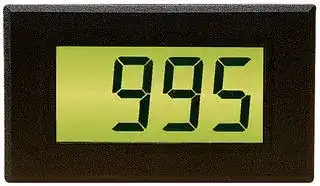
DTM 995B
PANEL DISPLAY, THERMOCOUPLE, LCD, 7.5V TO 30V
⚠️ Reference pricing provided. In case of supply shortages, we will connect you with our trusted procurement partners to ensure your project's continuity.
- Manufacturer: LASCAR
- Product type: Digital Panel Meters
- Meter Range: -200°C to +1300°C
- Digit Height: 19mm
- Meter Function: Thermocouple
- Panel Cutout Width: 72mm
- Supply Voltage Max: 30VDC
- Supply Voltage Min: 7.5VDC
- Panel Cutout Height: 40mm
- No. of Digits / Alpha: 3
- Operating Temperature Max: 50°C
- Operating Temperature Min: 0°C
| Delivery and price | |
|---|---|
| Units per pack | 1 |
| Price | 80.16 € |
| Current stock | 10+ |
| Lead time | 30 days |
Datasheet

## DTM 995B DTM 9958 LCD Thermocouple Indicator

## FEATURES

## ORDERING INFORMATION

Standard Instrument DTM 995B (panel meter, fixing kit, data sheet)

- Measures temperature from a K, J or T-type thermocouple

- -200 to +1300ºC (-328 to +1999ºF) measurement range

- Cold-junction compensation

- Displays current, highest and lowest readings

- 19mm (0.75”) digit height

- Screw terminal connections

- LED backlighting

The DTM 995B is compatible with K, J and T type thermocouples. It can measure between -200 and +1300°C (-328 to +1999°F) when using an appropriate thermocouple.

The current value and the maximum and minimum values since power-on are recorded, which can be recalled and displayed by using an external push button connected to the meter. Calibration can be performed easily using two potentiometers located on the rear of the meter. Cold-junction compensation is used to maintain accuracy when the meter is exposed to changes in temperature.

The meter is housed in a robust carrier, which can be bolted in place or panel mounted using the low profile bezel, window and clips provided. Backlighting is fitted for use in poor lighting conditions.

## SPECIFICATIONS

||Minimum|Typical|Maximum|Unit|
|---|---|---|---|---|
|Accuracy (excluding probe)||1 (2)||°C (°F)|
|Thermocouple measurement range (K-type)|-200 (-328)||+1300 (+1999)|°C (°F)|
|Thermocouple measurement range (J-type)|-130 (-202)||+900 (+1652)|°C (°F)|
|Thermocouple measurement range (T-type)|-200 (-328)||+350 (+662)|°C (°F)|
|Supply voltage (normal operation)*|7.5||30|V d.c.|
|Supply voltage (5V mode)*|4.75|5|5.25|V d.c.|
|Backlight voltage**|4.75|5|5.25|V d.c.|
|Supply current|6mA (@30V)||13mA (@5V)|mA|
|Supply current with backlighting**|20mA (@30V)||50mA (@5V)|mA|
|Operating temperature range|0 (32)||50 (122)|°C (°F)|
|Temperature stability|||0.05 (0.1)|°C/°C (°F/°F)|


*    A 5V mode is available by moving DIP switch 2 to the ‘on’ position. Inputting a voltage larger than 5V in this mode may cause permanent damage to the meter.

** Backlighting can be run off the internal voltage regulator by moving DIP switch 1 to the on position. Using the backlighting in this way will cause some self heating of the meter. This can be calibrated out during initial setup, however the final application will need to continue using the backlighting to maintain the calibration.

## www.lascarelectronics.com

Specifications liable to change without prior warning

Issue 2               06/2010                   S.L                 Applies to DTM 995B

Page 1 of 3

## DTM 995B LCD Thermocouple Indicator

## CALIBRATION PROCEEDURE

It is recommended that the DTM 995B is calibrated with a matched probe to achieve the most accurate readings. Calibration uses two known temperatures to adjust the span and offset of the meter; the example below uses our recommended 0ºC and 100ºC (32 and 212ºF) as these temperatures can be achieved using water at the point of freezing and boiling respectively.

- 1) Place the thermocouple at the first known temperature (e.g. 0ºC (32ºF)). Adjust the ‘OFFSET’ potentiometer to display the correct value (e.g. 000 for ºC (or 032 for ºF)).

- 2) Place the thermocouple at the second known temperature (e.g. 100ºC (212ºF)) and adjust the ‘CAL’ potentiometer to display the correct value (e.g. 100 for ºC (or 212 for ºF)).

- 3) Repeat steps 1 and 2 until there are no more adjustments of CAL and OFFSET required to display the correct reading at each known temperature.

## SCREW TERMINAL FUNCTIONS

1. LPNegative power supply to the LED backlighting

2. LP+ Positive power supply to the LED backlighting

3. T- Connection to negative part of thermocouple

4. T+ Connection to positive part of thermocouple

5. V- Negative power supply connection to the meter

6. V+ Positive power supply connection to the meter

Check position of DIP switch 2 before connection power supply

7.  SWNegative switch connection

- Used to cycle between current, maximum and minimum readings since power-on

- 8.  SW+ Positive switch connection

Note - When connecting thermocouples, ensure that the wires are carefully cleaned and are connected directly to the module. Only use extension cables and connectors specifically designed for thermocouples.

## DIMENSIONS

All dimensions in mm (inches)

**==> picture [111 x 13] intentionally omitted <==**

**----- Start of picture text -----**<br>
Panel cut-out 72 x 40 (2.83 x 1.57)<br>Maximum panel thickness 3mm (0.12).<br>**----- End of picture text -----**<br>


**==> picture [387 x 214] intentionally omitted <==**

**----- Start of picture text -----**<br>
76.0 (2.99) a<br>72.5 (2.85)<br>a. 1.0 (0.04)<br>b. 2.0 (0.08)<br>c. 6.5 (0.26)<br>d. 11.5 (0.45)<br>e. 11.0 (0.43)*<br>*typical depth of tallest component behind PCB,<br>51.0 (2.01)   this dimension is for guidance only.<br>b c<br>61.5 (2.42)<br>51.0 (2.01) d e<br>ÿ5.7<br>(0.22) CAL OFFSET<br>1 18 8 REAR<br>VIEW<br>ÿ3.0<br>71.5 (2.81) (0.12)<br>44.0 (1.73) 40.5 (1.59) 24.0 (0.94)<br>39.0 (1.54) 24.0 (0.94) 24.5 (0.96) PL- P+L T- T+ V- V+ SW- SW+<br>**----- End of picture text -----**<br>


- a. 1.0 (0.04) b. 2.0 (0.08) c. 6.5 (0.26) d. 11.5 (0.45) e. 11.0 (0.43)* *typical depth of tallest component behind PCB, this dimension is for guidance only.

## www.lascarelectronics.com

Specifications liable to change without prior warning Issue 2               06/2010                S.L                 Applies to DTM 995B

Page 2 of 3

## DTM 995B LCD Thermocouple Indicator

## DIP SWITCH CONFIGURATION

**==> picture [111 x 60] intentionally omitted <==**

**----- Start of picture text -----**<br>
ON<br>1 2 3 4 5 6 7 8<br>**----- End of picture text -----**<br>


## DIP SWITCH FUNCTIONS

An 8-way DIP switch is located on the reverse of the module. This switch is used to control the features of the meter, including selecting the type of thermocouple (K-type by default) and changing the temperature scale (°C by default).

1. Backlight supply Move to the ‘on’ position to connect the backlight to the internal voltage regulator. LP- still needs to be connected to ground

2. Supply voltage Move to the ‘on’ position to bypass the voltage regulator and run from the module from 5V (off by default)

3. Resolution Move to the ‘on’ position to increase the resolution to one decimal place (only applies to values under 200°C)

4. Temperature scale select By default, the module displays the temperature in °C. Move to the ‘on’ position to display °F

5. Ambient temperature Move to the ‘on’ position to read the ambient temperature of

the meter. A thermocouple does not need tobe connected 6. T-type thermocouple Move to the ‘on’ position to select T-type thermocouple input 7. J-type thermocouple Move to the ‘on’ position to select J-type thermocouple input

NB. Ensure only one selection switch is in the ‘on’ position at any time.

8. K-type thermocouple Move to the ‘on’ position to select K-type thermocouple input

## LCD SYMBOLS

- ‘IP’ Return dip switches 5 to 8 to the off position. Only 1 of theses switches may be used at a time.

## VARIOUS OPERATING MODES

Ensure that the thermocouple probes are isolated from the meter’s power supply.

There are two ways to power the LED backlight. Either use a 5V supply on LP+/LP- or use the internal meter 5V supply.

**==> picture [487 x 124] intentionally omitted <==**

**----- Start of picture text -----**<br>
7.5 - 30V d.c 7.5 - 30V d.c 7.5 - 30V d.c<br>6 6 6<br>4 +<br>T+<br>+5V 1 LP+ T+ 4 + T+ 4 + Thermocouple<br>T- 3 -<br>8<br>Thermocouple Thermocouple SW+<br>2 3 - 2 3 - 2<br>0V LP- T- LP- T- LP-<br>SW- 7<br>0V 0V 0V<br>5 5 5<br>0V 0V 0V<br>With external backlighting supply. With internal (continuous) backlighting supply. With external switch to change the display reading between<br>Move DIP switch 1 to the ‘on’ position. current, maximum and minimum value (since power on).<br>**----- End of picture text -----**<br>


## www.lascarelectronics.com

Specifications liable to change without prior warning

Issue 2               06/2010                   S.L                  Applies to DTM 995B

Page 3 of 3
Updated at February 9, 2023
About Novapart
Novapart is a B2B electronic component broker specialising in stock shortages and cost reduction. We source hard-to-find parts and identify compliant alternatives across a catalogue of 410,000+ components from 500+ manufacturers.
Learn more →Stock Shortage Specialist
When a component is unavailable, discontinued or has an unacceptable lead time, we tap into our network of vetted European and Asian distributors to source what you need — without compromising on quality or traceability.
Request a quote →Compliant Alternatives
We identify pin-to-pin, electrically equivalent substitutes that meet the same certifications (RoHS, AEC-Q100, REACH) as your original specification — validated against datasheets, not just part numbers. Often at a lower cost.
BOM Analysis service →