
Image not available
Illustrative purposes only

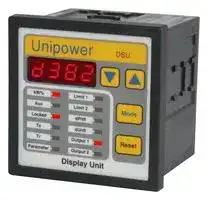
DSU D382
Panel Meter, APM382 Series, Programming Unit, Power, 15 Vdc to 30 Vdc
⚠️ Reference pricing provided. In case of supply shortages, we will connect you with our trusted procurement partners to ensure your project's continuity.
- Manufacturer: UNIPOWER
- Product type: Digital Panel Meters
- No. of Digits / Alpha:-; Meter Function:Power; Meter Range:-; Digit Height:-; Panel Cutout Height:68mm; Panel Cutout Width:68mm; Supply Voltage Min:15VDC; Supply Voltage Max:30VDC; O
- SVHC: No SVHC (07-Nov-2024)
- Meter Range: -
- Digit Height: -
- Product Range: -
- Meter Function: Power
- Panel Cutout Width: 68mm
- Supply Voltage Max: 30VDC
- Supply Voltage Min: 15VDC
- Panel Cutout Height: 68mm
- No. of Digits / Alpha: -
- Operating Temperature Max: 50°C
- Operating Temperature Min: -15°C
| Delivery and price | |
|---|---|
| Units per pack | 1 |
| Price | 224.99 € |
| Current stock | 10+ |
| Lead time | 30 days |
Datasheet

## **Unipower[®]**

Technical Information

## DSU d382 (-DAQ)

Version 1.0

## **Generally**

**Unipower DSU d382 is a display/programming unit for the universal measuring/control unit APM382. The DSU has no measuring circuit and cannot be used without the APM382.**

**The d382 is meant as a supplement for the APM382 if it is required to have the power measurements and the control status displayed or if programming of the APM382 needs to be done from the front of the control panel without the otherwise necessary connection to a PC.**

**When using an APM382 together with a DSU d382 no high voltage is present in the front of the control panel, so in this way possible future requirements are already met.**

## **Features**

## **Programming/Display**

Setting up the d382 (APM382) is done using three keys on the front; The ‘Mode’-key is used to select one of the variables/ parameters and the arrow keys are used to change the value of the selected parameter. Pressing the ‘Reset’-key returns to displaying kW%.

Per default the parameters are protected against programming. To unlock this protection, select ‘Locked’ and change ‘On’ to ‘Off’ using the arrow keys. Now all parameters are open for change. If no key has been activated for 1 minute the Lock is reactivated.

## **Indicators**

A number of LED’s indicate to the user the status of the APM382: Ts Lit when Ts is active. Tr Lit together with the limit for which Tr is active. Limit 1 Lit when Tr for limit 1 is active. Blinking during alarm. Limit 2 Lit when Tr for limit 2 is active. Blinking during alarm. dP/dt Blinking when a dP/dt alarm has occurred. dU/dt Lit when dU/dt is detected (Indicates fluctuating mains) Output1Lit when output 1 is on, otherwise not lit Output2Lit when output 2 is on, otherwise not lit

## **Peak detectors**

When a parameter is changed the new value is send to the APM382 after pressing the ‘Mode’-key or automatically returning to displaying kW% again. To make sure that this new value is transferred and received correctly, the d382 asks for a confirmation and displays ‘ **E r r** ’ if the parameter is not as expected. So if no error appears in the display the user may be sure that the parameter has been programmed correctly.

After expiration of Ts the peak detectors are set to the actual measurement. From this point on the peak detectors are updated every 20ms. The value of the two peaks - max and min may be displayed in the kW% display mode using the arrow keys: Key Up Display the max peak. Key Down Display the min peak.

If no connection to the APM382 is present, the display will show ‘----’

## **Technical Specifications**

## **Mechanical**

## **Electrical**

Housing: Noryl Supply: 15 - 30 Vdc Mounting: Panel mounting Consumption: < 1VA Cut-out: 68 x 68 mm Serial output: RS232C IP class: IP54 9.6 kbaud -> APM382 Temp.: -15 to +50[o] C 57.6kbaud -> PC (DAQ) Weight: 150g (d382-DAQ 170g) Storage: 1 mill. measurements (DAQ) Dimens.: D 70 x W 72 x H 72 mm CE mark: EN61326-1

## **DSU d382**

## **Parameters**

The majority of the settings are found and altered in a parameter list. To access this list use the ‘Mode’-key to light up the ‘Parameter’ LED resulting in the display showing ‘P00’. Use the arrow keys to select the desired parameter number (see list below) and press ‘Mode’. Now the current value of the parameter is displayed and may be altered with the arrow keys. Remember to unlock the programming protection. To send the new value to the APM382 press the ‘Mode’-key and the unit returns to the parameter list. If required select a new parameter as described or return to showing kW% by pressing the ‘Reset’-key.

## **Typical connection**

**==> picture [164 x 172] intentionally omitted <==**

## **Parameter list**

**==> picture [245 x 256] intentionally omitted <==**

## **Extended version - DSU d382-DAQ**

The DSU d382-DAQ is an extended version of the d382 with a built-in Data Acquisition facility. All features of the d382 is also present in the d382-DAQ. This part of the data sheet deals with the additions necessary for acquiring data.

## **Data Acquisition**

Acquiring data may be done manually, automatically with a trigger function or permanently. If activated manually (P16) the data acquisition is not reactivated after a power down of the d382daq. To achieve this the Restart DAQ - parameter (P20) must be enabled. The trigger may be set as a min- or a max-limit (P18) in which case the data acquisition is started if the measurement drops below the trigger level or exceeds the trigger level respectively. The trigger level is also programmable (P19). The rate at which the measurements are sampled may be set from 20ms to 1 second (P17) - see table. When the memory is full, the oldest measurements will be erased and replaced by the current measurements.

An LED indicates to the user the status of the data acquisition. The ‘Aux’ is lit when the data acquisition is active and blinking if the trigger is enabled but the acquisition not yet active.

## **Transferring Data**

The acquired data may be transferred to a PC with the Unipower Data Acquisition software UniDAQ. Please visit our website www.unipower.dk for download of the software and manual. Connecting the d382-DAQ to a PC is done with a standard straight RS232 cable (SUBD-9 male/female). The d382-DAQ is set up to communicate with the PC via parameter P21, which must be set to ‘PC’. If the display shows ‘----’ only this parameter may be altered.

## **Parameter list**

**==> picture [236 x 82] intentionally omitted <==**

## **Typical connection**

**==> picture [190 x 165] intentionally omitted <==**

Unipower DSU d382
Updated at June 9, 2026
About Novapart
Novapart is a B2B electronic component broker specialising in stock shortages and cost reduction. We source hard-to-find parts and identify compliant alternatives across a catalogue of 410,000+ components from 500+ manufacturers.
Learn more →Stock Shortage Specialist
When a component is unavailable, discontinued or has an unacceptable lead time, we tap into our network of vetted European and Asian distributors to source what you need — without compromising on quality or traceability.
Request a quote →Compliant Alternatives
We identify pin-to-pin, electrically equivalent substitutes that meet the same certifications (RoHS, AEC-Q100, REACH) as your original specification — validated against datasheets, not just part numbers. Often at a lower cost.
BOM Analysis service →