
Image not available
Illustrative purposes only

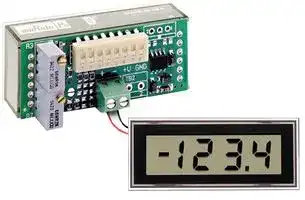
DMS-30LCDA-4/20S-C.
LOOP POWERED METER
⚠️ Reference pricing provided. In case of supply shortages, we will connect you with our trusted procurement partners to ensure your project's continuity.
- Manufacturer: MURATA POWER SOLUTIONS
- Product type: Digital Panel Meters
- Meter Range: 4mA to 20mA
- Digit Height: 10.2mm
- Meter Function: Current Loop Indicator
- Panel Cutout Width: 53.85mm
- Panel Cutout Height: 22.35mm
- No. of Digits / Alpha: 3-1/2
- Operating Temperature Max: 60°C
- Operating Temperature Min: 0°C
| Delivery and price | |
|---|---|
| Units per pack | 100 |
| Price | 61.26 € |
| Current stock | 10+ |
| Lead time | 30 days |
Datasheet

## **www.murata-ps.com**

## **- - DMS 30LCDA 4/20 Series**

Loop-Powered, 1.8V Drop, 4-20mA Process Monitors with Full-Size LCD Displays

## **FEATURES**

- Super-low loop drop: 1.8V typical, 2.0V max.

- Self-powered 2-wire operation; no separate supply required

- Unipolar, Bipolar, Positive, and Inverse Reading Models

- Subminiature package; Less than 0.90" behind-the-panel depth

- Large, 0.40"/10.2mm high, sunlight-viewable LCD display

- Non-interacting gain (span) and offset (zero) 20-turn potentiometers

- DIP-switch selectable range and decimal points

- Hundreds of different input-current/readout combinations

- Vibration-resistant package; reliable screw-terminal input connections

Murata Power Solutions’ new DMS-30LCDA-4/20 Series’ 1.8V nominal loop-drop is the lowest of any comparably priced, 4-20mA input, 3½-digit process monitors with full-size LCD displays. This super-low loop-drop guarantees a maximum burden of no more than 100 Ohms! And because it’s loop-powered, all operating power is derived directly from the loop current itself; no separate power source is required! Their fl oating 2-wire design allows DMS-30LCDA-4/20 Series process monitors to be connected anywhere in the current loop.

All decimal point and range-change selections are made via an eight-position DIP switch which features vibration-resistant, gold-plated contacts—there are no cumbersome jumpers or solder gaps to contend with. Both gain (span) and offset (zero) adjustments are performed using 20-turn, non-interacting potentiometers. Four different models accommodate unipolar, bipolar, positive, and inverse display-reading applications. The DMS-30LCDA-4/20 Series’ DIP switch and adjustment potentiometers can accommodate literally hundreds of different input-current/output-reading combinations.

DMS-30LCDA-4/20 Series’ subminiature package houses a large, 0.40”/10.2mm, highcontrast LCD display that can be read in virtually all lighting conditions—including full sunlight! The two connections to the external loop are made via a reliable screw-type terminal block. For environmentally demanding applications, an optional panel-mount bezel assembly, featuring screw fasteners and a rubber gasket, provides excellent resistance to dust and moisture. All these outstanding features combine to make the new DMS-30LCDA-4/20 Series ideal for all your 4-20mA process-monitoring instrumentation needs.

**==> picture [381 x 91] intentionally omitted <==**

**----- Start of picture text -----**<br>
1 2 3 4 5 6 7 8<br>CURRENT<br>DC/DC TO<br>TB1<br>=n CONVERTER [|<br>For full details go to + _<br>www.murata-ps.com/rohs<br>**----- End of picture text -----**<br>


**Figure 1. DMS-30LCDA-4/20 Simplifi ed Schematic**

## **www.murata-ps.com/support**

**MPM_DMS30-LCDA.C01** Page 1 of 6

**See www.murata-ps.com/dpm-availability for model-specifi c availability.**

## **- - DMS 30LCDA 4/20 Series**

## **Performance/Functional Specifi cations**

Loop-Powered, 1.8V Drop, 4-20mA Process Monitors with Full-Size LCD Displays

Typical at TA = +25°C,  unless otherwise noted.

|**Current Loop Input**|**Min.**|**Typ.**|**Max.**|**Units**|
|---|---|---|---|---|
|**Full Scale Input Range**|+3.8|–|+20.4|mA|
|**Loop Burden**|–|80|100|Ohms|
|**Voltage Drop**|–|1.8|2.0|Volts|
|**Overcurrent Protection**|–|–|±40|mA|
|**Performance**|||||
|**Sampling Rate**|2.5 reading per second||||
|**Accuracy (1 minute warm-up)**|±0.05%FS ±1 Count||||
|**Temperature Drift**|–|±0.15|±0.3|Cnts/°C|
|**Display**|||||
|**Display Type and Size**|3½ digit, 0.4"/10.2mm ref ective LCD||||
|**Polarity Indication**|"–" for negative readings||||
|**Overrange Indication**|"–1___" for negative inputs<br>"1___" for positive inputs||||
|**Physical/Environmental**|||||
|**Operating Temperature**|0|–|+60|°C|
|**Storage Temperature**|–20|–|+75|°C|
|**Humidity (non-condensing)**|0|–|85|°C|
|**Case Material**|Polycarbonate||||
|**Weight**|0.75 ounces (21 grams)||||


- ➀ The DMS-30LCDA-4/20 can withstand continuous overcurrents, including those resulting from accidental reverse-polarity connections, up to ±40mA without sustaining any damage.

- ➁ Because Murata Power Solution’s DMS Series loop-powered process monitors employ active circuitry to convert the loop current into a voltage, their effective series impedance (loop burden) varies in a manner that maintains the loop voltage drop relatively constant over the full 4-to-20mA current range. Listed burden specifi cation applies at 20mA.

- ➂ When looking up DIP-switch settings in the Tables and the desired display readings can be achieved with either of two different settings, using the higher setting number will usually result in less sensitive offset (R3) and span (R7) adjustments. Please keep in mind that the DMS-30LCDA standard meter from which the DMS30LCDA-4/20 is derived has an accuracy specifi cation of ±2 counts (max.). Thus, it may not always be possible to obtain the exact desired display reading.

## **Ordering Information**

**DMS-30LCDA-4/20S-C** ** Unipolar reading, loop-powered LCD meter **DMS-30LCDA-4/20B-C** Bipolar reading, loop-powered LCD meter **DMS-30LCDA-4/20P-C** Positive reading, loop-powered LCD meter **DMS-30LCDA-4/20I-C** Inverse reading, loop-powered LCD meter **DMS-BZL1-C** Bezel assembly **DMS-BZL2-C** Bezel assembly with sealing gasket **DMS-30-CP** Panel cutout punch

- ** Replaces obsolete DMS-30LCD-4/20S model

- A panel-mount retaining clip is supplied with each model.

- -C suffi x indicated RoHS compliance.

**See www.murata-ps.com/dpm-availability for model-specifi c availability.**

## **OPERATING AND SETUP INSTRUCTIONS**

## _**Important Instructions for Users of Obsolete DMS-30LCD-4/20S Meters**_

The new DMS-30LCDA-4/20S unipolar-reading model has provisions to accommodate all the display ranges of the obsolete DMS-30LCD4/20S. The “Old Display Readings” column in Table 1 is taken directly from the DMS-30LCD-4/20S datasheet. Table 1 is provided as a guide for determining equivalent DMS-30LCDA-4/20S DIP-switch settings in upgrading existing applications.

Applications that had the obsolete DMS-30LCD-4/20S setup for ‘bipolar’ operation should now use the new DMS-30LCDA-4/20S model confi gured per Table 1. Bipolar applications are those where a 4mA input displays a negative number, a 12mA input displays “000”, and a 20mA input displays a positive number (for example, “-100”, “000” and “100”).

Applications that had the obsolete DMS-30LCD-4/20S setup for ‘unipolar’ operation should now use the new DMS-30LCDA-4/20S confi gured per Table 2. Unipolar applications are those where a 4mA input displays “000” and a 20mA input displays a higher positive number.

**Table 1.** DMS-30LCDA-4/20S DIP Switch Settings for DMS-30LCD-4/20S Applications

||~~**Old Dil Rdi**~~<br>~~**N DMS30LCDA4/20S DIP Sith Stti**~~||
|---|---|---|
||~~**spay eang**~~<br>~~**ew --  wc eng**~~<br> <br> <br> <br> <br> <br> <br>||
||~~**4mA**~~<br>~~**20mA**~~<br>~~**SW1**~~<br>~~**SW2**~~<br>~~**SW3**~~<br>~~**SW4**~~<br>~~**SW5**~~<br>**1.** 000 to 100-300<br>Use Setting in Table 2<br>**2.**000 to 400-600<br>Use Setting in Table 2<br>**3.**000 to 700-1999<br>Use Setting in Table 2<br>**4.**±100<br>On<br>On<br>On<br>On<br>Off<br>**5.**±200 to ±300<br>Off<br>Off<br>On<br>Off<br>Off<br>**6.** ±400 to ±600<br>On<br>Off<br>Off<br>Off<br>Off<br>**7.** ±700 to ±1900<br>Off<br>Off<br>Off<br>Off<br>On||


## **DMS-30LCDA-4/20S (Standard Unipolar-Reading)**

The DMS-30LCDA-4/20S’s span and offset circuitry are optimized to display standard, unipolar readings where a 4mA input always reads “000” and a 20mA input always displays a higher positive number. As shipped, the DMS-30LCDA-4/20S is calibrated to read “000” for a 4mA input and “1800” for a 20mA input. These readings are used for factory test-purposes only. The following worst-case calibration procedure assumes the DMS-30LCDA-4/20S is completely misadjusted, i.e., both potentiometers and the DIP switches are randomly set.

The next example below, while specifi cally tailored for the “000” and “1800” readings just noted, can also be used as a guide when confi guring the DMS-30LCDA-4/20S for other unipolar display readings. When performing DIP-switch settings, be sure the DIP-switch’s small actuators are fi rmly engaged in their fully ON or fully OFF positions.

1. Set R7 (span/gain adjust) and R3 (zero/offset adjust) fully clockwise, roughly 22 turns, and place SW1-SW8 to OFF.

2. Confi gure the meter per DIP-switch setting #1 in Table 2.

3. Apply a precision 4mA input with proper polarity and adjust R3 until the meter’s display reads “000.”

**www.murata-ps.com/support**

**MPM_DMS30-LCDA.C01** Page 2 of 6

## **- - DMS 30LCDA 4/20 Series**

4.  Apply a precision 20mA input and adjust R7 until the display reads “1800.” Repeat steps 3 and 4 to make sure the adjustments do not affect one another.

5.  Select the appropriate decimal point by setting SW6, SW7 or SW8 to ON (DP1, DP2 or DP3 respectively).

NOTE: If a display reading other than “000” to “1000” is desired, refer to DIP-Switch Settings Table 2 for SW1-SW5 settings

**Table 2.** DMS-30LCDA-4/20B (Standard Unipolar) DIP Switch Settings

||~~**Desired Display Reading**~~<br>~~**4mA**~~<br>~~**20mA**~~<br>~~**SW1**~~<br>~~**SW2**~~<br>~~**SW3**~~<br>~~**SW4**~~<br>~~**SW5**~~<br>**1.**000 to 1200 to 1999<br>Off<br>Off<br>Off<br>Off<br>Off<br>**2.**000 to 600 to 1200<br>On<br>Off<br>Off<br>Off<br>Off<br>**3.**000 to 400 to 600<br>Off<br>Off<br>On<br>Off<br>Off<br>**4.**000 to 200 to 400<br>On<br>On<br>On<br>Off<br>Off<br>**5.**000 to 100 to 200<br>On<br>On<br>On<br>On<br>Off|
|---|---|


## Loop-Powered, 1.8V Drop, 4-20mA Process Monitors with Full-Size LCD Displays

When confi guring the DMS-30LCDA-4/20B for the fi rst time, or when selecting a new range, set both R3 and R7 fully clockwise (roughly 22 turns) to their minimum offset/minimum-span positions, respectively. Then select the desired readings from Table 3 and confi gure DIP-switches SW1, SW2, and SW3 accordingly. Please note, positions SW4 and SW5 are not used in bipolar ‘B’ models.

The procedure below illustrates how to calibrate the DMS-30LCDA-4/20B to its factory-calibrated readings of “-1000” with a 4mA input and “1000” with a 20mA input. When performing DIP-switch settings, be sure the DIPswitch’s small actuators are fi rmly engaged in their fully ON or fully OFF positions.

1. Set both R3 and R7 fully clockwise.

2. Select DIP-switch setting #1 from Table 3.

3. Apply a precision 12mA input and adjust R3 until the meter’s display reads “000.”

## **Examples** (DMS-30LCDA-4/20S, Unipolar)

**==> picture [126 x 43] intentionally omitted <==**

**----- Start of picture text -----**<br>
��<br>**----- End of picture text -----**<br>


1. Desired display readings are:

4mA    ="0.00" 20mA  = "6.00"

Use DIP-switch setting #3 in Table 2 and enable decimal point DP2 via SW7.  Apply 4mA and adjust R3 so the display reads “0.00.” Apply 20mA and adjust R7 so the display reads “6.00.”

**==> picture [126 x 43] intentionally omitted <==**

**----- Start of picture text -----**<br>
��<br>**----- End of picture text -----**<br>


2. Desired display readings are:

   - 4mA   =" 000" 20mA = "800"

Use DIP-switch setting #2 in Table 2. Apply 4mA and adjust R3 so the display reads “000.” Apply 20mA and adjust R7 so the display reads “800.” For these display readings, no decimal points are used. Set SW6, SW7 and SW8 to OFF.

**==> picture [126 x 43] intentionally omitted <==**

**----- Start of picture text -----**<br>
��<br>**----- End of picture text -----**<br>


3. Desired display readings are:

4mA    = ".000" 12mA  = ".250"

This example is not as straightforward as the previous two. Notice that 12mA is exactly halfway between 4mA and 20mA. If we assume that the input could go up to 20mA, the display reading would then be: 2 x .250 or “.500.” From Table 2 we can now select DIP-switch setting #3 and enable DP1 via SW6. Apply 4mA and adjust R3 so the display reads “.000.” Apply 12mA and adjust R7 so the display reads “.250.”

## **DMS-30LCDA-4/20B** (Bipolar-Reading )

The DMS-30LCDA-4/20B’s zero-offset circuit differs from the unipolar ‘S’ model described above in that with the ‘B’ model, a half-scale 12mA input is typically set to display “000.” Therefore, all of the of the DIP-switch settings in Table 3 assume a reading of “000” is desired with a half-scale 12mA input. Display readings other than those shown in Table 3 are possible, contact Murata Power Solutions for more information.

4. Apply a precision 20mA input and adjust R7 until the meter’s display reads “1000.”

5. Apply a precision 4mA input and the display should read “-1000.” Repeat steps 3 and 4 to make sure the two adjustments did not affect one another.

**Table 3.** DMS-30LCDA-4/20B (Bipolar) DIP Switch Settings

||||
|---|---|---|
||~~**Desired Display Reading**~~<br> <br> <br> <br> <br> <br> <br> <br>||
||~~**4mA**~~<br>~~**12mA**~~<br>~~**20mA**~~<br>~~**SW1**~~<br>~~**SW2**~~<br>~~**SW3**~~<br>~~**SW4**~~<br>~~**SW5**~~<br>**1.**–600 to –1000 000<br>600 to 1000<br>Off<br>Off<br>Off<br>NA<br>NA<br>**2.**–350 to –650<br>000<br>350 to 650<br>On<br>Off<br>Off<br>NA<br>NA<br>**3.**–250 to –400<br>000<br>250 to 400<br>Off<br>On<br>Off<br>NA<br>NA<br>**4.**–150 to –250<br>000<br>150 to 250<br>Off<br>Off<br>On<br>NA<br>NA<br>**5.**–100 to –150<br>000<br>100 to 150<br>On<br>On<br>On<br>NA<br>NA||


## **Examples** (DMS-30LCDA-4/20B, Bipolar )

**==> picture [126 x 43] intentionally omitted <==**

**----- Start of picture text -----**<br>
��<br>**----- End of picture text -----**<br>


**1.** Desired display readings are:

   - 4mA    ="–1.00" 20mA  = "1.00"

Use DIP-switch setting #5 in Table 3 and enable decimal point DP2 via SW7. Apply 12mA and adjust R3 so the display reads “0.00.” Apply 20mA and adjust R7 so the display reads “1.00.” Apply 4mA and verify that the display reads “-1.00”, readjust R3 and R7 if necessary.

**2.** Desired display readings are: 4mA   =" –450" 20mA = "450"

Use DIP-switch setting #2 in Table 3. Apply 12mA and adjust R3 so the display reads “000.” Apply 20mA and adjust R7 so the display reads “450.” Apply 4mA and verify that the display reads “-450.” Repeat adjustment procedure if necessary. For these display readings, no decimal points are used. Set SW6, SW7and SW8 to OFF.

## **www.murata-ps.com/support**

**MPM_DMS30-LCDA.C01** Page 3 of 6

**- - DMS 30LCDA 4/20 Series**

**==> picture [205 x 37] intentionally omitted <==**

**----- Start of picture text -----**<br>
ON<br>4mA    = "–650"<br>20mA  = "650" 1 2 3 4 5 6 7 8<br>**----- End of picture text -----**<br>


**3.** Desired display readings are:

Notice that these readings can be obtained using either DIP-switch setting #1 or DIP-switch setting #2 in Table 3. In situations like this where DIP-switch settings overlap, less-sensitive R3/R7 adjustments can be achieved if the higher DIP-setting # is selected (setting #2 in this example). Apply 12mA and adjust R3 so the display reads “000.” Apply 20mA and adjust R7 so the display reads “650.” Apply 4mA and verify that the display reads “-650.” Repeat adjustments if necessary.

## **DMS-30LCDA-4/20P** (Positive-Reading)

The DMS-30LCDA-4/20P’s zero-offset circuit is optimized to produce positive readings at both 4mA and 20mA input levels. As shown in Table 4’s fi rst three columns, a 4mA input can be adjusted (using R3, Zero/Offset Adjust) to display any positive reading between “000” and “800.” The corresponding 20mA-input reading is then added to the 4mA offset as a differential whose magnitude is varied by adjusting R7 (Gain/Span Adjust).

The ‘Differential Range’ column in Table 4 lists the nominal differential display-readings which can be obtained with R7 at, or very close to, its full-clockwise, minimum span position. The ‘Differential Range’ column can be used as a guide when confi guring the meter for the majority of user applications. Higher differential ranges are obtainable; however, the use of higher differential readings results in correspondingly-lower positive readings with 4mA inputs, that is, R3’s clockwise adjustment-range is reduced. Example #3 below illustrates this point. Contact Murata Power Solutions if there is any doubt as to whether or not the DMS-30LCDA-4/20P can be confi g- ured for your display-reading requirements.

The fi rst step when initially confi guring the DMS-30LCDA-4/20P, or when selecting a new range, is to set R3 fully counterclockwise and R7 fully clockwise (roughly 22 turns each) to their minimum offset and minimum span positions, respectively.

The next step is to calculate the differential display-reading; this is accomplished by subtracting the desired 4mA display reading from the desired 20mA display reading, disregarding decimal points. Then, using the calculated differential display-reading to select the appropriate DIP-switch setting # from Table 4, confi gure DIP-switches SW1, SW2, and SW3 accordingly. Please note, positions SW4 and SW5 are not used in positive reading ‘P’ models. Also, make certain that the DIP-switch’s small actuators are fi rmly engaged in their fully ON or fully OFF positions.

The example below describes how to calibrate the meter for an application which the DMS-30LCDA-4/20P easily accommodates: displaying the output of a 4-20mA transmitter, that is, “04.0” with a 4mA input and “20.0” with a 20mA input.

1.  Set R3 fully counterclockwise (minimum offset position) and R7 fully clockwise (minimum differential span position), roughly 22 turns.

## Loop-Powered, 1.8V Drop, 4-20mA Process Monitors with Full-Size LCD Displays

2.  Subtract 040 from 200 to yield a differential-reading value of 160; use this value to select DIP-switch setting #5 in Table 4. Enable decimal point DP3 by placing SW8 to the ON position.

3.  Set the transmitter’s output to 4.0mA and carefully adjust R3 clockwise until the meter’s display reads “000.”

4.  Set the transmitter’s output to 20.0mA and adjust R7 counterclockwise until the meter’s display reads “16.0.”

5. Set the transmitter back to 4.0mA and slowly adjust R3 clockwise until the display reads “04.0.” Reapply 20.0mA and the display should now read “20.0.” Repeat steps 3, 4, and 5 to make sure the adjustments did not affect one another.

**Table 4.** DMS-30LCDA-4/20P (Positive Reading) DIP Switch Settings

||||~~**Desired Display Readings**~~|~~**Desired Display Readings**~~|~~**Desired Display Readings**~~|||||||
|---|---|---|---|---|---|---|---|---|---|---|---|
||||~~**Diff. Range**~~|~~**4mA**~~|~~**20mA**~~|~~**SW1**~~|~~**SW2**~~|~~**SW3**~~|~~**SW4**~~|~~**SW5***~~||
|||**1.**|800 to 1400|900|1700|Off|Off|Off|NA|OFF||
|||**2.**|500 to 800|850|1350|On|Off|Off|NA|OFF||
|||**3.**|350 to 500|800|1150|Off|On|Off|NA|OFF||
|||**4.**|250 to 350|750|1000|Off|Off|On|NA|OFF||
|||**5.**|150 to 250|750|900|On|On|On|NA|OFF||


* Setting SW5 to On will increase the differential range. See example 2 below.

## **Examples** (DMS-30LCDA-4/20P, Positive Reading)

**==> picture [241 x 156] intentionally omitted <==**

**----- Start of picture text -----**<br>
1.  Desired display readings are: ON<br>4mA    ="650"<br>20mA  = "950" 1 2 3 4 5 6 7 8<br>Use DIP-switch setting #4 in Table 4 since subtracting 650 from 950<br>yields a differential value of 300. Apply 4mA and adjust R3 until the<br>display reads “000.” Apply 20mA and adjust R7 until the display<br>reads “300” (the differential value previously calculated). Apply 4mA<br>and adjust R3 until the display reads “650.” Apply 20mA and verify<br>that the display reads “950.”  ON<br>2.  Desired display readings are:<br>4mA   =" 4.00" 1 2 3 4 5 6 7 8<br>20mA = "19.99"<br>**----- End of picture text -----**<br>


This example illustrates the DMS-30LCDA-4/20P’s capability to display higher differential readings than those indicated in Table 4. This example also illustrates how the DMS-30LCDA-4/20P can be used to display the output levels of a 4-20mA transmitter with higher precision (0.01mA versus 0.1mA) than the example previously described.

Subtracting 400 from 1999 yields a differential of 1599, a value not listed in Table 4. However, use DIP-switch setting #1 in Table 4 and enable SW5 since this setting has the highest overall offset/ span adjustment capabilities. Enable DP2 via SW7, then apply 4mA and adjust R3 so the display reads “0.00.” Apply 20mA and adjust R7 so the display reads “15.99.” Apply 4mA and adjust R3 until the display reads “4.00.” Apply 20mA and check to see that the display reads “19.99” or just overranges (“1—”). Repeat adjustment procedure if necessary.

**www.murata-ps.com/support**

**MPM_DMS30-LCDA.C01** Page 4 of 6

## **- - DMS 30LCDA 4/20 Series**

## **DMS-30LCDA-4/20I** (Inverse Reading)

The DMS-30LCDA-4/20I is designed to accommodate applications where an **increasing** loop current produces a **decreasing** display reading. That is, as the loop current is increased from 4mA to 20mA, the display will read a user determined full-scale positive number at 4mA and then decrease to “000” at 20mA. The ‘4/20I’ model is essentially a ‘-4/20S’ model operating in reverse. Table 5 and the two examples that follow describe the operation of this model in greater detail.

The fi rst step when confi guring the DMS-30LCDA-4/20I for the fi rst time, or when changing to a different range, is to set both R3 and R7 to their full clockwise positions, roughly 22 turns. Next, using the desired display readings, select the appropriate DIP-switch setting number from Table 5.

**Table 5.** DMS-30LCDA-4/20I (Inverse Reading) DIP Switch Settings

|~~**Desired Display Reading**~~<br>~~**4mA**~~|~~**Desired Display Reading**~~<br>~~**20mA**~~|~~**SW1**~~|~~**SW2**~~|~~**SW3**~~|~~**SW4**~~|~~**SW5**~~|
|---|---|---|---|---|---|---|
|**1.**1999 to 1300|000|Off|Off|Off|Off|NA|
|**2.**1300 to 850|000|On|Off|Off|Off|NA|
|**3.**850 to 550|000|Off|On|Off|Off|NA|
|**4.**550 to 350|000|Off|Off|On|Off|NA|
|**5.**350 to 200|000|On|On|On|Off|NA|
|**6.**200 to 130|000|On|On|On|On|NA|


## Loop-Powered, 1.8V Drop, 4-20mA Process Monitors with Full-Size LCD Displays

## **Examples** (DMS-30LCDA-4/20I, Inverse Reading)

**==> picture [232 x 39] intentionally omitted <==**

**----- Start of picture text -----**<br>
1. Desired display readings are: ON<br>4mA = “6.00”<br>| Fie 9 |<br>20mA = “0.00” 1 2 3 4 5 6 7 8<br>**----- End of picture text -----**<br>


Use DIP-switch setting #3 in Table 5 and enable decimal point DP2 via SW7. Apply 20mA and adjust R3 so the display reads “0.00.” Apply 4mA and adjust R7 so the display reads “6.00.”

**==> picture [230 x 39] intentionally omitted <==**

**----- Start of picture text -----**<br>
2. Desired display readings are: ON<br>4mA = “800” | Ce Ue Ue UmOU<br>may 5 5-5-5 5-0<br>20mA = “000” 1 2 3 4 5 6 7 8<br>**----- End of picture text -----**<br>


Use DIP-switch setting #2 in Table 5. Apply 20mA and adjust R3 so the display reads “000.” Apply 4mA and adjust R7 so the display reads “800.” For these display readings, no decimal points are used. Set SW6, SW7 and SW8 to OFF.

**Table 6.** Decimal Point Selections (All Models)

**==> picture [215 x 31] intentionally omitted <==**

**----- Start of picture text -----**<br>
 To turn on a decimal point, place its respective DIP switch to the fully ON position.<br> SW6  SW7  SW8<br> DP1  DP2  DP3<br>**----- End of picture text -----**<br>


## **MECHANICAL SPECIFICATIONS**

MECHANICAL DIMENSIONS: Inches (mm) TOLERANCES: 2 PL DEC ±0.02 (±0.51) 3 PL DEC ±0.010 (±0.254) WIRE SIZE: 18 to 26 AWG (Solid or stranded) STRIPPING LENGTH: 0.20" (5.08mm)

**==> picture [299 x 128] intentionally omitted <==**

**----- Start of picture text -----**<br>
Back View<br>Zero DIP<br>Adjust Switches<br>oof? R3 |B/-------- ON 50 ° 1 Front View<br>Zero<br>Adjust 1 2 3 4 5 6 7 8<br>° a TB1 5 °<br>+ –<br>onlo R7 ]., o > 4 (O<br>Gain<br>Adjust<br>go) li abo ee<br>Gain + –<br>Loop<br>Adjust<br>Input<br>DP1 DP2 DP3<br>(SW6) (SW7) (SW8)<br>**----- End of picture text -----**<br>


## **www.murata-ps.com/support**

**MPM_DMS30-LCDA.C01** Page 5 of 6

## **- - DMS 30LCDA 4/20 Series**

## Loop-Powered, 1.8V Drop, 4-20mA Process Monitors with Full-Size LCD Displays

## **BEZEL INSTALLATION AND RECOMMENDED DRILL AND PANEL CUTOUT**

**==> picture [165 x 233] intentionally omitted <==**

**----- Start of picture text -----**<br>
OPTIONAL BEZEL (DMS-BZL1 and DMS-BZL2)<br>0.187<br>#2-56 INSERT (4.75)<br>FRONT VIEW 0.156 (3.96) DEEP<br>1.270<br>(32.26)<br>2.55 (64.77)<br>RECOMMENDED DRILL AND PANEL CUTOUT DIMENSIONS<br>0.116<br>INTERNAL CORNER RADII: (2.95)<br>0.032 (0.81) MAX.<br>1.07 0.878<br>(27.18) PANEL CUTOUT (22.30)<br>2.118 (53.80)<br>2.35 (59.69)<br>0.096<br>0.093 (2.362) DIAMETER (4 REQUIRED) (2.44)<br>ONLY WHEN USING OPTIONAL BEZEL ASSEMBLY<br>**----- End of picture text -----**<br>


**==> picture [263 x 243] intentionally omitted <==**

**----- Start of picture text -----**<br>
PANEL<br>BEZEL<br>RETAINING CLIP INSTALLATION<br>PANEL<br>**----- End of picture text -----**<br>


Murata Power Solutions, Inc.

11 Cabot Boulevard, Mansfi eld, MA 02048-1151 U.S.A. ISO 9001 and 14001 REGISTERED

**This product is subject to the following operating requirements and the Life and Safety Critical Application Sales Policy: Refer to: http://www.murata-ps.com/requirements/**

Murata Power Solutions, Inc. makes no representation that the use of its products in the circuits described herein, or the use of other technical information contained herein, will not infringe upon existing or future patent rights. The descriptions contained herein do not imply the granting of licenses to make, use, or sell equipment constructed in accordance therewith. Specifi cations are subject to change without notice. _**© 2015 Murata Power Solutions, Inc.**_

**www.murata-ps.com/support**

**MPM_DMS30-LCDA.C01** Page 6 of 6
Updated at February 9, 2023
About Novapart
Novapart is a B2B electronic component broker specialising in stock shortages and cost reduction. We source hard-to-find parts and identify compliant alternatives across a catalogue of 410,000+ components from 500+ manufacturers.
Learn more →Stock Shortage Specialist
When a component is unavailable, discontinued or has an unacceptable lead time, we tap into our network of vetted European and Asian distributors to source what you need — without compromising on quality or traceability.
Request a quote →Compliant Alternatives
We identify pin-to-pin, electrically equivalent substitutes that meet the same certifications (RoHS, AEC-Q100, REACH) as your original specification — validated against datasheets, not just part numbers. Often at a lower cost.
BOM Analysis service →