
Image not available
Illustrative purposes only

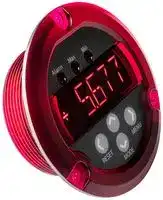
DMR30-PM1-1-DC4-R-C.
DC PROCESS METER, 5-DIGIT, 11.4MM, 9-32V
⚠️ Reference pricing provided. In case of supply shortages, we will connect you with our trusted procurement partners to ensure your project's continuity.
- Manufacturer: MURATA POWER SOLUTIONS
- Product type: Digital Panel Meters
- Meter Range: 0mA to 20mA / 4mA to 20mA / 0V to 5V / 0V to 10V
- Digit Height: 11.4mm
- Product Range: DMR30-PM1 Series
- Meter Function: Process
- Supply Voltage Max: 32VDC
- Supply Voltage Min: 9VDC
- No. of Digits / Alpha: 5
- Operating Temperature Max: 50°C
- Operating Temperature Min: 0°C
| Delivery and price | |
|---|---|
| Units per pack | 25 |
| Price | 87.5 € |
| Current stock | 10+ |
| Lead time | 30 days |
Datasheet

**DMR30-PM1 Series**
## muRataMurata Power Solutions|Ps
- @
- **Features**
- ~~SN,~~ Measures 0-5V, 0-10V, 0-20mA and 4-20mA process signals
- Supports physical units, percentage full-scale and arbitrary user display scales
## DC Process Meter
## **PRODUCT OVERVIEW**
The DMR30-PM1 digital panel meter performs precision process signal measurements, supporting 0-5V and 0-10V voltage, and 0-20mA and 4-20mA current signals. This meter features a highly visible, 0.45" (11.4mm) high, 5 character+sign alphanumeric LED display which can provide up to 4.5 digits of measurement resolution. Configuration is made easy by a contactless touch-sensor front-panel user interface, eliminating the need for jumpers, potentiometers, or DIP switches. The meter is powered from an external 9-32VDC supply and typically requires only 40mA when operated at 12V. The measurement inputs provide +/-48V of common mode input range, simplifying its use in a wide range of applications. An isolated solidstate relay can be set to close at user-defined trip-points, providing external signaling capability. The meter features a rugged polycarbonate housing that is mountable in a round hole using the supplied nut and gasket, or by using 3 #4-40 (M3) screws. The DMR30-PM1's features make it ideal for use in laboratory instrumentation, factory automation, and other applications requiring precise process monitoring.
|**ORDERING INFORMATION:**<br>~~ee~~|**ORDERING INFORMATION:**<br>~~ee~~|
|---|---|
|DMR30-PM1-1-DC4-R-C|DC process meter, alarm output, red display<br>~~ee~~|
|DMR30-PM1-1-DC4-G-C*|DC process meter, alarm output, green display|
|DMR30-PM1-1-DC4-B-C*|DC process meter, alarm output, blue display|
|*Contact factory for availability.||
- Bright 0.45" (11.4mm) LED display visible up to 20 feet (6 meters)
- Long-life contactless touch-sensor controls
## **SIMPLIFIED BLOCK DIAGRAM**
- Peak and valley measurement modes
- Digital filter option for measurements in noisy environments
- Solid-state alarm relay with programmable trip-point and
- ~~—~~ hysteresis Convenient mounting options ~~oo~~ Operates from 9 to 32 VDC ~~TS~~ Low current consumption; 40mA typical at 12VDC
- Two year warranty
**==> picture [339 x 211] intentionally omitted <==**
**----- Start of picture text -----**<br>
PROCESS DMR30-PM1 ALPHANUMERIC DISPLAY<br>VOLTAGE AND ANNUNCIATORS<br>INPUTS ALARM MAX MIN<br>+VIN (5)<br>-VIN (6)<br>Sh NANAAN FAN a<br>ADC<br>CURRENT LOOP<br>INPUTS CT TOUCH SENSOR KEYPAD<br>+ILOOP (7)<br>S| 50 Ω MICROCONTROLLER ©<br>-ILOOP (8) RESET MENU<br>s f MODE<br>RELAY<br>POWER Solid State OUTPUTS<br>INPUTS Relay<br>PTC Fuse (1) RELAYB<br>+VS (3) 3.3V<br>DC-DC -3.3V (2) RELAYA<br>-VS (4)<br>Ss [ Es S|<br>**----- End of picture text -----**<br>
For full details go to www.murata-ps.com/rohs
**www.murata-ps.com/support**
DMR30-PM1.A01 Page 1 of 11
**DMR30-PM1 Series**
DC Process Meter
## Murata Power Solutions
|**PERFORMANCE AND FUNCTIONAL SPECIFICATIONS (TA= 25C UNLESS OTHERWISE NOTED)**<br>~~|~~|**PERFORMANCE AND FUNCTIONAL SPECIFICATIONS (TA= 25C UNLESS OTHERWISE NOTED)**<br>~~|~~|**PERFORMANCE AND FUNCTIONAL SPECIFICATIONS (TA= 25C UNLESS OTHERWISE NOTED)**<br>~~|~~|**PERFORMANCE AND FUNCTIONAL SPECIFICATIONS (TA= 25C UNLESS OTHERWISE NOTED)**<br>~~|~~|**PERFORMANCE AND FUNCTIONAL SPECIFICATIONS (TA= 25C UNLESS OTHERWISE NOTED)**<br>~~|~~|
|---|---|---|---|---|
|Measurement<br>~~|~~|Min<br>~~|~~|Typ<br>~~|~~|Max<br>~~|~~|Units<br>~~|~~|
|Voltage Measurement (+VIN,-VIN inputs)|||||
|Ranges|0-5, 0-10|||V|
|Accuracy||0.05|0.2|%F.S.|
|Absolute Maximum Input Voltage|-30||30|V|
|Current Loop Measurement (+ILOOP,-ILOOP inputs)|||||
|Ranges|0-20 , 4-20|||mA|
|Accuracy||0.05|0.2|%FS|
|Absolute Maximum Input Current|-100||+100|mA|
|Operating Supply Voltage|9||32|V DC|
|Operating Supply Current<br>12V operation<br>24V operation|-|40<br>25|-|mA|
|**USER INTERFACE**<br>~~|~~|**USER INTERFACE**<br>~~|~~|
|---|---|
|Display Type and Size<br>~~|~~|5 Digit Alphanumeric LED, 11.4mm (0.45in) Height<br>3 LED Annunciators (‘Alarm’,’Max’,’Min’)<br>~~|~~|
|User Controls|Four capacitive touch sensors<br><UP> <DOWN> <LEFT> <RIGHT>|
|Display Modes|Normal, Min reading, Max reading|
|Over-range Indication|Flashing Value|
|Display Update Rate|2.5 updates/sec.|
|Decimal Point Selection|Automatically Set|
|Main Menu Password|<RIGHT> <UP> <RIGHT> <UP> <RIGHT>|
|**RELAY OUTPUT**<br>**Min.**<br>**Typ.**<br>**Max.**<br>**Units**<br>~~a~~|**RELAY OUTPUT**<br>**Min.**<br>**Typ.**<br>**Max.**<br>**Units**<br>~~a~~|**RELAY OUTPUT**<br>**Min.**<br>**Typ.**<br>**Max.**<br>**Units**<br>~~a~~|**RELAY OUTPUT**<br>**Min.**<br>**Typ.**<br>**Max.**<br>**Units**<br>~~a~~|**RELAY OUTPUT**<br>**Min.**<br>**Typ.**<br>**Max.**<br>**Units**<br>~~a~~|
|---|---|---|---|---|
|‘Off’-state voltage (measured across RELAYA to RELAYB) terminals|-40||+40|V|
|‘On’-state current|-250||+250|mA|
|‘On’state resistance||1||Ω|
||||||
|**TERMINAL BLOCKS (TB1, TB2, TB3)**<br>~~|~~|||||
|Wire Size|14-24 AWG||||
|Insulation Strip Length|6mm (0.24 in.)||||
|Screw Tightening Torque|0.4 N-m (3.5 lb-in)||||
||||||
|**PHYSICAL/ENVIRONMENTAL**<br>**Min.**<br>**Typ.**<br>**Max.**<br>**Units**<br>~~a~~|||||
|OperatingTemperature|0||+50|⁰C|
|StorageTemperature|-40||+75|⁰C|
|Humidity (non-condensing)|0||85|%|
|Dimensions|See Mechanical Specifications Drawing||||
|Weight||65g (2.3 oz.)|||
## ~~|~~ **OPERATION:**
Measurement Type and Capabilities
- DMR30-PM1 series digital process meters employ precision ADCs and a low-power microcontroller to measure and display DC process voltage and process loop current.
- User-selectable input measurement ranges of 0-5V, 0-10V, 4-20mA and 0-20mA.
- Measurement inputs support a common-mode input voltage range of up to +/-48V in relation to the power supply return (-VS connector), simplifying applications where the meter’s power supply return is not suitable for a –VIN reference.
- User-selectable number of display digits supports applications where additional digits may cause excessive visual distraction.
- Arbitrary scale modes provide the ability to map an electrical input signal range (such as 0-5V) onto a user-defined range (for example, -40 to +200).
- A digital filter option with three selectable settings (OFF, FAST, SLOW) help optimize for operations in electrically noisy environments.
**www.murata-ps.com/support**
DMR30-PM1.A01 Page 2 of 11
**DMR30-PM1 Series** DC Process Meter
## ~~le~~ **FRONT PANEL LAYOUT AND FUNCTION**
**==> picture [41 x 105] intentionally omitted <==**
**----- Start of picture text -----**<br>
1<br>2<br>=<br>3<br>=<br>**----- End of picture text -----**<br>
- Annunciator LEDs: This cluster of 3 LEDs is used to indicate various meter states, such the status of the alarm relay, measurement modes, and units.
1.
2. Display: This is a 5-character + sign alphanumeric LED display is used to indicate measurements, informational prompts, and meter setup parameter values.
3. Touch-Sensor Control Buttons: Four capacitive touch-sensors are provided to support meter control and configuration. These four buttons will be referred to in this document as <UP>, <DOWN>, <LEFT>, and <RIGHT>, reflecting their printed arrow directions.
## **Default Measurement Mode**
DMR30 meters normally operate in ‘normal mode’ – in which the meter displays the current value of the measured process variable. If the measured input value falls outside of the meter’s acceptable measurement range, either over-range or under-range, the display will flash. If the meter’s alarm functions are enabled, the ALARM annunciator is lit whenever the alarm relay is activated (closed).
## **Alternate Measurement Modes**
In addition to displaying the current value of the measurement, the meter can also display historical high and low values. To perform these operations, the meter offers a number of alternate measurement modes:
1. In MAX mode, the meter displays the highest value which has been measured since the last time the user pressed the <LEFT> button (RESET). MAX mode is active when the MAX LED is illuminated.
2. In MIN mode, the meter displays the lowest value which has been measured since the last time the user pressed <LEFT> button (RESET). MIN mode is active when the MIN LED is illuminated.
These alternate measurement modes may be selected by repeatedly pressing the <DOWN> button until the desired mode LED is illuminated. The alternate modes may be disabled by repeatedly pressing the <DOWN> button until all mode LEDs are off and the meter is returned to normal operating in which it will display the current measurement.
Access to the alternate measurement modes may be disabled by setting the MODES setting to OFF using the configuration menu. If alternate modes are disabled, then pressing either the <DOWN> or <LEFT> buttons will result in an ‘ERROR’ message being briefly displayed before resuming normal operation.
**www.murata-ps.com/support**
DMR30-PM1.A01 Page 3 of 11
**DMR30-PM1 Series**
DC Process Meter
Murata Power Solutions
## ~~|~~ **ELECTRICAL CONNECTIONS:**
|Screw terminal Location:|Terminal #|Name|Function|
|---|---|---|---|
|1<br>RELAYB<br>Alarm Relay Output‘B’<br>2<br>RELAYA<br>Alarm Relay Output‘A’<br>3<br>+VS<br>Power Supply Positive Input<br>4<br>-VS<br>Power Supply Negative Input (Return)<br>5<br>+VIN<br>Positive Voltage Signal Input<br>6<br>-VIN<br>Negative Voltage Signal Input<br>7<br>+ILOOP<br>Positive Current Loop Input (4-20mA)<br>8<br>-ILOOP<br>Negative Current Loop Input (4-20mA)<br>**Note:**It is important to tighten all screw-terminals to their torque specification of 4.5 lbf-in<br>(0.51Nm). Proper tightening will help ensure reliable operation. Applications subject to vibration<br>should use strandedwire.<br>+ILOOP<br>-VIN<br>-ILOOP<br>+VIN<br>ele)<br>8<br>7<br>6<br>5<br>~~a~~<br>12<br>3.4<br>~~a~~<br>~~ee~~<br>RELAYB<br>-VS<br>RELAYA<br>+VS|1|RELAYB|Alarm Relay Output‘B’|
||2|RELAYA|Alarm Relay Output‘A’|
||3|+VS|Power Supply Positive Input|
||4|-VS|Power Supply Negative Input (Return)|
||5|+VIN|Positive Voltage Signal Input<br>~~a~~|
||6|-VIN|Negative Voltage Signal Input|
||7|+ILOOP|Positive Current Loop Input (4-20mA)<br>~~a~~|
||8|-ILOOP|Negative Current Loop Input (4-20mA)<br>~~ee~~|
||**Note:**It is important to tighten all screw-terminals to their torque specification of 4.5 lbf-in<br>(0.51Nm). Proper tightening will help ensure reliable operation. Applications subject to vibration<br>should use strandedwire.|||
## **Alarm Relay Connections (back to operation section)**
DMR30-PM1 provides a solid-state relay output that ‘closes’ upon alarm condition detection. This circuit is electrically isolated from the meter’s measurement circuitry and power supply inputs providing a high degree of application flexibility. Caution is required when driving loads having high inrush current such as incandescent lamps, or inductive loads such as electromechanical relays since associated current and voltage spikes may damage the meter. When used to drive an inductive load, a ‘flyback’ diode should be connected across the relay coil to suppress high transient voltages that may otherwise damage the meter.
**==> picture [524 x 147] intentionally omitted <==**
**----- Start of picture text -----**<br>
DC ELECTROMECHANICAL<br>SUPPLY RELAY<br>DMR30-PM1<br>RELAYA<br>‘FLYBACK’<br>RELAYB DIODE Note that the diode must be<br>a t fd connected so that it does not<br>forward conduct when the<br>relay is turned on.<br> Notes:<br>• The alarm relay circuit’s isolation is not intended for use as a safety isolation barrier, the maximum voltage between the alarm relay terminals (ALARMA or ALARMB) and<br>the measurement input terminals (+VIN, -VIN,+ILOOP, -ILOOP) or power supply terminals (+VS, -VS) must be limited to +/-48VDC.<br>• The alarm relay is intended to provide an informational signal of over-range/under-range conditions of the process variable being monitored; for example driving a<br>piezoelectric siren or LED lamp to signal the condition.<br>**----- End of picture text -----**<br>
## **Notes:**
- _**The DMR30’s alarm output relay must not be used as an input for any kind of control loop or safety limiting function.**_
## **Power Supply Connections**
The meter is powered by connection of an external 9VDC to 32VDC to the +VS and –VS terminals. Additionally:
- **Isolation:** Power supply input circuitry is electrically isolated from the meter’s measurement electronics, so that the meter’s negative or return input terminals (-ILOOP, -VIN) do not need to be connected to ground, and may vary as much as +/-48V from the meter’s negative power supply (-VS). _**Please note that the meter’s isolation barrier is intended only to simplify measurements, and not for safety purposes – the maximum voltage between the measurement input terminals and the power supply terminals must be less than 48V.**_
- **Protection:** protection is incorporated against momentary applications of both overvoltage and reverse polarity to the power supply (+VS, -VS) terminals. Depending on regulatory and application requirements it may also be necessary for the user to add external fusing.
Link to additional notes
**www.murata-ps.com/support**
DMR30-PM1.A01 Page 4 of 11
**DMR30-PM1 Series**
## Murata Power Solutionss
## DC Process Meter
## **ELECTRICAL CONNECTIONS continued:**
## **Measurement Inputs**
Two sets of input connections are provided for process voltage inputs and process current inputs. The voltage inputs (+VIN, -VIN) measure process voltages with ranges of 0-5VDC or 0-10VDC and are connected to the signal and return leads of the process signal source (see connection example below).
The current-loop input terminals (+ILOOP, -ILOOP) measure 0-20mA or 4-20mA process current, and are connected in series as part of a currentloop signaling system (see connection example below). In both cases (voltage and current), connection polarity is important, as the meter is designed to measure positive signal values. The choice of input type (voltage or current loop and input range) is selected through the RANGE selection item on the main menu.
**Note:** Although separate sets of input terminals for voltage and current measurements are provided, only one of these sets of inputs must be connected at any given time. Attempting to connect both the voltage and current process inputs simultaneously can potentially result in incorrect measurements, damage to the meter, or damage to connected equipment.
## CONNECTION EXAMPLES
There are two primary ways in which the DMR30-PM1 can be used – process voltage mode, and current-loop mode with each of these requiring different electrical connections. This illustration shows a DMR30-PM1 application where the alarm relay is used to drive a piezoelectric siren. In this example, a 12VDC power supply is connected to the +VS and –VS terminals, the voltage to be measured is connected to the +VIN and –VIN inputs, and the alarm relay is used to control a piezoelectric siren, also powered from the +12VDC power supply.
Example 1. Voltage Input connections Example 2. Current Loop Input connections
## **MENU AND CONFIGURATION**
The DMR30 family incorporates an interactive menu system to support meter configuration, eliminating the need for jumpers, dipswitches or trimpots, and also makes configuration easy after it has been installed in an application.
## **Entering and Navigating the Menu System**
Pressing the <RIGHT> button will cause the meter to enter the main menu, and display the first main menu entry – RANGE. To prevent accidental changes to the meter’s configuration, entry to the main menu may optionally be password protected. If the password protection option is enabled (See MLOCK menu option), then the user will be prompted to enter a series of 5 button-touches to enter the main menu.
Once in the main menu, the meter will display the currently selected entry. The <UP> and <DOWN> buttons may be used to change the selection.
**www.murata-ps.com/support**
DMR30-PM1.A01 Page 5 of 11
**DMR30-PM1 Series** DC Process Meter
## Murata Power Solutions
## ~~OOOO~~ **MENU AND CONFIGURATION (continued)** MENU DIAGRAM: DMR30-PM1 (back to rear panel details)
**==> picture [525 x 298] intentionally omitted <==**
**----- Start of picture text -----**<br>
Mlock=ON<br>Passcode<br>Menu<br>Mlock=OFF<br>st Range<br>_— D Fmt<br>— UsrHi<br>— UsrLo<br>-— UsrDP<br>-— Brite<br>-— Filt<br>—, Alarm<br>— Aset<br>— Ahyst<br>— Atest<br>Modes<br>— Mlock Numeric Numeric<br>— FRst 100% Entry Entry<br>Main Menu i— 90% (| Enter User JL) Enter User a U20mA<br>Scale Scale U10V<br>LoLim Lower Limit Upper Limit<br>Items are Bolded Confirm ON Numeric HiLim 30% %4-20U5V<br>DefaultsFactory CO} To FactoryYes/NoReset Min/Max Enable OFF | CO) Enter AlarmHysteresisEntry Choose Alarm Enabled/Type co]:ee OFF Brightness Selection20% || 9999.9 — —_| %20mA%10V<br>Defaults Modes Value 999.9 999.99 %5V<br>Slow 99.9 99.99 99.999 99999 20mA<br>ON A-ON Numeric Fast 9.99 9.999 9.9999 9999 10V<br>|Po} PasswordProtect OFF Alarm RelayInteractive CL A-OFF C_) Enter AlarmSet-pointEntry Select Digital = Data Filter OFF SO I 999 User Scale Decimal Selection ESS 9999 ESS 99999 Select Display | 999 foo Select Meter 5V<br>Settings Test Value Menu selections dependent on Digits Range<br>D Fmt setting<br>**----- End of picture text -----**<br>
## USING THE MENU
When the meter is displaying a main menu item, pressing the **<RIGHT>** button will display the submenu associated with that menu item. For example, if **D Fmt** is the currently selected main menu item, then pushing the **<RIGHT>** button will display the data format submenu, and display the currently selected data format. Exiting the main menu and return to measurement mode may be done in two ways. The first is to press the **<LEFT>** button. The second method is to simply do nothing – if the meter is in the menu system and no button presses are registered for approximately **60 seconds,** the meter will automatically return to measurement mode. The **<LEFT>** arrow also may be used to return from a submenu back to the main menu.
**www.murata-ps.com/support**
DMR30-PM1.A01 Page 6 of 11
**DMR30-PM1 Series** DC Process Meter
Murata Power Solutions
## ~~|~~ **MENU AND CONFIGURATION (continued)**
DMR30-PM1 range options:
## **Main Menu**
The **DMR30-PM1** has the following MAIN MENU configuration options:
- **Range** – The **Range** submenu is used to select the meter’s measurement range. Available options may be scrolled through using the **<UP>** and **<DOWN>** buttons. When the desired **Range** setting is displayed, pressing the **<RIGHT>** button will update the **Range** option to the displayed value and return to the main menu, while pressing the **<LEFT>** button will return to the **MAIN MENU** without updating the value. The DMR30-PM1 supports the range options summarized in the following table on next page:
|**Menu Option**||**Range**|
|---|---|---|
|5V||Configures voltage input to accept 0-5V signals and displays measured voltage|
|10V||Configures voltage input to accept 0-10V signals and displays measured voltage|
|20mA||Configures current-loop input to accept 0-20mA signals and displays measured current in mA|
|%5V||Configures voltage input to accept 0-5V signals and displays measured voltage as 0-100% of range (0V-> 0, 5V-> 100)|
|%10V||Configures voltage input to accept 0-10V signals and displays measured voltage as 0-100% of range (0V-> 0, 10V-> 100)|
|%20mA||Configures current-loop input to accept 0-20mA signals and displays measured current as 0-100% of range (0mA -> 0, 20mA -|
|||> 100)|
|%4-20||Configures current-loop input to accept 4-20mA signals and displays measured current as 0-100% of range (4mA -> 0, 20mA -|
|||> 100)|
|U5V||Configures voltage input to accept 0-5V signals and displays measured voltage on user-defined scale (0V ->**UsrLo**, 5V ->|
|||**UsrHi**)|
|U10V||Configures voltage input to accept 0-10V signals and displays measured voltage on user-defined scale (0V ->**UsrLo**, 10V ->|
|||**UsrHi**)|
|U20mA||Configures current-loop input to accept 0-20mA signals and displays measured current on user-defined scale (0mA ->**UsrLo**,|
|||20mA -> **UsrHi**)|
• **D Fmt:** The display format submenu is used to select how the display will be formatted, and operates in one of two ways depending on the **RANGE** selection. If a non-user defined range (5V, 10V, 20mA, %5V, %10V, %20mA, %4-20) is selected, then entering the **D Fmt** menu provides options for the number of digits to be displayed (999,9999,99999), and the decimal point placement is handled automatically. In the case that a user-defined range is selected (U5V,U10V,U20mA), the number of displayed digits is based on the values entered in the **UsrHi** and **UsrLo** menus (see below), and the **D Fmt** menu is used to select decimal point placement (9999.9, 999.99, 99.999, 9.9999, 99999). In either case, the **<UP>** and **<DOWN>** buttons are used to scroll through the menu options. When the desired setting is displayed, pressing the **<RIGHT>** button will update the **D Fmt** option to the displayed value and return to the main menu, while pressing the **<LEFT>** button will return to the main menu without updating the option value.
• **User Scaling (USRHI, USRLO ) –** The **USRHI** and **USRLO** submenus are used to support the meter’s user-defined ranges (U5V, U10V, and U20mA), and only appear in the main menu when a user-defined range is selected. User-defined ranges allow the user to assign an arbitrary linear scale to represent the physical input values (V, mA) that the meter actually measures. This is similar to the percentage scale options in the RANGE submenu except that instead of assuming that the minimum physical measurement (e.g. 4mA) will display as 0% and the maximum measurement (e.g. 20mA) will display as 100%, the user-defined ranges allow the minimum and maximum input measurements to be mapped to arbitrary user-defined values. For example, in the U5V range, the meter can be programmed to display a ‘- 1000’ reading for a 0V input and a ‘+4000’ reading for a 5V input (on 5V range) by setting the **UsrLo** value to -1000 and the **UsrHi** value to +4000. Intermediate input signal values are mapped to corresponding display values through linear interpolation.
- The **UsrHi** submenu is a numeric entry field that allows the user to set the value to be displayed for the high extreme of input signal, which can be 5V, 10V or 20mA depending on the selected RANGE. On entry to this submenu, a flashing cursor or character indicates the digit which may currently be edited. The <UP> and <DOWN> buttons are used to set the sign, or to increment or decrement a digit. The <RIGHT> button is used to advance to the next digit to the right, or in the case of the rightmost digit being selected, accept the displayed value and return to the MAIN MENU. The <LEFT> button is used to backup to previous digit to the left, or if the sign is currently selected, to discard the edits, revert to the previous value of USRHI, and return to the main menu.
- The **UsrLo** submenu is a numeric entry field that allows the user to set the value to be displayed for the low extreme of input signal, which can be 0V or 0mA depending on the selected RANGE. This submenu behaves in a similar manner to that of the USRHI submenu.
**www.murata-ps.com/support**
DMR30-PM1.A01 Page 7 of 11
**DMR30-PM1 Series** DC Process Meter
Murata Power Solutions
## ~~|~~ **MENU AND CONFIGURATION (continued)**
• **BRITE** – The BRITE submenu allows the user to adjust the brightness of the meter’s display. By using the **<UP>** and **<DOWN>** buttons the display can be adjusted from 20% to 100% intensity in 10% increments. To aid in selecting an appropriate brightness level, the meter’s brightness is adjusted in real time as the various menu options are displayed. Once a desired brightness setting has been found, this option may be updated by pressing the **<RIGHT>** button, which updates the option value and returns to the main menu. Pressing the **<LEFT>** button will return to the main menu with the brightness setting being unchanged.
• **FILT –** The Filt option selects the degree of digital filtering that is applied to the measured signal. The available options are (1) OFF - in which no filtering is used, (2) Fast – in which a small amount of filtering is applied to the signal, and (3) Slow – in which a larger amount of filtering is applied to the signal. The **<UP>** and **<DOWN>** buttons are used to scroll through the filter options. Pressing the **<RIGHT>** button will update the option to the displayed value and return to the main menu. Pressing the **<LEFT>** button will return to the main menu without updating the option.
• **ALARM** – The **Alarm** submenu controls the operation of the alarm relay output. This submenu has three available options; (1) **OFF** , where the alarm output is disabled and always off, (2) **HiLim** , where the alarm relay is turned on when the measured value is greater than the alarm set-point value, and (3) **LoLim** , where the alarm output is turned on when the measured value is less than the alarm set-point value. The **<UP>** and **<DOWN>** buttons may be used to scroll through these options. To update the setting to the selected option and return to the **MAIN MENU** , press the **<RIGHT>** button. To return to the **MAIN MENU** without updating the setting, press the **<LEFT>** button.
• **ASET** – The **Aset** submenu is a numeric entry field used to set the alarm set-point value. On entry to this submenu, the current value of the alarm set-point is displayed and may be edited. Upon entering this option, the display will show the current alarm value, and set a blinking cursor at the sign character. The <UP> and <DOWN> buttons are used to set the sign or to increment/decrement the currently selected digit. The <RIGHT> button selects the next digit, or if at the rightmost digit, accepts the displayed value and returns to the MAIN MENU. The <LEFT> button can be used to move the cursor left, or if the cursor is set to the sign position, exits the submenu without changing the current alarm set-point value.
• **HYST** – This setting controls the alarm hysteresis value. When the alarm is set to HILIM mode, the hysteresis is subtracted from the alarm set-point to get a ‘turn-off’ threshold below which the alarm relay is opened. Similarly (but opposite), when the alarm is set to LOLIM mode, the hysteresis value is added to the set-point to provide a turn-off threshold above which the alarm relay is opened. The process for setting the alarm hysteresis value is similar to setting the alarm set-point value, with the buttons providing identical functionality. Unlike **ASET** values, however, **AHyst** values may only be set to values greater than or equal to zero
• **ATEST** – The **Atest** submenu allows the user to interactively test the alarm relay circuit without needing to adjust either the alarm setpoint or the signal applied to the meter inputs. On entering this menu option, the **<UP>** button will turn the alarm relay **ON** , while the **<DOWN>** button will turn the alarm relay **OFF** . Either the **<LEFT>** or **<RIGHT>** buttons will exit this submenu, set the alarm relay to the **OFF** condition, and return to the **MAIN MENU** . Note that the alarm relay is set to the **OFF state** when the meter is in the menu system regardless of either the meter input signal alarm settings.
• **MODES** – The **Modes** submenu is used to enable or disable the alternate measurement modes. When the **Modes** option is set to **ON** , all available modes for the meter will be available from the front panel in operating mode. When this option is set to **OFF** , attempting to set the meter to an alternate measurement mode will result in an **ERROR** message being displayed.
• **MLOCK** – The **MLock** submenu is used to enable or disable password protection for the **MAIN MENU** . If **Mlock** option is set to **ON** , pressing the <RIGHT> button in operating mode results in a flashing cursor, prompting for the entry of a button-sequence password. The following button sequence must then be entered to access the MAIN MENU:
**<RIGHT> <UP> <RIGHT> <UP> <RIGHT>**
If the **MLock** option is set to **OFF** , pressing the **<RIGHT>** button in operating mode will immediately enter the **MAIN MENU** . Note that the password is set at the factory and is not user-modifiable.
**www.murata-ps.com/support**
DMR30-PM1.A01 Page 8 of 11
**DMR30-PM1 Series**
DC Process Meter
Murata Power Solutions
## ~~|~~ **MENU AND CONFIGURATION (continued)**
• **F RST** – The **Frst** submenu resets the meter configuration to the factory default values. To reset the meter, scroll to the **YES** option using the **<UP>** button and then press the **<RIGHT>** button to confirm. To quit this submenu without resetting the meter, press the **<LEFT>** button. The following table lists the factory default settings:
|**DMR30-PM1**|**DMR30-PM1**|||
|---|---|---|---|
|**MAIN MENU Item **|**Default Value**|**MAIN MENU Item **|**Default Value**|
|Range|5 V|Alarm|OFF|
|D Fmt|99999|Aset|0|
|UsrHi|10000|Ahyst|0|
|UsrLo|0|Modes|ON|
|Brite|100%|Mlock|OFF|
|Filt|OFF|||
## **TECHNICAL NOTES (back to Rear Panel Connections)**
## **1. Calibration**
The DMR30 is calibrated at the factory at manufacture. There are no user or field-adjustable calibration features.
## **2. Wiring:**
Power supply and input wiring must be rated for the electrical and environmental conditions under which the meter will be operated. They must also comply with any regulatory or application-mandated requirements pertaining to the user’s installation.
The terminal blocks can accommodate wire gauges ranging from #14 to #24 AWG. Wiring Insulation should be stripped to 6mm (0.24”). All wires must be inserted into the terminal block openings such that the screw terminal does not pinch any insulation. It is important to tighten all screw-terminals to their torque specification of 4.5 lbf-in (0.51Nm). Proper tightening will help ensure reliable operation. Applications subject to vibration should use stranded wire. After final assembly, inspect all terminal block connections for shorts between adjacent conductors; this step is especially important when using stranded wire.
## **3. Protection and Fusing:**
DMR30 meters’ power supply leads (+VS, -VS) are protected against momentary overvoltage and reverse polarity conditions. Input terminals (+VIN, -VIN, +ILOOP, -ILOOP) are protected against noise and brief voltage transients. Protection, however, is not provided against sustained conditions exceeding the limits listed in in the Performance & Functional Specifications Table. External fusing must be supplied by the user in accordance to applicable safety and regulatory requirements for the system in which the DMR30 is installed.
## **4. Noisy Power Supplies**
Some power supplies contain high-frequency switching devices that may conduct and/or radiate significant noise onto the low-level signal developed across the measurement inputs. Even though the DMR30 incorporates built-in input filtering, some portion of this noise may be amplified and subsequently measured by its sensitive input circuitry. Limiting runs of wire to <3m is strongly recommended. Also, in systems with noisy power supplies, connecting an external, non-polarized capacitor across the +VS and -VS inputs can help reduce measurement errors. In certain situations, the use of twisted pair or shield wiring may be required.
## **5. Self-Diagnostics**
On power-on the meter performs a self-test and checks the integrity of calibration and configuration data stored in internal non-volatile memory. If the factory calibration data has been corrupted, the meter will display ‘NoCal’ on power-on and approximately once a minute thereafter to indicate that the meter is relying on default calibration factors and that displayed measurements may have more than the datasheet-specified amount of error. If the meter detects that its configuration data has been corrupted, it will display ‘NoCFG’ and attempt to reset itself to the default factory configuration.
**www.murata-ps.com/support**
DMR30-PM1.A01 Page 9 of 11
## **DMR30-PM1 Series**
## Murata Power Solutionss
## DC Process Meter
**==> picture [521 x 254] intentionally omitted <==**
**----- Start of picture text -----**<br>
PANEL INSTALLATION<br>PANEL CUTOUT OPTIONS<br>Option 1 Option 2 Option 3<br>For mounting with single 50mm nut For mounting with 3x 64.5mmscrews For mounting with 3x 62mm screws<br>g 3x 0.144.156<br>(27.94 ] / 8K ON44-.156<br>100 // — Peas2 2.060 MIN — (26.86. | .-— / / 2.060 MIN<br>a J J 22-250 Max 1.057 / / ©2250 MAX<br>|{ \ [48.39 ] {|| \ | 1.829 {\/ \ \<br>\ | PANEL ! | | ! | \ |<br>| X (1/2" MAX THICK) | \|\ | 4 | |<br>rs{2.020/ | MIN (64.52 | //y,f ¢ \— PANEL(7/8" MAX THICK) // (y, 4 € \— PANELFAT<br>IT IS RECOMMENDED2.100 MAXTHAT THIS HOLE O2540BC.REF __/ [55.872.200 | {61.9892440REF| BC. __// |. [53.692.114 ]<br>BE AS SMALL AS POSSIBLE WITHIN THE RANGE<br>SPECIFIED, ESPECIALLY IF MULTIPLE METERS ARE THIS OPTION REQUIRES THREE<br>MOUNTED AND ALIGNED SIDE BY SIDE HOLES TO BE OPENED IN HOUSING THIS OPTION REQUIRES THREE<br>HOLES TO BE OPENED IN HOUSING<br>Housing Flange Modifications for Mounting Options 1 and 2<br>**----- End of picture text -----**<br>
**www.murata-ps.com/support**
DMR30-PM1.A01 Page 10 of 11
**DMR30-PM1 Series** DC Process Meter
## Murata Power Solutions
## **MECHANICAL SPECIFICATIONS**
**This product is subject to the following operating requirements and the Life and Safety Critical Application Sales Policy: Refer to:https://www.murata-ps.com/requirements/**
Murata Power Solutions, Inc.
129 Flanders Rd. Westborough, Ma 01581, USA. ISO 9001 and 14001 REGISTERED
Murata Power Solutions, Inc. makes no representation that the use of its products in the circuits described herein, or the use of other technical information contained herein, will not infringe upon existing or future patent rights. The descriptions contained herein do not imply the granting of licenses to make, use, or sell equipment constructed in accordance therewith. Specifications are subject to change without notice. _**© 2019 Murata Power Solutions, Inc..**_
**www.murata-ps.com/support**
DMR30-PM1.A01 Page 11 of 11
Updated at February 9, 2023
About Novapart
Novapart is a B2B electronic component broker specialising in stock shortages and cost reduction. We source hard-to-find parts and identify compliant alternatives across a catalogue of 410,000+ components from 500+ manufacturers.
Learn more →Stock Shortage Specialist
When a component is unavailable, discontinued or has an unacceptable lead time, we tap into our network of vetted European and Asian distributors to source what you need — without compromising on quality or traceability.
Request a quote →Compliant Alternatives
We identify pin-to-pin, electrically equivalent substitutes that meet the same certifications (RoHS, AEC-Q100, REACH) as your original specification — validated against datasheets, not just part numbers. Often at a lower cost.
BOM Analysis service →