
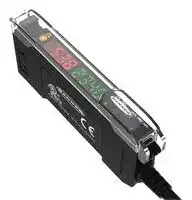

DF-G1-PS-2M.
DUAL DISPLAY FIBER AMPLIFIER, PNP, 30VDC
- Manufacturer: BANNER ENGINEERING
- Product type: Miscellaneous Sensor Accessories
- DUAL DISPLAY FIBER AMPLIFIER, PNP, 30VDC; Product Range:Expert DF-G1 Series
- SVHC: No SVHC (15-Jan-2018)
| Delivery and price | |
|---|---|
| Units per pack | 5 |
| Price | 151.55 € |
| Current stock | 10+ |
| Lead time | 30 days |

## DF-G1 Expert[™] Dual Display Fiber Amplifer

## Quick Start Guide

Advanced sensor with dual digital displays for use with plastic and glass fiber optic assemblies

For complete technical information about this product, including dimensions, accessories, and specifications, see www.bannerengineering.com and search for your model number. The instruction manual is p/n 161999.

## WARNING:

- Do not use this device for personnel protection

- Using this device for personnel protection could result in serious injury or death.

- This device does not include the self-checking redundant circuitry necessary to allow its use in personnel safety applications. A device failure or malfunction can cause either an energized (on) or deenergized (off) output condition.

## Overview

|1|Output LED|
|---|---|
|2|LO/DO Switch|
|3|RUN/PRG/ADJ Mode Switch|
|4|Lever Action Fiber Clamp|
|5|Red Signal Level|
|6|Green Threshold|
|7|+/SET/- Rocker Button|


Figure 1. DF-G1 Model Features

## Models

|Model|Outputs|Connector<br>1|
|---|---|---|
|DF-G1-NS-2M|Single NPN|2 m (6.5 ft) cable, 4-wire|
|DF-G1-PS-2M|Single PNP||
|DF-G1-KS-2M|Dual outputs, 1 push-pull IO-Link and 1 PNP<br>(complementary outputs)||
|DF-G1-NS-Q5|Single NPN|150 mm (6 in) PVC pigtail, M12 Euro QD connector, 4-pin|
|DF-G1-PS-Q5|Single PNP||
|DF-G1-KS-Q5|Dual outputs, 1 push-pull IO-Link and 1 PNP<br>(complementary outputs)||
|DF-G1-NS-Q7|Single NPN|Integral M8 Pico QD connector, 4-pin|
|DF-G1-PS-Q7|Single PNP||
|DF-G1-KS-Q7|Dual outputs, 1 push-pull IO-Link and 1 PNP<br>(complementary outputs)||


- 1 Connector options:

   - A model with a QD connector requires a mating cordset .

   - For 9 m cable, change the suffix 2M to 9M in the 2 m model number (example, DF-G1-NS- 9M ).

   -

> For 150 mm (6 in) PVC pigtail, M8 Pico QD connector, 4-pin change the suffix 2M to Q3 in the 2 m model number (example, DF-G1-NS- Q3 ).

Original Document 161275 Rev. E

21 March 2019

161275

DF-G1 Expert[™] Dual Display Fiber Amplifier

## Installation Instructions

## Mounting Instructions

## Mount on a DIN Rail

1. Hook the DIN rail clip on the bottom of the DF-G1 over the edge of the DIN rail (1).

2. Push the DF-G1 up on the DIN rail (1).

3. Pivot the DF-G1 onto the DIN rail, pressing until it snaps into place (2).

## Mount to the Accessory Bracket (SA-DIN-BRACKET)

1. Position the DF-G1 in the SA-DIN-BRACKET.

2. Insert the supplied M3 screws.

3. Tighten the screws.

## Remove from a DIN rail

1. Push the DF-G1 up on the DIN rail (1).

2. Pivot the DF-G1 away from the DIN rail and remove it (2).

## Installing the Fibers

Follow these steps to install glass or plastic fibers.

1. Open the dust cover.

2. Move the fiber clamp forward to unlock it.

3. Insert the fiber(s) into the fiber port(s) until they stop.

4. Move the fiber clamp backward to lock the fiber(s).

5. Close the dust cover.

**==> picture [49 x 73] intentionally omitted <==**

**----- Start of picture text -----**<br>
Move forward<br>to release the<br>fibers<br>Fiber Clamp<br>Fiber Receiver<br>Port<br>Fiber Emitter<br>Port<br>**----- End of picture text -----**<br>


## Fiber Adapters

Note: If a thin fiber with less than 2.2 mm outer diameter is used, install the fiber adapter provided with the fiber assembly to ensure a reliable fit in the fiber holder. Align the fibers to the end of the adaptors. Banner includes the adapters with all fiber assemblies.

P/N 161275 Rev. E

www.bannerengineering.com - Tel: + 1 888 373 6767

2

DF-G1 Expert[™] Dual Display Fiber Amplifier

**==> picture [138 x 87] intentionally omitted <==**

**----- Start of picture text -----**<br>
TO<br>FIBERS<br>TO<br>SENSOR<br>**----- End of picture text -----**<br>


|Fiber Outer Diameter (mm)|Adapter Color|
|---|---|
|Ø 1.0|Black|
|Ø 1.3|Red|
|Ø 2.2|No adapter needed|


When connecting coaxial-type fiber assemblies to the amplifier, install the single-core (center) fiber to the Transmitter port, and the multi-core (outer) fiber to the Receiver port. This will result in the most reliable detection.

**==> picture [135 x 40] intentionally omitted <==**

**----- Start of picture text -----**<br>
RECEIVER<br>Multi-core fiber<br>Single-core fiber<br>TRANSMITTER<br>**----- End of picture text -----**<br>


## Wiring Diagrams

**==> picture [474 x 200] intentionally omitted <==**

**----- Start of picture text -----**<br>
NPN Models PNP Models Key<br>1 = Brown<br>1 1<br>2 = White<br>3 10-30V dc 3 10-30V dc 3 = Blue<br>4 = Black<br>4 4<br>Load Load<br>2 Remote  2 Remote<br>Programming  Programming<br>(N.O.) (N.O.)<br>IO-Link Models Open lead wires must be<br>connected to a terminal<br>block.<br>Load 18–30 V dc<br>L oad<br>PUSH-PULL<br>**----- End of picture text -----**<br>


## Top Panel Interface

Opening the dust cover provides access to the top panel interface. The top panel interface consists of the RUN/PRG/ADJ mode switch, LO/DO switch, +/SET/- rocker button, dual red/green digital displays, and output LED.

P/N 161275 Rev. E

www.bannerengineering.com - Tel: + 1 888 373 6767

3

DF-G1 Expert[™] Dual Display Fiber Amplifier

## RUN/PRG/ADJ Mode Switch

The RUN/PRG/ADJ mode switch puts the sensor in RUN, PRG (Program), or ADJ (Adjust) mode. RUN mode allows the sensor to operate normally and prevents unintentional programming changes via the +/SET/- button. PRG mode allows the sensor to be programmed through the display driven programming menu (see Program Mode below). ADJ mode allows the user to perform Expert TEACH/SET methods and Manual Adjust (see Adjust Mode below).

## LO/DO Switch

The LO/DO switch is used to select Light Operate or Dark Operate mode. In Light Operate mode, the output is ON when the sensing condition is above the threshold (for Window SET, the output is ON when the sensing condition is inside the window). In Dark Operate mode, the output is ON when the sensing condition is below the threshold (for Window SET, the output is ON when the sensing condition is outside the window).

## +/SET/- Rocker Button

The +/SET/- rocker button is a 3-way button. The +/- positions are engaged by rocking the button left/right. The SET position is engaged by clicking down the button while the rocker is in the middle position. All three button positions are used during PRG mode to navigate the display driven programming menu. During ADJ mode, SET is used to perform TEACH/SET methods and +/- are used to manually adjust the threshold(s). The rocker button is disabled during RUN mode, except when using Window SET, see Window SET on page 6.

## Red/Green Digital Displays

During RUN and ADJ mode, the Red display shows the signal level and the Green display shows the threshold. During PRG mode, both displays are used to navigate the display driven programming menu.

## Output LED

The output LED provides a visible indication when the output is activated.

## Operating Instructions

## Remote Input/IO-Link

For more information about how to perform TEACH/SET methods, to program the sensor remotely, or to interface with the sensor via IO-Link, see the DF-G1 Manual (P/N 161999).

## Run Mode

Run mode allows the sensor to operate normally and prevents unintentional programming changes. The +/SET/- rocker button is disabled during RUN mode, except when using Window SET.

P/N 161275 Rev. E

www.bannerengineering.com - Tel: + 1 888 373 6767

4

DF-G1 Expert[™] Dual Display Fiber Amplifier

## Program Mode

Program (PRG) mode allows the following settings to be programmed in the DF-G1:

## Factory Default Settings:

|Setting|Factory Default|
|---|---|
|Threshold|2026|
|TEACH<br>Selection|Two-Point<br>TEACH|
|Response<br>Speed|Standard - 500<br>µs|
|Offset Percent|10%|
|Auto Thresholds|OFF|
|OFF Delay|0 (Disabled)|
|OFF One-Shot|0 (Disabled)|
|ON Delay|0 (Disabled)|
|ON One-Shot<br>Display Readout|0 (Disabled)<br>Numeric, ECO<br>disabled,<br>Normal<br>Orientation|


**==> picture [294 x 591] intentionally omitted <==**

**----- Start of picture text -----**<br>
Press and hold SET to exit<br>choice list without saving List Menu<br>tcH<br>CAL SEt dr SEt Lt SEt wind SEt dYn tcH 2Pt tcH LOOP DISPLAY Click SET<br> SEL<br>to enter choice list to “PRG” Mode Switch<br>PROGRAM MODE<br>rESP<br>5000 uS 2000 uS 500 uS 200 uS LOOP DISPLAY Click SET<br>Return to Menu List to enter choice list  SPd<br>(+) or  OFSt<br>999 Pct to set value (-)  10 Pct min OFSt Click SET<br>Pct<br>to enter choice list<br>Auto +<br>    On oFF     LOOP DISPLAY Click SET<br>thr<br>to enter choice list SET<br>rocker button<br>(+) OFF -<br> or<br>9999 ms    to set value (-)  0 ms    Click SET  dLY<br>to enter choice list<br>OFF<br>(+)<br> or<br>to set value (-)  0 ms    Click SET<br>9999 ms     1Sho<br>to enter choice list<br>On<br>(+)<br> or<br>to set value (-)  0 ms    Click SET dLY<br>9999 ms<br>Click SET to select and save a choice in any list to enter choice list<br>On<br>(+)<br> or<br>9999 ms    to set value (-)  0 ms    Click SET 1Sho<br>to enter choice list<br>To scroll through menu lists:  Press “+” or “-”<br>diSP<br>LOOP DISPLAY<br>Eco 123P Eco 1234 diSP 123P diSP 1234 (display flips 180˚) Eco 123P Eco 1234 diSP 123P diSP 1234 Click SET rEAd<br>to enter choice list To enter a choice list or to select and save:  Click SET<br>GAin<br>LOOP DISPLAY<br>1234 Gn 8 1234 Gn 2 1234 Gn 1 Fixed Gain Set Auto GAin Click SET<br>SEL<br>to enter choice list<br>To exit a choice list without saving:  Press and hold SET for 2 seconds<br>no<br>FctY<br>LOOP DISPLAY<br>yES Click SET dEF<br>to enter choice list<br>**----- End of picture text -----**<br>


P/N 161275 Rev. E

www.bannerengineering.com - Tel: + 1 888 373 6767

5

DF-G1 Expert[™] Dual Display Fiber Amplifier

## Adjust Mode

Sliding the RUN/PRG/ADJ mode switch to the ADJ position allows the user to perform Expert TEACH/SET methods and Manual Adjustment of the threshold(s).

## TEACH Procedures

The instruction manual has detailed instructions for these TEACH modes:

- Two-Point TEACH

- Dynamic TEACH

- Window SET

- Light SET

- Dark SET

- Calibration SET

## Two-Point TEACH

- Establishes a single switching threshold

- Threshold can be adjusted by using the "+" and "-" rocker button (Manual Adjust)

Two-Point TEACH is used when two conditions can be presented statically to the sensor. The sensor locates a single sensing threshold (the switch point) midway between the two taught conditions, with the Output ON condition on one side, and the Output OFF condition on the other.

**==> picture [172 x 113] intentionally omitted <==**

**----- Start of picture text -----**<br>
Darkest Taught Lightest Taught<br>Condition Condition<br>Sensor positions<br>threshold midway<br>between taught conditions<br>Output OFF Output ON<br>Darkest Position Most Light<br>(no signal) adjusted by (saturated<br>Manual Adjust signal)<br>**----- End of picture text -----**<br>


Figure 2. Two-Point TEACH (Light Operate shown)

The Output ON and OFF conditions can be reversed by using the LO/DO (Light Operate/ Dark Operate) switch.

## Dynamic TEACH

- Teaches on-the-fly

- Establishes a single switching threshold

- Threshold can be adjusted using "+" and "-" rocker button (Manual Adjust)

Dynamic TEACH is best used when a machine or process may not be stopped for teaching. The sensor learns during actual sensing conditions, taking multiple samples of the light and dark conditions and automatically setting the threshold at the optimum level.

**==> picture [172 x 113] intentionally omitted <==**

**----- Start of picture text -----**<br>
Darkest Taught Lightest Taught<br>Condition Condition<br>Sensor positions<br>threshold midway<br>between taught conditions<br>Output OFF Output ON<br>Darkest Position Most Light<br>(no signal) adjusted by (saturated<br>Manual Adjust signal)<br>**----- End of picture text -----**<br>


Figure 3. Dynamic TEACH (Light Operate shown)

The output ON and OFF conditions can be reversed using the LO/DO switch.

## Window SET

- Sets window thresholds that extend a programmable % offset above and below the presented condition

P/N 161275 Rev. E

www.bannerengineering.com - Tel: + 1 888 373 6767

6

DF-G1 Expert[™] Dual Display Fiber Amplifier

- All other conditions (lighter or darker) cause the output to change state

- Sensing window center can be adjusted using "+" and "-" rocker button (Manual Adjust)

- Recommended for applications where a product may not always appear in the same place, or when other signals may appear

- See Program Mode for programming the Offset Percent setting

A single sensing condition is presented, and the sensor positions window thresholds a programmable % offset above and below the presented condition. In LO mode, Window SET designates a sensing window with the Output ON condition inside the window, and the Output OFF conditions outside the window.

**==> picture [172 x 118] intentionally omitted <==**

**----- Start of picture text -----**<br>
Sensing window<br>center adjusted by<br>Manual Adjust<br>Sensor positions<br>window thresholds<br>a programmable %<br>offset from the<br>presented condition<br>Output OFF Output ON Output OFF<br>Darkest Condition  Most Light<br>(no signal) Presented (saturated<br>signal)<br>**----- End of picture text -----**<br>


Figure 4. Window SET (Light Operate shown)

Output ON and OFF conditions can be reversed using the LO/DO switch.

## Light SET

- Sets a threshold a programmable % offset below the presented condition

- Changes output state on any condition darker than the threshold condition

- Threshold can be adjusted using "+" and "-" rocker button (Manual Adjust)

- Recommended for applications where only one condition is known, for example a stable light background with varying darker targets

- See Program Mode for programming the Offset Percent setting

A single sensing condition is presented, and the sensor positions a threshold a programmable % offset below the presented condition. When a condition darker than the threshold is sensed, the output either turns ON or OFF, depending on the LO/DO setting.

**==> picture [172 x 119] intentionally omitted <==**

**----- Start of picture text -----**<br>
Threshold position<br>adjusted by<br>Manual Adjust<br>Sensor positions<br>threshold a programmable<br> % offset below the<br>presented condition<br>Output OFF Output ON<br>Darkest Condition  Most Light<br>(no signal) Presented (saturated<br>signal)<br>**----- End of picture text -----**<br>


Figure 5. Light SET (Light Operate shown)

## Dark SET

- Sets a threshold a programmable % offset above the presented condition

- Any condition lighter than the threshold condition causes the output to change state

- Threshold can be adjusted using "+" and "-" rocker button (Manual Adjust)

- Recommended for applications where only one condition is known, for example a stable dark background with varying lighter targets

- See Program Mode for programming the Offset Percent setting

Note: Offset Percent MUST be programmed to Minimum Offset to accept conditions of no signal (0 counts).

A single sensing condition is presented, and the sensor positions a threshold a programmable % offset above the presented condition. When a condition lighter than the threshold is sensed, the output either turns ON or OFF, depending on the LO/DO setting.

P/N 161275 Rev. E

www.bannerengineering.com - Tel: + 1 888 373 6767

7

DF-G1 Expert[™] Dual Display Fiber Amplifier

**==> picture [172 x 119] intentionally omitted <==**

**----- Start of picture text -----**<br>
Threshold position<br>adjusted by<br>Manual Adjust<br>Sensor positions<br>threshold a programmable<br> % offset above the<br>presented condition<br>Output OFF Output ON<br>Darkest Condition  Most Light<br>(no signal) Presented (saturated<br>signal)<br>**----- End of picture text -----**<br>


Figure 6. Dark SET (Light Operate shown)

## Calibration SET

- Sets a threshold exactly at the presented condition

- Threshold can be adjusted using "+" and "-" rocker button (Manual Adjust)

A single sensing condition is presented, and the sensor positions a threshold exactly at the presented condition. When a condition lighter than the threshold is sensed, the output either turns ON or OFF, depending on the LO/DO setting.

**==> picture [172 x 120] intentionally omitted <==**

**----- Start of picture text -----**<br>
Threshold position<br>adjusted by<br>Manual Adjust<br>Sensor positions<br>threshold exactly at<br>the presented condition<br>Output OFF Output ON<br>Darkest Condition  Most Light<br>(no signal) Presented (saturated<br>signal)<br>**----- End of picture text -----**<br>


Figure 7. Calibration SET (Light Operate shown)

## Troubleshooting

## Manual Adjustments Disabled

Manual adjustments are disabled when Auto Thresholds are ON. If a manual adjustment is attempted while Auto Thresholds are ON, the Green display will flash .

## Percent Minimum Difference after TEACH

The Two-Point and Dynamic TEACH methods will flash a % minimum difference on the displays after a PASS or FAIL.

|Value|PASS/FAIL|Description|
|---|---|---|
|0 to 99%|FAIL|The difference of the taught conditions does not meet the required minimum|
|100 to 300%|PASS|The difference of the taught conditions just meets/exceeds the required minimum, minor<br>sensing variables may affect sensing reliability|
|300 to 600%|PASS|The difference of the taught conditions suffciently exceeds the required minimum, minor<br>sensing variables will not affect sensing reliability|
|600% +|PASS|The difference of the taught conditions greatly exceeds the required minimum, very stable<br>operation|


## Percent Offset after SET

The Window, Dark, and Light SET methods will flash a % offset on the displays after a PASS or FAIL.

|SET Result|% Offset Meaning|
|---|---|
|PASS (with % Offset)|Displays the % offset used for the SET method|
|FAIL (with % Offset)|Displays the minimum required % offset necessary to PASS the SET method|
|FAIL (without % Offset)|Presented condition cannot be used for the SET method|


P/N 161275 Rev. E

www.bannerengineering.com - Tel: + 1 888 373 6767

8

DF-G1 Expert[™] Dual Display Fiber Amplifier

## Threshold Alert or Threshold Error

Severe contamination/changes in the taught condition can prevent the Auto Thresholds algorithm from optimizing the threshold(s).

|State|Display|Description|Corrective Action|
|---|---|---|---|
|Threshold Alert|Alternates<br>and|The threshold(s) cannot be optimized,<br>but the sensor's output will still<br>continue to function|Cleaning/correcting the sensing<br>environment and/or a re-teach of the<br>sensor is highly recommended|
|Threshold Error||The threshold(s) cannot be optimized,<br>and the sensor's output will stop<br>functioning|Cleaning/correcting the sensing<br>environment and/or a re-teach of the<br>sensor is required|


## Specifications

|Specifcations||
|---|---|
|Sensing Beam|Output Rating|
|660 nm visible red|100 mA maximum load (derate 1 mA per °C above 30 °C)|
|Supply Voltage<br>NPN/PNP models:10 to 30 V dc Class 2 (10% maximum ripple)<br>IO-Link models:18 to 30 V dc (10% maximum ripple)<br>Power and Current Consumption (exclusive of load)<br>Standard display mode:960 mW, Current consumption < 40 mA at 24 V dc|OFF-state leakage current: NPN/PNP models:< 5 μA at 30 V dc;IO-Link<br>models:< 50 μA at 30 V dc<br>ON-state saturation voltage: NPN:< 1.5 V;PNP /IO-Link:< 2 V<br>Output Protection<br>Protected against output short-circuit, continuous overload, transient<br>overvoltages, and false pulse on power-up|
|ECO display mode:720 mW, Current consumption < 30 mA at 24 V dc|Output Response Time|
|Supply Protection Circuitry|High Speed: 200 µs|
|Protected against reverse polarity and transient overvoltages|Standard: 500 µs|
||Long Range: 2 ms|
||Extra Long Range: 5 ms|
|Delay at Power-Up|Adjustments|
|500 milliseconds maximum; outputs do not conduct during this time|3-way RUN/PRG/ADJ Mode Switch|
|Output Confguration<br>NPN/PNP models:1 current sinking (NPN) or 1 current sourcing (PNP) output,<br>depending on model<br>IO-Link models:1 push-pull and 1 PNP (complementary outputs)|2-way LO/DO Switch<br>3-way +/SET/- Rocker Button<br>•<br>Expert-style teaching (Two-Point and Dynamic TEACH, Light/<br>Dark/Window/Calibration SET)<br>•<br>Manually adjust sensitivity (from "+" and "-" rocker button only)|
|Repeatability|•<br>Response Speed, TEACH Selection, Offset Percent, Auto|
|High Speed: 66 µs, Standard/Long Range/Extra Long Range: 100 µs<br>Connections|Thresholds, Delays/Timers, Display Readout, Gain Selection,<br>Factory Defaults (from top panel or remote input)<br>•<br>Top panel interface lockout (from remote input only)|
|PVC-jacketed 2 m or 9 m (6.5 ft. or 30 ft.) 4-wire integral cable; or integral 4-<br>|Factory Default Settings:|


PVC-jacketed 2 m or 9 m (6.5 ft. or 30 ft.) 4-wire integral cable; or integral 4- pin M8/Pico-style quick disconnect; or 150 mm (6 in.) cable with a 4-pin M12/ Euro-style quick disconnect; or 150 mm (6 in.) cable with a 4-pin M8/Picostyle quick disconnect.

|Setting|Factory Default|
|---|---|
|Threshold|2026|
|TEACH Selection|Two-Point TEACH|
|Response Speed|Standard: 500 µs|
|Offset Percent|10%|
|Auto Thresholds|OFF|
|OFF Delay|0 (Disabled)|
|OFF One-Shot|0 (Disabled)|
|ON Delay|0 (Disabled)|
|ON One-Shot|0 (Disabled)|
|Display Readout|Numeric, ECO disabled, Normal<br>Orientation|
|Gain Selection|Auto Gain|


Construction Black ABS/polycarbonate alloy (UL94 V-0 rated) housing, clear polycarbonate cover

IO-Link Interface Supports Smart Sensor Profle: Yes Baud Rate: 38,400 bps (COM2) Process Data Width: 16 bits IODD fles: Provide all programming options of top panel interface, plus additional functionality, see IO-Link Interface

Indicators Red 4-digit Display: Signal Level Green 4-digit Display: Threshold (In Program Mode, Red and Green displays are used for programming menus) Yellow LED: Output conducting

P/N 161275 Rev. E

www.bannerengineering.com - Tel: + 1 888 373 6767

9

DF-G1 Expert[™] Dual Display Fiber Amplifier

## Required Overcurrent Protection

WARNING: Electrical connections must be made by qualified personnel in accordance with local and national electrical codes and regulations.

Overcurrent protection is required to be provided by end product application per the supplied table.

Overcurrent protection may be provided with external fusing or via Current Limiting, Class 2 Power Supply.

Supply wiring leads < 24 AWG shall not be spliced.

For additional product support, go to www.bannerengineering.com.

|Supply Wiring (AWG)|Required Overcurrent Protection (Amps)|
|---|---|
|20|5.0|
|22|3.0|
|24|2.0|
|26|1.0|
|28|0.8|
|30|0.5|


Environmental Rating IEC IP50, NEMA 1

Operating Conditions Temperature: –10 °C to +55 °C (+14 °F to +131 °F) Storage Temperature: –20 °C to +85 °C (–4 °F to +185 °F) Humidity: 90% at +60 °C maximum relative humidity (non-condensing) Certifcations

**==> picture [78 x 44] intentionally omitted <==**

**Industrial Control Equipment 3TJJ**

## Banner Engineering Corp. Limited Warranty

Banner Engineering Corp. warrants its products to be free from defects in material and workmanship for one year following the date of shipment. Banner Engineering Corp. will repair or replace, free of charge, any product of its manufacture which, at the time it is returned to the factory, is found to have been defective during the warranty period. This warranty does not cover damage or liability for misuse, abuse, or the improper application or installation of the Banner product.

THIS LIMITED WARRANTY IS EXCLUSIVE AND IN LIEU OF ALL OTHER WARRANTIES WHETHER EXPRESS OR IMPLIED (INCLUDING, WITHOUT LIMITATION, ANY WARRANTY OF MERCHANTABILITY OR FITNESS FOR A PARTICULAR PURPOSE), AND WHETHER ARISING UNDER COURSE OF PERFORMANCE, COURSE OF DEALING OR TRADE USAGE.

This Warranty is exclusive and limited to repair or, at the discretion of Banner Engineering Corp., replacement. IN NO EVENT SHALL BANNER ENGINEERING CORP. BE LIABLE TO BUYER OR ANY OTHER PERSON OR ENTITY FOR ANY EXTRA COSTS, EXPENSES, LOSSES, LOSS OF PROFITS, OR ANY INCIDENTAL, CONSEQUENTIAL OR SPECIAL DAMAGES RESULTING FROM ANY PRODUCT DEFECT OR FROM THE USE OR INABILITY TO USE THE PRODUCT, WHETHER ARISING IN CONTRACT OR WARRANTY, STATUTE, TORT, STRICT LIABILITY, NEGLIGENCE, OR OTHERWISE.

Banner Engineering Corp. reserves the right to change, modify or improve the design of the product without assuming any obligations or liabilities relating to any product previously manufactured by Banner Engineering Corp. Any misuse, abuse, or improper application or installation of this product or use of the product for personal protection applications when the product is identified as not intended for such purposes will void the product warranty. Any modifications to this product without prior express approval by Banner Engineering Corp will void the product warranties. All specifications published in this document are subject to change; Banner reserves the right to modify product specifications or update documentation at any time. Specifications and product information in English supersede that which is provided in any other language. For the most recent version of any documentation, refer to: www.bannerengineering.com.

For patent information, see www.bannerengineering.com/patents.

© Banner Engineering Corp. All rights reserved
Updated at March 31, 2026
Founded in 1966, Banner Engineering is a globally recognized leader in the design and manufacture of industrial automation products. The company is renowned for developing innovative, high-quality solutions that improve operational efficiency, safeguard personnel, and optimize manufacturing processes across a diverse range of industries. Our extensive selection of Banner Engineering components prominently features their industry-leading sensing technologies. We offer a comprehensive array of precision light sensors engineered for accurate detection and measurement in demanding environments. Complementing this core sensing portfolio is a robust offering of automation signaling devices, including visual signal indicator units and essential accessories, which provide clear and immediate communication of machine status. Beyond primary sensing and indication solutions, our range encompasses critical components for broader process control and machine safety. This includes advanced process controllers, reliable pressure sensors and transducers, and dependable safety relays. Supported by a variety of purpose-built sensor accessories and fiber optic lead assemblies, Banner Engineering delivers the durable, high-performance technologies required to build and maintain sophisticated automated systems.
About Novapart
Novapart is a B2B electronic component broker specialising in stock shortages and cost reduction. We source hard-to-find parts and identify compliant alternatives across a catalogue of 410,000+ components from 500+ manufacturers.
Learn more →Stock Shortage Specialist
When a component is unavailable, discontinued or has an unacceptable lead time, we tap into our network of vetted European and Asian distributors to source what you need — without compromising on quality or traceability.
Request a quote →Compliant Alternatives
We identify pin-to-pin, electrically equivalent substitutes that meet the same certifications (RoHS, AEC-Q100, REACH) as your original specification — validated against datasheets, not just part numbers. Often at a lower cost.
BOM Analysis service →