
Image not available
Illustrative purposes only

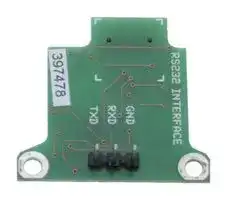
ACCTRS232K
INTERFACE KIT, RS232, 1.5M CABLE
⚠️ Reference pricing provided. In case of supply shortages, we will connect you with our trusted procurement partners to ensure your project's continuity.
- Manufacturer: OPTRIS
- Product type: Controller Accessories
- Current Rating:-; Product Range:- 70AJ6189
- Product Range: -
- Current Rating: -
| Delivery and price | |
|---|---|
| Units per pack | 1 |
| Price | 104.76 € |
| Current stock | 25+ |
| Lead time | 30 days |
Datasheet

**ACCTRS232K**

## **RS232 Interface Kit**

## **Quick Reference/ Kurzanleitung**

## **Scope of Supply/ Lieferumfang**

- RS232 interface board incl. terminal block/ RS232 Interface-Platine inkl. Anschlussklemmblock

- Software CD

- RS232 interface cable/ RS232 Schnittstellenkabel (1,5 m)

- Cable gland/ Kabelverschraubung M12x1,5

- Mounting screws, cable tie/ Schrauben, Kabelbinder

- Quick reference/ Kurzanleitung

Installation of the RS232 interface board/ Einbau der RS232-Interface-Platine

## **Installation**

- Please plug the RS232 interface into the place provided, which is located beside the display. In the correct position the holes of the interface match with the thread holes of the CT box.

- Now press the PCB down to connect it with the CT. Use both M3x5 screws for fixing the board. Exchange the blind screw on the CT box by the cable gland and install the RS232 interface cable.

- Make sure the wiring is correct according to the drawing and designation printed on the interface board.

- The CT always needs an external power supply for operation.

- Please install the software as described in the operators manual. Follow the software instruction manual. After you have connected the RS232 cable to your PC and started the software the communication will be established.

**NOTE:** Please make sure that the option **Scan non-USB devices** is activated in the software **[Menu: Preferences/ Options].**

ACCTRS232K-MAD-ED2016-10-A

I

**ACCTRS232K**

**RS232 Interface Kit**

- Stecken Sie das RS232-Interface in die dafür vorgesehene Aufnahme im CT, welche sich neben der Anzeige befindet. Die richtige Lage ist erreicht, wenn die Schraubenlöcher des Interface mit denen des CT übereinstimmen.

- Drücken Sie das Interface nun nach unten und befestigen Sie es mittels der beiden mitgelieferten Schrauben M3x5. Tauschen Sie die Blindverschraubung an der CT-Box gegen die Kabelverschraubung und installieren Sie das RS232-Kabel.

- Bitte beachten Sie die richtige Anschlussbelegung entsprechend der Zeichnung und der Bezeichnung auf der Platine.

- Der CT benötigt in jedem Fall eine externe Betriebsspannungsversorgung.

- Installieren Sie bitte die Software wie in der Bedienungsanleitung beschrieben. Folgen Sie den Hinweisen in der Softwareanleitung. Nach Anschluss des RS232-Kabels am PC und starten der Software wird die digitale Kommunikation hergestellt.

**HINWEIS:** Bitte vergewissern Sie sich, dass die Option **Suche auch Nicht-USB-Geräte** in der Software aktiviert ist **[Menü: Extras/ Optionen].**

**EG-Konformitätserklärung / EU Declaration** Das Produkt entspricht den Anforderungen der EMV-Richtlinie **2014/30/EU** und der Niederspannungsrichtlinie **2014/35/EU** / The product meets the provisions of the EMC Directive **2014/30/EU** and the Low Voltage Directive **2014/35/EU** . EMV Anforderungen / EMC General Requirements: **EN 61326-1:2013** (Grundlegende Prüfanforderungen / Basic requirements) **EN 61326-2-3:2013** Gerätesicherheit von Messgeräten / Safety of measurement devices: **EN 61010-1:2010**

Dieses Produkt erfüllt die Vorschriften der Richtlinie **2011/65/EU** (RoHS) des Europäischen Parlaments und des Rates vom 8. Juni 2011 zur Beschränkung der Verwendung bestimmter gefährlicher Stoffe in Elektround Elektronikgeräten. This product is in conformity with Directive **2011/65/EU** (RoHS) of the European Parliament and of the Council of 8 June 2011 on the restriction of the use of certain hazardous substances in electrical and electronic equipment.

ACCTRS232K-MAD-ED2016-10-A II
Updated at April 23, 2026
About Novapart
Novapart is a B2B electronic component broker specialising in stock shortages and cost reduction. We source hard-to-find parts and identify compliant alternatives across a catalogue of 410,000+ components from 500+ manufacturers.
Learn more →Stock Shortage Specialist
When a component is unavailable, discontinued or has an unacceptable lead time, we tap into our network of vetted European and Asian distributors to source what you need — without compromising on quality or traceability.
Request a quote →Compliant Alternatives
We identify pin-to-pin, electrically equivalent substitutes that meet the same certifications (RoHS, AEC-Q100, REACH) as your original specification — validated against datasheets, not just part numbers. Often at a lower cost.
BOM Analysis service →