
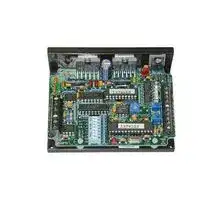


3540I
Motor Drive, Step Index, Programmable, 2 Phase, 42 VDC, 3.5 A, 8 Input, 3 Output
- Manufacturer: OMEGA
- Product type: Stepper Motor Drives
- No. of Phases: Two Phase
- Product Range: -
- Output Current Max: 3.5A
- Supply Voltage Max: 42VDC
- Supply Voltage Min: 12VDC
- Control / Drive Type: Microstep Drive
| Delivery and price | |
|---|---|
| Units per pack | 1 |
| Price | 815.38 € |
| Current stock | 10+ |
| Lead time | 30 days |

7/31/98

## _**Hardware Manual 3540i**_

_**Programmable Step Motor Driver**_

**==> picture [251 x 201] intentionally omitted <==**

Copyright 1998

## _**Applied Motion Products, Inc.**_

404 Westridge Drive  Watsonville, CA 95076 Tel (831) 761-6555      (800) 525-1609      Fax (831) 761-6544

**==> picture [57 x 33] intentionally omitted <==**

## _**Connections**_

**==> picture [312 x 480] intentionally omitted <==**

**----- Start of picture text -----**<br>
Motor  Power<br>12V- 42V DC<br>Connections Input<br>B A V<br>- + - + - +<br>NOTE<br>If option board<br>not present, ensure<br>that jumper is<br>present on pins 7<br>& 8.<br>Out1+<br>Out1-<br>Out2+<br>Out2-<br>Out3+<br>Out3-<br>- + - +<br>* inputs and  ccw cw<br>outputs are opto  LIMITS<br>isolated and require<br>external power<br>Inputs  *<br>supply to drive<br>them.  Voltage<br>required 5-24 VDC<br>Outputs *<br>ccw cw IN4 IN3 IN2 IN1 COM COM COM<br>JOG<br>**----- End of picture text -----**<br>


## _**Mechanical Outline - Optional MMI**_

**==> picture [225 x 516] intentionally omitted <==**

**----- Start of picture text -----**<br>
➝<br>0.960 0.963 1.975 0.425<br>➝ NO<br>ENTER<br>➝ YES BKSP<br>3 6 9<br>2.988 SPACE<br>2 5 8 0<br>1 4 7 .<br>1.38 0.13<br>4.90  3.875<br>CENTERED<br>3.875<br>CENTERED<br>4.90<br>➝<br>**----- End of picture text -----**<br>


**==> picture [24 x 10] intentionally omitted <==**

**----- Start of picture text -----**<br>
-19-<br>**----- End of picture text -----**<br>


_**-2-**_

## _**Technical Specifications**_

- **Amplifiers** Dual, MOSFET H-bridge, 3 state, pulse width modulated switching at 20 kHz.  0.2 - 3.5 amps/phase output current, software selectable.  147 watts maximum output power. Automatic idle current reduction (software programmable), reduces current to motor when idle.  Minimum motor inductance is 0.8 mH.

- **Power Supply** Accepts 12 - 42 VDC power supply.  3.5 amps typical max load. 7A maximum power on surge.

## _**Introduction**_

Thank you for selecting an Applied Motion Products motor control.  We hope our dedication to performance, quality and economy will make your motion control project successful.  If there's anything we can do to improve our products or help you use them better, please call or fax.  We'd like to hear from you.  Our phone number is (800) 525-1609 or you can reach us by fax at (831) 761–6544.

## _**Features**_

   - Powerful, precise and efficient mosfet driver providing up to 3.5 amps per phase and microstepping to 50,800 steps per revolution.

   - Accepts 12 - 42 VDC power supply.

   - Powerful, flexible, easy to use indexer.

   - Connects by a simple cable to your PC for programming (cable included).

- **Inputs** 5 - 24V, optically isolated.  2200 ohms internal resistance.  Can be configured for sinking (NPN) or sourcing (PNP) signals.

- Microsoft Windows-based software for easy set up and programming.

- Eight inputs for interacting with the user and other equipment.

- Three outputs for coordinating external equipment.

**Outputs** Optically isolated.  24V, 100 mA max.

- **Microstepping** 13 software selectable resolutions.  Steps per revolution with 1.8º motor:  2000, 5000, 10000, 12800, 18000, 20000, 21600, 25000, 25400, 25600, 36000, 50000, 50800.  Waveform:  pure sine.

## **Motion Update** 12800 Hz.

**Physical** Constructed on black anodized aluminum chassis/heat sink. 1.5 x 3 x 5 inches overall.  12 oz.  0-70ºC ambient temp range. Power LED.  See page 17 for detailed drawing .

- **Connectors** Power, motor:  screw terminal block.  Wire size:  AWG 12 - 28. I/O Signals:  screw terminal block.  Wire size:  AWG 16 - 28.

- All I/O is optically isolated, 5 - 24 V, sinking or sourcing signals.  (Except PC/MMI port which is ±12V RS-232.)

- Sturdy 1.5 x 3 x 5 inch metal chassis.

- Screw terminal connectors for motor, DC power and I/O signals

- Optional man machine interface (MMI) allows operator to enter distances, speeds, loop counts and more.

## _**Block Diagram**_

**==> picture [316 x 196] intentionally omitted <==**

**----- Start of picture text -----**<br>
12 - 42 VDC<br>Internal<br>Logic<br>INPUT1 Supply eeprom<br>INPUT2<br>INPUT3 Optical MOSFET<br>INPUT4 Isolation 3 State<br>PWM<br>CW JOG/IN5<br>Power<br>CCW JOG/IN6<br>Si™ Amplifier<br>CW LIMIT Optical Microstepping<br>Indexer<br>CCW LIMIT Isolation Sequencer<br>to PC/MMI RS232<br>Optical OUT1<br>Isolation OUT2<br>OUT3<br>motor phase A<br>motor phase B<br>**----- End of picture text -----**<br>


_**-18-**_

_**-3-**_

## _**Getting Started**_

To use your 3540i motor control, you will need the following:

- ✔ a power supply (see page 5 for help in choosing one).

- ✔ a compatible step motor (see page 17 fopr recommended motors)

- ✔ a small flat blade screwdriver for tightening the connectors - an Applied Motion Products screwdriver suitable for this purpose is included with your drive.

- ✔ a personal computer running Windows 3.1, 95 or NT with a 9 pin serial port (486 or better with 8 MB ram recommended)

- ✔ the Si Programmer™ software that came with your 3540i

- ✔ the programming cable that came with your 3540i

- ✔ Si Programmer™ manual

The sketch below shows where to find the important connection and adjustment points.  Please examine it now.

**==> picture [329 x 290] intentionally omitted <==**

**----- Start of picture text -----**<br>
power connector<br>• DC power supply mounting hole (1 of 6)<br>• motor<br>pc/mmi<br>connector power<br>LED connector<br>• input 1,2,3,4<br>• jog cw<br>connector • jog ccw<br>• output1,2,3 • cw limit<br>Always use the blue & white Applied<br>Motion screwdriver with these  • ccw limit<br>connectors. Larger screwdrivers may<br>remove the plastic dimples that<br>prevent the screws from falling out.<br>**----- End of picture text -----**<br>


## _**Recommended Motors**_

**==> picture [352 x 210] intentionally omitted <==**

**----- Start of picture text -----**<br>
Motor  Size  Winding  Max Torque  Current<br> Number  inches  Connection  oz-in  Amps<br> 5014-842  1.38 x 1.38 x 1.57  4 lead  19  1.0<br> HT17-068  1.65 x 1.65 x 1.30  parallel  23  1.0<br> HT17-071  1.65 x 1.65 x 1.54  parallel  30  1.25<br> HT17-075  1.65 x 1.65 x 1.85  parallel  40  1.7<br> 5023-122  2.22 x 2.22 x 2.0  parallel  60  2.0<br> 5023-123  2.22 x 2.22 x 3.0  parallel  100  2.5<br> 5023-124  2.22 x 2.22 x 4.0  parallel  150  3.5<br> HT23-394  2.22 x 2.22 x 1.54  parallel  60  2.8<br> HT23-397  2.22 x 2.22 x 2.13  parallel  140  2.8<br> HT23-400  2.22 x 2.22 x 2.99  parallel  180  2.0<br> 5034-348  3.38 x 3.38 x 2.50  parallel  130  3.5<br>**----- End of picture text -----**<br>


## _**Mechanical Outline - 3540i**_

**==> picture [331 x 267] intentionally omitted <==**

**----- Start of picture text -----**<br>
4x Ø.170<br>1.50<br>0.150" 2.45"<br>4.70 5.00<br>4.70<br>0.25<br>0.25<br>0.15<br>3.00<br>2x SLOT<br>.875 .170 WIDE<br>FULL R<br>**----- End of picture text -----**<br>


_**-4-**_

_**-17-**_

## **Flush Mounting**

When you remove the MMI from the shipping carton, you will notice that it has two parts.  The first is a fairly thin section that contains the keypad, display and some circuit boards.  The other part is thicker and contains the telephone jack and a cable that connects to the keypad assembly. MMI

**==> picture [169 x 190] intentionally omitted <==**

**----- Start of picture text -----**<br>
MMI<br>(rear section)<br>MMI<br>(front section<br>and gasket)<br>panel<br>1<br>2<br>4 3<br>5<br>7 6<br>8<br>. 0 9 YES ➝<br>SPACE NO<br>BKSP<br>ENTER<br>➝<br>➝<br>➝<br>**----- End of picture text -----**<br>


When you flush mount the MMI in a panel, only the thin section will stick out from your panel - the large portion mounts behind your panel. You'll need to cut a precise section from your panel.  There is a cardboard template in your box for this purpose.

If you want the MMI to be dust proof and watertight, you must place the black rubber gasket between the thin part of the MMI and your panel.  Assemble the two halves using the eight small screws.

## _**Connecting the Power Supply**_

If you need information about choosing a power supply, please read _Choosing a Power Supply_ below.  The PS430 from Applied Motion Products is a good supply for this drive.

If your power supply does not have a fuse on the output or some kind of short circuit current limiting feature you need to put a 4 amp fast acting fuse between the drive and power supply.  Install the fuse on the + power supply lead.

Connect the motor power supply as shown below.  Use no smaller than 20 gauge wire. **Be careful not to reverse the wires.** Reverse connection will destroy your driver, void your warranty and generally wreck your day.

**==> picture [246 x 50] intentionally omitted <==**

**----- Start of picture text -----**<br>
4A fuse<br>DC Power +<br>12-42 voltsSupply –<br>+ VDC – 3540MO<br>**----- End of picture text -----**<br>


## **Surface Mounting**

An easier way to mount the MMI is to bolt the two halves together ahead of time, using the eight small screws.  If you want the MMI to be dust proof and watertight, put the black rubber gasket between the two halves before screwing them together.

**==> picture [166 x 215] intentionally omitted <==**

**----- Start of picture text -----**<br>
gasket<br>(included)<br>sealant (not included)<br>panel<br>MMI<br>1<br>2<br>4 3<br>5<br>7 6<br>8<br>. 0 9 YES ➝<br>SPACE NO<br>BKSP<br>ENTER<br>➝<br>➝<br>➝<br>**----- End of picture text -----**<br>


Then cut a hole in your panel for the cable that runs between the MMI and the 3540i. The hole must be at least 5/8" in diameter for the connector to fit through.  You will also need two holes that line up with the big mounting holes in the MMI.  The mechanical outline on page 19 shows the location of the big mounting holes.

When you mount the MMI to your panel, you will need to use some kind of sealant to keep dust and liquid out. Silicone or latex caulking is okay, or you can make your own gasket from a sheet of compliant material like rubber or RTV.

## _**Choosing a Power Supply**_

We recommend using an Applied Motion Products PS430 power supply with this drive. The PS430 provides 30 volts DC at 4 amps, as well as 500 mA of well regulated 5 volt power for your logic circuits.  It also has built-in fuses.  If you do not choose an A.M.P. supply, please follow the recommendations below.

## **Voltage**

Chopper drives like the 3540i work by switching the voltage to the motor terminals on and off while monitoring current to achieve a precise level of phase current.  To do this efficiently and silently, you’ll want to have a power supply with a _voltage rating at least five times that of the motor_ .  Depending on how fast you want to run the motor, you may need even more voltage than that.    If you choose an unregulated power supply, do not exceed 28 volts.  This is because unregulated supplies are rated at full load current.  At lesser loads, like when the motor’s not moving, the actual voltage can be up to 1.4 times the rated voltage.  For smooth, quiet operation, a lower voltage is better.

_**-16-**_

_**-5-**_

## **Current**

The maximum supply current you could ever need is the sum of the two phase currents.  However, you will generally need a lot less than that, depending on the motor type, voltage speed and load conditions.  That's because the 3540i uses switching amplifiers, converting a high voltage and low current into lower voltage and higher current.  The more the power supply voltage exceeds the motor voltage, the less current you’ll need from the power supply.  A motor running from a 24 volt supply can be expected to draw only half the supply current that it would with a 12 volt supply.

We recommend the following selection procedure:

1.  If you plan to use only a few drives, get a power supply with at least twice the rated phase current of the motor.

2.  If you are designing for mass production and must minimize cost, get one power supply with more than twice the rated current of the motor.   Install the motor in the application and monitor the current coming out of the power supply and into the drive at various motor loads.  This will tell you how much current you really need so you can design in a lower cost power supply.    If you plan to use a regulated power supply you may encounter a problem with current fold back.  When you first power up your drive, the full current of both motor phases will be drawn for a few milliseconds while the stator field is being established.  After that the amplifiers start chopping and much less current is drawn from the power supply.  If your power supply thinks this initial surge is a short circuit it may “fold back” to a lower voltage.  Because of that, unregulated power supplies are better.  They are also less expensive.

## _**Mounting the Drive**_

You can mount your drive on the wide or the narrow side of the chassis.  If you mount the drive on the wide side, use #6 screws through the four corner holes.  For narrow side mounting applications, you can use #6 screws in the two side holes.

## _**The 3540i drive will dissipate heat better if you mount it on the narrow side.  Please use narrow side mounting whenever possible.**_

**==> picture [269 x 122] intentionally omitted <==**

**----- Start of picture text -----**<br>
smooth flat surface<br>#6 screws<br>wide side mount narrow side mount<br>**----- End of picture text -----**<br>


The amplifiers in the 3540i generate heat.  To operate the drive continuously at maximum power you may need additional heat sinking or forced air cooling.

_**Never use your drive in a space where there is no air flow or where other devices cause the surrounding air to be more than 50˚ C.  Don't put the drive where it can get wet or where metal particles can get on it.**_

## _**Mounting the Optional MMI**_

There are two ways to mount the MMI in your application.  No matter which method you choose, you'll need to connect the MMI to your 3540i with the programming cable.  You will not, however, need the adapter plug.  The MMI has the same telephone style connector as the 3540i.

Depending on how you mount the MMI and cable in your application, you may find that it is difficult to remove the cable from the back of the MMI.  If this is the case, and you need to reprogram the 3540i, you can use any telephone line cord as a programming cable.  They are available at most supermarkets and discount stores. Please be careful not to lose the adapter plug that connects the telephone cord to the COM port of your PC.  The adapter is a custom made part and is only available from Applied Motion.

_**-6-**_

_**-15-**_

## _**Microstepping**_

Most step motor drives offer a choice between full step and half step resolutions.  In full step mode, both motor phases are used all the time.  Half stepping divides each step into two smaller steps by alternating between both phases on and one phase on.

Microstepping drives like the 3540i precisely control the amount of current in each phase at each step position as a means of electronically subdividing the steps even further.  The 3540i offers a choice of 13 step resolutions.  The highest setting divides each full step into 254 microsteps, providing 50,800 steps per revolution when using a 1.8 ° motor.

In addition to providing precise positioning and smooth motion, microstep drives can be used for motion conversion between different units.  The 25,400 step/rev setting is provided as a means of converting motion from metric to english.  (There are 25.4 mm in an inch.)   Other settings provide step angles that are decimal degrees (36,000 steps/rev makes the motor take 0.01 ° steps.)  Some settings are used with lead screws.  When the drive is set  to 2000 steps/rev and used with a 5 pitch lead screw, you get .0001 inches/step.

The microstep resolution of the 3540i is set by the Si Programmer™ software.

## _**Connecting the Motor**_

**==> picture [32 x 27] intentionally omitted <==**

**----- Start of picture text -----**<br>
!<br>**----- End of picture text -----**<br>


_**Never connect the motor to the driver when the power is on. Secure any unused motor leads. Never disconnect the motor while the power is on. Never connect motor leads to ground or to a power supply.**_

**==> picture [151 x 128] intentionally omitted <==**

**----- Start of picture text -----**<br>
Red<br>A+ 4<br>lead<br>motor<br>A–<br>Blue<br>Yellow White<br>B+ B–<br>**----- End of picture text -----**<br>


You must now decide how to connect your motor to the drive.

**Four lead motors** can only be connected one way.  Please follow the sketch at the right.

**==> picture [35 x 8] intentionally omitted <==**

**----- Start of picture text -----**<br>
4 Leads<br>**----- End of picture text -----**<br>


**Six lead motors** can be connected in series or center tap.  In series mode, motors produce more torque at low speeds, but cannot run as fast as in the center tap configuration.  In series operation, the motor should be operated at 30% less than the rated current to prevent overheating.  Winding diagrams for both connection methods are shown below.

## _Note:  NC means not connected to anything._

**==> picture [329 x 128] intentionally omitted <==**

**----- Start of picture text -----**<br>
Grn/Wht Grn/Wht<br>A– A–<br>6 6<br>White White<br>NC lead A+ lead<br>motor motor<br>Green<br>A+ NC<br>Green<br>Red/ Red/<br>Wht Wht<br>Red Red<br>Black Black<br>B– NC B+ B– B+ NC<br>**----- End of picture text -----**<br>


**==> picture [113 x 8] intentionally omitted <==**

**----- Start of picture text -----**<br>
6 Leads Series Connected<br>**----- End of picture text -----**<br>


**==> picture [133 x 9] intentionally omitted <==**

**----- Start of picture text -----**<br>
6 Leads Center Tap Connected<br>**----- End of picture text -----**<br>


_**-7-**_

_**-14-**_

**Eight lead motors** can also be connected in two ways:  series and parallel.  As with six lead motors, series operation gives you more torque at low speeds and less torque at high speeds.  In series operation, the motor should be operated at 30% less than the rated current to prevent overheating.  The wiring diagrams for eight lead motors are shown below.

**==> picture [325 x 139] intentionally omitted <==**

**----- Start of picture text -----**<br>
A+ Orange A+ Orange<br>Blk/Wht<br>Org/Wht 8 8<br>lead lead<br>Blk/Wht motor Org/ motor<br>Wht<br>A– A–<br>Black Black<br>Yel<br>Red low<br>Red Red/ Yel/ Yellow<br>B+ Wht Wht B– B+ Yel/Wht Red/Wht B–<br>8 Leads Series Connected 8 Leads Parallel Connected<br>**----- End of picture text -----**<br>


## _**Connecting to the PC**_

- Locate your computer within 6 feet of the 3540i.

- Your 3540i was shipped with a black adapter  plug.  It has a telephone style jack at one end and a larger 9 pin connector at the other .  Plug the large end into the COM1 serial port of your PC.  Secure the adapter with the screws on the sides.  If the COM1 port on your PC is already used by something else, you may use the COM2 port for the 3540i.  On some PCs, COM2 will have a 25 pin connector that does not fit the black adapter plug.  If this is the case, and you must use COM2, you may have to purchase a 25 to 9 pin serial adapter at your local computer store.

- Your  3540i was also shipped with a 7 foot telephone line cord.  Plug one end into the adapter we just attached to your PC, and the other end into the RS232 jack on your 3540i.

## _**Never connect the 3540i to a telephone circuit.  It uses the same connectors and cords as telephones and modems, but the voltages are not compatible.**_

## _**Programming Note: Always apply power to 3540i after the Si™ Programmer software is running on your PC.**_

## _**Wiring Outputs**_

Before we discuss the output conditions, we need to talk about the circuitry.  All three 3540i outputs are optically isolated.  That means that there is no electrical connection between the indexer-drive and the output terminals.  The signal is transmitted to the output as light.  What you "see" is a transistor (NPN type) that closes, or conducts current, when the output is "low".  When the output is high, the transistor is open.

_At power-up, the 3540i sets all three programmable outputs high (open circuit)._

## _**The maximum voltage between any pair of + and - output terminals is 24 volts DC. Never connect AC voltages to the 3540i output terminals. Maximum current is 100 mA per output.**_

**==> picture [216 x 100] intentionally omitted <==**

**----- Start of picture text -----**<br>
+5V inside 3540i<br>330 Ω<br>OUT1+<br>OUT1– 3540i<br>Optoisolator Controller Chip<br>NEC PS2502<br>or equiv.<br>Schematic Diagram of 3540i Output Circuit<br>**----- End of picture text -----**<br>


Since there is no electrical connection to the 3540i, you must provide the source of current and voltage, typically from a power supply.  You must also limit the current to less than 100 mA so that the output transistor is not damaged.  You would normally use a resistor for this, but some loads (such as PLC inputs) limit the current automatically.

The diagram below shows how to connect an 3540i output to an optically isolated PLC input.

**==> picture [294 x 120] intentionally omitted <==**

**----- Start of picture text -----**<br>
12-24 VDC<br>Power Supply<br>+ –<br>OUTPUT+ COMMON PLC<br>3540i<br>OUTPUT- INPUT<br>**----- End of picture text -----**<br>


_**-8-**_

_**-13-**_

**==> picture [273 x 92] intentionally omitted <==**

**----- Start of picture text -----**<br>
+<br>5-24<br>IN/JOG COM<br>VDC<br>MOTION+ IN<br>Power<br>MOTION– - Supply<br>3540i<br>SI-1 indexer<br>**----- End of picture text -----**<br>


## **Connecting an Input to the SI-1 Motion Output**

(Set SI-1 motion signal to "in position".  SI-1 will trigger 3540i at end of each move.)

**==> picture [245 x 92] intentionally omitted <==**

**----- Start of picture text -----**<br>
+<br>5-24<br>COM<br>VDC<br>OUT+ IN<br>Power<br>OUT– - Supply<br>3540i<br>or MC8400<br>Si5580, 7080i<br>**----- End of picture text -----**<br>


**Connecting an Si5580, 7080i or MC8400** (When output closes, 3540i input goes low.)

**==> picture [225 x 71] intentionally omitted <==**

**----- Start of picture text -----**<br>
5-24<br>+ COM<br>VDC +<br>NPN output<br>Power Proximity IN<br>Supply - Sensor– 3540i<br>**----- End of picture text -----**<br>


**Connecting an NPN Type Proximity Sensor to an 3540i Input** (When prox sensor activates, 3540i input goes low.)

**==> picture [227 x 71] intentionally omitted <==**

**----- Start of picture text -----**<br>
5-24 + +<br>VDC ProximityPNP output IN<br>Sensor<br>Power – 3540i<br>Supply - COM<br>**----- End of picture text -----**<br>


**Connecting a PNP Type Proximity Sensor to an 3540i input** (When prox sensor activates, 3540i input goes low.)

## _**Jogging**_

Two of the 3540i input terminals are provided for jogging the motor.  The inputs are labeled "JOG CW" and "JOG CCW".  Activating one of the inputs commands the drive to move the motor at a pre-designated speed until the contact is opened.  A relay or mechanical switch can be used to activate the jog inputs.  5-24 volt circuitry can also be used.  The schematic diagram of the input circuit is shown below.

If you're using a switch or relay, wire one end to the JOG input and the other to the power supply - terminal.  Then connect the COM and power supply + terminals.

**==> picture [281 x 104] intentionally omitted <==**

**----- Start of picture text -----**<br>
inside 3540i<br>COM<br>+<br>5-24 2200<br>VDC CWJOG<br>SUPPLY<br>- 2200<br>CCWJOG<br>**----- End of picture text -----**<br>


## _**Limit Switches**_

The 3540i has two limit switch inputs, LIMIT CW and LIMIT CCW.  By connecting switches or sensors that are triggered by the motion of the motor or load, you can force the 3540i to operate within certain limits.  This is useful if a program error could cause damage to your system by traveling too far.

The limit inputs are optically isolated.  This allows you to choose a voltage for your limit circuits of 5 to 24 volts DC.  It also allows you to have long wires on limit sensors that may be far from the 3540i with less risk of introducing noise to the 3540i.  The schematic diagram of the limit input circuit is shown below.

**==> picture [257 x 121] intentionally omitted <==**

**----- Start of picture text -----**<br>
inside 3540i +5V +5V<br>10K<br>3540i<br>3<br>CW LIMIT+ 4 Controller<br>CW LIMIT–<br>CCW LIMIT+ 1 Chip<br>2<br>CCW LIMIT–<br>2200 TLP621 or<br>NEC PS2501<br>**----- End of picture text -----**<br>


_**-9-**_

_**-12-**_

## _**Wiring a Limit Switch**_

You can use normally open or normally closed limit switches.  Either way, wire them as shown here.

**==> picture [185 x 83] intentionally omitted <==**

**----- Start of picture text -----**<br>
CW LIMIT+<br>CCW LIMIT+<br>+ 3540i<br>5-24<br>VDC CW LIMIT-<br>SUPPLY<br>-<br>CCW LIMIT-<br>**----- End of picture text -----**<br>


## _**Limit Sensors**_

Some systems use active limit sensors that produce a voltage output rather than a switch or relay closure.  These devices must be wired differently than switches.

If your sensor has an open collector output or a sinking output, wire it like this:

**==> picture [212 x 76] intentionally omitted <==**

**----- Start of picture text -----**<br>
CW LIMIT+<br>+ + 3540i<br>DC output<br>Power Limi t C W LIMIT-<br>Supply Sensor<br>– –<br>**----- End of picture text -----**<br>


**Wiring for Sinking or Open Collector Output**

If the sensor output goes low at the limit, select the option "closed."  If the output is open, or high voltage, choose "open."

Other sensors have sourcing outputs.  That means that current can flow out of the sensor output, but not into it.  In that case, wire the sensor this way:

**==> picture [211 x 82] intentionally omitted <==**

**----- Start of picture text -----**<br>
+ +<br>DC output<br>Power Proximity LIMIT+<br>Supply Sensor<br>– – 3540i<br>LIMIT-<br>Wiring for Sourcing Output<br>**----- End of picture text -----**<br>


If the sensor output goes high at the limit, choose the program option "closed."  If the output is low at the limit, select "open."

**==> picture [155 x 190] intentionally omitted <==**

**----- Start of picture text -----**<br>
COM inside 3540i<br>COM<br>COM<br>2200<br>IN1<br>2200<br>IN2<br>2200<br>IN3<br>2200<br>IN4<br>2200<br>CWJOG<br>2200<br>CCWJOG<br>**----- End of picture text -----**<br>


## _**Wiring Inputs**_

The 3540i input circuits can be used with sourcing or sinking signals, 5 to 24 volts. This allows connection to TTL circuits, PLCs, relays and mechanical switches. Because the input circuits are isolated, they require a source of power.  If you are connecting to a TTL circuit or to a PLC, you should be able to get power from the PLC or TTL power supply.  If you are using relays or mechanical switches, you will need a 5 - 24 volt power supply.  This also applies if you are connecting the 3540i inputs to another Si product from Applied Motion, like the SI-1 and Si-100 indexers or the Si5580, 7080i and MC8400 indexer-drives.

_Note:  if current is flowing into or out of an 3540i input, the logic state of that input is low.  If no current is flowing, or the input is not connected, the logic state is high._

The diagrams on the following pages show how to connect 3540i inputs to various devices.

## _**The maximum voltage that can be applied to an input terminal is 24 volts DC.  Never apply AC voltage to an input terminal.**_

**==> picture [279 x 92] intentionally omitted <==**

**----- Start of picture text -----**<br>
+ COM<br>5-24<br>VDC 3540i<br>switch or relay<br>Power (closed=logic low)<br>Supply - IN<br>**----- End of picture text -----**<br>


## **Connecting an Input to a Switch or Relay**

Use normally open momentary switch to trigger 3540i using Wait Input instruction. Use single throw switch for parameter selection using If Input instruction. Use normally open momentary switch for jogging.

_**-11-**_

_**-10-**_
Updated at April 23, 2026
Omega is a globally recognized leader in the design and manufacture of state-of-the-art products for process measurement and control. Renowned for its engineering expertise, the company provides highly reliable solutions for monitoring critical parameters such as temperature, humidity, pressure, strain, and flow across diverse industrial applications. Our extensive selection of Omega products is focused on the brand's core strengths in sensing and automation technologies. The range features a vast array of high-precision temperature sensors, including industry-standard thermocouples and RTDs, supported by a comprehensive selection of essential sensor accessories. To complement these measurement devices, we offer a substantial lineup of robust temperature controllers and advanced pressure transducers engineered to maintain precise conditions in demanding environments. Beyond primary sensing and control, the Omega portfolio encompasses sophisticated panel instrumentation for clear process visualization, alongside highly accurate force sensors and load cells. The offering is completed by reliable signal converters, data acquisition tools such as dataloggers, and fundamental connectivity components, providing professionals with the specialized equipment necessary to build complete, end-to-end industrial control systems.
About Novapart
Novapart is a B2B electronic component broker specialising in stock shortages and cost reduction. We source hard-to-find parts and identify compliant alternatives across a catalogue of 410,000+ components from 500+ manufacturers.
Learn more →Stock Shortage Specialist
When a component is unavailable, discontinued or has an unacceptable lead time, we tap into our network of vetted European and Asian distributors to source what you need — without compromising on quality or traceability.
Request a quote →Compliant Alternatives
We identify pin-to-pin, electrically equivalent substitutes that meet the same certifications (RoHS, AEC-Q100, REACH) as your original specification — validated against datasheets, not just part numbers. Often at a lower cost.
BOM Analysis service →